Search Results: "ed"

12 June 2013

Benjamin Mako Hill: Resurrecting Debian Seattle

seattle_skyline_night debian_logo When I last lived in Seattle, nearly a decade ago, I hosted the Debian Seattle Social email list. When I left the city, the mailing list eventually fell victim to bitrot. When Allison Randall asked me about the list a couple months ago, I decided that moving back to Seattle was a good excuse to work with Allison and some others to revive the community. Toward that end, I ve put up a little website and created a new mailing list. It s hosted on Alioth this time which will be reliable than me. Since it has been years, we have not moved over the old subscriber list so you ll have to sign up again if you were on it before. If you re a Debian developer or user and you d like to hear about infrequent Debian social gatherings in the Seattle area, you should sign up on the list!

Marc 'Zugschlus' Haber: How to amd64 an i386 Debian installation with multiarch

Migrating a Debian installation between architectures has always been difficult. The recommended way to crossgrade an i386 Debian to amd64 Debian was to reinstall the system, move over data and configuration. For the more brave, in-place crossgrades usually involved chroots, rescue CDs, a lot of ar p tar xf - data.tar.gz and luck. I have never been brave when it comes to system administration, have done a lot of architecture migrations with reinstallation, and have always taken the opportunity to clear out the contamination that accumulates itself when a system is running for a long time. I would even recommend doing this to most people even now. However, I have a few very ugly systems in place that are still on i386 because I didn t dare going the reinstallation path. Doing in-place crossgrades has become a lot easier since wheezy s release, since once now can have both i386 and amd64 libraries installed in parallel, which allows to replace foo:i386 with foo:amd64 without influencing the other parts of the system. The process is still full of pitfalls: I have only tried this yet with a freshly installed minimal wheezy server system. I do not, however, expect surprises when it comes to using this process with real life systems. I will document other pitfalls I have fallen into here at a later time. My minimal wheezy system was running in a KVM VM with its virtual disk as a LVM LV in the host system. I took a snapshot before beginning and used lvconvert --merge numerous time to return my LV to the original state. Be aware that lvconvert --merge removes the snapshot after merging it, so you ll need to re-create the snapshot before trying again. During the process, I discussed things with Paul Tagliamonte, who has done this before, but on a live system and with a slightly more invasive approach. He has blogged about this. Thank you very much, your hints were very helpful. Here is a commented typescript of what I have done. Be warned: This was a lab setting with a rather minimal system. If you re going to try this with a production system, have a backup, or, if you re on snapshottable infrastructure, take snapshots and be prepared to roll back if anything goes wrong. First let s see what we have and save a list of installed packages.
mh@swivel:~$ ssh wheezyarch.zugschlus.de
$ uname -a
Linux wheezyarch 3.9.4-zgsrv2008064 #2 SMP PREEMPT Wed Jun 5 12:57:51 UTC 2013 x86_64 GNU/Linux
$ dpkg --print-architecture
i386
$ dpkg --print-foreign-architectures
$ dpkg --list   grep i386   wc -l
175
$ dpkg --list   grep amd64   wc -l
0
$ sudo dpkg --get-selections   grep install   awk  print $1    sed  s/:.*//;s/$/:amd64
install/;  > get-selections.pre
So we have an i386 system running an x86_64 kernel. Next, we add amd64 as an additional architecture which allows us to install amd64 packages. We download the amd64 packages files. Note that dpkg still considers this an i386 system with amd64 as a foreign arch.
$ sudo dpkg --add-architecture amd64
$ sudo apt-get update
Get:1 http://security.debian.org wheezy/updates Release.gpg [836 B]
( )
Fetched 6.155 kB in 4s (1.400 kB/s)
Reading package lists... Done
$ dpkg --print-architecture
i386
$ dpkg --print-foreign-architectures
amd64
$ dpkg --list   grep i386   wc -l
175
$ dpkg --list   grep amd64   wc -l
0
Next, download everything that is necessary to migrate dpkg and apt from i386 and amd64. We cannot directly apt things as the remove-install cycle used by apt will leave us without working dpkg. One could work around this by un-aring the dpkg.deb and directly forcing the amd64 files upon the system, but I think this approach is much cleaner. apt-get download will not resolve dependices while apt-get --download install does. After the download, dpkg --install the packages. dpkg is not particularly smart about installation order, so Pre-Depends may fail or not. If they fail, dpkg will give a list of deb files that were affected, which is an easy help to finish their installation. One could also choose the easy way (which I did here) and repeat the dpkg --install *.deb command. Since the Pre-Depends will already be installed, the second install run will succeed.
$ sudo apt-get --download-only install dpkg:amd64 apt:amd64
Reading package lists... Done
Building dependency tree       
Reading state information... Done
The following extra packages will be installed:
  gcc-4.7-base:amd64 libapt-pkg4.12:amd64 libbz2-1.0:amd64 libc6:amd64
  libgcc1:amd64 liblzma5:amd64 libselinux1:amd64 libstdc++6:amd64
  zlib1g:amd64
Suggested packages:
  aptitude:amd64 synaptic:amd64 wajig:amd64 dpkg-dev:amd64 apt-doc:amd64
  python-apt:amd64 glibc-doc:amd64 locales:amd64
The following packages will be REMOVED:
  apt cron-apt dpkg
The following NEW packages will be installed:
  apt:amd64 dpkg:amd64 gcc-4.7-base:amd64 libapt-pkg4.12:amd64
  libbz2-1.0:amd64 libc6:amd64 libgcc1:amd64 liblzma5:amd64 libselinux1:amd64
  libstdc++6:amd64 zlib1g:amd64
0 upgraded, 11 newly installed, 3 to remove and 0 not upgraded.
Need to get 10,0 MB of archives.
After this operation, 14,9 MB of additional disk space will be used.
Do you want to continue [Y/n]? 
Get:1 http://debian.debian.zugschlus.de/debian/ wheezy/main gcc-4.7-base amd64 4.7.2-5 [144 kB]
( )
Fetched 10,0 MB in 2s (3.535 kB/s)
Download complete and in download only mode
$ sudo dpkg --install /var/cache/apt/archives/*.deb
(Reading database ... 16586 files and directories currently installed.)
Preparing to replace apt 0.9.7.8 (using .../archives/apt_0.9.7.8_amd64.deb) ...
Unpacking replacement apt ...
dpkg: regarding .../dpkg_1.16.10_amd64.deb containing dpkg, pre-dependency problem:
 dpkg pre-depends on libbz2-1.0
dpkg: error processing /var/cache/apt/archives/dpkg_1.16.10_amd64.deb (--install):
 pre-dependency problem - not installing dpkg
Selecting previously unselected package gcc-4.7-base:amd64.
( )
Errors were encountered while processing:
 /var/cache/apt/archives/dpkg_1.16.10_amd64.deb
$ sudo dpkg --install /var/cache/apt/archives/*.deb
(Reading database ... 16905 files and directories currently installed.)
Preparing to replace apt 0.9.7.8 (using .../archives/apt_0.9.7.8_amd64.deb) ...
Unpacking replacement apt ...
( )
$
From dpkg s point of view, the system is now already amd64, with i386 being a foreign arch. However, the majory of packages is still i386.
$ dpkg --print-architecture
amd64
$ dpkg --print-foreign-architectures
i386
$ dpkg --list   grep i386   wc -l
173
$ dpkg --list   grep amd64   wc -l
11
$ 
The apt resolver is currently in a very bad broken state since the system is missing most essential packages in its native architecture. This is not easily solved by apt-get -f install, as this would zap most of the existing system . We let apt-get --download-only -f install download the packages that it wants to replace with its amd64 counterparts and their dependencies, and, again, use dpkg --install *.deb to install them.
$ sudo apt-get --download-only -f install
Reading package lists... Done
Building dependency tree       
Reading state information... Done
Correcting dependencies... Done
The following packages were automatically installed and are no longer required:
  cpio gettext-base:i386 klibc-utils libapt-inst1.5 libasprintf0c2:i386
  libcurl3-gnutls:i386 libfreetype6:i386 libfuse2:i386 libklibc
  libreadline5:i386
Use  apt-get autoremove  to remove them.
The following extra packages will be installed:
  acpid aide bsd-mailx cpio cron curl daemon dctrl-tools exim4-base
  exim4-daemon-light initscripts insserv kbd klibc-utils less libbsd0
  libcomerr2 libcurl3 libdb5.1 libexpat1 libgcrypt11 libgdbm3 libgnutls26
  libgpg-error0 libgssapi-krb5-2 libidn11 libk5crypto3 libkeyutils1 libklibc
  libkmod2 libkrb5-3 libkrb5support0 libldap-2.4-2 liblockfile1 libncursesw5
  libnewt0.52 libp11-kit0 libpam-modules libpam0g libpcre3 libpopt0
  libreadline6 librtmp0 libsasl2-2 libslang2 libsqlite3-0 libssh2-1
  libssl1.0.0 libtasn1-3 libterm-readkey-perl libtinfo5 openssl perl
  perl-base python2.7 python2.7-minimal sysvinit-utils whiptail
Suggested packages:
  libarchive1 anacron logrotate checksecurity debtags mail-reader eximon4
  exim4-doc-html exim4-doc-info spf-tools-perl swaks bootchart2 rng-tools
  krb5-doc krb5-user libpam-doc perl-doc make python2.7-doc binutils
  binfmt-support bootlogd sash
Recommended packages:
  exim4 postfix mail-transport-agent psmisc mailx ca-certificates
  krb5-locales libgpm2 libfribidi0 libsasl2-modules libpng12-0
The following packages will be REMOVED:
  acpid:i386 aide:i386 aptitude:i386 bsd-mailx:i386 cpio:i386 cron:i386
  curl:i386 daemon:i386 dctrl-tools:i386 debsecan dmsetup:i386 e2fsprogs:i386
  exim4-base:i386 exim4-daemon-light:i386 git:i386 grub-common:i386
  grub-pc:i386 grub-pc-bin:i386 grub2-common:i386 ifupdown:i386
  initramfs-tools initscripts:i386 insserv:i386 ippl:i386 jed:i386 kbd:i386
  klibc-utils:i386 less:i386 libdevmapper-event1.02.1:i386
  libdevmapper1.02.1:i386 libklibc:i386 libnewt0.52:i386
  libparted0debian1:i386 libterm-readkey-perl:i386 lsof:i386 lvm2:i386
  molly-guard ntp:i386 openssh-server:i386 openssl:i386 parted:i386 perl:i386
  perl-base:i386 procps:i386 python-apt:i386 python2.7:i386
  python2.7-minimal:i386 rsyslog:i386 sysvinit:i386 sysvinit-utils:i386
  udev:i386 util-linux:i386 whiptail:i386
The following NEW packages will be installed:
  acpid aide bsd-mailx cpio cron curl daemon dctrl-tools exim4-base
  exim4-daemon-light initscripts insserv kbd klibc-utils less libbsd0
  libcomerr2 libcurl3 libdb5.1 libexpat1 libgcrypt11 libgdbm3 libgnutls26
  libgpg-error0 libgssapi-krb5-2 libidn11 libk5crypto3 libkeyutils1 libklibc
  libkmod2 libkrb5-3 libkrb5support0 libldap-2.4-2 liblockfile1 libncursesw5
  libnewt0.52 libp11-kit0 libpam-modules libpam0g libpcre3 libpopt0
  libreadline6 librtmp0 libsasl2-2 libslang2 libsqlite3-0 libssh2-1
  libssl1.0.0 libtasn1-3 libterm-readkey-perl libtinfo5 openssl perl
  perl-base python2.7 python2.7-minimal sysvinit-utils whiptail
0 upgraded, 58 newly installed, 53 to remove and 0 not upgraded.
Need to get 23,4 MB of archives.
After this operation, 17,5 MB disk space will be freed.
Do you want to continue [Y/n]? Y
Get:1 http://security.debian.org/debian-security/ wheezy/updates/main libgnutls26 amd64 2.12.20-7 [619 kB]
( )
Fetched 23,4 MB in 11s (2.038 kB/s)                                           
Download complete and in download only mode
$ sudo dpkg --install /var/cache/apt/archives/*.deb
(Reading database ... 16905 files and directories currently installed.)
Preparing to replace acpid 1:2.0.16-1+deb7u1 (using .../acpid_1%3a2.0.16-1+deb7u1_amd64.deb) ...
( )
Selecting previously unselected package libpam-modules:amd64.
dpkg: regarding .../libpam-modules_1.1.3-7.1_amd64.deb containing libpam-modules:amd64, pre-dependency problem:
 libpam-modules pre-depends on libdb5.1
  libdb5.1:amd64 is unpacked, but has never been configured.
dpkg: error processing /var/cache/apt/archives/libpam-modules_1.1.3-7.1_amd64.deb (--install):
 pre-dependency problem - not installing libpam-modules:amd64
Selecting previously unselected package libpcre3:amd64.
Unpacking libpcre3:amd64 (from .../libpcre3_1%3a8.30-5_amd64.deb) ...
( )
Errors were encountered while processing:
 /var/cache/apt/archives/libpam-modules_1.1.3-7.1_amd64.deb
$ sudo dpkg --install /var/cache/apt/archives/libpam-modules_1.1.3-7.1_amd64.deb
(Reading database ... 17007 files and directories currently installed.)
Unpacking libpam-modules:amd64 (from .../libpam-modules_1.1.3-7.1_amd64.deb) ...
Setting up libpam-modules:amd64 (1.1.3-7.1) ...
$ sudo apt-get clean
$ dpkg --print-architecture
amd64
$ dpkg --print-foreign-architectures
i386
$ dpkg --list   grep i386   wc -l
151
$ dpkg --list   grep amd64   wc -l
66
$ 
The concluding apt-get clean prevents packages from being reinstalled again in the next dpkg --install *.deb run. Now, the apt resolver is kind of fixed, but apt will still want to remove most of the system. I haven t found a way to get out of this mess short of allowing apt to de-install those packages and to manually install their amd64 counterparts later. First, we see what apt wants to do, and paste the The following packages will be removed part of apt-get s output into a sed expression which fixes the architecture strings for us so that we can use the resulting file as input for the following installation procedure. After that, we let apt-get do what itself considers a bad thing and requires us to type a consent sentence. The key is that this deinstallation of essential packages breaks the system, but not apt and dpkg, which allows us to un-break the system afterwards.
$ sudo apt-get -f install
Reading package lists... Done
Building dependency tree       
Reading state information... Done
Correcting dependencies... Done
The following packages were automatically installed and are no longer required:
  gettext-base:i386 libapt-inst1.5 libasprintf0c2:i386 libcurl3-gnutls:i386
  libfreetype6:i386 libfuse2:i386 libreadline5:i386
Use  apt-get autoremove  to remove them.
The following extra packages will be installed:
  sysvinit-utils:i386
Suggested packages:
  bootlogd:i386 sash:i386
The following packages will be REMOVED:
  adduser aide-common aptitude:i386 bsd-mailx console-common console-data
  console-log cron curl debian-goodies debsecan dmsetup:i386 e2fsprogs:i386
  exim4-base exim4-config exim4-daemon-light git:i386 grub-common:i386
  grub-pc:i386 grub-pc-bin:i386 grub2-common:i386 ifupdown:i386
  initramfs-tools initscripts ippl:i386 jed:i386 libcurl3
  libdevmapper-event1.02.1:i386 libdevmapper1.02.1:i386 liberror-perl
  libfile-find-rule-perl libnumber-compare-perl libparted0debian1:i386
  libswitch-perl libterm-readkey-perl libterm-readline-perl-perl
  libtext-glob-perl libtimedate-perl locales lsof:i386 lvm2:i386 molly-guard
  ntp:i386 openssh-client:i386 openssh-server:i386 openssl openssl-blacklist
  openssl-blacklist-extra parted:i386 perl perl-modules procps:i386
  python-apt:i386 rsyslog:i386 stow sysv-rc sysvinit:i386 sysvinit-utils
  tzdata ucf udev:i386 util-linux:i386
The following NEW packages will be installed:
  sysvinit-utils:i386
WARNING: The following essential packages will be removed.
This should NOT be done unless you know exactly what you are doing!
  e2fsprogs:i386 util-linux:i386 (due to e2fsprogs:i386) sysvinit:i386
  sysvinit-utils tzdata (due to util-linux:i386)
0 upgraded, 1 newly installed, 62 to remove and 0 not upgraded.
Need to get 97,1 kB of archives.
After this operation, 131 MB disk space will be freed.
You are about to do something potentially harmful.
To continue type in the phrase  Yes, do as I say!  ? (abort with Ctrl-C)
$ sed  s/:i386//g  > removedpkg (paste  The following packages will be REMOVED:  stanza here and
type Ctrl-D afterwards)
  adduser aide-common aptitude:i386 bsd-mailx console-common console-data
  console-log cron curl debian-goodies debsecan dmsetup:i386 e2fsprogs:i386
  exim4-base exim4-config exim4-daemon-light git:i386 grub-common:i386
  grub-pc:i386 grub-pc-bin:i386 grub2-common:i386 ifupdown:i386
  initramfs-tools initscripts ippl:i386 jed:i386 libcurl3
  libdevmapper-event1.02.1:i386 libdevmapper1.02.1:i386 liberror-perl
  libfile-find-rule-perl libnumber-compare-perl libparted0debian1:i386
  libswitch-perl libterm-readkey-perl libterm-readline-perl-perl
  libtext-glob-perl libtimedate-perl locales lsof:i386 lvm2:i386 molly-guard
  ntp:i386 openssh-client:i386 openssh-server:i386 openssl openssl-blacklist
  openssl-blacklist-extra parted:i386 perl perl-modules procps:i386
  python-apt:i386 rsyslog:i386 stow sysv-rc sysvinit:i386 sysvinit-utils
  tzdata ucf udev:i386 util-linux:i386
$ cat removedpkg 
  adduser aide-common aptitude bsd-mailx console-common console-data
  console-log cron curl debian-goodies debsecan dmsetup e2fsprogs
  exim4-base exim4-config exim4-daemon-light git grub-common
  grub-pc grub-pc-bin grub2-common ifupdown
  initramfs-tools initscripts ippl jed libcurl3
  libdevmapper-event1.02.1 libdevmapper1.02.1 liberror-perl
  libfile-find-rule-perl libnumber-compare-perl libparted0debian1
  libswitch-perl libterm-readkey-perl libterm-readline-perl-perl
  libtext-glob-perl libtimedate-perl locales lsof lvm2 molly-guard
  ntp openssh-client openssh-server openssl openssl-blacklist
  openssl-blacklist-extra parted perl perl-modules procps
  python-apt rsyslog stow sysv-rc sysvinit sysvinit-utils
  tzdata ucf udev util-linux
$ sudo apt-get -f install
Reading package lists... Done
Building dependency tree       
Reading state information... Done
Correcting dependencies... Done
The following packages were automatically installed and are no longer required:
  gettext-base:i386 libapt-inst1.5 libasprintf0c2:i386 libcurl3-gnutls:i386
  libfreetype6:i386 libfuse2:i386 libreadline5:i386
Use  apt-get autoremove  to remove them.
The following extra packages will be installed:
  sysvinit-utils:i386
Suggested packages:
  bootlogd:i386 sash:i386
The following packages will be REMOVED:
  adduser aide-common aptitude:i386 bsd-mailx console-common console-data
  console-log cron curl debian-goodies debsecan dmsetup:i386 e2fsprogs:i386
  exim4-base exim4-config exim4-daemon-light git:i386 grub-common:i386
  grub-pc:i386 grub-pc-bin:i386 grub2-common:i386 ifupdown:i386
  initramfs-tools initscripts ippl:i386 jed:i386 libcurl3
  libdevmapper-event1.02.1:i386 libdevmapper1.02.1:i386 liberror-perl
  libfile-find-rule-perl libnumber-compare-perl libparted0debian1:i386
  libswitch-perl libterm-readkey-perl libterm-readline-perl-perl
  libtext-glob-perl libtimedate-perl locales lsof:i386 lvm2:i386 molly-guard
  ntp:i386 openssh-client:i386 openssh-server:i386 openssl openssl-blacklist
  openssl-blacklist-extra parted:i386 perl perl-modules procps:i386
  python-apt:i386 rsyslog:i386 stow sysv-rc sysvinit:i386 sysvinit-utils
  tzdata ucf udev:i386 util-linux:i386
The following NEW packages will be installed:
  sysvinit-utils:i386
WARNING: The following essential packages will be removed.
This should NOT be done unless you know exactly what you are doing!
  e2fsprogs:i386 util-linux:i386 (due to e2fsprogs:i386) sysvinit:i386
  sysvinit-utils tzdata (due to util-linux:i386)
0 upgraded, 1 newly installed, 62 to remove and 0 not upgraded.
Need to get 97,1 kB of archives.
After this operation, 131 MB disk space will be freed.
You are about to do something potentially harmful.
To continue type in the phrase  Yes, do as I say! 
 ?] Yes, do as I say! (actually type this!)
Get:1 http://debian.debian.zugschlus.de/debian/ wheezy/main sysvinit-utils i386 2.88dsf-41 [97,1 kB]
Fetched 97,1 kB in 0s (687 kB/s)    
(Reading database ... 17050 files and directories currently installed.)
Removing aide-common ...
( )
dpkg: warning: overriding problem because --force enabled:
 This is an essential package - it should not be removed.
Removing e2fsprogs ...
Removing sysv-rc ...
dpkg: warning: overriding problem because --force enabled:
 This is an essential package - it should not be removed.
Removing sysvinit ...
dpkg: warning: overriding problem because --force enabled:
 This is an essential package - it should not be removed.
Removing sysvinit-utils ...
dpkg: warning: overriding problem because --force enabled:
 This is an essential package - it should not be removed.
Removing ucf ...
dpkg: warning: overriding problem because --force enabled:
 This is an essential package - it should not be removed.
dpkg: warning: overriding problem because --force enabled:
 This is an essential package - it should not be removed.
dpkg: warning: overriding problem because --force enabled:
 This is an essential package - it should not be removed.
dpkg: warning: overriding problem because --force enabled:
 This is an essential package - it should not be removed.
dpkg: warning: overriding problem because --force enabled:
 This is an essential package - it should not be removed.
Removing libdevmapper1.02.1:i386 ...
Removing libswitch-perl ...
Removing perl ...
dpkg: warning: overriding problem because --force enabled:
 This is an essential package - it should not be removed.
Removing dmsetup ...
Removing perl-modules ...
dpkg: warning: overriding problem because --force enabled:
 This is an essential package - it should not be removed.
Removing util-linux ...
Removing tzdata ...
Processing triggers for mime-support ...
Selecting previously unselected package sysvinit-utils.
(Reading database ... 9802 files and directories currently installed.)
Unpacking sysvinit-utils (from .../sysvinit-utils_2.88dsf-41_i386.deb) ...
Setting up sysvinit-utils (2.88dsf-41) ...
$ sudo apt-get install $(cat removedpkg)
Reading package lists... Done
Building dependency tree       
Reading state information... Done
The following packages were automatically installed and are no longer required:
  libasprintf0c2:i386 libcurl3-gnutls:i386 libfreetype6:i386 libfuse2:i386
  libreadline5:i386
Use  apt-get autoremove  to remove them.
The following extra packages will be installed:
  e2fslibs gettext-base libapt-inst1.5 libasprintf0c2 libattr1 libblkid1
  libboost-iostreams1.49.0 libcap2 libcurl3-gnutls libcwidget3 libedit2
  libept1.4.12 libfreetype6 libfuse2 libgpm2 libncurses5 libopts25 libprocps0
  libreadline5 libsepol1 libsigc++-2.0-0c2a libss2 libudev0 libuuid1 libwrap0
  libxapian22 logrotate
Suggested packages:
  liblocale-gettext-perl tasksel debtags unicode-data anacron checksecurity
  popularity-contest xdg-utils zenity gpart e2fsck-static mail-reader eximon4
  exim4-doc-html exim4-doc-info spf-tools-perl swaks git-daemon-run
  git-daemon-sysvinit git-doc git-el git-arch git-cvs git-svn git-email
  git-gui gitk gitweb multiboot-doc grub-emu xorriso desktop-base
  isc-dhcp-client dhcp-client ppp rdnssd net-tools gpm libcwidget-dev fuse
  libparted0-dev libparted0-i18n xapian-tools ntp-doc ssh-askpass libpam-ssh
  keychain monkeysphere rssh ufw parted-doc perl-doc make libpod-plainer-perl
  python-apt-dbg python-gtk2 python-vte python-apt-doc rsyslog-mysql
  rsyslog-pgsql rsyslog-doc rsyslog-gnutls rsyslog-gssapi rsyslog-relp
  doc-base sysv-rc-conf bum bootlogd sash util-linux-locales dosfstools
Recommended packages:
  aptitude-doc-en aptitude-doc apt-xapian-index libparse-debianchangelog-perl
  exim4 postfix mail-transport-agent psmisc mailx patch rsync ssh-client
  os-prober busybox busybox-initramfs busybox-static ca-certificates
  uuid-runtime xauth ncurses-term iso-codes usbutils
The following packages will be REMOVED:
  gettext-base:i386 libboost-iostreams1.49.0:i386 libcwidget3:i386
  libept1.4.12:i386 libopts25:i386 libxapian22:i386 logrotate:i386
  sysvinit-utils:i386
The following NEW packages will be installed:
  adduser aide-common aptitude bsd-mailx console-common console-data
  console-log cron curl debian-goodies debsecan dmsetup e2fslibs e2fsprogs
  exim4-base exim4-config exim4-daemon-light gettext-base git grub-common
  grub-pc grub-pc-bin grub2-common ifupdown initramfs-tools initscripts ippl
  jed libapt-inst1.5 libasprintf0c2 libattr1 libblkid1
  libboost-iostreams1.49.0 libcap2 libcurl3 libcurl3-gnutls libcwidget3
  libdevmapper-event1.02.1 libdevmapper1.02.1 libedit2 libept1.4.12
  liberror-perl libfile-find-rule-perl libfreetype6 libfuse2 libgpm2
  libncurses5 libnumber-compare-perl libopts25 libparted0debian1 libprocps0
  libreadline5 libsepol1 libsigc++-2.0-0c2a libss2 libswitch-perl
  libterm-readkey-perl libterm-readline-perl-perl libtext-glob-perl
  libtimedate-perl libudev0 libuuid1 libwrap0 libxapian22 locales logrotate
  lsof lvm2 molly-guard ntp openssh-client openssh-server openssl
  openssl-blacklist openssl-blacklist-extra parted perl perl-modules procps
  python-apt rsyslog stow sysv-rc sysvinit sysvinit-utils tzdata ucf udev
  util-linux
WARNING: The following essential packages will be removed.
This should NOT be done unless you know exactly what you are doing!
  sysvinit-utils:i386
0 upgraded, 89 newly installed, 8 to remove and 0 not upgraded.
Need to get 55.3 MB of archives.
After this operation, 134 MB of additional disk space will be used.
You are about to do something potentially harmful.
To continue type in the phrase  Yes, do as I say! 
 ?] Yes, do as I say! (actually type this!)
Get:1 http://debian.debian.zugschlus.de/debian/ wheezy/main e2fslibs amd64 1.42.5-1.1 [197 kB]
( )
Fetched 55.3 MB in 20s (2648 kB/s)                                            
perl: warning: Setting locale failed.
( )
This process may re-ask some debconf questions that you have already answered during initial system setup. I find it comforting to actually see that my answers were preserved, but you can always export DEBIAN_FRONTEND=noninteractive if you want installation to be silent. If you know how this step can be done more elegantly, please comment. We now, finally, have the resolver in a consistent state.
$ sudo apt-get -f install
Reading package lists... Done
Building dependency tree       
Reading state information... Done
The following packages were automatically installed and are no longer required:
  libasprintf0c2:i386 libcurl3-gnutls:i386 libfreetype6:i386 libfuse2:i386
  libreadline5:i386
Use  apt-get autoremove  to remove them.
0 upgraded, 0 newly installed, 0 to remove and 0 not upgraded.
$ dpkg --print-architecture
amd64
$ dpkg --print-foreign-architectures
i386
$ dpkg --list   grep i386   wc -l
121
$ dpkg --list   grep amd64   wc -l
119
$ 
Now we can force-crossgrade all i386 packages that are still left on the system. Again, we use the apt-get --download install, dpkg --install stunt as coreutils gets crossgraded at this step and dpkg is less than happy if it finds itself without /bin/rm. Remember, with --download, nothing is actually removed during this step even if apt-get claims to remove things. Apt will also complain that many of these packages are already installed. Those are libs that were pulled in previously. The first dpkg --install run in this step will complain about gazillions of dependency problems, which will all be resolved in concluding apt-get -f install after the second dpkg --install run, this time a manual one.
$ sudo apt-get --download-only install $(dpkg --list   awk  if( $1 ==  ii  && $4 ==
 i386  )   print $2     sed  s/:i386// )
Reading package lists... Done
Building dependency tree       
Reading state information... Done
( )
The following packages were automatically installed and are no longer required:
  libasprintf0c2:i386 libcurl3-gnutls:i386 libfreetype6:i386 libfuse2:i386
  libreadline5:i386
Use  apt-get autoremove  to remove them.
Suggested packages:
  powermgmt-base bash-doc bzip2-doc diffutils-doc wdiff mlocate locate
  gnupg-doc xloadimage imagemagick eog libpcsclite1 iproute-doc resolvconf
  avahi-autoipd nfs-common ncompress indent
Recommended packages:
  bsdmainutils gnupg-curl libatm1
The following packages will be REMOVED:
  anacron:i386 apt-utils:i386 base-files:i386 base-passwd:i386 bash:i386
( )
The following NEW packages will be installed:
  anacron apt-utils base-files base-passwd bash bsdutils busybox bzip2
( )
0 upgraded, 56 newly installed, 49 to remove and 0 not upgraded.
Need to get 24,1 MB of archives.
After this operation, 2.030 kB of additional disk space will be used.
Do you want to continue [Y/n]? y
Get:1 http://debian.debian.zugschlus.de/debian/ wheezy/main kmod amd64 9-3 [60,5 kB]
( )
Fetched 24,1 MB in 11s (2.120 kB/s)                                           
Download complete and in download only mode
$ sudo dpkg --install /var/cache/apt/archives/*.deb
(Reading database ... 17098 files and directories currently installed.)
Preparing to replace adduser 3.113+nmu3 (using .../adduser_3.113+nmu3_all.deb) ...
Unpacking replacement adduser ...
( )
Errors were encountered while processing:
 /var/cache/apt/archives/bash_4.2+dfsg-0.1_amd64.deb
 /var/cache/apt/archives/coreutils_8.13-3.5_amd64.deb
 initscripts
 lvm2
 procps
 rsyslog
 sysvinit
 sysv-rc
 udev
 util-linux
 aide-common
 dmsetup
 e2fsprogs
 ifupdown
 initramfs-tools
 libdevmapper1.02.1:amd64
 libdevmapper-event1.02.1:amd64
 libparted0debian1:amd64
 molly-guard
 openssh-server
 parted
 grub-common
 grub-pc
 grub-pc-bin
 grub2-common
$ sudo dpkg --install /var/cache/apt/archives/bash_4.2+dfsg-0.1_amd64.deb
/var/cache/apt/archives/coreutils_8.13-3.5_amd64.deb
(Reading database ... 17129 files and directories currently installed.)
Preparing to replace bash 4.2+dfsg-0.1 (using .../bash_4.2+dfsg-0.1_amd64.deb) ...
Unpacking replacement bash ...
Preparing to replace coreutils 8.13-3.5 (using .../coreutils_8.13-3.5_amd64.deb) ...
Unpacking replacement coreutils ...
Setting up bash (4.2+dfsg-0.1) ...
update-alternatives: using /usr/share/man/man7/bash-builtins.7.gz to provide /usr/share/man/man7/builtins.7.gz
(builtins.7.gz) in auto mode
Setting up coreutils (8.13-3.5) ...
$ sudo apt-get -f install
Reading package lists... Done
Building dependency tree       
Reading state information... Done
Correcting dependencies... Done
The following packages were automatically installed and are no longer required:
  libasprintf0c2:i386 libcurl3-gnutls:i386 libfreetype6:i386 libfuse2:i386
  libreadline5:i386
Use  apt-get autoremove  to remove them.
The following extra packages will be installed:
  sysvinit-utils
Suggested packages:
  bootlogd sash
The following packages will be REMOVED:
  libslang2-modules:i386 sysvinit-utils:i386
The following NEW packages will be installed:
  sysvinit-utils
WARNING: The following essential packages will be removed.
This should NOT be done unless you know exactly what you are doing!
  sysvinit-utils:i386
0 upgraded, 1 newly installed, 2 to remove and 0 not upgraded.
23 not fully installed or removed.
Need to get 0 B/99,5 kB of archives.
After this operation, 328 kB disk space will be freed.
You are about to do something potentially harmful.
To continue type in the phrase  Yes, do as I say! 
 ?] Yes, do as I say! (actually type this!)
dpkg: warning: overriding problem because --force enabled:
 This is an essential package - it should not be removed.
(Reading database ... 17129 files and directories currently installed.)
Removing sysvinit-utils ...
Selecting previously unselected package sysvinit-utils.
(Reading database ... 17105 files and directories currently installed.)
Unpacking sysvinit-utils (from .../sysvinit-utils_2.88dsf-41_amd64.deb) ...
Setting up sysvinit-utils (2.88dsf-41) ...
Setting up sysv-rc (2.88dsf-41) ...
Setting up initscripts (2.88dsf-41) ...
Setting up util-linux (2.20.1-5.3) ...
Setting up e2fsprogs (1.42.5-1.1) ...
Setting up sysvinit (2.88dsf-41) ...
sysvinit: restarting... done.
(Reading database ... 17129 files and directories currently installed.)
Removing libslang2-modules:i386 ...
Setting up ifupdown (0.7.8) ...
Setting up procps (1:3.3.3-3) ...
[ ok ] Setting kernel variables ... /etc/sysctl.conf...done.
Setting up udev (175-7.2) ...
[ ok ] Stopping the hotplug events dispatcher: udevd.
[ ok ] Starting the hotplug events dispatcher: udevd.
update-initramfs: deferring update (trigger activated)
Setting up rsyslog (5.8.11-3) ...
[ ok ] Stopping enhanced syslogd: rsyslogd.
[ ok ] Starting enhanced syslogd: rsyslogd.
Setting up aide-common (0.15.1-8) ...
Setting up initramfs-tools (0.109.1) ...
update-initramfs: deferring update (trigger activated)
Setting up openssh-server (1:6.0p1-4) ...
[ ok ] Restarting OpenBSD Secure Shell server: sshd.
Setting up molly-guard (0.4.5-1) ...
Setting up libdevmapper1.02.1:amd64 (2:1.02.74-7) ...
Setting up libdevmapper-event1.02.1:amd64 (2:1.02.74-7) ...
Setting up libparted0debian1:amd64 (2.3-12) ...
Setting up grub-common (1.99-27+deb7u1) ...
Setting up grub2-common (1.99-27+deb7u1) ...
Setting up grub-pc-bin (1.99-27+deb7u1) ...
Setting up grub-pc (1.99-27+deb7u1) ...
Installation finished. No error reported.
Generating grub.cfg ...
Found linux image: /boot/vmlinuz-3.9.4-zgsrv2008064
Found initrd image: /boot/initrd.img-3.9.4-zgsrv2008064
done
Setting up parted (2.3-12) ...
Setting up dmsetup (2:1.02.74-7) ...
update-initramfs: deferring update (trigger activated)
Setting up lvm2 (2.02.95-7) ...
[ ok ] Setting up LVM Volume Groups...done.
update-initramfs: deferring update (trigger activated)
Processing triggers for initramfs-tools ...
update-initramfs: Generating /boot/initrd.img-3.9.4-zgsrv2008064
Found 12 processes using old versions of upgraded files
( )
$ sudo apt-get -f install
Reading package lists... Done
Building dependency tree       
Reading state information... Done
The following packages were automatically installed and are no longer required:
  libasprintf0c2:i386 libcurl3-gnutls:i386 libfreetype6:i386 libfuse2:i386
  libreadline5:i386
Use  apt-get autoremove  to remove them.
0 upgraded, 0 newly installed, 0 to remove and 0 not upgraded.
$ dpkg --print-architecture
amd64
$ dpkg --print-foreign-architectures
i386
$ dpkg --list   grep i386   wc -l
72
$ dpkg --list   grep amd64   wc -l
175
$ 
We have completed the actual crossgrade. All non-multiarch packages are now amd64. The resolver is now fine as well. At this current state, all i386 packages that are still installed should be unneeded libs. We can safely nuke them. Careful minds may inspect the list of packages to be removed for important or non-lib items. After completion of the command, a second call of the same command verifies that we were successful.
$ sudo apt-get remove $(dpkg --list   awk  if( $1 ==  ii  && $4 ==  i386  )   print $2
  )
Reading package lists... Done
Building dependency tree       
Reading state information... Done
The following packages will be REMOVED:
  e2fslibs:i386 gcc-4.7-base:i386 libacl1:i386 libapt-inst1.5:i386
  libapt-pkg4.12:i386 libasprintf0c2:i386 libattr1:i386 libblkid1:i386
  libbsd0:i386 libbz2-1.0:i386 libc6:i386 libcap2:i386 libcomerr2:i386
  libcurl3:i386 libcurl3-gnutls:i386 libdb5.1:i386 libedit2:i386
  libexpat1:i386 libfreetype6:i386 libfuse2:i386 libgcc1:i386
  libgcrypt11:i386 libgdbm3:i386 libgnutls26:i386 libgpg-error0:i386
  libgpm2:i386 libgssapi-krb5-2:i386 libidn11:i386 libk5crypto3:i386
  libkeyutils1:i386 libkmod2:i386 libkrb5-3:i386 libkrb5support0:i386
  libldap-2.4-2:i386 liblockfile1:i386 liblzma5:i386 libmagic1:i386
  libncurses5:i386 libncursesw5:i386 libp11-kit0:i386 libpam-modules:i386
  libpam0g:i386 libpci3:i386 libpcre3:i386 libpng12-0:i386 libpopt0:i386
  libprocps0:i386 libreadline5:i386 libreadline6:i386 librtmp0:i386
  libsasl2-2:i386 libselinux1:i386 libsemanage1:i386 libsepol1:i386
  libsigc++-2.0-0c2a:i386 libslang2:i386 libsqlite3-0:i386 libss2:i386
  libssh2-1:i386 libssl1.0.0:i386 libstdc++6:i386 libtasn1-3:i386
  libtinfo5:i386 libudev0:i386 libusb-0.1-4:i386 libustr-1.0-1:i386
  libuuid1:i386 libwrap0:i386 linux-image-3.9.4-zgsrv2008064:i386 zlib1g:i386
0 upgraded, 0 newly installed, 70 to remove and 0 not upgraded.
After this operation, 67,5 MB disk space will be freed.
Do you want to continue [Y/n]? y
(Reading database ... 17111 files and directories currently installed.)
Removing e2fslibs:i386 ...
( )
$ sudo apt-get remove $(dpkg --list   awk  if( $1 ==  ii  && $4 ==  i386  )   print $2
  )
Reading package lists... Done
Building dependency tree       
Reading state information... Done
0 upgraded, 0 newly installed, 0 to remove and 0 not upgraded.
$ dpkg --print-architecture
amd64
$ dpkg --print-foreign-architectures
i386
$ dpkg --list   grep i386   wc -l
70
$ dpkg --list   grep amd64   wc -l
175
$ 
To finally make the packages really vanish from the system, we purge all packages that dpkg --list still reports in state rc , which means removed, configuration still present . Thankfully, dpkg seems to handle the case where a dpkg-conffile belongs to a transitioned package gracefully.
$ sudo dpkg --purge $(dpkg --list   awk  if ($1 ==  rc )   print $2  )
(Reading database ... 15868 files and directories currently installed.)
Removing e2fslibs:i386 ...
Purging configuration files for e2fslibs:i386 ...
( )
$ dpkg --print-architecture
amd64
$ dpkg --print-foreign-architectures
i386
$ dpkg --list   grep i386   wc -l
0
$ dpkg --list   grep amd64   wc -l
175
$ 
We now verify that all packages we have are either arch all or arch amd64.
$ dpkg --list   grep -v  \(amd64 all\) 
Desired=Unknown/Install/Remove/Purge/Hold
  Status=Not/Inst/Conf-files/Unpacked/halF-conf/Half-inst/trig-aWait/Trig-pend
 / Err?=(none)/Reinst-required (Status,Err: uppercase=bad)
 / Name                            Version                   Architecture Description
+++-===============================-=========================-============-========================================================================
As I found myself suddenly without e2fsprogs during one of my experiments, I check for e2fsprogs being present. If this package is missing, you ll only find out after rebooting.
$ dpkg --list e2fsprogs
Desired=Unknown/Install/Remove/Purge/Hold
  Status=Not/Inst/Conf-files/Unpacked/halF-conf/Half-inst/trig-aWait/Trig-pend
 / Err?=(none)/Reinst-required (Status,Err: uppercase=bad)
 / Name           Version      Architecture Description
+++-==============-============-============-=================================
ii  e2fsprogs      1.42.5-1.1   amd64        ext2/ext3/ext4 file system utilit
My locally built amd64 kernel with 32 bit support was an arch i386 package as well, so it got zapped in the migration process. Replace it with a real amd64 kernel. This step will vary if you use Debian kernels. Do not forget the firmwares.
$ sudo apt-get -t wheezy-zg-experimental install kernel-image-zgserver linux-firmware-image
Reading package lists... Done
Building dependency tree       
Reading state information... Done
The following extra packages will be installed:
  cpio initramfs-tools kernel-image-zgsrv20080 klibc-utils libklibc
  linux-image-3.9.4-zgsrv20080
Suggested packages:
  libarchive1
The following NEW packages will be installed:
  cpio initramfs-tools kernel-image-zgserver kernel-image-zgsrv20080
  klibc-utils libklibc linux-firmware-image linux-image-3.9.4-zgsrv20080
0 upgraded, 8 newly installed, 0 to remove and 0 not upgraded.
Need to get 11,2 MB of archives.
After this operation, 30,5 MB of additional disk space will be used.
Do you want to continue [Y/n]? 
Get:1 http://zg20110.debian.zugschlus.de/ wheezy-zg-experimental/main linux-image-3.9.4-zgsrv20080 amd64
3.9.4.20130605.0 [10,4 MB]
( )
I now make sure that the initrd I have built contains all file system modules and is of the right architecture:
$ cd /tmp
$ < /boot/initrd.img-3.9.4-zgsrv20080 gunzip   cpio -i
32053 blocks
$ find . -name  *ext*.ko 
./lib/modules/3.9.4-zgsrv20080/kernel/fs/ext3/ext3.ko
./lib/modules/3.9.4-zgsrv20080/kernel/fs/ext2/ext2.ko
./lib/modules/3.9.4-zgsrv20080/kernel/fs/ext4/ext4.ko
$ file ./lib/modules/3.9.4-zgsrv20080/kernel/fs/ext4/ext4.ko
./lib/modules/3.9.4-zgsrv20080/kernel/fs/ext4/ext4.ko: ELF 64-bit LSB relocatable, x86-64, version 1 (SYSV),
BuildID[sha1]=0x259a642448805c9597932ee25c62c8e6a00a32ad, not stripped
$ cd
As the last step, remove i386 as an architecture and reboot into the newly migrated system. We verify that the system considers itself amd64 with no foreign architectures.
$ sudo dpkg --remove-architecture i386
$ dpkg --print-architecture
amd64
$ 
$ dpkg --print-foreign-architectures
$ dpkg --list   grep i386   wc -l
0
$ dpkg --list   grep amd64   wc -l
181
$ sudo shutdown -r now
Broadcast message from root@wheezyarch (pts/0) (Wed Jun 12 16:09:24 2013):
The system is going down for reboot NOW!
$ Connection to wheezyarch.zugschlus.de closed by remote host.
Connection to wheezyarch.zugschlus.de closed.
$ ssh wheezyarch.zugschlus.de
Linux wheezyarch 3.9.4-zgsrv20080 #2 SMP PREEMPT Wed Jun 5 13:12:04 UTC 2013 x86_64
$ dpkg --print-architecture
amd64
$
We now check whether we have lost any packages in this process:
$ sudo dpkg --get-selections   grep install   awk  print $1    sed  s/:.*//;s/$/:amd64
install/;  > get-selections.post
$ wc -l get-selections.*
  234 get-selections.post
  226 get-selections.pre
$ diff --unified=0 get-selections.pre get-selections.post 
--- get-selections.pre  2013-06-12 19:47:40.278176000 +0200
+++ get-selections.post 2013-06-12 20:28:51.389874000 +0200
@@ -22,0 +23 @@
+cpio:amd64 install
@@ -58,0 +60 @@
+initramfs-tools:amd64 install
@@ -68,0 +71,3 @@
+kernel-image-zgserver:amd64 install
+kernel-image-zgsrv20080:amd64 install
+klibc-utils:amd64 install
@@ -108,0 +114 @@
+libklibc:amd64 install
@@ -163,0 +170,2 @@
+linux-firmware-image:amd64 install
+linux-image-3.9.4-zgsrv20080:amd64 install
So we have not actually lost things, but we have gained the pure amd64 kernel and the packages that are needed to build a proper initrd. These were missing from the initial install of the i386 test VM. The downside of the process is that we have lost most of the automatically installed markers in aptitude which make sure to remove a library once nothing depends on it any more. If you make a point in having those markers correctly set, as I do, this is tedious work to set it on every package in the aptitude curses interface, making aptitude suggest removing the entire system, and then again remove it from the packages you actually intend to keep. This should not result in anything being removed, otherwise you have goofed previously. All Done! I am now off perfecting my upgrade process so that the i386 lenny and squeeze machines can first be moved to wheezy and then to amd64.

Wouter Verhelst: KTC Boom

The previous time I posted about playing a tournament, I finished with "My next match probably won't be as good. Oh well." That turned out to be quite the understatement; last saturday, I wasn't feeling very well, which impacted my play. Additionally, the opponent had a fairly unique playing style that I didn't know how to respond to, while he read my play perfectly and did everything he needed to do to make me lose. The result was fairly terrible; I lost with a double bagel. Ah well, live and learn, I suppose.

Wouter Verhelst: Blog fixed again

It was pointed out to me that some requests on my blog returned RSS rather than HTML content. This was the result of an upgrade from Debian 6.0 "squeeze" to 7.0 "wheezy", which changed something so that content negotiation for PHP files was disabled. I'm not sure what exactly changed; it's either the default in apache upstream, or something in a file that I hadn't modified and thus was replaced with the upgrade. At any rate, the fact was that I had configured mod_mime to have a line like
AddType application/rss+xml;qs=0.9 .rss
Which was sufficient, in squeeze, to tell apache not to prefer RSS files over their PHP variants. I found that in wheezy, the PHP mime type was not listed anywhere, which, combined with mod_negotiation's default setting of MultiviewsMatch NegotiatedOnly meant that the .php files weren't even being considered. The short-term solution was thus to add a line for PHP files:
AddType application/x-httpd-php .php
An alternate solution would be to switch to MultiviewsMatch Any, but I'd recommend against that, for reasons explained in the documentation. Of course, the long-term solution is to finally do that migration from blosxom-with-php-export to ikiwiki that I've been off and on contemplating ever since Joey announced he'd started working on ikiwiki. But, well, that's not for today.

Daniel Pocock: The week that everything changed

Last Wednesday, I felt an urge to carefully write out a list of all the possible characteristics that would make communications technology genuinely free. I felt this was important for a number of reasons: for example, to follow up on my earlier claim that free software does not always provide free communications, it is necessary to be able to measure the shortcomings against a perfect (although possibly unachievable) benchmark. Then something happened Just hours after my blog was live, The Guardian, a leading British newspaper (and contributor to open source) started publishing explosive allegations about the extent of US Government monitoring of communications. They kicked off a dramatic four days of coverage of this topic with the story that one of America's largest phone companies, Verizon, is secretly passing details of all customer phone calls and approximate locations (metadata) to the NSA. I've published further blog entries about this subject in the meantime. One thing I want to make clear: real friends tell each other the truth. There is no need to flatter America with gratitude for inventing the Internet when discussing these fundamental privacy failings. Anybody who has tried to generalise any comments about the NSA scandal as anti-American' is themselves failing to respect America's own principles of free speech. A doctor doesn't make up fairy tales for a patient diagnosed with cancer, he puts the facts on the table as that is the first step in making progress. The winds of change Activity on all my free communications web sites, especially Lumicall and OpenTelecoms.org has doubled. Google Play reports that the rate of Lumicall installations have also doubled - hopefully it is getting closer to the point where Metcalfe's Law kicks in and everybody will have federated SIP on their phone. What next One thing is clear: this situation provides a huge opportunity for anybody promoting free software, not just for communications. As I mentioned, web sites on the subject of free and private communications are attracting significant interest and I hope this rubs off on other projects. While I have contended that free software does not always provide free communications, there is a compelling argument for the case that you can't have free communications without having genuinely free software. Some of the developments that are coming up in the very near future: An upcoming release of DruCall, initially packaged for Debian and leveraging the libraries API packaging scheme, is going to make it much, much easier for the vast majority of web sites to offer a secure calling facility, without any third-party browser plugins required. Other CMS vendors such as xWiki are also working on WebRTC support. DebConf13 is aiming to feature a half-day track on Free real-time communications with a focus on the way free operating systems, particularly Debian (and it's derivatives like Ubuntu) are fundamental to rolling out an alternative to the status quo. Federated VoIP is also a confirmed feature of the upcoming Fedora 19 release and will eventually work it's way into EPEL. This is another great way for people who work in an RPM environment to start getting more active deploying SIP as a standard service in their environment. The real-time communication (RTC) quick-start guide is currently being updated and will include a convenient web-checker to help people test their federated connectivity. Can you help? Not sure where to begin? Come and join us on the Free RTC discussion list that has been sponsored by the FSF Europe or join the discussion list of one of your favourite free RTC applications.

Petter Reinholdtsen: Debian Edu interview: Jonathan Carter

There is a certain cross-over between the Debian Edu / Skolelinux project and the Edubuntu project, and for example the LTSP packages in Debian are a joint effort between the projects. One person with a foot in both camps is Jonathan Carter, which I am now happy to present to you. Who are you, and how do you spend your days? I'm a South-African free software geek who lives in Cape Town. My days vary quite a bit since I'm involved in too many things. As I'm getting older I'm learning how to focus a bit more :) I'm also an Edubuntu contributor and I love when there are opportunities for the Edubuntu and Debian Edu projects to benefit from each other. How did you get in contact with the Skolelinux / Debian Edu project? I've been somewhat familiar with the project before, but I think my first direct exposure to the project was when I met Petter [Reinholdtsen] and Knut [Yrvin] at the Edubuntu summit in 2005 in London. They provided great feedback that helped the bootstrapping of Edubuntu. Back then Edubuntu (and even Ubuntu) was still very new and it was great getting input from people who have been around longer. I was also still very excitable and said yes to everything and to this day I have a big todo list backlog that I'm catching up with. I think over the years the relationship between Edubuntu and Debian-Edu has been gradually improving, although I think there's a lot that we could still improve on in terms of working together on packages. I'm sure we'll get there one day. What do you see as the advantages of Skolelinux / Debian Edu? Debian itself already has so many advantages. I could go on about it for pages, but in essence I love that it's a very honest project that puts its users first with no hidden agendas and also produces very high quality work. I think the advantage of Debian Edu is that it makes many common set-up tasks simpler so that administrators can get up and running with a lot less effort and frustration. At the same time I think it helps to standardise installations in schools so that it's easier for community members and commercial suppliers to support. What do you see as the disadvantages of Skolelinux / Debian Edu? I had to re-type this one a few times because I'm trying to separate "disadvantages" from "areas that need improvement" (which is what I originally rambled on about) The biggest disadvantage I can think of is lack of manpower. The project could do so much more if there were more good contributors. I think some of the problems are external too. Free software and free content in education is a no-brainer but it takes some time to catch on. When you've been working with the same proprietary eco-system for years and have gotten used to it, it can be hard to adjust to some concepts in the free software world. It would be nice if there were more Debian Edu consultants across the world. I'd love to be one myself but I'm already so over-committed that it's just not possible currently. I think the best short-term solution to that large-scale problem is for schools to be pro-active and share their experiences and grow their skills in-house. I'm often saddened to see how much money educational institutions spend on 3rd party solutions that they don't have access to after the service has ended and they could've gotten so much more value otherwise by being more self-sustainable and autonomous. Which free software do you use daily? My main laptop dual-boots between Debian and Windows 7. I was Windows free for years but started dual-booting again last year for some games which help me focus and relax (Starcraft II in particular). Gaming support on Linux is improving in leaps and bounds so I suppose I'll soon be able to regain that disk space :) Besides that I rely on Icedove, Chromium, Terminator, Byobu, irssi, git, Tomboy, KVM, VLC and LibreOffice. Recently I've been torn on which desktop environment I like and I'm taking some refuge in Xfce while I figure that out. I like tools that keep things simple. I enjoy Python and shell scripting. I went to an Arduino workshop recently and it was awesome seeing how easy and simple the IDE software was to get up and running in Debian compared to the users running Windows and OS X. I also use mc which some people frown upon slightly. I got used to using Norton Commander in the early 90's and it stuck (I think the people who sneer at it is just jealous that they don't know how to use it :p) Which strategy do you believe is the right one to use to get schools to use free software? I think trying to force it is unproductive. I also think that in many cases it's appropriate for schools to use non-free systems and I don't think that there's any particular moral or ethical problem with that. I do think though that free software can already solve so so many problems in educational institutions and it's just a shame not taking advantage of that. I also think that some curricula need serious review. For example, some areas of the world rely heavily on very specific versions of MS Office, teaching students to parrot menu items instead of learning the general concepts. I think that's very unproductive because firstly, MS Office's interface changes drastically every few years and on top of that it also locks in a generation to a product that might not be the best solution for them. To answer your question, I believe that the right strategy is to educate and inform, giving someone the information they require to make a decision that would work for them.

Raphael Geissert: Service update: 5 million a day

After the release of Debian wheezy traffic jumped to about 1 million requests per day, but as the weeks have passed by traffic has continued to increase to 5 million requests every day.

Even though it is a new record for the redirector it can not yet be compared to openSUSE.org's 20-40 million on their mirrorbrain instance. Let's see how long it takes to get there.

User adoption has increased but it has yet to become the default mirror in several places.

11 June 2013

Wouter Verhelst: DNSSEC enabled for my domains

If you're using the DNSSEC validator and you're reading either my blog or Planet Grep, you may have noticed that the validator icon went from the gray "undefined" version to the green "validated" one. That's right, I have working DNSSEC now with thanks to Philip for doing all the hard work.

Steve Kemp: Migrations and changes

So I'd previously talked about migrating machines. From having one virtual machine running "mail" + "web" + "stuff" I've now got three hosts:
ssh.steve.org.uk
This is supposed to be used solely for shell access, email reading, IRC. Sadly it still hosts one website, the web interface to my Mercurial repositories. This can't be moved without moving the repositories which is a step too far. Although I don't particularly want people browsing my code/changes I do want them to be able to clone them. If I could get anonymous-SSH checkouts working, sanely, then I'd be happy, but I don't see how to do that.
skx-web
This hosts all my websites except for two. The two that are excluded are my mercurial repositories, which still lives on ssh.steve.org.uk, and my blogspam service.
blogspam
This runs my blogspam.net service. I wish I could retired this, since it uses cruftly XML::RPC. I'd rather see a RESTful application sending/receiving JSON. Sadly I can't kill it without annoying a lot of people. So it must remain.
I chose to add the blogspam guest, because that service does really take over an IP, and it just seemed simplest to move it to one machine. As a quick hack both http://repository.steve.org.uk & http://blogspam.net/ run under Apache. Although the other websites run under their own UID with thttpd + my proxy. Now time to change the subject entirely. I've recently joined gym. Which isn't as horrible as I thought it might be, though as a matter of policy I refuse to go on any of those fancy running/jogging machines. The first three weeks I just alternated between the cycling machines and the rowing machines. Initially ten minutes on each, then twenty, then thirty. Now I'm being all brave and adventurous, using new machines and pieces of equipment. Writing this I've got a dull ache in both my arms, after doing seated-dips with 100Lbs. So I guess I'm starting to make progress. No specific goals in mind, but I've been paying slightly more attention to my diet over the past month and I think if I'm a "little fitter" and have "slightly nicer arms" then I'll be happy enough. I've no desire to go all anal and count calories, or give up chocolate and beer. So it is almost hard to explain why I'm going, but .. it is fun, and watching the numbers change is fun too. I'll probably post more about this in the future.

Daniel Pocock: Interrupt-free computing

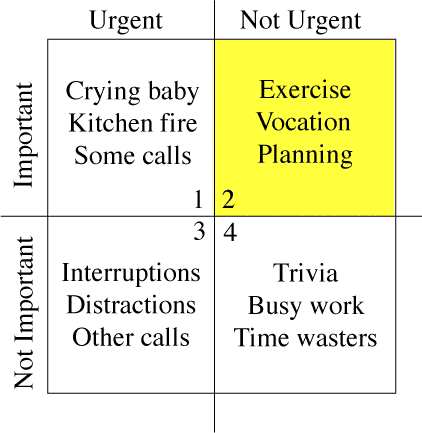
On debian-devel, there has been a discussion about the security issues of "spontaneously" appearing popups demanding the root password to make immediate security updates. There is a much more general issue related to this: computing without interruptions. Most of us have probably seen some friend or acquaintance with a (usually non-Linux) PC that is constantly beeping and flashing with chat notifications, new email popups, Adobe update this, Java update that, etc. In one recent case I came across somebody who had experienced a dramatic drop in his productivity as a consequence - giving him a laptop with a freshly installed copy of Linux made a dramatic difference to his work. I can already hear people insisting that security trumps everything (which isn't an original argument either) and that popups can't be avoided. A search on the web for "computing without interruptions" reveals users have a particular distaste for these things appearing while watching a video. Websites responding to that complaint fill the search results. With many types of interactive real-time content (video, WebRTC phone/video calls and so on) deployed within browsers, it is even more important for UI designers to contemplate when it is not appropriate to interrupt a user and to do everything possible to avoid interrupting the user. Preparing for disaster On the other hand, just ignoring security updates and not telling the user their disk is filling until 0 bytes remain available could only shift the problem down the road (from constant annoyance to periodic crisis). That said, sometimes you can still fill the disk very suddenly (especially with fast SSDs) and rather than relying on popups to keep users away from the precipice, applications (particularly the core desktop and daemon processes) could be tested more regularly to ensure they remain resilient in full disk situations. Managing information overload Popups are just part of a wider problem of information overload. There are emails too: some applications, such as Drupal, will send daily or weekly emails to a user if their system is not up to date. For many virtual-hosted sites, this starts to resemble a small flood. There is a flaw in this design: applications are competing for attention by sending more and more emails and popups or making them more annoying (e.g. the security updates in Debian 6 were ignorable popups in the top right-hand corner of the screen, Debian 7's Gnome Classic mode displays a big password prompt in the middle of the screen). The solution would be to develop a mechanism for unifying, de-duplicating and then prioritising these information/event flows. Some fault alerting systems already do this for their own events - these are niche solutions that aren't always applicable to the average PC-owner, although the principles are well tested. Some email organisation tools have similar features, but only for email. I'm not currently aware of any solution that synthesizes such an experience for all possible information sources. Setting priorities One well-read work on this subject in the business world is The 7 Habits of Highly Effective People (Stephen R. Covey, 1989). Of particular interest for the problem at hand is the priority matrix (borrowed from the Eisenhower Method): The left column, Urgent items, typically must be executed by a certain date (e.g. buying a gift before a birthday or installing a new SSL certificate before the old one expires). A security update or Acrobat reader update does not have this same characteristic. Under this model:
Urgent Non-urgent
Important Replace SSL certificate
Buy birthday gift
Security update
Run backup job
Not important Register for conference before deadline for free gift Non-security update for Acrobat reader
Covey even released an Outlook plugin, Plan Plus to help people organise their tasks (and their lives) using his methodology. Unfortunately it is closed-source software with a terrible set of ratings on Amazon - this review from a customer stands out: "My take is that Franklin does not consider robust software nor customer support to be either Urgent or Important." Could this be replicated more successfully with an open-source plugin for Mozilla Lightning or a similar productivity tool, and could the concept be extended across the range of data sources, including email, calendar items, system notifications and more to provide a unified approach to both the computing platform and general productivity (real-life) time management? Would this help solve the same problem in a more effective manner? In other words, would such an effort to help users integrate the demands of technology with the other demands of life make them more likely to keep their systems up to date? The wider community experience Going beyond the desktop/user experience, could this model be extended to automatically integrate external tasks, such as handling bug reports, moderating mailing lists and other slightly tedious things that have to be given regular attention to keep the free-software world moving along smoothly? Managing down-time For people who work in computing, there is almost no down-time any more. Even when on holiday, checking in for a flight might involve navigating through a buggy wifi access control system and an annoying set of advertisements from your low-cost airline as you try to print a boarding pass. These things often trigger thoughts about similar issues on client projects. Glancing at your email to find the booking number could awaken thoughts of a whole lot of projects you had tried to put out of your mind for a week. This is another area where excessive popups and emails can only compound the problem. Who really wants to download and install security updates while on holiday using an intermittent wifi connection? Managing all these events through a common mechanism may also finally make it possible to have an "ordinary user" experience with your PC. In practice, this might mean being able to view information/events through a time-of-day filter or "holiday mode" - and only on demand. A worthy design goal? Would any free software operating system make it a design goal to give their users a 100% interrupt-free experience? Of course there would still be things like chat notifications - but those would only be possible when a user has signed-in to a chat application. The distinction for the interrupt-free experience would only need to apply to default system behavior and not to every application.

Petter Reinholdtsen: Fixing the Linux black screen of death on machines with Intel HD video

When installing RedHat, Fedora, Debian and Ubuntu on some machines, the screen just turn black when Linux boot, either during installation or on first boot from the hard disk. I've seen it once in a while the last few years, but only recently understood the cause. I've seen it on HP laptops, and on my latest acquaintance the Packard Bell laptop. The reason seem to be in the wiring of some laptops. The system to control the screen background light is inverted, so when Linux try to turn the brightness fully on, it end up turning it off instead. I do not know which Linux drivers are affected, but this post is about the i915 driver used by the Packard Bell EasyNote LV, Thinkpad X40 and many other laptops. The problem can be worked around two ways. Either by adding i915.invert_brightness=1 as a kernel option, or by adding a file in /etc/modprobe.d/ to tell modprobe to add the invert_brightness=1 option when it load the i915 kernel module. On Debian and Ubuntu, it can be done by running these commands as root:
echo options i915 invert_brightness=1   tee /etc/modprobe.d/i915.conf
update-initramfs -u -k all
Since March 2012 there is a mechanism in the Linux kernel to tell the i915 driver which hardware have this problem, and get the driver to invert the brightness setting automatically. To use it, one need to add a row in the intel_quirks array in the driver source drivers/gpu/drm/i915/intel_display.c (look for "static struct intel_quirk intel_quirks"), specifying the PCI device number (vendor number 8086 is assumed) and subdevice vendor and device number. My Packard Bell EasyNote LV got this output from lspci -vvnn for the video card in question:
00:02.0 VGA compatible controller [0300]: Intel Corporation \
    3rd Gen Core processor Graphics Controller [8086:0156] \
    (rev 09) (prog-if 00 [VGA controller])
 Subsystem: Acer Incorporated [ALI] Device [1025:0688]
 Control: I/O+ Mem+ BusMaster+ SpecCycle- MemWINV- VGASnoop- \
    ParErr- Stepping- SE RR- FastB2B- DisINTx+
 Status: Cap+ 66MHz- UDF- FastB2B+ ParErr- DEVSEL=fast >TAbort- \
    <tabort-><mabort->SERR- <perr- intx-="INTx-" latency:="Latency:"><unassigned> [disabled]
 Capabilities: <access denied="denied">
 Kernel driver in use: i915
The resulting intel_quirks entry would then look like this:
struct intel_quirk intel_quirks[] =  
       ...
        /* Packard Bell EasyNote LV11HC needs invert brightness quirk */
	  0x0156, 0x1025, 0x0688, quirk_invert_brightness  ,
       ...
 
According to the kernel module instructions (as seen using modinfo i915), information about hardware needing the invert_brightness flag should be sent to the dri-devel (at) lists.freedesktop.org mailing list to reach the kernel developers. But my email about the laptop sent 2013-06-03 have not yet shown up in the web archive for the mailing list, so I suspect they do not accept emails from non-subscribers. Because of this, I sent my patch also to the Debian bug tracking system instead as BTS report #710938, to make sure the patch is not lost. Unfortunately, it is not enough to fix the kernel to get Laptops with this problem working properly with Linux. If you use Gnome, your worries should be over at this point. But if you use KDE, there is something in KDE ignoring the invert_brightness setting and turning on the screen during login. I've reported it to Debian as BTS report #711237, and have no idea yet how to figure out exactly what subsystem is doing this. Perhaps you can help? Perhaps you know what the Gnome developers did to handle this, and this can give a clue to the KDE developers? Or you know where in KDE the screen brightness is changed during login? If so, please update the BTS report (or get in touch if you do not know how to update BTS).

Rog rio Brito: Working with CVS via Git

The easiest way of using git locally to commit to a CVS repository is to have both a git clone of the CVS repository and a CVS checkout of your repository. Initial steps that Work for Me (TM)
  1. Create your git clone of the CVS repository:
     git cvsimport -v -a -A /tmp/lame-authors.txt -k -m -d \
         :ext:rbrito@lame.cvs.sourceforge.net:/cvsroot/lame lame
    
    The command above will create your clone of the CVS repository in the current directory which we suppose, for the sake of this discussion, is /tmp/gitified. If want to specify a directory different than what you're in, then you should add the option -C /path/to/git/repository.
  2. Create a checkout of the CVS repository for CVS work stuff (I'm checking out things under /tmp):
     cvs -z3 -d:ext:rbrito@lame.cvs.sourceforge.net:/cvsroot/lame checkout lame
    
    This will create your CVS checkout on the directory /tmp/lame, assuming that you are working under /tmp, as I do.
Doing real work
  1. Go to your git clone (/tmp/gitified) and start hacking, committing, etc.
  2. When it is time to send your patches to the CVS repo, you have to:
     export GIT_DIR=/tmp/gitified/.git
     cd /tmp/lame
     git cherry origin master   sed -n 's/^+ //p'   xargs -l1 git cvsexportcommit -c -p -v
    
    This will automatically check in all the commits that you have made in the previous step.
Continuing your work afterwards
  1. First, discard your commits in your git repository, so that you don't get further problems with git cvsimport.
  2. Update your git repository with the current contents of the CVS repo:
     cd /tmp/gitified
     git cvsimport -v -a -A /tmp/lame-authors.txt -k -m -d \
         :ext:rbrito@lame.cvs.sourceforge.net:/cvsroot/lame lame
    
  3. Update your CVS repository with the current contents of the CVS repo too:
     cd /tmp/lame
     cvs update
    
Conclusion Of course, I would prefer a simpler, leaner workflow. If you happen to have one, please let me know.

Ben Hutchings: Updating the Linux kernel for Debian 7.1

The first point release for Debian 'wheezy', 7.1, is due next weekend. The Linux kernel should be updated with: The new package, version 3.2.46-1, is available for most architectures in stable-proposed-updates. Please test it now if you can, so we can catch any serious regressions.

10 June 2013

Petter Reinholdtsen: Third alpha release of Debian Edu / Skolelinux based on Debian Wheezy

The third wheezy based alpha release of Debian Edu was wrapped up today. This is the release announcement: New features for Debian Edu 7.0.0 alpha2 released 2013-06-10 This is the release notes for for Debian Edu / Skolelinux 7.0.0 edu alpha2, based on Debian with codename "Wheezy". About Debian Edu and Skolelinux Debian Edu, also known as Skolelinux, is a Linux distribution based on Debian providing an out-of-the box environment of a completely configured school network. Immediately after installation a school server running all services needed for a school network is set up just waiting for users and machines being added via GOsa , a comfortable Web-UI. A netbooting environment is prepared using PXE, so after initial installation of the main server from CD, DVD or USB stick all other machines can be installed via the network. The provided school server provides LDAP database and Kerberos authentication service, centralized home directories, DHCP server, web proxy and many other services. The desktop contains more than 60 educational software packages and more are available from the Debian archive, and schools can choose between KDE, Gnome, LXDE and Xfce desktop environment. This is the third test release based on Debian Wheezy. Basically this is an updated and slightly improved version compared to the Squeeze release. Software updates Other changes Known issues Where to get it To download the multiarch netinstall CD release you can use The MD5SUM of this image is: 27bbcace407743382f3c42c08dbe8178
The SHA1SUM of this image is: e35f7d7908566cd3075375b3721fa10ee420d419 How to report bugs http://wiki.debian.org/DebianEdu/HowTo/ReportBugs

Patrick Matth i: Some photos of my Turkey/Belek vacation

Hola, now, where I will travel again for 15 days to Fuerteventura/Corralejo from the 21.06.2013 until 07.07.2013, I remember myself, that I forget to post some images from my last vacation in Turkey/Belek. Since my little realy cheap cam was damaged after a few days, I will post some photos of my buddy Robyn. DSC08514 DSC08423 DSC07583 DSC07562 DSC07499 DSC07214

9 June 2013

Daniel Pocock: The Pope saw right through them


Popemobile - is it secure enough for the Pope to make confession without the NSA hearing anything? In his final days as Pope, Benedict XVI took it upon himself to comment on a political subject that has had the whole world talking for some time: those invasive airport scanners pushed by US securocrats. "Every action, it is above all essential to protect and value the human person in their integrity." "Even in this situation, one must never forget that respecting the primacy of the human person and attention to his or her needs does not make the service less efficient nor penalise economic management." At least, the press thought he was talking about body scanners. Maybe it was divine intervention, or maybe just a very good understanding of the dark side of human nature, but these comments could be equally applicable to the unfolding scandal engulfing the NSA as they seek to monitor, record and understand every thought and feeling we have at every moment of our lives. On the issue of those scanners, however, it now appears clear that the reassurances we've been hearing - that invasive airport body scanners don't save copies of the pictures, for example - are about as believable as the ousted Iraqi Information minister Mohammed Saeed al-Sahaf appearing daily on TV to reassure the world that Saddam would be victorious even as the invading forces entered Baghdad. Saddam's former Information Minister, Mohammed Saeed al-Sahaf
Saddam's former Information Minister, Mohammed Saeed al-Sahaf

Paul Tagliamonte: Automatically lint your packages with debuild.me

Over my time working with Debian packages, I've always been concerned that I have been missing catchable mistakes by not running all the static checking tools I could run. As a result, I've been interested in writing some code that automates this process, a place where I can push a package and come back a few hours later to check on the results. This is great, since it provides a slightly less scary interface to new packagers, and helps avoid thinking they've just been told off by a Developer. I've spent the time to actually write this code, and I've called it debuild.me. The code itself is in its fourth iteration, and is built up from a few core components. The client / server code (lucy and ethel) are quite interconnected, but firehose works great on it's own, and is a single, unified (and sane!) spec that is easy to hack with (or even on!). Hopefully, this means that our wrappers will be usable outside of debuild.me, which is a win for everyone. Backend Design The backend (lucy) was the first part I wanted to design. I made the decision (very early on) that everything was going to be 100% Python 3.3+. This lets me use some of the (frankly, sweet) tools in the stdlib. Since I've written this type of thing before (i've tried to write this tool many, many, many, many times before), so I had a rough sense of how I wanted to design the backend. Past iterations had suffered from and overly complex server half, so I decided to go ultra minimal with the design of debuild.me. <aside class="left"> You can find the code for the server (lucy) on my GitHub </aside> The backend watches a directory (using a simple inotify script) and processes .changes files as they come in. If the package is a source package, a set of jobs are triggered (such as lintian, build and desktop-file-validate), as well as a different set for binary packages (such as lintian, piuparts and adequite). Only people may upload source packages (without any debs) and only builders can upload binary packages (without source). The client and server talk using XML-RPC with BASIC HTTP auth. I'm going to (eventually) SSL secure the transport layer, but for now, this will work as a proof of concept. Since I tend to like to keep my codebase simple and straightforward, I've used MongoDB as Lucy's DB. This lets me move between documents in Mongo to Python objects without any trouble. In addition, I evaluated some of the queue code out there (ZMQ, etc), and they all seemed like overkill for my problem, and had a hard time keeping track of jobs that (must never!) get lost. As a result, I wrote my own (very simple) job queue in Mongo, which has no sense of scheduling (at all), but can do it's job (and do it well). Jobs describe what's to be built with a link to the package document that the job relates to, and it's arch and suite (don't worry about the rest just yet). Jobs get assigned via natural sort on it's UUID based _id, and assigned to the first builder that can process it's arch / suite. Source packages are considered arch:all / suite:unstable (so they always get the most up-to-date linters on any arch that comes along). Lucy also allows for uploads to be given an X-Lucy-Group tag to manage which set of packages they're a part of. This comes in handy for doing partial archive rebuilds, or eventually using it to manage what jobs should be run on which uploads. This will allow me to run much more time-consuming tools for packages I want to review versus rebuilding to ensure packages don't FTBFS or aren't adequite. Client Design The buildd client (ethel) talks with lucy via XML-RPC to get assigned new jobs, release old jobs, close finished jobs, and upload package report data. When the etheld requests a new job, it also passes along what suites it knows of, which arches it can build, as well as what types it can run (stuff like lintian, build or cppcheck.) Lucy then assigns the builder to that job (so that we don't allocate the same job twice), and what time it was assigned at. <aside class="right"> You can find the code for the client (ethel) on my GitHub </aside> Ethel then takes the result of the job (in the form of a firehose.model tree) and transmits it over the line back to the Lucy server as a report (which also contains information on if the build failed or not), at which point lucy hands back a location (on the lucy host) that the daemon can write the log to. If the job was a binary build, the etheld process will dput the package to the server, with a special X-Lucy-Job tag to signal which job that build relates to, so that future lint runs can fetch the deb files that the build produced. Tooling Ethel runs a set of static checkers on the source code, which are basically fancy wrappers around the tools we all know and love (like lintian, desktop-file-validate, or piuparts) which output Firehose in place of home-grown stdout. This allows us to programmatically deal with the output of these tools in a normal and consistent way. <aside class="left"> You can read more about Firehose over in the Firehose README.rst </aside> Some of the more complex runners are made of 3 parts - a runner, wrapper and command. The server invokes the command routine, which invokes the runner (the command just provides a unified interface to all the runners), who's output gets parsed by the wrapper to turn it into a Firehose model tree. The goal here is that tons of very quick-running tools get run over a distributed network, and machine-readable reports get filed in a central location to aid in reviewing packages. Ricky In addition to the actual code to run builds, I've worked on a few tools to aid with using debuild.me for my DD related life. I have some uncommon use-cases that are nice to support. One such use-case is the ability to rebuild packages from the archive (unmodified) to check that they rebuild OK against the target. This is handy for things like arch:all packages that get uploaded (since they never get rebuilt on the buildd machines, and FTBFSs are sadly common) or packages that have had a Build-Dependency change on them. Ricky is able to create a .dsc url to your friendly local mirror, and fetch that exact version of the package. Ricky can then also use the .dsc (in a monumental hack) to forge a package_version_source.changes file, and sign it with an autobuild key and upload it to the debuild.me instance. Since it can also modify the .changes's target distribution, you can also use this to test if a package will build on stable or testing, unmodified. Fred Fred is a wrapper around Ricky, to help with fetching packages that may not exist yet. Fred also contains an email scraper to read off such lists as debian-devel-changes, and add an entry to fetch that upload when it becomes available on the local mirror, pass it to ricky, and allow debuild.me to rebuild new packages that match a set of criteria. I'm currently playing around with the idea of rebuilding all incoming Python packages to ensure they don't FTBFS in a clean chroot. Loofah Loofah is also another wrapper around Ricky, but for use manually. Loofah is able to sync down the apt Sources list, and place it in Mongo for fast queries. This than allows me to manually run rebuilds on any Source package that fits a set of critera (written in the form of a Mongo query), which get pulled and uploaded by Ricky. An example script to rebuild any packages that Build-Depend on python3-all-dev in Debian unstable / main would look like: <aside class="right"> You can find more queries in the Loofah examples </aside>
[
      "version": "unstable", "suite": "main"  ,
      "Build-Depends": "python3-all-dev"  
]
Or, a script to rebuild any package that depends on CDBS:
[
     ,
     "$or": [ "Build-Depends": "cdbs" ,
              "Build-Depends-Indep": "cdbs" ] 
]
You can use anything that exists in the Sources.gz file to query off of ( including Maintainer!) Future Work The future work on debuild.me will be centered around making it easier for buildd nodes to be added to the network, with more and more automation in that process (likely in the form of debs). I also want to add better control over the jobs, so that packages I upload only go to my personal servers. I'd also very much like to get better EC2 / Virtualization support integrated into the network, so that the buildd count grows with the queue size. This is a slightly hard problem that I'm keen to fix. I'm also considering moving the log parsing code out of the workers, so that the parsing code can be fixed without upgrading all the workers. This would also drop the Firehose dep on the client code, which would be nice. Migration from a debuild.me build into a local reprepro repo is something that would be fairly easy to do as well, likely to be done remotely via the XML-RPC interface, which calls a couple of reprepro commands (such as includedsc and includedeb) and publishes it to the user's repo. This is a nice use of the debs that get built, and could also allow debuild.me to be used like a PPA system, but this allows the user to not migrate packages that may contain piuparts issues.

Ingo Juergensmann: Edward Snowden whistleblowed PRISM

Sometimes there are true heros. Even today. Like Edward Snowden who made PRISM publically known. There's an interview by The Guardian with Edward Snowden:
In a note accompanying the first set of documents he provided, he wrote: "I understand that I will be made to suffer for my actions," but "I will be satisfied if the federation of secret law, unequal pardon and irresistible executive powers that rule the world that I love are revealed even for an instant." [...] He has had "a very comfortable life" that included a salary of roughly $200,000, a girlfriend with whom he shared a home in Hawaii, a stable career, and a family he loves. "I'm willing to sacrifice all of that because I can't in good conscience allow the US government to destroy privacy, internet freedom and basic liberties for people around the world with this massive surveillance machine they're secretly building."
Neither Bradley Manning nor Edward Snowden should be sentenced, but the Government that is responsible for such surveilance programs like PRISM should.
Kategorie:
Tags:

Gregor Herrmann: RC bugs 2013/23

I know, I'm starting to repeat myself but: this week was again characterized more be RC bug prevention than by actual RC bug fixing. in other words: I was mostly dealing with not-yet release-critical bugs around the perl 5.18 transition. actual RC bugs I've worked on (also mostly pkg-perl related):

8 June 2013

Michael Stapelberg: Survey answers part 1: systemd has too many dependencies, or it is bloated, or it does too many things, or is too complex

This blog post is the first of a series of posts dealing with the results of the Debian systemd survey. I intend to give a presentation at DebConf 2013, too, so you could either read my posts, or watch the talk, or both :-). The top concern shared by most people is:
systemd has too many dependencies, or it is bloated, or it does too many things, or is too complex
Now this concern actually has a lot of different facets, and I am trying to share my opinion on each of them. systemd has too many dependencies First, let s start with too many dependencies , because that is easy to check and reason about. I have created a document which lists all dependencies of the systemd binary itself (pid 1) and all the binaries which are currently shipped by the systemd Debian package. If you don t want to take my word for granted, please read that document. Have you read the document? Very nice! As you can see, the systemd binary itself has 10 dependencies (excluding libc). Now, the question is, what is bad about dependencies? Why do people list dependencies as a top concern?
  1. Cyclic dependencies. When you hear that your init system depends on DBus, you might argue that there is a cyclic dependency here, because DBus needs to be started by the init system. However, systemd does NOT depend on dbus-daemon (!) to boot your machine. Instead of using the system bus, it uses a private UNIX socket. Therefore, systemd uses DBus merely as a serialization format for IPC between its different processes. Only when you want to access systemd via its API as a user (non-root), you actually use the system bus. Since we are talking about DBus: DBus provides a well-tested serialization format and IPC mechanism so that systemd doesn t have to reinvent the wheel and instead benefits from wide support within languages.
  2. Complicated code. I feel like there is the implicit assumption that lots of dependencies correlate with complicated code that is easy to break. I encourage you to have a look at systemd s source code: look for the places where specific libraries are used, e.g. enforce_user which uses libcap. You ll notice that the code is not complex and usage of the libraries is clear.
  3. Software dragging in lots of library packages. The libraries which systemd uses are already in widespread use (e.g. DBus, udev, selinux, libcap, pcre, ). On a typical Debian installation, only very few of them will be dragged in by systemd, if at all. As an example, on a fresh Debian Wheezy installation, less than 10 packages will end up on your machine when running apt-get install systemd .
  4. More memory use. The Linux kernel maps libraries into memory only once, no matter how many processes use them. As stated in the dependency list, on machines where the libraries are not already loaded, systemd brings in about 500 KiB of additional memory-mapped libraries in the worst case. On the machines we have these days, this is a reasonable cost to pay for all the benefits systemd gets us. This holds true on embedded systems with only a few MiB of RAM and especially on typical workstations with 8+ GiB of RAM.
systemd is bloated Now, let s talk about bloat. Again, this is a point which has many facets. I d like to quote the Wikipedia definition of software bloat:
Software bloat is a process whereby successive versions of a computer program become perceptibly slower, use more memory or processing power, or have higher hardware requirements than the previous version whilst making only dubious user-perceptible improvements.
The first part of the definition certainly does not match systemd it is measurably faster than sysvinit. As for memory usage: systemd s RSS is 1.8 MiB, whereas sysvinit uses 0.8 MiB. As I argued on the More memory use point in the dependencies section, I think the additional resource cost is well worth the benefits. Also note that systemd s features are NOT all implemented in the binary which is PID 1. As explained in the dependency list, systemd consists of many cleanly separated binaries. So if a new version of systemd gathers an additional feature, this does not mean that your PID 1 will be bigger. While systemd runs on any hardware, it has an indirect hardware requirement: it requires some Linux kernel features (which are all enabled in Debian kernels). That might rule out usage of systemd on really old embedded hardware where you don t have a chance to update the kernel. While it is sad that those machines cannot profit from systemd, switching to systemd as a default has no downside either: Debian continues to support sysvinit for quite some time, so these machines will continue to work even with upcoming Debian versions. systemd does too many things The Wikipedia definition continues:
[ ] perceived bloat can occur from the software servicing a large, diverse marketplace with many differing requirements. Most end users will feel they only need some limited subset of the available functions and will regard the others as unnecessary bloat, even if people with different requirements do use them.
I think the last part of the Wikipedia definition applies to systemd: it does service a large and diverse marketplace . That marketplace is the entirety of existing software which is started by an init system. Also, systemd can be used on a wide range of hardware (embedded devices, tablets, phones, notebooks, desktops, servers) which requires different features. As an example: on a desktop system you typically don t care strongly about a watchdog feature, but on embedded or servers that feature is very handy. Similarly, on a tablet, forward secure sealing of logfiles is not as important as on a server. Therefore, I can understand if you feel that you don t need many of the features systemd provides. But please think of other users and maintainers who are very happy with systemd s benefits. Also note that while systemd supports many things (in separate binaries!), you don t have to use them all. It still makes sense to ship them all in the same package. Take coreutils as another example in that area. The binaries belong together, even though you most likely haven t used all of them (e.g. od, pr, ptx, :-)). systemd is too complex The remaining concern is that systemd is too complex. In my experience, complexity is often inherent to a specific area and one cannot simply make it go away. Instead, there are different models of how that complexity is represented. Think of the monolithic Linux kernel versus the MINIX microkernel. The latter has a very small amount of lines of source in the kernel, but puts the complexity into userspace. The former uses a different approach with more source in the kernel. The arguments between both camps show that neither is clearly right or clearly wrong. In a way, sysvinit represents the MINIX model: it has a small core (the init binary itself), but a lot of complexity in shell scripts and external programs. The fact that solutions are copied from one init script to another leads to lots of subtle errors and makes code reuse really hard. systemd however has more source code in the binaries, but requires only very simple, descriptive, textual configuration instead of complex init scripts. To me, it seems preferable to have the complexity in a single place instead of distributed across lots of people and projects. Conclusion In a way, you are right. systemd centralizes complexity from tons of init scripts into a single place. However, it therefore makes it very easy for maintainers to write service files (equivalent of an init script) and provides a consistent and reliable interface for service management. Furthermore, it is different than sysvinit, and different solutions often seem complex at first. While systemd consumes more resources than sysvinit, it uses them to make more information available about services; its finer-grained service management requires more state-keeping, but in turn offers you more control over your services.

Next.

Previous.