Search Results: "sten"

30 December 2015

Clint Adams: Oh what a night, late December 1963

24 Dec. 63 Dear Uncle Ron and Aunt Helen, It has been quite awhile since I have written you folks. I am not too much of one for writing, and when I do write, I keep putting it off, and putting it off; and the next thing you know, the weeks turn into months and then the months into years. I haven't sent any Christmas cards, so at this time I'll offer my best wishes for the season to you. It is Christmas Eve and I am working tonight. I will also work New Year's eve and day. It really doesn't seem like Christmas here, and there isn't that much to do in the evening's; So I'm just as well off working. As I had mentioned, I had intended to send you some coins from Korea but I believe that I put them in with a package that I had sent to Mom and told her to give them to you. In any event, here are some in this box. The Korean coin with the 10 on it is 10 Won, and worth about $.0769. The large copper coin is Japanese ( 10 Yen) and about 2.8 Wait! I was wrong on the Korean coins.They are 10 Hwan which is the old money. When they Changed to Won, they made 10 Hwan equal to 1 Won. (Sounds confusing and tongue-tying, doesn't it?) So these 10 copper pieces with the 10 on them altogether are only worth 7 / The Viet Namese coins with the former president Diem picture on them are soon being taken out of circulation. ( Since he was overthrown and killed, they are going to replace the money also.) The small pieces marked 1 dong are 1 piastre; also called one Viet Namese dollar. 1 piastre is about .7 . I also recall sending some coins home in my hold baggage. I'll tell Mom to look for them and give them to you. Now that I look back on it, the year I spent in Korea wasn't bad. It was difficult at first having to work for an arrogant Jew boss, but after a few months I got out of his office and was on my own working directly for the army people ( U.S.) The country of Korea isn't too bad. As you can see on the coins they were in the year 4294 last year. It is surprising for a civilization to be that far along in years and still live under very primitive conditions. Going from Korea to Japan is like going from the dark ages into the future science fiction world. Those people are really progressing in Japan. I spent several days in Japan after I left Korea. Then I went to Honolulu for almost a month. Then I went back to Japan for Leave for 3 weeks and then down here to Viet Nam in October. They were building like crazy in Japan to get ready for the Olympics. Working 4 hours a day, 7 days a week on construction. You could drive into Tokyo early in the evening and return late in the night and find the road you had gone in on was now completely torn away. And downtown Tokyo is vey nice. Lots of modern building and just about any modern gadget you can think of. I really like their cooking also. Their Kobe Beef is excellent. In this beef, the cattle are pampered from the time they are born until they are slaughtered. They massage them, feed them beer, and let them live a lazy life. I would really like to work a year or two in Japan. The hot baths and big tubs are also great. Only it is almost impossible to stand the hot temperatures that they can. Westerners always have to add quite a lot of cold water before they can get in the tub. The Viet Namese people are much dirtier than the Japanese or Koreans. They don't have any hot baths here in Viet Nam. In fact, the majority of hotels ( built by the French) don't even have hot water in them. The Korean houses don't look like much from the outside, but inside they are spotlessly clean. The older Japanese buildings look nic efrom the outside and are also clean inside. I am here in the town of Nha Trang. It is a small town on the coast of the China Sea. I like it here. My hotel is less than a hundred yards from the beach. We are now in the winter season also, but it just got a little cooler from having winds the past few weeks. This afternoon as we came to work there were all sorts of people in swimming. Lobster is also plentiful here and I eat quite a bit of it. Most of the restaurant make a creamed corn soup with lots of chunks of crab meat in it. This is very good. Being out here in Nha Trang, we missed the coup d'etat. Things were quiet here and the only way we knew what was happening was to listen to the radio and talk to our co-workers of our radio system in Saigon. When they lifted martial law and the curfew in Saigon, it took them several days later to follow suit here. There seems to be a noticed improvement since the coup. The people in general seem much happier and there appears to be much more general activity going on. Well, I guess that's about it for now. I think I may have some Korean Won notes back in my room and I'll check and enclose them if I can find them. Say hello to Ira & family when you see them, and also to Aunt Marie if she is still there with you. 'Bye for now Your nephew PS The Viet Namese coins with 50 XU on them are piastres.

25 December 2015

Thorsten Alteholz: Debian Med Bug Squashing in Advent 2015

The Debian Med Bug Squashing just ended and the Debian Med Advent Calendar is full to bursting. Like the years before, the Debian Med team performed a bug squashing event from December 1st to 24th. All bugs that have been closed during that period got an entry in the calendar. This year I am really impressed with the achievement of all participants. After the rather small quantity last year, the incredible number of 150 bugs have been closed this year! Thanks alot!
year number of bugs closed
2011 63
2012 28
2013 73
2014 5
2015 150

22 December 2015

Ian Wienand: Platform bootstrap for OpenStack Infrastructure

This is a terse guide on bootstrapping virtual-machine images for OpenStack infrastructure, with the goal of adding continuous-integration support for new platforms. It might also be handy if you are trying to replicate the upstream CI environment. It covers deployment to Rackspace for testing; Rackspace is one of the major providers of capacity for the OpenStack Infrastructure project, so it makes a good place to start when building up your support story. Firstly, get an Ubuntu Trusty environment to build the image in (other environments, like CentOS or Fedora, probably work -- but take this step to minimise differences to what the automated machinery of what upstream does). You want a fair bit of memory, and plenty of disk-space. The tool used for building virtual-machine images is diskimage-builder. In short, it takes a series of elements, which are really just scripts run in different phases of the build process. I'll describe building a Fedora image, since that's been my focus lately. We will use a fedora-minimal element -- this means the system is bootstrapped from nothing inside a chroot environment, before eventually being turned into a virtual-machine image (contrast this to the fedora element, which bases itself off the qcow2 images provided by the official Fedora cloud project). Thus you'll need a few things installed on the Ubuntu host to deal with bootstrapping a Fedora chroot
apt-get install yum yum-utils python-lzma
You will hit stuff like that python-lzma dependency on this road-less-travelled -- technically it is a bug that yum packages on Ubuntu don't depend on it; without it you will get strange yum errors about unsupported compression. At this point, you can bootstrap your diskimage-builder environment. You probably want diskimage-builder from git, and then build up a virtualenv for your support bits and pieces.
git clone git://git.openstack.org/openstack/diskimage-builder
virtualenv dib_env
. dib_env/bin/activate
pip install dib-utils
dib-utils is a small part of diskimage-builder that is split-out; don't think too much about it. While diskimage-builder is responsible for the creation of the basic image, there are a number of elements provided by the OpenStack project-config repository that bootstrap the OpenStack environment. This does a lot of stuff, including caching all git trees (so CI jobs aren't cloning everything constantly) and running puppet setup.
git clone git://git.openstack.org/openstack-infra/project-config
There's one more trick required for building the VHD images that Rackspace requires; make sure you install the patched vhd-util as described in the script help. At this point, you can probably build an image. Here's something approximating what you will want to do
break=after-error \
TMP_DIR=~/tmp \
ELEMENTS_PATH=~/project-config/nodepool/elements \
DIB_DEV_USER_PASSWORD="password"  DIB_DEV_USER_PWDLESS_SUDO=1 \
DISTRO=23 \
./bin/disk-image-create -x --no-tmpfs -t vhd \
   fedora-minimal vm devuser simple-init \
   openstack-repos puppet nodepool-base node-devstack
To break some of this down This goes and does its thing; it will take about 20 minutes. Depending on how far your platform diverges from the existing support, it will require a lot of work to get everything working so you can get an image out the other side. To see a rough example of what should be happening, see the logs of the official image builds that happen for a variety of platforms. At some point, you should get a file image.vhd which is now ready to be deployed. The only reasonable way to do this is with shade. You can quickly grab this into the virtualenv we created before
pip install shade
Now you'll need to setup a clouds.yaml file to give yourself the permissions to upload the image. It should look something like
clouds:
  rax:
    profile: rackspace
    auth:
       username: your_rax_username
       password: your_rax_password
       project_id: your_rax_accountnum
    regions:
    - IAD
You should know your user-name and password (whatever you log into the website with), and when you login to Rackspace your project_id value is listed in the drop-down box labeled with your username as Account #. shade has no UI as such, so a simple script will do the upload.
import shade
shade.simple_logging(debug=True)
cloud = shade.openstack_cloud(cloud='rax')
image = cloud.create_image('image-name', filename='image.vhd', wait=True)
Now wait -- this will also take a while. Even after upload it takes a fair while to process (you will see the shade debug output looping around some glance calls seeing if it is ready). If everything works, the script should return and you should be able to see the new image in the output of nova list-images. At this point, you're ready to try booting! One caveat is that the Rackspace web interface does not seem to give you the option to boot with a configuration drive available to the host, essential for simple-init to bring up the network. So boot via the API with something like
nova boot --flavor=2 --image=image-uuid --config-drive 1 test-image
This should build and boot your image! This will allow you to open a whole new door of debugging to get your image booting correctly. You can now iterate by rebuilding/uploading/booting as required. Note these are pretty big images, and uploaded in broken-up swift files, so I find swift delete --all helpful to reset between builds (obviously, I have nothing else in swift that I want to keep). The Rackspace java-based console UI is rather annoying; it cuts itself off every time the host reboots. This makes it quite difficult to catch the early bootup, or modify grub options via the boot-loader, etc. You might need to fiddle timeout options, etc in the image build. If you've managed to get your image booting and listening on the network, you're a good-deal of the way towards having your platform supported in upstream OpenStack CI. At this point, you likely want to peruse the nodepool configuration and get an official build happening here. Once that is up, you can start the process of adding jobs that use your platform to test! Don't worry, there's plenty more that can go wrong from here -- but you're on the way! OpenStack infra is a very dynamic environment, which many changes in progress; so in general, #openstack-infra on freenode is going to be a great place to start looking for help.

20 December 2015

Lunar: Reproducible builds: week 34 in Stretch cycle

What happened in the reproducible builds effort between December 13th to December 19th: Infrastructure Niels Thykier started implementing support for .buildinfo files in dak. A very preliminary commit was made by Ansgar Burchardt to prevent .buildinfo files from being removed from the upload queue. Toolchain fixes Mattia Rizzolo rebased our experimental debhelper with the changes from the latest upload. New fixes have been merged by OCaml upstream. Packages fixed The following 39 packages have become reproducible due to changes in their build dependencies: apache-mime4j, avahi-sharp, blam, bless, cecil-flowanalysis, cecil, coco-cs, cowbell, cppformat, dbus-sharp-glib, dbus-sharp, gdcm, gnome-keyring-sharp, gudev-sharp-1.0, jackson-annotations, jackson-core, jboss-classfilewriter, jboss-jdeparser2, jetty8, json-spirit, lat, leveldb-sharp, libdecentxml-java, libjavaewah-java, libkarma, mono.reflection, monobristol, nuget, pinta, snakeyaml, taglib-sharp, tangerine, themonospot, tomboy-latex, widemargin, wordpress, xsddiagram, xsp, zeitgeist-sharp. The following packages became reproducible after getting fixed: Some uploads fixed some reproducibility issues, but not all of them: Patches submitted which have not made their way to the archive yet: reproducible.debian.net Packages in experimental are now tested on armhf. (h01ger) Arch Linux packages in the multilib and community repositories (4,000 more source packages) are also being tested. All of these test results are better analyzed and nicely displayed together with each package. (h01ger) For Fedora, build jobs can now run in parallel. Two are currently running, now testing reproducibility of 785 source packages from Fedora 23. mock/1.2.3-1.1 has been uploaded to experimental to better build RPMs. (h01ger) Work has started on having automatic build node pools to maximize use of armhf build nodes. (Vagrant Cascadian) diffoscope development Version 43 has been released on December 15th. It has been dubbed as epic! as it contains many contributions that were written around the summit in Athens. Baptiste Daroussin found that running diffoscope on some Tar archives could overwrite arbitrary files. This has been fixed by using libarchive instead of Python internal Tar library and adding a sanity check for destination paths. In any cases, until proper sandboxing is implemented, don't run diffosope on unstrusted inputs outside an isolated, throw-away system. Mike Hommey identified that the CBFS comparator would needlessly waste time scanning big files. It will now not consider any files bigger than 24 MiB 8 MiB more than the largest ROM created by coreboot at this time. An encoding issue related to Zip files has also been fixed. (Lunar) New comparators have been added: Android dex files (Reiner Herrmann), filesystem images using libguestfs (Reiner Herrmann), icons and JPEG images using libcaca (Chris Lamb), and OS X binaries (Clemens Lang). The comparator for Free Pascal Compilation Unit will now only be used when the unit version matches the compiler one. (Levente Polyak) A new multi-file HTML output with on-demand loading of long diffs is available through the --html-dir option. On-demand loading requires jQuery which path can be specified through the --jquery option. The diffs can also be simply browsed for non-JavaScript users or when jQuery is not available. (Joachim Breitner) Example of on-demand loading in diffosope Portability toward other systems has been improved: old versions of GNU diff are now supported (Mike McQuaid), suggestion of the appropriate locale is now the more generic en_US.UTF-8 (Ed Maste), the --list-tools option can now support multiple systems (Mattia Rizzolo, Levente Polyak, Lunar). Many internal changes and code clean-ups have been made, paving the way for parallel processing. (Lunar) Version 44 was released on December 18th fixing an issue affecting .deb lacking a md5sums file introduced in a previous refactoring (Lunar). Support has been added for Mozilla optimized Zip files. (Mike Hommey). The HTML output has been optimized in size (Mike Hommey, Esa Peuha, Lunar), speed (Lunar), and will now properly number lines (Mike Hommey). A message will always be displayed when lines are ignored at the end of a diff (Lunar). For portability and consistency, Python os.walk() function is now used instead of find to perform directory listing. (Lunar) Documentation update Package reviews 143 reviews have been removed, 69 added and 22 updated in the previous week. Chris Lamb reported 12 new FTBFS issues. News issues identified this week: random_order_in_init_py_generated_by_python-genpy, timestamps_in_copyright_added_by_perl_dist_zilla, random_contents_in_dat_files_generated_by_chasen-dictutils_makemat, timestamps_in_documentation_generated_by_pandoc. Chris West did some improvements on the scripts used to manage notes in the misc repository. Misc. Accounts of the reproducible builds summit in Athens were written by Thomas Klausner from NetBSD and Hans-Christoph Steiner from The Guardian Project. Some openSUSE developers are working on a hackweek on reproducible builds which was discussed on the opensuse-packaging mailing-list.

18 December 2015

Joachim Breitner: A multitude of early Christmas presents

Today was a nice day with a surprising number of early Christmas presents:

17 December 2015

Simon Josefsson: Let s Encrypt Clients

As many others, I have been following the launch of Let s Encrypt. Let s Encrypt is a new zero-cost X.509 Certificate Authority that supports the Automated Certificate Management Environment (ACME) protocol. ACME allow you to automate creation and retrieval of HTTPS server certificates. As anyone who has maintained a number of HTTPS servers can attest, this process has unfortunately been manual, error-prone and differ between CAs. On some of my personal domains, such as this blog.josefsson.org, I have been using the CACert authority to sign the HTTPS server certificate. The problem with CACert is that the CACert trust anchors aren t shipped with sufficient many operating systems and web browsers. The user experience is similar to reaching a self-signed server certificate. For organization-internal servers that you don t want to trust external parties for, I continue to believe that running your own CA and distributing it to your users is better than using a public CA (compare my XMPP server certificate setup). But for public servers, availability without prior configuration is more important. Therefor I decided that my public HTTPS servers should use a CA/Browser Forum-approved CA with support for ACME, and as long as Let s Encrypt is trustworthy and zero-cost, they are a good choice. I was in need of a free software ACME client, and set out to research what s out there. Unfortunately, I did not find any web pages that listed the available options and compared them. The Let s Encrypt CA points to the official Let s Encrypt client, written by Jakub Warmuz, James Kasten, Peter Eckersley and several others. The manual contain pointers to two other clients in a seamingly unrelated section. Those clients are letsencrypt-nosudo by Daniel Roesler et al, and simp_le by (again!) Jakub Warmuz. From the letsencrypt.org s client-dev mailing list I also found letsencrypt.sh by Gerhard Heift and LetsEncryptShell by Jan Moj . Is anyone aware of other ACME clients? By comparing these clients, I learned what I did not like in them. I wanted something small so that I can audit it. I want something that doesn t require root access. Preferably, it should be able to run on my laptop, since I wasn t ready to run something on the servers. Generally, it has to be Secure, which implies something about how it approaches private key handling. The letsencrypt official client can do everything, and has plugin for various server software to automate the ACME negotiation. All the cryptographic operations appear to be hidden inside the client, which usually means it is not flexible. I really did not like how it was designed, it looks like your typical monolithic proof-of-concept design. The simp_le client looked much cleaner, and gave me a good feeling. The letsencrypt.sh client is simple and written in /bin/sh shell script, but it appeared a bit too simplistic. The LetsEncryptShell looked decent, but I wanted something more automated. What all of these clients did not have, and that letsencrypt-nosudo client had, was the ability to let me do the private-key operations. All the operations are done interactively on the command-line using OpenSSL. This would allow me to put the ACME user private key, and the HTTPS private key, on a YubiKey, using its PIV applet and techniques similar to what I used to create my SSH host CA. While the HTTPS private key has to be available on the HTTPS server (used to setup TLS connections), I wouldn t want the ACME user private key to be available there. Similarily, I wouldn t want to have the ACME or the HTTPS private key on my laptop. The letsencrypt-nosudo tool is otherwise more rough around the edges than the more cleaner simp_le client. However the private key handling aspect was the deciding matter for me. After fixing some hard-coded limitations on RSA key sizes, getting the cert was as simple as following the letsencrypt-nosudo instructions. I ll follow up with a later post describing how to put the ACME user private key and the HTTPS server certificate private key on a YubiKey and how to use that with letsencrypt-nosudo. So you can now enjoy browsing my blog over HTTPS! Thank you Let s Encrypt!

14 December 2015

Raphaël Hertzog: Freexian s report about Debian Long Term Support, November 2015

A Debian LTS logoLike each month, here comes a report about the work of paid contributors to Debian LTS. Individual reports In November, 114.50 work hours have been dispatched among 8 paid contributors. Their reports are available: Evolution of the situation We lost one hour of funding for December due to a sponsor not renewing, and we don t have any new sponsor lined up right now. There s another sponsor who will reduce his sponsorship starting with 2016. While the situation is relatively healthy right now, we should continue the efforts to find new sponsors, both to ensure we can cover more software in wheezy and to better share the costs: having many small sponsors is more resilient than relying on a few big ones. And we still haven t reached our second goal of funding the equivalent of a full-time position. In terms of security updates waiting to be handled, the situation is close to last month: the dla-needed.txt file lists 19 packages awaiting an update (2 less than last month), the list of open vulnerabilities in Squeeze shows about 22 affected packages in total (1 less than last month). Thanks to our sponsors The new sponsors are in bold.

No comment Liked this article? Click here. My blog is Flattr-enabled.

Guido G nther: Creating views in Jenkins using jenkins-job-builder-addons

I'm often using jenkins-job-builder to automatically create jenkins jobs since writing them in YAML is more comfortable then doing large amounts of jobs in the GUI, it serves consistency and helps automation. For views and build pipelines I so far resorted to other tools (like templates in the config management tool at use) but now there's jenkins-job-builder-addons by jimbydamonk. Creating a delivery pipeline view and the "All" view then gets as simple as:
- job:
    name: MyApp
    project-type: folder
    views:
      - delivery_pipeline:
          filter-executors: false
          filter-queue: false
          folder: true
          components:
            - name: Deploy
              first-job: app-deploy-test
          name: myapp-deploy-pipeline
          build-view-title: "MyApp Deploy Pipeline"
          number-of-pipelines: 3
          show-aggregated-pipeline: true
          number-of-columns: 1
          sorting: none
          show-avatars: false
          update-interval: 1
          allow-manual-triggers: true
          show-total-buildtime: true
          allow-rebuild: true
          allow-pipeline-start: true
      - all:
         folder: true
         name: All
This also uses the folder plugin to make sure the views end up in separate files. It currently needs a slightly patched jenkins-job-builder with this patch applied. Putting this here since I hit jenkins-job-builder-addons mostly by accident. Once jenkins-job-builder catched up I'll look into packaging this for Debian.

11 December 2015

Antonio Terceiro: Bits from the Debian Continuous Integration project

It s been almost 2 years since the Debian Continuous Integration project has been launched, and it has proven to be a useful resource for the development of Debian. I have previously made a an introductory post, and this this is an update on the latest developments. Infrastructure upgrade Back in early 2014 when Debian CI was launched, there were less than 200 source packages with declared test suite metadata, and using a single worker machine polling the archive for updates and running tests sequentially in an infinite loop ( the simplest thing that could possibly work ) was OK-ish. Then our community started an incredible, slow and persistent effort to prepare source packages for automated testing, and we now have almost 5,000 of them. The original, over-simplistic design had to be replaced. The effort of transforming debci in a distributed system was started by Martin Pitt, who did an huge amount of work. In the latest months I was able to complete that work, to a point where I am confident in letting it run (mostly) unatended. We also had lots of contributions to the web UI from Brandon Fairchild, who was a GSOC intern in 2014, and continues to contribute to this date. All this work culminated in the migration from a single-worker model to a master/workers setup, currently with 10 worker nodes. On busy periods all of those worker nodes will go on for days with full utilization, but even then the turnaround between package upload and a test run is now a lot faster than it used to. Debian members can inspect the resource usage on those systems, as well as the length of the processing queue, by browsing to the corresponding munin instance (requires authentication via a SSL client certificated issued by sso.debian.org). The system is currenly being hosted on a Amazon EC2 account sponsored by Amazon. The setup is fully automated and reproducible. It is not fully (or at all) documented yet, but those interested should feel free to get in touch on IRC (OFTC, #debci) Testing backend changed from schroot to lxc Together with the infrastructure updates, we also switched to using lxc instead of schroot as backend. Most test suites should not be affected by this, but the default lxc settings might cause some very specific issues in a few packages. See for example #806542 ( liblinux-prctl-perl: autopkgtest failures: seccomp, capbset ) Adding support for KVM is also in the plans, and we will get to that at some point. Learn more If you want to learn more on how you can add tests for your package, a good first start is the debci online documentation (which is also available locally if you install debci ). You might also be interested in watching the live tutorial (WebM, 469 MB!) that has been presented at Debconf 15 earlier this year, full of tips and real examples from the archive. It would be awesome if someone wanted to transcribe that into a text tutorial ;-) How to get involved There are a few ways you can contribute: autodep8. if you are knowledgeable on a subset of packages that are very similar and can have their tests executed in a similar way, such as $Language libraries , you might consider writing a test metadata generator so that each package does not need to declare a debian/tests/control file explicitly, requiring only The Testsuite: header in debian/control. Ruby and Perl are already covered, and there is initial support for NodeJS. Adding support for new types of packages is very easy. See the source repository. If you manage to add support for your favorite language, please get in touch so we can discuss whitelisting the relavant packages in ci.debian.net so that they will get their tests executed even before being uploaded with the proper Testsuite: control field. autopkgtest. autopkgtest is responsible for actually running your tests, and you can use it to reproduce test runs locally. debci. debci is the system running in ci.debian.net (version 1.0, currently in testing, is exactly what is running up there, minus a version number and a changelog entry). It can also be used to have private clones of ci.debian.net, e.g. for derivatives or internal Debian-related development. See for example the Ubuntu autopkgtest site. Getting in touch For maintainer queries and general discussion: For the development of debci/autopkgtest/autodep8

5 December 2015

Lunar: Everyone can be a target

My flight from Athens where I had the pleasure to attend the first reproducible world summit landed at the scheduled time in Paris (CDG). While people were getting their bags and putting their coats on, one member of the cabin crew announced that a police control will take place outside the plane and that we should have ready identity documents. My seat was in the back of the plane, so I had time to wait in the cold of the jetway while all passengers were controlled one after the other. Three cops were set up right at the entrance of the terminal. One was taking cards or passports and looking at people's face. He then passed it to another cop in front of a suitcase that seemed to contain a scanner and a computer. The third one was just standing against the wall watching. When it was my turn, after scanning my passport, the cop had this nice gesture where she started to move her hand holding the passport toward me just like she had just did a hundred times before pulling it backward when the result appeared on the screen. I had the confirmation that I was registered as a dangerous political activist in 2012 when David Dufresne published Magasin G n ral. One report from the interior intelligence service from 2008 was leaked to promote the book. My name had not been properly redacted from the very first version that went online and was associated with a political self-organized space in Dijon. Some Debian Developers had the pleasure to visit that space in 2005, 2006, or 2007. The report was full of mistakes, like almost all police files, so I don't want to comment on it. The good news is that since then, I have stopped being paranoid. I knew, and thus could take appropriate precautions. Just like every time I have to approach an airport, all my (encrypted) electronic devices were turned off. I had shaved a couple hours before. I know a lawyer ready to represent me. I am fully aware that it's best to say as little as possible. Although it has been a while since I had such a blatant confirmation that I was still a registered anarchist. It should not be a surprise though. Once you are in, there's no way out. I was then asked to step aside while they proceeded with the rest of the queue. I put my backpack down and leaned against the wall. Once they were over, one of the cops asked me to follow him. We walked through the corridors to reach the office of the border police. While we were walking, they asked me a series of questions. I'm not mentioning the pauses in between, but here's what I can remember:
Do you have a connection?
No.
Are you going to Paris?
To my parents' in the suburbs.
How long have you been staying in Greece?
5 days.
flipping the pages of my passport And you come back from the U.S. in Feb. 2015?
No, that was the maximum stay. I was there in August 2014.
Why were you in Greece? Vacations?
Work. I was at a meeting.
What do you do?
Free software.
What is that?
I am a developper.
Oh, computers.
Yes.
Is that why you also were in the US?
Yes, it was another conference.
And so you travel because of that. That's nice.

Are you a freelancer?
I work with a coop, but yes.
The cop also commented that they had to do some simple checks and that they would then let me go as I was coming back. I did not trust this but said nothing. When then passed through a door where the cop had to use their badge to unlock it. I was asked to sit on a chair in the corridor between two offices (as far as I could see). I could hear one cop explaining the situation to the next: Il a une fiche. Ah, une fiche. They seemed quite puzzled that I was not controlled when I flew out on Monday. After some minutes, another cop came back asking me for my boarding pass. Some more minutes later, he came back asking me if the address on my passport was still valid. I replied no . They gave me a piece of paper asking me for my current address, a phone number and an email address. As these information are all easy to find, I thought it was easier to comply. I gave my @irq7.fr address that I use for all public administrations. When the cop saw it, he asked:
What is it?
I don't understand.
Is it your company?
It is a non-profit.
He gave me my passport back and showed me the way out. (I will spare you details on the discussion I had to listen while waiting between two cops about how one loved to build models of military weapons used in wars against communism because of his origins. And that he was pissed off because fucking Europe disallowed some (toxic) paints he was used to.) To the best of my understanding, what happened is that they made a phone call and were just asked to update my personal details by the intelligence service. I don't know, but I'm left to wonder if all these people might just have been controlled because I was on the flight. All-in-all this didn't take too long: one hour after leaving the plane I was on the platform for the regional trains. The cops stayed polite the whole time. I am privileged: French citizen, white, able to speak French with a teacher accent. I am pretty sure it would have not been that good if I had been displaying a long beard or a djellaba. I took the time to document this because I know too many people who think that what the French government is doing doesn't concern them. It does. It's been a couple of years now that antiterrorism is how governments keep people in check. But we are reaching a whole new level now. We are talking about cops keeping their guns while off duties, house searches at any hours without judge oversight, and the government wants to change the constitution to make the state of emergency permanent. We've seen so many abuses in just two weeks. It will not go well. Meanwhile, instead of asking themselves why young people are killing others and themselves, state officials prefer dropping bombs. Which will surely prevent people ready to die from using suicidal tactics, right? We are at the dawn of an environmental crisis that will end humanity. Every human on this planet is concerned. People get beaten up when they march to pressure governments to do something about it. We need to unite and resist. And yes, we are going to get hurt but freedom is not free.

4 December 2015

Steve Kemp: I jumped on the SSL-bandwagon

Like everybody else on the internet today was the day I started rolling out SSL certificates, via let's encrypt. The process wasn't too difficult, but I did have to make some changes. Pretty much every website I have runs under its own UID, and I use a proxy to pass content through to the right back-end. Running 15+ webservers feels like overkill, but it means that the code running start.steve.org.uk cannot read/modify/break the code that is running this blog - because they run as different UIDs. To start with I made sure that all requests to the top-level /.well-known directory were shunted to a local directory - via this in /etc/apache2/conf-enabled/well-known.conf:
Alias /.well-known/ /srv/well-known/
<Directory "/srv/well-known/">
    ForceType text/plain
    Options Indexes FollowSymLinks MultiViews
    AllowOverride all
    AuthType None
    Require all granted
</Directory>
Then configured each proxy to avoid forwarding that path to the back-ends, by adding this to each of the individual virtual-hosts that run proxying:
<Proxy *>
  Order allow,deny
  Allow from all
</Proxy>
ProxyPass /.well-known !
ProxyPass        / http://localhost:$port/
..
Then it came to be time to actually generate the certificates. Rather than using the official client I used a simpler one that allowed me to generate requests easily:
CSR=/etc/apache2/ssl/csr/
KEYS=/etc/apache2/ssl/keys/
CERTS=/etc/apache2/ssl/certs/
# generate a key
openssl genrsa 4096 > $KEYS/lumail.key
# make a CSR
openssl req -new -sha256 -key $KEYS/lumail.key -subj "/" -reqexts SAN \
   -config <(cat /etc/ssl/openssl.cnf \
   <(printf "[SAN]\nsubjectAltName=DNS:www.lumail.org,DNS:lumail.org")) \
   > $CSR/lumail.csr
# Do the validation
acme_tiny.py --account-key ./account.key --csr $CSR/lumail.csr \
  --acme-dir /srv/well-known/acme-challenge/ > $CERTS/lumail.crt.new
And then I was done. Along the way I found some niggles: The first issue is an annoyance. The second issue is a real pain. For example *.steve.org.uk listens on one machine except for webmail.steve.org.uk. Since there are no wildcards created a single certificate with Alt-names for a bunch of names such as: Then seperately create a certificate for the webmail host - which I've honestly not done yet. Still I wrote a nice little script to generate SSL for a number of domains, with different Alt-Names, wrapping around the acme_tiny.py script, and regenerating all my deployed certificates is now a two minute job. (People talk about renewing certificates. I don't see the gain. Just replace them utterly every two months and you'll be fine.)

1 December 2015

Thorsten Alteholz: My Debian Activities in November 2015

FTP assistant This month I marked 352 packages for accept and rejected 61 of them. I had to send only 15 emails to maintainers. I also started to work on #796095 and #796784, but my first patch was rejected. So expect more to come here Squeeze LTS This was my seventeenth month that I did some work for the Squeeze LTS initiative, started by Raphael Hertzog at Freexian. Due to Toshiba becoming the first platinum sponsor, I got a workload of 21.25h. This is a new and delightful record! Altogether I uploaded those DLAs: I also started to work on two bugs that were filed against the pseudo-package ftp.debian.org, which are somehow related to the security team: #796095 and #796784 (see above). Moreover I started to work on the next php5 upload, which will happen at the end of December. As more and more people work at the LTS frontdesk now, this month I could chill out a bit and let the others do the work. Other stuff As the Advent season started again I would also like to draw some attention to the Debian Med Advent Calendar. It was announced here and like the past years, the Debian Med team starts a bug squashing event from the December 1st to 24th. Every bug that is closed will be registered in the calendar. So instead of taking something from the calendar, this special one will be filled and at Christmas hopefully every Debian Med related bug is closed. Don t hestitate, start to squash :-) .

28 November 2015

Thorsten Glaser: FixedMisc [MirOS] for GNU GRUB2

If you install the xfonts-base package from my APT repository you now not only get the FixedMisc [MirOS] type from The MirOS Project type foundry for the X Window System, but now also for GNU GRUB2: (read more )

27 November 2015

Simon Josefsson: Automatic Replicant Backup over USB using rsync

I have been using Replicant on the Samsung SIII I9300 for over two years. I have written before on taking a backup of the phone using rsync but recently I automated my setup as described below. This work was prompted by a screen accident with my phone that caused it to die, and I noticed that I hadn t taken regular backups. I did not lose any data this time, since typically all content I create on the device is immediately synchronized to my clouds. Photos are uploaded by the ownCloud app, SMS Backup+ saves SMS and call logs to my IMAP server, and I use DAVDroid for synchronizing contacts, calendar and task lists with my instance of ownCloud. Still, I strongly believe in regular backups of everything, so it was time to automate this. For my use-case, taking backups of the phone whenever I connect it to one of my laptops is sufficient. I typically connect it to my laptops for charging at least every other day. My laptops are all running Debian, but this should be applicable to most modern GNU/Linux system. This is not Replicant-specific, although you need a rooted phone. I thought that automating this would be simple, but I got to learn the ins and outs of systemd and udev in the process and this ended up taking the better part of an evening. I started out adding an udev rule and a small script, thinking I could invoke the backup process from the udev rule. However rsync would magically die after running a few seconds. After an embarrassing long debugging session, finally I found someone with a similar problem which led me to a nice writeup on the topic of running long-running services on udev events. I created a file /etc/udev/rules.d/99-android-backup.rules with the following content:
ACTION=="add", SUBSYSTEMS=="usb", ENV ID_SERIAL_SHORT =="323048a5ae82918b", TAG+="systemd", ENV SYSTEMD_WANTS +="android-backup@$env ID_SERIAL_SHORT .service"
ACTION=="add", SUBSYSTEMS=="usb", ENV ID_SERIAL_SHORT =="4df9e09c25e75f63", TAG+="systemd", ENV SYSTEMD_WANTS +="android-backup@$env ID_SERIAL_SHORT .service"
The serial numbers correspond to the device serial numbers of the two devices I wish to backup. The adb devices command will print them for you, and you need to replace my values with the values from your phones. Next I created a systemd service to describe a oneshot service. The file /etc/systemd/system/android-backup@.service have the following content:
[Service]
Type=oneshot
ExecStart=/usr/local/sbin/android-backup %I
The at-sign ( @ ) in the service filename signal that this is a service that takes a parameter. I m not enough of an udev/systemd person to explain these two files using the proper terminology, but at least you can pattern-match and follow the basic idea of them: the udev rule matches the devices that I m interested in (I don t want this to happen to all random Android devices I attach, hence matching against known serial numbers), and it causes a systemd service with a parameter to be started. The systemd service file describe the script to run, and passes on the parameter. Now for the juicy part, the script. I have /usr/local/sbin/android-backup with the following content.
#!/bin/bash
DIRBASE=/var/backups/android
export ANDROID_SERIAL="$1"
exec 2>&1   logger
if ! test -d "$DIRBASE-$ANDROID_SERIAL"; then
    echo "could not find directory: $DIRBASE-$ANDROID_SERIAL"
    exit 1
fi
set -x
adb wait-for-device
adb root
adb wait-for-device
adb shell printf "address 127.0.0.1\nuid = root\ngid = root\n[root]\n\tpath = /\n" \> /mnt/secure/rsyncd.conf
adb shell rsync --daemon --no-detach --config=/mnt/secure/rsyncd.conf &
adb forward tcp:6010 tcp:873
sleep 2
rsync -av --delete --exclude /dev --exclude /acct --exclude /sys --exclude /proc rsync://localhost:6010/root/ $DIRBASE-$ANDROID_SERIAL/
: rc $?
adb forward --remove tcp:6010
adb shell rm -f /mnt/secure/rsyncd.conf
This script warrant more detailed explanation. Backups are placed under, e.g., /var/backups/android-323048a5ae82918b/ for later off-site backup (you do backup your laptop, right?). You have to manually create this directory, as a safety catch to not wildly rsync data into non-existing directories. The script logs everything using syslog, so run a tail -F /var/log/syslog& when setting this up. You may want to reduce verbosity of rsync if you prefer (replace rsync -av with rsync -a). The script runs adb wait-for-device which you rightly guessed will wait for the device to settle. Next adb root is invoked to get root on the device (reading all files from the system naturally requires root). It takes some time to switch, so another wait-for-device call is needed. Next a small rsyncd configuration file is created in /mnt/secure/rsyncd.conf on the phone. The file tells rsync do listen on localhost, run as root, and use / as the path. By default, rsyncd is read-only so the host will not be able to upload any data over rsync, just read data out. Next rsync is started on the phone. The adb forward command forwards port 6010 on the laptop to port 873 on the phone (873 is the default rsyncd port). Unfortunately, setting up the TCP forward appears to take some time, and adb wait-for-device will not wait for that to complete, hence an ugly sleep 2 at this point. Next is the rsync invocation itself, which just pulls in everything from the phone to the laptop, excluding some usual suspects. The somewhat cryptic : rc $? merely logs the exit code of the rsync process into syslog. Finally we clean up the TCP forward and remove the rsyncd.conf file that was temporarily created. This setup appears stable to me. I can plug in a phone and a backup will be taken. I can even plug in both my devices at the same time, and they will run at the same time. If I unplug a device, the script or rsync will error out and systemd cleans up. If anyone has ideas on how to avoid the ugly temporary rsyncd.conf file or the ugly sleep 2, I m interested. It would also be nice to not have to do the adb root dance, and instead have the phone start the rsync daemon when connecting to my laptop somehow. TCP forwarding might be troublesome on a multi-user system, but my laptops aren t. Killing rsync on the phone is probably a good idea too. If you have ideas on how to fix any of this, other feedback, or questions, please let me know!

23 November 2015

Riku Voipio: Using ser2net for serial access.

Is your table a mess of wires? Do you have multiple devices connected via serial and can't remember which is /dev/ttyUSBX is connected to what board? Unless you are a embedded developer, you are unlikely to deal with serial much anymore - In that case you can just jump to the next post in your news feed. Introducting ser2netUsually people start with minicom for serial access. There are better tools - picocom, screen, etc. But to easily map multiple serial ports, use ser2net. Ser2net makes serial ports available over telnet. Persistent usb device names and ser2netTo remember which usb-serial adapter is connected to what, we use the /dev/serial tree created by udev, in /etc/ser2net.conf:
# arndale
7004:telnet:0:'/dev/serial/by-path/pci-0000:00:1d.0-usb-0:1.8.1:1.0-port0':115200 8DATABITS NONE 1STOPBIT
# cubox
7005:telnet:0:/dev/serial/by-id/usb-Prolific_Technology_Inc._USB-Serial_Controller_D-if00-port0:115200 8DATABITS NONE 1STOPBIT
# sonic-screwdriver
7006:telnet:0:/dev/serial/by-id/usb-FTDI_FT230X_96Boards_Console_DAZ0KA02-if00-port0:115200 8DATABITS NONE 1STOPBIT
The by-path syntax is needed, if you have many identical usb-to-serial adapters. In that case a Patch from BTS is needed to support quoting in serial path. Ser2net doesn't seems very actively maintained upstream - a sure sign that project is stagnant is a homepage still at sourceforge.net... This patch among other interesting features can be also be found in various ser2net forks in github. Setting easy to remember names Finally, unless you want to memorize the port numbers, set TCP port to name mappings in /etc/services:

# Local services
arndale 7004/tcp
cubox 7005/tcp
sonic-screwdriver 7006/tcp
Now finally:
telnet localhost sonic-screwdriver
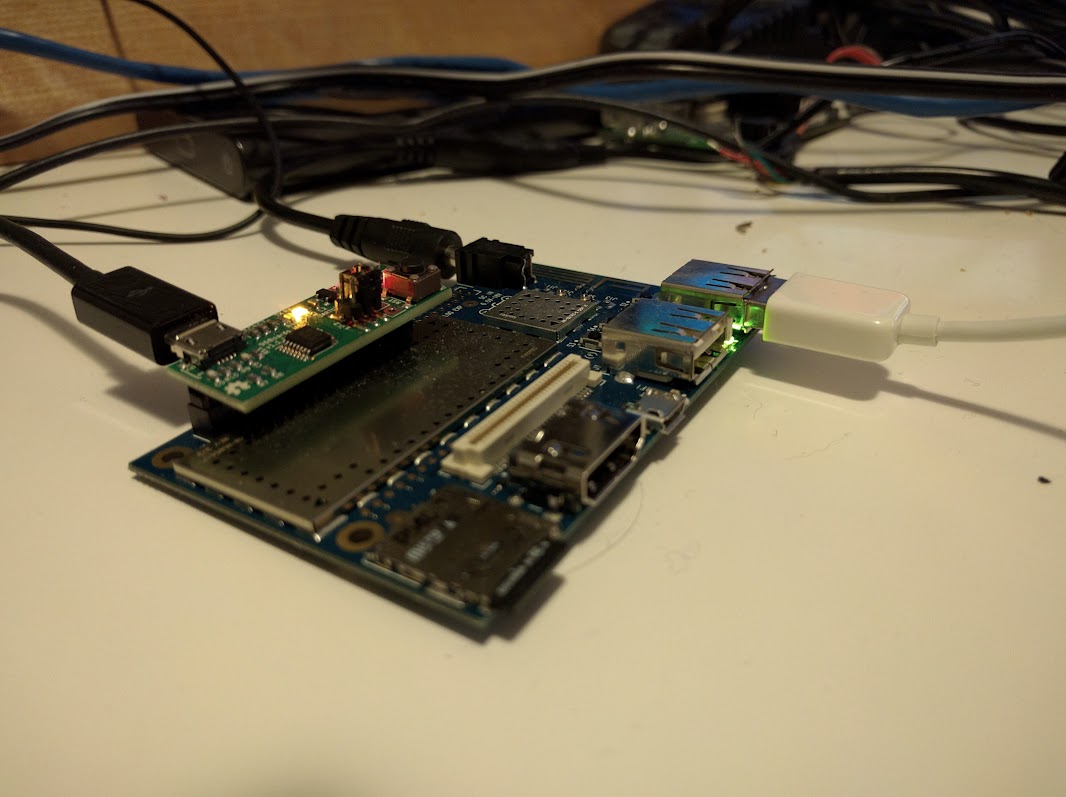
^Mandatory picture of serial port connection in action

Jonathan Dowland: CDs should come with download codes

boxes of CDs & the same data on MicroSD boxes of CDs & the same data on MicroSD
There's a Vinyl resurgence going on, with vinyl record sales growing year-on-year. Many of the people buying records don't have record players. Many records are sold including a download code, granting the owner an (often one-time) opportunity to download a digital copy of the album they just bought. Some may be tempted to look down upon those buying vinyl records, especially those who don't have a means to play them. The record itself is, now more than ever, a physical totem rather than a media for the music. But is this really that different to how we've treated audio CDs this century? For at least 15 years, I've ripped every CD I've bought and then stored it in a shoebox. (I'm up to 10 shoeboxes). The ripped copy is the only thing I listen to. The CD is little more than a totem, albeit one which I have to use in a relatively inconvenient ritual in order to get something I can conveniently listen to. The process of ripping CDs has improved a lot in this time, but it's still a pain. CD-ROM drives are also becoming a lot more scarce. Ripping is not necessary reliable, either. The best tool to verify a rip is AccurateRip, a privately-owned database of track checksums. The private status is a problem for the community (Remember what happened to CDDB?) and is only useful if other people using an AccurateRip-supported ripper have already successfully ripped the CD. Then there's things like CD pre-emphasis. It turns out that the Red Book standard defines a rarely-used flag that means the CD (or individual tracks) have had pre-emphasis applied to the treble-end of the frequency spectrum. The CD player is supposed to apply de-emphasis on playback. This doesn't happen if you fetch the audio data digitally, so it becomes the CD rippers responsibility to handle this. CD rippers have only relatively recently grown support for it. Awareness has been pretty low, so low that nobody has a good idea about how many CDs actually have pre-emphasis set: it's thought to be very rare, but (as far as I know) MusicBrainz doesn't (yet) track it. So some proportion of my already-ripped CDs may have actually been ripped incorrectly, and I can't easily determine which ones without re-ripping them all. I know that at least my Quake computer game CD has it set, and I have suspicions about some other releases. Going forward, this could be avoided entirely if CDs were treated more like totems, as vinyl records are, than the media delivering the music itself, and if record labels routinely included download cards with audio CDs. For just about anyone, no matter how the music was obtained, media-less digital is the canonical form for engaging with it. Attention should also be paid to make sure that digital releases are of a high quality: but that's a topic for another blog post.

Thomas Goirand: OpenStack Liberty and Debian

Long over due post It s been a long time I haven t written here. And lots of things happened in the OpenStack planet. As a full time employee with the mission to package OpenStack in Debian, it feels like it is kind of my duty to tell everyone about what s going on. Liberty is out, uploaded to Debian Since my last post, OpenStack Liberty, the 12th release of OpenStack, was released. In late August, Debian was the first platform which included Liberty, as I proudly outran both RDO and Canonical. So I was the first to make the announcement that Liberty passed most of the Tempest tests with the beta 3 release of Liberty (the Beta 3 is always kind of the first pre-release, as this is when feature freeze happens). Though I never made the announcement that Liberty final was uploaded to Debian, it was done just a single day after the official release. Before the release, all of Liberty was living in Debian Experimental. Following the upload of the final packages in Experimental, I uploaded all of it to Sid. This represented 102 packages, so it took me about 3 days to do it all. Tokyo summit I had the pleasure to be in Tokyo for the Mitaka summit. I was very pleased with the cross-project sessions during the first day. Lots of these sessions were very interesting for me. In fact, I wish I could have attended them all, but of course, I can t split myself in 3 to follow all of the 3 tracks. Then there was the 2 sessions about Debian packaging on upstream OpenStack infra. The goal is to setup the OpenStack upstream infrastructure to allow packaging using Gerrit, and gating each git commit using the usual tools: building the package and checking there s no FTBFS, running checks like lintian, piuparts and such. I knew already the overview of what was needed to make it happen. What I didn t know was the implementation details, which I hoped we could figure out during the 1:30 slot. Unfortunately, this didn t happen as I expected, and we discussed more general things than I wished. I was told that just reading the docs from the infra team was enough, but in reality, it was not. What currently needs to happen is building a Debian based image, using disk-image-builder, which would include the usual tools to build packages: git-buildpackage, sbuild, and so on. I m still stuck at this stage, which would be trivial if I knew a bit more about how upstream infra works, since I already know how to setup all of that on a local machine. I ve been told by Monty Tailor that he would help. Though he s always a very busy man, and to date, he still didn t find enough time to give me a hand. Nobody replied to my request for help in the openstack-dev list either. Hopefully, with a bit of insistence, someone will help. Keystone migration to Testing (aka: Debian Stretch) blocked by python-repoze.who Absolutely all of OpenStack Liberty, as of today, has migrated to Stretch. All? No. Keystone is blocked by a chain of dependency. Keystone depends on python-pysaml2, itself blocked by python-repoze.who. The later, I upgraded it to version 2.2. Though python-repoze.what depends on version <= 1.9, which is blocking the migration. Since python-repoze.who-plugins, python-repoze.what and python-repoze.what-plugins aren t used by any package anymore, I asked for them to be removed from Debian (see #805407). Until this request is processed by the FTP masters, Keystone, which is the most important piece of OpenStack (it does the authentication) will be blocked for migration to Stretch. New OpenStack server packages available On my presentation at Debconf 15, I quickly introduced new services which were released upstream. I have since packaged them all: Congress, unfortunately, was not accepted to Sid yet, because of some licensing issues, especially with the doc of python-pulp. I will correct this (remove the non-free files) and reattempt an upload. I hope to make them all available in jessie-backports (see below). For the previous release of OpenStack (ie: Kilo), I skipped the uploads of services which I thought were not really critical (like Ironic, Designate and more). But from the feedback of users, they would really like to have them all available. So this time, I will upload them all to the official jessie-backports repository. Keystone v3 support For those who don t know about it, Keystone API v3 means that, on top of the users and tenant, there s a new entity called a domain . All of the Liberty is now coming with Keystone v3 support. This includes the automated Keystone catalog registration done using debconf for all *-api packages. As much as I could tell by running tempest on my CI, everything still works pretty well. In fact, Liberty is, to my experience, the first release of OpenStack to support Keystone API v3. Uploading Liberty to jessie-backports I have rebuilt all of Liberty for jessie-backports on my laptop using sbuild. This is more than 150 packages (166 packages currently). It took me about 3 days to rebuild them all, including unit tests run at build time. As soon as #805407 is closed by the FTP masters, all what s remaining will be available in Stretch (mostly Keystone), and the upload will be possible. As there will be a lot of NEW packages (from the point of view of backports), I do expect that the approval will take some time. Also, I have to warn the original maintainers of the packages that I don t maintain (for example, those maintained within the DPMT), that because of the big number of packages, I will not be able to process the usual communication to tell that I m uploading to backports. However, here s the list of package. If you see one that you maintain, and that you wish to upload the backport by yourself, please let me know. Here s the list of packages, hopefully, exhaustive, that I will upload to jessie-backports, and that I don t maintain myself: alabaster contextlib2 kazoo python-cachetools python-cffi python-cliff python-crank python-ddt python-docker python-eventlet python-git python-gitdb python-hypothesis python-ldap3 python-mock python-mysqldb python-pathlib python-repoze.who python-setuptools python-smmap python-unicodecsv python-urllib3 requests routes ryu sphinx sqlalchemy turbogears2 unittest2 zzzeeksphinx. More than ever, I wish I could just upload these to a PPA^W Bikeshed, to minimize the disruption for both the backports FTP masters, other maintainers, and our OpenStack users. Hopefully, Bikesheds will be available soon. I am sorry to give that much approval work to the backports FTP masters, however, using the latest stable system with the latest release, is what most OpenStack users really want to do. All other major distributions have specific repositories too (ie: RDO for CentOS / Red Hat, and cloud archive for Ubuntu), and stable-backports is currently the only place where I can upload support for the Stable release. Debian listed as supported distribution on openstack.org Good news! If you go at http://www.openstack.org/marketplace/distros/ you will see a list of supported distributions. I am proud to be able to tell that, after 6 months of lobbying from my side, Debian is also listed there. The process of having Debian there included talking with folks from the OpenStack foundation, and having Bdale to sign an agreement so that the Debian logo could be reproduced on openstack.org. Thanks to Bdale Garbee, Neil McGovern, Jonathan Brice, and Danny Carreno, without who this wouldn t have happen.

20 November 2015

Gergely Nagy: Looking for a keyboard

Even though I spend more time staring at the screen than typing, there are times when I - after lots and lots of prior brain work - sit down and start typing, a lot. A couple of years ago, I started to feel pain in my wrists, and there were multiple occasions when I had to completely stop writing for longer periods of time. These were situations I obviously did not want repeated, so I started to look for remedies. First, I bought a new keyboard, a TypeMatrix 2300, which while not ergonomic, was a huge relief for my hands and wrists. I also started to learn Dvorak, but that's still something that is kind-of in progress: my left hand can write Dvorak reasonably fast, but my right one seems to be Qwerty-wired, even after a month of typing Dvorak almost exclusively.This keyboard served me well for the past five year or so. But recently, I started to look for a replacement, partly triggered by a Clojure/conj talk I watched. I got as far as assembling a list of keyboards I'm interested in, but I have a hard time choosing. This blog post here serves two purposes then: first to make a clear pros/cons list for myself, second, to solicit feedback from others who may have more experience with any of the options below.Update: There is a [follow up post], with a few more keyboards explored, and a semi-final verdict. Thanks everyone for the feedback and help, much appreciated!Lets start with the current keyboard!TypeMatrix 2030TypeMatrix 2030Pros Cons SummaryAll in all, this is a keyboard I absolutely love, and am very happy with. Yet, I feel I'm ready to try something different. With my skins aging, and the aforementioned Clojure/conj talk, the desire to switch has been growing for a while now.Desired propertiesThere are a few desired properties of the keyboard I want next. The perfect keyboard need not have all of these, but the more the merrier. I plan to buy one keyboard for a start, but may end up buying another to bring to work (like I did with the TypeMatrix, except my employer at the time bought the second one for me). At work, I will continue using the TypeMatrix, most likely, but I'm not sure yet.Anyhow, there are a number of things I do with my computer that require a keyboard: I am looking for a keyboard that helps me do these things. A keyboard that will stay with me not for five years or a decade, but pretty much forever.The optionsUltimate Hacking KeyboardUltimate Hacking KeyboardPros Cons SummaryThe keyboard looks nice, has a lot of appealing features. It is programmable, so much so that by the looks of it, I could emulate the hardware dvorak switch my TypeMatrix has. However, I'm very unhappy with the addons, so there's that too.All in all, this would cost me about $304 (base keyboard, modules, palm rest and shipping). Not too bad, certainly a strong contender, despite the shortcomings.ErgoDoxErgoDoxPros Cons SummaryThe keyboard looks interesting, primarily due to the thumb keys. From the ErgoDox EZ campaign, I'm looking at $270. That's friendly, and makes ErgoDox a viable option! (Thanks @miffe!)Kinesis AdvantageKinesis AdvantagePros Cons SummaryThe key wells look interesting, but it's not a split keyboard, nor is it open source. The cost come out about $325 plus shipping and VAT and so on, so I'm probably looking at something closer to $400. Nah. I'm pretty sure I can rule this out.Kinesis FreeStyle2Kinesis FreeStyle2Pros Cons SummaryWhile a split keyboard, at a reasonably low cost ($149 + shipping + VAT), it lacks too many things to be considered a worthy contender.MaltronMaltronPros Cons SummaryWithout shipping, I'm looking at 450. That's a very steep price. I love the wells, and the thumb keys, but it's not split, and customisability is a big question here.AtreusAtreusPros Cons SummaryWhile not a split keyboard, it does look very interesting, and the price is much lower than the rest: $149 + shipping ($50 or so). It is similar - in spirit - to my existing TypeMatrix. It wouldn't take much to get used to, and is half the price of the alternatives. A strong option, for sure.Keyboardio M01Keyboardio Model 01Pros Cons SummaryWith shipping cost and whatnot, I'm looking at something in the $370 ballpark, which is on the more expensive side. On the other hand, I get a whole lot of bang for my buck: LEDs, two center bars (tripod mounting sounds really awesome!), hardwood body, and a key layout that is very similar to what I came to love on the TypeMatrix.I also have a thing for wooden stuff. I like the look of it, the feel of it.The Preference ListAfter writing this all up, I think I prefer the Model 01, but the UHK and ErgoDox come close too!The UHK is cheaper, but not by a large margin. It lacks the thumb keys and the palm key the M01 has. It also looks rather dull (sorry). They'd both ship about the same time, but, the M01 is already funded, while the UHK is not (mind you, there's a pretty darn high chance it will be).The ErgoDox has thumb keys, split keyboard, and is open source. Compared to the UHK, we have the thumb keys, and less distraction, for a better price. But the case is not so nice. Compared to the Model 01: no leds, or center bar, and an inferior case. But, much better price, which is an important factor too.Then, there's the Atreus. While it's a DIY kit, it is much more affordable than the rest, and I could have it far sooner. Yet... it doesn't feel like a big enough switch from my current keyboard. I might as well continue using the TypeMatrix then, right?The rest, I ruled out earlier, while I was reviewing them anyway.So, the big question is: should I invest close to $400 into a keyboard that looks stunning, and will likely grow old with me? Or should I give up some of the features, and settle for one of the $300 ones, that'll also grow old with me. Or is there an option I did not consider, that may match my needs and preferences better?If you, my dear reader, got this far, and have a suggestion, please either tweet at me, or write an email, or reach me over any other medium I am reachable at (including IRC, hanging out as algernon on FreeNode and OFTC).Thank you in advance, to all of you who contact me, and help me choose a keyboard!

Sylvain Beucler: Rebuilding Android proprietary SDK binaries

Going back to Android recently, I saw that all tools binaries from the Android project are now click-wrapped by a quite ugly proprietary license, among others an anti-fork clause (details below). Apparently those T&C are years old, but the click-wrapping is newer. This applies to the SDK, the NDK, Android Studio, and all the essentials you download through the Android SDK Manager. Since I keep my hands clean of smelly EULAs, I'm working on rebuilding the Android tools I need.
We're talking about hours-long, quad-core + 8GB-RAM + 100GB-disk-eating builds here, so I'd like to publish them as part of a project who cares. As a proof-of-concept, the Replicant project ships a 4.2 SDK and I contributed build instructions for ADT and NDK (which I now use daily). (Replicant is currently stuck to a 2013 code base though.) I also have in-progress instructions on my hard-drive to rebuild various newer versions of the SDK/API levels, and for the NDK whose releases are quite hard to reproduce (no git tags, requires fixes committed after the release, updates are partial rebuilds, etc.) - not to mention that Google doesn't publish the source code until after the official release (closed development) :/ And in some cases like Android Support Repository [not Library] I didn't even find the proper source code, only an old prebuilt. Would you be interested in contributing, and would you recommend a structure that would promote Free, rebuilt Android *DK? The legalese Anti-fork clause:
3.4 You agree that you will not take any actions that may cause or result in the fragmentation of Android, including but not limited to distributing, participating in the creation of, or promoting in any way a software development kit derived from the SDK.
So basically the source is Apache 2 + GPL, but the binaries are non-free. By the way this is not a GPL violation because right after:
3.5 Use, reproduction and distribution of components of the SDK licensed under an open source software license are governed solely by the terms of that open source software license and not this License Agreement.
Still, AFAIU by clicking "Accept" to get the binary you still accept the non-free "Terms and Conditions". (Incidentally, if Google wanted SDK forks to spread and increase fragmentation, introducing an obnoxious EULA is probably the first thing I'd have recommended. What was its legal team thinking?) Indemnification clause:
12.1 To the maximum extent permitted by law, you agree to defend, indemnify and hold harmless Google, its affiliates and their respective directors, officers, employees and agents from and against any and all claims, actions, suits or proceedings, as well as any and all losses, liabilities, damages, costs and expenses (including reasonable attorneys fees) arising out of or accruing from (a) your use of the SDK, (b) any application you develop on the SDK that infringes any copyright, trademark, trade secret, trade dress, patent or other intellectual property right of any person or defames any person or violates their rights of publicity or privacy, and (c) any non-compliance by you with this License Agreement.
Usage restriction:
3.1 Subject to the terms of this License Agreement, Google grants you a limited, worldwide, royalty-free, non-assignable and non-exclusive license to use the SDK solely to develop applications to run on the Android platform. 3.3 You may not use the SDK for any purpose not expressly permitted by this License Agreement. Except to the extent required by applicable third party licenses, you may not: (a) copy (except for backup purposes), modify, adapt, redistribute, decompile, reverse engineer, disassemble, or create derivative works of the SDK or any part of the SDK; or (b) load any part of the SDK onto a mobile handset or any other hardware device except a personal computer, combine any part of the SDK with other software, or distribute any software or device incorporating a part of the SDK.
If you know the URLs, you can still direct-download some of the binaries which don't embed the license, but all this feels fishy. GNU licensing didn't answer me (yet). Maybe debian-legal has an opinion? In any case, the difficulty to reproduce the *DK builds is worrying enough to warrant an independent rebuild. Did you notice this?

16 November 2015

Daniel Pocock: Quick start using Blender for video editing

Updated 2015-11-16 for WebM Although it is mostly known for animation, Blender includes a non-linear video editing system that is available in all the current stable versions of Debian, Ubuntu and Fedora. Here are some screenshots showing how to start editing a video of a talk from a conference. In this case, there are two input files:
  • A video file from a DSLR camera, including an audio stream from a microphone on the camera
  • A separate audio file with sound captured by a lapel microphone attached to the speaker's smartphone. This is a much better quality sound and we would like this to replace the sound included in the video file.
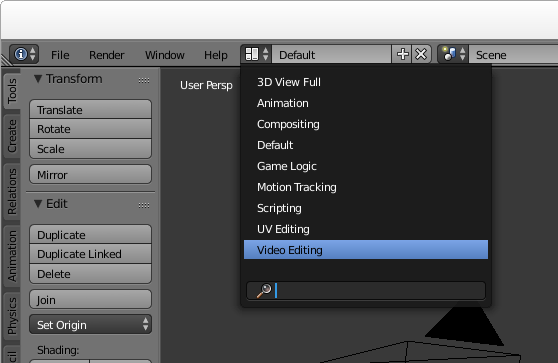
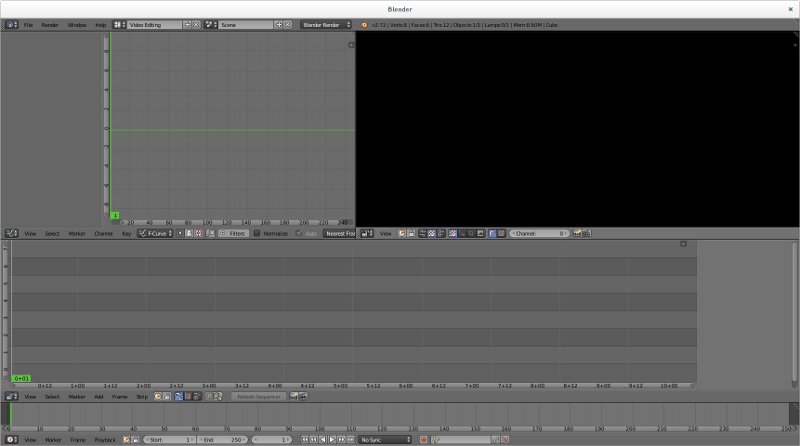
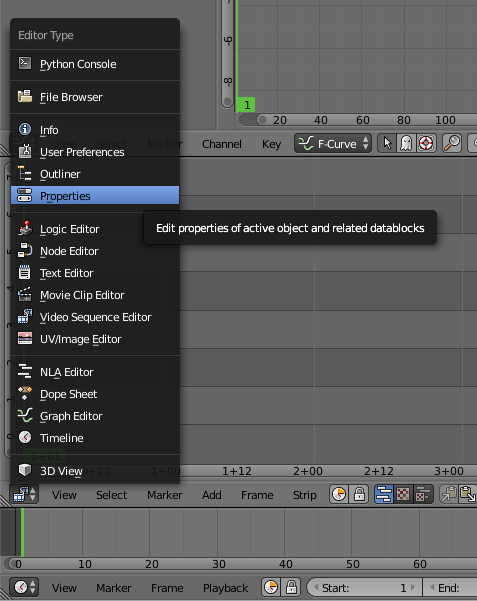
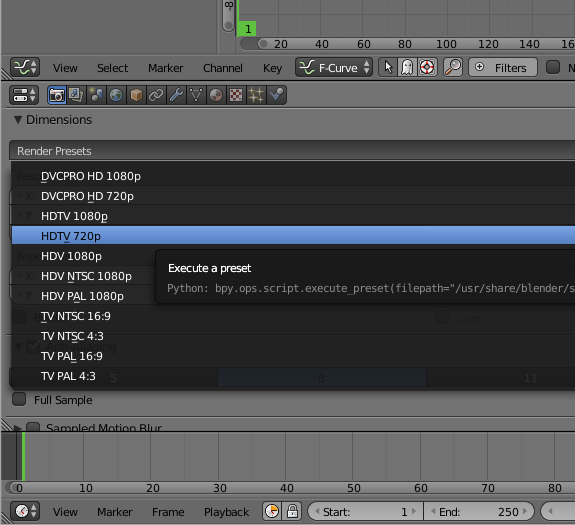
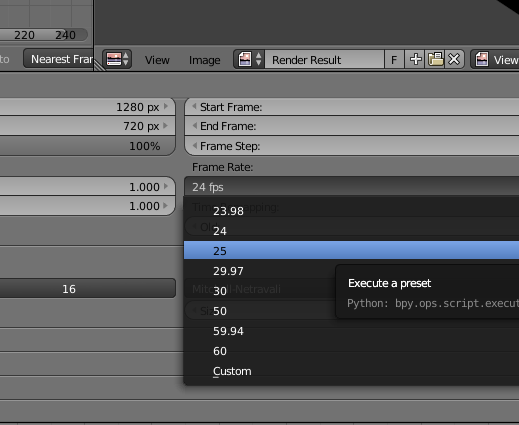
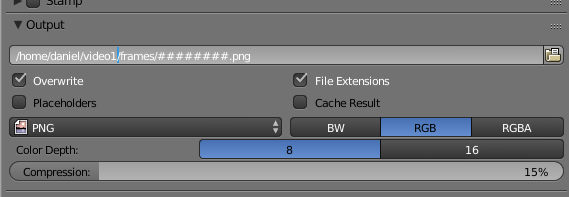
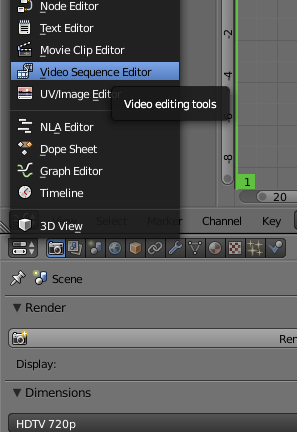
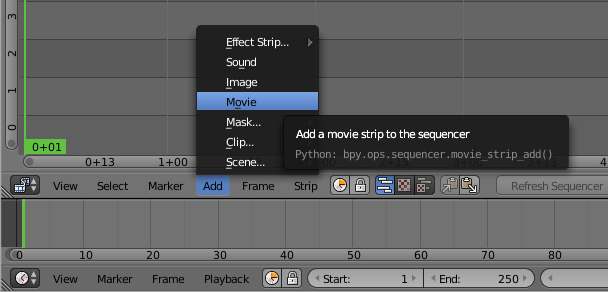
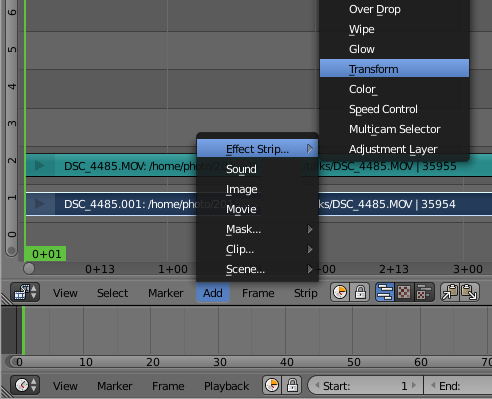
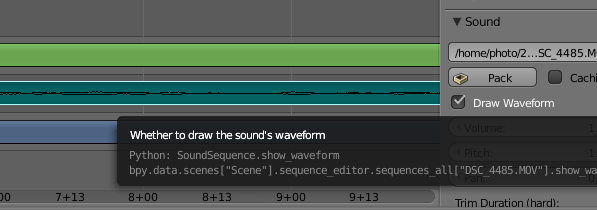
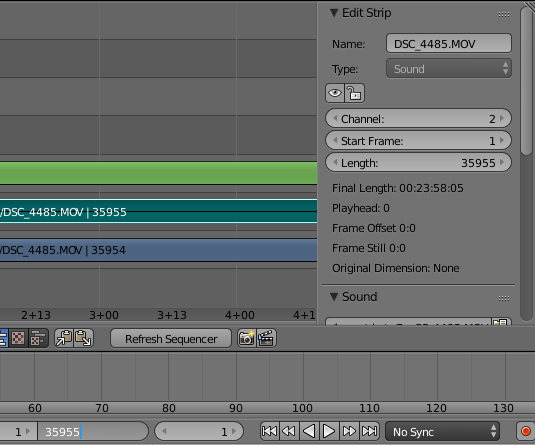
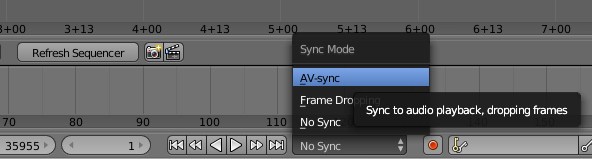
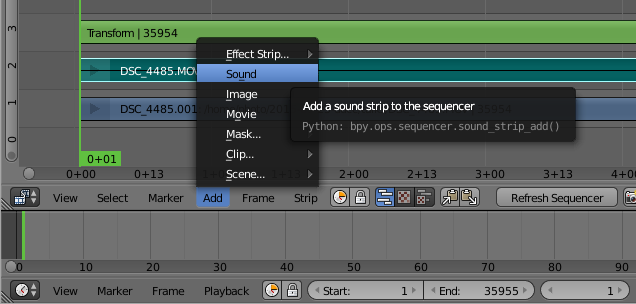
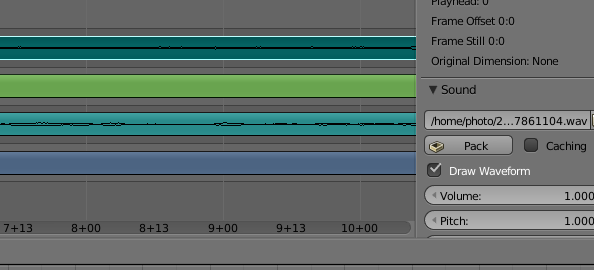
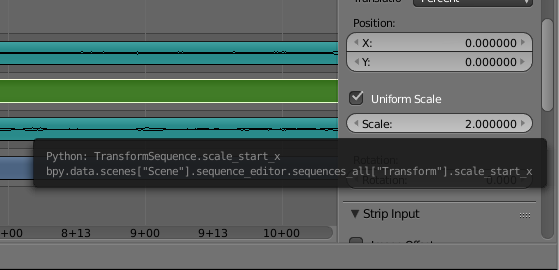
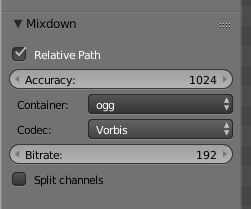
Open Blender and choose the video editing mode Launch Blender and choose the video sequence editor from the pull down menu at the top of the window: Now you should see all the video sequence editor controls: Setup the properties for your project Click the context menu under the strip editor panel and change the panel to a Properties panel: The video file we are playing with is 720p, so it seems reasonable to use 720p for the output too. Change that here: The input file is 25fps so we need to use exactly the same frame rate for the output, otherwise you will either observe the video going at the wrong speed or there will be a conversion that is CPU intensive and degrades the quality. Also check that the resolution_percentage setting under the picture dimensions is 100%: Now specify output to PNG files. Later we will combine them into a WebM file with a script. Specify the directory where the files will be placed and use the # placeholder to specify the number of digits to use to embed the frame number in the filename: Now your basic rendering properties are set. When you want to generate the output file, come back to this panel and use the Animation button at the top. Editing the video Use the context menu to change the properties panel back to the strip view panel: Add the video file: and then right click the video strip (the lower strip) to highlight it and then add a transform strip: Audio waveform Right click the audio strip to highlight it and then go to the properties on the right hand side and click to show the waveform: Rendering length By default, Blender assumes you want to render 250 frames of output. Looking in the properties to the right of the audio or video strip you can see the actual number of frames. Put that value in the box at the bottom of the window where it says 250: Enable AV-sync Also at the bottom of the window is a control to enable AV-sync. If your audio and video are not in sync when you preview, you need to set this AV-sync option and also make sure you set the frame rate correctly in the properties: Add the other sound strip Now add the other sound file that was recorded using the lapel microphone: Enable the waveform display for that sound strip too, this will allow you to align the sound strips precisely: You will need to listen to the strips to make an estimate of the time difference. Use this estimate to set the "start frame" in the properties for your audio strip, it will be a negative value if the audio strip starts before the video. You can then zoom the strip panel to show about 3 to 5 seconds of sound and try to align the peaks. An easy way to do this is to look for applause at the end of the audio strips, the applause generates a large peak that is easily visible. Once you have synced the audio, you can play the track and you should not be able to hear any echo. You can then silence the audio track from the camera by right clicking it, look in the properties to the right and change volume to 0. Make any transforms you require For example, to zoom in on the speaker, right click the transform strip (3rd from the bottom) and then in the panel on the right, click to enable "Uniform Scale" and then set the scale factor as required: Render the video output to PNG Click the context menu under the Curves panel and choose Properties again. Click the Animation button to generate a sequence of PNG files for each frame. Render the audio output On the Properties panel, click the Audio button near the top. Choose a filename for the generated audio file. Look on the bottom left-hand side of the window for the audio file settings, change it to the ogg container and Vorbis codec: Ensure the filename has a .ogg extension Now look at the top right-hand corner of the window for the Mixdown button. Click it and wait for Blender to generate the audio file. Combine the PNG files and audio file into a WebM video file You will need to have a few command line tools installed for manipulating the files from scripts. Install them using the package manager, for example, on a Debian or Ubuntu system: # apt-get install mjpegtools vpx-tools mkvtoolnix
Now create a script like the following:
#!/bin/bash -e
# Set this to match the project properties
FRAME_RATE=25
# Set this to the rate you desire:
TARGET_BITRATE=1000
WORK_DIR=$ HOME /video1
PNG_DIR=$ WORK_DIR /frames
YUV_FILE=$ WORK_DIR /video.yuv
WEBM_FILE=$ WORK_DIR /video.webm
AUDIO_FILE=$ WORK_DIR /audio-mixed.ogg
NUM_FRAMES= find $ PNG_DIR  -type f   wc -l 
png2yuv -I p -f $FRAME_RATE -b 1 -n $NUM_FRAMES \
    -j $ PNG_DIR /%08d.png > $ YUV_FILE 
vpxenc --good --cpu-used=0 --auto-alt-ref=1 \
   --lag-in-frames=16 --end-usage=vbr --passes=2 \
   --threads=2 --target-bitrate=$ TARGET_BITRATE  \
   -o $ WEBM_FILE -noaudio $ YUV_FILE 
rm $ YUV_FILE 
mkvmerge -o $ WEBM_FILE  -w $ WEBM_FILE -noaudio $ AUDIO_FILE 
rm $ WEBM_FILE -noaudio
Next steps There are plenty of more comprehensive tutorials, including some videos on Youtube, explaining how to do more advanced things like fading in and out or zooming and panning dynamically at different points in the video. If the lighting is not good (faces too dark, for example), you can right click the video strip, go to the properties panel on the right hand side and click Modifiers, Add Strip Modifier and then select "Color Balance". Use the Lift, Gamma and Gain sliders to adjust the shadows, midtones and highlights respectively.

Next.

Previous.