Search Results: "don"

15 September 2023

John Goerzen: How Gapped is Your Air?

Sometimes we want better-than-firewall security for things. For instance:
  1. An industrial control system for a municipal water-treatment plant should never have data come in or out
  2. Or, a variant of the industrial control system: it should only permit telemetry and monitoring data out, and nothing else in or out
  3. A system dedicated to keeping your GPG private keys secure should only have material to sign (or decrypt) come in, and signatures (or decrypted data) go out
  4. A system keeping your tax records should normally only have new records go in, but may on occasion have data go out (eg, to print a copy of an old record)

In this article, I ll talk about the high side (the high-security or high-sensitivity systems) and the low side (the lower-sensitivity or general-purpose systems). For the sake of simplicity, I ll assume the high side is a single machine, but it could as well be a whole network. Let s focus on examples 3 and 4 to make things simpler. Let s consider the primary concern to be data exfiltration (someone stealing your data), with a secondary concern of data integrity (somebody modifying or destroying your data). You might think the safest possible approach is Airgapped that is, there is literal no physical network connection to the machine at all. This help! But then, the problem becomes: how do we deal with the inevitable need to legitimately get things on or off of the system? As I wrote in Dead USB Drives Are Fine: Building a Reliable Sneakernet, by using tools such as NNCP, you can certainly create a sneakernet : using USB drives as transport. While this is a very secure setup, as with most things in security, it s less than perfect. The Wikipedia airgap article discusses some ways airgapped machines can still be exploited. It mentions that security holes relating to removable media have been exploited in the past. There are also other ways to get data out; for instance, Debian ships with gensio and minimodem, both of which can transfer data acoustically. But let s back up and think about why we think of airgapped machines as so much more secure, and what the failure modes of other approaches might be.

What about firewalls? You could very easily set up high-side machine that is on a network, but is restricted to only one outbound TCP port. There could be a local firewall, and perhaps also a special port on an external firewall that implements the same restrictions. A variant on this approach would be two computers connected directly by a crossover cable, though this doesn t necessarily imply being more secure. Of course, the concern about a local firewall is that it could potentially be compromised. An external firewall might too; for instance, if your credentials to it were on a machine that got compromised. This kind of dual compromise may be unlikely, but it is possible. We can also think about the complexity in a network stack and firewall configuration, and think that there may be various opportunities to have things misconfigured or buggy in a system of that complexity. Another consideration is that data could be sent at any time, potentially making it harder to detect. On the other hand, network monitoring tools are commonplace. On the other hand, it is convenient and cheap. I use a system along those lines to do my backups. Data is sent, gpg-encrypted and then encrypted again at the NNCP layer, to the backup server. The NNCP process on the backup server runs as an untrusted user, and dumps the gpg-encrypted files to a secure location that is then processed by a cron job using Filespooler. The backup server is on a dedicated firewall port, with a dedicated subnet. The only ports allowed out are for NNCP and NTP, and offsite backups. There is no default gateway. Not even DNS is permitted out (the firewall does the appropriate redirection). There is one pinhole allowed out, where a subset of the backup data is sent offsite. I initially used USB drives as transport, and it had no network connection at all. But there were disadvantages to doing this for backups particularly that I d have no backups for as long as I d forget to move the drives. The backup system also would have clock drift, and the offsite backup picture was more challenging. (The clock drift was a problem because I use 2FA on the system; a password, plus a TOTP generated by a Yubikey) This is pretty good security, I d think. What are the weak spots? Well, if there were somehow a bug in the NNCP client, and the remote NNCP were compromised, that could lead to a compromise of the NNCP account. But this itself would accomplish little; some other vulnerability would have to be exploited on the backup server, because the NNCP account can t see plaintext data at all. I use borgbackup to send a subset of backup data offsite over ssh. borgbackup has to run as root to be able to access all the files, but the ssh it calls runs as a separate user. A ssh vulnerability is therefore unlikely to cause much damage. If, somehow, the remote offsite system were compromised and it was able to exploit a security issue in the local borgbackup, that would be a problem. But that sounds like a remote possibility. borgbackup itself can t even be used over a sneakernet since it is not asynchronous. A more secure solution would probably be using something like dar over NNCP. This would eliminate the ssh installation entirely, and allow a complete isolation between the data-access and the communication stacks, and notably not require bidirectional communication. Logic separation matters too. My Roundup of Data Backup and Archiving Tools may be helpful here. Other attack vectors could be a vulnerability in the kernel s networking stack, local root exploits that could be combined with exploiting NNCP or borgbackup to gain root, or local misconfiguration that makes the sandboxes around NNCP and borgbackup less secure. Because this system is in my basement in a utility closet with no chairs and no good place for a console, I normally manage it via a serial console. While it s a dedicated line between the system and another machine, if the other machine is compromised or an adversary gets access to the physical line, credentials (and perhaps even data) could leak, albeit slowly. But we can do much better with serial lines. Let s take a look.

Serial lines Some of us remember RS-232 serial lines and their once-ubiquitous DB-9 connectors. Traditionally, their speed maxxed out at 115.2Kbps. Serial lines have the benefit that they can be a direct application-to-application link. In my backup example above, a serial line could directly link the NNCP daemon on one system with the NNCP caller on another, with no firewall or anything else necessary. It is simply up to those programs to open the serial device appropriately. This isn t perfect, however. Unlike TCP over Ethernet, a serial line has no inherent error checking. Modern programs such as NNCP and ssh assume that a lower layer is making the link completely clean and error-free for them, and will interpret any corruption as an attempt to tamper and sever the connection. However, there is a solution to that: gensio. In my page Using gensio and ser2net, I discuss how to run NNCP and ssh over gensio. gensio is a generic framework that can add framing, error checking, and retransmit to an unreliable link such as a serial port. It can also add encryption and authentication using TLS, which could be particularly useful for applications that aren t already doing that themselves. More traditional solutions for serial communications have their own built-in error correction. For instance, UUCP and Kermit both were designed in an era of noisy serial lines and might be an excellent fit for some use cases. The ZModem protocol also might be, though it offers somewhat less flexibility and automation than Kermit. I have found that certain USB-to-serial adapters by Gearmo will actually run at up to 2Mbps on a serial line! Look for the ones on their spec pages with a FTDI chipset rated at 920Kbps. It turns out they can successfully be driven faster, especially if gensio s relpkt is used. I ve personally verified 2Mbps operation (Linux port speed 2000000) on Gearmo s USA-FTDI2X and the USA-FTDI4X. (I haven t seen any single-port options from Gearmo with the 920Kbps chipset, but they may exist). Still, even at 2Mbps, speed may well be a limiting factor with some applications. If what you need is a console and some textual or batch data, it s probably fine. If you are sending 500GB backup files, you might look for something else. In theory, this USB to RS-422 adapter should work at 10Mbps, but I haven t tried it. But if the speed works, running a dedicated application over a serial link could be a nice and fairly secure option. One of the benefits of the airgapped approach is that data never leaves unless you are physically aware of transporting a USB stick. Of course, you may not be physically aware of what is ON that stick in the event of a compromise. This could easily be solved with a serial approach by, say, only plugging in the cable when you have data to transfer.

Data diodes A traditional diode lets electrical current flow in only one direction. A data diode is the same concept, but for data: a hardware device that allows data to flow in only one direction. This could be useful, for instance, in the tax records system that should only receive data, or the industrial system that should only send it. Wikipedia claims that the simplest kind of data diode is a fiber link with transceivers connected in only one direction. I think you could go one simpler: a serial cable with only ground and TX connected at one end, wired to ground and RX at the other. (I haven t tried this.) This approach does have some challenges:
  • Many existing protocols assume a bidirectional link and won t be usable
  • There is a challenge of confirming data was successfully received. For a situation like telemetry, maybe it doesn t matter; another observation will come along in a minute. But for sending important documents, one wants to make sure they were properly received.
In some cases, the solution might be simple. For instance, with telemetry, just writing out data down the serial port in a simple format may be enough. For sending files, various mitigations, such as sending them multiple times, etc., might help. You might also look into FEC-supporting infrastructure such as blkar and flute, but these don t provide an absolute guarantee. There is no perfect solution to knowing when a file has been successfully received if the data communication is entirely one-way.

Audio transport I hinted above that minimodem and gensio both are software audio modems. That is, you could literally use speakers and microphones, or alternatively audio cables, as a means of getting data into or out of these systems. This is pretty limited; it is 1200bps, and often half-duplex, and could literally be disrupted by barking dogs in some setups. But hey, it s an option.

Airgapped with USB transport This is the scenario I began with, and named some of the possible pitfalls above as well. In addition to those, note also that USB drives aren t necessarily known for their error-free longevity. Be prepared for failure.

Concluding thoughts I wanted to lay out a few things in this post. First, that simply being airgapped is generally a step forward in security, but is not perfect. Secondly, that both physical and logical separation matter. And finally, that while tools like NNCP can make airgapped-with-USB-drive-transport a doable reality, there are also alternatives worth considering especially serial ports, firewalled hard-wired Ethernet, data diodes, and so forth. I think serial links, in particular, have been largely forgotten these days. Note: This article also appears on my website, where it may be periodically updated.

14 September 2023

Scarlett Gately Moore: KDE: KDE neon user edition updates! Debian updates, Snaps on hold.

Witch Wells Az
I had to make the hard decision to put snaps on hold. I am working odd jobs to stay alive and to pay for my beautiful scenery. My Project should move forward, as I have done everything asked of me including finding a super awesome management team to take us all the way through. But until it is signed sealed and delivered, I have to survive. In my free time I am helping out Jonathan and working on KDE Neon, he has done so much for me over the years, it is the least I can do! So without further ado! Carlos and I have been working diligently on new Frameworks 5.110, Plasma 5.27.8, and Applications 23.08.1! They are complete and ready in /user! With that, a great many fixes to qml dependencies and packaging updates. Current users can update freely and the docker images and ISO are building now. We are working on Unstable as it is a bit unstable right now, but improving  On the Debian front I am wrapping up packaging of new upstream release of squashfuse. Thanks for stopping by! If you can spare some change, consider a donation Thank you! https://gofund.me/b8b69e54

13 September 2023

Matthew Garrett: Reconstructing an invalid TPM event log

TPMs contain a set of registers ("Platform Configuration Registers", or PCRs) that are used to track what a system boots. Each time a new event is measured, a cryptographic hash representing that event is passed to the TPM. The TPM appends that hash to the existing value in the PCR, hashes that, and stores the final result in the PCR. This means that while the PCR's value depends on the precise sequence and value of the hashes presented to it, the PCR value alone doesn't tell you what those individual events were. Different PCRs are used to store different event types, but there are still more events than there are PCRs so we can't avoid this problem by simply storing each event separately.

This is solved using the event log. The event log is simply a record of each event, stored in RAM. The algorithm the TPM uses to calculate the PCR values is known, so we can reproduce that by simply taking the events from the event log and replaying the series of events that were passed to the TPM. If the final calculated value is the same as the value in the PCR, we know that the event log is accurate, which means we now know the value of each individual event and can make an appropriate judgement regarding its security.

If any value in the event log is invalid, we'll calculate a different PCR value and it won't match. This isn't terribly helpful - we know that at least one entry in the event log doesn't match what was passed to the TPM, but we don't know which entry. That means we can't trust any of the events associated with that PCR. If you're trying to make a security determination based on this, that's going to be a problem.

PCR 7 is used to track information about the secure boot policy on the system. It contains measurements of whether or not secure boot is enabled, and which keys are trusted and untrusted on the system in question. This is extremely helpful if you want to verify that a system booted with secure boot enabled before allowing it to do something security or safety critical. Unfortunately, if the device gives you an event log that doesn't replay correctly for PCR 7, you now have no idea what the security state of the system is.

We ran into that this week. Examination of the event log revealed an additional event other than the expected ones - a measurement accompanied by the string "Boot Guard Measured S-CRTM". Boot Guard is an Intel feature where the CPU verifies the firmware is signed with a trusted key before executing it, and measures information about the firmware in the process. Previously I'd only encountered this as a measurement into PCR 0, which is the PCR used to track information about the firmware itself. But it turns out that at least some versions of Boot Guard also measure information about the Boot Guard policy into PCR 7. The argument for this is that this is effectively part of the secure boot policy - having a measurement of the Boot Guard state tells you whether Boot Guard was enabled, which tells you whether or not the CPU verified a signature on your firmware before running it (as I wrote before, I think Boot Guard has user-hostile default behaviour, and that enforcing this on consumer devices is a bad idea).

But there's a problem here. The event log is created by the firmware, and the Boot Guard measurements occur before the firmware is executed. So how do we get a log that represents them? That one's fairly simple - the firmware simply re-calculates the same measurements that Boot Guard did and creates a log entry after the fact[1]. All good.

Except. What if the firmware screws up the calculation and comes up with a different answer? The entry in the event log will now not match what was sent to the TPM, and replaying will fail. And without knowing what the actual value should be, there's no way to fix this, which means there's no way to verify the contents of PCR 7 and determine whether or not secure boot was enabled.

But there's still a fundamental source of truth - the measurement that was sent to the TPM in the first place. Inspired by Henri Nurmi's work on sniffing Bitlocker encryption keys, I asked a coworker if we could sniff the TPM traffic during boot. The TPM on the board in question uses SPI, a simple bus that can have multiple devices connected to it. In this case the system flash and the TPM are on the same SPI bus, which made things easier. The board had a flash header for external reprogramming of the firmware in the event of failure, and all SPI traffic was visible through that header. Attaching a logic analyser to this header made it simple to generate a record of that. The only problem was that the chip select line on the header was attached to the firmware flash chip, not the TPM. This was worked around by simply telling the analysis software that it should invert the sense of the chip select line, ignoring all traffic that was bound for the flash and paying attention to all other traffic. This worked in this case since the only other device on the bus was the TPM, but would cause problems in the event of multiple devices on the bus all communicating.

With the aid of this analyser plugin, I was able to dump all the TPM traffic and could then search for writes that included the "0182" sequence that corresponds to the command code for a measurement event. This gave me a couple of accesses to the locality 3 registers, which was a strong indication that they were coming from the CPU rather than from the firmware. One was for PCR 0, and one was for PCR 7. This corresponded to the two Boot Guard events that we expected from the event log. The hash in the PCR 0 measurement was the same as the hash in the event log, but the hash in the PCR 7 measurement differed from the hash in the event log. Replacing the event log value with the value actually sent to the TPM resulted in the event log now replaying correctly, supporting the hypothesis that the firmware was failing to correctly reconstruct the event.

What now? The simple thing to do is for us to simply hard code this fixup, but longer term we'd like to figure out how to reconstruct the event so we can calculate the expected value ourselves. Unfortunately there doesn't seem to be any public documentation on this. Sigh.

[1] What stops firmware on a system with no Boot Guard faking those measurements? TPMs have a concept of "localities", effectively different privilege levels. When Boot Guard performs its initial measurement into PCR 0, it does so at locality 3, a locality that's only available to the CPU. This causes PCR 0 to be initialised to a different initial value, affecting the final PCR value. The firmware can't access locality 3, so can't perform an equivalent measurement, so can't fake the value.

comment count unavailable comments

12 September 2023

Jo Shields: Building a NAS

The status quo Back in 2015, I bought an off-the-shelf NAS, a QNAP TS-453mini, to act as my file store and Plex server. I had previously owned a Synology box, and whilst I liked the Synology OS and experience, the hardware was underwhelming. I loaded up the successor QNAP with four 5TB drives in RAID10, and moved all my files over (after some initial DoA drive issues were handled).
QNAP TS-453mini product photoQNAP TS-453mini product photo
That thing has been in service for about 8 years now, and it s been a mixed bag. It was definitely more powerful than the predecessor system, but it was clear that QNAP s OS was not up to the same standard as Synology s perhaps best exemplified by HappyGet 2 , the QNAP webapp for downloading videos from streaming services like YouTube, whose icon is a straight rip-off of StarCraft 2. On its own, meaningless but a bad omen for overall software quality
The logo for QNAP HappyGet 2 and Blizzard's Starcraft 2 side by sideThe logo for QNAP HappyGet 2 and Blizzard s StarCraft 2 side by side
Additionally, the embedded Celeron processor in the NAS turned out to be an issue for some cases. It turns out, when playing back videos with subtitles, most Plex clients do not support subtitles properly instead they rely on the Plex server doing JIT transcoding to bake the subtitles directly into the video stream. I discovered this with some Blu-Ray rips of Game of Thrones some episodes would play back fine on my smart TV, but episodes with subtitled Dothraki speech would play at only 2 or 3 frames per second. The final straw was a ransomware attack, which went through all my data and locked every file below a 60MiB threshold. Practically all my music gone. A substantial collection of downloaded files, all gone. Some of these files had been carried around since my college days digital rarities, or at least digital detritus I felt a real sense of loss at having to replace. This episode was caused by a ransomware targeting specific vulnerabilities in the QNAP OS, not an error on my part. So, I decided to start planning a replacement with:
  • A non-garbage OS, whilst still being a NAS-appliance type offering (not an off-the-shelf Linux server distro)
  • Full remote management capabilities
  • A small form factor comparable to off-the-shelf NAS
  • A powerful modern CPU capable of transcoding high resolution video
  • All flash storage, no spinning rust
At the time, no consumer NAS offered everything (The Asustor FS6712X exists now, but didn t when this project started), so I opted to go for a full DIY rather than an appliance not the first time I ve jumped between appliances and DIY for home storage.

Selecting the core of the system There aren t many companies which will sell you a small motherboard with IPMI. Supermicro is a bust, so is Tyan. But ASRock Rack, the server division of third-tier motherboard vendor ASRock, delivers. Most of their boards aren t actually compliant Mini-ITX size, they re a proprietary Deep Mini-ITX with the regular screw holes, but 40mm of extra length (and a commensurately small list of compatible cases). But, thankfully, they do have a tiny selection of boards without the extra size, and I stumbled onto the X570D4I-2T, a board with an AMD AM4 socket and the mature X570 chipset. This board can use any AMD Ryzen chip (before the latest-gen Ryzen 7000 series); has built in dual 10 gigabit ethernet; IPMI; four (laptop-sized) RAM slots with full ECC support; one M.2 slot for NVMe SSD storage; a PCIe 16x slot (generally for graphics cards, but we live in a world of possibilities); and up to 8 SATA drives OR a couple more NVMe SSDs. It s astonishingly well featured, just a shame it costs about $450 compared to a good consumer-grade Mini ITX AM4 board costing less than half that. I was so impressed with the offering, in fact, that I crowed about it on Mastodon and ended up securing ASRock another sale, with someone else looking into a very similar project to mine around the same timespan. The next question was the CPU. An important feature of a system expected to run 24/7 is low power, and AM4 chips can consume as much as 130W under load, out of the box. At the other end, some models can require as little as 35W under load the OEM-only GE suffix chips, which are readily found for import on eBay. In their PRO variant, they also support ECC (all non-G Ryzen chips support ECC, but only Pro G chips do). The top of the range 8 core Ryzen 7 PRO 5750GE is prohibitively expensive, but the slightly weaker 6 core Ryzen 5 PRO 5650GE was affordable, and one arrived quickly from Hong Kong. Supplemented with a couple of cheap 16 GiB SODIMM sticks of DDR4 PC-3200 direct from Micron for under $50 a piece, that left only cooling as an unsolved problem to get a bootable test system. The official support list for the X570D4I-2T only includes two rackmount coolers, both expensive and hard to source. The reason for such a small list is the non standard cooling layout of the board instead of an AM4 hole pattern with the standard plastic AM4 retaining clips, it has an Intel 115x hole pattern with a non-standard backplate (Intel 115x boards have no backplate, the stock Intel 115x cooler attaches to the holes with push pins). As such every single cooler compatibility list excludes this motherboard. However, the backplate is only secured with a mild glue with minimal pressure and a plastic prying tool it can be removed, giving compatibility with any 115x cooler (which is basically any CPU cooler for more than a decade). I picked an oversized low profile Thermalright AXP120-X67 hoping that its 120mm fan would cool the nearby MOSFETs and X570 chipset too.
Thermalright AXP120-X67, AMD Ryzen 5 PRO 5650GE, ASRock Rack X570D4I-2T, all assembled and running on a flat surface

Testing up to this point Using a spare ATX power supply, I had enough of a system built to explore the IPMI and UEFI instances, and run MemTest86 to validate my progress. The memory test ran without a hitch and confirmed the ECC was working, although it also showed that the memory was only running at 2933 MT/s instead of the rated 3200 MT/s (a limit imposed by the motherboard, as higher speeds are considered overclocking). The IPMI interface isn t the best I ve ever used by a long shot, but it s minimum viable and allowed me to configure the basics and boot from media entirely via a Web browser.
Memtest86 showing test progress, taken from IPMI remote control window
One sad discovery, however, which I ve never seen documented before, on PCIe bifurcation. With PCI Express, you have a number of lanes which are allocated in groups by the motherboard and CPU manufacturer. For Ryzen prior to Ryzen 7000, that s 16 lanes in one slot for the graphics card; 4 lanes in one M.2 connector for an SSD; then 4 lanes connecting the CPU to the chipset, which can offer whatever it likes for peripherals or extra lanes (bottlenecked by that shared 4x link to the CPU, if it comes down to it). It s possible, with motherboard and CPU support, to split PCIe groups up for example an 8x slot could be split into two 4x slots (eg allowing two NVMe drives in an adapter card NVME drives these days all use 4x). However with a Cezanne Ryzen with integrated graphics, the 16x graphics card slot cannot be split into four 4x slots (ie used for for NVMe drives) the most bifurcation it allows is 8x4x4x, which is useless in a NAS.
Screenshot of PCIe 16x slot bifurcation options in UEFI settings, taken from IPMI remote control window
As such, I had to abandon any ideas of an all-NVMe NAS I was considering: the 16x slot split into four 4x, combined with two 4x connectors fed by the X570 chipset, to a total of 6 NVMe drives. 7.6TB U.2 enterprise disks are remarkably affordable (cheaper than consumer SATA 8TB drives), but alas, I was locked out by my 5650GE. Thankfully I found out before spending hundreds on a U.2 hot swap bay. The NVMe setup would be nearly 10x as fast as SATA SSDs, but at least the SATA SSD route would still outperform any spinning rust choice on the market (including the fastest 10K RPM SAS drives)

Containing the core The next step was to pick a case and power supply. A lot of NAS cases require an SFX (rather than ATX) size supply, so I ordered a modular SX500 unit from Silverstone. Even if I ended up with a case requiring ATX, it s easy to turn an SFX power supply into ATX, and the worst result is you have less space taken up in your case, hardly the worst problem to have. That said, on to picking a case. There s only one brand with any cachet making ITX NAS cases, Silverstone. They have three choices in an appropriate size: CS01-HS, CS280, and DS380. The problem is, these cases are all badly designed garbage. Take the CS280 as an example, the case with the most space for a CPU cooler. Here s how close together the hotswap bay (right) and power supply (left) are:
Internal image of Silverstone CS280 NAS build. Image stolen from ServeTheHome
With actual cables connected, the cable clearance problem is even worse:
Internal image of Silverstone CS280 NAS build. Image stolen from ServeTheHome
Remember, this is the best of the three cases for internal layout, the one with the least restriction on CPU cooler height. And it s garbage! Total hot garbage! I decided therefore to completely skip the NAS case market, and instead purchase a 5.25 -to-2.5 hot swap bay adapter from Icy Dock, and put it in an ITX gamer case with a 5.25 bay. This is no longer a served market 5.25 bays are extinct since nobody uses CD/DVD drives anymore. The ones on the market are really new old stock from 2014-2017: The Fractal Design Core 500, Cooler Master Elite 130, and Silverstone SUGO 14. Of the three, the Fractal is the best rated so I opted to get that one however it seems the global supply of new old stock fully dried up in the two weeks between me making a decision and placing an order leaving only the Silverstone case. Icy Dock have a selection of 8-bay 2.5 SATA 5.25 hot swap chassis choices in their ToughArmor MB998 series. I opted for the ToughArmor MB998IP-B, to reduce cable clutter it requires only two SFF-8611-to-SF-8643 cables from the motherboard to serve all eight bays, which should make airflow less of a mess. The X570D4I-2T doesn t have any SATA ports on board, instead it has two SFF-8611 OCuLink ports, each supporting 4 PCI Express lanes OR 4 SATA connectors via a breakout cable. I had hoped to get the ToughArmor MB118VP-B and run six U.2 drives, but as I said, the PCIe bifurcation issue with Ryzen G chips meant I wouldn t be able to run all six bays successfully.
NAS build in Silverstone SUGO 14, mid build, panels removed
Silverstone SUGO 14 from the front, with hot swap bay installed

Actual storage for the storage server My concept for the system always involved a fast boot/cache drive in the motherboard s M.2 slot, non-redundant (just backups of the config if the worst were to happen) and separate storage drives somewhere between 3.8 and 8 TB each (somewhere from $200-$350). As a boot drive, I selected the Intel Optane SSD P1600X 58G, available for under $35 and rated for 228 years between failures (or 11,000 complete drive rewrite cycles). So, on to the big expensive choice: storage drives. I narrowed it down to two contenders: new-old-stock Intel D3-S4510 3.84TB enterprise drives, at about $200, or Samsung 870 QVO 8TB consumer drives, at about $375. I did spend a long time agonizing over the specification differences, the ZFS usage reports, the expected lifetime endurance figures, but in reality, it came down to price $1600 of expensive drives vs $3200 of even more expensive drives. That s 27TB of usable capacity in RAID-Z1, or 23TB in RAID-Z2. For comparison, I m using about 5TB of the old NAS, so that s a LOT of overhead for expansion.
Storage SSD loaded into hot swap sled

Booting up Bringing it all together is the OS. I wanted an appliance NAS OS rather than self-administering a Linux distribution, and after looking into the surrounding ecosystems, decided on TrueNAS Scale (the beta of the 2023 release, based on Debian 12).
TrueNAS Dashboard screenshot in browser window
I set up RAID-Z1, and with zero tuning (other than enabling auto-TRIM), got the following performance numbers:
IOPSBandwidth
4k random writes19.3k75.6 MiB/s
4k random reads36.1k141 MiB/s
Sequential writes 2300 MiB/s
Sequential reads 3800 MiB/s
Results using fio parameters suggested by Huawei
And for comparison, the maximum theoretical numbers quoted by Intel for a single drive:
IOPSBandwidth
4k random writes16k?
4k random reads90k?
Sequential writes 280 MiB/s
Sequential reads 560 MiB/s
Numbers quoted by Intel SSD successors Solidigm.
Finally, the numbers reported on the old NAS with four 7200 RPM hard disks in RAID 10:
IOPSBandwidth
4k random writes4301.7 MiB/s
4k random reads800632 MiB/s
Sequential writes 311 MiB/s
Sequential reads 566 MiB/s
Performance seems pretty OK. There s always going to be an overhead to RAID. I ll settle for the 45x improvement on random writes vs. its predecessor, and 4.5x improvement on random reads. The sequential write numbers are gonna be impacted by the size of the ZFS cache (50% of RAM, so 16 GiB), but the rest should be a reasonable indication of true performance. It took me a little while to fully understand the TrueNAS permissions model, but I finally got Plex configured to access data from the same place as my SMB shares, which have anonymous read-only access or authenticated write access for myself and my wife, working fine via both Linux and Windows. And that s it! I built a NAS. I intend to add some fans and more RAM, but that s the build. Total spent: about $3000, which sounds like an unreasonable amount, but it s actually less than a comparable Synology DiskStation DS1823xs+ which has 4 cores instead of 6, first-generation AMD Zen instead of Zen 3, 8 GiB RAM instead of 32 GiB, no hardware-accelerated video transcoding, etc. And it would have been a whole lot less fun!
The final system, powered up
(Also posted on PCPartPicker)

John Goerzen: A Maze of Twisty Little Pixels, All Tiny

Two years ago, I wrote Managing an External Display on Linux Shouldn t Be This Hard. Happily, since I wrote that post, most of those issues have been resolved. But then you throw HiDPI into the mix and it all goes wonky. If you re running X11, basically the story is that you can change the scale factor, but it only takes effect on newly-launched applications (which means a logout/in because some of your applications you can t really re-launch). That is a problem if, like me, you sometimes connect an external display that is HiDPI, sometimes not, or your internal display is HiDPI but others aren t. Wayland is far better, supporting on-the-fly resizes quite nicely. I ve had two devices with HiDPI displays: a Surface Go 2, and a work-issued Thinkpad. The Surface Go 2 is my ultraportable Linux tablet. I use it sparingly at home, and rarely with an external display. I just put Gnome on it, in part because Gnome had better on-screen keyboard support at the time, and left it at that. On the work-issued Thinkpad, I really wanted to run KDE thanks to its tiling support (I wound up using bismuth with it). KDE was buggy with Wayland at the time, so I just stuck with X11 and ran my HiDPI displays at lower resolutions and lived with the fuzziness. But now that I have a Framework laptop with a HiDPI screen, I wanted to get this right. I tried both Gnome and KDE. Here are my observations with both: Gnome I used PaperWM with Gnome. PaperWM is a tiling manager with a unique horizontal ribbon approach. It grew on me; I think I would be equally at home, or maybe even prefer it, to my usual xmonad-style approach. Editing the active window border color required editing ~/.local/share/gnome-shell/extensions/paperwm@hedning:matrix.org/stylesheet.css and inserting background-color and border-color items in the paperwm-selection section. Gnome continues to have an absolutely terrible picture for configuring things. It has no less than four places to make changes (Settings, Tweaks, Extensions, and dconf-editor). In many cases, configuration for a given thing is split between Settings and Tweaks, and sometimes even with Extensions, and then there are sometimes options that are only visible in dconf. That is, where the Gnome people have even allowed something to be configurable. Gnome installs a power manager by default. It offers three options: performance, balanced, and saver. There is no explanation of the difference between them. None. What is it setting when I change the pref? A maximum frequency? A scaling governor? A balance between performance and efficiency cores? Not only that, but there s no way to tell it to just use performance when plugged in and balanced or saver when on battery. In an issue about adding that, a Gnome dev wrote We re not going to add a preference just because you want one . KDE, on the other hand, aside from not mucking with your system s power settings in this way, has a nice panel with on AC and on battery and you can very easily tweak various settings accordingly. The hostile attitude from the Gnome developers in that thread was a real turnoff. While Gnome has excellent support for Wayland, it doesn t (directly) support fractional scaling. That is, you can set it to 100%, 200%, and so forth, but no 150%. Well, unless you manage to discover that you can run gsettings set org.gnome.mutter experimental-features "['scale-monitor-framebuffer']" first. (Oh wait, does that make a FIFTH settings tool? Why yes it does.) Despite its name, that allows you to select fractional scaling under Wayland. For X11 apps, they will be blurry, a problem that is optional under KDE (more on that below). Gnome won t show the battery life time remaining on the task bar. Yikes. An extension might work in some cases. Not only that, but the Gnome battery icon frequently failed to indicate AC charging when AC was connected, a problem that didn t exist on KDE. Both Gnome and KDE support night light (warmer color temperatures at night), but Gnome s often didn t change when it should have, or changed on one display but not the other. The appindicator extension is pretty much required, as otherwise a number of applications (eg, Nextcloud) don t have their icon display anywhere. It does, however, generate a significant amount of log spam. There may be a fix for this. Unlike KDE, which has a nice inobtrusive popup asking what to do, Gnome silently automounts USB sticks when inserted. This is often wrong; for instance, if I m about to dd a Debian installer to it, I definitely don t want it mounted. I learned this the hard way. It is particularly annoying because in a GUI, there is no reason to mount a drive before the user tries to access it anyhow. It looks like there is a dconf setting, but then to actually mount a drive you have to open up Files (because OF COURSE Gnome doesn t have a nice removable-drives icon like KDE does) and it s a bunch of annoying clicks, and I didn t want to use the GUI file manager anyway. Same for unmounting; two clicks in KDE thanks to the task bar icon, but in Gnome you have to open up the file manager, unmount the drive, close the file manager again, etc. The ssh agent on Gnome doesn t start up for a Wayland session, though this is easily enough worked around. The reason I completely soured on Gnome is that after using it for awhile, I noticed my laptop fans spinning up. One core would be constantly busy. It was busy with a kworker events task, something to do with sound events. Logging out would resolve it. I believe it to be a Gnome shell issue. I could find no resolution to this, and am unwilling to tolerate the decreased battery life this implies. The Gnome summary: it looks nice out of the box, but you quickly realize that this is something of a paper-thin illusion when you try to actually use it regularly. KDE The KDE experience on Wayland was a little bit opposite of Gnome. While with Gnome, things start out looking great but you realize there are some serious issues (especially battery-eating), with KDE things start out looking a tad rough but you realize you can trivially fix them and wind up with a very solid system. Compared to Gnome, KDE never had a battery-draining problem. It will show me estimated battery time remaining if I want it to. It will do whatever I want it to when I insert a USB drive. It doesn t muck with my CPU power settings, and lets me easily define on AC vs on battery settings for things like suspend when idle. KDE supports fractional scaling, to any arbitrary setting (even with the gsettings thing above, Gnome still only supports it in 25% increments). Then the question is what to do with X11-only applications. KDE offers two choices. The first is Scaled by the system , which is also the only option for Gnome. With that setting, the X11 apps effectively run natively at 100% and then are scaled up within Wayland, giving them a blurry appearance on HiDPI displays. The advantage is that the scaling happens within Wayland, so the size of the app will always be correct even when the Wayland scaling factor changes. The other option is Apply scaling themselves , which uses native X11 scaling. This lets most X11 apps display crisp and sharp, but then if the system scaling changes, due to limitations of X11, you ll have to restart the X apps to get them to be the correct size. I appreciate the choice, and use Apply scaling by themselves because only a few of my apps aren t Wayland-aware. I did encounter a few bugs in KDE under Wayland: sddm, the display manager, would be slow to stop and cause a long delay on shutdown or reboot. This seems to be a known issue with sddm and Wayland, and is easily worked around by adding a systemd TimeoutStopSec. Konsole, the KDE terminal emulator, has weird display artifacts when using fractional scaling under Wayland. I applied some patches and rebuilt Konsole and then all was fine. The Bismuth tiling extension has some pretty weird behavior under Wayland, but a 1-character patch fixes it. On Debian, KDE mysteriously installed Pulseaudio instead of Debian s new default Pipewire, but that was easily fixed as well (and Pulseaudio also works fine). Conclusions I m sticking with KDE. Given that I couldn t figure out how to stop Gnome from deciding to eat enough battery to make my fan come on, the decision wasn t hard. But even if it weren t for that, I d have gone with KDE. Once a couple of things were patched, the experience is solid, fast, and flawless. Emacs (my main X11-only application) looks great with the self-scaling in KDE. Gimp, which I use occasionally, was terrible with the blurry scaling in Gnome. Update: Corrected the gsettings command

Valhalla's Things: How I Keep my Life in Git

Posted on September 12, 2023
git secret_cabal greet
After watching My life in git, after subversion, after CVS. from DebConf, I ve realized it s been a while since I talked about the way I keep everything1 I do in git, and I don t think I ve ever done it online, so it looked like a good time for a blog post. Beyond git itself (of course), I use a few git-related programs:
  • myrepos (also known as mr) to manage multiple git repositories with one command;
  • vcsh to make it easy to keep dot-files under git;
  • git annex to store media files (anything that is big and will not change);
  • etckeeper to keep an history of the /etc directory;
  • gitolite and cgit to host my git repositories;
and some programs that don t use git directly, but easily interact with it:
  • ansible to keep track of the system configuration of all machines;
  • lesana as a project tracker and journal and to inventory the things made of atoms that are hard 2 to store in git.
All of these programs are installed from Debian packages, on stable (plus rarely backports) or testing, depending on the machine. I m also grateful to the vcs-home people, who wrote most of the tools I use, and sometimes hang around their IRC channel. And now, on to what I m actually doing. With the git repositories I ve decided to err for too much granularity rather than too little3, so of course each project has its own repository, and so do different kinds of media files, dot-files that are related to different programs etc. Most of the repositories are hosted on two gitolite servers: one runs on the home server, for stuff that should remain private, and the other one is on my VPS for things that are public (or may become public in the future), and also has a web interface with cgit. Of course things where I m collaborating with other people are sometimes hosted elsewhere, mostly on salsa, sourcehut or on $DAYJOB related gitlab instances. The .mr directory is where everything is managed: I don t have a single .mrconfig file but a few different ones, that in turn load all files in a directory with the same name:
  • collections.mr for the media file annexes and inventories (split into different files, so that computers with little disk space can only get the inventories);
  • private.mr for stuff that should only go on my own personal machine, not on shared ones;
  • projects.mr for the actual projects, with different files for the kinds of projects (software, docs, packaging, crafts, etc.);
  • setup.mr with all of the vcsh repositories, including the one that tracks the mr files (I ll talk about the circular dependency later);
  • work.mr for repositories that are related to $DAYJOB.
Then there are the files in the .mr/machines directory, each one of which has the list of repositories that should be on every specific machine, including a generic workstation, but also specific machines such as e.g. the media center which has a custom set of repositories. The dot files from my home directory are kept in vcsh, so that it s easy to split them out into different repositories, and I m mostly used the simplest configuration described in the 30 Second How-to in its homepage; vcsh gives some commands to work on all vcsh repositories at the same time, but most of the time I work on a single repository, and use mr to act on more than one repo. The media collections are also pretty straightforward git-annex repositories, one for each kind of media (music, movies and other videos, e-books, pictures, etc.) and I don t use any auto-syncing features but simply copy and move files around between clones with the git annex copy, git annex move and git annex get commands. There isn t much to say about the project repositories (plain git), and I think that the way I use my own program lesana for inventories and project tracking is worth an article of its own, here I ll just say that the file format used has been designed (of course) to work nicely with git. On every machine I install etckeeper so that there is a history of the changes in the /etc directory, but that s only a local repository, not stored anywhere else, and is used mostly in case something breaks with an update or in similar situation. The authoritative source for the configuration of each machine is an ansible playbook (of course saved in git) which can be used to fully reconfigure the machine from a bare Debian installation. When such a reconfiguration from scratch happens, it will be in two stages: first a run of ansible does the system-wide configuration (including installing packages, creating users etc.), and then I login on the machine and run mr to set up my own home. Of course there is a chicken-and-egg problem in that I need the mr configuration to know where to get the mr configuration, and that is solved by having setup two vcsh repositories from an old tarball export: the one with the ssh configuration to access the repositories and the one with the mr files. So, after a machine has been configured with ansible what I ll actually do is to login, use vcsh pull to update those two repositories and then run mr to checkout everything else. And that s it, if you have questions on something feel free to ask me on the fediverse or via email (contacts are in the about page) Update (2023-09-12 17:00ish): The ~/.mr directory is not special for mr, it s just what I use and then I always run mr -c ~/.mr/some/suitable/file.mr, with the actual file being different whether I m registering a new repo or checking out / updating them. I could include some appropriate ~/.mr/machines/some_machine.mr in ~/.mrconfig, but I ve never bothered to do so, since it wouldn t cover all usecases anyway. Thanks to the person on #vcs-home@OFTC who asked me the question :)

  1. At least, everything that I made that is made of bits, and a diary and/or inventory of the things made of atoms.
  2. until we get a working replicator, I guess :D
  3. in time I ve consolidated a bit some of the repositories, e.g. merging the repositories for music from different sources (CD rips, legal downloads, etc.) into a single repository, but that only happened a few times, and usually I m fine with the excess of granularity.

10 September 2023

Freexian Collaborators: Debian Contributions: /usr-merge updates, Salsa CI progress, DebConf23 lead-up, and more! (by Utkarsh Gupta)

Contributing to Debian is part of Freexian s mission. This article covers the latest achievements of Freexian and their collaborators. All of this is made possible by organizations subscribing to our Long Term Support contracts and consulting services.

/usr-merge work, by Helmut Grohne, et al. Given that we now have consensus on moving forward by moving aliased files from / to /usr, we will also run into the problems that the file move moratorium was meant to prevent. The way forward is detecting them early and applying workarounds on a per-package basis. Said detection is now automated using the Debian Usr Merge Analysis Tool. As problems are reported to the bug tracking system, they are connected to the reports if properly usertagged. Bugs and patches for problem categories DEP17-P2 and DEP17-P6 have been filed. After consensus has been reached on the bootstrapping matters, debootstrap has been changed to swap the initial unpack and merging to avoid unpack errors due to pre-existing links. This is a precondition for having base-files install the aliasing symbolic links eventually. It was identified that the root filesystem used by the Debian installer is still unmerged and a change has been proposed. debhelper was changed to recognize systemd units installed to /usr. A discussion with the CTTE and release team on repealing the moratorium has been initiated.

Salsa CI work, by Santiago Ruano Rinc n August was a busy month in the Salsa CI world. Santiago reviewed and merged a bunch of MRs that have improved the project in different aspects: The aptly job got two MRs from Philip Hands. With the first one, the aptly now can export a couple of variables in a dotenv file, and with the second, it can include packages from multiple artifact directories. These MRs bring the base to improve how to test reverse dependencies with Salsa CI. Santiago is working on documenting this. As a result of the mass bug filing done in August, Salsa CI now includes a job to test how a package builds twice in a row. Thanks to the MRs of Sebastiaan Couwenberg and Johannes Schauer Marin Rodrigues. Last but not least, Santiago helped Johannes Schauer Marin Rodrigues to complete the support for arm64-only pipelines.

DebConf23 lead-up, by Stefano Rivera Stefano wears a few hats in the DebConf organization and in the lead up to the conference in mid-September, they ve all been quite busy. As one of the treasurers of DebConf 23, there has been a final budget update, and quite a few payments to coordinate from Debian s Trusted Organizations. We try to close the books from the previous conference at the next one, so a push was made to get DebConf 22 account statements out of TOs and record them in the conference ledger. As a website developer, we had a number of registration-related tasks, emailing attendees and trying to estimate numbers for food and accommodation. As a conference committee member, the job was mostly taking calls and helping the local team to make decisions on urgent issues. For example, getting conference visas issued to attendees required getting political approval from the Indian government. We only discovered the full process for this too late to clear some complex cases, so this required some hard calls on skipping some countries from the application list, allowing everyone else to get visas in time. Unfortunate, but necessary.

Miscellaneous contributions
  • Rapha l Hertzog updated gnome-shell-extension-hamster to a new upstream git snapshot that is compatible with GNOME Shell 44 that was recently uploaded to Debian unstable/testing. This extension makes it easy to start/stop tracking time with Hamster Time Tracker. Very handy for consultants like us who are billing their work per hour.
  • Rapha l also updated zim to the latest upstream release (0.74.2). This is a desktop wiki that can be very useful as a note-taking tool to build your own personal knowledge base or even to manage your personal todo lists.
  • Utkarsh reviewed and sponsored some uploads from mentors.debian.net.
  • Utkarsh helped the local team and the bursary team with some more DebConf activities and helped finalize the data.
  • Thorsten tried to update package hplip. Unfortunately upstream added some new compressed files that need to appear uncompressed in the package. Even though this sounded like an easy task, which seemed to be already implemented in the current debian/rules, the new type of files broke this implementation and made the package no longer buildable. The problem has been solved and the upload will happen soon.
  • Helmut sent 7 patches for cross build failures. Since dpkg-buildflags now defaults to issue arm64-specific compiler flags, more care is needed to distinguish between build architecture flags and host architecture flags than previously.
  • Stefano pushed the final bit of the tox 4 transition over the line in Debian, allowing dh-python and tox 4 to migrate to testing. We got caught up in a few unusual bugs in tox and the way we run it in Debian package building (which had to change with tox 4). This resulted in a couple of patches upstream.
  • Stefano visited Haifa, Israel, to see the proposed DebConf 24 venue and meet with the local team. While the venue isn t committed yet, we have high hopes for it.

9 September 2023

Dirk Eddelbuettel: Carmageddon by Daniel Knowles: A Brief Review

Carmageddon Daniel Knowles Carmageddon: How Cars Make Life Worse and What to Do About It is an entertaining, lucid, and well-written manifesto (to borrow a term from the author) aiming to get us all thinking a bit more about what cars do to society, and how to move on to a better outcome for all. The book alternates between historical context and background, lived experience (as the author is a foreign correspondent who had the opportunity to travel), and researched content. It is refreshingly free of formalities (no endless footnotes or endnotes with references, though I would have liked occassional references but hey we all went to school long enough to do a bit of research given a pointer or two). I learned or relearned a few things as I was for example somewhat unaware of the air pollution (micro-particle) impact stemming from tires and brake abrasions for which electronic vehicles do zilch, and for which the auto-obesity of ever larger and heavier cars is making things much worse. And some terms (even when re-used by Knowles) are clever such bionic duckweed. But now you need to read the book to catch up on it. Overall, the book argues its case rather well. The author brings sufficient evidence to make the formal guilty charge quite convincing. It is also recent having come out just months ago, making current figures even more relevant. I forget the exact circumstance but I think I came across the author in the context of our joint obsession with both Chicago and cycling (as there may have been a link from a related social media post) and/or the fact that I followed some of his colleagues at The Economist on social media. Either way, the number of Chicago and MidWest references made for some additional fun when reading the book over a the last few days. And for me another highlight was the ode to Tokyo which I wholeheartedly agree with: on my second trip to Japan I spent a spare day cycling across the city as the AirBnB host kindly gave me access to his bicycles. Great weather, polite drivers, moderate traffic, and just wicked good infrastructure made me wonder why I did not see more cyclists. I have little to criticize beyond the lack of any references. The repeated insistence on reminding us that Knowles comes from Birmingham gets a little old by the fifth or sixth repetition. It is all a wee bit anglo- or UK-centric. It obviously has a bit on France, Paris, and all the recent success of Anne Hidalgo (who, when I was in graduate school in France, was still a TV person rather than the very successful mayor she is now) but then does not mention the immense (and well known) success of the French train system which lead to a recent dictum to no longer allow intra-Frace air travel if train rides of under 2 1/2 hours are available which is rather remarkable. (Though in fairness that may have been enacted once the book was finished.) Lastly, the book appears to have a few sections available via Google Books. My copy will good back from one near-west suburban library to the neighbouring one. Overall a strong recommendation for a very good and timely book.

8 September 2023

Reproducible Builds: Reproducible Builds in August 2023

Welcome to the August 2023 report from the Reproducible Builds project! In these reports we outline the most important things that we have been up to over the past month. As a quick recap, whilst anyone may inspect the source code of free software for malicious flaws, almost all software is distributed to end users as pre-compiled binaries. The motivation behind the reproducible builds effort is to ensure no flaws have been introduced during this compilation process by promising identical results are always generated from a given source, thus allowing multiple third-parties to come to a consensus on whether a build was compromised. If you are interested in contributing to the project, please visit our Contribute page on our website.

Rust serialisation library moving to precompiled binaries Bleeping Computer reported that Serde, a popular Rust serialization framework, had decided to ship its serde_derive macro as a precompiled binary. As Ax Sharma writes:
The move has generated a fair amount of push back among developers who worry about its future legal and technical implications, along with a potential for supply chain attacks, should the maintainer account publishing these binaries be compromised.
After intensive discussions, use of the precompiled binary was phased out.

Reproducible builds, the first ten years On August 4th, Holger Levsen gave a talk at BornHack 2023 on the Danish island of Funen titled Reproducible Builds, the first ten years which promised to contain:
[ ] an overview about reproducible builds, the past, the presence and the future. How it started with a small [meeting] at DebConf13 (and before), how it grew from being a Debian effort to something many projects work on together, until in 2021 it was mentioned in an executive order of the president of the United States. (HTML slides)
Holger repeated the talk later in the month at Chaos Communication Camp 2023 in Zehdenick, Germany: A video of the talk is available online, as are the HTML slides.

Reproducible Builds Summit Just another reminder that our upcoming Reproducible Builds Summit is set to take place from October 31st November 2nd 2023 in Hamburg, Germany. Our summits are a unique gathering that brings together attendees from diverse projects, united by a shared vision of advancing the Reproducible Builds effort. During this enriching event, participants will have the opportunity to engage in discussions, establish connections and exchange ideas to drive progress in this vital field. If you re interested in joining us this year, please make sure to read the event page, the news item, or the invitation email that Mattia Rizzolo sent out, which have more details about the event and location. We are also still looking for sponsors to support the event, so do reach out to the organizing team if you are able to help. (Also of note that PackagingCon 2023 is taking place in Berlin just before our summit, and their schedule has just been published.)

Vagrant Cascadian on the Sustain podcast Vagrant Cascadian was interviewed on the SustainOSS podcast on reproducible builds:
Vagrant walks us through his role in the project where the aim is to ensure identical results in software builds across various machines and times, enhancing software security and creating a seamless developer experience. Discover how this mission, supported by the Software Freedom Conservancy and a broad community, is changing the face of Linux distros, Arch Linux, openSUSE, and F-Droid. They also explore the challenges of managing random elements in software, and Vagrant s vision to make reproducible builds a standard best practice that will ideally become automatic for users. Vagrant shares his work in progress and their commitment to the last mile problem.
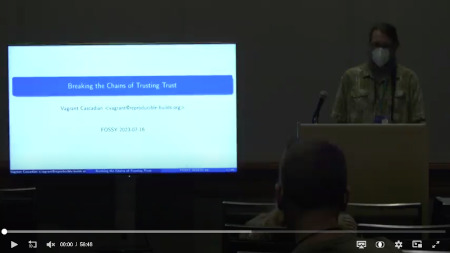
The episode is available to listen (or download) from the Sustain podcast website. As it happens, the episode was recorded at FOSSY 2023, and the video of Vagrant s talk from this conference (Breaking the Chains of Trusting Trust is now available on Archive.org: It was also announced that Vagrant Cascadian will be presenting at the Open Source Firmware Conference in October on the topic of Reproducible Builds All The Way Down.

On our mailing list Carles Pina i Estany wrote to our mailing list during August with an interesting question concerning the practical steps to reproduce the hello-traditional package from Debian. The entire thread can be viewed from the archive page, as can Vagrant Cascadian s reply.

Website updates Rahul Bajaj updated our website to add a series of environment variations related to reproducible builds [ ], Russ Cox added the Go programming language to our projects page [ ] and Vagrant Cascadian fixed a number of broken links and typos around the website [ ][ ][ ].

Software development In diffoscope development this month, versions 247, 248 and 249 were uploaded to Debian unstable by Chris Lamb, who also added documentation for the new specialize_as method and expanding the documentation of the existing specialize as well [ ]. In addition, Fay Stegerman added specialize_as and used it to optimise .smali comparisons when decompiling Android .apk files [ ], Felix Yan and Mattia Rizzolo corrected some typos in code comments [ , ], Greg Chabala merged the RUN commands into single layer in the package s Dockerfile [ ] thus greatly reducing the final image size. Lastly, Roland Clobus updated tool descriptions to mark that the xb-tool has moved package within Debian [ ].
reprotest is our tool for building the same source code twice in different environments and then checking the binaries produced by each build for any differences. This month, Vagrant Cascadian updated the packaging to be compatible with Tox version 4. This was originally filed as Debian bug #1042918 and Holger Levsen uploaded this to change to Debian unstable as version 0.7.26 [ ].

Distribution work In Debian, 28 reviews of Debian packages were added, 14 were updated and 13 were removed this month adding to our knowledge about identified issues. A number of issue types were added, including Chris Lamb adding a new timestamp_in_documentation_using_sphinx_zzzeeksphinx_theme toolchain issue.
In August, F-Droid added 25 new reproducible apps and saw 2 existing apps switch to reproducible builds, making 191 apps in total that are published with Reproducible Builds and using the upstream developer s signature. [ ]
Bernhard M. Wiedemann published another monthly report about reproducibility within openSUSE.

Upstream patches The Reproducible Builds project detects, dissects and attempts to fix as many currently-unreproducible packages as possible. We endeavour to send all of our patches upstream where appropriate. This month, we wrote a large number of such patches, including:

Testing framework The Reproducible Builds project operates a comprehensive testing framework (available at tests.reproducible-builds.org) in order to check packages and other artifacts for reproducibility. In August, a number of changes were made by Holger Levsen:
  • Debian-related changes:
    • Disable Debian live image creation jobs until an OpenQA credential problem has been fixed. [ ]
    • Run our maintenance scripts every 3 hours instead of every 2. [ ]
    • Export data for unstable to the reproducible-tracker.json data file. [ ]
    • Stop varying the build path, we want reproducible builds. [ ]
    • Temporarily stop updating the pbuilder.tgz for Debian unstable due to #1050784. [ ][ ]
    • Correctly document that we are not variying usrmerge. [ ][ ]
    • Mark two armhf nodes (wbq0 and jtx1a) as down; investigation is needed. [ ]
  • Misc:
    • Force reconfiguration of all Jenkins jobs, due to the recent rise of zombie processes. [ ]
    • In the node health checks, also try to restart failed ntpsec, postfix and vnstat services. [ ][ ][ ]
  • System health checks:
    • Detect Debian live build failures due to missing credentials. [ ][ ]
    • Ignore specific types of known zombie processes. [ ][ ]
In addition, Vagrant Cascadian updated the scripts to use a predictable build path that is consistent with the one used on buildd.debian.org. [ ][ ]

If you are interested in contributing to the Reproducible Builds project, please visit our Contribute page on our website. However, you can get in touch with us via:

Valhalla's Things: Banners and Signs

Posted on September 8, 2023
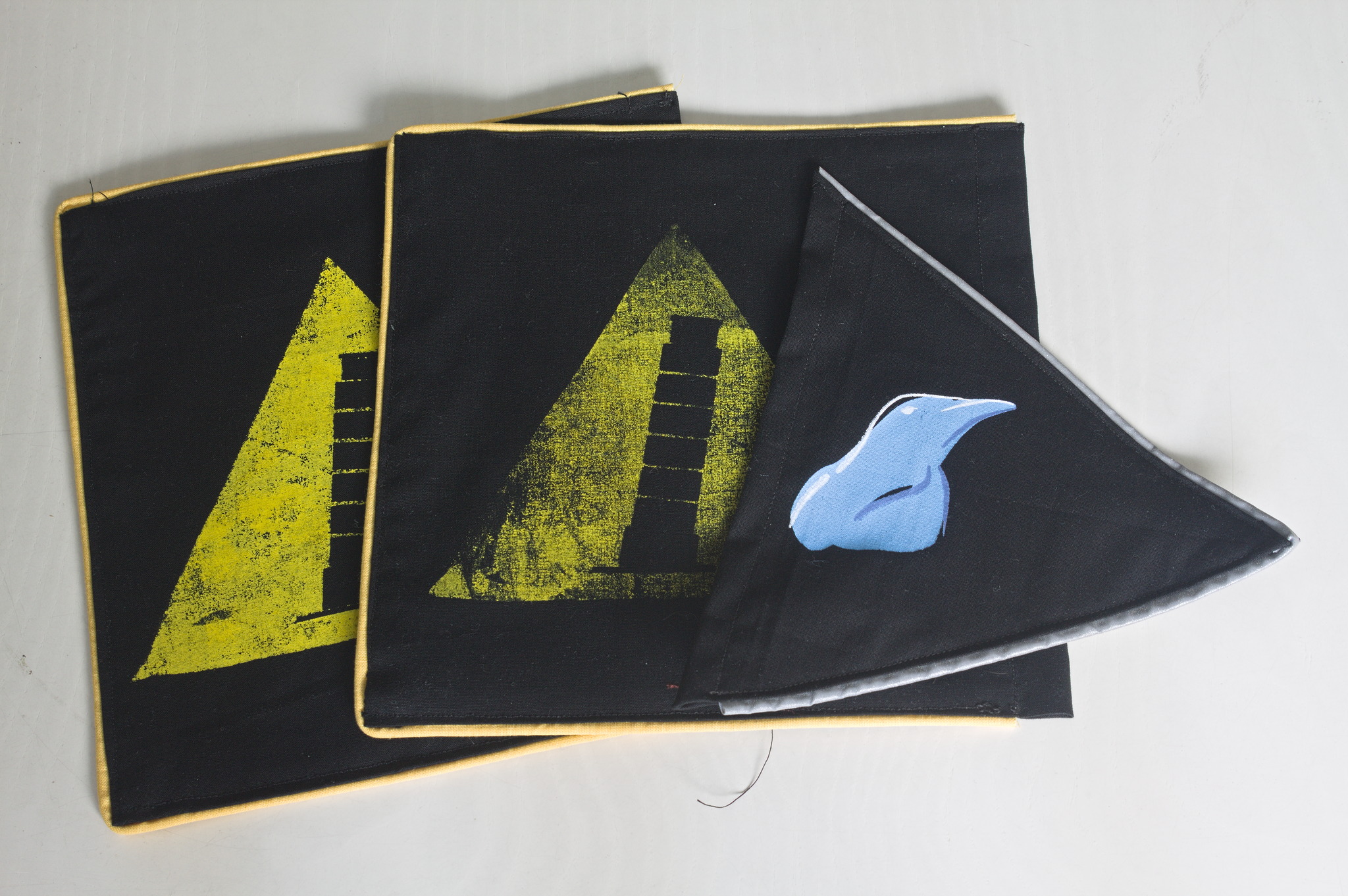
I forgot to write down the details back when it happened, but now that the surprise has been delivered I can write about it. A triangular fabric banner, black with a reflective grey border, and a penguin outline where part of the outline is in the shape of Lake Como screenprinted in white and light blue. Some time ago, I decided to make a small banner with the GL-Como penguin for a friend, because reasons. However, this friend has a big problem, he, well, is from Pisa (no, I m not from Leghorn, why do you ask?), and I had a screen printing kit, openclipart and no inhibitions. Three fabric banners: one is the one mentioned above, two are square with a yellow corded border, a yellow triangle and a tower of Pisa in black in the middle. The yellow triangles aren't perfectly flat yellow, but somewhat ruined, one more than the other. So, with the encouragement of a few friends who were in the secret, this happened. In two copies, because the first attempt at the print had issues. And yesterday we finally met that friend again, gave him all of the banners, and no violence happened, but he liked them :D An ISO 7071-style triangle warning sign with a simplified tower of Pisa in black on yellow background. If somebody is interested, the source image I used is on openclipart, with links to all of the sources I ve used. I don t remember exactly how it happened, but when I was working on the Pisani sign I also stumbled on the no dogs sign and decided that the world needed a mandatory cat sign, and well, here is the full set (all images are a link to the openclipart page). ISO 7071  no dogs  sign, a black dog on white background with a red circle with a diagonal line. ISO 7071-style  mandatory cats  sign, a white cat on blue circle background. ISO 7071-style  mandatory dogs  sign, a white dog on blue circle background. ISO 7071-style  no cats , a black cat on white background with a red circle with a diagonal line.
5 September 2023

Russ Allbery: Review: Before We Go Live

Review: Before We Go Live, by Stephen Flavall
Publisher: Spender Books
Copyright: 2023
ISBN: 1-7392859-1-3
Format: Kindle
Pages: 271
Stephen Flavall, better known as jorbs, is a Twitch streamer specializing in strategy games and most well-known as one of the best Slay the Spire players in the world. Before We Go Live, subtitled Navigating the Abusive World of Online Entertainment, is a memoir of some of his experiences as a streamer. It is his first book. I watch a lot of Twitch. For a long time, it was my primary form of background entertainment. (Twitch's baffling choices to cripple their app have subsequently made YouTube somewhat more attractive.) There are a few things one learns after a few years of watching a lot of streamers. One is that it's a precarious, unforgiving living for all but the most popular streamers. Another is that the level of behind-the-scenes drama is very high. And a third is that the prevailing streaming style has converged on fast-talking, manic, stream-of-consciousness joking apparently designed to satisfy people with very short attention spans. As someone for whom that manic style is like nails on a chalkboard, I am therefore very picky about who I'm willing to watch and rarely can tolerate the top streamers for more than an hour. jorbs is one of the handful of streamers I've found who seems pitched towards adults who don't need instant bursts of dopamine. He's calm, analytical, and projects a relaxed, comfortable feeling most of the time (although like the other streamers I prefer, he doesn't put up with nonsense from his chat). If you watch him for a while, he's also one of those people who makes you think "oh, this is an interestingly unusual person." It's a bit hard to put a finger on, but he thinks about things from intriguing angles. Going in, I thought this would be a general non-fiction book about the behind-the-scenes experience of the streaming industry. Before We Go Live isn't really that. It is primarily a memoir focused on Flavall's personal experience (as well as the experience of his business manager Hannah) with the streaming team and company F2K, supplemented by a brief history of Flavall's streaming career and occasional deeply personal thoughts on his own mental state and past experiences. Along the way, the reader learns a lot more about his thought processes and approach to life. He is indeed a fascinatingly unusual person. This is to some extent an expos , but that's not the most interesting part of this book. It quickly becomes clear that F2K is the sort of parasitic, chaotic, half-assed organization that crops up around any new business model. (Yes, there's crypto.) People who are good at talking other people out of money and making a lot of big promises try to follow a startup fast-growth model with unclear plans for future revenue and hope that it all works out and turns into a valuable company. Most of the time it doesn't, because most of the people running these sorts of opportunistic companies are better at talking people out of money than at running a business. When the new business model is in gaming, you might expect a high risk of sexism and frat culture; in this case, you would not be disappointed. This is moderately interesting but not very revealing if one is already familiar with startup culture and the kind of people who start businesses without doing any of the work the business is about. The F2K principals are at best opportunistic grifters, if not actual con artists. It's not long into this story before this is obvious. At that point, the main narrative of this book becomes frustrating; Flavall recognizes the dysfunction to some extent, but continues to associate with these people. There are good reasons related to his (and Hannah's) psychological state, but it doesn't make it easier to read. Expect to spend most of the book yelling "just break up with these people already" as if you were reading Captain Awkward letters. The real merit of this book is that people are endlessly fascinating, Flavall is charmingly quirky, and he has the rare mix of the introspection that allows him to describe himself without the tendency to make his self-story align with social expectations. I think every person is intriguingly weird in at least some ways, but usually the oddities are smoothed away and hidden under a desire to present as "normal" to the rest of society. Flavall has the right mix of writing skill and a willingness to write with direct honesty that lets the reader appreciate and explore the complex oddities of a real person, including the bits that at first don't make much sense. Parts of this book are uncomfortable reading. Both Flavall and his manager Hannah are abuse survivors, which has a lot to do with their reactions to their treatment by F2K, and those reactions are both tragic and maddening to read about. It's a good way to build empathy for why people will put up with people who don't have their best interests at heart, but at times that empathy can require work because some of the people on the F2K side are so transparently sleazy. This is not the sort of book I'm likely to re-read, but I'm glad I read it simply for that time spent inside the mind of someone who thinks very differently than I do and is both honest and introspective enough to give me a picture of his thought processes that I think was largely accurate. This is something memoir is uniquely capable of doing if the author doesn't polish all of the oddities out of their story. It takes a lot of work to be this forthright about one's internal thought processes, and Flavall does an excellent job. Rating: 7 out of 10

2 September 2023

Junichi Uekawa: September.

September. Looking at performance traces and analysing scheduling and other issues. CPU Cache doesn't really play into effect until I figure out the scheduling issues. They don't collide.

1 September 2023

Scarlett Gately Moore: KDE: Weekly report and News, 23.08.0 Snaps call for testing!

Another busy week in the KDE snap world. Most of the release-service apps are in candidate channel waiting to be tested. Testing is the bottle neck in the process, so I am trying something new and calling for help! Please test your favorite apps and report on https://discuss.kde.org/t/all-things-snaps-questions-concerns-praise/ any issues and which apps tested. Thanks! There are some very big fixes in this release: The KF6 content pack is coming along nicely using qt-framework-sdk snap! Qt5 content snap using KDE patch set is nearly complete! I believe I have a solution for our PIM applications by creating an Akondai dbus provider snap and setting all the PIM applications as consumers. I am waiting for manual review to pass. I have a pile of new applications waiting for reserved name approvals. Igor has pinged the relevant people to speed this normally quick process up. The pushback on per repository snapcraft files has stopped, so I have begun the process, which will take some time. This is a huge step in automating snap builds and cutting down my manual work so I can do more exciting things like plasma snaps! Some big news on my project, a big thank you goes out to Kevin Ottens for reaching out, his company does exactly what I need to move it forward. I will update as we hash out the details, but it looks like my project isn t dead after all! I know many have asked Why haven t you given up already?? The answer in short, I am stubborn. I refuse to give up on anything until I am given a good reason to. When I started my path in computers oh so many years ago, you would be surprised how many people told me to give it up, you ll never make it as a woman. Challenge accepted. Here I am, still going strong. When I want something, I go get it, no matter what it takes! I still need to have a ( somewhat desperate ) call for donations. This will hopefully end soon, but for now, please consider donating to my September survival fund! Please share with anyone you that may find my work useful in any way. Thanks for your consideration
PS: Debian uploads for bubble-gum are moving along. Please if you have any packaging you need done in Debian proper, let me know and I will get on it, time allowing of course.

Paul Wise: FLOSS Activities August 2023

Focus This month I didn't have any particular focus. I just worked on issues in my info bubble.

Changes

Debugging
  • Investigated test failures after Debian pybuild distutils update

Issues

Review
  • Debian BTS usertags: changes for the month

Administration
  • Debian IRC: rescue an alternate channel and make it harder to join accidentally
  • Debian wiki: unblock IP addresses, approve accounts, update emails for accounts

Communication
  • Respond to queries from Debian users and contributors on the mailing lists and IRC

Sponsors The libpst work was sponsored. All other work was done on a volunteer basis.

31 August 2023

Ian Jackson: Conferences take note: the pandemic is not over

Many people seem to be pretending that the pandemic is over. It isn t. People are still getting Covid, becoming sick, and even in some cases becoming disabled. People s plans are still being disrupted. Vulnerable people are still hiding. Conference organisers: please make robust Covid policies, publish them early, and enforce them. And, clearly set expectations for your attendees. Attendees: please don t be the superspreader. Two conferences This year I have attended a number of in-person events. For Eastercon I chose to participate online, remotely. This turns out to have been a very good decision. At least a quarter of attendees got Covid. At BiCon we had about 300 attendees. I m not aware of any Covid cases. Part of the difference between the two may have been in the policies. BiCon s policy was rather more robust. Unlike Eastercon s it had a much better refund policy for people who got Covid and therefore shouldn t come; also BiCon asked attendees to actually show evidence of a negative test. Another part of the difference will have been the venue. The NTU buildings we used at BiCon were modern and well ventilated. But, I think the biggest difference was attendees' attitudes. BiCon attendees are disproportionately likely (compared to society at large) to have long term medical conditions. And the cultural norms are to value and protect those people. Conversely, in my experience, a larger proportion of Eastercon attendees don t always have the same level of consideration. I don t want to give details, but I have reliable reports of quite reprehensible behaviour by some attendees - even members of the convention volunteer staff. Policies Your conference should IMO at the very least: The rules should be published very early, so that people can see them, and decide if they want to go, before they have to book anything. Don t recommend that people don t spread disease Most of the things that attendees can do to about Covid primarily protect others, rather than themselves. Making those things recommendations or advice is grossly unfair. You re setting up an arsehole filter: nice people will want to protect others, but less public spirited people will tell themselves it s only a recommendation. Make the rules mandatory. But won t we be driving people away ? If you don t have a robust Covid policy, you are already driving people away. And the people who won t come because of reasonable measures like I ve asked for above, are dickheads. You don t want them putting your other attendees at risk. And probably they re annoying in other ways too. Example of something that is not OK Yesterday (2023-08-30 13:44 UTC), less than two weeks before the conference, Debconf 23 s Covid policy still looked like you see below. Today there is a policy, but it is still weak.
Edited 2023-09-01 00:58 +01:00 to fix the link to the Debconf policy.


comment count unavailable comments

Russell Coker: Links August 2023

This is an interesting idea from Bruce Schneier, an AI Dividend paid to every person for their contributions to the input of ML systems [1]. We can t determine who s input was most used so sharing the money equally seems fair. It could end up as yet another justification for a Universal Basic Income. The Long Now foundation has an insightful article about preserving digital data [2]. It covers the history of lost data and the new challenges archivists face with proprietary file formats. Tesla gets fined for having special Elon mode [3], turns out that being a billionaire isn t an exemption from road safety legislation. Wired has an interesting article about the Olympics Destroyer malware that Russia used to attack the 2018 Olympics [4]. Wired has an interesting article about Marcus Hutchins, how he prevented a serious bot attack and how he had a history in crime when he was a teenager [5]. It s good to see that some people can reform. The IEEE has a long and informative article about what needs to be done to transition to electric cars [6]. It s a lot of work and we should try and do it as fast as possible. Linux Tech Tips has an interesting video about a new cooling system for laptops (and similar use cases for moving tens of watts from a thin space) [7]. This isn t going to be useful for servers or desktops as big heavy heatsinks work well for them. But for something to put on top of a laptop CPU or to have several of them connected to a laptop CPU by heat pipes it could be very useful. The technology of piezo electric cooling devices is interesting on it s own, I expect we will see more of that in future.

30 August 2023

Dirk Eddelbuettel: RcppArmadillo 0.12.6.3.0 on CRAN: New Upstream Bugfix

armadillo image Armadillo is a powerful and expressive C++ template library for linear algebra and scientific computing. It aims towards a good balance between speed and ease of use, has a syntax deliberately close to Matlab, and is useful for algorithm development directly in C++, or quick conversion of research code into production environments. RcppArmadillo integrates this library with the R environment and language and is widely used by (currently) 1092 other packages on CRAN, downloaded 30.3 million times (per the partial logs from the cloud mirrors of CRAN), and the CSDA paper (preprint / vignette) by Conrad and myself has been cited 549 times according to Google Scholar. This release brings bugfix upstream release 12.6.3. We skipped 12.6.2 at CRAN (as discussed in the previous release notes) as it only affected Armadillo-internal random-number generation (RNG). As we default to supplying the RNGs from R, this did not affect RcppArmadillo. The bug fixes in 12.6.3 are for csv reading which too will most likely be done by R tools for R users, but given two minor bugfix releases an update was in order. I ran the full reverse-depenency check against the now more than 1000 packages overnight: no issues. armadillo processing CRAN processed the package fully automatically as it has no issues, and nothing popped up in reverse-dependency checking. The set of changes for the last two RcppArmadillo releases follows.

Changes in RcppArmadillo version 0.12.6.3.0 (2023-08-28)
  • Upgraded to Armadillo release 12.6.3 (Cortisol Retox)
    • Fix for corner-case in loading CSV files with headers
    • For consistent file handling, all .load() functions now open text files in binary mode

Changes in RcppArmadillo version 0.12.6.2.0 (2023-08-08)
  • Upgraded to Armadillo release 12.6.2 (Cortisol Retox)
    • use thread-safe Mersenne Twister as the default RNG on all platforms
    • use unique RNG seed for each thread within multi-threaded execution (such as OpenMP)
    • explicitly document arma_rng::set_seed() and arma_rng::set_seed_random()
  • None of the changes above affect R use as RcppArmadillo connects the RNGs used by R to Armadillo

Courtesy of my CRANberries, there is a diffstat report relative to previous release. More detailed information is on the RcppArmadillo page. Questions, comments etc should go to the rcpp-devel mailing list off the Rcpp R-Forge page. If you like this or other open-source work I do, you can sponsor me at GitHub.

This post by Dirk Eddelbuettel originated on his Thinking inside the box blog. Please report excessive re-aggregation in third-party for-profit settings.

29 August 2023

Jonathan Dowland: Gazelle Twin

A couple of releases A couple of releases
I discovered Gazelle Twin last year via Stuart Maconie's Freak Zone (two of her tracks ended up on my 2022 Halloween playlist). Through her website I learned of The Horror Show! exhibition at Somerset House1 in London that I managed to visit earlier this year. I've been intending to write a 5-track blog post (a la Underworld, the Cure, Coil) for a while but I have been spurred on by the excellent news that she's got a new album on the way, and, she's performing at the Sage Gateshead in November. Buy tickets now!! Here's the five tracks I recommend to get started:
  1. Anti-Body, from 2014's UNFLESH. I particularly love the percussion. Perc did a good hard-house-style remix on Fleshed Out, the companion remix album. Anti-Body by Gazelle Twin
  2. Fire Leap, from Gazelle Twin and NYX's collaborative album Deep England. The album is a re-interpretation of material from Gazelle Twin's earlier album, Pastoral, with the exception of this track, which is a cover of Paul Giovanni's song from The Wicker Man. There's a common aesthetic in all three works: eerie-folk, England's self-mythologising as seen through a warped and cracked lens. Anti-Body by Gazelle Twin There's a fantastic performance video of the whole album, directed by Iain Forsyth and Jane Pollard, available on YouTube.
  3. Better In My Day, from the aforementioned Pastoral. This track and this album are, I think, less accessible, more challenging than the re-interpreted material. That's not a bad thing: I'm still working on digesting it! This is one of the more abrasive, confrontational tracks. Better In My Day by Gazelle Twin
  4. I am Shell I am Bone, from way back to her first release, The Entire City in 2011. Composed, recorded, self-produced, self-released. It's remarkable to me how different each phase of GT's work are to one another. This album evokes a strong sense of atmosphere and place to me. There's a hint of possible influence of Joy Division's Unknown Pleasures (or New Order's Movement) in places. The b-side to this song is a cover of Joy Division's The Eternal. I Am Shell I Am Bone by Gazelle Twin
  5. GT re-issued This Entire City in 2022 along with a companion-piece EP of newly-released material from the same era, The Wastelands. This isn't cutting room floor stuff, though, as evidenced by the strength of my final pick, Hole in my Heart. Hole In My Heart by Gazelle Twin
It's hard to pick just five tracks when doing these (that's the point I suppose). I note that I haven't picked anything from her wide-ranging soundtrack work: her last three or four of her releases have been soundtrack works, released on the well-respected UK label Invada, as will be her forthcoming album. You can find all the released stuff on Gazelle Twin's Bandcamp Page.

  1. I recently learned that PJ Harvey once hosted album sessions in Somerset House, and allowed fans to watch her at work during the recording: https://www.theguardian.com/music/2015/jan/16/pj-harvey-somerset-house-recording-in-progress

27 August 2023

Shirish Agarwal: FSCKing /home

There is a bit of context that needs to be shared before I get to this and would be a long one. For reasons known and unknown, I have a lot of sudden electricity outages. Not just me, all those who are on my line. A discussion with a lineman revealed that around 200+ families and businesses are on the same line and when for whatever reason the electricity goes for all. Even some of the traffic lights don t work. This affects software more than hardware or in some cases, both. And more specifically HDD s are vulnerable. I had bought an APC unit several years for precisely this, but over period of time it just couldn t function and trips also when the electricity goes out. It s been 6-7 years so can t even ask customer service to fix the issue and from whatever discussions I have had with APC personnel, the only meaningful difference is to buy a new unit but even then not sure this is an issue that can be resolved, even with that. That comes to the issue that happens once in a while where the system fsck is unable to repair /home and you need to use an external pen drive for the same. This is my how my hdd stacks up
/ is on dev/sda7 /boot is on /dev/sda6, /boot/efi is on /dev/sda2 and /home is on /dev/sda8 so theoretically, if /home for some reason doesn t work I should be able drop down on /dev/sda7, unmount /dev/sda8, run fsck and carry on with my work. I tried it number of times but it didn t work. I was dropping down on tty1 and attempting the same, no dice as root/superuser getting the barest x-term. So first I tried asking couple of friends who live nearby me. Unfortunately, both are MS-Windows users and both use what are called as company-owned laptops . Surfing on those systems were a nightmare. Especially the number of pop-ups of ads that the web has become. And to think about how much harassment ublock origin has saved me over the years. One of the more interesting bits from both their devices were showing all and any downloads from fosshub was showing up as malware. I dunno how much of that is true or not as haven t had to use it as most software we get through debian archives or if needed, download from github or wherever and run/install it and you are in business. Some of them even get compiled into a good .deb package but that s outside the conversation atm. My only experience with fosshub was few years before the pandemic and that was good. I dunno if fosshub really has malware or malwarebytes was giving false positives. It also isn t easy to upload a 600 MB+ ISO file somewhere to see whether it really has malware or not. I used to know of a site or two where you could upload a suspicious file and almost 20-30 famous and known antivirus and anti-malware engines would check it and tell you the result. Unfortunately, I have forgotten the URL and seeing things from MS-Windows perspective, things have gotten way worse than before. So left with no choice, I turned to the local LUG for help. Fortunately, my mobile does have e-mail and I could use gmail to solicit help. While there could have been any number of live CD s that could have helped but one of my first experiences with GNU/Linux was that of Knoppix that I had got from Linux For You (now known as OSFY) sometime in 2003. IIRC, had read an interview of Mr. Klaus Knopper as well and was impressed by it. In those days, Debian wasn t accessible to non-technical users then and Knoppix was a good tool to see it. In fact, think he was the first to come up with the idea of a Live CD and run with it while Canonical/Ubuntu took another 2 years to do it. I think both the CD and the interview by distrowatch was shared by LFY in those early days. Of course, later the story changes after he got married, but I think that is more about Adriane rather than Knoppix. So Vishal Rao helped me out. I got an HP USB 3.2 32GB Type C OTG Flash Drive x5600c (Grey & Black) from a local hardware dealer around similar price point. The dealer is a big one and has almost 200+ people scattered around the city doing channel sales who in turn sell to end users. Asking one of the representatives about their opinion on stopping electronic imports (apparently more things were added later to the list including all sorts of sundry items from digital cameras to shavers and whatnot.) The gentleman replied that he hopes that it would not happen otherwise more than 90% would have to leave their jobs. They already have started into lighting fixtures (LED bulbs, tubelights etc.) but even those would come in the same ban  The main argument as have shared before is that Indian Govt. thinks we need our home grown CPU and while I have no issues with that, as shared before except for RISC-V there is no other space where India could look into doing that. Especially after the Chip Act, Biden has made that any new fabs or any new thing in chip fabrication will only be shared with Five Eyes only. Also, while India is looking to generate about 2000 GW by 2030 by solar, China has an ambitious 20,000 GW generation capacity by the end of this year and the Chinese are the ones who are actually driving down the module prices. The Chinese are also automating their factories as if there s no tomorrow. The end result of both is that China will continue to be the world s factory floor for the foreseeable future and whoever may try whatever policies, it probably is gonna be difficult to compete with them on prices of electronic products. That s the reason the U.S. has been trying so that China doesn t get the latest technology but that perhaps is a story for another day.

HP USB 3.2 Type C OTG Flash Drive x5600c For people who have had read this blog they know that most of the flash drives today are MLC Drives and do not have the longevity of the SLC Drives. For those who maybe are new, this short brochure/explainer from Kingston should enhance your understanding. SLC Drives are rare and expensive. There are also a huge number of counterfeit flash drives available in the market and almost all the companies efforts whether it s Kingston, HP or any other manufacturer, they have been like a drop in the bucket. Coming back to the topic at hand. While there are some tools that can help you to figure out whether a pen drive is genuine or not. While there are products that can tell you whether they are genuine or not (basically by probing the memory controller and the info. you get from that.) that probably is a discussion left for another day. It took me couple of days and finally I was able to find time to go Vishal s place. The journey of back and forth lasted almost 6 hours, with crazy traffic jams. Tells you why Pune or specifically the Swargate, Hadapsar patch really needs a Metro. While an in-principle nod has been given, it probably is more than 5-7 years or more before we actually have a functioning metro. Even the current route the Metro has was supposed to be done almost 5 years to the date and even the modified plan was of 3 years ago. And even now, most of the Stations still need a lot of work to be done. PMC, Deccan as examples etc. still have loads to be done. Even PMT (Pune Muncipal Transport) that that is supposed to do the last mile connections via its buses has been putting half-hearted attempts

Vishal Rao While Vishal had apparently seen me and perhaps we had also interacted, this was my first memory of him although we have been on a few boards now and then including stackexchange. He was genuine and warm and shared 4-5 distros with me, including Knoppix and System Rescue as shared by Arun Khan. While this is and was the first time I had heard about Ventoy apparently Vishal has been using it for couple of years now. It s a simple shell script that you need to download and run on your pen drive and then just dump all the .iso images. The easiest way to explain ventoy is that it looks and feels like Grub. Which also reminds me an interaction I had with Vishal on mobile. While troubleshooting the issue, I was unsure whether it was filesystem that was the issue or also systemd was corrupted. Vishal reminded me of putting fastboot to the kernel parameters to see if I m able to boot without fscking and get into userspace i.e. /home. Although journalctl and systemctl were responding even on tty1 still was a bit apprehensive. Using fastboot was able to mount the whole thing and get into userspace and that told me that it s only some of the inodes that need clearing and there probably are some orphaned inodes. While Vishal had got a mini-pc he uses that a server, downloads stuff to it and then downloads stuff from it. From both privacy, backup etc. it is a better way to do things but then you need to laptop to access it. I am sure he probably uses it for virtualization and other ways as well but we just didn t have time for that discussion. Also a mini-pc can set you back anywhere from 25 to 40k depending on the mini-pc and the RAM and the SSD. And you need either a lappy or an Raspberry Pi with some kinda visual display to interact with the mini-pc. While he did share some of the things, there probably could have been a far longer interaction just on that but probably best left for another day. Now at my end, the system I had bought is about 5-6 years old. At that time it only had 6 USB 2.0 drives and 2 USB 3.0 (A) drives.
The above image does tell of the various form factors. One of the other things is that I found the pendrive and its connectors to be extremely fiddly. It took me number of times fiddling around with it when I was finally able to put in and able to access the pen drive partitions. Unfortunately, was unable to see/use systemrescue but Knoppix booted up fine. I mounted the partitions briefly to see where is what and sure enough /dev/sda8 showed my /home files and folders. Unmounted it, then used $fsck -y /dev/sda8 and back in business. This concludes what happened. Updates Quite a bit was left out on the original post, part of which I didn t know and partly stuff which is interesting and perhaps need a blog post of their own. It s sad I won t be part of debconf otherwise who knows what else I would have come to know.
  1. One of the interesting bits that I came to know about last week is the Alibaba T-Head T-Head TH1520 RISC-V CPU and saw it first being demoed on a laptop and then a standalone tablet. The laptop is an interesting proposition considering Alibaba opened up it s chip thing only couple of years ago. To have an SOC within 18 months and then under production for lappies and tablets is practically unheard of especially of a newbie/startup. Even AMD took 3-4 years for its first chip.It seems they (Alibaba) would be parceling them out by quarter end 2023 and another 1000 pieces/Units first quarter next year, while the scale is nothing compared to the behemoths, I think this would be more as a matter of getting feedback on both the hardware and software. The value proposition is much better than what most of us get, at least in India. For example, they are doing a warranty for 5 years and also giving spare parts. RISC-V has been having a lot of resurgence in China in part as its an open standard and partly development will be far cheaper and faster than trying x86 or x86-64. If you look into both the manufacturers, due to monopoly, both of them now give 5-8% increment per year, and if you look back in history, you would find that when more chips were in competition, they used to give 15-20% performance increment per year.
2. While Vishal did share with me what he used and the various ways he uses the mini-pc, I did have a fun speculating on what he could use it. As shared by Romane as his case has shared, the first thing to my mind was backups. Filesystems are notorious in the sense they can be corrupted or can be prone to be corrupted very easily as can be seen above  . Backups certainly make a lot of sense, especially rsync. The other thing that came to my mind was having some sort of A.I. and chat server. IIRC, somebody has put quite a bit of open source public domain data in debian servers that could be used to run either a chatbot or an A.I. or both and use that similar to how chatGPT but with much limited scope than what chatgpt uses. I was also thinking a media server which Vishal did share he does. I may probably visit him sometime to see what choices he did and what he learned in the process, if anything. Another thing that could be done is just take a dump of any of commodity markets or any markets and have some sort of predictive A.I. or whatever. A whole bunch of people have scammed thousands of Indian users on this, but if you do it on your own and for your own purposes to aid you buy and sell stocks or whatever commodity you may fancy. After all, nowadays markets themselves are virtual. While Vishal s mini-pc doesn t have any graphics, if it was an AMD APU mini-pc, something like this he could have hosted games in the way of thick server, thin client where all graphics processing happens on the server rather than the client. With virtual reality I think the case for the same case could be made or much more. The only problem with VR/AR is that we don t really have mass-market googles, eye pieces or headset. The only notable project that Google has/had in that place is the Google VR Cardboard headset and the experience is not that great or at least was not that great few years back when I could hear and experience the same. Most of the VR headsets say for example the Meta Quest 2 is for around INR 44k/- while Quest 3 is INR 50k+ and officially not available. As have shared before, the holy grail of VR would be when it falls below INR 10k/- so it becomes just another accessory, not something you really have to save for. There also isn t much content on that but then that is also the whole chicken or egg situation. This again is a non-stop discussion as so much has been happening in that space it needs its own blog post/article whatever. Till later.

Gunnar Wolf: Interested in adopting the RPi images for Debian?

Back in June 2018, Michael Stapelberg put the Raspberry Pi image building up for adoption. He created the first set of unofficial, experimental Raspberry Pi images for Debian. I promptly answered to him, and while it took me some time to actually warp my head around Michael s work, managed to eventually do so. By December, I started pushing some updates. Not only that: I didn t think much about it in the beginning, as the needed non-free pacakge was called raspi3-firmware, but By early 2019, I had it running for all of the then-available Raspberry families (so the package was naturally renamed to raspi-firmware). I got my Raspberry Pi 4 at DebConf19 (thanks to Andy, who brought it from Cambridge), and it soon joined the happy Debian family. The images are built daily, and are available in https://raspi.debian.net. In the process, I also adopted Lars great vmdb2 image building tool, and have kept it decently up to date (yes, I m currently lagging behind, but I ll get to it soonish ). Anyway This year, I have been seriously neglecting the Raspberry builds. I have simply not had time to regularly test built images, nor to debug why the builder has not picked up building for trixie (testing). And my time availability is not going to improve any time soon. We are close to one month away from moving for six months to Paran (Argentina), where I ll be focusing on my PhD. And while I do contemplate taking my Raspberries along, I do not forsee being able to put much energy to them. So This is basically a call for adoption for the Raspberry Debian images building service. I do intend to stick around and try to help. It s not only me (although I m responsible for the build itself) we have a nice and healthy group of Debian people hanging out in the #debian-raspberrypi channel in OFTC IRC. Don t be afraid, and come ask. I hope giving this project in adoption will breathe new life into it!

Next.

Previous.