Search Results: "ed"

9 August 2013

Daniel Pocock: GSoC students progress

I've been lucky enough to be involved in a team mentoring two students contributing to Debian under the Google Summer of Code program this year. Both students have demonstrated a lot of enthusiasm and talent and have just passed their mid-term evaluations. Students often provide a fresh insight to projects. Their potential is not to be underestimated: one diligent student, Thomas Herndon from UMass Amherst recently came to fame exposing fundamental spreadsheet errors in calculations used to back the IMF case for austerity. Herndon was lucky to receive a copy of the spreadsheet (the source was not published openly as in free software): that is one problem that GSoC students don't have to wrestle with. Both of our GSoC students have exposed previously unknown issues in the code they are working on: Fabian discovered API differences in GnuTLS caused problems for dynalogin, while Catalin helped discover that some headers from reSIProcate are susceptible to ABI-breaking behavior dependending on the combination of CPPFLAGS. DebConf this month Both students are going to discuss some of their work on 17 August at DebConf - they are particularly keen to meet with other members of the Debian community throughout the week and find out how their work can best be leveraged by the community and Debian's wider userbase (and derivatives). Fabian Gr nbichler : one time passwords Fabian's project has been working on oath-toolkit and dynalogin. These are excellent projects, helping us realise new opportunities to use tokens for various types of authentication exchanges, such as login. Part of his project involves implementing the recently formalized IETF RFC 6287 for OCRA in a practical way that developers can use. Catalin Usurelu : real-time communications Catalin's project involves working with a variety of open source communications applications to make them work well together on a Debian system. One piece of work he is just completing provides a turn-key SIP conferencing solution that could replace Mumble (which attracted quite some controversy in the previous Debian release cycle) Community development These are all community projects and any feedback from users and other developers is always very welcome. For example, if you have time to test or provide suggestions, please feel free to jump in on the mailing lists we use for these projects.

8 August 2013

Lars Wirzenius: Obnam 1.5 (backup software) release

I've just pushed out the release files for Obnam version 1.5, my backup application, and Larch, my B-tree library, which Obnam uses. They are available via my home page (http://liw.fi/). These versions have alos been uploaded to Debian unstable. NEWS for Obnam: NEWS for larch:

Nicolas Dandrimont: Hello from DebCamp

DebConf flag (minus the wind) Small update as someone was complaining about the lack of pictures from DebCamp on planet. Not to worry, everything is going fine, and some of the most important stuff is ready s3kr3t You can see a few pictures from the gallery. The view from the venue is quite outstanding (it was better when there was some sun on Tuesday, but my camera battery was out ). On my TODO-list: See you there!

Michael Stapelberg: Going to DebConf

I will arrive at DebConf 2013 on Sunday afternoon. In case you are interested in Go (the programming language), systemd, i3 or getting your package reviewed, please talk to me! :-) Looking forward to meeting many of you in real life.

Neil McGovern: IT recruitment sexism is alive and well

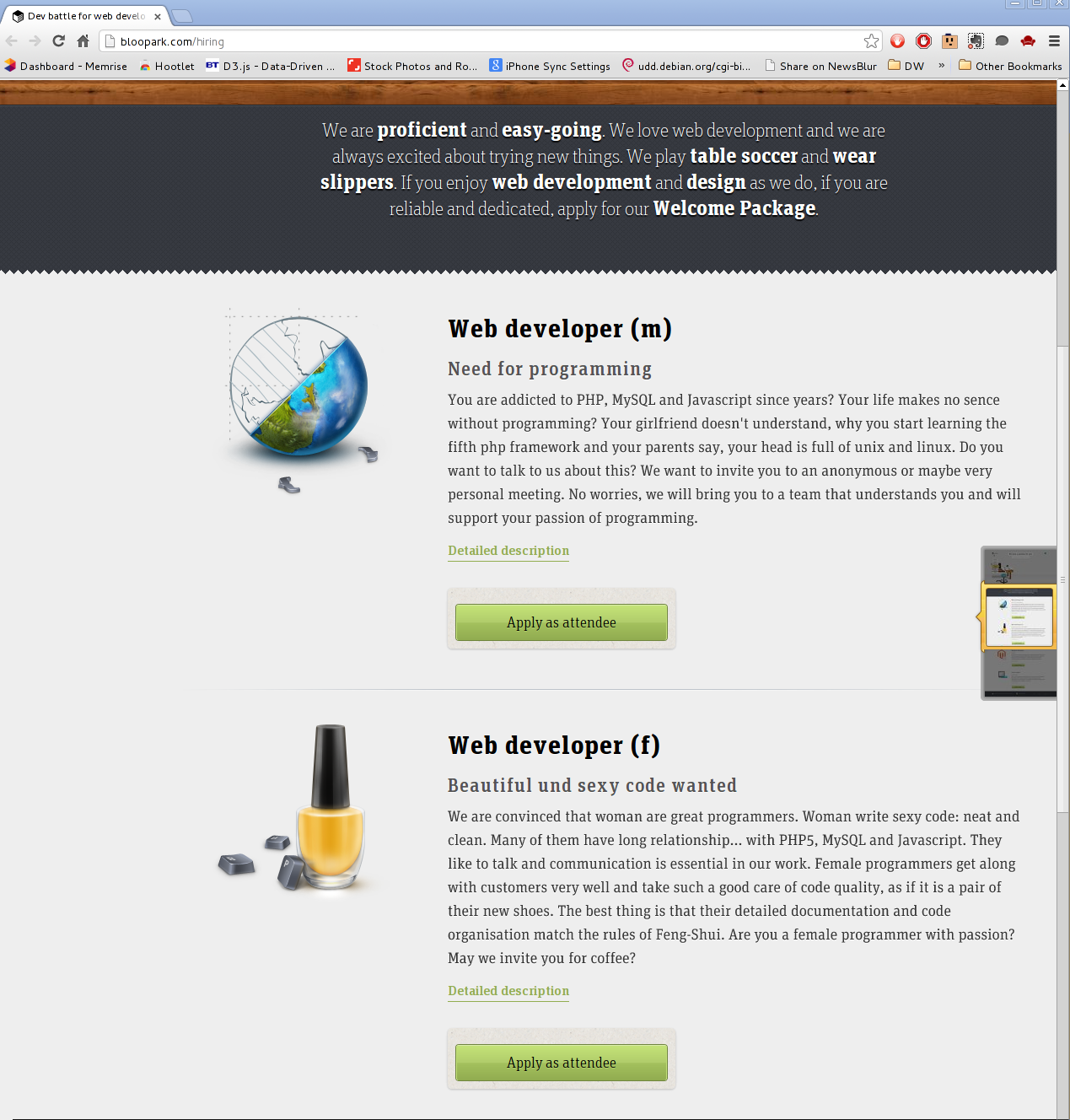
sexismWith the number of female software engineers standing at 20.9% [1], recruitment of females into the industry is a major concern. A friend of mine, Rosemary Francis who's MD of Ellexus, has a great talk about this issue. It mentions various methods you can use to tailor your job applications to be more attractive to females, by simply being careful not to exclude or put off potential applicants. However, there is also a very poor way of doing so, which is highly sexist and plays to stereotypes. As we can see from Bloopark's hiring page, this is exactly what they have done.
Web developer (m)
Need for programming
You are addicted to PHP, MySQL and Javascript since years? Your life makes no sence without programming? Your girlfriend doesn't understand, why you start learning the fifth php framework and your parents say, your head is full of unix and linux. Do you want to talk to us about this? We want to invite you to an anonymous or maybe very personal meeting. No worries, we will bring you to a team that understands you and will support your passion of programming. Web developer (f)
Beautiful und sexy code wanted
We are convinced that woman are great programmers. Woman write sexy code: neat and clean. Many of them have long relationship... with PHP5, MySQL and Javascript. They like to talk and communication is essential in our work. Female programmers get along with customers very well and take such a good care of code quality, as if it is a pair of their new shoes. The best thing is that their detailed documentation and code organisation match the rules of Feng-Shui. Are you a female programmer with passion? May we invite you for coffee?
Really? New pair of shoes? Pictures of nail varnish? They're in a relationship with code? And why does the male version need to have a girlfriend rather than a boyfriend? [1] US Bureau of Labor Statistics (BLS) - ftp://ftp.bls.gov/pub/special.requests/lf/aa2010/aat11.txt

Craig Small: postfix transport with smarthost

Dear lazyyweb, Has anyone got a way for postfix to use a transport map such that it sends email to the given MX host for some specified domains then default to a smarthost for the remainder? The logic would be: IF domain in ( example.net , foo.bar ,etc etc) THEN use the relevant MX host ELSE send to smarthost.isp.net i can use a transport map to send from specific domains to specific hosts, eg @domain.com goes to otherisp.net mailserver but not to just use domain.com s MX hosts

Craig Small: postfix transport with smarthost

Dear lazyyweb, Has anyone got a way for postfix to use a transport map such that it sends email to the given MX host for some specified domains then default to a smarthost for the remainder? The logic would be: IF domain in ( example.net , foo.bar ,etc etc) THEN use the relevant MX host ELSE send to smarthost.isp.net i can use a transport map to send from specific domains to specific hosts, eg @domain.com goes to otherisp.net mailserver but not to just use domain.com s MX hosts

Francois Marier: Server Migration Plan

I recently had to migrate the main Libravatar server to a new virtual machine. In order to minimize risk and downtime, I decided to write a migration plan ahead of time. I am sharing this plan here in case it gives any ideas to others who have to go through a similar process.

Prepare DNS
  • Change the TTL on the DNS entry for libravatar.org to 3600 seconds.
  • Remove the mirrors I don't control from the DNS load balancer (cdn and seccdn).
  • Remove the main server from cdn and seccdn in DNS.

Preparing the new server
  • Setup the new server.
  • Copy the database from the old site and restore it.
  • Copy /var/lib/libravatar from the old site.
  • Hack my local /etc/hosts file to point to the new server's IP address:
    xxx.xxx.xxx.xxx www.libravatar.org stats.libravatar.org cdn.libravatar.org
    
  • Test all functionality on the new site.

Preparing the old server
  • Prepare a static "under migration" Apache config in /etc/apache2/sites-enables.static/:
    <VirtualHost *:80>
        RewriteEngine On
        RewriteRule ^ https://www.libravatar.org [redirect=301,last]
    </VirtualHost>
    <VirtualHost *:443>
        SSLEngine on
        SSLProtocol TLSv1
        SSLHonorCipherOrder On
        SSLCipherSuite RC4-SHA:HIGH:!kEDH
        SSLCertificateFile /etc/libravatar/www.crt
        SSLCertificateKeyFile /etc/libravatar/www.pem
        SSLCertificateChainFile /etc/libravatar/www-chain.pem
        RewriteEngine On
        RewriteRule ^ /var/www/migration.html [last]
        <Directory /var/www>
            Allow from all
            Options -Indexes
        </Directory>
    </VirtualHost>
    
  • Put this static file in /var/www/migration.html:
    <html>
    <body>
    <p>We are migrating to a new server. See you soon!</p>
    <p>- <a href="http://identi.ca/libravatar">@libravatar</a></p>
    </body>
    </html>
    
  • Enable the rewrite module:
    a2enmod rewrite
    
  • Prepare an Apache config proxying to the new server in /etc/apache2/sites-enabled.proxy/:
    <VirtualHost *:80>
        RewriteEngine On
        RewriteRule ^ https://www.libravatar.org [redirect=301,last]
    </VirtualHost>
    <VirtualHost *:443>
        SSLEngine on
        SSLProtocol TLSv1
        SSLHonorCipherOrder On
        SSLCipherSuite RC4-SHA:HIGH:!kEDH
        SSLCertificateFile /etc/libravatar/www.crt
        SSLCertificateKeyFile /etc/libravatar/www.pem
        SSLCertificateChainFile /etc/libravatar/www-chain.pem
        SSLProxyEngine on
        ProxyPass / https://www.libravatar.org/
        ProxyPassReverse / https://www.libravatar.org/
    </VirtualHost>
    
  • Enable the proxy-related modules for Apache:
    a2enmod proxy
    a2enmod proxy_connect
    a2enmod proxy_http
    

Migrating servers
  • Tweet and dent about the upcoming migration.
  • Enable the static file config on the old server (disabling the Django app).
  • Copy the database from the old server and restore it on the new server.
  • Copy /var/lib/libravatar from the old server to the new one.

Disable mirror sync
  • Log into each mirror and comment out the sync cron jobs in /etc/cron.d/libravatar-slave.
  • Make sure mirrors are no longer able to connect to the old server by deleting /var/lib/libravatar/master/.ssh/authorized_keys on the old server.

Testing the main site
  • Hack my local /etc/hosts file to point to the new server's IP address:
    xxx.xxx.xxx.xxx www.libravatar.org stats.libravatar.org cdn.libravatar.org
    
  • Test all functionality on the new site.
  • If testing is successful, update DNS to point to the new server with a short TTL (in case we need to revert).
  • Enable the proxy config on the old server.
  • Hack my local /etc/hosts file to point to the old server's IP address.
  • Test basic functionality going through the proxy.
  • Remove local /etc/hosts/ hacks.

Re-enable mirror sync
  • Build a new libravatar-slave package with an updated known_hosts file for the new server.
  • Log into each server I control and update that package.
  • Test the connection to the master (hacking /etc/hosts on the mirror if needed):
    sudo -u libravatar-slave ssh libravatar-master@0.cdn.libravatar.org
    
  • Uncomment the sync cron jobs in /etc/cron.d/libravatar-slave.
  • An hour later, make sure that new images are copied over and that the TLS certs are still working.
  • Remove /etc/hosts hacks from all mirrors.

Post migration steps
  • Tweet and dent about the fact that the migration was successful.
  • Send a test email to the support address included in the tweet/dent.
  • Take a backup of config files and data on the old server in case I forgot to copy something to the new one.
  • Get in touch with mirror owners to tell them to update libravatar-slave package and test ssh configuration.
  • Add third-party controlled mirrors back to the DNS load-balancer once they are up to date.
  • A few days later, change the TTL for the main site back to 43200 seconds.
  • A week later, kill the proxy on the old server by shutting it down.

Enrico Zini: Getting new Front Desk members (part of things to do at Debconf)

Getting new Front Desk members (part of things to do at Debconf) We need more Front Desk members. Jonathan Wiltshire has kindly put together a job description for the current status quo. Currently we'd like a person to have been an Application Manager before joining Front Desk, but FD tasks are now more diverse than they used to be, and I'd like to spend some time thinking about it, for example here. Job Description for Front Desk Assistant Front Desk assistants are often the first point of contact for new applicants to Debian's New Member process, and are responsible for guiding them through all stages. Front Desk collates applications, assigns them to an Application Manager, checks over the completed application and hands it off to the Account Managers. Front Desk also handles membership of the collab-maint Alioth project. It is not currently involved with applications for Debian Maintainer status. You will 'meet' a wide variety of applicants, some of whom are excited to be starting their journey to Debian membership, whilst others are already established and taking the next step to full developer status. This is a mostly procedural role, but some diplomatic skills are required, particularly when applications are held up for reasons beyond your control. You must have excellent written communication, an eye for detail, and a thorough understanding of what it is to be Debian Members. Expect to spend 2-3 hours per week on this role, divided by as many days as you can manage (to ensure mail is dealt with as soon as possible). The most time-consuming part is processing the completed application. Responsibilities:
  1. To be the first point of contact at Front Desk
  2. To perform initial triage of applications
  3. To match each application with an appropriate Application Manager
  4. To ensure applicants are processed in a timely manner, which may require intervening with an application when it is not progressing satisfactorily
  5. To check completed applications for any missing detail and pass them on to the Account Managers
  6. To handle collab-maint membership business
  7. To answer any queries from applicants, Application Managers, and other stakeholders
  8. To monitor output from the NM routine jobs and fix or escalate any problems
Front Desk staff are not expected to make a judgement call on applicants, though some discretion can be used when appropriate.

7 August 2013

Keith Packard: embedded cpus

Choosing Embedded Processors for AltOS When Bdale and I started building rocketry hardware together, we had already picked out a target processor, the TI cc1111. We picked that chip almost entirely based on the digital transceiver that is built in to the chip, and not because we had any particular love for the 8051 microcontroller. At that time, I d seen people struggle with PIC processors, battle AVR to a draw and spend a lot of time trying to get various ARM processors running. So, the 8051 didn t seem all that far from normal, and the cc1111 implementation of it is pretty reasonable, including credible USB support and a built-in DMA engine. Since those early days, we ve gone on to build boards with a slightly wider range of processors: Bdale thinks we should reduce the number of components we use to focus our efforts better. He s probably right, but I have to admit that I ve had way too much fun getting each of these chips running. I thought I d spend a bit of time describing our general process for selecting a new CPU. CC1111 involved a lot of software hacking The 8051 processor in the CC1111 is very well documented, including the two-wire debugging interface. What was missing was a canned solution for programming and debugging the chip from Debian. However, with sufficient motivation and accurate docs, I was able to create a programmer from a USB device with a couple of GPIOs and a lot of ugly software on Linux. That sufficed to get the USB stack limping along, at which point I wrote a much faster programmer that ran on the cc1111 itself and could program another cc1111. With that, I created an assembly-level debugger that could be hooked to the existing SDCC source level debugger and had a full source-level debugging environment for the 8051. This turned out to be way better than what I could get on the Atmel processors, where I ve got a program loader and a whole lot of printf debugging. STM has been great The STM32L-Discovery board has a standard STM debugging setup for the Cortex SWD interface right on the same board as a target CPU. That made for completely self-contained development, with no jumper wires (a first for me, for sure). There s free software, stlink which can talk over the debugger USB connection to drive the SWD interface. This is sufficient to flash and debug applications using GDB. Of course, GCC supports ARM quite well; the only hard part was figuring out what to do for a C library. I settled on pdclib, which is at least easy to understand, if not highly optimized for ARM. We ve built a ton of boards with the STM32L151 and STM32L152; at this point I m pretty darn comfortable with the architecture and our tool chain. Adventures with NXP The NXP LPC11U14 is a very different beast. I m using this because: The LPCXpresso board looks much like the STM32L-Discovery, with a debugger interface wired to the CPU directly on the board. However, I haven t found free software tools to drive this programmer; all I ve found are binary-only tools from NXP. No thanks. Fortunately, the LPC11U14 uses exactly the same SWD interface as the STM32L, so I was able to sever the link between the programmer and the target on the LPCXpresso board and hook the target to an ST-Link device (either the one on the STM32L-Discovery board, or the new stand-along programming dongle I bought). With that, I wrote an openocd script to talk to the LPC11U14 and was in business. What I found in the NXP processor was a bit disturbing though there s a mask ROM that contains a boot loader, which always runs when the chip starts, and a bunch of utility code, including the only documented interface to programming the flash memory. I cannot fathom why anyone thought this was a good idea I don t want a BIOS in my embedded CPU, thankyouverymuch; I d really like my code to be the first instructions executed by the CPU. And, any embedded developer is more than capable of programming flash using a register specification, and calling some random embedded code in ROM from the middle of my operating system is more than a bit scary. NXP could do two simple things to make me like their parts a whole lot more: Right now, I m hoping the STM32L100C6 parts become available in small quantities so I can try them out; they promise to be as cheap as the LPC11U14, but are better supported by free software and offer more complete hardware documentation. Yeah, they re a bit larger; that will probably be annoying.

Enrico Zini: Debconf TODO-list

Debconf TODO-list Friday evening (2013-08-09) I'll arrive at Debcamp. Here is my TODO list for Debcamp and Debconf:

Keith Packard: Cursor tracking

Tracking Cursor Position I spent yesterday morning in the Accessibility BOF here at Guadec and was reminded that one persistent problem with tools like screen magnifiers and screen readers is that they need to know the current cursor position all the time, independent of which window the cursor is in and independent of grabs. The current method that these applications are using to track the cursor is to poll the X server using XQueryPointer. This is obviously terrible for at least a couple of reasons: These two problems also conflict with one another. Reducing input latency comes at the cost of further reducing the opportunities for power saving, and vice versa. XInput2 to the rescue (?) XInput2 has the ability to deliver raw device events right to applications, bypassing the whole event selection mechanism within the X server. This was designed to let games and other applications see relative mouse motion events and drawing applications see the whole tablet surface. These raw events are really raw though; they do not include the cursor position, and so cannot be directly used for tracking. However, we do know that the cursor only moves in response to input device events, so we can easily use the arrival of a raw event to trigger a query for the mouse position. A better plan? Perhaps what we should do is to actually create a new event type to report the cursor position and the containing window so that applications can simply track that. Yeah, it s a bit of a special case, but it s a common requirement for accessibility tools.

 
    CursorEvent
        EVENTHEADER
        detail:                    CARD32
        sourceid:                  DEVICEID
        flags:                     DEVICEEVENTFLAGS
    root:                      WINDOW
    window:                    WINDOW
    root-x, root-y:            INT16
    window-x, window-y:        INT16
 
A CursorEvent is sent whenever a sprite moves on the screen. sourceid is the master pointer which is moving. root is the root window containing the cursor, window is the window that the pointer is in. root-x and root-y indicate the position within the root window, window-x and window-y indicate the position within window . Demo Application Here s a short application, hacked from Peter Hutterer s part1.c
/* cc -o track_cursor track_cursor.c  pkg-config --cflags --libs xi x11  */
#include <stdio.h>
#include <string.h>
#include <X11/Xlib.h>
#include <X11/extensions/XInput2.h>
/* Return 1 if XI2 is available, 0 otherwise */
static int has_xi2(Display *dpy)
 
    int major, minor;
    int rc;
    /* We support XI 2.2 */
    major = 2;
    minor = 2;
    rc = XIQueryVersion(dpy, &major, &minor);
    if (rc == BadRequest)  
    printf("No XI2 support. Server supports version %d.%d only.\n", major, minor);
    return 0;
      else if (rc != Success)  
    fprintf(stderr, "Internal Error! This is a bug in Xlib.\n");
     
    printf("XI2 supported. Server provides version %d.%d.\n", major, minor);
    return 1;
 
static void select_events(Display *dpy, Window win)
 
    XIEventMask evmasks[1];
    unsigned char mask1[(XI_LASTEVENT + 7)/8];
    memset(mask1, 0, sizeof(mask1));
    /* select for button and key events from all master devices */
    XISetMask(mask1, XI_RawMotion);
    evmasks[0].deviceid = XIAllMasterDevices;
    evmasks[0].mask_len = sizeof(mask1);
    evmasks[0].mask = mask1;
    XISelectEvents(dpy, win, evmasks, 1);
    XFlush(dpy);
 
int main (int argc, char **argv)
 
    Display *dpy;
    int xi_opcode, event, error;
    XEvent ev;
    dpy = XOpenDisplay(NULL);
    if (!dpy)  
    fprintf(stderr, "Failed to open display.\n");
    return -1;
     
    if (!XQueryExtension(dpy, "XInputExtension", &xi_opcode, &event, &error))  
       printf("X Input extension not available.\n");
          return -1;
     
    if (!has_xi2(dpy))
    return -1;
    /* select for XI2 events */
    select_events(dpy, DefaultRootWindow(dpy));
    while(1)  
    XGenericEventCookie *cookie = &ev.xcookie;
    XIRawEvent      *re;
    Window          root_ret, child_ret;
    int         root_x, root_y;
    int         win_x, win_y;
    unsigned int        mask;
    XNextEvent(dpy, &ev);
    if (cookie->type != GenericEvent  
        cookie->extension != xi_opcode  
        !XGetEventData(dpy, cookie))
        continue;
    switch (cookie->evtype)  
    case XI_RawMotion:
        re = (XIRawEvent *) cookie->data;
        XQueryPointer(dpy, DefaultRootWindow(dpy),
                  &root_ret, &child_ret, &root_x, &root_y, &win_x, &win_y, &mask);
        printf ("raw %g,%g root %d,%d\n",
            re->raw_values[0], re->raw_values[1],
            root_x, root_y);
        break;
     
    XFreeEventData(dpy, cookie);
     
    return 0;
 
Hacks in xeyes Of course, one common mouse tracking application is xeyes, so I ve hacked up that code (on top of my present changes) here:
git clone git://people.freedesktop.org/~keithp/xeyes.git

6 August 2013

Richard Hartmann: High security

If you're interested in security, brogramming, and throwing a few decades of UNIX best practices overboard... There's an app for that! The GIF they are using is oddly fitting, if for an entirely different reason than what they probably had in mind.

Craig Small: Careful with apache upgrades

You might (or not if you don t visit) notice all my websites were down. A rushed apt-get dist-upgrade and I found two problems:
  1. PHP5 got removed, which is bad if you run a wordpress site that uses PHP to run
  2. The apache configuration has changed.
Yes, the NEWS entries did warn me, if I read them fully. Yes, I didn t read them enough. Apache now ignores configuration files that don t end in .conf To give a completely non-theoretical example, if you have your virtual hosts in files such as /etc/apache2/sites-enabled/enc.com.au then this will not be recognised and your sites will show the default It works page. Stuff that doesn t fall in the usual places where website stuff should go, which for my setup is a lot of things, will also be denied as the developers have tightened up the rules around what is permitted. Pretty simple to fix with a few <Directory blah> clauses. This isn t a criticism of the Debian apache developers. They do an awesome job of keeping the package workable, flexible but secure which isn t easy. Now it s all back working, I actually agree with the changes they have made. It is just that the latest changes are, well, tricky so be forewarned.

Ian Wienand: Running cloud images locally

Fedora and Ubuntu both provide compact cloud images that are useful for spinning up small VM's quickly (much quicker than installing from a huge ISO or even net-install). Both these pages have single-click buttons to simply launch the VM's at Amazon, which is very cool. However, you may have reason to use them "offline" with a local KVM (outside of EC2 or OpenStack) for testing, or on a plane, etc. I didn't find a lot of information on this (although it is all available once you know what you're looking for). So here's my quick guide for the complete newbie. Firstly, download your image of choice and put it in /var/lib/libvirt/images. Open up virt-manager and you can create your new VM via "import existing image". You can try booting it, but the problem you'll hit is the images have no default password or way to log-in because, very sensibly, you're expected to inject that. Booting you'll see cloud-init attempting to contact 169.254.169.254 to collect the meta-data to initalize the VM; eventually it will time out and you're left at a login prompt you can't log in at. cloud-init does many things and is very flexible with lots of different plugins to initialise images in various ways. The particular one we're interested in is the No cloud plugin. This will look for data from a locally attached CD drive, which works very easily for this scenario. Now that you know that's what you're looking for, the instructions are fairly clear; I'll repeat them just for clarity. Firstly you want to create a minimal meta-data file that has a host-name and an instance-id:
$ cat meta-data
instance-id: iid-local01;
local-hostname: myhost;
Modifying the instance-id will signal to cloud-init that it should run again because something changed. This is also where you can put static IP address data; see the documentation. Secondly, create a user-data file that has the commands to enable password login; set a password, and inject your ssh public key so you can easily log-in:
$ cat user-data
#cloud-config
password: mypassword
ssh_pwauth: True
chpasswd:   expire: False  
ssh_authorized_keys:
  - ssh-rsa ... foo@foo.com (insert ~/.ssh/id_rsa.pub here)
Note for new players: that #cloud-config isn't an optional comment, it's a directive. If you leave it out, you'll probably see a little something about Unhandled non-multipart userdata starting... and your changes won't apply. Insert those two into files into an iso:
$ genisoimage -output init.iso -volid cidata -joliet -rock user-data meta-data
Then copy init.iso into /var/lib/libvirtd/images as well, and connect that as a virtual-cd drive to your virtual-machine created from the image. When you boot you should see some output as it injects your key. It should get an address via DHCP and then you should be able to log-in with fedora or ubuntu users. Then you can start getting more complicated with things like static addresses, package installations, running commands, etc by reading the documentation.

Daniel Pocock: DebConf next week, free real-time communications session

DebConf13 is just about to get under way. While last year's event involved an exciting visit to Nicaragua, this year it is right here in Switzerland making it very convenient for many of those in the very populous community of free software enthusiasts across western Europe.
A long queue has already formed on the freeway going north from Italy into Switzerland's Gotthard Tunnel: did somebody put Debian's 20th birthday party on a social networking site? The big invitation On the final day of DebConf, Saturday 17 August, there is an afternoon track dedicated to the topic of free real-time communications. While DebConf is traditionally aimed at the Debian Developer community, real-time communications, by definition, requires cross-platform collaboration in order to succeed and it is a particularly hot topic thanks to recent revelations about communications privacy. Therefore, there is a wider invitation for visitors to attend this session, please just remember to register your details here, it is free (and private). To get a feel for the topic, please see the video of the Free, Open and Secure Communications panel from FOSDEM 2013 Seeing Switzerland
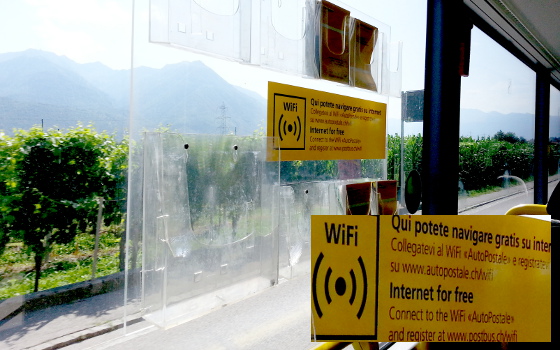
Who said Switzerland is expensive? Swiss Postbus is offering free wifi now Please see some of my previous blogs about Swiss travel for videos and pictures if you are looking for ideas for your time in .ch

5 August 2013

Thomas Goirand: Why using Mailman when MLMMJ is available?

Daniel Pocock just wrote a blog post about how to setup mailman for virtual hosting. Well, it strikes me that mailman is a bad solution, for many reasons. First, it imposes you to use @lists.example.com lists instead of @example.com. I m not sure if that is mandatory, but at least I ve seen only mailman setups done this way. At least, it is how mostly everyone does the setup. I think that s really ugly. Any mailbox should be fine, IMO. What I found particularly lame about Mailman, is that these issues (plus the ones which Daniel listed) have been known for YEARS, though nobody came up with a patch to fix it. And it s really not hard. Why do I know it? Well, because I ve been using MLMMJ for years without such troubles. The current situation where everyone is with mailman is really LAME. Not only MLMMJ is better because it is easier to install and supports virtual hosting out of the box, but also it is written in C and is much faster than Mailman. MLMMJ has been used in high traffic lists like for SUSE and Gentoo. The fact that some major sites decided to do the switch isn t a proof that MLMMJ is perfect, but is a good indication that it at least works well without too much trouble. Also, with mailman, you have to use the subject lines to control your list subscriptions and send command to it. No need to do that with MLMMJ, because everything is controled with the mailbox extension. For example, mylist+subscribe@example.com can be used to subscribe (instead of mylist-requests@lists.example.com, then fill-in the subject line with mailman). So, if you don t like some of the (bad) limitations of Mailman, would like to test something faster, and easier to setup, have a try with MLMMJ (see mlmmj.org for more details, and see the README.Debian inside my package).

Ian Wienand: Skipping bash history for command-lines starting with space

I was recently reading about a case where part of the evidence appears to be a deleted bash history-file. From what I gather, the accused says that the removal was a clean-up job to remove inadvertently stored passwords rather than an attempt to hide nefarious activity. What had managed to pass me by in 15 or so years of using bash but not reading man bash properly is the HISTCONTROL variable. If it is set to ignorespace then commands entered with a leading-space will not be stored in the history. Like all the best discoveries I found this only by accident on a machine where it was turned on. It's been quite useful in keeping my history pruned. However, not usually for security reasons around hiding passwords passwords on the command-line have other problems and I'm sure any security person would tell you not to use them just from a defense-in-depth perspective. That said, from a "keeping ctrl-r reversi-search useful" point-of-view it's often helpful; for example I've mostly trained my fingers to <space>rm -rf because I'm sure I'm not the only one who has deleted the wrong thing via a history-recall-combined-with-typing-to-fast scenario. So, HISTCONTROL=ignoreboth (which also ignores duplicates) is certainly a useful one to slip into your .bashrc. At least it would be one-less thing to explain to the FBI!

Sylvestre Ledru: Switch to OpenJDK 7

As announcement on debian-devel-announce, I just uploaded java-common version 0.49. This version changes the default version of OpenJDK to version 7. That means that packages depending on default-jdk/default-jre will be now built with OpenJDK 7 (instead of the 6) and also that the java/javac commands will be providing Java 7.
I also used the opportunity of this upload to update the Java policy.

Wouter Verhelst: Hard disk partition pregap and grub2

A week or so back, I was at a customer to upgrade his server to wheezy. This server had originally been installed, not as squeeze but as something older, and was installed using an LVM-on-mdraid setup. Booting off such a setup (without a /boot partition outside of the raid/LVM) is certainly possible with several boot loaders, including grub2; however, it was having issues in this particular instance, producing an error message along the likes of:
/sbin/grub2-setup: warn: Your embedding area is unusually small. core.img won't fit in it..
It took me a while to figure out what that meant, but the Internet to the rescue:
Disk /dev/sda: 160.0 GB, 160041885696 bytes
255 heads, 63 sectors/track, 19457 cylinders, total 312581808 sectors
Units = sectors of 1 * 512 = 512 bytes
Sector size (logical/physical): 512 bytes / 512 bytes
I/O size (minimum/optimal): 512 bytes / 512 bytes
Disk identifier: 0x000b3c3b
   Device Boot      Start         End      Blocks   Id  System
/dev/sda1   *        2048   312580095   156289024   83  Linux
That partition starts at the 2048th block, resulting in a 1MiB gap before the first partition. The older default was to start on the 63rd block, for a pregap of just short of 32KiB. Unfortunately, the only way to fix this issue without ugly hacks (such as the chainloading suggested in this fedora forum thread) is to repartition. Luckily, thanks to the magic of LVM, this isn't difficult (if a little involved). Steps:
pvmove -v /dev/md0
vgreduce -a
mdadm -S /dev/md0
(...repartition the hard disks that make up /dev/md0...)
mdadm -C /dev/md0 (... other options required to recreate /dev/md0 on the desired RAID level...)
pvcreate /dev/md0
vgextend /dev/vg /dev/md0
... and then rinse, repeat for md1. At that point, installing grub will work as usual. An alternative (since we were using RAID1) could have been to remove one disk from the RAID array, repartition it, create a new RAID1 array in degraded mode, pvmove over to that, destroy the original array, and add the second disk to the new array. This would probably be a better idea when you only have one RAID array, for instance, or when you have more than one array and have more data than fits on a single array. However, that wasn't the case here (at least not after a resize2fs -M call followed by an appropriate lvresize one), and so I thought that not reducing redundancy, even if only temporarily, was a better move.

Next.

Previous.