Search Results: "sten"

1 February 2016

Ritesh Raj Sarraf: State of Email Clients on Linux Based Platforms

I've been trying to catch up on my reading list (Thanks to rss2email, now I can hold the list longer, than just marking all as read). And one item from last year's end worth spending time was Thunderbird. Thunderbird has been the email client of choice for many users. The main reason for it being popular has been, in my opinion, it being cross platform. Because that allows users an easy migration path across platforms. It also bring persistence, in terms of features and workflows, to the end users. Perhaps that must have been an important reason for many distributions (Ubuntu) and service providers to promote it as the default email client. A Windows/Mac user migrating to Ubuntu will have a lot better experience if they see familiar tools, and their data and workflows being intact. Mozilla must have executed its plan pretty well, to have been able to get it rolling so far. Because other attempts elsewhere (KDE4 Windows) weren't so easy. Part of the reason maybe that any time a new disruptive update is rolled on (KDE4, GNOME3), a lot many frustrated users are born. It is not that people don't want change. Its just that no one likes to see things break. But unfortunately, in Free Software / Open Source world, that is taken lightly. That's one reason why it takes Mozilla so so so long to implement Maildir in TB, when others (Evolution) have had it for so long. So, recently, Mozilla announced its plans to drop Thunderbird development. It is not something new. Anyone using TB knows how long it has been in Maintenance/ESR mode. What was interesting on LWN was the comments. People talked a lot about DE Native Email clients - Kmail, Sylpheed. TUI Clients and these days Browser based clients. Surprisingly, not much was talked about Evolution. My recent move to GNOME has made me look into letting go of old tools/workflows, and try to embrace newer ones. Of them has been GNOME itself. Changing workflows for email was difficult and frustrating. But knowing that TB doesn't have a bright future, it was important to look for alternatives. Just having waited for Maildir and GTK3 port of TB for so long, was enough. On GNOME, Evolution, may give an initial impression of being in Maintenance mode. Especially given that most GNOME apps are now moving to the new UI, which is more touch friendly. And also, because there were other efforts to have another email client on GNOME, I think it is Yorba. But even in its current form, Evolution is a pretty impressive email client Personal Information Management tool. It already is ported to GTK3. Which implies it is capable of responding to Touch events. It sure could have a revised Touch UI, like what is happening with other GNOME Apps. But I'm happy that it has been defered for now. Revising Evolution won't be an easy task, and knowing that GNOME too is understaffed, breaking a perfectly working tool won't be a good idea. My intent with this blog post is to give credit to my favorite GNOME application, i.e. Evolution. So next time you are looking for an email client alternative, give Evolution a try. Today, it already does:
  • Touch UI
  • Maildir
  • Microsoft Exchange
  • GTK3
  • Addressbook, Notes, Tasks, Calendar - Most Standards Based and Google Services compatible
  • RSS Feed Manager
  • And many more that I may not have been using
The only missing piece is being cross-platform. But given the trend, and available resources, I think that path is not worthy of trying. Keep It Simple. Support one platform and support it well.

Categories:

Keywords:

Like:

31 January 2016

Thorsten Alteholz: My Debian Activities in January 2016

FTP assistant This month I marked 281 package for accept and rejected 58, so almost back to normal processing. I also sent 19 emails to maintainers asking questions. As mentioned in October the accept-number has reached another milestone. I accepted package 6666 on 20151221, it was python-skbio_0.4.1-1. The winner of a fast processed package with the best guess of this date is: *tata* Javi. Ok, he was the only participant :-) . So, who can guess the date of 7777? Squeeze LTS This was my nineteenth month that I did some work for the Squeeze LTS initiative, started by Raphael Hertzog at Freexian. This month several people had to reduce their contribution, so all in all I got a workload of 30h. Altogether I uploaded those DLAs: For the first time this month, I was also involved in three embargoed uploads. Ben and I were informed about some security issues before they got published and I prepared the DLAs. Although the real upload for all suites were still done by the security team, it was really exciting. I also spent some time on #796095 and prepared another patch for review. Further I am almost done with the next upload of PHP 5.3. Just before starting dupload, another issue appeared. As I think that this will be the last upload of PHP for Squeeze LTS, I also want to take care of this latecomer. The upload of krb5 is waiting in the pipeline, I am just waiting for a confirmation that everything is fine. This month I also had another term of doing frontdesk work and looked for CVEs that are important for Squeeze LTS or could be ignored. As Wheezy LTS is just before the start, I already prepared the new build environment. So either now or later in April, I am ready Other stuff Due to the high LTS workload, there was no time for other stuff :-( .

Chris Lamb: Free software activities in January 2016

Here is my monthly update covering a large part of what I have been doing in the free software world (previously):
Debian
  • Had a talk proposal accepted (Reproducible Builds - fulfilling the original promise of free software) at FOSSASIA 16.
My work in the Reproducible Builds project was also covered in more depth in Lunar's weekly reports (#35, #36, #37, #38, #39)
LTS

This month I have been paid to work 18 hours on Debian Long Term Support (LTS). In that time I did the following:
  • Sevend days of "frontdesk" duties, triaging CVEs, etc.
  • Issued DLA 386-1 for cacti to patch an SQL injection vulnerability.
  • Issued DLA 388-1 for dwarfutils fixing a NULL deference issue.
  • Issued DLA 391-1 for prosody correcting the use of a weak pseudo-random number generator.
  • Issued DLA 404-1 for nginx to prevent against an invalid pointer deference.

Uploads
  • redis (2:3.0.7-1) New upstream stable release, also ensure that test processes are cleaned up and replacing an existing reproducibility patch with a SOURCE_DATE_EPOCH solution.
  • python-django (1.9.1-1) New upstream release.
  • disque (1.0~rc1-4) Make the build reproducible via SOURCE_DATE_EPOCH, ensure that test processes are cleaned up and that the nocheck flag is correctly honoured.
  • gunicorn (19.4.5-1) New upstream release.
  • redis (2:3.2~rc3-1) New upstream RC release (to experimental).


RC bugs


I also filed 100 FTBFS bugs against apache-log4j2, awscli, binutils, brian, ccbuild, coala, commons-beanutils, commons-vfs, composer, cyrus-sasl2, debiandoc-sgml-doc-pt-br, dfvfs, dillo, django-compat, dulwich, git-annex, grpc, hdf-eos5, hovercraft, ideviceinstaller, ircp-tray, isomd5sum, javamail, jhdf, jsonpickle, kivy, klog, libcloud, libcommons-jexl2-java, libdata-objectdriver-perl, libdbd-sqlite3-perl, libpam-krb5, libproc-waitstat-perl, libslf4j-java, libvmime, linuxdcpp, lsh-utils, mailutils, mdp, menulibre, mercurial, mimeo, molds, mugshot, nose, obex-data-server, obexfs, obexftp, orafce, p4vasp, pa-test, pgespresso, pgpool2, pgsql-asn1oid, php-doctrine-cache-bundle, php-net-ldap2, plv8, pngtools, postgresql-mysql-fdw, pyfftw, pylint-common, pylint-django, pylint-django, python-ase, python-axiom, python-biopython, python-dcos, python-falcon, python-instagram, python-markdown, python-pysam, python-requests-toolbelt, python-ruffus, pytsk, pyviennacl, ros-class-loader, ros-ros-comm, ros-roscpp-core, roxterm, ruby-celluloid-extras, ruby-celluloid-fsm, ruby-celluloid-supervision, ruby-eye, ruby-net-scp, ruby-net-ssh, ruby-sidekiq, ruby-sidekiq-cron, ruby-sinatra-contrib, seaview, smc, spatial4j-0.4, swift-plugin-s3, tilecache, typecatcher, ucommon, undertaker, urdfdom, ussp-push, xserver-xorg-video-intel & yt.

FTP Team

As a Debian FTP assistant I ACCEPTed 201 packages: abi-tracker, android-platform-build, android-platform-frameworks-native, android-platform-libcore, android-platform-system-core, animate.css, apitrace, argon2, autosize.js, bagel, betamax, bittorrent, bls-standalone, btfs, caja-dropbox, cegui-mk2, complexity, corebird, courier-authlib, cpopen, ctop, dh-haskell, django-python3-ldap, e2fsprogs1.41, emacs-async, epl, fast5, fastkml, flask-restful, flask-silk, gcc-6, gitlab, golang-github-kolo-xmlrpc, golang-github-kr-fs, golang-github-pkg-sftp, golang-github-prometheus-common, google-auth-library-php, h5py, haskell-aeson-compat, haskell-userid, heroes, hugo, ioprocess, iptables, ivy-debian-helper, ivyplusplus, jquery-timer.js, klaus, kpatch, lazarus, libatteanx-store-sparql-perl, libbrowserlauncher-java, libcgi-test-perl, libdata-sah-normalize-perl, libfsntfs, libjs-fuzzaldrin-plus, libjung-free-java, libmongoc, libmygpo-qt, libnet-nessus-rest-perl, liborcus, libperinci-sub-util-propertymodule-perl, libpodofo, librep, libsodium, libx11-xcb-perl, linux, linux-grsec-base, list.js, lombok, lua-mediator, luajit, maven-script-interpreter, midicsv, mimeo, miniasm, mlpack, mom, mosquitto-auth-plugin, moxie.js, msgpuck, nanopolish, neovim, netcdf, network-manager-applet, network-manager-ssh, node-esprima-fb, node-mocks-http, node-schlock, nomacs, ns3, openalpr, openimageio, openmpi, openms, orafce, pbsim, pd-iemutils, pd-nusmuk, pd-puremapping, pd-purest-json, pg-partman, pg-rage-terminator, pgfincore, pgmemcache, pgsql-asn1oid, php-defaults, php-jwt, php-mf2, php-redis, pkg-info-el, plr, pnmixer, postgresql-multicorn, postgresql-mysql-fdw, powa-archivist, previsat, pylint-flask, pyotherside, python-caldav, python-cookies, python-dcos, python-flaky, python-flickrapi, python-frozendict, python-genty, python-git, python-greenlet, python-instagram, python-ironic-inspector-client, python-manilaclient, python-neutronclient, python-openstackclient, python-openstackdocstheme, python-prometheus-client, python-pymzml, python-pysolr, python-reno, python-requests-toolbelt, python-scales, python-socketio-client, qdox2, qgis, r-cran-biasedurn, rebar.js, repmgr, rfcdiff, rhythmbox-plugin-alternative-toolbar, ripe-atlas-cousteau, ripe-atlas-sagan, ripe-atlas-tools, ros-image-common, ruby-acts-as-list, ruby-allocations, ruby-appraiser, ruby-appraiser-reek, ruby-appraiser-rubocop, ruby-babosa, ruby-combustion, ruby-did-you-mean, ruby-fixwhich, ruby-fog-xenserver, ruby-hamster, ruby-jeweler, ruby-mime-types-data, ruby-monkey-lib, ruby-net-telnet, ruby-omniauth-azure-oauth2, ruby-omniauth-cas3, ruby-puppet-forge, ruby-racc, ruby-reek, ruby-rubinius-debugger, ruby-rubysl, ruby-rubysl-test-unit, ruby-sidekiq-cron, ruby-threach, ruby-wavefile, ruby-websocket-driver, ruby-xmlhash, rustc, s-nail, scrm, select2.js, senlin, skytools3, slurm-llnl, sphinx-argparse, sptk, sunpy, swauth, swift, tdiary, three.js, tiny-initramfs, tlsh, ublock-origin, vagrant-cachier, xapian-core, xmltooling, & yp-tools. I additionally REJECTed 29 packages.

30 January 2016

Lunar: Only allow outgoing connections through Tor

Using Tor helps take back control of what data one decides to share online. It also helps in avoiding surveillance from the local network (think of someone listening to the public Wi-Fi) or the Internet access provider. But it is easy to make mistakes: Tor Browser, the easiest and most common way to use Tor, is just a web browser. Extra special care is required to make other applications use Tor, and it is easy to forget to change settings, let alone actual attackers. That's why using Tails is often recommended as everything is preconfigured and it requires traffic to go through Tor by various means. Qubes or Whonix also have interesting properties, but require reinstalling systems and changing habits. Meanwhile, securing the network on an already installed system can help you feel better. A potential solution to prevent connections from leaking out without going through Tor is simply to prevent all connections from leaving the computer, except the ones going to the Tor network. This can quite easily be implemented by setting up an outgoing firewall. Using the default settings, a Tor client can potentially connect to any of the 2,000 Guard relays. While there are ways to get such a list and turn it into firewall rules, we are going to use an easier solution. Because the list of Tor relays is public, censors have often used it to prevent people from connecting to the Tor network. The Tor project came up with bridges as a work-around. Bridges are entry nodes in the Tor network. For public bridges, users can only get a few bridge addresses at a time, preventing an adversary from easily blocking them at all once. When configured to use a set of bridges, Tor will only connect to their addresses. This will make our firewall much shorter. The instructions that follow should work on Debian Jessie and later versions. Adapting them to other systems should not be too hard either. We assume that Tor Browser is already installed. As we will want other applications to use Tor than just the browser, we also want to install a system-wide instance:
# apt install tor
Next, visit bridges.torproject.org to request a set of bridges: BridgeDB landing page You then need to select the type of bridges. Tor standard protocol is easy to identify as such. The Tor project has developed pluggable transports to easily disguise the traffic, but using them is outside the scope for this documentation. So lets stay with the default type of bridges: BridgeDB bridge type selection After solving a CAPTCHA, you'll get a list of addresses and fingerprints for a couple of bridges like the following one: Example bridge list from BridgeDB (blurred to protect the actual bridges To tell Tor to use these bridges, edit /etc/tor/torrc, and at the end, add something like:
UseBridges 1
Bridge 109.XXX.XXX.XXX:4XXX 2244XXXXXXXXXXXXXXXXXXXXXXXXXXXXXXXXXXXX
Bridge 37.XXX.XXX.XXX:1XXXX 9CF0XXXXXXXXXXXXXXXXXXXXXXXXXXXXXXXXXXXX
Bridge 171.XXX.XXX.XXX:4XXX 7705XXXXXXXXXXXXXXXXXXXXXXXXXXXXXXXXXXXX
Replace the actual addresses and fingerprints by those you got earlier. Now reload the daemon and make sure that it still connects to the network:
# service tor reload
# tail -f /var/log/tor/log
Tor Browser also needs to be told to use these bridges. Open the onion menu close to the location bar, and select Tor Network Settings . Tor Browser  onion menu In there, tick My Internet Service Provider (ISP) blocks connections to the Tor network and paste the list of bridges below Enter custom bridges: Tor Browser Network Settings Before we restrict outgoing connections to only use the Tor network, lets configure APT to use Tor as well so we can continue installing and upgrading packages in the future:
# apt install apt-transport-tor
The following command will reconfigure APT to use Tor to access the currently configured package repositories. It basically takes care of replacing every http:// by tor+http://:
# sed -e 's/^[^#]*\(deb\(-src\)\?\W\+\)http/\1tor+http/' -i /etc/apt/sources.list /etc/apt/sources.list.d/*.list
Lets see if it still works:
# apt update
One last thing: sometimes, we still need to bypass our restrictions and access the network directly. Some websites sadly deny access to Tor users, or we might need to login through a captive portal before being able to use a random network. To make it practical, we are going to create a new user account. This will enable us to use the desktop user switching capabilities to start a new browser or sudo for command line applications. In this example, the user is going to be named passthrough:
# adduser passthrough
Make sure to set a proper password! Now lets configure the firewall. Here we are going to use ferm which makes it fairly easy to do low-level firewall rule in a readable manner:
# apt install ferm
We want the firewall to be started at boot time. Now edit its configuration in /etc/ferm/ferm.conf. At the end, add:
# Let's block everything for both IPv4 and IPv6, except to localhost,
# already established connections and the special 'passthrough' user.
domain (ip ip6) chain OUTPUT  
    policy DROP;
    outerface lo ACCEPT;
    proto icmp ACCEPT;
    mod state state (ESTABLISHED RELATED) ACCEPT;
    mod owner uid-owner "passthrough" ACCEPT;
 
# Now for IPv4, we want to restrict output to configured Tor bridges
domain ip chain OUTPUT  
    # Don't break network autoconfiguration
    mod owner uid-owner 0 proto udp dport bootps ACCEPT;
    # Allow bridges defined in torrc by getting them directly
    # from the configuration file.
    @include "sed -n -e 's/^Bridge \([^ ]* \)\?\([0-9.]*\):\([0-9]*\).*/daddr \2 proto tcp dport \3 ACCEPT;/p' /etc/tor/torrc  ";
 
# Let's REJECT everything else so we get notice instead of timeouts
domain (ip ip6) chain OUTPUT REJECT;
Reload the firewall through:
# service ferm reload
Lets do some tests:
# ping check.torproject.org
  ping: unknown host check.torproject.org
# tor-resolve check.torproject.org
  38.229.72.22
# ping 38.229.72.22
  From 192.168.7.234 icmp_seq=1 Destination Port Unreachable
# curl https://check.torproject.org/
  curl: (6) Could not resolve host: check.torproject.org
# curl -I https://38.229.72.22/
  curl: (7) Failed to connect to 38.229.72.22 port 443: Connection refused
# curl --socks5 127.0.0.1:9050 https://check.torproject.org/
  curl: (6) Could not resolve host: check.torproject.org
# curl --silent --socks5-hostname 127.0.0.1:9050 https://check.torproject.org/   grep Congratulations
  Congratulations. This browser is configured to use Tor.
# sudo -u passthrough ping -c 1 check.torproject.org
  64 bytes from sergii.torproject.org (38.229.72.22): icmp_seq=1 ttl=54 time=148 ms
# sudo -u passthrough curl --silent https://check.torproject.org/   grep Sorry
  Sorry. You are not using Tor.
One last thing to complete the setup: for command line applications like SSH, torsocks does wonders. Just prefix your usual commands by torsocks and they should work:
# apt install torsocks
# torsocks curl --silent https://check.torproject.org/   grep Congratulations
  Congratulations. This browser is configured to use Tor.
All set! In case you ever need to turn it all off, just ask ferm to reconfigure the firewall:
# service ferm stop
But don't forget to turn it back on later!
# service ferm start
Ideally, we would have a way to automatically configure a different set of bridges for each network we connect to make it more difficult to trace the computer from network to network. But there's quite some more work to be done on various levels before that can be done in an integrated manner (torshiftchange and tordyguards are promising options). Meanwhile, be aware that you might want to keep a fresh set of bridges handy to configure them after leaving for a trip. Another downside of the setup currently is that it doesn't allow for network time synchronization. That might make the system fingerprintable by using its clock drift. To use obfs4 bridges which helps defeating censored networks, you will need two extra steps. First, install the required software:
# apt install obfs4proxy
Then add the following extra line to /etc/tor/torrc:
ClientTransportPlugin obfs2,obfs3,obfs4,scramblesuit exec /usr/bin/obfs4proxy
You can then request obfs4 bridges from BridgeDB. These changes are only required for the system-wide Tor daemon, as Tor Browser comes with obs4proxy preconfigured. Kudos to Micah for proofreading this article.

29 January 2016

Jan Wagner: Oxidized - silly attempt at (Really Awesome New Cisco confIg Differ)

Since ages I wanted have replaced this freaking backup solution of our Network Equipment based on some hacky shell scripts and expect uploading the configs on a TFTP server. Years ago I stumbled upon RANCID (Really Awesome New Cisco confIg Differ) but had no time to implement it. Now I returned to my idea to get rid of all our old crap.
I don't know where, I think it was at DENOG2, I saw RANCID coupled with a VCS, where the NOC was notified about configuration (and inventory) changes by mailing the configuration diff and the history was indeed in the VCS.
The good old RANCID seems not to support to write into a VCS out of the box. But for the rescue there is rancid-git, a fork that promises git extensions and support for colorized emails. So far so good. While I was searching for a VCS capable RANCID, somewhere under a stone I found Oxidized, a 'silly attempt at rancid'. Looking at it, it seems more sophisticated, so I thought this might be the right attempt. Unfortunately there is no Debian package available, but I found an ITP created by Jonas. Anyway, for just looking into it, I thought the Docker path for a testbed might be a good idea, as no Debian package ist available (yet). For oxidized configuration is only a configfile needed and as nodes source a rancid compatible router.db file can be used (beside SQLite and http backend). A migration into a production environment seems pretty easy. So I gave it a go. I assume Docker is installed already. There seems to be a Docker image on Docker Hub, that looks official, but it seems not maintained (actually). An issue is open for automated building the image.

Creating Oxidized container image The official documentation describes the procedure. I used a slightly different approach.
docking-station:~# mkdir -p /srv/docker/oxidized/  
docking-station:~# git clone https://github.com/ytti/oxidized \  
 /srv/docker/oxidized/oxidized.git
docking-station:~# docker build -q -t oxidized/oxidized:latest \  
 /srv/docker/oxidized/oxidized.git
I thought it might be a good idea to also tag the image with the actual version of the gem.
docking-station:~# docker tag oxidized/oxidized:latest \  
 oxidized/oxidized:0.11.0
docking-station:~# docker images   grep oxidized  
oxidized/oxidized   latest    35a325792078  15 seconds ago  496.1 MB  
oxidized/oxidized   0.11.0    35a325792078  15 seconds ago  496.1 MB  
Create initial default configuration like described in the documentation.
docking-station:~# mkir -p /srv/docker/oxidized/.config/  
docking-station:~# docker run -e CONFIG_RELOAD_INTERVAL=600 \  
 -v /srv/docker/oxidized/.config/:/root/.config/oxidized \
 -p 8888:8888/tcp -t oxidized/oxidized:latest oxidized

Adjusting configuration After this I adjusted the default configuration for writing a log, the nodes config into a bare git, having nodes secrets in router.db and some hooks for debugging.

Creating node configuration
docking-station:~# echo "7204vxr.lab.cyconet.org:cisco:admin:password:enable" >> \  
 /srv/docker/oxidized/.config/router.db
docking-station:~# echo "ccr1036.lab.cyconet.org:routeros:admin:password" >> \  
 /srv/docker/oxidized/.config/router.db

Starting the oxidized beast
docking-station:~# docker run -e CONFIG_RELOAD_INTERVAL=600 \  
 -v /srv/docker/oxidized/.config/:/root/.config/oxidized \
 -p 8888:8888/tcp -t oxidized/oxidized:latest oxidized
Puma 2.16.0 starting...  
* Min threads: 0, max threads: 16
* Environment: development
* Listening on tcp://127.0.0.1:8888
If you want to have the container get started with the docker daemon automatically, you can start the container with --restart always and docker will take care of it. If I wanted to make it running permanent, I would use a systemd unitfile.

Reload configuration immediately If you don't want to wait to automatically reload of the configuration, you can trigger it.
docking-station:~# curl -s http://localhost:8888/reload?format=json \  
 -O /dev/null
docking-station:~# tail -2 /srv/docker/oxidized/.config/log/oxidized.log  
I, [2016-01-29T16:50:46.971904 #1]  INFO -- : Oxidized starting, running as pid 1  
I, [2016-01-29T16:50:47.073307 #1]  INFO -- : Loaded 2 nodes  

Writing nodes configuration
docking-station:/srv/docker/oxidized/.config/oxidized.git# git shortlog  
Oxidizied (2):  
      update 7204vxr.lab.cyconet.org
      update ccr1036.lab.cyconet.org
Writing the nodes configurations into a local bare git repository is neat but far from perfect. It would be cool to have all the stuff in a central VCS. So I'm pushing it every 5 minutes into one with a cron job.
docking-station:~# cat /etc/cron.d/doxidized  
# m h dom mon dow user  command                                                 
*/5 * * * *    root    $(/srv/docker/oxidized/bin/oxidized_cron_git_push.sh)
docking-station:~# cat /srv/docker/oxidized/bin/oxidized_cron_git_push.sh  
#!/bin/bash
DOCKER_OXIDIZED_BASE="/srv/docker/oxidized/"  
OXIDIZED_GIT_DIR=".config/oxidized.git"
cd $ DOCKER_OXIDIZED_BASE /$ OXIDIZED_GIT_DIR   
git push origin master --quiet  
Now having all the nodes configurations in a source code hosting system, we can browse the configurations, changes, history and even establish notifications for changes. Mission accomplished! Now I can test the coverage of our equipment. The last thing that would make me super happy, a oxidized Debian package!

28 January 2016

Joachim Breitner: Dreaming of role playing

Recently, at a summer-school-like event, we were discussing pen-and-paper role playing. I m not sure if this was after a session of role-playing, but I was making the point that you don t need much or any at all of the rules, and scores, and dice, if you are one of the story-telling role players, and it can actually be more fun this way. As an example, I said, it can make sense if one of the players (and the game master, I suppose) reads up a lot about one aspect of the fantasy world, e.g. one geographical area, one cult, one person, and then this knowledge is used to create an exciting puzzle, even without any opponents. I m not quite sure, but I think I fell asleep shortly after, and I dreamed of such a role playing session. It was going roughly like this:
I (a human), and my fellows (at least a dwarf, not sure about the rest) went to some castle. It was empty, but scary. We crossed its hall, and went into a room on the other side. It was locked towards the hall by a door that covered the door frame only partly, and suddenly we could see a large Ogre, together with other foul folk not worth mentioning, hammered at the door. My group (which was a bit larger in that moment) all prepared shooting arrows at him the moment it burst through the door. I had the time to appreciate the ingenuity that we all waited for him to burst through, so that none of the arrows would bounce of the door, but it did not help, and we ran from the castle, over a field, through a forest, at the other side of which we could see, below a sleep slope, a house, so we went there. The path towards that was filled with tracks that looked surprisingly like car tracks. When we reached the spot there was no house any more, but rather a cold camp side. We saw digging tools, and helmets (strangely, baseball helmets) were arranged in a circle, as if it was a burial site. We set up camp there and slept. It occurred to me that I must have been the rightful owner of the castle, and it was taken by me from my brother and his wife, who denied my existence or something treacherously like that. When we woke up at the camp side, she were there, together with what must be my niece. My sister in law mocked us for fighting unsuccessfully at the castle, but my niece was surprised to see me, as I must have a very similar appearance to my brother. She said that her mother forbid it, but she nevertheless sneakily takes out something which looks like a Gameboy with a camera attachment and a CompactFlash card from her mothers purse, puts it in and take a photo of me. This is when I realize that I will get my castle back.
At that moment, I woke up. I somewhat liked the story (and it was a bit more coherent in my mind than what I then wrote down here), so I wanted to write it down. I quickly fetched my laptop. My friends at the summer school were a bit worried, and I promised not to mention their names and concrete places, and started writing. They distracted me, so I searched for a place of my own, lied down (why? no idea), and continued writing. I had to to touch writing on my belly, because my laptop was not actually there. I also noticed that I am back at the camp side, and that I am still wearing my back protector that I must have been wearing while fighting in the castle, and which I did not take off while sleeping at the camp side. Funnily, it was not a proper medieval amour, but rather my snowboarding back protector.
At that moment, I woke up. I somewhat liked the story (and it was a bit more coherent in my mind than what I then wrote down here), so I wanted to write it down. I quickly got up, started my laptop, and wrote it down. And this is what you are reading right now. Off to bed again, let s see what happens next.

27 January 2016

Russell Coker: Using LetsEncrypt

Lets Encrypt is a new service to provide free SSL keys [1]. I ve just set it up on a few servers that I run. Issues The first thing to note is that the client is designed to manage your keys and treat all keys on a server equally with a single certificate. It shouldn t be THAT difficult to do things in other ways but it would involve extra effort. The next issue that can make things difficult is that it is designed that the web server will have a module to negotiate new keys automatically. Automatically negotiating new keys will be really great when we get that all going, but as I didn t feel like installing a slightly experimental Apache module on my servers that meant I had to stop Apache while I got the keys and I ll have to do that again every 3 months as the keys have a short expiry time. There are some other ways of managing keys, but the web servers I m using Lets Encrypt with at the moment aren t that important and a couple of minutes of downtime is acceptable. When you request multiple keys (DNS names) for one server to make it work without needless effort you have to get them all in the one operation. That gives you a single key file for all DNS names which is very convenient for services that don t support getting the hostname before negotiating SSL. But it could be difficult if you wanted to have one of the less common configurations such as having a mail server and a web server on the same IP addess but using different keys How To Get Keys deb http://mirror.internode.on.net/pub/debian/ testing main The letsencrypt client is packaged for Debian in Testing but not in Jessie. Adding the above to the /etc/apt/sources.list file for a Jessie system allows installing it and a few dependencies from Testing. Note that there are problems with doing this, you can t be certain that all the other apps installed will be compatible with the newer versions of libraries that are installed and you won t get security updates. letsencrypt certonly --standalone-supported-challenges tls-sni-01 The above command makes the letsencrypt client listen on port 443 to talk to the Lets Encrypt server. It prompts you for server names so if you want to minimise the downtime for your web server you could specify the DNS names on the command-line. If you run it on a SE Linux system you need to run setsebool allow_execmem 1 before running it and setsebool allow_execmem 0 afterwards as it needs execmem access. I don t think it s a problem to temporarily allow execmem access for the duration of running this program, if you use KDE then you will be forced to allow such access all the time for the desktop to operate correctly. How to Install Keys [ssl:emerg] [pid 9361] AH02564: Failed to configure encrypted (?) private key www.example.com:443:0, check /etc/letsencrypt/live/www.example.com/fullchain.pem The letsencrypt client suggests using the file fullchain.pem which has the key and the full chain of certificates. When I tried doing that I got errors such as the above in my Apache error.log. So I gave up on that and used the separate files. The only benefit of using the fullchain.pem file is to have a single line in a configuration file instead of 3. Trying to debug issues with fullchain.pem took me a lot longer than copy/paste for the 3 lines. Under /etc/letsencrypt/live/$NAME there are symlinks to the real files. So when you get new keys the old keys will be stored but the same file names can be used. SSLCertificateFile "/etc/letsencrypt/live/www.example.com/cert.pem"
SSLCertificateChainFile "/etc/letsencrypt/live/www.example.com/chain.pem"
SSLCertificateKeyFile "/etc/letsencrypt/live/www.example.com/privkey.pem" The above commands are an example for configuring Apache 2. smtpd_tls_cert_file = /etc/letsencrypt/live/smtp.example.com/cert.pem
smtpd_tls_key_file = /etc/letsencrypt/live/smtp.example.com/privkey.pem
smtpd_tls_CAfile = /etc/letsencrypt/live/smtp.example.com/chain.pem Above is an example of Postfix configuration. ssl_cert = </etc/letsencrypt/live/smtp.example.com/cert.pem
ssl_key = </etc/letsencrypt/live/smtp.example.com/privkey.pem
ssl_ca = </etc/letsencrypt/live/smtp.example.com/chain.pem Above is an example for Dovecot, it goes in /etc/dovecot/conf.d/10-ssl.conf in a recent Debian version. Conclusion At this stage using letsencrypt is a little fiddly so for some commercial use (where getting the latest versions of software in production is difficult) it might be a better option to just pay for keys. However some companies I ve worked for have had issues with getting approval for purchases which would make letsencrypt a good option to avoid red tape. When Debian/Stretch is released with letsencrypt I think it will work really well for all uses.

25 January 2016

Antoine Beaupr : Internet in Cuba

A lot has been written about the Internet in Cuba over the years. I have read a few articles, from New York Times' happy support for Google's invasion of Cuba to RSF's dramatic and fairly outdated report about censorship in Cuba. Having written before about Internet censorship in Tunisia, I was curious to see if I could get a feel of what it is like over there, now that a new Castro is in power and the Obama administration has started restoring diplomatic ties with Cuba. With those political changes coming signifying the end of an embargo that has been called genocidal by the Cuban government, it is surprisingly difficult to get fresh information about the current state of affairs. This article aims to fill that gap in clarifying how the internet works in Cuba, what kind of censorship mechanisms are in place and how to work around them. It also digs more technically into the network architecture and performance. It is published in the hope of providing both Cubans and the rest of the world with a better understanding of their network and, if possible, Cubans ways to access the internet more cheaply or without censorship.

"Censorship" and workarounds Unfortunately, I have been connected to the internet only through the the Varadero airport and the WiFi of a "full included" resort near Jibacoa. I have to come to assume that this network is likely to be on a segregated, uncensored internet while the rest of the country suffers the wrath of the Internet censorship in Cuba I have seen documented elsewhere. Through my research, I couldn't find any sort of direct censorship. The Netalyzr tool couldn't find anything significantly wrong with the connection, other than the obvious performance problems related both to the overloaded uplinks of the Cuban internet. I ran an incomplete OONI probe as well, and it seems there was no obvious censorship detected there as well, at least according to folks in the helpful #ooni IRC channel. Tor also works fine, and could be a great way to avoid the global surveillance system described later in this article. Nevertheless, it still remains to be seen how the internet is censored in the "real" Cuban internet, outside of the tourist designated areas - hopefully future visitors or locals can expand on this using the tools mentioned above, using the regular internet. Usual care should be taken when using any workaround tools, mentioned in this post or not, as different regimes over the world have accused, detained, tortured and killed sometimes for the mere fact of using or distributing circumvention tools. For example, a Russian developer was arrested and detained in 2001 by United States' FBI for exposing vulnerabilities in the Adobe e-books copy protection mechanisms. Similarly, people distributing Tor and other tools have been arrested during the period prior to the revolution in Tunisia.

The Cuban captive portal There is, however, a more pernicious and yet very obvious censorship mechanism at work in Cuba: to get access to the internet, you have to go through what seems to be a state-wide captive portal, which I have seen both at the hotel and the airport. It is presumably deployed at all levels of the internet access points. To get credentials through that portal, you need a username and password which you get by buying a Nauta card. Those cards cost 2$CUC and get you an hour of basically unlimited internet access. That may not seem like a lot for a rich northern hotel party-goer, but for Cubans, it's a lot of money, given that the average monthly salary is around 20$CUC. The system is also pretty annoying to use, because it means you do not get continuous network access: every hour, you need to input a new card, which will obviously make streaming movies and other online activities annoying. It also makes hosting servers basically impossible. So while Cuba does not have, like China or Iran, a "great firewall", there is definitely a big restriction to going online in Cuba. Indeed, it seems to be how the government ensures that Cubans do not foment too much dissent online: keep the internet slow and inaccessible, and you won't get too many Arab spring / blogger revolutions.

Bypassing the Cuban captive portal The good news is that it is perfectly possible for Cubans (or at least for a tourist like me with resources outside of the country) to bypass the captive portal. Like many poorly implemented portals, the portal allows DNS traffic to go through, which makes it possible to access the global network for free by using a tool like iodine which tunnels IP traffic over DNS requests. Of course, the bandwidth and reliability of the connection you get through such a portal is pretty bad. I have regularly seen 80% packet loss and over two minutes of latency:
--- 10.0.0.1 ping statistics ---
163 packets transmitted, 31 received, 80% packet loss, time 162391ms
rtt min/avg/max/mdev = 133.700/2669.535/64188.027/11257.336 ms, pipe 65
Still, it allowed me to login to my home server through SSH using Mosh to workaround the reliability issues. Every once in a while, mosh would get stuck and keep on trying to send packets to probe the server, which would clog the connection even more. So I regularly had to restart the whole stack using these commands:
killall iodine # stop DNS tunnel
nmcli n off # turn off wifi to change MAC address
macchanger -A wlan0 # change MAC address
nmcli n on # turn wifi back on
sleep 3 # wait for wifi to settle
iodine-client-start # restart DNS tunnel
The Koumbit Wiki has good instructions on how to setup a DNS tunnel. I am wondering if such a public service could be of use for Cubans, although I am not sure how it could be deployed only for Cubans, and what kind of traffic it could support... The fact is that iodine does require a server to operate, and that server must be run on the outside of the censored perimeter, something that Cubans may not be able to afford in the first place. Another possible way to save money with the captive portal would be to write something that automates connecting and disconnecting from the portal. You would feed that program a list of credentials and it would connect to the portal only on demand, and disconnect as soon as no traffic goes through. There are details on the implementation of the captive portal below that may help future endeavours in that field.

Private information revealed to the captive portal It should be mentioned, however, that the captive portal has a significant amount of information on clients, which is a direct threat to the online privacy of Cuban internet users. Of course the unique identifiers issued with the Nauta cards can be correlated with your identity, right from the start. For example, I had to give my room number to get a Nauta card issued. Then the central portal also knows which access point you are connected to. For example, the central portal I was connected to Wifi_Memories_Jibacoa which, for anyone that cares to research, will give them a location of about 20 square meters where I was located when connected (there is only one access point in the whole hotel). Finally, the central portal also knows my MAC address, a unique identifier for the computer I am using which also reveals which brand of computer I am using (Mac, Lenovo, etc). While this address can be changed, very few people know that, let alone how. This led me to question whether I would be allowed back in Cuba (or even allowed out!) after publishing this blog post, as it is obvious that I can be easily identified based on the time this article was published, my name and other details. Hopefully the Cuban government will either not notice or not care, but this can be a tricky situation, obviously. I have heard that Cuban prisons are not the best hangout place in Cuba, to say the least...

Network configuration assessment This section is more technical and delves more deeply in the Cuban internet to analyze the quality and topology of the network, along with hints as to which hardware and providers are being used to support the Cuban government.

Line quality The internet is actually not so bad in the hotel. Again, this may be because of the very fact that I am in that hotel, and I get a privileged access to the new fiber line to Venezuela, the ALBA-1 link. The line speed I get is around 1mbps, according to speedtest, which selected a server from LIME in George Town, Cayman Islands:
[1034]anarcat@angela:cuba$ speedtest
Retrieving speedtest.net configuration...
Retrieving speedtest.net server list...
Testing from Empresa de Telecomunicaciones de Cuba (152.206.92.146)...
Selecting best server based on latency...
Hosted by LIME (George Town) [391.78 km]: 317.546 ms
Testing download speed........................................
Download: 1.01 Mbits/s
Testing upload speed..................................................
Upload: 1.00 Mbits/s
Latency to the rest of the world is of couse slow:
--- koumbit.org ping statistics ---
122 packets transmitted, 120 received, 1,64% packet loss, time 18731,6ms
rtt min/avg/max/sdev = 127,457/156,097/725,211/94,688 ms
--- google.com ping statistics ---
122 packets transmitted, 121 received, 0,82% packet loss, time 19371,4ms
rtt min/avg/max/sdev = 132,517/160,095/724,971/93,273 ms
--- redcta.org.ar ping statistics ---
122 packets transmitted, 120 received, 1,64% packet loss, time 40748,6ms
rtt min/avg/max/sdev = 303,035/339,572/965,092/97,503 ms
--- ccc.de ping statistics ---
122 packets transmitted, 72 received, 40,98% packet loss, time 19560,2ms
rtt min/avg/max/sdev = 244,266/271,670/594,104/61,933 ms
Interestingly, Koumbit is actually the closest host in the above test. It could be that Canadian hosts are less affected by bandwidth problems compared to US hosts because of the embargo.

Network topology The various traceroutes show a fairly odd network topology, but that is typical of what I would described as "colonized internet users", which have layers and layers of NAT and obscure routing that keep them from the real internet. Just like large corporations are implementing NAT in a large scale, Cuba seems to have layers and layers of private RFC 1918 IPv4 space. A typical traceroute starts with:
traceroute to koumbit.net (199.58.80.33), 30 hops max, 60 byte packets
 1  10.156.41.1 (10.156.41.1)  9.724 ms  9.472 ms  9.405 ms
 2  192.168.134.137 (192.168.134.137)  16.089 ms  15.612 ms  15.509 ms
 3  172.31.252.113 (172.31.252.113)  15.350 ms  15.805 ms  15.358 ms
 4  pos6-0-0-agu-cr-1.mpls.enet.cu (172.31.253.197)  15.286 ms  14.832 ms  14.405 ms
 5  172.31.252.29 (172.31.252.29)  13.734 ms  13.685 ms  14.485 ms
 6  200.0.16.130 (200.0.16.130)  14.428 ms  11.393 ms  10.977 ms
 7  200.0.16.74 (200.0.16.74)  10.738 ms  10.019 ms  10.326 ms
 8  ix-11-3-1-0.tcore1.TNK-Toronto.as6453.net (64.86.33.45)  108.577 ms  108.449 ms
Let's take this apart line by line:
 1  10.156.41.1 (10.156.41.1)  9.724 ms  9.472 ms  9.405 ms
This is my local gateway, probably the hotel's wifi router.
 2  192.168.134.137 (192.168.134.137)  16.089 ms  15.612 ms  15.509 ms
This is likely not very far from the local gateway, probably still in Cuba. It in one bit away from the captive portal IP address (see below) so it is very likely related to the captive portal implementation.
 3  172.31.252.113 (172.31.252.113)  15.350 ms  15.805 ms  15.358 ms
 4  pos6-0-0-agu-cr-1.mpls.enet.cu (172.31.253.197)  15.286 ms  14.832 ms  14.405 ms
 5  172.31.252.29 (172.31.252.29)  13.734 ms  13.685 ms  14.485 ms
All those are withing RFC 1918 space. Interestingly, the Cuban DNS servers resolve one of those private IPs as within Cuban space, on line #4. That line is interesting because it reveals the potential use of MPLS.
 6  200.0.16.130 (200.0.16.130)  14.428 ms  11.393 ms  10.977 ms
 7  200.0.16.74 (200.0.16.74)  10.738 ms  10.019 ms  10.326 ms
Those two lines are the only ones that actually reveal that the route belongs in Cuba at all. Both IPs are in a tiny (/24, or 256 IP addresses) network allocated to ETECSA, the state telco in Cuba:
inetnum:     200.0.16/24
status:      allocated
aut-num:     N/A
owner:       EMPRESA DE TELECOMUNICACIONES DE CUBA S.A. (IXP CUBA)
ownerid:     CU-CUBA-LACNIC
responsible: Rafael L pez Guerra
address:     Ave. Independencia y 19 Mayo, s/n,
address:     10600 - La Habana - CH
country:     CU
phone:       +53 7 574242 []
owner-c:     JOQ
tech-c:      JOQ
abuse-c:     JEM52
inetrev:     200.0.16/24
nserver:     NS1.NAP.ETECSA.NET
nsstat:      20160123 AA
nslastaa:    20160123
nserver:     NS2.NAP.ETECSA.NET
nsstat:      20160123 AA
nslastaa:    20160123
created:     20030512
changed:     20140610
Then the last hop:
 8  ix-11-3-1-0.tcore1.TNK-Toronto.as6453.net (64.86.33.45)  108.577 ms  108.449 ms  108.257 ms
...interestingly, lands directly in Toronto, in this case going later to Koumbit but that is the first hop that varies according to the destination, hops 1-7 being a common trunk to all external communications. It's also interesting that this shoves a good 90 milliseconds extra in latency, showing that a significant distance and number of equipment crossed. Yet a single hop is crossed, not showing the intermediate step of the Venezuelan link or any other links for that matter. Something obscure is going on there... Also interesting to note is the traceroute to the redirection host, which is only one hop away:
traceroute to 192.168.134.138 (192.168.134.138), 30 hops max, 60 byte packets
 1  192.168.134.138 (192.168.134.138)  6.027 ms  5.698 ms  5.596 ms
Even though it is not the gateway:
$ ip route
default via 10.156.41.1 dev wlan0  proto static  metric 1024
10.156.41.0/24 dev wlan0  proto kernel  scope link  src 10.156.41.4
169.254.0.0/16 dev wlan0  scope link  metric 1000
This means a very close coordination between the different access points and the captive portal system. Finally, note that there seems to be only three peers to the Cuban internet: Teleglobe, formerly Canadian, now owned by the Indian [[!wiki Tata group]], and Telef nica, the Spanish Telco that colonized most of Latin America's internet, all the way down to Argentina. This is confirmed by my traceroutes, which show traffic to Koumbit going through Tata and Google's going through Telef nica.

Captive portal implementation The captive portal is https://www.portal-wifi-temas.nauta.cu/ (not accessible outside of Cuba) and uses a self-signed certificate. The domain name resolves to 190.6.81.230 in the hotel. Accessing http://1.1.1.1/ gives you a status page which allows you to disconnect from the portal. It actually redirects you to https://192.168.134.138/logout.user. That is also a self-signed, but different certificate. That certificate actually reveals the implication of Gemtek which is a "world-leading provider of Wireless Broadband solutions, offering a wide range of solutions from residential to business". It is somewhat unclear if the implication of Gemtek here is deliberate or a misconfiguration on the part of Cuban officials, especially since the certificate is self-signed and was issued in 2002. It could be, however, a trace of the supposed involvement of China in the development of Cuba's networking systems, although Gemtek is based in Taiwan, and not in the China mainland. That IP, in turn, redirects you to the same portal but in a page that shows you the statistics:
https://www.portal-wifi-temas.nauta.cu/?mac=0024D1717D18&script=logout.user&remain_time=00%3A55%3A52&session_time=00%3A04%3A08&username=151003576287&clientip=10.156.41.21&nasid=Wifi_Memories_Jibacoa&r=ac%2Fpopup
Notice how you see the MAC address of the machine in the URL (randomized, this is not my MAC address), along with the remaining time, session time, client IP and the Wifi access point ESSID. There may be some potential in defrauding the session time there, I haven't tested it directly. Hitting Actualizar redirects you back to the IP address, which redirects you to the right URL on the portal. The "real" logout is at:
http://192.168.134.138/logout.user?cmd=logout
The login is performed against https://www.portal-wifi-temas.nauta.cu/index.php?r=ac/login with a referer of:
https://www.portal-wifi-temas.nauta.cu/?&nasid=Wifi_Memories_Jibacoa&nasip=192.168.134.138&clientip=10.156.41.21&mac=EC:55:F9:C5:F2:55&ourl=http%3a%2f%2fgoogle.ca%2f&sslport=443&lang=en-US%2cen%3bq%3d0.8&lanip=10.156.41.1
Again, notice the information revealed to the central portal.

Equipment and providers I ran Nmap probes against both the captive portal and the redirection host, in the hope of finding out how they were built and if they could reveal the source of the equipment used. The complete nmap probes are available in nmap, but it seems that the captive portal is running some embedded device. It is confusing because the probe for the captive portal responds as if it was the gateway, which blurs even more the distinction between the hotel's gateway and the captive portal. This raises the distinct possibility that all access points are actually captive portal that authenticate to another central server. The nmap traces do show three distinct hosts however:
  • the captive portal (www.portal-wifi-temas.nauta.cu, 190.6.81.230)
  • some redirection host (192.168.134.138)
  • the hotel's gateway (10.156.41.1)
They do have distinct signatures so the above may be just me misinterpreting traceroute and nmap results. Your comments may help in clarifying the above. Still, the three devices show up as running Linux, in the two last cases versions between 2.4.21 and 2.4.31. Now, to find out which version of Linux it is running is way more challenging, and it is possible it is just some custom Linux distribution. Indeed, the webserver shows up as G4200.GSI.2.22.0155 and the SSH server is running OpenSSH 3.0.2p1, which is basically prehistoric (2002!) which corroborates the idea that this is some Gemtek embedded device. The fact that those devices are running 14 years old software should be a concern to the people responsible for those networks. There is, for example, a remote root vulnerability that affects that specific version of OpenSSH, among many other vulnerabilities.

A note on Nauta card's security Finally, one can note that it is probably trivial to guess card UIDs. All cards i have here start with the prefix 15100, the following digits being 3576 or 4595, presumably depending on the "batch" that was sent to different hotels, which seems to be batches of 1000 cards. You can also correlate the UID with the date at which the card was issued. For example, 15100357XXX cards are all valid until 19/03/2017, and 151004595XXX cards are all valid until 23/03/2017. Here's the list of UIDs I have seen:
151004595313
151004595974
151003576287
151003576105
151003576097
The passwords, on the other hand, do seem fairly random (although my sample size is small). Interestingly, those passwords are also 12 digits long, which is about as strong as a seven-letter password (mixed uppercase and lowercase). If there are no rate-limiting provisions on that captive portal, it could be possible to guess those passwords, since you have free rein on accessing those routers. Depending on the performance of the routers, you could be lucky and find a working password for free...

Conclusion Clearly, Internet access in Cuba needs to be modernized. We can clearly see that Cuba years behind the rest of the Americas, if only through the percentage of the population with internet access, or download speeds. The existence of a centralized captive portal also enables a huge surveillance potential that should be a concern for any Cuban, or for that matter, anyone wishing to live in a free society. The answer, however, lies not in the liberalization of commerce and opening the doors to the US companies and their own systems of surveillance. It should be possible, and even desirable for Cubans to establish their own neutral network, a proposal I have made in the past even for here in Qu bec. This network could be used and improved by Cubans themselves, prioritizing local communities that would establish their own infrastructure according to their own needs. I have been impressed by this article about the El Paquete system - it shows great innovation and initiative from Cubans which are known for engaging in technology in a creative way. This should be leveraged by letting Cubans do what they want with their networks, not telling them what to do. The best the Googles of this world can do to help Cuba is not to colonize Cuba's technological landscape but to cleanup their own and make their own tools more easily accessible and shareable offline. It is something companies can do right now, something I detailed in a previous article.

24 January 2016

Lunar: Reproducible builds: week 39 in Stretch cycle

What happened in the reproducible builds effort between January 17th and January 23rd:

Toolchain fixes James McCoy uploaded subversion/1.9.3-2 which removes -Wdate-time from CPPFLAGS passed to swig enabling several packages to build again. The switch made in binutils/2.25-6 to use deterministic archives by default had the unfortunate effect of breaking a seldom used feature of make. Manoj Srivastava asked on debian-devel the best way to communicate the changes to Debian users. Lunar quickly came up with a patch that displays a warning when Make encounters deterministic archives. Manoj made it available in make/4.1-2 together with a NEWS file advertising the change. Following Guillem Jover's comment on the latest patch to make mtimes of packaged files deterministic, Daniel Kahn Gillmor updated and extended the patch adding the --clamp-mtime option to GNU Tar. Mattia Rizzolo updated texlive-bin in the reproducible experimental repository.

Packages fixed The following packages became reproducible after getting fixed: Some uploads fixed some reproducibility issues, but not all of them: Patches submitted which have not made their way to the archive yet:

reproducible.debian.net Transition from reproducible.debian.net to the more general tests.reproducible-builds.org has started. More visual changes are coming. (h01ger) A plan on how to run tests for F-Droid has been worked out. (hc, mvdan, h01ger) A first step has been made by adding a Jenkins job to setup an F-Droid build environment. (h01ger)

diffoscope development diffoscope 46 has been released on January 19th, followed-up by version 47 made available on January 23rd. Try it online at try.diffoscope.org! The biggest visible change is the improvement to ELF file handling. Comparisons are now done section by section, using the most appropriate tool and options to get meaningful results, thanks to Dhole's work and Mike Hommey's suggestions. Also suggested by Mike, symbols for IP-relative ops are now filtered out to remove clutter. Understanding differences in ELF files belonging to Debian packages should also be much easier as diffoscope will now try to extract debug information from the matching dbgsym package. This means objdump disassembler should output line numbers for packages built with recent debhelper as long as the associated debug package is in the same directory. As diff tends to consume huge amount of memory on large inputs, diffoscope has a limit in place to prevent crashes. diffoscope used to display a difference every time the limit was hit. Because this was confusing in case there were actually no differences, a hash is now internally computed to only report a difference when one exists. Files in archives and other container members are now compared in the original order. This should not matter in most case but overall give more predictable results. Debian .buildinfo files are now supported. Amongst other minor fixes and improvements, diffoscope will now properly compare symlinks in directories. Thanks Tuomas Tynkkynen for reporting the problem.

Package reviews 70 reviews have been removed, 125 added and 33 updated in the previous week, gcc-5 amongst others. 25 FTBFS issues have been filled by Chris Lamb, Daniel Stender, Martin Michlmayr.

Misc. The 16th FOSDEM will happen in Brussels, Belgium on January 30-31st. Several talks will be about reproducible builds: h01ger about the general ecosystem, Fabian Keil about the security oriented ElectroBSD, Baptiste Daroussin about FreeBSD packages, Ludovic Court s about Guix.

Petter Reinholdtsen: Creepy, visualise geotagged social media information - nice free software

Most people seem not to realise that every time they walk around with the computerised radio beacon known as a mobile phone their position is tracked by the phone company and often stored for a long time (like every time a SMS is received or sent). And if their computerised radio beacon is capable of running programs (often called mobile apps) downloaded from the Internet, these programs are often also capable of tracking their location (if the app requested access during installation). And when these programs send out information to central collection points, the location is often included, unless extra care is taken to not send the location. The provided information is used by several entities, for good and bad (what is good and bad, depend on your point of view). What is certain, is that the private sphere and the right to free movement is challenged and perhaps even eradicated for those announcing their location this way, when they share their whereabouts with private and public entities.

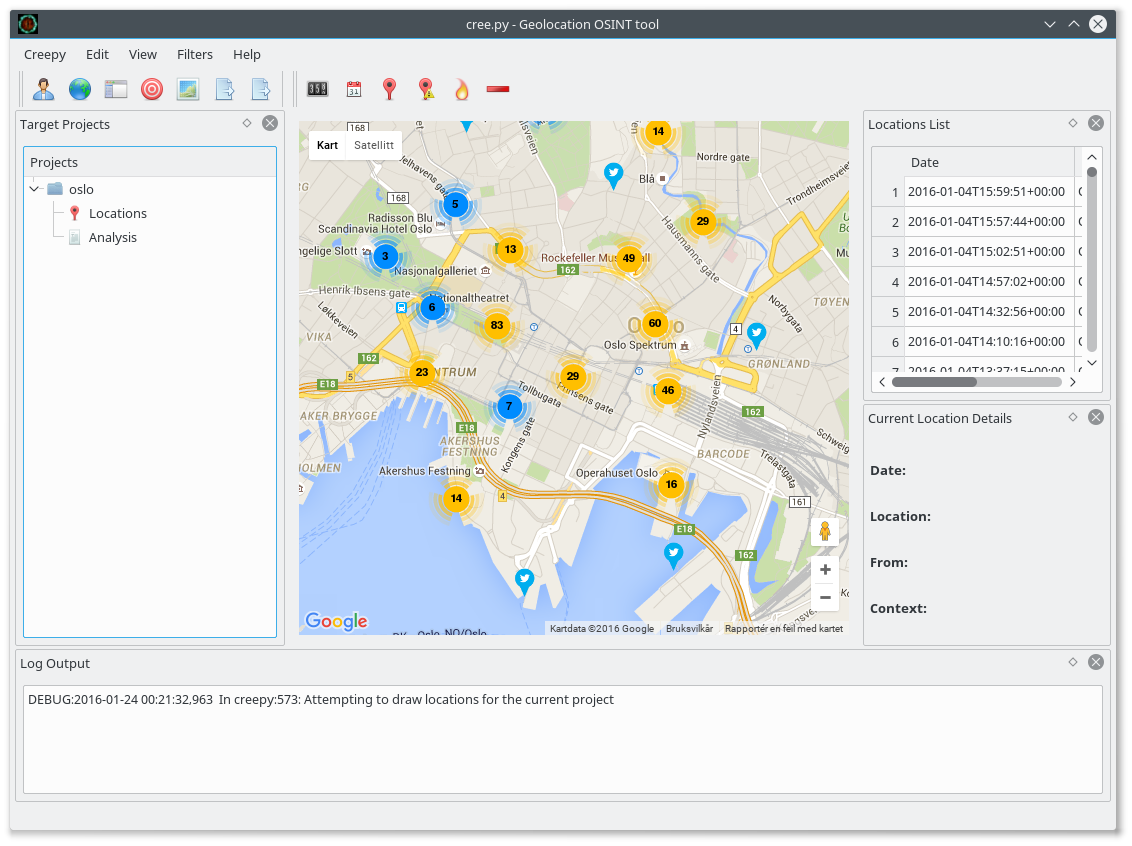
The phone company logs provide a register of locations to check out when one want to figure out what the tracked person was doing. It is unavailable for most of us, but provided to selected government officials, company staff, those illegally buying information from unfaithful servants and crackers stealing the information. But the public information can be collected and analysed, and a free software tool to do so is called Creepy or Cree.py. I discovered it when I read an article about Creepy in the Norwegian newspaper Aftenposten i November 2014, and decided to check if it was available in Debian. The python program was in Debian, but the version in Debian was completely broken and practically unmaintained. I uploaded a new version which did not work quite right, but did not have time to fix it then. This Christmas I decided to finally try to get Creepy operational in Debian. Now a fixed version is available in Debian unstable and testing, and almost all Debian specific patches are now included upstream. The Creepy program visualises geolocation information fetched from Twitter, Instagram, Flickr and Google+, and allow one to get a complete picture of every social media message posted recently in a given area, or track the movement of a given individual across all these services. Earlier it was possible to use the search API of at least some of these services without identifying oneself, but these days it is impossible. This mean that to use Creepy, you need to configure it to log in as yourself on these services, and provide information to them about your search interests. This should be taken into account when using Creepy, as it will also share information about yourself with the services. The picture above show the twitter messages sent from (or at least geotagged with a position from) the city centre of Oslo, the capital of Norway. One useful way to use Creepy is to first look at information tagged with an area of interest, and next look at all the information provided by one or more individuals who was in the area. I tested it by checking out which celebrity provide their location in twitter messages by checkout out who sent twitter messages near a Norwegian TV station, and next could track their position over time, making it possible to locate their home and work place, among other things. A similar technique have been used to locate Russian soldiers in Ukraine, and it is both a powerful tool to discover lying governments, and a useful tool to help people understand the value of the private information they provide to the public. The package is not trivial to backport to Debian Stable/Jessie, as it depend on several python modules currently missing in Jessie (at least python-instagram, python-flickrapi and python-requests-toolbelt). (I have uploaded the image to screenshots.debian.net and licensed it under the same terms as the Creepy program in Debian.)

21 January 2016

Jan Wagner: Using nginx as reverse proxy (for containered Ghost)

In some cases it might be a good idea to use a reverse proxy in front of a web application. Nginx is a very common solution for this scenario these days. As I started with containers for some of my playgrounds, I decided to go this route.

Container security When looking around to implement a nginx in front of a Docker web application, in most cases nginx itself is also a Docker container.
In my eyes Docker containers have a huge disadvantage. To get updated software (at least security related) into production, you have to hope that your container image is well maintained or you have to care about it yourself. If this not the case, you might worry.
As long as you don't have container solutions deployed in large scale (and make use of automatically rebuilding and deploying your container images) I would recommend to keep the footprint of your containered applications as small as possible from security point of view. So I decided to run my nginx on the same system where the Docker web applications are living, but you can also have it placed on a system in front of your container systems. Updates are supplied via usual Distribution security updates.

Installing nginx
# aptitude install nginx
I don't will advise you on the usual steps about setting up nginx, but will focus on things required to proxy into your container web application.

Configuration of nginx As our Docker container for Ghost exposes port 2368, we need to define our upstream server. I've done that in conf.d/docker-ghost.conf.
upstream docker-ghost    
  server localhost:2368;
 
The vHost configuration can be taken into /etc/nginx/nginx.conf but I would recommend to use a config file in /etc/nginx/sites-available/ instead.
server    
  listen 80;
  server_name log.cyconet.org;
  include /etc/nginx/snippets/ghost_vhost.conf;
  location /  
    proxy_pass                          http://docker-ghost;
    proxy_set_header  Host              $http_host;   # required for docker client's sake
    proxy_set_header  X-Real-IP         $remote_addr; # pass on real client's IP
    proxy_set_header  X-Forwarded-For   $proxy_add_x_forwarded_for;
    proxy_set_header  X-Forwarded-Proto $scheme;
    proxy_read_timeout                  900;
   
 
Let's enable the configuration and reload nginx:
# ln -s ../sites-available/ghost.conf /etc/nginx/sites-enabled/ghost.conf && \
 service nginx configtest && service nginx reload

Going further This is a very basic configuration. You might think about delivering static content (like images) directly from your Docker data volume, caching and maybe encryption.

14 January 2016

Petter Reinholdtsen: Always download Debian packages using Tor - the simple recipe

During his DebConf15 keynote, Jacob Appelbaum observed that those listening on the Internet lines would have good reason to believe a computer have a given security hole if it download a security fix from a Debian mirror. This is a good reason to always use encrypted connections to the Debian mirror, to make sure those listening do not know which IP address to attack. In August, Richard Hartmann observed that encryption was not enough, when it was possible to interfere download size to security patches or the fact that download took place shortly after a security fix was released, and proposed to always use Tor to download packages from the Debian mirror. He was not the first to propose this, as the apt-transport-tor package by Tim Retout already existed to make it easy to convince apt to use Tor, but I was not aware of that package when I read the blog post from Richard. Richard discussed the idea with Peter Palfrader, one of the Debian sysadmins, and he set up a Tor hidden service on one of the central Debian mirrors using the address vwakviie2ienjx6t.onion, thus making it possible to download packages directly between two tor nodes, making sure the network traffic always were encrypted. Here is a short recipe for enabling this on your machine, by installing apt-transport-tor and replacing http and https urls with tor+http and tor+https, and using the hidden service instead of the official Debian mirror site. I recommend installing etckeeper before you start to have a history of the changes done in /etc/.
apt install apt-transport-tor
sed -i 's% http://ftp.debian.org/%tor+http://vwakviie2ienjx6t.onion/%' /etc/apt/sources.list
sed -i 's% http% tor+http%' /etc/apt/sources.list
If you have more sources listed in /etc/apt/sources.list.d/, run the sed commands for these too. The sed command is assuming your are using the ftp.debian.org Debian mirror. Adjust the command (or just edit the file manually) to match your mirror. This work in Debian Jessie and later. Note that tools like apt-file only recently started using the apt transport system, and do not work with these tor+http URLs. For apt-file you need the version currently in experimental, which need a recent apt version currently only in unstable. So if you need a working apt-file, this is not for you. Another advantage from this change is that your machine will start using Tor regularly and at fairly random intervals (every time you update the package lists or upgrade or install a new package), thus masking other Tor traffic done from the same machine. Using Tor will become normal for the machine in question. On Freedombox, APT is set up by default to use apt-transport-tor when Tor is enabled. It would be great if it was the default on any Debian system.

Lunar: Reproducible builds: week 37 in Stretch cycle

What happened in the reproducible builds effort between January 3rd and January 9th 2016:

Toolchain fixes David Bremner uploaded dh-elpa/0.0.18 which adds a --fix-autoload-date option (on by default) to take autoload dates from changelog. Lunar updated and sent the patch adding the generation of .buildinfo to dpkg.

Packages fixed The following packages have become reproducible due to changes in their build dependencies: aggressive-indent-mode, circe, company-mode, db4o, dh-elpa, editorconfig-emacs, expand-region-el, f-el, geiser, hyena, js2-mode, markdown-mode, mono-fuse, mysql-connector-net, openbve, regina-normal, sml-mode, vala-mode-el. The following packages became reproducible after getting fixed: Some uploads fixed some reproducibility issues, but not all of them: Patches submitted which have not made their way to the archive yet:
  • #809780 on flask-restful by Chris Lamb: implement support for SOURCE_DATE_EPOCH in the build system.
  • #810259 on avfs by Chris Lamb: implement support for SOURCE_DATE_EPOCH in the build system.
  • #810509 on apt by Mattia Rizzolo: ensure a stable file order is given to the linker.

reproducible.debian.net Add 2 more armhf build nodes provided by Vagrant Cascadian. This added 7 more armhf builder jobs. We now run around 900 tests of armhf packages each day. (h01ger) The footer of each page now indicates by which Jenkins jobs build it. (h01ger)

diffoscope development diffoscope 45 has been released on January 4th. It features huge memory improvements when comparing large files, several fixes of squashfs related issues that prevented comparing two Tails images, and improve the file list of tar and cpio archive to be more precise and consistent over time. It also fixes a typo that prevented the Mach-O to work (Rainer M ller), improves comparisons of ELF files when specified on the command line, and solves a few more encoding issues.

Package reviews 134 reviews have been removed, 30 added and 37 updated in the previous week. 20 new fail to build from source issues were reported by Chris Lamb and Chris West. prebuilder will now skip installing diffoscope to save time if the build results are identical. (Reiner Herrmann)

Jan Wagner: Running Ghost blogging platform via Docker

When I was thinking about using Ghost, I did read the installations guide and then I just closed the browser window.
I didn't wanted to install npm, yet another package manager, and just hack init scripts. Not speaking about updating Ghost itself. Some weeks later I did think about using Ghost again. It has a nice Markdown Editor and some nice other features. Since everybody is jumping on the Docker band wagon actually and I had used it for some tests already, I thought trying the Ghost Docker image might be a good idea. If you are interested into how I did that, read on. I suppose you have installed a stock Debian Jessie.

Installing Docker

Pulling the Docker image Just in case you didn't, you need to (re)start docker to work with service docker restart
# docker pull ghost

Making Ghost (container image) run forever I did not like systemd in the first place for many reasons. But in some circumstances it makes sense. In case of handling a Docker container, using a systemd unit file makes life much easier.
# mkdir -p /srv/docker/ghost/
# cat > /etc/systemd/system/ghost.service << EOF
[Unit]
Description=GHost Service  
After=docker.service  
Requires=docker.service
[Service]
ExecStartPre=-/usr/bin/docker kill ghost  
ExecStartPre=-/usr/bin/docker rm ghost  
ExecStartPre=-/usr/bin/docker pull ghost  
ExecStart=/usr/bin/docker run  --name ghost --publish 2368:2368 --env 'NODE_ENV=production' --volume /srv/docker/ghost/:/var/lib/ghost ghost  
ExecStop=/usr/bin/docker stop ghost
[Install]
WantedBy=multi-user.target  
EOF  
# systemctl enable ghost && systemctl daemon-reload && systemctl start ghost 
This will start your container on start and even is looking for a new Docker image and is fetching it, if needed. If you don't like this behavior, just comment out the line in the config and reread it with systemctl daemon-reload. Now you should have listening something on port 2368:
# netstat -tapn   grep 2368
tcp6       0      0 :::2368                 :::*                    LISTEN      7061/docker-proxy  
Update: Jo l Dinel did send me a mail, that starting your Docker container with --restart always will take care that it is brought up again if Docker or (even) the whole system will get restarted. For real I used that before and might be a lightweight solution, but I liked the systemd unit file solution a lot more.

Persistent Data Thanks to the Docker mount option you can find all your data in /srv/docker/ghost/. So your blog will still have content, even if the ghost Docker images is updated:
# ls /srv/docker/ghost/
apps  config.js  data  images  themes  

Accessing the container To kick your ghost into production, it might be useful if you make it available on port 80 at least. This can be done for example by changing your Docker publish configuration or adding a DNAT to your firewall. But I would recommand using a proxy in front of your Docker container. This might be part of one of my next articles.

13 January 2016

Norbert Preining: Ian Buruma: Wages of Guilt

Since moving to Japan, I got more and more interested in history, especially the recent history of the 20th century. The book I just finished, Ian Buruma (Wiki, home page) Wages of Guilt Memories of War in Germany and Japan (Independent, NYRB), has been a revelation for me. As an Austrian living in Japan, I am experiencing the discrepancy between these two countries with respect to their treatment of war legacy practically daily, and many of my blog entries revolve around the topic of Japanese non-reconciliation.
Willy Brandt went down on his knees in the Warsaw ghetto, after a functioning democracy had been established in the Federal Republic of Germany, not before. But Japan, shielded from the evil world, has grown into an Oskar Matzerath: opportunistic, stunted, and haunted by demons, which it tries to ignore by burying them in the sand, like Oskar s drum.
Ian Buruma, Wages of Guilt, Clearing Up the Ruins
Buruma-Wages_of_Guilt The comparison of Germany and Japan with respect to their recent history as laid out in Buruma s book throws a spotlight on various aspects of the psychology of German and Japanese population, while at the same time not falling into the easy trap of explaining everything with difference in the guilt culture. A book of great depth and broad insights everyone having even the slightest interest in these topics should read.
This difference between (West) German and Japanese textbooks is not just a matter of detail; it shows a gap in perception.
Ian Buruma, Wages of Guilt, Romance of the Ruins
Only thinking about giving a halfway full account of this book is something impossible for me. The sheer amount of information, both on the German and Japanese side, is impressive. His incredible background (studies of Chinese literature and Japanese movie!) and long years as journalist, editor, etc, enriches the book with facets normally not available: In particular his knowledge of both the German and Japanese movie history, and the reflection of history in movies, were complete new aspects for me (see my recent post (in Japanese)). The book is comprised of four parts: The first with the chapters War Against the West and Romance of the Ruins; the second with the chapters Auschwitz, Hiroshima, and Nanking; the third with History on Trial, Textbook Resistance, and Memorials, Museums, and Monuments; and the last part with A Normal Country, Two Normal Towns, and Clearing Up the Ruins. Let us look at the chapters in turn: The boook somehow left me with a bleak impression of Japanese post-war times as well as Japanese future. Having read other books about the political ignorance in Japan (Norma Field s In the realm of a dying emperor, or the Chibana history), Buruma s characterization of Japanese politics is striking. He couldn t foresee the recent changes in legislation pushed through by the Abe government actually breaking the constitution, or the rewriting of history currently going on with respect to comfort women and Nanking. But reading his statement about Article Nine of the constitution and looking at the changes in political attitude, I am scared about where Japan is heading to:
The Nanking Massacre, for leftists and many liberals too, is the main symbol of Japanese militarism, supported by the imperial (and imperialist) cult. Which is why it is a keystone of postwar pacifism. Article Nine of the constitution is necessary to avoid another Nanking Massacre. The nationalist right takes the opposite view. To restore the true identity of Japan, the emperor must be reinstated as a religious head of state, and Article Nine must be revised to make Japan a legitimate military power again. For this reason, the Nanking Massacre, or any other example of extreme Japanese aggression, has to be ignored, softened, or denied.
Ian Buruma, Wages of Guilt, Nanking
While there are signs of resistance in the streets of Japan (Okinawa and the Hanako bay, the demonstrations against secrecy law and reversion of the constitution), we are still to see a change influenced by the people in a country ruled and distributed by oligarchs. I don t think there will be another Nanking Massacre in the near future, but Buruma s books shows that we are heading back to a nationalistic regime similar to pre-war times, just covered with a democratic veil to distract critics.
I close with several other quotes from the book that caught my attention: In the preface and introduction:
[ ] mainstream conservatives made a deliberate attempt to distract people s attention from war and politics by concentrating on economic growth.
The curious thing was that much of what attracted Japanese to Germany before the war Prussian authoritarianism, romantic nationalism, pseudo-scientific racialism had lingered in Japan while becoming distinctly unfashionable in Germany.
In Romance of the Ruins:
The point of all this is that Ikeda s promise of riches was the final stage of what came to be known as the reverse course, the turn away from a leftist, pacifist, neutral Japan a Japan that would never again be involved in any wars, that would resist any form of imperialism, that had, in short, turned its back for good on its bloody past. The Double Your Incomes policy was a deliberate ploy to draw public attention away from constitutional issues.
In Hiroshima:
The citizens of Hiroshima were indeed victims, primarily of their own military rulers. But when a local group of peace activists petitioned the city of Hiroshima in 1987 to incorporate the history of Japanese aggression into the Peace Memorial Museum, the request was turned down. The petition for an Aggressors Corner was prompted by junior high school students from Osaka, who had embarrassed Peace Museum officials by asking for an explanation about Japanese responsibility for the war.
The history of the war, or indeed any history, is indeed not what the Hiroshima spirit is about. This is why Auschwitz is the only comparison that is officially condoned. Anything else is too controversial, too much part of the flow of history .
In Nanking, by the governmental pseudo-historian Tanaka:
Unlike in Europe or China, writes Tanaka, you won t find one instance of planned, systematic murder in the entire history of Japan. This is because the Japanese have a different sense of values from the Chinese or the Westerners.
In History on Trial:
In 1950, Becker wrote that few things have done more to hinder true historical self-knowledge in Germany than the war crimes trials. He stuck to this belief. Becker must be taken seriously, for he is not a right-wing apologist for the Nazi past, but an eminent liberal.
There never were any Japanese war crimes trials, nor is there a Japanese Ludwigsburg. This is partly because there was no exact equivalent of the Holocaust. Even though the behavior of Japanese troops was often barbarous, and the psychological consequences of State Shinto and emperor worship were frequently as hysterical as Nazism, Japanese atrocities were part of a military campaign, not a planned genocide of a people that included the country s own citizens. And besides, those aspects of the war that were most revolting and furthest removed from actual combat, such as the medical experiments on human guinea pigs (known as logs ) carried out by Unit 731 in Manchuria, were passed over during the Tokyo trial. The knowledge compiled by the doctors of Unit 731 of freezing experiments, injection of deadly diseases, vivisections, among other things was considered so valuable by the Americans in 1945 that the doctors responsible were allowed to go free in exchange for their data.
Some Japanese have suggested that they should have conducted their own war crimes trials. The historian Hata Ikuhiko thought the Japanese leaders should have been tried according to existing Japanese laws, either in military or in civil courts. The Japanese judges, he believed, might well have been more severe than the Allied tribunal in Tokyo. And the consequences would have been healthier. If found guilty, the spirits of the defendants would not have ended up being enshrined at Yasukuni. The Tokyo trial, he said, purified the crimes of the accused and turned them into martyrs. If they had been tried in domestic courts, there is a good chance the real criminals would have been flushed out.
After it was over, the Nippon Times pointed out the flaws of the trial, but added that the Japanese people must ponder over why it is that there has been such a discrepancy between what they thought and what the rest of the world accepted almost as common knowledge. This is at the root of the tragedy which Japan brought upon herself.
Emperor Hirohito was not Hitler; Hitler was no mere Shrine. But the lethal consequences of the emperor-worshipping system of irresponsibilities did emerge during the Tokyo trial. The savagery of Japanese troops was legitimized, if not driven, by an ideology that did not include a Final Solution but was as racialist as Hider s National Socialism. The Japanese were the Asian Herrenvolk, descended from the gods.
Emperor Hirohito, the shadowy figure who changed after the war from navy uniforms to gray suits, was not personally comparable to Hitler, but his psychological role was remarkably similar.
In fact, MacArthur behaved like a traditional Japanese strongman (and was admired for doing so by many Japanese), using the imperial symbol to enhance his own power. As a result, he hurt the chances of a working Japanese democracy and seriously distorted history. For to keep the emperor in place (he could at least have been made to resign), Hirohito s past had to be freed from any blemish; the symbol had to be, so to speak, cleansed from what had been done in its name.
In Memorials, Museums, and Monuments:
If one disregards, for a moment, the differences in style between Shinto and Christianity, the Yasukuni Shrine, with its relics, its sacred ground, its bronze paeans to noble sacrifice, is not so very different from many European memorials after World War I. By and large, World War II memorials in Europe and the United States (though not the Soviet Union) no longer glorify the sacrifice of the fallen soldier. The sacrificial cult and the romantic elevation of war to a higher spiritual plane no longer seemed appropriate after Auschwitz. The Christian knight, bearing the cross of king and country, was not resurrected. But in Japan, where the war was still truly a war (not a Holocaust), and the symbolism still redolent of religious exultation, such shrines as Yasukuni still carry the torch of nineteenth-century nationalism. Hence the image of the nation owing its restoration to the sacrifice of fallen soldiers.
In A Normal Country:
The mayor received a letter from a Shinto priest in which the priest pointed out that it was un-Japanese to demand any more moral responsibility from the emperor than he had already taken. Had the emperor not demonstrated his deep sorrow every year, on the anniversary of Japan s surrender? Besides, he wrote, it was wrong to have spoken about the emperor in such a manner, even as the entire nation was deeply worried about his health. Then he came to the main point: It is a common error among Christians and people with Western inclinations, including so-called intellectuals, to fail to grasp that Western societies and Japanese society are based on fundamentally different religious concepts . . . Forgetting this premise, they attempt to place a Western structure on a Japanese foundation. I think this kind of mistake explains the demand for the emperor to bear full responsibility.
In Two Normal Towns:
The bust of the man caught my attention, but not because it was in any way unusual; such busts of prominent local figures can be seen everywhere in Japan. This one, however, was particularly grandiose. Smiling across the yard, with a look of deep satisfaction over his many achievements, was Hatazawa Kyoichi. His various functions and titles were inscribed below his bust. He had been an important provincial bureaucrat, a pillar of the sumo wrestling establishment, a member of various Olympic committees, and the recipient of some of the highest honors in Japan. The song engraved on the smooth stone was composed in praise of his rich life. There was just one small gap in Hatazawa s life story as related on his monument: the years from 1941 to 1945 were missing. Yet he had not been idle then, for he was the man in charge of labor at the Hanaoka mines.
In Clearing Up the Ruins:
But the question in American minds was understandable: could one trust a nation whose official spokesmen still refused to admit that their country had been responsible for starting a war? In these Japanese evasions there was something of the petulant child, stamping its foot, shouting that it had done nothing wrong, because everybody did it.
Japan seems at times not so much a nation of twelve-year-olds, to repeat General MacArthur s phrase, as a nation of people longing to be twelve-year-olds, or even younger, to be at that golden age when everything was secure and responsibility and conformity were not yet required.
For General MacArthur was right: in 1945, the Japanese people were political children. Until then, they had been forced into a position of complete submission to a state run by authoritarian bureaucrats and military men, and to a religious cult whose high priest was also formally chief of the armed forces and supreme monarch of the empire.
I saw Jew S ss that same year, at a screening for students of the film academy in Berlin. This showing, too, was followed by a discussion. The students, mostly from western Germany, but some from the east, were in their early twenties. They were dressed in the international uniform of jeans, anoraks, and work shirts. The professor was a man in his forties, a 68er named Karsten Witte. He began the discussion by saying that he wanted the students to concentrate on the aesthetics of the film more than the story. To describe the propaganda, he said, would simply be banal: We all know the what, so let s talk about the how. I thought of my fellow students at the film school in Tokyo more than fifteen years before. How many of them knew the what of the Japanese war in Asia.

Rapha&#235;l Hertzog: Freexian s report about Debian Long Term Support, December 2015

A Debian LTS logoLike each month, here comes a report about the work of paid contributors to Debian LTS. Individual reports In December, 113.50 work hours have been dispatched among 9 paid contributors. Their reports are available: Evolution of the situation We lost our first silver sponsor (Gandi.net, they prefer to give the same amount of money to Debian directly) and another sponsor reduced his sponsorship level. While this won t show in the hours dispatched in January, we will do a small jump backwards in February (unless we get new sponsors replacing those in the next 3 weeks). This is a bit unfortunate as we are rather looking at reinforcing the amount of sponsorship we get as we approach Wheezy LTS and we will need more support to properly support virtualization related packages and other packages that were formerly excluded from Squeeze LTS. Can you convince your company and help us reach our second goal? In terms of security updates waiting to be handled, the situation is close to last month. It looks like that having about 20 packages needing an update is the normal situation and that we can t really get further down given the time required to process some updates (sometimes we wait until the upstream authors provides a patch, and so on). Thanks to our sponsors We got one new bronze sponsor but he s not listed (he did not fill the form where we request their permission to be listed).

2 comments Liked this article? Click here. My blog is Flattr-enabled.

7 January 2016

Rhonda D'Vine: Chipzel

Happy new year everyone! Let's start with another round of nice music, this time it is coming from Chipzel who is a great chiptune composer. Given that I'm coming from a c64 background I love chip tunes, and she does a really great job in that area. Check it out! And like always, enjoy!

/music permanent link Comments: 0 Flattr this

Thorsten Glaser: git find published; test, review, fix it please

I just published the first version of git find on gh/mirabilos/git-find for easy collaboration. The repository deliberately only contains the script and the manual page so it can easily be merged into git.git with complete history later, should they accept it. git find is MirOS licenced. It does require a recent mksh (Update: I did start it in POSIX sh first, but it eventually turned out to require arrays, and I don t know perl(1) and am not going to rewrite it in C) and some common utility extensions to deal with NUL-separated lines (sort -z, grep -z, git ls-tree -z); also, support for '\0' in tr(1) and a comm(1) that does not choke on embedded NULs in lines.

To install or uninstall it, run

	$ git clone git@github.com:mirabilos/git-find.git
	$ cd git-find
	$ sudo ln -sf $PWD/git-find /usr/lib/git-core/
	$ sudo cp git-find.1 /usr/local/share/man/man1/
	  hack  
	$ sudo rm /usr/lib/git-core/git-find \
	    /usr/local/share/man/man1/git-find.1

then you can call it as git find and look at the documentation with git help find , as is customary. The idea behind this utility is to have a tool like git grep that acts on the list of files known to git (and not e.g. ignored files) to quickly search for, say, all PNG files in the repository (but not the generated ones). git find acts on the index for the HEAD, i.e. whatever commit is currently checked-out (unlike git grep which also knows about git add ed files; fix welcome) and then offers a filter syntax similar to find(1) to follow up: parenthes s, ! for negation, -a and -o for boolean are supported, as well as -name, -regex and -wholename and their case-insensitive variants, although regex uses grep(1) without (or, if the global option -E is given, with) -E, and the pattern matches use mksh(1) s, which ignores the locale and doesn t do [[:alpha:]] character classes yet. On the plus side, the output is guaranteed to be sorted; on the minus side, it is rather wastefully using temporary files (under $TMPDIR of course, so use of tmpfs is recommended). -print0 is the only output option (-print being the default). Another mode forwards the file list to the system find; since it doesn t support DOS-style response files, this only works if the amount of files is smaller than the operating system s limit; this mode supports the full range (except -maxdepth) of the system find(1) filters, e.g. -mmin -1 and -ls, but it occurs filesystem access penalty for the entire tree and doesn t sort the output, but can do -ls or even -exec. The idea here is that it can collaboratively be improved, reviewed, fixed, etc. and then, should they agree, with the entire history, subtree-merged into git.git and shipped to the world. Part of the development was sponsored by tarent solutions GmbH, the rest and the entire manual page were done in my vacation.

2 January 2016

Daniel Pocock: The great life of Ian Murdock and police brutality in context

Tributes: (You can Follow or Tweet about this blog on Twitter) Over the last week, people have been saying a lot about the wonderful life of Ian Murdock and his contributions to Debian and the world of free software. According to one news site, a San Francisco police officer, Grace Gatpandan, has been doing the opposite, starting a PR spin operation, leaking snippets of information about what may have happened during Ian's final 24 hours. Sadly, these things are now starting to be regurgitated without proper scrutiny by the mainstream press (note the erroneous reference to SFGate with link to SFBay.ca, this is British tabloid media at its best). The report talks about somebody (no suggestion that it was even Ian) "trying to break into a residence". Let's translate that from the spin-doctor-speak back to English: it is the silly season, when many people have a couple of extra drinks and do silly things like losing their keys. "a residence", or just their own home perhaps? Maybe some AirBNB guest arriving late to the irritation of annoyed neighbours? Doesn't the choice of words make the motive sound so much more sinister? Nobody knows the full story and nobody knows if this was Ian, so snippets of information like this are inappropriate, especially when somebody is deceased. Did they really mean to leave people with the impression that one of the greatest visionaries of the Linux world was also a cat burglar? That somebody who spent his life giving selflessly and generously for the benefit of the whole world (his legacy is far greater than Steve Jobs, as Debian comes with no strings attached) spends the Christmas weekend taking things from other people's houses in the dark of the night? The report doesn't mention any evidence of a break-in or any charges for breaking-in. If having a few drinks and losing your keys in December is such a sorry state to be in, many of us could potentially be framed in the same terms at some point in our lives. That is one of the reasons I feel so compelled to write this: somebody else could be going through exactly the same experience at the moment you are reading this. Any of us could end up facing an assault as unpleasant as the tweets imply at some point in the future. At least I can console myself that as a privileged white male, the risk to myself is much lower than for those with mental illness, the homeless, transgender, Muslim or black people but as the tweets suggest, it could be any of us. The story reports that officers didn't actually come across Ian breaking in to anything, they encountered him at a nearby street corner. If he had weapons or drugs or he was known to police that would have almost certainly been emphasized. Is it right to rush in and deprive somebody of their liberties without first giving them an opportunity to identify themselves and possibly confirm if they had a reason to be there? The report goes on, "he was belligerent", "he became violent", "banging his head" all by himself. How often do you see intelligent and successful people like Ian Murdock spontaneously harming themselves in that way? Can you find anything like that in any of the 4,390 Ian Murdock videos on YouTube? How much more frequently do you see reports that somebody "banged their head", all by themselves of course, during some encounter with law enforcement? Do police never make mistakes like other human beings? If any person was genuinely trying to spontaneously inflict a head injury on himself, as the police have suggested, why wouldn't the police leave them in the hospital or other suitable care? Do they really think that when people are displaying signs of self-harm, rounding them up and taking them to jail will be in their best interests? Now, I'm not suggesting this started out with some sort of conspiracy. Police may have been at the end of a long shift (and it is a disgrace that many US police are not paid for their overtime) or just had a rough experience with somebody far more sinister. On the other hand, there may have been a mistake, gaps in police training or an inappropriate use of a procedure that is not always justified, like a strip search, that causes profound suffering for many victims. A select number of US police forces have been shamed around the world for a series of incidents of extreme violence in recent times, including the death of Michael Brown in Ferguson, shooting Walter Scott in the back, death of Freddie Gray in Baltimore and the attempts of Chicago's police to run an on-shore version of Guantanamo Bay. Beyond those highly violent incidents, the world has also seen the abuse of Ahmed Mohamed, the Muslim schoolboy arrested for his interest in electronics and in 2013, the suicide of Aaron Swartz which appears to be a direct consequence of the "Justice" department's obsession with him. What have the police learned from all this bad publicity? Are they changing their methods, or just hiring more spin doctors? If that is their response, then doesn't it leave them with a cruel advantage over those people who were deceased? Isn't it standard practice for some police to simply round up anybody who is a bit lost and write up a charge sheet for resisting arrest or assaulting an officer as insurance against questions about their own excessive use of force? When British police executed Jean Charles de Menezes on a crowded tube train and realized they had just done something incredibly outrageous, their PR office went to great lengths to try and protect their image, even photoshopping images of Menezes to make him look more like some other suspect in a wanted poster. To this day, they continue to refer to Menezes as a victim of the terrorists, could they be any more arrogant? While nobody believes the police woke up that morning thinking "let's kill some random guy on the tube", it is clear they made a mistake and like many people (not just police), they immediately prioritized protecting their reputation over protecting the truth. Nobody else knows exactly what Ian was doing and exactly what the police did to him. We may never know. However, any disparaging or irrelevant comments from the police should be viewed with some caution. The horrors of incarceration It would be hard for any of us to understand everything that an innocent person goes through when detained by the police. The recently released movie about The Stanford Prison Experiment may be an interesting place to start, a German version produced in 2001, Das Experiment, is also very highly respected. The United States has the largest prison population in the world and the second-highest per-capita incarceration rate. Many, including some on death row, are actually innocent, in the wrong place at the wrong time, without the funds to hire an attorney. The system, and the police and prison officers who operate it, treat these people as packages on a conveyor belt, without even the most basic human dignity. Whether their encounter lasts for just a few hours or decades, is it any surprise that something dies inside them when they discover this cruel side of American society? Worldwide, there is an increasing trend to make incarceration as degrading as possible. People may be innocent until proven guilty, but this hasn't stopped police in the UK from locking up and strip-searching over 4,500 children in a five year period, would these children go away feeling any different than if they had an encounter with Jimmy Saville or Rolf Harris? One can only wonder what they do to adults. What all this boils down to is that people shouldn't really be incarcerated unless it is clear the danger they pose to society is greater than the danger they may face in a prison. What can people do for Ian and for justice? Now that these unfortunate smears have appeared, it would be great to try and fill the Internet with stories of the great things Ian has done for the world. Write whatever you feel about Ian's work and your own experience of Debian. While the circumstances of the final tweets from his Twitter account are confusing, the tweets appear to be consistent with many other complaints about US law enforcement. Are there positive things that people can do in their community to help reduce the harm? Sending books to prisoners (the UK tried to ban this) can make a difference. Treat them like humans, even if the system doesn't. Recording incidents of police activities can also make a huge difference, such as the video of the shooting of Walter Scott or the UK police making a brutal unprovoked attack on a newspaper vendor. Don't just walk past a situation and assume everything is under control. People making recordings may find themselves in danger, it is recommended to use software that automatically duplicates each recording, preferably to the cloud, so that if the police ask you to delete such evidence, you can let them watch you delete it and still have a copy. Can anybody think of awards that Ian Murdock should be nominated for, either in free software, computing or engineering in general? Some, like the prestigious Queen Elizabeth Prize for Engineering can't be awarded posthumously but others may be within reach. Come and share your ideas on the debian-project mailing list, there are already some here. Best of all, Ian didn't just build software, he built an organization, Debian. Debian's principles have helped to unite many people from otherwise different backgrounds and carry on those principles even when Ian is no longer among us. Find out more, install it on your computer or even look for ways to participate in the project.

1 January 2016

Thorsten Alteholz: My Debian Activities in December 2015

FTP assistant Due to Christmas, I only marked 254 packages for accept and rejected 17 of them. I had to send 14 emails to maintainers. Squeeze LTS This was my eighteenth month that I did some work for the Squeeze LTS initiative, started by Raphael Hertzog at Freexian. As other members of the LTS team had to give back some hours of their workload, this month my initial workload of 18.25h had been increased to 21.25h. Altogether I uploaded those DLAs: I also started to work on CVEs for packages t-coffee and pitivi, only to recognize that the versions in Squeeze are not affected. Further I prepared patches for passenger and srtp but I could not test them yet, so an upload will be in January. This month I also experienced something strange. Due to the upload of the new version of mysql, I had to process a package for squeeze-lts in NEW. I seldom see a package, that creates so much red output from lintian. I assume this always happens when an old package will be checked by the latest lintian and is a good sign for all the development within Debian. I also tested Raphaels patch for #796784 and could confirm that everything works as expected. Unfortunately the php5 upload must be delayed until Januar. This month I also had another week of frontdesk duties. Other stuff The Advent season is over and the Debian Med Advent Calendar is full to bursting. The incredible number of 150 bugs have been closed this year! Due to the GSL transition a new upload of all meep packages had to be done and all in all I could close #748822, #807210, #807212, #807213, #807214, #807215 and #807747.

Next.

Previous.