Search Results: "gt"

24 April 2025

Dirk Eddelbuettel: RQuantLib 0.4.26 on CRAN: Small Updates

A new minor release 0.4.26 of RQuantLib arrived on CRAN this morning, and has just now been uploaded to Debian too. QuantLib is a rather comprehensice free/open-source library for quantitative finance. RQuantLib connects (some parts of) it to the R environment and language, and has been part of CRAN for nearly twenty-two years (!!) as it was one of the first packages I uploaded to CRAN. This release of RQuantLib brings updated Windows build support taking advantage of updated Rtools, thanks to a PR by Tomas Kalibera. We also updated expected results for three of the schedule tests (in a way that is dependent on the upstream library version) as the just-released QuantLib 1.38 differs slightly.

Changes in RQuantLib version 0.4.26 (2025-04-24)
  • Use system QuantLib (if found by pkg-config) on Windows too (Tomas Kalibera in #192)
  • Accommodate same test changes for schedules in QuantLib 1.38

Courtesy of my CRANberries, there is also a diffstat report for the this release. As always, more detailed information is on the RQuantLib page. Questions, comments etc should go to the rquantlib-devel mailing list. Issue tickets can be filed at the GitHub repo.

This post by Dirk Eddelbuettel originated on his Thinking inside the box blog. If you like this or other open-source work I do, you can now sponsor me at GitHub.

Jonathan McDowell: Local Voice Assistant Step 1: An ATOM Echo voice satellite

Back when I setup my home automation I ended up with one piece that used an external service: Amazon Alexa. I d rather not have done this, but voice control is extremely convenient, both for us, and guests. Since then Home Assistant has done a lot of work in developing the capability of a local voice assistant - 2023 was their Year of Voice. I ve had brief looks at this in the past, but never quite had the time to dig into setting it up, and was put off by the fact a lot of the setup instructions were just Download our prebuilt components . While I admire the efforts to get Home Assistant fully packaged for Debian I accept that s a tricky proposition, and settle for running it in a venv on a Debian stable container. Voice requires a lot more binary components, and I want to have voice satellites in more than one location, so I set about trying to understand a bit better what I was deploying, and actually building the binary bits myself. This is the start of a write-up of that. I ll break it into a bunch of posts, trying to cover one bit in each, because otherwise this will get massive. Let s start with some requirements: My house server is an AMD Ryzen 7 5700G, so my expectation was that I d have enough local processing power to be able to do this. That turned out to be a valid assumption - speech to text really has come a long way in recent years. I m still running Home Assistant 2024.3.3 - the last one that supports (but complains about) Python 3.11. Trixie has started the freeze process, so once it releases I ll look at updating the HA install. For now what I have has turned out to be Good Enough, but I know there have been improvements upstream I m missing. Finally, before I get into the details, I should point out that if you just want to get started with a voice assistant on Home Assistant and don t care about what s under the hood, there are a bunch of more user friendly details on Home Assistant s site itself, and they have pre-built images you can just deploy. My first step was sorting out a voice satellite . This is the device that actually has a microphone and speaker and communicates with the main Home Assistant setup. I d seen the post about a $13 voice assistant, and as a result had an ATOM Echo sitting on my desk I hadn t got around to setting up. Here, we ignore a bit about delving into exactly what s going on under the hood, even if we re compiling locally. This is a constrained embedded device and while I m familiar with the ESP32 IDF build system I just accepted that using ESPHome and letting it do it s thing was the quickest way to get up and running. It is possible to do this all via the web with a pre-built image, but I wanted to change the wake word to Hey Jarvis rather than the default Okay Nabu , and that was a good reason to bother doing a local build. We ll get into actually building a voice satellite on Debian in later posts. I started with the default upstream assistant config and tweaked it a little for my setup:
diff of my configuration tweaks
$ diff -u m5stack-atom-echo.yaml assistant.yaml
--- m5stack-atom-echo.yaml    2025-04-18 13:41:21.812766112 +0100
+++ assistant.yaml  2025-01-20 17:33:24.918585244 +0000
@@ -1,7 +1,7 @@
 substitutions:
-  name: m5stack-atom-echo
+  name: study-atom-echo
   friendly_name: M5Stack Atom Echo
-  micro_wake_word_model: okay_nabu  # alexa, hey_jarvis, hey_mycroft are also supported
+  micro_wake_word_model: hey_jarvis  # alexa, hey_jarvis, hey_mycroft are also supported
 
 esphome:
   name: $ name 
@@ -16,15 +16,26 @@
     version: 4.4.8
     platform_version: 5.4.0
 
+# Enable logging
 logger:
+
+# Enable Home Assistant API
 api:
+  encryption:
+    key: "TGlrZVRoaXNJc1JlYWxseUl0Rm9vbGlzaFBlb3BsZSE="
 
 ota:
   - platform: esphome
-    id: ota_esphome
+    password: "itsnotarealthing"
 
 wifi:
+  ssid: "My Wifi Goes Here"
+  password: "AndThePasswordGoesHere"
+
+  # Enable fallback hotspot (captive portal) in case wifi connection fails
   ap:
+    ssid: "Study-Atom-Echo Fallback Hotspot"
+    password: "ThisIsRandom"
 
 captive_portal:

(I note that the current upstream config has moved on a bit since I first did this, but I double checked the above instructions still work at the time of writing. I end up pinning ESPHome to the right version below due to that.) It turns out to be fairly easy to setup ESPHome in a venv and get it to build + flash the image for you:
Instructions for building + flashing ESPHome to ATOM Echo
noodles@sevai:~$ python3 -m venv esphome-atom-echo
noodles@sevai:~$ . esphome-atom-echo/bin/activate
(esphome-atom-echo) noodles@sevai:~$ cd esphome-atom-echo/
(esphome-atom-echo) noodles@sevai:~/esphome-atom-echo$  pip install esphome==2024.12.4
Collecting esphome==2024.12.4
  Using cached esphome-2024.12.4-py3-none-any.whl (4.1 MB)
 
Successfully installed FontTools-4.57.0 PyYAML-6.0.2 appdirs-1.4.4 attrs-25.3.0 bottle-0.13.2 defcon-0.12.1 esphome-2024.12.4 esphome-dashboard-20241217.1 freetype-py-2.5.1 fs-2.4.16 gflanguages-0.7.3 glyphsLib-6.10.1 glyphsets-1.0.0 openstep-plist-0.5.0 pillow-10.4.0 platformio-6.1.16 protobuf-3.20.3 puremagic-1.27 ufoLib2-0.17.1 unicodedata2-16.0.0
(esphome-atom-echo) noodles@sevai:~/esphome-atom-echo$ esphome compile assistant.yaml 
INFO ESPHome 2024.12.4
INFO Reading configuration assistant.yaml...
INFO Updating https://github.com/esphome/esphome.git@pull/5230/head
INFO Updating https://github.com/jesserockz/esphome-components.git@None
 
Linking .pioenvs/study-atom-echo/firmware.elf
/home/noodles/.platformio/packages/toolchain-xtensa-esp32@8.4.0+2021r2-patch5/bin/../lib/gcc/xtensa-esp32-elf/8.4.0/../../../../xtensa-esp32-elf/bin/ld: missing --end-group; added as last command line option
RAM:   [=         ]  10.6% (used 34632 bytes from 327680 bytes)
Flash: [========  ]  79.8% (used 1463813 bytes from 1835008 bytes)
Building .pioenvs/study-atom-echo/firmware.bin
Creating esp32 image...
Successfully created esp32 image.
esp32_create_combined_bin([".pioenvs/study-atom-echo/firmware.bin"], [".pioenvs/study-atom-echo/firmware.elf"])
Wrote 0x176fb0 bytes to file /home/noodles/esphome-atom-echo/.esphome/build/study-atom-echo/.pioenvs/study-atom-echo/firmware.factory.bin, ready to flash to offset 0x0
esp32_copy_ota_bin([".pioenvs/study-atom-echo/firmware.bin"], [".pioenvs/study-atom-echo/firmware.elf"])
==================================================================================== [SUCCESS] Took 130.57 seconds ====================================================================================
INFO Successfully compiled program.
(esphome-atom-echo) noodles@sevai:~/esphome-atom-echo$ esphome upload --device /dev/serial/by-id/usb-Hades2001_M5stack_9552AF8367-if00-port0 assistant.yaml 
INFO ESPHome 2024.12.4
INFO Reading configuration assistant.yaml...
INFO Updating https://github.com/esphome/esphome.git@pull/5230/head
INFO Updating https://github.com/jesserockz/esphome-components.git@None
 
INFO Upload with baud rate 460800 failed. Trying again with baud rate 115200.
esptool.py v4.7.0
Serial port /dev/serial/by-id/usb-Hades2001_M5stack_9552AF8367-if00-port0
Connecting....
Chip is ESP32-PICO-D4 (revision v1.1)
Features: WiFi, BT, Dual Core, 240MHz, Embedded Flash, VRef calibration in efuse, Coding Scheme None
Crystal is 40MHz
MAC: 64:b7:08:8a:1b:c0
Uploading stub...
Running stub...
Stub running...
Configuring flash size...
Auto-detected Flash size: 4MB
Flash will be erased from 0x00010000 to 0x00176fff...
Flash will be erased from 0x00001000 to 0x00007fff...
Flash will be erased from 0x00008000 to 0x00008fff...
Flash will be erased from 0x00009000 to 0x0000afff...
Compressed 1470384 bytes to 914252...
Wrote 1470384 bytes (914252 compressed) at 0x00010000 in 82.0 seconds (effective 143.5 kbit/s)...
Hash of data verified.
Compressed 25632 bytes to 16088...
Wrote 25632 bytes (16088 compressed) at 0x00001000 in 1.8 seconds (effective 113.1 kbit/s)...
Hash of data verified.
Compressed 3072 bytes to 134...
Wrote 3072 bytes (134 compressed) at 0x00008000 in 0.1 seconds (effective 383.7 kbit/s)...
Hash of data verified.
Compressed 8192 bytes to 31...
Wrote 8192 bytes (31 compressed) at 0x00009000 in 0.1 seconds (effective 813.5 kbit/s)...
Hash of data verified.
Leaving...
Hard resetting via RTS pin...
INFO Successfully uploaded program.

And then you can watch it boot (this is mine already configured up in Home Assistant):
Watching the ATOM Echo boot
$ picocom --quiet --imap lfcrlf --baud 115200 /dev/serial/by-id/usb-Hades2001_M5stack_9552AF8367-if00-port0
I (29) boot: ESP-IDF 4.4.8 2nd stage bootloader
I (29) boot: compile time 17:31:08
I (29) boot: Multicore bootloader
I (32) boot: chip revision: v1.1
I (36) boot.esp32: SPI Speed      : 40MHz
I (40) boot.esp32: SPI Mode       : DIO
I (45) boot.esp32: SPI Flash Size : 4MB
I (49) boot: Enabling RNG early entropy source...
I (55) boot: Partition Table:
I (58) boot: ## Label            Usage          Type ST Offset   Length
I (66) boot:  0 otadata          OTA data         01 00 00009000 00002000
I (73) boot:  1 phy_init         RF data          01 01 0000b000 00001000
I (81) boot:  2 app0             OTA app          00 10 00010000 001c0000
I (88) boot:  3 app1             OTA app          00 11 001d0000 001c0000
I (96) boot:  4 nvs              WiFi data        01 02 00390000 0006d000
I (103) boot: End of partition table
I (107) esp_image: segment 0: paddr=00010020 vaddr=3f400020 size=58974h (362868) map
I (247) esp_image: segment 1: paddr=0006899c vaddr=3ffb0000 size=03400h ( 13312) load
I (253) esp_image: segment 2: paddr=0006bda4 vaddr=40080000 size=04274h ( 17012) load
I (260) esp_image: segment 3: paddr=00070020 vaddr=400d0020 size=f5cb8h (1006776) map
I (626) esp_image: segment 4: paddr=00165ce0 vaddr=40084274 size=112ach ( 70316) load
I (665) boot: Loaded app from partition at offset 0x10000
I (665) boot: Disabling RNG early entropy source...
I (677) cpu_start: Multicore app
I (677) cpu_start: Pro cpu up.
I (677) cpu_start: Starting app cpu, entry point is 0x400825c8
I (0) cpu_start: App cpu up.
I (695) cpu_start: Pro cpu start user code
I (695) cpu_start: cpu freq: 160000000
I (695) cpu_start: Application information:
I (700) cpu_start: Project name:     study-atom-echo
I (705) cpu_start: App version:      2024.12.4
I (710) cpu_start: Compile time:     Apr 18 2025 17:29:39
I (716) cpu_start: ELF file SHA256:  1db4989a56c6c930...
I (722) cpu_start: ESP-IDF:          4.4.8
I (727) cpu_start: Min chip rev:     v0.0
I (732) cpu_start: Max chip rev:     v3.99 
I (737) cpu_start: Chip rev:         v1.1
I (742) heap_init: Initializing. RAM available for dynamic allocation:
I (749) heap_init: At 3FFAE6E0 len 00001920 (6 KiB): DRAM
I (755) heap_init: At 3FFB8748 len 000278B8 (158 KiB): DRAM
I (761) heap_init: At 3FFE0440 len 00003AE0 (14 KiB): D/IRAM
I (767) heap_init: At 3FFE4350 len 0001BCB0 (111 KiB): D/IRAM
I (774) heap_init: At 40095520 len 0000AAE0 (42 KiB): IRAM
I (781) spi_flash: detected chip: gd
I (784) spi_flash: flash io: dio
I (790) cpu_start: Starting scheduler on PRO CPU.
I (0) cpu_start: Starting scheduler on APP CPU.
[I][logger:171]: Log initialized
[C][safe_mode:079]: There have been 0 suspected unsuccessful boot attempts
[D][esp32.preferences:114]: Saving 1 preferences to flash...
[D][esp32.preferences:143]: Saving 1 preferences to flash: 0 cached, 1 written, 0 failed
[I][app:029]: Running through setup()...
[C][esp32_rmt_led_strip:021]: Setting up ESP32 LED Strip...
[D][template.select:014]: Setting up Template Select
[D][template.select:023]: State from initial (could not load stored index): On device
[D][select:015]: 'Wake word engine location': Sending state On device (index 1)
[D][esp-idf:000]: I (100) gpio: GPIO[39]  InputEn: 1  OutputEn: 0  OpenDrain: 0  Pullup: 0  Pulldown: 0  Intr:0 
[D][binary_sensor:034]: 'Button': Sending initial state OFF
[C][light:021]: Setting up light 'M5Stack Atom Echo 8a1bc0'...
[D][light:036]: 'M5Stack Atom Echo 8a1bc0' Setting:
[D][light:041]:   Color mode: RGB
[D][template.switch:046]:   Restored state ON
[D][switch:012]: 'Use listen light' Turning ON.
[D][switch:055]: 'Use listen light': Sending state ON
[D][light:036]: 'M5Stack Atom Echo 8a1bc0' Setting:
[D][light:047]:   State: ON
[D][light:051]:   Brightness: 60%
[D][light:059]:   Red: 100%, Green: 89%, Blue: 71%
[D][template.switch:046]:   Restored state OFF
[D][switch:016]: 'timer_ringing' Turning OFF.
[D][switch:055]: 'timer_ringing': Sending state OFF
[C][i2s_audio:028]: Setting up I2S Audio...
[C][i2s_audio.microphone:018]: Setting up I2S Audio Microphone...
[C][i2s_audio.speaker:096]: Setting up I2S Audio Speaker...
[C][wifi:048]: Setting up WiFi...
[D][esp-idf:000]: I (206) wifi:
[D][esp-idf:000]: wifi driver task: 3ffc8544, prio:23, stack:6656, core=0
[D][esp-idf:000]: 
[D][esp-idf:000][wifi]: I (1238) system_api: Base MAC address is not set
[D][esp-idf:000][wifi]: I (1239) system_api: read default base MAC address from EFUSE
[D][esp-idf:000][wifi]: I (1274) wifi:
[D][esp-idf:000][wifi]: wifi firmware version: ff661c3
[D][esp-idf:000][wifi]: 
[D][esp-idf:000][wifi]: I (1274) wifi:
[D][esp-idf:000][wifi]: wifi certification version: v7.0
[D][esp-idf:000][wifi]: 
[D][esp-idf:000][wifi]: I (1286) wifi:
[D][esp-idf:000][wifi]: config NVS flash: enabled
[D][esp-idf:000][wifi]: 
[D][esp-idf:000][wifi]: I (1297) wifi:
[D][esp-idf:000][wifi]: config nano formating: disabled
[D][esp-idf:000][wifi]: 
[D][esp-idf:000][wifi]: I (1317) wifi:
[D][esp-idf:000][wifi]: Init data frame dynamic rx buffer num: 32
[D][esp-idf:000][wifi]: 
[D][esp-idf:000][wifi]: I (1338) wifi:
[D][esp-idf:000][wifi]: Init static rx mgmt buffer num: 5
[D][esp-idf:000][wifi]: 
[D][esp-idf:000][wifi]: I (1348) wifi:
[D][esp-idf:000][wifi]: Init management short buffer num: 32
[D][esp-idf:000][wifi]: 
[D][esp-idf:000][wifi]: I (1368) wifi:
[D][esp-idf:000][wifi]: Init dynamic tx buffer num: 32
[D][esp-idf:000][wifi]: 
[D][esp-idf:000][wifi]: I (1389) wifi:
[D][esp-idf:000][wifi]: Init static rx buffer size: 1600
[D][esp-idf:000][wifi]: 
[D][esp-idf:000][wifi]: I (1399) wifi:
[D][esp-idf:000][wifi]: Init static rx buffer num: 10
[D][esp-idf:000][wifi]: 
[D][esp-idf:000][wifi]: I (1419) wifi:
[D][esp-idf:000][wifi]: Init dynamic rx buffer num: 32
[D][esp-idf:000][wifi]: 
[D][esp-idf:000]: I (1441) wifi_init: rx ba win: 6
[D][esp-idf:000]: I (1441) wifi_init: tcpip mbox: 32
[D][esp-idf:000]: I (1450) wifi_init: udp mbox: 6
[D][esp-idf:000]: I (1450) wifi_init: tcp mbox: 6
[D][esp-idf:000]: I (1460) wifi_init: tcp tx win: 5760
[D][esp-idf:000]: I (1471) wifi_init: tcp rx win: 5760
[D][esp-idf:000]: I (1481) wifi_init: tcp mss: 1440
[D][esp-idf:000]: I (1481) wifi_init: WiFi IRAM OP enabled
[D][esp-idf:000]: I (1491) wifi_init: WiFi RX IRAM OP enabled
[C][wifi:061]: Starting WiFi...
[C][wifi:062]:   Local MAC: 64:B7:08:8A:1B:C0
[D][esp-idf:000][wifi]: I (1513) phy_init: phy_version 4791,2c4672b,Dec 20 2023,16:06:06
[D][esp-idf:000][wifi]: I (1599) wifi:
[D][esp-idf:000][wifi]: mode : sta (64:b7:08:8a:1b:c0)
[D][esp-idf:000][wifi]: 
[D][esp-idf:000][wifi]: I (1600) wifi:
[D][esp-idf:000][wifi]: enable tsf
[D][esp-idf:000][wifi]: 
[D][esp-idf:000][wifi]: I (1605) wifi:
[D][esp-idf:000][wifi]: Set ps type: 1
[D][esp-idf:000][wifi]: 
[D][wifi:482]: Starting scan...
[D][esp32.preferences:114]: Saving 1 preferences to flash...
[D][esp32.preferences:143]: Saving 1 preferences to flash: 1 cached, 0 written, 0 failed
[W][micro_wake_word:151]: Wake word detection can't start as the component hasn't been setup yet
[D][esp-idf:000][wifi]: I (1646) wifi:
[D][esp-idf:000][wifi]: Set ps type: 1
[D][esp-idf:000][wifi]: 
[W][component:157]: Component wifi set Warning flag: scanning for networks
 
[I][wifi:617]: WiFi Connected!
 
[D][wifi:626]: Disabling AP...
[C][api:026]: Setting up Home Assistant API server...
[C][micro_wake_word:062]: Setting up microWakeWord...
[C][micro_wake_word:069]: Micro Wake Word initialized
[I][app:062]: setup() finished successfully!
[W][component:170]: Component wifi cleared Warning flag
[W][component:157]: Component api set Warning flag: unspecified
[I][app:100]: ESPHome version 2024.12.4 compiled on Apr 18 2025, 17:29:39
 
[C][logger:185]: Logger:
[C][logger:186]:   Level: DEBUG
[C][logger:188]:   Log Baud Rate: 115200
[C][logger:189]:   Hardware UART: UART0
[C][esp32_rmt_led_strip:187]: ESP32 RMT LED Strip:
[C][esp32_rmt_led_strip:188]:   Pin: 27
[C][esp32_rmt_led_strip:189]:   Channel: 0
[C][esp32_rmt_led_strip:214]:   RGB Order: GRB
[C][esp32_rmt_led_strip:215]:   Max refresh rate: 0
[C][esp32_rmt_led_strip:216]:   Number of LEDs: 1
[C][template.select:065]: Template Select 'Wake word engine location'
[C][template.select:066]:   Update Interval: 60.0s
[C][template.select:069]:   Optimistic: YES
[C][template.select:070]:   Initial Option: On device
[C][template.select:071]:   Restore Value: YES
[C][gpio.binary_sensor:015]: GPIO Binary Sensor 'Button'
[C][gpio.binary_sensor:016]:   Pin: GPIO39
[C][light:092]: Light 'M5Stack Atom Echo 8a1bc0'
[C][light:094]:   Default Transition Length: 0.0s
[C][light:095]:   Gamma Correct: 2.80
[C][template.switch:068]: Template Switch 'Use listen light'
[C][template.switch:091]:   Restore Mode: restore defaults to ON
[C][template.switch:057]:   Optimistic: YES
[C][template.switch:068]: Template Switch 'timer_ringing'
[C][template.switch:091]:   Restore Mode: always OFF
[C][template.switch:057]:   Optimistic: YES
[C][factory_reset.button:011]: Factory Reset Button 'Factory reset'
[C][factory_reset.button:011]:   Icon: 'mdi:restart-alert'
[C][captive_portal:089]: Captive Portal:
[C][mdns:116]: mDNS:
[C][mdns:117]:   Hostname: study-atom-echo-8a1bc0
[C][esphome.ota:073]: Over-The-Air updates:
[C][esphome.ota:074]:   Address: study-atom-echo.local:3232
[C][esphome.ota:075]:   Version: 2
[C][esphome.ota:078]:   Password configured
[C][safe_mode:018]: Safe Mode:
[C][safe_mode:020]:   Boot considered successful after 60 seconds
[C][safe_mode:021]:   Invoke after 10 boot attempts
[C][safe_mode:023]:   Remain in safe mode for 300 seconds
[C][api:140]: API Server:
[C][api:141]:   Address: study-atom-echo.local:6053
[C][api:143]:   Using noise encryption: YES
[C][micro_wake_word:051]: microWakeWord:
[C][micro_wake_word:052]:   models:
[C][micro_wake_word:015]:     - Wake Word: Hey Jarvis
[C][micro_wake_word:016]:       Probability cutoff: 0.970
[C][micro_wake_word:017]:       Sliding window size: 5
[C][micro_wake_word:021]:     - VAD Model
[C][micro_wake_word:022]:       Probability cutoff: 0.500
[C][micro_wake_word:023]:       Sliding window size: 5
[D][api:103]: Accepted 192.168.39.6
[W][component:170]: Component api cleared Warning flag
[W][component:237]: Component api took a long time for an operation (58 ms).
[W][component:238]: Components should block for at most 30 ms.
[D][api.connection:1446]: Home Assistant 2024.3.3 (192.168.39.6): Connected successfully
[D][ring_buffer:034]: Created ring buffer with size 2048
[D][micro_wake_word:399]: Resetting buffers and probabilities
[D][micro_wake_word:195]: State changed from IDLE to START_MICROPHONE
[D][micro_wake_word:107]: Starting Microphone
[D][micro_wake_word:195]: State changed from START_MICROPHONE to STARTING_MICROPHONE
[D][esp-idf:000]: I (11279) I2S: DMA Malloc info, datalen=blocksize=1024, dma_buf_count=4
[D][micro_wake_word:195]: State changed from STARTING_MICROPHONE to DETECTING_WAKE_WORD

That s enough to get a voice satellite that can be configured up in Home Assistant; you ll need the ESPHome Integration added, then for the noise_psk key you use the same string as I have under api/encryption/key in my diff above (obviously do your own, I used dd if=/dev/urandom bs=32 count=1 base64 to generate mine). If you re like me and a compulsive VLANer and firewaller even within your own network then you need to allow Home Assistant to connect on TCP port 6053 to the ATOM Echo, and also allow access to/from UDP port 6055 on the Echo (it ll send audio from that port to Home Assistant, then receive back audio to the same port). At this point you can now shout Hey Jarvis, what time is it? at the Echo, and the white light will turn flashing blue (indicating it s heard the wake word). Which means we re ready to teach Home Assistant how to do something with the incoming audio.

23 April 2025

Dirk Eddelbuettel: qlcal 0.0.15 on CRAN: Calendar Updates

The fifteenth release of the qlcal package arrivied at CRAN today, following the QuantLib 1.38 release this morning. qlcal delivers the calendaring parts of QuantLib. It is provided (for the R package) as a set of included files, so the package is self-contained and does not depend on an external QuantLib library (which can be demanding to build). qlcal covers over sixty country / market calendars and can compute holiday lists, its complement (i.e. business day lists) and much more. Examples are in the README at the repository, the package page, and course at the CRAN package page. This releases synchronizes qlcal with the QuantLib release 1.38.

Changes in version 0.0.15 (2025-04-23)
  • Synchronized with QuantLib 1.38 released today
  • Calendar updates for China, Hongkong, Thailand
  • Minor continuous integration update

Courtesy of my CRANberries, there is a diffstat report for this release. See the project page and package documentation for more details, and more examples.

This post by Dirk Eddelbuettel originated on his Thinking inside the box blog. If you like this or other open-source work I do, you can sponsor me at GitHub.

Thomas Lange: FAI 6.4 and new ISO images available

The new FAI release 6.4 comes with some nice new features. It now supports installing the Xfce edition of Linux Mint 22.1 'Xia'. There's now an additional Linux Mint ISO [1] which does an unattended Linux Mint installation via FAI and does not need a network connection because all packages are available on the ISO. The package_config configurations now support arbitrary boolean expressions with FAI classes like this:
PACKAGES install UBUNTU && XORG && ! MINT
If you use the command ifclass in customization scripts you can now also use these expressions. The tool fai-kvm for starting a KVM virtual machine now uses UEFI variables if the VM is started with an UEFI environment, so boot settings are saved during a reboot. For the installation of Rocky Linux and Almalinux in an UEFI environment some configuration files were added. New ISO images [2] are available but it may take some time until the FAIme service [3] will supports customized Linux Mint images.

Michael Prokop: Lessons learned from running an open source project for 20 years @ GLT25

Time flies by so quickly, it s >20 years since I started the Grml project. I m giving a (german) talk about the lessons learned from 20 years of running the Grml project this Saturday, 2025-04-26 at the Grazer Linuxtage (Graz/Austria). Would be great to see you there!

Russell Coker: Last Post About the Yoga Gen3

Just over a year ago I bought myself a Thinkpad Yoga Gen 3 [1]. That is a nice machine and I really enjoyed using it. But a few months ago it started crashing and would often play some music on boot. The music is a diagnostic code that can be interpreted by the Lenovo Android app. Often the music translated to code 0284 TCG-compliant functionality-related error which suggests a motherboard problem. So I bought a new motherboard. The system still crashes with the new motherboard. It seems to only crash when on battery so that indicates that it might be a power issue causing the crashes. I configured the BIOS to disable the TPM and that avoided the TCG messages and tunes on boot but it still crashes. An additional problem is that the design of the Yoga series is that the keys retract when the system is opened past 180 degrees and when the lid is closed. After the motherboard replacement about half the keys don t retract which means that they will damage the screen more when the lid is closed (the screen was already damaged from the keys when I bought it). I think that spending more money on trying to fix this would be a waste. So I ll use it as a test machine and I might give it to a relative who needs a portable computer to be used when on power only. For the moment I m back to the Thinkpad X1 Carbon Gen 5 [2]. Hopefully the latest kernel changes to zswap and the changes to Chrome to suspend unused tabs will make up for more RAM use in other areas. Currently it seems to be giving decent performance with 8G of RAM and I usually don t notice any difference from the Yoga Gen 3. Now I m considering getting a Thinkpad X1 Carbon Extreme with a 4K display. But they seem a bit expensive at the moment. Currently there s only one on ebay Australia for $1200ono.

Dirk Eddelbuettel: RInside 0.2.19 on CRAN: Mostly Maintenance

A new release 0.2.19 of RInside arrived on CRAN and in Debian today. RInside provides a set of convenience classes which facilitate embedding of R inside of C++ applications and programs, using the classes and functions provided by Rcpp. This release fixes a minor bug that got tickled (after a decade and a half RInside) by environment variables (which we parse at compile time and encode in a C/C++ header file as constants) built using double quotes. CRAN currently needs that on one or two platforms, and RInside was erroring. This has been addressed. In the two years since the last release we also received two kind PRs updating the Qt examples to Qt6. And as always we also updated a few other things around the package. The list of changes since the last release:

Changes in RInside version 0.2.19 (2025-04-22)
  • The qt example now supports Qt6 (Joris Goosen in #54 closing #53)
  • CMake support was refined for more recent versions (Joris Goosen in #55)
  • The sandboxed-server example now states more clearly that RINSIDE_CALLBACKS needs to be defined
  • More routine update to package and continuous integration.
  • Some now-obsolete checks for C++11 have been removed
  • When parsing environment variables, use of double quotes is now supported

My CRANberries also provide a short report with changes from the previous release. More information is on the RInside page. Questions, comments etc should go to the rcpp-devel mailing list off the Rcpp R-Forge page, or to issues tickets at the GitHub repo.

This post by Dirk Eddelbuettel originated on his Thinking inside the box blog. If you like this or other open-source work I do, you can now sponsor me at GitHub.

22 April 2025

Melissa Wen: 2025 FOSDEM: Don't let your motivation go, save time with kworkflow

2025 was my first year at FOSDEM, and I can say it was an incredible experience where I met many colleagues from Igalia who live around the world, and also many friends from the Linux display stack who are part of my daily work and contributions to DRM/KMS. In addition, I met new faces and recognized others with whom I had interacted on some online forums and we had good and long conversations. During FOSDEM 2025 I had the opportunity to present about kworkflow in the kernel devroom. Kworkflow is a set of tools that help kernel developers with their routine tasks and it is the tool I use for my development tasks. In short, every contribution I make to the Linux kernel is assisted by kworkflow. The goal of my presentation was to spread the word about kworkflow. I aimed to show how the suite consolidates good practices and recommendations of the kernel workflow in short commands. These commands are easily configurable and memorized for your current work setup, or for your multiple setups. For me, Kworkflow is a tool that accommodates the needs of different agents in the Linux kernel community. Active developers and maintainers are the main target audience for kworkflow, but it is also inviting for users and user-space developers who just want to report a problem and validate a solution without needing to know every detail of the kernel development workflow. Something I didn t emphasize during the presentation but would like to correct this flaw here is that the main author and developer of kworkflow is my colleague at Igalia, Rodrigo Siqueira. Being honest, my contributions are mostly on requesting and validating new features, fixing bugs, and sharing scripts to increase feature coverage. So, the video and slide deck of my FOSDEM presentation are available for download here. And, as usual, you will find in this blog post the script of this presentation and more detailed explanation of the demo presented there.

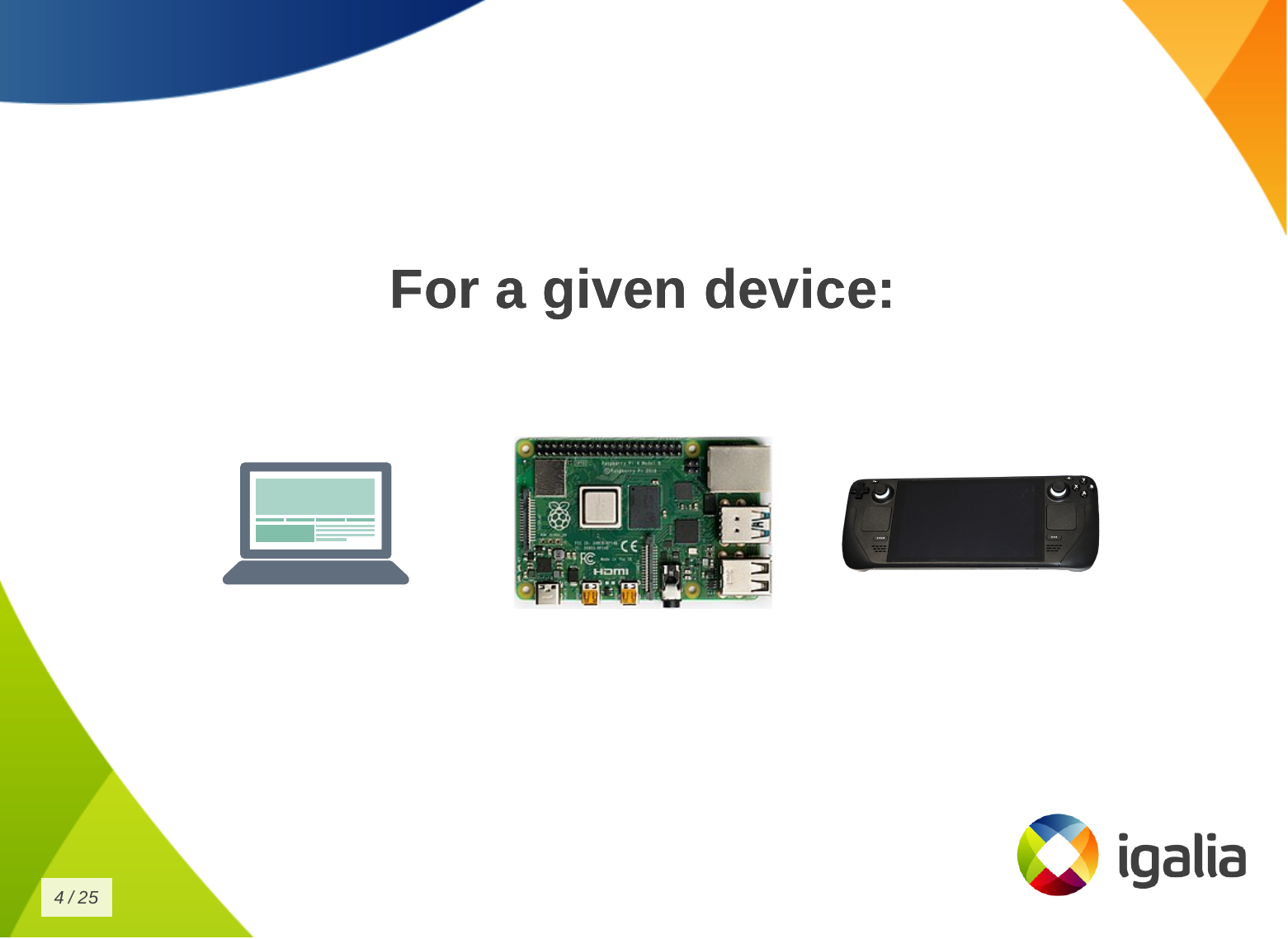
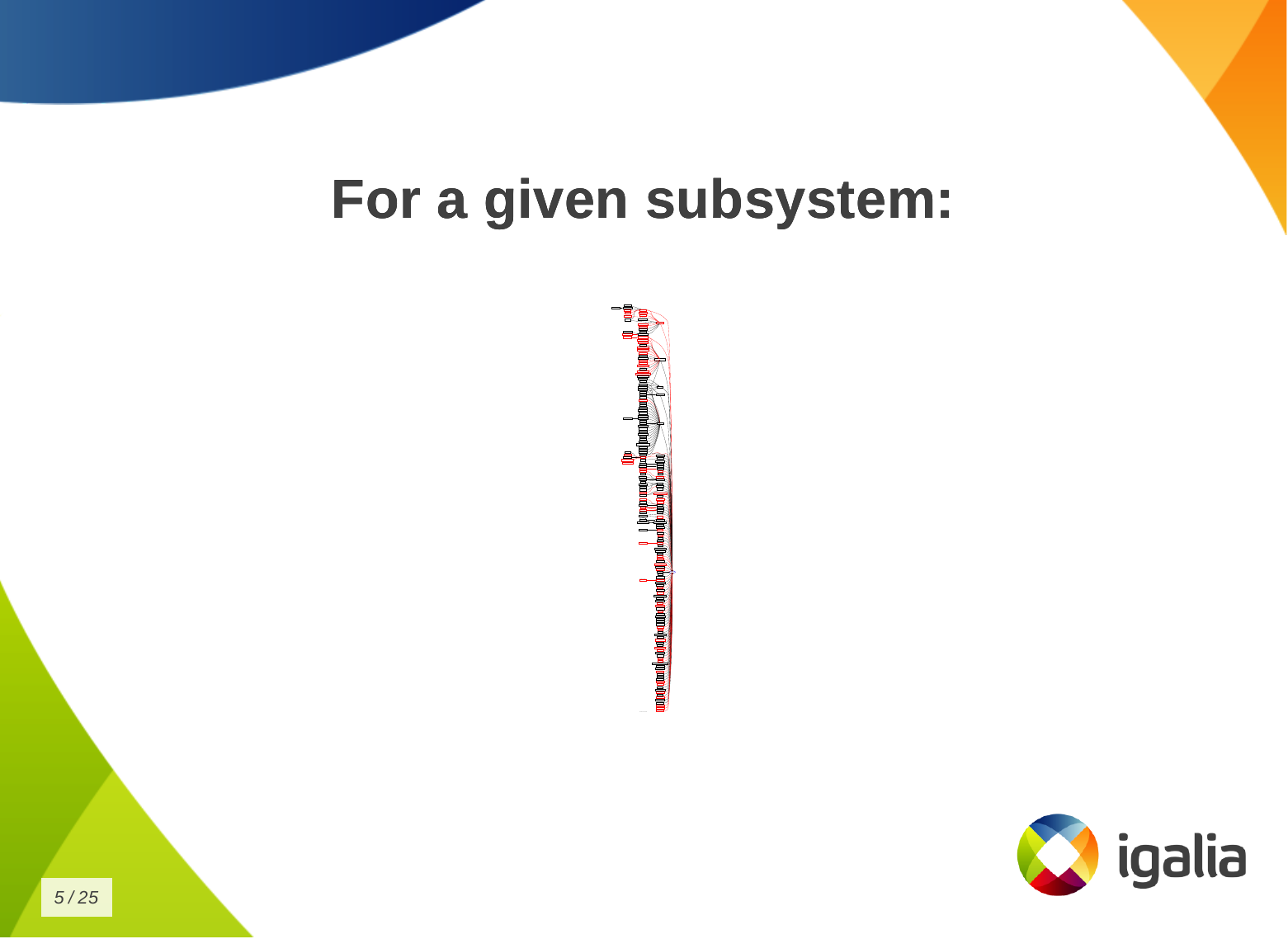
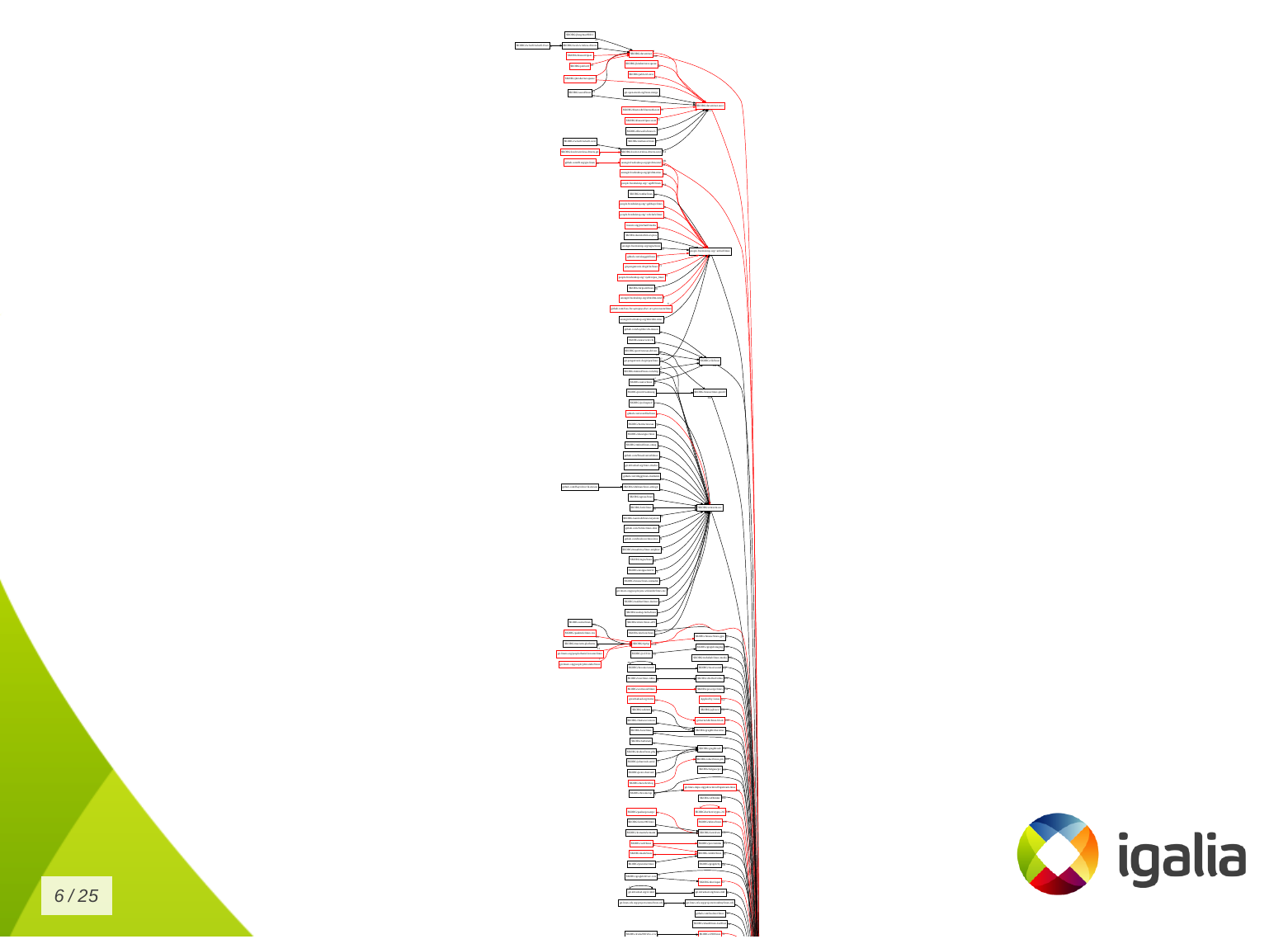
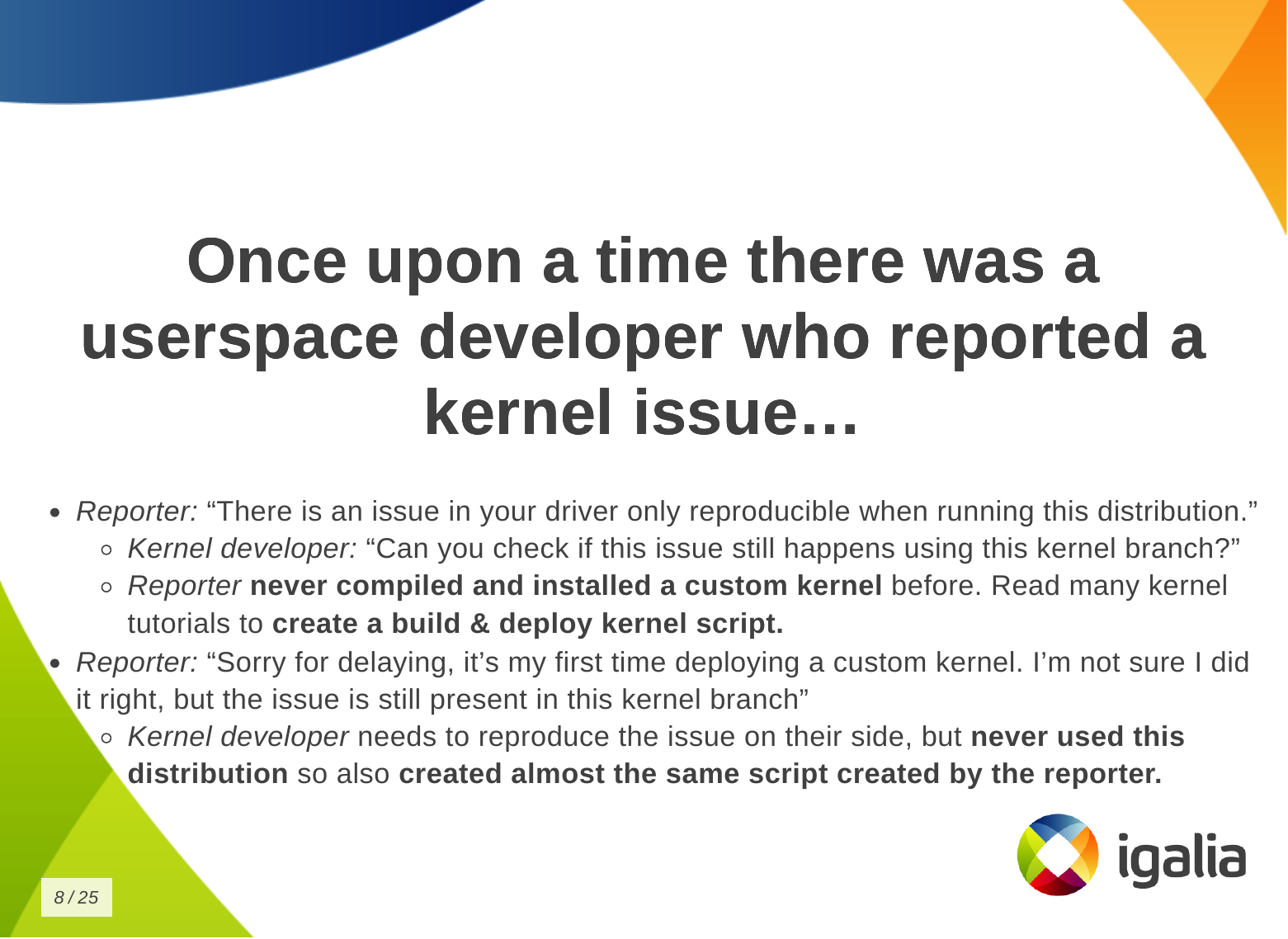
Kworkflow at FOSDEM 2025: Speaker Notes and Demo Hi, I m Melissa, a GPU kernel driver developer at Igalia and today I ll be giving a very inclusive talk to not let your motivation go by saving time with kworkflow. So, you re a kernel developer, or you want to be a kernel developer, or you don t want to be a kernel developer. But you re all united by a single need: you need to validate a custom kernel with just one change, and you need to verify that it fixes or improves something in the kernel. And that s a given change for a given distribution, or for a given device, or for a given subsystem Look to this diagram and try to figure out the number of subsystems and related work trees you can handle in the kernel. So, whether you are a kernel developer or not, at some point you may come across this type of situation: There is a userspace developer who wants to report a kernel issue and says:
  • Oh, there is a problem in your driver that can only be reproduced by running this specific distribution. And the kernel developer asks:
  • Oh, have you checked if this issue is still present in the latest kernel version of this branch?
But the userspace developer has never compiled and installed a custom kernel before. So they have to read a lot of tutorials and kernel documentation to create a kernel compilation and deployment script. Finally, the reporter managed to compile and deploy a custom kernel and reports:
  • Sorry for the delay, this is the first time I have installed a custom kernel. I am not sure if I did it right, but the issue is still present in the kernel of the branch you pointed out.
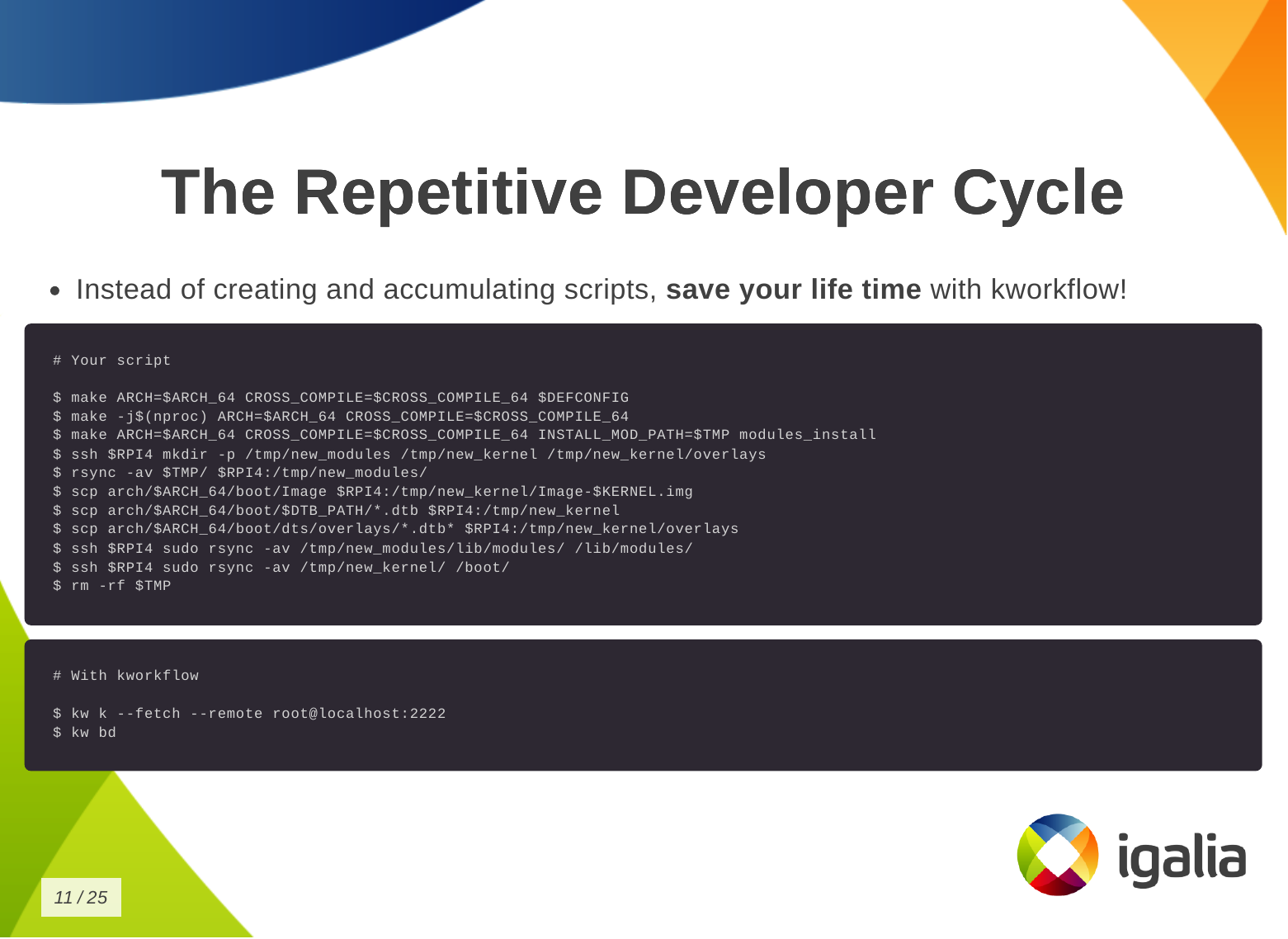
And then, the kernel developer needs to reproduce this issue on their side, but they have never worked with this distribution, so they just created a new script, but the same script created by the reporter. What s the problem of this situation? The problem is that you keep creating new scripts! Every time you change distribution, change architecture, change hardware, change project - even in the same company - the development setup may change when you switch to a different project, you create another script for your new kernel development workflow! You know, you have a lot of babies, you have a collection of my precious scripts , like Sm agol (Lord of the Rings) with the precious ring. Instead of creating and accumulating scripts, save yourself time with kworkflow. Here is a typical script that many of you may have. This is a Raspberry Pi 4 script and contains everything you need to memorize to compile and deploy a kernel on your Raspberry Pi 4. With kworkflow, you only need to memorize two commands, and those commands are not specific to Raspberry Pi. They are the same commands to different architecture, kernel configuration, target device.

What is kworkflow? Kworkflow is a collection of tools and software combined to:
  • Optimize Linux kernel development workflow.
  • Reduce time spent on repetitive tasks, since we are spending our lives compiling kernels.
  • Standardize best practices.
  • Ensure reliable data exchange across kernel workflow. For example: two people describe the same setup, but they are not seeing the same thing, kworkflow can ensure both are actually with the same kernel, modules and options enabled.
I don t know if you will get this analogy, but kworkflow is for me a megazord of scripts. You are combining all of your scripts to create a very powerful tool.

What is the main feature of kworflow? There are many, but these are the most important for me:
  • Build & deploy custom kernels across devices & distros.
  • Handle cross-compilation seamlessly.
  • Manage multiple architecture, settings and target devices in the same work tree.
  • Organize kernel configuration files.
  • Facilitate remote debugging & code inspection.
  • Standardize Linux kernel patch submission guidelines. You don t need to double check documentantion neither Greg needs to tell you that you are not following Linux kernel guidelines.
  • Upcoming: Interface to bookmark, apply and reviewed-by patches from mailing lists (lore.kernel.org).
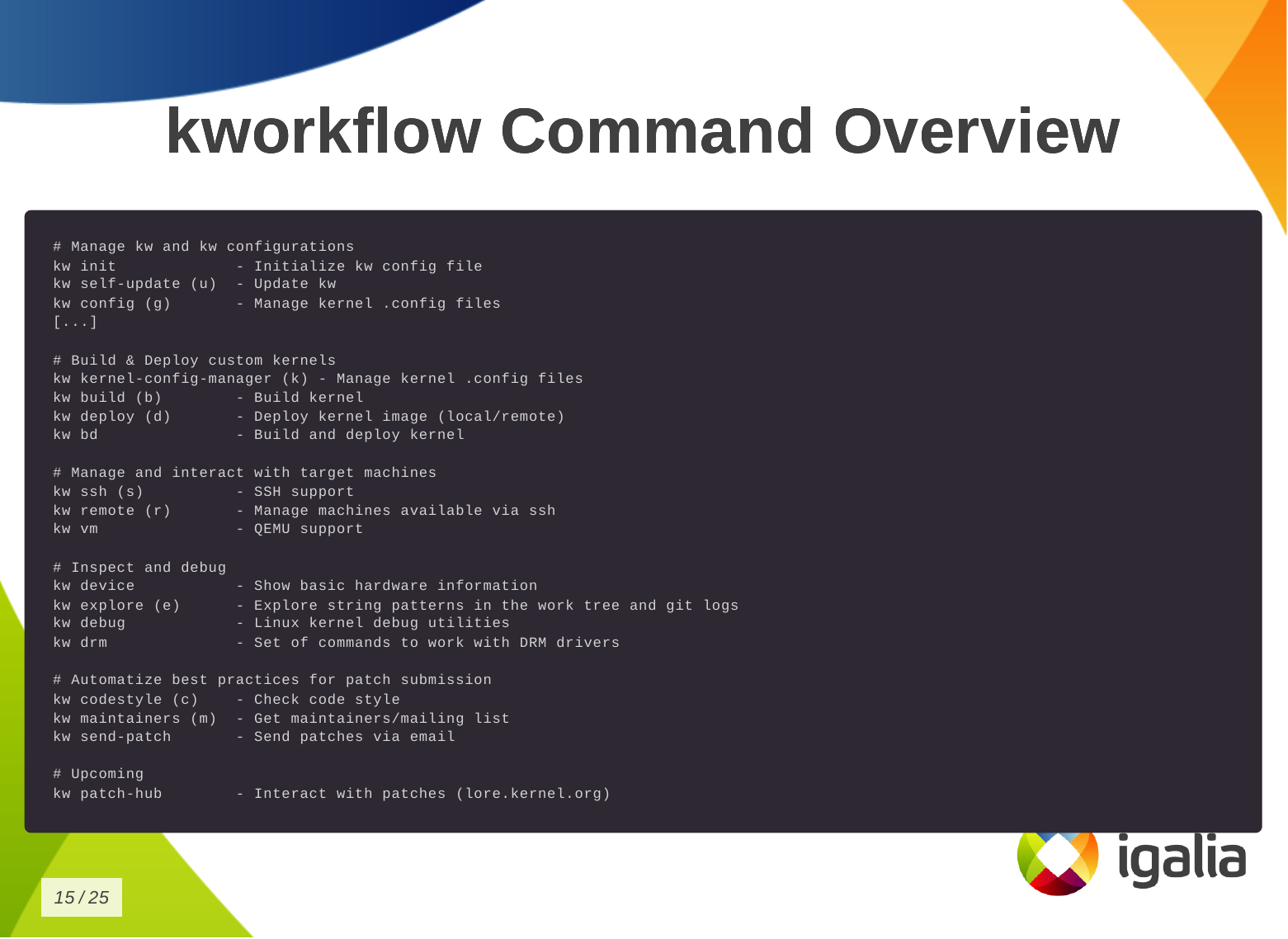
This is the list of commands you can run with kworkflow. The first subset is to configure your tool for various situations you may face in your daily tasks.
# Manage kw and kw configurations
kw init             - Initialize kw config file
kw self-update (u)  - Update kw
kw config (g)       - Manage kernel .config files
The second subset is to build and deploy custom kernels.
# Build & Deploy custom kernels
kw kernel-config-manager (k) - Manage kernel .config files
kw build (b)        - Build kernel
kw deploy (d)       - Deploy kernel image (local/remote)
kw bd               - Build and deploy kernel
We have some tools to manage and interact with target machines.
# Manage and interact with target machines
kw ssh (s)          - SSH support
kw remote (r)       - Manage machines available via ssh
kw vm               - QEMU support
To inspect and debug a kernel.
# Inspect and debug
kw device           - Show basic hardware information
kw explore (e)      - Explore string patterns in the work tree and git logs
kw debug            - Linux kernel debug utilities
kw drm              - Set of commands to work with DRM drivers
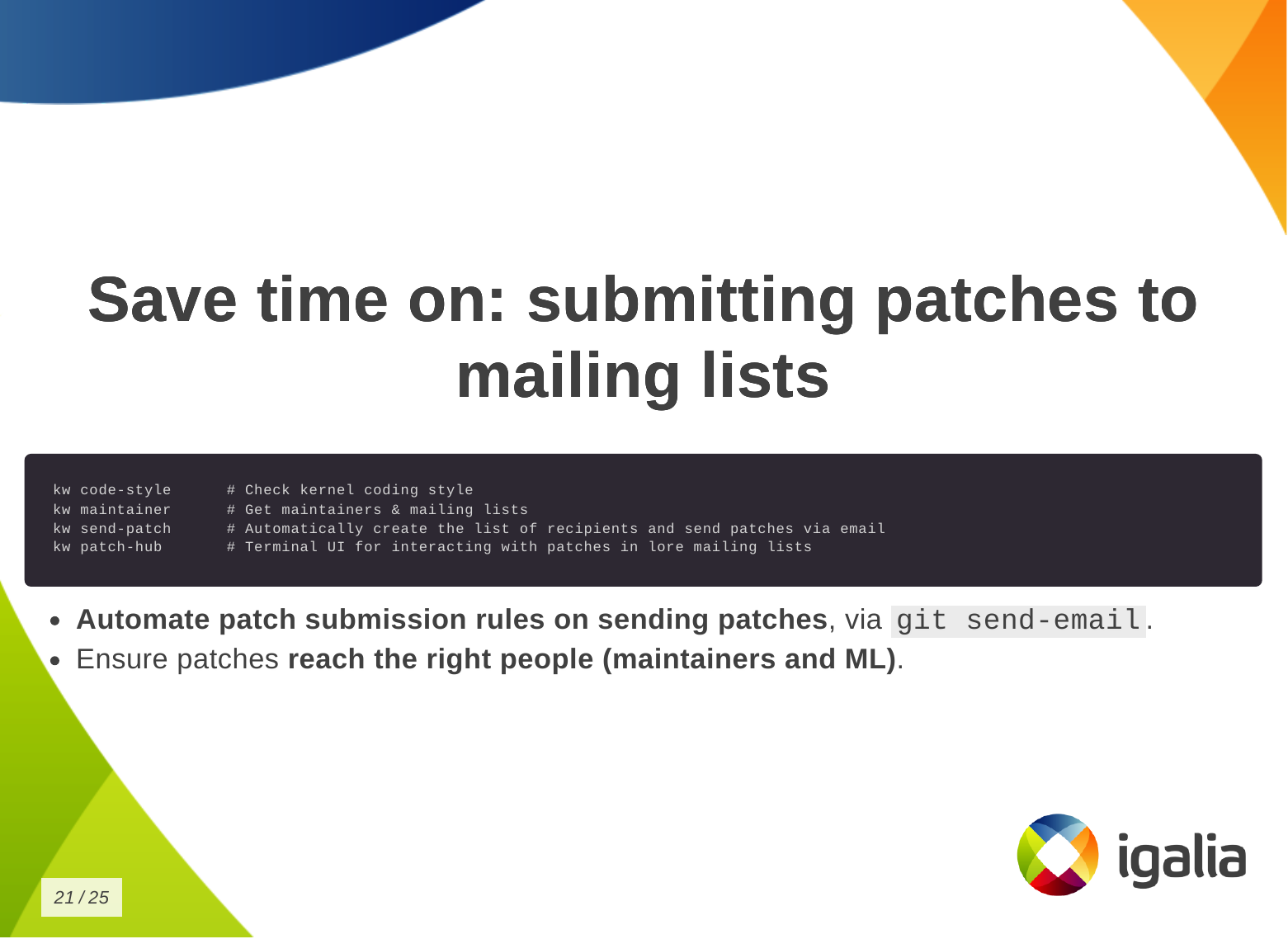
To automatize best practices for patch submission like codestyle, maintainers and the correct list of recipients and mailing lists of this change, to ensure we are sending the patch to who is interested in it.
# Automatize best practices for patch submission
kw codestyle (c)    - Check code style
kw maintainers (m)  - Get maintainers/mailing list
kw send-patch       - Send patches via email
And the last one, the upcoming patch hub.
# Upcoming
kw patch-hub        - Interact with patches (lore.kernel.org)

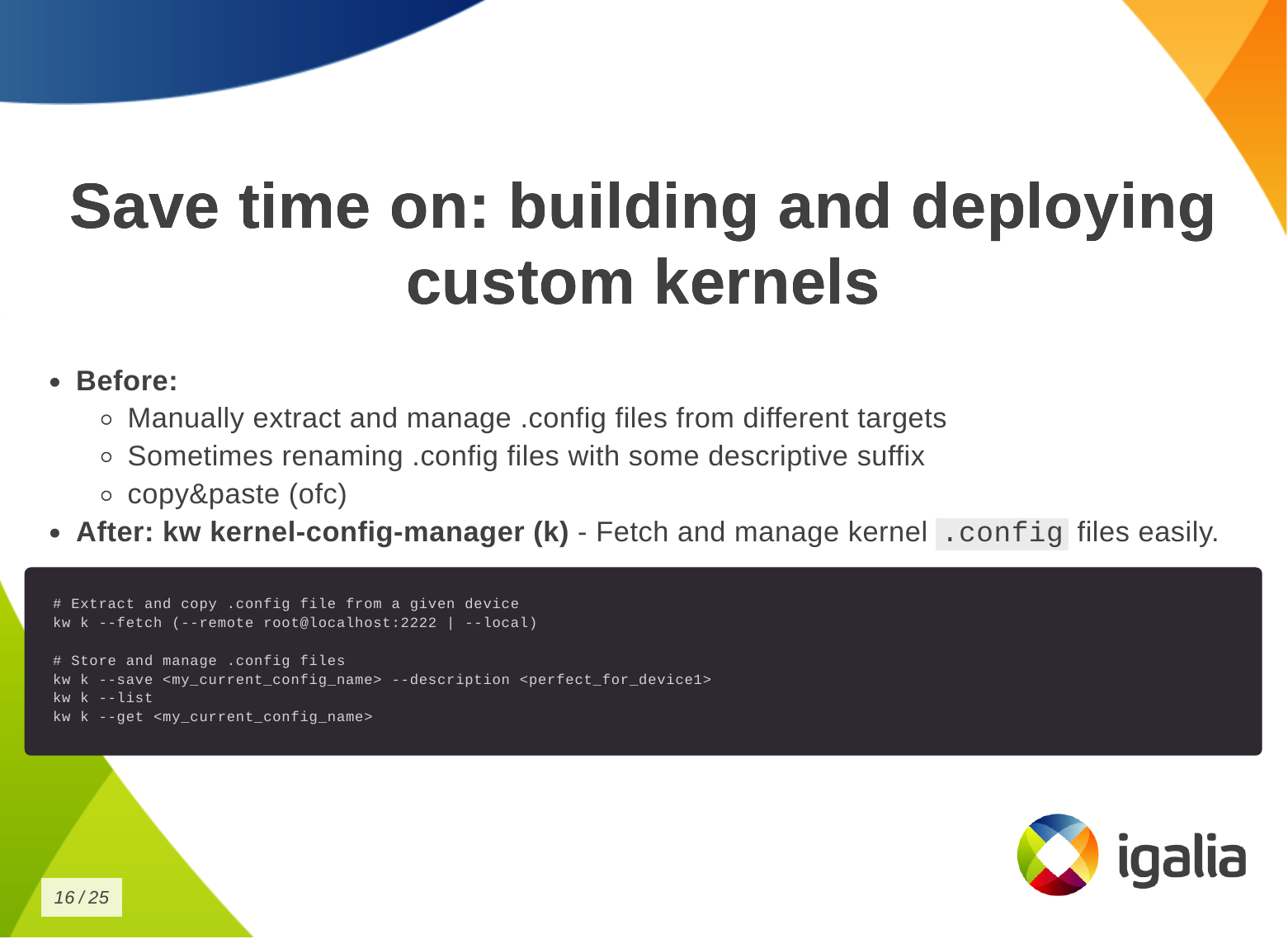
How can you save time with Kworkflow? So how can you save time building and deploying a custom kernel? First, you need a .config file.
  • Without kworkflow: You may be manually extracting and managing .config files from different targets and saving them with different suffixes to link the kernel to the target device or distribution, or any descriptive suffix to help identify which is which. Or even copying and pasting from somewhere.
  • With kworkflow: you can use the kernel-config-manager command, or simply kw k, to store, describe and retrieve a specific .config file very easily, according to your current needs.
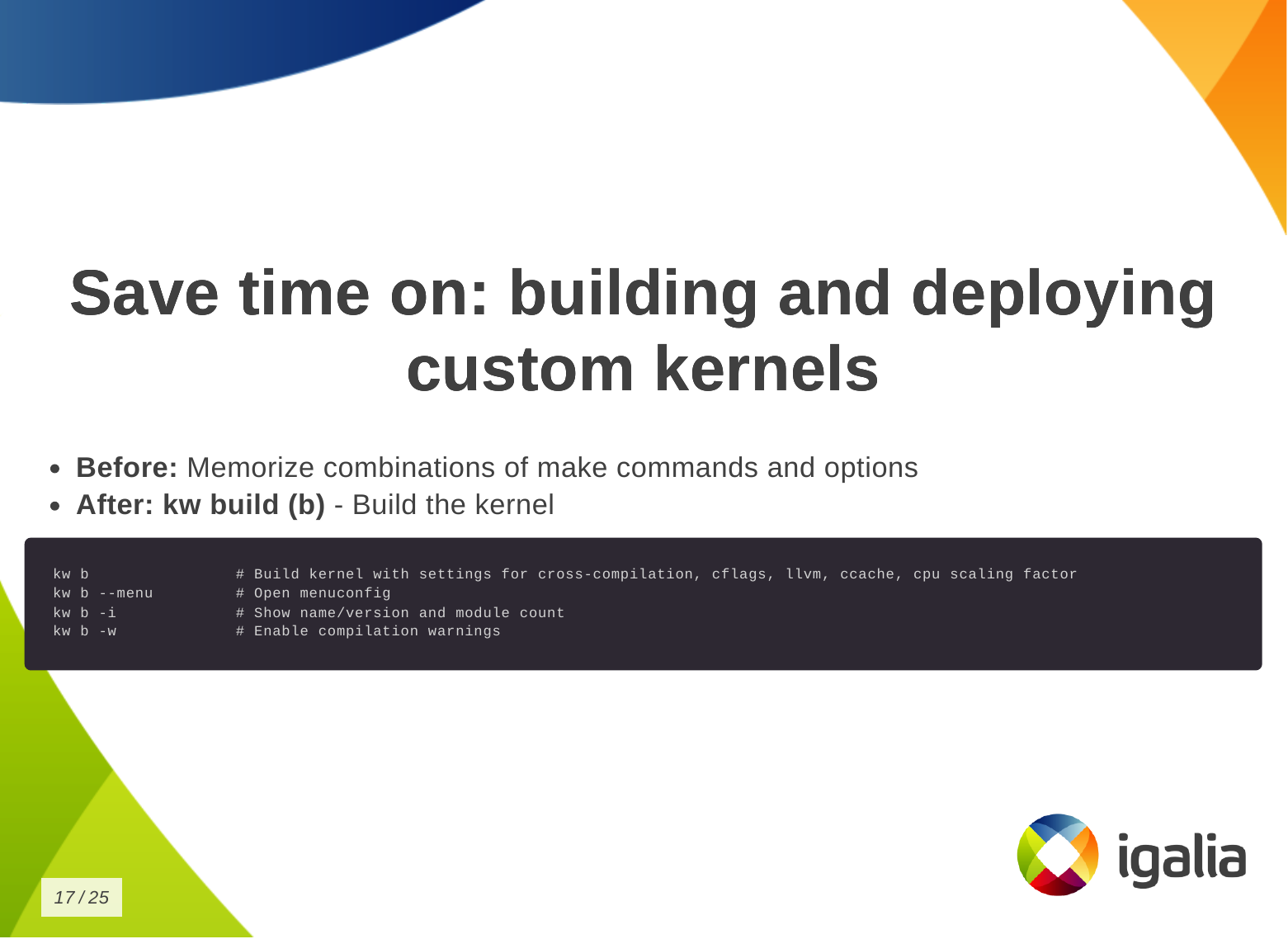
Then you want to build the kernel:
  • Without kworkflow: You are probably now memorizing a combination of commands and options.
  • With kworkflow: you just need kw b (kw build) to build the kernel with the correct settings for cross-compilation, compilation warnings, cflags, etc. It also shows some information about the kernel, like number of modules.
Finally, to deploy the kernel in a target machine.
  • Without kworkflow: You might be doing things like: SSH connecting to the remote machine, copying and removing files according to distributions and architecture, and manually updating the bootloader for the target distribution.
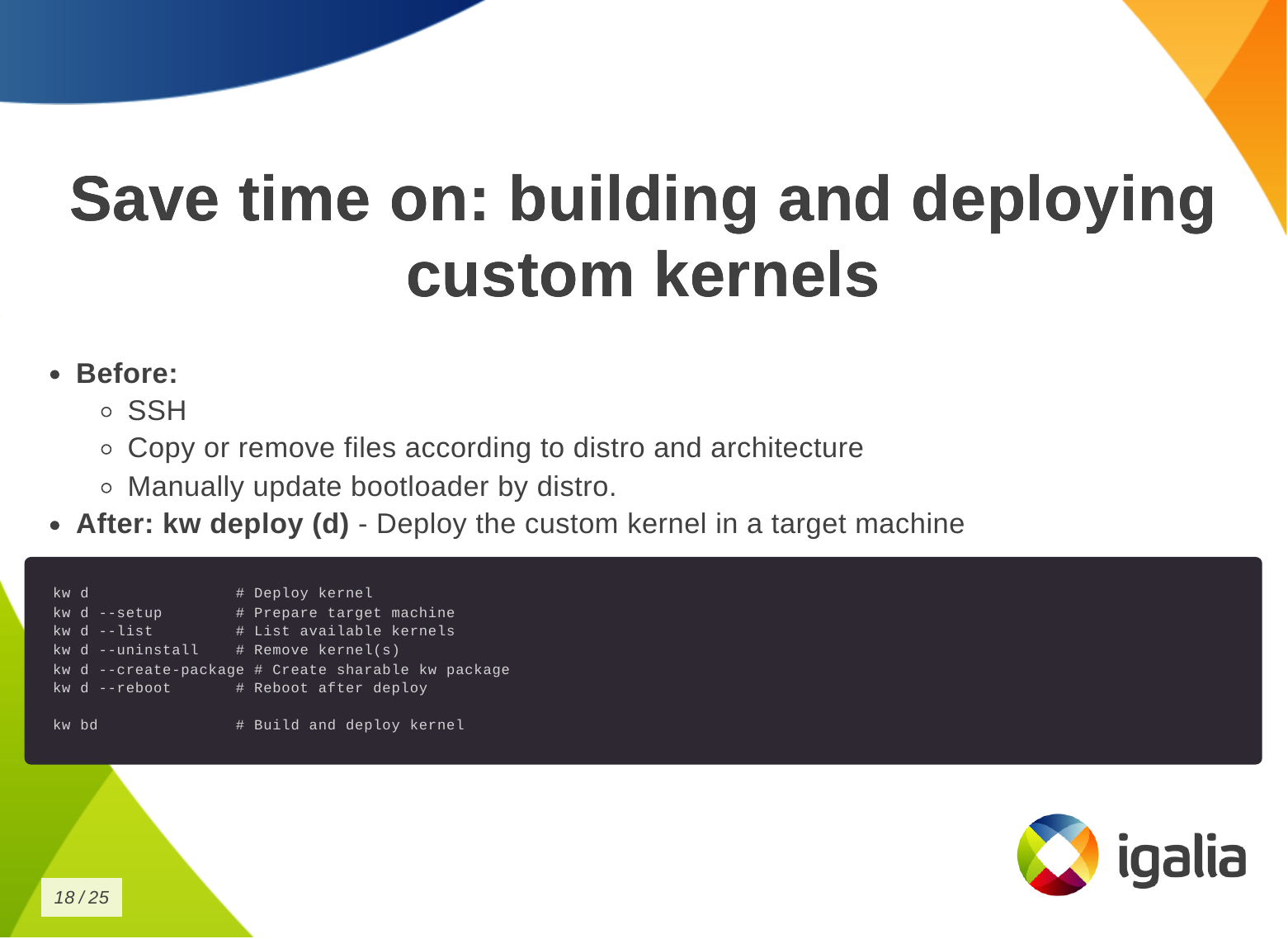
  • With kworkflow: you just need kw d which does a lot of things for you, like: deploying the kernel, preparing the target machine for the new installation, listing available kernels and uninstall them, creating a tarball, rebooting the machine after deploying the kernel, etc.
You can also save time on debugging kernels locally or remotely.
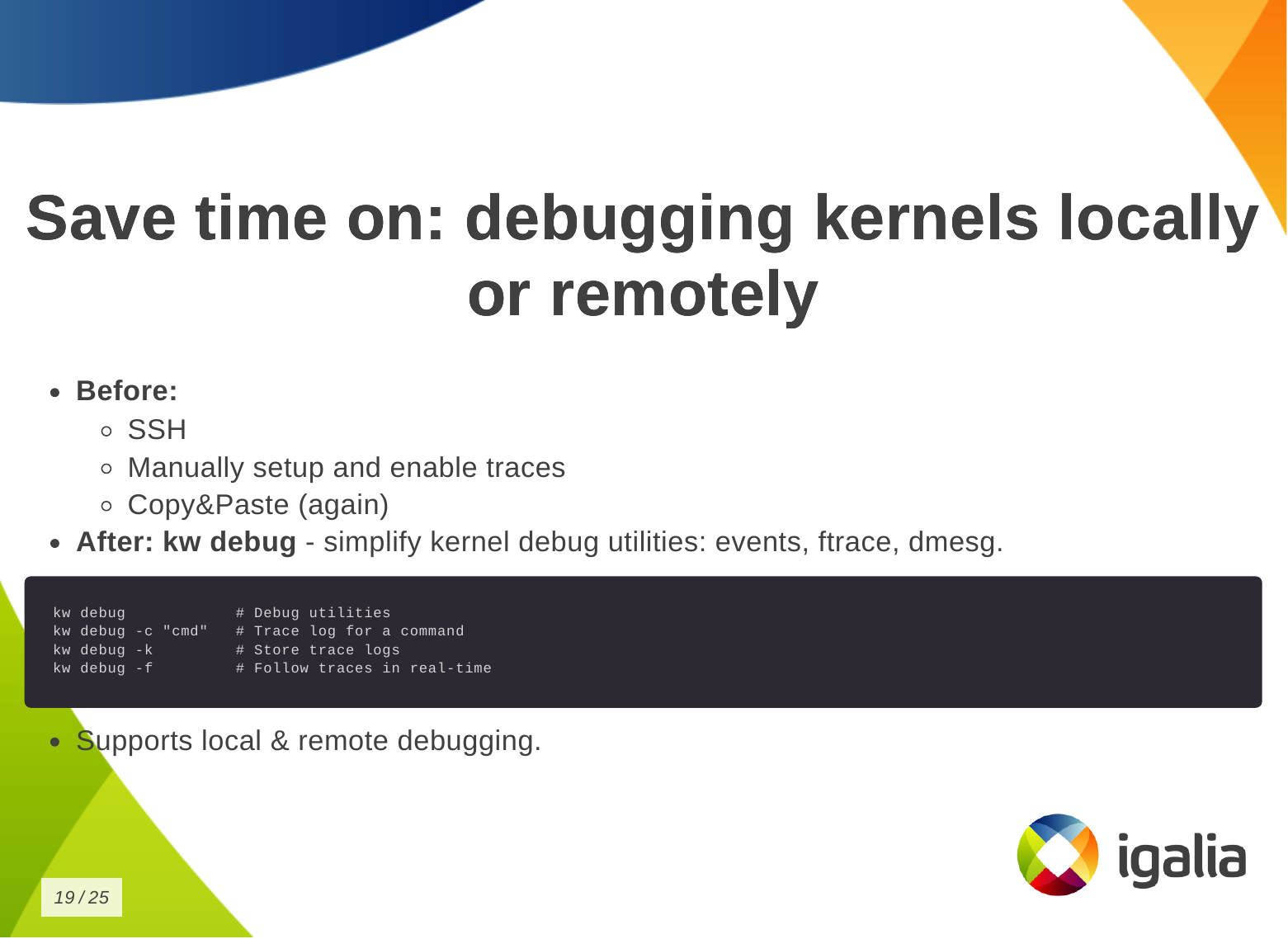
  • Without kworkflow: you do: ssh, manual setup and traces enablement, copy&paste logs.
  • With kworkflow: more straighforward access to debug utilities: events, trace, dmesg.
You can save time on managing multiple kernel images in the same work tree.
  • Without kworkflow: now you can be cloning multiple times the same repository so you don t lose compiled files when changing kernel configuration or compilation options and manually managing build and deployment scripts.
  • With kworkflow: you can use kw env to isolate multiple contexts in the same worktree as environments, so you can keep different configurations in the same worktree and switch between them easily without losing anything from the last time you worked in a specific context.
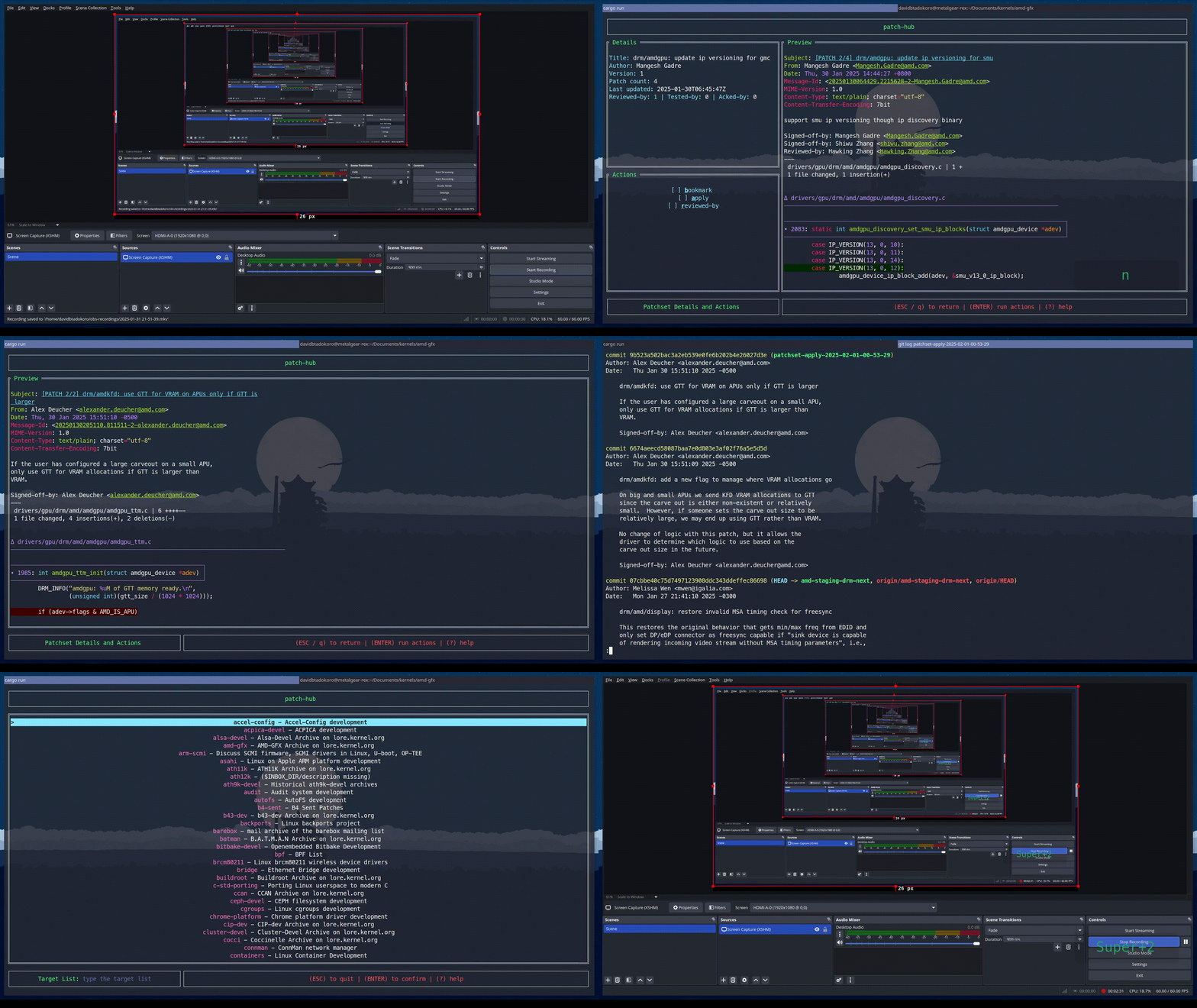
Finally, you can save time when submitting kernel patches. In kworkflow, you can find everything you need to wrap your changes in patch format and submit them to the right list of recipients, those who can review, comment on, and accept your changes. This is a demo that the lead developer of the kw patch-hub feature sent me. With this feature, you will be able to check out a series on a specific mailing list, bookmark those patches in the kernel for validation, and when you are satisfied with the proposed changes, you can automatically submit a reviewed-by for that whole series to the mailing list.

Demo Now a demo of how to use kw environment to deal with different devices, architectures and distributions in the same work tree without losing compiled files, build and deploy settings, .config file, remote access configuration and other settings specific for those three devices that I have.

Setup
  • Three devices:
    • laptop (debian x86 intel local)
    • SteamDeck (steamos x86 amd remote)
    • RaspberryPi 4 (raspbian arm64 broadcomm remote)
  • Goal: To validate a change on DRM/VKMS using a single kernel tree.
  • Kworkflow commands:
    • kw env
    • kw d
    • kw bd
    • kw device
    • kw debug
    • kw drm

Demo script In the same terminal and worktree.

First target device: Laptop (debian x86 intel local)
$ kw env --list # list environments available in this work tree
$ kw env --use LOCAL # select the environment of local machine (laptop) to use: loading pre-compiled files, kernel and kworkflow settings.
$ kw device # show device information
$ sudo modinfo vkms # show VKMS module information before applying kernel changes.
$ <open VKMS file and change module info>
$ kw bd # compile and install kernel with the given change
$ sudo modinfo vkms # show VKMS module information after kernel changes.
$ git checkout -- drivers
Second target device: RaspberryPi 4 (raspbian arm64 broadcomm remote)
$ kw env --use RPI_64 # move to the environment for a different target device.
$ kw device # show device information and kernel image name
$ kw drm --gui-off-after-reboot # set the system to not load graphical layer after reboot
$ kw b # build the kernel with the VKMS change
$ kw d --reboot # deploy the custom kernel in a Raspberry Pi 4 with Raspbian 64, and reboot
$ kw s # connect with the target machine via ssh and check the kernel image name
$ exit
Third target device: SteamDeck (steamos x86 amd remote)
$ kw env --use STEAMDECK # move to the environment for a different target device
$ kw device # show device information
$ kw debug --dmesg --follow --history --cmd="modprobe vkms" # run a command and show the related dmesg output
$ kw debug --dmesg --follow --history --cmd="modprobe -r vkms" # run a command and show the related dmesg output
$ <add a printk with a random msg to appear on dmesg log>
$ kw bd # deploy and install custom kernel to the target device
$ kw debug --dmesg --follow --history --cmd="modprobe vkms" # run a command and show the related dmesg output after build and deploy the kernel change

Q&A Most of the questions raised at the end of the presentation were actually suggestions and additions of new features to kworkflow. The first participant, that is also a kernel maintainer, asked about two features: (1) automatize getting patches from patchwork (or lore) and triggering the process of building, deploying and validating them using the existing workflow, (2) bisecting support. They are both very interesting features. The first one fits well the patch-hub subproject, that is under-development, and I ve actually made a similar request a couple of weeks before the talk. The second is an already existing request in kworkflow github project. Another request was to use kexec and avoid rebooting the kernel for testing. Reviewing my presentation I realized I wasn t very clear that kworkflow doesn t support kexec. As I replied, what it does is to install the modules and you can load/unload them for validations, but for built-in parts, you need to reboot the kernel. Another two questions: one about Android Debug Bridge (ADB) support instead of SSH and another about support to alternative ways of booting when the custom kernel ended up broken but you only have one kernel image there. Kworkflow doesn t manage it yet, but I agree this is a very useful feature for embedded devices. On Raspberry Pi 4, kworkflow mitigates this issue by preserving the distro kernel image and using config.txt file to set a custom kernel for booting. For ADB, there is no support too, and as I don t see currently users of KW working with Android, I don t think we will have this support any time soon, except if we find new volunteers and increase the pool of contributors. The last two questions were regarding the status of b4 integration, that is under development, and other debugging features that the tool doesn t support yet. Finally, when Andrea and I were changing turn on the stage, he suggested to add support for virtme-ng to kworkflow. So I opened an issue for tracking this feature request in the project github. With all these questions and requests, I could see the general need for a tool that integrates the variety of kernel developer workflows, as proposed by kworflow. Also, there are still many cases to be covered by kworkflow. Despite the high demand, this is a completely voluntary project and it is unlikely that we will be able to meet these needs given the limited resources. We will keep trying our best in the hope we can increase the pool of users and contributors too.

Joey Hess: offgrid electric car

Eight months ago I came up my rocky driveway in an electric car, with the back full of solar panel mounting rails. I didn't know how I'd manage to keep it charged. I got the car earlier than planned, with my offgrid solar upgrade only beginning. There's no nearby EV charger, and winter was coming, less solar power every day. Still, it was the right time to take a leap to offgid EV life. My existing 1 kilowatt solar array could charge the car only 5 miles on a good day. Here's my first try at charging the car offgrid:
first feeble charging offgrid
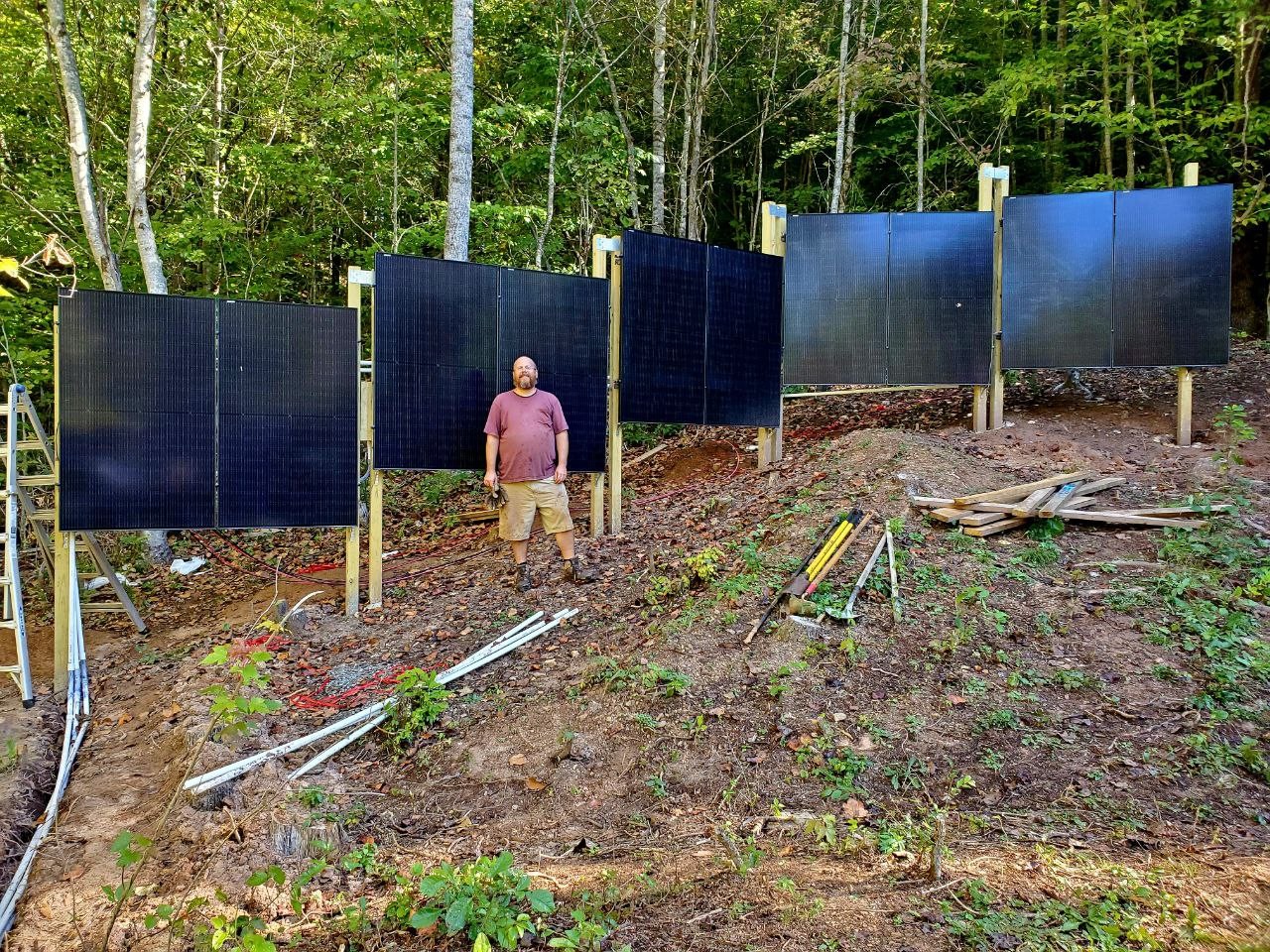
It was not worth charging the car that way, the house battery tended to get drained while doing that, and adding cycles to that battery is not desirable. So that was only a proof of concept, I knew I'd need to upgrade. My goal with the upgrade was to charge the car directly from the sun, even when it was cloudy, using the house battery only to skate over brief darker periods (like a thunderstorm). By mid October, I had enough solar installed to do that (5 kilowatts).
me standing in front of solar fence
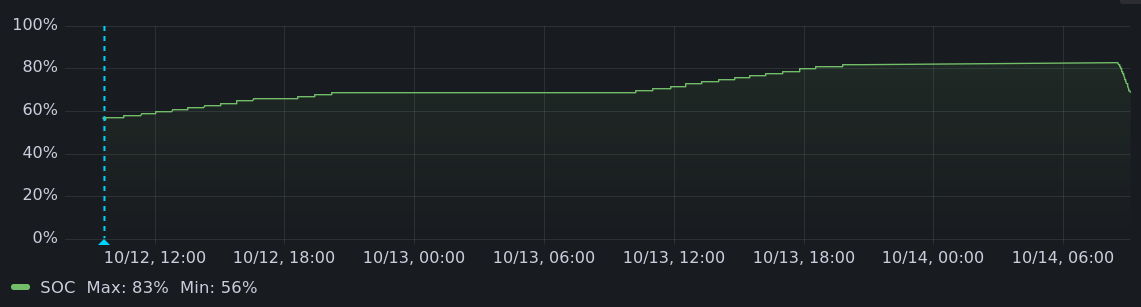
first charging from solar fence
Using this, in 2 days I charged the car up from 57% to 82%, and took off on a celebratory road trip to Niagra Falls, where I charged the car from hydro power from a dam my grandfather had engineered. When I got home, it was November. Days were getting ever shorter. My solar upgrade was only 1/3rd complete and could charge the car 30-some miles per day, but only on a good day, and weather was getting worse. I came back with a low state of charge (both car and me), and needed to get back to full in time for my Thanksgiving trip at the end of the month. I decided to limit my trips to town.
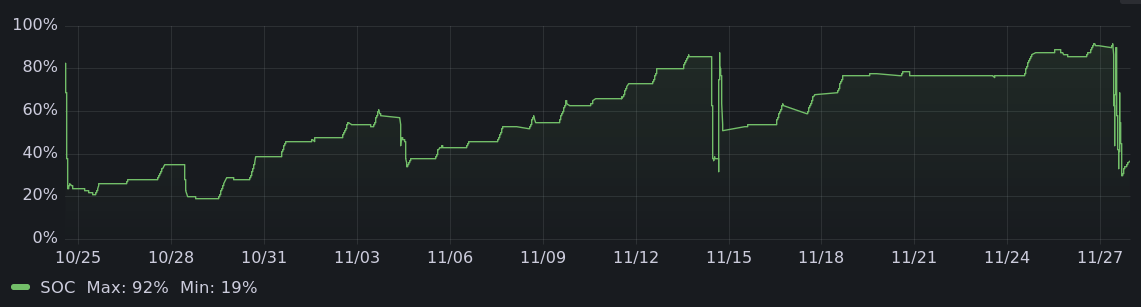
charging up gradually through the month of November
This kind of medium term planning about car travel was new to me. But not too unusual for offgrid living. You look at the weather forecast and make some rough plans, and get to feel connected to the natural world a bit more. December is the real test for offgrid solar, and honestly this was a bit rough, with a road trip planned for the end of the month. I did the usual holiday stuff but otherwise holed up at home a bit more than I usually would. Charging was limited and the cold made it charge less efficiently.
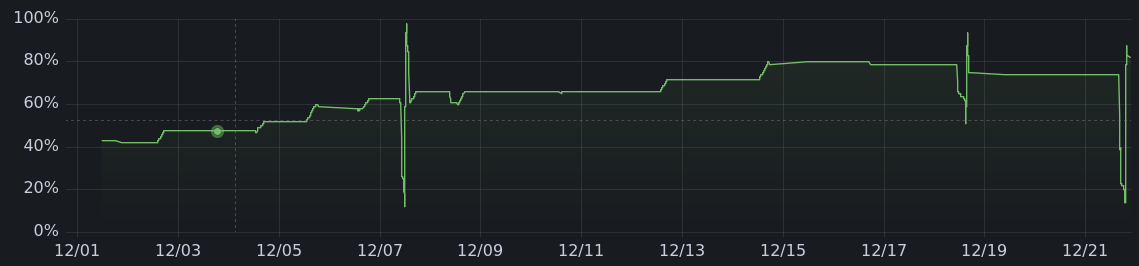
bleak December charging
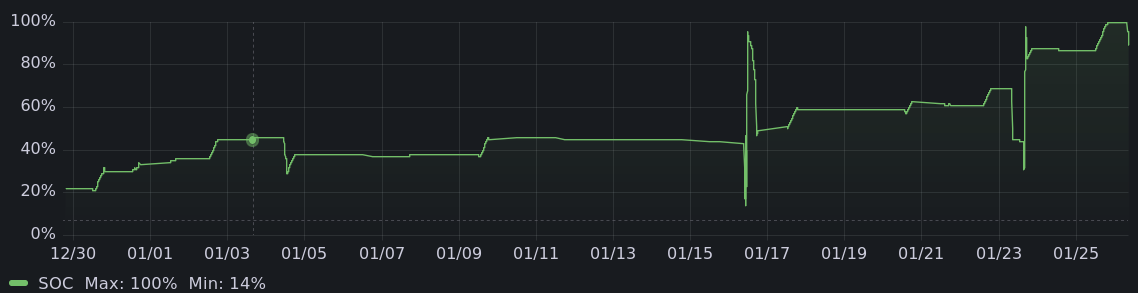
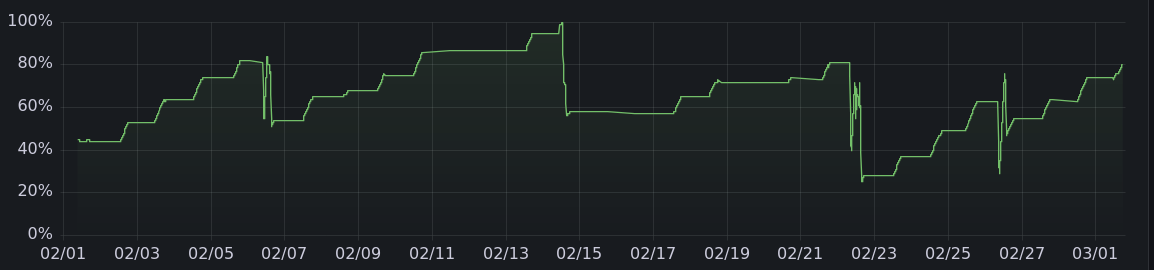
Still, I was busy installing more solar panels, and by winter solstice, was back to charging 30 miles on a good day. Of course, from there out things improved. In January and February I was able to charge up easily enough for my usual trips despite the cold. By March the car was often getting full before I needed to go anywhere, and I was doing long round trips without bothering to fast charge along the way, coming home low, knowing even cloudy days would let it charge up enough. That brings me up to today. The car is 80% full and heading up toward 100% for a long trip on Friday. Despite the sky being milky white today with no visible sun, there's plenty of power to absorb, and the car charger turned on at 11 am with the house battery already full. My solar upgrade is only 2/3rds complete, and also I have not yet installed my inverter upgrade, so the car can only currenly charge at 9 amps despite much more solar power often being available. So I'm looking forward to how next December goes with my full planned solar array and faster charging. But first, a summer where I expect the car will mostly be charged up and ready to go at all times, and the only car expense will be fast charging on road trips!
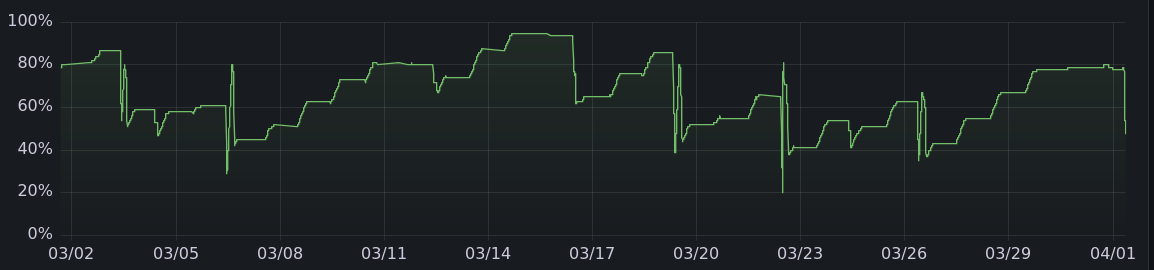
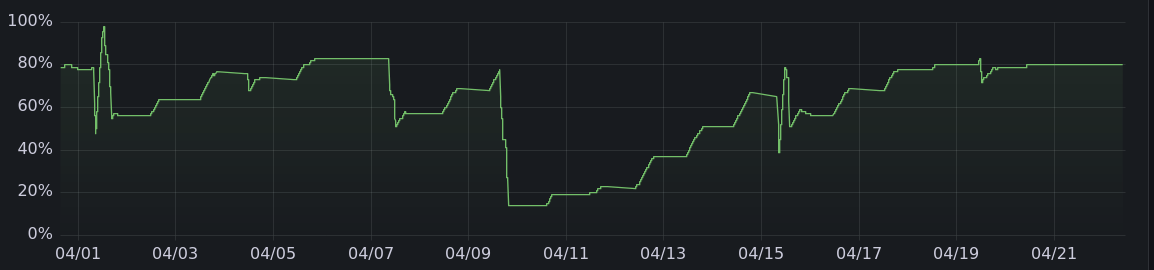
By the way, the code I've written to automate offgrid charging that runs only when there's enough solar power is here. And here are the charging graphs for the other months. All told, it's charged 475 kwh offgrid, enough to drive more than 1500 miles.
January
February
March
April

21 April 2025

Gunnar Wolf: Want your title? Here, have some XML!

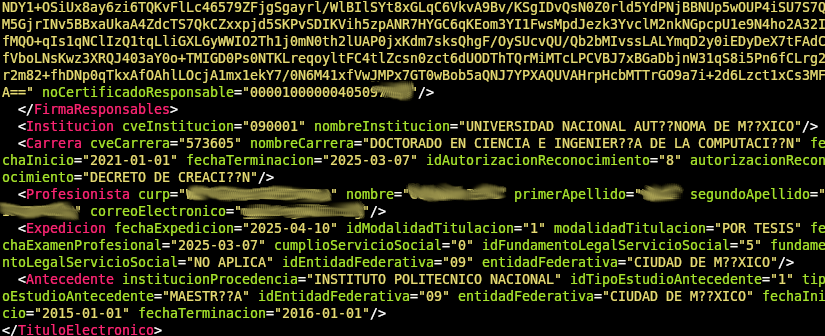
As it seems ChatGPT would phrase it Sweet Mother of God! I received a mail from my University s Scholar Administrative division informing me my Doctor degree has been granted and emitted (yayyyyyy! ), and before printing the corresponding documents, I should review all of the information is correct. Attached to the mail, I found they sent me a very friendly and welcoming XML file, that stated it followed the schema at https://www.siged.sep.gob.mx/titulos/schema.xsd Wait! There is nothing to be found in that address! Well, never mind, I can make sense out of a XML document, right? XML sample Of course, who needs an XSD schema? Everybody can parse through the data in a XML document, right? Of course, it took me close to five seconds to spot a minor mistake (in the finish and start dates of my previous degree), for which I mailed the relevant address But What happens if I try to undestand the world as seen by 9.8 out of 10 people getting a title from UNAM, in all of its different disciplines (scientific, engineering, humanities ) Some people will have no clue about what to do with a XML file. Fortunately, the mail has a link to a very useful tutorial (roughly translated by myself):
The attached file has an XML extension, so in order to visualize it, you must open it with a text editor such as Notepad or Sublime Text. In case you have any questions on how to open the file, please refer to the following guide: https://www.dgae.unam.mx/guia_abrir_xml.html
Seriously! Asking people getting a title in just about any area of knowledge to Install SublimeText to validate the content of a XML (that includes the oh-so-very-readable signature of some universitary bureaucrat). Of course, for many years Mexican people have been getting XML files by mail (for any declared monetary exchange, i.e. buying goods or offering services), but they are always sent together with a render of such XML to a personalized PDF. And yes the PDF is there only to give the human receiving the file an easier time understanding it. Who thought a bare XML was a good idea?

Louis-Philippe V ronneau: One last Bookworm for the road report from the Montreal 2025 BSP

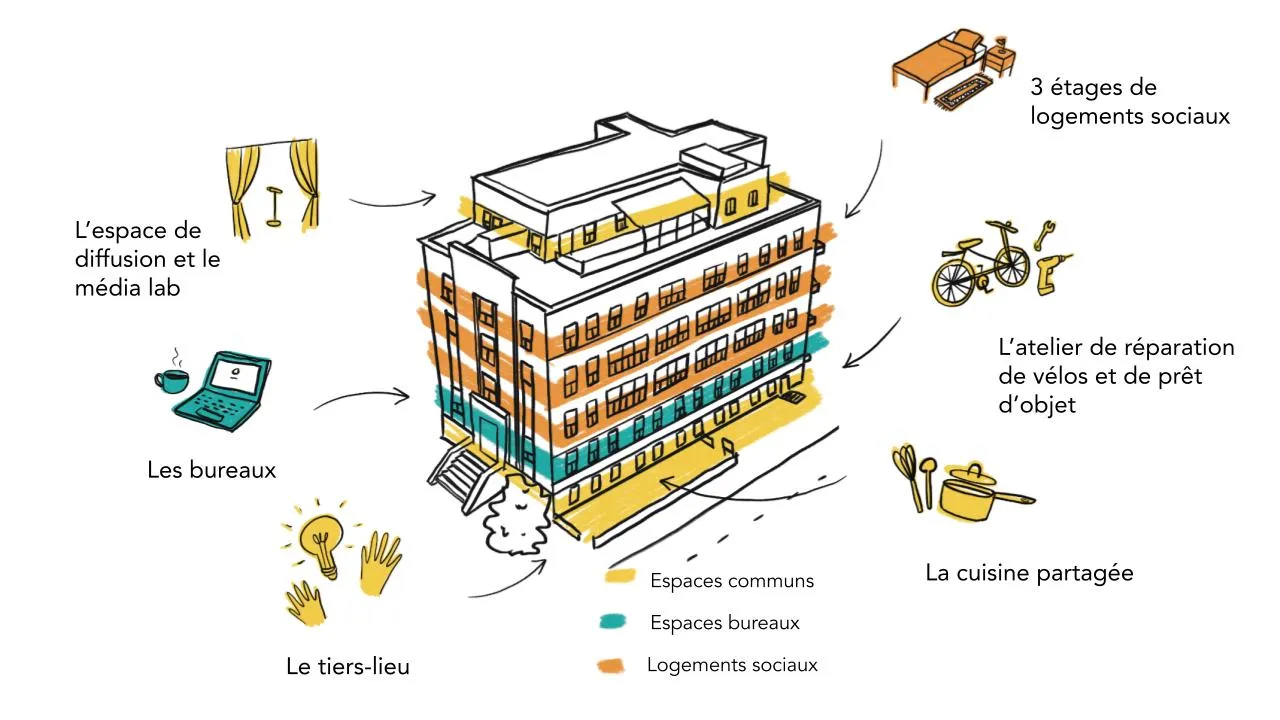
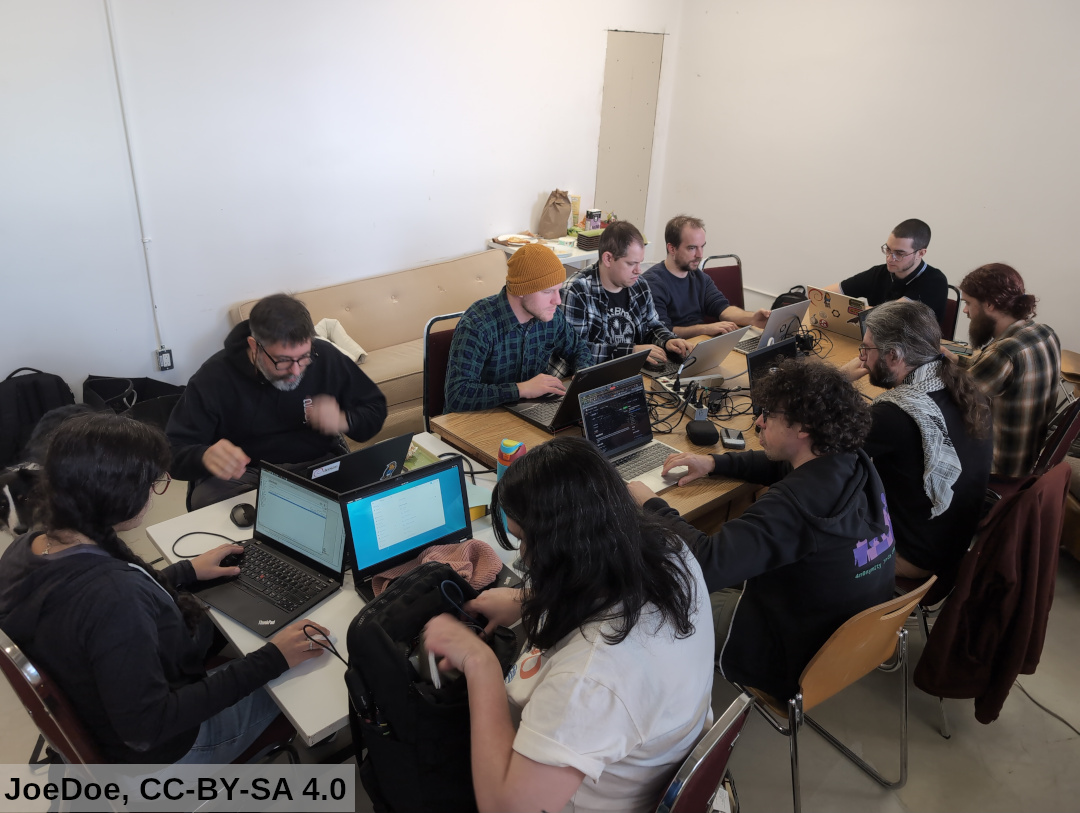
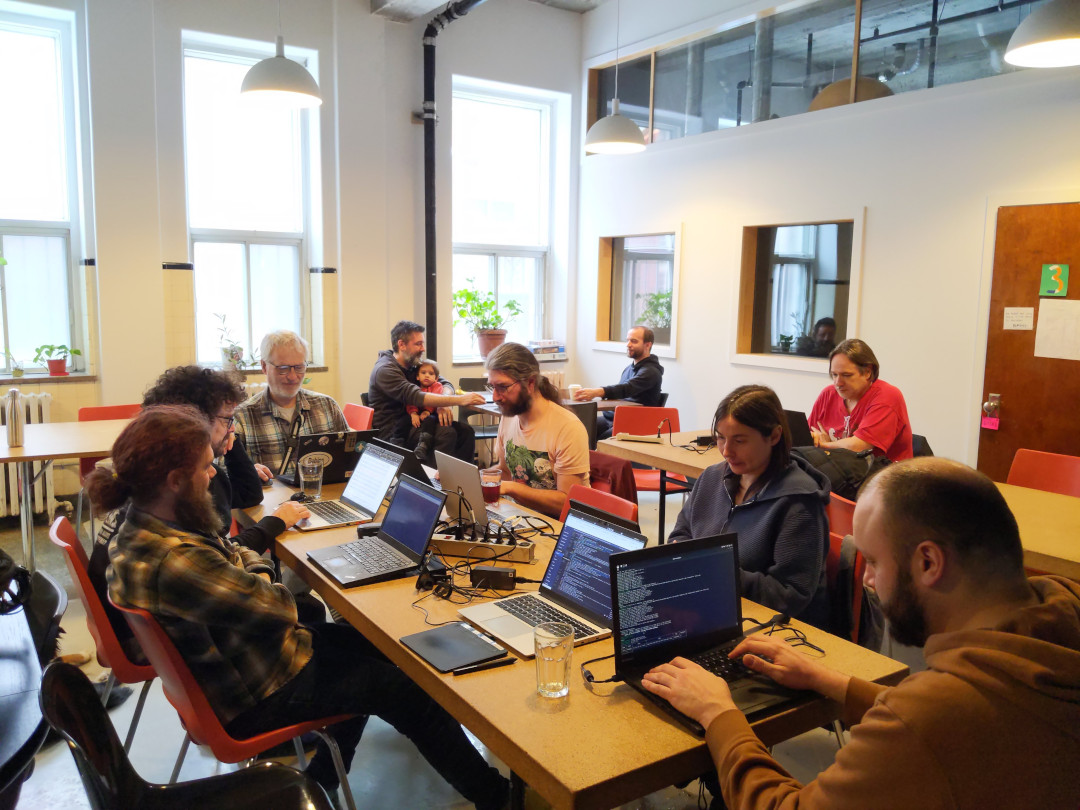
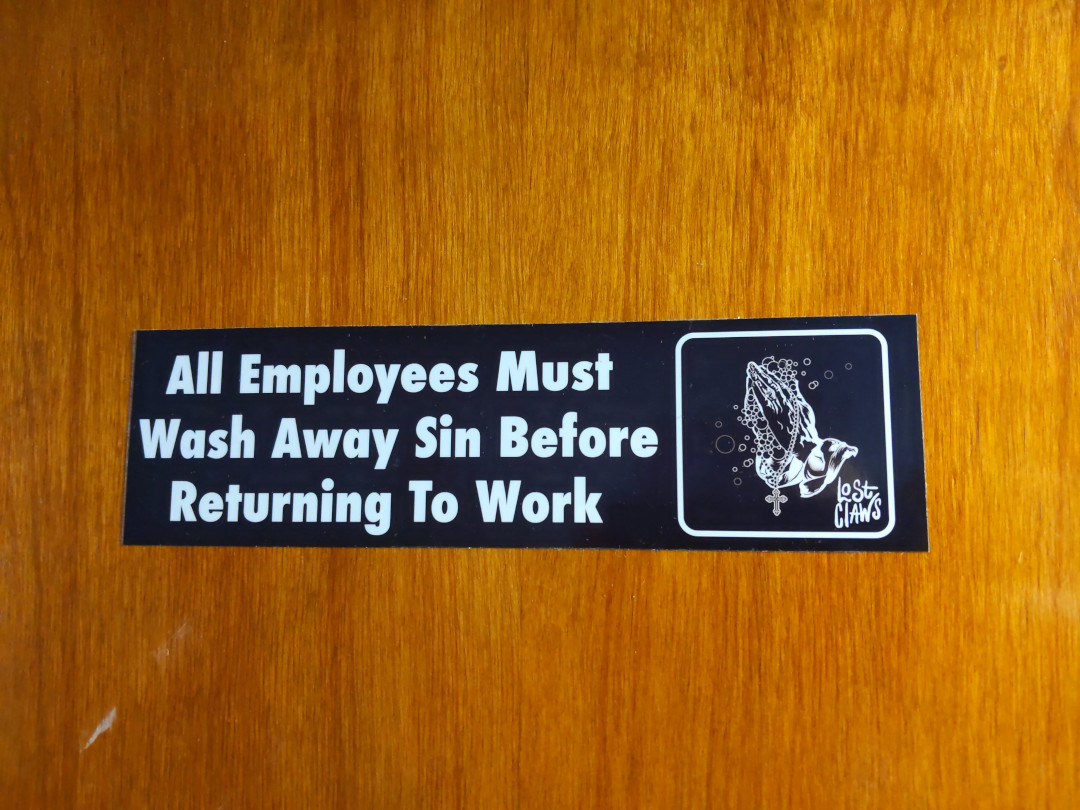
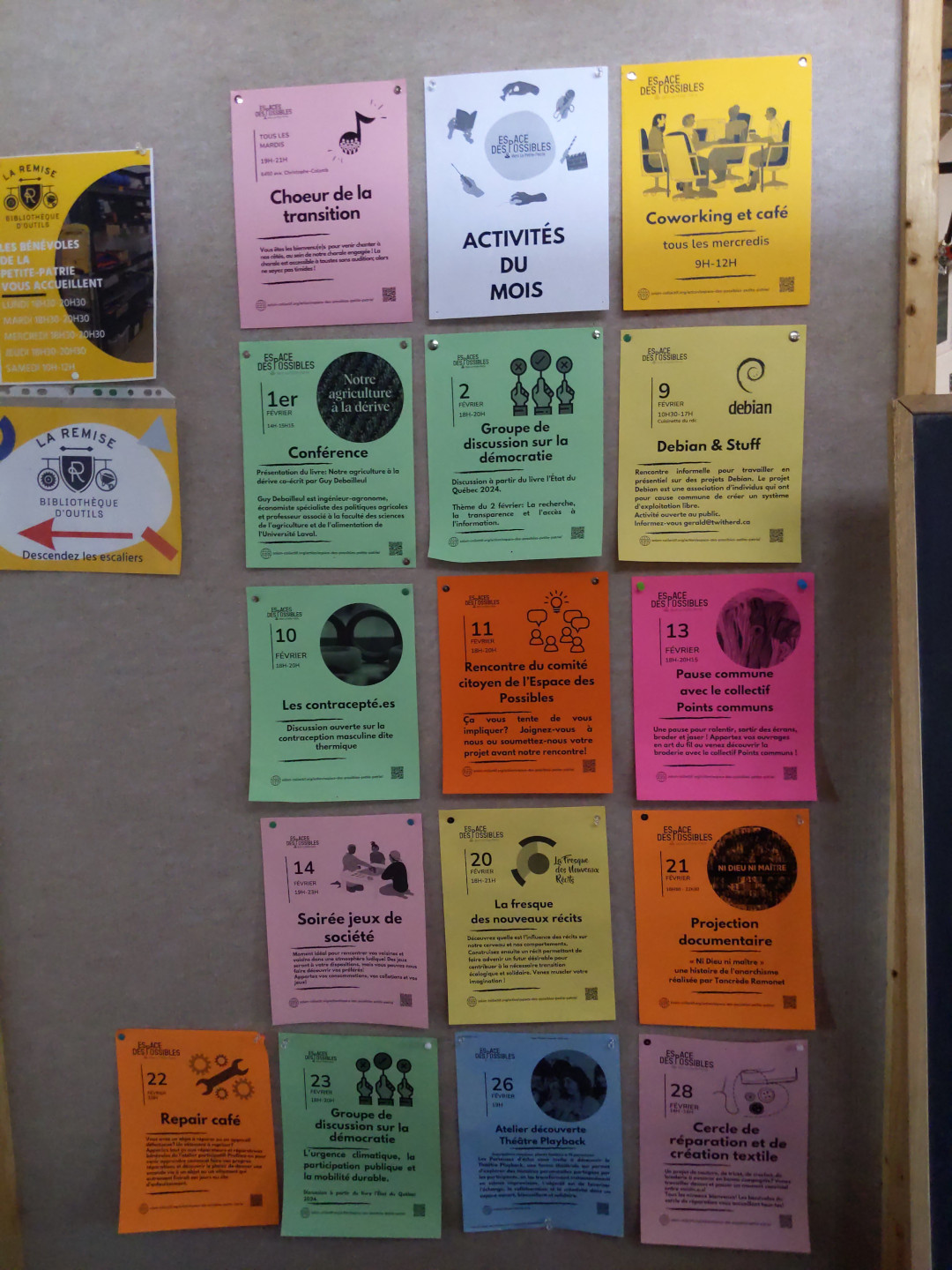
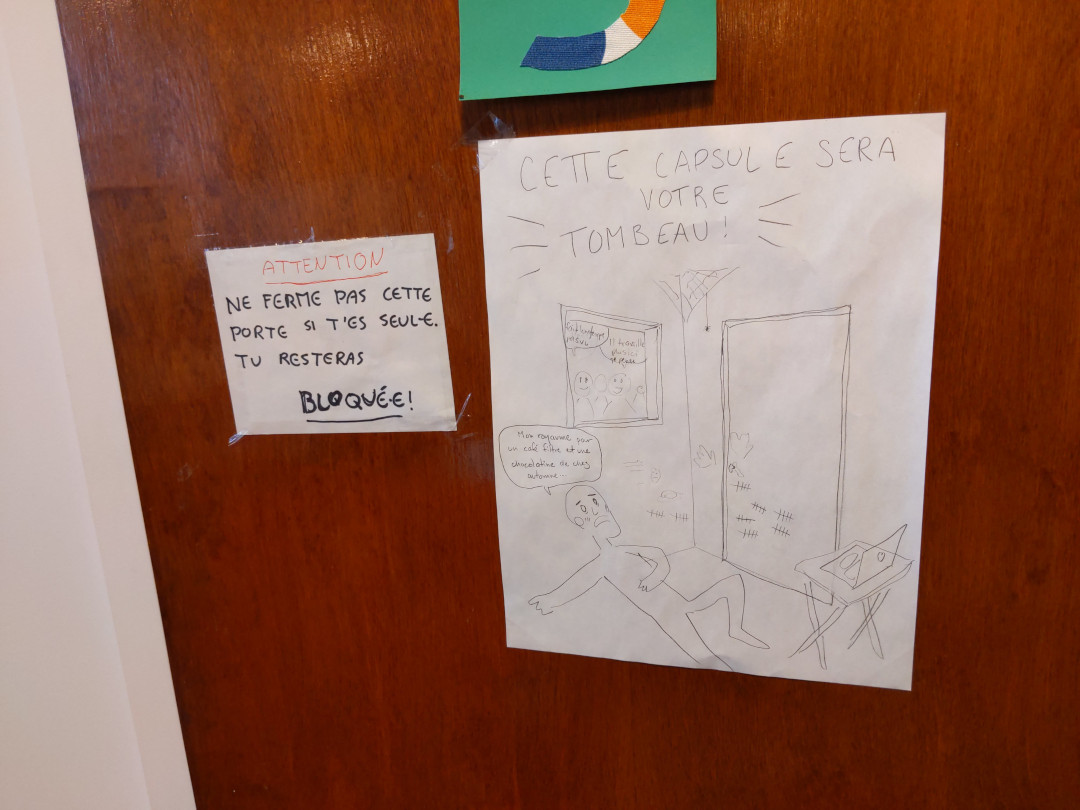
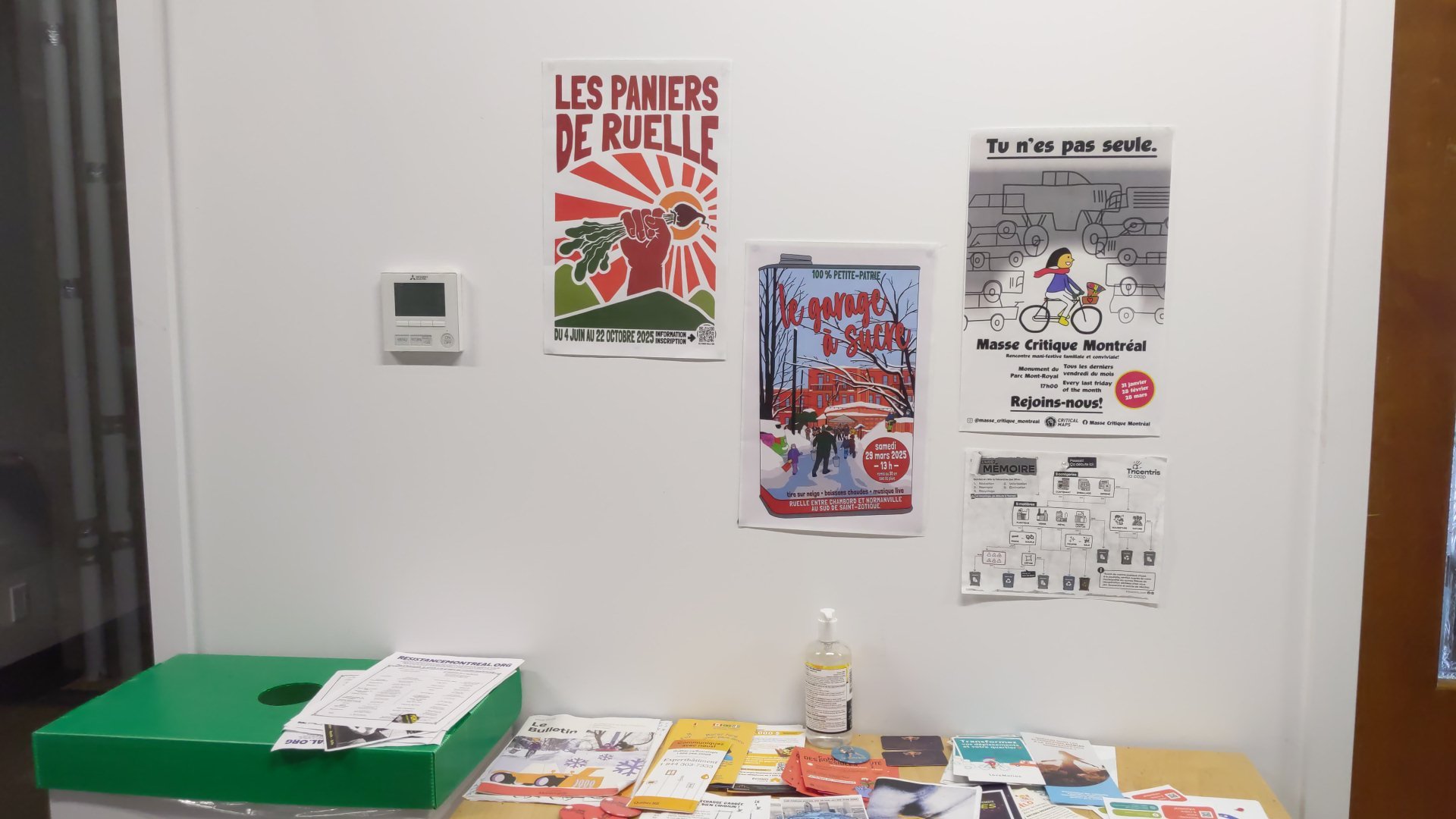
Hello, hello, hello! This report for the Bug Squashing Party we held in Montreal on March 28-29th is very late ... but better late than never? We're now at our fifth BSP in a row1, which is both nice and somewhat terrifying. Have I really been around for five Debian releases already? Geez... This year, around 13 different people showed up, including some brand new folks! All in all, we ended up working on 77 bugs, 61 of which have since been closed. This is somewhat skewed by the large number of Lintian bugs I closed by merging and releasing the very many patches submitted by Maytham Alsudany (hello Maytham!), but that was still work :D For our past few events, we have been renting a space at Ateliers de la transition socio- cologique. This building used to be nunnery (thus the huge cross on the top floor), but has since been transformed into a multi-faceted project. A drawing of the building where the BSP was hosted BSPs are great and this one was no exception. You should try to join an upcoming event or to organise one if you can. It is loads of fun and you will be helping the Debian project release its next stable version sooner! As always, thanks to Debian for granting us a budget for the food and to rent the venue. Pictures Here are a bunch of pictures of the BSP, mixed in with some other pictures I took at this venue during a previous event. Some of the people present on Friday, in the smaller room we had that day A picture of a previous event, which includes many of the folks present at the BSP and the larger room we used on Saturday A sticker on the door of the bathroom with text saying 'All Employees Must Wash Away Sin Before Returning To Work', a tongue-in-cheek reference to the building's previous purpose A wall with posters for upcoming events A drawing on one of the single-occupancy rooms in the building, warning people the door can't be opened from the inside (yikes!) A table at the entrance with many flyers for social and political events

  1. See our previous BSPs in 2017, 2019, 2021 and 2023!

20 April 2025

Russ Allbery: Review: Up the Down Staircase

Review: Up the Down Staircase, by Bel Kaufman
Publisher: Vintage Books
Copyright: 1964, 1991, 2019
Printing: 2019
ISBN: 0-525-56566-3
Format: Kindle
Pages: 360
Up the Down Staircase is a novel (in an unconventional format, which I'll describe in a moment) about the experiences of a new teacher in a fictional New York City high school. It was a massive best-seller in the 1960s, including a 1967 movie, but seems to have dropped out of the public discussion. I read it from the library sometime in the late 1980s or early 1990s and have thought about it periodically ever since. It was Bel Kaufman's first novel. Sylvia Barrett is a new graduate with a master's degree in English, where she specialized in Chaucer. As Up the Down Staircase opens, it is her first day as an English teacher in Calvin Coolidge High School. As she says in a letter to a college friend:
What I really had in mind was to do a little teaching. "And gladly wolde he lerne, and gladly teche" like Chaucer's Clerke of Oxenford. I had come eager to share all I know and feel; to imbue the young with a love for their language and literature; to instruct and to inspire. What happened in real life (when I had asked why they were taking English, a boy said: "To help us in real life") was something else again, and even if I could describe it, you would think I am exaggerating.
She instead encounters chaos and bureaucracy, broken windows and mindless regulations, a librarian who is so protective of her books that she doesn't let any students touch them, a school guidance counselor who thinks she's Freud, and a principal whose sole interaction with the school is to occasionally float through on a cushion of cliches, dispensing utterly useless wisdom only to vanish again.
I want to take this opportunity to extend a warm welcome to all faculty and staff, and the sincere hope that you have returned from a healthful and fruitful summer vacation with renewed vim and vigor, ready to gird your loins and tackle the many important and vital tasks that lie ahead undaunted. Thank you for your help and cooperation in the past and future. Maxwell E. Clarke
Principal
In practice, the school is run by James J. McHare, Clarke's administrative assistant, who signs his messages JJ McH, Adm. Asst. and who Sylvia immediately starts calling Admiral Ass. McHare is a micro-managing control freak who spends the book desperately attempting to impose order over school procedures, the teachers, and the students, with very little success. The title of the book comes from one of his detention slips:
Please admit bearer to class Detained by me for going Up the Down staircase and subsequent insolence. JJ McH
The conceit of this book is that, except for the first and last chapters, it consists only of memos, letters, notes, circulars, and other paper detritus, often said to come from Sylvia's wastepaper basket. Sylvia serves as the first-person narrator through her long letters to her college friend, and through shorter but more frequent exchanges via intraschool memo with Beatrice Schachter, another English teacher at the same school, but much of the book lies outside her narration. The reader has to piece together what's happening from the discarded paper of a dysfunctional institution. Amid the bureaucratic and personal communications, there are frequent chapters with notes from the students, usually from the suggestion box that Sylvia establishes early in the book. These start as chaotic glimpses of often-misspelled wariness or open hostility, but over the course of Up the Down Staircase, some of the students become characters with fragmentary but still visible story arcs. This remains confusing throughout the novel there are too many students to keep them entirely straight, and several of them use pseudonyms for the suggestion box but it's the sort of confusion that feels like an intentional authorial choice. It mirrors the difficulty a teacher has in piecing together and remembering the stories of individual students in overstuffed classrooms, even if (like Sylvia and unlike several of her colleagues) the teacher is trying to pay attention. At the start, Up the Down Staircase reads as mostly-disconnected humor. There is a strong "kids say the darnedest things" vibe, which didn't entirely work for me, but the send-up of chaotic bureaucracy is both more sophisticated and more entertaining. It has the "laugh so that you don't cry" absurdity of a system with insufficient resources, entirely absent management, and colleagues who have let their quirks take over their personalities. Sylvia alternates between incredulity and stubbornness, and I think this book is at its best when it shows the small acts of practical defiance that one uses to carve out space and coherence from mismanaged bureaucracy. But this book is not just a collection of humorous anecdotes about teaching high school. Sylvia is sincere in her desire to teach, which crystallizes around, but is not limited to, a quixotic attempt to reach one delinquent that everyone else in the school has written off. She slowly finds her footing, she has a few breakthroughs in reaching her students, and the book slowly turns into an earnest portrayal of an attempt to make the system work despite its obvious unfitness for purpose. This part of the book is hard to review. Parts of it worked brilliantly; I could feel myself both adjusting my expectations alongside Sylvia to something less idealistic and also celebrating the rare breakthrough with her. Parts of it were weirdly uncomfortable in ways that I'm not sure I enjoyed. That includes Sylvia's climactic conversation with the boy she's been trying to reach, which was weirdly charged and ambiguous in a way that felt like the author's reach exceeding their grasp. One thing that didn't help my enjoyment is Sylvia's relationship with Paul Barringer, another of the English teachers and a frustrated novelist and poet. Everyone who works at the school has found their own way to cope with the stress and chaos, and many of the ways that seem humorous turn out to have a deeper logic and even heroism. Paul's, however, is to retreat into indifference and alcohol. He is a believable character who works with Kaufman's themes, but he's also entirely unlikable. I never understood why Sylvia tolerated that creepy asshole, let alone kept having lunch with him. It is clear from the plot of the book that Kaufman at least partially understands Paul's deficiencies, but that did not help me enjoy reading about him. This is a great example of a book that tried to do something unusual and risky and didn't entirely pull it off. I like books that take a risk, and sometimes Up the Down Staircase is very funny or suddenly insightful in a way that I'm not sure Kaufman could have reached with a more traditional novel. It takes a hard look at what it means to try to make a system work when it's clearly broken and you can't change it, and the way all of the characters arrive at different answers that are much deeper than their initial impressions was subtle and effective. It's the sort of book that sticks in your head, as shown by the fact I bought it on a whim to re-read some 35 years after I first read it. But it's not consistently great. Some parts of it drag, the characters are frustratingly hard to keep track of, and the emotional climax points are odd and unsatisfying, at least to me. I'm not sure whether to recommend it or not, but it's certainly unusual. I'm glad I read it again, but I probably won't re-read it for another 35 years, at least. If you are considering getting this book, be aware that it has a lot of drawings and several hand-written letters. The publisher of the edition I read did a reasonably good job formatting this for an ebook, but some of the pages, particularly the hand-written letters, were extremely hard to read on a Kindle. Consider paper, or at least reading on a tablet or computer screen, if you don't want to have to puzzle over low-resolution images. The 1991 trade paperback had a new introduction by the author, reproduced in the edition I read as an afterward (which is a better choice than an introduction). It is a long and fascinating essay from Kaufman about her experience with the reaction to this book, culminating in a passionate plea for supporting public schools and public school teachers. Kaufman's personal account adds a lot of depth to the story; I highly recommend it. Content note: Self-harm, plus several scenes that are closely adjacent to student-teacher relationships. Kaufman deals frankly with the problems of mostly-poor high school kids, including sexuality, so be warned that this is not the humorous romp that it might appear on first glance. A couple of the scenes made me uncomfortable; there isn't anything explicit, but the emotional overtones can be pretty disturbing. Rating: 7 out of 10

19 April 2025

Ahmed Siam: My first post and writing plans

This is my first post in this blog and I think it will be useful to share what I will write about during the next months. Here are some titles: If you are interested in such topics, feel free to subscribe to my RSS feed and/or follow me in any of my social media accounts. Stay tuned!
18 April 2025

Sven Hoexter: Trixie Upgrade and X11 Clipboard Manager Madness

Due to my own laziness and a few functionality issues my "for work laptop" is still using a 15+ year old setup with X11 and awesome. Since trixie is now starting its freeze, it's time to update that odd machine as well and look at the fallout. Good news: It's mostly my own resistance to change which required some kick in the back to move on. Clipboard Manager Madness For the past decade or so I used parcellite which served me well. Now that is no longer available in trixie and I started to look into one of the dead end streets of X11 related tooling, searching for an alternative. Parcellite Seems upstream is doing sporadic fixes, but holds GTK2 tight. The Debian package was patched to be GTK3 compatible, but has unfixed ftbfs issues with GCC 14. clipit Next I checked for a parcellite fork named clipit, and that's when it started to get funky. It's packaged in Debian, QA maintained, and recently received at least two uploads to keep it working. Installed it and found it's greeting me with a nag screen that I should migrate to diodon. The real clipit tool is still shipped as a binary named clipit.real, so if you know it you can still use it. To achieve the nag screen it depends on zenity and to ease the migration it depends on diodon. Two things I do not really need. Also the package description prominently mentions that you should not use the package. diodon The nag screen of clipit made me look at diodon. It claims it was written for the Ubuntu Unity desktop, something where I've no idea how alive and relevant it still is. While there is still something on launchpad, it seems to receive sporadic commits on github. Not sure if it's dead or just feature complete. Interim Solution: clipit Settled with clipit for now, but decided to fork the Debian package to remove the nag screen and the dependency on diodon and zenity (package build). My hope is to convert this last X11 setup to wayland within the lifetime of trixie. I also contacted the last uploader regarding a removal of the nag screen, who then brought in the last maintainer who added the nag screen. While I first thought clipit is somewhat maintained upstream, Andrej quickly pointed out that this is not really the case. Still that leaves us in trixie with a rather odd situation. We ship now for the second stable release a package that recommends to move to a different tool while still shipping the original tool. Plus it's getting patched by some of its users who refuse to migrate to the alternative envisioned by the former maintainer. VirtualBox and moving to libvirt I always liked the GUI of VirtualBox, and it really made desktop virtualization easy. But with Linux 6.12, which enables KVM by default, it seems to get even more painful to get it up and running. In the past I just took the latest release from unstable and rebuild that one on the current stable. Currently the last release in unstable is 7.0.20, while the Linux 6.12 fixes only started to appear in VirtualBox 7.1.4 and later. The good thing is with virt-manager and the whole libvirt ecosystem there is a good enough replacement available, and it works fine with related tooling like vagrant. There are instructions available on how to set it up. I can only add that it makes sense to export VAGRANT_DEFAULT_PROVIDER=libvirt in your .bashrc to make that provider change permanent.

17 April 2025

Simon Josefsson: Verified Reproducible Tarballs

Remember the XZ Utils backdoor? One factor that enabled the attack was poor auditing of the release tarballs for differences compared to the Git version controlled source code. This proved to be a useful place to distribute malicious data. The differences between release tarballs and upstream Git sources is typically vendored and generated files. Lots of them. Auditing all source tarballs in a distribution for similar issues is hard and boring work for humans. Wouldn t it be better if that human auditing time could be spent auditing the actual source code stored in upstream version control instead? That s where auditing time would help the most. Are there better ways to address the concern about differences between version control sources and tarball artifacts? Let s consider some approaches: While I like the properties of the first solution, and have made effort to support that approach, I don t think normal source tarballs are going away any time soon. I am concerned that it may not even be a desirable complete solution to this problem. We may need tarballs with pre-generated content in them for various reasons that aren t entirely clear to us today. So let s consider the second approach. It could help while waiting for more experience with the first approach, to see if there are any fundamental problems with it. How do you know that the XZ release tarballs was actually derived from its version control sources? The same for Gzip? Coreutils? Tar? Sed? Bash? GCC? We don t know this! I am not aware of any automated or collaborative effort to perform this independent confirmation. Nor am I aware of anyone attempting to do this on a regular basis. We would want to be able to do this in the year 2042 too. I think the best way to reach that is to do the verification continuously in a pipeline, fixing bugs as time passes. The current state of the art seems to be that people audit the differences manually and hope to find something. I suspect many package maintainers ignore the problem and take the release source tarballs and trust upstream about this. We can do better. I have launched a project to setup a GitLab pipeline that invokes per-release scripts to rebuild that release artifact from git sources. Currently it only contain recipes for projects that I released myself. Releases which where done in a controlled way with considerable care to make reproducing the tarballs possible. The project homepage is here: https://gitlab.com/debdistutils/verify-reproducible-releases The project is able to reproduce the release tarballs for Libtasn1 v4.20.0, InetUtils v2.6, Libidn2 v2.3.8, Libidn v1.43, and GNU SASL v2.2.2. You can see this in a recent successful pipeline. All of those releases were prepared using Guix, and I m hoping the Guix time-machine will make it possible to keep re-generating these tarballs for many years to come. I spent some time trying to reproduce the current XZ release tarball for version 5.8.1. That would have been a nice example, wouldn t it? First I had to somehow mimic upstream s build environment. The XZ release tarball contains GNU Libtool files that are identified with version 2.5.4.1-baa1-dirty. I initially assumed this was due to the maintainer having installed libtool from git locally (after making some modifications) and made the XZ release using it. Later I learned that it may actually be coming from ArchLinux which ship with this particular libtool version. It seems weird for a distribution to use libtool built from a non-release tag, and furthermore applying patches to it, but things are what they are. I made some effort to setup an ArchLinux build environment, however the now-current Gettext version in ArchLinux seems to be more recent than the one that were used to prepare the XZ release. I don t know enough ArchLinux to setup an environment corresponding to an earlier version of ArchLinux, which would be required to finish this. I gave up, maybe the XZ release wasn t prepared on ArchLinux after all. Actually XZ became a good example for this writeup anyway: while you would think this should be trivial, the fact is that it isn t! (There is another aspect here: fingerprinting the versions used to prepare release tarballs allows you to infer what kind of OS maintainers are using to make releases on, which is interesting on its own.) I made some small attempts to reproduce the tarball for GNU Shepherd version 1.0.4 too, but I still haven t managed to complete it. Do you want a supply-chain challenge for the Easter weekend? Pick some well-known software and try to re-create the official release tarballs from the corresponding Git checkout. Is anyone able to reproduce anything these days? Bonus points for wrapping it up as a merge request to my project. Happy Supply-Chain Security Hacking!

Scarlett Gately Moore: KDE Applications 25.04 Snaps and Kubuntu Plucky Puffin 25.04 Released!

Very busy releasetastic week! The versions being the same is a complete coincidence  https://kde.org/announcements/gear/25.04.0 Which can be downloaded here: https://snapcraft.io/publisher/kde !
In addition to all the regular testing I am testing our snaps in a non KDE environment, so far it is not looking good in Xubuntu. We have kernel/glibc crashes on startup for some and for file open for others. I am working on a hopeful fix. Next week I will have ( I hope ) my final surgery. If you can spare any change to help bring me over the finish line, I will be forever grateful

Petter Reinholdtsen: Gearing up OpenSnitch for a 1.6.8 release in Trixie

Sadly, the interactive application firewall OpenSnitch have in practice been unmaintained in Debian for a while. A few days ago I decided to do something about it, and today I am happy with the result. This package monitor network traffic going in and out of a Linux machine, and show a popup dialog to the logged in desktop user, asking to approve or deny any new connections. It has proved very valuable in discovering programs calling home, giving me more control of how information leak out of my Linux machine. So far the new version is only available in Debian experimental, but I plan to upload it to unstable as soon as I know it is working on a few more machines, and make sure the new version make it into the next stable release of Debian. The package freeze is approaching, and it is not a lot of time left. If you read this blog post, I hope you can be one of the testers. The new version should be using eBPF on architectures where this is working (amd64 and arm64), and fall back to /proc/ probing where the opensnitch-ebpf-modules package is missing (so far only armhf, a unrelated bug blocks building on riscv64 and s390x). Using eBPF should provide more accurate attribution of packages responsible for network traffic for short lived processes, which some times were unavailable in /proc/ when opensnitch tried to probe for information. I have limited experience with the new version, having used it myself for a day or so. It is easily backportable to Debian 12 Bookworm without code changes, all it need is a simple 'debuild' thanks to the optional build dependencies. Due to a misfeature of llc on armhf, there is no eBPF support available there. I have not investigated the details, nor reported any bug yet, but for some reason -march=bpf is an unknown option on this architecture, causing the build in the ebpf_prog subdirectory build to fail. The package is maintained under the umbrella of Debian Go team, and you can meet the current maintainers on the #debian-golang and #opensnitch IRC channels on irc.debian.org. As usual, if you use Bitcoin and want to show your support of my activities, please send Bitcoin donations to my address 15oWEoG9dUPovwmUL9KWAnYRtNJEkP1u1b.

Jonathan Dowland: Hledger UI themes

Last year I intended to write an update on my use of hledger, but that was waylaid for various reasons and I need to revisit how (if) I'm using it, so that's put off for longer. I do want to mention one contribution I made upstream: a dark theme for the UI, and some unfinished work on consistent colours. Consistent terminal colours are an interesting issue: the most common terminal colour modes (8 and 256) use indexing into a palette, but the definition of the colours is ambiguous: the 8-colour palette is formally specified by ANSI as names (red, green, etc.); the 256-colour palette is effectively defined by xterm (a useful chart) but I'm not sure all terminal emulators that support it have chosen the same colour values. A consequence of indexed-colour is that the end-user may redefine what the colour values are. Whether this is a good thing or a bad thing depends on your point of view. As an end-user, it's attractive to be able to tune the colour scheme; but as a software author, it means you have no real idea what your users are going to see, and matters like ensuring contrast are impossible. Some terminals support 24-bit "true" colour, in which the colours are specified as an RGB triplet. Using these mean the software author can be reasonably sure all users will see the same thing (for a fungible definition of "same"), at the cost of user configurability. However, since it's less well supported, we start having to worry about fallback behaviour. In the case of hledger-ui, which provides several colour schemes, that's probably OK, because the user configurability is achieved by choosing one of the schemes. (or writing your own, in extremis). However, the dark theme I contributed uses the 8-colour palette, in common with the other themes, and my explorations into using predictable colours are unfinished.

Arturo Borrero Gonz lez: My experience in the Debian LTS and ELTS projects

Debian Last year, I decided to start participating in the Debian LTS and ELTS projects. It was a great opportunity to engage in something new within the Debian community. I had been following these projects for many years, observing their evolution and how they gained traction both within the ecosystem and across the industry. I was curious to explore how contributors were working internally especially how they managed security patching and remediation for older software. I ve always felt this was a particularly challenging area, and I was fortunate to experience it firsthand. As of April 2025, the Debian LTS project was primarily focused on providing security maintenance for Debian 11 Bullseye. Meanwhile, the Debian ELTS project was targeting Debian 8 Jessie, Debian 9 Stretch, and Debian 10 Buster. During my time with the projects, I worked on a variety of packages and CVEs. Some of the most notable ones include: There are several technical highlights I d like to share things I learned or had to apply while participating: In March 2025, I decided to scale back my involvement in the projects due to some changes in my personal life. Still, this experience has been one of the highlights of my career, and I would definitely recommend it to others. I m very grateful for the warm welcome I received from the LTS/ELTS community, and I don t rule out the possibility of rejoining the LTS/ELTS efforts in the future. The Debian LTS/ELTS projects are currently coordinated by folks at Freexian. Many thanks to Freexian and sponsors for providing this opportunity!

16 April 2025

Otto Kek l inen: Going Full-Time as an Open Source Developer

Featured image of post Going Full-Time as an Open Source DeveloperAfter careful consideration, I ve decided to embark on a new chapter in my professional journey. I ve left my position at AWS to dedicate at least the next six months to developing open source software and strengthening digital ecosystems. My focus will be on contributing to Linux distributions (primarily Debian) and other critical infrastructure components that our modern society depends on, but which may not receive adequate attention or resources.

The Evolution of Open Source Open source won. Over the 25+ years I ve been involved in the open source movement, I ve witnessed its remarkable evolution. Today, Linux powers billions of devices from tiny embedded systems and Android smartphones to massive cloud datacenters and even space stations. Examine any modern large-scale digital system, and you ll discover it s built upon thousands of open source projects. I feel the priority for the open source movement should no longer be increasing adoption, but rather solving how to best maintain the vast ecosystem of software. This requires building robust institutions and processes to secure proper resourcing and ensure the collaborative development process remains efficient and leads to ever-increasing quality of software.

What is Special About Debian? Debian, established in 1993 by Ian Murdock, stands as one of these institutions that has demonstrated exceptional resilience. There is no single authority, but instead a complex web of various stakeholders, each with their own goals and sources of funding. Every idea needs to be championed at length to a wide audience and implemented through a process of organic evolution. Thanks to this approach, Debian has been consistently delivering production-quality, universally useful software for over three decades. Having been a Debian Developer for more than ten years, I m well-positioned to contribute meaningfully to this community. If your organization relies on Debian or its derivatives such as Ubuntu, and you re interested in funding cyber infrastructure maintenance by sponsoring Debian work, please don t hesitate to reach out. This could include package maintenance and version currency, improving automated upgrade testing, general quality assurance and supply chain security enhancements.
Best way to reach me is by e-mail otto at debian.org. You can also book a 15-minute chat with me for a quick introduction.

Grow or Die My four-year tenure as a Software Development Manager at Amazon Web Services was very interesting. I m grateful for my time at AWS and proud of my team s accomplishments, particularly for creating an open source contribution process that got Amazon from zero to the largest external contributor to the MariaDB open source database. During this time, I got to experience and witness a plethora of interesting things. I will surely share some of my key learnings in future blog posts. Unfortunately, the rate of progress in this mammoth 1.5 million employee organization was slowing down, and I didn t feel I learned much new in the last years. This realization, combined with the opportunity cost of not spending enough time on new cutting-edge technology, motivated me to take this leap. Being a full-time open source developer may not be financially the most lucrative idea, but I think it is an excellent way to force myself to truly assess what is important on a global scale and what areas I want to contribute to. Working fully on open source presents a fascinating duality: you re not bound by any external resource or schedule limitations, and can the progress you make is directly proportional to how much energy you decide to invest. Yet, you also depend on collaboration with people you might never meet and who are not financially incentivized to collaborate. This will undoubtedly expose me to all kinds of challenges. But what would be better in fostering holistic personal growth? I know that deep down in my DNA, I am not made to stay cozy or to do easy things. I need momentum. OK, let s get going

Next.

Previous.