Search Results: "beh"

24 September 2015

Joachim Breitner: The Incredible Proof Machine

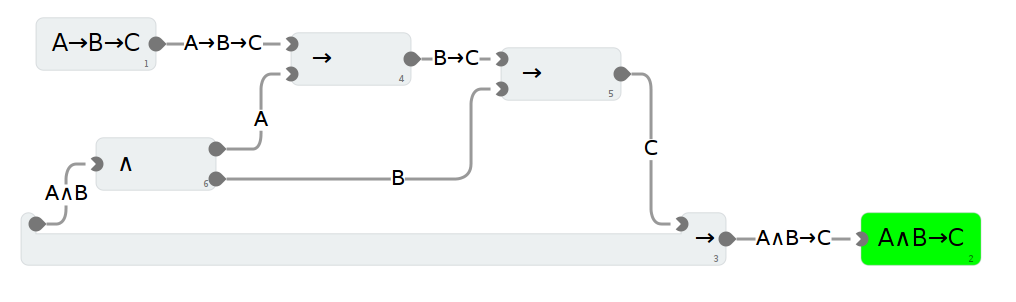
In a few weeks, I will have the opportunity to offer a weekend workshop to selected and motivated high school students1 to a topic of my choice. My idea is to tell them something about logic, proofs, and the joy of searching and finding proofs, and the gratification of irrevocable truths. While proving things on paper is already quite nice, it is much more fun to use an interactive theorem prover, such as Isabelle, Coq or Agda: You get immediate feedback, you can experiment and play around if you are stuck, and you get lots of small successes. Someone2 once called interactive theorem proving the worlds most geekiest videogame . Unfortunately, I don t think one can get high school students without any prior knowledge in logic, or programming, or fancy mathematical symbols, to do something meaningful with a system like Isabelle, so I need something that is (much) easier to use. I always had this idea in the back of my head that proving is not so much about writing text (as in normally written proofs) or programs (as in Agda) or labeled statements (as in Hilbert-style proofs), but rather something involving facts that I have proven so far floating around freely, and way to combine these facts to new facts, without the need to name them, or put them in a particular order or sequence. In a way, I m looking for labVIEW wrestled through the Curry-Horward-isomorphism. Something like this:
A proof of implication currying

A proof of implication currying

So I set out, rounded up a few contributors (Thanks!), implemented this, and now I proudly present: The Incredible Proof Machine3 This interactive theorem prover allows you to do perform proofs purely by dragging blocks (representing proof steps) onto the paper and connecting them properly. There is no need to learn syntax, and hence no frustration about getting that wrong. Furthermore, it comes with a number of example tasks to experiment with, so you can simply see it as a challenging computer came and work through them one by one, learning something about the logical connectives and how they work as you go. For the actual workshop, my plan is to let the students first try to solve the tasks of one session on their own, let them draw their own conclusions and come up with an idea of what they just did, and then deliver an explanation of the logical meaning of what they did. The implementation is heavily influenced by Isabelle: The software does not know anything about, say, conjunction ( ) and implication ( ). To the core, everything is but an untyped lambda expression, and when two blocks are connected, it does unification4 of the proposition present on either side. This general framework is then instantiated by specifying the basic rules (or axioms) in a descriptive manner. It is quite feasible to implement other logics or formal systems on top of this as well. Another influence of Isabelle is the non-linear editing: You neither have to create the proof in a particular order nor have to manually manage a proof focus . Instead, you can edit any bit of the proof at any time, and the system checks all of it continuously. As always, I am keen on feedback. Also, if you want to use this for your own teaching or experimenting needs, let me know. We have a mailing list for the project, the code is on GitHub, where you can also file bug reports and feature requests. Contributions are welcome! All aspects of the logic are implemented in Haskell and compiled to JavaScript using GHCJS, the UI is plain hand-written and messy JavaScript code, using JointJS to handle the graph interaction. Obviously, there is still plenty that can be done to improve the machine. In particular, the ability to create your own proof blocks, such as proof by contradiction, prove them to be valid and then use them in further proofs, is currently being worked on. And while the page will store your current progress, including all proofs you create, in your browser, it needs better ways to save, load and share tasks, blocks and proofs. Also, we d like to add some gamification, i.e. achievements ( First proof by contradiction , 50 theorems proven ), statistics, maybe a share theorem on twitter button. As the UI becomes more complicated, I d like to investigating moving more of it into Haskell world and use Functional Reactive Programming, i.e. Ryan Trickle s reflex, to stay sane. Customers who liked The Incredible Proof Machine might also like these artifacts, that I found while looking whether something like this exists:

  1. Students with migration background supported by the START scholarship
  2. Does anyone know the reference?
  3. We almost named it Proofcraft , which would be a name our current Minecraft-wild youth would appreciate, but it is alreay taken by Gerwin Kleins blog. Also, the irony of a theorem prover being in-credible is worth something.
  4. Luckily, two decades ago, Tobias Nipkow published a nice implementation of higher order pattern unification as ML code, which I transliterated to Haskell for this project.

21 September 2015

Jonathan McDowell: Getting a Dell E7240 working with a dock + a monitor

I have a Dell E7240. I m pretty happy with it - my main complaint is that it has a very shiny screen, and that seems to be because it s the touchscreen variant. While I don t care about that feature I do care about the fact it means I get FullHD in 12.5 Anyway. I ve had issues with using a dock and an external monitor with the laptop for some time, including getting so far as mentioning the problems on the appropriate bug tracker. I ve also had discussions with a friend who has the same laptop with the same issues, and has some time trying to get it reliably work. However up until this week I haven t had a desk I m sitting at for any length of time to use the laptop, so it s always been low priority for me. Today I sat down to try and figure out if there had been any improvement. Firstly I knew the dock wasn t at fault. A Dell E6330 works just fine with multiple monitors on the same dock. The E6330 is Ivybridge, while the E7240 is Haswell, so I thought potentially there might be an issue going on there. Further digging revealed another wrinkle I hadn t previously been aware of; there is a DisplayPort Multi-Stream Transport (MST) hub in play, in particular a Synaptics VMM2320. Dell have a knowledge base article about Multiple external display issues when docked with a Latitude E7440/E7240 which suggests a BIOS update (I was already on A15) and a firmware update for the MST HUB. Sadly the firmware update is Windows only, so I had to do a suitable dance to be able to try and run it. I then discovered that the A05 update refused to work, complaining I had an invalid product ID. The A04 update did the same. The A01 update thankfully succeeded and told me it was upgrading from 2.00.002 to 2.15.000. After that had completed (and I d power cycled to switch to the new firmware) I tried A05 again and this time it worked and upgraded me to 2.22.000. Booting up Linux again I got further than before; it was definitely detecting that there was a monitor but it was very unhappy with lots of [drm:intel_dp_start_link_train] *ERROR* too many full retries, give up errors being logged. This was with 4.2, and as I d been meaning to try 4.3-rc2 I thought this was a good time to give it a try. Lo and behold, it worked! Even docking and undocking does what I d expect, with the extra monitor appearing / disappearing as you d expect. Now, I m not going to assume this means it s all happy, as I ve seen this sort-of work in the past, but the clue about MST, the upgrade of that firmware (and noticing that it made things better under Windows as well) and the fact that there have been improvements in the kernel s MST support according to the post 4.2 log gives me some hope that things will be better from here on.

19 September 2015

Russ Allbery: pam-afs-session 2.6

I no longer use this PAM module, since I don't use AFS any more, and it's actually orphaned. But there was a bug report against the Debian package that was actually a PAM issue, not an AFS issue, so I went ahead and fixed that. The bug was that running sudo when you had the AFS PAM module enabled would delete your tokens. This was because sudo calls pam_setcred and pam_open_session in a somewhat strange way, leading the PAM module to think that sudo was taking ownership of the token but without putting the user in a new PAG. Then, when sudo closed its PAM session, the module would erroneously delete the token. The fix is to not set the flag to skip subsequent open_session and close_session handling when called with PAM_REINITIALIZE_CRED or PAM_REFRESH_CRED. This preserves correct session handling behavior and avoids this issue. Also with this release, I finally rewrote the test suite to use my generic PAM test suite code, and got rid of a bunch of old, legacy testing code. I lost one test for which the new test framework doesn't have enough hooks, but it wasn't particularly important, and the new code is much cleaner and more data-driven. There are also a few other, accumulated fixes, such as a compilation fix on Solaris 11, and a significant modernization of all of my common support libraries. (The last official release was in 2011!) You can get the latest version from the pam-afs-session distribution page.

16 September 2015

Russ Allbery: Review: The Goblin Emperor

Review: The Goblin Emperor, by Katherine Addison
Publisher: Tor
Copyright: April 2014
ISBN: 1-4299-4640-7
Format: Kindle
Pages: 446
Maia is the child of the current emperor of the Elflands, but not a favored one. He's the half-goblin son of a political marriage to a goblin princess, quickly orphaned away from the capital and kept in seclusion well out of the way of his father and court politics. And in the care of his cousin Setheris: cruel and abusive companionship. Then the airship Wisdom of Choharo crashes with no survivors, killing everyone in the line of succession. Except Maia. Maia is in no way prepared to be emperor, but the rules of succession are clear: he is now emperor. We all know from medieval history, both real and fantastic, that clear rules rarely got in the way of aggressive political maneuvering, but Maia's short-term survival is helped considerably by complex factions at play at court (of which he is almost wholly ignorant), and a certain lack of bloodthirstiness in elven politics. Rather than disposing of the unexpected heir, people instead start maneuvering to manipulate and control him. The current Lord Chancellor is the first, beginning his play in the message sent informing Maia of his father's death, and his cousin isn't far behind, but they're only the first two. Meanwhile, Maia, who had never been trained for any sort of court life, has to learn nearly everything about his new life: how to interact with servants, the rituals of court, his new duties, and all of the factions in play. One might expect that Maia would quickly be reduced to a pawn of one faction or another, but he has two secret weapons. One is that he is a legitimately nice person with a strongly developed sense of empathy. Early on, he lucks into some opportunities to show this and wins some popularity and some allies of his own, particularly among those people not used to being treated with respect. And two, he's had enough of his cousin controlling and abusing him. He's determined to make his own decisions and not take orders from someone else, and now has enough nominal power to possibly pull this off. The Goblin Emperor is a fantasy of political agency, and a story about political maneuvering, tricky decisions, navigating alliances, and learning politics. There isn't a lot of action here: most of the plot happens in conversation. The tension is high Maia's situation is precarious but it mostly involves second-guessing his decisions and actions, and hoping that his weaknesses and ignorance don't get him into too much trouble. That is an extremely tricky book to write. Addison had to walk a tightrope between letting Maia's new responsibilities come unrealistically easily, making him seem like a Chosen One with special plot powers, and having readers get too frustrated with realistically bad decisions and lose their desire to read about him. Addison walks that tightrope magnificently. I liked Maia throughout this book, and that's the strength of it. He never felt like the typical fantasy coming of age hero who is magically protected by the plot. He's just a genuine, honest person, reacting to his own past as best he can, making the best decisions he knows how to make. He makes mistakes, but Addison wisely avoids making those mistakes cringe-worthy or too obvious. Instead, they're like bad moves in a chess match: they create problems but also some opportunities, and they're realistically recoverable. And it's a delight to see Maia bring empathy and a disinterested outside perspective to the hothouse mess of court politics and come up with some very creative solutions. Obviously, the situation that allows Maia to succeed is artificial. This is a fantasy: Maia happens to be just the right person the empire needs, and that's clearly an authorial construction. It may be impossible to write a political story about a well-meaning, naive outsider that isn't a tragedy without a bit of cheating. But Addison hides the cheating well. Maia may be very lucky in the empire he inherits, but it feels coherent and believable. By the end of the book, Maia has dealt with everything from international diplomacy to the incredibly complex negotiations around further heirs to the empire. And (realistically) he doesn't stay lucky throughout the book: eventually, no matter how careful he tries to be, he angers some powerful people. I enjoyed every step along the way, and would have happily read more about Maia. In my personal ranking, this was second only to Ancillary Sword in the nominees for the 2015 Hugo, and I wouldn't disagree too strongly with someone who argued it was better. It's not a typical sort of fantasy, but it's one I enjoyed very much. Recommended. One warning: consider going to the back of the book and reading the glossary at the start. There may be some mild spoilers in there, but it also explains the title conventions in the empire, and some of those titles look very much like proper names. If, like me, you don't read this until the end of the book, you may find yourself horribly confused by several apparently similarly-named characters. Rating: 8 out of 10

13 September 2015

Russ Allbery: Review: The Sea Thy Mistress

Review: The Sea Thy Mistress, by Elizabeth Bear
Series: Edda of Burdens #3
Publisher: Tor
Copyright: February 2011
ISBN: 0-7653-1884-9
Format: Hardcover
Pages: 334
The Sea Thy Mistress is the third book in the Edda of Burdens series, but the second book (By the Mountain Bound) was a prequel to the first, telling the story of an earlier world and the betrayal that ended it. This one is a direct sequel to All the Windwracked Stars, a complex and idea-rich book that I read more than six years ago. A challenging property of Bear's fiction is that it's short on explanation and doesn't hold your hand. This makes it lean, sharp, and effective if you're fully invested in it and can keep the context in your head. It becomes very hard to understand if you've mostly forgotten the plot of an earlier book. (Once again, I bemoan the death of the previous book synopsis in series fiction.) The Sea Thy Mistress is all about aftermath, loss, despair, unhealed wounds, old grudges, and complicated personal histories, and it relies very heavily on the reader being invested enough in the characters to care about all of those things. I wish I'd read this entire series closer together so that I could retain more of the state. The start of this story was therefore somewhat frustrating, as I scrambled to rebuild my memory of the first book and piece together the large cast. Thankfully, most of the characters are easy to care about. Aethelred reliably brought a smile to my face, and the opening scene of him finding a baby on the sea shore is a great piece of writing. Selene is back; she was one of my favorite characters in the first book. And Bear pulls off something I didn't think she could: the Grey Wolf is also back, for the third book, and he actually won me over. I think he grew up a bit; there's at least less whining and angst, and more effective action. It probably also helped that less of the story was told from his perspective. The Sea Thy Mistress is primarily the story of Cathoair and his son, Cathmar, and their encounter with a truly nasty threat: a goddess who has way more knowledge of how their world works than they do, and is out to destroy it. This review will necessarily be sketchy on details; most of them would partly spoil All the Windwracked Stars. (I suppose I'm spoiling it a bit anyway just by listing characters who are still around.) Cathmar is... not too irritating. He's young and stupid, and the first half of the book is a bit painful as he plays into the hands of the plot with much less information than the reader has available. But I was okay with him by the end of the book. Cathoair is a more complicated matter. I suspect whether you like this book will depend mostly on whether you can find some sympathy for his personal angst and self-destructive behavior, or at least tolerate him long enough to get to the ending. Quite a lot of this book consists of people behaving stupidly and horribly while those who love them stand by helplessly, unable to figure out how to break the cycle. If that sounds frustrating, you have the right impression. I really struggled with the first two-thirds of the book and started regretting reading it. But there is a payoff: one that's uncomfortable, raw, perilous, and sad, but also beautiful and honest and effective. Muire's role in this book may be minor, but it's very memorable. Despite the difficulties of the early book, I was very glad to have read it for the payoff. I'm not sure whether to recommend this or not, but I think it's worth reading if you enjoyed All the Windwracked Stars. If you do read it, though, try to read the whole series in close proximity. You'll want to remember the details between books. I'm now somewhat tempted to go back and re-read the whole series to experience it in context. Rating: 6 out of 10

12 September 2015

Lars Wirzenius: Obnam 1.17 released (backup software)

I have just released version 1.17 of Obnam, my backup program. See the website at http://obnam.org for details on what the program does. The new version is available from git (see http://git.liw.fi) and as Debian packages from http://code.liw.fi/debian, and uploaded to Debian, and soon in unstable. The NEWS file extract below gives the highlights of what's new in this version. It includes highlights for 1.15 and 1.16 as well, as I didn't announce those in this blog. Version 1.17, released 2015-09-12 Version 1.16, released 2015-09-06 Version 1.15, released 2015-08-19

8 September 2015

Daniel Silverstone: Orchestration, a cry for help

Over the past few years, a plethora of orchestration frameworks have been exploding onto the scene. Many have been around for quite a while but not all have the same sort of community behind them. For example there's a very interesting option in Joey Hess' Propellor but that is hurt by needing to be able to build Propellor on all the hosts you manage. On the other hand, Ansible is able to operate without installing extra software on your target hosts, but instead it ends up very latency-bound which can cause problems when your managed hosts are "far away". I have considered CFEngine, Chef, Puppet and Salt in addition to the above mentioned options, but none of them feel quite right to me. I am looking for a way to manage a small number of hosts, at least one of which is not always online (my laptop) and all of which are essentially snowflakes whose sparkleybits I want some reasonable control over. I have a few basic requirements which I worry would be hard to meet -- I want to be able to make changes to my hosts by editing a file and committing/pushing it to a git server. I want to be able to manage a host entirely over SSH from one or more systems, ideally without having to install the orchestration software on the target host, but where if the software is present it will get used to accelerate matters. I don't want to have to install Ruby or PHP on any system in order to have orchestration, and some of the systems I wish to manage simply can't compile Haskell stuff sanely. I'm not desperately interested in learning yet more DSLs, but I appreciate that it will be necessary, but I really don't want to have to learn more than one DSL simply to run one frameworks. I don't want to have to learn strange and confusing combinations of file formats. For example, Ansible quite sensibly uses YAML for its structured data except for its host/group lists. It uses Jinja2 for its templating and looping, except for some things which it generates its own looping constructs inside its YAML. I also personally find Ansible's sportsball oriented terminology to be confusing, but that might just be me. So what I'm hoping is that someone will be able to point me at a project which combines all the wonderful features of the above, with a need to learn only one DSL and which doesn't require to be installed on the managed host but which can benefit from being so installed, is driven from git, and won't hurt my already overly burdened brain. Dear Lazyweb, pls. kthxbye.

Russ Allbery: Review: Dark Currents

Review: Dark Currents, by Jacqueline Carey
Series: Agent of Hel #1
Publisher: Roc
Copyright: 2012
Printing: October 2013
ISBN: 0-451-41483-7
Format: Mass market
Pages: 399
This is another much-belated review. Hopefully I can remember the book well enough to do it justice. Daisy Johanssen has normal urban fantasy problems: her father was an incubus who (somewhat unsurprisingly) didn't stick around, she has to keep careful control of her own demonic side, her father occasionally tries to tempt her to invoke demonic power, and it's possible that she could breach the walls protecting the world from demons and bring about Armageddon. The typical sort of thing. Also, there's an unexplained murder in her home town, a mid-western US resort town whose image does not go well with eldritch murders. Daisy's only official role with the town police department is as a part-time file clerk, but this is urban fantasy, so you know the protagonist is going to be hip-deep in some sort of crime investigation. In this case, that's because the Norse goddess Hel (as distinct from the origin of Daisy's father entirely different thing) also lives here, in a manner of speaking, and Daisy is her liaison. In this case, Hel decides she's the one who should dispense justice. Carey previously has primarily been an epic fantasy writer, and this is her first foray into urban fantasy. (Well, arguably Santa Olivia and its sequel count, but those felt closer to superhero fiction to me.) The language and tone of her epic fantasy is far different than the conventions of either urban fantasy or superhero fiction, and I thought Santa Olivia was somewhat awkward in places. (None of the profanity quite worked, for instance.) Dark Currents felt smoother and more comfortable, aided by a charming mid-western feel. A few of Daisy's first-person narrative quirks wore poorly, such as every reference to "the Seven Deadlies," but Carey did a solid job with a typical out-of-her-depth urban fantasy protagonist. I'm pretty tired of the standard mythology of urban fantasy, and that is a bit of a drawback here: vampires and werewolves both feature, and I think I could happily go ten years before reading another story about vampires or hunky werewolves. Carey adds her own take on ghouls, but it's still pretty similar to lots (and lots) of other series. Thankfully, there's a bit of Norse mythology, a bit of fairy, and one extremely memorable lamia (of the serpent-tail-below-the-waist variety, at least some of the time). Lurine, a reclusive, retired starlet, a friend of Daisy's mother, and Daisy's childhood babysitter, is the lamia in question. She absolutely steals the show. The dynamic between her and Daisy is perfect: Carey resists the urge to ruin it with dark hints or falling-outs to increase tension. Instead, she lets it be a bit quirky, a bit complicated, but full of the reliability of a deep friendship. And Lurine is a wonderful character, the kind that only works as a supporting character because she's best seen through other people's eyes. Daisy's mother just makes the dynamic better. The reader can believe she's the sort of person who would have an ill-advised fling with an incubus, but also the sort of person who could raise a daughter like Daisy without many resources other than sheer grit. She never loses her optimistic outlook on the world, but has enough backbone behind it to make Lurine's friendship with her entirely believable. The plot here is nothing particularly special. Daisy unravels various clues, gets deeper into complicated relationships between various factions, occasionally finds herself in serious trouble, and relies on the help of friends and allies. I would have enjoyed the book more with a lot less Cody and more of the less typical mythology. But the relationships between the female characters, and the sheer persistence of mid-western normality and ordinary life challenges in the face of so much supernatural meddling, help this book stand out from the crowd. Dark Currents is different from most of what Carey has written, and you may be a bit disappointed if you were hoping for the epic sweep of the Kushiel series. But I found myself charmed by it, and will be reading the next book of the series. Followed by Autumn Bones. Rating: 7 out of 10

1 September 2015

Lunar: Reproducible builds: week 18 in Stretch cycle

What happened in the reproducible builds effort this week: Toolchain fixes Aur lien Jarno uploaded glibc/2.21-0experimental1 which will fix the issue were locales-all did not behave exactly like locales despite having it in the Provides field. Lunar rebased the pu/reproducible_builds branch for dpkg on top of the released 1.18.2. This made visible an issue with udebs and automatically generated debug packages. The summary from the meeting at DebConf15 between ftpmasters, dpkg mainatainers and reproducible builds folks has been posted to the revelant mailing lists. Packages fixed The following 70 packages became reproducible due to changes in their build dependencies: activemq-activeio, async-http-client, classworlds, clirr, compress-lzf, dbus-c++, felix-bundlerepository, felix-framework, felix-gogo-command, felix-gogo-runtime, felix-gogo-shell, felix-main, felix-shell-tui, felix-shell, findbugs-bcel, gco, gdebi, gecode, geronimo-ejb-3.2-spec, git-repair, gmetric4j, gs-collections, hawtbuf, hawtdispatch, jack-tools, jackson-dataformat-cbor, jackson-dataformat-yaml, jackson-module-jaxb-annotations, jmxetric, json-simple, kryo-serializers, lhapdf, libccrtp, libclaw, libcommoncpp2, libftdi1, libjboss-marshalling-java, libmimic, libphysfs, libxstream-java, limereg, maven-debian-helper, maven-filtering, maven-invoker, mochiweb, mongo-java-driver, mqtt-client, netty-3.9, openhft-chronicle-queue, openhft-compiler, openhft-lang, pavucontrol, plexus-ant-factory, plexus-archiver, plexus-bsh-factory, plexus-cdc, plexus-classworlds2, plexus-component-metadata, plexus-container-default, plexus-io, pytone, scolasync, sisu-ioc, snappy-java, spatial4j-0.4, tika, treeline, wss4j, xtalk, zshdb. The following packages became reproducible after getting fixed: Some uploads fixed some reproducibility issues but not all of them: Patches submitted which have not made their way to the archive yet: Chris Lamb also noticed that binaries shipped with libsilo-bin did not work. Documentation update Chris Lamb and Ximin Luo assembled a proper specification for SOURCE_DATE_EPOCH in the hope to convince more upstreams to adopt it. Thanks to Holger it is published under a non-Debian domain name. Lunar documented easiest way to solve issues with file ordering and timestamps in tarballs that came with tar/1.28-1. Some examples on how to use SOURCE_DATE_EPOCH have been improved to support systems without GNU date. reproducible.debian.net armhf is finally being tested, which also means the remote building of Debian packages finally works! This paves the way to perform the tests on even more architectures and doing variations on CPU and date. Some packages even produce the same binary Arch:all packages on different architectures (1, 2). (h01ger) Tests for FreeBSD are finally running. (h01ger) As it seems the gcc5 transition has cooled off, we schedule sid more often than testing again on amd64. (h01ger) disorderfs has been built and installed on all build nodes (amd64 and armhf). One issue related to permissions for root and unpriviliged users needs to be solved before disorderfs can be used on reproducible.debian.net. (h01ger) strip-nondeterminism Version 0.011-1 has been released on August 29th. The new version updates dh_strip_nondeterminism to match recent changes in debhelper. (Andrew Ayer) disorderfs disorderfs, the new FUSE filesystem to ease testing of filesystem-related variations, is now almost ready to be used. Version 0.2.0 adds support for extended attributes. Since then Andrew Ayer also added support to reverse directory entries instead of shuffling them, and arbitrary padding to the number of blocks used by files. Package reviews 142 reviews have been removed, 48 added and 259 updated this week. Santiago Vila renamed the not_using_dh_builddeb issue into varying_mtimes_in_data_tar_gz_or_control_tar_gz to align better with other tag names. New issue identified this week: random_order_in_python_doit_completion. 37 FTBFS issues have been reported by Chris West (Faux) and Chris Lamb. Misc. h01ger gave a talk at FrOSCon on August 23rd. Recordings are already online. These reports are being reviewed and enhanced every week by many people hanging out on #debian-reproducible. Huge thanks!

29 August 2015

Francois Marier: Letting someone ssh into your laptop using Pagekite

In order to investigate a bug I was running into, I recently had to give my colleague ssh access to my laptop behind a firewall. The easiest way I found to do this was to create an account for him on my laptop and setup a pagekite frontend on my Linode server and a pagekite backend on my laptop.

Frontend setup Setting up my Linode server in order to make the ssh service accessible and proxy the traffic to my laptop was fairly straightforward. First, I had to install the pagekite package (already in Debian and Ubuntu) and open up a port on my firewall by adding the following to both /etc/network/iptables.up.rules and /etc/network/ip6tables.up.rules:
-A INPUT -p tcp --dport 10022 -j ACCEPT
Then I created a new CNAME for my server in DNS:
pagekite.fmarier.org.   3600    IN  CNAME   fmarier.org.
With that in place, I started the pagekite frontend using this command:
pagekite --clean --isfrontend --rawports=virtual --ports=10022 --domain=raw:pagekite.fmarier.org:Password1

Backend setup After installing the pagekite and openssh-server packages on my laptop and creating a new user account:
adduser roc
I used this command to connect my laptop to the pagekite frontend:
pagekite --clean --frontend=pagekite.fmarier.org:10022 --service_on=raw/22:pagekite.fmarier.org:localhost:22:Password1

Client setup Finally, my colleague needed to add the folowing entry to ~/.ssh/config:
Host pagekite.fmarier.org
  CheckHostIP no
  ProxyCommand /bin/nc -X connect -x %h:10022 %h %p
and install the netcat-openbsd package since other versions of netcat don't work. On Fedora, we used netcat-openbsd-1.89 successfully, but this newer package may also work. He was then able to ssh into my laptop via ssh roc@pagekite.fmarier.org.

Making settings permanent I was quite happy settings things up temporarily on the command-line, but it's also possible to persist these settings and to make both the pagekite frontend and backend start up automatically at boot. See the documentation for how to do this on Debian and Fedora.

25 August 2015

Lunar: Reproducible builds: week 17 in Stretch cycle

A good amount of the Debian reproducible builds team had the chance to enjoy face-to-face interactions during DebConf15.
Names in red and blue were all present at DebConf15
Picture of the  reproducible builds  talk during DebConf15
Hugging people with whom one has been working tirelessly for months gives a lot of warm-fuzzy feelings. Several recorded and hallway discussions paved the way to solve the remaining issues to get reproducible builds part of Debian proper. Both talks from the Debian Project Leader and the release team mentioned the effort as important for the future of Debian. A forty-five minutes talk presented the state of the reproducible builds effort. It was then followed by an hour long roundtable to discuss current blockers regarding dpkg, .buildinfo and their integration in the archive. Picture of the  reproducible builds  roundtable during DebConf15 Toolchain fixes Reiner Herrmann submitted a patch to make rdfind sort the processed files before doing any operation. Chris Lamb proposed a new patch for wheel implementing support for SOURCE_DATE_EPOCH instead of the custom WHEEL_FORCE_TIMESTAMP. akira sent one making man2html SOURCE_DATE_EPOCH aware. St phane Glondu reported that dpkg-source would not respect tarball permissions when unpacking under a umask of 002. After hours of iterative testing during the DebConf workshop, Sandro Knau created a test case showing how pdflatex output can be non-deterministic with some PNG files. Packages fixed The following 65 packages became reproducible due to changes in their build dependencies: alacarte, arbtt, bullet, ccfits, commons-daemon, crack-attack, d-conf, ejabberd-contrib, erlang-bear, erlang-cherly, erlang-cowlib, erlang-folsom, erlang-goldrush, erlang-ibrowse, erlang-jiffy, erlang-lager, erlang-lhttpc, erlang-meck, erlang-p1-cache-tab, erlang-p1-iconv, erlang-p1-logger, erlang-p1-mysql, erlang-p1-pam, erlang-p1-pgsql, erlang-p1-sip, erlang-p1-stringprep, erlang-p1-stun, erlang-p1-tls, erlang-p1-utils, erlang-p1-xml, erlang-p1-yaml, erlang-p1-zlib, erlang-ranch, erlang-redis-client, erlang-uuid, freecontact, givaro, glade, gnome-shell, gupnp, gvfs, htseq, jags, jana, knot, libconfig, libkolab, libmatio, libvsqlitepp, mpmath, octave-zenity, openigtlink, paman, pisa, pynifti, qof, ruby-blankslate, ruby-xml-simple, timingframework, trace-cmd, tsung, wings3d, xdg-user-dirs, xz-utils, zpspell. The following packages became reproducible after getting fixed: Uploads that might have fixed reproducibility issues: Some uploads fixed some reproducibility issues but not all of them: Patches submitted which have not made their way to the archive yet: St phane Glondu reported two issues regarding embedded build date in omake and cduce. Aur lien Jarno submitted a fix for the breakage of make-dfsg test suite. As binutils now creates deterministic libraries by default, Aur lien's patch makes use of a wrapper to give the U flag to ar. Reiner Herrmann reported an issue with pound which embeds random dhparams in its code during the build. Better solutions are yet to be found. reproducible.debian.net Package pages on reproducible.debian.net now have a new layout improving readability designed by Mattia Rizzolo, h01ger, and Ulrike. The navigation is now on the left as vertical space is more valuable nowadays. armhf is now enabled on all pages except the dashboard. Actual tests on armhf are expected to start shortly. (Mattia Rizzolo, h01ger) The limit on how many packages people can schedule using the reschedule script on Alioth has been bumped to 200. (h01ger) mod_rewrite is now used instead of JavaScript for the form in the dashboard. (h01ger) Following the rename of the software, debbindiff has mostly been replaced by either diffoscope or differences in generated HTML and IRC notification output. Connections to UDD have been made more robust. (Mattia Rizzolo) diffoscope development diffoscope version 31 was released on August 21st. This version improves fuzzy-matching by using the tlsh algorithm instead of ssdeep. New command line options are available: --max-diff-input-lines and --max-diff-block-lines to override limits on diff input and output (Reiner Herrmann), --debugger to dump the user into pdb in case of crashes (Mattia Rizzolo). jar archives should now be detected properly (Reiner Herrman). Several general code cleanups were also done by Chris Lamb. strip-nondeterminism development Andrew Ayer released strip-nondeterminism version 0.010-1. Java properties file in jar should now be detected more accurately. A missing dependency spotted by St phane Glondu has been added. Testing directory ordering issues: disorderfs During the reproducible builds workshop at DebConf, participants identified that we were still short of a good way to test variations on filesystem behaviors (e.g. file ordering or disk usage). Andrew Ayer took a couple of hours to create disorderfs. Based on FUSE, disorderfs in an overlay filesystem that will mount the content of a directory at another location. For this first version, it will make the order in which files appear in a directory random. Documentation update Dhole documented how to implement support for SOURCE_DATE_EPOCH in Python, bash, Makefiles, CMake, and C. Chris Lamb started to convert the wiki page describing SOURCE_DATE_EPOCH into a Freedesktop-like specification in the hope that it will convince more upstream to adopt it. Package reviews 44 reviews have been removed, 192 added and 77 updated this week. New issues identified this week: locale_dependent_order_in_devlibs_depends, randomness_in_ocaml_startup_files, randomness_in_ocaml_packed_libraries, randomness_in_ocaml_custom_executables, undeterministic_symlinking_by_rdfind, random_build_path_by_golang_compiler, and images_in_pdf_generated_by_latex. 117 new FTBFS bugs have been reported by Chris Lamb, Chris West (Faux), and Niko Tyni. Misc. Some reproducibility issues might face us very late. Chris Lamb noticed that the test suite for python-pykmip was now failing because its test certificates have expired. Let's hope no packages are hiding a certificate valid for 10 years somewhere in their source! Pictures courtesy and copyright of Debian's own paparazzi: Aigars Mahinovs.

19 August 2015

Petter Reinholdtsen: In my hand, a pocket book edition of the Norwegian Free Culture book!

Today, finally, my first printed draft edition of the Norwegian translation of Free Culture I have been working on for the last few years arrived in the mail. I had to fake a cover to get the interior printed, and the exterior of the book look awful, but that is irrelevant at this point. I asked for a printed pocket book version to get an idea about the font sizes and paper format as well as how good the figures and images look in print, but also to test what the pocket book version would look like. After receiving the 500 page pocket book, it became obvious to me that that pocket book size is too small for this book. I believe the book is too thick, and several tables and figures do not look good in the size they get with that small page sizes. I believe I will go with the 5.5x8.5 inch size instead. A surprise discovery from the paper version was how bad the URLs look in print. They are very hard to read in the colophon page. The URLs are red in the PDF, but light gray on paper. I need to change the color of links somehow to look better. But there is a printed book in my hand, and it feels great. :) Now I only need to fix the cover, wrap up the postscript with the store behind the book, and collect the last corrections from the proof readers before the book is ready for proper printing. Cover artists willing to work for free and create a Creative Commons licensed vector file looking similar to the original is most welcome, as my skills as a graphics designer are mostly missing.

17 August 2015

Iustin Pop: Nikkor 300mm f/4E tests and happy dogs!

I recently got a new lens, which I'm still trying to learn how to properly use . The new lens is the Nikon 300m f/4E PF ED VR (wow, that's a mouthful of acronyms ) and it's as good as I expected, except that it seems that it's too good for the person using it (me). Physically, the lens is indeed very light and very easy to hand-hold; it's barely heavier and longer than the 70-300mm f/4-5.6 zoom, although a bit more bulky. I was fearing something "bigger" and heavier for a fixed-aperture lens, even after hearing all the good reports about it, but it was better than I expected. I was also slightly concerned, this being a prime lens, about finding the subject fast, especially if smaller or far away. It turned out that if the lens is focused at somewhat the right distance (not at the opposite end), it is not a real problem. So, as the first test/learning exercise, I did a couple of hour long walks outdoor, photographing random subjects. First day I used the lens by itself, on the second day I added the Nikon TC-14E(III) tele-converter, for a 420mm focal length. All pictures below except the Huskies are non-cropped, just down-sampled (they have the original field of view); the Husky pictures were cropped. In all cases, camera was set to semi-manual mode, mostly at 1/1000s or 1/2000s, various apertures between f/4 and f/8; this means wide open or stopped down one (when with the tele-converter) or two stops. Semi-manual as auto-ISO was on. Lens focus limiter on, VR either active or sport (to help with the viewfinder image mostly, at this speed), camera set to AF-C and group mode most of the time. Also, all pictures were shot hand-held, with bad technique - until somebody stopped me, turns out he was a photographer, and showed me how to properly hold a telephoto lens; thanks, whoever you were! The "random subjects" parts worked only somewhat, as (at first) the subjects were not too interesting; air-plane flying high above - check, fast focus (although it is easy to focus on a plane in clear sky), or close, static subjects: Airplane in the sky Test of close focusing Birds flying around - almost check, fast focus (both with just the lens and with the TC), although I learned that shooting flying birds while panning needs 1/2000s - my initial attempt at 1/1000s was not enough to eliminate either panning blur or wing-tip blur (both depend on the speed of the respective action); in any case, initial focus acquisition is speedy enough for me. A couple of examples (first without, second with the TC; in the second one, I was unprepared when the I saw the bird from the corner of my eye, and managed to bring up the camera and take exactly one photo before the bird was gone): Not enough speed Too much blur Another attempt was to focus on dogs jumping in the water. Here the problem was different: focusing on the correct object! The splashing around meant that there were lots of water droplets both in front and behind the dog, the dog being partially obscured by them. I don't know what AF settings would have helped here (maybe 3D tracking pre-focused on the black dog)? I had a low success rate on the first attempt, so I'll have to try again. The lens did correctly track the wrong thing, though . Examples: Almost focused Wrong focus Once the dog caught its target, the lens focused well enough, of course, but not perfect; it might need some AF fine-tuning or photographer upgrade : Not quite perfect focus At one point, I was lucky to have a dog running towards me; focus tracking on a subject approaching the camera is a good test for the lens (and camera) auto-focus performance. I was pleasantly surprised, given my failure to track left-to-right flying birds (which should be easier!): Run! Not yet tired! In any case, I was walking and thinking on how to improve on my technique, when I saw in the distance a pair of dogs (Husky's, I believe) which were very active. This case was relatively easy for the camera and lens, since they were moving only left-to-right, instead of forward-backward, so the focus distance was mostly constant, and I just had to pan. Full gallery here, two examples: Jump! Play over, going home These two dogs had an education value beyond the "how is the lens performing"; they were so fast, active (they kept going at it non-stop for a good number of minutes) and playful that they made my day brighter . So, that concludes my first test of this lens and the 1.4 tele-converter. Conclusion: equipment good, need to upgrade the photographer!

12 August 2015

Daniel Pocock: Recording live events like a pro (part 2: video)

In the first blog in this series, we looked at how to capture audio effectively for a range of different events. While recording audio appears less complicated than video, it remains fundamental to a good recording. For some types of event, like a speech or a debate, you can have quite a bad video with poor lighting and other defects but people will still be able to watch it if the audio is good. Therefore, if you haven't already looked at the previous blog, please do so now. As mentioned in the earlier blog, many people now have high quality equipment for recording both audio and video and a wide range of opportunities to use it, whether it is a talk at a conference, a wedding or making a Kickstarter video. The right camera for video recording The fundamental piece of equipment is the camera itself. You may have a DSLR camera that can record video or maybe you have a proper handheld video camera. The leading DSLR cameras, combined with a good lens, make higher quality recordings than many handheld video cameras. Unfortunately, although you pay good money to buy a very well engineered DSLR that could easily record many hours of video, most DSLRs are crippled to record a maximum of 30 minutes in one recording. This issue and some workarounds are discussed later in this blog. If you don't have any camera at all you need to think carefully about which type to buy. If you are only going to use it once you may want to consider renting or borrowing or asking for other people attending the event to bring whatever cameras they have to help make multiple recordings (the crowdsourcing solution). If you are a very keen photographer then you will probably have a preference for a DSLR. Accessories Don't just look at the cost of your camera and conclude that is all the budget you need. For professional quality video recording, you will almost certainly need some accessories. You may find they are overpriced at the retail store where you bought your camera, but you still need some of them, so have a look online.
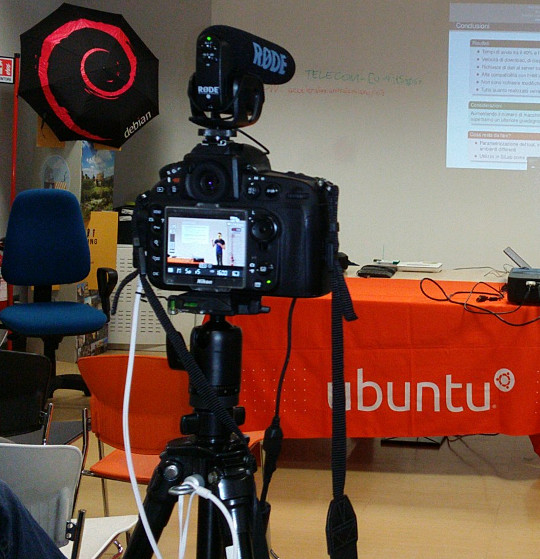
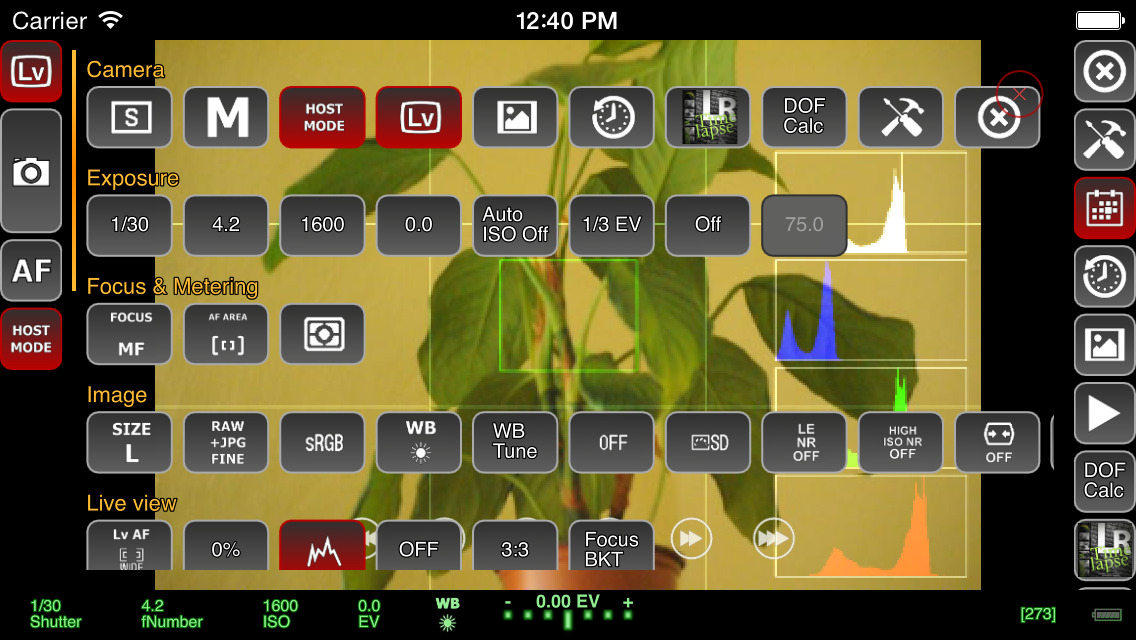
Recording a talk at a free software event with a Nikon D800 on a very basic tripod with Rode VideoMic Pro, headphones (white cable) and external power (black cable) If you want to capture audio with the camera and record it in the video file (discussed in more detail below), you will need to purchase a microphone that mounts on the camera. The built-in microphones on cameras are often quite bad, even on the most expensive cameras. If you are just using the built-in microphone for reference audio (to help with time synchronization when you combine different audio files with the video later) then the built-in microphone may be acceptable. Camera audio is discussed in more detail below. If your camera has a headphone socket, get some headphones for listening to the audio. Make sure you have multiple memory cards. Look carefully at the speed of the memory cards, slow ones are cheaper but they can't keep up with the speed of writing 1080p video. At a minimum, you should aim to buy memory cards that can handle one or two days worth of data for whatever it is you do. A tripod is essential for most types of video. If you use a particularly heavy camera or lens or if you are outdoors and it may be windy you will need a heavier tripod for stability. For video, it is very useful to have a tripod with a handle for panning left and right but if the camera will be stationary for the whole recording then the handle is not essential. Carrying at least one spare battery is another smart move. On one visit to the Inca Trail in Peru, we observed another member of our group hiking up and down the Andes with a brand new DSLR that they couldn't use because the battery was flat. For extended periods of recording, batteries will not be sufficient and you will need to purchase a mains power supply (PSU). These are available for most types of DSLR and video camera. The camera vendors typically design cameras with unusual power sockets so that you can only use a very specific and heavily overpriced PSU from the same company. Don't forget a surge protector too. There are various smartphone apps that allow you to remotely control the camera from the screen of your phone, such as the qDslrDashboard app. These often give a better preview than the screen built-in to the camera and may even allow you to use the touch screen to focus more quickly on a specific part of the picture. A regular USB cable is not suitable for this type of app, you need to buy a USB On-The-Go (OTG) cable.
Screenshot of qDslrDashboard app on a smartphone, controlling a DSLR camera If you plan to copy the video from the camera to a computer at the event, you will need to make sure you have a fast memory card reader. The memory card readers in some laptops are quite slow and others can be quite fast so you may not need to buy an extra card reader. Camera audio Most cameras, including DSLRs, have a built-in microphone and a socket for connecting an external microphone. The built-in microphones obtain very poor quality sound. For many events, it is much better to have independent microphones, such as a lapel microphone attached to a smartphone or wireless transmitter. Those solutions are described in part one of this blog series. Nonetheless, there are still some benefits of capturing audio in the camera. The biggest benefit is the time synchronization: if you have audio recordings in other devices, you will need to align them with the video using post-production software. If the camera recorded an audio stream too, even if the quality is not very good, you can visualize the waveform on screen and use it to align the other audio recordings much more easily and precisely. If the camera will be very close to the people speaking then it may be acceptable to use a microphone mounted on the camera. This will be convenient for post-production because the audio will be synchronized with the video. It may still not be as good as a lapel microphone though, but the quality of these camera-mounted microphones is still far higher than the built-in microphones. I've been trying the Rode VideoMic Pro, it is definitely better than recording with the built-in microphone on the camera and also better than the built-in microphone on my phone. One problem that most people encounter is the sound of the lens autofocus mechanism being detected by the microphone. This occurs with both the built-in microphone and any other microphone you mount on the camera. A microphone mounted on top of the camera doesn't detect this noise with the same intensity as the built-in microphone but it is still present in the recordings. If using a camera-mounted microphone to detect the audio from an audience, you may need to have an omnidirectional microphone. Many camera-mounted microphones are directional and will not detect very much sound from the sides or behind the camera. When using any type of external microphone with the camera, it is recommend to disable automatic gain control (AGC) in the camera settings and then manually adjust the microphone sensitivity/volume level. Use headphones A final word on audio - most good cameras have an audio output socket. Connect headphones and wear them, to make sure you are always capturing audio. Otherwise, if the microphone's battery goes flat or if a wireless microphone goes out of range you may not notice. Choosing a lens The more light you get, the better. Bigger and more expensive lenses allow more light into the camera. Many of the normal lenses sold with a DSLR camera are acceptable but if it is a special occasion you may want to rent a more expensive lens for the day. If you already have a lens, it is a very good idea to test it in conditions similar to those you expect for the event you want to record. Recording duration limits Most DSLR cameras with video capability impose a 30 minute maximum recording duration This is basically the result of a friendly arrangement between movie studios and politicians to charge an extra tax on video recording technology and potentially make the movie studio bosses richer, supposedly justified by the fact that a tiny but exaggerated number of people use their cameras to record movies at the cinema. As a consequence, most DSLR manufacturers limit the duration of video recording so their product won't be subject to the tax, ensuring the retail price is lower and more attractive. On top of this, many DSLR cameras also have a 4GB file size limit if they use the FAT filesystem. Recording 1080p video at a high frame rate may hit the file size limit in 10 minutes, well before you encounter the 30 minute maximum recording duration. To deal with the file size issue, you can record at 720p instead of 1080p and use the frame rate 24fps. For events longer than 30 minutes or where you really want 1080p or a higher frame rate, there are some other options you can consider:
  • Buy or rent a proper video camera instead of using a DSLR camera
  • Using multiple cameras that can stop and be restarted at different times.
  • Manually stopping and restarting the camera if there are breaks in the event where it is safe to do so.
  • Use an app to control the camera and program it to immediately restart the recording each time it stops
  • Extract the raw output from the camera's HDMI socket and record into some other device or computer. There are several purpose-built devices
    that can be used this way with an embedded SSD for storage.
  • There are also some people distributing unofficial/alternative firmware images that remove the artificial 30 minute recording limit.
Camera settings There are many online tutorials and demonstration videos on YouTube that will help you optimize the camera settings for video. You may have already made recordings using the automatic mode. Adjusting some or all of the settings manually may help you create a more optimal recording. You will need to spend some time familiarizing yourself with the settings first. The first thing to check is white balance. This tells the camera the type of lighting in the location. If you set this incorrectly then the colours will be distorted. Many cameras have the ability to automatically set the white balance. For video, you may be able to change one or more settings that control the recording quality. These settings control the file compression ratio and image size. Typical image size settings are 720p and 1080p. Compression ratio may be controlled by a high/medium/low quality setting. Choosing the highest quality and biggest picture requires more space on the memory card and also means you reach the 4GB file size limit more quickly. A higher quality setting also implies a faster memory card is required, because the rate of megabytes per second written to the memory card is higher. Next you need to think about the frame rate. Events that involve fast moving subjects, such as sports, typically benefit from a higher frame rate. For other events it is quite acceptable to use 24 frames per second (fps). Higher frame rates also imply bigger file size and a requirement for a faster memory card. Once you have decided on the frame rate, the next thing to do is set the shutter speed. Use a shutter speed that is double the frame rate. For example, if using 24fps or 25fps, use a 1/50 shutter speed. The final two settings you need to adjust are the ISO and aperture. Set these based on the lighting conditions and extent to which the subjects are moving. For example, if the setting is dark or if you are trying to record fast moving subjects like athletes, vehicles or animals, use an ISO value of 800 or higher. Once you have chosen ISO, adjust the aperture to ensure the picture is sufficiently illuminated. Aperture also has a significant impact on the depth of field. Operating the camera: zoom and focus Many people use zoom lenses. It is not always necessary to change the zoom while recording a video, you can use software to zoom in and out on individual parts of the picture when editing it in post-production. If you do change the zoom while recording, it may be more difficult to maintain focus. Almost all lenses support manual focus (turning the focus ring by hand) and many support automatic focus. When shooting photographs with a DSLR, the mirror is down and the camera can use dedicated sensors for focus and light sensing. When shooting video, the mirror is up and the camera can not use the same focus sensors that are used in photography. Video recording uses a digital focussing algorithm based on contrast in the picture. If you take a lot of photos you are probably quite accustomed to the fast and precise autofocus for photography and you will notice that keeping a video in focus is more challenging. As mentioned already, one of the first things you can do to keep focus simple is to avoid zooming while recording. Record in a higher resolution than you require and then zoom with software later. Some people record using 4k resolution even when they only want to produce a 720p video, as they can digitally zoom in to different parts of the 4k recording without losing detail. If the subject is very stationary (people sitting at a desk for an interview is a typical example), you may be able to set the camera to manual focus and not change it at all while recording. If you choose to enable autofocus while recording, any built-in camera microphone or microphone mounted on the camera is likely to detect sounds from the motorized focus system. Ultimately, the autofocus mechanism is not accurate for all subjects and you may be unable to stop them moving around so you will need to change the focus manually while recording. It requires some practice to be able to do this quickly without overshooting the right focus. To make life more tricky, Nikon and Canon focus rings rotate in the opposite direction, so if you are proficient using one brand you may feel awkward if you ever have to use the other. A good way to practice this skill is to practice while in the car or on the train, pointing at different subjects outside the window and trying to stay in focus as you move from one subject to the next. Make a trial run Many events, from weddings right up to the Olympic Games opening ceremony, have a trial run the day before. One reason for that is to test the locations and settings of all the recording and broadcasting equipment. If a trial run isn't possible for your event, you may find some similar event to practice recording and test your equipment. For example, if you are planning to record a wedding, you could try and record a Sunday mass in the same church. Backup and duplicate the recordings before leaving the event If you only have one copy of the recordings and the equipment is stolen or damaged you may be very disappointed. Before your event, make a plan to duplicate the raw audio and video recordings so that several people can take copies away with them. Decide in advance who will be responsible for this, ensure there will be several portable hard disks and estimate how much time it will take to prepare the copies and factor this into the schedule. Conclusion All the products described can be easily purchased from online retailers. You may not need every accessory that is mentioned as it depends on the type of event you record. The total cost of buying or renting the necessary accessories may be as much as the cost of the camera itself so if you are new to this you may need to think carefully about making a budget with a spreadsheet to do it correctly. Becoming familiar with the camera controls and practicing the techniques for manual focus and zoom can take weeks or months. If you enjoy photography this can be time well spent but if you don't enjoy it then you may not want to commit the time necessary to make good quality video. Don't rule out options like renting equipment instead of buying it or crowdsourcing, asking several participants or friends to help make recordings with their own equipment. For many events, audio is far more indispensable than video and as emphasizing at the beginning of this article, it is recommended that you should be one hundred percent confident in your strategy for recording audio before you start planning to record video.

10 August 2015

Norbert Preining: Updating my dual-boot Linux laptop to Windows 10

Ok, I have to admit, I still have Windows on my laptop. I do about 90% of my work on the Linux (Debian) side, but there are some applications where I don t have an alternative: Word (yes, I know LibreOffice, but it is still not capable enough to handle Japanese forms without breaking the layout), and much more, QuoVadis, a GPS and digital map program where I do have my whole history of moutaineering and bundled knowledge as mountain guide. So for the time being, I cannot switch away from Windows. Not to mention some of the Steam games that only work on Windows, unfortunately. So the other day I went ahead and accepted the upgrade offer and let Windows do its part win10 The machine is a Sony Vaio I have reported already many times, see the posts of the tag Vaio. All in all, it was a very smooth upgrade, to my complete suprise: On the other hand, as it is well documented, Windows 10 is a beast when it comes to collecting all kinds of data. There are a lot of settings to be turned off just to make sure not all your details down to your shoe size and the x-ray of your grandparents are transmitted to Microsoft. I used the German Computer News page heise where I found this article. All in all for now I am happy with the current situation, I could boot back into my comfy Linux and know that if it is necessary, I can switch to Windows (10) for some dirty work.

Mirco Bauer: Smuxi 1.0 "Finally" Release

And here we go again! We're proud to announce the new version of Smuxi, release 1.0 "Finally". During the development, 20 bug reports and 10 feature requests in 285 commits were worked on.

Finally 1.0 Smuxi is celebrating its 10th anniversary! 10 years ago, Mirco Bauer made the first commit to the Smuxi source code repository and is still very committed to it. He started the Gnosmirc project in 2005 when the only way a 24/7 "always-on" experience with IRC meant you had to use a console based IRC client like bitchx, irssi or epic combined with screen and SSH. This looks very practical at first and is a powerful Unix-ish way of accomplishing that job, but it has the big downside that it doesn't integrate with a desktop environment like GNOME. A bit later the Gnosmirc project was renamed to Smuxi when the new code architecture allowed other frontend implementations besides the GNOME one. The ncurses/STFL based text frontend was later implemented and is considered stable and useful enough for day to day use, but still has some rough edges. WinForms and WPF frontends also exist but need more work to reach a usable state. At this point Smuxi 1.0 contains all features that we could have imagined and even goes beyond with very advanced features like message patterns or language agnostic scripting.

Changes since Smuxi 0.11

Message Persistence One of the biggest drawbacks of the IRC protocol ever was that messages can't be retrieved from the IRC server because the IRC server is simply relaying messages to the connected clients. So, if an IRC client is freshly started and connects it starts to receive new messages, but all message you had received before are no longer available. This always made IRC in a way "volatile" unlike other communication systems like email where messages are relayed and stored on the client side. One common approach for IRC clients is to store log files in a text file. This is a simple feature and gives the user the possibility to read older conversations. Smuxi also supports text file logging like other IRC clients but it has a big user experience drawback as you need to open the file from the disk outside of the IRC client. In Smuxi 1.0 messages sent and received are now stored on the disk in a way they can automatically be retrieved/loaded when you restart Smuxi. It is like you have never closed Smuxi! This feature was already available in Smuxi for some time as a technical preview and it used the Db4o object database, but we were never happy about the performance neither with the stability so it always stayed an optional feature you need to enable. This year we tried a new message buffer backend using the famous SQLite database and it works much faster and stable as a rock. So finally we can enable this feature by default because it just works and enhanced your experience. We hope you enjoy it. Documentation of how you can change Smuxi message buffer backend and behavior can be found here. For instructions how to convert your existing db4o history to SQLite can be found in the "smuxi-message-buffer tool" section.

User Interface Enhancements
  • Synced message markers: the position of of the seen/unseen messages marker is pushed to the smuxi-server and remembered when the frontend reconnects. (Sebastian Poeplau)
  • Persistent message markers: the message marker position is also remembered across Smuxi(-server) restarts.
  • Message Counter: in addition to the highlight counter next to a chat new/unseen messages are also counted. This makes it easy to identify chats with much traffic.
  • Single application instance support. If you start Smuxi again from the menu it will bring the existing instance into the foreground. This makes the Ubuntu Messaging Menu much nicer.
  • The command/message entry is alignment with the messages. (Lex Berezhny)

Text Frontend Enhancements
  • The console background color can now be configured using: /config set STFL/Interface/TerminalBackgroundColor = #000000 (Ond ej Ho ek)
  • The text color contrast if nicks with the background is now ensured (Ond ej Ho ek) #1033
  • Messages containing images will not be skipped but their alternative text is shown instead (Ond ej Ho ek) #1035

New smuxi-message-buffer tool This is a new commandline tool that allows you to convert and export the message history of Smuxi message buffer files. This can be used to convert your existing Db4o history to SQLite like this for example:
for DB_DB4O in $HOME/.local/share/smuxi/buffers/*/*/*/*.db4o; do
    DB_SQLITE=$ DB_DB4O/.db4o/.sqlite3 
    smuxi-message-buffer convert $DB_DB4O $DB_SQLITE
done
Smuxi shouldn't be running when using this tool.

Scripting Enhancements

New Hook Points Smuxi 1.0 supports with the following new hook points:
  • engine/protocol-manager/on-presence-status-changed/ This hook point is raised when the presence status of a protocol manager changes. This happens for example when an IRC connection toggles the away state.
  • engine/session/on-event-message/ This hook point raises event messages that usually begin with "-!-". This can be useful to track state changes that are shown as a message without having a dedicated hook point for it.
  • engine/session/command-$cmd/ This hook point is raised on the engine side for commands, e.g. /some_command that isn't handled by the frontend or engine built-in commands. This is useful for commands that should be available for all frontends and isn't specific to the frontend environment.

New Plugins The following new plugins are supported by Smuxi 1.0:
  • topic-diff: Shows the word differences of the topic after topic changes. (meebey)
  • away-nick: Automatically appends and removes $AWAY_SUFFIX to/from the nick name when you go away using the /away command or by disconnecting all frontends from the smuxi-server. (meebey)
  • system-info: Shows system info. Includes system kernel version, distro name, and CPU vendor information. (AK0)
  • now-playing: This plugin is not new but was rewritten in Python to get rid of the spaghetti code monster which was written in Bash. (jamesaxl)

IRC Enhancements
  • NICKSERV support Notices from Nick/ChanServ are no longer shown on all channels as they like to send greeting messages and other spam which is annoying to see on all channels. #868
  • Automatic rejoin of channels protected with a key works as expected again
  • Connecting to irc.gitter.im is now supported. Gitter's IRCd implementation has a bug in the IRC protocol which is now tolerated.

Twitter Enhancements
  • The /search command shows tweets as live stream
  • Added /delete, /favorite and /unfavorite commands

Behind the Scenes
  • Re-licensed smuxi-common from GPLv2 to MIT/X11

Contributors Contributors to this release are the following people:
  • Mirco Bauer (199 commits)
  • Carlos Mart n Nieto (15 commits)
  • Andr s G. Aragoneses (14 commits)
  • Piotr Dr g (12 commits)
  • Ond ej Ho ek (11 commits)
  • Oliver Schneider (5 commits)
  • Calvin B (4 commits)
  • Victor Seva (3 commits)
  • Will Johansson (2 commits)
  • Sebastian Poeplau (2 commits)
  • Julian Taylor (2 commits)
  • James Axl (2 commits)
  • Daniel Mustieles (2 commits)
  • Christopher James Halse Rogers (2 commits)
  • . Uzun (1 commit)
  • Lex Berezhny (1 commit)
  • Kalle Kaitala (1 commit)
  • Jordi Mas (1 commit)
  • Joe Hansen (1 commit)
  • Jimmie Elvenmark (1 commit)
  • Dimitris Spingos (1 commit)
  • Dean Lee (1 commit)
  • Cl ment Bourgeois (1 commit)
  • Carlos Hernandez (1 commit)
Thank you very much for your contributions to Smuxi! Want this? Go here and grab it right now!

Posted Sun Aug 9 17:48:18 2015

8 August 2015

Matthew Garrett: Difficult social problems are still difficult problems

After less than a week of complaints, the TODO group have decided to pause development of their code of conduct. This seems to have been triggered by the public response to the changes I talked about here, which TODO appear to have been completely unprepared for.

While disappointing in a bunch of ways, this is probably the correct decision. TODO stumbled into this space with a poor understanding of the problems that they were trying to solve. Nikki Murray pointed out that the initial draft lacked several of the key components that help ensure less privileged groups can feel that their concerns are taken seriously. This was mostly rectified last week, but nobody involved appeared to be willing to stand behind those changes in a convincing way. This wasn't helped by almost all of this appearing to land on Github's plate, with the rest of the TODO group largely missing in action[1]. Where were Google in this? Yahoo? Facebook? Left facing an angry mob with nobody willing to make explicit statements of support, it's unsurprising that Github would try to back away from the situation.

But that doesn't remove their blame for being in the situation in the first place. The statement claims
We are consulting with stakeholders, community leaders, and legal professionals, which is great. It's also far too late. If an industry body wrote a new kernel from scratch and deployed it without any external review, then discovered that it didn't work and only then consulted any of the existing experts in the field, we'd never take them seriously again. But when an industry body turns up with a new social policy, fucks up spectacularly and then goes back to consult experts, it's expected that we give them a pass.

Why? Because we don't perceive social problems as difficult problems, and we assume that anybody can solve them by simply sitting down and talking for a few hours. When we find out that we've screwed up we throw our hands in the air and admit that this is all more difficult than we imagined, and we give up. We ignore the lessons that people have learned in the past. We ignore the existing work that's been done in the field. We ignore the people who work full time on helping solve these problems.

We wouldn't let an industry body with no experience of engineering build a bridge. We need to accept that social problems are outside our realm of expertise and defer to the people who are experts.

[1] The repository history shows the majority of substantive changes were from Github, with the initial work appearing to be mostly from Twitter.

comment count unavailable comments

7 August 2015

Christoph Egger: Systemd pitfalls

logind hangs If you just updated systemd and ssh to that host seems to hang, that's just a known Bug (Debian Bug). Don't panic. Wait for the logind timeout and restart logind. restart and stop;start One thing that confused me several times and still confuses people is systemctl restart doing more than systemctl stop ; systemctl start. You will notice the difference once you have a failed service. A restart will try to start the service again. Both stop and start however will just ignore it. Rumors have it this has changed post jessie however. sysvinit-wrapped services and stop While there are certainly bugs with sysvinit services in general (I found myself several times without a local resolver as unbound failed to be started, haven't managed to debug further), the stop behavior of wrapped services is just broken. systemctl stop will block until the sysv initscript finished. It will even note the result of the action in its state. However systemctl will return with exitcode 0 and not output anything on stdout/stderr. This has been reported as Debian Bug. zsh helper I found the following zshrc snipped quite helpful in dealing with non-reported systemctl failures. On root shells it will display a list of failed services as part of the prompt. This will give proper feedback whether your systemctl stop failed, it will give feedback if you still have type=simple services and if the sysv-init script or wrapper is broken.
precmd ()  
    if [[ $UID == 0 && $+commands[systemctl] != 0 ]]
    then
      use_systemd=true
      systemd_failed=" systemctl --state=failed   grep failed   cut -d \  -f 2   tr '\n' ' ' "
    fi
 
if [[ $UID == 0 && $+commands[systemctl] != 0 ]]
then
  PROMPT=$'% $fg[red]>>  $systemd_failed$reset_color% \n'
else
  PROMPT=""
fi
PROMPT+=whateveryourpromptis
zsh completion Speaking of zsh, there's one problem that bothers me a lot and I don't have any solution for. Tab-completing the service name for service is blazing fast. Tab-completing the service name for systemctl restart takes ages. People traced down to truckloads of dbus communication for the completion but no further fix is known (to me). type=simple services As described in length by Lucas Nussbaum type=simple services are actively harmful. Proper type=forking daemons are strictly superior (they provide feedback of finished initialization and success thereof) and type=notify services are so simple there's no excuse for not using them even for private one-off hacks. Even if you're language doesn't provide libsystemd-daemon bindings:
(defun sd-notify (event-string)
  (let ((socket (make-instance 'sb-bsd-sockets:local-socket :type :datagram))
        (name (posix-getenv "NOTIFY_SOCKET"))
        (bufferlen (length event-string)))
    (when name
      (sb-bsd-sockets:socket-connect socket name)
      (sb-bsd-sockets:socket-send socket event-string bufferlen))))
This is a stable API guaranteed to not break in the future and implemented in less than ten lines of code with just basic socket functions. And if your language has support it becomes actually trivial:
    try:
        import systemd
        systemd.daemon.notify("READY=1")
    except ImportError:
        pass
Note that in both cases there is no drawback at all on systemd-free setups. It has the overhead of checking the process' environment for NOTIFY_SOCKET or for the systemd package and behaves like a simple service otherwise. Actually the idea of separating the technical aspect (daemonizing) from the semantic aspect of signalizing "initialization finished, everything's fine" is a pretty good idea and hopefully has the potential to reduce the number of services signalizing the "everything's fine" too early. It could even be ported to non-systemd init systems easily given the API.

Christoph Egger: Systemd pitfalls

logind hangs If you just updated systemd and ssh to that host seems to hang, that's just a known Bug (Debian Bug #770135). Don't panic. Wait for the logind timeout and restart logind. restart and stop;start One thing that confused me several times and still confuses people is systemctl restart doing more than systemctl stop ; systemctl start. You will notice the difference once you have a failed service. A restart will try to start the service again. Both stop and start however will just ignore it. Rumors have it this has changed post jessie however. sysvinit-wrapped services and stop While there are certainly bugs with sysvinit services in general (I found myself several times without a local resolver as unbound failed to be started, haven't managed to debug further), the stop behavior of wrapped services is just broken. systemctl stop will block until the sysv initscript finished. It will even note the result of the action in its state. However systemctl will return with exitcode 0 and not output anything on stdout/stderr. This has been reported as Debian Bug #792045. zsh helper I found the following zshrc snipped quite helpful in dealing with non-reported systemctl failures. On root shells it will display a list of failed services as part of the prompt. This will give proper feedback whether your systemctl stop failed, it will give feedback if you still have type=simple services and if the sysv-init script or wrapper is broken.
precmd ()  
    if [[ $UID == 0 && $+commands[systemctl] != 0 ]]
    then
      use_systemd=true
      systemd_failed=" systemctl --state=failed   grep failed   cut -d \  -f 2   tr '\n' ' ' "
    fi
 
if [[ $UID == 0 && $+commands[systemctl] != 0 ]]
then
  PROMPT=$'% $fg[red]>>  $systemd_failed$reset_color% \n'
else
  PROMPT=""
fi
PROMPT+=whateveryourpromptis
zsh completion Speaking of zsh, there's one problem that bothers me a lot and I don't have any solution for. Tab-completing the service name for service is blazing fast. Tab-completing the service name for systemctl restart takes ages. People traced down to truckloads of dbus communication for the completion but no further fix is known (to me). type=simple services As described in length by Lucas Nussbaum type=simple services are actively harmful. Proper type=forking daemons are strictly superior (they provide feedback of finished initialization and success thereof) and type=notify services are so simple there's no excuse for not using them even for private one-off hacks. Even if you're language doesn't provide libsystemd-daemon bindings:
(defun sd-notify (event-string)
  (let ((socket (make-instance 'sb-bsd-sockets:local-socket :type :datagram))
        (name (posix-getenv "NOTIFY_SOCKET"))
        (bufferlen (length event-string)))
    (when name
      (sb-bsd-sockets:socket-connect socket name)
      (sb-bsd-sockets:socket-send socket event-string bufferlen))))
This is a stable API guaranteed to not break in the future and implemented in less than ten lines of code with just basic socket functions. And if your language has support it becomes actually trivial:
    try:
        import systemd
        systemd.daemon.notify("READY=1")
    except ImportError:
        pass
Note that in both cases there is no drawback at all on systemd-free setups. It has the overhead of checking the process' environment for NOTIFY_SOCKET or for the systemd package and behaves like a simple service otherwise. Actually the idea of separating the technical aspect (daemonizing) from the semantic aspect of signalizing "initialization finished, everything's fine" is a pretty good idea and hopefully has the potential to reduce the number of services signalizing the "everything's fine" too early. It could even be ported to non-systemd init systems easily given the API.

John Goerzen: Detailed Smart Card Cryptographic Token Security Guide

After my first post about smartcards under Linux, I thought I would share some information I ve been gathering. This post is already huge, so I am not going to dive into much specific commands, but I am linking to many sources with detailed instructions. I ve reviewed several types of cards. For this review, I will focus on the OpenPGP card and the Yubikey NEO, since the Cardomatic Smartcard-HSM is not supported by the gpg version in Jessie. Both cards are produced by people with strong support for the Free Software ecosystem and have strong cross-platform support with source code. OpenPGP card: Basics with GnuPG The OpenPGP card is well-known as one of the first smart cards to work well on Linux. It is a single-application card focused on use with GPG. Generally speaking, by the way, you want GPG2 for use with smartcards. Basically, this card contains three slots: decryption, signing, and authentication slots. The concept is that the private key portions of the keys used for these items are stored only on the card, can never be extracted from the card, and the cryptographic operations are performed on the card. There is more information in my original post. In a fairly rare move for smartcards, this card supports 4096-byte RSA keys; most are restricted to 2048-byte keys. The FSF Europe hands these out to people and has a lot of good information about them online, including some HOWTOs. The official GnuPG smart card howto is 10 years old, and although it has some good background, I d suggest using the FSFE instructions instead. As you ll see in a bit, most of this information also pertains to the OpenPGP mode of the Yubikey Neo. OpenPGP card: Other uses Of course, this is already pretty great to enhance your GPG security, but there s a lot more that you can do with this card to add two-factor authentication (2FA) to a lot of other areas. Here are some pointers: OpenPGP card: remote authentication with ssh You can store the private part of your ssh key on the card. Traditionally, this was only done by using the ssh agent emulation mode of gnupg-agent. This is still possible, of course. Now, however, the OpenSC project now supports the OpenPGP card as a PKCS#11 and PKCS#15 card, which means it works natively with ssh-agent as well. Try just ssh-add -s /usr/lib/x86_64-linux-gnu/pkcs11/opensc-pkcs11.so if you ve put a key in the auth slot with GPG. ssh-add -L will list its fingerprint for insertion into authorized_keys. Very simple! As an aside: Comments that you need scute for PKCS#11 support are now outdated. I do not recommend scute. It is quite buggy. OpenPGP card: local authentication with PAM You can authenticate logins to a local machine by using the card with libpam-poldi here are some instructions. Between the use with ssh and the use with PAM, we have now covered 2FA for both local and remote use in Unix environments. OpenPGP card: use on Windows Let s move on to Windows environments. The standard suggestion here seems to be the mysmartlogon OpenPGP mini-driver. It works with some sort of Windows CA system, or the local accounts using EIDAuthenticate. I have not yet tried this. OpenPGP card: Use with X.509 or Windows Active Directory You can use the card in X.509 mode via these gpgsm instructions, which apparently also work with Windows Active Directory in some fashion. You can also use it with web browsers to present a certificate from a client for client authentication. For example, here are OpenSC instructions for Firefox. OpenPGP card: Use with OpenVPN Via the PKCS#11 mode, this card should be usable to authenticate a client to OpenVPN. See the official OpenVPN HOWTO or these other instructions for more. OpenPGP card: a note on PKCS#11 and PKCS#15 support You ll want to install the opensc-pkcs11 package, and then give the path /usr/lib/x86_64-linux-gnu/pkcs11/opensc-pkcs11.so whenever something needs the PKCS#11 library. There seem to be some locking/contention issues between GPG2 and OpenSC, however. Usually killing pcscd and scdaemon will resolve this. I would recommend doing manipulation operations (setting PINs, generating or uploading keys, etc.) via GPG2 only. Use the PKCS#11 tools only to access. OpenPGP card: further reading Kernel Concepts also has some nice readers; you can get this card in a small USB form-factor by getting the mini-card and the Gemalto reader. Yubikey Neo Introduction The Yubikey Neo is a fascinating device. It is a small USB and NFC device, a little smaller than your average USB drive. It is a multi-application device that actually has six distinct modes: There is a ton to digest with this device. Yubikey Neo Basics By default, the Yubikey Neo is locked to only a subset of its features. Using the yubikey-personalization tool (you ll need the version in stretch; jessie is too old), you can use ykpersonalize -m86 to unlock the full possibilities of the card. Run that command, then unplug and replug the device. It will present itself as a USB keyboard as well as a PC/SC-compatible card reader. It has a capacitive button, which is used to have it generate keystrokes to input validation information for HOTP or HMAC validation. It has two slots that can be configured with HMAC and HOTP; a short button press selects the default slot #1 and a long press selects slot #2. But before we get into that, let s step back at some basics. opensc-tool list-algorithms claims this card supports RSA with 1024, 2048, and 3072 sizes, and EC with 256 and 384-bit sizes. I haven t personally verified anything other than RSA-2048 though. Yubikey Neo: OpenPGP support In this mode, the card is mostly compatible with the physical OpenPGP card. I say mostly because there are a few protocol differences I ll get into later. It is also limited to 2048-byte keys. Support for this is built into GnuPG and the GnuPG features described above all work fine. In this mode, it uses firmware from the Yubico fork of the JavaCard OpenPGP Card applet. There are Yubico-specific tutorials available, but again, most of the general GPG stuff applies. You can use gnupg-agent to use the card with SSH as before. However, due to some incompatibilities, the OpenPGP applet on this card cannot be used as a PKCS#11 card with either scute or OpenSC. That is not exactly a huge problem, however, as the card has another applet (PIV) that is compatible with OpenSC and so this still provides an avenue for SSH, OpenVPN, Mozilla, etc. It should be noted that the OpenPGP applet on this card can also be used with NFC on Android with the OpenKeychain app. Together with pass (or its Windows, Mac, or phone ports), this makes a nicely secure system for storing passwords. Yubikey Neo: PKCS#11 with the PIV applet There is also support for the PIV standard on the Yubikey Neo. This is supported by default on Linux (via OpenSC) and Windows and provides a PKCS#11-compabible store. It should, therefore, be compatible with ssh-agent, OpenVPN, Active Directory, and all the other OpenPGP card features described above. The only difference is that it uses storage separate from the OpenPGP applet. You will need one of the Yubico PIV tools to configure the key for it; in Debian, the yubico-piv-tool from stretch does this. Here are some instructions on using the Yubikey Neo in PIV mode: A final note: for security, it s important to change the management key and PINs before deploying the PIV mode. I couldn t get this to work with Firefox, but it worked pretty much everywhere else. Yubikey Neo: HOTP authentication This is the default mode for your Yubikey; all other modes require enabling with ykpersonalize. In this mode, a 128-bit AES key stored on the Yubikey is used to generate one-time passwords (OTP). (This key was shared in advance with the authentication server.) A typical pattern would be for three prompts: username, password, and Yubikey HOTP. The user clicks in the Yubikey HOTP field, touches the Yubikey, and their one-time token is pasted in. In the background, the service being authenticated to contacts an authentication server. This authentication server can be either your own (there are several open source implementations in Debian) or the free Yubicloud. Either way, the server decrypts the encrypted part of the OTP, performs validity checks (making sure that the counter is larger than any counter it s seen before, etc) and returns success or failure back to the service demanding authentication. The first few characters of the posted auth contain the unencrypted key ID, and thus it can also be used to provide username if desired. Yubico has provided quite a few integrations and libraries for this mode. A few highlights: You can also find some details on the OTP mode. Here s another writeup. This mode is simple to implement, but it has a few downsides. One is that it is specific to the Yubico line of products, and thus has a vendor lock-in factor. Another is the dependence on the authentication server; this creates a potential single point of failure and can be undesireable in some circumtances. Yubikey Neo: OATH and HOTP and TOTP First, a quick note: OATH and OAuth are not the same. OATH is an authentication protocol, and OAuth is an authorization protocol. Now then Like Yubikey HOTP, OATH (both HOTP and TOTP) modes rely on a pre-shared key. (See details in the Yubico article.) Let s talk about TOTP first. With TOTP, there is a pre-shared secret with each service. Each time you authenticate to that service, your TOTP generator combines the timestamp with the shared secret using a HMAC algorithm and produces a OTP that changes every 30 seconds. Google Authenticator is a common example of this protocol, and this is a drop-in replacement for it. Gandi has a nice description of it that includes links to software-only solutions on various platforms as well. With the Yubikey, the shared secrets are stored on the card and processed within it. You cannot extract the shared secret from the Yubikey. Of course, if someone obtains physical access to your Yubikey they could use the shared secret stored on it, but there is no way they can steal the shared secret via software, even by compromising your PC or phone. Since the Yubikey does not have a built-in clock, TOTP operations cannot be completed solely on the card. You can use a PC-based app or the Android application (Play store link) with NFC to store secrets on the device and generate your TOTP codes. Command-line users can also use the yubikey-totp tool in the python-yubico package. OATH can also use HOTP. With HOTP, an authentication counter is used instead of a clock. This means that HOTP passwords can be generated entirely within the Yubikey. You can use ykpersonalize to configure either slot 1 or 2 for this mode, but one downside is that it can really only be used with one service per slot. OATH support is all over the place; for instance, there s libpam-oath from the OATH toolkit for Linux platforms. (Some more instructions on this exist.) Note: There is another tool from Yubico (not in Debian) that can apparently store multiple TOTP and HOTP codes in the Yubikey, although ykpersonalize and other documentation cannot. It is therefore unclear to me if multiple HOTP codes are supported, and how.. Yubikey Neo: Challenge-Response Mode This can be useful for doing offline authentication, and is similar to OATH-HOTP in a sense. There is a shared secret to start with, and the service trying to authenticate sends a challenge to the token, which must supply an appropriate response. This makes it only suitable for local authentication, but means it can be done fairly automatically and optionally does not even require a button press. To muddy the waters a bit, it supports both Yubikey OTP and HMAC-SHA1 challenge-response modes. I do not really know the difference. However, it is worth noting that libpam-yubico works with HMAC-SHA1 mode. This makes it suitable, for instance, for logon passwords. Yubikey Neo: U2F U2F is a new protocol for web-based apps. Yubico has some information, but since it is only supported in Chrome, it is not of interest to me right now. Yubikey Neo: Further resources Yubico has a lot of documentation, and in particular a technical manual that is actually fairly detailed. Closing comments Do not think a hardware security token is a panacea. It is best used as part of a multi-factor authentication system; you don t want a lost token itself to lead to a breach, just as you don t want a compromised password due to a keylogger to lead to a breach. These things won t prevent someone that has compromised your PC from abusing your existing ssh session (or even from establishing new ssh sessions from your PC, once you ve unlocked the token with the passphrase). What it will do is prevent them from stealing your ssh private key and using it on a different PC. It won t prevent someone from obtaining a copy of things you decrypt on a PC using the Yubikey, but it will prevent them from decrypting other things that used that private key. Hopefully that makes sense. One also has to consider the security of the hardware. On that point, I am pretty well satisfied with the Yubikey; large parts of it are open source, and they have put a lot of effort into hardening the hardware. It seems pretty much impervious to non-government actors, which is about the best guarantee a person can get about anything these days. I hope this guide has been helpful.

Next.

Previous.