Search Results: "tar"

4 June 2008

Jaldhar Vyas: Skim and KDE 4.x

I seem to be getting asked about this more frequently lately so let me put this out where google can find it. If you've upgraded to KDE 4.x and suddenly found skim is not working do this:

# aptitude install scim-bridge-agent scim-bridge-client-qt4
...and make sure you have the following environment variables set in your .bashrc :

XMODIFIERS=@im=SCIM
QT_IM_MODULE=scim-bridge
For GTK+ apps:

# aptitude install scim-bridge-client-gtk
...and in .bashrc:

GTK_IM_MODULE=scim-bridge
Source .bashrc, restart skim and everything should work again.

3 June 2008

Jeff Bailey: We're home

Yay, we're home. It was nice to be back in Vancouver saying hi to folks, but it's tiring being in different places and seeing everyone in a crammed packed visit. It was the longest I've been back there since our wedding ~6 years ago. There were only a few people on my list that I didn't wind up seeing, which is actually pretty good for a trip.

I had originally said that I was going to keep my pain killers where they were for a few weeks, but I realised that I'd managed a couple of times to forget to take some and lasted 5-6 hours, so I dropped one anyone. It means that the flight home was a little creakier than I'd like, but my "hard" gnome-sudoku time has also dropped from ~45 minutes to ~15 minutes. =)

We got our visa renewed successfully, so no there isn't any stress of whether we're suddenly going to have to move, find new jobs, etc. So here's to the start of a boring (life-wise) 12 months starting now!

I'm back in the office tomorrow. We'll see if my stamina really will hold out for the whole day =)

Clint Adams: Thank you for visiting Hoss, sit back and relax, enjoy the sauce

[Ravioli] Somewhere, probably not in the space between spaces, but somewhere, at this very moment, someone is experiencing distress. He is not keeping this distress clutched tightly inside. He is sharing his distress with others, in the form of a rant, even though no one there has solicited his opinion. He goes on, full steam, disregarding the feeble attempts at participation by those listeners who perhaps feel it polite to acknowledge him. He is not trying to entice anyone to act. He is not trying to troll for arguments. Perhaps he believes himself to be sharing generously his important thoughts. Those hypnotized by his ravings are experiencing a variety of reactions. Some are forced to confront the Truth in his words, and they themselves become distressed as they think about the Unfairness and Injustice created by the actions of others. This distress will cause some of them to wander off elsewhere and help the process cascade by performing rants of their own. Some others will bristle at the Lies and Misrepresentations he tosses out liberally and casually, and they will become distressed as well, and they may suddenly feel motivated to lend their efforts to push a political agenda contrary to the Speaker's. Some are nonplussed. Some become distressed because some self-important fool appears to think he has the right to bother them with his ideas. All this because some asshole decided to throw his weight around when it wasn't and isn't his place. I am not talking about Star Simpson.

Marc 'Zugschlus' Haber: Serial Console Server for the Poor I

The serial port is still the way to access network components out of band. It is slow, but reliable, and remarkably well standardized. It does not have technical whiz-bangs that can fail when one needs things to just work. That makes it the natural way to access critical infrastructure and still being sure that this access vector still works when most other things are down. Every communication link has two sides, so there is a market for devices with a network link and a bigger number of serial ports to connect the actual devices to. Commercial vendors have a broad choice of serial console servers. Most of them, especially the small products with five to ten ports, are quite expensive, so I have been investigating how do build a serial console server with el cheapo hardware. USB comes to mind here, of course.
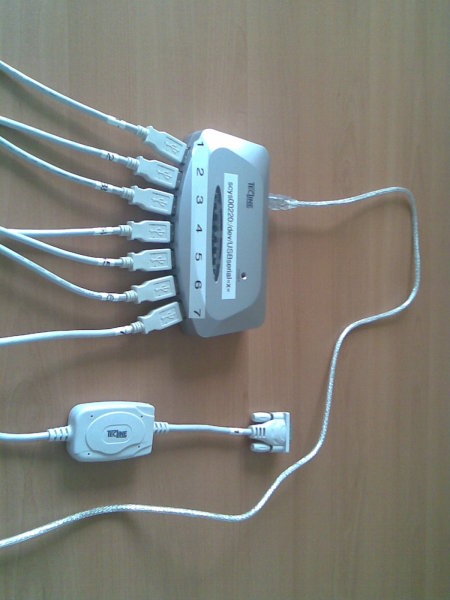
Picture of the fully equipped USB hub
The hardware side is actually quite easy: A seven-port USB hub, and seven USB-to-serial adaptors (using the widely-deployed Prolific PL2303) are easily purchased for well below a hundred Euros, and naively connected. In my test setup, connected to the hp compaq nc8000 that my blog readers should know only too well by now, the hub does not even need to have its power supply connected. The notebook can power the hub and the seven adaptors just fine. When the UMTS card is plugged in, the ttyUSBx device nodes appear in the order of plugging in the devices. When the system is booted, the order is not very predictable, so one needs - again - udev to give predictable device node names. udevinfo is an important tool to obtain the data set of an USB device which is available to match a device and to act appropriately when it is connected. udevinfo sorts the devices into a tree and shows the relationship of the devices, which device is “behind” which other device from the system’s point of view. udevinfo’s output starts at the leaf of the device tree and shows the information for each node up the tree until its root is reached. One pitfall is that one can only match against the leaf and _one_ other node more up the tree. So you cannot do matches like “the pl2303-based device connected to port 3 on hub 2-3 will be designated USBserial3”. If you try this, your rule will silently be ignored. This is a major turn-off in udev’s implementation. I didn’t try it on sid, but etch definetely shows this behavior. So one can only match like “the tty on the USB subsystem connected to port 3 on hub 2-3 will be designated USBserial3”, but that’s probably as good as it’ll get. The cause for my hub having only seven ports clearly shows itself when one looks at the udevinfo outputs of the fully equipped USB hub: The adapters are connected to ports 1, 2, 3, 4.1, 4.2, 4.3 and 4.4. The seven-port hub is actually two four-port hubs in a single case, with the second one connected to the first one’s port 4. This reflects itself, of course, in the udev rules necessary to address the adapters by the hub port they’re plugged in:
SUBSYSTEM==“tty”, SUBSYSTEMS==“usb”, DRIVERS==“usb”, \
   KERNELS==“*-*.1”, \
   SYMLINK=“USBserial1”
SUBSYSTEM==“tty”, SUBSYSTEMS==“usb”, DRIVERS==“usb”, \
   KERNELS==“*-*.2”, \
   SYMLINK=“USBserial2”
SUBSYSTEM==“tty”, SUBSYSTEMS==“usb”, DRIVERS==“usb”, \
   KERNELS==“*-*.3”, \
   SYMLINK=“USBserial3”
SUBSYSTEM==“tty”, SUBSYSTEMS==“usb”, DRIVERS==“usb”, \
   KERNELS==“*-*.4.1”, \
   SYMLINK=“USBserial4”
SUBSYSTEM==“tty”, SUBSYSTEMS==“usb”, DRIVERS==“usb”, \
   KERNELS==“*-*.4.2”, \
   SYMLINK=“USBserial5”
SUBSYSTEM==“tty”, SUBSYSTEMS==“usb”, DRIVERS==“usb”, \
   KERNELS==“*-*.4.3”, \
   SYMLINK=“USBserial6”
SUBSYSTEM==“tty”, SUBSYSTEMS==“usb”, DRIVERS==“usb”, \
   KERNELS==“*-*.4.4”, \
   SYMLINK=“USBserial7”
These rules will only work for a similary structured hub that is directly connected to the notebook. If there are more hubs in between the “final” hub and the host, the address matched against in the KERNELS matches are going to have a different structure. In the test setup, the first two parts of the address needed to be wildcarded since these addresses keep changing when the host is booted or the hub plugged out and in. So I guess that these udev rules are probably going to fail miserably when more hubs and/or USB-to-serial adaptors are connected. But if one does not do too many changes, things are just fine, and it is possible to put numbers on the USB hub ports and be sure that the USB-to-serial adaptor connected to port 4 is going to be /dev/USBserial4 in the host system. I tried plugging in and out the adaptors in random order, unplugged and plugged the hub itself, booted the host, and the relationship between the port and the device node was stable. In the test environment, I only tested one adapter at a time, but all these tests were successful as well. I guess that many more of these adaptors will eventually need a powered USB hub, but with seven adaptors on a single hub, the power from the USB host is sufficient to live without extra power on the hub. And, I guess, there is some hard limit for the number of USB adapters being used, and some soft limit when managing the ports and adapters is going to get harder. But, I think that a site in need of more than, say, sixteen serial ports on the console server can afford a “real” console server from one of the major vendors, which can be accessed via ethernet, UMTS, ISDN and whatever you can think of. This concludes the hardware part of my serial console server for the poor. Tomorrow, I’ll blog about the software side needed on the host to allow the serial ports to be accessed from the network while still being reasonably secure. The next article will involve ssh, /etc/passwd shells, /etc/shells, a small perl script, ser2net and telnet. And, shell escape is the cue word for grey hairs sprouting on my head.

Andrea De Iacovo: Thinking about Vex


I was just hanging around in wnpp when I found this old RFP. Maybe it’s a good idea to package this software: Vex is just a visual XML editor based on the Eclipse platform. The software seems to be good (I have to try it again before I can take a decision) but it’d go in contrib because of its non-free java dependance. In Debian we also have two packages similar to this one (conglomerate and mlview) so I don’t know if Vex should be useful. Any advice/request about this?

Randall Donald: twit twoo twit twoo

I starting trying Twitter. Gotta keep up with the kids these days ;) I'm using the twhirl client based on adobe AIR. I tried spaz but it seemed to push the limits of Linux alpha AIR a bit too much. Twhirl seems quite decent. My twitter URL is here for those who care.


In other news I'll try to get the latest release of the current NVIDIA drivers up tonight.

Jose Luis Rivas Contreras: Using git for package maintenaince

Sometimes I just mixed packages, got debdiffs, re-mixed and finish with a not-so-clean working directory with a lot of diffs applied and not knowing which one was what and who did what. read more

2 June 2008

Russell Coker: Moving a Mail Server

Nowadays it seems that most serious mail servers (IE mail servers suitable for running an ISP) use one file per message. In the old days (before about 1996) almost all Internet email was stored in Mbox format [1]. In Mbox you have a large number of messages in a single file, most users would have a single file with all their mail and the advanced users would have multiple files for storing different categories of mail. A significant problem with Mbox is that it was necessary to read the entire file to determine how many messages were stored, as determining the number of messages was the first thing that was done in a POP connection this caused significant performance problems for POP servers. Even more serious problems occurred when messages were deleted as the Mbox file needed to be compacted. Maildir is a mail storage method developed by Dan Bernstein based around the idea of one file per message [2]. It solves the performance problems of Mbox and also solves some reliability issues (file locking is not needed). It was invented in 1996 and has since become widely used in Unix messaging systems. The Cyrus IMAP server [3] uses a format similar to Maildir. The most significant difference is that the Cyrus data is regarded as being private to the Cyrus system (IE you are not supposed to mess with it) while Maildir is designed to be used by any tools that you wish (EG my Maildir-Bulletin project [4]). One down-side to such formats that many people don’t realise (except at the worst time) is the the difficulty in performing backups. As a test I used LVM volume stored on a RAID-1 array of two 20G 7200rpm IDE disks with 343M of data used (according to “df -h” and 39358 inodes in use (as there were 5000 accounts with maildir storage that means 25,000 directories for the home directories and Maildir directories). So there were 14,358 files. To create a tar file of that (written to /dev/null via dd to avoid tar’s optimisation of /dev/null) took 230.6 seconds, 105MB of data was transferred for a transfer rate of 456KB/s. It seems that tar stores the data in a more space efficient manner than the Ext3 filesystem (105MB vs 343MB). For comparison either of the two disks can deliver 40MB/s for the inner tracks. So it seems that unless the amount of used space is less than 1% of the total disk space it will be faster to transfer a filesystem image. If you have disks that are faster than your network (EG old IDE disks can sustain 40MB/s transfer rates on machines with 100baseT networking and RAID arrays can easily sustain hundreds of megabytes a second on machines with gigabit Ethernet networking) then compression has the potential to improve the speed. Of course the fastest way of transferring such data is to connect the disks to the new machine, this is usually possible when using IDE disks but the vast number of combinations of SCSI bus, disk format, and RAID controller makes it almost impossible on systems with hardware RAID. The first test I made of compression was on a 1GHz Athlon system which could compress (via gzip -1) 100M of data with four seconds of CPU time. This means that compression has the potential to reduce the overall transfer time (the machine in question has 100baseT networking and no realistic option of adding Gig-E). The next test I made was on a 3.2GHz Pentium-4 Xeon system. It compressed 1000M of data in 77 seconds (it didn’t have the same data as the Athlon system so it can’t be directly compared), as 1000M would take something like 10 or 12 seconds to transfer at Gig-E speeds that obviously isn’t a viable option. The gzip -1 compression however compressed the data to 57% of it’s original size, the fact that it compresses so well with gzip -1 suggests to me that there might be a compression method that uses less CPU time while still getting a worth-while amount of compression. If anyone can suggest such a compression method then I would be very interested to try it out. The goal would be a program that can compress 1G of data in significantly less than 10 seconds on a 3.2GHz P4. Without compression the time taken to transfer 500G of data at Gig-E speeds will probably approach two hours. Not a good amount of down-time for a service that runs 24*7. Particularly given that some time would be spent in getting the new machine to actually use the data. As for how to design a system to not have these problems, I’ll write a future post with some ideas for how to alleviate that.

Joey Hess: list

Of recent simple/guilty pleasures.. Wading in the creek and browsing on blooming watercress.
Emergency repair of my broken sandal.
The most yummy cherries from Ken's tree.
Gogol Bordello - Super Taranta!
Lamb stew with pickled lemon and fresh mint.
Fixing my broken sandal right w/ metal reinforcement.
West 10 LDN.
Homemade mango lassi. (At least it's not bacon.)

Fabio Tranchitella: Am I doing it wrong?

When I moved in Hungary in 2006, I started a direct marketing company. In fact, it is the local local branch of an Italian marketing company where I worked since 2003. The company is growing very slowly: we faced a lot of issues with the local market (I'll probably talk about this topic in another post) and only in the last months things started going on the right path.

I still remember the old days when I spent the whole working day alone, in the office, struggling to find the good motivation to work on something which almost everybody around me considered a failure even before starting. I always considered my company as a family, where trust and respect are the glue for the team members. I remember the old times when Aron, my first employee and now business partner, started learning the internals of the direct marketing: he trusted me, sharing with me the duties of starting up the company.  Looking back I feel proud of what we did and more conscious about what we can do in the future.

Growing also means enlarging the team. To say the truth, I didn't expect to have so many problems looking for new people to add to our team: I interviewed a lot of people for our "python programmer" position, spending a lot of time and energy. I know that living in Hungary also means dealing with a local, small, atypical environment, but we offer the possibility to learn and develop IT and non-IT skills in a young, international environment.

We finally found an interesting guy, with PHP experiences but willing to learn Python. He told us that he could leave his job by the 16th of June, and he could work with us part-time till that date. Everything worked fine for three weeks then, suddenly, he disappeared. For one week, his mobile phone rang, but nobody picked up the line. No answer to e-mails, IRC, MSN or any other communication channel. I was worried, I hoped he was fine somewhere. This morning he called Aron telling him that he was sick, he had an issue with his eye. He visited a lot of doctors. He was busy. So busy that he couldn't call us to tell us so. For one week. After he started working with us four weeks ago. What is more annoying is that he didn't appear worried about his position, about our project, about our company. If I'd have quit from my job, I'd be very very worried about my new employer who is looking for me for one whole week without being able to reach me.

We are a growing company based on a small team, without a strict organigram and a horizontal structure. I trust my workmates, I trust them so much to put in their hands my investments, my reputation, my customers. The best team members knows that errors in this phase (eg. lost customers) can influence the company future and their job position

In this case, I gave out trust, but I didn't get back respect. I'm starting to think that being friendly and building a collaborative environment, a horizontal structure is not helping but damaging the company. Maybe if I'd be a boss with strong authority, then people wouldn't behave in this way.

And yes, of course, the problem with the eye was just an excuse.

Luciano Bello: looking for a sponsor to travel to defcon16

The last weeks have been very active. A lot of e-mails from people and magazines, a lot of congratulations and a lot of free beer made me feel like a rock star :) Thanks a lot to everyone. I really appreciated that.

And maybe this petition would sound you like an abuse of this situation. And maybe you are right.

The fact is, I need an sponsor to travel to Defcon16, in Las Vegas, the next August. I need a flight ticket, 3 or 4 nights in a hotel and 2 meals per day.

I've been accepted to explain the Debian/OpenSSL problem and I'm dying to be there. If you work for a company which is looking for a nice way to say "thank you", please consider this option :)

Contact me at luciano <alt+64> debian.org for more details. Thanks.

update (13 minutes later): I just received confirmation from the Black Hat organization to be an alternative speaker there too! So I will need to fund 5 extra nights... :D

Romain Beauxis: About KDE4...

Well, I feel I have been too rude with my recent comment on the KDE4 transition, so I feel the need to clarify a bit. First, I must declare that I am, and have always been KDE-enthusiastic. Since the very begining of my linux experience, KDE has always been my favorite desktop environement. I have been trying others, but couldn't only but stick back to it. And, yes, I am still, and looking forward for KDE4. So, I enthusiastically decided few months ago to give it a try. This was long after the big release party organised at google's. Man, a desktop environement released at google's, I was really expecting something breaking new out of it ! Some apt-get wizardry later, invoking experimental stuff, and I was done. Yes, on that point, it has always been clear that KDE packagers do a great job. But the desktop experience was on the opposite completely disapointing. First of all I must admit that I don't like those "all is everything" theory. I have never been able to reduce everything to a single concept so far. Hence, the "all is widget" didn't really convinced me. I guess that the fact that files in the desktop are widgets "icons" that couldn't be draged and droped into an file navigator window nor deleted when the widget was removed was somehow ironic... But well, this is a desktop experience, it's mostly a matter of taste, and I don't pretend to have a more relevant one than anyone. And, so far, the discussions I've seen on the pro and cons for KDE4 against KDE 3.9 focused mainly on this desktop experience. Very well. But, I don't think KDE can be reduced to how to configure this panel or to add that fancy widget. In particular, KDE has always been very popular for the strong integration of the various applications available, and the variety of those. And that's where I'm concerned. Peter pointed out some limitations or bugs he has encoutered. I also pointed out one other about kopete not being able to connect to IRC anymore. A comment on the same blog explained that I was free to keep using kde 3.9. I would. But, from the actual packaging structure as available in experimental, it seems the new KDE4 packages are meant to replace KDE 3.9 packages. So, where is the choice then ? Besides, for the "unfinished" criticism, I didn't mean that KDE 4.1 is beta, but that KDE4 itself is not mature enough. When KDE4 went out and people started using it, they discovered several things that weren't finished. The release was done : 4.0 was out as the first stable release, but developers kept answering to the "missing feature" requests : "Well, the main change is inside the engine, we will make use of it very soon. Besides, we needed feedback and an inital release for helping external developers to port their applications." So, clearly, KDE 4.0 was not ready for common use. And even at this time, I could read "KDE is ready for daily usage" posts here and there. And, also again, this raised the question of the number of external applications ported to KDE 4.0... Ha, it was also claimed that "KDE 4.1 would be far more complete", indeed acknowledging that KDE 4.0, the first release, was in fact not a release ready for full consumption. Hence, I believe that all I said about KDE 4.0 above are might be fixed in KDE 4.1. But, why pushing now for KDE 4.1 whereas it's not even out, and we don't really know if everything that was promised will be ready ? I personally don't believe it is wise. We better wait for the actual release, and see what it worth. So, to sumarize my point, it would be :
  • KDE rocks :-)
  • KDE 4.0 is breaking new, and will compete with modern desktops for sure
  • But it has not matured enough and the release cycle is not reliable enough to know if it will be worth the inclusion in lenny
  • The scope of usage is large. And it does not only matter for kde enthusiastics, but for day-to-day users. That also shall need some concertation.
PS : I've finally done it.. A blog for a simple answer... I guess that was meant to be.. Anyway, hi to my fellow devels :)

Juan Luis Belmonte: My project, my mentor & me


The program has officially started on May 26th, i was reading some documentation before starting i would like to start before, but i was working in a company. My project will be for Debian and is called PamNssInstaller. Oh yeah great but.. What is it;
Well lets talk about files involved in this mess :)
nsswitch.conf This file is in charge of how and where to look for the needed information, is divided in two columns, first “what information are we looking for” passwd, hosts, shadow, bootparams, ethers… And the second colums says how and where to look. lets see an example of this file.
passwd: compat
group: compat
shadow: compat hosts: files dns # fhere looks first in /etc/hosts, and if not found lookup DNS
networks: nis [NOTFOUND=return] files # if somethin doesn’t goes ok with nis look in files
…
This way we can see how to set up some kind of chains of looking up the required information.(man nsswitch.conf for more information) pam.d/common-* Files
In pam.d directory we find some files, in a clean base installed system there are 4 conffiles common-passwd, common-auth, common-account and common-session. After installing other things such gdm, samba, sudo, they create their own config files to set up their applications, but we will work on common-* that its aim is global and required for the system and its functionalities. In these files the information is about, how to interact with the different auth modules, and in which order or situations. See an example of a common-account file
account [success=1 default=ignore] pam_unix.so
account required pam_ldap.so
account required pam_permit.so
This is just an example of wht the README.debian of libpam-ldap say that you have to set up in your account file. The aim of the post is not to explain all about pam system. For further information you can look at pam documentation. Due to the policy, these conffiles cannot be modified directly by the packages or their installation. The way to do this is to implement some tools which are capable to do it, and use them by maintainer scripts. So that is the goal of the project, implement that tools, suit them into the source deb packages pack them in libnss and libpam, and work on the package system to do it properly. In this way there are things to specify but the is the main Idea. The common-account example i’ve shown is what libpam tell you to do by hand. In a future when our job is finished, the maintainer script will ask if the user wants to activate, and if it yes, the tools of update-pam will be used to do it. And when a libnss installed the update-nsswitch will be used. Well this was a little explanation of what is what i have to do. At the google summer of code, all applicants as me, have a mentor acting as a tutor on the project, who tells you what to do and what not. It also a partner of you to work with, and is the link between you and the organization, in my case is Debian. My mentor is Fabio Tranchitella also known as kobold. Is Italian and is one of the debian developer who is participating and sponsoring a quite big amount of packages (Overview), and also involved at the zope project. I think his skills are great and i can learn a lot in this project mentored by him. Let me say thanks to him for mentoring me.

1 June 2008

Christian Perrier: French po-debconf is virtually 100%

I think this is the first time this happens since etch was released: French translations of po-debconf templates are now "virtually" complete. It means that all packages with an incomplete translation in the above linked page do indeed have a bug reported against them with the corrected translation. It's just a matter of the maintainer uploading..:-) For several of these, a NMU work is under progress. For some others, the maintainer *will* upload. In short, we're now targeting the *real* 100%. For what's is worth, German is now very close to "virtual 100%" and so should be Portuguese (I've not checked, this is what they claim) and Czech shouldn't be far as well.

Axel Beckert: How to get Network Manager working with ratpoison

Using GNOME Network Manager is a neat way to connect to wireless or virtual private networks from a laptop running Debian Lenny, Sid, Etch with Backports or any of the *buntu distributions. You can control everything from the system tray. But not all window managers have a system tray. And with some window managers it’s not obvious how to make them work with one of those lean third party trays and panels. Especially my favourite window manager for small displays as on the EeePC – ratpoison – insolently puts any panel or tray in the middle of the screen by default. It took me a moment to find out how to make ratpoison work with my favourite third party system tray trayer (which can handle transparency and is only a system tray, no taskbar). First we need to make ratpoison ignore the trayer on the one hand and and reserve space for it on the screen. Fiddling around with preconfigured frames didn’t work well and the following way is also more straight forward:
  1. trayer always has “panel” as window title, so adding the following line to your .ratpoisonrc makes ratpoison ignore trayer:
    unmanage panel
  2. Now all windows overlap the trayer, so we need to configure the space for it. Trayer in the default configuration shows up at the bottom and has a height of 26 pixels, so we tell ratpoison to add a padding of 26 pixels at the bottom of the screen by adding the following line to the .ratpoisonrc:
    set padding 0 0 0 26
Now we are confronted with the problem that these settings only apply to new windows, not ones which were already running when ratpoison starts. I usually start my X session using an .xinitrc or an .Xsession which calls the window manager using exec at the end. We can start the trayer later though by spawning a subshell in the background with a sleep at the beginning. Also the Network Manager applet (nm-applet) can be started that way. In my case the end of the .Xsession looks like this:
( sleep 1; \
  trayer --align right --edge bottom --distance 0 \
	 --expand true \
	 --transparent true --alpha 128 --tint 0 \
	 --SetDockType true --SetPartialStrut true & 
  nm-applet & ) &
exec ratpoison
The result could look like this:
My EeePC desktop with ratpoison, trayer and two aterms
The other programs in the system tray are from right to left: nm-applet (GNOME Network Manager), Twitux (GTK Twitter Client), Audacious, Opera, Pidgin (formerly known as GAIM), Icedove (unbranded Mozilla Thunderbird). The clock on the bottom left is from the package osdclock. Oh, and although I’m fine with trayer: if anybody knows a possibility to control the GNOME Network Manager without the need for a system tray, I would be very happy if you could tell me. :-)

Axel Beckert: Debian and GPRS with the Nokia E51

A while ago I wanted to have internet over GPRS (either EDGE or UMTS) via my Nokia E51 working before I leave for the weekend. But whatever I tried, I always got an ERROR if I sent any AT command. Even ATZ and ATH resulted in errors. So started googling for all components: I found AT commands which are said to work with the Nokia E51, I found AT commands which are said to work with Swisscom GPRS and I found many sites describing how to setup a bluetooth modem. But since the even those AT commands which should work with both, Swisscom GPRS and Nokia E51 didn’t work at all, I noticed that all the Nokia E51 howtos were using the USB cable. So I tried that, too, and it worked immediately. It looks very strange to me that the set of AT commands is dependend on which way you connect to the phone. :-/ So here’s my working PPP config:
hide-password
noauth
connect "/usr/sbin/chat -e -f /etc/chatscripts/swisscom-gprs"
/dev/ttyACM0
460800
defaultroute
crtscts
user "guest"
usepeerdns
noccp
bsdcomp 0,0
lcp-echo-failure 10000
lcp-echo-interval 1000
asyncmap 0
novj
nomagic
and the chat script (/etc/chatscripts/swisscom-gprs):
TIMEOUT 5
ABORT BUSY
ABORT 'NO CARRIER'
ABORT VOICE
ABORT 'NO DIALTONE'
ABORT 'NO ANSWER'
ABORT DELAYED
ABORT ERROR
'' \nAT
TIMEOUT 12
OK ATH
OK ATE1
OK 'AT+CGDCONT=1,"IP","gprs.swisscom.ch"'
OK ATD*99#
CONNECT ""
So I have now four levels of mobile computing available: Fixing servers while sitting on a park bench at Schanzengraben Should suffice in nearly all situations. ;-)

Axel Beckert: One month with Debian Lenny on the EeePC

I ogled with an ASUS EeePC since it was announced, but didn’t want to order one abroad. So I waited until they became available in Switzerland. Digitec is the official EeePC importer for Switzerland and seeems also to be the moving power for yet to come the Swiss localisation of the EeePC. But initially they only offered imported EeePCs with German keyboard layout, but since I really got used to the US layout, I didn’t want to buy ay new laptops or keyboards with German layout. When asking them about US layouts they told me they won’t import from the US and that their competitor Steg Computer is importing US models. But I wasn’t comfortable with Steg and EeePCs also were more expensive there, so I hesitated ordering at Steg. So it was quite unexpected for me when US models showed up on digitec’s website. (Interestingly I never received any mail from their advertised EeePC newsletter, not even when they added 2G models t their repertoire.) So at the end of March (and therefore later as most other geeks ;-) I ordered an ASUS EeePC at digitec. For me, white laptops look like Macs (and Macs are for sissies or masochists ;-) — so I had no problems to decide that I want a black EeePC with US keyboard layout. 2G was to small for my purposes (and also not that much cheaper) and 8G not available. So I went with the 4G, since Debian doesn’t need so much space if you choose the right packages (i.e. neither or at least not that much of GNOME or KDE ;-). I preferred the 4G over the 4G Surf because of the bigger battery capacity (and not because of the webcam which I consider funny but useless:-). Initially the delivery date was set the 28th of March. Then it was subsequently set to “beginning of April”, “mid of April”, “end of April” and “beginning of May”. It finally arrived on 8th of May. In the meanwhile there were reports that even the 4G has been equipped with the smaller battery of the 4G Surf because of some battery shortage after some battery plant burnt down. But fortunately the delivery problems with black 4G US models doesn’t seem to have its reason there and my 4G has a 5200 mAh battery (at least according to its label and ACPI). I also ordered a 2 GB bar of Corsair ValueSelect RAM so that I can pump up the RAM of my EeePC by factor four (for about 10% of the price of the EeePC itself) resulting in having half as much RAM as disk space. Well, I guess, I won’t do suspend to disk in that configuration… ;-) The original Xandros based Linux only noticed 1 GB of the installed 2 GB as already noted on many other places in the web. But that doesn’t really matter, since it only lasted until I found out how to restore it from DVD in case I want to sell the EeePC later (e.g. for getting the successor). It’s fine for novices, but Linuxes feel strange if you can’t even get a console or a terminal with a command line. ;-) The Debian EeePC installer worked fine except that it argued over a checksum error on our mirror which wasn’t reproducable after the installation anymore. I’ve chosen the EeePC to be my first (nearly) pure Lenny installation — compared to the three machines running Sid (i386, amd64 and kfreebsd-i386). It though has a few packages from experimental (mostly xulrunner-1.9) installed. As window managers I have installed ratpoison, FLWM and FVWM. ratpoison — best described as screen for X (although you can’t detach and reattach) since it’s my personal preferences for being productive without big screen resolutions and flwm for a low-resource window manager which can be used intuitivly by both, geeks and non-geeks (and still doesn’t look like Windows at all ;-). And FVWM is installed because it’s my default window manager on all machines with bigger or multiple screens – to be able to compare it with my usual environment. As web browser I’ve got Opera as primary browser (as everywhere else, too) and Conkeror (the EeePC is the test-case for upcoming Debian package of Conkeror) as well as links2 and lynx on the (nearly) text-only side on it, although I need them seldomly. As office programs (as I would ever need some ;-) I’ve got AbiWord and Gnumeric installed since I already use a few GNOME applications (e.g. Network Manager, Twitux, etc.) and OpenOffice.org would take up 170 MB more disk space (then including OOo Draw and OOo Impress) and Siag Office is no more in Debian since years. (Initially I had OpenOffice.org installed instead of AbiWord and Gnumeric until I noticed that I need some of the GNOME libraries anyway.) I also decided that I will need LaTeX then and when so TeX Live also got its chunk of the 4 GB of disk space. I also have a bunch of games on the EeePC. Unfortunately there are a few games which don’t work well on the EeePC due to it’s resolution being smaller than 800x600, so I deinstalled them already again, e.g. I can’t play Cuyo on the EeePC but flobopuyo. Sauerbraten segfaults, but Doom (prboom with freedoom WADs) works fine. Further non-working games unfortunately include Battle of Wesnoth and XFrisk. Still, although quite some parts of GNOME and GNOME Office, TeX Live, ScummVM with Flight of the Amazon Queen and Beneath a Steel Sky, GNU Emacs 22, Iceweasel 3 (aka Mozilla Firefox 3), Icedove (aka Mozilla Thunderbird) and the Iceowl (aka Mozilla Sunbird) are installed, only 2.3 GB of the available hard disk space are used by the installation (i.e. without my home directory). Oh, and btw: Although except the very compact and a little bit wobbly keyboard the EeePC doesn’t feel really small to me (I’ve got quite small hands), but when I sat down in front of my 14” ThinkPad T61 after a day or two with EeePC, the T61, — especially screen and keyboard — felt huge as if it would be some 17” or even bigger notebook. ;-)
ThinkPad vs EeePC ThinkPad vs EeePC ThinkPad vs EeePC ThinkPad vs EeePC
OTOH I still think that a 1920×1200 (which means nearly four xterms in a row) resolution on a 14” notebook would be a good idea, especially compared to the 1440×900 (which means nearly three xterms in a row) my T61 has. ;-) Personal Resumée after one month Pro EeePCContra EeePCPro ThinkPad (in direct comparision)Pro Lenny on the EeePCCon Lenny on the EeePCSummary I’m very happy with the EeePC and I didn’t expect that it would replace my 14” ThinkPad in so many (but still not all) situations. :-)

Enrico Zini: Playing with a Holux M-241

Playing with a Holux M-241 Here is how to download tracks from the Holux M-241:
gpsbabel -t -r -w -i m241 -f /dev/ttyUSB0 -o gpx -F  date +'%Y-%m-%d-%H%M%S' .gpx

It might work also via bluetooth, but I have not tried yet. Now, until M-241 support will be released in a stable version of gpsbabel, here is how to compile the version from CVS. Get the sources:
cvs -d:pserver:anonymous@gpsbabel.cvs.sourceforge.net:/cvsroot/gpsbabel login
cvs -z3 -d:pserver:anonymous@gpsbabel.cvs.sourceforge.net:/cvsroot/gpsbabel co -P gpsbabel

Untar this to debianise the sources. If it does to compile because of some errors in lmx.c, apply this patch. Then you can install the resulting package and (hopefully) be happy. Note, after downloading the logs, gpsbabel currently turns on logging. Here is a patch to disable that behaviour. Finally, if you want to hack around a little on the unit, you can play with mtkbabel: the source code is simple, and most of the MTK protocol is implemented, so you can easily feed your own commands to the MTK. Documentation about the commands can be found here: The links are taken from a post in the GPSPasSion forum. For a source of ideas of what commands you can send, you can look into the source code of BT747. For example, to set the M-241 to 2Hz fix, you can add this to mtkbabel:
packet_send('PMTK300,500,0,0,0.0,0.0');
$ret = packet_wait('PMTK001,300,3');

And if you want to set the MTK to an insane 5Hz fix rate, to take really fine grained gpx traces with your laptop, you can use this:
packet_send('PMTK300,200,0,0,0.0,0.0');
$ret = packet_wait('PMTK001,300,3');

Marc 'Zugschlus' Haber: Automatic initialization of a Option 3G Datacard

For mobile UMTS/GSM, I have been using an Option 3G Data Card for two and a half years now. I blogged about getting the card to work (in German, sorry) on Linux in July 2005. I never found the time - until now - to automate the card initialization so that I had been using a horrible chat script for card initialization when the PPP connection was built. I recently took the time to automate this, so that the PIN is transmitted to the card automatically when the card is plugged in. This article documents what I did. On a side note: Unfortunately, the vendors’ attitude towards Linux hasn’t changed since 2005. Their Hotlines still deny that their products can be used with Linux at all, and they surely do not publish any documentation that can be of help. Otoh, Vodafone has published a software that supposedly aids usage of their products under Linux. I haven’t tried it yet since it is not packaged yet for Debian. Additionally, Vodafone support media and sales do not seem to know about this effort, they still deny that their products work with Linux. Windows users happily install proprietary software products that do little more than sending a handful of AT commands to the emulated USB modem and hand over the connection to Windows’ PPP Stack. A very unsatisfying situation. Just for the record: Dear Vodafone DE, a week ago you missed the sale of a new USB UMTS interface because you don’t even document it on Linux. This motivated me to look into the drawer that holds the old, non-HSDPA PC cards that have been decommissioned at the customers’ site and use an old, used device. Your fault. But now back on topic: For a data center monitoring system, I want to send out alerts as text message (for German speakers: SMS - we have a rather strange vocabulary for mobile communications), and am reluctant to do so via IP: IP is one of the things that can fail, so it is preferred to directly inject the text messages into the network of the operator that provides service to the recipients of the text messages. Fortunately, most of the recipients are in the same network. After evaluating current hardware solutions that could be plugged directly into the “real” server doing the monitoring and running into the wall of non-support provided by the network operators and hardware vendors, I decided on taking things a little further and to build an Ethernet-Connected text message device. An old hp compaq nc8000 (no, not mine, mine still works fine and is in daily use) and an old, first generation Option Datacard 3G will be mounted near the datacenter’s windows and equipped with Debian and Nagios. That way, the text message device can itself monitor the monitoring system and even send out a warning message when the data center goes out of power: It has a built-in UPS. But now back on topic: For the text messages to go out reliably, it is necessary that the UMTS card is initialized automatically when the system comes up. A great opportunity to finally address this issue for Linux, on customers’ expense **grins**. UMTS card initialization is done in two steps: First, when the card is plugged in, the virtual OHCI host port appears. Initialization of the virtual OHCI happens automatically. Most documentation on the web says that you now need to load an appropriately parametrized usbserial module, and I did it this way for years, but that’s not necessary any more. CONFIG_USB_SERIAL_OPTION is a dedicated kernel module for the Option 3G data card, which gets automatically loaded if it is available. If you don’t have the Option module for some reason, you still need the following udev rule to automatically load the generic USB serial module. I figured that out yesterday before I learned about the Option module in a comment made to the original version of this article.
SUBSYSTEM==“usb”, \
   SYSFS idProduct ==“5000”, SYSFS idVendor ==“0af0”, \
   ACTION==“add”, \
   RUN+=“/sbin/modprobe usbserial vendor=0x$attr idVendor  product=0x$attr idProduct ”
SUBSYSTEM==“usb”, \
   SYSFS idProduct ==“5000”, SYSFS idVendor ==“0af0”, \
   ACTION==“remove”, \
   RUN+=“/sbin/modprobe -r usbserial”
Unfortunately, the usbserial and option modules stay around after the card is pulled. This doesn’t hurt though. Next, we see three virtual serial interfaces, which we can detect via udev, and assign “speaking” device names and transmit the PIN. This goes into /etc/udev/rules.d/50-option3g.rules:
SUBSYSTEM==“tty”, SUBSYSTEMS==“usb”, DRIVERS==“option”, \
   ATTRS bInterfaceNumber ==“00”, \
   ATTRS modalias ==“usb:v0AF0p5000d0000dc00dsc00dp00icFFiscFFipFF”, \
   SYMLINK=“UMTS-DATA”
SUBSYSTEM==“tty”, SUBSYSTEMS==“usb”, DRIVERS==“option”, \
   ATTRS bInterfaceNumber ==“02”, \
   ATTRS modalias ==“usb:v0AF0p5000d0000dc00dsc00dp00icFFiscFFipFF”, \
   SYMLINK=“UMTS-CONTROL”, RUN+=“/usr/local/sbin/umts-pin --device %k”
I am not sure what the modalias attribute identifies, but it looks like it identifies the hardware model: An identical Option Datacard 3G, plugged into the other PC Card Slot gets properly initialized as well. These two udev stanzas do two different things: First, they make sure that the new devices are symlinked to /dev/UMTS-DATA and /dev/UMTS-CONTROL, suggesting the intended use of the interface. The second virtual interface of the 3G Data Card does not seem to be useable at all, and you cannot build an actual data connection over the third. So, we baptize the first interface /dev/UMTS-DATA and ignore the second. The third gets called /dev/UMTS-CONTROL. Now to the real magic: /usr/local/sbin/umts-pin is a perl script that sends the PIN to the Card. %k gets expanded to the device name of the device that has just been detected, so umts-pin gets called with “--device ttyUSB2”. It makes use of Cosimo Streppone’s Device::Modem module (Device::Gsm is not yet packaged for Debian and might be of better use here) to talk to the UMTS device. Unfortunately, I have not yet fully understood the logging and answer processing features of Device::Modem, so the implementation might look a little clumsy. I hope that it can be clearly understood anyway. The actual PIN is read from a configuration file in an apache-like format, which is by default looked for in /etc/umts/pin.conf:
<pin>
        <default>
                pin xyzw
        </default>
</pin>
The reason I settled for this rather complex configuration file format is that the ultimate goal is to automatically detect which of my SIMs is currently inserted in the UMTS card and to automatically send the correct PIN. I haven’t been successful in doing so since I didn’t find an AT command yet to get the UMTS card to divulge the SIM serial number or the IMSI before the PIN is transmitted to the SIM. So currently, the only things that are supported are the “default” stanza and an identically formatted “override” stanza which takes precedence over the default stanza if present. If the first attempt to send the PIN fails, the script tries again ten seconds later. On my test system, this happens about once in twenty times. That must be some weird timing issue. So, if you have the wrong PIN configured, you’ll need the PUK after plugging in the card for the second time, since the first try will eat two of your three attempts. Beware. If you feel uncomfortable with all this scripting and the “quality” of my code, you can also use gammu’s entersecuritycode function. I discovered this after my PIN script was already written, and gammu currently forces you to expose the PIN on the command line (see #484102), and of course my script’s PIN handling is vastly superior **grins**. And one end note: More current hardware, most notably the Huawei series of cards, are reported to show themselves as virtual USB storage first to allow identification and installation of Windows drivers, and need an explicit command to show their virtual USB serial side. I have read web pages where people have managed to do this in Linux, but since I use an older card and do not have a current card available (again, Vodafone, your fault!) I cannot comment about this. But there are reports that this can be done, so don’t panic if you have more recent hardware.

31 May 2008

Christian Perrier: News from samba packages development

There has been some hype around samba this week. On May 21st, the Samba Team released Samba 3.0.29, an update from their stable branch. The Debian package maintainers quickly built and uploaded a package for unstable/lenny the very same day. Then, on 27th, we got notified of CVE 2008-1005, which affects both etch, lenny and unstable (not the 3.2 versions we have in experimental). I contacted the security team and, after some brief discussions, I uploaded with their blessing, a fixed package to stable-security (3.0.24-6etch10). Then, I immediately uploaded samba 3.0.30 to unstable (1:3.0.30-1), that version being the Samba Team response to the security issue. All this lead to DSA 1590. Up to now, everything perfect. In the meantime, Karolin, the Samba Team's release manager announced the Releace Candidate 1 of Samba 3.2.0. So, yesterday (Saturday), I started building it....which succeeded. Then I started to screw up..:) Instead of uploading that version to experimental, as planned, I uploaded 1:3.2.0~rc1-1 to unstable. Yes, AGAIN (I already did that in April). There's no excuse for that, except distraction and failure to use our tools properly ("dch -r"). Thankfully, I noticed that nearly immediately, but not immediately enough. So, I had to re-upload 3.0.30 to unstable (which is urgent: that's a security fix) and increase the epoch (we already had one as this is the second identical screwage): 2:3.0.30-2. Sorry, autobuilders... Yesterday evening, I uploaded 3.2.0-rc1 again to experimental (2:3.2.0~rc1-2). Then, finally, I went on the last bit of remaining work: spend some time on Jelmer Vernooij's samba4 packages. Jelmer is one of the two lead developers of Samba 4, a huge masterpiece still under heavy delveopment. To give it more exposure, it is planned to upload it a few times in experimental, then move it to unstable, block it so that it does not enter testing, and make some noise about this. I finally uploaded samba4 this morning (triple checking that I was uploading to experimental!) and samba4 4.0.0~alpha4~20080522-1 is now waiting for NEW processing (which might take time: this is a big piece of new stuff). I'm sad for the screwage because, apart from it, that was nearly a perfect process. But, anyway, I'm still proud of the result: 4 successful uploads for samba in a little more than a week (which included 4 day away). It could even have been 5 as the samba version in sarge is affected by the security issue, but we don't support sarge anymore.

Next.

Previous.