Search Results: "ed"

23 August 2013

Enrico Zini: Random notes from that other lightning talk session

Random notes from that other lightning talk session YKINMKBYKIOK: "Your Kink Is Not My Kink But Your Kink Is Ok" As far as I'm concerned, this puts the vim vs emacs quarrel to rest, for good.

22 August 2013

Matthew Garrett: Re: Default offerings, target audiences, and the future of Fedora

Eric (a fellow Fedora board member) has a post describing his vision for what Fedora as an end goal should look like. It's essentially an assertion that since we have no idea who our users are or what they want, we should offer them everything on an equal footing.

Shockingly enough, I disagree.

At the most basic level, the output of different Special Interest Groups is not all equal. We've had issues over the past few releases where various spins have shipped in a broken state, because the SIG responsible for producing them doesn't have the resources to actually test them. We're potentially going to end up shipping F20 with old Bluetooth code because the smaller desktops aren't able to port to the new API in time[1]. Promoting these equally implies that they're equal, and doing so when we know it isn't the case is a disservice to our users.

But it's not just about our users. Before I joined the Fedora project, I'd worked on both Debian and Ubuntu. Debian is broadly similar to the current state of Fedora - no strong idea about what is actually being produced, and a desire among many developers to cater to every user's requirements. Ubuntu's pretty much the direct opposite, with a strongly defined goal and a willingness to sacrifice some use cases in order to achieve that goal.

This leads to an interestingly different social dynamic. Ubuntu contributors know what they're working on. If a change furthers the well-defined aim of the project, that change happens. Moving from Ubuntu to Fedora was a shock to me - there were several rough edges in Fedora that simply couldn't be smoothed out because fixing them for one use case would compromise another use case, and nobody could decide which was more important[2]. It's basically unthinkable that such a situation could arise in Ubuntu, not just because there was a self appointed dictator but because there was an explicit goal and people could prioritise based on that[3].

Bluntly, if you have a well-defined goal, people are more likely to either work towards that goal or go and do something else. If you don't, people will just do whatever they want. The risk of defining that goal is that you'll lose some of your existing contributors, but the benefit is that the existing contributors will be more likely to work together rather than heading off in several different directions.

But perhaps more importantly, having a goal can attract people. Ubuntu's Bug #1 was a solid statement of intent. Being freer than Microsoft wasn't enough. Ubuntu had to be better than Microsoft products on every axis, and joining Ubuntu meant that you were going to be part of that. Now it's been closed and Ubuntu's wandered off into convergence land, and signing up to spend your free time on producing something to help someone sell phones is much less compelling than doing it to produce a product you can give to your friends.

Fedora should be the obvious replacement, but it's not because it's unclear to a casual observer what Fedora actually is. The website proudly leads with a description of Fedora as a fast, stable and powerful operating system, but it's obvious that many of the community don't think of Fedora that way - instead it's a playground to produce a range of niche derivatives, with little consideration as to whether contributing to Fedora in that way benefits the project as a whole. Codifying that would actively harm our ability to produce a compelling product, and in turn reduce our ability to attract new contributors even further.

Which is why I think the current proposal to produce three first-class products is exciting. Offering several different desktops on the download page is confusing. Offering distinct desktop, server and cloud products isn't. It makes it clear to our users what we care about, and in turn that makes it easier for users to be excited about contributing to Fedora. Let's not make the mistake of trying to be all things to all people.

[1] Although clearly in this case the absence of a stable ABI in BlueZ despite it having had a dbus interface for the best part of a decade is a pretty fundamental problem.
[2] See the multi-year argument over default firewall rules and the resulting lack of working SMB browsing or mDNS resolving
[3] To be fair, one of the reasons I was happy to jump ship was because of the increasingly autocratic way Ubuntu was being run. By the end of my involvement, significant technical decisions were being made in internal IRC channels - despite being on the project's Technical Board, I had no idea how or why some significant technical changes were being made. I don't think this is a fundamental outcome of having a well-defined goal, though. A goal defined by the community (or their elected representatives) should function just as well.

comment count unavailable comments

Bartosz Feński: privacy settings for video materials from debconf

I ve just tried to paste a link to video material from DebConf13 on my Facebook wall and I got this warning:
fb
Could someone tell me what privacy settings are set on materials from DebConf?
Or maybe the more applicable question is what is the license of these materials?

Petter Reinholdtsen: Second beta release (beta 1) of Debian Edu/Skolelinux based on Debian Wheezy

The second wheezy based beta release of Debian Edu was wrapped up today, slightly delayed because of some bugs in the initial Windows integration fixes . This is the release announcement: New features for Debian Edu 7.1+edu0~b1 released 2013-08-22 These are the release notes for Debian Edu / Skolelinux 7.1+edu0~b1, based on Debian with codename "Wheezy". About Debian Edu and Skolelinux Debian Edu, also known as Skolelinux, is a Linux distribution based on Debian providing an out-of-the box environment of a completely configured school network. Immediately after installation a school server running all services needed for a school network is set up just waiting for users and machines being added via GOsa , a comfortable Web-UI. A netbooting environment is prepared using PXE, so after initial installation of the main server from CD or USB stick all other machines can be installed via the network. The provided school server provides LDAP database and Kerberos authentication service, centralized home directories, DHCP server, web proxy and many other services. The desktop contains more than 60 educational software packages and more are available from the Debian archive, and schools can choose between KDE, Gnome, LXDE and Xfce desktop environment. This is the sixth test release based on Debian Wheezy. Basically this is an updated and slightly improved version compared to the Squeeze release. ALERT: Alpha based installations should reinstall or downgrade the versions of gosa and libpam-mklocaluser to the ones used in this beta release. Both alpha and beta0 based installations should reinstall or deal with gosa.conf manually; there are two options: (1) Keep gosa.conf and edit this file as outlined on the mailing list. (2) Accept the new version of gosa.conf and replace both contained admin password placeholders with the password hashes found in the old one (backup copy!). In both cases every user need to change their their password to make sure a password is set for CIFS access to their home directory. Software updates Other changes Known issues Where to get it To download the multiarch netinstall CD release you can use The MD5SUM of this image is: 1e357f80b55e703523f2254adde6d78b
The SHA1SUM of this image is: 7157f9be5fd27c7694d713c6ecfed61c3edda3b2 To download the multiarch USB stick ISO release you can use The MD5SUM of this image is: 7a8408ead59cf7e3cef25afb6e91590b
The SHA1SUM of this image is: f1817c031f02790d5edb3bfa0dcf8451088ad119 How to report bugs http://wiki.debian.org/DebianEdu/HowTo/ReportBugs

Matthew Garrett: If you ever use text VTs, don't run XMir right now

It'd be easy to assume that in a Mir-based world, the Mir server receives input events and hands them over to Mir clients. In fact, as I described here, XMir uses standard Xorg input drivers and so receives all input events directly. This led to issues like the duplicate mouse pointer seen in earlier versions of XMir - as well as the pointer being drawn by XMir, Mir was drawing its own pointer.

But there's also some more subtle issues. Mir recently gained a fairly simple implementation of VT switching, simply listening for input events where a function key is hit while the ctrl and alt modifiers are set[1]. It then performs the appropriate ioctl on /dev/console and the kernel switches the VT. The problem here is that Mir doesn't tell XMir that this has happened, and so XMir still has all of its input devices open and still pays attention to any input events.

This is pretty easy to demonstrate. Open a terminal or text editor under Xmir and make sure it has focus. Hit ctrl+alt+f1 and log in. Hit ctlr+alt+f7 again. Your username and password will be sitting in the window.

This is Launchpad bug 1192843, filed on the 20th of June. A month and a half later, Mir was added to the main Ubuntu repositories. Towards the bottom, there's a note saying "XMir always listening to keyboard, passwords may appear in other X sessions". This is pretty misleading, since "other X sessions" implies that it's only going to happen if you run multiple X sessions. Regardless, it's a known bug that can potentially leak user passwords.

So it's kind of odd that that's the only mention of it, hidden in a disused toilet behind a "Doesn't work on VESA" sign. If you follow the link to installation instructions you get this page which doesn't mention the problem at all. Now, to be fair, it doesn't mention any of the other problems with Mir either, but the other problems merely result in things not working rather than your password ending up in IRC.

This being developmental software isn't an excuse. There's been plenty of Canonical-led publicity about Mir and people are inevitably going to test it out. The lack of clear and explicit warnings is utterly inexcusable, and these packages shouldn't have landed in the archive until the issue was fixed. This is brutally irresponsible behaviour on the part of Canonical.

So, if you ever switch to a text VT, either make sure you're not running XMir at the moment or make sure that you never leave any kind of network client focused when you switch away from X. And you might want to check IRC and IM logs to make sure you haven't made a mistake already.

[1] One lesser-known feature of X is that the VT switching events are actually configured in the keymap. ctrl+alt+f1 defaults to switching to VT1, but you can remap any key combination to any VT switch event. Except, of course, this is broken in XMir because Mir catches the keystroke and handles it anyway.

comment count unavailable comments

Martín Ferrari: Setting up my server: re-installing on an encripted LVM

Very long post ahead (sorry for the wall of text), part of a series of posts on some sysadmin topics, see post 1 and post 2. I want to show you how I set up my tiny dedicated server to have encrypted partitions, and to reinstall it from scratch. All of this without ever accessing the actual server console.

Introduction As much as my provider may have gold standards on how to do things (they don't, there are some very bad practises in the default installation, like putting their SSH key into root's authorized_keys file), I wouldn't trust an installation done by a third party. Also, I wanted to have all my data securely encrypted. I know this is not perfect, and there are possible attacks. But I think it is a good barrier to have to deter entities without big budgets from getting my data. I have done this twice on my servers, and today I was reviewing each step as he was doing the same thing (with some slight differences) on his brand new server, so I think this is all mostly correct. Please, tell me if you find a bug in this guide. This was done on my 12 /month Kimsufi dedicated server, sold by OVH (see my previous post on why I chose it), and some things are specific to them. But you can do the same thing with any dedicated server that has a rescue netboot image. The process is to boot into the rescue image (this is of course a weak link, as the image could have a keylogger, but we have to stop the paranoia at some point), manually partition the disk, set-up encryption, and LVM; and then install a Debian system with debootstrap. To be able to unlock the encrypted disks, you will have to ssh into the server after a reboot and enter the passphrase (this is done inside the initrd phase). Once unlocked, the normal boot process continues. If anything fails, you end up with an unreachable system: it might or might have not booted, the disk might or might not be unlocked, etc. You can always go back into the rescue netboot image, but that does not allow you to see the boot process. Some providers will give you real remote console access, OVH charges you silly money for that. They used to offer a "virtual KVM", which was a bit of a kludge, but it worked: another netboot image that started a QEMU connected to a VNC server, so by connecting to the VNC server, you would be able to interact with the emulated boot process, but with a fake BIOS and a virtual network. For some unspecified reason they've stopped offering this, but there is a workaround available. The bottom line is, if you have some kind of rescue netboot image, you can just download and run QEMU on it and do the same trick.

The gritty details Start by netbooting into your rescue image. For OVH, you'd go to the control panel, in the Services/Netboot section and select "rescue pro". Then reboot your server. OVH will mail you a temporary password when it finishes rebooting. Connect to it, without saving the temporary SSH key:
$ ssh -oUserKnownHostsFile=/dev/null -oStrictHostKeyChecking=no root@$ IP 
For the rest of the text, I am assuming you have one hard drive called /dev/sda. We start by partitioning it:
# fdisk /dev/sda
Start a new partition table with o, and then create two primary partitions: a small one for /boot at the beginning (100 to 300 MB would do), and a second one with the remaining space. Set both as type 83 (Linux), and don't forget to activate the first one, as this servers refuse to boot from the hard drive without that. Create the file system for /boot, and the encrypted device:
# mkfs.ext4 /dev/sda1
# cryptsetup -s 512 -c aes-xts-plain64 luksFormat /dev/sda2
The encryption parameters are the same as the ones used by the Debian Installer by default, so don't change them unless you really know what you are doing. You will need to type a passphrase for the encrypted device, be sure not to forget it! This passphrase can later be changed (or secondary passphrases added) with the cryptsetup tool. Look up the crypt device's UUID, and save it for later:
# cryptsetup luksDump /dev/sda2   grep UUID:
UUID:           xxxxxxxx-xxxx-xxxx-xxxx-xxxxxxxxxxxx
Open the encrypted device (type the passphrase again), and set up the LVM volume group:
# cryptsetup luksOpen /dev/sda2 sda2_crypt
# pvcreate /dev/mapper/sda2_crypt
# vgcreate vg0 /dev/mapper/sda2_crypt
Create the logical volumes, this is of course a matter of personal taste and there are many possible variations. This is my current layout, note that I put most of the "big data" in /srv.
# lvcreate -L 500m -n root vg0
# lvcreate -L 1.5g -n usr vg0
# lvcreate -L 3g -n var vg0
# lvcreate -L 1g -n home vg0
# lvcreate -L 10g -n srv vg0
# lvcreate -L 500m -n swap vg0
# lvcreate -L 100m -n tmp vg0
Some possible variations:
  • You can decide to use a ramdisk for /tmp, so instead of creating a logical volume, you would add RAMTMP=yes to /etc/default/tmpfs.
  • You can merge / and /usr in one same partition, as neither of them change much.
  • You can avoid having swap if you prefer.
  • You can put /home in /srv, and bind mount it later.
Now, create the file systems, swap space, and mount them in /target. Note that I like to use human-readable labels.
# for i in home root srv tmp usr var; do 
  mkfs.ext4 -L $i /dev/mapper/vg-$i; done
# mkswap -L swap /dev/mapper/vg0-swap
# mkdir /target
# mount /dev/mapper/vg0-root /target
# mkdir /target/ boot,home,srv,tmp,usr,var 
# mount /dev/sda1 /target/boot
# for i in home srv tmp usr var; do
  mount /dev/mapper/vg-$i /target/$i; done
# swapon /dev/mapper/vg-swap
Don't forget to set the right permissions for /tmp.
# chmod 1777 /target/tmp
If you want to do the /home on /srv, you'll need to do this (and then copy to /etc/fstab):
# mkdir /target/srv/home
# mount -o bind /target/srv/home /target/home
The disk is ready now. We will use debootstrap to install the base system. The OVH image carries it, otherwise consult the relevant section in the Install manual for details. It is important that at this point you check that you have a good GPG keyring for debootstrap to verify the installation source, by comparing it to a good one (for example, the one in your machine):
# gpg /usr/share/keyrings/debian-archive-keyring.gpg
pub  4096R/B98321F9 2010-08-07 Squeeze Stable Release Key <debian-release@lists.debian.org>
pub  4096R/473041FA 2010-08-27 Debian Archive Automatic Signing Key (6.0/squeeze) <ftpmaster@debian.org>
pub  4096R/65FFB764 2012-05-08 Wheezy Stable Release Key <debian-release@lists.debian.org>
pub  4096R/46925553 2012-04-27 Debian Archive Automatic Signing Key (7.0/wheezy) <ftpmaster@debian.org>
Now, for the actual installation. You can use any Debian mirror, OVH has their own in the local network. In OVH's case it is critical to specify the architecture, as the rescue image is i386. I didn't notice that and had to painfully switch architectures in place (which was absolutely not possible a couple of years ago).
# debootstrap --arch amd64 wheezy /target http://debian.mirrors.ovh.net/debian
After a few minutes downloading and installing stuff, you almost have a Debian system ready to go. Since this is not D-I, we still need to tighten a few screws manually. Let's mount some needed file systems, and enter the brand new system with chroot:
# mount -o bind /dev /target/dev
# mount -t proc proc /target/proc
# mount -t sysfs sys /target/sys
# XTERM=xterm-color LANG=C.UTF-8 chroot /target /bin/bash
The most critical parts now are to correctly save the parameters for the encrypted device, and the partitions and logical volumes. You'll need the UUID saved before:
# echo 'sda2_crypt UUID=xxxxxxxx-xxxx-xxxx-xxxx-xxxxxxxxxxxx none luks' \
  > /etc/crypttab
Create the file systems table in /etc/fstab. Here I use labels to identify the devices:
# file system   mount point type    options             dump    pass
LABEL=root      /           ext4    errors=remount-ro   0       1
LABEL=tmp       /tmp        ext4    rw,nosuid,nodev     0       2
LABEL=var       /var        ext4    rw                  0       2
LABEL=usr       /usr        ext4    rw,nodev            0       2
LABEL=home      /home       ext4    rw,nosuid,nodev     0       2
# Alternative home in /srv:
#/srv/home      /home       auto    bind                0       0
LABEL=srv       /srv        ext4    rw,nosuid,nodev     0       2
LABEL=boot      /boot       ext4    rw,nosuid,nodev     0       2
LABEL=swap      none        swap    sw                  0       0
You can also just use the device mapper's names (/dev/mapper/<volume_group>-<logical_volume>), be sure not to use the /dev/<volume_group>/<logical_volume> naming, as there are some initrd-tools that choked on them.
# file system           mount point type    options             dump    pass
/dev/mapper/vg0-root    /           ext4    errors=remount-ro   0       1
/dev/mapper/vg0-tmp     /tmp        ext4    rw,nosuid,nodev     0       2
/dev/mapper/vg0-var     /var        ext4    rw                  0       2
/dev/mapper/vg0-usr     /usr        ext4    rw,nodev            0       2
/dev/mapper/vg0-home    /home       ext4    rw,nosuid,nodev     0       2
# Alternative home in /srv:
#/srv/home              /home       auto    bind                0   0
/dev/mapper/vg0-srv     /srv        ext4    rw,nosuid,nodev     0   2
/dev/sda1               /boot       ext4    rw,nosuid,nodev     0   2
/dev/mapper/vg0-swap    none        swap    sw                  0   0
Some tools depend on /etc/mtab, which now is just a symbolic link:
# ln -sf /proc/mounts /etc/mtab
Now configure the network. You most surely can use DHCP, but you might prefer static configuration, that's personal choice. For DHCP, it is very straightforward:
# cat >> /etc/network/interfaces
auto eth0
iface eth0 inet dhcp
For static configuration, first find the current valid addresses and routes as obtained by DHCP:
# ip address
# ip route
And then store them:
# cat >> /etc/network/interfaces
auto eth0
iface eth0 inet static
    address AAA.BBB.CCC.DDD/24
    gateway AAA.BBB.CCC.254
    pre-up /sbin/ip addr flush dev eth0   true
Note that pre-up command I added; that is to remove the configuration that is to be done by the kernel during boot (more on that later), otherwise ifupdown will complain about existing addresses. If your provider does IPv6, add it too. For OVH, the IPv6 set-up is a bit weird, so you need to add the routes in post-up. Your default gateway is going to be your /64 prefix, with the last byte replaced by ff, and then followed by :ff:ff:ff:ff. As you can see, that gateway is not in your network segment, so you need to add an explicit route to it. They have some information, but it is completely unreadable. If your IPv6 address is 2001:41D0:1234:5678::1/64, you will add:
iface eth0 inet6 static
    address 2001:41D0:1234:5678::1/64
    post-up /sbin/ip -6 route add 2001:41D0:1234:56ff:ff:ff:ff:ff dev eth0
    post-up /sbin/ip -6 route add default via 2001:41D0:1234:56ff:ff:ff:ff:ff
You probably don't want the auto-configured IPv6 addresses, so disable them via sysctl:
# cat >> /etc/sysctl.conf
# Disable IPv6 autoconf 
net.ipv6.conf.all.autoconf = 0
net.ipv6.conf.default.autoconf = 0
net.ipv6.conf.eth0.autoconf = 0
net.ipv6.conf.all.accept_ra = 0
net.ipv6.conf.default.accept_ra = 0
net.ipv6.conf.eth0.accept_ra = 0
To have a working DNS resolver, we can use the local server (OVH in this case):
# cat > /etc/resolv.conf 
search $DOMAIN
nameserver 213.186.33.99
The most important part of a new install: choose a host name (and make the system use it).
# echo $HOSTNAME > /etc/hostname
# hostname $HOSTNAME
# echo "127.0.1.1 $HOSTNAME.$DOMAIN $HOSTNAME" >> /etc/hosts
If we want to speficy the BIOS clock to use UTC:
# echo -e '0.0 0 0.0\n0\nUTC' > /etc/adjtime
Set up your time zone:
# dpkg-reconfigure tzdata
Configure APT with your preferred mirrors. I also prevent APT from installing recommends by default.
# echo deb http://ftp2.fr.debian.org/debian wheezy main contrib non-free \
  >> /etc/apt/sources.list
# echo deb http://ftp2.fr.debian.net/debian wheezy-updates main contrib non-free \
  >> /etc/apt/sources.list
# echo deb http://security.debian.org/ wheezy/updates main contrib non-free \
  >> /etc/apt/sources.list
# echo 'APT::Install-Recommends "False";' > /etc/apt/apt.conf.d/02recommends
# apt-get update
Before installing any package, let's make sure that the initial ram disk (initrd) that is going to be created will allow us to connect. There will be no chance of using the root password during boot. Your public key is usually found in $HOME/.ssh/id_rsa.pub.
# mkdir -p /etc/initramfs-tools/root/.ssh/
# echo $(YOUR_PUB_RSA_KEY) > /etc/initramfs-tools/root/.ssh/authorized_keys
If you change this, or the host key stored at /etc/dropbear/dropbear_*_host_key, the /etc/crypttab, or any other critical piece of information for the booting process, you need to run update-initramfs -u. Now we can install the missing pieces:
# apt-get install makedev cryptsetup lvm2 ssh dropbear busybox ssh \
  initramfs-tools locales linux-image-amd64 grub-pc kbd console-setup
During the installation you will have to choose where to install grub, I recommend directly on /dev/sda. Also, the magic initrd will be created. We want to double check that it has all the important pieces for a successful boot:
# zcat /boot/initrd.img-3.2.0-4-amd64   cpio -t conf/conf.d/cryptroot \
  etc/lvm/lvm.conf etc/dropbear/\* root/.ssh/authorized_keys sbin/dropbear
etc/lvm/lvm.conf
etc/dropbear/dropbear_dss_host_key
etc/dropbear/dropbear_rsa_host_key
sbin/dropbear
root/.ssh/authorized_keys
conf/conf.d/cryptroot
All these files need to be there. Most critically, we need to check that the cryptroot file has the right information to access the root file system:
# zcat /boot/initrd.img-*   cpio -i --to-stdout conf/conf.d/cryptroot
target=sda2_crypt,source=UUID=xxxxxxxx-xxxx-xxxx-xxxx-xxxxxxxxxx,key=none,rootdev,lvm=vg0-root
If all that was correct, now we need to tell the kernel to configure the network as soon as possible so we can connect to the initrd and unlock the disks. This is done by passing a command-line option though grub. This should match what was done in /etc/network/interfaces: either DHCP or static configuration. For DHCP, this line should be changed in /etc/default/grub:
GRUB_CMDLINE_LINUX="ip=:::::eth0:dhcp"
For static configuration:
GRUB_CMDLINE_LINUX="ip=MY_IP_ADDR::MY_DEFAULT_GW:MY_NETMASK::eth0:none"
It is also a good idea to disable the quiet boot and graphical boot splash, in case we need to use QEMU to fix some booting issue:
GRUB_CMDLINE_LINUX_DEFAULT=""
GRUB_TERMINAL=console
And make the changes effective:
# update-grub2
Having fsck fix problems automatically can be a life-saver too:
# echo FSCKFIX=yes >> /etc/default/rcS
Get some very useful packages:
# apt-get install vim less ntpdate sudo
Create an user for yourself, possibly make it an administrator:
# adduser tincho
# adduser tincho sudo
# adduser tincho adm
This is mostly done, exit the chroot, and unmount everything.
# exit  # the chroot.
# umount /target/ dev,proc,sys,boot,home,srv,tmp,usr,var 
# umount /target
# swapoff -a
# lvchange -an /dev/mapper/vg0-*
# cryptsetup luksClose sda2_crypt
Disable the netboot option from your administration panel, reboot, and hope it all goes well. If you followed every step carefully, a few minutes later you should be able to ping your server. Use this snippet to enter the password remotely:
$ stty -echo; ssh -o UserKnownHostsFile=$HOME/.ssh/known_hosts.initramfs \
  -o BatchMode=yes root@"$HOST" 'cat > /lib/cryptsetup/passfifo'; \
  stty echo
It is very important that you close the pipe (with control-D twice) without typing enter. For my servers, I have a script that reads the passphrase from a GPG-encrypted file and pipes it directly into the remote server. That way, I only type the GPG passphrase locally:
$ cat unlock.sh 
#!/bin/sh
BASE="$(dirname "$0")"
HOST="$1"
gpg --decrypt "$BASE"/key-"$HOST".gpg   \
    ssh -o UserKnownHostsFile="$BASE"/known_hosts.initramfs -o BatchMode=yes \
        root@"$HOST" 'cat > /lib/cryptsetup/passfifo'
It might be a good idea to create a long, impossible to guess passphrase that you can use in the GPG-encrypted file, and that you can also print and store in somewhere safe. See the luksAddKey function in the cryptsetup(8) man page. Once again, if everything went right, a few seconds later the openSSH server will replace the tiny dropbear and you will be able to access your server normally (and with the real SSH host key). Hope you find this article helpful! I would love to hear your feedback.

21 August 2013

Joey Hess: experimental multiuser git-annex repository

On the last day of DebConf 13, RichiH and Ganneff and I set up a git-annex repository that all Debian developers have automatic commit access to, and everyone can clone and browse. See the announcement email. This is an interesting repository for me for several reasons. Selfishly, I have always wanted an easy way to download lots of DebConf photos for offline viewing, and never seem to get around to downloading everything from gallery.debconf.org when I have bandwidth. I've also wanted an example repository that shows how git-annex can be used by a large group for collaboration. Finally, the way this repository is set up with an incoming queue is fairly unique. With 430 files in the repository, totaling over 3.5 gigabytes (which doesn't include all the talk videos that are #included into it), and at least 18 people having cloned the repository so far, the debconf-share repository is well on its way to being a sort of large git-annex repository. Just running git annex whereis is interesting; many of the files already have 8 copies. Some talk videos are more popular than others and you can see when they're downloaded too. But enough snooping.. ;) So far people have uploaded mostly photos and talk slides. Other places exist to store those things in the DebConf infrastructure, but it's nice to have them all available in one tree. I particularly like today's addition of chrysn's files which include the raw photos and hugin files used to produce panoramas, and then pull those together into a postcard which has all its sources available. In my corner of the debconf-share repository, I'm collecting together files regarding the possibly-historic dpkg-source-git-re-re-redesign process that would have otherwise been scattered around various places and probably not all published. This includes an hour long recording of the main design session (recorded with permissions) made by my laptop's mic, which, surprisingly, turned out to be pretty listenable. I will probably have more to say about this process later, once Ian announces dgit. So, we're still seeing how usage develops. I hope that having this available during the next DebConf, and other Debian meetings, rather than only at the end, will further facilitate file sharing and storage. Especially if a fast clone is available right on the DebConf LAN. ;)
The technical details of how the repository is put together are: I've found at least 4 bugs in git-annex as a result of this repository, which is a rather unusual use case. And fixed 2 of them so far..

Rog rio Brito: SNA Acceleration vs. UXA Acceleration

Seeing as recent versions of Xorg have made it into Debian's testing (which I am using right now, instead of my usual sid installations), I decided to see what they would bring me in terms of performance, since they have the SNA acceleration implemented as well as the standard UXA acceleration. Well, I did not have any other tests to perform, but below are the results on my wife's laptop (a Core i5 2410M), when running gtkperf: With UXA

GtkPerf 0.40 - Starting testing: Mon Aug 12 20:33:20 2013
GtkEntry - time:  0.19
GtkComboBox - time:  5.36
GtkComboBoxEntry - time:  3.59
GtkSpinButton - time:  0.60
GtkProgressBar - time:  0.41
GtkToggleButton - time:  0.73
GtkCheckButton - time:  0.48
GtkRadioButton - time:  0.97
GtkTextView - Add text - time: 21.72
GtkTextView - Scroll - time:  2.29
GtkDrawingArea - Lines - time:  6.18
GtkDrawingArea - Circles - time:  6.74
GtkDrawingArea - Text - time:  4.32
GtkDrawingArea - Pixbufs - time:  0.67
 --- 
Total time: 54.25
With SNA
GtkPerf 0.40 - Starting testing: Mon Aug 12 20:36:58 2013
GtkEntry - time:  0.21
GtkComboBox - time:  4.86
GtkComboBoxEntry - time:  2.67
GtkSpinButton - time:  0.59
GtkProgressBar - time:  0.24
GtkToggleButton - time:  0.61
GtkCheckButton - time:  0.51
GtkRadioButton - time:  1.00
GtkTextView - Add text - time: 17.19
GtkTextView - Scroll - time:  1.84
GtkDrawingArea - Lines - time:  2.70
GtkDrawingArea - Circles - time:  2.65
GtkDrawingArea - Text - time:  1.72
GtkDrawingArea - Pixbufs - time:  0.11
 --- 
Total time: 36.91
So, with SNA, the timing that I get are almost 2 times lower, which is superb for a very simple /etc/X11/xorg.conf config file:
Section "Device"
        Identifier "Intel Graphics"
        Driver "intel"
        Option "AccelMethod" "sna"
EndSection
I have not noticed any change, but if drawing graphics faster means that I get a bit more of battery life, then I will be super happy. I still have not tested if this works on my notebook with a Core2Duo T7250. Crossing my fingers so that it does.

Lars Wirzenius: Yakking: a new group blog targeting new free software hackers

Daniel, Richard, and I started a new group blog, Yakking, targeting those new to software development in the free software world.

Raphael Geissert: A bashism a week: function names

The bashism of this week is easy to hit when overriding the execution of a command with a shell function. Think of the following example scenario:

Replacing the yes(1) command with a shell function:
$ exec /bin/bash
$ type -t yes
file
$ yes() while :; do echo $ 1:-y ; done;
$ type -t yes
function

Now every time yes is called the above-defined shell function will be called instead of /usr/bin/yes.

Apply the same principle to replace the run-parts(8) command with the following overly-simplified shell function:

$ run-parts()   
if [ "$1" = "--test" ]; then
shift;
simulate=true;
else
simulate=false;
fi;
for f in "$1"/*; do
[ -x "$f" ] && [ -f "$f" ] continue;
case "$(basename "$f")" in
*[!a-zA-Z0-9_/-]*)
:
;;
*)
if $simulate; then
echo $f;
else
$f;
fi
;;
esac;
done

$ type -t run-parts
function
(note the use of negative matching)

It also works as expected. However, when running it under a shell that only supports the function names required by the POSIX:2001 specification it will fail. One such shell is dash, which aborts with a "Syntax error: Bad function name", another is posh which aborts with a "run-parts: invalid function name".

If you ever want to have function names with dashes, equal signs, commas, and other unusual characters make sure you use bash and ksh-like shells (and keep that code to yourself). Yes, you can even have batch-like silencing of stdout with
function @   "$@" > /dev/null ;  

Update: there were missing quotation marks in the example @ function.

Michal &#268;iha&#345;: Changes in phpMyAdmin support

As usual with our phpMyAdmin team meetings, quite a lot things get decided there and it was no difference this year, when we've met at DebConf 13. We've discussed quite a lot of topics and some had quite interesting outcome. One of already changes is that we're going to consolidate our support efforts on Stack Overflow. We've provided various support channels so far (IRC, mailing list, web forums and support tracker), which have overlapped quite a lot and we simply lack manpower to do all of that properly. So users on IRC mostly get bored and left before somebody got to them. The mailing list received just few mails in a month, so they were almost not used. The web forums worked quite well for answering questions, but nobody was able to find answers there (the forums on SourceForge are quite hard to get properly indexed by Google), so the questions got repeated quite a lot. In the end we've decide to use Stack Overflow as it was anyway already used by lot of our users and concentrating our effort on single channel will even improve this.

Filed under: Debian English phpMyAdmin 2 comments Flattr this!

Lucas Nussbaum: DebConf was fantastic (not just the view)

So, I m back from DebConf, which probably translated to the 10 busiest days of my life, but also to one of the best times of my life. The Le Camp venue clearly contributed to this success: having everybody at the same place, but at the same time many opportunities for quiet chat or just enjoying the view, was really a good idea. Everybody who made DebConf possible deserve a huge thank you , as well as all attendees: it is really a honor to be a part of such a fantastic community. Now, let s go back to daily life, and to my re-filled Debian TODO list!

20 August 2013

Maximilian Attems: Mapping the research literature

Paperscape visualizes all the arXiv papers. The arXiv is a pioneer in Open Data publishing from 1991 and started by Paul Ginsparg for high energy physicists (hep). It soon extended to most physicists. According to it's importance (citation) each paper has a certain radius and the citations also link the papers to their position in the map. In addition there are helpful overall topics and one can click once zoomed in on each paper to know all the authors and the title. The colors correspond to each arXiv section.

Enrico Zini: Random notes from DebConf

Random notes from DebConf Compersion, n: the feeling you get when someone else also takes good care of one of your packages.

Russell Coker: The End of Kogan Mobile

Kogan Mobile has just announced that Telstra succeeded in it s attempt to break it s contract with ISPone and thus end the Kogan Mobile business [1]. Over the last few years there has been a trend for all Australian telcos to increase mobile phone costs. There are some pre-paid companies that offer reasonable deals for people who don t make many calls, but for people who make any significant amount of calls or use any significant amount of data transfer the prices have mostly been going up. The big exceptions to the trend of increased prices were Kogan Mobile and Aldi who offered unlimited contracts at affordable rates. Kogan s deal was initially $299 per annum (it was later increased a bit) for unlimited calls and SMS and 6G of data transfer per month (but not more than 1G in one day and not more than 3 days of more than 400M in a month). 6G per month is much more than most people could use in a month and 400M is enough data transfer that most people won t be at risk of doing that 3 times in a month. While Kogan did impose some limits on calls and SMS they weren t going to affect most people. So when I switched to Kogan I removed the apps that tracked bandwidth use and talked for as long as I wanted without bothering about cost. I don t think I used much more data transfer or spoke for much longer, but it was good not to bother about such things. Now it seems that Aldi Mobile [2] is the best remaining option for affordable mobile access in Australia for anyone who wants more than the basic use. Aldi s option is $35 for 30 days of unlimited phone calls and SMS within Australia with 5G of data transfer, $420 for 360 days of unlimited calls and 5G of data per almost-month isn t as good as $299 per 365/366 days and 6G of data per month. Only having 5G of data per almost-month isn t a problem for me, but the significant increase in price is. A big problem with Aldi is the limitations on acceptable use which aren t as clear as for Kogan, Aldi gives downloading gigabytes of data in a short period as an example of unacceptable use, this isn t nearly as good as Kogan s daily limits of 3*400M or 1*1G in a month which can be tracked by software to avoid accidental breaches. But I ll use Aldi in spite of this risk. All the other telcos charge too much for plans which involve 2G of data per month. The 1.5G quota I had before Kogan was a real problem for me, I need a quota of at least 2G with no serious penalties for accidentally exceeding it or a quota that s at least 3G. Australia needs proper competition in the mobile phone market or significant government action. Forcing the current telcos to stop colluding would be one good option for the government but another option would be to create a government owned telco with a mandate to serve the public much like Telstra was before John Howard sold it off.

Erich Schubert: Google turning evil

I used to be a fan of the Google company. I used to think of this as a future career opportunity, as I've received a number of invitations to apply for a job with them.
But I am no longer a fan.
Recently, the company has in my opinion turned to the "evil" side; they probably became worse than Microsoft ever was and the "do no evil" principle is long gone.
So what has changed? In my perception, Google:
  • Is much more focused on making money now, than making technology happen.
  • Instead of making cool technology, it tries more and more to be a "hipster" thing and following the classic old 80-20 rule: get 80% of the users with 20% of the effort. Think of the GMail changes that received so much hate and the various services it shuts down (Code search, Reader, Googlecode downloads) and how much Google is becoming a walled garden.
  • Google leverages its search market dominance as well as Android to push their products that don't perform as good as desired. Plus for example. There is a lot of things I like about plus. In particular when you use it as a "blog" type of conversation tool instead of a site for sharing your private data, then it's much better than Facebook because of the search function and communities. (And I definitely wouldn't cry if a Facebook successor emerges). But what I hate is how Google tries hard to leverage their Android and YouTube power to force people to Plus. And now they are spreading even further, into TV (ChromeCast) and ISP (Google Fiber) markets.
  • Hangups, oops, Hangouts is another such example. I've been using XMPP for a long time. At some point, Google started operating an XMPP server, and it would actually "federate" with other servers, and it worked quite nicely. But at some point they decided they need to have more "hipster" features, like ponies. Or more likely, they decided that they want all these users to use Plus. So now they are moving it away from an open standard towards a walled garden. But since 90% of my use is XMPP outside of Google, I will instead just move away from them. Worse.
  • Reader. They probably shut this down to support Currents and on the long run move people over to Plus, too. Fortunately here, there now exist a number of good alternatives such as Feedly. But again: Google failed my needs.
  • Maps. Again an example where they moved from "works good" to "hipster crap". The first thing the new maps always greets me with is a gray screen. The new 3D view looks like an earthquake happened, without offering any actual benefit over the classic (and fast) satellite imagery. Worse. In fact my favorite map service right now is an OpenStreetmap offline map.
  • Google Glass is pure hipsterdom crap. I have yet to see an actual use case for it. People use it to show off, and that's about it. If you are serious about photos, you use a DSLR camera with a large objective and sensor. But face it: it's just distraction. If you want productive, it's actually best to turn of all chat and email and focus. Best productivity tip ever: Turn off email notifications. And turn of chat, always-on and Glass, too.
  • Privacy. When privacy-aware US providers actually recommend against anyone trusting their private data to a company with physical ties to the United States, then maybe it's time to look out for services in countries that value freedom higher than spying. I cannot trust Google on keeping my data private.
We are living in worrisome times. The U.S.A., once proud defenders of freedom, have become the most systematic spies in the world, even on their own people. The surveillance in the Eastern Bloc is no match for this machinery built the last decade. Say hello to Nineteen Eighty-Four. Surveillance, in a mixture of multi-state and commercial surveillance has indeed become omnipresent. Wireless sensors in trash cans track your device MACs. Your email is automatically scanned both by the NSA and Google. Your social friendships are tracked by Facebook and your iPhone.
I'm not being paranoid. These things are real, and it can only be explained with a "brainwashing" with both the constantly raised fear of terror (note that you are much more likely to be killed in a traffic accident or by a random gun crazy in the U.S.A. than by terrorists) and the constant advertisement for useless technology such as Google Glass. Why have so many people stopped fighting for their freedom?
So what now? I will look into options to move away stuff from Google (that is mostly, my email -- although I'd really like to see a successor to email finally emerge). Maybe I can find a number of good services located e.g. in Switzerland or Norway (who still seem to hold freedom in high respect - neither the UK nor Germany are an alternative these days). And I hope that some politicians will have the courage to openly discuss whether it may be necessary to break up Google into "Boogles" (Baby-Googles), just as Reagan did with AT&T. But unfortunately, todays politicians are really bad at such decisions, in particular when it might lower their short-run popularity. They are only good at making excuses.

Chris Lamb: Thomas Fuchs on frontend Javascript frameworks in startups

What you end up with is building a layer cake that doesn t add any value and slows down development. Especially when you re starting out and need to stay flexible you don t want to have too much code around and Rails is great for that. But adding a JSON API layer and basically a second application that runs on the client is annihilating this advantage for you.
Source.

19 August 2013

Sylvestre Ledru: Clang 3.3 and Debian

The LLVM toolchain version 3.3 has been released a couple months ago.
Here are now the result of the rebuild of Debian archive using this version of the compiler.
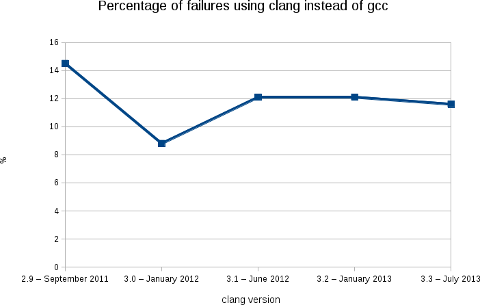
Like the previous releases, we are at a bit less than 12% of packages failing (2188 packages on a total of 18854).
More warnings / errors detections have been added to the software (for example: like this defect of the C++ standard or the detection of unused linker option) causing more build failures, but, in the mean time, we fixed some issues in the Debian packages... As usual, the following image shows clearly the evolution of the build failures over time.
As stated in my blog post for the release 3.2, this rebuilds prove that Clang is ready for production in term of support of the C, C++ and Objective C languages. With the performance results showed by Chandler Carruth from Google at the last Euro LLVM summit (see this video from 5:40), I believe that it is now time to report and fix the bugs in the upstream packages. I also presented this work (video) at the Debconf 13 last week in Vaumarcus (Switzerland) and I will be also presenting this work at the Linux Plumbers Conference, New Orleans. With L o Cavaille (as part of his GSOC) and Paul Tagliamonte, we are also working on providing a better automatic rebuild infrastructure for clang-built packages (and other static analyzers). More in the next few weeks. Finally, I would like to thank folks at AWS for the Debian credit and David Suarez for helping on with the Ruby segfaults.

Sylvestre Ledru: Video of Debconf 13 available on the IRILL website

While raw videos of the previous Debconf are available on:
http://video.debian.net/ We, at IRILL, are glad to provide a nice HTML5 interface (and flash if HTML5 videos are not available) to browse all the videos of Debconf 13:
http://www.irill.org/videos/debconf13

Enrico Zini: Debian Contributors right after DebConf

Debian Contributors right after DebConf "Debian Contributor" is going to be a new hat in Debian, automatically given to anyone who contributes to Debian in some way. I kickstarted the idea with a BOF at the beginning of DebConf (see video), worked on it during the conference and announced the results so far at a talk towards the end of the conf (see video). In the end, we have a data model and an initial prototype, still not deployed. A team is forming to work on this after DebConf. This TED video came to my mind several times, while working on this. I'm excited to see a way to turn on the light and see who Debian Contributors really are. My gut feeling is that we are in for a lot of surprises, which may change the way we see our community in exciting ways. Wow.

Next.

Previous.