Search Results: "will"

9 November 2008

Simon McVittie: Encrypted root filesystem on a Debian laptop

I've been meaning to document this for ages... My laptop is set up with an encrypted root filesystem using LVM and dmcrypt. It also has a small Debian stable system for recovery purposes (I don't have a CD drive, so if everything goes horribly wrong, I can't just boot from a live CD). Here's how to set up something similar:

Step 1. Set up the recovery system Start the Debian lenny (beta) installer as usual. (I originally used etch, but these instructions are for lenny - either should work.) When you get to "Partition disks", choose "Manual". Here's the partitioning scheme to use:
  • main partition for LVM, taking up the whole disk minus 1GB or so. select "Do not use", for now
  • 1GB recovery partition at the end of the disk (this will also be the main system's /boot, since /boot needs to be unencrypted anyway). Use the defaults: ext3 mounted at /.
Finish partitioning and write changes to disk, and wait for the base system to install. Say yes to installing Grub to the MBR for now (it might be possible to do the install more cleanly by installing Grub to the recovery partition's boot sector instead - I haven't tested that). Reboot into the freshly installed recovery system and satisfy yourself that it works.

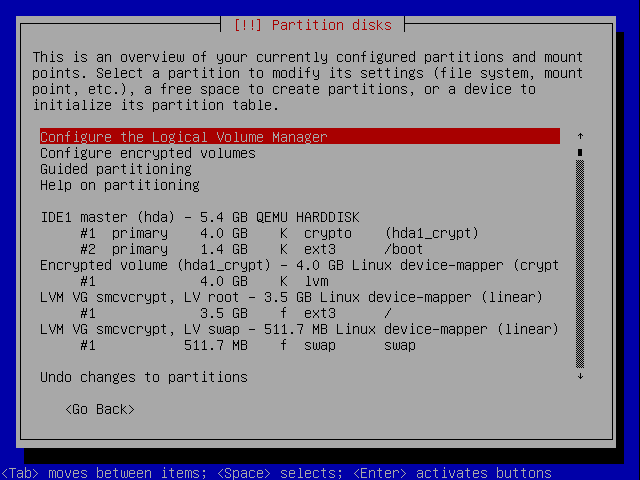
Step 2. Set up the main system Now boot the Debian installer again. This time it's for your installed system. At the "Partition disks" stage, choose "Manual" again. Select the main partition and choose "Use as: physical volume for encryption". Next select "Configure encrypted volumes". Your main partition will now be randomized - this is slow - and some time later you'll be asked for a passphrase. You'll have to type this in at each boot. Select the contents of the "disk" Encrypted volume (hda1_crypt) and choose Use as: physical volume for LVM. Now "Configure the Logical Volume Manager" and create a Volume Group. I always use the laptop's hostname as the VG name (this reduces confusion if you ever plug the disk into another machine for disaster recovery). Create a Logical Volume called swap, the size you want your swap space to be. If you plan to use suspend-to-disk, this needs to be at least as large as your RAM. Create a Logical Volume called root, for the root filesystem. If you want separate "partitions" for things like /home, now is a good time to create them too; if you want to use my schroot howto, leave some unallocated space in the VG for that. Set your swap LV to be used as a swap area, and your root LV to be used as ext3 mounted at /. If you wanted extra LVs, set them up too. Also set your recovery partition to be used as ext3, mounted on /boot, and not reformatted. It should now look something like this (smcvcrypt is the name of a KVM virtual machine in which I've been testing these instructions, normally you'd have the laptop's hostname there). Screenshot from d-i Proceed with the installation. Install Grub to the MBR - this will temporarily make the recovery system unbootable, but shrug never mind. Finish the installation and reboot into your new main system.

Step 3. Make them dual-boot Within the main system your recovery system is also visible, at /boot. Bind-mount /dev onto /boot/dev, chroot into /boot, and run "update-grub /dev/hda2", where hda2 is the partition where the recovery partition is. Leave the chroot. Edit /boot/grub/menu.lst and put this right at the end:
title Go to recovery system
root (hd0,1)
chainloader +1
(Replace (hd0,1) with what Grub thinks the recovery partition is - the second number is the partition number starting from 0, so /dev/hda5 would be (hd0,4) and so on.) Also edit /boot/boot/grub/menu.lst and put this right at the end:
title Back to main system
root (hd0)
chainloader +1
Also, still in /boot/boot/grub/menu.lst, go to the top of the file and change the colour scheme to something else (I used a red background) to indicate that this boot menu is for the recovery system. Reboot and try it out. You should now have an extra boot menu option, "Recovery system". Selecting it will switch to the recovery system's boot menu, which has an option to switch back, and so on. Each boot menu also has some entries for kernels, any of which will boot with the appropriate root filesystem (encrypted root for the main system, unencrypted for the recovery system). Success!

Martin Michlmayr: GCC 4.4 and better preprocessor checks

GCC 4.4 will show more preprocessor errors when compiling code, partly because some new checks have been added and partly because the full preprocessor directives are now checked. So let's review some common problems. Let's take some code like this:
#ifdef A
#elif
#endif
This will now give:
t.c:2:6: error: #elif with no expression
The reason is that an #elif always needs an argument. Looking at the code, it's obvious that a #else should be used. Another common issue is this one:
#define B
#ifdef A
#elif B
#endif
The problem here is that you're trying to check whether B is defined, so the third line has to be:
#elif defined(B)
Finally, the following code:
#ifdef A
#elif define(B)
#endif
will give:
t.c:2:13: error: missing binary operator before token "("
It took me a minute to see what was wrong with the code... but define is a typo and what you really want is defined.

Sylvain Le Gall: OCaml meeting 2009 in Grenoble

Since September 2008, Alan Schmitt and I have decided to organize a new OCaml Meeting following the JFLA. This will be the second time of such an event. Last year we were 50 people -- after a very short period for organizing it (less than a month). This year we decided to prepare things earlier. As a matter of fact, the last year events has at least generated a peak in OCaml mailing list (602 message in January, 487 in february...) It also has given birth to several things like planet and forge. It has also help to start things like batteries. I hope this year events will help people to meet and exchange great ideas for OCaml promotion. Waiting to see a lot of "OCaml"ers at OCaml Meeting 2009.

Russell Coker: LUV Talk about Cloud Computing

Last week I gave a talk for the Linux Users of Victoria about Cloud Computing and Amazon EC2 [1]. I was a little nervous as I was still frantically typing the notes a matter of minutes before my talk was due to start (which isn’t ideal). But it went well. There were many good questions and the audience seemed very interested. The talk will probably appear on the web (it was recorded and I signed a release form for the video). Also I have just noticed that Amazon have published a license document for their AMI tools, so I have added the package ec2-ami-tools to my Debian/Lenny repository (for i386 and AMD64) with the following APT sources.list line: deb http://www.coker.com.au lenny misc Also the Amazon license [2] might permit adding it to the non-free section of Debian, if so I’m prepared to maintain it in Debian for the next release - but I would prefer that someone who knows Ruby take it over.

8 November 2008

Joerg Jaspert: Debian mirror scripts

With a small mail to our mirrors-announce list, I just opened the work of more than one month to the public. Even better, I strongly encourage every mirror admin to use my scripts, or at least scripts that follow a minimal set of rules I wrote down… Some long time (somewhere in April or May this year) I got added to the Debian mirroradm group. First it was only to get some problems with packages.debian.org solved, but later on I started doing more. This group is basically the one that handles the archvsync user on .debian.org machines and also manages the official Debian mirrors listing. As the archvsync user exists on multiple .debian.org machines, and many of them do mirror a copy of our archive for various reasons, all of them had some version of a mirroring script, and sometimes also a version of a pushmirror script. Unfortunately, as they all had been maintained mostly on their own per machine - they sometimes had evolved a bit different. Additionally all of them had a few problems which could leave us with a broken mirror behind, despite it looking all well. So on Sept. 26 I decided to trash it all and rewrite the script and put it all in a VCS (and selected git). For that I set myself a few goals, like (in no particular order) Now, 109 commits and more than a month later, I was finally able to open the scripts to the wide public. (Had multiple people test them before this, but thats always different than a real “release”). The scripts are in use on all .debian.org machines and some other mirrors already, so I’m fairly sure they work.
As I already wrote, Debian mirror admins are strongly encouraged to use this scriptset and not to invent their own. In case you miss a feature either send me a mail describing it, or better, a patch implementing it. I’m happy to implement as much as possible (and sensible :) ) And while it is discouraged to use own scripts, sometimes people have reasons to have their own, so there is now a minimal set of functionality that such a script MUST support. All of those requirements are easy to fulfill. Well, at least the MUST ones. The first one is basically a given, all scripts I know are doing this already. The second one sounds more complicated, but actually might just be about 4 lines of actual code changes. Just touch an extra file before you gain a lockfile (to avoid two scripts running at the same time) and then rerun rsync as long as that extra file is around. (It helps to rm this trigger file right before you call rsync :) ). The should directive is actually a little more work to implement correctly. I won’t show source here, read the ftpsync script if you want to see it, but I try some small explanation. Background: Debian mirror synchronisation is usually done by scripts that get started via ssh. As mirror operators (understandably) do not like their upstream mirror to be able to login, this is done using “ssh triggers”, a feature I wrote about earlier. Those are sshkeys using a forced command, so nothing else than this command will be run, ever. SSH, if used with such forced commands, has the helpful feature that it sets the environment variable SSH_ORIGINAL_COMMAND containing the original arguments. Which means that, if the mirror pushes you with “ssh yourhost -l mirror sleep 1” you will see *sleep 1 in that variable. It is what many mirror operators currently use when pushing their downstreams. Now, we can use that to tell the receiving end all things we want it to know. If you look in my script you will see that I defined a little more than the minimal arguments. But none of the additional ones are a requirement, they only make life much easier. My script currently understands, additional to the 3 minimal ones:
As if that wasn’t enough, I also had to rewrite the runmirrors script. The old 10-line one just didn’t cope with the more general approach. This script is used to “push” your downstream mirrors, telling them that they need to update. (Which is the only sane way to run a mirror. cron is just not made for mirrors that can update at random times!). One nice new feature of it is the ability to update multiple mirrors nearly at the same time. This is extremely helpful in case of DNS Round Robin entries like security.debian.org (multiple hosts offering the same archive under one hostname). You do not want to have such hosts out of sync. Not even for a minute, if you can avoid that. So we now push the mirrors with sync:stage1 as argument. Then we wait until all of them have finished the stage1 sync before we push them all again, this time with sync:stage2 as argument. This will erase any update delays thanks to network latency / low bandwidth one of the security mirrors might have, as the large transfers (all the binary and source packages) are done in stage1. They can take time, a normal user won’t notice it - the Package and Source indices are not transferred yet. They arevery small and as such transfered pretty fast whenever stage1 is done everywhere and we tell mirrors to do stage2.
All in all it was a pretty nice exercise writing those scripts. Comments: 0

7 November 2008

Axel Beckert: e-mail.is-not-s.ms

When I first read http://two.sentenc.es/ in (if I remember correctly) madduck’s signature, I thought something like “This can’t be! Why are people castrating themself?” Although I really understand that the inventor has good reasons for such a personal policy, I notice how much time I waste by trying to fit all the information I want to transmit in the 160 characters a short messages allows — or, even worse, into the 140 characters microblogging services like identi.ca or Twitter allow. So I had to oppose something to this, but even to only reach the coolness level of the domain “sentenc.es” is hard, you probably can’t top it at all. For luck, I’m not alone and Venty had the right idea for a hostname which has at least some geeky niveau. So here it is, our pleading for e-mails as long and detailed as necessary:

http://e-mail.is-not-s.ms/ A German version will be available soon at http://e-mail.ist-nicht-s.ms/. Feel free to add either URL to your e-mail signature. :-) Oh, and thanks to the Government of Montserrat which allows strangers to register .ms domains without any hassles. :-) Update / FAQ Seems to be necessary to make a few things clear…

  1. No, I do not think that everyone using two.sentenc.es has neither style nor knows anything about grammar or punctuation. What I say is that the site two.sentenc.es itself with its comparision to short messages (and especially without reading the author’s blog post about the site’s background) indirectly suggests to drop grammar, punctuation and style by cramming all information into a limit number of characters as often done with short messages or microblogging. And the limitation in senctences leads to tapeworm sentences which I try to avoid since they’re considered bad style, too.
  2. And yes, it’s consciously written and designed to be the opposite of two.sentenc.es — even the colors and the font — and therefore is of course very close to the original. See it as it parody or satire if the closeness makes you angry.
  3. And no, I currently don’t care if the site makes less sense if you don’t know two.sentenc.es — people usually can follow hyperlinks on websites.
  4. We weren’t the first ones who noticed that e-mail is not SMS. An example of the problem described above from 2001.

John Goerzen: Search for Backup Tools

Since the last time I went looking for backup software, I've still be using rdiff-backup.

It's nice, except for one thing: it always keeps an uncompressed copy of your current state on the disk. This is becoming increasingly annoying.

I did some tests with dar and BackupPC, and both saved considerable disk space over rdiff-backup. The problem with dar, or compressed full/incrementals with tar, is that eventually you have to make a new full backup. You have to do that, *then* delete all your old fulls and incrementals, so there will be times when you have to store a full backup twice.

The hardlinking approach sounds good. It's got a few problems, too. One is that it can lose metadata about, ironically enough, hard links. Another is that few of the hard linking programs offer a compressed on-disk format. Here's what I've been looking at:

BackupPC

Nice on the service. I'm a bit annoyed that it's web-driven rather than commandline-driven, but I can look past that. I can also look past that it won't let me clamp down on ssh access as much as I'd like.

BackupPC writes metadata to disk alongside files, so it can restore hard links, symlinks, device entries, and the like. It also has the nice feature of being able to hard link identical files across machines, so if you're backing up /usr on a bunch of machines and have the same files installed, you save space. Nice.

BackupPC also can compress the files on your disk. It uses pre-compression md5sums for identifying files to hard link, which is nice.

Here's where I get nervous.

BackupPC doesn't just use regular compression, from say gzip or bzip2. It uses its own low-level algorithm centered around the Perl deflate library. And it does it in a nonstandard way owing to a supposed memory issue with zlib. Why they don't just pipe it through gzip or equivalent is beyond me.

This means that, first off, it's using a nonstandard compression format, which makes me nervous to begin with. If that weren't annoying enough, you have to install Perl plus a bunch of modules to extract the thing. This makes me nervous too.

Dirvish

Doesn't support compression.

faubackup

Doesn't support compression.

rdup

Supports compression and encryption. Does not preserve ownership of things unless the destination filesystem does (meaning you must run as root to store your backups.)

Killer lack of feature: it does not preserve knowledge about what was hardlinked on the source system, so when you restore your backup, all hardlinks are lost. Epic fail.

rsnapshot

Doesn't support compression.

StoreBackup

Does support compression, appears to restore metadata in a sane way. Supports backing up to a different machine on the LAN, but only if you set up NFS. Looks inappropriate for doing backups over VPN. Comprehensive, though confusing, manual. Looks like an oddball design with an oddball manual.

So, any suggestions?

John Goerzen: Wow

People often talk about "memorable moments" -- times where pretty much everybody in the country remembers where they were at that exact time.

There are probably only two of those moments I can remember: the 1989 earthquake during the World Series and the time 9/11 happened. My car was in for service that day, and I was sitting in the lobby of the mechanics watching it on TV.

So now I have a third: watching Barack Obama win the presidency.

We were installing some new blinds in the kitchen while listening to the coverage on NPR, periodically going over to the office to watch the TV coverage on the computer. (Our TV is upstairs right now, so that was more convenient.)

A few minutes before the election was called, I remember Brian Williams saying something like "We're going to go to local stations now, but you better not walk away. We'll have some amazing news at the top of the hour."

We watched that announcement, then saw McCain's speech, and finally Obama's speech (missed the first minute or two of it actually). What an amazing evening.

Then seeing the stories of people celebrating all around the country and around the world: the impromptu party in front of the White House Tuesday night, the small gathering at the Lincoln Memorial Wednesday morning, the Obama parties all around the world. And we watched it on TV in our house while Jacob slept. I feel like I missed out somehow.

6 November 2008

David Moreno Garza: Harlem and the elections

A lot has been said about the elections already. I just want to share my personal experiences about it. During the weekend, Tom invited us to his place in lower Harlem (we live upper Harlem) on 123rd St and Adam Clayton Powell Jr Ave, for Tuesday night. As Tuesday arrived, we didn’t see too many people too excited about it. Living in Harlem, we were pretty used to black people supporting Obama, so getting closer and closer to the elections, we didn’t feel people anxious. On Tuesday, we commuted to work and some of our co-workers got to work late because they have been standing in lines for a couple of hours to vote in polls. The whole day was about talking on how much that day was representing for the US and the world, guessing how they results were going to end up, etc. Later at night, Greg, Phil, Raquel and I headed to Tom’s place for his watch-the-results party. His fridge was full of Blue Moon beer, but he also had some Red Stripe :) Since I like to go light on politics, I preferred some other American variantion, Coors Light :) Vermont, Connecticut and a few other New England states were claimed by the Democrats. Matty, a friend of Tom attending the party brought US maps with the electoral votes on each one for people to color them as they were called. It was pretty fun. At some point we forgot about the maps since it was pretty clear that Obama was gonna win. But when they called him at around 11 pm (and I was starting to feel nicely drunk), the whole neighborhood and people in the streets just went completely nuts. It’s something I hadn’t experienced at all in my life, it was like if Mexico would have won the f tbol World Cup (which yes, it will never happen anytime soon :P), but nicer. People went out to the Harlem State Office Building square were cars were honking, and a huge amount of people gathered to celebrate, play brass music, cheer “Yes We Can”. Ghetto guys, white hippies, curious latinos, Africans, African Americans, Puerto Ricans, just a lot, a lot of people, all kinds of them, just a clusterfuck. They projected Obama’s speech from Chicago and people went nuts. It was just, fucking amazing. The images they projected from Harlem to the outside world was in that same square we were in. Our Flickr set for the celebration here.

Mike Hommey: Emptying a deleted file

Yesterday, at work, we had the typical case where df would say there is (almost) no space left on some device, while du doesn’t see as much data present as you would expect from this situation. This happens when you delete a file that another process has opened (and, obviously, not yet closed). In typical UNIX filesystems, files are actually only entries in a directory, pointing (linking) to the real information about the content, the inode. The inode contains the information about how many such links exist on the filesystem, the link count. When you create a hard link (ln without -s), you create another file entry in some directory, linking to the same inode as the “original” file. You also increase the link count for the inode. Likewise, when removing a file, the entry in the directory is removed (though most of the time, really only skipped, but that’s another story), and the link count decreased. When the link count is zero, usually, the inode is marked as deleted. Except when the usage count is not zero. When a process opens a file, the kernel keeps a usage count for the corresponding inode in memory. When some process is reading from a file, it doesn’t really expect it to disappear suddenly. So, as long as the usage count is not null, even when the link count in the inode is zero, the content is kept on the disk and still takes space on the filesystem. On the other hand, since there is no entry left in any directory linking to the inode, the size for this content can’t be added to du’s total. Back to our problem, the origin was that someone had to free some space on a 1GB filesystem, and thought a good idea would be to delete that 860MB log file that nobody cares about. Except that it didn’t really remove it, but he didn’t really check. Later, the “filesystem full” problem came back at someone else, who came to ask me what files from a small list he could remove. But the files were pretty small, and that wouldn’t have freed enough space. That gave me the feeling that we probably were in this typical case I introduced this post with, which du -sk confirmed: 970MB used on the filesystem according to df, but only 110MB worth of data… Just in case you would need to find the pid of the process having the deleted file still opened, or even better, get access to the file itself, you can use the following command:
find -L /proc/*/fd -type f -links 0
(this works on Linux ; remove -L on recent Solaris ; on other OSes, you can find the pid with lsof) Each path this command returns can be opened and its content accessed with a program, such as cat. That will give access to the deleted content. I already adressed how to re-link such a file, which somehow works under Linux, but in my case, all that mattered was to really remove the file, this time. But we didn’t know if it was safe to stop the process still holding the file, nor how to properly restart it. We were left without a possible resolution, but still needed to come up with something before the filesystem gets really full while waiting to be able to deal with the root of the problem. The first crazy idea I had was to attach a debugger to the process, and use it to close the file descriptor and open a new file instead (I think you can find some examples with google). But there was no debugger installed. So, I had this other crazy idea: would truncate() work on these /proc/$pid/fd files? You know what? It does work. So I bought us some time by running:
perl -e 'truncate("/proc/$pid/fd/$fd", 0);'
(somehow, there is no standard executable to do a truncate(), so I always resort to perl) Afterwards, I also verified the same works under Linux (where you wouldn’t really know what it’d do with these files that are symbolic links to somewhere that doesn’t exist). The even simpler following command works, too.
> /proc/$pid/fd/$fd
It doesn’t truncate() but open() with O_WRONLY O_CREAT O_TRUNC, and close() right after (to simplify), which has the same effect. Good to know, isn’t it?

Martin-Éric Racine: Available for a new job

A couple of years ago, I started what has probably been the best job I've held so far, as a Business Development Manager for Artec Group where I focused on marketing and selling the ThinCan LTSP client. During that time, I used a combination of Guerrilla Marketing techniques to spread the word about this cool Estonian embedded platform in its LTSP client configuration and defined an extremely tight market-oriented focus that saw this relatively obscure electronic design start-up rise to the forefront of the LTSP hardware market and also brought the company commendable notoriety in the Coreboot community, thanks to its Programmable LPC Dongle, a low-cost ROM emulator that can be used to bootstrap various embedded hardware and test firmware images. Looking back at close to 3 years with Artec (if we include the stint I did at Linutop), I most fondly remember how I managed to bring the Estonian and Turkish nations closer together in collaborating on Innovation. On my first visit to Turkey, I had noticed that very little is know about Estonia in Turkey, even though both countries have a collaboration that dates back to the 1920's, so my tactic was to introduce Estonia's achievements as a whole, to establish confidence in Artec's offering. It worked: Among other things, my idea to organize an Estonian ICT Conference during the visit of Estonian PM Andrus Ansip in Turkey created a lot of extremely positive buzz that resulted in Estonia being mentioned as a trendy country in a prime time Turkish TV series. During this time, I've also made a lot of contacts among the Estonian and Turkish business communities and, more surprisingly, among the Estonian diplomacy who, much to my amazement, welcomed my ideas for better promoting Estonian interests abroad with great enthusiasm. Come December 2008, my time at Artec will become a page in my employment history. While the Thincan remains one of Artec's key products, current marketing and sales resources are focused on new markets and new technologies that completely fall outside my core expertise, which is why the company decided to let me go. I thus welcome offers from interested parties in Coreboot or LTSP markets. Other refreshing offers from outside the box - such as in business diplomacy - are equally welcome, as I've been pondering a career change for a long time.

Martin Michlmayr: European Commission publishes guidelines on the procurement of FOSS

The Open Source Repository and Observatory (OSOR), a new site sponsored by the European Commission to foster the exchange of FOSS related information and software among European public administrations, recently published guidelines on the procurement of open source software. Public administrations in Europe have to follow public tender procedures and the new guidelines give practical and legal advice on how open source software and related services can be incorporated into the procurement process. Rishab Ghosh, who presented the guidelines at the Open Source World Conference in Malaga, argued that the procurement guidelines were needed because of two reasons. First, they studied recent tenders and found that many explicitly mentioned proprietary applications. 16% of 3615 software tenders explicitly asked for products from top 10 software vendors, such as Microsoft, SAP and Oracle. This practice may be illegal because public tenders generally have to describe functional requirements in a general way instead of specifying specific products. Second, many public administrations don't have any experience with the procurement of FOSS. In fact, they often don't know whether or under which circumstances they are allowed to adopt and ask for FOSS solutions. The guidelines are specifically designed in order to clearly and simply explain how public administrations can acquire open source and they don't assume that a country has adopted a specific policy regarding open source. The guidelines include a long section about open standards, open source and how they relate. Both open standards and open source align very well with the needs of public administrations who have an "obligation to support interoperability, transparency and flexibility, as well as economical use of public funds". The guidelines argue that the exit cost, i.e. the cost incurred in moving to another IT system, is also an important consideration but one that is often neglected. The adoption of a proprietary solution without open standards may limit the future choice, thereby increasing the long-time costs and giving the proprietary vendor an unfair advantage in future tenders. The procurement guidelines describe two ways of acquiring FOSS: it is possible to go the usual route of publishing a tender for the supply of software (possibly with related services). However, in the case of FOSS, it is also possible to download the software directly from the Internet. This is possible because the software is not only free of charge but comes with no contractual obligations. If there were any obligations involved with the download (such as fees, the agreement to an EULA or the requirement to purchase services in the future), software download is not an allowed method. What I like about the guidelines is that they explicitly say that downloading software has to be part of the formal procurement process. You have to think about your requirements, look at various alternatives, and so on, and not just blindly download something from the Internet. When it comes to the procurement of FOSS, the guidelines don't suggest that tenders should explicitly ask for FOSS. Instead, they should describe the functional requirements of the software as well as certain properties. For example, a tender could specify that the public administration as well as third parties must have the right to study, distribute and modify the software. In a sense, the guidelines suggest that tenders should include the principles of the Free Software Definition along with justifications for these requirements. Personally, I think there is a great need for these procurement guidelines. There are many public administrations that don't know how to acquire FOSS and these guidelines offer clear advice. Furthermore, I find the guidelines very balanced. They don't recommend that you should always ask for FOSS but incorporate FOSS principles into tenders where it makes sense. It remains to be seen whether the procurement guidelines will have an impact on the FOSS adoption in Europe, but I surely hope so. (Originally published on FOSSBazaar)

Russell Coker: EC2 and IP Addresses

One of the exciting things about having a cloud computing service is how to talk to the rest of the world. It’s all very well to have a varying number of machines in various locations, but you need constant DNS names at least (and sometimes constant IP addresses) to do most useful things. I have previously described how to start an EC2 instance and login to it - which includes discovering it’s IP address [1]. It would not be difficult (in theory at least) to use nsupdate to change DNS records after an instance is started or terminated. One problem is that there is no way of knowing when an instance is undesirably terminated (IE killed by hardware failure) apart from polling ec2-describe-instances so it seems impossible to remove a DNS name before some other EC2 customer gets a dynamic IP address. So it seems that in most cases you will want a constant IP address (which Amazon calls an Elastic IP address) if you care about this possibility. For the case of an orderly shutdown you could have a script remove the DNS record, wait for the timeout period specified by the DNS server (so that all correctly operating DNS caches have purged the record) and then terminate the instance. One thing that interests me is the possibility of running front-end mail servers on EC2. Mail servers that receive mail from the net can take significant amounts of CPU time and RAM for spam and virus filters. Instead of having the expense of running enough MX servers to sustain the highest possible load even while one of the servers has experienced a hardware failure there is a possibility of running an extra EC2 instance at peak times with the possibility of running a large instance for a peak time when one of the dedicated servers has experienced a problem. The idea of having a mail server die and have someone else’s server take the IP address and receive the mail is too horrible to contemplate, so an Elastic IP address is required. It is quite OK to have a set of mail servers of which not all servers run all the time (this is why the MX record was introduced to the DNS) so having a server run periodically at periods of high load (one of the benefits of the EC2 service) will not require changes to the DNS. I think it’s reasonably important to minimise the amount of changes to the DNS due to the possibility of accidentally breaking it (which is a real catastrophe) and the possibility of servers caching DNS data for longer than they should. The alternative is to change the MX record to not point to the hostname of the server when the instance is terminated. I will be interested to read comments on this issue. The command ec2-allocate-address will allocate a public IP address for your use. Once the address is allocated it will cost $0.01 per hour whenever it is unused. There are also commands ec2-describe-addresses (to list all addresses allocated to you), ec2-release-address (to release an allocated address), ec2-associate-address to associate an IP address with a running instance, and ec2-disassociate-address to remove such an association. The command “ec2-associate-address -i INSTANCE ADDRESS” will associate an IP address with the specified instance (replace INSTANCE with the instance ID - a code starting with “i-” that is returned from ec2-describe-instances. The command “ec2-describe-instances grep ^INSTANCE cut -f2” will give you a list of all instance IDs in use - this is handy if your use of EC2 involves only one active instance at a time (all the EC2 API commands give output in tab-separated lists and can be easily manipulated with grep and cut). Associating an IP address with an instance is documented as taking several minutes, while Amazon provides no guarantees or precise figures as to how long the various operations take it seems that assigning an IP address is one of the slower operations. I expect that is due to the requirement for reconfiguring a firewall device (which services dozens or maybe hundreds of nodes) while creating or terminating an instance is an operation that is limited in scope to a single Xen host. One result that I didn’t expect was that associating an elastic address is that the original address that was assigned to the instance is removed. I had a ssh connection open to an instance when I assigned an elastic address and my connection was broken. It makes sense to remove addresses that aren’t needed (IPv4 addresses are a precious commodity) and further reading of the documentation revealed that this is the documented behavior. One thing I have not yet investigated is whether assigning an IP address from one instance to another is atomic. Taking a few minutes to assign an IP address is usually no big deal, but having an IP address be unusable for a few minutes while in the process of transitioning between servers would be quite inconvenient. It seems that a reasonably common desire would be to have a small instance running and to then transition the IP address to a large (or high-CPU) instance if the load gets high, having this happen without the users noticing would be a good thing.

5 November 2008

Christian Perrier: Testing Debian *Installer* RC1

Disclaimer: this post talks about Debian *Installer*....not overall Debian. The D-I team and the CD team have created images of Debian Installer Release Candidate 1 for Lenny. They are available at http://cdimage.debian.org/cdimage/.lenny_rc1/. Please test them out and report problems through installation reports as described from the Debian Installer web page. This is really important as this is very probably how the real released Lenny installation media will look like. Debian Installer is short of testing. So, yes, we need *you*. And, again, if you spread the word, don't talk about "Debian Lenny RC1". This is no such beast (even though this will look like a Release Candidate of Debian as the rest of the distribution is of course begin prepared for the release). The 'official' name is "Debian Installer for Lenny, Release Candidate 1".

Neil Williams: Componentisation of Debian/Emdebian

OK, I know I've been very quiet on the blog for weeks now but I have my reasons and all will become clear, eventually. I'm principally waiting for the Lenny release before being able to start full discussions about certain ideas that have been consuming a lot of my time recently. I continue to do what I can to get Lenny out of the door because the wait is driving me nuts. (Fixed another RC bug yesterday, yippee!)

Anyway, something I can talk about is Emdebian Grip. Emdebian has always wanted to support "in-between" devices that don't need the full-on cross-build everything approach of the current Emdebian packages for ARM but don't quite have room for a full Debian install either. Until I had at least a basic package set available via the cross-building system, I didn't want to start working on an intermediate system, for reasons of simplicity mainly, but also because I knew that getting a cross-building package set would involve changes to the tools needed for the intermediary set.

Bah, I'm waffling again. For the background, see Emdebian, Squeeze, Grip and Crush.

The good news is that Emdebian Grip, once running, will take far, far less time (for everyone) than the full-on cross-building malarkey of Emdebian Crush. Grip can be 99.9% automated by breaking Debian into discrete package sets or 'components'.
Componentising Debian for Emdebian
Emdebian Grip is about a smaller Debian, nothing more. No changes in functionality, no changes in dependencies; only changes in final installation size and Packages.gz size. It means using the code from dpkg-cross to unpack packages, remove unwanted files and repack the .deb. Yes, yes, this can be done one package at a time at a trivial level. Emdebian Grip seeks to bring a standard method for this operation that will work for all packages on any architecture for any architecture from any suite, creating and maintaining repositories of "gripped" packages for use in devices like my Acer Aspire1 where you just don't need documentation, manpages and the rest. Squeeze is the obvious target release but any release supported by the current version of dpkg could be "gripped" too, like oldstable.

The componentisation comes in at the level of the Packages.gz file. If the device cannot realistically be expected to run CAD software or has no fancy graphics or other power-hungry hardware, why should packages that need such resources clutter up the apt-cache list? This data isn't just slowing down searching for packages you do want, it slows down every installation process (that bit about 'Reading database . . . . . '), it slows down the process of getting the updated cache data in the first place because there is more of it, it wastes space on your device in several different places when the whole point of Emdebian is that disc space is not cheap and it wastes your precious battery power if you need to do simple package management stuff away from the mains. What is needed is a mini-repository, a mini-mirror that just contains the parts of Debian that your machine needs - a "well-trimmed" mirror with sources and all dependencies satisfied, a mirror that can be automatically updated but which doesn't keep getting NEW packages that you won't use. New dependencies will be added, yes. New packages unrelated to what you currently use? Absolutely not. You could even keep a mini-mirror on your home network, updating and "gripping" while you sleep, because a mini-mirror should be a lot, lot smaller than a standard Debian mirror.

I now have a script that will do the work, what I've lacked is the idea on how to "feed" packages to the Gripper. :-)

So, I'm going to be exploring this method:
  1. An arbitrary package set - say the output of 'dpkg -l' from the target machine setup by an expert, or 'dpkg --get-selections' or just the packages from a normal debootstrap - the basic idea is to start with only the packages you absolutely must have for your target device.

  2. A very small wrapper for some debootstrap code that downloads those .debs from the Debian mirrors - debootstrap can cope with choosing the mirror, the architecture, the suite etc. (already written, landing in Emdebian SVN soon).

  3. Parse the list of packages (.debs) and use 'apt-cache showsrc' to convert into a list of source packages. (Script done).

  4. 'apt-get source' to match the source package to the binary. At this point, we have what amounts to a partial mirror but with very well defined limits. There are other ways of doing the same thing so anything that gets you to this point is as equal as the steps above, as long as the .debs exist alongside the .dsc and all associated source package files. What you need is full control over the list of packages at this stage, we'll worry about dependencies later.

  5. Simple scripting parses the .dsc to create suitable debian/files content (done).

  6. dpkg-genchanges regenerates the .changes file - critical for keeping the Gripped packages with the correct source packages in the final Grip repository

  7. Now run 'emgrip' against the .changes file to convert the .debs, update the .changes file with the new, smaller, .deb details and copy everything into a suitable incoming/ directory.

  8. point your repository software (tested with reprepro) at the incoming/ directory and generate your Gripped repository - which only contains the packages you listed at the start, just smaller. reprepro has a neat way of allowing foobar-1.2.3-2 to be included even if foobar-1.2.3-1 does not exist in the repository, as long as foobar_1.2.3.orig.tar.gz exists somewhere that reprepro can find and even though foobar-1.2.3-2.dsc does not mention the .orig.tar.gz. Neat! (Tested and working.)

  9. Run 'edos-debcheck' against the repository and "catch-up" with whatever packages are needed to make the repository as a whole "trimmed" (no unresolved dependencies).

  10. Keep the update script running as a cron task to pull updated packages from incoming.debian.org, run the .changes through emgrip and update your repository.

  11. Clean out the .debs, leave the source packages and restart the process for another architecture. (Crafty!)

  12. Possibly, to support those who can afford to do a small amount of compilation on their Emdebian Grip device, add a second repository that provides the Build-Depends that may be missing from the initial package set - stuff like automake and pkgconfig. Depending on how that works out, it might not be many packages and it may be easier to fold them into the mini-mirror anyway.

  13. Instead of 20,000 packages, I'm expecting something closer to 2,000, per mini-mirror.

  14. The process of "gripping" a package also drops numerous control fields (like Homepage and VCS*), as well as Recommends, Suggests and Enhances as well as truncating the long description at a maximum of four lines - all in the name of reduced package data sizes.

  15. The end result is that each mini-mirror contains a component package set for Emdebian Grip, using Debian packages. Mini-mirrors are still "well-trimmed" (no unresolved dependencies) because you get to choose which packages you include and if a particular package tries to bring in both Gtk and KDE dependencies, you can choose to omit that package and use a different one.

  16. Whether Emdebian Grip will or should support dropping certain binary packages from the repository is a difficult issue - Emdebian Crush is probably the preferred route if you need to start optimising an Emdebian Grip mini-mirror that harshly.

  17. Another wrapper will be needed to clean out cruft (old dependencies, outdated packages etc.) - that one may be harder to achieve by automation.


The first Emdebian Grip repositories will be for ARM, armel and i386, based on an XFCE environment package set.

"Gripping" all the packages in my /var/cache/apt/archives (about 1Gb) took about 30 minutes on a fast laptop that was doing other things at the time - the real packages will be "gripped" on the Emdebian server and for multiple architectures in sequence. It's certainly conceivable that any number of mini-mirrors can exist with any number of package sets (components), all with "gripped" packages. You can choose to "grip" .debs upon download from a normal Debian mirror but that wastes time if there is more than one device, it wastes space in /var/lib/apt/lists and /var/lib/dpkg/ and wastes bandwidth. For portable devices that you want to be using, not updating, I think that a mini-mirror is a worthwhile bonus.

Expect a 20% reduction in installation size (for more, you'll need the cross-building, functionality-modifying Emdebian Crush shebang) but a large decrease in the size of all the apt-cache data and dpkg status data. I'm hoping to push towards 30% reductions but most of these figures are guesswork right now.

And beyond the mini-mirrors? Debian-Installer, of course. I really need to set some time aside to prepare an Emdebian Grip installer using current D-I. Simple things like:

It really, really annoys me that I have to spend ages getting devices like the Acer Aspire1 working properly under Debian and that I have to take particular care during the installer to change the Debian default to something more sane for that kind of device. For Debian to be The Universal Operating System, the installer needs to be as smooth on an NSLU2* as on a standard desktop, a fast server and a cluster. This isn't just an architecture thing, there are big and small devices in all architectures, it needs to be a machine:variant thing. Mini-mirrors of single components are a start and part of the bigger answer is to support machine-specific configuration packages in these mini-mirrors. Packages that only exist in a specific mini-mirror and are specifically designed to setup a host of machine-specific settings, blacklist certain modules and enable others, set sensible settings in /etc/fstab and other places based on results from things like powertop, turning off features for some devices and turning them on for others. The whole point of such packages is that what they do would be insane on what would currently be considered a "typical Debian machine".

*(I'm not talking about an NSLU2 with an external hard drive here, I'm talking about fitting Emdebian Crush into the 6.4Mb of space on the NSLU2 itself so that external hard drives can be hot-plugged, as well as devices like the OpenMoko and iPAQs etc.)

Don't get me wrong, D-I does a fantastic job for the kinds of devices Debian currently supports but there are a host of other devices out there that need customised solutions where a mini-mirror and a machine-specific configuration package can remove huge amounts of hassle from the actual installation process. Emdebian Crush already uses machine:variant specific packages and the current Emdebian packages repository is, itself, a mini-mirror, albeit not well trimmed.

Let's make the most of "Debian Squeeze" - let's squeeze it onto more devices and make it even easier to get Debian onto anything.

Brandon Holtsclaw: sudo apt-get install Barack-Obama

Change is upon us, lets unite and embrace it. Maybe we can make this country a better place and once again be a Role Model to the world of a young ( yes, 221 years young ) Democracy taking its place in the international community for the betterment of all as an Example Nation, not a unnecessarily forceful and arrogant one. Change is here, and tonight I will sleep well for the first time in ages dreaming of this change. 13 comments so far.
© Brandon Holtsclaw for http://www.imbrandon.com/, 2008. This Post and Originating RSS feed is released under CC-BY-NC-SA license.

4 November 2008

Jaldhar Vyas: Oops!

Well That wasn't supposed to happen. But it did so nothing remains but to congratulate the victors and prepare for the next round. People seem to think I ought to be more upset about this but I'm not. While I'm sure there will be a round of recriminations or two, McCain-Palin gave it as good a shot as they were going to do under the circumstances so there's really no point in wondering about what might have been.

Russell Coker: Support Gay Marriage in case You Become Gay

A common idea among the less educated people who call themselves “conservative” seems to be that they should oppose tax cuts for themselves and support tax cuts for the rich because they might become rich and they want to prepare for that possibility. The US census data [1] shows that less than 1% of males aged 15+ earn $250K. For females it’s less than 0.2%. On the Wikipedia page about homosexuality [2] it is claimed that 2%-7% of the population are gay (and 12% of Norwegians have at least tried it out). Apparently homosexuality can strike suddenly, you never know when a right-wing politician or preacher will suddenly and unexpectedly be compelled to hire gay whores (as Ted Haggard [3] did) or come out of the closet (as Jim Kolbe [4] did). So it seems that based on percentages you are more likely to become gay than to become rich. So it would be prudent to prepare for that possibility and lobby for gay marriage in case your sexual preference ever changes. But on a serious note, of the people who earn $250K or more (an income level that has been suggested for higher tax rates) there will be a great correlation between the amount of education and the early start to a career. Go to a good university and earn more than the median income in your first job, and you will be well on track to earning $250K. A common misconception is that someone who has not had a great education can still be successful by starting their own company. While there are a few people who have done that, the vast majority of small companies fail in the first few years. Working hard doesn’t guarantee success, for a company to succeed you need to have the right product at the right time - this often depends on factors that you can’t predict (such as the general state of the economy and any new products released by larger companies).

Ross Burton: OfflineIMAP, ConsoleKit, GNOME Keyring

Over the weekend I finally got fed up with Evolution struggling to connect to work's "IMAP" server (Exchange 2007), and switched to using OfflineIMAP to sync the mail to a local Maildir. This as expected worked pretty well, and I'm now hidden from the nasty lag on the server. However, I've had to write my top secret Intel password into .offlineimaprc, which sucks. Then I had a cunning plan... GNOME Keyring will store passwords in a pretty secure manner, so somehow I need to fetch the password from there. A quick look at the OfflineIMAP manual revealed that I can write Python functions which return the password, so I should be abe to hook into the keyring from OfflineIMAP. This should be fairly simple:
import gobject, gnomekeyring
# The keyring needs to know the application name
if gobject.get_application_name() is None:
  gobject.set_application_name("offlineimap")
def keyring(user, host):
  keys = gnomekeyring.find_network_password_sync(user=user, server=host, protocol="imap")
  # First one will do nicely thanks
  return keys[0]["password"]
...
remotepasseval = keyring("rburton", "imapmail.intel.com")
After writing a small tool to add the key to the keyring, to my surprise this worked first time. I bounced with glee, but ten minutes later I had error messages from OfflineIMAP running from cron in my inbox... GNOME Keyring uses an environment variable to find the daemon, which isn't set in a cron environment. GNOME Keyring will fall back to using DBus to find the daemon, but the DBus session bus environment variable isn't set. DBus will fall back to reading the session bus address from the X root window, but DISPLAY isn't set so that doesn't work either... EPIC FAIL. But, I thought, I upgraded to Network Manager 0.7 last week which bought in ConsoleKit. If I ask ConsoleKit for my sessions I should be able to find a session with has an X connection, then I can set DISPLAY appropriately and then the chain described above will work, and I'll have my password. Shockingly, this worked first time too:
import dbus, os
if not os.getenv("DISPLAY"):
  # Get the ConsoleKit manager
  bus = dbus.SystemBus()
  manager_obj = bus.get_object('org.freedesktop.ConsoleKit', '/org/freedesktop/ConsoleKit/Manager')
  manager = dbus.Interface(manager_obj, 'org.freedesktop.ConsoleKit.Manager')
  
  # For each of my sessions..
  for ssid in manager.GetSessionsForUnixUser(os.getuid()):
    obj = bus.get_object('org.freedesktop.ConsoleKit', ssid)
    session = dbus.Interface(obj, 'org.freedesktop.ConsoleKit.Session')
    # Get the X11 display name
    dpy = session.GetX11Display()
    if dpy:
      # If we have a display, set the environment variable
      os.putenv("DISPLAY", dpy);
      break
(man, I really with python-dbus had a better syntax for getting objects with a specific interface) So there you go, integrating OfflineIMAP with the GNOME Keyring via ConsoleKit and DBus. Surprisingly this was pretty easy to do, thanks to DBus and the magic provided by ConsoleKit it is 100% hack free.

MJ Ray: Library Open Source Webinars (FYI/RFC)

Today is the first of the Library Open Source Webinars run by WiLS. It takes place in a few hours (2pm CST, which I think is 14:00:00-0600, or 20:00:00Z) and costs USD25 per session or USD100 for all six. Future sessions will cover Drupal and Evergreen - sadly not Koha, as far as I can see. I’m told that “standard browser, standard phone” is all that’s needed to attend live, but recordings are Windows Media Video (WMV) files, which I think isn’t great for an Open Source Webinar. I’d be interested to hear from anyone who attends, including whether it played nicely with your software.

Next.

Previous.