Search Results: "zed"

20 July 2016

Steinar H. Gunderson: Solskogen 2016 videos

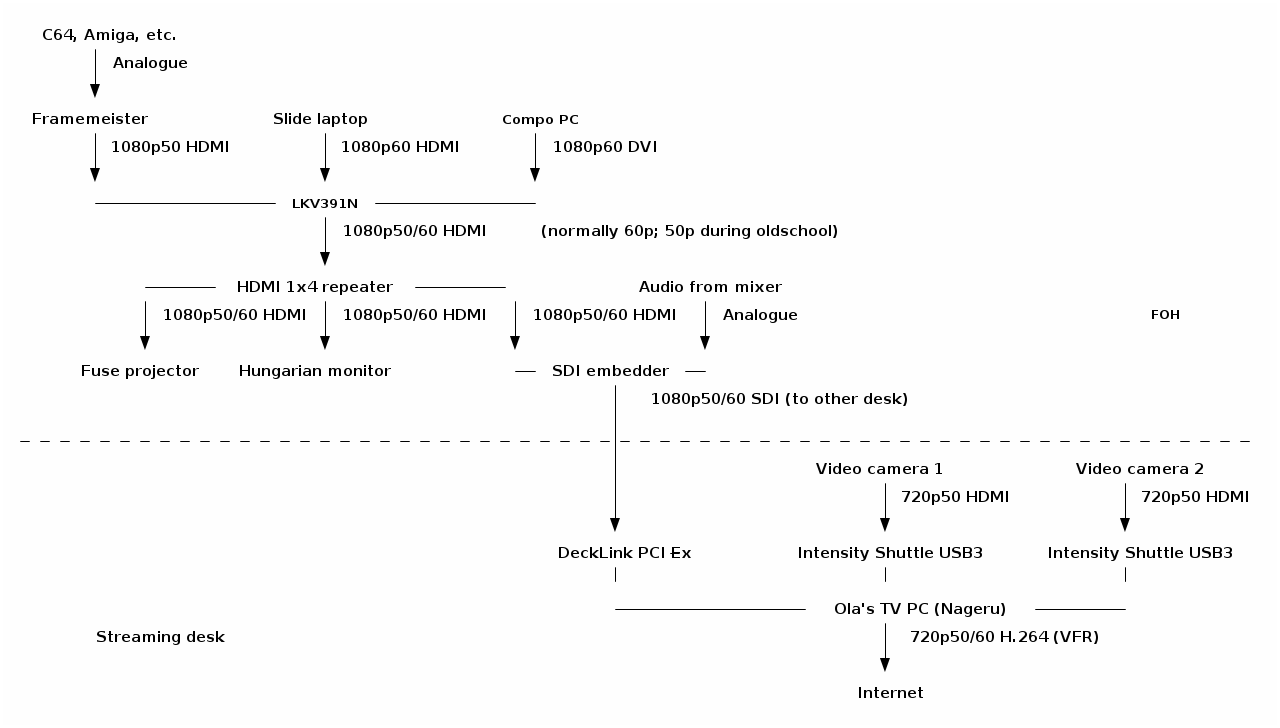
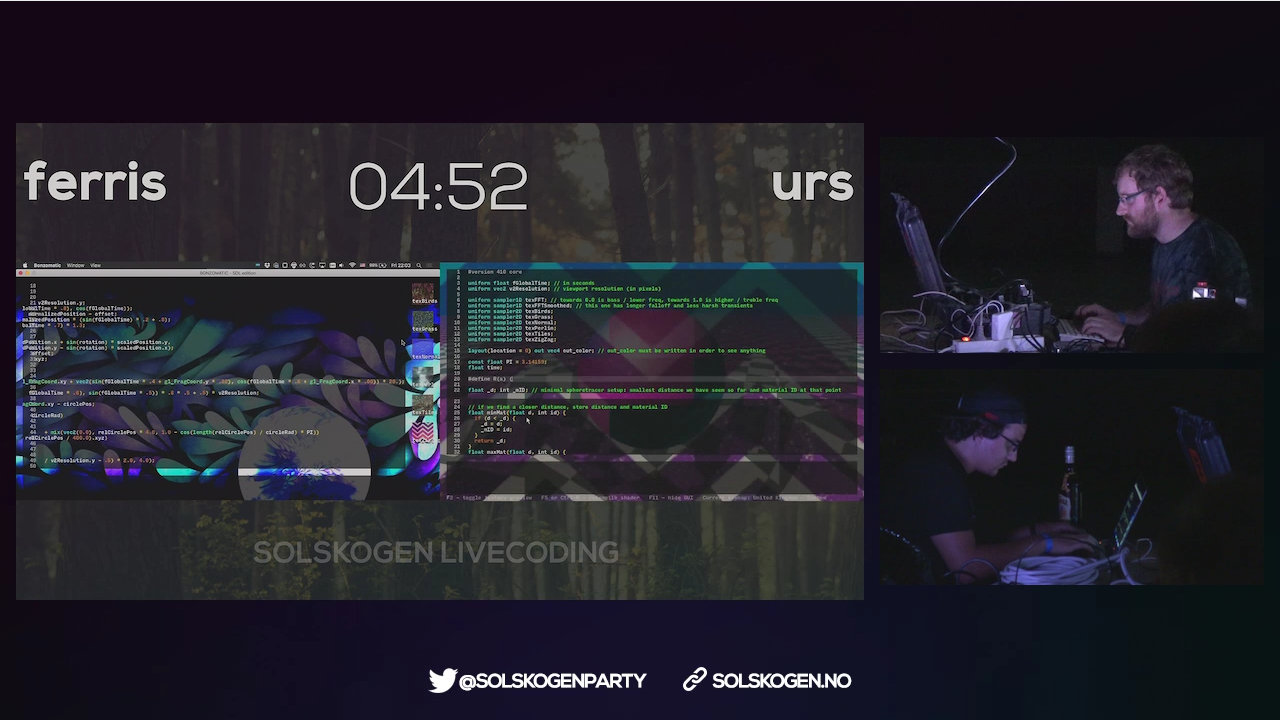
I just published the videos from Solskogen 2016 on Youtube; you can find them all in this playlist. The are basically exactly what was being sent out on the live stream, frame for frame, except that the audio for the live shader compos has been remastered, and of course a lot of dead time has been cut out (the stream was sending over several days, but most of the time, only the information loop from the bigscreen). YouTube doesn't really support the variable 50/60 Hz frame rate we've been using well as far as I can tell, but mostly it seems to go to some 60 Hz upconversion, which is okay enough, because the rest of your setup most likely isn't free-framerate anyway. Solskogen is interesting in that we're trying to do a high-quality stream with essentially zero money allocated to it; where something like Debconf can use 2500 for renting and transporting equipment (granted, for two or three rooms and not our single stream), we're largely dependent on personal equipment as well as borrowing things here and there. (I think we borrowed stuff from more or less ten distinct places.) Furthermore, we're nowhere near the situation of two cameras, a laptop, perhaps a few microphones ; not only do you expect to run full 1080p60 to the bigscreen and switch between that and information slides for each production, but an Amiga 500 doesn't really have an HDMI port, and Commodore 64 delivers an infamously broken 50.12 Hz signal that you really need to deal with carefully if you want it to not look like crap. These two factors together lead to a rather eclectic setup; here, visualized beautifully from my ASCII art by ditaa: Solskogen 2016 A/V setup diagram Of course, for me, the really interesting part here is near the end of the chain, with Nageru, my live video mixer, doing the stream mixing and encoding. (There's also Cubemap, the video reflector, but honestly, I never worry about that anymore. Serving 150 simultaneous clients is just not something to write home about anymore; the only adjustment I would want to make would probably be some WebSockets support to be able to deal with iOS without having to use a secondary HLS stream.) Of course, to make things even more complicated, the live shader compo needs two different inputs (the two coders' laptops) live on the bigscreen, which was done with two video capture cards, text chroma-keyed on top from Chroma, and OBS, because the guy controlling the bigscreen has different preferences from me. I would take his screen in as a dirty feed and then put my own stuff around it, like this: Solskogen 2016 shader compo screenshot (Unfortunately, I forgot to take a screenshot of Nageru itself during this run.) Solskogen was the first time I'd really used Nageru in production, and despite super-extensive testing, there's always something that can go wrong. And indeed there was: First of all, we discovered that the local Internet line was reduced from 30/10 to 5/0.5 (which is, frankly, unusable for streaming video), and after we'd half-way fixed that (we got it to 25/4 or so by prodding the ISP, of which we could reserve about 2 for video demoscene content is really hard to encode, so I'd prefer a lot more) Nageru started crashing. It wasn't even crashes I understood anything of. Generally it seemed like the NVIDIA drivers were returning GL_OUT_OF_MEMORY on things like creating mipmaps; it's logical that they'd be allocating memory, but we had 6 GB of GPU memory and 16 GB of CPU memory, and lots of it was free. (The PC we used for encoding was much, much faster than what you need to run Nageru smoothly, so we had plenty of CPU power left to run x264 in, although you can of course always want more.) It seemed to be mostly related to zoom transitions, so I generally avoided those and ran that night's compos in a more static fashion. It wasn't until later that night (or morning, if you will) that I actually understood the bug (through the godsend of the NVX_gpu_memory_info extension, which gave me enough information about the GPU memory state that I understood I wasn't leaking GPU memory at all); I had set Nageru to lock all of its memory used in RAM, so that it would never ever get swapped out and lose frames for that reason. I had set the limit for lockable RAM based on my test setup, with 4 GB of RAM, but this setup had much more RAM, a 1080p60 input (which uses more RAM, of course) and a second camera, all of which I hadn't been able to test before, since I simply didn't have the hardware available. So I wasn't hitting the available RAM, but I was hitting the amount of RAM that Linux was willing to lock into memory for me, and at that point, it'd rather return errors on memory allocations (including the allocations the driver needed to make for its texture memory backings) than to violate the never swap contract. Once I fixed this (by simply increasing the amount of lockable memory in limits.conf), everything was rock-stable, just like it should be, and I could turn my attention to the actual production. Often during compos, I don't really need the mixing power of Nageru (it just shows a single input, albeit scaled using high-quality Lanczos3 scaling on the GPU to get it down from 1080p60 to 720p60), but since entries come in using different sound levels (I wanted the stream to conform to EBU R128, which it generally did) and different platforms expect different audio work (e.g., you wouldn't put a compressor on an MP3 track that was already mastered, but we did that on e.g. SID tracks since they have nearly zero ability to control the overall volume), there was a fair bit of manual audio tweaking during some of the compos. That, and of course, the live 50/60 Hz switches were a lot of fun: If an Amiga entry was coming up, we'd 1. fade to a camera, 2. fade in an overlay saying we were switching to 50 Hz so have patience, 3. set the camera as master clock (because the bigscreen's clock is going to go away soon), 4. change the scaler from 60 Hz to 50 Hz (takes two clicks and a bit of waiting), 5. change the scaler input in Nageru from 1080p60 to 1080p50, 6. steps 3,2,1 in reverse. Next time, I'll try to make that slightly smoother, especially as the lack of audio during the switch (it comes in on the bigscreen SDI feed) tended to confuse viewers. So, well, that was a lot of fun, and it certainly validated that you can do a pretty complicated real-life stream with Nageru. I have a long list of small tweaks I want to make, though; nothing beats actual experience when it comes to improving processes. :-)

Daniel Stender: Theano in Debian: maintenance, BLAS and CUDA

I'm glad to announce that we have the current release of Theano (0.8.2) in Debian unstable now, it's on its way into the testing branch and the Debian derivatives, heading for Debian 9. The Debian package is maintained in behalf of the Debian Science Team. We have a binary package with the modules in the Python 2.7 import path (python-theano), if you want or need to stick to that branch a little longer (as a matter of fact, in the current popcon stats it's the most installed package), and a package running on the default Python 3 version (python3-theano). The comprehensive documentation is available for offline usage in another binary package (theano-doc). Although Theano builds its extensions on run time and therefore all binary packages contain the same code, the source package generates arch specific packages1 for the reason that the exhaustive test suite could run over all the architectures to detect if there are problems somewhere (#824116). what's this? In a nutshell, Theano is a computer algebra system (CAS) and expression compiler, which is implemented in Python as a library. It is named after a Classical Greek female mathematician and it's developed at the LISA lab (located at MILA, the Montreal Institute for Learning Algorithms) at the Universit de Montr al. Theano tightly integrates multi-dimensional arrays (N-dimensional, ND-array) from NumPy (numpy.ndarray), which are broadly used in Scientific Python for the representation of numeric data. It features a declarative Python based language with symbolic operations for the functional definition of mathematical expressions, which allows to create functions that compute values for them. Internally the expressions are represented as directed graphs with nodes for variables and operations. The internal compiler then optimizes those graphs for stability and speed and then generates high-performance native machine code to evaluate resp. compute these mathematical expressions2. One of the main features of Theano is that it's capable to compute also on GPU processors (graphical processor unit), like on custom graphic cards (e.g. the developers are using a GeForce GTX Titan X for benchmarks). Today's GPUs became very powerful parallel floating point devices which can be employed also for scientific computations instead of 3D video games3. The acronym "GPGPU" (general purpose graphical processor unit) refers to special cards like NVIDIA's Tesla4, which could be used alike (more on that below). Thus, Theano is a high-performance number cruncher with an own computing engine which could be used for large-scale scientific computations. If you haven't came across Theano as a Pythonistic professional mathematician, it's also one of the most prevalent frameworks for implementing deep learning applications (training multi-layered, "deep" artificial neural networks, DNN) around5, and has been developed with a focus on machine learning from the ground up. There are several higher level user interfaces build in the top of Theano (for DNN, Keras, Lasagne, Blocks, and others, or for Python probalistic programming, PyMC3). I'll seek for some of them also becoming available in Debian, too. helper scripts Both binary packages ship three convenience scripts, theano-cache, theano-test, and theano-nose. Instead of them being copied into /usr/bin, which would result into a binaries-have-conflict violation, the scripts are to be found in /usr/share/python-theano (python3-theano respectively), so that both module packages of Theano can be installed at the same time. The scripts could be run directly from these folders, e.g. do $ python /usr/share/python-theano/theano-nose to achieve that. If you're going to heavy use them, you could add the directory of the flavour you prefer (Python 2 or Python 3) to the $PATH environment variable manually by either typing e.g. $ export PATH=/usr/share/python-theano:$PATH on the prompt, or save that line into ~/.bashrc. Manpages aren't available for these little helper scripts6, but you could always get info on what they do and which arguments they accept by invoking them with the -h (for theano-nose) resp. help flag (for theano-cache). running the tests On some occasions you might want to run the testsuite of the installed library, like to check over if everything runs fine on your GPU hardware. There are two different ways to run the tests (anyway you need to have python ,3 -nose installed). One is, you could launch the test suite by doing $ python -c 'import theano; theano.test() (or the same with python3 to test the other flavour), that's the same what the helper script theano-test does. However, by doing it that way some particular tests might fail by raising errors also for the group of known failures. Known failures are excluded from being errors if you run the tests by theano-nose, which is a wrapper around nosetests, so this might be always the better choice. You can run this convenience script with the option --theano on the installed library, or from the source package root, which you could pull by $ sudo apt-get source theano (there you have also the option to use bin/theano-nose). The script accept options for nosetests, so you might run it with -v to increase verbosity. For the tests the configuration switch config.device must be set to cpu. This will also include the GPU tests when a proper accessible device is detected, so that's a little misleading in the sense of it doesn't mean "run everything on the CPU". You're on the safe side if you run it always like this: $ THEANO_FLAGS=device=cpu theano-nose, if you've set config.device to gpu in your ~/.theanorc. Depending on the available hardware and the used BLAS implementation (see below) it could take quite a long time to run the whole test suite through, on the Core-i5 in my laptop that takes around an hour even excluded the GPU related tests (which perform pretty fast, though). Theano features a couple of switches to manipulate the default configuration for optimization and compilation. There is a rivalry between optimization and compilation costs against performance of the test suite, and it turned out the test suite performs a quicker with lesser graph optimization. There are two different switches available to control config.optimizer, the fast_run toggles maximal optimization, while fast_compile runs only a minimal set of graph optimization features. These settings are used by the general mode switches for config.mode, which is either FAST_RUN by default, or FAST_COMPILE. The default mode FAST_RUN (optimizer=fast_run, linker=cvm) needs around 72 minutes on my lower mid-level machine (on un-optimized BLAS). To set mode=FAST_COMPILE (optimizer=fast_compile, linker=py) brings some boost for the performance of the test suite because it runs the whole suite in 46 minutes. The downside of that is that C code compilation is disabled in this mode by using the linker py, and also the GPU related tests are not included. I've played around with using the optimizer fast_compile with some of the other linkers (c py and cvm, and their versions without garbage collection) as alternative to FAST_COMPILE with minimal optimization but also machine code compilation incl. GPU testing. But to my experience, fast_compile without another than the linker py results in some new errors and failures of some tests on amd64, and this might the case also on other architectures, too. By the way, another useful feature is DebugMode for config.mode, which verifies the correctness of all optimizations and compares the C to Python results. If you want to have detailed info on the configuration settings of Theano, do $ python -c 'import theano; print theano.config' less, and check out the chapter config in the library documentation in the documentation. cache maintenance Theano isn't a JIT (just-in-time) compiler like Numba, which generates native machine code in the memory and executes it immediately, but it saves the generated native machine code into compiledirs. The reason for doing it that way is quite practical like the docs explain, the persistent cache on disk makes it possible to avoid generating code for the same operation, and to avoid compiling again when different operations generate the same code. The compiledirs by default are located within $(HOME)/.theano/. After some time the folder becomes quite large, and might look something like this:
$ ls ~/.theano
compiledir_Linux-4.5--amd64-x86_64-with-debian-stretch-sid--2.7.11+-64
compiledir_Linux-4.5--amd64-x86_64-with-debian-stretch-sid--2.7.12-64
compiledir_Linux-4.5--amd64-x86_64-with-debian-stretch-sid--2.7.12rc1-64
compiledir_Linux-4.5--amd64-x86_64-with-debian-stretch-sid--3.5.1+-64
compiledir_Linux-4.5--amd64-x86_64-with-debian-stretch-sid--3.5.2-64
compiledir_Linux-4.5--amd64-x86_64-with-debian-stretch-sid--3.5.2rc1-64
If the used Python version changed like in this example you might to want to purge obsolete cache. For working with the cache resp. the compiledirs, the helper theano-cache comes in handy. If you invoke it without any arguments the current cache location is put out like ~/.theano/compiledir_Linux-4.5--amd64-x86_64-with-debian-stretch-sid--2.7.12-64 (the script is run from /usr/share/python-theano). So, the compiledirs for the old Python versions in this example (11+ and 12rc1) can be removed to free the space they occupy. All compiledirs resp. cache directories meaning the whole cache could be erased by $ theano-cache basecompiledir purge, the effect is the same as by performing $ rm -rf ~/.theano. You might want to do that e.g. if you're using different hardware, like when you got yourself another graphics card. Or habitual from time to time when the compiledirs fill up so much that it slows down processing with the harddisk being very busy all the time, if you don't have an SSD drive available. For example, the disk space of build chroots carrying (mainly) the tests completely compiled through on default Python 2 and Python 3 consumes around 1.3 GB (see here). BLAS implementations Theano needs a level 3 implementation of BLAS (Basic Linear Algebra Subprograms) for operations between vectors (one-dimensional mathematical objects) and matrices (two-dimensional objects) carried out on the CPU. NumPy is already build on BLAS and pulls the standard implementation (libblas3, soure package: lapack), but Theano links directly to it instead of using NumPy as intermediate layer to reduce the computational overhead. For this, Theano needs development headers and the binary packages pull libblas-dev by default, if any other development package of another BLAS implementation (like OpenBLAS or ATLAS) isn't already installed, or pulled with them (providing the virtual package libblas.so). The linker flags could be manipulated directly through the configuration switch config.blas.ldflags, which is by default set to -L/usr/lib -lblas -lblas. By the way, if you set it to an empty value, Theano falls back to using BLAS through NumPy, if you want to have that for some reason. On Debian, there is a very convenient way to switch between BLAS implementations by the alternatives mechanism. If you have several alternative implementations installed at the same time, you can switch from one to another easily by just doing:
$ sudo update-alternatives --config libblas.so
There are 3 choices for the alternative libblas.so (providing /usr/lib/libblas.so).
  Selection    Path                                  Priority   Status
------------------------------------------------------------
* 0            /usr/lib/openblas-base/libblas.so      40        auto mode
  1            /usr/lib/atlas-base/atlas/libblas.so   35        manual mode
  2            /usr/lib/libblas/libblas.so            10        manual mode
  3            /usr/lib/openblas-base/libblas.so      40        manual mode
Press <enter> to keep the current choice[*], or type selection number:
The implementations are performing differently on different hardware, so you might want to take the time to compare which one does it best on your processor (the other packages are libatlas-base-dev and libopenblas-dev), and choose that to optimize your system. If you want to squeeze out all which is in there for carrying out Theano's computations on the CPU, another option is to compile an optimized version of a BLAS library especially for your processor. I'm going to write another blog posting on this issue. The binary packages of Theano ship the script check_blas.py to check over how well a BLAS implementation performs with it, and if everything works right. That script is located in the misc subfolder of the library, you could locate it by doing $ dpkg -L python-theano grep check_blas (or for the package python3-theano accordingly), and run it with the Python interpreter. By default the scripts puts out a lot of info like a huge perfomance comparison reference table, the current setting of blas.ldflags, the compiledir, the setting of floatX, OS information, the GCC version, the current NumPy config towards BLAS, NumPy location and version, if Theano linked directly or has used the NumPy binding, and finally and most important, the execution time. If just the execution time for quick perfomance comparisons is needed this script could be invoked with -q. Theano on CUDA The function compiler of Theano works with alternative backends to carry out the computations, like the ones for graphics cards. Currently, there are two different backends for GPU processing available, one docks onto NVIDIA's CUDA (Compute Unified Device Architecture) technology7, and another one for libgpuarray, which is also developed by the Theano developers in parallel. The libgpuarray library is an interesting alternative for Theano, it's a GPU tensor (multi-dimensional mathematical object) array written in C with Python bindings based on Cython, which has the advantage of running also on OpenCL8. OpenCL, unlike CUDA9, is full free software, vendor neutral and overcomes the limitation of the CUDA toolkit being only available for amd64 and the ppc64el port (see here). I've opened an ITP on libgpuarray and we'll see if and how this works out. Another reason for it would be great to have it available is that it looks like CUDA currently runs into problems with GCC 610. More on that, soon. Here's a litle checklist for setting up your CUDA device so that you don't have to experience something like this:
$ THEANO_FLAGS=device=gpu,floatX=float32 python ./cat_dog_classifier.py 
WARNING (theano.sandbox.cuda): CUDA is installed, but device gpu is not available (error: Unable to get the number of gpus available: no CUDA-capable device is detected)
hardware check For running Theano on CUDA you need an NVIDIA graphics card which is capable of doing that. You can recheck if your device is supported by CUDA here. When the hardware isn't too old (CUDA support started with GeForce 8 and Quadro X series) or too strange I think it isn't working only in exceptional cases. You can check your model and if the device is present in the system on the bare hardware level by doing this:
$ lspci   grep -i nvidia
04:00.0 3D controller: NVIDIA Corporation GM108M [GeForce 940M] (rev a2)
If a line like this doesn't get returned, your device most probably is broken, or not properly connected (ouch). If rev ff appears at the end of the line that means the device is off meaning powered down. This might be happening if you have a laptop with Optimus graphics hardware, and the related drivers have switched off the unoccupied device to safe energy11. kernel module Running CUDA applications requires the proprietary NVIDIA driver kernel module to be loaded into the kernel and working. If you haven't already installed it for another purpose, the NVIDIA driver and the CUDA toolkit are both in the non-free section of the Debian archive, which is not enabled by default. To get non-free packages you have to add non-free (and it's better to do so, also contrib) to your package source in /etc/apt/sources.list, which might then look like this:
deb http://httpredir.debian.org/debian/ testing main contrib non-free
After doing that, perform $ apt-cache update to update the package lists, and there you go with the non-free packages. The headers of the running kernel are needed to compile modules, you can get them together with the NVIDIA kernel module package by running:
$ sudo apt-get install linux-headers-$(uname -r) nvidia-kernel-dkms build-essential
DKMS will then build the NVIDIA module for the kernel and does some other things on the system. When the installation has finished, it's generally advised to reboot the system completely. troubleshooting If you have problems with the CUDA device, it's advised to verify if the following things concerning the NVIDIA driver resp. kernel module are in order: blacklist nouveau Check if the default Nouveau kernel module driver (which blocks the NVIDIA module) for some reason still gets loaded by doing $ lsmod grep nouveau. If nothing gets returned, that's right. If it's still in the kernel, just add blacklist nouveau to /etc/modprobe.d/blacklist.conf, and update the booting ramdisk with sudo update-initramfs -u afterwards. Then reboot once more, this shouldn't be the case then anymore. rebuild kernel module To fix it when the module haven't been properly compiled for some reason you could trigger a rebuild of the NVIDIA kernel module with $ sudo dpkg-reconfigure nvidia-kernel-dkms. When you're about to send your hardware in to repair because everything looks all right but the device just isn't working, that really could help (own experience). After the rebuild of the module or modules (if you have a few kernel packages installed) has completed, you could recheck if the module really is available by running:
$ sudo modinfo nvidia-current
filename:       /lib/modules/4.4.0-1-amd64/updates/dkms/nvidia-current.ko
alias:          char-major-195-*
version:        352.79
supported:      external
license:        NVIDIA
alias:          pci:v000010DEd00000E00sv*sd*bc04sc80i00*
alias:          pci:v000010DEd*sv*sd*bc03sc02i00*
alias:          pci:v000010DEd*sv*sd*bc03sc00i00*
depends:        drm
vermagic:       4.4.0-1-amd64 SMP mod_unload modversions 
parm:           NVreg_Mobile:int
It should be something similiar to this when everything is all right. reload kernel module When there are problems with the GPU, maybe the kernel module isn't properly loaded. You could recheck if the module has been properly loaded by doing
$ lsmod   grep nvidia
nvidia_uvm             73728  0
nvidia               8540160  1 nvidia_uvm
drm                   356352  7 i915,drm_kms_helper,nvidia
The kernel module could be loaded resp. reloaded with $ sudo nvidia-modprobe (that tool is from the package nvidia-modprobe). unsupported graphics card Be sure that you graphics cards is supported by the current driver kernel module. If you have bought new hardware, that's quite possible to come out being a problem. You can get the version of the current NVIDIA driver with:
$ cat /proc/driver/nvidia/version 
NVRM version: NVIDIA UNIX x86_64 Kernel Module 352.79  Wed Jan 13 16:17:53 PST 2016
GCC version:  gcc version 5.3.1 20160528 (Debian 5.3.1-21)
Then, google the version number like nvidia 352.79, this should get you onto an official driver download page like this. There, check for what's to be found under "Supported Products". I you're stuck with that there are two options, to wait until the driver in Debian got updated, or replace it with the latest driver package from NVIDIA. That's possible to do, but something more for experienced users. occupied graphics card The CUDA driver cannot work while the graphical interface is busy like by processing the graphical display of your X.Org server. Which kernel driver actually is used to process the desktop could be examined by this command:12
$ grep '(II).*([0-9]):' /var/log/Xorg.0.log
[    37.700] (II) intel(0): Using Kernel Mode Setting driver: i915, version 1.6.0 20150522
[    37.700] (II) intel(0): SNA compiled: xserver-xorg-video-intel 2:2.99.917-2 (Vincent Cheng <vcheng@debian.org>)
 ... 
[    39.808] (II) intel(0): switch to mode 1920x1080@60.0 on eDP1 using pipe 0, position (0, 0), rotation normal, reflection none
[    39.810] (II) intel(0): Setting screen physical size to 508 x 285
[    67.576] (II) intel(0): EDID vendor "CMN", prod id 5941
[    67.576] (II) intel(0): Printing DDC gathered Modelines:
[    67.576] (II) intel(0): Modeline "1920x1080"x0.0  152.84  1920 1968 2000 2250  1080 1083 1088 1132 -hsync -vsync (67.9 kHz eP)
This example shows that the rendering of the desktop is performed by the graphical device of the Intel CPU, which is just like it's needed for running CUDA applications on your NVIDIA graphics card, if you don't have another one. nvidia-cuda-toolkit With the Debian package of the CUDA toolkit everything pretty much runs out of the box for Theano. Just install it with apt-get, and you're ready to go, the CUDA backend is the default one. Pycuda is also a suggested dependency of the binary packages, it could be pulled together with the CUDA toolkit. The up-to-date CUDA release 7.5 is of course available, with that you have Maxwell architecture support so that you can run Theano on e.g. a GeForce GTX Titan X with 6,2 TFLOPS on single precision13 at an affordable price. CUDA 814 is around the corner with support for the new Pascal architecture15. Like the GeForce GTX 1080 high-end gaming graphics card already has 8,23 TFLOPS16. When it comes to professional GPGPU hardware like the Tesla P100 there is much more computational power available, scalable by multiplication of cores resp. cards up to genuine little supercomputers which fit on a desk, like the DGX-117. Theano can use multiple GPUs for calculations to work with highly scaled hardware, I'll write another blog post on this issue. Theano on the GPU It's not difficult to run Theano on the GPU. Only single precision floating point numbers (float32) are supported on the GPU, but that is sufficient for deep learning applications. Theano uses double precision floats (float64) by default, so you have to set the configuration variable config.floatX to float32, like written on above, either with the THEANO_FLAGS environment variable or better in your .theanorc file, if you're going to use the GPU a lot. Switching to the GPU actually happens with the config.device configuration variable, which must be set to either gpu or gpu0, gpu1 etc., to choose a particular one if multiple devices are available. Here's is a little test script check1.py, it's taken from the docs and slightly altered. You can run that script either with python or python3 (there was a single test failure on the Python 3 package, so the Python 2 library might be a little more stable currently). For comparison, here's an example on how it perfoms on my hardware, one time on the CPU, one more time on the GPU:
$ THEANO_FLAGS=floatX=float32 python ./check1.py 
[Elemwise exp,no_inplace (<TensorType(float32, vector)>)]
Looping 1000 times took 4.481719 seconds
Result is [ 1.23178029  1.61879337  1.52278066 ...,  2.20771813  2.29967761
  1.62323284]
Used the cpu
$ THEANO_FLAGS=floatX=float32,device=gpu python ./check1.py 
Using gpu device 0: GeForce 940M (CNMeM is disabled, cuDNN not available)
[GpuElemwise exp,no_inplace (<CudaNdarrayType(float32, vector)>), HostFromGpu(GpuElemwise exp,no_inplace .0)]
Looping 1000 times took 1.164906 seconds
Result is [ 1.23178029  1.61879349  1.52278066 ...,  2.20771813  2.29967761
  1.62323296]
Used the gpu
If you got a result like this you're ready to go with Theano on Debian, training computer vision classifiers or whatever you want to do with it. I'll write more on for what Theano could be used, soon.

  1. Some ports are disabled because they are currently not supported by Theano. There are NotImplementedErrors and other errors in the tests on the numpy.ndarray object being not aligned. The developers commented on that, see here. And on some ports the build flags -m32 resp. -m64 of Theano aren't supported by g++, the build flags can't be manipulated easily.
  2. Theano Development Team: "Theano: a Python framework for fast computation of mathematical expressions"
  3. Marc Couture: "Today's high-powered GPUs: strong for graphics and for maths". In: RTC magazine June 2015, pp. 22 25
  4. Ogier Maitre: "Understanding NVIDIA GPGPU hardware". In: Tsutsui/Collet (eds.): Massively parallel evolutionary computation on GPGPUs. Berlin, Heidelberg: Springer 2013, pp. 15-34
  5. Geoffrey French: "Deep learing tutorial: advanved techniques". PyData London 2016 presentation
  6. Like the description of the Lintian tag binary-without-manpage says, that's not needed for them being in /usr/share.
  7. Tom. R. Halfhill: "Parallel processing with CUDA: Nvidia's high-performance computing platform uses massive multithreading". In: Microprocessor Report January 28, 2008
  8. Faber et.al: "Parallelwelten: GPU-Programmierung mit OpenCL". In: C't 26/2014, pp. 160-165
  9. For comparison, see: Valentine Sinitsyn: "Feel the taste of GPU programming". In: Linux Voice February 2015, pp. 106-109
  10. https://lists.debian.org/debian-devel/2016/07/msg00004.html
  11. If Optimus (hybrid) graphics hardware is present (like commonly today on PC laptops), Debian launches the X-server on the graphics processing unit of the CPU, which is ideal for CUDA. The problem with Optimus actually is the graphics processing on the dedicated GPU. If you are using Bumblebee, the Python interpreter which you want to run Theano on has be to be started with the launcher primusrun, because Bumblebee powers the GPU down with the tool bbswitch every time it isn't used, and I think also the kernel module of the driver is dynamically loaded.
  12. Thorsten Leemhuis: "Treiberreviere. Probleme mit Grafiktreibern f r Linux l sen": In: C't Nr.2/2013, pp. 156-161
  13. Martin Fischer: "4K-Rakete: Die schnellste Single-GPU-Grafikkarte der Welt". In C't 13/2015, pp. 60-61
  14. http://www.heise.de/developer/meldung/Nvidia-CUDA-8-bringt-Optimierungen-fuer-die-Pascal-Architektur-3164254.html
  15. Martin Fischer: "All In: Nvidia enth llt die GPU-Architektur 'Pascal'". In: C't 9/2016, pp. 30-31
  16. Martin Fischer: "Turbo-Pascal: High-End-Grafikkarte f r Spieler: GeForce GTX 1080". In: C't 13/2016, pp. 100-103
  17. http://www.golem.de/news/dgx-1-nvidias-supercomputerchen-mit-8x-tesla-p100-1604-120155.html

19 July 2016

Dirk Eddelbuettel: Rcpp 0.12.6: Rolling on

The sixth update in the 0.12.* series of Rcpp has arrived on the CRAN network for GNU R a few hours ago, and was just pushed to Debian. This 0.12.6 release follows the 0.12.0 release from late July, the 0.12.1 release in September, the 0.12.2 release in November, the 0.12.3 release in January, the 0.12.4 release in March, and the 0.12.5 release in May --- making it the tenth release at the steady bi-montly release frequency. Just like the previous release, this one is once again more of a refining maintenance release which addresses small bugs, nuisances or documentation issues without adding any major new features. That said, some nice features (such as caching support for sourceCpp() and friends) were added. Rcpp has become the most popular way of enhancing GNU R with C or C++ code. As of today, 703 packages on CRAN depend on Rcpp for making analytical code go faster and further. That is up by about fourty packages from the last release in May! Similar to the previous releases, we have contributions from first-time committers. Artem Klevtsov made na_omit run faster on vectors without NA values. Otherwise, we had many contributions from "regulars" like Kirill Mueller, James "coatless" Balamuta and Dan Dillon as well as from fellow Rcpp Core contributors. Some noteworthy highlights are encoding and string fixes, generally more robust builds, a new iterator-based approach for vectorized programming, the aforementioned caching for sourceCpp(), and several documentation enhancements. More details are below.

Changes in Rcpp version 0.12.6 (2016-07-18)
  • Changes in Rcpp API:
    • The long long data type is used only if it is available, to avoid compiler warnings (Kirill M ller in #488).
    • The compiler is made aware that stop() never returns, to improve code path analysis (Kirill M ller in #487 addressing issue #486).
    • String replacement was corrected (Qiang in #479 following mailing list bug report by Masaki Tsuda)
    • Allow for UTF-8 encoding in error messages via RCPP_USING_UTF8_ERROR_STRING macro (Qin Wenfeng in #493)
    • The R function Rf_warningcall is now provided as well (as usual without leading Rf_) (#497 fixing #495)
  • Changes in Rcpp Sugar:
    • Const-ness of min and max functions has been corrected. (Dan Dillon in PR #478 fixing issue #477).
    • Ambiguities for matrix/vector and scalar operations have been fixed (Dan Dillon in PR #476 fixing issue #475).
    • New algorithm header using iterator-based approach for vectorized functions (Dan in PR #481 revisiting PR #428 and addressing issue #426, with futher work by Kirill in PR #488 and Nathan in #503 fixing issue #502).
    • The na_omit() function is now faster for vectors without NA values (Artem Klevtsov in PR #492)
  • Changes in Rcpp Attributes:
    • Add cacheDir argument to sourceCpp() to enable caching of shared libraries across R sessions (JJ in #504).
    • Code generation now deals correctly which packages containing a dot in their name (Qiang in #501 fixing #500).
  • Changes in Rcpp Documentation:
    • A section on default parameters was added to the Rcpp FAQ vignette (James Balamuta in #505 fixing #418).
    • The Rcpp-attributes vignette is now mentioned more prominently in question one of the Rcpp FAQ vignette.
    • The Rcpp Quick Reference vignette received a facelift with new sections on Rcpp attributes and plugins begin added. (James Balamuta in #509 fixing #484).
    • The bib file was updated with respect to the recent JSS publication for RProtoBuf.
Thanks to CRANberries, you can also look at a diff to the previous release. As always, even fuller details are on the Rcpp Changelog page and the Rcpp page which also leads to the downloads page, the browseable doxygen docs and zip files of doxygen output for the standard formats. A local directory has source and documentation too. Questions, comments etc should go to the rcpp-devel mailing list off the R-Forge page.

This post by Dirk Eddelbuettel originated on his Thinking inside the box blog. Please report excessive re-aggregation in third-party for-profit settings.

17 July 2016

Vasudev Kamath: Switching from approx to apt-cacher-ng

After a long ~5 years (from 2011) journey with approx I finally wanted to switch to something new like apt-cacher-ng. And after a bit of changes I finally managed to get apt-cacher-ng into my work flow.
Bit of History I should first give you a brief on how I started using approx. It all started in MiniDebconf 2011 which I organized at my Alma-mater. I met Jonas Smedegaard here and from him I learned about approx. Jonas has a bunch of machines at his home and he was active user of approx and he showed it to me while explaining the Boxer project. I was quite impressed with approx. Back then I was using a 230kbps slow INTERNET connection and I was also maintaining a couple of packages in Debian. Updating the pbuilder chroots was time consuming task for me as I had to download multiple times over slow net. And approx largely solved this problem and I started using it. 5 years fast forward I now have quite fast INTERNET with good FUP. (About 50GB a month), but I still tend to use approx which makes building packages quite faster. I also use couple of containers on my laptop which all use my laptop as approx cache.
Why switch? So why change to apt-cacher-ng?. Approx is a simple tool, it runs mainly with inetd and sits between apt and the repository on INTERNET. Where as apt-cacher-ng provides a lot of features. Below are some listed from the apt-cacher-ng manual.
  • use of TLS/SSL repositories (may be possible with approx but I'm notsure how to do it)
  • Access control of who can access caching server
  • Integration with debdelta (I've not tried, approx also supports debdelta)
  • Avoiding use of apt-cacher-ng for some hosts
  • Avoiding caching of some file types
  • Partial mirroring for offline usage.
  • Selection of ipv4 or ipv6 for connections.
The biggest change I see is the speed difference between approx and apt-cacher-ng. I think this is mainly because apt-cacher-ng is threaded where as approx runs using inetd. I do not want all features of apt-cacher-ng at the moment, but who knows in future I might need some features and hence I decided to switch to apt-cacher-ng over approx.
Transition Transition from approx to apt-cacher-ng was smoother than I expected. There are 2 approaches you can use one is explicit routing another is transparent routing. I prefer transparent routing and I only had to change my /etc/apt/sources.list to use the actual repository URL.
deb http://deb.debian.org/debian unstable main contrib non-free
deb-src http://deb.debian.org/debian unstable main
deb http://deb.debian.org/debian experimental main contrib non-free
deb-src http://deb.debian.org/debian experimental main
After above change I had to add a 01proxy configuration file to /etc/apt/apt.conf.d/ with following content.
Acquire::http::Proxy "http://localhost:3142/"
I use explicit routing only when using apt-cacher-ng with pbuilder and debootstrap. Following snippet shows explicit routing through /etc/apt/sources.list.
deb http://localhost:3142/deb.debian.org/debian unstable main
Usage with pbuilder and friends To use apt-cacher-ng with pbuilder you need to modify /etc/pbuilderrc to contain following line
MIRRORSITE=http://localhost:3142/deb.debian.org/debian
Usage with debootstrap To use apt-cacher-ng with debootstrap, pass MIRROR argument of debootstrap as http://localhost:3142/deb.debian.org/debian.
Conclusion I've now completed full transition of my work flow to apt-cacher-ng and purged approx and its cache.
Though it works fine I feel that there will be 2 caches created when you use transparent and explicit proxy using localhost:3142 URL. I'm sure it is possible to configure this to avoid duplication, but I've not yet figured it. If you know how to fix this do let me know.
Update Jonas told me that its not 2 caches but 2 routing paths, one for transparent routing and another for explicit routing. So I guess there is nothing here to fix :-).

16 July 2016

Rapha&#235;l Hertzog: Freexian s report about Debian Long Term Support, June 2016

A Debian LTS logoLike each month, here comes a report about the work of paid contributors to Debian LTS. Individual reports In June, 158.25 work hours have been dispatched among 11 paid contributors. Their reports are available: DebConf 16 Presentation If you want to know more about how the LTS project is organized, you can watch the presentation I gave during DebConf 16 in Cape Town. Evolution of the situation The number of sponsored hours increased a little bit at 135 hours per month thanks to 3 new sponsors (Laboratoire LEGI UMR 5519 / CNRS, Quarantainenet BV, GNI MEDIA). Our funding goal is getting closer but it s not there yet. The security tracker currently lists 40 packages with a known CVE and the dla-needed.txt file lists 38 packages awaiting an update. Thanks to our sponsors New sponsors are in bold.

11 July 2016

Daniel Pocock: Let's Encrypt torpedoes cost and maintenance issues for Free RTC

Many people have now heard of the EFF-backed free certificate authority Let's Encrypt. Not only is it free of charge, it has also introduced a fully automated mechanism for certificate renewals, eliminating a tedious chore that has imposed upon busy sysadmins everywhere for many years. These two benefits - elimination of cost and elimination of annual maintenance effort - imply that server operators can now deploy certificates for far more services than they would have previously. The TLS chapter of the RTC Quick Start Guide has been updated with details about Let's Encrypt so anybody installing SIP or XMPP can use Let's Encrypt from the outset. For example, somebody hosting basic Drupal or Wordpress sites for family, friends and small community organizations can now offer them all full HTTPS encryption, WebRTC, SIP and XMPP without having to explain annual renewal fees or worry about losing time in their evenings and weekends renewing certificates manually. Even people who were willing to pay for a single certificate for their main web site may have snubbed their nose at the expense and ongoing effort of having certificates for their SMTP mail server, IMAP server, VPN gateway, SIP proxy, XMPP server, WebSocket and TURN servers too. Now they can all have certificates. Early efforts at SIP were doomed without encryption In the early days, SIP messages would be transported across the public Internet in UDP datagrams without any encryption. SIP itself wasn't originally designed for NAT and a variety of home routers were created with "NAT helper" algorithms that would detect and modify SIP packets to try and work through NAT. Sadly, in many cases these attempts to help actually clash with each other and lead to further instability. Conversely, many rogue ISPs could easily detect and punish VoIP users by blocking their calls or even cutting their DSL line. Operating SIP over TLS, usually on the HTTPS port (TCP port 443) has been an effective way to quash all of these different issues. While the example of SIP is one of the most extreme, it helps demonstrate the benefits of making encryption universal to ensure stability and cut out the "man-in-the-middle", regardless of whether he is trying to help or hinder the end user. Is one certificate enough? Modern SIP, XMPP and WebRTC require additional services, TURN servers and WebSocket servers. If they are all operated on port 443 then it is necessary to use different hostnames for each of them (e.g. turn.example.org and ws.example.org. Each different hostname requires a certificate. Let's Encrypt can provide those additional certificates too, without additional cost or effort. The future with Let's Encrypt The initial version of the Let's Encrypt client, certbot, fully automates the workflow for people using popular web servers such as Apache and nginx. The manual or certonly modes can be used for other services but hopefully certbot will evolve to integrate with many other popular applications too. Currently, Let's Encrypt's certbot tool issues certificates to servers running on TCP port 443 or 80. These are considered to be a privileged ports whereas any port over 1023, including the default ports used by applications such as SIP (5061), XMPP (5222, 5269) and TURN (5349), are not privileged ports. As long as certbot maintains this policy, it is generally necessary to either run a web server for the domain associated with each certificate or run the services themselves on port 443. There are other mechanisms for domain validation and various other clients supporting different subsets of them. Running the services themselves on port 443 turns out to be a good idea anyway as it ensures that RTC services can be reached through HTTP proxy servers who fail to let the HTTP CONNECT method access any other ports. Many configuration tasks are already scripted during the installation of packages on a GNU/Linux distribution (such as Debian or Fedora) or when setting up services using cloud images (for example, in Docker or OpenStack). Due to the heavily standardized nature of Let's Encrypt and the widespread availability of the tools, many of these package installation scripts can be easily adapted to find or create Let's Encrypt certificates on the target system, ensuring every service is running with TLS protection from the minute it goes live. If you have questions about Let's Encrypt for RTC or want to share your experiences, please come and discuss it on the Free-RTC mailing list.
10 July 2016

Simon D saulniers: [GSOC] Week 5&6 Report

During week 5 and 6, I have been to the debian conference 2016. It was really interesting meeting with a lot of people all so involved in Debian.

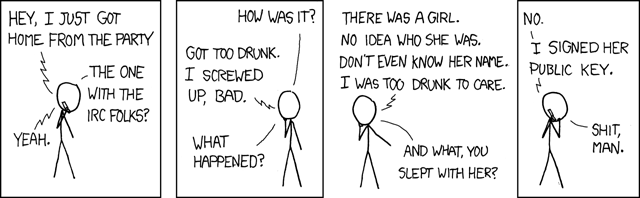
Key signing party Each year, this is a really important tradition: people gather together and exchange GPG public key fingerprint and sign each other s keys. This contributes greatly to the growth of the web of trust.
I did exchange public key fingerprint with others. It was the first opportunity become more connected in the PGP web of trust. I think this is something that needs to make its way to the less technical people so that everyone can benefit from the network privacy features. There is support for some mail clients like Thunderbird, but I think there is still work to do there and mostly there is work to do about the opinion or point of view people have about encryption ; people don t care enough and they don t really know what encryption can do for them (digital signature, trust and privacy).

Ring now part of Debian During the first week at debcamp, Alexandre Viau, an employee at Savoir-Faire Linux and a also a Debian developer (DD for short), has packaged Ring for Debian. Users can now install Ring like so:
$ sudo apt-get install ring
This is an important moment as more people are now going to easily try Ring and potentially contribute to it.

Presentating Ring Alexandre Viau and I have been thinking about presenting Ring at debconf 2016. We finally did it.

8 July 2016

Steve Kemp: I've been moving and updating websites.

I've spent the past days updating several of my websites to be "responsive". Mostly that means I open the site in firefox then press Ctrl-alt-m to switch to mobile-view. Once I have the mobile-view I then fix the site to look good in small small space. Because my general design skills are poor I've been fixing most sites by moving to bootstrap, and ensuring that I don't use headers/footers that are fixed-position. Beyond the fixes to appearances I've also started rationalizing the domains, migrating content across to new homes. I've got a provisional theme setup at steve.fi, and I've moved my blog over there too. The plan for blog-migration went well: The plan was originally to setup a HTTP-redirect, but I realized that this would mean I'd need to keep the redirect in-place forever, as visitors would have no incentive to fix their links, or update their feeds. By adding the fake-RSS-feed, pointing to the new location, I am able to assume that eventually people will update, and I can drop the dns record for blog.steve.org.uk entirely - Already google seems to have updated its spidering and searching shows the new domain already.

7 July 2016

Matthew Garrett: Bluetooth LED bulbs

The best known smart bulb setups (such as the Philips Hue and the Belkin Wemo) are based on Zigbee, a low-energy, low-bandwidth protocol that operates on various unlicensed radio bands. The problem with Zigbee is that basically no home routers or mobile devices have a Zigbee radio, so to communicate with them you need an additional device (usually called a hub or bridge) that can speak Zigbee and also hook up to your existing home network. Requests are sent to the hub (either directly if you're on the same network, or via some external control server if you're on a different network) and it sends appropriate Zigbee commands to the bulbs.
But requiring an additional device adds some expense. People have attempted to solve this in a couple of ways. The first is building direct network connectivity into the bulbs, in the form of adding an 802.11 controller. Go through some sort of setup process[1], the bulb joins your network and you can communicate with it happily. Unfortunately adding wifi costs more than adding Zigbee, both in terms of money and power - wifi bulbs consume noticeably more power when "off" than Zigbee ones.

There's a middle ground. There's a large number of bulbs available from Amazon advertising themselves as Bluetooth, which is true but slightly misleading. They're actually implementing Bluetooth Low Energy, which is part of the Bluetooth 4.0 spec. Implementing this requires both OS and hardware support, so older systems are unable to communicate. Android 4.3 devices tend to have all the necessary features, and modern desktop Linux is also fine as long as you have a Bluetooth 4.0 controller.

Bluetooth is intended as a low power communications protocol. Bluetooth Low Energy (or BLE) is even lower than that, running in a similar power range to Zigbee. Most semi-modern phones can speak it, so it seems like a pretty good choice. Obviously you lose the ability to access the device remotely, but given the track record on this sort of thing that's arguably a benefit. There's a couple of other downsides - the range is worse than Zigbee (but probably still acceptable for any reasonably sized house or apartment), and only one device can be connected to a given BLE server at any one time. That means that if you have the control app open while you're near a bulb, nobody else can control that bulb until you disconnect.

The quality of the bulbs varies a great deal. Some of them are pure RGB bulbs and incapable of producing a convincing white at a reasonable intensity[2]. Some have additional white LEDs but don't support running them at the same time as the colour LEDs, so you have the choice between colour or a fixed (and usually more intense) white. Some allow running the white LEDs at the same time as the RGB ones, which means you can vary the colour temperature of the "white" output.

But while the quality of the bulbs varies, the quality of the apps doesn't really. They're typically all dreadful, competing on features like changing bulb colour in time to music rather than on providing a pleasant user experience. And the whole "Only one person can control the lights at a time" thing doesn't really work so well if you actually live with anyone else. I was dissatisfied.

I'd met Mike Ryan at Kiwicon a couple of years back after watching him demonstrate hacking a BLE skateboard. He offered a couple of good hints for reverse engineering these devices, the first being that Android already does almost everything you need. Hidden in the developer settings is an option marked "Enable Bluetooth HCI snoop log". Turn that on and all Bluetooth traffic (including BLE) is dumped into /sdcard/btsnoop_hci.log. Turn that on, start the app, make some changes, retrieve the file and check it out using Wireshark. Easy.

Conveniently, BLE is very straightforward when it comes to network protocol. The only thing you have is GATT, the Generic Attribute Protocol. Using this you can read and write multiple characteristics. Each packet is limited to a maximum of 20 bytes. Most implementations use a single characteristic for light control, so it's then just a matter of staring at the dumped packets until something jumps out at you. A pretty typical implementation is something like:

0x56,r,g,b,0x00,0xf0,0x00,0xaa

where r, g and b are each just a single byte representing the corresponding red, green or blue intensity. 0x56 presumably indicates a "Set the light to these values" command, 0xaa indicates end of command and 0xf0 indicates that it's a request to set the colour LEDs. Sending 0x0f instead results in the previous byte (0x00 in this example) being interpreted as the intensity of the white LEDs. Unfortunately the bulb I tested that speaks this protocol didn't allow you to drive the white LEDs at the same time as anything else - setting the selection byte to 0xff didn't result in both sets of intensities being interpreted at once. Boo.

You can test this out fairly easily using the gatttool app. Run hcitool lescan to look for the device (remember that it won't show up if anything else is connected to it at the time), then do gatttool -b deviceid -I to get an interactive shell. Type connect to initiate a connection, and once connected send commands by doing char-write-cmd handle value using the handle obtained from your hci dump.

I did this successfully for various bulbs, but annoyingly hit a problem with one from Tikteck. The leading byte of each packet was clearly a counter, but the rest of the packet appeared to be garbage. For reasons best known to themselves, they've implemented application-level encryption on top of BLE. This was a shame, because they were easily the best of the bulbs I'd used - the white LEDs work in conjunction with the colour ones once you're sufficiently close to white, giving you good intensity and letting you modify the colour temperature. That gave me incentive, but figuring out the protocol took quite some time. Earlier this week, I finally cracked it. I've put a Python implementation on Github. The idea is to tie it into Ulfire running on a central machine with a Bluetooth controller, making it possible for me to control the lights from multiple different apps simultaneously and also integrating with my Echo.

I'd write something about the encryption, but I honestly don't know. Large parts of this make no sense to me whatsoever. I haven't even had any gin in the past two weeks. If anybody can explain how anything that's being done there makes any sense at all[3] that would be appreciated.

[1] typically via the bulb pretending to be an access point, but also these days through a terrifying hack involving spewing UDP multicast packets of varying lengths in order to broadcast the password to associated but unauthenticated devices and good god the future is terrifying

[2] For a given power input, blue LEDs produce more light than other colours. To get white with RGB LEDs you either need to have more red and green LEDs than blue ones (which costs more), or you need to reduce the intensity of the blue ones (which means your headline intensity is lower). Neither is appealing, so most of these bulbs will just give you a blue "white" if you ask for full red, green and blue

[3] Especially the bit where we calculate something from the username and password and then encrypt that using some random numbers as the key, then send 50% of the random numbers and 50% of the encrypted output to the device, because I can't even

comment count unavailable comments

Lior Kaplan: Anonymous CVE requests

A year ago I ve blogged about people requesting CVE without letting upstream know. On the other hand, per requests from Debian, I m working on improving PHP upstream CVE request process. For the last few release this means I ask the security list members which issues they think should have CVE and ask for them in parallel to the release being made (usually in the space between the release being tagged publicly and is actually announced). In the last week, I ve encountered a case where a few CVE were assigned to old PHP issues without any public notice. The fixes for these issues have been published a year ago (August 2015). And I find out about these assignment through warning published by the distributions (mostly Debian, which I m close to). Sometimes things fall between the chairs, and it s perfectly OK to ask for CVE to make sure security issues do get attention even if time has passed. But after the issues (and fixes) are public, I don t see a reason to do so without making the request itself public as well. And even if the request wasn t public, at least notify upstream so this info can be added to the right places. Most of these bug were found out when I started to add sequential number into the CVE search after getting an a notice from Debian for two of the issues. And while working on processing these issues for PHP, I also notice they weren t updated for libGD where appropriate (including recent issues). Beyond keeping the eco-system up to date, another aspect of publicity is getting opinions from other parties. For example, in the case of CVE-2015-8879, RedHat doesn t agree with the classification of the bug as security. To give an example of a way things should happen is the request of CVE for PHP 5.5.34 in April, in which the Gentoo security team asked for assignment without upstream knowledge, Debian representative CCs upstream (Thanks!) and also asks CVE for issues covered by Ubuntu, to which the Ubuntu guy then adds some details. I hope this blog post will reach the anonymous people behind these CVE requests, and also the people assigning them. Without transparency and keeping things in synchronization, the idea of having a centralized location for security warning is not going to accomplish its goals.
Filed under: Debian GNU/Linux, PHP

6 July 2016

Daniel Pocock: Avoiding SMS vendor lock-in with SMPP

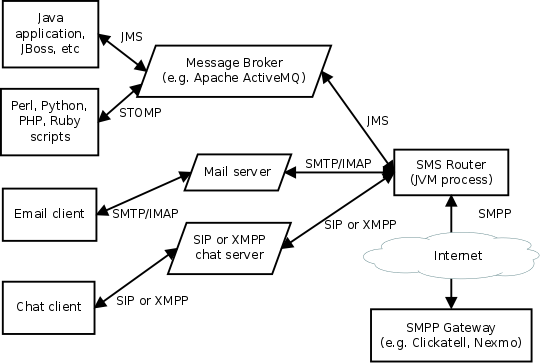
There is increasing demand for SMS notifications about monitoring alerts, trading notifications, flight delays and other events. Various companies are offering SMS transmission services to meet this demand and many of them aggressively pushing their own proprietary interfaces to the SMS world rather than using the more open and widely supported SMPP. There is good reason for this: if users write lots of of scripts to access the REST API of an SMS service, the users won't be able to change their service provider without having to change all their code. Well, that is good if you are an SMPP vendor but not if you are their customer. If an SMS gateway company goes out of business or has a system meltdown, the customers linked to their REST API will have a much bigger effort to migrate to a new provider than those using SMPP. The HTTP REST APIs offered by many vendors hide some details of the SMS protocol and payload. At first glance, this may feel easier. In fact, this leads to unpredictable results when delivering messages to users in different countries and different character sets/languages. It is better to start with SMPP from the beginning and avoid discovering those pitfalls later. The SMS Router free/open source software project helps overcome the SMPP learning curve by using APIs you are already familiar with. More troublesome for large organizations, some of the REST APIs offered by SMS gateways want to make callbacks to your own servers: this means your servers need public IP addresses accessible from the Internet. In some organizations that can take months to organize. SMPP works over one or more outgoing TCP connections initiated from your own server(s) and doesn't require any callback connections from the SMPP gateway. SMS Router lets SMS users have the best of both worlds: the flexibility of linking to any provider who supports SMPP and the convenience of putting messages into the system using any of the transports supported by an Apache Camel component. Popular examples include camel-jms (JMS) for Java and J2EE users, STOMP for scripting languages, camel-mail (SMTP and IMAP) for email integration and camel-sip (SIP) or camel-xmpp (XMPP) for chat/instant messaging systems. If you really want to, you can also create your own in-house HTTP REST API too using camel-restlet for internal applications. In all these cases, SMS Router always uses standard SMPP to reach any gateway of your choice. Architecture overview SMS Router is based on Apache Camel. Multiple instances can be operated in parallel for clustering, load balancing and high availability. It can be monitored using JMX solutions such as JMXetric. The SMPP support is based on the camel-smpp component which is in turn based on the jSMPP library, which comprehensively implements the SMPP protocol in Java. camel-smpp can be used with minimal configuration but for those who want to, many SMPP features can be tweaked on a per-message basis using various headers. The SMPP gateway settings can be configured and changed at will using the sms-router.properties file. The process doesn't require any other files or databases at runtime. The SMS Router is ready-to-run with one queue for sending messages and another queue for incoming messages. The routing logic can be customized by editing the RouteBuilder class to use other Camel components or any of Camel's wide range of functions for inspecting, modifying and routing messages. For example, you can extend it to failover to multiple SMPP gateways using Camel's load-balancer pattern. SMS Router based projects are already used successfully in production, for example, the user registration mechanism for the Lumicall secure VoIP app for Android. Getting started See the README for instructions. Feel free to ask questions about this project on the Camel users mailing list. Disclaimer SMS is not considered secure, the SMS Router developers and telecommunications industry experts discourage the use of this technology for two-factor authentication. Please see the longer disclaimer in the README file and my earlier blog about SMS logins: an illusion of security. The bottom line: if your application is important enough to need two-factor authentication, do it correctly using smart cards or tokens. There are many popular free software projects based on these full cryptographic solutions, for example, the oath-toolkit and dynalogin.

5 July 2016

Joey Hess: twenty years of free software -- part 8 github-backup

github-backup is an attempt to take something I don't like -- github's centralization of what should be a decentralized techology -- and find a constrictive way to make it at least meet my baseline requirements for centralized systems. Namely that when they go away, I don't lose data. So, it was written partly with my ArchiveTeam hat on. A recent bug filed on it, Backup fails for repositories unavailable due to DMCA takedown made me happy, because it shows github-backup behaving more or less as intended, although perhaps not in the optimal way. By the way, this is the only one of my projects that uses github for issue tracking. Intentionally ironically. It was my second real Haskell program (after git-annex) and so also served as a good exercise in applying what I'd learned about writing Haskell up to that point. Next: twenty years of free software -- part 9 small projects

4 July 2016

Benjamin Mako Hill: Studying the relationship between remixing & learning

With more than 10 million users, the Scratch online community is the largest online community where kids learn to program. Since it was created, a central goal of the community has been to promote remixing the reworking and recombination of existing creative artifacts. As the video above shows, remixing programming projects in the current web-based version of Scratch is as easy is as clicking on the see inside button in a project web-page, and then clicking on the remix button in the web-based code editor. Today, close to 30% of projects on Scratch are remixes. Remixing plays such a central role in Scratch because its designers believed that remixing can play an important role in learning. After all, Scratch was designed first and foremost as a learning community with its roots in the Constructionist framework developed at MIT by Seymour Papert and his colleagues. The design of the Scratch online community was inspired by Papert s vision of a learning community similar to Brazilian Samba schools (Henry Jenkins writes about his experience of Samba schools in the context of Papert s vision here), and a comment Marvin Minsky made in 1984:
Adults worry a lot these days. Especially, they worry about how to make other people learn more about computers. They want to make us all computer-literate. Literacy means both reading and writing, but most books and courses about computers only tell you about writing programs. Worse, they only tell about commands and instructions and programming-language grammar rules. They hardly ever give examples. But real languages are more than words and grammar rules. There s also literature what people use the language for. No one ever learns a language from being told its grammar rules. We always start with stories about things that interest us.
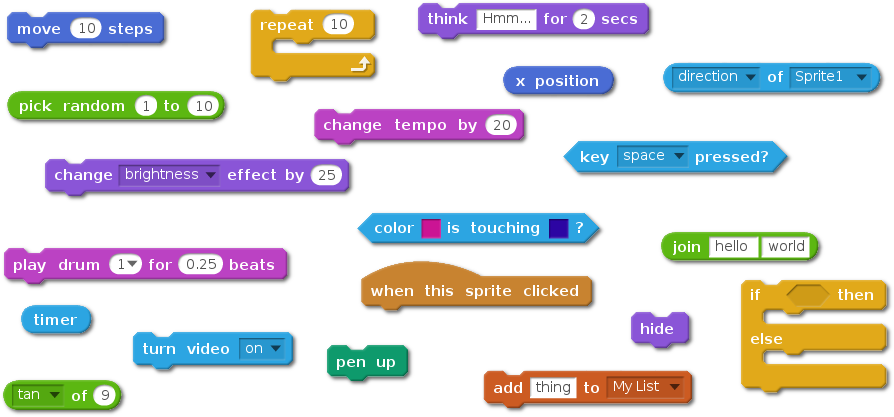
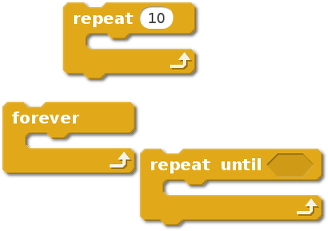
In a new paper titled Remixing as a pathway to Computational Thinking that was recently published at the ACM Conference on Computer Supported Collaborative Work and Social Computing (CSCW) conference, we used a series of quantitative measures of online behavior to try to uncover evidence that might support the theory that remixing in Scratch is positively associated with learning. scratchblocksOf course, because Scratch is an informal environment with no set path for users, no lesson plan, and no quizzes, measuring learning is an open problem. In our study, we built on two different approaches to measure learning in Scratch. The first approach considers the number of distinct types of programming blocks available in Scratch that a user has used over her lifetime in Scratch (there are 120 in total) something that can be thought of as a block repertoire or vocabulary. This measure has been used to model informal learning in Scratch in an earlier study. Using this approach, we hypothesized that users who remix more will have a faster rate of growth for their code vocabulary. Controlling for a number of factors (e.g. age of user, the general level of activity) we found evidence of a small, but positive relationship between the number of remixes a user has shared and her block vocabulary as measured by the unique blocks she used in her non-remix projects. Intriguingly, we also found a strong association between the number of downloads by a user and her vocabulary growth. One interpretation is that this learning might also be associated with less active forms of appropriation, like the process of reading source code described by Minksy. The second approach we used considered specific concepts in programming, such as loops, or event-handling. To measure this, we utilized a mapping of Scratch blocks to key programming concepts found in this paper by Karen Brennan and Mitchel Resnick. For example, in the image below are all the Scratch blocks mapped to the concept of loop . scratchblocksctWe looked at six concepts in total (conditionals, data, events, loops, operators, and parallelism). In each case, we hypothesized that if someone has had never used a given concept before, they would be more likely to use that concept after encountering it while remixing an existing project. Using this second approach, we found that users who had never used a concept were more likely to do so if they had been exposed to the concept through remixing. Although some concepts were more widely used than others, we found a positive relationship between concept use and exposure through remixing for each of the six concepts. We found that this relationship was true even if we ignored obvious examples of cutting and pasting of blocks of code. In all of these models, we found what we believe is evidence of learning through remixing. Of course, there are many limitations in this work. What we found are all positive correlations we do not know if these relationships are causal. Moreover, our measures do not really tell us whether someone has understood the usage of a given block or programming concept.However, even with these limitations, we are excited by the results of our work, and we plan to build on what we have. Our next steps include developing and utilizing better measures of learning, as well as looking at other methods of appropriation like viewing the source code of a project.

This blog post and the paper it describes are collaborative work with Sayamindu Dasgupta, Andr s Monroy-Hern ndez, and William Hale. The paper is released as open access so anyone can read the entire paper here. This blog post was also posted on Sayamindu Dasgupta s blog and on Medium by the MIT Media Lab.

1 July 2016

Joachim Breitner: When to reroll a six

This is a story about counter-intuitive probabilities and how a small bit of doubt turned out to be very justified. It begins with the game To Court the King (German: Um Krone und Kragen ). It is a nice game with dice and cards, where you start with a few dice, and use your dice rolls to buy additional cards, which give you extra dice or special powers to modify the dice that you rolled. You can actually roll your dice many times, but every time, you have to set aside at least one die, which you can no longer change or reroll, until eventually all dice have been set aside. A few years ago, I have played this game a lot, both online (on yucata.de) as well as in real life. It soon became apparent that it is almost always better to go for the cards that give you an extra die, instead of those that let you modify the dice. Intuitively, this is because every additional die allows you to re-roll your dice once more. I concluded that if I have a certain number of dice (say, n), and I want to have a sum as high as possible at the end, then it may make sense to reroll as many dice as possible, setting aside only those showing a 6 (because that is the best you can get) or, if there is no dice showing a 6, then a single die with the best score. Besides for small number of dice (2 or 3), where even a 4 or 5 is worth keeping, this seemed to be a simple, obvious and correct strategy to maximize the expected outcome of this simplified game. It is definitely simple and obvious. But some doubt that it was correct remained. Having one more die still in the game (i.e. not set aside) definitely improves your expected score, because you can reroll the dice more often. How large is this advantage? What if it ever exceeds 6 then it would make sense to reroll a 6. The thought was strange, but I could not dismiss it. So I did what one does these days if one has a question: I posed it on the mathematics site of StackExchange. That was January 2015, and nothing happened. I tried to answer it myself a month later, or at least work towards at an answer, and did that by brute force. Using a library for probabilistic calculations for Haskell I could write some code that simply calculated the various expected values of n dice for up to n = 9 (beyond that, my unoptimized code would take too long):
1:  3.50000 (+3.50000)
2:  8.23611 (+4.73611)
3: 13.42490 (+5.18879)
4: 18.84364 (+5.41874)
5: 24.43605 (+5.59241)
6: 30.15198 (+5.71592)
7: 35.95216 (+5.80018)
8: 41.80969 (+5.85753)
9: 47.70676 (+5.89707)
Note that this calculation, although printed as floating point numbers, is performed using fractions of unbounded integers, so there are no rounding issues that could skew the result. The result supported the hypothesis that there is no point in rolling a 6 again: The value of an additional die grows and approaches 6 from beyond, but judging from these number is never going to reach it. Then again nothing happened. Until 14 month later, when some Byron Schmuland came along, found this an interesting puzzle, and set out a 500 point bounty to whoever solved this problem. This attracted a bit attention, and a few not very successful attempts at solving this. Eventually it reached twitter, where Roman Cheplyaka linked to it. Coincidally a day later some joriki came along, and he had a very good idea: Why not make our life easier and think about dice with less sides, and look at 3 instead of 6. This way, and using a more efficient implementation (but still properly using rationals), he could do a similar calculation for up to 50 dice. And it was very lucky that he went to 50, and not just 25, because up to 27, the results were very much as expected, approaching value of +3 from below. But then it surpassed +3 and became +3.000000008463403. In other words: If you have roll 28 dice, and you have exactly two dice showing a 3, then it gives you better expected score if you set aside only one 3, and not both of them. The advantage is minuscule, but that does not matter it is there. From then on, the results behaved strangely. Between 28 and 34, the additional value was larger than 3. Then, from 35 on again lower than 2. It oscillated. Something similar could be observed when the game is played with coins. Eventually, joriki improved his code and applied enough tricks so that he could solve it also for the 6-sided die: The difference of the expected value of 198 dice and having 199 dice is larger than 6 (by 10 21...)! The optimizations that allowed him to calculate these numbers in a reasonable amount of time unfortunately was to assume that my original hypothesis (never rerolling a 6 is optimal), which held until n < 199. But this meant that for n > 199, the code did not yield correct results. What is the rationale of the story? Don t trust common sense when it comes to statistics; don t judge a sequence just from a few initial numbers; if you have an interesting question, post it online and wait for 16 months.

Elena 'valhalla' Grandi: Busy/idle status indicator

Busy/idle status indicator


About one year ago, during my first http://debconf15.debconf.org/, I've felt the need for some way to tell people whether I was busy on my laptop doing stuff that required concentration or just passing some time between talks etc. and available for interruptions, socialization or context switches.

One easily available method of course would have been to ping me on IRC (and then probably go on chatting on it while being in the same room, of course :) ), but I wanted to try something that allowed for less planning and worked even in places with less connectivity.

My first idea was a base laptop sticker with two statuses and then a removable one used to cover the wrong status and point to the correct one, and I still think it would be nice, but having it printed is probably going to be somewhat expensive, so I shelved the project for the time being.

Immagine/foto

Lately, however, I've been playing with hexagonal stickers https://terinjokes.github.io/StickerConstructorSpec/ and decided to design something on this topic, whith the result in the figure above, with the hacking sticker being my first choice, and the concentrating alternative probably useful while surrounded by people who may misunderstand the term hacking .

While idly looking around for sticker printing prices I realized that it didn't necessarly have to be a sticker and started to consider alternatives.

One format I'm trying is inspired by "do not disturb" door signs: I've used some laminating pouches I already had around which are slightly bigger than credit-card format (but credit-card size would also work of course ) and cut a notch so that they can be attached to the open lid of a laptop.

Immagine/fotoImmagine/foto

They seem to fit well on my laptop lid, and apart from a bad tendency to attract every bit of lint in a radius of a few meters the form factor looks good. I'll try to use them at the next conference to see if they actually work for their intended purpose.

SVG sources (and a PDF) are available on my website http://www.trueelena.org/computers/projects/busy_idle_indicator.html under the CC-BY-SA license.

29 June 2016

Michal &#268;iha&#345;: PHP shapefile library

Since quite a long time phpMyAdmin had embedded the bfShapeFiles library for import of geospatial data. Over the time we had to apply fixes to it to stay compatible with newer PHP versions, but there was really no development. Unfortunately, as it seems to be only usable PHP library which can read and write ESRI shapefiles. With recent switch of phpMyAdmin to dependency handling using Composer I wondered if we should get rid of the last embedded PHP library, which was this one - bfShapeFiles. As I couldn't find alive library which would work well for us, I resisted that for quite long, until pull request to improve it came in. At that point I've realized that it's probably better to separate it and start to improve it outside our codebase. That's when phpmyadmin/shapefile was started. The code is based on bfShapeFiles, applies all fixes which were used in phpMyAdmin and adds improvements from the pull request. On top of that it has brand new testsuite (the coverage is still much lower than I'd like to have) and while writing the tests several parsing issues have been discovered and fixed. Anyway you can now get the source from GitHub or install using Composer from Packagist. PS: While fixing parser bugs I've looked at other parsers as well to see how they handle some situations unclear in the specs and I had to fix Python pyshp on the way as well :-).

Filed under: Debian English phpMyAdmin 0 comments

28 June 2016

Reproducible builds folks: First steps towards getting containers working

Author: ceridwen The 0.1 alpha release of reprotest has been accepted into Debian unstable and is available for install at packages.debian.org or through apt. I've been working on redesigning reprotest so that it runs commands through autopkgtest's adt_testbed interface. For the most part, I needed to replace explicit calls to Python standard library functions for copying files and directories with calls to adt_testbed.Testbed.command() with copyup and copydown, and to use Testbed.execute() and Testbed.check_exec() to run commands instead of subprocess. To test reprotest on the actual containers requires having containers constructed for this purpose. autopkgtest has a test that builds a minimal chroot. I considered doing something like this approach or using BusyBox. However, I have a Python script that mocks a build process, which requires having Python available in the container, and while I looked into busybox-python and MicroPython to keep the footprint small, I decided that for now this would take too much work and decided to go straight to the autopkgtest recommendations for building containers, mk-sbuild and vmdebootstrap. (I also ended up discovering a bug in debootstrap.) This means that to get the tests run requires some manual setup at the moment. In the long run, I'd like to improve that, but it's not an immediate priority. While working on adding tests for the other containers supported by autopkgtest, I also converted to py.test so that I could use fixtures and parametrization to run the Cartesian product of each variation with each container. With tests written, I started trying to verify that my new code worked. One problem I encountered while trying to debug was that I wasn't getting full error output. In VirtSubproc.check_exec(), execute_timeout() acts something like a Popen() call:
(status, out, err) = execute_timeout(None, timeout, real_argv,
                                     stdout=stdout, stderr=subprocess.PIPE)
if status:
    bomb("%s%s failed (exit status %d)" %
         ((downp and "(down) " or ""), argv, status))
if err:
    bomb("%s unexpectedly produced stderr output  %s'" %
         (argv, err))
The problem with this is that if the call returns a non-zero exit code, which is typical for program failures, stderr doesn't get included in the error message. I changed the first if-block to:
if status:
    bomb("%s%s failed (exit status %d)\n%s" %
         ((downp and "(down) " or ""), argv, status, err))
Another example is that autopkgtest calls schroot with the --quiet flag, which in one case was making schroot fail without any output due to a misconfiguration. I'm still trying to find and eliminate more places where errors are silenced. autopkgtest was designed to be installed with Debian's packaging system, which handles arbitrary files and directory layouts. Unfortunately, setuptools is completely different in a way that doesn't work well with autopkgtest's design. (I'm sure this is partly because setuptools has to support all the different major OSes that run Python, including Windows.) As I discussed last week, autopkgtest has Python scripts in virt/ that are executed by subprocess calls in adt_testbed. Because these scripts import files from lib/, there needs to be an __init__.py in virt/ to make it into a package and a sys.path hack in each script to allow it to find modules in lib/. Unfortunately, setuptools will not install this structure. First, setuptools will not install any file without a .py extension into a package. Theoretically, this is fixable, the files in virt/ are Python scripts so I could rename them. (Theoretically, there's supposed to be some workaround involving MANIFEST.in or package_data in setup.py, but I have yet to find any documentation or explanation giving a method for installing non-Python files inside a Python package.) Second, however, setuptools does not preserve the executable bit when installing package files. The obvious workaround, changing the subprocess calls so that they invoke python virt/foo.py rather than virt/foo.py requires changing all the internal calls in the autopkgtest code, which I'm loathe to do for fear of breaking it. (It's not clear to me I can easily find all of the calls, for starters.) There are about three solutions to this I see at the moment, all of them difficult. The first involves using either the scripts keyword or console_scripts entry point in setup.py, as explained here. The scripts keyword is supposed to preserve the executable bit according to this StackExchange question, but I haven't verified this myself, and like everything to do with setuptools I don't trust anything anyone says about it without testing it myself. It also has the disadvantage of dumping them all into the common scripts directory. Using console_scripts involves rewriting all of them to have an executable function I can refer to in setup.py. I worry that this would be both fragile and break existing expectations in the rest of the autopkgtest code, but it might be the best solution. The third solution involves refactoring of all the autopkgtest code to import the code in the scripts rather than running it through subprocess calls. I'm reluctant to do this because I think it's almost certain to break things that will require significant work to fix. Getting setuptools to install the autopkgtest code correctly is one blocker for the next release. Another is that autopkgtest's handling of errors during the build process involves closing the adt_testbed.Testbed so it won't take further commands. Unfortunately, this handling runs before any cleanup code I write to run outside it, which means that at the moment errors during the build will result in things like disorderfs being left mounted. The last release blocker is that adt_testbed doesn't have any way to set a working directory when running commands. For instance, the virt/schroot script always calls schroot with --directory=/. I thought about trying to use absolute paths, but decided this was unintuitive and impractical. For the user, this would mean that instead of running something simple like make in the correct directory, they would have to run make --file=/absolute/path/to/Makefile or something similar, making all paths absolute. I worry that some build scripts wouldn't handle this correctly, either: for instance, running python setup.py from a different directory can have different effects because Python's path is initialized to contain the current directory. Changing this is going to require going deeper into the autopkgtest code than I'd hoped. I intend to try to resolve these three issues over the next week and then prepare the next release, though how much progress I make depends on how thorny they turn out to be.

27 June 2016

John Goerzen: I m switching from git-annex to Syncthing

I wrote recently about using git-annex for encrypted sync, but due to a number of issues with it, I ve opted to switch to Syncthing. I d been using git-annex with real but noncritical data. Among the first issues I noticed was occasional but persistent high CPU usage spikes, which once started, would persist apparently forever. I had an issue where git-annex tried to replace files I d removed from its repo with broken symlinks, but the real final straw was a number of issues with the gcrypt remote repos. git-remote-gcrypt appears to have a number of issues with possible race conditions on the remote, and at least one of them somehow caused encrypted data to appear in a packfile on a remote repo. Why there was data in a packfile there, I don t know, since git-annex is supposed to keep the data out of packfiles. Anyhow, git-annex is still an awesome tool with a lot of use cases, but I m concluding that live sync to an encrypted git remote isn t quite there yet enough for me. So I looked for alternatives. My main criteria were supporting live sync (via inotify or similar) and not requiring the files to be stored unencrypted on a remote system (my local systems all use LUKS). I found Syncthing met these requirements. Syncthing is pretty interesting in that, like git-annex, it doesn t require a centralized server at all. Rather, it forms basically a mesh between your devices. Its concept is somewhat similar to the proprietary Bittorrent Sync basically, all the nodes communicate about what files and chunks of files they have, and the changes that are made, and immediately propagate as much as possible. Unlike, say, Dropbox or Owncloud, Syncthing can actually support simultaneous downloads from multiple remotes for optimum performance when there are many changes. Combined with syncthing-inotify or syncthing-gtk, it has immediate detection of changes and therefore very quick propagation of them. Syncthing is particularly adept at figuring out ways for the nodes to communicate with each other. It begins by broadcasting on the local network, so known nearby nodes can be found directly. The Syncthing folks also run a discovery server (though you can use your own if you prefer) that lets nodes find each other on the Internet. Syncthing will attempt to use UPnP to configure firewalls to let it out, but if that fails, the last resort is a traffic relay server again, a number of volunteers host these online, but you can run your own if you prefer. Each node in Syncthing has an RSA keypair, and what amounts to part of the public key is used as a globally unique node ID. The initial link between nodes is accomplished by pasting the globally unique ID from one node into the add node screen on the other; the user of the first node then must accept the request, and from that point on, syncing can proceed. The data is all transmitted encrypted, of course, so interception will not cause data to be revealed. Really my only complaint about Syncthing so far is that, although it binds to localhost, the web GUI does not require authentication by default. There is an ITP open for Syncthing in Debian, but until then, their apt repo works fine. For syncthing-gtk, the trusty version of the webupd8 PPD works in Jessie (though be sure to pin it to a low priority if you don t want it replacing some unrelated Debian packages).

Bits from Debian: DebConf16 schedule available

DebConf16 will be held this and next week in Cape Town, South Africa, and we're happy to announce that the schedule is already available. Of course, it is still possible for some minor changes to happen! The DebCamp Sprints already started on 23 June 2016. DebConf will open on Saturday, 2 July 2016 with the Open Festival, where events of interest to a wider audience are offered, ranging from topics specific to Debian to a wider appreciation of the open and maker movements (and not just IT-related). Hackers, makers, hobbyists and other interested parties are invited to share their activities with DebConf attendees and the public at the University of Cape Town, whether in form of workshops, lightning talks, install parties, art exhibition or posters. Additionally, a Job Fair will take place on Saturday, and its job wall will be available throughout DebConf. The full schedule of the Debian Conference thorough the week is published. After the Open Festival, the conference will continue with more than 85 talks and BoFs (informal gatherings and discussions within Debian teams), including not only software development and packaging but also areas like translation, documentation, artwork, testing, specialized derivatives, maintenance of the community infrastructure, and other. There will also be also a plethora of social events, such as our traditional cheese and wine party, our group photo and our day trip. DebConf talks will be broadcast live on the Internet when possible, and videos of the talks will be published on the web along with the presentation slides. DebConf is committed to a safe and welcome environment for all participants. See the DebConf Code of Conduct and the Debian Code of Conduct for more details on this. Debian thanks the commitment of numerous sponsors to support DebConf16, particularly our Platinum Sponsor Hewlett Packard Enterprise. About Hewlett Packard Enterprise Hewlett Packard Enterprise actively participates in open source. Thousands of developers across the company are focused on open source projects, and HPE sponsors and supports the open source community in a number of ways, including: contributing code, sponsoring foundations and projects, providing active leadership, and participating in various committees.

22 June 2016

Andrew Cater: "But I'm a commercial developer / a government employee"

Following on:

Having seen some posts about this elsewhere on the 'Net:

  1. Your specific area of FLOSS expertise (or)
  2. Your time / hours in an area unrelated to your FLOSS expertise (or)
  3. A job that has no impact or bearing on your FLOSS expertise (or)
  4. Your time / hours only - and negotiate accordingly
Your employer may be willing to negotiate / grant you an opt-out clause to protect your FLOSS expertise / accept an additional non-exclusive licence to your FLOSS code / be prepared to sign an assignment e.g.

"You should also get your employer (if you work as a programmer) or your school, if any, to sign a "copyright disclaimer" for the program, if necessary. Here is a sample; alter the names:
Yoyodyne, Inc., hereby disclaims all copyright
interest in the program Gnomovision'
(which makes passes at compilers) written
by James Hacker.

signature of Ty Coon, 1 April 1989
Ty Coon, President of Vice"
 
[http://www.gnu.org/licenses/old-licenses/gpl-2.0.en.html

If none of the above is feasible: don't contribute anything that crosses the streams and mingles commercial and FLOSS expertise, however much you're offered to do so.

Patents / copyrights

"In the 1980s I had not yet realized how confusing it was to speak of the issue of intellectual property . That term is obviously biased; more subtle is the fact that it lumps together various disparate laws which raise very different issues. Nowadays I urge people to reject the term intellectual property entirely, lest it lead others to suppose that those laws form one coherent issue. The way to be clear is to discuss patents, copyrights, and trademarks separately. See further explanation of how this term spreads confusion and bias."
[http://www.gnu.org/gnu/manifesto.en.html - footnote 8.]

If you want to assert a patent - it's probably not FLOSS. Go away :)

If you want to assert a trademark of your own - it's probably not FLOSS. Go away :)
[Trademarks may ordinarily be outside the scope of normal FLOSS legal considerations - but should be acknowledged wherever they occur both as a matter of law and as a matter of courtesy]

Copyright gives legal standing (locus standi in the terminology of English common law) to sue for infringement - that's the basis of licence enforcement actions.

Employees of governments and those doing government work
This is complex: some FLOSS contributors see a significant amount of this as immaterial to them in the same way that some indigenous populations do not acknowledge imposed colonial legal structures as valid - but both value systems can co-exist


Next.

Previous.