Search Results: "xam"

1 December 2020

Shirish Agarwal: The Constitution of Knowledge

Truth, Untruths and Education in India. I read this somewhat disturbing and yet pretty raw truth from foreign affairs. It took me quite a few days to not only digest but also say yes and see the same situation playing out in India. I have been seeing the discourse on Twitter and while a part of it is the equivalent of road rage, a huge part is a disconnect to not acknowledge and be civil. We may come to different conclusions from the same data but being civil seems to be difficult for a lot of people. One part is of course ego, where nobody wants to lose, but more than that are the plain comprehension issues. Most of the literature, good literature is unfortunately based in English.

And while we can have differing opinions of what constitutes good literature, for me it s books like Battle of Belonging,The:On Nationalism, Patriotism, and What it Means Shashi Tharoor. From what little I have understood, the book makes the case of civic nationalism which is far more inclusive than the narrow confines of patriotism. Now this begs the question when you have such books and many books which do tell you about different aspects of social, political and knowledge, why are so many people prone to disinformation in India similar to U.S. and probably other countries as well. One of the biggest reasons per-se is lack of education and quality education. When the number of graduates is less than five percent how do you expect that population to be able to take decisions in their economic self-interest? So sadly the understanding is ingrained from WhatsApp and there is no need to check from alternate sources. And just like Mr. Trump followers, they believe those versions to be the unvarnished truth. I do understand that no truth is immutable except for life and death. All others are imperfect unless it is validated by some sort of scientific validation behind it. At the same time, these truths may themselves be invalidated if a stronger scientific evidence establishes itself. This is the reason why hypothesis and facts themselves are challenged again and again. Sharing couple of examples below.

Nationalization of Banking, RERA and RCEP Most of the people want freedom of the banks i.e. private banking don t really know that private banking existed at a time in free India before they were nationalized and these banks failed at surprisingly regular intervals. Now it isn t as if this fact is hidden but it is not as popular as maybe some other facts or ideas. Now the Government in the center obviously doesn t want to share these facts as they want corporates in banking. And if that fact is known by many people it will be a huge setback to their plans. RBI failures have been to many to count. Even recent legislations like RERA and others which were supposed to bring relief to millions of potential homeowners has become a pawn in the hands of builders and this has been known. One of the interesting points of RCEP which is not so much in public domain is that RCEP would have a mere 4.5% duty on most products which will go down to 1.5% over a 20 year period. Now with India staying out of it, we have done two things. We have said that we will not be competitive even after 20 years of this which is the more damning part. And we will not take part in the growth that other countries will have due to this. Contempt Proceedings against Comic Artist because she has an opinion on SC The fall in SC and constitutional values grows day by day. The AG today consented to have contempt proceedings against a comic artist saying she insulted the SC. Gone are the days when an artist made fun of the PM, and she gave him a Padam Shri (one of the highest civilian honors) for his contributions. Then, even dissent or being cynical was looked as being a contribution to the national effort rather than today. This is the reason why India has been continuously falling in the Global Freedom of Expression Index. I have seen censoring many a time here. I, myself has been locked out of Wikipedia many times. Can you imagine, being locked out of Wikipedia which is perhaps one of the more neutral sites on the web. And then there was this wikibio thing, such a sad thing to happen. Guessing this is the future of the Indian interweb.
Stick figure by Sanitary Panels on SC

Utkarsh Gupta: FOSS Activites in November 2020

Here s my (fourteenth) monthly update about the activities I ve done in the F/L/OSS world.

Debian
This was my 23rd month of contributing to Debian. I became a DM in late March last year and a DD last Christmas! \o/ Apart from doing a bunch of activities like attending KubeCon + RubyConf (blog to follow!), et al and simultaneously giving my undergrad exams, I did (relatively) more work than I had really anticipated! Here are the following things I did in Debian this month:

Uploads and bug fixes:

Other $things:
  • Attended the Debian Ruby team meeting.
  • Mentoring for newcomers.
  • FTP Trainee reviewing.
  • Moderation of -project mailing list.
  • Sponsored phpmyadmin for William and libexif for Hugh.

Debian (E)LTS
Debian Long Term Support (LTS) is a project to extend the lifetime of all Debian stable releases to (at least) 5 years. Debian LTS is not handled by the Debian security team, but by a separate group of volunteers and companies interested in making it a success. And Debian Extended LTS (ELTS) is its sister project, extending support to the Jessie release (+2 years after LTS support). This was my fourteenth month as a Debian LTS and fourth month as a Debian ELTS paid contributor.
I was assigned 22.75 hours for LTS and 45.00 hours for ELTS and worked on the following things:
(for ELTS, I worked for 5.25 hours last month, so I had to work for 39.75 (+1 extra) hours this month)
(also, I did over-work by 5.00 hours for LTS this month, but I ll re-compensate it later to avoid so much fuss!)

LTS CVE Fixes and Announcements:

ELTS CVE Fixes and Announcements:
  • Issued ELA 306-1, fixing CVE-2020-25692, for openldap.
    For Debian 8 Jessie, these problems have been fixed in version 2.4.40+dfsg-1+deb8u7.
  • Issued ELA 310-1, fixing CVE-2020-0452, for libexif.
    For Debian 8 Jessie, these problems have been fixed in version 0.6.21-2+deb8u5.
  • Issued ELA 311-1, fixing CVE-2020-8037, for tcpdump.
    For Debian 8 Jessie, these problems have been fixed in version 4.9.3-1~deb8u2.
  • Issued ELA 312-1, backporting a new upstream release, 2020d, for tzdata.
    For Debian 8 Jessie, these problems have been fixed in version 2020d-0+deb8u1.
  • Issued ELA 313-1, fixing CVE-2020-15166, for zeromq3.
    For Debian 8 Jessie, these problems have been fixed in version 4.0.5+dfsg-2+deb8u3.
  • Prepared a debdiff for lxml (3.4.0-1+deb8u2) upload, which Emilio completed and rolled out later.

Other (E)LTS Work:
  • Front-desk duty from 26-10 until 01-10 and from 23-11 until 29-11 for both LTS and ELTS.
  • Triaged openldap, python-cryptography, motion, nvidia-cuda-toolkit, samba, lxml, highlight.js, imagemagick, mongodb, poppler, wordpress, raptor2, and blueman.
  • Marked CVE-2020-25659/python-cryptography as no-dsa for Stretch and Jessie.
  • Marked CVE-2020-25713/raptor2 as postponed for Stretch and Jessie.
  • Marked CVE-2020-27778/poppler as postponed for Stretch and Jessie.
  • Marked CVE-2020-5991/nvidia-cuda-toolkit as ignored for Stretch.
  • Marked CVE-2020-26566/motion as not-affected for Stretch.
  • Marked CVE-2020-26237/highlight.js as postponed for Jessie.
  • Auto EOL ed libpam-tacplus, motion, blueman, openrc, webcit, wordpress, linux, nvidia-cuda-toolkit, spip, and wireshark for Jessie.
  • Attended the sevent LTS meeting. Logs here.
  • General discussion on LTS private and public mailing list.

Until next time.
:wq for today.

30 November 2020

Chris Lamb: Free software activities in November 2020

Here is my monthly update covering what I have been doing in the free software world during November 2020 (previous month):

Reproducible Builds One of the original promises of open source software is that distributed peer review and transparency of process results in enhanced end-user security. However, whilst anyone may inspect the source code of free and open source software for malicious flaws, almost all software today is distributed as pre-compiled binaries. This allows nefarious third-parties to compromise systems by injecting malicious code into ostensibly secure software during the various compilation and distribution processes. The motivation behind the Reproducible Builds effort is to ensure no flaws have been introduced during this compilation process by promising identical results are always generated from a given source, thus allowing multiple third-parties to come to a consensus on whether a build was compromised. The project is proud to be a member project of the Software Freedom Conservancy. Conservancy acts as a corporate umbrella allowing projects to operate as non-profit initiatives without managing their own corporate structure. If you like the work of the Conservancy or the Reproducible Builds project, please consider becoming an official supporter.
This month, I:
I also made the following changes to diffoscope:

Debian I performed the following uploads to the Debian Linux distribution this month: I also filed a release-critical bug against the minidlna package which could not be successfully purged from the system without reporting a cannot remove '/var/log/minidlna' error. (#975372)

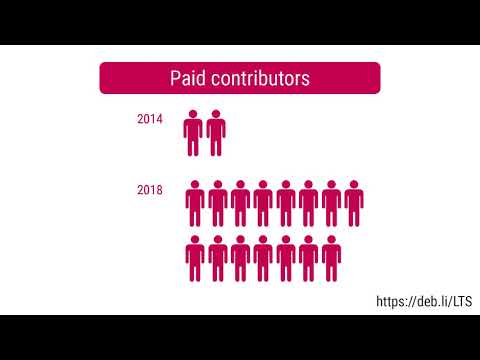
Debian LTS This month I have worked 18 hours on Debian Long Term Support (LTS) and 12 hours on its sister Extended LTS project, including: You can find out more about the Debian LTS project via the following video:

27 November 2020

Arturo Borrero Gonz lez: Netfilter virtual workshop 2020 summary

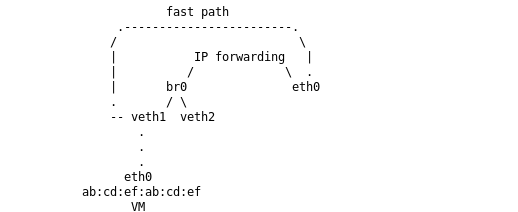
Netfilter logo Once a year folks interested in Netfilter technologies gather together to discuss past, ongoing and future works. The Netfilter Workshop is an opportunity to share and discuss new ideas, the state of the project, bring people together to work & hack and to put faces to people who otherwise are just email names. This is an event that has been happening since at least 2001, so we are talking about a genuine community thing here. It was decided there would be an online format, split in 3 short meetings, once per week on Fridays. I was unable to attend the first session on 2020-11-06 due to scheduling conflict, but I made it to the sessions on 2020-11-13 and 2020-11-20. I would say the sessions were joined by about 8 to 10 people, depending on the day. This post is a summary with some notes on what happened in this edition, with no special order. Pablo did the classical review of all the changes and updates that happened in all the Netfilter project software components since last workshop. I was unable to watch this presentation, so I have nothing special to comment. However, I ve been following the development of the project very closely, and there are several interesting things going on, some of them commented below. Florian Westphal brought to the table status on some open/pending work for mptcp option matching, systemd integration and finally interfacing from nft with cgroupv2. I was unable to participate in the talk for the first two items, so I cannot comment a lot more. On the cgroupv2 side, several options were evaluated to how to match them, identification methods, the hierarchical tree that cgroups present, etc. We will have to wait a bit more to see how the final implementation looks like. Also, Florian presented his concerns on conntrack hash collisions. There are no real-world known issues at the moment, but there is an old paper that suggests we should keep and eye on this and introduce improvements to prevent future DoS attack vectors. Florian mentioned these attacks are not practical at the moment, but who knows in a few years. He wants to explore introducing RB trees for conntrack. It will probably be a rbtree structure of hash tables in order to keep supporting parallel insertions. He was encouraged by others to go ahead and play/explore with this. Phil Sutter shared his past and future iptables development efforts. He highlighted fixed bugs and his short/midterm TODO list. I know Phil has been busy lately fixing iptables-legacy/iptables-nft incompatibilities. Basically addressing annoying bugs discovered by all ruleset managers out there (kubernetes, docker, openstack neutron, etc). Lots of work has been done to improve the situation; moreover I myself reported, or forwarded from the Debian bug tracker, several bugs. Anyway I was unable to attend this talk, only learnt a few bits in the following sessions, so I don t have a lot to comment here. But when I was fully present, I was asked by Phil about the status of netfilter components in Debian, and future plans. I shared my information. The idea for the next Debian stable release is to don t include iptables in the installer, and include nftables instead. Since Debian Buster, nftables is the default firewalling tool anyway. He shared the plans for the RedHat-related ecosystem, and we were able to confirm that we are basically in sync. Pablo commented on the latest Netfilter flowtable enhancements happening. Using the flowtable infrastructure, one can create kernel network bypasses to speed up packet throughput. The latest changes are aimed for bridge and VLAN enabled setups. The flowtable component will now know how to bypass in these 2 network architectures as well as the previously supported ingress hook. This is basically aimed for virtual machines and containers scenarios. There was some debate on use cases and supported setups. I commented that a bunch of virtual machines connected to a classic linux bridge and then doing NAT is basically what Openstack Neutron does, specifically in DVR setups. Same can be found in some container-based environments. Early/simple benchmarks done by Pablo suggest there could be huge performance improvements for those use cases. There was some inevitable comparison of this approach to what others, like DPDK/XDP can do. A point was raised about this being a more generic and operating system-integrated solution, which should make it more extensible and easier to use. flowtable for bridges Stefano Bravio commented on several open topics for nftables that he is interested on working on. One of them, issues related to concatenations + vmap issues. He also addressed concerns with people s expectations when migrating from ipset to nftables. There are several corner features in ipset that aren t currently supported in nftables, and we should document them. Stefano is also wondering about some tools to help in the migration. A translation layer like there is in place for iptables. Eric Gaver commented there are a couple of semantics that will not be suitable for translation, such as global sets, or sets of sets. But ipset is way simpler than iptables, so a translation mechanism should probably be created. In any case, there was agreement that anything that helps people migrate is more than welcome, even if it doesn t support 100% of the use cases. Stefano is planning to write documentation in the nftables wiki on how the pipapo algorithm works and the supported use cases. Other plans by Stefano include to work on some optimisations for faster matches. He mentioned using architecture specific instruction to speed up sets operations, like lookups. Finally, he commented that some folks working with eBPF have showed interest in reusing some parts of the nftables sets infrastructure (pipapo) because they have detected performance issues in their own data structures in some cases. It is not clear how to best achieve it, how to better bridge the two things together. Probably the ideal is to generalize the pipapo data structures and integrate it into the generic bitmap library or something which can be used by anyone. Anyway, he hopes to get some more time to focus on Netfilter stuff begining with the next year, in a couple of months. Moving a bit away from the pure software development topics, Pablo commented on the netfilter.org infrastructure. Right now the servers are running on gandi.net, on virtual machines that are being basically donated to us. He pointed that the plan is to simplify the infrastructure. For that reason, for example, FTP services has been shut down. Rsync services have been shut down as well, so basically we no longer have a mirrors infrastructure. The bugzilla and wikis we have need some attention, given they are old software pieces, and we need to migrate them to be more modern. Finally, the new logo that was created was presented. Later on, we spent a good chunk of the meeting discussing options on how to address the inevitable iptables deprecation situation. There are some open questions, and we discussed several approaches. From doing nothing at all, which means keeping the current status-quo, to setting a deadline date for the deprecation like the python community did with python2. I personally like this deadline idea, but it is perceived like a negative push by other. We all agree that the current do nothing approach is not sustainable either. Probably the way to go is basically to be more informative. We need to clearly communicate that choosing iptables for anything in 2020 is a bad idea. There are additional initiatives to help on this topic, without being too aggressive. A FAQ will probably be introduced. Eric Garver suggested we should bring nftables front and center. Given the website still mentions iptables everywhere, we will probably refresh the web content, introduce additional informative banners and similar things. There was an interesting talk on the topic of nft table ownership. The idea is to attach a table, and all the child objects, to a process. Then, we prevent any modifications to the table or the child objects by external entities. Basically, allocating and locking a table for a certain netlink socket. This is a nice way for ruleset managers, like firewalld, to ensure they have full control of what s happening to their ruleset, reducing the chances for ending with an inconsistent configuration. There is a proof-of-concept patch by Pablo to support this, and Eric mentioned he is pretty much interested in any improvements to support this use case. The final time block in the final session day was dedicated to talk about the next workshop. We are all very happy we could meet. Meeting virtually is way easier (and cheaper) than in person. Perhaps we can make it online every 3 or 6 months instead of, or in addition to, one big annual physical event. We will see what happens next year. That s all on my side!

23 November 2020

Shirish Agarwal: White Hat Senior and Education

I had been thinking of doing a blog post on RCEP which China signed with 14 countries a week and a day back but this new story has broken and is being viraled a bit on the interwebs, especially twitter and is pretty much in our domain so thought would be better to do a blog post about it. Also, there is quite a lot packed so quite a bit of unpacking to do.

Whitehat, Greyhat and Blackhat For those of you who may not, there are actually three terms especially in computer science that one comes across. Those are white hats, grey hats and black hats. Now clinically white hats are like the fiery angels or the good guys who basically take permissions to try and find out weakness in an application, program, website, organization and so on and so forth. A somewhat dated reference to hacker could be Sandra Bullock (The Net 1995) , Sneakers (1992), Live Free or Die Hard (2007) . Of the three one could argue that Sandra was actually into viruses which are part of computer security but still she showed some bad-ass skills, but then that is what actors are paid to do  Sneakers was much more interesting for me because in that you got the best key which can unlock any lock, something like quantum computing is supposed to do. One could equate both the first movies in either as a White hat or a Grey hat . A Grey hat is more flexible in his/her moral values, and they are plenty of such people. For e.g. Julius Assange could be described as a Grey hat, but as you can see and understand those are moral issues.

A black hat on the other hand is one who does things for profit even if it harms the others. The easiest fictitious examples are all Die Hard series, all of them except the 4th one, all had bad guys or black hats. The 4th also had but is the odd one out as it had Matthew Farell (Justin Long) as a Grey hat hacker. In real life Kevin Mitnick, Kevin Poulsen, Robert Tappan Morris, George Hotz, Gary McKinnon are some examples of hackers, most of whom were black hats, most of them reformed into white hats and security specialists. There are many other groups and names but that perhaps is best for another day altogether. Now why am I sharing this. Because in all of the above, the people who are using and working with the systems have better than average understanding of systems and they arguably would be better than most people at securing their networks, systems etc. but as we shall see in this case there has been lots of issues in the company.

WhiteHat Jr. and 300 Million Dollars Before I start this, I would like to share that for me this suit in many ways seems to be similar to the suit filed against Krishnaraj Rao . Although the difference is that Krishnaraj Rao s case/suit is that it was in real estate while this one is in education although many things are similar to those cases but also differ in some obvious ways. For e.g. in the suit against Krishnaraj Rao, the plaintiff s first approached the High Court and then the Supreme Court. Of course Krishnaraj Rao won in the High Court and then in the SC plaintiff s agreed to Krishnaraj Rao s demands as they knew they could not win in SC. In that case, a compromise was reached by the plaintiff just before judgement was to be delivered. In this case, the plaintiff have directly approached the Delhi High Court. The charges against Mr. Poonia (the defendant in this case) are very much similar to those which were made in Krishnaraj Rao s suit hence won t be going into those details. They have claimed defamation and filed a 20 crore suit. The idea is basically to silence any whistle-blowers.

Fictional Character Wolf Gupta The first issue in this case or perhaps one of the most famous or infamous character is an unknown. While he has been reportedly hired by Google India, BJYU, Chandigarh. This has been reported by Yahoo News. I did a cursory search on LinkedIn to see if there indeed is a wolf gupta but wasn t able to find any person with such a name. I am not even talking the amount of money/salary the fictitious gentleman is supposed to have got and the various variations on the salary figures at different times and the different ads.

If I wanted to, I could have asked few of the kind souls whom I know are working in Google to see if they can find such a person using their own credentials but it probably would have been a waste of time. When you show a LinkedIn profile in your social media, it should come up in the results, in this case it doesn t. I also tried to find out if somehow BJYU was a partner to Google and came up empty there as well. There is another story done by Kan India but as I m not a subscriber, I don t know what they have written but the beginning of the story itself does not bode well. While I can understand marketing, there is a line between marketing something and being misleading. At least to me, all of the references shared seems misleading at least to me.

Taking down dissent One of the big no-nos at least from what I perceive, you cannot and should not take down dissent or critique. Indians, like most people elsewhere around the world, critique and criticize day and night. Social media like twitter, mastodon and many others would not exist in the place if criticisms are not there. In fact, one could argue that Twitter and most social media is used to drive engagements to a person, brand etc. It is even an official policy in Twitter. Now you can t drive engagements without also being open to critique and this is true of all the web, including of WordPress and me  . What has been happening is that whitehatjr with help of bjyu have been taking out content of people citing copyright violation which seems laughable. When citizens critique anything, we are obviously going to take the name of the product otherwise people would have to start using new names similar to how Tom Riddle was known as Dark Lord , Voldemort and He who shall not be named . There have been quite a few takedowns, I just provide one for reference, the rest of the takedowns would probably come in the ongoing suit/case.
Whitehat Jr. ad showing investors fighting

Now a brief synopsis of what the ad. is about. The ad is about a kid named Chintu who makes an app. The app. Is so good that investors come to his house and right in the lawn and start fighting each other. The parents are enjoying looking at the fight and to add to the whole thing there is also a nosy neighbor who has his own observations. Simply speaking, it is a juvenile ad but it works as most parents in India, as elsewhere are insecure.
Jihan critiquing the whitehatjr ad
Before starting, let me assure that I asked Jihan s parents if it s ok to share his ad on my blog and they agreed. What he has done is broken down the ad and showed how juvenile the ad is and using logic and humor as a template for the same. He does make sure to state that he does not know how the product is as he hasn t used it. His critique was about the ad and not the product as he hasn t used that.

The Website If you look at the website, sadly, most of the site only talks about itself rather than giving examples that people can look in detail. For e.g. they say they have few apps. on Google play-store but no link to confirm the same. The same is true of quite a few other things. In another ad a Paralympic star says don t get into sports and get into coding. Which athlete in their right mind would say that? And it isn t that we (India) are brimming with athletes at the international level. In the last outing which was had in 2016, India sent a stunning 117 athletes but that was an exception as we had the women s hockey squad which was of 16 women, and even then they were overshadowed in numbers by the bureaucratic and support staff. There was criticism about the staff bit but that is probably a story for another date. Most of the site doesn t really give much value and the point seems to be driving sales to their courses. This is pressurizing small kids as well as teenagers and better who are in the second and third year science-engineering whose parents don t get that it is advertising and it is fake and think that their kids are incompetent. So this pressurizes both small kids as well as those who are learning, doing in whatever college or educational institution . The teenagers more often than not are unable to tell/share with them that this is advertising and fake. Also most of us have been on a a good diet of ads. Fair and lovely still sells even though we know it doesn t work. This does remind me of a similar fake academy which used very much similar symptoms and now nobody remembers them today. There used to be an academy called Wings Academy or some similar name. They used to advertise that you come to us and we will make you into a pilot or an airhostess and it was only much later that it was found out that most kids were doing laundry work in hotels and other such work. Many had taken loans, went bankrupt and even committed suicide because they were unable to pay off the loans due to the dreams given by the company and the harsh realities that awaited them. They were sued in court but dunno what happened but soon they were off the radar so we never came to know what happened to those million of kids whose life dreams were shattered.

Security Now comes the security part. They have alleged that Mr. Poonia broke into their systems. While this may be true, what I find funny is that with the name Whitehat, how can they justify it? If you are saying you are white hat you are supposed to be much better than this. And while I have not tried to penetrate their systems, I did find it laughable that the site is using an expired https:// certificate. I could have tried further to figure out the systems but I chose not to. How they could not have an automated script to get the certificate fixed is beyond me, this is known as certificate outage and is very well understood in the industry. There are tools like Let s Encrypt and Certbot (both EFF) and many others. But that is their concern, not mine.

Comparison A similar offering would be unacademy but as can be seen they neither try to push you in any way and nor do they make any ridiculous claims. In fact how genuine unacademy is can be gauged from the fact that many of its learning resources are available to people to see on YT and if they have tools they can also download it. Now, does this mean that every educational website should have their content for free, of course not. But when a channel has 80% 90% of it YT content as ads and testimonials then they surely should give a reason to pause both for parents and students alike. But if parents had done that much research, then things would not be where they are now.

Allegations Just to complete, there are allegations by Mr. Poonia with some screenshots which show the company has been doing a lot of bad things. For e.g. they were harassing an employee at night 2 a.m. who was frustrated and working in the company at the time. Many of the company staff routinely made sexist and offensive, sexual abusive remarks privately between themselves for prospective women who came to interview via webcam (due to the pandemic). There also seems to be a bit of porn on the web/mobile server of the company as well. There also have been allegations that while the company says refund is done next day, many parents who have demanded those refunds have not got it. Now while Mr. Poonia has shared some quotations of the staff while hiding the identities of both the victims and the perpetrators, the language being used in itself tells a lot. I am in two minds whether to share those photos or not hence atm choosing not to. Poonia has also contended that all teachers do not know programming, and they are given scripts to share. There have been some people who did share that experience with him
Suruchi Sethi
From the company s side they are alleging he has hacked the company servers and would probably be using the Fruit of the poisonous tree argument which we have seen have been used in many arguments.

Conclusion Now that lies in the eyes of the Court whether the single bench chooses the literal meaning or use the spirit of the law or the genuine concerns of the people concerned. While in today s hearing while the company asked for a complete sweeping injunction they were unable to get it. Whatever may happen, we may hope to see some fireworks in the second hearing which is slated to be on 6.01.2021 where all of this plays out. Till later.

Vincent Fourmond: QSoas tips and tricks: using meta-data, first level

By essence, QSoas works with \(y = f(x)\) datasets. However, in practice, when working with experimental data (or data generated from simulations), one has often more than one experimental parameter (\(x\)). For instance, one could record series of spectra (\(A = f(\lambda)\)) for different pH values, so that the absorbance is in fact a function of both the pH and \(\lambda\). QSoas has different ways to deal with such situations, and we'll describe one today, using meta-data. Setting meta-data Meta-data are simply series of name/values attached to a dataset. It can be numbers, dates or just text. Some of these are automatically detected from certain type of data files (but that is the topic for another day). The simplest way to set meta-data is to use the set-meta command:
QSoas> set-meta pH 7.5
This command sets the meta-data pH to the value 7.5. Keep in mind that QSoas does not know anything about the meaning of the meta-data[1]. It can keep track of the meta-data you give, and manipulate them, but it will not interpret them for you. You can set several meta-data by repeating calls to set-meta, and you can display the meta-data attached to a dataset using the command show. Here is an example:
QSoas> generate-buffer 0 10
QSoas> set-meta pH 7.5
QSoas> set-meta sample "My sample"
QSoas> show 0
Dataset generated.dat: 2 cols, 1000 rows, 1 segments, #0
Flags: 
Meta-data:	pH =	 7.5	sample =	 My sample
Note here the use of quotes around My sample since there is a space inside the value. Using meta-data There are many ways to use meta-data in QSoas. In this post, we will discuss just one: using meta-data in the output file. The output file can collect data from several commands, like peak data, statistics and so on. For instance, each time the command 1 is run, a line with the information about the largest peak of the current dataset is written to the output file. It is possible to automatically add meta-data to those lines by using the /meta= option of the output command. Just listing the names of the meta-data will add them to each line of the output file. As a full example, we'll see how one can take advantage of meta-data to determine the position of the peak of the function \(x^2 \exp (-a\,x)\) depends on \(a\). For that, we first create a script that generates the function for a certain value of \(a\), sets the meta-data a to the corresponding value, and find the peak. Let's call this file do-one.cmds (all the script files can be found in the GitHub repository):
generate-buffer 0 20 x**2*exp(-x*$ 1 )
set-meta a $ 1 
1 
This script takes a single argument, the value of \(a\), generates the appropriate dataset, sets the meta-data a and writes the data about the largest (and only in this case) peak to the output file. Let's now run this script with 1 as an argument:
QSoas> @ do-one.cmds 1
This command generates a file out.dat containing the following data:
## buffer       what    x       y       index   width   left_width      right_width     area
generated.dat   max     2.002002002     0.541340590883  100     3.4034034034    1.24124124124   2.162162162161.99999908761
This gives various information about the peak found: the name of the dataset it was found in, whether it's a maximum or minimum, the x and y positions of the peak, the index in the file, the widths of the peak and its area. We are interested here mainly in the x position. Then, we just run this script for several values of \(a\) using run-for-each, and in particular the option /range-type=lin that makes it interpret values like 0.5..5:80 as 80 values evenly spread between 0.5 and 5. The script is called run-all.cmds:
output peaks.dat /overwrite=true /meta=a
run-for-each do-one.cmds /range-type=lin 0.5..5:80
V all /style=red-to-blue
The first line sets up the output to the output file peaks.dat. The option /meta=a makes sure the meta a is added to each line of the output file, and /overwrite=true make sure the file is overwritten just before the first data is written to it, in order to avoid accumulating the results of different runs of the script. The last line just displays all the curves with a color gradient. It looks like this:
Running this script (with @ run-all.cmds) creates a new file peaks.dat, whose first line looks like this:
## buffer       what    x       y       index   width   left_width      right_width     area    a
The column x (the 3rd) contains the position of the peaks, and the column a (the 10th) contains the meta a (this column wasn't present in the output we described above, because we had not used yet the output /meta=a command). Therefore, to load the peak position as a function of a, one has just to run:
QSoas> load peaks.dat /columns=10,3
This looks like this:
Et voil ! To train further, you can:

[1] this is not exactly true. For instance, some commands like unwrap interpret the sr meta-data as a voltammetric scan rate if it is present. But this is the exception. About QSoasQSoas is a powerful open source data analysis program that focuses on flexibility and powerful fitting capacities. It is released under the GNU General Public License. It is described in Fourmond, Anal. Chem., 2016, 88 (10), pp 5050 5052. Current version is 2.2. You can download its source code there (or clone from the GitHub repository) and compile it yourself, or buy precompiled versions for MacOS and Windows there.

22 November 2020

Arturo Borrero Gonz lez: How to use nftables from python

Netfilter logo One of the most interesting (and possibly unknown) features of the nftables framework is the native python interface, which allows python programs to access all nft features programmatically, from the source code. There is a high-level library, libnftables, which is responsible for translating the human-readable syntax from the nft binary into low-level expressions that the nf_tables kernel subsystem can run. The nft command line utility basically wraps this library, where all actual nftables logic lives. You can only imagine how powerful this library is. Originally written in C, ctypes is used to allow native wrapping of the shared lib object using pure python. To use nftables in your python script or program, first you have to install the libnftables library and the python bindings. In Debian systems, installing the python3-nftables package should be enough to have everything ready to go. To interact with libnftables you have 2 options, either use the standard nft syntax or the JSON format. The standard format allows you to send commands exactly like you would do using the nft binary. That format is intended for humans and it doesn t make a lot of sense in a programmatic interaction. Whereas JSON is pretty convenient, specially in a python environment, where there are direct data structure equivalents. The following code snippet gives you an example of how easy this is to use:
#!/usr/bin/env python3

import nftables
import json
nft = nftables.Nftables()
nft.set_json_output(True)
rc, output, error = nft.cmd("list ruleset")
print(json.loads(output))
This is functionally equivalent to running nft -j list ruleset. Basically, all you have to do in your python code is: The key here is to use the JSON format. It allows adding ruleset modification in batches, i.e. to create tables, chains, rules, sets, stateful counters, etc in a single atomic transaction, which is the proper way to update firewalling and NAT policies in the kernel and to avoid inconsistent intermediate states. The JSON schema is pretty well documented in the libnftables-json(5) manpage. The following example is copy/pasted from there, and illustrates the basic idea behind the JSON format. The structure accepts an arbitrary amount of commands which are interpreted in order of appearance. For instance, the following standard syntax input:
flush ruleset
add table inet mytable
add chain inet mytable mychain
add rule inet mytable mychain tcp dport 22 accept
Translates into JSON as such:
  "nftables": [
      "flush":   "ruleset": null  ,
      "add":   "table":  
        "family": "inet",
        "name": "mytable"
     ,
      "add":   "chain":  
        "family": "inet",
        "table": "mytable",
        "chain": "mychain"
     
      "add":   "rule":  
        "family": "inet",
        "table": "mytable",
        "chain": "mychain",
        "expr": [
              "match":  
                "left":   "payload":  
                    "protocol": "tcp",
                    "field": "dport"
                 ,
                "right": 22
             ,
              "accept": null  
        ]
     
] 
I encourage you to take a look at the manpage if you want to know about how powerful this interface is. I ve created a git repository to host several source code examples using different features of the library: https://github.com/aborrero/python-nftables-tutorial. I plan to introduce more code examples as I learn and create them. There are several relevant projects out there using this nftables python integration already. One of the most important pieces of software is firewalld. They started using the JSON format back in 2019. In the past, people interacting with iptables programmatically would either call the iptables binary directly or, in the case of some C programs, hack libiptc/libxtables libraries into their source code. The native python approach to use libnftables is a huge step forward, which should come handy for developers, network engineers, integrators and other folks using the nftables framework in a pythonic environment. If you are interested to know how this python binding works, I invite you to take a look at the upstream source code, nftables.py, which contains all the magic behind the scenes.

21 November 2020

Michael Stapelberg: Winding down my Debian involvement

This post is hard to write, both in the emotional sense but also in the I would have written a shorter letter, but I didn t have the time sense. Hence, please assume the best of intentions when reading it it is not my intention to make anyone feel bad about their contributions, but rather to provide some insight into why my frustration level ultimately exceeded the threshold. Debian has been in my life for well over 10 years at this point. A few weeks ago, I have visited some old friends at the Z rich Debian meetup after a multi-year period of absence. On my bike ride home, it occurred to me that the topics of our discussions had remarkable overlap with my last visit. We had a discussion about the merits of systemd, which took a detour to respect in open source communities, returned to processes in Debian and eventually culminated in democracies and their theoretical/practical failings. Admittedly, that last one might be a Swiss thing. I say this not to knock on the Debian meetup, but because it prompted me to reflect on what feelings Debian is invoking lately and whether it s still a good fit for me. So I m finally making a decision that I should have made a long time ago: I am winding down my involvement in Debian to a minimum.

What does this mean? Over the coming weeks, I will:
  • transition packages to be team-maintained where it makes sense
  • remove myself from the Uploaders field on packages with other maintainers
  • orphan packages where I am the sole maintainer
I will try to keep up best-effort maintenance of the manpages.debian.org service and the codesearch.debian.net service, but any help would be much appreciated. For all intents and purposes, please treat me as permanently on vacation. I will try to be around for administrative issues (e.g. permission transfers) and questions addressed directly to me, permitted they are easy enough to answer.

Why? When I joined Debian, I was still studying, i.e. I had luxurious amounts of spare time. Now, over 5 years of full time work later, my day job taught me a lot, both about what works in large software engineering projects and how I personally like my computer systems. I am very conscious of how I spend the little spare time that I have these days. The following sections each deal with what I consider a major pain point, in no particular order. Some of them influence each other for example, if changes worked better, we could have a chance at transitioning packages to be more easily machine readable.

Change process in Debian The last few years, my current team at work conducted various smaller and larger refactorings across the entire code base (touching thousands of projects), so we have learnt a lot of valuable lessons about how to effectively do these changes. It irks me that Debian works almost the opposite way in every regard. I appreciate that every organization is different, but I think a lot of my points do actually apply to Debian. In Debian, packages are nudged in the right direction by a document called the Debian Policy, or its programmatic embodiment, lintian. While it is great to have a lint tool (for quick, local/offline feedback), it is even better to not require a lint tool at all. The team conducting the change (e.g. the C++ team introduces a new hardening flag for all packages) should be able to do their work transparent to me. Instead, currently, all packages become lint-unclean, all maintainers need to read up on what the new thing is, how it might break, whether/how it affects them, manually run some tests, and finally decide to opt in. This causes a lot of overhead and manually executed mechanical changes across packages. Notably, the cost of each change is distributed onto the package maintainers in the Debian model. At work, we have found that the opposite works better: if the team behind the change is put in power to do the change for as many users as possible, they can be significantly more efficient at it, which reduces the total cost and time a lot. Of course, exceptions (e.g. a large project abusing a language feature) should still be taken care of by the respective owners, but the important bit is that the default should be the other way around. Debian is lacking tooling for large changes: it is hard to programmatically deal with packages and repositories (see the section below). The closest to sending out a change for review is to open a bug report with an attached patch. I thought the workflow for accepting a change from a bug report was too complicated and started mergebot, but only Guido ever signaled interest in the project. Culturally, reviews and reactions are slow. There are no deadlines. I literally sometimes get emails notifying me that a patch I sent out a few years ago (!!) is now merged. This turns projects from a small number of weeks into many years, which is a huge demotivator for me. Interestingly enough, you can see artifacts of the slow online activity manifest itself in the offline culture as well: I don t want to be discussing systemd s merits 10 years after I first heard about it. Lastly, changes can easily be slowed down significantly by holdouts who refuse to collaborate. My canonical example for this is rsync, whose maintainer refused my patches to make the package use debhelper purely out of personal preference. Granting so much personal freedom to individual maintainers prevents us as a project from raising the abstraction level for building Debian packages, which in turn makes tooling harder. How would things look like in a better world?
  1. As a project, we should strive towards more unification. Uniformity still does not rule out experimentation, it just changes the trade-off from easier experimentation and harder automation to harder experimentation and easier automation.
  2. Our culture needs to shift from this package is my domain, how dare you touch it to a shared sense of ownership, where anyone in the project can easily contribute (reviewed) changes without necessarily even involving individual maintainers.
To learn more about how successful large changes can look like, I recommend my colleague Hyrum Wright s talk Large-Scale Changes at Google: Lessons Learned From 5 Yrs of Mass Migrations .

Fragmented workflow and infrastructure Debian generally seems to prefer decentralized approaches over centralized ones. For example, individual packages are maintained in separate repositories (as opposed to in one repository), each repository can use any SCM (git and svn are common ones) or no SCM at all, and each repository can be hosted on a different site. Of course, what you do in such a repository also varies subtly from team to team, and even within teams. In practice, non-standard hosting options are used rarely enough to not justify their cost, but frequently enough to be a huge pain when trying to automate changes to packages. Instead of using GitLab s API to create a merge request, you have to design an entirely different, more complex system, which deals with intermittently (or permanently!) unreachable repositories and abstracts away differences in patch delivery (bug reports, merge requests, pull requests, email, ). Wildly diverging workflows is not just a temporary problem either. I participated in long discussions about different git workflows during DebConf 13, and gather that there were similar discussions in the meantime. Personally, I cannot keep enough details of the different workflows in my head. Every time I touch a package that works differently than mine, it frustrates me immensely to re-learn aspects of my day-to-day. After noticing workflow fragmentation in the Go packaging team (which I started), I tried fixing this with the workflow changes proposal, but did not succeed in implementing it. The lack of effective automation and slow pace of changes in the surrounding tooling despite my willingness to contribute time and energy killed any motivation I had.

Old infrastructure: package uploads When you want to make a package available in Debian, you upload GPG-signed files via anonymous FTP. There are several batch jobs (the queue daemon, unchecked, dinstall, possibly others) which run on fixed schedules (e.g. dinstall runs at 01:52 UTC, 07:52 UTC, 13:52 UTC and 19:52 UTC). Depending on timing, I estimated that you might wait for over 7 hours (!!) before your package is actually installable. What s worse for me is that feedback to your upload is asynchronous. I like to do one thing, be done with it, move to the next thing. The current setup requires a many-minute wait and costly task switch for no good technical reason. You might think a few minutes aren t a big deal, but when all the time I can spend on Debian per day is measured in minutes, this makes a huge difference in perceived productivity and fun. The last communication I can find about speeding up this process is ganneff s post from 2008. How would things look like in a better world?
  1. Anonymous FTP would be replaced by a web service which ingests my package and returns an authoritative accept or reject decision in its response.
  2. For accepted packages, there would be a status page displaying the build status and when the package will be available via the mirror network.
  3. Packages should be available within a few minutes after the build completed.

Old infrastructure: bug tracker I dread interacting with the Debian bug tracker. debbugs is a piece of software (from 1994) which is only used by Debian and the GNU project these days. Debbugs processes emails, which is to say it is asynchronous and cumbersome to deal with. Despite running on the fastest machines we have available in Debian (or so I was told when the subject last came up), its web interface loads very slowly. Notably, the web interface at bugs.debian.org is read-only. Setting up a working email setup for reportbug(1) or manually dealing with attachments is a rather big hurdle. For reasons I don t understand, every interaction with debbugs results in many different email threads. Aside from the technical implementation, I also can never remember the different ways that Debian uses pseudo-packages for bugs and processes. I need them rarely enough to establish a mental model of how they are set up, or working memory of how they are used, but frequently enough to be annoyed by this. How would things look like in a better world?
  1. Debian would switch from a custom bug tracker to a (any) well-established one.
  2. Debian would offer automation around processes. It is great to have a paper-trail and artifacts of the process in the form of a bug report, but the primary interface should be more convenient (e.g. a web form).

Old infrastructure: mailing list archives It baffles me that in 2019, we still don t have a conveniently browsable threaded archive of mailing list discussions. Email and threading is more widely used in Debian than anywhere else, so this is somewhat ironic. Gmane used to paper over this issue, but Gmane s availability over the last few years has been spotty, to say the least (it is down as I write this). I tried to contribute a threaded list archive, but our listmasters didn t seem to care or want to support the project.

Debian is hard to machine-read While it is obviously possible to deal with Debian packages programmatically, the experience is far from pleasant. Everything seems slow and cumbersome. I have picked just 3 quick examples to illustrate my point. debiman needs help from piuparts in analyzing the alternatives mechanism of each package to display the manpages of e.g. psql(1). This is because maintainer scripts modify the alternatives database by calling shell scripts. Without actually installing a package, you cannot know which changes it does to the alternatives database. pk4 needs to maintain its own cache to look up package metadata based on the package name. Other tools parse the apt database from scratch on every invocation. A proper database format, or at least a binary interchange format, would go a long way. Debian Code Search wants to ingest new packages as quickly as possible. There used to be a fedmsg instance for Debian, but it no longer seems to exist. It is unclear where to get notifications from for new packages, and where best to fetch those packages.

Complicated build stack See my Debian package build tools post. It really bugs me that the sprawl of tools is not seen as a problem by others.

Developer experience pretty painful Most of the points discussed so far deal with the experience in developing Debian, but as I recently described in my post Debugging experience in Debian , the experience when developing using Debian leaves a lot to be desired, too.

I have more ideas At this point, the article is getting pretty long, and hopefully you got a rough idea of my motivation. While I described a number of specific shortcomings above, the final nail in the coffin is actually the lack of a positive outlook. I have more ideas that seem really compelling to me, but, based on how my previous projects have been going, I don t think I can make any of these ideas happen within the Debian project. I intend to publish a few more posts about specific ideas for improving operating systems here. Stay tuned. Lastly, I hope this post inspires someone, ideally a group of people, to improve the developer experience within Debian.

Michael Stapelberg: Linux package managers are slow

I measured how long the most popular Linux distribution s package manager take to install small and large packages (the ack(1p) source code search Perl script and qemu, respectively). Where required, my measurements include metadata updates such as transferring an up-to-date package list. For me, requiring a metadata update is the more common case, particularly on live systems or within Docker containers. All measurements were taken on an Intel(R) Core(TM) i9-9900K CPU @ 3.60GHz running Docker 1.13.1 on Linux 4.19, backed by a Samsung 970 Pro NVMe drive boasting many hundreds of MB/s write performance. The machine is located in Z rich and connected to the Internet with a 1 Gigabit fiber connection, so the expected top download speed is 115 MB/s. See Appendix C for details on the measurement method and command outputs.

Measurements Keep in mind that these are one-time measurements. They should be indicative of actual performance, but your experience may vary.

ack (small Perl program)
distribution package manager data wall-clock time rate
Fedora dnf 114 MB 33s 3.4 MB/s
Debian apt 16 MB 10s 1.6 MB/s
NixOS Nix 15 MB 5s 3.0 MB/s
Arch Linux pacman 6.5 MB 3s 2.1 MB/s
Alpine apk 10 MB 1s 10.0 MB/s

qemu (large C program)
distribution package manager data wall-clock time rate
Fedora dnf 226 MB 4m37s 1.2 MB/s
Debian apt 224 MB 1m35s 2.3 MB/s
Arch Linux pacman 142 MB 44s 3.2 MB/s
NixOS Nix 180 MB 34s 5.2 MB/s
Alpine apk 26 MB 2.4s 10.8 MB/s

(Looking for older measurements? See Appendix B (2019). The difference between the slowest and fastest package managers is 30x! How can Alpine s apk and Arch Linux s pacman be an order of magnitude faster than the rest? They are doing a lot less than the others, and more efficiently, too.

Pain point: too much metadata For example, Fedora transfers a lot more data than others because its main package list is 60 MB (compressed!) alone. Compare that with Alpine s 734 KB APKINDEX.tar.gz. Of course the extra metadata which Fedora provides helps some use case, otherwise they hopefully would have removed it altogether. The amount of metadata seems excessive for the use case of installing a single package, which I consider the main use-case of an interactive package manager. I expect any modern Linux distribution to only transfer absolutely required data to complete my task.

Pain point: no concurrency Because they need to sequence executing arbitrary package maintainer-provided code (hooks and triggers), all tested package managers need to install packages sequentially (one after the other) instead of concurrently (all at the same time). In my blog post Can we do without hooks and triggers? , I outline that hooks and triggers are not strictly necessary to build a working Linux distribution.

Thought experiment: further speed-ups Strictly speaking, the only required feature of a package manager is to make available the package contents so that the package can be used: a program can be started, a kernel module can be loaded, etc. By only implementing what s needed for this feature, and nothing more, a package manager could likely beat apk s performance. It could, for example:
  • skip archive extraction by mounting file system images (like AppImage or snappy)
  • use compression which is light on CPU, as networks are fast (like apk)
  • skip fsync when it is safe to do so, i.e.:
    • package installations don t modify system state
    • atomic package installation (e.g. an append-only package store)
    • automatically clean up the package store after crashes

Current landscape Here s a table outlining how the various package managers listed on Wikipedia s list of software package management systems fare:
name scope package file format hooks/triggers
AppImage apps image: ISO9660, SquashFS no
snappy apps image: SquashFS yes: hooks
FlatPak apps archive: OSTree no
0install apps archive: tar.bz2 no
nix, guix distro archive: nar. bz2,xz activation script
dpkg distro archive: tar. gz,xz,bz2 in ar(1) yes
rpm distro archive: cpio. bz2,lz,xz scriptlets
pacman distro archive: tar.xz install
slackware distro archive: tar. gz,xz yes: doinst.sh
apk distro archive: tar.gz yes: .post-install
Entropy distro archive: tar.bz2 yes
ipkg, opkg distro archive: tar ,.gz yes

Conclusion As per the current landscape, there is no distribution-scoped package manager which uses images and leaves out hooks and triggers, not even in smaller Linux distributions. I think that space is really interesting, as it uses a minimal design to achieve significant real-world speed-ups. I have explored this idea in much more detail, and am happy to talk more about it in my post Introducing the distri research linux distribution".

Appendix C: measurement details (2020)

ack You can expand each of these:
Fedora s dnf takes almost 33 seconds to fetch and unpack 114 MB.
% docker run -t -i fedora /bin/bash
[root@62d3cae2e2f9 /]# time dnf install -y ack
Fedora 32 openh264 (From Cisco) - x86_64     1.9 kB/s   2.5 kB     00:01
Fedora Modular 32 - x86_64                   6.8 MB/s   4.9 MB     00:00
Fedora Modular 32 - x86_64 - Updates         5.6 MB/s   3.7 MB     00:00
Fedora 32 - x86_64 - Updates                 9.9 MB/s    23 MB     00:02
Fedora 32 - x86_64                            39 MB/s    70 MB     00:01
[ ]
real	0m32.898s
user	0m25.121s
sys	0m1.408s
NixOS s Nix takes a little over 5s to fetch and unpack 15 MB.
% docker run -t -i nixos/nix
39e9186422ba:/# time sh -c 'nix-channel --update && nix-env -iA nixpkgs.ack'
unpacking channels...
created 1 symlinks in user environment
installing 'perl5.32.0-ack-3.3.1'
these paths will be fetched (15.55 MiB download, 85.51 MiB unpacked):
  /nix/store/34l8jdg76kmwl1nbbq84r2gka0kw6rc8-perl5.32.0-ack-3.3.1-man
  /nix/store/9df65igwjmf2wbw0gbrrgair6piqjgmi-glibc-2.31
  /nix/store/9fd4pjaxpjyyxvvmxy43y392l7yvcwy1-perl5.32.0-File-Next-1.18
  /nix/store/czc3c1apx55s37qx4vadqhn3fhikchxi-libunistring-0.9.10
  /nix/store/dj6n505iqrk7srn96a27jfp3i0zgwa1l-acl-2.2.53
  /nix/store/ifayp0kvijq0n4x0bv51iqrb0yzyz77g-perl-5.32.0
  /nix/store/w9wc0d31p4z93cbgxijws03j5s2c4gyf-coreutils-8.31
  /nix/store/xim9l8hym4iga6d4azam4m0k0p1nw2rm-libidn2-2.3.0
  /nix/store/y7i47qjmf10i1ngpnsavv88zjagypycd-attr-2.4.48
  /nix/store/z45mp61h51ksxz28gds5110rf3wmqpdc-perl5.32.0-ack-3.3.1
copying path '/nix/store/34l8jdg76kmwl1nbbq84r2gka0kw6rc8-perl5.32.0-ack-3.3.1-man' from 'https://cache.nixos.org'...
copying path '/nix/store/czc3c1apx55s37qx4vadqhn3fhikchxi-libunistring-0.9.10' from 'https://cache.nixos.org'...
copying path '/nix/store/9fd4pjaxpjyyxvvmxy43y392l7yvcwy1-perl5.32.0-File-Next-1.18' from 'https://cache.nixos.org'...
copying path '/nix/store/xim9l8hym4iga6d4azam4m0k0p1nw2rm-libidn2-2.3.0' from 'https://cache.nixos.org'...
copying path '/nix/store/9df65igwjmf2wbw0gbrrgair6piqjgmi-glibc-2.31' from 'https://cache.nixos.org'...
copying path '/nix/store/y7i47qjmf10i1ngpnsavv88zjagypycd-attr-2.4.48' from 'https://cache.nixos.org'...
copying path '/nix/store/dj6n505iqrk7srn96a27jfp3i0zgwa1l-acl-2.2.53' from 'https://cache.nixos.org'...
copying path '/nix/store/w9wc0d31p4z93cbgxijws03j5s2c4gyf-coreutils-8.31' from 'https://cache.nixos.org'...
copying path '/nix/store/ifayp0kvijq0n4x0bv51iqrb0yzyz77g-perl-5.32.0' from 'https://cache.nixos.org'...
copying path '/nix/store/z45mp61h51ksxz28gds5110rf3wmqpdc-perl5.32.0-ack-3.3.1' from 'https://cache.nixos.org'...
building '/nix/store/m0rl62grplq7w7k3zqhlcz2hs99y332l-user-environment.drv'...
created 49 symlinks in user environment
real	0m 5.60s
user	0m 3.21s
sys	0m 1.66s
Debian s apt takes almost 10 seconds to fetch and unpack 16 MB.
% docker run -t -i debian:sid
root@1996bb94a2d1:/# time (apt update && apt install -y ack-grep)
Get:1 http://deb.debian.org/debian sid InRelease [146 kB]
Get:2 http://deb.debian.org/debian sid/main amd64 Packages [8400 kB]
Fetched 8546 kB in 1s (8088 kB/s)
[ ]
The following NEW packages will be installed:
  ack libfile-next-perl libgdbm-compat4 libgdbm6 libperl5.30 netbase perl perl-modules-5.30
0 upgraded, 8 newly installed, 0 to remove and 23 not upgraded.
Need to get 7341 kB of archives.
After this operation, 46.7 MB of additional disk space will be used.
[ ]
real	0m9.544s
user	0m2.839s
sys	0m0.775s
Arch Linux s pacman takes a little under 3s to fetch and unpack 6.5 MB.
% docker run -t -i archlinux/base
[root@9f6672688a64 /]# time (pacman -Sy && pacman -S --noconfirm ack)
:: Synchronizing package databases...
 core            130.8 KiB  1090 KiB/s 00:00
 extra          1655.8 KiB  3.48 MiB/s 00:00
 community         5.2 MiB  6.11 MiB/s 00:01
resolving dependencies...
looking for conflicting packages...
Packages (2) perl-file-next-1.18-2  ack-3.4.0-1
Total Download Size:   0.07 MiB
Total Installed Size:  0.19 MiB
[ ]
real	0m2.936s
user	0m0.375s
sys	0m0.160s
Alpine s apk takes a little over 1 second to fetch and unpack 10 MB.
% docker run -t -i alpine
fetch http://dl-cdn.alpinelinux.org/alpine/v3.12/main/x86_64/APKINDEX.tar.gz
fetch http://dl-cdn.alpinelinux.org/alpine/v3.12/community/x86_64/APKINDEX.tar.gz
(1/4) Installing libbz2 (1.0.8-r1)
(2/4) Installing perl (5.30.3-r0)
(3/4) Installing perl-file-next (1.18-r0)
(4/4) Installing ack (3.3.1-r0)
Executing busybox-1.31.1-r16.trigger
OK: 43 MiB in 18 packages
real	0m 1.24s
user	0m 0.40s
sys	0m 0.15s

qemu You can expand each of these:
Fedora s dnf takes over 4 minutes to fetch and unpack 226 MB.
% docker run -t -i fedora /bin/bash
[root@6a52ecfc3afa /]# time dnf install -y qemu
Fedora 32 openh264 (From Cisco) - x86_64     3.1 kB/s   2.5 kB     00:00
Fedora Modular 32 - x86_64                   6.3 MB/s   4.9 MB     00:00
Fedora Modular 32 - x86_64 - Updates         6.0 MB/s   3.7 MB     00:00
Fedora 32 - x86_64 - Updates                 334 kB/s    23 MB     01:10
Fedora 32 - x86_64                            33 MB/s    70 MB     00:02
[ ]
Total download size: 181 M
Downloading Packages:
[ ]
real	4m37.652s
user	0m38.239s
sys	0m6.321s
NixOS s Nix takes almost 34s to fetch and unpack 180 MB.
% docker run -t -i nixos/nix
83971cf79f7e:/# time sh -c 'nix-channel --update && nix-env -iA nixpkgs.qemu'
unpacking channels...
created 1 symlinks in user environment
installing 'qemu-5.1.0'
these paths will be fetched (180.70 MiB download, 1146.92 MiB unpacked):
[ ]
real	0m 33.64s
user	0m 16.96s
sys	0m 3.05s
Debian s apt takes over 95 seconds to fetch and unpack 224 MB.
% docker run -t -i debian:sid
root@b7cc25a927ab:/# time (apt update && apt install -y qemu-system-x86)
Get:1 http://deb.debian.org/debian sid InRelease [146 kB]
Get:2 http://deb.debian.org/debian sid/main amd64 Packages [8400 kB]
Fetched 8546 kB in 1s (5998 kB/s)
[ ]
Fetched 216 MB in 43s (5006 kB/s)
[ ]
real	1m25.375s
user	0m29.163s
sys	0m12.835s
Arch Linux s pacman takes almost 44s to fetch and unpack 142 MB.
% docker run -t -i archlinux/base
[root@58c78bda08e8 /]# time (pacman -Sy && pacman -S --noconfirm qemu)
:: Synchronizing package databases...
 core          130.8 KiB  1055 KiB/s 00:00
 extra        1655.8 KiB  3.70 MiB/s 00:00
 community       5.2 MiB  7.89 MiB/s 00:01
[ ]
Total Download Size:   135.46 MiB
Total Installed Size:  661.05 MiB
[ ]
real	0m43.901s
user	0m4.980s
sys	0m2.615s
Alpine s apk takes only about 2.4 seconds to fetch and unpack 26 MB.
% docker run -t -i alpine
/ # time apk add qemu-system-x86_64
fetch http://dl-cdn.alpinelinux.org/alpine/v3.10/main/x86_64/APKINDEX.tar.gz
fetch http://dl-cdn.alpinelinux.org/alpine/v3.10/community/x86_64/APKINDEX.tar.gz
[ ]
OK: 78 MiB in 95 packages
real	0m 2.43s
user	0m 0.46s
sys	0m 0.09s

Appendix B: measurement details (2019)

ack You can expand each of these:
Fedora s dnf takes almost 30 seconds to fetch and unpack 107 MB.
% docker run -t -i fedora /bin/bash
[root@722e6df10258 /]# time dnf install -y ack
Fedora Modular 30 - x86_64            4.4 MB/s   2.7 MB     00:00
Fedora Modular 30 - x86_64 - Updates  3.7 MB/s   2.4 MB     00:00
Fedora 30 - x86_64 - Updates           17 MB/s    19 MB     00:01
Fedora 30 - x86_64                     31 MB/s    70 MB     00:02
[ ]
Install  44 Packages
Total download size: 13 M
Installed size: 42 M
[ ]
real	0m29.498s
user	0m22.954s
sys	0m1.085s
NixOS s Nix takes 14s to fetch and unpack 15 MB.
% docker run -t -i nixos/nix
39e9186422ba:/# time sh -c 'nix-channel --update && nix-env -i perl5.28.2-ack-2.28'
unpacking channels...
created 2 symlinks in user environment
installing 'perl5.28.2-ack-2.28'
these paths will be fetched (14.91 MiB download, 80.83 MiB unpacked):
  /nix/store/57iv2vch31v8plcjrk97lcw1zbwb2n9r-perl-5.28.2
  /nix/store/89gi8cbp8l5sf0m8pgynp2mh1c6pk1gk-attr-2.4.48
  /nix/store/gkrpl3k6s43fkg71n0269yq3p1f0al88-perl5.28.2-ack-2.28-man
  /nix/store/iykxb0bmfjmi7s53kfg6pjbfpd8jmza6-glibc-2.27
  /nix/store/k8lhqzpaaymshchz8ky3z4653h4kln9d-coreutils-8.31
  /nix/store/svgkibi7105pm151prywndsgvmc4qvzs-acl-2.2.53
  /nix/store/x4knf14z1p0ci72gl314i7vza93iy7yc-perl5.28.2-File-Next-1.16
  /nix/store/zfj7ria2kwqzqj9dh91kj9kwsynxdfk0-perl5.28.2-ack-2.28
copying path '/nix/store/gkrpl3k6s43fkg71n0269yq3p1f0al88-perl5.28.2-ack-2.28-man' from 'https://cache.nixos.org'...
copying path '/nix/store/iykxb0bmfjmi7s53kfg6pjbfpd8jmza6-glibc-2.27' from 'https://cache.nixos.org'...
copying path '/nix/store/x4knf14z1p0ci72gl314i7vza93iy7yc-perl5.28.2-File-Next-1.16' from 'https://cache.nixos.org'...
copying path '/nix/store/89gi8cbp8l5sf0m8pgynp2mh1c6pk1gk-attr-2.4.48' from 'https://cache.nixos.org'...
copying path '/nix/store/svgkibi7105pm151prywndsgvmc4qvzs-acl-2.2.53' from 'https://cache.nixos.org'...
copying path '/nix/store/k8lhqzpaaymshchz8ky3z4653h4kln9d-coreutils-8.31' from 'https://cache.nixos.org'...
copying path '/nix/store/57iv2vch31v8plcjrk97lcw1zbwb2n9r-perl-5.28.2' from 'https://cache.nixos.org'...
copying path '/nix/store/zfj7ria2kwqzqj9dh91kj9kwsynxdfk0-perl5.28.2-ack-2.28' from 'https://cache.nixos.org'...
building '/nix/store/q3243sjg91x1m8ipl0sj5gjzpnbgxrqw-user-environment.drv'...
created 56 symlinks in user environment
real	0m 14.02s
user	0m 8.83s
sys	0m 2.69s
Debian s apt takes almost 10 seconds to fetch and unpack 16 MB.
% docker run -t -i debian:sid
root@b7cc25a927ab:/# time (apt update && apt install -y ack-grep)
Get:1 http://cdn-fastly.deb.debian.org/debian sid InRelease [233 kB]
Get:2 http://cdn-fastly.deb.debian.org/debian sid/main amd64 Packages [8270 kB]
Fetched 8502 kB in 2s (4764 kB/s)
[ ]
The following NEW packages will be installed:
  ack ack-grep libfile-next-perl libgdbm-compat4 libgdbm5 libperl5.26 netbase perl perl-modules-5.26
The following packages will be upgraded:
  perl-base
1 upgraded, 9 newly installed, 0 to remove and 60 not upgraded.
Need to get 8238 kB of archives.
After this operation, 42.3 MB of additional disk space will be used.
[ ]
real	0m9.096s
user	0m2.616s
sys	0m0.441s
Arch Linux s pacman takes a little over 3s to fetch and unpack 6.5 MB.
% docker run -t -i archlinux/base
[root@9604e4ae2367 /]# time (pacman -Sy && pacman -S --noconfirm ack)
:: Synchronizing package databases...
 core            132.2 KiB  1033K/s 00:00
 extra          1629.6 KiB  2.95M/s 00:01
 community         4.9 MiB  5.75M/s 00:01
[ ]
Total Download Size:   0.07 MiB
Total Installed Size:  0.19 MiB
[ ]
real	0m3.354s
user	0m0.224s
sys	0m0.049s
Alpine s apk takes only about 1 second to fetch and unpack 10 MB.
% docker run -t -i alpine
/ # time apk add ack
fetch http://dl-cdn.alpinelinux.org/alpine/v3.10/main/x86_64/APKINDEX.tar.gz
fetch http://dl-cdn.alpinelinux.org/alpine/v3.10/community/x86_64/APKINDEX.tar.gz
(1/4) Installing perl-file-next (1.16-r0)
(2/4) Installing libbz2 (1.0.6-r7)
(3/4) Installing perl (5.28.2-r1)
(4/4) Installing ack (3.0.0-r0)
Executing busybox-1.30.1-r2.trigger
OK: 44 MiB in 18 packages
real	0m 0.96s
user	0m 0.25s
sys	0m 0.07s

qemu You can expand each of these:
Fedora s dnf takes over a minute to fetch and unpack 266 MB.
% docker run -t -i fedora /bin/bash
[root@722e6df10258 /]# time dnf install -y qemu
Fedora Modular 30 - x86_64            3.1 MB/s   2.7 MB     00:00
Fedora Modular 30 - x86_64 - Updates  2.7 MB/s   2.4 MB     00:00
Fedora 30 - x86_64 - Updates           20 MB/s    19 MB     00:00
Fedora 30 - x86_64                     31 MB/s    70 MB     00:02
[ ]
Install  262 Packages
Upgrade    4 Packages
Total download size: 172 M
[ ]
real	1m7.877s
user	0m44.237s
sys	0m3.258s
NixOS s Nix takes 38s to fetch and unpack 262 MB.
% docker run -t -i nixos/nix
39e9186422ba:/# time sh -c 'nix-channel --update && nix-env -i qemu-4.0.0'
unpacking channels...
created 2 symlinks in user environment
installing 'qemu-4.0.0'
these paths will be fetched (262.18 MiB download, 1364.54 MiB unpacked):
[ ]
real	0m 38.49s
user	0m 26.52s
sys	0m 4.43s
Debian s apt takes 51 seconds to fetch and unpack 159 MB.
% docker run -t -i debian:sid
root@b7cc25a927ab:/# time (apt update && apt install -y qemu-system-x86)
Get:1 http://cdn-fastly.deb.debian.org/debian sid InRelease [149 kB]
Get:2 http://cdn-fastly.deb.debian.org/debian sid/main amd64 Packages [8426 kB]
Fetched 8574 kB in 1s (6716 kB/s)
[ ]
Fetched 151 MB in 2s (64.6 MB/s)
[ ]
real	0m51.583s
user	0m15.671s
sys	0m3.732s
Arch Linux s pacman takes 1m2s to fetch and unpack 124 MB.
% docker run -t -i archlinux/base
[root@9604e4ae2367 /]# time (pacman -Sy && pacman -S --noconfirm qemu)
:: Synchronizing package databases...
 core       132.2 KiB   751K/s 00:00
 extra     1629.6 KiB  3.04M/s 00:01
 community    4.9 MiB  6.16M/s 00:01
[ ]
Total Download Size:   123.20 MiB
Total Installed Size:  587.84 MiB
[ ]
real	1m2.475s
user	0m9.272s
sys	0m2.458s
Alpine s apk takes only about 2.4 seconds to fetch and unpack 26 MB.
% docker run -t -i alpine
/ # time apk add qemu-system-x86_64
fetch http://dl-cdn.alpinelinux.org/alpine/v3.10/main/x86_64/APKINDEX.tar.gz
fetch http://dl-cdn.alpinelinux.org/alpine/v3.10/community/x86_64/APKINDEX.tar.gz
[ ]
OK: 78 MiB in 95 packages
real	0m 2.43s
user	0m 0.46s
sys	0m 0.09s

Kentaro Hayashi: Introduction about recent debexpo (mentors.debian.net)

I've make a presentation about "How to hack debexpo (mentors.debian.net)" at Tokyo Debian (local Debian meeting) 21, November 2020. Here is the agenda about presentation. The presentation slide is published at Rabbit Slide Show (Written in Japanese) I hope that more people will be involved to hack debexpo!

19 November 2020

Molly de Blanc: Transparency

Technology must be transparent in order to be knowable. Technology must be knowable in order for us to be able to consent to it in good faith. Good faith informed consent is necessary to preserving our (digital) autonomy. Let s now look at this in reverse, considering first why informed consent is necessary to our digital autonomy. Let s take the concept of our digital autonomy as being one of the highest goods. It is necessary to preserve and respect the value of each individual, and the collectives we choose to form. It is a right to which we are entitled by our very nature, and a prerequisite for building the lives we want, that fulfill us. This is something that we have generally agreed on as important or even sacred. Our autonomy, in whatever form it takes, in whatever part of our life it governs, is necessary and must be protected. One of the things we must do in order to accomplish this is to build a practice and culture of consent. Giving consent saying yes is not enough. This consent must come from a place of understand to that which one is consenting. Informed consent is consenting to the unknowable. (1) Looking at sexual consent as a parallel, even when we have a partner who discloses their sexual history and activities, we cannot know whether they are being truthful and complete. Let s even say they are and that we can trust this, there is a limit to how much even they know about their body, health, and experience. They might not know the extent of their other partners experience. They might be carrying HPV without symptoms; we rarely test for herpes. Arguably, we have more potential to definitely know what is occurring when it comes to technological consent. Technology can be broken apart. We can share and examine code, schematics, and design documentation. Certainly, lots of information is being hidden from us a lot of code is proprietary, technical documentation unavailable, and the skills to process these things is treated as special, arcane, and even magical. Tracing the resource pipelines for the minerals and metals essential to building circuit boards is not possible for the average person. Knowing the labor practices of each step of this process, and understanding what those imply for individuals, societies, and the environments they exist in seems improbable at best. Even though true informed consent might not be possible, it is an ideal towards which we must strive. We must work with what we have, and we must be provided as much as possible. A periodic conversation that arises in the consideration of technology rights is whether companies should build backdoors into technology for the purpose of government exploitation. A backdoor is a hidden vulnerability in a piece of technology that, when used, would afford someone else access to your device or work or cloud storage or whatever. As long as the source code that powers computing technology is proprietary and opaque, we cannot truly know whether backdoors exist and how secure we are in our digital spaces and even our own computers, phones, and other mobile devices. We must commit wholly to transparency and openness in order to create the possibility of as-informed-as-possible consent in order to protect our digital autonomy. We cannot exist in a vacuum and practical autonomy relies on networks of truth in order to provide the opportunity for the ideal of informed consent. These networks of truth are created through the open availability and sharing of information, relating to how and why technology works the way it does. (1) Heintzman, Kit. 2020.

15 November 2020

Jamie McClelland: Being your own Certificate Authority

There are many blogs and tutorials with nice shortcuts providing the necessary openssl commands to create and sign x509 certficates. However, there is precious few instructions for how to easily create your own certificate authority. You probably never want to do this in a production environment, but in a development environment it will make your life signficantly easier. Create the certificate authority Create the key and certificate Pick a directory to store things in. Then, make your certificate authority key and certificate:
openssl genrsa -out cakey.pem 2048
openssl req -x509 -new -nodes -key cakey.pem -sha256 -days 1024 -out cacert.pem
Some tips: Want to review what you created?
openssl x509 -text -noout -in cacert.pem 
Prepare your directory You can create your own /etc/ssl/openssl.cnf file and really customize things. But I find it safer to use your distribution's default file so you can benefit from changes to it every time you upgrade. If you do take the default file, you may have the dir option coded to demoCA (in Debian at least, maybe it's the upstream default too). So, to avoid changing any configuration files, let's just use this value. Which means... you'll need to create that directory. The setting is relative - so you can create this directory in the same directory you have your keys.
mkdir demoCA
Lastly, you have to have a file that keeps track of your certificates. If it doesn't exist, you get an error:
touch demoCA/index.txt
That's it! Your certificate authority is ready to go. Create a key and ceritificate signing request First, pick your domain names (aka "common" names). For example, example.org and www.example.org. Set those values in an environment variable. If you just have one:
export subjectAltName=DNS:example.org
If you have more then one:
export subjectAltName=DNS:example.org,DNS:www.example.org
Next, create a key and a certificate signing request:
openssl req -new -nodes -out new.csr -keyout new.key
Again, you will be prompted for some values (country, state, etc) - be sure to choose the same values you used with your certficiate authority! I honestly don't understand why this is necessary (when I set different values I get an error on the signing request step below). Maybe someone can add a comment to this post explaining why these values have to match? Also, you must provide a common name for your certificate - you can choose the same name as the altSubjectNames value you set above (but just one domain). Want to review what you created?
openssl req -in new.csr -text -noout 
Sign it! At last the momenet we have been waiting for.
openssl ca -keyfile cakey.pem -cert cacert.pem -out new.crt -outdir . -rand_serial -infiles new.csr
Now yu have a new.crt and new.csr that you can install via your web browser, mail server, etc specification. Sanity check it This command will confirm that the certificate is trusted by your certificate authority.
openssl verify -no-CApath -CAfile cacert.pem new.crt 
But wait, there's still a question of trust You probably want to tell your computer or browser that you want to trust your certificate signing authority. Command line tools Most tools in linux by default will trust all the certificates in /etc/ssl/certs/ca-certificates.crt. (If that file doesn't exist, try installing the ca-certificates package). If you want to add your certificate to that file:
cp cacert.pem /usr/local/share/ca-certificates/cacert.crt
sudo dpkg-reconfigure ca-certificates
Want to know what's funny? Ok, not really funny. If the certificate name ends with .pem the command above won't work. Seriously. Once your certificate is installed with your web server you can now test to make sure it's all working with:
gnutls-cli --print-cert $domainName
Want a second opinion?
curl https://$domainName
wget https://$domainName -O-
Both will report errors if the certificate can't be verified by a system certificate. If you really want to narrow down the cause of error (maybe reconfiguring ca-certificates didn't work)?
curl --cacert /path/to/your/cacert.pem --capath /tmp
Those arguments tell curl to use your certificate authority file and not to load any other certificate authority files (well, unless you have some installed in the temp directory). Web browsers Firefox and Chrome have their own store of trusted certificates - you'll have to import your cacert.pem file into each browser that you want to trust your key.

Vincent Bernat: Zero-Touch Provisioning for Juniper

Juniper s official documentation on ZTP explains how to configure the ISC DHCP Server to automatically upgrade and configure on first boot a Juniper device. However, the proposed configuration could be a bit more elegant. This note explains how.

TL;DR Do not redefine option 43. Instead, specify the vendor option space to use to encode parameters with vendor-option-space.


When booting for the first time, a Juniper device requests its IP address through a DHCP discover message, then request additional parameters for autoconfiguration through a DHCP request message:
Dynamic Host Configuration Protocol (Request)
    Message type: Boot Request (1)
    Hardware type: Ethernet (0x01)
    Hardware address length: 6
    Hops: 0
    Transaction ID: 0x44e3a7c9
    Seconds elapsed: 0
    Bootp flags: 0x8000, Broadcast flag (Broadcast)
    Client IP address: 0.0.0.0
    Your (client) IP address: 0.0.0.0
    Next server IP address: 0.0.0.0
    Relay agent IP address: 0.0.0.0
    Client MAC address: 02:00:00:00:00:01 (02:00:00:00:00:01)
    Client hardware address padding: 00000000000000000000
    Server host name not given
    Boot file name not given
    Magic cookie: DHCP
    Option: (54) DHCP Server Identifier (10.0.2.2)
    Option: (55) Parameter Request List
        Length: 14
        Parameter Request List Item: (3) Router
        Parameter Request List Item: (51) IP Address Lease Time
        Parameter Request List Item: (1) Subnet Mask
        Parameter Request List Item: (15) Domain Name
        Parameter Request List Item: (6) Domain Name Server
        Parameter Request List Item: (66) TFTP Server Name
        Parameter Request List Item: (67) Bootfile name
        Parameter Request List Item: (120) SIP Servers
        Parameter Request List Item: (44) NetBIOS over TCP/IP Name Server
        Parameter Request List Item: (43) Vendor-Specific Information
        Parameter Request List Item: (150) TFTP Server Address
        Parameter Request List Item: (12) Host Name
        Parameter Request List Item: (7) Log Server
        Parameter Request List Item: (42) Network Time Protocol Servers
    Option: (50) Requested IP Address (10.0.2.15)
    Option: (53) DHCP Message Type (Request)
    Option: (60) Vendor class identifier
        Length: 15
        Vendor class identifier: Juniper-mx10003
    Option: (51) IP Address Lease Time
    Option: (12) Host Name
    Option: (255) End
    Padding: 00
It requests several options, including the TFTP server address option 150, and the Vendor-Specific Information Option 43 or VSIO. The DHCP server can use option 60 to identify the vendor-specific information to send. For Juniper devices, option 43 encodes the image name and the configuration file name. They are fetched from the IP address provided in option 150. The official documentation on ZTP provides a valid configuration to answer such a request. However, it does not leverage the ability of the ISC DHCP Server to support several vendors and redefines option 43 to be Juniper-specific:
option NEW_OP-encapsulation code 43 = encapsulate NEW_OP;
Instead, it is possible to define an option space for Juniper, using a self-descriptive name, without overriding option 43:
# Juniper vendor option space
option space juniper;
option juniper.image-file-name     code 0 = text;
option juniper.config-file-name    code 1 = text;
option juniper.image-file-type     code 2 = text;
option juniper.transfer-mode       code 3 = text;
option juniper.alt-image-file-name code 4 = text;
option juniper.http-port           code 5 = text;
Then, when you need to set these suboptions, specify the vendor option space:
class "juniper-mx10003"  
  match if (option vendor-class-identifier = "Juniper-mx10003")  
  vendor-option-space juniper;
  option juniper.transfer-mode    "http";
  option juniper.image-file-name  "/images/junos-vmhost-install-mx-x86-64-19.3R2-S4.5.tgz";
  option juniper.config-file-name "/cfg/juniper-mx10003.txt";
 
This configuration returns the following answer:1
Dynamic Host Configuration Protocol (ACK)
    Message type: Boot Reply (2)
    Hardware type: Ethernet (0x01)
    Hardware address length: 6
    Hops: 0
    Transaction ID: 0x44e3a7c9
    Seconds elapsed: 0
    Bootp flags: 0x8000, Broadcast flag (Broadcast)
    Client IP address: 0.0.0.0
    Your (client) IP address: 10.0.2.15
    Next server IP address: 0.0.0.0
    Relay agent IP address: 0.0.0.0
    Client MAC address: 02:00:00:00:00:01 (02:00:00:00:00:01)
    Client hardware address padding: 00000000000000000000
    Server host name not given
    Boot file name not given
    Magic cookie: DHCP
    Option: (53) DHCP Message Type (ACK)
    Option: (54) DHCP Server Identifier (10.0.2.2)
    Option: (51) IP Address Lease Time
    Option: (1) Subnet Mask (255.255.255.0)
    Option: (3) Router
    Option: (6) Domain Name Server
    Option: (43) Vendor-Specific Information
        Length: 89
        Value: 00362f696d616765732f6a756e6f732d766d686f73742d69 
    Option: (150) TFTP Server Address
    Option: (255) End
Using vendor-option-space directive allows you to make different ZTP implementations coexist. For example, you can add the option space for PXE:
option space PXE;
option PXE.mtftp-ip    code 1 = ip-address;
option PXE.mtftp-cport code 2 = unsigned integer 16;
option PXE.mtftp-sport code 3 = unsigned integer 16;
option PXE.mtftp-tmout code 4 = unsigned integer 8;
option PXE.mtftp-delay code 5 = unsigned integer 8;
option PXE.discovery-control    code 6  = unsigned integer 8;
option PXE.discovery-mcast-addr code 7  = ip-address;
option PXE.boot-server code 8  =   unsigned integer 16, unsigned integer 8, ip-address  ;
option PXE.boot-menu   code 9  =   unsigned integer 16, unsigned integer 8, text  ;
option PXE.menu-prompt code 10 =   unsigned integer 8, text  ;
option PXE.boot-item   code 71 = unsigned integer 32;
class "pxeclients"  
  match if substring (option vendor-class-identifier, 0, 9) = "PXEClient";
  vendor-option-space PXE;
  option PXE.mtftp-ip 10.0.2.2;
  # [ ]
 
On the same topic, do not override option 125 VIVSO. See Zero-Touch Provisioning for Cisco IOS.

  1. Wireshark knows how to decode option 43 for some vendors, thanks to option 60, but not for Juniper.

12 November 2020

Dirk Eddelbuettel: tidyCpp 0.0.2: More documentation and features

A first update of the still fairly new package tidyCpp is now on CRAN. The packages offers a C++ layer on top of the C API for R which aims to make its use a little easier and more consistent. The vignette has been extended with a new examples, a new section and some general editing. A few new defines have been added mostly from the Rinternals.h header. We also replaced the Shield class with a simpler yet updated version class Protect. The name better represent the core functionality of offering a simpler alternative to the PROTECT and UNPROTECT macro pairing. We also added a short discussion to the vignette of a gotcha one has to be mindful of, and that we fell for ourselves in version 0.0.1. We also added a typedef so that code using Shield can still be used. The NEWS entry follows.

Changes in tidyCpp version 0.0.2 (2020-11-12)
  • Expanded definitions in internals.h to support new example.
  • The vignette has been extended with an example based on package uchardet.
  • Class Shield has been replaced by an new class Protect; a compatibility typdef has been added.
  • The examples and vignette have been clarified with respect to proper ownership of protected objects; a new vignette section was added.

Thanks to my CRANberries, there is also a diffstat report for this release. For questions, suggestions, or issues please use the issue tracker at the GitHub repo. If you like this or other open-source work I do, you can now sponsor me at GitHub. For the first year, GitHub will match your contributions.

This post by Dirk Eddelbuettel originated on his Thinking inside the box blog. Please report excessive re-aggregation in third-party for-profit settings.

11 November 2020

Vincent Fourmond: Solution for QSoas quiz #1: averaging spectra

This post describes the solution to the Quiz #1, based on the files found there. The point is to produce both the average and the standard deviation of a series of spectra. Below is how the final averaged spectra shoud look like:
I will present here two different solutions. Solution 1: using the definition of standard deviation There is a simple solution using the definition of the standard deviation: $$\sigma_y = \sqrt <y^2> - <y> ^2 $$ in which \(<y^2>\) is the average of \(y^2\) (and so on). So the simplest solution is to construct datasets with an additional column that would contain \(y^2\), average these columns, and replace the average with the above formula. For that, we need first a companion script that loads a single data file and adds a column with \(y^2\). Let's call this script load-one.cmds:
load $ 1 
apply-formula y2=y**2 /extra-columns=1
flag /flags=processed
When this script is run with the name of a spectrum file as argument, it loads it (replaces $ 1 by the first argument, the file name), adds a column y2 containing the square of the y column, and flag it with the processed flag. This is not absolutely necessary, but it makes it much easier to refer to all the spectra when they are processed. Then to process all the spectra, one just has to run the following commands:
run-for-each load-one.cmds Spectrum-1.dat Spectrum-2.dat Spectrum-3.dat
average flagged:processed
apply-formula y2=(y2-y**2)**0.5
dataset-options /yerrors=y2
The run-for-each command runs the load-one.cmds script for all the spectra (one could also have used Spectra-*.dat to not have to give all the file names). Then, the average averages the values of the columns over all the datasets. To be clear, it finds all the values that have the same X (or very close X values) and average them, column by column. The result of this command is therefore a dataset with the average of the original \(y\) data as y column and the average of the original \(y^2\) data as y2 column. So now, the only thing left to do is to use the above equation, which is done by the apply-formula code. The last command, dataset-options, is not absolutely necessary but it signals to QSoas that the standard error of the y column should be found in the y2 column. This is now available as script method-one.cmds in the git repository.

Solution 2: use QSoas's knowledge of standard deviation The other method is a little more involved but it demonstrates a good approach to problem solving with QSoas. The starting point is that, in apply-formula, the value $stats.y_stddev corresponds to the standard deviation of the whole y column... Loading the spectra yields just a series of x,y datasets. We can contract them into a single dataset with one x column and several y columns:
load Spectrum-*.dat /flags=spectra
contract flagged:spectra
After these commands, the current dataset contains data in the form of:
lambda1	a1_1	a1_2	a1_3
lambda2	a2_1	a2_2	a2_3
...
in which the ai_1 come from the first file, ai_2 the second and so on. We need to use transpose to transform that dataset into:
0	a1_1	a2_1	...
1	a1_2	a2_2	...
2	a1_3	a2_3	...
In this dataset, values of the absorbance for the same wavelength for each dataset is now stored in columns. The next step is just to use expand to obtain a series of datasets with the same x column and a single y column (each corresponding to a different wavelength in the original data). The game is now to replace these datasets with something that looks like:
0	a_average
1	a_stddev
For that, one takes advantage of the $stats.y_average and $stats.y_stddev values in apply-formula, together with the i special variable that represents the index of the point:
apply-formula "if i == 0; then y=$stats.y_average; end; if i == 1; then y=$stats.y_stddev; end"
strip-if i>1
Then, all that is left is to apply this to all the datasets created by expand, which can be just made using run-for-datasets, and then, we reverse the splitting by using contract and transpose ! In summary, this looks like this. We need two files. The first, process-one.cmds contains the following code:
apply-formula "if i == 0; then y=$stats.y_average; end; if i == 1; then y=$stats.y_stddev; end"
strip-if i>1
flag /flags=processed
The main file, method-two.cmds looks like this:
load Spectrum-*.dat /flags=spectra
contract flagged:spectra
transpose
expand /flags=tmp
run-for-datasets process-one.cmds flagged:tmp
contract flagged:processed
transpose
dataset-options /yerrors=y2
Note some of the code above can be greatly simplified using new features present in the upcoming 3.0 version, but that is the topic for another post. About QSoasQSoas is a powerful open source data analysis program that focuses on flexibility and powerful fitting capacities. It is released under the GNU General Public License. It is described in Fourmond, Anal. Chem., 2016, 88 (10), pp 5050 5052. Current version is 2.2. You can download its source code and compile it yourself or buy precompiled versions for MacOS and Windows there.

9 November 2020

Joachim Breitner: Distributing Haskell programs in a multi-platform zip file

My maybe most impactful piece of code is tttool and the surrounding project, which allows you to create your own content for the Ravensburger Tiptoi platform. The program itself is a command line tool, and in this blog post I want to show how I go about building that program for Linux (both normal and static builds), Windows (cross-compiled from Linux), OSX (only on CI), all combined into and released as a single zip file. Maybe some of it is useful or inspiring to my readers, or can even serve as a template. This being a blob post, though, note that it may become obsolete or outdated.

Ingredients I am building on the these components: Without the nix build system and package manger I probably woudn t even attempt to pull of complex tasks that may, say, require a patched ghc. For many years I resisted learning about nix, but when I eventually had to, I didn t want to go back. This project provides an alternative Haskell build infrastructure for nix. While this is not crucial for tttool, it helps that they tend to have some cross-compilation-related patches more than the official nixpkgs. I also like that it more closely follows the cabal build work-flow, where cabal calculates a build plan based on your projects dependencies. It even has decent documentation (which is a new thing compared to two years ago). Niv is a neat little tool to keep track of your dependencies. You can quickly update them with, say niv update nixpkgs. But what s really great is to temporarily replace one of your dependencies with a local checkout, e.g. via NIV_OVERRIDE_haskellNix=$HOME/build/haskell/haskell.nix nix-instantiate -A osx-exe-bundle There is a Github action that will keep your niv-managed dependencies up-to-date. This service (proprietary, but free to public stuff up to 10GB) gives your project its own nix cache. This means that build artifacts can be cached between CI builds or even build steps, and your contributors. A cache like this is a must if you want to use nix in more interesting ways where you may end up using, say, a changed GHC compiler. Comes with GitHub actions integration.
  • CI via Github actions
Until recently, I was using Travis, but Github actions are just a tad easier to set up and, maybe more important here, the job times are high enough that you can rebuild GHC if you have to, and even if your build gets canceled or times out, cleanup CI steps still happen, so that any new nix build products will still reach your nix cache.

The repository setup All files discussed in the following are reflected at https://github.com/entropia/tip-toi-reveng/tree/7020cde7da103a5c33f1918f3bf59835cbc25b0c. We are starting with a fairly normal Haskell project, with a single .cabal file (but multi-package projects should work just fine). To make things more interesting, I also have a cabal.project which configures one dependency to be fetched via git from a specific fork. To start building the nix infrastructure, we can initialize niv and configure it to use the haskell.nix repo:
niv init
niv add input-output-hk/haskell.nix -n haskellNix
This creates nix/sources.json (which you can also edit by hand) and nix/sources.nix (which you can treat like a black box). Now we can start writing the all-important default.nix file, which defines almost everything of interest here. I will just go through it line by line, and explain what I am doing here.
  checkMaterialization ? false  :
This defines a flag that we can later set when using nix-build, by passing --arg checkMaterialization true, and which is off by default. I ll get to that flag later.
let
  sources = import nix/sources.nix;
  haskellNix = import sources.haskellNix  ;
This imports the sources as defined niv/sources.json, and loads the pinned revision of the haskell.nix repository.
  # windows crossbuilding with ghc-8.10 needs at least 20.09.
  # A peek at https://github.com/input-output-hk/haskell.nix/blob/master/ci.nix can help
  nixpkgsSrc = haskellNix.sources.nixpkgs-2009;
  nixpkgsArgs = haskellNix.nixpkgsArgs;
  pkgs = import nixpkgsSrc nixpkgsArgs;
Now we can define pkgs, which is our version of the nixpkgs package set, extended with the haskell.nix machinery. We rely on haskell.nix to pin of a suitable revision of the nixpkgs set (see how we are using their niv setup). Here we could our own configuration, overlays, etc to nixpkgsArgs. In fact, we do in
  pkgs-osx = import nixpkgsSrc (nixpkgsArgs //   system = "x86_64-darwin";  );
to get the nixpkgs package set of an OSX machine.
  # a nicer filterSource
  sourceByRegex =
    src: regexes: builtins.filterSource (path: type:
      let relPath = pkgs.lib.removePrefix (toString src + "/") (toString path); in
      let match = builtins.match (pkgs.lib.strings.concatStringsSep " " regexes); in
      ( type == "directory"  && match (relPath + "/") != null
        match relPath != null)) src;
Next I define a little helper that I have been copying between projects, and which allows me to define the input to a nix derivation (i.e. a nix build job) with a set of regexes. I ll use that soon.
  tttool-exe = pkgs: sha256:
    (pkgs.haskell-nix.cabalProject  
The cabalProject function takes a cabal project and turns it into a nix project, running cabal v2-configure under the hood to let cabal figure out a suitable build plan. Since we want to have multiple variants of the tttool, this is so far just a function of two arguments pkgs and sha256, which will be explained in a bit.
      src = sourceByRegex ./. [
          "cabal.project"
          "src/"
          "src/.*/"
          "src/.*.hs"
          ".*.cabal"
          "LICENSE"
        ];
The cabalProject function wants to know the source of the Haskell projects. There are different ways of specifying this; in this case I went for a simple whitelist approach. Note that cabal.project.freze (which exists in the directory) is not included.
      # Pinning the input to the constraint solver
      compiler-nix-name = "ghc8102";
The cabal solver doesn t find out which version of ghc to use, that is still my choice. I am using GHC-8.10.2 here. It may require a bit of experimentation to see which version works for your project, especially when cross-compiling to odd targets.
      index-state = "2020-11-08T00:00:00Z";
I want the build to be deterministic, and not let cabal suddenly pick different package versions just because something got uploaded. Therefore I specify which snapshot of the Hackage package index it should consider.
      plan-sha256 = sha256;
      inherit checkMaterialization;
Here we use the second parameter, but I ll defer the explanation for a bit.
      modules = [ 
        # smaller files
        packages.tttool.dontStrip = false;
       ] ++
These modules are essentially configuration data that is merged in a structural way. Here we say that we want the tttool binary to be stripped (saves a few megabyte).
      pkgs.lib.optional pkgs.hostPlatform.isMusl  
        packages.tttool.configureFlags = [ "--ghc-option=-static" ];
Also, when we are building on the musl platform, that s when we want to produce a static build, so let s pass -static to GHC. This seems to be enough in terms of flags to produce static binaries. It helps that my project is using mostly pure Haskell libraries; if you link against C libraries you might have to jump through additional hoops to get static linking going. The haskell.nix documentation has a section on static building with some flags to cargo-cult.
        # terminfo is disabled on musl by haskell.nix, but still the flag
        # is set in the package plan, so override this
        packages.haskeline.flags.terminfo = false;
       ;
This (again only used when the platform is musl) seems to be necessary to workaround what might be a big in haskell.nix.
     ).tttool.components.exes.tttool;
The cabalProject function returns a data structure with all Haskell packages of the project, and for each package the different components (libraries, tests, benchmarks and of course executables). We only care about the tttool executable, so let s project that out.
  osx-bundler = pkgs: tttool:
   pkgs.stdenv.mkDerivation  
      name = "tttool-bundle";
      buildInputs = [ pkgs.macdylibbundler ];
      builder = pkgs.writeScript "tttool-osx-bundler.sh" ''
        source $ pkgs.stdenv /setup
        mkdir -p $out/bin/osx
        cp $ tttool /bin/tttool $out/bin/osx
        chmod u+w $out/bin/osx/tttool
        dylibbundler \
          -b \
          -x $out/bin/osx/tttool \
          -d $out/bin/osx \
          -p '@executable_path' \
          -i /usr/lib/system \
          -i $ pkgs.darwin.Libsystem /lib
      '';
     ;
This function, only to be used on OSX, takes a fully build tttool, finds all the system libraries it is linking against, and copies them next to the executable, using the nice macdylibbundler. This way we can get a self-contained executable. A nix expert will notice that this probably should be written with pkgs.runCommandNoCC, but then dylibbundler fails because it lacks otool. This should work eventually, though.
in rec  
  linux-exe      = tttool-exe pkgs
     "0rnn4q0gx670nzb5zp7xpj7kmgqjmxcj2zjl9jqqz8czzlbgzmkh";
  windows-exe    = tttool-exe pkgs.pkgsCross.mingwW64
     "01js5rp6y29m7aif6bsb0qplkh2az0l15nkrrb6m3rz7jrrbcckh";
  static-exe     = tttool-exe pkgs.pkgsCross.musl64
     "0gbkyg8max4mhzzsm9yihsp8n73zw86m3pwvlw8170c75p3vbadv";
  osx-exe        = tttool-exe pkgs-osx
     "0rnn4q0gx670nzb5zp7xpj7kmgqjmxcj2zjl9jqqz8czzlbgzmkh";
Time to create the four versions of tttool. In each case we use the tttool-exe function from above, passing the package set (pkgs, ) and a SHA256 hash. The package set is either the normal one, or it is one of those configured for cross compilation, building either for Windows or for Linux using musl, or it is the OSX package set that we instantiated earlier. The SHA256 hash describes the result of the cabal plan calculation that happens as part of cabalProject. By noting down the expected result, nix can skip that calculation, or fetch it from the nix cache etc. How do we know what number to put there, and when to change it? That s when the --arg checkMaterialization true flag comes into play: When that is set, cabalProject will not blindly trust these hashes, but rather re-calculate them, and tell you when they need to be updated. We ll make sure that CI checks them.
  osx-exe-bundle = osx-bundler pkgs-osx osx-exe;
For OSX, I then run the output through osx-bundler defined above, to make it independent of any library paths in /nix/store. This is already good enough to build the tool for the various systems! The rest of the the file is related to packaging up the binaries, to tests, and various other things, but nothing too essentially. So if you got bored, you can more or less stop now.
  static-files = sourceByRegex ./. [
    "README.md"
    "Changelog.md"
    "oid-decoder.html"
    "example/.*"
    "Debug.yaml"
    "templates/"
    "templates/.*\.md"
    "templates/.*\.yaml"
    "Audio/"
    "Audio/digits/"
    "Audio/digits/.*\.ogg"
  ];
  contrib = ./contrib;
The final zip file that I want to serve to my users contains a bunch of files from throughout my repository; I collect them here.
  book =  ;
The project comes with documentation in the form of a Sphinx project, which we build here. I ll omit the details, because they are not relevant for this post (but of course you can peek if you are curious).
  os-switch = pkgs.writeScript "tttool-os-switch.sh" ''
    #!/usr/bin/env bash
    case "$OSTYPE" in
      linux*)   exec "$(dirname "''$ BASH_SOURCE[0] ")/linux/tttool" "$@" ;;
      darwin*)  exec "$(dirname "''$ BASH_SOURCE[0] ")/osx/tttool" "$@" ;;
      msys*)    exec "$(dirname "''$ BASH_SOURCE[0] ")/tttool.exe" "$@" ;;
      cygwin*)  exec "$(dirname "''$ BASH_SOURCE[0] ")/tttool.exe" "$@" ;;
      *)        echo "unsupported operating system $OSTYPE" ;;
    esac
  '';
The zipfile should provide a tttool command that works on all systems. To that end, I implement a simple platform switch using bash. I use pks.writeScript so that I can include that file directly in default.nix, but it would have been equally reasonable to just save it into nix/tttool-os-switch.sh and include it from there.
  release = pkgs.runCommandNoCC "tttool-release"  
    buildInputs = [ pkgs.perl ];
    ''
    # check version
    version=$($ static-exe /bin/tttool --help perl -ne 'print $1 if /tttool-(.*) -- The swiss army knife/')
    doc_version=$(perl -ne "print \$1 if /VERSION: '(.*)'/" $ book /book.html/_static/documentation_options.js)
    if [ "$version" != "$doc_version" ]
    then
      echo "Mismatch between tttool version \"$version\" and book version \"$doc_version\""
      exit 1
    fi
Now the derivation that builds the content of the release zip file. First I double check that the version number in the code and in the documentation matches. Note how $ static-exe refers to a path with the built static Linux build, and $ book the output of the book building process.
    mkdir -p $out/
    cp -vsr $ static-files /* $out
    mkdir $out/linux
    cp -vs $ static-exe /bin/tttool $out/linux
    cp -vs $ windows-exe /bin/* $out/
    mkdir $out/osx
    cp -vsr $ osx-exe-bundle /bin/osx/* $out/osx
    cp -vs $ os-switch  $out/tttool
    mkdir $out/contrib
    cp -vsr $ contrib /* $out/contrib/
    cp -vsr $ book /* $out
  '';
The rest of the release script just copies files from various build outputs that we have defined so far. Note that this is using both static-exe (built on Linux) and osx-exe-bundle (built on Mac)! This means you can only build the release if you either have setup a remote osx builder (a pretty nifty feature of nix, which I unfortunately can t use, since I don't have access to a Mac), or the build product must be available in a nix cache (which it is in my case, as I will explain later). The output of this derivation is a directory with all the files I want to put in the release.
  release-zip = pkgs.runCommandNoCC "tttool-release.zip"  
    buildInputs = with pkgs; [ perl zip ];
    ''
    version=$(bash $ release /tttool --help perl -ne 'print $1 if /tttool-(.*) -- The swiss army knife/')
    base="tttool-$version"
    echo "Zipping tttool version $version"
    mkdir -p $out/$base
    cd $out
    cp -r $ release /* $base/
    chmod u+w -R $base
    zip -r $base.zip $base
    rm -rf $base
  '';
And now these files are zipped up. Note that this automatically determines the right directory name and basename for the zipfile. This concludes the step necessary for a release.
  gme-downloads =  ;
  tests =  ;
These two definitions in default.nix are related to some simple testing, and again not relevant for this post.
  cabal-freeze = pkgs.stdenv.mkDerivation  
    name = "cabal-freeze";
    src = linux-exe.src;
    buildInputs = [ pkgs.cabal-install linux-exe.env ];
    buildPhase = ''
      mkdir .cabal
      touch .cabal/config
      rm cabal.project # so that cabal new-freeze does not try to use HPDF via git
      HOME=$PWD cabal new-freeze --offline --enable-tests   true
    '';
    installPhase = ''
      mkdir -p $out
      echo "-- Run nix-shell -A check-cabal-freeze to update this file" > $out/cabal.project.freeze
      cat cabal.project.freeze >> $out/cabal.project.freeze
    '';
   ;
Above I mentioned that I still would like to be able to just run cabal, and ideally it should take the same library versions that the nix-based build does. But pinning the version of ghc in cabal.project is not sufficient, I also need to pin the precise versions of the dependencies. This is best done with a cabal.project.freeze file. The above derivation runs cabal new-freeze in the environment set up by haskell.nix and grabs the resulting cabal.project.freeze. With this I can run nix-build -A cabal-freeze and fetch the file from result/cabal.project.freeze and add it to the repository.
  check-cabal-freeze = pkgs.runCommandNoCC "check-cabal-freeze"  
      nativeBuildInputs = [ pkgs.diffutils ];
      expected = cabal-freeze + /cabal.project.freeze;
      actual = ./cabal.project.freeze;
      cmd = "nix-shell -A check-cabal-freeze";
      shellHook = ''
        dest=$ toString ./cabal.project.freeze 
        rm -f $dest
        cp -v $expected $dest
        chmod u-w $dest
        exit 0
      '';
      ''
      diff -r -U 3 $actual $expected  
          echo "To update, please run"; echo "nix-shell -A check-cabal-freeze"; exit 1;  
      touch $out
    '';
But generated files in repositories are bad, so if that cannot be avoided, at least I want a CI job that checks if they are up to date. This job does that. What s more, it is set up so that if I run nix-shell -A check-cabal-freeze it will update the file in the repository automatically, which is much more convenient than manually copying. Lately, I have been using this pattern regularly when adding generated files to a repository: * Create one nix derivation that creates the files * Create a second derivation that compares the output of that derivation against the file in the repo * Create a derivation that, when run in nix-shell, updates that file. Sometimes that derivation is its own file (so that I can just run nix-shell nix/generate.nix), or it is merged into one of the other two. This concludes the tour of default.nix.

The CI setup The next interesting bit is the file .github/workflows/build.yml, which tells Github Actions what to do:
name: "Build and package"
on:
  pull_request:
  push:
Standard prelude: Run the jobs in this file upon all pushes to the repository, and also on all pull requests. Annoying downside: If you open a PR within your repository, everything gets built twice. Oh well.
jobs:
  build:
    strategy:
      fail-fast: false
      matrix:
        include:
        - target: linux-exe
          os: ubuntu-latest
        - target: windows-exe
          os: ubuntu-latest
        - target: static-exe
          os: ubuntu-latest
        - target: osx-exe-bundle
          os: macos-latest
    runs-on: $  matrix.os  
The build job is a matrix job, i.e. there are four variants, one for each of the different tttool builds, together with an indication of what kind of machine to run this on.
    - uses: actions/checkout@v2
    - uses: cachix/install-nix-action@v12
We begin by checking out the code and installing nix via the install-nix-action.
    - name: "Cachix: tttool"
      uses: cachix/cachix-action@v7
      with:
        name: tttool
        signingKey: '$  secrets.CACHIX_SIGNING_KEY  '
Then we configure our Cachix cache. This means that this job will use build products from the cache if possible, and it will also push new builds to the cache. This requires a secret key, which you get when setting up your Cachix cache. See the nix and Cachix tutorial for good instructions.
    - run: nix-build --arg checkMaterialization true -A $  matrix.target  
Now we can actually run the build. We set checkMaterialization to true so that CI will tell us if we need to update these hashes.
    # work around https://github.com/actions/upload-artifact/issues/92
    - run: cp -RvL result upload
    - uses: actions/upload-artifact@v2
      with:
        name: tttool ($  matrix.target  )
        path: upload/
For convenient access to build products, e.g. from pull requests, we store them as Github artifacts. They can then be downloaded from Github s CI status page.
  test:
    runs-on: ubuntu-latest
    needs: build
    steps:
    - uses: actions/checkout@v2
    - uses: cachix/install-nix-action@v12
    - name: "Cachix: tttool"
      uses: cachix/cachix-action@v7
      with:
        name: tttool
        signingKey: '$  secrets.CACHIX_SIGNING_KEY  '
    - run: nix-build -A tests
The next job repeats the setup, but now runs the tests. Because of needs: build it will not start before the builds job has completed. This also means that it should get the actual tttool executable to test from our nix cache.
  check-cabal-freeze:
    runs-on: ubuntu-latest
    steps:
    - uses: actions/checkout@v2
    - uses: cachix/install-nix-action@v12
    - name: "Cachix: tttool"
      uses: cachix/cachix-action@v7
      with:
        name: tttool
        signingKey: '$  secrets.CACHIX_SIGNING_KEY  '
    - run: nix-build -A check-cabal-freeze
The same, but now running the check-cabal-freeze test mentioned above. Quite annoying to repeat the setup instructions for each job
  package:
    runs-on: ubuntu-latest
    needs: build
    steps:
    - uses: actions/checkout@v2
    - uses: cachix/install-nix-action@v12
    - name: "Cachix: tttool"
      uses: cachix/cachix-action@v7
      with:
        name: tttool
        signingKey: '$  secrets.CACHIX_SIGNING_KEY  '
    - run: nix-build -A release-zip
    - run: unzip -d upload ./result/*.zip
    - uses: actions/upload-artifact@v2
      with:
        name: Release zip file
        path: upload
Finally, with the same setup, but slightly different artifact upload, we build the release zip file. Again, we wait for build to finish so that the built programs are in the nix cache. This is especially important since this runs on linux, so it cannot build the OSX binary and has to rely on the cache. Note that we don t need to checkMaterialization again. Annoyingly, the upload-artifact action insists on zipping the files you hand to it. A zip file that contains just a zipfile is kinda annoying, so I unpack the zipfile here before uploading the contents.

Conclusion With this setup, when I do a release of tttool, I just bump the version numbers, wait for CI to finish building, run nix-build -A release-zip and upload result/tttool-n.m.zip. A single file that works on all target platforms. I have not yet automated making the actual release, but with one release per year this is fine. Also, when trying out a new feature, I can easily create a branch or PR for that and grab the build products from Github s CI, or ask people to try them out (e.g. to see if they fixed their bugs). Note, though, that you have to sign into Github before being able to download these artifacts. One might think that this is a fairly hairy setup finding the right combinations of various repertories so that cross-compilation works as intended. But thanks to nix s value propositions, this does work! The setup presented here was a remake of a setup I did two years ago, with a much less mature haskell.nix. Back then, I committed a fair number of generated files to git, and juggled more complex files but once it worked, it kept working for two years. I was indeed insulated from upstream changes. I expect that this setup will also continue to work reliably, until I choose to upgrade it again. Hopefully, then things are even more simple, and require less work-around or manual intervention.

8 November 2020

Sean Whitton: Combining repeat and repeat-complex-command

In Emacs, you can use C-x z to repeat the last command you input, and subsequently you can keep tapping the z key to execute that command again and again. If the command took minibuffer input, however, you ll be asked for that input again. For example, suppose you type M-z : to delete through the next colon character. If you want to keep going and delete through the next few colons, you would need to use C-x z : z : z : etc. which is pretty inconvenient. So there s also C-x ESC ESC RET or C-x M-: RET, which will repeat the last command which took minibuffer input, as if you d given it the same minibuffer input. So you could use M-z : C-x M-: RET C-x M-: RET etc., but then you might as well just keep typing M-z : over and over. It s also quite inconvenient to have to remember whether you need to use C-x z or C-x M-: RET. I wanted to come up with a single command which would choose the correct repetition method. It turns out it s a bit involved, but here s what I came up with. You can use this under the GPL-3 or any later version published by the FSF. Assumes lexical binding is turned on for the file you have this in.
;; Adapted from  repeat-complex-command&apos as of November 2020
(autoload &aposrepeat-message "repeat")
(defun spw/repeat-complex-command-immediately (arg)
  "Like  repeat-complex-command&apos followed immediately by RET."
  (interactive "p")
  (if-let ((newcmd (nth (1- arg) command-history)))
      (progn
        (add-to-history &aposcommand-history newcmd)
        (repeat-message "Repeating %S" newcmd)
        (apply #&aposfuncall-interactively
               (car newcmd)
               (mapcar (lambda (e) (eval e t)) (cdr newcmd))))
    (if command-history
        (error "Argument %d is beyond length of command history" arg)
      (error "There are no previous complex commands to repeat"))))
(let (real-last-repeatable-command)
  (defun spw/repeat-or-repeat-complex-command-immediately ()
    "Call  repeat&apos or  spw/repeat-complex-command-immediately&apos as appropriate.

Note that no prefix argument is accepted because this has
different meanings for  repeat&apos and for
 spw/repeat-complex-command-immediately&apos, so that might cause surprises."
    (interactive)
    (if (eq last-repeatable-command this-command)
        (setq last-repeatable-command real-last-repeatable-command)
      (setq real-last-repeatable-command last-repeatable-command))
    (if (eq last-repeatable-command (caar command-history))
        (spw/repeat-complex-command-immediately 1)
      (repeat nil))))
;;  suspend-frame&apos is bound to both C-x C-z and C-z
(global-set-key "\C-z" #&aposspw/repeat-or-repeat-complex-command-immediately)

4 November 2020

Christian Kastner: qemu-sbuild-utils 0.1: sbuild with QEMU

qemu-sbuild-utils, which were recently accepted into unstable, are a collection of scripts that wrap standard features of sbuild, autopkgtest-build-qemu and vmdb2 to provide a trivial interface for creating and using QEMU-based environments for package building:
  • qemu-sbuild-create creates VM images
  • qemu-sbuild-update is to VM images what sbuild-update is to chroots
  • qemu-sbuild wraps sbuild, adding all necessary (and some useful) options for autopkgtest mode.
Here's a simple two-line example for creating an image, and then using it to build a package:
$ sudo qemu-sbuild-create -o simple.img unstable http://deb.debian.org/debian

$ qemu-sbuild --image simple.img -d unstable [sbuild-options] FOO.dsc
That's it. Both qemu-sbuild-create and qemu-sbuild automate certain things, but also accept a number of options. For example, qemu-sbuild-create can install additional packages either from one of the APT sources, or .deb packages from the local filesystem. qemu-sbuild will pass on every option it does not consume itself to sbuild, so it should mostly work as a drop-in replacement for it (see the Limitations section below for where it doesn't). The created images can also be used for running autopkgtest itself, of course.
Advantages Excellent isolation. One can go nuts in an environment, change or even break things, and the VM can always simply be reset, or rolled back to an earlier state. Snapshots are just terrific for so many reasons. With KVM acceleration and a fast local APT cache, builds are really fast. There's an overhead of a few seconds for booting the VM on my end, but that overhead is negligible in comparison to the overall build time. On the upside, with everything being memory-backed, even massive dependency installations are lightning fast. With the parameters of the target environment being configurable, it's possible to test builds in various settings (for example: single-core vs. multi-core, or with memory constraints). Technically, it should be possible to emulate, on one host, any other guest architecture (even if emulation might be slow because of missing hardware acceleration). This would present an attractive alternative to (possibly distant and/or slow) porter boxes. However, support for that in qemu-sbuild-utils is not quite there yet.
Limitations The utilities are currently only available on the amd64 architecture, for building packages in amd64 and i386 VMs. There are plans to support arm64 in the near future. qemu-sbuild-create needs root, for the debootstrap stage. I'm looking into ways around this (by extending vmdb2). In any case, image updating and package building do not need privileges. autopkgtest mode does not yet support interactivity, so one cannot drop into a shell with --build-failed-commands, for example. The easy workaround is to connect to the VM with SSH. For this, the image must contain the openssh-server package.
Alternatives I looked at qemubuilder, but had troubles getting it to work. In any case, the autopkgtest chroot mode of sbuild seemed far more powerful and useful to me. vectis looks incredibly promising, but I had already written qemu-sbuild-utils by the time I stumbled over it, and as my current setup works well for me for now and is simple enough to maintain, I decided to polish and publish it. I'm also looking into Docker- and other namespace-based isolation solutions (of which there are many), which I think are the way forward for the majority of packages (those that aren't too close to the kernel and/or hardware). Rather than relying on the kernel for isolation, KVM-based solutions like Amazon's Firecracker and QEMU's microvm machine type provide minimal VMs with almost no boot overhead. Firecracker, for example, claims less than 125ms from launch to /sbin/init. Investigating these is a medium-term project for me.
Why not schroot? I have a strong aversion towards chroot-based build environments. The concept is archaic. Far superior software- and/or hardware-based technologies for process isolation have emerged in the past two decades, and I think it is high time to leave chroot-based solutions behind.
Acknowledgments These utilities are just high-level abstractions. All the heavy lifting is done by sbuild, autopkgtest, and vmdb2.

2 November 2020

Joerg Jaspert: Debian NEW Queue, Rust packaging

Debian NEW Queue So for some reason I got myself motivated again to deal with some packages in Debians NEW Queue. We had 420 source packages waiting for some kind of processing when I started, now we are down to something around 10. (Silly, people keep uploading stuff ) That s not entirely my own work, others from the team have been active too, but for those few days I went through a lot of stuff waiting. And must say it still feels mostly like it did when I somehow stopped doing much in NEW. Except - well, I feel that maintainers are much better in preparing their packages, especially that dreaded task of getting the copyright file written seems to be one that is handled much better. Now, thats not supported by any real numbers, just a feeling, but a good one, I think.

Rust Dealing with NEW meant I got in contact with one part that currently generates some friction between the FTP Team and one group of package maintainers - the Rust team. Note: this is, of course, entirely written from my point of view. Though with the intention of presenting it as objective as possible. Also, I know what rust is, and have tried a Hello world in it, but that s about my deep knowledge of it

The problem Libraries in rust are bundled/shipped/whatever in something called crates, and you manage what your stuff needs and provides with a tool called cargo. A library (one per crate) can provide multiple features, say a TLS lib can link against gnutls or openssl or some other random implementation. Such features may even be combinable in various different ways, so one can have a high number of possible feature combinations for one crate. There is a tool called debcargo which helps creating a Debian package out of a crate. And that tool generates so-called feature-packages, one per feature / combination thereof. Those feature packages are empty packages, only containing a symlink for their /usr/share/doc/ directory, so their size is smaller than the metadata they will produce. Inside the archive and the files generated by it, stuff that every user everywhere has to download and their apt has to process. Additionally, any change of those feature sets means one round through NEW, which is also not ideal. So, naturally, the FTP Team dislikes those empty feature packages. Really, a lot. There appears to be a different way. Not having the feature packages, but putting all the combinations into a Provides header. That sometimes works, but has two problems:
  • It can generate really long Provides: lines. I mean, REALLY REALLY REALLY long. Somewhat around 250kb is the current record. Thats long enough that a tool (not dak itself) broke on it. Sure, that tool needs to be fixed, but still, that s not nice. Currently preferred from us, though.
  • Some of the features may need different dependencies (say, gnutls vs openssl), should those conflict with each other, you can not combine them into one package.

Solutions Currently we do not have a good one. The rust maintainers and the ftp team are talking, exploring various ideas, we will see what will come out.

Devel archive / Component One of the possible solutions for the feature package problem would be something that another set of packages could also make good use of, I think. The introduction of a new archive or component, meant only for packages that are needed to build something, but where users are discouraged from ever using them. What? Well, take golang as an example. While we have a load of golang-something packages in Debian, and they are used for building applications written in go - none of those golang-something are meant to be installed by users. If you use the language and develop in it, the go get way is the one you are expected to use. So having an archive (or maybe component like main or contrib) that, by default, won t be activated for users, but only for things like buildds or archive rebuilds, will make one problem (hated metadata bloat) be evaluated wildly different. It may also allow a more relaxed processing of binary-NEW (easier additions of new feature packages).

But but but Yes, it is not the most perfect solution. Without taking much energy to think about, it requires
  • an adjustment in how main is handled. Right now we have the golden rule that main is self contained, that is, things in it may not need anything outside it for building or running. That would need to be adjusted for building. (Go as well as currently rust are always building static binaries, so no library dependencies there).
  • It would need handling for the release, that is, the release team would need to deal with that archive/component too. We haven t, yet, talked to them (still, slowly, discussing inside FTP Team). So, no idea how many rusty knives they want to sink into our nice bodies for that idea

Final Well, it is still very much open. Had an IRC meeting with the rust people, will have another end of November, it will slowly go forward. And maybe someone comes up with an entire new idea that we all love. Don t know, time will tell.

Sandro Knau : Bugzilla integration for KDE Project API

The KDE Bugzilla handles a lot of projects and they often match with the repo name, but not always. For instance we have ancient products and components at Bugzilla, as projects have a lifecycle from playground into Release Service, or Frameworks, sometimes with a change of name. So you may end up searching Bugzilla quite awhile for the correct product and component to be able to confirm or create bug reports against an application. Let's have a look at KPeople, and see why the situation is complicated. You find two products in KDE Bugzilla: kpeople (the repository's name) and on the other hand Frameworks have the scheme of a "frameworks-" prefix: frameworks-kpeople. From the data displayed even I as a developer am unable to tell which is the correct product to add new bug reports. Both have bug reports this year that got fixed and the number of bug reports is too low to get a clear picture of which to choose. This is not only a problem of KDE; it is a general problem in different communities that it is hard for newcomers to find the correct place to search and add new bug reports. That's why Debian added the bug report information for every package. This should help users to search the upstream bug reports or create new ones (Bug-Submit and Bug-Database): https://wiki.debian.org/UpstreamMetadata#Fields While I was collecting this information for Frameworks and KDE PIM, I wondered why KDE does not have links between each project and Bugzilla. After some searching and discussions it became obvious, that KDE does not have this information that can be processed. Okay let's fix this. The obvious place to reach this information is the Project API available under https://projects.kde.org/api/. To reach this goal I began adding Bugzilla information to the data source of the Project API named Git Repo Metadata. Then a merge request later the Project API is able to generate the links to Bugzilla invent:sysadmin/projects-api!2. Where you should search for bugs in kontact? Go to https://projects.kde.org/api/v1/identifier/kontact: After implementing the needed bits I found out that Nicolas Alvarez had the same idea, to store Bugzilla information in Git Repo Metadata invent:sysadmin/repo-metadata@085d878ea. Fortunately I can say that since June the information are used by Project API. So now, back to my task to add upstream metadata to Debian packages. After I filled the needed information to Repo Metadata I created a script to update the links in Debian salsa:qt-kde-team/pkg-kde-dev-scripts/function_collection/functions_plasma.py:addMissingBugMetadatafields. This should hopefully help to always point to the correct Bugzilla links in future. A random list came to my mind of places that may benefit from the Bugzilla information in Git Metadata Repository: The truth is, that Nicolas is right that adding the Bugzilla links are a manual task. But on the other hand, let's add this information once at one place and than we can use it at several places. Please help adding this information; it is simple a yaml file. If you see the data missing example commit and create a merge request. Or you can also give me the data and I'll add it.

Next.

Previous.