Search Results: "gt"

1 May 2025

Paul Wise: FLOSS Activities April 2025

Focus This month I didn't have any particular focus. I just worked on issues in my info bubble.

Changes

Issues

Review
  • Patches: notmuch-mutt patchset

Sponsors The SWH work was sponsored. All other work was done on a volunteer basis.

Russ Allbery: Review: Beyond Pain

Review: Beyond Pain, by Kit Rocha
Series: Beyond #3
Publisher: Kit Rocha
Copyright: December 2013
ASIN: B00GIA4GN8
Format: Kindle
Pages: 328
Beyond Pain is a science fiction dystopian erotic romance novel and a direct sequel to Beyond Control. Following the romance series convention, each book features new protagonists who were supporting characters in the previous book. You could probably start here if you wanted, but there are significant spoilers here for earlier books in the series. I read this book as part of the Beyond Series Bundle (Books 1-3), which is what the sidebar information is for. Six has had a brutally hard life. She was rescued from an awful situation in a previous book and is now lurking around the edges of the Sector Four gang, oddly fascinated (as are we all) with their constant sexuality and trying to decide if she wants to, and can, be part of their world. Bren is one of the few people she lets get close: a huge bruiser who likes cage fights and pain but treats Six with a protective, careful respect that she finds comforting. This book is the story of Six and Bren getting to the bottom of each other's psychological hangups while the O'Kanes start taking over Six's former sector. Yes, as threatened, I read another entry in the dystopian erotica series because I keep wondering how these people will fuck their way into a revolution. This is not happening very quickly, but it seems obvious that is the direction the series is going. It's been a while since I've reviewed one of these, so here's another variation of the massive disclaimer: I think erotica is harder to review than any other genre because what people like is so intensely personal and individual. This is not even an attempt at an erotica review. I'm both wholly unqualified and also less interested in that part of the book, which should lead you to question my reading choices since that's a good half of the book. Rather, I'm reading these somewhat for the plot and mostly for the vibes. This is not the most competent collection of individuals, and to the extent that they are, it's mostly because the men (who are, as a rule, charismatic but rather dim) are willing to listen to the women. What they are good at is communication, or rather, they're good about banging their heads (and other parts) against communication barriers until they figure out a way around them. Part of this is an obsession with consent that goes quite a bit deeper than the normal simplistic treatment. When you spend this much time trying to understand what other people want, you have to spend a lot of time communicating about sex, and in these books that means spending a lot of time communicating about everything else as well. They are also obsessively loyal and understand the merits of both collective action and in making space for people to do the things that they are the best at, while still insisting that people contribute when they can. On the surface, the O'Kanes are a dictatorship, but they're run more like a high-functioning collaboration. Dallas leads because Dallas is good at playing the role of leader (and listening to Lex), which is refreshingly contrary to how things work in the real world right now. I want to be clear that not only is this erotica, this is not the sort of erotica where there's a stand-alone plot that is periodically interrupted by vaguely-motivated sex scenes that you can skim past. These people use sex to communicate, and therefore most of the important exchanges in the book are in the middle of a sex scene. This is going to make this novel, and this series, very much not to the taste of a lot of people, and I cannot be emphatic enough about that warning. But, also, this is such a fascinating inversion. It's common in media for the surface plot of the story to be full of sexual tension, sometimes to the extent that the story is just a metaphor for the sex that the characters want to have. This is the exact opposite of that: The sex is a metaphor for everything else that's going on in the story. These people quite literally fuck their way out of their communication problems, and not in an obvious or cringy way. It's weirdly fascinating? It's also possible that my reaction to this series is so unusual as to not be shared by a single other reader. Anyway, the setup in this story is that Six has major trust issues and Bren is slowly and carefully trying to win her trust. It's a classic hurt/comfort setup, and if that had played out in the way that this story often does, Bren would have taken the role of the gentle hero and Six the role of the person he rescued. That is not at all where this story goes. Six doesn't need comfort; Six needs self-confidence and the ability to demand what she wants, and although the way Beyond Pain gets her there is a little ham-handed, it mostly worked for me. As with Beyond Shame, I felt like the moral of the story is that the O'Kane men are just bright enough to stop doing stupid things at the last possible moment. I think Beyond Pain worked a bit better than the previous book because Bren is not quite as dim as Dallas, so the reader doesn't have to suffer through quite as many stupid decisions. The erotica continues to mostly (although not entirely) follow traditional gender roles, with dangerous men and women who like attention. Presumably most people are reading these books for the sex, which I am wholly unqualified to review. For whatever it's worth, the physical descriptions are too mechanical for me, too obsessed with the precise structural assemblage of parts in novel configurations. I am not recommending (or disrecommending) these books, for a whole host of reasons. But I think the authors deserve to be rewarded for understanding that sex can be communication and that good communication about difficult topics is inherently interesting in a way that (at least for me) transcends the erotica. I bet I'm going to pick up another one of these about a year from now because I'm still thinking about these people and am still curious about how they are going to succeed. Followed by Beyond Temptation, an interstitial novella. The next novel is Beyond Jealousy. Rating: 6 out of 10

30 April 2025

Russell Coker: Links April 2025

Asianometry has an interesting YouTube video about elecrolytic capacitors degrading and how they affect computers [1]. Keep your computers cool people! Biella Coleman (famous for studying the Anthropology of Debian) and Eric Reinhart wrote an interesting article about MAHA (Make America Healthy Again) and how it ended up doing exactly the opposite of what was intended [2]. SciShow has an informative video about lung cancer cases among non-smokers, the risk factors are genetics, Radon, and cooking [3]. Ian Jackson wrote an insightful blog post about whether Rust is woke [4]. Bruce Schneier write an interesting blog post about research into making AIs Trusted Third Parties [5]. This has the potential to solve some cryptology problems. CHERIoT is an interesting project for controlling all jump statements in RISC-V among other related security features [6]. We need this sort of thing for IoT devices that will run for years without change. Brian Krebs wrote an informative post about how Trump is attacking the 1st Amendment of the US Constitution [7]. The Register has an interesting summary of the kernel enclave and exclave functionality in recent Apple OSs [8]. Dr Gabor Mate wrote an interesting psychological analysis of Hillary Clinton and Donald Trump [9]. ChoiceJacking is an interesting variant of the JuiceJacking attack on mobile phones by hostile chargers [10]. They should require input for security sensitive events to come from the local hardware not USB or Bluetooth.

Simon Josefsson: Building Debian in a GitLab Pipeline

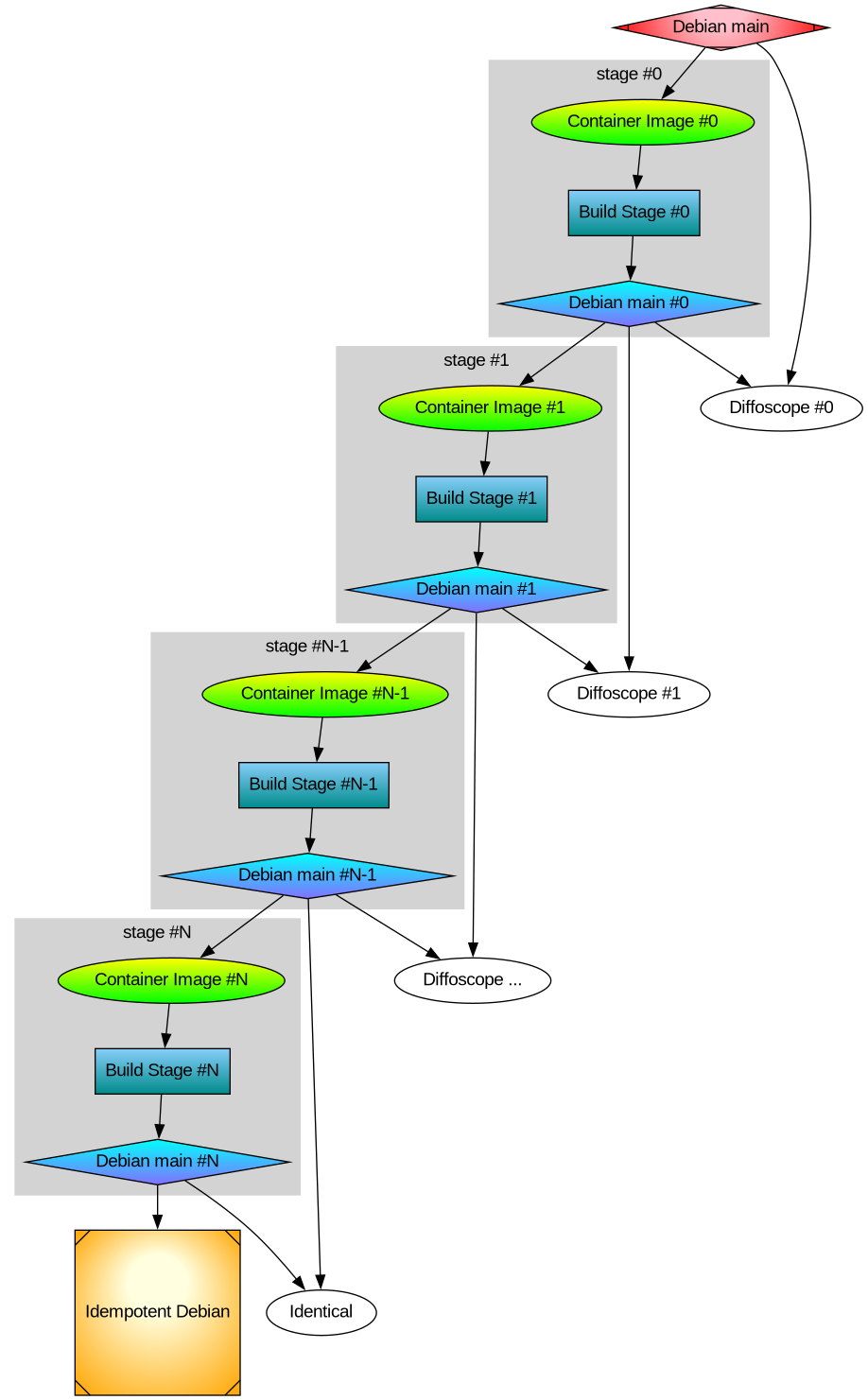
After thinking about multi-stage Debian rebuilds I wanted to implement the idea. Recall my illustration:
Earlier I rebuilt all packages that make up the difference between Ubuntu and Trisquel. It turned out to be a 42% bit-by-bit identical similarity. To check the generality of my approach, I rebuilt the difference between Debian and Devuan too. That was the debdistreproduce project. It only had to orchestrate building up to around 500 packages for each distribution and per architecture. Differential reproducible rebuilds doesn t give you the full picture: it ignore the shared package between the distribution, which make up over 90% of the packages. So I felt a desire to do full archive rebuilds. The motivation is that in order to trust Trisquel binary packages, I need to trust Ubuntu binary packages (because that make up 90% of the Trisquel packages), and many of those Ubuntu binaries are derived from Debian source packages. How to approach all of this? Last year I created the debdistrebuild project, and did top-50 popcon package rebuilds of Debian bullseye, bookworm, trixie, and Ubuntu noble and jammy, on a mix of amd64 and arm64. The amount of reproducibility was lower. Primarily the differences were caused by using different build inputs. Last year I spent (too much) time creating a mirror of snapshot.debian.org, to be able to have older packages available for use as build inputs. I have two copies hosted at different datacentres for reliability and archival safety. At the time, snapshot.d.o had serious rate-limiting making it pretty unusable for massive rebuild usage or even basic downloads. Watching the multi-month download complete last year had a meditating effect. The completion of my snapshot download co-incided with me realizing something about the nature of rebuilding packages. Let me below give a recap of the idempotent rebuilds idea, because it motivate my work to build all of Debian from a GitLab pipeline. One purpose for my effort is to be able to trust the binaries that I use on my laptop. I believe that without building binaries from source code, there is no practically feasible way to trust binaries. To trust any binary you receive, you can de-assemble the bits and audit the assembler instructions for the CPU you will execute it on. Doing that on a OS-wide level this is unpractical. A more practical approach is to audit the source code, and then confirm that the binary is 100% bit-by-bit identical to one that you can build yourself (from the same source) on your own trusted toolchain. This is similar to a reproducible build. My initial goal with debdistrebuild was to get to 100% bit-by-bit identical rebuilds, and then I would have trustworthy binaries. Or so I thought. This also appears to be the goal of reproduce.debian.net. They want to reproduce the official Debian binaries. That is a worthy and important goal. They achieve this by building packages using the build inputs that were used to build the binaries. The build inputs are earlier versions of Debian packages (not necessarily from any public Debian release), archived at snapshot.debian.org. I realized that these rebuilds would be not be sufficient for me: it doesn t solve the problem of how to trust the toolchain. Let s assume the reproduce.debian.net effort succeeds and is able to 100% bit-by-bit identically reproduce the official Debian binaries. Which appears to be within reach. To have trusted binaries we would only have to audit the source code for the latest version of the packages AND audit the tool chain used. There is no escaping from auditing all the source code that s what I think we all would prefer to focus on, to be able to improve upstream source code. The trouble is about auditing the tool chain. With the Reproduce.debian.net approach, that is a recursive problem back to really ancient Debian packages, some of them which may no longer build or work, or even be legally distributable. Auditing all those old packages is a LARGER effort than auditing all current packages! Doing auditing of old packages is of less use to making contributions: those releases are old, and chances are any improvements have already been implemented and released. Or that improvements are no longer applicable because the projects evolved since the earlier version. See where this is going now? I reached the conclusion that reproducing official binaries using the same build inputs is not what I m interested in. I want to be able to build the binaries that I use from source using a toolchain that I can also build from source. And preferably that all of this is using latest version of all packages, so that I can contribute and send patches for them, to improve matters. The toolchain that Reproduce.Debian.Net is using is not trustworthy unless all those ancient packages are audited or rebuilt bit-by-bit identically, and I don t see any practical way forward to achieve that goal. Nor have I seen anyone working on that problem. It is possible to do, though, but I think there are simpler ways to achieve the same goal. My approach to reach trusted binaries on my laptop appears to be a three-step effort: How to go about achieving this? Today s Debian build architecture is something that lack transparency and end-user control. The build environment and signing keys are managed by, or influenced by, unidentified people following undocumented (or at least not public) security procedures, under unknown legal jurisdictions. I always wondered why none of the Debian-derivates have adopted a modern GitDevOps-style approach as a method to improve binary build transparency, maybe I missed some project? If you want to contribute to some GitHub or GitLab project, you click the Fork button and get a CI/CD pipeline running which rebuild artifacts for the project. This makes it easy for people to contribute, and you get good QA control because the entire chain up until its artifact release are produced and tested. At least in theory. Many projects are behind on this, but it seems like this is a useful goal for all projects. This is also liberating: all users are able to reproduce artifacts. There is no longer any magic involved in preparing release artifacts. As we ve seen with many software supply-chain security incidents for the past years, where the magic is involved is a good place to introduce malicious code. To allow me to continue with my experiment, I thought the simplest way forward was to setup a GitDevOps-centric and user-controllable way to build the entire Debian archive. Let me introduce the debdistbuild project. Debdistbuild is a re-usable GitLab CI/CD pipeline, similar to the Salsa CI pipeline. It provide one build job definition and one deploy job definition. The pipeline can run on GitLab.org Shared Runners or you can set up your own runners, like my GitLab riscv64 runner setup. I have concerns about relying on GitLab (both as software and as a service), but my ideas are easy to transfer to some other GitDevSecOps setup such as Codeberg.org. Self-hosting GitLab, including self-hosted runners, is common today, and Debian rely increasingly on Salsa for this. All of the build infrastructure could be hosted on Salsa eventually. The build job is simple. From within an official Debian container image build packages using dpkg-buildpackage essentially by invoking the following commands.
sed -i 's/ deb$/ deb deb-src/' /etc/apt/sources.list.d/*.sources
apt-get -o Acquire::Check-Valid-Until=false update
apt-get dist-upgrade -q -y
apt-get install -q -y --no-install-recommends build-essential fakeroot
env DEBIAN_FRONTEND=noninteractive \
    apt-get build-dep -y --only-source $PACKAGE=$VERSION
useradd -m build
DDB_BUILDDIR=/build/reproducible-path
chgrp build $DDB_BUILDDIR
chmod g+w $DDB_BUILDDIR
su build -c "apt-get source --only-source $PACKAGE=$VERSION" > ../$PACKAGE_$VERSION.build
cd $DDB_BUILDDIR
su build -c "dpkg-buildpackage"
cd ..
mkdir out
mv -v $(find $DDB_BUILDDIR -maxdepth 1 -type f) out/
The deploy job is also simple. It commit artifacts to a Git project using Git-LFS to handle large objects, essentially something like this:
if ! grep -q '^pool/**' .gitattributes; then
    git lfs track 'pool/**'
    git add .gitattributes
    git commit -m"Track pool/* with Git-LFS." .gitattributes
fi
POOLDIR=$(if test "$(echo "$PACKAGE"   cut -c1-3)" = "lib"; then C=4; else C=1; fi; echo "$DDB_PACKAGE"   cut -c1-$C)
mkdir -pv pool/main/$POOLDIR/
rm -rfv pool/main/$POOLDIR/$PACKAGE
mv -v out pool/main/$POOLDIR/$PACKAGE
git add pool
git commit -m"Add $PACKAGE." -m "$CI_JOB_URL" -m "$VERSION" -a
if test "$ DDB_GIT_TOKEN:- " = ""; then
    echo "SKIP: Skipping git push due to missing DDB_GIT_TOKEN (see README)."
else
    git push -o ci.skip
fi
That s it! The actual implementation is a bit longer, but the major difference is for log and error handling. You may review the source code of the base Debdistbuild pipeline definition, the base Debdistbuild script and the rc.d/-style scripts implementing the build.d/ process and the deploy.d/ commands. There was one complication related to artifact size. GitLab.org job artifacts are limited to 1GB. Several packages in Debian produce artifacts larger than this. What to do? GitLab supports up to 5GB for files stored in its package registry, but this limit is too close for my comfort, having seen some multi-GB artifacts already. I made the build job optionally upload artifacts to a S3 bucket using SHA256 hashed file hierarchy. I m using Hetzner Object Storage but there are many S3 providers around, including self-hosting options. This hierarchy is compatible with the Git-LFS .git/lfs/object/ hierarchy, and it is easy to setup a separate Git-LFS object URL to allow Git-LFS object downloads from the S3 bucket. In this mode, only Git-LFS stubs are pushed to the git repository. It should have no trouble handling the large number of files, since I have earlier experience with Apt mirrors in Git-LFS. To speed up job execution, and to guarantee a stable build environment, instead of installing build-essential packages on every build job execution, I prepare some build container images. The project responsible for this is tentatively called stage-N-containers. Right now it create containers suitable for rolling builds of trixie on amd64, arm64, and riscv64, and a container intended for as use the stage-0 based on the 20250407 docker images of bookworm on amd64 and arm64 using the snapshot.d.o 20250407 archive. Or actually, I m using snapshot-cloudflare.d.o because of download speed and reliability. I would have prefered to use my own snapshot mirror with Hetzner bandwidth, alas the Debian snapshot team have concerns about me publishing the list of (SHA1 hash) filenames publicly and I haven t been bothered to set up non-public access. Debdistbuild has built around 2.500 packages for bookworm on amd64 and bookworm on arm64. To confirm the generality of my approach, it also build trixie on amd64, trixie on arm64 and trixie on riscv64. The riscv64 builds are all on my own hosted runners. For amd64 and arm64 my own runners are only used for large packages where the GitLab.com shared runners run into the 3 hour time limit. What s next in this venture? Some ideas include: What do you think?

Utkarsh Gupta: FOSS Activites in April 2025

Here s my 67th monthly but brief update about the activities I ve done in the F/L/OSS world.

Debian
This was my 76th month of actively contributing to Debian. I became a DM in late March 2019 and a DD on Christmas 19! \o/ There s a bunch of things I do, both, technical and non-technical. Here s what I did:
  • Updating Matomo to v5.3.1.
  • Lots of bursary stuff for DC25. We rolled out the results for the first batch.
  • Helping Andreas Tille with and around FTP team bits.
  • Mentoring for newcomers.
  • Moderation of -project mailing list.

Ubuntu
This was my 51st month of actively contributing to Ubuntu. I joined Canonical to work on Ubuntu full-time back in February 2021. Whilst I can t give a full, detailed list of things I did (there s so much and some of it might not be public yet!), here s a quick TL;DR of what I did:
  • Released 25.04 Plucky Puffin! \o/
  • Helped open the 25.10 Questing Quokka archive. Let the development begin!
  • Jon, VP of Engineering, asked me to lead the Canonical Release team - that was definitely not something I saw coming. :)
  • We re now doing Ubuntu monthly releases for the devel releases - I ll be the tech lead for the project.
  • Preparing for the May sprints - too many new things and new responsibilities. :)

Debian (E)LTS
Debian Long Term Support (LTS) is a project to extend the lifetime of all Debian stable releases to (at least) 5 years. Debian LTS is not handled by the Debian security team, but by a separate group of volunteers and companies interested in making it a success. And Debian Extended LTS (ELTS) is its sister project, extending support to the stretch and jessie release (+2 years after LTS support). This was my 67th month as a Debian LTS and 54th month as a Debian ELTS paid contributor.
Due to DC25 bursary work, Ubuntu 25.04 release, and other travel bits, I only worked for 2.00 hours for LTS and 4.50 hours for ELTS. I did the following things:
  • [ELTS] Had already backported patches for adminer for the following CVEs:
    • CVE-2023-45195: a SSRF attack.
    • CVE-2023-45196: a denial of service attack.
    • Salsa repository: https://salsa.debian.org/lts-team/packages/adminer.
    • As the same CVEs are affected LTS, we decided to release for LTS first and then for ELTS but since I had no hours for LTS, I decided to do a bit more of testing for ELTS to make sure things don t regress in buster.
    • Will prepare LTS (and also s-p-u, sigh) updates this month and get back to ELTS thereafter.
  • [LTS] Started to prepare the LTS update for adminer for the same CVEs as for ELTS:
    • CVE-2023-45195: a SSRF attack.
    • CVE-2023-45196: a denial of service attack.
    • Haven t fully backported the patch yet but this is what I intend to do for this month (now that I have hours :D).
  • [LTS] Partially attended the LTS meeting on Jitsi. Summary here.
    • Partially because I was fighting SSO auth issues with Jitsi. Looks like there were some upstream issues/activity and it was resulting in gateway crashes but all good now.
    • I was following the running notes and keeping up with things as much as I could. :)

Until next time.
:wq for today.

29 April 2025

Petter Reinholdtsen: OpenSnitch 1.6.8 is now in Trixie

After some days of effort, I am happy to report that the great interactive application firewall OpenSnitch got a new version in Trixie, now with the Linux kernel based ebpf sniffer included for better accuracy. This new version made it possible for me to finally track down the rule required to avoid a deadlock when using it on a machine with the user home directory on NFS. The problematic connection originated from the Linux kernel itself, causing the /proc based version in Debian 12 to fail to properly attribute the connection and cause the OpenSnitch daemon to block while waiting for the Python GUI, which was unable to continue because the home directory was blocked waiting for the OpenSnitch daemon. A classic deadlock reported upstream for a more permanent solution. I really love the control over all the programs and web pages calling home that OpenSnitch give me. Just today I discovered a strange connection to sb-ssl.google.com when I pulled up a PDF passed on to me via a Mattermost installation. It is some times hard to know which connections to block and which to go through, but after running it for a few months, the default rule set start to handle most regular network traffic and I only have to have a look at the more unusual connections. If you would like to know more about what your machines programs are doing, install OpenSnitch today. It is only a apt install opensnitch away. :) I hope to get the 1.6.9 version in experimental into Trixie before the archive enter hard freeze. This new version should have no relevant changes not already in the 1.6.8-11 edition, as it mostly contain Debian patches, but will give it a few days testing to see if there are any surprises. :) As usual, if you use Bitcoin and want to show your support of my activities, please send Bitcoin donations to my address 15oWEoG9dUPovwmUL9KWAnYRtNJEkP1u1b.

Daniel Lange: Weird times ... or how the New York DEC decided the US presidential elections

November 2024 will be known as the time when killing peanut, a pet squirrel, by the New York State DEC swung the US presidential elections and shaped history forever. The hundreds of millions of dollars spent on each side, the tireless campaigning by the candidates, the celebrity endorsements ... all made for an open race for months. Investments evened each other out. But an OnlyFans producer showing people an overreaching, bureaucracy driven State raiding his home to confiscate a pet squirrel and kill it ... swung enough voters to decide the elections. That is what we need to understand in times of instant worldwide publication and a mostly attention driven economy: Human fates, elections, economic cycles and wars can be decided by people killing squirrels. RIP, peanut. P.S.: Trump Media & Technology Group Corp. (DJT) stock is up 30% pre-market. *[DEC]: Department of Environmental Conservation

Freexian Collaborators: Freexian partners with Invisible Things Lab to extend security support for Xen hypervisor

Freexian is pleased to announce a partnership with Invisible Things Lab to extend the security support of the Xen type-1 hypervisor version 4.17. Three years after its initial release, Xen 4.17, the version available in Debian 12 bookworm , will reach end-of-security-support status upstream on December 2025. The aim of our partnership with Invisible Things is to extend the security support until, at least, July 2027. We may also explore a possibility of extending the support until June 2028, to coincide with the end of Debian 12 LTS support-period. The security support of Xen in Debian, since Debian 8 jessie until Debian 11 bullseye , reached its end before the end of the life cycle of the release. We aim then to significantly improve the situation of Xen in Debian 12. As with similar efforts, we would like to mention that this is an experiment and that we will do our best to make it a success. We are aiming to try and to extend the security support for Xen versions included in future Debian releases, including Debian 13 trixie . In the long term, we hope that this effort will ultimately allow the Xen Project to increase the official security support period for Xen releases from the current three years to at least five years, with the extra work being funded by the community of companies benefiting from the longer support period. If your company relies on Xen and wants to help sustain LTS versions of Xen, please reach out to us. For companies using Debian, the simplest way is to subscribe to Freexian s Debian LTS offer at a gold level (or above) and let us know that you want to contribute to Xen LTS when you send in your subscription form. For others, please reach out to us at sales@freexian.com and we will figure out a way to help you contribute. In the mean time, this initiative has been made possible thanks to the current LTS sponsors and ELTS customers. We hope the entire community of Debian and Xen users will benefit from this initiative. For any queries you might have, please don t hesitate to contact us at sales@freexian.com.

About Invisible Things Lab Invisible Things Lab (ITL) offers low-level security consulting auditing services for x86 virtualization technologies; C, C++, and assembly codebases; Intel SGX; binary exploitation and mitigations; and more. ITL also specializes in Qubes OS and Gramine consulting, including deployment, debugging, and feature development.

28 April 2025

Scarlett Gately Moore: KDE Snaps and life. Spirits are up, but I need a little help please

I was just released from the hospital after a 3 day stay for my ( hopefully ) last surgery. There was concern with massive blood loss and low heart rate. I have stabilized and have come home. Unfortunately, they had to prescribe many medications this round and they are extremely expensive and used up all my funds. I need gas money to get to my post-op doctors appointments, and food would be cool. I would appreciate any help, even just a dollar! I am already back to work, and continued work on the crashy KDE snaps in a non KDE env. ( Also affects anyone using kde-neon extensions such as FreeCAD) I hope to have a fix in the next day or so. Fixed kate bug https://bugs.kde.org/show_bug.cgi?id=503285 Thanks for stopping by.

Sergio Talens-Oliag: ArgoCD Autopilot

For a long time I ve been wanting to try GitOps tools, but I haven t had the chance to try them for real on the projects I was working on. As now I have some spare time I ve decided I m going to play a little with Argo CD, Flux and Kluctl to test them and be able to use one of them in a real project in the future if it looks appropriate. On this post I will use Argo-CD Autopilot to install argocd on a k3d local cluster installed using OpenTofu to test the autopilot approach of managing argocd and test the tool (as it manages argocd using a git repository it can be used to test argocd as well).

Installing tools locally with arkadeRecently I ve been using the arkade tool to install kubernetes related applications on Linux servers and containers, I usually get the applications with it and install them on the /usr/local/bin folder. For this post I ve created a simple script that checks if the tools I ll be using are available and installs them on the $HOME/.arkade/bin folder if missing (I m assuming that docker is already available, as it is not installable with arkade):
#!/bin/sh
# TOOLS LIST
ARKADE_APPS="argocd argocd-autopilot k3d kubectl sops tofu"
# Add the arkade binary directory to the path if missing
case ":$ PATH :" in
  *:"$ HOME /.arkade/bin":*) ;;
  *) export PATH="$ PATH :$ HOME /.arkade/bin" ;;
esac
# Install or update arkade
if command -v arkade >/dev/null; then
  echo "Trying to update the arkade application"
  sudo arkade update
else
  echo "Installing the arkade application"
  curl -sLS https://get.arkade.dev   sudo sh
fi
echo ""
echo "Installing tools with arkade"
echo ""
for app in $ARKADE_APPS; do
  app_path="$(command -v $app)"   true
  if [ "$app_path" ]; then
    echo "The application '$app' already available on '$app_path'"
  else
    arkade get "$app"
  fi
done
cat <<EOF
Add the ~/.arkade/bin directory to your PATH if tools have been installed there
EOF
The rest of scripts will add the binary directory to the PATH if missing to make sure things work if something was installed there.

Creating a k3d cluster with opentofuAlthough using k3d directly will be a good choice for the creation of the cluster, I m using tofu to do it because that will probably be the tool used to do it if we were working with Cloud Platforms like AWS or Google. The main.tf file is as follows:
terraform  
  required_providers  
    k3d =  
      source  = "moio/k3d"
      version = "0.0.12"
     
    sops =  
      source = "carlpett/sops"
      version = "1.2.0"


data "sops_file" "secrets"  
    source_file = "secrets.yaml"
 
resource "k3d_cluster" "argocd_cluster"  
  name    = "argocd"
  servers = 1
  agents  = 2
  image   = "rancher/k3s:v1.31.5-k3s1"
  network = "argocd"
  token   = data.sops_file.secrets.data["token"]
  port  
    host_port      = 8443
    container_port = 443
    node_filters = [
      "loadbalancer",
    ]
   
  k3d  
    disable_load_balancer     = false
    disable_image_volume      = false
   
  kubeconfig  
    update_default_kubeconfig = true
    switch_current_context    = true
   
  runtime  
    gpu_request = "all"
   
 
The k3d configuration is quite simple, as I plan to use the default traefik ingress controller with TLS I publish the 443 port on the hosts 8443 port, I ll explain how I add a valid certificate on the next step. I ve prepared the following script to initialize and apply the changes:
#!/bin/sh
set -e
# VARIABLES
# Default token for the argocd cluster
K3D_CLUSTER_TOKEN="argocdToken"
# Relative PATH to install the k3d cluster using terr-iaform
K3D_TF_RELPATH="k3d-tf"
# Secrets yaml file
SECRETS_YAML="secrets.yaml"
# Relative PATH to the workdir from the script directory
WORK_DIR_RELPATH=".."
# Compute WORKDIR
SCRIPT="$(readlink -f "$0")"
SCRIPT_DIR="$(dirname "$SCRIPT")"
WORK_DIR="$(readlink -f "$SCRIPT_DIR/$WORK_DIR_RELPATH")"
# Update the PATH to add the arkade bin directory
# Add the arkade binary directory to the path if missing
case ":$ PATH :" in
  *:"$ HOME /.arkade/bin":*) ;;
  *) export PATH="$ PATH :$ HOME /.arkade/bin" ;;
esac
# Go to the k3d-tf dir
cd "$WORK_DIR/$K3D_TF_RELPATH"   exit 1
# Create secrets.yaml file and encode it with sops if missing
if [ ! -f "$SECRETS_YAML" ]; then
  echo "token: $K3D_CLUSTER_TOKEN" >"$SECRETS_YAML"
  sops encrypt -i "$SECRETS_YAML"
fi
# Initialize terraform
tofu init
# Apply the configuration
tofu apply

Adding a wildcard certificate to the k3d ingressAs an optional step, after creating the k3d cluster I m going to add a default wildcard certificate for the traefik ingress server to be able to use everything with HTTPS without certificate issues. As I manage my own DNS domain I ve created the lo.mixinet.net and *.lo.mixinet.net DNS entries on my public and private DNS servers (both return 127.0.0.1 and ::1) and I ve created a TLS certificate for both entries using Let s Encrypt with Certbot. The certificate is updated automatically on one of my servers and when I need it I copy the contents of the fullchain.pem and privkey.pem files from the /etc/letsencrypt/live/lo.mixinet.net server directory to the local files lo.mixinet.net.crt and lo.mixinet.net.key. After copying the files I run the following file to install or update the certificate and configure it as the default for traefik:
#!/bin/sh
# Script to update the
secret="lo-mixinet-net-ingress-cert"
cert="$ 1:-lo.mixinet.net.crt "
key="$ 2:-lo.mixinet.net.key "
if [ -f "$cert" ] && [ -f "$key" ]; then
  kubectl -n kube-system create secret tls $secret \
    --key=$key \
    --cert=$cert \
    --dry-run=client --save-config -o yaml    kubectl apply -f -
  kubectl apply -f - << EOF
apiVersion: traefik.containo.us/v1alpha1
kind: TLSStore
metadata:
  name: default
  namespace: kube-system
spec:
  defaultCertificate:
    secretName: $secret
EOF
else
  cat <<EOF
To add or update the traefik TLS certificate the following files are needed:
- cert: '$cert'
- key: '$key'
Note: you can pass the paths as arguments to this script.
EOF
fi
Once it is installed if I connect to https://foo.lo.mixinet.net:8443/ I get a 404 but the certificate is valid.

Installing argocd with argocd-autopilot

Creating a repository and a token for autopilotI ll be using a project on my forgejo instance to manage argocd, the repository I ve created is on the URL https://forgejo.mixinet.net/blogops/argocd and I ve created a private user named argocd that only has write access to that repository. Logging as the argocd user on forgejo I ve created a token with permission to read and write repositories that I ve saved on my pass password store on the mixinet.net/argocd@forgejo/repository-write entry.

Bootstrapping the installationTo bootstrap the installation I ve used the following script (it uses the previous GIT_REPO and GIT_TOKEN values):
#!/bin/sh
set -e
# VARIABLES
# Relative PATH to the workdir from the script directory
WORK_DIR_RELPATH=".."
# Compute WORKDIR
SCRIPT="$(readlink -f "$0")"
SCRIPT_DIR="$(dirname "$SCRIPT")"
WORK_DIR="$(readlink -f "$SCRIPT_DIR/$WORK_DIR_RELPATH")"
# Update the PATH to add the arkade bin directory
# Add the arkade binary directory to the path if missing
case ":$ PATH :" in
  *:"$ HOME /.arkade/bin":*) ;;
  *) export PATH="$ PATH :$ HOME /.arkade/bin" ;;
esac
# Go to the working directory
cd "$WORK_DIR"   exit 1
# Set GIT variables
if [ -z "$GIT_REPO" ]; then
  export GIT_REPO="https://forgejo.mixinet.net/blogops/argocd.git"
fi
if [ -z "$GIT_TOKEN" ]; then
  GIT_TOKEN="$(pass mixinet.net/argocd@forgejo/repository-write)"
  export GIT_TOKEN
fi
argocd-autopilot repo bootstrap --provider gitea
The output of the execution is as follows:
  bin/argocd-bootstrap.sh
INFO cloning repo: https://forgejo.mixinet.net/blogops/argocd.git
INFO empty repository, initializing a new one with specified remote
INFO using revision: "", installation path: ""
INFO using context: "k3d-argocd", namespace: "argocd"
INFO applying bootstrap manifests to cluster...
namespace/argocd created
customresourcedefinition.apiextensions.k8s.io/applications.argoproj.io created
customresourcedefinition.apiextensions.k8s.io/applicationsets.argoproj.io created
customresourcedefinition.apiextensions.k8s.io/appprojects.argoproj.io created
serviceaccount/argocd-application-controller created
serviceaccount/argocd-applicationset-controller created
serviceaccount/argocd-dex-server created
serviceaccount/argocd-notifications-controller created
serviceaccount/argocd-redis created
serviceaccount/argocd-repo-server created
serviceaccount/argocd-server created
role.rbac.authorization.k8s.io/argocd-application-controller created
role.rbac.authorization.k8s.io/argocd-applicationset-controller created
role.rbac.authorization.k8s.io/argocd-dex-server created
role.rbac.authorization.k8s.io/argocd-notifications-controller created
role.rbac.authorization.k8s.io/argocd-redis created
role.rbac.authorization.k8s.io/argocd-server created
clusterrole.rbac.authorization.k8s.io/argocd-application-controller created
clusterrole.rbac.authorization.k8s.io/argocd-applicationset-controller created
clusterrole.rbac.authorization.k8s.io/argocd-server created
rolebinding.rbac.authorization.k8s.io/argocd-application-controller created
rolebinding.rbac.authorization.k8s.io/argocd-applicationset-controller created
rolebinding.rbac.authorization.k8s.io/argocd-dex-server created
rolebinding.rbac.authorization.k8s.io/argocd-notifications-controller created
rolebinding.rbac.authorization.k8s.io/argocd-redis created
rolebinding.rbac.authorization.k8s.io/argocd-server created
clusterrolebinding.rbac.authorization.k8s.io/argocd-application-controller created
clusterrolebinding.rbac.authorization.k8s.io/argocd-applicationset-controller created
clusterrolebinding.rbac.authorization.k8s.io/argocd-server created
configmap/argocd-cm created
configmap/argocd-cmd-params-cm created
configmap/argocd-gpg-keys-cm created
configmap/argocd-notifications-cm created
configmap/argocd-rbac-cm created
configmap/argocd-ssh-known-hosts-cm created
configmap/argocd-tls-certs-cm created
secret/argocd-notifications-secret created
secret/argocd-secret created
service/argocd-applicationset-controller created
service/argocd-dex-server created
service/argocd-metrics created
service/argocd-notifications-controller-metrics created
service/argocd-redis created
service/argocd-repo-server created
service/argocd-server created
service/argocd-server-metrics created
deployment.apps/argocd-applicationset-controller created
deployment.apps/argocd-dex-server created
deployment.apps/argocd-notifications-controller created
deployment.apps/argocd-redis created
deployment.apps/argocd-repo-server created
deployment.apps/argocd-server created
statefulset.apps/argocd-application-controller created
networkpolicy.networking.k8s.io/argocd-application-controller-network-policy created
networkpolicy.networking.k8s.io/argocd-applicationset-controller-network-policy created
networkpolicy.networking.k8s.io/argocd-dex-server-network-policy created
networkpolicy.networking.k8s.io/argocd-notifications-controller-network-policy created
networkpolicy.networking.k8s.io/argocd-redis-network-policy created
networkpolicy.networking.k8s.io/argocd-repo-server-network-policy created
networkpolicy.networking.k8s.io/argocd-server-network-policy created
secret/autopilot-secret created
INFO pushing bootstrap manifests to repo
INFO applying argo-cd bootstrap application
INFO pushing bootstrap manifests to repo
INFO applying argo-cd bootstrap application
application.argoproj.io/autopilot-bootstrap created
INFO running argocd login to initialize argocd config
Context 'autopilot' updated
INFO argocd initialized. password: XXXXXXX-XXXXXXXX
INFO run:
    kubectl port-forward -n argocd svc/argocd-server 8080:80
Now we have the argocd installed and running, it can be checked using the port-forward and connecting to https://localhost:8080/ (the certificate will be wrong, we are going to fix that in the next step).

Updating the argocd installation in gitNow that we have the application deployed we can clone the argocd repository and edit the deployment to disable TLS for the argocd server (we are going to use TLS termination with traefik and that needs the server running as insecure, see the Argo CD documentation)
  ssh clone ssh://git@forgejo.mixinet.net/blogops/argocd.git
  cd argocd
  edit bootstrap/argo-cd/kustomization.yaml
  git commit -m 'Disable TLS for the argocd-server'
The changes made to the kustomization.yaml file are the following:
--- a/bootstrap/argo-cd/kustomization.yaml
+++ b/bootstrap/argo-cd/kustomization.yaml
@@ -11,6 +11,11 @@ configMapGenerator:
         key: git_username
         name: autopilot-secret
   name: argocd-cm
+  # Disable TLS for the Argo Server (see https://argo-cd.readthedocs.io/en/stable/operator-manual/ingress/#traefik-v30)
+- behavior: merge
+  literals:
+  - "server.insecure=true"
+  name: argocd-cmd-params-cm
 kind: Kustomization
 namespace: argocd
 resources:
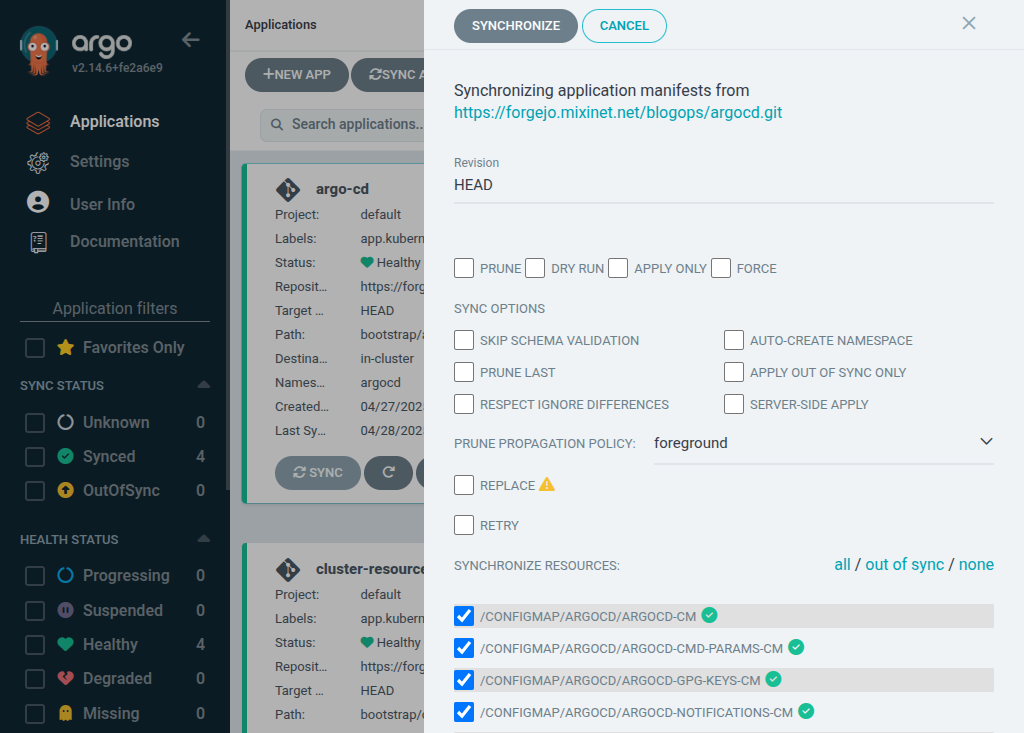
Once the changes are pushed we sync the argo-cd application manually to make sure they are applied:
argo cd sync
As a test we can download the argocd-cmd-params-cm ConfigMap to make sure everything is OK:
apiVersion: v1
data:
  server.insecure: "true"
kind: ConfigMap
metadata:
  annotations:
    kubectl.kubernetes.io/last-applied-configuration:  
       "apiVersion":"v1","data": "server.insecure":"true" ,"kind":"ConfigMap","metadata": "annotations": ,"labels": "app.kubernetes.io/instance":"argo-cd","app.kubernetes.io/name":"argocd-cmd-params-cm","app.kubernetes.io/part-of":"argocd" ,"name":"argocd-cmd-params-cm","namespace":"argocd" 
  creationTimestamp: "2025-04-27T17:31:54Z"
  labels:
    app.kubernetes.io/instance: argo-cd
    app.kubernetes.io/name: argocd-cmd-params-cm
    app.kubernetes.io/part-of: argocd
  name: argocd-cmd-params-cm
  namespace: argocd
  resourceVersion: "16731"
  uid: a460638f-1d82-47f6-982c-3017699d5f14
As this simply changes the ConfigMap we have to restart the argocd-server to read it again, to do it we delete the server pods so they are re-created using the updated resource:
  kubectl delete pods -n argocd -l app.kubernetes.io/name=argocd-server
After doing this the port-forward command is killed automatically, if we run it again the connection to get to the argocd-server has to be done using HTTP instead of HTTPS. Instead of testing that we are going to add an ingress definition to be able to connect to the server using HTTPS and GRPC against the address argocd.lo.mixinet.net using the wildcard TLS certificate we installed earlier. To do it we to edit the bootstrap/argo-cd/kustomization.yaml file to add the ingress_route.yaml file to the deployment:
--- a/bootstrap/argo-cd/kustomization.yaml
+++ b/bootstrap/argo-cd/kustomization.yaml
@@ -20,3 +20,4 @@ kind: Kustomization
 namespace: argocd
 resources:
 - github.com/argoproj-labs/argocd-autopilot/manifests/base?ref=v0.4.19
+- ingress_route.yaml
The ingress_route.yaml file contents are the following:
apiVersion: traefik.io/v1alpha1
kind: IngressRoute
metadata:
  name: argocd-server
  namespace: argocd
spec:
  entryPoints:
    - websecure
  routes:
    - kind: Rule
      match: Host( argocd.lo.mixinet.net )
      priority: 10
      services:
        - name: argocd-server
          port: 80
    - kind: Rule
      match: Host( argocd.lo.mixinet.net ) && Header( Content-Type ,  application/grpc )
      priority: 11
      services:
        - name: argocd-server
          port: 80
          scheme: h2c
  tls:
    certResolver: default
After pushing the changes and waiting a little bit the change is applied and we can access the server using HTTPS and GRPC, the first way can be tested from a browser and the GRPC using the command line interface:
  argocd --grpc-web login argocd.lo.mixinet.net:8443
Username: admin
Password:
'admin:login' logged in successfully
Context 'argocd.lo.mixinet.net:8443' updated
  argocd app list -o name
argocd/argo-cd
argocd/autopilot-bootstrap
argocd/cluster-resources-in-cluster
argocd/root
So things are working fine and that is all on this post, folks!

Valhalla's Things: POLARVIDE modular jacket

Posted on April 28, 2025
Tags: madeof:atoms, craft:sewing
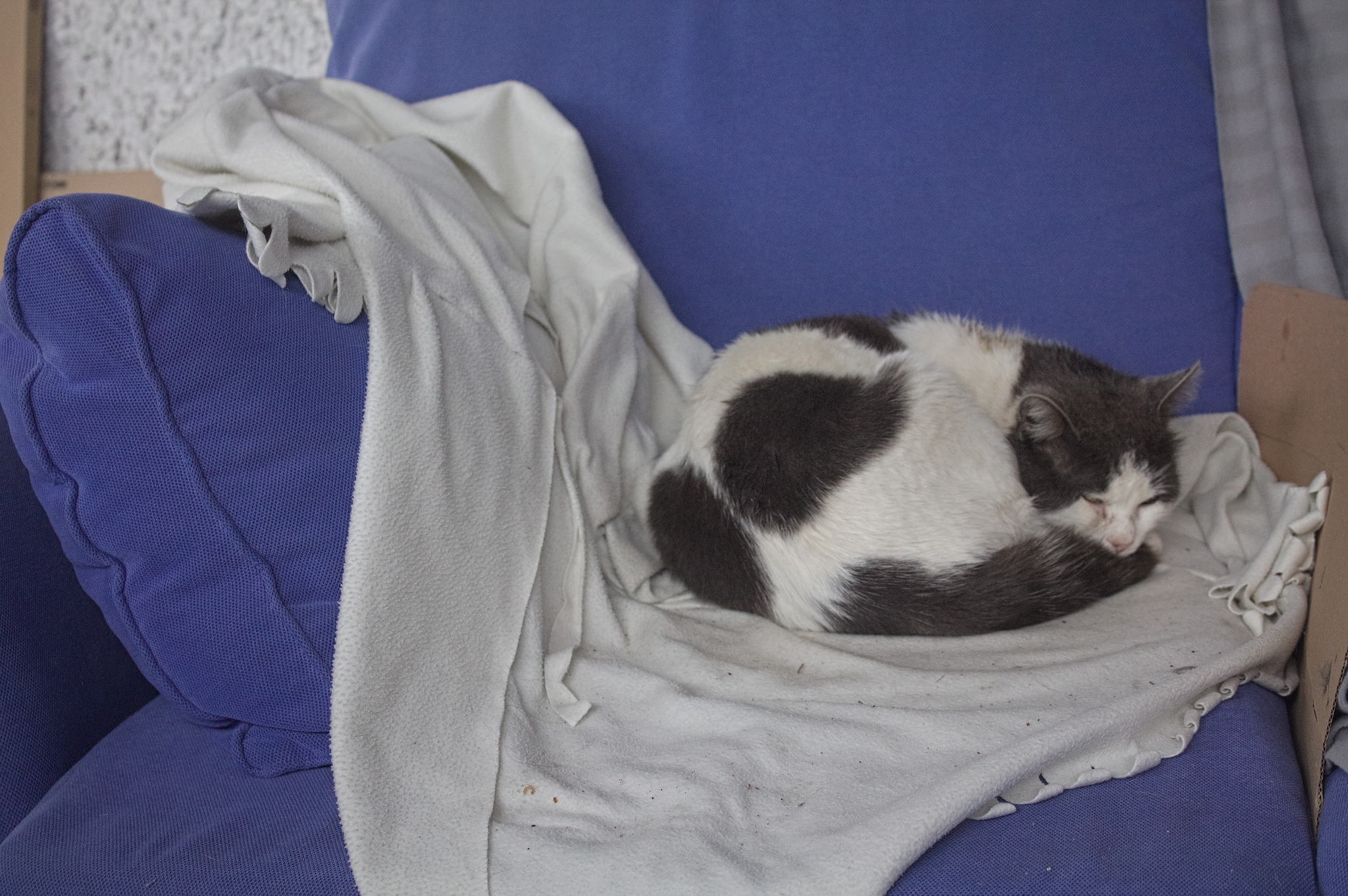
A woman with early morning hair wearing a knee-length grey polar fleece jacket; it is closed at the waist with a twine belt that makes the bound front edge go in a smooth curve between the one side of the neck to the other side of the waist and then flare back outwards on the hips. The sleeves are long enough to go over the hands, and both them and the hem are cut Years ago I made myself a quick dressing gown from a white fleece IKEA throw and often wore it in the morning between waking up and changing into day clothes. One day I want to make myself a fancy victorian wrapper, to use in its place, but that s still in the early planning stage, and will require quite some work. a free cat sitting half asleep on an old couch, with a formerly white piece of fabric draped between the armrest and the seat. A piece of cardboard between two seat pillows provides additional protection from the wind. Then last autumn I discovered that the taxes I owed to the local lord (who provides protection from mice and other small animals) included not just a certain amount of kibbles, but also some warm textiles, and the dressing gown (which at this time was definitely no longer pristine) had to go. For a while I had to do without a dressing gown, but then in the second half of this winter I had some time for a quick machine sewing project. I could not tackle the big victorian thing, but I still had a second POLARVIDE throw from IKEA (this time in a more sensible dark grey) I had bought with sewing intents. The fabric in a throw isn t that much, so I needed something pretty efficient, and rather than winging it as I had done the first time I decided I wanted to try the Modular Jacket from A Year of Zero Waste Sewing (which I had bought in the zine instalments: the jacket is in the March issue). After some measuring and decision taking, I found that I could fit most of the pieces and get a decent length, but I had no room for the collar, and probably not for the belt nor the pockets, but I cut all of the main pieces. I had a possible idea for a contrasting collar, but I decided to start sewing the main pieces and decide later, before committing to cutting the other fabric. As I was assembling the jacket I decided that as a dressing gown I could do without the collar, and noticed that with the fraying-free plastic fleece I didn t really need the front facings, so I cut those in half lengthwise, pieced them together, and used them as binding to finish the front end. the back of the worn jacket, other than being clinched in by the belt it is pretty straight. Since I didn t have enough fabric for the belt I also skipped the belt loops, but I have been wearing this with random belts and I don t feel the need for them anyway. I ve also been thinking about adding a button just above the bust and use that to keep it closed, but I m still not 100% sure about it. Another thing I still need to do is to go through the few scraps of fleece that are left and see if I can piece together a serviceable pocket or two. folding the sleeves back by a good 10 cm to show the hands. Because of the size of the fabric, I ended up having quite long sleeves: I m happy with them because they mean that I can cover my hands when it s cold, or fold them back to make a nice cuff. If I ll make a real jacket with this patter I ll have to take this in consideration, and either make the sleeves shorter or finish the seam in a way that looks nice when folded back. Will I make a real jacket? I m not sure, it s not really my style of outer garment, but as a dressing gown it has already been used quite a bit (as in, almost every morning since I ve made it :) ) and will continue to be used until too worn to be useful, and that s a good thing.

Freexian Collaborators: Monthly report about Debian Long Term Support, March 2025 (by Roberto C. S nchez)

Like each month, have a look at the work funded by Freexian s Debian LTS offering.

Debian LTS contributors In March, 20 contributors have been paid to work on Debian LTS, their reports are available:
  • Adrian Bunk did 51.5h (out of 0.0h assigned and 51.5h from previous period).
  • Andreas Henriksson did 20.0h (out of 20.0h assigned).
  • Andrej Shadura did 6.0h (out of 10.0h assigned), thus carrying over 4.0h to the next month.
  • Bastien Roucari s did 20.0h (out of 20.0h assigned).
  • Ben Hutchings did 12.0h (out of 12.0h assigned and 12.0h from previous period), thus carrying over 12.0h to the next month.
  • Chris Lamb did 18.0h (out of 18.0h assigned).
  • Daniel Leidert did 26.0h (out of 23.0h assigned and 3.0h from previous period).
  • Emilio Pozuelo Monfort did 37.0h (out of 36.5h assigned and 0.75h from previous period), thus carrying over 0.25h to the next month.
  • Guilhem Moulin did 8.25h (out of 11.0h assigned and 9.0h from previous period), thus carrying over 11.75h to the next month.
  • Jochen Sprickerhof did 18.0h (out of 24.25h assigned and 3.0h from previous period), thus carrying over 9.25h to the next month.
  • Lee Garrett did 10.25h (out of 0.0h assigned and 42.0h from previous period), thus carrying over 31.75h to the next month.
  • Lucas Kanashiro did 4.0h (out of 0.0h assigned and 56.0h from previous period), thus carrying over 52.0h to the next month.
  • Markus Koschany did 27.25h (out of 27.25h assigned).
  • Roberto C. S nchez did 8.25h (out of 7.0h assigned and 17.0h from previous period), thus carrying over 15.75h to the next month.
  • Santiago Ruano Rinc n did 17.5h (out of 19.75h assigned and 5.25h from previous period), thus carrying over 7.5h to the next month.
  • Sean Whitton did 7.0h (out of 7.0h assigned).
  • Sylvain Beucler did 32.0h (out of 31.0h assigned and 1.25h from previous period), thus carrying over 0.25h to the next month.
  • Thorsten Alteholz did 11.0h (out of 11.0h assigned).
  • Tobias Frost did 7.75h (out of 12.0h assigned), thus carrying over 4.25h to the next month.
  • Utkarsh Gupta did 15.0h (out of 15.0h assigned).

Evolution of the situation In March, we have released 31 DLAs.
  • Notable security updates:
    • linux-6.1 (1 2)and linux, prepared by Ben Hutchings, fixed an extensive list of vulnerabilities
    • firefox-esr, prepared by Emilio Pozuelo Monfort, fixed a variety of vulnerabilities
    • intel-microcode, prepared by Tobias Frost, fixed several local privilege escalation, denial of service, and information disclosure vulnerabilities
    • vim, prepared by Sean Whitton, fixed a multitude of vulnerabilities, including many application crashes, buffer overflows, and out-of-bounds reads
The recent trend of contributions from contributors external to the formal LTS team has continued. LTS contributor Sylvain Beucler reviewed and facilitated an update to openvpn proposed by Aquila Macedo, resulting in the publication of DLA 4079-1. Thanks a lot to Aquila for preparing the update. The LTS Team continues to make contributions to the current stable Debian release, Debian 12 (codename bookworm ). LTS contributor Bastien Roucari s prepared a stable upload of krb5 to ensure that fixes made in the LTS release, Debian 11 (codename bullseye ) were also made available to stable users. Additional stable updates, for tomcat10 and jetty9, were prepared by LTS contributor Markus Koschany. And, finally, LTS contributor Utkarsh Gupta prepared stable updates for rails and ruby-rack. LTS contributor Emilio Pozuelo Monfort has continued his ongoing improvements to the Debian security tracker and its associated tooling, making the data contained in the tracker more reliable and easing interaction with it. The ckeditor3 package, which has been EOL by upstream for some time, is still depended upon by the PHP Horde packages in Debian. Sylvain, along with Bastien, did monumental work in coordinating with maintainers, security team fellows, and other Debian teams, to formally declare the EOL of the ckeditor3 package in Debian 11 and in Debian 12. Additionally, as a result of this work Sylvain has worked towards the removal of ckeditor3 as a dependency by other packages in order to facilitate the complete removal of ckeditor3 from all future Debian releases.

Thanks to our sponsors Sponsors that joined recently are in bold.

27 April 2025

Marco d'Itri: On the use of SaaS in systems engineering

We want to use an hyperscaler cloud because it is cheaper to delegate operating a scalable and redundant database to an hyperscaler is something that can be debated from business and technical points of view. We want to use an hyperscaler cloud because our developers do not want to operate a scalable and redundant database just means that you need to hire competent developers and/or system administrators. We must stop normalizing the idea that the people whose only skill is gluing together a few dozens of AWS services can continue calling themselves developers. We should also find a sufficiently demeaning name to refer to them...

Valhalla's Things: Stickerses

Posted on April 27, 2025
Tags: madeof:atoms, madeof:bits, craft:graphics, topic:stickers
After just a few years of procrastination, I ve given a wash of git-filter-repo to the repository where I keep my hexagonal sticker designs, removed a few failed experiments and stuff with dubious licensing and was able to finally publish it among my public git repositories This repo includes the template I m using, most of the stickers I ve had printed, some that have been published elsewhere and have been printed by other people, as well as some that have never been printed and I may or may not print in the future. The licensing details are in the metadata of each file, and mostly depend on the logos or cliparts used. Most, but not all, are under a free culture license. My server is not setup to correctly serve the SVG files, yet: downloading them (from the plain links) should work, but I need to fix the content type that is provided. I will probably procrastinate doing it for quite some time, but eventually it will be done. Of course cloning the repository from the public https URL also works. BRB, need to add MOAR stickerses.

26 April 2025

John Goerzen: Memoirs of the Early Internet

The Internet is an amazing place, and occasionally you can find things on the web that have somehow lingered online for decades longer than you might expect. Today I ll take you on a tour of some parts of the early Internet. The Internet, of course, is a network of networks and part of its early (and continuing) promise was to provide a common protocol that all sorts of networks can use to interoperate with each other. In the early days, UUCP was one of the main ways universities linked with each other, and eventually UUCP and the Internet sort of merged (but that s a long story). Let s start with some Usenet maps, which were an early way to document the UUCP modem links between universities. Start with this PDF. The first page is a Usenet map (which at the time mostly flowed over UUCP) from April of 1981. Notice that ucbvax, a VAX system at Berkeley, was central to the map. ucbvax continued to be a central node for UUCP for more than a decade; on page 5 of that PDF, you ll see that it asks for a Path from a major node (eg, ucbvax, devcax, harpo, duke) . Pre-Internet email addresses used a path; eg, mark@ucbvax was duke!decvax!ucbvax!mark to someone. You had to specify the route from your system to the recipient on your email To line. If you gave out your email address on a business card, you would start it from a major node like ucbvax, and the assumption was that everyone would know how to get from their system to the major node. On August 19, 1994, ucbvax was finally turned off. TCP/IP had driven UUCP into more obscurity; by then, it was mostly used by people without a dedicated Internet connection to get on the Internet, rather than an entire communication network of its own. A few days later, Cliff Frost posted a memoir of ucbvax; an obscurbe bit of Internet lore that is fun to read. UUCP was ad-hoc, and by 1984 there was an effort to make a machine-parsable map to help automate routing on UUCP. This was called the pathalias project, and there was a paper about it. The Linux network administration guide even includes a section on pathalias. Because UUCP mainly flowed over phone lines, long distance fees made it quite expensive. In 1985, the Stargate Project was formed, with the idea of distributing Usenet by satellite. The satellite link was short-lived, but the effort eventually morphed into UUNET. It was initially a non-profit, but eventually became a commercial backbone provider, and later ISP. Over a long series of acquisitions, UUNET is now part of Verizon. An article in ;login: is another description of this history. IAPS has an Internet in 1990 article, which includes both pathalias data and an interesting map of domain names to UUCP paths. As I was pondering what interesting things a person could do with NNCPNET Internet email, I stumbled across a page on getting FTP files via e-mail. Yes, that used to be a thing! I remember ftpmail@decwrl.dec.com. It turns out that page is from a copy of EFF s (Extended) Guide to the Internet from 1994. Wow, what a treasure! It has entries such as A Slice of Life in my Virtual Community, libraries with telnet access, Gopher, A Statement of Principle by Bruce Sterling, and I could go on. You can also get it as a PDF from Internet Archive. UUCP is still included with modern Linux and BSD distributions. It was part of how I experienced the PC and Internet revolution in rural America. It lacks modern security, but NNCP is to UUCP what ssh is to telnet.

Dirk Eddelbuettel: RcppArmadillo 14.4.2-1 on CRAN: Another Small Upstream Fix

armadillo image Armadillo is a powerful and expressive C++ template library for linear algebra and scientific computing. It aims towards a good balance between speed and ease of use, has a syntax deliberately close to Matlab, and is useful for algorithm development directly in C++, or quick conversion of research code into production environments. RcppArmadillo integrates this library with the R environment and language and is widely used by (currently) 1245 other packages on CRAN, downloaded 39.4 million times (per the partial logs from the cloud mirrors of CRAN), and the CSDA paper (preprint / vignette) by Conrad and myself has been cited 628 times according to Google Scholar. A new release arriveed at CRAN yesterday with a fix for expmat() and adjustments for clang++-20. These changes since the last CRAN release are summarised below.

Changes in RcppArmadillo version 14.4.2-1 (2025-04-25)
  • Upgraded to Armadillo release 14.4.2 (Filtered Espresso)
    • Fix for expmat()
    • Workaround for bugs in clang 20 compiler
    • Micro-cleanup in one test file

Courtesy of my CRANberries, there is a diffstat report relative to previous release. More detailed information is on the RcppArmadillo page. Questions, comments etc should go to the rcpp-devel mailing list off the Rcpp R-Forge page.

This post by Dirk Eddelbuettel originated on his Thinking inside the box blog. If you like this or other open-source work I do, you can sponsor me at GitHub.

John Goerzen: NNCPNET Can Optionally Exchange Internet Email

A few days ago, I announced NNCPNET, the email network based atop NNCP. NNCPNET lets anyone run a real mail server on a network that supports all sorts of topologies for transport, from Internet to USB drives. And verification is done at the NNCP protocol level, so a whole host of Internet email bolt-ons (SPF, DMARC, DKIM, etc.) are unnecessary. Shortly after announcing NNCPNET, I added an Internet bridge. This lets you get your own DOMAIN.nncpnet.org domain, and from there route email to and from the Internet using a gateway node. Simple, effective, and a way to get real email to and from your laptop or Raspberry Pi without having to have a static IP, SPF, DMARC, DKIM, etc. It s a volunteer-run, free, service. Give it a try!

25 April 2025

Simon Josefsson: GitLab Runner with Rootless Privilege-less Capability-less Podman on riscv64

I host my own GitLab CI/CD runners, and find that having coverage on the riscv64 CPU architecture is useful for testing things. The HiFive Premier P550 seems to be a common hardware choice. The P550 is possible to purchase online. You also need a (mini-)ATX chassi, power supply (~500W is more than sufficient), PCI-to-M2 converter and a NVMe storage device. Total cost per machine was around $8k/ 8k for me. Assembly was simple: bolt everything, connect ATX power, connect cables for the front-panel, USB and and Audio. Be sure to toggle the physical power switch on the P550 before you close the box. Front-panel power button will start your machine. There is a P550 user manual available. Below I will guide you to install the GitLab Runner on the pre-installed Ubuntu 24.04 that ships with the P550, and configure it to use Podman in root-less mode and without the --privileged flag, without any additional capabilities like SYS_ADMIN. Presumably you want to migrate to some other OS instead; hey Trisquel 13 riscv64 I m waiting for you! I wouldn t recommend using this machine for anything sensitive, there is an awful lot of non-free and/or vendor-specific software installed, and the hardware itself is young. I am not aware of any riscv64 hardware that can run a libre OS, all of them appear to require non-free blobs and usually a non-mainline kernel.
apt-get install minicom
minicom -o -D /dev/ttyUSB3
#cmd: ifconfig
inet 192.168.0.2 netmask: 255.255.240.0
gatway 192.168.0.1
SOM_Mac0: 8c:00:00:00:00:00
SOM_Mac1: 8c:00:00:00:00:00
MCU_Mac: 8c:00:00:00:00:00
#cmd: setmac 0 CA:FE:42:17:23:00
The MAC setting will be valid after rebooting the carrier board!!!
MAC[0] addr set to CA:FE:42:17:23:00(ca:fe:42:17:23:0)
#cmd: setmac 1 CA:FE:42:17:23:01
The MAC setting will be valid after rebooting the carrier board!!!
MAC[1] addr set to CA:FE:42:17:23:01(ca:fe:42:17:23:1)
#cmd: setmac 2 CA:FE:42:17:23:02
The MAC setting will be valid after rebooting the carrier board!!!
MAC[2] addr set to CA:FE:42:17:23:02(ca:fe:42:17:23:2)
#cmd:
apt-get install openocd
wget https://raw.githubusercontent.com/sifiveinc/hifive-premier-p550-tools/refs/heads/master/mcu-firmware/stm32_openocd.cfg
echo 'acc115d283ff8533d6ae5226565478d0128923c8a479a768d806487378c5f6c3 stm32_openocd.cfg' sha256sum -c
openocd -f stm32_openocd.cfg &
telnet localhost 4444
...
echo 'ssh-ed25519 AAA...' > ~/.ssh/authorized_keys
sed -i 's;^#PasswordAuthentication.*;PasswordAuthentication no;' /etc/ssh/sshd_config
service ssh restart
parted /dev/nvme0n1 print
blkdiscard /dev/nvme0n1
parted /dev/nvme0n1 mklabel gpt
parted /dev/nvme0n1 mkpart jas-p550-nvm-02 ext2 1MiB 100% align-check optimal 1
parted /dev/nvme0n1 set 1 lvm on
partprobe /dev/nvme0n1
pvcreate /dev/nvme0n1p1
vgcreate vg0 /dev/nvme0n1p1
lvcreate -L 400G -n glr vg0
mkfs.ext4 -L glr /dev/mapper/vg0-glr
Now with a reasonable setup ready, let s install the GitLab Runner. The following is adapted from gitlab-runner s official installation instructions documentation. The normal installation flow doesn t work because they don t publish riscv64 apt repositories, so you will have to perform upgrades manually.
# wget https://s3.dualstack.us-east-1.amazonaws.com/gitlab-runner-downloads/latest/deb/gitlab-runner_riscv64.deb
# wget https://s3.dualstack.us-east-1.amazonaws.com/gitlab-runner-downloads/latest/deb/gitlab-runner-helper-images.deb
wget https://gitlab-runner-downloads.s3.amazonaws.com/v17.11.0/deb/gitlab-runner_riscv64.deb
wget https://gitlab-runner-downloads.s3.amazonaws.com/v17.11.0/deb/gitlab-runner-helper-images.deb
echo '68a4c2a4b5988a5a5bae019c8b82b6e340376c1b2190228df657164c534bc3c3 gitlab-runner-helper-images.deb' sha256sum -c
echo 'ee37dc76d3c5b52e4ba35cf8703813f54f536f75cfc208387f5aa1686add7a8c gitlab-runner_riscv64.deb' sha256sum -c
dpkg -i gitlab-runner-helper-images.deb gitlab-runner_riscv64.deb
Remember the NVMe device? Let s not forget to use it, to avoid wear and tear of the internal MMC root disk. Do this now before any files in /home/gitlab-runner appears, or you have to move them manually.
gitlab-runner stop
echo 'LABEL=glr /home/gitlab-runner ext4 defaults,noatime 0 1' >> /etc/fstab
systemctl daemon-reload
mount /home/gitlab-runner
Next install gitlab-runner and configure it. Replace token glrt-REPLACEME below with the registration token you get from your GitLab project s Settings -> CI/CD -> Runners -> New project runner. I used the tags riscv64 and a runner description of the hostname.
gitlab-runner register --non-interactive --url https://gitlab.com --token glrt-REPLACEME --name $(hostname) --executor docker --docker-image debian:stable
We install and configure gitlab-runner to use podman, and to use non-root user.
apt-get install podman
gitlab-runner stop
usermod --add-subuids 100000-165535 --add-subgids 100000-165535 gitlab-runner
You need to run some commands as the gitlab-runner user, but unfortunately some interaction between sudo/su and pam_systemd makes this harder than it should be. So you have to setup SSH for the user and login via SSH to run the commands. Does anyone know of a better way to do this?
# on the p550:
cp -a /root/.ssh/ /home/gitlab-runner/
chown -R gitlab-runner:gitlab-runner /home/gitlab-runner/.ssh/
# on your laptop:
ssh gitlab-runner@jas-p550-01
systemctl --user --now enable podman.socket
systemctl --user --now start podman.socket
loginctl enable-linger gitlab-runner gitlab-runner
systemctl status --user podman.socket
We modify /etc/gitlab-runner/config.toml as follows, replace 997 with the user id shown by systemctl status above. See feature flags documentation for more documentation.
...
[[runners]]
environment = ["FF_NETWORK_PER_BUILD=1", "FF_USE_FASTZIP=1"]
...
[runners.docker]
host = "unix:///run/user/997/podman/podman.sock"
Note that unlike the documentation I do not add the privileged = true parameter here. I will come back to this later. Restart the system to confirm that pushing a .gitlab-ci.yml with a job that uses the riscv64 tag like the following works properly.
dump-env-details-riscv64:
stage: build
image: riscv64/debian:testing
tags: [ riscv64 ]
script:
- set
Your gitlab-runner should now be receiving jobs and running them in rootless podman. You may view the log using journalctl as follows:
journalctl --follow _SYSTEMD_UNIT=gitlab-runner.service
To stop the graphical environment and disable some unnecessary services, you can use:
systemctl set-default multi-user.target
systemctl disable openvpn cups cups-browsed sssd colord
At this point, things were working fine and I was running many successful builds. Now starts the fun part with operational aspects! I had a problem when running buildah to build a new container from within a job, and noticed that aardvark-dns was crashing. You can use the Debian aardvark-dns binary instead.
wget http://ftp.de.debian.org/debian/pool/main/a/aardvark-dns/aardvark-dns_1.14.0-3_riscv64.deb
echo 'df33117b6069ac84d3e97dba2c59ba53775207dbaa1b123c3f87b3f312d2f87a aardvark-dns_1.14.0-3_riscv64.deb' sha256sum -c
mkdir t
cd t
dpkg -x ../aardvark-dns_1.14.0-3_riscv64.deb .
mv /usr/lib/podman/aardvark-dns /usr/lib/podman/aardvark-dns.ubuntu
mv usr/lib/podman/aardvark-dns /usr/lib/podman/aardvark-dns.debian
My setup uses podman in rootless mode without passing the privileged parameter or any add-cap parameters to add non-default capabilities. This is sufficient for most builds. However if you try to create container using buildah from within a job, you may see errors like this:
Writing manifest to image destination
Error: mounting new container: mounting build container "8bf1ec03d967eae87095906d8544f51309363ddf28c60462d16d73a0a7279ce1": creating overlay mount to /var/lib/containers/storage/overlay/23785e20a8bac468dbf028bf524274c91fbd70dae195a6cdb10241c345346e6f/merged, mount_data="lowerdir=/var/lib/containers/storage/overlay/l/I3TWYVYTRZ4KVYCT6FJKHR3WHW,upperdir=/var/lib/containers/storage/overlay/23785e20a8bac468dbf028bf524274c91fbd70dae195a6cdb10241c345346e6f/diff,workdir=/var/lib/containers/storage/overlay/23785e20a8bac468dbf028bf524274c91fbd70dae195a6cdb10241c345346e6f/work,volatile": using mount program /usr/bin/fuse-overlayfs: unknown argument ignored: lazytime
fuse: device not found, try 'modprobe fuse' first
fuse-overlayfs: cannot mount: No such file or directory
: exit status 1
According to GitLab runner security considerations, you should not enable the privileged = true parameter, and the alternative appears to run Podman as root with privileged=false. Indeed setting privileged=true as in the following example solves the problem, and I suppose running podman as root would too.
[[runners]]
[runners.docker]
privileged = true
Can we do better? After some experimentation, and reading open issues with suggested capabilities and configuration snippets, I ended up with the following configuration. It runs podman in rootless mode (as the gitlab-runner user) without --privileged, but add the CAP_SYS_ADMIN capability and exposes the /dev/fuse device. Still, this is running as non-root user on the machine, so I think it is an improvement compared to using --privileged and also compared to running podman as root.
[[runners]]
[runners.docker]
privileged = false
cap_add = ["SYS_ADMIN"]
devices = ["/dev/fuse"]
Still I worry about the security properties of such a setup, so I only enable these settings for a separately configured runner instance that I use when I need this docker-in-docker (oh, I meant buildah-in-podman) functionality. I found one article discussing Rootless Podman without the privileged flag that suggest isolation=chroot but I have yet to make this work. Suggestions for improvement are welcome. Happy Riscv64 Building! Update 2025-05-05: I was able to make it work without the SYS_ADMIN capability too, with a GitLab /etc/gitlab-runner/config.toml like the following:
[[runners]]
  [runners.docker]
    privileged = false
    devices = ["/dev/fuse"]
And passing --isolation chroot to Buildah like this:
buildah build --isolation chroot -t $CI_REGISTRY_IMAGE:name image/
I ve updated the blog title to add the word capability-less as well. I ve confirmed that the same recipe works on podman on a ppc64el platform too. Remaining loop-holes are escaping from the chroot into the non-root gitlab-runner user, and escalating that privilege to root. The /dev/fuse and sub-uid/gid may be privilege escalation vectors here, otherwise I believe you ve found a serious software security issue rather than a configuration mistake.
Ian Wienand: Avoiding layer shift on Ender V3 KE after pause

With (at least) the V1.1.0.15 firmware on the Ender V3 KE 3d printer the PAUSE macro will cause the print head to run too far on the Y axis, which causes a small layer shift when the print returns. I guess the idea is to expose the build plate as much as possible by moving the head as far to the side and back as possible, but the overrun and consequent belt slip unfortunately makes it mostly useless; the main use of this probably being to switch filaments for two colour prints. Luckily you can fairly easily enable root access on the control pad from the settings menu. After doing this you can ssh to it's IP address with the default password Creality2023. From there you can modify the /usr/data/printer_data/config/gcode_macro.cfg file (vi is available) to change the details of the PAUSE macro. Find the section [gcode_macro PAUSE] and modify % set y_park = 255 % to a more reasonable value like 150. Save the file and reboot the pad so the printing daemons restart. On PAUSE this then moves the head to the far left about half-way down, which works fine for filament changes. Hopefully a future firmware version will update this; I will update this post if I find it does. c.f. Ender 3 V3 KE shifting layers after pause

Bits from Debian: Debian Project Leader election 2025 is over, Andreas Tille re-elected!

The voting period and tally of votes for the Debian Project Leader election has just concluded and the winner is Andreas Tille, who has been elected for the second time. Congratulations! Out of a total of 1,030 developers, 362 voted. As usual in Debian, the voting method used was the Condorcet method. More information about the result is available in the Debian Project Leader Elections 2025 page. Many thanks to Andreas Tille, Gianfranco Costamagna, Julian Andres Klode, and Sruthi Chandran for their campaigns, and to our Developers for voting. The new term for the project leader started on April 21st and will expire on April 20th 2026.

Next.

Previous.