Search Results: "ana"

17 September 2022

Russ Allbery: Effective altruism and the control trap

William MacAskill has been on a book tour for What We Owe to the Future, which has put effective altruism back in the news. That plus the decision by GiveWell to remove GiveDirectly from their top charity list got me thinking about charity again. I think effective altruism, by embracing long-termism, is falling into an ethical trap, and I'm going to start heavily discounting their recommendations for donations. Background Some background first for people who have no idea what I'm talking about. Effective altruism is the idea that we should hold charities accountable for effectiveness. It's not sufficient to have an appealing mission. A charity should demonstrate that the money they spend accomplishes the goals they claimed it would. There is a lot of debate around defining "effective," but as a basic principle, this is sound. Mainstream charity evaluators such as Charity Navigator measure overhead and (arguable) waste, but they don't ask whether the on-the-ground work of the charity has a positive effect proportional to the resources it's expending. This is a good question to ask. GiveWell is a charity research organization that directs money for donors based on effective altruism principles. It's one of the central organizations in effective altruism. GiveDirectly is a charity that directly transfers money from donors to poor people. It doesn't attempt to build infrastructure, buy specific things, or fund programs. It identifies poor people and gives them cash with no strings attached. Long-termism is part of the debate over what "effectiveness" means. It says we should value impact on future generations more highly than we tend to do. (In other words, we should have a much smaller future discount rate.) A sloppy but intuitive expression of long-termism is that (hopefully) there will be far more humans living in the future than are living today, and therefore a "greatest good for the greatest number" moral philosophy argues that we should invest significant resources into making the long-term future brighter. This has obvious appeal to those of us who are concerned about the long-term impacts of climate change, for example. There is a lot of overlap between the communities of effective altruism, long-termism, and "rationalism." One way this becomes apparent is that all three communities have a tendency to obsess over the risks of sentient AI taking over the world. I'm going to come back to that. Psychology of control GiveWell, early on, discovered that GiveDirectly was measurably more effective than most charities. Giving money directly to poor people without telling them how to spend it produced more benefits for those people and their surrounding society than nearly all international aid charities. GiveDirectly then became the baseline for GiveWell's evaluations, and GiveWell started looking for ways to be more effective than that. There is some logic to thinking more effectiveness is possible. Some problems are poorly addressed by markets and too large for individual spending. Health care infrastructure is an obvious example. That said, there's also a psychological reason to look for other charities. Part of the appeal of charity is picking a cause that supports your values (whether that be raw effectiveness or something else). Your opinions and expertise are valued alongside your money. In some cases, this may be objectively true. But in all cases, it's more flattering to the ego than giving poor people cash. At that point, the argument was over how to address immediate and objectively measurable human problems. The innovation of effective altruism is to tie charitable giving to a research feedback cycle. You measure the world, see if it is improving, and adjust your funding accordingly. Impact is measured by its effects on actual people. Effective altruism was somewhat suspicious of talking directly to individuals and preferred "objective" statistical measures, but the point was to remain in contact with physical reality. Enter long-termism: what if you could get more value for your money by addressing problems that would affect vast numbers of future people, instead of the smaller number of people who happen to be alive today? Rather than looking at the merits of that argument, look at its psychology. Real people are messy. They do things you don't approve of. They have opinions that don't fit your models. They're hard to "objectively" measure. But people who haven't been born yet are much tidier. They're comfortably theoretical; instead of having to go to a strange place with unfamiliar food and languages to talk to people who aren't like you, you can think hard about future trends in the comfort of your home. You control how your theoretical future people are defined, so the results of your analysis will align with your philosophical and ideological beliefs. Problems affecting future humans are still extrapolations of problems visible today in the world, though. They're constrained by observations of real human societies, despite the layer of projection and extrapolation. We can do better: what if the most serious problem facing humanity is the possible future development of rogue AI? Here's a problem that no one can observe or measure because it's never happened. It is purely theoretical, and thus under the control of the smart philosopher or rich western donor. We don't know if a rogue AI is possible, what it would be like, how one might arise, or what we could do about it, but we can convince ourselves that all those things can be calculated with some probability bar through the power of pure logic. Now we have escaped the uncomfortable psychological tension of effective altruism and returned to the familiar world in which the rich donor can define both the problem and the solution. Effectiveness is once again what we say it is. William MacAskill, one of the originators of effective altruism, now constantly talks about the threat of rogue AI. In a way, it's quite sad. Where to give money? The mindset of long-termism is bad for the human brain. It whispers to you that you're smarter than other people, that you know what's really important, and that you should retain control of more resources because you'll spend them more wisely than others. It's the opposite of intellectual humility. A government funding agency should take some risks on theoretical solutions to real problems, and maybe a few on theoretical solutions to theoretical problems (although an order of magnitude less). I don't think this is a useful way for an individual donor to think. So, if I think effective altruism is abandoning the one good idea it had and turning back into psychological support for the egos of philosophers and rich donors, where does this leave my charitable donations? To their credit, GiveWell so far seems uninterested in shifting from concrete to theoretical problems. However, they believe they can do better by picking projects than giving people money, and they're committing to that by dropping GiveDirectly (while still praising them). They may be right. But I'm increasingly suspicious of the level of control donors want to retain. It's too easy to trick oneself into thinking you know better than the people directly affected. I have two goals when I donate money. One is to make the world a better, kinder place. The other is to redistribute wealth. I have more of something than I need, and it should go to someone who does need it. The net effect should be to make the world fairer and more equal. The first goal argues for effective altruism principles: where can I give money to have the most impact on making the world better? The second goal argues for giving across an inequality gradient. I should find the people who are struggling the most and transfer as many resources to them as I can. This is Peter Singer's classic argument for giving money to the global poor. I think one can sometimes do better than transferring money, but doing so requires a deep understanding of the infrastructure and economies of scale that are being used as leverage. The more distant one is from a society, the more dubious I think one should be of one's ability to evaluate that, and the more wary one should be of retaining any control over how resources are used. Therefore, I'm pulling my recurring donation to GiveWell. Half of it is going to go to GiveDirectly, because I think it is an effective way of redistributing wealth while giving up control. The other half is going to my local foodbank, because they have a straightforward analysis of how they can take advantage of economy of scale, and because I have more tools available (such as local news) to understand what problem they're solving and if they're doing so effectively. I don't know that those are the best choices. There are a lot of good ones. But I do feel strongly that the best charity comes from embracing the idea that I do not have special wisdom, other people know more about what they need than I do, and deploying my ego and logic from the comfort of my home is not helpful. Find someone who needs something you have an excess of. Give it to them. Treat them as equals. Don't retain control. You won't go far wrong.

15 September 2022

Matthew Garrett: git signatures with SSH certificates

Last night I complained that git's SSH signature format didn't support using SSH certificates rather than raw keys, and was swiftly corrected, once again highlighting that the best way to make something happen is to complain about it on the internet in order to trigger the universe to retcon it into existence to make you look like a fool. But anyway. Let's talk about making this work!

git's SSH signing support is actually just it shelling out to ssh-keygen with a specific set of options, so let's go through an example of this with ssh-keygen. First, here's my certificate:

$ ssh-keygen -L -f id_aurora-cert.pub
id_aurora-cert.pub:
Type: ecdsa-sha2-nistp256-cert-v01@openssh.com user certificate
Public key: ECDSA-CERT SHA256:(elided)
Signing CA: RSA SHA256:(elided)
Key ID: "mgarrett@aurora.tech"
Serial: 10505979558050566331
Valid: from 2022-09-13T17:23:53 to 2022-09-14T13:24:23
Principals:
mgarrett@aurora.tech
Critical Options: (none)
Extensions:
permit-agent-forwarding
permit-port-forwarding
permit-pty

Ok! Now let's sign something:

$ ssh-keygen -Y sign -f ~/.ssh/id_aurora-cert.pub -n git /tmp/testfile
Signing file /tmp/testfile
Write signature to /tmp/testfile.sig

To verify this we need an allowed signatures file, which should look something like:

*@aurora.tech cert-authority ssh-rsa AAA(elided)

Perfect. Let's verify it:

$ cat /tmp/testfile ssh-keygen -Y verify -f /tmp/allowed_signers -I mgarrett@aurora.tech -n git -s /tmp/testfile.sig
Good "git" signature for mgarrett@aurora.tech with ECDSA-CERT key SHA256:(elided)


Woo! So, how do we make use of this in git? Generating the signatures is as simple as

$ git config --global commit.gpgsign true
$ git config --global gpg.format ssh
$ git config --global user.signingkey /home/mjg59/.ssh/id_aurora-cert.pub


and then getting on with life. Any commits will now be signed with the provided certificate. Unfortunately, git itself won't handle verification of these - it calls ssh-keygen -Y find-principals which doesn't deal with wildcards in the allowed signers file correctly, and then falls back to verifying the signature without making any assertions about identity. Which means you're going to have to implement this in your own CI by extracting the commit and the signature, extracting the identity from the commit metadata and calling ssh-keygen on your own. But it can be made to work!

But why would you want to? The current approach of managing keys for git isn't ideal - you can kind of piggy-back off github/gitlab SSH key infrastructure, but if you're an enterprise using SSH certificates for access then your users don't necessarily have enrolled keys to start with. And using certificates gives you extra benefits, such as having your CA verify that keys are hardware-backed before issuing a cert. Want to ensure that whoever made a commit was actually on an authorised laptop? Now you can!

I'll probably spend a little while looking into whether it's plausible to make the git verification code work with certificates or whether the right thing is to fix up ssh-keygen -Y find-principals to work with wildcard identities, but either way it's probably not much effort to get this working out of the box.

Edit to add: thanks to this commenter for pointing out that current OpenSSH git actually makes this work already!

comment count unavailable comments

14 September 2022

Joachim Breitner: rec-def: Program analysis case study

At this week s International Conference on Functional Programming I showed my rec-def Haskell library to a few people. As this crowd appreciates writing compilers, and example from the realm of program analysis is quite compelling.

To Throw or not to throw Here is our little toy language to analyze: It has variables, lambdas and applications, non-recursive (lazy) let bindings and, so that we have something to analyze, a way to throw and to catch exceptions: Given such an expression, we would like to know whether it might throw an exception. Such an analysis is easy to write: We traverse the syntax tree, remembering in the env which of the variables may throw an exception: The most interesting case is the one for Let, where we extend the environment env with the information about the additional variable env_bind, which is calculated from analyzing the right-hand side e1. So far so good:
ghci> someVal = Lam "y" (Var "y")
ghci> canThrow1 $ Throw
True
ghci> canThrow1 $ Let "x" Throw someVal
False
ghci> canThrow1 $ Let "x" Throw (App (Var "x") someVal)
True

Let it rec To spice things up, let us add a recursive let to the language: How can we support this new constructor in canThrow1? Let use naively follow the pattern used for Let: Calculate the analysis information for the variables in env_bind, extend the environment with that, and pass it down: Note that, crucially, we use env', and not just env, when analyzing the right-hand sides. It has to be that way, as all the variables are in scope in all the right-hand sides. In a strict language, such a mutually recursive definition, where env_bind uses env' which uses env_bind is basically unthinkable. But in a lazy language like Haskell, it might just work. Unfortunately, it works only as long as the recursive bindings are not actually recursive, or if they are recursive, they are not used:
ghci> canThrow1 $ LetRec [("x", Throw)] (Var "x")
True
ghci> canThrow1 $ LetRec [("x", App (Var "y") someVal), ("y", Throw)] (Var "x")
True
ghci> canThrow1 $ LetRec [("x", App (Var "x") someVal), ("y", Throw)] (Var "y")
True
But with genuine recursion, it does not work, and simply goes into a recursive cycle:
ghci> canThrow1 $ LetRec [("x", App (Var "x") someVal), ("y", Throw)] (Var "x")
^CInterrupted.
That is disappointing! Do we really have to toss that code and somehow do an explicit fixed-point calculation here? Obscuring our nice declarative code? And possibly having to repeat work (such as traversing the syntax tree) many times that we should only have to do once?

rec-def to the rescue Not with rec-def! Using RBool from Data.Recursive.Bool instead of Bool, we can write the exact same code, as follows: And it works!
ghci> canThrow2 $ LetRec [("x", App (Var "x") someVal), ("y", Throw)] (Var "x")
False
ghci> canThrow2 $ LetRec [("x", App (Var "x") Throw), ("y", Throw)] (Var "x")
True
I find this much more pleasing than the explicit naive fix-pointing you might do otherwise, where you stabilize the result at each LetRec independently: Not only is all that extra work hidden from the programmer, but now also a single traversal of the syntax tree creates, thanks to the laziness, a graph of RBool values, which are then solved under the hood .

The issue with x=x There is one downside worth mentioning: canThrow2 fails to produce a result in case we hit x=x:
ghci> canThrow2 $ LetRec [("x", Var "x")] (Var "x")
^CInterrupted.
This is, after all the syntax tree has been processed and all the map lookups have been resolved, equivalent to
ghci> let x = x in RB.get (x :: RBool)
^CInterrupted.
which also does not work. The rec-def machinery can only kick in if at least one of its function is used on any such cycle, even if it is just a form of identity (which I ~ought to add to the library~ since have added to the library):
ghci> idR x = RB.false   x
ghci> let x = idR x in getR (x :: R Bool)
False
And indeed, if I insert a call to idR in the line then our analyzer will no longer stumble over these nasty recursive equations:
ghci> canThrow2 $ LetRec [("x", Var "x")] (Var "x")
False
It is a bit disappointing to have to do that, but I do not see a better way yet. I guess the def-rec library expects the programmer to have a similar level of sophistication as other tie-the-know tricks with laziness (where you also have to ensure that your definitions are productive and that the sharing is not accidentally lost).

Russell Coker: Storing Local Secrets

In the operation of a normal Linux system there are many secrets stored on behalf of a user. Wifi passwords, passwords from web sites, etc. Ideally you want them to be quickly and conveniently accessible to the rightful user but also be as difficult as possible for hostile parties to access. The solution in GNOME and KDE is to have a wallet that is encrypted to store such passwords, the idea is that if a hostile party gets access to a PC that doesn t use full disk encryption then the secrets will be protected. This is an OK feature. In early versions it required entering a password every time you logged in. The current default mode of operation is to have the login password used to decrypt the wallet which is very convenient. The problem is the case where the user login password has a scope larger than the local PC, EG a domain login password for Active Directory, Kerberos, or similar systems. In such a case if an attacker gets the encrypted wallet that could facilitate a brute force attack on the password used for domain logins. I think that a better option for this would be to store wallets in a directory that the user can t access directly, EG a mode 1770 directory with group wallet . Then when logging in a PAM process running as root could open the wallet and pass a file handle to a process running in the context of the user. For access apart from login there could be SETGID programs to manage it which could require authenticating the user s password before any operation that exports the data so that a vulnerability in a web browser or other Internet facing program can t just grab the file contents. Storing the data in a file that needs a SETGID or root owned process to access it doesn t preclude the possibility of encrypting that file. The same encryption options would be available including encrypting with the login password and unlocking at login time via PAM. The difference is that a brute force attack to discover the login password would first require breaking the security of one of those SETGID programs to get access to the raw data direct attacks by running the wallet open command repeatedly could be managed by the usual rate limiting mechanisms and logging in the system logs. The same methods could be used for protecting the secret keys for GPG and SSH which by default are readable by all processes running in the user context and encrypted with a passphrase. The next issue to consider is where to store such an restricted directory for wallets. Under the user home directory would give the advantage of having the same secrets operate over a network filesystem and not need anything special in backup configuration. Under /var/lib would give the advantage of better isolation from all the less secret (in a cryptographic sense) data in the user home directories. What do you think?

13 September 2022

Alberto Garc a: Adding software to the Steam Deck with systemd-sysext

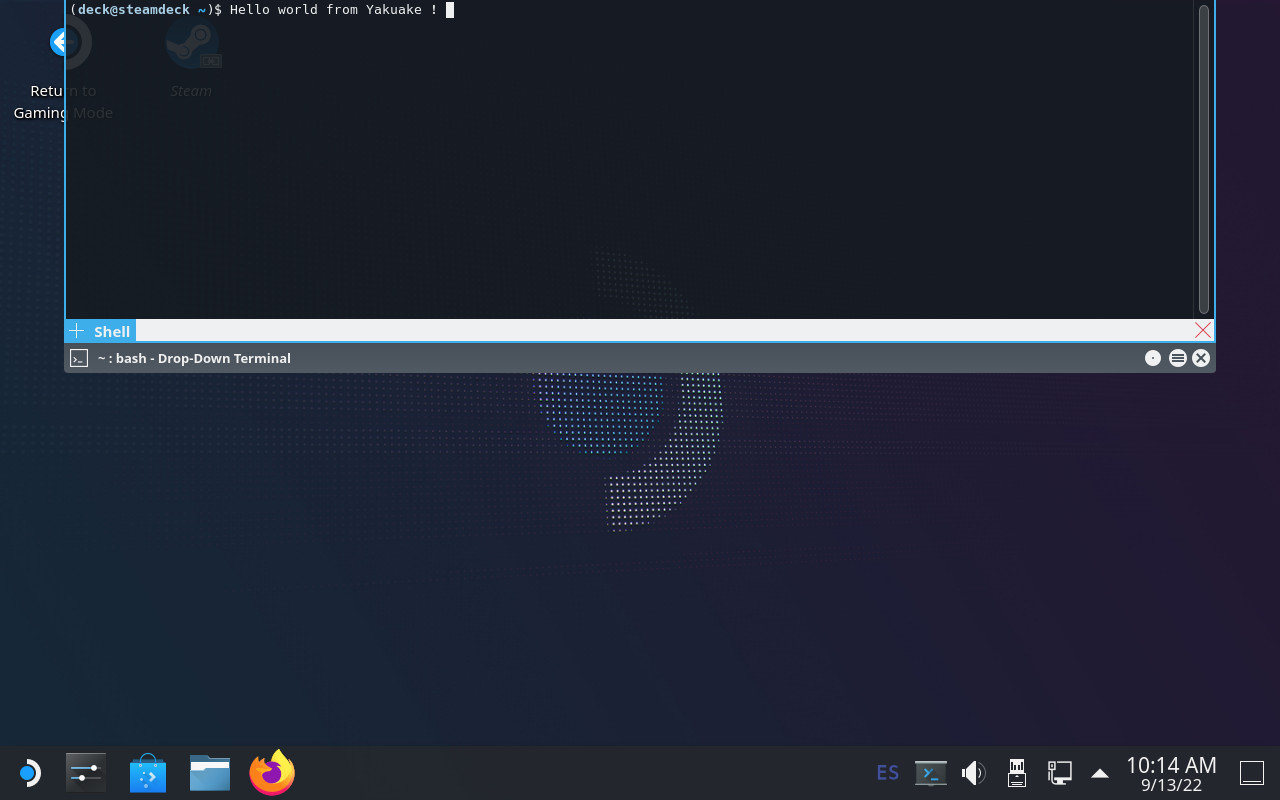
Yakuake on SteamOS Introduction: an immutable OS The Steam Deck runs SteamOS, a single-user operating system based on Arch Linux. Although derived from a standard package-based distro, the OS in the Steam Deck is immutable and system updates replace the contents of the root filesystem atomically instead of using the package manager. An immutable OS makes the system more stable and its updates less error-prone, but users cannot install additional packages to add more software. This is not a problem for most users since they are only going to run Steam and its games (which are stored in the home partition). Nevertheless, the OS also has a desktop mode which provides a standard Linux desktop experience, and here it makes sense to be able to install more software. How to do that though? It is possible for the user to become root, make the root filesytem read-write and install additional software there, but any changes will be gone after the next OS update. Modifying the rootfs can also be dangerous if the user is not careful. Ways to add additional software The simplest and safest way to install additional software is with Flatpak, and that s the method recommended in the Steam Deck Desktop FAQ. Flatpak is already installed and integrated in the system via the Discover app so I won t go into more details here. However, while Flatpak works great for desktop applications not every piece of software is currently available, and Flatpak is also not designed for other types of programs like system services or command-line tools. Fortunately there are several ways to add software to the Steam Deck without touching the root filesystem, each one with different pros and cons. I will probably talk about some of them in the future, but in this post I m going to focus on one that is already available in the system: systemd-sysext. About systemd-sysext This is a tool included in recent versions of systemd and it is designed to add additional files (in the form of system extensions) to an otherwise immutable root filesystem. Each one of these extensions contains a set of files. When extensions are enabled (aka merged ) those files will appear on the root filesystem using overlayfs. From then on the user can open and run them normally as if they had been installed with a package manager. Merged extensions are seamlessly integrated with the rest of the OS. Since extensions are just collections of files they can be used to add new applications but also other things like system services, development tools, language packs, etc. Creating an extension: yakuake I m using yakuake as an example for this tutorial since the extension is very easy to create, it is an application that some users are demanding and is not easy to distribute with Flatpak. So let s create a yakuake extension. Here are the steps: 1) Create a directory and unpack the files there:
$ mkdir yakuake
$ wget https://steamdeck-packages.steamos.cloud/archlinux-mirror/extra/os/x86_64/yakuake-21.12.1-1-x86_64.pkg.tar.zst
$ tar -C yakuake -xaf yakuake-*.tar.zst usr
2) Create a file called extension-release.NAME under usr/lib/extension-release.d with the fields ID and VERSION_ID taken from the Steam Deck s /etc/os-release file.
$ mkdir -p yakuake/usr/lib/extension-release.d/
$ echo ID=steamos > yakuake/usr/lib/extension-release.d/extension-release.yakuake
$ echo VERSION_ID=3.3.1 >> yakuake/usr/lib/extension-release.d/extension-release.yakuake
3) Create an image file with the contents of the extension:
$ mksquashfs yakuake yakuake.raw
That s it! The extension is ready. A couple of important things: image files must have the .raw suffix and, despite the name, they can contain any filesystem that the OS can mount. In this example I used SquashFS but other alternatives like EroFS or ext4 are equally valid. NOTE: systemd-sysext can also use extensions from plain directories (i.e skipping the mksquashfs part). Unfortunately we cannot use them in our case because overlayfs does not work with the casefold feature that is enabled on the Steam Deck. Using the extension Once the extension is created you simply need to copy it to a place where systemd-systext can find it. There are several places where they can be installed (see the manual for a list) but due to the Deck s partition layout and the potentially large size of some extensions it probably makes more sense to store them in the home partition and create a link from one of the supported locations (/var/lib/extensions in this example):
(deck@steamdeck ~)$ mkdir extensions
(deck@steamdeck ~)$ scp user@host:/path/to/yakuake.raw extensions/
(deck@steamdeck ~)$ sudo ln -s $PWD/extensions /var/lib/extensions
Once the extension is installed in that directory you only need to enable and start systemd-sysext:
(deck@steamdeck ~)$ sudo systemctl enable systemd-sysext
(deck@steamdeck ~)$ sudo systemctl start systemd-sysext
After this, if everything went fine you should be able to see (and run) /usr/bin/yakuake. The files should remain there from now on, also if you reboot the device. You can see what extensions are enabled with this command:
$ systemd-sysext status
HIERARCHY EXTENSIONS SINCE
/opt      none       -
/usr      yakuake    Tue 2022-09-13 18:21:53 CEST
If you add or remove extensions from the directory then a simple systemd-sysext refresh is enough to apply the changes. Unfortunately, and unlike distro packages, extensions don t have any kind of post-installation hooks or triggers, so in the case of Yakuake you probably won t see an entry in the KDE application menu immediately after enabling the extension. You can solve that by running kbuildsycoca5 once from the command line. Limitations and caveats Using systemd extensions is generally very easy but there are some things that you need to take into account:
  1. Using extensions is easy (you put them in the directory and voil !). However, creating extensions is not necessarily always easy. To begin with, any libraries, files, etc., that your extensions may need should be either present in the root filesystem or provided by the extension itself. You may need to combine files from different sources or packages into a single extension, or compile them yourself.
  2. In particular, if the extension contains binaries they should probably come from the Steam Deck repository or they should be built to work with those packages. If you need to build your own binaries then having a SteamOS virtual machine can be handy. There you can install all development files and also test that everything works as expected. One could also create a Steam Deck SDK extension with all the necessary files to develop directly on the Deck
  3. Extensions are not distribution packages, they don t have dependency information and therefore they should be self-contained. They also lack triggers and other features available in packages. For desktop applications I still recommend using a system like Flatpak when possible.
  4. Extensions are tied to a particular version of the OS and, as explained above, the ID and VERSION_ID of each extension must match the values from /etc/os-release. If the fields don t match then the extension will be ignored. This is to be expected because there s no guarantee that a particular extension is going to work with a different version of the OS. This can happen after a system update. In the best case one simply needs to update the extension s VERSION_ID, but in some cases it might be necessary to create the extension again with different/updated files.
  5. Extensions only install files in /usr and /opt. Any other file in the image will be ignored. This can be a problem if a particular piece of software needs files in other directories.
  6. When extensions are enabled the /usr and /opt directories become read-only because they are now part of an overlayfs. They will remain read-only even if you run steamos-readonly disable !!. If you really want to make the rootfs read-write you need to disable the extensions (systemd-sysext unmerge) first.
  7. Unlike Flatpak or Podman (including toolbox / distrobox), this is (by design) not meant to isolate the contents of the extension from the rest of the system, so you should be careful with what you re installing. On the other hand, this lack of isolation makes systemd-sysext better suited to some use cases than those container-based systems.
Conclusion systemd extensions are an easy way to add software (or data files) to the immutable OS of the Steam Deck in a way that is seamlessly integrated with the rest of the system. Creating them can be more or less easy depending on the case, but using them is extremely simple. Extensions are not packages, and systemd-sysext is not a package manager or a general-purpose tool to solve all problems, but if you are aware of its limitations it can be a practical tool. It is also possible to share extensions with other users, but here the usual warning against installing binaries from untrusted sources applies. Use with caution, and enjoy!

11 September 2022

Dirk Eddelbuettel: RcppArmadillo 0.11.2.4.0 on CRAN: Bugfix and Deprecation

armadillo image Armadillo is a powerful and expressive C++ template library for linear algebra and scientific computing. It aims towards a good balance between speed and ease of use, has a syntax deliberately close to Matlab, and is useful for algorithm development directly in C++, or quick conversion of research code into production environments. RcppArmadillo integrates this library with the R environment and language and is widely used by (currently) 1016 packages other packages on CRAN, downloaded 26.2 million times (per the partial logs from the cloud mirrors of CRAN), and the CSDA paper (preprint / vignette) by Conrad and myself has been cited 493 times according to Google Scholar. This new release (made yesterday) brings three changes. First, it updates the release to the upstream 11.2.4 bugfix release made days ago by Conrad. Second, it contains support for the deprecation transition we are managing in issue #391. In short, the (convenient but non-standard) initialization via use of << has been deprecated upstream. Until all packages are updated, we override this in the RcppArmadillo but aim to become compliant . Out of the over 1000 packages, a mere 25 need small adjustments. I reached out email and PRs, and the response has been great. Eight packages are already updated on CRAN, and several others have already in integrated or merged the change. Lastly, Conrad pointed out that the fastLm() example and application can be written more concisely by using arma::dot(). The full set of changes (since the last CRAN release 0.11.2.3.1) follows.

Changes in RcppArmadillo version 0.11.2.4.0 (2022-09-09)
  • Upgraded to Armadillo release 11.2.4 (Classic Roast)
    • fix handling of std::move() involving matrices constructed with auxiliary memory
  • In the fastLm() examples, use arma::dot() to compute to the inner product (as proposed by Conrad), plus small edits
  • Support optional #define named RCPPARMADILLO_FORCE_DEPRECATE to suppress use of ARMA_IGNORE_DEPRECATED_MARKER permitting use and development under deprecation

Courtesy of my CRANberries, there is a diffstat report relative to previous release. More detailed information is on the RcppArmadillo page. Questions, comments etc should go to the rcpp-devel mailing list off the R-Forge page. If you like this or other open-source work I do, you can sponsor me at GitHub.

This post by Dirk Eddelbuettel originated on his Thinking inside the box blog. Please report excessive re-aggregation in third-party for-profit settings.

Shirish Agarwal: Politics, accessibility, books

Politics I have been reading books, both fiction and non-fiction for a long long time. My first book was a comic most probably when I was down with Malaria when I was a kid. I must be around 4-5 years old. Over the years, books have given me great joy and I continue to find nuggets of useful information, both in fiction as well as non-fiction books. So here s to sharing something and how that can lead you to a rabbit hole. This entry would be a bit NSFW as far as language is concerned. NYPD Red 5 by James Patterson First of all, have no clue as to why James Patterson s popularity has been falling. He used to be right there with Lee Child and others, but not so much now. While I try to be mysterious about books, I would give a bit of heads-up so people know what to expect. This is probably more towards the Adult crowd as there is a bit of sex as well as quite a few grey characters. The NYPD Red is a sort of elite police task force that basically is for celebrities. In the book series, they do a lot of ass-kissing (figuratively more than literally). Now the reason I have always liked fiction is that however wild the assumption or presumption is, it does have somewhere a grain of truth. And each and every time I read a book or two, that gets cemented. One of the statements in the book told something about how 9/11 took a lot of police personnel out of the game. First, there were a number of policemen who were patrolling the Two Towers, so they perished literally during the explosion. Then there were policemen who were given the cases to close the cases (bring the cases to conclusion). When you are investigating your own brethren or even civilians who perished 9/11 they must have experienced emotional trauma and no outlet. Mental health even in cops is the same and given similar help as you and me (i.e. next to none.) But both of these were my assumptions. The only statement that was in the book was they lost a lot of bench strength. Even NYFD (New York Fire Department). This led me to me to With Crime At Record Lows, Should NYC Have Fewer Cops? This is more right-wing sentiment and in fact, there have been calls to defund the police. This led me to https://cbcny.org/ and one specific graph. Unfortunately, this tells the story from 2010-2022 but not before. I was looking for data from around 1999 to 2005 because that will tell whether or not it happened. Then I remembered reading in newspapers the year or two later how 9/11 had led NYC to recession. I looked up online and for sure NY was booming before 9/11. One can argue that NYC could come down and that is pretty much possible, everything that goes up comes down, it s a law of nature but it would have been steady rather than abrupt. And once you are in recession, the first thing to go is personnel. So people both from NYPD and NYFD were let go, even though they were needed the most then. As you can see, a single statement in a book can take you to places & time literally. Edit: Addition 11th September There were quite a few people who also died from New York Port Authority and they also lost quite a number of people directly and indirectly and did a lot of patrolling of the water bodies near NYC. Later on, even in their department, there were a lot of early retirements.

Kosovo A couple of days back I had a look at the Debconf 2023 BOF that was done in Kosovo. One of the interesting things that happened during the BOF is when a woman participant chimed in and asks India to recognize Kosovo. Immediately it triggered me and I opened the Kosovo Wikipedia page to get some understanding of the topic. Reading up on it, came to know Russia didn t agree and doesn t recognize Kosovo. Mr. Modi likes Putin and India imports a lot of its oil from Russia. Unrelatedly, but still useful, we rejected to join IPEF. Earlier, we had rejected China s BRI. India has never been as vulnerable as she is now. Our foreign balance has reached record lows. Now India has been importing quite a bit of Russian crude and has been buying arms and ammunition from them. We are also scheduled to buy a couple of warships and submarines etc. We even took arms and ammunition from them on lease. So we can t afford that they are displeased with India. Even though Russia has more than friendly relations with both China and Pakistan. At the same time, the U.S. is back to aiding Pakistan which the mainstream media in India refuses to even cover. And to top all of this, we have the Chip 4 Alliance but that needs its own article, truth be told but we will do with a paragraph  Edit Addition 11th September Seems Kosovo isn t unique in that situation, there are 3-4 states like that. A brief look at worldpopulationreview tells you there are many more.

Chip 4 Alliance For almost a decade I have been screaming about this on my blog as well as everywhere that chip fabrication is a national security thing. And for years, most people deny it. And now we have chip 4 alliance. Now to understand this, you have to understand that China for almost a decade, somewhere around 2014 or so came up with something called the big fund . Now one can argue one way or the other how successful the fund has been, but it has, without doubt, created ripples so strong that the U.S., Taiwan, Japan, and probably South Korea will join and try to stem the tide. Interestingly, in this grouping, South Korea is the weakest in the statements and what they have been saying. Within the group itself, there is a lot of tension and China would use that and there are a number of unresolved issues between the three countries that both China & Russia would exploit. For e.g. the Comfort women between South Korea and Japan. Or the 1985 Accord Agreement between Japan and the U.S. Now people need to understand this, this is not just about China but also about us. If China has 5-6x times India s GDP and their research budget is at the very least 100x times what India spends, how do you think we will be self-reliant? Whom are we fooling? Are we not tired of fooling ourselves  In diplomacy, countries use leverage. Sadly, we let go of some of our most experienced negotiators in 2014 and since then have been singing in the wind

Accessibility, Jitsi, IRC, Element-Desktop The Wikipedia page on Accessibility says the following Accessibility is the design of products, devices, services, vehicles, or environments so as to be usable by people with disabilities. The concept of accessible design and practice of accessible development ensures both direct access (i.e. unassisted) and indirect access meaning compatibility with a person s assistive technology. Now IRC or Internet Relay Chat has been accessible for a long time. I know of even blind people who have been able to navigate IRC quite effortlessly as there has been a lot of work done to make sure all the joints speak to each other so people with one or more disabilities still can use, and contribute without an issue. It does help that IRC and many clients have been there since the 1970s so most of them have had more than enough time to get all the bugs fixed and both text-to-speech and speech-to-text work brilliantly on IRC. Newer software like Jitsi or for that matter Telegram is lacking those features. A few days ago, discovered on Telegram I was shared that Samsung Voice input is also able to do the same. The Samsung Voice Input works wonder as it translates voice to text, I have not yet tried the text-to-speech but perhaps somebody can and they can share whatever the results can be one way or the other. I have tried element-desktop both on the desktop as well as mobile phone and it has been disappointing, to say the least. On the desktop, it is unruly and freezes once in a while, and is buggy. The mobile version is a little better but that s not saying a lot. I prefer the desktop version as I can use the full-size keyboard. The bug I reported has been there since its Riot days. I had put up a bug report even then. All in all, yesterday was disappointing

Russ Allbery: Review: Hogfather

Review: Hogfather, by Terry Pratchett
Series: Discworld #20
Publisher: Harper
Copyright: 1996
Printing: February 2014
ISBN: 0-06-227628-X
Format: Mass market
Pages: 402
Hogfather is the 20th Discworld novel and not a very good place to start. I recommend at least reading Soul Music first for a proper introduction to Susan, and you may want to start with Mort. When we last saw Susan, she was a student at the Quirm College for Young Ladies. Now she's a governess for two adorable youngsters, a job that includes telling them stories and dealing quite capably with monsters in the cellar. (She uses a poker.) It also includes answering questions like whether the Hogfather really exists or whether the presents just come from your parents.
"Look at it this way, then," she said, and took a deep mental breath. "Wherever people are obtuse and absurd... and wherever they have, by even the most generous standards, the attention span of a small chicken in a hurricane and the investigative ability of a one-legged cockroach... and wherever people are inanely credulous, pathetically attached to the certainties of the nursery and, in general, have as much grasp of the physical universe as an oyster has of mountaineering... yes, Twyla: there is a Hogfather.
Meanwhile, the Auditors, last seen meddling with Death in Reaper Man, approach the Assassin's Guild in Ankh-Morpork to hire the assassination of the Hogfather. This rather unusual assignment falls to Mister Teatime, an orphan who was taken in by the guild at an early age and trained to be an assassin. Teatime is a little unnerving, mostly because he enjoys being an assassin. Rather a lot. Hogfather has two major things to recommend it: it's a Death novel, and it features Susan, who is one of my favorite Discworld characters. It also has two major strikes against it, at least for me. The first is relatively minor but, for me, the most irritating. A bit of the way into the story, Pratchett introduces the Oh God of Hangovers fair, that's a good pun and then decides that's a good excuse for nausea and vomiting jokes. A lot of nausea and vomiting jokes. Look. I know a lot of people don't mind this. But I beg authors (and, even more so, filmmakers and cartoonists) to consider whether a joke that some of your audience might like is worth making other parts of your audience feel physically ill while trying to enjoy your work. It's not at all a pleasant experience, and while I handle it better in written form, it still knocks me out of the story and makes me want to skip over scenes with the obnoxious character who won't shut up about it. Thankfully this does stop by the end of the book, but there are several segments in the middle that were rather unpleasant. The second is that Pratchett tries to convince the reader of the mythical importance of the Santa Claus myth (for which Hogfather is an obvious stand-in, if with a Discworld twist), an effort for which I am a highly unsympathetic audience. I'm with Susan above, with an extra helping of deep dislike for telling children who trust you something that's literally untrue. Pratchett does try: he has Death makes a memorable and frequently-quoted point near the end of the book (transcribed below) that I don't entirely agree with but still respect. But still, the book is very invested in convincing Susan that people believing mythology is critically important to humanity, and I have so many problems with the literalness of "believing" and the use of trusting children for this purpose by adults who know better. There are few topics that bring out my grumpiness more than Santa Claus. Grumbling aside, though, I did enjoy this book anyway. Susan is always a delight, and I could read about her adventures as a governess for as long as Pratchett wanted to write them. Death is filling in for the Hogfather for most of the book, which is hilarious because he's far too good at it, in his painfully earnest and literal way, to be entirely safe. I was less fond of Albert's supporting role (who I am increasingly coming to dislike as a character), but the entire scene of Death as a mall Santa is brilliant. And Teatime is an effective, creepy villain, something that the Discworld series doesn't always deliver. The powers arrayed on Discworld are so strong that it can be hard to design a villain who effectively challenges them, but Teatime has a sociopathic Professor Moriarty energy with added creepiness that fills that role in this book satisfyingly. As is typical for Pratchett (at least for me), the plot was serviceable but not the highlight. Pratchett plays in some interesting ways with a child's view of the world, the Unseen University bumbles around as a side plot, and it comes together at the end in a way that makes sense, but the journey is the fun of the story. The conclusion felt a bit gratuitous, there mostly to wrap up the story than something that followed naturally from the previous plot. But it does feature one of the most quoted bits in Discworld:
"All right," said Susan. "I'm not stupid. You're saying humans need... fantasies to make life bearable." REALLY? AS IF IT WAS SOME KIND OF PINK PILL? NO. HUMANS NEED FANTASY TO BE HUMAN. TO BE THE PLACE WHERE THE FALLING ANGEL MEETS THE RISING APE. "Tooth fairies? Hogfathers? Little " YES. AS PRACTICE. YOU HAVE TO START OUT LEARNING TO BELIEVE THE LITTLE LIES. "So we can believe the big ones?" YES. JUSTICE. MERCY. DUTY. THAT SORT OF THING. "They're not the same at all!" YOU THINK SO? THEN TAKE THE UNIVERSE AND GRIND IT DOWN TO THE FINEST POWDER AND SIEVE IT THROUGH THE FINEST SIEVE AND THEN SHOW ME ONE ATOM OF JUSTICE, ONE MOLECULE OF MERCY. AND YET Death waved a hand. AND YET YOU ACT AS IF THERE IS SOME IDEAL ORDER IN THE WORLD, AS IF THERE IS SOME...SOME RIGHTNESS IN THE UNIVERSE BY WHICH IT MAY BE JUDGED. "Yes, but people have got to believe that, or what's the point " MY POINT EXACTLY.
Here's the thing, though: Susan is right. They're not the same sort of thing at all, and Pratchett doesn't present an argument that they are. Death's response is great, but it's also a non sequitur: it is true and correct but has nothing to do with Susan's argument. Justice is not a lie in the sense that Santa Claus is a lie: justice is something that humans can create, just like humans can create gift-giving or a tradition of imaginative story-telling. But this is not at all the same thing as encouraging children to believe in the literal existence of a fat man in red who comes down chimneys to deliver gifts by magic. And Death isn't even correct in Discworld! If one pays careful attention to the story, the consequences he's thinks would follow from the Auditors' attempt on the Hogfather not only don't happen, the exact opposite happens. This is the point of the Unseen University subplot, and it's also what happened in Reaper Man. The Auditors may be trying to kill mythology, but what the books show is that the real danger comes from the backlash. The force they're meddling with is far more powerful and persistent than they are. Death appears to be, by the stated events of the story, completely incorrect in his analysis of Discworld's metaphysics. Maybe Pratchett knows this? He did write a story that contradicts Death's analysis if one reads it carefully. But if so, this is not obvious from the text, or from Susan's reaction to Death's speech, which makes the metaphysics weirdly unsatisfying. So, overall, a mixed bag. Most of the book is very fun, but the metaphysics heavily rest on a pet peeve of mine, and I really could have done without the loving descriptions of the effects of hangovers. This is one of the more famous Discworld novels for the above quote, and on its own this is deserved (it's a great quote), but I think the logic is muddled and the story itself contradicts the implications. A rather odd reading experience. Followed by Jingo in publication order, and Thief of Time thematically. Rating: 7 out of 10

10 September 2022

Joachim Breitner: rec-def: Behind the scenes

A week ago I wrote about the rec-def Haskell library, which allows you to write more recursive definitions, such as in this small example:
let s1 = RS.insert 23 s2
    s2 = RS.insert 42 s1
in RS.get s1
This will not loop (as it would if you d just used Data.Set), but rather correctly return the set S.fromList [23,42]. See the previous blog post for more examples and discussion of the user-facing side of this. For quick reference, these are the types of the functions involved here: The type of s1 and s2 above is not Set Int, but rather RSet Int, and in this post I ll explain how RSet works internally.

Propagators, in general The conceptual model behind an recursive equation like above is
  • There are a multiple cells that can hold values of an underlying type (here Set)
  • These cells have relations that explain how the values in the cells should relate to each other
  • After registering all the relations, some form of solving happens.
  • If the solving succeeds, we can read off the values from the cells, and they should satisfy the registered relation.
This is sometimes called a propagator network, and is a quite general model that can support different kind of relations (e.g. equalities, inequalities, functions), there can be various solving strategies (iterative fixed-points, algebraic solution, unification, etc.) and information can flow on along the edges (and hyper-edges) possibly in multiple directions. For our purposes, we only care about propagator networks where all relations are functional, so they have a single output cell that is declared to be a function of multiple (possibly zero) input cells, without affecting these input cells. Furthermore, every cell is the output of exactly one such relation.

IO-infested propagator interfaces This suggests that an implementation of such a propagator network could provide an interface with the following three operations:
  • Functions to declare cells
  • Functions to declare relations
  • Functions to read values off cells
This is clearly an imperative interface, so we ll see monads, and we ll simply use IO. So concretely for our small example above, we might expect
There is no need for an explicit solve function: solving can happen when declareInsert or getCell is called as a User I do not care about that. You might be curious about the implementation of newCell, declareInsert and getCell, but I have to disappoint you: This is not the topic of this article. Instead, I want to discuss how to turn this IO-infested interface into the pure interface seen above?

Pure, but too strict Obviously, we have to get rid of the IO somehow, and have to use unsafePerformIO :: IO a -> a somehow. This dangerous function creates a pure-looking value that, when used the first time, will run the IO-action and turn into that action s result. So maybe we can simply write the following: Indeed, the types line up, but if we try to use that code, nothing will happen. Our insert is too strict to be used recursively: It requires the value of c2 (as it is passed to declareInsert, which we assume to be strict in its arguments) before it can return c1, so the recursive example at the top of this post will not make any progress.

Pure, lazy, but forgetful To work around this, maybe it suffices if we do not run declareInsert right away, but just remember that we have to do it eventually? So let s introduce a new data type for RSet a that contains not just the cell (Cell a), but also an action that we still have to run before getting a value: This is better: insert is now lazy in its arguments (for this it is crucial to pattern-match on RSet only inside the todo code, not in the pattern of insert!) This means that our recursive code above does not get stuck right away.

Pure, lazy, but runs in circles But it is still pretty bad: Note that we do not run get s2 in the example above, so that cell s todo, which would declareInsert 42, will never run. This cannot work! We have to (eventually) run the declaration code from all involved cells before we can use getCell! We can try to run the todo action of all the dependencies as part of a cell s todo action: Now we certainly won t forget to run the second cell s todo action, so that is good. But that cell s todo action will run the first cell s todo action, and that again the second cell s, and so on.

Pure, lazy, terminating, but not thread safe This is silly: We only need (and should!) run that code once! So let s keep track of whether we ran it already: Ah, much better: It works! Our call to get c1 will trigger the first cell s todo action, which will mark it as done before calling the second cell s todo action. When that now invokes the first cell s todo action, it is already marked done and we break the cycle, and by the time we reach getCell, all relations have been correctly registered. In a single-threaded world, this would be all good and fine, but we have to worry about multiple threads running get concurrently, on the same or on different cells. In fact, because we use unsafePerformIO, we have to worry about this even when the program is not using threads. And the above code has problems. Imagine a second call to get c1 while the first one has already marked it as done, but has not finished processing all the dependencies yet: It will call getCell before all relations are registered, which is bad.

Recursive do-once IO actions Making this thread-safe seems to be possible, but would clutter both the code and this blog post. So let s hide that problem behind a nice and clean interface. Maybe there will be a separate blog post about its implementation (let me know if you are curious), or you can inspect the code in System.IO.RecThunk module yourself). The interface is simply
data Thunk
thunk :: IO [Thunk] -> IO Thunk
force :: Thunk -> IO ()
and the idea is that thunk act will defer the action act until the thunk is passed to force for the first time, and force will not return until the action has been performed (possibly waiting if another thread is doing that at the moment), and also until the actions of all the thunks returned by act have performed, recursively, without running into cycles. We can use this in our definition of RSet and get to the final, working solution: This snippet captures the essential ideas behind rec-def:
  • Use laziness to allow recursive definition to describe the propagator graph naturally
  • Use a form of explicit thunk to register the propagator graph relations at the right time (not too early/strict, not too late)

And that s all? The actual implementation in rec-def has a few more moving parts. In particular, it tries to support different value types (not just sets), possibly with different implementations, and even mixing them (e.g. in member :: Ord a => a -> RSet a -> RBool), so the generic code is in Data.Propagator.Purify, and supports various propagators underneath. The type RSet is then just a newtype around that, defined in Data.Recursive.Internal to maintain the safety of the abstraction, I went back and forth on a few variants of the design here, including one where there was a generic R type constructor (R (Set a), R Bool etc.), but then monomorphic interface seems simpler.

Does it really work? The big remaining question is certainly: Is this really safe and pure? Does it still behave like Haskell? The answer to these questions certainly depends on the underlying propagator implementation. But it also depends on what we actually mean by safe and pure ? For example, do we expect the Static Argument Transformation be semantics preserving? Or is it allowed to turn undefined values into defined ones (as it does here)? I am unsure myself yet, so I ll defer this discussion to a separate blog post, after I hopefully had good discussions about this here at ICFP 2022 in Ljubljana. If you are around and want to discuss, please hit me up!

8 September 2022

Antoine Beaupr : Complaint about Canada's phone cartel

I have just filed a complaint with the CRTC about my phone provider's outrageous fees. This is a copy of the complaint.
I am traveling to Europe, specifically to Ireland, for a 6 days for a work meeting. I thought I could use my phone there. So I looked at my phone provider's services in Europe, and found the "Fido roaming" services: https://www.fido.ca/mobility/roaming The fees, at the time of writing, at fifteen (15!) dollars PER DAY to get access to my regular phone service (not unlimited!!). If I do not use that "roaming" service, the fees are: That is absolutely outrageous. Any random phone plan in Europe will be cheaper than this, by at least one order of magnitude. Just to take any example: https://www.tescomobile.ie/sim-only-plans.aspx Those fine folks offer a one-time, prepaid plan for 15 for 28 days which includes: I think it's absolutely scandalous that telecommunications providers in Canada can charge so much money, especially since the most prohibitive fee (the "non-prepaid" plans) are automatically charged if I happen to forget to remove my sim card or put my phone in "airplane mode". As advised, I have called customer service at Fido for advice on how to handle this situation. They have confirmed those are the only plans available for travelers and could not accommodate me otherwise. I have notified them I was in the process of filing this complaint. I believe that Canada has become the technological dunce of the world, and I blame the CRTC for its lack of regulation in that matter. You should not allow those companies to grow into such a cartel that they can do such price-fixing as they wish. I haven't investigated Fido's competitors, but I will bet at least one of my hats that they do not offer better service. I attach a screenshot of the Fido page showing those outrageous fees.
I have no illusions about this having any effect. I thought of filing such a complain after the Rogers outage as well, but felt I had less of a standing there because I wasn't affected that much (e.g. I didn't have a life-threatening situation myself). This, however, was ridiculous and frustrating enough to trigger this outrage. We'll see how it goes...
"We will respond to you within 10 working days."

Response from CRTC They did respond within 10 days. Here is the full response:
Dear Antoine Beaupr : Thank you for contacting us about your mobile telephone international roaming service plan rates concern with Fido Solutions Inc. (Fido). In Canada, mobile telephone service is offered on a competitive basis. Therefore, the Canadian Radio-television and Telecommunications Commission (CRTC) is not involved in Fido's terms of service (including international roaming service plan rates), billing and marketing practices, quality of service issues and customer relations. If you haven't already done so, we encourage you to escalate your concern to a manager if you believe the answer you have received from Fido's customer service is not satisfactory. Based on the information that you have provided, this may also appear to be a Competition Bureau matter. The Competition Bureau is responsible for administering and enforcing the Competition Act, and deals with issues such as false or misleading representations, deceptive marketing practices and collusion. You can reach the Competition Bureau by calling 1-800-348-5358 (toll-free), by TTY (for deaf and hard of hearing people) by calling 1-866-694-8389 (toll-free). For more contact information, please visit http://www.competitionbureau.gc.ca/eic/site/cb-bc.nsf/eng/00157.html When consumers are not satisfied with the service they are offered, we encourage them to compare the products and services of other providers in their area and look for a company that can better match their needs. The following tool helps to show choices of providers in your area: https://crtc.gc.ca/eng/comm/fourprov.htm Thank you for sharing your concern with us.
In other words, complain with Fido, or change providers. Don't complain to us, we don't manage the telcos, they self-regulate. Great job, CRTC. This is going great. This is exactly why we're one of the most expensive countries on the planet for cell phone service.

Live chat with Fido Interestingly, the day after I received that response from the CRTC, I received this email from Fido, while traveling:
Date: Tue, 13 Sep 2022 10:10:00 -0400 From: Fido DONOTREPLY@fido.ca To: REDACTED Subject: Courriel d avis d itin rance Fido Roaming Welcome Confirmation Fido Date : 13 septembre 2022
Num ro de compte : [redacted] Bonjour
Antoine Beaupr ! Nous vous crivons pour vous indiquer qu au moins un utilisateur inscrit votre compte s est r cemment connect un r seau en itin rance.
Vous trouverez ci-dessous le message texte de bienvenue en itin rance envoy l utilisateur (ou aux utilisateurs), qui contenait les tarifs d itin rance
applicables. Message texte de bienvenue en itin rance Destinataire : REDACTED Date et heure : 2022-09-13 / 10:10:00
Allo, ici Fido : Bienvenue destination! Vous tes inscrit Fido Nomade alors utilisez vos donn es, parlez et textez comme vous le faites la
maison. Depuis le 1 mars 2022 le tarif cette destination pour 15 $/jour (+ taxes) et valide tous les jours jusqu' 23 h 59 HE, peu importe le fuseau
horaire dans lequel vous vous trouvez. Bon voyage! Des questions? Consultez fido.ca/m/itinerance ou composez +15149333436 (sans frais). Besoin d aide?
  • PLANIFIEZ UN VOYAGE AVEC Fido NomadeMC
    D couvrez nos options d itin rance et restez en contact l tranger sans vous soucier de votre
    facture.
D tails
  • G rez votre compte
    G rez vos produits et services Fido la maison ou sur la route gr ce Mon
    Compte.
D tails Ce courriel est produit automatiquement; veuillez ne pas y r pondre. Ce courriel (et toute pi ce jointe) est confidentiel. Si vous n tes pas le destinataire,
veuillez supprimer le pr sent message et en d truire toute copie. FIDO SOLUTIONS 800, RUE DE LA GAUCHETI RE OUEST
BUREAU 4000 MONTR AL (QU BEC) H5A 1K3
Fido
I found that message utterly confusing (and yes, I can read french). Basically, it says that some user (presumably me!) connected to the network with roaming. I did just disabled airplane mode on my phone to debug a Syncthing bug but had not enabled roaming. So this message seemed to say that I would be charged 15$ (per DAY!) for roaming from now on. Confused, I tried their live chat to try to clarify things, worried I would get charged even more for calling tech support on *611. This is a transcript of the chat:
F: Hi! What are we doing today? Type in your question or choose from the options below: * Track my Equipment Order * View Bill Online * Payment Options * iPhone 14 Pre-Order A: i received a message about roaming while abroad but i did not enable roaming on my phone, will i be charged anyways? F: I think I know what you re asking for. Select the topic that best matches your request or try rephrasing your question. A: no F: Thank you, this will help us to improve! Would you like to chat with a specialist? Chat with a specialist I'll get a specialist to help you with this. It appears that you're not signed in. Your session may have timed out. To save time and identify your account details, please sign in to My Account.
  • Sign in
  • I'm not able to sign in
Have any questions specific to your Fido account? To service you faster, please identify yourself by completing the form below. A: Personal info Form submitted F: Thank you! I'll connect you with the next available specialist. Your chat is being transferred to a Live Chat agent. Thanks for your patience. We are here to assist you and we kindly ask that our team members be treated with respect and dignity. Please note that abuse directed towards any Consumer Care Specialist will not be tolerated and will result in the termination of your conversation with us. All of our agents are with other customers at the moment. Your chat is in a priority sequence and someone will be with you as soon as possible. Thanks! Thanks for continuing to hold. An agent will be with you as soon as possible. Thank you for your continued patience. We re getting more Live Chat requests than usual so it s taking longer to answer. Your chat is still in a priority sequence and will be answered as soon as an agent becomes available. Thank you so much for your patience we're sorry for the wait. Your chat is still in a priority sequence and will be answered as soon as possible. Hi, I'm [REDACTED] from Fido in [REDACTED]. May I have your name please? A: hi i am antoine, nice to meet you sorry to use the live chat, but it's not clear to me i can safely use my phone to call support, because i am in ireland and i'm worried i'll get charged for the call F: Thank You Antoine , I see you waited to speak with me today, thank you for your patience.Apart from having to wait, how are you today? A: i am good thank you
[... delay ...]
A: should i restate my question? F: Yes please what is the concern you have? A: i have received an email from fido saying i someone used my phone for roaming it's in french (which is fine), but that's the gist of it i am traveling to ireland for a week i do not want to use fido's services here... i have set the phon eto airplane mode for most of my time here F: The SMS just says what will be the charges if you used any services. A: but today i have mistakenly turned that off and did not turn on roaming well it's not a SMS, it's an email F: Yes take out the sim and keep it safe.Turun off or On for roaming you cant do it as it is part of plan. A: wat F: if you used any service you will be charged if you not used any service you will not be charged. A: you are saying i need to physically take the SIM out of the phone? i guess i will have a fun conversation with your management once i return from this trip not that i can do that now, given that, you know, i nee dto take the sim out of this phone fun times F: Yes that is better as most of the customer end up using some kind of service and get charged for roaming. A: well that is completely outrageous roaming is off on the phone i shouldn't get charged for roaming, since roaming is off on the phone i also don't get why i cannot be clearly told whether i will be charged or not the message i have received says i will be charged if i use the service and you seem to say i could accidentally do that easily can you tell me if i have indeed used service sthat will incur an extra charge? are incoming text messages free? F: I understand but it is on you if you used some data SMS or voice mail you can get charged as you used some services.And we cant check anything for now you have to wait for next bill. and incoming SMS are free rest all service comes under roaming. That is the reason I suggested take out the sim from phone and keep it safe or always keep the phone or airplane mode. A: okay can you confirm whether or not i can call fido by voice for support? i mean for free F: So use your Fido sim and call on +1-514-925-4590 on this number it will be free from out side Canada from Fido sim. A: that is quite counter-intuitive, but i guess i will trust you on that thank you, i think that will be all F: Perfect, Again, my name is [REDACTED] and it s been my pleasure to help you today. Thank you for being a part of the Fido family and have a great day! A: you too
So, in other words:
  1. they can't tell me if I've actually been roaming
  2. they can't tell me how much it's going to cost me
  3. I should remove the SIM card from my phone (!?) or turn on airplane mode, but the former is safer
  4. I can call Fido support, but not on the usual *611, and instead on that long-distance-looking phone number, and yes, that means turning off airplane mode and putting the SIM card in, which contradicts step 3
Also notice how the phone number from the live chat (+1-514-925-4590) is different than the one provided in the email (15149333436). So who knows what would have happened if I would have called the latter. The former is mentioned in their contact page. I guess the next step is to call Fido over the phone and talk to a manager, which is what the CRTC told me to do in the first place... I ended up talking with a manager (another 1h phone call) and they confirmed there is no other package available at Fido for this. At best they can provide me with a credit if I mistakenly use the roaming by accident to refund me, but that's it. The manager also confirmed that I cannot know if I have actually used any data before reading the bill, which is issued on the 15th of every month, but only available... three days later, at which point I'll be back home anyways. Fantastic.

7 September 2022

Antoine Beaupr : Deleted GitLab forks from my account

I have just deleted two forks I had of the GitLab project in my gitlab.com account. I did this after receiving a warning that quotas would now start to be enforced. It didn't say that I was going over quota, so I actually had to go look in the usage quotas page, which stated I was using 5.6GB of storage. So far so good, I'm not going to get billed because I'm below the 10GB threshold. But still, I found that number puzzling. That's a lot of data! Maybe wallabako? I build images there in CI... Or the ISOs in stressant? Nope. The biggest disk users were... my forks of gitlab-ce and gitlab-ee (now respectively called gitlab-foss and gitlab-ee, but whatever). CE was taking up roughly 1GB and EE was taking up the rest. So I deleted both repos, which means that the next time I want to contribute a fix to their documentation which is as far as I managed to contribute to GitLab I will need to re-fork those humongous repositories. Maybe I'm reading this wrong. Maybe there's a bug in the quotas system. Or, if I'm reading this right, GitLab is actually double-billing people: once for the source repository, and once for the fork. Because surely repos are not duplicating all those blobs on disk... right? RIGHT? Either case, that's rather a bad move on their part, I feel like. With GitHub charging 4$/user/month, it feels like GitLab is going to have to trouble to compete by charging 20$/user/month as a challenger... (Update: as noted in the comments by Jim Sorenson, this is actually an issue with older versions of GitLab. Deleting and re-forking the repos will actually fix the issue so, in a way, I did exactly what I should. Another workaround is to run the housekeeping jobs on the repo, although I cannot confirm this works myself.) But maybe it's just me: I'm not an economist, surely there's some brilliant plan here I'm missing... In the meantime, free-ish alternatives include Quay.io (currently free for public repos) and sr.ht (2$/mth, but at least not open-core, unfortunately no plan for a container registry). And of course, you can painfully self-host GitLab, sr.ht, gitea, pagure, or whatever it is the current fancy gitweb.

6 September 2022

Louis-Philippe V ronneau: Montreal's Debian & Stuff - August 2022

Our local Debian user group gathered on Sunday August 28th1 at the very hackish Foulab for the August 2022 edition of our "Debian & Stuff" meetings. As always, the event was a success and we had lots of fun. Nine people showed up, including some new faces and people I hadn't seen in a while: On my side, although I was badly sleep-deprived 2, I still managed to be somewhat productive! One of the WiFi Access Points we use in our 4-apartment LAN had been boot-looping for a few weeks, after a failed sysupgrade to the latest version of OpenWRT. lavamind and I suspect the flash got corrupted in a way or another during the upgrade process... Lucky for us, this model has a serial port and runs U-Boot. After a bit of tinkering, some electrical tape and two different serial adapters3, we managed to identify the pin layout and got a shell on the machine. The device has a reset button, but since the kernel panic was happening too soon in the boot process, we weren't able to get into OpenWRT's failsafe mode this way. The WiFi AP being flashed via a serial-to-USB adapter Once we had serial access, wiping the flash and re-installing OpenWRT fixed our problem. A quick ansible-playbook run later, the device was back to being usable and configured :) I was too tired to keep track of what others did, but I took some nice pictures of the pizza we got, and of this nice blow-up Tux wearing a Foulab t-shirt. Enjoy! A blow-up Tux wearing a Foulab t-shirt One of the pizzas we ordered As always, thanks to the Debian project for granting us a budget to rent the venue and to buy some food.
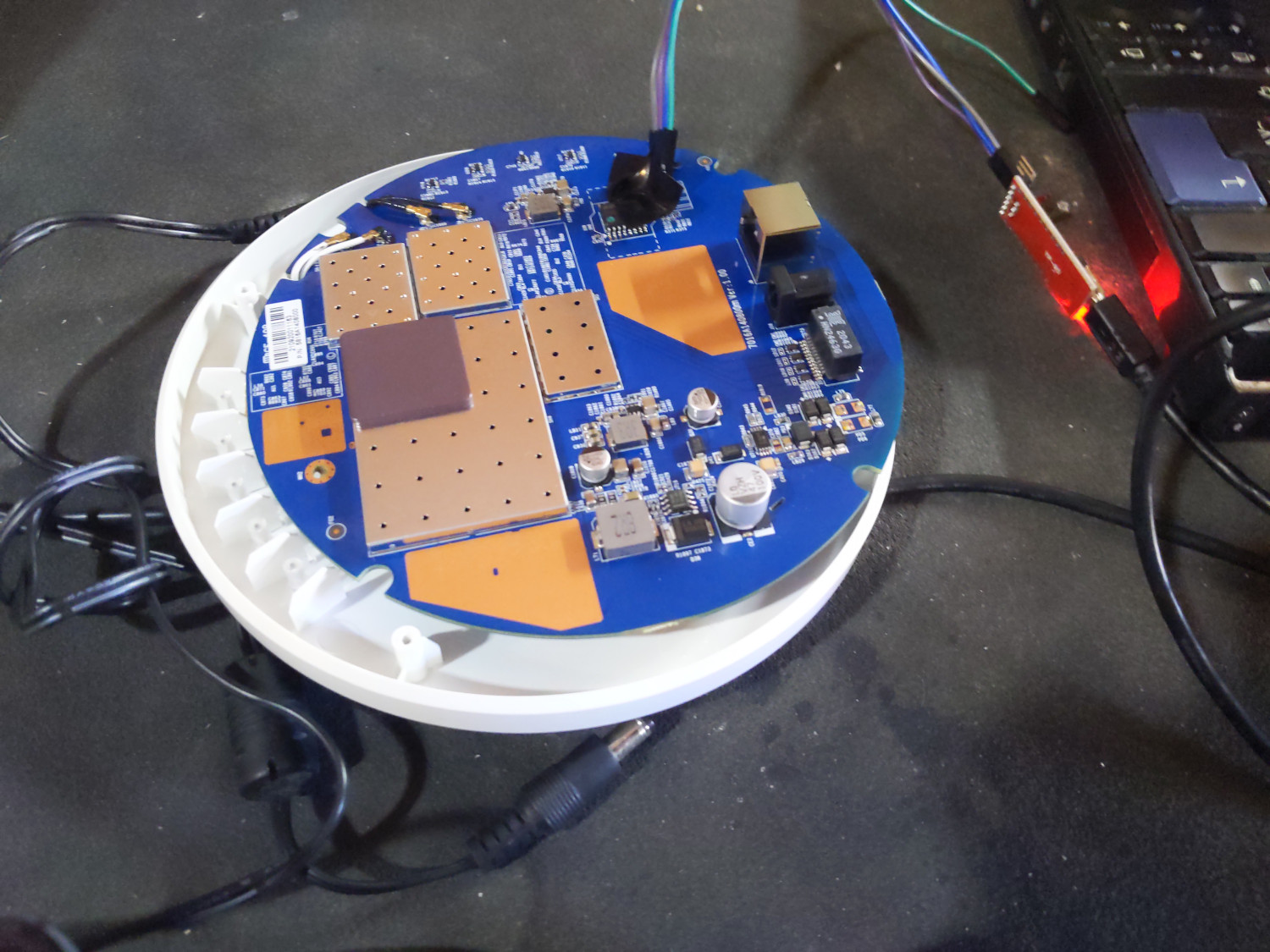
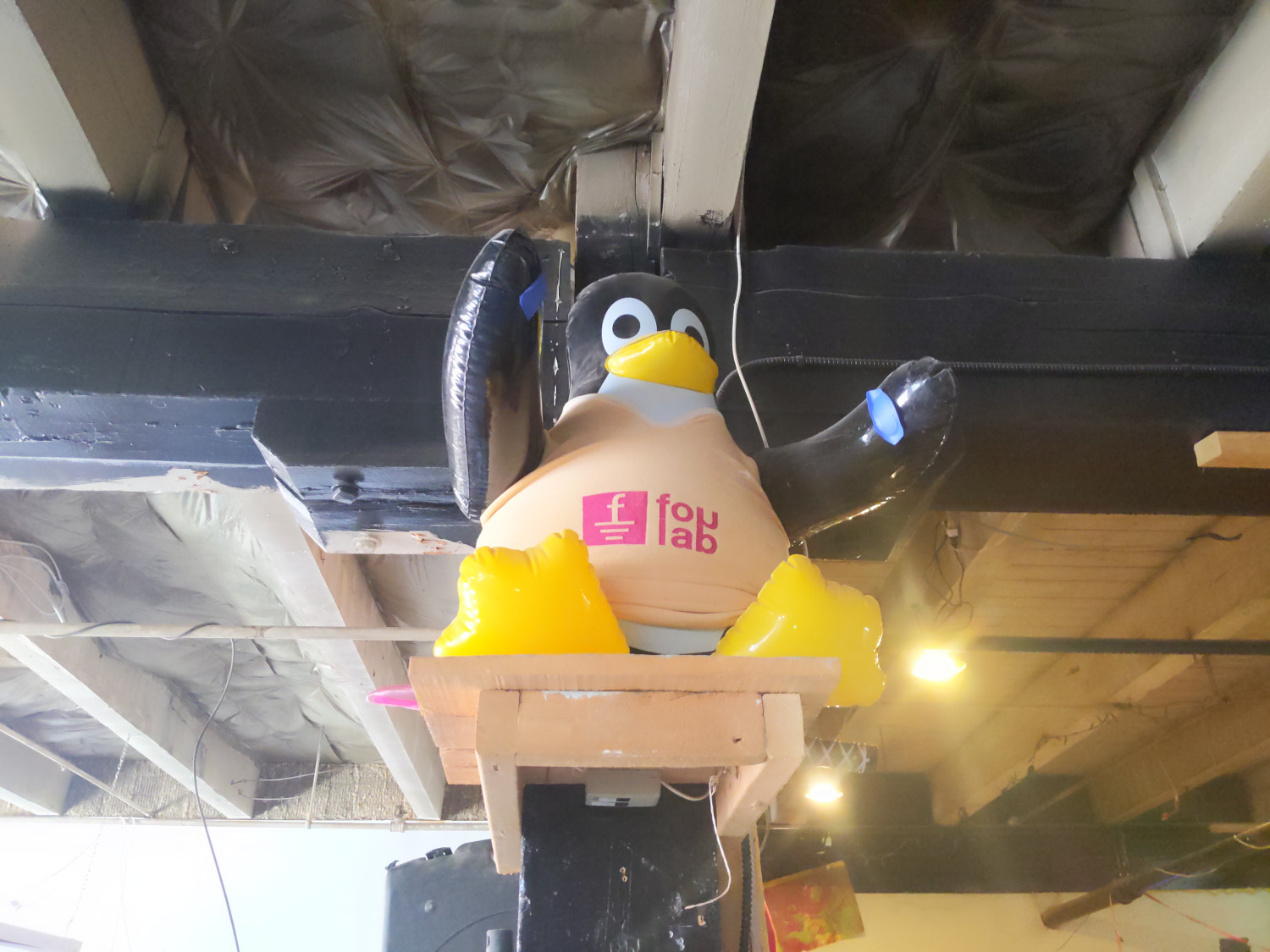
  1. Please excuse the late blog post, it's Harvest Season here and I've been quite busy.
  2. A bad case of wry neck kept me from sleeping properly for a while in August.
  3. As it turns out, serial connections work better when you use the right pins for TX and RX!

Shirish Agarwal: Debian on Phone

History Before I start, the game I was talking about is called Cell To Singularity. Now I haven t gone much in the game as I have shared but think that the Singularity it refers to is the Technological Singularity that people think will happen. Whether that will happen or not is open to debate to one and all. This is going to be a bit long one. Confession Time :- When I was sharing in the blog post, I had no clue that we actually had sessions on it in this year s Debconf. I just saw the schedule yesterday and then came to know. Then I saw Guido s two talks, one at Debconf as well as one as Froscon. In fact, saw the Froscon talk first, and then the one at Debconf. Both the talks are nearly the same except for a thing here or a thing there. Now because I was not there so my understanding and knowledge would be disadvantageously asymmetrical to Guido and others who were there and could talk and share more. Having a Debian mobile or Debian on the mobile could also make Debian more popular and connectable to the masses, one of the things that were not pointed out in the Debian India BOF sadly. At the same time, there are some facts that are not on the table and hence not thought about. Being a B.Com person, I have been following not just the technical but also how the economics work and smartphone penetration in India is pretty low or historically been very low, say around 3-4% while the majority that people use, almost 90-95% of the market uses what are called non-smartphones or dumbphones. Especially during the pandemic and even after that the dumbphones market actually went up while smartphones stagnated and even came down. There is a lot of inventory at most of the dealers that they can t get rid of. From a dealer perspective, it probably makes more sense to buy and sell dumbphones more in number as the turnaround of capital is much faster and easier than for smartphones. I have seen people spend a number of hours and rightly so in order to make their minds up on a smartphone while for a dumbphone, it is a 10-minute thing. Ask around, figure out who is selling at the cheapest, and just buy. Most of these low-end phones are coming from China. In fact, even in the middle and getting even into smartphones, the Chinese are the masters from whom we buy, even as they have occupied Indian territory. In the top five, Samsung comes at number three of four (sharing about Samsung as a fan and having used them.) even though battery times are atrocious, especially with Android 12L. The only hope that most of the smartphone manufacturers have is lowering the sticker prices and hoping that 5G Adoption picks up and that is what they are betting on but that comes with its own share of drawbacks as can be seen.

GNOME, MATE, memory leaks, Payments FWIW, while I do have GNOME and do use a couple of tools from the GNOME stack, I hate GNOME with a passion. I have been a mate user for almost a decade now and really love the simplicity that mate has vis-a-vis GNOME. And with each release, MATE has only become better. So, it would be nice if we can have MATE on the mobile phone. How adaptive the apps might be on the smaller area, I dunno. It would be interesting to find out if and how people are looking at debugging memory leaks on mobile phones. Although finding memory leaks on any platform is good, finding them and fixing them on a mobile phone is pretty much critical as most phones have fixed & relatively small amounts of memory and it is and can get quickly exhausted. One of the things that were asked in the Q&A was about payments. The interesting thing is both UK and India are the same or markedly similar in regard as far as contactless payments being concerned. What most Indians have or use is basically UPI which is basically backed by your bank. Unlike in some other countries where you have a selection of wallets and even temporary/permanent virtual accounts whereby you can minimize your risks in case your mobile gets stolen or something, here we don t have that. There are three digital wallets that I know Paytm Not used (have heard it s creepy, but don t really know), Google pay (Unfortunately, this is the one I use, they bought multiple features, and in the last couple of years have really taken the game away from Paytm but also creepy.). The last one is Samsung Pay (haven t really used it as their find my phone app. always crashes, dunno how it is supposed to work.) But I do find that the apps. are vulnerable. Every day there is some or other news of fraud happening. Previously, only States like Bihar and Jharkhand used to be infamous for cybercrime as a hub, but now even States like Andhra Pradesh have joined and surpassed them :(. People have lost lakhs and crores, this is just a few days back. Some more info. on UPI can be found here and GitHub has a few implementation examples that anybody could look at and run away with it.

Balancing on three things For any new mobile phone to crack the market, it has to balance three things. One, achieve economies of scale. Unless, that is not taken care of or done, however good or bad the product might be, it remains a niche and dies after some time. While Guido shared about Openmoko and N900, one of the more interesting bits from a user perspective at least was the OLPC project. There are many nuances that the short article didn t go through. While I can t say for other countries, at least in India, no education initiative happens without corruption. And perhaps Nicholas s hands were tied while other manufacturers would and could do to achieve their sales targets. In India, it flopped because there was no way for volunteers to buy or get OLPC unless they were part of a school or college. There was some traction in FOSS communities, but that died down once OLPC did the partnership with MS-Windows, and proverbially broke the camel s back. FWIW, I think the idea, the concept, and even the machine were far ahead of their time. The other two legs are support and Warranty Without going into any details, I can share and tell there were quite a few OLPC type attempts using conventional laptops or using Android and FOSS or others or even using one of the mainstream distributions but the problems have always been polishing, training and support. Guido talked about privacy as a winning feature but fails to take into account that people want to know that their privacy isn t being violated. If a mobile phone answers to Hey Google does it mean it was passively gathering, storing, and sending info to third parties, we just don t know. The mobile phone could be part of the right to repair profile while at the same time it can force us to ask many questions about the way things currently are and going to be. Six months down the line all the flagships of all companies are working on being able to take and share through satellites (Satellite Internet) and perhaps maybe a few non-flagships. Of course, if you are going to use a satellite, then you are going to drain that much more quickly. In all and every event there are always gonna be tradeoffs. The Debian-mobile mailing list doesn t seem to have many takers. The latest I could find there is written by Paul Wise. I am in a similar boat (Samsung; SM-M526B; Lahaina; arm64-v8a) v12. It is difficult to know which release would work on your machine, make sure that the building from the source is not tainted and pristine and needs a way to backup and restore if you need to. I even tried installing GNURoot Debian and the Xserver alternative they had shared but was unable to use the touch interface on the fakeroot instance  . The system talks about a back key but what back key I have no clue.

Precursor Events Debconf 2023 As far as precursor events are concerned before Debconf 23 in India, all the festivals that we have could be used to showcase Debian. In fact, the ongoing Ganesh Chaturthi would have been the perfect way to showcase Debian and apps. according to the audience. Even the festival of Durga Puja, Diwali etc. can be used. When commercial organizations use the same festivals, why can t we? What perhaps we would need to figure out is the funding part as well as getting permissions from Municipal authorities. One of the things for e.g. that we could do is buy either a permanent 24 monitor or a 34 TV and use that to display Debian and apps. The bigger, the better. Something that we could use day to day and also is used for events. This would require significant amounts of energy so we could approach companies, small businesses and individuals both for volunteering as well as helping out with funding. Somebody asked how we could do online stuff and why it is somewhat boring. What could be done for e.g. instead of 4-5 hrs. of things, break it into manageable 45 minute pieces. 4-5 hrs. is long and is gonna fatigue the best of people. Make it into 45-minute negotiable chunks, and intersphere it with jokes, hacks, anecdotes, and war stories. People do not like or want to be talked down to but rather converse. One of the things that I saw many of the artists do is have shows and limit the audience to 20-24 people on zoom call or whatever videoconferencing system you have and play with them. The passive audience enjoys the play between the standup guy and the crowd he works on, some of them may be known to him personally so he can push that envelope a bit more. The same thing can be applied here. Share the passion, and share why we are doing something. For e.g. you could do smem -t -k less and give a whole talk about how memory is used and freed during a session, how are things different on desktop and ARM as far as memory architecture is concerned (if there is). What is being done on the hardware side, what is on the software side and go on and on. Then share about troubleshooting applications. Valgrind is super slow and makes life hell, is there some better app ? Doesn t matter if you are a front-end or a back-end developer you need to know this and figure out the best way to deal with in your app/program. That would have lot of value. And this is just an e.g. to help trigger more ideas from the community. I am sure others probably have more fun ideas as to what can be done. I am stopping here now otherwise would just go on, till later. Feel free to comment, feedback. Hope it generates some more thinking and excitement on the grey cells.

Jonathan Dowland: Borg corrupted hints file

I've been using Borg backup for a couple of years and it has seemingly worked very well for me. One difference I really appreciate from my previous arrangement (rdiff-backup) is the freedom to move large files or file hierarchies around (including between different filesystems) without provoking large backup incrementals. About a week ago I had my first real problem with Borg: backups started to fail with the following complaints:
Creating archive at "/backup/borg:: hostname -home-jon- now:%Y-%m-%dT%H:%M:%S.%f "
segment 61916 not found, but listed in compaction data
[ further, similar lines ]
Local Exception
Traceback (most recent call last):
  File "/usr/lib/python3/dist-packages/borg/archiver.py", line 4690, in main
    exit_code = archiver.run(args)
  File "/usr/lib/python3/dist-packages/borg/archiver.py", line 4622, in run
    return set_ec(func(args))
  File "/usr/lib/python3/dist-packages/borg/archiver.py", line 177, in wrapper
    return method(self, args, repository=repository, **kwargs)
  File "/usr/lib/python3/dist-packages/borg/archiver.py", line 595, in do_create
    create_inner(archive, cache)
  File "/usr/lib/python3/dist-packages/borg/archiver.py", line 560, in create_inner
    archive.save(comment=args.comment, timestamp=args.timestamp)
  File "/usr/lib/python3/dist-packages/borg/archive.py", line 530, in save
    self.repository.commit()
  File "/usr/lib/python3/dist-packages/borg/repository.py", line 475, in commit
    self.compact_segments()
  File "/usr/lib/python3/dist-packages/borg/repository.py", line 835, in compact_segments
    assert segments[segment] == 0, 'Corrupted segment reference count - corrupted index or hints'
AssertionError: Corrupted segment reference count - corrupted index or hints
At about the same time I had managed to fill the backup host's root filesystem. I thought the two issues must be related. Although all the files Borg is backing up, and the backup repository it writes to, are located on different partitions, Borg's client-side of things does maintain some caching in /root/.cache/borg. My first idea was that this must have been corrupted by an aborted write, but zapping it did not cure the above problem. It occurred to me that I run Borg via the convenience wrapper Borgmatic, and it was possible that was failing, but after a short investigation I ruled that out. Various attempts at running borg check or borg check --repair didn't help either. The underlying filesystem (XFS) passed a filesystem check. There wasn't any obvious complaints about IO errors from the kernel or anything reported in the HDD's SMART data. What did work, in the end, was removing the file matching $BORG_REPO/*hint* and trying again. Although this is read/written to on the backup partition, it seems filling the root partition caused Borg (1.1.16-3) to corrupt that file. Everything seems fine following that. I have recently started trying to semi- automatically verify backups on a monthly basis, on a machine independent from the NAS; all the tests I have written so far passed.

3 September 2022

Joachim Breitner: More recursive definitions

Haskell is a pure and lazy programming language, and the laziness allows us to write some algorithms very elegantly, by recursively referring to already calculated values. A typical example is the following definition of the Fibonacci numbers, as an infinite stream:

Elegant graph traversals A maybe more practical example is the following calculation of the transitive closure of a graph: We represent graphs as maps from vertex to their successors vertex, and define the resulting map sets recursively: The set of reachable vertices from a vertex v is v itself, plus those reachable by its successors vs, for which we query sets. And, despite this apparent self-referential recursion, it works!

Cyclic graphs ruin it all These tricks can be very impressive until someone tries to use it on a cyclic graph and the program just hangs until we abort it: At this point we are thrown back to implement a more pedestrian graph traversal, typically keeping explicit track of vertices that we have seen already: I have written that seen/todo recursion idiom so often in the past, I can almost write it blindly And indeed, this code handles cyclic graphs just fine:
ghci> transitive2 $ M.fromList [(1,[2,3]),(2,[1,3]),(3,[])]
fromList [(1,[1,2,3]),(2,[1,2,3]),(3,[3])]
But this is a bit anticlimactic Haskell is supposed to be a declarative language, and transitive1 declares my intent just fine!

We can have it all It seems there actually is a way to write essentially the code in transitive1, and still get the right result in all cases, and I have just published a possible implementation as rec-def. In the module Data.Recursive.Set we find an API that resembles that of Set, with a type RSet a, and in addition to conversion functions from and to sets, we find the two operations that we needed in transitive1: Let s try that: And indeed it works! Magic!
ghci> transitive2 $ M.fromList [(1,[3]),(2,[1,3]),(3,[])]
fromList [(1,[1,3]),(2,[1,2,3]),(3,[3])]
ghci> transitive2 $ M.fromList [(1,[2,3]),(2,[1,3]),(3,[])]
fromList [(1,[1,2,3]),(2,[1,2,3]),(3,[3])]
To show off some more, here are small examples:
ghci> let s = RS.insert 42 s in RS.get s
fromList [42]
ghci> : 
  let s1 = RS.insert 23 s2
      s2 = RS.insert 42 s1
  in RS.get s1
 : 
fromList [23,42]

How is that possible? Is it still Haskell? The internal workings of the RSet a type will be the topic of a future blog post; let me just briefly mention that it uses unsafe features under the hood, and just keeps applying the equations you gave until a fixed-point is reached. Because it starts with the empty set and all operations provided by Data.Recursive.Set are monotonous (e.g. no difference) it will eventually find the least fixed point. Despite the unsafe machinery under the hood, I claim that Data.Recursive.Set is itself nicely safe, and does not destroy Haskell s nice properties like purity, referential transparency and equational reasoning. If you disagree, I d like to hear about it (here, on Twitter, Reddit or Discourse)! There is a brief discussion at the end of the tutorial in Data.Recursive.Example.

More than sets The library also provides Data.Recursive.Bool for recursive equations with booleans (preferring False) and Data.Recursive.DualBool (preferring True), and some operations like member :: Ord a => a -> RSet a -> RBool can actually connect different types. I plan to add other data types (natural numbers, maps, Maybe, with suitable orders) as demand arises and as I come across nice small example use-cases for the documentation (e.g. finding shortest paths in a graph). I believe this idiom is practically useful in a wide range of applications (which of course all have some underlying graph structure but then almost everything in Computer Science is a graph). My original motivation was a program analysis. Imagine you want to find out from where in your program you can run into a division by zero. As long as your program does not have recursion, you can simply keep track of a boolean flag while you traverse the program, keeping track a mapping from function names to whether they can divide by zero all nice and elegant. But once you allow mutually recursive functions, things become tricky. Unless you use RBool! Simply use laziness, pass the analysis result down when analyzing the function s right-hand sides, and it just works!

2 September 2022

John Goerzen: Dead USB Drives Are Fine: Building a Reliable Sneakernet

OK, you re probably thinking. John, you talk a lot about things like Gopher and personal radios, and now you want to talk about building a reliable network out of USB drives? Well, yes. In fact, I ve already done it.

What is sneakernet? Normally, sneakernet is a sort of tongue-in-cheek reference to using disconnected storage to transport data or messages. By disconnect storage I mean anything like CD-ROMs, hard drives, SD cards, USB drives, and so forth. There are times when loading up 12TB on a device and driving it across town is just faster and easier than using the Internet for the same. And, sometimes you need to get data to places that have no Internet at all. Another reason for sneakernet is security. For instance, if your backup system is online, and your systems being backed up are online, then it could become possible for an attacker to destroy both your primary copy of data and your backups. Or, you might use a dedicated computer with no network connection to do GnuPG (GPG) signing.

What about reliable sneakernet, then? TCP is often considered a reliable protocol. That means that the sending side is generally able to tell if its message was properly received. As with most reliable protocols, we have these components:
  1. After transmitting a piece of data, the sender retains it.
  2. After receiving a piece of data, the receiver sends an acknowledgment (ACK) back to the sender.
  3. Upon receiving the acknowledgment, the sender removes its buffered copy of the data.
  4. If no acknowledgment is received at the sender, it retransmits the data, in case it gets lost in transit.
  5. It reorders any packets that arrive out of order, so that the recipient s data stream is ordered correctly.
Now, a lot of the things I just mentioned for sneakernet are legendarily unreliable. USB drives fail, CD-ROMs get scratched, hard drives get banged up. Think about putting these things in a bicycle bag or airline luggage. Some of them are going to fail. You might think, well, I ll just copy files to a USB drive instead of move them, and once I get them onto the destination machine, I ll delete them from the source. Congratulations! You are a human retransmit algorithm! We should be able to automate this! And we can.

Enter NNCP NNCP is one of those things that almost defies explanation. It is a toolkit for building asynchronous networks. It can use as a carrier: a pipe, TCP network connection, a mounted filesystem (specifically intended for cases like this), and much more. It also supports multi-hop asynchronous routing and asynchronous meshing, but these are beyond the scope of this particular article. NNCP s transports that involve live communication between two hops already had all the hallmarks of being reliable; there was a positive ACK and retransmit. As of version 8.7.0, NNCP s ACKs themselves can also be asynchronous meaning that every NNCP transport can now be reliable. Yes, that s right. Your ACKs can flow over tapes and USB drives if you want them to. I use this for archiving and backups. If you aren t already familiar with NNCP, you might take a look at my NNCP page. I also have a lot of blog posts about NNCP. Those pages describe the basics of NNCP: the packet (the unit of transmission in NNCP, which can be tiny or many TB), the end-to-end encryption, and so forth. The new command we will now be interested in is nncp-ack.

The Basic Idea Here are the basic steps to processing this stuff with NNCP:
  1. First, we use nncp-xfer -rx to process incoming packets from the USB (or other media) device. This moves them into the NNCP inbound queue, deleting them from the media device, and verifies the packet integrity.
  2. We use nncp-ack -node $NODE to create ACK packets responding to the packets we just loaded into the rx queue. It writes a list of generated ACKs onto fd 4, which we save off for later use.
  3. We run nncp-toss -seen to process the incoming queue. The use of -seen causes NNCP to remember the hashes of packets seen before, so a duplicate of an already-seen packet will not be processed twice. This command also processes incoming ACKs for packets we ve sent out previously; if they pass verification, the relevant packets are removed from the local machine s tx queue.
  4. Now, we use nncp-xfer -keep -tx -mkdir -node $NODE to send outgoing packets to a given node by writing them to a given directory on the media device. -keep causes them to remain in the outgoing queue.
  5. Finally, we use the list of generated ACK packets saved off in step 2 above. That list is passed to nncp-rm -node $NODE -pkt < $FILE to remove those specific packets from the outbound queue. The reason is that there will never be an ACK of ACK packet (that would create an infinite loop), so if we don t delete them in this manner, they would hang around forever.
You can see these steps follow the same basic outline on upstream s nncp-ack page. One thing to keep in mind: if anything else is running nncp-toss, there is a chance of a race condition between steps 1 and 2 (if nncp-toss gets to it first, it might not get an ack generated). This would sort itself out eventually, presumably, as the sender would retransmit and it would be ACKed later.

Further ideas NNCP guarantees the integrity of packets, but not ordering between packets; if you need that, you might look into my Filespooler program. It is designed to work with NNCP and can provide ordered processing.

An example script Here is a script you might try for this sort of thing. It may have more logic than you need really, you just need the steps above but hopefully it is clear.
#!/bin/bash
set -eo pipefail
MEDIABASE="/media/$USER"
# The local node name
NODENAME=" hostname "
# All nodes.  NODENAME should be in this list.
ALLNODES="node1 node2 node3"
RUNNNCP=""
# If you need to sudo, use something like RUNNNCP="sudo -Hu nncp"
NNCPPATH="/usr/local/nncp/bin"
ACKPATH=" mktemp -d "
# Process incoming packets.
#
# Parameters: $1 - the path to scan.  Must contain a directory
# named "nncp".
procrxpath ()  
    while [ -n "$1" ]; do
        BASEPATH="$1/nncp"
        shift
        if ! [ -d "$BASEPATH" ]; then
            echo "$BASEPATH doesn't exist; skipping"
            continue
        fi
        echo " *** Incoming: processing $BASEPATH"
        TMPDIR=" mktemp -d "
        # This rsync and the one below can help with
        # certain permission issues from weird foreign
        # media.  You could just eliminate it and
        # always use $BASEPATH instead of $TMPDIR below.
        rsync -rt "$BASEPATH/" "$TMPDIR/"
        # You may need these next two lines if using sudo as above.
        # chgrp -R nncp "$TMPDIR"
        # chmod -R g+rwX "$TMPDIR"
        echo "     Running nncp-xfer -rx"
        $RUNNNCP $NNCPPATH/nncp-xfer -progress -rx "$TMPDIR"
        for NODE in $ALLNODES; do
                if [ "$NODE" != "$NODENAME" ]; then
                        echo "     Running nncp-ack for $NODE"
                        # Now, we generate ACK packets for each node we will
                        # process.  nncp-ack writes a list of the created
                        # ACK packets to fd 4.  We'll use them later.
                        # If using sudo, add -C 5 after $RUNNNCP.
                        $RUNNNCP $NNCPPATH/nncp-ack -progress -node "$NODE" \
                           4>> "$ACKPATH/$NODE"
                fi
        done
        rsync --delete -rt "$TMPDIR/" "$BASEPATH/"
        rm -fr "$TMPDIR"
    done
 
proctxpath ()  
    while [ -n "$1" ]; do
        BASEPATH="$1/nncp"
        shift
        if ! [ -d "$BASEPATH" ]; then
            echo "$BASEPATH doesn't exist; skipping"
            continue
        fi
        echo " *** Outgoing: processing $BASEPATH"
        TMPDIR=" mktemp -d "
        rsync -rt "$BASEPATH/" "$TMPDIR/"
        # You may need these two lines if using sudo:
        # chgrp -R nncp "$TMPDIR"
        # chmod -R g+rwX "$TMPDIR"
        for DESTHOST in $ALLNODES; do
            if [ "$DESTHOST" = "$NODENAME" ]; then
                continue
            fi
            # Copy outgoing packets to this node, but keep them in the outgoing
            # queue with -keep.
            $RUNNNCP $NNCPPATH/nncp-xfer -keep -tx -mkdir -node "$DESTHOST" -progress "$TMPDIR"
            # Here is the key: that list of ACK packets we made above - now we delete them.
            # There will never be an ACK for an ACK, so they'd keep sending forever
            # if we didn't do this.
            if [ -f "$ACKPATH/$DESTHOST" ]; then
                echo "nncp-rm for node $DESTHOST"
                $RUNNNCP $NNCPPATH/nncp-rm -debug -node "$DESTHOST" -pkt < "$ACKPATH/$DESTHOST"
            fi
        done
        rsync --delete -rt "$TMPDIR/" "$BASEPATH/"
        rm -rf "$TMPDIR"
        # We only want to write stuff once.
        return 0
    done
 
procrxpath "$MEDIABASE"/*
echo " *** Initial tossing..."
# We make sure to use -seen to rule out duplicates.
$RUNNNCP $NNCPPATH/nncp-toss -progress -seen
proctxpath "$MEDIABASE"/*
echo "You can unmount devices now."
echo "Done."

This post is also available on my webiste, where it may be periodically updated.

1 September 2022

Emmanuel Kasper: OpenShift vs. AWS product mapping

If you know the Amazon Web Services portfolio, and you are interested in OpenShift or the OKD OpenShift community distribution, this is a table of corresponding technologies. OpenShift is Red Hat s Kubernetes distribution: it is basically the upstream Kubernetes delivered with monitoring, logging, CI/CD, underlying OS, tested upgrade paths not found with a manual kubernetes.io kubeadm install.
AWS OpenShift OpenShift upstream project
Cloud Trail Kubernetes API Server audit log Kubernetes
Cloud Watch OpenShift Monitoring Prometheus
AWS Artifact Compliance Operator OpenSCAP
AWS Trusted Advisor Insights
AWS Marketplace OpenShift Operator Hub
AWS Identity and Access Management (IAM) Red Hat SSO Keycloack
AWS Elastisc Beanstalk OpenShift Source2Image (S2I) Source2Image (S2I)
AWS S3 ODF Rados Gateway Rook RGW
AWS Elastic Bloc Storage ODF Rados Block Device Rook RBD
AWS Elastic File System ODF Ceph FS Rook CephFS
Amazon Simple Notification Service OpenShift Streams for Apache Kafka Apache Kafka
Amazon Guard Duty API Server audit log review, ACS Runtime detection Stackrox
Amazon Inspector Quay.io container scanner, ACS Vulnerability Assessment Clair, Stackrox
AWS Lambda Openshift Serverless* Knative
AWS Key Management System could be done with Hashicorp Vault Vault
AWS WAF NGINX Ingress Controller Operator with ModSecurity NGINX ModSecurity
Amazon Elasticache Redis Enterprise Operator Redis, memcached as alternative
AWS Relational Database Service Crunchy Data Operator PostgreSQL
* OpenShift Serverless requires the application to be packaged as a container, something AWS Lamda does not require.

Paul Wise: FLOSS Activities August 2022

Focus This month I didn't have any particular focus. I just worked on issues in my info bubble.

Changes

Issues

Debugging
  • Did extensive debugging on a libpst issue but failed to figure out the cause of the issue. Seems to be related to a change to freopen in glibc that fixed compatibility with POSIX.

Review
  • FOSSjobs: approved postings
  • Spam: reported 5 Debian bug reports and 23 Debian mailing list posts
  • Debian packages: sponsored psi-notify (twice)
  • Debian wiki: RecentChanges for the month
  • Debian BTS usertags: changes for the month
  • Debian screenshots:
    • approved bible-kjv edb-debugger lifeograph links mu-editor unattended-upgrades
    • rejected apt-listchanges/apt-listdifferences (semi-related log file), steam-devices (package description), myspell-es/lighttpd (selfie), fraqtive (Windows), wireguard (logo), kde-telepathy-contact-list (mobile hacking app)

Administration
  • Debian BTS: unarchive/reopen/triage bugs for reintroduced packages orage, scap-security-guide, libdatetime-format-datemanip-perl
  • Debian IRC: disable anti-spam channel modes for some channels
  • Debian servers: investigate full filesystems
  • Debian wiki: unblock IP addresses, approve accounts, ping accounts with bouncing email

Communication
  • Respond to queries from Debian users and contributors on the mailing lists and IRC.

Sponsors The sptag, libpst, purple-discord, circuitbreaker work was sponsored. All other work was done on a volunteer basis.

31 August 2022

Russell Coker: Links Aug 2022

Armor is an interesting technology from Manchester University for stopping rowhammer attacks on DRAM [1]. Unfortunately armor is a term used for DRAM that looks fancy for ricers so finding out whether it s used in production is difficult. The Reckless Limitless Scope of Web Browsers is an insightful analysis of the size of web specs and why it s impossible to implement them properly [2]. Framework is a company that makes laptop kits you can assemble and upgrade, interesting concept [3]. I ll keep buying second hand laptops for less than $400 but if I wanted to spend $1000 then I d consider one of these. FS has an insightful article about why unstructured job interviews (IE the vast majority of job interviews) give a bad result [4]. How a child killer inspired Ayn Rand and indirectly conservatives all around the world [5]. Ayn Rand s love of a notoriously sadistic child killer is well known, but this article has a better discussion of it than most. 60 Minutes had an interesting article on Foreign Accent Syndrome where people suddenly sound like they are from another country [6]. 18 minute video but worth watching. Most Autistic people have experience of people claiming that they must be from another country because of the way they speak. Having differences in brain function lead to differences in perceived accent is nothing new. The IEEE has an interesting article about the creation of the i860, the first million-transistor chip [7]. The Game of Trust is an interactive web site demonstrating the game theory behind trusting other people [8]. Here s a choose your own adventure game in Twitter (Nitter is a non-tracking proxy for Twitter) [9], can you get your pawn elected Emperor of the Holy Roman Empire?

30 August 2022

John Goerzen: The PC & Internet Revolution in Rural America

Inspired by several others (such as Alex Schroeder s post and Szcze uja s prompt), as well as a desire to get this down for my kids, I figure it s time to write a bit about living through the PC and Internet revolution where I did: outside a tiny town in rural Kansas. And, as I ve been back in that same area for the past 15 years, I reflect some on the challenges that continue to play out. Although the stories from the others were primarily about getting online, I want to start by setting some background. Those of you that didn t grow up in the same era as I did probably never realized that a typical business PC setup might cost $10,000 in today s dollars, for instance. So let me start with the background.

Nothing was easy This story begins in the 1980s. Somewhere around my Kindergarten year of school, around 1985, my parents bought a TRS-80 Color Computer 2 (aka CoCo II). It had 64K of RAM and used a TV for display and sound. This got you the computer. It didn t get you any disk drive or anything, no joysticks (required by a number of games). So whenever the system powered down, or it hung and you had to power cycle it a frequent event you d lose whatever you were doing and would have to re-enter the program, literally by typing it in. The floppy drive for the CoCo II cost more than the computer, and it was quite common for people to buy the computer first and then the floppy drive later when they d saved up the money for that. I particularly want to mention that computers then didn t come with a modem. What would be like buying a laptop or a tablet without wifi today. A modem, which I ll talk about in a bit, was another expensive accessory. To cobble together a system in the 80s that was capable of talking to others with persistent storage (floppy, or hard drive), screen, keyboard, and modem would be quite expensive. Adjusted for inflation, if you re talking a PC-style device (a clone of the IBM PC that ran DOS), this would easily be more expensive than the Macbook Pros of today. Few people back in the 80s had a computer at home. And the portion of those that had even the capability to get online in a meaningful way was even smaller. Eventually my parents bought a PC clone with 640K RAM and dual floppy drives. This was primarily used for my mom s work, but I did my best to take it over whenever possible. It ran DOS and, despite its monochrome screen, was generally a more capable machine than the CoCo II. For instance, it supported lowercase. (I m not even kidding; the CoCo II pretty much didn t.) A while later, they purchased a 32MB hard drive for it what luxury! Just getting a machine to work wasn t easy. Say you d bought a PC, and then bought a hard drive, and a modem. You didn t just plug in the hard drive and it would work. You would have to fight it every step of the way. The BIOS and DOS partition tables of the day used a cylinder/head/sector method of addressing the drive, and various parts of that those addresses had too few bits to work with the big drives of the day above 20MB. So you would have to lie to the BIOS and fdisk in various ways, and sort of work out how to do it for each drive. For each peripheral serial port, sound card (in later years), etc., you d have to set jumpers for DMA and IRQs, hoping not to conflict with anything already in the system. Perhaps you can now start to see why USB and PCI were so welcomed.

Sharing and finding resources Despite the two computers in our home, it wasn t as if software written on one machine just ran on another. A lot of software for PC clones assumed a CGA color display. The monochrome HGC in our PC wasn t particularly compatible. You could find a TSR program to emulate the CGA on the HGC, but it wasn t particularly stable, and there s only so much you can do when a program that assumes color displays on a monitor that can only show black, dark amber, or light amber. So I d periodically get to use other computers most commonly at an office in the evening when it wasn t being used. There were some local computer clubs that my dad took me to periodically. Software was swapped back then; disks copied, shareware exchanged, and so forth. For me, at least, there was no online to download software from, and selling software over the Internet wasn t a thing at all.

Three Different Worlds There were sort of three different worlds of computing experience in the 80s:
  1. Home users. Initially using a wide variety of software from Apple, Commodore, Tandy/RadioShack, etc., but eventually coming to be mostly dominated by IBM PC clones
  2. Small and mid-sized business users. Some of them had larger minicomputers or small mainframes, but most that I had contact with by the early 90s were standardized on DOS-based PCs. More advanced ones had a network running Netware, most commonly. Networking hardware and software was generally too expensive for home users to use in the early days.
  3. Universities and large institutions. These are the places that had the mainframes, the earliest implementations of TCP/IP, the earliest users of UUCP, and so forth.
The difference between the home computing experience and the large institution experience were vast. Not only in terms of dollars the large institution hardware could easily cost anywhere from tens of thousands to millions of dollars but also in terms of sheer resources required (large rooms, enormous power circuits, support staff, etc). Nothing was in common between them; not operating systems, not software, not experience. I was never much aware of the third category until the differences started to collapse in the mid-90s, and even then I only was exposed to it once the collapse was well underway. You might say to me, Well, Google certainly isn t running what I m running at home! And, yes of course, it s different. But fundamentally, most large datacenters are running on x86_64 hardware, with Linux as the operating system, and a TCP/IP network. It s a different scale, obviously, but at a fundamental level, the hardware and operating system stack are pretty similar to what you can readily run at home. Back in the 80s and 90s, this wasn t the case. TCP/IP wasn t even available for DOS or Windows until much later, and when it was, it was a clunky beast that was difficult. One of the things Kevin Driscoll highlights in his book called Modem World see my short post about it is that the history of the Internet we usually receive is focused on case 3: the large institutions. In reality, the Internet was and is literally a network of networks. Gateways to and from Internet existed from all three kinds of users for years, and while TCP/IP ultimately won the battle of the internetworking protocol, the other two streams of users also shaped the Internet as we now know it. Like many, I had no access to the large institution networks, but as I ve been reflecting on my experiences, I ve found a new appreciation for the way that those of us that grew up with primarily home PCs shaped the evolution of today s online world also.

An Era of Scarcity I should take a moment to comment about the cost of software back then. A newspaper article from 1985 comments that WordPerfect, then the most powerful word processing program, sold for $495 (or $219 if you could score a mail order discount). That s $1360/$600 in 2022 money. Other popular software, such as Lotus 1-2-3, was up there as well. If you were to buy a new PC clone in the mid to late 80s, it would often cost $2000 in 1980s dollars. Now add a printer a low-end dot matrix for $300 or a laser for $1500 or even more. A modem: another $300. So the basic system would be $3600, or $9900 in 2022 dollars. If you wanted a nice printer, you re now pushing well over $10,000 in 2022 dollars. You start to see one barrier here, and also why things like shareware and piracy if it was indeed even recognized as such were common in those days. So you can see, from a home computer setup (TRS-80, Commodore C64, Apple ][, etc) to a business-class PC setup was an order of magnitude increase in cost. From there to the high-end minis/mainframes was another order of magnitude (at least!) increase. Eventually there was price pressure on the higher end and things all got better, which is probably why the non-DOS PCs lasted until the early 90s.

Increasing Capabilities My first exposure to computers in school was in the 4th grade, when I would have been about 9. There was a single Apple ][ machine in that room. I primarily remember playing Oregon Trail on it. The next year, the school added a computer lab. Remember, this is a small rural area, so each graduating class might have about 25 people in it; this lab was shared by everyone in the K-8 building. It was full of some flavor of IBM PS/2 machines running DOS and Netware. There was a dedicated computer teacher too, though I think she was a regular teacher that was given somewhat minimal training on computers. We were going to learn typing that year, but I did so well on the very first typing program that we soon worked out that I could do programming instead. I started going to school early these machines were far more powerful than the XT at home and worked on programming projects there. Eventually my parents bought me a Gateway 486SX/25 with a VGA monitor and hard drive. Wow! This was a whole different world. It may have come with Windows 3.0 or 3.1 on it, but I mainly remember running OS/2 on that machine. More on that below.

Programming That CoCo II came with a BASIC interpreter in ROM. It came with a large manual, which served as a BASIC tutorial as well. The BASIC interpreter was also the shell, so literally you could not use the computer without at least a bit of BASIC. Once I had access to a DOS machine, it also had a basic interpreter: GW-BASIC. There was a fair bit of software written in BASIC at the time, but most of the more advanced software wasn t. I wondered how these .EXE and .COM programs were written. I could find vague references to DEBUG.EXE, assemblers, and such. But it wasn t until I got a copy of Turbo Pascal that I was able to do that sort of thing myself. Eventually I got Borland C++ and taught myself C as well. A few years later, I wanted to try writing GUI programs for Windows, and bought Watcom C++ much cheaper than the competition, and it could target Windows, DOS (and I think even OS/2). Notice that, aside from BASIC, none of this was free, and none of it was bundled. You couldn t just download a C compiler, or Python interpreter, or whatnot back then. You had to pay for the ability to write any kind of serious code on the computer you already owned.

The Microsoft Domination Microsoft came to dominate the PC landscape, and then even the computing landscape as a whole. IBM very quickly lost control over the hardware side of PCs as Compaq and others made clones, but Microsoft has managed in varying degrees even to this day to keep a stranglehold on the software, and especially the operating system, side. Yes, there was occasional talk of things like DR-DOS, but by and large the dominant platform came to be the PC, and if you had a PC, you ran DOS (and later Windows) from Microsoft. For awhile, it looked like IBM was going to challenge Microsoft on the operating system front; they had OS/2, and when I switched to it sometime around the version 2.1 era in 1993, it was unquestionably more advanced technically than the consumer-grade Windows from Microsoft at the time. It had Internet support baked in, could run most DOS and Windows programs, and had introduced a replacement for the by-then terrible FAT filesystem: HPFS, in 1988. Microsoft wouldn t introduce a better filesystem for its consumer operating systems until Windows XP in 2001, 13 years later. But more on that story later.

Free Software, Shareware, and Commercial Software I ve covered the high cost of software already. Obviously $500 software wasn t going to sell in the home market. So what did we have? Mainly, these things:
  1. Public domain software. It was free to use, and if implemented in BASIC, probably had source code with it too.
  2. Shareware
  3. Commercial software (some of it from small publishers was a lot cheaper than $500)
Let s talk about shareware. The idea with shareware was that a company would release a useful program, sometimes limited. You were encouraged to register , or pay for, it if you liked it and used it. And, regardless of whether you registered it or not, were told please copy! Sometimes shareware was fully functional, and registering it got you nothing more than printed manuals and an easy conscience (guilt trips for not registering weren t necessarily very subtle). Sometimes unregistered shareware would have a nag screen a delay of a few seconds while they told you to register. Sometimes they d be limited in some way; you d get more features if you registered. With games, it was popular to have a trilogy, and release the first episode inevitably ending with a cliffhanger as shareware, and the subsequent episodes would require registration. In any event, a lot of software people used in the 80s and 90s was shareware. Also pirated commercial software, though in the earlier days of computing, I think some people didn t even know the difference. Notice what s missing: Free Software / FLOSS in the Richard Stallman sense of the word. Stallman lived in the big institution world after all, he worked at MIT and what he was doing with the Free Software Foundation and GNU project beginning in 1983 never really filtered into the DOS/Windows world at the time. I had no awareness of it even existing until into the 90s, when I first started getting some hints of it as a port of gcc became available for OS/2. The Internet was what really brought this home, but I m getting ahead of myself. I want to say again: FLOSS never really entered the DOS and Windows 3.x ecosystems. You d see it make a few inroads here and there in later versions of Windows, and moreso now that Microsoft has been sort of forced to accept it, but still, reflect on its legacy. What is the software market like in Windows compared to Linux, even today? Now it is, finally, time to talk about connectivity!

Getting On-Line What does it even mean to get on line? Certainly not connecting to a wifi access point. The answer is, unsurprisingly, complex. But for everyone except the large institutional users, it begins with a telephone.

The telephone system By the 80s, there was one communication network that already reached into nearly every home in America: the phone system. Virtually every household (note I don t say every person) was uniquely identified by a 10-digit phone number. You could, at least in theory, call up virtually any other phone in the country and be connected in less than a minute. But I ve got to talk about cost. The way things worked in the USA, you paid a monthly fee for a phone line. Included in that monthly fee was unlimited local calling. What is a local call? That was an extremely complex question. Generally it meant, roughly, calling within your city. But of course, as you deal with things like suburbs and cities growing into each other (eg, the Dallas-Ft. Worth metroplex), things got complicated fast. But let s just say for simplicity you could call others in your city. What about calling people not in your city? That was long distance , and you paid often hugely by the minute for it. Long distance rates were difficult to figure out, but were generally most expensive during business hours and cheapest at night or on weekends. Prices eventually started to come down when competition was introduced for long distance carriers, but even then you often were stuck with a single carrier for long distance calls outside your city but within your state. Anyhow, let s just leave it at this: local calls were virtually free, and long distance calls were extremely expensive.

Getting a modem I remember getting a modem that ran at either 1200bps or 2400bps. Either way, quite slow; you could often read even plain text faster than the modem could display it. But what was a modem? A modem hooked up to a computer with a serial cable, and to the phone system. By the time I got one, modems could automatically dial and answer. You would send a command like ATDT5551212 and it would dial 555-1212. Modems had speakers, because often things wouldn t work right, and the telephone system was oriented around speech, so you could hear what was happening. You d hear it wait for dial tone, then dial, then hopefully the remote end would ring, a modem there would answer, you d hear the screeching of a handshake, and eventually your terminal would say CONNECT 2400. Now your computer was bridged to the other; anything going out your serial port was encoded as sound by your modem and decoded at the other end, and vice-versa. But what, exactly, was the other end? It might have been another person at their computer. Turn on local echo, and you can see what they did. Maybe you d send files to each other. But in my case, the answer was different: PC Magazine.

PC Magazine and CompuServe Starting around 1986 (so I would have been about 6 years old), I got to read PC Magazine. My dad would bring copies that were being discarded at his office home for me to read, and I think eventually bought me a subscription directly. This was not just a standard magazine; it ran something like 350-400 pages an issue, and came out every other week. This thing was a monster. It had reviews of hardware and software, descriptions of upcoming technologies, pages and pages of ads (that often had some degree of being informative to them). And they had sections on programming. Many issues would talk about BASIC or Pascal programming, and there d be a utility in most issues. What do I mean by a utility in most issues ? Did they include a floppy disk with software? No, of course not. There was a literal program listing printed in the magazine. If you wanted the utility, you had to type it in. And a lot of them were written in assembler, so you had to have an assembler. An assembler, of course, was not free and I didn t have one. Or maybe they wrote it in Microsoft C, and I had Borland C, and (of course) they weren t compatible. Sometimes they would list the program sort of in binary: line after line of a BASIC program, with lines like 64, 193, 253, 0, 53, 0, 87 that you would type in for hours, hopefully correctly. Running the BASIC program would, if you got it correct, emit a .COM file that you could then run. They did have a rudimentary checksum system built in, but it wasn t even a CRC, so something like swapping two numbers you d never notice except when the program would mysteriously hang. Eventually they teamed up with CompuServe to offer a limited slice of CompuServe for the purpose of downloading PC Magazine utilities. This was called PC MagNet. I am foggy on the details, but I believe that for a time you could connect to the limited PC MagNet part of CompuServe for free (after the cost of the long-distance call, that is) rather than paying for CompuServe itself (because, OF COURSE, that also charged you per the minute.) So in the early days, I would get special permission from my parents to place a long distance call, and after some nerve-wracking minutes in which we were aware every minute was racking up charges, I could navigate the menus, download what I wanted, and log off immediately. I still, incidentally, mourn what PC Magazine became. As with computing generally, it followed the mass market. It lost its deep technical chops, cut its programming columns, stopped talking about things like how SCSI worked, and so forth. By the time it stopped printing in 2009, it was no longer a square-bound 400-page beheamoth, but rather looked more like a copy of Newsweek, but with less depth.

Continuing with CompuServe CompuServe was a much larger service than just PC MagNet. Eventually, our family got a subscription. It was still an expensive and scarce resource; I d call it only after hours when the long-distance rates were cheapest. Everyone had a numerical username separated by commas; mine was 71510,1421. CompuServe had forums, and files. Eventually I would use TapCIS to queue up things I wanted to do offline, to minimize phone usage online. CompuServe eventually added a gateway to the Internet. For the sum of somewhere around $1 a message, you could send or receive an email from someone with an Internet email address! I remember the thrill of one time, as a kid of probably 11 years, sending a message to one of the editors of PC Magazine and getting a kind, if brief, reply back! But inevitably I had

The Godzilla Phone Bill Yes, one month I became lax in tracking my time online. I ran up my parents phone bill. I don t remember how high, but I remember it was hundreds of dollars, a hefty sum at the time. As I watched Jason Scott s BBS Documentary, I realized how common an experience this was. I think this was the end of CompuServe for me for awhile.

Toll-Free Numbers I lived near a town with a population of 500. Not even IN town, but near town. The calling area included another town with a population of maybe 1500, so all told, there were maybe 2000 people total I could talk to with a local call though far fewer numbers, because remember, telephones were allocated by the household. There was, as far as I know, zero modems that were a local call (aside from one that belonged to a friend I met in around 1992). So basically everything was long-distance. But there was a special feature of the telephone network: toll-free numbers. Normally when calling long-distance, you, the caller, paid the bill. But with a toll-free number, beginning with 1-800, the recipient paid the bill. These numbers almost inevitably belonged to corporations that wanted to make it easy for people to call. Sales and ordering lines, for instance. Some of these companies started to set up modems on toll-free numbers. There were few of these, but they existed, so of course I had to try them! One of them was a company called PennyWise that sold office supplies. They had a toll-free line you could call with a modem to order stuff. Yes, online ordering before the web! I loved office supplies. And, because I lived far from a big city, if the local K-Mart didn t have it, I probably couldn t get it. Of course, the interface was entirely text, but you could search for products and place orders with the modem. I had loads of fun exploring the system, and actually ordered things from them and probably actually saved money doing so. With the first order they shipped a monster full-color catalog. That thing must have been 500 pages, like the Sears catalogs of the day. Every item had a part number, which streamlined ordering through the modem.

Inbound FAXes By the 90s, a number of modems became able to send and receive FAXes as well. For those that don t know, a FAX machine was essentially a special modem. It would scan a page and digitally transmit it over the phone system, where it would at least in the early days be printed out in real time (because the machines didn t have the memory to store an entire page as an image). Eventually, PC modems integrated FAX capabilities. There still wasn t anything useful I could do locally, but there were ways I could get other companies to FAX something to me. I remember two of them. One was for US Robotics. They had an on demand FAX system. You d call up a toll-free number, which was an automated IVR system. You could navigate through it and select various documents of interest to you: spec sheets and the like. You d key in your FAX number, hang up, and US Robotics would call YOU and FAX you the documents you wanted. Yes! I was talking to a computer (of a sorts) at no cost to me! The New York Times also ran a service for awhile called TimesFax. Every day, they would FAX out a page or two of summaries of the day s top stories. This was pretty cool in an era in which I had no other way to access anything from the New York Times. I managed to sign up for TimesFax I have no idea how, anymore and for awhile I would get a daily FAX of their top stories. When my family got its first laser printer, I could them even print these FAXes complete with the gothic New York Times masthead. Wow! (OK, so technically I could print it on a dot-matrix printer also, but graphics on a 9-pin dot matrix is a kind of pain that is a whole other article.)

My own phone line Remember how I discussed that phone lines were allocated per household? This was a problem for a lot of reasons:
  1. Anybody that tried to call my family while I was using my modem would get a busy signal (unable to complete the call)
  2. If anybody in the house picked up the phone while I was using it, that would degrade the quality of the ongoing call and either mess up or disconnect the call in progress. In many cases, that could cancel a file transfer (which wasn t necessarily easy or possible to resume), prompting howls of annoyance from me.
  3. Generally we all had to work around each other
So eventually I found various small jobs and used the money I made to pay for my own phone line and my own long distance costs. Eventually I upgraded to a 28.8Kbps US Robotics Courier modem even! Yes, you heard it right: I got a job and a bank account so I could have a phone line and a faster modem. Uh, isn t that why every teenager gets a job? Now my local friend and I could call each other freely at least on my end (I can t remember if he had his own phone line too). We could exchange files using HS/Link, which had the added benefit of allowing split-screen chat even while a file transfer is in progress. I m sure we spent hours chatting to each other keyboard-to-keyboard while sharing files with each other.

Technology in Schools By this point in the story, we re in the late 80s and early 90s. I m still using PC-style OSs at home; OS/2 in the later years of this period, DOS or maybe a bit of Windows in the earlier years. I mentioned that they let me work on programming at school starting in 5th grade. It was soon apparent that I knew more about computers than anybody on staff, and I started getting pulled out of class to help teachers or administrators with vexing school problems. This continued until I graduated from high school, incidentally often to my enjoyment, and the annoyance of one particular teacher who, I must say, I was fine with annoying in this way. That s not to say that there was institutional support for what I was doing. It was, after all, a small school. Larger schools might have introduced BASIC or maybe Logo in high school. But I had already taught myself BASIC, Pascal, and C by the time I was somewhere around 12 years old. So I wouldn t have had any use for that anyhow. There were programming contests occasionally held in the area. Schools would send teams. My school didn t really send anybody, but I went as an individual. One of them was run by a local college (but for jr. high or high school students. Years later, I met one of the professors that ran it. He remembered me, and that day, better than I did. The programming contest had problems one could solve in BASIC or Logo. I knew nothing about what to expect going into it, but I had lugged my computer and screen along, and asked him, Can I write my solutions in C? He was, apparently, stunned, but said sure, go for it. I took first place that day, leading to some rather confused teams from much larger schools. The Netware network that the school had was, as these generally were, itself isolated. There was no link to the Internet or anything like it. Several schools across three local counties eventually invested in a fiber-optic network linking them together. This built a larger, but still closed, network. Its primary purpose was to allow students to be exposed to a wider variety of classes at high schools. Participating schools had an ITV room , outfitted with cameras and mics. So students at any school could take classes offered over ITV at other schools. For instance, only my school taught German classes, so people at any of those participating schools could take German. It was an early Zoom room. But alongside the TV signal, there was enough bandwidth to run some Netware frames. By about 1995 or so, this let one of the schools purchase some CD-ROM software that was made available on a file server and could be accessed by any participating school. Nice! But Netware was mainly about file and printer sharing; there wasn t even a facility like email, at least not on our deployment.

BBSs My last hop before the Internet was the BBS. A BBS was a computer program, usually ran by a hobbyist like me, on a computer with a modem connected. Callers would call it up, and they d interact with the BBS. Most BBSs had discussion groups like forums and file areas. Some also had games. I, of course, continued to have that most vexing of problems: they were all long-distance. There were some ways to help with that, chiefly QWK and BlueWave. These, somewhat like TapCIS in the CompuServe days, let me download new message posts for reading offline, and queue up my own messages to send later. QWK and BlueWave didn t help with file downloading, though.

BBSs get networked BBSs were an interesting thing. You d call up one, and inevitably somewhere in the file area would be a BBS list. Download the BBS list and you ve suddenly got a list of phone numbers to try calling. All of them were long distance, of course. You d try calling them at random and have a success rate of maybe 20%. The other 80% would be defunct; you might get the dreaded this number is no longer in service or the even more dreaded angry human answering the phone (and of course a modem can t talk to a human, so they d just get silence for probably the nth time that week). The phone company cared nothing about BBSs and recycled their numbers just as fast as any others. To talk to various people, or participate in certain discussion groups, you d have to call specific BBSs. That s annoying enough in the general case, but even more so for someone paying long distance for it all, because it takes a few minutes to establish a connection to a BBS: handshaking, logging in, menu navigation, etc. But BBSs started talking to each other. The earliest successful such effort was FidoNet, and for the duration of the BBS era, it remained by far the largest. FidoNet was analogous to the UUCP that the institutional users had, but ran on the much cheaper PC hardware. Basically, BBSs that participated in FidoNet would relay email, forum posts, and files between themselves overnight. Eventually, as with UUCP, by hopping through this network, messages could reach around the globe, and forums could have worldwide participation asynchronously, long before they could link to each other directly via the Internet. It was almost entirely volunteer-run.

Running my own BBS At age 13, I eventually chose to set up my own BBS. It ran on my single phone line, so of course when I was dialing up something else, nobody could dial up me. Not that this was a huge problem; in my town of 500, I probably had a good 1 or 2 regular callers in the beginning. In the PC era, there was a big difference between a server and a client. Server-class software was expensive and rare. Maybe in later years you had an email client, but an email server would be completely unavailable to you as a home user. But with a BBS, I could effectively run a server. I even ran serial lines in our house so that the BBS could be connected from other rooms! Since I was running OS/2, the BBS didn t tie up the computer; I could continue using it for other things. FidoNet had an Internet email gateway. This one, unlike CompuServe s, was free. Once I had a BBS on FidoNet, you could reach me from the Internet using the FidoNet address. This didn t support attachments, but then email of the day didn t really, either. Various others outside Kansas ran FidoNet distribution points. I believe one of them was mgmtsys; my memory is quite vague, but I think they offered a direct gateway and I would call them to pick up Internet mail via FidoNet protocols, but I m not at all certain of this.

Pros and Cons of the Non-Microsoft World As mentioned, Microsoft was and is the dominant operating system vendor for PCs. But I left that world in 1993, and here, nearly 30 years later, have never really returned. I got an operating system with more technical capabilities than the DOS and Windows of the day, but the tradeoff was a much smaller software ecosystem. OS/2 could run DOS programs, but it ran OS/2 programs a lot better. So if I were to run a BBS, I wanted one that had a native OS/2 version limiting me to a small fraction of available BBS server software. On the other hand, as a fully 32-bit operating system, there started to be OS/2 ports of certain software with a Unix heritage; most notably for me at the time, gcc. At some point, I eventually came across the RMS essays and started to be hooked.

Internet: The Hunt Begins I certainly was aware that the Internet was out there and interesting. But the first problem was: how the heck do I get connected to the Internet?

Computer labs There was one place that tended to have Internet access: colleges and universities. In 7th grade, I participated in a program that resulted in me being invited to visit Duke University, and in 8th grade, I participated in National History Day, resulting in a trip to visit the University of Maryland. I probably sought out computer labs at both of those. My most distinct memory was finding my way into a computer lab at one of those universities, and it was full of NeXT workstations. I had never seen or used NeXT before, and had no idea how to operate it. I had brought a box of floppy disks, unaware that the DOS disks probably weren t compatible with NeXT. Closer to home, a small college had a computer lab that I could also visit. I would go there in summer or when it wasn t used with my stack of floppies. I remember downloading disk images of FLOSS operating systems: FreeBSD, Slackware, or Debian, at the time. The hash marks from the DOS-based FTP client would creep across the screen as the 1.44MB disk images would slowly download. telnet was also available on those machines, so I could telnet to things like public-access Archie servers and libraries though not Gopher. Still, FTP and telnet access opened up a lot, and I learned quite a bit in those years.

Continuing the Journey At some point, I got a copy of the Whole Internet User s Guide and Catalog, published in 1994. I still have it. If it hadn t already figured it out by then, I certainly became aware from it that Unix was the dominant operating system on the Internet. The examples in Whole Internet covered FTP, telnet, gopher all assuming the user somehow got to a Unix prompt. The web was introduced about 300 pages in; clearly viewed as something that wasn t page 1 material. And it covered the command-line www client before introducing the graphical Mosaic. Even then, though, the book highlighted Mosaic s utility as a front-end for Gopher and FTP, and even the ability to launch telnet sessions by clicking on links. But having a copy of the book didn t equate to having any way to run Mosaic. The machines in the computer lab I mentioned above all ran DOS and were incapable of running a graphical browser. I had no SLIP or PPP (both ways to run Internet traffic over a modem) connectivity at home. In short, the Web was something for the large institutional users at the time.

CD-ROMs As CD-ROMs came out, with their huge (for the day) 650MB capacity, various companies started collecting software that could be downloaded on the Internet and selling it on CD-ROM. The two most popular ones were Walnut Creek CD-ROM and Infomagic. One could buy extensive Shareware and gaming collections, and then even entire Linux and BSD distributions. Although not exactly an Internet service per se, it was a way of bringing what may ordinarily only be accessible to institutional users into the home computer realm.

Free Software Jumps In As I mentioned, by the mid 90s, I had come across RMS s writings about free software most probably his 1992 essay Why Software Should Be Free. (Please note, this is not a commentary on the more recently-revealed issues surrounding RMS, but rather his writings and work as I encountered them in the 90s.) The notion of a Free operating system not just in cost but in openness was incredibly appealing. Not only could I tinker with it to a much greater extent due to having source for everything, but it included so much software that I d otherwise have to pay for. Compilers! Interpreters! Editors! Terminal emulators! And, especially, server software of all sorts. There d be no way I could afford or run Netware, but with a Free Unixy operating system, I could do all that. My interest was obviously piqued. Add to that the fact that I could actually participate and contribute I was about to become hooked on something that I ve stayed hooked on for decades. But then the question was: which Free operating system? Eventually I chose FreeBSD to begin with; that would have been sometime in 1995. I don t recall the exact reasons for that. I remember downloading Slackware install floppies, and probably the fact that Debian wasn t yet at 1.0 scared me off for a time. FreeBSD s fantastic Handbook far better than anything I could find for Linux at the time was no doubt also a factor.

The de Raadt Factor Why not NetBSD or OpenBSD? The short answer is Theo de Raadt. Somewhere in this time, when I was somewhere between 14 and 16 years old, I asked some questions comparing NetBSD to the other two free BSDs. This was on a NetBSD mailing list, but for some reason Theo saw it and got a flame war going, which CC d me. Now keep in mind that even if NetBSD had a web presence at the time, it would have been minimal, and I would have not all that unusually for the time had no way to access it. I was certainly not aware of the, shall we say, acrimony between Theo and NetBSD. While I had certainly seen an online flamewar before, this took on a different and more disturbing tone; months later, Theo randomly emailed me under the subject SLIME saying that I was, well, SLIME . I seem to recall periodic emails from him thereafter reminding me that he hates me and that he had blocked me. (Disclaimer: I have poor email archives from this period, so the full details are lost to me, but I believe I am accurately conveying these events from over 25 years ago) This was a surprise, and an unpleasant one. I was trying to learn, and while it is possible I didn t understand some aspect or other of netiquette (or Theo s personal hatred of NetBSD) at the time, still that is not a reason to flame a 16-year-old (though he would have had no way to know my age). This didn t leave any kind of scar, but did leave a lasting impression; to this day, I am particularly concerned with how FLOSS projects handle poisonous people. Debian, for instance, has come a long way in this over the years, and even Linus Torvalds has turned over a new leaf. I don t know if Theo has. In any case, I didn t use NetBSD then. I did try it periodically in the years since, but never found it compelling enough to justify a large switch from Debian. I never tried OpenBSD for various reasons, but one of them was that I didn t want to join a community that tolerates behavior such as Theo s from its leader.

Moving to FreeBSD Moving from OS/2 to FreeBSD was final. That is, I didn t have enough hard drive space to keep both. I also didn t have the backup capacity to back up OS/2 completely. My BBS, which ran Virtual BBS (and at some point also AdeptXBBS) was deleted and reincarnated in a different form. My BBS was a member of both FidoNet and VirtualNet; the latter was specific to VBBS, and had to be dropped. I believe I may have also had to drop the FidoNet link for a time. This was the biggest change of computing in my life to that point. The earlier experiences hadn t literally destroyed what came before. OS/2 could still run my DOS programs. Its command shell was quite DOS-like. It ran Windows programs. I was going to throw all that away and leap into the unknown. I wish I had saved a copy of my BBS; I would love to see the messages I exchanged back then, or see its menu screens again. I have little memory of what it looked like. But other than that, I have no regrets. Pursuing Free, Unixy operating systems brought me a lot of enjoyment and a good career. That s not to say it was easy. All the problems of not being in the Microsoft ecosystem were magnified under FreeBSD and Linux. In a day before EDID, monitor timings had to be calculated manually and you risked destroying your monitor if you got them wrong. Word processing and spreadsheet software was pretty much not there for FreeBSD or Linux at the time; I was therefore forced to learn LaTeX and actually appreciated that. Software like PageMaker or CorelDraw was certainly nowhere to be found for those free operating systems either. But I got a ton of new capabilities. I mentioned the BBS didn t shut down, and indeed it didn t. I ran what was surely a supremely unique oddity: a free, dialin Unix shell server in the middle of a small town in Kansas. I m sure I provided things such as pine for email and some help text and maybe even printouts for how to use it. The set of callers slowly grew over the time period, in fact. And then I got UUCP.

Enter UUCP Even throughout all this, there was no local Internet provider and things were still long distance. I had Internet Email access via assorted strange routes, but they were all strange. And, I wanted access to Usenet. In 1995, it happened. The local ISP I mentioned offered UUCP access. Though I couldn t afford the dialup shell (or later, SLIP/PPP) that they offered due to long-distance costs, UUCP s very efficient batched processes looked doable. I believe I established that link when I was 15, so in 1995. I worked to register my domain, complete.org, as well. At the time, the process was a bit lengthy and involved downloading a text file form, filling it out in a precise way, sending it to InterNIC, and probably mailing them a check. Well I did that, and in September of 1995, complete.org became mine. I set up sendmail on my local system, as well as INN to handle the limited Usenet newsfeed I requested from the ISP. I even ran Majordomo to host some mailing lists, including some that were surprisingly high-traffic for a few-times-a-day long-distance modem UUCP link! The modem client programs for FreeBSD were somewhat less advanced than for OS/2, but I believe I wound up using Minicom or Seyon to continue to dial out to BBSs and, I believe, continue to use Learning Link. So all the while I was setting up my local BBS, I continued to have access to the text Internet, consisting of chiefly Gopher for me.

Switching to Debian I switched to Debian sometime in 1995 or 1996, and have been using Debian as my primary OS ever since. I continued to offer shell access, but added the WorldVU Atlantis menuing BBS system. This provided a return of a more BBS-like interface (by default; shell was still an uption) as well as some BBS door games such as LoRD and TradeWars 2002, running under DOS emulation. I also continued to run INN, and ran ifgate to allow FidoNet echomail to be presented into INN Usenet-like newsgroups, and netmail to be gated to Unix email. This worked pretty well. The BBS continued to grow in these days, peaking at about two dozen total user accounts, and maybe a dozen regular users.

Dial-up access availability I believe it was in 1996 that dial up PPP access finally became available in my small town. What a thrill! FINALLY! I could now FTP, use Gopher, telnet, and the web all from home. Of course, it was at modem speeds, but still. (Strangely, I have a memory of accessing the Web using WebExplorer from OS/2. I don t know exactly why; it s possible that by this time, I had upgraded to a 486 DX2/66 and was able to reinstall OS/2 on the old 25MHz 486, or maybe something was wrong with the timeline from my memories from 25 years ago above. Or perhaps I made the occasional long-distance call somewhere before I ditched OS/2.) Gopher sites still existed at this point, and I could access them using Netscape Navigator which likely became my standard Gopher client at that point. I don t recall using UMN text-mode gopher client locally at that time, though it s certainly possible I did.

The city Starting when I was 15, I took computer science classes at Wichita State University. The first one was a class in the summer of 1995 on C++. I remember being worried about being good enough for it I was, after all, just after my HS freshman year and had never taken the prerequisite C class. I loved it and got an A! By 1996, I was taking more classes. In 1996 or 1997 I stayed in Wichita during the day due to having more than one class. So, what would I do then but enjoy the computer lab? The CS dept. had two of them: one that had NCD X terminals connected to a pair of SunOS servers, and another one running Windows. I spent most of the time in the Unix lab with the NCDs; I d use Netscape or pine, write code, enjoy the University s fast Internet connection, and so forth. In 1997 I had graduated high school and that summer I moved to Wichita to attend college. As was so often the case, I shut down the BBS at that time. It would be 5 years until I again dealt with Internet at home in a rural community. By the time I moved to my apartment in Wichita, I had stopped using OS/2 entirely. I have no memory of ever having OS/2 there. Along the way, I had bought a Pentium 166, and then the most expensive piece of computing equipment I have ever owned: a DEC Alpha, which, of course, ran Linux.

ISDN I must have used dialup PPP for a time, but I eventually got a job working for the ISP I had used for UUCP, and then PPP. While there, I got a 128Kbps ISDN line installed in my apartment, and they gave me a discount on the service for it. That was around 3x the speed of a modem, and crucially was always on and gave me a public IP. No longer did I have to use UUCP; now I got to host my own things! By at least 1998, I was running a web server on www.complete.org, and I had an FTP server going as well.

Even Bigger Cities In 1999 I moved to Dallas, and there got my first broadband connection: an ADSL link at, I think, 1.5Mbps! Now that was something! But it had some reliability problems. I eventually put together a server and had it hosted at an acquantaince s place who had SDSL in his apartment. Within a couple of years, I had switched to various kinds of proper hosting for it, but that is a whole other article. In Indianapolis, I got a cable modem for the first time, with even tighter speeds but prohibitions on running servers on it. Yuck.

Challenges Being non-Microsoft continued to have challenges. Until the advent of Firefox, a web browser was one of the biggest. While Netscape supported Linux on i386, it didn t support Linux on Alpha. I hobbled along with various attempts at emulators, old versions of Mosaic, and so forth. And, until StarOffice was open-sourced as Open Office, reading Microsoft file formats was also a challenge, though WordPerfect was briefly available for Linux. Over the years, I have become used to the Linux ecosystem. Perhaps I use Gimp instead of Photoshop and digikam instead of well, whatever somebody would use on Windows. But I get ZFS, and containers, and so much that isn t available there. Yes, I know Apple never went away and is a thing, but for most of the time period I discuss in this article, at least after the rise of DOS, it was niche compared to the PC market.

Back to Kansas In 2002, I moved back to Kansas, to a rural home near a different small town in the county next to where I grew up. Over there, it was back to dialup at home, but I had faster access at work. I didn t much care for this, and thus began a 20+-year effort to get broadband in the country. At first, I got a wireless link, which worked well enough in the winter, but had serious problems in the summer when the trees leafed out. Eventually DSL became available locally highly unreliable, but still, it was something. Then I moved back to the community I grew up in, a few miles from where I grew up. Again I got DSL a bit better. But after some years, being at the end of the run of DSL meant I had poor speeds and reliability problems. I eventually switched to various wireless ISPs, which continues to the present day; while people in cities can get Gbps service, I can get, at best, about 50Mbps. Long-distance fees are gone, but the speed disparity remains.

Concluding Reflections I am glad I grew up where I did; the strong community has a lot of advantages I don t have room to discuss here. In a number of very real senses, having no local services made things a lot more difficult than they otherwise would have been. However, perhaps I could say that I also learned a lot through the need to come up with inventive solutions to those challenges. To this day, I think a lot about computing in remote environments: partially because I live in one, and partially because I enjoy visiting places that are remote enough that they have no Internet, phone, or cell service whatsoever. I have written articles like Tools for Communicating Offline and in Difficult Circumstances based on my own personal experience. I instinctively think about making protocols robust in the face of various kinds of connectivity failures because I experience various kinds of connectivity failures myself.

(Almost) Everything Lives On In 2002, Gopher turned 10 years old. It had probably been about 9 or 10 years since I had first used Gopher, which was the first way I got on live Internet from my house. It was hard to believe. By that point, I had an always-on Internet link at home and at work. I had my Alpha, and probably also at least PCMCIA Ethernet for a laptop (many laptops had modems by the 90s also). Despite its popularity in the early 90s, less than 10 years after it came on the scene and started to unify the Internet, it was mostly forgotten. And it was at that moment that I decided to try to resurrect it. The University of Minnesota finally released it under an Open Source license. I wrote the first new gopher server in years, pygopherd, and introduced gopher to Debian. Gopher lives on; there are now quite a few Gopher clients and servers out there, newly started post-2002. The Gemini protocol can be thought of as something akin to Gopher 2.0, and it too has a small but blossoming ecosystem. Archie, the old FTP search tool, is dead though. Same for WAIS and a number of the other pre-web search tools. But still, even FTP lives on today. And BBSs? Well, they didn t go away either. Jason Scott s fabulous BBS documentary looks back at the history of the BBS, while Back to the BBS from last year talks about the modern BBS scene. FidoNet somehow is still alive and kicking. UUCP still has its place and has inspired a whole string of successors. Some, like NNCP, are clearly direct descendents of UUCP. Filespooler lives in that ecosystem, and you can even see UUCP concepts in projects as far afield as Syncthing and Meshtastic. Usenet still exists, and you can now run Usenet over NNCP just as I ran Usenet over UUCP back in the day (which you can still do as well). Telnet, of course, has been largely supplanted by ssh, but the concept is more popular now than ever, as Linux has made ssh be available on everything from Raspberry Pi to Android. And I still run a Gopher server, looking pretty much like it did in 2002. This post also has a permanent home on my website, where it may be periodically updated.

Next.

Previous.