Search Results: "ag"

13 February 2013

Brett Parker: Public Libraries...

OK - so I've just been reading the Gaurdian Article on Terry Deary saying that Libraries are outdated and should be got rid of. I entirely disagree with him, I spent a fair amount of my youth borrowing books from my local library, when I had no income, and so the only alternative to borrowing from the library would have been saving up for second hand books... which he wouldn't have seen a penny from. These days I buy Quite A Few books (OK - so, mostly on the kindle these days, but still), if it hadn't have been for libraries when I was younger and couldn't afford to purchase books, I may never have properly picked up the reading habit. His claim that they're killing bookshops is also, in my opinion, entirely wrong. Bookshops are closing more because of the ease of ordering books online and getting them delivered to your door, with a huge collection of books available from large warehouses rather than the stock that a book store can sell easily. We've got a vast collection of literature available to us now, and it's only ever going upwards, no book shop or single library is going to be able to cater for the entirely different needs of their customers. Libraries do inter library lending, which means that the collection of rarer, less popular books are still available (potentially with a bit of a wait), and every time the book is lent the author gets some funds. If he seriously thinks that if libraries closed the number of people reading his material would stay the same I think he's mistaken. He also doesn't seem to take in to account at all the second hand book market. All I have to say is NYARGH.

Julien Danjou: Cloud tools for Debian

Recently, I've worked on the cloud utilities that are provided as standard in Ubuntu, and I ported them to Debian. Let's see how that brings Debian to the cloud! Basics of a cloud image When starting an instance on a IaaS platform, your instance image is raw, un-configured. Therefore, you need to have a way to configure it automagically at boot time, based on what you want to do with it. Usually, IaaS platforms provides for this a metadata server, like Amazon EC2 does. It's a special HTTP server listening on a special and hard-coded IP address that your instance can request to know basic information about itself, like its hostname, and retrieve basic user metadata to auto-configure itself. You can check the documentation about the OpenStack metadata service for more information. Also, image have a predefined size at upload time. So when you run it on a platform, the disk size you request is usually bigger than the size of your image disk: you mayneed to resize and grow your image to use the full disk space that is allocated to your instance. Needed tools
To run a cloud platform, and especially Amazon EC2 or OpenStack, you need to configure and update your image based on the context you're started in. This also includes extending your template image disk to use the full available disk size provided to the running instance. Ubuntu provides a set of cloud utils, which is actually composed of different source packages (cloud-init, cloud-utils and clout-initiramfs-tools). Combined, these 3 packages will allow you to run a number of step, from disk resize at boot time to Puppet configuration handling. So Ubuntu got this working right a long time ago, but unfortunately, Debian was really late on that. Until now. I've worked on getting these into Debian, and you can now find these 3 packages adapted and uploaded to Debian sid. All you need to do, is to build a Debian image and then run:
apt-get install cloud-init cloud-tools cloud-initiramfs-growroot

And voil : at the next reboot, your instance will extend its root partition size to the full available disk size, and ask the metadata server to configure things like its hostname. The packages sources are available on Debian's git server for cloud-utils and cloud-initramfs-tools and you can build them yourself until the packages are processed by ftp-master and get out of the NEW queue. cloud-init on the other hand is directly available in sid. One of next steps would probably be to build or enhance a tool like vmbuilder to be able to build cloud-compatible Debian images with a simple command line.

Jan Wagner: Searching painting: Strawberry and Man on Pumps with Sparkling wine

We are searching a motive for a painting or a painting itself for a quite while now. This should find it's place in our living room. Unfortunately we didn't found one, which matched our both prospect and/or wasn't compatible with the rest of our living room. Yesterday we stumbled upon a motive which was quite nice, but was too small and it was neighter possible to get it in a bigger size nor to find out who was the origin painter of the picture. Now we are searching for the name of the picture and/or the painter. Any hints appreciated at 'blog - at - waja - dot - info'. A photo with higher resolution can be found here Update: Okay ... an unknown people (many thanks) hinted me, that google image search is the tool that could be very usefull. Google revealed that the painter is Inna Panasenko. P.S. Is it noticeable that I'm in vacation mode? ;)

Patrick Matth i: otrs and geoip-database updates

I have just uploaded the monthly update of geoip-database to Debian unstable and squeeze-backports, unblock request already filled. I also uploaded otrs2 in the new version 3.2.1+dfsg1-1, which is also fixing bug #690306, fixing because the upgrade will abort with a list of MySQL tables where the administrator has to fix ether the engine from MyISAM to InnoDB (or the other way, as he want to) and by fxing the default engine of his MySQL database server. Ugly issue, ugly hack, but there is no better solution.. Full changelog of otrs Debian packaging:
   * New upstream release.
     - Add new dependency libyaml-libyaml-perl.
     - Refresh patch 03-postmaster.
     - Refresh patch 05-opt.
     - Refresh patch 13-dont-chown-links.
     - Refresh patch 16-disable-DashboardProductNotify.
     - Refresh patch 19-fix-SetPermissions-to-include-some-more-dirs.
     - Rewrite patch 25-use-locale-country, since all_country_names() does not
       accept arguments.
     - Refresh patch 26-font-paths.
     - Rewrite patch 04-backup.
     - Rewrite patch 15-usable-apache-config.
     - Rewrite patch 21-use-debian-libjs-packages.
     - Rewrite patch 23-load-debian-libjs.
     - Remove old database schemas and add new 3.2 ones.
   * Monitor all releases again.
   * Drop patch 24-default-myisam and check with the new otrs.CheckDB.pl script,
     if the available tables and the used storage engine are equal. If it is not
     the case the installation should abort, so that the administrator can fix
     his MySQL server or the already created tables.
     Closes: #690306
   * Remove deprecated packaging notes from README.Debian.
   * Remove deprecated NEWS file from packaging.
   * Remove deprecated files from otrs2.examples.
   * Solve duplicate-changelog-files by not installing the CHANGES file.
   * Remove some more deprecated files from otrs2.docs.
   * Add lintian override for empty-binary package otrs.
   * Remove some old permission fixes from debian/rules.
   * Add upstream patch 01-innodb-fk-error to fix some foreign key errors if the
     tables are created with InnoDB.

Jan Wagner: Tracking coffee consumption

Are you consuming a way too much coffee and have reached the junkie level like me? Maybe coffeestats.org can help out and visualize your coffee usage.

Paul Tagliamonte: Linting with Firehose

Hey y all, As some may have seen, I ve taken a shine to a project called Firehose, and plan on helping this format support Debian. I really enjoy how it s looking so far, and plan on slowly building out scripts to output this format. The idea here is I d use it to help with debuild.me, and eventually support larger archive runs. More to come.

12 February 2013

John Goerzen: Catching the mudball

Dad, can I bring my mudball inside? Jacob Ooo, dad, I need a mudball too! Oliver You d have to have been there to see how excited Jacob was about his mudball. We had been out hiking down by the creek a day after a rain, and he, well, made a mudball and carried it around with him. I m not used to finding mud all that exciting. To me, mud is something that my car can get stuck in, that my boots can drag into the house, that needs to be suppressed by a little gravel on top. But to Jacob, he was holding a ball of excitement, of adventure, of discovery. And Oliver wanted in on the fun! Jacob wasn t thinking about consequences of bringing a mudball indoors, because he didn t need to. He wasn t visualizing the damage it could cause, the time of cleaning it up, or even the fact that a mudball doesn t really stay a mudball permanently. He just wanted to carry his ball of excitement with him. Being a parent means being a teacher, an example, and a leader. It is fine for Jacob to not think about the consequences of bringing a mudball into the house at age 6, but part of my duty as a parent is to make sure he thinks about consequences by the time he gets behind the wheel of a car. As we grow up, we are shown, taught, and prodded into thinking about consequences of our choices: getting good grades in school, thinking about the impression the clothes we wear to a job interview might leave, worrying about what people think about us when we talk in front of a group. We take on real responsibilities when we leave childhood, and the consequences of our actions become more significant. But where s the off switch? Shouldn t there be a way for us to wonder about bringing the mudball indoors, too? There was a time in our lives when we didn t care one bit about whether we were wearing fashionable clothes, making a good impression, or doing things the right way. After being in the mindset of taking careful responsibility over life for so many years, it s hard to re-discover that earlier time. A colleague forwarded a little speech about Thanksgiving. It contained, Those who live in thanksgiving daily have a way of opening their eyes and seeing the wonders and beauties of this world as though seeing them for the first time. This is something children know how to do, and we adults have often forgotten, because we are too busy worrying about dirty floors and stained curtains to see the potential for fun in mud. I am convinced that, just as important as being responsible, is learning how to let go, to let our hearts feel peace and joy as if a child. We can t open our eyes and see the wonders of this world if we re too busy worrying about convincing someone else to vote for our preferred candidate, about saying things perfectly, about being right. There s beauty in that daily commute in a car or subway. Look around, and you might see kids with their noses pressed to the window, even if it s mostly black tunnel outside. There s wonder in that business flight, in the mud, in the doctor s office waiting room. When I see people using insults in a discussion thread on the Internet, I am saddened, because it means they have lost sight of the wonder of being able to communicate with and understand a person thousands of miles away, instantly, and are more worried about their position looking good, or are unable to see the beauty in a person that thinks differently. I once had this conversation with Jacob in an airplane, probably surrounded by people impatiently waiting to turn on their electronic devices:
Jacob, we are in the air! Woooooooow! Jacob, we re flying! Dad, I don t know that I ve ever been a butterfly before!
I hope we can all find ways to be a butterfly more often.

Martin Pitt: umockdev: record and mock hardware for debugging and testing

What is this? umockdev is a set of tools and a library to mock hardware devices for programs that handle Linux hardware devices. It also provides tools to record the properties and behaviour of particular devices, and to run a program or test suite under a test bed with the previously recorded devices loaded. This allows developers of software like gphoto or libmtp to receive these records in bug reports and recreate the problem on their system without having access to the affected hardware, as well as writing regression tests for those that do not need any particular privileges and thus are capable of running in standard make check. After working on it for several weeks and lots of rumbling on G+, it s now useful and documented enough for the first release 0.1! Component overview umockdev consists of the following parts: Example: Record and replay PtP/MTP USB devices So how do you use umockdev? For the debug a problem use case you usually don t want to write a program that uses libumockdev, but just use the command line tools. Let s capture some runs from libmtp tools, and replay them in a mock environment: Example: using the library to fake a battery If you want to write regression tests, it s usually more flexible to use the library instead of calling everything through umockdev-run. As a simple example, let s pretend we want to write tests for upower. Batteries, and power supplies in general, are simple devices in the sense that userspace programs such as upower only communicate with them through sysfs and uevents. No /dev nor ioctls are necessary. docs/examples/ has two example programs how to use libumockdev to create a fake battery device, change it to low charge, sending an uevent, and running upower on a local test system D-BUS in the testbed, with watching what happens with upower --monitor-detail. battery.c shows how to do that with plain GObject in C, battery.py is the equivalent program in Python that uses the GI binding. You can just run the latter like this:
  umockdev-wrapper python3 docs/examples/battery.py
and you will see that upowerd (which runs on a temporary local system D-BUS in the test bed) will report a single battery with 75% charge, which gets down to 2.5% a second later. The gist of it is that you create a test bed with
  UMockdevTestbed *testbed = umockdev_testbed_new ();
and add a device with certain sysfs attributes and udev properties with
    gchar *sys_bat = umockdev_testbed_add_device (
            testbed, "power_supply", "fakeBAT0", NULL,
            /* attributes */
            "type", "Battery",
            "present", "1",
            "status", "Discharging",
            "energy_full", "60000000",
            "energy_full_design", "80000000",
            "energy_now", "48000000",
            "voltage_now", "12000000",
            NULL,
            /* properties */
            "POWER_SUPPLY_ONLINE", "1",
            NULL);
You can then e. g. change an attribute and synthesize a change uevent with
  umockdev_testbed_set_attribute (testbed, sys_bat, "energy_now", "1500000");
  umockdev_testbed_uevent (testbed, sys_bat, "change");
With Python or other introspected languages, or in Vala it works the same way, except that it looks a bit leaner due to proper object semantics. Packages I have a packaging branch for Ubuntu and a recipe to do daily builds with the latest upstream code into my daily builds PPA (for 12.10 and raring). I will soon upload it to Raring proper, too. What s next? The current set of features should already get you quite far for a range of devices. I d love to get feedback from you if you use this for anything useful, in particular how to improve the API, the command line tools, or the text dump format. I m not really happy with the split between umockdev (sys/dev) and ioctl files and the relatively complicated CLI syntax of umockdev-record, so any suggestion is welcome. One use case that I have for myself is to extend the coverage of ioctls for input devices such as touch screens and wacom tablets, so that we can write some tests for gnome-settings-daemon plugins. I also want to find a way to pass ioctls back to the test suite/calling program instead of having to handle them all in the preload library, which would make it a lot more flexible. However, due to the nature of the ioctl ABI this is not easy. Where to go to The code is hosted on github in the umockdev project; this started out as a systemd branch to add this functionality to libudev, but after a discussion with Kay we decided to keep it separate. But I kept it in git anyway, given how popular it is today. For the bzr lovers, Launchpad has an import at lp:umockdev. Release tarballs will be on Launchpad as well. Please file bugs and enhancement requests in the git hub tracker. Finally, if you have questions or want to discuss something, you can always find me on IRC (pitti on Freenode or GNOME). Thanks for your attention and happy testing!

Jon Dowland: squishyball

On Friday, I uploaded an initial package for squishyball to Debian experimental. It's now in the NEW queue. squishyball is a command-line tool to help you compare two audio files. It supports basic A/B testing, A/B/X testing and X/X/Y ("triangle") tests to help rule out various selection, confirmation and ordering biases. I'm using it to figure out the optimal lossy audio codec and bitrate to encode my music collection with. It can be a little fiddly to use if you also use pulseaudio. I specify a specific ALSA device via -d, identified via aplay -L, and keep alsamixer running in a separate window to adjust volume if necessary, since GNOME's volume control shortcuts effect the pulseaudio mixers only. This way I can use headphones via the onboard analog stereo output and leave my desktop session configured to use HDMI output. For the time being, I've disabled support for the OPUS audio format. This is to prevent squishyball (GPL) from linking against libssl, which is pulled in by libopusfile. A future version of the package might manage to make this work.

Petter Reinholdtsen: "Electronic" paper invoices - using vCard in a QR code

Here in Norway, electronic invoices are spreading, and the solution promoted by the Norwegian government require that invoices are sent through one of the approved facilitators, and it is not possible to send electronic invoices without an agreement with one of these facilitators. This seem like a needless limitation to be able to transfer invoice information between buyers and sellers. My preferred solution would be to just transfer the invoice information directly between seller and buyer, for example using SMTP, or some HTTP based protocol like REST or SOAP. But this might also be overkill, as the "electronic" information can be transferred using paper invoices too, using a simple bar code. My bar code encoding of choice would be QR codes, as this encoding can be read by any smart phone out there. The content of the code could be anything, but I would go with the vCard format, as it too is supported by a lot of computer equipment these days. The vCard format support extentions, and the invoice specific information can be included using such extentions. For example an invoice from SLX Debian Labs (picked because we ask for donations to the Debian Edu project and thus have bank account information publicly available) for NOK 1000.00 could have these extra fields:
X-INVOICE-NUMBER:1
X-INVOICE-AMOUNT:NOK1000.00
X-INVOICE-KID:123412341234
X-INVOICE-MSG:Donation to Debian Edu
X-BANK-ACCOUNT-NUMBER:16040884339
X-BANK-IBAN-NUMBER:NO8516040884339
X-BANK-SWIFT-NUMBER:DNBANOKKXXX
The X-BANK-ACCOUNT-NUMBER field was proposed in a stackoverflow answer regarding how to put bank account information into a vCard. For payments in Norway, either X-INVOICE-KID (payment ID) or X-INVOICE-MSG could be used to pass on information to the seller when paying the invoice. The complete vCard could look like this:
BEGIN:VCARD
VERSION:2.1
ORG:SLX Debian Labs Foundation
ADR;WORK:;;Gunnar Schjelderups vei 29D;OSLO;;0485;Norway
URL;WORK:http://www.linuxiskolen.no/slxdebianlabs/
EMAIL;PREF;INTERNET:sdl-styret@rt.nuug.no
REV:20130212T095000Z
X-INVOICE-NUMBER:1
X-INVOICE-AMOUNT:NOK1000.00
X-INVOICE-MSG:Donation to Debian Edu
X-BANK-ACCOUNT-NUMBER:16040884339
X-BANK-IBAN-NUMBER:NO8516040884339
X-BANK-SWIFT-NUMBER:DNBANOKKXXX
END:VCARD
The resulting QR code created using qrencode would look like this, and should be readable (and thus checkable) by any smart phone, or for example the zbar bar code reader and feed right into the approval and accounting system. The extension fields will most likely not show up in any normal vCard reader, so those parts would have to go directly into a system handling invoices. I am a bit unsure how vCards without name parts are handled, but a simple test indicate that this work just fine. Update 2013-02-12 11:30: Added KID to the proposal based on feedback from Sturle Sunde.

11 February 2013

Jon Dowland: Steam for Debian

So you can download Steam for Linux now!. Or at least Ubuntu. The 1.0.0.22-version package needs a bit of tweaking to make it installable on Debian. There's a good writeup of some of the issues in this blog post (more recent packages seem to have much more simple dependencies). I run amd64 with multiarch enabled for i386. I chose to update my libc to the version in experimental rather than embed a newer version in a private steam directory. The remaining issues are mostly package version differences between Ubuntu (who seem to be very epoch-happy, I guess they've made a lot more packaging mistakes) and Debian. I wrote the following script to do the work. It takes two arguments: the original steam .deb and then the output filename to write a modified .deb to. Feel free to try it.
#!/bin/sh
set -u
set -e
[ $# -eq 2 ]     echo "$0 <in-deb> <out-deb>" >&2; exit 1;  
wd=$(mktemp -td $0.XXXXXX)
trap "rm -r '$wd'" INT QUIT EXIT
dpkg-deb -x "$1" "$wd/steam"
dpkg-deb -e "$1" "$wd/steam/DEBIAN"
sed -i  -e 's/\(libpulse0 (>= \)1:/\1/' -e '# remove ubuntu epoch' \
    -e 's/^\(Version:.*\)$/\1+jmtd/' \
    -e 's/xterm   gnome-terminal,//' -e '# seems to be an apt bug here' \
    -e 's/\(multiarch-support (>= 2.15\)[^)]*/\1/' -e '# remove ubuntu epoch' \
    "$wd/steam/DEBIAN/control"
mv "$wd/steam/usr/bin/steamdeps" "$wd/steam/usr/bin/steamdeps.orig"
ln -s "/bin/true" "$wd/steam/usr/bin/steamdeps"
fakeroot dpkg-deb -b "$wd/steam" "$2"
The most interesting (to me, anyway) package foible was the dependency on xterm gnome-terminal. I have both installed, but neither for i386. Of course, steam doesn't need a 32 bit terminal emulator, it can spawn the 64 bit one perfectly well. It turns out that you can't express such a dependency at the moment. Even changing that to a virtual package x-terminal-emulator didn't work: aptitude still wanted to pull in a 32 bit match and all the supporting libraries. For this package I just delete the dependency outright.

Francesca Ciceri: DIY: Debian swirl plushie in six easy steps

please, do try this at home finished swirl The first time I met my Debian team mates (from the Publicity and WWW teams) was during DebConf11 in Banja Luka, in 2011. I was very excited, and being the craft geek I am, I decided to bring them little handmade gifts. After some thought, I opted for a Debian swirl plush charm/keychain. And here is how I made it, in six easy steps. It's a really simple project, you just need a bit of patience for the sewing part: the swirl is sewn by hand and it's very important to make regular stitches. The finished swirl measures approximately 7.5x12 cm. What you'll need tools for the project Step 1 first step: trace the swirl on felt Make a sketch of your swirl on paper or, if you don't feel too confident about your drawing skills, print this pattern I made. Trace it on the felt and cut it on felt twice (you'll need two swirl-shaped pieces for the plushie). You can also fold the felt double and cut just one time (as I did). Step 2 second step: where to start sewing Pin the two swirl-shaped pieces together, with the wrong sides inside. With the red thread, using back stitch, sew them together, starting from the lower end as indicated in the image above. Step 3 third step: stuffing When you reach the point marked in the image above, start stuffing the filling into the curved part of the swirl (use a pen to stuff it more easily in the narrow part of the curve). Step 4 fourth step: more stuffing Continue stuffing the swirl and sewing it until you reach the point marked in the picture above. Step 5 fifth step: how to place the ring Now it's time to add the ribbon and the ring: cut 4 cm of ribbon and fold it lenghtwise. Slide on it the ring and fold it again, then put the two ends between the folds of the swirl, as shown in the picture above. Step 6 sixth step: sewing til the end Continue sewing til the end. Congratulations, you now have a Debian plushie. I really loved creating these, and I'm really happy to know that the swirls I made are now scattered around the world: one in Austria, one in Australia, one in Denmark, four in Germany, three in Italy and one in Martinique. And the one I made for this tutorial will end in Italy as well (Mark, it's yours). If you have any doubts about the pattern, you can contact me. And if you make one, please send me a pic. This pattern is released under CC-BY-SA 3.0 license: this means that you can share, distribute, modify and even use it commercially but you'll need to mention the original author (OH HAI! it's me!) and maintain the same license.

Vasudev Kamath: CDBS Packaging : copyright file support

One of the thing CDBS provides is support for verifying / generating debian/copyright file. This feature will be help full if new files show up in newer releases. It can also be helpful to generate the first version of copyright file. But don't blindly follow this feature, you need to cross verify the things it generates. To use this feature add the following line to your debian/rules file first
include /usr/share/cdbs/1/rules/utils.mk 
 
Now create a file called debian/copyright_hints using touch command
touch debian/copyright_hints
Now run the following command to allow CDBS to do its magic and generate a new file called debian/copyright_newhints
DEB_MAINTAINER_MODE=1 fakeroot debian/rules build
As you see we set the variable DEB_MAINTAINER_MODE which means this is feature to help the maintainer rather than targeted for automatic builds. So if there is no new things added to the new release you should see something like this in the build log.
Scanning upstream source for new/changed copyright notices...
licensecheck -c '.*' -r --copyright -i '^debian/(changelog copyright( _hints _newhints))' -l '99999' *   /usr/lib/cdbs/licensecheck2dep5 > debian/co$
yright_newhints
19 combinations of copyright and licensing found.
No new copyright notices found - assuming no news is good news...
In case there are new files added you should get output similar to below
Scanning upstream source for new/changed copyright notices...
licensecheck -c '.*' -r --copyright -i '^debian/(changelog copyright( _hints _newhints))' -l '99999' *   /usr/lib/cdbs/licensecheck2dep5 > debian/co$
yright_newhints
0 combinations of copyright and licensing found.
Format: http://www.debian.org/doc/packaging-manuals/ 
Upstream-Name: FIXME
Upstream-Contact: FIXME
Source: FIXME
Disclaimer: Autogenerated by CDBS
...
To fix the situation please do the following:
  1) Fully compare debian/copyright_hints with debian/copyright_newhints
  2) Update debian/copyright as needed
  3) Replace debian/copyright_hints with debian/copyright_newhints
So as the last 3 points says you need to compare your copyright_hints and the newly generated file by CDBS copyright_newhints for difference and update the debian/copyright as required and replace the existing debian/copyright_hints with debian/copyright_newhints. Tips
  1. This feature can be used to generate the copyright file for the first time you need a copyright file with only debian/* copyright in it.
  2. If you are using it to generate copyright file for the first time be sure to cross verify the things mentioned in the file than just blindly copy pasting.
  3. If there are binary files like images are involved in your project be sure to clean up those from your copyright_hints before trying to build the package. Because of too much of binary cruft in any files means dpkg-source will be angry at you :-).
Last but not the least, I know CDBS provides some really cool features which we will explore with next few posts but always keep in mind this quote by Jonas. (Of course don't ask me to prove that Jonas did say it as there is no pgp signature of him with quote to verify ;-) )
CDBS is tool to help packagers and does not involve any magic.

Russell Coker: Phone/Tablet Sizes

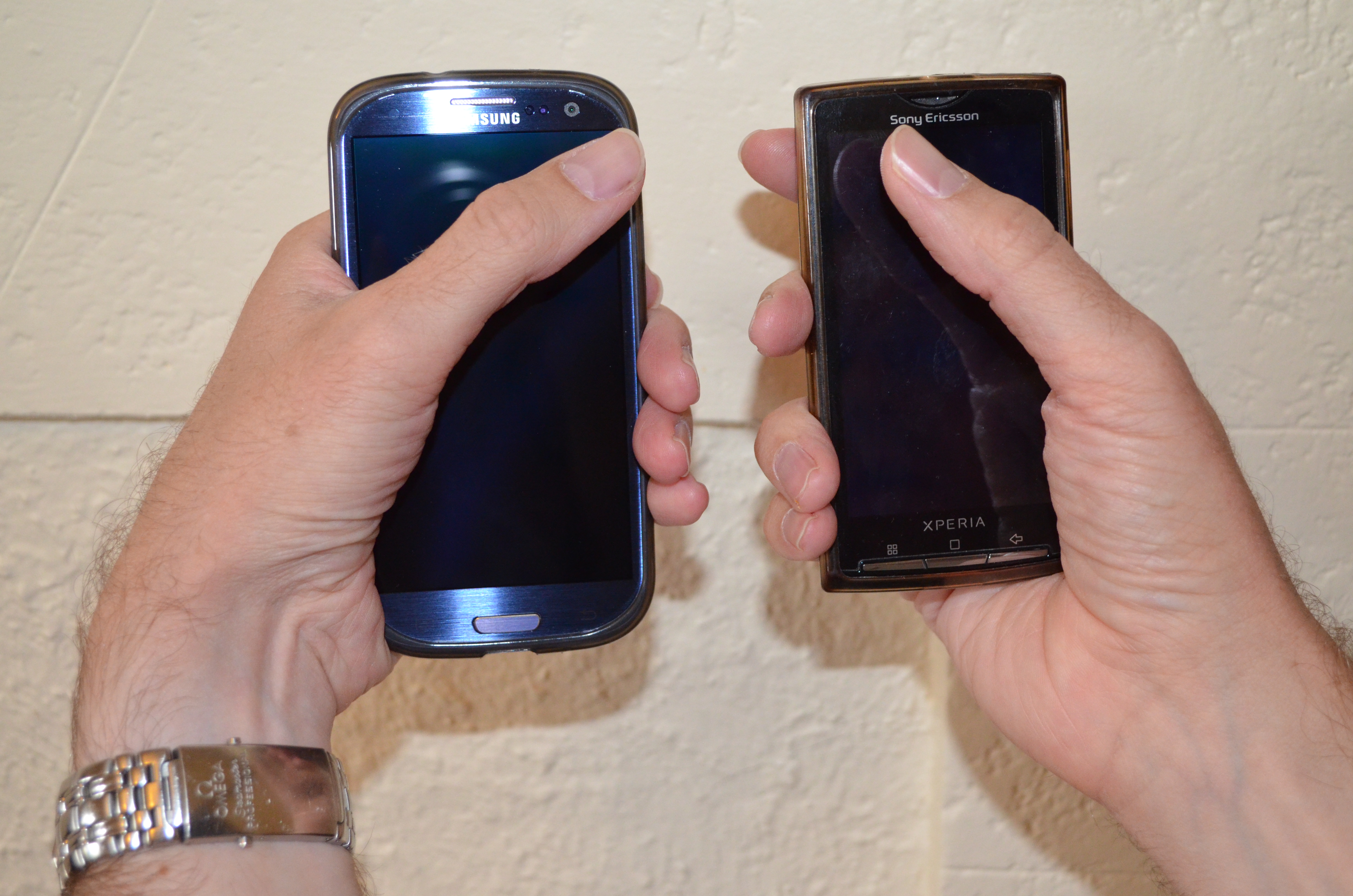
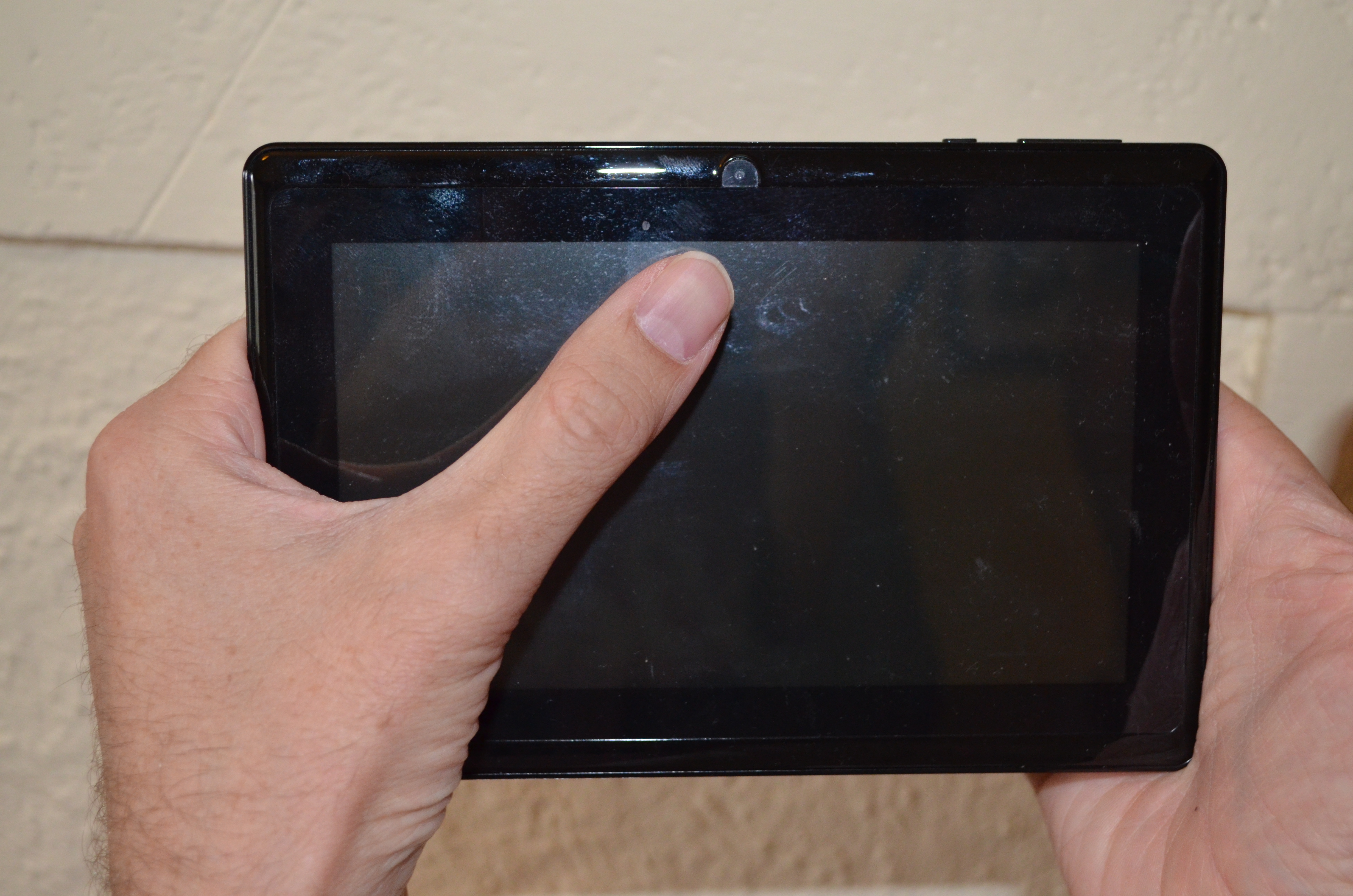
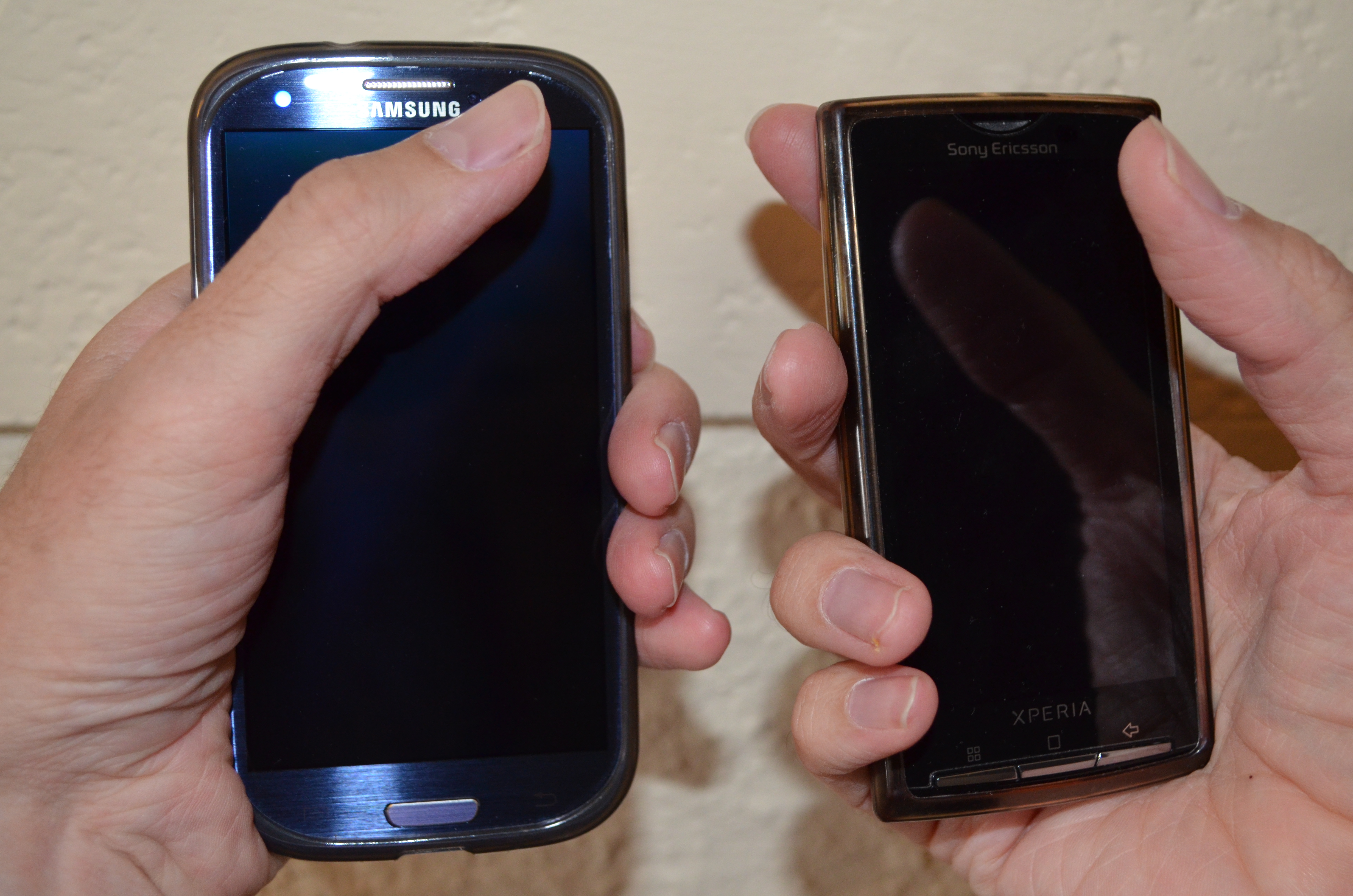
Galaxy S3 vs Xperia X10 1/2Galaxy S3 vs Xperia X10 2/2 The above two pictures show me holding a Samsung Galaxy S3 which has a 4.8 display in my left hand and a Sony Ericsson Xperia X10 which has a 4.0 display in my right hand. I am holding both phones in a manner that allows me to touch the top opposite corner with my thumb the position I need for one-handed phone use. The Xperia X10 can be completely enclosed by my hand, when I have a bottom corner resting in my palm it won t slide down while the Galaxy S3 can slide. Also one thing I didn t realise before having the pictures taken is that my posture is quite different when using the two phones. With the Galaxy S3 my wrist is clearly bent and this seems more likely to cause me to have more problems with Carpal Tunnel Syndrome [1]. I haven t had any serious problems with CTS for the last 2.5 years but I have had minor problems that suggest that I will have to be careful about my posture for the rest of my life. So it seems that a 4.8 phone is just too big for ideal one-handed use (grasping the vertical phone from the bottom). As I had CTS problems with my left hand I will try to use my new phone with my right hand as much as possible. Also I can reach further than the width of the phone screen when I grasp it from the side, so for me a size of about 5.2 would be better than the 4.8 of the Galaxy S3. It s quite likely that the Samsung Galaxy Note with it s 5.3 screen would be a better device for me to grasp from the side. But the Galaxy Note 2 might be a little too large for me. Note that I am only considering ways of holding the device that permit full operation. Anything that involves changing position for different uses or occasionally using two hands for a mostly one-hand operation doesn t count. 7 inch tablet The above picture is of me holding a 7 Android tablet (which I have just returned to Aldi [2]). When holding it from the sides I can reach more than half the screen with one hand so it seems that the ideal size for a tablet to be held in two hands for me would be 8 or even a little larger. A tablet larger than that could only be properly used if resting on my lap or a desk so for me 8 is the size that differentiates things which can be strictly used as tablets (holding with two hands and using thumbs for input) and things which are more like Netbooks (on desk typing). Ideal Device Sizes for people based on Height I am about 190cm tall. If we assume that height and hand size are strongly correlated then we can look at median heights of various age groups and determine what might be a good device size. I am also assuming that everyone wants to have the largest possible device, but some people have other criteria such as the size of their pockets. For me it s 8 tablet, 5.2 side-grip phone, and 4 bottom-grip phone. I used data from a chart of the average heights of American boys [3] and a chart of the average heights of American girls [4] to determine what size devices might suit children of various ages. Note that before the age of 12 the height of boys and girls is near enough to identical.
Device Two Hand Tablet Use Phone Grasp from Side Phone Grasp from Below
7 tablet 14yo boy or 17yo girl noone noone
Galaxy Note 5.3 10yo 95th percentile 17yo boy noone
Galaxy S3 4.8 6yo 17yo boy or 95th percentile 17yo girl almost noone
Galaxy S and iPhone 5 4.0 3yo 10yo 95th percentile 17yo boy
iPhone 4 3.5 noone 8yo 14yo boy or 16yo girl
One thing that particularly interests me is the educational use of Android devices for children. As few people buy new phones and tablets for young children that largely means that children borrow devices from their parents or are given older phones when relatives no longer need them. So it seems that if all other things are equal then an adult might choose a phone with a 4.8 display to allow it to be used as a tablet by children in the 6-10 age range. Conclusion It seems that the iPhone 4 is a good size for one-handed use by women of average height. By the standards of the people who don t regard gripping a phone from below as a significant feature the iPhone 4 would be designed for the hand of an 8yo. By any standards all iPhones other than the iPhone 5 were not the ideal size for most adults to use maybe they are well designed to fit in a pocket while unused. Charles Stross criticised the iPhone because it s too small to be seen well by people with poor vision [5], he also makes many other interesting points about the use of phones and I recommend reading his article (and the rest of his blog). The common tablet size of 7 seems like it might be ideal for women to hold with both hands, but for men of average height a 7.5 tablet might be better suited, it sounds like a small difference but it changes button size (good for people with thicker fingers) and allows displaying more data at once (15% greater screen area). Of course if you want to use a tablet on a desk then something much bigger would be better, maybe 12 or 14 . I think that there is a real market for 14 tablets that are designed to be carried around the home or office and then used on a table or lap which differs from the tablets that are designed to be more portable. There is also the use case of holding the phone in one hand while typing with the other which I haven t considered in this post. I don t think it s interesting because in that case almost everyone will find that the limitation is the size of their pockets and the size of an object that can be held to one s face for a phone call not the size of their hands. I ve previously written about my search for Geeky jeans and the ability to put a 7 tablet in my jeans pocket [6]. So I think that pocket size isn t a phone selection issue for men. The fact that women s clothing tends to have tiny pockets is another issue, if someone knows of a good analysis of phone size vs pockets in women s clothes then please let me know.

Andrew Pollock: [life/americania] Final tally of states visited

As my time in the US is rapidly drawing to a close, I thought I should capture the final count of US states that I've visited in the 7 years I've been here. I didn't realise it's been so long since I last did this. US states I've visited as of February 2013 22 states. Not too bad. I'd have liked to have visited Hawaii and Florida. Maybe in my next life. Update: I omitted Illinois.

Hideki Yamane: checking package with clang

Sylvestre Ledru wrote an article "Rebuild of Debian using clang 3.2". Probably package maintainers want to know about their package status with clang in PTS, Paul Wise has already posted to BTS#699936.

And, today I've hit upon an idea, then created a tiny patch for clang support for pbuilder. It may help you to check your package with clang.

Vasudev Kamath: New Series of Posts on CDBS packaging

Well this is just an introductory post to set of posts I'm going to write down here on my blog. Idea is to improve the documentation of CDBS but I still don't have any idea on how I can patch the existing documentation, but in the mean time I'm learning new tricks from Jonas which I want to document some where so I thought my blog would be a good place as whole blog is in markdown format and its the same format me and Jonas agreed to convert the existing CDBS documentation. So this blog will act as a documentation and these post will be then altered modified and put back into a proper CDBS documentation later. I know many people don't like CDBS and most of it because there is no proper documentation, so I'm trying to improve the situation so sit back and enjoy the upcoming posts :-). OK I was sloppy in giving theory on what others think about the CDBS thanks to Phill Hands and Jonas for enlightening me. So with these series I'm just trying to explain CDBS features with real examples and examples how you can tame nasty packaging beasts with CDBS easily.

10 February 2013

Andrew Pollock: [life/americania] Final tally of states visited

As my time in the US is rapidly drawing to a close, I thought I should capture the final count of US states that I've visited in the 7 years I've been here. I didn't realise it's been so long since I last did this. US states I've visited as of February 2013 21 states. Not too bad. I'd have liked to have visited Hawaii and Florida. Maybe in my next life.

Gregor Herrmann: RC bugs 2013/06

until a few hours ago I thought there wouldn't be anything for my weekly RC bug report. then I at least found one bug to work on: let's take the declining number of (easy to fix) RC bugs as a sign that the release is getting closer

David Bremner: First Steps with Argyll and ColorHug

In April of 2012 I bought a ColorHug colorimeter. I got a bit discouraged when the first thing I realized was that one of my monitors needed replacing, and put the the colorhug in a drawer until today. With quite a lot of help and encouragment from Pascal de Bruijn, I finally got it going. Pascal has written an informative blog post on color management. That's a good place to look for background. This is more of a "write down the commands so I don't forget" sort of blog post, but it might help somebody else trying to calibrate their monitor using argyll on the command line. I'm not running gnome, so using gnome color manager turns out to be a bit of a hassle. I run Debian Wheezy on this machine, and I'll mention the packages I used, even though I didn't install most of them today.
  1. Find the masking tape, and tear off a long enough strip to hold the ColorHug on the monitor. This is probably the real reason I gave up last time; it takes about 45minutes to run the calibration, and I lack the attention span/upper-arm-strength to hold the sensor up for that long. Apparently new ColorHugs are shipping with some elastic.
  2. Update the firmware on the colorhug. This is a gui-wizard kindof thing.
     % apt-get install colorhug-client
     % colorhug-flash 
    
  3. Set the monitor to factory defaults. On this ASUS PA238QR, that is brightness 100, contrast 80, R=G=B=100. I adjusted the brightness down to about 70; 100 is kindof eye-burning IMHO.
  4. Figure out which display is which; I have two monitors.
     % dispwin -\?
    
    Look under "-d n"
  5. Do the calibration. This is really verbatim from Pascal, except I added the ENABLE_COLORHUG=true and -d 2 bits.
     % apt-get install argyll
     % ENABLE_COLORHUG=true dispcal -v -d 2 -m -q m -y l -t 6500 -g 2.2 test
     % targen -v -d 3 -G -f 128 test
     % ENABLE_COLORHUG=true dispread -v -d 2 -y l -k test.cal test
     % colprof -v -A "make" -M "model" -D "make model desc" -C   "copyright" -q m -a G test
    
  6. Load the profile
     % dispwin -d 2 -I test.icc           
    
    It seems this only loads the x property _ICC_PROFILE_1 instead of _ICC_PROFILE; whether this works for a particular application seems to be not 100% guaranteed. It seems ok for darktable and gimp.

Next.

Previous.