Search Results: "tar"

10 January 2024

Dirk Eddelbuettel: BH 1.84.0-1 on CRAN: New Upstream


Boost Boost is a very large and comprehensive set of (peer-reviewed) libraries for the C++ programming language, containing well over one hundred individual libraries. The BH package provides a sizeable subset of header-only libraries for (easier, no linking required) use by R. It is fairly widely used: the (partial) CRAN mirror logs (aggregated from the cloud mirrors) show over 35.7 million package downloads. Version 1.84.0 of Boost was released in December following the regular Boost release schedule of April, August and December releases. As the commits and changelog show, we packaged it almost immediately and started testing following our annual update cycle which strives to balance being close enough to upstream and not stressing CRAN and the user base too much. The reverse depends check revealed five packages requiring changes or adjustments which is a pretty good outcome given the over three hundred direct reverse dependencies. So we opened issue #100 to coordinate the issue over the winter break during which CRAN also closes (just as we did in previous years). Our sincere thanks to the two packages that already updated before, and to the one that updated today within hours (!!) of the BH uploaded it needed. There are very few actual changes. We honoured one request (in issue #97) to add Boost QVM bringing quarternion support to R. No other new changes needed to be made. A number of changes I have to make each time in BH, and it is worth mentioning them. Because CRAN cares about backwards compatibility and the ability to be used on minimal or older systems, we still adjust the filenames of a few files to fit a jurassic constraints of just over a 100 characters per filepath present in some long-outdated versions of tar. Not a big deal. We also, and that is more controversial, silence a number of #pragma diagnostic messages for g++ and clang++ because CRAN insists on it. I have no choice in that matter. One warning we suppressed last year, but no longer do, concerns the C++14 standard that some Boost libraries now default to. Packages setting C++11 explicitly will likely get a note from CRAN changing this; in most cases that should be trivial to remove as we only had to opt into (then) newer standards under old compilers. These days newer defaults help; R itself now defaults to C++17.

Changes in version 1.84.0-0 (2024-01-09)

Via my CRANberries, there is a diffstat report relative to the previous release. Comments and suggestions about BH are welcome via the issue tracker at the GitHub repo. If you like this or other open-source work I do, you can now sponsor me at GitHub.

This post by Dirk Eddelbuettel originated on his Thinking inside the box blog. Please report excessive re-aggregation in third-party for-profit settings.

Colin Watson: Going freelance

I ve mentioned this in a couple of other places, but I realized I never got round to posting about it on my own blog rather than on other people s services. How remiss of me. Anyway: after much soul-searching, I decided a few months ago that it was time for me to move on from Canonical and the Launchpad team there. Nearly 20 years is a long time to spend at any company, and although there are a bunch of people I ll miss, Launchpad is in a reasonable state where I can let other people have a turn. I m now in business for myself as a freelance developer! My new company is Columbiform, and I m focusing on Debian packaging and custom Python development. My services page has some self-promotion on the sorts of things I can do. My first gig, and the one that made it viable to make this jump, is at Freexian where I m helping with an exciting infrastructure project that we hope will start making Debian developers lives easier in the near future. This is likely to take up most of my time at least through to the end of 2024, but I may have some spare cycles. Drop me a line if you have something where you think I could be a good fit, and we can have a talk about it.

Simon Josefsson: Trisquel on arm64: Ampere Altra

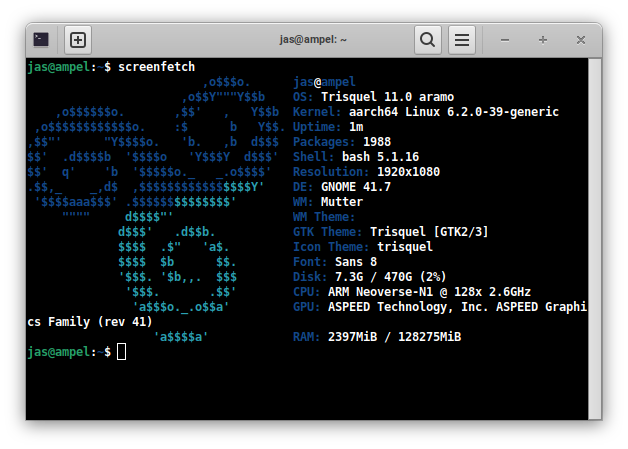
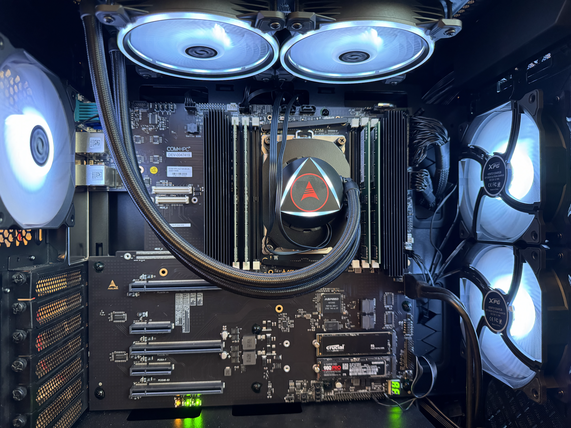
Having had success running Trisquel on the ppc64 Talos II, I felt ready to get an arm64 machine running Trisquel. I have a Ampere Altra Developer Platform from ADLINK, which is a fairly powerful desktop machine. While there were some issues during installation, I m happy to say the machine is stable and everything appears to work fine. ISO images for non-amd64 platforms are unfortunately still hidden from the main Trisquel download area, so you will have to use the following procedure to download and extract a netinst ISO image (using debian-installer) and write it to a USB memory device. Another unfortunate problem is that there are no OpenPGP signatures or hash checksums, but below I publish one checksum.
wget -q http://builds.trisquel.org/debian-installer-images/debian-installer-images_20210731+deb11u9+11.0trisquel15_arm64.tar.gz
tar xfa debian-installer-images_20210731+deb11u9+11.0trisquel15_arm64.tar.gz ./installer-arm64/20210731+deb11u9+11/images/netboot/mini.iso
echo '311732519cc8c7c1bb2fe873f134fdafb211ef3bcb5b0d2ecdc6ea4e3b336357  installer-arm64/20210731+deb11u9+11/images/netboot/mini.iso'   sha256sum -c
sudo wipefs -a /dev/sdX
sudo dd if=installer-arm64/20210731+deb11u9+11/images/netboot/mini.iso of=/dev/sdX conv=sync status=progress
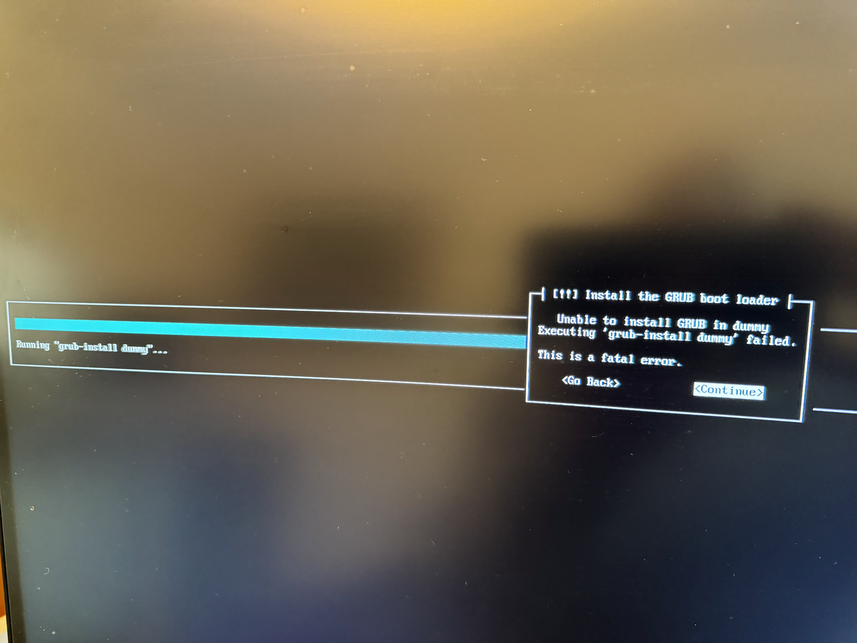
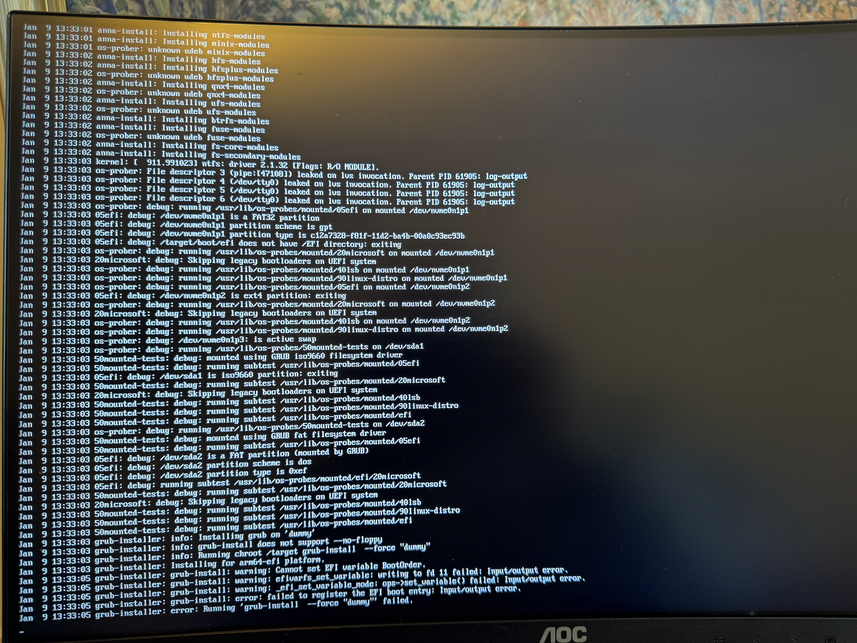
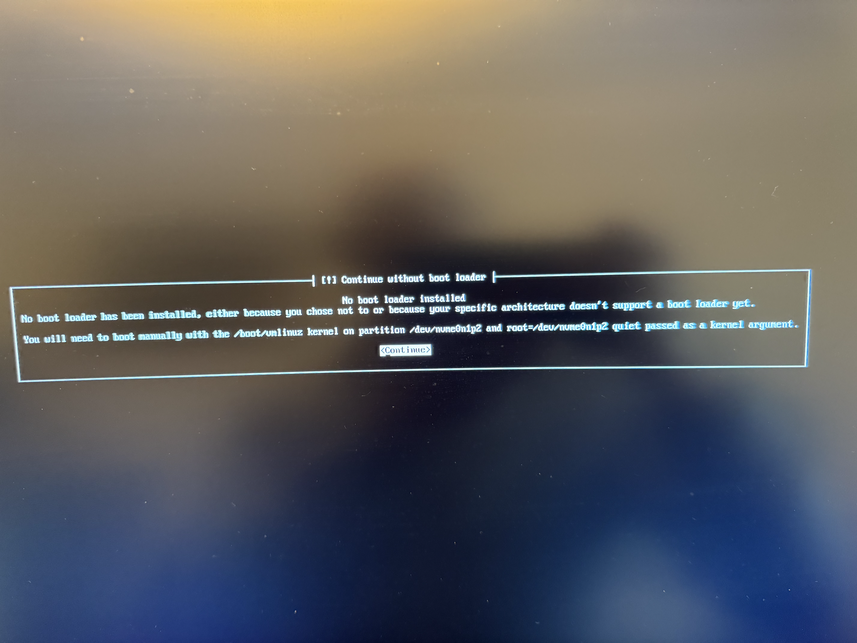
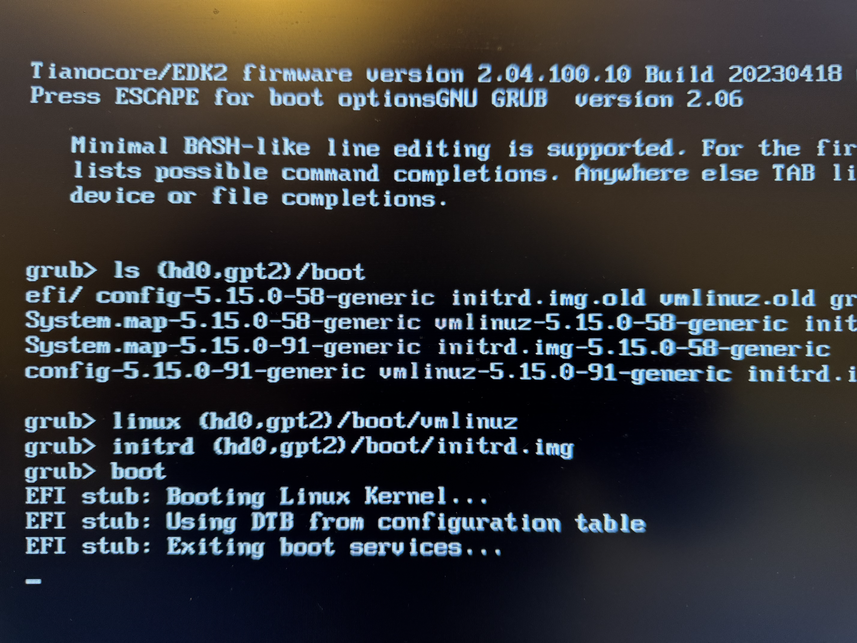
Insert the USB stick in a USB slot in the machine, and power up. Press ESCAPE at the BIOS prompt and select the USB device as the boot device. The first problem that hit me was that translations didn t work, I selected Swedish but the strings were garbled. Rebooting and selecting the default English worked fine. For installation, you need Internet connectivity and I use the RJ45 port closest to VGA/serial which is available as enP5p1s0 in the installer. I wouldn t connect the BMC RJ45 port to anything unless you understand the security implications. During installation you have to create a EFI partition for booting, and I ended up with one 1GB EFI partition, one 512GB ext4 partition for / with discard/noatime options, and a 32GB swap partition. The installer did not know about any Trisquel mirrors, but only had the default archive.trisquel.org, so if you need to use a mirror, take a note of the necessary details. The installation asks me about which kernel to install, and I went with the default linux-generic which results in a 5.15 linux-libre kernel. At the end of installation, unfortunately grub failed with a mysterious error message: Unable to install GRUB in dummy. Executing 'grub-install dummy' failed. On another console there is a better error message: failed to register the EFI boot entry. There are some references to file descriptor issues. Perhaps I partitioned the disk in a bad way, or this is a real bug in the installer for this platform. I continued installation, and it appears the installer was able to write GRUB to the device, but not add the right boot menu. So I was able to finish the installation properly, and then reboot and manually type the following GRUB commands: linux (hd0,gpt2)/boot/vmlinuz initrd (hd0,gpt2)/boot/initrd.img boot. Use the GRUB ls command to find the right device. See images below for more information. Booting and installing GRUB again manually works fine:
root@ampel:~# update-grub
Sourcing file  /etc/default/grub'
Sourcing file  /etc/default/grub.d/background.cfg'
Sourcing file  /etc/default/grub.d/init-select.cfg'
Generating grub configuration file ...
Found linux image: /boot/vmlinuz-5.15.0-91-generic
Found initrd image: /boot/initrd.img-5.15.0-91-generic
Found linux image: /boot/vmlinuz-5.15.0-58-generic
Found initrd image: /boot/initrd.img-5.15.0-58-generic
Warning: os-prober will not be executed to detect other bootable partitions.
Systems on them will not be added to the GRUB boot configuration.
Check GRUB_DISABLE_OS_PROBER documentation entry.
Adding boot menu entry for UEFI Firmware Settings ...
done
root@ampel:~# 
During installation I tend to avoid selecting any tasksel components, in part because it didn t use a local mirror to gain network speed, and in part because I don t want to generate OpenSSH keys in a possibly outdated environment that is harder to audit and reproducible rebuild than the finally installed system. When I selected the OpenSSH and GNOME tasksel, I get an error, but fortunately using apt get directly is simple.
root@ampel:~# tasksel
Tasksel GNOME failed:
tasksel: apt-get failed (100)
root@ampel:~# apt-get install trisquel-gnome ssh
Graphics in GNOME was slow using the built-in ASPEED AST2500 VGA controller with linux-libre 5.15. There are kernels labeled 64k but I haven t tested them, and I m not sure they would bring any significant advantage. I simply upgraded to a more recent linux-libre 6.2 kernel via the linux-image-generic-hwe-11.0 virtual package. After a reboot, graphics in GNOME is usable.
root@ampel:~# apt-get install linux-image-generic-hwe-11.0
There seems to be some issue with power-saving inside GNOME, since the machine becomes unresponsive after 20 minutes, and I m unable to make it resume via keyboard or power button. Disabling the inactivity power setting in GNOME works fine to resolve this. I will now put this machine to some more heavy use and see how it handles it. I hope to find more suitable arm64-based servers to complement my ppc64el-based servers in the future, as this ADLINK Ampere Altra Developer Platform with liquid-cooling is more of a toy than a serious server for use in a datacentre. Happy Trisquel-on-arm64 Hacking!

Dirk Eddelbuettel: Rcpp 1.0.12 on CRAN: New Maintenance / Update Release

rcpp logo The Rcpp Core Team is once again thrilled to announce a new release 1.0.12 of the Rcpp package. It arrived on CRAN early today, and has since been uploaded to Debian as well. Windows and macOS builds should appear at CRAN in the next few days, as will builds in different Linux distribution and of course at r2u should catch up tomorrow. The release was uploaded yesterday, and run its reverse dependencies overnight. Rcpp always gets flagged nomatter what because the grandfathered .Call(symbol) but we had not single change to worse among over 2700 reverse dependencies! This release continues with the six-months January-July cycle started with release 1.0.5 in July 2020. As a reminder, we do of course make interim snapshot dev or rc releases available via the Rcpp drat repo and strongly encourage their use and testing I run my systems with these versions which tend to work just as well, and are also fully tested against all reverse-dependencies. Rcpp has long established itself as the most popular way of enhancing R with C or C++ code. Right now, 2791 packages on CRAN depend on Rcpp for making analytical code go faster and further, along with 254 in BioConductor. On CRAN, 13.8% of all packages depend (directly) on Rcpp, and 59.9% of all compiled packages do. From the cloud mirror of CRAN (which is but a subset of all CRAN downloads), Rcpp has been downloaded 78.1 million times. The two published papers (also included in the package as preprint vignettes) have, respectively, 1766 (JSS, 2011) and 292 (TAS, 2018) citations, while the the book (Springer useR!, 2013) has another 617. This release is incremental as usual, generally preserving existing capabilities faithfully while smoothing our corners and / or extending slightly, sometimes in response to changing and tightened demands from CRAN or R standards. The full list below details all changes, their respective PRs and, if applicable, issue tickets. Big thanks from all of us to all contributors!
Changes in Rcpp release version 1.0.12 (2024-01-08)
  • Changes in Rcpp API:
    • Missing header includes as spotted by some recent tools were added in two places (Michael Chirico in #1272 closing #1271).
    • Casts to avoid integer overflow in matrix row/col selections have neem added (Aaron Lun #1281).
    • Three print format correction uncovered by R-devel were applied with thanks to Tomas Kalibera (Dirk in #1285).
    • Correct a print format correction in the RcppExports glue code (Dirk in #1288 fixing #1287).
    • The upcoming OBJSXP addition to R 4.4.0 is supported in the type2name mapper (Dirk and I aki in #1293).
  • Changes in Rcpp Attributes:
    • Generated interface code from base R that fails under LTO is now corrected (I aki in #1274 fixing a StackOverflow issue).
  • Changes in Rcpp Documentation:
    • The caption for third figure in the introductory vignette has been corrected (Dirk in #1277 fixing #1276).
    • A small formatting issue was correct in an Rd file as noticed by R-devel (Dirk in #1282).
    • The Rcpp FAQ vignette has been updated (Dirk in #1284).
    • The Rcpp.bib file has been refreshed to current package versions.
  • Changes in Rcpp Deployment:
    • The RcppExports file for an included test package has been updated (Dirk in #1289).

Thanks to my CRANberries, you can also look at a diff to the previous release Questions, comments etc should go to the rcpp-devel mailing list off the R-Forge page. Bugs reports are welcome at the GitHub issue tracker as well (where one can also search among open or closed issues). If you like this or other open-source work I do, you can sponsor me at GitHub.

This post by Dirk Eddelbuettel originated on his Thinking inside the box blog. Please report excessive re-aggregation in third-party for-profit settings.

9 January 2024

Thomas Koch: lsp-java coming to debian

Posted on March 12, 2022
Tags: debian
The Language Server Protocol (LSP) standardizes communication between editors and so called language servers for different programming languages. This reduces the old problem that every editor had to implement many different plugins for all different programming languages. With LSP an editor just needs to talk LSP and can immediately provide typicall IDE features. I already packaged the Emacs packages lsp-mode and lsp-haskell for Debian bullseye. Now lsp-java is waiting in the NEW queue. I m always worried about downloading and executing binaries from random places of the internet. It should be a matter of hygiene to only run binaries from official Debian repositories. Unfortunately this is not feasible when programming and many people don t see a problem with running multiple curl-sh pipes to set up their programming environment. I prefer to do such stuff only in virtual machines. With Emacs and LSP I can finally have a lightweight textmode programming environment even for Java. Unfortunately the lsp-java mode does not yet work over tramp. Once this is solved, I could run emacs on my host and only isolate the code and language server inside the VM. The next step would be to also keep the code on the host and mount it with Virtio FS in the VM. But so far the necessary daemon is not yet in Debian (RFP: #1007152). In Detail I uploaded these packages:

Louis-Philippe V ronneau: 2023 A Musical Retrospective

I ended 2022 with a musical retrospective and very much enjoyed writing that blog post. As such, I have decided to do the same for 2023! From now on, this will probably be an annual thing :) Albums In 2023, I added 73 new albums to my collection nearly 2 albums every three weeks! I listed them below in the order in which I acquired them. I purchased most of these albums when I could and borrowed the rest at libraries. If you want to browse though, I added links to the album covers pointing either to websites where you can buy them or to Discogs when digital copies weren't available. Once again this year, it seems that Punk (mostly O !) and Metal dominate my list, mostly fueled by Angry Metal Guy and the amazing Montr al Skinhead/Punk concert scene. Concerts A trend I started in 2022 was to go to as many concerts of artists I like as possible. I'm happy to report I went to around 80% more concerts in 2023 than in 2022! Looking back at my list, April was quite a busy month... Here are the concerts I went to in 2023: Although metalfinder continues to work as intended, I'm very glad to have discovered the Montr al underground scene has departed from Facebook/Instagram and adopted en masse Gancio, a FOSS community agenda that supports ActivityPub. Our local instance, askapunk.net is pretty much all I could ask for :) That's it for 2023!

8 January 2024

Thorsten Alteholz: My Debian Activities in December 2023

FTP master This month I accepted 235 and rejected 13 packages. The overall number of packages that got accepted was 249. I also handled lots of RM bugs and almost stopped the increase in packages this month :-). Please be aware, if you don t want your package to be removed, take care of it and keep it in good shape! Debian LTS This was my hundred-fourteenth month that I did some work for the Debian LTS initiative, started by Raphael Hertzog at Freexian. During my allocated time I uploaded: This month was rather calm and no unexpected things happened. The web team now automatically creates all webpages from data found in the security tracker. So I could deactivate my web-dla script again which created the webpages from the contents of the announcement mailing list. Last but not least I also did two weeks of frontdesk duties. Debian ELTS This month was the sixty-fifth ELTS month. During my allocated time I uploaded: Last but not least I also did two weeks of frontdesk duties. Debian Printing This month I uploaded a package to fix bugs: This work is generously funded by Freexian! Debian Astro This month I uploaded a package to fix bugs: Other stuff This month I uploaded new upstream version of packages, did a source upload for the transition or uploaded it to fix one or the other issue:

Russ Allbery: Review: The Faithless

Review: The Faithless, by C.L. Clark
Series: Magic of the Lost #2

Publisher: Orbit
Copyright: March 2023
ISBN: 0-316-54283-0
Format: Kindle
Pages: 527
The Faithless is the second book in a political fantasy series that seems likely to be a trilogy. It is a direct sequel to The Unbroken, which you should read first. As usual, Orbit made it unnecessarily hard to get re-immersed in the world by refusing to provide memory aids for readers who read books as they come out instead of only when the series is complete, but this is not the fault of Clark or the book and you've heard me rant about this before. The Unbroken was set in Qaz l (not-Algeria). The Faithless, as readers of the first book might guess from the title, is set in Balladaire (not-France). This is the palace intrigue book. Princess Luca is fighting for her throne against her uncle, the regent. Touraine is trying to represent her people. Whether and to what extent those interests are aligned is much of the meat of this book. Normally I enjoy palace intrigue novels for the competence porn: watching someone navigate a complex political situation with skill and cunning, or upend the entire system by building unlikely coalitions or using unexpected routes to power. If you are similar, be warned that this is not what you're going to get. Touraine is a fish out of water with no idea how to navigate the Balladairan court, and does not magically become an expert in the course of this novel. Luca has the knowledge, but she's unsure, conflicted, and largely out-maneuvered. That means you will have to brace for some painful scenes of some of the worst people apparently getting what they want. Despite that, I could not put this down. It was infuriating, frustrating, and a much slower burn than I prefer, but the layers of complex motivations that Clark builds up provided a different sort of payoff. Two books in, the shape of this series is becoming clearer. This series is about empire and colonialism, but with considerably more complexity than fantasy normally brings to that topic. Power does not loosen its grasp easily, and it has numerous tools for subtle punishment after apparent upstart victories. Righteous causes rarely call banners to your side; instead, they create opportunities for other people to maneuver to their own advantage. Touraine has some amount of power now, but it's far from obvious how to use it. Her life's training tells her that exercising power will only cause trouble, and her enemies are more than happy to reinforce that message at every opportunity. Most notable to me is Clark's bitingly honest portrayal of the supposed allies within the colonial power. It is clear that Luca is attempting to take the most ethical actions as she defines them, but it's remarkable how those efforts inevitably imply that Touraine should help Luca now in exchange for Luca's tenuous and less-defined possible future aid. This is not even a lie; it may be an accurate summary of Balladairan politics. And yet, somehow what Balladaire needs always matters more than the needs of their abused colony. Underscoring this, Clark introduces another faction in the form of a populist movement against the Balladairan monarchy. The details of that setup in another fantasy novel would make them allies of the Qaz l. Here, as is so often the case in real life, a substantial portion of the populists are even more xenophobic and racist than the nobility. There are no easy alliances. The trump card that Qaz l holds is magic. They have it, and (for reasons explored in The Unbroken) Balladaire needs it, although that is a position held by Luca's faction and not by her uncle. But even Luca wants to reduce that magic to a manageable technology, like any other element of the Balladairan state. She wants to understand it, harness it, and bring it under local control. Touraine, trained by Balladaire and facing Balladairan political problems, has the same tendency. The magic, at least in this book, refuses not in the flashy, rebellious way that it would in most fantasy, but in a frustrating and incomprehensible lack of predictable or convenient rules. I think this will feel like a plot device to some readers, and that is to some extent true, but I think I see glimmers of Clark setting up a conflict of world views that will play out in the third book. I think some people are going to bounce off this book. It's frustrating, enraging, at times melodramatic, and does not offer the cathartic payoff typically offered in fantasy novels of this type. Usually these are things I would be complaining about as well. And yet, I found it satisfyingly challenging, engrossing, and memorable. I spent a lot of the book yelling "just kill him already" at the characters, but I think one of Clark's points is that overcoming colonial relationships requires a lot more than just killing one evil man. The characters profoundly fail to execute some clever and victorious strategy. Instead, as in the first book, they muddle through, making the best choice that they can see in each moment, making lots of mistakes, and paying heavy prices. It's realistic in a way that has nothing to do with blood or violence or grittiness. (Although I did appreciate having the thin thread of Pruett's story and its highly satisfying conclusion.) This is also a slow-burn romance, and there too I think opinions will differ. Touraine and Luca keep circling back to the same arguments and the same frustrations, and there were times that this felt repetitive. It also adds a lot of personal drama to the politics in a way that occasionally made me dubious. But here too, I think Clark is partly using the romance to illustrate the deeper political points. Luca is often insufferable, cruel and ambitious in ways she doesn't realize, and only vaguely able to understand the Qaz l perspective; in short, she's the pragmatic centrist reformer. I am dubious that her ethics would lead her to anything other than endless compromise without Touraine to push her. To Luca's credit, she also realizes that and wants to be a better person, but struggles to have the courage to act on it. Touraine both does and does not want to manipulate her; she wants Luca's help (and more), but it's not clear Luca will give it under acceptable terms, or even understand how much she's demanding. It's that foundational conflict that turns the romance into a slow burn by pushing them apart. Apparently I have more patience for this type of on-again, off-again relationship than one based on artificial miscommunication. The more I noticed the political subtext, the more engaging I found the romance on the surface. I picked this up because I'd read several books about black characters written by white authors, and while there was nothing that wrong with those books, the politics felt a little too reductionist and simplified. I wanted a book that was going to force me out of comfortable political assumptions. The Faithless did exactly what I was looking for, and I am definitely here for the rest of the series. In that sense, recommended, although do not go into this book hoping for adroit court maneuvering and competence porn. Followed by The Sovereign, which does not yet have a release date. Content warnings: Child death, attempted cultural genocide. Rating: 7 out of 10




7 January 2024

Jonathan McDowell: Free Software Activities for 2023

This year was hard from a personal and work point of view, which impacted the amount of Free Software bits I ended up doing - even when I had the time I often wasn t in the right head space to make progress on things. However writing this annual recap up has been a useful exercise, as I achieved more than I realised. For previous years see 2019, 2020, 2021 + 2022.
Conferences The only Free Software related conference I made it to this year was DebConf23 in Kochi, India. Changes with projects at work meant I couldn t justify anything work related. This year I m planning to make it to FOSDEM, and haven t made a decision on DebConf24 yet.

Debian Most of my contributions to Free software continue to happen within Debian. I started the year working on retrogaming with Kodi on Debian. I got this to a much better state for bookworm, with it being possible to run the bsnes-mercury emulator under Kodi using RetroArch. There are a few other libretro backends available for RetroArch, but Kodi needs some extra controller mappings packaged up first. Plenty of uploads were involved, though some of this was aligning all the dependencies and generally cleaning things up in iterations. I continued to work on a few packages within the Debian Electronics Packaging Team. OpenOCD produced a new release in time for the bookworm release, so I uploaded 0.12.0-1. There were a few minor sigrok cleanups - sigrok 0.3, libsigrokdecode 0.5.3-4 + libsigrok 0.5.2-4 / 0.5.2-5. While I didn t manage to get the work completed I did some renaming of the ESP8266 related packages - gcc-xtensa-lx106 (which saw a 13 upload pre-bookworm) has become gcc-xtensa (with 14) and binutils-xtensa-lx106 has become binutils-xtensa (with 6). Binary packages remain the same, but this is intended to allow for the generation of ESP32 compiler toolchains from the same source. onak saw 0.6.3-1 uploaded to match the upstream release. I also uploaded libgpg-error 1.47-1 (though I can claim no credit for any of the work in preparing the package) to help move things forward on updating gnupg2 in Debian. I NMUed tpm2-pkcs11 1.9.0-0.1 to fix some minor issues pre-bookworm release; I use this package myself to store my SSH key within my laptop TPM, so I care about it being in a decent state. sg3-utils also saw a bit of love with 1.46-2 + 1.46-3 - I don t work in the storage space these days, but I m still listed as an uploaded and there was an RC bug around the library package naming that I was qualified to fix and test pre-bookworm. Related to my retroarch work I sponsored uploads of mgba for Ryan Tandy: 0.10.0+dfsg-1, 0.10.0+dfsg-2, 0.10.1+dfsg-1, 0.10.2+dfsg-1, mgba 0.10.1+dfsg-1+deb12u1. As part of the Data Protection Team I responded to various inbound queries to that team, both from project members and those external to the project. I continue to keep an eye on Debian New Members, even though I m mostly inactive as an application manager - we generally seem to have enough available recently. Mostly my involvement is via Front Desk activities, helping out with queries to the team alias, and contributing to internal discussions as well as our panel at DebConf23. Finally the 3 month rotation for Debian Keyring continues to operate smoothly. I dealt with 2023.03.24, 2023.06.26, 2023.06.29, 2023.09.10, 2023.09.24 + 2023.12.24.

Linux I had a few minor patches accepted to the kernel this year. A pair of safexcel cleanups (improved error logging for firmware load fail and cleanup on load failure) came out of upgrading the kernel running on my RB5009. The rest were related to my work on repurposing my C.H.I.P.. The AXP209 driver needed extended to support GPIO3 (with associated DT schema update). That allowed Bluetooth to be enabled. Adding the AXP209 internal temperature ADC as an iio-hwmon node means it can be tracked using the normal sensor monitoring framework. And finally I added the pinmux settings for mmc2, which I use to support an external microSD slot on my C.H.I.P.

Personal projects 2023 saw another minor release of onak, 0.6.3, which resulted in a corresponding Debian upload (0.6.3-1). It has a couple of bug fixes (including a particularly annoying, if minor, one around systemd socket activation that felt very satisfying to get to the bottom of), but I still lack the time to do any of the major changes I would like to. I wrote listadmin3 to allow easy manipulation of moderation queues for Mailman3. It s basic, but it s drastically improved my timeliness on dealing with held messages.

Valhalla's Things: A Corset or Two

Posted on January 7, 2024
Tags: madeof:atoms, craft:sewing, period:victorian, FreeSoftWear
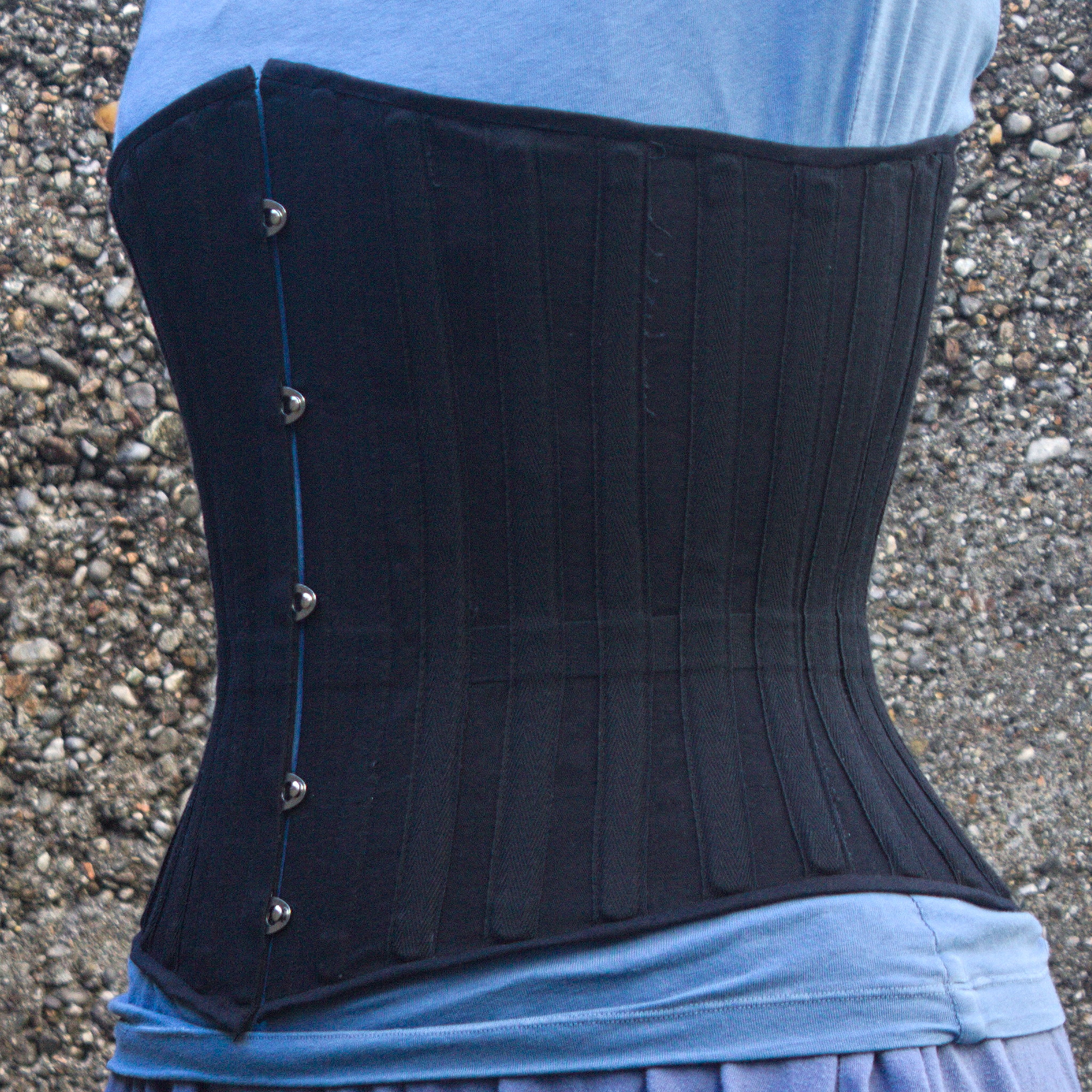
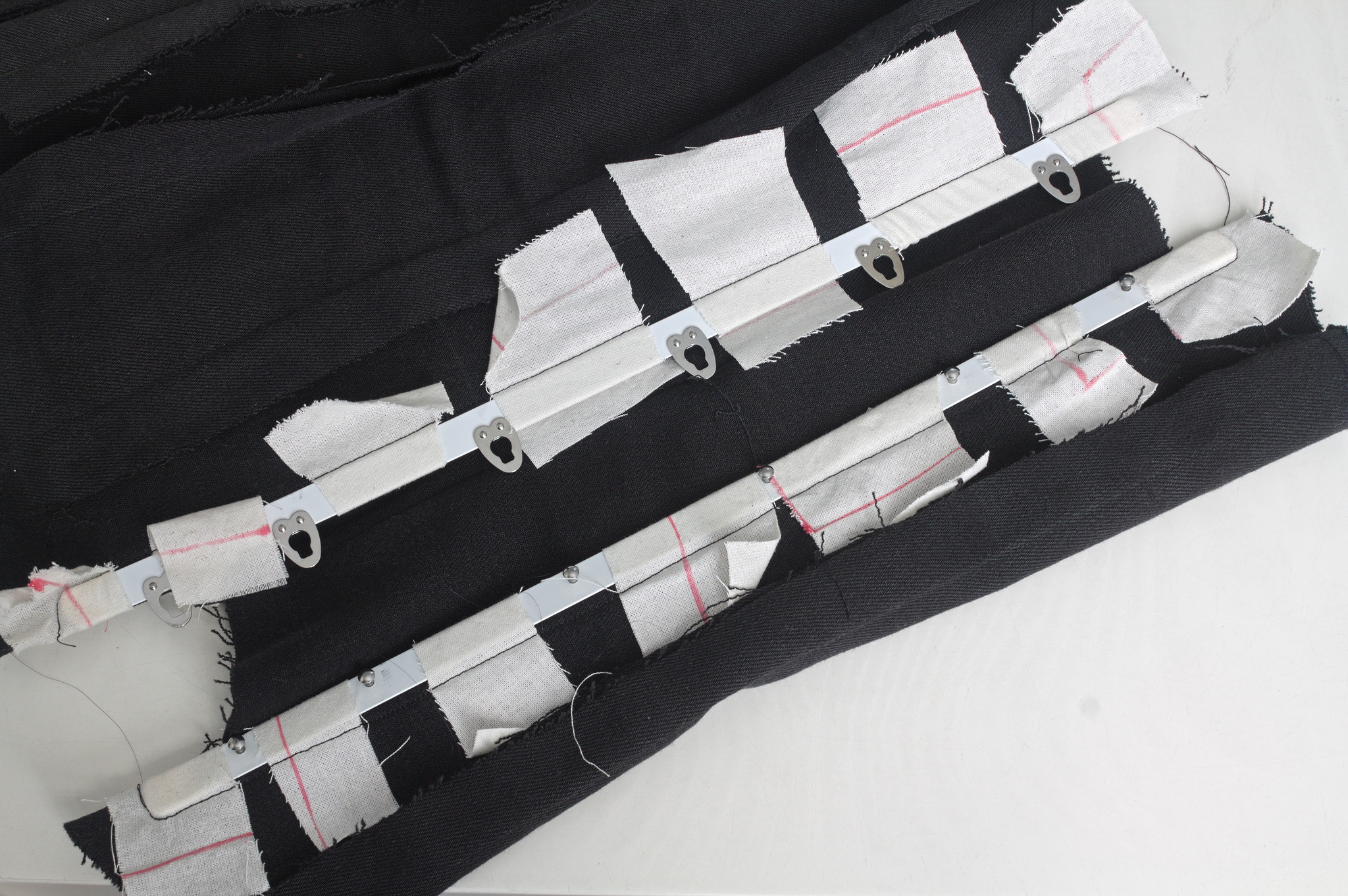
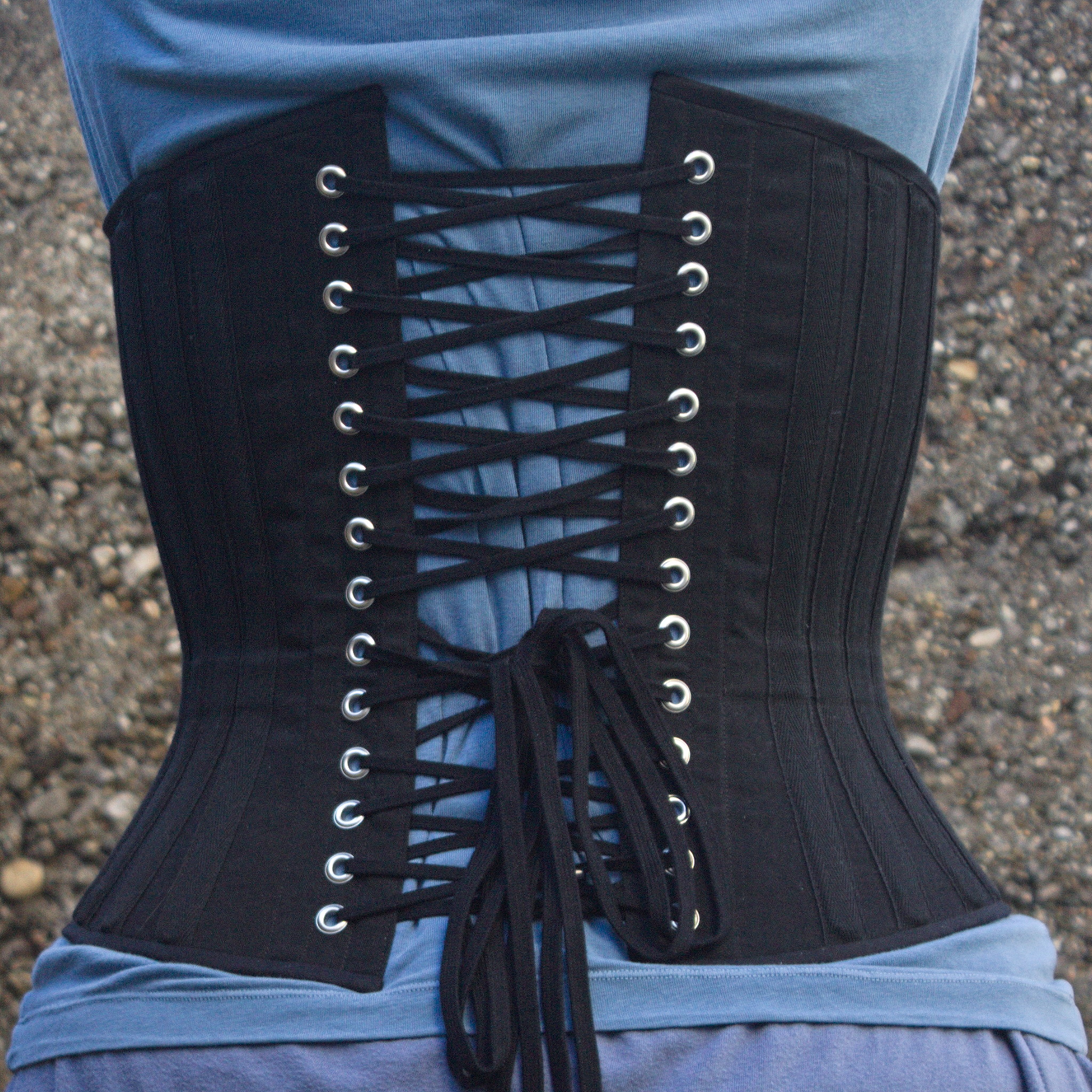
a black coutil midbust corset, from a 3/4 front view, showing the busk closure, a waist tape and external boning channels made of the same twill tape and placed about 1-2 cm from each other at waist level. CW for body size change mentions I needed a corset, badly. Years ago I had a chance to have my measurements taken by a former professional corset maker and then a lesson in how to draft an underbust corset, and that lead to me learning how nice wearing a well-fitted corset feels. Later I tried to extend that pattern up for a midbust corset, with success. And then my body changed suddenly, and I was no longer able to wear either of those, and after a while I started missing them. Since my body was still changing (if no longer drastically so), and I didn t want to use expensive materials for something that had a risk of not fitting after too little time, I decided to start by making myself a summer lightweight corset in aida cloth and plastic boning (for which I had already bought materials). It fitted, but not as well as the first two ones, and I ve worn it quite a bit. I still wanted back the feeling of wearing a comfy, heavy contraption of coutil and steel, however. After a lot of procrastination I redrafted a new pattern, scrapped everything, tried again, had my measurements taken by a dressmaker [#dressmaker], put them in the draft, cut a first mock-up in cheap cotton, fixed the position of a seam, did a second mock-up in denim [#jeans] from an old pair of jeans, and then cut into the cheap herringbone coutil I was planning to use. And that s when I went to see which one of the busks in my stash would work, and realized that I had used a wrong vertical measurement and the front of the corset was way too long for a midbust corset. a corset busk basted to a mock-up with scraps of fabric between each stud / loop. Luckily I also had a few longer busks, I basted one to the denim mock up and tried to wear it for a few hours, to see if it was too long to be comfortable. It was just a bit, on the bottom, which could be easily fixed with the Power Tools1. Except, the more I looked at it the more doing this felt wrong: what I needed most was a midbust corset, not an overbust one, which is what this was starting to be. I could have trimmed it down, but I knew that I also wanted this corset to be a wearable mockup for the pattern, to refine it and have it available for more corsets. And I still had more than half of the cheap coutil I was using, so I decided to redo the pattern and cut new panels. And this is where the or two comes in: I m not going to waste the overbust panels: I had been wanting to learn some techniques to make corsets with a fashion fabric layer, rather than just a single layer of coutil, and this looks like an excellent opportunity for that, together with a piece of purple silk that I know I have in the stash. This will happen later, however, first I m giving priority to the underbust. Anyway, a second set of panels was cut, all the seam lines marked with tailor tacks, and I started sewing by inserting the busk. And then realized that the pre-made boning channel tape I had was too narrow for the 10 mm spiral steel I had plenty of. And that the 25 mm twill tape was also too narrow for a double boning channel. On the other hand, the 18 mm twill tape I had used for the waist tape was good for a single channel, so I decided to put a single bone on each seam, and then add another piece of boning in the middle of each panel. Since I m making external channels, making them in self fabric would have probably looked better, but I no longer had enough fabric, because of the cutting mishap, and anyway this is going to be a strictly underwear only corset, so it s not a big deal. Once the boning channel situation was taken care of, everything else proceeded quite smoothly and I was able to finish the corset during the Christmas break, enlisting again my SO to take care of the flat steel boning while I cut the spiral steels myself with wire cutters. The same corset straight from the front: the left side is a few mm longer than the right side I could have been a bit more precise with the binding, as it doesn t align precisely at the front edge, but then again, it s underwear, nobody other than me and everybody who reads this post is going to see it and I was in a hurry to see it finished. I will be more careful with the next one. The same corset from the back, showing cross lacing with bunny ears at the waist and a lacing gap of about 8 cm. I also think that I haven t been careful enough when pressing the seams and applying the tape, and I ve lost about a cm of width per part, so I m using a lacing gap that is a bit wider than I planned for, but that may change as the corset gets worn, and is still within tolerance. Also, on the morning after I had finished the corset I woke up and realized that I had forgotten to add garter tabs at the bottom edge. I don t know whether I will ever use them, but I wanted the option, so maybe I ll try to add them later on, especially if I can do it without undoing the binding. The next step would have been flossing, which I proceeded to postpone until I ve worn the corset for a while: not because there is any reason for it, but because I still don t know how I want to do it :) What was left was finishing and uploading the pattern and instructions, that are now on my sewing pattern website as #FreeSoftWear, and finally I could post this on the blog.

  1. i.e. by asking my SO to cut and sand it, because I m lazy and I hate doing that part :D

5 January 2024

Valhalla's Things: Random Sashiko + Crazy Quilt Pocket

Posted on January 5, 2024
Tags: madeof:atoms
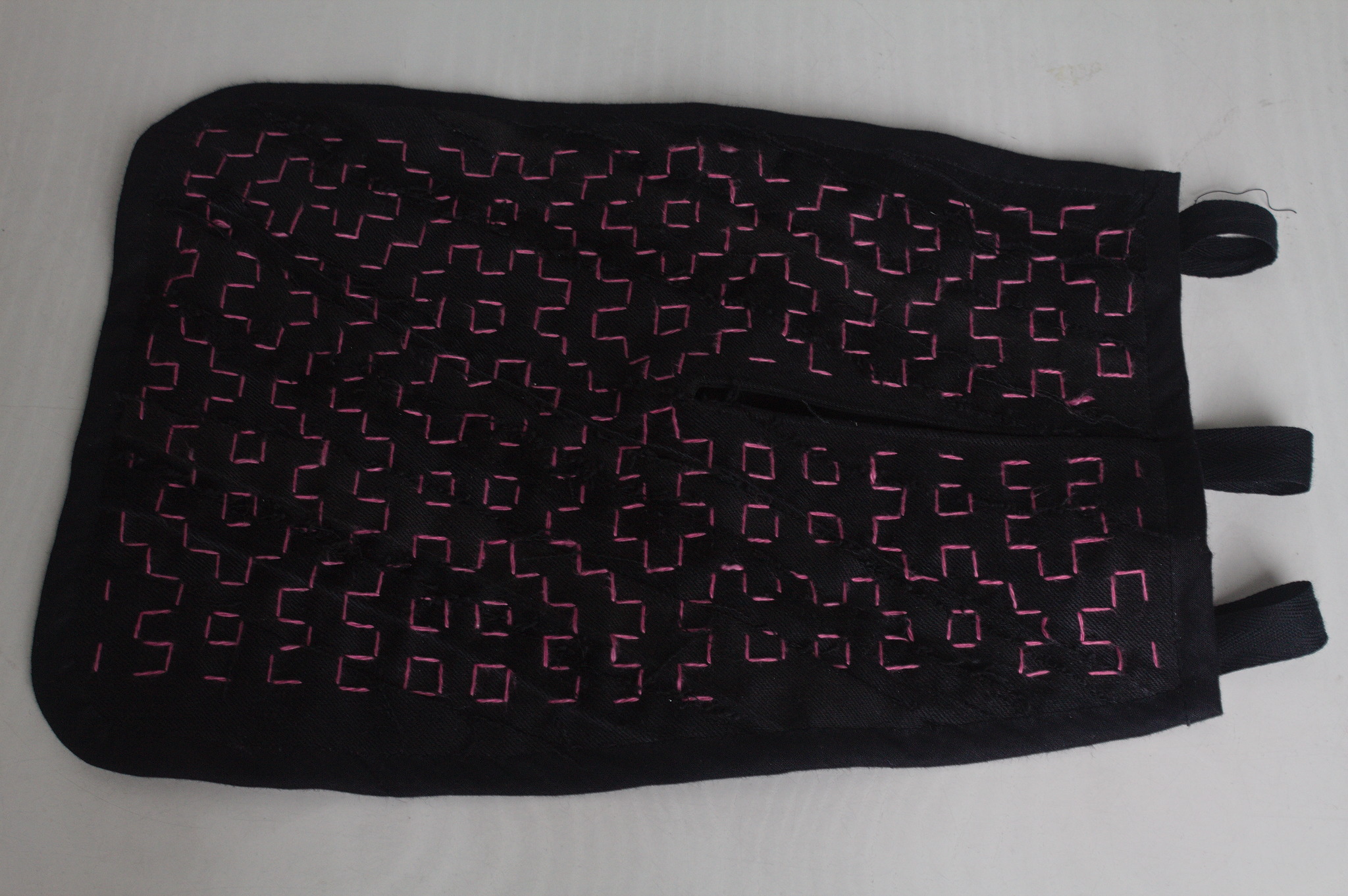
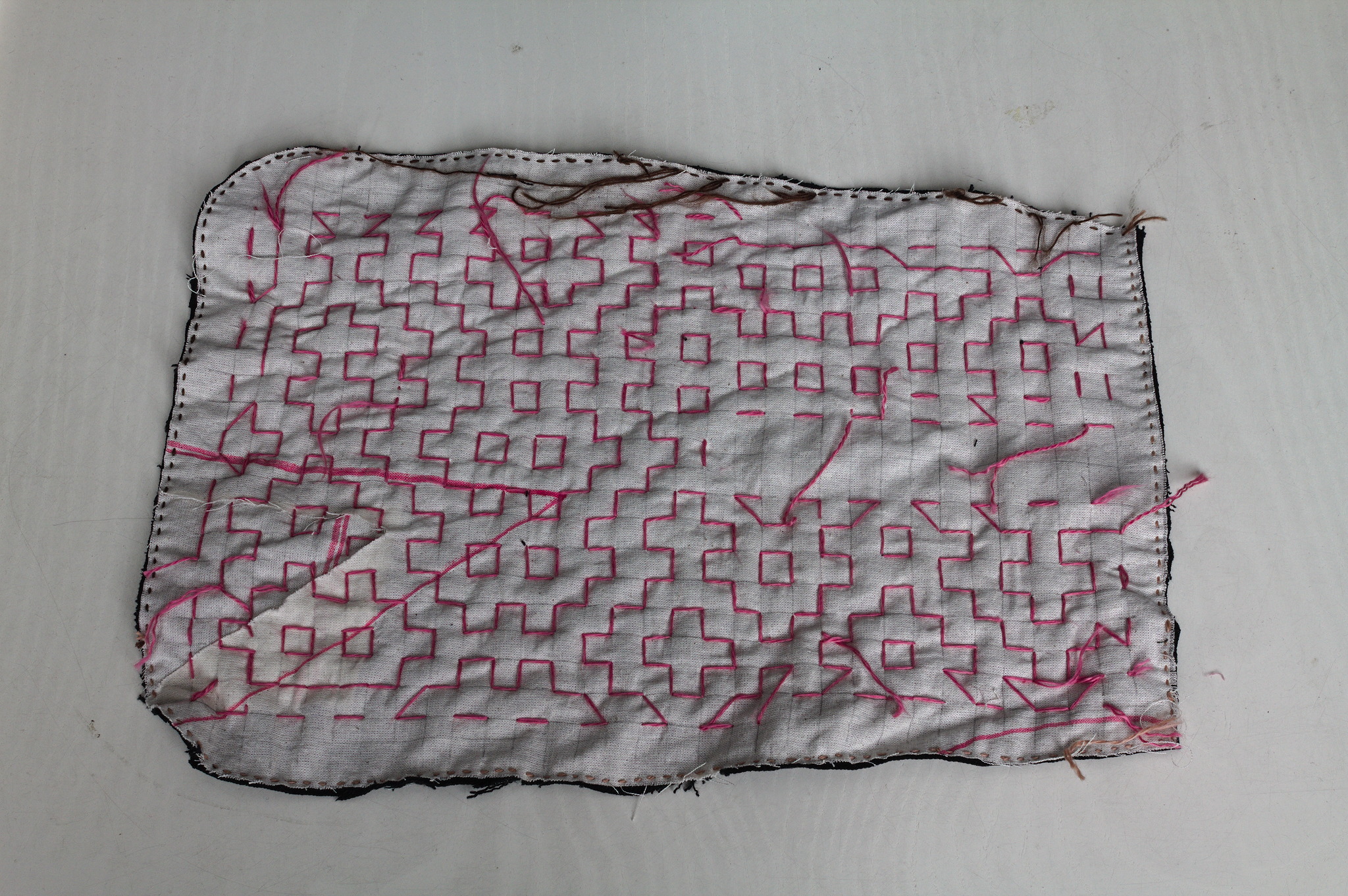
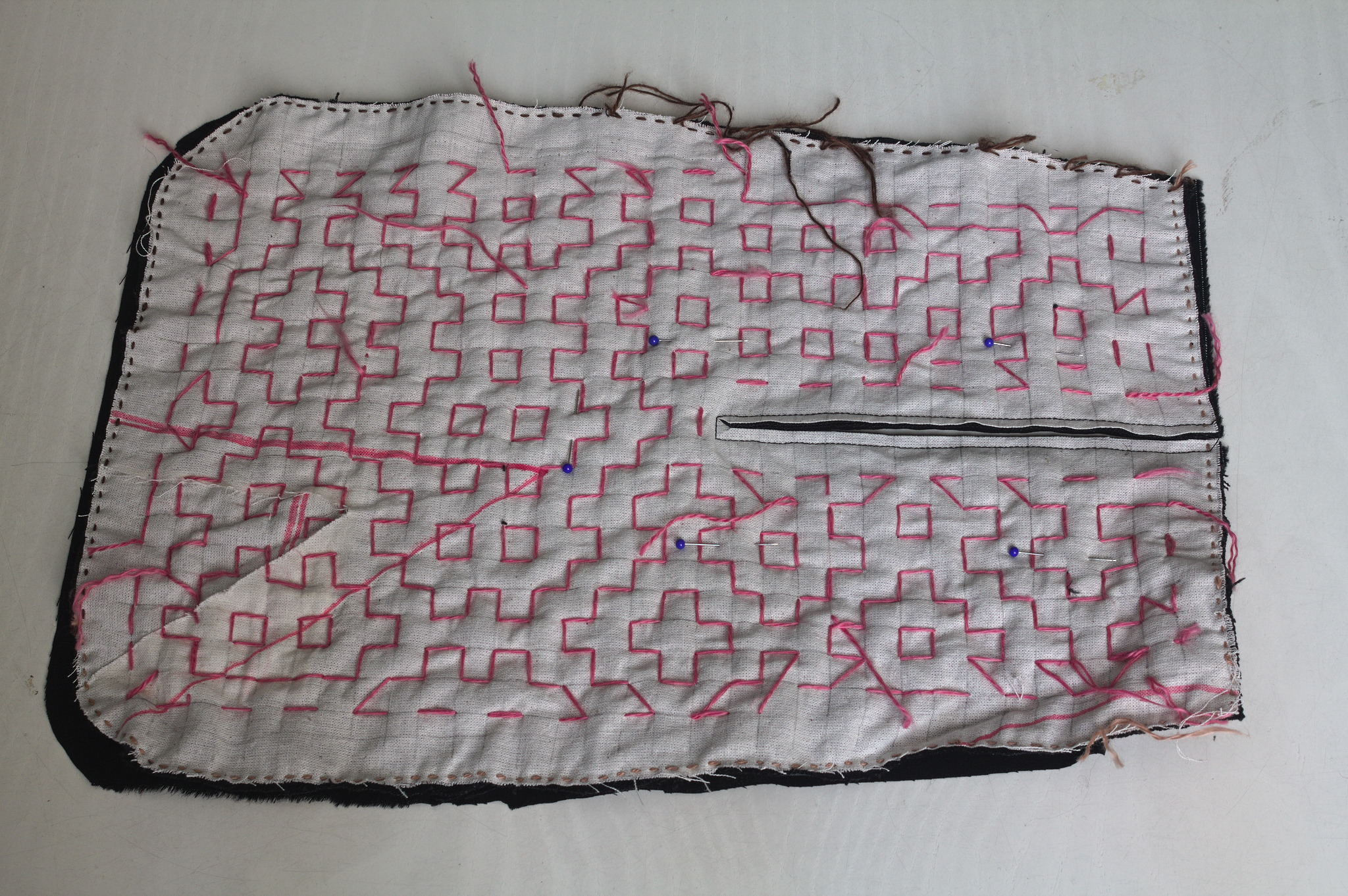
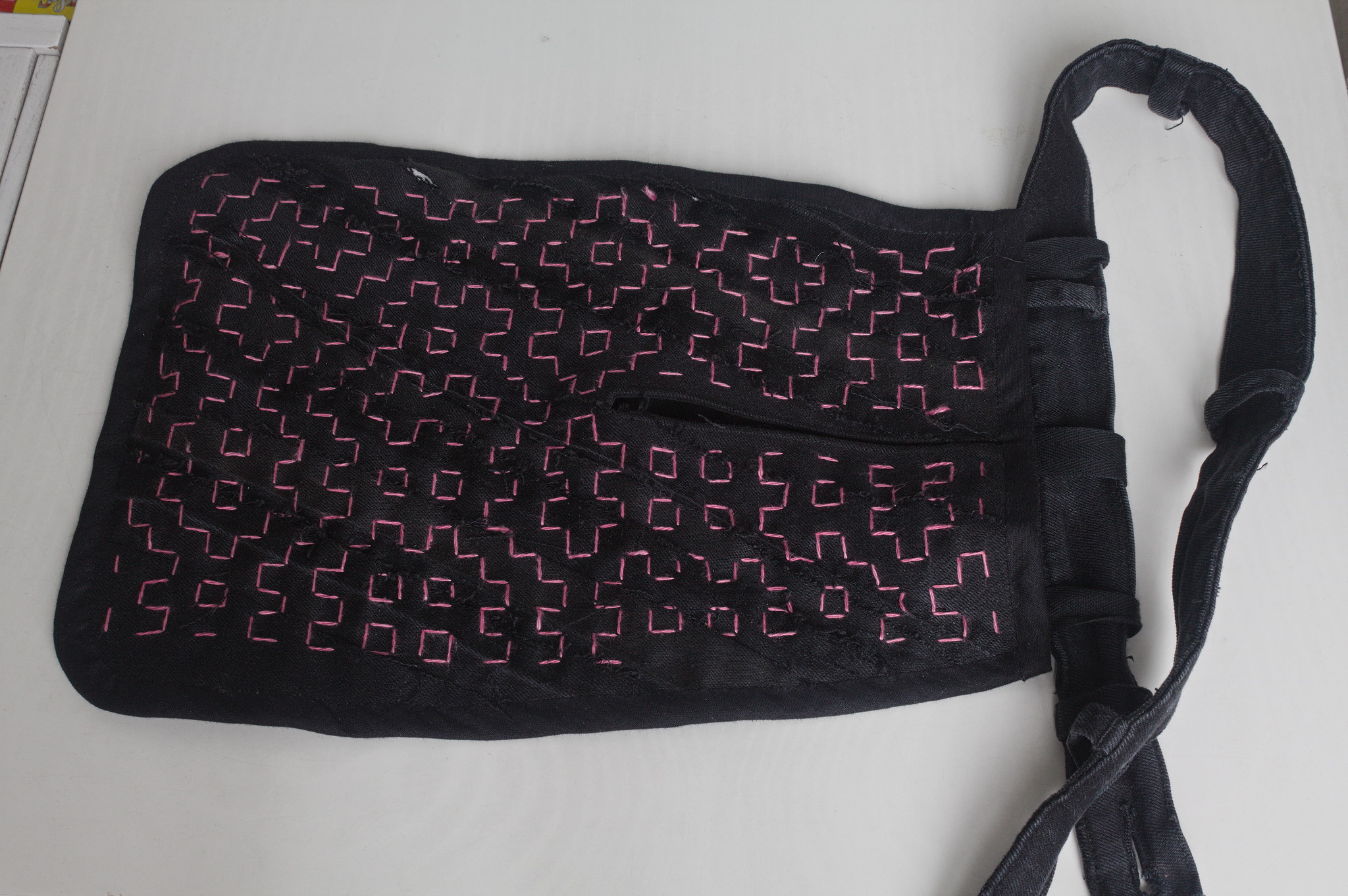
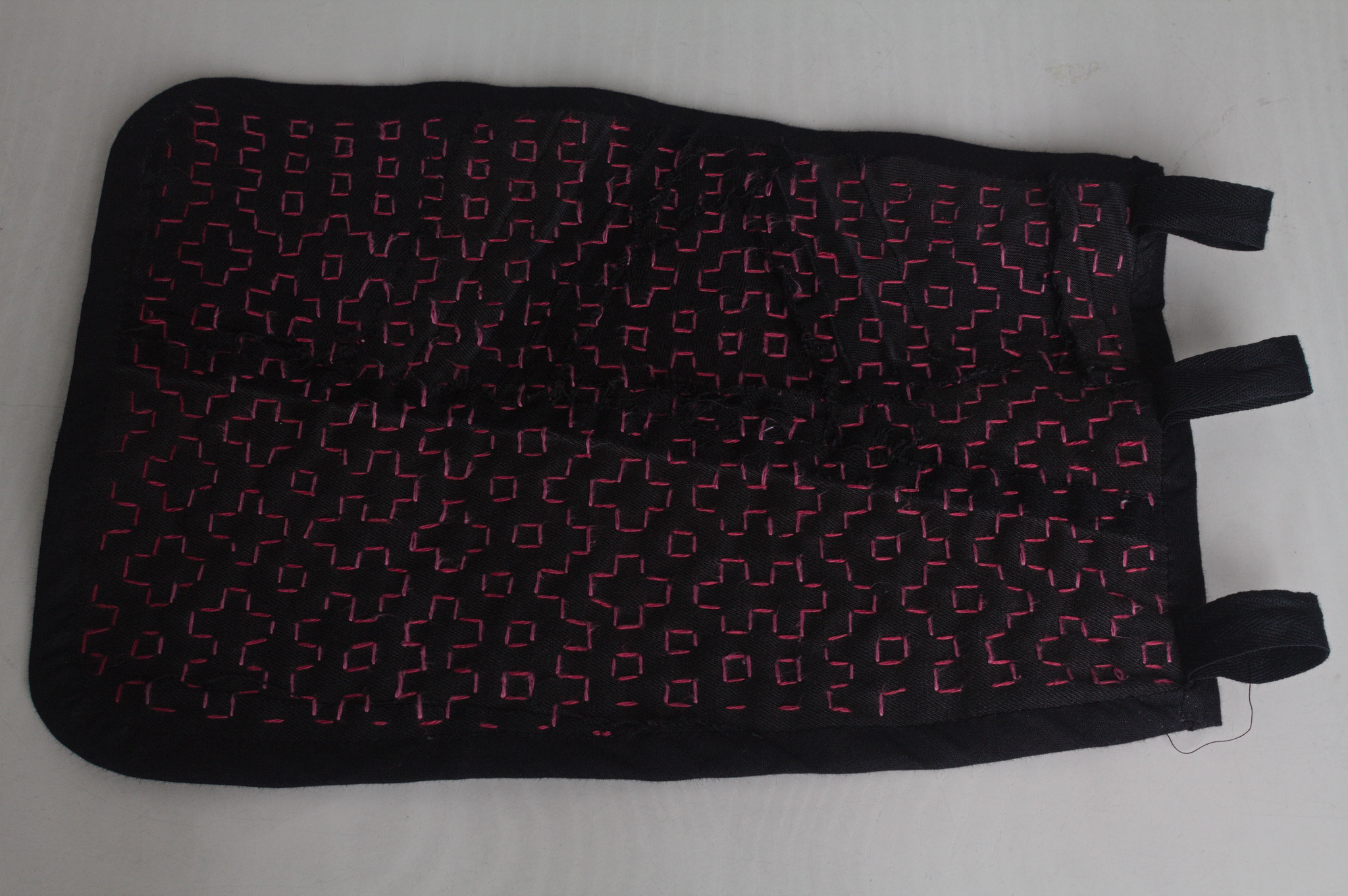
A 18th century pocket in black jeans with a random pattern of pink running stitches forming squares and other shapes. The unfinished edges of the pieces of jeans can be seen, running more or less diagonally. Lately I ve seen people on the internet talking about victorian crazy quilting. Years ago I had watched a Numberphile video about Hitomezashi Stitch Patterns based on numbers, words or randomness. Few weeks ago I had cut some fabric piece out of an old pair of jeans and I had a lot of scraps that were too small to do anything useful on their own. It easy to see where this can go, right? The wrong side of a pocket piece, showing a light coloured fabric with a grid drawn in pencil, a line of small stitches all around the edges and a mess of thread ends left hanging. I cut a pocket shape out of old garment mockups (this required some piecing), drew a square grid, arranged scraps of jeans to cover the other side, kept everything together with a lot of pins, carefully avoided basting anything, and started covering everything in sashiko / hitomezashi stitches, starting each line with a stitch on the front or the back of the work based on the result of:
import random
random.choice(["front", "back"])
The wrong side of the other pocket piece, with just three lines of stitching and a piece of paper to mark the pattern. There are bits of jeans peeking out of the sides. For the second piece I tried to use a piece of paper with the square grid instead of drawing it on the fabric: it worked, mostly, I would not do it again as removing the paper was more of a hassle than drawing the lines in the first place. I suspected it, but had to try it anyway. The front of the pocket seen from the wrong side, with a machine seam around the lit, whose end has been cut in a triangle so that it can be turned. Then I added a lining from some plain black cotton from the stash; for the slit I put the lining on the front right sides together, sewn at 2 mm from the marked slit, cut it, turned the lining to the back side, pressed and then topstitched as close as possible to the slit from the front. The finished pocket attached to a belt made from the waistband of a pair of jeans (with button, buttonhole and belt loops still attached) whose raw edges (left when unpicking away the jeans) have been sewn shut by hand. I bound everything with bias tape, adding herringbone tape loops at the top to hang it from a belt (such as one made from the waistband of one of the donor pair of jeans) and that was it. The back of the pocket, showing another random pattern in two different shades of pink for the vertical and horizontal lines of stitching. I like the way the result feels; maybe it s a bit too stiff for a pocket, but I can see it work very well for a bigger bag, and maybe even a jacket or some other outer garment.

4 January 2024

Michael Ablassmeier: Migrating a system to Hetzner cloud using REAR and kexec

I needed to migrate an existing system to an Hetzner cloud VPS. While it is possible to attach KVM consoles and custom ISO images to dedicated servers, i didn t find any way to do so with regular cloud instances. For system migrations i usually use REAR, which has never failed me. (and also has saved my ass during recovery multiple times). It s an awesome utility! It s possible to do this using the Hetzner recovery console too, but using REAR is very convenient here, because it handles things like re-creating the partition layout and network settings automatically! The steps are:

Example To create a rescue image on the source system:
apt install rear
echo OUTPUT=ISO > /etc/rear/local.conf
rear mkrescue -v
[..]
Wrote ISO image: /var/lib/rear/output/rear-debian12.iso (185M)
My source system had a 128 GB disk, so i registered an instance on Hetzner cloud with greater disk size to make things easier: image Now copy the ISO image to the newly created instance and extract its data:
 apt install kexec-tools
 scp rear-debian12.iso root@49.13.193.226:/tmp/
 modprobe loop
 mount -o loop rear-debian12.iso /mnt/
 cp /mnt/isolinux/kernel /tmp/
 cp /mnt/isolinux/initrd.cgz /tmp/
Install kexec if not installed already:
 apt install kexec-tools
Note down the current gateway configuration, this is required later on to make the REAR recovery console reachable via SSH:
root@testme:~# ip route
default via 172.31.1.1 dev eth0
172.31.1.1 dev eth0 scope link
Reboot the running VPS instance into the REAR recovery image using somewhat the same kernel cmdline:
root@testme:~# cat /proc/cmdline
BOOT_IMAGE=/boot/vmlinuz-6.1.0-13-amd64 root=UUID=5174a81e-5897-47ca-8fe4-9cd19dc678c4 ro consoleblank=0 systemd.show_status=true console=tty1 console=ttyS0
kexec --initrd /tmp/initrd.cgz --command-line="consoleblank=0 systemd.show_status=true console=tty1 console=ttyS0" /tmp/kernel
Connection to 49.13.193.226 closed by remote host.
Connection to 49.13.193.226 closed
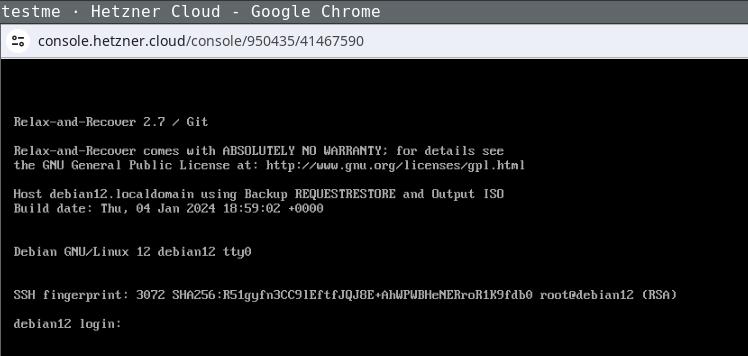
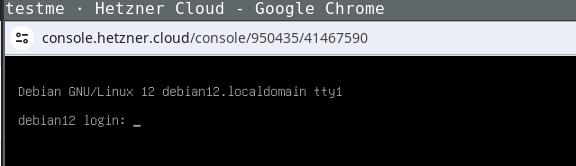
Now watch the system on the Console booting into the REAR system: image Login the recovery console (root without password) and fix its default route to make it reachable:
ip addr
[..]
2: enp1s0
..
$ ip route add 172.31.1.1 dev enp1s0
$ ip route add default via 172.31.1.1
ping 49.13.193.226
64 bytes from 49.13.193.226: icmp_seq=83 ttl=52 time=27.7 ms
The network configuration might differ, the source system in this example used DHCP, as the target does. If REAR detects changed static network configuration it guides you through the setup pretty nicely. Login via SSH (REAR will store your ssh public keys in the image) and start the recovery process, follow the steps as suggested by REAR:
ssh -l root 49.13.193.226
Welcome to Relax-and-Recover. Run "rear recover" to restore your system !
RESCUE debian12:~ # rear recover
Relax-and-Recover 2.7 / Git
Running rear recover (PID 673 date 2024-01-04 19:20:22)
Using log file: /var/log/rear/rear-debian12.log
Running workflow recover within the ReaR rescue/recovery system
Will do driver migration (recreating initramfs/initrd)
Comparing disks
Device vda does not exist (manual configuration needed)
Switching to manual disk layout configuration (GiB sizes rounded down to integer)
/dev/vda had size 137438953472 (128 GiB) but it does no longer exist
/dev/sda was not used on the original system and has now 163842097152 (152 GiB)
Original disk /dev/vda does not exist (with same size) in the target system
Using /dev/sda (the only available of the disks) for recreating /dev/vda
Current disk mapping table (source => target):
  /dev/vda => /dev/sda
Confirm or edit the disk mapping
1) Confirm disk mapping and continue 'rear recover'
[..]
User confirmed recreated disk layout
[..]
This step re-recreates your original disk layout and mounts it to /mnt/local/ (this example uses a pretty lame layout, but usually REAR will handle things like lvm/btrfs just nicely):
mount
/dev/sda3 on /mnt/local type ext4 (rw,relatime,errors=remount-ro)
/dev/sda1 on /mnt/local/boot type ext4 (rw,relatime)
Now clone your source systems data to /mnt/local/ with whatever utility you like to use and exit the recovery step. After confirming everything went well, REAR will setup the bootloader (and all other config details like fstab entries and adjusted network configuration) for you as required:
rear> exit
Did you restore the backup to /mnt/local ? Are you ready to continue recovery ? yes
User confirmed restored files
Updated initramfs with new drivers for this system.
Skip installing GRUB Legacy boot loader because GRUB 2 is installed (grub-probe or grub2-probe exist).
Installing GRUB2 boot loader...
Determining where to install GRUB2 (no GRUB2_INSTALL_DEVICES specified)
Found possible boot disk /dev/sda - installing GRUB2 there
Finished 'recover'. The target system is mounted at '/mnt/local'.
Exiting rear recover (PID 7103) and its descendant processes ...
Running exit tasks
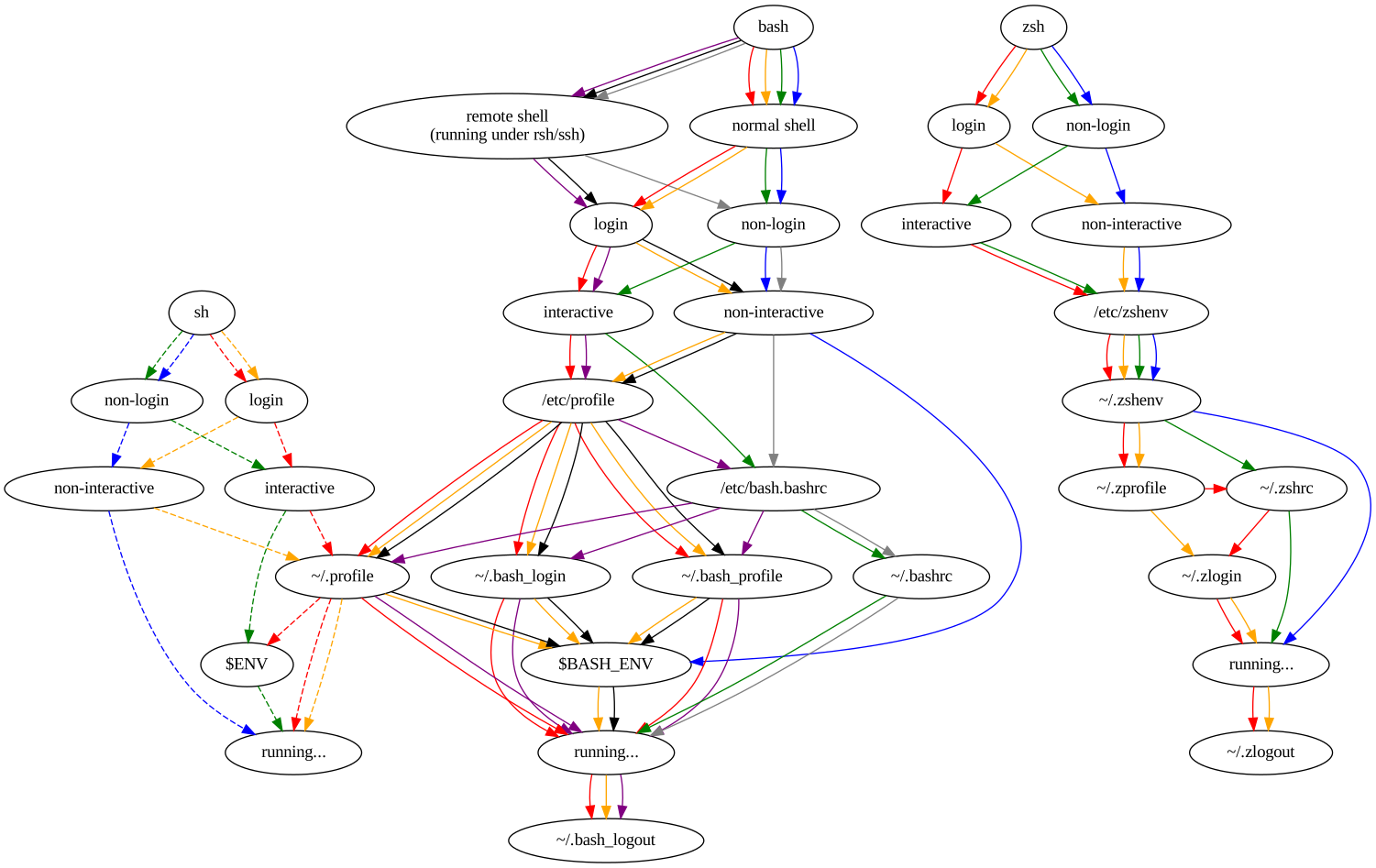
Now reboot the recovery console and watch it boot into your target systems configuration: image Being able to use this procedure for complete disaster recovery within Hetzner cloud VPS (using off-site backups) gives me a better feeling, too.
3 January 2024

John Goerzen: Live Migrating from Raspberry Pi OS bullseye to Debian bookworm

I ve been getting annoyed with Raspberry Pi OS (Raspbian) for years now. It s a fork of Debian, but manages to omit some of the most useful things. So I ve decided to migrate all of my Pis to run pure Debian. These are my reasons:
  1. Raspberry Pi OS has, for years now, specified that there is no upgrade path. That is, to get to a newer major release, it s a reinstall. While I have sometimes worked around this, for a device that is frequently installed in hard-to-reach locations, this is even more important than usual. It s common for me to upgrade machines for a decade or more across Debian releases and there s no reason that it should be so much more difficult with Raspbian.
  2. As I noted in Consider Security First, the security situation for Raspberry Pi OS isn t as good as it is with Debian.
  3. Raspbian lags behind Debian often times by 6 months or more for major releases, and days or weeks for bug fixes and security patches.
  4. Raspbian has no direct backports support, though Raspberry Pi 3 and above can use Debian s backports (per my instructions as Installing Debian Backports on Raspberry Pi)
  5. Raspbian uses a custom kernel without initramfs support
It turns out it is actually possible to do an in-place migration from Raspberry Pi OS bullseye to Debian bookworm. Here I will describe how. Even if you don t have a Raspberry Pi, this might still be instructive on how Raspbian and Debian packages work.

WARNINGS Before continuing, back up your system. This process isn t for the neophyte and it is entirely possible to mess up your boot device to the point that you have to do a fresh install to get your Pi to boot. This isn t a supported process at all.

Architecture Confusion Debian has three ARM-based architectures:
  • armel, for the lowest-end 32-bit ARM devices without hardware floating point support
  • armhf, for the higher-end 32-bit ARM devices with hardware float (hence hf )
  • arm64, for 64-bit ARM devices (which all have hardware float)
Although the Raspberry Pi 0 and 1 do support hardware float, they lack support for other CPU features that Debian s armhf architecture assumes. Therefore, the Raspberry Pi 0 and 1 could only run Debian s armel architecture. Raspberry Pi 3 and above are capable of running 64-bit, and can run both armhf and arm64. Prior to the release of the Raspberry Pi 5 / Raspbian bookworm, Raspbian only shipped the armhf architecture. Well, it was an architecture they called armhf, but it was different from Debian s armhf in that everything was recompiled to work with the more limited set of features on the earlier Raspberry Pi boards. It was really somewhere between Debian s armel and armhf archs. You could run Debian armel on those, but it would run more slowly, due to doing floating point calculations without hardware support. Debian s raspi FAQ goes into this a bit. What I am going to describe here is going from Raspbian armhf to Debian armhf with a 64-bit kernel. Therefore, it will only work with Raspberry Pi 3 and above. It may theoretically be possible to take a Raspberry Pi 2 to Debian armhf with a 32-bit kernel, but I haven t tried this and it may be more difficult. I have seen conflicting information on whether armhf really works on a Pi 2. (If you do try it on a Pi 2, ignore everything about arm64 and 64-bit kernels below, and just go with the linux-image-armmp-lpae kernel per the ARMMP page) There is another wrinkle: Debian doesn t support running 32-bit ARM kernels on 64-bit ARM CPUs, though it does support running a 32-bit userland on them. So we will wind up with a system with kernel packages from arm64 and everything else from armhf. This is a perfectly valid configuration as the arm64 like x86_64 is multiarch (that is, the CPU can natively execute both the 32-bit and 64-bit instructions). (It is theoretically possible to crossgrade a system from 32-bit to 64-bit userland, but that felt like a rather heavy lift for dubious benefit on a Pi; nevertheless, if you want to make this process even more complicated, refer to the CrossGrading page.)

Prerequisites and Limitations In addition to the need for a Raspberry Pi 3 or above in order for this to work, there are a few other things to mention. If you are using the GPIO features of the Pi, I don t know if those work with Debian. I think Raspberry Pi OS modified the desktop environment more than other components. All of my Pis are headless, so I don t know if this process will work if you use a desktop environment. I am assuming you are booting from a MicroSD card as is typical in the Raspberry Pi world. The Pi s firmware looks for a FAT partition (MBR type 0x0c) and looks within it for boot information. Depending on how long ago you first installed an OS on your Pi, your /boot may be too small for Debian. Use df -h /boot to see how big it is. I recommend 200MB at minimum. If your /boot is smaller than that, stop now (or use some other system to shrink your root filesystem and rearrange your partitions; I ve done this, but it s outside the scope of this article.) You need to have stable power. Once you begin this process, your pi will mostly be left in a non-bootable state until you finish. (You did make a backup, right?)

Basic idea The basic idea here is that since bookworm has almost entirely newer packages then bullseye, we can just switch over to it and let the Debian packages replace the Raspbian ones as they are upgraded. Well, it s not quite that easy, but that s the main idea.

Preparation First, make a backup. Even an image of your MicroSD card might be nice. OK, I think I ve said that enough now. It would be a good idea to have a HDMI cable (with the appropriate size of connector for your particular Pi board) and a HDMI display handy so you can troubleshoot any bootup issues with a console.

Preparation: access The Raspberry Pi OS by default sets up a user named pi that can use sudo to gain root without a password. I think this is an insecure practice, but assuming you haven t changed it, you will need to ensure it still works once you move to Debian. Raspberry Pi OS had a patch in their sudo package to enable it, and that will be removed when Debian s sudo package is installed. So, put this in /etc/sudoers.d/010_picompat:
pi ALL=(ALL) NOPASSWD: ALL
Also, there may be no password set for the root account. It would be a good idea to set one; it makes it easier to log in at the console. Use the passwd command as root to do so.

Preparation: bluetooth Debian doesn t correctly identify the Bluetooth hardware address. You can save it off to a file by running hcitool dev > /root/bluetooth-from-raspbian.txt. I don t use Bluetooth, but this should let you develop a script to bring it up properly.

Preparation: Debian archive keyring You will next need to install Debian s archive keyring so that apt can authenticate packages from Debian. Go to the bookworm download page for debian-archive-keyring and copy the URL for one of the files, then download it on the pi. For instance:
wget http://http.us.debian.org/debian/pool/main/d/debian-archive-keyring/debian-archive-keyring_2023.3+deb12u1_all.deb
Use sha256sum to verify the checksum of the downloaded file, comparing it to the package page on the Debian site. Now, you ll install it with:
dpkg -i debian-archive-keyring_2023.3+deb12u1_all.deb

Package first steps From here on, we are making modifications to the system that can leave it in a non-bootable state. Examine /etc/apt/sources.list and all the files in /etc/apt/sources.list.d. Most likely you will want to delete or comment out all lines in all files there. Replace them with something like:
deb http://deb.debian.org/debian/ bookworm main non-free-firmware contrib non-free
deb http://security.debian.org/debian-security bookworm-security main non-free-firmware contrib non-free
deb https://deb.debian.org/debian bookworm-backports main non-free-firmware contrib non-free
(you might leave off contrib and non-free depending on your needs) Now, we re going to tell it that we ll support arm64 packages:
dpkg --add-architecture arm64
And finally, download the bookworm package lists:
apt-get update
If there are any errors from that command, fix them and don t proceed until you have a clean run of apt-get update.

Moving /boot to /boot/firmware The boot FAT partition I mentioned above is mounted at /boot by Raspberry Pi OS, but Debian s scripts assume it will be at /boot/firmware. We need to fix this. First:
umount /boot
mkdir /boot/firmware
Now, edit fstab and change the reference to /boot to be to /boot/firmware. Now:
mount -v /boot/firmware
cd /boot/firmware
mv -vi * ..
This mounts the filesystem at the new location, and moves all its contents back to where apt believes it should be. Debian s packages will populate /boot/firmware later.

Installing the first packages Now we start by installing the first of the needed packages. Eventually we will wind up with roughly the same set Debian uses.
apt-get install linux-image-arm64
apt-get install firmware-brcm80211=20230210-5
apt-get install raspi-firmware
If you get errors relating to firmware-brcm80211 from any commands, run that install firmware-brcm80211 command and then proceed. There are a few packages that Raspbian marked as newer than the version in bookworm (whether or not they really are), and that s one of them.

Configuring the bootloader We need to configure a few things in /etc/default/raspi-firmware before proceeding. Edit that file. First, uncomment (or add) a line like this:
KERNEL_ARCH="arm64"
Next, in /boot/cmdline.txt you can find your old Raspbian boot command line. It will say something like:
root=PARTUUID=...
Save off the bit starting with PARTUUID. Back in /etc/default/raspi-firmware, set a line like this:
ROOTPART=PARTUUID=abcdef00
(substituting your real value for abcdef00). This is necessary because the microSD card device name often changes from /dev/mmcblk0 to /dev/mmcblk1 when switching to Debian s kernel. raspi-firmware will encode the current device name in /boot/firmware/cmdline.txt by default, which will be wrong once you boot into Debian s kernel. The PARTUUID approach lets it work regardless of the device name.

Purging the Raspbian kernel Run:
dpkg --purge raspberrypi-kernel

Upgrading the system At this point, we are going to run the procedure beginning at section 4.4.3 of the Debian release notes. Generally, you will do:
apt-get -u upgrade
apt full-upgrade
Fix any errors at each step before proceeding to the next. Now, to remove some cruft, run:
apt-get --purge autoremove
Inspect the list to make sure nothing important isn t going to be removed.

Removing Raspbian cruft You can list some of the cruft with:
apt list '~o'
And remove it with:
apt purge '~o'
I also don t run Bluetooth, and it seemed to sometimes hang on boot becuase I didn t bother to fix it, so I did:
apt-get --purge remove bluez

Installing some packages This makes sure some basic Debian infrastructure is available:
apt-get install wpasupplicant parted dosfstools wireless-tools iw alsa-tools
apt-get --purge autoremove

Installing firmware Now run:
apt-get install firmware-linux

Resolving firmware package version issues If it gives an error about the installed version of a package, you may need to force it to the bookworm version. For me, this often happened with firmware-atheros, firmware-libertas, and firmware-realtek. Here s how to resolve it, with firmware-realtek as an example:
  1. Go to https://packages.debian.org/PACKAGENAME for instance, https://packages.debian.org/firmware-realtek. Note the version number in bookworm in this case, 20230210-5.
  2. Now, you will force the installation of that package at that version:
    apt-get install firmware-realtek=20230210-5
    
  3. Repeat with every conflicting package until done.
  4. Rerun apt-get install firmware-linux and make sure it runs cleanly.
Also, in the end you should be able to:
apt-get install firmware-atheros firmware-libertas firmware-realtek firmware-linux

Dealing with other Raspbian packages The Debian release notes discuss removing non-Debian packages. There will still be a few of those. Run:
apt list '?narrow(?installed, ?not(?origin(Debian)))'
Deal with them; mostly you will need to force the installation of a bookworm version using the procedure in the section Resolving firmware package version issues above (even if it s not for a firmware package). For non-firmware packages, you might possibly want to add --mark-auto to your apt-get install command line to allow the package to be autoremoved later if the things depending on it go away. If you aren t going to use Bluetooth, I recommend apt-get --purge remove bluez as well. Sometimes it can hang at boot if you don t fix it up as described above.

Set up networking We ll be switching to the Debian method of networking, so we ll create some files in /etc/network/interfaces.d. First, eth0 should look like this:
allow-hotplug eth0
iface eth0 inet dhcp
iface eth0 inet6 auto
And wlan0 should look like this:
allow-hotplug wlan0
iface wlan0 inet dhcp
    wpa-conf /etc/wpa_supplicant/wpa_supplicant.conf
Raspbian is inconsistent about using eth0/wlan0 or renamed interface. Run ifconfig or ip addr. If you see a long-named interface such as enx<something> or wlp<something>, copy the eth0 file to the one named after the enx interface, or the wlan0 file to the one named after the wlp interface, and edit the internal references to eth0/wlan0 in this new file to name the long interface name. If using wifi, verify that your SSIDs and passwords are in /etc/wpa_supplicant/wpa_supplicant.conf. It should have lines like:
network= 
   ssid="NetworkName"
   psk="passwordHere"
 
(This is where Raspberry Pi OS put them).

Deal with DHCP Raspberry Pi OS used dhcpcd, whereas bookworm normally uses isc-dhcp-client. Verify the system is in the correct state:
apt-get install isc-dhcp-client
apt-get --purge remove dhcpcd dhcpcd-base dhcpcd5 dhcpcd-dbus

Set up LEDs To set up the LEDs to trigger on MicroSD activity as they did with Raspbian, follow the Debian instructions. Run apt-get install sysfsutils. Then put this in a file at /etc/sysfs.d/local-raspi-leds.conf:
class/leds/ACT/brightness = 1
class/leds/ACT/trigger = mmc1

Prepare for boot To make sure all the /boot/firmware files are updated, run update-initramfs -u. Verify that root in /boot/firmware/cmdline.txt references the PARTUUID as appropriate. Verify that /boot/firmware/config.txt contains the lines arm_64bit=1 and upstream_kernel=1. If not, go back to the section on modifying /etc/default/raspi-firmware and fix it up.

The moment arrives Cross your fingers and try rebooting into your Debian system:
reboot
For some reason, I found that the first boot into Debian seems to hang for 30-60 seconds during bootstrap. I m not sure why; don t panic if that happens. It may be necessary to power cycle the Pi for this boot.

Troubleshooting If things don t work out, hook up the Pi to a HDMI display and see what s up. If I anticipated a particular problem, I would have documented it here (a lot of the things I documented here are because I ran into them!) So I can t give specific advice other than to watch boot messages on the console. If you don t even get kernel messages going, then there is some problem with your partition table or /boot/firmware FAT partition. Otherwise, you ve at least got the kernel going and can troubleshoot like usual from there.

John Goerzen: Consider Security First

I write this in the context of my decision to ditch Raspberry Pi OS and move everything I possibly can, including my Raspberry Pi devices, to Debian. I will write about that later. But for now, I wanted to comment on something I think is often overlooked and misunderstood by people considering distributions or operating systems: the huge importance of getting security updates in an automated and easy way.

Background Let s assume that these statements are true, which I think are well-supported by available evidence:
  1. Every computer system (OS plus applications) that can do useful modern work has security vulnerabilities, some of which are unknown at any given point in time;
  2. During the lifetime of that computer system, some of these vulnerabilities will be discovered. For a (hopefully large) subset of those vulnerabilities, timely patches will become available.
Now then, it follows that applying those timely patches is a critical part of having a system that it as secure as possible. Of course, you have to do other things as well good passwords, secure practices, etc but, fundamentally, if your system lacks patches for known vulnerabilities, you ve already lost at the security ballgame.

How to stay patched There is something of a continuum of how you might patch your system. It runs roughly like this, from best to worst:
  1. All components are kept up-to-date automatically, with no intervention from the user/operator
  2. The operator is automatically alerted to necessary patches, and they can be easily installed with minimal intervention
  3. The operator is automatically alerted to necessary patches, but they require significant effort to apply
  4. The operator has no way to detect vulnerabilities or necessary patches
It should be obvious that the first situation is ideal. Every other situation relies on the timeliness of human action to keep up-to-date with security patches. This is a fallible situation; humans are busy, take trips, dismiss alerts, miss alerts, etc. That said, it is rare to find any system living truly all the way in that scenario, as you ll see.

What is your system ? A critical point here is: what is your system ? It includes:
  • Your kernel
  • Your base operating system
  • Your applications
  • All the libraries needed to run all of the above
Some OSs, such as Debian, make little or no distinction between the base OS and the applications. Others, such as many BSDs, have a distinction there. And in some cases, people will compile or install applications outside of any OS mechanism. (It must be stressed that by doing so, you are taking the responsibility of patching them on your own shoulders.)

How do common systems stack up?
  • Debian, with its support for unattended-upgrades, needrestart, debian-security-support, and such, is largely category 1. It can automatically apply security patches, in most cases can restart the necessary services for the patch to take effect, and will alert you when some processes or the system must be manually restarted for a patch to take effect (for instance, a kernel update). Those cases requiring manual intervention are category 2. The debian-security-support package will even warn you of gaps in the system. You can also use debsecan to scan for known vulnerabilities on a given installation.
  • FreeBSD has no way to automatically install security patches for things in the packages collection. As with many rolling-release systems, you can t automate the installation of these security patches with FreeBSD because it is not safe to blindly update packages. It s not safe to blindly update packages because they may bring along more than just security patches: they may represent major upgrades that introduce incompatibilities, etc. Unlike Debian s practice of backporting fixes and thus producing narrowly-tailored patches, forcing upgrades to newer versions precludes a minimal intervention install. Therefore, rolling release systems are category 3.
  • Things such as Snap, Flatpak, AppImage, Docker containers, Electron apps, and third-party binaries often contain embedded libraries and such for which you have no easy visibility into their status. For instance, if there was a bug in libpng, would you know how many of your containers had a vulnerability? These systems are category 4 you don t even know if you re vulnerable. It s for this reason that my Debian-based Docker containers apply security patches before starting processes, and also run unattended-upgrades and friends.

The pernicious library problem As mentioned in my last category above, hidden vulnerabilities can be a big problem. I ve been writing about this for years. Back in 2017, I wrote an article focused on Docker containers, but which applies to the other systems like Snap and so forth. I cited a study back then that Over 80% of the :latest versions of official images contained at least one high severity vulnerability. The situation is no better now. In December 2023, it was reported that, two years after the critical Log4Shell vulnerability, 25% of apps were still vulnerable to it. Also, only 21% of developers ever update third-party libraries after introducing them into their projects. Clearly, you can t rely on these images with embedded libraries to be secure. And since they are black box, they are difficult to audit. Debian s policy of always splitting libraries out from packages is hugely beneficial; it allows finegrained analysis of not just vulnerabilities, but also the dependency graph. If there s a vulnerability in libpng, you have one place to patch it and you also know exactly what components of your system use it. If you use snaps, or AppImages, you can t know if they contain a deeply embedded vulnerability, nor could you patch it yourself if you even knew. You are at the mercy of upstream detecting and remedying the problem a dicey situation at best.

Who makes the patches? Fundamentally, humans produce security patches. Often, but not always, patches originate with the authors of a program and then are integrated into distribution packages. It should be noted that every security team has finite resources; there will always be some CVEs that aren t patched in a given system for various reasons; perhaps they are not exploitable, or are too low-impact, or have better mitigations than patches. Debian has an excellent security team; they manage the process of integrating patches into Debian, produce Debian Security Advisories, maintain the Debian Security Tracker (which maintains cross-references with the CVE database), etc. Some distributions don t have this infrastructure. For instance, I was unable to find this kind of tracker for Devuan or Raspberry Pi OS. In contrast, Ubuntu and Arch Linux both seem to have active security teams with trackers and advisories.

Implications for Raspberry Pi OS and others As I mentioned above, I m transitioning my Pi devices off Raspberry Pi OS (Raspbian). Security is one reason. Although Raspbian is a fork of Debian, and you can install packages like unattended-upgrades on it, they don t work right because they use the Debian infrastructure, and Raspbian hasn t modified them to use their own infrastructure. I don t see any Raspberry Pi OS security advisories, trackers, etc. In short, they lack the infrastructure to support those Debian tools anyhow. Not only that, but Raspbian lags behind Debian in both new releases and new security patches, sometimes by days or weeks. Live Migrating from Raspberry Pi OS bullseye to Debian bookworm contains instructions for migrating Raspberry Pis to Debian.

Jacob Adams: Fixing My Shell

For an embarassingly long time, my shell has unnecessarily tried to initialize a console font in every kind of interactive terminal. This leaves the following error message in my terminal:
Couldn't get a file descriptor referring to the console.
It even shows up twice when running tmux! Clearly I ve done something horrible to my configuration, and now I ve got to clean it up.

How does Shell Initialization Work? The precise files a shell reads at start-up is somewhat complex, and defined by this excellent chart 1: Shell Startup Flowchart For the purposes of what I m trying to fix, there are two paths that matter.
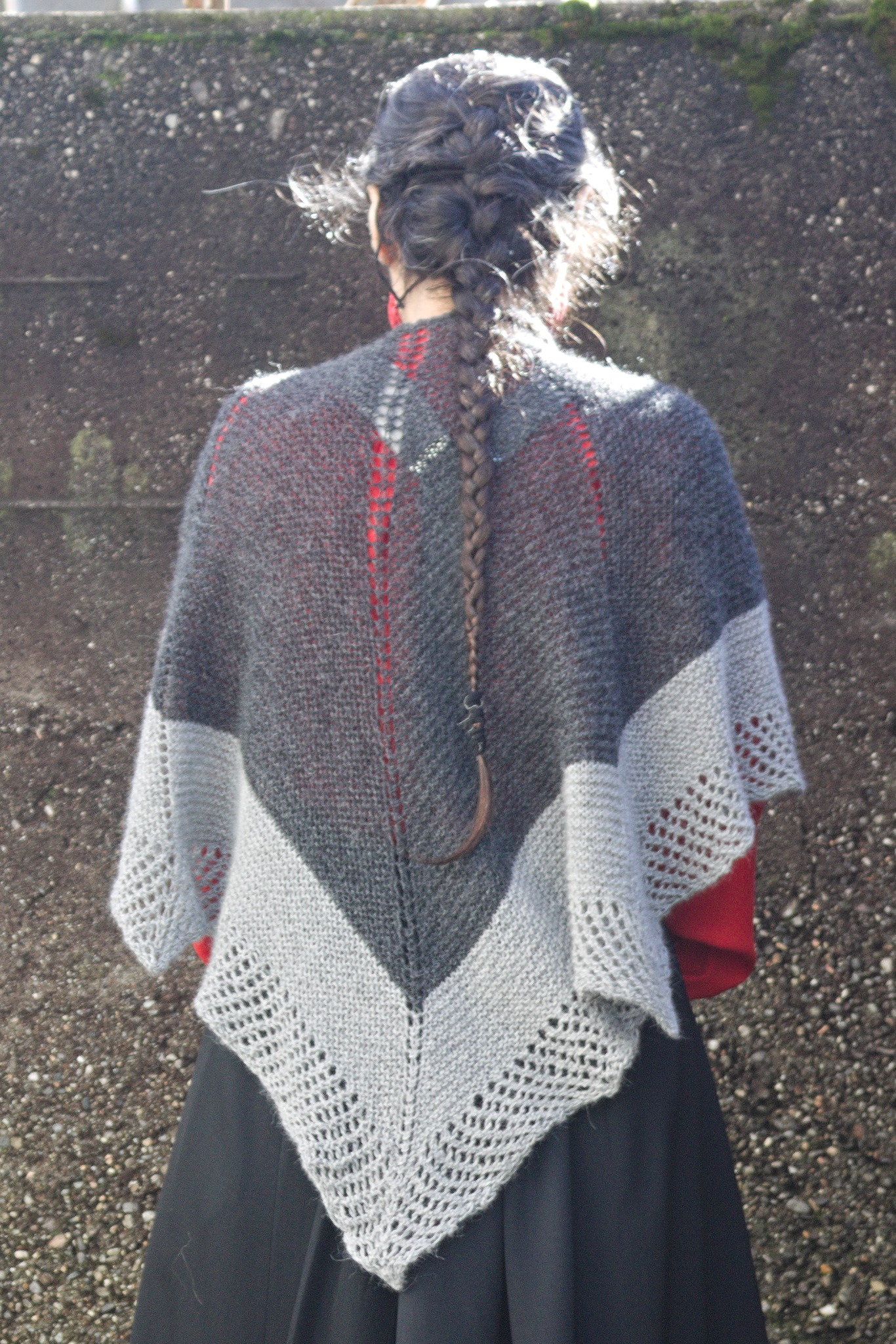
  • Interactive login shell startup
  • Interactive non-login shell startup
As you can see from the above, trying to distinguish these two paths in bash is an absolute mess. zsh, in contrast, is much cleaner and allows for a clear distinction between these two cases, with login shell configuration files as a superset of configuration files used by non-login shells.

How did we get here? I keep my configuration files in a config repository. Some time ago I got quite frustrated at this whole shell initialization thing, and just linked everything together in one profile file:
.mkshrc -> config/profile
.profile -> config/profile
This appears to have created this mess.

Move to ZSH I ve wanted to move to zsh for a while, and took this opportunity to do so. So my new configuration files are .zprofile and .zshrc instead of .mkshrc and .profile (though I m going to retain those symlinks to allow my old configurations to continue working). mksh is a nice simple shell, but using zsh here allows for more consistency between my home and $WORK environments, and will allow a lot more powerful extensions.

Updating my Prompt ZSH prompts use a totally different configuration via variable expansion. However, it also uses the PROMPT variable, so I set that to the needed values for zsh. There s an excellent ZSH prompt generator at https://zsh-prompt-generator.site that I used to get these variables, though I m sure they re in the zsh documentation somewhere as well. I wanted a simple prompt with user (%n), host (%m), and path (%d). I also wanted a % at the end to distinguish this from other shells.
PROMPT="%n@%m%d%% "

Fixing mksh prompts This worked but surprisingly mksh also looks at PROMPT, leaving my mksh prompt as the literal prompt string without expansion. Fixing this requires setting up a proper shrc and linking it to .mkshrc and .zshrc. I chose to move my existing aliases script to this file, as it also broke in non-login shells when moved to profile. Within this new shrc file we can check what shell we re running via $0:
if [ "$0" = "/bin/zsh" ]   [ "$0" = "zsh" ]   [ "$0" = "-zsh" ]
I chose to add plain zsh here in case I run it manually for whatever reason. I also added -zsh to support tmux as that s what it presents as $0. This also means you ll need to be careful to quote $0 or you ll get fun shell errors. There s probably a better way to do this, but I couldn t find something that was compatible with POSIX shell, which is what most of this has to be written in to be compatible with mksh and zsh2. We can then setup different prompts for each:
if [ "$0" = "/bin/zsh" ]   [ "$0" = "zsh" ]   [ "$0" = "-zsh" ]
then
	PROMPT="%n@%m%d%% "
else
	# Borrowed from
	# http://www.unixmantra.com/2013/05/setting-custom-prompt-in-ksh.html
	PS1='$(id -un)@$(hostname -s)$PWD$ '
fi

Setting Console Font in a Better Way I ve been setting console font via setfont in my .profile for a while. I m not sure where I picked this up, but it s not the right way. I even tried to only run this in a console with -t but that only checks that output is a terminal, not specifically a console.
if [ -t 1 ]
then
	setfont /usr/share/consolefonts/Lat15-Terminus20x10.psf.gz
fi
This also only runs once the console is logged into, instead of initializing it on boot. The correct way to set this up, on Debian-based systems, is reconfiguring console-setup like so:
dpkg-reconfigure console-setup
From there you get a menu of encoding, character set, font, and then font size to configure for your consoles.

VIM mode To enable VIM mode for ZSH, you simply need to set:
bindkeys -v
This allows you to edit your shell commands with basic VIM keybinds.

Getting back Ctrl + Left Arrow and Ctrl + Right Arrow Moving around one word at a time with Ctrl and the arrow keys is broken by vim mode unfortunately, so we ll need to re-enable it:
bindkey "^[[1;5C" forward-word
bindkey "^[[1;5D" backward-word

Why did it show up twice for tmux? Because tmux creates a login shell. Adding:
echo PROFILE
to profile and:
echo SHRC
to shrc confirms this with:
PROFILE
SHRC
SHRC
For now, profile sources shrc so that running twice is expected. But after this exploration and diagram, it s clear we don t need that for zsh. Removing this will break remote bash shells (see above diagram), but I can live without those on my development laptop. Removing that line results in the expected output for a new terminal:
SHRC
And the full output for a new tmux session or console:
PROFILE
SHRC
So finally we re back to a normal state! This post is a bit unfocused but I hope it helps someone else repair or enhance their shell environment. If you liked this4, or know of any other ways to manage this I could use, let me know at fixmyshell@tookmund.com.
  1. This chart comes from the excellent Shell Startup Scripts article by Peter Ward. I ve generated the SVG from the graphviz source linked in the article.
  2. Technically it has be compatible with Korn shell, but a quick google seems to suggest that that s actually a subset of POSIX shell.
  3. I use oh-my-zsh at $WORK but for now I m going to simplify my personal configuration. If I end up using a lot of plugins I ll reconsider this.
  4. Or if you ve found any typos or other issues that I should fix.

2 January 2024

Thomas Koch: Waiting for a STATE folder in the XDG basedir spec

Posted on February 18, 2014
The XDG Basedirectory specification proposes default homedir folders for the categories DATA (~/.local/share), CONFIG (~/.config) and CACHE (~/.cache). One category however is missing: STATE. This category has been requested several times but nothing happened. Examples for state data are: The missing STATE category is especially annoying if you re managing your dotfiles with a VCS (e.g. via VCSH) and you care to keep your homedir tidy. If you re as annoyed as me about the missing STATE category, please voice your opinion on the XDG mailing list. Of course it s a very long way until applications really use such a STATE directory. But without a common standard it will never happen.

Valhalla's Things: Crescent Shawl

Posted on January 2, 2024
Tags: madeof:atoms
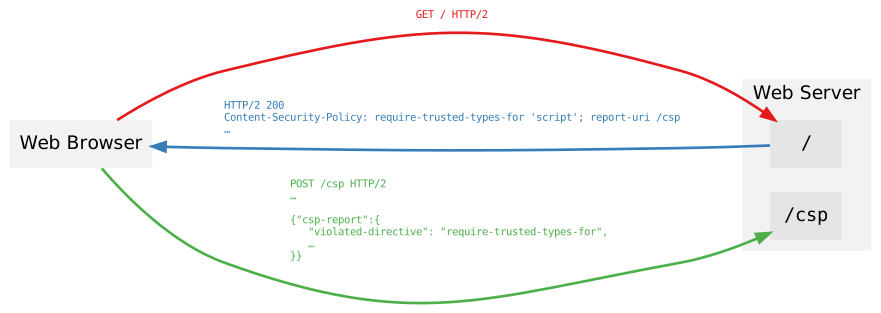
a woman wearing a shawl, seen from the back where it looks like a big dark grey triangle with a light grey border and another light grey border with a grid of holes. There is also a double line of holes in the center of the back, and two single ones towards the sides. One of the knitting projects I m working on is a big bottom-up triangular shawl in less-than-fingering weight yarn (NM 1/15): it feels like a cloud should by all rights feel, and I have good expectations out of it, but it s taking forever and a day. And then one day last spring I started thinking in the general direction of top-down shawls, and decided I couldn t wait until I had finished the first one to see if I could design one. For my first attempt I used an odd ball of 50% wool 50% plastic I had in my stash and worked it on 12 mm tree trunks, and I quickly made something between a scarf and a shawl that got some use during the summer thunderstorms when temperatures got a bit lower, but not really cold. I was happy with the shape, not with the exact position of the increases, but I had ideas for improvements, so I just had to try another time. Digging through the stash I found four balls of Drops Alpaca in two shades of grey: I had bought it with the intent to test its durability in somewhat more demanding situations (such as gloves or even socks), but then the LYS1 no longer carries it, so I might as well use it for something a bit more one-off (and when I received the yarn it felt so soft that doing something for the upper body looked like a better idea anyway). I decided to start working in garter stitch with the darker colour, then some garter stitch in the lighter shade and to finish with yo / k2t lace, to make the shawl sort of fade out. The first half was worked relatively slowly through the summer, and then when I reached the colour change I suddenly picked up working on it and it was finished in a couple of weeks. the same shawl, worn before blocking: the garter stitch part

looks denser in a nice way, but the the lace border is scrunched up.
Then I had doubts on whether I wanted to block it, since I liked the soft feel, but I decided to try it anyway: it didn t lose the feel, and the look is definitely better, even if it was my first attempt at blocking a shawl and I wasn t that good at it. the same shawl, blocked, worn and seen from the front, where it falls in wide falls from the shoulders between the arms and the body. I m glad that I did it, however, as it s still soft and warm, but now also looks nicer. The pattern is of course online as #FreeSoftWear on my fiber craft patterns website.
  1. at least local to somebody: I can t get to a proper yarn shop by foot, so I ve bought this yarn online from one that I could in theory reach on a day trip, but it has not happened yet.

1 January 2024

Russ Allbery: 2023 Book Reading in Review

In 2023, I finished and reviewed 53 books, continuing a trend of year-over-year increases and of reading the most books since 2012 (the last year I averaged five books a month). Reviewing continued to be uneven, with a significant slump in the summer and smaller slumps in February and November, and a big clump of reviews finished in October in addition to my normal year-end reading and reviewing vacation. The unevenness this year was mostly due to finishing books and not writing reviews immediately. Reviews are much harder to write when the finished books are piling up, so one goal for 2024 is to not let that happen again. I enter the new year with one book finished and not yet reviewed, after reading a book about every day and a half during my December vacation. I read two all-time favorite books this year. The first was Emily Tesh's debut novel Some Desperate Glory, which is one of the best space opera novels I have ever read. I cannot improve on Shelley Parker-Chan's blurb for this book: "Fierce and heartbreakingly humane, this book is for everyone who loved Ender's Game, but Ender's Game didn't love them back." This is not hard science fiction but it is fantastic character fiction. It was exactly what I needed in the middle of a year in which I was fighting a "burn everything down" mood. The second was Night Watch by Terry Pratchett, the 29th Discworld and 6th Watch novel. Throughout my Discworld read-through, Pratchett felt like he was on the cusp of a truly stand-out novel, one where all the pieces fit and the book becomes something more than the sum of its parts. This was that book. It's a book about ethics and revolutions and governance, but also about how your perception of yourself changes as you get older. It does all of the normal Pratchett things, just... better. While I would love to point new Discworld readers at it, I think you do have to read at least the Watch novels that came before it for it to carry its proper emotional heft. This was overall a solid year for fiction reading. I read another 15 novels I rated 8 out of 10, and 12 that I rated 7 out of 10. The largest contributor to that was my Discworld read-through, which was reliably entertaining throughout the year. The run of Discworld books between The Fifth Elephant (read late last year) and Wintersmith (my last of this year) was the best run of Discworld novels so far. One additional book I'll call out as particularly worth reading is Thud!, the Watch novel after Night Watch and another excellent entry. I read two stand-out non-fiction books this year. The first was Oliver Darkshire's delightful memoir about life as a rare book seller, Once Upon a Tome. One of the things I will miss about Twitter is the regularity with which I stumbled across fascinating people and then got to read their books. I'm off Twitter permanently now because the platform is designed to make me incoherently angry and I need less of that in my life, but it was very good at finding delightfully quirky books like this one. My other favorite non-fiction book of the year was Michael Lewis's Going Infinite, a profile of Sam Bankman-Fried. I'm still bemused at the negative reviews that this got from people who were upset that Lewis didn't turn the story into a black-and-white morality play. Bankman-Fried's actions were clearly criminal; that's not in dispute. Human motivations can be complex in ways that are irrelevant to the law, and I thought this attempt to understand that complexity by a top-notch storyteller was worthy of attention. Also worth a mention is Tony Judt's Postwar, the first book I reviewed in 2023. A sprawling history of post-World-War-II Europe will never have the sheer readability of shorter, punchier books, but this was the most informative book that I read in 2023. 2024 should see the conclusion of my Discworld read-through, after which I may return to re-reading Mercedes Lackey or David Eddings, both of which I paused to make time for Terry Pratchett. I also have another re-read similar to my Chronicles of Narnia reviews that I've been thinking about for a while. Perhaps I will start that next year; perhaps it will wait for 2025. Apart from that, my intention as always is to read steadily, write reviews as close to when I finished the book as possible, and make reading time for my huge existing backlog despite the constant allure of new releases. Here's to a new year full of more new-to-me books and occasional old favorites. The full analysis includes some additional personal reading statistics, probably only of interest to me.

Tim Retout: Prevent DOM-XSS with Trusted Types - a smarter DevSecOps approach

It can be incredibly easy for a frontend developer to accidentally write a client-side cross-site-scripting (DOM-XSS) security issue, and yet these are hard for security teams to detect. Vulnerability scanners are slow, and suffer from false positives. Can smarter collaboration between development, operations and security teams provide a way to eliminate these problems altogether? Google claims that Trusted Types has all but eliminated DOM-XSS exploits on those of their sites which have implemented it. Let s find out how this can work!

DOM-XSS vulnerabilities are easy to write, but hard for security teams to catch It is very easy to accidentally introduce a client-side XSS problem. As an example of what not to do, suppose you are setting an element s text to the current URL, on the client side:
// Don't do this
para.innerHTML = location.href;
Unfortunately, an attacker can now manipulate the URL (and e.g. send this link in a phishing email), and any HTML tags they add will be interpreted by the user s browser. This could potentially be used by the attacker to send private data to a different server. Detecting DOM-XSS using vulnerability scanning tools is challenging - typically this requires crawling each page of the website and attempting to detect problems such as the one above, but there is a significant risk of false positives, especially as the complexity of the logic increases. There are already ways to avoid these exploits developers should validate untrusted input before making use of it. There are libraries such as DOMPurify which can help with sanitization.1 However, if you are part of a security team with responsibility for preventing these issues, it can be complex to understand whether you are at risk. Different developer teams may be using different techniques and tools. It may be impossible for you to work closely with every developer so how can you know that the frontend team have used these libraries correctly?

Trusted Types closes the DevSecOps feedback loop for DOM-XSS, by allowing Ops and Security to verify good Developer practices Trusted Types enforces sanitization in the browser2, by requiring the web developer to assign a particular kind of JavaScript object rather than a native string to .innerHTML and other dangerous properties. Provided these special types are created in an appropriate way, then they can be trusted not to expose XSS problems. This approach will work with whichever tools the frontend developers have chosen to use, and detection of issues can be rolled out by infrastructure engineers without requiring frontend code changes.

Content Security Policy allows enforcement of security policies in the browser itself Because enforcing this safer approach in the browser for all websites would break backwards-compatibility, each website must opt-in through Content Security Policy headers. Content Security Policy (CSP) is a mechanism that allows web pages to restrict what actions a browser should execute on their page, and a way for the site to receive reports if the policy is violated. Diagram showing a browser communicating with a web server. Content-Security-Policy headers are returned by the URL &ldquo;/&rdquo;, and the browser reports any security violations to &ldquo;/csp&rdquo;. Figure 1: Content-Security-Policy browser communication This is revolutionary, because it allows servers to receive feedback in real time on errors that may be appearing in the browser s console.

Trusted Types can be rolled out incrementally, with continuous feedback Web.dev s article on Trusted Types explains how to safely roll out the feature using the features of CSP itself:
  • Deploy a CSP collector if you haven t already
  • Switch on CSP reports without enforcement (via Content-Security-Policy-Report-Only headers)
  • Iteratively review and fix the violations
  • Switch to enforcing mode when there are a low enough rate of reports
Static analysis in a continuous integration pipeline is also sensible you want to prevent regressions shipping in new releases before they trigger a flood of CSP reports. This will also give you a chance of finding any low-traffic vulnerable pages.

Smart security teams will use techniques like Trusted Types to eliminate entire classes of bugs at a time Rather than playing whack-a-mole with unreliable vulnerability scanning or bug bounties, techniques such as Trusted Types are truly in the spirit of Secure by Design build high quality in from the start of the engineering process, and do this in a way which closes the DevSecOps feedback loop between your Developer, Operations and Security teams.

  1. Sanitization libraries are especially needed when the examples become more complex, e.g. if the application must manipulate the input. DOMPurify version 1.0.9 also added Trusted Types support, so can still be used to help developers adopt this feature.
  2. Trusted Types has existed in Chrome and Edge since 2020, and should soon be coming to Firefox as well. However, it s not necessary to wait for Firefox or Safari to add support, because the large market share of Chrome and Edge will let you identify and fix your site s DOM-XSS issues, even if you do not set enforcing mode, and users of all browsers will benefit. Even so, it is great that Mozilla is now on board.

31 December 2023

Chris Lamb: Favourites of 2023

This post should have marked the beginning of my yearly roundups of the favourite books and movies I read and watched in 2023. However, due to coming down with a nasty bout of flu recently and other sundry commitments, I wasn't able to undertake writing the necessary four or five blog posts In lieu of this, however, I will simply present my (unordered and unadorned) highlights for now. Do get in touch if this (or any of my previous posts) have spurred you into picking something up yourself

Books

Peter Watts: Blindsight (2006) Reymer Banham: Los Angeles: The Architecture of Four Ecologies (2006) Joanne McNeil: Lurking: How a Person Became a User (2020) J. L. Carr: A Month in the Country (1980) Hilary Mantel: A Memoir of My Former Self: A Life in Writing (2023) Adam Higginbotham: Midnight in Chernobyl (2019) Tony Judt: Postwar: A History of Europe Since 1945 (2005) Tony Judt: Reappraisals: Reflections on the Forgotten Twentieth Century (2008) Peter Apps: Show Me the Bodies: How We Let Grenfell Happen (2021) Joan Didion: Slouching Towards Bethlehem (1968)Erik Larson: The Devil in the White City (2003)

Films Recent releases

Unenjoyable experiences included Alejandro G mez Monteverde's Sound of Freedom (2023), Alex Garland's Men (2022) and Steven Spielberg's The Fabelmans (2022).
Older releases (Films released before 2022, and not including rewatches from previous years.) Distinctly unenjoyable watches included Ocean's Eleven (1960), El Topo (1970), L olo (1992), Hotel Mumbai (2018), Bulworth (1998) and and The Big Red One (1980).

Next.

Previous.