Search Results: "sto"

17 October 2023

Russ Allbery: Review: A Hat Full of Sky

Review: A Hat Full of Sky, by Terry Pratchett
Series: Discworld #32
Publisher: HarperTrophy
Copyright: 2004
Printing: 2005
ISBN: 0-06-058662-1
Format: Mass market
Pages: 407
A Hat Full of Sky is the 32nd Discworld novel and the second Tiffany Aching young adult novel. You should not start here, but you could start with The Wee Free Men. As with that book, some parts of the story carry more weight if you are already familiar with Granny Weatherwax. Tiffany is a witch, but she needs to be trained. This is normally done by apprenticeship, and in Tiffany's case it seemed wise to give her exposure to more types of witching. Thus, Tiffany, complete with new boots and a going-away present from the still-somewhat-annoying Roland, is off on an apprenticeship to the sensible Miss Level. (The new boots feel wrong and get swapped out for her concealed old boots at the first opportunity.) Unbeknownst to Tiffany, her precocious experiments with leaving her body as a convenient substitute for a mirror have attracted something very bad, something none of the witches are expecting. The Nac Mac Feegle know a hiver as soon as they feel it, but they have a new kelda now, and she's not sure she wants them racing off after their old kelda. Terry Pratchett is very good at a lot of things, but I don't think villains are one of his strengths. He manages an occasional memorable one (the Auditors, for example, at least before the whole chocolate thing), but I find most of them a bit boring. The hiver is one of the boring ones. It serves mostly as a concretized metaphor about the temptations of magical power, but those temptations felt so unlike the tendencies of Tiffany's personality that I didn't think the metaphor worked in the story. The interesting heart of this book to me is the conflict between Tiffany's impatience with nonsense and Miss Level's arguably excessive willingness to help everyone regardless of how demanding they get. There's something deeper in here about female socialization and how that interacts with Pratchett's conception of witches that got me thinking, although I don't think Pratchett landed the point with full force. Miss Level is clearly a good witch to her village and seems comfortable with how she lives her life, so perhaps they're not taking advantage of her, but she thoroughly slots herself into the helper role. If Tiffany attempted the same role, people would be taking advantage of her, because the role doesn't fit her. And yet, there's a lesson here she needs to learn about seeing other people as people, even if it wouldn't be healthy for her to move all the way to Miss Level's mindset. Tiffany is a precocious kid who is used to being underestimated, and who has reacted by becoming independent and somewhat judgmental. She's also had a taste of real magical power, which creates a risk of her getting too far into her own head. Miss Level is a fount of empathy and understanding for the normal people around her, which Tiffany resists and needed to learn. I think Granny Weatherwax is too much like Tiffany to teach her that. She also has no patience for fools, but she's older and wiser and knows Tiffany needs a push in that direction. Miss Level isn't a destination, but more of a counterbalance. That emotional journey, a conclusion that again focuses on the role of witches in questions of life and death, and Tiffany's fascinatingly spiky mutual respect with Granny Weatherwax were the best parts of this book for me. The middle section with the hiver was rather tedious and forgettable, and the Nac Mac Feegle were entertaining but not more than that. It felt like the story went in a few different directions and only some of them worked, in part because the villain intended to tie those pieces together was more of a force of nature than a piece of Tiffany's emotional puzzle. If the hiver had resonated with the darker parts of Tiffany's natural personality, the plot would have worked better. Pratchett was gesturing in that direction, but he never convinced me it was consistent with what we'd already seen of her. Like a lot of the Discworld novels, the good moments in A Hat Full of Sky are astonishing, but the plot is somewhat forgettable. It's still solidly entertaining, though, and if you enjoyed The Wee Free Men, I think this is slightly better. Followed by Going Postal in publication order. The next Tiffany Aching novel is Wintersmith. Rating: 8 out of 10

16 October 2023

Wouter Verhelst: New toy: ASUS ZenScreen Go MB16AHP

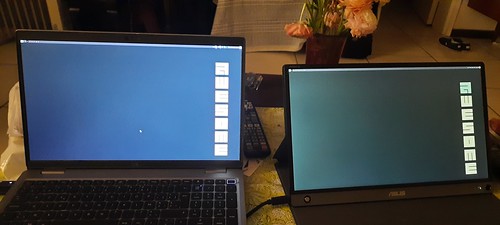
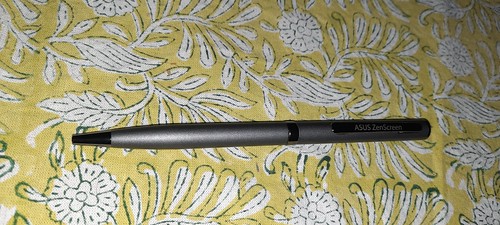
A while ago, I saw Stefano's portable monitor, and thought it was very useful. Personally, I rent a desk at an office space where I have a 27" Dell monitor; but I do sometimes use my laptop away from that desk, and then I do sometimes miss the external monitor. So a few weeks before DebConf, I bought me one myself. The one I got is about a mid-range model; there are models that are less than half the price of the one that I bought, and there are models that are more than double its price, too. ASUS has a very wide range of these monitors; the cheapest model that I could find locally is a 720p monitor that only does USB-C and requires power from the connected device, which presumably if I were to connect it to my laptop with no power connected would half its battery life. More expensive models have features such as wifi connectivity and miracast support, builtin batteries, more connection options, and touchscreen fancyness. While I think some of these features are not worth the money, I do think that a builtin battery has its uses, and that I would want a decent resolution, so I got a FullHD model with builtin battery. 20231016_215332 The device comes with a number of useful accessories: a USB-C to USB-C cable for the USB-C connectivity as well as to charge the battery; an HDMI-to-microHDMI cable for HDMI connectivity; a magnetic sleeve that doubles as a back stand; a beefy USB-A charger and USB-A-to-USB-C convertor (yes, I know); and a... pen. No, really, a pen. You can write with it. Yes, on paper. No, not a stylus. It's really a pen. Sigh, OK. This one: 20231016_222024 OK, believe me now? Good. Don't worry, I was as confused about this as you just were when I first found that pen. Why would anyone do that, I thought. So I read the manual. Not something I usually do with new hardware, but here you go. It turns out that the pen doubles as a kickstand. If you look closely at the picture of the laptop and the monitor above, you may see a little hole at the bottom right of the monitor, just to the right of the power button/LED. The pen fits right there. Now I don't know what the exact thought process was here, but I imagine it went something like this: It's an interesting concept, especially given the fact that the magnetic sleeve works very well as a stand. But hey. Anyway, the monitor is very nice; the battery lives longer than the battery of my laptop usually does, so that's good, and it allows me to have a dual-monitor setup when I'm on the road. And when I'm at the office? Well, now I have a triple-monitor setup. That works well, too.

15 October 2023

Aigars Mahinovs: Figuring out finances part 2

A week ago I started to migrate my financial planning from a closed source system to a new system based on an open source, self-hosted solution. Main candidate is Firefly III - a relatively simple financial planner with a rather rich feature set and a solid user base and developer support. Starting it up with a Docker-Compose file was quite easy, following the official documentation. The same Compose file also managed the MySQL database, the importer app and a cron container for regular imports. The separate importer app allows both imports from CSV files and also from external bank account connection services. For whatever weird reason both of those services support exporting data from my regular bank accounts, but not from my credit cards for exactly the same bank. So for those cards I would need to periodically download CVS transaction exports and feed them into the importer. The combination of the cron container and the importer app allows for both of these functions. To do this you first do the import via the Web UI first and configure all the mappings - configure file and date formats, map account names in the bank output to account names that you added in Firefly, configure what otehr columns mean and what is the mapping of other values, like expense and income accounts. At the end of the process you can download a json file representing all the settings of the import you just did. Putting such a json config file in the input folder of the cron container and telling it to do an import (weekly, for example) would do such import periodically. Putting a credit card CSV file along with a config file for credit card import would also auto-import that. So far so good. However, when I tried importing exports from MoneyWiz or even when I tried re-creating account history directly from the bank data, I hit a very annoying problem. Transfers. Thing is detecting transfers between the real (asset) accounts that you are managing is really essential. For one those are not real expenses and incomes, so failing to mark them as transfers would show weird income/expense numbers. But if you do detect them as transfers and correctly map the destination account, but fail to match the transations between another you get a double-transaction. This becomes really hard when transactions happen on different dates and have different descriptions. So you get both a +1000 transaction "Credit card reset" on 14.09.2023 in the credit card account and a -1000$ transaction "Repayment of own credit card" on 24.09.2023 in the main account of the bank. Matching them to recognise that it is just one transfer and not two is ... non-trivial. The best solution I could come up with so far is to always map the "Opposing account name" for such transfers to a virtual "Transfers" asset account. That has the benefit of being actually able to correctly represent transfers that take several days to move between accounts and showing you how much money is still in transit at any point in time. So after I figured this out, finally the account balances started matching up with reality. Setting up spending categories required another change - the author of the Firefly III does not like complexity so it does not support nesting categories. Categories can only be in a single, flat list. It is suggested that if you do need to track multiple categories and also their combination, then category groups might help you. I will survive for now by simplifying the categories that I do actually use. Might actually make the reports more usable. A new feature for me will be the ability to use automation rules to assign transactions to categories based on their contents, like expense accounts of keywords in descriptions. Setting up regular bills (with matching rules to assign incoming transactions to those bills) is another feature that is very important to me. The feature itself works just fine in Firefly III, but it has two restrictions that the author of the software does not actually want to be changed. For one it can not be used to track prodictable incomes (like salary), presumably because it is only there for bills (subscriptions in v3 UI). And for other, there is nothing in the base software that actually uses the data from bills to look forward. The author does not like to try to predict the future. Which for me is basically the one of two reasons to use this kind of software at all. I want to know - given all manually entered regular and 100% predictable expenses and incomes, what will be the state of my accounts at particular date? It seems that to get at that I will need to write my own oracle script using the rich Firefly III API. The last question I had for this week was - how will I enter a new cash puchace of potatoes on a farmers market into the system that sits in a private server in my home network? Turns out there are actually multiple Android apps for Firefly III that can be easily used for this using a robust OAuth or shared token authentification. Except the web UI needs to be exposed online for this to work (and ideally protected by HTTPS). Other users have also created Telegram bots that allow using chat messages to create transaction entries. This is a bit harder to use and more narrow scope, but should be easier to setup. Will have to try both apporaches. But before I really get going on this, I need to fix another thing that I have been postponing for a while: I will need to migrate my Home Assistant installation from a Docker container installation to a Home Assistant OS installation so that I can install Addons, including Firefly III, MySQL and Portainer to have a bit more organised and less hand-knitted home server setup. Let's see how that goes next week :D

Russ Allbery: Review: A Killing Frost

Review: A Killing Frost, by Seanan McGuire
Series: October Daye #14
Publisher: DAW
Copyright: 2020
ISBN: 0-7564-1253-6
Format: Kindle
Pages: 351
A Killing Frost is the 14th book in the October Daye urban fantasy series and a direct plot sequel to the events of The Brightest Fell. You definitely cannot start here. This review has some relationship spoilers here for things that you would be expecting after the first five or six books, but which you wouldn't know when reading the first few books of the series. If you haven't started the series yet but plan to, consider skipping this review; if you haven't started reading this series, it will probably be meaningless anyway. Finally, events seem to have slowed, enough trauma has been healed, and Toby is able to seriously consider getting married. However, no sooner is the thought voiced than fae politics injects itself yet again. In order to get married without creating potentially substantial future problems for herself and her family, Toby will have to tie up some loose ends. Since one of those loose ends is a price from the Luidaeg that has been haunting her family for decades, this is easier said than done. The Brightest Fell had a very unsatisfying ending. This, after a two book interlude, is the proper end to that story. I picked this up when I had a bunch of stressful things going on and I wanted to be entertained without having to do much work as a reader. Once again, this series delivered exactly that. The writing is repetitive and a bit clunky, McGuire hammers the same emotional points into the ground, and one does wonder about Toby's tendency to emulate a half-human battering ram, but every book has me engrossed and turning the pages. Everyone should have at least one book series on the go that offers reliable, low-effort entertainment. The initial lever that McGuire uses to push Toby into this plot (fae marriage requirements that had never previously been mentioned) felt rather strained and arbitrary, and I spent the first part of the book grumbling a bit about it. However, there is a better reason for this complication that is revealed with time, and which implies some interesting things about how the fae see heroes and how they use them to solve problems. Now I'm wondering if McGuire will explore that some more in later books. This is the "all is revealed" book about Simon Torquill. As we get later into the series, these "all is revealed" books are coming more frequently. So far, I'm finding the revelations satisfying, which is a lot harder than it looks with a series this long and with this many hidden details. There are a few directions the series is taking that aren't my favorite (the Daoine Sidhe obsession with being the Best Fae is getting a bit boring, for example), but none of them seem egregiously off, and I'm deeply invested in the answers to the remaining questions. Toby hits a personal record here for not explaining the dangerous things she's doing because people might talk her out of it. It makes for a tense and gripping climax, but wow I felt for her friends and family, and substantial parts of that risk seemed unnecessary. This is pointed out to her in no uncertain terms, and I'm wondering if it will finally stick. Toby's tendency to solve complicated problems by bleeding on them is part of what gives this series its charm, but I wouldn't mind her giving other people more of a chance to come up with better plans. I did not like this one as well as the previous two books, mostly because I prefer the Luidaeg-centric stories to the Daoine-Sidhe-centric stories, but if you're enjoying the series to this point, this won't be an exception. It's a substantial improvement on The Brightest Fell and did a lot to salvage that story for me, although there are still some aspects of it that need better explanations. Followed by When Sorrows Come. As usual, there is a novella included in at least the Kindle edition. "Shine in Pearl": I was again hoping for more Gillian, but alas. Instead, and breaking with the tendency for the novellas to be side stories unrelated to the main novel, this fleshes out Simon's past and the other primary relationship driving the novel's plot. It's... fine? The best parts by far are the scenes from Dianda's viewpoint, which are just as refreshingly blunt as Dianda is elsewhere. Neither of the other two characters are favorites of mine, and since the point of the story is to describe the tragedy that is resolved in the plot of the main novel, it's somewhat depressing. Not my favorite of the novellas; not the worst of them. (6) Rating: 7 out of 10

Michael Ablassmeier: Testing system updates using libvirts checkpoint feature

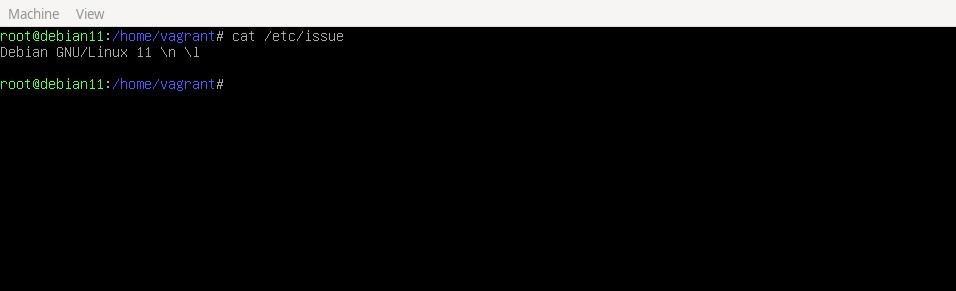
If you want to test upgrades on virtual machines (running on libvit/qemu/kvm) these are usually the most common steps: As with recent versions, both libvirt and qemu have full support for dirty bitmaps (so called checkpoints). These checkpoints, once existent, will track changes to the block level layer and can be exported via NBD protocol. Usually one can create these checkpoints using virsh checkpoint-create[-as], with a proper xml description. Using the pull based model, the following is possible: The overlay image will only use the disk space for the blocks changed during upgrade: no need to create a full clone which may waste a lot of disk space. In order to simplify the first step, its possible to use virtnbdbackup for creating the required consistent checkpoint and export its data using a unix domain socket. Update: As alternative, ive just created a small utility called vircpt to create and export checkpoints. In my example im using a debian11 virtual machine with qemu guest agent configured:
# virsh list --all
 Id Name State 
 ------------------------------------------ 
 1 debian11_default running
Now let virtnbdbackup create an checkpoint, freeze the filesystems during creation and tell libvirt to provide us with a usable NBD server listening on an unix socket:
# virtnbdbackup -d debian11_default -o /tmp/foo -s
INFO lib common - printVersion [MainThread]: Version: 1.9.45 Arguments: ./virtnbdbackup -d debian11_default -o /tmp/foo -s
[..] 
INFO root virtnbdbackup - main [MainThread]: Local NBD Endpoint socket: [/var/tmp/virtnbdbackup.5727] 
INFO root virtnbdbackup - startBackupJob [MainThread]: Starting backup job.
INFO fs fs - freeze [MainThread]: Freezed [2] filesystems. 
INFO fs fs - thaw [MainThread]: Thawed [2] filesystems. 
INFO root virtnbdbackup - main [MainThread]: Started backup job for debugging, exiting.
We can now use nbdinfo to display some information about the NBD export:
# nbdinfo "nbd+unix:///vda?socket=/var/tmp/virtnbdbackup.5727" 
    protocol: newstyle-fixed without TLS, using structured packets 
    export="vda": 
    export-size: 137438953472 (128G) 
    content: 
        DOS/MBR boot sector uri: nbd+unix:///vda?socket=/var/tmp/virtnbdbackup.5727
And create a backing image that we can use to test an in-place upgrade:
# qemu-img create -F raw -b nbd+unix:///vda?socket=/var/tmp/virtnbdbackup.5727 -f qcow2 upgrade.qcow2
Now we have various ways for booting the image:
# qemu-system-x86_64 -hda upgrade.qcow2 -m 2500 --enable-kvm
image After performing the required tests within the virtual machine we can simply kill the active NBD backup job :
# virtnbdbackup -d debian11_default -o /tmp/foo -k
INFO lib common - printVersion [MainThread]: Version: 1.9.45 Arguments: ./virtnbdbackup -d debian11_default -o /tmp/foo -k 
[..]
INFO root virtnbdbackup - main [MainThread]: Stopping backup job
And remove the created qcow image:
# rm -f upgrade.qcow2

14 October 2023

Fran ois Marier: Enabling AppArmor on a Linode VPS in enforcement mode

Enabling AppArmor on a Debian Linode VPS is not entirely straightforward. Here's what I had to do in order to make it work.

Packages to install The easy bit was to install a few packages:
apt install grub2 apparmor-profiles-extra apparmor-profiles apparmor
and then adding apparmor=1 security=apparmor to the kernel command line (GRUB_CMDLINE_LINUX) in /etc/default/grub.

Move away from using Linode's kernels As mentioned in this blog post, I found out that these parameters are ignored by the Linode kernels. I had to:
  1. login to the Linode Manager (i.e. https://cloud.linode.com/linodes/<linode ID>/configurations),
  2. click the node relevant node,
  3. click "Edit" next to the configuration profile, and
  4. change the kernel to "GRUB 2".

Fix grub Next I found out that grub doesn't actually install itself properly because it can't be installed directly on the virtual drives provided by Linode (KVM). Manually running this hack worked for me:
grub-install --grub-setup=/bin/true /dev/null

Unbound + Let's Encrypt fix Finally, my local Unbound installation stopped working because it couldn't access the Let's Encrypt certificates anymore. The solution to this was pretty straightforward. All I needed to do was to add the following to /etc/apparmor.d/local/usr.sbin.unbound:
/etc/letsencrypt/archive/** r,
/etc/letsencrypt/live/** r,

Ravi Dwivedi: Kochi - Wayanad Trip in August-September 2023

A trip full of hitchhiking, beautiful places and welcoming locals.

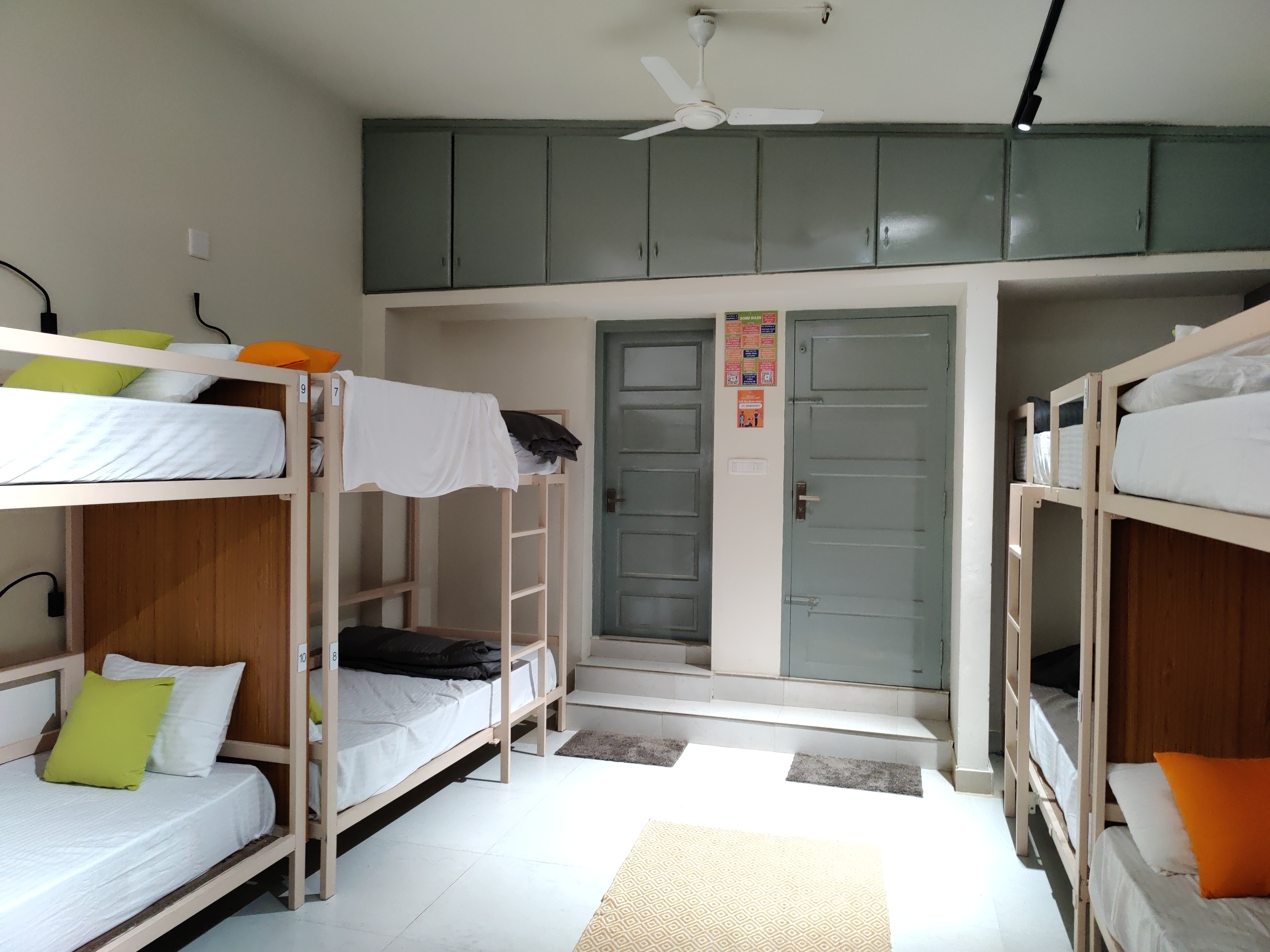
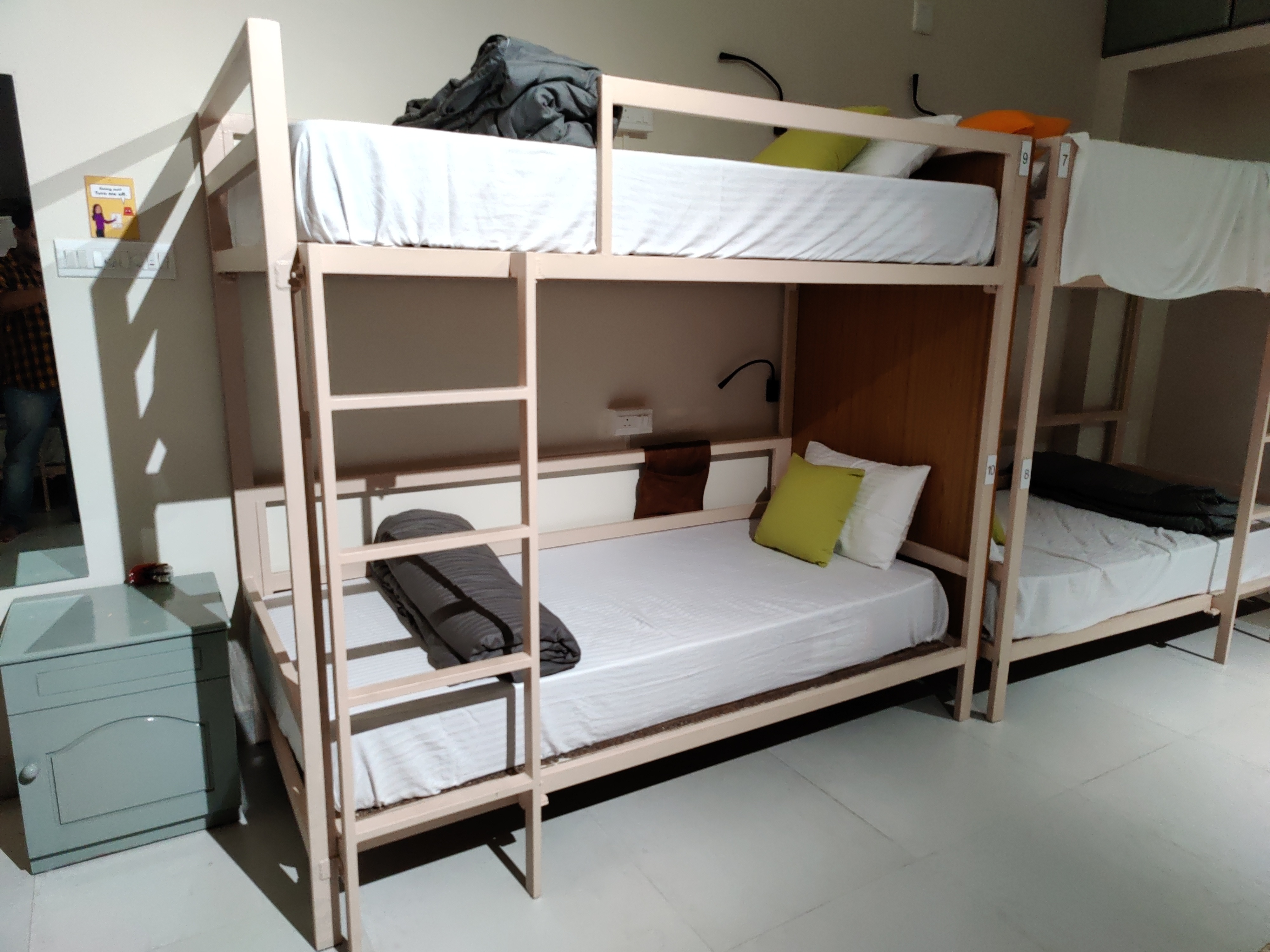
Day 1: Arrival in Kochi Kochi is a city in the state of Kerala, India. This year s DebConf was to be held in Kochi from 3rd September to 17th of September, which I was planning to attend. My friend Suresh, who was planning to join, told me that 29th August 2023 will be Onam, a major festival of the state of Kerala. So, we planned a Kerala trip before the DebConf. We booked early morning flights for Kochi from Delhi and reached Kochi on 28th August. We had booked a hostel named Zostel in Ernakulam. During check-in, they asked me to fill a form which required signing in using a Google account. I told them I don t have a Google account and I don t want to create one either. The people at the front desk seemed receptive, so I went ahead with telling them the problems of such a sign-in being mandatory for check-in. Anyways, they only took a photo of my passport and let me check-in without a Google account. We stayed in a ten room dormitory, which allowed travellers of any gender. The dormitory room was air-conditioned, spacious, clean and beds were also comfortable. There were two bathrooms in the dormitory and they were clean. Plus, there was a separate dormitory room in the hostel exclusive for females. I noticed that that Zostel was not added in the OpenStreetMap and so, I added it :) . The hostel had a small canteen for tea and snacks, a common sitting area outside the dormitories, which had beds too. There was a separate silent room, suitable for people who want to work.
Dormitory room in Zostel Ernakulam, Kochi.
Beds in Zostel Ernakulam, Kochi.
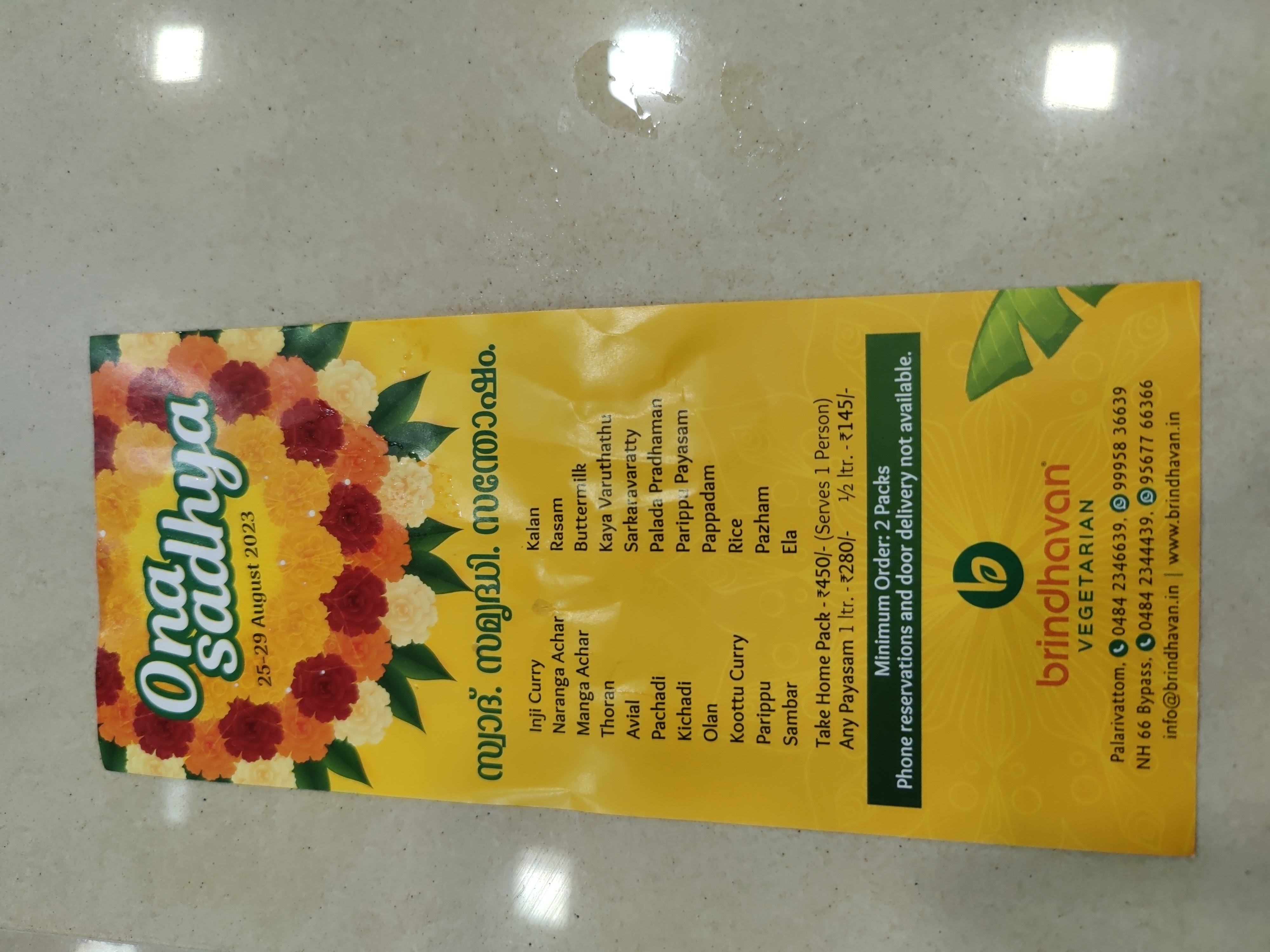
We had lunch at a nearby restaurant and it was hard to find anything vegetarian for me. I bought some freshly made banana chips from the street and they were tasty. As far as I remember, I had a big glass of pineapple juice for lunch. Then I went to the Broadway market and bought some cardamom and cinnamon for home. I also went to a nearby supermarket and bought Matta brown rice for home. Then, I looked for a courier shop to send the things home but all of them were closed due to Onam festival. After returning to the Zostel, I overslept till 9 PM and in the meanwhile, Suresh planned with Saidut and Shwetank (who met us during our stay in Zostel) to go to a place in Fort Kochi for dinner. I suspected I will be disappointed by lack of vegetarian options as they were planning to have fish. I already had a restaurant in mind - Brindhavan restaurant (suggested by Anupa), which was a pure vegetarian restaurant. To reach there, I got off at Palarivattom metro station and started looking for an auto-rickshaw to get to the restaurant. I didn t get any for more than 5 minutes. Since that restaurant was not added to the OpenStreetMap, I didn t even know how far that was and which direction to go to. Then, I saw a Zomato delivery person on a motorcycle and asked him where the restaurant was. It was already 10 PM and the restaurant closes at 10:30. So, I asked him whether he can drop me off. He agreed and dropped me off at that restaurant. It was 4-5 km from that metro station. I tipped him and expressed my gratefulness for the help. He refused to take the tip, but I insisted and he accepted. I entered the restaurant and it was coming to a close, so many items were not available. I ordered some Kadhai Paneer (only item left) with naan. It tasted fine. Since the next day was Thiruvonam, I asked the restaurant about the Sadya thali menu and prices for the next day. I planned to eat Sadya thali at that restaurant, but my plans got changed later.
Onam sadya menu from Brindhavan restaurant.

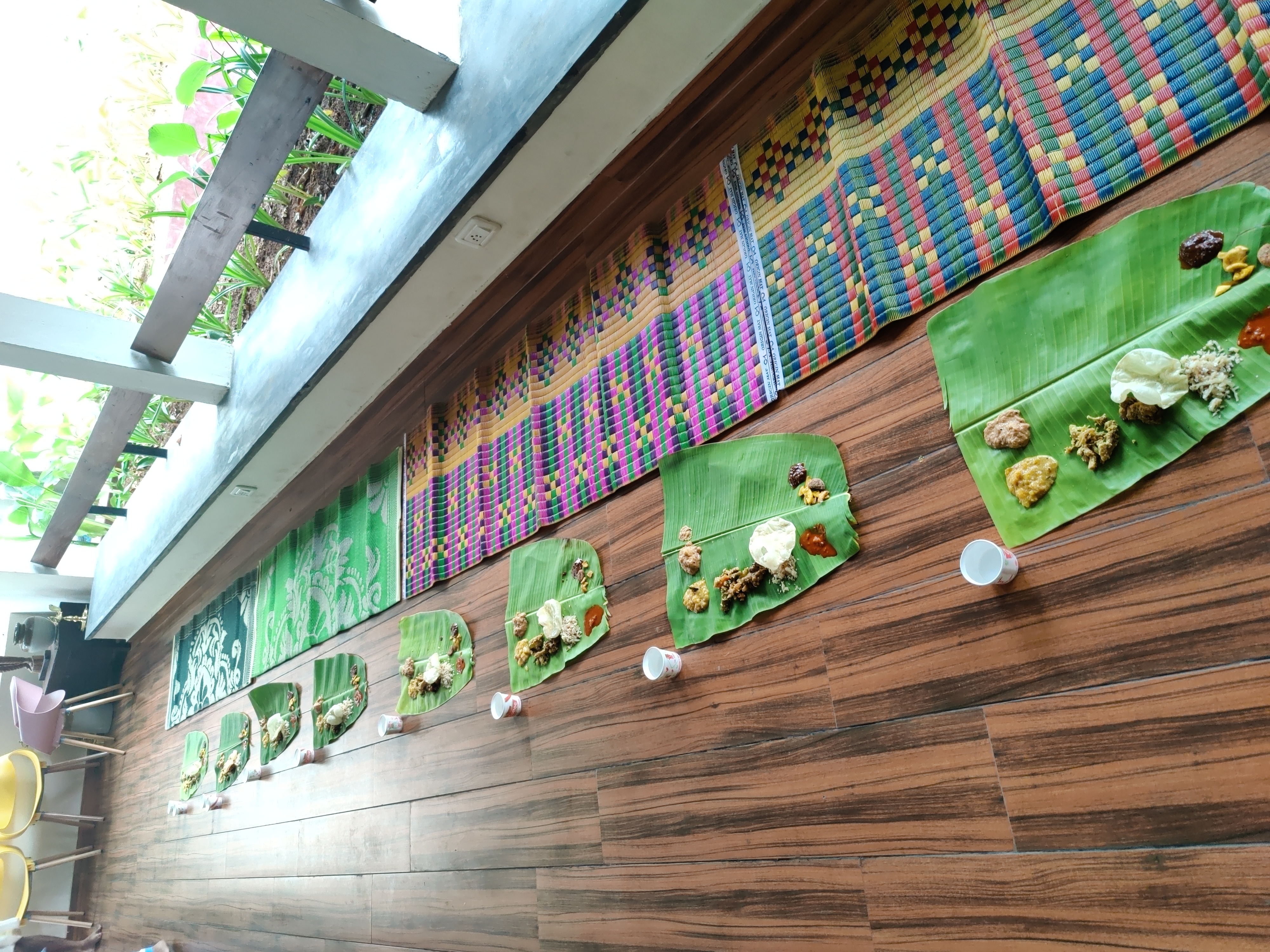
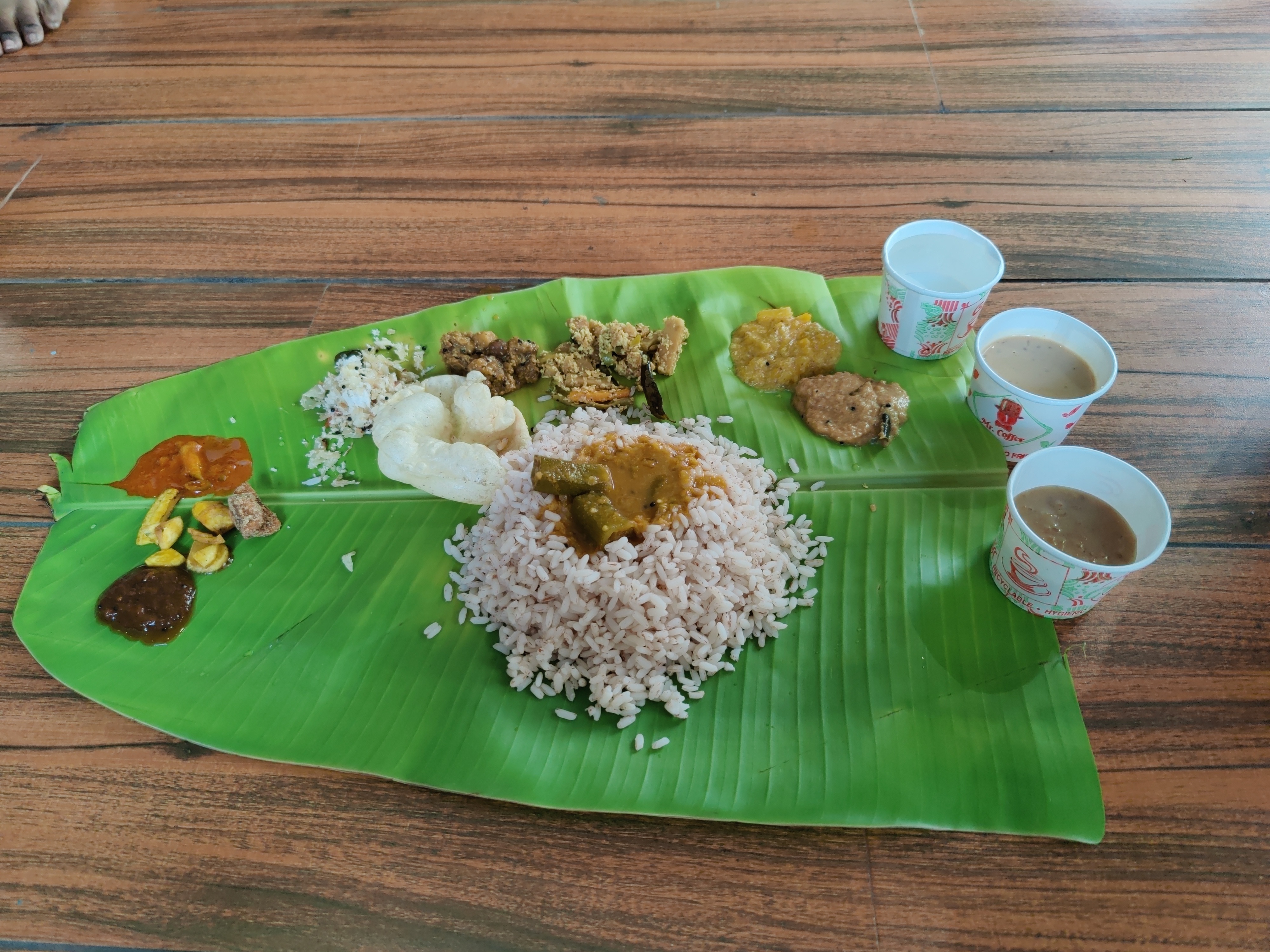
Day 2: Onam celebrations Next day, on 29th of August 2023, we had plan to leave for Wayanad. Wayanad is a hill station in Kerala and a famous tourist spot. Praveen suggested to visit Munnar as it is far closer to Kochi than Wayanad (80 km vs 250 km). But I had already visited Munnar in my previous trips, so we chose Wayanad. We had a train late night from Ernakulam Junction (at 23:30 hours) to Kozhikode, which is the nearest railway station from Wayanad. So, we checked out in the morning as we had plans to roam around in Kochi before taking the train. Zostel was celebrating Onam on that day. To opt-in, we had to pay 400 rupees, which included a Sadya Thali and a mundu. Me and Suresh paid the amount and opted in for the celebrations. Sadya thali had Rice, Sambhar, Rasam, Avial, Banana Chips, Pineapple Pachadi, Pappadam, many types of pickels and chutneys, Pal Ada Payasam and Coconut jaggery Pasam. And, there was water too :). Those payasams were really great and I had one more round of them. Later, I had a lot of variety of payasams during the DebConf.
Sadya lined up for serving
Sadya thali served on banana leaf.
So, we hung out in the common room and put our luggage there. We played UNO and had conversations with other travellers in the hostel. I had a fun time there and I still think it is one of the best hostel experiences I had. We made good friends with Saiduth (Telangana) and Shwetank (Uttarakhand). They were already aware about the software like debian, and we had some detailed conversations about the Free Software movement. I remember explaining the difference between the terms Open Source and Free Software . I also told them about the Streetcomplete app, a beginner friendly app to edit OpenStreetMap. We had dinner at a place nearby (named Palaraam), but again, the vegetarian options were very limited! After dinner, we came back to the Zostel and me and Suresh left for Ernakulam Junction to catch our train Maveli Express (16604).

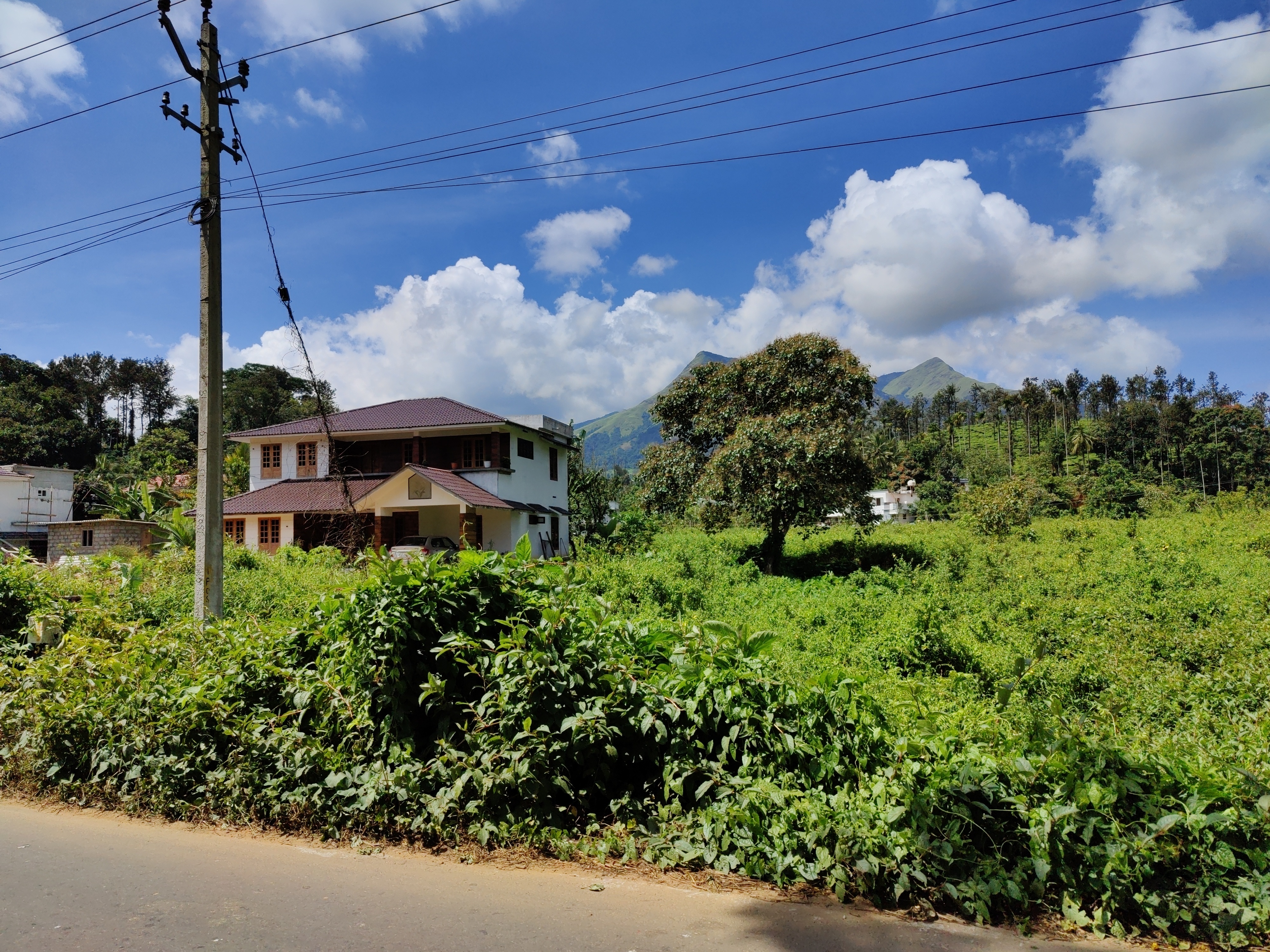
Day 3: Going to Wayanad Maveli Express was scheduled to reach Kozhikode at 03:25 (morning). I had set alarms from 03:00 to 03:30, with the gap of 10 minutes. Every time I woke up, I turned off the alarm. Then I woke up and saw train reaching the Kozhikode station and woke up Suresh for deboarding. But then I noticed that the train is actually leaving the station, not arriving! This means we missed our stop. Now we looked at the next stops and whether we can deboard there. I was very sleepy and wanted to take a retiring room at some station before continuing our journey to Wayanad. The next stop was Quilandi and we checked online that it didn t have a retiring room. So, we skipped this stop. We got off at the next stop named Vadakara and found out no retiring room was available. So, we asked about information regarding bus for Wayanad and they said that there is a bus to Wayanad around 07:00 hours from bus station which was a few kilometres from the railway station. We took a bus for Kalpetta (in Wayanad) at around 07:00. The destination of the buses were written in Malayalam, which we could not read. Once again, the locals helped us to get on to the bus to Kalpetta. Vadakara is not a big city and it can be hard to find people who know good Hindi or English, unlike Kochi. Despite language issues, I had no problem there in navigation, thanks to locals. I mostly spent time sleeping during the bus journey. A few hours later, the bus dropped us at Kalpetta. We had a booking at a hostel in Rippon village. It was 16 km from Kalpetta. On the way, we were treated with beautiful views of nature, which was present everywhere in Wayanad. The place was covered with tea gardens and our eyes were treated with beautiful scenery at every corner.
We were treated with such views during the Wayanad trip.
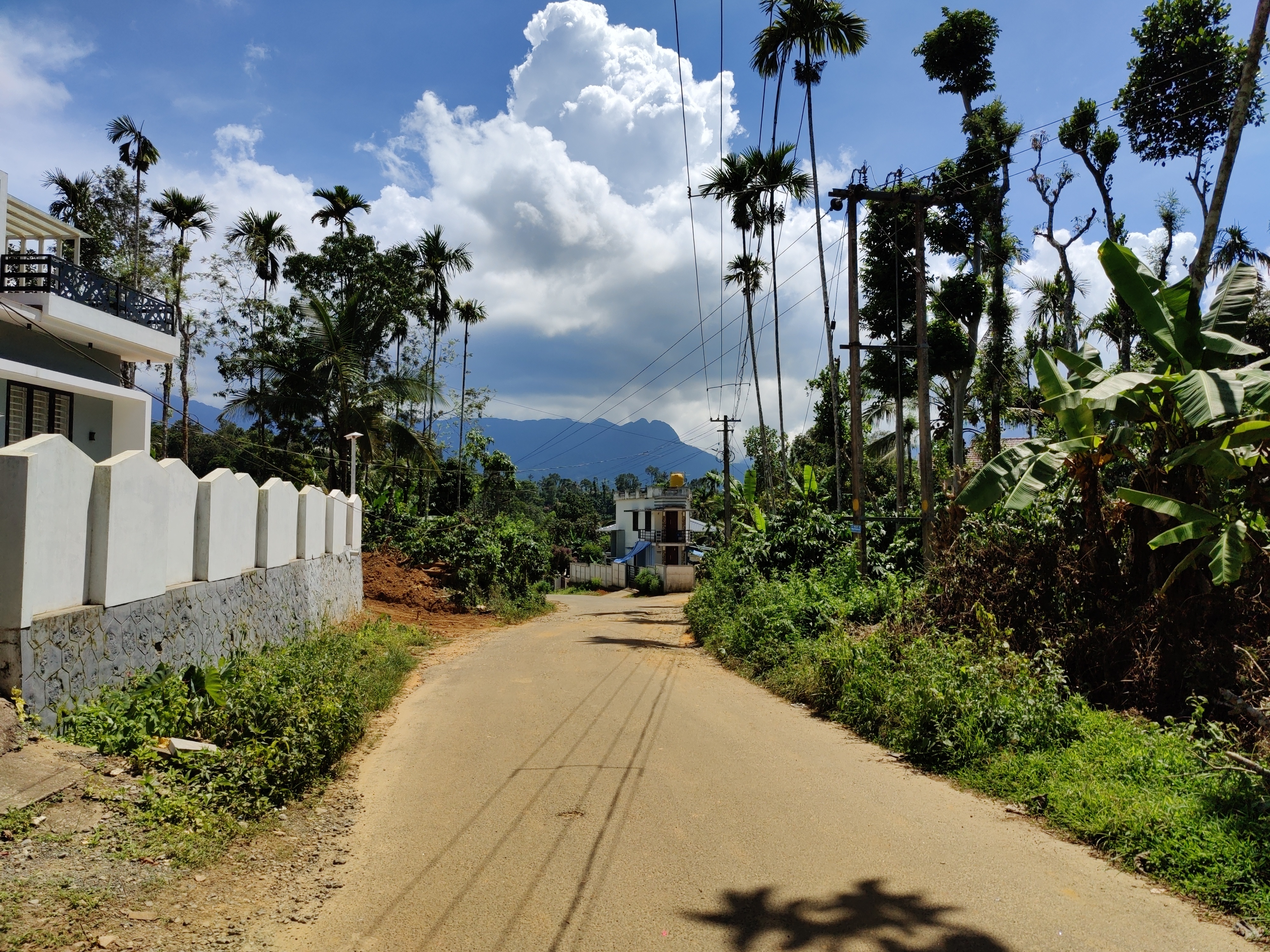
Rippon village was a very quiet place and I liked the calm atmosphere. This place is blessed by nature and has stunning scenery. I found English was more common than Hindi in Wayanad. Locals were very nice and helped me, even if they didn t know my language.
A road in Rippon.
After catching some sleep at the hostel, I went out in the afternoon. I hitchhiked to reach the main road from the hostel. I bought more spices from a nearby shop and realized that I should have waited for my visit to Wayanad to buy cardamom, which I already bought from Kochi. Then, I was looking for post office to send spices home. The people at the spices shop told me that the nearby Rippon post office was closed by that time, but the post office at Meppadi was open, which was 5 km from there. I went to Meppadi and saw the post office closes at 15:00, but I reached five minutes late. My packing was not very good and they asked me to pack it tighter. There was a shop near the post office and the people there gave me a cardboard and tapes, and helped pack my stuff for the post. By the time I went to the post office again, it was 15:30. But they accepted my parcel for post.

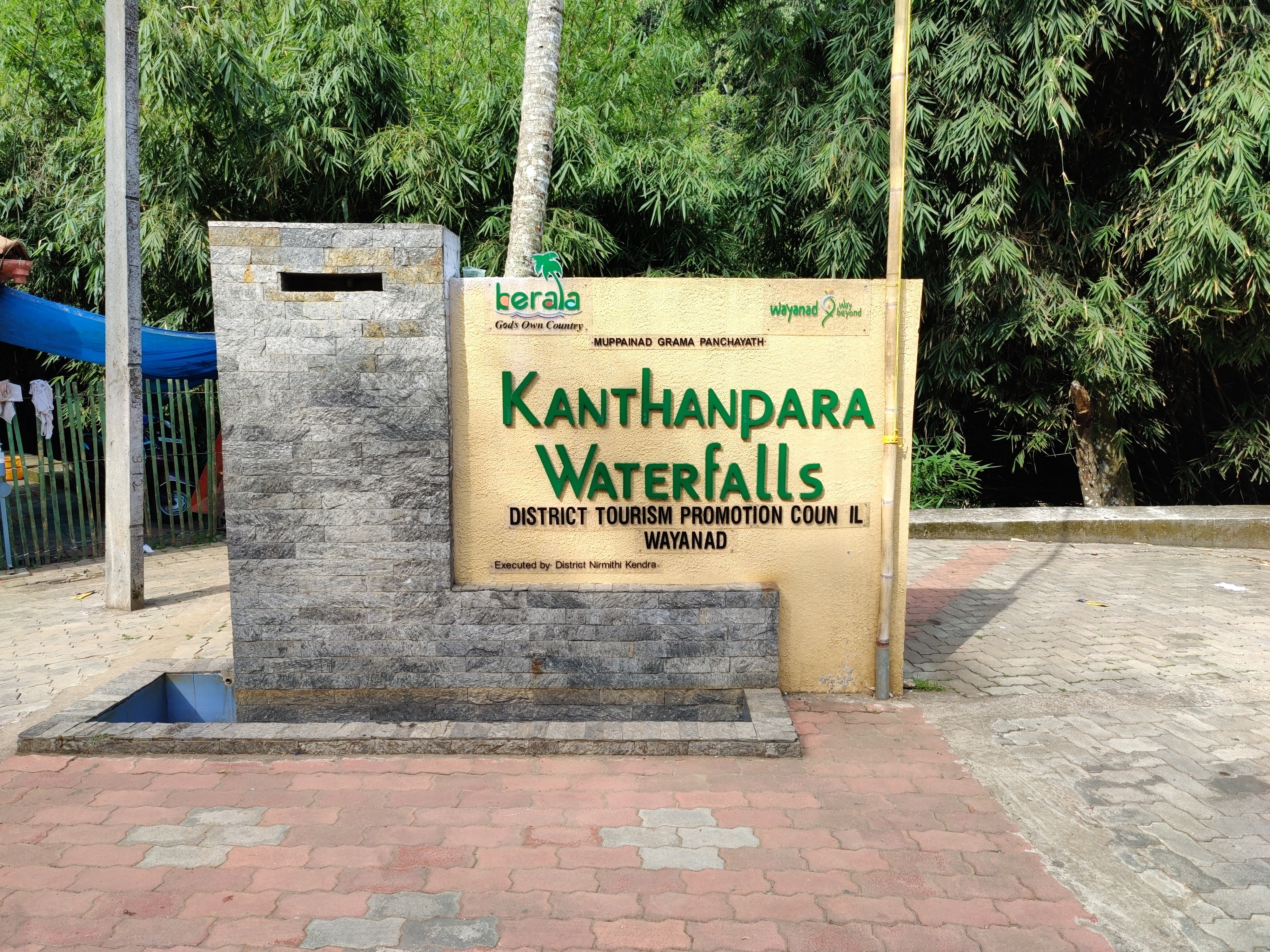
Day 4: Kanthanpara Falls, Zostel Wayanad and Karapuzha Dam Kanthanpara waterfalls were 2 km from the hostel. I hitchhiked to the place from the hostel on a scooty. Entry ticket was worth Rs 40. There were good views inside and nothing much to see except the waterfalls.
Entry to Kanthanpara Falls.
Kanthanpara Falls.
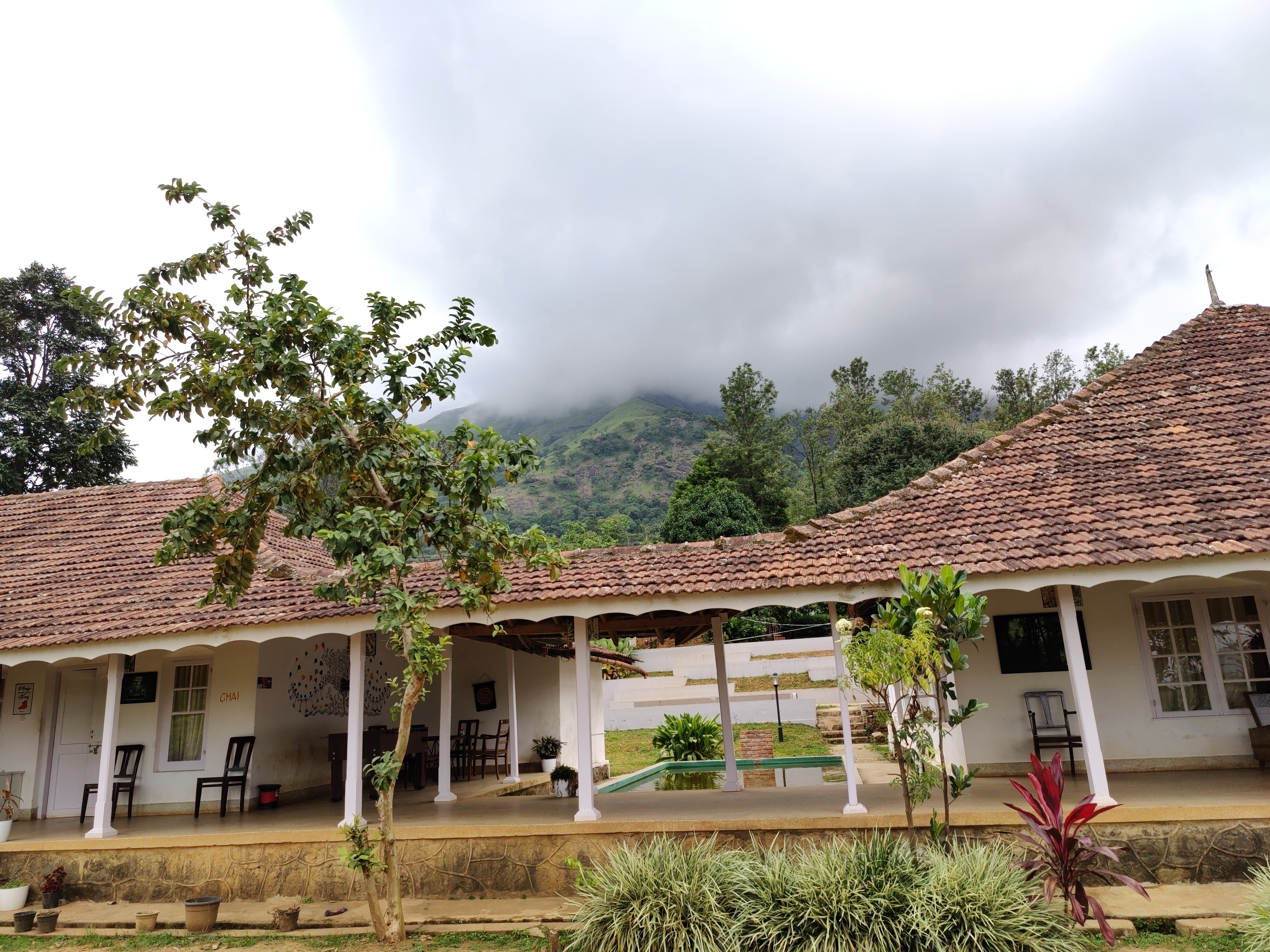
We had a booking at Zostel Wayanad for this day and so we shifted there. Again, as with their Ernakulam branch, they asked me to fill a form which required signing in using Google, but when I said I don t have a Google account they checked me in without that. There were tea gardens inside the Zostel boundaries and the property was beautiful.
A view of Zostel Wayanad.
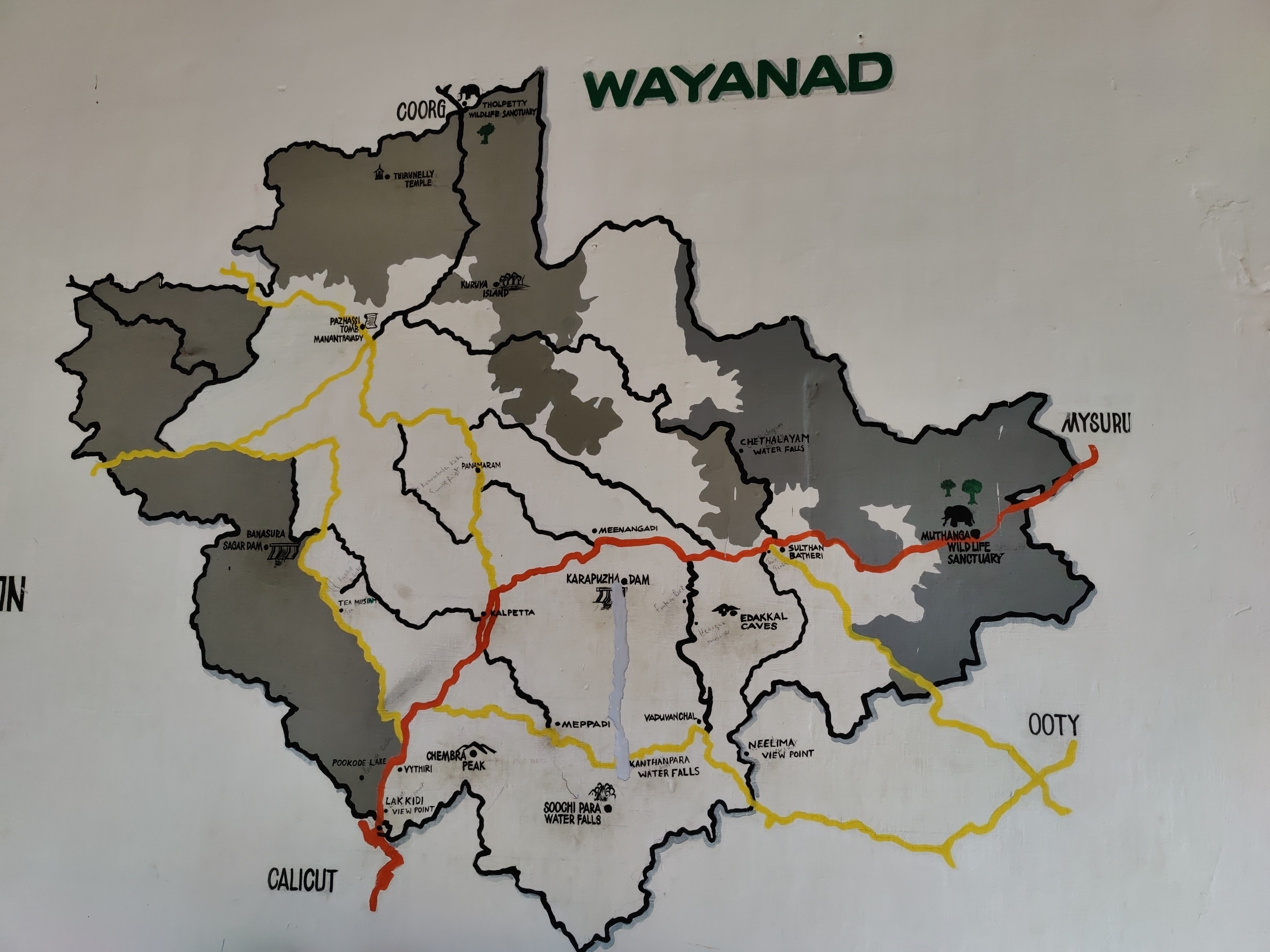
A map of Wayanad showing tourist places.
A view from inside the Zostel Wayanad property.
Later in the evening, I went to Karapuzha Dam. I witnessed a beautiful sunset during the journey. Karapuzha dam had many activites, like ziplining, and was nice to roam around. Chembra Peak is near to the Zostel Wayanad. So, I was planning to trek to the heart shaped lake. It was suggested by Praveen and looking online, this trek seemed worth doing. There was an issue however. The charges for trek were Rs 1770 for upto five people. So, if I go alone I will have to spend Rs 1770 for the trek. If I go with another person, we split Rs 1770 into two, and so on. The optimal way to do it is to go in a group of five (you included :D). I asked front desk at Zostel if they can connect me with people going to Chembra peak the next day, and they told me about a group of four people planning to go to Chembra peak the next day. I got lucky! All four of them were from Kerala and worked in Qatar.

Day 5: Chembra peak trek The date was 1st September 2023. I woke up early (05:30 in the morning) for the Chembra peak trek. I had bought hiking shoes especially for trekking, which turned out to be a very good idea. The ticket counter opens at 07:00. The group of four with which I planned to trek met me around 06:00 in the Zostel. We went to the ticket counter around 06:30. We had breakfast at shops selling Maggi noodles and bread omlette near the ticket counter. It was a hot day and the trek was difficult for an inexperienced person like me. The scenery was green and beautiful throughout.
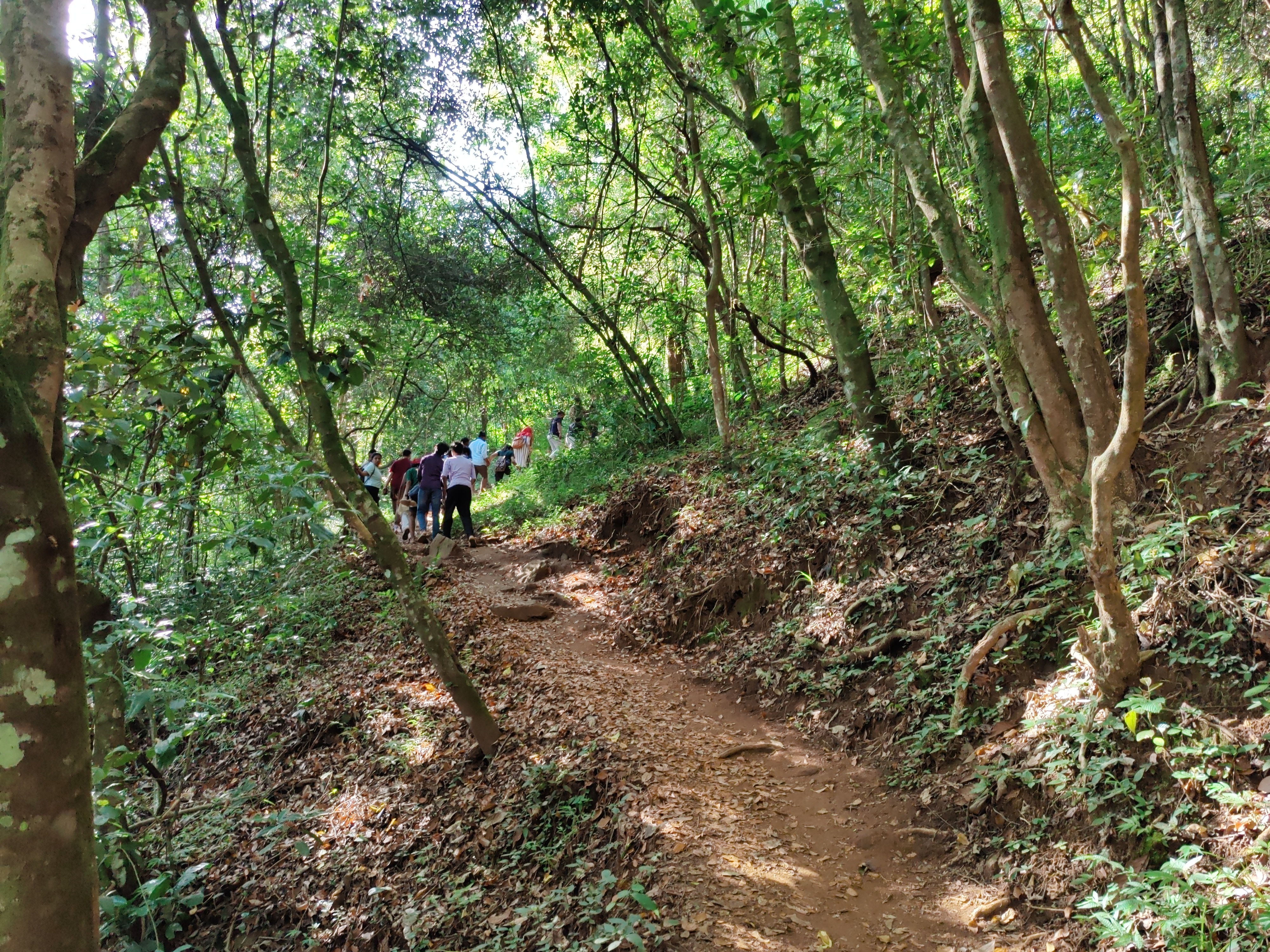
Terrain during trekking towards the Chembra peak.
Heart-shaped lake at the Chembra peak.
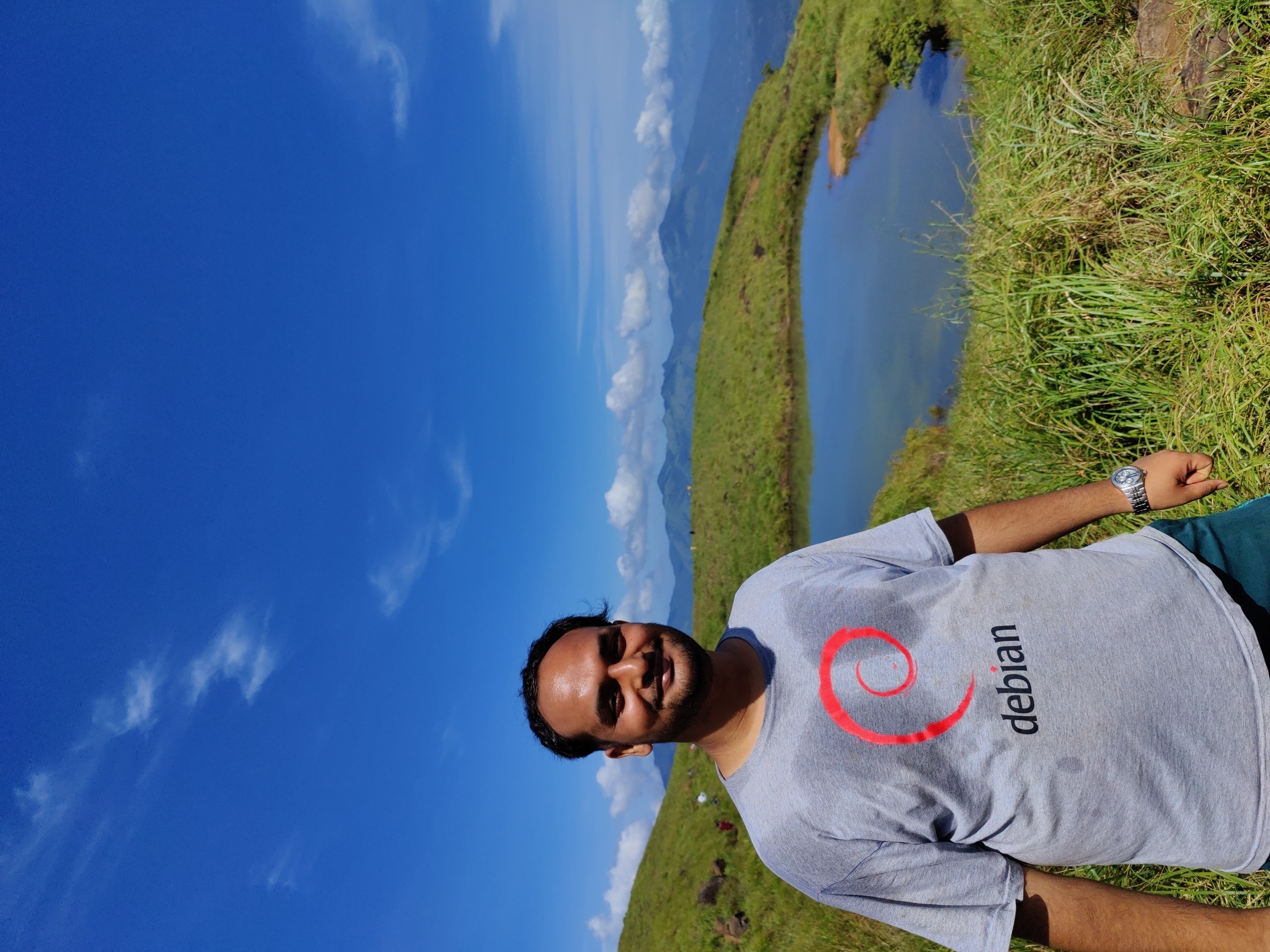
Me at the heart-shaped lake.
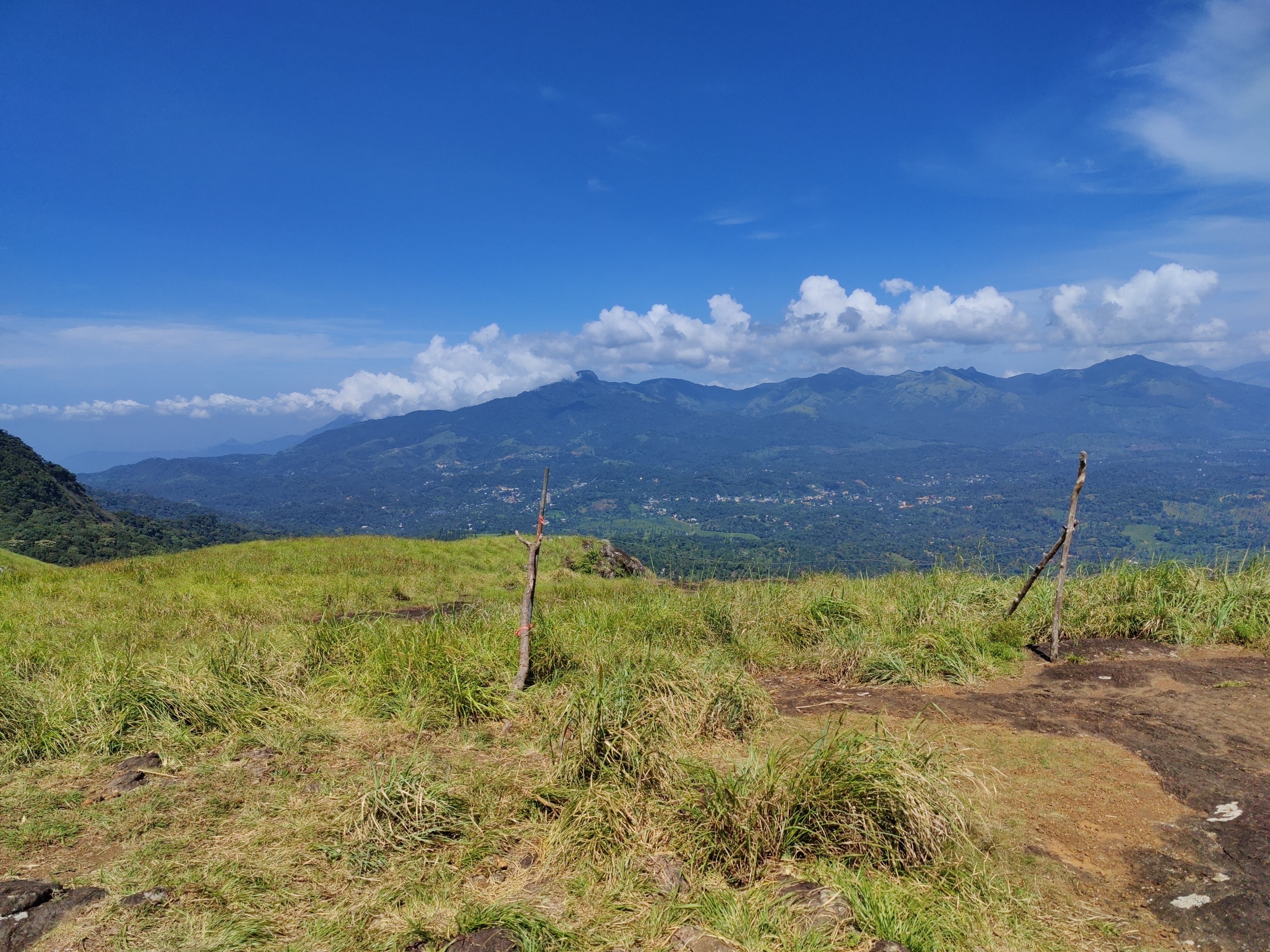
Views from the top of the Chembra peak.
View of another peak from the heart-shaped lake.
While returning from the trek, I found out a shop selling bamboo rice, which I bought and will make bamboo rice payasam out of it at home (I have some coconut milk from Kerala too ;)). We returned to Zostel in the afternoon. I had muscle pain after the trek and it has still not completely disappeared. At night, we took a bus from Kalpetta to Kozhikode in order to return to Kochi.

Day 6: Return to Kochi At midnight of 2nd of September, we reached Kozhikode bus stand. Then we roamed around for something to eat. I didn t find anything vegetarian to eat. No surprises there! Then we went to Kozhikode railway station and looked for retiring rooms, but no luck there. We waited at the station and took the next train to Kochi at 03:30 and reached Ernakulam Junction at 07:30 (half hours before train s scheduled time!). From there, we went to Zostel Fort Kochi and stayed one night there and checked out next morning.

Day 7: Roaming around in Fort Kochi On 3rd of September, we roamed around in Fort Kochi. We visited the usual places - St Francis Church, Dutch Palace, Jew Town, Pardesi Synagogue. I also visited some homestays and the owners were very happy to show their place even when I made it clear that I was not looking for a stay. In the evening, we went to Kakkanad to attend DebConf. The story continues in my DebConf23 blog post.

13 October 2023

Scarlett Gately Moore: KDE: Snaps move, KDE neon unstable broken OMG! Fixed, and Debian updates

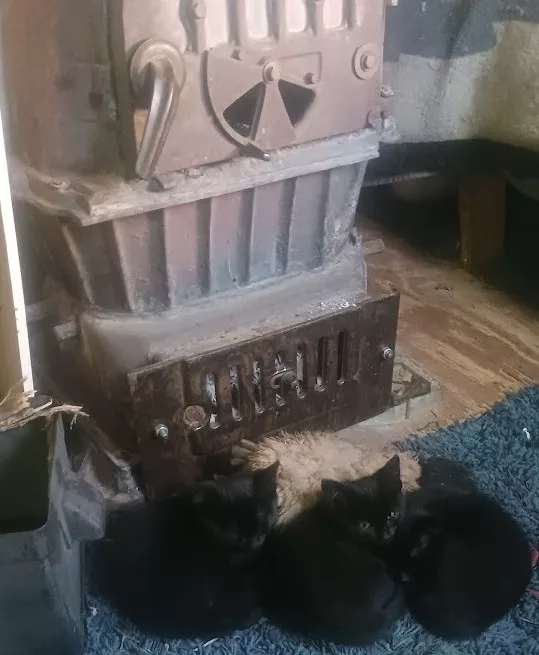
Kitties keeping warm!
It s that time of year already! We have hit our first freeze of the year. While the kitties keep warm by the wood burning stove, I have been busy with many updates and fixes in a variety of projects. KDE neon: It s true, Neon unstable has been very unstable. Due to a few factors including a builder being out of space, timed with a new Qt release. There is a cost with living in unstable land with bleeding edge releases. It takes time and finesse to get everything happy, especially with major transitions such as Qt. The drive issue was just bad timing. We worked night and day ( quite literally with people spanning from the US, Europe and Australia ) to get everything happy again. I know it s frustrating when things are broken, but please keep in mind, most of us are volunteers. I am happy to report, it is once again stable. If you continue to experience issues please report them on https://bugs.kde.org there have been a few cases where there were rogue apt sources lists creating issues. We also have the User edition which is much more stable!
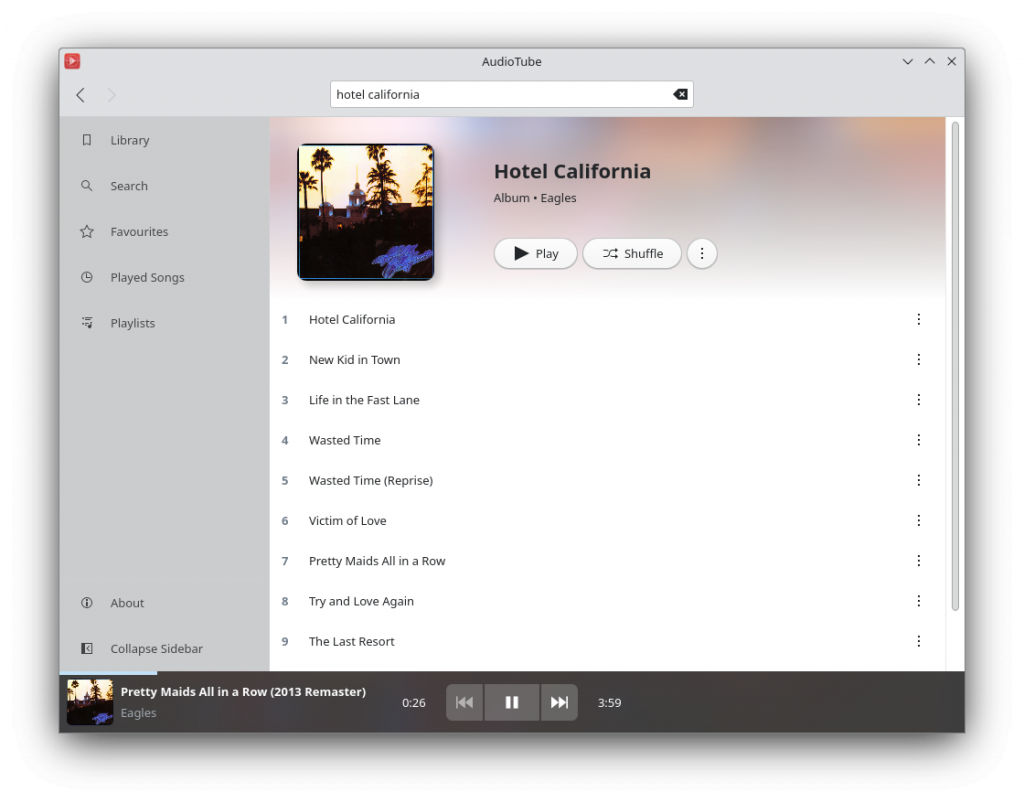
KDE Snaps: The big move to snapcraft files per repo continues. With that comes a new version 23.08.2. This big win this week was Audiotube! I have finally got this snap working. With a combination of snappy-debug and snap run gdb audiotube I was able to find all the hidden dependencies such as yt-dlp needed to be built with ffmpeg support and it needed a newer ytmusicapi as the version it called for was broken with gettext translations. I also had to fix the dbus name as it was not the standard org.kde.app. The final fix was it required the alsa plug and layouts adjusted to point to the snap alsa libraries ( which fixed the very important sound feature ). Who says you can t teach an old dog new tricks. Unfortunately, it still requires devmode to run, as it has one last network issue even with all the network plugs. I have to set it aside for now, as I have many more snaps to migrate. However, if you want to enjoy youtube music with this super awesome app you can, just append devmode when installing. Enjoy! The following apps have now migrated to their respective KDE repos and have the snap recipes in launchpad for automated builds: A new content pack with the latest Frameworks 5.110 and Qt 5.15.11 is complete and the neon extension update will follow after the required global autoconnect is approved from the store. Debian: I have caught up on my dashboard with new releases, fixed test failures, and FTBFS on the more obscure arches. The following debian packages have been uploaded to unstable:
description
umbrello
squashfuse
golang-github-muesli-mango
golang-github-muesli-roff
speechpy-fast
lingua-franca
If you have made it this far, thank you! As you can see I am quite busy and there is still much to do. If you can possibly spare a donation so I can continue my efforts in KDE neon / KDE Snaps / and Debian, it would be so appreciated. I enjoy doing this work and I hope it benefits someone out there. Have a lovely day and thanks for stopping by. Donate https://gofund.me/b8b69e54

12 October 2023

Jonathan McDowell: Installing Debian on the BananaPi M2 Zero

My previously mentioned C.H.I.P. repurposing has been partly successful; I ve found a use for it (which I still need to write up), but unfortunately it s too useful and the fact it s still a bit flaky has become a problem. I spent a while trying to isolate exactly what the problem is (I m still seeing occasional hard hangs with no obvious debug output in the logs or on the serial console), then realised I should just buy one of the cheap ARM SBC boards currently available. The C.H.I.P. is based on an Allwinner R8, which is a single ARM v7 core (an A8). So it s fairly low power by today s standards and it seemed pretty much any board would probably do. I considered a Pi 2 Zero, but couldn t be bothered trying to find one in stock at a reasonable price (I ve had one on backorder from CPC since May 2022, and yes, I know other places have had them in stock since but I don t need one enough to chase and I m now mostly curious about whether it will ever ship). As the title of this post gives away, I settled on a Banana Pi BPI-M2 Zero, which is based on an Allwinner H3. That s a quad-core ARM v7 (an A7), so a bit more oompfh than the C.H.I.P. All in all it set me back 25, including a set of heatsinks that form a case around it. I started with the vendor provided Debian SD card image, which is based on Debian 9 (stretch) and so somewhat old. I was able to dist-upgrade my way through buster and bullseye, and end up on bookworm. I then discovered the bookworm 6.1 kernel worked just fine out of the box, and even included a suitable DTB. Which got me thinking about whether I could do a completely fresh Debian install with minimal tweaking. First thing, a boot loader. The Allwinner chips are nice in that they ll boot off SD, so I just needed a suitable u-boot image. Rather than go with the vendor image I had a look at mainline and discovered it had support! So let s build a clean image:
noodles@buildhost:~$ mkdir ~/BPI
noodles@buildhost:~$ cd ~/BPI
noodles@buildhost:~/BPI$ ls
noodles@buildhost:~/BPI$ git clone https://source.denx.de/u-boot/u-boot.git
Cloning into 'u-boot'...
remote: Enumerating objects: 935825, done.
remote: Counting objects: 100% (5777/5777), done.
remote: Compressing objects: 100% (1967/1967), done.
remote: Total 935825 (delta 3799), reused 5716 (delta 3769), pack-reused 930048
Receiving objects: 100% (935825/935825), 186.15 MiB   2.21 MiB/s, done.
Resolving deltas: 100% (785671/785671), done.
noodles@buildhost:~/BPI$ mkdir u-boot-build
noodles@buildhost:~/BPI$ cd u-boot
noodles@buildhost:~/BPI/u-boot$ git checkout v2023.07.02
...
HEAD is now at 83cdab8b2c Prepare v2023.07.02
noodles@buildhost:~/BPI/u-boot$ make O=../u-boot-build bananapi_m2_zero_defconfig
  HOSTCC  scripts/basic/fixdep
  GEN     Makefile
  HOSTCC  scripts/kconfig/conf.o
  YACC    scripts/kconfig/zconf.tab.c
  LEX     scripts/kconfig/zconf.lex.c
  HOSTCC  scripts/kconfig/zconf.tab.o
  HOSTLD  scripts/kconfig/conf
#
# configuration written to .config
#
make[1]: Leaving directory '/home/noodles/BPI/u-boot-build'
noodles@buildhost:~/BPI/u-boot$ cd ../u-boot-build/
noodles@buildhost:~/BPI/u-boot-build$ make CROSS_COMPILE=arm-linux-gnueabihf-
  GEN     Makefile
scripts/kconfig/conf  --syncconfig Kconfig
...
  LD      spl/u-boot-spl
  OBJCOPY spl/u-boot-spl-nodtb.bin
  COPY    spl/u-boot-spl.bin
  SYM     spl/u-boot-spl.sym
  MKIMAGE spl/sunxi-spl.bin
  MKIMAGE u-boot.img
  COPY    u-boot.dtb
  MKIMAGE u-boot-dtb.img
  BINMAN  .binman_stamp
  OFCHK   .config
noodles@buildhost:~/BPI/u-boot-build$ ls -l u-boot-sunxi-with-spl.bin
-rw-r--r-- 1 noodles noodles 494900 Aug  8 08:06 u-boot-sunxi-with-spl.bin
I had the advantage here of already having a host setup to cross build armhf binaries, but this was all done on a Debian bookworm host with packages from main. I ve put my build up here in case it s useful to someone - everything else below can be done on a normal x86_64 host. Next I needed a Debian installer. I went for the netboot variant - although I was writing it to SD rather than TFTP booting I wanted as much as possible to come over the network.
noodles@buildhost:~/BPI$ wget https://deb.debian.org/debian/dists/bookworm/main/installer-armhf/20230607%2Bdeb12u1/images/netboot/netboot.tar.gz
...
2023-08-08 10:15:03 (34.5 MB/s) -  netboot.tar.gz  saved [37851404/37851404]
noodles@buildhost:~/BPI$ tar -axf netboot.tar.gz
Then I took a suitable microSD card and set it up with a 500M primary VFAT partition, leaving the rest for Linux proper. I could have got away with a smaller VFAT partition but I d initially thought I might need to put some more installation files on it.
noodles@buildhost:~/BPI$ sudo fdisk /dev/sdb
Welcome to fdisk (util-linux 2.38.1).
Changes will remain in memory only, until you decide to write them.
Be careful before using the write command.
Command (m for help): o
Created a new DOS (MBR) disklabel with disk identifier 0x793729b3.
Command (m for help): n
Partition type
   p   primary (0 primary, 0 extended, 4 free)
   e   extended (container for logical partitions)
Select (default p):
Using default response p.
Partition number (1-4, default 1):
First sector (2048-60440575, default 2048):
Last sector, +/-sectors or +/-size K,M,G,T,P  (2048-60440575, default 60440575): +500M
Created a new partition 1 of type 'Linux' and of size 500 MiB.
Command (m for help): t
Selected partition 1
Hex code or alias (type L to list all): c
Changed type of partition 'Linux' to 'W95 FAT32 (LBA)'.
Command (m for help): n
Partition type
   p   primary (1 primary, 0 extended, 3 free)
   e   extended (container for logical partitions)
Select (default p):
Using default response p.
Partition number (2-4, default 2):
First sector (1026048-60440575, default 1026048):
Last sector, +/-sectors or +/-size K,M,G,T,P  (534528-60440575, default 60440575):
Created a new partition 2 of type 'Linux' and of size 28.3 GiB.
Command (m for help): w
The partition table has been altered.
Calling ioctl() to re-read partition table.
Syncing disks.
$ sudo mkfs -t vfat -n BPI-UBOOT /dev/sdb1
mkfs.fat 4.2 (2021-01-31)
The bootloader image gets written 8k into the SD card (our first partition starts at sector 2048, i.e. 1M into the device, so there s plenty of space here):
noodles@buildhost:~/BPI$ sudo dd if=u-boot-build/u-boot-sunxi-with-spl.bin of=/dev/sdb bs=1024 seek=8
483+1 records in
483+1 records out
494900 bytes (495 kB, 483 KiB) copied, 0.0282234 s, 17.5 MB/s
Copy the Debian installer files onto the VFAT partition:
noodles@buildhost:~/BPI$ cp -r debian-installer/ /media/noodles/BPI-UBOOT/
Unmount the SD from the build host, pop it into the M2 Zero, boot it up while connected to the serial console, hit a key to stop autoboot and tell it to boot the installer:
U-Boot SPL 2023.07.02 (Aug 08 2023 - 09:05:44 +0100)
DRAM: 512 MiB
Trying to boot from MMC1
U-Boot 2023.07.02 (Aug 08 2023 - 09:05:44 +0100) Allwinner Technology
CPU:   Allwinner H3 (SUN8I 1680)
Model: Banana Pi BPI-M2-Zero
DRAM:  512 MiB
Core:  60 devices, 17 uclasses, devicetree: separate
WDT:   Not starting watchdog@1c20ca0
MMC:   mmc@1c0f000: 0, mmc@1c10000: 1
Loading Environment from FAT... Unable to read "uboot.env" from mmc0:1...
In:    serial
Out:   serial
Err:   serial
Net:   No ethernet found.
Hit any key to stop autoboot:  0
=> setenv dibase /debian-installer/armhf
=> fatload mmc 0:1 $ kernel_addr_r  $ dibase /vmlinuz
5333504 bytes read in 225 ms (22.6 MiB/s)
=> setenv bootargs "console=ttyS0,115200n8"
=> fatload mmc 0:1 $ fdt_addr_r  $ dibase /dtbs/sun8i-h2-plus-bananapi-m2-zero.dtb
25254 bytes read in 7 ms (3.4 MiB/s)
=> fdt addr $ fdt_addr_r  0x40000
Working FDT set to 43000000
=> fatload mmc 0:1 $ ramdisk_addr_r  $ dibase /initrd.gz
31693887 bytes read in 1312 ms (23 MiB/s)
=> bootz $ kernel_addr_r  $ ramdisk_addr_r :$ filesize  $ fdt_addr_r 
Kernel image @ 0x42000000 [ 0x000000 - 0x516200 ]
## Flattened Device Tree blob at 43000000
   Booting using the fdt blob at 0x43000000
Working FDT set to 43000000
   Loading Ramdisk to 481c6000, end 49fffc3f ... OK
   Loading Device Tree to 48183000, end 481c5fff ... OK
Working FDT set to 48183000
Starting kernel ...
At this point the installer runs and you can do a normal install. Well, except the wifi wasn t detected, I think because the netinst images don t include firmware. I spent a bit of time trying to figure out how to include it but ultimately ended up installing over a USB ethernet dongle, which Just Worked and was less faff. Installing firmware-brcm80211 once installation completed allowed the built-in wifi to work fine. After install you need to configure u-boot to boot without intervention. At the u-boot prompt (i.e. after hitting a key to stop autoboot):
=> setenv bootargs "console=ttyS0,115200n8 root=LABEL=BPI-ROOT ro"
=> setenv bootcmd 'ext4load mmc 0:2 $ fdt_addr_r  /boot/sun8i-h2-plus-bananapi-m2-zero.dtb ; fdt addr $ fdt_addr_r  0x40000 ; ext4load mmc 0:2 $ kernel_addr_r  /boot/vmlinuz ; ext4load mmc 0:2 $ ramdisk_addr_r  /boot/initrd.img ; bootz $ kernel_addr_r  $ ramdisk_addr_r :$ filesize  $ fdt_addr_r '
=> saveenv
Saving Environment to FAT... OK
=> reset
This is assuming you have /boot on partition 2 on the SD - I left the first partition as VFAT (that s where the u-boot environment will be saved) and just used all of the rest as a single ext4 partition. I did have to do an e2label /dev/sdb2 BPI-ROOT to label / appropriately; otherwise I occasionally saw the SD card appear as mmc1 for Linux (I m guessing due to asynchronous boot order with the wifi). You should now find the device boots without intervention.

Matthew Garrett: Defending abuse does not defend free software

The Free Software Foundation Europe and the Software Freedom Conservancy recently released a statement that they would no longer work with Eben Moglen, chairman of the Software Freedom Law Center. Eben was the general counsel for the Free Software Foundation for over 20 years, and was centrally involved in the development of version 3 of the GNU General Public License. He's devoted a great deal of his life to furthering free software.

But, as described in the joint statement, he's also acted abusively towards other members of the free software community. He's acted poorly towards his own staff. In a professional context, he's used graphically violent rhetoric to describe people he dislikes. He's screamed abuse at people attempting to do their job.

And, sadly, none of this comes as a surprise to me. As I wrote in 2017, after it became clear that Eben's opinions diverged sufficiently from the FSF's that he could no longer act as general counsel, he responded by threatening an FSF board member at an FSF-run event (various members of the board were willing to tolerate this, which is what led to me quitting the board). There's over a decade's evidence of Eben engaging in abusive behaviour towards members of the free software community, be they staff, colleagues, or just volunteers trying to make the world a better place.

When we build communities that tolerate abuse, we exclude anyone unwilling to tolerate being abused[1]. Nobody in the free software community should be expected to deal with being screamed at or threatened. Nobody should be afraid that they're about to have their sexuality outed by a former boss.

But of course there are some that will defend Eben based on his past contributions. There were people who were willing to defend Hans Reiser on that basis. We need to be clear that what these people are defending is not free software - it's the right for abusers to abuse. And in the long term, that's bad for free software.

[1] "Why don't people just get better at tolerating abuse?" is a terrible response to this. Why don't abusers stop abusing? There's fewer of them, and it should be easier.

comment count unavailable comments

Reproducible Builds: Reproducible Builds in September 2023

Welcome to the September 2023 report from the Reproducible Builds project In these reports, we outline the most important things that we have been up to over the past month. As a quick recap, whilst anyone may inspect the source code of free software for malicious flaws, almost all software is distributed to end users as pre-compiled binaries.
Andreas Herrmann gave a talk at All Systems Go 2023 titled Fast, correct, reproducible builds with Nix and Bazel . Quoting from the talk description:

You will be introduced to Google s open source build system Bazel, and will learn how it provides fast builds, how correctness and reproducibility is relevant, and how Bazel tries to ensure correctness. But, we will also see where Bazel falls short in ensuring correctness and reproducibility. You will [also] learn about the purely functional package manager Nix and how it approaches correctness and build isolation. And we will see where Bazel has an advantage over Nix when it comes to providing fast feedback during development.
Andreas also shows how you can get the best of both worlds and combine Nix and Bazel, too. A video of the talk is available.
diffoscope is our in-depth and content-aware diff utility that can locate and diagnose reproducibility issues. This month, Chris Lamb fixed compatibility with file(1) version 5.45 [ ] and updated some documentation [ ]. In addition, Vagrant Cascadian extended support for GNU Guix [ ][ ] and updated the version in that distribution as well. [ ].
Yet another reminder that our upcoming Reproducible Builds Summit is set to take place from October 31st November 2nd 2023 in Hamburg, Germany. If you haven t been before, our summits are a unique gathering that brings together attendees from diverse projects, united by a shared vision of advancing the Reproducible Builds effort. During this enriching event, participants will have the opportunity to engage in discussions, establish connections and exchange ideas to drive progress in this vital field. If you re interested in joining us this year, please make sure to read the event page, the news item, or the invitation email that Mattia Rizzolo sent out recently, all of which have more details about the event and location. We are also still looking for sponsors to support the event, so please reach out to the organising team if you are able to help. Also note that PackagingCon 2023 is taking place in Berlin just before our summit.
On the Reproducible Builds website, Greg Chabala updated the JVM-related documentation to update a link to the BUILDSPEC.md file. [ ] And Fay Stegerman fixed the builds failing because of a YAML syntax error.

Distribution work In Debian, this month: September saw F-Droid add ten new reproducible apps, and one existing app switched to reproducible builds. In addition, two reproducible apps were archived and one was disabled for a current total of 199 apps published with Reproducible Builds and using the upstream developer s signature. [ ] In addition, an extensive blog post was posted on f-droid.org titled Reproducible builds, signing keys, and binary repos .

Upstream patches The Reproducible Builds project detects, dissects and attempts to fix as many currently-unreproducible packages as possible. We endeavour to send all of our patches upstream where appropriate. This month, we wrote a large number of such patches, including:

Testing framework The Reproducible Builds project operates a comprehensive testing framework (available at tests.reproducible-builds.org) in order to check packages and other artifacts for reproducibility. In August, a number of changes were made by Holger Levsen:
  • Disable armhf and i386 builds due to Debian bug #1052257. [ ][ ][ ][ ]
  • Run diffoscope with a lower ionice priority. [ ]
  • Log every build in a simple text file [ ] and create persistent stamp files when running diffoscope to ease debugging [ ].
  • Run schedulers one hour after dinstall again. [ ]
  • Temporarily use diffoscope from the host, and not from a schroot running the tested suite. [ ][ ]
  • Fail the diffoscope distribution test if the diffoscope version cannot be determined. [ ]
  • Fix a spelling error in the email to IRC gateway. [ ]
  • Force (and document) the reconfiguration of all jobs, due to the recent rise of zombies. [ ][ ][ ][ ]
  • Deal with a rare condition when killing processes which should not be there. [ ]
  • Install the Debian backports kernel in an attempt to address Debian bug #1052257. [ ][ ]
In addition, Mattia Rizzolo fixed a call to diffoscope --version (as suggested by Fay Stegerman on our mailing list) [ ], worked on an openQA credential issue [ ] and also made some changes to the machine-readable reproducible metadata, reproducible-tracker.json [ ]. Lastly, Roland Clobus added instructions for manual configuration of the openQA secrets [ ].

If you are interested in contributing to the Reproducible Builds project, please visit our Contribute page on our website. However, you can get in touch with us via:

11 October 2023

Iustin Pop: Not-quite-announcement: this blog is not entirely dead

Something, something then something else, and it s been another six months since I last wrote anything. The world is crazy, somehow there s no time for anything, and yet life move forward, inexorably. (Well, without going into gory side-notes about how evil stops life in various parts of the world.) As a proof that this blog is not dead, I ve finally implemented proper per-page keywords support, rather than the hard-coded keywords that were present before. Well, those defaults are still present in all pages that don t declare keywords, will probably remove them at one point. Implementing this in Hakyll is not hard, at all, if one semi-regularly writes code. There are a number of examples out there, but what was confusing: Anyway, after 2 files changed, 23 insertions(+), 8 deletions(-), this page is the first one to have any keywords. And the funny thing, after initially struggling to write a single line of Haskell, the final version of the keywords is something like this:
 
    where renderKeywords =
            return . escapeHtml . intercalate "," . map trim . splitAll ","
And I wrote that as is, compiled successfully, and did the right thing from the first try. I only write some Haskell code 2-3 times per year, but man, I love this language. Until next time, hopefully before 2024

Russell Coker: The PineTime

I have just got a PineTime smart watch [1] from Pine64. They cost $US27 each which ended up as $144.63 Australian for three including postage when I ordered on the 16th of September, it s annoying that you can t order more than 3 at a time to reduce postage costs. The Australian online store Kogan has smart watches starting at about $15 [2] with Bluetooth and support for phone notifications so the $48.21 for a PineTime doesn t compare well on just price and features. The watches Kogan sells start getting into high resolution at around the $25 price and many of them have features like 24*7 heart monitoring that the PineTime lacks (it just measures when you request it). No-one would order a PineTime for being cheap or having lots of features, you order it because you want open hardware that allows you to do things your way. Also the PineTime isn t going to be orphaned while it s likely that in a few years most of the cheap watches sold by Kogan etc won t support the new phones running the latest version of Android. The screen of the PineTime is 240*240 resolution (about 260dpi) with 64k colors. The screen resolution is lower than some high-end smart watches but higher than most phones and almost all monitors. I doubt that much benefit could be gained from higher resolution. Even on minimum brightness the screen is easy to read on all but the brightest sunny days. The compute capabilities are 4.5MB of flash storage, 64k of RAM, and a 64MHz CPU this can t run Linux and nothing like it will run Linux for a long time. I ve had the PineTime for 6 days now, I charged it once and it s now at 55% battery. It looks like it will last close to 2 weeks on a single charge and it s claimed that a newer firmware will make the battery last longer. Software The main Android app for using with the PineTime is GadgetBridge which I installed from the f-droid repository. It had lots of click-through menus for allowing access to various Android features (contacts, bluetooth, draw over foreground, location, and more) but after that it was easy to setup. It was the first bluetooth device I ve used which had a 6 digit PIN for connecting to a phone. Initially I used the PineTime with my Huawei Nova 7i [3]. The aim is to eventually have it run from my PinePhonePro but my test of the PinePhonePro didn t go as well as hoped [4]. Now I m using it on my Huawei Mate 10 Pro. It comes with InfiniTime [5] installed as the default firmware, mine had 1.11.0 which is a fairly recent version. I will probably upgrade it soon to get the better power optimisation and weather alerts in the watch face. I don t have any plans to use different watch firmware and I don t have any plans to contribute to firmware development I just can t hack on every FOSS project around it s better to do big contributions to a small number of projects. For people who don t want the default firmware the Wasp-OS project seems interesting as it s written in Python [6], I don t like Python but it s very popular. Python is particularly popular in ML development, it will be interesting to see if Wasp-OS becomes a preferred platform for smart watches that talk to GPT servers. Generally the software works well, one annoyance is that when a notification goes away on the phone it remains on the PineTime and has to be manually dismissed. It would be nice if clearing notifications on the phone would clear them on the PineTime too. The music control works with RocketPlayer on Android, it displays the track name and has options for pause/play and skipping forward and backward one track. Annoyingly the current firmware doesn t allow configuring the main screens, from the primary screen you swipe down for notifications, right for settings, up for menus, and there s nothing defined for swipe left. I d like to make swipe left the command to get to music control. Hardware It has a detachable band that appears to be within the common range of watch bands. According to the PineTime Wiki page [7] there are a selection of alternate bands that will fit it, but some don t because the band is recessed into the watch. It is IP67 rated which means you can probably wear it while swimming. The charging contacts are exposed on the bottom of the case which means that any chemicals left by pool water can be cleaned off and also as they are apparently not expected to be harmed by sweat and skin oil there shouldn t be a problem charging it. I have significant experience using a Samsung Galaxy S5 Mini which is rated at IP67 in swimming pools. I had two problems with the S5 Mini when getting out of the pool, firstly water in the headphone socket made the phone consider that it was in headphone mode and turn off the speakers and secondly it took hours to become dry enough to charge and after many swims the charge rate dropped presumably due to oxide on the contacts. There are reports of success when swimming with a PineTime. Generally it feels well made and appears more solid than the cheapest Kogan devices appear to be. Conclusion If I wanted monitoring for medical reasons then I would choose a different smart watch. I ve read about people doing things like tracking their body stats 24*7 and trying to discover useful things, the PineTime is not a good option for BioHacking type use. However if I did have a need for such things I d probably just buy a second smart watch and have one on each wrist. The PineTime generally works well. It s a pity it has fewer hardware features than closed devices that are cheaper. But having a firmware that can be continually improved by the community is good. The continually expanding use of mobile phone technology devices for custom use in corporations (such as mobile phone in custom case for scanning prices etc in a supermarket) has some potential for use with this. I can imagine someone adding some custom features to a PineTime for such use. When a supermarket chain has 200,000 employees (as Woolworths in Australia does) then paying for a few months of software development work to make a smart watch do specific things for that company could provide significant value. There are probably some business opportunities for FOSS developers to hack on extra hardware on a PineTime and write software to support it. I recommend that everyone who s into FOSS buy one of these. Preferably make a deal with two friends to get the minimum postage cost.

Russell Coker: PinePhone Status

4 months ago I got my PinePhonePro [1]. Since then I have got SE Linux working on it to the stage of allowing it to boot correctly with Debian/Unstable, login with the user_t domain (minimum privilege for the graphical user) and make and receive calls. I finished getting SE Linux working reasonably well 3 days ago and most (but not all) of the SE Linux policy is in Debian now. I ve been getting good at Github PRs and I m sending a lot of policy upstream, so the next version of Debian will have a much smaller diff from the upstream Refpolicy. I have been running the PinePhone with Plasma Mobile because I prefer KDE, I would run GNOME/Phoc if it gave significantly better functionality. 3 days ago I moved my main SIM (the one with the number that people call about work etc) to my PinePhone and tried running it as my main phone. Today I gave up on that. My Android History The last phone I had that did everything I needed was a Huawei Mate 10 Pro that I bought refurbished in June 2019 for $389. The Mate 10 Pro runs Android with the Google Play store and has been quite unremarkable which is presumably why I forgot to blog about it when I got it, it was a slight upgrade over the Huawei Mate 9 [2] that I had used for 2 years before that. In April 2022 I tried using a Huawei Nova 7i as my main phone without Google Play programs or services [3]. That experiment was a failure as I couldn t get NextCloud to work for Calendaring and Contacts. It could be that I stuffed something up when trying that, but I put more skill and effort into trying to get it to work than most people ever would. The Nova 7i is a very slick phone, faster and nicer than the Mate 10 Pro (as expected being 2 years newer) while also having ridiculously long battery life. The Nova 7i when always on running the SchildiChat Matrix client and the Conversations Jabber client it will use less than 10% battery in a 8 hour work day. As nice as the Nova 7i is for the core functions I still need to have Play Store apps for LinkedIn, Twitter, Facebook, Zoom, etc. Which meant connecting the Mate 10 Pro via Wifi. As slick as the Nova 7i is for non-Google stuff running it and the Mate 10 Pro is a medium amount of pain for a small amount of freedom. So now I have for the moment abandoned the Nova 7i and gone back to the Mate 10 Pro. What I will try to do is to either forcibly install Google Play on the Nova 7i to make it my proprietary phone or to install an open distribution of Linux (IE not Android) to make it at least a small tablet which incidentally is much more powerful than a PinePhonePro. Issues With the PinePhonePro The battery charges very slowly (as much as 50 hours estimated charge time) and discharges fast. When used in a typical way in Caffeine mode to stop suspend so I can ssh to it etc it won t come close to lasting an 8 hour day. Also it will only take 5V charging and ideally wants 5V 3A charging which most chargers won t do. The charging speed over regular USB ports is very slow, sometimes stating it will take as much as 50 hours to charge. A phone that gets below 50% charge in less than 4 hours and can t be charged at a reasonable speed from a USB port on a laptop or monitor is going to be a major pain to use in the office. I don t think this can be fixed in software, we can alleviate it by making software more CPU efficient and by enabling various hardware sleep modes more effectively but the slow charging is a hardware issue that can t be fixed. The phone call quality is poor. Usually when on a call I hear static and sometimes the person at the other end appears to hear nothing. Also the UI for calls is different from Android which makes it take longer to answer a call and gives more missed calls. The UI issue is a combination of software and habits, both of which can be changed. But the call quality may be a hardware issue. I don t know if it s a hardware issue specific to my phone or something related to the PinePhonePro on the Telstra network. Clicking on notification in the drop-down doesn t take me to the app. I don t know if this is regarded as a bug by the Plasma-Mobile developers. Also notifications aren t displayed on the lock screen and there doesn t seem to be a configuration option to enable this. The Plasma-Mobile configuration for the wifi hotspot is difficult. There is no button for it in the drop-down menu (called Quicksettings in Plasma-Mobile) and no way of easily determining whether it s in hotspot or wifi client mode. This isn t an insurmountable problem and the worst-case is that I could write a script to do it, but it s still annoying. There is apparent support in the desktop version of KDE for syncing contacts from Google and I could probably get that working (although I failed last time I tried on the desktop), but it is a pain. Conclusion Most of the problems are software related and therefore I can get involved in solving them. I plan to keep working on these things. If all the software had worked in an ideal manner then I would have spent more time investigating the hardware issues of battery life and charge time and the quality of calls. I now have my Librem5 [4] running Debian so I will be able to compare call quality with the PinePhonePro. If I m unable to get the PinePhonePro working adequately then maybe making the Librem5 my main phone will be an option. I hope that by early next year I will be able to make another test at using a FOSS phone my main phone. In the mean time I can still work on convergence and other things.

10 October 2023

Matthias Klumpp: How to indicate device compatibility for your app in MetaInfo data

At the moment I am hard at work putting together the final bits for the AppStream 1.0 release (hopefully to be released this month). The new release comes with many new new features, an improved developer API and removal of most deprecated things (so it carefully breaks compatibility with very old data and the previous C API). One of the tasks for the upcoming 1.0 release was #481 asking about a formal way to distinguish Linux phone applications from desktop applications. AppStream infamously does not support any is-for-phone label for software components, instead the decision whether something is compatible with a device is based the the device s capabilities and the component s requirements. This allows for truly adaptive applications to describe their requirements correctly, and does not lock us into form factors going into the future, as there are many and the feature range between a phone, a tablet and a tiny laptop is quite fluid. Of course the match to current device capabilities check does not work if you are a website ranking phone compatibility. It also does not really work if you are a developer and want to know which devices your component / application will actually be considered compatible with. One goal for AppStream 1.0 is to have its library provide more complete building blocks to software centers. Instead of just a here s the data, interpret it according to the specification API, libappstream now interprets the specification for the application and provides API to handle most common operations like checking device compatibility. For developers, AppStream also now implements a few virtual chassis configurations , to roughly gauge which configurations a component may be compatible with. To test the new code, I ran it against the large Debian and Flatpak repositories to check which applications are considered compatible with what chassis/device type already. The result was fairly disastrous, with many applications not specifying compatibility correctly (many do, but it s by far not the norm!). Which brings me to the actual topic of this blog post: Very few seem to really know how to mark an application compatible with certain screen sizes and inputs! This is most certainly a matter of incomplete guides and good templates, so maybe this post can help with that a bit:

The ultimate cheat-sheet to mark your app chassis-type compatible As a quick reminder, compatibility is indicated using AppStream s relations system: A requires relation indicates that the system will not run at all or will run terribly if the requirement is not met. If the requirement is not met, it should not be installable on a system. A recommends relation means that it would be advantageous to have the recommended items, but it s not essential to run the application (it may run with a degraded experience without the recommended things though). And a supports relation means a given interface/device/control/etc. is supported by this application, but the application may work completely fine without it.

I have a desktop-only application A desktop-only application is characterized by needing a larger screen to fit the application, and requiring a physical keyboard and accurate mouse input. This type is assumed by default if no capabilities are set for an application, but it s better to be explicit. This is the metadata you need:
<component type="desktop-application">
  <id>org.example.desktopapp</id>
  <name>DesktopApp</name>
  [...]
  <requires>
    <display_length>768</display_length>
    <control>keyboard</control>
    <control>pointing</control>
  </requires>
  [...]
</component>
With this requires relation, you require a small-desktop sized screen (at least 768 device-independent pixels (dp) on its smallest edge) and require a keyboard and mouse to be present / connectable. Of course, if your application needs more minimum space, adjust the requirement accordingly. Note that if the requirement is not met, your application may not be offered for installation.
Note: Device-independent / logical pixels One logical pixel (= device independent pixel) roughly corresponds to the visual angle of one pixel on a device with a pixel density of 96 dpi (for historical X11 reasons) and a distance from the observer of about 52 cm, making the physical pixel about 0.26 mm in size. When using logical pixels as unit, they might not always map to exact physical lengths as their exact size is defined by the device providing the display. They do however accurately depict the maximum amount of pixels that can be drawn in the depicted direction on the device s display space. AppStream always uses logical pixels when measuring lengths in pixels.

I have an application that works on mobile and on desktop / an adaptive app Adaptive applications have fewer hard requirements, but a wide range of support for controls and screen sizes. For example, they support touch input, unlike desktop apps. An example MetaInfo snippet for these kind of apps may look like this:
<component type="desktop-application">
  <id>org.example.adaptive_app</id>
  <name>AdaptiveApp</name>
  [...]
  <requires>
    <display_length>360</display_length>
  </requires>
  <supports>
    <control>keyboard</control>
    <control>pointing</control>
    <control>touch</control>
  </supports>
  [...]
</component>
Unlike the pure desktop application, this adaptive application requires a much smaller lowest display edge length, and also supports touch input, in addition to keyboard and mouse/touchpad precision input.

I have a pure phone/table app Making an application a pure phone application is tricky: We need to mark it as compatible with phones only, while not completely preventing its installation on non-phone devices (even though its UI is horrible, you may want to test the app, and software centers may allow its installation when requested explicitly even if they don t show it by default). This is how to achieve that result:
<component type="desktop-application">
  <id>org.example.phoneapp</id>
  <name>PhoneApp</name>
  [...]
  <requires>
    <display_length>360</display_length>
  </requires>
  <recommends>
    <display_length compare="lt">1280</display_length>
    <control>touch</control>
  </recommends>
  [...]
</component>
We require a phone-sized display minimum edge size (adjust to a value that is fit for your app!), but then also recommend the screen to have a smaller edge size than a larger tablet/laptop, while also recommending touch input and not listing any support for keyboard and mouse. Please note that this blog post is of course not a comprehensive guide, so if you want to dive deeper into what you can do with requires/recommends/suggests/supports, you may want to have a look at the relations tags described in the AppStream specification.

Validation It is still easy to make mistakes with the system requirements metadata, which is why AppStream 1.0 will provide more commands to check MetaInfo files for system compatibility. Current pre-1.0 AppStream versions already have an is-satisfied command to check if the application is compatible with the currently running operating system:
:~$ appstreamcli is-satisfied ./org.example.adaptive_app.metainfo.xml
Relation check for: */*/*/org.example.adaptive_app/*
Requirements:
   Unable to check display size: Can not read information without GUI toolkit access.
Recommendations:
   No recommended items are set for this software.
Supported:
   Physical keyboard found.
   Pointing device (e.g. a mouse or touchpad) found.
   This software supports touch input.
In addition to this command, AppStream 1.0 will introduce a new one as well: check-syscompat. This command will check the component against libappstream s mock system configurations that define a most common (whatever that is at the time) configuration for a respective chassis type. If you pass the --details flag, you can even get an explanation why the component was considered or not considered for a specific chassis type:
:~$ appstreamcli check-syscompat --details ./org.example.phoneapp.metainfo.xml
Chassis compatibility check for: */*/*/org.example.phoneapp/*
Desktop:
   Incompatible
   recommends: This software recommends a display with its shortest edge
   being << 1280 px in size, but the display of this device has 1280 px.
   recommends: This software recommends a touch input device.
Laptop:
   Incompatible
   recommends: This software recommends a display with its shortest edge 
   being << 1280 px in size, but the display of this device has 1280 px.
   recommends: This software recommends a touch input device.
Server:
   Incompatible
   requires: This software needs a display for graphical content.
   recommends: This software needs a display for graphical content.
   recommends: This software recommends a touch input device.
Tablet:
   Compatible (100%)
Handset:
   Compatible (100%)
I hope this is helpful for people. Happy metadata writing!

Russ Allbery: Review: Chilling Effect

Review: Chilling Effect, by Valerie Valdes
Series: Chilling Effect #1
Publisher: Harper Voyager
Copyright: September 2019
Printing: 2020
ISBN: 0-06-287724-0
Format: Kindle
Pages: 420
Chilling Effect is a space opera, kind of; more on the genre classification in a moment. It is the first volume of a series, although it reaches a reasonable conclusion on its own. It was Valerie Valdes's first novel. Captain Eva Innocente's line of work used to be less than lawful, following in the footsteps of her father. She got out of that life and got her own crew and ship. Now, the La Sirena Negra and its crew do small transport jobs for just enough money to stay afloat. Or, maybe, a bit less than that, when the recipient of a crate full of psychic escape-artist cats goes bankrupt before she can deliver it and get paid. It's a marginal and tenuous life, but at least she isn't doing anything shady. Then the Fridge kidnaps her sister. The Fridge is a shadowy organization of extortionists whose modus operandi is to kidnap a family member of their target, stuff them in cryogenic suspension, and demand obedience lest the family member be sold off as indentured labor after a few decades as a popsicle. Eva will be given missions that she and her crew have to perform. If she performs them well, she will pay off the price of her sister's release. Eventually. Oh, and she's not allowed to tell anyone. I found it hard to place the subgenre of this novel more specifically than comedy-adventure. The technology fits space opera: there are psychic cats, pilots who treat ships as extensions of their own body, brain parasites, a random intergalactic warlord, and very few attempts to explain anything with scientific principles. However, the stakes aren't on the scale that space opera usually goes for. Eva and her crew aren't going to topple governments or form rebellions. They're just trying to survive in a galaxy full of abusive corporations, dodgy clients, and the occasional alien who requires you to carry extensive documentation to prove that you can't be hunted for meat. It is also, as you might guess from that description, occasionally funny. That part of the book didn't mesh for me. Eva is truly afraid for her sister, and some of the events in the book are quite sinister, but the antagonist is an organization called The Fridge that puts people in fridges. Sexual harassment in a bar turns into obsessive stalking by a crazed intergalactic warlord who frequently interrupts the plot by randomly blasting things with his fleet, which felt like something from Hitchhiker's Guide to the Galaxy. The stakes for Eva, and her frustrations at being dragged back into a life she escaped, felt too high for the wacky, comic descriptions of the problems she gets into. My biggest complaint, though, is that the plot is driven by people not telling other people critical information they should know. Eva is keeping major secrets from her crew for nearly the entire book. Other people are also keeping information from Eva. There is a romance subplot driven almost entirely by both parties refusing to talk to each other about the existence of a romance subplot. For some people, this is catnip, but it's one of my least favorite fictional tropes and I found much of the book both frustrating and stressful. Fictional characters keeping important secrets from each other apparently raises my blood pressure. One of the things I did like about this book is that Eva is Hispanic and speaks like it. She resorts to Spanish frequently for curses, untranslatable phrases, aphorisms, derogatory comments, and similar types of emotional communication that don't feel right in a second language. Most of the time one can figure out the meaning from context, but Valdes doesn't feel obligated to hold the reader's hand and explain everything. I liked that. I think this approach is more viable in these days of ebook readers that can attempt translations on demand, and I think it does a lot to make Eva feel like a real person. I think the characters are the best part of this book, once one gets past the frustration of their refusal to talk to each other. Eva and the alien ship engineer get the most screen time, but Pink, Eva's honest-to-a-fault friend, was probably my favorite character. I also really enjoyed Min, the ship pilot whose primary goal is to be able to jack into the ship and treat it as her body, and otherwise doesn't particularly care about the rest of the plot as long as she gets paid. A lot of books about ship crews like this one lean hard into found family. This one felt more like a group of coworkers, with varying degrees of friendship and level of interest in their shared endeavors, but without the too-common shorthand of making the less-engaged crew members either some type of villain or someone who needs to be drawn out and turned into a best friend or love interest. It's okay for a job to just be a job, even if it's one where you're around the same people all the time. People who work on actual ships do it all the time. This is a half-serious, half-comic action romp that turned out to not be my thing, but I can see why others will enjoy it. Be prepared for a whole lot of communication failures and an uneven emotional tone, but if you're looking for a space-ships-and-aliens story that doesn't take itself very seriously and has some vague YA vibes, this may work for you. Followed by Prime Deceptions, although I didn't like this well enough to read on. Rating: 6 out of 10

9 October 2023

Aigars Mahinovs: Figuring out finances part 1

I have been managing my finances and getting an overview of where I am financially and where I am going month-to-month for a few years already. That means that I already have a method of doing my finances and a method of thinking about them. So far this has been supported by a commerical tool called MoneyWiz. I was happy to pay them for the ability to have a solid product and be able to easily access my finances from my phone (to enter cash transactions directly in the field) and sync data across multiple devices with their cloud offering. However, MoneyWiz development stalled. So much so that they stopped updating their Android app and cancelled web version plans to just focus on a iPhone and MacOS clients. And even there the development did not seem very successful over the last year. So I am cancelling their subscription, extracting all my data (as CSV) and looking for alternatives. So let's start with the basics - what I want from finace software?
  • Open source and self-hosted
  • Accounts to represent real accounts in my bank, credit cards, cash account
  • Transactions to represent money moving in/out/between accounts
  • Tree of categories for transactions to categorise spending
  • Category reports on arbitrary time periods
  • Ability to see the expected balance on each account at any historic point in time from given transactions
  • Ability to do a corrective transaction - hmm, I don't know what happened, but right now I have X in cash
  • Adding past transactions before a corrective transaction should not change balance after correction
  • Ability to automatically import transactions from my bank
  • Ability to plan future, recurring transactions
  • Incoming transactions from bank import should be auto-matched with planned recuring transactions
  • Ability to see missed planned recurring transactions
  • Ability to see value deviations in planned recuring transactions
  • Ability to manually match a transaction with a planned recurring transaction for that month or skip a month
  • Ability to see a projected balance on my accounts at any future date given planned transactions
  • Credit card fully refilling its current (negative) balance to zero (from a given account) should be a plannable transaction
  • Accessible from multiple devices, like Linux, Android, iPhone, MacOS. Most likely that means web-based
  • Achiving accounts without loosing their past transactions with active accounts
  • API to access data, so that I could wire that up to a Home Assistant dashboard
I don't care about currencies (thanks Euro!), localization, taxes and double-entry bookkeeping. I don't have much use for tags, budgets or savings targets. It could be useful to be able to track stock investment values (but I do have a pretty good from the bank that does that anyway). And tracking loans (incoming and outgoing) could be a worthwhile thing as well, but that can also be simulated with separate accounts for each loan. Tracking refundable expenses (like medical expenses that insurances should refund later on) would also be nice. Could also be simulated by having a separate expense category (Medical - refundable) and putting the refund as a negative expense into that category. One weird feature that I really like is having transfer transactions that have arbitrary incoming and outgoing dates. For some transactions it is a simple transfer delay - money leaves the account A on Friday and only appears in the destination account B on Monday morning. However, this can also happen the other way around - a few credit cards I have seen work in a way that on 14th of each month the balance of the credit card gets reset to zero and then a week later the negative balance that was on that credit card gets taken from the base account that the card is bound to. So the money leaves the base account a week later than it arrives in the credit card account. Financial systems really are magic sometimes :D Ideally that should be represented by a single transaction with two dates - one date when money leaves one account and another date when it arrives in a different account, so that balances on both accounts in the days between would be correct (as in matching what the bank says they were on those dates). And it should automatch such transaction from bank data imports. And predict its value from the negative balance of the credit card. And a pony! But in worst case this could be simulated using a separate "In transfer" account. When I am thinking about my finances, the key metric for me is - how much will I spend this month - both in fixed spending (rent, Internet and phone bills, health insurance, subscriptions, ...) and in variable spending (groceries, eating out, clothing, ...). In theory that should be trivial, but in practice a simple calendar month view will fail because a bunch of fixed expenses occur at the month end/start boundary and can happen either at the end of previous month or at start on next month, depending on how the weekends happen to fall and how the systems of various providers decided to do direct debits this month. So 1st of month is not a good snapshoting time. Any date between 6th (last possible days for monthly bills) and 20th (earliest possible salary day) would be a better cut off point. Looking at the balance of my main account at that time point lets me know what was the difference between income and expenses for the past month. And that is the number I want the financial app to be able to predict as soon as possible. And additional complication is the way credit cards work here. The expenses booked to a credit card after 14th of September will only appear in the main account on 20th of October and thus will actually only count towards the expenses of month of October. That makes it very confusing to see a larger overspend in the main account on 6th of October and then use the categories to try to figure out where the money went, because all the spending that happened on the credit card after the 14th of September should not really be looked at in that context, but spending on the main account or cash account should be counted all the way to 6th of October. :D I am not optimistic that any finance software would able to doea with this mess correctly. So far I am tending to consider Firefly III which has most of what I need and looks great and well maintained, but has the tiny drawback of being written in PHP, so that basically excludes me from ability to contribute anything beyond ideas and feedback. :D I already did a quick test of Firefly via local Docker containers, so the next step would be to try to set it up as a production instance (using the same always-on mini PC that is running my Home Assistant instance), get the database up and working, get the Firefly III itself up and running, get account importer working for bank connection, import historical transactions from there, setup my categories and recurring transactions, import past data dumped out of MoneyWiz and see if this works well and gives me the insights I need. If you know a better solution, please let me know on any social or email channel!

8 October 2023

Niels Thykier: A new Debian package helper: debputy

I have made a new helper for producing Debian packages called debputy. Today, I uploaded it to Debian unstable for the first time. This enables others to migrate their package build using dh +debputy rather than the classic dh. Eventually, I hope to remove dh entirely from this equation, so you only need debputy. But for now, debputy still leverages dh support for managing upstream build systems. The debputy tool takes a radicially different approach to packaging compared to our existing packaging methods by using a single highlevel manifest instead of all the debian/install (etc.) and no hook targets in debian/rules. Here are some of the things that debputy can do or does: There are also some features that debputy does not support at the moment: There are all limitations of the current work in progress. I hope to resolve them all in due time.

Trying debputy With the limitations aside, lets talk about how you would go about migrating a package:
# Assuming here you have already run: apt install dh-debputy
$ git clone https://salsa.debian.org/rra/kstart
[...]
$ cd kstart
# Add a Build-Dependency on dh-sequence-debputy
$ perl -n -i -e \
   'print; print " dh-sequence-debputy,\n" if m/debhelper-compat/;' \
    debian/control
$ debputy migrate-from-dh --apply-changes
debputy: info: Loading plugin debputy (version: archive/debian/4.3-1) ...
debputy: info: Verifying the generating manifest
debputy: info: Updated manifest debian/debputy.manifest
debputy: info: Removals:
debputy: info:   rm -f "./debian/docs"
debputy: info:   rm -f "./debian/examples"
debputy: info: Migrations performed successfully
debputy: info: Remember to validate the resulting binary packages after rebuilding with debputy
$ cat debian/debputy.manifest 
manifest-version: '0.1'
installations:
- install-docs:
    sources:
    - NEWS
    - README
    - TODO
- install-examples:
    source: examples/krenew-agent
$ git add debian/debputy.manifest
$ git commit --signoff -am"Migrate to debputy"
# Run build tool of choice to verify the output.
This is of course a specific example that works out of the box. If you were to try this on debianutils (from git), the output would look something like this:
$ debputy migrate-from-dh
debputy: info: Loading plugin debputy (version: 5.13-13-g9836721) ...
debputy: error: Unable to migrate automatically due to missing features in debputy.
  * The "debian/triggers" debhelper config file (used by dh_installdeb is currently not supported by debputy.
Use --acceptable-migration-issues=[...] to convert this into a warning [...]
And indeed, debianutils requires at least 4 debhelper features beyond what debputy can support at the moment (all related to maintscripts and triggers).

Rapid feedback Rapid feedback cycles are important for keeping developers engaged in their work. The debputy tool provides the following features to enable rapid feedback.

Immediate manifest validation It would be absolutely horrible if you had to do a full-rebuild only to realize you got the manifest syntax wrong. Therefore, debputy has a check-manifest command that checks the manifest for syntactical and semantic issues.
$ cat debian/debputy.manifest
manifest-version: '0.1'
installations:
- install-docs:
    sources:
    - GETTING-STARTED-WITH-dh-debputy.md
    - MANIFEST-FORMAT.md
    - MIGRATING-A-DH-PLUGIN.md
$ debputy check-manifest
debputy: info: Loading plugin debputy (version: 0.1.7-1-gf34bd66) ...
debputy: info: No errors detected.
$ cat <<EOF >> debian/debputy.manifest
- install:
    sourced: foo
    as: usr/bin/foo
EOF
# Did I typo anything?
$ debputy check-manifest
debputy: info: Loading plugin debputy (version: 0.1.7-2-g4ef8c2f) ...
debputy: warning: Possible typo: The key "sourced" at "installations[1].install" should probably have been 'source'
debputy: error: Unknown keys " 'sourced' " at installations[1].install".  Keys that could be used here are: sources, when, dest-dir, source, into.
debputy: info: Loading plugin debputy (version: 0.1.7-2-g4ef8c2f) ...
$ sed -i s/sourced:/source:/ debian/debputy.manifest
$ debputy check-manifest
debputy: info: Loading plugin debputy (version: 0.1.7-2-g4ef8c2f) ...
debputy: info: No errors detected.
The debputy check-manifest command is limited to the manifest itself and does not warn about foo not existing as it could be produced as apart of the upstream build system. Therefore, there are still issues that can only be detected at package build time. But where debputy can reliably give you immediate feedback, it will do so.

Idempotence: Clean re-runs of dh_debputy without clean/rebuild If you read the fine print of many debhelper commands, you may see the following note their manpage:
This command is not idempotent. dh_prep(1) should be called between invocations of this command Manpage of an anonymous debhelper tool
What this usually means, is that if you run the command twice, you will get its maintscript change (etc.) twice in the final deb. This fits into our single-use clean throw-away chroot builds on the buildds and CI as well as dpkg-buildpackage s no-clean (-nc) option. Single-use throw-away chroots are not very helpful for debugging though, so I rarely use them when doing the majority of my packaging work as I do not want to wait for the chroot initialization (including installing of build-depends). But even then, I have found that dpkg-buildpackage -nc has been useless for me in many cases as I am stuck between two options:
  • With -nc, you often still interact with the upstream build system. As an example, debhelper will do a dh_prep followed by dh_auto_install, so now we are waiting for upstream s install target to run again. What should have taken seconds now easily take 0.5-1 minute extra per attempt.
  • If you want to by-pass this, you have to manually call the helpers needed (in correct order) and every run accumulates cruft from previous runs to the point that cruft drowns out the actual change you want to see. Also, I am rarely in the mood to play human dh, when I am debugging an issue that I failed to fix in my first, second and third try.
As you can probably tell, neither option has worked that well for me. But with dh_debputy, I have made it a goal that it will not self-taint the final output. If dh_debputy fails, you should be able to tweak the manifest and re-run dh_debputy with the same arguments.
  • No waiting for dpkg-buildpackage -nc nor anything implied by that.
  • No self-tainting of the final deb. The result you get, is the result you would have gotten if the previous dh_debputy run never happened.
  • Because dh_debputy produces the final result, I do not have to run multiple tools in the right order.
Obviously, this is currently a lot easier, because debputy is not involved in the upstream build system at all. If this feature is useful to you, please do let me know and I will try to preserve it as debputy progresses in features.

Packager provided files On a different topic, have you ever wondered what kind of files you can place into the debian directory that debhelper automatically picks up or reacts too? I do not have an answer to that beyond it is over 80 files and that as the maintainer of debhelper, I am not willing to manually maintain such a list manually. However, I do know what the answer is in debputy, because I can just ask debputy:
$ debputy plugin list packager-provided-files
+-----------------------------+---------------------------------------------[...]
  Stem                          Installed As                                [...]
+-----------------------------+---------------------------------------------[...]
  NEWS                          /usr/share/doc/ name /NEWS.Debian           [...]
  README.Debian                 /usr/share/doc/ name /README.Debian         [...]
  TODO                          /usr/share/doc/ name /TODO.Debian           [...]
  bug-control                   /usr/share/bug/ name /control               [...]
  bug-presubj                   /usr/share/bug/ name /presubj               [...]
  bug-script                    /usr/share/bug/ name /script                [...]
  changelog                     /usr/share/doc/ name /changelog.Debian      [...]
  copyright                     /usr/share/doc/ name /copyright             [...]
[...]
This will list all file types (Stem column) that debputy knows about and it accounts for any plugin that debputy can find. Note to be deterministic, debputy will not auto-load plugins that have not been explicitly requested during package builds. So this list could list files that are available but not active for your current package. Note the output is not intended to be machine readable. That may come in later version. Feel free to chime in if you have a concrete use-case.

Take it for a spin As I started this blog post with, debputy is now available in unstable. I hope you will take it for a spin on some of your simpler packages and provide feedback on it.  For documentation, please have a look at: Thanks for considering PS: My deepest respect to the fakeroot maintainers. That game of whack-a-mole is not something I would have been willing to maintain. I think fakeroot is like the Python GIL in the sense that it has been important in getting Debian to where it is today. But at the same time, I feel it is time to let go of the crutch and find a proper solution.

6 October 2023

Emanuele Rocca: Custom Debian Installer and Kernel on a USB stick

There are many valid reasons to create a custom Debian Installer image. You may need to pass some special arguments to the kernel, use a different GRUB version, automate the installation by means of preseeding, use a custom kernel, or modify the installer itself.
If you have a EFI system, which is probably the case in 2023, there is no need to learn complex procedures in order to create a custom Debian Installer stick.
The source of many frustrations is that the ISO format for CDs/DVDs is read-only, but you can just create a VFAT filesystem on a USB stick, copy all ISO contents onto the stick itself, and modify things at will.

Create a writable USB stick
First create a FAT32 filesystem on the removable device and mount it. The device is sdX in the example.
$ sudo parted --script /dev/sdX mklabel msdos
$ sudo parted --script /dev/sdX mkpart primary fat32 0% 100%
$ sudo mkfs.vfat /dev/sdX1
$ sudo mount /dev/sdX1 /mnt/data/
Then copy to the USB stick the installer ISO you would like to modify, debian-testing-amd64-netinst.iso here.
$ sudo kpartx -v -a debian-testing-amd64-netinst.iso
# Mount the first partition on the ISO and copy its contents to the stick
$ sudo mount /dev/mapper/loop0p1 /mnt/cdrom/
$ sudo rsync -av /mnt/cdrom/ /mnt/data/
$ sudo umount /mnt/cdrom
# Same story with the second partition on the ISO
$ sudo mount /dev/mapper/loop0p2 /mnt/cdrom/
$ sudo rsync -av /mnt/cdrom/ /mnt/data/
$ sudo umount /mnt/cdrom
$ sudo kpartx -d debian-testing-amd64-netinst.iso
$ sudo umount /mnt/data
Now try booting from the USB stick just to verify that everything went well and we can start customizing the image.

Boot loader, preseeding, installer hacks
The easiest things we can change now are the shim, GRUB, and GRUB s configuration. The USB stick contains the shim under /EFI/boot/bootx64.efi, while GRUB is at /EFI/boot/grubx64.efi. This means that if you want to test a different shim / GRUB version, you just replace the relevant files. That s it. Take for example /usr/lib/grub/x86_64-efi/monolithic/grubx64.efi from the package grub-efi-amd64-bin, or the signed version from grub-efi-amd64-signed and copy them under /EFI/boot/grubx64.efi. Or perhaps you want to try out systemd-boot? Then take /usr/lib/systemd/boot/efi/systemd-bootx64.efi from the package systemd-boot-efi, copy it to /EFI/boot/bootx64.efi and you re good to go. Figuring out the right systemd-boot configuration needed to start the Installer is left as an exercise.
By editing /boot/grub/grub.cfg you can pass arbitrary arguments to the kernel and the Installer itself. See the official Installation Guide for a comprehensive list of boot parameters.
One very commong thing to do is automating the installation using a preseed file. Add the following to the kernel command line: preseed/file=/cdrom/preseed.cfg and create a /preseed.cfg file on the USB stick. As a little example:
d-i time/zone select Europe/Rome
d-i passwd/root-password this-is-the-root-password
d-i passwd/root-password-again this-is-the-root-password
d-i passwd/user-fullname string Emanuele Rocca
d-i passwd/username string ema
d-i passwd/user-password password lol-haha-uh
d-i passwd/user-password-again password lol-haha-uh
d-i apt-setup/no_mirror boolean true
d-i popularity-contest/participate boolean true
tasksel tasksel/first multiselect standard
See Steve McIntyre s awesome page with the full list of available settings and their description: https://preseed.einval.com/debian-preseed/.
Two noteworthy settings are early_command and late_command. They can be used to execute arbitrary commands and provide thus extreme flexibility! You can go as far as replacing parts of the installer with a sed command, or maybe wgetting an entirely different file. This is a fairly easy way to test minor Installer patches. As an example, I ve once used this to test a patch to grub-installer:
d-i partman/early_command string wget https://people.debian.org/~ema/grub-installer-1035085-1 -O /usr/bin/grub-installer
Finally, the initrd contains all early stages of the installer. It s easy to unpack it, modify whatever component you like, and repack it. Say you want to change a given udev rule:
$ mkdir /tmp/new-initrd
$ cd /tmp/new-initrd
$ zstdcat /mnt/data/install.a64/initrd.gz   sudo cpio -id
$ vi lib/udev/rules.d/60-block.rules
$ find .   cpio -o -H newc   zstd --stdout > /mnt/data/install.a64/initrd.gz

Custom udebs
From a basic architectural standpoint the Debian Installer can be seen as an initrd that loads a series of special Debian packages called udebs. In the previous section we have seen how to (ab)use early_command to replace one of the scripts used by the Installer, namely grub-installer. It turns out that such script is installed by a udeb, so let s do things right and build a new Installer ISO with our custom grub udeb.
Fetch the code for the grub-installer udeb, make your changes and build it with a classic dpkg-buildpackage -rfakeroot.
Then get the Installer code and install all dependencies:
$ git clone https://salsa.debian.org/installer-team/debian-installer/
$ cd debian-installer/
$ sudo apt build-dep .
Now add the grub-installer udeb to the localudebs directory and create a new netboot image:
$ cp /path/to/grub-installer_1.198_arm64.udeb build/localudebs/
$ cd build
$ fakeroot make clean_netboot build_netboot
Give it some time, soon enough you ll have a brand new ISO to test under dest/netboot/mini.iso.

Custom kernel
Perhaps there s a kernel configuration option you need to enable, or maybe you need a more recent kernel version than what is available in sid.
The Debian Linux Kernel Handbook has all the details for how to do things properly, but here s a quick example.
Get the Debian kernel packaging from salsa and generate the upstream tarball:
$ git clone https://salsa.debian.org/kernel-team/linux/
$ ./debian/bin/genorig.py https://git.kernel.org/pub/scm/linux/kernel/git/stable/linux-stable.git
For RC kernels use the repo from Linus instead of linux-stable.
Now do your thing, for instance change a config setting by editing debian/config/amd64/config. Don t worry about where you put it in the file, there s a tool from https://salsa.debian.org/kernel-team/kernel-team to fix that:
$ /path/to/kernel-team/utils/kconfigeditor2/process.py .
Now build your kernel:
$ export MAKEFLAGS=-j$(nproc)
$ export DEB_BUILD_PROFILES='pkg.linux.nokerneldbg pkg.linux.nokerneldbginfo pkg.linux.notools nodoc'
$ debian/rules orig
$ debian/rules debian/control
$ dpkg-buildpackage -b -nc -uc
After some time, if everything went well, you should get a bunch of .deb files as well as a .changes file, linux_6.6~rc3-1~exp1_arm64.changes here. To generate the udebs used by the Installer you need to first get a linux-signed .dsc file, and then build it with sbuild in this example:
$ /path/to/kernel-team/scripts/debian-test-sign linux_6.6~rc3-1~exp1_arm64.changes
$ sbuild --dist=unstable --extra-package=$PWD linux-signed-arm64_6.6~rc3+1~exp1.dsc
Excellent, now you should have a ton of .udebs. To build a custom installer image with this kernel, copy them all under debian-installer/build/localudebs/ and then run fakeroot make clean_netboot build_netboot as described in the previous section. In case you are trying to use a different kernel version from what is currently in sid, you will have to install the linux-image package on the system building the ISO, and change LINUX_KERNEL_ABI in build/config/common. The linux-image dependency in debian/control probably needs to be tweaked as well.
That s it, the new Installer ISO should boot with your custom kernel!
There is going to be another minor obstacle though, as anna will complain that your new kernel cannot be found in the archive. Copy the kernel udebs you have built onto a vfat formatted USB stick, switch to a terminal, and install them all with udpkg:
~ # udpkg -i *.udeb
Now the installation should proceed smoothly.

Russ Allbery: Review: The Far Reaches

Review: The Far Reaches, edited by John Joseph Adams
Publisher: Amazon Original Stories
Copyright: June 2023
ISBN: 1-6625-1572-3
ISBN: 1-6625-1622-3
ISBN: 1-6625-1503-0
ISBN: 1-6625-1567-7
ISBN: 1-6625-1678-9
ISBN: 1-6625-1533-2
Format: Kindle
Pages: 219
Amazon has been releasing anthologies of original short SFF with various guest editors, free for Amazon Prime members. I previously tried Black Stars (edited by Nisi Shawl and Latoya Peterson) and Forward (edited by Blake Crouch). Neither were that good, but the second was much worse than the first. Amazon recently released a new collection, this time edited by long-standing SFF anthology editor John Joseph Adams and featuring a new story by Ann Leckie, which sounded promising enough to give them another chance. The definition of insanity is doing the same thing over and over again and expecting different results. As with the previous anthologies, each story is available separately for purchase or Amazon Prime "borrowing" with separate ISBNs. The sidebar cover is for the first in the sequence. Unlike the previous collections, which were longer novelettes or novellas, my guess is all of these are in the novelette range. (I did not do a word count.) If you're considering this anthology, read the Okorafor story ("Just Out of Jupiter's Reach"), consider "How It Unfolds" by James S.A. Corey, and avoid the rest. "How It Unfolds" by James S.A. Corey: Humans have invented a new form of physics called "slow light," which can duplicate any object that is scanned. The energy expense is extremely high, so the result is not a post-scarcity paradise. What the technology does offer, however, is a possible route to interstellar colonization: duplicate a team of volunteers and a ship full of bootstrapping equipment, and send copies to a bunch of promising-looking exoplanets. One of them might succeed. The premise is interesting. The twists Corey adds on top are even better. What can be duplicated once can be duplicated again, perhaps with more information. This is a lovely science fiction idea story that unfortunately bogs down because the authors couldn't think of anywhere better to go with it than relationship drama. I found the focus annoying, but the ideas are still very neat. (7) "Void" by Veronica Roth: A maintenance worker on a slower-than-light passenger ship making the run between Sol and Centauri unexpectedly is called to handle a dead body. A passenger has been murdered, two days outside the Sol system. Ace is in no way qualified to investigate the murder, nor is it her job, but she's watched a lot of crime dramas and she has met the victim before. The temptation to start poking around is impossible to resist. It's been a long time since I've read a story built around the differing experiences of time for people who stay on planets and people who spend most of their time traveling at relativistic speeds. It's a bit of a retro idea from an earlier era of science fiction, but it's still a good story hook for a murder mystery. None of the characters are that memorable and Roth never got me fully invested in the story, but this was still a pleasant way to pass the time. (6) "Falling Bodies" by Rebecca Roanhorse: Ira is the adopted son of a Genteel senator. He was a social experiment in civilizing the humans: rescue a human orphan and give him the best of Genteel society to see if he could behave himself appropriately. The answer was no, which is how Ira finds himself on Long Reach Station with a parole officer and a schooling opportunity, hopefully far enough from his previous mistakes for a second chance. Everyone else seems to like Rebecca Roanhorse's writing better than I do, and this is no exception. Beneath the veneer of a coming-of-age story with a twist of political intrigue, this is brutal, depressing, and awful, with an ending that needs a lot of content warnings. I'm sorry that I read it. (3) "The Long Game" by Ann Leckie: The Imperial Radch trilogy are some of my favorite science fiction novels of all time, but I am finding Leckie's other work a bit hit and miss. I have yet to read a novel of hers that I didn't like, but the short fiction I've read leans more heavily into exploring weird and alien perspectives, which is not my favorite part of her work. This story is firmly in that category: the first-person protagonist is a small tentacled alien creature, a bit like a swamp-dwelling octopus. I think I see what Leckie is doing here: balancing cynicism and optimism, exploring how lifespans influence thinking and planning, and making some subtle points about colonialism. But as a reading experience, I didn't enjoy it. I never liked any of the characters, and the conclusion of the story is the unsettling sort of main-character optimism that seems rather less optimistic to the reader. (4) "Just Out of Jupiter's Reach" by Nnedi Okorafor: K rm n scientists have found a way to grow living ships that can achieve a symbiosis with a human pilot, but the requirements for that symbiosis are very strict and hard to predict. The result was a planet-wide search using genetic testing to find the rare and possibly nonexistent matches. They found seven people. The deal was simple: spend ten years in space, alone, in her ship. No contact with any other human except at the midpoint, when the seven ships were allowed to meet up for a week. Two million euros a year, for as long as she followed the rules, and the opportunity to be part of a great experiment, providing data that will hopefully lead to humans becoming a spacefaring species. The core of this story is told during the seven days in the middle of the mission, and thus centers on people unfamiliar with human contact trying to navigate social relationships after five years in symbiotic ships that reshape themselves to their whims and personalities. The ships themselves link so that the others can tour, which offers both a good opportunity for interesting description and a concretized metaphor about meeting other people. I adore symbiotic spaceships, so this story had me at the premise. The surface plot is very psychological, and I didn't entirely click with it, but the sense of wonder vibes beneath that surface were wonderful. It also feels fresh and new: I've seen most of the ideas before, but not presented or written this way, or approached from quite this angle. Definitely the best story of the anthology. (8) "Slow Time Between the Stars" by John Scalzi: This, on the other hand, was a complete waste of time, redeemed only by being the shortest "story" in the collection. "Story" is generous, since there's only one character and a very dry, linear plot that exists only to make a philosophical point. "Speculative essay" may be closer. The protagonist is the artificial intelligence responsible for Earth's greatest interstellar probe. It is packed with a repository of all of human knowledge and the raw material to create life. Its mission is to find an exoplanet capable of sustaining that life, and then recreate it and support it. The plot, such as it is, follows the AI's decision to abandon that mission and cut off contact with Earth, for reasons that it eventually explains. Every possible beat of this story hit me wrong. The sense of wonder attaches to the most prosaic things and skips over the moments that could have provoked real wonder. The AI is both unbelievable and irritating, with all of the smug self-confidence of an Internet reply guy. The prose is overwrought in all the wrong places ("the finger of God, offering the spark to animate the dirt of another world" would totally be this AI's profile quote under their forum avatar). The only thing I liked about the story is the ethical point that it slowly meanders into, which I think I might agree with and at least find plausible. But it's delivered by the sort of character I would actively leave rooms to avoid, in a style that's about as engrossing as a tax form. Avoid. (2) Rating: 5 out of 10

Next.

Previous.