Search Results: "mak"

27 October 2023

Scarlett Gately Moore: KDE: KDEneon Plasma Release, Unstable BOOM, Snaps, and Debian

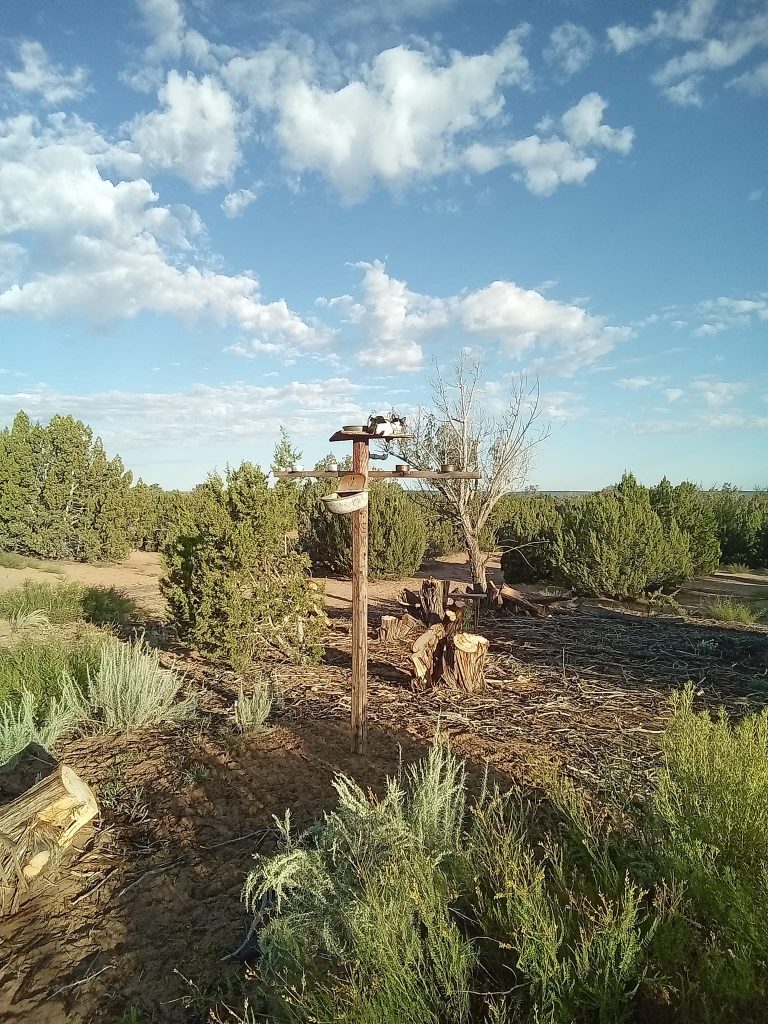
Yang the cat birdYang the cat bird
While Yang our cat tries to lure in unsuspecting birds on the bird feeder, I have been busy working on many things. First things first though, a big thank you to all that donated to my Internet bill. I was able to continue my work without interruption. KDE neon: A busy week in KDE neon as https://kde.org/announcements/plasma/5/5.27.9/ was released! We have it ready to update in User edition or if you would like to download the new ISO you can find it here: https://neon.kde.org/download I highly advise the User Edition as Unstable is volatile right now with Qt6 transition and ABI breakage. Which leads me to the next busy work for the week. Plasma 6 exploded breaking unstable desktops all over, including mine! A library changed and it was not backward compatible, so we had to rebuild the Qt6 $world to get Plasma and PIM functional again. I am happy to report it is all fixed now, but I cannot stress enough, if you don t want to chance broken things, please use the User Edition! I also continued the orange -> green build effort in making sure all our runtime dependencies are up to date. This fixes odd UI bugs and developers have all the build dependencies needed to build their applications. KDE Snaps: Several more 23.08.2 snaps have arrived in the snap store including the new to snaps Kamoso!
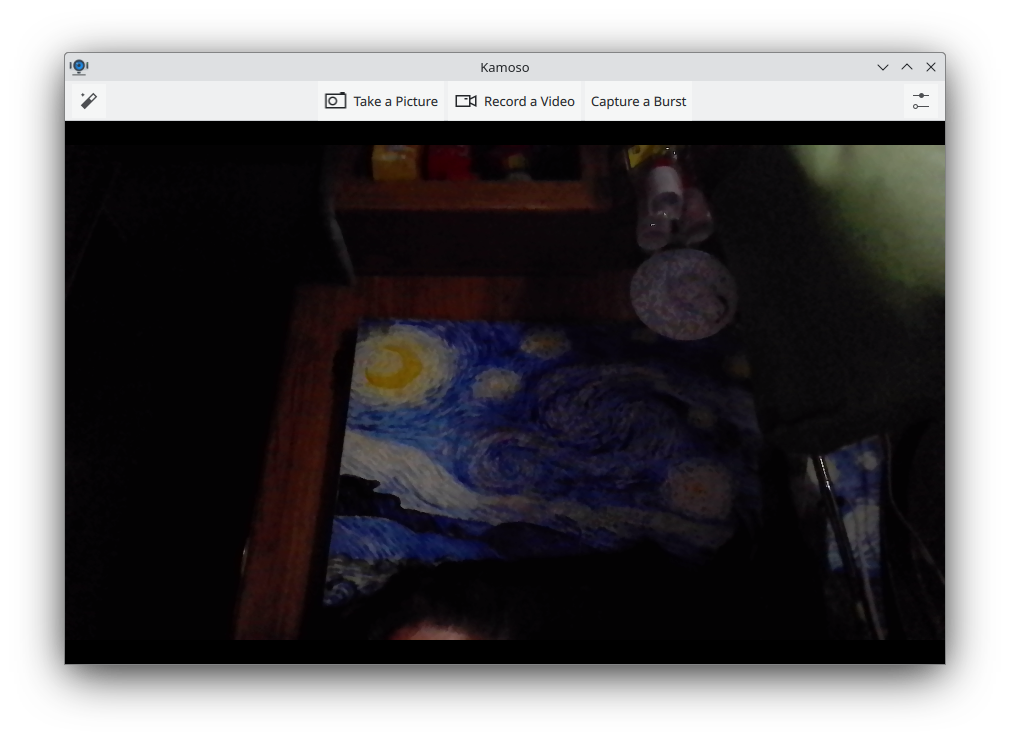
KDE snap KamosoKDE snap Kamoso
I have an auto-connect request to the snap-store policy folks, but until it is approved please snap connect kamoso:camera :camera I have a pile of new MR s in for non release service applications and some fixes for issues found while testing. While this new workflow does take a bit longer waiting for approvals I like it much better as I am developing closer relationships with the application developers. I have made significant progress on the Kf6 ( Qt6 based ) content snap. I am about 90% complete. While this doesn t mean much for users yet, it will when KDE applications release their qt6 ports starting the next major release cycle. I will be ready! The last bit for snap work is I have almost completed my akonadi service snap. This will connect to all KDE PIM snaps so they share data. Akonadi is the background database that ties all the PIM applications together. Debian: This week I have worked on updates for several golang packages including charmbracelet/lipgloss charmbracelet/bubbles, and muesli-termenv. unfortunately I am stuck golang-github-aymanbagabas-go-osc52. The work is done in salsa but the maintainer has not uploaded. I have shot an email to the maintainer. I have also begun mentoring my first potential future DD! I reviewed his python-scienceplots and python-art which should land in Debian soon. Thanks for stopping by! As usual, if you can please spare some change, consider a donation. All proceeds go to surviving another day to work on cool things to land on your desktop! https://gofund.me/b8b69e54 <noscript><a href="https://liberapay.com/sgmoore/donate"><img alt="Donate using Liberapay" src="https://liberapay.com/assets/widgets/donate.svg" /></a></noscript> Donate

26 October 2023

Dima Kogan: Talking to ROS from outside a LAN

The problem
This is about ROS version 1. Version 2 is different, and maybe they fixed stuff. But I kinda doubt it since this thing is heinous in a million ways. Alright so let's say we have have some machines in a LAN doing ROS stuff and we have another machine outside the LAN that wants to listen in (like to get a realtime visualization, say). This is an extremely common scenario, but they created enough hoops to make this not work. Let's say we have 3 computers:
  • router: the bridge between the two networks. This has two NICs. The inner IP is 10.0.1.1 and the outer IP is 12.34.56.78
  • inner: a machine in the LAN that's doing ROS stuff. IP 10.0.1.99
  • outer: a machine outside that LAN that wants to listen in. IP 12.34.56.99
Let's say the router is doing ROS stuff. It's running the ROS master and some nodes like this:
ROS_IP=10.0.1.1 roslaunch whatever
If you omit the ROS_IP it'll pick router, which may or may not work, depending on how the DNS is set up. Here we set it to 10.0.1.1 to make it possible for the inner machine to communicate (we'll see why in a bit). An aside: ROS should use the IP by default instead of the name because the IP will work even if the DNS isn't set up. If there are multiple extant IPs, it should throw an error. But all that would be way too user-friendly. OK. So we have a ROS master on 10.0.1.1 on the default port: 11311. The inner machine can rostopic echo and all that. Great. What if I try to listen in from outer? I say
ROS_MASTER_URI=http://12.34.56.78:11311 rostopic list
This connects to the router on that port, and it works well: I get the list of available topics. Here this works because the router is the router. If inner was running the ROS master then we'd need to do a forward for port 11311. In any case, this works and we understand it. So clearly we can talk to the ROS master. Right? Wrong! Let's actually listen in on a specific topic on outer:
ROS_MASTER_URI=http://12.34.56.78:11311 rostopic echo /some/topic
This does not work. No errors are reported. It just sits there, which looks like no data is coming in on that topic. But this is a lie: it's actually broken.

The diagnosis
So this is our problem. It's a very common use case, and there are plenty of internet people asking about it, with no specific solutions. I debugged it, and the details are here. To figure out what's going on, I made a syscall log on a machine inside the LAN, where a simple rostopic echo does work:
sysdig -A proc.name=rostopic and fd.type contains ipv -s 2000
This shows us all the communication between inner running rostopic and the server. It's really chatty. It's all TCP. There are multiple connections to the router on port 11311. It also starts up multiple TCP servers on the client that listen to connections; these are likely to be broken if we were running the client on outer and a machine inside the LAN tried to talk to them; but thankfully in my limited testing nothing actually tried to talk to them. The conversations on port 11311 are really long, but here's the punchline. inner tells the router:
POST /RPC2 HTTP/1.1                                                                                                                 
Host: 10.0.1.1:11311                                                                                                          
Accept-Encoding: gzip                                                                                                               
Content-Type: text/xml                                                                                                              
User-Agent: Python-xmlrpc/3.11                                                                                                      
Content-Length: 390                                                                                                                 
<?xml version='1.0'?>
<methodCall>
<methodName>registerSubscriber</methodName>
<params>
<param>
<value><string>/rostopic_2447878_1698362157834</string></value>
</param>
<param>
<value><string>/some/topic</string></value>
</param>
<param>
<value><string>*</string></value>
</param>
<param>
<value><string>http://inner:38229/</string></value>
</param>
</params>
</methodCall>
Yes. It's laughably chatty. Then the router replies:
HTTP/1.1 200 OK
Server: BaseHTTP/0.6 Python/3.8.10
Date: Thu, 26 Oct 2023 23:15:28 GMT
Content-type: text/xml
Content-length: 342
<?xml version='1.0'?>
<methodResponse>
<params>
<param>
<value><array><data>
<value><int>1</int></value>
<value><string>Subscribed to [/some/topic]</string></value>
<value><array><data>
<value><string>http://10.0.1.1:45517/</string></value>
</data></array></value>
</param>
</params>
</methodResponse>
Then this sequence of system calls happens in the rostopic process (an excerpt from the sysdig log):
> connect fd=10(<4>) addr=10.0.1.1:45517
< connect res=-115(EINPROGRESS) tuple=10.0.1.99:47428->10.0.1.1:45517 fd=10(<4t>10.0.1.99:47428->10.0.1.1:45517)
< getsockopt res=0 fd=10(<4t>10.0.1.99:47428->10.0.1.1:45517) level=1(SOL_SOCKET) optname=4(SO_ERROR) val=0 optlen=4
So the inner client makes an outgoing TCP connection on the address given to it by the ROS master above: 10.0.1.1:45517. This IP is only accessible from within the LAN, which works fine when talking to it from inner, but would be a problem from the outside. Furthermore, some sort of single-port-forwarding scheme wouldn't fix connecting from outer either, since the port number is dynamic. To confirm what we think is happening, the sequence of syscalls when trying to rostopic echo from outer does indeed fail:
connect fd=10(<4>) addr=10.0.1.1:45517 
connect res=-115(EINPROGRESS) tuple=10.0.1.1:46204->10.0.1.1:45517 fd=10(<4t>10.0.1.1:46204->10.0.1.1:45517)
getsockopt res=0 fd=10(<4t>10.0.1.1:46204->10.0.1.1:45517) level=1(SOL_SOCKET) optname=4(SO_ERROR) val=-111(ECONNREFUSED) optlen=4
That's the breakage mechanism: the ROS master asks us to communicate on an address we can't talk to. Debugging this is easy with sysdig:
sudo sysdig -A -s 400 evt.buffer contains '"Subscribed to"' and proc.name=rostopic
This prints out all syscalls seen by the rostopic command that contain the string Subscribed to, so you can see that different addresses the ROS master gives us in response to different commands. OK. So can we get the ROS master to give us an address that we can actually talk to? Sorta. Remember that we invoked the master with
ROS_IP=10.0.1.1 roslaunch whatever
The ROS_IP environment variable is exactly the address that the master gives out. So in this case, we can fix it by doing this instead:
ROS_IP=12.34.56.78 roslaunch whatever
Then the outer machine will be asked to talk to 12.34.56.78:45517, which works. Unfortunately, if we do that, then the inner machine won't be able to communicate. So some sort of ssh port forward cannot fix this: we need a lower-level tunnel, like a VPN or something. And another rant. Here rostopic tried to connect to an unreachable address, which failed. But rostopic knows the connection failed! It should throw an error message to the user. Something like this would be wonderful:
ERROR! Tried to connect to 10.0.1.1:45517 ($ROS_IP:dynamicport), but connect() returned ECONNREFUSED
That would be immensely helpful. It would tell the user that something went wrong (instead of no data being sent), and it would give a strong indication of the problem and how to fix it. But that would be asking too much.

The solution
So we need a VPN-like thing. I just tried sshuttle, and it just works. Start the ROS node in the way that makes connections from within the LAN work:
ROS_IP=10.0.1.1 roslaunch whatever
Then on the outer client:
sshuttle -r router 10.0.1.0/24
This connects to the router over ssh and does some hackery to make all connections from outer to 10.0.1.x transparently route into the LAN. On all ports. rostopic echo then works. I haven't done any thorough testing, but hopefully it's reliable and has low overhead; I don't know. I haven't tried it but almost certainly this would work even with the ROS master running on inner. This would be accomplished like this:
  1. Tell ssh how to connect to inner. Dropping this into ~/.ssh/config should do it:
    Host inner
    HostName 10.0.1.99
    ProxyJump router
    
  2. Do the magic thing:
    sshuttle -r inner 10.0.1.0/24
    
I'm sure any other VPN-like thing would work also.

25 October 2023

Phil Hands: Sleep Apnoea

I just noticed that I wrote this a decade ago, and then never got round to posting it, so thought I might kick it off now to mark my tentative return to blogging. At the recent 2015 Cambridge-UK Mini-DebConf (generously hosted by ARM), I gave an impromptu Lightning Talk about Sleep Apnoea (video here). Obstructive Sleep Apnoea (OSA - the form I'm on about) is a sleep disorder where one repeatedly stops breathing while asleep, normally when snoring, but not necessarily. The consequence of this is that in order to resume breathing one must wake up momentarily. These events are not remembered, but they ruin the quality of your sleep. If you find that you're often quite tired, you should probably give the Epworth Sleepiness Scale a try -- if it suggests you have a problem: Get thee to a doctor for a check-up! The good news is that if you do turn out to have OSA it's fairly easy to treat (CPAP or more recently APAP being the favoured treatment), and that when treated you should be able to get good quality sleep that will result in you being much more awake, and much more cheerful. If you might be an Apnoeac (or a sufferer of some other sleep disorder, for that matter), get yourself treated, and you'll be able to use the extra hours of daily concentration working on Debian, thus making the world a better place :-)

Russ Allbery: Review: Going Infinite

Review: Going Infinite, by Michael Lewis
Publisher: W.W. Norton & Company
Copyright: 2023
ISBN: 1-324-07434-5
Format: Kindle
Pages: 255
My first reaction when I heard that Michael Lewis had been embedded with Sam Bankman-Fried working on a book when Bankman-Fried's cryptocurrency exchange FTX collapsed into bankruptcy after losing billions of dollars of customer deposits was "holy shit, why would you talk to Michael Lewis about your dodgy cryptocurrency company?" Followed immediately by "I have to read this book." This is that book. I wasn't sure how Lewis would approach this topic. His normal (although not exclusive) area of interest is financial systems and crises, and there is lots of room for multiple books about cryptocurrency fiascoes using someone like Bankman-Fried as a pivot. But Going Infinite is not like The Big Short or Lewis's other financial industry books. It's a nearly straight biography of Sam Bankman-Fried, with just enough context for the reader to follow his life. To understand what you're getting in Going Infinite, I think it's important to understand what sort of book Lewis likes to write. Lewis is not exactly a reporter, although he does explain complicated things for a mass audience. He's primarily a storyteller who collects people he finds fascinating. This book was therefore never going to be like, say, Carreyrou's Bad Blood or Isaac's Super Pumped. Lewis's interest is not in a forensic account of how FTX or Alameda Research were structured. His interest is in what makes Sam Bankman-Fried tick, what's going on inside his head. That's not a question Lewis directly answers, though. Instead, he shows you Bankman-Fried as Lewis saw him and was able to reconstruct from interviews and sources and lets you draw your own conclusions. Boy did I ever draw a lot of conclusions, most of which were highly unflattering. However, one conclusion I didn't draw, and had been dubious about even before reading this book, was that Sam Bankman-Fried was some sort of criminal mastermind who intentionally plotted to steal customer money. Lewis clearly doesn't believe this is the case, and with the caveat that my study of the evidence outside of this book has been spotty and intermittent, I think Lewis has the better of the argument. I am utterly fascinated by this, and I'm afraid this review is going to turn into a long summary of my take on the argument, so here's the capsule review before you get bored and wander off: This is a highly entertaining book written by an excellent storyteller. I am also inclined to believe most of it is true, but given that I'm not on the jury, I'm not that invested in whether Lewis is too credulous towards the explanations of the people involved. What I do know is that it's a fantastic yarn with characters who are too wild to put in fiction, and I thoroughly enjoyed it. There are a few things that everyone involved appears to agree on, and therefore I think we can take as settled. One is that Bankman-Fried, and most of the rest of FTX and Alameda Research, never clearly distinguished between customer money and all of the other money. It's not obvious that their home-grown accounting software (written entirely by one person! who never spoke to other people! in code that no one else could understand!) was even capable of clearly delineating between their piles of money. Another is that FTX and Alameda Research were thoroughly intermingled. There was no official reporting structure and possibly not even a coherent list of employees. The environment was so chaotic that lots of people, including Bankman-Fried, could have stolen millions of dollars without anyone noticing. But it was also so chaotic that they could, and did, literally misplace millions of dollars by accident, or because Bankman-Fried had problems with object permanence. Something that was previously less obvious from news coverage but that comes through very clearly in this book is that Bankman-Fried seriously struggled with normal interpersonal and societal interactions. We know from multiple sources that he was diagnosed with ADHD and depression (Lewis describes it specifically as anhedonia, the inability to feel pleasure). The ADHD in Lewis's account is quite severe and does not sound controlled, despite medication; for example, Bankman-Fried routinely played timed video games while he was having important meetings, forgot things the moment he stopped dealing with them, was constantly on his phone or seeking out some other distraction, and often stimmed (by bouncing his leg) to a degree that other people found it distracting. Perhaps more tellingly, Bankman-Fried repeatedly describes himself in diary entries and correspondence to other people (particularly Caroline Ellison, his employee and on-and-off secret girlfriend) as being devoid of empathy and unable to access his own emotions, which Lewis supports with stories from former co-workers. I'm very hesitant to diagnose someone via a book, but, at least in Lewis's account, Bankman-Fried nearly walks down the symptom list of antisocial personality disorder in his own description of himself to other people. (The one exception is around physical violence; there is nothing in this book or in any of the other reporting that I've seen to indicate that Bankman-Fried was violent or physically abusive.) One of the recurrent themes of this book is that Bankman-Fried never saw the point in following rules that didn't make sense to him or worrying about things he thought weren't important, and therefore simply didn't. By about a third of the way into this book, before FTX is even properly started, very little about its eventual downfall will seem that surprising. There was no way that Sam Bankman-Fried was going to be able to run a successful business over time. He was extremely good at probabilistic trading and spotting exploitable market inefficiencies, and extremely bad at essentially every other aspect of living in a society with other people, other than a hit-or-miss ability to charm that worked much better with large audiences than one-on-one. The real question was why anyone would ever entrust this man with millions of dollars or decide to work for him for longer than two weeks. The answer to those questions changes over the course of this story. Later on, it was timing. Sam Bankman-Fried took the techniques of high frequency trading he learned at Jane Street Capital and applied them to exploiting cryptocurrency markets at precisely the right time in the cryptocurrency bubble. There was far more money than sense, the most ruthless financial players were still too leery to get involved, and a rising tide was lifting all boats, even the ones that were piles of driftwood. When cryptocurrency inevitably collapsed, so did his businesses. In retrospect, that seems inevitable. The early answer, though, was effective altruism. A full discussion of effective altruism is beyond the scope of this review, although Lewis offers a decent introduction in the book. The short version is that a sensible and defensible desire to use stronger standards of evidence in evaluating charitable giving turned into a bizarre navel-gazing exercise in making up statistical risks to hypothetical future people and treating those made-up numbers as if they should be the bedrock of one's personal ethics. One of the people most responsible for this turn is an Oxford philosopher named Will MacAskill. Sam Bankman-Fried was already obsessed with utilitarianism, in part due to his parents' philosophical beliefs, and it was a presentation by Will MacAskill that converted him to the effective altruism variant of extreme utilitarianism. In Lewis's presentation, this was like joining a cult. The impression I came away with feels like something out of a science fiction novel: Bankman-Fried knew there was some serious gap in his thought processes where most people had empathy, was deeply troubled by this, and latched on to effective altruism as the ethical framework to plug into that hole. So much of effective altruism sounds like a con game that it's easy to think the participants are lying, but Lewis clearly believes Bankman-Fried is a true believer. He appeared to be sincerely trying to make money in order to use it to solve existential threats to society, he does not appear to be motivated by money apart from that goal, and he was following through (in bizarre and mostly ineffective ways). I find this particularly believable because effective altruism as a belief system seems designed to fit Bankman-Fried's personality and justify the things he wanted to do anyway. Effective altruism says that empathy is meaningless, emotion is meaningless, and ethical decisions should be made solely on the basis of expected value: how much return (usually in safety) does society get for your investment. Effective altruism says that all the things that Sam Bankman-Fried was bad at were useless and unimportant, so he could stop feeling bad about his apparent lack of normal human morality. The only thing that mattered was the thing that he was exceptionally good at: probabilistic reasoning under uncertainty. And, critically to the foundation of his business career, effective altruism gave him access to investors and a recruiting pool of employees, things he was entirely unsuited to acquiring the normal way. There's a ton more of this book that I haven't touched on, but this review is already quite long, so I'll leave you with one more point. I don't know how true Lewis's portrayal is in all the details. He took the approach of getting very close to most of the major players in this drama and largely believing what they said happened, supplemented by startling access to sources like Bankman-Fried's personal diary and Caroline Ellis's personal diary. (He also seems to have gotten extensive information from the personal psychiatrist of most of the people involved; I'm not sure if there's some reasonable explanation for this, but based solely on the material in this book, it seems to be a shocking breach of medical ethics.) But Lewis is a storyteller more than he's a reporter, and his bias is for telling a great story. It's entirely possible that the events related here are not entirely true, or are skewed in favor of making a better story. It's certainly true that they're not the complete story. But, that said, I think a book like this is a useful counterweight to the human tendency to believe in moral villains. This is, frustratingly, a counterweight extended almost exclusively to higher-class white people like Bankman-Fried. This is infuriating, but that doesn't make it wrong. It means we should extend that analysis to more people. Once FTX collapsed, a lot of people became very invested in the idea that Bankman-Fried was a straightforward embezzler. Either he intended from the start to steal everyone's money or, more likely, he started losing money, panicked, and stole customer money to cover the hole. Lots of people in history have done exactly that, and lots of people involved in cryptocurrency have tenuous attachments to ethics, so this is a believable story. But people are complicated, and there's also truth in the maxim that every villain is the hero of their own story. Lewis is after a less boring story than "the crook stole everyone's money," and that leads to some bias. But sometimes the less boring story is also true. Here's the thing: even if Sam Bankman-Fried never intended to take any money, he clearly did intend to mix customer money with Alameda Research funds. In Lewis's account, he never truly believed in them as separate things. He didn't care about following accounting or reporting rules; he thought they were boring nonsense that got in his way. There is obvious criminal intent here in any reading of the story, so I don't think Lewis's more complex story would let him escape prosecution. He refused to follow the rules, and as a result a lot of people lost a lot of money. I think it's a useful exercise to leave mental space for the possibility that he had far less obvious reasons for those actions than that he was a simple thief, while still enforcing the laws that he quite obviously violated. This book was great. If you like Lewis's style, this was some of the best entertainment I've read in a while. Highly recommended; if you are at all interested in this saga, I think this is a must-read. Rating: 9 out of 10

23 October 2023

Russ Allbery: Review: Going Postal

Review: Going Postal, by Terry Pratchett
Series: Discworld #33
Publisher: Harper
Copyright: October 2004
Printing: November 2014
ISBN: 0-06-233497-2
Format: Mass market
Pages: 471
Going Postal is the 33rd Discworld novel. You could probably start here if you wanted to; there are relatively few references to previous books, and the primary connection (to Feet of Clay) is fully re-explained. I suspect that's why Going Postal garnered another round of award nominations. There are arguable spoilers for Feet of Clay, however. Moist von Lipwig is a con artist. Under a wide variety of names, he's swindled and forged his way around the Disc, always confident that he can run away from or talk his way out of any trouble. As Going Postal begins, however, it appears his luck has run out. He's about to be hanged. Much to his surprise, he wakes up after his carefully performed hanging in Lord Vetinari's office, where he's offered a choice. He can either take over the Ankh-Morpork post office, or he can die. Moist, of course, immediately agrees to run the post office, and then leaves town at the earliest opportunity, only to be carried back into Vetinari's office by a relentlessly persistent golem named Mr. Pump. He apparently has a parole officer. The clacks, Discworld's telegraph system first seen in The Fifth Elephant, has taken over most communications. The city is now dotted with towers, and the Grand Trunk can take them at unprecedented speed to even far-distant cities like Genua. The post office, meanwhile, is essentially defunct, as Moist quickly discovers. There are two remaining employees, the highly eccentric Junior Postman Groat who is still Junior because no postmaster has lasted long enough to promote him, and the disturbingly intense Apprentice Postman Stanley, who collects pins. Other than them, the contents of the massive post office headquarters are a disturbing mail sorting machine designed by Bloody Stupid Johnson that is not picky about which dimension or timeline the sorted mail comes from, and undelivered mail. A lot of undelivered mail. Enough undelivered mail that there may be magical consequences. All Moist has to do is get the postal system running again. Somehow. And not die in mysterious accidents like the previous five postmasters. Going Postal is a con artist story, but it's also a startup and capitalism story. Vetinari is, as always, solving a specific problem in his inimitable indirect way. The clacks were created by engineers obsessed with machinery and encodings and maintenance, but it's been acquired by... well, let's say private equity, because that's who they are, although Discworld doesn't have that term. They immediately did what private equity always did: cut out everything that didn't extract profit, without regard for either the service or the employees. Since the clacks are an effective monopoly and the new owners are ruthless about eliminating any possible competition, there isn't much to stop them. Vetinari's chosen tool is Moist. There are some parts of this setup that I love and one part that I'm grumbly about. A lot of the fun of this book is seeing Moist pulled into the mission of resurrecting the post office despite himself. He starts out trying to wriggle out of his assigned task, but, after a few early successes and a supernatural encounter with the mail, he can't help but start to care. Reformed con men often make good protagonists because one can enjoy the charisma without disliking the ethics. Pratchett adds the delightfully sharp-witted and cynical Adora Belle Dearheart as a partial reader stand-in, which makes the process of Moist becoming worthy of his protagonist role even more fun. I think that a properly functioning postal service is one of the truly monumental achievements of human society and doesn't get nearly enough celebration (or support, or pay, or good working conditions). Give me a story about reviving a postal service by someone who appreciates the tradition and social role as much as Pratchett clearly does and I'm there. The only frustration is that Going Postal is focused more on an immediate plot, so we don't get to see the larger infrastructure recovery that is clearly needed. (Maybe in later books?) That leads to my grumble, though. Going Postal and specifically the takeover of the clacks is obviously inspired by corporate structures in the later Industrial Revolution, but this book was written in 2004, so it's also a book about private equity and startups. When Vetinari puts a con man in charge of the post office, he runs it like a startup: do lots of splashy things to draw attention, promise big and then promise even bigger, stumble across a revenue source that may or may not be sustainable, hire like mad, and hope it all works out. This makes for a great story in the same way that watching trapeze artists or tightrope walkers is entertaining. You know it's going to work because that's the sort of book you're reading, so you can enjoy the audacity and wonder how Moist will manage to stay ahead of his promises. But it is still a con game applied to a public service, and the part of me that loves the concept of the postal service couldn't stop feeling like this is part of the problem. The dilemma that Vetinari is solving is a bit too realistic, down to the requirement that the post office be self-funding and not depend on city funds and, well, this is repugnant to me. Public services aren't businesses. Societies spend money to build things that they need to maintain society, and postal service is just as much one of those things as roads are. The ability of anyone to send a letter to anyone else, no matter how rural the address is, provides infrastructure on which a lot of important societal structure is built. Pratchett made me care a great deal about Ankh-Morpork's post office (not hard to do), and now I want to see it rebuilt properly, on firm foundations, without splashy promises and without a requirement that it pay for itself. Which I realize is not the point of Discworld at all, but the concept of running a postal service like a startup hits maybe a bit too close to home. Apart from that grumble, this is a great book if you're in the mood for a reformed con man story. I thought the gold suit was a bit over the top, but I otherwise thought Moist's slow conversion to truly caring about his job was deeply satisfying. The descriptions of the clacks are full of askew Discworld parodies of computer networking and encoding that I enjoyed more than I thought I would. This is also the book that introduced the now-famous (among Pratchett fans at least) GNU instruction for the clacks, and I think that scene is the most emotionally moving bit of Pratchett outside of Night Watch. Going Postal is one of the better books in the Discworld series to this point (and I'm sadly getting near the end). If you have less strongly held opinions about management and funding models for public services, or at least are better at putting them aside when reading fantasy novels, you're likely to like it even more than I did. Recommended. Followed by Thud!. The thematic sequel is Making Money. Rating: 8 out of 10

22 October 2023

Aigars Mahinovs: Figuring out finances part 3

So now that I have something that looks very much like a budgeting setup going, I am going to .. delete it! Why? Well, at the end of the last part of this, the Firefly III instance was running on a tiny Debian server in a Docker container right next to another Docker container that is running the main user of this server - a Home Assistant instance that has been managing my home for several years already. So why change that? See, there is one bit of knowledge that is very crucial to your Home Assistant experience, which is not really emphasised enough in the Home Assistant documentation. In fact back when I was getting into the Home Assistant both the main documentation and basically all the guides around were just coming off the hype of Docker disrupting everything and that is a big reason why everyone suggested to install and use Home Assistant as a Docker container on top of any kind of stable OS. In fact I used to run it for years on my TerraMaster NAS, just so that I don't have a separate home server running 24/7 at home and just have everything inside the very compact NAS case. So here is the thing you NEED to know - Home Assistant Container is DEMO version of Home Assistant! If you want to have a full Home Assistant experience and use the knowledge of the huge community around the HA space, you have to use the Home Assistant OS. Ideally on dedicated hardware. Ideally on HA Green box, but any tiny PC would also work great. Raspberry Pi 4+ is common, but quite weak as the network size grows and especially the SD card for storage gets old very fast. Get a real small x86 PC with at least 4Gb RAM and a NVME SSD (eMMC is fine too). You want to have an Ethernet port and a few free USB ports. I would also suggest immediately getting HA SkyConnect adapter that can do Zigbee networking and will do Matter soon (tm). I am making do with a SonOff Zigbee gateway, but it is quite hacky to get working and your whole Zigbee communication breaks down if the WiFi goes down - suboptimal. So I took a backup of the Home Assistant instance using it's build-in tools. I took an export of my fully configured Firefly III instance and proceeded to wipe the drive of the NUC. That was not a smart idea. :D On the Home Assitant side I was really frustrated by the documentation that was really focused on users that are (likely) using Windows and are using an SD card in something like Raspberry Pi to get Home Assistant OS running. It recommended downloading Etcher to write the image to the boot medium. That is a really weird piece of software that managed to actually crash consistently when I was trying to run it from Debian Live or Ubuntu Live on my NUC. It took me way too long to give up and try something much simpler - dd. xzcat haos_generic-x86-64-11.0.img.xz dd of=/dev/mmcblk0 bs=1M That just worked, prefectly and really fast. If you want to use a GUI in a live environment, then just using the gnome-disk-utility ("Disks" in Gnome menu) and using the "Restore Disk Image ..." on a partition would work just as well. It even supports decompressing the XZ images directly while writing. But that image is small, will it not have a ton of unused disk space behind the fixed install partition? Yes, it will ... until first boot. The HA OS takes over the empty space after its install partition on the first boot-up and just grows its main partition to take up all the remaining space. Smart. After first boot is completed, the first boot wizard can be accessed via your web browser and one of the prominent buttons there is restoring from backup. So you just give it the backup file and wait. Sadly the restore does not actually give any kind of progress, so your only way to figure out when it is done is opening the same web adress in another browser tab and refresh periodically - after restoring from backup it just boots into the same config at it had before - all the settings, all the devices, all the history is preserved. Even authentification tokens are preserved so if yu had a Home Assitant Mobile installed on your phone (both for remote access and to send location info and phone state, like charging, to HA to trigger automations) then it will just suddenly start working again without further actions needed from your side. That is an almost perfect backup/restore experience. The first thing you get for using the OS version of HA is easy automatic update that also automatically takes a backup before upgrade, so if anything breaks you can roll back with one click. There is also a command-line tool that allows to upgrade, but also downgrade ha-core and other modules. I had to use it today as HA version 23.10.4 actually broke support for the Sonoff bridge that I am using to control Zigbee devices, which are like 90% of all smart devices in my home. Really helpful stuff, but not a must have. What is a must have and that you can (really) only get with Home Assistant Operating System are Addons. Some addons are just normal servers you can run alongside HA on the same HA OS server, like MariaDB or Plex or a file server. That is not the most important bit, but even there the software comes pre-configured to use in a home server configuration and has a very simple config UI to pre-configure key settings, like users, passwords and database accesses for MariaDB - you can litereally in a few clicks and few strings make serveral users each with its own access to its own database. Couple more clicks and the DB is running and will be kept restarted in case of failures. But the real gems in the Home Assistant Addon Store are modules that extend Home Assitant core functionality in way that would be really hard or near impossible to configure in Home Assitant Container manually, especially because no documentation has ever existed for such manual config - everyone just tells you to install the addon from HA Addon store or from HACS. Or you can read the addon metadata in various repos and figure out what containers it actually runs with what settings and configs and what hooks it puts into the HA Core to make them cooperate. And then do it all over again when a new version breaks everything 6 months later when you have already forgotten everything. In the Addons that show up immediately after installation are addons to install the new Matter server, a MariaDB and MQTT server (that other addons can use for data storage and message exchange), Z-Wave support and ESPHome integration and very handy File manager that includes editors to edit Home Assitant configs directly in brower and SSH/Terminal addon that boht allows SSH connection and also a web based terminal that gives access to the OS itself and also to a comand line interface, for example, to do package downgrades if needed or see detailed logs. And also there is where you can get the features that are the focus this year for HA developers - voice enablers. However that is only a beginning. Like in Debian you can add additional repositories to expand your list of available addons. Unlike Debian most of the amazing software that is available for Home Assistant is outside the main, official addon store. For now I have added the most popular addon repository - HACS (Home Assistant Community Store) and repository maintained by Alexbelgium. The first includes things like NodeRED (a workflow based automation programming UI), Tailscale/Wirescale for VPN servers, motionEye for CCTV control, Plex for home streaming. HACS also includes a lot of HA UI enhacement modules, like themes, custom UI control panels like Mushroom or mini-graph-card and integrations that provide more advanced functions, but also require more knowledge to use, like Local Tuya - that is harder to set up, but allows fully local control of (normally) cloud-based devices. And it has AppDaemon - basically a Python based automation framework where you put in Python scrips that get run in a special environment where they get fed events from Home Assistant and can trigger back events that can control everything HA can and also do anything Python can do. This I will need to explore later. And the repository by Alex includes the thing that is actually the focus of this blog post (I know :D) - Firefly III addon and Firefly Importer addon that you can then add to your Home Assistant OS with a few clicks. It also has all kinds of addons for NAS management, photo/video server, book servers and Portainer that lets us setup and run any Docker container inside the HA OS structure. HA OS will detect this and warn you about unsupported processes running on your HA OS instance (nice security feature!), but you can just dismiss that. This will be very helpful very soon. This whole environment of OS and containers and apps really made me think - what was missing in Debian that made the talented developers behind all of that to spend the immense time and effor to setup a completely new OS and app infrastructure and develop a completel paraller developer community for Home Assistant apps, interfaces and configurations. Is there anything that can still be done to make HA community and the general open source and Debian community closer together? HA devs are not doing anything wrong: they are using the best open source can provide, they bring it to people whould could not install and use it otherwise, they are contributing fixes and improvements as well. But there must be some way to do this better, together. So I installed MariaDB, create a user and database for Firefly. I installed Firefly III and configured it to use the MariaDB with the web config UI. When I went into the Firefly III web UI I was confronted with the normal wizard to setup a new instance. And no reference to any backup restore. Hmm, ok. Maybe that goes via the Importer? So I make an access token again, configured the Importer to use that, configured the Nordlinger bank connection settings. Then I tried to import the export that I downloaded from Firefly III before. The importer did not auto-recognose the format. Turns out it is just a list of transactions ... It can only be barely useful if you first manually create all the asset accounts with the same names as before and even then you'll again have to deal with resolving the problem of transfers showing up twice. And all of your categories (that have not been used yet) are gone, your automation rules and bills are gone, your budgets and piggy banks are gone. Boooo. It will be easier for me to recreate my account data from bank exports again than to resolve data in that transaction export. Turns out that Firefly III documenation explicitly recommends making a mysqldump of your own and not rely on anything in the app itself for backup purposes. Kind of sad this was not mentioned in the export page that sure looked a lot like a backup :D After doing all that work all over again I needed to make something new not to feel like I wasted days of work for no real gain. So I started solving a problem I had for a while already - how do I add cash transations to the system when I am out of the house with just my phone in the hand? So far my workaround has been just sending myself messages in WhatsApp with the amount and description of any cash expenses. Two solutions are possible: app and bot. There are actually multiple Android-based phone apps that work with Firefly III API to do full financial management from the phone. However, after trying it out, that is not what I will be using most of the time. First of all this requires your Firefly III instance to be accessible from the Internet. Either via direct API access using some port forwarding and secured with HTTPS and good access tokens, or via a VPN server redirect that is installed on both HA and your phone. Tailscale was really easy to get working. But the power has its drawbacks - adding a new cash transaction requires opening the app, choosing new transaction view, entering descriptio, amount, choosing "Cash" as source account and optionally choosing destination expense account, choosing category and budget and then submitting the form to the server. Sadly none of that really works if you have no Internet or bad Internet at the place where you are using cash. And it's just too many steps. Annoying. An easier alternative is setting up a Telegram bot - it is running in a custom Docker container right next to your Firefly (via Portainer) and you talk to it via a custom Telegram chat channel that you create very easily and quickly. And then you can just tell it "Coffee 5" and it will create a transaction from the (default) cash account in 5 amount with description "Coffee". This part also works if you are offline at the moment - the bot will receive the message once you get back online. You can use Telegram bot menu system to edit the transaction to add categories or expense accounts, but this part only work if you are online. And the Firefly instance does not have to be online at all. Really nifty. So next week I will need to write up all the regular payments as bills in Firefly (again) and then I can start writing a Python script to predict my (financial) future!

Ian Jackson: DigiSpark (ATTiny85) - Arduino, C, Rust, build systems

Recently I completed a small project, including an embedded microcontroller. For me, using the popular Arduino IDE, and C, was a mistake. The experience with Rust was better, but still very exciting, and not in a good way. Here follows the rant. Introduction In a recent project (I ll write about the purpose, and the hardware in another post) I chose to use a DigiSpark board. This is a small board with a USB-A tongue (but not a proper plug), and an ATTiny85 microcontroller, This chip has 8 pins and is quite small really, but it was plenty for my application. By choosing something popular, I hoped for convenient hardware, and an uncomplicated experience. Convenient hardware, I got. Arduino IDE The usual way to program these boards is via an IDE. I thought I d go with the flow and try that. I knew these were closely related to actual Arduinos and saw that the IDE package arduino was in Debian. But it turns out that the Debian package s version doesn t support the DigiSpark. (AFAICT from the list it offered me, I m not sure it supports any ATTiny85 board.) Also, disturbingly, its board manager seemed to be offering to install board support, suggesting it would download stuff from the internet and run it. That wouldn t be acceptable for my main laptop. I didn t expect to be doing much programming or debugging, and the project didn t have significant security requirements: the chip, in my circuit, has only a very narrow ability do anything to the real world, and no network connection of any kind. So I thought it would be tolerable to do the project on my low-security video laptop . That s the machine where I m prepared to say yes to installing random software off the internet. So I went to the upstream Arduino site and downloaded a tarball containing the Arduino IDE. After unpacking that in /opt it ran and produced a pointy-clicky IDE, as expected. I had already found a 3rd-party tutorial saying I needed to add a magic URL (from the DigiSpark s vendor) in the preferences. That indeed allowed it to download a whole pile of stuff. Compilers, bootloader clients, god knows what. However, my tiny test program didn t make it to the board. Half-buried in a too-small window was an error message about the board s bootloader ( Micronucleus ) being too new. The boards I had came pre-flashed with micronucleus 2.2. Which is hardly new, But even so the official Arduino IDE (or maybe the DigiSpark s board package?) still contains an old version. So now we have all the downsides of curl bash-ware, but we re lacking the it s up to date and it just works upsides. Further digging found some random forum posts which suggested simply downloading a newer micronucleus and manually stuffing it into the right place: one overwrites a specific file, in the middle the heaps of stuff that the Arduino IDE s board support downloader squirrels away in your home directory. (In my case, the home directory of the untrusted shared user on the video laptop,) So, whatever . I did that. And it worked! Having demo d my ability to run code on the board, I set about writing my program. Writing C again The programming language offered via the Arduino IDE is C. It s been a little while since I started a new thing in C. After having spent so much of the last several years writing Rust. C s primitiveness quickly started to grate, and the program couldn t easily be as DRY as I wanted (Don t Repeat Yourself, see Wilson et al, 2012, 4, p.6). But, I carried on; after all, this was going to be quite a small job. Soon enough I had a program that looked right and compiled. Before testing it in circuit, I wanted to do some QA. So I wrote a simulator harness that #included my Arduino source file, and provided imitations of the few Arduino library calls my program used. As an side advantage, I could build and run the simulation on my main machine, in my normal development environment (Emacs, make, etc.). The simulator runs confirmed the correct behaviour. (Perhaps there would have been some more faithful simulation tool, but the Arduino IDE didn t seem to offer it, and I wasn t inclined to go further down that kind of path.) So I got the video laptop out, and used the Arduino IDE to flash the program. It didn t run properly. It hung almost immediately. Some very ad-hoc debugging via led-blinking (like printf debugging, only much worse) convinced me that my problem was as follows: Arduino C has 16-bit ints. My test harness was on my 64-bit Linux machine. C was autoconverting things (when building for the micrcocontroller). The way the Arduino IDE ran the compiler didn t pass the warning options necessary to spot narrowing implicit conversions. Those warnings aren t the default in C in general because C compilers hate us all for compatibility reasons. I don t know why those warnings are not the default in the Arduino IDE, but my guess is that they didn t want to bother poor novice programmers with messages from the compiler explaining how their program is quite possibly wrong. After all, users don t like error messages so we shouldn t report errors. And novice programmers are especially fazed by error messages so it s better to just let them struggle themselves with the arcane mysteries of undefined behaviour in C? The Arduino IDE does offer a dropdown for compiler warnings . The default is None. Setting it to All didn t produce anything about my integer overflow bugs. And, the output was very hard to find anyway because the log window has a constant stream of strange messages from javax.jmdns, with hex DNS packet dumps. WTF. Other things that were vexing about the Arduino IDE: it has fairly fixed notions (which don t seem to be documented) about how your files and directories ought to be laid out, and magical machinery for finding things you put nearby its sketch (as it calls them) and sticking them in its ear, causing lossage. It has a tendency to become confused if you edit files under its feet (e.g. with git checkout). It wasn t really very suited to a workflow where principal development occurs elsewhere. And, important settings such as the project s clock speed, or even the target board, or the compiler warning settings to use weren t stored in the project directory along with the actual code. I didn t look too hard, but I presume they must be in a dotfile somewhere. This is madness. Apparently there is an Arduino CLI too. But I was already quite exasperated, and I didn t like the idea of going so far off the beaten path, when the whole point of using all this was to stay with popular tooling and share fate with others. (How do these others cope? I have no idea.) As for the integer overflow bug: I didn t seriously consider trying to figure out how to control in detail the C compiler options passed by the Arduino IDE. (Perhaps this is possible, but not really documented?) I did consider trying to run a cross-compiler myself from the command line, with appropriate warning options, but that would have involved providing (or stubbing, again) the Arduino/DigiSpark libraries (and bugs could easily lurk at that interface). Instead, I thought, if only I had written the thing in Rust . But that wasn t possible, was it? Does Rust even support this board? Rust on the DigiSpark I did a cursory web search and found a very useful blog post by Dylan Garrett. This encouraged me to think it might be a workable strategy. I looked at the instructions there. It seemed like I could run them via the privsep arrangement I use to protect myself when developing using upstream cargo packages from crates.io. I got surprisingly far surprisingly quickly. It did, rather startlingly, cause my rustup to download a random recent Nightly Rust, but I have six of those already for other Reasons. Very quickly I got the trinket LED blink example, referenced by Dylan s blog post, to compile. Manually copying the file to the video laptop allowed me to run the previously-downloaded micronucleus executable and successfully run the blink example on my board! I thought a more principled approach to the bootloader client might allow a more convenient workflow. I found the upstream Micronucleus git releases and tags, and had a look over its source code, release dates, etc. It seemed plausible, so I compiled v2.6 from source. That was a success: now I could build and install a Rust program onto my board, from the command line, on my main machine. No more pratting about with the video laptop. I had got further, more quickly, with Rust, than with the Arduino IDE, and the outcome and workflow was superior. So, basking in my success, I copied the directory containing the example into my own project, renamed it, and adjusted the path references. That didn t work. Now it didn t build. Even after I copied about .cargo/config.toml and rust-toolchain.toml it didn t build, producing a variety of exciting messages, depending what precisely I tried. I don t have detailed logs of my flailing: the instructions say to build it by cd ing to the subdirectory, and, given that what I was trying to do was to not follow those instructions, it didn t seem sensible to try to prepare a proper repro so I could file a ticket. I wasn t optimistic about investigating it more deeply myself: I have some experience of fighting cargo, and it s not usually fun. Looking at some of the build control files, things seemed quite complicated. Additionally, not all of the crates are on crates.io. I have no idea why not. So, I would need to supply local copies of them anyway. I decided to just git subtree add the avr-hal git tree. (That seemed better than the approach taken by the avr-hal project s cargo template, since that template involve a cargo dependency on a foreign git repository. Perhaps it would be possible to turn them into path dependencies, but given that I had evidence of file-location-sensitive behaviour, which I didn t feel like I wanted to spend time investigating, using that seems like it would possibly have invited more trouble. Also, I don t like package templates very much. They re a form of clone-and-hack: you end up stuck with whatever bugs or oddities exist in the version of the template which was current when you started.) Since I couldn t get things to build outside avr-hal, I edited the example, within avr-hal, to refer to my (one) program.rs file outside avr-hal, with a #[path] instruction. That s not pretty, but it worked. I also had to write a nasty shell script to work around the lack of good support in my nailing-cargo privsep tool for builds where cargo must be invoked in a deep subdirectory, and/or Cargo.lock isn t where it expects, and/or the target directory containing build products is in a weird place. It also has to filter the output from cargo to adjust the pathnames in the error messages. Otherwise, running both cd A; cargo build and cd B; cargo build from a Makefile produces confusing sets of error messages, some of which contain filenames relative to A and some relative to B, making it impossible for my Emacs to reliably find the right file. RIIR (Rewrite It In Rust) Having got my build tooling sorted out I could go back to my actual program. I translated the main program, and the simulator, from C to Rust, more or less line-by-line. I made the Rust version of the simulator produce the same output format as the C one. That let me check that the two programs had the same (simulated) behaviour. Which they did (after fixing a few glitches in the simulator log formatting). Emboldened, I flashed the Rust version of my program to the DigiSpark. It worked right away! RIIR had caused the bug to vanish. Of course, to rewrite the program in Rust, and get it to compile, it was necessary to be careful about the types of all the various integers, so that s not so surprising. Indeed, it was the point. I was then able to refactor the program to be a bit more natural and DRY, and improve some internal interfaces. Rust s greater power, compared to C, made those cleanups easier, so making them worthwhile. However, when doing real-world testing I found a weird problem: my timings were off. Measured, the real program was too fast by a factor of slightly more than 2. A bit of searching (and searching my memory) revealed the cause: I was using a board template for an Adafruit Trinket. The Trinket has a clock speed of 8MHz. But the DigiSpark runs at 16.5MHz. (This is discussed in a ticket against one of the C/C++ libraries supporting the ATTiny85 chip.) The Arduino IDE had offered me a choice of clock speeds. I have no idea how that dropdown menu took effect; I suspect it was adding prelude code to adjust the clock prescaler. But my attempts to mess with the CPU clock prescaler register by hand at the start of my Rust program didn t bear fruit. So instead, I adopted a bodge: since my code has (for code structure reasons, amongst others) only one place where it dealt with the underlying hardware s notion of time, I simply changed my delay function to adjust the passed-in delay values, compensating for the wrong clock speed. There was probably a more principled way. For example I could have (re)based my work on either of the two unmerged open MRs which added proper support for the DigiSpark board, rather than abusing the Adafruit Trinket definition. But, having a nearly-working setup, and an explanation for the behaviour, I preferred the narrower fix to reopening any cans of worms. An offer of help As will be obvious from this posting, I m not an expert in dev tools for embedded systems. Far from it. This area seems like quite a deep swamp, and I m probably not the person to help drain it. (Frankly, much of the improvement work ought to be done, and paid for, by hardware vendors.) But, as a full Member of the Debian Project, I have considerable gatekeeping authority there. I also have much experience of software packaging, build systems, and release management. If anyone wants to try to improve the situation with embedded tooling in Debian, and is willing to do the actual packaging work. I would be happy to advise, and to review and sponsor your contributions. An obvious candidate: it seems to me that micronucleus could easily be in Debian. Possibly a DigiSpark board definition could be provided to go with the arduino package. Unfortunately, IMO Debian s Rust packaging tooling and workflows are very poor, and the first of my suggestions for improvement wasn t well received. So if you need help with improving Rust packages in Debian, please talk to the Debian Rust Team yourself. Conclusions Embedded programming is still rather a mess and probably always will be. Embedded build systems can be bizarre. Documentation is scant. You re often expected to download board support packages full of mystery binaries, from the board vendor (or others). Dev tooling is maddening, especially if aimed at novice programmers. You want version control? Hermetic tracking of your project s build and install configuration? Actually to be told by the compiler when you write obvious bugs? You re way off the beaten track. As ever, Free Software is under-resourced and the maintainers are often busy, or (reasonably) have other things to do with their lives. All is not lost Rust can be a significantly better bet than C for embedded software: The Rust compiler will catch a good proportion of programming errors, and an experienced Rust programmer can arrange (by suitable internal architecture) to catch nearly all of them. When writing for a chip in the middle of some circuit, where debugging involves staring an LED or a multimeter, that s precisely what you want. Rust embedded dev tooling was, in this case, considerably better. Still quite chaotic and strange, and less mature, perhaps. But: significantly fewer mystery downloads, and significantly less crazy deviations from the language s normal build system. Overall, less bad software supply chain integrity. The ATTiny85 chip, and the DigiSpark board, served my hardware needs very well. (More about the hardware aspects of this project in a future posting.)

comment count unavailable comments

Daniel Lange: Removing the New Event Button from Thunderbird v115 Calendar

Thunderbird in Debian stable (Bookworm) has received Thunderbird v115.3.1 as a security update. With it comes "Supernova", a UI redesign. There is a Mozilla blogpost with a walk-through of the new UI. Unfortunately it features a super eye-catching "New Message" button that - thankfully - can be disabled. Even the whole space above the email folder pane can be recovered by disabling the folder pane header at Burger Menu ( ) -> View -> Folders -> Folder Pane Header. Unfortunately there is no way to remove the same eye-catching "New Event" button for the Calendar view via a UI setting. Thunderbird New event button, German locale This needs a user CSS file to override the button as non-visible. To make it process the user CSS Thunderbird needs a config setting to be enabled:
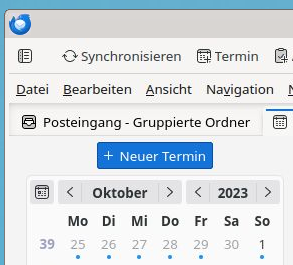
  1. Burger Menu ( ) -> Settings -> General
  2. Scroll down all the way
  3. Click the Config editor... button on the bottom right
  4. Accept that hell will freeze over because you configure software
  5. Search for toolkit.legacyUserProfileCustomizations.stylesheets
  6. Toggle the value to true to enable the user CSS
You can manually add user_pref("toolkit.legacyUserProfileCustomizations.stylesheets", true); to ~/.thunderbird/abcdefgh.default/prefs.js to the same effect (do this while Thunderbird is not running; replace abcdefgh with your Thunderbird profile ID). Now create a new directory ~/.thunderbird/abcdefgh.default/chrome/, again replacing abcdefgh with your profile ID. Inside the new directory create a userChrome.css file with the following content:
/* Hide Calendar New Event button */
#primaryButtonSidePanel
display: none !important;
Restart Thunderbird. And enjoy less visual obstruction when using the Calendar.

Russell Coker: Brother MFC-J4440DW Printer

I just had to setup a Brother MFC-J4440DW for a relative. They were replacing an old HP laser printer that mysteriously stopped printing as dark as it should, I don t know whether the HP printer had worn out or if the HP firmware decided to hobble it to make them buy a new printer. In either case HP is well known for shady behaviour with their printer firmware and should be avoided. The new Brother printer has problems when using wifi and auto DNS. I don t know how much of that was due to the printer itself and how much was due to the wifi AP provided by Foxtel. Anyway it works better with Ethernet and a fixed address (the wifi AP didn t allow me to set a fixed address). I think the main thing was configuring CUPS to connect via the IP address and not use Avahi etc. One problem I had with printing was that programs like Chrome and LibreOffice would hang for about a minute before printing, that turned out to be due to /etc/cups/lpoptions having the old printer (which had been removed) listed as the default. It would be nice if the web configuration for cups would change that when I set the default printer. CUPS doesn t seem to support USB printing. If it is possible to get this printer to print via USB then I welcome a comment describing how to do it. Scanning only seems to work on Ethernet not on USB, the command for scanning that I ended up with was scanimage -d escl:http://10.0.0.3:80 . Again I welcome comments from anyone who has had success in scanning via USB. There are probably some Linux users who would find it really inconvenient to setup a network interface specifically for printing. It s easy for me as I have a pile of spare ethernet cards and a box of cables but some people would have to buy this. Also it s disappointing that Brother didn t include an Ethernet cable or a USB cable in the box. But if that makes it cheaper I can deal with that. The resolution for scanning is only 832*1163 and it s black and white, I think that generally scanning in printers is a bad idea, taking a photo with a phone is a better way of scanning documents. Generally this printer works well and is cheap at only $299, a price for disposable hardware by today s standards. There are Debian packages from Brother for the printer. The scanner package looks like it just configures scanimage, and I m not sure whether the stock version of CUPS in Debian will do it without the Brother package. One thing I found interesting is that the package mfcj4440dwpdrv has the following shell code in the postinst to label for SE Linux:
if [ "$(which semanage 2> /dev/null)" != '' ];then
semanage fcontext -a -t cupsd_rw_etc_t '/opt/brother/Printers/mfcj4440dw/inf(/.*)?'
semanage fcontext -a -t bin_t          '/opt/brother/Printers/mfcj4440dw/lpd(/.*)?'
semanage fcontext -a -t bin_t          '/opt/brother/Printers/mfcj4440dw/cupswrapper(/.*)?'
if [ "$(which restorecon 2> /dev/null)" != '' ];then
restorecon -R /opt/brother/Printers/mfcj4440dw
fi
fi
This is the first time I ve seen a Debian package from a hardware vendor with SE Linux specific code. I can t just add those rules to the Debian policy as that would make the semanage commands fail to add an identical context spec will break the postinst. In the latest policy I m uploading to Debian/Unstable (version 2.20231010-1) there are the following 3 lines to deal with this, the first was already there for some time and the other 2 I just added:
/opt/brother/Printers/([^/]+/)?inf(/.*)?        gen_context(system_u:object_r:cupsd_rw_etc_t,s0)
/opt/brother/Printers/[^/]+/lpd(/.*)?   gen_context(system_u:object_r:bin_t,s0)
/opt/brother/Printers/[^/]+/cupswrapper(/.*)?   gen_context(system_u:object_r:bin_t,s0)
The Brother employee(s) who added the SE Linux code to their package are welcome to connect to me on LinkedIn.

21 October 2023

Dirk Eddelbuettel: qlcal 0.0.8 on CRAN: QuantLib 1.32 Updates

The eighth release of the still fairly new qlcal package arrivied at CRAN today. qlcal delivers the calendaring parts of QuantLib. It is provided (for the R package) as a set of included files, so the package is self-contained and does not depend on an external QuantLib library (which can be demanding to build). qlcal covers over sixty country / market calendars and can compute holiday lists, its complement (i.e. business day lists) and much more. This release brings updates from the just-released QuantLib 1.32 version. It also avoids a nag from R during build ( only specify C++14 if you really need it ) but switching to a versioned depends on R 4.2.0 or later. This implies C++14 or later as the default. If you need qlcal on an older R, grab the sources, edit DESCRIPTION to remove this constraint and set the standard as before in src/Makevars (or src/Makevars.win).

Changes in version 0.0.8 (2023-10-21)
  • A small set of updates from QuantLib 1.32 have been applied
  • The explicit C++14 compilation standard has been replaced with an implicit one by relying on R (>= 4.2.0)

Courtesy of my CRANberries, there is a diffstat report for this release. See the project page and package documentation for more details, and more examples. If you like this or other open-source work I do, you can now sponsor me at GitHub.

This post by Dirk Eddelbuettel originated on his Thinking inside the box blog. Please report excessive re-aggregation in third-party for-profit settings.

Russell Coker: More About the PineTime

Since my initial review of the PineTime 10 days ago [1] I ve used it in more situations. My initial tests were done connecting to a Huawei Nova 7i [2], I am now using it with a Huawei Mate 10 Pro. I ve also upgraded the PineTime from version 1.11 (from memory) of the Infinitime software that runs on the watch to version 1.13 [3]. To upgrade it I had to download the file pinetime-mcuboot-app-dfu-1.13.0.zip to the Android phone and then use the File Installer option of the GadgetBridge Android app to upload it. The zip file does NOT need to be extracted first, I don t know if GadgetBridge extracts it before upload or if the PineTime firmware has a copy of unzip, but it just works. Version 1.13 is purported to take less battery, I haven t directly verified this as I turned on the new feature of measuring my pulse 24*7 which significantly increases battery use. The end result is that the battery is being used up at about the same rate as before, overall adding a new battery-hungry feature while reducing battery use for other things to compensate is a good thing and strongly suggests that battery use has decreased overall. I have noticed that now with a different phone and different version of the firmware it doesn t reconnect as reliably. Sometimes I need to turn bluetooth on the watch off and on before it works (which indicates an issue with the firmware) and sometimes I need to turn bluetooth off and on on the phone which indicates a phone issue. Also I often unlock my phone to find the GadgetBridge notification saying that it s disconnected and it usually connects fine, but I get the impression it s often disconnected. Does the Mate 10 Pro have a problem that triggers a bug in the PineTime? Does the 1.13 version of InfiniTime have a problem that triggers a bug in the Mate 10 Pro? Are they both independently buggy? Is the new version of InfiniTime just disconnecting when it s not doing stuff to save battery and triggering bugs that weren t obvious before? I ve tested the media control which basically works, sometimes it gets out of sync and displays the name of the previous track which is annoying. The PineTime is IP67 rated and there are reports on Reddit of people wearing it in the shower and swimming pool. I wouldn t recommend those things although it should work OK. It might be an option for controlling music when in the bath or when having a pool party. When the watch is running normally and displays a new notification it s not possible to swipe it away. You have to go to the notifications menu afterwards to swipe them which I find annoying. Also the notification of an inbound call remains in the notification list indefinitely while I think a more appropriate action is to have it disappear in an amount of time where it s already been answered or gone to voicemail. Voicemail timeouts are as low as 15 seconds so having the notification disappear after 1 minute would be reasonable. I have configured my PineTime to take 2 taps on the screen to wake up. I previously had it set to 1 tap and had problems with accidentally doing something it registered as a tap while in bed and waking me up. Also I found that if I want to turn the screen on when my hands are dirty so I don t want to touch it with a finger then tapping it on my nose works well. Apparently it is programmed to ignore taps on large areas so I can t wake it with my elbow. I ve setup a PineTime for an elderly relative who is greatly enjoying it. I don t expect them to flash new firmware or do any other complex things, but they are doing well with using the device. They are considering getting a different band as they don t like rubber. I m sure their local jeweler has some leather and metal bands that could fit. There is a design on Thiniverse for a PineTime case [4], this could be used for making an adaptor to fit a PineTime to a greatly different type of band, an instrument console, etc. Generally I think the PineTime is an OK smart watch for someone who s not into FOSS for it s own sake. My relative could have been happy with a slightly cheaper watch, but it s still significantly cheaper than the Samsung and Apple options so it s not particularly expensive. A benefit for them is that having the same type of SmartWatch as me they will get better tech support.

20 October 2023

Freexian Collaborators: Debian Contributions: Freexian meetup, debusine updates, lpr/lpd in Debian, and more! (by Utkarsh Gupta, Stefano Rivera)

Contributing to Debian is part of Freexian s mission. This article covers the latest achievements of Freexian and their collaborators. All of this is made possible by organizations subscribing to our Long Term Support contracts and consulting services.

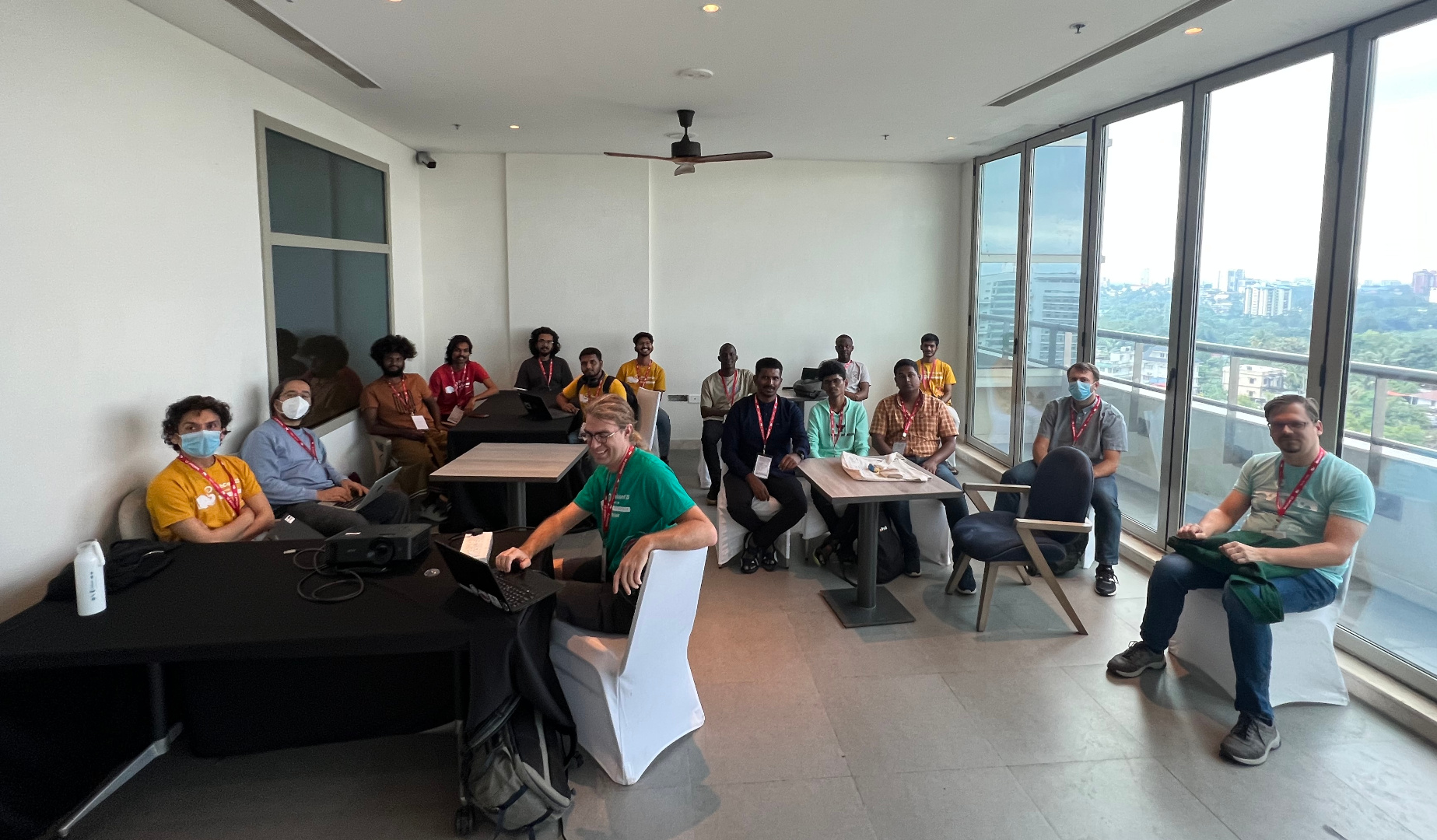
Freexian Meetup, by Stefano Rivera, Utkarsh Gupta, et al. During DebConf, Freexian organized a meetup for its collaborators and those interested in learning more about Freexian and its services. It was well received and many people interested in Freexian showed up. Some developers who were interested in contributing to LTS came to get more details about joining the project. And some prospective customers came to get to know us and ask questions. Sadly, the tragic loss of Abraham shook DebConf, both individually and structurally. The meetup got rescheduled to a small room without video coverage. With that, we still had a wholesome interaction and here s a quick picture from the meetup taken by Utkarsh (which is also why he s missing!).

Debusine, by Rapha l Hertzog, et al. Freexian has been investing into debusine for a while, but development speed is about to increase dramatically thanks to funding from SovereignTechFund.de. Rapha l laid out the 5 milestones of the funding contract, and filed the issues for the first milestone. Together with Enrico and Stefano, they established a workflow for the expanded team. Among the first steps of this milestone, Enrico started to work on a developer-friendly description of debusine that we can use when we reach out to the many Debian contributors that we will have to interact with. And Rapha l started the design work of the autopkgtest and lintian tasks, i.e. what s the interface to schedule such tasks, what behavior and what associated options do we support? At this point you might wonder what debusine is supposed to be let us try to answer this: Debusine manages scheduling and distribution of Debian-related build and QA tasks to a network of worker machines. It also manages the resulting artifacts and provides the results in an easy to consume way. We want to make it easy for Debian contributors to leverage all the great QA tools that Debian provides. We want to build the next generation of Debian s build infrastructure, one that will continue to reliably do what it already does, but that will also enable distribution-wide experiments, custom package repositories and custom workflows with advanced package reviews. If this all sounds interesting to you, don t hesitate to watch the project on salsa.debian.org and to contribute.

lpr/lpd in Debian, by Thorsten Alteholz During Debconf23, Till Kamppeter presented CPDB (Common Print Dialog Backend), a new way to handle print queues. After this talk it was discussed whether the old lpr/lpd based printing system could be abandoned in Debian or whether there is still demand for it. So Thorsten asked on the debian-devel email list whether anybody uses it. Oddly enough, these old packages are still useful:
  • Within a small network it is easier to distribute a printcap file, than to properly configure cups clients.
  • One of the biggest manufacturers of WLAN router and DSL boxes only supports raw queues when attaching an USB printer to their hardware. Admittedly the CPDB still has problems with such raw queues.
  • The Pharos printing system at MIT is still lpd-based.
As a result, the lpr/lpd stuff is not yet ready to be abandoned and Thorsten will adopt the relevant packages (or rather move them under the umbrella of the debian-printing team). Though it is not planned to develop new features, those packages should at least have a maintainer. This month Thorsten adopted rlpr, an utility for lpd printing without using /etc/printcap. The next one he is working on is lprng, a lpr/lpd printer spooling system. If you know of any other package that is also needed and still maintained by the QA team, please tell Thorsten.

/usr-merge, by Helmut Grohne Discussion about lifting the file move moratorium has been initiated with the CTTE and the release team. A formal lift is dependent on updating debootstrap in older suites though. A significant number of packages can automatically move their systemd unit files if dh_installsystemd and systemd.pc change their installation targets. Unfortunately, doing so makes some packages FTBFS and therefore patches have been filed. The analysis tool, dumat, has been enhanced to better understand which upgrade scenarios are considered supported to reduce false positive bug filings and gained a mode for local operation on a .changes file meant for inclusion in salsa-ci. The filing of bugs from dumat is still manual to improve the quality of reports. Since September, the moratorium has been lifted.

Miscellaneous contributions
  • Rapha l updated Django s backport in bullseye-backports to match the latest security release that was published in bookworm. Tracker.debian.org is still using that backport.
  • Helmut Grohne sent 13 patches for cross build failures.
  • Helmut Grohne performed a maintenance upload of debvm enabling its use in autopkgtests.
  • Helmut Grohne wrote an API-compatible reimplementation of autopkgtest-build-qemu. It is powered by mmdebstrap, therefore unprivileged, EFI-only and will soon be included in mmdebstrap.
  • Santiago continued the work regarding how to make it easier to (automatically) test reverse dependencies. An example of the ongoing work was presented during the Salsa CI BoF at DebConf 23.
    In fact, omniorb-dfsg test pipelines as the above were used for the omniorb-dfsg 4.3.0 transition, verifying how the reverse dependencies (tango, pytango and omnievents) were built and how their autopkgtest jobs run with the to-be-uploaded omniorb-dfsg new release.
  • Utkarsh and Stefano attended and helped run DebConf 23. Also continued winding up DebConf 22 accounting.
  • Anton Gladky did some science team uploads to fix RC bugs.

19 October 2023

Russ Allbery: Review: The Cassini Division

Review: The Cassini Division, by Ken MacLeod
Series: Fall Revolution #3
Publisher: Tor
Copyright: 1998
Printing: August 2000
ISBN: 0-8125-6858-3
Format: Mass market
Pages: 305
The Cassini Division is the third book in the Fall Revolution series and a fairly direct sequel (albeit with different protagonists) to The Stone Canal. This is not a good place to start the series. It's impossible to talk about the plot of this book without discussing the future history of this series, which arguably includes some spoilers for The Star Fraction and The Stone Canal. I don't think the direction of history matters that much in enjoying the previous books, but read the first two books of the series before this review if you want to avoid all spoilers. When the Outwarders uploaded themselves and went fast, they did a lot of strange things: an interstellar probe contrary to all known laws of physics, the disassembly of Ganymede, and the Malley Mile, which plays a significant role in The Stone Canal. They also crashed the Earth. This was not entirely their fault. There were a lot of politics, religious fundamentalism, and plagues in play as well. But the storm of viruses broadcast from their transformed Jupiter shut down essentially all computing equipment on Earth, which set off much of the chaos. The results were catastrophic, and also politically transformative. Now, the Solar Union is a nearly unified anarchosocialist society, with only scattered enclaves of non-cooperators left outside that structure. Ellen May Ngewthu is a leader of the Cassini Division, the bulwark that stands between humans and the Outwarders. The Division ruthlessly destroys any remnant or probe that dares rise out of Jupiter's atmosphere, ensuring that the Outwarders, whatever they have become after untold generations of fast evolution, stay isolated to the one planet they have absorbed. The Division is very good at what they do. But there is a potential gap in that line of defense: there are fast folk in storage at the other end of the Malley Mile, on New Mars, and who knows what the deranged capitalists there will do or what forces they might unleash. The one person who knows a path through the Malley Mile isn't talking, so Ellen goes in search of the next best thing: the non-cooperator scientist Isambard Kingdom Malley. I am now thoroughly annoyed at how politics are handled in this series, and much less confused by the frequency with which MacLeod won Prometheus Awards from the Libertarian Futurist Society. Some of this is my own fault for having too high of hopes for political SF, but nothing in this series so far has convinced me that MacLeod is seriously engaging with political systems. Instead, the world-building to date makes the classic libertarian mistake of thinking societies will happily abandon stability and predictability in favor of their strange definition of freedom. The Solar Union is based on what Ellen calls the true knowledge, which is worth quoting in full so that you know what kind of politics we're talking about:
Life is a process of breaking down and using other matter, and if need be, other life. Therefore, life is aggression, and successful life is successful aggression. Life is the scum of matter, and people are the scum of life. There is nothing but matter, forces, space and time, which together make power. Nothing matters, except what matters to you. Might makes right, and power makes freedom. You are free to do whatever is in your power, and if you want to survive and thrive you had better do whatever is in your interests. If your interests conflict with those of others, let the others pit their power against yours, everyone for theirselves. If your interests coincide with those of others, let them work together with you, and against the rest. We are what we eat, and we eat everything. All that you really value, and the goodness and truth and beauty of life, have their roots in this apparently barren soil. This is the true knowledge. We had founded our idealism on the most nihilistic implications of science, our socialism on crass self-interest, our peace on our capacity for mutual destruction, and our liberty on determinism. We had replaced morality with convention, bravery with safety, frugality with plenty, philosophy with science, stoicism with anaesthetics and piety with immortality. The universal acid of the true knowledge had burned away a world of words, and exposed a universe of things. Things we could use.
This is certainly something that some people will believe, particularly cynical college students who love political theory, feeling smarter than other people, and calling their pet theories things like "the true knowledge." It is not even remotely believable as the governing philosophy of a solar confederation. The point of government for the average person in human society is to create and enforce predictable mutual rules that one can use as a basis for planning and habits, allowing you to not think about politics all the time. People who adore thinking about politics have great difficulty understanding how important it is to everyone else to have ignorable government. Constantly testing your power against other coalitions is a sport, not a governing philosophy. Given the implication that this testing is through violence or the threat of violence, it beggars belief that any large number of people would tolerate that type of instability for an extended period of time. Ellen is fully committed to the true knowledge. MacLeod likely is not; I don't think this represents the philosophy of the author. But the primary political conflict in this novel famous for being political science fiction is between the above variation of anarchy and an anarchocapitalist society, neither of which are believable as stable political systems for large numbers of people. This is a bit like seeking out a series because you were told it was about a great clash of European monarchies and discovering it was about a fight between Liberland and Sealand. It becomes hard to take the rest of the book seriously. I do realize that one point of political science fiction is to play with strange political ideas, similar to how science fiction plays with often-implausible science ideas. But those ideas need some contact with human nature. If you're going to tell me that the key to clawing society back from a world-wide catastrophic descent into chaos is to discard literally every social system used to create predictability and order, you had better be describing aliens, because that's not how humans work. The rest of the book is better. I am untangling a lot of backstory for the above synopsis, which in the book comes in dribs and drabs, but piecing that together is good fun. The plot is far more straightforward than the previous two books in the series: there is a clear enemy, a clear goal, and Ellen goes from point A to point B in a comprehensible way with enough twists to keep it interesting. The core moral conflict of the book is that Ellen is an anti-AI fanatic to the point that she considers anyone other than non-uploaded humans to be an existential threat. MacLeod gives the reader both reasons to believe Ellen is right and reasons to believe she's wrong, which maintains an interesting moral tension. One thing that MacLeod is very good at is what Bob Shaw called "wee thinky bits." I think my favorite in this book is the computer technology used by the Cassini Division, who have spent a century in close combat with inimical AI capable of infecting any digital computer system with tailored viruses. As a result, their computers are mechanical non-Von-Neumann machines, but mechanical with all the technology of a highly-advanced 24th century civilization with nanometer-scale manufacturing technology. It's a great mental image and a lot of fun to think about. This is the only science fiction novel that I can think of that has a hard-takeoff singularity that nonetheless is successfully resisted and fought to a stand-still by unmodified humanity. Most writers who were interested in the singularity idea treated it as either a near-total transformation leaving only remnants or as something that had to be stopped before it started. MacLeod realizes that there's no reason to believe a post-singularity form of life would be either uniform in intent or free from its own baffling sudden collapses and reversals, which can be exploited by humans. It makes for a much better story. The sociology of this book is difficult to swallow, but the characterization is significantly better than the previous books of the series and the plot is much tighter. I was too annoyed by the political science to fully enjoy it, but that may be partly the fault of my expectations coming in. If you like chewy, idea-filled science fiction with a lot of unexplained world-building that you have to puzzle out as you go, you may enjoy this, although unfortunately I think you need to read at least The Stone Canal first. The ending was a bit unsatisfying, but even that includes some neat science fiction ideas. Followed by The Sky Road, although I understand it is not a straightforward sequel. Rating: 6 out of 10

16 October 2023

Wouter Verhelst: New toy: ASUS ZenScreen Go MB16AHP

A while ago, I saw Stefano's portable monitor, and thought it was very useful. Personally, I rent a desk at an office space where I have a 27" Dell monitor; but I do sometimes use my laptop away from that desk, and then I do sometimes miss the external monitor. So a few weeks before DebConf, I bought me one myself. The one I got is about a mid-range model; there are models that are less than half the price of the one that I bought, and there are models that are more than double its price, too. ASUS has a very wide range of these monitors; the cheapest model that I could find locally is a 720p monitor that only does USB-C and requires power from the connected device, which presumably if I were to connect it to my laptop with no power connected would half its battery life. More expensive models have features such as wifi connectivity and miracast support, builtin batteries, more connection options, and touchscreen fancyness. While I think some of these features are not worth the money, I do think that a builtin battery has its uses, and that I would want a decent resolution, so I got a FullHD model with builtin battery. 20231016_215332 The device comes with a number of useful accessories: a USB-C to USB-C cable for the USB-C connectivity as well as to charge the battery; an HDMI-to-microHDMI cable for HDMI connectivity; a magnetic sleeve that doubles as a back stand; a beefy USB-A charger and USB-A-to-USB-C convertor (yes, I know); and a... pen. No, really, a pen. You can write with it. Yes, on paper. No, not a stylus. It's really a pen. Sigh, OK. This one: 20231016_222024 OK, believe me now? Good. Don't worry, I was as confused about this as you just were when I first found that pen. Why would anyone do that, I thought. So I read the manual. Not something I usually do with new hardware, but here you go. It turns out that the pen doubles as a kickstand. If you look closely at the picture of the laptop and the monitor above, you may see a little hole at the bottom right of the monitor, just to the right of the power button/LED. The pen fits right there. Now I don't know what the exact thought process was here, but I imagine it went something like this: It's an interesting concept, especially given the fact that the magnetic sleeve works very well as a stand. But hey. Anyway, the monitor is very nice; the battery lives longer than the battery of my laptop usually does, so that's good, and it allows me to have a dual-monitor setup when I'm on the road. And when I'm at the office? Well, now I have a triple-monitor setup. That works well, too.

Scarlett Gately Moore: KDE: Debian: Hopefully a short goodbye for now.

KDE MascotKDE Mascot
I have been working around the clock and over the weekend trying to get the transition for snapcraft files in their respective repos. What does this mean for users? Faster releases for Snaps and closer collaboration between snapcrafters and application developers so bugs get resolved much quicker. Unfortunately, I have 2 days to finish before my internet gets cut off. I did not make enough to pay the bill. Seeing as this is the first time in a year, I am absolutely, positively grateful for all of you and your support over the past year. I know my work is appreciated! I will never be homeless or starve due to my wonderful local community, but the Internet bill is not something we can barter or trade labor for. I have caught up on my Debian obligations ( so no MIA needed! ) KDE neon is in good hands with Jonathan and Carlos. So for now, farewell ( I assure you I will be back! ) https://gofund.me/b8b69e54

15 October 2023

Aigars Mahinovs: Figuring out finances part 2

A week ago I started to migrate my financial planning from a closed source system to a new system based on an open source, self-hosted solution. Main candidate is Firefly III - a relatively simple financial planner with a rather rich feature set and a solid user base and developer support. Starting it up with a Docker-Compose file was quite easy, following the official documentation. The same Compose file also managed the MySQL database, the importer app and a cron container for regular imports. The separate importer app allows both imports from CSV files and also from external bank account connection services. For whatever weird reason both of those services support exporting data from my regular bank accounts, but not from my credit cards for exactly the same bank. So for those cards I would need to periodically download CVS transaction exports and feed them into the importer. The combination of the cron container and the importer app allows for both of these functions. To do this you first do the import via the Web UI first and configure all the mappings - configure file and date formats, map account names in the bank output to account names that you added in Firefly, configure what otehr columns mean and what is the mapping of other values, like expense and income accounts. At the end of the process you can download a json file representing all the settings of the import you just did. Putting such a json config file in the input folder of the cron container and telling it to do an import (weekly, for example) would do such import periodically. Putting a credit card CSV file along with a config file for credit card import would also auto-import that. So far so good. However, when I tried importing exports from MoneyWiz or even when I tried re-creating account history directly from the bank data, I hit a very annoying problem. Transfers. Thing is detecting transfers between the real (asset) accounts that you are managing is really essential. For one those are not real expenses and incomes, so failing to mark them as transfers would show weird income/expense numbers. But if you do detect them as transfers and correctly map the destination account, but fail to match the transations between another you get a double-transaction. This becomes really hard when transactions happen on different dates and have different descriptions. So you get both a +1000 transaction "Credit card reset" on 14.09.2023 in the credit card account and a -1000$ transaction "Repayment of own credit card" on 24.09.2023 in the main account of the bank. Matching them to recognise that it is just one transfer and not two is ... non-trivial. The best solution I could come up with so far is to always map the "Opposing account name" for such transfers to a virtual "Transfers" asset account. That has the benefit of being actually able to correctly represent transfers that take several days to move between accounts and showing you how much money is still in transit at any point in time. So after I figured this out, finally the account balances started matching up with reality. Setting up spending categories required another change - the author of the Firefly III does not like complexity so it does not support nesting categories. Categories can only be in a single, flat list. It is suggested that if you do need to track multiple categories and also their combination, then category groups might help you. I will survive for now by simplifying the categories that I do actually use. Might actually make the reports more usable. A new feature for me will be the ability to use automation rules to assign transactions to categories based on their contents, like expense accounts of keywords in descriptions. Setting up regular bills (with matching rules to assign incoming transactions to those bills) is another feature that is very important to me. The feature itself works just fine in Firefly III, but it has two restrictions that the author of the software does not actually want to be changed. For one it can not be used to track prodictable incomes (like salary), presumably because it is only there for bills (subscriptions in v3 UI). And for other, there is nothing in the base software that actually uses the data from bills to look forward. The author does not like to try to predict the future. Which for me is basically the one of two reasons to use this kind of software at all. I want to know - given all manually entered regular and 100% predictable expenses and incomes, what will be the state of my accounts at particular date? It seems that to get at that I will need to write my own oracle script using the rich Firefly III API. The last question I had for this week was - how will I enter a new cash puchace of potatoes on a farmers market into the system that sits in a private server in my home network? Turns out there are actually multiple Android apps for Firefly III that can be easily used for this using a robust OAuth or shared token authentification. Except the web UI needs to be exposed online for this to work (and ideally protected by HTTPS). Other users have also created Telegram bots that allow using chat messages to create transaction entries. This is a bit harder to use and more narrow scope, but should be easier to setup. Will have to try both apporaches. But before I really get going on this, I need to fix another thing that I have been postponing for a while: I will need to migrate my Home Assistant installation from a Docker container installation to a Home Assistant OS installation so that I can install Addons, including Firefly III, MySQL and Portainer to have a bit more organised and less hand-knitted home server setup. Let's see how that goes next week :D

Russ Allbery: Review: A Killing Frost

Review: A Killing Frost, by Seanan McGuire
Series: October Daye #14
Publisher: DAW
Copyright: 2020
ISBN: 0-7564-1253-6
Format: Kindle
Pages: 351
A Killing Frost is the 14th book in the October Daye urban fantasy series and a direct plot sequel to the events of The Brightest Fell. You definitely cannot start here. This review has some relationship spoilers here for things that you would be expecting after the first five or six books, but which you wouldn't know when reading the first few books of the series. If you haven't started the series yet but plan to, consider skipping this review; if you haven't started reading this series, it will probably be meaningless anyway. Finally, events seem to have slowed, enough trauma has been healed, and Toby is able to seriously consider getting married. However, no sooner is the thought voiced than fae politics injects itself yet again. In order to get married without creating potentially substantial future problems for herself and her family, Toby will have to tie up some loose ends. Since one of those loose ends is a price from the Luidaeg that has been haunting her family for decades, this is easier said than done. The Brightest Fell had a very unsatisfying ending. This, after a two book interlude, is the proper end to that story. I picked this up when I had a bunch of stressful things going on and I wanted to be entertained without having to do much work as a reader. Once again, this series delivered exactly that. The writing is repetitive and a bit clunky, McGuire hammers the same emotional points into the ground, and one does wonder about Toby's tendency to emulate a half-human battering ram, but every book has me engrossed and turning the pages. Everyone should have at least one book series on the go that offers reliable, low-effort entertainment. The initial lever that McGuire uses to push Toby into this plot (fae marriage requirements that had never previously been mentioned) felt rather strained and arbitrary, and I spent the first part of the book grumbling a bit about it. However, there is a better reason for this complication that is revealed with time, and which implies some interesting things about how the fae see heroes and how they use them to solve problems. Now I'm wondering if McGuire will explore that some more in later books. This is the "all is revealed" book about Simon Torquill. As we get later into the series, these "all is revealed" books are coming more frequently. So far, I'm finding the revelations satisfying, which is a lot harder than it looks with a series this long and with this many hidden details. There are a few directions the series is taking that aren't my favorite (the Daoine Sidhe obsession with being the Best Fae is getting a bit boring, for example), but none of them seem egregiously off, and I'm deeply invested in the answers to the remaining questions. Toby hits a personal record here for not explaining the dangerous things she's doing because people might talk her out of it. It makes for a tense and gripping climax, but wow I felt for her friends and family, and substantial parts of that risk seemed unnecessary. This is pointed out to her in no uncertain terms, and I'm wondering if it will finally stick. Toby's tendency to solve complicated problems by bleeding on them is part of what gives this series its charm, but I wouldn't mind her giving other people more of a chance to come up with better plans. I did not like this one as well as the previous two books, mostly because I prefer the Luidaeg-centric stories to the Daoine-Sidhe-centric stories, but if you're enjoying the series to this point, this won't be an exception. It's a substantial improvement on The Brightest Fell and did a lot to salvage that story for me, although there are still some aspects of it that need better explanations. Followed by When Sorrows Come. As usual, there is a novella included in at least the Kindle edition. "Shine in Pearl": I was again hoping for more Gillian, but alas. Instead, and breaking with the tendency for the novellas to be side stories unrelated to the main novel, this fleshes out Simon's past and the other primary relationship driving the novel's plot. It's... fine? The best parts by far are the scenes from Dianda's viewpoint, which are just as refreshingly blunt as Dianda is elsewhere. Neither of the other two characters are favorites of mine, and since the point of the story is to describe the tragedy that is resolved in the plot of the main novel, it's somewhat depressing. Not my favorite of the novellas; not the worst of them. (6) Rating: 7 out of 10

14 October 2023

Fran ois Marier: Enabling AppArmor on a Linode VPS in enforcement mode

Enabling AppArmor on a Debian Linode VPS is not entirely straightforward. Here's what I had to do in order to make it work.

Packages to install The easy bit was to install a few packages:
apt install grub2 apparmor-profiles-extra apparmor-profiles apparmor
and then adding apparmor=1 security=apparmor to the kernel command line (GRUB_CMDLINE_LINUX) in /etc/default/grub.

Move away from using Linode's kernels As mentioned in this blog post, I found out that these parameters are ignored by the Linode kernels. I had to:
  1. login to the Linode Manager (i.e. https://cloud.linode.com/linodes/<linode ID>/configurations),
  2. click the node relevant node,
  3. click "Edit" next to the configuration profile, and
  4. change the kernel to "GRUB 2".

Fix grub Next I found out that grub doesn't actually install itself properly because it can't be installed directly on the virtual drives provided by Linode (KVM). Manually running this hack worked for me:
grub-install --grub-setup=/bin/true /dev/null

Unbound + Let's Encrypt fix Finally, my local Unbound installation stopped working because it couldn't access the Let's Encrypt certificates anymore. The solution to this was pretty straightforward. All I needed to do was to add the following to /etc/apparmor.d/local/usr.sbin.unbound:
/etc/letsencrypt/archive/** r,
/etc/letsencrypt/live/** r,

Ravi Dwivedi: Kochi - Wayanad Trip in August-September 2023

A trip full of hitchhiking, beautiful places and welcoming locals.

Day 1: Arrival in Kochi Kochi is a city in the state of Kerala, India. This year s DebConf was to be held in Kochi from 3rd September to 17th of September, which I was planning to attend. My friend Suresh, who was planning to join, told me that 29th August 2023 will be Onam, a major festival of the state of Kerala. So, we planned a Kerala trip before the DebConf. We booked early morning flights for Kochi from Delhi and reached Kochi on 28th August. We had booked a hostel named Zostel in Ernakulam. During check-in, they asked me to fill a form which required signing in using a Google account. I told them I don t have a Google account and I don t want to create one either. The people at the front desk seemed receptive, so I went ahead with telling them the problems of such a sign-in being mandatory for check-in. Anyways, they only took a photo of my passport and let me check-in without a Google account. We stayed in a ten room dormitory, which allowed travellers of any gender. The dormitory room was air-conditioned, spacious, clean and beds were also comfortable. There were two bathrooms in the dormitory and they were clean. Plus, there was a separate dormitory room in the hostel exclusive for females. I noticed that that Zostel was not added in the OpenStreetMap and so, I added it :) . The hostel had a small canteen for tea and snacks, a common sitting area outside the dormitories, which had beds too. There was a separate silent room, suitable for people who want to work.
Dormitory room in Zostel Ernakulam, Kochi.
Beds in Zostel Ernakulam, Kochi.

We had lunch at a nearby restaurant and it was hard to find anything vegetarian for me. I bought some freshly made banana chips from the street and they were tasty. As far as I remember, I had a big glass of pineapple juice for lunch. Then I went to the Broadway market and bought some cardamom and cinnamon for home. I also went to a nearby supermarket and bought Matta brown rice for home. Then, I looked for a courier shop to send the things home but all of them were closed due to Onam festival. After returning to the Zostel, I overslept till 9 PM and in the meanwhile, Suresh planned with Saidut and Shwetank (who met us during our stay in Zostel) to go to a place in Fort Kochi for dinner. I suspected I will be disappointed by lack of vegetarian options as they were planning to have fish. I already had a restaurant in mind - Brindhavan restaurant (suggested by Anupa), which was a pure vegetarian restaurant. To reach there, I got off at Palarivattom metro station and started looking for an auto-rickshaw to get to the restaurant. I didn t get any for more than 5 minutes. Since that restaurant was not added to the OpenStreetMap, I didn t even know how far that was and which direction to go to. Then, I saw a Zomato delivery person on a motorcycle and asked him where the restaurant was. It was already 10 PM and the restaurant closes at 10:30. So, I asked him whether he can drop me off. He agreed and dropped me off at that restaurant. It was 4-5 km from that metro station. I tipped him and expressed my gratefulness for the help. He refused to take the tip, but I insisted and he accepted. I entered the restaurant and it was coming to a close, so many items were not available. I ordered some Kadhai Paneer (only item left) with naan. It tasted fine. Since the next day was Thiruvonam, I asked the restaurant about the Sadya thali menu and prices for the next day. I planned to eat Sadya thali at that restaurant, but my plans got changed later.
Onam sadya menu from Brindhavan restaurant.
Day 2: Onam celebrations Next day, on 29th of August 2023, we had plan to leave for Wayanad. Wayanad is a hill station in Kerala and a famous tourist spot. Praveen suggested to visit Munnar as it is far closer to Kochi than Wayanad (80 km vs 250 km). But I had already visited Munnar in my previous trips, so we chose Wayanad. We had a train late night from Ernakulam Junction (at 23:30 hours) to Kozhikode, which is the nearest railway station from Wayanad. So, we checked out in the morning as we had plans to roam around in Kochi before taking the train. Zostel was celebrating Onam on that day. To opt-in, we had to pay 400 rupees, which included a Sadya Thali and a mundu. Me and Suresh paid the amount and opted in for the celebrations. Sadya thali had Rice, Sambhar, Rasam, Avial, Banana Chips, Pineapple Pachadi, Pappadam, many types of pickels and chutneys, Pal Ada Payasam and Coconut jaggery Pasam. And, there was water too :). Those payasams were really great and I had one more round of them. Later, I had a lot of variety of payasams during the DebConf.
Sadya lined up for serving
Sadya thali served on banana leaf.

So, we hung out in the common room and put our luggage there. We played UNO and had conversations with other travellers in the hostel. I had a fun time there and I still think it is one of the best hostel experiences I had. We made good friends with Saiduth (Telangana) and Shwetank (Uttarakhand). They were already aware about the software like debian, and we had some detailed conversations about the Free Software movement. I remember explaining the difference between the terms Open Source and Free Software . I also told them about the Streetcomplete app, a beginner friendly app to edit OpenStreetMap. We had dinner at a place nearby (named Palaraam), but again, the vegetarian options were very limited! After dinner, we came back to the Zostel and me and Suresh left for Ernakulam Junction to catch our train Maveli Express (16604).

Day 3: Going to Wayanad Maveli Express was scheduled to reach Kozhikode at 03:25 (morning). I had set alarms from 03:00 to 03:30, with the gap of 10 minutes. Every time I woke up, I turned off the alarm. Then I woke up and saw train reaching the Kozhikode station and woke up Suresh for deboarding. But then I noticed that the train is actually leaving the station, not arriving! This means we missed our stop. Now we looked at the next stops and whether we can deboard there. I was very sleepy and wanted to take a retiring room at some station before continuing our journey to Wayanad. The next stop was Quilandi and we checked online that it didn t have a retiring room. So, we skipped this stop. We got off at the next stop named Vadakara and found out no retiring room was available. So, we asked about information regarding bus for Wayanad and they said that there is a bus to Wayanad around 07:00 hours from bus station which was a few kilometres from the railway station. We took a bus for Kalpetta (in Wayanad) at around 07:00. The destination of the buses were written in Malayalam, which we could not read. Once again, the locals helped us to get on to the bus to Kalpetta. Vadakara is not a big city and it can be hard to find people who know good Hindi or English, unlike Kochi. Despite language issues, I had no problem there in navigation, thanks to locals. I mostly spent time sleeping during the bus journey. A few hours later, the bus dropped us at Kalpetta. We had a booking at a hostel in Rippon village. It was 16 km from Kalpetta. On the way, we were treated with beautiful views of nature, which was present everywhere in Wayanad. The place was covered with tea gardens and our eyes were treated with beautiful scenery at every corner.
We were treated with such views during the Wayanad trip.

Rippon village was a very quiet place and I liked the calm atmosphere. This place is blessed by nature and has stunning scenery. I found English was more common than Hindi in Wayanad. Locals were very nice and helped me, even if they didn t know my language.
A road in Rippon.
After catching some sleep at the hostel, I went out in the afternoon. I hitchhiked to reach the main road from the hostel. I bought more spices from a nearby shop and realized that I should have waited for my visit to Wayanad to buy cardamom, which I already bought from Kochi. Then, I was looking for post office to send spices home. The people at the spices shop told me that the nearby Rippon post office was closed by that time, but the post office at Meppadi was open, which was 5 km from there. I went to Meppadi and saw the post office closes at 15:00, but I reached five minutes late. My packing was not very good and they asked me to pack it tighter. There was a shop near the post office and the people there gave me a cardboard and tapes, and helped pack my stuff for the post. By the time I went to the post office again, it was 15:30. But they accepted my parcel for post.

Day 4: Kanthanpara Falls, Zostel Wayanad and Karapuzha Dam Kanthanpara waterfalls were 2 km from the hostel. I hitchhiked to the place from the hostel on a scooty. Entry ticket was worth Rs 40. There were good views inside and nothing much to see except the waterfalls.
Entry to Kanthanpara Falls.
Kanthanpara Falls.
We had a booking at Zostel Wayanad for this day and so we shifted there. Again, as with their Ernakulam branch, they asked me to fill a form which required signing in using Google, but when I said I don t have a Google account they checked me in without that. There were tea gardens inside the Zostel boundaries and the property was beautiful.
A view of Zostel Wayanad.
A map of Wayanad showing tourist places.

A view from inside the Zostel Wayanad property.
Later in the evening, I went to Karapuzha Dam. I witnessed a beautiful sunset during the journey. Karapuzha dam had many activites, like ziplining, and was nice to roam around. Chembra Peak is near to the Zostel Wayanad. So, I was planning to trek to the heart shaped lake. It was suggested by Praveen and looking online, this trek seemed worth doing. There was an issue however. The charges for trek were Rs 1770 for upto five people. So, if I go alone I will have to spend Rs 1770 for the trek. If I go with another person, we split Rs 1770 into two, and so on. The optimal way to do it is to go in a group of five (you included :D). I asked front desk at Zostel if they can connect me with people going to Chembra peak the next day, and they told me about a group of four people planning to go to Chembra peak the next day. I got lucky! All four of them were from Kerala and worked in Qatar.

Day 5: Chembra peak trek The date was 1st September 2023. I woke up early (05:30 in the morning) for the Chembra peak trek. I had bought hiking shoes especially for trekking, which turned out to be a very good idea. The ticket counter opens at 07:00. The group of four with which I planned to trek met me around 06:00 in the Zostel. We went to the ticket counter around 06:30. We had breakfast at shops selling Maggi noodles and bread omlette near the ticket counter. It was a hot day and the trek was difficult for an inexperienced person like me. The scenery was green and beautiful throughout.
Terrain during trekking towards the Chembra peak.

Heart-shaped lake at the Chembra peak.
Me at the heart-shaped lake.

Views from the top of the Chembra peak.

View of another peak from the heart-shaped lake.

While returning from the trek, I found out a shop selling bamboo rice, which I bought and will make bamboo rice payasam out of it at home (I have some coconut milk from Kerala too ;)). We returned to Zostel in the afternoon. I had muscle pain after the trek and it has still not completely disappeared. At night, we took a bus from Kalpetta to Kozhikode in order to return to Kochi.

Day 6: Return to Kochi At midnight of 2nd of September, we reached Kozhikode bus stand. Then we roamed around for something to eat. I didn t find anything vegetarian to eat. No surprises there! Then we went to Kozhikode railway station and looked for retiring rooms, but no luck there. We waited at the station and took the next train to Kochi at 03:30 and reached Ernakulam Junction at 07:30 (half hours before train s scheduled time!). From there, we went to Zostel Fort Kochi and stayed one night there and checked out next morning.

Day 7: Roaming around in Fort Kochi On 3rd of September, we roamed around in Fort Kochi. We visited the usual places - St Francis Church, Dutch Palace, Jew Town, Pardesi Synagogue. I also visited some homestays and the owners were very happy to show their place even when I made it clear that I was not looking for a stay. In the evening, we went to Kakkanad to attend DebConf. The story continues in my DebConf23 blog post.

12 October 2023

Jonathan McDowell: Installing Debian on the BananaPi M2 Zero

My previously mentioned C.H.I.P. repurposing has been partly successful; I ve found a use for it (which I still need to write up), but unfortunately it s too useful and the fact it s still a bit flaky has become a problem. I spent a while trying to isolate exactly what the problem is (I m still seeing occasional hard hangs with no obvious debug output in the logs or on the serial console), then realised I should just buy one of the cheap ARM SBC boards currently available. The C.H.I.P. is based on an Allwinner R8, which is a single ARM v7 core (an A8). So it s fairly low power by today s standards and it seemed pretty much any board would probably do. I considered a Pi 2 Zero, but couldn t be bothered trying to find one in stock at a reasonable price (I ve had one on backorder from CPC since May 2022, and yes, I know other places have had them in stock since but I don t need one enough to chase and I m now mostly curious about whether it will ever ship). As the title of this post gives away, I settled on a Banana Pi BPI-M2 Zero, which is based on an Allwinner H3. That s a quad-core ARM v7 (an A7), so a bit more oompfh than the C.H.I.P. All in all it set me back 25, including a set of heatsinks that form a case around it. I started with the vendor provided Debian SD card image, which is based on Debian 9 (stretch) and so somewhat old. I was able to dist-upgrade my way through buster and bullseye, and end up on bookworm. I then discovered the bookworm 6.1 kernel worked just fine out of the box, and even included a suitable DTB. Which got me thinking about whether I could do a completely fresh Debian install with minimal tweaking. First thing, a boot loader. The Allwinner chips are nice in that they ll boot off SD, so I just needed a suitable u-boot image. Rather than go with the vendor image I had a look at mainline and discovered it had support! So let s build a clean image:
noodles@buildhost:~$ mkdir ~/BPI
noodles@buildhost:~$ cd ~/BPI
noodles@buildhost:~/BPI$ ls
noodles@buildhost:~/BPI$ git clone https://source.denx.de/u-boot/u-boot.git
Cloning into 'u-boot'...
remote: Enumerating objects: 935825, done.
remote: Counting objects: 100% (5777/5777), done.
remote: Compressing objects: 100% (1967/1967), done.
remote: Total 935825 (delta 3799), reused 5716 (delta 3769), pack-reused 930048
Receiving objects: 100% (935825/935825), 186.15 MiB   2.21 MiB/s, done.
Resolving deltas: 100% (785671/785671), done.
noodles@buildhost:~/BPI$ mkdir u-boot-build
noodles@buildhost:~/BPI$ cd u-boot
noodles@buildhost:~/BPI/u-boot$ git checkout v2023.07.02
...
HEAD is now at 83cdab8b2c Prepare v2023.07.02
noodles@buildhost:~/BPI/u-boot$ make O=../u-boot-build bananapi_m2_zero_defconfig
  HOSTCC  scripts/basic/fixdep
  GEN     Makefile
  HOSTCC  scripts/kconfig/conf.o
  YACC    scripts/kconfig/zconf.tab.c
  LEX     scripts/kconfig/zconf.lex.c
  HOSTCC  scripts/kconfig/zconf.tab.o
  HOSTLD  scripts/kconfig/conf
#
# configuration written to .config
#
make[1]: Leaving directory '/home/noodles/BPI/u-boot-build'
noodles@buildhost:~/BPI/u-boot$ cd ../u-boot-build/
noodles@buildhost:~/BPI/u-boot-build$ make CROSS_COMPILE=arm-linux-gnueabihf-
  GEN     Makefile
scripts/kconfig/conf  --syncconfig Kconfig
...
  LD      spl/u-boot-spl
  OBJCOPY spl/u-boot-spl-nodtb.bin
  COPY    spl/u-boot-spl.bin
  SYM     spl/u-boot-spl.sym
  MKIMAGE spl/sunxi-spl.bin
  MKIMAGE u-boot.img
  COPY    u-boot.dtb
  MKIMAGE u-boot-dtb.img
  BINMAN  .binman_stamp
  OFCHK   .config
noodles@buildhost:~/BPI/u-boot-build$ ls -l u-boot-sunxi-with-spl.bin
-rw-r--r-- 1 noodles noodles 494900 Aug  8 08:06 u-boot-sunxi-with-spl.bin
I had the advantage here of already having a host setup to cross build armhf binaries, but this was all done on a Debian bookworm host with packages from main. I ve put my build up here in case it s useful to someone - everything else below can be done on a normal x86_64 host. Next I needed a Debian installer. I went for the netboot variant - although I was writing it to SD rather than TFTP booting I wanted as much as possible to come over the network.
noodles@buildhost:~/BPI$ wget https://deb.debian.org/debian/dists/bookworm/main/installer-armhf/20230607%2Bdeb12u1/images/netboot/netboot.tar.gz
...
2023-08-08 10:15:03 (34.5 MB/s) -  netboot.tar.gz  saved [37851404/37851404]
noodles@buildhost:~/BPI$ tar -axf netboot.tar.gz
Then I took a suitable microSD card and set it up with a 500M primary VFAT partition, leaving the rest for Linux proper. I could have got away with a smaller VFAT partition but I d initially thought I might need to put some more installation files on it.
noodles@buildhost:~/BPI$ sudo fdisk /dev/sdb
Welcome to fdisk (util-linux 2.38.1).
Changes will remain in memory only, until you decide to write them.
Be careful before using the write command.
Command (m for help): o
Created a new DOS (MBR) disklabel with disk identifier 0x793729b3.
Command (m for help): n
Partition type
   p   primary (0 primary, 0 extended, 4 free)
   e   extended (container for logical partitions)
Select (default p):
Using default response p.
Partition number (1-4, default 1):
First sector (2048-60440575, default 2048):
Last sector, +/-sectors or +/-size K,M,G,T,P  (2048-60440575, default 60440575): +500M
Created a new partition 1 of type 'Linux' and of size 500 MiB.
Command (m for help): t
Selected partition 1
Hex code or alias (type L to list all): c
Changed type of partition 'Linux' to 'W95 FAT32 (LBA)'.
Command (m for help): n
Partition type
   p   primary (1 primary, 0 extended, 3 free)
   e   extended (container for logical partitions)
Select (default p):
Using default response p.
Partition number (2-4, default 2):
First sector (1026048-60440575, default 1026048):
Last sector, +/-sectors or +/-size K,M,G,T,P  (534528-60440575, default 60440575):
Created a new partition 2 of type 'Linux' and of size 28.3 GiB.
Command (m for help): w
The partition table has been altered.
Calling ioctl() to re-read partition table.
Syncing disks.
$ sudo mkfs -t vfat -n BPI-UBOOT /dev/sdb1
mkfs.fat 4.2 (2021-01-31)
The bootloader image gets written 8k into the SD card (our first partition starts at sector 2048, i.e. 1M into the device, so there s plenty of space here):
noodles@buildhost:~/BPI$ sudo dd if=u-boot-build/u-boot-sunxi-with-spl.bin of=/dev/sdb bs=1024 seek=8
483+1 records in
483+1 records out
494900 bytes (495 kB, 483 KiB) copied, 0.0282234 s, 17.5 MB/s
Copy the Debian installer files onto the VFAT partition:
noodles@buildhost:~/BPI$ cp -r debian-installer/ /media/noodles/BPI-UBOOT/
Unmount the SD from the build host, pop it into the M2 Zero, boot it up while connected to the serial console, hit a key to stop autoboot and tell it to boot the installer:
U-Boot SPL 2023.07.02 (Aug 08 2023 - 09:05:44 +0100)
DRAM: 512 MiB
Trying to boot from MMC1
U-Boot 2023.07.02 (Aug 08 2023 - 09:05:44 +0100) Allwinner Technology
CPU:   Allwinner H3 (SUN8I 1680)
Model: Banana Pi BPI-M2-Zero
DRAM:  512 MiB
Core:  60 devices, 17 uclasses, devicetree: separate
WDT:   Not starting watchdog@1c20ca0
MMC:   mmc@1c0f000: 0, mmc@1c10000: 1
Loading Environment from FAT... Unable to read "uboot.env" from mmc0:1...
In:    serial
Out:   serial
Err:   serial
Net:   No ethernet found.
Hit any key to stop autoboot:  0
=> setenv dibase /debian-installer/armhf
=> fatload mmc 0:1 $ kernel_addr_r  $ dibase /vmlinuz
5333504 bytes read in 225 ms (22.6 MiB/s)
=> setenv bootargs "console=ttyS0,115200n8"
=> fatload mmc 0:1 $ fdt_addr_r  $ dibase /dtbs/sun8i-h2-plus-bananapi-m2-zero.dtb
25254 bytes read in 7 ms (3.4 MiB/s)
=> fdt addr $ fdt_addr_r  0x40000
Working FDT set to 43000000
=> fatload mmc 0:1 $ ramdisk_addr_r  $ dibase /initrd.gz
31693887 bytes read in 1312 ms (23 MiB/s)
=> bootz $ kernel_addr_r  $ ramdisk_addr_r :$ filesize  $ fdt_addr_r 
Kernel image @ 0x42000000 [ 0x000000 - 0x516200 ]
## Flattened Device Tree blob at 43000000
   Booting using the fdt blob at 0x43000000
Working FDT set to 43000000
   Loading Ramdisk to 481c6000, end 49fffc3f ... OK
   Loading Device Tree to 48183000, end 481c5fff ... OK
Working FDT set to 48183000
Starting kernel ...
At this point the installer runs and you can do a normal install. Well, except the wifi wasn t detected, I think because the netinst images don t include firmware. I spent a bit of time trying to figure out how to include it but ultimately ended up installing over a USB ethernet dongle, which Just Worked and was less faff. Installing firmware-brcm80211 once installation completed allowed the built-in wifi to work fine. After install you need to configure u-boot to boot without intervention. At the u-boot prompt (i.e. after hitting a key to stop autoboot):
=> setenv bootargs "console=ttyS0,115200n8 root=LABEL=BPI-ROOT ro"
=> setenv bootcmd 'ext4load mmc 0:2 $ fdt_addr_r  /boot/sun8i-h2-plus-bananapi-m2-zero.dtb ; fdt addr $ fdt_addr_r  0x40000 ; ext4load mmc 0:2 $ kernel_addr_r  /boot/vmlinuz ; ext4load mmc 0:2 $ ramdisk_addr_r  /boot/initrd.img ; bootz $ kernel_addr_r  $ ramdisk_addr_r :$ filesize  $ fdt_addr_r '
=> saveenv
Saving Environment to FAT... OK
=> reset
This is assuming you have /boot on partition 2 on the SD - I left the first partition as VFAT (that s where the u-boot environment will be saved) and just used all of the rest as a single ext4 partition. I did have to do an e2label /dev/sdb2 BPI-ROOT to label / appropriately; otherwise I occasionally saw the SD card appear as mmc1 for Linux (I m guessing due to asynchronous boot order with the wifi). You should now find the device boots without intervention.

Next.

Previous.