Search Results: "ema"

14 February 2022

Neil McGovern: Handing over

In 2017, I was attending FOSDEM when GNOME announced that I was to become the new Executive Director of the Foundation. Now, nearly 5 years later, I ve decided the timing is right for me to step back and for GNOME to start looking for its next leader. I ve been working closely with Rob and the rest of the board to ensure that there s an extended and smooth transition, and that GNOME can continue to go from strength to strength. GNOME has changed a lot in the last 5 years, and a lot has happened in that time. As a Foundation, we ve gone from a small team of 3, to employing people to work on marketing, investment in technical frameworks, conference organisation and much more beyond. We ve become the default desktop on all major Linux distributions. We ve launched Flathub to help connect application developers directly to their users. We ve dealt with patent suits, trademarks, and bylaw changes. We ve moved our entire development platform to GitLab. We released 10 new GNOME releases, GTK 4 and GNOME 40. We ve reset our relationships with external community partners and forged our way towards that future we all dream of where everyone is empowered by technology they can trust. For that future, we now need to build on that work. We need to look beyond the traditional role that desktop Linux has held and this is something that GNOME has always been able to do. I ve shown that the Foundation can be more than just a bank account for the project, and I believe that this is vital in our efforts to build a diverse and sustainable free software personal computing ecosystem. For this, we need to establish programs that align not only with the unique community and technology of the project, but also deliver those benefits to the wider world and drive real impact. 5 years has been the longest that the Foundation has had an ED for, and certainly the longest that I ve held a single post for. I remember my first GUADEC as ED. As you may know, like many of you, I m used to giving talks at conferences and yet I have never been so nervous as when I walked out on that stage. However, the welcome and genuine warmth that I received that day, and the continued support throughout the last 5 years makes me proud of what a welcoming and amazing community GNOME is. Thank you all.

13 February 2022

Gunnar Wolf: Got to boot a RPi Zero 2 W with Debian

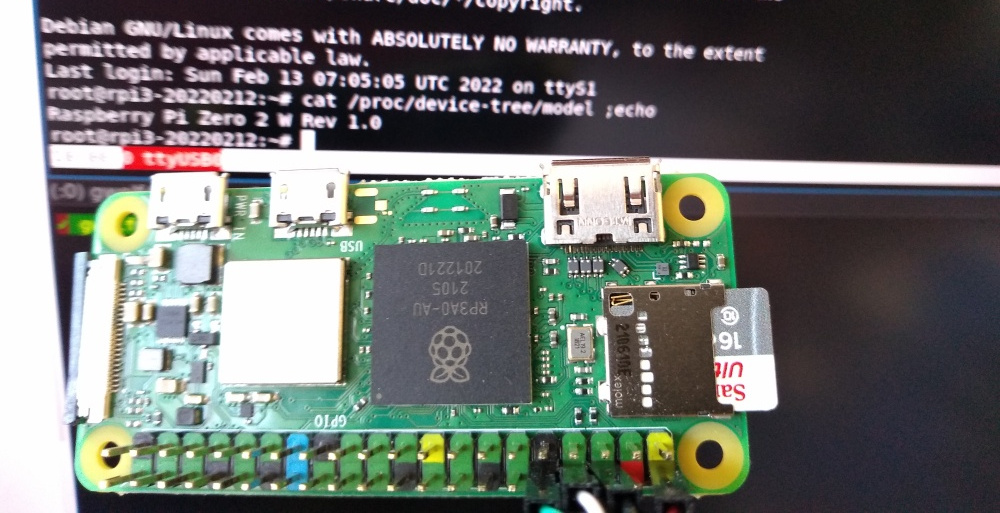
About a month ago, I got tired of waiting for the newest member of the Raspberry product lineup to be sold in Mexico, and I bought it from a Chinese reseller through a big online shopping platform. I paid quite a bit of premium (~US$85 instead of the advertised US$15), and got it delivered ten days later Anyway, it s known this machine does not yet boot mainline Linux. The vast majority of ARM systems require the bootloader to load a Device Tree file, presenting the hardware characteristics map. And while the RPi Zero 2 W (hey what an awful and confusing naming scheme they chose!) is mostly similar to a RPi3B+, it is not quite the same thing. A kernel with RPi3B+ s device tree will refuse to boot. Anyway, I started digging, and found that some days ago Stephan Wahren sent a patch to the linux-arm-kernel mailing list with a matching device tree. Read the patch! It s quite simple to read (what is harder is to know where each declaration should go, if you want to write your own, of course). It basically includes all basic details for the main chip in the RPi3 family (BCM2837), pulls in also the declarations from the BCM2836 present in the RPi2, and adds the necessary bits for the USB OTG connection and the WiFi and Bluetooth declarations. Registers the model name as Raspberry Pi Zero 2 W, which you can easily see in the following photo, informs the kernel it has 512MB RAM, and Well, really, it s an easy device tree to read, don t be shy! So, I booted my RPi 3B+ with a freshly downloaded Bookworm image, installed and unpacked linux-source-5.15, applied Stephan s patch, and added the following for the DTB to be generated in the arm64 tree as well:
--- /dev/null   2022-01-26 23:35:40.747999998 +0000
+++ arch/arm64/boot/dts/broadcom/bcm2837-rpi-zero-2-w.dts       2022-02-13 06:28:29.968429953 +0000
@@ -0,0 +1 @@
+#include "arm/bcm2837-rpi-zero-2-w.dts"
Then, ran a simple make dtbs, and Failed, because bcm283x-rpi-wifi-bt.dtsi is not yet in the kernel . OK, no worries: Getting wireless to work is a later step. I commented out the lines causing conflict (10, 33-35, 134-136), and:
root@rpi3-20220212:/usr/src/linux-source-5.15# make dtbs
  DTC     arch/arm64/boot/dts/broadcom/bcm2837-rpi-zero-2-w.dtb
Great! Just copied over that generated file to /boot/firmware/, moved the SD over to my RPiZ2W, and behold! It boots! When I bragged about it in #debian-raspberrypi, steev suggested me to pull in the WiFi patch, that has also been submitted (but not yet accepted) for kernel inclusion. I did so, uncommented the lines I modified, and built again. It builds correctly, and again copied the DTB over. It still does not find the WiFi; dmesg still complains about a missing bit of firmware (failed to load brcm/brcmfmac43430b0-sdio.raspberrypi,model-zero-2-w.bin). Steev pointed out it can be downloaded from RPi Distro s GitHub page, but I called it a night and didn t pursue it any further ;-) So I understand this post is still a far cry from saying our images properly boot under a RPi 0 2 W , but we will get there

11 February 2022

Holger Levsen: 20220211-inbox-zero-in-2022-and-beyond

Back to the old and new normal: inbox zero So, a long time ago, on the last two days of January 2020 I had reached zero unread mails in my inbox and all mailing lists and then... some stuff kept me distracted for a (too) long time... And then two weeks ago on the 29th of January 2022, I've reached inbox zero again, and again on the 30th and then I had a hardware issue and couldn't really use my computer for two days (one day trying to fix, the other copying data around...) and thus only on February 2nd I've hit zero unread mails again and again and again, every day for the last 9 days up until today. Yay! I'm sure there will be days (and weeks) where I won't manage to deal with all my incoming mail everyday, but I surely hope I'll manage at least once a month. As I did in 2019 when I started tracking this :) Reaching inbox zero every day is good for several reasons and probably the most important one is peace of mind. Even though the incoming flood of email never really stops, by reaching inbox zero I can achieve the feeling that I've dealt with all my emails for the day and that I can put email off my focus, at least for that day and despite emails coming in... ...and then email is too easy to be used as a todo list. Narf. So I guess I need to improve those workflows eventually as well. And offline days, do you remember those? Fully offline even, and by choice?!!

9 February 2022

Kentaro Hayashi: Writing Debian New Contributor Guide

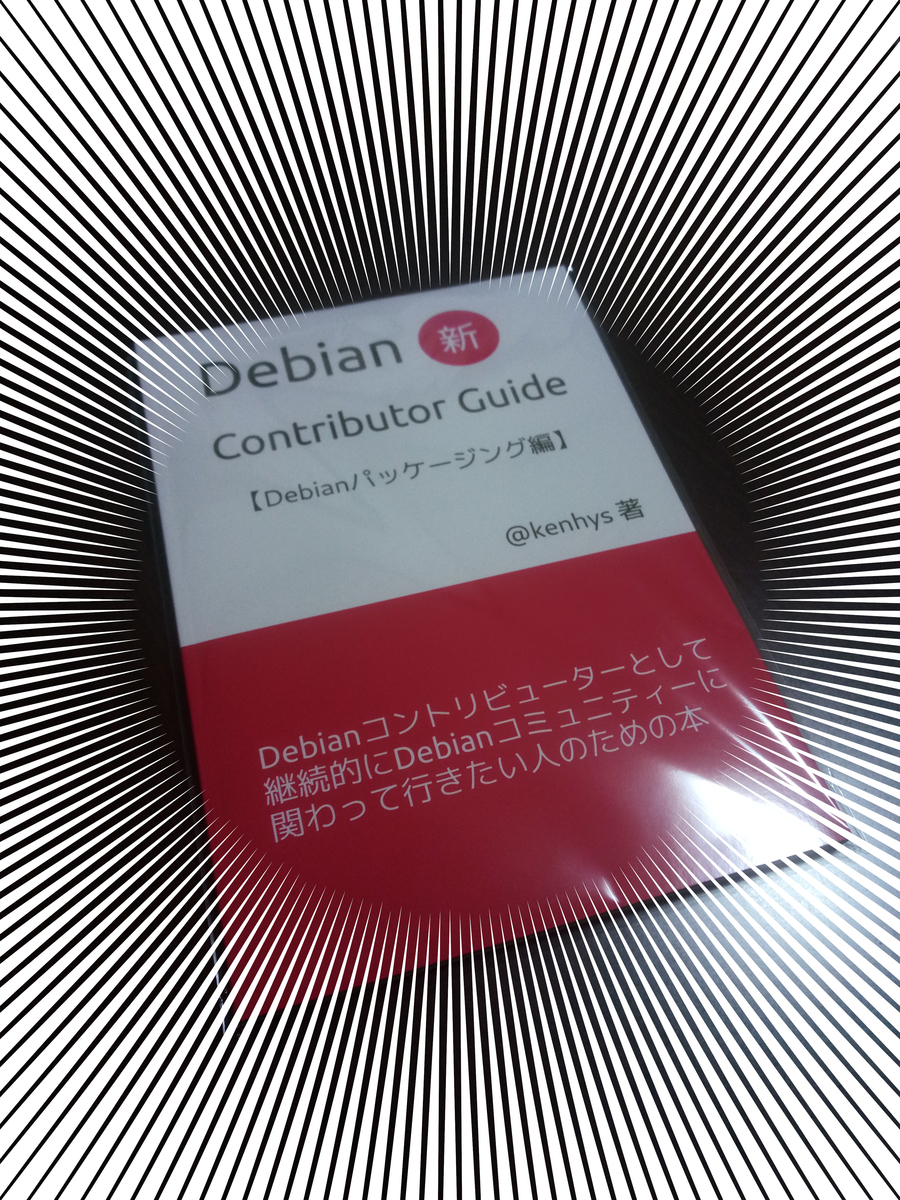
Recently, I've wrote Debian New Cotributor Guide in Japanese. Here is the photo of on-demand printed version.
f:id:kenhys:20220207163644j:plainDebian New Contributor Guide
This book (JIS-B5 128p) was published for online event - Techbookfest 12th. It covers how to package a new software in Debian. techbookfest.org Mostly PDF format is preferred, and a few printed versions were distributed.

7 February 2022

John Goerzen: KDE: A Nice Tiling Envieonment and a Surprisingly Awesome DE

I recently wrote that managing an external display on Linux shouldn t be this hard. I went down a path of trying out some different options before finally landing at an unexpected place: KDE. I say unexpected because I find tiling window managers are just about a necessity. Background: xmonad Until a few months ago, I d been using xmonad for well over a decade. Configurable, minimal, and very nice; it suited me well. However, xmonad is getting somewhat long in the tooth. xmobar, which is commonly used with it, barely supports many modern desktop environments. I prefer DEs for the useful integrations they bring: everything from handling mount of USB sticks to display auto-switching and sound switching. xmonad itself can t run with modern Gnome (whether or not it runs well under KDE 5 seems to be a complicated question, according to wikis, but in any case, there is no log applet for KDE 5). So I was left with XFCE and such, but the isues I identified in the shouldn t be this hard article were bad enough that I just could not keep going that way. An attempt: Gnome and PaperWM So I tried Gnome under Wayland, reasoning that Wayland might stand a chance of doing things well where X couldn t. There are several tiling window extensions available for the Gnome 3 shell. Most seemed to be rather low-quality, but an exception was PaperWM and I eventually decided on it. I never quite decided if I liked its horizontal tape of windows or not; it certainly is unique in any case. I was willing to tolerate my usual list of Gnome problems for the sake of things working. For instance: Under Wayland, I found a disturbing lack of logs. There was nothing like /var/log/Xorg.0.log, nothing like ~/.xsession-errors, just nothing. Searching for answers on this revealed a lot of Wayland people saying it s a Gnome issue and the trail going cold at that point. And there was a weird problem that I just could not solve. After the laptop was suspended and we-awakened, I would be at a lock screen. I could type in my password, but when hitting Enter, the thing would then tend to freeze. Why, I don t know. It seemed related to Gnome shell; when I switched Gnome from Wayland to X11, it would freeze but eventually return to the unlock screen, at which point I d type in my password and it would freeze again. I spent a long time tracking down logs to see what was happening, but I couldn t figure it out. All those hard resets were getting annoying. Enter KDE So I tried KDE. I had seen mentions of kwin-tiling, a KDE extension for tiling windows. I thought I d try this setup. I was really impressed by KDE s quality. Not only did it handle absolutely every display-related interaction correctly by default, with no hangs ever, all relevant settings were clearly presented in one place. The KDE settings screens were a breath of fresh air lots of settings available, all at one place, and tons of features I hadn t seen elsewhere. Here are some of the things I was pleasantly surprised by with KDE: Tiling So how about the tiling system, kwin-tiling? The out of the box experience is pretty nice. There are fewer built-in layouts than with xmonad, but the ones that are there are doing a decent job for me, and in some cases are more configurable (those that have a large window pane are configurable on its location, not forcing it to be on the left as with many systems.) What s more, thanks to the flexibility in the KDE shortcut settings, I can configure it to be nearly keystroke-identical to xmonad! Issues Encountered I encountered a few minor issues: In short, I m very impressed.

5 February 2022

Reproducible Builds: Reproducible Builds in January 2022

Welcome to the January 2022 report from the Reproducible Builds project. In our reports, we try outline the most important things that have been happening in the past month. As ever, if you are interested in contributing to the project, please visit our Contribute page on our website.
An interesting blog post was published by Paragon Initiative Enterprises about Gossamer, a proposal for securing the PHP software supply-chain. Utilising code-signing and third-party attestations, Gossamer aims to mitigate the risks within the notorious PHP world via publishing attestations to a transparency log. Their post, titled Solving Open Source Supply Chain Security for the PHP Ecosystem goes into some detail regarding the design, scope and implementation of the system.
This month, the Linux Foundation announced SupplyChainSecurityCon, a conference focused on exploring the security threats affecting the software supply chain, sharing best practices and mitigation tactics. The conference is part of the Linux Foundation s Open Source Summit North America and will take place June 21st 24th 2022, both virtually and in Austin, Texas.

Debian There was a significant progress made in the Debian Linux distribution this month, including:

Other distributions kpcyrd reported on Twitter about the release of version 0.2.0 of pacman-bintrans, an experiment with binary transparency for the Arch Linux package manager, pacman. This new version is now able to query rebuilderd to check if a package was independently reproduced.
In the world of openSUSE, however, Bernhard M. Wiedemann posted his monthly reproducible builds status report.

diffoscope diffoscope is our in-depth and content-aware diff utility. Not only can it locate and diagnose reproducibility issues, it can provide human-readable diffs from many kinds of binary formats. This month, Chris Lamb prepared and uploaded versions 199, 200, 201 and 202 to Debian unstable (that were later backported to Debian bullseye-backports by Mattia Rizzolo), as well as made the following changes to the code itself:
  • New features:
    • First attempt at incremental output support with a timeout. Now passing, for example, --timeout=60 will mean that diffoscope will not recurse into any sub-archives after 60 seconds total execution time has elapsed. Note that this is not a fixed/strict timeout due to implementation issues. [ ][ ]
    • Support both variants of odt2txt, including the one provided by the unoconv package. [ ]
  • Bug fixes:
    • Do not return with a UNIX exit code of 0 if we encounter with a file whose human-readable metadata matches literal file contents. [ ]
    • Don t fail if comparing a nonexistent file with a .pyc file (and add test). [ ][ ]
    • If the debian.deb822 module raises any exception on import, re-raise it as an ImportError. This should fix diffoscope on some Fedora systems. [ ]
    • Even if a Sphinx .inv inventory file is labelled The remainder of this file is compressed using zlib, it might not actually be. In this case, don t traceback and simply return the original content. [ ]
  • Documentation:
    • Improve documentation for the new --timeout option due to a few misconceptions. [ ]
    • Drop reference in the manual page claiming the ability to compare non-existent files on the command-line. (This has not been possible since version 32 which was released in September 2015). [ ]
    • Update X has been modified after NT_GNU_BUILD_ID has been applied messages to, for example, not duplicating the full filename in the diffoscope output. [ ]
  • Codebase improvements:
    • Tidy some control flow. [ ]
    • Correct a recompile typo. [ ]
In addition, Alyssa Ross fixed the comparison of CBFS names that contain spaces [ ], Sergei Trofimovich fixed whitespace for compatibility with version 21.12 of the Black source code reformatter [ ] and Zbigniew J drzejewski-Szmek fixed JSON detection with a new version of file [ ].

Testing framework The Reproducible Builds project runs a significant testing framework at tests.reproducible-builds.org, to check packages and other artifacts for reproducibility. This month, the following changes were made:
  • Fr d ric Pierret (fepitre):
    • Add Debian bookworm to package set creation. [ ]
  • Holger Levsen:
    • Install the po4a package where appropriate, as it is needed for the Reproducible Builds website job [ ]. In addition, also run the i18n.sh and contributors.sh scripts [ ].
    • Correct some grammar in Debian live image build output. [ ]
    • Shell monitor improvements:
      • Only show the offline node section if there are offline nodes. [ ]
      • Colorise offline nodes. [ ]
      • Shrink screen usage. [ ][ ][ ]
    • Node health check improvements:
      • Detect if live package builds encounter incomplete snapshots. [ ][ ][ ]
      • Detect if a host is running with today s date (when it should be set artificially in the future). [ ]
    • Use the devscripts package from bullseye-backports on Debian nodes. [ ]
    • Use the Munin monitoring package bullseye-backports on Debian nodes too. [ ]
    • Update New Year handling, needed to be able to detect real and fake dates. [ ][ ]
    • Improve the error message of the script that powercycles the arm64 architecture nodes hosted by Codethink. [ ]
  • Mattia Rizzolo:
    • Use the new --timeout option added in diffoscope version 202. [ ]
  • Roland Clobus:
    • Update the build scripts now that the hooks for live builds are now maintained upstream in the live-build repository. [ ]
    • Show info lines in Jenkins when reproducible hooks have been active. [ ]
    • Use unique folders for the artifacts from each live Debian version. [ ]
  • Vagrant Cascadian:
    • Switch the Debian armhf architecture nodes to use new proxy. [ ]
    • Misc. node maintenance. [ ].

Upstream patches The Reproducible Builds project attempts to fix as many currently-unreproducible packages as possible. In January, we wrote a large number of such patches, including:

And finally If you are interested in contributing to the Reproducible Builds project, please visit our Contribute page on our website. However, you can get in touch with us via:

Thorsten Alteholz: My Debian Activities in January 2022

FTP master This month I accepted 342 and rejected 57 packages. The overall number of packages that got accepted was 366. Lately I was asked: Is it ftpmaster s opinion and policy that there is no difference in NEW queue review process between bin and src? This is a yes/no-question and in this generality the answer is clearly: Every package in NEW needs a full review. Of course there are circumstances with exceptions. For example after an upload of -1, which would get a full review, the upload of -2 afterwards, introducing a new binary package, would get a much faster review. In this case it would make sense to ping on IRC and draw attention to this. Nevertheless the evaluation of a light review might differ between the maintainer and the person doing the review. Debian LTS This was my ninety-first month that I did some work for the Debian LTS initiative, started by Raphael Hertzog at Freexian. This month my all in all workload has been 40h. During that time I did LTS and normal security uploads of: I also started to work on security support for golang packages. Though this sounds like an easy task, the devel is in the details.
As CVEs need to be fixed in unstable first, at the moment it looks like this is the most time consuming task. I will report later on my journey to fix open CVEs in golang-github-russellhaering-goxmldsig Further I worked on packages in NEW on security-master and injected missing sources. Last but not least I did some days of frontdesk duties and attended an LTS meeting on IRC. Debian ELTS This month was the forty-third ELTS month. During my allocated time I uploaded: Further I worked on an update for apache2 Last but not least I did some days of frontdesk duties. Debian Printing I was finally able to upload a new version of hplip and Ubuntu is now able to build new snaps for their next release.
Altogether I uploaded new upstream versions or improved packaging of: Now the dashboard looks rather good and my next task for February is an update of cups. Debian Astro As there was a release of version 1.9.4 of INDI and indi-3rdparty, I also uploaded the new version of all INDI drivers and releated libs from indi-3rdparty. Other stuff This month I uploaded lots of new upstream releases of golang packages.

Steve Kemp: Removing my last server?

In the past I used to run a number of virtual machines, or dedicated hosts. Currently I'm cut things down to only a single machine which I'm planning to remove. Email Email used to be hosted via dovecot, and then read with mutt-ng on the host itself. Later I moved to reading mail with my own console-based email client. Eventually I succumbed, and now I pay for Google's Workspace product. Git Repositories I used to use gitbucket for hosting a bunch of (mostly private) git repositories. A bad shutdown/reboot of my host trashed the internal database so that was broken. I replaced the use of gitbucket, which was very pretty, with gitolite to perform access-control, and avoid the need of a binary database. I merged a bunch of repositories, removed the secret things from there where possible, and finally threw them on a second github account. GPG-encryption added where appropriate. Static Hosts Static websites I used to host upon my own machine are now hosted via netlify. There aren't many of them, and they are rarely updated, I guess I care less. Dynamic Hosts That leaves only dynamic hosts. I used to have a couple of these, most notably the debian-administration.org, but that was archived and the final commercial thing I did was retired in January. I now have only one dynamic site up and running, https://api.steve.fi/, this provides two dynamic endpoints: Both of these are used by my tram-display device. Running these two services locally, in Docker, would probably be fine. However there is a third "secret" API - blog-comment submission. When a comment is received upon this blog it is written to a local filesystem, and an email is sent to me. The next time my blog is built rsync is used to get the remote-comments and add them to the blog. (Spam deleted first, of course). Locally the comments are added into the git-repository this blog is built from - and the remote files deleted now and again. Maybe I should just switch from writing the blog-comment to disk, and include all the meta-data in the email? I don't wanna go connecting to Gmail via IMAP, but I could probably copy and paste from the email to my local blog-repository. I can stop hosting the tram-APIs publicly, but the blog comment part is harder. I guess I just need to receive incoming FORM-submission, and send an email. Or maybe I drop blog-comments and sidestep the problem entirely? After all I wrote five posts in the whole of last year ..

3 February 2022

Sven Hoexter: Suntime Calculation with Lua and the Great Gift of Open Source

tl;dr I ported a part of the python-suntime library to Lua to use it on OpenWRT and RutOS powered devices. suntime.lua There are those unremarkable things which let you pause for a moment, and realize what a great gift of our time open source software and open knowledge is. At some point in time someone figured out how to calculate the sunrise and sunset time on the current date for your location. Someone else wrote that up and probably again a different person published it on the internet. The Internet Archive preserved a copy of it so I can still link to it. Someone took this algorithm and published a code sample on StackOverflow, which was later on used by the SatAgro guys to create the python-suntime library. Now I could come along, copy the core function of this library, convert it within a few hours - mostly spent learning a bit of Lua, to a working script fulfilling my needs.

2 February 2022

Norbert Preining: Mechanical keyboards: Pulsar PCMK

Mechanical keyboards the big fat rabbit hole you can disappear I started using mechanical keyboards about a year ago, with a Drevo Blademaster Pro (review coming up), but recently got a Pulsar PCML TKL keyboard in a build-it-yourself order.
The Drevo Blademaster Pro I am using is great, but doesn t allow changing switches at all. So I was contemplating getting a mechanical keyboard that allows for arbitrary switches. My biggest problem here is that I am used to the Japanese JIS layout which gives you a lot more keys which come in extremely handy in Emacs or when typing various languages. Fortunately, APlusX a Korean company manufactures a lot of gear under the Pulsar name, and supports also JIS layout. In addition, they have a great web site to customize your keyboard (layout, color, switch, keycaps) and send you a build-yourself kit for a very reasonable prize at least in Japan. So I got my first keyboard to put together myself . how was I nervous getting all the stuff out! Despite being a DIY keyboard, it is very easy (and they offer also pre-assembly options, too!). You don t need to solder the PCB or similar, the steps are more or less: (i) put in the switches, and (ii) add the key caps. I started with the first, putting the switches (I went with Kailh Box Brown tactile ones) into the PCB board
Well, that was easy at least I thought until I started testing the keys and realized that about 20 of them didn t work!! Pulling out the switches again I saw that I twisted a pin on each of them. One by one I straightened the pins and reinserted them very carefully. Lesson learned! At the end all the switches were on the board and reacted to key presses. Next step was adding the key caps. Again, those are not really special key caps, but simply style and sufficient for me. Of course I messed up 0 and O (which have different heights) and at first were confused about different arrow options etc, but since plugging in and pulling out key caps is very easy, at the end all the caps were in place.
With the final keyboard assembled (see top photo), I connected it to my Linux system and started typing around. And first of all, the typing experience was nice. The Kailh Box Brown switches have a bit stronger actuation point then the switches I have in the Blademaster Pro (which are Cherry MX Brown ones), but above all the sound is a bit deeper and thumbier , which really gives a nice feeling. The keyboard also allows changing the RGB lightening via the keyboard (color, pattern, speed, brightness etc). There is a configuration software for macros etc, unfortunately it only works on Windows (and I couldn t get it to work with Wine, either), a sour point One more negative point is that the LED backlight doesn t have a timeout, that is, it stays on all the time. The Drevo I have turns off after a configured number of seconds, and turns completely black something I really like and miss on the Pulsar. Another difference to the Blademaster is connectivity: While the Blademaster offers cable, bluetooth, and wireless (with dongle), the Pulsar only offers cable (USB-C). Not a real deal-breaker for me, since I use it at my desktop and really don t need wireless/bluetooth capabilities, but still. I have been using the Pulsar now for a few days without even touching the Drevo (besides comparing typing sounds and actuation points), and really like the Pulsar. I think it is hard to get a fully configurable and changeable mechanical keyboard for a similar prize. There is one last thing that I really really miss an ergonomic mechanical keyboard. Of course there are some, like the ErgoDox EZ or the Kinesis Advantage 2, but they don t offer JIS layout (and are very expensive). Then there is the Truly Ergonomic CLEAVE keyboard, which is really great, but quite expensive. I guess I have to dive down the rabbit hole even more and make my own PCB and ergonomic keyboard!

1 February 2022

Ben Hutchings: Debian LTS work, January 2022

In January I was assigned 24 hours of work by Freexian's Debian LTS initiative. I worked 16 hours, and will carry over the remaining time to February. I sent various backported security fixes for Linux to the stable mailing list, and they have been included in subsequent stable releases. I rebased the linux package on the latest 4.9-stable release, but did not yet upload it.

31 January 2022

Ingo Juergensmann: XMPP and Mail Clients

I really like XMPP, but I m a little unhappy about the current general situation of XMPP. I think XMPP could do better if there were some benefits of having an XMPP address. For me one of those benefits is to have the option to have just one address I need to communicate to others. If everything is in place and well-configured, a user can be reached by mail, XMPP and SIP (voice/video calls) by just one address. To address this I would like to see XMPP support in mail clients (MUAs). So when you reply to a mail or write a new one, the client will do a lookup in your addressbook if the address has an XMPP field associated with it and (if not) do a DNS lookup for _xmpp-server._tcp.example.com (or the matching domain part of recipients address). If there is an XMPP address listed in mail header, that JID will be used. When the lookup is successful and an xmpp: protocol handler is configured in the system, the MUA offers an option to begin a chat with the recipient and/or displays the presence status of the recipients (depending on available web-presence or presence subscription). Basically a good candidate could be Thunderbird, because it already has XMPP support built in, albeit not a good implementation and lacking many modern features like OMEMO. But for basic functions (like presence status and such) it should be sufficient for a start. Other candidates could be Evolution, Kmail (as KDE MUA and Kaidan as a native KDE XMPP client) or even Apple Mail.app, because Apples addressbook supports XMPP fields for each contact. Basically the same could be done for SIP contacts: if a SIP SRV record for that domain does exist, the MUA could offer an option to call the recipient. I would be willing to give some money via Bountysource or similar platforms. Is anyone aware of such a project or willing to write some addons? Maybe within the GSoC? PS: there is RFC7259 about Jabber/XMPP JID in mail headers and there is also a page in the XMPP.org wiki.

27 January 2022

Jonathan Dowland: Using an iPad for note-taking in talks

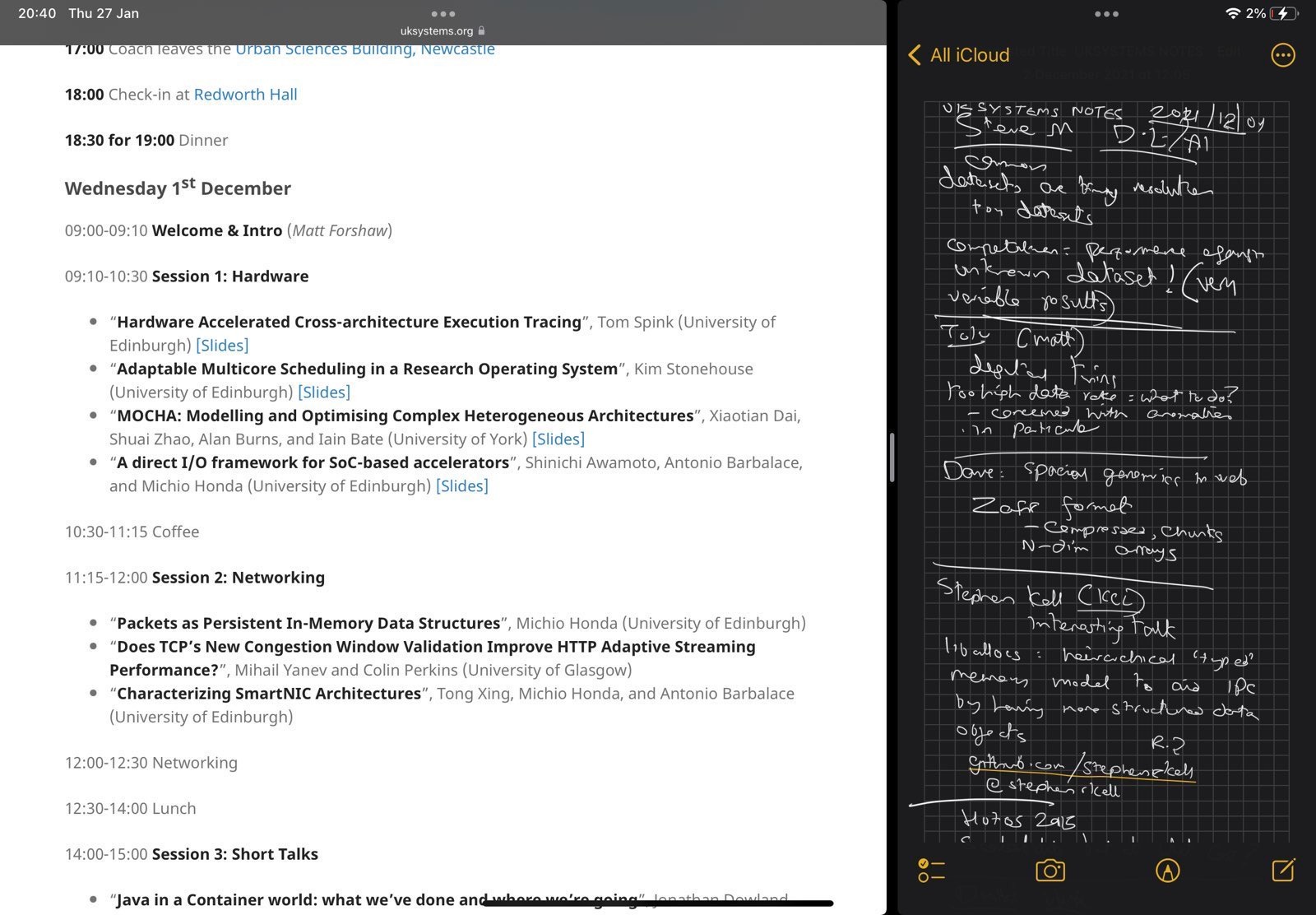
I've found that using a laptop during conference talks means you either end up doing something else and missing important bits of the talk, or at least look like you're doing something else. But it's extremely helpful to be able to look up the person who is talking, or their project, or expand an acronym that's mentioned or read around the subject. At December's uksystems21 conference, I experimented with using an iPad as a kind of compromise. Modern iOS versions let you split the display between two apps1, so I put the built-in Notes app on one side and a web browser on the other. I took notes using the Apple Pencil. I've got a "paper-like" rough surface display protector on the front which vastly improves the experience of using the Apple Pencil for writing2.
An example of note-taking and researching talks on an iPad. An example of note-taking and researching talks on an iPad.
I mostly took notes on the active talk, but I also tweaked my own slides3, looked up supplementary information about the topic and the talker, and things like that. It worked really well: much better than I expected. Apple's split-screen implementation is clunky but essential to make this work. The textured surface protector is a serious improvement over the normal surface for writing. But most importantly I didn't lose focus over the talks, and I don't think I looked like I did either.

  1. Yes, this is something that some Android vendors have supported for years. I remember playing around with Samsung Galaxy Notes when I was still in IT and being pretty impressed. On the other hand, I'd bet not 1% of those tablets are still running Today. My iPad Mini from that time still is, albeit vastly diminished.
  2. It's still not as good as the Remarkable, but that's a topic for another blog post.
  3. A tiny bit. Not serious reworking. Just nervous last minute tweaks that I could probably have not bothered with at all. I'm one of those people who does that right up to the wire.

Dirk Eddelbuettel: td 0.0.6 on CRAN: Minor Bugfix

The td package for accessing the twelvedata API for financial data has been updated once more on CRAN and is now at version 0.0.6. The release comes in response to an email from CRAN who noticed (via r-devel) that I was sloppy (in one spot, it turns out) with a logical expression resulting in an expression of length greather than one. Fixed by wrapping an all() around it and the package was back at CRAN minutes later thanks to automated processing over their end. The NEWS entry follows.

Changes in version 0.0.6 (2022-01-26)
  • Correct one equality comparison by wrapping in all() to ensure a length-one logical expression is created

Courtesy of my CRANberries, there is a comparison to the previous release. For questions or comments use the issue tracker off the GitHub repo. If you like this or other open-source work I do, you can now sponsor me at GitHub.

This post by Dirk Eddelbuettel originated on his Thinking inside the box blog. Please report excessive re-aggregation in third-party for-profit settings.

26 January 2022

Gunnar Wolf: Progvis Now in Debian proper! (unstable)

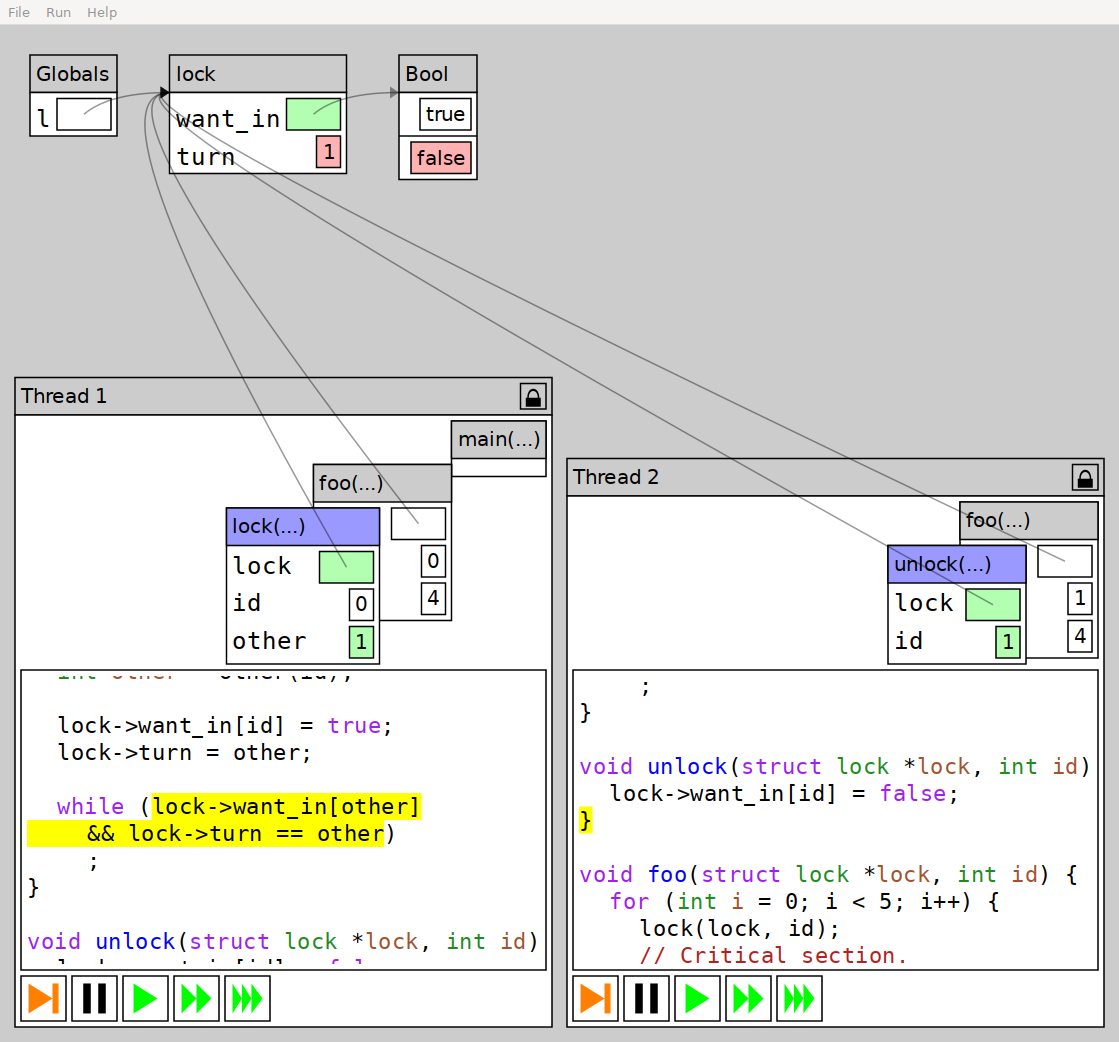
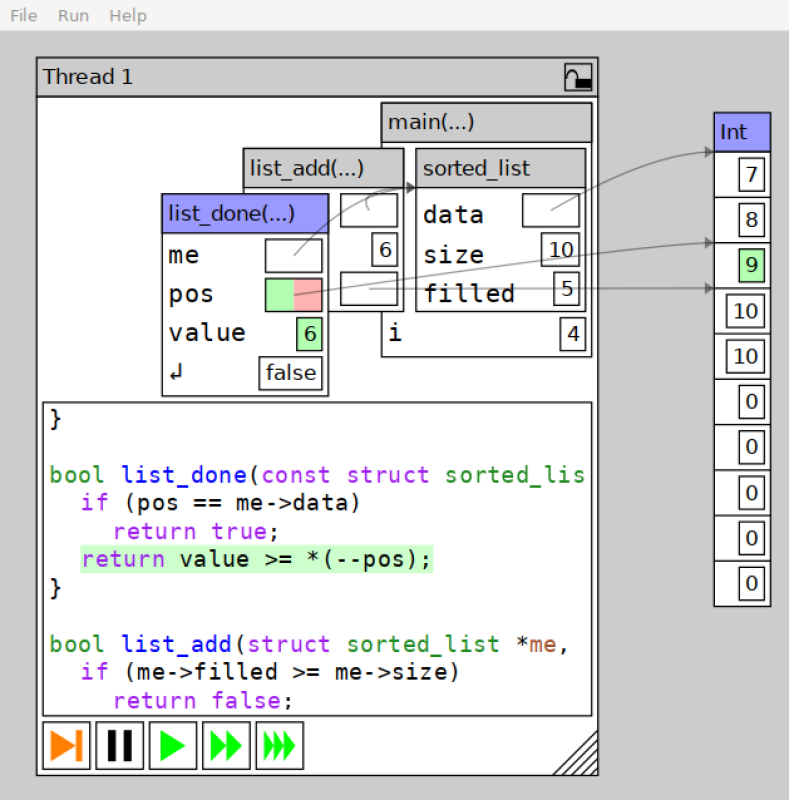
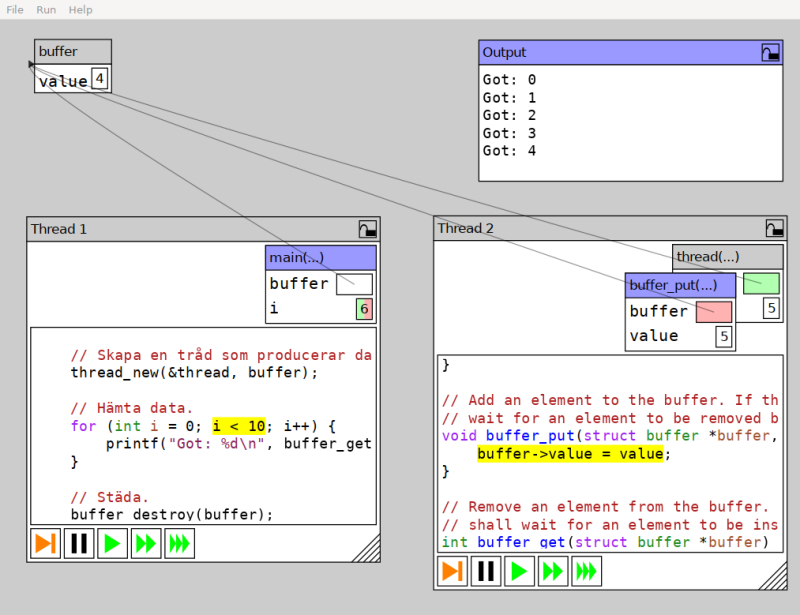
Progvis finally made it into Debian! What is it, you ask? It is a great tool to teach about memory management and concurrency. I first saw progvis in the poster presentation his author, Filip Str mb ck, did last year at the 52nd ACM Technical Sympossium on Computer Science Education (SIGCSE), immediately recognizing it as a tool I wanted to use at my classes, and being it free software, make it available for all interested Debian users. Quoting from Progvis Web page:
This is a program visualization tool aimed at concurrent programs and related issues. The tool itself is mostly language agnostic, and relies on Storm to compile the provided code and provide basic debug information. The generated code is then inspected and instrumented to provide an experience similar to a basic debugger. The tool emphasizes a visual representation of the object hierarchy that is manipulated by the executed program to make it easy to understand how it looks. In particular, a visual representation is beneficial over a text representation since it makes it easier to find shared data that might need to be synchronized in a concurrent program. As mentioned, the tool is aimed at concurrent programs. Therefore, it allows spawning multiple threads running the same program to see if that affects the program s execution (this is mostly interesting if global variables are used). Furthermore, any spawned threads also appear in the tool, and the user may control them independently to explore possible race conditions or other synchronization errors. If enabled from the menu bar, the tool keeps track of reads and writes to the data structure in order to highlight basic race conditions in addition to deadlocks.
So, what is this Storm thing? Filip promptly informed me that Progvis is not just a pedagogical tool Or rather, that it is part of something bigger. Progvis is a program built using the Storm programming language platform is more than a compiler; it presents as a framework for creating languages, designed to make easy to implement languages that can be extended with new syntax and semantics. Storm is much more than what I have explored, and can be used as an interactive compiler, a language server used as a service for highlighting and completing in IDEs. But I won t dig much more into Storm (which is, of course, now also available in Debian as well as the libraries built from the same source). Back to progvis: It implements a very-close-to-C++ language, with some details to better suit its purpose (i.e. instead of using the usual pthread implementation, an own thread model is used; i.e. thread creation is handled via int thread_id = thread_name(funcname, &params) instead of the more complex pthread_create() function (including details such as the thread object being passed as by reference as a parameter) All in all, while I have not yet taken full advantage of this tool in my teaching, it has helped me show somewhat hard to grasp concepts such as: All in all, a great tool. I hope you find it useful and enjoyable as well! PS- I suggest you to install the progvis-examples package to get started. You will find some dozens of sample programs in /usr/share/doc/progvis-examples/examples; playing with them will help you better understand the tool and be able to better write your own programs.

Timo Jyrinki: Unboxing Dell XPS 13 - openSUSE Tumbleweed alongside preinstalled Ubuntu

A look at the 2021 model of Dell XPS 13 - available with Linux pre-installed
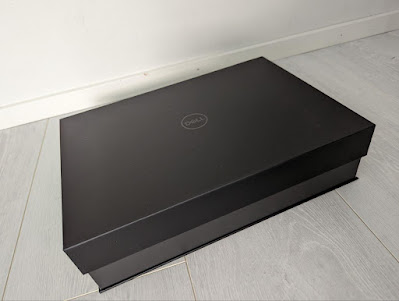
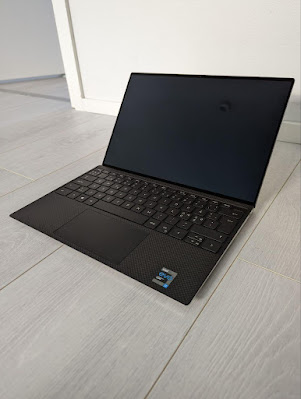
I received a new laptop for work - a Dell XPS 13. Dell has been long famous for offering certain models with pre-installed Linux as a supported option, and opting for those is nice for moving some euros/dollars from certain PC desktop OS monopoly towards Linux desktop engineering costs. Notably Lenovo also offers Ubuntu and Fedora options on many models these days (like Carbon X1 and P15 Gen 2).
black box

opened box

accessories and a leaflet about Linux support

laptop lifted from the box, closed

laptop with lid open

Ubuntu running

openSUSE runnin
Obviously a smooth, ready-to-rock Ubuntu installation is nice for most people already, but I need openSUSE, so after checking everything is fine with Ubuntu, I continued to install openSUSE Tumbleweed as a dual boot option. As I m a funny little tinkerer, I obviously went with some special things. I wanted:
  • Ubuntu to remain as the reference supported OS on a small(ish) partition, useful to compare to if trying out new development versions of software on openSUSE and finding oddities.
  • openSUSE as the OS consuming most of the space.
  • LUKS encryption for openSUSE without LVM.
  • ext4 s new fancy fast_commit feature in use during filesystem creation.
  • As a result of all that, I ended up juggling back and forth installation screens a couple of times (even more than shown below, and also because I forgot I wanted to use encryption the first time around).
First boots to pre-installed Ubuntu and installation of openSUSE Tumbleweed as the dual-boot option:
(if the embedded video is not shown, use a direct link)
Some notes from the openSUSE installation:
  • openSUSE installer s partition editor apparently does not support resizing or automatically installing side-by-side another Linux distribution, so I did part of the setup completely on my own.
  • Installation package download hanged a couple of times, only passed when I entered a mirror manually. On my TW I ve also noticed download problems recently, there might be a problem with some mirror I need to escalate.
  • The installer doesn t very clearly show encryption status of the target installation - it took me a couple of attempts before I even noticed the small encrypted column and icon (well, very small, see below), which also did not spell out the device mapper name but only the main partition name. In the end it was going to do the right thing right away and use my pre-created encrypted target partition as I wanted, but it could be a better UX. Then again I was doing my very own tweaks anyway.
  • Let s not go to the details why I m so old-fashioned and use ext4 :)
  • openSUSE s installer does not work fine with HiDPI screen. Funnily the tty consoles seem to be fine and with a big font.
  • At the end of the video I install the two GNOME extensions I can t live without, Dash to Dock and Sound Input & Output Device Chooser.

22 January 2022

Dirk Eddelbuettel: qlcal 0.0.2 on CRAN: Updates

The second release of the still fairly new qlcal package arrivied at CRAN today. qlcal is based on the calendaring subset of QuantLib. It is provided (for the R package) as a set of included files, so the package is self-contained and does not depend on an external QuantLib library (which can be demanding to build). qlcal covers over sixty country / market calendars and can compute holiday lists, its complement (i.e. business day lists) and much more. This release brings a further package simplification from removing a few more files not needed for just calendaring, as well as an update 2022 calendar for China from the just-release 1.25 version of QuantLib.

Changes in version 0.0.2 (2022-01-21)
  • Further minimize set of files needed for calendaring
  • Update China calendar from QuantLib 1.25 release

See the project page and package documentation for more details, and more examples. If you like this or other open-source work I do, you can now sponsor me at GitHub.

This post by Dirk Eddelbuettel originated on his Thinking inside the box blog. Please report excessive re-aggregation in third-party for-profit settings.

21 January 2022

Neil McGovern: Further investments in desktop Linux

This was originally posted on the GNOME Foundation news feed The GNOME Foundation was supported during 2020-2021 by a grant from Endless Network which funded the Community Engagement Challenge, strategy consultancy with the board, and a contribution towards our general running costs. At the end of last year we had a portion of this grant remaining, and after the success of our work in previous years directly funding developer and infrastructure work on GTK and Flathub, we wanted to see whether we could use these funds to invest in GNOME and the wider Linux desktop platform. We re very pleased to announce that we got approval to launch three parallel contractor engagements, which started over the past few weeks. These projects aim to improve our developer experience, make more applications available on the GNOME platform, and move towards equitable and sustainable revenue models for developers within our ecosystem. Thanks again to Endless Network for their support on these initiatives. Flathub Verified apps, donations and subscriptions (Codethink and James Westman) This project is described in detail on the Flathub Discourse but goal is to add a process to verify first-party apps on Flathub (ie uploaded by a developer or an authorised representative) and then make it possible for those developers to collect donations or subscriptions from users of their applications. We also plan to publish a separate repository that contains only these verified first-party uploads (without any of the community contributed applications), as well as providing a repository with only free and open source applications, allowing users to choose what they are comfortable installing and running on their system. Creating the user and developer login system to manage your apps will also set us up well for future enhancements, such managing tokens for direct binary uploads (eg from a CI/CD system hosted elsewhere, as is already done with Mozilla Firefox and OBS) and making it easier to publish apps from systems such as Electron which can be hard to use within a flatpak-builder sandbox. For updates on this project you can follow the Discourse thread, check out the work board on GitHub or join us on Matrix. PWAs Integrating Progressive Web Apps in GNOME (Phaedrus Leeds) While everyone agrees that native applications can provide the best experience on the GNOME desktop, the web platform, and particularly PWAs (Progressive Web Apps) which are designed to be downloadable as apps and offer offline functionality, makes it possible for us to offer equivalent experiences to other platforms for app publishers who have not specifically targeted GNOME. This allows us to attract and retain users by giving them the choice of using applications from a wider range of publishers than are currently directly targeting the Linux desktop. The first phase of the GNOME PWA project involves adding back support to Software for web apps backed by GNOME Web, and making this possible when Web is packaged as a Flatpak. So far some preparatory pull requests have been merged in Web and libportal to enable this work, and development is ongoing to get the feature branches ready for review. Discussions are also in progress with the Design team on how best to display the web apps in Software and on the user interface for web apps installed from a browser. There has also been discussion among various stakeholders about what web apps should be included as available with Software, and how they can provide supplemental value to users without taking priority over apps native to GNOME. Finally, technical discussion is ongoing in the portal issue tracker to ensure that the implementation of a new dynamic launcher portal meets all security and robustness requirements, and is potentially useful not just to GNOME Web but Chromium and any other app that may want to install desktop launchers. Adding support for the launcher portal in upstream Chromium, to facilitate Chromium-based browsers packaged as a Flatpak, and adding support for Chromium-based web apps in Software are stretch goals for the project should time permit. GTK4 / Adwaita To support the adoption of Gtk4 by the community (Emmanuele Bassi) With the release of GTK4 and renewed interest in GTK as a toolkit, we want to continue improving the developer experience and ease of use of GTK and ensure we have a complete and competitive offering for developers considering using our platform. This involves identifying missing functionality or UI elements that applications need to move to GTK4, as well as informing the community about the new widgets and functionality available. We have been working on documentation and bug fixes for GTK in preparation for the GNOME 42 release and have also started looking at the missing widgets and API in Libadwaita, in preparation for the next release. The next steps are to work with the Design team and the Libadwaita maintainers and identify and implement missing widgets that did not make the cut for the 1.0 release. In the meantime, we have also worked on writing a beginners tutorial for the GNOME developers documentation, including GTK and Libadwaita widgets so that newcomers to the platform can easily move between the Interface Guidelines and the API references of various libraries. To increase the outreach of the effort, Emmanuele has been streaming it on Twitch, and published the VOD on YouTube as well.

20 January 2022

Caleb Adepitan: I'm Thinking About You Right Now!

Just in case you stumbled on this incidentally and you wonder Who in the seven fat worlds is this mysterious...? Ha! That was what I was thinking about you you were thinking about me. You gerrit!? I heard you listening to my thoughts; I listened to yours too. I wonder if you heard me too. I will like to talk, today, about what it is I do at Debian as an Outreachy Intern under the JavaScript team. I woke up this morning and decided to bore you with so much details. I must have woken up glorified!

A Broader View My sole role at Debian alongside my teammate, aided by our mentors, is to facilitate the Node.js 16 and Webpack 5 Transitioning. What exactly does that mean? Node.js 16, as of the time of this writing, is the active LTS release from the Node.js developers while Webpack 5 is also the current release from the Webpack developers. At Debian we have to work towards supporting these packages. Debian as an OS comes with a package manager coined Advanced Package Tool or simply APT on which command-line programs specific to Debian and it's many-flavored distributions, apt, apt-get, apt-cache are based. This means before the conception of yarn and npm, the typical JavaScript developer's package managers, apt has been. Debian unlike yarn and npm, ideally, only supports one version of a software at any point in time and on edge cases may have to support an extra one as noted in this chat between my mentor and a member. To provide support for Webpack 5 and Node.js 16 which as regards to Debian are currently in experimental and only can be migrated to unstable after our transitioning, we have to test, reverse build, report and fix bugs till a certain level of compatibility has been attained with dependent packages currently in unstable. Webpack and Node.js have their respective dependencies, but there are certain software and packages also dependent on Webpack and/or Node.js, these are termed as reverse-dependencies. We have to test and build these reverse-dependencies, report and fix bugs and incompatibilities with the new versions of Webpack and Node.js. For reverse-dependent packages not yet supporting Webpack 5 and/or Node.js 16, we'll open an issue in form of a feature-request in upstream repository asking for Webpack 5 and/or Node.js 16 support. Ideally, Debian manages a repository of all supported packages on a GitLab managed Git based VCS. For JavaScript packages maintained by the JS Team, the home of those packages sits at https://salsa.debian.org/js-team/. Supported packages are pulled from upstream repository, mostly GitHub, using some certian packaging tools provided by Debian. The pulled source cannot be directly modified else it will break build. So there exists a dedicated folder named debian where certain cofiguration files, scripts and rules to convey to the debian package builder live at. In some cases, source code needs to be modified; these are done via patching which means the modifications won't live in the source but in a dedicated patch file inside the debian/patches/ folder. The modifications are diffed line by line with the original source (just as with git) and the result is output in a file managed by debian utility tool, Quilt. The contents of the debian folder are instructions on how to build the source into binaries or an installable archive .deb (like Java's .jar or Android's .apk).

Understanding Debian Software Release Cycle There are quite some interesting things about the software release cycle at Debian to get familiar with. Listed here are some release repositories alongside their codenames as of Debian 11:
  1. Unstable (Sid)
  2. Testing (Bookworm)
  3. Stable (Bullseye)
  4. Old stable (Buster)
  5. Old old stable (Stretch)
Ha! Isn't it ironic that unstable is the only one with a stable codename? Some of these, if not all, have codenames subject to change after every new release and/or migration. Only unstable which is referred to as Sid never changes. The current stable release which is Debian 11 is codenamed Bullseye. The next stable release which will be Debian 12 will be codenamed Bookworm because the current testing repository will be migrated to stable and released as Debian 12. The previous stable release which was Debian 10, now old stable, was codenamed Buster. To better understand Debian releases you may take a look at this wiki that completely defines them. Basically, as explained by one of my mentors remixed in my own words, experimental software are migrated to unstable after (as I said earlier) they have attained a certain level of compatibility with dependent software. They remain in unstable for a long period of time undergoing testing, autopkgtest tests, regression tests, etc. At this point bugs are reported and fixed to a satisfactory level. The unstable repository is then migrated to testing where release-critical bugs are reported and fixed to a satisfactory level where one can comfortably say testing is almost stable , and voila (!), testing is released as a Debian stable version. This happens roughly every two years. Some months before a new stable release, a soft freeze is turned on such that no new versions or transitions should be uploaded to unstable. Only fixes will be uploaded at this point. In like 4-6 weeks before the release, a hard freeze is turned on that completely disallows uploading to unstable, not even fixes. In due time, testing becomes the new stable release and freeze is lifted.

References
  1. Packaging pre-requisites
  2. Working with chroots
  3. Sbuild (clean builds)
  4. Updating a Debian Package by Abraham Raji

17 January 2022

Matthew Garrett: Boot Guard and PSB have user-hostile defaults

Compromising an OS without it being detectable is hard. Modern operating systems support the imposition of a security policy or the launch of some sort of monitoring agent sufficient early in boot that even if you compromise the OS, you're probably going to have left some sort of detectable trace[1]. You can avoid this by attacking the lower layers - if you compromise the bootloader then it can just hotpatch a backdoor into the kernel before executing it, for instance.

This is avoided via one of two mechanisms. Measured boot (such as TPM-based Trusted Boot) makes a tamper-proof cryptographic record of what the system booted, with each component in turn creating a measurement of the next component in the boot chain. If a component is tampered with, its measurement will be different. This can be used to either prevent the release of a cryptographic secret if the boot chain is modified (for instance, using the TPM to encrypt the disk encryption key), or can be used to attest the boot state to another device which can tell you whether you're safe or not. The other approach is verified boot (such as UEFI Secure Boot), where each component in the boot chain verifies the next component before executing it. If the verification fails, execution halts.

In both cases, each component in the boot chain measures and/or verifies the next. But something needs to be the first link in this chain, and traditionally this was the system firmware. Which means you could tamper with the system firmware and subvert the entire process - either have the firmware patch the bootloader in RAM after measuring or verifying it, or just load a modified bootloader and lie about the measurements or ignore the verification. Attackers had already been targeting the firmware (Hacking Team had something along these lines, although this was pre-secure boot so just dropped a rootkit into the OS), and given a well-implemented measured and verified boot chain, the firmware becomes an even more attractive target.

Intel's Boot Guard and AMD's Platform Secure Boot attempt to solve this problem by moving the validation of the core system firmware to an (approximately) immutable environment. Intel's solution involves the Management Engine, a separate x86 core integrated into the motherboard chipset. The ME's boot ROM verifies a signature on its firmware before executing it, and once the ME is up it verifies that the system firmware's bootblock is signed using a public key that corresponds to a hash blown into one-time programmable fuses in the chipset. What happens next depends on policy - it can either prevent the system from booting, allow the system to boot to recover the firmware but automatically shut it down after a while, or flag the failure but allow the system to boot anyway. Most policies will also involve a measurement of the bootblock being pushed into the TPM.

AMD's Platform Secure Boot is slightly different. Rather than the root of trust living in the motherboard chipset, it's in AMD's Platform Security Processor which is incorporated directly onto the CPU die. Similar to Boot Guard, the PSP has ROM that verifies the PSP's own firmware, and then that firmware verifies the system firmware signature against a set of blown fuses in the CPU. If that fails, system boot is halted. I'm having trouble finding decent technical documentation about PSB, and what I have found doesn't mention measuring anything into the TPM - if this is the case, PSB only implements verified boot, not measured boot.

What's the practical upshot of this? The first is that you can't replace the system firmware with anything that doesn't have a valid signature, which effectively means you're locked into firmware the vendor chooses to sign. This prevents replacing the system firmware with either a replacement implementation (such as Coreboot) or a modified version of the original implementation (such as firmware that disables locking of CPU functionality or removes hardware allowlists). In this respect, enforcing system firmware verification works against the user rather than benefiting them.
Of course, it also prevents an attacker from doing the same thing, but while this is a real threat to some users, I think it's hard to say that it's a realistic threat for most users.

The problem is that vendors are shipping with Boot Guard and (increasingly) PSB enabled by default. In the AMD case this causes another problem - because the fuses are in the CPU itself, a CPU that's had PSB enabled is no longer compatible with any motherboards running firmware that wasn't signed with the same key. If a user wants to upgrade their system's CPU, they're effectively unable to sell the old one. But in both scenarios, the user's ability to control what their system is running is reduced.

As I said, the threat that these technologies seek to protect against is real. If you're a large company that handles a lot of sensitive data, you should probably worry about it. If you're a journalist or an activist dealing with governments that have a track record of targeting people like you, it should probably be part of your threat model. But otherwise, the probability of you being hit by a purely userland attack is so ludicrously high compared to you being targeted this way that it's just not a big deal.

I think there's a more reasonable tradeoff than where we've ended up. Tying things like disk encryption secrets to TPM state means that if the system firmware is measured into the TPM prior to being executed, we can at least detect that the firmware has been tampered with. In this case nothing prevents the firmware being modified, there's just a record in your TPM that it's no longer the same as it was when you encrypted the secret. So, here's what I'd suggest:

1) The default behaviour of technologies like Boot Guard or PSB should be to measure the firmware signing key and whether the firmware has a valid signature into PCR 7 (the TPM register that is also used to record which UEFI Secure Boot signing key is used to verify the bootloader).
2) If the PCR 7 value changes, the disk encryption key release will be blocked, and the user will be redirected to a key recovery process. This should include remote attestation, allowing the user to be informed that their firmware signing situation has changed.
3) Tooling should be provided to switch the policy from merely measuring to verifying, and users at meaningful risk of firmware-based attacks should be encouraged to make use of this tooling

This would allow users to replace their system firmware at will, at the cost of having to re-seal their disk encryption keys against the new TPM measurements. It would provide enough information that, in the (unlikely for most users) scenario that their firmware has actually been modified without their knowledge, they can identify that. And it would allow users who are at high risk to switch to a higher security state, and for hardware that is explicitly intended to be resilient against attacks to have different defaults.

This is frustratingly close to possible with Boot Guard, but I don't think it's quite there. Before you've blown the Boot Guard fuses, the Boot Guard policy can be read out of flash. This means that you can drop a Boot Guard configuration into flash telling the ME to measure the firmware but not prevent it from running. But there are two problems remaining:

1) The measurement is made into PCR 0, and PCR 0 changes every time your firmware is updated. That makes it a bad default for sealing encryption keys.
2) It doesn't look like the policy is measured before being enforced. This means that an attacker can simply reflash modified firmware with a policy that disables measurement and then make a fake measurement that makes it look like the firmware is ok.

Fixing this seems simple enough - the Boot Guard policy should always be measured, and measurements of the policy and the signing key should be made into a PCR other than PCR 0. If an attacker modified the policy, the PCR value would change. If an attacker modified the firmware without modifying the policy, the PCR value would also change. People who are at high risk would run an app that would blow the Boot Guard policy into fuses rather than just relying on the copy in flash, and enable verification as well as measurement. Now if an attacker tampers with the firmware, the system simply refuses to boot and the attacker doesn't get anything.

Things are harder on the AMD side. I can't find any indication that PSB supports measuring the firmware at all, which obviously makes this approach impossible. I'm somewhat surprised by that, and so wouldn't be surprised if it does do a measurement somewhere. If it doesn't, there's a rather more significant problem - if a system has a socketed CPU, and someone has sufficient physical access to replace the firmware, they can just swap out the CPU as well with one that doesn't have PSB enabled. Under normal circumstances the system firmware can detect this and prompt the user, but given that the attacker has just replaced the firmware we can assume that they'd do so with firmware that doesn't decide to tell the user what just happened. In the absence of better documentation, it's extremely hard to say that PSB actually provides meaningful security benefits.

So, overall: I think Boot Guard protects against a real-world attack that matters to a small but important set of targets. I think most of its benefits could be provided in a way that still gave users control over their system firmware, while also permitting high-risk targets to opt-in to stronger guarantees. Based on what's publicly documented about PSB, it's hard to say that it provides real-world security benefits for anyone at present. In both cases, what's actually shipping reduces the control people have over their systems, and should be considered user-hostile.

[1] Assuming that someone's both turning this on and actually looking at the data produced

comment count unavailable comments

Next.

Previous.