Review wiki RecentChanges since my bookmark.
Usual spam reporting.
Mention microG on #debian-mobile.
Answer pkg-config question on #debian-mentors.
Suggest using UUIDs in response to a debian-arm query.
Reported Debian bug #828103 against needrestart.
A giant yellow SOS crane between the balcony hacklab and a truly misty city.
Locate the 2014 Debian & stuff podcast on archive.org.
Poke the SPARC porters in response to a suggestion on debian-www.
Mention systemctl daemon-reload wrt buildd service changes.
Automate updating some extension lists from check-all-the-things.
Reported wishlist Debian bug #828128 against debsources.
Engage lizard mode! Wish for better display technology.
Nice vegetarian food with nice folks and
interesting discussions with interesting locals.
Polish and release check-all-the-things.
Close bugs I forgot to close in the changelog.
Add link to debian-boot on Debootstrap wiki page.
Notice first mockup of a theme for Debian stretch.
Answer a question about package naming on #debian-mentors.
Discuss the future of cross compilation on Debian.
Notice a talk about FOSSology & update a wiki page.
Mention AsteroidOS and MaruOS on the mobile wiki page.
Contemplate how close to the FSDG Debian might be
and approaches to improving that.
Hating jetlag based headache.
Disturbed to see the Brexit result.
Review wiki RecentChanges.
Answer some questions about Launchpad on #debian-mentors.
Whitelisted one user in the wiki anti-spam system.
Reviewed and sponsored yamllint 1.2.2-1 upload.
Noted OFSET repo is broken and updated Freeduc info.
Noted the Epidemic-Linux website is having database issues.
Noted that Facebook finally completely dropped their RSS
feeds, dropped Facebook RSS feed URL generation
from the Debian derivatives census scripts and
notified the affected derivatives.
Cleared up Tanglu hash sum mismatches again.
Minor changes to Planet Debian derivatives.
Enjoyed the photos from Valessio.
Hazy city away from the mountain and tablecloth clouds
flowing over the mountain on the way to a pub lunch.
Jet lag headaches seem to be subsiding thankfully.
Ping someone generating a bounce when changing their SSH key.
Mention autorevision and other suggestions in an IRC discussion
about mesa & reproducible builds.
Review some DebConf16 announcements and add minor fix.
Push out some TODO items to check-all-the-things.
Ask for a dd-list for the GCC 6 transition.
Usual spam reporting throughout the day via manual List-Archive
copy-paste, feeding mboxen to my report-spam-debian-lists and
report-spam-debian-bugs scripts and manual BTS clicks.
Usual wondering why there isn't an RFC for MUA spam reporting.
Disturbed by the sudden appearance of an astronautess in the
orga room but placated by a plentiful supply of crisps.
Ask x32 folks about debian-x32.org vs x32 on ports.d.o.
Glad to just avoid the room shuffle dance.
Finish mime support for check-all-the-things.
Disappointed that piz.za does not actually resolve.
Amused by pollito's virtual tour of UTC.
Completely stuffed full of Butleritos.
Here comes my journey till the mid-term (June 21st) as a blog to share my experience.
I have previously worked on some social related projects such as smart guidance for blind and sensor based wireless controller . I have been selected as a speaker for FOSSASIA-16 (Asia s premier technological event)to talk on the project smart guidance for blind .FOSSASIA speakers. It was a great experience participating in the technological event in Singapore science centre.Got an opportunity to meet open source contributors from all over the world(even though it is an Asian event, participation was all over from the world). There were pre-meetups for FOSSASIA on the day before three-day event.I have attended the one organised by RedHat, Singapore.Discussed on many topics related to open source.
Three days of FOSSASIA event was a great experience.It was the second time as a speaker in an international conference.My talk was on the second day.Sharing is the best way to increase your knowledge. Talks and workshops were brainstorming.Learnt many new things and got the courage to contribute to the open source.Met Daniel Pocock in Debian exhibition table.Meeting awesome people can be the turning point of life.Had a discussion about the Debian projects and it motivated me for open source software.We have discussed about the Real Time Communication and was encouraged to apply for GSoC (Google Summer of Code). As per our discussion, prepared the project proposal on improving voice,video and chat communication with free software and submitted it for GSoC. I have been selected to contribute for Debian with stipend from Google.
This was my first application for GSoC and I have been selected to contribute for open source and free software. I would like to thank Google and Debian for giving this amazing experience.
Learning and coding have begun.Updated my laptop with Jessie, latest version of Debian.Get acquainted with the new platform.Got to learn many things about Real Time Communication.Learnt more about SIP, XMPP, peer-to-peer technology to work on my project.It s always better to be clear with theory before coding.When it comes to voice and video over IP, most people nowadays are quick to use Skype, Whatsapp, or Viber. My main goals of the project are helping people to avoid using proprietary communications tools like Skype, Viber and WhatsApp and simplifying the setup of free alternatives like Jitsi, Linphone, Ekiga, Tox (qtox), Mumble.Downloaded some of the already available open source VoIP to find the problems behind it and improve it further.Bootstrapping any business relevant network based on these free alternatives is still hard.
Would you like to list the senders, receivers and date of the messages in the inbox of your mail.Python has a library file IMAP which can be used to connect to an email account, examine every message in every folder and look at the To , From and CC headers of every email message in the folder.
Do you have phone numbers and other contact details in old emails? Would you like a quick way to data-mine your inbox to find them and help migrate them to your address book? Got the help from phonenumbers library for parsing, formatting, and validating international phone numbers.I would like to share how I imported this library file into my coding.Download the given library file and open the file in the terminal.Type
$ python setup.py install
to install the library file.Now you can call the functions by importing phonenumbers.
You can go through the code in my GitHub profile here.(Recently started committing my projects in GitHub)
Iain R. Learmonth joined my journey as a mentor.Helped in solving some issues in my coding through GitHub.
It was a wonderful journey till now.Will be working further to improve voice, video and chat communication with free software.Stay connected to know more about my further journey through GSoC.
Debian:
I am very late on post due to travel, Flu, jetlag sorry!
choqok:
https://bugs.debian.org/cgi-bin/bugreport.cgi?bug=825322
For this I was able to come up with a patch for kconfig_compiler to encode generated files to utf-8.
Review request is here:
https://git.reviewboard.kde.org/r/128102/
This has been approved and I will be pushing it as soon as I patch the qt5 frameworks version.
Both kde4libs and kf5 kconfig has been pushed upstream kde.
kxmlgui:
WIP this has been a steep learning curve, according to the notes it was an easy embedded kernel version, that was not the case! After grueling hours of
trying to sort out randomness in debug output I finally narrowed it down to cases where QStringLiteral was used and there were non letter characters eg. ( <")
These were causing debug symbols to generate with ( lambda() ) which caused unreproducible symbol/debug files. It is now a case of fixing all of these in the code to use QString::fromUtf8 seems to fix this. I am working on a mega patch for upstream and it should be ready early in the week.
This last week I spent a large portion making my through a mega patch for kxmlgui, when it was suggested to me to write a small qt app
to test QStringLiteral isolated and sure enough two build were byte for byte identical. So this means that QStringLiteral may not be the issue at all. With some
more assistance I am to expand my test app with several QStringLiterals of varying lengths, we have suspicion it is a padding issue, which complicates things.
I am still fighting with this one, will set aside to simmer for now, as I have no idea how to fix padding issues.
extra-cmake-modules:
I am testing a patch to fix umask issues for anyone that uses the kapptemplate generation macro. Thank you Simon for pointing me to this.
known affected:
plasma-framework
kdevplatform:
The kapptemplate generation users/groups and umask patch has been pushed upstream.
https://bugs.kde.org/show_bug.cgi?id=363615
KDE Randa!:
Despite managing to get a terrible Flu I accomplished more than I would have at home without awesome devs to help me out!
I have delegated the windows backend to Hannah and Kevin, if emerge is successful with Windows we will implement it on OSX as well.
Android docker image is up and running.
Several snappy packages done. Improved the snapcraft.yaml creation automation scripts started by Harald. Got help from
David ( he even made a patch! ) with some issues we were facing with kio.
KDE CI DSL adjustments for 5 new platforms
Port tools/* python scripts to python3
CI TODO:
Python automation scripts can no longer find projects except qt5 Need to get help from Ben as these are originally his.
Finish yaml CI files
Randa as usual was an amazing experience. Yes it is very hard work, but you have the beauty of the Swiss Alps at your fingertips! Not to mention all the
friendly faces and collaboration. A big thank you to all supporters and the Randa team!
Please help make KDE better by supporting the very important Randa Sprint:
https://www.kde.org/fundraisers/randameetings2016/
Have a great day.
"We will encourage you to develop the three great virtues of a programmer: laziness, impatience, and hubris." [Larry Wall, Programming Perl, O'Reilly Assoc. (and expanded at http://c2.com/cgi/wiki?LazinessImpatienceHubris) ]
Because "A mind is a terrible thing to waste" [The above copyright Young and Rubicam, advertisers, for UNC Fund, 1960s]
"Why I Must Write GNUI consider that the Golden Rule requires that if I like a program I must share it with other people who like it. Software sellers want to divide the users and conquer them, making each user agree not to share with others. I refuse to break solidarity with other users in this way. I cannot in good conscience sign a nondisclosure agreement or a software license agreement. ... " [rms, GNU Manifesto copyright 1985-2014 Free Software Foundation Inc. https://www.gnu.org/gnu/manifesto.html]
"La p dagogie, l information, la culture et le d bat d opinion sont le seul fait des utilisateurs, des webmestres ind pendants et des initiatives universitaires et associatives." Education, information, culture and debate can only come from users, independent webmasters, academic or associative organizations. [le minir zo http://www.uzine.net/article60.html]
We value:
Contributors and facilitators over editors and authors
Collaboration over indiviualised production
Here and now production over sometime soon production
Meaningful credit for all contributors over single author attribution
https://github.com/greyscalepress/manifestos - from whom much of the above quotations were abstracted - Manifestos for the Internet Age Grayscale Press ISBN-13:978-2-940561-02-5]
[Note] Github repository is marked with licence of CC-Zero but explicitly states that licences of the individual pieces of writing should be respected
So - collaboration matters. Not repeating needless make-work that someone else has already done matters. Giving due credit: sharing: doing and "do-ocracy" matters above all
Perversely, Acknowledging prior work and prior copyright correctly is the beginning and end of the law. Only by doing this conscientiously and sharing in giving due credit can any of us truly participate.
It seems clear to me at least that contributing openly and freely, allowing others to make use of your expertise, opinions, prior experience can anyone progress in good conscience.
Accordingly, I recommend to my work colleagues and those I advise that they only consider FLOSS licences, that they do not make use of code snippets or random, unlicensed code culled form Github and that they contribute
My work colleagues know me well as a Free/Libre software zealot, constantly pointing out to them how people should behave, how FLOSS software trumps commercial software and how this is the only way forward. This for the last 20 odd years. It's a strain to argue this repeatedly: at various times, I have been asked to set out more clearly why I use FLOSS, what the advantages are, why and how to contribute to FLOSS software.
"We are creating a world that all may enter without privilege or prejudice accorded by race, economic power, military force, or station of birth. We are creating a world where anyone, anywhere may express his or her beliefs, no matter how singular, without fear of being coerced into silence or conformity. Your legal concepts of property, expression, identity, movement, and context do not apply to us. They are all based on matter, and there is no matter here ... In our world, whatever the human mind may create can be reproduced and distributed infinitely at no cost. The global conveyance of thought no longer requires your factories to accomplish." [John Perry Barlow - Declaration of the independence of cyberspace 1996 https://www.eff.org/cyberspace-independence]
That's some of it right there: I was seduced by a modem and the opportunities it gave. I've lived in this world since 1994, come to appreciate it and never really had the occasion to regret it.
I'm involved in the Debian community - which is very much a "do-ocracy" - and I've lived with Debian GNU Linux since 1995 and not had much cause to regret that either, though I do regret that force of circumstance has meant that I can't contribute as much as I'd like. Pretty much every machine I touch ends up running Debian, one way or the other, or should do if I had my way. Digging through my emails since then on the various mailing lists - some of them are deeply technical, though fewer these days: some are Debian political: most are trying to help people with problems / report successes or, occasionally thanks and social chit chat. Most people in the project have never met me - though that's not unusual in an organisation with a thousand developers spread worldwide - and so the occasional chance to talk to people in real life is invaluable.
The crucial thing is that there is common purpose and common intelligence - however crazy mailing list flame wars can get sometimes - and committed, caring people. Some of us may be crazy zealots, some picky and argumentative - Debian is what we have in common, pretty much.
It doesn't depend on physical ability. Espy (Joel Klecker) was one of our best and brightest until his death at age 21: almost nobody knew he was dying until after his death. My own physical limitations are pretty much irrelevant provided I can type.
It does depend on collaboration and the strange, dysfunctional family that is our community and the wider FLOSS community in which we share and in which some of us have multiple identities in working with different projects. This is going to end up too long for Planet Debian - I'll end this post here and then continue with some points on how to contribute and why employers should let their employers work on FLOSS.
I am submitting a comment to Wen Wen and Chris Forman's Viewpoint on the Communications of the ACM, titled Economic and business dimensions: Do patent commons and standards-setting organizations help navigate patent thickets?. I believe my comment is worth sharing a bit more openly, so here it goes. Nevertheless, please refer to the original article; it makes very interesting and valid points, and my comment should be taken as an extra note on a great text only!
I was very happy to see an article with this viewpoint published. This article, however, mentions some points I believe should be further stressed out as problematic and important. Namely, still at the introduction, after mentioning that patents are intended to provide incentives for innovation by granting to inventors temporary monopoly rights , the next paragraph continues, The presence of patent thickets may create challenges for ICT producers. When introducing a new product, a firm must identify patents its product may infringe upon.
The authors continue explaining the needed process But this simple statement should be enough to explain how the patent system is broken and needs repair.
A requisite for patenting an invention was originally the inventive and non-obvious characteristics. Anything worth being granted a patent should be inventive enough, it should be non-obvious to an expert in the field.
When we see huge bodies of awarded (and upheld) patents falling in the case the authors mention, it becomes clear that the patent applications were not thoroughly researched prior to their patent grant. Sadly, long gone are the days where the United States Patent and Trademarks Office employed minds such as Albert Einstein's; nowadays, the office is more a rubber-stamping bureaucracy where most patents are awarded, and this very important requisite is left open to litigation: If somebody is found in breach of a patent, they might choose to defend the issue that the patent was obvious to an expert. But, of course, that will probably cost more in legal fees than settling for an agreement with the patent holder.
The fact that in our line of work we must take care to search for patents before releasing any work speaks a lot about the process. Patents are too easily granted. They should be way stricter; the occurence of an independent developer mistakenly (and innocently!) breaching a patent should be most unlikely, as patents should only be awarded to truly non-obvious solutions.
I bought some awful WiFi lightbulbs a few months ago. The short version: they introduced terrible vulnerabilities on your network, they violated the GPL and they were also just bad at being lightbulbs. Since then I've bought some other Internet of Things devices, and since people seem to have a bizarre level of fascination with figuring out just what kind of fractal of poor design choices these things frequently embody, I thought I'd oblige.
Today we're going to be talking about the KanKun SP3, a plug that's been around for a while. The idea here is pretty simple - there's lots of devices that you'd like to be able to turn on and off in a programmatic way, and rather than rewiring them the simplest thing to do is just to insert a control device in between the wall and the device andn ow you can turn your foot bath on and off from your phone. Most vendors go further and also allow you to program timers and even provide some sort of remote tunneling protocol so you can turn off your lights from the comfort of somebody else's home.
The KanKun has all of these features and a bunch more, although when I say "features" I kind of mean the opposite. I plugged mine in and followed the install instructions. As is pretty typical, this took the form of the plug bringing up its own Wifi access point, the app on the phone connecting to it and sending configuration data, and the plug then using that data to join your network. Except it didn't work. I connected to the plug's network, gave it my SSID and password and waited. Nothing happened. No useful diagnostic data. Eventually I plugged my phone into my laptop and ran adb logcat, and the Android debug logs told me that the app was trying to modify a network that it hadn't created. Apparently this isn't permitted as of Android 6, but the app was handling this denial by just trying again. I deleted the network from the system settings, restarted the app, and this time the app created the network record and could modify it. It still didn't work, but that's because it let me give it a 5GHz network and it only has a 2.4GHz radio, so one reset later and I finally had it online.
The first thing I normally do to one of these things is run nmap with the -O argument, which gives you an indication of what OS it's running. I didn't really need to in this case, because if I just telnetted to port 22 I got a dropbear ssh banner. Googling turned up the root password ("p9z34c") and I was logged into a lightly hacked (and fairly obsolete) OpenWRT environment.
It turns out that here's a whole community of people playing with these plugs, and it's common for people to install CGI scripts on them so they can turn them on and off via an API. At first this sounds somewhat confusing, because if the phone app can control the plug then there clearly is some kind of API, right? Well ha yeah ok that's a great question and oh good lord do things start getting bad quickly at this point.
I'd grabbed the apk for the app and a copy of jadx, an incredibly useful piece of code that's surprisingly good at turning compiled Android apps into something resembling Java source. I dug through that for a while before figuring out that before packets were being sent, they were being handed off to some sort of encryption code. I couldn't find that in the app, but there was a native ARM library shipped with it. Running strings on that showed functions with names matching the calls in the Java code, so that made sense. There were also references to AES, which explained why when I ran tcpdump I only saw bizarre garbage packets.
But what was surprising was that most of these packets were substantially similar. There were a load that were identical other than a 16-byte chunk in the middle. That plus the fact that every payload length was a multiple of 16 bytes strongly indicated that AES was being used in ECB mode. In ECB mode each plaintext is split up into 16-byte chunks and encrypted with the same key. The same plaintext will always result in the same encrypted output. This implied that the packets were substantially similar and that the encryption key was static.
Some more digging showed that someone had figured out the encryption key last year, and that someone else had written some tools to control the plug without needing to modify it. The protocol is basically ascii and consists mostly of the MAC address of the target device, a password and a command. This is then encrypted and sent to the device's IP address. The device then sends a challenge packet containing a random number. The app has to decrypt this, obtain the random number, create a response, encrypt that and send it before the command takes effect. This avoids the most obvious weakness around using ECB - since the same plaintext always encrypts to the same ciphertext, you could just watch encrypted packets go past and replay them to get the same effect, even if you didn't have the encryption key. Using a random number in a challenge forces you to prove that you actually have the key.
At least, it would do if the numbers were actually random. It turns out that the plug is just calling rand(). Further, it turns out that it never calls srand(). This means that the plug will always generate the same sequence of challenges after a reboot, which means you can still carry out replay attacks if you can reboot the plug. Strong work.
But there was still the question of how the remote control works, since the code on github only worked locally. tcpdumping the traffic from the server and trying to decrypt it in the same way as local packets worked fine, and showed that the only difference was that the packet started "wan" rather than "lan". The server decrypts the packet, looks at the MAC address, re-encrypts it and sends it over the tunnel to the plug that registered with that address.
That's not really a great deal of authentication. The protocol permits a password, but the app doesn't insist on it - some quick playing suggests that about 90% of these devices still use the default password. And the devices are all based on the same wifi module, so the MAC addresses are all in the same range. The process of sending status check packets to the server with every MAC address wouldn't take that long and would tell you how many of these devices are out there. If they're using the default password, that's enough to have full control over them.
There's some other failings. The github repo mentioned earlier includes a script that allows arbitrary command execution - the wifi configuration information is passed to the system() command, so leaving a semicolon in the middle of it will result in your own commands being executed. Thankfully this doesn't seem to be true of the daemon that's listening for the remote control packets, which seems to restrict its use of system() to data entirely under its control. But even if you change the default root password, anyone on your local network can get root on the plug. So that's a thing. It also downloads firmware updates over http and doesn't appear to check signatures on them, so there's the potential for MITM attacks on the plug itself. The remote control server is on AWS unless your timezone is GMT+8, in which case it's in China. Sorry, Western Australia.
It's running Linux and includes Busybox and dnsmasq, so plenty of GPLed code. I emailed the manufacturer asking for a copy and got told that they wouldn't give it to me, which is unsurprising but still disappointing.
The use of AES is still somewhat confusing, given the relatively small amount of security it provides. One thing I've wondered is whether it's not actually intended to provide security at all. The remote servers need to accept connections from anywhere and funnel decent amounts of traffic around from phones to switches. If that weren't restricted in any way, competitors would be able to use existing servers rather than setting up their own. Using AES at least provides a minor obstacle that might encourage them to set up their own server.
Overall: the hardware seems fine, the software is shoddy and the security is terrible. If you have one of these, set a strong password. There's no rate-limiting on the server, so a weak password will be broken pretty quickly. It's also infringing my copyright, so I'd recommend against it on that point alone.
After last week's bike ride, I had to pack my bags, and get on Monday
morning on a plane to Seattle. The time was so short that I even left
the bike mounted on the car.
So 8:15, plane to Frankfurt, and then plane to Seattle. To my big
surprise, the Lufthansa "extended leg room" seats were overly
generous; I could actually extend my foot completely and put it on the
back of the seat in front of me. Very good value when travelling in
economy The only downside was that these were "standard" not
"premium" economy, so the seat had leg room but was very narrow. And
with normal sized adults on either side of me, it was somewhat
difficult. The leg space allowed me to work on my laptop without
fearing the person in front of me will recline their seat and break my
screen (almost happened once).
The funniest thing when travelling is that food is always tricky: even
familiar food can be not what you expect. Case in point, me at the
salad buffet, seeing slices of green vegetables, and asking myself:
Are those jalapeno slices, or bell pepper slices? Hmm, I'm sure
they're bell pepper , which resulted in my first vegetable salad with
jalapeno. Would definitely recommend if you like spicy things!
Otherwise the trip was as usual, but shorter and more densely packed
with meetings with a one day exception: had the opportunity to
experience for the first time Whirlyball, which was
more fun and more difficult than it first looked. Also spent an
afternoon on Whidbey Island, which fortunately was also
the nicest day, weather-wise, of the week (all phone pictures, not
colour corrected, straight-out-of-phone):
A few more pictures
here. I
keep being amazed by the nature in this area, definitely my preferred
place in US from the relatively few I visited.
Had a nice dinner as well at Cafe Langley,
which surprisingly had reasonably-authentic Mediterranean food; the
Baba Ganoush was excellent.
Other than that outing, nothing worth describing, except that I really
missed my Zwift or outdoor rides. The experience of using the
stationary bikes in the hotel does not compare, so I resorted more to
running on the treadmill (hmm, Zwift for running, hmm ); if the foot
pod calibration is to be trusted, I continued to slightly improve my
1K, 1mi, and 5K times. Not bad, I might want to join some running
races as well this summer, but I need to take it easy though and make
sure to not get injured again.
And finally, week over, flew back home, slept a bit mid-day (which
will ruin my jet lag recovery program), unloaded my bike from the car
(and checked it still works), and andand got on the trainer and
did a Zwift ride. Jet lagged, but managed to beat my Watopia sprint
record by a tiny bit, and complete a new workout ( The Gorby ), which
was interesting. I can stop any time I want, definitely (I just need
to take a trip away from home ).
As some of the world knows full well by now, I've been noodling with Go
for a few years, working through its pros, its cons, and thinking a lot
about how humans use code to express thoughts and ideas. Go's got a lot of
neat use cases, suited to particular problems, and used in the right place,
you can see some clear massive wins.
I've started writing Debian tooling in Go, because it's a pretty natural fit.
Go's fairly tight, and overhead shouldn't be taken up by your operating system.
After a while, I wound up hitting the usual blockers, and started to build up
abstractions. They became pretty darn useful, so, this blog post is announcing
(a still incomplete, year old and perhaps API changing) Debian package for Go.
The Go importable name is pault.ag/go/debian. This contains a lot of utilities
for dealing with Debian packages, and will become an edited down "toolbelt"
for working with or on Debian packages.
Module Overview
Currently, the package contains 4 major sub packages. They're a changelog
parser, a control file parser, deb file format parser, dependency parser
and a version parser. Together, these are a set of powerful building blocks
which can be used together to create higher order systems with reliable
understandings of the world.
changelog
The first (and perhaps most incomplete and least tested) is a changelog file
parser.. This provides the
programmer with the ability to pull out the suite being targeted in the
changelog, when each upload was, and the version for each. For example, let's
look at how we can pull when all the uploads of Docker to sid took place:
funcmain()resp,err:=http.Get("http://metadata.ftp-master.debian.org/changelogs/main/d/docker.io/unstable_changelog")iferr!=nilpanic(err)allEntries,err:=changelog.Parse(resp.Body)iferr!=nilpanic(err)for_,entry:=rangeallEntriesfmt.Printf("Version %s was uploaded on %s\n",entry.Version,entry.When)
The output of which looks like:
Version 1.8.3~ds1-2 was uploaded on 2015-11-04 00:09:02 -0800 -0800
Version 1.8.3~ds1-1 was uploaded on 2015-10-29 19:40:51 -0700 -0700
Version 1.8.2~ds1-2 was uploaded on 2015-10-29 07:23:10 -0700 -0700
Version 1.8.2~ds1-1 was uploaded on 2015-10-28 14:21:00 -0700 -0700
Version 1.7.1~dfsg1-1 was uploaded on 2015-08-26 10:13:48 -0700 -0700
Version 1.6.2~dfsg1-2 was uploaded on 2015-07-01 07:45:19 -0600 -0600
Version 1.6.2~dfsg1-1 was uploaded on 2015-05-21 00:47:43 -0600 -0600
Version 1.6.1+dfsg1-2 was uploaded on 2015-05-10 13:02:54 -0400 EDT
Version 1.6.1+dfsg1-1 was uploaded on 2015-05-08 17:57:10 -0600 -0600
Version 1.6.0+dfsg1-1 was uploaded on 2015-05-05 15:10:49 -0600 -0600
Version 1.6.0+dfsg1-1~exp1 was uploaded on 2015-04-16 18:00:21 -0600 -0600
Version 1.6.0~rc7~dfsg1-1~exp1 was uploaded on 2015-04-15 19:35:46 -0600 -0600
Version 1.6.0~rc4~dfsg1-1 was uploaded on 2015-04-06 17:11:33 -0600 -0600
Version 1.5.0~dfsg1-1 was uploaded on 2015-03-10 22:58:49 -0600 -0600
Version 1.3.3~dfsg1-2 was uploaded on 2015-01-03 00:11:47 -0700 -0700
Version 1.3.3~dfsg1-1 was uploaded on 2014-12-18 21:54:12 -0700 -0700
Version 1.3.2~dfsg1-1 was uploaded on 2014-11-24 19:14:28 -0500 EST
Version 1.3.1~dfsg1-2 was uploaded on 2014-11-07 13:11:34 -0700 -0700
Version 1.3.1~dfsg1-1 was uploaded on 2014-11-03 08:26:29 -0700 -0700
Version 1.3.0~dfsg1-1 was uploaded on 2014-10-17 00:56:07 -0600 -0600
Version 1.2.0~dfsg1-2 was uploaded on 2014-10-09 00:08:11 +0000 +0000
Version 1.2.0~dfsg1-1 was uploaded on 2014-09-13 11:43:17 -0600 -0600
Version 1.0.0~dfsg1-1 was uploaded on 2014-06-13 21:04:53 -0400 EDT
Version 0.11.1~dfsg1-1 was uploaded on 2014-05-09 17:30:45 -0400 EDT
Version 0.9.1~dfsg1-2 was uploaded on 2014-04-08 23:19:08 -0400 EDT
Version 0.9.1~dfsg1-1 was uploaded on 2014-04-03 21:38:30 -0400 EDT
Version 0.9.0+dfsg1-1 was uploaded on 2014-03-11 22:24:31 -0400 EDT
Version 0.8.1+dfsg1-1 was uploaded on 2014-02-25 20:56:31 -0500 EST
Version 0.8.0+dfsg1-2 was uploaded on 2014-02-15 17:51:58 -0500 EST
Version 0.8.0+dfsg1-1 was uploaded on 2014-02-10 20:41:10 -0500 EST
Version 0.7.6+dfsg1-1 was uploaded on 2014-01-22 22:50:47 -0500 EST
Version 0.7.1+dfsg1-1 was uploaded on 2014-01-15 20:22:34 -0500 EST
Version 0.6.7+dfsg1-3 was uploaded on 2014-01-09 20:10:20 -0500 EST
Version 0.6.7+dfsg1-2 was uploaded on 2014-01-08 19:14:02 -0500 EST
Version 0.6.7+dfsg1-1 was uploaded on 2014-01-07 21:06:10 -0500 EST
control
Next is one of the most complex, and one of the oldest parts of go-debian,
which is the control file parser
(otherwise sometimes known as deb822). This module was inspired by the way
that the json module works in Go, allowing for files to be defined in code
with a struct. This tends to be a bit more declarative, but also winds up
putting logic into struct tags, which can be a nasty anti-pattern if used too
much.
The first primitive in this module is the concept of a Paragraph, a struct
containing two values, the order of keys seen, and a map of string to string.
All higher order functions dealing with control files will go through this
type, which is a helpful interchange format to be aware of. All parsing of
meaning from the Control file happens when the Paragraph is unpacked into
a struct using reflection.
The idea behind this strategy that you define your struct, and let the Control
parser handle unpacking the data from the IO into your container, letting you
maintain type safety, since you never have to read and cast, the conversion
will handle this, and return an Unmarshaling error in the event of failure.
Additionally, Structs that define an anonymous member of control.Paragraph
will have the raw Paragraph struct of the underlying file, allowing the
programmer to handle dynamic tags (such as X-Foo), or at least, letting
them survive the round-trip through go.
The default decoder
contains an argument, the ability to verify the input control file using an
OpenPGP keyring, which is exposed to the programmer through the
(*Decoder).Signer() function. If the passed argument is nil, it will not
check the input file signature (at all!), and if it has been passed, any
signed data must be found or an error will fall out of the NewDecoder call.
On the way out, the opposite happens, where the struct is introspected,
turned into a control.Paragraph, and then written out to the io.Writer.
Here's a quick (and VERY dirty) example showing the basics of reading and
writing Debian Control files with go-debian.
packagemainimport("fmt""io""net/http""strings""pault.ag/go/debian/control")typeAllowedPackagestructPackagestringFingerprintstringfunc(a*AllowedPackage)UnmarshalControl(instring)errorin=strings.TrimSpace(in)chunks:=strings.SplitN(in," ",2)iflen(chunks)!=2returnfmt.Errorf("Syntax sucks: '%s'",in)a.Package=chunks[0]a.Fingerprint=chunks[1][1:len(chunks[1])-1]returnniltypeDMUAstructFingerprintstringUidstringAllowedPackages[]AllowedPackage control:"Allow" delim:"," funcmain()resp,err:=http.Get("http://metadata.ftp-master.debian.org/dm.txt")iferr!=nilpanic(err)decoder,err:=control.NewDecoder(resp.Body,nil)iferr!=nilpanic(err)fordmua:=DMUAiferr:=decoder.Decode(&dmua);err!=niliferr==io.EOFbreakpanic(err)fmt.Printf("The DM %s is allowed to upload:\n",dmua.Uid)for_,allowedPackage:=rangedmua.AllowedPackagesfmt.Printf(" %s [granted by %s]\n",allowedPackage.Package,allowedPackage.Fingerprint)
Output (truncated!) looks a bit like:
...
The DM Allison Randal <allison@lohutok.net> is allowed to upload:
   parrot [granted by A4F455C3414B10563FCC9244AFA51BD6CDE573CB]
...
The DM Benjamin Barenblat <bbaren@mit.edu> is allowed to upload:
   boogie [granted by 3224C4469D7DF8F3D6F41A02BBC756DDBE595F6B]
   dafny [granted by 3224C4469D7DF8F3D6F41A02BBC756DDBE595F6B]
   transmission-remote-gtk [granted by 3224C4469D7DF8F3D6F41A02BBC756DDBE595F6B]
   urweb [granted by 3224C4469D7DF8F3D6F41A02BBC756DDBE595F6B]
...
The DM     <aelmahmoudy@sabily.org> is allowed to upload:
   covered [granted by 41352A3B4726ACC590940097F0A98A4C4CD6E3D2]
   dico [granted by 6ADD5093AC6D1072C9129000B1CCD97290267086]
   drawtiming [granted by 41352A3B4726ACC590940097F0A98A4C4CD6E3D2]
   fonts-hosny-amiri [granted by BD838A2BAAF9E3408BD9646833BE1A0A8C2ED8FF]
   ...
...
deb
Next up, we've got the deb module. This contains code to handle reading
Debian 2.0 .deb files. It contains a wrapper that will parse the control
member, and provide the data member through the
archive/tar interface.
Here's an example of how to read a .deb file, access some metadata, and
iterate over the tar archive, and print the filenames of each of the
entries.
dependency
The dependency package provides an interface to parse and compute
dependencies. This package is a bit odd in that, well, there's no other
library that does this. The issue is that there are actually two different
parsers that compute our Dependency lines, one in Perl (as part of dpkg-dev)
and another in C (in dpkg).
To date, this has resulted in me filing
threedifferentbugs.
I also found a broken package in the
archive,
which actually resulted in another bug being (totally accidentally)
already fixed.
I hope to continue to run the archive through my parser in hopes of finding
more bugs! This package is a bit complex, but it basically just returns what
amounts to be an AST
for our Dependency lines. I'm positive there are bugs, so file them!
funcmain()dep,err:=dependency.Parse("foo bar, baz, foobar [amd64] bazfoo [!sparc], fnord:armhf [gnu-linux-sparc]")iferr!=nilpanic(err)anySparc,err:=dependency.ParseArch("sparc")iferr!=nilpanic(err)for_,possi:=rangedep.GetPossibilities(*anySparc)fmt.Printf("%s (%s)\n",possi.Name,possi.Arch)
Gives the output:
foo (<nil>)
baz (<nil>)
fnord (armhf)
version
Right off the bat, I'd like to thank
Michael Stapelberg for letting me graft this
out of dcs and into the go-debian package.
This was nearly entirely his work (with a one or two line function I added
later), and was amazingly helpful to have. Thank you!
This module implements Debian version comparisons and parsing, allowing for
sorting in lists, checking to see if it's native or not, and letting the
programmer to implement smart(er!) logic based on upstream (or Debian)
version numbers.
This module is extremely easy to use and very straightforward, and not worth
writing an example for.
Final thoughts
This is more of a "Yeah, OK, this has been useful enough to me at this point
that I'm going to support this" rather than a "It's stable!" or even
"It's alive!" post. Hopefully folks can report bugs and help iterate on
this module until we have some really clean building blocks to build
solid higher level systems on top of. Being able to have multiple libraries
interoperate by relying on go-debian will be a massive ease.
I'm in need of more documentation, and to finalize some parts of the older
sub package APIs, but I'm hoping to be at a "1.0" real soon now.
* find somebody in Europe who prints good stickers and doesn't require illustrator (or other proprietary software) to submit files for non-rectangular shapes * find out which Debian team I should contact to submit the files so that they can be used by everybody interested.
But neither will happen today, nor probably tomorrow, because lazy O:-)
Edit: now that I'm awake I realized I forgot to thank @Enrico Zini Zini and MadameZou for their help in combining my two proposals in a better design.
The last few months have been a bit of a crazy period of ups and downs, with a
tempest of events beneath the apparent and deceivingly calm surface waters of
being unemployed (still at it).
The daily grind
Chief activities are, of course, those related to the daily grind of
job-hunting, sending applications, and preparing and attending interviews.
It is demoralising when one searches for many days or weeks without seeing
anything suitable for one's skills or interests, or other more general life
expectations. And it takes a lot of time and effort to put one's best in the
applications for positions that one is really, really, interested in. And
even for the ones which are meh, for a variety of reasons (e.g. one is not
very suitable for what the offer demands).
After that, not being invited to interviews (or doing very badly at them) is
bad, of course, but quick and not very painful. A swift, merciful end to the
process.
But it's all the more draining when waiting for many weeks when not a few
months with the uncertainty of not knowing if one is going to be lucky enough
to be summoned for an interview; harbouring some hope one has to appear
enthusiastic in the interviews, after all , while trying to keep it contained
lest it grows too much ; then in the interview hearing good words and some
praises, and feeling the impression that one will fit in, that one did nicely
and that chances are good letting the hope grow again ; start to think about
life changes that the job will require to make a quick decision should the
offer finally arrives ; perhaps make some choices and compromises based on the
uncertain result; then wait for a week or two after the interview to know the
result...
... only to end up being unsuccessful.
All the effort and hopes finally get squashed with a cold, short email or
automatic response, or more often than not, complete radio silence from
prospective employers, as an end to a multi-month-long process. An emotional
roller coaster [1], which
happened to me several times in the last few months.
All in a day's work
The months of preparing and waiting for a new job often imply an impasse that
puts many other things that one cares about on hold, and one makes plans that
will never come to pass.
All in a day's (half-year's?) work of an unemployed poor soul.
But not all is bad.
This period was also a busy time doing some plans about life, mid- and
long-term; the usual and some really unusual! family events; visits to and
from friends, old and new; attending nice little local Debian gatherings or the
bigger gathering of Debian
SunCamp2016, and other
work for side projects or for other events that will happen soon...
And amidst all that, I managed to get some work done on aptitude.
Two pictures worth (less than) a thousand bugs
To be precise, worth 709 bugs 488 bugs in the first graph, plus 221 in the
second.
In 2015-11-15 (link to the post Work on aptitude):
In 2016-06-18:
Numbers
The BTS numbers for aptitude right now are:
221 (259 if counting all merged bugs independently)
1 Release Critical (but it is an artificial bug to keep it from migrating to
testing)
43 (55 unmerged) with severity Important or Normal
160 (182 unmerged) with severity Minor or Wishlist
17 (21 unmerged) marked as Forwarded or Pending
Highlights
Beyond graphs and stats, I am specially happy about two achievements in the last
year:
To have aptitude working today, first and foremost
Apart from the abandon that suffered in previous years, I mean
specifically the critical step of getting it through the troubles of the
last summer, with the GCC-5/C++11 transition in parallel with a
transition of the Boost library (explained in more detail in Work on
aptitude).
Without that, possibly aptitude would not have survived until today.
Improvements to the suggestions of the resolver
In the version 0.8, there were a lot of changes related with improving
the order of the suggestions from the resolver, when it finds conflicts
or other problems with the planned actions.
Historically, but specially in the last few years, there have been many
complaints about the nonsensical or dangerous suggestions from the
resolver. The first solution offered by the resolver was very often
regarded as highly undesirable (for example, removal of many packages),
and preferable solutions like upgrades of one or only a handful of
packages being offered only after many removals; and keeps only
offered as last resort.
Perhaps these changes don't get a lot of attention, given that in the first case
it's just to keep working (with few people realising that it could have
collapsed on the spot, if left unattended), and the second can probably go
unnoticed because it just works or it started to work more smoothly
doesn't get as much immediate attention as it suddenly broke! .
Still, I wanted to mention them, because I am quite proud of those.
Thanks
Even if I put a lot of work on aptitude in the last year, the results of the
graph and numbers have not been solely achieved by me.
Special thanks go to Axel Beckert (abe /
XTaran) and the apt team, David
Kalnischkies and Julian Andres Klode who, despite the claim in that page, does
not mostly work python-aptanymore... but also in the main tools.
They help with fixing some of the issues directly, or changing things in apt
that benefit aptitude, testing changes, triaging bugs or commenting on them,
patiently explaining to me why something in libapt doesn't do what I think it
does, and good company in general.
Not the least, for holding impromptu BTS group therapy / support meetings, for
those cases when prolonged exposure to BTS activity starts to induce very bad
feelings.
Thanks also to people who sent their translation updates, notified about
corrections, sent or tested patches, submitted bugs, or tried to help in other
ways. Change logs for details.
Notes
[1] ^ It's even an example in
the Cambridge Dictionaries Online website, for the entry of roller
coaster:
He was on an emotional roller coaster for a while when he lost his job.
What happened in the Reproducible
Builds effort between June 5th and June 11th 2016:
Media coverage
Ed Maste gave a talk at BSDCan 2016 on
reproducible builds
(slides,
video).
GSoC and Outreachy updates
Weekly reports by our participants:
Scarlett Clark
worked on making some packages reproducible, focusing on KDE backend and
utility programs.
Ceridwen
published an initial design for the interface for reprotest, including a
discussion on different types of build variations and the difficulties of
specifying certain types of variations.
Valerie Young improved documentation for
building our tests website, began migrating Debian-specific pages into a new
namespace, and planned future work around its navigation.
Documentation update
- Ximin Luo proposed a modification
to our SOURCE_DATE_EPOCH spec explaining FORCE_SOURCE_DATE.
Some upstream build tools (e.g. TeX, see below) have expressed a desire to
control which cases of embedded timestamps should obey SOURCE_DATE_EPOCH.
They were not convinced by our arguments on why this is a bad idea, so we
agreed on an environment variable FORCE_SOURCE_DATE for them to implement
their desired behaviour - named generically, so that at least we can set it
centrally. For more details, see the text just linked. However, we strongly
urge most build tools not to use this, and instead obey SOURCE_DATE_EPOCHunconditionally in all cases.
Toolchain fixes
TeX Live 2016 released
with SOURCE_DATE_EPOCH support for all engines except LuaTeX and original TeX.
Continued discussion
(alternative archive)
with TeX upstream, about SOURCE_DATE_EPOCH corner cases, eventually
resulting in the FORCE_SOURCE_DATE proposal from above.
gcc-5/5.4.0-4 by Matthias Klose now avoids storing
-fdebug-prefix-map in DW_AT_producer, thanks to original patch by
Daniel Kahn Gillmor.
sphinx/1.4.3-1 by Dmitry Shachnev now drops Debian-specific patches
relating to SOURCE_DATE_EPOCH applied upstream, original patch by Alexis
Bienven e.
asciidoctor/1.5.4-2 by C dric Boutillier now supports
SOURCE_DATE_EPOCH, thanks to original patch by Alexis Bienven e.
dh-python/1.5.4-2 by Piotr O arowski now behaves better in some
cases, thanks to original patch by Chris Lamb.
Andrew Ayer uploaded strip-nondeterminism/0.018-2 fixing #826700, a packaging improvement for Multi-Arch to ease cross-build
situations.
2 days later Andrew released strip-nondeterminism/0.019; now
strip-nondeterminism is able to:
recursively normalize JAR files embedded within JAR files (#823917)
clamp the timestamp, the same way tar >=1.28-2.2 can (for now available only for gzip archives)
disorderfs development
Andrew Ayer released disorderfs/0.4.3, fixing a issue with umask handling (#826891)
tests.reproducible-builds.org
Valerie Young namespaced the Debian-specific pages to /debian/
namespace, with redirects to
for the previous URLs.
Holger Levsen improved the reliability of build jobs: the availability of
both build nodes (for a given build) is now being tested when a build job is
started, to better cope when one of the 25 build nodes go down for some reason.
Ximin Luo improved the index of identified
issues to
include the total popcon scores of each issue, which is now also used for
sorting that page.
Misc.
Steven Chamberlain submitted a patch to FreeBSD's
makefs
to allow reproducible builds of the kfreebsd installer.
Ed Maste committed a patch to FreeBSD's
binutils to
enable determinstic archives by default in GNU ar.
Helmut Grohne
experimentedwith
cross+native reproductions of dash with some success, using
rebootstrap.
This week's edition was written by Ximin Luo, Chris Lamb, Holger Levsen, Mattia
Rizzolo and reviewed by a bunch of Reproducible builds folks on IRC.
Sursamen is an Arithmetic, Mottled, Disputed, Multiply Inhabited,
Multi-million Year Safe, and Godded Shellworld. It's a constructed world
with multiple inhabitable levels, each lit by thermonuclear "suns" on
tracks, each level supported above the last by giant pillars. Before the
recorded history of the current Involved Species, a culture called the
Veil created the shellworlds with still-obscure technology for some
unknown purpose, and then disappeared. Now, they're inhabited by various
transplants and watched over by a hierarchy of mentor and client species.
In the case of Sursamen, both the Aultridia and the Oct claim jurisdiction
(hence "Disputed"), and are forced into an uneasy truce by the Nariscene,
a more sophisticated species that oversees them both.
On Sursamen, on level eight to be precise, are the Sarl, a culture with an
early industrial level of technology in the middle of a war of conquest to
unite their level (and, they hope, the next level down). Their mentors
are the Oct, who claim descendance from the mysterious Veil. The Deldeyn,
the next level down, are mentored by the Aultridia, a species that evolved
from a parasite on Xinthian Tensile Aranothaurs. Since a Xinthian,
treated by the Sarl as a god, lives in the heart of Sursamen (hence
"Godded"), tensions between the Sarl and the Aultridians run
understandably high.
The ruler of the Sarl had three sons and a daughter. The oldest was
killed by the people he is conquering as Matter starts. The middle
son is a womanizer and a fop who, as the book opens, watches a betrayal
that he's entirely unprepared to deal with. The youngest is a thoughtful,
bookish youth pressed into a position that he also is not well-prepared
for.
His daughter left the Sarl, and Sursamen itself, fifteen years previously.
Now, she's a Special Circumstances agent for the Culture.
Matter is the eighth Culture novel, although (like most of the
series) there's little need to read the books in any particular order.
The introduction to the Culture here is a bit scanty, so you'll have more
background and understanding if you've read the previous novels, but it
doesn't matter a great deal for the story.
Sharp differences in technology levels have turned up in previous Culture
novels (although the most notable example is a minor spoiler), but this is
the first Culture novel I recall where those technological differences
were given a structure. Usually, Culture novels have Special
Circumstances meddling in, from their perspective, "inferior" cultures.
But Sursamen is not in Culture space or directly the Culture's business.
The Involved Species that governs Sursamen space is the Morthanveld: an
aquatic species roughly on a technology level with the Culture themselves.
The Nariscene are their client species; the Oct and Aultridia are, in
turn, client species (well, mostly) of the Nariscene, while meddling with
the Sarl and Deldeyn.
That part of this book reminded me of Brin's Uplift universe. Banks's
Involved Species aren't the obnoxious tyrants of Brin's universe, and
mentoring doesn't involve the slavery of the Uplift universe. But some of
the politics are a bit similar. And, as with Uplift, all the characters
are aware, at least vaguely, of the larger shape of galactic politics.
Even the Sarl, who themselves have no more than early industrial
technology. When Ferbin flees the betrayal to try to get help, he ascends
out of the shellworld to try to get assistance from an Involved species,
or perhaps his sister (which turns out to be the same thing). Banks
spends some time here, mostly through Ferbin and his servant (who is one
of the better characters in this book), trying to imagine what it would be
like to live in a society that just invented railroads while being aware
of interstellar powers that can do practically anything.
The plot, like the world on which it's set, proceeds on multiple levels.
There is court intrigue within the Sarl, war on their level and the level
below, and Ferbin's search for support and then justice. But the Sarl
live in an artifact with some very mysterious places, including the best
set piece in the book: an enormous waterfall that's gradually uncovering a
lost city on the level below the Sarl, and an archaeological dig that
proceeds under the Deldeyn and Sarl alike. Djan Seriy decides to return
home when she learns of events in Sarl, originally for reasons of family
loyalty and obligation, but she's a bit more in touch with the broader
affairs of the galaxy, including the fact that the Oct are acting very
strangely. There's something much greater at stake on Sursamen than
tedious infighting between non-Involved cultures.
As always with Banks, the set pieces and world building are amazing, the
scenery is jaw-dropping, and I have some trouble warming to the
characters. Dramatic flights across tower-studded landscapes seeking
access to forbidden world-spanning towers largely, but don't entirely,
make up for not caring about most of the characters for most of the book.
This did change, though: although I never particularly warmed to Ferbin, I
started to like his younger brother, and I really liked his sister and his
servant by the end of the book.
Unfortunately, the end of Matter is, if not awful, at least
exceedingly abrupt. As is typical of Banks, we get a lot of sense of
wonder but not much actual explanation, and the denouement is essentially
nonexistent. (There is a coy epilogue hiding after the appendices, but it
mostly annoyed me and provides only material for extrapolation about the
characters.) Another SF author would have written a book about the
Xinthian, the Veil, the purpose of the shellworlds, and the deep history
of the galaxy. I should have known going in that Banks isn't that sort of
SF author, but it was still frustrating.
Still, Banks is an excellent writer and this is a meaty, complex,
enjoyable story with some amazing moments of wonder and awe. If you like
Culture novels in general, you will like this. If you like
set-piece-heavy SF on a grand scale, such as Alastair Reynolds or Kim
Stanley Robinson, you probably like this. Recommended.
Rating: 8 out of 10
Elsa Bike Trophy 2016 my first bike race!
So today, after two months of intermittent training using Zwift and
some actual outside rides, I did my first bike race. Not of 2016,
not of 2000+, but like ever.
Which is strange, as I learned biking very young, and I did like to
bike. But as it turned out, even though I didn't like running as a
child, I did participate in a number of running events over the years,
but no biking ones.
The event
Elsa Bike Trophy is a
mountain bike event cross-country, not downhill or anything crazy; it
takes part in Estavayer-le-Lac, and has two courses - one 60Km with
1'791m altitude gain, and a smaller one of 30Km with 845m altitude
gain. I went, of course, for the latter. 845m is more than I ever did
in a single ride, so it was good enough for a first try. The web page
says that this smaller course est nerveux, technique et ne laisse
que peu de r pit . I choose to think that's a bit of an exaggeration,
and that it will be relatively easy (as I'm not too skilled
technically).
The atmosphere there was like for the running races, with the
exception of bike stuff being sold, and people on very noisy
rollers. I'm glad for my trainer which sounds many decibels quieter
The long race started at 12:00, and the shorter one at 12:20. While
waiting for the start I had to concerns in mind: whether I'm able to
do the whole course (endurance), and whether it will be too cold (the
weather kept moving towards rain). I had a small concern about the
state of the course, as it was not very nice weather recently, but a
small one.
And then, after one hour plus of waiting, go!
Racing, with a bit of "swimming"
At first thing went as expected. Starting on paved roads, moving
towards the small town exit, a couple of 14% climbs, then more flat
roads, then a nice and hard 18% short climb (I'll never again complain
about < 10%!), then entering the woods. It became quickly apparent
that the ground in the forest was in much worse state than I
feared. Much worse as in a few orders of magnitude.
In about 5 minutes after entering the tree cover, my reasonably clean,
reasonably light bike became a muddy, heavy monster. And the pace that
until then went quite OK became walking pace, as the first rider that
didn't manage to keep going up because the wheel turned out of the
track blocked the one behind him, which had to stop, and repeat until
we were one line (or two, depending on how wide the trail was) of
riders walking their bikes up. While on dry ground walking your bike
up is no problem, or hiking through mud with good hiking shoes is also
no problem, walking up with biking shoes is a pain. Your foot slides
and you waste half of your energy "swimming" in the mud.
Once the climb is over, you get on the bike, and of course the pedals
and cleats are full of heavy mud, so it takes a while until you can
actually clip in. Here the trail version of SPD was really useful, as
I could pedal reasonably well without being clipped-in, just had to be
careful and push too hard.
Then maybe you exit the trail and get on paved road, but the wheels
are so full of mud that you still are very slow (and accelerate very
slowly), until the shed enough of the mud to become somewhat more
"normal".
After a bit of this "up through mud, flat and shedding mud", I came
upon the first real downhill section. I would have been somewhat
confident in dry ground, but I got scared and got off my bike. Better
safe than sorry was the thing for now.
And after this is was a repetition of the above: climb, sometimes
(rarely) on the bike, most times pushing the bike, fast flat sections
through muddy terrain where any mistake of controlling the bike can
send the front wheel flying due to the mud being highly viscous, slow
flat sections through very liquid mud where it definitely felt like
swimming, or any dry sections.
My biggest fear, uphill/endurance, was unfounded. The most gains I
made were on the dry uphills, where I had enough stamina to
overtake. On flat ground I mostly kept order (i.e. neither being
overtaken nor overtaking), but on downhill sections, I lost lots of
time, and was overtaken a lot. Still, it was a good run.
And then, after about 20 kilometres out of the 30, I got tired enough
of getting off the bike, on the bike, and also tired mentally and not
being careful enough, that I stopped getting off the bike on
downhills. And the feeling was awesome! It was actually much much
easier to flow through the mud and rocks and roots on downhill, even
when it was difficult (for me) like 40cm drops (estimated), than doing
it on foot, where you slide without control and the bike can come
crashing down on you. It was a liberating feel, like finally having
overcome the mud. I was soo glad to have done a one-day training
course with
Swiss Alpine Adventure,
as it really helped. Thanks Dave!
Of course, people were still overtaking me, but I also overtook some
people (who were on foot; he he, I wasn't the only one it seems). And
being easier, I had some more energy so I was able to push a bit
harder on the flats and dry uphill sections.
And then the remaining distance started shrinking, and the last
downhill was over, I entered through familiar roads the small town, a
passer-by cries "one kilometre left", I push hard (I mean, hard as I
could after all the effort), and I reach the finish.
Oh, and my other concern, the rain? Yes it did rain somewhat, and I
was glad for it (I keep overheating); there was a single moment I felt
cold, when exiting a nice cosy forest into a field where the wind was
very strong headwind, of course.
Lessons learned
I did learn a lot in this first event.
indoor training sessions only help with endurance (but they do good
on this); they don't help with technique, and most importantly, they
don't teach how to handle the bike in inclement weather; biking to
work on paved road also doesn't help.
nevertheless, indoor training does help with endurance
mud guards ; before the race, I thought they'll help; during the
race, I cursed at the extra weight and their seemingly uselessness;
after the race, after I saw how other people looked, I realised that
indeed they helped a lot I was only dirty on my legs, mostly below
the knee, but not on my upper body. Unsure whether I will use the
again.
a drop seat is not needed if your seat is set in-between, but sure
damn would have been more easy with one
installing your GPS on your handle-bar with elastic bands in a
section of non-constant diameter is a very bad idea, as it lives in
an unstable equilibrium: any move towards the thinner section makes
the mount very loose, and you have to lose time fixing it.
Results
So, how did I do after all? As soon as I reached the finish and
recovered my items, among which the phone, I checked the datasport
page: I was rank 59/68 in my category. Damn, I hoped (and thought) I
would do better. Similar % in the overall ranking for this distance.
That aside, it was mighty fun. So much fun I'd do it again tomorrow! I
forgot the awesome atmosphere of such events, even in the back of the
rankings.
And then, after I reach drive home and open on my workstation the
datasport page, I get very confused: the overall number of
participants was different. And the I realised: not everybody finished
the race when I first checked (d'oh)! Final ranking: 59 out of 84 in
my category,
and 247/364 in the
overall 30km rankings. That
makes it 70% and 67% respectively, which matches somewhat with my
usual running results a few years back (but a bit worse). It is in any
case better than what I thought originally, yay!
Also, Strava activity for some more statistics (note that my Garmin
says it was not 800+ meters of altitude ):
I'd embed a Veloviewer nice 3D-map but I can't seem to get the embed
option, hmm
TODO: train more endurance, train more technique, train in more
various conditions!
TL;DR: I put a $5 Raspberry Pi Zero, a Bluetooth USB dongle, and the
required adapter cable into my new Handy Tech Active Star 40 braille
display. An internal USB port provides the power. This has transformed
my braille display into an ARM-based, monitorless, Linux laptop that has
a keyboard and a braille display. It can be charged/powered via USB so it can
also be run from a power bank or a solar charger, thus potentially being able
to run for days, rather than just hours, without needing a standard wall-jack.
Some Background on Braille Display Form Factors
Braille displays come in various sizes. There are
models tailored for desktop use (with 60 cells or more), models tailored
for portable use with a laptop (usually with 40 cells), and, nowadays,
there are even models tailored for on-the-go use with a smartphone or similar
(with something like 14 or 18 cells).
Back in the old days, braille displays were rather massive.
A 40-cell braille display was typically about the size of a 13" laptop.
In modern times, manufacturers have managed to reduce the size of the internals
such that a 40-cell display can be placed in front of a laptop or keyboard
instead of placing the laptop on top of the braille display.
While this is a nice achievement, I personally haven't found it to be
very convenient because you now have to place two physically separate
devices on your lap. It's OK if you have a real desk,
but, at least in my opinion, if you try to use your laptop as its name suggests,
it's actually inconvenient to use a small form factor, 40-cell display.
For this reason, I've been waiting for a long-promised new model
in the Handy Tech Star series. In 2002, they released
the Handy Tech Braille Star 40, which is a 40-cell braille
display with enough space to put a laptop directly on top
of it. To accommodate larger laptop models, they even built in a little
platform at the back that can be pulled out to effectively enlarge the
top surface.
Handy Tech has now released a new model, the Active Star 40,
that has essentially the same layout but modernized internals.
You can still pull out the little platform to increase the space
that can be used to put something on top.
But, most conveniently,
they've designed in an empty compartment, roughly the size of a modern
smartphone, beneath the platform. The original idea was to actually
put a smartphone inside, but this has turned out (at least to me)
to not be very feasible. Fortunately, they thought about the
need for electricity and added a Micro USB cable terminating within the
newly created, empty compartment.
My first idea was to put a conventional Raspberry Pi inside.
When I received the braille display, however, we immediately
noticed that a standard-sized rpi is roughly 3mm too high
to fit into the empty compartment.
Fortunately, though, a co-worker noticed that the Raspberry Pi Zero
was available for order. The Raspberry Pi Zero is a lot thinner,
and fits perfectly inside (actually, I think there's enough space
for two, or even three, of them). So we ordered one, along with some
accessories like a 64GB SDHC card, a Bluetooth dongle, and
a Micro USB adapter cable. The hardware arrived a few days later, and was
immediately bootstrapped with the assistance of very helpful friends.
It works like a charm!
Technical Details
The backside of the Handy Tech Active Star 40 features two USB host ports
that can be used to connect devices such as a keyboard. A small form-factor,
USB keyboard with a magnetic clip-on is included. When a USB keyboard
is connected, and when the display is used via Bluetooth, the braille display
firmware additionally offers the Bluetooth HID profile, and key press/release
events received via the USB port are passed through to it.
I use the Bluetooth dongle for all my communication needs.
Most importantly, BRLTTY is used as a console screen reader.
It talks to the braille display via Bluetooth (more precisely, via an RFCOMM channel).
The keyboard connects through to Linux via the Bluetooth HID profile.
Now, all that is left is network connectivity. To keep the energy
consumption as low as possible, I decided to go for Bluetooth PAN.
It appears that the tethering mode of my mobile phone works (albeit with a quirk),
so I can actually access the internet as long as I have cell phone reception.
Additionally, I configured a Bluetooth PAN access point on my desktop
machines at home and at work, so I can easily (and somewhat more reliably)
get IP connectivity for the rpi when I'm near one of these machines.
I plan to configure a classic Raspberry Pi as a mobile Bluetooth access point.
It would essentially function as a Bluetooth to ethernet adapter, and should
allow me to have network connectivity in places where I don't want to use my phone.
BlueZ 5 and PAN
It was a bit challenging to figure out how to actually configure
Bluetooth PAN with BlueZ 5. I found the bt-pan python script
(see below) to be the only way so far to configure PAN without a GUI.
It handles both ends of a PAN network, configuring a server and a client.
Once instructed to do so (via D-Bus) in client mode, BlueZ will
create a new network device - bnep0 - once a connection to a server has been
established. Typically, DHCP is used to assign IP addresses
for these interfaces. In server mode, BlueZ needs to know the
name of a bridge device to which it can add a slave device for
each incoming client connection. Configuring an address for
the bridge device, as well as running a DHCP server + IP Masquerading
on the bridge, is usually all you need to do.
Now, BlueZ needs to be told to configure a NAP profile.
To my surprise, there seems to be no way to do this with stock BlueZ 5.36
utilities. Please correct me if I'm wrong.
Luckily, I found a very nice blog post, as well as an accommodating
Python script that performs the required D-Bus calls.
For convenience, I use a Systemd service to invoke the script
and to ensure that its dependencies are met.
/etc/systemd/system/pan.service:
[Unit]
Description=Bluetooth Personal Area Network
After=bluetooth.service systemd-networkd.service
Requires=systemd-networkd.service
PartOf=bluetooth.service
[Service]
Type=notify
ExecStart=/usr/local/sbin/pan
[Install]
WantedBy=bluetooth.target
/usr/local/sbin/pan:
#!/bin/sh# Ugly hack to work around #787480
iptables -F
iptables -t nat -F
iptables -t mangle -F
iptables -t nat -A POSTROUTING -o eth0 -j MASQUERADE
exec /usr/local/sbin/bt-pan --systemd --debug server pan
This last file wouldn't be necessary if IPMasquerade= were
supported in Debian right now (see #787480).
After the obligatory systemctl daemon-reload and systemctl restart systemd-networkd,
you can start your Bluetooth Personal Area Network with systemctl start pan.
Bluetooth PAN Client with Systemd
Configuring the client is also quite easy to do with Systemd.
/etc/systemd/network/pan-client.network:
[Match]
Name=bnep*
[Network]
DHCP=yes
/etc/systemd/system/pan@.service:
[Unit]
Description=Bluetooth Personal Area Network client
[Service]
Type=notify
ExecStart=/usr/local/sbin/bt-pan --debug --systemd client %I --wait
Now, after the usual configuration reloading, you should be able to connect
to a specific Bluetooth access point with:
systemctl start pan@00:11:22:33:44:55
Pairing via the Command Line
Of course, the server and client-side service configuration require
a pre-existing pairing between the server and each of its clients.
On the server, start bluetoothctl and issue the following commands:
power on
agent on
default-agent
scan on
scan off
pair XX:XX:XX:XX:XX:XX
trust XX:XX:XX:XX:XX:XX
Once you've set scan mode to on, wait a few seconds until
you see the device you're looking for scroll by. Note its
device address, and use it for the pair and (optional) trust commands.
On the client, the sequence is essentially the same except that
you don't need to issue the trust command. The server needs
to trust a client in order to accept NAP profile connections from it
without waiting for manual confirmation by the user.
I'm actually not sure if this is the optimal sequence of commands.
It might be enough to just pair the client with the server
and issue the trust command on the server,
but I haven't tried this yet.
Enabling Use of the Bluetooth HID Profile
Essentially the same as above also needs to be done
in order to use the Bluetooth HID profile of the Active Star 40 on Linux.
However, instead of agent on, you need to issue the command agent KeyboardOnly.
This explicitly tells bluetoothctl that you're specifically looking for a HID profile.
Configuring Bluetooth via the Command Line Feels Vague
While I'm very happy that I actually managed to set all of this up,
I must admit that the command-line interface to BlueZ feels
a bit incomplete and confusing. I initially thought that agents
were only for PIN code entry. Now that I've discovered that "agent KeyboardOnly"
is used to enable the HID profile, I'm not sure anymore.
I'm surprised that I needed to grab a script from a random git repository
in order to be able to set up PAN. I remember, with earlier version of BlueZ,
that there was a tool called pand that you could use to do all of this
from the command-line. I don't seem to see anything like that
for BlueZ 5 anymore. Maybe I'm missing something obvious?
Performance
The data rate is roughly 120kB/s, which I consider acceptable for such a low
power solution.
The 1GHz ARM CPU actually feels sufficiently fast for a console/text-mode
person like me.
I'll rarely be using much more than ssh and emacs on it anyway.
Console fonts and screen dimensions
The default dimensions of the framebuffer on the Raspberry Pi Zero are a bit
unexpectedly strange. fbset reports that the screen dimension
is 656x416 pixels (of course, no monitor connected). With a typical console
font of 8x16, I got 82 columns and 26 lines.
With a 40 cell braille display, the 82 columns are very inconvenient.
Additionally, as a braille user, I would like to be able to view Unicode
braille characters in addition to the normal charset on the console.
Fortunately, Linux supports 512 glyphs, while most console fonts
do only provide 256. console-setup can load and combine two
256-glyph fonts at once. So I added the following to /etc/default/console-setup
to make the text console a lot more friendly to braille users:
You need console-braille installed for brl-16x8.psf to be available.
Further Projects
There's a 3.5mm audio jack inside the braille display as well.
Unfortunately, there are no converters from Mini-HDMI to 3.5mm audio
that I know of. It would be very nice to be able to use the
sound card that is already built into the Raspberry Pi Zero,
but, unfortunately, this doesn't seem possible at the moment.
Alternatively, I'm looking at using a Micro USB OTG hub and an
additional USB audio adapter to get sound from the Raspberry Pi Zero
to the braille display's speakers. Unfortunately, the two USB audio
adapters I've tried so far have run hot for some unknown reason.
So I have to find some other chipset to see if the problem goes away.
A little nuisance, currently, is that you need to manually power off
the Raspberry, wait a few seconds, and then power down the braille display.
Turning the braille display off cuts power delivery via the internal USB port.
If this is accidentally done too soon then the Raspberry Pi Zero
is shut down ungracefully (which is probably not the best way to do it).
We're looking into connecting a small, buffering battery to the GPIO pins
of the rpi, and into notifying the rpi when external power has dropped.
A graceful, software-initiated shutdown can then be performed.
You can think of it as being like a mini UPS for Micro USB.
The image
If you are a happy owner of a Handy Tech Active Star 40 and would like
to do something similar, I am happy to share my current
(Raspbian Stretch based) image. In fact, if there is enough interest by
other blind users, we might even consider putting a kit together that makes it
as easy as possible for you to get started. Let me know if this could be
of interest to you.
Thanks
Thanks to Dave Mielke for reviewing the text of this posting.
Thanks to Simon Kainz for making the photos for this article.
And I owe a big thank you to my co-workers at Graz University
of Technology who have helped me a lot to bootstrap really quickly into the
rpi world.
P.S.
My first tweet about this topic is just
five days ago, and apart from the soundcard not working yet, I feel
like the project is already almost complete! By the way, I am editing
the final version of this blog posting from my newly created monitorless
ARM-based Linux laptop via an ssh connection to my home machine.
What happened in the Reproducible
Builds effort between May 29th and June 4th 2016:
Media coverage
Ed Maste will present Reproducible Builds in FreeBSD at BDSCan 2016 in Ottawa, Canada on June 11th.
GSoC and Outreachy updates
Paul Gevers uploaded fpc/3.0.0+dfsg-5 with a new helper script fp-fix-timestamps, which helps with reproducibility issues of PPU files in freepascal packages.
Sascha Steinbiss uploaded a patched version of epydoc to our experimental repository to test a patch for the use_epydoc issue.
Improved rescheduling of packages in "depwait" state (h01ger)
Use eatmydata on i386+armhf (h01ger) (doesn't work yet; needs unreleased pbuilder features)
Misc.
Last week we also learned about progress of reproducible builds in FreeBSD. Ed Maste announced a change to record the build timestamp during ports building, which is required for later reproduction.
This week's edition was written by Reiner Herrman, Holger Levsen and Chris Lamb and reviewed by a bunch of Reproducible builds folks on IRC.
Follow me also on Diaspora*or Twitter
Trying to catch up with my blog posts about My Free Activities. This blog post will tell you about my free activities from January to May 2016.
1. Personal projects
git-annex has been around for a long time, but I just recently stumbled across some of the work Joey has been doing to it. This post isn t about it s traditional roots in git or all the features it has for partial copies of large data sets, but rather for its live syncing capabilities like Dropbox. It takes a bit to wrap your head around, because git-annex is just a little different from everything else. It s sort of like a different-colored smell.
The git-annex wiki has a lot of great information both low-level reference and a high-level 10-minute screencast showing how easy it is to set up. I found I had to sort of piece together the architecture between those levels, so I m writing this all down hoping it will benefit others that are curious.
Ir you just want to use it, you don t need to know all this. But I like to understand how my tools work.
Overview
git-annex lets you set up a live syncing solution that requires no central provider at all, or can be used with a completely untrusted central provider. Depending on your usage pattern, this central provider could require only a few MBs of space even for repositories containing gigabytes or terabytes of data that is kept in sync.
Let s take a look at the high-level architecture of the tool. Then I ll illustrate how it works with some scenarios.
Three Layers
Fundamentally, git-annex takes layers that are all combined in Dropbox and separates them out. There is the storage layer, which stores the literal data bytes that you are interested in. git-annex indexes the data in storage by a hash. There is metadata, which is for things like a filename-to-hash mapping and revision history. And then there is an optional layer, which is live signaling used to drive the real-time syncing.
git-annex has several modes of operation, and the one that enables live syncing is called the git-annex assistant. It runs as a daemon, and is available for Linux/POSIX platforms, Windows, Mac, and Android. I ll be covering it here.
The storage layer
The storage layer simply is blobs of data. These blobs are indexed by a hash, and can be optionally encrypted at rest at remote backends. git-annex has a large number of storage backends; some examples include rsync, a remote machine with git-annex on it that has ssh installed, WebDAV, S3, Amazon Glacier, removable USB drive, etc. There s a huge list.
One of the git-annex features is that each client knows the state of each storage repository, as well as the capability set of each storage repository. So let s say you have a workstation at home and a laptop you take with you to work or the coffee shop. You d like changes on one to be instantly recognized on another. With something like Dropbox or OwnCloud, every file in the set you want synchronized has to reside on a server in the cloud. With git-annex, it can be configured such that the server in the cloud only contains a copy of a file until every client has synced it up, at which point it gets removed. Think about it that is often what you want anyhow, so why maintain an unnecessary copy after it s synced everywhere? (This behavior is, of course, configurable.) git-annex can also avoid storing in the cloud entirely if the machines are able to reach each other directly at least some of the time.
The metadata layer
Metadata about your files includes a mapping from the file names to the storage location (based on hashes), change history, and information about the status of each machine that participates in the syncing. On your clients, git-annex stores this using git. This detail is very useful to some, and irrelevant to others.
Some of the git-annex storage backends can support only storage (S3, for instance). Some can support both storage and metadata (rsync, ssh, local drives, etc.) You can even configure a backend to support only metadata (more on why that may be useful in a bit). When you are working with a git-backed repository for git-annex, it can hold data, metadata, or both.
So, to have a working sync system, you must have a way to transport both the data and the metadata. The transport for the metadata is generally rsync or git, but it can also be XMPP in which Git changesets are basically wrapped up in XMPP presence messages. Joey says, however, that there are some known issues with XMPP servers sometimes dropping or reordering some XMPP messages, so he doesn t encourage that method currently.
The live signaling layer
So once you have your data and metadata, you can already do syncs via git annex sync --contents. But the real killer feature here will be automatic detection of changes, both on the local and the remote. To do that, you need some way of live signaling. git-annex supports two methods.
The first requires ssh access to a remote machine where git-annex is installed. In this mode of operation, when the git-annex assistant fires up, it opens up a persistent ssh connection to the remote and runs the git-annex-shell over there, which notifies it of changes to the git metadata repository. When a change is detected, a sync is initiated. This is considered ideal.
A substitute can be XMPP, and git-annex actually converts git commits into a form that can be sent over XMPP. As I mentioned above, there are some known reliability issues with this and it is not the recommended option.
Encryption
When it comes to encryption, you generally are concerned about all three layers. In an ideal scenario, the encryption and decryption happens entirely on the client side, so no service provider ever has any details about your data.
The live signaling layer is encrypted pretty trivially; the ssh sessions are, of course, encrypted and TLS support in XMPP is pervasive these days. However, this is not end-to-end encryption; those messages are decrypted by the service provider, so a service provider could theoretically spy on metadata, which may include change times and filenames, though not the contents of files themselves.
The data layer also can be encrypted very trivially. In the case of the dumb backends like S3, git-annex can use symmetric encryption or a gpg keypair and all that ever shows up on the server are arbitrarily-named buckets.
You can also use a gcrypt-based git repository. This can cover both data and metadata and, if the target also has git-annex installed, the live signalling layer. Using a gcrypt-based git repository for the metadata and live signalling is the only way to accomplish live syncing with 100% client-side encryption.
All of these methods are implemented in terms of gpg, and can support symmetric of public-key encryption.
It should be noted here that the current release versions of git-annex need a one-character patch in order to fix live syncing with a remote using gcrypt. For those of you running jessie, I recommend the version in jessie-backports, which is presently 5.20151208. For your convenience, I have compiled an amd64 binary that can drop in over /usr/bin/git-annex if you have this version. You can download it and a gpg signature for it. Note that you only need this binary on the clients; the server can use the version from jessie-backports without issue.
Putting the pieces together: some scenarios
Now that I ve explained the layers, let s look at how they fit together.
Scenario 1: Central server
In this scenario, you might have a workstation and a laptop that sync up with each other by way of a central server that also has a full copy of the data. This is the scenario that most closely resembles Dropbox, box, or OwnCloud.
Here you would basically follow the steps in the git-assistant screencast: install git-annex on a server somewhere, and point your clients to it. If you want full end-to-end encryption, I would recommend letting git-annex generate a gpg keypair for you, which you would then need to copy to both your laptop and workstation (but not the server).
Every change you make locally will be synced to the server, and then from the server to your other PC. All three systems would be configured in the client transfer group.
Scenario 1a: Central server without a full copy of the data
In this scenario, everything is configured the same except the central server is configured with the transfer transfer group. This means that the actual data synced to it is deleted after it has been propagated to all clients. Since git-annex can verify which repository has received a copy of which data, it can easily enough delete the actual file content from the central server after it has been copied to all the clients. Many people use something like Dropbox or OwnCloud as a multi-PC syncing solution anyhow, so once the files have been synced everywhere, it makes sense to remove them from the central server.
This is often a good ideal for people. There are some obvious downsides that are sometimes relevant. For instance, to add a third sync client, it must be able to initially copy down from one of the existing clients. Or, if you intend to access the data from a device such as a cell phone where you don t intend for it to have a copy of all data all the time, you won t have as convenient way to download your data.
Scenario 1b: Split data/metadata central servers
Imagine that you have a shell or rsync account on some remote system where you can run git-annex, but don t have much storage space. Maybe you have a cheap VPS or shell account somewhere, but it s just not big enough to hold your data.
The answer to this would be to use this shell or rsync account for the metadata, but put the data elsewhere. You could, for instance, store the data in Amazon S3 or Amazon Glacier. These backends aren t capable of storing the git-annex metadata, so all you need is a shell or rsync account somewhere to sync up the metadata. (Or, as below, you might even combine a fully distributed approach with this.) Then you can have your encrypted data pushed up to S3 or some such service, which presumably will grow to whatever size you need.
Scenario 2: Fully distributed
Like git itself, git-annex does not actually need a central server at all. If your different clients can reach each other directly at least some of the time, that is good enough. Of course, a given client will not be able to do fully automatic live sync unless it can reach at least one other client, so changes may not propagate as quickly.
You can simply set this up by making ssh connections available between your clients. git-annex assistant can automatically generate appropriate ~/.ssh/authorized_keys entries for you.
Scenario 2a: Fully distributed with multiple disconnected branches
You can even have a graph of connections available. For instance, you might have a couple machines at home and a couple machines at work with no ability to have a direct connection between them (due to, say, firewalls). The two machines at home could sync with each other in real-time, as could the two machines at work. git-annex also supports things like USB drives as a transport mechanism, so you could throw a USB drive in your pocket each morning, pop it in to one client at work, and poof both clients are synced up over there. Repeat when you get home in the evening, and you re synced there. The USB drive s repository can, of course, be of the transport type so data is automatically deleted from it once it s been synced everywhere.
Scenario 3: Hybrid
git-annex can support LAN sync even if you have a central server. If your laptop, say, travels around but is sometimes on the same LAN as your PC, git-annex can easily sync directly between the two when they are reachable, saving a round-trip to the server. You can assign a cost to each remote, and git-annex will always try to sync first to the lowest-cost path that is available.
Drawbacks of git-annex
There are some scenarios where git-annex with the assistant won t be as useful as one of the more traditional instant-sync systems.
The first and most obvious one is if you want to access the files without the git-annex client. For instance, many of the other tools let you generate a URL that you can email to people, and then they can download files without any special client software. This is not directly possible with git-annex. You could, of course, make something like a public_html directory be managed with git-annex, but it wouldn t provide things like obfuscated URLs, password-protected sharing, time-limited sharing, etc. that you get with other systems. While you can share your repositories with others that have git-annex, you can t share individual subdirectories; for a given repository, it is all or nothing.
The Android client for git-annex is a pretty interesting thing: it is mostly a small POSIX environment, providing a terminal, git, gpg, and the same web interface that you get on a standalone machine. This means that the git-annex Android client is fully functional compared to a desktop one. It also has a quick setup process for syncing off your photos/videos. On the other hand, the integration with the Android ecosystem is poor compared to most other tools.
Other git-annex features
git-annex has a lot to offer besides the git-annex assistant. Besides the things I ve already mentioned, any given git-annex repository including your client repository can have a partial copy of the full content. Say, for instance, that you set up a git-annex repository for your music collection, which is quite large. You want some music on your netbook, but don t have room for it all. You can tell git-annex to get or drop files from the netbook s repository without deleting them remotely. git-annex has quite a few ways to automate and configure this, including making sure that at least a certain number of copies of a file exist in your git-annex ecosystem.
Conclusion
I initially started looking at git-annex due to the security issues with encfs, and the difficulty with setting up ecryptfs in this way. (I had been layering encfs atop OwnCloud). git-annex certainly ticks the box for me security-wise, and obviously anything encrypted with encfs wasn t going to be shared with others anyhow. I ll be using git-annex more in the future, I m sure.
Here is my monthly update covering a large part of what I have been doing in the free software world (previously):
Modified LetsEncrypt's "certbot" tool (previously the Let's Encrypt Client) to ensure that the documentation is built reproducibly. The issue was that a Python default keyword argument was non-deterministic and was appearing in documentation with the function's definition. (#3005)
Sent a pull request to Mailvelope, a browser extension for GPG/OpenPGP encryption with webmail services, to ensure that passphrase field is cleared when entered incorrectly. (#385)
Proposed an optional addition to django-enumfield, a custom Django web development field for type-safe named constants, that automatically enumerations to the template context to save DRY violations in views, etc. (#33)
Fixed an issue in the cdist configuration management's build system to ensure that the documentation builds reproducibly. It was previously including various documentation sections non-deterministically depending on the filesystem ordering. (#437)
Various improvements to django-slack, my library to easily post messages to the Slack group-messaging utility from projects using the Django web development framework:
Raise more specific exception types (instead of the more generic ValueError) wherever possible so that clients can detect specific error conditions. (#45)
Pass through arbitrary Python keyword arguments to the backend, allowing custom behaviour for special case. (#46)
Ensure that the backend result is returned by the Celery distributed task queue wrapper. (#47)
Updated my Strava Enhancement Suite, a Chrome extension that improves and fixes annoyances in the web interface of the Strava cycling and running tracker, to hide more internal advertisements. (#49)
Sent a pull request to the build system for gtk-gnutella (a server/client for the Gnutella peer-to-peer network) to ensure the build is reproducible if the SOURCE_DATE_EPOCH environment variable is available. (#17)
Updated the SSL certificate for try.diffoscope.org, a hosted version of the diffoscope in-depth and content-aware diff utility. Thanks to Bytemark for sponsoring the hardware.
A week of "frontdesk" duties, triaging CVEs, assigning tasks, etc.
Issued DLA 464-1 for libav, a multimedia player, server, encoder and transcoder library that fixed a use-after free vulnerability.
Issued DLA 469-1 for libgwenhywfar (an OS abstraction layer that allows porting of software to different operating systems like Linux, *BSD, Windows, etc.) correcting the use of an outdated CA certificate bundle.
Issued DLA 470-1 for libksba, a X.509 and CMS certificate support library. patching a buffer vulnerability.
Issued DLA 474-1 for dosfstools, a collection of utilities for making and checking MS-DOS FAT filesystems, fixing an invalid memory and heap overflow vulnerability.
Issued DLA 482-1 for libgd2 graphics library, rectifying a stack consumption vulnerability.
Uploads
python-django (1.9.6-1) New upstream bugfix release.
redis (3.2.0-1, etc.) New upstream release, correct build on more exotic architectures and minor packaging fixups.
gunicorn (19.5.0-1 & 19.6.0-1) New upstream releases and minor packaging fixups.



 I am submitting a comment to
 I bought some


 As some of the world knows full well by now, I've been noodling with Go
for a few years, working through its pros, its cons, and thinking a lot
about how humans use code to express thoughts and ideas. Go's got a lot of
neat use cases, suited to particular problems, and used in the right place,
you can see some clear massive wins.
I've started writing Debian tooling in Go, because it's a pretty natural fit.
Go's fairly tight, and overhead shouldn't be taken up by your operating system.
After a while, I wound up hitting the usual blockers, and started to build up
abstractions. They became pretty darn useful, so, this blog post is announcing
(a still incomplete, year old and perhaps API changing) Debian package for Go.
The Go importable name is

 In 2016-06-18:
 Numbers
The
 TL;DR: I put a $5
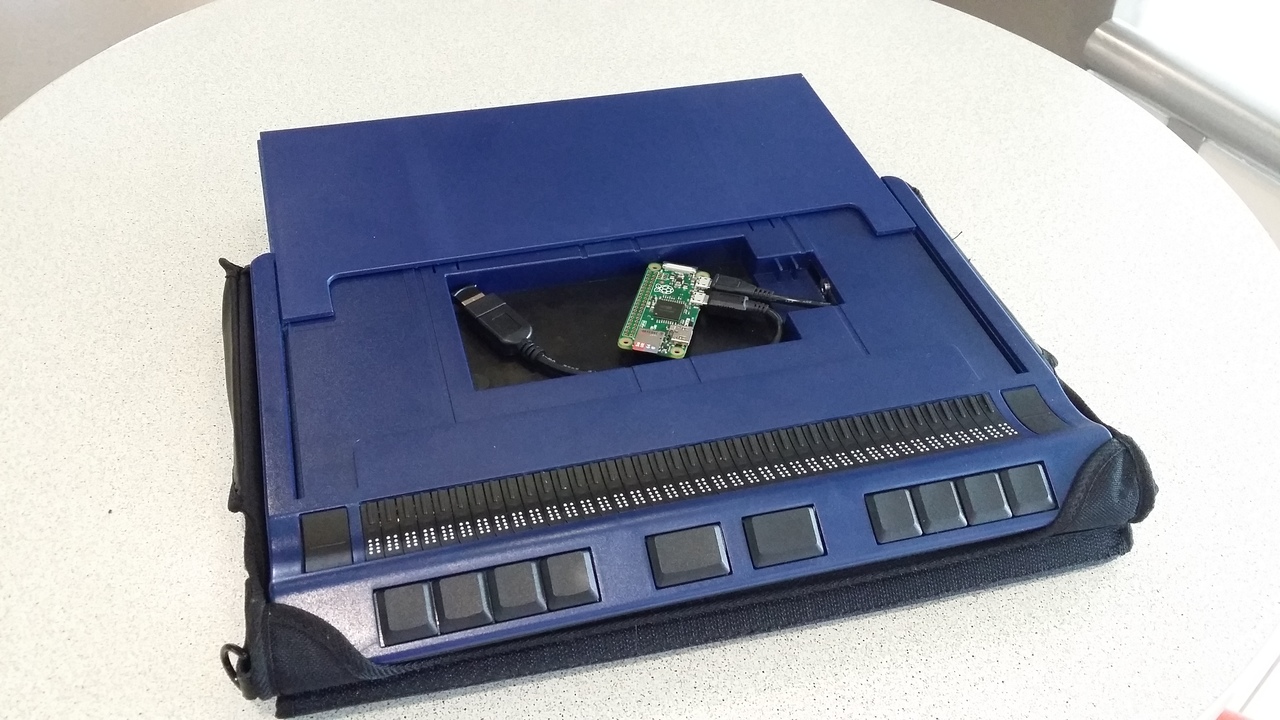
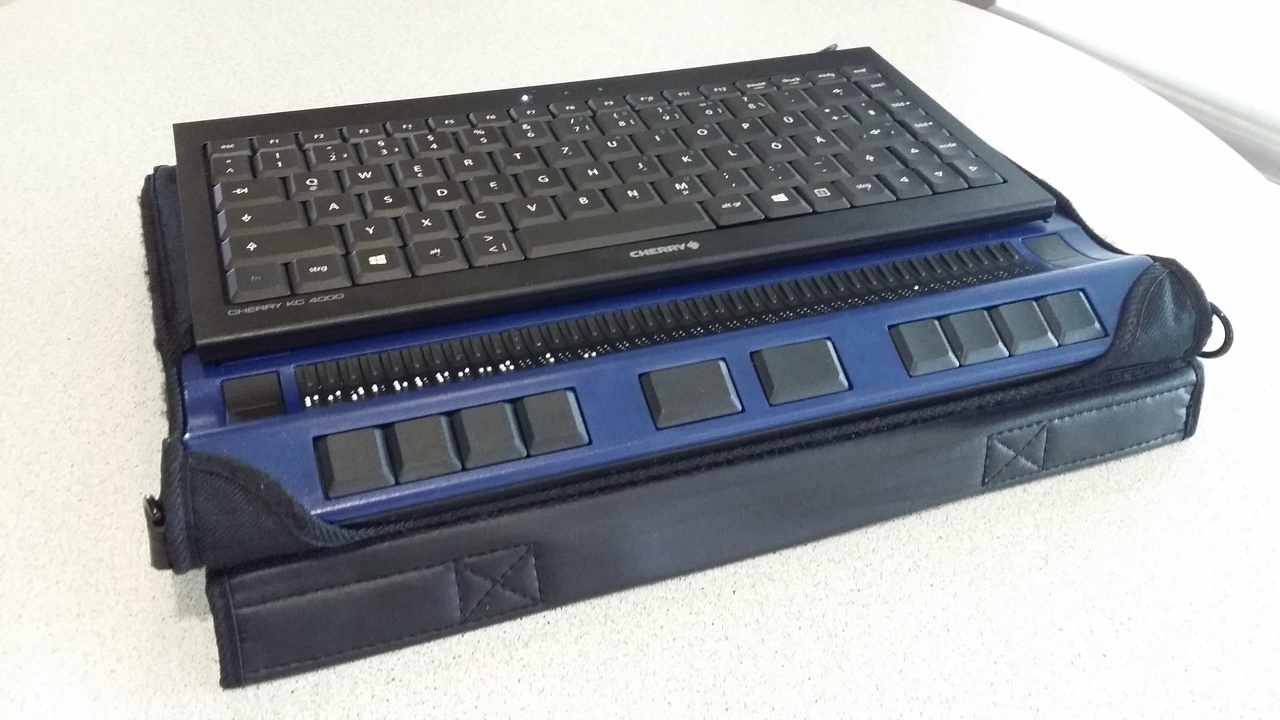
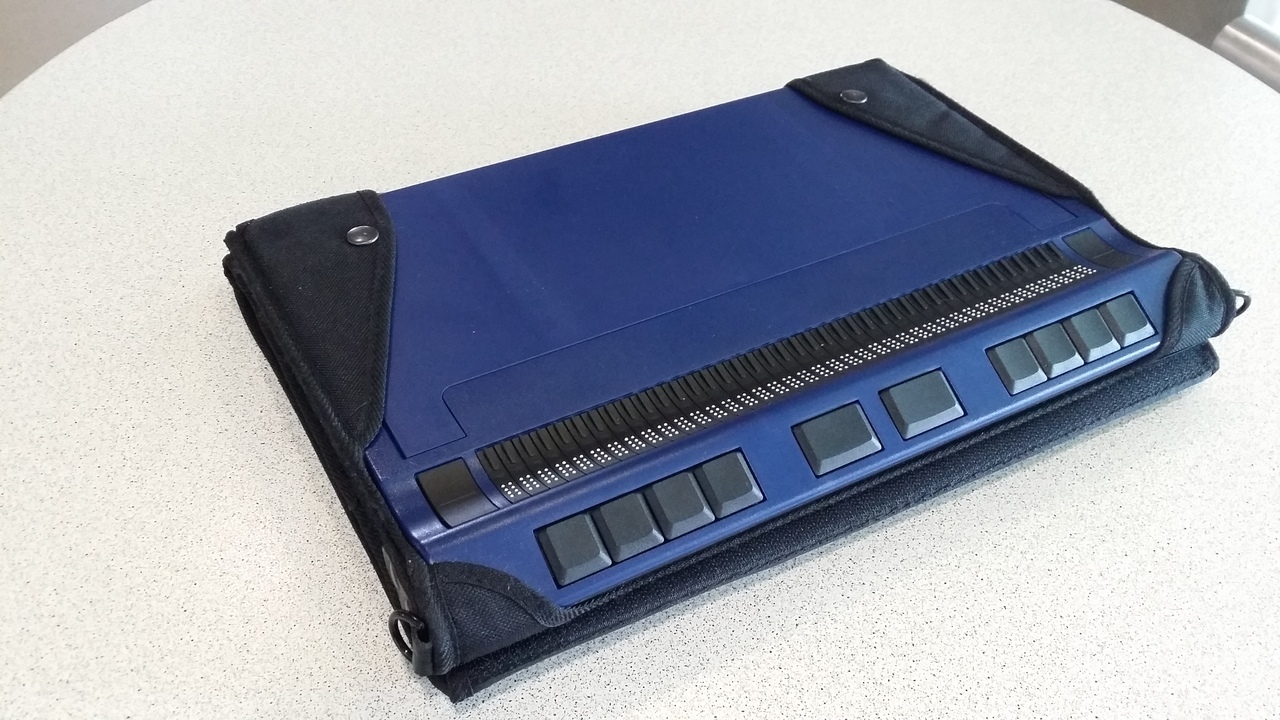 You can still pull out the little platform to increase the space
that can be used to put something on top.
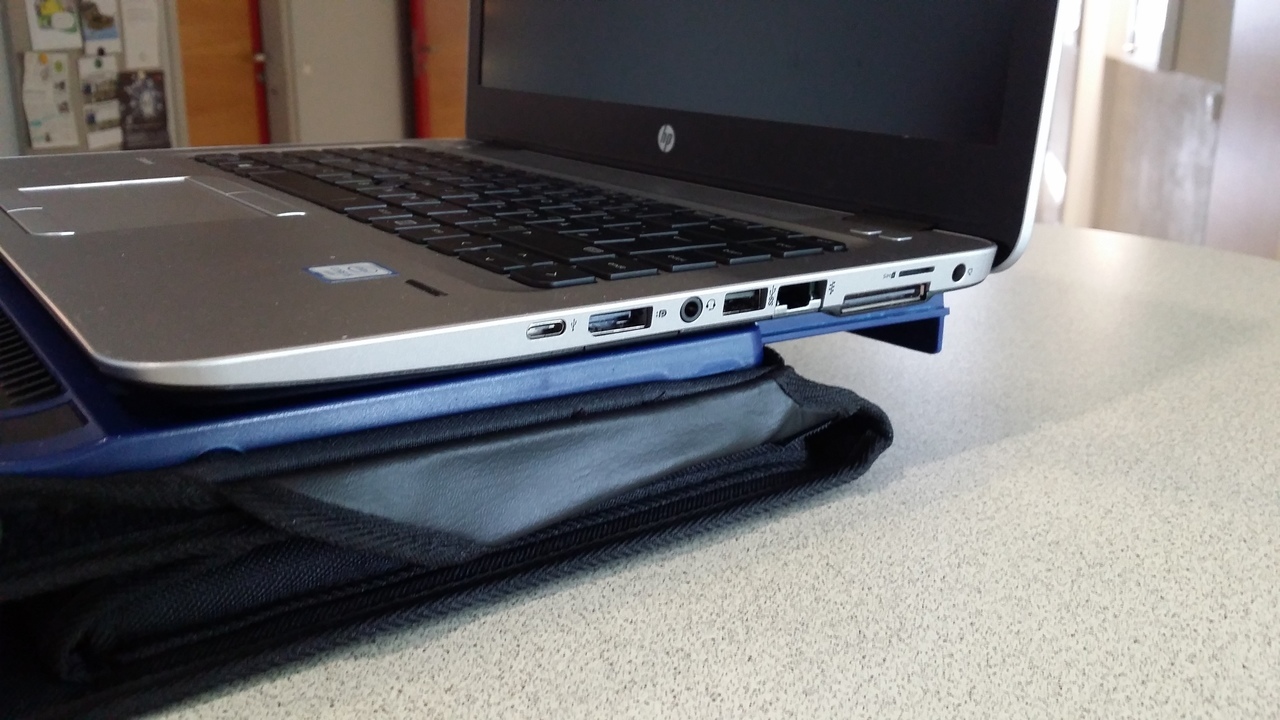 But, most conveniently,
they've designed in an empty compartment, roughly the size of a modern
smartphone, beneath the platform. The original idea was to actually
put a smartphone inside, but this has turned out (at least to me)
to not be very feasible. Fortunately, they thought about the
need for electricity and added a Micro USB cable terminating within the
newly created, empty compartment.
My first idea was to put a conventional Raspberry Pi inside.
When I received the braille display, however, we immediately
noticed that a standard-sized rpi is roughly 3mm too high
to fit into the empty compartment.
Fortunately, though, a co-worker noticed that the


 Here is my monthly update covering a large part of what I have been doing in the free software world (