Search Results: "nic"

13 February 2023

Jonathan Dowland: A visit to Prusa Labs

.
.

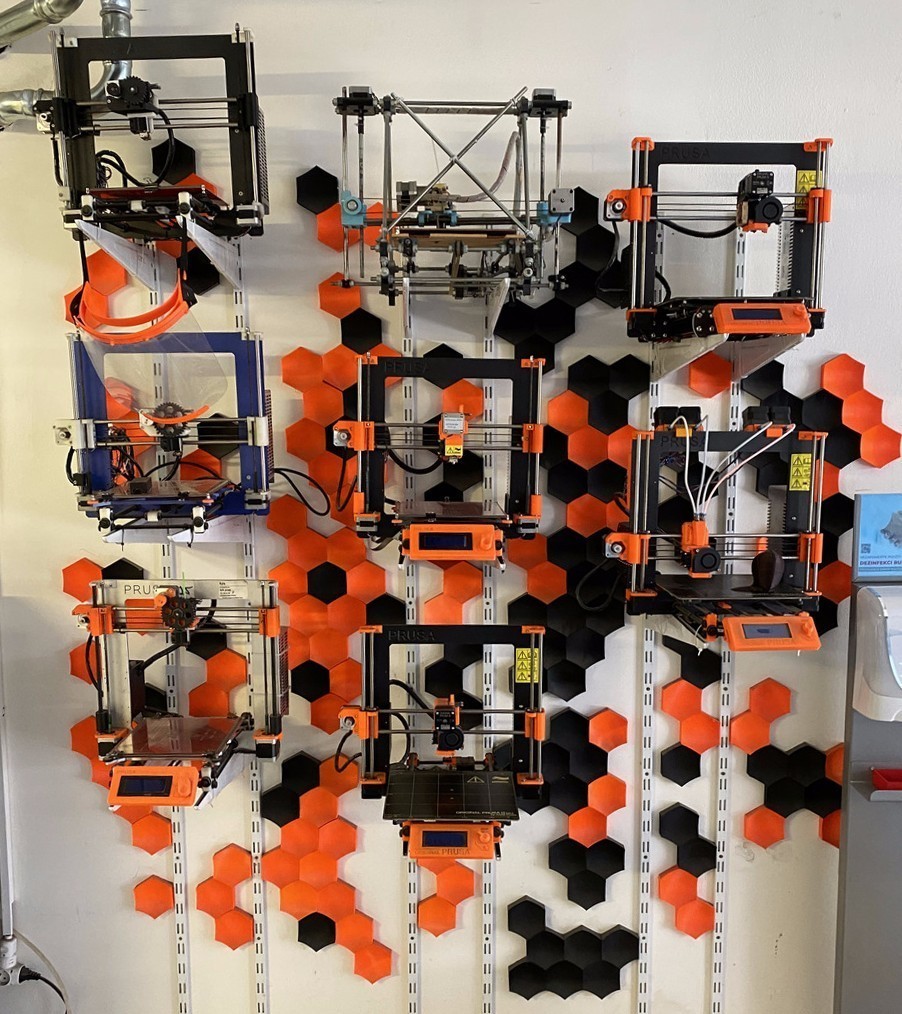
In September I was in Czechia for a Red Hat event. I ended up travelling via Prague, and had an unexpected extra day due to an airline strike causing my flight home to be cancelled. I took the opportunity to visit Prusa's offices/factory/Lab, and it was amazing! The Prusa team were all busy getting ready for the Prague Maker Faire that was happening the day afterwards.1 On arriving at the street which houses Prusa's Lab and Office buildings, the first thing that hit me was the smell. I find the melted-plastic smell of FDM printing (with PLA, at least) quite pleasant, and this was a super-condensed version of that, pumping out of their ground-floor windows. I started at the reception area on the ground floor. Outside reception there's a lovely sculpture representing the history of the development of the MK3S+.
The Reception The Reception
SLS Farm in the former Hack lab SLS Farm in the former Hack lab
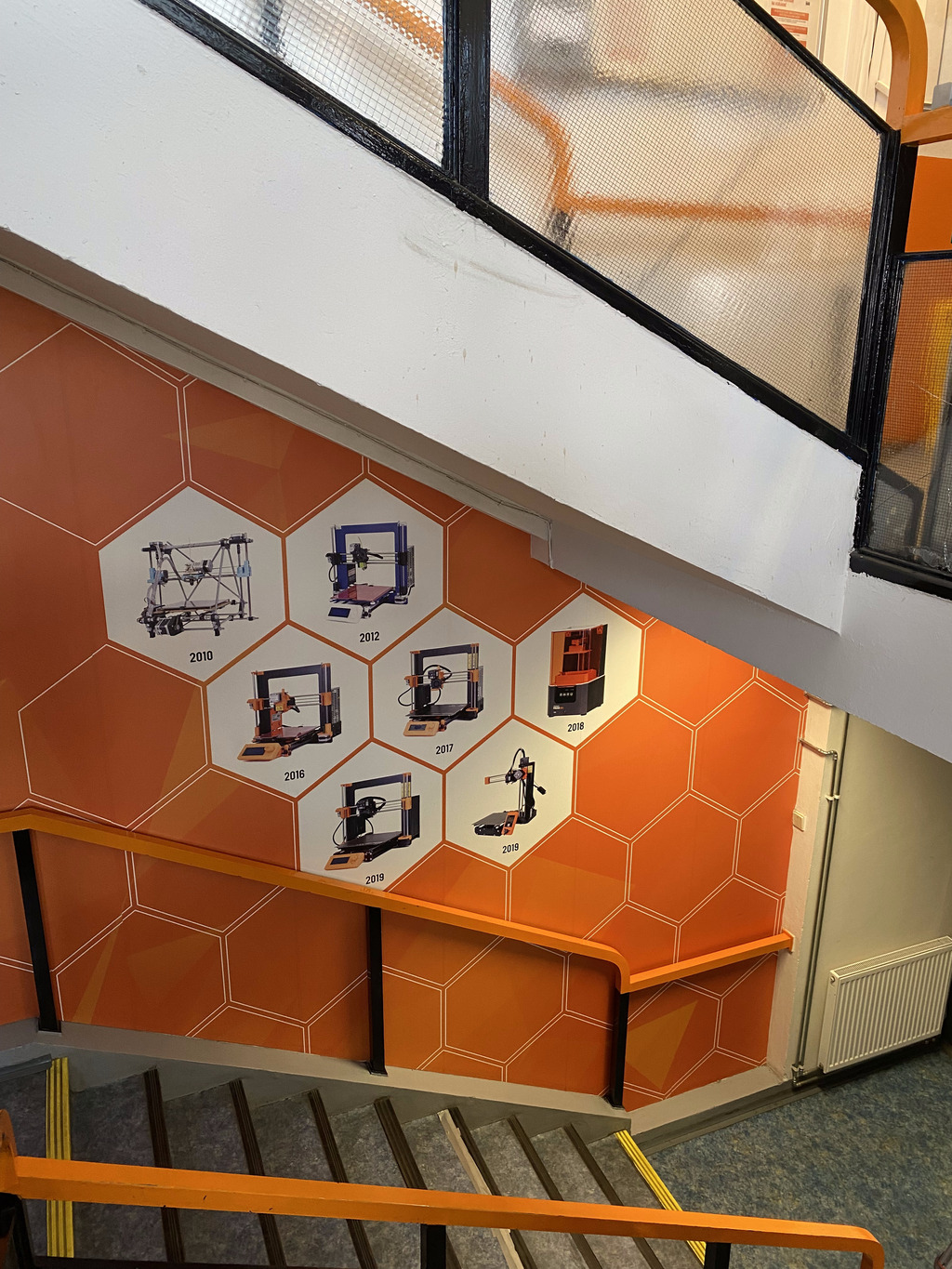
History of the MK3S+ History of the MK3S+

At the reception you have a small waiting area with shelves of demonstration prints and some spools of Prusament. From here, our kind guide first took us to a region on the ground floor that used to be (prior to COVID times) the public maker/hack lab. The lab contained two modest farms of printers: one of their flagship FDM printer, the MK3S+, and another of their SLS resin printers. A close up of some example resin models is pictured above. The bicycle was tiny: about the size of a thumbnail.
A Historic display A Historic display
Bespoke QE equipment Bespoke QE equipment
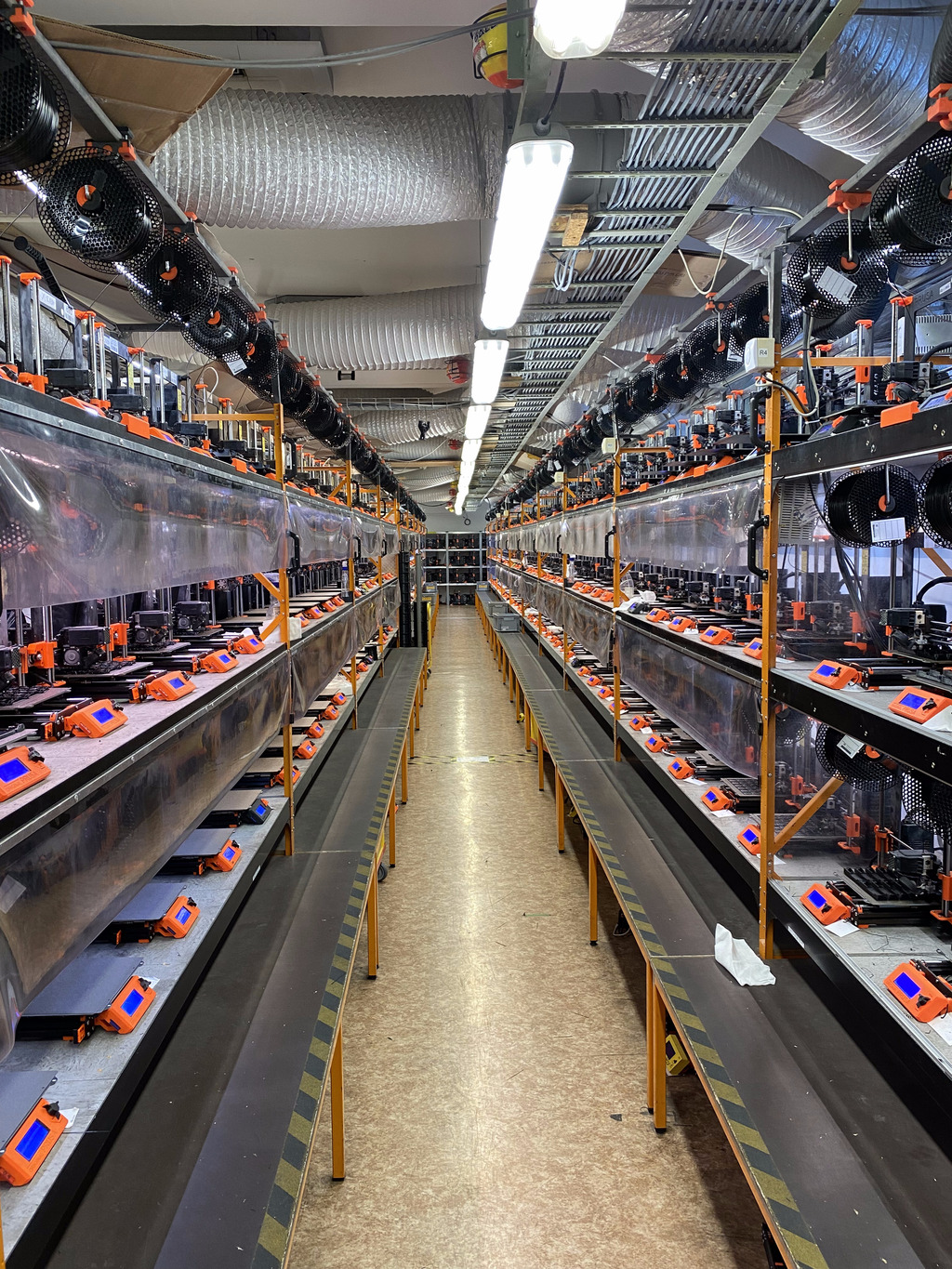
The MK3S+ Farm The MK3S+ Farm

. Moi in the Farm
2KG orange PLA spools for the Farm 2KG orange PLA spools for the Farm
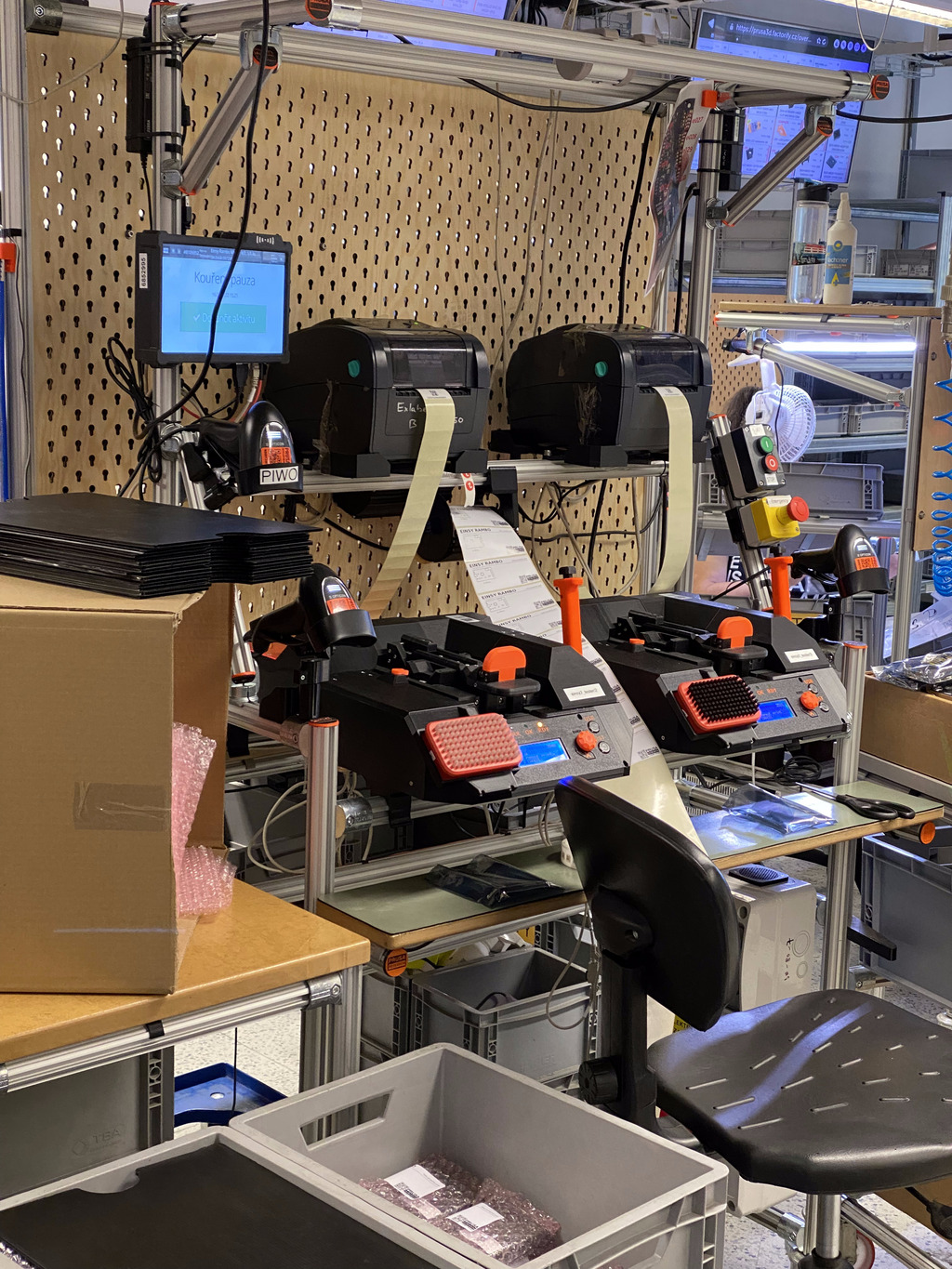
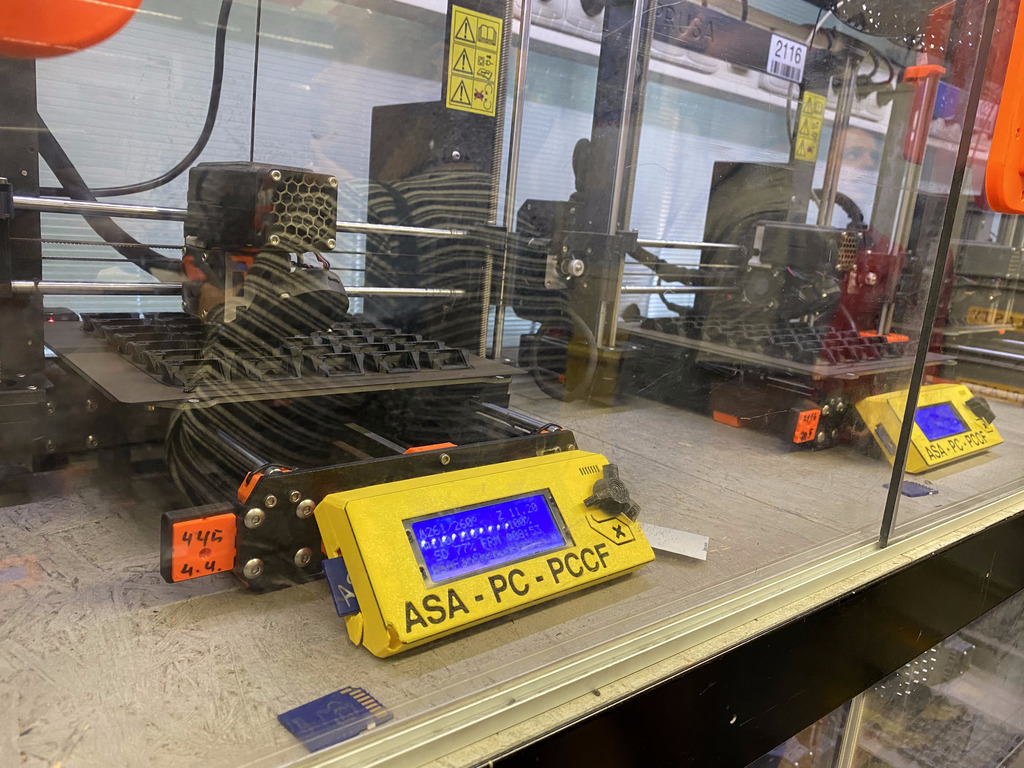
The rest of the ground floor area was full of heavy machinery and prototyping equipment. Onwards we went to the upstairs floors. Upstairs, past a nice graphic of Prusa's historic products, we visited the assembly and QE testing areas. They have a very organised system of parts buckets and some thorough QE processes, including some bespoke equipment that produces the "receipt" of tests and calibration that they provide for you in the box when you buy a 3D printer. After that, we visited the production Farm: a large room full of MK3S+ printers churning out parts for other printers. The noise was remarkable. The printers were running custom firmware to continually print the part they had been set for. Some of the printers were designated for printing with ASA: they were colour-coded (yellow controller surround) and within boxed regions to prevent the fumes causing problems. (picture at the top) Outside the room sat palettes of orange PETG plastic for the printer farm on 2KG spools (not a size they sell to the public just yet) The final part of the trip was outside, to the real farm: Prusa have a smallholding with Alpacas at the rear of their estate. Whilst we visited it, Josef Prusa himself turned up (in a snazzy looking custom colour Tesla) to feed the animals, say hello and pose for a picture. Overall, it was a fantastic visit. I'm very grateful to Air France for cancelling my flight home, and to Prusa Labs (in particular Luk ) for allowing me to come and say hello!

  1. I managed to squeeze that in too on my way to my rescheduled flight, although it was a rush visit and I don't have much to say or show from it. Suffice to say that it was lovely and bittersweet since the UK Maker Faire used to be hosted in my fair home city of Newcastle before they stopped.

Vincent Bernat: Building a SQL-like language to filter flows

Akvorado collects network flows using IPFIX or sFlow. It stores them in a ClickHouse database. A web console allows a user to query the data and plot some graphs. A nice aspect of this console is how we can filter flows with a SQL-like language:
Filter editor in Akvorado console
Often, web interfaces expose a query builder to build such filters. I think combining a SQL-like language with an editor supporting completion, syntax highlighting, and linting is a better approach.1 The language parser is built with pigeon (Go) from a parsing expression grammar or PEG. The editor component is CodeMirror (TypeScript).

Language parser PEG grammars are relatively recent2 and are an alternative to context-free grammars. They are easier to write and they can generate better error messages. Python switched from an LL(1)-based parser to a PEG-based parser in Python 3.9. pigeon generates a parser for Go. A grammar is a set of rules. Each rule is an identifier, with an optional user-friendly label for error messages, an expression, and an action in Go to be executed on match. You can find the complete grammar in parser.peg. Here is a simplified rule:
ConditionIPExpr "condition on IP"  
  column:("ExporterAddress"i   return "ExporterAddress", nil  
        / "SrcAddr"i   return "SrcAddr", nil  
        / "DstAddr"i   return "DstAddr", nil  ) _ 
  operator:("=" / "!=") _ 
  ip:IP  
    return fmt.Sprintf("%s %s IPv6StringToNum(%s)",
      toString(column), toString(operator), quote(ip)), nil
   
The rule identifier is ConditionIPExpr. It case-insensitively matches ExporterAddress, SrcAddr, or DstAddr. The action for each case returns the proper case for the column name. That s what is stored in the column variable. Then, it matches one of the possible operators. As there is no code block, it stores the matched string directly in the operator variable. Then, it tries to match the IP rule, which is defined elsewhere in the grammar. If it succeeds, it stores the result of the match in the ip variable and executes the final action. The action turns the column, operator, and IP into a proper expression for ClickHouse. For example, if we have ExporterAddress = 203.0.113.15, we get ExporterAddress = IPv6StringToNum('203.0.113.15'). The IP rule uses a rudimentary regular expression but checks if the matched address is correct in the action block, thanks to netip.ParseAddr():
IP "IP address"   [0-9A-Fa-f:.]+  
  ip, err := netip.ParseAddr(string(c.text))
  if err != nil  
    return "", errors.New("expecting an IP address")
   
  return ip.String(), nil
 
Our parser safely turns the filter into a WHERE clause accepted by ClickHouse:3
WHERE InIfBoundary = 'external' 
AND ExporterRegion = 'france' 
AND InIfConnectivity = 'transit' 
AND SrcAS = 15169 
AND DstAddr BETWEEN toIPv6('2a01:e0f:ffff::') 
                AND toIPv6('2a01:e0f:ffff:ffff:ffff:ffff:ffff:ffff')

Integration in CodeMirror CodeMirror is a versatile code editor that can be easily integrated into JavaScript projects. In Akvorado, the Vue.js component, InputFilter, uses CodeMirror as its foundation and leverages features such as syntax highlighting, linting, and completion. The source code for these capabilities can be found in the codemirror/lang-filter/ directory.

Syntax highlighting The PEG grammar for Go cannot be utilized directly4 and the requirements for parsers for editors are distinct: they should be error-tolerant and operate incrementally, as code is typically updated character by character. CodeMirror offers a solution through its own parser generator, Lezer. We don t need this additional parser to fully understand the filter language. Only the basic structure is needed: column names, comparison and logic operators, quoted and unquoted values. The grammar is therefore quite short and does not need to be updated often:
@top Filter  
  expression
 
expression  
 Not expression  
 "(" expression ")"  
 "(" expression ")" And expression  
 "(" expression ")" Or expression  
 comparisonExpression And expression  
 comparisonExpression Or expression  
 comparisonExpression
 
comparisonExpression  
 Column Operator Value
 
Value  
  String   Literal   ValueLParen ListOfValues ValueRParen
 
ListOfValues  
  ListOfValues ValueComma (String   Literal)  
  String   Literal
 
// [ ]
@tokens  
  // [ ]
  Column   std.asciiLetter (std.asciiLetter std.digit)*  
  Operator   $[a-zA-Z!=><]+  
  String  
    '"' (![\\\n"]   "\\" _)* '"'?  
    "'" (![\\\n']   "\\" _)* "'"?
   
  Literal   (std.digit   std.asciiLetter   $[.:/])+  
  // [ ]
 
The expression SrcAS = 12322 AND (DstAS = 1299 OR SrcAS = 29447) is parsed to:
Filter(Column, Operator, Value(Literal),
  And, Column, Operator, Value(Literal),
  Or, Column, Operator, Value(Literal))
The last step is to teach CodeMirror how to map each token to a highlighting tag:
export const FilterLanguage = LRLanguage.define( 
  parser: parser.configure( 
    props: [
      styleTags( 
        Column: t.propertyName,
        String: t.string,
        Literal: t.literal,
        LineComment: t.lineComment,
        BlockComment: t.blockComment,
        Or: t.logicOperator,
        And: t.logicOperator,
        Not: t.logicOperator,
        Operator: t.compareOperator,
        "( )": t.paren,
       ),
    ],
   ),
 );

Linting We offload linting to the original parser in Go. The /api/v0/console/filter/validate endpoint accepts a filter and returns a JSON structure with the errors that were found:
 
  "message": "at line 1, position 12: string literal not terminated",
  "errors": [ 
    "line":    1,
    "column":  12,
    "offset":  11,
    "message": "string literal not terminated",
   ]
 
The linter source for CodeMirror queries the API and turns each error into a diagnostic.

Completion The completion system takes a hybrid approach. It splits the work between the frontend and the backend to offer useful suggestions for completing filters. The frontend uses the parser built with Lezer to determine the context of the completion: do we complete a column name, an operator, or a value? It also extracts the column name if we are completing something else. It forwards the result to the backend through the /api/v0/console/filter/complete endpoint. Walking the syntax tree was not as easy as I thought, but unit tests helped a lot. The backend uses the parser generated by pigeon to complete a column name or a comparison operator. For values, the completions are either static or extracted from the ClickHouse database. A user can complete an AS number from an organization name thanks to the following snippet:
results := []struct  
  Label  string  ch:"label" 
  Detail string  ch:"detail" 
 
columnName := "DstAS"
sqlQuery := fmt.Sprintf( 
 SELECT concat('AS', toString(%s)) AS label, dictGet('asns', 'name', %s) AS detail
 FROM flows
 WHERE TimeReceived > date_sub(minute, 1, now())
 AND detail != ''
 AND positionCaseInsensitive(detail, $1) >= 1
 GROUP BY label, detail
 ORDER BY COUNT(*) DESC
 LIMIT 20
 , columnName, columnName)
if err := conn.Select(ctx, &results, sqlQuery, input.Prefix); err != nil  
  c.r.Err(err).Msg("unable to query database")
  break
 
for _, result := range results  
  completions = append(completions, filterCompletion 
    Label:  result.Label,
    Detail: result.Detail,
    Quoted: false,
   )
 
In my opinion, the completion system is a major factor in making the field editor an efficient way to select flows. While a query builder may have been more beginner-friendly, the completion system s ease of use and functionality make it more enjoyable to use once you become familiar.

  1. Moreover, building a query builder did not seem like a fun task for me.
  2. They were introduced in 2004 in Parsing Expression Grammars: A Recognition-Based Syntactic Foundation. LR parsers were introduced in 1965, LALR parsers in 1969, and LL parsers in the 1970s. Yacc, a popular parser generator, was written in 1975.
  3. The parser returns a string. It does not generate an intermediate AST. This makes it simpler and it currently fits our needs.
  4. It could be manually translated to JavaScript with PEG.js.

12 February 2023

Russell Coker: Intel vs AMD

In response to a post about my latest laptop I had someone ask why I chose an Intel CPU. I ve been a fan of the Thinkpad series of laptops since the 90s. They have always seemed well constructed (given the constraints of being light etc) and had a good feature set. Also I really like the TrackPoint. I ve been a fan of the smaller Thinkpads since I got an X-301 from e-waste [1] and the X1-Carbon series is the latest and greatest line of small Thinkpads. AMD makes some nice laptop CPUs which appear to have low power use and good performance particularly for smaller numbers of threads, it seems that generally AMD CPUs are designed for fewer cores with higher performance per core which is good for laptops. But Lenovo only makes the Thinkpad Carbon X1 series with Intel CPUs so choosing that model of laptop means choosing Intel. It could be that for some combination of size, TDP, speed, etc Intel just happens to beat AMD for all the times when Lenovo was designing a new motherboard for the Carbon X1. But it seems more likely that Intel has been lobbying Lenovo for this. It would be nice if there was an anti-trust investigation into Intel, everyone who s involved in the computer industry knows of some of the anti-competitive things that they have done. Also it would be nice if Lenovo started shipping laptops with ARM CPUs across their entire range. But for the moment I guess I have to keep buying laptops with Intel CPUs.

11 February 2023

Vincent Bernat: Hacking the Geberit Sigma 70 flush plate

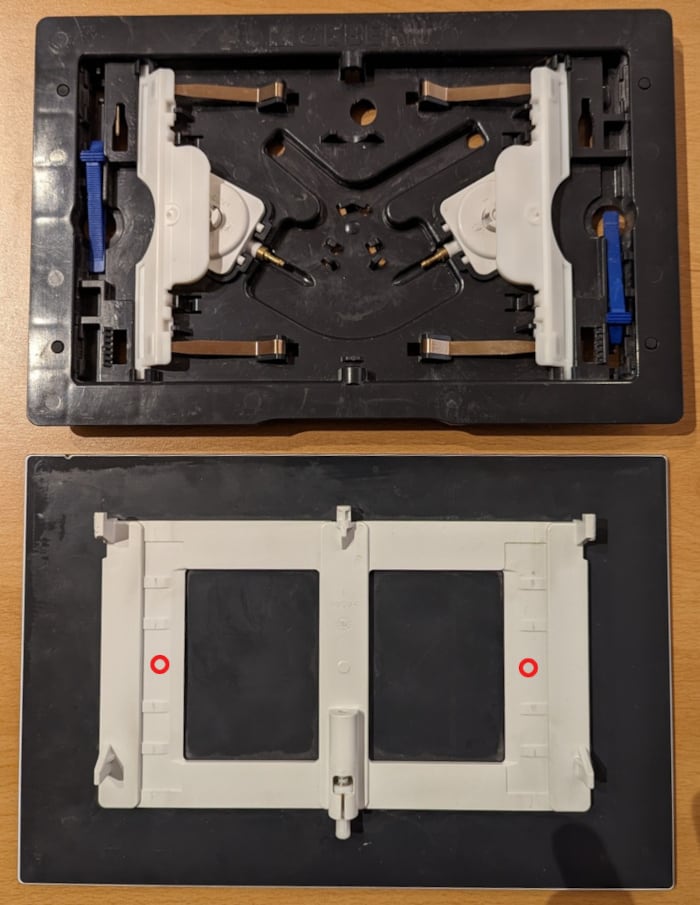
My toilet is equipped with a Geberit Sigma 70 flush plate. The sales pitch for this hydraulic-assisted device praises the ingenious mount that acts like a rocker switch. In practice, the flush is very capricious and has a very high failure rate. Avoid this type of mechanism! Prefer a fully mechanical version like the Geberit Sigma 20. After several plumbers, exchanges with Geberit s technical department, and the expensive replacement of the entire mechanism, I was still getting a failure rate of over 50% for the small flush. I finally managed to decrease this rate to 5% by applying two 8 mm silicone bumpers on the back of the plate. Their locations are indicated by red circles on the picture below:
Geberit Sigma 70 flush plate. Top: the mechanism that converts the mechanical press into a hydraulic impulse. Bottom: the back of the plate with the two places where to apply the bumpers.
Geberit Sigma 70 flush plate. Above: the mechanism installed on the wall. Below, the back of the glass plate. In red, the two places where to apply the silicone bumpers.
Expect to pay about 5 and as many minutes for this operation.

10 February 2023

Jonathan Dowland: HLedger, 1 year on

It's been a year since I started exploring HLedger, and I'm still going. The rollover to 2023 was an opportunity to revisit my approach. Some time ago I stumbled across Dmitry Astapov's HLedger notes (fully-fledged hledger, which I briefly mentioned in eventual consistency) and decided to adopt some of its ideas. new year, new journal First up, Astapov encourages starting a new journal file for a new calendar year. I do this for other, accounting-adjacent files as a matter of course, and I did it for my GNUCash files prior to adopting HLedger. But the reason for those is a general suspicion that a simple mistake with those softwares could irrevocably corrupt my data. I'm much more confident with HLedger, so rolling over at years end isn't necessary for that. But there are other advantages. A quick obvious one is you can get rid of old accounts (such as expense accounts tied to a particular project, now completed). one journal per import In the first year, I periodically imported account data via CSV exports of transactions and HLedger's (excellent) CSV import system. I imported all the transactions, once each, into a single, large journal file. Astapov instead advocates for creating a separate journal for each CSV that you wish to import, and keep around the CSV, leaving you with a 1:1 mapping of CSV:journal. Then use HLedger's "include" mechanism to pull them all into the main journal. With the former approach, where the CSV data was imported precisely, once, it was only exposed to your import rules once. The workflow ended up being: import transactions; notice some that you could have matched with import rules and auto-coded; write the rule for the next time. With Astapov's approach, you can re-generate the journal from the CSV at any point in the future with an updated set of import rules. tracking dependencies Now we get onto the job of driving the generation of all these derivative journal files. Astapov has built a sophisticated system using Haskell's "Shake", which I'm not yet familiar, but for my sins I'm quite adept at (GNU-flavoured) UNIX Make, so I started building with that. An example rule
import/jon/amex/%.journal: import/jon/amex/%.csv rules/amex.csv.rules
    rm -f $(@D)/.latest.$*.csv $@
    hledger import --rules-file rules/amex.csv.rules -f $@ $<
This captures the dependency between the journal and the underlying CSV but also to the relevant rules file; if I modify that, and this target is run in the future, all dependent journals should be re-generated.1 opening balances It's all fine and well starting over in a new year, and I might be generous to forgive debts, but I can't count on others to do the same. We need to carry over some balance information from one year to the next. Astapov has a more complex (or perhaps featureful) scheme for this involving a custom Haskell program, but I bodged something with a pair of make targets:
import/opening/2023.csv: 2022.journal
    mkdir -p import/opening
    hledger bal -f $< \
                $(list_of_accounts_I_want_to_carry_over) \
        -O csv -N > $@
import/opening/2023.journal: import/opening/2023.csv rules/opening.rules
    rm -f $(@D)/.latest.2023.csv $@
    hledger import --rules-file rules/opening.rules \
        -f $@ $<
I think this could be golfed into a year-generic rule with a little more work. The nice thing about this approach is the opening balances for a given year might change, if adjustments are made in prior years. They shouldn't, for real accounts, but very well could for more "virtual" liabilities. (including: deciding to write off debts.) run lots of reports Astapov advocates for running lots of reports, and automatically. There's a really obvious advantage of that to me: there's no chance anyone except me will actually interact with HLedger itself. For family finances, I need reports to be able to discuss anything with my wife. Extending my make rules to run reports is trivial. I've gone for HTML reports for the most part, as they're the easiest on the eye. Unfortunately the most useful report to discuss (at least at the moment) would be a list of transactions in a given expense category, and the register/aregister commands did not support HTML as an output format. I submitted my first HLedger patch to add HTML output support to aregister: https://github.com/simonmichael/hledger/pull/2000 addressing the virtual posting problem I wrote in my original hledger blog post that I had to resort to unbalanced virtual postings in order to record both a liability between my personal cash and family, as well as categorise the spend. I still haven't found a nice way around that. But I suspect having broken out the journal into lots of other journals paves the way to a better solution to the above. The form of a solution I am thinking of is: some scheme whereby the two destination accounts are combined together; perhaps, choose one as a primary and encode the other information in sub-accounts under that. For example, repeating the example from my hledger blog post:
2022-01-02 ZTL*RELISH
    family:liabilities:creditcard        -3.00
    family:dues:jon                       3.00
    (jon:expenses:snacks)                 3.00
This could become
2022-01-02 ZTL*RELISH
    family:liabilities:creditcard        -3.00
    family:liabilities:jon:snacks
(I note this is very similar to a solution proposed to me by someone responding on twitter). The next step is to recognise that sometimes when looking at the data I care about one aspect, and at other times the other, but rarely both. So for the case where I'm thinking about family finances, I could use account aliases to effectively flatten out the expense category portion and ignore it. On the other hand, when I'm concerned about how I've spent my personal cash and not about how much I owe the family account, I could use aliases to do the opposite: rewrite-away the family:liabilities:jon prefix and combine the transactions with the regular jon:expenses account heirarchy. (this is all speculative: I need to actually try this.) catching errors after an import When I import the transactions for a given real bank account, I check the final balance against another source: usually a bank statement, to make sure they agree. I wasn't using any of the myriad methods to make sure that this remains true later on, and so there was the risk that I make an edit to something and accidentally remove a transaction that contributed to that number, and not notice (until the next import). The CSV data my bank gives me for accounts (not for credit cards) also includes a 'resulting balance' field. It was therefore trivial to extend the CSV import rules to add balance assertions to the transactions that are generated. This catches the problem. There are a couple of warts with balance assertions on every such transaction: for example, dealing with the duplicate transaction for paying a credit card: one from the bank statement, one from the credit card. Removing one of the two is sufficient to correct the account balances but sometimes they don't agree on the transaction date, or the transactions within a given day are sorted slightly differently by HLedger than by the bank. The simple solution is to just manually delete one or two assertions: there remain plenty more for assurance. going forward I've only scratched the surface of the suggestions in Astapov's "full fledged HLedger" notes. I'm up to step 2 of 14. I'm expecting to return to it once the changes I've made have bedded in a little bit. I suppose I could anonymize and share the framework (Makefile etc) that I am using if anyone was interested. It would take some work, though, so I don't know when I'd get around to it.
  1. the rm latest bit is to clear up some state-tracking files that HLedger writes to avoid importing duplicate transactions. In this case, I know better than HLedger.

Antoine Beaupr : Picking a USB-C dock and charger

Dear lazy web, help me pick the right hardware to make my shiny new laptop work better. I want a new USB-C dock and travel power supply.

Background I need advice on hardware, because my current setup in the office doesn't work so well. My new Framework laptop has four (4!) USB-C ports which is great, but it only has those ports (there's a combo jack, but I don't use it because it's noisy). So right now I have the following setup:
  • HDMI: monitor one
  • HDMI: monitor two
  • USB-A: Yubikey
  • USB-C: USB-C hub, which has:
    • RJ-45 network
    • USB-A keyboard
    • USB-A mouse
    • USB-A headset
... and I'm missing a USB-C port for power! So I get into this annoying situation where I need to actually unplug the USB-A Yubikey, unplug the USB-A expansion card, plug in the power for a while so it can charge, and then do that in reverse when I need the Yubikey again (which is: often). Another option I have is to unplug the headset, but I often need both the headset and the Yubikey at once. I also have a pair of earbuds that work in the combo jack, but, again, they are noticeably noisy. So this doesn't work. I'm thinking I should get a USB-C Dock of some sort. The Framework forum has a long list of supported docks in a "megathread", but I figured people here might have their own experience with docks and laptop/dock setups. So what should USB-C Dock should I get? Should I consider changing to a big monitor with a built-in USB-C dock and power? Ideally, i'd like to just walk in the office, put the laptop down and insert a single USB-C cable and be done with it. Does that even work with Wayland? I have read reports of Displaylink not working in Sway specifically... does that apply to any multi-monitor over a single USB-C cable setup? Oh, and what about travel options? Do you have a fancy small form factor USB-C power charger that you really like?

Current ideas Here are the devices I'm considering right now...

USB chargers The spec here is at least 65W USB-C with international plugs. I particularly like the TOFU, but I am not sure it will deliver... I found that weird little thing through this Twitter post from Benedict Reuschling, from this blog post, from 2.5 admins episode 127 (phew!). Update: I ordered a TOFU power station today (2023-02-20). I'm a little concerned about the power output (45W instead of 65W for the Framework charger), but I suspect it will not actually be a problem while traveling, since the laptop will keep its charge during the day and will charge at night... The device shipped 3 days later, with an estimated delivery time of 12 to 15 days, so expect this thing to take its sweet time landing on your desk.

USB Docks Specification:
  • must have 2 or more USB-A ports (3 is ideal, otherwise i need a new headset adapter)
  • at least one USB-C port, preferably more
  • works in Linux
  • 2 display support (or one big monitor?), ideally 2x4k for future-proofing, HDMI or Display-Port, ideally also with double USB-C/Thunderbolt for future-proofing
  • all on one USB-C wire would be nice
  • power delivery over the USB-C cable
  • not too big, preferably
Note that I move from 4 USB-A ports down to 2 or 3 because I can change the USB-A cable on my keyboard for USB-C. But that means I need a slot for a USB-C port on the dock of course. I also could live with one less USB-A cable if I find a combo jack adapter, but that would mean a noisy experience. Options found so far:
  • ThinkPad universal dock/40ay0090us): 300$USD, 65-100W, combo jack, 3x USB3.1, 2x USB2.0, 1x USB-C, 2x Display Port, 1x HDMI Port, 1x Gigabit Ethernet
  • Caldigit docks are apparently good, and the USB-C HDMI Dock seems like a good candidate (not on sale in there Canada shop), but leaves me wondering whether I want to keep my old analog monitors around and instead get proper monitors with USB-C inputs, and use something like Thunderbolt Element hub (230$USD). Update: I wrote Caldigit and they don't seem to have any Dock that would work for me, they suggest the TS3 plus which only has a single DP connector (!?). The USB-C HDMI dock is actually discontinued and they mentioned that they do have trouble with Linux in general.
  • I was also recommended OWC docks as well. update: their website is a mess, and live chat has confirmed they do not actually have any device that fits the requirement of two HDMI/DP outputs.
  • Anker also has docks (e.g. the Anker 568 USB-C Docking Station 11-in-1 looks nice, but holy moly 300$USD... Also, Anker docks are not all equal, I've heard reports of some of them being bad. Update: I reached out to Anker to clarify whether or not their docks will work on Linux and to advise on which dock to use, and their response is that they "do not recommend you use our items with Linux system". So I guess that settles it with Anker.
  • Cable Matters are promising, and their "USB-C Docking Station with Dual 4K HDMI and 80W Charging for Windows Computers might just actually work. It was out of stock on their website and Amazon but after reaching out to their support by email, they pointed out a product page that works in Canada.
Also: this post from Big Mess Of Wires has me worried that anything might work at all. It's where I had the Cable Matters reference however... Update: I ordered a this dock from Cable Matters from Amazon (reluctantly). It promises Linux support and checked all the boxes for me (4x USB-A, audio, network, 2xHDMI). It kind of works? I tested the USB-A ports, charging, networking, and the HDMI ports, all worked the first time. But! When I disconnect and reconnect the hub, the HDMI ports stop working. It s quite infuriating especially since there s very little diagnostics available. It s unclear how the devices show up on my computer, I can t even tell what device provides the HDMI connectors in lsbusb. I ve also seen the USB keyboard drop keypresses, which is also ... not fun. I suspect foul play inside Sway. And yeah, those things are costly! This one goes for 300$ a pop, not great. Update 2: Cable Matters support responded by simply giving me this hack that solved it at least for now. Just reverse the USB-C cable, and poof, everything works. Magic.

Your turn! So what's your desktop setup like? Do you have docks? a laptop? a desktop? did you build it yourself? Did you solder a USB-C port in the back of your neck and interface directly with the matrix and there's no spoon? Do you have a 4k monitor? Two? A 8k monitor that curves around your head in a fully immersive display? Do you work on a Occulus rift and only interface the world through 3d virtual reality, including terminal emulators? Thanks in advance!

9 February 2023

Jonathan McDowell: Building a read-only Debian root setup: Part 2

This is the second part of how I build a read-only root setup for my router. You might want to read part 1 first, which covers the initial boot and general overview of how I tie the pieces together. This post will describe how I build the squashfs image that forms the main filesystem. Most of the build is driven from a script, make-router, which I ll dissect below. It s highly tailored to my needs, and this is a fairly lengthy post, but hopefully the steps I describe prove useful to anyone trying to do something similar.
Breakdown of make-router
#!/bin/bash
# Either rb3011 (arm) or rb5009 (arm64)
#HOSTNAME="rb3011"
HOSTNAME="rb5009"
if [ "x$ HOSTNAME " == "xrb3011" ]; then
	ARCH=armhf
elif [ "x$ HOSTNAME " == "xrb5009" ]; then
	ARCH=arm64
else
	echo "Unknown host: $ HOSTNAME "
	exit 1
fi

It s a bash script, and I allow building for either my RB3011 or RB5009, which means a different architecture (32 vs 64 bit). I run this script on my Pi 4 which means I don t have to mess about with QemuUserEmulation.
BASE_DIR=$(dirname $0)
IMAGE_FILE=$(mktemp --tmpdir router.$ ARCH .XXXXXXXXXX.img)
MOUNT_POINT=$(mktemp -p /mnt -d router.$ ARCH .XXXXXXXXXX)
# Build and mount an ext4 image file to put the root file system in
dd if=/dev/zero bs=1 count=0 seek=1G of=$ IMAGE_FILE 
mkfs -t ext4 $ IMAGE_FILE 
mount -o loop $ IMAGE_FILE  $ MOUNT_POINT 

I build the image in a loopback ext4 file on tmpfs (my Pi4 is the 8G model), which makes things a bit faster.
# Add dpkg excludes
mkdir -p $ MOUNT_POINT /etc/dpkg/dpkg.cfg.d/
cat <<EOF > $ MOUNT_POINT /etc/dpkg/dpkg.cfg.d/path-excludes
# Exclude docs
path-exclude=/usr/share/doc/*
# Only locale we want is English
path-exclude=/usr/share/locale/*
path-include=/usr/share/locale/en*/*
path-include=/usr/share/locale/locale.alias
# No man pages
path-exclude=/usr/share/man/*
EOF

Create a dpkg excludes config to drop docs, man pages and most locales before we even start the bootstrap.
# Setup fstab + mtab
echo "# Empty fstab as root is pre-mounted" > $ MOUNT_POINT /etc/fstab
ln -s ../proc/self/mounts $ MOUNT_POINT /etc/mtab
# Setup hostname
echo $ HOSTNAME  > $ MOUNT_POINT /etc/hostname
# Add the root SSH keys
mkdir -p $ MOUNT_POINT /root/.ssh/
cat <<EOF > $ MOUNT_POINT /root/.ssh/authorized_keys
ssh-rsa AAAAB3NzaC1yc2EAAAABIwAAAQEAv8NkUeVdsVdegS+JT9qwFwiHEgcC9sBwnv6RjpH6I4d3im4LOaPOatzneMTZlH8Gird+H4nzluciBr63hxmcFjZVW7dl6mxlNX2t/wKvV0loxtEmHMoI7VMCnrWD0PyvwJ8qqNu9cANoYriZRhRCsBi27qPNvI741zEpXN8QQs7D3sfe4GSft9yQplfJkSldN+2qJHvd0AHKxRdD+XTxv1Ot26+ZoF3MJ9MqtK+FS+fD9/ESLxMlOpHD7ltvCRol3u7YoaUo2HJ+u31l0uwPZTqkPNS9fkmeCYEE0oXlwvUTLIbMnLbc7NKiLgniG8XaT0RYHtOnoc2l2UnTvH5qsQ== noodles@earth.li
ssh-rsa AAAAB3NzaC1yc2EAAAADAQABAAACAQDQb9+qFemcwKhey3+eTh5lxp+3sgZXW2HQQEZMt9hPvVXk+MiiNMx9WUzxPJnwXqlmmVdKsq+AvjA0i505Pp8fIj5DdUBpSqpLghmzpnGuob7SSwXYj+352hjD52UC4S0KMKbIaUpklADgsCbtzhYYc4WoO8F7kK63tS5qa1XSZwwRwPbYOWBcNocfr9oXCVWD9ismO8Y0l75G6EyW8UmwYAohDaV83pvJxQerYyYXBGZGY8FNjqVoOGMRBTUcLj/QTo0CDQvMtsEoWeCd0xKLZ3gjiH3UrknkaPra557/TWymQ8Oh15aPFTr5FvKgAlmZaaM0tP71SOGmx7GpCsP4jZD1Xj/7QMTAkLXb+Ou6yUOVM9J4qebdnmF2RGbf1bwo7xSIX6gAYaYgdnppuxqZX1wyAy+A2Hie4tUjMHKJ6OoFwBsV1sl+3FobrPn6IuulRCzsq2aLqLey+PHxuNAYdSKo7nIDB3qCCPwHlDK52WooSuuMidX4ujTUw7LDTia9FxAawudblxbrvfTbg3DsiDBAOAIdBV37HOAKu3VmvYSPyqT80DEy8KFmUpCEau59DID9VERkG6PWPVMiQnqgW2Agn1miOBZeIQV8PFjenAySxjzrNfb4VY/i/kK9nIhXn92CAu4nl6D+VUlw+IpQ8PZlWlvVxAtLonpjxr9OTw== noodles@yubikey
ssh-rsa AAAAB3NzaC1yc2EAAAADAQABAAABAQC0I8UHj4IpfqUcGE4cTvLB0d2xmATSUzqtxW6ZhGbZxvQDKJesVW6HunrJ4NFTQuQJYgOXY/o82qBpkEKqaJMEFHTCjcaj3M6DIaxpiRfQfs0nhtzDB6zPiZn9Suxb0s5Qr4sTWd6iI9da72z3hp9QHNAu4vpa4MSNE+al3UfUisUf4l8TaBYKwQcduCE0z2n2FTi3QzmlkOgH4MgyqBBEaqx1tq7Zcln0P0TYZXFtrxVyoqBBIoIEqYxmFIQP887W50wQka95dBGqjtV+d8IbrQ4pB55qTxMd91L+F8n8A6nhQe7DckjS0Xdla52b9RXNXoobhtvx9K2prisagsHT noodles@cup
ecdsa-sha2-nistp256 AAAAE2VjZHNhLXNoYTItbmlzdHAyNTYAAAAIbmlzdHAyNTYAAABBBK6iGog3WbNhrmrkglNjVO8/B6m7mN6q1tMm1sXjLxQa+F86ETTLiXNeFQVKCHYrk8f7hK0d2uxwgj6Ixy9k0Cw= noodles@sevai
EOF

Setup fstab, the hostname and SSH keys for root.
# Bootstrap our install
debootstrap \
	--arch=$ ARCH  \
	--include=collectd-core,conntrack,dnsmasq,ethtool,iperf3,kexec-tools,mosquitto,mtd-utils,mtr-tiny,ppp,tcpdump,rng-tools5,ssh,watchdog,wget \
	--exclude=dmidecode,isc-dhcp-client,isc-dhcp-common,makedev,nano \
	bullseye $ MOUNT_POINT  https://deb.debian.org/debian/

Actually do the debootstrap step, including a bunch of extra packages that we want.
# Install mqtt-arp
cp $ BASE_DIR /debs/mqtt-arp_1_$ ARCH .deb $ MOUNT_POINT /tmp
chroot $ MOUNT_POINT  dpkg -i /tmp/mqtt-arp_1_$ ARCH .deb
rm $ MOUNT_POINT /tmp/mqtt-arp_1_$ ARCH .deb
# Frob the mqtt-arp config so it starts after mosquitto
sed -i -e 's/After=.*/After=mosquitto.service/' $ MOUNT_POINT /lib/systemd/system/mqtt-arp.service

I haven t uploaded mqtt-arp to Debian, so I install a locally built package, and ensure it starts after mosquitto (the MQTT broker), given they re running on the same host.
# Frob watchdog so it starts earlier than multi-user
sed -i -e 's/After=.*/After=basic.target/' $ MOUNT_POINT /lib/systemd/system/watchdog.service
# Make sure the watchdog is poking the device file
sed -i -e 's/^#watchdog-device/watchdog-device/' $ MOUNT_POINT /etc/watchdog.conf

watchdog timeouts were particularly an issue on the RB3011, where the default timeout didn t give enough time to reach multiuser mode before it would reset the router. Not helpful, so alter the config to start it earlier (and make sure it s configured to actually kick the device file).
# Clean up docs + locales
rm -r $ MOUNT_POINT /usr/share/doc/*
rm -r $ MOUNT_POINT /usr/share/man/*
for dir in $ MOUNT_POINT /usr/share/locale/*/; do
	if [ "$ dir " != "$ MOUNT_POINT /usr/share/locale/en/" ]; then
		rm -r $ dir 
	fi
done

Clean up any docs etc that ended up installed.
# Set root password to root
echo "root:root"   chroot $ MOUNT_POINT  chpasswd

The only login method is ssh key to the root account though I suppose this allows for someone to execute a privilege escalation from a daemon user so I should probably randomise this. Does need to be known though so it s possible to login via the serial console for debugging.
# Add security to sources.list + update
echo "deb https://security.debian.org/debian-security bullseye-security main" >> $ MOUNT_POINT /etc/apt/sources.list
chroot $ MOUNT_POINT  apt update
chroot $ MOUNT_POINT  apt -y full-upgrade
chroot $ MOUNT_POINT  apt clean
# Cleanup the APT lists
rm $ MOUNT_POINT /var/lib/apt/lists/www.*
rm $ MOUNT_POINT /var/lib/apt/lists/security.*

Pull in any security updates, then clean out the APT lists rather than polluting the image with them.
# Disable the daily APT timer
rm $ MOUNT_POINT /etc/systemd/system/timers.target.wants/apt-daily.timer
# Disable daily dpkg backup
cat <<EOF > $ MOUNT_POINT /etc/cron.daily/dpkg
#!/bin/sh
# Don't do the daily dpkg backup
exit 0
EOF
# We don't want a persistent systemd journal
rmdir $ MOUNT_POINT /var/log/journal

None of these make sense on a router.
# Enable nftables
ln -s /lib/systemd/system/nftables.service \
	$ MOUNT_POINT /etc/systemd/system/sysinit.target.wants/nftables.service

Ensure we have firewalling enabled automatically.
# Add systemd-coredump + systemd-timesync user / group
echo "systemd-timesync:x:998:" >> $ MOUNT_POINT /etc/group
echo "systemd-coredump:x:999:" >> $ MOUNT_POINT /etc/group
echo "systemd-timesync:!*::" >> $ MOUNT_POINT /etc/gshadow
echo "systemd-coredump:!*::" >> $ MOUNT_POINT /etc/gshadow
echo "systemd-timesync:x:998:998:systemd Time Synchronization:/:/usr/sbin/nologin" >> $ MOUNT_POINT /etc/passwd
echo "systemd-coredump:x:999:999:systemd Core Dumper:/:/usr/sbin/nologin" >> $ MOUNT_POINT /etc/passwd
echo "systemd-timesync:!*:47358::::::" >> $ MOUNT_POINT /etc/shadow
echo "systemd-coredump:!*:47358::::::" >> $ MOUNT_POINT /etc/shadow
# Create /etc/.pwd.lock, otherwise it'll end up in the overlay
touch $ MOUNT_POINT /etc/.pwd.lock
chmod 600 $ MOUNT_POINT /etc/.pwd.lock

Create a number of users that will otherwise get created at boot, and a lock file that will otherwise get created anyway.
# Copy config files
cp --recursive --preserve=mode,timestamps $ BASE_DIR /etc/* $ MOUNT_POINT /etc/
cp --recursive --preserve=mode,timestamps $ BASE_DIR /etc-$ ARCH /* $ MOUNT_POINT /etc/
chroot $ MOUNT_POINT  chown mosquitto /etc/mosquitto/mosquitto.users
chroot $ MOUNT_POINT  chown mosquitto /etc/ssl/mqtt.home.key

There are config files that are easier to replace wholesale, some of which are specific to the hardware (e.g. related to network interfaces). See below for some more details.
# Build symlinks into flash for boot / modules
ln -s /mnt/flash/lib/modules $ MOUNT_POINT /lib/modules
rmdir $ MOUNT_POINT /boot
ln -s /mnt/flash/boot $ MOUNT_POINT /boot

The kernel + its modules live outside the squashfs image, on the USB flash drive that the image lives on. That makes for easier kernel upgrades.
# Put our git revision into os-release
echo -n "GIT_VERSION=" >> $ MOUNT_POINT /etc/os-release
(cd $ BASE_DIR  ; git describe --tags) >> $ MOUNT_POINT /etc/os-release

Always helpful to be able to check the image itself for what it was built from.
# Add some stuff to root's .bashrc
cat << EOF >> $ MOUNT_POINT /root/.bashrc
alias ls='ls -F --color=auto'
eval "\$(dircolors)"
case "\$TERM" in
xterm* rxvt*)
	PS1="\\[\\e]0;\\u@\\h: \\w\a\\]\$PS1"
	;;
*)
	;;
esac
EOF

Just some niceties for when I do end up logging in.
# Build the squashfs
mksquashfs $ MOUNT_POINT  /tmp/router.$ ARCH .squashfs \
	-comp xz

Actually build the squashfs image.
# Save the installed package list off
chroot $ MOUNT_POINT  dpkg --get-selections > /tmp/wip-installed-packages

Save off the installed package list. This was particularly useful when trying to replicate the existing router setup and making sure I had all the important packages installed. It doesn t really serve a purpose now.
In terms of the config files I copy into /etc, shared across both routers are the following:
Breakdown of shared config
  • apt config (disable recommends, periodic updates):
    • apt/apt.conf.d/10periodic, apt/apt.conf.d/local-recommends
  • Adding a default, empty, locale:
    • default/locale
  • DNS/DHCP:
    • dnsmasq.conf, dnsmasq.d/dhcp-ranges, dnsmasq.d/static-ips
    • hosts, resolv.conf
  • Enabling IP forwarding:
    • sysctl.conf
  • Logs related:
    • logrotate.conf, rsyslog.conf
  • MQTT related:
    • mosquitto/mosquitto.users, mosquitto/conf.d/ssl.conf, mosquitto/conf.d/users.conf, mosquitto/mosquitto.acl, mosquitto/mosquitto.conf
    • mqtt-arp.conf
    • ssl/lets-encrypt-r3.crt, ssl/mqtt.home.key, ssl/mqtt.home.crt
  • PPP configuration:
    • ppp/ip-up.d/0000usepeerdns, ppp/ipv6-up.d/defaultroute, ppp/pap-secrets, ppp/chap-secrets
    • network/interfaces.d/pppoe-wan
The router specific config is mostly related to networking:
Breakdown of router specific config
  • Firewalling:
    • nftables.conf
  • Interfaces:
    • dnsmasq.d/interfaces
    • network/interfaces.d/eth0, network/interfaces.d/p1, network/interfaces.d/p2, network/interfaces.d/p7, network/interfaces.d/p8
  • PPP config (network interface piece):
    • ppp/peers/aquiss
  • SSH keys:
    • ssh/ssh_host_ecdsa_key, ssh/ssh_host_ed25519_key, ssh/ssh_host_rsa_key, ssh/ssh_host_ecdsa_key.pub, ssh/ssh_host_ed25519_key.pub, ssh/ssh_host_rsa_key.pub
  • Monitoring:
    • collectd/collectd.conf, collectd/collectd.conf.d/network.conf

8 February 2023

Antoine Beaupr : Major outage with Oricom uplink

The server that normally serves this page, all my email, and many more services was unavailable for about 24 hours. This post explains how and why.

What happened? Starting February 2nd, I started seeing intermittent packet loss on the network. Every hour or so, the link would go down for one or two minutes, then come back up. At first, I didn't think much of it because I was away and could blame the crappy wifi or the uplink I using. But when I came in the office on Monday, the service was indeed seriously degraded. I could barely do videoconferencing calls as they would cut out after about half an hour. I opened a ticket with my uplink, Oricom. They replied that it was an issue they couldn't fix on their end and would need someone on site to fix. So, the next day (Tuesday, at around 10EST) I called Oricom again, and they made me do a full modem reset, which involves plugging a pin in a hole for 15 seconds on the Technicolor TC4400 cable modem. Then the link went down, and it didn't come back up at all. Boom. Oricom then escalated this to their upstream (Oricom is a reseller of Videotron, who has basically the monopoly on cable in Qu bec) which dispatched a tech. This tech, in turn, arrived some time after lunch and said the link worked fine and it was a hardware issue. At this point, Oricom put a new modem in the mail and I started mitigation.

Mitigation

Website The first thing I did, weirdly, was trying to rebuild this blog. I figured it should be pretty simple: install ikiwiki and hit rebuild. I knew I had some patches on ikiwiki to deploy, but surely those are not a deal breaker, right? Nope. Turns out I wrote many plugins and those still don't ship with ikiwiki, despite having been sent upstream a while back, some years ago. So I deployed the plugins inside the .ikiwiki directory of the site in the hope of making things a little more "standalone". Unfortunately, that didn't work either because the theme must be shipped in the system-wide location: I couldn't figure out how to put it to have it bundled with the main repository. At that point I mostly gave up because I had spent too much time on this and I had to do something about email otherwise it would start to bounce.

Email So I made a new VM at Linode (thanks 2.5admins for the credits) to build a new mail server. This wasn't the best idea, in retrospect, because it was really overkill: I started rebuilding the whole mail server from scratch. Ideally, this would be in Puppet and I would just deploy the right profile and the server would be rebuilt. Unfortunately, that part of my infrastructure is not Puppetized and even if it would, well the Puppet server was also down so I would have had to bring that up first. At first, I figured I would just make a secondary mail exchanger (MX), to spool mail for longer so that I wouldn't lose it. But I decided against that: I thought it was too hard to make a "proper" MX as it needs to also filter mail while avoiding backscatter. Might as well just build a whole new server! I had a copy of my full mail spool on my laptop, so I figured that was possible. I mostly got this right: added a DKIM key, installed Postfix, Dovecot, OpenDKIM, OpenDMARC, glue it all together, and voil , I had a mail server. Oh, and spampd. Oh, and I need the training data, oh, and this and... I wasn't done and it was time to sleep. The mail server went online this morning, and started accepting mail. I tried syncing my laptop mail spool against it, but that failed because Dovecot generated new UIDs for the emails, and isync correctly failed to sync. I tried to copy the UIDs from the server in the office (which I had still access to locally), but that somehow didn't work either. But at least the mail was getting delivered and stored properly. I even had the Sieve rules setup so it would get sorted properly too. Unfortunately, I didn't hook that up properly, so those didn't actually get sorted. Thankfully, Dovecot can re-filter emails with the sieve-filter command, so that was fixed later. At this point, I started looking for other things to fix.

Web, again I figured I was almost done with the website, might as well publish it. So I installed the Nginx Debian package, got a cert with certbot, and added the certs to the default configuration. I rsync'd my build in /var/www/html and boom, I had a website. The Goatcounter analytics were timing out, but that was easy to turn off.

Resolution Almost at that exact moment, a bang on the door told me mail was here and I had the modem. I plugged it in and a few minutes later, marcos was back online. So this was a lot (a lot!) of work for basically nothing. I could have just taken the day off and wait for the package to be delivered. It would definitely have been better to make a simpler mail exchanger to spool the mail to avoid losing it. And in fact, that's what I eventually ended up doing: I converted the linode server in a mail relay to continue accepting mail with DNS propagates, but without having to sort the mail out of there... Right now I have about 200 mails in a mailbox that I need to move back into marcos. Normally, this would just be a simple rsync, but because both servers have accepted mail simultaneously, it's going to be simpler to just move those exact mails on there. Because dovecot helpfully names delivered files with the hostname it's running on, it's easy to find those files and transfer them, basically:
rsync -v -n --files-from=<(ssh colette.anarc.at find Maildir -name '*colette*' ) colette.anarc.at: colette/
rsync -v -n --files-from=<(ssh colette.anarc.at find Maildir -name '*colette*' ) colette/ marcos.anarc.at:
Overall, the outage lasted about 24 hours, from 11:00EST (16:00UTC) on 2023-02-07 to the same time today.

Future work I'll probably keep a mail relay to make those situations more manageable in the future. At first I thought that mail filtering would be a problem, but that happens post queue anyways and I don't bounce mail based on Spamassassin, so back-scatter shouldn't be an issue. I basically need Postfix, OpenDMARC, and Postgrey. I'm not even sure I need OpenDKIM as the server won't process outgoing mail, so it doesn't need to sign anything, just check incoming signatures, which OpenDMARC can (probably?) do. Thanks to everyone who supported me through this ordeal, you know who you are (and I'm happy to give credit here if you want to be deanonymized)!

6 February 2023

Vincent Bernat: Fast and dynamic encoding of Protocol Buffers in Go

Protocol Buffers are a popular choice for serializing structured data due to their compact size, fast processing speed, language independence, and compatibility. There exist other alternatives, including Cap n Proto, CBOR, and Avro. Usually, data structures are described in a proto definition file (.proto). The protoc compiler and a language-specific plugin convert it into code:
$ head flow-4.proto
syntax = "proto3";
package decoder;
option go_package = "akvorado/inlet/flow/decoder";
message FlowMessagev4  
  uint64 TimeReceived = 2;
  uint32 SequenceNum = 3;
  uint64 SamplingRate = 4;
  uint32 FlowDirection = 5;
$ protoc -I=. --plugin=protoc-gen-go --go_out=module=akvorado:. flow-4.proto
$ head inlet/flow/decoder/flow-4.pb.go
// Code generated by protoc-gen-go. DO NOT EDIT.
// versions:
//      protoc-gen-go v1.28.0
//      protoc        v3.21.12
// source: inlet/flow/data/schemas/flow-4.proto
package decoder
import (
        protoreflect "google.golang.org/protobuf/reflect/protoreflect"
Akvorado collects network flows using IPFIX or sFlow, decodes them with GoFlow2, encodes them to Protocol Buffers, and sends them to Kafka to be stored in a ClickHouse database. Collecting a new field, such as source and destination MAC addresses, requires modifications in multiple places, including the proto definition file and the ClickHouse migration code. Moreover, the cost is paid by all users.1 It would be nice to have an application-wide schema and let users enable or disable the fields they need. While the main goal is flexibility, we do not want to sacrifice performance. On this front, this is quite a success: when upgrading from 1.6.4 to 1.7.1, the decoding and encoding performance almost doubled!
goos: linux
goarch: amd64
pkg: akvorado/inlet/flow
cpu: AMD Ryzen 5 5600X 6-Core Processor
                              initial.txt                 final.txt               
                                 sec/op        sec/op     vs base                 
Netflow/with_encoding-12      12.963    2%   7.836    1%  -39.55% (p=0.000 n=10)
Sflow/with_encoding-12         19.37    1%   10.15    2%  -47.63% (p=0.000 n=10)

Faster Protocol Buffers encoding I use the following code to benchmark both the decoding and encoding process. Initially, the Decode() method is a thin layer above GoFlow2 producer and stores the decoded data into the in-memory structure generated by protoc. Later, some of the data will be encoded directly during flow decoding. This is why we measure both the decoding and the encoding.2
func BenchmarkDecodeEncodeSflow(b *testing.B)  
    r := reporter.NewMock(b)
    sdecoder := sflow.New(r)
    data := helpers.ReadPcapPayload(b,
        filepath.Join("decoder", "sflow", "testdata", "data-1140.pcap"))
    for _, withEncoding := range []bool true, false   
        title := map[bool]string 
            true:  "with encoding",
            false: "without encoding",
         [withEncoding]
        var got []*decoder.FlowMessage
        b.Run(title, func(b *testing.B)  
            for i := 0; i < b.N; i++  
                got = sdecoder.Decode(decoder.RawFlow 
                    Payload: data,
                    Source: net.ParseIP("127.0.0.1"),
                 )
                if withEncoding  
                    for _, flow := range got  
                        buf := []byte 
                        buf = protowire.AppendVarint(buf, uint64(proto.Size(flow)))
                        proto.MarshalOptions .MarshalAppend(buf, flow)


         )
     
 
The canonical Go implementation for Protocol Buffers, google.golang.org/protobuf is not the most efficient one. For a long time, people were relying on gogoprotobuf. However, the project is now deprecated. A good replacement is vtprotobuf.3
goos: linux
goarch: amd64
pkg: akvorado/inlet/flow
cpu: AMD Ryzen 5 5600X 6-Core Processor
                              initial.txt               bench-2.txt              
                                sec/op        sec/op     vs base                 
Netflow/with_encoding-12      12.96    2%   10.28    2%  -20.67% (p=0.000 n=10)
Netflow/without_encoding-12   8.935    2%   8.975    2%        ~ (p=0.143 n=10)
Sflow/with_encoding-12        19.37    1%   16.67    2%  -13.93% (p=0.000 n=10)
Sflow/without_encoding-12     14.62    3%   14.87    1%   +1.66% (p=0.007 n=10)

Dynamic Protocol Buffers encoding We have our baseline. Let s see how to encode our Protocol Buffers without a .proto file. The wire format is simple and rely a lot on variable-width integers. Variable-width integers, or varints, are an efficient way of encoding unsigned integers using a variable number of bytes, from one to ten, with small values using fewer bytes. They work by splitting integers into 7-bit payloads and using the 8th bit as a continuation indicator, set to 1 for all payloads except the last.
Variable-width integers encoding in Protocol Buffers: conversion of 150 to a varint
Variable-width integers encoding in Protocol Buffers
For our usage, we only need two types: variable-width integers and byte sequences. A byte sequence is encoded by prefixing it by its length as a varint. When a message is encoded, each key-value pair is turned into a record consisting of a field number, a wire type, and a payload. The field number and the wire type are encoded as a single variable-width integer called a tag.
Message encoded with Protocol Buffers: three varints, two sequences of bytes
Message encoded with Protocol Buffers
We use the following low-level functions to build the output buffer: Our schema abstraction contains the appropriate information to encode a message (ProtobufIndex) and to generate a proto definition file (fields starting with Protobuf):
type Column struct  
    Key       ColumnKey
    Name      string
    Disabled  bool
    // [ ]
    // For protobuf.
    ProtobufIndex    protowire.Number
    ProtobufType     protoreflect.Kind // Uint64Kind, Uint32Kind,  
    ProtobufEnum     map[int]string
    ProtobufEnumName string
    ProtobufRepeated bool
 
We have a few helper methods around the protowire functions to directly encode the fields while decoding the flows. They skip disabled fields or non-repeated fields already encoded. Here is an excerpt of the sFlow decoder:
sch.ProtobufAppendVarint(bf, schema.ColumnBytes, uint64(recordData.Base.Length))
sch.ProtobufAppendVarint(bf, schema.ColumnProto, uint64(recordData.Base.Protocol))
sch.ProtobufAppendVarint(bf, schema.ColumnSrcPort, uint64(recordData.Base.SrcPort))
sch.ProtobufAppendVarint(bf, schema.ColumnDstPort, uint64(recordData.Base.DstPort))
sch.ProtobufAppendVarint(bf, schema.ColumnEType, helpers.ETypeIPv4)
For fields that are required later in the pipeline, like source and destination addresses, they are stored unencoded in a separate structure:
type FlowMessage struct  
    TimeReceived uint64
    SamplingRate uint32
    // For exporter classifier
    ExporterAddress netip.Addr
    // For interface classifier
    InIf  uint32
    OutIf uint32
    // For geolocation or BMP
    SrcAddr netip.Addr
    DstAddr netip.Addr
    NextHop netip.Addr
    // Core component may override them
    SrcAS     uint32
    DstAS     uint32
    GotASPath bool
    // protobuf is the protobuf representation for the information not contained above.
    protobuf      []byte
    protobufSet   bitset.BitSet
 
The protobuf slice holds encoded data. It is initialized with a capacity of 500 bytes to avoid resizing during encoding. There is also some reserved room at the beginning to be able to encode the total size as a variable-width integer. Upon finalizing encoding, the remaining fields are added and the message length is prefixed:
func (schema *Schema) ProtobufMarshal(bf *FlowMessage) []byte  
    schema.ProtobufAppendVarint(bf, ColumnTimeReceived, bf.TimeReceived)
    schema.ProtobufAppendVarint(bf, ColumnSamplingRate, uint64(bf.SamplingRate))
    schema.ProtobufAppendIP(bf, ColumnExporterAddress, bf.ExporterAddress)
    schema.ProtobufAppendVarint(bf, ColumnSrcAS, uint64(bf.SrcAS))
    schema.ProtobufAppendVarint(bf, ColumnDstAS, uint64(bf.DstAS))
    schema.ProtobufAppendIP(bf, ColumnSrcAddr, bf.SrcAddr)
    schema.ProtobufAppendIP(bf, ColumnDstAddr, bf.DstAddr)
    // Add length and move it as a prefix
    end := len(bf.protobuf)
    payloadLen := end - maxSizeVarint
    bf.protobuf = protowire.AppendVarint(bf.protobuf, uint64(payloadLen))
    sizeLen := len(bf.protobuf) - end
    result := bf.protobuf[maxSizeVarint-sizeLen : end]
    copy(result, bf.protobuf[end:end+sizeLen])
    return result
 
Minimizing allocations is critical for maintaining encoding performance. The benchmark tests should be run with the -benchmem flag to monitor allocation numbers. Each allocation incurs an additional cost to the garbage collector. The Go profiler is a valuable tool for identifying areas of code that can be optimized:
$ go test -run=__nothing__ -bench=Netflow/with_encoding \
>         -benchmem -cpuprofile profile.out \
>         akvorado/inlet/flow
goos: linux
goarch: amd64
pkg: akvorado/inlet/flow
cpu: AMD Ryzen 5 5600X 6-Core Processor
Netflow/with_encoding-12             143953              7955 ns/op            8256 B/op        134 allocs/op
PASS
ok      akvorado/inlet/flow     1.418s
$ go tool pprof profile.out
File: flow.test
Type: cpu
Time: Feb 4, 2023 at 8:12pm (CET)
Duration: 1.41s, Total samples = 2.08s (147.96%)
Entering interactive mode (type "help" for commands, "o" for options)
(pprof) web
After using the internal schema instead of code generated from the proto definition file, the performance improved. However, this comparison is not entirely fair as less information is being decoded and previously GoFlow2 was decoding to its own structure, which was then copied to our own version.
goos: linux
goarch: amd64
pkg: akvorado/inlet/flow
cpu: AMD Ryzen 5 5600X 6-Core Processor
                              bench-2.txt                bench-3.txt              
                                 sec/op        sec/op     vs base                 
Netflow/with_encoding-12      10.284    2%   7.758    3%  -24.56% (p=0.000 n=10)
Netflow/without_encoding-12    8.975    2%   7.304    2%  -18.61% (p=0.000 n=10)
Sflow/with_encoding-12         16.67    2%   14.26    1%  -14.50% (p=0.000 n=10)
Sflow/without_encoding-12      14.87    1%   13.56    2%   -8.80% (p=0.000 n=10)
As for testing, we use github.com/jhump/protoreflect: the protoparse package parses the proto definition file we generate and the dynamic package decodes the messages. Check the ProtobufDecode() method for more details.4 To get the final figures, I have also optimized the decoding in GoFlow2. It was relying heavily on binary.Read(). This function may use reflection in certain cases and each call allocates a byte array to read data. Replacing it with a more efficient version provides the following improvement:
goos: linux
goarch: amd64
pkg: akvorado/inlet/flow
cpu: AMD Ryzen 5 5600X 6-Core Processor
                              bench-3.txt                bench-4.txt              
                                 sec/op        sec/op     vs base                 
Netflow/with_encoding-12       7.758    3%   7.365    2%   -5.07% (p=0.000 n=10)
Netflow/without_encoding-12    7.304    2%   6.931    3%   -5.11% (p=0.000 n=10)
Sflow/with_encoding-12        14.256    1%   9.834    2%  -31.02% (p=0.000 n=10)
Sflow/without_encoding-12     13.559    2%   9.353    2%  -31.02% (p=0.000 n=10)
It is now easier to collect new data and the inlet component is faster!

Notice Some paragraphs were editorialized by ChatGPT, using editorialize and keep it short as a prompt. The result was proofread by a human for correctness. The main idea is that ChatGPT should be better at English than me.


  1. While empty fields are not serialized to Protocol Buffers, empty columns in ClickHouse take some space, even if they compress well. Moreover, unused fields are still decoded and they may clutter the interface.
  2. There is a similar function using NetFlow. NetFlow and IPFIX protocols are less complex to decode than sFlow as they are using a simpler TLV structure.
  3. vtprotobuf generates more optimized Go code by removing an abstraction layer. It directly generates the code encoding each field to bytes:
    if m.OutIfSpeed != 0  
        i = encodeVarint(dAtA, i, uint64(m.OutIfSpeed))
        i--
        dAtA[i] = 0x6
        i--
        dAtA[i] = 0xd8
     
    
  4. There is also a protoprint package to generate proto definition file. I did not use it.

Reproducible Builds: Reproducible Builds in January 2023

Welcome to the first report for 2023 from the Reproducible Builds project! In these reports we try and outline the most important things that we have been up to over the past month, as well as the most important things in/around the community. As a quick recap, the motivation behind the reproducible builds effort is to ensure no malicious flaws can be deliberately introduced during compilation and distribution of the software that we run on our devices. As ever, if you are interested in contributing to the project, please visit our Contribute page on our website.


News In a curious turn of events, GitHub first announced this month that the checksums of various Git archives may be subject to change, specifically that because:
the default compression for Git archives has recently changed. As result, archives downloaded from GitHub may have different checksums even though the contents are completely unchanged.
This change (which was brought up on our mailing list last October) would have had quite wide-ranging implications for anyone wishing to validate and verify downloaded archives using cryptographic signatures. However, GitHub reversed this decision, updating their original announcement with a message that We are reverting this change for now. More details to follow. It appears that this was informed in part by an in-depth discussion in the GitHub Community issue tracker.
The Bundesamt f r Sicherheit in der Informationstechnik (BSI) (trans: The Federal Office for Information Security ) is the agency in charge of managing computer and communication security for the German federal government. They recently produced a report that touches on attacks on software supply-chains (Supply-Chain-Angriff). (German PDF)
Contributor Seb35 updated our website to fix broken links to Tails Git repository [ ][ ], and Holger updated a large number of pages around our recent summit in Venice [ ][ ][ ][ ].
Noak J nsson has written an interesting paper entitled The State of Software Diversity in the Software Supply Chain of Ethereum Clients. As the paper outlines:
In this report, the software supply chains of the most popular Ethereum clients are cataloged and analyzed. The dependency graphs of Ethereum clients developed in Go, Rust, and Java, are studied. These client are Geth, Prysm, OpenEthereum, Lighthouse, Besu, and Teku. To do so, their dependency graphs are transformed into a unified format. Quantitative metrics are used to depict the software supply chain of the blockchain. The results show a clear difference in the size of the software supply chain required for the execution layer and consensus layer of Ethereum.

Yongkui Han posted to our mailing list discussing making reproducible builds & GitBOM work together without gitBOM-ID embedding. GitBOM (now renamed to OmniBOR) is a project to enable automatic, verifiable artifact resolution across today s diverse software supply-chains [ ]. In addition, Fabian Keil wrote to us asking whether anyone in the community would be at Chemnitz Linux Days 2023, which is due to take place on 11th and 12th March (event info). Separate to this, Akihiro Suda posted to our mailing list just after the end of the month with a status report of bit-for-bit reproducible Docker/OCI images. As Akihiro mentions in their post, they will be giving a talk at FOSDEM in the Containers devroom titled Bit-for-bit reproducible builds with Dockerfile and that my talk will also mention how to pin the apt/dnf/apk/pacman packages with my repro-get tool.
The extremely popular Signal messenger app added upstream support for the SOURCE_DATE_EPOCH environment variable this month. This means that release tarballs of the Signal desktop client do not embed nondeterministic release information. [ ][ ]

Distribution work

F-Droid & Android There was a very large number of changes in the F-Droid and wider Android ecosystem this month: On January 15th, a blog post entitled Towards a reproducible F-Droid was published on the F-Droid website, outlining the reasons why F-Droid signs published APKs with its own keys and how reproducible builds allow using upstream developers keys instead. In particular:
In response to [ ] criticisms, we started encouraging new apps to enable reproducible builds. It turns out that reproducible builds are not so difficult to achieve for many apps. In the past few months we ve gotten many more reproducible apps in F-Droid than before. Currently we can t highlight which apps are reproducible in the client, so maybe you haven t noticed that there are many new apps signed with upstream developers keys.
(There was a discussion about this post on Hacker News.) In addition:
  • F-Droid added 13 apps published with reproducible builds this month. [ ]
  • FC Stegerman outlined a bug where baseline.profm files are nondeterministic, developed a workaround, and provided all the details required for a fix. As they note, this issue has now been fixed but the fix is not yet part of an official Android Gradle plugin release.
  • GitLab user Parwor discovered that the number of CPU cores can affect the reproducibility of .dex files. [ ]
  • FC Stegerman also announced the 0.2.0 and 0.2.1 releases of reproducible-apk-tools, a suite of tools to help make .apk files reproducible. Several new subcommands and scripts were added, and a number of bugs were fixed as well [ ][ ]. They also updated the F-Droid website to improve the reproducibility-related documentation. [ ][ ]
  • On the F-Droid issue tracker, FC Stegerman discussed reproducible builds with one of the developers of the Threema messenger app and reported that Android SDK build-tools 31.0.0 and 32.0.0 (unlike earlier and later versions) have a zipalign command that produces incorrect padding.
  • A number of bugs related to reproducibility were discovered in Android itself. Firstly, the non-deterministic order of .zip entries in .apk files [ ] and then newline differences between building on Windows versus Linux that can make builds not reproducible as well. [ ] (Note that these links may require a Google account to view.)
  • And just before the end of the month, FC Stegerman started a thread on our mailing list on the topic of hiding data/code in APK embedded signatures which has been made possible by the Android APK Signature Scheme v2/v3. As part of this, they made an Android app that reads the APK Signing block of its own APK and extracts a payload in order to alter its behaviour called sigblock-code-poc.

Debian As mentioned in last month s report, Vagrant Cascadian has been organising a series of online sprints in order to clear the huge backlog of reproducible builds patches submitted by performing NMUs (Non-Maintainer Uploads). During January, a sprint took place on the 10th, resulting in the following uploads: During this sprint, Holger Levsen filed Debian bug #1028615 to request that the tracker.debian.org service display results of reproducible rebuilds, not just reproducible CI results. Elsewhere in Debian, strip-nondeterminism is our tool to remove specific non-deterministic results from a completed build. This month, version 1.13.1-1 was uploaded to Debian unstable by Holger Levsen, including a fix by FC Stegerman (obfusk) to update a regular expression for the latest version of file(1) [ ]. (#1028892) Lastly, 65 reviews of Debian packages were added, 21 were updated and 35 were removed this month adding to our knowledge about identified issues.

Other distributions In other distributions:

diffoscope diffoscope is our in-depth and content-aware diff utility. Not only can it locate and diagnose reproducibility issues, it can provide human-readable diffs from many kinds of binary formats. This month, Chris Lamb made the following changes to diffoscope, including preparing and uploading versions 231, 232, 233 and 234 to Debian:
  • No need for from __future__ import print_function import anymore. [ ]
  • Comment and tidy the extras_require.json handling. [ ]
  • Split inline Python code to generate test Recommends into a separate Python script. [ ]
  • Update debian/tests/control after merging support for PyPDF support. [ ]
  • Correctly catch segfaulting cd-iccdump binary. [ ]
  • Drop some old debugging code. [ ]
  • Allow ICC tests to (temporarily) fail. [ ]
In addition, FC Stegerman (obfusk) made a number of changes, including:
  • Updating the test_text_proper_indentation test to support the latest version(s) of file(1). [ ]
  • Use an extras_require.json file to store some build/release metadata, instead of accessing the internet. [ ]
  • Updating an APK-related file(1) regular expression. [ ]
  • On the diffoscope.org website, de-duplicate contributors by e-mail. [ ]
Lastly, Sam James added support for PyPDF version 3 [ ] and Vagrant Cascadian updated a handful of tool references for GNU Guix. [ ][ ]

Upstream patches The Reproducible Builds project attempts to fix as many currently-unreproducible packages as possible. This month, we wrote a large number of such patches, including:

Testing framework The Reproducible Builds project operates a comprehensive testing framework at tests.reproducible-builds.org in order to check packages and other artifacts for reproducibility. In January, the following changes were made by Holger Levsen:
  • Node changes:
  • Debian-related changes:
    • Only keep diffoscope s HTML output (ie. no .json or .txt) for LTS suites and older in order to save diskspace on the Jenkins host. [ ]
    • Re-create pbuilder base less frequently for the stretch, bookworm and experimental suites. [ ]
  • OpenWrt-related changes:
    • Add gcc-multilib to OPENWRT_HOST_PACKAGES and install it on the nodes that need it. [ ]
    • Detect more problems in the health check when failing to build OpenWrt. [ ]
  • Misc changes:
    • Update the chroot-run script to correctly manage /dev and /dev/pts. [ ][ ][ ]
    • Update the Jenkins shell monitor script to collect disk stats less frequently [ ] and to include various directory stats. [ ][ ]
    • Update the real year in the configuration in order to be able to detect whether a node is running in the future or not. [ ]
    • Bump copyright years in the default page footer. [ ]
In addition, Christian Marangi submitted a patch to build OpenWrt packages with the V=s flag to enable debugging. [ ]
If you are interested in contributing to the Reproducible Builds project, please visit the Contribute page on our website. You can get in touch with us via:

4 February 2023

Tim Retout: AlmaLinux and SBOMs

At CentOS Connect yesterday, Jack Aboutboul and Javier Hernandez presented a talk about AlmaLinux and SBOMs [video], where they are exploring a novel supply-chain security effort in the RHEL ecosystem. Now, I have unfortunately ignored the Red Hat ecosystem for a long time, so if you are in a similar position to me: CentOS used to produce debranded rebuilds of RHEL; but Red Hat changed the project round so that CentOS Stream now sits in between Fedora Rawhide and RHEL releases, allowing the wider community to try out/contribute to RHEL builds before their release. This is credited with making early RHEL point releases more stable, but left a gap in the market for debranded rebuilds of RHEL; AlmaLinux and Rocky Linux are two distributions that aim to fill that gap. Alma are generating and publishing Software Bill of Material (SBOM) files for every package; these are becoming a requirement for all software sold to the US federal government. What s more, they are sending these SBOMs to a third party (CodeNotary) who store them in some sort of Merkle tree system to make it difficult for people to tamper with later. This should theoretically allow end users of the distribution to verify the supply chain of the packages they have installed? I am currently unclear on the differences between CodeNotary/ImmuDB vs. Sigstore/Rekor, but there s an SBOM devroom at FOSDEM tomorrow so maybe I ll soon be learning that. This also makes me wonder if a Sigstore-based approach would be more likely to be adopted by Fedora/CentOS/RHEL, and whether someone should start a CentOS Software Supply Chain Security SIG to figure this out, or whether such an effort would need to live with the build system team to be properly integrated. It would be nice to understand the supply-chain story for CentOS and RHEL. As I write this, I m also reflecting that perhaps it would be helpful to explain what happens next in the SBOM consumption process; i.e. can this effort demonstrate tangible end user value, like enabling AlmaLinux to integrate with a vendor-neutral approach to vulnerability management? Aside from the value of being able to sell it to the US government!

2 February 2023

Matthew Garrett: Blocking free API access to Twitter doesn't stop abuse

In one week from now, Twitter will block free API access. This prevents anyone who has written interesting bot accounts, integrations, or tooling from accessing Twitter without paying for it. A whole number of fascinating accounts will cease functioning, people will no longer be able to use tools that interact with Twitter, and anyone using a free service to do things like find Twitter mutuals who have moved to Mastodon or to cross-post between Twitter and other services will be blocked.

There's a cynical interpretation to this, which is that despite firing 75% of the workforce Twitter is still not profitable and Elon is desperate to not have Twitter go bust and also not to have to tank even more of his Tesla stock to achieve that. But let's go with the less cynical interpretation, which is that API access to Twitter is something that enables bot accounts that make things worse for everyone. Except, well, why would a hostile bot account do that?

To interact with an API you generally need to present some sort of authentication token to the API to prove that you're allowed to access it. It's easy enough to restrict issuance of those tokens to people who pay for the service. But, uh, how do the apps work? They need to be able to communicate with the service to tell it to post tweets, retrieve them, and so on. And the simple answer to that is that they use some hardcoded authentication tokens. And while registering for an API token yourself identifies that you're not using an official client, using the tokens embedded in the clients makes it look like you are. If you want to make it look like you're a human, you're already using tokens ripped out of the official clients.

The Twitter client API keys are widely known. Anyone who's pretending to be a human is using those already and will be unaffected by the shutdown of the free API tier. Services like movetodon.org do get blocked. This isn't an anti-abuse choice. It's one that makes it harder to move to other services. It's one that blocks a bunch of the integrations and accounts that bring value to the platform. It's one that hurts people who follow the rules, without hurting the ones who don't. This isn't an anti-abuse choice, it's about trying to consolidate control of the platform.

comment count unavailable comments

John Goerzen: Using Yggdrasil As an Automatic Mesh Fabric to Connect All Your Docker Containers, VMs, and Servers

Sometimes you might want to run Docker containers on more than one host. Maybe you want to run some at one hosting facility, some at another, and so forth. Maybe you d like run VMs at various places, and let them talk to Docker containers and bare metal servers wherever they are. And maybe you d like to be able to easily migrate any of these from one provider to another. There are all sorts of very complicated ways to set all this stuff up. But there s also a simple one: Yggdrasil. My blog post Make the Internet Yours Again With an Instant Mesh Network explains some of the possibilities of Yggdrasil in general terms. Here I want to show you how to use Yggdrasil to solve some of these issues more specifically. Because Yggdrasil is always Encrypted, some of the security lifting is done for us.

Background Often in Docker, we connect multiple containers to a single network that runs on a given host. That much is easy. Once you start talking about containers on multiple hosts, then you start adding layers and layers of complexity. Once you start talking multiple providers, maybe multiple continents, then the complexity can increase. And, if you want to integrate everything from bare metal servers to VMs into this well, there are ways, but they re not easy. I m a believer in the KISS principle. Let s not make things complex when we don t have to.

Enter Yggdrasil As I ve explained before, Yggdrasil can automatically form a global mesh network. This is pretty cool! As most people use it, they join it to the main Yggdrasil network. But Yggdrasil can be run entirely privately as well. You can run your own private mesh, and that s what we ll talk about here. All we have to do is run Yggdrasil inside each container, VM, server, or whatever. We handle some basics of connectivity, and bam! Everything is host- and location-agnostic.

Setup in Docker The installation of Yggdrasil on a regular system is pretty straightforward. Docker is a bit more complicated for several reasons:
  • It blocks IPv6 inside containers by default
  • The default set of permissions doesn t permit you to set up tunnels inside a container
  • It doesn t typically pass multicast (broadcast) packets
Normally, Yggdrasil could auto-discover peers on a LAN interface. However, aside from some esoteric Docker networking approaches, Docker doesn t permit that. So my approach is going to be setting up one or more Yggdrasil router containers on a given Docker host. All the other containers talk directly to the router container and it s all good.

Basic installation In my Dockerfile, I have something like this:
FROM jgoerzen/debian-base-security:bullseye
RUN echo "deb http://deb.debian.org/debian bullseye-backports main" >> /etc/apt/sources.list && \
    apt-get --allow-releaseinfo-change update && \
    apt-get -y --no-install-recommends -t bullseye-backports install yggdrasil
...
COPY yggdrasil.conf /etc/yggdrasil/
RUN set -x; \
    chown root:yggdrasil /etc/yggdrasil/yggdrasil.conf && \
    chmod 0750 /etc/yggdrasil/yggdrasil.conf && \
    systemctl enable yggdrasil
The magic parameters to docker run to make Yggdrasil work are:
--cap-add=NET_ADMIN --sysctl net.ipv6.conf.all.disable_ipv6=0 --device=/dev/net/tun:/dev/net/tun
This example uses my docker-debian-base images, so if you use them as well, you ll also need to add their parameters. Note that it is NOT necessary to use --privileged. In fact, due to the network namespaces in use in Docker, this command does not let the container modify the host s networking (unless you use --net=host, which I do not recommend). The --sysctl parameter was the result of a lot of banging my head against the wall. Apparently Docker tries to disable IPv6 in the container by default. Annoying.

Configuration of the router container(s) The idea is that the router node (or more than one, if you want redundancy) will be the only ones to have an open incoming port. Although the normal Yggdrasil case of directly detecting peers in a broadcast domain is more convenient and more robust, this can work pretty well too. You can, of course, generate a template yggdrasil.conf with yggdrasil -genconf like usual. Some things to note for this one:
  • You ll want to change Listen to something like Listen: ["tls://[::]:12345"] where 12345 is the port number you ll be listening on.
  • You ll want to disable the MulticastInterfaces entirely by just setting it to [] since it doesn t work anyway.
  • If you expose the port to the Internet, you ll certainly want to firewall it to only authorized peers. Setting AllowedPublicKeys is another useful step.
  • If you have more than one router container on a host, each of them will both Listen and act as a client to the others. See below.

Configuration of the non-router nodes Again, you can start with a simple configuration. Some notes here:
  • You ll want to set Peers to something like Peers: ["tls://routernode:12345"] where routernode is the Docker hostname of the router container, and 12345 is its port number as defined above. If you have more than one local router container, you can simply list them all here. Yggdrasil will then fail over nicely if any one of them go down.
  • Listen should be empty.
  • As above, MulticastInterfaces should be empty.

Using the interfaces At this point, you should be able to ping6 between your containers. If you have multiple hosts running Docker, you can simply set up the router nodes on each to connect to each other. Now you have direct, secure, container-to-container communication that is host-agnostic! You can also set up Yggdrasil on a bare metal server or VM using standard procedures and everything will just talk nicely!

Security notes Yggdrasil s mesh is aggressively greedy. It will peer with any node it can find (unless told otherwise) and will find a route to anywhere it can. There are two main ways to make sure your internal comms stay private: by restricting who can talk to your mesh, and by firewalling the Yggdrasil interface. Both can be used, and they can be used simultaneously. By disabling multicast discovery, you eliminate the chance for random machines on the LAN to join the mesh. By making sure that you firewall off (outside of Yggdrasil) who can connect to a Yggdrasil node with a listening port, you can authorize only your own machines. And, by setting AllowedPublicKeys on the nodes with listening ports, you can authenticate the Yggdrasil peers. Note that part of the benefit of the Yggdrasil mesh is normally that you don t have to propagate a configuration change to every participatory node that s a nice thing in general! You can also run a firewall inside your container (I like firehol for this purpose) and aggressively firewall the IPs that are allowed to connect via the Yggdrasil interface. I like to set a stable interface name like ygg0 in yggdrasil.conf, and then it becomes pretty easy to firewall the services. The Docker parameters that allow Yggdrasil to run are also sufficient to run firehol.

Naming Yggdrasil peers You probably don t want to hard-code Yggdrasil IPs all over the place. There are a few solutions:
  • You could run an internal DNS service
  • You can do a bit of scripting around Docker s --add-host command to add things to /etc/hosts

Other hints & conclusion Here are some other helpful use cases:
  • If you are migrating between hosts, you could leave your reverse proxy up at both hosts, both pointing to the target containers over Yggdrasil. The targets will be automatically found from both sides of the migration while you wait for DNS caches to update and such.
  • This can make services integrate with local networks a lot more painlessly than they might otherwise.
This is just an idea. The point of Yggdrasil is expanding our ideas of what we can do with a network, so here s one such expansion. Have fun!
Note: This post also has a permanent home on my webiste, where it may be periodically updated.

Dirk Eddelbuettel: RInside 0.2.18 on CRAN: Maintenance

A new release 0.2.18 of RInside arrived on CRAN and in Debian today. This is the first release in ten months since the 0.2.17 release. RInside provides a set of convenience classes which facilitate embedding of R inside of C++ applications and programs, using the classes and functions provided by Rcpp. This release brings a contributed change to how the internal REPL is called: Dominick found the current form more reliable when embedding R on Windows. We also updated a few other things around the package. The list of changes since the last release:

Changes in RInside version 0.2.18 (2023-02-01)
  • The random number initialization was updated as in R.
  • The main REPL is now running via 'run_Rmainloop()'.
  • Small routine update to package and continuous integration.

My CRANberries also provides a short report with changes from the previous release. More information is on the RInside page. Questions, comments etc should go to the rcpp-devel mailing list off the Rcpp R-Forge page, or to issues tickets at the GitHub repo. If you like this or other open-source work I do, you can now sponsor me at GitHub.

This post by Dirk Eddelbuettel originated on his Thinking inside the box blog. Please report excessive re-aggregation in third-party for-profit settings.

Valhalla's Things: How To Verify Debian's ARM Installer Images

Posted on February 2, 2023
Thanks to Vagrant on the debian-arm mailing list I ve found that there is a chain of verifiability for the images usually used to install Debian on ARM devices. It s not trivial, so I m writing it down for future reference when I ll need it again.
  1. Download the images from https://ftp.debian.org/debian/dists/bullseye/main/installer-armhf/current/images/ (choose either hd-media or netboot, then SD-card-images and download the firmware.* file for your board as well as partition.img.gz).
  2. Download the checksums file https://ftp.debian.org/debian/dists/bullseye/main/installer-armhf/current/images/SHA256SUMS
  3. Download the Release file from https://ftp.debian.org/debian/dists/bullseye/ ; for convenience the InRelease
  4. Verify the Release file:
    gpg --no-default-keyring \
        --keyring /usr/share/keyrings/debian-archive-bullseye-stable.gpg \
        --verify InRelease
  5. Verify the checksums file:
    awk '/installer-armhf\/current\/images\/SHA256SUMS/  print $1 "
    SHA256SUMS" ' InRelease   tail -n 1   sha256sum -c 
    (I know, I probably can use awk instead of that tail, but it s getting late and I want to publish this).
  6. Verify the actual files, for hd-media:
    grep hd-media SHA256SUMS \
      sed 's#hd-media/SD-card-images/##' \
      sha256sum -c \
      grep -v "No such file or directory" \
      grep -v "FAILED open or read" 2> /dev/null
    and for netboot:
    grep netboot SHA256SUMS \
      sed 's#netboot/SD-card-images/##' \
      sha256sum -c \
      grep -v "No such file or directory" \
      grep -v "FAILED open or read" 2> /dev/null
    and check that all of the files you wanted are there with an OK; of course change hd-media with netboot as needed.
And I fully agree that fewer steps would be nice, but this is definitely better than nothing!

1 February 2023

Simon Josefsson: Apt Archive Transparency: debdistdiff & apt-canary

I ve always found the operation of apt software package repositories to be a mystery. There appears to be a lack of transparency into which people have access to important apt package repositories out there, how the automatic non-human update mechanism is implemented, and what changes are published. I m thinking of big distributions like Ubuntu and Debian, but also the free GNU/Linux distributions like Trisquel and PureOS that are derived from the more well-known distributions. As far as I can tell, anyone who has the OpenPGP private key trusted by a apt-based GNU/Linux distribution can sign a modified Release/InRelease file and if my machine somehow downloads that version of the release file, my machine could be made to download and install packages that the distribution didn t intend me to install. Further, it seems that anyone who has access to the main HTTP server, or any of its mirrors, or is anywhere on the network between them and my machine (when plaintext HTTP is used), can either stall security updates on my machine (on a per-IP basis), or use it to send my machine (again, on a per-IP basis to avoid detection) a modified Release/InRelease file if they had been able to obtain the private signing key for the archive. These are mighty powers that warrant overview. I ve always put off learning about the processes to protect the apt infrastructure, mentally filing it under so many people rely on this infrastructure that enough people are likely to have invested time reviewing and improving these processes . Simultaneous, I ve always followed the more free-software friendly Debian-derived distributions such as gNewSense and have run it on some machines. I ve never put them into serious production use, because the trust issues with their apt package repositories has been a big question mark for me. The enough people part of my rationale for deferring this is not convincing. Even the simple question of is someone updating the apt repository is not easy to understand on a running gNewSense system. At some point in time the gNewSense cron job to pull in security updates from Debian must have stopped working, and I wouldn t have had any good mechanism to notice that. Most likely it happened without any public announcement. I ve recently switched to Trisquel on production machines, and these questions has come back to haunt me. The situation is unsatisfying and I looked into what could be done to improve it. I could try to understand who are the key people involved in each project, and may even learn what hardware component is used, or what software is involved to update and sign apt repositories. Is the server running non-free software? Proprietary BIOS or NIC firmware? Are the GnuPG private keys on disk? Smartcard? TPM? YubiKey? HSM? Where is the server co-located, and who has access to it? I tried to do a bit of this, and discovered things like Trisquel having a DSA1024 key in its default apt trust store (although for fairness, it seems that apt by default does not trust such signatures). However, I m not certain understanding this more would scale to securing my machines against attacks on this infrastructure. Even people with the best intentions, and the state of the art hardware and software, will have problems. To increase my trust in Trisquel I set out to understand how it worked. To make it easier to sort out what the interesting parts of the Trisquel archive to audit further were, I created debdistdiff to produce human readable text output comparing one apt archive with another apt archive. There is a GitLab CI/CD cron job that runs this every day, producing output comparing Trisquel vs Ubuntu and PureOS vs Debian. Working with these output files has made me learn more about how the process works, and I even stumbled upon something that is likely a bug where Trisquel aramo was imported from Ubuntu jammy while it contained a couple of package (e.g., gcc-8, python3.9) that were removed for the final Ubuntu jammy release. After working on auditing the Trisquel archive manually that way, I realized that whatever I could tell from comparing Trisquel with Ubuntu, it would only be something based on a current snapshot of the archives. Tomorrow it may look completely different. What felt necessary was to audit the differences of the Trisquel archive continously. I was quite happy to have developed debdistdiff for one purpose (comparing two different archives like Trisquel and Ubuntu) and discovered that the tool could be used for another purpose (comparing the Trisquel archive at two different points in time). At this time I realized that I needed a log of all different apt archive metadata to be able to produce an audit log of the differences in time for the archive. I create manually curated git-repositories with the Release/InRelease and the Packages files for each architecture/component of the well-known distributions Trisquel, Ubuntu, Debian and PureOS. Eventually I wrote scripts to automate this, which are now published in the debdistget project. At this point, one of the early question about per-IP substitution of Release files were lingering in my mind. However with the tooling I now had available, coming up with a way to resolve this was simple! Merely have apt compute a SHA256 checksum of the just downloaded InRelease file, and see if my git repository had the same file. At this point I started reading the Apt source code, and now I had more doubts about the security of my systems than I ever had before. Oh boy how the name Apt has never before felt more Apt?! Oh well, we must leave some exercises for the students. Eventually I realized I wanted to touch as little of apt code basis as possible, and noticed the SigVerify::CopyAndVerify function called ExecGPGV which called apt-key verify which called GnuPG s gpgv. By setting Apt::Key::gpgvcommand I could get apt-key verify to call another tool than gpgv. See where I m going? I thought wrapping this up would now be trivial but for some reason the hash checksum I computed locally never matched what was on my server. I gave up and started working on other things instead. Today I came back to this idea, and started to debug exactly how the local files looked that I got from apt and how they differed from what I had in my git repositories, that came straight from the apt archives. Eventually I traced this back to SplitClearSignedFile which takes an InRelease file and splits it into two files, probably mimicking the (old?) way of distributing both Release and Release.gpg. So the clearsigned InRelease file is split into one cleartext file (similar to the Release file) and one OpenPGP signature file (similar to the Release.gpg file). But why didn t the cleartext variant of the InRelease file hash to the same value as the hash of the Release file? Sadly they differ by the final newline. Having solved this technicality, wrapping the pieces up was easy, and I came up with a project apt-canary that provides a script apt-canary-gpgv that verify the local apt release files against something I call a apt canary witness file stored at a URL somewhere. I m now running apt-canary on my Trisquel aramo laptop, a Trisquel nabia server, and Talos II ppc64el Debian machine. This means I have solved the per-IP substitution worries (or at least made them less likely to occur, having to send the same malicious release files to both GitLab and my system), and allow me to have an audit log of all release files that I actually use for installing and downloading packages. What do you think? There are clearly a lot of work and improvements to be made. This is a proof-of-concept implementation of an idea, but instead of refining it until perfection and delaying feedback, I wanted to publish this to get others to think about the problems and various ways to resolve them. Btw, I m going to be at FOSDEM 23 this weekend, helping to manage the Security Devroom. Catch me if you want to chat about this or other things. Happy Hacking!

Julian Andres Klode: Ubuntu 2022v1 secure boot key rotation and friends

This is the story of the currently progressing changes to secure boot on Ubuntu and the history of how we got to where we are.

taking a step back: how does secure boot on Ubuntu work? Booting on Ubuntu involves three components after the firmware:
  1. shim
  2. grub
  3. linux
Each of these is a PE binary signed with a key. The shim is signed by Microsoft s 3rd party key and embeds a self-signed Canonical CA certificate, and optionally a vendor dbx (a list of revoked certificates or binaries). grub and linux (and fwupd) are then signed by a certificate issued by that CA In Ubuntu s case, the CA certificate is sharded: Multiple people each have a part of the key and they need to meet to be able to combine it and sign things, such as new code signing certificates.

BootHole When BootHole happened in 2020, travel was suspended and we hence could not rotate to a new signing certificate. So when it came to updating our shim for the CVEs, we had to revoke all previously signed kernels, grubs, shims, fwupds by their hashes. This generated a very large vendor dbx which caused lots of issues as shim exported them to a UEFI variable, and not everyone had enough space for such large variables. Sigh. We decided we want to rotate our signing key next time. This was also when upstream added SBAT metadata to shim and grub. This gives a simple versioning scheme for security updates and easy revocation using a simple EFI variable that shim writes to and reads from.

Spring 2022 CVEs We still were not ready for travel in 2021, but during BootHole we developed the SBAT mechanism, so one could revoke a grub or shim by setting a single EFI variable. We actually missed rotating the shim this cycle as a new vulnerability was reported immediately after it, and we decided to hold on to it.

2022 key rotation and the fall CVEs This caused some problems when the 2nd CVE round came, as we did not have a shim with the latest SBAT level, and neither did a lot of others, so we ended up deciding upstream to not bump the shim SBAT requirements just yet. Sigh. Anyway, in October we were meeting again for the first time at a Canonical sprint, and the shardholders got together and created three new signing keys: 2022v1, 2022v2, and 2022v3. It took us until January before they were installed into the signing service and PPAs setup to sign with them. We also submitted a shim 15.7 with the old keys revoked which came back at around the same time. Now we were in a hurry. The 22.04.2 point release was scheduled for around middle of February, and we had nothing signed with the new keys yet, but our new shim which we need for the point release (so the point release media remains bootable after the next round of CVEs), required new keys. So how do we ensure that users have kernels, grubs, and fwupd signed with the new key before we install the new shim?

upgrade ordering grub and fwupd are simple cases: For grub, we depend on the new version. We decided to backport grub 2.06 to all releases (which moved focal and bionic up from 2.04), and kept the versioning of the -signed packages the same across all releases, so we were able to simply bump the Depends for grub to specify the new minimum version. For fwupd-efi, we added Breaks. (Actually, we also had a backport of the CVEs for 2.04 based grub, and we did publish that for 20.04 signed with the old keys before backporting 2.06 to it.) Kernels are a different story: There are about 60 kernels out there. My initial idea was that we could just add Breaks for all of them. So our meta package linux-image-generic which depends on linux-image-$(uname -r)-generic, we d simply add Breaks: linux-image-generic ( 5.19.0-31) and then adjust those breaks for each series. This would have been super annoying, but ultimately I figured this would be the safest option. This however caused concern, because it could be that apt decides to remove the kernel metapackage. I explored checking the kernels at runtime and aborting if we don t have a trusted kernel in preinst. This ensures that if you try to upgrade shim without having a kernel, it would fail to install. But this ultimately has a couple of issues:
  1. It aborts the entire transaction at that point, so users will be unable to run apt upgrade until they have a recent kernel.
  2. We cannot even guarantee that a kernel would be unpacked first. So even if you got a new kernel, apt/dpkg might attempt to unpack it first and then the preinst would fail because no kernel is present yet.
Ultimately we believed the danger to be too large given that no kernels had yet been released to users. If we had kernels pushed out for 1-2 months already, this would have been a viable choice. So in the end, I ended up modifying the shim packaging to install both the latest shim and the previous one, and an update-alternatives alternative to select between the two: In it s post-installation maintainer script, shim-signed checks whether all kernels with a version greater or equal to the running one are not revoked, and if so, it will setup the latest alternative with priority 100 and the previous with a priority of 50. If one or more of those kernels was signed with a revoked key, it will swap the priorities around, so that the previous version is preferred. Now this is fairly static, and we do want you to switch to the latest shim eventually, so I also added hooks to the kernel install to trigger the shim-signed postinst script when a new kernel is being installed. It will then update the alternatives based on the current set of kernels, and if it now points to the latest shim, reinstall shim and grub to the ESP. Ultimately this means that once you install your 2nd non-revoked kernel, or you install a non-revoked kernel and then reconfigure shim or the kernel, you will get the latest shim. When you install your first non-revoked kernel, your currently booted kernel is still revoked, so it s not upgraded immediately. This has a benefit in that you will most likely have two kernels you can boot without disabling secure boot.

regressions Of course, the first version I uploaded had still some remaining hardcoded shimx64 in the scripts and so failed to install on arm64 where shimaa64 is used. And if that were not enough, I also forgot to include support for gzip compressed kernels there. Sigh, I need better testing infrastructure to be able to easily run arm64 tests as well (I only tested the actual booting there, not the scripts). shim-signed migrated to the release pocket in lunar fairly quickly, but this caused images to stop working, because the new shim was installed into images, but no kernel was available yet, so we had to demote it to proposed and block migration. Despite all the work done for end users, we need to be careful to roll this out for image building.

another grub update for OOM issues. We had two grubs to release: First there was the security update for the recent set of CVEs, then there also was an OOM issue for large initrds which was blocking critical OEM work. We fixed the OOM issue by cherry-picking all 2.12 memory management patches, as well as the red hat patches to the loader we take from there. This ended up a fairly large patch set and I was hesitant to tie the security update to that, so I ended up pushing the security update everywhere first, and then pushed the OOM fixes this week. With the OOM patches, you should be able to boot initrds of between 400M and 1GB, it also depends on the memory layout of your machine and your screen resolution and background images. So OEM team had success testing 400MB irl, and I tested up to I think it was 1.2GB in qemu, I ran out of FAT space then and stopped going higher :D

other features in this round
  • Intel TDX support in grub and shim
  • Kernels are allocated as CODE now not DATA as per the upstream mm changes, might fix boot on X13s

am I using this yet? The new signing keys are used in:
  • shim-signed 1.54 on 22.10+, 1.51.3 on 22.04, 1.40.9 on 20.04, 1.37~18.04.13 on 18.04
  • grub2-signed 1.187.2~ or newer (binary packages grub-efi-amd64-signed or grub-efi-arm64-signed), 1.192 on 23.04.
  • fwupd-signed 1.51~ or newer
  • various linux updates. Check apt changelog linux-image-unsigned-$(uname -r) to see if Revoke & rotate to new signing key (LP: #2002812) is mentioned in there to see if it signed with the new key.
If you were able to install shim-signed, your grub and fwupd-efi will have the correct version as that is ensured by packaging. However your shim may still point to the old one. To check which shim will be used by grub-install, you can check the status of the shimx64.efi.signed or (on arm64) shimaa64.efi.signed alternative. The best link needs to point to the file ending in latest:
$ update-alternatives --display shimx64.efi.signed
shimx64.efi.signed - auto mode
  link best version is /usr/lib/shim/shimx64.efi.signed.latest
  link currently points to /usr/lib/shim/shimx64.efi.signed.latest
  link shimx64.efi.signed is /usr/lib/shim/shimx64.efi.signed
/usr/lib/shim/shimx64.efi.signed.latest - priority 100
/usr/lib/shim/shimx64.efi.signed.previous - priority 50
If it does not, but you have installed a new kernel compatible with the new shim, you can switch immediately to the new shim after rebooting into the kernel by running dpkg-reconfigure shim-signed. You ll see in the output if the shim was updated, or you can check the output of update-alternatives as you did above after the reconfiguration has finished. For the out of memory issues in grub, you need grub2-signed 1.187.3~ (same binaries as above).

how do I test this (while it s in proposed)?
  1. upgrade your kernel to proposed and reboot into that
  2. upgrade your grub-efi-amd64-signed, shim-signed, fwupd-signed to proposed.
If you already upgraded your shim before your kernel, don t worry:
  1. upgrade your kernel and reboot
  2. run dpkg-reconfigure shim-signed
And you ll be all good to go.

deep dive: uploading signed boot assets to Ubuntu For each signed boot asset, we build one version in the latest stable release and the development release. We then binary copy the built binaries from the latest stable release to older stable releases. This process ensures two things: We know the next stable release is able to build the assets and we also minimize the number of signed assets. OK, I lied. For shim, we actually do not build in the development release but copy the binaries upward from the latest stable, as each shim needs to go through external signing. The entire workflow looks something like this:
  1. Upload the unsigned package to one of the following build PPAs:
  2. Upload the signed package to the same PPA
  3. For stable release uploads:
    • Copy the unsigned package back across all stable releases in the PPA
    • Upload the signed package for stable releases to the same PPA with ~<release>.1 appended to the version
  4. Submit a request to canonical-signing-jobs to sign the uploads. The signing job helper copies the binary -unsigned packages to the primary-2022v1 PPA where they are signed, creating a signing tarball, then it copies the source package for the -signed package to the same PPA which then downloads the signing tarball during build and places the signed assets into the -signed deb. Resulting binaries will be placed into the proposed PPA: https://launchpad.net/~ubuntu-uefi-team/+archive/ubuntu/proposed
  5. Review the binaries themselves
  6. Unembargo and binary copy the binaries from the proposed PPA to the proposed-public PPA: https://launchpad.net/~ubuntu-uefi-team/+archive/ubuntu/proposed-public. This step is not strictly necessary, but it enables tools like sru-review to work, as they cannot access the packages from the normal private proposed PPA.
  7. Binary copy from proposed-public to the proposed queue(s) in the primary archive
Lots of steps!

WIP As of writing, only the grub updates have been released, other updates are still being verified in proposed. An update for fwupd in bionic will be issued at a later point, removing the EFI bits from the fwupd 1.2 packaging and using the separate fwupd-efi project instead like later release series.

Junichi Uekawa: February.

February. Working through crosvm dependencies and found that cargo-debstatus does not dump all dependencies; seems like it skips over optional ones. Haven't tracked down what is going on yet but at least it seems like crosvm does not have all dependencies and can't build yet.

Paul Wise: FLOSS Activities January 2023

Focus This month I didn't have any particular focus. I just worked on issues in my info bubble.

Changes

Issues

Review

Administration
  • Debian BTS: unarchive/reopen/triage bugs for reintroduced packages cycle/pygopherd and ask about guile-2.2 reintroduction bugs
  • Debian IRC: fix topic/info of obsolete channel
  • Debian wiki: unblock IP addresses, approve accounts, approve domains.

Communication
  • Respond to queries from Debian users and contributors on the mailing lists and IRC

Sponsors The celery, docutils, pyemd work was sponsored. All other work was done on a volunteer basis.

31 January 2023

Jonathan McDowell: Enabling retrogaming with Kodi on Debian

For some reason my son has started to be really into watching playthroughs of Mario and similar games on Youtube. I don t understand the appeal, but it s less distracting as background than Paw Patrol, so I m not complaining. He s not quite at the stage he s ready to play the games himself, but it s coming. So I figured it would be neat to sort out some retrogaming bits ready for when that happens. I already have a Kodi box underneath the TV; it doesn t get as much use these days as a lot of our viewing is through commercial streaming services, but it s got all of our DVDs ripped so is still useful. Recent version of Kodi have support for games as well, so I decided it would be perfect if I could tie in to that. However. The normal ways of doing this seems to be to download someone s pre-rolled setup, and I d much rather be able to get the bits I need from Debian, as that s what the machine is running (it does a few minor things other than Kodi). The best retrogaming environment out there seems to be RetroArch. It s available for Linux/OS X/Windows and RetroPie provides a nice easy standalone setup if you re not interested in the Kodi side. If you are then game.libretro provides a wrapper for libretro cores under Kodi. This seemed like the right track. Unfortunately RetroArch and related packages were in need of some love in Debian. So I ended up engaging in some yak shaving to try and get to where I wanted to be. First up was RetroArch itself, which was over 4 years out of date, at 1.7.3. It turned out that wanted an updated assets package which contains the necessary icons etc for the interface. RetroArch is only a frontend. To actually play games you need a suitable core. The first one I tried was genesisplusgx (I have fond memories of Sonic from the Master System era), which again was several years out of date. I pulled recent git (I wish folk would tag releases at least every now and then) and updated things. And successfully managed to play Sonic (badly, I am way out of practice). genesisplusgx is in non-free, due to a prohibition on commercial distribution. So it s not actually part of Debian. I switched my attention to libretro-bsnes-mercury, which would then allow SNES emulation and is part of main. Again, not to hard to update, some packaging cleanups, and I was playing Super Mario. Again, badly. That meant I knew I had working emulation with libretro cores. It was time to integrate with Kodi. That meant taking game.libretro, filing an ITP and doing a bunch of bits to get it ready to upload (including introducing a retroarch-dev binary package that contains the appropriate include files as part of retroarch). It sat in NEW for a while (including an initial reject because I d missed an attribution in the debian/copyright), and was accepted yesterday. There s a final piece of the puzzle, and that s the Kodi config that ties together the libretro core with game.libretro and presents the emulator to Kodi as a fully fledged add-on. The kodi-game folk have a neat tool, kodi-game-scripting which automates the heavy lifting of producing this config. I ve done some local modifications that make it bit more useful for producing config that can be embedded in the Debian libretro-* packages directly, which I should upload somewhere but it s all a bit rough n ready at present. It was enough to allow me to produce some kodi-game-libretro-bsnes-* packages as part of libretro-bsnes-mercury. With that complete, all the packages needed for playing SNES games under Kodi are now present in Debian. I need to upload libretro-bsnes-mercury to unstable (it went to experimental while waiting for kodi-game-libretro to be accepted), and kodi-game-libretro needs another source-only upload, but once that s done both should be in good shape to migrate to testing and be part of the upcoming bookworm release. What else is there to do? I d like to get Kodi config included in the other libretro packages that are already part of Debian. That s going to need the Controller Topology Project to be packaged so that the controller details are available (I was lucky in that the SNES controller is already part of the Kodi package). I need to work out if I can turn kodi-game-scripting into some sort of dh helper to help automate things. But I ve done some local testing with genesisplusgx and it works fine as expected. The other thing is that games are not yet first class citizens in Kodi; the normal browser interface you get for movies, music and TV shows is not available for games. Currently I ve been trying out the ROM Collection Browser though I find its automated scraping isn t as good as I d like. A friend has recommended the Advanced Emulator Launcher but I haven t taken a look at it. Either way I d like to ultimately get one of them packaged up as well, though not in time for bookworm. Anyway. My hope is that these updated and new packages prove useful to someone else. You can tell I m biased towards 90s era consoles, but if you ve enough CPU grunt there are a bunch of more recent cores available too. Big thanks to the Debian FTP Master team for letting these through NEW so close to release. And all the upstream devs - RetroArch is a great framework from my perspective as a user, and the Kodi Game folk have done massive amounts of work that made my life much easier when preparing things for Debian.

Next.

Previous.