Patrick Schoenfeld: Testing javascript in a dockerized rails application with rspec-rails
The other day I wanted to add support for tests of javascript functionality in a (dockerized) rails application using rspec-rails.
Since rails 5.1 includes system tests with niceties like automatically taking a screenshot on failed tests, I hoped for a way to benefit from this
features without changing to another test framework. Lucky me only recently the authors of rspec-rails added support for so-called system specs. There is not much documentation so far (but there are a lot of useful information in the corresponding bug report #1838 and a friendly guy named Thomas Walpole (@twalpole) is helpfully answering to questions in that issue. To make things a little bit more complicated: the application in question is usually running in a docker container and thus the tests of the application are also run in a docker container. I didn t want to change this, so here is what it took me to get this running. Overview Let s see what we want to achieve exactly: From a technical point of view, we will have the application under test (AUT) and the tests in one container (let s call it: web) and we will need another container running a javascript-capable browser (let s call it browser). Thus we need the tests to drive a remote running browser (at least when running in a docker environment) which needs to access the application under a different address than usually. Namely an address reachable by the
in the application directory. Preparing the application for running system tests There is a bit more to do on the application side. The steps are roughly:
features without changing to another test framework. Lucky me only recently the authors of rspec-rails added support for so-called system specs. There is not much documentation so far (but there are a lot of useful information in the corresponding bug report #1838 and a friendly guy named Thomas Walpole (@twalpole) is helpfully answering to questions in that issue. To make things a little bit more complicated: the application in question is usually running in a docker container and thus the tests of the application are also run in a docker container. I didn t want to change this, so here is what it took me to get this running. Overview Let s see what we want to achieve exactly: From a technical point of view, we will have the application under test (AUT) and the tests in one container (let s call it: web) and we will need another container running a javascript-capable browser (let s call it browser). Thus we need the tests to drive a remote running browser (at least when running in a docker environment) which needs to access the application under a different address than usually. Namely an address reachable by the
chrome-container, since it will not be reachable via 127.0.0.1 as is (rightfully) assumed by default.
If we want Warden authentication stubbing to work (as we do, since our application uses Devise) and transactional fixtures as well (e.g. rails handling database cleanup between tests without database_cleaner gem) we also need to ensure that the application server is being started by the tests and the tests are actually run against that server. Otherwise we might run into problems.
Getting the containers ready
Assuming you already have a container setup (and are using docker-compose like we do) there is not that much to change on the docker front. Basically you need to add a new service called chrome and point it to an appropriate image and add a link to it in your existing web-container.
I ve decided to use standalone-chrome for the browser part, for which there are docker images provided by the selenium project (they also have images for other browsers). Kudos for that.
...
services:
  chrome:
    image: selenium/standalone-chrome

  web:

    links:
      - chrome
The link ensures that the chrome instance is available before we run the tests and that the the web-container is able to resolve the name of this container. Unfortunately this is not true for the other way round, so we need some magic in our test code to find out the ip-address of the web-container. More to this later.
Other than that, you probably want to configure a volume for you to be able to access the screenshots, which get saved to tmp/screenshotsin the application directory. Preparing the application for running system tests There is a bit more to do on the application side. The steps are roughly:
- Add necessary depends / version constraints
- Register a driver for the remote chrome
- Configure capybara to use the appropriate host for your tests (and your configured driver)
- Add actual tests with
type: :systemandjs: true
- rspec-rails version >= 3.7.1
- rails itself > 5.1.4 (unreleased at time of writing)
- capybara and capybara-selenium
config/puma.rb which most likely collides with the necessary settings. You can ensure these settings yourself or use rails from branch 5-1-stable which includes this change. I decided for the latter and pinned my Gemfile to the then current commit.
Register a driver for the remote chrome
To register the required driver, you ll have to add some lines to your rails_helper.rb:
if ENV['DOCKER']
  selenium_url =
      "http://chrome:4444/wd/hub"
  Capybara.register_driver :selenium_remote do  app
    Capybara::Selenium::Driver.new(app,
         :url => selenium_url, :browser => :remote, desired_capabilities: :chrome )
  end
end
Note that I added those lines conditionally (since I still want to be able to use a local chrome via chromedriver) if an environment variable DOCKER is set. We defined that environment variable in our Dockerfile and thus you might need to adapt this to your case.
Also note that the selenium_url is hard-coded. You could very well take a different approach, e.g. using an externally specified SELENIUM_URL, but ultimately the requirement is that the driver needs to know that the chrome instance is running on host chrome, port 4444 (the containers default).
Configure capybara to use the appropriate host and driver
The next step is to ensure that javascript-requiring system tests are actually run with the given driver and use the right host. To achieve that we need to add a before-hook to the corresponding tests or we can configure rspec accordingly to always include such a hook by modifying the rspec-configuration in rails_helper.rb like this:
RSpec.configure do  config
  ...
  config.before(:each, type: :system, js: true) do
    if ENV['DOCKER']
      driven_by :selenium_remote
      ip = Socket.ip_address_list.detect addr  addr.ipv4_private?  .ip_address
      host! "http://# ip :# Capybara.server_port "
    else
      driven_by :headless_chrome
    end
  end
Note the part with the ip-address: it tries to find an IPv4 private address for the web-container (the container running the tests) to ensure the chrome-container uses this address to access the application. The Capybara.server_port is important here, since it will correspond to the puma instance launched by the tests.
That heuristic (first ipv4 private address) works for us at the moment, but it might not work for you. It is basically a workaround to the fact that I couldn t get web resolvable for the chrome container which may be fixable on the docker side, but I was to lazy to further investigate that.
If you change it: Just make sure the host! method uses an URI pointing to an address of the web-container that is reachable to the chrome-container.
Define tests with type: :system and js: true
Last but certainly not least, you need actual tests of the required type and with or without js: true. This can be achieved by creating tests files starting like this:
RSpec.feature "Foobar", type: :system, js: true doSince the new rspec-style system tests are based around the feature-specs which used to be around previously, the rest of the tests is exactly like it is described for feature specs. Run the tests To run the tests a commandline like the following should do: docker-compose run web rspec It won t make a big noise about running the tests against chrome, unless something fails. In that case you ll see a message telling you where the screenshot has been placed. Troubleshooting Below I add some hints about problems I ve seen during configuring that: Test failing, screenshot shows login screen In that case puma might be configured wrongly or you are not using transactional fixtures. See the hints above about the rails version to use which also includes some pointers to helpful explanations. Note that rspec-rails by default does not output the puma startup output as it clutters the tests. For debugging purposes it might be helpful to change that by adding the following line to your tests:
ActionDispatch::SystemTesting::Server.silence_puma = falseError message: Unable to find chromedriver This indicates that your driver is not configured properly, because the default for system tests is to be
driven_by selenium, which tries to spawn an own chrome instance and is suitable for non-dockerized tests.
Check if your tests are marked as js: true (if you followed the instructions above) and that you properly added the before-hook to your rspec-configuration.
Collisions with VCR
If you happen to have tests that make use of the vcr gem you might see it complaining about not knowing what to do with the requests between the driver and the chrome instance. You can fix this, by telling VCR to ignore that requests, by adding a line where you configured VCR:
VCR.configure do  config
# required so we don't collide with capybara tests
config.ignore_hosts 'chrome'
...
 Narabu is a new intraframe video codec. You probably want to read

 Like
 This post has it all. Flotillas of sailboats, peer-to-peer wikis, games,
and de-frogging. But, I need to start by talking about some tech you may not
have heard of yet...
 Today,
 No spoilers, for those who have yet to watch it...
Channel 4 have been broadcasting a new 10-part series called Electric Dreams,
based on some of the short fiction of Philip K Dick. The series was
commissioned after Channel 4 lost Black Mirror to Netflix, perhaps to try and
find something tonally similar. Electric Dreams is executive-produced by
Brian Cranston, who also stars in one of the episodes yet to broadcast.
I've read all of PKD's short fiction


 I was wondering for quite some time why on my server vim behaves so stupid with respect to the mouse: Jumping around, copy and paste wasn t possible the usual way. All this despite having
 The whole mess comes from the fact that, when there is no ~/.vimrc, vim loads defaults.vim after vimrc.local and thus overwriting several settings put in there.
There is a comment (I didn t see, though) in /etc/vim/vimrc explaining this:
 If you read

 Today we received updates on the OpenSSL 1.0 removal status:
 Dear all,
This would be a longish blog post (as most of mine are) compiled over days but as there is so short a time and so much to share.
I had previously thought to share beautiful photographs of Ganesh mandals taking out the procession at time of
 The firefox version I was using to test the site/wordpress-wp-admin was Mozilla Firefox 52.4.0 which AFAIK is a pretty recentish one and people using Debian stretch would probably be using the same version (firefox stable/LTS) rather than the more recent versions. I went to the link it linked


 I am very, very, very happy to report this And I cannot believe we have achieved this so fast:
Back in June, I



 So my last blog-post was about creating a digital-radio, powered by an ESP8266 device, there's a joke there about wireless-control of a wireless. I'm not going to make it.
Sticking with a theme this post is also about radio,
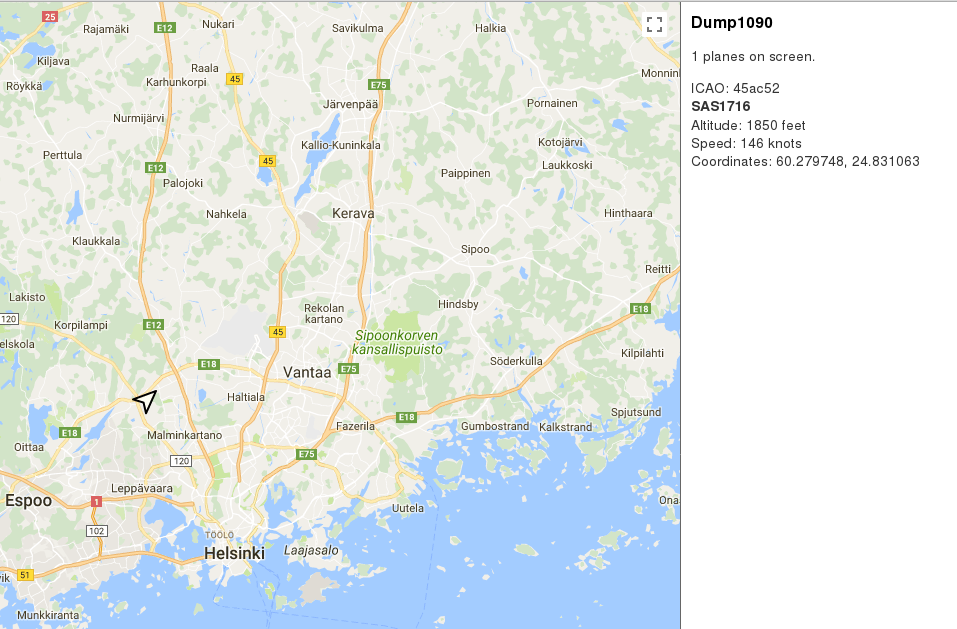 NOTE: In this view I'm in Helsinki, and the airport is at Vantaa, just outside the city.
Of course there are tweaks to be made:
 In the past, I had a Facebook account. Long ago I deleted this account
through the procedure outlined
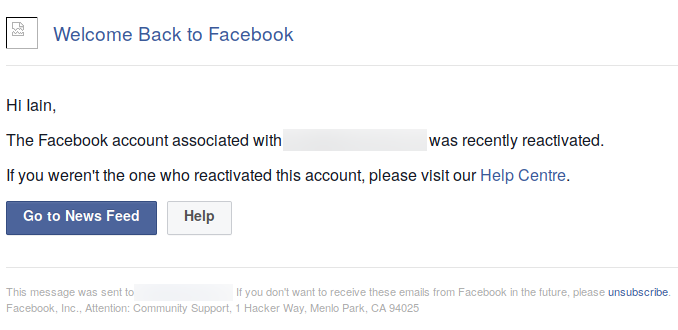 Screenshot of the email I received from Facebook