
About one hour ago we have finished the first
Openmoko user meeting in Karlsruhe. Twelve
FreeRunner (and Neo1973) owners have gatherd in the rooms of
Entropia (the local
CCC club), and discussed the various distributions, learned aboutt the
FSO-alternative
PyNeo, which was advocated by Josh, compared GPS applications and talked about various other projects and issues.
I collected some statistics about Distribution usage. Most common was
SHR, with five users, followed by
OM 2008.12 with three users. Single users had
Debian, OM testing from pre 2008.12, PyNeo,
EmDebian and
OM 2008.9 installed. Only counting those who use their FreeRunner as their day-to-day phone, three are using SHR, one OM 2008.12 and one OM testing. I conclude that SHR seems to be a good choice if you want to have a working phone.Asked about their primary use case for the FreeRunner, almost all mentioned telephony and GPS. Half of the participants want to use it to browse the web, a little less think that games are important. Two people, who came from Stuttgart, see
CellHunter as an important use caseConsidering that we filled three hours without running out of topics and the good feedback, we will likely have a sequel to this. A date has not been fixed yet, but will be discussed on the
openmoko-community mailing list.BTW: I m still planning to package the SHR applications for Debian as soon as possible. Only one dependency (libetk) is missing, but according to Lutin from the pkg-e team, it s almost ready.

So,
Biella already posted a reminder, and I m doing it again on my blog, here.
Attention New York City Debianistas,
The astrological confluence of 1234567890[0], the impending release of
Lenny[1], and the odd sighting of a horned mythical beast that
cryptozoologists are calling a 'new FTP-master-assistant/slave' being
sighted in the mist off the shores of the East River[2] will result in
all emacs users to transcend and all vim users to be transponded to
their respective motherships, which are scheduled for near-orbit on that
night.
You will only be taken if you have a sip of beer on the 13th, before
6:31:30pm at the Pacific Standard[3].
If you come late, you may suffer nano for all eternity.
Micah
ps. All nano users will be Left Behind  to tend to the servers that we
did not bring with us on the Rapture  rickshaw.
ps. lets keep the the post-apocalyptic space editor battle that will
erupt between the S.S. Church of Emacs, and the H.R.H VIMperator
mothership for later, and drink with revelry together now.
0.  date -d '@1234567890'
1. http://lists.debian.org/debian-devel-announce/2009/02/msg00000.html
2. http://lists.debian.org/debian-devel-announce/2009/01/msg00004.html
3. http://www.pacificstandardbrooklyn.com
Don t be late, it s at
1234567890!
Not so long ago, I was lamenting to some Debian developer about how LONG it took for me to write stuff, of any quality at least. And aside from my own slowish pace, the academic publishing process is slow as molasses. The two together make for a deadly combo. This friend reminded me that Debian took a heck of a long time to release and at the time, this reminder actually made me feel a lot better. Well, after years of toiling, updating, bug squashing, and lots of lots of arguing, Lenny is coming out and those of us in NYC are celebrating. Though this has been circulated on the Debina-nyc list, it never hurts to circulate a little wider, especially for this event.
Attention New York City Debianistas,
The astrological confluence of 1234567890[0], the impending release of
Lenny[1], and the odd sighting of a horned mythical beast that
cryptozoologists are calling a new FTP-master-assistant/slave being
sighted in the mist off the shores of the East River[2] will result in
all emacs users to transcend and all vim users to be transponded to
their respective motherships, which are scheduled for near-orbit on that
night.
You will only be taken if you have a sip of beer on the 13th, before
6:31:30pm at the Pacific Standard[3].
If you come late, you may suffer nano for all eternity.
Micah
ps. All nano users will be Left Behind to tend to the servers that we
did not bring with us on the Rapture rickshaw.
ps. lets keep the the post-apocalyptic space editor battle that will
erupt between the S.S. Church of Emacs, and the H.R.H VIMperator
mothership for later, and drink with revelry together now.
0. date -d @1234567890
1. http://lists.debian.org/debian-devel-announce/2009/02/msg00000.html
2. http://lists.debian.org/debian-devel-announce/2009/01/msg00004.html
3. http://www.pacificstandardbrooklyn.com

On February 15th, we are having an election to decide whether a constitutional amendment will be accepted or not in Venezuela. I don't want to talk about this. Instead, I'd like to talk about the funniest Political Propaganda I have seen at the moment regarding the elections.
I was driving from my girlfriend's home to mine when suddenly I saw a guy with a banner hanged on him. When he was near to my car, I was able to read what he had written on the banner. I read:
"Vota NO a la mierda. Dale bomba".
Look at the picture:

Translated it means:
"Vote NO to the shit. Flush the toilet".
I got very surprised about the imagination used by that guy. I laughed out loud. I think it has been the funniest political propaganda that I have seen ever..

On February 15th, we are having an election to decide whether a constitutional amendment will be accepted or not in Venezuela. I don't want to talk about this. Instead, I'd like to talk about the funniest Political Propaganda I have seen at the moment regarding the elections.
I was driving from my girlfriend's home to mine when suddenly I saw a guy with a banner hanged on him. When he was near to my car, I was able to read what he had written on the banner. I read:
"Vota NO a la mierda. Dale bomba".
Look at the picture:
Translated it means:
"Vote NO to the shit. Flush the toilet".
I got very surprised about the imagination used by that guy. I laughed out loud. I think it has been the funniest political propaganda that I have seen ever..

WordPress 2.7.1 was released and I upgraded this blog right away ( along with some other client installs that were already running 2.7 )
Let me know if you notice anything funky about the upgrade, from a cursory look everything seems to be working as it should.
On that note, I've also added a place in the comment section where you can input your Twitter ID and eventually I will publish this information along with the users gravatar and name.

Since several month,
awesome users have reported a bug with
OpenOffice.org. When using OOo and clicking on a menu, or using the mouse wheel to read a document, the currently selected tag (desktop) will change automagically to another one.
I've digged into awesome and found that awesome received a _NET_CURRENT_DESKTOP request. As defined by
EWMH, this kind of request are sent by a pager to change the active desktop.
That was weird. Nobody is using a pager here. So, I just kicked my gdb out, attached it to OOo, breaking on
XSendEvent call. And I got it:
Breakpoint 1, XSendEvent (dpy=0x1a00080, w=483, propagate=0, event_mask=1572864, event=0x7fff1fd70d70)
   at ../../src/SendEvent.c:46
(gdb) bt
#0  XSendEvent (dpy=0x1a00080, w=483, propagate=0, event_mask=1572864, event=0x7fff1fd70d70)
   at ../../src/SendEvent.c:46
#1  0x00007f8c0ab4193f in vcl_sal::WMAdaptor::switchToWorkArea ()
  from /usr/lib/openoffice/basis3.0/program/libvclplug_genlx.so
#2  0x00007f8c0aafdbd8 in X11SalFrame::Show ()
  from /usr/lib/openoffice/basis3.0/program/libvclplug_genlx.so
#3  0x00007f8c1378623c in Window::Show ()
  from /usr/lib/openoffice/program/../basis-link/program/libvcllx.so
#4  0x00007f8c13785f40 in Window::Show ()
  from /usr/lib/openoffice/program/../basis-link/program/libvcllx.so
#5  0x00007f8c1372cb54 in FloatingWindow::StartPopupMode ()
  from /usr/lib/openoffice/program/../basis-link/program/libvcllx.so
#6  0x00007f8c1373c877 in ?? () from /usr/lib/openoffice/program/../basis-link/program/libvcllx.so
#7  0x00007f8c1373ccf2 in ?? () from /usr/lib/openoffice/program/../basis-link/program/libvcllx.so
#8  0x00007f8c1373ce84 in ?? () from /usr/lib/openoffice/program/../basis-link/program/libvcllx.so
#9  0x00007f8c13795e7f in ?? () from /usr/lib/openoffice/program/../basis-link/program/libvcllx.so
#10 0x00007f8c13797e74 in ?? () from /usr/lib/openoffice/program/../basis-link/program/libvcllx.so
#11 0x00007f8c13796748 in ?? () from /usr/lib/openoffice/program/../basis-link/program/libvcllx.so
#12 0x00007f8c0aafe6f8 in X11SalFrame::HandleMouseEvent ()
  from /usr/lib/openoffice/basis3.0/program/libvclplug_genlx.so
#13 0x00007f8c0ab040c2 in X11SalFrame::Dispatch ()
  from /usr/lib/openoffice/basis3.0/program/libvclplug_genlx.so
#14 0x00007f8c0ab31625 in SalX11Display::Yield ()
  from /usr/lib/openoffice/basis3.0/program/libvclplug_genlx.so
#15 0x00007f8c0ab356f3 in ?? () from /usr/lib/openoffice/basis3.0/program/libvclplug_genlx.so
#16 0x00007f8c0ab2df1f in SalXLib::Yield () from /usr/lib/openoffice/basis3.0/program/libvclplug_genlx.so
#17 0x00007f8c135b050e in Application::Yield ()
  from /usr/lib/openoffice/program/../basis-link/program/libvcllx.so
#18 0x00007f8c135b0587 in Application::Execute ()
  from /usr/lib/openoffice/program/../basis-link/program/libvcllx.so
#19 0x00007f8c17517e80 in ?? () from /usr/lib/openoffice/program/../basis-link/program/libsofficeapp.so
#20 0x00007f8c135b4b24 in ?? () from /usr/lib/openoffice/program/../basis-link/program/libvcllx.so
#21 0x00007f8c135b4bc5 in SVMain () from /usr/lib/openoffice/program/../basis-link/program/libvcllx.so
#22 0x00007f8c1754ca6c in soffice_main ()
  from /usr/lib/openoffice/program/../basis-link/program/libsofficeapp.so
#23 0x000000000040105b in main ()
I started digging more into the code, and this is what I finally found in
salframe.cxx:
       // #i45160# switch to desktop where a dialog with parent will appear
       if( mpParent && mpParent->m_nWorkArea != m_nWorkArea )
           GetDisplay()->getWMAdaptor()->switchToWorkArea( mpParent->m_nWorkArea );
Beautiful! It even has a comment with a IssueZilla bug number. Let's go and see where it comes from.
After 10 minutes of research to find that fucking IZ, I finally found the link to the
issue #45160. The bug is IMHO not related to OOo but to a window manager doing poor job.
I've found that an awesome user already reported an bug err, wait, I mean an issue as
issue #96684 (remember there's no bug in OOo, only issues) and I commented about it.
UPDATE: It seems OOo developers have agreed to fix that bug eventually.

The monthly board meeting of
SPI will take place on irc.oftc.net #spi tonight (Wed 11 Feb) at 20:00 UTC. Members may have seen that
the meeting announcement came out on time - hooray! It looks like minutes may also catch up to
last meeting, too.
There are two new associated project currently under discussion:
the Helios Initiative and
OpenWRT. I think both of them had been waiting for a legal opinion.
I may still be travelling and without a stable network connection during the meeting, or I might have made it home by then. Either way, watch the comments below this article for a link to the summary when posted.

Gunnar writes about
dh-make-drupal and says:
Now, I hate having non-Debian-packaged files spilled over my /usr/share partition. Drupal modules want to
be installed in /usr/share/drupal5/modules/module_name (or s/5/6/ for Drupal6, to which I have not yet
migrated).
Well, there are modules in
/usr/share/drupal*/modules (basically the same applies to
themes/), but my
understanding is, that this place is intented for drupal core modules/themes. For your site modules/themes
/etc/drupal/*/sites/foobar/modules can/ought to be used instead. Of course you can symlink to where ever you
want.
Additionally there is
/etc/drupal/6/sites/all where you can put common/system-wide modules and themes
directories that can be used by all Drupal sites. I don't know whether Drupal5 does support this, but at least Drupal6
can and you will run into trouble when using this method with Debian packages because of
#513522.
So, I would recommend not to store packages into
/usr/share/drupal*/modules or
themes/ but maybe use
something like
/usr/share/drupal-contrib/*/modules and
themes/ and a tool/method to symlink
appropriately into
/etc/drupal/*/sites/*/modules similar to update-rc.d or such.
Just my 2 ... ;)
Getting started with a Free Software project and making it available to the community can be confusing for first-time software authors. However there are a couple of things worth knowing that will help you attract more users and increase the likelihood that your software will be part of a Free Software distribution like
Debian.
Idea, Name and LicenseAt the core, a Free Software project starts with an idea. It's the reason why you wrote the software in the first place. Where this becomes interesting is when your think that your software could be useful to others. That's when you should think about sharing your code.
Of course, one of the very first decisions you'll need to make is to name your project. This is of course a very personal decision, but if you're struggling to find something exciting and trendy, consider choosing something that:
- is not already used,
- is easy to remember and
- gives an idea of what the project is about.
Another choice you will need to make before your first release is the license. While that topic may not be familiar or interesting to you, I highly recommend that you
carefully consider your options since your license choice can influence the type of community that will form around your project.
Public ReleaseMaking your project publicly available can be as simple as dropping a
tarball on a mailing list. However, if you want your project to reach all of the users for which it could be useful, there are a few other things you might want to do.
One of these things is to provide a digital home for your project. That homepage should provide access to all of the services related to your project. Such services usually include source control, bug tracking, mailing list and file areas. I've got some
ideas about what that homepage should contain later but first things first, let's look at what that tarball should contain.
Tarball ContentsMost people downloading your source code will either be end-users or
distribution maintainers. Here's what they will be looking for:
- Complete source code along with the data files (if any) necessary to use your software.
- Installation instructions explaining how to compile and install your project on one of the supported platforms. This file is usually called INSTALL.
- Quick instructions on how to get started. This is usually contained in the README and it should provide new users all of the commands or instructions they need to get going within a minute or two.
- Full copy of the licensing terms, usually in a file named COPYING.
- Contact information for help or contributions. Small projects will often share the email address of the main author and a link to the project homepage if available. This is traditionally located in a file called AUTHORS or in the README directly.
This is pretty much the minimum that you need to provide in order for your code release to be useful to others and to be legally distributed by others. There are a few more things that you should think about if you would like to increase the likelihood that your software
will be included in a Free Software distribution.
After putting all of this together, you should be ready for the initial public release of your project and will now be moving to the next phase:
supporting your growing community.
In the next 11 months, I will be spending a significant amount of brain power and time writing a fairly long review article on digital media and ethnography which will assess the state of the literature and various trends. Since my expertise certainly lies in the west or global questions. I will be immersing myself in the literature that looks at various international, national, and regional contexts, which is exciting. It is nice to leave the well trodden path and venture into new lands.
There is a handy new site related to this topic, which some of you might be interested in:
New Media Practices in International Contexts Blog Series. The entries are less blog-like and more article-like but that is was makes them great resources.

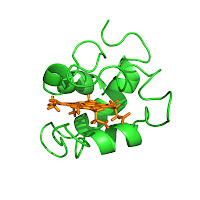
For my research, to create neat images of the molecules I study, I use
Pymol. It's free, part of
Debian, command-driven, very powerful and it produces really good-looking pictures. Although, admittedly, if you don't buy a subscription, the documentation is rather sparse. I'm using scripts to generate ray-traced pictures, but I can't include the
ray command directly in the scripts, as
Pymol would not give me the opportunity to change anything before tracing (and things I trace take loads of time...). So I write a
ray command, but I comment it out, such as in the following example,
cytochrome.pml:
load http://www.rcsb.org/pdb/files/1c6s.pdb
hide everything
show sticks, (resname HEC)
color orange, (resname HEC)
show cartoon
bg_color white
set_view (\
     0.939850032,    0.167392358,    0.297758341,\
     0.336208642,   -0.299271941,   -0.892972171,\
    -0.060366094,    0.939367712,   -0.337551534,\
     0.000000000,    0.000000000, -106.161231995,\
    33.668910980,   -4.749122620,  -24.822664261,\
    -9.742469788,  222.064941406,    0.000000000 )
# ray 800,800
So, to easily generate PNG images from such a file, I wrote the following
makefile snippet, that does the job (as demonstrated by the figure on the right, produced by this very snippet ran on the
cytochrome.pml file above):
%.png: %.pml
 cd $(dir $<); \
 ray_trace_args= grep -o 'ray.*' $(notdir $<)  tail -n1   egrep -o '([0-9, ]+)'   sed 's/ //g'  ; \
 pymol -c -d "@$(notdir $<)" -d "cmd.ray($$ray_trace_args)" -g $@
I hope this snippet will prove useful for others. At any rate, it will prove useful for me ! Just for the record, this protein, represented in
cartoon
view, is called cytochrome c
6 and is one of the proteins implied in the photosynthesis of some organisms.

I have spent a couple of days working into
dh-make-drupal. Yes, you guessed right: An idea based on the wonderful
dh-make-perl, but applied to the
Drupal Content Management System.
Drupal's greatest strengths, IMHO, are:
- Drupal offers a huge number of modules and themes
- Drupal has an amazingly sane configuration handling, where -contrary to what usually happens in PHP-land and, in general, among webapps- you set up the code only at a single place, with only the site-specific configuration (usually a single file) handling all of the differences
Yup, even though I am quite fond of its flexibility and power, I fell for Drupal in no small part because of its sysadmin-friendliness.
Now, I
hate having non-Debian-packaged files spilled over my
/usr/share partition. Drupal modules want to be installed in
/usr/share/drupal5/modules/module_name (or s/5/6/ for Drupal6, to which I have not yet migrated). For that reason, over the last year I have been growing my personal apt repository of Drupal stuff. Yes, it is still on, and I don't plan on taking it off. You can access it by adding
deb http://www.iiec.unam.mx/apt/ etch drupal to your
/etc/apt/sources. However, you can now also do the process locally. Do you fancy the wonderful
Biblio module? Or the
very nice Abarre theme? Great!
0 gwolf@mosca 4 /tmp$ ~/code/dh-make-drupal/dh-make-drupal --drupal 5 biblio
0 gwolf@mosca 5 /tmp$ cd drupal5-mod-biblio-1.16/
0 gwolf@mosca 6 /tmp/drupal5-mod-biblio-1.16$ debuild -us -uc >& /dev/null
0 gwolf@mosca 7 /tmp/drupal5-mod-biblio-1.16$ cd ..
0 gwolf@mosca 8 /tmp$ su
Password:
0 root@mosca[1]/tmp# dpkg -i drupal5-mod-biblio_1.16-1_all.deb
Selecting previously deselected package drupal5-mod-biblio.
(Reading > database ... 275110 files and directories currently installed.)
Unpacking drupal5-mod-biblio (from drupal5-mod-biblio_1.16-1_all.deb) ...
Setting up drupal5-mod-biblio (1.16-1) ...
Yay!
Yes, still many more things to come (i.e. including the debuild call and whatnot), but... Enjoy!
BTW, this piece of software owes a couple of beers to
Why the lucky stiff, author of
Hpricot. You are insane (but we are all well aware of that). You deserve to go to the webscraping heaven. Yes, besides the
programming-languages-teaching-cartoon heaven. You find out how to split the time between them.
[Update]: Of course,
ITP bug #514786 has been filed, and I will soon be uploading this into Debian.
End of last year I migrated from PowerPC arch to i386 which made it necessary to reformat/reparition/relabel the old 250
GB disk from Amiga disk label to PC disk label. Therefor I backupped all necessary files from the 250 GB disk to a 160
GB disk.
After installing the system on the 250 GB disk, I wanted to copy over the backup from the other disk, but accidently
issued a pvcreate on the backup partition. Big mistake. ;) No need to tell that lots of files ended in lost+found: 28
GB in total. Of course it's troublesome to sort all those files and directories back to their original places.
Because I don't know any tool yet, I wrote some scripts to address this issue. The first script is to be run to get a
list of directories and files and a unique file identifier for the files.
CODE:
#!/bin/bash
#
# Purpose of this file:
# to make a file that is parseable for recovering
# a filled /lost+found directory by parsing
# filesize, md5sum, permisions and path+filename
#
# first: get all directories
nice -15 find / -path /sys -prune -o \
-path /proc -prune -o \
-path /var/lib/backuppc -prune -o \
-path /var/spool/squid -prune -o \
-type d -print > /root/ls-md5sum-dirs.txt
# next: get all relevant information
nice -15 find / -path /sys -prune -o \
-path /proc -prune -o \
-path /var/lib/backuppc -prune -o \
-path /var/spool/squid -prune -o \
-type f -printf "%s %m " \
-exec openssl sha1 \; sed -e 's/SHA1(//g' -e 's/)=//g' > /root/ls-sha1sum-files.txt
#-exec nice -15 md5sum \; > /root/ls-md5sum-files.txt
This will create two files:
/root/ls-md5sum-dirs.txt and
/root/ls-md5sum-files.txt. The above is the
second version of the file with
openssl sha1 instead of
md5sum, because I discovered that md5sum is
giving me double hashes:
CODE:
muaddib:~# wc -l ls-md5sum-files.txt
712251
muaddib:~# cat ls-md5sum-files.txt awk ' print $3 ' sort -u wc -l
576539
That makes a difference of ~140000 files. The same script with openssl sha1 is giving a better approximation, but still
a gap between those two numbers:
CODE:
muaddib:~# wc -l ls-sha1sum-files.txt
712137 ls-sha1sum-files.txt
muaddib:~# cat ls-sha1sum-files.txt awk ' print $4 ' uniq wc -l
694200
The difference is much smaller with openssl but it takes a lot of more time to generate the resulting file.
Anyway, my second script assumes that the files can be identified by an unique hash. Currently it looks like this:
CODE:
#!/bin/bash
PFAD=$1
dry=$2
# generating md5sum/information of lost+found
echo "Examing $ PFAD /lost+found..."
find $PFAD/lost+found -type f -printf "%s %m " -exec nice -15 md5sum \; > /root/lostfound-files.txt
# creating missing directories if necessary by parsing ls-md5sum-dirs.txt
echo "Creating missing directories..."
for dir in cat /root/ls-md5sum-dirs.txt sed -e 's/\ /,/g' ; do
dir= echo $ dir sed -e 's/,/\ /g'
if [ ! -d "$ dir " ] ; then
echo " Missing dir "$dir" - creating..."
if [ "$dry" = "make_it_happen" ]; then
echo mkdir "$ dir "
fi
fi
done
# next, get the md5sum of files in lost+found and compare it
# against stored md5sum in ls-md5sum-files.txt
echo "Restoring/moving files..."
for z in cat /root/lostfound-files.txt tr -s " " sed -e 's/\ /,/g' ; do
z= echo $z sed -e 's/,/\ /g'
#size1= echo $z awk ' print $1 '
#perm1= echo $z awk ' print $2 '
md5s1= echo $z awk ' print $3 '
path1= echo $z awk ' print $4 '
file= grep $md5s1 /root/ls-md5sum-files.txt
if [ ! -z "$ file " ] ; then
file= echo $file sed -e 's/,/\ /g'
#size2= echo $file awk ' print $1 '
#perm2= echo $file awk ' print $2 '
#md5s2= echo $file awk ' print $3 '
path2= echo $file awk ' print $4 '
echo "$path1 -=> $path2"
if [ "$dry" = "make_it_happen" ]; then
echo mv "$ path1 " "$ path2 "
fi
fi
done
This script generates a similar list as the first script and compares each hash or file and tries to move it back to
its original path. Because of the above mentioned difference between total number of lines and unique liines this
approach seems a little bit broken.
So, dear lazyweb, is there something that can generate unique fingerprints in a reasonable amount of time (like md5sum)
or is there even an already existing application out there that I'm not aware of? And yes: I know that there are backup
applications, but that is another topic. In this case, the backup medium has been corrupt so the problem still exists:
how to identify files in lost+found and move them back in an automatic way, if possible?
I'm appreciating help, tips, patches, ideas, ... :)
After a few hiccoughs, I m trying to gather
live coverage of Voice09 in Birmingham today and tomorrow over on the software.coop site. I have access to the wifi, but picture uploads will mostly have to wait until I can bugfix some stuff this evening.

From the local paper, yesterday, in a larger article about the bushfires
roaming hither and yon:
While arsonists are allegedly responsible for the fatal fires in Victoria,
it was "idiots" who laid the groundwork for a potential blaze in the Royal
National park near Helensburgh yesterday.
Rural Fire Service Illawarra manager Richard Cotterill said that despite a
total fire ban being in effect for the Illawarra and most of southern NSW,
weekend bushwalkers in the park lit a campfire and then left it to
smoulder.
Mr Cotterill said two trucks with about 10 firefighters tended to the
bushfire hazard just before 1pm, after being alerted to the smoking logs
by a resident.
"Obviously someone has not taken the fire ban rules into account and we
are just lucky that we haven't had any significant wind conditions being
as hot as it is," Mr Cotterill said.
"Something like that is obviously potentially very, very dangerous. You
get a wind blowing embers into the bush and it is downhill from there.
"It's a very stupid thing to do and obviously people don't realise just
how dangerous it can be."
I like Richard. Nice bloke, works hard for the local area, speaks
straight and doesn't mince words. "Idiots" indeed. Several thousand
homes are threatened if the Royal National Park burns. We've got easier
evacuation paths than a lot of the people down in Victoria had, but it
still could have been pretty bad.
Meanwhile, the weather up here has turned grey and cold, which will be a
mixed blessing for the firefighters working up at Peats Ridge and
Singleton, and down around Bega. It's a lot nicer to fight a fire at 24
degrees celsius rather than 40, but the misty rain we've had around home
would be enough to make backburning impossible, whilst not being enough to
really knock down the fire. The winds we got on Sunday night would have
made life far more exciting than is comfortable, too.
We recently bought a Canon Vixia HG20 camcorder. The HG20 records in AVCHD format (MPEG-4 h.264) at up to 1920 1080. To get from the camcorder to a DVD (or something we can upload to the web), I need some sort of video editing software. This lets me trim out the boring bits, encode the video for DVD, etc.
Background
In addition to DVD creation and web uploading, I want the ability to burn high-definition video discs. 1920 1080 is significantly higher resolution than you get from a DVD. There are two main ways to go: a blu-ray format disc, or an AVCHD disc. A blu-ray disc has to be burned onto BD-R media, which costs about $5 each, using a blu-ray burner, which costs about $200. AVCHD discs use the same h.264 encoding that the camcorder does, meaning they have better compression and can be burned onto regular DVD+R media, fitting about 30 minutes onto a DVD. Moreover, it is possible to move AVCHD files directly from a camcorder to an AVCHD disc without re-encoding, resulting in higher quality and lower playing time. The nicer blu-ray players, such as the PS3, can play AVCHD discs.
AVCHD seems pretty clearly the direction the industry is moving. Compared to the tape-based HDV, ACVHD has higher quality with lower bitrates, better resolution, and much greater convenience. Hard disk or SD-based AVCHD camcorders are pretty competitive in terms of price by now too, often cheaper than tape-based ones.
The downside of AVCHD is that it takes more CPU power to process. Though as video tasks are often done in batch, that wouldn t have to be a huge downside. The bigger problem is that, though all the major video editing software claims to support AVCHD, nobody really supports it well yet.
The Contenders
Back when I got my first camcorder in about 2001 the one that I m replacing now you pretty much had to have a Mac to do any sort of reasonable consumer or prosumer-level video editing. We bought our first iMac back then to work with that, and it did work well with the MiniDV camera.
Today, there s a lot more competition out there. The Mac software stack has not really maintained its lead some would even say that it s regressed and the extremely high cost of buying a Mac capable of working with AVCHD, plus Final Cut Express, makes that option completely out of the question for me. It would be roughly $2500.
Nobody really supports AVCHD well yet, even on the Mac. Although most programs advertise support of smart rendering a technique that lets the software merely copy unchanged footage when outputting to the same format as the input none of them have smart rendering that actually works with AVCHD source material. Though this fact is never documented, though discussed on forums.
Another annoyance, having used Final Cut Express in the past, is that with these programs you can t just go to the timeline and say delete everything between 1:35 and 3:52 ; you have to go in and split up clips, then select and delete them. They seem to be way too concerned about dealing with individual clips.
I briefly used Cinelerra on Linux to do some video editing. It s a very powerful program, but geared at people that are far more immersed in video editing than I. For my needs, it didn t have enough automation and crashed too much and that was with MiniDV footage. It apparently does support AVCHD, but I haven t tried it.
I ve tried three programs and considered trying a fourth. Here are my experiences:
Ulead/Corel VideoStudio Pro X2
Commonly referenced as the go to program for video editing on Windows, I started with downloading the Free Trial of it from Corel. Corel claims that the free trial is full-featured all over on their website, but I could tell almost instantly that it wasn t. I wound up buying the full version, which came to about $65 after various discounts.
I wanted to like this program. Its output options include AVCHD disc, Blu-ray disc, DVD+R, and the like. Its input options include MiniDV, AVCHD, ripping from DVD, ripping from Bluray, and just about every other format you can think of. And it heavily advertised proxy editing , designed to let you edit a scaled-down version of AVCHD video with a low-CPU machine, but refer back to the original high-quality footage for the output.
It didn t pan out that way.
The biggest problem was the constant crashing. I really do mean constant. It probably crashed on me two dozen times in an hour. If you are thinking that means that it crashes pretty much as soon as I can get it re-opened, you d be correct. Click the Play button and it hangs. Click a clip and it hangs. Do anything and it hangs.
It did seem to work better with the parts of the source that had been converted to a low-res version with Smart Proxy, though it didn t eliminate the hangs, just reduced them. And every time I d have to End Task, it would forget what it had already converted via Smart Proxy even if I had recently saved the project and have to start over from scratch.
I spent some time trying to figure out why it always thought my project was 720 480 even when it was 1920 1080, and why the project properties box didn t even have an option for 1920 1080. After some forum searching, it turns out that the project properties box is totally irrelevant to the program. Yay for good design, anyone?
VideoStudio Pro X2 does have good output options, allowing combination of multiple source files onto a single DVD or AVCHD disc as separate titles. Unfortunately, its DVD/AVCHD rendering process also yes hangs more often than not.
The documentation for VideoStudio Pro X2 is of the useless variety. It s the sort of thing that feels like it s saying The trim tool is for trimming your clips without telling you what trimming your clips means, or making it obvious how to remove material from the middle of a clip.
The proxy editing feature isn t what it should be either. Instead of being something that just automatically happens and Works in the background, you have to manage its queue in the foreground and it forgets what it was doing whenever the program hangs.
On the rare occasion when pressing Play did not cause a hang, the AVCHD footage played back at about 0.5fps far, far worse than PowerDirector manages on the same machine. Bits that had been rendered for proxy editing did appear to play at full framerate.
I have applied for a refund for this purchase from Corel under their 30-day return policy, and have already uninstalled it from my disk. What a waste.
CyberLink PowerDirector 7 Ultra
This was the second program I tried, and the one I eventually bought. Its feature set is not quite as nice as Corel s, especially when it comes to versatility of output options. On the other hand, it feels done. It only crashed two or three times on me apparently that s GOOD on Windows? Things just worked. It appears to have proxy editing support, but it is completely transparent and plays back with a decent framerate even without it. It can output to AVCHD, Bluray, and DVD, though smart rendering doesn t work with AVCHD source material.
Its weakness compared to the Corel package is that it doesn t have as many options for formatting these discs. You can have only one title on a disc, though you can have many chapters. You have some, but not much, control over compression parameters. The same goes for exporting files for upload to the web or saving on your disk.
The documentation is polished and useful for the basics, though not extensive.
Overall, this package works, supports all the basics I wanted from it, so I m using it for now.
Adobe Premiere Elements 7
I downloaded the trial of this one too. I opened it up, and up popped a dialog box asking what resolution my project would be, interlacing settings, etc. I thought YES now that s the kind of program I want. As I tried out the interface, I kept thinking the same. This was a program not just for newbies, but for people that wanted a bit more control.
Until it came to the question of output. Premiere Elements 7 was the only package I looked at that had no option to burn an AVCHD disc. DVD or Blu-ray only. That s a deal-breaker for me. There s no excuse for a program in this price range to not support the only affordable HD disc option out there. So I didn t investigate very much farther.
Another annoying thing is that Adobe seems to treat all of their software as a commercial. I m a user, not an audience, dammit. I do not want to buy some photoshop.net subscription when I buy a video editing program. I do not want to see ads for stuff when I m reading PDFs. LEAVE ME ALONE, ADOBE.
I just felt sleazy even giving them my email address, let alone installing the program on my system. I think I will feel like a better person once I reboot into Windows and wipe it off my system.
Pinnacle Studio 12
Another program that comes highly rated. But I never installed it because its minimum system requirements state that it needs an Intel Core 2 Quad 2.66GHz or higher for 1920 1080 AVCHD editing. And I have only a Core 2 Duo 2.66GHz half the computing horsepower that it wants. And since they offer no free trial, I didn t bother even trying it, especially since PowerDirector got by fine with my CPU.
Conclusions
This seems to be a field where we can say all video editing software sucks; some just suck a little less. I m using PowerDirector for now, but all of the above programs should have new versions coming out this year, and I will be keeping a close eye to see if any of them stop being so bad.

Today is Monday, what means it is time for
Gammu release. Main
improvements are this time in DBI driver and dummy phone driver. This
allowed increasing number of test cases and they revealed number of bugs
in code, which were fixed. The good thing is that we now have covered
30% of code by testcases. There is still place to improve, but I think
this is good milestone, because most of untested code lies in drivers
for different phones, which are hard to test automatically without
having real phone connected to test server.
Other thing I would like to highlight is DBI backend in SMSD. It is
still new, but you should consider using it instead of old MYSQL or
PGSQL backends, because it behaves much more nicely to your database and
won't ruin system performance that easily (though there are still things
to improve). Unfortunately it is not available on Windows right now, but
I hope this will change in future.
Full list of changes follows:
- Fix some memory leaks found by cppcheck.
- Implemented reconnecting/retrying in DBI driver.
- Fix memory leaks in SMSD found by valgrind.
- Fix decoding of another Nokia message type.
- Support for passing received message ID in DBI.
- Dummy phone now supports phonebook, calendar, todo, filesystem.
- Experimental SMSD monitor support on Windows.
- Added ID for Nokia 2680 (bug #813).
- Number of retries of message send in SMSD can be configured.
- Updated SQL files to new version (mostly added useful indexes).
- Dropped own logic for generating IDs for SMS and rely on SQL server (only in DBI driver for now).
You can download from usual place:
http://cihar.com/gammu/,
Debian users will find packages in experimental soon, SUSE, Fedora and
Mandriva users can check
experimental repository in OpenSuse Build
Service.

