John Goerzen: Using Yggdrasil As an Automatic Mesh Fabric to Connect All Your Docker Containers, VMs, and Servers
Sometimes you might want to run Docker containers on more than one host. Maybe you want to run some at one hosting facility, some at another, and so forth.
Maybe you d like run VMs at various places, and let them talk to Docker containers and bare metal servers wherever they are.
And maybe you d like to be able to easily migrate any of these from one provider to another.
There are all sorts of very complicated ways to set all this stuff up. But there s also a simple one: Yggdrasil.
My blog post Make the Internet Yours Again With an Instant Mesh Network explains some of the possibilities of Yggdrasil in general terms. Here I want to show you how to use Yggdrasil to solve some of these issues more specifically. Because Yggdrasil is always Encrypted, some of the security lifting is done for us.
Background
Often in Docker, we connect multiple containers to a single network that runs on a given host. That much is easy. Once you start talking about containers on multiple hosts, then you start adding layers and layers of complexity. Once you start talking multiple providers, maybe multiple continents, then the complexity can increase. And, if you want to integrate everything from bare metal servers to VMs into this well, there are ways, but they re not easy.
I m a believer in the KISS principle. Let s not make things complex when we don t have to.
Background
Often in Docker, we connect multiple containers to a single network that runs on a given host. That much is easy. Once you start talking about containers on multiple hosts, then you start adding layers and layers of complexity. Once you start talking multiple providers, maybe multiple continents, then the complexity can increase. And, if you want to integrate everything from bare metal servers to VMs into this well, there are ways, but they re not easy.
I m a believer in the KISS principle. Let s not make things complex when we don t have to.
Enter Yggdrasil
As I ve explained before, Yggdrasil can automatically form a global mesh network. This is pretty cool! As most people use it, they join it to the main Yggdrasil network. But Yggdrasil can be run entirely privately as well. You can run your own private mesh, and that s what we ll talk about here.
All we have to do is run Yggdrasil inside each container, VM, server, or whatever. We handle some basics of connectivity, and bam! Everything is host- and location-agnostic.
Setup in Docker
The installation of Yggdrasil on a regular system is pretty straightforward. Docker is a bit more complicated for several reasons:
- It blocks IPv6 inside containers by default
- The default set of permissions doesn t permit you to set up tunnels inside a container
- It doesn t typically pass multicast (broadcast) packets
Normally, Yggdrasil could auto-discover peers on a LAN interface. However, aside from some esoteric Docker networking approaches, Docker doesn t permit that. So my approach is going to be setting up one or more Yggdrasil router containers on a given Docker host. All the other containers talk directly to the router container and it s all good.
Basic installation
In my Dockerfile, I have something like this:
FROM jgoerzen/debian-base-security:bullseye
RUN echo "deb http://deb.debian.org/debian bullseye-backports main" >> /etc/apt/sources.list && \
    apt-get --allow-releaseinfo-change update && \
    apt-get -y --no-install-recommends -t bullseye-backports install yggdrasil
...
COPY yggdrasil.conf /etc/yggdrasil/
RUN set -x; \
    chown root:yggdrasil /etc/yggdrasil/yggdrasil.conf && \
    chmod 0750 /etc/yggdrasil/yggdrasil.conf && \
    systemctl enable yggdrasil
The magic parameters to docker run to make Yggdrasil work are:
--cap-add=NET_ADMIN --sysctl net.ipv6.conf.all.disable_ipv6=0 --device=/dev/net/tun:/dev/net/tun
This example uses my docker-debian-base images, so if you use them as well, you ll also need to add their parameters.
Note that it is NOT necessary to use --privileged. In fact, due to the network namespaces in use in Docker, this command does not let the container modify the host s networking (unless you use --net=host, which I do not recommend).
The --sysctl parameter was the result of a lot of banging my head against the wall. Apparently Docker tries to disable IPv6 in the container by default. Annoying.
Configuration of the router container(s)
The idea is that the router node (or more than one, if you want redundancy) will be the only ones to have an open incoming port. Although the normal Yggdrasil case of directly detecting peers in a broadcast domain is more convenient and more robust, this can work pretty well too.
You can, of course, generate a template yggdrasil.conf with yggdrasil -genconf like usual. Some things to note for this one:
- You ll want to change
Listen to something like Listen: ["tls://[::]:12345"] where 12345 is the port number you ll be listening on.
- You ll want to disable the
MulticastInterfaces entirely by just setting it to [] since it doesn t work anyway.
- If you expose the port to the Internet, you ll certainly want to firewall it to only authorized peers. Setting
AllowedPublicKeys is another useful step.
- If you have more than one router container on a host, each of them will both
Listen and act as a client to the others. See below.
Configuration of the non-router nodes
Again, you can start with a simple configuration. Some notes here:
- You ll want to set
Peers to something like Peers: ["tls://routernode:12345"] where routernode is the Docker hostname of the router container, and 12345 is its port number as defined above. If you have more than one local router container, you can simply list them all here. Yggdrasil will then fail over nicely if any one of them go down.
Listen should be empty.- As above,
MulticastInterfaces should be empty.
Using the interfaces
At this point, you should be able to ping6 between your containers. If you have multiple hosts running Docker, you can simply set up the router nodes on each to connect to each other. Now you have direct, secure, container-to-container communication that is host-agnostic! You can also set up Yggdrasil on a bare metal server or VM using standard procedures and everything will just talk nicely!
Security notes
Yggdrasil s mesh is aggressively greedy. It will peer with any node it can find (unless told otherwise) and will find a route to anywhere it can. There are two main ways to make sure your internal comms stay private: by restricting who can talk to your mesh, and by firewalling the Yggdrasil interface. Both can be used, and they can be used simultaneously.
By disabling multicast discovery, you eliminate the chance for random machines on the LAN to join the mesh. By making sure that you firewall off (outside of Yggdrasil) who can connect to a Yggdrasil node with a listening port, you can authorize only your own machines. And, by setting AllowedPublicKeys on the nodes with listening ports, you can authenticate the Yggdrasil peers. Note that part of the benefit of the Yggdrasil mesh is normally that you don t have to propagate a configuration change to every participatory node that s a nice thing in general!
You can also run a firewall inside your container (I like firehol for this purpose) and aggressively firewall the IPs that are allowed to connect via the Yggdrasil interface. I like to set a stable interface name like ygg0 in yggdrasil.conf, and then it becomes pretty easy to firewall the services. The Docker parameters that allow Yggdrasil to run are also sufficient to run firehol.
Naming Yggdrasil peers
You probably don t want to hard-code Yggdrasil IPs all over the place. There are a few solutions:
- You could run an internal DNS service
- You can do a bit of scripting around Docker s
--add-host command to add things to /etc/hosts
Other hints & conclusion
Here are some other helpful use cases:
- If you are migrating between hosts, you could leave your reverse proxy up at both hosts, both pointing to the target containers over Yggdrasil. The targets will be automatically found from both sides of the migration while you wait for DNS caches to update and such.
- This can make services integrate with local networks a lot more painlessly than they might otherwise.
This is just an idea. The point of Yggdrasil is expanding our ideas of what we can do with a network, so here s one such expansion. Have fun!
Note: This post also has a permanent home on my webiste, where it may be periodically updated.
Setup in Docker
The installation of Yggdrasil on a regular system is pretty straightforward. Docker is a bit more complicated for several reasons:
- It blocks IPv6 inside containers by default
- The default set of permissions doesn t permit you to set up tunnels inside a container
- It doesn t typically pass multicast (broadcast) packets
Normally, Yggdrasil could auto-discover peers on a LAN interface. However, aside from some esoteric Docker networking approaches, Docker doesn t permit that. So my approach is going to be setting up one or more Yggdrasil router containers on a given Docker host. All the other containers talk directly to the router container and it s all good.
Basic installation
In my Dockerfile, I have something like this:
FROM jgoerzen/debian-base-security:bullseye
RUN echo "deb http://deb.debian.org/debian bullseye-backports main" >> /etc/apt/sources.list && \
apt-get --allow-releaseinfo-change update && \
apt-get -y --no-install-recommends -t bullseye-backports install yggdrasil
...
COPY yggdrasil.conf /etc/yggdrasil/
RUN set -x; \
chown root:yggdrasil /etc/yggdrasil/yggdrasil.conf && \
chmod 0750 /etc/yggdrasil/yggdrasil.conf && \
systemctl enable yggdrasil
The magic parameters to docker run to make Yggdrasil work are:
--cap-add=NET_ADMIN --sysctl net.ipv6.conf.all.disable_ipv6=0 --device=/dev/net/tun:/dev/net/tun
This example uses my docker-debian-base images, so if you use them as well, you ll also need to add their parameters.
Note that it is NOT necessary to use --privileged. In fact, due to the network namespaces in use in Docker, this command does not let the container modify the host s networking (unless you use --net=host, which I do not recommend).
The --sysctl parameter was the result of a lot of banging my head against the wall. Apparently Docker tries to disable IPv6 in the container by default. Annoying.
Configuration of the router container(s)
The idea is that the router node (or more than one, if you want redundancy) will be the only ones to have an open incoming port. Although the normal Yggdrasil case of directly detecting peers in a broadcast domain is more convenient and more robust, this can work pretty well too.
You can, of course, generate a template yggdrasil.conf with yggdrasil -genconf like usual. Some things to note for this one:
- You ll want to change
Listen to something like Listen: ["tls://[::]:12345"] where 12345 is the port number you ll be listening on.
- You ll want to disable the
MulticastInterfaces entirely by just setting it to [] since it doesn t work anyway.
- If you expose the port to the Internet, you ll certainly want to firewall it to only authorized peers. Setting
AllowedPublicKeys is another useful step.
- If you have more than one router container on a host, each of them will both
Listen and act as a client to the others. See below.
Configuration of the non-router nodes
Again, you can start with a simple configuration. Some notes here:
- You ll want to set
Peers to something like Peers: ["tls://routernode:12345"] where routernode is the Docker hostname of the router container, and 12345 is its port number as defined above. If you have more than one local router container, you can simply list them all here. Yggdrasil will then fail over nicely if any one of them go down.
Listen should be empty.- As above,
MulticastInterfaces should be empty.
Using the interfaces
At this point, you should be able to ping6 between your containers. If you have multiple hosts running Docker, you can simply set up the router nodes on each to connect to each other. Now you have direct, secure, container-to-container communication that is host-agnostic! You can also set up Yggdrasil on a bare metal server or VM using standard procedures and everything will just talk nicely!
Security notes
Yggdrasil s mesh is aggressively greedy. It will peer with any node it can find (unless told otherwise) and will find a route to anywhere it can. There are two main ways to make sure your internal comms stay private: by restricting who can talk to your mesh, and by firewalling the Yggdrasil interface. Both can be used, and they can be used simultaneously.
By disabling multicast discovery, you eliminate the chance for random machines on the LAN to join the mesh. By making sure that you firewall off (outside of Yggdrasil) who can connect to a Yggdrasil node with a listening port, you can authorize only your own machines. And, by setting AllowedPublicKeys on the nodes with listening ports, you can authenticate the Yggdrasil peers. Note that part of the benefit of the Yggdrasil mesh is normally that you don t have to propagate a configuration change to every participatory node that s a nice thing in general!
You can also run a firewall inside your container (I like firehol for this purpose) and aggressively firewall the IPs that are allowed to connect via the Yggdrasil interface. I like to set a stable interface name like ygg0 in yggdrasil.conf, and then it becomes pretty easy to firewall the services. The Docker parameters that allow Yggdrasil to run are also sufficient to run firehol.
Naming Yggdrasil peers
You probably don t want to hard-code Yggdrasil IPs all over the place. There are a few solutions:
- You could run an internal DNS service
- You can do a bit of scripting around Docker s
--add-host command to add things to /etc/hosts
Other hints & conclusion
Here are some other helpful use cases:
- If you are migrating between hosts, you could leave your reverse proxy up at both hosts, both pointing to the target containers over Yggdrasil. The targets will be automatically found from both sides of the migration while you wait for DNS caches to update and such.
- This can make services integrate with local networks a lot more painlessly than they might otherwise.
This is just an idea. The point of Yggdrasil is expanding our ideas of what we can do with a network, so here s one such expansion. Have fun!
Note: This post also has a permanent home on my webiste, where it may be periodically updated.
FROM jgoerzen/debian-base-security:bullseye
RUN echo "deb http://deb.debian.org/debian bullseye-backports main" >> /etc/apt/sources.list && \
apt-get --allow-releaseinfo-change update && \
apt-get -y --no-install-recommends -t bullseye-backports install yggdrasil
...
COPY yggdrasil.conf /etc/yggdrasil/
RUN set -x; \
chown root:yggdrasil /etc/yggdrasil/yggdrasil.conf && \
chmod 0750 /etc/yggdrasil/yggdrasil.conf && \
systemctl enable yggdrasil
docker run to make Yggdrasil work are:
--cap-add=NET_ADMIN --sysctl net.ipv6.conf.all.disable_ipv6=0 --device=/dev/net/tun:/dev/net/tun
--privileged. In fact, due to the network namespaces in use in Docker, this command does not let the container modify the host s networking (unless you use --net=host, which I do not recommend).
The --sysctl parameter was the result of a lot of banging my head against the wall. Apparently Docker tries to disable IPv6 in the container by default. Annoying.
Configuration of the router container(s)
The idea is that the router node (or more than one, if you want redundancy) will be the only ones to have an open incoming port. Although the normal Yggdrasil case of directly detecting peers in a broadcast domain is more convenient and more robust, this can work pretty well too.
You can, of course, generate a template yggdrasil.conf with yggdrasil -genconf like usual. Some things to note for this one:
- You ll want to change
Listen to something like Listen: ["tls://[::]:12345"] where 12345 is the port number you ll be listening on.
- You ll want to disable the
MulticastInterfaces entirely by just setting it to [] since it doesn t work anyway.
- If you expose the port to the Internet, you ll certainly want to firewall it to only authorized peers. Setting
AllowedPublicKeys is another useful step.
- If you have more than one router container on a host, each of them will both
Listen and act as a client to the others. See below.
Configuration of the non-router nodes
Again, you can start with a simple configuration. Some notes here:
- You ll want to set
Peers to something like Peers: ["tls://routernode:12345"] where routernode is the Docker hostname of the router container, and 12345 is its port number as defined above. If you have more than one local router container, you can simply list them all here. Yggdrasil will then fail over nicely if any one of them go down.
Listen should be empty.- As above,
MulticastInterfaces should be empty.
Using the interfaces
At this point, you should be able to ping6 between your containers. If you have multiple hosts running Docker, you can simply set up the router nodes on each to connect to each other. Now you have direct, secure, container-to-container communication that is host-agnostic! You can also set up Yggdrasil on a bare metal server or VM using standard procedures and everything will just talk nicely!
Security notes
Yggdrasil s mesh is aggressively greedy. It will peer with any node it can find (unless told otherwise) and will find a route to anywhere it can. There are two main ways to make sure your internal comms stay private: by restricting who can talk to your mesh, and by firewalling the Yggdrasil interface. Both can be used, and they can be used simultaneously.
By disabling multicast discovery, you eliminate the chance for random machines on the LAN to join the mesh. By making sure that you firewall off (outside of Yggdrasil) who can connect to a Yggdrasil node with a listening port, you can authorize only your own machines. And, by setting AllowedPublicKeys on the nodes with listening ports, you can authenticate the Yggdrasil peers. Note that part of the benefit of the Yggdrasil mesh is normally that you don t have to propagate a configuration change to every participatory node that s a nice thing in general!
You can also run a firewall inside your container (I like firehol for this purpose) and aggressively firewall the IPs that are allowed to connect via the Yggdrasil interface. I like to set a stable interface name like ygg0 in yggdrasil.conf, and then it becomes pretty easy to firewall the services. The Docker parameters that allow Yggdrasil to run are also sufficient to run firehol.
Naming Yggdrasil peers
You probably don t want to hard-code Yggdrasil IPs all over the place. There are a few solutions:
- You could run an internal DNS service
- You can do a bit of scripting around Docker s
--add-host command to add things to /etc/hosts
Other hints & conclusion
Here are some other helpful use cases:
- If you are migrating between hosts, you could leave your reverse proxy up at both hosts, both pointing to the target containers over Yggdrasil. The targets will be automatically found from both sides of the migration while you wait for DNS caches to update and such.
- This can make services integrate with local networks a lot more painlessly than they might otherwise.
This is just an idea. The point of Yggdrasil is expanding our ideas of what we can do with a network, so here s one such expansion. Have fun!
Note: This post also has a permanent home on my webiste, where it may be periodically updated.
Listen to something like Listen: ["tls://[::]:12345"] where 12345 is the port number you ll be listening on.MulticastInterfaces entirely by just setting it to [] since it doesn t work anyway.AllowedPublicKeys is another useful step.Listen and act as a client to the others. See below.- You ll want to set
Peersto something likePeers: ["tls://routernode:12345"]whererouternodeis the Docker hostname of the router container, and 12345 is its port number as defined above. If you have more than one local router container, you can simply list them all here. Yggdrasil will then fail over nicely if any one of them go down. Listenshould be empty.- As above,
MulticastInterfacesshould be empty.
Using the interfaces
At this point, you should be able to ping6 between your containers. If you have multiple hosts running Docker, you can simply set up the router nodes on each to connect to each other. Now you have direct, secure, container-to-container communication that is host-agnostic! You can also set up Yggdrasil on a bare metal server or VM using standard procedures and everything will just talk nicely!
Security notes
Yggdrasil s mesh is aggressively greedy. It will peer with any node it can find (unless told otherwise) and will find a route to anywhere it can. There are two main ways to make sure your internal comms stay private: by restricting who can talk to your mesh, and by firewalling the Yggdrasil interface. Both can be used, and they can be used simultaneously.
By disabling multicast discovery, you eliminate the chance for random machines on the LAN to join the mesh. By making sure that you firewall off (outside of Yggdrasil) who can connect to a Yggdrasil node with a listening port, you can authorize only your own machines. And, by setting AllowedPublicKeys on the nodes with listening ports, you can authenticate the Yggdrasil peers. Note that part of the benefit of the Yggdrasil mesh is normally that you don t have to propagate a configuration change to every participatory node that s a nice thing in general!
You can also run a firewall inside your container (I like firehol for this purpose) and aggressively firewall the IPs that are allowed to connect via the Yggdrasil interface. I like to set a stable interface name like ygg0 in yggdrasil.conf, and then it becomes pretty easy to firewall the services. The Docker parameters that allow Yggdrasil to run are also sufficient to run firehol.
Naming Yggdrasil peers
You probably don t want to hard-code Yggdrasil IPs all over the place. There are a few solutions:
- You could run an internal DNS service
- You can do a bit of scripting around Docker s
--add-host command to add things to /etc/hosts
Other hints & conclusion
Here are some other helpful use cases:
- If you are migrating between hosts, you could leave your reverse proxy up at both hosts, both pointing to the target containers over Yggdrasil. The targets will be automatically found from both sides of the migration while you wait for DNS caches to update and such.
- This can make services integrate with local networks a lot more painlessly than they might otherwise.
This is just an idea. The point of Yggdrasil is expanding our ideas of what we can do with a network, so here s one such expansion. Have fun!
Note: This post also has a permanent home on my webiste, where it may be periodically updated.
AllowedPublicKeys on the nodes with listening ports, you can authenticate the Yggdrasil peers. Note that part of the benefit of the Yggdrasil mesh is normally that you don t have to propagate a configuration change to every participatory node that s a nice thing in general!
You can also run a firewall inside your container (I like firehol for this purpose) and aggressively firewall the IPs that are allowed to connect via the Yggdrasil interface. I like to set a stable interface name like ygg0 in yggdrasil.conf, and then it becomes pretty easy to firewall the services. The Docker parameters that allow Yggdrasil to run are also sufficient to run firehol.
Naming Yggdrasil peers
You probably don t want to hard-code Yggdrasil IPs all over the place. There are a few solutions:
- You could run an internal DNS service
- You can do a bit of scripting around Docker s
--add-host command to add things to /etc/hosts
Other hints & conclusion
Here are some other helpful use cases:
- If you are migrating between hosts, you could leave your reverse proxy up at both hosts, both pointing to the target containers over Yggdrasil. The targets will be automatically found from both sides of the migration while you wait for DNS caches to update and such.
- This can make services integrate with local networks a lot more painlessly than they might otherwise.
This is just an idea. The point of Yggdrasil is expanding our ideas of what we can do with a network, so here s one such expansion. Have fun!
Note: This post also has a permanent home on my webiste, where it may be periodically updated.
--add-host command to add things to /etc/hosts- If you are migrating between hosts, you could leave your reverse proxy up at both hosts, both pointing to the target containers over Yggdrasil. The targets will be automatically found from both sides of the migration while you wait for DNS caches to update and such.
- This can make services integrate with local networks a lot more painlessly than they might otherwise.
Note: This post also has a permanent home on my webiste, where it may be periodically updated.
 Welcome to the 39th post in the relatively randomly recurring rants,
or
Welcome to the 39th post in the relatively randomly recurring rants,
or 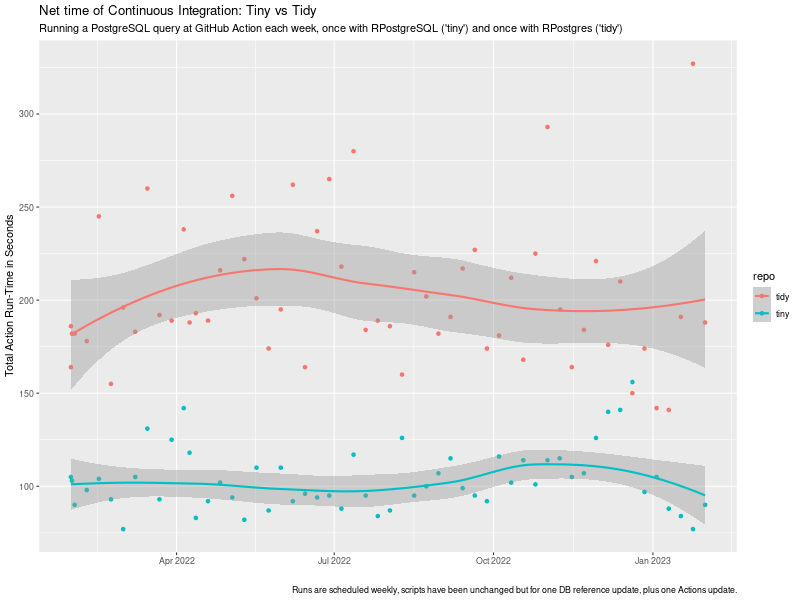 tiny vs tidy ci timing impact
chart
tiny vs tidy ci timing impact
chart
 I read somewhere a nice meme about Linux: Do you want an operating system or do you want an adventure? I love
it, because it is so true. What you are about to read is my adventure to set a usable screen resolution in a fresh
Debian testing installation.
The context is that I have two different Lenovo Thinkpad laptops with 16 screen and nvidia graphic cards. They are both
installed with the latest Debian testing. I use the closed-source nvidia drivers (they seem to work better than the nouveau
module). The desktop manager and environment that I use is lightdm + XFCE4. The monitor native resolution in both machines
is very high:
I read somewhere a nice meme about Linux: Do you want an operating system or do you want an adventure? I love
it, because it is so true. What you are about to read is my adventure to set a usable screen resolution in a fresh
Debian testing installation.
The context is that I have two different Lenovo Thinkpad laptops with 16 screen and nvidia graphic cards. They are both
installed with the latest Debian testing. I use the closed-source nvidia drivers (they seem to work better than the nouveau
module). The desktop manager and environment that I use is lightdm + XFCE4. The monitor native resolution in both machines
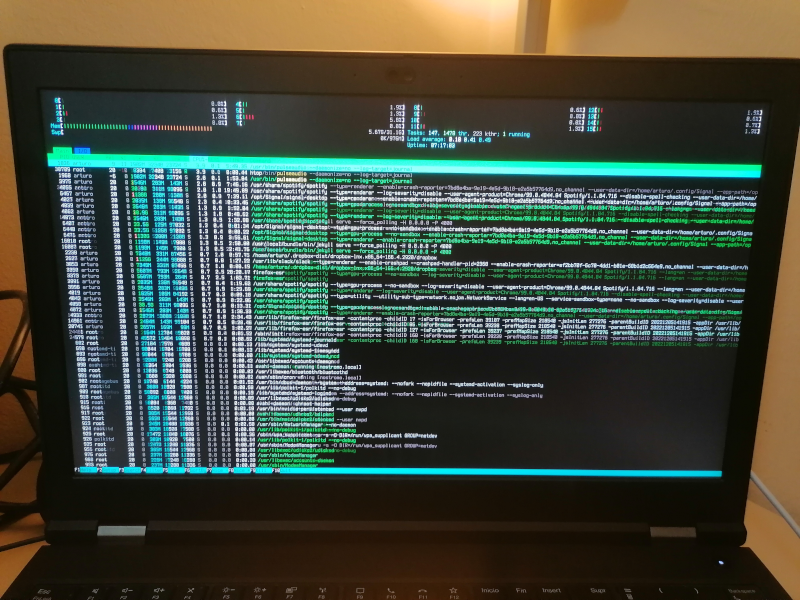
is very high: 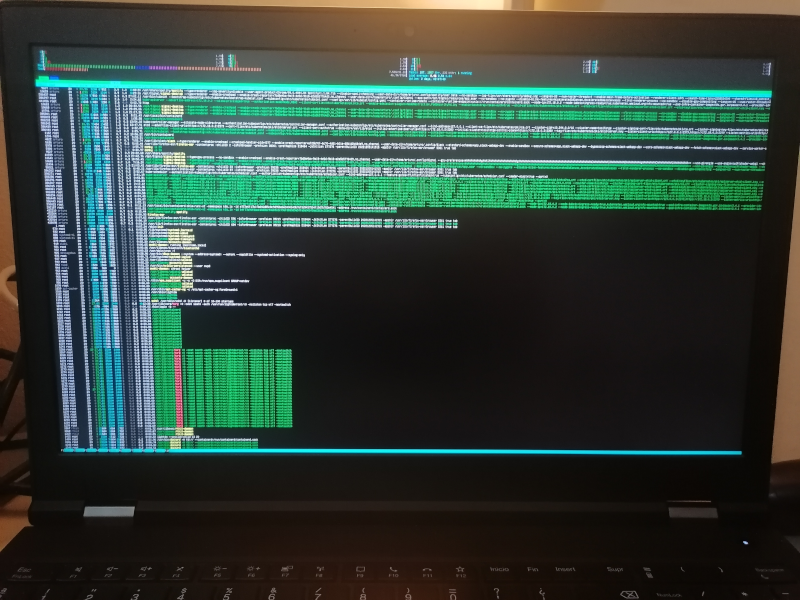 Everything in the system is affected by this:
 The truth is the solution is satisfying only to a degree. I m a person with good eyesight and can work with
these bit larger fonts. I m not sure if I can get larger fonts using this method, honestly.
After some search, I discovered that some folks already managed to describe the problem in detail and
filed a proper bug report in Debian, see
The truth is the solution is satisfying only to a degree. I m a person with good eyesight and can work with
these bit larger fonts. I m not sure if I can get larger fonts using this method, honestly.
After some search, I discovered that some folks already managed to describe the problem in detail and
filed a proper bug report in Debian, see 
 First up is Minidebconf Tamilnadu 2023 that would be held on 28-29 January 2023. You can find rest of the details




 As you know,
  The Rcpp team is thrilled to announce the newest release 1.0.10 of
the
The Rcpp team is thrilled to announce the newest release 1.0.10 of
the