Search Results: "dom"

1 June 2017

Paul Wise: FLOSS Activities May 2017

Changes

Issues

Review

Administration
  • Debian: discuss mail bounces with a hoster, check perms of LE results, add 1 user to a group, re-sent some TLS cert expiry mail, clean up mail bounce flood, approve some debian.net TLS certs, do the samhain dance thrice, end 1 samhain mail flood, diagnose/fix LDAP update issue, relay DebConf cert expiry mails, reboot 2 non-responsive VM, merged patches for debian.org-sources.debian.org meta-package,
  • Debian mentors: lintian/security updates & reboot
  • Debian wiki: delete stray tmp file, whitelist 14 email addresses, disable 1 accounts with bouncing email, ping 3 persons with bouncing email
  • Debian website: update/push index/CD/distrib
  • Debian QA: deploy my changes, disable some removed suites in qadb
  • Debian PTS: strip whitespace from existing pages, invalidate sigs so pages get a rebuild
  • Debian derivatives census: deploy changes
  • Openmoko: security updates & reboots.

Communication
  • Invite Purism (on IRC), XBian (also on IRC), DuZeru to the Debian derivatives census
  • Respond to the shutdown of Parsix
  • Report BlankOn fileserver and Huayra webserver issues
  • Organise a transition of Ubuntu/Endless Debian derivatives census maintainers
  • Advocate against Debian having a monopoly on hardware certification
  • Advocate working with existing merchandise vendors
  • Start a discussion about Debian membership in other organisations
  • Advocate for HPE to join the LVFS & support fwupd

Sponsors All work was done on a volunteer basis.

31 May 2017

Lars Wirzenius: Using a Yubikey 4 for ensafening one's encryption

Introduction I've written before about using a U2F key with PAM. This post continues the theme and explains how to use a smartcard with GnuPG for storing OpenPGP private keys. Specifically, a Yubikey 4 card, because that's what I have, but any good GnuPG compatible card should work. The Yubikey is both a GnuPG compatible smart card, and a U2F card. The Yubikey 4 can handle keys up to 4096 bits. Older Yubikeys can only handle keys up to 2095 bits. The reason to do this is to make it harder for an attacker to steal your encryption keys. I will assume you don't already have an OpenPGP key, or are willing to generate a new one. I will also assume you run Debian stretch; some of the desktop environment setup details may differ between Debian versions or between Linux distributions. You will need: Terminology Some terminology: Outline The process outline is:
  1. Create a new, signing-only master key with GnuPG.
  2. Create three "subkeys", one each for encryption, signing, and authentication. These subkeys are what everyone else uses.
  3. Export copies of the master key pair and the subkey pairs and put them in a safe place.
  4. Put the subkeys on the Yubikey.
  5. GnuPG will automatically use the keys from the card. You have to have the card plugged into a USB port for things to work. If someone steals your laptop, they won't get the private subkeys. Even if they steal your Yubikey, they won't get them (the smartcard is physically designed to prevent that), and can't even use them (because there's PIN codes or passphrases and getting them wrong several times locks up the smartcard).
  6. Use gpg-agent as your SSH agent, and the authentication-only subkey on the Yubikey is used as your ssh key.
Configure GnuPG The process in more detail: Create new keys
$ gpg --full-generate-key
gpg (GnuPG) 2.1.18; Copyright (C) 2017 Free Software Foundation, Inc.
This is free software: you are free to change and redistribute it.
There is NO WARRANTY, to the extent permitted by law.

Please select what kind of key you want:
(1) RSA and RSA (default)
(2) DSA and Elgamal
(3) DSA (sign only)
(4) RSA (sign only)
Your selection? 4
RSA keys may be between 1024 and 4096 bits long.
What keysize do you want? (2048) 4096
Requested keysize is 4096 bits
Please specify how long the key should be valid.
0 = key does not expire
= key expires in n days
w = key expires in n weeks
m = key expires in n months
y = key expires in n years
Key is valid for? (0) 1y
Key expires at Tue 29 May 2018 06:43:54 PM EEST
Is this correct? (y/N) y

GnuPG needs to construct a user ID to identify your key.

Real name: Lars Wirzenius
Email address: liw@liw.fi
Comment: test key
You selected this USER-ID:
"Lars Wirzenius (test key) <liw@liw.fi>>"

Change (N)ame, (C)omment, (E)mail or (O)kay/(Q)uit? o
We need to generate a lot of random bytes. It is a good idea to perform
some other action (type on the keyboard, move the mouse, utilize the
disks) during the prime generation; this gives the random number
generator a better chance to gain enough entropy.
gpg: key 25FB738D6EE435F7 marked as ultimately trusted
gpg: directory '/home/liw/.gnupg/openpgp-revocs.d' created
gpg: revocation certificate stored as '/home/liw/.gnupg/openpgp-revocs.d/A734C10BF2DF39D19DC0F6C025FB738D6EE435F7.rev'
public and secret key created and signed.

Note that this key cannot be used for encryption. You may want to use
the command "--edit-key" to generate a subkey for this purpose.
pub rsa4096 2017-05-29 [SC] [expires: 2018-05-29]
A734C10BF2DF39D19DC0F6C025FB738D6EE435F7
uid Lars Wirzenius (test key) <liw@liw.fi>
  • Note that I set a 1-year expiration for they key. The expiration can be extended at any time (if you have the master secret key), but unless you do, the key won't accidentally live longer than the chosen time.
  • Review the key:
$ gpg --list-secret-keys
/home/liw/.gnupg/pubring.kbx
----------------------------
sec rsa4096 2017-05-29 [SC] [expires: 2018-05-29]
A734C10BF2DF39D19DC0F6C025FB738D6EE435F7
uid [ultimate] Lars Wirzenius (test key) <liw@liw.fi>
  • You now have the signing-only master key. You should now create three subkeys (keyid is the key identifier shown in the key listing, A734C10BF2DF39D19DC0F6C025FB738D6EE435F7 above). Use the --expert option to be able to add an authentication-only subkey.
$ gpg --edit-key --expert A734C10BF2DF39D19DC0F6C025FB738D6EE435F7z
gpg (GnuPG) 2.1.18; Copyright (C) 2017 Free Software Foundation, Inc.
This is free software: you are free to change and redistribute it.
There is NO WARRANTY, to the extent permitted by law.

Secret key is available.

sec rsa4096/25FB738D6EE435F7
created: 2017-05-29 expires: 2018-05-29 usage: SC
trust: ultimate validity: ultimate
[ultimate] (1). Lars Wirzenius (test key) <liw@liw.fi>

gpg> addkey
Please select what kind of key you want:
(3) DSA (sign only)
(4) RSA (sign only)
(5) Elgamal (encrypt only)
(6) RSA (encrypt only)
(7) DSA (set your own capabilities)
(8) RSA (set your own capabilities)
(10) ECC (sign only)
(11) ECC (set your own capabilities)
(12) ECC (encrypt only)
(13) Existing key
Your selection? 4
RSA keys may be between 1024 and 4096 bits long.
What keysize do you want? (2048) 4096
Requested keysize is 4096 bits
Please specify how long the key should be valid.
0 = key does not expire
= key expires in n days
w = key expires in n weeks
m = key expires in n months
y = key expires in n years
Key is valid for? (0) 1y
Key expires at Tue 29 May 2018 06:44:52 PM EEST
Is this correct? (y/N) y
Really create? (y/N) y
We need to generate a lot of random bytes. It is a good idea to perform
some other action (type on the keyboard, move the mouse, utilize the
disks) during the prime generation; this gives the random number
generator a better chance to gain enough entropy.

sec rsa4096/25FB738D6EE435F7
created: 2017-05-29 expires: 2018-05-29 usage: SC
trust: ultimate validity: ultimate
ssb rsa4096/05F88308DFB71774
created: 2017-05-29 expires: 2018-05-29 usage: S
[ultimate] (1). Lars Wirzenius (test key) <liw@liw.fi>

gpg> addkey
Please select what kind of key you want:
(3) DSA (sign only)
(4) RSA (sign only
(5) Elgamal (encrypt only)
(6) RSA (encrypt only)
(7) DSA (set your own capabilities)
(8) RSA (set your own capabilities)
(10) ECC (sign only)
(11) ECC (set your own capabilities)
(12) ECC (encrypt only)
(13) Existing key
Your selection? 6
RSA keys may be between 1024 and 4096 bits long.
What keysize do you want? (2048) 4096
Requested keysize is 4096 bits
Please specify how long the key should be valid
0 = key does not expire
= key expires in n days
w = key expires in n weeks
m = key expires in n months
y = key expires in n years
Key is valid for? (0) 1y
Key expires at Tue 29 May 2018 06:45:22 PM EEST
Is this correct? (y/N) y
Really create? (y/N) y
We need to generate a lot of random bytes. It is a good idea to perform
some other action (type on the keyboard, move the mouse, utilize the
disks) during the prime generation; this gives the random number
generator a better chance to gain enough entropy.

sec rsa4096/25FB738D6EE435F7
created: 2017-05-29 expires: 2018-05-29 usage: SC
trust: ultimate validity: ultimate
ssb rsa4096/05F88308DFB71774
created: 2017-05-29 expires: 2018-05-29 usage: S
ssb rsa4096/2929E8A96CBA57C7
created: 2017-05-29 expires: 2018-05-29 usage: E
[ultimate] (1). Lars Wirzenius (test key) <liw@liw.fi>

gpg> addkey
Please select what kind of key you want:
(3) DSA (sign only)
(4) RSA (sign only)
(5) Elgamal (encrypt only)
(6) RSA (encrypt only)
(7) DSA (set your own capabilities)
(8) RSA (set your own capabilities)
(10) ECC (sign only)
(11) ECC (set your own capabilities)
(12) ECC (encrypt only)
(13) Existing key
Your selection? 8

Possible actions for a RSA key: Sign Encrypt Authenticate
Current allowed actions: Sign Encrypt

(S) Toggle the sign capability
(E) Toggle the encrypt capability
(A) Toggle the authenticate capability
(Q) Finished

Your selection? a

Possible actions for a RSA key: Sign Encrypt Authenticate
Current allowed actions: Sign Encrypt Authenticate

(S) Toggle the sign capability
(E) Toggle the encrypt capability
(A) Toggle the authenticate capability
(Q) Finished

Your selection? s

Possible actions for a RSA key: Sign Encrypt Authenticate
Current allowed actions: Encrypt Authenticate

(S) Toggle the sign capability
(E) Toggle the encrypt capability
(A) Toggle the authenticate capability
(Q) Finished

Your selection? e

Possible actions for a RSA key: Sign Encrypt Authenticate
Current allowed actions: Authenticate

(S) Toggle the sign capability
(E) Toggle the encrypt capability
(A) Toggle the authenticate capability
(Q) Finished

Your selection? q
RSA keys may be btween 1024 and 4096 bits long.
What keysize do you want? (2048) 4096
Requested keysize is 4096 bits
Please specify how long the key should be valid.
0 = key does not expire
= key expires in n days
w = key expires in n weeks
m = key expires in n months
y = key expires in n years
Key is valid for? (0) 1y
Key expires at Tue 29 May 2018 06:45:56 PM EEST
Is this correct? (y/N) y
Really create? (y/N) y
We need to generate a lot of random bytes. It is a good idea to perform
some other action (type on the keyboard, move the mouse, utilize the
disks) during the prime generation; this gives the random number
generator a better chance to gain enough entropy.

sec rsa4096/25FB738D6EE435F7
created: 2017-05-29 expires: 2018-05-29 usage: SC
trust: ultimate validity: ultimate
ssb rsa4096/05F88308DFB71774
created: 2017-05-29 expires: 2018-05-29 usage: S
ssb rsa4096/2929E8A96CBA57C7
created: 2017-05-29 expires: 2018-05-29 usage: E
ssb rsa4096/4477EB0AEF1C440A
created: 2017-05-29 expires: 2018-05-29 usage: A
[ultimate] (1). Lars Wirzenius (test key) <liw@liw.fi>

gpg> save
Export secret keys to files, make a backup
  • You now have a master key and three subkeys. They are hidden in the ~/.gnupg directory. It is time to "export" the secret keys out from there.
$ gpg --export-secret-key --armor keyid > master.key
$ gpg --export-secret-subkeys --armor keyid > subkeys.key
  • You should keep these files safe. You don't want to lose them, and you don't want anyone else to get access to them. I recommend you format two USB memory sticks, format them using full-disk encryption, and copy the exported files to both of them. Then keep them somewhere safe. There's ways of making this part more sophisticated, but that's for another time.
  • The next step involves some hoop-jumping. What we want is to have the master secret key NOT on you machine, so we tell GnuPG to remove it. We exported it above, so we won't lose it. However, deleting the master secret key also removes the secret subkeys. But we can import those without importing the master secret key.
$ gpg --delete-secret-key keyid
$ gpg --import subkeys.key
  • Now verify that you have the secret subkeys, but not the master key. There should be one line starting with sec# (note the hash mark, which indicates the key isn't available), and three lines starting with ssb (no hash mark).
$ gpg -K
/home/liw/.gnupg/pubring.kbx
----------------------------
sec# rsa4096 2017-05-29 [SC] [expires: 2018-05-29]
A734C10BF2DF39D19DC0F6C025FB738D6EE435F7
uid [ultimate] Lars Wirzenius (test key) <liw@liw.fi>
ssb rsa4096 2017-05-29 [S] [expires: 2018-05-29]
ssb rsa4096 2017-05-29 [E] [expires: 2018-05-29]
ssb rsa4096 2017-05-29 [A] [expires: 2018-05-29]
Install subkeys on a Yubikey
  • Now insert the Yubikey in a USB slot. We can start transferring the secret subkeys to the Yubikey. If you want, you can set your name and other information, and change PIN codes. There's several types of PIN codes: normal use, unblocking a locked card, and a third PIN code for admin operations. Changing the PIN codes is a good idea, otherwise everyone will just try the default of 123456 (admin 12345678). However, I'm skipping that in the interest of brevity.
$ gpg -card-edit
...
  • Actually move the subkeys to the card. Note that this does a move, not a copy, and the subkeys will be removed from your ~/.gnupg (check with gpg -K).
$ gpg --edit-key liw
gpg (GnuPG) 2.1.18; Copyright (C) 2017 Free Software Foundation, Inc.
This is free software: you are free to change and redistribute it.
There is NO WARRANTY, to the extent permitted by law.

Secret key is available.

pub rsa4096/25FB738D6EE435F7
created: 2017-05-29 expires: 2018-05-29 usage: SC
trust: ultimate validity: ultimate
ssb rsa4096/05F88308DFB71774
created: 2017-05-29 expires: 2018-05-29 usage: S
ssb rsa4096/2929E8A96CBA57C7
created: 2017-05-29 expires: 2018-05-29 usage: E
ssb rsa4096/4477EB0AEF1C440A
created: 2017-05-29 expires: 2018-05-29 usage: A
[ultimate] (1). Lars Wirzenius (test key) <liw@liw.fi>

gpg> key 1

pub rsa4096/25FB738D6EE435F7
created: 2017-05-29 expires: 2018-05-29 usage: SC
trust: ultimate validity: ultimate
ssb* rsa4096/05F88308DFB71774
created: 2017-05-29 expires: 2018-05-29 usage: S
ssb rsa4096/2929E8A96CBA57C7
created: 2017-05-29 expires: 2018-05-29 usage: E
ssb rsa4096/4477EB0AEF1C440A
created: 2017-05-29 expires: 2018-05-29 usage: A
[ultimate] (1). Lars Wirzenius (test key) <liw@liw.fi>

gpg> keytocard
Please select where to store the key:
(1) Signature key
(3) Authentication key
Your selection? 1

pub rsa4096/25FB738D6EE435F7
created: 2017-05-29 expires: 2018-05-29 usage: SC
trust: ultimate validity: ultimate
ssb* rsa4096/05F88308DFB71774
created: 2017-05-29 expires: 2018-05-29 usage: S
ssb rsa4096/2929E8A96CBA57C7
created: 2017-05-29 expires: 2018-05-29 usage: E
ssb rsa4096/4477EB0AEF1C440A
created: 2017-05-29 expires: 2018-05-29 usage: A
[ultimate] (1). Lars Wirzenius (test key) <liw@liw.fi>

gpg> key 1

pub rsa4096/25FB738D6EE435F7
created: 2017-05-29 expires: 2018-05-29 usage: SC
trust: ultimate validity: ultimate
ssb rsa4096/05F88308DFB71774
created: 2017-05-29 expires: 2018-05-29 usage: S
ssb rsa4096/2929E8A96CBA57C7
created: 2017-05-29 expires: 2018-05-29 usage: E
ssb rsa4096/4477EB0AEF1C440A
created: 2017-05-29 expires: 2018-05-29 usage: A
[ultimate] (1). Lars Wirzenius (test key) <liw@liw.fi>

gpg> key 2

pub rsa4096/25FB738D6EE435F7
created: 2017-05-29 expires: 2018-05-29 usage: SC
trust: ultimate validity: ultimate
ssb rsa4096/05F88308DFB71774
created: 2017-05-29 expires: 2018-05-29 usage: S
ssb* rsa4096/2929E8A96CBA57C7
created: 2017-05-29 expires: 2018-05-29 usage: E
ssb rsa4096/4477EB0AEF1C440A
created: 2017-05-29 expires: 2018-05-29 usage: A
[ultimate] (1). Lars Wirzenius (test key) <liw@liw.fi>

gpg> keytocard
Please select where to store the key:
(2) Encryption key
Your selection? 2

pub rsa4096/25FB738D6EE435F7
created: 2017-05-29 expires: 2018-05-29 usage: SC
trust: ultimate validity: ultimate
ssb rsa4096/05F88308DFB71774
created: 2017-05-29 expires: 2018-05-29 usage: S
ssb* rsa4096/2929E8A96CBA57C7
created: 2017-05-29 expires: 2018-05-29 usage: E
ssb rsa4096/4477EB0AEF1C440A
created: 2017-05-29 expires: 2018-05-29 usage: A
[ultimate] (1). Lars Wirzenius (test key) <liw@liw.fi>

gpg> key 2

pub rsa4096/25FB738D6EE435F7
created: 2017-05-29 expires: 2018-05-29 usage: SC
trust: ultimate validity: ultimate
ssb rsa4096/05F88308DFB71774
created: 2017-05-29 expires: 2018-05-29 usage: S
ssb rsa4096/2929E8A96CBA57C7
created: 2017-05-29 expires: 2018-05-29 usage: E
ssb rsa4096/4477EB0AEF1C440A
created: 2017-05-29 expires: 2018-05-29 usage: A
[ultimate] (1). Lars Wirzenius (test key) <liw@liw.fi>

gpg> key 3

pub rsa4096/25FB738D6EE435F7
created: 2017-05-29 expires: 2018-05-29 usage: SC
trust: ultimate validity: ultimate
ssb rsa4096/05F88308DFB71774
created: 2017-05-29 expires: 2018-05-29 usage: S
ssb rsa4096/2929E8A96CBA57C7
created: 2017-05-29 expires: 2018-05-29 usage: E
ssb* rsa4096/4477EB0AEF1C440A
created: 2017-05-29 expires: 2018-05-29 usage: A
[ultimate] (1). Lars Wirzenius (test key) <liw@liw.fi>

gpg> keytocard
Please select where to store the key:
(3) Authentication key
Your selection? 3

pub rsa4096/25FB738D6EE435F7
created: 2017-05-29 expires: 2018-05-29 usage: SC
trust: ultimate validity: ultimate
ssb rsa4096/05F88308DFB71774
created: 2017-05-29 expires: 2018-05-29 usage: S
ssb rsa4096/2929E8A96CBA57C7
created: 2017-05-29 expires: 2018-05-29 usage: E
ssb* rsa4096/4477EB0AEF1C440A
created: 2017-05-29 expires: 2018-05-29 usage: A
[ultimate] (1). Lars Wirzenius (test key) <liw@liw.fi>

gpg> save
  • If you want to use several Yubikeys, or have a spare one just in case, repeat the previous four steps (starting from importing subkeys back into ~/.gnupg).
  • You're now done, as far GnuPG use is concerned. Any time you need to sign, encrypt, or decrypt something, GnuPG will look for your subkeys on the Yubikey, and will tell you to insert it in a USB port if it can't find the key.
Use subkey on Yubikey as your SSH key
  • To actually use the authentication-only subkey on the Yubikey for ssh, you need to configure your system to use gpg-agent as the SSH agent. Add the following line to .gnupg/gpg-agent.conf:
     enable-ssh-support
    
  • On a Debian stretch system with GNOME, edit /etc/xdg/autostart/gnome-keyring-ssh.desktop to have the following line, to prevent the GNOME ssh agent from starting up:
     Hidden=true
    
  • Edit /etc/X11/Xsession.options and remove or comment out the line that says use-ssh-agent. This stops a system-started ssh-agent from being started when the desktop start.
  • Create the file ~/.config/autostart/gpg-agent.desktop with the following content:
     [Desktop Entry]
     Type=Application
     Name=gpg-agent
     Comment=gpg-agent
     Exec=/usr/bin/gpg-agent --daemon
     OnlyShowIn=GNOME;Unity;MATE;
     X-GNOME-Autostart-Phase=PreDisplayServer
     X-GNOME-AutoRestart=false
     X-GNOME-Autostart-Notify=true
     X-GNOME-Bugzilla-Bugzilla=GNOME
     X-GNOME-Bugzilla-Product=gnome-keyring
     X-GNOME-Bugzilla-Component=general
     X-GNOME-Bugzilla-Version=3.20.0
    
  • To test, log out, and back in again, run the following in a terminal:
$ ssh-add -l
The output should contain a line that looks like this:
    4096 SHA256:PDCzyQPpd9tiWsELM8LwaLBsMDMm42J8/eEfezNgnVc cardno:000604626953 (RSA)
  • You need to export the authentication-only subkey in the SSH key format. You need this for adding to .ssh/authorized_keys, if nothing else.
$ gpg --export-ssh-key keyid > ssh.pub
  • Happy hacking.
See also See also the following links. I've used them to learn enough to write the above. Edited to fix:
  • Output of gpg -K after removing secret master key.

30 May 2017

Neil McGovern: GNOME ED Update Week 22

Delayed update Firstly, an apology I ve been rather lax about doing these updates. I ll try and highlight more happenings in the project more frequently in future. GUADEC Birthday party

In August it will have been 20 years since the GNOME project was founded. To celebrate this occasion, a special party is being organised. All current and former GNOME Foundation members are especially welcome to attend. We d love it if you could join us! The party is taking place as part of GUADEC 2017. For more details and announcements, follow @guadec.

Date Saturday 29th July 2017
Time 19:00
Location Manchester, United Kingdom
Venue Museum of Science and Industry
Engagement team Did you know about the GNOME Engagement Team? This is the team that helps promote GNOME and push for adoption of GNOME. It s a fantastic way to get involved in the non-technical part of the project, and they re always looking for more help PIA affiliate programme Private Internet Access is a long time supporter of the project, and we ve recently worked out an affiliate deal with them If you sign up for their VPN services via https://www.privateinternetaccess.com/pages/buy-vpn/GNOME, then the foundation receives a contribution to help further the project. I ve personally signed up for PIA s VPN services, as working remotely I sometimes find myself on public wifi hotspots, and the risks of these are fairly well documented. Board elections One of the characteristics of the Foundation is that the board is elected by foundation members. It s the time of year again where this happens and we have a great list of candidates. Voting is open until 9th June, so I d encourage any foundation member to read up, and vote accordingly!

Steinar H. Gunderson: Nageru 1.6.0 released

I've released version 1.6.0 of Nageru, my live video mixer, together with dependent libraries Movit 1.5.1 and bmusb 0.7.0. The primray new feature this time is integration with CasparCG, the dominating open-source broadcast graphics system, which opens up a whole new world of possibilities for intelligent overlay graphics. (Actually, the feature is a bit more generic than that; any FFmpeg file or stream will do as input. Audio isn't supported yet, though.) You can see a simple HTML5 CasparCG setup in the ultimate tournament stream test we did in April, in preparation of a larger event in September; CasparCG generates a stream with alpha, which is then fed into Nageru and used on top of the three camera sources. Apart from that, there's a new frame analyzer that helps with calibrating your signal chain; there are lots of devices that will happily mess with your signal, and measuring is the first step in counteracting that. (There's also a few input interpretation tweaks that will help most common issues.) 1.6.0 is on its way to Debian experimental, along with its dependencies (stretch will release with Nageru 1.4.2); there are likely to be backports when stretch releases and the backport queue opens up.

27 May 2017

Lars Wirzenius: Distix movement

Distix is my distributed ticketing system. I initially wrote the core of it as a bit of programming performance art, to celebrate my 30 years as a programmer. Distix is built on top of git and emails in Maildirs. It is a silent listener to your issue and bug discussions: as long as you ensure it gets a copy of each mail, it takes care of automatically arranging things into separate tickets based on email threading. Users and customers do not need to even know Distix is being used. Only the "support staff" need ever interact with Distix, and they mostly only need to close tickets that have been dealt with. I've been using Distix for my own stuff for some time now, and recently we've started using it at work. I slowly improve it as we find problems. It's not a sleek, smooth, finished tool. It's clunky, weird, and probably not what you want. But it's what I want. Changes in recent months:
  • There is a new website: http://distix.eu/. No particular good reason for a new website, but I won the domain for free a couple of years ago, so I might as well use it.
  • In addition, a ticketing system for Distix itself: http://tickets.distix.eu/. Possibly I should've called the subdomain dogfood, but I'm a serious person, not prone to trying to be funny.
  • Mails can now be imported using IMAP.
  • Importing has been optimized for speed and memory use, making my own production use more practical.
I've discussed with a friend the possibility of writing a web UI, and some day maybe that will happen. For now, distix is a command line applicaton that can generate a static HTML site.

26 May 2017

Michael Prokop: The #newinstretch game: dbgsym packages in Debian/stretch

Debug packages include debug symbols and so far were usually named <package>-dbg in Debian. Those packages are essential if you ve to debug failing (especially: crashing) programs. Since December 2015 Debian has automatic dbgsym packages, being built by default. Those packages are available as <package>-dbgsym, so starting with Debian/stretch you should no longer look for -dbg packages but for -dbgsym instead. Currently there are 13.369 dbgsym packages available for the amd64 architecture of Debian/stretch, comparing this to the 2.250 packages which I counted being available for Debian/jessie this is really a huge improvement. (If you re interested in the details of dbgsym packages as a package maintainer take a look at the Automatic Debug Packages page in the Debian wiki.) The dbgsym packages are NOT provided by the usual Debian archive though (which is good thing, since those packages are quite disk space consuming, e.g. just the amd64 stretch mirror of debian-debug consumes 47GB). Instead there s a new archive called debian-debug. To get access to the dbgsym packages via the debian-debug suite on your Debian/stretch system include the following entry in your apt s sources.list configuration (replace deb.debian.org with whatever mirror you prefer):
deb http://deb.debian.org/debian-debug/ stretch-debug main
If you re not yet familiar with usage of such debug packages let me give you a short demo. Let s start with sending SIGILL (Illegal Instruction) to a running sha256sum process, causing it to generate a so called core dump file:
% sha256sum /dev/urandom &
[1] 1126
% kill -4 1126
% 
[1]+  Illegal instruction     (core dumped) sha256sum /dev/urandom
% ls
core
$ file core
core: ELF 64-bit LSB core file x86-64, version 1 (SYSV), SVR4-style, from 'sha256sum /dev/urandom', real uid: 1000, effective uid: 1000, real gid: 1000, effective gid: 1000, execfn: '/usr/bin/sha256sum', platform: 'x86_64'
Now we can run the GNU Debugger (gdb) on this core file, executing:
% gdb sha256sum core
[...]
Type "apropos word" to search for commands related to "word"...
Reading symbols from sha256sum...(no debugging symbols found)...done.
[New LWP 1126]
Core was generated by  sha256sum /dev/urandom'.
Program terminated with signal SIGILL, Illegal instruction.
#0  0x000055fe9aab63db in ?? ()
(gdb) bt
#0  0x000055fe9aab63db in ?? ()
#1  0x000055fe9aab8606 in ?? ()
#2  0x000055fe9aab4e5b in ?? ()
#3  0x000055fe9aab42ea in ?? ()
#4  0x00007faec30872b1 in __libc_start_main (main=0x55fe9aab3ae0, argc=2, argv=0x7ffc512951f8, init=<optimized out>, fini=<optimized out>, rtld_fini=<optimized out>, stack_end=0x7ffc512951e8) at ../csu/libc-start.c:291
#5  0x000055fe9aab4b5a in ?? ()
(gdb) 
As you can see by the several ?? question marks, the bt command (short for backtrace) doesn t provide useful information.
So let s install the according debug package, which is coreutils-dbgsym in this case (since the sha256sum binary which generated the core file is part of the coreutils package). Then let s rerun the same gdb steps:
% gdb sha256sum core
[...]
Type "apropos word" to search for commands related to "word"...
Reading symbols from sha256sum...Reading symbols from /usr/lib/debug/.build-id/a4/b946ef7c161f2d215518ca38d3f0300bcbdbb7.debug...done.
done.
[New LWP 1126]
Core was generated by  sha256sum /dev/urandom'.
Program terminated with signal SIGILL, Illegal instruction.
#0  0x000055fe9aab63db in sha256_process_block (buffer=buffer@entry=0x55fe9be95290, len=len@entry=32768, ctx=ctx@entry=0x7ffc51294eb0) at lib/sha256.c:526
526     lib/sha256.c: No such file or directory.
(gdb) bt
#0  0x000055fe9aab63db in sha256_process_block (buffer=buffer@entry=0x55fe9be95290, len=len@entry=32768, ctx=ctx@entry=0x7ffc51294eb0) at lib/sha256.c:526
#1  0x000055fe9aab8606 in sha256_stream (stream=0x55fe9be95060, resblock=0x7ffc51295080) at lib/sha256.c:230
#2  0x000055fe9aab4e5b in digest_file (filename=0x7ffc51295f3a "/dev/urandom", bin_result=0x7ffc51295080 "\001", missing=0x7ffc51295078, binary=<optimized out>) at src/md5sum.c:624
#3  0x000055fe9aab42ea in main (argc=<optimized out>, argv=<optimized out>) at src/md5sum.c:1036
As you can see it s reading the debug symbols from /usr/lib/debug/.build-id/a4/b946ef7c161f2d215518ca38d3f0300bcbdbb7.debug and this is what we were looking for.
gdb now also tells us that we don t have lib/sha256.c available. For even better debugging it s useful to have the according source code available. This is also just an apt-get source coreutils ; cd coreutils-8.26/ away:
~/coreutils-8.26 % gdb sha256sum ~/core
[...]
Type "apropos word" to search for commands related to "word"...
Reading symbols from sha256sum...Reading symbols from /usr/lib/debug/.build-id/a4/b946ef7c161f2d215518ca38d3f0300bcbdbb7.debug...done.
done.
[New LWP 1126]
Core was generated by  sha256sum /dev/urandom'.
Program terminated with signal SIGILL, Illegal instruction.
#0  0x000055fe9aab63db in sha256_process_block (buffer=buffer@entry=0x55fe9be95290, len=len@entry=32768, ctx=ctx@entry=0x7ffc51294eb0) at lib/sha256.c:526
526           R( h, a, b, c, d, e, f, g, K(25), M(25) );
(gdb) bt
#0  0x000055fe9aab63db in sha256_process_block (buffer=buffer@entry=0x55fe9be95290, len=len@entry=32768, ctx=ctx@entry=0x7ffc51294eb0) at lib/sha256.c:526
#1  0x000055fe9aab8606 in sha256_stream (stream=0x55fe9be95060, resblock=0x7ffc51295080) at lib/sha256.c:230
#2  0x000055fe9aab4e5b in digest_file (filename=0x7ffc51295f3a "/dev/urandom", bin_result=0x7ffc51295080 "\001", missing=0x7ffc51295078, binary=<optimized out>) at src/md5sum.c:624
#3  0x000055fe9aab42ea in main (argc=<optimized out>, argv=<optimized out>) at src/md5sum.c:1036
(gdb) 
Now we re ready for all the debugging magic. :) Thanks to everyone who was involved in getting us the automatic dbgsym package builds in Debian!

24 May 2017

Michal &#268;iha&#345;: Weblate 2.14.1

Weblate 2.14.1 has been released today. It is bugfix release fixing possible migration issues, search results navigation and some minor security issues. Full list of changes:
  • Fixed possible error when paginating search results.
  • Fixed migrations from older versions in some corner cases.
  • Fixed possible CSRF on project watch and unwatch.
  • The password reset no longer authenticates user.
  • Fixed possible captcha bypass on forgotten password.
If you are upgrading from older version, please follow our upgrading instructions. You can find more information about Weblate on https://weblate.org, the code is hosted on Github. If you are curious how it looks, you can try it out on demo server. You can login there with demo account using demo password or register your own user. Weblate is also being used on https://hosted.weblate.org/ as official translating service for phpMyAdmin, OsmAnd, Turris, FreedomBox, Weblate itself and many other projects. Should you be looking for hosting of translations for your project, I'm happy to host them for you or help with setting it up on your infrastructure. Further development of Weblate would not be possible without people providing donations, thanks to everybody who have helped so far! The roadmap for next release is just being prepared, you can influence this by expressing support for individual issues either by comments or by providing bounty for them.

Filed under: Debian English SUSE Weblate

21 May 2017

Elena 'valhalla' Grandi: Modern XMPP Server

Modern XMPP Server

I've published a new HOWTO on my website www.trueelena.org/computers/ho:

www.enricozini.org/blog/2017/d already wrote about the Why (and the What, Who and When), so I'll just quote his conclusion and move on to the How.

I now have an XMPP setup which has all the features of the recent fancy chat systems, and on top of that it runs, client and server, on Free Software, which can be audited, it is federated and I can self-host my own server in my own VPS if I want to, with packages supported in Debian.


How

I've decided to install prosody.im/, mostly because it was recommended by the RTC QuickStart Guide rtcquickstart.org/; I've heard that similar results can be reached with www.ejabberd.im/ and other servers.

I'm also targeting www.debian.org/ stable (+ backports); as I write this is jessie; if there are significant differences I will update this article when I will upgrade my server to stretch. Right now, this means that I'm using prosody 0.9 (and that's probably also the version that will be available in stretch).

Installation and prerequisites

You will need to enable the backports.debian.org/ repository and then install the packages prosody and prosody-modules.

You also need to setup some TLS certificates (I used Let's Encrypt letsencrypt.org/); and make them readable by the prosody user; you can see Chapter 12 of the RTC QuickStart Guide rtcquickstart.org/guide/multi/ for more details.

On your firewall, you'll need to open the following TCP ports:


  • 5222 (client2server)

  • 5269 (server2server)

  • 5280 (default http port for prosody)

  • 5281 (default https port for prosody)


The latter two are needed to enable some services provided via http(s), including rich media transfers.

With just a handful of users, I didn't bother to configure LDAP or anything else, but just created users manually via:

prosodyctl adduser alice@example.org

In-band registration is disabled by default (and I've left it that way, to prevent my server from being used to send spim en.wikipedia.org/wiki/Messagin).

prosody configuration

You can then start configuring prosody by editing /etc/prosody/prosody.cfg.lua and changing a few values from the distribution defaults.

First of all, enforce the use of encryption and certificate checking both for client2server and server2server communications with:


c2s_require_encryption = true
s2s_secure_auth = true


and then, sadly, add to the whitelist any server that you want to talk to and doesn't support the above:


s2s_insecure_domains = "gmail.com"


virtualhosts

For each virtualhost you want to configure, create a file /etc/prosody/conf.avail/chat.example.org.cfg.lua with contents like the following:


VirtualHost "chat.example.org"
enabled = true
ssl =
key = "/etc/ssl/private/example.org-key.pem";
certificate = "/etc/ssl/public/example.org.pem";


For the domains where you also want to enable MUCs, add the follwing lines:


Component "conference.chat.example.org" "muc"
restrict_room_creation = "local"


the "local" configures prosody so that only local users are allowed to create new rooms (but then everybody can join them, if the room administrator allows it): this may help reduce unwanted usages of your server by random people.

You can also add the following line to enable rich media transfers via http uploads (XEP-0363):


Component "upload.chat.example.org" "http_upload"

The defaults are pretty sane, but see modules.prosody.im/mod_http_up for details on what knobs you can configure for this module

Don't forget to enable the virtualhost by linking the file inside /etc/prosody/conf.d/.

additional modules

Most of the other interesting XEPs are enabled by loading additional modules inside /etc/prosody/prosody.cfg.lua (under modules_enabled); to enable mod_something just add a line like:


"something";

Most of these come from the prosody-modules package (and thus from modules.prosody.im/ ) and some may require changing when prosody 0.10 will be available; when this is the case it is mentioned below.


  • mod_carbons (XEP-0280)
    To keep conversations syncronized while using multiple devices at the same time.

    This will be included by default in prosody 0.10.


  • mod_privacy + mod_blocking (XEP-0191)
    To allow user-controlled blocking of users, including as an anti-spim measure.

    In prosody 0.10 these two modules will be replaced by mod_privacy.


  • mod_smacks (XEP-0198)
    Allow clients to resume a disconnected session before a customizable timeout and prevent message loss.


  • mod_mam (XEP-0313)
    Archive messages on the server for a limited period of time (default 1 week) and allow clients to retrieve them; this is required to syncronize message history between multiple clients.

    With prosody 0.9 only an in-memory storage backend is available, which may make this module problematic on servers with many users. prosody 0.10 will fix this by adding support for an SQL backed storage with archiving capabilities.


  • mod_throttle_presence + mod_filter_chatstates (XEP-0352)
    Filter out presence updates and chat states when the client announces (via Client State Indication) that the user isn't looking. This is useful to reduce power and bandwidth usage for "useless" traffic.


@Gruppo Linux Como @LIFO

20 May 2017

Neil Williams: Software, service, data and freedom

Free software, free services but what about your data? I care a lot about free software, not only as a Debian Developer. The use of software as a service matters as well because my principle free software development is on just such a project, licensed under the GNU Affero General Public License version 3. The AGPL helps by allowing anyone who is suitably skilled to install their own copy of the software and run their own service on their own hardware. As a project, we are seeing increasing numbers of groups doing exactly this and these groups are actively contributing back to the project. So what is the problem? We've got an active project, an active community and everything is under a free software licence and regularly uploaded to Debian main. We have open code review with anonymous access to our own source code CI and anonymous access to project planning, open mailing list archives as well as an open bug tracker and a very active IRC channel (#linaro-lava on OFTC). We develop in the open, we respond in the open and we publish frequently (monthly, approximately). The code we write defaults to public visibilty at runtime with restrictions available for certain use cases. What else can we be doing? Well it was a simple question which started me thinking.
The lava documentation has various example test scripts e.g. https://validation.linaro.org/static/docs/v2/examples/test-jobs/qemu-kernel-standard-sid.yaml these have no licence information, we've adapted them for a Linux Foundation project, what licence should apply to these files? Robert Marshall
Those are our own examples, contributed as part of the documentation and covered by the AGPL like the rest of the documentation and the software which it documents, so I replied with the same. However, what about all the other submissions received by the service?
Data Freedom LAVA acts by providing a service to authenticated users. The software runs your test code on hardware which might not be available to the user or which is simply inconvenient for the test writer to setup themselves. The AGPL covers this nicely. What about the data contributed by the users? We make this available to other users who will, naturally, copy and paste for their own tests. In most cases, because the software defaults to public access, anonymous users also get to learn from the contributions of other test writers. This is a good thing and to be encouraged. (One reason why we moved to YAML for all submissions was to allow comments to help other users understand why the submission does specific things.) Writing a test job submission or a test shell definition from scratch is a non-trivial amount of work. We've written dozens of pages of documentation covering how and how not to do it but the detail of how a test job runs exactly what the test writer requires can involve substantial effort. (Our documentation recommends using version control for each of these works for exactly these reasons.) At what point do these works become software? At what point do these need licensing? How could that be declared?
Perils of the Javascript Trap approach When reading up on the AGPL, I also read about Service as a Software Substitute (SaaSS) and this led to The Javascript Trap. I don't consider LAVA to be SaaSS although it is Software as a Service (SaaS). (Distinguishing between those is best left to the GNU document as it is an almighty tangle at times.) I did look at the GNU ideas for licensing Javascript but it seems cumbersome and unnecessary - a protocol designed for the specific purposes of their own service rather than as a solution which could be readily adopted by all such services. The same problems affect trying to untangle sharing the test job data within LAVA.
Adding Licence text The traditional way, of course, is simply to add twenty lines or so of comments at the top of every file. This works nicely for source code because the comments are hidden from the final UI (unless an explicit reference is made in the --help output or similar). It is less nice for human readable submissions where the first thing someone has to do is scroll passed the comments to get to what they want to see. At that point, it starts to look like a popup or a nagging banner - blocking the requested content on a website to try and get the viewer to subscribe to a newsletter or pay for the rest of the content. Let's not actively annoy visitors who are trying to get things done.
Adding Licence files This can be done in the remote version control repository - then a single line in the submitted file can point at the licence. This is how I'm seeking to solve the problem of our own repositories. If the reference URL is included in the metadata of the test job submission, it can even be linked into the test job metadata and made available to everyone through the results API.
metadata:
  licence.text: http://mysite/lava/git/COPYING
  licence.name: BSD 3 clause
Metadata in LAVA test job submissions is free-form but if the example was adopted as a convention for LAVA submissions, it would make it easy for someone to query LAVA for the licences of a range of test submissions. Currently, LAVA does not store metadata from the test shell definitions except the URL of the git repo for the test shell definition but that may be enough in most cases for someone to find the relevant COPYING or LICENCE file.
Which licence? This could be a problem too. If users contribute data under unfriendly licences, what is LAVA to do? I've used the BSD 3 clause in the above example as I expect it to be the most commonly used licence for these contributions. A copyleft licence could be used, although doing so would require additional metadata in the submission to declare how to contribute back to the original author (because that is usually not a member of the LAVA project).
Why not Creative Commons? Although I'm referring to these contributions as data, these are not pieces of prose or images or audio. These are instructions (with comments) for a specific piece of software to execute on behalf of the user. As such, these objects must comply with the schema and syntax of the receiving service, so a code-based licence would seem correct.
Results Finally, a word about what comes back from your data submission - the results. This data cannot be restricted by any licence affecting either the submission or the software, it can be restricted using the API or left as the default of public access. If the results and the submission data really are private, then the solution is to take advantage of the AGPL, take the source code of LAVA and run it internally where the entire service can be placed within a firewall.
What happens next?
  1. Please consider editing your own LAVA test job submissions to add licence metadata.
  2. Please use comments in your own LAVA test job submissions, especially if you are using some form of template engine to generate the submission. This data will be used by others, it is easier for everyone if those users do not have to ask us or you about why your test job does what it does.
  3. Add a file to your own repositories containing LAVA test shell definitions to declare how these files can be shared freely.
  4. Think about other services to which you submit data which is either only partially machine generated or which is entirely human created. Is that data free-form or are you essentially asking the service to do a precise task on your behalf as if you were programming that server directly? (Jenkins is a classic example, closely related to LAVA.)
    • Think about how much developer time was required to create that submission and how the service publishes that submission in ways that allow others to copy and paste it into their own submissions.
    • Some of those submissions can easily end up in documentation or other published sources which will need to know about how to licence and distribute that data in a new format (i.e. modification.) Do you intend for that useful purpose to be defeated by releasing your data under All Rights Reserved?
Contact I don't enable comments on this blog but there are enough ways to contact me and the LAVA project in the body of this post, it really shouldn't be a problem for anyone to comment.

Ritesh Raj Sarraf: Patanjali Research Foundation

PSA: Research in the domain of Ayurveda

http://www.patanjaliresearchfoundation.com/patanjali/
I am so glad to see this initiative taken by the Patanjali group. This is a great stepping stone in the health and wellness domain. So far, Allopathy has been blunt in discarding alternate medicine practices, without much solid justification. The only, repetitive, response I've heard is "lack of research". This initiative definitely is a great step in that regard. Ayurveda (Ancient Hindu art of healing) has a huge potential to touch lives. For the Indian sub-continent, this has the potential of a blessing. The Prime Minister of India himself inaugurated the research centre.

Categories:

Keywords:

Like:

17 May 2017

Michal &#268;iha&#345;: Weblate 2.14

Weblate 2.14 has been released today slightly ahead of the schedule. There are quite a lot of security improvements based on reports we got from HackerOne program, API extensions and other minor improvements. Full list of changes:
  • Add glossary entries using AJAX.
  • The logout now uses POST to avoid CSRF.
  • The API key token reset now uses POST to avoid CSRF.
  • Weblate sets Content-Security-Policy by default.
  • The local editor URL is validated to avoid self-XSS.
  • The password is now validated against common flaws by default.
  • Notify users about imporant activity with their account such as password change.
  • The CSV exports now escape potential formulas.
  • Various minor improvements in security.
  • The authentication attempts are now rate limited.
  • Suggestion content is stored in the history.
  • Store important account activity in audit log.
  • Ask for password confirmation when removing account or adding new associations.
  • Show time when suggestion has been made.
  • There is new quality check for trailing semicolon.
  • Ensure that search links can be shared.
  • Included source string information and screenshots in the API.
  • Allow to overwrite translations through API upload.
If you are upgrading from older version, please follow our upgrading instructions. You can find more information about Weblate on https://weblate.org, the code is hosted on Github. If you are curious how it looks, you can try it out on demo server. You can login there with demo account using demo password or register your own user. Weblate is also being used on https://hosted.weblate.org/ as official translating service for phpMyAdmin, OsmAnd, Turris, FreedomBox, Weblate itself and many other projects. Should you be looking for hosting of translations for your project, I'm happy to host them for you or help with setting it up on your infrastructure. Further development of Weblate would not be possible without people providing donations, thanks to everybody who have helped so far! The roadmap for next release is just being prepared, you can influence this by expressing support for individual issues either by comments or by providing bounty for them.

Filed under: Debian English SUSE Weblate

16 May 2017

Rapha&#235;l Hertzog: Freexian s report about Debian Long Term Support, April 2017

A Debian LTS logoLike each month, here comes a report about the work of paid contributors to Debian LTS. Individual reports In April, about 190 work hours have been dispatched among 13 paid contributors. Their reports are available:
  • Antoine Beaupr did 19.5 hours (out of 16h allocated + 5.5 remaining hours, thus keeping 2 extra hours for May).
  • Ben Hutchings did 12 hours (out of 15h allocated, thus keeping 3 extra hours for May).
  • Brian May did 10 hours.
  • Chris Lamb did 18 hours.
  • Emilio Pozuelo Monfort did 17.5 hours (out of 16 hours allocated + 3.5 hours remaining, thus keeping 2 hours for May).
  • Guido G nther did 12 hours (out of 8 hours allocated + 4 hours remaining).
  • Hugo Lefeuvre did 15.5 hours (out of 6 hours allocated + 9.5 hours remaining).
  • Jonas Meurer did nothing (out of 4 hours allocated + 3.5 hours remaining, thus keeping 7.5 hours for May).
  • Markus Koschany did 23.75 hours.
  • Ola Lundqvist did 14 hours (out of 20h allocated, thus keeping 6 extra hours for May).
  • Rapha l Hertzog did 11.25 hours (out of 10 hours allocated + 1.25 hours remaining).
  • Roberto C. Sanchez did 16.5 hours (out of 20 hours allocated + 1 hour remaining, thus keeping 4.5 extra hours for May).
  • Thorsten Alteholz did 23.75 hours.
Evolution of the situation The number of sponsored hours decreased slightly and we re now again a little behind our objective. The security tracker currently lists 54 packages with a known CVE and the dla-needed.txt file 37. The number of open issues is comparable to last month. Thanks to our sponsors New sponsors are in bold.

No comment Liked this article? Click here. My blog is Flattr-enabled.

15 May 2017

intrigeri: GNOME and Debian usability testing, May 2017

During the Contribute your skills to Debian event that took place in Paris last week-end, we conducted a usability testing session. Six people were tasked with testing a few aspects of the GNOME 3.22 desktop environment and of the Debian 9 (Stretch) operating system. A number of other people observed them and took notes. Then, two observers and three testers analyzed the results, that we are hereby presenting: we created a heat map visualization, summed up the challenges met during the tests, and wrote this blog post together. We will point the relevant upstream projects to our results. A couple of other people also did some usability testing but went in much more depth: their feedback is much more detailed and comes with a number of improvement ideas. I will process and publish their results as soon as possible. Missions Testers were provided a laptop running GNOME on a a Debian 9 (Stretch) Live system. A quick introduction (mostly copied from the one we found in some GNOME usability testing reports) was read. Then they were asked to complete the following tasks. A. Nautilus Mission A.1 Download and rename file in Nautilus
  1. Download a file from the web, a PDF document for example.
  2. Open the folder in which the file has been downloaded.
  3. Rename the dowloaded file to SUCCESS.pdf.
  4. Toggle the browser window to full screen.
  5. Open the file SUCCESS.pdf.
  6. Go back to the File manager.
  7. Close the file SUCCESS.pdf.
Mission A.2 Manipulate folders in Nautilus
  1. Create a new folder named cats in your user directory.
  2. Create a new folder named to do in your user directory.
  3. Move the cats folder to the to do folder.
  4. Delete the cats folder.
Mission A.3 Create a bookmark in Nautilus
  1. Create a folder named unicorns in your personal directory.
  2. This folder is important. Add a bookmark for unicorns in order to find it again in a few weeks.
Mission A.4 Nautilus display settings Folders and files are usually listed as icons, but they can also be displayed differently.
  1. Configure the File manager to make it show items as a list, with one file per line.
  2. You forgot your glasses and the font size is too small for you to see the text: increase the size of the text.
B. Package management Introduction On Debian, each application is available as a "package" which contains every file needed for the software to work. Unlike in other operating systems, it is rarely necessary and almost never a good idea, to download and install software from the authors website. We can rather install it from an online library managed by Debian (like an appstore). This alternative offers several advantages, such as being able to update all the software installed in one single action. Specific tools are available to install and update Debian packages. Mission B.1 Install and remove packages
  1. Install the vlc package.
  2. Start VLC.
  3. Remove the vlc package.
Mission B.2 Search and install a package
  1. Find a piece of software which can download files with BitTorrent in a graphical interface.
  2. Install the corresponding package.
  3. Launch that BitTorrent software.
Mission B.3 Upgrade the system Make sure the whole system (meaning all installed packages) is up to date. C. Settings Mission C.1 Change the desktop background
  1. Download an image you like from the web.
  2. Set the downloaded image as the desktop wallpaper.
Mission C.2 Tweak temporary files management Configure the system so that temporary files older than three days are deleted automatically. Mission C.3 Change the default video player
  1. Install VLC (ask for help if you could not do it during the previous mission).
  2. Make VLC the default video player.
  3. Download a video file from the web.
  4. Open the downloaded video, then check if it opens with VLC.
Mission C.4 Add and remove world clocks When you click the time and date in the top bar, a menu pops-up. There, you can display clocks in several time-zones.
  1. Add a clock with Rio de Janeiro timezone, then another showing the current time in Boston.
  2. Check that the time and date menu now displays these two additional clocks.
  3. Remove the Boston clock.
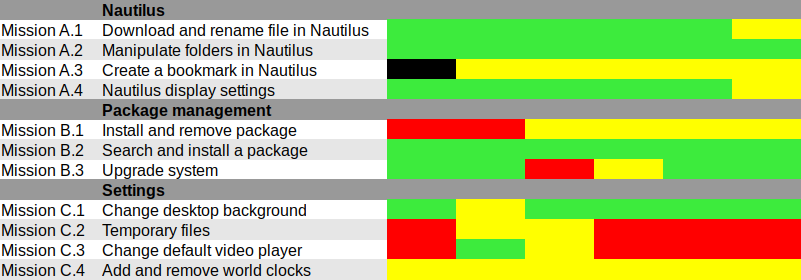
Results and analysis Heat map We used Jim Hall's heat map technique to summarize our usability test results. As Renata puts it, it is "a great way to see how the users performed on each task. The heat map clarifies how easy or difficult it was for the participant to accomplish a certain task.
  1. Scenario tasks (from the usability test) are arranged in rows.
  2. Test participants (for each tester) are arranged in columns.
  3. The colored blocks represent each tester s difficulty with each scenario task.
Green blocks represent the ability of the participant to accomplish the tasks with little or no difficulty. Yellow blocks indicate the tasks that the tester had significant difficulties accomplishing. Red blocks indicate that testers experienced extreme difficulty or where testers completed the tasks incorrectly. Black blocks indicate tasks the tester was unable to complete." Alternatively, here is the spreadsheet that was used to create this picture, with added text to avoid relying on colors only. Most tasks were accomplished with little or no difficulty so we will now focus on the problematic parts. What were the challenges? The heat map shows several "hot" rows, that we will now be looking at in more details. Mission A.3 Create a bookmark in Nautilus Most testers right-clicked the folder first, and eventually found they could simply drag'n'drop to the bookmarks location in the sidebar. One tester thought that he could select a folder, click the hamburger icon, and from there use the "Bookmark this folder" menu item. However, this menu action only works on the folder one has entered, not on the selected one. Mission B.1 Install and remove a package Here we faced a number of issues caused by the fact that Debian Live images don't include package indices (with good reason), so no package manager can list available software. Everyone managed to start a graphical package manager via the Overview (or via the CLI or Alt-F2 for a couple power users). Some testers tried to use GNOME Software, which listed only already installed packages (Debian bug #862560) and provided no way we could find to refresh the package indices. That's arguably a bug in Debian Live, but still: GNOME Software might display some useful information when it detects this unusual situation. We won't list here all the obstacles that were met in Synaptic: it's no news its usability is rather sub-optimal and better alternatives (such as GNOME Software) are in the works. Mission C.2 Tweak temporary files management The mission was poorly phrased: some observers had to clarify that it was specifically about GNOME, and not generic Linux system administration: some power-users were already searching the web for command-line tools to address the task at hand. Even with this clarification, no tester would have succeeded without being told they were allowed to use the web with a search query including the word "GNOME", or use the GNOME help or the Overview. Yet eventually all testers succeeded. It's interesting to note that regular GNOME users had the same problem as others: they did not try searching "temporary" in the Overview and did not look-up the GNOME Help until they were suggested to do so. Mission C.3 Change the default video player One tester configured one single video file format to be opened by default with VLC, via right-click in Nautilus Open with etc. He believed this would be enough to make VLC the default video player, missing the subtle difference between "default video player" and "default player for one single video format". One tester tried to complete this task inside VLC itself and then needed some help to succeed. It might be that the way web browsers ask "Do you want ThisBrowser to become the default web browser?" gave a hint an application GUI is the right place to do it. Two testers searched "default" in the Overview (perhaps the previous mission dealing with temporary files was enough to put them in this direction). At least one tester was confused since the only search result (Details View information about your system), which is the correct one to get there, includes the word View, which suggests that one cannot modify settings there, but only view them. One long-term GNOME user looked in Tweak Tool first, and then used the Overview. Here again, GNOME users experienced essentially the same issues as others. Mission C.4 Add and remove world clocks One tester tried to look for the clock on the top right corner of the screen, then realized it was in the middle. Other than this, all testers easily found a way to add world clocks. However, removing a world clock was rather difficult; although most testers managed to do it, it took them a number of attempts to succeed:
  1. Several testers left-clicked or right-clicked the clock they wanted to remove, expecting this would provide them with a way to remove it (which is not the case).
  2. After a while, all testers noticed the Select button (that has no text label nor tooltip info), which allowed them to select the clock they wanted to remove; then, most testers clicked the 1 selected button, hoping it would provide a contextual menu or some other way to act on the selected clocks (it doesn't).
  3. Eventually, everyone managed to locate the Delete button on the bottom right corner of the window; some testers mentioned that it is less visible and flashy than the blue bar that appears on the top of the screen once they had entered "Selection" mode.
General notes and observations
  • None of the participants sollicited the GNOME Help, which is unfortunate knowing its:
    • great quality;
    • translations in several languages;
    • availability and adaptability to regional specifications;
    • adequacy to the currently running version of GNOME.
    Some users found the relevant help page online via web searches; others initially ignored it among search results, then looked for it later after being told that the mission was more about GNOME.
  • Whether testers were already GNOME users or not seldom impacted their chances of success.
  • Unfortunately, we haven't compiled enough information about the testers to provide useful data about who they are and what their background is. Still, we had an interesting mix in terms of genders, age (between 17 and 52 years old), skin color and computer experience.

14 May 2017

Steve Kemp: Some minor updates ..

The past few weeks have been randomly busy, nothing huge has happened, but several minor diversions. Coding

I made a new release of my console-based mail-client, with integrated Lua scripting, this is available for download over at https://lumail.org/ I've also given a talk (!!) on using a literate/markdown configuration for GNU Emacs. In brief I created two files:
~/.emacs/init.md
This contains both my configuration of GNU Emacs as well as documentation for the same. Neat.
~/.emacs/init.el
This parse the previous file, specifically looking for "code blocks" which are then extracted and evaluated.
This system is easy to maintain, and I'm quite happy with it :)
Fuzzing
Somebody nice took the time to report a couple of bugs against my simple bytecode-intepretting virtual-machine project - all found via fuzzing. I've done some fun fuzzing of my own in the past, so this was nice to see. I've now resolved those bugs, and updated the README.md file to include instructions on fuzzing it. (Which I started doing myself, after receiving the first of the reports )
Finally I have more personal news too: I had a pair of CT-scans carried out recently, and apparently here in sunny Finland (that's me being ironic, it was snowing in the first week of May) when you undergo a CT-scan you can pay to obtain your data on CD-ROM. I'm 100% definitely going to get a copy of my brain-scan data. I'll be able to view a 3d-rendered model of my own brain on my desktop. (Once upon a time I worked for a company that produced software, sold to doctors/surgeons, for creating 3d-rendered volumes from individual slices. I confirmed with the radiologist that handled my tests that they do indeed use the standard DICOM format. Small world.)

9 May 2017

Reproducible builds folks: Reproducible Builds: week 106 in Stretch cycle

Here's what happened in the Reproducible Builds effort between Sunday April 30 and Saturday May 6 2017: Past and upcoming events Between May 5th-7th the Reproducible Builds Hackathon 2017 took place in Hamburg, Germany. On May 6th Mattia Rizzolo gave a talk on Reproducible Builds at DUCC-IT 17 in Vicenza, Italy. On May 13th Chris Lamb will give a talk on Reproducible Builds at OSCAL 2017 in Tirana, Albania. Media coverage Toolchain development and fixes Packages reviewed and fixed, and bugs filed Chris Lamb: Reviews of unreproducible packages 93 package reviews have been added, 12 have been updated and 98 have been removed in this week, adding to our knowledge about identified issues. The following issues have been added: 2 issue types have been updated: The following issues have been removed: Weekly QA work During our reproducibility testing, FTBFS bugs have been detected and reported by:
  • Chris Lamb (3)
diffoscope development strip-nondeterminism development
This week's edition was written by Chris Lamb, Holger Levsen and Ximin Luo & reviewed by a bunch of Reproducible Builds folks on IRC & the mailing lists.

8 May 2017

Russ Allbery: Review: Chimes at Midnight

Review: Chimes at Midnight, by Seanan McGuire
Series: October Daye #7
Publisher: DAW
Copyright: 2013
ISBN: 1-101-63566-5
Format: Kindle
Pages: 346
Chimes at Midnight is the seventh book of the October Daye series and builds heavily on the previous books. Toby has gathered quite the group of allies by this point, and events here would casually spoil some of the previous books in the series (particularly One Salt Sea, which you absolutely do not want spoiled). I strongly recommend starting at the beginning, even if the series is getting stronger as it goes along. This time, rather than being asked for help, the book opens with Toby on a mission. Goblin fruit is becoming increasingly common on the streets of San Francisco, and while she's doing all she can to find and stop the dealers, she's finding dead changelings. Goblin fruit is a pleasant narcotic to purebloods, but to changelings it's instantly and fatally addictive. The growth of the drug trade means disaster for the local changelings, particularly since previous events in the series have broken a prominent local changeling gang. That was for the best, but they were keeping goblin fruit out, and now it's flooding into the power vacuum. In the sort of idealistic but hopelessly politically naive move that Toby is prone to, she takes her evidence to the highest local authority in faerie: the Queen of the Mists. The queen loathes Toby and the feeling is mutual, but Toby's opinion is that this shouldn't matter: these are her subjects and goblin fruit is widely recognized as a menace. Even if she cares nothing for their lives, a faerie drug being widely sold on the street runs the substantial risk that someone will give it to humans, potentially leading to the discovery of faerie. Sadly, but predictably, Toby has underestimated the Queen's malevolence. She leaves the court burdened not only with the knowledge that the Queen herself is helping with the distribution of goblin fruit, but also an impending banishment thanks to her reaction. She has three days to get out of the Queen's territory, permanently. Three days that the Luidaeg suggests she spend talking to people who knew King Gilad, the former and well-respected king of the local territory who died in the 1906 earthquake, apparently leaving the kingdom to the current Queen. Or perhaps not. As usual, crossing Toby is a very bad idea, and getting Toby involved in politics means that one should start betting heavily against the status quo. Also, as usual, things initially go far too well, and then Toby ends up in serious trouble. (I realize the usefulness of raising the stakes of the story, but I do prefer the books of this series that don't involve Toby spending much of the book ill.) However, there is a vast improvement over previous books in the story: one key relationship (which I'll still avoid spoiling) is finally out of the precarious will-they, won't-they stage and firmly on the page, and it's a relationship that I absolutely love. Watching Toby stomp people who deserve to be stomped makes me happy, but watching Toby let herself be happy and show it makes me even happier. McGuire also gives us some more long-pending revelations. I probably should have guessed the one about one of Toby's long-time friends and companions much earlier, although at least I did so a few pages before Toby found out. I have some strong suspicions about Toby's own background that were reinforced by this book, and will be curious to see if I'm right. And I'm starting to have guesses about the overall arc of the series, although not firm ones. One of my favorite things in long-running series is the slow revelation of more and more world background, and McGuire does it in just the way I like: lots of underlying complexity, reveals timed for emotional impact but without dragging on things that the characters should obviously be able to figure out, and a whole bunch of layered secrets that continue to provide more mystery even after one layer is removed. The plot here is typical of the plot of the last couple of novels in the series, which is fine by me since my favorite part of this series is the political intrigue (and Toby realizing that she has far more influence than she thinks). It helps that I thought Arden was great, given how central she is to this story. I liked her realistic reactions to her situation, and I liked her arguments with Toby. I'm dubious how correct Toby actually was, but we've learned by now that arguments from duty are always going to hold sway with her. And I loved Mags and the Library, and hope we'll be seeing more of them in future novels. The one quibble I'll close with, since the book closed with it, is that I found the ending rather abrupt. There were several things I wanted to see in the aftermath, and the book ended before they could happen. Hopefully that means they'll be the start of the next book (although a bit of poking around makes me think they may be in a novella). If you've liked the series so far, particularly the couple of books before this one, this is more of what you liked. Recommended. Followed by The Winter Long. Rating: 8 out of 10

7 May 2017

Vasudev Kamath: Tips for fuzzing network programs with AFL

Fuzzing is method of producing random malformed inputs for a software and observe the software behavior. If a software crashes then there is a bug and it can have security implications. Fuzzing has gained a lot of interest now a days, especially with automated tools like American Fuzzy Lop (AFL) which can easily help you to fuzz the program and record inputs which causes crash in the software. American Fuzzy Lop is a file based fuzzer which feeds input to program via standard input. Using it with network program like server's or clients is not possible in the original state. There is a version of AFL with patches to allow it fuzz network programs, but this patch is not merged upstream and I do not know if it ever makes into upstream or not. Also the above repository contains version 1.9 which is older compared to currently released versions. There is another method for fuzzing network program using AFL with help of LD_PRELOAD tricks. preeny is a project which provides library which when used with LD_PRELOAD can desocket the network program and make it read from stdin. There is this best tutorial from LoLWare which talks about fuzzing Nginx with preeny and AFL. There is a best AFL workflow by Foxglove Security which gives start to finish details about how to use AFL and its companion tool to do fuzzing. So I'm not going to talk about any steps of fuzzing in this post instead I'm going to list down my observations on changes that needs to be done to get clean fuzzing with AFL and preeny.
  1. desock.so provided by preeny works only with read and write (or rather other system call does not work with stdin) system calls and hence you need to make sure you replace any reference to send, sendto, recv and recvfrom with read and write system calls respectively. Without this change program will not read input provided by AFL on standard input.
  2. If your network program is using forking or threading model make sure to remove all those and make it plain simple program which receives request and sends out response. Basically you are testing the ability of program to handle malformed input so we need very minimum logic to make program do what it is supposed to do when AFL runs it.
  3. If you are using infinite loop like all normal programs replace the infinite loop with below mentioned AFL macro and use afl-clang-fast to compile it. This speeds up the testing as AFL will run the job n times before discarding the current fork and doing a fresh fork. After all fork is costly affair.
while(__AFL_LOOP(1000))   // Change 1000 with iteration count
             // your logic here
 
With above modification I could fuzz a server program talking binary protocol and another one talking textual protocol. In both case I used Wireshark capture to get the packet extract raw content and feed it as input to AFL. I was successful in finding crashes which are exploitable in case of textual protocol program than in binary protocol case. In case of binary protocol AFL could not easily find new paths which probably is because of bad inputs I provided. I will continue to do more experiment with binary protocol case and provide my findings as new updates here. If you have anything more to add do share with me :-). Happy fuzzing!.

6 May 2017

Jelmer Vernooij: Xandikos, a new Git-backed CalDAV/CardDAV server

For the last couple of years, I have self-hosted my calendar and address book data. Originally I just kept local calendars and address books in Evolution, but later I moved to a self-hosted CalDAV/CardDAV server and a plethora of clients.
CalDAV/CardDAV CalDAV and CardDAV are standards for accessing, managing, and sharing calendaring and addressbook information based on the iCalendar format that are built atop the WebDAV standard, and WebDAV itself is a set of extensions to HTTP. CalDAV and CardDAV essentially store iCalendar (.ics) and vCard (.vcf) files using WebDAV, but they provide some extra guarantees (e.g. files must be well-formed) and some additional methods for querying the data. For example, it is possible to retrieve all events between two dates with a single HTTP query, rather than the client having to check all the calendar files in a directory. CalDAV and CardDAV are (unnecessarily) complex, in large part because they are built on top of WebDAV. Being able to use regular HTTP and WebDAV clients is quite neat, but results in extra complexity. In addition, because the standards are so large, clients and servers end up only implementing parts of it. However, CalDAV and CardDAV have one big redeeming quality: they are the dominant standards for synchronising calendar events and addressbooks, and are supported by a wide variety of free and non-free applications. They're the status quo, until something better comes along. (and hey, at least there is a standard to begin with)
Calypso I have tried a number of servers over the years. In the end, I settled for calypso. Calypso started out as friendly fork of Radicale, with some additional improvements. I like Calypso because it is:
  • quite simple, understandable, and small (sloccount reports 1700 LOC)
  • it stores plain .vcf and .ics files
  • stores history in git
  • easy to set up, e.g. no database dependencies
  • written in Python
Its use of regular files and keeping history in Git is useful, because this means that whenever it breaks it is much easier to see what is happening. If something were to go wrong (i.e. a client decides to remove all server-side entries) it's easy to recover by rolling back history using git. However, there are some downsides to Calypso as well. It doesn't have good test coverage, making it harder to change (especially in a way that doesn't break some clients), though there are some recent efforts to make e.g. external spec compliance tests like caldavtester work with it. Calypso's CalDAV/CardDAV/WebDAV implementation is a bit ad-hoc. The only WebDAV REPORTs it implements are calendar-multiget and addressbook-multiget. Support for properties has been added as new clients request them. The logic for replying to DAV requests is mixed with the actual data store implementation. Because of this, it can be hard to get going with some clients and sometimes tricky to debug.
Xandikos After attempting to fix a number of issues in Calypso, I kept running into issues with the way its code is structured. This is only fixable by rewriting sigifnicant chunks of it, so I opted to instead write a new server. The goals of Xandikos are along the same lines as those of Calypso, to be a simple CalDAV/CardDAV server for personal use:
  • easy to set up; at the moment, just running xandikos -d $HOME/dav --defaults is enough to start a new server
  • use of plain .ics/.ivf files for storage
  • history stored in Git
But additionally:
  • clear separation between protocol implementation and storage
  • be well tested
  • standards complete
  • standards compliant
Current status The CalDAV/CardDAV implementation of Xandikos is mostly complete, but there still a number of outstanding issues. In particular:
  • lack of authentication support; setting up authentication support in uwsgi or a reverse proxy is one way of working around this
  • there is no useful UI for users accessing the DAV resources via a web browser
  • test coverage
Xandikos has been tested with the following clients:
Trying it To run Xandikos, follow the instructions on the homepage:
./bin/xandikos --defaults -d $HOME/dav
A server should now be listening on localhost:8080 that you can access with your favorite client.

3 May 2017

Vincent Bernat: VXLAN: BGP EVPN with Cumulus Quagga

VXLAN is an overlay network to encapsulate Ethernet traffic over an existing (highly available and scalable, possibly the Internet) IP network while accomodating a very large number of tenants. It is defined in RFC 7348. For an uncut introduction on its use with Linux, have a look at my VXLAN & Linux post. VXLAN deployment In the above example, we have hypervisors hosting a virtual machines from different tenants. Each virtual machine is given access to a tenant-specific virtual Ethernet segment. Users are expecting classic Ethernet segments: no MAC restrictions1, total control over the IP addressing scheme they use and availability of multicast. In a large VXLAN deployment, two aspects need attention:
  1. discovery of other endpoints (VTEPs) sharing the same VXLAN segments, and
  2. avoidance of BUM frames (broadcast, unknown unicast and multicast) as they have to be forwarded to all VTEPs.
A typical solution for the first point is using multicast. For the second point, this is source-address learning.

Introduction to BGP EVPN BGP EVPN (RFC 7432 and draft-ietf-bess-evpn-overlay for its application to VXLAN) is a standard control protocol to efficiently solves those two aspects without relying on multicast nor source-address learning. BGP EVPN relies on BGP (RFC 4271) and its MP-BGP extensions (RFC 4760). BGP is the routing protocol powering the Internet. It is highly scalable and interoperable. It is also extensible and one of its extension is MP-BGP. This extension can carry reachability information (NLRI) for multiple protocols (IPv4, IPv6, L3VPN and in our case EVPN). EVPN is a special family to advertise MAC addresses and the remote equipments they are attached to. There are basically two kinds of reachability information a VTEP sends through BGP EVPN:
  1. the VNIs they have interest in (type 3 routes), and
  2. for each VNI, the local MAC addresses (type 2 routes).
The protocol also covers other aspects of virtual Ethernet segments (L3 reachability information from ARP/ND caches, MAC mobility and multi-homing2) but we won t describe them here. To deploy BGP EVPN, a typical solution is to use several route reflectors (both for redundancy and scalability), like in the picture below. Each VTEP opens a BGP session to at least two route reflectors, sends its information (MACs and VNIs) and receives others . This reduces the number of BGP sessions to configure. VXLAN deployment with route reflectors Compared to other solutions to deploy VXLAN, BGP EVPN has three main advantages:
  • interoperability with other vendors (notably Juniper and Cisco),
  • proven scalability (a typical BGP routers handle several millions of routes), and
  • possibility to enforce fine-grained policies.
On Linux, Cumulus Quagga is a fairly complete implementation of BGP EVPN (type 3 routes for VTEP discovery, type 2 routes with MAC or IP addresses, MAC mobility when a host changes from one VTEP to another one) which requires very little configuration. This is a fork of Quagga and currently used in Cumulus Linux, a network operating system based on Debian powering switches from various brands. At some point, BGP EVPN support will be contributed back to FRR, a community-maintained fork of Quagga3. It should be noted the BGP EVPN implementation of Cumulus Quagga currently only supports IPv4.

Route reflector setup Before configuring each VTEP, we need to configure two or more route reflectors. There are many solutions. I will present three of them:
  • using Cumulus Quagga,
  • using GoBGP, an implementation of BGP in Go,
  • using Juniper JunOS.
For reliability purpose, it s possible (and easy) to use one implementation for some route reflectors and another implementation for the other ones. The proposed configurations are quite minimal. However, it is possible to centralize policies on the route reflectors (e.g. routes tagged with some community can only be readvertised to some group of VTEPs).

Using Quagga The configuration is pretty simple. We suppose the configured route reflector has 203.0.113.254 configured as a loopback IP.
router bgp 65000
  bgp router-id 203.0.113.254
  bgp cluster-id 203.0.113.254
  bgp log-neighbor-changes
  no bgp default ipv4-unicast
  neighbor fabric peer-group
  neighbor fabric remote-as 65000
  neighbor fabric capability extended-nexthop
  neighbor fabric update-source 203.0.113.254
  bgp listen range 203.0.113.0/24 peer-group fabric
  !
  address-family evpn
   neighbor fabric activate
   neighbor fabric route-reflector-client
  exit-address-family
  !
  exit
!
A peer group fabric is defined and we leverage the dynamic neighbor feature of Cumulus Quagga: we don t have to explicitely define each neighbor. Any client from 203.0.113.0/24 and presenting itself as part of AS 65000 can connect. All sent EVPN routes will be accepted and reflected to the other clients. You don t need to run Zebra, the route engine talking with the kernel. Instead, start bgpd with the --no_kernel flag.

Using GoBGP GoBGP is a clean implementation of BGP in Go4. It exposes an RPC API for configuration (but accepts a configuration file and comes with a command-line client). It doesn t support dynamic neighbors, so you ll have to use the API, the command-line client or some templating language to automate their declaration. A configuration with only one neighbor is like this:
global:
  config:
    as: 65000
    router-id: 203.0.113.254
    local-address-list:
      - 203.0.113.254
neighbors:
  - config:
      neighbor-address: 203.0.113.1
      peer-as: 65000
    afi-safis:
      - config:
          afi-safi-name: l2vpn-evpn
    route-reflector:
      config:
        route-reflector-client: true
        route-reflector-cluster-id: 203.0.113.254
More neighbors can be added from the command line:
$ gobgp neighbor add 203.0.113.2 as 65000 \
>         route-reflector-client 203.0.113.254 \
>         --address-family evpn
GoBGP won t try to interact with the kernel which is fine as a route reflector.

Using Juniper JunOS A variety of Juniper products can be a BGP route reflector, notably: The main factor is the CPU and the memory. The QFX5100 is low on memory and won t support large deployments without some additional policing. Here is a configuration similar to the Quagga one:
interfaces  
    lo0  
        unit 0  
            family inet  
                address 203.0.113.254/32;


protocols  
    bgp  
        group fabric  
            family evpn  
                signaling  
                    /* Do not try to install EVPN routes */
                    no-install;
                 
             
            type internal;
            cluster 203.0.113.254;
            local-address 203.0.113.254;
            allow 203.0.113.0/24;


routing-options  
    router-id 203.0.113.254;
    autonomous-system 65000;
 

VTEP setup The next step is to configure each VTEP/hypervisor. Each VXLAN is locally configured using a bridge for local virtual interfaces, like illustrated in the below schema. The bridge is taking care of the local MAC addresses (notably, using source-address learning) and the VXLAN interface takes care of the remote MAC addresses (received with BGP EVPN). Bridged VXLAN device VXLANs can be provisioned with the following script. Source-address learning is disabled as we will rely solely on BGP EVPN to synchronize FDBs between the hypervisors.
for vni in 100 200; do
    # Create VXLAN interface
    ip link add vxlan$ vni  type vxlan
        id $ vni  \
        dstport 4789 \
        local 203.0.113.2 \
        nolearning
    # Create companion bridge
    brctl addbr br$ vni 
    brctl addif br$ vni  vxlan$ vni 
    brctl stp br$ vni  off
    ip link set up dev br$ vni 
    ip link set up dev vxlan$ vni 
done
# Attach each VM to the appropriate segment
brctl addif br100 vnet10
brctl addif br100 vnet11
brctl addif br200 vnet12
The configuration of Cumulus Quagga is similar to the one used for a route reflector, except we use the advertise-all-vni directive to publish all local VNIs.
router bgp 65000
  bgp router-id 203.0.113.2
  no bgp default ipv4-unicast
  neighbor fabric peer-group
  neighbor fabric remote-as 65000
  neighbor fabric capability extended-nexthop
  neighbor fabric update-source dummy0
  ! BGP sessions with route reflectors
  neighbor 203.0.113.253 peer-group fabric
  neighbor 203.0.113.254 peer-group fabric
  !
  address-family evpn
   neighbor fabric activate
   advertise-all-vni
  exit-address-family
  !
  exit
!
If everything works as expected, the instances sharing the same VNI should be able to ping each other. If IPv6 is enabled on the VMs, the ping command shows if everything is in order:
$ ping -c10 -w1 -t1 ff02::1%eth0
PING ff02::1%eth0(ff02::1%eth0) 56 data bytes
64 bytes from fe80::5254:33ff:fe00:8%eth0: icmp_seq=1 ttl=64 time=0.016 ms
64 bytes from fe80::5254:33ff:fe00:b%eth0: icmp_seq=1 ttl=64 time=4.98 ms (DUP!)
64 bytes from fe80::5254:33ff:fe00:9%eth0: icmp_seq=1 ttl=64 time=4.99 ms (DUP!)
64 bytes from fe80::5254:33ff:fe00:a%eth0: icmp_seq=1 ttl=64 time=4.99 ms (DUP!)
--- ff02::1%eth0 ping statistics ---
1 packets transmitted, 1 received, +3 duplicates, 0% packet loss, time 0ms
rtt min/avg/max/mdev = 0.016/3.745/4.991/2.152 ms

Verification Step by step, let s check how everything comes together.

Getting VXLAN information from the kernel On each VTEP, Quagga should be able to retrieve the information about configured VXLANs. This can be checked with vtysh:
# show interface vxlan100
Interface vxlan100 is up, line protocol is up
  Link ups:       1    last: 2017/04/29 20:01:33.43
  Link downs:     0    last: (never)
  PTM status: disabled
  vrf: Default-IP-Routing-Table
  index 11 metric 0 mtu 1500
  flags: <UP,BROADCAST,RUNNING,MULTICAST>
  Type: Ethernet
  HWaddr: 62:42:7a:86:44:01
  inet6 fe80::6042:7aff:fe86:4401/64
  Interface Type Vxlan
  VxLAN Id 100
  Access VLAN Id 1
  Master (bridge) ifindex 9 ifp 0x56536e3f3470
The important points are:
  • the VNI is 100, and
  • the bridge device was correctly detected.
Quagga should also be able to retrieve information about the local MAC addresses :
# show evpn mac vni 100
Number of MACs (local and remote) known for this VNI: 2
MAC               Type   Intf/Remote VTEP      VLAN
50:54:33:00:00:0a local  eth1.100
50:54:33:00:00:0b local  eth2.100

BGP sessions Each VTEP has to establish a BGP session to the route reflectors. On the VTEP, this can be checked by running vtysh:
# show bgp neighbors 203.0.113.254
BGP neighbor is 203.0.113.254, remote AS 65000, local AS 65000, internal link
 Member of peer-group fabric for session parameters
  BGP version 4, remote router ID 203.0.113.254
  BGP state = Established, up for 00:00:45
  Neighbor capabilities:
    4 Byte AS: advertised and received
    AddPath:
      L2VPN EVPN: RX advertised L2VPN EVPN
    Route refresh: advertised and received(new)
    Address family L2VPN EVPN: advertised and received
    Hostname Capability: advertised
    Graceful Restart Capabilty: advertised
[...]
 For address family: L2VPN EVPN
  fabric peer-group member
  Update group 1, subgroup 1
  Packet Queue length 0
  Community attribute sent to this neighbor(both)
  8 accepted prefixes

  Connections established 1; dropped 0
  Last reset never
Local host: 203.0.113.2, Local port: 37603
Foreign host: 203.0.113.254, Foreign port: 179
The output includes the following information:
  • the BGP state is Established,
  • the address family L2VPN EVPN is correctly advertised, and
  • 8 routes are received from this route reflector.
The state of the BGP sessions can also be checked from the route reflectors. With GoBGP, use the following command:
# gobgp neighbor 203.0.113.2
BGP neighbor is 203.0.113.2, remote AS 65000, route-reflector-client
  BGP version 4, remote router ID 203.0.113.2
  BGP state = established, up for 00:04:30
  BGP OutQ = 0, Flops = 0
  Hold time is 9, keepalive interval is 3 seconds
  Configured hold time is 90, keepalive interval is 30 seconds
  Neighbor capabilities:
    multiprotocol:
        l2vpn-evpn:     advertised and received
    route-refresh:      advertised and received
    graceful-restart:   received
    4-octet-as: advertised and received
    add-path:   received
    UnknownCapability(73):      received
    cisco-route-refresh:        received
[...]
  Route statistics:
    Advertised:             8
    Received:               5
    Accepted:               5
With JunOS, use the below command:
> show bgp neighbor 203.0.113.2
Peer: 203.0.113.2+38089 AS 65000 Local: 203.0.113.254+179 AS 65000
  Group: fabric                Routing-Instance: master
  Forwarding routing-instance: master
  Type: Internal    State: Established
  Last State: OpenConfirm   Last Event: RecvKeepAlive
  Last Error: None
  Options: <Preference LocalAddress Cluster AddressFamily Rib-group Refresh>
  Address families configured: evpn
  Local Address: 203.0.113.254 Holdtime: 90 Preference: 170
  NLRI evpn: NoInstallForwarding
  Number of flaps: 0
  Peer ID: 203.0.113.2     Local ID: 203.0.113.254     Active Holdtime: 9
  Keepalive Interval: 3          Group index: 0    Peer index: 2
  I/O Session Thread: bgpio-0 State: Enabled
  BFD: disabled, down
  NLRI for restart configured on peer: evpn
  NLRI advertised by peer: evpn
  NLRI for this session: evpn
  Peer supports Refresh capability (2)
  Stale routes from peer are kept for: 300
  Peer does not support Restarter functionality
  NLRI that restart is negotiated for: evpn
  NLRI of received end-of-rib markers: evpn
  NLRI of all end-of-rib markers sent: evpn
  Peer does not support LLGR Restarter or Receiver functionality
  Peer supports 4 byte AS extension (peer-as 65000)
  NLRI's for which peer can receive multiple paths: evpn
  Table bgp.evpn.0 Bit: 20000
    RIB State: BGP restart is complete
    RIB State: VPN restart is complete
    Send state: in sync
    Active prefixes:              5
    Received prefixes:            5
    Accepted prefixes:            5
    Suppressed due to damping:    0
    Advertised prefixes:          8
  Last traffic (seconds): Received 276  Sent 170  Checked 276
  Input messages:  Total 61     Updates 3       Refreshes 0     Octets 1470
  Output messages: Total 62     Updates 4       Refreshes 0     Octets 1775
  Output Queue[1]: 0            (bgp.evpn.0, evpn)
If a BGP session cannot be established, the logs of each BGP daemon should mention the cause.

Sent routes From each VTEP, Quagga needs to send:
  • one type 3 route for each local VNI, and
  • one type 2 route for each local MAC address.
The best place to check the received routes is on one of the route reflectors. If you are using JunOS, the following command will display the received routes from the provided VTEP:
> show route table bgp.evpn.0 receive-protocol bgp 203.0.113.2
bgp.evpn.0: 10 destinations, 10 routes (10 active, 0 holddown, 0 hidden)
  Prefix                  Nexthop              MED     Lclpref    AS path
  2:203.0.113.2:100::0::50:54:33:00:00:0a/304 MAC/IP
*                         203.0.113.2                  100        I
  2:203.0.113.2:100::0::50:54:33:00:00:0b/304 MAC/IP
*                         203.0.113.2                  100        I
  3:203.0.113.2:100::0::203.0.113.2/304 IM
*                         203.0.113.2                  100        I
  3:203.0.113.2:200::0::203.0.113.2/304 IM
*                         203.0.113.2                  100        I
There is one type 3 route for VNI 100 and another one for VNI 200. There are also two type 2 routes for two MAC addresses on VNI 100. To get more information, you can add the keyword extensive. Here is a type 3 route advertising 203.0.113.2 as a VTEP for VNI 1008:
> show route table bgp.evpn.0 receive-protocol bgp 203.0.113.2 extensive
bgp.evpn.0: 11 destinations, 11 routes (11 active, 0 holddown, 0 hidden)
* 3:203.0.113.2:100::0::203.0.113.2/304 IM (1 entry, 1 announced)
     Accepted
     Route Distinguisher: 203.0.113.2:100
     Nexthop: 203.0.113.2
     Localpref: 100
     AS path: I
     Communities: target:65000:268435556 encapsulation:vxlan(0x8)
[...]
Here is a type 2 route announcing the location of the 50:54:33:00:00:0a MAC address for VNI 100:
> show route table bgp.evpn.0 receive-protocol bgp 203.0.113.2 extensive
bgp.evpn.0: 11 destinations, 11 routes (11 active, 0 holddown, 0 hidden)
* 2:203.0.113.2:100::0::50:54:33:00:00:0a/304 MAC/IP (1 entry, 1 announced)
     Accepted
     Route Distinguisher: 203.0.113.2:100
     Route Label: 100
     ESI: 00:00:00:00:00:00:00:00:00:00
     Nexthop: 203.0.113.2
     Localpref: 100
     AS path: I
     Communities: target:65000:268435556 encapsulation:vxlan(0x8)
[...]
With Quagga, you can get a similar output with vtysh:
# show bgp evpn route
BGP table version is 0, local router ID is 203.0.113.1
Status codes: s suppressed, d damped, h history, * valid, > best, i - internal
Origin codes: i - IGP, e - EGP, ? - incomplete
EVPN type-2 prefix: [2]:[ESI]:[EthTag]:[MAClen]:[MAC]
EVPN type-3 prefix: [3]:[EthTag]:[IPlen]:[OrigIP]
   Network          Next Hop            Metric LocPrf Weight Path
Route Distinguisher: 203.0.113.2:100
*>i[2]:[0]:[0]:[48]:[50:54:33:00:00:0a]
                    203.0.113.2                   100      0 i
*>i[2]:[0]:[0]:[48]:[50:54:33:00:00:0b]
                    203.0.113.2                   100      0 i
*>i[3]:[0]:[32]:[203.0.113.2]
                    203.0.113.2                   100      0 i
Route Distinguisher: 203.0.113.2:200
*>i[3]:[0]:[32]:[203.0.113.2]
                    203.0.113.2                   100      0 i
[...]
With GoBGP, use the following command:
# gobgp global rib -a evpn   grep rd:203.0.113.2:200
    Network  Next Hop             AS_PATH              Age        Attrs
*>  [type:macadv][rd:203.0.113.2:100][esi:single-homed][etag:0][mac:50:54:33:00:00:0a][ip:<nil>][labels:[100]]203.0.113.2                               00:00:17   [ Origin: i   LocalPref: 100   Extcomms: [VXLAN], [65000:268435556] ]
*>  [type:macadv][rd:203.0.113.2:100][esi:single-homed][etag:0][mac:50:54:33:00:00:0b][ip:<nil>][labels:[100]]203.0.113.2                               00:00:17   [ Origin: i   LocalPref: 100   Extcomms: [VXLAN], [65000:268435556] ]
*>  [type:macadv][rd:203.0.113.2:200][esi:single-homed][etag:0][mac:50:54:33:00:00:0a][ip:<nil>][labels:[200]]203.0.113.2                               00:00:17   [ Origin: i   LocalPref: 100   Extcomms: [VXLAN], [65000:268435656] ]
*>  [type:multicast][rd:203.0.113.2:100][etag:0][ip:203.0.113.2]203.0.113.2                               00:00:17   [ Origin: i   LocalPref: 100   Extcomms: [VXLAN], [65000:268435556] ]
*>  [type:multicast][rd:203.0.113.2:200][etag:0][ip:203.0.113.2]203.0.113.2                               00:00:17   [ Origin: i   LocalPref: 100   Extcomms: [VXLAN], [65000:268435656] ]

Received routes Each VTEP should have received the type 2 and type 3 routes from its fellow VTEPs, through the route reflectors. You can check with the show bgp evpn route command of vtysh. Does Quagga correctly understand the received routes? The type 3 routes are translated to an assocation between the remote VTEPs and the VNIs:
# show evpn vni
Number of VNIs: 2
VNI        VxLAN IF              VTEP IP         # MACs   # ARPs   Remote VTEPs
100        vxlan100              203.0.113.2     4        0        203.0.113.3
                                                                   203.0.113.1
200        vxlan200              203.0.113.2     3        0        203.0.113.3
                                                                   203.0.113.1
The type 2 routes are translated to an association between the remote MACs and the remote VTEPs:
# show evpn mac vni 100
Number of MACs (local and remote) known for this VNI: 4
MAC               Type   Intf/Remote VTEP      VLAN
50:54:33:00:00:09 remote 203.0.113.1
50:54:33:00:00:0a local  eth1.100
50:54:33:00:00:0b local  eth2.100
50:54:33:00:00:0c remote 203.0.113.3

FDB configuration The last step is to ensure Quagga has correctly provided the received information to the kernel. This can be checked with the bridge command:
# bridge fdb show dev vxlan100   grep dst
00:00:00:00:00:00 dst 203.0.113.1 self permanent
00:00:00:00:00:00 dst 203.0.113.3 self permanent
50:54:33:00:00:0c dst 203.0.113.3 self
50:54:33:00:00:09 dst 203.0.113.1 self
All good! The two first lines are the translation of the type 3 routes (any BUM frame will be sent to both 203.0.113.1 and 203.0.113.3) and the two last ones are the translation of the type 2 routes.

Interoperability One of the strength of BGP EVPN is the interoperability with other network vendors. To demonstrate it works as expected, we will configure a Juniper vMX to act as a VTEP. First, we need to configure the physical bridge9. This is similar to the use of ip link and brctl with Linux. We only configure one physical interface with two old-school VLANs paired with matching VNIs.
interfaces  
    ge-0/0/1  
        unit 0  
            family bridge  
                interface-mode trunk;
                vlan-id-list [ 100 200 ];


routing-instances  
    switch  
        instance-type virtual-switch;
        interface ge-0/0/1.0;
        bridge-domains  
            vlan100  
                domain-type bridge;
                vlan-id 100;
                vxlan  
                    vni 100;
                    ingress-node-replication;
                 
             
            vlan200  
                domain-type bridge;
                vlan-id 200;
                vxlan  
                    vni 200;
                    ingress-node-replication;


Then, we configure BGP EVPN to advertise all known VNIs. The configuration is quite similar to the one we did with Quagga:
protocols  
    bgp  
        group fabric  
            type internal;
            multihop;
            family evpn signaling;
            local-address 203.0.113.3;
            neighbor 203.0.113.253;
            neighbor 203.0.113.254;


routing-instances  
    switch  
        vtep-source-interface lo0.0;
        route-distinguisher 203.0.113.3:1; #  
        vrf-import EVPN-VRF-VXLAN;
        vrf-target  
            target:65000:1;
            auto;
         
        protocols  
            evpn  
                encapsulation vxlan;
                extended-vni-list all;
                multicast-mode ingress-replication;


routing-options  
    router-id 203.0.113.3;
    autonomous-system 65000;
 
policy-options  
    policy-statement EVPN-VRF-VXLAN  
        then accept;
     
 
We also need a small compatibility patch for Cumulus Quagga10. The routes sent by this configuration are very similar to the routes sent by Quagga. The main differences are:
  • on JunOS, the route distinguisher is configured statically (in ), and
  • on JunOS, the VNI is also encoded as an Ethernet tag ID.
Here is a type 3 route, as sent by JunOS:
> show route table bgp.evpn.0 receive-protocol bgp 203.0.113.3 extensive
bgp.evpn.0: 13 destinations, 13 routes (13 active, 0 holddown, 0 hidden)
* 3:203.0.113.3:1::100::203.0.113.3/304 IM (1 entry, 1 announced)
     Accepted
     Route Distinguisher: 203.0.113.3:1
     Nexthop: 203.0.113.3
     Localpref: 100
     AS path: I
     Communities: target:65000:268435556 encapsulation:vxlan(0x8)
     PMSI: Flags 0x0: Label 6: Type INGRESS-REPLICATION 203.0.113.3
[...]
Here is a type 2 route:
> show route table bgp.evpn.0 receive-protocol bgp 203.0.113.3 extensive
bgp.evpn.0: 13 destinations, 13 routes (13 active, 0 holddown, 0 hidden)
* 2:203.0.113.3:1::200::50:54:33:00:00:0f/304 MAC/IP (1 entry, 1 announced)
     Accepted
     Route Distinguisher: 203.0.113.3:1
     Route Label: 200
     ESI: 00:00:00:00:00:00:00:00:00:00
     Nexthop: 203.0.113.3
     Localpref: 100
     AS path: I
     Communities: target:65000:268435656 encapsulation:vxlan(0x8)
[...]
We can check that the vMX is able to make sense of the routes it receives from its peers running Quagga:
> show evpn database l2-domain-id 100
Instance: switch
VLAN  DomainId  MAC address        Active source                  Timestamp        IP address
     100        50:54:33:00:00:0c  203.0.113.1                    Apr 30 12:46:20
     100        50:54:33:00:00:0d  203.0.113.2                    Apr 30 12:32:42
     100        50:54:33:00:00:0e  203.0.113.2                    Apr 30 12:46:20
     100        50:54:33:00:00:0f  ge-0/0/1.0                     Apr 30 12:45:55
On the other end, if we look at one of the Quagga-based VTEP, we can check the received routes are correctly understood:
# show evpn vni 100
VNI: 100
 VxLAN interface: vxlan100 ifIndex: 9 VTEP IP: 203.0.113.1
 Remote VTEPs for this VNI:
  203.0.113.3
  203.0.113.2
 Number of MACs (local and remote) known for this VNI: 4
 Number of ARPs (IPv4 and IPv6, local and remote) known for this VNI: 0
# show evpn mac vni 100
Number of MACs (local and remote) known for this VNI: 4
MAC               Type   Intf/Remote VTEP      VLAN
50:54:33:00:00:0c local  eth1.100
50:54:33:00:00:0d remote 203.0.113.2
50:54:33:00:00:0e remote 203.0.113.2
50:54:33:00:00:0f remote 203.0.113.3
Get in touch if you have some success with other vendors!

  1. For example, they may use bridges to connect containers together.
  2. Such a feature can replace proprietary implementations of MC-LAG allowing several VTEPs to act as a endpoint for a single link aggregation group. This is not needed on our scenario where hypervisors act as VTEPs.
  3. The development of Quagga is slow and closed . New features are often stalled. FRR is placed under the umbrella of the Linux Foundation, has a GitHub-centered development model and an election process. It already has several interesting enhancements (notably, BGP add-path, BGP unnumbered, MPLS and LDP).
  4. I am unenthusiastic about projects whose the sole purpose is to rewrite something in Go. However, while being quite young, GoBGP is quite valuable on its own (good architecture, good performance).
  5. The 48-port version is around $10,000 with the BGP license.
  6. An empty chassis with a dual routing engine (RE-S-1800X4-16G) is around $30,000.
  7. I don t know how pricey the vRR is. For evaluation purposes, it can be downloaded for free if you are a customer.
  8. The value 100 used in the route distinguishier (203.0.113.2:100) is not the one used to encode the VNI. The VNI is encoded in the route target (65000:268435556), in the 24 least signifiant bits (268435556 & 0xffffff equals 100). As long as VNIs are unique, we don t have to understand those details.
  9. For some reason, the use of a virtual switch is mandatory. This is specific to this platform: a QFX doesn t require this.
  10. The encoding of the VNI into the route target is being standardized in draft-ietf-bess-evpn-overlay. Juniper already implements this draft.

Reproducible builds folks: Reproducible Builds: week 105 in Stretch cycle

Here's what happened in the Reproducible Builds effort between Sunday April 23 and Saturday April 29 2017: Past and upcoming events On April 26th Chris Lamb gave a talk at foss-north 2017 in Gothenburg, Sweden on Reproducible Builds. Between May 5th-7th the Reproducible Builds Hackathon 2017 will take place in Hamburg, Germany. Then on May 26th Bernhard M. Wiedemann will give a talk titled reproducible builds in openSUSE (2017) at the openSUSE Conference 2017 in N rnberg, Germany. Media coverage Already on April 19th Sylvain Beucler wrote a yet another follow-up post Practical basics of reproducible builds 3, after part 1 and part 2 of his series. Toolchain development and fixes Michael Woerister of the Rust project has implemented file maps that affect all path-related compiler information, including "error messages, metadata, debuginfo, and the file!() macro alike". Ximin Luo with support from some other Rust developers and contributors helped steer the final result into something that was compatible with reproducible builds. Many thanks to all involved, especially for the patience of discussing this over several months. Ximin wrote a first-attempt patch to fix R build-path issues. It made 460/477 R packages reproducible, but also caused 3 of these to FTBFS. See randomness_in_r_rdb_rds_databases for details. Bugs filed and patches sent upstream Chris Lamb: Bernhard M. Wiedemann filed a number of patches upstream: Reviews of unreproducible packages 102 package reviews have been added, 64 have been updated and 24 have been removed in this week, adding to our knowledge about identified issues. 3 issue types have been updated: Weekly QA work During our reproducibility testing, FTBFS bugs have been detected and reported by:
  • Aaron M. Ucko (1)
  • Adrian Bunk (1)
  • Chris Lamb (4)
  • Santiago Vila (2)
diffoscope development diffoscope 82 was uploaded to experimental by Chris Lamb. It included contributions from:
  • Chris Lamb:
    • Add support for Ogg Vorbis files.
  • Vagrant Cascadian:
    • Add support for .dtb (device tree blob) files. (Closes: #861109).
Changes from previous weeks that were also released with 82:
  • Ximin Luo
    • Add support for R .rds and .rdb object files.
  • Chris Lamb
    • Add support for comparing Pcap files.
    • Add support for .docx and .odt files via docx2txt & odt2txt.
    • Add support for PGP files via pgpdump.
    • Various documentation and test improvements.
    • Various bug fixes and code quality improvements.
  • Sylvain Beucler
    • Display differences in zip platform-specific timestamps.
Misc. This week's edition was written by Ximin Luo, Chris Lamb and Holger Levsen & reviewed by a bunch of Reproducible Builds folks on IRC & the mailing lists.

Next.

Previous.