Melissa Wen: V3D enablement in mainline kernel
Hey,
If you enjoy using upstream Linux kernel in your Raspberry Pi system or just
want to give a try in the freshest kernel graphics drivers there, the good news
is that now you can compile and boot the V3D driver from the mainline in your
Raspberry Pi 4. Thanks to the work of Stefan, Peter and Nicolas
[1]
[2],
the V3D enablement reached the Linux kernel mainline. That means hacking and
using new features available in the upstream V3D driver directly from the
source.
However, even for those used to compiling and installing a custom kernel in the
Raspberry Pi, there are some quirks to getting the mainline v3d module
available in 32-bit and 64-bit systems. I ve quickly summarized how to compile
and install upstream kernel versions (>=6.0) in this short blog post.
Raspberry Pi 4 64-bit (arm64)
Note: V3D driver is not present in Raspberry Pi models 0-3.First, I m taking into account that you already know how to cross-compile a custom kernel to your system. If it is not your case, a good tutorial is already available in the Raspberry Pi documentation, but it targets the kernel in the rpi-linux repository (downstream kernel). From this documentation, the main differences in the upstream kernel are presented below:
Raspberry Pi 4 64-bit (arm64)
Diff short summary:
- instead of getting the .config file from
bcm2711_defconfig, get it by running make ARCH=arm64 defconfig
- compile and install the kernel image and modules as usual, but just copy the dtb file
arch/arm64/boot/dts/broadcom/bcm2711-rpi-4-b.dtb to the /boot of your target machine (no /overlays directory to copy)
- change
/boot/config.txt:
- comment/remove the
dt_overlay=vc4-kms-v3d entry
- add a
device_tree=bcm2711-rpi-4-b.dtb entry
Raspberry Pi 4 32-bits (arm)
Diff short summary:
- get the .config file by running
make ARCH=arm multi_v7_defconfig
- using
make ARCH=arm menuconfig or a similar tool, enable CONFIG_ARM_LPAE=y
- compile and install the kernel image and modules as usual, but just copy the dtb file
arch/arm/boot/dts/bcm2711-rpi-4-b.dtb to the /boot of your target machine (no /overlays directory to copy)
- change
/boot/config.txt:
- comment/remove the
dt_overlay=vc4-kms-v3d entry
- add a
device_tree=bcm2711-rpi-4-b.dtb entry
Step-by-step for remote deployment:
Set variables
Raspberry Pi 4 64-bit (arm64)
cd <path-to-upstream-linux-directory>
KERNEL= make kernelrelease
ARCH="arm64"
CROSS_COMPILE="aarch64-linux-gnu-"
DEFCONFIG=defconfig
IMAGE=Image
DTB_PATH="broadcom/bcm2711-rpi-4-b.dtb"
RPI4=<ip>
TMP= mktemp -d
Raspberry Pi 4 32-bits (arm)
cd <path-to-upstream-linux-directory>
KERNEL= make kernelrelease
ARCH="arm"
CROSS_COMPILE="arm-linux-gnueabihf-"
DEFCONFIG=multi_v7_defconfig
IMAGE=zImage
DTB_PATH="bcm2711-rpi-4-b.dtb"
RPI4=<ip>
TMP= mktemp -d
Get default .config file
make ARCH=$ARCH CROSS_COMPILE=$CROSS_COMPILE $DEFCONFIG
Raspberry Pi 4 32-bit (arm)
Additional step for 32-bit system.
Enable CONFIG_ARM_LPAE=y using make ARCH=arm menuconfig
Cross-compile the mainline kernel
make ARCH=$ARCH CROSS_COMPILE=$CROSS_COMPILE $IMAGE modules dtbs
Install modules to send
make ARCH=$ARCH CROSS_COMPILE=$CROSS_COMPILE INSTALL_MOD_PATH=$TMP modules_install
Copy kernel image, modules and the dtb to your remote system
ssh $RPI4 mkdir -p /tmp/new_modules /tmp/new_kernel
rsync -av $TMP/ $RPI4:/tmp/new_modules/
scp arch/$ARCH/boot/$IMAGE $RPI4:/tmp/new_kernel/$KERNEL
scp arch/$ARCH/boot/dts/$DTB_PATH $RPI4:/tmp/new_kernel
ssh $RPI4 sudo rsync -av /tmp/new_modules/lib/modules/ /lib/modules/
ssh $RPI4 sudo rsync -av /tmp/new_kernel/ /boot/
rm -rf $TMP
Set config.txt of you RPi 4
In your Raspberry Pi 4, open the config file /boot/config.txt
- comment/remove the
dt_overlay=vc4-kms-v3d entry
- add a
device_tree=bcm2711-rpi-4-b.dtb entry
- add a
kernel=<image-name> entry
Why not Kworkflow?
You can safely use the steps above, but if you are hacking the kernel and need
to repeat this compiling and installing steps repeatedly, why don t try the
Kworkflow?
Kworkflow is a set of scripts to
synthesize all steps to have a custom kernel compiled and installed in local
and remote machines and it supports kernel building and deployment to Raspberry
Pi machines for Raspbian 32 bit and 64 bit.
After learning the kernel compilation and installation step by step, you can
simply use kw bd command and have a custom kernel installed in your Raspberry
Pi 4.
Note: the userspace 3D acceleration (glx/mesa) is working as expected on arm64,
but the driver is not loaded yet for arm. Besides that, a bunch of pte invalid
errors may appear when using 3D acceleration, it s a known issue that are still
under investigation.
- instead of getting the .config file from
bcm2711_defconfig, get it by runningmake ARCH=arm64 defconfig - compile and install the kernel image and modules as usual, but just copy the dtb file
arch/arm64/boot/dts/broadcom/bcm2711-rpi-4-b.dtbto the/bootof your target machine (no/overlaysdirectory to copy) - change
/boot/config.txt:- comment/remove the
dt_overlay=vc4-kms-v3dentry - add a
device_tree=bcm2711-rpi-4-b.dtbentry
- comment/remove the
Raspberry Pi 4 32-bits (arm)
Diff short summary:
- get the .config file by running
make ARCH=arm multi_v7_defconfig
- using
make ARCH=arm menuconfig or a similar tool, enable CONFIG_ARM_LPAE=y
- compile and install the kernel image and modules as usual, but just copy the dtb file
arch/arm/boot/dts/bcm2711-rpi-4-b.dtb to the /boot of your target machine (no /overlays directory to copy)
- change
/boot/config.txt:
- comment/remove the
dt_overlay=vc4-kms-v3d entry
- add a
device_tree=bcm2711-rpi-4-b.dtb entry
Step-by-step for remote deployment:
Set variables
Raspberry Pi 4 64-bit (arm64)
cd <path-to-upstream-linux-directory>
KERNEL= make kernelrelease
ARCH="arm64"
CROSS_COMPILE="aarch64-linux-gnu-"
DEFCONFIG=defconfig
IMAGE=Image
DTB_PATH="broadcom/bcm2711-rpi-4-b.dtb"
RPI4=<ip>
TMP= mktemp -d
Raspberry Pi 4 32-bits (arm)
cd <path-to-upstream-linux-directory>
KERNEL= make kernelrelease
ARCH="arm"
CROSS_COMPILE="arm-linux-gnueabihf-"
DEFCONFIG=multi_v7_defconfig
IMAGE=zImage
DTB_PATH="bcm2711-rpi-4-b.dtb"
RPI4=<ip>
TMP= mktemp -d
Get default .config file
make ARCH=$ARCH CROSS_COMPILE=$CROSS_COMPILE $DEFCONFIG
Raspberry Pi 4 32-bit (arm)
Additional step for 32-bit system.
Enable CONFIG_ARM_LPAE=y using make ARCH=arm menuconfig
Cross-compile the mainline kernel
make ARCH=$ARCH CROSS_COMPILE=$CROSS_COMPILE $IMAGE modules dtbs
Install modules to send
make ARCH=$ARCH CROSS_COMPILE=$CROSS_COMPILE INSTALL_MOD_PATH=$TMP modules_install
Copy kernel image, modules and the dtb to your remote system
ssh $RPI4 mkdir -p /tmp/new_modules /tmp/new_kernel
rsync -av $TMP/ $RPI4:/tmp/new_modules/
scp arch/$ARCH/boot/$IMAGE $RPI4:/tmp/new_kernel/$KERNEL
scp arch/$ARCH/boot/dts/$DTB_PATH $RPI4:/tmp/new_kernel
ssh $RPI4 sudo rsync -av /tmp/new_modules/lib/modules/ /lib/modules/
ssh $RPI4 sudo rsync -av /tmp/new_kernel/ /boot/
rm -rf $TMP
Set config.txt of you RPi 4
In your Raspberry Pi 4, open the config file /boot/config.txt
- comment/remove the
dt_overlay=vc4-kms-v3d entry
- add a
device_tree=bcm2711-rpi-4-b.dtb entry
- add a
kernel=<image-name> entry
Why not Kworkflow?
You can safely use the steps above, but if you are hacking the kernel and need
to repeat this compiling and installing steps repeatedly, why don t try the
Kworkflow?
Kworkflow is a set of scripts to
synthesize all steps to have a custom kernel compiled and installed in local
and remote machines and it supports kernel building and deployment to Raspberry
Pi machines for Raspbian 32 bit and 64 bit.
After learning the kernel compilation and installation step by step, you can
simply use kw bd command and have a custom kernel installed in your Raspberry
Pi 4.
Note: the userspace 3D acceleration (glx/mesa) is working as expected on arm64,
but the driver is not loaded yet for arm. Besides that, a bunch of pte invalid
errors may appear when using 3D acceleration, it s a known issue that are still
under investigation.
- get the .config file by running
make ARCH=arm multi_v7_defconfig - using
make ARCH=arm menuconfigor a similar tool, enableCONFIG_ARM_LPAE=y - compile and install the kernel image and modules as usual, but just copy the dtb file
arch/arm/boot/dts/bcm2711-rpi-4-b.dtbto the/bootof your target machine (no/overlaysdirectory to copy) - change
/boot/config.txt:- comment/remove the
dt_overlay=vc4-kms-v3dentry - add a
device_tree=bcm2711-rpi-4-b.dtbentry
- comment/remove the
Step-by-step for remote deployment:
Set variables
Raspberry Pi 4 64-bit (arm64)
cd <path-to-upstream-linux-directory>
KERNEL= make kernelrelease
ARCH="arm64"
CROSS_COMPILE="aarch64-linux-gnu-"
DEFCONFIG=defconfig
IMAGE=Image
DTB_PATH="broadcom/bcm2711-rpi-4-b.dtb"
RPI4=<ip>
TMP= mktemp -d
Raspberry Pi 4 32-bits (arm)
cd <path-to-upstream-linux-directory>
KERNEL= make kernelrelease
ARCH="arm"
CROSS_COMPILE="arm-linux-gnueabihf-"
DEFCONFIG=multi_v7_defconfig
IMAGE=zImage
DTB_PATH="bcm2711-rpi-4-b.dtb"
RPI4=<ip>
TMP= mktemp -d
Get default .config file
make ARCH=$ARCH CROSS_COMPILE=$CROSS_COMPILE $DEFCONFIG
Raspberry Pi 4 32-bit (arm)
Additional step for 32-bit system.
Enable CONFIG_ARM_LPAE=y using make ARCH=arm menuconfig
Cross-compile the mainline kernel
make ARCH=$ARCH CROSS_COMPILE=$CROSS_COMPILE $IMAGE modules dtbs
Install modules to send
make ARCH=$ARCH CROSS_COMPILE=$CROSS_COMPILE INSTALL_MOD_PATH=$TMP modules_install
Copy kernel image, modules and the dtb to your remote system
ssh $RPI4 mkdir -p /tmp/new_modules /tmp/new_kernel
rsync -av $TMP/ $RPI4:/tmp/new_modules/
scp arch/$ARCH/boot/$IMAGE $RPI4:/tmp/new_kernel/$KERNEL
scp arch/$ARCH/boot/dts/$DTB_PATH $RPI4:/tmp/new_kernel
ssh $RPI4 sudo rsync -av /tmp/new_modules/lib/modules/ /lib/modules/
ssh $RPI4 sudo rsync -av /tmp/new_kernel/ /boot/
rm -rf $TMP
Set config.txt of you RPi 4
In your Raspberry Pi 4, open the config file /boot/config.txt
- comment/remove the
dt_overlay=vc4-kms-v3d entry
- add a
device_tree=bcm2711-rpi-4-b.dtb entry
- add a
kernel=<image-name> entry
Why not Kworkflow?
You can safely use the steps above, but if you are hacking the kernel and need
to repeat this compiling and installing steps repeatedly, why don t try the
Kworkflow?
Kworkflow is a set of scripts to
synthesize all steps to have a custom kernel compiled and installed in local
and remote machines and it supports kernel building and deployment to Raspberry
Pi machines for Raspbian 32 bit and 64 bit.
After learning the kernel compilation and installation step by step, you can
simply use kw bd command and have a custom kernel installed in your Raspberry
Pi 4.
Note: the userspace 3D acceleration (glx/mesa) is working as expected on arm64,
but the driver is not loaded yet for arm. Besides that, a bunch of pte invalid
errors may appear when using 3D acceleration, it s a known issue that are still
under investigation.
cd <path-to-upstream-linux-directory>
KERNEL= make kernelrelease
ARCH="arm64"
CROSS_COMPILE="aarch64-linux-gnu-"
DEFCONFIG=defconfig
IMAGE=Image
DTB_PATH="broadcom/bcm2711-rpi-4-b.dtb"
RPI4=<ip>
TMP= mktemp -d
cd <path-to-upstream-linux-directory>
KERNEL= make kernelrelease
ARCH="arm"
CROSS_COMPILE="arm-linux-gnueabihf-"
DEFCONFIG=multi_v7_defconfig
IMAGE=zImage
DTB_PATH="bcm2711-rpi-4-b.dtb"
RPI4=<ip>
TMP= mktemp -d
Get default .config file
make ARCH=$ARCH CROSS_COMPILE=$CROSS_COMPILE $DEFCONFIG
Raspberry Pi 4 32-bit (arm)
Additional step for 32-bit system.
Enable CONFIG_ARM_LPAE=y using make ARCH=arm menuconfig
Cross-compile the mainline kernel
make ARCH=$ARCH CROSS_COMPILE=$CROSS_COMPILE $IMAGE modules dtbs
Install modules to send
make ARCH=$ARCH CROSS_COMPILE=$CROSS_COMPILE INSTALL_MOD_PATH=$TMP modules_install
Copy kernel image, modules and the dtb to your remote system
ssh $RPI4 mkdir -p /tmp/new_modules /tmp/new_kernel
rsync -av $TMP/ $RPI4:/tmp/new_modules/
scp arch/$ARCH/boot/$IMAGE $RPI4:/tmp/new_kernel/$KERNEL
scp arch/$ARCH/boot/dts/$DTB_PATH $RPI4:/tmp/new_kernel
ssh $RPI4 sudo rsync -av /tmp/new_modules/lib/modules/ /lib/modules/
ssh $RPI4 sudo rsync -av /tmp/new_kernel/ /boot/
rm -rf $TMP
Set config.txt of you RPi 4
In your Raspberry Pi 4, open the config file /boot/config.txt
- comment/remove the
dt_overlay=vc4-kms-v3d entry
- add a
device_tree=bcm2711-rpi-4-b.dtb entry
- add a
kernel=<image-name> entry
Why not Kworkflow?
You can safely use the steps above, but if you are hacking the kernel and need
to repeat this compiling and installing steps repeatedly, why don t try the
Kworkflow?
Kworkflow is a set of scripts to
synthesize all steps to have a custom kernel compiled and installed in local
and remote machines and it supports kernel building and deployment to Raspberry
Pi machines for Raspbian 32 bit and 64 bit.
After learning the kernel compilation and installation step by step, you can
simply use kw bd command and have a custom kernel installed in your Raspberry
Pi 4.
Note: the userspace 3D acceleration (glx/mesa) is working as expected on arm64,
but the driver is not loaded yet for arm. Besides that, a bunch of pte invalid
errors may appear when using 3D acceleration, it s a known issue that are still
under investigation.
make ARCH=$ARCH CROSS_COMPILE=$CROSS_COMPILE $DEFCONFIG
make ARCH=$ARCH CROSS_COMPILE=$CROSS_COMPILE $IMAGE modules dtbs
Install modules to send
make ARCH=$ARCH CROSS_COMPILE=$CROSS_COMPILE INSTALL_MOD_PATH=$TMP modules_install
Copy kernel image, modules and the dtb to your remote system
ssh $RPI4 mkdir -p /tmp/new_modules /tmp/new_kernel
rsync -av $TMP/ $RPI4:/tmp/new_modules/
scp arch/$ARCH/boot/$IMAGE $RPI4:/tmp/new_kernel/$KERNEL
scp arch/$ARCH/boot/dts/$DTB_PATH $RPI4:/tmp/new_kernel
ssh $RPI4 sudo rsync -av /tmp/new_modules/lib/modules/ /lib/modules/
ssh $RPI4 sudo rsync -av /tmp/new_kernel/ /boot/
rm -rf $TMP
Set config.txt of you RPi 4
In your Raspberry Pi 4, open the config file /boot/config.txt
- comment/remove the
dt_overlay=vc4-kms-v3d entry
- add a
device_tree=bcm2711-rpi-4-b.dtb entry
- add a
kernel=<image-name> entry
Why not Kworkflow?
You can safely use the steps above, but if you are hacking the kernel and need
to repeat this compiling and installing steps repeatedly, why don t try the
Kworkflow?
Kworkflow is a set of scripts to
synthesize all steps to have a custom kernel compiled and installed in local
and remote machines and it supports kernel building and deployment to Raspberry
Pi machines for Raspbian 32 bit and 64 bit.
After learning the kernel compilation and installation step by step, you can
simply use kw bd command and have a custom kernel installed in your Raspberry
Pi 4.
Note: the userspace 3D acceleration (glx/mesa) is working as expected on arm64,
but the driver is not loaded yet for arm. Besides that, a bunch of pte invalid
errors may appear when using 3D acceleration, it s a known issue that are still
under investigation.
make ARCH=$ARCH CROSS_COMPILE=$CROSS_COMPILE INSTALL_MOD_PATH=$TMP modules_install
ssh $RPI4 mkdir -p /tmp/new_modules /tmp/new_kernel
rsync -av $TMP/ $RPI4:/tmp/new_modules/
scp arch/$ARCH/boot/$IMAGE $RPI4:/tmp/new_kernel/$KERNEL
scp arch/$ARCH/boot/dts/$DTB_PATH $RPI4:/tmp/new_kernel
ssh $RPI4 sudo rsync -av /tmp/new_modules/lib/modules/ /lib/modules/
ssh $RPI4 sudo rsync -av /tmp/new_kernel/ /boot/
rm -rf $TMP
Set config.txt of you RPi 4
In your Raspberry Pi 4, open the config file /boot/config.txt
- comment/remove the
dt_overlay=vc4-kms-v3d entry
- add a
device_tree=bcm2711-rpi-4-b.dtb entry
- add a
kernel=<image-name> entry
Why not Kworkflow?
You can safely use the steps above, but if you are hacking the kernel and need
to repeat this compiling and installing steps repeatedly, why don t try the
Kworkflow?
Kworkflow is a set of scripts to
synthesize all steps to have a custom kernel compiled and installed in local
and remote machines and it supports kernel building and deployment to Raspberry
Pi machines for Raspbian 32 bit and 64 bit.
After learning the kernel compilation and installation step by step, you can
simply use kw bd command and have a custom kernel installed in your Raspberry
Pi 4.
Note: the userspace 3D acceleration (glx/mesa) is working as expected on arm64,
but the driver is not loaded yet for arm. Besides that, a bunch of pte invalid
errors may appear when using 3D acceleration, it s a known issue that are still
under investigation.
dt_overlay=vc4-kms-v3d entrydevice_tree=bcm2711-rpi-4-b.dtb entrykernel=<image-name> entrykw bd command and have a custom kernel installed in your Raspberry
Pi 4.
Note: the userspace 3D acceleration (glx/mesa) is working as expected on arm64, but the driver is not loaded yet for arm. Besides that, a bunch of pte invalid errors may appear when using 3D acceleration, it s a known issue that are still under investigation.


 And all of this is because I can read, write, articulate. Perhaps many of them may not even have a voice or a platform.
Even to get this temporary progressive disability certificate there is more than 4 months of running from one place to the other, 4 months of culmination of work. This I can share and tell from my experience, who knows how much else others might have suffered for the same. In my case a review will happen after 5 years, in most other cases they have given only 1 year. Of course, this does justify people s jobs and perhaps partly it may be due to that. Such are times where I really miss that I am unable to hear otherwise could have fleshed out lot more other people s sufferings.
And just so people know/understand this is happening in the heart of the city whose population easily exceeds 6 million plus and is supposed to be a progressive city. I do appreciate and understand the difficulties that the doctors are placed under.
And all of this is because I can read, write, articulate. Perhaps many of them may not even have a voice or a platform.
Even to get this temporary progressive disability certificate there is more than 4 months of running from one place to the other, 4 months of culmination of work. This I can share and tell from my experience, who knows how much else others might have suffered for the same. In my case a review will happen after 5 years, in most other cases they have given only 1 year. Of course, this does justify people s jobs and perhaps partly it may be due to that. Such are times where I really miss that I am unable to hear otherwise could have fleshed out lot more other people s sufferings.
And just so people know/understand this is happening in the heart of the city whose population easily exceeds 6 million plus and is supposed to be a progressive city. I do appreciate and understand the difficulties that the doctors are placed under.


 Desde de setembro de 2015, o
 Two weeks ago, I had the chance to go see Cory Doctorow at my local independent
bookstore, in Montr al. He was there to present his latest essay, co-written
with Rebecca Giblin
Two weeks ago, I had the chance to go see Cory Doctorow at my local independent
bookstore, in Montr al. He was there to present his latest essay, co-written
with Rebecca Giblin Although Doctorow is known for his strong political stances, I have to say I'm
quite surprised by the quality of the research Giblin and he did for this book.
They both show a pretty advanced understanding of the market dynamics they look
at, and even though most of the solutions they propose aren't new or
groundbreaking, they manage to be convincing and clear.
That is to say, you certainly don't need to be an economist to understand or
enjoy this book :)
As I have mentioned before, the book heavily criticises monopolies, but also
monopsonies a market structure that has only one buyer (instead of one
seller). I find this quite interesting, as whereas people are often familiar
with the concept of monopolies, monopsonies are frequently overlooked.
The classic example of a monopsony is a labor market with a single employer:
there is a multitude of workers trying to sell their labor power, but in the
end, working conditions are dictated by the sole employer, who gets to decide
who has a job and who hasn't. Mining towns are good real-world examples of
monopsonies.
In the book, the authors argue most of the contemporary work produced by
creative workers (especially musicians and writers) is sold to monopsonies and
Although Doctorow is known for his strong political stances, I have to say I'm
quite surprised by the quality of the research Giblin and he did for this book.
They both show a pretty advanced understanding of the market dynamics they look
at, and even though most of the solutions they propose aren't new or
groundbreaking, they manage to be convincing and clear.
That is to say, you certainly don't need to be an economist to understand or
enjoy this book :)
As I have mentioned before, the book heavily criticises monopolies, but also
monopsonies a market structure that has only one buyer (instead of one
seller). I find this quite interesting, as whereas people are often familiar
with the concept of monopolies, monopsonies are frequently overlooked.
The classic example of a monopsony is a labor market with a single employer:
there is a multitude of workers trying to sell their labor power, but in the
end, working conditions are dictated by the sole employer, who gets to decide
who has a job and who hasn't. Mining towns are good real-world examples of
monopsonies.
In the book, the authors argue most of the contemporary work produced by
creative workers (especially musicians and writers) is sold to monopsonies and
 So this week I recycled a talk I'd given in the past, about how even using
extremely simple parsers allows a lot of useful static-analysis to be done,
for specific niche use-cases.
This included examples of scanning comments above classes to ensure they
referred to the appropriate object, ensuring that specific function
calls always included a specific (optional) parameter, etc.
Nothing too complex, but I figured I'd give a new example this time, and
I remembered I'd recently written a bunch of functions for an interpreter
which I'd ordered quite deliberately.
Assume you're writing a BASIC interpreter, you need to implement a bunch of
built-in maths functions such as
So this week I recycled a talk I'd given in the past, about how even using
extremely simple parsers allows a lot of useful static-analysis to be done,
for specific niche use-cases.
This included examples of scanning comments above classes to ensure they
referred to the appropriate object, ensuring that specific function
calls always included a specific (optional) parameter, etc.
Nothing too complex, but I figured I'd give a new example this time, and
I remembered I'd recently written a bunch of functions for an interpreter
which I'd ordered quite deliberately.
Assume you're writing a BASIC interpreter, you need to implement a bunch of
built-in maths functions such as  I m trying to replace my old OpenPGP key with a new one. The old key wasn t compromised or lost or anything
bad. Is still valid, but I plan to get rid of it soon. It was created in 2013.
The new key id fingerprint is:
I m trying to replace my old OpenPGP key with a new one. The old key wasn t compromised or lost or anything
bad. Is still valid, but I plan to get rid of it soon. It was created in 2013.
The new key id fingerprint is:  As President of the GNOME Foundation, I wanted to post a quick note to pass on the thanks from the Board, the Foundation staff team and membership to our outgoing Executive Director, Neil McGovern. I had the pleasure of passing on GNOME s thanks in person at the Casa Bariachi this summer at GUADEC in Guadelajara, at the most exellent mariachi celebration of GNOME s 25th Anniversary.
  Kindly they stopped the music and handed me the microphone for the whole place, although I think many of the other guests celebrating their own birthdays were less excited about Neil s tenure as Executive Director and the Free and Open Source desktop in general.

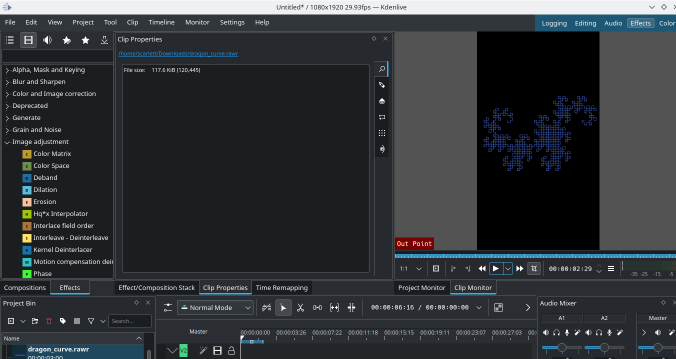 Kdenlive with Glaximate animations!
 The eighteenth release of