Search Results: "beh"

18 February 2016

Enrico Zini: gui-debugging-output

Debugging output of GUI apps I have been hit by #643726 again. I was happily working on a terminal while an apt upgrade was running on another, and suddenly kbuildsycoca4 started vomiting on my command line because I had run okular once on that terminal last tuesday. Among the possible workarounds, one can run kdebugdialog from package kde-runtime and check the "Disable all debug output" button. This is the output of kdebugdialog when run on a terminal after enabling "Disable all debug output":
$ kdebugdialog
QDBusConnection: session D-Bus connection created before QCoreApplication. Application may misbehave.
I see it as debugging output turned into an art performance, and I have an appreciation for this kind of things. kdebugdialog, my hat's off to you.

Enrico Zini: Debugging output of GUI apps

I have been hit by #643726 again. I was happily working on a terminal while an apt upgrade was running on another, and suddenly kbuildsycoca4 started vomiting on my command line because I had run okular once on that terminal last tuesday. Among the possible workarounds, one can run kdebugdialog from package kde-runtime and check the "Disable all debug output" button. This is the output of kdebugdialog when run on a terminal after enabling "Disable all debug output":
$ kdebugdialog
QDBusConnection: session D-Bus connection created before QCoreApplication. Application may misbehave.
I see it as debugging output turned into an art performance, and I have an appreciation for this kind of things. kdebugdialog, my hat's off to you.

15 February 2016

Sven Hoexter: distribution specific details

To state the obvious: my personal preference is to run Debian GNU/Linux. My current workplace is a CentOS shop and usually I'm the first to claim that it doesn't matter at all, and distribution specific implementation details are irrelevant for what we do (running a JVM). Let's take a short detour to the RedHat network-scripts. Two weeks ago we found some systems we originally installed in a different network segment, with different DNS servers and different search domains, came back up after a reboot with a rewritten 'resolv.conf'. Later on cfengine replaced the generated 'resolv.conf' with the intended one, so it wasn't that obvious to spot in the first place. A colleague found the origin of the rewritten 'resolv.conf' in a device specific configuration file that defined the 'DNS 1,2 ' variables with the installation time DNS server IPs from the other segment. I expected to experience the same behaviour (resolv.conf rewritten during startup and replaced by cfengine later on) in other locations, but assumed we just didn't notice it because the main difference would be a slightly different list of search domains. And I was wrong. I checked the timestamps of several 'resolv.conf' files and their cfengine backup file. None were recently created or related somehow to a reboot. grep-ing through parts of the network-scripts I found the following conditional in '/etc/sysconfig/network-scripts/ifup'
if [ "$PEERDNS" != "no" ]  [ -n "$RESOLV_MODS" -a "$RESOLV_MODS" != "no" ]; then
   [ -n "$MS_DNS1" ] && DNS1=$MS_DNS1
   [ -n "$MS_DNS2" ] && DNS2=$MS_DNS2
      if [ -n "$DNS1" ] && ! grep -q "^nameserver $DNS1" /etc/resolv.conf &&
         tr=$(mktemp /tmp/XXXXXX) ; then
 ...
So if you adjust only the second nameserver IP you stored in "DNS2" in your configuration you end up without an update to your 'resolv.conf'. Now knowing that, I'd say this is relevant distribution specific knowledge, and I'm wondering how many of such subtle behaviours we've hidden in Debian specific solutions? Maybe knowledge about distribution specific implementation details even matters after all. Regardig the 'resolv.conf' issue itself the fault is on us. We as the responsible team did not read the documentation properly and thus deployed a configuration that later on let to some unexpected consequences. I try to remember those issues as an example for the next NetworkManager/systemd-networkd vs old-school-network-scripts argument.

9 February 2016

Ingo Juergensmann: Letsencrypt - when your blog entries don't show up on Planet Debian

Recently there is much talk on Planet Debian about LetsEncrypt certs. This is great, because using HTTPS everywhere improves security and gives the NSA some more work to decrypt the traffic. However, when you enabled your blog with a LetsEncrypt cert, you might run into the same problem as I: your new article won't show up on Planet Debian after changing your feed URI to HTTPS. The reason seems to be quite simple: planet-venus, which is the software behind Planet Debian seems to have problems with SNI enabled websites. When following the steps outlined in the Debian Wiki, you can check this by yourself:
INFO:planet.runner:Fetching https://blog.windfluechter.net/taxonomy/term/2/feed via 5
ERROR:planet.runner:HttpLib2Error: Server presented certificate that does not match host blog.windfluechter.net: 'subjectAltName': (('DNS', 'abi94oesede.de'), ('DNS', 'www.abi94oesede.de')), 'notBefore': u'Jan 26 18:05:00 2016 GMT', 'caIssuers': (u'http://cert.int-x1.letsencrypt.org/',), 'OCSP': (u'http://ocsp.int-x1.letsencrypt.org/',), 'serialNumber': u'01839A051BF9D2873C0A3BAA9FD0227C54D1', 'notAfter': 'Apr 25 18:05:00 2016 GMT', 'version': 3L, 'subject': ((('commonName', u'abi94oesede.de'),),), 'issuer': ((('countryName', u'US'),), (('organizationName', u"Let's Encrypt"),), (('commonName', u"Let's Encrypt Authority X1"),)) via 5
I've filed bug #813313 for this. So, this might explain why your blog post doesn't appear on Planet Debian. Currently there seem 18 sites to be affected by this cert mismatch.
Kategorie:

8 February 2016

Ingo Juergensmann: rpcbind listening on all interfaces

Currently I'm testing GlusterFS as a replicating network filesystem. GlusterFS depends on rpcbind package. No problem with that, but I usually want to have the services that run on my machines to only listen on those addresses/interfaces that are needed to fulfill the task. This is especially important, because rpcbind can be abused by remote attackers for rpc amplification attacks (dDoS). So, the rpcbind man page states:
-h : Specify specific IP addresses to bind to for UDP requests. This option may be specified multiple times and is typically necessary when running on a multi-homed host. If no -h option is specified, rpcbind will bind to INADDR_ANY, which could lead to problems on a multi-homed host due to rpcbind returning a UDP packet from a different IP address than it was sent to. Note that when specifying IP addresses with -h, rpcbind will automatically add 127.0.0.1 and if IPv6 is enabled, ::1 to the list.
Ok, although there is neither a /etc/default/rpcbind.conf nor a /etc/rpcbind.conf nor a sample-rpcbind.conf under /usr/share/doc/rpcbind, some quick websearch revealed a sample config file. I'm using this one:
# /etc/init.d/rpcbind
OPTIONS=""

# Cause rpcbind to do a "warm start" utilizing a state file (default)
# OPTIONS="-w "

# Uncomment the following line to restrict rpcbind to localhost only for UDP requests
OPTIONS="$ OPTIONS -h 192.168.1.254"
#127.0.0.1 -h ::1"

# Uncomment the following line to enable libwrap TCP-Wrapper connection logging
OPTIONS="$ OPTIONS -l "
As you can see, I want to bind to 192.168.1.254. After a /etc/init.d/rpcbind restart verifying that everything works as desired with netstat is showing...
tcp 0 0 0.0.0.0:111 0.0.0.0:* LISTEN 0 2084266 30777/rpcbind
tcp6 0 0 :::111 :::* LISTEN 0 2084272 30777/rpcbind
udp 0 0 0.0.0.0:848 0.0.0.0:* 0 2084265 30777/rpcbind
udp 0 0 192.168.1.254:111 0.0.0.0:* 0 2084264 30777/rpcbind
udp 0 0 127.0.0.1:111 0.0.0.0:* 0 2084260 30777/rpcbind
udp6 0 0 :::848 :::* 0 2084271 30777/rpcbind
udp6 0 0 ::1:111 :::* 0 2084267 30777/rpcbind
Whoooops! Although I've specified that rpcbind should only listen to 192.168.1.254 (and localhost as described by the man page) rpcbind is still listening on all addresses. Quick check if the process is using the correct options:
root 30777 0.0 0.0 37228 2360 ? Ss 16:11 0:00 /sbin/rpcbind -h 192.168.1.254 -l
Hmmm, yes, -h 192.168.1.254 is specified. Ok, something is going wrong here... According to an entry in Ubuntus Launchpad I'm not the only one that experienced this problem. However this Launchpad entry mentioned that upstream seems to have a fix in version 0.2.3, but I experienced the same behaviour in stable as well as in unstable, where the package version is 0.2.3-0.2. Apparently the problem still exists in Debian unstable. I'm somewhat undecided whether to file a normal bug against rpcbind or if I should label it as a security bug, because it opens a service to the public that can be abused for amplification attacks, although you might have configured rpcbind to just listen on internal addresses.
Kategorie:

6 February 2016

Dimitri John Ledkov: Blogging about Let's encrypt over HTTP

So let's encrypt thing started. And it can do challenges over http (serving text files) and over dns (serving .txt records).

My "infrastructure" is fairly modest. I've seen too many of my email accounts getting swamped with spam, and or companies going bust. So I got my own domain name surgut.co.uk. However, I don't have money or time to run my own services. So I've signed up for the Google Apps account for my domain to do email, blogging, etc.

Then later i got the libnih.la domain to host API docs for the mentioned library. In the world of .io startups, I thought it's an incredibly funny domain name.

But I also have a VPS to host static files on ad-hoc basis, run VPN, and an irc bouncer. My irc bouncer is ZNC and I used a self-signed certificate there, thus i had "ignore" ssl errors in all of my irc clients... which kind of defeats the purposes somewhat.

I run my VPS on i386 (to save on memory usage) and on Ubuntu 14.04 LTS managed with Landscape. And my little services are just configured by hand there (not using juju).

My first attempt at getting on the let's encrypt bandwagon was to use the official client. By fetching debs from xenial, and installing that on LTS. But the package/script there is huge, has support for things I don't need, and wants dependencies I don't have on 14.04 LTS.

However I found a minimalist implementation letsencrypt.sh implemented in shell, with openssl and curl. It was trivial to get dependencies for and configure. Specified a domains text file, and that was it. And well, added sym links in my NGINX config to serve the challenges directory & a hook to deploy certificate to znc and restart that. I've added a cronjob to renew the certs too. Thinking about it, it's not complete as I'm not sure if NGINX will pick up certificate change and/or if it will need to be reloaded. I shall test that, once my cert expires.

Tweaking config for NGINX was easy. And I was like, let's see how good it is. I pointed https://www.ssllabs.com/ssltest/ at my https://x4d.surgut.co.uk/ and I got a "C" rating. No forward secrecy, vulnerable to down grade attacks, BEAST, POODLE and stuff like that. I went googling for all types of NGINX configs and eventually found website with "best known practices" https://cipherli.st/ However, even that only got me to "B" rating, as it still has Diffie-Hellman things that ssltest caps at "B" rating. So I disabled those too. I've ended up with this gibberish:

ssl_protocols TLSv1 TLSv1.1 TLSv1.2;
ssl_prefer_server_ciphers on;
ssl_ciphers "EECDH+AESGCM:AES256+EECDH";
ssl_ecdh_curve secp384r1; # Requires nginx >= 1.1.0
ssl_session_cache shared:SSL:10m;
#ssl_session_tickets off; # Requires nginx >= 1.5.9
ssl_stapling on; # Requires nginx >= 1.3.7
ssl_stapling_verify on; # Requires nginx => 1.3.7
#resolver $DNS-IP-1 $DNS-IP-2 valid=300s;
#resolver_timeout 5s;
add_header Strict-Transport-Security "max-age=63072000; includeSubdomains; preload";
add_header X-Frame-Options DENY;
add_header X-Content-Type-Options nosniff;

I call it gibberish, because IMHO, I shouldn't need to specify any of the above... Anyway I got my A+ rating.

However, security is as best as the weakest link. I'm still serving things over HTTP, maybe I should disable that. And I'm yet to check how "good" the TLS is on my znc. Or if I need to further harden my sshd configuration.

This has filled a big gap in my infrastructure. However a few things remain served over HTTP only.

http://blog.surgut.co.uk is hosted by an Alphabet's / Google's Blogger service. Which I would want to be served over HTTPS.

http://libnih.la is hosted by GitHub Inc service. Which I would want to be served over HTTPS.

I do not want to manage those services, experience load / spammers / DDoS attacks etc. But I am happy to sign CSRs with let's encrypt and deploy certs over to those companies. Or allow them to self-obtain certificates from let's encrypt on my behalf. I used gandi.net as my domain names provider, which offers an RPC API to manage domains and their zones files, thus e.g. I can also generate an API token for those companies to respond with a dns-01 challenge from let's encrypt.

One step at a time I guess.

The postings on this site are my own and don't necessarily represent any past/present/future employers' positions, strategies, or opinions.

Neil Williams: lava.debian.net

With thanks to Iain Learmonth for the hardware, there is now a Debian instance of LAVA available for use and the Debian wiki page has been updated. LAVA is a continuous integration system for deploying operating systems onto physical and virtual hardware for running tests. Tests can be simple boot testing, bootloader testing and system level testing. Extra hardware may be required for some system tests. Results are tracked over time and data can be exported for further analysis. LAVA has a long history of supporting continuous integration of the Linux kernel on ARM devices (ARMv7 & ARMv8). So if you are testing a Linux kernel image on armhf or arm64 devices, you will find a lot of similar tests already running on the other LAVA instances. The Debian LAVA instance seeks to widen that testing in a couple of ways: This instance relies on the latest changes in lava-server and lava-dispatcher. The 2016.2 release has now deprecated the old, complex dispatcher and a whole new pipeline design is available. The Debian LAVA instance is running 2015.12 at the moment, I ll upgrade to 2016.2 once the packages migrate into testing in a few days and I can do a backport to jessie. What can LAVA do for Debian? ARMMP kernel testing Unreleased builds, experimental initramfs testing this is the core of what LAVA is already doing behind the scenes of sites like http://kernelci.org/. U-Boot ARM testing This is what fully automated LAVA labs have not been able to deliver in the past, at least without a usable SD Mux What s next LOTS. This post actually got published early (distracted by the rugby) I ll update things more in a later post. Contact me if you want to get involved, I ll provide more information on how to use the instance and how to contribute to the testing in due course.

5 February 2016

Daniel Pocock: Giving up democracy to get it back

Do services like Facebook and Twitter really help worthwhile participation in democracy, or are they the most sinister and efficient mechanism ever invented to control people while giving the illusion that they empower us? Over the last few years, groups on the left and right of the political spectrum have spoken more and more loudly about the problems in the European Union. Some advocate breaking up the EU, while behind the scenes milking it for every handout they can get. Others seek to reform it from within. Yanis Varoufakis on motorbike Most recently, former Greek finance minister Yanis Varoufakis has announced plans to found a movement (not a political party) that claims to "democratise" the EU by 2025. Ironically, one of his first steps has been to create a web site directing supporters to Facebook and Twitter. A groundbreaking effort to put citizens back in charge? Or further entangling activism in the false hope of platforms that are run for profit by their Silicon Valley overlords? A Greek tragedy indeed, in the classical sense. Varoufakis rails against authoritarian establishment figures who don't put the citizens' interests first. Ironically, big data and the cloud are a far bigger threat than Brussels. The privacy and independence of each citizen is fundamental to a healthy democracy. Companies like Facebook are obliged - by law and by contract - to service the needs of their shareholders and advertisers paying to study and influence the poor user. If "Facebook privacy" settings were actually credible, who would want to buy their shares any more? Facebook is more akin to an activism placebo: people sitting in their armchair clicking to "Like" whales or trees are having hardly any impact at all. Maintaining democracy requires a sufficient number of people to be actively involved, whether it is raising funds for worthwhile causes, scrutinizing the work of our public institutions or even writing blogs like this. Keeping them busy on Facebook and Twitter renders them impotent in the real world (but please feel free to alert your friends with a tweet) Big data is one of the areas that requires the greatest scrutiny. Many of the professionals working in the field are actually selling out their own friends and neighbours, their own families and even themselves. The general public and the policy makers who claim to represent us are oblivious or reckless about the consequences of this all-you-can-eat feeding frenzy on humanity. Pretending to be democratic is all part of the illusion. Facebook's recent announcement to deviate from their real-name policy is about as effective as using sunscreen to treat HIV. By subjecting themselves to the laws of Facebook, activists have simply given Facebook more status and power. Data means power. Those who are accumulating it from us, collecting billions of tiny details about our behavior, every hour of every day, are fortifying a position of great strength with which they can personalize messages to condition anybody, anywhere, to think the way they want us to. Does that sound like the route to democracy? I would encourage Mr Varoufakis to get up to speed with Free Software and come down to Zurich next week to hear Richard Stallman explain it the day before launching his DiEM25 project in Berlin. Will the DiEM25 movement invite participation from experts on big data and digital freedom and make these issues a core element of their promised manifesto? Is there any credible way they can achieve their goal of democracy by 2025 without addressing such issues head-on? Or put that the other way around: what will be left of democracy in 2025 if big data continues to run rampant? Will it be as distant as the gods of Greek mythology? Still not convinced? Read about Amazon secretly removing George Orwell's 1984 and Animal Farm from Kindles while people were reading them, Apple filtering the availability of apps with a pro-Life bias and Facebook using algorithms to identify homosexual users.

4 February 2016

Vincent Fourmond: Making oprofile work again with recent kernels

I've been using oprofile for profiling programs for a while now (and especially QSoas, because it doesn't require specific compilation options, and doesn't make your program run much more slowly (like valgrind does, which can also be used to some extent for profiling). It's a pity the Debian package was dropped long ago, but the ubuntu packages work out of the box on Debian. But, today, while trying to see what takes so long in some fits I'm running, here's what I get:
~ operf QSoas
Unexpected error running operf: Permission denied

Looking further using strace, I could see that what was not working was the first call to perf_event_open.
It took me quite a long time to understand why it stopped working and how to get it working again, so here's for those of you who googled the error and couldn't find any answer (including me, who will probably have forgotten the anwser in a couple of months). The reason behing the change is that, for security reason, non-privileged users do not have the necessary privileges since Debian kernel 4.1.3-1; here's the relevant bit from the changelog:

  * security: Apply and enable GRKERNSEC_PERF_HARDEN feature from Grsecurity,
    disabling use of perf_event_open() by unprivileged users by default
    (sysctl: kernel.perf_event_paranoid)

The solution is simple, just run as root:
~ sysctl kernel.perf_event_paranoid=1

(the default value seems to be 3, for now). Hope it helps !

Martin-Éric Racine: xf86-video-geode 2.11.18

Yesterday, I pushed out version 2.11.18 of the Geode X.Org driver. This is the driver used by the OLPC XO-1 and by a plethora of low-power desktops, micro notebooks and thin clients. This release mostly includes maintenance fixes of all sorts. Of noticeable interest is a fix for the long-standing issue that switching between X and a VT would result in a blank screen (this should probably be cherry-picked for distributions running earlier releases of this driver). Many thanks to Connor Behan for the fix!
Unfortunately, this driver still doesn't work with GNOME. On my testing host, launching GDM produces a blank screen. 'ps' and other tools show that GDM is running but there's no screen content; the screen remains pitch black. This issue doesn't happen with other display managers e.g. LightDM. Bug reports have been filed, additional information was provided, but the issue still hasn't been resolved.
Additionally, X server flat out crashes on Geode hosts running Linux kernels 4.2 or newer. 'xkbcomp' repeatedly fails to launch and X exits with a fatal error. Bug reports have been filed, but not reacted to. However, interestingly enough, X launches fine if my testing host is booted with earliers kernels, which might suggest what the actual cause of this particular bug might be:
Since kernel 4.2 entered Debian, the base level i386 kernel on Debian is now compiled for i686 (without PAE). Until now, the base level was i586. This essentially makes it pointless to build the Geode driver with GX2 support. It also means that older GX1 hardware won't be able to run Debian either, starting with the next stable release.

Iustin Pop: X cursor theme

There's not much to talk about X cursor themes, except when they change behind your back :) A while back, after a firefox upgrade, it and only it showed a different cursor theme: basically double the size, and (IMHO) uglier. Searched for a while, but couldn't figure what makes firefox special, except that it is a GTK application. After another round of dist-upgrades, now everything except xterms were showing the big cursors. This annoyed me to no end as I don't use a high-DPI display, the new cursors are just too damn big. Only to find out two things: Sigh, Gnome.

3 February 2016

Wouter Verhelst: OMFG, ls

alias ls='ls --color=auto -N'
Unfortunately it doesn't actually revert to the previous behaviour, but it's close enough.

1 February 2016

Stefano Zacchiroli: guest lecture Overthrowing the Tyranny of Software by John Sullivan

As part of my master class on Free and Open Source (FOSS) Software at University Paris Diderot, I invite guest lecturers to present to my students the point of views of various actors of the FOSS ecosystem --- companies, non-profits, activists, lawyers, etc. Tomorrow, Tuesday 2 February 2016, the students will have the pleasure to have as guest lecturer John Sullivan, Executive Director of the Free Software Foundation, talking about Overthrowing the tyranny of software: Why (and how) free societies respect computer user freedom. The lecture is open to everyone interested, but registration is recommended. Logistic and registration information, as well as the lecture abstract in both English and French is reported below.
John Sullivan's Lecture at University Paris Diderot - Overthrowing the tyranny of software: Why (and how) free societies respect computer user freedom John Sullivan, Executive Director of the Free Software Foundation will give a lecture titled "Overthrowing the tyranny of software: Why (and how) free societies respect computer user freedom" at University Paris Diderot next Tuesday, 2 February 2016, at 12:30 in the Amphi 3B, Halle aux Farines building, Paris 75013. Map at: http://www.openstreetmap.org/way/62378611#map=19/48.82928/2.38183 The lecture will be in English and open to everyone, but registration is recommended at https://framadate.org/iPqfjNTz2535F8u4 or via email writing to zack@pps.univ-paris-diderot.fr. Abstract: Anyone who has used a computer for long has at least sometimes felt like a helpless subject under the tyrant of software, screaming (uselessly) in frustration at the screen to try and get the desired results. But with driverless cars, appliances which eavesdrop on conversations in our homes, mobile devices that transmit our location when we are out and about, and computers with unexpected hidden "features", our inability to control the software supposedly in our possession has become a much more serious problem than the superficial blue-screen-of-death irritations of the past. Software which is free "as in freedom" allows anyone who has it to inspect the code and even modify it -- or ask someone trained in the dark arts of computer programming to do it for them -- so that undesirable behaviors can be removed or defused. This characteristic, applied to all software, should be a major part of foundation of free societies moving forward. To get there, we'll need individual developers, nonprofit organizations, governments, and companies all working together -- with the first two groups leading the way.
Cours Magistral de John Sullivan l'Universit Paris Diderot - Surmonter la tyrannie du logiciel: pourquoi (et comment) les soci t s libres respectent les libert s des utilisateurs John Sullivan, Directeur Ex cutif de la Free Software Foundation donnera un cours magistral ayant pour titre "Surmonter la tyrannie du logiciel: pourquoi (et comment) les soci t s libres respectent les libert s des utilisateurs" l'Universit Paris Diderot Mardi prochain, 2 f vrier 2016, 12h30 dans l'Amphi 3B de la Halle aux Farines, Paris 75013. Plan: http://www.openstreetmap.org/way/62378611#map=19/48.82928/2.38183 Le cours (en langue Anglaise) sera ouvert toutes et tous, mais l'inscription est recommand via le formulaire https://framadate.org/iPqfjNTz2535F8u4 ou par mail l'adresse zack@pps.univ-paris-diderot.fr. R sum : Chacun de nous, au moins une fois dans sa vie, a pest contre son ordinateur dans l'espoir (vain) d'obtenir un r sultat attendu, se sentant d poss de par un tyran logiciel. Mais au jour d'aujourd'hui - avec des voitures autonomes, des dispositifs "intelligents" que nous coutent chez nous, des portables qui transmettent notre position quand nous nous baladons, et des ordinateurs pleins des fonctionnalit s cach es - notre incapacit de contr ler nos biens devient une question beaucoup plus s rieuse par rapport a l'irritation qu'auparavant nous causait l' cran bleu de la mort. Le logiciel libre permet chaque utilisateur d' tudier son fonctionnement et de le modifier --- ou de demander des experts dans la magie noire de la programmation de le faire a sa place --- supprimant, ou du moins r duisant, les comportements ind sir s du logiciel. Cette caract ristique du logiciel libre devrait tre appliqu e chaque type de logiciel et devrait constituer un pilier des soci t s se pr tendant libres. Pour achever cet id al, d veloppeurs, organisations but non lucratif, gouvernements et entreprises doivent travailler ensemble. Et les d veloppeurs et les ONG doivent se positionner au premier rang dans ce combat.

30 January 2016

Simon McVittie: GNOME Developer Experience hackfest: xdg-app + Debian

Over the last few days I've been at the GNOME Developer Experience hackfest in Brussels, looking into xdg-app and how best to use it in Debian and Debian derivatives. xdg-app is basically a way to run "non-core" software on Linux distributions, analogous to apps on Android and iOS. It doesn't replace distributions like Debian or packaging systems, but it adds a layer above them. It's mostly aimed towards third-party apps obtained from somewhere that isn't your distribution vendor, aiming to address a few long-standing problems in that space: To address the first point, each application uses a specified "runtime", which is available as /usr inside its sandbox. This can be used to run application bundles with multiple, potentially incompatible sets of dependencies within the same desktop environment. A runtime can be updated within its branch - for instance, if an application uses the "GNOME 3.18" runtime (consisting of a basic Linux system, the GNOME 3.18 libraries, other related libraries like Mesa, and their recursive dependencies like libjpeg), it can expect to see minor-version updates from GNOME 3.18.x (including any security updates that might be necessary for the bundled libraries), but not a jump to GNOME 3.20. To address the second issue, the plan is for application bundles to be available as a single file, containing metadata (such as the runtime to use), the app itself, and any dependencies that are not available in the runtime (which the app vendor is responsible for updating if necessary). However, the primary way to distribute and upgrade runtimes and applications is to package them as OSTree repositories, which provide a git-like content-addressed filesystem, with efficient updates using binary deltas. The resulting files are hard-linked into place. To address the last point, application bundles run partially isolated from the wider system, using containerization techniques such as namespaces to prevent direct access to system resources. Resources from outside the sandbox can be accessed via "portal" services, which are responsible for access control; for example, the Documents portal (the only one, so far) displays an "Open" dialog outside the sandbox, then allows the application to access only the selected file. xdg-app for Debian One thing I've been doing at this hackfest is improving the existing Debian/Ubuntu packaging for xdg-app (and its dependencies ostree and libgsystem), aiming to get it into a state where I can upload it to Debian experimental. Because xdg-app aims to be a general freedesktop project, I'm currently intending to make it part of the "Utopia" packaging team alongside projects like D-Bus and polkit, but I'm open to suggestions if people want to co-maintain it elsewhere. In the process of updating xdg-app, I sent various patches to Alex, mostly fixing build and test issues, which are in the new 0.4.8 release. I'd appreciate co-maintainers and further testing for this stuff, particularly ostree: ostree is primarily a whole-OS deployment technology, which isn't a use-case that I've tested, and in particular ostree-grub2 probably doesn't work yet. Source code: Binaries (no trust path, so only use these if you have a test VM): The "Hello, World" of xdg-apps Another thing I set out to do here was to make a runtime and an app out of Debian packages. Most of the test applications in and around GNOME use the "freedesktop" or "GNOME" runtimes, which consist of a Yocto base system and lots of RPMs, are rebuilt from first principles on-demand, and are extensive and capable enough that they make it somewhat non-obvious what's in an app or a runtime. So, here's a step-by-step route through xdg-app, first using typical GNOME instructions, but then using the simplest GUI app I could find - xvt, a small xterm clone. I'm using a Debian testing (stretch) x86_64 virtual machine for all this. xdg-app currently requires systemd-logind to put users and apps in cgroups, either with systemd as pid 1 (systemd-sysv) or systemd-shim and cgmanager; I used the default systemd-sysv. In principle it could work with plain cgmanager, but nobody has contributed that support yet. Demonstrating an existing xdg-app Debian's kernel is currently patched to be able to allow unprivileged users to create user namespaces, but make it runtime-configurable, because there have been various security issues in that feature, making it a security risk for a typical machine (and particularly a server). Hopefully unprivileged user namespaces will soon be secure enough that we can enable them by default, but for now, we have to do one of three things to let xdg-app use them: First, we'll need a runtime. The standard xdg-app tutorial would tell you to download the "GNOME Platform" version 3.18. To do that, you'd add a remote, which is a bit like a git remote, and a bit like an apt repository:
$ wget http://sdk.gnome.org/keys/gnome-sdk.gpg
$ xdg-app remote-add --user --gpg-import=gnome-sdk.gpg gnome \
    http://sdk.gnome.org/repo/
(I'm ignoring considerations like trust paths and security here, for brevity; in real life, you'd want to obtain the signing key via https and/or have a trust path to it, just like you would for a secure-apt signing key.) You can list what's available in a remote:
$ xdg-app remote-ls --user gnome
...
org.freedesktop.Platform
...
org.freedesktop.Platform.Locale.cy
...
org.freedesktop.Sdk
...
org.gnome.Platform
...
The Platform runtimes are what we want here: they are collections of runtime libraries with which you can run an application. The Sdk runtimes add development tools, header files, etc. to be able to compile apps that will be compatible with the Platform. For now, all we want is the GNOME 3.18 platform:
$ xdg-app install --user gnome org.gnome.Platform 3.18
Next, we can install an app that uses it, from Alex Larsson's nightly builds of a subset of GNOME. The server they're on doesn't have a great deal of bandwidth, so be nice :-)
$ wget http://209.132.179.2/keys/nightly.gpg
$ xdg-app remote-add --user --gpg-import=nightly.gpg nightly \
    http://209.132.179.2/repo/
$ xdg-app install --user nightly org.mypaint.MypaintDevel
We now have one app, and the runtime it needs:
$ xdg-app list
org.mypaint.MypaintDevel
$ xdg-app run org.mypaint.MypaintDevel
[you see a GUI window]
Digression: what's in a runtime? Behind the scenes, xdg-app runtimes and apps are both OSTree trees. This means the ostree tool, from the package of the same name, can be used to inspect them.
$ sudo apt install ostree
$ ostree refs --repo ~/.local/share/xdg-app/repo
gnome:runtime/org.gnome.Platform/x86_64/3.18
nightly:app/org.mypaint.MypaintDevel/x86_64/master
A "ref" has roughly the same meaning as in git: something like a branch or a tag. ostree can list the directory tree that it represents:
$ ostree ls --repo ~/.local/share/xdg-app/repo \
    runtime/org.gnome.Platform/x86_64/3.18
d00755 0 0      0 /
-00644 0 0    493 /metadata
d00755 0 0      0 /files
$ ostree ls --repo ~/.local/share/xdg-app/repo \
    runtime/org.gnome.Platform/x86_64/3.18 /files
d00755 0 0      0 /files
l00777 0 0      0 /files/local -> ../var/usrlocal
l00777 0 0      0 /files/sbin -> bin
d00755 0 0      0 /files/bin
d00755 0 0      0 /files/cache
d00755 0 0      0 /files/etc
d00755 0 0      0 /files/games
d00755 0 0      0 /files/include
d00755 0 0      0 /files/lib
d00755 0 0      0 /files/lib64
d00755 0 0      0 /files/libexec
d00755 0 0      0 /files/share
d00755 0 0      0 /files/src
You can see that /files in a runtime is basically a copy of /usr. This is not coincidental: the runtime's /files gets mounted at /usr inside the xdg-app container. There is also some metadata, which is in the ini-like syntax seen in .desktop files:
$ ostree cat --repo ~/.local/share/xdg-app/repo \
    runtime/org.gnome.Platform/x86_64/3.18 /metadata
[Runtime]
name=org.gnome.Platform/x86_64/3.16
runtime=org.gnome.Platform/x86_64/3.16
sdk=org.gnome.Sdk/x86_64/3.16
[Extension org.freedesktop.Platform.GL]
version=1.2
directory=lib/GL
[Extension org.freedesktop.Platform.Timezones]
version=1.2
directory=share/zoneinfo
[Extension org.gnome.Platform.Locale]
directory=share/runtime/locale
subdirectories=true
[Environment]
GI_TYPELIB_PATH=/app/lib/girepository-1.0
GST_PLUGIN_PATH=/app/lib/gstreamer-1.0
LD_LIBRARY_PATH=/app/lib:/usr/lib/GL
Looking at an app, the situation is fairly similar:
$ ostree ls --repo ~/.local/share/xdg-app/repo \
    app/org.mypaint.MypaintDevel/x86_64/master
d00755 0 0      0 /
-00644 0 0    258 /metadata
d00755 0 0      0 /export
d00755 0 0      0 /files
This time, /files maps to what will become /app for the application, which was compiled with --prefix=/app:
$ ostree ls --repo ~/.local/share/xdg-app/repo \
    app/org.mypaint.MypaintDevel/x86_64/master /files
d00755 0 0      0 /files
-00644 0 0   4599 /files/manifest.json
d00755 0 0      0 /files/bin
d00755 0 0      0 /files/lib
d00755 0 0      0 /files/share
There is also a /export directory, which is made visible to the host system so that the contained app can appear as a "first-class citizen" in menus:
$ ostree ls --repo ~/.local/share/xdg-app/repo \
    app/org.mypaint.MypaintDevel/x86_64/master /export
d00755 0 0      0 /export
d00755 0 0      0 /export/share
user@debian:~$ ostree ls --repo ~/.local/share/xdg-app/repo \
    app/org.mypaint.MypaintDevel/x86_64/master /export/share
d00755 0 0      0 /export/share
d00755 0 0      0 /export/share/app-info
d00755 0 0      0 /export/share/applications
d00755 0 0      0 /export/share/icons
user@debian:~$ ostree ls --repo ~/.local/share/xdg-app/repo \
    app/org.mypaint.MypaintDevel/x86_64/master /export/share/applications
d00755 0 0      0 /export/share/applications
-00644 0 0    715 /export/share/applications/org.mypaint.MypaintDevel.desktop
$ ostree cat --repo ~/.local/share/xdg-app/repo \
    app/org.mypaint.MypaintDevel/x86_64/master \
    /export/share/applications/org.mypaint.MypaintDevel.desktop
[Desktop Entry]
Version=1.0
Name=(Nightly) MyPaint
TryExec=mypaint
Exec=mypaint %f
Comment=Painting program for digital artists
...
Comment[zh_HK]= 
GenericName=Raster Graphics Editor
GenericName[fr]= diteur d'Image Matricielle
MimeType=image/openraster;image/png;image/jpeg;
Type=Application
Icon=org.mypaint.MypaintDevel
StartupNotify=true
Categories=Graphics;GTK;2DGraphics;RasterGraphics;
Terminal=false
Again, there's some metadata:
$ ostree cat --repo ~/.local/share/xdg-app/repo \
    app/org.mypaint.MypaintDevel/x86_64/master /metadata
[Application]
name=org.mypaint.MypaintDevel
runtime=org.gnome.Platform/x86_64/3.18
sdk=org.gnome.Sdk/x86_64/3.18
command=mypaint
[Context]
shared=ipc;
sockets=x11;pulseaudio;
filesystems=host;
[Extension org.mypaint.MypaintDevel.Debug]
directory=lib/debug
Building a runtime, probably the wrong way The way in which the reference/demo runtimes and containers are generated is... involved. As far as I can tell, there's a base OS built using Yocto, and the actual GNOME bits come from RPMs. However, we don't need to go that far to get a working runtime. In preparing this runtime I'm probably completely ignoring some best-practices and tools - but it works, so it's good enough. First we'll need a repository:
$ sudo install -d -o$(id -nu) /srv/xdg-apps
$ ostree init --repo /srv/xdg-apps
I'm just keeping this local for this demonstration, but you could rsync it to a web server's exported directory or something - a lot like a git repository, it's just a collection of files. We want everything in /usr because that's what xdg-app expects, hence usrmerge:
$ sudo mount -t tmpfs -o mode=0755 tmpfs /mnt
$ sudo debootstrap --arch=amd64 --include=libx11-6,usrmerge \
    --variant=minbase stretch /mnt http://192.168.122.1:3142/debian
$ sudo mkdir /mnt/runtime
$ sudo mv /mnt/usr /mnt/runtime/files
This obviously has a lot of stuff in it that we don't need - most obviously init, apt and dpkg - but it's Good Enough . We will also need some metadata. This is sufficient:
$ sudo sh -c 'cat > /mnt/runtime/metadata'
[Runtime]
name=org.debian.Debootstrap/x86_64/8.20160130
runtime=org.debian.Debootstrap/x86_64/8.20160130
That's a runtime. We can commit it to ostree, and generate xdg-app metadata:
$ ostree commit --repo /srv/xdg-apps \
    --branch runtime/org.debian.Debootstrap/x86_64/8.20160130 \
    /mnt/runtime
$ fakeroot ostree commit --repo /srv/xdg-apps \
    --branch runtime/org.debian.Debootstrap/x86_64/8.20160130
$ fakeroot xdg-app build-update-repo /srv/xdg-apps
(I'm not sure why ostree and xdg-app report "Operation not permitted" when we aren't root or fakeroot - feedback welcome.) build-update-repo would presumably also be the right place to GPG-sign your repository, if you were doing that. We can add that as another xdg-app remote:
$ xdg-app remote-add --user --no-gpg-verify local file:///srv/xdg-apps
$ xdg-app remote-ls --user local
org.debian.Debootstrap
Building an app, probably the wrong way The right way to build an app is to build a "SDK" runtime - similar to that platform runtime, but with development files and tools - and recompile the app and any missing libraries with ./configure --prefix=/app && make && make install. I'm not going to do that, because simplicity is nice, and I'm reasonably sure xvt doesn't actually hard-code /usr into the binary:
$ install -d xvt-app/files/bin
$ sudo apt-get --download-only install xvt
$ dpkg-deb --fsys-tarfile /var/cache/apt/archives/xvt_2.1-20.1_amd64.deb \
      tar -xvf - ./usr/bin/xvt
./usr/
./usr/bin/
./usr/bin/xvt
...
$ mv usr xvt-app/files
Again, we'll need metadata, and it's much simpler than the more production-quality GNOME nightly builds:
$ cat > xvt-app/metadata
[Application]
name=org.debian.packages.xvt
runtime=org.debian.Debootstrap/x86_64/8.20160130
command=xvt
[Context]
sockets=x11;
$ fakeroot ostree commit --repo /srv/xdg-apps \
    --branch app/org.debian.packages.xvt/x86_64/2.1-20.1 xvt-app
$ fakeroot xdg-app build-update-repo /srv/xdg-apps
Updating appstream branch
No appstream data for runtime/org.debian.Debootstrap/x86_64/8.20160130
No appstream data for app/org.debian.packages.xvt/x86_64/2.1-20.1
Updating summary
$ xdg-app remote-ls --user local
org.debian.Debootstrap
org.debian.packages.xvt
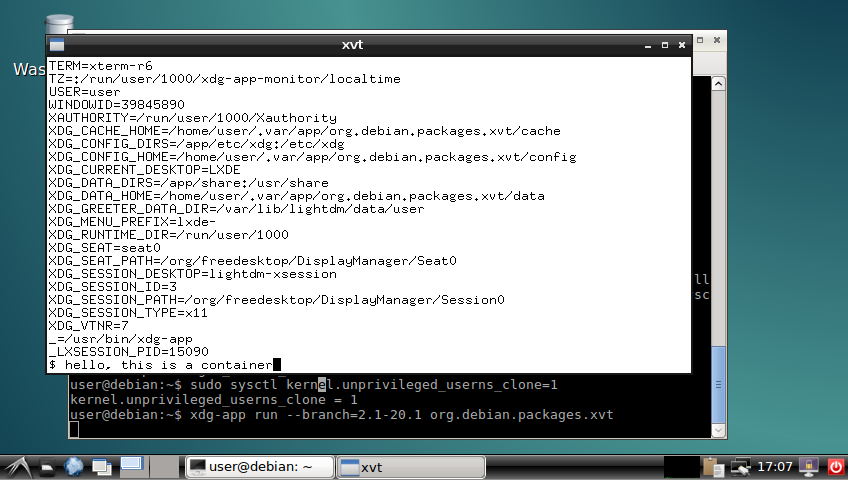
The obligatory screenshot OK, good, now we can install it:
$ xdg-app install --user local org.debian.Debootstrap 8.20160130
$ xdg-app install --user local org.debian.packages.xvt 2.1-20.1
$ xdg-app run --branch=2.1-20.1 org.debian.packages.xvt
xvt in a container and you can play around with the shell in the xvt and see what you can and can't do in the container. I'm sure there were better ways to do most of this, but I think there's value in having such a simplistic demo to go alongside the various GNOMEish apps.
Acknowledgements: Thanks to all those!

Mike Hommey: Enabling TLS on this blog

Long overdue, I finally enabled TLS on this blog. It went almost like a breeze. I used simp_le to get the certificate from Let s Encrypt, along Mozilla s Web Server Configuration generator. SSL Labs now reports a rating of A+. I just had a few issues: I m glad that there are tools helping to get a proper configuration of SSL. It is sad, though, that the defaults are not better and that we still need to tweak at all. Setting where the certificate and the private key files are should, in 2016, be the only thing to do to have a secure web server.

28 January 2016

Craig Small: pidof lost a shell

pidof is a program that reports the PID of a process that has the given command line. It has an option x which means scripts too . The idea behind this is if you have a shell script it will find it. Recently there was an issue raised saying pidof was not finding a shell script. Trying it out, pidof indeed could not find the sample script but found other scripts, what was going on? What is a script? Seems pretty simple really, a shell script is a text file that is interpreted by a shell program. At the top of the file you have a hash bang line which starts with #! and then the name of shell that is going to interpret the text. When you use the x option, the pidof uses the following code:
          if (task.cmd &&
                    !strncmp(task.cmd, cmd_arg1base, strlen(task.cmd)) &&
                    (!strcmp(program, cmd_arg1base)  
                    !strcmp(program_base, cmd_arg1)  
                    !strcmp(program, cmd_arg1)))
What this means if match if the process comm (task.cmd) and the basename (strip the path) of argv[1] match and one of the following: The Hash Bang Line Most scripts I have come across start with a line like
#!/bin/sh
Which means use the normal shell (on my system dash) shell interpreter. What was different in the test script had a first line of
#!/usr/bin/env sh
Which means run the program sh in a new environment. Could this be the difference? The first type of script has the following procfs files:
$ cat -e /proc/30132/cmdline
/bin/sh^@/tmp/pidofx^@
$ cut -f 2 -d' ' /proc/30132/stat
(pidofx)
The first line picks up argv[1] /tmp/pidofx while the second finds comm pidofx . The primary matching is satisfied as well as the first dot-point because the basename of argv[1] is pidofx . What about the script that uses env?
$ cat -e /proc/30232/cmdline
bash^@/tmp/pidofx^@
$ cut -f 2 -d' ' /proc/30232/stat
(bash)
The comm bash does not match the basename of argv[1] so this process is not found. How many execve? So the proc filesystem is reporting the scripts differently depending on the first line, but why? The fields change depending on what process is running and that is dependent on the execve function calls. A typical script has a single execve call, the strace output shows:
29332 execve("./pidofx", ["./pidofx"], [/* 24 vars */]) = 0
While the env has a few more:
29477 execve("./pidofx", ["./pidofx"], [/* 24 vars */]) = 0
 29477 execve("/usr/local/bin/sh", ["sh", "./pidofx"], [/* 24 vars */]) = -1 ENOENT (No such file or directory)
 29477 execve("/usr/bin/sh", ["sh", "./pidofx"], [/* 24 vars */]) = -1 ENOENT (No such file or directory)
 29477 execve("/bin/sh", ["sh", "./pidofx"], [/* 24 vars */]) = 0
The first execve is the same for both, but then env is called and it goes on its merry way to find sh. After trying /usr/local/bin, /usr/bin it finds sh in /bin and execs this program. Because of there are two successful execve calls, the procfs fields are different. What Next? So now the mystery of pidof missing scripts now has a reasonable reason. The problem is, how to fix pidof? There doesn t seem to be a fix that isn t a kludge. Hard-coding potential script names seems just evil but there doesn t seem to be a way to differentiate between a script using env and, say, vi ./pidofx . If you got some ideas, comment below or in the issue on gitlab.

25 January 2016

Antoine Beaupr : Internet in Cuba

A lot has been written about the Internet in Cuba over the years. I have read a few articles, from New York Times' happy support for Google's invasion of Cuba to RSF's dramatic and fairly outdated report about censorship in Cuba. Having written before about Internet censorship in Tunisia, I was curious to see if I could get a feel of what it is like over there, now that a new Castro is in power and the Obama administration has started restoring diplomatic ties with Cuba. With those political changes coming signifying the end of an embargo that has been called genocidal by the Cuban government, it is surprisingly difficult to get fresh information about the current state of affairs. This article aims to fill that gap in clarifying how the internet works in Cuba, what kind of censorship mechanisms are in place and how to work around them. It also digs more technically into the network architecture and performance. It is published in the hope of providing both Cubans and the rest of the world with a better understanding of their network and, if possible, Cubans ways to access the internet more cheaply or without censorship.

"Censorship" and workarounds Unfortunately, I have been connected to the internet only through the the Varadero airport and the WiFi of a "full included" resort near Jibacoa. I have to come to assume that this network is likely to be on a segregated, uncensored internet while the rest of the country suffers the wrath of the Internet censorship in Cuba I have seen documented elsewhere. Through my research, I couldn't find any sort of direct censorship. The Netalyzr tool couldn't find anything significantly wrong with the connection, other than the obvious performance problems related both to the overloaded uplinks of the Cuban internet. I ran an incomplete OONI probe as well, and it seems there was no obvious censorship detected there as well, at least according to folks in the helpful #ooni IRC channel. Tor also works fine, and could be a great way to avoid the global surveillance system described later in this article. Nevertheless, it still remains to be seen how the internet is censored in the "real" Cuban internet, outside of the tourist designated areas - hopefully future visitors or locals can expand on this using the tools mentioned above, using the regular internet. Usual care should be taken when using any workaround tools, mentioned in this post or not, as different regimes over the world have accused, detained, tortured and killed sometimes for the mere fact of using or distributing circumvention tools. For example, a Russian developer was arrested and detained in 2001 by United States' FBI for exposing vulnerabilities in the Adobe e-books copy protection mechanisms. Similarly, people distributing Tor and other tools have been arrested during the period prior to the revolution in Tunisia.

The Cuban captive portal There is, however, a more pernicious and yet very obvious censorship mechanism at work in Cuba: to get access to the internet, you have to go through what seems to be a state-wide captive portal, which I have seen both at the hotel and the airport. It is presumably deployed at all levels of the internet access points. To get credentials through that portal, you need a username and password which you get by buying a Nauta card. Those cards cost 2$CUC and get you an hour of basically unlimited internet access. That may not seem like a lot for a rich northern hotel party-goer, but for Cubans, it's a lot of money, given that the average monthly salary is around 20$CUC. The system is also pretty annoying to use, because it means you do not get continuous network access: every hour, you need to input a new card, which will obviously make streaming movies and other online activities annoying. It also makes hosting servers basically impossible. So while Cuba does not have, like China or Iran, a "great firewall", there is definitely a big restriction to going online in Cuba. Indeed, it seems to be how the government ensures that Cubans do not foment too much dissent online: keep the internet slow and inaccessible, and you won't get too many Arab spring / blogger revolutions.

Bypassing the Cuban captive portal The good news is that it is perfectly possible for Cubans (or at least for a tourist like me with resources outside of the country) to bypass the captive portal. Like many poorly implemented portals, the portal allows DNS traffic to go through, which makes it possible to access the global network for free by using a tool like iodine which tunnels IP traffic over DNS requests. Of course, the bandwidth and reliability of the connection you get through such a portal is pretty bad. I have regularly seen 80% packet loss and over two minutes of latency:
--- 10.0.0.1 ping statistics ---
163 packets transmitted, 31 received, 80% packet loss, time 162391ms
rtt min/avg/max/mdev = 133.700/2669.535/64188.027/11257.336 ms, pipe 65
Still, it allowed me to login to my home server through SSH using Mosh to workaround the reliability issues. Every once in a while, mosh would get stuck and keep on trying to send packets to probe the server, which would clog the connection even more. So I regularly had to restart the whole stack using these commands:
killall iodine # stop DNS tunnel
nmcli n off # turn off wifi to change MAC address
macchanger -A wlan0 # change MAC address
nmcli n on # turn wifi back on
sleep 3 # wait for wifi to settle
iodine-client-start # restart DNS tunnel
The Koumbit Wiki has good instructions on how to setup a DNS tunnel. I am wondering if such a public service could be of use for Cubans, although I am not sure how it could be deployed only for Cubans, and what kind of traffic it could support... The fact is that iodine does require a server to operate, and that server must be run on the outside of the censored perimeter, something that Cubans may not be able to afford in the first place. Another possible way to save money with the captive portal would be to write something that automates connecting and disconnecting from the portal. You would feed that program a list of credentials and it would connect to the portal only on demand, and disconnect as soon as no traffic goes through. There are details on the implementation of the captive portal below that may help future endeavours in that field.

Private information revealed to the captive portal It should be mentioned, however, that the captive portal has a significant amount of information on clients, which is a direct threat to the online privacy of Cuban internet users. Of course the unique identifiers issued with the Nauta cards can be correlated with your identity, right from the start. For example, I had to give my room number to get a Nauta card issued. Then the central portal also knows which access point you are connected to. For example, the central portal I was connected to Wifi_Memories_Jibacoa which, for anyone that cares to research, will give them a location of about 20 square meters where I was located when connected (there is only one access point in the whole hotel). Finally, the central portal also knows my MAC address, a unique identifier for the computer I am using which also reveals which brand of computer I am using (Mac, Lenovo, etc). While this address can be changed, very few people know that, let alone how. This led me to question whether I would be allowed back in Cuba (or even allowed out!) after publishing this blog post, as it is obvious that I can be easily identified based on the time this article was published, my name and other details. Hopefully the Cuban government will either not notice or not care, but this can be a tricky situation, obviously. I have heard that Cuban prisons are not the best hangout place in Cuba, to say the least...

Network configuration assessment This section is more technical and delves more deeply in the Cuban internet to analyze the quality and topology of the network, along with hints as to which hardware and providers are being used to support the Cuban government.

Line quality The internet is actually not so bad in the hotel. Again, this may be because of the very fact that I am in that hotel, and I get a privileged access to the new fiber line to Venezuela, the ALBA-1 link. The line speed I get is around 1mbps, according to speedtest, which selected a server from LIME in George Town, Cayman Islands:
[1034]anarcat@angela:cuba$ speedtest
Retrieving speedtest.net configuration...
Retrieving speedtest.net server list...
Testing from Empresa de Telecomunicaciones de Cuba (152.206.92.146)...
Selecting best server based on latency...
Hosted by LIME (George Town) [391.78 km]: 317.546 ms
Testing download speed........................................
Download: 1.01 Mbits/s
Testing upload speed..................................................
Upload: 1.00 Mbits/s
Latency to the rest of the world is of couse slow:
--- koumbit.org ping statistics ---
122 packets transmitted, 120 received, 1,64% packet loss, time 18731,6ms
rtt min/avg/max/sdev = 127,457/156,097/725,211/94,688 ms
--- google.com ping statistics ---
122 packets transmitted, 121 received, 0,82% packet loss, time 19371,4ms
rtt min/avg/max/sdev = 132,517/160,095/724,971/93,273 ms
--- redcta.org.ar ping statistics ---
122 packets transmitted, 120 received, 1,64% packet loss, time 40748,6ms
rtt min/avg/max/sdev = 303,035/339,572/965,092/97,503 ms
--- ccc.de ping statistics ---
122 packets transmitted, 72 received, 40,98% packet loss, time 19560,2ms
rtt min/avg/max/sdev = 244,266/271,670/594,104/61,933 ms
Interestingly, Koumbit is actually the closest host in the above test. It could be that Canadian hosts are less affected by bandwidth problems compared to US hosts because of the embargo.

Network topology The various traceroutes show a fairly odd network topology, but that is typical of what I would described as "colonized internet users", which have layers and layers of NAT and obscure routing that keep them from the real internet. Just like large corporations are implementing NAT in a large scale, Cuba seems to have layers and layers of private RFC 1918 IPv4 space. A typical traceroute starts with:
traceroute to koumbit.net (199.58.80.33), 30 hops max, 60 byte packets
 1  10.156.41.1 (10.156.41.1)  9.724 ms  9.472 ms  9.405 ms
 2  192.168.134.137 (192.168.134.137)  16.089 ms  15.612 ms  15.509 ms
 3  172.31.252.113 (172.31.252.113)  15.350 ms  15.805 ms  15.358 ms
 4  pos6-0-0-agu-cr-1.mpls.enet.cu (172.31.253.197)  15.286 ms  14.832 ms  14.405 ms
 5  172.31.252.29 (172.31.252.29)  13.734 ms  13.685 ms  14.485 ms
 6  200.0.16.130 (200.0.16.130)  14.428 ms  11.393 ms  10.977 ms
 7  200.0.16.74 (200.0.16.74)  10.738 ms  10.019 ms  10.326 ms
 8  ix-11-3-1-0.tcore1.TNK-Toronto.as6453.net (64.86.33.45)  108.577 ms  108.449 ms
Let's take this apart line by line:
 1  10.156.41.1 (10.156.41.1)  9.724 ms  9.472 ms  9.405 ms
This is my local gateway, probably the hotel's wifi router.
 2  192.168.134.137 (192.168.134.137)  16.089 ms  15.612 ms  15.509 ms
This is likely not very far from the local gateway, probably still in Cuba. It in one bit away from the captive portal IP address (see below) so it is very likely related to the captive portal implementation.
 3  172.31.252.113 (172.31.252.113)  15.350 ms  15.805 ms  15.358 ms
 4  pos6-0-0-agu-cr-1.mpls.enet.cu (172.31.253.197)  15.286 ms  14.832 ms  14.405 ms
 5  172.31.252.29 (172.31.252.29)  13.734 ms  13.685 ms  14.485 ms
All those are withing RFC 1918 space. Interestingly, the Cuban DNS servers resolve one of those private IPs as within Cuban space, on line #4. That line is interesting because it reveals the potential use of MPLS.
 6  200.0.16.130 (200.0.16.130)  14.428 ms  11.393 ms  10.977 ms
 7  200.0.16.74 (200.0.16.74)  10.738 ms  10.019 ms  10.326 ms
Those two lines are the only ones that actually reveal that the route belongs in Cuba at all. Both IPs are in a tiny (/24, or 256 IP addresses) network allocated to ETECSA, the state telco in Cuba:
inetnum:     200.0.16/24
status:      allocated
aut-num:     N/A
owner:       EMPRESA DE TELECOMUNICACIONES DE CUBA S.A. (IXP CUBA)
ownerid:     CU-CUBA-LACNIC
responsible: Rafael L pez Guerra
address:     Ave. Independencia y 19 Mayo, s/n,
address:     10600 - La Habana - CH
country:     CU
phone:       +53 7 574242 []
owner-c:     JOQ
tech-c:      JOQ
abuse-c:     JEM52
inetrev:     200.0.16/24
nserver:     NS1.NAP.ETECSA.NET
nsstat:      20160123 AA
nslastaa:    20160123
nserver:     NS2.NAP.ETECSA.NET
nsstat:      20160123 AA
nslastaa:    20160123
created:     20030512
changed:     20140610
Then the last hop:
 8  ix-11-3-1-0.tcore1.TNK-Toronto.as6453.net (64.86.33.45)  108.577 ms  108.449 ms  108.257 ms
...interestingly, lands directly in Toronto, in this case going later to Koumbit but that is the first hop that varies according to the destination, hops 1-7 being a common trunk to all external communications. It's also interesting that this shoves a good 90 milliseconds extra in latency, showing that a significant distance and number of equipment crossed. Yet a single hop is crossed, not showing the intermediate step of the Venezuelan link or any other links for that matter. Something obscure is going on there... Also interesting to note is the traceroute to the redirection host, which is only one hop away:
traceroute to 192.168.134.138 (192.168.134.138), 30 hops max, 60 byte packets
 1  192.168.134.138 (192.168.134.138)  6.027 ms  5.698 ms  5.596 ms
Even though it is not the gateway:
$ ip route
default via 10.156.41.1 dev wlan0  proto static  metric 1024
10.156.41.0/24 dev wlan0  proto kernel  scope link  src 10.156.41.4
169.254.0.0/16 dev wlan0  scope link  metric 1000
This means a very close coordination between the different access points and the captive portal system. Finally, note that there seems to be only three peers to the Cuban internet: Teleglobe, formerly Canadian, now owned by the Indian [[!wiki Tata group]], and Telef nica, the Spanish Telco that colonized most of Latin America's internet, all the way down to Argentina. This is confirmed by my traceroutes, which show traffic to Koumbit going through Tata and Google's going through Telef nica.

Captive portal implementation The captive portal is https://www.portal-wifi-temas.nauta.cu/ (not accessible outside of Cuba) and uses a self-signed certificate. The domain name resolves to 190.6.81.230 in the hotel. Accessing http://1.1.1.1/ gives you a status page which allows you to disconnect from the portal. It actually redirects you to https://192.168.134.138/logout.user. That is also a self-signed, but different certificate. That certificate actually reveals the implication of Gemtek which is a "world-leading provider of Wireless Broadband solutions, offering a wide range of solutions from residential to business". It is somewhat unclear if the implication of Gemtek here is deliberate or a misconfiguration on the part of Cuban officials, especially since the certificate is self-signed and was issued in 2002. It could be, however, a trace of the supposed involvement of China in the development of Cuba's networking systems, although Gemtek is based in Taiwan, and not in the China mainland. That IP, in turn, redirects you to the same portal but in a page that shows you the statistics:
https://www.portal-wifi-temas.nauta.cu/?mac=0024D1717D18&script=logout.user&remain_time=00%3A55%3A52&session_time=00%3A04%3A08&username=151003576287&clientip=10.156.41.21&nasid=Wifi_Memories_Jibacoa&r=ac%2Fpopup
Notice how you see the MAC address of the machine in the URL (randomized, this is not my MAC address), along with the remaining time, session time, client IP and the Wifi access point ESSID. There may be some potential in defrauding the session time there, I haven't tested it directly. Hitting Actualizar redirects you back to the IP address, which redirects you to the right URL on the portal. The "real" logout is at:
http://192.168.134.138/logout.user?cmd=logout
The login is performed against https://www.portal-wifi-temas.nauta.cu/index.php?r=ac/login with a referer of:
https://www.portal-wifi-temas.nauta.cu/?&nasid=Wifi_Memories_Jibacoa&nasip=192.168.134.138&clientip=10.156.41.21&mac=EC:55:F9:C5:F2:55&ourl=http%3a%2f%2fgoogle.ca%2f&sslport=443&lang=en-US%2cen%3bq%3d0.8&lanip=10.156.41.1
Again, notice the information revealed to the central portal.

Equipment and providers I ran Nmap probes against both the captive portal and the redirection host, in the hope of finding out how they were built and if they could reveal the source of the equipment used. The complete nmap probes are available in nmap, but it seems that the captive portal is running some embedded device. It is confusing because the probe for the captive portal responds as if it was the gateway, which blurs even more the distinction between the hotel's gateway and the captive portal. This raises the distinct possibility that all access points are actually captive portal that authenticate to another central server. The nmap traces do show three distinct hosts however:
  • the captive portal (www.portal-wifi-temas.nauta.cu, 190.6.81.230)
  • some redirection host (192.168.134.138)
  • the hotel's gateway (10.156.41.1)
They do have distinct signatures so the above may be just me misinterpreting traceroute and nmap results. Your comments may help in clarifying the above. Still, the three devices show up as running Linux, in the two last cases versions between 2.4.21 and 2.4.31. Now, to find out which version of Linux it is running is way more challenging, and it is possible it is just some custom Linux distribution. Indeed, the webserver shows up as G4200.GSI.2.22.0155 and the SSH server is running OpenSSH 3.0.2p1, which is basically prehistoric (2002!) which corroborates the idea that this is some Gemtek embedded device. The fact that those devices are running 14 years old software should be a concern to the people responsible for those networks. There is, for example, a remote root vulnerability that affects that specific version of OpenSSH, among many other vulnerabilities.

A note on Nauta card's security Finally, one can note that it is probably trivial to guess card UIDs. All cards i have here start with the prefix 15100, the following digits being 3576 or 4595, presumably depending on the "batch" that was sent to different hotels, which seems to be batches of 1000 cards. You can also correlate the UID with the date at which the card was issued. For example, 15100357XXX cards are all valid until 19/03/2017, and 151004595XXX cards are all valid until 23/03/2017. Here's the list of UIDs I have seen:
151004595313
151004595974
151003576287
151003576105
151003576097
The passwords, on the other hand, do seem fairly random (although my sample size is small). Interestingly, those passwords are also 12 digits long, which is about as strong as a seven-letter password (mixed uppercase and lowercase). If there are no rate-limiting provisions on that captive portal, it could be possible to guess those passwords, since you have free rein on accessing those routers. Depending on the performance of the routers, you could be lucky and find a working password for free...

Conclusion Clearly, Internet access in Cuba needs to be modernized. We can clearly see that Cuba years behind the rest of the Americas, if only through the percentage of the population with internet access, or download speeds. The existence of a centralized captive portal also enables a huge surveillance potential that should be a concern for any Cuban, or for that matter, anyone wishing to live in a free society. The answer, however, lies not in the liberalization of commerce and opening the doors to the US companies and their own systems of surveillance. It should be possible, and even desirable for Cubans to establish their own neutral network, a proposal I have made in the past even for here in Qu bec. This network could be used and improved by Cubans themselves, prioritizing local communities that would establish their own infrastructure according to their own needs. I have been impressed by this article about the El Paquete system - it shows great innovation and initiative from Cubans which are known for engaging in technology in a creative way. This should be leveraged by letting Cubans do what they want with their networks, not telling them what to do. The best the Googles of this world can do to help Cuba is not to colonize Cuba's technological landscape but to cleanup their own and make their own tools more easily accessible and shareable offline. It is something companies can do right now, something I detailed in a previous article.

19 January 2016

Joey Hess: git-annex v6

Version 6 of git-annex, released last week, adds a major new feature; support for unlocked large files that can be edited as usual and committed using regular git commands. For example:

git init
git annex init --version=6
mv ~/foo.iso .
git add foo.iso
git commit -m "added hundreds of megabytes to git annex (not git)"
git remote add origin ssh://sever/dir
git annex sync origin --content # uploads foo.iso
Compare that with how git-annex has worked from the beginning, where git annex add is used to add a file, and then the file is locked, preventing further modifications of it. That is still a very useful way to use git-annex for many kinds of files, and is still supported of course. Indeed, you can easily switch files back and forth between being locked and unlocked. This new unlocked file mode uses git's smudge/clean filters, and I was busy developing it all through December. It started out playing catch-up with git-lfs somewhat, but has significantly surpassed it now in several ways. So, if you had tried git-annex before, but found it didn't meet your needs, you may want to give it another look now.
Now a few thoughts on git-annex vs git-lfs, and different tradeoffs made by them. After trying it out, my feeling is that git-lfs brings an admirable simplicity to using git with large files. File contents are automatically uploaded to the server when a git branch is pushed, and downloaded when a branch is merged, and after setting it up, the user may not need to change their git workflow at all to use git-lfs. But there are some serious costs to that simplicity. git-lfs is a centralized system. This is especially problimatic when dealing with large files. Being a decentralized system, git-annex has a lot more flexability, like transferring large file contents peer-to-peer over a LAN, and being able to choose where large quantities of data are stored (maybe in S3, maybe on a local archive disk, etc). The price git-annex pays for this flexability is you have to configure it, and run some additional commands. And, it has to keep track of what content is located where, since it can't assume the answer is "in the central server". The simplicity of git-lfs also means that the user doesn't have much control over what files are present in their checkout of a repository. git-lfs downloads all the files in the work tree. It doesn't have facilities for dropping the content of some files to free up space, or for configuring a repository to only want to get a subset of files in the first place. On the other hand, git-annex has excellent support for all those things, and this comes largely for free from its decentralized design. If git has showed us anything, it's perhaps that a little added complexity to support a fully distributed system won't prevent people using it. Even if many of them end up using it in a mostly centralized way. And that being decentralized can have benefits beyond the obvious ones.
Oh yeah, one other advantage of git-annex over git-lfs. It can use half as much disk space! A clone of a git-lfs repository contains one copy of each file in the work tree. Since the user can edit that file at any time, or checking out a different branch can delete the file, it also stashes a copy inside .git/lfs/objects/. One of the main reasons git-annex used locked files, from the very beginning, was to avoid that second copy. A second local copy of a large file can be too expensive to put up with. When I added unlocked files in git-annex v6, I found it needed a second copy of them, same as git-lfs does. That's the default behavior. But, I decided to complicate git-annex with a config setting:
git config annex.thin true
git annex fix
Run those two commands, and now only one copy is needed for unlocked files! How's it work? Well, it comes down to hard links. But there is a tradeoff here, which is why this is not the default: When you edit a file, no local backup is preserved of its old content. So you have to make sure to let git-annex upload files to another repository before editing them or the old version could get lost. So it's a tradeoff, and maybe it could be improved. (Only thin out a file after a copy has been uploaded?) This adds a small amount of complexity to git-annex, but I feel it's well worth it to let unlocked files use half the disk space. If the git-lfs developers are reading this, that would probably be my first suggestion for a feature to consider adding to git-lfs. I hope for more opportunities to catch-up to git-lfs in turn.

16 January 2016

Russ Allbery: podlators 4.05

Getting all the details right in a highly portable Perl core module that tries to support very old versions of Perl is tricky! And I clearly didn't do a good job of documenting previous decisions. This release reintroduces pod2man.PL and pod2text.PL generator scripts to get the right Perl invocation. I thought ExtUtils::MakeMaker and Module::Build now took care of this, but apparently they only take care of this on UNIX platforms, not on the non-UNIX platforms that require special execution logic. Thanks to a patch by Niko Tyni, this version of Pod::Man also falls back to non-utf8 behavior if the utf8 option is specified but the Encode module doesn't exist. This can help with some cross-build situations. I also finally figured out the problem with occasional test failures on random platforms: I was trying to clean up the temporary directory used by tests after each test, but the CPAN test systems run all the tests in parallel, so the tests were racing with each other. This release just leaves the temporary directory around and deletes it in make clean. You can get the latest version from the podlators distribution page.

14 January 2016

Jan Wagner: Running Ghost blogging platform via Docker

When I was thinking about using Ghost, I did read the installations guide and then I just closed the browser window.
I didn't wanted to install npm, yet another package manager, and just hack init scripts. Not speaking about updating Ghost itself. Some weeks later I did think about using Ghost again. It has a nice Markdown Editor and some nice other features. Since everybody is jumping on the Docker band wagon actually and I had used it for some tests already, I thought trying the Ghost Docker image might be a good idea. If you are interested into how I did that, read on. I suppose you have installed a stock Debian Jessie.

Installing Docker

Pulling the Docker image Just in case you didn't, you need to (re)start docker to work with service docker restart
# docker pull ghost

Making Ghost (container image) run forever I did not like systemd in the first place for many reasons. But in some circumstances it makes sense. In case of handling a Docker container, using a systemd unit file makes life much easier.
# mkdir -p /srv/docker/ghost/
# cat > /etc/systemd/system/ghost.service << EOF
[Unit]
Description=GHost Service  
After=docker.service  
Requires=docker.service
[Service]
ExecStartPre=-/usr/bin/docker kill ghost  
ExecStartPre=-/usr/bin/docker rm ghost  
ExecStartPre=-/usr/bin/docker pull ghost  
ExecStart=/usr/bin/docker run  --name ghost --publish 2368:2368 --env 'NODE_ENV=production' --volume /srv/docker/ghost/:/var/lib/ghost ghost  
ExecStop=/usr/bin/docker stop ghost
[Install]
WantedBy=multi-user.target  
EOF  
# systemctl enable ghost && systemctl daemon-reload && systemctl start ghost 
This will start your container on start and even is looking for a new Docker image and is fetching it, if needed. If you don't like this behavior, just comment out the line in the config and reread it with systemctl daemon-reload. Now you should have listening something on port 2368:
# netstat -tapn   grep 2368
tcp6       0      0 :::2368                 :::*                    LISTEN      7061/docker-proxy  
Update: Jo l Dinel did send me a mail, that starting your Docker container with --restart always will take care that it is brought up again if Docker or (even) the whole system will get restarted. For real I used that before and might be a lightweight solution, but I liked the systemd unit file solution a lot more.

Persistent Data Thanks to the Docker mount option you can find all your data in /srv/docker/ghost/. So your blog will still have content, even if the ghost Docker images is updated:
# ls /srv/docker/ghost/
apps  config.js  data  images  themes  

Accessing the container To kick your ghost into production, it might be useful if you make it available on port 80 at least. This can be done for example by changing your Docker publish configuration or adding a DNAT to your firewall. But I would recommand using a proxy in front of your Docker container. This might be part of one of my next articles.

Next.

Previous.