Search Results: "ag"

21 March 2025

Reproducible Builds (diffoscope): diffoscope 290 released

The diffoscope maintainers are pleased to announce the release of diffoscope version 290. This version includes the following changes:
[ Chris Lamb ]
* Also consider .aar files as APK files for the sake of not falling back to a
  binary diff. (Closes: #1099632)
* Ensure all calls to out_check_output in the ELF comparator have the
  potential CalledProcessError exception caught. (Re: #398)
* Ensure a potential CalledProcessError is caught in the OpenSSL comparator
  as well.
* Update copyright years.
[ Eli Schwartz ]
* Drop deprecated and no longer functional "setup.py test" command.
You find out more by visiting the project homepage.

Reproducible Builds (diffoscope): diffoscope 291 released

The diffoscope maintainers are pleased to announce the release of diffoscope version 291. This version includes the following changes:
[ Chris Lamb ]
* Make two required adjustments for the new version of the src:file package:
  - file(1) version 5.46 now emits "XHTML document" for .xhtml files, such as
    those found nested within our .epub tests. Therefore, match this string
    when detecting XML files. This was causing an FTBFS due to inconsistent
    indentation in diffoscope's output.
  - Require the new, upcoming, version of file(1) for a quine-related
    testcase after adjusting the expected output. Previous versions of
    file(1) had a duplicated "last modified, last modified" string for some
    Zip archives that has now been removed.
* Add a missing subprocess import.
* Bump Standards-Version to 4.7.2.
You find out more by visiting the project homepage.

20 March 2025

C.J. Collier: Installing a desktop environment on the HP Omen

dmidecode grep -A8 ^System Information tells me that the Manufacturer is HP and Product Name is OMEN Transcend Gaming Laptop 14-fb0xxx I m provisioning a new piece of hardware for my eng consultant and it s proving more difficult than I expected. I must admit guilt for some of this difficulty. Instead of installing using the debian installer on my keychain, I dd d the pv block device of the 16 inch 2023 version onto the partition set aside from it. I then rebooted into rescue mode and cleaned up the grub config, corrected the EFI boot partition s path in /etc/fstab, ran the grub installer from the rescue menu, and rebooted. On the initial boot of the system, X or Wayland or whatever is supposed to be talking to this vast array of GPU hardware in this device, it s unable to do more than create a black screen on vt1. It s easy enough to switch to vt2 and get a shell on the installed system. So I m doing that and investigating what s changed in Trixie. It seems like it s pretty significant. Did they just throw out Keith Packard s and Behdad Esfahbod s work on font rendering? I don t understand what s happening in this effort to abstract to a simpler interface. I ll probably end up reading more about it. In an effort to have Debian re-configure the system for Desktop use, I have uninstalled as many packages as I could find that were in the display and human interface category, or were firmware/drivers for devices not present in this Laptop s SoC. Some commands I used to clear these packages and re-install connamon follow:
 
dpkg -S /etc/X11
dpkg -S /usr/lib/firmware
apt-get purge $(dpkg -l   grep -i \
  -e gnome -e gtk -e x11-common -e xfonts- -e libvdpau -e dbus-user-session -e gpg-agent \
  -e bluez -e colord -e cups -e fonts -e drm -e xf86 -e mesa -e nouveau -e cinnamon \
  -e avahi -e gdk -e pixel -e desktop -e libreoffice -e x11 -e wayland -e xorg \
  -e firmware-nvidia-graphics -e firmware-amd-graphics -e firmware-mediatek -e firmware-realtek \
    awk ' print $2 ')
apt-get autoremove
apt-get purge $(dpkg -l   grep '^r'   awk ' print $2 ')
tasksel install cinnamon-desktop
 
And then I rebooted. When it came back up, I was greeted with a login prompt, and Trixie looks to be fully functional on this device, including the attached wifi radio, tethering to my android, and the thunderbolt-attached Marvell SFP+ enclosure. I m also installing libvirt and fetched the DVD iso material for Debian, Ubuntu and Rocky in case we have a need of building VMs during the development process. These are the platforms that I target at work with gcp Dataproc, so I m pretty good at performing maintenance operation on them at this point.

Sven Hoexter: k8s deployment build-in preStop sleep

Seems in the k8s world there are sufficient enough race conditions in shutting down pods and removing those from endpoint slices in time. Thus people started to do all kind of workarounds like adding a statically linked sleep binary to otherwise "distroless" and rather empty OCI images to just run a sleep command on shutdown before really shutting down. Or even base64 encoding the sleep binary and shipping it via configMap. Or whatever else. Eventually the situation was so severe that upstream decided to implement a sleep feature in the deployment resource directly. In short it looks like this:
apiVersion: apps/v1
kind: Deployment
metadata:
  name: foo
spec:
  template:
    spec:
      lifecycle:
        preStop:
          sleep:
            seconds: 10
Maybe highlighting that "feature" helps some more people to get rid of their own preStop sleep commands and make some deployments a tiny bit simpler.

18 March 2025

Matthew Garrett: Failing upwards: the Twitter encrypted DM failure

Almost two years ago, Twitter launched encrypted direct messages. I wrote about their technical implementation at the time, and to the best of my knowledge nothing has changed. The short story is that the actual encryption primitives used are entirely normal and fine - messages are encrypted using AES, and the AES keys are exchanged via NIST P-256 elliptic curve asymmetric keys. The asymmetric keys are each associated with a specific device or browser owned by a user, so when you send a message to someone you encrypt the AES key with all of their asymmetric keys and then each device or browser can decrypt the message again. As long as the keys are managed appropriately, this is infeasible to break.

But how do you know what a user's keys are? I also wrote about this last year - key distribution is a hard problem. In the Twitter DM case, you ask Twitter's server, and if Twitter wants to intercept your messages they replace your key. The documentation for the feature basically admits this - if people with guns showed up there, they could very much compromise the protection in such a way that all future messages you sent were readable. It's also impossible to prove that they're not already doing this without every user verifying that the public keys Twitter hands out to other users correspond to the private keys they hold, something that Twitter provides no mechanism to do.

This isn't the only weakness in the implementation. Twitter may not be able read the messages, but every encrypted DM is sent through exactly the same infrastructure as the unencrypted ones, so Twitter can see the time a message was sent, who it was sent to, and roughly how big it was. And because pictures and other attachments in Twitter DMs aren't sent in-line but are instead replaced with links, the implementation would encrypt the links but not the attachments - this is "solved" by simply blocking attachments in encrypted DMs. There's no forward secrecy - if a key is compromised it allows access to not only all new messages created with that key, but also all previous messages. If you log out of Twitter the keys are still stored by the browser, so if you can potentially be extracted and used to decrypt your communications. And there's no group chat support at all, which is more a functional restriction than a conceptual one.

To be fair, these are hard problems to solve! Signal solves all of them, but Signal is the product of a large number of highly skilled experts in cryptography, and even so it's taken years to achieve all of this. When Elon announced the launch of encrypted DMs he indicated that new features would be developed quickly - he's since publicly mentioned the feature a grand total of once, in which he mentioned further feature development that just didn't happen. None of the limitations mentioned in the documentation have been addressed in the 22 months since the feature was launched.

Why? Well, it turns out that the feature was developed by a total of two engineers, neither of whom is still employed at Twitter. The tech lead for the feature was Christopher Stanley, who was actually a SpaceX employee at the time. Since then he's ended up at DOGE, where he apparently set off alarms when attempting to install Starlink, and who today is apparently being appointed to the board of Fannie Mae, a government-backed mortgage company.

Anyway. Use Signal.

comment count unavailable comments

Christian Kastner: 15th Anniversary of My First Debian Upload

Time flies! 15 years ago, on 2010-03-18, my first upload to the Debian archive was accepted. Debian had replaced Windows as my primary OS in 2005, but it was only when I saw that package zd1211-firmware had been orphaned that I thought of becoming a contributor. I owned a Zyxel G-202 USB WiFi fob that needed said firmware, and as is so often is with open-source software, I was going to scratch my own itch. Bart Martens thankfully helped me adopt the package, and sponsored my upload. I then joined Javier Fern ndez-Sanguino Pe a as a cron maintainer and upstream, and also worked within the Debian Python Applications, Debian Python Modules, and Debian Science Teams, where Jakub Wilk and Yaroslav Halchenko were kind enough to mentor me and eventually support my application to become a Debian Maintainer. Life intervened, and I was mostly inactive in Debian for the next two years. Upon my return in 2014, I had Vincent Cheng to thank for sponsoring most of my newer work, and for eventually supporting my application to become a Debian Developer. It was around that time that I also attended my first DebConf, in Portland, which remains one of my fondest memories. I had never been to an open-source software conference before, and DebConf14 really knocked it out of the park in so many ways. After another break, I returned in 2019 to work mostly on Python and machine learning libraries. In 2020, I finally completed a process that I had first started in 2012 but had never managed to finish before: converting cron from source format 1.0 (one big diff) to source format 3.0 (quilt) (a series of patches). This was a process where I converted 25 years worth of organic growth into a minimal series of logically grouped changes (more here). This was my white whale. In early 2023, shortly after the launch of ChatGPT which triggered an unprecedented AI boom, I started contributing to the Debian ROCm Team, where over the following year, I bootstrapped our CI at ci.rocm.debian.net. Debian's current tooling lack a way to express dependencies on specific hardware other than CPU ISA, nor does it have the means to run autopkgtests using such hardware. To get autopkgtests to make use of AMD GPUs in QEMU VMs and in containers, I had to fork autopkgtest, debci, and a few other components, as well as create a fair share of new tooling for ourselves. This worked out pretty well, and the CI has grown to support 17 different AMD GPU architectures. I will share more on this in upcoming posts. I have mentioned a few contributors by name, but I have countless others to thank for collaborations over the years. It has been a wonderful experience, and I look forward to many years more.

Dirk Eddelbuettel: RcppArmadillo 14.4.0-1 on CRAN: New Upstream

armadillo image Armadillo is a powerful and expressive C++ template library for linear algebra and scientific computing. It aims towards a good balance between speed and ease of use, has a syntax deliberately close to Matlab, and is useful for algorithm development directly in C++, or quick conversion of research code into production environments. RcppArmadillo integrates this library with the R environment and language and is widely used by (currently) 1234 other packages on CRAN, downloaded 38.8 million times (per the partial logs from the cloud mirrors of CRAN), and the CSDA paper (preprint / vignette) by Conrad and myself has been cited 617 times according to Google Scholar. Conrad released a new minor version 14.4.0 last month. That was preceding by several extensive rounds of reverse-dependency checks covering the 1200+ packages at CRAN. We eventually narrowed the impact down to just eight packages, and I opened issue #462 to manage the transition along with GitHub-only release 14.4.0-0 of RcppArmadillo. Several maintainers responded very promptly and updated within days this is truly appreciated. Yesterday the last package updated at CRAN coinciding nicely with our planned / intended upload to CRAN one month after the release. So this new release, at version -1, is now on CRAN. It brings the usual number of small improvements to Armadillo itself as well as updates to packaging. The changes since the last CRAN release are summarised below.

Changes in RcppArmadillo version 14.4.0-1 (2025-03-17)
  • CRAN release having given a few packages time to catch-up to small upstream change as discussed and managed in #462
  • Updated bibliography, and small edits to sparse matrix vignette
  • Switched continuous integration action to r-ci with implicit bootstrap

Changes in RcppArmadillo version 14.4.0-0 (2025-02-17) (GitHub Only)
  • Upgraded to Armadillo release 14.4.0 (Filtered Espresso)
    • Faster handling of pow() and square() within accu() and sum() expressions
    • Faster sort() and sort_index() for complex matrices
    • Expanded the field class with .reshape() and .resize() member functions
    • More efficient handling of compound expressions by sum(), reshape(), trans()
    • Better detection of vector expressions by pow(), imag(), conj()
  • The package generator helper function now supports additional DESCRIPTIONs
  • This release revealed a need for very minor changes for a handful reverse-dependency packages which will be organized via GitHub issue tracking

Courtesy of my CRANberries, there is a diffstat report relative to previous release. More detailed information is on the RcppArmadillo page. Questions, comments etc should go to the rcpp-devel mailing list off the Rcpp R-Forge page.

This post by Dirk Eddelbuettel originated on his Thinking inside the box blog. If you like this or other open-source work I do, you can sponsor me at GitHub.

Sergio Talens-Oliag: Using actions to build this site

As promised on my previous post, on this entry I ll explain how I ve set up forgejo actions on the source repository of this site to build it using a runner instead of doing it on the public server using a webhook to trigger the operation.

Setting up the systemThe first thing I ve done is to disable the forgejo webhook call that was used to publish the site, as I don t want to run it anymore. After that I added a new workflow to the repository that does the following things:
  • build the site using my hugo-adoc image.
  • push the result to a branch that contains the generated site (we do this because the server is already configured to work with the git repository and we can use force pushes to keep only the last version of the site, removing the need of extra code to manage package uploads and removals).
  • uses curl to send a notification to an instance of the webhook server installed on the remote server that triggers a script that updates the site using the git branch.

Setting up the webhook serviceOn the server machine we have installed and configured the webhook service to run a script that updates the site. To install the application and setup the configuration we have used the following script:
#!/bin/sh
set -e
# ---------
# VARIABLES
# ---------
ARCH="$(dpkg --print-architecture)"
WEBHOOK_VERSION="2.8.2"
DOWNLOAD_URL="https://github.com/adnanh/webhook/releases/download"
WEBHOOK_TGZ_URL="$DOWNLOAD_URL/$WEBHOOK_VERSION/webhook-linux-$ARCH.tar.gz"
WEBHOOK_SERVICE_NAME="webhook"
# Files
WEBHOOK_SERVICE_FILE="/etc/systemd/system/$WEBHOOK_SERVICE_NAME.service"
WEBHOOK_SOCKET_FILE="/etc/systemd/system/$WEBHOOK_SERVICE_NAME.socket"
WEBHOOK_TML_TEMPLATE="/srv/blogops/action/webhook.yml.envsubst"
WEBHOOK_YML="/etc/webhook.yml"
# Config file values
WEBHOOK_USER="$(id -u)"
WEBHOOK_GROUP="$(id -g)"
WEBHOOK_LISTEN_STREAM="172.31.31.1:4444"
# ----
# MAIN
# ----
# Install binary from releases (on Debian only version 2.8.0 is available, but
# I need the 2.8.2 version to support the systemd activation mode).
curl -fsSL -o "/tmp/webhook.tgz" "$WEBHOOK_TGZ_URL"
tar -C /tmp -xzf /tmp/webhook.tgz
sudo install -m 755 "/tmp/webhook-linux-$ARCH/webhook" /usr/local/bin/webhook
rm -rf "/tmp/webhook-linux-$ARCH" /tmp/webhook.tgz
# Service file
sudo sh -c "cat >'$WEBHOOK_SERVICE_FILE'" <<EOF
[Unit]
Description=Webhook server
[Service]
Type=exec
ExecStart=webhook -nopanic -hooks $WEBHOOK_YML
User=$WEBHOOK_USER
Group=$WEBHOOK_GROUP
EOF
# Socket config
sudo sh -c "cat >'$WEBHOOK_SOCKET_FILE'" <<EOF
[Unit]
Description=Webhook server socket
[Socket]
# Set FreeBind to listen on missing addresses (the VPN can be down sometimes)
FreeBind=true
# Set ListenStream to the IP and port you want to listen on
ListenStream=$WEBHOOK_LISTEN_STREAM
[Install]
WantedBy=multi-user.target
EOF
# Config file
BLOGOPS_TOKEN="$(uuid)" \
  envsubst <"$WEBHOOK_TML_TEMPLATE"   sudo sh -c "cat >$WEBHOOK_YML"
chmod 0640 "$WEBHOOK_YML"
chwon "$WEBHOOK_USER:$WEBHOOK_GROUP" "$WEBHOOK_YML"
# Restart and enable service
sudo systemctl daemon-reload
sudo systemctl stop "$WEBHOOK_SERVICE_NAME.socket"
sudo systemctl start "$WEBHOOK_SERVICE_NAME.socket"
sudo systemctl enable "$WEBHOOK_SERVICE_NAME.socket"
# ----
# vim: ts=2:sw=2:et:ai:sts=2
As seen on the code, we ve installed the application using a binary from the project repository instead of a package because we needed the latest version of the application to use systemd with socket activation. The configuration file template is the following one:
- id: "update-blogops"
  execute-command: "/srv/blogops/action/bin/update-blogops.sh"
  command-working-directory: "/srv/blogops"
  trigger-rule:
    match:
      type: "value"
      value: "$BLOGOPS_TOKEN"
      parameter:
        source: "header"
        name: "X-Blogops-Token"
The version on /etc/webhook.yml has the BLOGOPS_TOKEN adjusted to a random value that has to exported as a secret on the forgejo project (see later). Once the service is started each time the action is executed the webhook daemon will get a notification and will run the following update-blogops.sh script to publish the updated version of the site:
#!/bin/sh
set -e
# ---------
# VARIABLES
# ---------
# Values
REPO_URL="ssh://git@forgejo.mixinet.net/mixinet/blogops.git"
REPO_BRANCH="html"
REPO_DIR="public"
MAIL_PREFIX="[BLOGOPS-UPDATE-ACTION] "
# Address that gets all messages, leave it empty if not wanted
MAIL_TO_ADDR="blogops@mixinet.net"
# Directories
BASE_DIR="/srv/blogops"
PUBLIC_DIR="$BASE_DIR/$REPO_DIR"
NGINX_BASE_DIR="$BASE_DIR/nginx"
PUBLIC_HTML_DIR="$NGINX_BASE_DIR/public_html"
ACTION_BASE_DIR="$BASE_DIR/action"
ACTION_LOG_DIR="$ACTION_BASE_DIR/log"
# Files
OUTPUT_BASENAME="$(date +%Y%m%d-%H%M%S.%N)"
ACTION_LOGFILE_PATH="$ACTION_LOG_DIR/$OUTPUT_BASENAME.log"
# ---------
# Functions
# ---------
action_log()  
  echo "$(date -R) $*" >>"$ACTION_LOGFILE_PATH"
 
action_check_directories()  
  for _d in "$ACTION_BASE_DIR" "$ACTION_LOG_DIR"; do
    [ -d "$_d" ]   mkdir "$_d"
  done
 
action_clean_directories()  
  # Try to remove empty dirs
  for _d in "$ACTION_LOG_DIR" "$ACTION_BASE_DIR"; do
    if [ -d "$_d" ]; then
      rmdir "$_d" 2>/dev/null   true
    fi
  done
 
mail_success()  
  to_addr="$MAIL_TO_ADDR"
  if [ "$to_addr" ]; then
    subject="OK - updated blogops site"
    mail -s "$ MAIL_PREFIX $ subject " "$to_addr" <"$ACTION_LOGFILE_PATH"
  fi
 
mail_failure()  
  to_addr="$MAIL_TO_ADDR"
  if [ "$to_addr" ]; then
    subject="KO - failed to update blogops site"
    mail -s "$ MAIL_PREFIX $ subject " "$to_addr" <"$ACTION_LOGFILE_PATH"
  fi
  exit 1
 
# ----
# MAIN
# ----
ret="0"
# Check directories
action_check_directories
# Go to the base directory
cd "$BASE_DIR"
# Remove the old build dir if present
if [ -d "$PUBLIC_DIR" ]; then
  rm -rf "$PUBLIC_DIR"
fi
# Update the repository checkout
action_log "Updating the repository checkout"
git fetch --all >>"$ACTION_LOGFILE_PATH" 2>&1   ret="$?"
if [ "$ret" -ne "0" ]; then
  action_log "Failed to update the repository checkout"
  mail_failure
fi
# Get it from the repo branch & extract it
action_log "Downloading and extracting last site version using 'git archive'"
git archive --remote="$REPO_URL" "$REPO_BRANCH" "$REPO_DIR" \
    tar xf - >>"$ACTION_LOGFILE_PATH" 2>&1   ret="$?"
# Fail if public dir was missing
if [ "$ret" -ne "0" ]   [ ! -d "$PUBLIC_DIR" ]; then
  action_log "Failed to download or extract site"
  mail_failure
fi
# Remove old public_html copies
action_log 'Removing old site versions, if present'
find $NGINX_BASE_DIR -mindepth 1 -maxdepth 1 -name 'public_html-*' -type d \
  -exec rm -rf   \; >>"$ACTION_LOGFILE_PATH" 2>&1   ret="$?"
if [ "$ret" -ne "0" ]; then
  action_log "Removal of old site versions failed"
  mail_failure
fi
# Switch site directory
TS="$(date +%Y%m%d-%H%M%S)"
if [ -d "$PUBLIC_HTML_DIR" ]; then
  action_log "Moving '$PUBLIC_HTML_DIR' to '$PUBLIC_HTML_DIR-$TS'"
  mv "$PUBLIC_HTML_DIR" "$PUBLIC_HTML_DIR-$TS" >>"$ACTION_LOGFILE_PATH" 2>&1  
    ret="$?"
fi
if [ "$ret" -eq "0" ]; then
  action_log "Moving '$PUBLIC_DIR' to '$PUBLIC_HTML_DIR'"
  mv "$PUBLIC_DIR" "$PUBLIC_HTML_DIR" >>"$ACTION_LOGFILE_PATH" 2>&1  
    ret="$?"
fi
if [ "$ret" -ne "0" ]; then
  action_log "Site switch failed"
  mail_failure
else
  action_log "Site updated successfully"
  mail_success
fi
# ----
# vim: ts=2:sw=2:et:ai:sts=2

The hugo-adoc workflowThe workflow is defined in the .forgejo/workflows/hugo-adoc.yml file and looks like this:
name: hugo-adoc
# Run this job on push events to the main branch
on:
  push:
    branches:
      - 'main'
jobs:
  build-and-push:
    if: $  vars.BLOGOPS_WEBHOOK_URL != '' && secrets.BLOGOPS_TOKEN != ''  
    runs-on: docker
    container:
      image: forgejo.mixinet.net/oci/hugo-adoc:latest
    # Allow the job to write to the repository (not really needed on forgejo)
    permissions:
      contents: write
    steps:
      - name: Checkout the repo
        uses: actions/checkout@v4
        with:
          submodules: 'true'
      - name: Build the site
        shell: sh
        run:  
          rm -rf public
          hugo
      - name: Push compiled site to html branch
        shell: sh
        run:  
          # Set the git user
          git config --global user.email "blogops@mixinet.net"
          git config --global user.name "BlogOps"
          # Create a new orphan branch called html (it was not pulled by the
          # checkout step)
          git switch --orphan html
          # Add the public directory to the branch
          git add public
          # Commit the changes
          git commit --quiet -m "Updated site @ $(date -R)" public
          # Push the changes to the html branch
          git push origin html --force
          # Switch back to the main branch
          git switch main
      - name: Call the blogops update webhook endpoint
        shell: sh
        run:  
          HEADER="X-Blogops-Token: $  secrets.BLOGOPS_TOKEN  "
          curl --fail -k -H "$HEADER" $  vars.BLOGOPS_WEBHOOK_URL  
The only relevant thing is that we have to add the BLOGOPS_TOKEN variable to the project secrets (its value is the one included on the /etc/webhook.yml file created when installing the webhook service) and the BLOGOPS_WEBHOOK_URL project variable (its value is the URL of the webhook server, in my case http://172.31.31.1:4444/hooks/update-blogops); note that the job includes the -k flag on the curl command just in case I end up using TLS on the webhook server in the future, as discussed previously.

ConclusionNow that I have forgejo actions on my server I no longer need to build the site on the public server as I did initially, a good thing when the server is a small OVH VPS that only runs a couple of containers and a web server directly on the host. I m still using a notification system to make the server run a script to update the site because that way the forgejo server does not need access to the remote machine shell, only the webhook server which, IMHO, is a more secure setup.

Petter Reinholdtsen: New theora release 1.2.0beta1 after almost 15 years

When I a few days ago discovered that a security problem reported against the theora library last year was still not fixed, and because I was already up to speed on Xiph development, I decided it was time to wrap up a new theora release. This new release was tagged in the Xiph gitlab theora instance Saturday. You can fetch the new release from the Theora home page. The list of changes since The 1.2.0alpha1 release from the CHANGES file in the tarball look like this:
libteora 1.2.0beta1 (2025 March 15)
  • Bumped minor SONAME versions as methods changed constness of arguments.
  • Updated libogg dependency to version 1.3.4 for ogg_uint64_t.
  • Updated doxygen setup.
  • Updated autotools setup and support scripts (#1467 #1800 #1987 #2318 #2320).
  • Added support for RISC OS.
  • Fixed mingw build (#2141).
  • Improved ARM support.
  • Converted SCons setup to work with Python 3.
  • Introduced new configure options --enable-mem-constraint and --enable-gcc-sanitizers.
  • Fixed all known compiler warnings and errors from gcc and clang.
  • Improved examples for stability and correctness.
  • Variuos speed, bug fixes and code quality improvements.
  • Fixed build problem with Visual Studio (#2317).
  • Avoids undefined bit shift of signed numbers (#2321, #2322).
  • Avoids example encoder crash on bogus audio input (#2305).
  • Fixed musl linking issue with asm enabled (#2287).
  • Fixed some broken clamping in rate control (#2229).
  • Added NULL check _tc and _setup even for data packets (#2279).
  • Fixed mismatched oc_mb_fill_cmapping11 signature (#2068).
  • Updated the documentation for theora_encode_comment() (#726).
  • Adjusted build to Only link libcompat with dump_video (#1587).
  • Corrected an operator precedence error in the visualization code (#1751).
  • Fixed two spelling errors in the comments (#1804).
  • Avoid negative bit shift operation in huffdec.c (CVE-2024-56431).
  • Improved library documentation and specification text.
  • Adjusted library dependencies so libtheoraenc do not depend on libtheoradec.
  • Handle fallout from CVE-2017-14633 in libvorbis, check return value in encoder_example and transcoder_example.
There are a few bugs still being investigated, and my plan is to wrap up a final 1.2.0 release two weekends from now. As usual, if you use Bitcoin and want to show your support of my activities, please send Bitcoin donations to my address 15oWEoG9dUPovwmUL9KWAnYRtNJEkP1u1b.

Dima Kogan: Eigen macro specializations crashes

There's an issue in the Eigen linear algebra library where linking together objects compiled with different flags causes the resulting binary to crash. Some details are written-up in this mailing list thread. I just encountered a situation where a large application sometimes crashes for unknown reasons, and needed a method to determine whether this Eigen issue could be the cause. I ended up doing this by using the DWARF data to see if the linked binary contains the different incompatible flavors of malloc / free or not. I downloaded the small demo program showing the problem. I built it:
CCXXXFLAGS=-g make
Here if you run ./main, the bug is triggered, and a crash occurs. I looked at the debug info for the code in question:
for o (main lib.so)  
  echo "======== $o";
  readelf --debug-dump=decodedline $o \
    awk \
    '$1 ~ /^Memory.h/
      
       if(180 <= $2 && $2 <= 186)  
         have["malloc_glibc"]=1
        
       if(188 == $2)  
         have["malloc_handmade"]=1
        
       if(201 <= $2 && $2 <= 204)  
         have["free_glibc"]=1
        
       if(206 == $2)  
         have["free_handmade"]=1
        
      
     END
      
       for (var in have)  
         print(var);
        
      '
 
It says:
======== main
free_handmade
======== lib.so
malloc_glibc
free_glibc
Here I looked at main and lib.so (the build products from this little demo). In a real case you'd look at every shared library linked into the binary and the binary itself. On my machine /usr/include/eigen3/Eigen/src/Core/util/Memory.h looks like this, starting on line 174:
174 EIGEN_DEVICE_FUNC inline void* aligned_malloc(std::size_t size)
175  
176   check_that_malloc_is_allowed();
177 
178   void *result;
179   #if (EIGEN_DEFAULT_ALIGN_BYTES==0)   EIGEN_MALLOC_ALREADY_ALIGNED
180 
181     EIGEN_USING_STD(malloc)
182     result = malloc(size);
183 
184     #if EIGEN_DEFAULT_ALIGN_BYTES==16
185     eigen_assert((size<16   (std::size_t(result)%16)==0) && "System's malloc returned an unaligned pointer. Compile with EIGEN_MALLOC_ALREADY_ALIGNED=0 to fallback to handmade aligned memory allocator.");
186     #endif
187   #else
188     result = handmade_aligned_malloc(size);
189   #endif
190 
191   if(!result && size)
192     throw_std_bad_alloc();
193 
194   return result;
195  
196 
197 /** \internal Frees memory allocated with aligned_malloc. */
198 EIGEN_DEVICE_FUNC inline void aligned_free(void *ptr)
199  
200   #if (EIGEN_DEFAULT_ALIGN_BYTES==0)   EIGEN_MALLOC_ALREADY_ALIGNED
201 
202     EIGEN_USING_STD(free)
203     free(ptr);
204 
205   #else
206     handmade_aligned_free(ptr);
207   #endif
208  
The above awk script looks at the two malloc paths and the two free paths, and we can clearly see that it only ever calls malloc_glibc(), but has both flavors of free(). So this can crash. We want to see that the whole executable (shared libraries and all) should only have one type of malloc() and free(), and that would guarantee no crashing. There are a more functions in that header that should be instrumented (realloc() for instance) and the different alignment paths should be instrumented similarly (as described in the mailing list thread above), but here we see that this technique works.

17 March 2025

Sergio Talens-Oliag: Configuring forgejo actions

Last week I decided I wanted to try out forgejo actions to build this blog instead of using webhooks, so I looked the documentation and started playing with it until I had it working as I wanted. This post is to describe how I ve installed and configured a forgejo runner, how I ve added an oci organization to my instance to build, publish and mirror container images and added a couple of additional organizations (actions and docker for now) to mirror interesting actions. The changes made to build the site using actions will be documented on a separate post, as I ll be using this entry to test the new setup on the blog project.

Installing the runnerThe first thing I ve done is to install a runner on my server, I decided to use the OCI image installation method, as it seemed to be the easiest and fastest one. The commands I ve used to setup the runner are the following:
$ cd /srv
$ git clone https://forgejo.mixinet.net/blogops/forgejo-runner.git
$ cd forgejo-runner
$ sh ./bin/setup-runner.sh
The setup-runner.sh script does multiple things:
  • create a forgejo-runner user and group
  • create the necessary directories for the runner
  • create a .runner file with a predefined secret and the docker label
The setup-runner.sh code is available here. After running the script the runner has to be registered with the forgejo server, it can be done using the following command:
$ forgejo forgejo-cli actions register --name "$RUNNER_NAME" \
    --secret "$FORGEJO_SECRET"
The RUNNER_NAME variable is defined on the setup-runner.sh script and the FORGEJO_SECRET must match the value used on the .runner file.

Starting it with docker-composeTo launch the runner I m going to use a docker-compose.yml file that starts two containers, a docker in docker service to run the containers used by the workflow jobs and another one that runs the forgejo-runner itself. The initial version used a TCP port to communicate with the dockerd server from the runner, but when I tried to build images from a workflow I noticed that the containers launched by the runner were not going to be able to execute another dockerd inside the dind one and, even if they were, it was going to be expensive computationally. To avoid the issue I modified the dind service to use a unix socket on a shared volume that can be used by the runner service to communicate with the daemon and also re-shared with the job containers so the dockerd server can be used from them to build images.
Warning: The use of the same docker server that runs the jobs from them has security implications, but this instance is for a home server where I am the only user, so I am not worried about it and this way I can save some resources (in fact, I could use the host docker server directly instead of using a dind service, but just in case I want to run other containers on the host I prefer to keep the one used for the runner isolated from it). For those concerned about sharing the same server an alternative would be to launch a second dockerd only for the jobs (i.e. actions-dind) using the same approach (the volume with its socket will have to be shared with the runner service so it can be re-shared, but the runner does not need to use it).
The final docker-compose.yaml file is as follows:
services:
  dind:
    image: docker:dind
    container_name: 'dind'
    privileged: 'true'
    command: ['dockerd', '-H', 'unix:///dind/docker.sock', '-G', '$RUNNER_GID']
    restart: 'unless-stopped'
    volumes:
      - ./dind:/dind
  runner:
    image: 'data.forgejo.org/forgejo/runner:6.2.2'
    links:
      - dind
    depends_on:
      dind:
        condition: service_started
    container_name: 'runner'
    environment:
      DOCKER_HOST: 'unix:///dind/docker.sock'
    user: $RUNNER_UID:$RUNNER_GID
    volumes:
      - ./config.yaml:/config.yaml
      - ./data:/data
      - ./dind:/dind
    restart: 'unless-stopped'
    command: '/bin/sh -c "sleep 5; forgejo-runner daemon -c /config.yaml"'
There are multiple things to comment about this file:
  1. The dockerd server is started with the -H unix:///dind/docker.sock flag to use the unix socket to communicate with the daemon instead of using a TCP port (as said, it is faster and allows us to share the socket with the containers started by the runner).
  2. We are running the dockerd daemon with the RUNNER_GID group so the runner can communicate with it (the socket gets that group which is the same used by the runner).
  3. The runner container mounts three volumes: the data directory, the dind folder where docker creates the unix socket and a config.yaml file used by us to change the default runner configuration.
The config.yaml file was originally created using the forgejo-runner:
$ docker run --rm data.forgejo.org/forgejo/runner:6.2.2 \
    forgejo-runner generate-config > config.yaml
The changes to it are minimal, the runner capacity has been increased to 2 (that allows it to run two jobs at the same time) and the /dind/docker.sock value has been added to the valid_volumes key to allow the containers launched by the runner to mount it when needed; the diff against the default version is as follows:
@@ -13,7 +13,8 @@
   # Where to store the registration result.
   file: .runner
   # Execute how many tasks concurrently at the same time.
-  capacity: 1
+  # STO: Allow 2 concurrent tasks
+  capacity: 2
   # Extra environment variables to run jobs.
   envs:
     A_TEST_ENV_NAME_1: a_test_env_value_1
@@ -87,7 +88,9 @@
   # If you want to allow any volume, please use the following configuration:
   # valid_volumes:
   #   - '**'
-  valid_volumes: []
+  # STO: Allow to mount the /dind/docker.sock on the containers
+  valid_volumes:
+    - /dind/docker.sock
   # overrides the docker client host with the specified one.
   # If "-" or "", an available docker host will automatically be found.
   # If "automount", an available docker host will automatically be found and ...
To start the runner we export the RUNNER_UID and RUNNER_GID variables and call docker-compose up to start the containers on the background:
$ RUNNER_UID="$(id -u forgejo-runner)" RUNNER_GID="$(id -g forgejo-runner)" \
    docker compose up -d
If the server was configured right we are now able to start using actions with this runner.

Preparing the system to run things locallyTo avoid unnecessary network traffic we are going to create a multiple organizations in our forgejo instance to maintain our own actions and container images and mirror remote ones. The rationale behind the mirror use is that we reduce a lot the need to connect to remote servers to download the actions and images, which is good for performance and security reasons. In fact, we are going to build our own images for some things to install the tools we want without needing to do it over and over again on the workflow jobs.

Mirrored actionsThe actions we are mirroring are on the actions and docker organizations, we have created the following ones for now (the mirrors were created using the forgejo web interface and we have disabled manually all the forgejo modules except the code one for them):
To use our actions by default (i.e., without needing to add the server URL on the uses keyword) we have added the following section to the app.ini file of our forgejo server:
[actions]
ENABLED = true
DEFAULT_ACTIONS_URL = https://forgejo.mixinet.net

Setting up credentials to push imagesTo be able to push images to the oci organization I ve created a token with package:write permission for my own user because I m a member of the organization and I m authorized to publish packages on it (a different user could be created, but as I said this is for personal use, so there is no need to complicate things for now). To allow the use of those credentials on the actions I have added a secret (REGISTRY_PASS) and a variable (REGISTRY_USER) to the oci organization to allow the actions to use them. I ve also logged myself on my local docker client to be able to push images to the oci group by hand, as I it is needed for bootstrapping the system (as I m using local images on the worflows I need to push them to the server before running the ones that are used to build the images).

Local and mirrored imagesOur images will be stored on the packages section of a new organization called oci, inside it we have created two projects that use forgejo actions to keep things in shape:
  • images: contains the source files used to generate our own images and the actions to build, tag and push them to the oci organization group.
  • mirrors: contains a configuration file for the regsync tool to mirror containers and an action to run it.
On the next sections we are going to describe the actions and images we have created and mirrored from those projects.

The oci/images projectThe images project is a monorepo that contains the source files for the images we are going to build and a couple of actions. The image sources are on sub directories of the repository, to be considered an image the folder has to contain a Dockerfile that will be used to build the image. The repository has two workflows:
  • build-image-from-tag: Workflow to build, tag and push an image to the oci organization
  • multi-semantic-release: Workflow to create tags for the images using the multi-semantic-release tool.
As the workflows are already configured to use some of our images we pushed some of them from a checkout of the repository using the following commands:
registry="forgejo.mixinet.net/oci"
for img in alpine-mixinet node-mixinet multi-semantic-release; do
  docker build -t $registry/$img:1.0.0 $img
  docker tag $registry/$img:1.0.0 $registry/$img:latest
  docker push $registry/$img:1.0.0
  docker push $registry/$img:latest
done
On the next sub sections we will describe what the workflows do and will show their source code.

build-image-from-tag workflowThis workflow uses a docker client to build an image from a tag on the repository with the format image-name-v[0-9].[0-9].[0-9]+. As the runner is executed on a container (instead of using lxc) it seemed unreasonable to run another dind container from that one, that is why, after some tests, I decided to share the dind service server socket with the runner container and enabled the option to mount it also on the containers launched by the runner when needed (I only do it on the build-image-from-tag action for now). The action was configured to run using a trigger or when new tags with the right format were created, but when the tag is created by multi-semantic-release the trigger does not work for some reason, so now it only runs the job on triggers and checks if it is launched for a tag with the right format on the job itself. The source code of the action is as follows:
name: build-image-from-tag
on:
  workflow_dispatch:
jobs:
  build:
    # Don't build the image if the registry credentials are not set, the ref is not a tag or it doesn't contain '-v'
    if: $  vars.REGISTRY_USER != '' && secrets.REGISTRY_PASS != '' && startsWith(github.ref, 'refs/tags/') && contains(github.ref, '-v')  
    runs-on: docker
    container:
      image: forgejo.mixinet.net/oci/node-mixinet:latest
      # Mount the dind socket on the container at the default location
      options: -v /dind/docker.sock:/var/run/docker.sock
    steps:
      - name: Extract image name and tag from git and get registry name from env
        id: job_data
        run:  
          echo "::set-output name=img_name::$ GITHUB_REF_NAME%%-v* "
          echo "::set-output name=img_tag::$ GITHUB_REF_NAME##*-v "
          echo "::set-output name=registry::$(
            echo "$  github.server_url  "   sed -e 's%https://%%'
          )"
          echo "::set-output name=oci_registry_prefix::$(
            echo "$  github.server_url  /oci"   sed -e 's%https://%%'
          )"
      - name: Checkout the repo
        uses: actions/checkout@v4
      - name: Export build dir and Dockerfile
        id: build_data
        run:  
          img="$  steps.job_data.outputs.img_name  "
          build_dir="$(pwd)/$ img "
          dockerfile="$ build_dir /Dockerfile"
          if [ -f "$dockerfile" ]; then
            echo "::set-output name=build_dir::$build_dir"
            echo "::set-output name=dockerfile::$dockerfile"
          else
            echo "Couldn't find the Dockerfile for the '$img' image"
            exit 1
          fi
      - name: Login to the Container Registry
        uses: docker/login-action@v3
        with:
          registry: $  steps.job_data.outputs.registry  
          username: $  vars.REGISTRY_USER  
          password: $  secrets.REGISTRY_PASS  
      - name: Set up Docker Buildx
        uses: docker/setup-buildx-action@v3
      - name: Build and Push
        uses: docker/build-push-action@v6
        with:
          push: true
          tags:  
            $  steps.job_data.outputs.oci_registry_prefix  /$  steps.job_data.outputs.img_name  :$  steps.job_data.outputs.img_tag  
            $  steps.job_data.outputs.oci_registry_prefix  /$  steps.job_data.outputs.img_name  :latest
          context: $  steps.build_data.outputs.build_dir  
          file: $  steps.build_data.outputs.dockerfile  
          build-args:  
            OCI_REGISTRY_PREFIX=$  steps.job_data.outputs.oci_registry_prefix  /
Some notes about this code:
  1. The if condition of the build job is not perfect, but it is good enough to avoid wrong uses as long as nobody uses manual tags with the wrong format and expects things to work (it checks if the REGISTRY_USER and REGISTRY_PASS variables are set, if the ref is a tag and if it contains the -v string).
  2. To be able to access the dind socket we mount it on the container using the options key on the container section of the job (this only works if supported by the runner configuration as explained before).
  3. We use the job_data step to get information about the image from the tag and the registry URL from the environment variables, it is executed first because all the information is available without checking out the repository.
  4. We use the job_data step to get the build dir and Dockerfile paths from the repository (right now we are assuming fixed paths and checking if the Dockerfile exists, but in the future we could use a configuration file to get them, if needed).
  5. As we are using a docker daemon that is already running there is no need to use the docker/setup-docker-action to install it.
  6. On the build and push step we pass the OCI_REGISTRY_PREFIX build argument to the Dockerfile to be able to use it on the FROM instruction (we are using it in our images).

multi-semantic-release workflowThis workflow is used to run the multi-semantic-release tool on pushes to the main branch. It is configured to create the configuration files on the fly (it prepares things to tag the folders that contain a Dockerfile using a couple of template files available on the repository s .forgejo directory) and run the multi-semantic-release tool to create tags and push them to the repository if new versions are to be built. Initially we assumed that the tag creation pushed by multi-semantic-release would be enough to run the build-tagged-image-task action, but as it didn t work we removed the rule to run the action on tag creation and added code to trigger the action using an api call for the newly created tags (we get them from the output of the multi-semantic-release execution). The source code of the action is as follows:
name: multi-semantic-release
on:
  push:
    branches:
      - 'main'
jobs:
  multi-semantic-release:
    runs-on: docker
    container:
      image: forgejo.mixinet.net/oci/multi-semantic-release:latest
    steps:
      - name: Checkout the repo
        uses: actions/checkout@v4
      - name: Generate multi-semantic-release configuration
        shell: sh
        run:  
          # Get the list of images to work with (the folders that have a Dockerfile)
          images="$(for img in */Dockerfile; do dirname "$img"; done)"
          # Generate a values.yaml file for the main packages.json file
          package_json_values_yaml=".package.json-values.yaml"
          echo "images:" >"$package_json_values_yaml"
          for img in $images; do
            echo " - $img" >>"$package_json_values_yaml"
          done
          echo "::group::Generated values.yaml for the project"
          cat "$package_json_values_yaml"
          echo "::endgroup::"
          # Generate the package.json file validating that is a good json file with jq
          tmpl -f "$package_json_values_yaml" ".forgejo/package.json.tmpl"   jq . > "package.json"
          echo "::group::Generated package.json for the project"
          cat "package.json"
          echo "::endgroup::"
          # Remove the temporary values file
          rm -f "$package_json_values_yaml"
          # Generate the package.json file for each image
          for img in $images; do
            tmpl -v "img_name=$img" -v "img_path=$img" ".forgejo/ws-package.json.tmpl"   jq . > "$img/package.json"
            echo "::group::Generated package.json for the '$img' image"
            cat "$img/package.json"
            echo "::endgroup::"
          done
      - name: Run multi-semantic-release
        shell: sh
        run:  
          multi-semantic-release   tee .multi-semantic-release.log
      - name: Trigger builds
        shell: sh
        run:  
          # Get the list of tags published on the previous steps
          tags="$(
            sed -n -e 's/^\[.*\] \[\(.*\)\] .* Published release \([0-9]\+\.[0-9]\+\.[0-9]\+\) on .*$/\1-v\2/p' \
              .multi-semantic-release.log
          )"
          rm -f .multi-semantic-release.log
          if [ "$tags" ]; then
            # Prepare the url for building the images
            workflow="build-image-from-tag.yaml"
            dispatch_url="$  github.api_url  /repos/$  github.repository  /actions/workflows/$workflow/dispatches"
            echo "$tags"   while read -r tag; do
              echo "Triggering build for tag '$tag'"
              curl \
                -H "Content-Type:application/json" \
                -H "Authorization: token $  secrets.GITHUB_TOKEN  " \
                -d " \"ref\":\"$tag\" " "$dispatch_url"
            done
          fi
Notes about this code:
  1. The use of the tmpl tool to process the multi-semantic-release configuration templates comes from previous uses, but on this case we could use a different approach (i.e. envsubst could be used) but we left it because it keeps things simple and can be useful in the future if we want to do more complex things with the template files.
  2. We use tee to show and dump to a file the output of the multi-semantic-release execution.
  3. We get the list of pushed tags using sed against the output of the multi-semantic-release execution and for each one found we use curl to call the forgejo API to trigger the build job; as the call is against the same project we can use the GITHUB_TOKEN generated for the workflow to do it, without creating a user token that has to be shared as a secret.
The .forgejo/package.json.tmpl file is the following one:
 
  "name": "multi-semantic-release",
  "version": "0.0.0-semantically-released",
  "private": true,
  "multi-release":  
    "tagFormat": "$ name -v$ version "
   ,
  "workspaces":   .images   toJson  
 
As can be seen it only needs a list of paths to the images as argument (the file we generate contains the names and paths, but it could be simplified). And the .forgejo/ws-package.json.tmpl file is the following one:
 
  "name": "  .img_name  ",
  "license": "UNLICENSED",
  "release":  
    "plugins": [
      [
        "@semantic-release/commit-analyzer",
         
          "preset": "conventionalcommits",
          "releaseRules": [
              "breaking": true, "release": "major"  ,
              "revert": true, "release": "patch"  ,
              "type": "feat", "release": "minor"  ,
              "type": "fix", "release": "patch"  ,
              "type": "perf", "release": "patch"  
          ]
         
      ],
      [
        "semantic-release-replace-plugin",
         
          "replacements": [
             
              "files": [ "  .img_path  /msr.yaml" ],
              "from": "^version:.*$",
              "to": "version: $ nextRelease.version ",
              "allowEmptyPaths": true
             
          ]
         
      ],
      [
        "@semantic-release/git",
         
          "assets": [ "msr.yaml" ],
          "message": "ci(release):   .img_name  -v$ nextRelease.version \n\n$ nextRelease.notes "
         
      ]
    ],
    "branches": [ "main" ]


The oci/mirrors projectThe repository contains a template for the configuration file we are going to use with regsync (regsync.envsubst.yml) to mirror images from remote registries using a workflow that generates a configuration file from the template and runs the tool. The initial version of the regsync.envsubst.yml file is prepared to mirror alpine containers from version 3.21 to 3.29 (we explicitly remove version 3.20) and needs the forgejo.mixinet.net/oci/node-mixinet:latest image to run (as explained before it was pushed manually to the server):
version: 1
creds:
  - registry: "$REGISTRY"
    user: "$REGISTRY_USER"
    pass: "$REGISTRY_PASS"
sync:
  - source: alpine
    target: $REGISTRY/oci/alpine
    type: repository
    tags:
      allow:
        - "latest"
        - "3\\.2\\d+"
        - "3\\.2\\d+.\\d+"
      deny:
        - "3\\.20"
        - "3\\.20.\\d+"

mirror workflowThe mirror workflow creates a configuration file replacing the value of the REGISTRY environment variable (computed by removing the protocol from the server_url), the REGISTRY_USER organization value and the REGISTRY_PASS secret using the envsubst command and running the regsync tool to mirror the images using the configuration file. The action is configured to run daily, on push events when the regsync.envsubst.yml file is modified on the main branch and can also be triggered manually. The source code of the action is as follows:
.forgejo/workflows/mirror.yaml
name: mirror
on:
  schedule:
    - cron: '@daily'
  push:
    branches:
      - main
    paths:
      - 'regsync.envsubst.yml'
  workflow_dispatch:
jobs:
  mirror:
    if: $  vars.REGISTRY_USER != '' && secrets.REGISTRY_PASS != ''  
    runs-on: docker
    container:
      image: forgejo.mixinet.net/oci/node-mixinet:latest
    steps:
      - name: Checkout
        uses: actions/checkout@v4
      - name: Sync images
        run:  
          REGISTRY="$(echo "$  github.server_url  "   sed -e 's%https://%%')" \
          REGISTRY_USER="$  vars.REGISTRY_USER  " \
          REGISTRY_PASS="$  secrets.REGISTRY_PASS  " \
            envsubst <regsync.envsubst.yml >.regsync.yml
          regsync --config .regsync.yml once
          rm -f .regsync.yml

ConclusionWe have installed a forgejo-runner and configured it to run actions for our own server and things are working fine. This approach allows us to have a powerful CI/CD system on a modest home server, something very useful for maintaining personal projects and playing with things without needing SaaS platforms like github or gitlab.

Dirk Eddelbuettel: RcppExamples 0.1.10: New factor Example, Other Updates

A new version 0.1.10 of the RcppExamples package is now on CRAN, and marks the first release in five and half years. RcppExamples provides a handful of short examples detailing by concrete working examples how to set up basic R data structures in C++. It also provides a simple example for packaging with Rcpp. The package provides (generally fairly) simple examples, more (and generally longer) examples are at the Rcpp Gallery. This releases brings a bi-directorial example of factor conversion, updates the Date example, removes the explicitly stated C++ compilation standard (which CRAN now nags about) and brings a number of small fixes and maintenance that accrued since the last release. The NEWS extract follows:

Changes in RcppExamples version 0.1.10 (2025-03-17)
  • Simplified DateExample by removing unused API code
  • Added a new FactorExample with conversion to and from character vectors
  • Updated and modernised continuous integrations multiple times
  • Updated a few documentation links
  • Updated build configuration
  • Updated README.md badges and URLs
  • No longer need to set a C++ compilation standard

Courtesy of my CRANberries, there is also a diffstat report for this release. For questions, suggestions, or issues please use the issue tracker at the GitHub repo.

This post by Dirk Eddelbuettel originated on his Thinking inside the box blog. If you like this or other open-source work I do, you can now sponsor me at GitHub.

James Valleroy: What s New for FreedomBox in Debian 13 trixie

FreedomBox is a Debian blend that makes it easier to run your own server. Approximately every two years, there is a new stable release of Debian. This year s release will be called Debian 13 "trixie". This post will provide an overview of changes between FreedomBox 23.6 (the version that shipped in Debian 12 "bookworm") and 25.5 (the latest release). Note: Debian 13 "trixie" is not yet released, so things may still change, be added or removed, before the official release. General Diagnostics Name Services Networks Privacy Users and Groups Deluge Ejabberd Feather Wiki GitWeb GNOME ikiwiki Kiwix Matrix Synapse MediaWiki MiniDLNA Miniflux Nextcloud OpenVPN Postfix/Dovecot Shadowsocks Server SOGo TiddlyWiki Tor Proxy Transmission Conclusion Over the past two years, FreedomBox has been increasing the number of features and applications available to its users. We have also focused on improving the reliability of the system, detecting unexpected situations, and providing means to return to a known good state. With these improvements, FreedomBox has become a good solution for people with limited time or energy to set up and start running a personal server, at home or in the cloud. Looking forward, we would like to focus on making more powerful hardware available with FreedomBox pre-installed and ready to be used. This hardware would also support larger storage devices, making it suitable as a NAS or media server. We are also very interested in exploring new features such as atomic updates, which will further enhance the reliability of the system.

Vincent Bernat: Offline PKI using 3 YubiKeys and an ARM single board computer

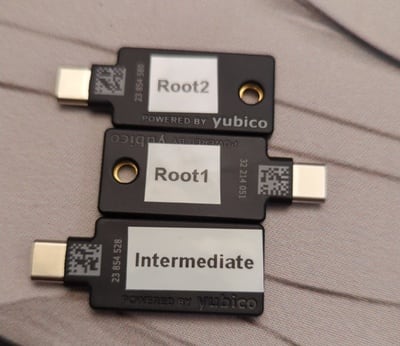
An offline PKI enhances security by physically isolating the certificate authority from network threats. A YubiKey is a low-cost solution to store a root certificate. You also need an air-gapped environment to operate the root CA.
PKI relying on a set of 3 YubiKeys: 2 for the root CA and 1 for the intermediate CA.
Offline PKI backed up by 3 YubiKeys
This post describes an offline PKI system using the following components: It is possible to add more YubiKeys as a backup of the root CA if needed. This is not needed for the intermediate CA as you can generate a new one if the current one gets destroyed.

The software part offline-pki is a small Python application to manage an offline PKI. It relies on yubikey-manager to manage YubiKeys and cryptography for cryptographic operations not executed on the YubiKeys. The application has some opinionated design choices. Notably, the cryptography is hard-coded to use NIST P-384 elliptic curve. The first step is to reset all your YubiKeys:
$ offline-pki yubikey reset
This will reset the connected YubiKey. Are you sure? [y/N]: y
New PIN code:
Repeat for confirmation:
New PUK code:
Repeat for confirmation:
New management key ('.' to generate a random one):
WARNING[pki-yubikey] Using random management key: e8ffdce07a4e3bd5c0d803aa3948a9c36cfb86ed5a2d5cf533e97b088ae9e629
INFO[pki-yubikey]  0: Yubico YubiKey OTP+FIDO+CCID 00 00
INFO[pki-yubikey] SN: 23854514
INFO[yubikit.management] Device config written
INFO[yubikit.piv] PIV application data reset performed
INFO[yubikit.piv] Management key set
INFO[yubikit.piv] New PUK set
INFO[yubikit.piv] New PIN set
INFO[pki-yubikey] YubiKey reset successful!
Then, generate the root CA and create as many copies as you want:
$ offline-pki certificate root --permitted example.com
Management key for Root X:
Plug YubiKey "Root X"...
INFO[pki-yubikey]  0: Yubico YubiKey CCID 00 00
INFO[pki-yubikey] SN: 23854514
INFO[yubikit.piv] Data written to object slot 0x5fc10a
INFO[yubikit.piv] Certificate written to slot 9C (SIGNATURE), compression=True
INFO[yubikit.piv] Private key imported in slot 9C (SIGNATURE) of type ECCP384
Copy root certificate to another YubiKey? [y/N]: y
Plug YubiKey "Root X"...
INFO[pki-yubikey]  0: Yubico YubiKey CCID 00 00
INFO[pki-yubikey] SN: 23854514
INFO[yubikit.piv] Data written to object slot 0x5fc10a
INFO[yubikit.piv] Certificate written to slot 9C (SIGNATURE), compression=True
INFO[yubikit.piv] Private key imported in slot 9C (SIGNATURE) of type ECCP384
Copy root certificate to another YubiKey? [y/N]: n
You can inspect the result:
$ offline-pki yubikey info
INFO[pki-yubikey]  0: Yubico YubiKey CCID 00 00
INFO[pki-yubikey] SN: 23854514
INFO[pki-yubikey] Slot 9C (SIGNATURE):
INFO[pki-yubikey]   Private key type: ECCP384
INFO[pki-yubikey]   Public key:
INFO[pki-yubikey]     Algorithm:  secp384r1
INFO[pki-yubikey]     Issuer:     CN=Root CA
INFO[pki-yubikey]     Subject:    CN=Root CA
INFO[pki-yubikey]     Serial:     1
INFO[pki-yubikey]     Not before: 2024-07-05T18:17:19+00:00
INFO[pki-yubikey]     Not after:  2044-06-30T18:17:19+00:00
INFO[pki-yubikey]     PEM:
-----BEGIN CERTIFICATE-----
MIIBcjCB+aADAgECAgEBMAoGCCqGSM49BAMDMBIxEDAOBgNVBAMMB1Jvb3QgQ0Ew
HhcNMjQwNzA1MTgxNzE5WhcNNDQwNjMwMTgxNzE5WjASMRAwDgYDVQQDDAdSb290
IENBMHYwEAYHKoZIzj0CAQYFK4EEACIDYgAERg3Vir6cpEtB8Vgo5cAyBTkku/4w
kXvhWlYZysz7+YzTcxIInZV6mpw61o8W+XbxZV6H6+3YHsr/IeigkK04/HJPi6+i
zU5WJHeBJMqjj2No54Nsx6ep4OtNBMa/7T9foyMwITAPBgNVHRMBAf8EBTADAQH/
MA4GA1UdDwEB/wQEAwIBhjAKBggqhkjOPQQDAwNoADBlAjEAwYKy/L8leJyiZSnn
xrY8xv8wkB9HL2TEAI6fC7gNc2bsISKFwMkyAwg+mKFKN2w7AjBRCtZKg4DZ2iUo
6c0BTXC9a3/28V5aydZj6rvx0JqbF/Ln5+RQL6wFMLoPIvCIiCU=
-----END CERTIFICATE-----
Then, you can create an intermediate certificate with offline-pki yubikey intermediate and use it to sign certificates by providing a CSR to offline-pki certificate sign. Be careful and inspect the CSR before signing it, as only the subject name can be overridden. Check the documentation for more details. Get the available options using the --help flag.

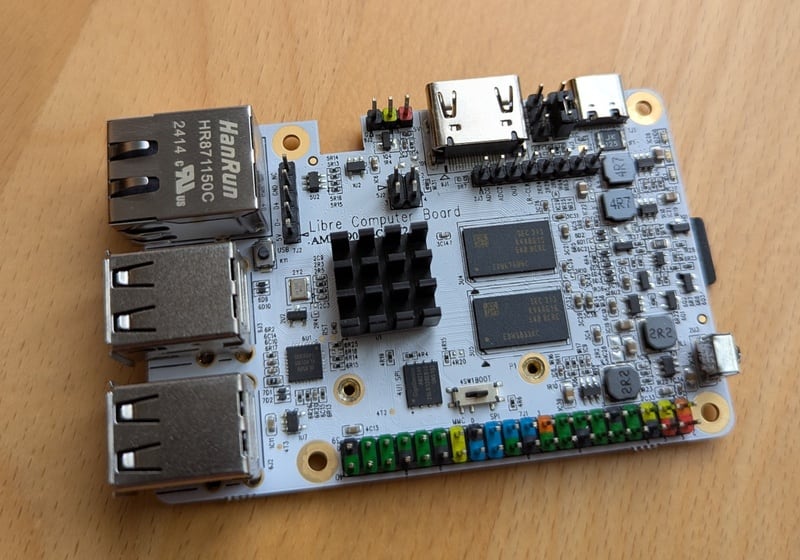
The hardware part To ensure the operations on the root and intermediate CAs are air-gapped, a cost-efficient solution is to use an ARM64 single board computer. The Libre Computer Sweet Potato SBC is a more open alternative to the well-known Raspberry Pi.1
Libre Computer Sweet Potato single board computer relying on the Amlogic S905X SOC
Libre Computer Sweet Potato SBC, powered by the AML-S905X SOC
I interact with it through an USB to TTL UART converter:
$ tio /dev/ttyUSB0
[16:40:44.546] tio v3.7
[16:40:44.546] Press ctrl-t q to quit
[16:40:44.555] Connected to /dev/ttyUSB0
GXL:BL1:9ac50e:bb16dc;FEAT:ADFC318C:0;POC:1;RCY:0;SPI:0;0.0;CHK:0;
TE: 36574
BL2 Built : 15:21:18, Aug 28 2019. gxl g1bf2b53 - luan.yuan@droid15-sz
set vcck to 1120 mv
set vddee to 1000 mv
Board ID = 4
CPU clk: 1200MHz
[ ]

The Nix glue To bring everything together, I am using Nix with a Flake providing:
  • a package for the offline-pki application, with shell completion,
  • a development shell, including an editable version of the offline-pki application,
  • a NixOS module to setup the offline PKI, resetting the system at each boot,
  • a QEMU image for testing, and
  • an SD card image to be used on the Sweet Potato or another ARM64 SBC.
# Execute the application locally
nix run github:vincentbernat/offline-pki -- --help
# Run the application inside a QEMU VM
nix run github:vincentbernat/offline-pki\#qemu
# Build a SD card for the Sweet Potato or for the Raspberry Pi
nix build --system aarch64-linux github:vincentbernat/offline-pki\#sdcard.potato
nix build --system aarch64-linux github:vincentbernat/offline-pki\#sdcard.generic
# Get a development shell with the application
nix develop github:vincentbernat/offline-pki

  1. The key for the root CA is not generated by the YubiKey. Using an air-gapped computer is all the more important. Put it in a safe with the YubiKeys when done!

16 March 2025

Russell Coker: Article Recommendations via FOSS

Google tracking everything we read is bad, particularly since Google abandoned the don t be evil plan and are presumably open to being somewhat evil. The article recommendations on Chrome on Android are useful and I d like to be able to get the same quality of recommendations without Google knowing about everything I read. Ideally without anything other than the device I use knowing what interests me. A ML system to map between sources of news that are of interest should be easy to develop and run on end user devices. The model could be published and when given inputs of articles you like give an output of sites that contain other articles you like. Then an agent on the end user system could spider the sites in question and run a local model to determine which articles to present to the user. Mapping for hate following is possible for such a system (Google doesn t do that), the user could have 2 separate model runs for regular reading and hate-following and determine how much of each content to recommend. It could also give negative weight to entries that match the hate criteria. Some sites with articles (like Medium) give an estimate of reading time. An article recommendation system should have a fixed limit of articles (both in articles and in reading time) to support the I spend half an hour reading during lunch model not doom scrolling. For getting news using only FOSS it seems that the best option at the moment is to use the Lemmy FOSS social network which is like Reddit [1] to recommend articles etc. The Lemoa client for Lemmy uses GTK [2] but it s no longer maintained. The Lemonade client for Lemmy is written in Rust [3]. It would be good if one of those was packaged for Debian, preferably one that s maintained.

15 March 2025

Bits from Debian: Debian Med Sprint in Berlin

Debian Med sprint in Berlin on 15 and 16 February The Debian Med team works on software packages that are associated with medicine, pre-clinical research, and life sciences, and makes them available for the Debian distribution. Seven Debian developers and contributors to the team gathered for their annual Sprint, in Berlin, Germany on 15 and 16 February 2025. The purpose of the meeting was to tackle bugs in Debian-Med packages, enhance the quality of the team's packages, and coordinate the efforts of team members overall. This sprint allowed participants to fix dozens of bugs, including release-critical ones. New upstream versions were uploaded, and the participants took some time to modernize some packages. Additionally, they discussed the long-term goals of the team, prepared a forthcoming invited talk for a conference, and enjoyed working together. More details on the event and individual agendas/reports can be found at https://wiki.debian.org/Sprints/2025/DebianMed.

Scarlett Gately Moore: KDE snaps fixed, Thank you for your support

KDE MascotKDE Mascot
Thank you everyone for keeping the lights on for a bit longer. KDE snaps have been restored. I also released 24.12.3! In addition, I have moved most snaps to core24. The remaining snaps need newer qt6/kf6, which is a WIP. The Bad luck girl has been hit once again with another loss, so with that, I will be reducing my hours on snaps while I consider my options for my future. I am still around, just a bit less. Thanks again everyone, if you can get me through one more ( lingering broken arm ) surgery I would be forever grateful! https://gofund.me/d5d59582

14 March 2025

Ravi Dwivedi: Libreoffice Conference 2024 in Luxembourg

Last year, I attended the annual LibreOffice Conference in Luxembourg with the help of a generous travel grant by The Document Foundation (TDF). It was a three-day event from the 10th to the 12th of October 2024, with an additional day for community meetup on the 9th. Luxembourg is a small (twice as big as Delhi) country in Western Europe. After going through an arduous visa process, I reached Luxembourg on the 8th of October. Upon arriving in Luxembourg, I took a bus to the city center, where my hotel Park Inn was located. All the public transport in Luxembourg was free of cost. It was as if I stepped in another world. There were separate tracks for cycling and a separate lane for buses, along with good pedestrian infrastructure. In addition, the streets were pretty neat and clean.
Luxembourg's Findel Airport
Separate cycling tracks in Luxembourg
My hotel was 20 km from the conference venue in Belval. However, the commute was convenient due to a free of cost train connection, which were comfortable, smooth, and scenic, covering the distance in half an hour. The hotel included a breakfast buffet, recharging us before the conference.
This is what trains look like in Luxembourg
Pre-conference, a day was reserved for the community meetup on the 9th of October. On that day, the community members introduced themselves and their contributions to the LibreOffice project. It acted as a brainstorming session. I got a lovely conference bag, which contained a T-Shirt, a pen and a few stickers. I also met my long time collaborators Mike, Sophie and Italo from the TDF, whom I had interacted only remotely till then. Likewise, I also met TDF s sysadmin Guilhem, who I interacted before regarding setting up my LibreOffice mirror.
Conference bag
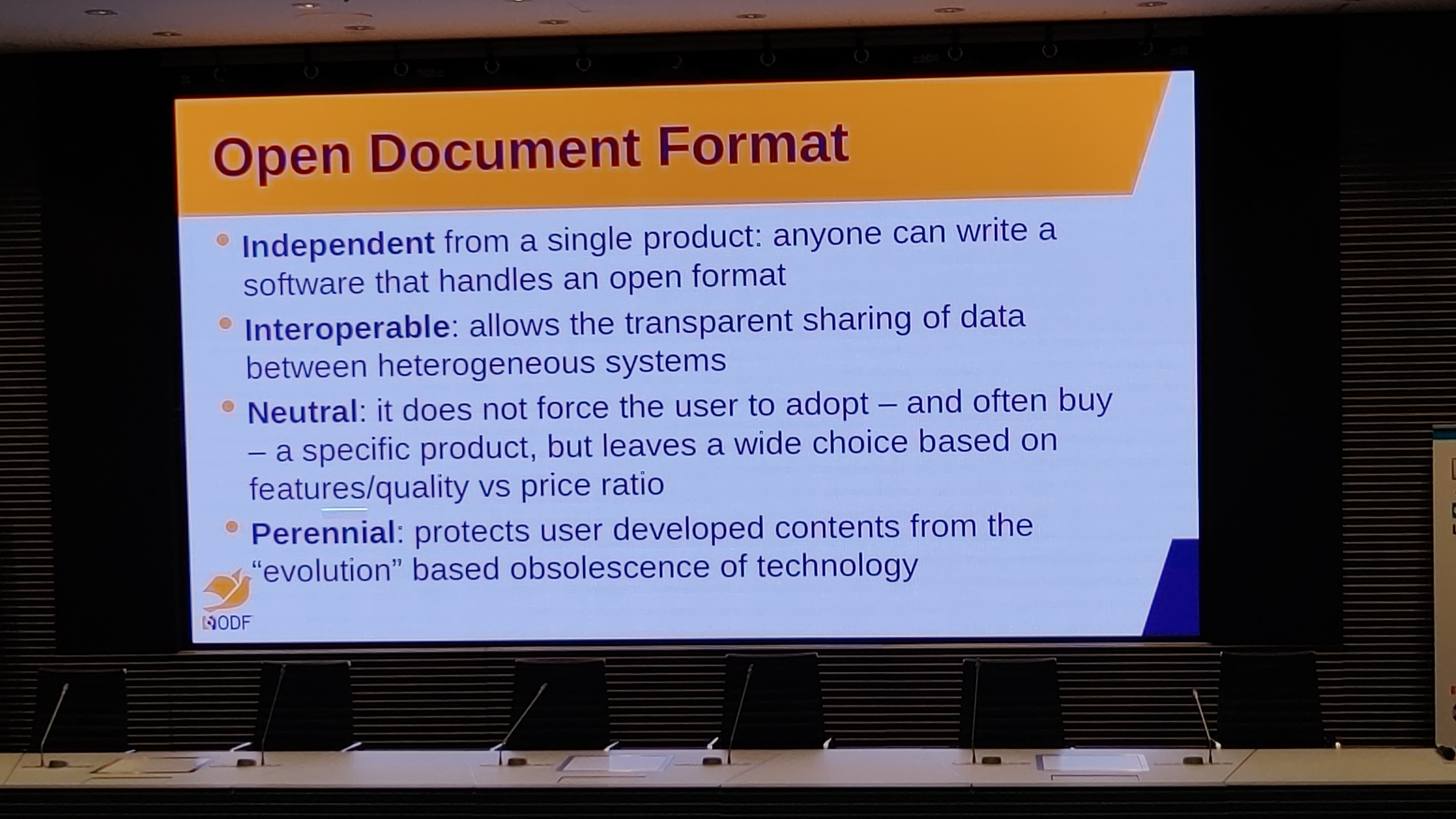
The conference started on the 10th. There were 5 attendees from India, including me, while most of the attendees were from Europe. The talks were in English. One of the talks that stood out for me was about Luxchat a chat service run by the Luxembourg government based on the Matrix protocol for the citizens of Luxembourg. I also liked Italo s talk on why document formats must be freedom-respecting. On the first night, the conference took us to a nice dinner in a restaurant. It offered one more way to socialize with other attendees and explore food at the same time.
One of the slides of Italo's talk
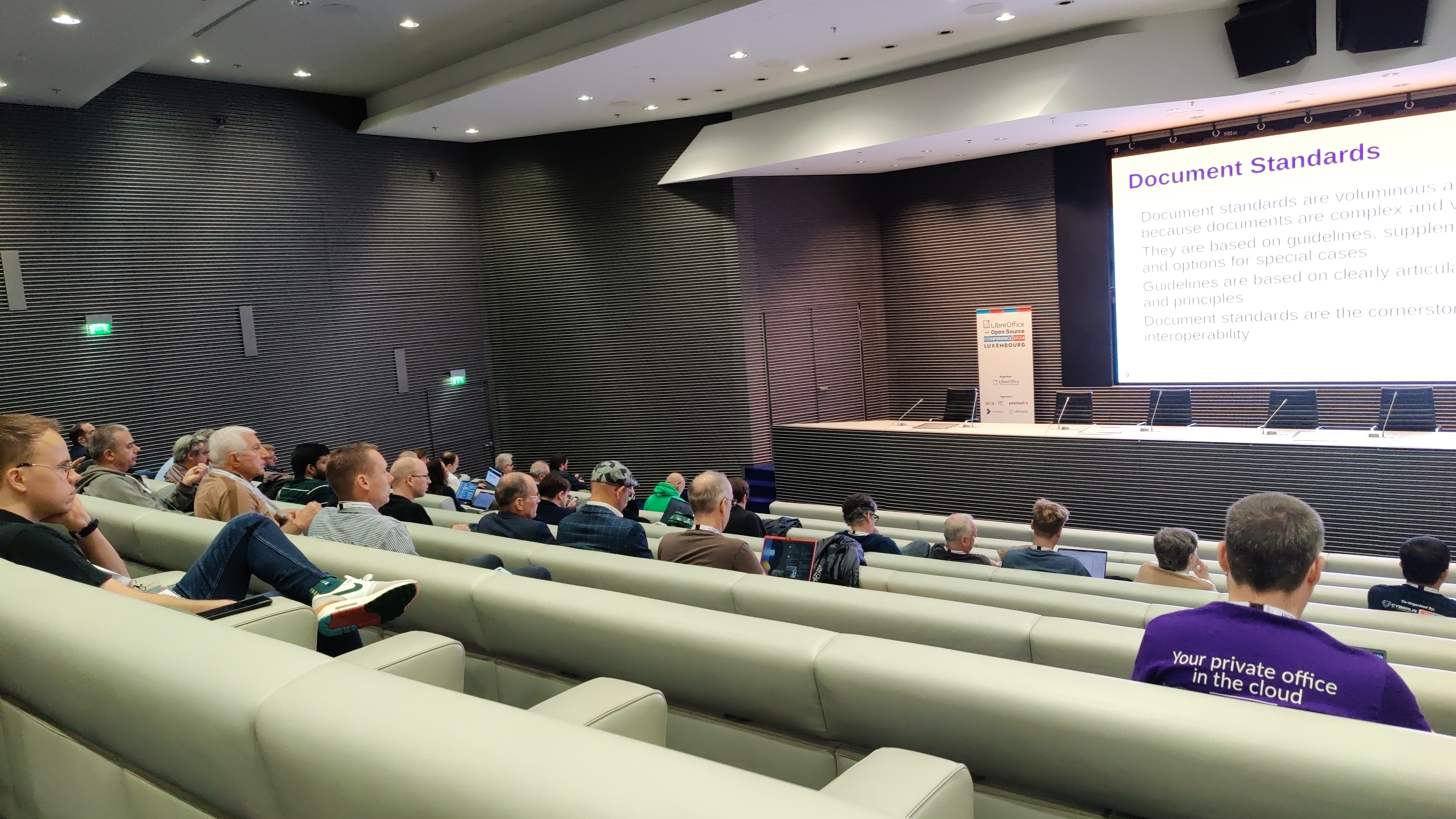
Picture of the hall in which talks were held
On the 11th of October, I went for a walk in the morning with Biswadeep for some sightseeing around our hotel area. As a consequence, I missed the group photo of the conference, which I wanted to be in. Anyway, we enjoyed roaming around the picturesque Luxembourg city. We also sampled a tram ride to return to our hotel.
We encountered such scenic views during our walk
Another view of Luxembourg city area
The conference ended on the 12th with a couple of talks. This conference gave me an opportunity to meet the global LibreOffice community, connect and share ideas. It also gave me a peek into the country of Luxembourg and its people, where I had good experience. English was widely known, and I had no issues getting by. Thanks to all the organizers and sponsors of the conference!

Dima Kogan: Getting precise timings out of RS-232 output

For uninteresting reasons I need very regular 58Hz pulses coming out of an RS-232 Tx line: the time between each pulse should be as close to 1/58s as possible. I produce each pulse by writing an \xFF byte to the device. The start bit is the only active-voltage bit being sent, and that produces my pulse. I wrote this obvious C program:
#include <stdio.h>
#include <stdlib.h>
#include <stdbool.h>
#include <sys/ioctl.h>
#include <unistd.h>
#include <fcntl.h>
#include <termios.h>
#include <stdint.h>
#include <sys/time.h>
static uint64_t gettimeofday_uint64()
 
    struct timeval tv;
    gettimeofday(&tv, NULL);
    return (uint64_t) tv.tv_sec * 1000000ULL + (uint64_t) tv.tv_usec;
 
int main(int argc, char* argv[])
 
    // open the serial device, and make it as raw as possible
    const char* device = "/dev/ttyS0";
    const speed_t baud = B9600;
    int fd = open(device, O_WRONLY O_NOCTTY);
    tcflush(fd, TCIOFLUSH);
    struct termios options =  .c_iflag = IGNBRK,
                              .c_cflag = CS8   CREAD   CLOCAL ;
    cfsetspeed(&options, baud);
    tcsetattr(fd, TCSANOW, &options);
    const uint64_t T_us = (uint64_t)(1e6 / 58.);
    const uint64_t t0 = gettimeofday_uint64();
    for(int i=0; ; i++)
     
        const uint64_t t_target = t0 + T_us*i;
        const uint64_t t1       = gettimeofday_uint64();
        if(t_target > t1)
            usleep(t_target - t1);
        write(fd, &((char) '\xff' ), 1);
     
    return 0;
 
This tries to make sure that each write() call happens at 58Hz. I need these pulses to be regular, so I need to also make sure that the time between each userspace write() and when the edge actually hits the line is as short as possible or, at least, stable. Potential reasons for timing errors:
  1. The usleep() doesn't wake up exactly when it should. This is subject to the Linux scheduler waking up the trigger process
  2. The write() almost certainly ends up scheduling a helper task to actually write the \xFF to the hardware. This helper task is also subject to the Linux scheduler waking it up.
  3. Whatever the hardware does. RS-232 doesn't give you any guarantees about byte-byte timings, so this could be an unfixable source of errors
The scheduler-related questions are observable without any extra hardware, so let's do that first. I run the ./trigger program, and look at diagnostics while that's running. I look at some device details:
# ls -lh /dev/ttyS0
crw-rw---- 1 root dialout 4, 64 Mar  6 18:11 /dev/ttyS0
# ls -lh /sys/dev/char/4:64/
total 0
-r--r--r-- 1 root root 4.0K Mar  6 16:51 close_delay
-r--r--r-- 1 root root 4.0K Mar  6 16:51 closing_wait
-rw-r--r-- 1 root root 4.0K Mar  6 16:51 console
-r--r--r-- 1 root root 4.0K Mar  6 16:51 custom_divisor
-r--r--r-- 1 root root 4.0K Mar  6 16:51 dev
lrwxrwxrwx 1 root root    0 Mar  6 16:51 device -> ../../../0000:00:16.3:0.0
-r--r--r-- 1 root root 4.0K Mar  6 16:51 flags
-r--r--r-- 1 root root 4.0K Mar  6 16:51 iomem_base
-r--r--r-- 1 root root 4.0K Mar  6 16:51 iomem_reg_shift
-r--r--r-- 1 root root 4.0K Mar  6 16:51 io_type
-r--r--r-- 1 root root 4.0K Mar  6 16:51 irq
-r--r--r-- 1 root root 4.0K Mar  6 16:51 line
-r--r--r-- 1 root root 4.0K Mar  6 16:51 port
drwxr-xr-x 2 root root    0 Mar  6 16:51 power
-rw-r--r-- 1 root root 4.0K Mar  6 16:51 rx_trig_bytes
lrwxrwxrwx 1 root root    0 Mar  6 16:51 subsystem -> ../../../../../../../class/tty
-r--r--r-- 1 root root 4.0K Mar  6 16:51 type
-r--r--r-- 1 root root 4.0K Mar  6 16:51 uartclk
-rw-r--r-- 1 root root 4.0K Mar  6 16:51 uevent
-r--r--r-- 1 root root 4.0K Mar  6 16:51 xmit_fifo_size
Unsurprisingly, this is a part of the tty subsystem. I don't want to spend the time to really figure out how this works, so let me look at all the tty kernel calls and also at all the kernel tasks scheduled by the trigger process, since I suspect that the actual hardware poke is happening in a helper task. I see this:
# bpftrace -e 'k:*tty* /comm=="trigger"/
                 printf("%d %d %s\n",pid,tid,probe);  
               t:sched:sched_wakeup /comm=="trigger"/
                 printf("switching to %s(%d); current backtrace:", args.comm, args.pid); print(kstack());   '
...
3397345 3397345 kprobe:tty_ioctl
3397345 3397345 kprobe:tty_check_change
3397345 3397345 kprobe:__tty_check_change
3397345 3397345 kprobe:tty_wait_until_sent
3397345 3397345 kprobe:tty_write
3397345 3397345 kprobe:file_tty_write.isra.0
3397345 3397345 kprobe:tty_ldisc_ref_wait
3397345 3397345 kprobe:n_tty_write
3397345 3397345 kprobe:tty_hung_up_p
switching to kworker/0:1(3400169); current backtrace:
        ttwu_do_activate+268
        ttwu_do_activate+268
        try_to_wake_up+605
        kick_pool+92
        __queue_work.part.0+582
        queue_work_on+101
        rpm_resume+1398
        __pm_runtime_resume+75
        __uart_start+85
        uart_write+150
        n_tty_write+1012
        file_tty_write.isra.0+373
        vfs_write+656
        ksys_write+109
        do_syscall_64+130
        entry_SYSCALL_64_after_hwframe+118
3397345 3397345 kprobe:tty_update_time
3397345 3397345 kprobe:tty_ldisc_deref
... repeated with each pulse ...
Looking at the sources I see that uart_write() calls __uart_start(), which schedules a task to call serial_port_runtime_resume() which eventually calls serial8250_tx_chars(), which calls some low-level functions to actually send the bits. I look at the time between two of those calls to quantify the scheduler latency:
pulserate=58
sudo zsh -c \
  '( echo "# dt_write_ns dt_task_latency_ns";
     bpftrace -q -e "k:vfs_write /comm==\"trigger\" && arg2==1/
                      \$t=nsecs(); if(@t0)   @dt_write = \$t-@t0;   @t0=\$t; 
                     k:serial8250_tx_chars /@dt_write/
                      \$t=nsecs(); printf(\"%d %d\\n\", @dt_write, \$t-@t0); "
   )' \
  vnl-filter                  \
    --stream -p dt_write_ms="dt_write_ns/1e6 - 1e3/$pulserate",dt_task_latency_ms=dt_task_latency_ns/1e6 \
  feedgnuplot  \
    --stream   \
    --lines    \
    --points   \
    --xlen 200 \
    --vnl      \
    --autolegend \
    --xlabel 'Pulse index' \
    --ylabel 'Latency (ms)'
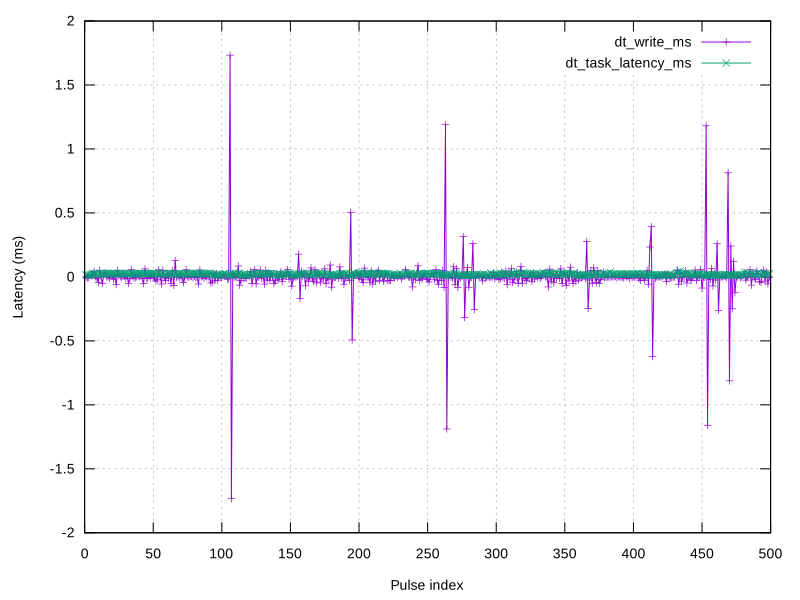
Here I'm making a realtime plot showing The raw data as I tweak things lives here. Initially I see big latency spikes:
timings.scheduler.1.noise.svg
These can be fixed by adjusting the priority of the trigger task. This tells the scheduler to wake that task up first, even if something else is currently using the CPU. I do this:
sudo chrt -p 90  pidof trigger 
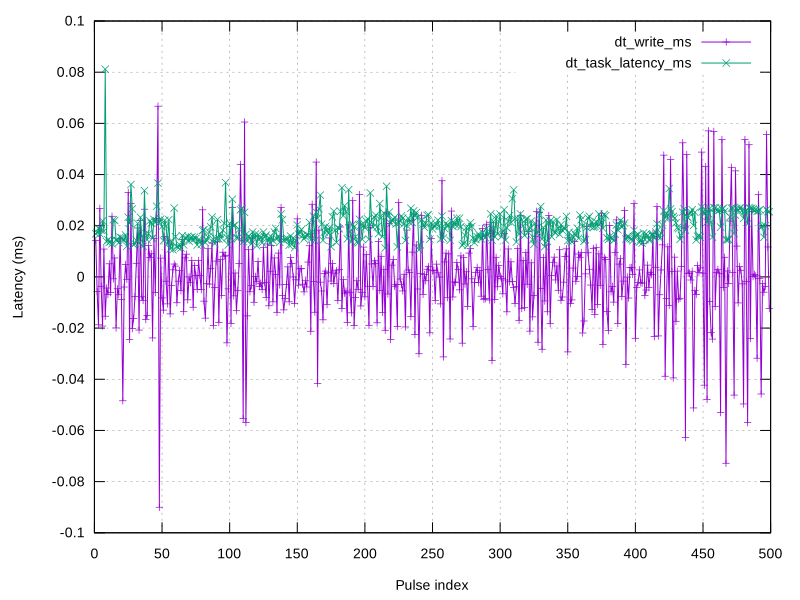
And I get better-looking latencies:
timings.scheduler.2.clean.svg
During some experiments (not in this dataset) I would see high helper-task timing instabilities as well. These could be fixed by prioritizing the helper task. In this kernel (6.12) the helper task is called kworker/N where N is the CPU index. I tie the trigger process to cpu 0, and priorities all the relevant helpers:
taskset -c 0 ./trigger 58
pgrep -f kworker/0   while   read pid     sudo chrt -p 90 $pid  
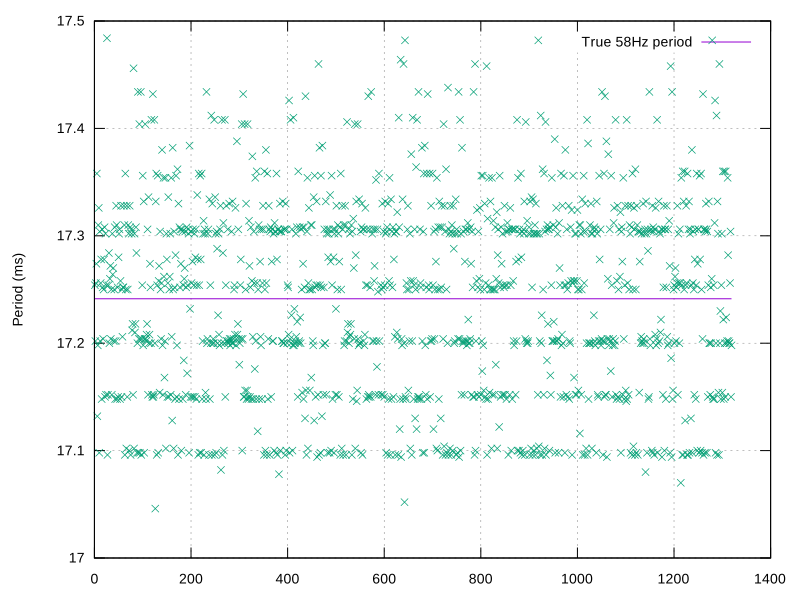
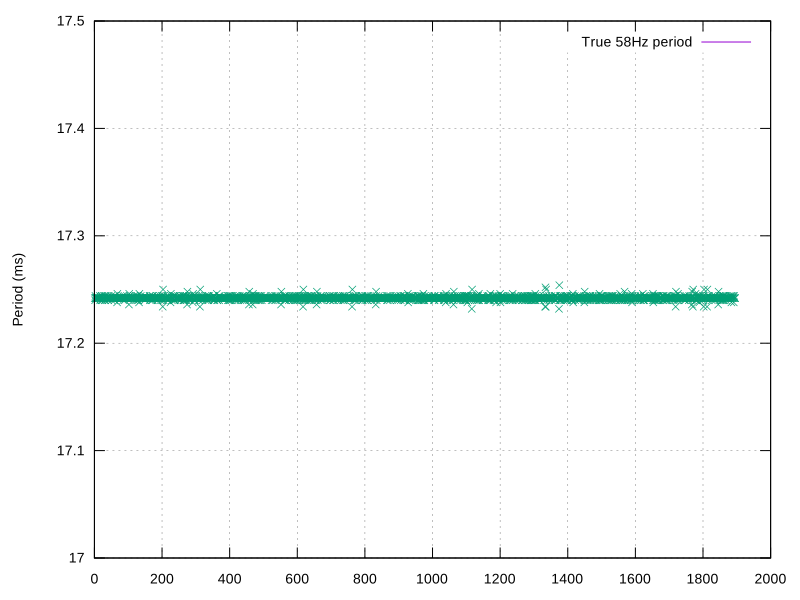
This fixes the helper-task latency spikes. OK, so it looks like on the software side we're good to within 0.1ms of the true period. This is in the ballpark of the precision I need; even this might be too high. It's possible to try to push the software to do better: one could look at the kernel sources a bit more, to do smarter things with priorities or to try an -rt kernel. But all this doesn't matter if the serial hardware adds unacceptable delays. Let's look. Let's look at it with a logic analyzer. I use a saleae logic analyzer with sigrok. The tool spits out the samples as it gets them, and an awk script finds the edges and reports the timings to give me a realtime plot.
samplerate=500000;
pulserate=58.;
sigrok-cli -c samplerate=$samplerate -O csv --continuous -C D1 \
  mawk -Winteractive  \
    "prev_logic==0 && \$0==1 \
       
       iedge = NR;
       if(prev_iedge)
        
         di = iedge -prev_iedge;
         dt = di/$samplerate;
         print(dt*1000);
        
       prev_iedge = iedge;
      
      
       prev_logic=\$0;
       "   feedgnuplot --stream --ylabel 'Period (ms)' --equation "1000./$pulserate title \"True $ pulserate Hz period\""
On the server I was using (physical RS-232 port, ancient 3.something kernel):
timings.hw.serial-server.svg
OK This is very discrete for some reason, and generally worse than 0.1ms. What about my laptop (physical RS-232 port, recent 6.12 kernel)?
timings.hw.serial-laptop.svg
Not discrete anymore, but not really any more precise. What about using a usb-serial converter? I expect this to be worse.
timings.hw.usbserial.svg
Yeah, looks worse. For my purposes, an accuracy of 0.1ms is marginal, and the hardware adds non-negligible errors. So I cut my losses, and use an external signal generator:
timings.hw.generator.svg
Yeah. That's better, so that's what I use.

11 March 2025

Freexian Collaborators: Debian Contributions: Debian.Social administration, DebConf 25 preparations, Fixing Time-based test failure in Python requests package and more! (by Anupa Ann Joseph)

Debian Contributions: 2025-02 Contributing to Debian is part of Freexian s mission. This article covers the latest achievements of Freexian and their collaborators. All of this is made possible by organizations subscribing to our Long Term Support contracts and consulting services.

Debian.Social administration, by Stefano Rivera Over the last year, the Debian.social services outgrew the infrastructure that was supporting them. The matrix bridge in particular was hosted on a cloud instance backed by a large expensive storage volume. Debian.CH rented a new large physical server to host all these instances, earlier this year. Stefano set up Incus on the new physical machine and migrated all the old debian.social LXC Containers, libvirt VMs, and cloud instances into Incus-managed LXC containers. Stefano set up Prometheus monitoring and alerts for the new infrastructure and a Grafana dashboard. The current stack of debian.social services seem to comfortably fit on the new machine, with good room to grow.

DebConf 25, by Santiago Ruano Rinc n and Stefano Rivera DebConf 25 preparations continue. The team is currently finalizing a budget. Stefano helped to review the current budget proposals and suggest approaches for balancing it. Stefano installed a Zammad instance to organize queries from attendees, for the registration and visa teams. Santiago continued discussions with possible caterers so we can have options for the different diet requirements and that could fit into the DebConf budget. Also, in collaboration with Anupa, Santiago pushed the first draft changes to document the venue information in the DebConf 25 website and how to get to Brest.

Time-based test failure in requests, by Colin Watson Colin fixed a fun bug in the Python requests package. Santiago Vila has been running tests of what happens when Debian packages are built on a system in which time has been artificially set to somewhere around the end of the support period for the next Debian release, in order to make it easier to do things like issuing security updates for the lifetime of that release. In this case, the failure indicated an expired test certificate, and since the repository already helpfully included scripts to regenerate those certificates, it seemed natural to try regenerating them just before running tests. However, this failed for more obscure reasons and Colin spent some time investigating. This turned out to be because the test CA was missing the CA constraint and so recent versions of OpenSSL reject it; Colin sent a pull request to fix this.

Priority list for outdated packages, by Santiago Ruano Rinc n Santiago started a discussion on debian-devel about packages that have a history of security issues and that are outdated regarding new upstream releases. The goal of the mentioned effort is to have a prioritized list of packages needing some work, from a security point of view. Moreover, the aim of publicly sharing the list of packages with the Debian Developers community is to make it easier to look at the packages maintained by teams, or even other maintainers where help could be welcome. Santiago is planning to take into account the feedback provided in debian-devel and to propose a tooling that could help to regularly bring collective awareness of these packages.

Miscellaneous contributions
  • Carles worked on English to Catalan po-debconf translations: reviewed translations, created merge requests and followed up with developers for more than 30 packages using po-debconf-manager.
  • Carles helped users, fixed bugs and implemented downloading updated templates on po-debconf-manager.
  • Carles packaged a new upstream version of python-pyaarlo.
  • Carles improved reproducibility of qnetload (now reported as reproducible) and simplemonitor (followed up with upstream and pending update of Debian package).
  • Carles collaborated with debian-history package: fixed FTBFS from master branch, enabled salsa-ci and investigated reproducibility.
  • Emilio improved support for automatically marking CVEs as NOT-FOR-US in the security-tracker, closing #1073012.
  • Emilio updated xorg-server and xwayland in unstable, fixing the last round of security vulnerabilities.
  • Stefano prepared a few PyPy and cPython uploads, and started the python3.13-only transition.
  • Helmut Grohne sent patches for 24 cross build failures.
  • Helmut fixed two problems in the Debian /usr-merge analysis tool. In one instance, it would overmatch Debian bugs to issues and in another it would fail to recognize Pre-Depends as a conflict mechanism.
  • Helmut attempted making rebootstrap work for gcc-15 with limited success as very many packages FTBFS with gcc-15 due to using function declarations without arguments.
  • Helmut provided a change to the security-tracker that would pre-compute /data/json during database updates rather than on demand resulting in a reduced response time.
  • Colin uploaded OpenSSH security updates for testing/unstable, bookworm, bullseye, buster, and stretch.
  • Colin fixed upstream monitoring for 26 Python packages, and upgraded 54 packages (mostly Python-related, but also PuTTY) to new upstream versions.
  • Colin updated python-django in bookworm-backports to 4.2.18 (issuing BSA-121), and added new backports of python-django-dynamic-fixture and python-django-pgtrigger, all of which are dependencies of debusine.
  • Thorsten Alteholz finally managed to upload hplip to fix two release critical and some normal bugs. The next step in March would be to upload the latest version of hplip.
  • Faidon updated crun in unstable & trixie, resolving a long-standing request of enabling criu support and thus enabling podman with checkpoint/restore functionality (With gratitude to Salvatore Bonaccorso and Reinhard Tartler for the cooperation and collaboration).
  • Faidon uploaded a number of packages (librdkafka, libmaxminddb, python-maxminddb, lowdown, tox, tox-uv, pyproject-api, xiccd and gdnsd) bringing them up to date with new upstream releases, resolving various bugs.
  • Lucas Kanashiro uploaded some ruby packages involved in the Rails 7 transition with new upstream releases.
  • Lucas triaged a ruby3.1 bug (#1092595)) and prepared a fix for the next stable release update.
  • Lucas set up the needed wiki pages and updated the Debian Project status in the Outreachy portal, in order to send out a call for projects and mentors for the next round of Outreachy.
  • Anupa joined Santiago to prepare a list of companies to contact via LinkedIn for DebConf 25 sponsorship.
  • Anupa printed Debian stickers and sponsorship brochures, flyers for DebConf 25 to be distributed at FOSS ASIA summit 2025.
  • Anupa participated in the Debian publicity team meeting and discussed the upcoming events and tasks.
  • Rapha l packaged zim 0.76.1 and integrated an upstream patch for another regression that he reported.
  • Rapha l worked with the Debian System Administrators for tracker.debian.org to better cope with gmail s requirement for mails to be authenticated.

Next.

Previous.