Search Results: "ag"

19 June 2013

Julien Viard de Galbert: Building a custom debian CD

The French version is available on linuxembedded.fr : Cr e un CD d installation d une debian sp cialis e The goal is to build a debian install CD suitable for the distribution of a complete system including the operating system and applications. Debian already has a tool for that purpose: simple-cdd. Simple-cdd is a set of scripts wrapping debian-cd which is the tool used to build official CDs. In our case, we will include some non-free packages (firmwares for instance) and application specific packages in the system. Using simple-cdd Simple-cdd gets some of its configuration from your host computer, so it s recommended to work on a machine similar to your target (in particular the machine should use the same architecture: i386 or amd64). All the following actions should be done in a working directory that will contain the downloads and configurations for our system. We will start by creting a configuration file my-cdd.conf stating the mirror and components to use:
debian_mirror="http://ftp2.fr.debian.org/debian/"
mirror_components="main contrib non-free"
Then we will launch the build-simple-cdd tool once. This will build a local mirror of the needed packages that we will reused later. So be patient this can be a bit long.
build-simple-cdd --conf ./my-cdd.conf
Once done, you should get a CD iso in the images subfolder. Customizing the image To customize our image we will create a profile my-profile that will define which package to install and which extra package to include on the CD (dev packages for instance). Create a profiles folder:
mkdir profiles
Selecting the packages If you ve got an already installed machine (the one you used to test your application) you can ask dpkg to list the installed packages from that machine and use that as a basis.
dpkg --get-selections >package-list
In this file only the names of packages in the install state are needed:
grep -e '\<install$' package-list   awk ' print $1 ;' >profiles/my-profile.downloads
The file my-profile.downloads is a list of packages to include on the CD-ROM. The list of program to install is my-profile.packages . The tool will resolve dependencies, so we don t need to track down all dependencies add add them to these files. Specific packages We want to add some custom packages that we built ourselves to the CD, those packages not present in the debian archive. Let s create a local_pkg folder and fill it with all of our packages. We now can update the configuration to use all those files and make the profile my-profile the default profile.
debian_mirror="http://ftp2.fr.debian.org/debian/"
mirror_components="main contrib non-free"
simple_cdd_dir=$(pwd)
profiles="my-profile"
auto_profiles="my-profile"
local_packages="$simple_cdd_dir/local_pkg/"
If you now run the tool again, you ll get a full custom install CD!
build-simple-cdd --conf ./my-cdd.conf
However you might have missed some specific packages or their dependencies, in that case they will be missing on the CD. To find this out, check the messages for a line like:
WARNING: missing optional packages from profile my-profile: libevent-2.0-5 [...]
In that case libevent from squeeze-backports was missing. Simple-cdd is not able to download packages from backports, so I just added the packages to local_pkg . Customizing the installer Simple-cdd automatically uses a default profile. This profile might not suite your needs. To override it you just have to place modified file in the profiles folder. To do so, first copy the desired file from /usr/share/simple-cdd/profiles/ and update it. For instance the default.pressed file:
cp /usr/share/simple-cdd/profiles/default.pressed profiles
Then update the wanted options in this file. For example the partitioning options. Also as we enabled contrib and non-free you should uncomment the following lines:
d-i apt-setup/non-free  boolean true
d-i apt-setup/contrib boolean true
Adding extra files to the CD Finally we want to add the documentation, sources and other files to the CD. Simple-cdd can add files to the simple-cdd folder but there is no way to add a complete directory structure. However, as we can override the profiles, we can also override some scripts, especially tools/build/debian-cd that builds the CD.
mkdir -p tools/build
cp /usr/share/simple-cdd/tools/build/debian-cd tools/build
Then add the following lines after the $extras_base_dir cleanup:
if [ -d "$cd_extras" ]; then
  mkdir -p "$extras_base_dir"
  cp -a "$cd_extras/." "$extras_base_dir"
fi
Finally let s add the cd_extras variable to our configuration file :
cd_extras="$simple_cdd_dir/local_extras/"
Be careful to not create files conflicting with the CD content, nothing would warn you about that! Conclusion We now have a way of building a debian install CD including any files we might want to deliver with our system: sources and documentation for example.

18 June 2013

Daniel Pocock: RSA Key Sizes: 2048 or 4096 bits?

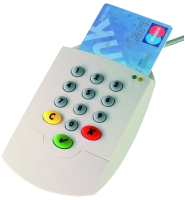
Many people are taking a fresh look at IT security strategies in the wake of the NSA revelations. One of the issues that comes up is the need for stronger encryption, using public key cryptography instead of just passwords. This is sometimes referred to as certificate authentication, but certificates are just one of many ways to use public key technology. One of the core decisions in this field is the key size. Most people have heard that 1024 bit RSA keys have been cracked and are not used any more for web sites or PGP. The next most fashionable number after 1024 appears to be 2048, but a lot of people have also been skipping that and moving to 4096 bit keys. This has lead to some confusion as people try to make decisions about which smartcards to use, which type of CA certificate to use, etc. The discussion here is exclusively about RSA key pairs, although the concepts are similar for other algorithms (although key lengths are not equivalent) The case for using 2048 bits instead of 4096 bits
  • Some hardware (many smart cards, some card readers, and some other devices such as Polycom phones) don't support anything bigger than 2048 bits.
  • Uses less CPU than a longer key during encryption and authentication
  • Using less CPU means using less battery power (important for mobile devices)
  • Uses less storage space: while not an issue on disk, this can be an issue in small devices like smart cards that measure their RAM in kilobytes rather than gigabytes
So there are some clear benefits of using 2048 bit keys and not just jumping on the 4096 bit key bandwagon The case for using 4096 bits
  • For some types of attack, security is not just double, it is exponential. 4096 is significantly more secure in this scenario. If an attack is found that allows a 2048 bit key to be hacked in 100 hours, that does not imply that a 4096 bit key can be hacked in 200 hours. The hack that breaks a 2048 bit key in 100 hours may still need many years to crack a single 4096 bit key
  • Some types of key (e.g. an OpenPGP primary key which is signed by many other people) are desirable to keep for an extended period of time, perhaps 10 years or more. In this context, the hassle of replacing all those signatures may be quite high and it is more desirable to have a long-term future-proof key length.
The myth of certificate expiration Many types of public key cryptography, such as X.509, offer an expiry feature. This is not just a scheme to force you to go back to the certificate authority and pay more money every 12 months. It provides a kind of weak safety net in the case where somebody is secretly using an unauthorised copy of the key or a certificate that the CA issued to an imposter. However, the expiry doesn't eliminate future algorithmic compromises. If, in the future, an attacker succeeds in finding a shortcut to break 2048 bit keys, then they would presumably crack the root certificate as easily as they crack the server certificates and then, using their shiny new root key, they would be in a position to issue new server certificates with extended expiry dates. Therefore, the expiry feature alone doesn't protect against abuse of the key in the distant future. It does provide some value though: forcing people to renew certificates periodically allows the industry to bring in new minimum key length standards from time to time. In practical terms, content signed with a 2048 bit key today will not be valid indefinitely. Imagine in the year 2040 you want to try out a copy of some code you released with a digital signature in 2013. In 2040, that signature may not be trustworthy: most software in that era would probably see the key and tell you there is no way you can trust it. The NIST speculates that 2048 bit keys will be valid up to about the year 2030, so that implies that any code you sign with a 2048 bit key today will have to be resigned with a longer key in the year 2029. You would do that re-signing in the 2048 bit twilight period while you still trust the old signature. Fortunately, there are likely to be few projects where such old code will be in demand. 4096 in practice One of the reasons I decided to write this blog is the fact that some organisations have made the 4096 bit keys very prominent (although nobody has made them mandatory as far as I am aware). Debian's guide to key creation currently recommends 4096 bit keys (although it doesn't explicitly mandate their use) Fedora's archive keys are all 4096 bit keys. The CACert.org project has developed a 4096 bit root These developments may leave people feeling a little bit naked if they have to use a shorter 2048 bit key for any of the reasons suggested above (e.g. for wider choice of smart cards and compatibility with readers). It has also resulted in some people spending time looking for 4096 bit smart cards and compatible readers when they may be better off just using 2048 bits and investing their time in other security improvements. In fact, the "risk" of using only 2048 rather than 4096 bits in the smartcard may well be far outweighed by the benefits of hardware security (especially if a smartcard reader with pin-pad is used) My own conclusion is that 2048 is not a dead duck and using this key length remains a valid decision and is very likely to remain so for the next 5 years at least. The US NIST makes a similar recommendation and suggests it will be safe until 2030, although it is the minimum key length they have recommended. My feeling is that the Debian preference for 4096 bit PGP keys is not based solely on security, rather, it is also influenced by the fact that Debian is a project run by volunteers. Given this background, there is a perception that if everybody migrates from 1024 to 2048, then there would be another big migration effort to move all users from 2048 to 4096 and that those two migrations could be combined into a single effort going directly from 1024 to 4096, reducing the future workload of the volunteers who maintain the keyrings. This is a completely rational decision for administrative reasons, but it is not a decision that questions the security of using 2048 bit keys today. Therefore, people should not see Debian's preference to use 4096 bit keys as a hint that 2048 bit keys are fundamentally flawed. Unlike the Debian keys (which are user keys), the CACert.org roots and Fedora archive signing keys are centrally managed keys with a long lifetime and none of the benefits of using 2048 bit keys is a compelling factor in those use cases. Practical issues to consider when choosing key-length Therefore, the choice of using 2048 or 4096 is not pre-determined, and it can be balanced with a range of other decisions:
  • Key lifetime: is it a long life key, such as an X.509 root for an in-house CA or an OpenPGP primary key? Or is it just for a HTTPS web server or some other TLS server that can be replaced every two years?
  • Is it for a dedicated application (e.g. a closed user group all using the same software supporting 4096 bit) or is it for a widespread user base where some users need to use 2048 bit due to old software/hardware?
  • Is it necessary to use the key(s) in a wide variety of smartcard readers?
  • Is it a mobile application (where battery must be conserved) or a server that is likely to experience heavy load?

Tollef Fog Heen: An otter, please (or, a better notification system)

Recently, there's been discussions on IRC and the debian-devel mailing list about how to notify users, typically from a cron script or a system daemon needing to tell the user their hard drive is about to expire. The current way is generally "send email to root" and for some bits "pop up a notification bubble, hoping the user will see it". Emailing me means I get far too many notifications. They're often not actionable (apt-get update failed two days ago) and they're not aggregated. I think we need a system that at its core has level and edge triggers and some way of doing flap detection. Level interrupts means "tell me if a disk is full right now". Edge means "tell me if the checksums have changed, even if they now look ok". Flap detection means "tell me if the nightly apt-get update fails more often than once a week". It would be useful if it could extrapolate some notifications too, so it could tell me "your disk is going to be full in $period unless you add more space". The system needs to be able to take in input in a variety of formats: syslog, unstructured output from cron scripts (including their exit codes), snmp, nagios notifications, sockets and fifos and so on. Based on those inputs and any correlations it can pull out of it, it should try to reason about what's happening on the system. If the conclusion there is "something is broken", it should see if it's something that it can reasonably fix by itself. If so, fix it and record it (so it can be used for notification if appropriate: I want to be told if you restart apache every two minutes). If it can't fix it, notify the admin. It should also group similar messages so a single important message doesn't drown in a million unimportant ones. Ideally, this should be cross-host aggregation. The notifications should be possible to escalate if they're not handled within some time period. I'm not aware of such a tool. Maybe one could be rigged together by careful application of logstash, nagios, munin/ganglia/something and sentry. If anybody knows of such a tool, let me know, or if you're working on one, also please let me know.

17 June 2013

Evgeni Golov: Running Debian without Unity on a machine that is 64 bit capable!

Sorry Bryan,
I can show you plenty of hardware that is perfectly 64 bit capable but probably never will run Ubuntu and/or Unity. First, what is 64 bit for you? Looking at ubuntu.com/download and getting images from there, one gets the impression, that 64 bit is amd64 (also called x86_64). If one digs deeper to cdimage.ubuntu.com, one will find non-Intel images too: PowerPC and amrhf. As the PowerPC images are said to boot on G3 and G4 PowerPCs, these are 32 bit. Armhf is 32 bit too (arm64/aarch64 support in Linux is just evolving). So yes, if 64 bit means amd64, I do have hardware that can run Unity. But you asked if I have hardware that is 64 bit capable and can run Ubuntu/Unity, so may I apply my definiton of 64 bit here? I have an old Sun Netra T1-200 (500MHz UltraSPARC IIe) running Debian s sparc port, which has a 64 bit kernel and 32 bit userland. Unity? No wai. I do not own any ia64 or s390/s390x machines, but I am sure people do. And guess what, no Unity there either :) Sorry for ranting like this, but 64 bit really just means that the CPU can handle 64 bit big addresses etc. End even then, it not always will do so ;)

Lars Wirzenius: If it quacks like a duck: what is a backup?

The purpose of a backup is to allow you to recover from a disaster with reasonable cost and effort. If you delete a file you shouldn't have, or make changes that you shouldn't have, backups are meant to save you from having to re-create the file, or undo a large amount of steps. Speaking very broadly, any copy of your live data is a backup, but this is a uselessly broad definition. For example, if you use an automatic synchronisation system such as Dropbox or git-annex, to keep your live data in sync between two computers, you could pretend they're backups of each other. However, unless the synchronisation also allows you to keep a history of file versions, it's not a very good backup. If you delete your precious file on one computer, and it gets then deleted on the other computer as well, automatically, perhaps in seconds, then the backup is not of much use. Another common assumption is that a RAID array works as a backup. RAID is an excellent technology that allows you to combine several hard disks so that they protect you against loss of data in case of disk failure. If one disk fails, the others have enough data to re-create the data on the failed disk, using either full copies (RAID-1) or error correction codes (RAID-5, RAID-6). This is not a backup. It doesn't protect you against accidental file deletions. There is also no backup history. A version control system is very much like a backup. It stores copies of many of the versions of your project. However, in most version control systems it's fairly easy to make changes that lose history. Ask anyone who has used git reset to change the tip of the master branch to undo a wrong commit or merge, and then accidentally force-pushed that to the server. This is arguably a normal, if uncommon use of the version control system. A good backup system will protect you from you own mistakes, when you do the kinds of things you're expected to do. Version control systems also rarely capture all your data. When you were five, and made some stuff on the family computer, and saved it on a floppy, and then drew a cute little picture of yourself on the floppy to make it clear to everyone it was your floppy, and not anyone else's, certainly not your bully of your brother's, and your mother kept the floppy for decades because of the cute picture, then that is also not a backup. You didn't even know your Mom had kept it. A reasonable backup is one from which you can restore a working copy of your data, when you need to, without too much effort or expense, compared to the disaster you're experiencing. If the disaster is that you deleted a one-page draft outline of the book you want to write someday, the disaster is not very severe. The cost of restoring should be low. If the disaster is that your plans to become the supreme emperor of the world, and make all people your slaves, are in a spreadsheet on your laptop, and your minions accidentally drove a car over your laptop, and you had accidentally not used a Thinkpad as your laptop, the disaster is quite severe. Unless you recover the spreadsheet, you'll never be able to tell apart the buttons to launch the Moon rocket, to self-destruct your HQ, and to switch channels on your TV, and all your work will be in vain, and you'll never, ever, ever convince the pretty girl with red hair living in the house opposite that she should be interested in you. Also, you'll never be able to move away from your parent's house. So, quite severe. It will be acceptable to go to quite some effort and expense to recover that spreadsheet. It's better if you don't need to, but you will, if you have to. Your backup should also be reasonably up to date. Backing up every Christmas is a fine family tradition, but if you don't make a backup also on Easter, Midsummer, and Aunt Agatha's birthday sometime in September was it, or maybe October, you'll risk losing a whole year's worth of work. A year is a long time, and you might never be able to re-do all the work. Personally, I backup my personal laptop every day to a file server at home, and less often to an online backup server. My work laptop gets backed up once an hour to the company file server, which gets backed up to two backup servers about once a day. You need to balance the risk of losing data and work, and the expense and effort to back up your data. How much is a day's work worth to you, or your employer? How much does a backup system cost? In the next episode, I'll ponder on how many backups are enough.

Tanguy Ortolo: Encryption without a certification layer is (partly) useless

With the PRISM scandal, there has been some talk about encrypted communication systems. For instance, BitMessage is often introduced as an easy and secure message system, that would allow you to communicate with no possible eavesdropping. Apple is also making similar claims about their systems iMessage and FaceTime. This is a good time to remind this: without direct contact or a certification layer, encryption systems are not secure! Or at least, not as secure as you would expect, as they do allow some kind of eavesdropping.Let us take the example of BitMessage:
  1. Alice sends her BitMessage address to Bob by email, an insecure channel;
  2. Mallory catches that email message and changes Alice's BitMessage address with his own;
  3. Bob sends a BitMessage for Alice to the address he received, which he thinks is Alice's, but is in fact Mallory's;
  4. Mallory receives the message, reads it, modifies it if he wants, and sends it to Alice.
This is a man-in-the-middle attack, a kind of active eavesdropping technique that requires read-modify access to a communication line. Without a specific way to ensure that a cryptographic key really belongs to its alleged owner, a cryptographic system is vulnerable to such attacks, even if it does protect against simpler attacks (like passive eavesdropping or introduction of MiTM after the introduction sequence). When you read that a cryptographic system provides end-to-end security and is impervious to eavesdropping, while it provides no mean to make sure you are in contact to the right person, remember to consider this affirmation as what it is: a lie.

Petter Reinholdtsen: Debian Edu interview: Victor Ni u

The Debian Edu and Skolelinux distribution have users and contributors all around the globe. And a while back, an enterprising young man showed up on our IRC channel #debian-edu and started asking questions about how Debian Edu worked. We answered as good as we could, and even convinced him to help us with translations. And today I managed to get an interview with him, to learn more about him. Who are you, and how do you spend your days? I'm a 25 year old free software enthusiast, living in Romania, which is also my country of origin. Back in 2009, at a New Year's Eve party, I had a very nice beer discussion with a friend, when we realized we have no organised Debian community in our country. A few days later, we put together the infrastructure for such community and even gathered a nice Debian-ish crowd. Since then, I began my quest as a free software hacker and activist and I am constantly trying to cover as much ground as possible on that field. A few years ago I founded a small web development company, which provided me the flexible schedule I needed so much for my activities. For the last 13 months, I have been the Technical Director of Funda ia Ceata, which is a free software activist organisation endorsed by the FSF and the FSFE, and the only one we have in our country. How did you get in contact with the Skolelinux / Debian Edu project? The idea of participating in the Debian Edu project was a surprise even to me, since I never used it before I began getting involved in it. This year I had a great opportunity to deliver a talk on educational software, and I knew immediately where to look. It was a love at first sight, since I was previously involved with some of the technologies the project incorporates, and I rapidly found a lot of ways to contribute. My first contributions consisted in translating the installer and configuration dialogs, then I found some bugs to squash (I still haven't fixed them yet though), and I even got my eyes on some other areas where I can prove myself helpful. Since the appetite for free software in my country is pretty low, I'll be happy to be the first one around here advocating for the project's adoption in educational environments, and maybe even get my hands dirty in creating a flavour for our own needs. I am not used to make very advanced plannings, so from now on, time will tell what I'll be doing next, but I think I have a pretty consistent starting point. What do you see as the advantages of Skolelinux/Debian Edu? Not a long time ago, I was in the position of configuring and maintaining a LDAP server on some Debian derivative, and I must say it took me a while. A long time ago, I was maintaining a bigger Samba-powered infrastructure, and I must say I spent quite a lot of time on it. I have similar stories about many of the services included with Skolelinux, and the main advantage I see about it is the out-of-the box availability of them, making it quite competitive when it comes to managing a school's network, for example. Of course, there is more to say about Skolelinux than the availability of the software included, its flexibility in various scenarios is something I can't wait to experiment "into the wild" (I only played with virtual machines so far). And I am sure there is a lot more I haven't discovered yet about it, being so new within the project. What do you see as the disadvantages of Skolelinux / Debian Edu? As usual, when it comes to Debian Blends, I see as the biggest disadvantage the lack of a numerous team dedicated to the project. Every day I see the same names in the changelogs, and I have a constantly fear of the bus factor in this story. I'd like to see Debian Edu advertised more as an entry point into the Debian ecosystem, especially amongst newcomers and students. IMHO there are a lot low-hanging fruits in terms of bug squashing, and enough opportunities to get the feeling of the Debian Project's dynamics. Not to mention it's a very fun blend to work on! Derived from the previous statement, is the delay in catching up with the main Debian release and documentation. This is common though to all blends and derivatives, but it's an issue we can all work on. Which free software do you use daily? I can hardly imagine myself spending a day without Vim, since my daily routine covers writing code and hacking configuration files. I am a fan of the Awesome window manager (but I also like the Enlightenment project a lot!), Claws Mail due to its ease of use and very configurable behaviour. Recently I fell in love with Redshift, which helps me get through the night without headaches. Of course, there is much more stuff in this bag, but I'll need a blog on my own for doing this! Which strategy do you believe is the right one to use to get schools to use free software? Well, on this field, I cannot do much more than experiment right now. So, being far from having a recipe for success, I can only assume that: I also see some problems in getting Skolelinux into schools; for example, in our country we have a great deal of corruption issues, so it might be hard(er) to fight against proprietary solutions. Also, people who relied on commercial software for all their lives, would be very hard to convert against their will.

Gunnar Wolf: Cultural objects/goods: When a superhero is too famous for his own good

I found the following news item; if you can read Spanish, you will most probably prefer the original version in the Proceso magazine's site. The subject? The federal police (PGR) and army arrest 17 artisans for making money out of Spiderman. The following translation is mine. Done past midnight, and being quite tired, and translated so this news item can reach a broader audience. All errors are mine (except those carried out by the security forces, that is).

June 13, 2013 Cuernavaca, Morelos. Policement from the General Republic Attorney (Procuradur a General de la Rep blica, PGR) and the Army entered and searched the "3 de mayo" neighbourhood, in the municipality of Emiliano Zapata, detaining 17 ceramist artisans that sold candies, dolls and pi atas shaped like Spiderman. This search was done on the evening of last Wednesday, around 16:00. Federal ministerial policement and army soldiers closed a street with several informal stores and detained workers taht were selling this Marvel Comics character, following said company's denounce. As a result for this operation, 17 artisants were detained, although the same day five of them were freed. The policemen also seized 12 bags of candies, pi atas, ceramics and wooden figures of the superhero. PGR closed down 11 stores where ceramics with this same figure was being sold, accusing the detainees of plagiarizing Spiderman's image, protected under the copyright law. The 12 that remained under detention were put at the Federal Justice's disposal, which prompted that this Thursday, around 10AM, hundreds of sellers of "3 de mayo" went out to PGR's building to demand their friends' freedom, who are facing a bail of up to 200,000 pesos (~USD$18,000). Outraged because they said they were treated as if they were part of a drug ring, hundreds of artisans closed intermitently Avenida Cuauhn huac, where the PGR representation in Morelos state is located. The artisans' pressure helped for the amount of the bail to be lowered from MX$200,000 to MX$16,000, and so they were set free. Francisco Fern ndez Flores, president of the Ceramists Association, criticized the operation because, he said, it was as strong as if they were "drug dealers". The artisans explained that they don't even make the Spiderman figures, they are made by the interns of the Centro Estatal de Reinserci n Social de Atlacholoaya (prision), located in the Xochitepec municipality, who offered them to the ceramists so they could be sold. "The Atlacholoaya inmates do them, we buy them to support them, and turns out we are the delinquents now", said Miriam Monroy, sister of one of the detainees. This information was contradicted by Jes s Valencia Valencia, responsible for Morelos' state prision system, who assured that in said prision no ceramics are done. Fern ndez Flores insisted though that from within the prision they are being offered pi atas, candies and "piggy banks" with Spiderman's shape. Jos Luis Pozo, vicepresident of the Ceramists Union, said that to avoid more such federal operations for copyright breaches, they have committed not to produce or commercialize Marvel superhero figures, and any other characters the authority demands. "We do commit to, from now on, those products singled out to us will not be commercialized", he said. Pozo said that the PGR operation caused losses not just to the detained producers and salesmen, but to over 200 ceramists that had to close their stores in solidarity with their friends. Acording to the artisans, the products were a success until the PGR came, seized the products and detained the salesmen.
And yes, the copyright insanity does not stop. Spiderman is by today a clear part of popular culture. Marvel brilliantly succeeded in creating such a popular icon that everybody recognizes, that everybody identifies with And that everybody should be able to recreate. We are not talking about brand protection. Marvel does not, and will never, commercialize pi atas, ceramics or wooden toys. And even if they were plastic-cast While Spiderman is still under the protection of copyright, as the Berne Convention defines it (and of course, as the much stricter Mexican laws agree), that does not mean that any and every product resembling a Spiderman should be protected. Many ceramists and pi ata makers will create unique pieces of art Ok, handicraft. But reading the copyright law more strictly, Spiderman is more treated as a trademark than as a copyright. And it is a trademark that should be declared as having passed on to the public domain.

Andrew Pollock: [life] City2South run report

Yesterday I ran in the City2South. It was a beautiful day for it, and I really enjoyed the run. Thanks to generous support of my donors, I raised $252 for the Heart Foundation. My official time was 1:20:41, which I'm really happy with. I'd only ever run 14km on the preceding Tuesday, and I ran that in 1:32:57, so to do this run 12 minutes faster, on a completely different course felt like quite the accomplishment. I also ran personal best times for 5K and 10K. It's hard to believe that the guy who came first ran it in 44 minutes. the course was really nice, except for running up Highgate Hill at kilometre 12. That was a bit harsh, but I managed to run all the way up it, nonetheless. It only hit me this afternoon when I was replaying the course in my mind just how far I ran. My normal 10K course doesn't feel all that long because it loops back on itself a lot, so it's deceptive how much ground I cover. From a technical perspective, the race was done very well. I liked that they had a Facebook app that in real time posted updates when I crossed the start, 5K, 10K and finish lines, and the official results were online by the time I got home. That said, as I write, the website is throwing all sorts of errors when I try to download my official finishing certificate, or see my photos and finish line video. All things considered, it was a pretty nice way to spend a Sunday morning. I was up at 5am to be on the 5:44am ferry from Hawthorne, and back home again by 10am. I'm very keen to try running a half marathon now, but my next run is the 10km Bridge to Brisbane in September. That one will be more interesting because presumably it involves running up the Gateway Bridge, and I'll be pushing Zoe in a jogging stroller. I'm not expecting any personal best times for that one.

16 June 2013

Tim Retout: Sophie

It's my first Father's Day! Sophie was born 2 months ago (3345g or 7lb 6oz), and I've been on a blogging hiatus for quite a bit longer than that. She's very cute. I am getting into the swing of fatherhood - lots of nappy changing. :) I took my two weeks of paternity leave, but spread the second "week" over two weeks by working just afternoons, which gave me lots of time with mummy and baby. We watched a DVD called "The Happiest Baby on the Block", and mastered the techniques therein (mainly swaddling and white noise). So all things considered, we're getting quite a bit of sleep. Sophie is very curious about my typing, and leans towards anything she's interested in... so she's currently suspended at an angle besides me. Maybe she'll be interested in what her parents do, when she grows up. :) But for now, we're enjoying that she's learned to smile.

Daniel Pocock: Monitoring with Ganglia: an O'Reilly community book project

I recently had the opportunity to contribute to an O'Reilly community book project, developing the book Monitoring with Ganglia in collaboration with other members of the Ganglia team

The project itself, as a community book, pays no royalties back to the contributors, as we have chosen to donate all proceeds to charity. People who contributed to the book include
Robert Alexander, Jeff Buchbinder, Frederiko Costa, Alex Dean, Dave Josephsen, Bernard Li, Matt Massie, Brad Nicholes, Peter Phaal and Vladimir Vuksan and we also had generous assistance from various members of the open source community who assisted in the review process. Ganglia itself started at University of California, Berkeley as an initiative of Matt Massie, for monitoring HPC cloud infrastructure My own contact with Ganglia only began in 2008 when I was offered the opportunity to work full-time on the enterprise-wide monitoring systems for a large investment bank. Ganglia had been chosen for this huge project due to it's small footprint, support for many platforms and it's ability to work on a heterogeneous network as well as providing dedicated features for the bank's HPC grid. This brings me to one important point about Ganglia: it's not just about HPC any more. While it is extremely useful for clusters, grids and clouds, it is also quite suitable for a mixed network of web servers, mail servers, databases and all the other applications you may find in a small business, education or ISP environment. Instantly up and running with packages One of the most compelling features, even for small sites with less than 10 nodes, is the ease of installation: install the packages on Debian, Ubuntu, Fedora, OpenCSW and some other platforms, and it just works. Ganglia nodes will find each other over multicast, instantly, no manual configuration changes necessary. On one of the nodes, the web interface must be installed for viewing the statistics. Dare I say it: it is so easy, you hardly even need the book for a small installation. Where the book is really compelling is if you have hundreds or thousands of nodes, if you want custom charts or custom metrics or anything else beyond just installing the package. If monitoring is more than 10% of your job, the book is probably a must-have. Excellent open source architecture Ganglia's simplicity is largely thanks to the way it leverages other open source projects such as Tobi Oetiker's RRDtool and PHP Anybody familiar with these tools will find Ganglia is particularly easy to work with and customise. Custom metrics: IO service times One of my own contributions to the project has been the creation of ganglia-modules-linux, some plugins for Linux-specific metrics and ganglia-modules-solaris providing some similar metrics for Solaris. These projects on github provide an excellent base for people to fork and implement their own custom metrics in C or C++ The book provides a more detailed account of how to work with the various APIs for Python, C/C++, gmetric (command line/shell scripts) and Java. The new web interface For people who had tried earlier versions of Ganglia (and for those people who installed versions < 3.3.0 and still haven't updated), the new web interface is a major improvement and well worth the effort to install. It is available on the most recent packages (for example, it is in Debian 7 (wheezy) but not in Debian 6.) It was originally promoted as a standalone project (code-named gweb2) but was adopted as the official Ganglia web interface around the release of Ganglia 3.3.0. This web page provides a useful overview of what has changed and here is the original release announcement.

15 June 2013

C.J. Adams-Collier: Need help from Debian Developers, please.

Hi folks, I used to work at F5, and I pulled a bunch of equipment out of the recycle bin while I was there in order to help me populate the customer end premesis device inventory for a carrier network / ISP I am setting up. They decided to terminate my employment at the end of August last year, and I ve been wondering what to do with all of this equipment. I figured that it s been long enough that I can give them a call, so I did. I asked them whether I should consider buying BIG-IP hardware off of e-Bay if it said that it did not come with a license. The customer service agent told me that I should probably not consider doing any such thing, since I would have to pay a hefty fee to F5 before they would even provide a license. It looks like I d have to shell out fifty thousand dollars to get a proper F5 Networks Inc. license for these many surplus BIG-IP devices I have. I guess I ll just have to go with an improper (or maybe I mean not for profit) operating system like Debian. I wonder if I can get the current linux kernel to pick up these broadcom 10GE chips or whether I ll have to wait for someone to release Free as in speech firmware for them that I can make use of. Do any of you DDs want a shell on a linux box with a 10-port 10GE switch attached by PCI-e? I bet I could get a Debian chroot environment running in the system s stock rescue firmware. I bet I could then determine why the watchdog timer keeps tripping when I boot with other kernels If you decide to accept the offer of a shell on this box, please try to avoid rebooting it. It tends to pop my breakers and I have to run to the shop before the UPSs run out of juice.

Daniel Pocock: Girls Around Me and the NSA

When the Girls Around Me app was released in 2012, it received massive criticism on the basis that it could enable stalking and undermine privacy. Nonetheless, the existence of this app may well be an even bigger problem for the NSA right now than it is for single women. US Government officials in damage control mode over the NSA surveillance leaks have sought to deny that it is even possible to monitor people in the way that The Guardian reported the matter. Leaders of Internet giants such as Google and Facebook have also tried to deny and downplay the possibilities of PRISM. In my view, a company like Google is no more likely to admit hiving off customer data than a bank is likely to admit a liquidity crisis, for fear of starting a self-fulfulling bank run. User trust is as existential with data as it is with bank deposits. So my question is, if the NSA with an $8 billion annual budget can't track people in real-time, how come a small team of app developers could do much the same thing so easily in Girls Around Me? One possibility is that some companies may be accurate in what they have reported: they are not letting data out the back door. The scary thing is, they are letting it out the front door and it is just as possible for third-party commercial operators and foreign powers to harvest a lot of this data in the same way as Girls Around Me In one of the most remarkable cases, the chief of British MI6 (the team that James Bond plays for) may have been compromised by his wife's Facebook posts - if Facebook really is an outsourced NSA operation, then that is a remarkable case of friendly fire Both the scandals around Girls Around Me and the NSA spying leaks only serve to confirm one thing: that people need to think twice every time they fill in some form or submit some data that could be used to identify or track them.

Benjamin Mako Hill: Indian Veg

Recently, I ate at the somewhat famous London vegetarian restaurant Indian Veg Bhelpoori House in Islington (often referred to simply as Indian Veg ).

I couldn t help but imagine that the restaurant had hired Emanuel Bronner as their interior decorator.Indian Veg Signage (2)

Signs on the wall at Indian Veg

Clint Adams: Like some pilgrim who learns to transcend

Jessa is moving to Boston. Why is Jessa moving to Boston? To work for Microsoft. What will she be doing for Microsoft? Studying how drag queens use Facebook.

Ingo Juergensmann: Debian-ports mirror on Buildd.Net

As a more or less unrelated side effect of the Debian m68k port resurrection I decided to give back something to debian-ports.org as we are relying on that service for our port. So I set up a debian-ports.org mirror: The mirror is running on a fast Gigabit connection and is reachable via IPv4 and (native) IPv6. It carries all current archs. Enjoy!
Kategorie:

Ingo Juergensmann: First m68k buildd relocated to FU Berlin

It's already been some days ago, but our first m68k buildd, elgar.buildd.net, has been relocated to its new hosting facility in Berlin on June 2nd. Its new home is located at the Physics Department of Freie Universit t (FU) Berlin. So a big thank you to FU Berlin and John Paul Adrian Glaubitz to make this happen! With Elgar being now hosted in Berlin the resurrection of the m68k port is steadily ongoing. More machines will be follow Elgar: while Elgar will be accompanied in Berlin by Akire (akire.buildd.net), Kullervo and Crest will hopefully be hosted at their old hosting donator NMMN in Hamburg somewhat later. The m68k port itself is doing fine and coped well with the all the new packages after the release of Wheezy:
  wanna-build statistics - Sat Jun 15 16:51:13 CEST 2013
  -----------------------------------------------------
Distribution unstable:
---------------------
Installed       :  7041 (buildd_m68k-ara5: 1016, buildd_m68k-arrakis: 157,
                         buildd_m68k-elgar: 201, buildd_m68k-kullervo: 238,
                         buildd_m68k-vivaldi: 153, tg: 53, unknown: 5223)
Needs-Build     :   780
Building        :     9 (buildd_m68k-ara5: 1, buildd_m68k-arrakis: 3,
                         buildd_m68k-elgar: 2, buildd_m68k-kullervo: 2,
                         buildd_m68k-vivaldi: 1)
Built           :     1 (buildd_m68k-elgar: 1)
Uploaded        :     0
Failed          :    73 (buildd_m68k-ara5: 51, buildd_m68k-kullervo: 10,
                         tg: 12)
Dep-Wait        :     3 (tg: 3)
Reupload-Wait   :     0
Install-Wait    :     0
Failed-Removed  :     0
Dep-Wait-Removed:     0
BD-Uninstallable:  1977
Auto-Not-For-Us :   192
Not-For-Us      :    50
total           : 10227
 68.85% (7041) up-to-date,  68.85% (7041) including uploaded
  7.63% (780) need building
  0.09% (  9) currently building
  0.01% (  1) already built, but not uploaded
  0.74% ( 76) failed/dep-wait
  0.00% (  0) old failed/dep-wait
 19.33% (1977) not installable, because of missing build-dep
  1.88% (192) need porting or cause the buildd serious grief (Auto)
  0.49% ( 50) need porting or cause the buildd serious grief
We are now constantly above 7000 packages installed, which is great considering the fact that we were at 10% keeping up by December 2012. Now we are approx 70% with just 5 buildds. Of course we would like to get more buildds up & running, but currently there is the SCSI driver for the NCR53C9XF(espfast) chip missing for m68k. Sadly this chip is used on several accelerator cards for Amiga. With a working SCSI driver we could easily double our number of buildds. But I hope that this will just be a matter of time... :-)
Kategorie:

Paul Tagliamonte: dput-ng 1.5

If all goes well, a new release of dput-ng will hit the archive this week (depending on when I can find time to close the last 2 bigger bugs) - anyone interested in getting a new feature into dput-ng should email me (or file a reportbug bug at dput-ng) Small list of changes so far: * Add per-host loading of command files by partially parsing command line arguments. * Add disallowed_distributions. * Add codename groupping support. * Add codename groups to vital targets, limit security uploads to the right servers (Closes: #708575). * Implement dcut commands for Deb-o-Matic. * Add an override and a unset option to dput which overrules any profile key. This is an experimental option. * Be more precise about our configuration file inheritance in dput(5). * Fix dcut: manpage and help talk about -U and upload by replacing those parts in the text by the upload command (Closes: #699812) * Make the login name determination more portable (Closes: #709831) * Fix Allow to give out dm permissions without using local keyring by * documenting the force option in the man page (Closes: #711057) * Allow uploads to mentors to target every distribution * Add a space in debug s help message. * Fixed a typo (DEBNAME DEBFULLNAME) in the dcut(1) manpage. Thanks, y all!

Lars Wirzenius: "Um, I know I should": talking about backups

... backups? did someone talk about backups? I'm sure I heard someone mention backups here somewhere. Backups! BACKUPS! BACKUPS ARE AWESOME!
That's a direct quote from my recent IRC history. I find backups quite interesting, particularly from an implementation point of view, and I may sometimes obsess about them a little bit. This is why I've written my own backup software. I'm unusual: most people find backups boring at best, and tedious most of the time. When I talk with people about backups, the usual reaction is "um, I know I should". There are a lot of reasons for this. One is that backups are a lot like insurance: you have to spend time, effort, money, up front, to have any use for them. Another is that the whole topic is scary: you have to think about when things go wrong, and that puts people off. A third reason is that while there are lots of backup tools and methods, it's not always easy. After all, backups are about answering the question, "what can I do to keep my data safe, whatever happens in the future?". I've spent a fair bit of the past several years thinking about backups. This is the first in a series of blog posts about backups, where I share my thinking about the topic. Perhaps it can be of some use to others. At least people will poke holes in my delusions. In this post, I'll define some terminology. I am not a backup scholar, and I may have invented some of these terms myself, and they may be different from what real sysadmins use. I'll define the words I use, so we can understand each other. Live data is the data you work with or keep. It's the files on your hard drive: the documents you write, the photos you save, the unfinished novels you wish you'd finish. A backup is a spare copy of your live data. If you lose some or all of your live data, you can get it back ("restore") from your backup. The backup copy is, by practical necessity, older than your live data, but if you made the backup recently enough, you won't lose much. Sometimes it's useful to have more than one old backup copy of your live data. You can have a sequence of backups, made at different times, giving you a backup history. Each copy of your live data in your backup history is a generation. This lets you retrieve a file you deleted a long time ago, but didn't realise you needed until now. If you only keep one backup version, you can't get it back, but if you keep, say, a daily backup for a month, you have a month to realise you need it, before it's lost forever. The place your backups are stored is the backup repository. You can use many kinds of backup media for backup storage: hard drives, tapes, optical disks (DVD-R, DVD-RW, etc), USB flash drives, online storage, etc. Each type of medium has different characteristics: size, speed, convenicence, reliability, price, which you'll need to balance for a backup solution that's reasonable for you. You may need multiple backup repositories or media, with one of them located off-site, away from where your computers normally live. Otherwise, if you house burns down, you'll lose all your backups too. You need to verify that your backups work. It would be awkward to go to the effort and expense of making backups and then not be able to restore your data when you need to. You may even want to test your disaster recovery by pretending that all your computer stuff is gone, except for the backup media. Can you still recover? You'll want to do this periodically, to make sure your backup system keeps working. Most live data is precious in that you'll be upset if you lose it. Some live data is not precious: your web browser cache probably isn't, for example. This distinction can let you limit the amount of data you need to back up, which can significantly reduce your backup costs. There is a very large variety of backup tools. They can be very simple and manual: you can copy files to a USB drive using your file manager, once a blue moon. They can also be very complex: enterprise backup products that cost huge amounts of money and come with a multi-day training package for your sysadmin team, and which require that team to function properly. You'll need to define a backup strategy to tie everything together: what live data to back up, to what medium, using what tools, what kind of backup history to keep, and how to verify that they work. That's the groundwork. In the next episode, I'll blather about what is a backup, and what isn't.

Wouter Verhelst: The end of an era

I've been singing for a long time. The first time I was a member of a choir was when I was around 6-7 years old, and it was as a member of the children's choir 'De Lambertijnen' in Ekeren, Belgium. Not by coincidence, Ekeren is where I grew up. However, I didn't remain a member of 'De Lambertijnen' for very long. After a year or two, I was over the maximum age for members of that choir, and "promoted" to Carmina, another children's choir of the same association. I didn't like that choir as much, though, and only remained a member for about a year or so, before I left that choir; and for a few years, choral music was no longer part of my interests. Then, when I turned sixteen, I was in a school where choral music was part of the curriculum; and through class, I found out that singing in a choir is something I actually love. By that time I was too old to join Carmina again, so I joined the C-koren's youth choir "Cantilene" under Luc Anthonis, instead. Luc is one of Belgium's finest choir conductors, and so I remained a member until my 26th birthday when, again, I was deemed too old to remain a member of that choir. At this point, the next choir in line was "Con Amore", a choir that does not have an age limit, but which in practice consists of mostly people who are retired (or nearly so, at least). As a result, most people who leave Cantilene do not join Con Amore, instead ending their foray into choral music. I was no exception. However, a year and a half (or so) later, the C-koren were extended with a new choir, "Caljent ", who jumpstarted their membership by contacting ex-Cantilene members (me amongst them), inviting them to join this new choir. I have been a member since the first official rehearsal of Caljent , and have always enjoyed it; enough so that when I moved out of Ekeren some five years ago, into a flat in Mechelen (a 30 minute car trip away), I did not quit the choir. I can, however, not deny that since moving out, my connection to Ekeren has become fairly strained, and that there have been times when I felt it difficult to motivate myself into driving all the way there for a rehearsal on friday night. I felt that to be unfair towards the conductor and towards the other members of the choir, and so it is with mixed feelings that I decided a month or so ago to remain a member only until the last rehearsal before the summer break this year. That last rehearsal was today (well, technically yesterday by now); and so, after a "career" of almost 20 years of nearly uninterrupted membership (including one 5-year stint as a member of Cantilene's governing board), I am now no longer a member of the C-koren. That's not to say I won't be singing anymore in fact, I've already joined a different choir whose rehearsal location just happens to be right around the corner from where I live but it does certainly feel weird to be putting an end to my C-koren membership. Ah well, we'll see what the future brings.

Next.

Previous.