Search Results: "tar"

2 March 2024

Ravi Dwivedi: Malaysia Trip

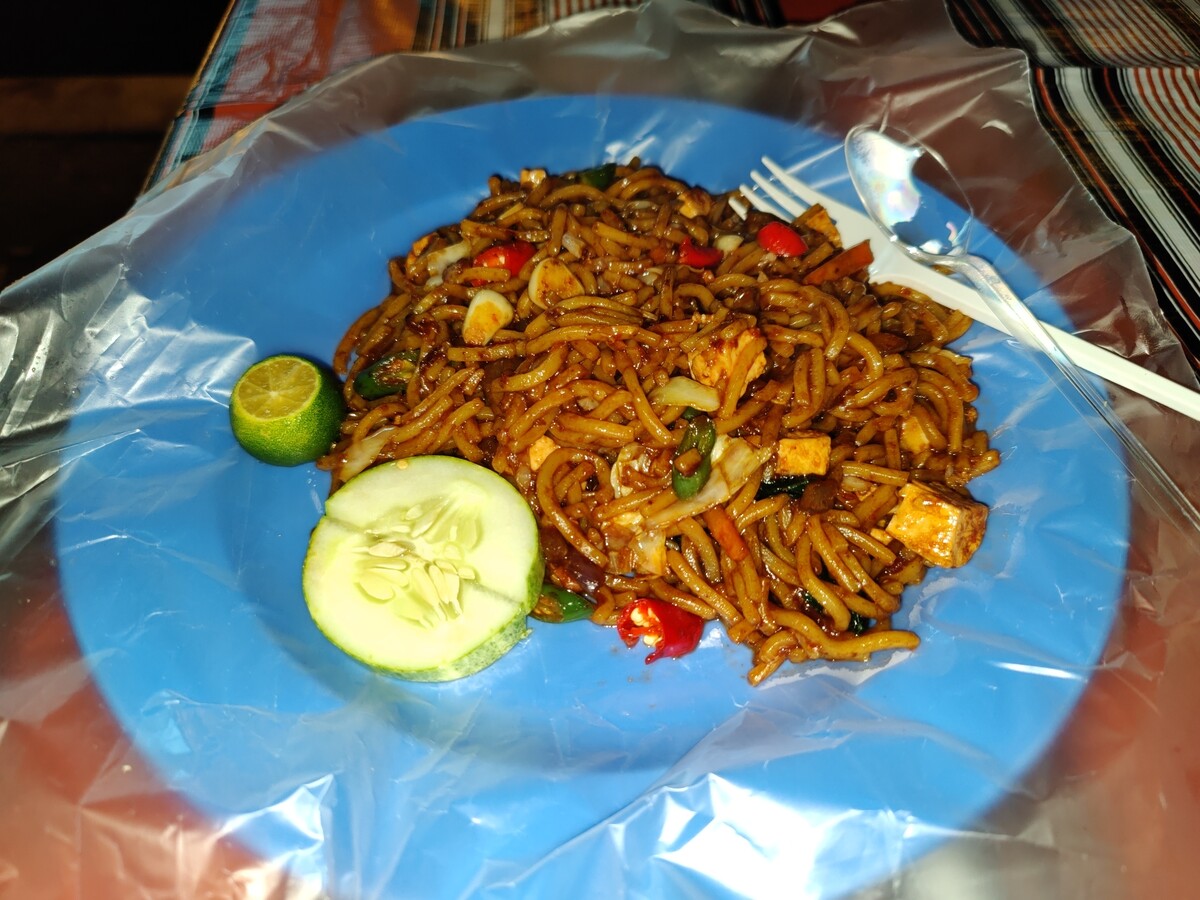
Last month, I had a trip to Malaysia and Thailand. I stayed for six days in each of the countries. The selection of these countries was due to both of them granting visa-free entry to Indian tourists for some time window. This post covers the Malaysia part and Thailand part will be covered in the next post. If you want to travel to any of these countries in the visa-free time period, I have written all the questions asked during immigration and at airports during this trip here which might be of help. I mostly stayed in Kuala Lumpur and went to places around it. Although before the trip, I planned to visit Ipoh and Cameron Highlands too, but could not cover it during the trip. I found planning a trip to Malaysia a little difficult. The country is divided into two main islands - Peninsular Malaysia and Borneo. Then there are more islands - Langkawi, Penang island, Perhentian and Redang Islands. Reaching those islands seemed a little difficult to plan and I wish to visit more places in my next Malaysia trip. My first day hostel was booked in Chinatown part of Kuala Lumpur, near Pasar Seni LRT station. As soon as I checked-in and entered my room, I met another Indian named Fletcher, and after that we accompanied each other in the trip. That day, we went to Muzium Negara and Little India. I realized that if you know the right places to buy what you want, Malaysia could be quite cheap. Malaysian currency is Malaysian Ringgit (MYR). 1 MYR is equal to 18 INR. For 2 MYR, you can get a good masala tea in Little India and it costs like 4-5 MYR for a masala dosa. The vegetarian food has good availability in Kuala Lumpur, thanks to the Tamil community. I also tried Mee Goreng, which was vegetarian, and I found it fine in terms of taste. When I checked about Mee Goreng on Wikipedia, I found out that it is unique to Indian immigrants in Malaysia (and neighboring countries) but you don t get it in India!
Mee Goreng, a dish made of noodles in Malaysia.
For the next day, Fletcher had planned a trip to Genting Highlands and pre booked everything. I also planned to join him but when we went to KL Sentral to take the bus, his bus tickets were sold out. I could take a bus at a different time, but decided to visit some other place for the day and cover Genting Highlands later. At the ticket counter, I met a family from Delhi and they wanted to go to Genting Highlands but due to not getting bus tickets for that day, they decided to buy a ticket for the next day and instead planned for Batu Caves that day. I joined them and went to Batu Caves. After returning from Batu Caves, we went our separate ways. I went back and took rest at my hostel and later went to Petronas Towers at night. Petronas Towers is the icon of Kuala Lumpur. Having a photo there was a must. I was at Petronas Towers at around 9 PM. Around that time, Fletcher came back from Genting Highlands and we planned to meet at KL Sentral to head for dinner.
Me at Petronas Towers.
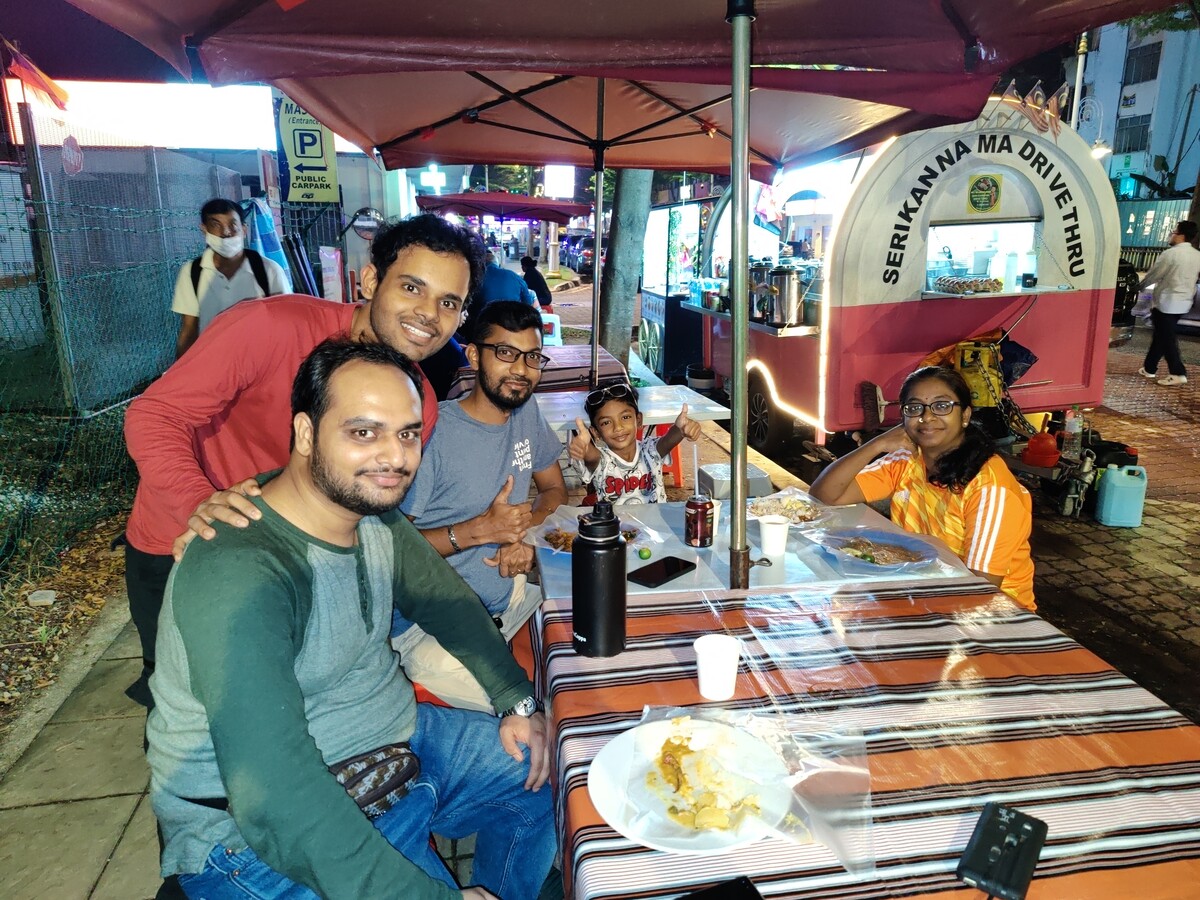
We went back to the same place as the day before where I had Mee Goreng. This time we had dosa and a masala tea. Their masala tea from the last day was tasty and that s why I was looking for them in the first place. We also met a Malaysian family having Indian ancestry dining there and had a nice conversation. Then we went to a place to eat roti canai in Pasar Seni market. Roti canai is a popular non-vegetarian dish in Malaysia but I took the vegetarian version.
Photo with Malaysians.
The next day, we went to Berjaya Time Square shopping place which sells pretty cheap items for daily use and souveniers too. However, I bought souveniers from Petaling Street, which is in Chinatown. At night, we explored Bukit Bintang, which is the heart of Kuala Lumpur and is famous for its nightlife. After that, Fletcher went to Bangkok and I was in Malaysia for two more days. Next day, I went to Genting Highlands and took the cable car, which had awesome views. I came back to Kuala Lumpur by the night. The remaining day I just roamed around in Bukit Bintang. Then I took a flight for Bangkok on 7th Feb, which I will cover in the next post. In Malaysia, I met so many people from different countries - apart from people from Indian subcontinent, I met Syrians, Indonesians (Malaysia seems to be a popular destination for Indonesian tourists) and Burmese people. Meeting people from other cultures is an integral part of travel for me. My expenses for Food + Accommodation + Travel added to 10,000 INR for a week in Malaysia, while flight costs were: 13,000 INR (Delhi to Kuala Lumpur) + 10,000 INR (Kuala Lumpur to Bangkok) + 12,000 INR (Bangkok to Delhi). For OpenStreetMap users, good news is Kuala Lumpur is fairly well-mapped on OpenStreetMap.

Tips
  • I bought local SIM from a shop at KL Sentral station complex which had news in their name (I forgot the exact name and there are two shops having news in their name) and it was the cheapest option I could find. The SIM was 10 MYR for 5 GB data for a week. If you want to make calls too, then you need to spend extra 5 MYR.
  • 7-Eleven and KK Mart convenience stores are everywhere in the city and they are open all the time (24 hours a day). If you are a vegetarian, you can at least get some bread and cheese from there to eat.
  • A lot of people know English (and many - Indians, Pakistanis, Nepalis - know Hindi) in Kuala Lumpur, so I had no language problems most of the time.
  • For shopping on budget, you can go to Petaling Street, Berjaya Time Square or Bukit Bintang. In particular, there is a shop named I Love KL Gifts in Bukit Bintang which had very good prices. just near the metro/monorail stattion. Check out location of the shop on OpenStreetMap.

1 March 2024

Guido G nther: Free Software Activities February 2024

A short status update what happened last month. Work in progress is marked as WiP: GNOME Calls Phosh and Phoc As this often overlaps I've put them in a common section: Phosh Tour Phosh Mobile Settings Phosh OSK Stub Livi Video Player Phosh.mobi Website If you want to support my work see donations.

Scarlett Gately Moore: Kubuntu: Week 4, Feature Freeze and what comes next.

First I would like to give a big congratulations to KDE for a superb KDE 6 mega release  While we couldn t go with 6 on our upcoming LTS release, I do recommend KDE neon if you want to give it a try! I want to say it again, I firmly stand by the Kubuntu Council in the decision to stay with the rock solid Plasma 5 for the 24.04 LTS release. The timing was just to close to feature freeze and the last time we went with the shiny new stuff on an LTS release, it was a nightmare ( KDE 4 anyone? ). So without further ado, my weekly wrap-up. Kubuntu: Continuing efforts from last week Kubuntu: Week 3 wrap up, Contest! KDE snaps, Debian uploads. , it has been another wild and crazy week getting everything in before feature freeze yesterday. We will still be uploading the upcoming Plasma 5.27.11 as it is a bug fix release  and right now it is all about the finding and fixing bugs! Aside from many uploads my accomplishments this week are: What comes next? Testing, testing, testing! Bug fixes and of course our re-branding. My focus is on bug triage right now. I am also working on new projects in launchpad to easily track our bugs as right now they are all over the place and hard to track down. Snaps: I have started the MRs to fix our latest 23.08.5 snaps, I hope to get these finished in the next week or so. I have also been speaking to a prospective student with some GSOC ideas that I really like and will mentor, hopefully we are not too late. Happy with my work? My continued employment depends on you! Please consider a donation http://kubuntu.org/donate Thank you!

Ravi Dwivedi: Fixing Mobile Data issue on Lineage OS

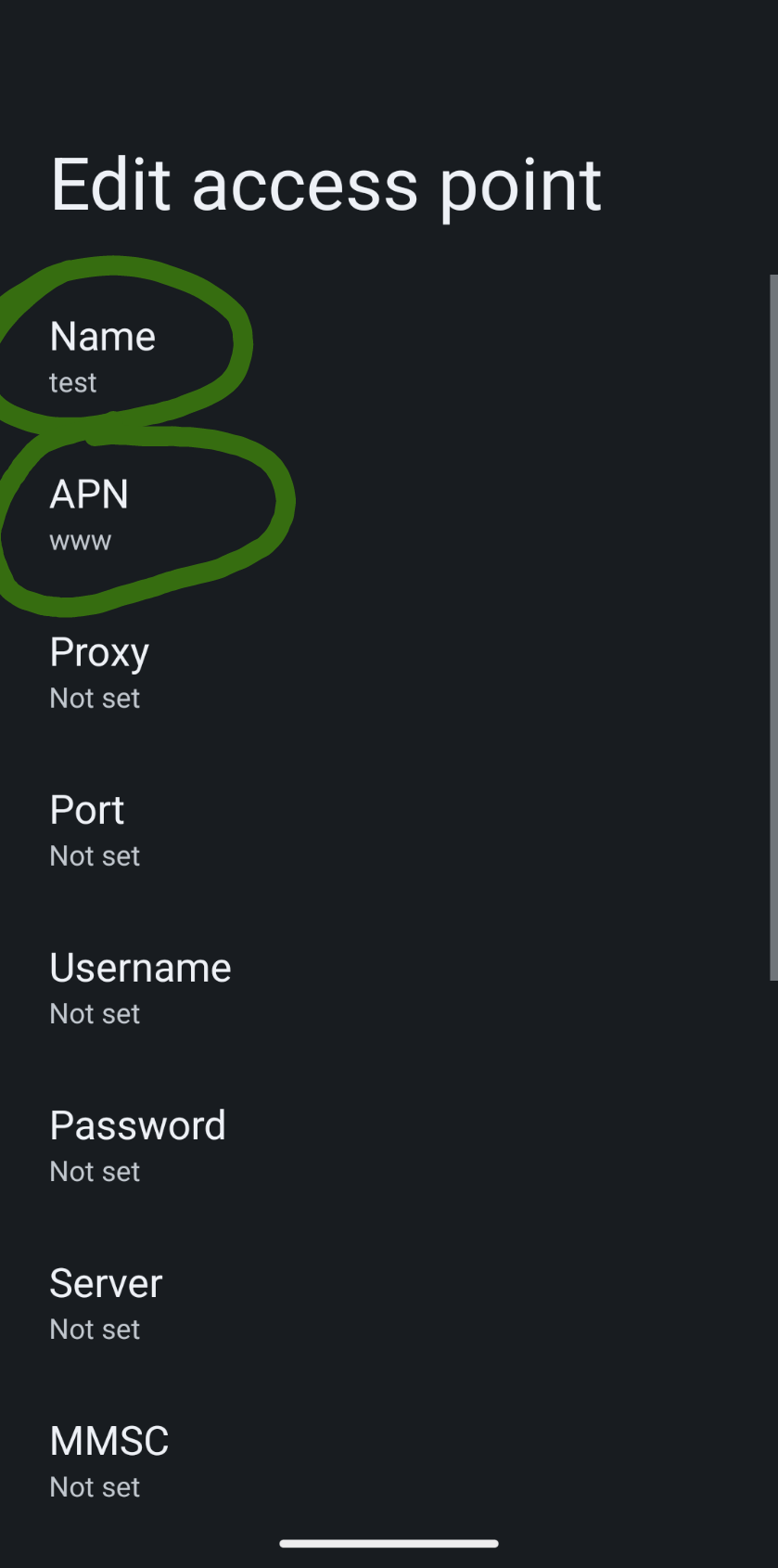
I have used Lineage OS on a couple of phones, but I noticed that internet using my mobile data was not working well on it. I am not sure why. This was the case in Xiaomi MI A2 and OnePlus 9 Pro phones. One day I met contrapunctus and they looked at their phone settings and used the same in mine and it worked. So, I am going to write here what worked for me. The trick is to add an access point. Go to Settings -> Network Settings -> Your SIM settings -> Access Point Names -> Click on + symbol. In the Name section, you can write anything, I wrote test. And in the APN section write www, then save. Below is a screenshot demonstrating the settings you have to change.
APN settings screenshot. Notice the circled entries.
This APN will show in the list of APNs and you need to select this one. After this, my mobile data started working well and I started getting speeds according to my data plan. This is what worked for me in Lineage OS. Hopefully, it was of help to you :D I will meet you in the next post.

29 February 2024

Russell Coker: Links February 2024

In 2018 Charles Stross wrote an insightful blog post Dude You Broke the Future [1]. It covers AI in both fiction and fact and corporations (the real AIs) and the horrifying things they can do right now. LongNow has an interesting article about the concept of the Magnum Opus [2]. As an aside I ve been working on SE Linux for 22 years. Cory Doctorow wrote an insightful article about the incentives for enshittification of the Internet and how economic issues and regulations shape that [3]. CCC has a lot of great talks, and this talk from the latest CCC about the Triangulation talk on an attak on Kaspersky iPhones is particularly epic [4]. GoodCar is an online sales site for electric cars in Australia [5]. Ulrike wrote an insightful blog post about how the reliance on volunteer work in the FOSS community hurts diversity [6]. Cory Doctorow wrote an insightful article about The Internet s Original Sin which is misuse of copyright law [7]. He advocates for using copyright strictly for it s intended purpose and creating other laws for privacy, labor rights, etc. David Brin wrote an interesting article on neoteny and sexual selection in humans [8]. 37C3 has an interesting lecture about software licensing for a circular economy which includes environmental savings from better code [9]. Now they track efficiency in KDE bug reports!

28 February 2024

Dirk Eddelbuettel: RcppEigen 0.3.4.0.0 on CRAN: New Upstream, At Last

We are thrilled to share that RcppEigen has now upgraded to Eigen release 3.4.0! The new release 0.3.4.0.0 arrived on CRAN earlier today, and has been shipped to Debian as well. Eigen is a C++ template library for linear algebra: matrices, vectors, numerical solvers, and related algorithms. This update has been in the works for a full two and a half years! It all started with a PR #102 by Yixuan bringing the package-local changes for R integration forward to usptream release 3.4.0. We opened issue #103 to steer possible changes from reverse-dependency checking through. Lo and behold, this just stalled because a few substantial changes were needed and not coming. But after a long wait, and like a bolt out of a perfectly blue sky, Andrew revived it in January with a reverse depends run of his own along with a set of PRs. That was the push that was needed, and I steered it along with a number of reverse dependency checks, and occassional emails to maintainers. We managed to bring it down to only three packages having a hickup, and all three had received PRs thanks to Andrew and even merged them. So the plan became to release today following a final fourteen day window. And CRAN was convinced by our arguments that we followed due process. So there it is! Big big thanks to all who helped it along, especially Yixuan and Andrew but also Mikael who updated another patch set he had prepared for the previous release series. The complete NEWS file entry follows.

Changes in RcppEigen version 0.3.4.0.0 (2024-02-28)
  • The Eigen version has been upgrade to release 3.4.0 (Yixuan)
  • Extensive reverse-dependency checks ensure only three out of over 400 packages at CRAN are affected; PRs and patches helped other packages
  • The long-running branch also contains substantial contributions from Mikael Jagan (for the lme4 interface) and Andrew Johnson (revdep PRs)

Courtesy of CRANberries, there is also a diffstat report for the most recent release. If you like this or other open-source work I do, you can sponsor me at GitHub.

This post by Dirk Eddelbuettel originated on his Thinking inside the box blog. Please report excessive re-aggregation in third-party for-profit settings.

26 February 2024

Sergio Durigan Junior: Planning to orphan Pagure on Debian

I have been thinking more and more about orphaning the Pagure Debian package. I don t have the time to maintain it properly anymore, and I have also lost interest in doing so.

What s Pagure Pagure is a git forge written entirely in Python using pygit2. It was almost entirely developed by one person, Pierre-Yves Chibon. He is (was?) a Red Hat employee and started working on this new git forge almost 10 years ago because the company wanted to develop something in-house for Fedora. The software is amazing and I admire Pierre-Yves quite a lot for what he was able to achieve basically alone. Unfortunately, a few years ago Fedora decided to move to Gitlab and the Pagure development pretty much stalled.

Pagure in Debian Packaging Pagure for Debian was hard, but it was also very fun. I learned quite a bit about many things (packaging and non-packaging related), interacted with the upstream community, decided to dogfood my own work and run my Pagure instance for a while, and tried to get newcomers to help me with the package (without much success, unfortunately). I remember that when I had started to package Pagure, Debian was also moving away from Alioth and discussing options. For a brief moment Pagure was a contender, but in the end the community decided to self-host Gitlab, and that s why we have Salsa now. I feel like I could have tipped the scales in favour of Pagure had I finished packaging it for Debian before the decision was made, but then again, to the best of my knowledge Salsa doesn t use our Gitlab package anyway

Are you interested in maintaining it? If you re interested in maintaining the package, please get in touch with me. I will happily pass the torch to someone else who is still using the software and wants to keep it healthy in Debian. If there is nobody interested, then I will just orphan it.

25 February 2024

Russ Allbery: Review: The Fund

Review: The Fund, by Rob Copeland
Publisher: St. Martin's Press
Copyright: 2023
ISBN: 1-250-27694-2
Format: Kindle
Pages: 310
I first became aware of Ray Dalio when either he or his publisher plastered advertisements for The Principles all over the San Francisco 4th and King Caltrain station. If I recall correctly, there were also constant radio commercials; it was a whole thing in 2017. My brain is very good at tuning out advertisements, so my only thought at the time was "some business guy wrote a self-help book." I think I vaguely assumed he was a CEO of some traditional business, since that's usually who writes heavily marketed books like this. I did not connect him with hedge funds or Bridgewater, which I have a bad habit of confusing with Blackwater. The Principles turns out to be more of a laundered cult manual than a self-help book. And therein lies a story. Rob Copeland is currently with The New York Times, but for many years he was the hedge fund reporter for The Wall Street Journal. He covered, among other things, Bridgewater Associates, the enormous hedge fund founded by Ray Dalio. The Fund is a biography of Ray Dalio and a history of Bridgewater from its founding as a vehicle for Dalio's advising business until 2022 when Dalio, after multiple false starts and title shuffles, finally retired from running the company. (Maybe. Based on the history recounted here, it wouldn't surprise me if he was back at the helm by the time you read this.) It is one of the wildest, creepiest, and most abusive business histories that I have ever read. It's probably worth mentioning, as Copeland does explicitly, that Ray Dalio and Bridgewater hate this book and claim it's a pack of lies. Copeland includes some of their denials (and many non-denials that sound as good as confirmations to me) in footnotes that I found increasingly amusing.
A lawyer for Dalio said he "treated all employees equally, giving people at all levels the same respect and extending them the same perks."
Uh-huh. Anyway, I personally know nothing about Bridgewater other than what I learned here and the occasional mention in Matt Levine's newsletter (which is where I got the recommendation for this book). I have no independent information whether anything Copeland describes here is true, but Copeland provides the typical extensive list of notes and sourcing one expects in a book like this, and Levine's comments indicated it's generally consistent with Bridgewater's industry reputation. I think this book is true, but since the clear implication is that the world's largest hedge fund was primarily a deranged cult whose employees mostly spied on and rated each other rather than doing any real investment work, I also have questions, not all of which Copeland answers to my satisfaction. But more on that later. The center of this book are the Principles. These were an ever-changing list of rules and maxims for how people should conduct themselves within Bridgewater. Per Copeland, although Dalio later published a book by that name, the version of the Principles that made it into the book was sanitized and significantly edited down from the version used inside the company. Dalio was constantly adding new ones and sometimes changing them, but the common theme was radical, confrontational "honesty": never being silent about problems, confronting people directly about anything that they did wrong, and telling people all of their faults so that they could "know themselves better." If this sounds like textbook abusive behavior, you have the right idea. This part Dalio admits to openly, describing Bridgewater as a firm that isn't for everyone but that achieves great results because of this culture. But the uncomfortably confrontational vibes are only the tip of the iceberg of dysfunction. Here are just a few of the ways this played out according to Copeland: In one of the common and all-too-disturbing connections between Wall Street finance and the United States' dysfunctional government, James Comey (yes, that James Comey) ran internal security for Bridgewater for three years, meaning that he was the one who pulled evidence from surveillance cameras for Dalio to use to confront employees during his trials. In case the cult vibes weren't strong enough already, Bridgewater developed its own idiosyncratic language worthy of Scientology. The trials were called "probings," firing someone was called "sorting" them, and rating them was called "dotting," among many other Bridgewater-specific terms. Needless to say, no one ever probed Dalio himself. You will also be completely unsurprised to learn that Copeland documents instances of sexual harassment and discrimination at Bridgewater, including some by Dalio himself, although that seems to be a relatively small part of the overall dysfunction. Dalio was happy to publicly humiliate anyone regardless of gender. If you're like me, at this point you're probably wondering how Bridgewater continued operating for so long in this environment. (Per Copeland, since Dalio's retirement in 2022, Bridgewater has drastically reduced the cult-like behaviors, deleted its archive of probings, and de-emphasized the Principles.) It was not actually a religious cult; it was a hedge fund that has to provide investment services to huge, sophisticated clients, and by all accounts it's a very successful one. Why did this bizarre nightmare of a workplace not interfere with Bridgewater's business? This, I think, is the weakest part of this book. Copeland makes a few gestures at answering this question, but none of them are very satisfying. First, it's clear from Copeland's account that almost none of the employees of Bridgewater had any control over Bridgewater's investments. Nearly everyone was working on other parts of the business (sales, investor relations) or on cult-related obsessions. Investment decisions (largely incorporated into algorithms) were made by a tiny core of people and often by Dalio himself. Bridgewater also appears to not trade frequently, unlike some other hedge funds, meaning that they probably stay clear of the more labor-intensive high-frequency parts of the business. Second, Bridgewater took off as a hedge fund just before the hedge fund boom in the 1990s. It transformed from Dalio's personal consulting business and investment newsletter to a hedge fund in 1990 (with an earlier investment from the World Bank in 1987), and the 1990s were a very good decade for hedge funds. Bridgewater, in part due to Dalio's connections and effective marketing via his newsletter, became one of the largest hedge funds in the world, which gave it a sort of institutional momentum. No one was questioned for putting money into Bridgewater even in years when it did poorly compared to its rivals. Third, Dalio used the tried and true method of getting free publicity from the financial press: constantly predict an upcoming downturn, and aggressively take credit whenever you were right. From nearly the start of his career, Dalio predicted economic downturns year after year. Bridgewater did very well in the 2000 to 2003 downturn, and again during the 2008 financial crisis. Dalio aggressively takes credit for predicting both of those downturns and positioning Bridgewater correctly going into them. This is correct; what he avoids mentioning is that he also predicted downturns in every other year, the majority of which never happened. These points together create a bit of an answer, but they don't feel like the whole picture and Copeland doesn't connect the pieces. It seems possible that Dalio may simply be good at investing; he reads obsessively and clearly enjoys thinking about markets, and being an abusive cult leader doesn't take up all of his time. It's also true that to some extent hedge funds are semi-free money machines, in that once you have a sufficient quantity of money and political connections you gain access to investment opportunities and mechanisms that are very likely to make money and that the typical investor simply cannot access. Dalio is clearly good at making personal connections, and invested a lot of effort into forming close ties with tricky clients such as pools of Chinese money. Perhaps the most compelling explanation isn't mentioned directly in this book but instead comes from Matt Levine. Bridgewater touts its algorithmic trading over humans making individual trades, and there is some reason to believe that consistently applying an algorithm without regard to human emotion is a solid trading strategy in at least some investment areas. Levine has asked in his newsletter, tongue firmly in cheek, whether the bizarre cult-like behavior and constant infighting is a strategy to distract all the humans and keep them from messing with the algorithm and thus making bad decisions. Copeland leaves this question unsettled. Instead, one comes away from this book with a clear vision of the most dysfunctional workplace I have ever heard of, and an endless litany of bizarre events each more astonishing than the last. If you like watching train wrecks, this is the book for you. The only drawback is that, unlike other entries in this genre such as Bad Blood or Billion Dollar Loser, Bridgewater is a wildly successful company, so you don't get the schadenfreude of seeing a house of cards collapse. You do, however, get a helpful mental model to apply to the next person who tries to talk to you about "radical honesty" and "idea meritocracy." The flaw in this book is that the existence of an organization like Bridgewater is pointing to systematic flaws in how our society works, which Copeland is largely uninterested in interrogating. "How could this have happened?" is a rather large question to leave unanswered. The sheer outrageousness of Dalio's behavior also gets a bit tiring by the end of the book, when you've seen the patterns and are hearing about the fourth variation. But this is still an astonishing book, and a worthy entry in the genre of capitalism disasters. Rating: 7 out of 10
Jacob Adams: AAC and Debian

Currently, in a default installation of Debian with the GNOME desktop, Bluetooth headphones that require the AAC codec1 cannot be used. As the Debian wiki outlines, using the AAC codec over Bluetooth, while technically supported by PipeWire, is explicitly disabled in Debian at this time. This is because the fdk-aac library needed to enable this support is currently in the non-free component of the repository, meaning that PipeWire, which is in the main component, cannot depend on it.

How to Fix it Yourself If what you, like me, need is simply for Bluetooth Audio to work with AAC in Debian s default desktop environment2, then you ll need to rebuild the pipewire package to include the AAC codec. While the current version in Debian main has been built with AAC deliberately disabled, it is trivial to enable if you can install a version of the fdk-aac library. I preface this with the usual caveats when it comes to patent and licensing controversies. I am not a lawyer, building this package and/or using it could get you into legal trouble. These instructions have only been tested on an up-to-date copy of Debian 12.
  1. Install pipewire s build dependencies
    sudo apt install build-essential devscripts
    sudo apt build-dep pipewire
    
  2. Install libfdk-aac-dev
    sudo apt install libfdk-aac-dev
    
    If the above doesn t work you ll likely need to enable non-free and try again
    sudo sed -i 's/main/main non-free/g' /etc/apt/sources.list
    sudo apt update
    
    Alternatively, if you wish to ensure you are maximally license-compliant and patent un-infringing3, you can instead build fdk-aac-free which includes only those components of AAC that are known to be patent-free3. This is what should eventually end up in Debian to resolve this problem (see below).
    sudo apt install git-buildpackage
    mkdir fdk-aac-source
    cd fdk-aac-source
    git clone https://salsa.debian.org/multimedia-team/fdk-aac
    cd fdk-aac
    gbp buildpackage
    sudo dpkg -i ../libfdk-aac2_*deb ../libfdk-aac-dev_*deb
    
  3. Get the pipewire source code
    mkdir pipewire-source
    cd pipewire-source
    apt source pipewire
    
    This will create a bunch of files within the pipewire-source directory, but you ll only need the pipewire-<version> folder, this contains all the files you ll need to build the package, with all the debian-specific patches already applied. Note that you don t want to run the apt source command as root, as it will then create files that your regular user cannot edit.
  4. Fix the dependencies and build options To fix up the build scripts to use the fdk-aac library, you need to save the following as pipewire-source/aac.patch
    --- debian/control.orig
    +++ debian/control
    @@ -40,8 +40,8 @@
                 modemmanager-dev,
                 pkg-config,
                 python3-docutils,
    -               systemd [linux-any]
    -Build-Conflicts: libfdk-aac-dev
    +               systemd [linux-any],
    +               libfdk-aac-dev
     Standards-Version: 4.6.2
     Vcs-Browser: https://salsa.debian.org/utopia-team/pipewire
     Vcs-Git: https://salsa.debian.org/utopia-team/pipewire.git
    --- debian/rules.orig
    +++ debian/rules
    @@ -37,7 +37,7 @@
     		-Dauto_features=enabled \
     		-Davahi=enabled \
     		-Dbluez5-backend-native-mm=enabled \
    -		-Dbluez5-codec-aac=disabled \
    +		-Dbluez5-codec-aac=enabled \
     		-Dbluez5-codec-aptx=enabled \
     		-Dbluez5-codec-lc3=enabled \
     		-Dbluez5-codec-lc3plus=disabled \
    
    Then you ll need to run patch from within the pipewire-<version> folder created by apt source:
    patch -p0 < ../aac.patch
    
  5. Build pipewire
    cd pipewire-*
    debuild
    
    Note that you will likely see an error from debsign at the end of this process, this is harmless, you simply don t have a GPG key set up to sign your newly-built package4. Packages don t need to be signed to be installed, and debsign uses a somewhat non-standard signing process that dpkg does not check anyway.
  1. Install libspa-0.2-bluetooth
    sudo dpkg -i libspa-0.2-bluetooth_*.deb
    
  2. Restart PipeWire and/or Reboot
    sudo reboot
    
    Theoretically there s a set of services to restart here that would get pipewire to pick up the new library, probably just pipewire itself. But it s just as easy to restart and ensure everything is using the correct library.

Why This is a slightly unusual situation, as the fdk-aac library is licensed under what even the GNU project acknowledges is a free software license. However, this license explicitly informs the user that they need to acquire a patent license to use this software5:
3. NO PATENT LICENSE NO EXPRESS OR IMPLIED LICENSES TO ANY PATENT CLAIMS, including without limitation the patents of Fraunhofer, ARE GRANTED BY THIS SOFTWARE LICENSE. Fraunhofer provides no warranty of patent non-infringement with respect to this software. You may use this FDK AAC Codec software or modifications thereto only for purposes that are authorized by appropriate patent licenses.
To quote the GNU project:
Because of this, and because the license author is a known patent aggressor, we encourage you to be careful about using or redistributing software under this license: you should first consider whether the licensor might aim to lure you into patent infringement.
AAC is covered by a number of patents, which expire at some point in the 2030s6. As such the current version of the library is potentially legally dubious to ship with any other software, as it could be considered patent-infringing3.

Fedora s solution Since 2017, Fedora has included a modified version of the library as fdk-aac-free, see the announcement and the bugzilla bug requesting review. This version of the library includes only the AAC LC profile, which is believed to be entirely patent-free3. Based on this, there is an open bug report in Debian requesting that the fdk-aac package be moved to the main component and that the pipwire package be updated to build against it.

The Debian NEW queue To resolve these bugs, a version of fdk-aac-free has been uploaded to Debian by Jeremy Bicha. However, to make it into Debian proper, it must first pass through the ftpmaster s NEW queue. The current version of fdk-aac-free has been in the NEW queue since July 2023. Based on conversations in some of the bugs above, it s been there since at least 20227. I hope this helps anyone stuck with AAC to get their hardware working for them while we wait for the package to eventually make it through the NEW queue. Discuss on Hacker News
  1. Such as, for example, any Apple AirPods, which only support AAC AFAICT.
  2. Which, as of Debian 12 is GNOME 3 under Wayland with PipeWire.
  3. I m not a lawyer, I don t know what kinds of infringement might or might not be possible here, do your own research, etc. 2 3 4
  4. And if you DO have a key setup with debsign you almost certainly don t need these instructions.
  5. This was originally phrased as explicitly does not grant any patent rights. It was pointed out on Hacker News that this is not exactly what it says, as it also includes a specific note that you ll need to acquire your own patent license. I ve now quoted the relevant section of the license for clarity.
  6. Wikipedia claims the base patents expire in 2031, with the extensions expiring in 2038, but its source for these claims is some guy s spreadsheet in a forum. The same discussion also brings up Wikipedia s claim and casts some doubt on it, so I m not entirely sure what s correct here, but I didn t feel like doing a patent deep-dive today. If someone can provide a clear answer that would be much appreciated.
  7. According to Jeremy B cha: https://bugs.debian.org/cgi-bin/bugreport.cgi?bug=1021370#17

24 February 2024

Niels Thykier: Language Server for Debian: Spellchecking

This is my third update on writing a language server for Debian packaging files, which aims at providing a better developer experience for Debian packagers. Lets go over what have done since the last report.
Semantic token support I have added support for what the Language Server Protocol (LSP) call semantic tokens. These are used to provide the editor insights into tokens of interest for users. Allegedly, this is what editors would use for syntax highlighting as well. Unfortunately, eglot (emacs) does not support semantic tokens, so I was not able to test this. There is a 3-year old PR for supporting with the last update being ~3 month basically saying "Please sign the Copyright Assignment". I pinged the GitHub issue in the hopes it will get unstuck. For good measure, I also checked if I could try it via neovim. Before installing, I read the neovim docs, which helpfully listed the features supported. Sadly, I did not spot semantic tokens among those and parked from there. That was a bit of a bummer, but I left the feature in for now. If you have an LSP capable editor that supports semantic tokens, let me know how it works for you! :)
Spellchecking Finally, I implemented something Otto was missing! :) This stared with Paul Wise reminding me that there were Python binding for the hunspell spellchecker. This enabled me to get started with a quick prototype that spellchecked the Description fields in debian/control. I also added spellchecking of comments while I was add it. The spellchecker runs with the standard en_US dictionary from hunspell-en-us, which does not have a lot of technical terms in it. Much less any of the Debian specific slang. I spend considerable time providing a "built-in" wordlist for technical and Debian specific slang to overcome this. I also made a "wordlist" for known Debian people that the spellchecker did not recognise. Said wordlist is fairly short as a proof of concept, and I fully expect it to be community maintained if the language server becomes a success. My second problem was performance. As I had suspected that spellchecking was not the fastest thing in the world. Therefore, I added a very small language server for the debian/changelog, which only supports spellchecking the textual part. Even for a small changelog of a 1000 lines, the spellchecking takes about 5 seconds, which confirmed my suspicion. With every change you do, the existing diagnostics hangs around for 5 seconds before being updated. Notably, in emacs, it seems that diagnostics gets translated into an absolute character offset, so all diagnostics after the change gets misplaced for every character you type. Now, there is little I could do to speed up hunspell. But I can, as always, cheat. The way diagnostics work in the LSP is that the server listens to a set of notifications like "document opened" or "document changed". In a response to that, the LSP can start its diagnostics scanning of the document and eventually publish all the diagnostics to the editor. The spec is quite clear that the server owns the diagnostics and the diagnostics are sent as a "notification" (that is, fire-and-forgot). Accordingly, there is nothing that prevents the server from publishing diagnostics multiple times for a single trigger. The only requirement is that the server publishes the accumulated diagnostics in every publish (that is, no delta updating). Leveraging this, I had the language server for debian/changelog scan the document and publish once for approximately every 25 typos (diagnostics) spotted. This means you quickly get your first result and that clears the obsolete diagnostics. Thereafter, you get frequent updates to the remainder of the document if you do not perform any further changes. That is, up to a predefined max of typos, so we do not overload the client for longer changelogs. If you do any changes, it resets and starts over. The only bit missing was dealing with concurrency. By default, a pygls language server is single threaded. It is not great if the language server hangs for 5 seconds everytime you type anything. Fortunately, pygls has builtin support for asyncio and threaded handlers. For now, I did an async handler that await after each line and setup some manual detection to stop an obsolete diagnostics run. This means the server will fairly quickly abandon an obsolete run. Also, as a side-effect of working on the spellchecking, I fixed multiple typos in the changelog of debputy. :)
Follow up on the "What next?" from my previous update In my previous update, I mentioned I had to finish up my python-debian changes to support getting the location of a token in a deb822 file. That was done, the MR is now filed, and is pending review. Hopefully, it will be merged and uploaded soon. :) I also submitted my proposal for a different way of handling relationship substvars to debian-devel. So far, it seems to have received only positive feedback. I hope it stays that way and we will have this feature soon. Guillem proposed to move some of this into dpkg, which might delay my plans a bit. However, it might be for the better in the long run, so I will wait a bit to see what happens on that front. :) As noted above, I managed to add debian/changelog as a support format for the language server. Even if it only does spellchecking and trimming of trailing newlines on save, it technically is a new format and therefore cross that item off my list. :D Unfortunately, I did not manage to write a linter variant that does not involve using an LSP-capable editor. So that is still pending. Instead, I submitted an MR against elpa-dpkg-dev-el to have it recognize all the fields that the debian/control LSP knows about at this time to offset the lack of semantic token support in eglot.
From here... My sprinting on this topic will soon come to an end, so I have to a bit more careful now with what tasks I open! I think I will narrow my focus to providing a batch linting interface. Ideally, with an auto-fix for some of the more mechanical issues, where this is little doubt about the answer. Additionally, I think the spellchecking will need a bit more maturing. My current code still trips on naming patterns that are "clearly" verbatim or code references like things written in CamelCase or SCREAMING_SNAKE_CASE. That gets annoying really quickly. It also trips on a lot of commands like dpkg-gencontrol, but that is harder to fix since it could have been a real word. I think those will have to be fixed people using quotes around the commands. Maybe the most popular ones will end up in the wordlist. Beyond that, I will play it by ear if I have any time left. :)

23 February 2024

Gunnar Wolf: 10 things software developers should learn about learning

This post is a review for Computing Reviews for 10 things software developers should learn about learning , a article published in Communications of the ACM
As software developers, we understand the detailed workings of the different components of our computer systems. And probably due to how computers were presented since their appearance as digital brains in the 1940s we sometimes believe we can transpose that knowledge to how our biological brains work, be it as learners or as problem solvers. This article aims at making the reader understand several mechanisms related to how learning and problem solving actually work in our brains. It focuses on helping expert developers convey knowledge to new learners, as well as learners who need to get up to speed and start coding. The article s narrative revolves around software developers, but much of what it presents can be applied to different problem domains. The article takes this mission through ten points, with roughly the same space given to each of them, starting with wrong assumptions many people have about the similarities between computers and our brains. The first section, Human Memory Is Not Made of Bits, explains the brain processes of remembering as a way of strengthening the force of a memory ( reconsolidation ) and the role of activation in related network pathways. The second section, Human Memory Is Composed of One Limited and One Unlimited System, goes on to explain the organization of memories in the brain between long-term memory (functionally limitless, permanent storage) and working memory (storing little amounts of information used for solving a problem at hand). However, the focus soon shifts to how experience in knowledge leads to different ways of using the same concepts, the importance of going from abstract to concrete knowledge applications and back, and the role of skills repetition over time. Toward the end of the article, the focus shifts from the mechanical act of learning to expertise. Section 6, The Internet Has Not Made Learning Obsolete, emphasizes that problem solving is not just putting together the pieces of a puzzle; searching online for solutions to a problem does not activate the neural pathways that would get fired up otherwise. The final sections tackle the differences that expertise brings to play when teaching or training a newcomer: the same tools that help the beginner s productivity as training wheels will often hamper the expert user s as their knowledge has become automated. The article is written with a very informal and easy-to-read tone and vocabulary, and brings forward several issues that might seem like commonsense but do ring bells when it comes to my own experiences both as a software developer and as a teacher. The article closes by suggesting several books that further expand on the issues it brings forward. While I could not identify a single focus or thesis with which to characterize this article, the several points it makes will likely help readers better understand (and bring forward to consciousness) mental processes often taken for granted, and consider often-overlooked aspects when transmitting knowledge to newcomers.

21 February 2024

Niels Thykier: Expanding on the Language Server (LSP) support for debian/control

I have spent some more time on improving my language server for debian/control. Today, I managed to provide the following features:
  • The X- style prefixes for field names are now understood and handled. This means the language server now considers XC-Package-Type the same as Package-Type.

  • More diagnostics:

    • Fields without values now trigger an error marker
    • Duplicated fields now trigger an error marker
    • Fields used in the wrong paragraph now trigger an error marker
    • Typos in field names or values now trigger a warning marker. For field names, X- style prefixes are stripped before typo detection is done.
    • The value of the Section field is now validated against a dataset of known sections and trigger a warning marker if not known.
  • The "on-save trim end of line whitespace" now works. I had a logic bug in the server side code that made it submit "no change" edits to the editor.

  • The language server now provides "hover" documentation for field names. There is a small screenshot of this below. Sadly, emacs does not support markdown or, if it does, it does not announce the support for markdown. For now, all the documentation is always in markdown format and the language server will tag it as either markdown or plaintext depending on the announced support.

  • The language server now provides quick fixes for some of the more trivial problems such as deprecated fields or typos of fields and values.

  • Added more known fields including the XS-Autobuild field for non-free packages along with a link to the relevant devref section in its hover doc.

This covers basically all my known omissions from last update except spellchecking of the Description field. An image of emacs showing documentation for the Provides field from the language server.
Spellchecking Personally, I feel spellchecking would be a very welcome addition to the current feature set. However, reviewing my options, it seems that most of the spellchecking python libraries out there are not packaged for Debian, or at least not other the name I assumed they would be. The alternative is to pipe the spellchecking to another program like aspell list. I did not test this fully, but aspell list does seem to do some input buffering that I cannot easily default (at least not in the shell). Though, either way, the logic for this will not be trivial and aspell list does not seem to include the corrections either. So best case, you would get typo markers but no suggestions for what you should have typed. Not ideal. Additionally, I am also concerned with the performance for this feature. For d/control, it will be a trivial matter in practice. However, I would be reusing this for d/changelog which is 99% free text with plenty of room for typos. For a regular linter, some slowness is acceptable as it is basically a batch tool. However, for a language server, this potentially translates into latency for your edits and that gets annoying. While it is definitely on my long term todo list, I am a bit afraid that it can easily become a time sink. Admittedly, this does annoy me, because I wanted to cross off at least one of Otto's requested features soon.
On wrap-and-sort support The other obvious request from Otto would be to automate wrap-and-sort formatting. Here, the problem is that "we" in Debian do not agree on the one true formatting of debian/control. In fact, I am fairly certain we do not even agree on whether we should all use wrap-and-sort. This implies we need a style configuration. However, if we have a style configuration per person, then you get style "ping-pong" for packages where the co-maintainers do not all have the same style configuration. Additionally, it is very likely that you are a member of multiple packaging teams or groups that all have their own unique style. Ergo, only having a personal config file is doomed to fail. The only "sane" option here that I can think of is to have or support "per package" style configuration. Something that would be committed to git, so the tooling would automatically pick up the configuration. Obviously, that is not fun for large packaging teams where you have to maintain one file per package if you want a consistent style across all packages. But it beats "style ping-pong" any day of the week. Note that I am perfectly open to having a personal configuration file as a fallback for when the "per package" configuration file is absent. The second problem is the question of which format to use and what to name this file. Since file formats and naming has never been controversial at all, this will obviously be the easy part of this problem. But the file should be parsable by both wrap-and-sort and the language server, so you get the same result regardless of which tool you use. If we do not ensure this, then we still have the style ping-pong problem as people use different tools. This also seems like time sink with no end. So, what next then...?
What next? On the language server front, I will have a look at its support for providing semantic hints to the editors that might be used for syntax highlighting. While I think most common Debian editors have built syntax highlighting already, I would like this language server to stand on its own. I would like us to be in a situation where we do not have implement yet another editor extension for Debian packaging files. At least not for editors that support the LSP spec. On a different front, I have an idea for how we go about relationship related substvars. It is not directly related to this language server, except I got triggered by the language server "missing" a diagnostic for reminding people to add the magic Depends: $ misc:Depends [, $ shlibs:Depends ] boilerplate. The magic boilerplate that you have to write even though we really should just fix this at a tooling level instead. Energy permitting, I will formulate a proposal for that and send it to debian-devel. Beyond that, I think I might start adding support for another file. I also need to wrap up my python-debian branch, so I can get the position support into the Debian soon, which would remove one papercut for using this language server. Finally, it might be interesting to see if I can extract a "batch-linter" version of the diagnostics and related quickfix features. If nothing else, the "linter" variant would enable many of you to get a "mini-Lintian" without having to do a package build first.

20 February 2024

Niels Thykier: Language Server (LSP) support for debian/control

About a month ago, Otto Kek l inen asked for editor extensions for debian related files on the debian-devel mailing list. In that thread, I concluded that what we were missing was a "Language Server" (LSP) for our packaging files. Last week, I started a prototype for such a LSP for the debian/control file as a starting point based on the pygls library. The initial prototype worked and I could do very basic diagnostics plus completion suggestion for field names.
Current features I got 4 basic features implemented, though I have only been able to test two of them in emacs.
  • Diagnostics or linting of basic issues.
  • Completion suggestions for all known field names that I could think of and values for some fields.
  • Folding ranges (untested). This feature enables the editor to "fold" multiple lines. It is often used with multi-line comments and that is the feature currently supported.
  • On save, trim trailing whitespace at the end of lines (untested). Might not be registered correctly on the server end.
Despite its very limited feature set, I feel editing debian/control in emacs is now a much more pleasant experience. Coming back to the features that Otto requested, the above covers a grand total of zero. Sorry, Otto. It is not you, it is me.
Completion suggestions For completion, all known fields are completed. Place the cursor at the start of the line or in a partially written out field name and trigger the completion in your editor. In my case, I can type R-R-R and trigger the completion and the editor will automatically replace it with Rules-Requires-Root as the only applicable match. Your milage may vary since I delegate most of the filtering to the editor, meaning the editor has the final say about whether your input matches anything. The only filtering done on the server side is that the server prunes out fields already used in the paragraph, so you are not presented with the option to repeat an already used field, which would be an error. Admittedly, not an error the language server detects at the moment, but other tools will. When completing field, if the field only has one non-default value such as Essential which can be either no (the default, but you should not use it) or yes, then the completion suggestion will complete the field along with its value. This is mostly only applicable for "yes/no" fields such as Essential and Protected. But it does also trigger for Package-Type at the moment. As for completing values, here the language server can complete the value for simple fields such as "yes/no" fields, Multi-Arch, Package-Type and Priority. I intend to add support for Section as well - maybe also Architecture.
Diagnostics On the diagnostic front, I have added multiple diagnostics:
  • An error marker for syntax errors.
  • An error marker for missing a mandatory field like Package or Architecture. This also includes Standards-Version, which is admittedly mandatory by policy rather than tooling falling part.
  • An error marker for adding Multi-Arch: same to an Architecture: all package.
  • Error marker for providing an unknown value to a field with a set of known values. As an example, writing foo in Multi-Arch would trigger this one.
  • Warning marker for using deprecated fields such as DM-Upload-Allowed, or when setting a field to its default value for fields like Essential. The latter rule only applies to selected fields and notably Multi-Arch: no does not trigger a warning.
  • Info level marker if a field like Priority duplicates the value of the Source paragraph.
Notable omission at this time:
  • No errors are raised if a field does not have a value.
  • No errors are raised if a field is duplicated inside a paragraph.
  • No errors are used if a field is used in the wrong paragraph.
  • No spellchecking of the Description field.
  • No understanding that Foo and X[CBS]-Foo are related. As an example, XC-Package-Type is completely ignored despite being the old name for Package-Type.
  • Quick fixes to solve these problems... :)
Trying it out If you want to try, it is sadly a bit more involved due to things not being uploaded or merged yet. Also, be advised that I will regularly rebase my git branches as I revise the code. The setup:
  • Build and install the deb of the main branch of pygls from https://salsa.debian.org/debian/pygls The package is in NEW and hopefully this step will soon just be a regular apt install.
  • Build and install the deb of the rts-locatable branch of my python-debian fork from https://salsa.debian.org/nthykier/python-debian There is a draft MR of it as well on the main repo.
  • Build and install the deb of the lsp-support branch of debputy from https://salsa.debian.org/debian/debputy
  • Configure your editor to run debputy lsp debian/control as the language server for debian/control. This is depends on your editor. I figured out how to do it for emacs (see below). I also found a guide for neovim at https://neovim.io/doc/user/lsp. Note that debputy can be run from any directory here. The debian/control is a reference to the file format and not a concrete file in this case.
Obviously, the setup should get easier over time. The first three bullet points should eventually get resolved by merges and upload meaning you end up with an apt install command instead of them. For the editor part, I would obviously love it if we can add snippets for editors to make the automatically pick up the language server when the relevant file is installed.
Using the debputy LSP in emacs The guide I found so far relies on eglot. The guide below assumes you have the elpa-dpkg-dev-el package installed for the debian-control-mode. Though it should be a trivially matter to replace debian-control-mode with a different mode if you use a different mode for your debian/control file. In your emacs init file (such as ~/.emacs or ~/.emacs.d/init.el), you add the follow blob.
(with-eval-after-load 'eglot
    (add-to-list 'eglot-server-programs
        '(debian-control-mode . ("debputy" "lsp" "debian/control"))))
Once you open the debian/control file in emacs, you can type M-x eglot to activate the language server. Not sure why that manual step is needed and if someone knows how to automate it such that eglot activates automatically on opening debian/control, please let me know. For testing completions, I often have to manually activate them (with C-M-i or M-x complete-symbol). Though, it is a bit unclear to me whether this is an emacs setting that I have not toggled or something I need to do on the language server side.
From here As next steps, I will probably look into fixing some of the "known missing" items under diagnostics. The quick fix would be a considerable improvement to assisting users. In the not so distant future, I will probably start to look at supporting other files such as debian/changelog or look into supporting configuration, so I can cover formatting features like wrap-and-sort. I am also very much open to how we can provide integrations for this feature into editors by default. I will probably create a separate binary package for specifically this feature that pulls all relevant dependencies that would be able to provide editor integrations as well.

19 February 2024

Matthew Garrett: Debugging an odd inability to stream video

We have a cabin out in the forest, and when I say "out in the forest" I mean "in a national forest subject to regulation by the US Forest Service" which means there's an extremely thick book describing the things we're allowed to do and (somewhat longer) not allowed to do. It's also down in the bottom of a valley surrounded by tall trees (the whole "forest" bit). There used to be AT&T copper but all that infrastructure burned down in a big fire back in 2021 and AT&T no longer supply new copper links, and Starlink isn't viable because of the whole "bottom of a valley surrounded by tall trees" thing along with regulations that prohibit us from putting up a big pole with a dish on top. Thankfully there's LTE towers nearby, so I'm simply using cellular data. Unfortunately my provider rate limits connections to video streaming services in order to push them down to roughly SD resolution. The easy workaround is just to VPN back to somewhere else, which in my case is just a Wireguard link back to San Francisco.

This worked perfectly for most things, but some streaming services simply wouldn't work at all. Attempting to load the video would just spin forever. Running tcpdump at the local end of the VPN endpoint showed a connection being established, some packets being exchanged, and then nothing. The remote service appeared to just stop sending packets. Tcpdumping the remote end of the VPN showed the same thing. It wasn't until I looked at the traffic on the VPN endpoint's external interface that things began to become clear.

This probably needs some background. Most network infrastructure has a maximum allowable packet size, which is referred to as the Maximum Transmission Unit or MTU. For ethernet this defaults to 1500 bytes, and these days most links are able to handle packets of at least this size, so it's pretty typical to just assume that you'll be able to send a 1500 byte packet. But what's important to remember is that that doesn't mean you have 1500 bytes of packet payload - that 1500 bytes includes whatever protocol level headers are on there. For TCP/IP you're typically looking at spending around 40 bytes on the headers, leaving somewhere around 1460 bytes of usable payload. And if you're using a VPN, things get annoying. In this case the original packet becomes the payload of a new packet, which means it needs another set of TCP (or UDP) and IP headers, and probably also some VPN header. This still all needs to fit inside the MTU of the link the VPN packet is being sent over, so if the MTU of that is 1500, the effective MTU of the VPN interface has to be lower. For Wireguard, this works out to an effective MTU of 1420 bytes. That means simply sending a 1500 byte packet over a Wireguard (or any other VPN) link won't work - adding the additional headers gives you a total packet size of over 1500 bytes, and that won't fit into the underlying link's MTU of 1500.

And yet, things work. But how? Faced with a packet that's too big to fit into a link, there are two choices - break the packet up into multiple smaller packets ("fragmentation") or tell whoever's sending the packet to send smaller packets. Fragmentation seems like the obvious answer, so I'd encourage you to read Valerie Aurora's article on how fragmentation is more complicated than you think. tl;dr - if you can avoid fragmentation then you're going to have a better life. You can explicitly indicate that you don't want your packets to be fragmented by setting the Don't Fragment bit in your IP header, and then when your packet hits a link where your packet exceeds the link MTU it'll send back a packet telling the remote that it's too big, what the actual MTU is, and the remote will resend a smaller packet. This avoids all the hassle of handling fragments in exchange for the cost of a retransmit the first time the MTU is exceeded. It also typically works these days, which wasn't always the case - people had a nasty habit of dropping the ICMP packets telling the remote that the packet was too big, which broke everything.

What I saw when I tcpdumped on the remote VPN endpoint's external interface was that the connection was getting established, and then a 1500 byte packet would arrive (this is kind of the behaviour you'd expect for video - the connection handshaking involves a bunch of relatively small packets, and then once you start sending the video stream itself you start sending packets that are as large as possible in order to minimise overhead). This 1500 byte packet wouldn't fit down the Wireguard link, so the endpoint sent back an ICMP packet to the remote telling it to send smaller packets. The remote should then have sent a new, smaller packet - instead, about a second after sending the first 1500 byte packet, it sent that same 1500 byte packet. This is consistent with it ignoring the ICMP notification and just behaving as if the packet had been dropped.

All the services that were failing were failing in identical ways, and all were using Fastly as their CDN. I complained about this on social media and then somehow ended up in contact with the engineering team responsible for this sort of thing - I sent them a packet dump of the failure, they were able to reproduce it, and it got fixed. Hurray!

(Between me identifying the problem and it getting fixed I was able to work around it. The TCP header includes a Maximum Segment Size (MSS) field, which indicates the maximum size of the payload for this connection. iptables allows you to rewrite this, so on the VPN endpoint I simply rewrote the MSS to be small enough that the packets would fit inside the Wireguard MTU. This isn't a complete fix since it's done at the TCP level rather than the IP level - so any large UDP packets would still end up breaking)

I've no idea what the underlying issue was, and at the client end the failure was entirely opaque: the remote simply stopped sending me packets. The only reason I was able to debug this at all was because I controlled the other end of the VPN as well, and even then I wouldn't have been able to do anything about it other than being in the fortuitous situation of someone able to do something about it seeing my post. How many people go through their lives dealing with things just being broken and having no idea why, and how do we fix that?

(Edit: thanks to this comment, it sounds like the underlying issue was a kernel bug that Fastly developed a fix for - under certain configurations, the kernel fails to associate the MTU update with the egress interface and so it continues sending overly large packets)

comment count unavailable comments

18 February 2024

Iustin Pop: New skis , new fun!

As I wrote a bit back, I had a really, really bad fourth quarter in 2023. As new years approached, and we were getting ready to go on a ski trip, I wasn t even sure if and how much I ll be able to ski. And I felt so out of it that I didn t even buy a ski pass for the whole week, just bought one day to see if a) I still like, and b) my knee can deal with it. And, of course, it was good. It was good enough that I ended up skiing the entire week, and my knee got better during the week. WTH?! I don t understand this anymore, but it was good. Good enough that this early year trip put me back on track and I started doing sports again. But the main point is, that during this ski week, and talking to the teacher, I realised that my ski equipment is getting a bit old. I bought everything roughly ten years ago, and while they still hold up OK, my ski skills have improved since then. I said to myself, 10 years is a good run, I ll replace this year the skis, next year the boot & helmet, etc. I didn t expect much from new skis - I mean, yes, better skis, but what does better mean? Well, once I ve read enough forum posts, apparently the skis I selected are that good , which to me meant they re not bad. Oh my, how wrong I was! Double, triple wrong! Rather than fighting with the skis, it s enough to think what I wand to do, and the skis do it. I felt OK-ish, maybe 10% limited by my previous skis, but the new skis are really good and also I know that I m just at 30% or so of the new skis - so room to grow. For now, I am able to ski faster, longer, and I feel less tired than before. I ve actually compared and I can do twice the distance in a day and feel slightly less tired at the end. I ve moved from this black is cool but a bit difficult, I ll do another run later in the day when I ve recovered to how cool, this blacks is quite empty of people, let s stay here for 2-3 more rounds . The skis are new, and I haven t used them on all the places I m familiar with - but the upgrade is huge. The people on the ski forum were actually not exaggerating, I realise now. St ckli++, and they re also made in Switzerland. Can t wait to get back to Saas Fee and to the couple of slopes that were killing me before, to see how they feel now. So, very happy with this choice. I d be even happier if my legs were less damaged, but well, you can t win them all. And not last, the skis are also very cool looking

Russell Coker: Release Years

In 2008 I wrote about the idea of having a scheduled release for Debian and other distributions as Mark Shuttleworth had proposed [1]. I still believe that Mark s original idea for synchronised release dates of Linux distributions (or at least synchronised feature sets) is a good one but unfortunately it didn t take off. Having been using Ubuntu a bit recently I ve found the version numbering system to be really good. Ubuntu version 16.04 was release in April 2016, it s support ended 5 years later in about April 2021, so any commonly available computers from 2020 should run it well and versions of applications released in about 2017 should run on it. If I have to support a Debian 10 (Buster) system I need to start with a web search to discover when it was released (July 2019). That suggests that applications packaged for Ubuntu 18.04 are likely to run on it. If we had the same numbering system for Debian and Ubuntu then it would be easier to compare versions. Debian 19.06 would be obviously similar to Ubuntu 18.04, or we could plan for the future and call it Debian 2019. Then it would be ideal if hardware vendors did the same thing (as car manufacturers have been doing for a long time). Which versions of Ubuntu and Debian would run well on a Dell PowerEdge R750? It takes a little searching to discover that the R750 was released in 2021, but if they called it a PowerEdge 2021R70 then it would be quite obvious that Ubuntu 2022.04 would run well on it and that Ubuntu 2020.04 probably has a kernel update with all the hardware supported. One of the benefits for the car industry in naming model years is that it drives the purchase of a new car. A 2015 car probably isn t going to impress anyone and you will know that it is missing some of the features in more recent models. It would be easier to get management to sign off on replacing old computers if they had 2015 on the front, trying to estimate hidden costs of support and lost productivity of using old computers is hard but saying it s a 2015 model and way out of date is easy. There is a history of using dates as software versions. The Reference Policy for SE Linux [2] (which is used for Debian) has releases based on date. During the Debian development process I upload policy to Debian based on the upstream Git and use the same version numbering scheme which is more convenient than the append git date to last full release system that some maintainers are forced to use. The users can get an idea of how much the Debian/Unstable policy has diverged from the last full release by looking at the dates. Also an observer might see the short difference between release dates of SE Linux policy and Debian release freeze dates as an indication that I beg the upstream maintainers to make a new release just before each Debian freeze which is expactly what I do. When I took over the Portslave [3] program I made releases based on date because there were several forks with different version numbering schemes so my options were to just choose a higher number (which is OK initially but doesn t scale if there are more forks) or use a date and have people know that the recent date is the most recent version. The fact that the latest release of Portslave is version 2010.04.19 shows that I have not been maintaining it in recent years (due to lack of hardware as well as lack of interest), so if someone wants to take over the project I would be happy to help them do so! I don t expect people at Dell and other hardware vendors to take much notice of my ideas (I have tweeted them photographic evidence of a problem with no good response). But hopefully this will start a discussion in the free software community.

16 February 2024

Melissa Wen: Keep an eye out: We are preparing the 2024 Linux Display Next Hackfest!

Igalia is preparing the 2024 Linux Display Next Hackfest and we are thrilled to announce that this year s hackfest will take place from May 14th to 16th at our HQ in A Coru a, Spain. This unconference-style event aims to bring together the most relevant players in the Linux display community to tackle current challenges and chart the future of the display stack. Key goals for the hackfest include: The hackfest fosters an intimate and focused environment to brainstorm, hack, and design solutions alongside fellow display experts. Participants will dive into discussions, tinker with code, and contribute to shaping the future of the Linux display stack. More details are available on the official website. Stay tuned! Keep an eye out for more information, mark your calendars and start prepping your hacking gear.

David Bremner: Generating ikiwiki markdown from org

My web pages are (still) in ikiwiki, but lately I have started authoring things like assignments and lectures in org-mode so that I can have some literate programming facilities. There is is org-mode export built-in, but it just exports source blocks as examples (i.e. unhighlighted verbatim). I added a custom exporter to mark up source blocks in a way ikiwiki can understand. Luckily this is not too hard the second time.
(with-eval-after-load "ox-md"
  (org-export-define-derived-backend 'ik 'md
    :translate-alist '((src-block . ik-src-block))
    :menu-entry '(?m 1 ((?i "ikiwiki" ik-export-to-ikiwiki)))))
(defun ik-normalize-language  (str)
  (cond
   ((string-equal str "plait") "racket")
   ((string-equal str "smol") "racket")
   (t str)))
(defun ik-src-block (src-block contents info)
  "Transcode a SRC-BLOCK element from Org to beamer
         CONTENTS is nil.  INFO is a plist used as a communication
         channel."
  (let* ((body  (org-element-property :value src-block))
         (lang  (ik-normalize-language (org-element-property :language src-block))))
    (format "[[!format <span class="error">Error: unsupported page format &#37;s</span>]]" lang body)))
(defun ik-export-to-ikiwiki
    (&optional async subtreep visible-only body-only ext-plist)
  "Export current buffer as an ikiwiki markdown file.
    See org-md-export-to-markdown for full docs"
  (require 'ox)
  (interactive)
  (let ((file (org-export-output-file-name ".mdwn" subtreep)))
    (org-export-to-file 'ik file
      async subtreep visible-only body-only ext-plist)))

Mike Gabriel: Debian Edu 12 - Call for Testing

This is a call for testing of Debian Edu based on Debian bookworm. With the Debian 12.5 point release all required packages have landed in the Debian Edu ISO images that allow you to install a Debian Edu system based on Debian 12. ISO Image Downloads You can find the Blueray Disc ISO image (use for main server installation) at: http://cdimage.debian.org/cdimage/release/current/amd64/iso-bd/debian-ed... For standalone workstation installations or installations on an already up-and-running Debian Edu site, please use the netinst ISO image: http://cdimage.debian.org/cdimage/release/current/amd64/iso-cd/debian-ed... Quick Start HowTo For testing Debian Edu 12, set up e.g. LXD or libVirt and install (at least) three virtual machines. In your virtualization software prepare an internal network where the VMs can reach one another without needing access to your local network. The three VMs: Happy testing! Further Readings Overall installation profile concept of Debian Edu:
https://wiki.debian.org/DebianEdu/BeforeGettingStarted Debian Edu 12 manual:
https://jenkins.debian.net/userContent/debian-edu-doc/ Debian Edu 12 status page:
https://wiki.debian.org/DebianEdu/Status/Bookworm

12 February 2024

Emanuele Rocca: Enabling Kernel Settings in Debian

This time it s about enabling new kernel config options in the official Debian kernel packages. A few dependencies are needed to run the various scripts used by the Debian kernel folks, as well as to build the kernel itself:
apt install git gpg python3-debian python3-dacite
apt build-dep linux
With that in place, fetch the linux and kernel-team repos:
git clone --depth 1 https://salsa.debian.org/kernel-team/linux
git clone --depth 1 https://salsa.debian.org/kernel-team/kernel-team
So far you ve only got the Debian-specific bits. Fetch the actual kernel sources now. In the likely case that you re building a stable kernel, run the following from within the linux directory:
debian/bin/genorig.py https://git.kernel.org/pub/scm/linux/kernel/git/stable/linux-stable.git
Use the torvalds repo if you re building an RC version instead:
debian/bin/genorig.py https://git.kernel.org/pub/scm/linux/kernel/git/torvalds/linux.git
Now generate the upstream tarball as well as debian/control. The first command will take a bit, and the second command will fail: but that s success just as the output says.
debian/rules orig
debian/rules debian/control
Now generate patched sources with:
debian/rules source
Time to edit the Kconfig and enable/disable whatever setting you wanted to change. Take a look around the files under debian/config/ to see where your changes should go. If it s a setting shared among multiple architectures that may be debian/config/config. For x86-specific things, the file is debian/config/amd64/config. On aarch64 debian/config/arm64/config. If in doubt, you could try asking #debian-kernel on IRC.
It may look like you need to figure out where exactly in the file the setting should be placed. That is not the case. There s a helpful script fixing things up for you:
../kernel-team/utils/kconfigeditor2/process.py .
The above will fail if you forgot to run debian/rules source. The debian/build/source_rt/Kconfig file is needed by the script:
Traceback (most recent call last):
  File "/tmp/linux/../kernel-team/utils/kconfigeditor2/process.py", line 19, in __init__
    menu = fs_menu[featureset or 'none']
           ~~~~~~~^^^^^^^^^^^^^^^^^^^^^^
KeyError: 'rt'
During handling of the above exception, another exception occurred:
[...]
FileNotFoundError: [Errno 2] No such file or directory: './debian/build/source_rt/Kconfig'
If that happens, run:
debian/rules source
Now process.py should work fine and fix your config file.
Excellent, now the config is updated and we re ready to build the kernel. Off we go:
export MAKEFLAGS=-j$(nproc)
export DEB_BUILD_PROFILES='pkg.linux.nokerneldbg pkg.linux.nokerneldbginfo pkg.linux.notools nodoc'
dpkg-buildpackage -b -nc -uc

Next.

Previous.