Search Results: "sf"

16 May 2020

Lucas Kanashiro: Quarantine times

After quite some time without publishing anything here, I decided to share the latest events. It is a hard time for most of us but with all this time at home, one can also do great things. I would like to start with the wonderful idea the Debian Brasil community had! Why not create an online Debian related conference to keep people s minds busy and also share knowledge? After brainstorming, we came up with our online conference called #FiqueEmCasaUseDebian (in English it would be #StayHomeUseDebian). It started on May 3rd and will last until May 30th (yes, one month)! Every weekday, we have one online talk at night and on every Saturday, a Debian packaging workshop. The feedback so far has been awesome and the Brazilian Debian community is reaching out to more people than usual at our regular conferences (as you might have imagined, Brazil is huge and it is hard to bring people at the same place). At the end of the month, we will have the first MiniDebConf online and I hope it will be as successful as our experience here in Brazil. Another thing that deserves a highlight is the fact that I became an Ubuntu Core Developer this month; yay! After 9 months of working almost daily on the Ubuntu Server, I was able to get my upload rights to the Ubuntu archive. I was tired of asking for sponsorship, and probably my peers were tired of me too. I could spend more time here complaining about the Brazilian government but I think it isn t worth it. Let s try to do something useful instead!

14 May 2020

Iustin Pop: New internet provider

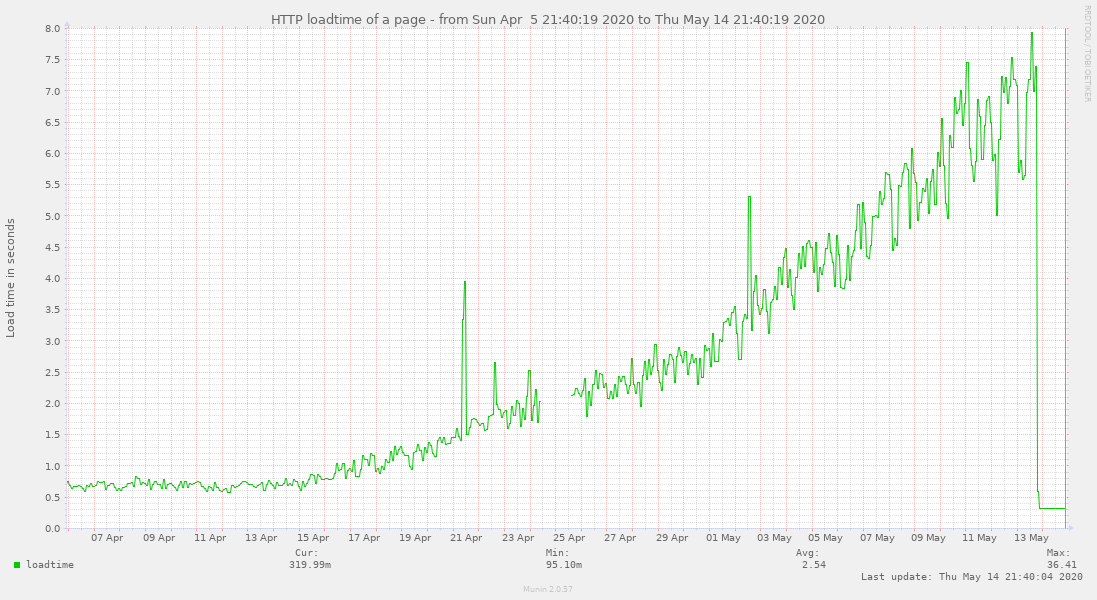
Note: all this is my personal experience, on my personal machines, and I don t claim it to be the absolute truth. Also, I don t directly call out names, although if you live in Switzerland it s pretty easy to guess who the old provider is from some hints. For a long time, I wanted to move away from my current (well, now past) provider, for a multitude of reasons. The main being that the company is very classic company, with classic support system, that doesn t work very well - I had troubles with their billing system that left me out cold without internet for 15 days, but for the recent few years, they were mostly OK, and changing to a different provider would have meant me routing a really long Ethernet cable around the apartment, so I kept postponing it. Yes, self-inflicted pain, I know. Until the entire work-from-home thing, when the usually stable connection start degrading in a very linear fashion day-by-day (this is a graph that basically reflects download bandwidth):
1+ month download bandwidth test 1+ month download bandwidth test
At first, I didn t realise this, as even 100Mbps is still fast enough. But once the connection went below (I believe) 50Mbps, it became visible in day to day work. And since I work daily from home yeah. Not fun. So I started doing speedtest.net - and oh my, ~20Mbps was a good result, usually 12-14Mbps. On a wired connection. On a connection that officially is supposed to be 600Mbps down. The upload speed was spot on, so I didn t think it was my router, but: Nothing helped. Once in a blue moon, speedtest would give me 100Mbps, but like once every two days, then it would be back and showing 8Mbps. Eight! It ended up as even apt update was tediously slow, and kernel downloads took ages The official instructions for dealing with bad internet are a joke: And the best part: If you are not satisfied with the results, read our internet optimisation guide. If you are still not happy, use our community forums or our social platforms. Given that it was a decline over 3-weeks, that I don t know of any computer component that would degrade this steadily but not throw any other errors, and that my upload speed was all good, I assumed it s the provider. Maybe I was wrong, but I wanted to do this anyway for a long while, so I went through the find how to route cable, check if other provider socket is good, order service, etc. dance, and less than a week later, I had the other connection. Now, of course, bandwidth works as expected:
1+ month updated bandwidth test 1+ month updated bandwidth test
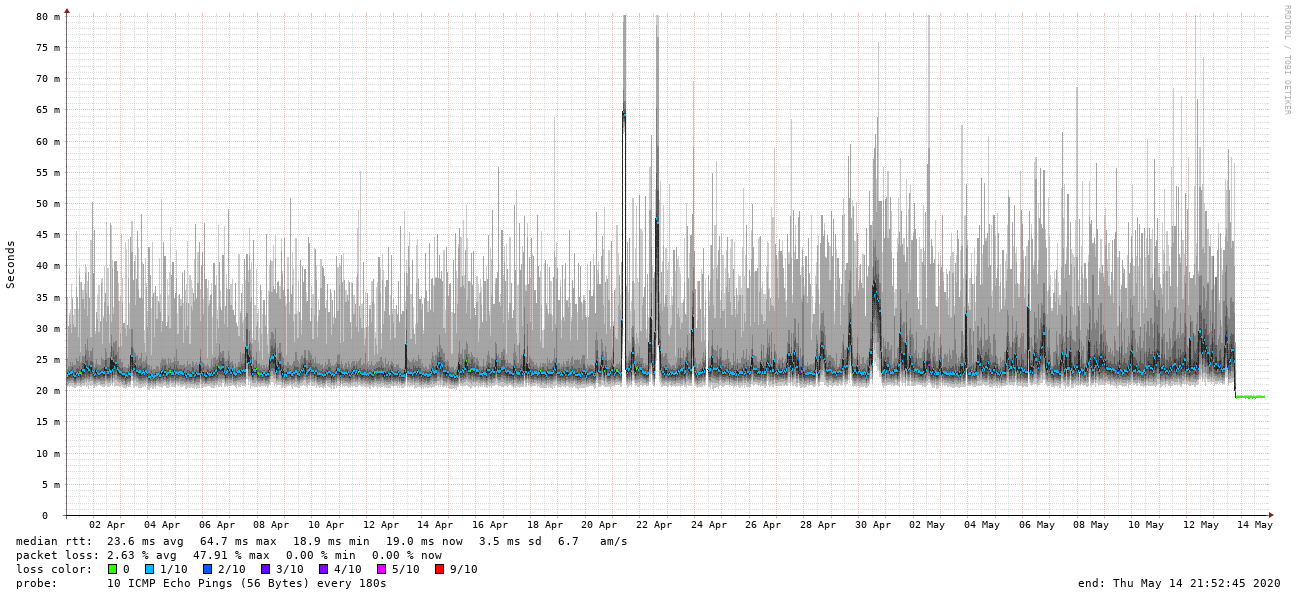
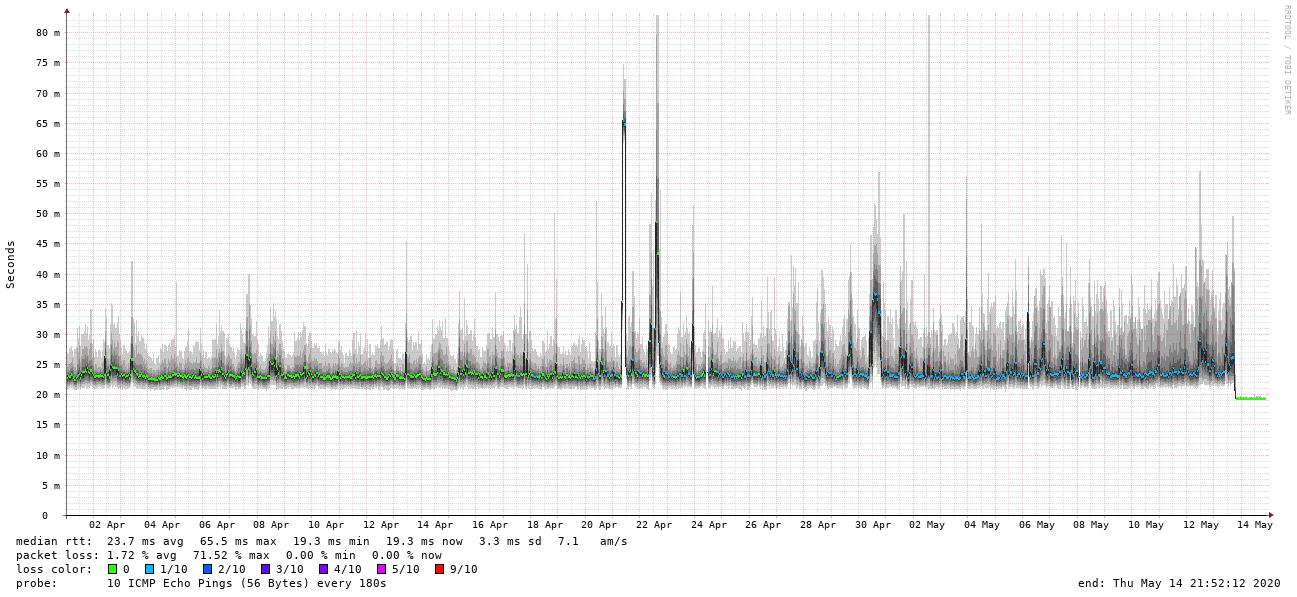
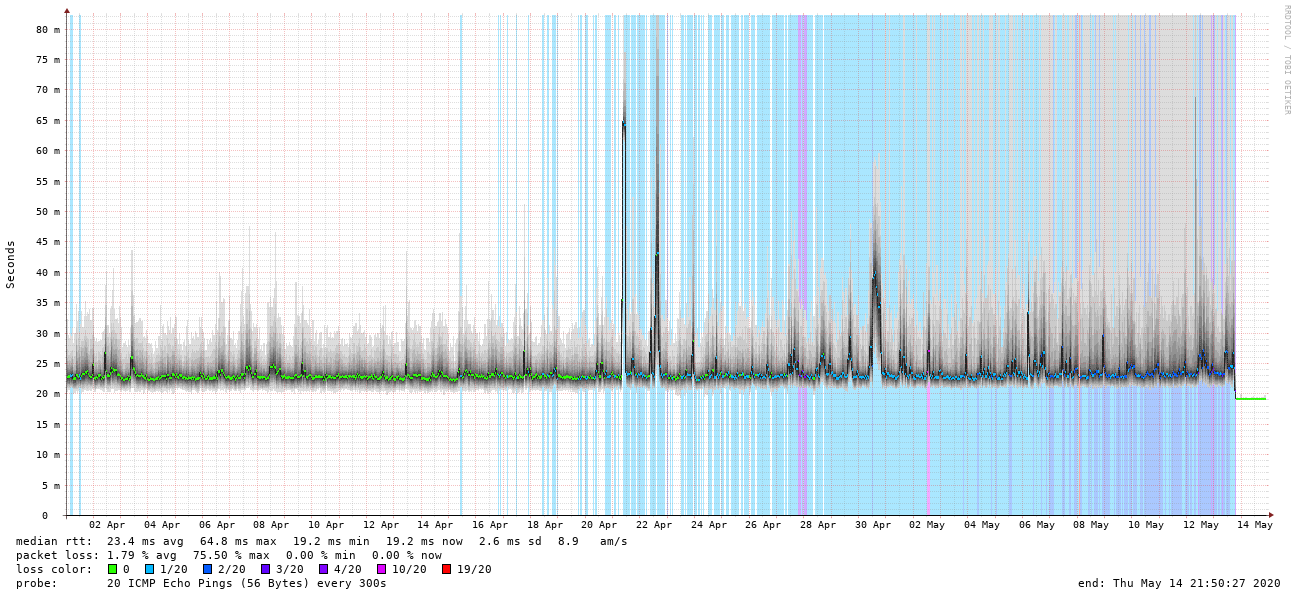
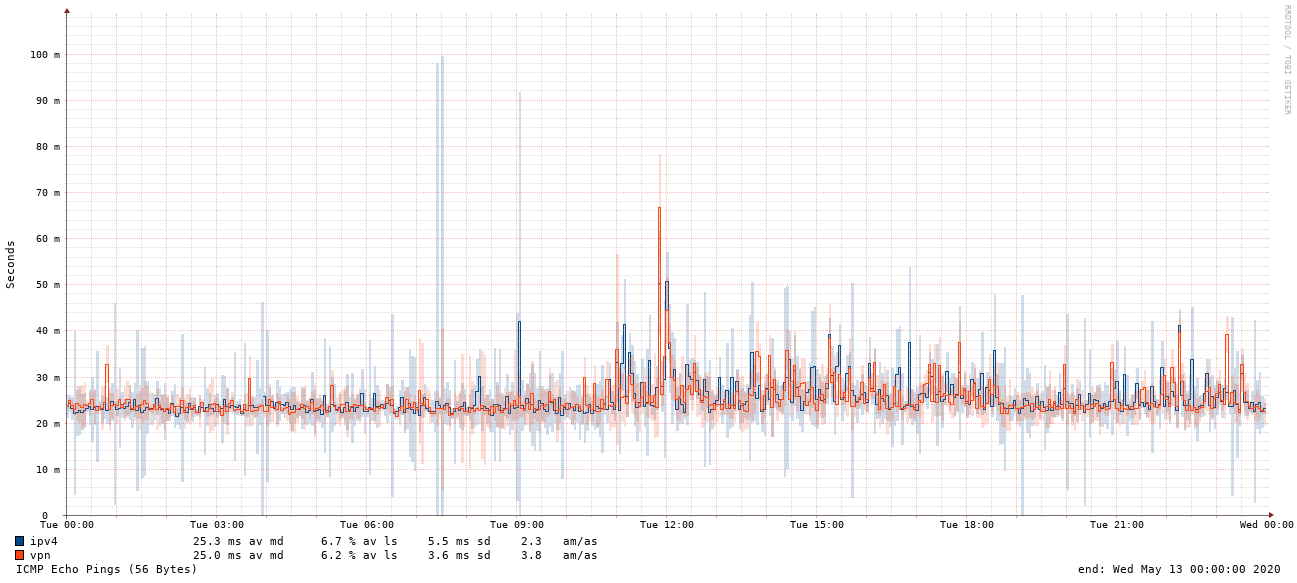
Both download and upload are fine (the graph above is just download). Latency is also much better, towards many parts of the internet that matter. But what is shocking is the difference in jitter to some external hosts I care about. On the previous provider, a funny thing was that both outgoing and incoming pings had both more jitter and packet loss when done directly (IPv4 to IPv4) than when done over a VPN. This doesn t make sense, since VPN is just overhead over IPv4, but the graphs show it, and what I think happens is that a VPN flow is cached in the provider s routers, whereas a simple ping packet not. But, the fact that there s enough jitter for a ping to a not-very-far host doesn t make me happy. Examples, outgoing:
Outgoing smokeping to public IPv4 Outgoing smokeping to public IPv4
Outgoing smokeping over VPN Outgoing smokeping over VPN
And incoming:
Incoming smokeping to public IPv4 Incoming smokeping to public IPv4
Incoming smokeping over VPN Incoming smokeping over VPN
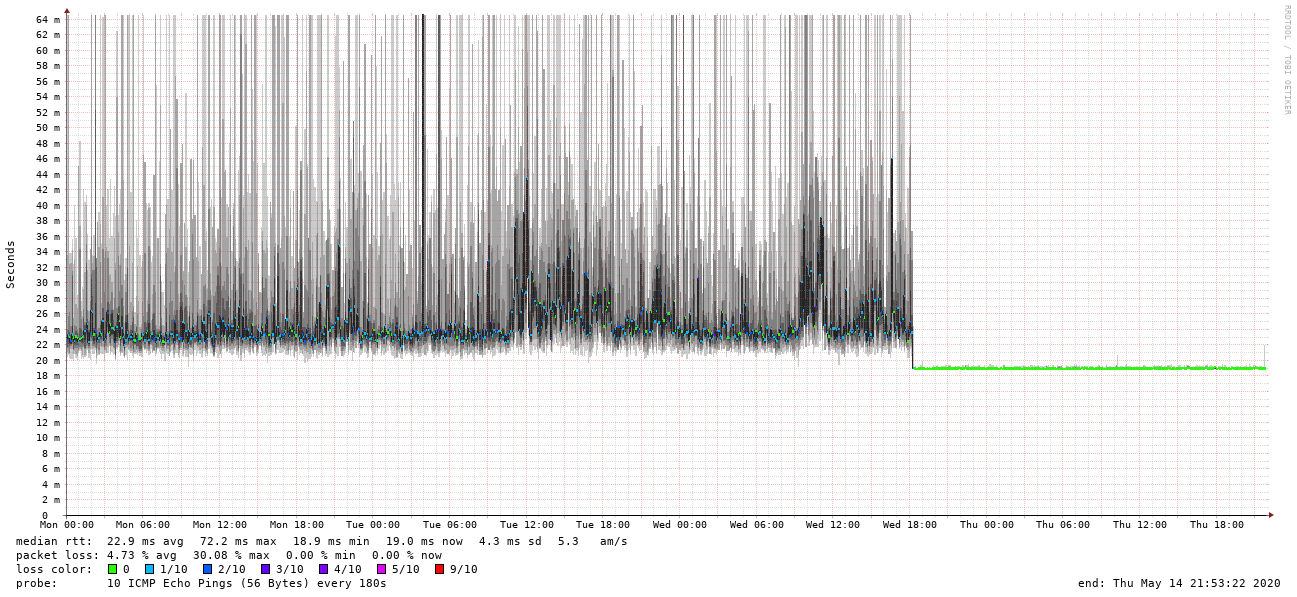
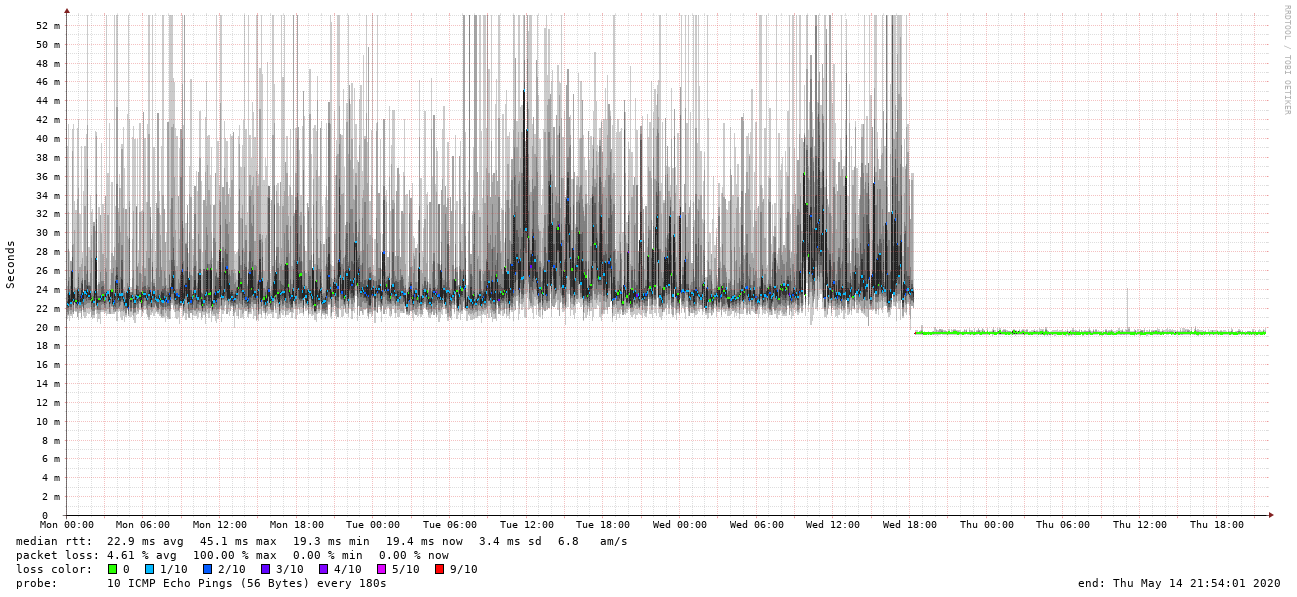
Both incoming and outgoing show this weirdness - more packet loss and more jitter over VPN. Again, this is not a problem in practice, or not much, but makes me wonder what other shenanigans happen behind the scenes. You can also see clearly when the work from home traffic entered the picture and started significantly degrading my connection, even over the magically better VPN connection. Switching to this week s view shows the (in my opinion) dramatic improvement in consistency of the connection:
Outgoing current week smokeping to public IPv4 Outgoing current week smokeping to public IPv4
Outgoing current week smokeping over VPN Outgoing current week smokeping over VPN
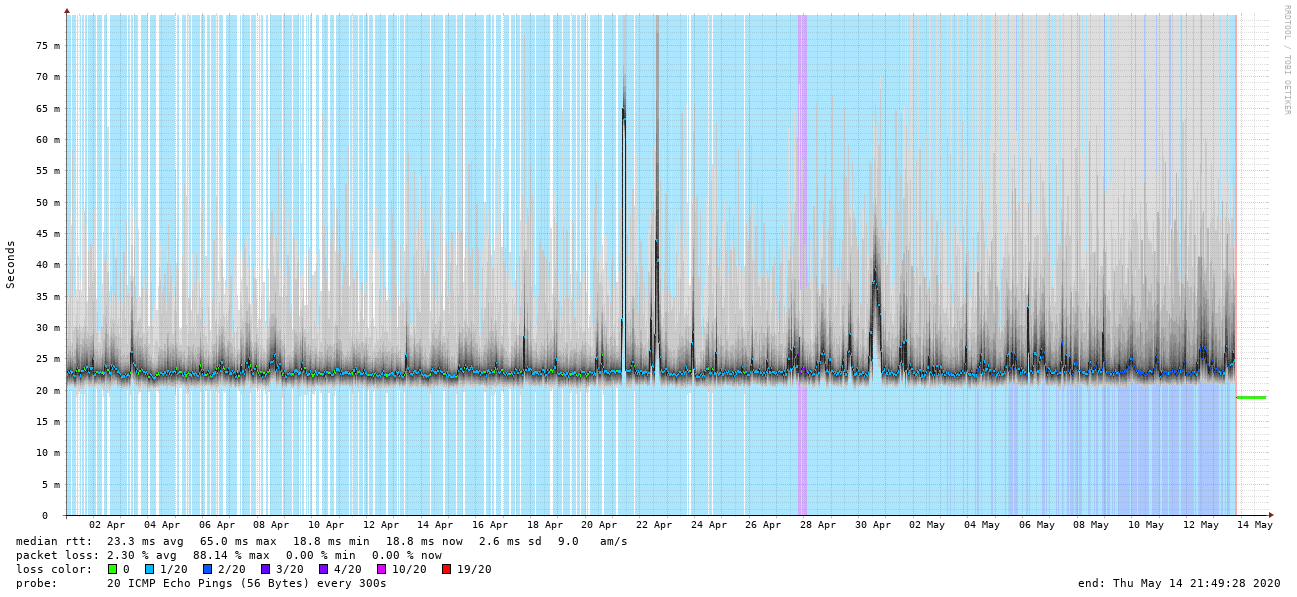
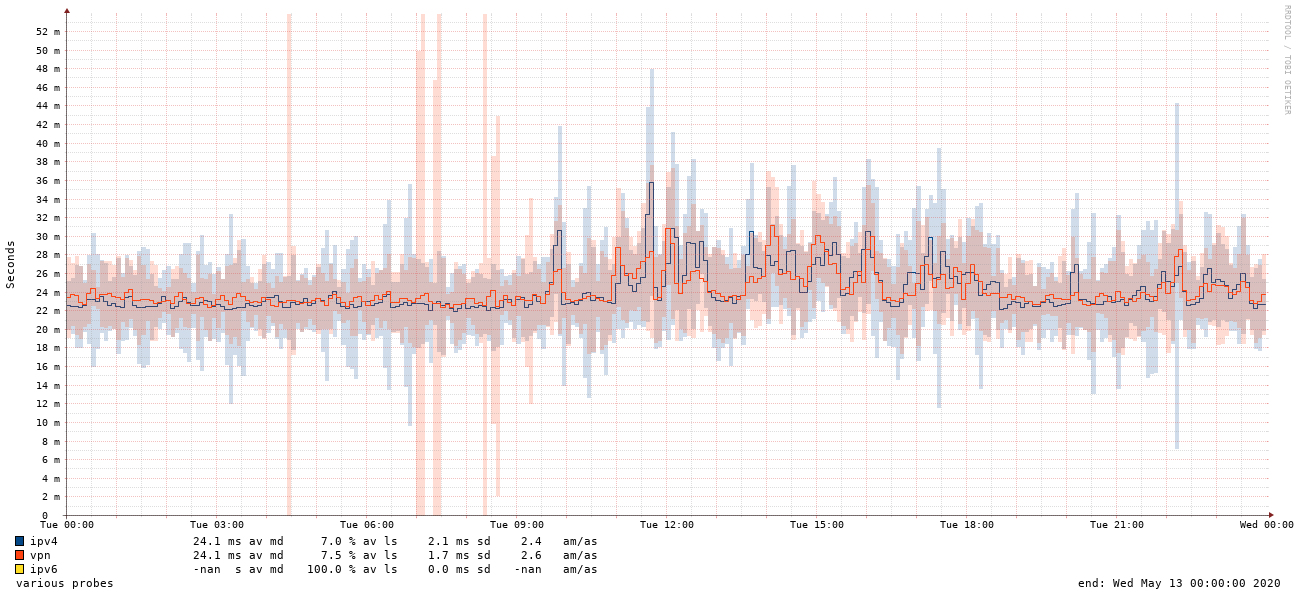
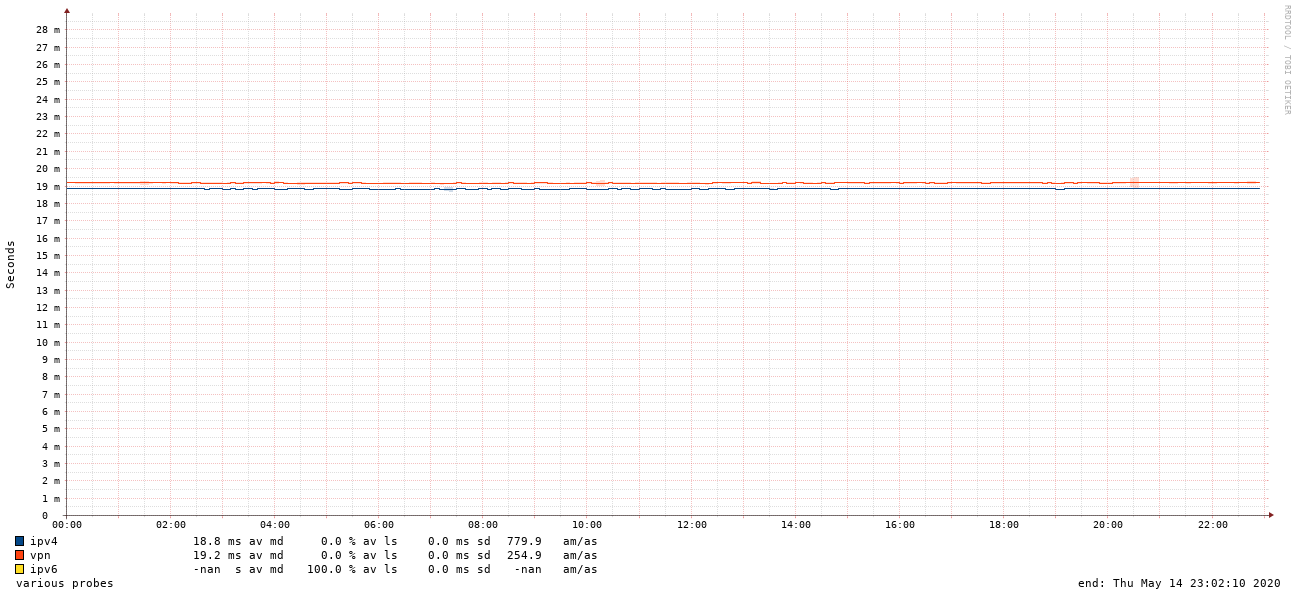
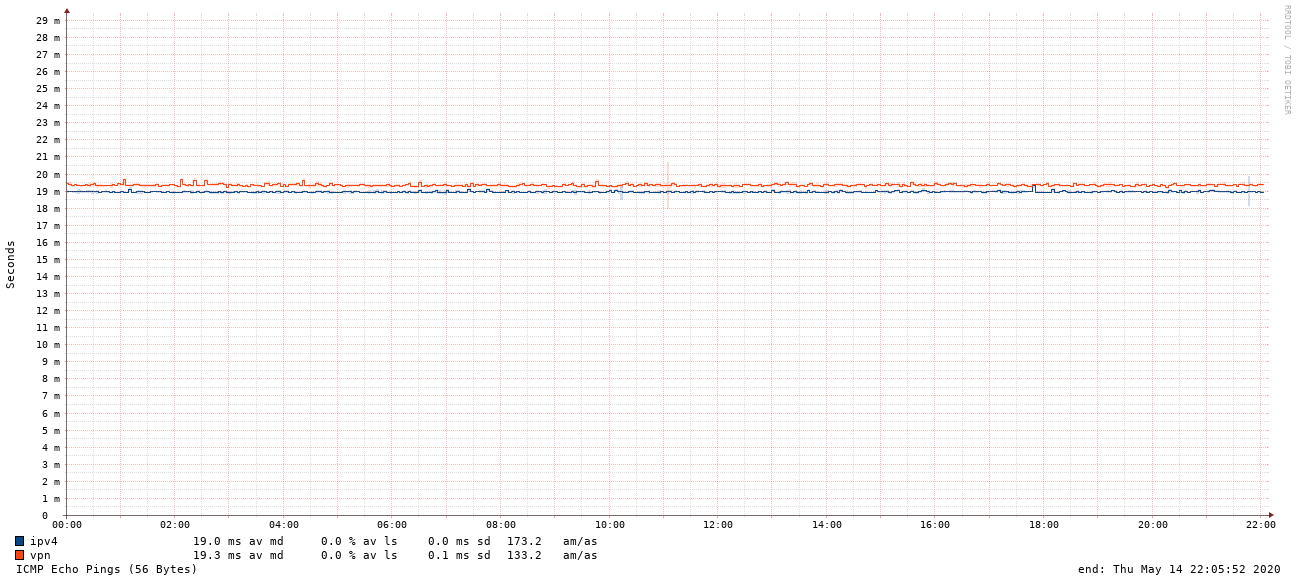
No more packet loss, no more jitter. You can also see my VPN being temporarily down during provider switchover because my firewall was not quite correct for a moment. And the last drill down, at high resolution, one day before and one day after switchover. Red is VPN, blue is plain IPv4, yellow is the missing IPv6 connection :) Incoming old:
Incoming 1-day smokeping, old provider Incoming 1-day smokeping, old provider
and new:
Incoming 1-day smokeping, new provider Incoming 1-day smokeping, new provider
Outgoing old:
Outgoing 1-day smokeping, old provider Outgoing 1-day smokeping, old provider
and new:
Outgoing 1-day smokeping, new provider Outgoing 1-day smokeping, new provider
This is what I expect, ping-over-VPN should of course be slower than plain ping. Note that incoming and outgoing have slightly different consistency, but that is fine for me :) The endpoints doing the two tests are different, so this is expected. Reading the legend on the graphs for the incoming connection (similar story for outgoing): So to my previous provider: it can be done better. Or at least, allow people easier ways to submit performance issue problems. For me, the moral of the story is that I should have switched a couple of years ago, instead of being lazy. And that I m curious to see how IPv6 traffic will differ, if at all :) Take care, everyone! And thanks for looking at these many graphs :)

Norbert Preining: Switching from NVIDIA to AMD (including tensorflow)

I have been using my Geforce 1060 extensively for deep learning, both with Python and R. But the always painful play with the closed source drivers and kernel updates, paired with the collapse of my computer s PSU and/or GPU, I decided to finally do the switch to AMD graphic card and open source stack. And you know what, within half a day I had everything, including Tensorflow running. Yeah to Open Source!

Preliminaries So what is the starting point: I am running Debian/unstable with a AMD Radeon 5700. First of all I purged all NVIDIA related packages, and that are a lot I have to say. Be sure to search for nv and nvidia and get rid of all packages. For safety I did reboot and checked again that no kernel modules related to NVIDIA are loaded. Firmware Debian ships the package amd-gpu-firmware but this is not enough for the current kernel and current hardware. Better is to clone git://git.kernel.org/pub/scm/linux/kernel/git/firmware/linux-firmware.git and copy everything from the amdgpu directory to /lib/firmware/amdgpu. I didn t do that at first, and then booting the kernel did hang during the switch to AMD framebuffer. If you see this behaviour, your firmwares are too old. Kernel The advantage of having open source driver that is in the kernel is that you don t have to worry about incompatibilities (like every time a new kernel comes out the NVIDIA driver needs patching). For recent AMD GPUs you need a rather new kernel, I have 5.6.0 and 5.7.0-rc5 running. Make sure that you have all the necessary kernel config options turned on if you compile your own kernels. In my case this is
CONFIG_DRM_AMDGPU=m
CONFIG_DRM_AMDGPU_USERPTR=y
CONFIG_DRM_AMD_ACP=y
CONFIG_DRM_AMD_DC=y
CONFIG_DRM_AMD_DC_DCN=y
CONFIG_HSA_AMD=y
When installing the kernel, be sure that the firmware is already updated so that the correct firmware is copied into the initrd. Support programs and libraries All the following is more or less an excerpt from the ROCm Installation Guide! AMD provides a Debian/Ubuntu APT repository for software as well as kernel sources. Put the following into /etc/apt/sources.list.d/rocm.list:
deb [arch=amd64] http://repo.radeon.com/rocm/apt/debian/ xenial main
and also put the public key of the rocm repository into /etc/apt/trusted.d/rocm.asc. After that apt-get update should work. I did install rocm-dev-3.3.0, rocm-libs-3.3.0, hipcub-3.3.0, miopen-hip-3.3.0 (and of course the dependencies), but not rocm-dkms which is the kernel module. If you have a sufficiently recent kernel (see above), the source in the kernel itself is newer. The libraries and programs are installed under /opt/rocm-3.3.0, and to make the libraries available to Tensorflow (see below) and other programs, I added /etc/ld.so.conf.d/rocm.conf with the following content:
/opt/rocm-3.3.0/lib/
and run ldconfig as root. Last but not least, add a udev rule that is normally installed by rocm-dkms, put the following into /etc/udev/rules.d/70-kfd.rules:
SUBSYSTEM=="kfd", KERNEL=="kfd", TAG+="uaccess", GROUP="video"
This allows users from the video group to access the GPU.
Up to here you should be able to boot into the system and have X running on top of AMD GPU, including OpenGL acceleration and direct rendering:
$ glxinfo
ame of display: :0
display: :0  screen: 0
direct rendering: Yes
server glx vendor string: SGI
server glx version string: 1.4
...
client glx vendor string: Mesa Project and SGI
client glx version string: 1.4
...
Tensorflow Thinking about how hard it was to get the correct libraries to get Tensorflow running on GPUs (see here and here), it is a pleasure to see that with open source all this pain is relieved. There is already work done to make Tensorflow run on ROCm, the tensorflow-rocm project. The provide up to date PyPi packages, so a simple
pip3 install tensorflow-rocm
is enough to get Tensorflow running with Python:
>> import tensorflow as tf
>> tf.add(1, 2).numpy()
2020-05-14 12:07:19.590169: I tensorflow/stream_executor/platform/default/dso_loader.cc:44] Successfully opened dynamic library libhip_hcc.so
...
2020-05-14 12:07:19.711478: I tensorflow/core/common_runtime/gpu/gpu_device.cc:1247] Created TensorFlow device (/job:localhost/replica:0/task:0/device:GPU:0 with 7444 MB memory) -> physical GPU (device: 0, name: Navi 10 [Radeon RX 5600 OEM/5600 XT / 5700/5700 XT], pci bus id: 0000:03:00.0)
3
>>
Tensorflow for R Installation is trivial again since there is a tensorflow for R package, just run (as a user that is in the group staff, which normally own /usr/local/lib/R)
$ R
...
> install.packages("tensorflow")
..
Do not call the R function install_tensorflow() since Tensorflow is already installed and functional! With that done, R can use the AMD GPU for computations:
$ R
...
> library(tensorflow)
> tf$constant("Hellow Tensorflow")
2020-05-14 12:14:24.185609: I tensorflow/stream_executor/platform/default/dso_loader.cc:44] Successfully opened dynamic library libhip_hcc.so
...
2020-05-14 12:14:24.277736: I tensorflow/core/common_runtime/gpu/gpu_device.cc:1247] Created TensorFlow device (/job:localhost/replica:0/task:0/device:GPU:0 with 7444 MB memory) -> physical GPU (device: 0, name: Navi 10 [Radeon RX 5600 OEM/5600 XT / 5700/5700 XT], pci bus id: 0000:03:00.0)
tf.Tensor(b'Hellow Tensorflow', shape=(), dtype=string)
>
AMD Vulkan From the Vulkan home page:
Vulkan is a new generation graphics and compute API that provides high-efficiency, cross-platform access to modern GPUs used in a wide variety of devices from PCs and consoles to mobile phones and embedded platforms.
Several games are using the Vulkan API if available and it is said to be more efficient. There are Vulkan libraries for Radeon shipped in with mesa, in the Debian package mesa-vulkan-drivers, but they look a bit outdated is my guess. The AMDVLK project provides the latest version, and to my surprise was rather easy to install, again by following the advice in their README. The steps are basically (always follow what is written for Ubuntu): All as described in the linked README. Just to make sure, I removed the JSON files /usr/share/vulkan/icd.d/radeon* shipped by Debians mesa-vulkan-drivers package. Finally I deviated a bit by not editing the file /usr/share/X11/xorg.conf.d/10-amdgpu.conf, but instead copying to /etc/X11/xorg.conf.d/10-amdgpu.conf and adding there the section:
Section "Device"
        Identifier "AMDgpu"
        Option  "DRI" "3"
EndSection
. To be honest, I did not follow the Copy driver and JSON files literally, since I don t want to copy self-made files into system directories under /usr/lib. So what I did is: With this in place, I don t pollute the system directories, and still the new Vulkan driver is available. But honestly, I don t really know whether it is used and is working, because I don t know how to check.
With all that in place, I can run my usual set of Steam games (The Long Dark, Shadow of the Tomb Raider, The Talos Principle, Supraland, ) and I don t see any visual problem till now. As a bonus, KDE/Plasma is now running much better, since NVIDIA and KDE has traditionally some incompatibilities. The above might sound like a lot of stuff to do, but considering that most of the parts are not really packaged within Debian, and all this is rather new open source stack, I was surprised that in half a day I got all working smoothly. Thanks to all the developers who have worked hard to make this all possible.
9 May 2020

Andrew Cater: CD / DVD testing for Buster release 4 - 202005092130 - Slowing down a bit - but still going.

Last few architectures are being built in the background. Schweer has just confirmed successful testing of all the Debian Edu images - thanks to him, as ever, and to all involved. We're slowing up a bit - it's been a long, hot day and it's not quite over yet. The images release looks to be well on course. As ever, the point release incorporates security fixes and some packages have been removed. The release announcement at https://www.debian.org/News/2020/20200509 gives the details.

Thorsten Alteholz: My Debian Activities in April 2020

FTP master This month I accepted 384 packages and rejected 47. The overall number of packages that got accepted was 457. Debian LTS This was my seventieth month that I did some work for the Debian LTS initiative, started by Raphael Hertzog at Freexian. This month my all in all workload has been 28.75h. During that time I did LTS uploads of: As there have been lots of no-dsa-CVEs I continued my work on wireshark. Last but not least I did some days of frontdesk duties. Debian ELTS This month was the twenty second ELTS month. During my small allocated time I only uploaded: I also did some days of frontdesk duties. Other stuff Unfortunately this month again strange things happened outside Debian and I only got some stuff done. I improved packaging of I sponsored uploads of I uploaded the new package On my Go challenge I uploaded:
golang-github-facebookgo-subset, golang-github-facebookgo-ensure, golang-github-shurcool-gopherjslib, golang-github-grafana-grafana-plugin-model, golang-github-crewjam-httperr, golang-github-hashicorp-terraform-svchost, golang-github-neelance-sourcemap, golang-github-neelance-astrewrite, golang-github-kisielk-gotool, golang-github-gopherjs-gopherjs, golang-github-yvasiyarov-newrelic-platform-go, golang-github-rhnvrm-simples3, golang-github-robfig-go-cache, golang-github-xorcare-pointer, golang-github-goburrow-serial

Sandro Tosi: It's a waiting game... but just how long we gotta wait?

While waiting for my priority date to become current, and with enough "quarantine time" on my hand, i just come up with a very simple Python tool to parse the USCIS Visa Bulletin to gather some data from that.

You can find code and images in this GitHub repo.

For now it only contains a single plot for the EB3 final action date; it answers a simple question: how many months ago your priority date should be if you want to file your AOS on that month. We started from FY2016, to cover the final full year of the Obama administration.

If you're interested in more classes/visas, let me know and the tool could be easily extended to cover that too. PRs are always welcome.

3 May 2020

Iain R. Learmonth: Hetzner Dedicated Server Reverse DNS + Ansible

Continuing on the path towards all my stuff being managed by Ansible, I ve figured out a method of managing the reverse DNS entries for subnets on the Hetzner Dedicated Server. There s a bunch of Ansible modules for handling Hetzner Cloud, but these servers are managed in Robot which the Cloud API doesn t cover. Instead, you need to use the Robot Webservice. Ansible does have a module for doing pretty arbitrary things with web APIs though, so using that I ve got the following playbook figured out to keep the reverse DNS entries in sync:

---
- hosts:
  - vmhost_vm1
  gather_facts: False
  tasks:
  - name: import hetzner webservice credentials
    include_vars:
      file: "hetzner_ws.yml"
  - name: set rdns for hetzner hosts
    block:
    - name: get current rdns entry
      uri:
        user: "  hetzner_ws_user  "
        password: "  hetzner_ws_password  "
        url: "https://robot-ws.your-server.de/rdns/  vmip4  "
        status_code: [200, 404]
      register: rdns_result
    - name: update incorrect rdns entry
      uri:
        user: "  hetzner_ws_user  "
        password: "  hetzner_ws_password  "
        url: "https://robot-ws.your-server.de/rdns/  vmip4  "
        method: "POST"
        body_format: form-urlencoded
        body:
          ptr: "  inventory_hostname  "
        status_code: [200, 201]
      when: '"rdns" not in rdns_result.json or inventory_hostname != rdns_result.json.rdns.ptr'
      changed_when: True
    delegate_to: localhost
The host groups this runs on are currently hardcoded as the VMs that live in the Hetzner Dedicated Server. A future iteration of this might use some inventory plugin to look up the subnets that are managed on Hetzner and create a group for all of those. Right now it won t be setting the reverse DNS for the router interface on that subnet, and won t automatically include new server s subnets. Gathering facts is disabled because all of these run locally. There is at least one VM running on this server that I can t log in to because I host it for someone else, so running locally is a necessity. The webservice credentials are stored in an Ansible Vault encrypted YAML file and loaded explicitly. An important note: the webservice username and password is not the same as your regular Robot username and password. You need to create a webservice user in Robot under Settings; Webservice and app settings . If you attempt to authenticate with an incorrect username and password 3 times in a row, your IP address will be blocked for 10 minutes. There are 6 hosts in this group, so I did this a few times before I realised there was a different user account I needed to create. I d suggest limiting to a single host while you re testing to get the authentication figured out. The actual calls to the webservice take place in a block just to avoid having to specify the delegate_to: localhost twice. The first step looks up the current PTR record, and accepts success if it gives either a 200 or 404 status code (it will be 404 if there is no existing pointer record). The result of this is used to conditionally create/update the PTR record in the next task. If nothing needs to be done, nothing will be changed and the second task will be skipped. If a change is needed, the second step is successful if either the PTR record is updated (status 200) or created (status 201). This was actually a lot easier than I thought it would be, and the uri module looks to be really flexible, so I bet there are other things that I could easily integrate into my Ansible playbooks.

Fran ois Marier: Backing up to a GnuBee PC 2

After installing Debian buster on my GnuBee, I set it up for receiving backups from my other computers.

Software setup I started by configuring it like a typical server but without a few packages that either take a lot of memory or CPU: I changed the default hostname:
  • /etc/hostname: foobar
  • /etc/mailname: foobar.example.com
  • /etc/hosts: 127.0.0.1 foobar.example.com vogar localhost
and then installed the avahi-daemon package to be able to reach this box using foobar.local. I noticed the presence of a world-writable directory and so I tightened the security of some of the default mount points by putting the following in /etc/rc.local:
mount -o remount,nodev,nosuid /etc/network
mount -o remount,nodev,nosuid /lib/modules
chmod 755 /etc/network
exit 0

Hardware setup My OS drive (/dev/sda) is a small SSD so that the GnuBee can run silently when the spinning disks aren't needed. To hold the backup data on the other hand, I got three 4-TB drives drives which I setup in a RAID-5 array. If the data were valuable, I'd use RAID-6 instead since it can survive two drives failing at the same time, but in this case since it's only holding backups, I'd have to lose the original machine at the same time as two of the 3 drives, a very unlikely scenario. I created new gpt partition tables on /dev/sdb, /dev/sdbc, /dev/sdd and used fdisk to create a single partition of type 29 (Linux RAID) on each of them. Then I created the RAID array:
mdadm /dev/md127 --create -n 3 --level=raid5 -a /dev/sdb1 /dev/sdc1 /dev/sdd1
and waited more than 24 hours for that operation to finish. Next, I formatted the array:
mkfs.ext4 -m 0 /dev/md127
and added the following to /etc/fstab:
/dev/md127 /mnt/data/ ext4 noatime,nodiratime 0 2
To reduce unnecessary noise and reduce power consumption, I also installed hdparm:
apt install hdparm
and configured all spinning drives to spin down after being idle for 10 minutes by putting the following in /etc/hdparm.conf:
/dev/sdb  
       spindown_time = 120
 
/dev/sdc  
       spindown_time = 120
 
/dev/sdd  
       spindown_time = 120
 
and then reloaded the configuration:
 /usr/lib/pm-utils/power.d/95hdparm-apm resume
Finally I setup smartmontools by putting the following in /etc/smartd.conf:
/dev/sda -a -o on -S on -s (S/../.././02 L/../../6/03)
/dev/sdb -a -o on -S on -s (S/../.././02 L/../../6/03)
/dev/sdc -a -o on -S on -s (S/../.././02 L/../../6/03)
/dev/sdd -a -o on -S on -s (S/../.././02 L/../../6/03)
and restarting the daemon:
systemctl restart smartd.service

Backup setup I started by using duplicity since I have been using that tool for many years, but a 190GB backup took around 15 hours on the GnuBee with gigabit ethernet. After a friend suggested it, I took a look at restic and I have to say that I am impressed. The same backup finished in about half the time.

User and ssh setup After hardening the ssh setup as I usually do, I created a user account for each machine needing to backup onto the GnuBee:
adduser machine1
adduser machine1 sshuser
adduser machine1 sftponly
chsh machine1 -s /bin/false
and then matching directories under /mnt/data/home/:
mkdir /mnt/data/home/machine1
chown machine1:machine1 /mnt/data/home/machine1
chmod 700 /mnt/data/home/machine1
Then I created a custom ssh key for each machine:
ssh-keygen -f /root/.ssh/foobar_backups -t ed25519
and placed it in /home/machine1/.ssh/authorized_keys on the GnuBee. On each machine, I added the following to /root/.ssh/config:
Host foobar.local
    User machine1
    Compression no
    Ciphers aes128-ctr
    IdentityFile /root/backup/foobar_backups
    IdentitiesOnly yes
    ServerAliveInterval 60
    ServerAliveCountMax 240
The reason for setting the ssh cipher and disabling compression is to speed up the ssh connection as much as possible given that the GnuBee has avery small RAM bandwidth. Another performance-related change I made on the GnuBee was switching to the internal sftp server by putting the following in /etc/ssh/sshd_config:
Subsystem      sftp    internal-sftp

Restic script After reading through the excellent restic documentation, I wrote the following backup script, based on my old duplicity script, to reuse on all of my computers:
# Configure for each host
PASSWORD="XXXX"  # use  pwgen -s 64  to generate a good random password
BACKUP_HOME="/root/backup"
REMOTE_URL="sftp:foobar.local:"
RETENTION_POLICY="--keep-daily 7 --keep-weekly 4 --keep-monthly 12 --keep-yearly 2"
# Internal variables
SSH_IDENTITY="IdentityFile=$BACKUP_HOME/foobar_backups"
EXCLUDE_FILE="$BACKUP_HOME/exclude"
PKG_FILE="$BACKUP_HOME/dpkg-selections"
PARTITION_FILE="$BACKUP_HOME/partitions"
# If the list of files has been requested, only do that
if [ "$1" = "--list-current-files" ]; then
    RESTIC_PASSWORD=$PASSWORD restic --quiet -r $REMOTE_URL ls latest
    exit 0
# Show list of available snapshots
elif [ "$1" = "--list-snapshots" ]; then
    RESTIC_PASSWORD=$GPG_PASSWORD restic --quiet -r $REMOTE_URL snapshots
    exit 0
# Restore the given file
elif [ "$1" = "--file-to-restore" ]; then
    if [ "$2" = "" ]; then
        echo "You must specify a file to restore"
        exit 2
    fi
    RESTORE_DIR="$(mktemp -d ./restored_XXXXXXXX)"
    RESTIC_PASSWORD=$PASSWORD restic --quiet -r $REMOTE_URL restore latest --target "$RESTORE_DIR" --include "$2"   exit 1
    echo "$2 was restored to $RESTORE_DIR"
    exit 0
# Delete old backups
elif [ "$1" = "--prune" ]; then
    # Expire old backups
    RESTIC_PASSWORD=$PASSWORD restic --quiet -r $REMOTE_URL forget $RETENTION_POLICY
    # Delete files which are no longer necessary (slow)
    RESTIC_PASSWORD=$PASSWORD restic --quiet -r $REMOTE_URL prune
    exit 0
# Catch invalid arguments
elif [ "$1" != "" ]; then
    echo "Invalid argument: $1"
    exit 1
fi
# Check the integrity of existing backups
RESTIC_PASSWORD=$PASSWORD restic --quiet -r $REMOTE_URL check   exit 1
# Dump list of Debian packages
dpkg --get-selections > $PKG_FILE
# Dump partition tables from harddrives
/sbin/fdisk -l /dev/sda > $PARTITION_FILE
/sbin/fdisk -l /dev/sdb > $PARTITION_FILE
# Do the actual backup
RESTIC_PASSWORD=$PASSWORD restic --quiet --cleanup-cache -r $REMOTE_URL backup / --exclude-file $EXCLUDE_FILE
I run it with the following cronjob in /etc/cron.d/backups:
30 8 * * *    root  ionice nice nocache /root/backup/backup-machine1-to-foobar
30 2 * * Sun  root  ionice nice nocache /root/backup/backup-machine1-to-foobar --prune
in a way that doesn't impact the rest of the system too much. Finally, I printed a copy of each of my backup script, using enscript, to stash in a safe place:
enscript --highlight=bash --style=emacs --output=- backup-machine1-to-foobar   ps2pdf - > foobar.pdf
This is actually a pretty important step since without the password, you won't be able to decrypt and restore what's on the GnuBee.

2 May 2020

Jonathan Carter: Free Software Activities for 2020-04

Debian project leader This month contained the first week and a half or so of my term as Debian Project Leader. So far my focus has been getting up to speed and keeping the gears turning with day to day DPL tasks. The updates listed here will also be available on the DPL blog, where I aim to make more frequent updates. During May, Debian Brazil will host Debian talks throughout the month which they will stream to their YouTube channel. You can find the schedule in this git repository, most of the talks will be in Portuguese, but on the 4th of May at 21:00 UTC, I ll be covering some Debian project topics for an hour or so and take some questions if there s time left. 2020-04-19: Handover session with Sam, our outgoing DPL. We covered a lot of questions I had and main areas that the DPL works in. Thanks to Sam for having taken the time to do this. 2020-04-21: First day of term! Thank you to everybody who showed support and have offered to help! 2020-04-21: Request feedback from the trademark team on an ongoing trademark dispute. 2020-04-21: Join the GNOME Advisory Board as a representative from Debian. 2020-04-21: Reply on an ongoing community conflict issue. 2020-04-21: Update Debian project summary for SPI annual report. 2020-04-21: Received a great e-mail introduction from Debian France and followed up on that. 2020-04-21: Posted Bits from the new DPL to debian-devel-announce. 2020-04-22: Became Debian s OSI Affilliate representative. 2020-04-22: Reply to a bunch of media inquiries for interviews, will do them later when initial priorities are on track. 2020-04-23: Resign as Debian FTP team trainee and mailing list moderator. In both these areas there are enough people taking care of it and I intend to maximise available time for DPL and technical areas in the project. 2020-04-25: Review outgoing mail for trademark team. 2020-04-25: Answer some questions in preparation for DAM/Front Desk delegation updates. 2020-04-26: Initiated wiki documentation for delegation updates process. 2020-04-27: Update delegation for the Debian Front Desk team. 2020-04-29: Schedule video call with Debian treasurer team. 2020-04-29: OSI affiliate call. Learned about some Open Source projects including OpenDev, OpenSourceMatters, FOSS Responders and Democracy Labs.

Debian Social Work on the Debian Social project is progressing, we plan to start a separate blog syndicated to Planet Debian that contains progress and status updates. I ve been terrible at tracking the work we ve been doing on this, so for now, here are some micro updates:

MiniDebConf Online In the DebConf video team, we ve been wondering whether we have all the tools required to successfully host a DebConf (or even a mini DebConf) entirely online. There s really just one way to know for sure, so we re going to host MiniDebConf Online from 28 May to 31 May. The first two days will be an online MiniDebCamp, where we can try to hold online spints, meetings and general chit-chat. The last two days will be for talks and lightnight talks, with BoFs likely to take place throughout the 4 days (this will probably be decided once we have a content team). Announcements should go out within the next week, in the meantime, save the dates.

Debian package uploads 2020-04-07: Upload package flask-autoindex (0.6.6-1) to Debian unstable. 2020-04-07: Upload package gamemode (1.5.1-1) to Debian unstable. 2020-04-08: Accept MR#2 for live-tasks (add usbutils to live-task-standard). 2020-04-08: Upload package live-tasks (11.0.2) to Debian unstable (Closes: #955526, #944578, #942837, #942834). 2020-04-08: Close live-config bug #655198 (Only affects squeeze which is no longer supported). 2020-04-08: Upload package live-config (11.0.1) to Debian unstable. 2020-04-08: Upload package calamares (3.2.22-1) to Debian unstable. 2020-04-15: Upload package xabacus (8.2.6-1) to Debian unstable. 2020-04-16: Merge MR#1 for gnome-shell-extension-dashtodock (new upstream release). 2020-04-16: Upload package gnome-shell-extension-dashtodock (67+git20200225-1) to Debian unstable. 2020-04-16: Merge MR#1 for gnome-shell-extension-hard-disk-led (fix some lintian issues). 2020-04-16: Merge MR#1 for gnome-shell-extension-system-monitor (fix some lintian issues). 2020-04-17: Upload package calamares (3.2.23-1) to Debian unstable. 2020-04-17: Upload package catimg (2.6.0-1) to Debian unstable (Closes: #956150). 2020-04-17: Upload package fabulous (0.3.0+dfsg1-7) to Debian unstable (Closes: #952242). 2020-04-17: Upload package gnome-shell-extension-system-monitor (38+git20200414-32cc79e-1) to Debian unstable (Closes: #956656, #956171). 2020-04-17: Upload package gnome-shell-extension-arc-menu (45-1) to Debian unstable (Closes: #956168). 2020-04-18: Upload package toot (0.26.0-1) to Debian unstable. 2020-04-23: Update packaging for gnome-shell-extension-tilix-shortcut, upstream section needs some additional work before release is possible. 2020-04-23: Upload package xabacus (8.2.7-1) to Debian unstable. 2020-04-27: Upload package gnome-shell-extension-dash-to-panel (37-1) to Debian unstable (Closes: #956162, #954978). 2020-04-27: Upload package gnome-shell-extension-dash-to-panel (37-2) to Debian unstable. 2020-04-27: Upload package gnome-shell-extension-dashtodock (68-1) to Debian unstable. 2020-04-30: Merge MR#8 for gamemode (add symbol files) (Closes: #952425). 2020-04-30: Merge MR#9 for gamemode (reduce number of -dev packages generated). 2020-04-30: Merge MR#10 for gamemode (deal better with upgrades on a buggy version). 2020-04-30: Manually merge changes from MR#11 for gamemode (packaging fixes). 2020-04-30: Upload package gamemode (1.5.1-2) to Debian unstable.

1 May 2020

Utkarsh Gupta: FOSS Activites in April 2020

Here s my (seventh) monthly update about the activities I ve done in the F/L/OSS world.

Debian
It s been 14 months since I ve started contributing to Debian. And 4 months since I ve been a Debian Developer. And in this beautiful time, I had this opprotunity to do and learn lots of new and interesting things. And most importantly, meet and interact with lots of lovely people!
Debian is $home.

Uploads:

Other $things:
  • Attended Ruby team meeting. Logs here.
  • Attended Perl team LHF. Report here.
  • Sponsored a lot of uploads for William Desportes and Adam Cecile.
  • Mentoring for newcomers.
  • FTP Trainee reviewing.
  • Moderation of -project mailing list.
  • Applied for DUCI project for Google Summer of Code 2020.

Ruby2.7 Migration:
Ruby2.7 was recently released on 25th December, 2019. Santa s gift. Believe it or not. We, the Debian Ruby team, have been trying hard to make it migrate to testing. And it finally happened. The default version in testing is ruby2.7. Here s the news! \o/
Here s what I worked on this month for this transition.

Upstream: Opened several issues and proposed patches (in the form of PRs):
  • Issue #35 against encryptor for Ruby2.7 test failures.
  • Issue #28 against image_science for removing relative paths.
  • Issue #106 against ffi-yajl for Ruby2.7 test failures.
  • PR #5 against aggregate for simply using require.
  • PR #6 against aggregate for modernizing CI and adding Ruby 2.5 and 2.7 support.
  • Issue #13 against espeak-ruby for Ruby2.7 test failures.
  • Issue #4 against tty-which for test failures in general.
  • Issue #11 against packable for Ruby2.7 test failures. PR #12 has been proposed.
  • Issue #10 against growl for test failures and proposed an initial patch.

Downstream: I fixed and uploaded the following packages in Debian:

Debian LTS
Debian Long Term Support (LTS) is a project to extend the lifetime of all Debian stable releases to (at least) 5 years. Debian LTS is not handled by the Debian security team, but by a separate group of volunteers and companies interested in making it a success.
This was my seventh month as a Debian LTS paid contributor. I was assigned 24.00 hours and worked on the following things:

CVE Fixes and Announcements:

Other LTS Work:

Other(s)
Sometimes it gets hard to categorize work/things into a particular category.
That s why I am writing all of those things inside this category.
This includes two sub-categories and they are as follows.

Personal: This month I could get the following things done:
  • Most importantly, I finally migrated to a new website. Huge UI imporvement! \o/
    From Jekyll to Hugo, it was not easy. But it was worth it! Many thanks to Luiz for writing hugo-coder, Clement, and Samyak!
    If you find any flaws, issues and pull requests are welcomed at utkarsh2102/utkarsh2102.com
  • Wrote battery-alert, a mini-project of my own to show battery alerts at <10% and >90%.
    Written in shell, it brings me all the satisfaction as it has saved my life on many occasions.
    And guess what? It has more users than just myself!
    Reviews and patches are welcomed \o/
  • Mentored in HackOn Hackathon. Thanks to Manvi for reaching out!
    It was fun to see people developing some really nice projects.
  • Thanks to Ray and John, I became a GitLab Hero!
    (I am yet to figure out my role and responibility though)
  • Atteneded Intro Sec Con and had the most fun!
    Heard Ian s keynote and attended other talks and learned how to use WireShark!

Open Source: Again, this contains all the things that I couldn t categorize earlier.
Opened several issues and pull requests:
  • Issue #297 against hugo-coder, asking to enable RSS feed for blogs.
  • PR #316 for hugo-coder for fixing the above issue myself.
  • Issue #173 against arbre for requesting a release.
  • Issue #104 against combustion, asking to relax dependency on rubocop. Fixed in this commit.
  • Issue #16 against ffi-compiler for requesting to fix homepage and license.
  • Issue #57 against gographviz for requesting a release.
  • Issue #14 against crb-blast, suggesting compatability with bio 2.0.x.
  • Issue #58 against uniform_notifier for asking to drop the use of ruby-growl.
  • PR #2072 for polybar, adding installation instructions on Debian systems.

Until next time.
:wq for today.

30 April 2020

Chris Lamb: Free software activities in April 2020

Here is my monthly update covering what I have been doing in the free software world during April 2020 (previous month's report). Looking it over prior to publishing, I am surprised how much I got done this month I felt that I was not only failing to do all the extra things I had planned, but I was doing far less than normal. But let us go easy on ourselves; nobody is nailing this. In addition, I did more hacking on the Lintian static analysis tool for Debian packages:
Reproducible builds One of the original promises of open source software is that distributed peer review and transparency of process results in enhanced end-user security. However, whilst anyone may inspect the source code of free and open source software for malicious flaws, almost all software today is distributed as pre-compiled binaries. This allows nefarious third-parties to compromise systems by injecting malicious code into ostensibly secure software during the various compilation and distribution processes. The motivation behind the Reproducible Builds effort is to ensure no flaws have been introduced during this compilation process by promising identical results are always generated from a given source, thus allowing multiple third-parties to come to a consensus on whether a build was compromised. The initiative is proud to be a member project of the Software Freedom Conservancy, a not-for-profit 501(c)(3) charity focused on ethical technology and user freedom. Conservancy acts as a corporate umbrella allowing projects to operate as non-profit initiatives without managing their own corporate structure. If you like the work of the Conservancy or the Reproducible Builds project, please consider becoming an official supporter. Elsewhere in our tooling, I made the following changes to diffoscope, our in-depth and content-aware diff utility that can locate and diagnose reproducibility issues, including preparing and uploading versions 139, 140, 141 and 142 to Debian: Lastly, I made a large number of changes to our website and documentation in the following categories:
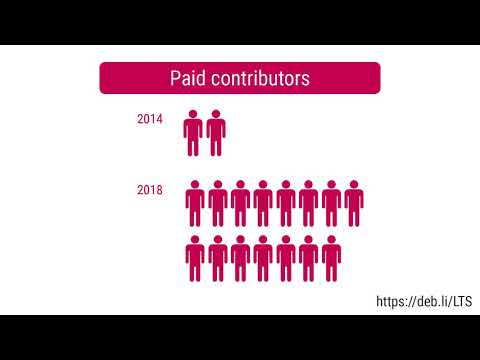
Debian LTS This month I have contributed 18 hours to Debian Long Term Support (LTS) and 7 hours on its sister Extended LTS project. You can find out more about the project via the following video:
Debian I only filed three bugs in April, including one against snapshot.debian.org to report that a Content-Type HTTP header is missing when downloading .deb files (#956471) and to report build failures in the macs & ruby-enumerable-statistics packages:

29 April 2020

Ian Jackson: subdirmk 1.0 - ergonomic preprocessing assistant for non-recursive make

I have made the 1.0 release of subdirmk. subdirmk is a tool to help with writing build systems in make, without use of recursive make. Why Peter Miller's 1997 essay Recursive Make Considered Harmful persuasively argues that it is better to arrange to have a single make invocation with the project's complete dependency tree, rather than the conventional $(MAKE) -C subdirectory approach. This has become much more relevant with modern projects which tend to be large and have deep directory trees. Invoking make separately for each of these subdirectories can be very slow. Nowadays everyone needs to run a parallel build, but with the recursive make approach great discipline is needed to avoid introducing races which cause the build to sometimes fail. There are various new systems which aim to replace make. My general impression of these is that they mostly threw away the good parts of make (often, they discard the flexibility, and the use of the shell command as the basic unit of execution, making them hard to extend), or make other unfortunate assumptions. And there are a lot of programming-language-specific systems - a very unsatisfactory development. Having said all that, I admit I haven't properly evaluated every make competitor. Other reasons for staying with make including that it is widely available, relatively widely understood, and has a model relatively free of high-level abstract concepts. (I like my languages with high-level concepts, but not my build systems.) But, with make, I found that actually writing a project's build system in non-recursive make was not very ergonomic. So with some help and prompting from Mark Wooding, I have made a tool to help. What subdirmk is a makefile preprocessor and aggregator, typically run from autoconf. subdirmk provides convenience syntaxes for references to per-directory variables and pathnames. It also helps by providing a little syntactic sugar for GNU make's macro facilities, which are awkward to use in raw make. subdirmk's features are triggered by the sigil &. The syntax is carefully designed to avoid getting in the way of makefile programming (and programming of shell commands in make rules). subdirmk is fully documented in the README. There is a demo in the example directory (which also serves as part of the test suite). What's new The version number. I have not felt the need to make any changes since releasing 0.4 in mid-February. The last non-docs change was a (backwards-compatible) extension, in late January, to pass through unaltered GNU make's new grouped multiple targets syntax. Advantages and disadvantages of subdirmk Compared to recursive make, subdirmk is easier and simpler, although you do have to decorate a lot of your variables and filenames with & to indicate that they are directory-local. It is much easier to avoid writing parallel make bugs. You naturally get properly working per-subdirectory targets. subdirmk-based nonrecursive make is much, much faster than recursive make. Compared to many other recent build system tools, subdirmk retains all the flexibility and extensibility of make, and operates at a fairly low level of abstraction. subdirmk-based makefiles can easily invoke other build systems. make knows it's not the only thing in the universe. You can adopt subdirmk incrementally or partially, gradually bringing your recursive submakefiles into the unified build. The build system code in subdirmk's Dir.sd.mk files will be readily navigable by most readers; much will be familiar. Because subdirmk is a small collection of (fairly simple) scripting and makefile code, there is no need to build it; you can simply ship it with your project using git-subtree. For an autoconf-based project, there need be no change to how your users and downstreams invoke your build. On the other hand the price you (continue to) pay is make's punctation soup, which subdirmk adds a new sigil to. subdirmk-based makefiles are terse and help you use make's facilities to abstract away repetition, but that can make them dense. The new & sigil will faze some readers. Currently, the provided mechanism for incorporating subdirmk into your project assumes you are using autoconf but not automake. It would be possible to use subdirmk with autoconf-less projects, or with automake-based ones, but I haven't done the glue work to make that easy. subdirmk does require GNU make and it assumes you have perl installed. But GNU make is very portable, and perl is very widely available. (The perl used is very conservative.) The make competitors are, themselves, even less standard build tools. I don't think a build-dependency on GNU make, or perl, is a significant barrier nowadays, for most projects. Note about comment moderation I have deliberately been vague about other build systems and avoided specific criticisms or references. I don't want the comments to become a build system advocacy debate. Comments may be screened and moderated accordingly. Pointers to other obscure build system tools are very welcome. If you want to write a survey of build tools, or a critique of subdirmk, please do so on your own blog; I would be happy to consider linking to it.

comment count unavailable comments

Petter Reinholdtsen: GnuCOBOL, a free platform to learn and use COBOL - nice free software

The curiosity got the better of me when Slashdot reported that New Jersey was desperately looking for COBOL programmers, and a few days later it was reported that IBM tried to locate COBOL programmers. I thus decided to have a look at free software alternatives to learn COBOL, and had the pleasure to find GnuCOBOL was already in Debian. It used to be called Open Cobol, and is a "compiler" transforming COBOL code to C or C++ before giving it to GCC or Visual Studio to build binaries. I managed to get in touch with upstream, and was impressed with the quick response, and also was happy to see a new Debian maintainer taking over when the original one recently asked to be replaced. A new Debian upload was done as recently as yesterday. Using the Debian package, I was able to follow a simple COBOL introduction and make and run simple COBOL programs. It was fun to learn a new programming language. If you want to test for yourself, the GnuCOBOL Wikipedia page have a few simple examples to get you startet. As I do not have much experience with COBOL, I do not know how standard compliant it is, but it claim to pass most tests from COBOL test suite, which sound good to me. It is nice to know it is possible to learn COBOL using software without any usage restrictions, and I am very happy such nice free software project as this is available. If you as me is curious about COBOL, check it out. As usual, if you use Bitcoin and want to show your support of my activities, please send Bitcoin donations to my address 15oWEoG9dUPovwmUL9KWAnYRtNJEkP1u1b.

25 April 2020

Reinhard Tartler: Building Packages with Buildah in Debian

1 Building Debian Packages with buildah
Building packages in Debian seems to be a solved problem. But is it? At the bottom, installing the dpkg-dev package provides all the basic tools needed. Assuming that you already succeeded with creating the necessary packaging metadata (i.e., debian/changelog, debian/control, debian/copyright, etc., and there are great helper tools for this such ash dh-make, dh-make-golang, etc.,) it should be as simple as invoking the dpkg-buildpackage tool. So what's the big deal here?

The issue is that dpkg-buildpackage expects to be called with an appropriately setup build context, that is, it needs to be called in an environment that satisfies all build dependencies on the system. Let's say you are building a package for Debian unstable on your Debian stable system (this is the common scenario for the official Debian build machines), you would need your build to link against libraries in unstable, not stable. So how to tell the package build process where to find its dependencies?

The answer (in Debian and many other Linux distributions) is you do not at all. This is actually a somewhat surprising answer for software developers without a Linux distribution development background1. Instead, chroots "simulate" an environment that has all dependencies that we want to build against at the system locations, that is. /usr/lib, etc.

Chroots are basically full system installations in a subdirectory that includes system and application libraries. In order to use them, a package build needs to use the chroot(2) system call, which is a privileged operation. Also creating these system installations is a somewhat finicky process. In Debian, we have tools that make this process easier, the most popular ones are probably pbuilder(1)2 and sbuild(1)3. Still, they are somewhat clumsy to use, add significant levels of abstraction in the sense that they do quite a bit of magic behind the scenes to work hide the fact that privileged operations (need root to run chroot(2), etc.) are required. They are also somewhat brittle, for instance, if a build process is aborted (SIGKILL, or system crash), you may end up with temporary directories and files under userids other than your own that again may require root-privileges to cleanup.

What if there was an easy way to do all of the above without any process running as root? Enter rootless buildah.

Modern Linux container technologies allow unprivileged users to "untie" a process from the system (cf. the unshare(2) system call). This means that a regular user may run a process (and its child processes) in an "environment" where system calls behave differently and provide a configurable amount of isolation levels. This article demonstrates a novel build tool buildah, which is:
  • easy to setup build environment from the command line
  • secure, as no process needs to run as root
  • simple in architecture, requires no running daemon like for example docker
  • convenient to use: you can debug your debian/rules interactively
Architecturally, buildah is written in golang and compiled as a (mostly) statically linked executable. It builds on top a number of libraries written in golang, including github.com/containers/storage and github.com/containers/image. The overlay functionality is provided by the fuse-overlayfs(1) utility.

1.1 Preparation:
The Kernel in Debian bullseye (and in buster, and recent Ubuntu kernels to the best of my knowledge) do support usernamespaces, but leave them disabled by default. Here is how to enable them:
echo kernel.unprivileged_userns_clone = 1   sudo tee -a /etc/sysctl.d/containers.conf
systemctl -p /etc/sysctl.d/containers.conf
I have to admit that I'm not entirely sure why the Debian kernels don't enable usernamespaces by default. I've found a reference on stackexchange4 that claims this disables some "hardening" features in the Debian kernel. I also understand this step is not necessary if you chose to compile and run a vanilla upstream kernel. I'd appreciate a better reference and am happy to update this text.
$ c=$(buildah from docker.io/debian:sid)
Getting image source signatures
Copying blob 2bbc6b8c460d done
Copying config 9b90abe801 done
Writing manifest to image destination
Storing signatures
This command downloads the image from docker.io and stores it locally in your home directory. Let's install essential utilities for building Debian packages:
1: buildah run $c apt-get update -qq
2: buildah run $c apt-get install dpkg-dev -y
3: buildah config --workingdir /src $c
4: buildah commit $c dpkg-dev
The command on line 1 and 2 execute the installation of compilers and dpkg development tools such as dpkg-buildpackage, etc. The buildah config command in line 4 arranges that whenever you start a shell in the container, the current working directory in the container is in /src. Don't worry about this location not existing yet, we will make sources from your host system available there. The last command creates an OCI image with the name dpkg-dev. BTW, the name you use for the image in the commit command can be used in podman (but not the "containers"). See 5 and 6 for a comparison between podman and buildah.
buildah images -a
This output might look like this:
  REPOSITORY                 TAG      IMAGE          ID   CREATED   SIZE             
localhost/dpkg-dev latest b85c34f95d3e 16 seconds ago 406 MB
docker.io/library/debian sid 9b90abe801db 11 hours ago 124 MB

1.2 Running a package build
Now we have a working container with the reference in the variable $c. To use it conveniently with source packages that I have stored in /srv/scratch/packages/containers, let's introduce a shell alias r like this:
alias r='buildah run --tty -v /srv/scratch/packages/containers:/src $c '
This allows you to easily execute commands in that container:
r pwd
r bash
The last command will give you an interactive shell that we'll be using for building packages!
siretart@x1:~/scratch/packages/containers/libpod$ r bash

root@x1:/src# cd golang-github-openshift-imagebuilder

root@x1:/src/golang-github-openshift-imagebuilder# dpkg-checkbuilddeps
dpkg-checkbuilddeps: error: Unmet build dependencies: debhelper (>= 11) dh-golang golang-any golang-github-containers-storage-dev (>= 1.11) golang-github-docker-docker-dev (>= 18.09.3+dfsg1) golang-github-fsouza-go-dockerclient-dev golang-glog-dev

root@x1:/src/golang-github-openshift-imagebuilder# apt-get build-dep -y .
Note, using directory '.' to get the build dependencies
Reading package lists... Done
Building dependency tree
Reading state information... Done
The following NEW packages will be installed:
[...]

root@x1:/src/golang-github-openshift-imagebuilder# dpkg-checkbuilddeps

root@x1:/src/golang-github-openshift-imagebuilder#
Now we have a environment that has all build-dependencies available and we are ready to build the package:
root@x1:/src/golang-github-openshift-imagebuilder# dpkg-buildpackage -us -uc -b
Assuming the package builds, the package build results are placed in /src inside the container, and are visible at ~/scratch/packages/containers on the host. There you can inspect, extract or even install them. The latter part allows you to interactively rebuild packages against updated dependencies, without the need of setting up an apt archive or similar.

2 Availability
The buildah(1) tool is available in debian/bullseye since 2019-12-17. Since is a golang binary, it only links dynamically against system libraries such as libselinux and libseccomp, which are all available in buster-backports. I'd expect buildah to just work on a debian/buster system as well provided you install those system libraries and possibly the backported Linux kernel.

Keeping the package at the latest upstream version is challenging because of its fast development pace that picks up new dependencies on golang libraries and new versions of existing libraries with every new upstream release. In general, this requires updating several source packages, and in many cases also uploading new source packages to the Debian archive that need to be processed by the Debian ftp-masters.

As an exercise, I suggest to install the buildah package from bullseye, 'git clone' the packaging repository from https://salsa.debian.org/go-team/packages/golang-github-containers-buildah and build the latest version yourself. Note, I would expect the above to even work on a Fedora laptop.

The Debian packages have not swept into the Ubuntu distributions yet, but I expect them to be included in the Ubuntu 20.10 release. In the mean time, ubuntu users can install the package that are provided by the upstream maintainers in the "Project Atomic" PPA at https://launchpad.net/~projectatomic/+archive/ubuntu/ppa

3 Related Tools
The buildah tool is accompanied with two "sister" tools:

The Skopeo package provides tooling to work with remote images registries. This allows you download, upload images to remote registries, convert container images between different formats. It has been available in Debian since 2020-04-20.

The podman tool is a 'docker' replacement. It provides a command-line interface that mimics the original docker command to an extend that a user familiar with docker might want to place this in their ~/.bashrc file:
alias docker='podman'
Unfortunately, at the time of writing podman is still being processed by the ftp-masters since 01-03-2020. At this point, I recommend building the package from our salsa repository at https://salsa.debian.org/debian/libpod

4 Conclusion
Building packages in the right build context is a fairly technical issue for which many tools have been written for. They come with different trade-off when it comes to usability. Containers promise a secure alternative to the tried and proven chroot-based approaches, and the buildah makes using this technology very easy to use.

I'd love to get into a conversation with you on how these tools work for you, and would like to encourage participation and assistance with keeping the complicated software stack up-to-date in Debian (and by extension, in derived distribution such as Ubuntu, etc.).

Footnotes:
1
At my day-job, we build millions of lines of C++ code on Solaris10 and AIX6, where concepts such as "chroots" are restricted to the super user 'root' and is therefore not available to developers, not even through wrappers. Instead, libraries and headers are installed into "refroots", that is, subdirectories that mimic the structure of the "sysroot" directories that are used in the embedded Linux community for cross-compiling packages, and we use Makefiles that set include flags (-I rules and -L flags) to tell the compiler and linker where to look.

21 April 2020

Debian Project Leader: Bits from the new DPL

My fellow Debianites, It's been one month, one week and one day since I decided to run for this DPL term. The Debian community has been through a variety of interesting times during the last decade, and instead of focusing on grand, sweeping changes for Debian, core to my DPL campaign was to establish a sense of normality and stability so that we can work on community building, continue to focus on technical excellence and serve our users the best we can. Thing don't always work out as we plan, and for many of us, Debian recently had to take a back seat to personal priorities. Back when I posted my intention to run, there were 125 260 confirmed cases of COVID-19 globally. Today, that number is 20 times higher, with the actual infected number likely to be significantly higher. A large number of us are under lock-down, where we not only fear the disease and its effect on local hospitals and how it will affect our loved ones, but also our very livelihoods and the future of our local businesses and industry. I don't mean to be gloomy with the statement above, I am after all, an optimist - but unfortunately it does get even worse. Governments and corporations around the world have started to take advantage of COVID-19 in negative ways and are making large sweeping changes that undermine the privacy and rights of individuals everywhere. For many reasons, including those above, I believe that the Debian project is more important and relevant now than it's ever been before. The world needs a free, general purpose operating system, unburdened by the needs of profit, which puts the needs of its users first, providing a safe and secure platform for the computing needs of the masses. While we can't control or fix all the problems in the world, we can control our response to it, and be part of the solutions that bring the change we want to see. During my term as DPL, I will be available to help with problems in our community to the maximum extent that my time permits. If we help ourselves, we will be in a better position to help others. If you (or your team) get stuck and are in need of help, then please do not hessitate to e-mail me. A few thank-yous As incoming DPL, I'd like to thank Sam Hartman on behalf of the project for the work that he's done over the last year as DPL. It's a tremendous time commitment that requires constant attention to detail. On Sunday, Sam and I had a handover meeting where we discussed various DPL responsibilities including finances, delegations (including specifics of some delegations), legal matters, outreach and other questions I had. I'd also like to thank Sam for taking the time to do this. Thank you to Sruthi Chadran and Brian Gupta who took the time to also run for DPL this year. Both candidates brought important issues to the forefront and I hope to work with both of them on those in the near future. DPL Blog Today, I've started a new blog for the Debian Project Leader to help facilitate more frequent communication, and to reach a wider audience via Planet Debian. This will contain supplemental information to what I send to the debian-devel-announce mailing list. Want to help? In my platform, I listed some key areas that I'd like to work on. My work won't be limited to those, but it should give you some idea of the type of DPL that I'll be. If you'd like to get involved, feel free to join the #debian-dpl channel on the oftc IRC network, and please introduce yourself along with any areas of interest that you'd like to contribute to.

19 April 2020

Sven Hoexter: Emulating Raspi2 like hardware with Rasbian in 2020

To follow some older (as in two years) ARM assembler howto, I searched for a quick and dirty way to run a current Rasbian with qemu 4.2 on Debian/unstable. The end result are the following notes to get that up and running:
# Download a binary device tree file and matching kernel a good soul uploaded to github
wget https://github.com/vfdev-5/qemu-rpi2-vexpress/raw/master/kernel-qemu-4.4.1-vexpress
wget https://github.com/vfdev-5/qemu-rpi2-vexpress/raw/master/vexpress-v2p-ca15-tc1.dtb
# Download the official Rasbian image without X
wget -O raspbian_lite_latest.zip https://downloads.raspberrypi.org/raspbian_lite_latest
unzip raspbian_lite_latest.zip
# Convert it from the raw image to a qcow2 image and add some space
qemu-img convert -f raw -O qcow2 2020-02-13-raspbian-buster-lite.img rasbian.qcow2
qemu-img resize rasbian.qcow2 +2G
# start qemu
qemu-system-arm -m 2048M -M vexpress-a15 -cpu cortex-a15 \
 -kernel kernel-qemu-4.4.1-vexpress -no-reboot \
 -smp 2 -serial stdio \
 -dtb vexpress-v2p-ca15-tc1.dtb -sd rasbian.qcow2 \
 -append "root=/dev/mmcblk0p2 rw rootfstype=ext4 console=ttyAMA0,15200 loglevel=8" \
 -nic user,hostfwd=tcp::5555-:22
# login at the serial console as user pi with password raspberry
sudo -i
# enable ssh
systemctl enable ssh
# resize partition and filesystem
parted /dev/mmcblk0 resizepart 2 100%
resize2fs /dev/mmcblk0p2
Now I can login via ssh and start to play:
ssh pi@localhost -p 5555
So for me that is sufficient, I have network connectivity to install an editor, transfer files and can otherwise work with tmux to have some session multiplexing. Additional Notes

Russ Allbery: Review: Beyond the Galaxy

Review: Beyond the Galaxy, by Ethan Siegel
Publisher: World Scientific
Copyright: 2016
ISBN: 981-4667-16-1
Format: Kindle
Pages: 370
In the preface of this book, Ethan Siegel recounts his experience as a new college professor in 2009, thrilled to learn that he would be teaching the college's introductory astronomy class. The only disappointment was that he could not find a textbook that described astronomy the way that he wanted to teach it. Siegel did not want to simply describe the current astronomical understanding. He wanted to start at the beginning and tell a story. What questions did we start with? How did we answer them? What new questions did those answers provoke? I enjoyed Sabine Hossenfelder's Lost in Math, but I'm even happier that she included in it a recommendation of Beyond the Galaxy as a good introduction to modern astronomy. I am completely in agreement with Siegel: Astronomy is interesting however it is described, but the best presentation for the interested lay person who does not intend to become a professional astronomy is chronological. (I feel the same way about physics and mathematics.) The narrative structure of scientific discovery draws me in every time. It's so satisfying to see our knowledge growing, breakthrough by breakthrough, only to meet the next puzzling inconsistency. It also is a natural fit for bringing someone up to speed on a field, since the history of the field starts with simpler questions and problems, and the complications of later discoveries build on the gaps left by earlier theories. Siegel tells that story well. Beyond the Galaxy starts with observations of seasonal changes in the path of the Sun through the sky and phases of the moon, quickly moves on to Eratosthenes's calculation of the circumference of the Earth, and continues at pace through early astronomy. The first chapter brings the reader up to the start of the 20th century, after which Siegel slows down and spends the remaining 10 chapters on the last 100 years: special and general relativity, the expansion of the universe, the Big Bang, dark matter, dark energy, the inflationary period, and more. For me, this was perfect. The story of early astronomy and the fight over the heliocentric model of the universe is worth telling, but it's been told many times before and features prominently in history books outside of science classes. The weight of material in this book matched my interest: What new developments have there been after general relativity and the Big Bang theory? What inconsistencies are dark matter and dark energy explaining? What is the inflationary period and how did it modify the Big Bang theory? (My half-formed impression of this part of astronomy from news articles turned out to be almost entirely wrong.) And how do we know all of this? The question of how we know as much as we do about the early origins of the universe turned out to be far more interesting than I had realized. It's one of those pieces of science where, when given only the conclusions, it's hard to imagine how our theories could be as complete as they are. Siegel is a bit repetitive in how he talks about theory development and occasionally skims over the details to avoid getting too deep into techniques and math, but he does a great job explaining the predictions of a theory, the design of experiments to prove or disprove those predictions, and the implications for the boundaries of what we know. This is the first time someone has explained the theorized origin of matter-antimatter asymmetry in sufficient detail that I was able to understand and internalize it. Dark matter and dark energy are the current topics of astronomy that get the most press, and the coverage of both is very good here. I was particularly fascinated by the link between dark matter and the superstructures of the universe that we've discovered. Astronomy does scale in a way that no other science can manage, and the scale of structure we've discovered and been able to map has gone up considerably since the last time I refreshed my astronomical knowledge. If you're looking for a math-light, comprehensive introduction to modern astronomy, I can wholeheartedly recommend this book. That goes double if you, like me, prefer a chronological view of scientific discovery so that you can understand what questions people were trying to answer and how our understanding changed over time. One note on format: Astronomy being what it is, this book is very heavy on pictures. It is not at all suitable for a dedicated ebook reader. The Kindle tries, but the combination of a small screen and black and white e-ink fail miserably. I switched to reading on a tablet, and that was a far better experience. The Kindle app still struggles to put the figures next to the text that discusses them, but that's a typesetting problem that I often have with physical books as well. If you don't have a tablet and you aren't willing to read on a computer screen, you probably want a physical copy of this one (which, sadly, means academic textbook pricing). Rating: 8 out of 10

18 April 2020

Jonathan McDowell: Building a very minimal initramfs

I m working on trying to get a Qualcomm IPQ8064 device working properly. I d got as far as an extremely hacked up chain of networking booting and the serial console working, so the next stage was to try and get a basic userland in place to try and make poking things a bit easier. While I have a cross-compiling environment all setup (that s how I m building my kernels) I didn t really want to get into something complicated just to be able to poke around sysfs etc. I figured I could use a static BusyBox in an initramfs. I was right, but there were a couple of hiccups along the way so I m writing it up so I remember next time. First, I cheated and downloaded a prebuilt static binary from https://busybox.net/downloads/binaries/ (very convenient, thanks) - the IPQ8064 is a dual core ARMv7 so I used busybox-armv7l. There were various sites with init scripts to go along with this; I ended up with a variation of Star Brilliant s gist:
Minimal init script
#!/bin/busybox sh
busybox mkdir -p /dev /etc /proc /root /sbin /sys /usr/bin /usr/sbin
busybox mount -t proc proc /proc
busybox mount -t sysfs sys /sys
busybox mount -t devtmpfs dev /dev
echo Starting up...
echo ttyMSM0::respawn:/sbin/getty -L ttyMSM0 115200 vt100 >> /etc/inittab
echo Login with root and no password. > /etc/issue
echo >> /etc/issue
echo root::0:0:root:/root:/bin/sh > /etc/passwd
busybox mdev -s
busybox --install
hostname localhost
ip link set lo up
echo 5 > /proc/sys/kernel/printk
exec /linuxrc
busybox and the init script aren t sufficient. If you have any problems then you re going to want a console device. Otherwise you ll do what I did, forget to change one of the tty references in the script to the right device, and spend too long trying to figure out why you re not getting any output as soon as you start running userspace. It turns out that CONFIG_DEVTMPFS_MOUNT isn t sufficient for the initramfs (the Kconfig help even tells you that). So I need to create a /dev/console device file inside the initramfs too. And I don t build as root (and you shouldn t either) which makes creating a device node hard. It s ok though, because the Linux kernel doesn t need you to be root to build it, and it has a default initramfs with a console device in it. This is helpfully generated using usr/gen_init_cpio, which takes a file defining what you want to put in the cpio file that becomes your initramfs. I used the following:
Minimal initramfs creation file
# Simple busybox based initramfs
dir /dev 0755 0 0
nod /dev/console 0600 0 0 c 5 1
dir /root 0700 0 0
dir /bin 0755 0 0
dir /sbin 0755 0 0
file /init basic-init 0755 0 0
file /bin/busybox busybox-armv7l 0755 0 0
All that then needs to be done is linux/usr/gen_init_cpio initramfs.list > initramfs.cpio and the resulting initramfs.cpio is suitable for inclusion in your kernel. The precompiled binaries have a lot of stuff enabled, which makes for a pretty useful debugging environment with fairly minimal work.

15 April 2020

Antoine Beaupr : OpenDKIM configuration to send debian.org email

Debian.org added support for DKIM in 2020. To configure this on my side, I had to do the following, on top of my email configuration.
  1. add this line to /etc/opendkim/signing.table:
    *@debian.org marcos-debian.anarcat.user
    
  2. add this line to /etc/opendkim/key.table:
    marcos-debian.anarcat.user debian.org:marcos-debian.anarcat.user:/etc/opendkim/keys/marcos-debian.anarcat.user.private
    
    Yes, that's quite a mouthful! That magic selector is long in that way because it needs a special syntax (specifically the .anarcat.user suffix) for Debian to be happy. The -debian string is to tell me where the key is published. The marcos prefix is to remind me where the private is used.
  3. generate the key with:
    opendkim-genkey --directory=/etc/opendkim/keys/ --selector=marcos-debian.anarcat.user --domain=debian.org --verbose
    
    This creates the DNS record in /etc/opendkim/keys/marcos-debian.anarcat.user.txt (alongside the private key in .key).
  4. restart OpenDKIM:
    service opendkim restart
    
    The DNS record will look something like this:
    marcos-debian.anarcat.user._domainkey   IN  TXT ( "v=DKIM1; h=sha256; k=rsa; "
    "p=MIIBIjANBgkqhkiG9w0BAQEFAAOCAQ8AMIIBCgKCAQEAtKzBK2f8vg5yV307WAOatOhypQt3ANQ95iDaewkVehmx42lZ6b4PzA1k5DkIarxjkk+7m6oSpx5H3egrUSLMirUiMGsIb5XVGBPFmKZhDVmC7F5G1SV7SRqqKZYrXTufRRSne1eEtA31xpMP0B32f6v6lkoIZwS07yQ7DDbwA9MHfyb6MkgAvDwNJ45H4cOcdlCt0AnTSVndcl"
    "pci5/2o/oKD05J9hxFTtlEblrhDXWRQR7pmthN8qg4WaNI4WszbB3Or4eBCxhUdvAt2NF9c9eYLQGf0jfRsbOcjSfeus0e2fpsKW7JMvFzX8+O5pWfSpRpdPatOt80yy0eqpm1uQIDAQAB" )  ; ----- DKIM key marcos-debian.anarcat.user for debian.org
    
  5. The "p=MIIB..." string needs to be joined together, without the quotes and the p=, and sent in a signed email to changes@db.debian.org:
    -----BEGIN PGP SIGNED MESSAGE-----
    dkimPubKey: marcos.anarcat.user MIIB[...]
    -----BEGIN PGP SIGNATURE-----
    [...]
    
  6. Wait a few minutes for DNS to propagate. You can check if they have with:
    host -t TXT marcos-debian.anarcat.user._domainkey.debian.org nsp.dnsnode.net
    
    (nsp.dnsnode.net being one of the NS records of the debian.org zone.)
If all goes well, the tests should pass when sending from your server as anarcat@debian.org.

Testing Test messages can be sent to dkimvalidator, mail-tester.com or check-auth@verifier.port25.com. Those tools will run Spamassassin on the received emails and report the results. What you are looking for is:
  • -0.1 DKIM_VALID: Message has at least one valid DKIM or DK signature
  • -0.1 DKIM_VALID_AU: Message has a valid DKIM or DK signature from author's domain
  • -0.1 DKIM_VALID_EF: Message has a valid DKIM or DK signature from envelope-from domain
If one of those is missing, then you are doing something wrong and your "spamminess" score will be worse. The latter is especially tricky as it validates the "Envelope From", which is the MAIL FROM: header as sent by the originating MTA, which you see as from=<> in the postfix lost. The following will happen anyways, as soon as you have a signature, that's normal:
  • 0.1 DKIM_SIGNED: Message has a DKIM or DK signature, not necessarily valid
And this might happen if you have a ADSP record but do not correctly sign the message with a domain field that matches the record:
  • 1.1 DKIM_ADSP_ALL No valid author signature, domain signs all mail
That's bad and will affect your spam core badly. I fixed that issue by using a wildcard key in the key table:
--- a/opendkim/key.table
+++ b/opendkim/key.table
@@ -1 +1 @@
-marcos anarc.at:marcos:/etc/opendkim/keys/marcos.private
+marcos %:marcos:/etc/opendkim/keys/marcos.private

References This is a copy of a subset of my more complete email configuration.

Next.

Previous.