Search Results: "mt"

5 January 2013

Tanguy Ortolo: rlwrap: give readline super powers to any command line tool

Did you ever use a tool such as netcat, which has no history and does not allow you to edit the line you are typing?
% nc localhost smtp
220 cocorico.example.com ESMTP Postfix
HELO localhost
250 cocorico.example.com
MAIL FROM: <tanguy@localhost>
250 2.1.0 Ok
RCTP TO: <tanguy@localhost>
502 5.5.2 Error: command not recognized
^[[A Sh*t, line recall does not work!
502 5.5.2 Error: command not recognized
Here comes rlwrap: it is a small and useful tool that wraps any command line-oriented tool using readline to provide you a history allow you to edit each line before you send it:
% rlwrap nc localhost smtp
220 cocorico.example.com ESMTP Postfix
HELO localhost
250 cocorico.example.com
MAIL FROM: <tanguy@localhost>
250 2.1.0 Ok
RCTP TO: <tanguy@localhost>
502 5.5.2 Error: command not recognized
  RCTP TO: <tanguy@localhost>  
rlwrap's effect is hard to describe with a transcript, so here are two screencasts, with and without it. If you often use tools such as netcat, try it!
<video alt="SMTP session with netcat" controls="controls" src="http://tanguy.ortolo.eu/blog/data/images/screenshots/smtp-session.webm">Sorry your browser does not support videos, you may want to try another one.</video>

SMTP session without rlwrap

<video alt="SMTP session with netcat and rlwrap" controls="controls" src="http://tanguy.ortolo.eu/blog/data/images/screenshots/smtp-session-rlwrap.webm">Sorry your browser does not support videos, you may want to try another one.</video>

SMTP session with rlwrap

3 January 2013

Richard Hartmann: GnuPG key transition statement

-----BEGIN PGP SIGNED MESSAGE-----
Hash: SHA1,SHA512
I am transitioning GPG keys from an old 1024-bit DSA key to a new
4096-bit RSA key.  The old key will continue to be valid for some
time, but I prefer all new correspondance to be encrypted to the new
key, and will be making all signatures going forward with the new key.
This transition document is signed with both keys to validate the
transition.
If you have signed my old key, I would appreciate signatures on my new
key as well, provided that your signing policy permits that without
re-authenticating me.
The old key, which I am transitioning away from, is:
  pub   1024D/DFCA34A3 2007-10-07 [expires: 2013-10-24]
    Key fingerprint = FE23 BE62 DF18 72FB C58D  D637 FFAE 0427 DFCA 34A3
The new key, to which I am transitioning, is:
  pub   4096R/95206DD3 2013-01-02 [expires: 2016-01-02]
    Key fingerprint = DF0B FDFF 4A4D DA01 7944  1B8F 6906 4B01 9520 6DD3
To fetch the full new key from a public key server using GnuPG, run:
  gpg --keyserver keys.gnupg.net --recv-key 95206DD3
If you have already validated my old key, you can then validate that
the new key is signed by my old key:
  gpg --check-sigs 95206DD3
If you then want to sign my new key, a simple and safe way to do that
is by using caff (shipped in Debian as part of the "signing-party"
package) as follows:
  caff 95206DD3
Please contact me via e-mail at <richih.mailinglist@gmail.com>
if you have any questions about this document or this transition.
    Richard Hartmann
    richih.mailinglist@gmail.com
    2013-01-03
-----BEGIN PGP SIGNATURE-----
Version: GnuPG v1.4.12 (GNU/Linux)
iEYEARECAAYFAlDk27gACgkQ/64EJ9/KNKMGDgCeLyQy6yhEu3OB8UarJ6LYOfVY
ihgAnRSbYMrVxK+28souMHiLx4y0rSQ+iQIcBAEBCgAGBQJQ5Nu4AAoJEGkGSwGV
IG3TcbYP/je8mu+MCIiNNY8w/gN+/9S8gEGWd2p9LeN71xpCuSpBVSevAxxStV9R
2XRTfI8tf/nk27y+4073IscUTPaBkb2IhvIfCnFmOtZjP9slS2JMHOylqH3KLulQ
Cm/IbpKCAwTmQtRMzFxKoRjNPJDCVzZYpoD9r7TmIrs+iKtDQ/w/zQmtwEFWncYK
2JJqVEd+qN9REpWlKDDifcUDPGiugsICelAaUF8VMvp2ouVxQTGbz53IdAgvrX9G
vM+BAfel3W73nfF3L+08vgad0BGGMnEWcfcZ6r+DKu2WXgC8AXT0Y32sD8TiGJSd
JrWMqwec1iOd6lfOpFDdhSCFyMl5r1NiOLw5iNsETHYjysW2N1wZCicmF/8ukm/y
EpIXf3z8vtLrofGLN1jTC34Jugts8C5NNRil195Hkim36t2F97OJswNLhxt7nQ41
vhyXaBK3kwOZ1nVp6xM/yMnQzi5eVO1W/BE8Wr27O6pe3KqEx0Lv8zBzQjj4ly64
shyNRY3gzxs/KZ3p/3nrSn1AYOXIuCM3nILh89qQ/ynotrqYmpFkUorUSSOvraoQ
LN5IPH0wh8F2eDUCui2fGDEmnQ5S5mlHnIZmL3gkPVGLhNaoFQh0R8UwUO6HIxMQ
cTxv5TGL1YWtIvl0bvlEXK6MA4g0ZBXk15JZkWUD84zycr5cb79d
=DFzt
-----END PGP SIGNATURE-----

30 December 2012

Keith Packard: MicroPeakSerial

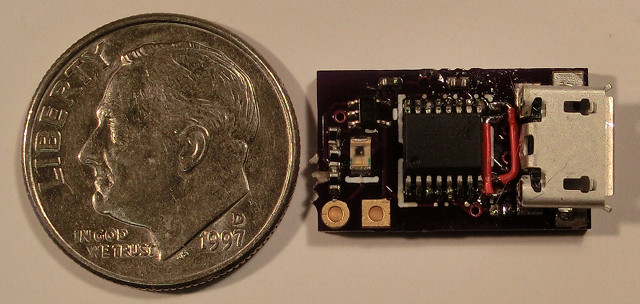
MicroPeak Serial Interface Flight Logging for MicroPeak MicroPeak was original designed as a simple peak-recording altimeter. It displays the maximum height of the last flight by blinking out numbers on the LED. Peak recording is fun and easy, but you need a log across apogee to check for unexpected bumps in baro data caused by ejection events. NAR also requires a flight log for altitude records. So, we wondered what could be done with the existing MicroPeak hardware to turn it into a flight logging altimeter. Logging the data The 8-bit ATtiny85 used in MicroPeak has 8kB of flash to store the executable code, but it also has 512B (yes, B as in bytes ) of eeprom storage for configuration data. Unlike the code flash, the little eeprom can be rewritten 100,000 times, so it should last for a lifetime of rocketry. The original MicroPeak firmware already used that to store the average ground pressure and minimum pressure (in Pascals) seen during flight; those are used to compute the maximum height that is shown on the LED. If we store just the two low-order bytes of the pressure data, we d have room left for 251 data points. That means capturing data at least every 32kPa, which is about 3km at sea level. 251 points isn t a whole lot of storage, but we really only need to capture the ascent and arc across apogee, which generally occurs within the first few seconds of flight. MicroPeak samples air pressure once every 96ms, if we record half of those samples, we ll have data every 192ms. 251 samples every 192ms captures 48 seconds of flight. A flight longer than that will just see the first 48 seconds. Of course, if apogee occurs after that limit, MicroPeak will still correctly record that value, it just won t have a continuous log. Downloading the data Having MicroPeak record data to the internal eeprom is pretty easy, but it s not a lot of use if you can t get the data into your computer. However, there aren t a whole lot of interfaces avaialble on MicroPeak. We ve only got: First implementation I changed the MicroPeak firmware to capture data to eeprom and made a test flight using my calibrated barometric chamber (a large syringe). I was able to read out the flight data using the AVR programming pins and got the flight logging code working that way. The plots I created looked great, but using an AVR programmer to read the data looked daunting for most people as it requires: With the hardware running at least $120 retail, and requiring a pile of software installed from various places around the net, this approach didn t seem like a great way to let people easily capture flight data from their tiny altimeter. The Blinking LED The only other interface available is the MicroPeak LED. It s a nice LED, bright and orange and low power. But, it s still just a single LED. However, it seemed like it might be possible to have it blink out the data and create a device to watch the LED and connect that to a USB port. The simplest idea I had was to just blink out the data in asynchronous serial form; a start bit, 8 data bits and a stop bit. On the host side, I could use a regular FTDI FT230 USB to serial converter chip. Those even have a 3.3V regulator and can supply a bit of current to other components on the board, eliminating the need for an external power supply. To see the LED blink, I needed a photo-transistor that actually responds to the LED s wavelength. Most photo-transistors are designed to work with infrared light, which nicely makes the whole setup invisible. There are a few photo-transistors available which do respond in the visible range, and ROHM RPM-075PT actually has its peak sensitivity right in the same range as the LED. In between the photo-transistor and the FT230, I needed a detector circuit which would send a 1 when the light was present and a 0 when it wasn t. To me, that called for a simple comparator made from an op-amp. Set the voltage on the negative input to somewhere between light and dark and then drive the positive input from the photo-transistor; the output would swing from rail to rail. Bit-banging async The ATtiny85 has only a single serial port , which is used on MicroPeak to talk to the barometric sensor in SPI mode. So, sending data out the LED requires that it be bit-banged directly modulated with the CPU. I wanted the data transmission to go reasonably fast, so I picked a rate of 9600 baud as a target. That means sending one bit every 104 S. As the MicroPeak CPU is clocked at only 250kHz, that leaves only about 26 cycles per bit. I need all of the bits to go at exactly the same speed, so I pack the start bit, 8 data bits and stop bit into a single 16 bit value and then start sending. Of course, every pass around the loop would need to take exactly the same number of cycles, so I carefully avoided any conditional code. With that, 14 of the 26 cycles were required to just get the LED set to the right value. I padded the loop with 12 nops to make up the remaining time. At 26 cycles per bit, it s actually sending data at a bit over 9600 baud, but the FT230 doesn t seem to mind. A bit of output structure I was a bit worried about the serial converter seeing other light as random data, so I prefixed the data transmission with MP ; that made it easy to ignore anything before those two characters as probably noise. Next, I decided to checksum the whole transmission. A simple 16-bit CRC would catch most small errors; it s easy enough to re-try the operation if it fails after all. Finally, instead of sending the data in binary, I displayed each byte as two hex digits, and sent some newlines along to keep the line lengths short. This makes it easy to ship flight logs in email or whatever. Here s a sample of the final data format:
MP
dc880100fec000006800f56d8f63b059
73516447273fa93728301927d91b7712
730bbf0491fe88f7c5ee8ee896e3fadc
9dd9d3d502d1afcea2cbafc6b4c34ec1
bfbfcabf10c03dc05dc070c084c08fc0
9cc0abc0b9c0c1c0ccc0dcc020c152c4
71c9a6cf45d623db7de05ee758edd9f2
b4f9fd00aa074311631a9221c4291330
c035873b2943084bbb52695c0c67eb6b
d26ee5707472fb74a4781f7dee802b84
09860a87e786ad868a866e8659865186
4e8643863e863986368638862e862d86
2f862d86298628862a86268629862686
28862886258625862486
d925
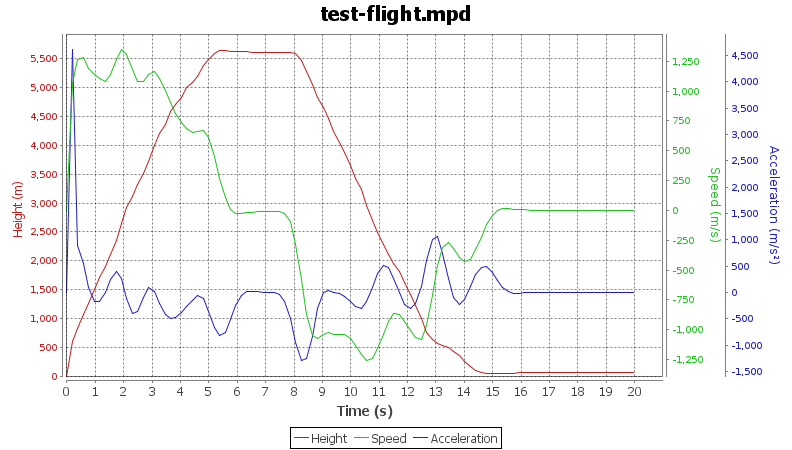
Making the photo-transistor go fast enough The photo-transistor acts as one half of a voltage divider on the positive op-amp terminal, with a resistor making the other half. However, the photo-transistor acts a bit like a capacitor, so when I initially chose a fairly large value for the resistor, it actually took too long to switch between on and off the transistor would spend a bunch of time charging and discharging. I had to reduce the resistor to 1k for the circuit to work. Remaining hardware design I prototyped the circuit on a breadboard using a through-hole op-amp that my daughter designed into her ultrasonic guided robot and a prefabricated FTDI Friend board. I wanted to use the target photo-transistor, so I soldered a couple of short pieces of wire onto the SMT pads and stuck that into the breadboard. Once I had that working, I copied the schematic to gschem, designed a board and had three made at OSHPark for the phenomenal sum of $1.35. Aside from goofing up on the FT230 USB data pins (swapping D+ and D-), the board worked perfectly. The final hardware design includes an LED connected to the output of the comparator that makes it easier to know when things are lined up correctly, otherwise it will be essentially the same. Host software Our AltosUI code has taught us a lot about delivering code that runs on Linux, Mac OS X and Windows, so I m busy developing something based on the same underlying Java bits to support MicroPeak. Here s a sample of the graph results so far: Production plans I ve ordered a couple dozen raw boards from OSH Park, and once those are here, I ll build them and make them available for sale in a couple of weeks. The current plan is to charge $35 for the MicroPeak serial interface board, or sell it bundled with MicroPeak for $75.

25 December 2012

Bastian Blank: New software: LMTP to UUCP gateway

I use UUCP to get my mails. It works fine but lacks support for modern SMTP features like DSN. While it may be possible to bolt support into the the rmail part, both the sendmail interface used to submit mails and the Postfix pipe daemon used to extract mail are not able to do so. So I started a small project to get around this problem. This software uses LMTP to retrieve and SMTP to send all mails. LMTP (a SMTP derivative with support for all extensions) is used to inject mail via a small daemon. The mails are transported using a format similar to batched SMTP to the remote system. It is then injected via SMTP to the local MTA.
Sender LMTP is used to supply mail. As a SMTP derivative, LMTP inherits support for all the available SMTP extensions. The only difference between LMTP and SMTP is the support for one result per recipient after end-of-data. This allow proper handling and mails with multiple recipients without a queue. Mails are supplied to a special LMTP server. This server may currently run from inetd or in foreground by itself. A real daemon mode is not yet implemented. Each mail is submitted to the UUCP queue in its own format. We need to store a lot of meta-data along with the real mail. This data is stored in a custom format.
Protocol All data is transferred using a custom protocol. It is a SMTP derivative, but it is only used in uni-directional communication, so no responses exists. It uses its own Hello command and supports the SMTP commands MAIL, RCPT and DATA. This format allows exactly one mail in each file. An EOF ends the mail transaction. Also all data must be in dot-escaped form like in SMTP.
Hello (UHLO) A sender must start the transaction with this command. It specifies the name of the sender and all requested SMTP extensions. Syntax:
uhlo = "UHLO" SP ( Domain / address-literal ) *( SP ehlo-keyword ) CRLF
The receiver must check if all requested SMTP extensions are available.
Receiver Each mail is submitted by the UUCP system. It calls the supplied receiver tool called rumtp. This tool reads the protocol stream and submits the mail to a local SMTP server. There is no error handling right now in this tool. All errors will create a mail to the local UUCP admin by the UUCP system itself.
License and distribution This package is licensed GPL 3. It is for new distributed via Alioth.

24 December 2012

Bastian Blank: Relaying e-mail over unreliable connections

Introduction I still prefer to handle all my mails at home. I got backup set-up on my own and have anything in direct access. This network is connected to the internet via an end-user DSL connection without a static IP-address and without any useful SLA. However relaying mails over such an unreliable connection is still an unsolved problem. There exists a lot of solutions for this problem. I'm currently building a new e-mail setup, so I tried to collect all the used and maybe possible solutions for the relay problem. I will show some of them.
Don't do it The easiest solution is to just don't try to collect mails at home. This solution is somewhat against the rules, but I know people who prefers it. Access to the mails is usually done with IMAP and a copy is made if needed. This is not really a solution, but it works for many people.
SMTP SMTP is the mail protocol used in the internet. It is used for all public mail exchanges. By itself it can't be used to submit mails to remote destinations With some preparations it can be used to relay mail over unreliable connections. There are three different turn commands in SMTP that can be used to start the mail flow. Two of them will be
VPN or dynamic DNS with TLS with or without extended turn (ETRN) Using SMTP themself is an easy solution. It can relay mails without much hasle But it needs either a fixed or authenticated connection. SMTP can use a fixed connection. This is usually provided by some sort of VPN. The VPN can be encrypted, but does not need to. This allow the MTA to connect to the downstream server if it is available. The other solution is to authenticate the downstream server. Authentication is available via TLS and X.509 certificates. It still needs some way to find it, but with dynamic DNS this is no real problem. Both variants can be combined with the extended turn command. Extended turn allows to request a queue flush for a domain. It can be used to request mails only to be delivered if the downstream server is available at all. This reduces the load on the MTA.
Authenticated turn (ATRN) On-demand mail relay is a rarely supported ESMTP feature. The Authenticated turn command effectively reverses the SMTP connection and allows, after authentication, the flow of mails from the server to the client via standard SMTP. There exists some stand-alone implementations, but no widely used MTA includes an implementation.
POP3/IMAP and fetchmail/getmail All e-mails can be delivered to mailboxes and retrieved by the end-users system and re-injected into the delivery system. Both fetchmail and getmail are able to retrieve mail from POP3 and IMAP servers. They are either directly delivered via a MDA like procmail or maildrop. Otherwise they are submitted via the sendmail interface or SMTP and delivered by the MTA. Neither POP3 nor IMAP have support for meta data like the real recipient or sender.
Mailbox per address The mails for each address are delivered to its own mailbox. This allows proper identification of the recipient address. It still have no real idea of the sender address. Because it needs to poll one mailbox per address, this highers the resources needed on both sides dramatically.
Multi-drop mailbox The mails for all addresses are delivered into one mailbox. The original recipient must be saved in a custom header to allow this information to be restored. Only one mailbox needs to be polled for mail addresses.
UUCP One of the oldest transports used for mail is UUCP. It effectively copies a file to a different system and pipes it into a program. UUCP can be used to transport mails in various ways.
rmail Each mail is copied verbatim to the client. It saves the sender address in form of a "From" pseudo header in the mail itself and supplies the recipient on the command-line. So it have access to both sender and recipient address.
Batched SMTP Batched SMTP transfers old-style SMTP transactions over UUCP The MTA (Exim supports this) or a special tool (in the bsmtpd package) writes this files and after a given time or size they are dispatched via UUCP to the remote system. The bsmtpd packages was removed from Debian some years ago.
Dovecot synchronization Dovecot support bi-directional synchronization of mailbox contents. It holds all data on both sides. The internal log is used to merge changes done on both sides, so it should not loose any data. This synchronization can be used to work with the data on both sides (via Dovecot of cause) or create backups. It needs shell access to the user owning the data on both sides.
Conclusions There is no one size fits all solution for this problem. If you admin the remote system, you can implement any of this solutions If it is managed by someone else you need good luck. Almost all solutions does not support current SMTP features. The one I'm really missing is DSN, aka configurable delivery notices. POP3 and IMAP handle already delivered mail and have no need for this. All UUCP variants does not handle it, because they are much older anyway. Only SMTP itself supports all of its features. I still use rmail over UUCP for my mails at home and it works flawless. UUCP itself runs over SSH, it can compress data on the fly and authenticate using private keys.

22 December 2012

John Goerzen: Faces

A couple of weeks ago, I walked in to a nice, sit-down restaurant, with a smile on my face. It s the kind of restaurant with folded cloth napkins on the tables. Table for three, please as Jacob and Oliver were with me. This much isn t unusual. I have periodically taken them out to eat for quite some time, and they enjoy it. But there were a few unusual things about this particular day. I suppose the main one is that they had just been doing this. Yes, painting your own face can be a lot of fun. And also serious business. The boys and I were in Santa Fe, NM on a train trip. It had been a year since their last train trip, and that s longer than they are typically used to. I d taken Jacob on a train trip with just the two of us before, but this was the first trip with just the two boys and me. And one of the places we visited was the excellent Santa Fe Children s Museum. It may be the best children s museum I ve ever seen. Not the largest, or the flashiest, but that s part of the reason I say best . They had chimes (and many other percussive instruments to produce different pitches, including mounted hubcaps and varying length wooden planks). They had a great magnets table with washers and nuts, so children can build their own bridges, stairs, etc. using magnetism. A giant bubble table, tunnels to crawl in outside, etc. A great place. And, apparently, the thing they were really known for I did not know this in advance is the paint your own face station. Jacob and Oliver really got into it. Oliver informed me he was a lion and I heard ROAR! ROAR! periodically all afternoon. Jacob asked me to help paint a J, and the spirals, on his cheeks. After some careful thought, he informed me that he was spiral man . Next to the paint your own face area was a clean your own face area. Most kids were being helped to clean their own face by their parents on their way out. Jacob and Oliver protested that plan, so I figured, if they want to enjoy painted faces all day, why not? And this, of course, led into lunch with self-painted faces. Nobody at the restaurant commented, but the owner had a huge grin when he saw them. (It was a Mediterranean place, and I m sure the owner would have commented had there not been a language barrier.) Incidentally, the boys became quite the fans of souvlaki. Later, as we walked around Santa Fe Plaza and another museum, they drew smiles all over the place. Several kind people asked them, Did you enjoy the children s museum? Yes, everyone in Santa Fe seemed to know precisely where kids with painted faces had been that day. Santa Fe is an amazing and beautiful city. It was warm and friendly, and the architecture and layout was fun to see and pedestrian-friendly. We walked past the Cathedral Basilica of St. Francis of Assisi several times, and went in once. For some reason I could never fully explain, I could often smell their incense even a block or two away. It added to the crisp wintry feel of the plaza. The point of the trip wasn t Santa Fe, though. It was Jacob and Oliver on Amtrak, which is the thing they were really most excited about of course. They were excited as usual, and despite the fact that the train comes through this area only at around 3AM, were plenty excited to be on the train. And, in fact, didn t fall asleep again until about 5 due to the excitement (though they did an excellent job of being quiet). Of course, 6AM was morning so they were wide awake by then. Jacob had been planning what he d eat on the train for days already, and had announced he would be having French toast for breakfast and pizza at lunch. He was a bit disappointed to see that French toast wasn t on the menu this time, but pancakes saved the day. While waiting for the dining car to open at 6:30, we went to the lounge car for awhile. I had brought along various things for them to do on the train, of course, and among them was a notebook and some markers. Jacob loved drawing suns and stars, and sometimes writing short notes. He gave notes to several friendly people that happened to be visiting with us on the train. Oliver enjoyed it too, but he was more intrigued by the cheap set of multi-colored post-it notes. There were two happy, and somewhat tired, boys getting off that train in the middle of the night when we returned.

17 December 2012

Ian Campbell: Foreign Chroots with schroot and qemu

Since I've been working on qcontrol I've had need of a way to build packages in an ARM environment. Since all my native ARM hardware is "production" (at least so far as something can be production in a home environment) I prefer to avoid installing development tools on them. When I started looking into this all my ARM systems ran from relatively small flash devices which also ruled out the possibility of a development chroot. After search the web a bit I discovered that it is possible to use qemu-user-static together with [[!binfmt-support ]] to create cross architecture chroots which can be entered mostly transparently. It is also possible to combine this with schroot and sbuild which makes the day to day use pretty much the same as a native or biarch chroot. Since I've now had to rediscover how to do this twice (once for Sid and then again when I realized I also needed a Wheezy environment) I thought I should write it down for the benefit of my future self. First things first lets install the various packages which we need. As well as debootstrap to create the chroot we need qemu-user-static and binfmt-support to allow us to run ARM binaries:
$ sudo apt-get install debootstrap qemu-user-static binfmt-support
I'm using schroot's lvm-snapshot mode so we need an LVM volume, formatted with a filesystem and mounted in a temporary location:
$ sudo lvcreate -L8G -n sbuild-wheezy-armel /dev/VG
$ sudo mkfs.ext3 /dev/VG/sbuild-wheezy-armel
$ sudo mount /dev/VG/sbuild-wheezy-armel /mnt/
Next we need to create the chroot. For this we use debootstrap in foreign mode which does a 2 stage setup, firstly by using the --foreign option:
$ sudo debootstrap --variant=buildd --include=fakeroot,build-essential \
        --arch=armel --foreign \
        wheezy /mnt http://<DEBIAN-MIRROR>/debian/
Now we (temporarily) copy the qemu-arm-static binary into the chroot (at the place where binfmt-support expects it), change into the chroot and run debootstrap's second stage to finish the basic chroot setup:
$ sudo cp /usr/bin/qemu-arm-static /mnt/usr/bin/
$ sudo chroot /mnt
(chroot)# ./debootstrap/debootstrap --second-stage
(chroot)# exit
Now that we have a basic chroot in place it needs a little bit of tailoring. I've found the easiest way to do this is to use sbuild-createchroot and then tweak the result:
$ sudo sbuild-createchroot --arch=armel --foreign --setup-only \
    wheezy /mnt http://<DEBIAN-MIRROR>/debian/
If we were building a native chroot then we could have skipped the debootstrap stuff and let sbuild-createchroot handle things. Unfortunately this doesn't seem to play nicely with --foreign. Now we can remove the qemu-arm-static binary from the chroot. schroot will automatically bind mount the version from the host into the chroot which ensures it remains up to date. We can also unmount the chroot since we will let schroot manage that from here on:
$ sudo rm /mnt/usr/bin/qemu-arm-static
$ sudo umount /mnt
Next we need to tweak the resulting schroot/sbuild configuration since sbuild-createchroot assumes the use of schroot's directory mode. First remove the symlink to /mnt which it created:
$ sudo rm /etc/sbuild/chroot/wheezy-armel-sbuild
Lastly we need to edit /etc/schroot/chroot.d/wheezy-armel-sbuild-<SUFFIX> (where is randomly generated) and reconfigure it to use lvm-snapshot mode, by apply the following changes:
 [wheezy-armel-sbuild]
-type=directory
-directory=/mnt
+type=lvm-snapshot
+device=/dev/VG/sbuild-wheezy-armel
+lvm-snapshot-options=--size 2G
 description=Debian wheezy/armel autobuilder
 groups=root,sbuild
 root-groups=root,sbuild
 profile=sbuild
That's it, we now have a chroot which we can trivially invoke via sbuild to build armel packages:
$ sbuild --arch=armel --dist=wheezy <... other options...>
We can also use sbuild-update to keep the chroot up to date:
$ sudo sbuild-update -udcar wheezy-armel
You can also use schroot to login to the chroot directly, although for that case you'll likely want to create a different chroot using schroot's directory or block-device mode instead lvm-snapshot and drop some of the sbuild specific setup. I expect I'll blog about this configuration in some more detail at some point in the future since I'll want to document it to give a more convenient build environment for Xen on ARM than the build farm which we have at work.

4 December 2012

Andrea Veri: My favorite WordPress Plugins

It took me a while to build a complete WordPress blog with all the things I needed, from modifying the default Twenty Eleven theme to broadcasting my posts directly on Twitter. WordPress has a nice selection of plugins and given the fact I spent a few days evaluating all the possibilities, I decided to share my own setup to speed up the process in case you are willing to build a WordPress powered blog. The plugins: And a few modifications I made on my Child theme for the Twenty Eleven theme to suit my needs: Remove the navigation buttons on the header. On the Child theme s style.css:
#access, #branding .only-search #s, .entry-header .comments-link  
display: none;
 
Remove the gray line on the top of the header s banner. On the Child theme s style.css:
#branding  
border-top: none;
 
.and a little tip about WordPress itself: have you ever wondered how you could install/update/remove a WordPress theme or plugin without FTP access? Here s how! On the config.php file:
/*** Updates WordPress without FTP credentials. ***/
define('FS_METHOD','direct');
If you know any other handy WordPress Tip or Plugin, please share!

3 December 2012

Jon Dowland: Wheezy problems

I've recently replaced my laptop's HDD as the S.M.A.R.T. data suggested a potential failure. I took the opportunity to try out beta4 of debian-installer and to install a pure wheezy system. Prior to this I've been running a mostly wheezy system with some bits from sid or experimental. I've got quite a few notes about bugs I've hit in the installer, most of which I still need to file, but perhaps the most problematic appears to be known as #661789. Unless I'm reading this wrong, it would appear this show-stopper bug makes booting on an EFI system impossible without some workarounds, it's been a known problem for 9 months, and d-i beta4's images opt for EFI booting where possible. After the 8th install run I must admit I started getting angry that someone was wasting my time. Perhaps this is covered in some install notes somewhere. Anyway, I got an install working eventually (with legacy BIOS boot mode). and have been running wheezy for the last week. I've just now had a string of problems which were a fairly typical experience for me running a mixed system. Whenever I hit a problem, particularly in the GNOME3 stack, my first response was to check "am I running the latest version of the packages?" inevitably not and so I got around my problems via a reboot or something similarly drastic; updated the packages and left things. Until the next time. Just now, the following things happened: I've experienced all of the above (except for the PAM thing) more than once over the last 12 months or so since I blogged about moving to GNOME3. Now I'm running a pure wheezy system, at this point in the freeze the relevant packages are likely to be more stable. So, not running the latest version is no longer a reason to avoid fixing the problem. Time for me to start proper analysis! Debian is now in deep freeze. I've heard it said a few times that we are coming to the end of that process. Based on my experiences, in my humble opinion, we've got some work to do before we're release worthy.

Paul Wise: Debian on mobile devices

Debian on Samsung Galaxy S It is possible to put Debian on smartphones like the Samsung Galaxy S: Linux mainline doesn't run on any of the mobile devices I have. It probably doesn't run on any of the mobile devices you have either. There has been some effort by the OpenMoko community to merge the gta02 kernel patches but it is not yet complete. I doubt Samsung will spend money on merging support for old devices obsoleted by more recent devices. There is Linaro but they are focused on things the hardware vendors pay them for and probably would not have the resources anyway. Therefore I would guess the timeframe for supporting the OpenMoko FreeRunner and the Samsung Galaxy S in Linux mainline is between many years and never. For better or worse, the Debian Linux kernel maintainers prefer not to include non-mainline stuff and Debian as a whole generally prefers to include one copy of each package instead of 9. The procedures I documented above are not a great way to support mobile devices at all and could break at any moment anyway. So everyone, please become a kernel developer and help merge all of the many many versions of Android Linux into Linux mainline so that you can have your favourite distribution on your devices. You can comment on this post at identi.ca.

26 November 2012

Michal &#268;iha&#345;: Weblate 1.3 at SUSE Studio

Finally, I've managed to update SUSE Studio images with Weblate to recently released 1.3. So you can now fetch there various images for your virtual machines or clouds. There is also new support for SUSE Cloud or OpenStack in SUSE Studio, so you can enjoy these as well. Within this version, I've upgraded the system to openSUSE 12.2 and included MTA in the image, so that you can send out registration emails. You can find more information about Weblate at http://weblate.org/.

Filed under: English Suse Weblate 0 comments Flattr this!

Steve Langasek: Upstart in Debian

Good news, everyone! So as of last Sunday, this works on all Linux archs in Debian unstable and gives you a modern version of upstart:
echo 'Yes, do as I say!'   apt-get -o DPkg::options=--force-remove-essential -y --force-yes install upstart
Thanks to the ifupdown, sysvinit, and udev maintainers for their cooperation in getting upstart support in place; to the Debian release team for accomodating the late changes needed for upstart to be supported in wheezy; and to Scott for his past maintenance of upstart in Debian. Benchmarking One of the consequences is that it's now possible to do meaningful head-to-head comparisons of boot speed between sysvinit (with startpar), upstart, and systemd. At one time or another people have tested systemd vs. sysvinit when using bash as /bin/sh, and upstart vs. sysvinit, and systemd vs. sysvinit+startpar, and there are plenty of bootcharts floating around showing results of one init system or another on one distro or another, but I'm not aware of anyone having done a real, fair comparison of the three solutions, changing nothing but the init system. I've done some initial comparisons in a barebones sid VM, and the results are definitely interesting. Sysvinit with startpar (the default in Debian) can boot a stock sid install, with no added services, in somewhere between 3.37 and 3.42 seconds (three runs). That's not a whole lot, but on the other hand this is a system with a single filesystem and no interesting services yet. Is this really as fast as we can boot? No, even this minimal system can boot faster. Testing with upstart shows that upstart can do the same job in between 3.03 and 3.19 seconds (n=3, mean=3.09). This confirms what we'd already seen in Ubuntu, that it makes a difference to boot speed to have filesystem mounting handled by an integrated process that understands the whole system instead of as a group of serialized shell scripts. What about systemd? The same test gives a boot time between 2.32 and 2.85 seconds (n=4, mean=2.48). Interesting; what would make systemd faster than upstart in sid? Well, a quick look at the system shows one possible contributing factor: the rsyslog package in Debian has a systemd unit file, but not an upstart job file. Dropping in the /etc/init/rsyslog.conf from Ubuntu has a noticeable impact, and brings the upstart boot time down nearer to that of systemd (2.78-3.03s, n=5, mean=2.92). Besides telling me that it's time to start spamming Debian maintainers with wishlist bugs asking them to include upstart jobs in their packages, this suggests that the remaining difference in boot time may be due to the outstanding init scripts in rcS.d that are made built-in no-ops by systemd but not (yet) by upstart in Debian (e.g., hwclock, hostname, udev-mtab). (In Ubuntu, /etc/rcS.d has long since been emptied out in favor of upstart jobs in the common case, since the time it takes to get to runlevel=2 is definitely a major issue for boot speed and boot parallelization.) It also gives the lie to the claim that's been made in various places that spawning shells is a major bottleneck for upstart vs. systemd. More study is certainly needed to confirm this, but at least this naive first test suggests that in spite of the purported benefits of hard-coding boot-time policies in C code, upstart with its default degree of runtime configurability is at least in the ballpark of systemd. Indeed, when OpenSuSE switched from upstart to systemd, it seems that something else in the stack managed to nullify any benefit from improving the boot-time performance of apparmor. Contrary to what some would have you believe, systemd is not some kind of silver bullet for boot speed. Upstart, with its boot-time flexibility and its long history of real-world testing in Ubuntu, is a formidable competitor to systemd in the boot speed department - and a solid solution to the many longstanding boot-time ordering bugs in Debian, which still affect users of sysvinit. I've published the bootcharts for the above tests here. Between the fact that Debian's bootchart package logs by default to /var/log/bootchart.tgz (thus overwriting on every boot) and the fact that these tests are in a VM, I haven't bothered to include the raw data, just the bootcharts themselves. The interested reader can probably generate more interesting boot charts of their own anyway - in particular, it will be interesting to see how the different init systems perform with more complicated filesystem layouts, or when booting a less trivial set of services. Other musings The boot charts have been created with the bootchart package rather than with bootchart2. For one thing, it turns out that bootchart2 includes systemd units, not init scripts; so when replacing bootchart with bootchart2, the non-matching init script is left behind and systemd in particular gets terribly confused. This is now reported as Bug #694403. In an amusing twist, while I was experimenting with bootchart2, I also noticed that having systemd installed would slow down booting with other init systems, because systemd installs udev rules which take a noticeable amount of time to run a helper command at boot even though the helper should be a no-op. So if you're doing boot speed testing of other init systems, be sure you don't have systemd on the system at the time!

24 November 2012

Jon Dowland: Backing up Twitter tweets and mentions

I mentioned ifttt last year: it's a web automation tool that lets you glue different web services together. I used it to build a 6music bot this year which was very well received. I also use it to back up my own twitter interactions. All of my tweets and mentions are emailed to me. I can then archive those mails with the rest of my mail. I wrote a small python script to clean up the mails that ifttt spits out. The resulting mails are now only about twice as large as the maximum length of a tweet, rather than orders of magnitude larger. I've published it here: twitter.

22 November 2012

Andrew Pollock: [life] Portland bound

So, after just having run 10K, I'm going to sit on a train for 20 hours and completely seize up. I've got me some stretching to do! I'm getting away to Portland for a few days. I'm taking the Coastal Starlight train up and back, and staying with Nigel and his family. I'm looking forward to having some time to myself on the train, I'm looking forward to the trip, because some mutual friends did it, and I've wanted to do it ever since. I'm also looking forward to catching up with Nigel, because I've barely spoken to him since he left Google, and he's a friend and fellow countryman who I really enjoyed working with. I'd also like to check out this barber shop, because I'm weird and like the idea of someone attacking my face with a cutthroat razor. And of course, you can't go to Portland without visiting Powell's City of Books. I'm probably spending as much time on the train as I am in Portland (I head back on Sunday), but I want to be back for Zoe's first dentist appointment on Tuesday.

Ian Wienand: Upgrading Samsung Series 9 Laptop BIOS without Windows

Having recently acquired a Samsung Series 9 laptop, I'd like to update the BIOS. This is proving rather difficult without Windows. The first thing you download from the Samsung website isn't actually BIOS update at all; it's a Windows application which then goes and finds a BIOS update for your machine. Some time with a Windows VM, tcpdump and you'll end up at http://sbuservice.samsungmobile.com/. I'll leave interested parties to play around at that website, but with a little fiddling you can find the BIOS you're looking for. In this case, it is ITEM_20121024_754_WIN_P08AAH.exe which is the latest version, P08AAH. Unfortunately, this still won't run in any useful way -- in a virtual-machine it errors out saying the battery isn't connected. On previous endeavors such as this, running various incarnations of zip on the .exe file has found interesting components, but not in this case. Not to be deterred, some work with strings will yield the following
$ strings ./ITEM_20121024_754_WIN_P08AAH.exe   grep Copyright
inflate 1.2.7 Copyright 1995-2012 Mark Adler
deflate 1.2.7 Copyright 1995-2012 Jean-loup Gailly and Mark Adler
Now this is interesting, because it tells us that the components aren't using some fancy compression scheme we have no hope of figuring out. Checking RFC1952 we see the following header mentioned
Each member has the following structure:
+---+---+---+---+---+---+---+---+---+---+
 ID1 ID2 CM  FLG      MTIME      XFL OS   (more-->)
+---+---+---+---+---+---+---+---+---+---+
We can easily look for that in the file. Expanding the values, what we're looking for is 0x1f 0x8b 0x08 0x0 0x0 0x0 0x0 0x0 0x0 0x0 which represents the compressed stream (the OS byte is 0xb for NTFS which we can just ignore). A quick hack will get that done and give us the offsets we need
$ ./look-for-headers
Found potential header at 455212
Found potential header at 677136
Found potential header at 1293930
Found potential header at 1294980
Found potential header at 2771193
Found potential header at 2779874
Found potential header at 2789142
Found potential header at 2935778
Found potential header at 3078639
Found potential header at 3083039
Found potential header at 3338552
Found potential header at 3339443
Found potential header at 3352440
Found potential header at 3366757
Found potential header at 3391734
Found potential header at 3444255
Found potential header at 3494372
So, we can feed this into a shell script and extract the streams
FILE=ITEM_20121024_754_WIN_P08AAH.exe
for offset in 455212 677136 1293930 1294980 \
    2771193 2779874 2789142 2935778 3078639 \
    3083039 3338552 3339443 3352440 3366757 \
    3391734 3444255 3494372
do
    echo "create $offset.gz"
    dd if=$FILE  bs=1 skip=$offset   zcat > $offset.data
done
We don't have to worry about the end-point, because zcat will handily stop outputting and ignore junk at the end of the stream. That will yield the following output files:
$ md5sum *
c014e900b02ae39d6e574c63154809b2  1293930.data
982747cd5215c7d51fa1fba255557fef  1294980.data
942c6a8332d5dd06d8f4b2a9cb386ff4  2771193.data
d98d2f80b94f70780b46d1f079a38d93  2779874.data
33ce3174b0e205f58c7cedc61adc6f32  2789142.data
1d6851288f40fa95895b2fadee8a8b82  2935778.data
3a0a9b2fa9b40bdf5721068acde351ce  3078639.data
fc166141d06934e9c7238326f18a4e68  3083039.data
8cf7f86f84afa81363d3cef44b257d50  3338552.data
85e09e18fd495599041e13b4197e1746  3339443.data
0c72004eae0131d52817f23faf8a46a7  3352440.data
26347f93721e7ac49134a17104f56090  3366757.data
26973e301da4948a0016765e40700e8c  3391734.data
c8e4675cda3aa367d523a471bb205fba  3444255.data
7bf5ea753d4cc056b9462a02ac51b160  3494372.data
a2c6562f7f43aaa0e636cc1995b7ee3d  455212.data
d5c91b007dac3a5c6317f8a8833f9304  677136.data
65c0dcd1e7e9f8f87a8e9fb706eb8768  ITEM_20121024_754_WIN_P08AAH.exe
$ file *
1293930.data:                     MS-DOS executable
1294980.data:                     data
2771193.data:                     PE32 executable (native) Intel 80386, for MS Windows
2779874.data:                     PE32+ executable (native) x86-64, for MS Windows
2789142.data:                     PE32 executable (console) Intel 80386 (stripped to external PDB), for MS Windows
2935778.data:                     PE32+ executable (console) x86-64 (stripped to external PDB), for MS Windows
3078639.data:                     MS-DOS executable
3083039.data:                     PE32 executable (GUI) Intel 80386, for MS Windows
3338552.data:                     ASCII text, with CRLF line terminators
3339443.data:                     PE32 executable (native) Intel 80386, for MS Windows
3352440.data:                     PE32+ executable (native) x86-64, for MS Windows
3366757.data:                     PE32 executable (DLL) (GUI) Intel 80386, for MS Windows
3391734.data:                     PE32 executable (GUI) Intel 80386, for MS Windows
3444255.data:                     PE32 executable (GUI) Intel 80386, for MS Windows
3494372.data:                     PE32 executable (DLL) (GUI) Intel 80386, for MS Windows
455212.data:                      PE32 executable (DLL) (console) Intel 80386, for MS Windows
677136.data:                      data
ITEM_20121024_754_WIN_P08AAH.exe: PE32 executable (GUI) Intel 80386, for MS Windows
This is where I get a bit stuck. There is clearly a bunch of WinFlash stuff that Wine kind-of recognises, but so far I haven't managed to figure out how I might go about flashing this from a DOS boot disk. So far I know it's a "Phoenix SecureCore Tiano" based BIOS, and there is some indication that there is a UEFI app to flash the BIOS, but unfortunately I didn't set the laptop up with UEFI (note to anyone setting this up; probably a good idea to do that). I believe that if you have Windows, you can halt the install part-way through and see these files extracted in a temp directory. Possibly if we can put some file-names to the blobs it might help. There may also be a much easier way to do this that I'm completely missing. If anything comes up, I'll update this post; hopefully a future Googlenaut who enjoys BIOS hacking will drop a comment... Update 2012-11-27 I'm unfortunately less optimistic about being able to update this. Certainly the files identified above as MS-DOS executable are EFI binaries; however they are both 32-bit binaries. You can easily get an EFI shell up and running by putting a 64-bit EFI shell binary on a FAT formatted USB disk in the efi/boot/bootx64.efi but it will not run either of those binaries, presumably because they're 32-bit. A 32-bit EFI binary doesn't seem to be recognised for boot, so no luck there. A comment also mentioned some issues with Samsung's and UEFI boot in this bug though it's not clear what models are affected. Another comment mentioned binwalk which also does a nice job of finding the embedded zip streams.
$ strings ./1293930.data
...
RSDS
D:\flash\Source\ENV\src\Efi863\edk\phoenix\edk\Sample\Platform\DUET\ldr16\IA32\oemslp20.pdb
oemslp20.dll
InitializeDriver
2n3u3
$ strings ./3078639.data
en-us;zh-Hans
slp20.marker
slp20.size
slp20.offset
slp20.offset2
read marker fail!
Marker file '%s''s size(%d)!=%d
Not a valided OemMarker!
Update image data error.
marker file is updated.
marker file size too big!
Not a valided OemMarker in ROM.
Update image data error.
SLP marker is reserved.
-PROT
Prot flag is found, mProgFlag is true.
Prot flag is not found, mProgFlag is false.
Please specify input file name.
-PROT
slpFile
OEM Activation 2.0 processing
Failed to Locate Flash Support protocol.
...
D:\flash\Source\ENV\src\Efi863\edk\phoenix\edk\Sample\Platform\DUET\ldr16\IA32\SLP20.pdb

21 November 2012

Axel Beckert: Suggestions for the GNOME Team

Thanks to Erich Schubert s blog posting on Planet Debian I became aware of the 2012 GNOME User Survey at Phoronix. Like back in 2006 I still use some GNOME applications, so I do consider myself as GNOME user in the widest sense and hence I filled out that survey. Additionally I have to live with GNOME 3 as a system administrator of workstations, and that s some kind of usage, too. ;-) The last question in the survey was Do you have any comments or suggestions for the GNOME team? Sure I have. And since I tried to give constructive feedback instead of only ranting, here s my answer to that question as I submitted it in the survey, too, just spiced up with some hyperlinks and highlighting:
Don t try to change the users. Give the users more possibilities to change GNOME if they don t agree with your own preferences and decisions. (The trend to castrate the user was already starting with GNOME 2 and GNOME 3 made that worse IMHO.) If you really think that you need less configurability because some non-power-users are confused or challenged by too many choices, then please give the other users at least the chance to enable more configuration options. A very good example in that hindsight was Kazehakase (RIP) who offered several user interfaces (novice, intermediate and power user or such). The popular text-mode web browser Lynx does the same, too, btw. GNOME lost me mostly with the change to GNOME 2. The switch from Galeon 1.2 to 1.3/2.0 was horrible and the later switch to Epiphany made things even worse on the browser side. My short trip to GNOME as desktop environment ended with moving back to FVWM (configurable without tons of clicking, especially after moving to some other computer) and for the browser I moved on to Kazehakase back then. Nowadays I m living very well with Awesome and Ratpoison as window managers, Conkeror as web browser (which are all very configurable) and a few selected GNOME applications like Liferea (luckily still quite configurable despite I miss Gecko s about:config since the switch to WebKit), GUCharmap and Gnumeric. For people switching from Windows I nowadays recommend XFCE or maybe LXDE on low-end computers. I likely would recommend GNOME 2, too, if it still would exist. With regards to MATE I m skeptical about its persistance and future, but I m glad it exists as it solves a lot of problems and brings in just a few new ones. Cinnamon as well as SolusOS are based on the current GNOME libraries and are very likely the more persistent projects, but also very likely have the very same multi-head issues we re all barfing about at work with Ubuntu Precise. (Heck, am I glad that I use Awesome at work, too, and all four screens work perfectly as they did with FVWM before.)
Thanks to Dirk Deimeke for his (German written) pointer to Marcus Moeller s interview with Ikey Doherty (in German, too) about his Debian-/GNOME-based distribution SolusOS.

Ian Campbell: Consolidating Qcontrol Configuration Files

A little while ago Michele Cane filed Debian bug #689912 against qcontrol asking that the package install the correct configuration file for a TS-419P II, a newer device which has an LCD. It turns out that to support devices with LCDs properly we need to probe a GPIO line in order to figure out if an LCD is attached or if a serial console is in use (since the two are mutually exclusive on this hardware, when you attach a serial console you must toggle a jumper too). This actually turns out to be rather trivial since qcontrol's configuration files are actually simple Lua programs and the state of the GPIO lines can be accessed via sysfs and so we can read the state directly from the configuration file itself. While looking into this I happened to notice that the various board-specific configuration files are actually very similar and that the differences can all be detected by a combination of the Hardware field in /proc/cpuinfo and the GPIO lines. So I started looking into whether I could write a single consolidated qcontrol.conf file to replace the various variant specific files. It turns out to be quite possible, the resulting consolidated file has been posted to the bug log (see also my mail). The danger with configuration files which are also fully-fledged programming languages is that there is a temptation to write more and more complex configuration files with the danger that the primary purpose of the file (configuration) can be obscured. I think in this case it is a close call but on balance I think the downsides outweigh the advantages, so I've uploaded qcontrol 0.4.2+svn-r40-2 which simply adds LCD support to the relevant board specific configuration file. In process of doing so I seem to have fallen into a trap which seems to catch out many sbuild users at least once and uploaded a package with "UNRELEASED" still in the changelog. To try and save myself (and others) some blushes in the future I've filed Debian bug #693841 (wishlist) against dput to see if it can catch this case, I've also added to my prerelease checklist. As it happens my own TS-419P II arrived today. I intend to use it for second tier storage (mythtv recordings, music, mirrors) as well as light server duties (MTA, internal DNS etc) which should allow me to turn off the existing PC in the cupboard under the stairs which is getting a bit long in the tooth and starting to become a bit unreliable (I also suspect its costing a fortune to run).

Erich Schubert: Phoronix GNOME user survey

While not everybody likes Phoronix (common complaints include tabloid journalism), they are doing a GNOME user survey again this year. If you are concerned about Linux on the desktop, you might want to participate; it is not particularly long.
Unfortunately, "the GNOME Foundation still isn't interested in having a user survey", and may again ignore the results; and already last year you could see a lot of articles along the lines of The Survey That GNOME Would Rather Ignore. One more reason to fill it out.

20 November 2012

Jon Dowland: Waterstones

In May this year, in a desperate bid to bail water out of a sinking ship, HMV group sold off the Waterstones chain of bookstores. I'm fond of reading so naturally I visit Waterstones from time to time. (but not exclusively.) For many years, their promotions were unanimously structured as "3 for 2" offers: find three books in the promotion, in-store, and get the cheapest of the three for free. I hated these promotions. I always found it very challenging to find three books in the promotion that I wanted. If I was visiting to buy a specific book and found it in the promotion, on more than one occasion I left the shop empty handed: I wasn't prepared to pay full price for a book in a promotion and not get the benefit of the promotion. Since being sold, Waterstones seem to have made a lot of changes. Many new hardbacks from popular authors have debuted at a discount for a short period (Rowling, Pratchett). I've found many more discounted books not tied to others in 3-for-2-style offers, sometimes window-display stock at half price, a month or so after release. They started a loyalty-card scheme, with a 10 gift card the prize you reach once you've spent 100. (I wonder if such schemes are examples of a token economy?) Finally, they've tentatively started to explore putting cafes in their branches. The one in Newcastle is best described as 'fledgling', but it's nice to have one more place to escape for a cup of tea at lunchtimes. The cafe, as well as a very well stocked collection of magazines, were the two killer features of the sadly- defunct Borders bookseller chain. For years before we got our own Borders in the North East, I used to enjoy the York branch if I was passing. I actually managed to fill a loyalty card this year, so clearly their change in attitude has worked on me! I'm generally not a fan of gift cards, especially in today's climate, so I quickly spent it. I hold an American Express credit card, which earns me cashbask on purchases which I make with it. I think the rate is about 1%. However, I can opt to receive the cashback in the form of gift vouchers. If I do so, I get them to the value of 110% my cashback balance. One of the retailers in on the scheme are Waterstones. I'm tempted

19 November 2012

Jon Dowland: Three Christmas Songs Which Aren't

For some reason each of these three songs feel "Christmassy" to me. They are definitely not Christmas songs. Can you figure out why? Cocteau Twins - Lorelei <iframe allowfullscreen="allowfullscreen" frameborder="0" height="315" src="http://www.youtube.com/embed/3diz8I0AVVk" width="420"></iframe> Orchestral Manoeuvres In The Dark - Sailing On The Seven Seas <iframe allowfullscreen="allowfullscreen" frameborder="0" height="315" src="http://www.youtube.com/embed/lMST3H69-Os" width="420"></iframe> Ladytron - White Elephant <iframe allowfullscreen="allowfullscreen" frameborder="0" height="315" src="http://www.youtube.com/embed/7cKEy0BFfQw" width="420"></iframe>

Next.

Previous.