Kartik Mistry: 3 Years!

* It all started with this sip!
 3 years. Thanks my dear Koki!


 3 years. Thanks my dear Koki!
 I ve been doing some code lately, fixing things here and there, and over the last few days gave mt-daapd some attention.
First, I was reported a segfault of mt-daapd when reloading web pages too fast. Surprisingly, it turned out to be a stupid omission in a simple routine and it is hard to hit without disabling the cache in the browser.
Now, I just fixed something that s been bugging me for a while: mt-daapd did not handle Avahi daemon restarts, leading to mt-daapd becoming invisible to clients relying on mDNS until you restarted it.
And, wow, that went a bit further than expected. As I expected, the simple piece of code needed to handle that wasn t there. But still it did not work, as it turns out the event loop for the Avahi polling wasn t being run. Replace stupid code reinventing the wheel by the Avahi-provided wheel and there, it works. But not when run as a daemon (aka foreground only). Well yes, starting the thread before daemonizing isn t going to work well, so fix that. EPIC WIN \o/
As mt-daapd s upstream is not active anymore I m accumulating fixes for mt-daapd in the Debian package, to the point I m starting to consider setting up a git repository somewhere with those fixes and possibly some more code rework if I feel like it.
2009-02-17 21:32:55 TLS error on connection from client.example.com (Client) [192.168.192.168] (gnutls_handshake): A TLS packet with unexpected length was received.
2009-02-17 21:33:00 SMTP protocol synchronization error (input sent without waiting for greeting): rejected connection from H=client.example.com [192.168.192.168] input="EHLO Client\r\n"
Configuring the MAIN_VERIFY_TLS_CERTIFICATES option in the Debian Exim configuration (which sets the tls_verifiy_certificates option in the actual Exim configuration) to point to something with less certificates in should avoid the issue. On the bright side, at least they re making an effort to avoid overflows.
| Tool | MB saved | Space vs. gzip | Time vs. gzip | Cost |
|---|---|---|---|---|
| gzip | 3081 | 100.00% | 100.00% | 0.41 |
| gzip -1 | 2908 | 104.84% | 82.34% | 0.36 |
| gzip -9 | 3091 | 99.72% | 141.60% | 0.58 |
| bzip2 | 3173 | 97.44% | 201.87% | 0.81 |
| bzip2 -1 | 3126 | 98.75% | 182.22% | 0.74 |
| lzma -1 | 3280 | 94.44% | 163.31% | 0.63 |
| lzma -2 | 3320 | 93.33% | 217.94% | 0.83 |
| xz -1 | 3270 | 94.73% | 176.52% | 0.68 |
| xz -2 | 3309 | 93.63% | 200.05% | 0.76 |
| lzop -1 | 2508 | 116.01% | 77.49% | 0.39 |
| lzop -2 | 2498 | 116.30% | 76.59% | 0.39 |
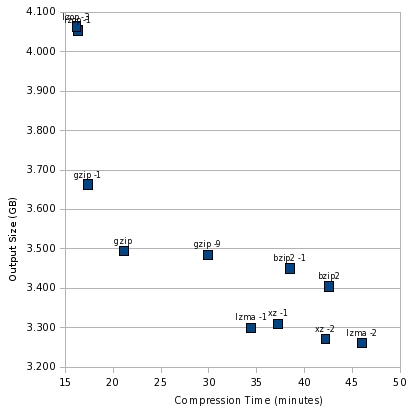 At the extremely fast, but not as good compression, end is lzop. gzip is still the balanced performer, bzip2 still looks really bad, and lzma -1 is still the best high-compression performer.
Now, let s throw cat into the mix:
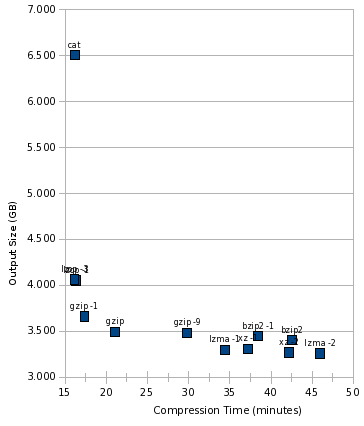 Here s something notable, that this graph makes crystal clear: lzop was just as fast as cat. In other words, it is likely that lzop was faster than the disk, and using lzop compression would be essentially free in terms of time consumed.
And finally, look at the cost:
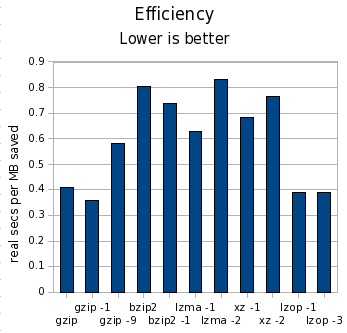 What happened to pbzip2?
I tried the parallel bzip2 implementation just like last time, but it ran extremely slow. Interestingly, pbzip2 < notes.txt > notes.txt.bz2 took 1.002 wall seconds, but pbzip2 notes.txt finished almost instantaneously. This 1-second startup time for pbzip2 was a killer, and the test would have taken more than 3 days to complete. I killed it early and omitted it from my results. Hopefully this bug can be fixed. I didn t expect pbzip2 to help much in this test, and perhaps even to see a slight degradation, but not like THAT.
Conclusions
As before, the difference in time was far more significant than the difference in space. By compressing files individually, we lost about 400MB (about 7%) space compared to making a tar file and then combining that. My test set contained 270,101 files.
gzip continues to be a strong all-purpose contender, posting fast compression time and respectable compression ratios. lzop is a very interesting tool, running as fast as cat and yet turning in reasonable compression though 25% worse than gzip on its default settings. gzip -1 was almost as fast, though, and compressed better. If gzip weren t fast enough with -6, I d be likely to try gzip -1 before using lzop, since the gzip format is far more widely supported, and that s important to me for backups.
These results still look troubling for bzip2. lzma -1 continued to turn in far better times and compression ratios that bzip2. Even bzip2 -1 couldn t match the speed of lzma -1, and compressed barely better than gzip. I think bzip2 would be hard-pressed to find a comfortable niche anywhere by now.
As before, you can download my spreadsheet with all the numbers behind these charts and the table.
 If you re reading this post via the website rather than a feed/planet then you will notice that the site has gone completely black in support of the Creative Freedom Foundation s campaign against S92A of the NZ Copyright Amendment Act which is due to come into effect on 28th February 2009. I ve also joined the wave of people blacking out their avatar on Facebook/Jabber/MSN, etc.
S92A introduces Guilt Upon Accusation whereby if you are accused of copyright infringement (downloading music and movies, etc) repeatedly (likely 3 or more times) you are at risk of being disconnected from the Internet by your ISP. The law does not require any proof or substantiation of the accusations and the entire process would occur outside of the courts and the established legal system. Not only does it place every user at risk, the wording is very unclear on exactly what type of organisation is considered an ISP and there is significant concern that schools, businesses, libraries and hospitals will be placed in the difficult position of determining whether their users have broken the law and require disconnection.
Opposition to the law is not an attack on copyright, or a statement that we should be free to download all the movies and music that we desire. Those sorts of activities are clearly wrong, and I don t have any issue with copyright holders wanting to enforce their rights when their content is illegally copied. However, disconnecting people upon accusation, with no proof or formal legal process to prove guilt is not the right way to go about it.
The fact that the law does not require proof of guilt is only the tip of the iceberg in terms of problems with it. For further background on the problems it causes for ISPs by placing them as the middle-man in copyright disputes you should refer to the following posts:
 It's time to drive some buzz this way ;-) Although this post will only be a pointer towards the Spanish post I made on Planeta EDUSOL, for reasons soon to become obvious. In any case, the information I'm posting here is not exactly the same. Can you read Spanish? Please go on to the invitation for the first videoconference for the EDUSOL Seminar.
This year, we the organizers of the On-line Encounter of Education and Free Software (EDUSOL) are aiming higher - we are not "just" having a two-week encounter at the end of the year - We are having an all-year-long Seminar, focusing on the collaborative construction of knowledge. People from quite distinct backgrounds will be part of this project, and we aim to drive it towards the publication of a book.
We (mainly, Alejandro Miranda and me) have been quite busy bootstrapping this seminar, getting the proposed authors, thinking over the intended communication channels and ways, and setting up the needed infrastructure) and are ready to start the public-facing activities.
We will be having monthly videoconferencing sessions, the last Thursday each month, 16:00-18:00 Mexico Central time (currently GMT-6; GMT-5 after the beginning of April). The VC sessions will be also relayed through Ogg streams, and we will have an IRC channel available to offer full interactivity for those who do not have access to a H.323 VC setup.
This first session will be moderated by Victor Manuel Mart nez; the speakers will be Alejandro Miranda and myself - The topics we will present are:
 After dropping all (pretense at) regular exercise after leaving high/grammar/secondary school (the german word is Gymnasium) and doing more or less nothing for more than 10 years, I've taken up weight training (after a not very successful attempt at volleyball; I like the sport but the team fell apart) two years ago. Since I actually managed to work out regularly (twice a week) in the first year, and since membership in a gym is not cheap, and since I moved and thus had to find a different solution anyway, I decided to buy a Bowflex Sport home gym. I can't compare it to other home equipment, and it apparently it has been discontinued by Nautilus, but nonetheless, a few thoughts:
The conclusion first: Would I buy it again? No. Was it a waste of money? No, it's not that bad. In detail:
 So a customer of mine needs to use RedHat. It's not their choice, the
choice was forced upon them by the people who wrote the tools they need
to use.
The new version of this particular tool which they wanted to use
requires RHEL5, and they're currently running RHEL4. So I had to upgrade
their systems from RHEL4 to RHEL5. No sweat, right?
Yeah, right.
RedHat has this nice 'Red Hat Network', where you can manage your
servers, and remotely mark packages for upgrade. You can also, by way of
a command line tool, say that you want it to upgrade from one release to
another. This can't be done remotely, which sortof makes sense;
upgrading from one release to another might cause problems that you
really really don't want if you don't have an immediate shell. So you
should use 'up2date --upgrade-to-release=5' to upgrade from RHEL4 to
RHEL5.
Except that that doesn't work. For some reason, RedHat chose not to
support in-place upgrades from RedHat 4 to RedHat 5. Instead, you have
to download installation media, boot from them (thereby inducing
downtime) and select 'upgrade' in the installer. Which part of this
distribution is "Enterprise", again?
Oh well. So I download the first ISO, and start the upgrade process.
Surely that'll work, right?
Hah. No, I really need all six images. So I download them, and start
again.
Some minutes into the installation, the HP iLO session that I'm using
times out, and takes my Virtual CD device with it. As such, the
installer-in-upgrade-mode obviously can't find the CD-ROM anymore, and
produces a read error. This is totally normal. The system provides me
with a 'retry' button. That button doesn't work.
That is to say, it works, but after two or so files, the installation
goes to a grinding halt. I had to reboot, and start over.
So after rebooting, changing my iLO session settings so the timeout
is at 120 minutes (the maximum) rather than 30 minutes (what appears to
be the default), and I restart the upgrade process, making sure to click
in the iLO interface every once in a while to keep it active. When it's
somewhere at 80% and 3 hours into the upgrade process (god, why does
that have to take so long?), it suddenly finds itself out of disk
space.
Well, shit happens, of course; guess there's nothing to blame RedHat
with that one. But the way this situation is handled, is beyond my
comprehension:
The only 'recover' option is 'reboot'. There's no 'retry'. I don't
mind diving to a second console, mucking about a bit on the mounted
partition, and doing 'retry', but the installer doesn't even offer me
that option. Instead, I have to choose 'reboot'. Never mind that the
system is halfway through an installation process and might be totally
and utterly broken, and not even bootable. Well, that's what rescue
modes on installation media are for, I guess, but still.
After cleaning out some old files that aren't needed anymore and
going back to the installer, you'd suppose that the system could figure
out what it'd already done, and continue from there, right?
Well, no, it can't. It starts over from scratch, thereby forcing me
to sit and wait for another three hours.
Times like these make me remember why I'm a Debian developer, and not
a RedHat one. Why I chose not to finish that Linux From Scratch project
that I'd started after using RedHat for three years and about six months
before becoming a Debian Developer. Why I stopped hitting my computer
screen around that time.
Stupid piece of shit.
disclaimer: this is all IMAO, and you don't
have to agree with me. But what's a blog for, if not to rant?
;-)
 So, I've had this plan for ages to follow up with what I did
with my nslu2, and hide a Debian box inside
a working stereo.
Finally I've started work on this little project. I bought a cheap stereo
with CD/tape/radio, mostly on the criteria:
| Tool | MB saved | Space vs. gzip | Time vs. gzip | Cost |
|---|---|---|---|---|
| gzip | 3398 | 100.00% | 100.00% | 0.15 |
| bzip2 | 3590 | 92.91% | 333.05% | 0.48 |
| pbzip2 | 3587 | 92.99% | 183.77% | 0.26 |
| lzma -1 | 3641 | 91.01% | 195.58% | 0.28 |
| lzma -2 | 3783 | 85.76% | 273.83% | 0.37 |
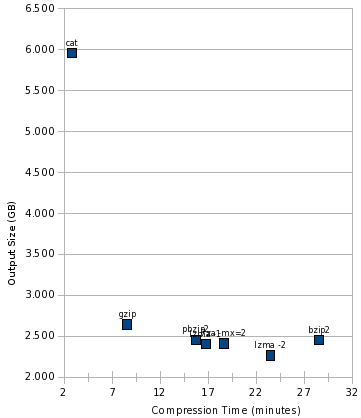
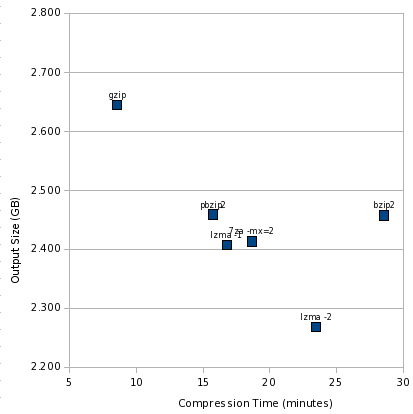 Like the other charts, the best area is the lower left, and worst is upper right. It s clear we have two outliers: gzip and bzip2. And a cluster of pretty similar performers.
This view somewhat magnifies the differences, though. Let s add cat to the mix:
 And finally, look at the cost:
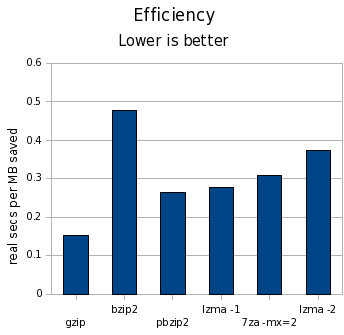 Conclusions
First off, the difference in time is far larger than the difference in space. We re talking a difference of 15% at the most in terms of space, but orders of magnitude for time.
I think this pretty definitively is a death knell for bzip2. lzma -1 can achieve better compression in significantly less time, and lzma -2 can achieve significantly better compression in a little less time.
pbzip2 can help even that out in terms of clock time on multicore machines, but 7za already has a parallel LZMA implementation, and it seems only a matter of time before /usr/bin/lzma gets it too. Also, if I were to chart CPU time, the numbers would be even less kind to pbzip2 than to bzip2.
bzip2 does have some interesting properties, such as resetting everything every 900K, which could provide marginally better safety than any other compressor here though I don t know if lzma provides similar properties, or could.
I think a strong argument remains that gzip is most suitable for backups in the general case. lzma -1 makes a good contender when space is at more of a premium. bzip2 doesn t seem to make a good contender at all now that we have lzma.
I have also made my spreadsheet (OpenOffice format) containing the raw numbers and charts available for those interested.
Update
Part 2 of this story is now available, which considers more compression tools, and looks at performance compressing files individually rather than the large tar file.
 Started updating our Debian Machines at Hosting Nation to Lenny. Smooth so far.
This is a followup to the earlier design of
dh. After converting many
packages to minimal rules files using dh, I find that it works very well
for the 3 line rules file case, which works for 80% of packages. But
getting from there to a slightly more complex rules file that 20% of
packages need can be non-obvious.
So, let's make it obvious.
Suppose I want to run
dh_compress -Xsomefile. But my rules file as it
currently stands doesn't offer an easy place to run that command:
#!/usr/bin/make -f
%:
    dh $@
#!/usr/bin/make -f
%:
    dh $@
binary: binary-indep
binary-indep:
    dh $@ --before dh_compress
    dh_compress -Xsomefile
    dh $@ --after dh_compress
#!/usr/bin/make -f
%:
    dh $@
override_dh_compress:
        dh_compress -Xsomefile
override_dh_auto_configure:
    ./configure --with-kitchen-sink
override_dh_auto_test:
    # The test suite for this package is busted on s390.
    if [ $DEB_BUILD_ARCH != s390 ]; then dh_auto_test; fi
override_dh_clean:
    dh_clean
    rm -rf build_dir
 Alright, Debian GNU/Linux 5.0 AKA as Lenny has been released. Time for a Debian unstable unfreeze party!
 What does the new stable release bring for system administrators? I ll give an overview what news you might expect when upgrading from Debian GNU/Linux 4.0, codename Etch (released on 8th April 2007) to the current version Debian GNU/Linux 5.0, codename Lenny (released on 14th February 2009). I try to avoid duplicated information so make sure to read the release announcement and the official release notes for Lenny beforehand.
Noteworthy Changes
apt-get dist-upgrade output got my full attention (emphasis mine):
The following packages will be REMOVED:

 cacti libapache2-mod-php4 libarchive-tar-perl libcurl3-openssl-dev

 libgssapi2 libpci2 librpm4 libssp0 linux-kernel-headers modutils php4-mysql
apt-get install unionfs-modules- uname -r # mkdir /tmp/root-cow
# mount -t unionfs -o dirs=/tmp/root-cow:/=ro none /mnt
/), that we will keep read-only (meaning unionfs won t allow itself to write there), and mount the merged filesystem under /mnt. none could just be anything, as there is no device to be mounted.
The result, in /mnt, is just something that looks like the root filesystem:
# ls /

bin  boot  dev  etc  home  initrd  lib  media  mnt  opt  proc  root  sbin  srv  sys  tmp  usr  var

# ls /mnt

bin  boot  dev  etc  home  initrd  lib  media  mnt  opt  proc  root  sbin  srv  sys  tmp  usr  var
/tmp/root-cow:
# echo a > /mnt/a

# cat /a

cat: /a: No such file or directory

# cat /tmp/root-cow/a

a

# echo foo.com > /mnt/etc/mailname

# cat /etc/mailname

glandium.org

# cat /tmp/root-cow/etc/mailname

foo.com

# find /tmp/root-cow

/tmp/root-cow

/tmp/root-cow/etc

/tmp/root-cow/etc/mailname

/tmp/root-cow/a
# ls /var

backups  cache  lib  local  lock  log  mail  opt  run  spool  tmp  www

# ls /mnt/var
/var, /proc, /dev, and /sys.
That s enough testing for now, and we ll first do some cleanup before going after the real job:
# umount /mnt

# rm -rf /tmp/root-cow
newns utility from my first post on per-process namespaces, let s create a new namespace to keep our testing private, and populate it with the necessary mount points:
# newns

# umount /tmp

# mount -t tmpfs tmpfs /tmp

# mkdir /tmp/root-cow /tmp/var-cow

# mount -t unionfs -o dirs=/tmp/root-cow:/=ro none /mnt

# mount -t unionfs -o dirs=/tmp/var-cow:/var=ro none /mnt/var

# cd /mnt

# pivot_root . mnt

# mount --move /mnt/proc /proc

# mount --move /mnt/sys /sys

# mount --move /mnt/lib/init/rw /lib/init/rw

# mount --move /mnt/tmp /tmp

# mount --move /mnt/dev /dev
/tmp with the main namespace, which means the directories we create in the fourth statement won t be visible in /tmp outside this namespace.
The fifth and sixth statements put the union filesystems in place. As my system only has a separate /var filesystem (no /usr, and I don t care about /home here), I only need to setup these two. Feel free to add more union filesystems as necessary.
The pivot_root call allows to switch to the unionfs ed root: everything under /mnt (/mnt and /mnt/var in our case) will be remounted under /, while what was under / is remounter under /mnt under the new root./ and /var as union filesystems, while the old / and /var are respectively in /mnt and /mnt/var.
It also means /dev, /proc, /sys and other filesystems are remounted as /mnt/dev, /mnt/proc, /mnt/sys, etc., which is why we next mount --move all of them to a better place in our namespace.
Once all this setup is done, we are ready to do our php upgrade test. As Etch doesn t have support for neither PID namespaces nor network namespaces, we ll still have some conflicts with the main namespace for TCP port binding and process handling, so we need to be a little careful:
# rm /var/run/apache2.pid

# echo Listen 8080 > /etc/apache2/ports.conf
# /etc/init.d/apache2 start
# echo EnableSendfile off > /etc/apache2/conf.d/sendfile.conf
# mount --bind /mnt/var/run/mysqld /var/run/mysqld
# apt-get install php5-mysql php5-cli php5-snmp libapache2-mod-php5

# /etc/init.d/apache2 restart

# apt-get remove --purge php4-common
IfModule statement against mod_php4.c and none for mod_php5.c, which means a part of its setup doesn t work out of the box (most notably, the DirectoryIndex).
Once all is validated, all we need to do is to stop apache2 and exit from the namespace. The union filesystems and temporary filesystems are then automagically cleaned-up and the namespace disappears as well as all modifications we just did, since all processes using the namespace ended. We are now free to upgrade on the production server, as we know all the side effects.
I ll now be able to upgrade to Lenny without php getting removed.
 This weekend I have mostly been investigating Common Lisp.
If you're new to the environment then you may get started via a simple:
apt-get install clispOnce you've done that the following resources will help you decide whether you're wasting your time or not: It has been a long time since I've had so much fun - even though the first thing I did was experiment with implementing a spam filter - although in my defense I was only classifying based upon the links contained in the mails. So for example:
 What a happy day on the wedding anniversary of our civil marriage we got a great gift. Our favorite distribution released a new major version.
 In this release the Debian/Ruby Extra
team has an ever greater presence.
We were able to increase the number of mainted libraries and applications
to over 95 packages. Also quite a lot of issues were resolved and I am
proud that we obtained this quality level.
For Squeeze we plan to deal with the transition to Ruby 1.9 and with
possible multiple interpreter-support (still Ruby 1.8, JRuby?). We might
also deal with the gems, who knows? :)
P.S. Indeed, did I just started posting without explaining why
I was away for over 7 months?
Next.