Search Results: "will"

14 December 2023

Arturo Borrero Gonz lez: OpenTofu: handcrafted include-file mechanism with YAML

Post logo I recently started playing with Terraform/OpenTofu almost on a daily basis. The other day I was working with Amazon Managed Prometheus (or AMP), and wanted to define prometheus alert rules on YAML files. I decided that I needed a way to put the alerts on a bunch of files, and then load them by the declarative code, on the correct AMP workspace. I came up with this code pattern that I m sharing here, for my future reference, and in case it is interesting to someone else. The YAML file where I specify the AMP workspace, and where the alert rule files live:
---
alert_files:
  my_alerts_production:
    amp:
      workspace: "production"
    files: "alert_rules/production/*.yaml"
  my_alerts_staging:
    amp:
      workspace: "staging"
    files: "alert_rules/staging/*.yaml"
Note the files entry contains a file pattern. I will later expand the pattern using the fileset() function. Each rule file would be something like this:
---
name: "my_rule_namespace"
rule_data:  
  # this is prometheus-specific config
  groups:
    - name: "example_alert_group"
      rules:
      - alert: Example_Alert_Cpu
        # just arbitrary values, to produce an example alert
        expr: avg(rate(ecs_cpu_seconds_total container=~"something" [2m])) > 1
        for: 10s
        annotations:
          summary: "CPU usage is too high"
          description: "The container average CPU usage is too high."
I m interested in the data structure mutating into something similar to this:
---
alert_files:
  my_alerts_production:
    amp:
      workspace: "production"
    alerts_data:
      - name: rule_namespace_1
        rule_data:  
          # actual alert definition here
          [..]
      - name: rule_namespace_2
        rule_data:  
          # actual alert definition here
          [..]
  my_alerts_staging:
    amp:
      workspace: "staging"
    alerts_data:
      - name: rule_namespace_1
        rule_data:  
          # actual alert definition here
          [..]
      - name: rule_namespace_2
        rule_data:  
          # actual alert definition here
          [..]
This is the algorithm that does the trick:
locals  
  alerts_config =  
    for x, y in  
      for k, v in local.config.alert_files :
      k =>  
        amp : (v.amp),
        files : fileset("", v.files)
       
        : x =>  
      amp : (y.amp),
      alertmanager_data : [
        for z in(y.files) :
        yamldecode(file(z))
      ]


Because the declarative nature of the Terraform/OpenTofu language, I needed to implement 3 different for loops. Each loop reads the map and transforms it in some way, passing the result into the next loop. A bit convoluted if you ask me. To explain the logic, I think it makes more sense to read it from inside out. First loop:
    for k, v in local.config.alert_files :
    k =>  
        amp : (v.amp),
        files : fileset("", v.files)
     
This loop iterates the input YAML map in key-value pairs, remapping each amp entry, and expanding the file globs using the fileset() into a temporal files entry. Second loop:
    for x, y in  
        # previous fileset() loop
        : x =>  
      amp : (y.amp),
      alertmanager_data : [
        # yamldecode() loop
      ]
     
This intermediate loop is responsible for building the final data structure. It iterates the previous fileset() loop to remap it calling the next loop, the yamldecode() one. Note how the amp entry is being rebuilt in each remap (first loop and this one), otherwise we would lose it! Third loop:
    alertmanager_data : [
        for z in(y.files) :
        yamldecode(file(z))
    ]
And finally, this is maybe the easiest loop of the 3, we iterate the temporal file entry that was created in the first loop, calling yamldecode() for each of the file names generated by fileset(). The resulting data structure should allow you to easily create resources later in a for_each loop.

Russell Coker: Fat Finger Shell

I ve been trying out the Fat Finger Shell which is a terminal emulator for Linux on touch screen devices where the keyboard is overlayed with the terminal output. This means that instead of having a tiny keyboard and a tiny terminal output you have the full screen for both. There is a YouTube video showing how the Fat Finger Shell works [1]. Here is a link to the Github page [2], which hasn t changed much in the last 11 years. Currently the shell is hard-coded to a 80*24 terminal and a 640*480 screen which doesn t match any modern hardware. Some parts of this are easy to change but then there s the comment I ran once XGetGeometry and I am harcoded (bad) values for x, y, etc.. which is followed by some magic numbers that are not easy to change which are hacked into the source of xvt. The configuration of this is almost great. It has a plain text file where each line has 4 numbers representing the X and Y coordinates of opposite corners of a rectangle and additional information on what the key is, which is relatively easy to edit. But then it has an image which has to match that, the obvious improvement would be to not have an image but to just display rectangles for each pair of corner coordinates and display the glyph of the character in question inside it. I think there is a real need for a terminal like this for use on devices like the PinePhonePro, it won t be to everyone s taste but the people who like it will really like it. The features that such a shell needs for modern use are being based on Wayland, supporting a variety of screen resolutions and particularly the commonly used ones like 720*1440 and 1920*1080 (with terminal resolution matching the combination of screen resolution and font), and having code derived from a newer terminal emulator. As a final note it would be good for such a terminal to also take input from a regular keyboard so when you plug your Linux phone into a dock you don t need to close your existing terminal sessions. There is a Debian RFP/ITP bug for this [3] which I think should be closed due to nothing happening for 11 years and the fact that so much work is required to make this usable. The current Fat Finger Shell code is a good demonstration of the concept, but I don t think it makes sense to move on with this code base. One of the many possible ways of addressing this with modern graphics technology might be to have a semi transparent window overlaying the screen and generating virtual keyboard events for whichever window happens to be below it so instead of being limited to one terminal program by the choice of input method have that input work for any terminal that the user may choose as well as any other text based program (email, IM, etc).

13 December 2023

Melissa Wen: 15 Tips for Debugging Issues in the AMD Display Kernel Driver

A self-help guide for examining and debugging the AMD display driver within the Linux kernel/DRM subsystem. It s based on my experience as an external developer working on the driver, and are shared with the goal of helping others navigate the driver code. Acknowledgments: These tips were gathered thanks to the countless help received from AMD developers during the driver development process. The list below was obtained by examining open source code, reviewing public documentation, playing with tools, asking in public forums and also with the help of my former GSoC mentor, Rodrigo Siqueira.

Pre-Debugging Steps: Before diving into an issue, it s crucial to perform two essential steps: 1) Check the latest changes: Ensure you re working with the latest AMD driver modifications located in the amd-staging-drm-next branch maintained by Alex Deucher. You may also find bug fixes for newer kernel versions on branches that have the name pattern drm-fixes-<date>. 2) Examine the issue tracker: Confirm that your issue isn t already documented and addressed in the AMD display driver issue tracker. If you find a similar issue, you can team up with others and speed up the debugging process.

Understanding the issue: Do you really need to change this? Where should you start looking for changes? 3) Is the issue in the AMD kernel driver or in the userspace?: Identifying the source of the issue is essential regardless of the GPU vendor. Sometimes this can be challenging so here are some helpful tips:
  • Record the screen: Capture the screen using a recording app while experiencing the issue. If the bug appears in the capture, it s likely a userspace issue, not the kernel display driver.
  • Analyze the dmesg log: Look for error messages related to the display driver in the dmesg log. If the error message appears before the message [drm] Display Core v... , it s not likely a display driver issue. If this message doesn t appear in your log, the display driver wasn t fully loaded and you will see a notification that something went wrong here.
4) AMD Display Manager vs. AMD Display Core: The AMD display driver consists of two components:
  • Display Manager (DM): This component interacts directly with the Linux DRM infrastructure. Occasionally, issues can arise from misinterpretations of DRM properties or features. If the issue doesn t occur on other platforms with the same AMD hardware - for example, only happens on Linux but not on Windows - it s more likely related to the AMD DM code.
  • Display Core (DC): This is the platform-agnostic part responsible for setting and programming hardware features. Modifications to the DC usually require validation on other platforms, like Windows, to avoid regressions.
5) Identify the DC HW family: Each AMD GPU has variations in its hardware architecture. Features and helpers differ between families, so determining the relevant code for your specific hardware is crucial.
  • Find GPU product information in Linux/AMD GPU documentation
  • Check the dmesg log for the Display Core version (since this commit in Linux kernel 6.3v). For example:
    • [drm] Display Core v3.2.241 initialized on DCN 2.1
    • [drm] Display Core v3.2.237 initialized on DCN 3.0.1

Investigating the relevant driver code: Keep from letting unrelated driver code to affect your investigation. 6) Narrow the code inspection down to one DC HW family: the relevant code resides in a directory named after the DC number. For example, the DCN 3.0.1 driver code is located at drivers/gpu/drm/amd/display/dc/dcn301. We all know that the AMD s shared code is huge and you can use these boundaries to rule out codes unrelated to your issue. 7) Newer families may inherit code from older ones: you can find dcn301 using code from dcn30, dcn20, dcn10 files. It s crucial to verify which hooks and helpers your driver utilizes to investigate the right portion. You can leverage ftrace for supplemental validation. To give an example, it was useful when I was updating DCN3 color mapping to correctly use their new post-blending color capabilities, such as: Additionally, you can use two different HW families to compare behaviours. If you see the issue in one but not in the other, you can compare the code and understand what has changed and if the implementation from a previous family doesn t fit well the new HW resources or design. You can also count on the help of the community on the Linux AMD issue tracker to validate your code on other hardware and/or systems. This approach helped me debug a 2-year-old issue where the cursor gamma adjustment was incorrect in DCN3 hardware, but working correctly for DCN2 family. I solved the issue in two steps, thanks for community feedback and validation: 8) Check the hardware capability screening in the driver: You can currently find a list of display hardware capabilities in the drivers/gpu/drm/amd/display/dc/dcn*/dcn*_resource.c file. More precisely in the dcn*_resource_construct() function. Using DCN301 for illustration, here is the list of its hardware caps:
	/*************************************************
	 *  Resource + asic cap harcoding                *
	 *************************************************/
	pool->base.underlay_pipe_index = NO_UNDERLAY_PIPE;
	pool->base.pipe_count = pool->base.res_cap->num_timing_generator;
	pool->base.mpcc_count = pool->base.res_cap->num_timing_generator;
	dc->caps.max_downscale_ratio = 600;
	dc->caps.i2c_speed_in_khz = 100;
	dc->caps.i2c_speed_in_khz_hdcp = 5; /*1.4 w/a enabled by default*/
	dc->caps.max_cursor_size = 256;
	dc->caps.min_horizontal_blanking_period = 80;
	dc->caps.dmdata_alloc_size = 2048;
	dc->caps.max_slave_planes = 2;
	dc->caps.max_slave_yuv_planes = 2;
	dc->caps.max_slave_rgb_planes = 2;
	dc->caps.is_apu = true;
	dc->caps.post_blend_color_processing = true;
	dc->caps.force_dp_tps4_for_cp2520 = true;
	dc->caps.extended_aux_timeout_support = true;
	dc->caps.dmcub_support = true;
	/* Color pipeline capabilities */
	dc->caps.color.dpp.dcn_arch = 1;
	dc->caps.color.dpp.input_lut_shared = 0;
	dc->caps.color.dpp.icsc = 1;
	dc->caps.color.dpp.dgam_ram = 0; // must use gamma_corr
	dc->caps.color.dpp.dgam_rom_caps.srgb = 1;
	dc->caps.color.dpp.dgam_rom_caps.bt2020 = 1;
	dc->caps.color.dpp.dgam_rom_caps.gamma2_2 = 1;
	dc->caps.color.dpp.dgam_rom_caps.pq = 1;
	dc->caps.color.dpp.dgam_rom_caps.hlg = 1;
	dc->caps.color.dpp.post_csc = 1;
	dc->caps.color.dpp.gamma_corr = 1;
	dc->caps.color.dpp.dgam_rom_for_yuv = 0;
	dc->caps.color.dpp.hw_3d_lut = 1;
	dc->caps.color.dpp.ogam_ram = 1;
	// no OGAM ROM on DCN301
	dc->caps.color.dpp.ogam_rom_caps.srgb = 0;
	dc->caps.color.dpp.ogam_rom_caps.bt2020 = 0;
	dc->caps.color.dpp.ogam_rom_caps.gamma2_2 = 0;
	dc->caps.color.dpp.ogam_rom_caps.pq = 0;
	dc->caps.color.dpp.ogam_rom_caps.hlg = 0;
	dc->caps.color.dpp.ocsc = 0;
	dc->caps.color.mpc.gamut_remap = 1;
	dc->caps.color.mpc.num_3dluts = pool->base.res_cap->num_mpc_3dlut; //2
	dc->caps.color.mpc.ogam_ram = 1;
	dc->caps.color.mpc.ogam_rom_caps.srgb = 0;
	dc->caps.color.mpc.ogam_rom_caps.bt2020 = 0;
	dc->caps.color.mpc.ogam_rom_caps.gamma2_2 = 0;
	dc->caps.color.mpc.ogam_rom_caps.pq = 0;
	dc->caps.color.mpc.ogam_rom_caps.hlg = 0;
	dc->caps.color.mpc.ocsc = 1;
	dc->caps.dp_hdmi21_pcon_support = true;
	/* read VBIOS LTTPR caps */
	if (ctx->dc_bios->funcs->get_lttpr_caps)  
		enum bp_result bp_query_result;
		uint8_t is_vbios_lttpr_enable = 0;
		bp_query_result = ctx->dc_bios->funcs->get_lttpr_caps(ctx->dc_bios, &is_vbios_lttpr_enable);
		dc->caps.vbios_lttpr_enable = (bp_query_result == BP_RESULT_OK) && !!is_vbios_lttpr_enable;
	 
	if (ctx->dc_bios->funcs->get_lttpr_interop)  
		enum bp_result bp_query_result;
		uint8_t is_vbios_interop_enabled = 0;
		bp_query_result = ctx->dc_bios->funcs->get_lttpr_interop(ctx->dc_bios, &is_vbios_interop_enabled);
		dc->caps.vbios_lttpr_aware = (bp_query_result == BP_RESULT_OK) && !!is_vbios_interop_enabled;
	 
Keep in mind that the documentation of color capabilities are available at the Linux kernel Documentation.

Understanding the development history: What has brought us to the current state? 9) Pinpoint relevant commits: Use git log and git blame to identify commits targeting the code section you re interested in. 10) Track regressions: If you re examining the amd-staging-drm-next branch, check for regressions between DC release versions. These are defined by DC_VER in the drivers/gpu/drm/amd/display/dc/dc.h file. Alternatively, find a commit with this format drm/amd/display: 3.2.221 that determines a display release. It s useful for bisecting. This information helps you understand how outdated your branch is and identify potential regressions. You can consider each DC_VER takes around one week to be bumped. Finally, check testing log of each release in the report provided on the amd-gfx mailing list, such as this one Tested-by: Daniel Wheeler:

Reducing the inspection area: Focus on what really matters. 11) Identify involved HW blocks: This helps isolate the issue. You can find more information about DCN HW blocks in the DCN Overview documentation. In summary:
  • Plane issues are closer to HUBP and DPP.
  • Blending/Stream issues are closer to MPC, OPP and OPTC. They are related to DRM CRTC subjects.
This information was useful when debugging a hardware rotation issue where the cursor plane got clipped off in the middle of the screen. Finally, the issue was addressed by two patches: 12) Issues around bandwidth (glitches) and clocks: May be affected by calculations done in these HW blocks and HW specific values. The recalculation equations are found in the DML folder. DML stands for Display Mode Library. It s in charge of all required configuration parameters supported by the hardware for multiple scenarios. See more in the AMD DC Overview kernel docs. It s a math library that optimally configures hardware to find the best balance between power efficiency and performance in a given scenario. Finding some clk variables that affect device behavior may be a sign of it. It s hard for a external developer to debug this part, since it involves information from HW specs and firmware programming that we don t have access. The best option is to provide all relevant debugging information you have and ask AMD developers to check the values from your suspicions.
  • Do a trick: If you suspect the power setup is degrading performance, try setting the amount of power supplied to the GPU to the maximum and see if it affects the system behavior with this command: sudo bash -c "echo high > /sys/class/drm/card0/device/power_dpm_force_performance_level"
I learned it when debugging glitches with hardware cursor rotation on Steam Deck. My first attempt was changing the clock calculation. In the end, Rodrigo Siqueira proposed the right solution targeting bandwidth in two steps:

Checking implicit programming and hardware limitations: Bring implicit programming to the level of consciousness and recognize hardware limitations. 13) Implicit update types: Check if the selected type for atomic update may affect your issue. The update type depends on the mode settings, since programming some modes demands more time for hardware processing. More details in the source code:
/* Surface update type is used by dc_update_surfaces_and_stream
 * The update type is determined at the very beginning of the function based
 * on parameters passed in and decides how much programming (or updating) is
 * going to be done during the call.
 *
 * UPDATE_TYPE_FAST is used for really fast updates that do not require much
 * logical calculations or hardware register programming. This update MUST be
 * ISR safe on windows. Currently fast update will only be used to flip surface
 * address.
 *
 * UPDATE_TYPE_MED is used for slower updates which require significant hw
 * re-programming however do not affect bandwidth consumption or clock
 * requirements. At present, this is the level at which front end updates
 * that do not require us to run bw_calcs happen. These are in/out transfer func
 * updates, viewport offset changes, recout size changes and pixel
depth changes.
 * This update can be done at ISR, but we want to minimize how often
this happens.
 *
 * UPDATE_TYPE_FULL is slow. Really slow. This requires us to recalculate our
 * bandwidth and clocks, possibly rearrange some pipes and reprogram
anything front
 * end related. Any time viewport dimensions, recout dimensions,
scaling ratios or
 * gamma need to be adjusted or pipe needs to be turned on (or
disconnected) we do
 * a full update. This cannot be done at ISR level and should be a rare event.
 * Unless someone is stress testing mpo enter/exit, playing with
colour or adjusting
 * underscan we don't expect to see this call at all.
 */
enum surface_update_type  
UPDATE_TYPE_FAST, /* super fast, safe to execute in isr */
UPDATE_TYPE_MED,  /* ISR safe, most of programming needed, no bw/clk change*/
UPDATE_TYPE_FULL, /* may need to shuffle resources */
 ;

Using tools: Observe the current state, validate your findings, continue improvements. 14) Use AMD tools to check hardware state and driver programming: help on understanding your driver settings and checking the behavior when changing those settings.
  • DC Visual confirmation: Check multiple planes and pipe split policy.
  • DTN logs: Check display hardware state, including rotation, size, format, underflow, blocks in use, color block values, etc.
  • UMR: Check ASIC info, register values, KMS state - links and elements (framebuffers, planes, CRTCs, connectors). Source: UMR project documentation
15) Use generic DRM/KMS tools:
  • IGT test tools: Use generic KMS tests or develop your own to isolate the issue in the kernel space. Compare results across different GPU vendors to understand their implementations and find potential solutions. Here AMD also has specific IGT tests for its GPUs that is expect to work without failures on any AMD GPU. You can check results of HW-specific tests using different display hardware families or you can compare expected differences between the generic workflow and AMD workflow.
  • drm_info: This tool summarizes the current state of a display driver (capabilities, properties and formats) per element of the DRM/KMS workflow. Output can be helpful when reporting bugs.

Don t give up! Debugging issues in the AMD display driver can be challenging, but by following these tips and leveraging available resources, you can significantly improve your chances of success. Worth mentioning: This blog post builds upon my talk, I m not an AMD expert, but presented at the 2022 XDC. It shares guidelines that helped me debug AMD display issues as an external developer of the driver. Open Source Display Driver: The Linux kernel/AMD display driver is open source, allowing you to actively contribute by addressing issues listed in the official tracker. Tackling existing issues or resolving your own can be a rewarding learning experience and a valuable contribution to the community. Additionally, the tracker serves as a valuable resource for finding similar bugs, troubleshooting tips, and suggestions from AMD developers. Finally, it s a platform for seeking help when needed. Remember, contributing to the open source community through issue resolution and collaboration is mutually beneficial for everyone involved.

12 December 2023

Raju Devidas: Nextcloud AIO install with docker-compose and nginx reverse proxy

Nextcloud AIO install with docker-compose and nginx reverse proxyNextcloud is a popular self-hosted solution for file sync and share as well as cloud apps such as document editing, chat and talk, calendar, photo gallery etc. This guide will walk you through setting up Nextcloud AIO using Docker Compose. This blog post would not be possible without immense help from Sahil Dhiman a.k.a. sahilisterThere are various ways in which the installation could be done, in our setup here are the pre-requisites.

Step 1 : The docker-compose file for nextcloud AIOThe original compose.yml file is present in nextcloud AIO&aposs git repo here . By taking a reference of that file, we have own compose.yml here.
services:
  nextcloud-aio-mastercontainer:
    image: nextcloud/all-in-one:latest
    init: true
    restart: always
    container_name: nextcloud-aio-mastercontainer # This line is not allowed to be changed as otherwise AIO will not work correctly
    volumes:
      - nextcloud_aio_mastercontainer:/mnt/docker-aio-config # This line is not allowed to be changed as otherwise the built-in backup solution will not work
      - /var/run/docker.sock:/var/run/docker.sock:ro # May be changed on macOS, Windows or docker rootless. See the applicable documentation. If adjusting, don&apost forget to also set &aposWATCHTOWER_DOCKER_SOCKET_PATH&apos!
    ports:
      - 8080:8080
    environment: # Is needed when using any of the options below
      # - AIO_DISABLE_BACKUP_SECTION=false # Setting this to true allows to hide the backup section in the AIO interface. See https://github.com/nextcloud/all-in-one#how-to-disable-the-backup-section
      - APACHE_PORT=32323 # Is needed when running behind a web server or reverse proxy (like Apache, Nginx, Cloudflare Tunnel and else). See https://github.com/nextcloud/all-in-one/blob/main/reverse-proxy.md
      - APACHE_IP_BINDING=127.0.0.1 # Should be set when running behind a web server or reverse proxy (like Apache, Nginx, Cloudflare Tunnel and else) that is running on the same host. See https://github.com/nextcloud/all-in-one/blob/main/reverse-proxy.md
      # - BORG_RETENTION_POLICY=--keep-within=7d --keep-weekly=4 --keep-monthly=6 # Allows to adjust borgs retention policy. See https://github.com/nextcloud/all-in-one#how-to-adjust-borgs-retention-policy
      # - COLLABORA_SECCOMP_DISABLED=false # Setting this to true allows to disable Collabora&aposs Seccomp feature. See https://github.com/nextcloud/all-in-one#how-to-disable-collaboras-seccomp-feature
      - NEXTCLOUD_DATADIR=/opt/docker/cloud.raju.dev/nextcloud # Allows to set the host directory for Nextcloud&aposs datadir.   Warning: do not set or adjust this value after the initial Nextcloud installation is done! See https://github.com/nextcloud/all-in-one#how-to-change-the-default-location-of-nextclouds-datadir
      # - NEXTCLOUD_MOUNT=/mnt/ # Allows the Nextcloud container to access the chosen directory on the host. See https://github.com/nextcloud/all-in-one#how-to-allow-the-nextcloud-container-to-access-directories-on-the-host
      # - NEXTCLOUD_UPLOAD_LIMIT=10G # Can be adjusted if you need more. See https://github.com/nextcloud/all-in-one#how-to-adjust-the-upload-limit-for-nextcloud
      # - NEXTCLOUD_MAX_TIME=3600 # Can be adjusted if you need more. See https://github.com/nextcloud/all-in-one#how-to-adjust-the-max-execution-time-for-nextcloud
      # - NEXTCLOUD_MEMORY_LIMIT=512M # Can be adjusted if you need more. See https://github.com/nextcloud/all-in-one#how-to-adjust-the-php-memory-limit-for-nextcloud
      # - NEXTCLOUD_TRUSTED_CACERTS_DIR=/path/to/my/cacerts # CA certificates in this directory will be trusted by the OS of the nexcloud container (Useful e.g. for LDAPS) See See https://github.com/nextcloud/all-in-one#how-to-trust-user-defined-certification-authorities-ca
      # - NEXTCLOUD_STARTUP_APPS=deck twofactor_totp tasks calendar contacts notes # Allows to modify the Nextcloud apps that are installed on starting AIO the first time. See https://github.com/nextcloud/all-in-one#how-to-change-the-nextcloud-apps-that-are-installed-on-the-first-startup
      # - NEXTCLOUD_ADDITIONAL_APKS=imagemagick # This allows to add additional packages to the Nextcloud container permanently. Default is imagemagick but can be overwritten by modifying this value. See https://github.com/nextcloud/all-in-one#how-to-add-os-packages-permanently-to-the-nextcloud-container
      # - NEXTCLOUD_ADDITIONAL_PHP_EXTENSIONS=imagick # This allows to add additional php extensions to the Nextcloud container permanently. Default is imagick but can be overwritten by modifying this value. See https://github.com/nextcloud/all-in-one#how-to-add-php-extensions-permanently-to-the-nextcloud-container
      # - NEXTCLOUD_ENABLE_DRI_DEVICE=true # This allows to enable the /dev/dri device in the Nextcloud container.   Warning: this only works if the &apos/dev/dri&apos device is present on the host! If it should not exist on your host, don&apost set this to true as otherwise the Nextcloud container will fail to start! See https://github.com/nextcloud/all-in-one#how-to-enable-hardware-transcoding-for-nextcloud
      # - NEXTCLOUD_KEEP_DISABLED_APPS=false # Setting this to true will keep Nextcloud apps that are disabled in the AIO interface and not uninstall them if they should be installed. See https://github.com/nextcloud/all-in-one#how-to-keep-disabled-apps
      # - TALK_PORT=3478 # This allows to adjust the port that the talk container is using. See https://github.com/nextcloud/all-in-one#how-to-adjust-the-talk-port
      # - WATCHTOWER_DOCKER_SOCKET_PATH=/var/run/docker.sock # Needs to be specified if the docker socket on the host is not located in the default &apos/var/run/docker.sock&apos. Otherwise mastercontainer updates will fail. For macos it needs to be &apos/var/run/docker.sock&apos
    # networks: # Is needed when you want to create the nextcloud-aio network with ipv6-support using this file, see the network config at the bottom of the file
      # - nextcloud-aio # Is needed when you want to create the nextcloud-aio network with ipv6-support using this file, see the network config at the bottom of the file
      # - SKIP_DOMAIN_VALIDATION=true
    # # Uncomment the following line when using SELinux
    # security_opt: ["label:disable"]
volumes: # If you want to store the data on a different drive, see https://github.com/nextcloud/all-in-one#how-to-store-the-filesinstallation-on-a-separate-drive
  nextcloud_aio_mastercontainer:
    name: nextcloud_aio_mastercontainer # This line is not allowed to be changed as otherwise the built-in backup solution will not work
I have not removed many of the commented options in the compose file, for a possibility of me using them in the future.If you want a smaller cleaner compose with the extra options, you can refer to
services:
  nextcloud-aio-mastercontainer:
    image: nextcloud/all-in-one:latest
    init: true
    restart: always
    container_name: nextcloud-aio-mastercontainer
    volumes:
      - nextcloud_aio_mastercontainer:/mnt/docker-aio-config
      - /var/run/docker.sock:/var/run/docker.sock:ro
    ports:
      - 8080:8080
    environment:
      - APACHE_PORT=32323
      - APACHE_IP_BINDING=127.0.0.1
      - NEXTCLOUD_DATADIR=/opt/docker/nextcloud
volumes:
  nextcloud_aio_mastercontainer:
    name: nextcloud_aio_mastercontainer
I am using a separate directory to store nextcloud data. As per nextcloud documentation you should be using a separate partition if you want to use this feature, however I did not have that option on my server, so I used a separate directory instead. Also we use a custom port on which nextcloud listens for operations, we have set it up as 32323 above, but you can use any in the permissible port range. The 8080 port is used the setup the AIO management interface. Both 8080 and the APACHE_PORT do not need to be open on the host machine, as we will be using reverse proxy setup with nginx to direct requests. once you have your preferred compose.yml file, you can start the containers using
$ docker-compose -f compose.yml up -d 
Creating network "clouddev_default" with the default driver
Creating volume "nextcloud_aio_mastercontainer" with default driver
Creating nextcloud-aio-mastercontainer ... done
once your container&aposs are running, we can do the nginx setup.

Step 2: Configuring nginx reverse proxy for our domain on host. A reference nginx configuration for nextcloud AIO is given in the nextcloud git repository here . You can modify the configuration file according to your needs and setup. Here is configuration that we are using

map $http_upgrade $connection_upgrade  
    default upgrade;
    &apos&apos close;
 
server  
    listen 80;
    #listen [::]:80;            # comment to disable IPv6
    if ($scheme = "http")  
        return 301 https://$host$request_uri;
     
    listen 443 ssl http2;      # for nginx versions below v1.25.1
    #listen [::]:443 ssl http2; # for nginx versions below v1.25.1 - comment to disable IPv6
    # listen 443 ssl;      # for nginx v1.25.1+
    # listen [::]:443 ssl; # for nginx v1.25.1+ - keep comment to disable IPv6
    # http2 on;                                 # uncomment to enable HTTP/2        - supported on nginx v1.25.1+
    # http3 on;                                 # uncomment to enable HTTP/3 / QUIC - supported on nginx v1.25.0+
    # quic_retry on;                            # uncomment to enable HTTP/3 / QUIC - supported on nginx v1.25.0+
    # add_header Alt-Svc &aposh3=":443"; ma=86400&apos; # uncomment to enable HTTP/3 / QUIC - supported on nginx v1.25.0+
    # listen 443 quic reuseport;       # uncomment to enable HTTP/3 / QUIC - supported on nginx v1.25.0+ - please remove "reuseport" if there is already another quic listener on port 443 with enabled reuseport
    # listen [::]:443 quic reuseport;  # uncomment to enable HTTP/3 / QUIC - supported on nginx v1.25.0+ - please remove "reuseport" if there is already another quic listener on port 443 with enabled reuseport - keep comment to disable IPv6
    server_name cloud.example.com;
    location /  
        proxy_pass http://127.0.0.1:32323$request_uri;
        proxy_set_header X-Forwarded-For $proxy_add_x_forwarded_for;
        proxy_set_header X-Forwarded-Port $server_port;
        proxy_set_header X-Forwarded-Scheme $scheme;
        proxy_set_header X-Forwarded-Proto $scheme;
        proxy_set_header X-Real-IP $remote_addr;
        proxy_set_header Accept-Encoding "";
        proxy_set_header Host $host;
    
        client_body_buffer_size 512k;
        proxy_read_timeout 86400s;
        client_max_body_size 0;
        # Websocket
        proxy_http_version 1.1;
        proxy_set_header Upgrade $http_upgrade;
        proxy_set_header Connection $connection_upgrade;
     
    ssl_certificate /etc/letsencrypt/live/cloud.example.com/fullchain.pem; # managed by Certbot
    ssl_certificate_key /etc/letsencrypt/live/cloud.example.com/privkey.pem; # managed by Certbot
    ssl_session_timeout 1d;
    ssl_session_cache shared:MozSSL:10m; # about 40000 sessions
    ssl_session_tickets off;
    ssl_protocols TLSv1.2 TLSv1.3;
    ssl_ciphers ECDHE-ECDSA-AES128-GCM-SHA256:ECDHE-RSA-AES128-GCM-SHA256:ECDHE-ECDSA-AES256-GCM-SHA384:ECDHE-RSA-AES256-GCM-SHA384:ECDHE-ECDSA-CHACHA20-POLY1305:ECDHE-RSA-CHACHA20-POLY1305:DHE-RSA-AES128-GCM-SHA256:DHE-RSA-AES256-GCM-SHA384:DHE-RSA-CHACHA20-POLY1305;
    ssl_prefer_server_ciphers on;
    # Optional settings:
    # OCSP stapling
    # ssl_stapling on;
    # ssl_stapling_verify on;
    # ssl_trusted_certificate /etc/letsencrypt/live/<your-nc-domain>/chain.pem;
    # replace with the IP address of your resolver
    # resolver 127.0.0.1; # needed for oscp stapling: e.g. use 94.140.15.15 for adguard / 1.1.1.1 for cloudflared or 8.8.8.8 for google - you can use the same nameserver as listed in your /etc/resolv.conf file
 
Please note that you need to have valid SSL certificates for your domain for this configuration to work. Steps on getting valid SSL certificates for your domain are beyond the scope of this article. You can give a web search on getting SSL certificates with letsencrypt and you will get several resources on that, or may write a blog post on it separately in the future.once your configuration for nginx is done, you can test the nginx configuration using
$ sudo nginx -t 
nginx: the configuration file /etc/nginx/nginx.conf syntax is ok
nginx: configuration file /etc/nginx/nginx.conf test is successful
and then reload nginx with
$ sudo nginx -s reload

Step 3: Setup of Nextcloud AIO from the browser.To setup nextcloud AIO, we need to access it using the web browser on URL of our domain.tld:8080, however we do not want to open the 8080 port publicly to do this, so to complete the setup, here is a neat hack from sahilister
ssh -L 8080:127.0.0.1:8080 username:<server-ip>
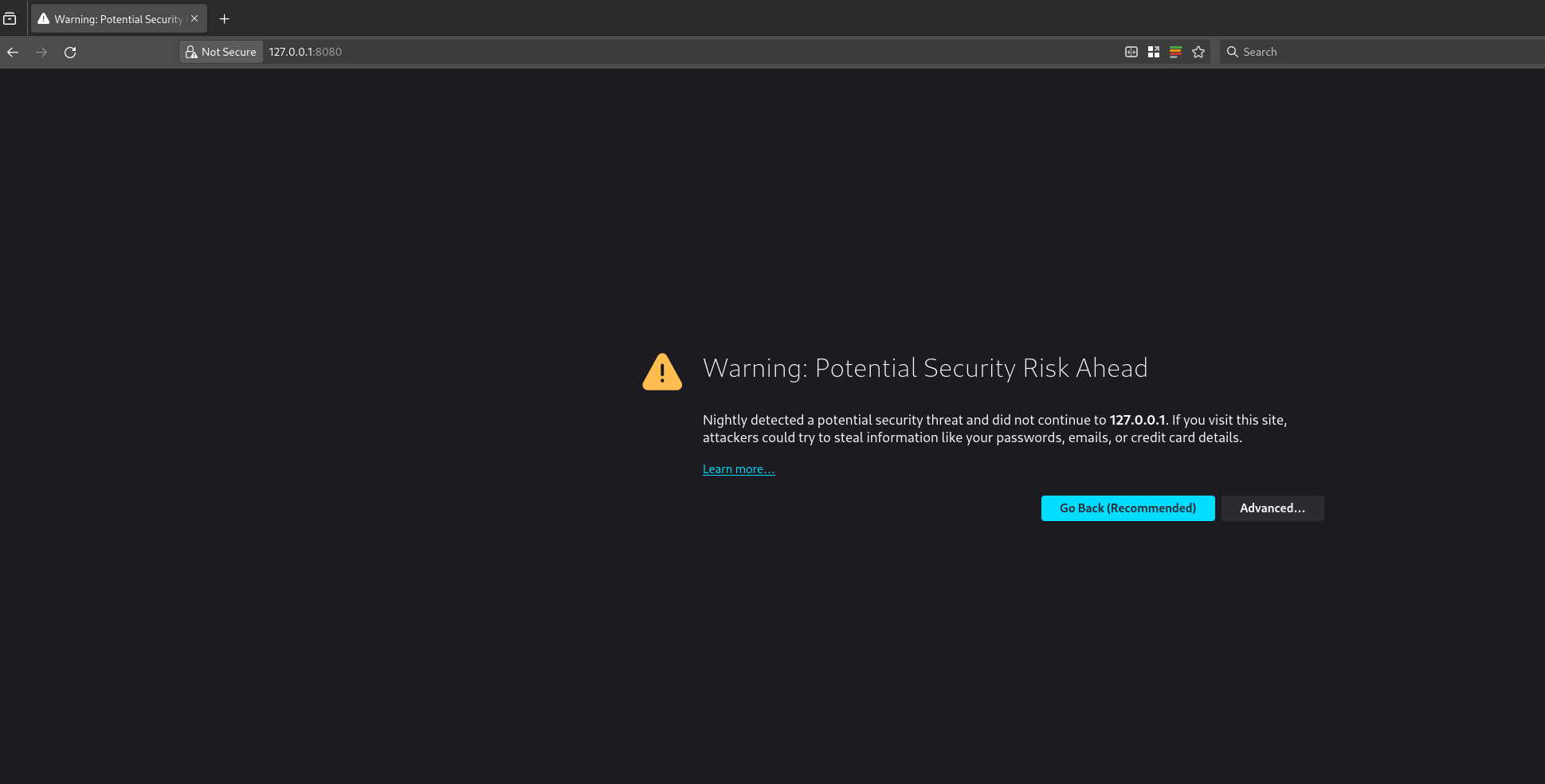
you can bind the 8080 port of your server to the 8080 of your localhost using Unix socket forwarding over SSH.The port forwarding only last for the duration of your SSH session, if the SSH session breaks, your port forwarding will to. So, once you have the port forwarded, you can open the nextcloud AIO instance in your web browser at 127.0.0.1:8080
Nextcloud AIO install with docker-compose and nginx reverse proxy
you will get this error because you are trying to access a page on localhost over HTTPS. You can click on advanced and then continue to proceed to the next page. Your data is encrypted over SSH for this session as we are binding the port over SSH. Depending on your choice of browser, the above page might look different.once you have proceeded, the nextcloud AIO interface will open and will look something like this.
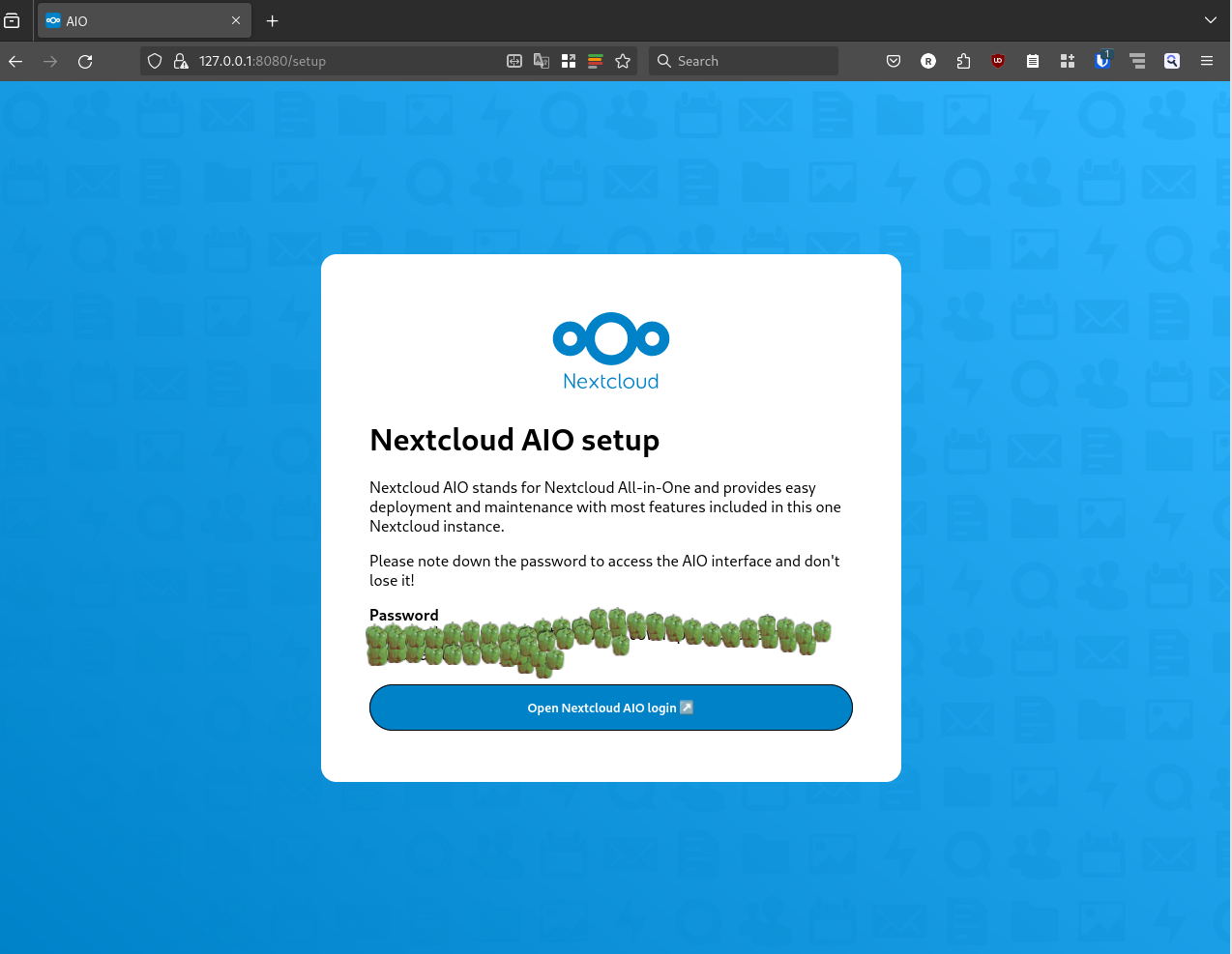
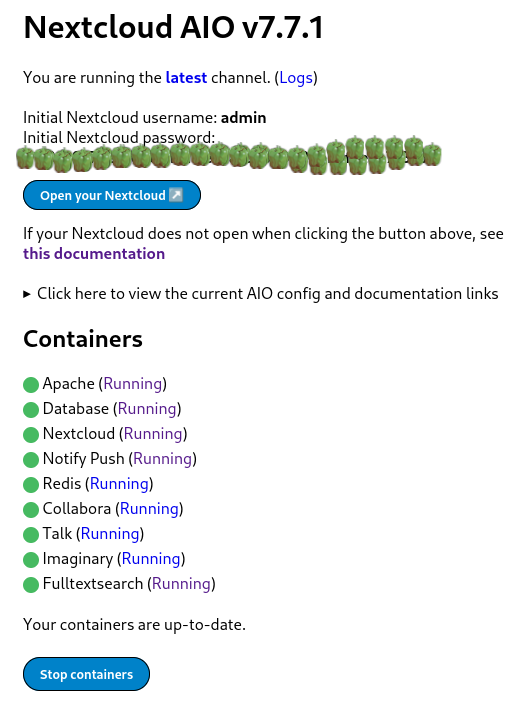
Nextcloud AIO install with docker-compose and nginx reverse proxynextcloud AIO initial screen with capsicums as password
It will show an auto generated passphrase, you need to save this passphrase and make sure to not loose it. For the purposes of security, I have masked the passwords with capsicums. once you have noted down your password, you can proceed to the Nextcloud AIO login, enter your password and then login. After login you will be greeted with a screen like this.
Nextcloud AIO install with docker-compose and nginx reverse proxy
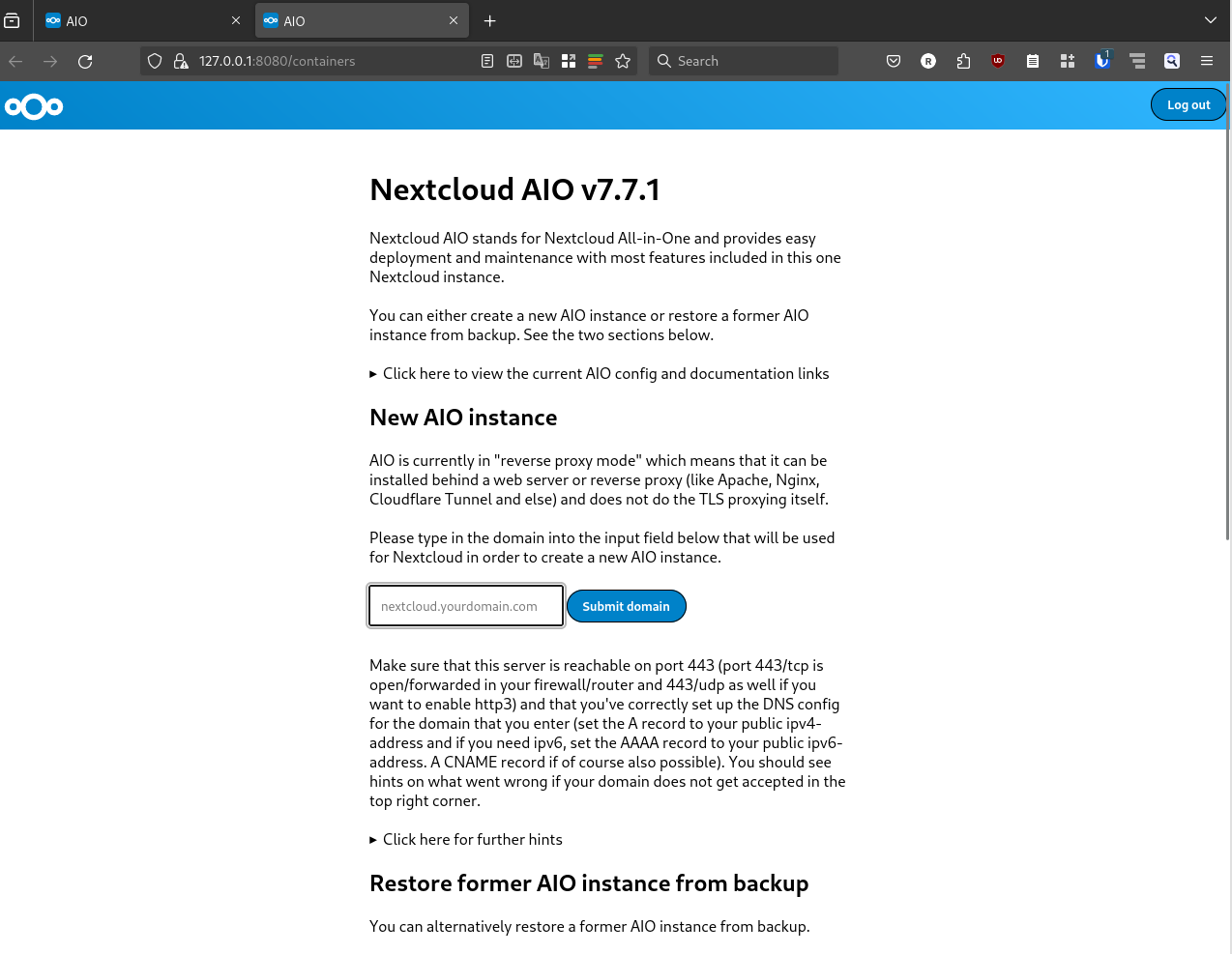
now you can put the domain that you want to use in the Submit domain field. Once the domain check is done, you will proceed to the next step and see another screen like this
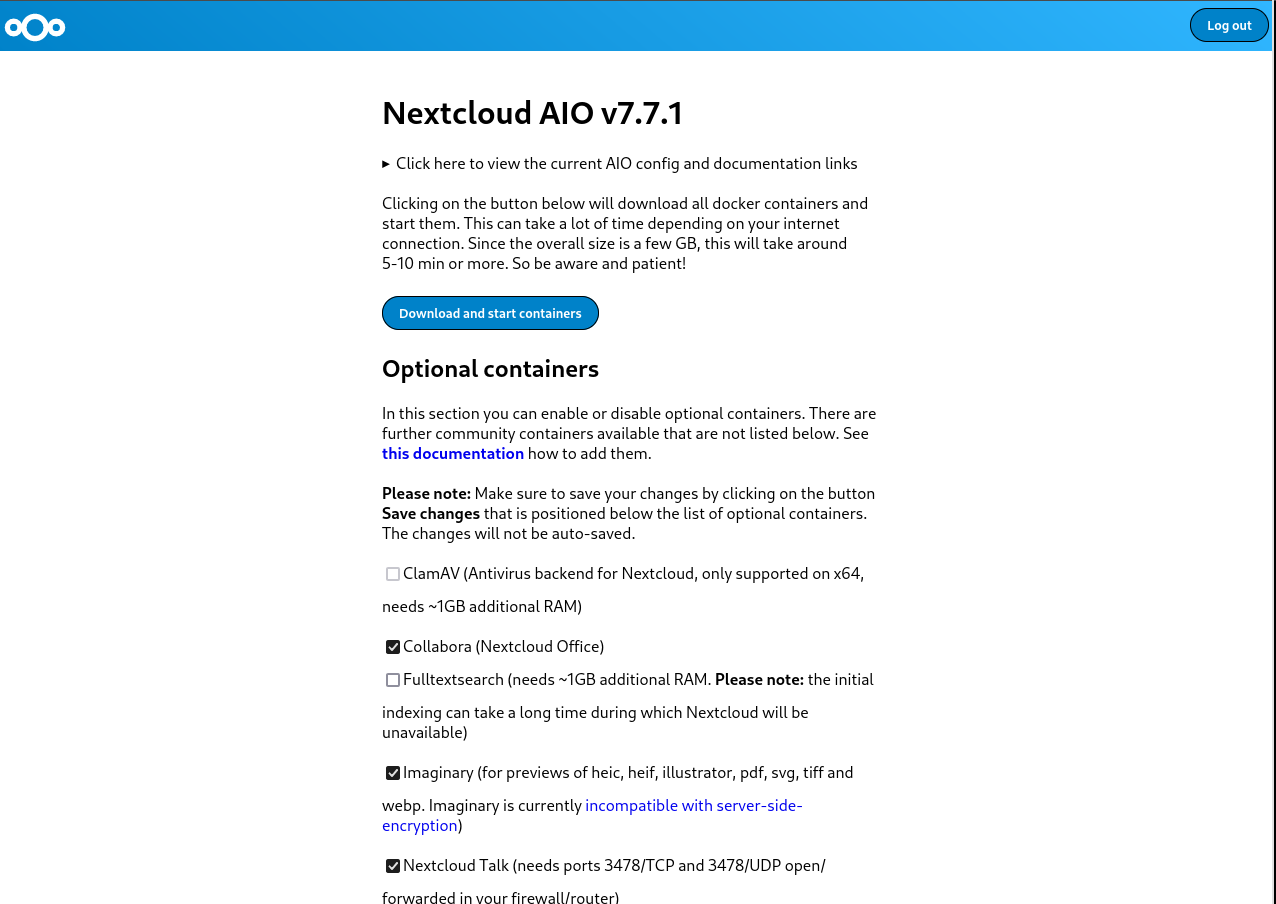
Nextcloud AIO install with docker-compose and nginx reverse proxy
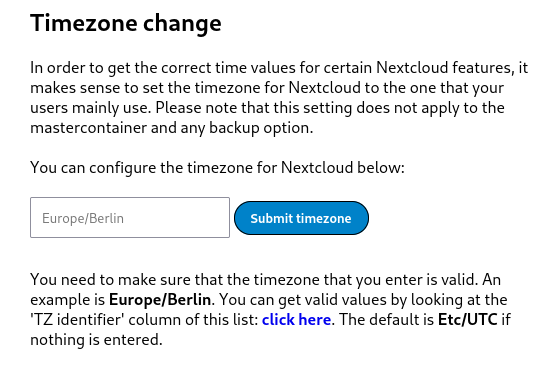
here you can select any optional containers for the features that you might want. IMPORTANT: Please make sure to also change the time zone at the bottom of the page according to the time zone you wish to operate in.
Nextcloud AIO install with docker-compose and nginx reverse proxy
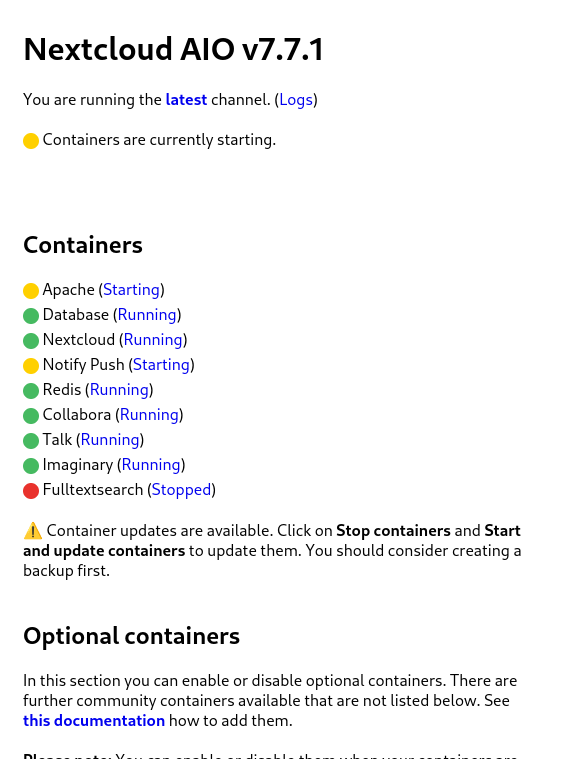
The timezone setup is also important because the data base will get initialized according to the set time zone. This could result in wrong initialization of database and you ending up in a startup loop for nextcloud. I faced this issue and could only resolve it after getting help from sahilister . Once you are done changing the timezone, and selecting any additional features you want, you can click on Download and start the containersIt will take some time for this process to finish, take a break and look at the farthest object in your room and take a sip of water. Once you are done, and the process has finished you will see a page similar to the following one.
Nextcloud AIO install with docker-compose and nginx reverse proxy
wait patiently for everything to turn green.
Nextcloud AIO install with docker-compose and nginx reverse proxy
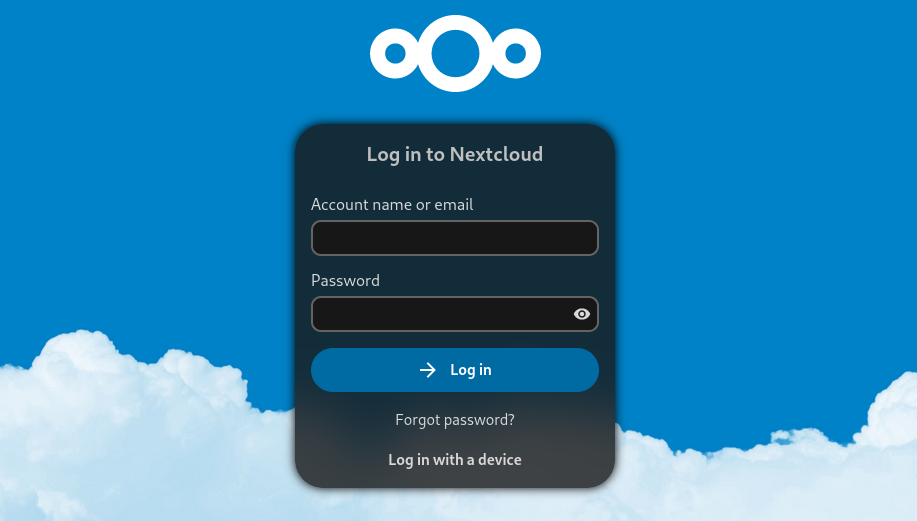
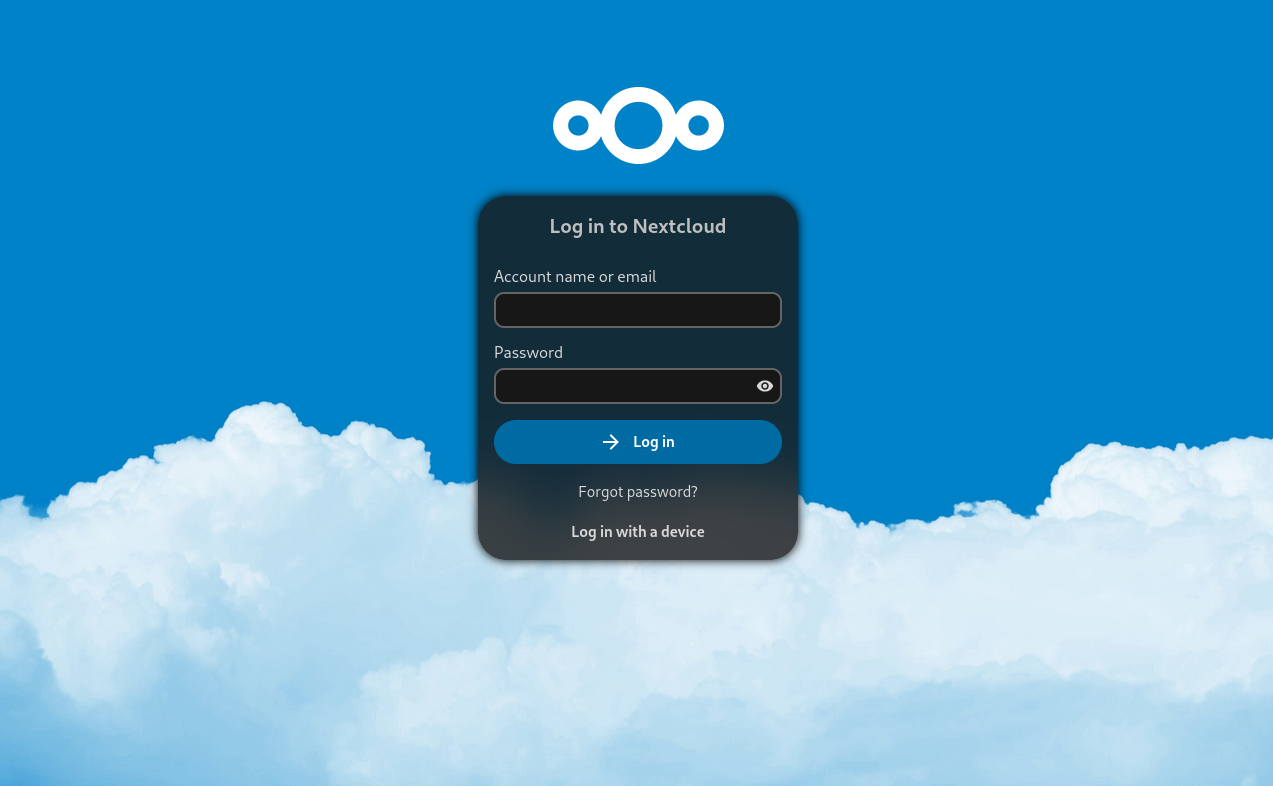
once all the containers have started properly, you can open the nextcloud login interface on your configured domain, the initial login details are auto generated as you can see from the above screenshot. Again you will see a password that you need to note down or save to enter the nextcloud interface. Capsicums will not work as passwords. I have masked the auto generated passwords using capsicums.Now you can click on Open your Nextcloud button or go to your configured domain to access the login screen.
Nextcloud AIO install with docker-compose and nginx reverse proxy
You can use the login details from the previous step to login to the administrator account of your Nextcloud instance. There you have it, your very own cloud!

Additional Notes:

How to properly reset Nextcloud setup?While following the above steps, or while following steps from some other tutorial, you may have made a mistake, and want to start everything again from scratch. The instructions for it are present in the Nextcloud documentation here . Here is the TLDR for a docker-compose setup. These steps will delete all data, do not use these steps on an existing nextcloud setup unless you know what you are doing.
  • Stop your master container.
docker-compose -f compose.yml down -v
The above command will also remove the volume associated with the master container
  • Stop all the child containers that has been started by the master container.
docker stop nextcloud-aio-apache nextcloud-aio-notify-push nextcloud-aio-nextcloud nextcloud-aio-imaginary nextcloud-aio-fulltextsearch nextcloud-aio-redis nextcloud-aio-database nextcloud-aio-talk nextcloud-aio-collabora
  • Remove all the child containers that has been started by the master container
docker rm nextcloud-aio-apache nextcloud-aio-notify-push nextcloud-aio-nextcloud nextcloud-aio-imaginary nextcloud-aio-fulltextsearch nextcloud-aio-redis nextcloud-aio-database nextcloud-aio-talk nextcloud-aio-collabora
  • If you also wish to remove all images associated with nextcloud you can do it with
docker rmi $(docker images --filter "reference=nextcloud/*" -q)
  • remove all volumes associated with child containers
docker volume rm <volume-name>
  • remove the network associated with nextcloud
docker network rm nextcloud-aio

Additional references.
  1. Nextcloud Github
  2. Nextcloud reverse proxy documentation
  3. Nextcloud Administration Guide
  4. Nextcloud User Manual
  5. Nextcloud Developer&aposs manual

11 December 2023

Jonathan Dowland: Tex Shura

So yeah, I bought the Shura.
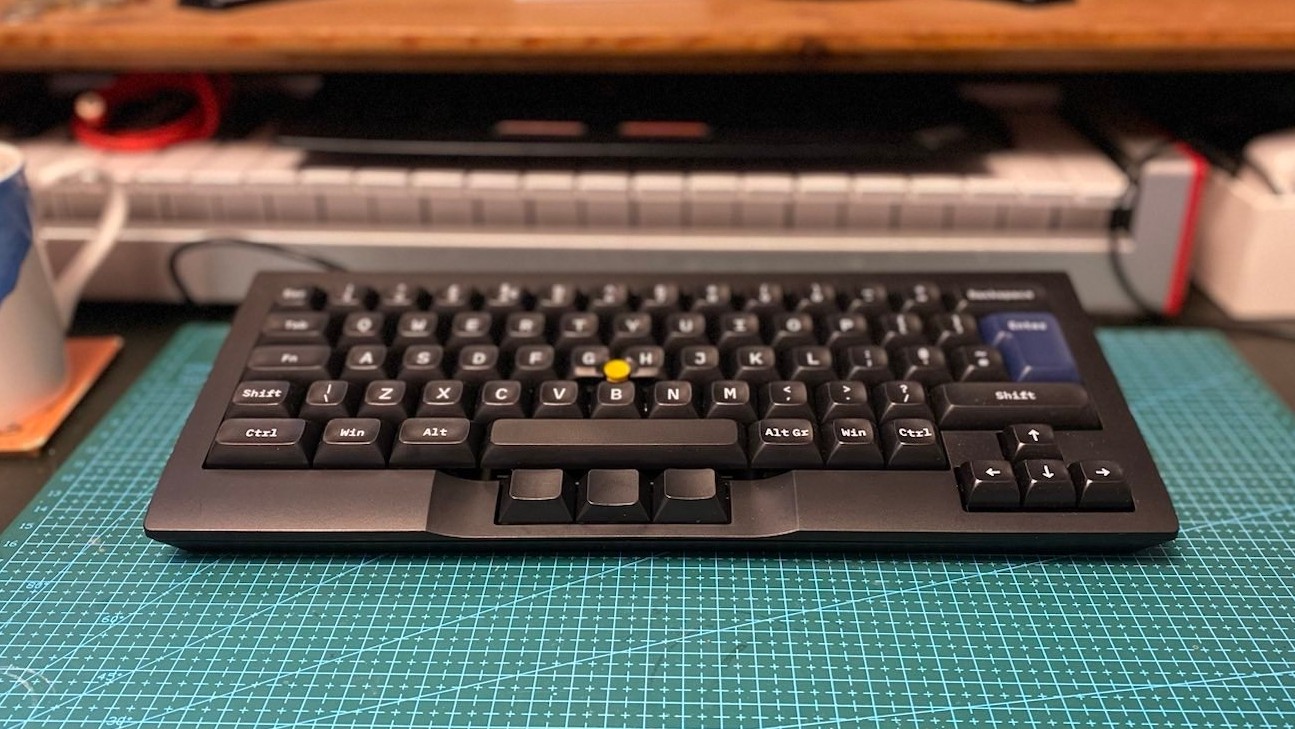
Tex Shura keyboard, ISO-UK layout
It's been about a year since I got the Tex Shinobi keyboard. I ended up taking to the office and using it there. The MX Silent Red switches are a good fit for a shared space, and I have a bit more desk space so the extra large footprint is not a problem. Back at home, I have a reasonably large desk, but I've got a Synth jammed at the back-centre, leaving a slightly tight budget for keyboard depth. The Shura is nice and compact and fits in perfectly. So what should I say about it? Build quality is excellent. I went with MX Reds (non-silent this time) which feel a lot better to me than the silent variant. I do worry about waking the kids up if I type after they've gone to bed, but it hasn't actually been a problem (and the switches activate quite early in travel so you can "tip-toe" type silently, and slowly). I like these keyboards (and I've otherwise avoided the Mech keyboard money pit) because they have the integrated trackpoint, which I rely on. Just as with the Shinobi, the Trackpoint is of an excellent quality, pretty much indistinguishable from that on the official Lenovo trackpoint keyboards. Since the Shura is a a "60%" or "65%" or "70%" or something, thus forgoing the Function keys and such, I rely on "layers": switching the function of all the regular keys whilst "Fn" is pressed. You can reprogram the Tex keyboards using a profile output by their web-based configurator which I've used to mildly customize the layout: swapped left-hand "Win" with "Fn" (FN1), mapped FN1 to the right-hand "Win". That's it so far, the defaults are otherwise sufficient for me. I've also used the DIP switches to enable mouse wheel emulation with the trackpoint (in common with the Lenovos). In September, Justin from TeX left an intriguing comment on my last blog post:
Thanks for your promotion !! We will try to design a new keyboard ( a little ergo keyboard ) should be release end of this year !!

10 December 2023

Scarlett Gately Moore: KDE: KDE Snaps 23.08.4, PIM! KDE neon, Debian

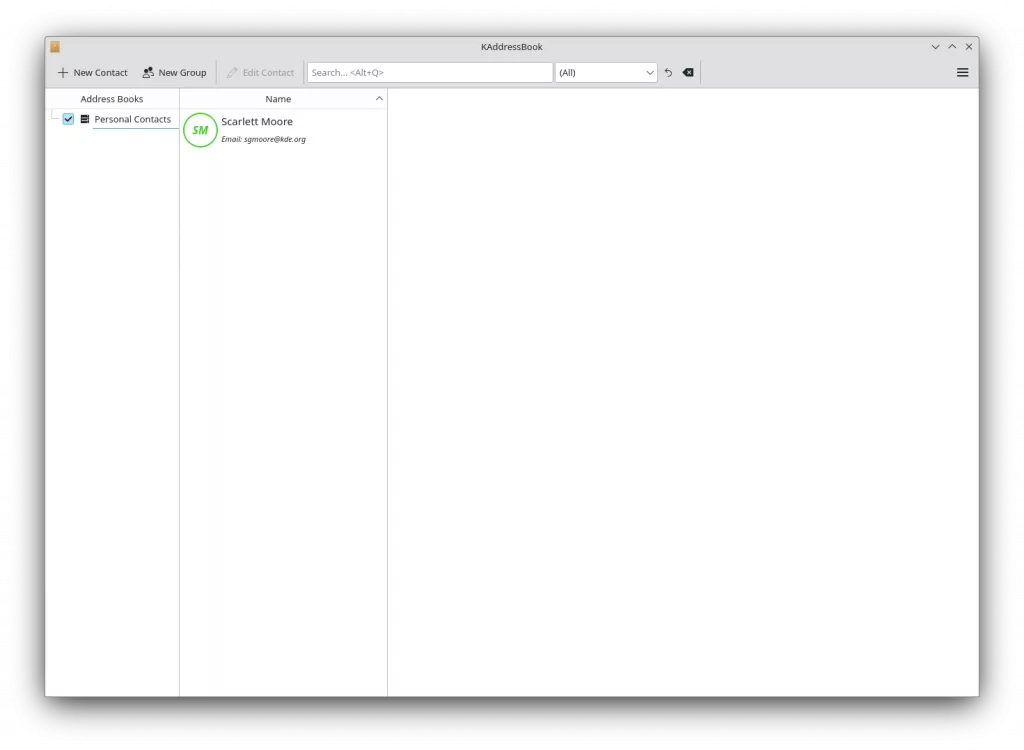
KDE PIM Kaddressbook snapKDE PIM Kaddressbook snap
KDE Snaps: This weeks big accomplishment is KDE PIM snaps! I have successfully added akonadi as a service via an akonadi content snap and running it as a service. Kaddressbook is our first PIM snap with this setup and it works flawlessly! It is available in the snap store. I have a pile of MRs awaiting approvals, so keep your eye out for the rest of PIM in the next day. KDE Applications 23.08.4 has been released and available in the snap store. Krita 5.2.2 has been released. I have created a new kde-qt6 snap as the qt-framework snap has not been updated and the maintainer is unreachable. It is in edge and I will be rebuilding our kf6 snap with this one. I am debugging an issue with the latest Labplot release. KDE neon: This week I helped with frameworks release 5.113 and KDE applications 23.08.4. I also worked on the ongoing Unstable turning red into green builds as the porting to qt6 continues. Debian: With my on going learning packaging for all the programming languages, Rust packaging: I started on Rustic https://github.com/rustic-rs/rustic unfortunately, it was a bit of wasted time as it depends on a feature of tracing-subcriber that depends on matchers which has a grave bug, so it remains disabled. Personal: I do have an interview tomorrow! And it looks like the project may go through after the new year. So things are looking up, unfortunately I must still ask, if you have any spare change please consider a donation. The phone company decided to take an extra $200.00 I didn t have to spare and while I resolved it, they refused a refund, but gave me a credit to next months bill, which doesn t help me now. Thank you for your consideration. https://gofund.me/b74e4c6f

Freexian Collaborators: Debian Contributions: Python 3.12 preparations, debian-printing, merged-/usr tranisition updates, and more! (by Utkarsh Gupta)

Contributing to Debian is part of Freexian s mission. This article covers the latest achievements of Freexian and their collaborators. All of this is made possible by organizations subscribing to our Long Term Support contracts and consulting services.

Preparing for Python 3.12 by Stefano Rivera Stefano uploaded a few packages in preparation for Python 3.12, including pycxx and cython. Cython has a major new version (Cython 3), adding support for 3.12, but also bringing changes that many packages in Debian aren t ready to build with, yet. Stefano uploaded it to Debian experimental and did an archive rebuild of affected packages, and some analysis of the result. Matthias Klose has since filed bugs for all of these issues.

debian-printing, by Thorsten Alteholz This month Thorsten invested some of the previously obtained money to build his own printlab. At the moment it only consists of a dedicated computer with an USB printer attached. Due to its 64GB RAM and an SSD, building of debian-printing packages is much faster now. Over time other printers will be added and understanding bugs should be a lot easier now. Also Thorsten again adopted two packages, namely mink and ink, and moved them to the debian-printing team.

Merged-/usr transition by Helmut Grohne, et al The dumat analysis tool has been improved in quite some aspects. Beyond fixing false negative diagnostics, it now recognizes protective diversions used for mitigating Multi-Arch: same file loss. It was found that the proposed mitigation for ineffective diversions does not work as expected. Trying to fix it up resulted in more problems, some of which remain unsolved as of this writing. Initial work on moving shared libraries in the essential set has been done. Meanwhile, the wider Debian community worked on fixing all known Multi-Arch: same file loss scenarios. This work is now being driven by Christian Hofstaedler and during the Mini DebConf in Cambridge, Chris Boot, tienne Mollier, Miguel Landaeta, Samuel Henrique, and Utkarsh Gupta sent the other half of the necessary patches.

Miscellaneous contributions
  • Stefano merged patches to support loong64 and hurd-amd64 in re2.
  • For the Cambridge mini-conf, Stefano added a web player to the DebConf video streaming frontend, as the Cambridge miniconf didn t have its own website to host the player.
  • Rapha l helped the upstream developers of hamster-time-tracker to prepare a new upstream release (the first in multiple years) and packaged that new release in Debian unstable.
  • Enrico joined Hemut in brainstorming some /usr-merge solutions.
  • Thorsten took care of RM-bugs to remove no longer needed packages from the Debian archive and closed about 50 of them.
  • Helmut ported the feature of mounting a fuse connection via /dev/fd/N from fuse3 to fuse2.
  • Helmut sent a number of patches simplifying unprivileged use of piuparts.
  • Roberto worked with Helmut to prepare the Shorewall package for the ongoing /usr-move transition.
  • Utkarsh also helped with the ongoing /usr-merge work by preparing patches for gitlab, libnfc, and net-tools.
  • Utkarsh, along with Helmut, brainstormed on fixing #961138, as this affects the whole archive and all the suites and not just R packages. Utkarsh intends to follow up on the bug in December.
  • Santiago organized a MiniDebConf in Uruguay. In total, nine people attended, including most of DDs in the surrounding area. Here s a nicely written blog by Gunnar Wolf.
  • Santiago also worked on some issues on Salsa CI, fixed with some merge requests: #462, #463, and #466.

9 December 2023

Simon Josefsson: Classic McEliece goes to IETF and OpenSSH

My earlier work on Streamlined NTRU Prime has been progressing along. The IETF document on sntrup761 in SSH has passed several process points. GnuPG s libgcrypt has added support for sntrup761. The libssh support for sntrup761 is working, but the merge request is stuck mostly due to lack of time to debug why the regression test suite sporadically errors out in non-sntrup761 related parts with the patch. The foundation for lattice-based post-quantum algorithms has some uncertainty around it, and I have felt that there is more to the post-quantum story than adding sntrup761 to implementations. Classic McEliece has been mentioned to me a couple of times, and I took some time to learn it and did a cut n paste job of the proposed ISO standard and published draft-josefsson-mceliece in the IETF to make the algorithm easily available to the IETF community. A high-quality implementation of Classic McEliece has been published as libmceliece and I ve been supporting the work of Jan Moj to package libmceliece for Debian, alas it has been stuck in the ftp-master NEW queue for manual review for over two months. The pre-dependencies librandombytes and libcpucycles are available in Debian already. All that text writing and packaging work set the scene to write some code. When I added support for sntrup761 in libssh, I became familiar with the OpenSSH code base, so it was natural to return to OpenSSH to experiment with a new SSH KEX for Classic McEliece. DJB suggested to pick mceliece6688128 and combine it with the existing X25519+sntrup761 or with plain X25519. While a three-algorithm hybrid between X25519, sntrup761 and mceliece6688128 would be a simple drop-in for those that don t want to lose the benefits offered by sntrup761, I decided to start the journey on a pure combination of X25519 with mceliece6688128. The key combiner in sntrup761x25519 is a simple SHA512 call and the only good I can say about that is that it is simple to describe and implement, and doesn t raise too many questions since it is already deployed. After procrastinating coding for months, once I sat down to work it only took a couple of hours until I had a successful Classic McEliece SSH connection. I suppose my brain had sorted everything in background before I started. To reproduce it, please try the following in a Debian testing environment (I use podman to get a clean environment).
# podman run -it --rm debian:testing-slim
apt update
apt dist-upgrade -y
apt install -y wget python3 librandombytes-dev libcpucycles-dev gcc make git autoconf libz-dev libssl-dev
cd ~
wget -q -O- https://lib.mceliece.org/libmceliece-20230612.tar.gz   tar xfz -
cd libmceliece-20230612/
./configure
make install
ldconfig
cd ..
git clone https://gitlab.com/jas/openssh-portable
cd openssh-portable
git checkout jas/mceliece
autoreconf
./configure # verify 'libmceliece support: yes'
make # CC="cc -DDEBUG_KEX=1 -DDEBUG_KEXDH=1 -DDEBUG_KEXECDH=1"
You should now have a working SSH client and server that supports Classic McEliece! Verify support by running ./ssh -Q kex and it should mention mceliece6688128x25519-sha512@openssh.com. To have it print plenty of debug outputs, you may remove the # character on the final line, but don t use such a build in production. You can test it as follows:
./ssh-keygen -A # writes to /usr/local/etc/ssh_host_...
# setup public-key based login by running the following:
./ssh-keygen -t rsa -f ~/.ssh/id_rsa -P ""
cat ~/.ssh/id_rsa.pub > ~/.ssh/authorized_keys
adduser --system sshd
mkdir /var/empty
while true; do $PWD/sshd -p 2222 -f /dev/null; done &
./ssh -v -p 2222 localhost -oKexAlgorithms=mceliece6688128x25519-sha512@openssh.com date
On the client you should see output like this:
OpenSSH_9.5p1, OpenSSL 3.0.11 19 Sep 2023
...
debug1: SSH2_MSG_KEXINIT sent
debug1: SSH2_MSG_KEXINIT received
debug1: kex: algorithm: mceliece6688128x25519-sha512@openssh.com
debug1: kex: host key algorithm: ssh-ed25519
debug1: kex: server->client cipher: chacha20-poly1305@openssh.com MAC: <implicit> compression: none
debug1: kex: client->server cipher: chacha20-poly1305@openssh.com MAC: <implicit> compression: none
debug1: expecting SSH2_MSG_KEX_ECDH_REPLY
debug1: SSH2_MSG_KEX_ECDH_REPLY received
debug1: Server host key: ssh-ed25519 SHA256:YognhWY7+399J+/V8eAQWmM3UFDLT0dkmoj3pIJ0zXs
...
debug1: Host '[localhost]:2222' is known and matches the ED25519 host key.
debug1: Found key in /root/.ssh/known_hosts:1
debug1: rekey out after 134217728 blocks
debug1: SSH2_MSG_NEWKEYS sent
debug1: expecting SSH2_MSG_NEWKEYS
debug1: SSH2_MSG_NEWKEYS received
debug1: rekey in after 134217728 blocks
...
debug1: Sending command: date
debug1: pledge: fork
debug1: permanently_set_uid: 0/0
Environment:
  USER=root
  LOGNAME=root
  HOME=/root
  PATH=/usr/bin:/bin:/usr/sbin:/sbin:/usr/local/bin
  MAIL=/var/mail/root
  SHELL=/bin/bash
  SSH_CLIENT=::1 46894 2222
  SSH_CONNECTION=::1 46894 ::1 2222
debug1: client_input_channel_req: channel 0 rtype exit-status reply 0
debug1: client_input_channel_req: channel 0 rtype eow@openssh.com reply 0
Sat Dec  9 22:22:40 UTC 2023
debug1: channel 0: free: client-session, nchannels 1
Transferred: sent 1048044, received 3500 bytes, in 0.0 seconds
Bytes per second: sent 23388935.4, received 78108.6
debug1: Exit status 0
Notice the kex: algorithm: mceliece6688128x25519-sha512@openssh.com output. How about network bandwidth usage? Below is a comparison of a complete SSH client connection such as the one above that log in and print date and logs out. Plain X25519 is around 7kb, X25519 with sntrup761 is around 9kb, and mceliece6688128 with X25519 is around 1MB. Yes, Classic McEliece has large keys, but for many environments, 1MB of data for the session establishment will barely be noticeable.
./ssh -v -p 2222 localhost -oKexAlgorithms=curve25519-sha256 date 2>&1   grep ^Transferred
Transferred: sent 3028, received 3612 bytes, in 0.0 seconds
./ssh -v -p 2222 localhost -oKexAlgorithms=sntrup761x25519-sha512@openssh.com date 2>&1   grep ^Transferred
Transferred: sent 4212, received 4596 bytes, in 0.0 seconds
./ssh -v -p 2222 localhost -oKexAlgorithms=mceliece6688128x25519-sha512@openssh.com date 2>&1   grep ^Transferred
Transferred: sent 1048044, received 3764 bytes, in 0.0 seconds
So how about session establishment time?
date; i=0; while test $i -le 100; do ./ssh -v -p 2222 localhost -oKexAlgorithms=curve25519-sha256 date > /dev/null 2>&1; i= expr $i + 1 ; done; date
Sat Dec  9 22:39:19 UTC 2023
Sat Dec  9 22:39:25 UTC 2023
# 6 seconds
date; i=0; while test $i -le 100; do ./ssh -v -p 2222 localhost -oKexAlgorithms=sntrup761x25519-sha512@openssh.com date > /dev/null 2>&1; i= expr $i + 1 ; done; date
Sat Dec  9 22:39:29 UTC 2023
Sat Dec  9 22:39:38 UTC 2023
# 9 seconds
date; i=0; while test $i -le 100; do ./ssh -v -p 2222 localhost -oKexAlgorithms=mceliece6688128x25519-sha512@openssh.com date > /dev/null 2>&1; i= expr $i + 1 ; done; date
Sat Dec  9 22:39:55 UTC 2023
Sat Dec  9 22:40:07 UTC 2023
# 12 seconds
I never noticed adding sntrup761, so I m pretty sure I wouldn t notice this increase either. This is all running on my laptop that runs Trisquel so take it with a grain of salt but at least the magnitude is clear. Future work items include: Happy post-quantum SSH ing! Update: Changing the mceliece6688128_keypair call to mceliece6688128f_keypair (i.e., using the fully compatible f-variant) results in McEliece being just as fast as sntrup761 on my machine. Update 2023-12-26: An initial IETF document draft-josefsson-ssh-mceliece-00 published.

6 December 2023

Reproducible Builds: Reproducible Builds in November 2023

Welcome to the November 2023 report from the Reproducible Builds project! In these reports we outline the most important things that we have been up to over the past month. As a rather rapid recap, whilst anyone may inspect the source code of free software for malicious flaws, almost all software is distributed to end users as pre-compiled binaries (more).

Reproducible Builds Summit 2023 Between October 31st and November 2nd, we held our seventh Reproducible Builds Summit in Hamburg, Germany! Amazingly, the agenda and all notes from all sessions are all online many thanks to everyone who wrote notes from the sessions. As a followup on one idea, started at the summit, Alexander Couzens and Holger Levsen started work on a cache (or tailored front-end) for the snapshot.debian.org service. The general idea is that, when rebuilding Debian, you do not actually need the whole ~140TB of data from snapshot.debian.org; rather, only a very small subset of the packages are ever used for for building. It turns out, for amd64, arm64, armhf, i386, ppc64el, riscv64 and s390 for Debian trixie, unstable and experimental, this is only around 500GB ie. less than 1%. Although the new service not yet ready for usage, it has already provided a promising outlook in this regard. More information is available on https://rebuilder-snapshot.debian.net and we hope that this service becomes usable in the coming weeks. The adjacent picture shows a sticky note authored by Jan-Benedict Glaw at the summit in Hamburg, confirming Holger Levsen s theory that rebuilding all Debian packages needs a very small subset of packages, the text states that 69,200 packages (in Debian sid) list 24,850 packages in their .buildinfo files, in 8,0200 variations. This little piece of paper was the beginning of rebuilder-snapshot and is a direct outcome of the summit! The Reproducible Builds team would like to thank our event sponsors who include Mullvad VPN, openSUSE, Debian, Software Freedom Conservancy, Allotropia and Aspiration Tech.

Beyond Trusting FOSS presentation at SeaGL On November 4th, Vagrant Cascadian presented Beyond Trusting FOSS at SeaGL in Seattle, WA in the United States. Founded in 2013, SeaGL is a free, grassroots technical summit dedicated to spreading awareness and knowledge about free source software, hardware and culture. The summary of Vagrant s talk mentions that it will:
[ ] introduce the concepts of Reproducible Builds, including best practices for developing and releasing software, the tools available to help diagnose issues, and touch on progress towards solving decades-old deeply pervasive fundamental security issues Learn how to verify and demonstrate trust, rather than simply hoping everything is OK!
Germane to the contents of the talk, the slides for Vagrant s talk can be built reproducibly, resulting in a PDF with a SHA1 of cfde2f8a0b7e6ec9b85377eeac0661d728b70f34 when built on Debian bookworm and c21fab273232c550ce822c4b0d9988e6c49aa2c3 on Debian sid at the time of writing.

Human Factors in Software Supply Chain Security Marcel Fourn , Dominik Wermke, Sascha Fahl and Yasemin Acar have published an article in a Special Issue of the IEEE s Security & Privacy magazine. Entitled A Viewpoint on Human Factors in Software Supply Chain Security: A Research Agenda, the paper justifies the need for reproducible builds to reach developers and end-users specifically, and furthermore points out some under-researched topics that we have seen mentioned in interviews. An author pre-print of the article is available in PDF form.

Community updates On our mailing list this month:

openSUSE updates Bernhard M. Wiedemann has created a wiki page outlining an proposal to create a general-purpose Linux distribution which consists of 100% bit-reproducible packages albeit minus the embedded signature within RPM files. It would be based on openSUSE Tumbleweed or, if available, its Slowroll-variant. In addition, Bernhard posted another monthly update for his work elsewhere in openSUSE.

Ubuntu Launchpad now supports .buildinfo files Back in 2017, Steve Langasek filed a bug against Ubuntu s Launchpad code hosting platform to report that .changes files (artifacts of building Ubuntu and Debian packages) reference .buildinfo files that aren t actually exposed by Launchpad itself. This was causing issues when attempting to process .changes files with tools such as Lintian. However, it was noticed last month that, in early August of this year, Simon Quigley had resolved this issue, and .buildinfo files are now available from the Launchpad system.

PHP reproducibility updates There have been two updates from the PHP programming language this month. Firstly, the widely-deployed PHPUnit framework for the PHP programming language have recently released version 10.5.0, which introduces the inclusion of a composer.lock file, ensuring total reproducibility of the shipped binary file. Further details and the discussion that went into their particular implementation can be found on the associated GitHub pull request. In addition, the presentation Leveraging Nix in the PHP ecosystem has been given in late October at the PHP International Conference in Munich by Pol Dellaiera. While the video replay is not yet available, the (reproducible) presentation slides and speaker notes are available.

diffoscope changes diffoscope is our in-depth and content-aware diff utility that can locate and diagnose reproducibility issues. This month, Chris Lamb made a number of changes, including:
  • Improving DOS/MBR extraction by adding support for 7z. [ ]
  • Adding a missing RequiredToolNotFound import. [ ]
  • As a UI/UX improvement, try and avoid printing an extended traceback if diffoscope runs out of memory. [ ]
  • Mark diffoscope as stable on PyPI.org. [ ]
  • Uploading version 252 to Debian unstable. [ ]

Website updates A huge number of notes were added to our website that were taken at our recent Reproducible Builds Summit held between October 31st and November 2nd in Hamburg, Germany. In particular, a big thanks to Arnout Engelen, Bernhard M. Wiedemann, Daan De Meyer, Evangelos Ribeiro Tzaras, Holger Levsen and Orhun Parmaks z. In addition to this, a number of other changes were made, including:

Upstream patches The Reproducible Builds project detects, dissects and attempts to fix as many currently-unreproducible packages as possible. We endeavour to send all of our patches upstream where appropriate. This month, we wrote a large number of such patches, including:

Reproducibility testing framework The Reproducible Builds project operates a comprehensive testing framework (available at tests.reproducible-builds.org) in order to check packages and other artifacts for reproducibility. In October, a number of changes were made by Holger Levsen:
  • Debian-related changes:
    • Track packages marked as Priority: important in a new package set. [ ][ ]
    • Stop scheduling packages that fail to build from source in bookworm [ ] and bullseye. [ ].
    • Add old releases dashboard link in web navigation. [ ]
    • Permit re-run of the pool_buildinfos script to be re-run for a specific year. [ ]
    • Grant jbglaw access to the osuosl4 node [ ][ ] along with lynxis [ ].
    • Increase RAM on the amd64 Ionos builders from 48 GiB to 64 GiB; thanks IONOS! [ ]
    • Move buster to archived suites. [ ][ ]
    • Reduce the number of arm64 architecture workers from 24 to 16 in order to improve stability [ ], reduce the workers for amd64 from 32 to 28 and, for i386, reduce from 12 down to 8 [ ].
    • Show the entire build history of each Debian package. [ ]
    • Stop scheduling already tested package/version combinations in Debian bookworm. [ ]
  • Snapshot service for rebuilders
    • Add an HTTP-based API endpoint. [ ][ ]
    • Add a Gunicorn instance to serve the HTTP API. [ ]
    • Add an NGINX config [ ][ ][ ][ ]
  • System-health:
    • Detect failures due to HTTP 503 Service Unavailable errors. [ ]
    • Detect failures to update package sets. [ ]
    • Detect unmet dependencies. (This usually occurs with builds of Debian live-build.) [ ]
  • Misc-related changes:
    • do install systemd-ommd on jenkins. [ ]
    • fix harmless typo in squid.conf for codethink04. [ ]
    • fixup: reproducible Debian: add gunicorn service to serve /api for rebuilder-snapshot.d.o. [ ]
    • Increase codethink04 s Squid cache_dir size setting to 16 GiB. [ ]
    • Don t install systemd-oomd as it unfortunately kills sshd [ ]
    • Use debootstrap from backports when commisioning nodes. [ ]
    • Add the live_build_debian_stretch_gnome, debsums-tests_buster and debsums-tests_buster jobs to the zombie list. [ ][ ]
    • Run jekyll build with the --watch argument when building the Reproducible Builds website. [ ]
    • Misc node maintenance. [ ][ ][ ]
Other changes were made as well, however, including Mattia Rizzolo fixing rc.local s Bash syntax so it can actually run [ ], commenting away some file cleanup code that is (potentially) deleting too much [ ] and fixing the html_brekages page for Debian package builds [ ]. Finally, diagnosed and submitted a patch to add a AddEncoding gzip .gz line to the tests.reproducible-builds.org Apache configuration so that Gzip files aren t re-compressed as Gzip which some clients can t deal with (as well as being a waste of time). [ ]

If you are interested in contributing to the Reproducible Builds project, please visit our Contribute page on our website. However, you can get in touch with us via:

5 December 2023

Matthew Garrett: Why does Gnome fingerprint unlock not unlock the keyring?

There's a decent number of laptops with fingerprint readers that are supported by Linux, and Gnome has some nice integration to make use of that for authentication purposes. But if you log in with a fingerprint, the moment you start any app that wants to access stored passwords you'll get a prompt asking you to type in your password, which feels like it somewhat defeats the point. Mac users don't have this problem - authenticate with TouchID and all your passwords are available after login. Why the difference?


Fingerprint detection can be done in two primary ways. The first is that a fingerprint reader is effectively just a scanner - it passes a graphical representation of the fingerprint back to the OS and the OS decides whether or not it matches an enrolled finger. The second is for the fingerprint reader to make that determination itself, either storing a set of trusted fingerprints in its own storage or supporting being passed a set of encrypted images to compare against. Fprint supports both of these, but note that in both cases all that we get at the end of the day is a statement of "The fingerprint matched" or "The fingerprint didn't match" - we can't associate anything else with that.

Apple's solution involves wiring the fingerprint reader to a secure enclave, an independently running security chip that can store encrypted secrets or keys and only release them under pre-defined circumstances. Rather than the fingerprint reader providing information directly to the OS, it provides it to the secure enclave. If the fingerprint matches, the secure enclave can then provide some otherwise secret material to the OS. Critically, if the fingerprint doesn't match, the enclave will never release this material.

And that's the difference. When you perform TouchID authentication, the secure enclave can decide to release a secret that can be used to decrypt your keyring. We can't easily do this under Linux because we don't have an interface to store those secrets. The secret material can't just be stored on disk - that would allow anyone who had access to the disk to use that material to decrypt the keyring and get access to the passwords, defeating the object. We can't use the TPM because there's no secure communications channel between the fingerprint reader and the TPM, so we can't configure the TPM to release secrets only if an associated fingerprint is provided.

So the simple answer is that fingerprint unlock doesn't unlock the keyring because there's currently no secure way to do that. It's not intransigence on the part of the developers or a conspiracy to make life more annoying. It'd be great to fix it, but I don't see an easy way to do so at the moment.

comment count unavailable comments

4 December 2023

Ian Jackson: Don t use apt-get source; use dgit

tl;dr: If you are a Debian user who knows git, don t work with Debian source packages. Don t use apt source, or dpkg-source. Instead, use dgit and work in git. Also, don t use: VCS links on official Debian web pages, debcheckout, or Debian s (semi-)official gitlab, Salsa. These are suitable for Debian experts only; for most people they can be beartraps. Instead, use dgit. > Struggling with Debian source packages? A friend of mine recently asked for help on IRC. They re an experienced Debian administrator and user, and were trying to: make a change to a Debian package; build and install and run binary packages from it; and record that change for their future self, and their colleagues. They ended up trying to comprehend quilt. quilt is an ancient utility for managing sets of source code patches, from well before the era of modern version control. It has many strange behaviours and footguns. Debian s ancient and obsolete tarballs-and-patches source package format (which I designed the initial version of in 1993) nowadays uses quilt, at least for most packages. You don t want to deal with any of this nonsense. You don t want to learn quilt, and suffer its misbehaviours. You don t want to learn about Debian source packages and wrestle dpkg-source. Happily, you don t need to. Just use dgit One of dgit s main objectives is to minimise the amount of Debian craziness you need to learn. dgit aims to empower you to make changes to the software you re running, conveniently and with a minimum of fuss. You can use dgit to get the source code to a Debian package, as a git tree, with dgit clone (and dgit fetch). The git tree can be made into a binary package directly. The only things you really need to know are:
  1. By default dgit fetches from Debian unstable, the main work-in-progress branch. You may want something like dgit clone PACKAGE bookworm,-security (yes, with a comma).
  2. You probably want to edit debian/changelog to make your packages have a different version number.
  3. To build binaries, run dpkg-buildpackage -uc -b.
  4. Debian package builds are often disastrously messsy: builds might modify source files; and the official debian/rules clean can be inadequate, or crazy. Always commit before building, and use git clean and git reset --hard instead of running clean rules from the package.
Don t try to make a Debian source package. (Don t read the dpkg-source manual!) Instead, to preserve and share your work, use the git branch. dgit pull or dgit fetch can be used to get updates. There is a more comprehensive tutorial, with example runes, in the dgit-user(7) manpage. (There is of course complete reference documentation, but you don t need to bother reading it.) Objections But I don t want to learn yet another tool One of dgit s main goals is to save people from learning things you don t need to. It aims to be straightforward, convenient, and (so far as Debian permits) unsurprising. So: don t learn dgit. Just run it and it will be fine :-). Shouldn t I be using official Debian git repos? Absolutely not. Unless you are a Debian expert, these can be terrible beartraps. One possible outcome is that you might build an apparently working program but without the security patches. Yikes! I discussed this in more detail in 2021 in another blog post plugging dgit. Gosh, is Debian really this bad? Yes. On behalf of the Debian Project, I apologise. Debian is a very conservative institution. Change usually comes very slowly. (And when rapid or radical change has been forced through, the results haven t always been pretty, either technically or socially.) Sadly this means that sometimes much needed change can take a very long time, if it happens at all. But this tendency also provides the stability and reliability that people have come to rely on Debian for. I m a Debian maintainer. You tell me dgit is something totally different! dgit is, in fact, a general bidirectional gateway between the Debian archive and git. So yes, dgit is also a tool for Debian uploaders. You should use it to do your uploads, whenever you can. It s more convenient and more reliable than git-buildpackage and dput runes, and produces better output for users. You too can start to forget how to deal with source packages! A full treatment of this is beyond the scope of this blog post.

comment count unavailable comments

3 December 2023

Ben Hutchings: FOSS activity in September 2023

Iustin Pop: Life, getting sick and unfit

Like clockwork, like every autumn, got sick again. Just a flu, actually probably two in a row. I don t really understand it - from January to September I m feeling really awesome, and I manage to do sports five days a week, or more. Then September comes, and things start degrading, and then October or November, I get sick and it takes me ~3 weeks to recover, during which I m not even managing reliably 5K steps a day (from walking), not even talking about running or swimming or biking. My Garmin statistics for November compared to October (which wasn t a good month either) are depressing. Let s not even bring up for example July I can see three potential pathways: Basically all three pathways are similar, just not sure what s the root cause (vs. a trigger). I just did a D test, and despite taking regularly supplements, it was below normal range. So clearly somewhere there, lack of vitamin D is a problem. I probably should do a yearly check-up at end of September? Sigh, I still haven t found the detailed user manual for Homo Sapiens. If anyone has it, specifically for version late 1900 s, I d be thankful. Till next time, hopefully by then things will get better.

1 December 2023

Scarlett Gately Moore: KDE neon and snaps, Debian Weekly report.

While the winter sets in, I have been mostly busy following up on job leads and applying to anything and everything. Something has to stick I am trying! Even out of industry. Debian: This weeks main focus was getting involved and familiar with Debian rust-packaging. It is really quite different from other teams! I was successful and the MR is https://salsa.debian.org/rust-team/debcargo-conf/-/merge_requests/566 if anyone on the rust team can take a gander, I will upload when merged. I will get a few more under my belt next week now that I understand the process. KDE neon: Unfortunately, I did not have much time for neon, but I did get some red builds fixed and started uploading the new signing key for mauikit* applications. KDE snaps: A big thank you to Josh and Albert for merging all my MR s and I have finished 23.08.3 releases to stable. I released a new Krita 5.2.1 with some runtime fixes, please update. Still no source of income so I must ask, if you have any spare change, please consider a donation. Thank you, Scarlett https://gofund.me/b74e4c6f

30 November 2023

Dirk Eddelbuettel: RcppSpdlog 0.0.15 on CRAN: Maintenance

Version 0.0.15 of RcppSpdlog is now on CRAN and will be uploaded to Debian. RcppSpdlog bundles spdlog, a wonderful header-only C++ logging library with all the bells and whistles you would want that was written by Gabi Melman, and also includes fmt by Victor Zverovich. You can learn more at the nice package documention site. This releases updates the code to address warning now shown under R-devel when -Wformat -Wformat-security are enabled. This amounted to re-generating RcppExports.cpp under an updated [Rcpp][rcpp] version. It also updates the package default help page by removing some stubs that were not filled in. The NEWS entry for this release follows.

Changes in RcppSpdlog version 0.0.15 (2023-11-29)
  • Correct default package help page slighly
  • RcppExports.cpp has been regenerated under an updated Rcpp to address a format string warning under R-devel

Courtesy of my CRANberries, there is also a diffstat report. More detailed information is on the RcppSpdlog page, or the package documention site. If you like this or other open-source work I do, you can sponsor me at GitHub.

This post by Dirk Eddelbuettel originated on his Thinking inside the box blog. Please report excessive re-aggregation in third-party for-profit settings.

27 November 2023

Fran ois Marier: Automatically rebooting for kernel updates

I use reboot-notifier on most of my servers to let me know when I need to reboot them for kernel updates since I want to decide exactly when those machines go down. On the other hand, my home backup server has very predictable usage patterns and so I decided to go one step further there and automate these necessary reboots. To do that, I first installed reboot-notifier which puts the following script in /etc/kernel/postinst.d/reboot-notifier to detect when a new kernel was installed:
#!/bin/sh
if [ "$0" = "/etc/kernel/postinst.d/reboot-notifier" ]; then
    DPKG_MAINTSCRIPT_PACKAGE=linux-base
fi
echo "*** System restart required ***" > /var/run/reboot-required
echo "$DPKG_MAINTSCRIPT_PACKAGE" >> /var/run/reboot-required.pkgs
Note that unattended-upgrades puts a similar script in /etc/kernel/postinst.d/unattended-upgrades:
#!/bin/sh
case "$DPKG_MAINTSCRIPT_PACKAGE::$DPKG_MAINTSCRIPT_NAME" in
   linux-image-extra*::postrm)
      exit 0;;
esac
if [ -d /var/run ]; then
    touch /var/run/reboot-required
    if ! grep -q "^$DPKG_MAINTSCRIPT_PACKAGE$" /var/run/reboot-required.pkgs 2> /dev/null ; then
        echo "$DPKG_MAINTSCRIPT_PACKAGE" >> /var/run/reboot-required.pkgs
    fi
fi
and so you only need one of them to be installed since they both write to /var/run/reboot-required. It doesn't hurt to have both of them though. Then I created the following cron job (/etc/cron.daily/reboot-local) to actually reboot the server:
#!/bin/bash
REBOOT_REQUIRED=/var/run/reboot-required
if [ -s $REBOOT_REQUIRED ] ; then
    cat "$REBOOT_REQUIRED"   /usr/bin/mail -s "Rebooting $HOSTNAME" root
    /bin/systemctl reboot
fi
With that in place, my server will send me an email and then automatically reboot itself. This is a work in progress because I'd like to add some checks later on to make sure that no backup is in progress during that time (maybe by looking for active ssh connections?), but it works well enough for now. Feel free to leave a comment if you've got a smarter script you'd like to share.

Andrew Cater: 20231123 - UEFI install on a Raspberry Pi 4 - step by step instructions to a modified d-i

Motivation
Andy (RattusRattus) and I have been formalising instructions for using Pete Batard's version of Tianocore (and therefore UEFI booting) for the Raspberry Pi 4 together with a Debian arm64 netinst to make a modified Debian installer on a USB stick which "just works" for a Raspberry Pi 4.
Thanks also to Steve McIntyre for initial notes that got this working for us and also to Emmanuele Rocca for putting up some useful instructions for copying.

Recipe

Plug in a USB stick - use dmesg or your favourite method to see how it is identified.

Make a couple of mount points under /mnt - /mnt/data and /mnt/cdrom


1. Grab a USB stick, Partition using MBR. Make a single VFAT
partition, type 0xEF (i.e. EFI System Partition)

For a USB stick (identified as sdX) below:
$ sudo parted --script /dev/sdX mklabel msdos $ sudo parted --script /dev/sdX mkpart primary fat32 0% 100% $ sudo mkfs.vfat /dev/sdX1 $ sudo mount /dev/sdX1 /mnt/data/

Download an arm64 netinst.iso

https://cdimage.debian.org/debian-cd/current/arm64/iso-cd/debian-12.2.0-arm64-netinst.iso

2. Copy the complete contents of partition *1* from a Debian arm64
installer image into the filesystem (partition 1 is the installer
stuff itself) on the USB stick, in /

$ sudo kpartx -v -a debian-12.2.0-arm64-netinst.iso # Mount the first partition on the ISO and copy its contents to the stick $ sudo mount /dev/mapper/loop0p1 /mnt/cdrom/ $ sudo rsync -av /mnt/cdrom/ /mnt/data/ $ sudo umount /mnt/cdrom

3. Copy the complete contents of partition *2* from that Debian arm64
installer image into that filesystem (partition 2 is the ESP) on
the USB stick, in /

# Same story with the second partition on the ISO

$ sudo mount /dev/mapper/loop0p2 /mnt/cdrom/

$ sudo rsync -av /mnt/cdrom/ /mnt/data/ $ sudo umount /mnt/cdrom

$ sudo kpartx -d debian-testing-amd64-netinst.iso $ sudo umount /mnt/data


4. Grab the rpi edk2 build from https://github.com/pftf/RPi4/releases
(I used 1.35) and extract it. I copied the files there into *2*
places for now on the USB stick:

/ (so the Pi will boot using it)
/rpi4 (so we can find the files again later)

5. Add the preseed.cfg file (attached) into *both* of the two initrd
files on the USB stick

- /install.a64/initrd.gz and
- /install.a64/gtk/initrd.gz

cpio is an awful tool to use :-(. In each case:

$ cp /path/to/initrd.gz .
$ gunzip initrd.gz
$ echo preseed.cfg cpio -H newc -o -A -F initrd

$ gzip -9v initrd

$ cp initrd.gz /path/to/initrd.gz

If you look at the preseed file, it will do a few things:

- Use an early_command to unmount /media (to work around Debian bug
#1051964)

- Register a late_command call for /cdrom/finish-rpi (the next
file - see below) to run at the end of the installation.

- Force grub installation also to the EFI removable media path,
needed as the rpi doesn't store EFI boot variables.

- Stop the installer asking for firmware from removable media (as
the rpi4 will ask for broadcom bluetooth fw that we can't
ship. Can be ignored safely.)

6. Copy the finish-rpi script (attached) into / on the USB stick. It
will be run at the end of the installation, triggered via the
preseed. It does a couple of things:

- Copy the edk2 firmware files into the ESP on the system that's
just been installer

- Remove shim-signed from the installed systems, as there's a bug
that causes it to fail on rpi4. I need to dig into this to see
what the issue is.

That's it! Run the installer as normal, all should Just Work (TM).

BlueTooth didn't quite work : raspberrypi-firmware didn't install until adding a symlink for boot/efi to /boot/firmware

20231127 - This may not be necessary because raspberrypi-firmware path has been fixed

Preseed.cfg
# The preseed file itself causes a problem - the installer medium is
# left mounted on /medis so things break in cdrom-detect. Let's see if
# we can fix that!
d-i preseed/early_command string umount /media true

# Run our command to do rpi setup before reboot
d-i preseed/late_command string /cdrom/finish-rpi

# Force grub installation to the RM path
grub-efi-arm64 grub2/force_efi_extra_removable boolean true

# Don't prompt for missing firmware from removable media,
# e.g. broadcom bluetooth on the rpi.
d-i hw-detect/load_firmware boolean false

Finish.rpi
!/bin/sh

set -x

grep -q -a RPI4 /sys/firmware/acpi/tables/CSRT
if [ $? -ne 0 ]; then
echo "Not running on a Pi 4, exit!"
exit 0
fi

# Copy the rpi4 firmware binaries onto the installed system.
# Assumes the installer media is mounted on /cdrom.
cp -vr /cdrom/rpi4/. /target/boot/efi/.

# shim-signed doesn't seem happy on rpi4, so remove it
mount --bind /sys /target/sys
mount --bind /proc /target/proc
mount --bind /dev /target/dev

in-target apt-get remove --purge --autoremove -y shim-signed


26 November 2023

Dirk Eddelbuettel: RQuantLib 0.4.20 on CRAN: More Maintenance

A new release 0.4.20 of RQuantLib arrived at CRAN earlier today, and has already been uploaded to Debian as well. QuantLib is a rather comprehensice free/open-source library for quantitative finance. RQuantLib connects (some parts of) it to the R environment and language, and has been part of CRAN for more than twenty years (!!) as it was one of the first packages I uploaded there. This release of RQuantLib brings a few more updates for nags triggered by recent changes in the upcoming R release (aka r-devel , usually due in April). The Rd parser now identifies curly braces that lack a preceding macro, usually a typo as it was here which affected three files. The printf (or alike) format checker found two more small issues. The run-time checker for examples was unhappy with the callable bond example so we only run it in interactive mode now. Lastly I had alread commented-out the setting for a C++14 compilation (required by the remaining Boost headers) as C++14 has been the default since R 4.2.0 (with suitable compilers, at least). Those who need it explicitly will have to uncomment the line in src/Makevars.in. Lastly, the expand printf format strings also found a need for a small change in Rcpp so the development version (now 1.0.11.5) has that addressed; the change will be part of Rcpp 1.0.12 in January.

Changes in RQuantLib version 0.4.20 (2023-11-26)
  • Correct three help pages with stray curly braces
  • Correct two printf format strings
  • Comment-out explicit selection of C++14
  • Wrap one example inside 'if (interactive())' to not exceed total running time limit at CRAN checks

Courtesy of my CRANberries, there is also a diffstat report for the this release 0.4.20. As always, more detailed information is on the RQuantLib page. Questions, comments etc should go to the rquantlib-devel mailing list. Issue tickets can be filed at the GitHub repo. If you like this or other open-source work I do, you can now sponsor me at GitHub.

This post by Dirk Eddelbuettel originated on his Thinking inside the box blog. Please report excessive re-aggregation in third-party for-profit settings.

Niels Thykier: Providing online reference documentation for debputy

I do not think seasoned Debian contributors quite appreciate how much knowledge we have picked up and internalized. As an example, when I need to look up documentation for debhelper, I generally know which manpage to look in. I suspect most long time contributors would be able to a similar thing (maybe down 2-3 manpages). But new contributors does not have the luxury of years of experience. This problem is by no means unique to debhelper. One thing that debhelper does very well, is that it is hard for users to tell where a addon "starts" and debhelper "ends". It is clear you use addons, but the transition in and out of third party provided tools is generally smooth. This is a sign that things "just work(tm)". Except when it comes to documentation. Here, debhelper's static documentation does not include documentation for third party tooling. If you think from a debhelper maintainer's perspective, this seems obvious. Embedding documentation for all the third-party code would be very hard work, a layer-violation, etc.. But from a user perspective, we should not have to care "who" provides "what". As as user, I want to understand how this works and the more hoops I have to jump through to get that understanding, the more frustrated I will be with the toolstack. With this, I came to the conclusion that the best way to help users and solve the problem of finding the documentation was to provide "online documentation". It should be possible to ask debputy, "What attributes can I use in install-man?" or "What does path-metadata do?". Additionally, the lookup should work the same no matter if debputy provided the feature or some third-party plugin did. In the future, perhaps also other types of documentation such as tutorials or how-to guides. Below, I have some tentative results of my work so far. There are some improvements to be done. Notably, the commands for these documentation features are still treated a "plugin" subcommand features and should probably have its own top level "ask-me-anything" subcommand in the future.
Automatic discard rules Since the introduction of install rules, debputy has included an automatic filter mechanism that prunes out unwanted content. In 0.1.9, these filters have been named "Automatic discard rules" and you can now ask debputy to list them.
$ debputy plugin list automatic-discard-rules
+-----------------------+-------------+
  Name                    Provided By  
+-----------------------+-------------+
  python-cache-files      debputy      
  la-files                debputy      
  backup-files            debputy      
  version-control-paths   debputy      
  gnu-info-dir-file       debputy      
  debian-dir              debputy      
  doxygen-cruft-files     debputy      
+-----------------------+-------------+
For these rules, the provider can both provide a description but also an example of their usage.
$ debputy plugin show automatic-discard-rules la-files
Automatic Discard Rule: la-files
================================
Documentation: Discards any .la files beneath /usr/lib
Example
-------
    /usr/lib/libfoo.la        << Discarded (directly by the rule)
    /usr/lib/libfoo.so.1.0.0
The example is a live example. That is, the provider will provide debputy with a scenario and the expected outcome of that scenario. Here is the concrete code in debputy that registers this example:
api.automatic_discard_rule(
    "la-files",
    _debputy_prune_la_files,
    rule_reference_documentation="Discards any .la files beneath /usr/lib",
    examples=automatic_discard_rule_example(
        "usr/lib/libfoo.la",
        ("usr/lib/libfoo.so.1.0.0", False),
    ),
)
When showing the example, debputy will validate the example matches what the plugin provider intended. Lets say I was to introduce a bug in the code, so that the discard rule no longer worked. Then debputy would start to show the following:
# Output if the code or example is broken
$ debputy plugin show automatic-discard-rules la-files
[...]
Automatic Discard Rule: la-files
================================
Documentation: Discards any .la files beneath /usr/lib
Example
-------
    /usr/lib/libfoo.la        !! INCONSISTENT (code: keep, example: discard)
    /usr/lib/libfoo.so.1.0.0
debputy: warning: The example was inconsistent. Please file a bug against the plugin debputy
Obviously, it would be better if this validation could be added directly as a plugin test, so the CI pipeline would catch it. That is one my personal TODO list. :) One final remark about automatic discard rules before moving on. In 0.1.9, debputy will also list any path automatically discarded by one of these rules in the build output to make sure that the automatic discard rule feature is more discoverable.
Plugable manifest rules like the install rule In the manifest, there are several places where rules can be provided by plugins. To make life easier for users, debputy can now since 0.1.8 list all provided rules:
$ debputy plugin list plugable-manifest-rules
+-------------------------------+------------------------------+-------------+
  Rule Name                       Rule Type                      Provided By  
+-------------------------------+------------------------------+-------------+
  install                         InstallRule                    debputy      
  install-docs                    InstallRule                    debputy      
  install-examples                InstallRule                    debputy      
  install-doc                     InstallRule                    debputy      
  install-example                 InstallRule                    debputy      
  install-man                     InstallRule                    debputy      
  discard                         InstallRule                    debputy      
  move                            TransformationRule             debputy      
  remove                          TransformationRule             debputy      
  [...]                           [...]                          [...]        
  remove                          DpkgMaintscriptHelperCommand   debputy      
  rename                          DpkgMaintscriptHelperCommand   debputy      
  cross-compiling                 ManifestCondition              debputy      
  can-execute-compiled-binaries   ManifestCondition              debputy      
  run-build-time-tests            ManifestCondition              debputy      
  [...]                           [...]                          [...]        
+-------------------------------+------------------------------+-------------+
(Output trimmed a bit for space reasons) And you can then ask debputy to describe any of these rules:
$ debputy plugin show plugable-manifest-rules install
Generic install ( install )
===========================
The generic  install  rule can be used to install arbitrary paths into packages
and is *similar* to how  dh_install  from debhelper works.  It is a two "primary" uses.
  1) The classic "install into directory" similar to the standard  dh_install 
  2) The "install as" similar to  dh-exec 's  foo => bar  feature.
Attributes:
 -  source  (conditional): string
    sources  (conditional): List of string
   A path match ( source ) or a list of path matches ( sources ) defining the
   source path(s) to be installed. [...]
 -  dest-dir  (optional): string
   A path defining the destination *directory*. [...]
 -  into  (optional): string or a list of string
   A path defining the destination *directory*. [...]
 -  as  (optional): string
   A path defining the path to install the source as. [...]
 -  when  (optional): manifest condition (string or mapping of string)
   A condition as defined in [Conditional rules](https://salsa.debian.org/debian/debputy/-/blob/main/MANIFEST-FORMAT.md#Conditional rules).
This rule enforces the following restrictions:
 - The rule must use exactly one of:  source ,  sources 
 - The attribute  as  cannot be used with any of:  dest-dir ,  sources 
[...]
(Output trimmed a bit for space reasons) All the attributes and restrictions are auto-computed by debputy from information provided by the plugin. The associated documentation for each attribute is supplied by the plugin itself, The debputy API validates that all attributes are covered and the documentation does not describe non-existing fields. This ensures that you as a plugin provider never forget to document new attributes when you add them later. The debputy API for manifest rules are not quite stable yet. So currently only debputy provides rules here. However, it is my intention to lift that restriction in the future. I got the idea of supporting online validated examples when I was building this feature. However, sadly, I have not gotten around to supporting it yet.
Manifest variables like PACKAGE I also added a similar documentation feature for manifest variables such as PACKAGE . When I implemented this, I realized listing all manifest variables by default would probably be counter productive to new users. As an example, if you list all variables by default it would include DEB_HOST_MULTIARCH (the most common case) side-by-side with the the much less used DEB_BUILD_MULTIARCH and the even lessor used DEB_TARGET_MULTIARCH variable. Having them side-by-side implies they are of equal importance, which they are not. As an example, the ballpark number of unique packages for which DEB_TARGET_MULTIARCH is useful can be counted on two hands (and maybe two feet if you consider gcc-X distinct from gcc-Y). This is one of the cases, where experience makes us blind. Many of us probably have the "show me everything and I will find what I need" mentality. But that requires experience to be able to pull that off - especially if all alternatives are presented as equals. The cross-building terminology has proven to notoriously match poorly to people's expectation. Therefore, I took a deliberate choice to reduce the list of shown variables by default and in the output explicitly list what filters were active. In the current version of debputy (0.1.9), the listing of manifest-variables look something like this:
$ debputy plugin list manifest-variables
+----------------------------------+----------------------------------------+------+-------------+
  Variable (use via:   NAME  )   Value                                    Flag   Provided by  
+----------------------------------+----------------------------------------+------+-------------+
  DEB_HOST_ARCH                      amd64                                           debputy      
  [... other DEB_HOST_* vars ...]    [...]                                           debputy      
  DEB_HOST_MULTIARCH                 x86_64-linux-gnu                                debputy      
  DEB_SOURCE                         debputy                                         debputy      
  DEB_VERSION                        0.1.8                                           debputy      
  DEB_VERSION_EPOCH_UPSTREAM         0.1.8                                           debputy      
  DEB_VERSION_UPSTREAM               0.1.8                                           debputy      
  DEB_VERSION_UPSTREAM_REVISION      0.1.8                                           debputy      
  PACKAGE                            <package-name>                                  debputy      
  path:BASH_COMPLETION_DIR           /usr/share/bash-completion/completions          debputy      
+----------------------------------+----------------------------------------+------+-------------+
+-----------------------+--------+-------------------------------------------------------+
  Variable type           Value    Option                                                 
+-----------------------+--------+-------------------------------------------------------+
  Token variables         hidden   --show-token-variables OR --show-all-variables         
  Special use variables   hidden   --show-special-case-variables OR --show-all-variables  
+-----------------------+--------+-------------------------------------------------------+
I will probably tweak the concrete listing in the future. Personally, I am considering to provide short-hands variables for some of the DEB_HOST_* variables and then hide the DEB_HOST_* group from the default view as well. Maybe something like ARCH and MULTIARCH, which would default to their DEB_HOST_* counter part. This variable could then have extended documentation that high lights DEB_HOST_<X> as its source and imply that there are special cases for cross-building where you might need DEB_BUILD_<X> or DEB_TARGET_<X>. Speaking of variable documentation, you can also lookup the documentation for a given manifest variable:
$ debputy plugin show manifest-variables path:BASH_COMPLETION_DIR
Variable: path:BASH_COMPLETION_DIR
==================================
Documentation: Directory to install bash completions into
Resolved: /usr/share/bash-completion/completions
Plugin: debputy
This was my update on online reference documentation for debputy. I hope you found it useful. :)
Thanks On a closing note, I would like to thanks Jochen Sprickerhof, Andres Salomon, Paul Gevers for their recent contributions to debputy. Jochen and Paul provided a number of real world cases where debputy would crash or not work, which have now been fixed. Andres and Paul also provided corrections to the documentation.

Ian Jackson: Hacking my filter coffee machine

I hacked my coffee machine to let me turn it on from upstairs in bed :-). Read on for explanation, circuit diagrams, 3D models, firmware source code, and pictures. Background: the Morphy Richards filter coffee machine I have a Morphy Richards filter coffee machine. It makes very good coffee. But the display and firmware are quite annoying: Also, I m lazy and wanted to be able to cause coffee to exist from upstairs in bed, without having to make a special trip down just to turn the machine on. Planning My original feeling was I can t be bothered dealing with the coffee machine innards so I thought I would make a mechanical contraption to physically press the coffee machine s on button. I could have my contraption press the button to turn the machine on (timed, or triggered remotely), and then periodically in pairs to reset the 25-minute keep-warm timer. But a friend pointed me at a blog post by Andy Bradford, where Andy recounts modifying his coffee machine, adding an ESP8266 and connecting it to his MQTT-based Home Assistant setup. I looked at the pictures and they looked very similar to my machine. I decided to take a look inside. Inside the Morphy Richards filter coffee machine My coffee machine seemed to be very similar to Andy s. His disassembly report was very helpful. Inside I found the high-voltage parts with the heating elements, and the front panel with the display and buttons. I spent a while poking about, masuring things, and so on. Unexpected electrical hazard At one point I wanted to use my storage oscilloscope to capture the duration and amplitude of the beep signal. I needed to connect the scope ground to the UI board s ground plane, but then when I switched the coffee machine on at the wall socket, it tripped the house s RCD. It turns out that the low voltage UI board is coupled to the mains. In my setting, there s an offset of about 8V between the UI board ground plane, and true earth. (In my house the neutral is about 2-3V away from true earth.) This alarmed me rather. To me, this means that my modifications needed to still properly electrically isolate everything connected to the UI board from anything external to the coffee machine s housing. In Andy s design, I think the internal UI board ground plane is directly brought out to an external USB-A connector. This means that if there were a neutral fault, the USB-A connector would be at live potential, possibly creating an electrocution or fire hazard. I made a comment in Andy Bradford s blog, reporting this issue, but it doesn t seem to have appeared. This is all quite alarming. I hope Andy is OK! Design approach I don t have an MQTT setup at home, or an installation of Home Assistant. I didn t feel like adding a lot of complicated software to my life, if I could avoid it. Nor did I feel like writing a web UI myself. I ve done that before, but I m lazy and in this case my requirements were quite modest. Also, the need for electrical isolation would further complicate any attempt to do something sophisticated (that could, for example, sense the state of the coffee machine). I already had a Tasmota-based cloud-free smart plug, which controls the fairy lights on our gazebo. We just operate that through its web UI. So, I decided I would add a small and stupid microcontroller. The microcontroller would be powered via a smart plug and an off-the-shelf USB power supply. The microcontroller would have no inputs. It would simply simulate an on button press once at startup, and thereafter two presses every 24 minutes. After the 4th double press the microcontroller would stop, leaving the coffee machine to time out itself, after a total period of about 2h. Implementation - hardware I used a DigiSpark board with an ATTiny85. One of the GPIOs is connected to an optoisolator, whose output transistor is wired across the UI board s on button. circuit diagram; board layout diagram; (click for diagram scans as pdfs). The DigiSpark has just a USB tongue, which is very wobbly in a normal USB socket. I designed a 3D printed case which also had an approximation of the rest of the USB A plug. The plug is out of spec; our printer won t go fine enough - and anyway, the shield is supposed to be metal, not fragile plastic. But it fit in the USB PSU I was using, satisfactorily if a bit stiffly, and also into the connector for programming via my laptop. Inside the coffee machine, there s the boundary between the original, coupled to mains, UI board, and the isolated low voltage of the microcontroller. I used a reasonably substantial cable to bring out the low voltage connection, past all the other hazardous innards, to make sure it stays isolated. I added a drain power supply resistor on another of the GPIOs. This is enabled, with a draw of about 30mA, when the microcontroller is soon going to off / on cycle the coffee machine. That reduces the risk that the user will turn off the smart plug, and turn off the machine, but that the microcontroller turns the coffee machine back on again using the remaining power from USB PSU. Empirically in my setup it reduces the time from smart plug off to microcontroller stops from about 2-3s to more like 1s. Optoisolator board (inside coffee machine) pictures (Click through for full size images.) optoisolator board, front; optoisolator board, rear; optoisolator board, fitted. Microcontroller board (in USB-plug-ish housing) pictures microcontroller board, component side; microcontroller board, wiring side, part fitted; microcontroller in USB-plug-ish housing. Implementation - software I originally used the Arduino IDE, writing my program in C. I had a bad time with that and rewrote it in Rust. The firmware is in a repository on Debian s gitlab Results I can now cause the coffee to start, from my phone. It can be programmed more than 12h in advance. And it stays warm until we ve drunk it. UI is worse There s one aspect of the original Morphy Richards machine that I haven t improved: the user interface is still poor. Indeed, it s now even worse: To turn the machine on, you probably want to turn on the smart plug instead. Unhappily, the power button for that is invisible in its installed location. In particular, in the usual case, if you want to turn it off, you should ideally turn off both the smart plug (which can be done with the button on it) and the coffee machine itself. If you forget to turn off the smart plug, the machine can end up being turned on, very briefly, a handful of times, over the next hour or two. Epilogue We had used the new features a handful of times when one morning the coffee machine just wouldn t make coffee. The UI showed it turning on, but it wouldn t get hot, so no coffee. I thought oh no, I ve broken it! But, on investigation, I found that the machine s heating element was open circuit (ie, completely broken). I didn t mess with that part. So, hooray! Not my fault. Probably, just being inverted a number of times and generally lightly jostled, had precipitated a latent fault. The machine was a number of years old. Happily I found a replacement, identical, machine, online. I ve transplanted my modification and now it all works well. Bonus pictures (Click through for full size images.) probing the innards; machine base showing new cable route.
edited 2023-11-26 14:59 UTC in an attempt to fix TOC links


comment count unavailable comments

Next.

Previous.