Search Results: "dom"

20 August 2017

Vincent Bernat: IPv6 route lookup on Linux

TL;DR: With its implementation of IPv6 routing tables using radix trees, Linux offers subpar performance (450 ns for a full view 40,000 routes) compared to IPv4 (50 ns for a full view 500,000 routes) but fair memory usage (20 MiB for a full view).
In a previous article, we had a look at IPv4 route lookup on Linux. Let s see how different IPv6 is.

Lookup trie implementation Looking up a prefix in a routing table comes down to find the most specific entry matching the requested destination. A common structure for this task is the trie, a tree structure where each node has its parent as prefix. With IPv4, Linux uses a level-compressed trie (or LPC-trie), providing good performances with low memory usage. For IPv6, Linux uses a more classic radix tree (or Patricia trie). There are three reasons for not sharing:
  • The IPv6 implementation (introduced in Linux 2.1.8, 1996) predates the IPv4 implementation based on LPC-tries (in Linux 2.6.13, commit 19baf839ff4a).
  • The feature set is different. Notably, IPv6 supports source-specific routing1 (since Linux 2.1.120, 1998).
  • The IPv4 address space is denser than the IPv6 address space. Level-compression is therefore quite efficient with IPv4. This may not be the case with IPv6.
The trie in the below illustration encodes 6 prefixes: Radix tree For more in-depth explanation on the different ways to encode a routing table into a trie and a better understanding of radix trees, see the explanations for IPv4. The following figure shows the in-memory representation of the previous radix tree. Each node corresponds to a struct fib6_node. When a node has the RTN_RTINFO flag set, it embeds a pointer to a struct rt6_info containing information about the next-hop. Memory representation of a routing table The fib6_lookup_1() function walks the radix tree in two steps:
  1. walking down the tree to locate the potential candidate, and
  2. checking the candidate and, if needed, backtracking until a match.
Here is a slightly simplified version without source-specific routing:
static struct fib6_node *fib6_lookup_1(struct fib6_node *root,
                                       struct in6_addr  *addr)
 
    struct fib6_node *fn;
    __be32 dir;
    /* Step 1: locate potential candidate */
    fn = root;
    for (;;)  
        struct fib6_node *next;
        dir = addr_bit_set(addr, fn->fn_bit);
        next = dir ? fn->right : fn->left;
        if (next)  
            fn = next;
            continue;
         
        break;
     
    /* Step 2: check prefix and backtrack if needed */
    while (fn)  
        if (fn->fn_flags & RTN_RTINFO)  
            struct rt6key *key;
            key = fn->leaf->rt6i_dst;
            if (ipv6_prefix_equal(&key->addr, addr, key->plen))  
                if (fn->fn_flags & RTN_RTINFO)
                    return fn;
             
         
        if (fn->fn_flags & RTN_ROOT)
            break;
        fn = fn->parent;
     
    return NULL;
 

Caching While IPv4 lost its route cache in Linux 3.6 (commit 5e9965c15ba8), IPv6 still has a caching mechanism. However cache entries are directly put in the radix tree instead of a distinct structure. Since Linux 2.1.30 (1997) and until Linux 4.2 (commit 45e4fd26683c), almost any successful route lookup inserts a cache entry in the radix tree. For example, a router forwarding a ping between 2001:db8:1::1 and 2001:db8:3::1 would get those two cache entries:
$ ip -6 route show cache
2001:db8:1::1 dev r2-r1  metric 0
    cache
2001:db8:3::1 via 2001:db8:2::2 dev r2-r3  metric 0
    cache
These entries are cleaned up by the ip6_dst_gc() function controlled by the following parameters:
$ sysctl -a   grep -F net.ipv6.route
net.ipv6.route.gc_elasticity = 9
net.ipv6.route.gc_interval = 30
net.ipv6.route.gc_min_interval = 0
net.ipv6.route.gc_min_interval_ms = 500
net.ipv6.route.gc_thresh = 1024
net.ipv6.route.gc_timeout = 60
net.ipv6.route.max_size = 4096
net.ipv6.route.mtu_expires = 600
The garbage collector is triggered at most every 500 ms when there are more than 1024 entries or at least every 30 seconds. The garbage collection won t run for more than 60 seconds, except if there are more than 4096 routes. When running, it will first delete entries older than 30 seconds. If the number of cache entries is still greater than 4096, it will continue to delete more recent entries (but no more recent than 512 jiffies, which is the value of gc_elasticity) after a 500 ms pause. Starting from Linux 4.2 (commit 45e4fd26683c), only a PMTU exception would create a cache entry. A router doesn t have to handle those exceptions, so only hosts would get cache entries. And they should be pretty rare. Martin KaFai Lau explains:
Out of all IPv6 RTF_CACHE routes that are created, the percentage that has a different MTU is very small. In one of our end-user facing proxy server, only 1k out of 80k RTF_CACHE routes have a smaller MTU. For our DC traffic, there is no MTU exception.
Here is how a cache entry with a PMTU exception looks like:
$ ip -6 route show cache
2001:db8:1::50 via 2001:db8:1::13 dev out6  metric 0
    cache  expires 573sec mtu 1400 pref medium

Performance We consider three distinct scenarios:
Excerpt of an Internet full view
In this scenario, Linux acts as an edge router attached to the default-free zone. Currently, the size of such a routing table is a little bit above 40,000 routes.
/48 prefixes spread linearly with different densities
Linux acts as a core router inside a datacenter. Each customer or rack gets one or several /48 networks, which need to be routed around. With a density of 1, /48 subnets are contiguous.
/128 prefixes spread randomly in a fixed /108 subnet
Linux acts as a leaf router for a /64 subnet with hosts getting their IP using autoconfiguration. It is assumed all hosts share the same OUI and therefore, the first 40 bits are fixed. In this scenario, neighbor reachability information for the /64 subnet are converted into routes by some external process and redistributed among other routers sharing the same subnet2.

Route lookup performance With the help of a small kernel module, we can accurately benchmark3 the ip6_route_output_flags() function and correlate the results with the radix tree size: Maximum depth and lookup time Getting meaningful results is challenging due to the size of the address space. None of the scenarios have a fallback route and we only measure time for successful hits4. For the full view scenario, only the range from 2400::/16 to 2a06::/16 is scanned (it contains more than half of the routes). For the /128 scenario, the whole /108 subnet is scanned. For the /48 scenario, the range from the first /48 to the last one is scanned. For each range, 5000 addresses are picked semi-randomly. This operation is repeated until we get 5000 hits or until 1 million tests have been executed. The relation between the maximum depth and the lookup time is incomplete and I can t explain the difference of performance between the different densities of the /48 scenario. We can extract two important performance points:
  • With a full view, the lookup time is 450 ns. This is almost ten times the budget for forwarding at 10 Gbps which is about 50 ns.
  • With an almost empty routing table, the lookup time is 150 ns. This is still over the time budget for forwarding at 10 Gbps.
With IPv4, the lookup time for an almost empty table was 20 ns while the lookup time for a full view (500,000 routes) was a bit above 50 ns. How to explain such a difference? First, the maximum depth of the IPv4 LPC-trie with 500,000 routes was 6, while the maximum depth of the IPv6 radix tree for 40,000 routes is 40. Second, while both IPv4 s fib_lookup() and IPv6 s ip6_route_output_flags() functions have a fixed cost implied by the evaluation of routing rules, IPv4 has several optimizations when the rules are left unmodified5. Those optimizations are removed on the first modification. If we cancel those optimizations, the lookup time for IPv4 is impacted by about 30 ns. This still leaves a 100 ns difference with IPv6 to be explained. Let s compare how time is spent in each lookup function. Here is a CPU flamegraph for IPv4 s fib_lookup(): IPv4 route lookup flamegraph Only 50% of the time is spent in the actual route lookup. The remaining time is spent evaluating the routing rules (about 30 ns). This ratio is dependent on the number of routes we inserted (only 1000 in this example). It should be noted the fib_table_lookup() function is executed twice: once with the local routing table and once with the main routing table. The equivalent flamegraph for IPv6 s ip6_route_output_flags() is depicted below: IPv6 route lookup flamegraph Here is an approximate breakdown on the time spent:
  • 50% is spent in the route lookup in the main table,
  • 15% is spent in handling locking (IPv4 is using the more efficient RCU mechanism),
  • 5% is spent in the route lookup of the local table,
  • most of the remaining is spent in routing rule evaluation (about 100 ns)6.
Why does the evaluation of routing rules is less efficient with IPv6? Again, I don t have a definitive answer.

History The following graph shows the performance progression of route lookups through Linux history: IPv6 route lookup performance progression All kernels are compiled with GCC 4.9 (from Debian Jessie). This version is able to compile older kernels as well as current ones. The kernel configuration is the default one with CONFIG_SMP, CONFIG_IPV6, CONFIG_IPV6_MULTIPLE_TABLES and CONFIG_IPV6_SUBTREES options enabled. Some other unrelated options are enabled to be able to boot them in a virtual machine and run the benchmark. There are three notable performance changes:
  • In Linux 3.1, Eric Dumazet delays a bit the copy of route metrics to fix the undesirable sharing of route-specific metrics by all cache entries (commit 21efcfa0ff27). Each cache entry now gets its own metrics, which explains the performance hit for the non-/128 scenarios.
  • In Linux 3.9, Yoshifuji Hideaki removes the reference to the neighbor entry in struct rt6_info (commit 887c95cc1da5). This should have lead to a performance increase. The small regression may be due to cache-related issues.
  • In Linux 4.2, Martin KaFai Lau prevents the creation of cache entries for most route lookups. The most sensible performance improvement comes with commit 4b32b5ad31a6. The second one is from commit 45e4fd26683c, which effectively removes creation of cache entries, except for PMTU exceptions.

Insertion performance Another interesting performance-related metric is the insertion time. Linux is able to insert a full view in less than two seconds. For some reason, the insertion time is not linear above 50,000 routes and climbs very fast to 60 seconds for 500,000 routes. Insertion time Despite its more complex insertion logic, the IPv4 subsystem is able to insert 2 million routes in less than 10 seconds.

Memory usage Radix tree nodes (struct fib6_node) and routing information (struct rt6_info) are allocated with the slab allocator7. It is therefore possible to extract the information from /proc/slabinfo when the kernel is booted with the slab_nomerge flag:
# sed -ne 2p -e '/^ip6_dst/p' -e '/^fib6_nodes/p' /proc/slabinfo   cut -f1 -d:
   name            <active_objs> <num_objs> <objsize> <objperslab> <pagesperslab>
fib6_nodes         76101  76104     64   63    1
ip6_dst_cache      40090  40090    384   10    1
In the above example, the used memory is 76104 64+40090 384 bytes (about 20 MiB). The number of struct rt6_info matches the number of routes while the number of nodes is roughly twice the number of routes: Nodes The memory usage is therefore quite predictable and reasonable, as even a small single-board computer can support several full views (20 MiB for each): Memory usage The LPC-trie used for IPv4 is more efficient: when 512 MiB of memory is needed for IPv6 to store 1 million routes, only 128 MiB are needed for IPv4. The difference is mainly due to the size of struct rt6_info (336 bytes) compared to the size of IPv4 s struct fib_alias (48 bytes): IPv4 puts most information about next-hops in struct fib_info structures that are shared with many entries.

Conclusion The takeaways from this article are:
  • upgrade to Linux 4.2 or more recent to avoid excessive caching,
  • route lookups are noticeably slower compared to IPv4 (by an order of magnitude),
  • CONFIG_IPV6_MULTIPLE_TABLES option incurs a fixed penalty of 100 ns by lookup,
  • memory usage is fair (20 MiB for 40,000 routes).
Compared to IPv4, IPv6 in Linux doesn t foster the same interest, notably in term of optimizations. Hopefully, things are changing as its adoption and use at scale are increasing.

  1. For a given destination prefix, it s possible to attach source-specific prefixes:
    ip -6 route add 2001:db8:1::/64 \
      from 2001:db8:3::/64 \
      via fe80::1 \
      dev eth0
    
    Lookup is first done on the destination address, then on the source address.
  2. This is quite different of the classic scenario where Linux acts as a gateway for a /64 subnet. In this case, the neighbor subsystem stores the reachability information for each host and the routing table only contains a single /64 prefix.
  3. The measurements are done in a virtual machine with one vCPU and no neighbors. The host is an Intel Core i5-4670K running at 3.7 GHz during the experiment (CPU governor set to performance). The benchmark is single-threaded. Many lookups are performed and the result reported is the median value. Timings of individual runs are computed from the TSC.
  4. Most of the packets in the network are expected to be routed to a destination. However, this also means the backtracking code path is not used in the /128 and /48 scenarios. Having a fallback route gives far different results and make it difficult to ensure we explore the address space correctly.
  5. The exact same optimizations could be applied for IPv6. Nobody did it yet.
  6. Compiling out table support effectively removes those last 100 ns.
  7. There is also per-CPU pointers allocated directly (4 bytes per entry per CPU on a 64-bit architecture). We ignore this detail.


18 August 2017

Rapha&#235;l Hertzog: Freexian s report about Debian Long Term Support, July 2017

A Debian LTS logoLike each month, here comes a report about the work of paid contributors to Debian LTS. Individual reports In July, about 181 work hours have been dispatched among 11 paid contributors. Their reports are available: Evolution of the situation The number of sponsored hours increased slightly with two new sponsors: Leibniz Rechenzentrum (silver sponsor) and Catalyst IT Ltd (bronze sponsor). The security tracker currently lists 74 packages with a known CVE and the dla-needed.txt file 64. The number of packages with open issues increased of almost 50% compared to last month. Hopefully this backlog will get cleared up when the unused hours will actually be done. In any case, this evolution is worth watching. Thanks to our sponsors New sponsors are in bold.

No comment Liked this article? Click here. My blog is Flattr-enabled.

16 August 2017

Simon McVittie: DebConf 17: Flatpak and Debian

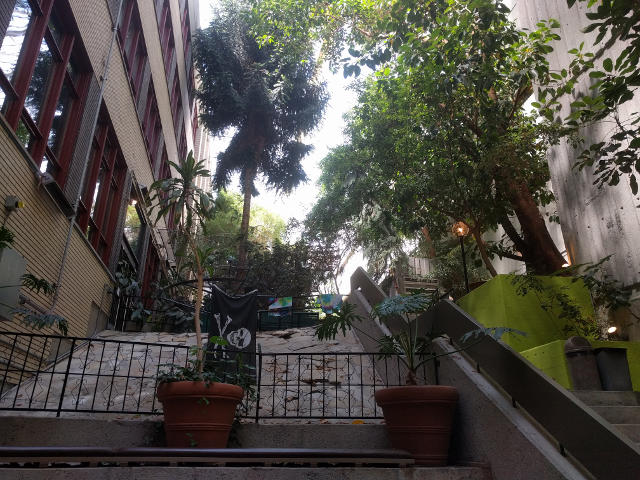
The indoor garden at Coll ge de Maisonneuve, the DebConf 17 venue
Decorative photo of the indoor garden
I'm currently at DebConf 17 in Montr al, back at DebConf for the first time in 10 years (last time was DebConf 7 in Edinburgh). It's great to put names to faces and meet more of my co-developers in person! On Monday I gave a talk entitled A Debian maintainer's guide to Flatpak , aiming to introduce Debian developers to Flatpak, and show how Flatpak and Debian (and Debian derivatives like SteamOS) can help each other. It seems to have been quite well received, with people generally positive about the idea of using Flatpak to deliver backports and faster-moving leaf packages (games!) onto the stable base platform that Debian is so good at providing. A video of the talk is available from the Debian Meetings Archive. I've also put up my slides in the DebConf git-annex repository, with some small edits to link to more source code: A Debian maintainer's guide to Flatpak. Source code for the slides is also available from Collabora's git server. The next step is to take my proof-of-concept for building Flatpak runtimes and apps from Debian and SteamOS packages, flatdeb, get it a bit more production-ready, and perhaps start publishing some sample runtimes from a cron job on a Debian or Collabora server. (By the way, if you downloaded that source right after my talk, please update - I've now pushed some late changes that were necessary to fix the 3D drivers for my OpenArena demo.) I don't think Debian will be going quite as far as Endless any time soon: as Cosimo outlined in the talk right before mine, they deploy their Debian derivative as an immutable base OS with libOSTree, with all the user-installable modules above that coming from Flatpak. That model is certainly an interesting thing to think about for Debian derivatives, though: at Collabora we work on a lot of appliance-like embedded Debian derivatives, with a lot of flexibility during development but very limited state on deployed systems, and Endless' approach seems a perfect fit for those situations. [Edited 2017-08-16 to fix the link for the slides, and add links for the video]

15 August 2017

Dirk Eddelbuettel: #9: Compacting your Shared Libraries

Welcome to the nineth post in the recognisably rancid R randomness series, or R4 for short. Following on the heels of last week's post, we aim to look into the shared libraries created by R. We love the R build process. It is robust, cross-platform, reliable and rather predicatable. It. Just. Works. One minor issue, though, which has come up once or twice in the past is the (in)ability to fully control all compilation options. R will always recall CFLAGS, CXXFLAGS, ... etc as used when it was compiled. Which often entails the -g flag for debugging which can seriously inflate the size of the generated object code. And once stored in $ RHOME /etc/Makeconf we cannot on the fly override these values. But there is always a way. Sometimes even two. The first is local and can be used via the (personal) ~/.R/Makevars file (about which I will have to say more in another post). But something I have been using quite a bite lately uses the flags for the shared library linker. Given that we can have different code flavours and compilation choices---between C, Fortran and the different C++ standards---one can end up with a few lines. I currently use this which uses -Wl, to pass an the -S (or --strip-debug) option to the linker (and also reiterates the desire for a shared library, presumably superfluous):
SHLIB_CXXLDFLAGS = -Wl,-S -shared
SHLIB_CXX11LDFLAGS = -Wl,-S -shared
SHLIB_CXX14LDFLAGS = -Wl,-S -shared
SHLIB_FCLDFLAGS = -Wl,-S -shared
SHLIB_LDFLAGS = -Wl,-S -shared
Let's consider an example: my most recently uploaded package RProtoBuf. Built under a standard 64-bit Linux setup (Ubuntu 17.04, g++ 6.3) and not using the above, we end up with library containing 12 megabytes (!!) of object code:
edd@brad:~/git/rprotobuf(feature/fewer_warnings)$ ls -lh src/RProtoBuf.so
-rwxr-xr-x 1 edd edd 12M Aug 14 20:22 src/RProtoBuf.so
edd@brad:~/git/rprotobuf(feature/fewer_warnings)$ 
However, if we use the flags shown above in .R/Makevars, we end up with much less:
edd@brad:~/git/rprotobuf(feature/fewer_warnings)$ ls -lh src/RProtoBuf.so 
-rwxr-xr-x 1 edd edd 626K Aug 14 20:29 src/RProtoBuf.so
edd@brad:~/git/rprotobuf(feature/fewer_warnings)$ 
So we reduced the size from 12mb to 0.6mb, an 18-fold decrease. And the file tool still shows the file as 'not stripped' as it still contains the symbols. Only debugging information was removed. What reduction in size can one expect, generally speaking? I have seen substantial reductions for C++ code, particularly when using tenmplated code. More old-fashioned C code will be less affected. It seems a little difficult to tell---but this method is my new build default as I continually find rather substantial reductions in size (as I tend to work mostly with C++-based packages). The second option only occured to me this evening, and complements the first which is after all only applicable locally via the ~/.R/Makevars file. What if we wanted it affect each installation of a package? The following addition to its src/Makevars should do:
strippedLib: $(SHLIB)
        if test -e "/usr/bin/strip"; then /usr/bin/strip --strip-debug $(SHLIB); fi
.phony: strippedLib
We declare a new Makefile target strippedLib. But making it dependent on $(SHLIB), we ensure the standard target of this Makefile is built. And by making the target .phony we ensure it will always be executed. And it simply tests for the strip tool, and invokes it on the library after it has been built. Needless to say we get the same reduction is size. And this scheme may even pass muster with CRAN, but I have not yet tried. Lastly, and acknowledgement. Everything in this post has benefited from discussion with my former colleague Dan Dillon who went as far as setting up tooling in his r-stripper repository. What we have here may be simpler, but it would not have happened with what Dan had put together earlier.

This post by Dirk Eddelbuettel originated on his Thinking inside the box blog. Please report excessive re-aggregation in third-party for-profit settings.

13 August 2017

Mike Gabriel: @DebConf17: Ad-hoc BoF: Debian for the Remote Desktop

On Thursday at DebConf17, all people interested in using this or that Remote Desktop solution on Debian (as a server, as a client, as both) came together for a BoF. Sharing about Usage Scenarios Quite some time we informally shared with one another what technologies and software we use for remote access to Debian machines and what the experiences are. The situation in Debian and on GNU/Linux in general is that many technical approaches exist, all of them have certain features and certain limitations. The composition of features and limitations finally lead the users to choosing one or another technology as his or her favourite solution. The Debian Remote Maintainers Team On the developers' side, Dominik George and I set up a packaging team for Remote Desktop related software in Debian. A packaging team that we invite everyone who is maintaining such software in the widest sense to join: https://qa.debian.org/developer.php?login=pkg-remote-team%40lists.alioth... 'DebianRemote' namespace on the Debian Wiki For users of Debian, the group agreed, we need an overview page (on wiki.debian.org) that provides an entry point for Debian on the Remote Desktop. An entry point that provides user information as well as developer information. A skeleton of this wiki page, I have just set up (thanks to Vagrant for taking some notes in Gobby during the BoF): https://wiki.debian.org/DebianRemote However, the page still contains loads of FIXMEs, so the actual work only now really starts. Fill the template with content (and also adapt the template, if needed). Everyone with experience and know-how about Remote Desktop on Debian systems is invited to share knowledge and improve this wiki namespace. (I will, at the earliest, start working on Arctica, X2Go and NX passages end of August, but I'll be also happy to find passages having been written down that I can review by then). Tracking Debian Remote Issues in Debian BTS At the BoF, also the following suggestions came up: The Remote Desktop experience on a GNU/Linux desktop or terminal server can be affected by all graphical applications available. Often it happens, that a change in this or that graphical application results in problems in remote sessions, but not so in local sessions. We agreed on filing and tagging such bugs accordingly. For new bugs, please file such bugs with the following BTS header at the top of your mail and always explain what remote desktop solution is being used when the bug appears:
Package: file
Version: 1:5.19-2
Severity: important
User: debian-edu@lists.debian.org
Usertags: debian-edu
Conclusion Overall, I was quite happy that the BoF has been attended by so many people and to see that there is quite "a lobby" in Debian. Let's dive into the work and make Debian 10 the first Debian, that mentions the Remote Desktop in its release notes. Let's, in fact, release Debian 10 as the first Debian with the official announcement as an operating system for the Remote Desktop (like the Fedora people did already for Fedora 20).

Enrico Zini: Consensually doing things together?

On 2017-08-06 I have a talk at DebConf17 in Montreal titled "Consensually doing things together?" (video). Here are the talk notes. Abstract At DebConf Heidelberg I talked about how Free Software has a lot to do about consensually doing things together. Is that always true, at least in Debian? I d like to explore what motivates one to start a project and what motivates one to keep maintaining it. What are the energy levels required to manage bits of Debian as the project keeps growing. How easy it is to say no. Whether we have roles in Debian that require irreplaceable heroes to keep them going. What could be done to make life easier for heroes, easy enough that mere mortals can help, or take their place. Unhappy is the community that needs heroes, and unhappy is the community that needs martyrs. I d like to try and make sure that now, or in the very near future, Debian is not such an unhappy community. Consensually doing things together I gave a talk in Heidelberg. Valhalla made stickers Debian France distributed many of them. There's one on my laptop. Which reminds me of what we ought to be doing. Of what we have a chance to do, if we play our cards right. I'm going to talk about relationships. Consensual relationships. Relationships in short. Nonconsensual relationships are usually called abuse. I like to see Debian as a relationship between multiple people. And I'd like it to be a consensual one. I'd like it not to be abuse. Consent From wikpedia:
In Canada "consent means the voluntary agreement of the complainant to engage in sexual activity" without abuse or exploitation of "trust, power or authority", coercion or threats.[7] Consent can also be revoked at any moment.[8] There are 3 pillars often included in the description of sexual consent, or "the way we let others know what we're up for, be it a good-night kiss or the moments leading up to sex." They are:
  • Knowing exactly what and how much I'm agreeing to
  • Expressing my intent to participate
  • Deciding freely and voluntarily to participate[20]
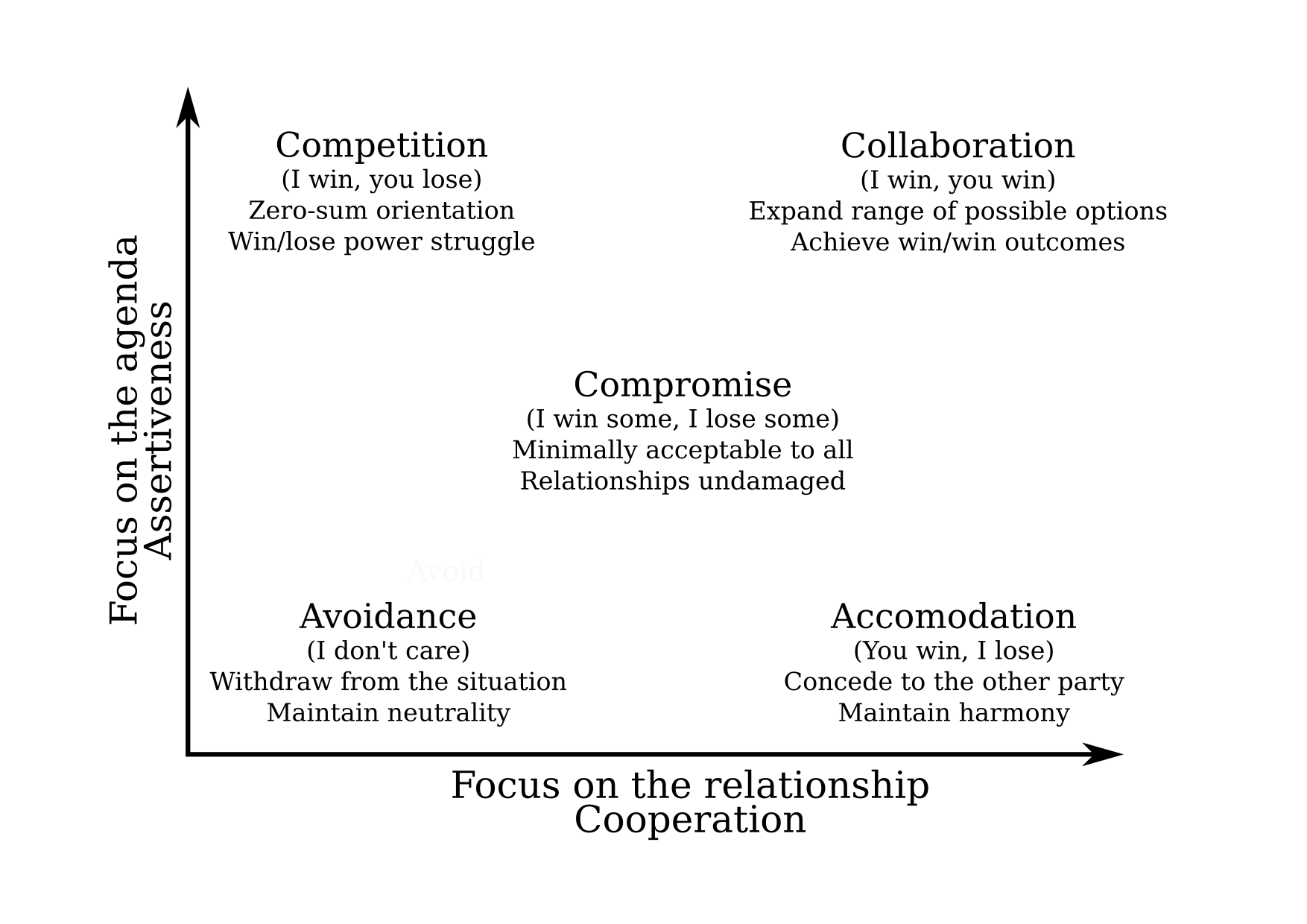
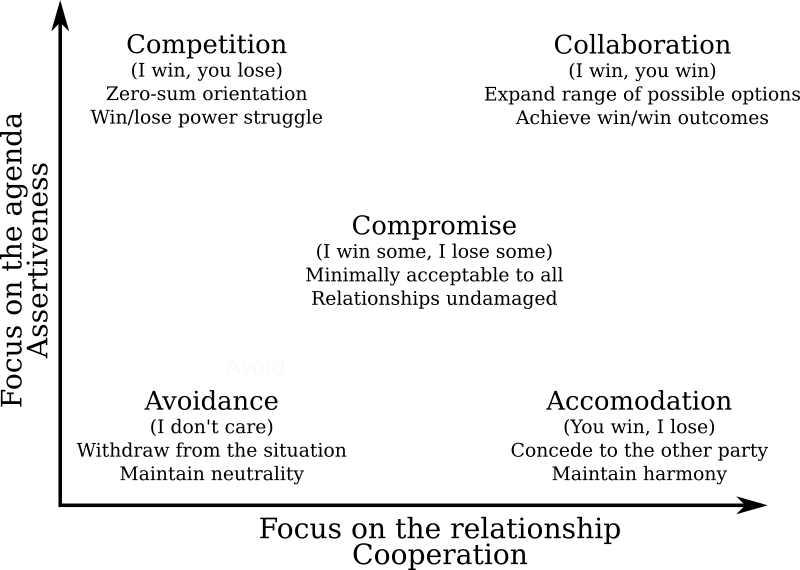
Saying "I've decided I won't do laundry anymore" when the other partner is tired, or busy doing things. Is different than saying "I've decided I won't do laundry anymore" when the other partner has a chance to say "why? tell me more" and take part in negotiation. Resources: Relationships Debian is the Universal Operating System. Debian is made and maintained by people. The long term health of debian is a consequence of the long term health of the relationship between Debian contributors. Debian doesn't need to be technically perfect, it needs to be socially healthy. Technical problems can be fixed by a healty community. graph showing relationship between avoidance, accomodation, compromise, competition, collaboration The Thomas-Kilmann Conflict Mode Instrument: source png. Motivations Quick poll: What are your motivations to be in a relationship? Which of those motivations are healthy/unhealthy? "Galadriel" (noun, by Francesca Ciceri): a task you have to do otherwise Sauron takes over Middle Earth See: http://blog.zouish.org/nonupdd/#/22/1 What motivates me to start a project or pick one up? What motivates me to keep maintaning a project? What motivates you? What's an example of a sustainable motivation? Is it really all consensual in Debian? Energy Energy that thing which is measured in spoons. The metaphore comes from people suffering with chronic health issues:
"Spoons" are a visual representation used as a unit of measure used to quantify how much energy a person has throughout a given day. Each activity requires a given number of spoons, which will only be replaced as the person "recharges" through rest. A person who runs out of spoons has no choice but to rest until their spoons are replenished.
For example, in Debian, I could spend: What is one person capable of doing? Have reasonable expectations, on others: Have reasonable expectations, on yourself: Debian is a shared responsibility When spoons are limited, what takes more energy tends not to get done As the project grows, project-wide tasks become harder Are they still humanly achievable? I don't want Debian to have positions that require hero-types to fill them Dictatorship of who has more spoons: Perfectionism You are in a relationship that is just perfect. All your friends look up to you. You give people relationship advice. You are safe in knowing that You Are Doing It Right. Then one day you have an argument in public. You don't just have to deal with the argument, but also with your reputation and self-perception shattering. One things I hate about Debian: consistent technical excellence. I don't want to be required to always be right. One of my favourite moments in the history of Debian is the openssl bug Debian doesn't need to be technically perfect, it needs to be socially healthy, technical problems can be fixed. I want to remove perfectionism from Debian: if we discover we've been wrong all the time in something important, it's not the end of Debian, it's the beginning of an improved Debian. Too good to be true There comes a point in most people's dating experience where one learns that when some things feel too good to be true, they might indeed be. There are people who cannot say no: There are people who cannot take a no: Note the diversity statement: it's not a problem to have one of those (and many other) tendencies, as long as one manages to keep interacting constructively with the rest of the community Also, it is important to be aware of these patterns, to be able to compensate for one's own tendencies. What happens when an avoidant person meets a narcissistic person, and they are both unaware of the risks? Resources: Note: there are problems with the way these resources are framed: Red flag / green flag http://pervocracy.blogspot.ca/2012/07/green-flags.html Ask for examples of red/green flags in Debian. Green flags: Red flags: Apologies / Dealing with issues I don't see the usefulness of apologies that are about accepting blame, or making a person stop complaining. I see apologies as opportunities to understand the problem I caused, help fix it, and possibly find ways of avoiding causing that problem again in the future. A Better Way to Say Sorry lists a 4 step process, which is basically what we do when in bug reports already: 1, Try to understand and reproduce the exact problem the person had. 2. Try to find the cause of the issue. 3. Try to find a solution for the issue. 4. Verify with the reporter that the solution does indeed fix the issue. This is just to say
My software ate
the files
that where in
your home directory and which
you were probably
needing
for work Forgive me
it was so quick to write
without tests
and it worked so well for me
(inspired by a 1934 poem by William Carlos Williams) Don't be afraid to fail Don't be afraid to fail or drop the ball. I think that anything that has a label attached of "if you don't do it, nobody will", shouldn't fall on anybody's shoulders and should be shared no matter what. Shared or dropped. Share the responsibility for a healthy relationship Don't expect that the more experienced mates will take care of everything. In a project with active people counted by the thousand, it's unlikely that harassment isn't happening. Is anyone writing anti-harassment? Do we have stats? Is having an email address and a CoC giving us a false sense of security?
When you get involved in a new community, such as Debian, find out early where, if that happens, you can find support, understanding, and help to make it stop. If you cannot find any, or if the only thing you can find is people who say "it never happens here", consider whether you really want to be in that community.
(from http://www.enricozini.org/blog/2016/debian/you-ll-thank-me-later/)
There are some nice people in the world. I mean nice people, the sort I couldn t describe myself as. People who are friends with everyone, who are somehow never involved in any argument, who seem content to spend their time drawing pictures of bumblebees on flowers that make everyone happy. Those people are great to have around. You want to hold onto them as much as you can. But people only have so much tolerance for jerkiness, and really nice people often have less tolerance than the rest of us. The trouble with not ejecting a jerk whether their shenanigans are deliberate or incidental is that you allow the average jerkiness of the community to rise slightly. The higher it goes, the more likely it is that those really nice people will come around less often, or stop coming around at all. That, in turn, makes the average jerkiness rise even more, which teaches the original jerk that their behavior is acceptable and makes your community more appealing to other jerks. Meanwhile, more people at the nice end of the scale are drifting away.
(from https://eev.ee/blog/2016/07/22/on-a-technicality/) Give people freedom If someone tries something in Debian, try to acknowledge and accept their work. You can give feedback on what they are doing, and try not to stand in their way, unless what they are doing is actually hurting you. In that case, try to collaborate, so that you all can get what you need. It's ok if you don't like everything that they are doing. I personally don't care if people tell me I'm good when I do something, I perceive it a bit like "good boy" or "good dog". I rather prefer if people show an interest, say "that looks useful" or "how does it work?" or "what do you need to deploy this?" Acknowledge that I've done something. I don't care if it's especially liked, give me the freedom to keep doing it. Don't give me rewards, give me space and dignity. Rather than feeding my ego, feed by freedom, and feed my possibility to create.

11 August 2017

Michal &#268;iha&#345;: Weblate 2.16

Weblate 2.16 has been released today while I'm at DebConf17. There are quite some performance improvements (and more of that is scheduled for 2.17), new file formats support and various other improvements. Full list of changes: If you are upgrading from older version, please follow our upgrading instructions. You can find more information about Weblate on https://weblate.org, the code is hosted on Github. If you are curious how it looks, you can try it out on demo server. You can login there with demo account using demo password or register your own user. Weblate is also being used on https://hosted.weblate.org/ as official translating service for phpMyAdmin, OsmAnd, Turris, FreedomBox, Weblate itself and many other projects. Should you be looking for hosting of translations for your project, I'm happy to host them for you or help with setting it up on your infrastructure. Further development of Weblate would not be possible without people providing donations, thanks to everybody who have helped so far! The roadmap for next release is just being prepared, you can influence this by expressing support for individual issues either by comments or by providing bounty for them.

Filed under: Debian English SUSE Weblate

Mike Gabriel: @DebConf17: Story Telling about Debian Edu in Northern Germany

Last Monday, I gave a 20min talk about our little FLOSS school project "IT-Zukunft Schule" at the Debian Conference 17 in Montreal. The talk had video coverage, so may want to peek in, if you couldn't manage to watch the life stream: http://meetings-archive.debian.net/pub/debian-meetings/2017/debconf17/su... I'd like to share some major outcomes (so far) of this talk.
  1. I realized how attached I am to "IT-Zukunft Schule" and how much it means to me that our kids grow up in a world of freedom and choice. Also and esp. when it comes to choosing your daily communication tools and computer working environment
  2. I met Foteini Tsiami and Alkis Georgopoulos from Greece. They work on LTSP and have deployed 1000+ schools in Greece with LTSP + Debian GNU/Linux + MATE Desktop Environment
  3. I met Vagrant Cascadian who is the maintainer of LTSP in Debian and also a major LTSP upstream contributor
  4. I received a lot of fine feedback that was very encouraging to go on with our local work in Schleswig-Holstein
If you have some more time for watching DebConf talks on video, I dearly recommend the talk given by Alkis and Foteini on their Greek FLOSS success story. If you don't have that much time, please skip through the video until you are at 26:15 and enjoy the map that shows how much Debian + LTSP has spread over all of Greece. http://meetings-archive.debian.net/pub/debian-meetings/2017/debconf17/lt... Unfortunately, the schools in Greece are so much smaller than schools in Germany. Most schools there have between 50 and 300 students. So at the Greek schools, it is possible to have a teacher machine being the server for one computer lab. This teacher / server machine provides the infrastructure for a room full of LTSP fat clients (no hard drive inside) and that's it. For German schools, unfortunately, we need a larger scale setup. German schools often have 800+ students and network services need to be spread over more than one server machine. So, the current approach with one server running LDAP, Kerberos etc. is quite appropriate, but also extendible, possibly on municipality level or on county level. We (from IT-Zukunft Schule) are quite positive that there will be opportunities for introducing FLOSS approaches more on the county level in Schleswig-Holstein in the near future. So stay tuned...

Dirk Eddelbuettel: #8: Customizing Spell Checks for R CMD check

Welcome to the eight post in the ramblingly random R rants series, or R4 for short. We took a short break over the last few weeks due to some conferencing followed by some vacationing and general chill. But we're back now, and this post gets us back to initial spirit of (hopefully) quick and useful posts. Perusing yesterday's batch of CRANberries posts, I noticed a peculiar new directory shown the in the diffstat output we use to compare two subsequent source tarballs. It was entitled .aspell/, in the top-level directory, and in two new packages by R Core member Kurt Hornik himself. The context is, of course, the not infrequently-expressed desire to customize the spell checking done on CRAN incoming packages, see e.g. this r-package-devel thread. And now we can as I verified with (the upcoming next release of) RcppArmadillo, along with a recent-enough (i.e. last few days) version of r-devel. Just copying what Kurt did, i.e. adding a file .aspell/defaults.R, and in it pointing to rds file (named as the package) containing a character vector with words added to the spell checker's universe is all it takes. For my package, see here for the peculiars. Or see here:
edd@bud:~/git/rcpparmadillo/.aspell(master)$ cat defaults.R 
Rd_files <- vignettes <- R_files <- description <-
    list(encoding = "UTF-8",
         language = "en",
         dictionaries = c("en_stats", "RcppArmadillo"))
edd@bud:~/git/rcpparmadillo/.aspell(master)$ r -p -e 'readRDS("RcppArmadillo.rds")'
[1] "MPL"            "Sanderson"      "Templated"
[4] "decompositions" "onwards"        "templated"
edd@bud:~/git/rcpparmadillo/.aspell(master)$     
And now R(-devel) CMD check --as-cran ... is silent about spelling. Yay! But take this with a grain of salt as this does not yet seem to be "announced" as e.g. yesterday's change in the CRAN Policy did not mention it. So things may well change -- but hey, it worked for me. And this all is about aspell, here is something topical about a spell to close the post:

This post by Dirk Eddelbuettel originated on his Thinking inside the box blog. Please report excessive re-aggregation in third-party for-profit settings.

7 August 2017

Mario Lang: If your software should be cross platform and accessible, forget about Qt

A few years ago, I started to write software which primary audience is going to be blind musicians. I did a small presentation of the UI at DebConf15. Most of the functionality is in a compiler-alike backend. But eventually, I wanted to create a user interface to improve the interactive experience. So, the problem again: which toolkit to choose which would be accessible on most platforms? Last time I needed to solve a similar problem, I used Java/Swing. This has its problems, but it actually works on Windows, Linux and (supposedly) Mac. This time around, my implementation language is C++, so Swing didn't look that interesting. It appears there is not much that fullfils these requirements. Qt looked like it could. But since I had my bad experiences already with Qt claiming accessibility they really never implemented, I was at least a bit cautious. Around 10 years ago, when Qt 4 was released, I found that the documentation claimed that Qt4 was accessible on Linux, but it really never was until a very late 4.x release. This information was a blatant lie, trying to lure uninformed programmers into using Qt, much to the disservice of their disabled users. If you ask a random blind Windows user who knows a bit about toolkits, they will readily tell you that they hate every app written in Qt. With this knowledge, and the spirit of "We can change the world" I wrote a private mail to the person responsible for maintaining Qt accessibility. I explained to them that I am about to choose Qt as the UI platform for my program, and that my primary audience is users that rely on Accessibility. I also explained that cross-platform support (esp. good support on Windows) is a necessary requirement for my project. I basically got a nice marketing speak answer back, but when I read it back then, I didn't fully realize that just yet. The tone basicallly: "No problem. Qt works on Linux, Mac and Windows, and if you find any problems, just report them to us and we are going to fix them." Well, I was aware that I am not a paying customer of Qt Company, so the promise above is probbably a bit vague (I thought), but still, it sounded quite encouraging. So off I went, and started to learn enough Qt to implement the simple user interface I wanted. First tests on Linux seemed to work, that is nice. After a while, I started to test on Windows. And BANG, of course, there is a "hidden" problem. The most wide-spread (commercial) screen reader used by most blind people somehow does not see the content of text entry widgets. This was and still is a major problem for my project. I have a number of text entry fields in my UI. Actually, the main part of the UI is a simple editor, so you might see the problem already. So some more testing was done, just to realize that yes, text entry fields indeed do not work with the most widely used screen reader on Windows. While other screen readers seemed to work (NVDA) it is simply not feasable to ask my future users to switch to a different screen reader just for a single program. So I either needed to get JAWS fixed, or drop Qt. Well, after a lot of testing, I ended up submitting a bug to the Qt tracker. That was a little over a year ago. The turnaround time of private mail was definitely faster. And now I get a reply to my bug explaining that JAWS was never a priority, still is not, and that my problem will probably go away after a rewrite which has no deadline yet. Why did I expect this already? At least now I know why no blind users wants to have any Qt on their machines. If you want to write cross-platform accessible software: You definitely should not use Qt. And no other Free Software toolkit for that matter, because they basically all dont give a shit about accessibility on non-Linux platforms. Yes, GTK has a Windows port, but that isn't accessible at all. Yes, wxWindows has a Windows port, but that has problems with, guess what, text entry fields (at least last time I checked). Free Software is NOT about Accessibility or equality. I see evidence for that claim since more then 15 years now. It is about coolness, self-staging, scratch-your-own-itchness and things like that. When Debian released Jessie, I was told that something like Accessibility is not important enough to delay the release. If GNOME just broke all the help system by switching to not-yet-accessible webkit, that is just bad luck, I was told. But it is outside of the abilities of package maintainers to ensure that what we ship is accessible. I hereby officially give up. And I admit my own stupidity. Sorry for claiming Free Software would be a good thing for the world. It is definitely not for my kin. If Free Software ever takes over, the blind will be unable to use their computers. Don't get me wrong. I love my command-line. But as the well-known saying goes: "Free Software will be ready for the desktop user, perhaps, next year?" The scratch-your-own-itch philosophy simply doesn't work together with a broad list of user requirements. If you want to support users with disabilities, you probably should not rely on hippie coders right now. I repeat: If you want to write compliant software, that would be also useable to people with disabilities, you can not use Qt. For now, you will need to write a native UI for every platform you want to support. Oh, and do not believe Qt Company marketing texts, your users will suffer if you do.

4 August 2017

Daniel Silverstone: USB Device Stacks, on RTFM

I have been spending time with Jorge Aparicio's RTFM for Cortex M3 framework for writing Rust to target Cortex-M3 devices from Arm (and particularly the STM32F103 from ST Microelectronics). Jorge's work in this area has been of interest to me ever since I discovered him working on this stuff a while ago. I am very tempted by the idea of being able to implement code for the STM32 with the guarantees of Rust and the language features which I have come to love such as the trait system. I have been thinking to myself that, while I admire and appreciate the work done on the GNUK, I would like to, personally, have a go at implementing some kind of security token on an STM32 as a USB device. And with the advent of the RTFM for M3 work, and Jorge's magical tooling to make it easier to access and control the registers on an M3 microcontroller, I figured it'd be super-nice to do this in Rust, with all the advantages that entails in terms of isolating unsafe behaviour and generally having the potential to be more easily verified as not misbehaving. To do this though, means that I need a USB device stack which will work in the RTFM framework. Sadly it seems that, thus-far, only Jorge has been working on drivers for any of the M3 devices his framework supports. And one person can only do so much. So, in my infinite madness, I decided I should investigate the complexity of writing a USB device stack in Rust for the RTFM/M3 framework. (Why I thought this was a good idea is lost to the mists of late night Googling, but hey, it might make a good talk at the next conference I go to). As such, this blog post, and further ones along these lines, will serve as a partial tour of what I'm up to, and a partial aide-memoir for me about learning USB. If I get something horribly wrong, please DO contact me to correct me, otherwise I'll just continue to be wrong. If I've simplified something but it's still strictly correct, just let me know if it's an oversimplification since in a lot of cases there's no point in me putting the full details into a blog posting. I will mostly be considering USB2.0 protocol details but only really for low and full speed devices. (The hardware I'm targetting does low-speed and full-speed, but not high-speed. Though some similar HW does high-speed too, I don't have any to hand right now)

A brief introduction to USB In order to go much further, I needed a grounding in USB. It's a multi-layer protocol as you might expect, though we can probably ignore the actual electrical layer since any device we might hope to support will have to have a hardware block to deal with that. We will however need to consider the packet layer (since that will inform how the hardware block is implemented and thus its interface) and then the higher level protocols on top. USB is a deliberately asymmetric protocol. Devices are meant to be significantly easier to implement, both in terms of hardware and software, as compared with hosts. As such, despite some STM32s having OTG ports, I have no intention of supporting host mode at this time. USB is arranged into a set of busses which are, at least in the USB1.1 case, broadcast domains. As such, each device has an address assigned to it by the host during an early phase called 'configuration'. Once the address is assigned, the device is expected to only ever respond to messages addressed to it. Note that since everything is asymmetric in USB, the device can't send messages on its own, but has to be asked for them by the host, and as such the addressing is always from host toward device. USB devices then expose a number of endpoints through which communication can flow IN to the host or OUT to the device. Endpoints are not bidirectional, but the in and out endpoints do overlap in numbering. There is a special pair of endpoints, IN0 and OUT0 which, between them, form what I will call the device control endpoints. The device control endpoints are important since every USB device MUST implement them, and there are a number of well defined messages which pass over them to control the USB device. In theory a bare minimum USB device would implement only the device control endpoints.

Configurations, and Classes, and Interfaces, Oh My! In order for the host to understand what the USB device is, and what it is capable of, part of the device control endpoints' responsibility is to provide a set of descriptors which describe the device. These descriptors form a heirarchy and are then glommed together into a big lump of data which the host can download from the device in order to decide what it is and how to use it. Because of various historical reasons, where a multi-byte value is used, they are defined to be little-endian, though there are some BCD fields. Descriptors always start with a length byte and a type byte because that way the host can parse/skip as necessary, with ease. The first descriptor is the device descriptor, is a big one, and looks like this:
Device Descriptor
Field Name Byte start Byte length Encoding Meaning
bLength 0 1 Number Size of the descriptor in bytes (18)
bDescriptorType 1 1 Constant Device Descriptor (0x01)
bcdUSB 2 2 BCD USB spec version compiled with
bDeviceClass 4 1 Class Code, assigned by USB org (0 means "Look at interface descriptors", common value is 2 for CDC)
bDeviceSubClass 5 1 SubClass Code, assigned by USB org (usually 0)
bDeviceProtocol 6 1 Protocol Code, assigned by USB org (usually 0)
bMaxPacketSize 7 1 Number Max packet size for IN0/OUT0 (Valid are 8, 16, 32, 64)
idVendor 8 2 ID 16bit Vendor ID (Assigned by USB org)
idProduct 10 2 ID 16bit Product ID (Assigned by manufacturer)
bcdDevice 12 2 BCD Device version number (same encoding as bcdUSB)
iManufacturer 14 1 Index String index of manufacturer name (0 if unavailable)
iProduct 15 1 Index String index of product name (0 if unavailable)
iSerialNumber 16 1 Index String index of device serial number (0 if unavailable)
bNumConfigurations 17 1 Number Count of configurations the device has.
This looks quite complex, but breaks down into a relatively simple two halves. The first eight bytes carries everything necessary for the host to be able to configure itself and the device control endpoints properly in order to communicate effectively. Since eight bytes is the bare minimum a device must be able to transmit in one go, the host can guarantee to get those, and they tell it what kind of device it is, what USB protocol it supports, and what the maximum transfer size is for its device control endpoints. The encoding of the bcdUSB and bcdDevice fields is interesting too. It is of the form 0xMMmm where MM is the major number, mm the minor. So USB2.0 is encoded as 0x0200, USB1.1 as 0x0110 etc. If the device version is 17.36 then that'd be 0x1736. Other fields of note are bDeviceClass which can be 0 meaning that interfaces will specify their classes, and idVendor/idProduct which between them form the primary way for the specific USB device to be identified. The Index fields are indices into a string table which we'll look at later. For now it's enough to know that wherever a string index is needed, 0 can be provided to mean "no string here". The last field is bNumConfigurations and this indicates the number of ways in which this device might function. A USB device can provide any number of these configurations, though typically only one is provided. If the host wishes to switch between configurations then it will have to effectively entirely quiesce and reset the device. The next kind of descriptor is the configuration descriptor. This one is much shorter, but starts with the same two fields:
Configuration Descriptor
Field Name Byte start Byte length Encoding Meaning
bLength 0 1 Number Size of the descriptor in bytes (9)
bDescriptorType 1 1 Constant Configuration Descriptor (0x02)
wTotalLength 2 2 Number Size of the configuration in bytes, in total
bNumInterfaces 4 1 Number The number of interfaces in this configuration
bConfigurationValue 5 1 Number The value to use to select this configuration
iConfiguration 6 1 Index The name of this configuration (0 for unavailable)
bmAttributes 7 1 Bitmap Attributes field (see below)
bMaxPower 8 1 Number Maximum bus power this configuration will draw (in 2mA increments)
An important field to consider here is the bmAttributes field which tells the host some useful information. Bit 7 must be set, bit 6 is set if the device would be self-powered in this configuration, bit 5 indicates that the device would like to be able to wake the host from sleep mode, and bits 4 to 0 must be unset. The bMaxPower field is interesting because it encodes the power draw of the device (when set to this configuration). USB allows for up to 100mA of draw per device when it isn't yet configured, and up to 500mA when configured. The value may be used to decide if it's sensible to configure a device if the host is in a low power situation. Typically this field will be set to 50 to indicate the nominal 100mA is fine, or 250 to request the full 500mA. Finally, the wTotalLength field is interesting because it tells the host the total length of this configuration, including all the interface and endpoint descriptors which make it up. With this field, the host can allocate enough RAM to fetch the entire configuration descriptor block at once, simplifying matters dramatically for it. Each configuration has one or more interfaces. The interfaces group some endpoints together into a logical function. For example a configuration for a multifunction scanner/fax/printer might have an interface for the scanner function, one for the fax, and one for the printer. Endpoints are not shared among interfaces, so when building this table, be careful. Next, logically, come the interface descriptors:
Interface Descriptor
Field Name Byte start Byte length Encoding Meaning
bLength 0 1 Number Size of the descriptor in bytes (9)
bDescriptorType 1 1 Constant Interface Descriptor (0x04)
bInterfaceNumber 2 1 Number The number of the interface
bAlternateSetting 3 1 Number The interface alternate index
bNumEndpoints 4 1 Number The number of endpoints in this interface
bInterfaceClass 5 1 Class The interface class (USB Org defined)
bInterfaceSubClass 6 1 SubClass The interface subclass (USB Org defined)
bInterfaceProtocol 7 1 Protocol The interface protocol (USB Org defined)
iInterface 8 1 Index The name of the interface (or 0 if not provided)
The important values here are the class/subclass/protocol fields which provide a lot of information to the host about what the interface is. If the class is a USB Org defined one (e.g. 0x02 for Communications Device Class) then the host may already have drivers designed to work with the interface meaning that the device manufacturer doesn't have to provide host drivers. The bInterfaceNumber is used by the host to indicate this interface when sending messages, and the bAlternateSetting is a way to vary interfaces. Two interfaces with the came bInterfaceNumber but different bAlternateSettings can be switched between (like configurations, but) without resetting the device. Hopefully the rest of this descriptor is self-evident by now. The next descriptor kind is endpoint descriptors:
Endpoint Descriptor
Field Name Byte start Byte length Encoding Meaning
bLength 0 1 Number Size of the descriptor in bytes (7)
bDescriptorType 1 1 Constant Endpoint Descriptor (0x05)
bEndpointAddress 2 1 Endpoint Endpoint address (see below)
bmAttributes 3 1 Bitmap Endpoint attributes (see below)
wMaxPacketSize 4 2 Number Maximum packet size this endpoint can send/receive
bInterval 6 1 Number Interval for polling endpoint (in frames)
The bEndpointAddress is a 4 bit endpoint number (so there're 16 endpoint indices) and a bit to indicate IN vs. OUT. Bit 7 is the direction marker and bits 3 to 0 are the endpoint number. This means there are 32 endpoints in total, 16 in each direction, 2 of which are reserved (IN0 and OUT0) giving 30 endpoints available for interfaces to use in any given configuration. The bmAttributes bitmap covers the transfer type of the endpoint (more below), and the bInterval is an interval measured in frames (1ms for low or full speed, 125 s in high speed). bInterval is only valid for some endpoint types. The final descriptor kind is for the strings which we've seen indices for throughout the above. String descriptors have two forms:
String Descriptor (index zero)
Field Name Byte start Byte length Encoding Meaning
bLength 0 1 Number Size of the descriptor in bytes (variable)
bDescriptorType 1 1 Constant String Descriptor (0x03)
wLangID[0] 2 2 Number Language code zero (e.g. 0x0409 for en_US)
wLangID[n] 4.. 2 Number Language code n ...
This form (for descriptor 0) is that of a series of language IDs supported by the device. The device may support any number of languages. When the host requests a string descriptor, it will supply both the index of the string and also the language id it desires (from the list available in string descriptor zero). The host can tell how many language IDs are available simply by dividing bLength by 2 and subtracting 1 for the two header bytes. And for string descriptors of an index greater than zero:
String Descriptor (index greater than zero)
Field Name Byte start Byte length Encoding Meaning
bLength 0 1 Number Size of the descriptor in bytes (variable)
bDescriptorType 1 1 Constant String Descriptor (0x03)
bString 2.. .. Unicode The string, in "unicode" format
This second form of the string descriptor is simply the the string is in what the USB spec calls 'Unicode' format which is, as of 2005, defined to be UTF16-LE without a BOM or terminator. Since string descriptors are of a variable length, the host must request strings in two transactions. First a request for 2 bytes is sent, retrieving the bLength and bDescriptorType fields which can be checked and memory allocated. Then a request for bLength bytes can be sent to retrieve the entire string descriptor.

Putting that all together Phew, this is getting to be quite a long posting, so I'm going to leave this here and in my next post I'll talk about how the host and device pass packets to get all that information to the host, and how it gets used.

1 August 2017

Russ Allbery: Review: The Fifth Season

Review: The Fifth Season, by N.K. Jemisin
Series: The Broken Earth #1
Publisher: Orbit
Copyright: 2015
ISBN: 0-316-22930-X
Format: Kindle
Pages: 497
The world of The Fifth Season is one of near-constant seismic activity. Volcanoes, massive earthquakes, and all the catastrophes that follow them are a constant threat. Civilization barely survives the turmoil, and only because of two things: strict cultural rules about how to handle a "fifth season" of heavy seismic activity and its aftermath (called stonelore), and the orogenes. Orogenes are humans (well, there is some debate about that) who have an organ that others don't, a biological ability to manipulate the seismic activity and the earth itself. They can protect others by damping down activity, smoothing faults, and redirecting seismic shock waves, but they can also destroy: pull earth out of shape, set off quakes, and create paths for magma to surface. And, to gather the power to manipulate the earth, they draw energy from everything around them, including from other people, often fatally. Orogenes are feared and hated by the typical person. The Stillness, the ironically-named continent on which this book is set, is very old and has had numerous civilizations destroyed by some seismic catastrophe. The landscape is scattered with useless or dangerous remnants of previous forgotten civilizations; the history, likewise, with only the stonelore and some muddled mythology available to most people. The current rulers have kept their empire for a surprising length of time, however, due mostly to the stable ground beneath their centrally-located capital. That stability comes from Fulcrum-trained orogenes, who are taken from their family as children and trained harshly to serve their society by suppressing or fixing dangerous seismic events. Fulcrum orogenes don't have an awful life (well, most of them; for some, it is pure torture), but they're effectively slaves, kept under the watchful eye of Guardians who have mysterious powers of their own. Against this background, The Fifth Season tells three interwoven stories. Essun lives in a small village (comm) at the start of the book, leading a quiet life, until one of her children is beaten to death by her husband following a seismic event that he thinks the child stopped. He's taken their other child and left. Essun, severely traumatized, heads after him to attempt a rescue, or at least revenge. Damaya is a child from another comm who is sold to the Guardians by her parents when she demonstrates orogenic ability, and who goes through Fulcrum training. And Syenite is a Fulcrum orogene, assigned to a field mission with a difficult but very senior orogene named Alabaster. All of these stories eventually interweave, and eventually reveal where they fit in the somewhat unobvious chronology of the story, but it takes some time to get there. It also takes some time for the primary characters to have much in the way of agency. Essun starts with the most, once she recovers her senses enough to start her hunt for revenge. Syenite is ambitious but junior, and Damaya is a child, trying to navigate an unknown world of student politics and strict rules. And all three of the main characters are orogenes, rogga when one is being insulting, and this world does not like orogenes. At all. The Fifth Season starts with an unusual narrative style: a conversational narrator who begins with some of the world background and some mysterious scenes that didn't make sense until much later in the book (late enough that I didn't remember them or make sense of them until I re-read them for this review). The book then focuses on Essun, whose scenes are written in second person present. Normally I think second person feels weirdly intrusive and off-putting, but once I got used to it here, I think it works as well as I've seen it work anywhere. I also see why Jemisin did it: Essun starts the story so traumatized that she's partly disassociating. First person wouldn't have worked, and the second-person voice gives that trauma some immediacy and emotional heft that would have been hard to achieve in third person. The story starts slowly, and builds slowly, as the world is introduced and Jemisin lays down the texture and history of the world. The world-building is ambitious in tracing down the ramifications of the seismic chaos and the implications of orogene ability (although it's best to think of it as pure magic, despite the minor science fiction trappings). But through that world-building, what this story is building is a deep, powerful, frustrated rage. The Fifth Season is an angry book. It's a book about outcasts, about slaves. About people who, even if they're succeeding within the parameters they're given, are channeled and stymied and controlled. It's a story about smiling, kind paternalism hiding lies, control, and abuse, about how hard it is to find enough space from the smothering destructiveness of a totalitarian culture to let yourself relax. It's a story about the horrible things people are willing to do to those they don't consider fully human, and all the ways in which safety, expediency, tradition, culture, and established social roles conspire to keep people within the box where they belong. And it's a story about how being constantly on edge, constantly dreading the next abuse, breaking under it, and being left wanting to burn the whole world to the ground. I struggled at the start of this book, but it grew on me, and by about halfway through it had me hooked completely. At first, Syenite's part of the story (the most traditionally told) was my favorite, but the coming-of-age stories of her and Damaya were overtaken by Essun's far more complex, cautious, and battle-weary tale. And I loved Jemisin's world-building. There's a lot of depth here, a lot of things going on that are unexplained but clearly important, and a restraint and maturity in how the world is revealed that makes it feel older and more layered than Jemisin's The Hundred Thousand Kingdoms. The major drawback of this book is that it is very much the first book of a series, and it doesn't so much have an ending as a hard stop. It's not quite a cliff-hanger, but it's nearly as unsatisfying as one. Most of the major questions of the book who the stone eaters are and what they want, and the fate of Essun's husband and child, just to name two are still unresolved at the end of the story. There is a bit of emotional closure, but not a true moment of catharsis for all of the rage. Hopefully that will be coming in a future book. This is a very unusual story, mixing fantasy and a sort of magic (orogeny) with some science fiction elements and a deep history. It's gritty, textured, emotional, and furious, and very much worth reading. I'm looking forward to the next book in the series. Followed by The Obelisk Gate. Rating: 8 out of 10

29 July 2017

Robert McQueen: Welcome, Flathub!

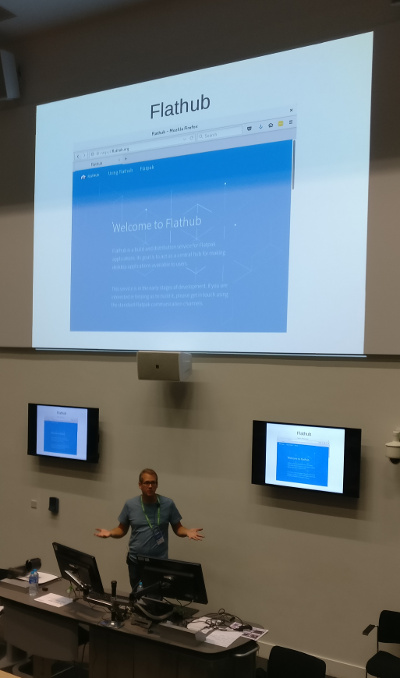
Alex Larsson talks about Flathub at GUADEC 2017At the Gtk+ hackfest in London earlier this year, we stole an afternoon from the toolkit folks (sorry!) to talk about Flatpak, and how we could establish a critical mass behind the Flatpak format. Bringing Linux container and sandboxing technology together with ostree, we ve got a technology which solves real world distribution, technical and security problems which have arguably held back the Linux desktop space and frustrated ISVs and app developers for nearly 20 years. The problem we need to solve, like any ecosystem, is one of users and developers without stuff you can easily get in Flatpak format, there won t be many users, and without many users, we won t have a strong or compelling incentive for developers to take their precious time to understand a new format and a new technology. As Alex Larsson said in his GUADEC talk yesterday: Decentralisation is good. Flatpak is a tool that is totally agnostic of who is publishing the software and where it comes from. For software freedom, that s an important thing because we want technology to empower users, rather than tell them what they can or can t do. Unfortunately, decentralisation makes for a terrible user experience. At present, the Flatpak webpage has a manually curated list of links to 10s of places where you can find different Flatpaks and add them to your system. You can t easily search and browse to find apps to try out so it s clear that if the current situation remains we re not going to be able to get a critical mass of users and developers around Flatpak. Enter Flathub. The idea is that by creating an obvious center of gravity for the Flatpak community to contribute and build their apps, users will have one place to go and find the best that the Linux app ecosystem has to offer. We can take care of the boring stuff like running a build service and empower Linux application developers to choose how and when their app gets out to their users. After the London hackfest we sketched out a minimum viable system Github, Buildbot and a few workers and got it going over the past few months, culminating in a mini-fundraiser to pay for the hosting of a production-ready setup. Thanks to the 20 individuals who supported our fundraiser, to Mythic Beasts who provided a server along with management, monitoring and heaps of bandwidth, and to Codethink and Scaleway who provide our ARM and Intel workers respectively. We inherit our core principles from the Flatpak project we want the Flatpak technology to succeed at alleviating the issues faced by app developers in targeting a diverse set of Linux platforms. None of this stops you from building and hosting your own Flatpak repos and we look forward to this being a wide and open playing field. We care about the success of the Linux desktop as a platform, so we are open to proprietary applications through Flatpak s extra data feature where the client machine downloads 3rd party binaries. They are correctly labeled as such in the AppStream, so will only be shown if you or your OS has configured GNOME Software to show you apps with proprietary licenses, respecting the user s preference. The new infrastructure is up and running and I put it into production on Thursday. We rebuilt the whole repository on the new system over the course of the week, signing everything with our new 4096-bit key stored on a Yubikey smartcard USB key. We have 66 apps at the moment, although Alex is working on bringing in the GNOME apps at present we hope those will be joined soon by the KDE apps, and Endless is planning to move over as many of our 3rd party Flatpaks as possible over the coming months. So, thanks again to Alex and the whole Flatpak community, and the individuals and the companies who supported making this a reality. You can add the repository and get downloading right away. Welcome to Flathub! Go forth and flatten  Flathub logo

25 July 2017

Russell Coker: Forking Mon and DKIM with Mailing Lists

I have forked the Mon network/server monitoring system. Here is a link to the new project page [1]. There hasn t been an upstream release since 2010 and I think we need more frequent releases than that. I plan to merge as many useful monitoring scripts as possible and support them well. All Perl scripts will use strict and use other best practices. The first release of etbe-mon is essentially the same as the last release of the mon package in Debian. This is because I started work on the Debian package (almost all the systems I want to monitor run Debian) and as I had been accepted as a co-maintainer of the Debian package I put all my patches into Debian. It s probably not a common practice for someone to fork upstream of a package soon after becoming a comaintainer of the Debian package. But I believe that this is in the best interests of the users. I presume that there are other collections of patches out there and I hope to merge them so that everyone can get the benefits of features and bug fixes that have been separate due to a lack of upstream releases. Last time I checked mon wasn t in Fedora. I believe that mon has some unique features for simple monitoring that would be of benefit to Fedora users and would like to work with anyone who wants to maintain the package for Fedora. I am also interested in working with any other distributions of Linux and with non-Linux systems. While setting up the mailing list for etbemon I wrote an article about DKIM and mailing lists (primarily Mailman) [2]. This explains how to setup Mailman for correct operation with DKIM and also why that seems to be the only viable option.

24 July 2017

Bits from Debian: DebConf17 Schedule Published!

The DebConf17 orga team is proud to announce that over 120 activities have been scheduled so far, including 45- and 20-minute talks, team meetings, and workshops, as well as a variety of other events. Most of the talks and BoFs will be streamed and recorded, thanks to our amazing video team! We'd like to remind you that Saturday August 5th is also our much anticipated Open Day! This means a program for a wider audience, including special activities for newcomers, such as an AMA session about Debian, a beginners workshop on packaging, a thoughtful talk about freedom with regard to today's popular gadgets and more. In addition to the published schedule, we'll provide rooms for ad-hoc sessions where attendees will be able to schedule activities at any time during the whole conference. The current schedule is available at https://debconf17.debconf.org/schedule/ This is also available through an XML feed. You can use ConfClerk in Debian to consume this, or Giggity on Android devices: https://debconf17.debconf.org/schedule/mobile/ We look forward to seeing you in Montreal! DebConf17 logo

Jonathan McDowell: Learning to love Ansible

This post attempts to chart my journey towards getting usefully started with Ansible to manage my system configurations. It s a high level discussion of how I went about doing so and what I got out of it, rather than including any actual config snippets - there are plenty of great resources out there that handle the actual practicalities of getting started much better than I could. I ve been convinced about the merits of configuration management for machines for a while now; I remember conversations about producing an appropriate set of recipes to reproduce our haphazard development environment reliably over 4 years ago. That never really got dealt with before I left, and as managing systems hasn t been part of my day job since then I never got around to doing more than working my way through the Puppet Learning VM. I do, however, continue to run a number of different Linux machines - a few VMs, a hosted dedicated server and a few physical machines at home and my parents . In particular I have a VM which handles my parents email, and I thought that was a good candidate for trying to properly manage. It s backed up, but it would be nice to be able to redeploy that setup easily if I wanted to move provider, or do hosting for other domains in their own VMs. I picked Ansible, largely because I wanted something lightweight and the agentless design appealed to me. All I really need to do is ensure Python is on the host I want to manage and everything else I can bootstrap using Ansible itself. Plus it meant I could use the version from Debian testing on my laptop and not require backports on the stable machines I wanted to manage. My first attempt was to write a single Ansible YAML file which did all the appropriate things for the email VM; installed Exim/Apache/Roundcube, created users, made sure the appropriate SSH keys were in place, installed configuration files, etc, etc. This did the job, but I found myself thinking it was no better than writing a shell script to do the same things. Things got a lot better when instead of concentrating on a single host I looked at what commonality was shared between hosts. I started with simple things; Debian is my default distro so I created an Ansible role debian-system which configured up APT and ensured package updates were installed. Then I added a task to setup my own account and install my SSH keys. I was then able to deploy those 2 basic steps across a dozen different machine instances. At one point I got an ARM64 VM from Scaleway to play with, and it was great to be able to just add it to my Ansible hosts file and run the playbook against it to get my basic system setup. Adding email configuration got trickier. In addition to my parents email VM I have my own email hosted elsewhere (along with a whole bunch of other users) and the needs of both systems are different. Sitting down and trying to manage both configurations sensibly forced me to do some rationalisation of the systems, pulling out the commonality and then templating the differences. Additionally I ended up using the lineinfile module to edit the Debian supplied configurations, rather than rolling out my own config files. This helped ensure more common components between systems. There were also a bunch of differences that had grown out of the fact each system was maintained by hand - I had about 4 copies of each Let s Encrypt certificate rather than just putting one copy in /etc/ssl and pointing everything at that. They weren t even in the same places on different systems. I unified these sorts of things as I came across them. Throughout the process of this rationalisation I was able to easily test using containers. I wrote an Ansible role to create systemd-nspawn based containers, doing all of the LVM + debootstrap work required to produce a system which could then be managed by Ansible. I then pointed the same configuration as I was using for the email VM at this container, and could verify at each step along the way that the results were what I expected. It was still a little nerve-racking when I switched over the live email config to be managed by Ansible, but it went without a hitch as hoped. I still have a lot more configuration to switch to being managed by Ansible, especially on the machines which handle a greater number of services, but it s already proved extremely useful. To prepare for a jessie to stretch upgrade I fired up a stretch container and pointed the Ansible config at it. Most things just worked and the minor issues I was able to fix up in that instance leaving me confident that the live system could be upgraded smoothly. Or when I want to roll out a new SSH key I can just add it to the Ansible setup, and then kick off an update. No need to worry about whether I ve updated it everywhere, or correctly removed the old one. So I m a convert; things were a bit more difficult by starting with existing machines that I didn t want too much disruption on, but going forward I ll be using Ansible to roll out any new machines or services I need, and expect that I ll find that new deployment to be much easier now I have a firm grasp on the tools available.

23 July 2017

Gregor Herrmann: RC bugs 2017/08-29

long time no blog post. & the stretch release happened without many RC bug fixes from me; in practice, the auto-removals are faster & more convenient. what I nevertheless did in the last months was to fix RC bugs in pkg-perl packages (it still surprises me how fast rotting & constantly moving code is); prepare RC bug fixes for jessie (also for pkg-perl packages); & in the last weeks provide patches & carry out NMUs for perl packages as part of the ongoing perl 5.26 transition.

20 July 2017

Norbert Preining: The poison of academia.edu

All those working in academics or research have surely heard about academia.edu. It started out as a service for academics, in their own words:

Academia.edu is a platform for academics to share research papers. The company s mission is to accelerate the world s research.
But as with most of these platforms, they need to get money, and since some months now academia.edu is pressing users to pay into a premium account at the incredible rate of 8.25USD per month. This is about he same you pay for Netflix, or some other streaming service. If you remain on the free side, what remains for you to do is SNS-like stuff, and uploading your papers so that academia.edu can make money from it. What I am really surprised that they can pull this of at a .edu domain. The registry requirements state
For Institutions Within the United States. To obtain an Internet name in the .edu domain, your institution must be a postsecondary institution that is institutionally accredited by an agency on the U.S. Department of Education s list of Nationally Recognized Accrediting Agencies (see recognized accrediting bodies).
Educause web site
Seeing what they are doing I think it is high time to request removal of the domain name. So let us see what they are offering for their paid service: On the other hand, the free service is consisting of SNS elements where you can follow other researchers, see when they upload/input an event, and that is it more or less. They have lured a considerable amount of academics into this service, gathered lots of papers, and now they are showing their real face money. In contrast to LinkedIn, which also offers paid tier, but keeps the free tier reasonably usable, academia.edu has broken its promise to accelerate the world s research and even worse, it is NOT a platform for academics to share research papers . They are collecting papers and sell access to them, like the publisher paywalls. I consider this kind of service highly poisonous for the academic environment and researchers.

13 July 2017

Lucy Wayland: Basic Chilli Template

Amounts are to taste:
[Stage one]
Chopped red onion
Chopped garlic
Chopped fresh ginger
Chopped big red chillies (mild)
Chopped birds eye chillies (red or green, quite hot)
Chopped scotch bonnets (hot)
[Fry onion in some olive oil. When getting translucent, and rest of ingredients. May need to add some more oil. When the garlic is browning. On to stage two.]
[Stage two]
Some tins of chopped tomato
Some tomato puree
Some basil
Some thyme
Bay leaf optional
Some sliced mushroom
Some chopped capsicum pepper
Some kidney beans
Other beans optional (butter beans are nice)
Lentils optional (Pro tip: if adding lentils to adding lentils, especially red lentils, I recommend adding some garam masala as well. Lifts the flavour.)
Veggie mince optional
Pearled barley very optional
Stock (some reclaimed from swilling water around tom tims)
Water to keep topping up with if it get too sticky or dry
Dash of red wine optional
Worcester sauce optional
Any other flavouring you feel like optional (I quite often add random herbs or spices
[[Secret ingredient: a spoonful of Marmite]]
[Cook everything up together, but wait until there is enough fluid before you add the dry/sticky ingredients in.]
[Serve with carb of choice. I currently fond of using Ryvita as dipper instead of tortilla chips.]
[Also serve with a a cooler such as natural yogurt, soured cream or something else. You want more than one type of chilli in there to broaden the flavour. I use all three, plus occasionally others as well. If you are feeling masochistic you can go hotter than scotch bonnets, but I although you may get something of the same heat, I think you lose something in the flavour. BTW if you get the chance, of all the tortilla chips, I think blue corn ones are the best. Only seem to find them in health food shops. There you go. It s a Zen recipe, which is why I couldn t give you a link. You just do it until it looks right, feels right, tastes right. And with practice you get it better and better.

11 July 2017

Andreas Bombe: PDP-8/e Replicated Overview

This is an overview of the hardware and internals of the PDP-8/e replica I m building.

The front panel board
functional replica of the PDP-8/e front panel
If you know the original or remember the picture from the first post it is clear that this is a functional replica not aiming to be as pretty as those of the other projects I mentioned. I have reordered the switches into two rows to make the board more compact (which also means cheaper) without sacrificing usability. There s the two rows of display lights plus one run light the 8/e provides. The upper row is the address made up of 12 bits of memory address and 3 bits of extended memory address or field. Below are the 12 bits indicator which can show one data set out of six as selected by the user. All the switches of the original are implemented as more compact buttons1. While momentary switches are easily substituted by buttons, all buttons implementing two position switches toggle on/off with each press and they have a LED above that shows the current state. The six position rotary switch is implemented as a button cycling through all indicator displays together with six LEDs which show the active selection. Markings show the meaning of the indicator and switches as on the original, grouped in threes as the predominant numbering system for the PDPs was octal. The upper line shows the meaning for the state indicator, the middle for the status indicator and bit numbers for the rest. Note that on the PDP-8 and opposite to modern conventions, the most significant bit was numbered 0. I designed it as a pure front panel board without any PDP-8 simulation parts. The buttons and associated lights are controllable via SPI lines with a 3.3 V supply. The address and indicator lights have a separate common anode configuration with all cathodes individually available on a pin header without any resistors in the path, leaving voltage and current regulation up to the simulation board. This board is actually a few years old from a similar project where I emulated the PDP-8 in software on a microcontroller and the flexible design allowed me to reuse it unchanged.

The main board
main board with CPU and peripherals of the replicated PDP-8/e
This is where the magic happens. You can see three big ICs on the board: On the left is the STM32F405 microcontroller (with ARM Cortex-M4 core), the bigger one in the middle is the Altera2 MAX 10 FPGA and finally to the right is the SRAM that is large enough to hold all the main memory of the 32 KW maximum expansion of the PDP-8/e. The two smaller chips to the right of that are just buffers that drive the front panel address LEDs, the small chip at the top left is a RS-232 level shifter. The idea behind this is that the PDP-8 and peripherals that are simple to directly implement, such as GPIO or a serial port, are fully on the FPGA. Other peripherals such as paper and magnetic tape and disks, which are after all not connected to real PDP-8 drives but disk images on a microSD, are implemented on the microcontroller interfacing with stub devices in the FPGA. Compared to implementing everything everything in the FPGA, the STM32F4 has the advantage of useful built in peripherals such as two host/device capable USB ports. 5 V tolerant I/O pins are very useful and simply not available in any FPGA. I have to admit that this board was a bit of a rush job in order to have something at all to show at the Vintage Computer Festival Europe 18.0. Given that it was my first time designing a board with a large microcontroller and the first time with an FPGA, it wasn t exactly my fastest progressing project either and I got basic functionality (front panel allows toggling in small programs and running them) working just in time. For various reasons the project hasn t progressed much since, so the following is still just plans, but plans for which the hardware was designed. Since the aim is to have a cycle accurate PDP-8/e implementation, digital I/O was always planned. Rather than defining my own header I have included Arduino R3 compatible headers (for 3.3 V compatible boards only) that have become a popular even outside the Arduino world for this purpose. The digital Arduino pins are connected directly to the FPGA and will be directly controllable by PDP-8 software. The downside of choosing the Arduino headers is that the original PDP-8 digital I/O interface is not a perfect match since it naturally has 12 lines whereas the Arduino has 15. The analog inputs are not connected to the FPGA, the documentation of the MAX10 s ADC in the EQFP package are not very encouraging. They are connected to the STM32 instead3. Another interface connected directly to the FPGA and that would be directly under PDP-8 control is a standard 9 pin RS-232 interface. RX, TX, CTS and RTS are connected and level-shifted between 3.3 V and RS-232 levels by a MAX3232. Besides the PDP-8, I also plan to implement a full video terminal on the board. The idea is that with a power supply, keyboard and monitor this board would form a complete system without the need of connecting another computer to act as a terminal. To that end, there is a VGA port attached to the FPGA with simple resistor network DACs for 9 bits color (RGB with 3 bits each). This is another spot where I left myself room to expand, for e.g. a VT220 you really only need one color in two brightness levels. Keyboards will be connected either via the PS/2 connector on the right or the USB-A host port at the top left. Last of the interface ports is the USB micro-AB port on the left, which for now I am using only for power supply. I mainly plan to use it to provide alternative or additional serial ports to the PDP-8 or to export the video terminal serial port for testing purposes. Other possible uses are access to the image files on the microSD and firmware updates. This has gotten rather long again, so I m stopping here and leave some implementation notes for another post.

  1. They are also much cheaper. Given the large number of switches, the savings are substantial. Additionaly the buttons are nicer to operate than long rows of tiny switches. [return]
  2. Or rather Intel now. At least Altera s web site, documentation and software have already been thoroughly rebranded, but the chips I got were produced prior to that. [return]
  3. That s not to say that the analog conversions on the STM32 are necessarily better than those of the MAX10 when you can t follow their guidelines, I have no comparisons. Certainly following the guidelines would have been prohibitive given how many pins usage they restrict. [return]

Next.

Previous.