Search Results: "az"

6 November 2016

Russ Allbery: Review: Digger

Review: Digger, by Ursula Vernon
Publisher: Sofawolf
Copyright: October 2013
ISBN: 1-936689-32-4
Format: Graphic novel
Pages: 837
As Digger opens, the eponymous wombat is digging a tunnel. She's not sure why, or where to, since she hit a bad patch of dirt. It happens sometimes, underground: pockets of cave gas and dead air that leave one confused and hallucinating. But this one was particularly bad, it's been days, she broke into a huge cave system, and she's thoroughly lost. Tripping on an ammonite while running from voices in the dark finally helps her come mostly to her senses and start tunneling up, only to break out at the feet of an enormous statue of Ganesh. A talking statue of Ganesh. Digger is a web comic that ran from 2005 to 2011. The archives are still on the web, so you can read the entire saga for free. Reviewed here is the complete omnibus edition, which collects the entire strip (previously published in six separate graphic novels containing two chapters each), a short story, a bonus story that was published in volume one, a bunch of random illustrated bits about the world background, author's notes from the web version, and all of the full-color covers of the series chapters (the rest of the work is in black and white). Publication of the omnibus was originally funded by a Kickstarter, but it's still available for regular sale. (I bought it normally via Amazon long after the Kickstarter finished.) It's a beautiful and durable printing, and I recommend it if you have the money to buy things you can read for free. This was a very long-running web comic, but Digger is a single story. It has digressions, of course, but it's a single coherent work with a beginning, middle, and end. That's one of the impressive things about it. Another is that it's a fantasy work involving gods, magic, oracles, and prophecies, but it's not about a chosen one, and it's not a coming of age story. Digger (Digger-of-Needlessly-Convoluted-Tunnels, actually, but Digger will do) is an utterly pragmatic wombat who considers magic to be in poor taste (as do all right-thinking wombats), gods to be irritating underground obstacles that require care and extra bracing, and prophecies to not be worth the time spent listening to them. It's a bit like the famous Middle Earth contrast between the concerns of the hobbits and the affairs of the broader world, if the hobbits were well aware of the broader world, able to deal with it, but just thought all the magic was tacky and irritating. Magic and gods do not, of course, go away just because one is irritated by them, and Digger eventually has to deal with quite a lot of magic and mythology while trying to figure out where home is and how to get back to it. However, she is drawn into the plot less by any grand danger to the world and more because she keeps managing to make friends with everyone, even people who hate each other. It's not really an explicit goal, but Digger is kind-hearted, sensible, tries hard to do the right thing, and doesn't believe in walking away from problems. In this world, that's a recipe for eventual alliances from everything from warrior hyenas to former pirate shrews, not to mention a warrior cult, a pair of trolls, and a very confused shadow... something. All for a wombat who would rather be digging out a good root cellar. (She does, at least, get a chance to dig out a good root cellar.) The characters are the best part, but I love everything about this story. Vernon's black and white artwork isn't as detailed as, say, Dave Sim at his best, and some of the panels (particularly mostly dark ones) seemed a bit scribbly. But it's mostly large-panel artwork with plenty of room for small touches and Easter eggs (watch for the snail, and the cave fish graffiti that I missed until it was pointed out by the author's notes), and it does the job of telling the story. Honestly, I like the black and white panels better than the color chapter covers reproduced in the back. And the plot is solid and meaty, with a satisfying ending and some fantastic detours (particularly the ghosts). I think my favorite bits, though, are the dialogue.
"Do you have any idea how long twelve thousand years is?"
"I know it's not long enough to make a good rock."
Digger is snarky in all the right ways, and sees the world in terms of tunnels, digging, and geology. Vernon is endlessly creative in how she uses that to create comebacks, sayings, analysis, and an entire culture. This is one of the best long-form comics I've read: a solid fantasy story with great characters, reliably good artwork, a coherent plot arc, wonderful dialogue, a hard-working and pragmatic protagonist (who happens to be female), and a wonderfully practical sense of morality and ethics. I'm sorry it's over. If you've not already read it, I highly recommend it. Remember tunnel 17! Rating: 9 out of 10

3 November 2016

Jan Wagner: Container Orchestration Thoughts

Container Orchestration ThoughtsSince some time everybody (read developer) want to run his new microservice stacks in containers. I can understand that building and testing an application is important for developers.
One of the benefits of containers is, that developer (in theory) can put their new version of applications into production on their own. This is the point where operations is affected and operations needs to evaluate, if that might evolve into better workflow. For yolo^WdevOps people there are some challenges that needs to be solved, or at least mitigated, when things needs to be done in large(r) scale.

Orchestration Engine Running Docker, which is actual the most preferred container solution, on a single host with docker command line client is something you can do, but there you leave the gap between dev and ops.

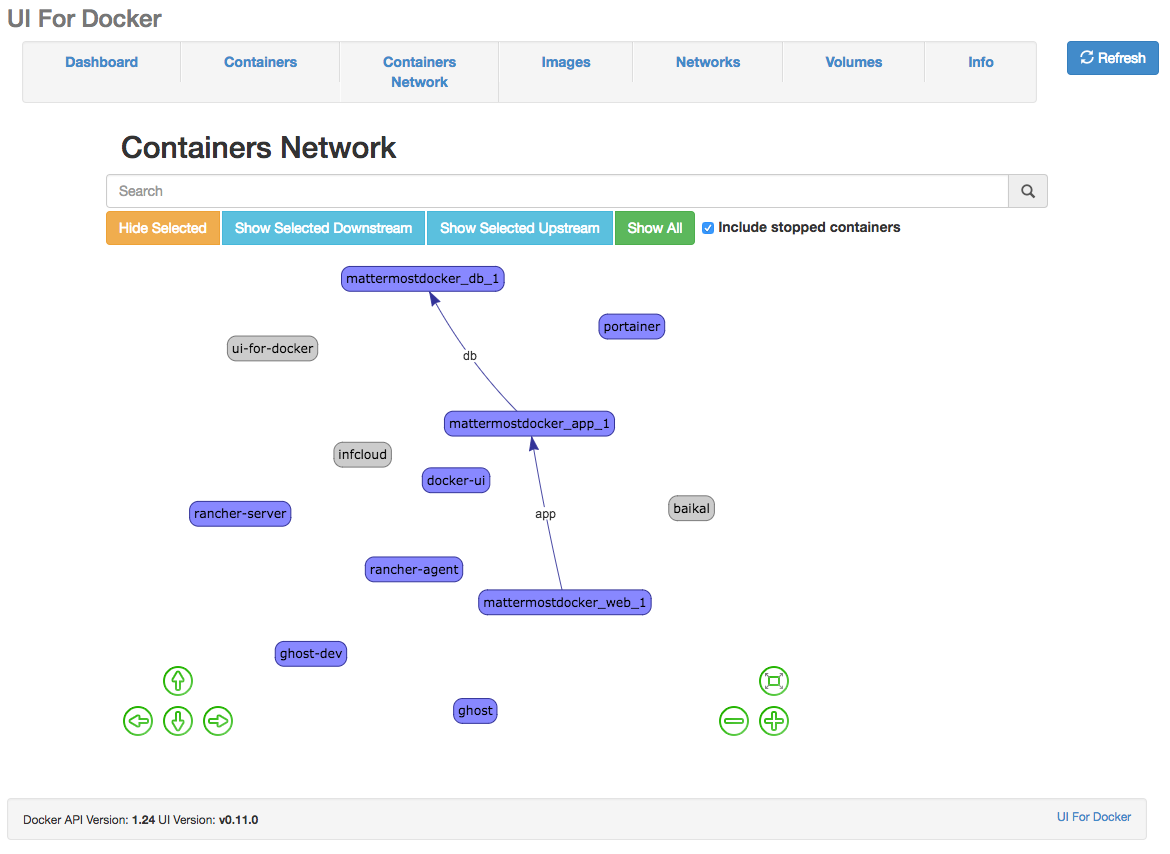
UI For Docker Since some time there is UI For Docker available for visualizing and managing containers on a single docker node. It's pretty awesome and the best feature so far is the Container Network view, which also shows the linked container. Container Orchestration Thoughts

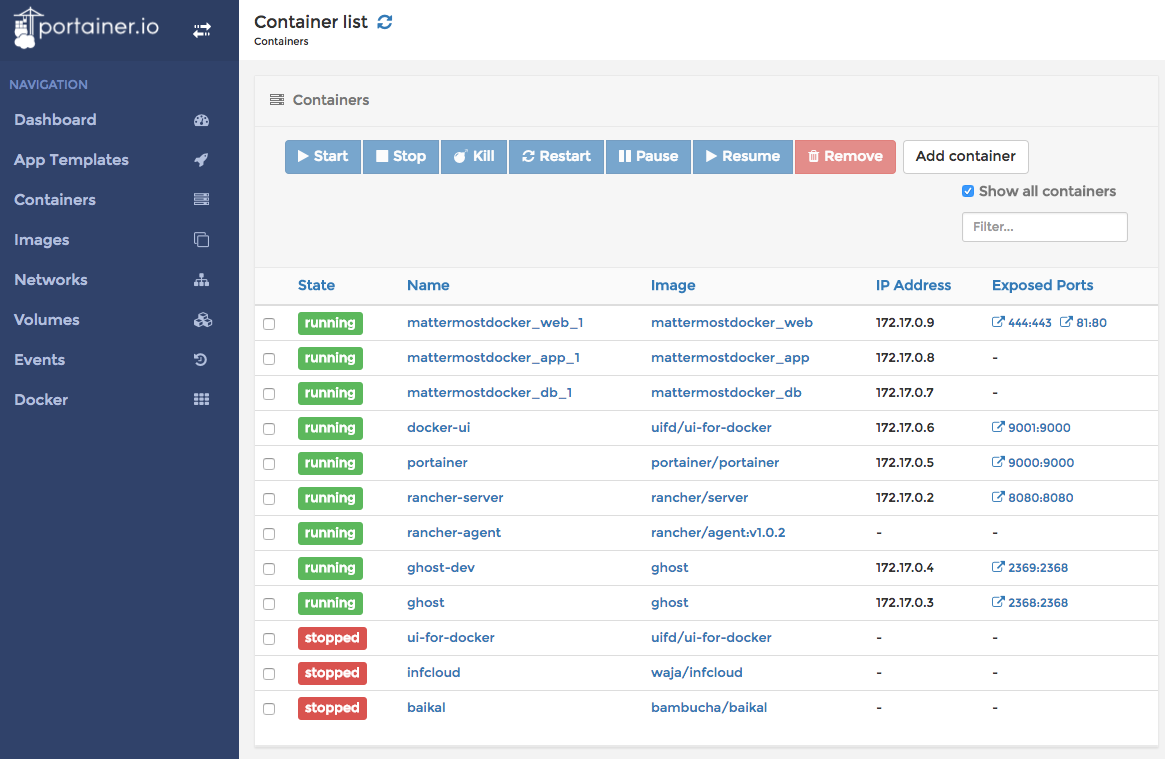
Portainer Portainer is pretty new and it can be deployed as easy as UI For Docker. But the (first) great advantage: it can handle Docker Swarm. Beside that it has many other great features. Container Orchestration Thoughts

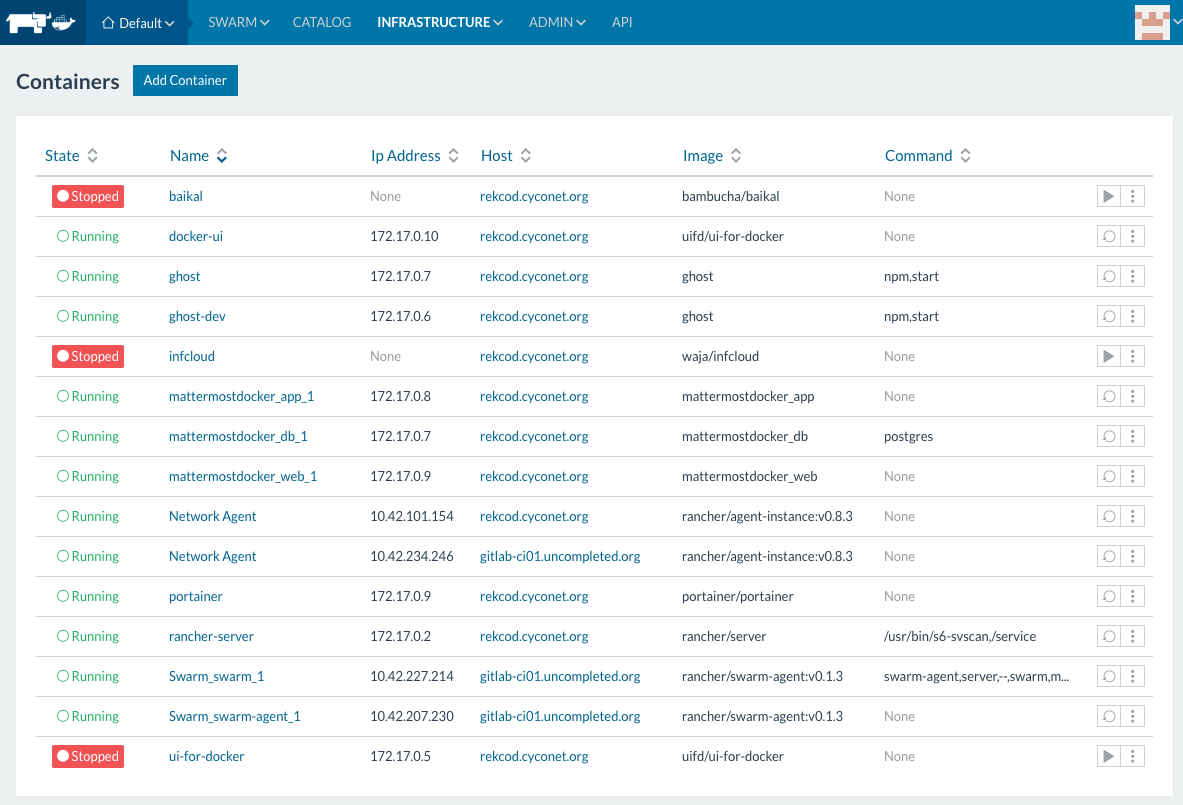
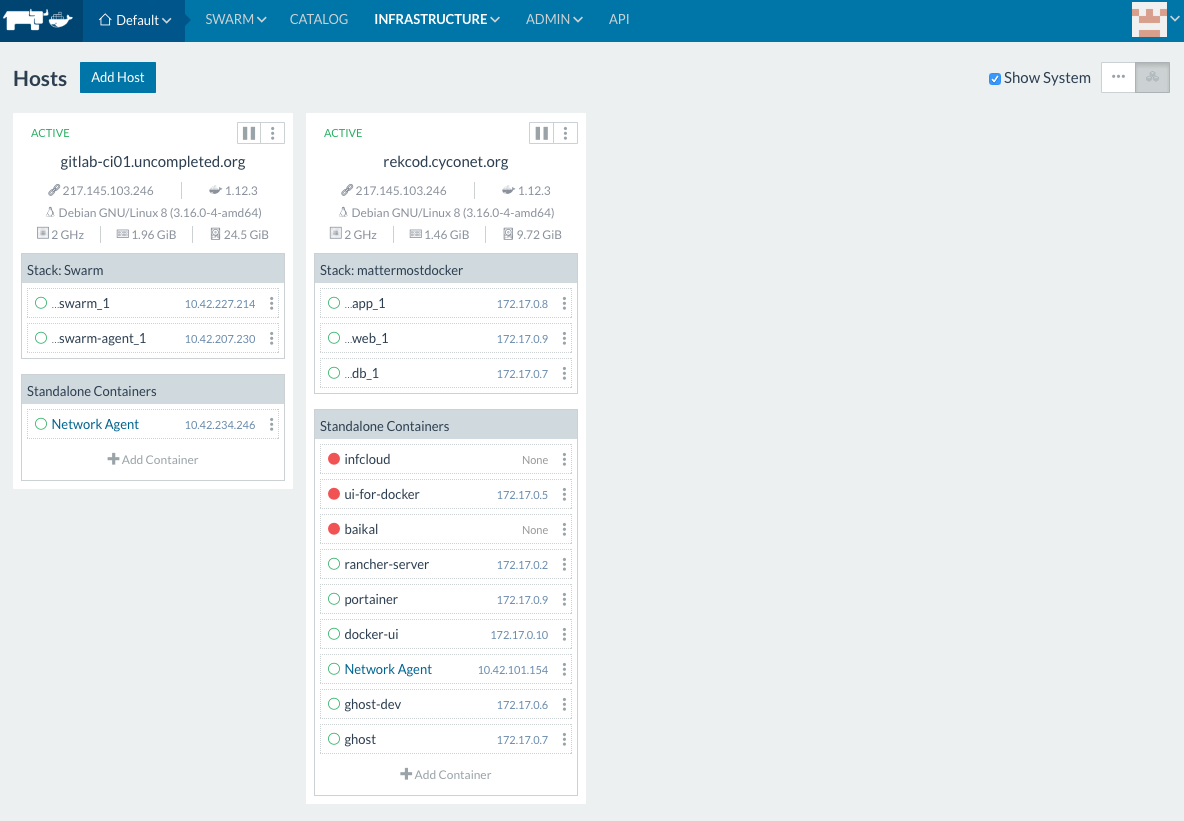
Rancher Rancher describes themselves as 'container management platform' that 'supports and manages all of your Kubernetes, Mesos, and Swarm clusters'. This is great because this are all of the relevant docker cluster orchestrations at the market actually. Container Orchestration Thoughts For the use cases, we are facing, Kubernetes and Mesos seems both like bloated beasts. Usman Ismail has written a really good comparison of Orchestration Engine options which goes into details. Container Orchestration Thoughts

Docker Swarm As there is actually no clear defacto standard/winner of the (container) orchestration wars, I would prevent to be in a vendor lock-in situation (yet). Docker swarm seems to be evolving and is getting more nice features other competitors doesn't provide.
Due the native integration into the docker framework and great community I believe Docker Swarm will be the Docker Orchestration of the choice on the long run. This should be supported by Rancher 1.2 which is not released yet.
From this point of view it looks very reasonable that Docker Swarm in combination with Rancher (1.2) might be a good strategy to maintain your container farms in the future. If you think to put Docker Swarm into production in the actual state, I recommend to read Docker swarm mode: What to know before going live on production by Panjamapong Sermsawatsri.

Persistent Storage While it is a best practice to use data volume container these days, providing persistent storage across multiple hosts for shared volumes seems to be tricky. In theory you can mount a shared-storage volume as a data volume and there are several volume plugins which supports shared storage. For example you can use the convoy plugin which gives you:
  • thin provisioned volumes
  • snapshots of volumes
  • backup of snapshots
  • restore volumes
As backend you can use:
  • Device Mapper
  • Virtual File System(VFS)/Network File System(NFS)
  • Amazon Elastic Block Store(EBS)
The good thing is, that convoy is integrated into Rancher. For more information I suggest to read Setting Up Shared Volumes with Convoy-NFS, which also mentions some limitations. If you want test Persistent Storage Service, Rancher provides some documentation. Actually I did not evaluate shared-storage volumes yet, but I don't see a solution I would love to use in production (at least on-premise) without strong downsides. But maybe things will go further and there might be a great solution for this caveats in the future.

Keeping base images up-to-date Since some time there are many projects that tries to detect security problems in your container images in several ways.
Beside general security considerations you need to deal somehow with issues in your base images that you build your applications on. Of course, even if you know you have a security issue in your application image, you need to fix it, which depends on the way how you based your application upon.

Ways to base your application image
  • You can build your application image entire from scratch, which leaves all the work to your development team and I wouldn't recommend it that way.
  • You also can create one (or more) intermediate image(s) that will be used by your development team.
  • The development team might ground their work on images in public available or private (for example the one bundled to your gitlab CI/CD solution) registries.

Whats the struggle with the base image? If you are using images being not (well) maintained by other people, you have to wait for them to fix your base image. Using external images might also lead into trust problems (can you trust those people in general?).
In an ideal world, your developers have always fresh base images with fixed security issues. This can probably be done by rebuilding every intermediate image periodically or when the base image changes.

Paradigm change Anyway, if you have a new application image available (with no known security issues), you need to deploy it to production. This is summarized by Jason McKay in his article Docker Security: How to Monitor and Patch Containers in the Cloud:
To implement a patch, update the base image and then rebuild the application image. This will require systems and development teams to work closely together.
So patching security issues in the container world changes workflow significant. In the old world operation teams mostly rolled security fixes for the base systems independent from development teams.
Now hitting containers the production area this might change things significant.

Bringing updated images to production Imagine your development team doesn't work steady on a project, cause the product owner consider it feature complete. The base image is provided (in some way) consistently without security issues. The application image is build on top of that automatically on every update of the base image.
How do you push in such a scenario the security fixes to production? From my point of view you have two choices:
  • Let the development team require to test the resulting application image and put it into production
  • Push the new application image without review by the development team into production
The first scenario might lead into a significant delay until the fixes hit production created by the probably infrequent work of the development team. The latter one brings your security fixes early to production by the notable higher risk to break your application. This risk can be reduced by implementing massive tests into CI/CD pipelines by the development team. Rolling updates provided by Docker Swarm might also reduce the risk of ending with a broken application. When you are implementing an update process of your (application) images to production, you should consider Watchtower that provides Automatic Updates for Docker Containers.

Conclusion Not being a product owner or the operations part of an application that is facing a widely adopted usage that would compensate the actual tradeoffs we are still facing I tend not to move large scale production projects into a container environment.
This means not that this might be a bad idea for others, but I'd like to sort out some of the caveats before. I'm still interested to put smaller projects into production, being not scared to reimplement or move them on a new stack.
For smaller projects with a small number of hosts Portainer looks not bad as well as Rancher with the Cattle orchestration engine if you just want to manage a couple of nodes. Things are going to be interesting if Rancher 1.2 supports Docker swarm cluster out of the box. Let's see what the future will bring us to the container world and how to make a great stack out of it.

Update I suggest to read Docker in Production: A History of Failure and the answer Docker in Production: A retort to understand the actual challenges when running Docker in larger scale production environments.

Bits from Debian: New Debian Developers and Maintainers (September and October 2016)

The following contributors got their Debian Developer accounts in the last two months: The following contributors were added as Debian Maintainers in the last two months: Congratulations!

31 October 2016

Chris Lamb: Free software activities in October 2016

Here is my monthly update covering what I have been doing in the free software world (previously):

Debian & Reproducible builds

Whilst anyone can inspect the source code of free software for malicious flaws, most GNU/Linux distributions provide binary (or "compiled") packages to end users. The motivation behind the Reproducible Builds effort is to allow verification that no flaws have been introduced either maliciously and accidentally during this compilation process by promising identical binary packages are always generated from a given source.

  • Presented a talk entitled "Reproducible Builds" talk at Software Freedom Kosova, in Prishtina, Republic of Kosovo.

  • I filed my 2,500th bug in the Debian BTS: #840972: golang-google-appengine: accesses the internet during build.

  • In order to build packages reproducibly, one not only needs identical sources but also some external and sharable definition of the environment used for a particular build, stipulating such things such as the version numbers of the required build-dependencies. It is not currently clear how to handle these .buildinfo files after the archive software has processed them and how to make them available to the world so I started development on a proof-of-concept server to see what issues arise in practice. It is available at buildinfo.debian.net.

  • Chaired an IRC meeting and ran a poll to determine a regular time .

  • Submitted two design proposals to our wiki page.

  • Improvements to our tests.reproducible-builds.org testing framework:

    • Move regular "Scheduled in..." messages to the #debian-reproducible-changes IRC channel.
    • Use our log_info method instead of manual echo calls.
    • Correct an "all sources packages" "all source packages" typo.
    • Submit .buildinfo files to buildinfo.debian.net.
    • Create GPG key on nodes for buildinfo.debian.net at deploy time, not "lazily".

My work in the Reproducible Builds project was also covered in our weekly reports. (#75, #76, #77 & #78).

I also submitted 14 patches to fix specific reproducibility issues in bio-eagle, cf-python, fastx-toolkit, fpga-icestorm, http-icons, lambda-align, mypy, playitslowly, seabios, stumpwm, sympa, tj3, wims-help & xotcl.
Debian LTS

This month I have been paid to work 13 hours on Debian Long Term Support (LTS). In that time I did the following:
  • Seven days of "frontdesk" duties, triaging CVEs, etc.
  • Issued DLA 647-1 for freeimage correcting an out-of-bounds write vulnerability in the XMP image handling functionality.
  • Issued DLA 649-1 for python-django fixing a possible CSRF protection bypass on sites that use Google Analytics.
  • Issued DLA 654-1 for libxfixes preventing an integer overflow when a malicious client sent INT_MAX as a "length".
  • Issued DLA 662-1 for quagga correcting a programming error where two constants were confused that could cause stack overrun in IPv6 routing code.
  • Issued DLA 688-1 for cairo to prevent a DoS attack where a malicious SVG could generate invalid pointers.

Uploads
  • gunicorn:
    • 19.6.0-7 Set supplementary groups when changing uid, add an example systemd .service file to gunicorn-examples, and expand README.Debian to make it clearer what to do now that /etc/gunicorn.d has been removed.
    • 19.6.0-8 Correct previous supplementary groups patch to be compatible with Python 3.
  • redis:
    • 3:3.2.4-2 Ensure that sentinel's configuration actually writes to a pidfile location so that systemd can detect that the daemon has started.
    • 3:3.2.5-1 New upstream release.
  • libfiu:
    • 0.94-8 Fix FTBFS under Bash due to lack of && in debian/rules.
    • 0.94-9 Ensure the build is reproducible by sorting injected modules.
  • aptfs (2:0.8-2) Minor cosmetic changes.

NMUs
  • libxml-dumper-perl (0.81-1.2) Move away from a unsupported debhelper compat level 4.
  • netatalk (2.2.5-1.1) Drop build-dependency on hardening-includes.

QA uploads
  • anon-proxy (00.05.38+20081230-4) Move to a supported debhelper compatibility level 9.
  • ara (1.0.32) Make the build reproducible.
  • binutils-m68hc1x (1:2.18-8) Make the build reproducible & move to a supported debhelper compatibility level.
  • fracplanet (0.4.0-5) Make the build reproducible.
  • libnss-ldap (265-5) Make the build reproducible.
  • python-uniconvertor (1.1.5-3) Fix an "option release requires an argument" FTBFS. (#839375)
  • ripole (0.2.0+20081101.0215-3) Actually include the ripole binary in package. (#839919) & enable hardening flags.
  • twitter-bootstrap (2.0.2+dfsg-10) Fix incorrect copyright formatting when building under Bash. (#824592)
  • zpaq (1.10-3) Make the build reproducible.


Debian FTP Team

As a Debian FTP assistant I ACCEPTed 147 packages: ace-link, amazon-s2n, avy, basez, bootstrap-vz, bucklespring, camitk, carettah, cf-python, debian-reference, dfcgen-gtk, efivar, entropybroker, fakesleep, gall, game-data-packager, gitano, glare, gnome-panel, gnome-shell-extension-dashtodock, gnome-shell-extension-refreshwifi, gnome-shell-extension-remove-dropdown-arrows, golang-github-gogits-go-gogs-client, golang-github-gucumber-gucumber, golang-github-hlandau-buildinfo, golang-github-hlandau-dexlogconfig, golang-github-hlandau-goutils, golang-github-influxdata-toml, golang-github-jacobsa-crypto, golang-github-kjk-lzma, golang-github-miekg-dns, golang-github-minio-sha256-simd, golang-github-nfnt-resize, golang-github-nicksnyder-go-i18n, golang-github-pointlander-compress, golang-github-pointlander-jetset, golang-github-pointlander-peg, golang-github-rfjakob-eme, golang-github-thecreeper-go-notify, golang-github-twstrike-gotk3adapter, golang-github-unknwon-goconfig, golang-gopkg-dancannon-gorethink.v1, golang-petname, haskell-argon2, haskell-binary-parsers, haskell-bindings-dsl, haskell-deriving-compat, haskell-hackage-security, haskell-hcwiid, haskell-hsopenssl-x509-system, haskell-megaparsec, haskell-mono-traversable-instances, haskell-prim-uniq, haskell-raaz, haskell-readable, haskell-readline, haskell-relational-record, haskell-safe-exceptions, haskell-servant-client, haskell-token-bucket, haskell-zxcvbn-c, irclog2html, ironic-ui, lace, ledger, libdancer2-plugin-passphrase-perl, libdatetime-calendar-julian-perl, libdbix-class-optimisticlocking-perl, libdbix-class-schema-config-perl, libgeo-constants-perl, libgeo-ellipsoids-perl, libgeo-functions-perl, libgeo-inverse-perl, libio-async-loop-mojo-perl, libmojolicious-plugin-assetpack-perl, libmojolicious-plugin-renderfile-perl, libparams-validationcompiler-perl, libspecio-perl, libtest-time-perl, libtest2-plugin-nowarnings-perl, linux, lua-scrypt, mono, mutt-vc-query, neutron, node-ansi-font, node-buffer-equal, node-defaults, node-formatio, node-fs-exists-sync, node-fs.realpath, node-is-buffer, node-jison-lex, node-jju, node-jsonstream, node-kind-of, node-lex-parser, node-lolex, node-loud-rejection, node-random-bytes, node-randombytes, node-regex-not, node-repeat-string, node-samsam, node-set-value, node-source-map-support, node-spdx-correct, node-static-extend, node-test, node-to-object-path, node-type-check, node-typescript, node-unset-value, nutsqlite, opencv, openssl1.0, panoramisk, perl6, pg-rage-terminator, pg8000, plv8, puppet-module-oslo, pymoc, pyramid-jinja2, python-bitbucket-api, python-ceilometermiddleware, python-configshell-fb, python-ewmh, python-gimmik, python-jsbeautifier, python-opcua, python-pyldap, python-s3transfer, python-testing.common.database, python-testing.mysqld, python-testing.postgresql, python-wheezy.template, qspeakers, r-cran-nleqslv, recommonmark, rolo, shim, swift-im, tendermint-go-clist, tongue, uftrace & zaqar-ui.

Antoine Beaupr : My free software activities, October 2016

Debian Long Term Support (LTS) This is my 7th month working on Debian LTS, started by Raphael Hertzog at Freexian, after a long pause during the summer. I have worked on the following packages and CVEs: I have also helped review work on the following packages:
  • imagemagick: reviewed BenH's work to figure out what was done. unfortunately, I forgot to officially take on the package and Roberto started working on it in the meantime. I nevertheless took time to review Roberto's work and outline possible issues with the original patchset suggested
  • tiff: reviewed Raphael's work on the hairy TIFFTAG_* issues, all the gory details in this email
The work on ImageMagick and GraphicsMagick was particularly intriguing. Looking at the source of those programs makes me wonder why were are still using them at all: it's a tangled mess of C code that is bound to bring up more and more vulnerabilities, time after time. It seems there's always an "Magick" vulnerability waiting to be fixed out there... I somehow hoped that the fork would bring more stability and reliability, but it seems they are suffering from similar issues because, fundamentally, they haven't rewritten ImageMagick... It looks this is something that affects all image programs. The review I have done on the tiff suite give me the same shivering sensation as reviewing the "Magick" code. It feels like all image libraries are poorly implemented and then bound to be exploited somehow... Nevertheless, if I had to use a library of the sort in my software, I would stay away from the "Magick" forks and try something like imlib2 first... Finally, I also did some minor work on the user and developer LTS documentation and some triage work on samba, xen and libass. I also looked at the dreaded CVE-2016-7117 vulnerability in the Linux kernel to verify its impact on wheezy users. I also looked at implementing a --lts flag for dch (see bug #762715). It was difficult to get back to work after such a long pause, but I am happy I was able to contribute a significant number of hours. It's a bit difficult to find work sometimes in LTS-land, even if there's actually always a lot of work to be done. For example, I used to be one of the people doing frontdesk work, but those duties are now assigned until the end of the year, so it's unlikely I will be doing any of that for the forseable future. Similarly, a lot of packages were assigned when I started looking at the available packages. There was an interesting discussion on the internal mailing list regarding unlocking package ownership, because some people had packages locked for weeks, sometimes months, without significant activity. Hopefully that situation will improve after that discussion. Another interesting discussion I participated in is the question of whether the LTS team should be waiting for unstable to be fixed before publishing fixes in oldstable. It seems the consensus right now is that it shouldn't be mandatory to fix issues in unstable before we fix security isssues in oldstable and stable. After all, security support for testing and unstable is limited. But I was happy to learn that working on brand new patches is part of our mandate as part of the LTS work. I did work on such a patch for tar which ended up being adopted by the original reporter, although upstream ended up implementing our recommendation in a better way. It's coincidentally the first time since I start working on LTS that I didn't get the number of requested hours, which means that there are more people working on LTS. That is a good thing, but I am worried it may also mean people are more spread out and less capable of focusing for longer periods of time on more difficult problems. It also means that the team is growing faster than the funding, which is unfortunate: now is a good time as any to remind you to see if you can make your company fund the LTS project if you are still running Debian wheezy.

Other free software work It seems like forever that I did such a report, and while I was on vacation, a lot has happened since the last report.

Monkeysign I have done extensive work on Monkeysign, trying to bring it kicking and screaming in the new world of GnuPG 2.1. This was the objective of the 2.1 release, which collected about two years of work and patches, including arbitrary MUA support (e.g. Thunderbird), config files support, and a release on PyPI. I have had to release about 4 more releases to try and fix the build chain, ship the test suite with the program and have a primitive preferences panel. The 2.2 release also finally features Tor suport! I am also happy to have moved more documentation to Read the docs, part of which I mentionned in in a previous article. The git repositories and issues were also moved to a Gitlab instance which will hopefully improve the collaboration workflow, although we still have issues in streamlining the merge request workflow. All in all, I am happy to be working on Monkeysign, but it has been a frustrating experience. In the last years, I have been maintaining the project largely on my own: although there are about 20 contributors in Monkeysign, I have committed over 90% of the commits in the code. New contributors recently showed up, and I hope this will release some pressure on me being the sole maintainer, but I am not sure how viable the project is.

Funding free software work More and more, I wonder how to sustain my contributions to free software. As a previous article has shown, I work a lot on the computer, even when I am not on a full-time job. Monkeysign has been a significant time drain in the last months, and I have done this work on a completely volunteer basis. I wouldn't mind so much except that there is a lot of work I do on a volunteer basis. This means that I sometimes must prioritize paid consulting work, at the expense of those volunteer projects. While most of my paid work usually revolves around free sofware, the benefits of paid work are not always immediately obvious, as the primary objective is to deliver to the customer, and the community as a whole is somewhat of a side-effect. I have watched with interest joeyh's adventures into crowdfunding which seems to be working pretty well for him. Unfortunately, I cannot claim the incredible (and well-deserved) reputation Joey has, and even if I could, I can't live with 500$ a month. I would love to hear if people would be interested in funding my work in such a way. I am hesitant in launching a crowdfunding campaign because it is difficult to identify what exactly I am working on from one month to the next. Looking back at earlier reports shows that I am all over the place: one month I'll work on a Perl Wiki (Ikiwiki), the next one I'll be hacking at a multimedia home cinema (Kodi). I can hardly think of how to fund those things short of "just give me money to work on anything I feel like", which I can hardly ask for of anyone. Even worse, it feels like the audience here is either friends or colleagues. It would make little sense for me to seek funding from those people: colleagues have the same funding problems I do, and I don't want to empoverish my friends... So far I have taken the approach of trying to get funding for work I am doing, bit by bit. For example, I have recently been told that LWN actually pays for contributed articles and have started running articles by them before publishing them here. This is looking good: they will publish an article I wrote about the Omnia router I have recently received. I give them exclusive rights on the article for two weeks, but I otherwise retain full ownership over the article and will publish them after the exclusive period here. Hopefully, I will be able to find more such projects that pays for the work I do on a day to day basis.

Open Street Map editing I have ramped up my OpenStreetMap contributions, having (temporarily) moved to a different location. There are lots of things to map here: trails, gaz stations and lots of other things are missing from the map. Sometimes the effort looks a bit ridiculous, reminding me of my early days of editing OSM. I have registered to OSM Live, a project to fund OSM editors that, I must admit, doesn't help much with funding my work: with the hundreds of edits I did in October, I received the equivalent of 1.80$CAD in Bitcoins. This may be the lowest hourly salary I have ever received, probably going at a rate of 10 per hour! Still, it's interesting to be able to point people to the project if someone wants to contribute to OSM mappers. But mappers should have no illusions about getting a decent salary from this effort, I am sorry to say.

Bounties I feel this is similar to the "bounty" model used by the Borg project: I claimed around $80USD in that project for what probably amounts to tens of hours of work, yet another salary that would qualify as "poor". Another example is a feature I would like to implement in Borg: support for protocols other than SSH. There is currently no bounty on this, but a similar feature, S3 support has one of the largest bounties Borg has ever seen: $225USD. And the claimant for the bounty hasn't actually implemented the feature, instead backing up to S3, the patch (to a third-party tool) actually enables support for Amazon Cloud Drive, a completely different API. Even at $225, I wouldn't be able to complete any of those features and get a decent salary. As well explained by the Snowdrift reviews, bounties just don't work at all... The ludicrous 10% fee charged by Bountysource made sure I would never do business with them ever again anyways.

Other work There are probably more things I did recently, but I am having difficulty keeping track of the last 5 months of on and off work, so you will forgive that I am not as exhaustive as I usually am.

29 October 2016

Jaldhar Vyas: Dawkins Weasel

Happy Dhanteras from Bappy Lahiri
It's already Dhan Terash so I better pick up the pace if I want to beat my blogging challenge before Diwali so in this post I'll discuss a program I wrote earlier this year.
I dread to look up anything on Wikipedia because I always end up going down a rabbit hole and surfacing hours later on a totally unrelated topic. Case in point, some months ago, I ended up on the page of the title. This is an interesting little experiment illustrating how random selection can result in the evolution of a specific form. The algorithm is:

  1. Start with a random string of 28 characters.
  2. Make 100 copies of this string, with a 5% chance per character of that character being replaced with a random character.
  3. Compare each new string with "METHINKS IT IS LIKE A WEASEL", and give each a score (the number of letters in the string that are correct and in the correct position).
  4. If any of the new strings has a perfect score (== 28), halt.
  5. Otherwise, take the highest scoring string, and go to step 2.
I had to try this myself so I wrote a little implementation in C++. A sample run looks like this:
  
$ ./weasel
0000 DNCFICBLUZVC JF KKNVJJASCJRW (0)
0001 DNIFICOLUZVC JFLIKNVAJASCJEW (6)
0002 DNNWICKSUZVCRSFLIKNVA ASCJEL (11)
0003 DNNWICKSUZVCRSFLIKNVA ASCJEL (11)
0004 MNNVICKSQZVCRSFLIKNVA WSCJEL (13)
0005 MENVICKSQZVCRSFLIKNVA WSCJEL (14)
0006 MENVISKS ZTCRSFLIKNVA WLCJEL (16)
0007 MENVISKS ZTCRSFLIKNVA WLCJEL (16)
0008 MEDHISKS ZTCISFLIKNVA WLCJEL (18)
0009 MEDHISKS ZTCISFLIKNVA WLCJEL (18)
0010 MEDHISKS ZTCISFLIKNVA WLCJEL (18)
0011 MEDHISKS ZTCIS LIKTKA WLCZEL (19)
0012 MEDHISKS ZTCIS LIKTKA WLCZEL (19)
0013 MEDHISKS ZTCIS LIKT A WLCZEL (20)
0014 MEDHISKS ZTCIS LIKT A WLCZEL (20)
0015 MEDHISKS ZTCIS LIKE A WLAZEL (22)
0016 MEDHIGKS ITCIS LIKE A WLAZEL (23)
0017 MEDHIGKS ITCIS LIKE A WLAZEL (23)
0018 MEDHIGKS ITCIS LIKE A WLAZEL (23)
0019 MEDHIGKS ITCIS LIKE A WLAZEL (23)
0020 MEDHIGKS ITCIS LIKE A WLAZEL (23)
0021 MEDHIGKS ITCIS LIKE A WLAZEL (23)
0022 METHINKS ITCIS LIKE A WLASEL (26)
0023 METHINKS ITCIS LIKE A WLASEL (26)
0024 METHINKS ITCIS LIKE A WLASEL (26)
0025 METHINKS ITCIS LIKE A WEASEL (27)
0026 METHINKS ITCIS LIKE A WEASEL (27)
0027 METHINKS ITCIS LIKE A WEASEL (27)
0028 METHINKS ITCIS LIKE A WEASEL (27)
0029 METHINKS ITCIS LIKE A WEASEL (27)
0030 METHINKS ITCIS LIKE A WEASEL (27)
0031 METHINKS ITCIS LIKE A WEASEL (27)
0032 METHINKS ITCIS LIKE A WEASEL (27)
0033 METHINKS ITCIS LIKE A WEASEL (27)
0034 METHINKS ITCIS LIKE A WEASEL (27)
0035 METHINKS ITCIS LIKE A WEASEL (27)
0036 METHINKS ITCIS LIKE A WEASEL (27)
0037 METHINKS ITCIS LIKE A WEASEL (27)
0038 METHINKS ITCIS LIKE A WEASEL (27)
0039 METHINKS ITCIS LIKE A WEASEL (27)
0040 METHINKS ITCIS LIKE A WEASEL (27)
0041 METHINKS ITCIS LIKE A WEASEL (27)
0042 METHINKS ITCIS LIKE A WEASEL (27)
0043 METHINKS ITCIS LIKE A WEASEL (27)
0044 METHINKS ITCIS LIKE A WEASEL (27)
0045 METHINKS ITCIS LIKE A WEASEL (27)
0046 METHINKS ITCIS LIKE A WEASEL (27)
0047 METHINKS ITCIS LIKE A WEASEL (27)
0048 METHINKS ITCIS LIKE A WEASEL (27)
0049 METHINKS ITCIS LIKE A WEASEL (27)
0050 METHINKS ITCIS LIKE A WEASEL (27)
0051 METHINKS ITCIS LIKE A WEASEL (27)
0052 METHINKS ITCIS LIKE A WEASEL (27)
0053 METHINKS ITCIS LIKE A WEASEL (27)
0054 METHINKS IT IS LIKE A WEASEL (28)

My program lets you adjust the input string, the number of copies, and the mutation threshold. I also thought it might be interesting to implement the Generator design pattern. In C++ this is done by making a class which implements begin() and end() methods and atleast a forward iterator. You can find the source code on Github.

28 October 2016

Russ Allbery: Term::ANSIColor 4.06

A small maintenance release to my Perl module for generating and manipulating ANSI color escape sequences. In 4.00, I added 256-color support, using ansi0 through ansi15 for the colors that match the normal 16 colors and then rgbNNN and greyN names for the RGB and greyscale colors. One module user requested the ability to address all of the colors via ansi0 through ansi255 so that there's a consistent naming scheme for all the colors. This release adds that. (The more specific names are still returned by uncolor() when reversing escape sequences.) This module tends to get included all over the place, so I did spend a bit of time when preparing this release trying to determine if adding a bunch more entries to various internal hash tables and arrays would noticably increase memory usage, since Perl is notoriously bad about memory consumption. It does cause a small increase, but it's on the order of about 100KB, and a minimum Perl program to load the module requires about 5.5MB of memory (aie), so it wasn't enough for me to do anything about. It does look like if I lazily added entries to the built-in hash tables and instead added some more code to calculate escape sequences on the fly, I could save about 300KB of memory usage in the module. Not sure if it's worth it given how small the memory usage is compared to Perl itself, but maybe I'll look at that later when I'm feeling like fiddling with the module again. (Oh, and all the documentation was regenerated by DocKnot, since I'm still having fun with that. It needed a few new features, which will be in an upcoming 1.01 release.) You can get the latest version from the Term::ANSIColor distribution page.

Jaldhar Vyas: Get Ready For Bikini Season With These n Weird Tricks

It all started last June when my son had his Janoi (Yagnopavita) ceremony -- the ritual by which a Brahmana boy becomes "twice-born" and eligible to study the Vedas. As well as a profound religious experience, it is also an important social occasion with a reception for as many friends and family as can attend. (I think our final guest total was ~250.) This meant new outfits for everyone which might be exciting for some people but not me. I still don't know why I couldn't just keep wearing the khes and pitambar from the puja but no, apparently that's a faux pas. So I relented and agreed to wear my "darbari" suit from my wedding. And it didn't fit. I knew I had gained some weight in the intermediate 17 years but the thing was sitcom levels of too small. I ended up having to purchase a new one, a snazzy (and shiny!) maroon number with gold stripes (or were they black stripes?) Problem having been solved, much was eaten, more weight was gained and then I forgot about the whole thing. Tip 1: Actually Do Something. I have over the years tried to improve my physical condition but it has never gotten very far. For instance I have a treadmill/coatrack and a couple of years ago I began using it in earnest. I got to the point where I actually ran a 10K race without dying. But I did not train systematically and I ended up in some pain which caused me to stop working out for a while and then I never got around to restarting. Diets have also failed because I don't have a clear idea of what and how much I am eating. All I know is that women go into the kitchen and when they come out they have food. By what eldritch process this occurs is a mystery, I just eat whats given to me thankful that the magic happens. Once I was moved to try and help but quickly fell afoul of the lack of well-defined algorithms in Gujarati home cooking.
"How much saffron should I add?"
"this much."
"How much is this much in SI units?"
"You're annoying me. Get out."
Fast forward to March of this year. For my birthday, my wife got me a Fitbit fitness tracker. This is what I had needed all this time. It measure heart rate, distance travelled, time slept and several other pieces of info you can use to really plan a fitness regimen rationally. For example, I was chagrined to learn that sometimes when I'm at the computer, I am so immobile that the fitbit thought I was asleep. So I started planning to taken more frequent breaks. (A recent firmware upgrade has added the ability to nudge to walk atleast 250 paces each daytime hour which is handy for this.) Also by checking my heart rate I discovered that I went on the treadmill I ran too fast thereby stressing my body for little gain and ending up going too slow to get much aerobic effect. Now I can pace myself appropriately for maximum cardiac efficiency without ending up injuring myself and giving up. I also get a little more activity each day by simple changes such as taking the stairs instead of the lift and instead of getting off at the 14th street PATH I go all the way to 34th street and walk down. Tip 2: You must have data in order to see what you did right or wrong and to plan what you need to do moving forward. One caveat about these fitness trackers. They are not anywhere as accurate as a proper checkup from a doctor who specializes in such things. If you want to do any kind of pro or amateur athletics you probably should not rely on them but for the average shlub who just wants to avoid appearing on the news being winched off his sofa by the fire brigade they are good enough. Another practice I began was keeping a food diary. It can be a real eye-opener to see how much you are actually eating. It is probably much more than you thought. I am fortunate that my diet is pretty good to begin with. Vegetarian, (not vegan, Hindus eat dairy products,) mostly home-cooked with fresh ingredients, not fried or processed, and I don't drink alcohol. However there were a few optimizations I could make. I drink a lot of soda; atleast two cans a day. I really ought to stop altogether but in lieu of that I have atleast switched from Coke to Coke Zero thereby saving a lot of empty calories. I now eat 4 rotlis with my dinner instead of six. We as a family eat more green vegetables instead of potatos, skim milk instead of whole fat, canola oil instead of corn oil, and less rice and don't slather ghee on everything quite so much. One entirely new practice I've adopted that may seem faddish but works for me is intermittent fasting. The idea is to steadily train your body to need less food by eating all your days allowed amount pf calories during a 6-8 hour window and not eating at all during the remaining time. It's hard to get used to for many people but I fast atleast 2-3 times a month for religious reasons anyway so I adapted pretty quickly. The fitbit tells me how many calories I am expending and how many I can eat to maintain a healthy level of weight loss but other than that I don't bother with "food groups" or specific diets such as paleo, or low-carb etc. As long as what you eat is reasonably balanced and you are burning more calories than you are adding, it should be enough for weight loss. Indeed from the end of March to now, I've lost 3 stones (20Kg) even with the occasional "cheat" day. Tip 3: All published diets are bullshit without scientifically proven efficacy. Don't bother with them. Experiment instead and see what works for you and your metabolism. As long as you are getting all the proper nutrients (you shouldn't need a supplement unless you have an actual medical condition.) and you have a net calorie deficit, it's all good. If you eat food you enjoy, you are more likely to stick to your diet. The proper amount of sleep is one area of a healthy lifestyle I am still doing poorly in and the reasons are not all raven-related. I have always had problems with insomnia and was once actually diagnosed with sleep apnea. Losing weight has helped a lot but the fitbit is still reporting that I toss and turn a lot during the night. And that's when I'm in bed in the first place. I stay up much too late which can also lead to subsidiary bad behaviours such as midnight snacking. It's something I need to work on. Tip 4: Stop blogging at all hours of the night, It's not doing you any good. So that's what I'm doing. Moving forward, I need to deal with the sleep thing and I would also like to start some program of strength-training, I'm doing ok in terms of aerobic exercise but from what I've read, you also have to build up muscles to keep weight loss permanent. The difficulty is that it would involve joining a gym and then actually going to that gym so I've put it off for now. The immediate threat is Diwali (and Thanksgiving and Christmas...) My wife bought 4 lbs of sweets today and I can feel their presence in the fridge calling to me.

24 October 2016

Russ Allbery: Review: The Design of Everyday Things

Review: The Design of Everyday Things, by Don Norman
Publisher: Basic Books
Copyright: 2013
ISBN: 0-465-05065-4
Format: Trade paperback
Pages: 298
There are several editions of this book (the first under a different title, The Psychology of Everyday Things). This review is for the Revised and Expanded Edition, first published in 2013 and quite significantly revised compared to the original. I probably read at least some of the original for a class in human-computer interaction around 1994, but that was long enough ago that I didn't remember any of the details. I'm not sure how much impact this book has had outside of the computer field, but The Design of Everyday Things is a foundational text of HCI (human-computer interaction) despite the fact that many of its examples and much of its analysis is not specific to computers. Norman's goal is clearly to write a book that's fundamental to the entire field of design; not having studied the field, I don't know if he succeeded, but the impact on computing was certainly immense. This is the sort of book that everyone ends up hearing about, if not necessarily reading, in college. I was looking forward to filling a gap in my general knowledge. Having now read it cover-to-cover, would I recommend others invest the time? Maybe. But probably not. There are several things this book does well. One of the most significant is that it builds a lexicon and a set of general principles that provide a way of talking about design issues. Lexicons are not the most compelling reading material (see also Design Patterns), but having a common language is useful. I still remember affordances from college (probably from this book or something else based on it). Norman also adds, and defines, signifiers, constraints, mappings, and feedback, and talks about the human process of building a conceptual model of the objects with which one is interacting. Even more useful, at least in my opinion, is the discussion of human task-oriented behavior. The seven stages of action is a great systematic way of analyzing how humans perform tasks, where those actions can fail, and how designers can help minimize failure. One thing I particularly like about Norman's presentation here is the emphasis on the feedback cycle after performing a task, or a step in a task. That feedback, and what makes good or poor feedback, is (I think) an underappreciated part of design and something that too often goes missing. I thought Norman was a bit too dismissive of simple beeps as feedback (he thinks they don't carry enough information; while that's not wrong, I think they're far superior to no feedback at all), but the emphasis on this point was much appreciated. Beyond these dry but useful intellectual frameworks, though, Norman seems to have a larger purpose in The Design of Everyday Things: making a passionate argument for the importance of design and for not tolerating poor design. This is where I think his book goes a bit off the rails. I can appreciate the boosterism of someone who feels an aspect of creating products is underappreciated and underfunded. But Norman hammers on the unacceptability of bad design to the point of tedium, and seems remarkably intolerant of, and unwilling to confront, the reasons why products may be released with poor designs for their eventual users. Norman clearly wishes that we would all boycott products with poor designs and prize usability above most (all?) other factors in our decisions. Equally clearly, this is not happening, and Norman knows it. He even describes some of the reasons why not, most notably (and most difficultly) the fact that the purchasers of many products are not the eventual users. Stoves are largely sold to builders, not kitchen cooks. Light switches are laid out for the convenience of the electrician; here too, the motive for the builder to spend additional money on better lighting controls is unclear. So much business software is purchased by people who will never use it directly, and may have little or no contact with the people who do. These layers of economic separation result in deep disconnects of incentive structure between product manufacturers and eventual consumers. Norman acknowledges this, writes about it at some length, and then seems to ignore the point entirely, returning to ranting about the deficiencies of obviously poor design and encouraging people to care more about design. This seems weirdly superficial in this foundational of a book. I came away half-convinced that these disconnects of incentive (and some related problems, such as the unwillingness to invest in proper field research or the elaborate, expensive, and lengthy design process Norman lays out as ideal) are the primary obstacle in the way of better-designed consumer goods. If that's the case, then this is one of the largest, if not the largest, obstacle in the way of doing good design, and I would have expected this foundational of a book to tackle it head-on and provide some guidance for how to fight back against this problem. But Norman largely doesn't. There is some mention of this in the introduction. Apparently much of the discussion of the practical constraints on product design in the business world was added in this revised edition, and perhaps what I'm seeing is the limitations of attempting to revise an existing text. But that also implies that the original took an even harder line against poor design. Throughout, Norman is remarkably high-handed in his dismissal of bad design, focusing more on condemnation than on an investigation of why bad design might happen and what we, as readers, can learn from that process to avoid repeating it. Norman does provide extensive analysis of the design process and the psychology of human interaction, but still left me with the impression that he believes most design failures stem from laziness and stupidity. The negativity and frustration got a bit tedious by the middle of the book. There's quite a lot here that someone working in design, particularly interface design, should be at least somewhat familiar with: affordances, signifiers, the importance of feedback, the psychological model of tasks and actions, and the classification of errors, just to name a few. However, I'm not sure this book is the best medium for learning those things. I found it a bit tedious, a bit too arrogant, and weirdly unconcerned with feasible solutions to the challenge of mismatched incentives. I also didn't learn that much from it; while the concepts here are quite important, most of them I'd picked up by osmosis from working in the computing field for twenty years. In that way, The Design of Everyday Things reminded me a great deal of the Gang of Four's Design Patterns, even though it's a more readable book and less of an exercise in academic classification. The concepts presented are useful and important, but I'm not sure I can recommend the book as a book. It may be better to pick up the same concepts as you go, with the help of Internet searches and shorter essays. Rating: 6 out of 10

23 October 2016

Vincent Sanders: Rabbit of Caerbannog

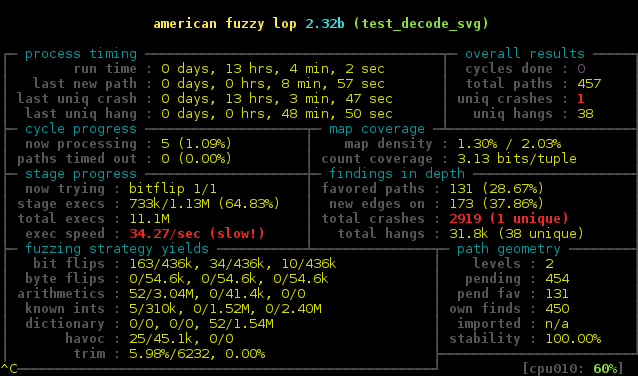
Subsequent to my previous use of American Fuzzy Lop (AFL) on the NetSurf bitmap image library I applied it to the gif library which, after fixing the test runner, failed to produce any crashes but did result in a better test corpus improving coverage above 90%

I then turned my attention to the SVG processing library. This was different to the bitmap libraries in that it required parsing a much lower density text format and performing operations on the resulting tree representation.

The test program for the SVG library needed some improvement but is very basic in operation. It takes the test SVG, parses it using libsvgtiny and then uses the parsed output to write out an imagemagick mvg file.

The libsvg processing uses the NetSurf DOM library which in turn uses an expat binding to parse the SVG XML text. To process this with AFL required instrumenting not only the XVG library but the DOM library. I did not initially understand this and my first run resulted in a "map coverage" indicating an issue. Helpfully the AFL docs do cover this so it was straightforward to rectify.

Once the test program was written and environment set up an AFL run was started and left to run. The next day I was somewhat alarmed to discover the fuzzer had made almost no progress and was running very slowly. I asked for help on the AFL mailing list and got a polite and helpful response, basically I needed to RTFM.

I must thank the members of the AFL mailing list for being so helpful and tolerating someone who ought to know better asking dumb questions.

After reading the fine manual I understood I needed to ensure all my test cases were as small as possible and further that the fuzzer needed a dictionary as a hint to the file format because the text file was of such low data density compared to binary formats.

Rabbit of Caerbannog. Death awaits you with pointy teeth
I crafted an SVG dictionary based on the XML one, ensured all the seed SVG files were as small as possible and tried again. The immediate result was thousands of crashes, nothing like being savaged by a rabbit to cause a surprise.

Not being in possession of the appropriate holy hand grenade I resorted instead to GDB and electric fence. Unlike the bitmap library crashes memory bounds issues simply did not feature in the crashes.Instead they mainly centered around actual logic errors when constructing and traversing the data structures.

For example Daniel Silverstone fixed an interesting bug where the XML parser binding would try and go "above" the root node in the tree if the source closed more tags than it opened which resulted in wild pointers and NULL references.

I found and squashed several others including dealing with SVG which has no valid root element and division by zero errors when things like colour gradients have no points.

I find it interesting that the type and texture of the crashes completely changed between the SVG and binary formats. Perhaps it is just the nature of the textural formats that causes this although it might be due to the techniques used to parse the formats.

Once all the immediately reproducible crashes were dealt with I performed a longer run. I used my monster system as previously described and ran the fuzzer for a whole week.

Summary stats
=============

Fuzzers alive : 10
Total run time : 68 days, 7 hours
Total execs : 9268 million
Cumulative speed : 15698 execs/sec
Pending paths : 0 faves, 2501 total
Pending per fuzzer : 0 faves, 250 total (on average)
Crashes found : 9 locally unique

After burning almost seventy days of processor time AFL found me another nine crashes and possibly more importantly a test corpus that generates over 90% coverage.

A useful tool that AFL provides is afl-cmin. This reduces the number of test files in a corpus to only those that are required to exercise all the code paths reached by the test set. In this case it reduced the number of files from 8242 to 2612

afl-cmin -i queue_all/ -o queue_cmin -- test_decode_svg @@ 1.0 /dev/null
corpus minimization tool for afl-fuzz by

[+] OK, 1447 tuples recorded.
[*] Obtaining traces for input files in 'queue_all/'...
Processing file 8242/8242...
[*] Sorting trace sets (this may take a while)...
[+] Found 23812 unique tuples across 8242 files.
[*] Finding best candidates for each tuple...
Processing file 8242/8242...
[*] Sorting candidate list (be patient)...
[*] Processing candidates and writing output files...
Processing tuple 23812/23812...
[+] Narrowed down to 2612 files, saved in 'queue_cmin'.

Additionally the actual information within the test files can be minimised with the afl-tmin tool. This must be run on each file individually and can take a relatively long time. Fortunately with GNU parallel one can run many of these jobs simultaneously which merely required another three days of CPU time to process. The resulting test corpus weighs in at a svelte 15 Megabytes or so against the 25 Megabytes before minimisation.

The result is yet another NetSurf library significantly improved by the use of AFL both from finding and squashing crashing bugs and from having a greatly improved test corpus to allow future library changes with a high confidence there will not be any regressions.

22 October 2016

Matthew Garrett: Fixing the IoT isn't going to be easy

A large part of the internet became inaccessible today after a botnet made up of IP cameras and digital video recorders was used to DoS a major DNS provider. This highlighted a bunch of things including how maybe having all your DNS handled by a single provider is not the best of plans, but in the long run there's no real amount of diversification that can fix this - malicious actors have control of a sufficiently large number of hosts that they could easily take out multiple providers simultaneously.

To fix this properly we need to get rid of the compromised systems. The question is how. Many of these devices are sold by resellers who have no resources to handle any kind of recall. The manufacturer may not have any kind of legal presence in many of the countries where their products are sold. There's no way anybody can compel a recall, and even if they could it probably wouldn't help. If I've paid a contractor to install a security camera in my office, and if I get a notification that my camera is being used to take down Twitter, what do I do? Pay someone to come and take the camera down again, wait for a fixed one and pay to get that put up? That's probably not going to happen. As long as the device carries on working, many users are going to ignore any voluntary request.

We're left with more aggressive remedies. If ISPs threaten to cut off customers who host compromised devices, we might get somewhere. But, inevitably, a number of small businesses and unskilled users will get cut off. Probably a large number. The economic damage is still going to be significant. And it doesn't necessarily help that much - if the US were to compel ISPs to do this, but nobody else did, public outcry would be massive, the botnet would not be much smaller and the attacks would continue. Do we start cutting off countries that fail to police their internet?

Ok, so maybe we just chalk this one up as a loss and have everyone build out enough infrastructure that we're able to withstand attacks from this botnet and take steps to ensure that nobody is ever able to build a bigger one. To do that, we'd need to ensure that all IoT devices are secure, all the time. So, uh, how do we do that?

These devices had trivial vulnerabilities in the form of hardcoded passwords and open telnet. It wouldn't take terribly strong skills to identify this at import time and block a shipment, so the "obvious" answer is to set up forces in customs who do a security analysis of each device. We'll ignore the fact that this would be a pretty huge set of people to keep up with the sheer quantity of crap being developed and skip straight to the explanation for why this wouldn't work.

Yeah, sure, this vulnerability was obvious. But what about the product from a well-known vendor that included a debug app listening on a high numbered UDP port that accepted a packet of the form "BackdoorPacketCmdLine_Req" and then executed the rest of the payload as root? A portscan's not going to show that up[1]. Finding this kind of thing involves pulling the device apart, dumping the firmware and reverse engineering the binaries. It typically takes me about a day to do that. Amazon has over 30,000 listings that match "IP camera" right now, so you're going to need 99 more of me and a year just to examine the cameras. And that's assuming nobody ships any new ones.

Even that's insufficient. Ok, with luck we've identified all the cases where the vendor has left an explicit backdoor in the code[2]. But these devices are still running software that's going to be full of bugs and which is almost certainly still vulnerable to at least half a dozen buffer overflows[3]. Who's going to audit that? All it takes is one attacker to find one flaw in one popular device line, and that's another botnet built.

If we can't stop the vulnerabilities getting into people's homes in the first place, can we at least fix them afterwards? From an economic perspective, demanding that vendors ship security updates whenever a vulnerability is discovered no matter how old the device is is just not going to work. Many of these vendors are small enough that it'd be more cost effective for them to simply fold the company and reopen under a new name than it would be to put the engineering work into fixing a decade old codebase. And how does this actually help? So far the attackers building these networks haven't been terribly competent. The first thing a competent attacker would do would be to silently disable the firmware update mechanism.

We can't easily fix the already broken devices, we can't easily stop more broken devices from being shipped and we can't easily guarantee that we can fix future devices that end up broken. The only solution I see working at all is to require ISPs to cut people off, and that's going to involve a great deal of pain. The harsh reality is that this is almost certainly just the tip of the iceberg, and things are going to get much worse before they get any better.

Right. I'm off to portscan another smart socket.

[1] UDP connection refused messages are typically ratelimited to one per second, so it'll take almost a day to do a full UDP portscan, and even then you have no idea what the service actually does.

[2] It's worth noting that this is usually leftover test or debug code, not an overtly malicious act. Vendors should have processes in place to ensure that this isn't left in release builds, but ha well.

[3] My vacuum cleaner crashes if I send certain malformed HTTP requests to the local API endpoint, which isn't a good sign

comment count unavailable comments

19 October 2016

Pau Garcia i Quiles: FOSDEM Desktops DevRoom 2017 all for Participation

FOSDEM is one of the largest (5,000+ hackers!) gatherings of Free Software contributors in the world and happens each February in Brussels (Belgium, Europe). Once again, one of the tracks will be the Desktops DevRoom (formerly known as CrossDesktop DevRoom ), which will host Desktop-related talks. We are now inviting proposals for talks about Free/Libre/Open-source Software on the topics of Desktop development, Desktop applications and interoperability amongst Desktop Environments. This is a unique opportunity to show novel ideas and developments to a wide technical audience. Topics accepted include, but are not limited to: Talks can be very specific, such as the advantages/disadvantages of distributing a desktop application with snap vs flatpak, or as general as using HTML5 technologies to develop native applications. Topics that are of interest to the users and developers of all desktop environments are especially welcome. The FOSDEM 2016 schedule might give you some inspiration. Submissions Please include the following information when submitting a proposal: How to submit All submissions are made in the Pentabarf event planning tool: https://penta.fosdem.org/submission/FOSDEM17 To submit your talk, click on Create Event , then make sure to select the Desktops devroom as the Track . Otherwise your talk will not be even considered for any devroom at all. If you already have a Pentabarf account from a previous year, even if your talk was not accepted, please reuse it. Create an account if, and only if, you don t have one from a previous year. If you have any issues with Pentabarf, please contact desktops-devroom@lists.fosdem.org. Deadline The deadline for submissions is December 5th 2016. FOSDEM will be held on the weekend of 4 & 5 February 2017 and the Desktops DevRoom will take place on Sunday, February 5th 2017. We will contact every submitter with a yes or no before December 11th 2016. Recording permission The talks in the Desktops DevRoom will be audio and video recorded, and possibly streamed live too. In the Submission notes field, please indicate that you agree that your presentation will be licensed under the CC-By-SA-4.0 or CC-By-4.0 license and that you agree to have your presentation recorded. For example:
If my presentation is accepted for FOSDEM, I hereby agree to license all recordings, slides, and other associated materials under the Creative Commons Attribution Share-Alike 4.0 International License. Sincerely, <NAME>.
If you want us to stop the recording in the Q & A part (should you have one), please tell us. We can do that but only for the Q & A part. More information The official communication channel for the Desktops DevRoom is its mailing list desktops-devroom@lists.fosdem.org. Use this page to manage your subscription: https://lists.fosdem.org/listinfo/desktops-devroom Organization The Desktops DevRoom 2017 is managed by a team representing the most notable open desktops: If you want to join the team, please contact desktops-devroom@lists.fosdem.org

Kees Cook: Security bug lifetime

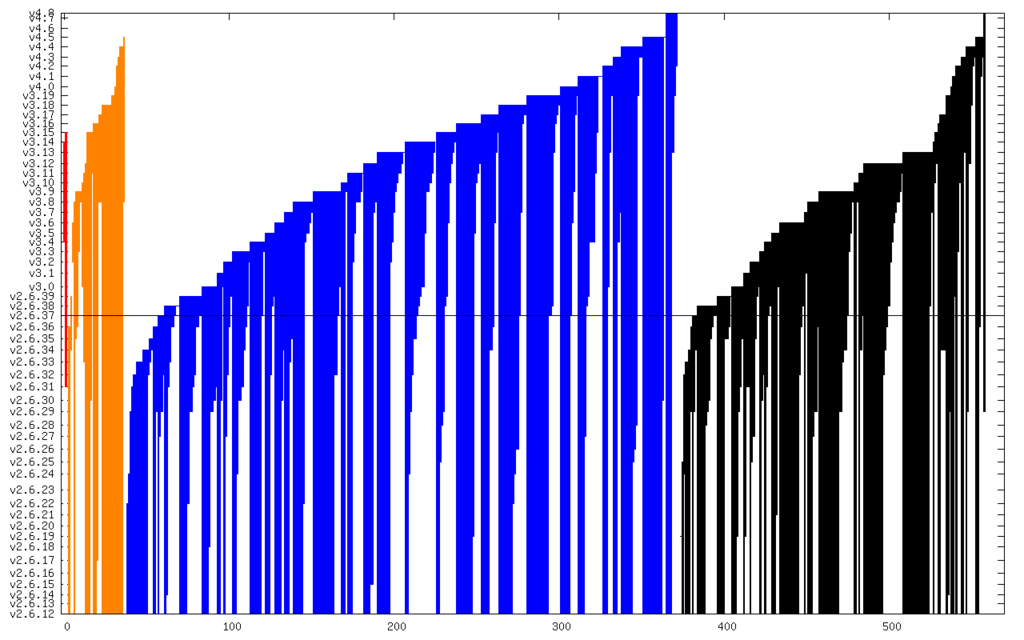
In several of my recent presentations, I ve discussed the lifetime of security flaws in the Linux kernel. Jon Corbet did an analysis in 2010, and found that security bugs appeared to have roughly a 5 year lifetime. As in, the flaw gets introduced in a Linux release, and then goes unnoticed by upstream developers until another release 5 years later, on average. I updated this research for 2011 through 2016, and used the Ubuntu Security Team s CVE Tracker to assist in the process. The Ubuntu kernel team already does the hard work of trying to identify when flaws were introduced in the kernel, so I didn t have to re-do this for the 557 kernel CVEs since 2011. As the README details, the raw CVE data is spread across the active/, retired/, and ignored/ directories. By scanning through the CVE files to find any that contain the line Patches_linux: , I can extract the details on when a flaw was introduced and when it was fixed. For example CVE-2016-0728 shows:
Patches_linux:
 break-fix: 3a50597de8635cd05133bd12c95681c82fe7b878 23567fd052a9abb6d67fe8e7a9ccdd9800a540f2
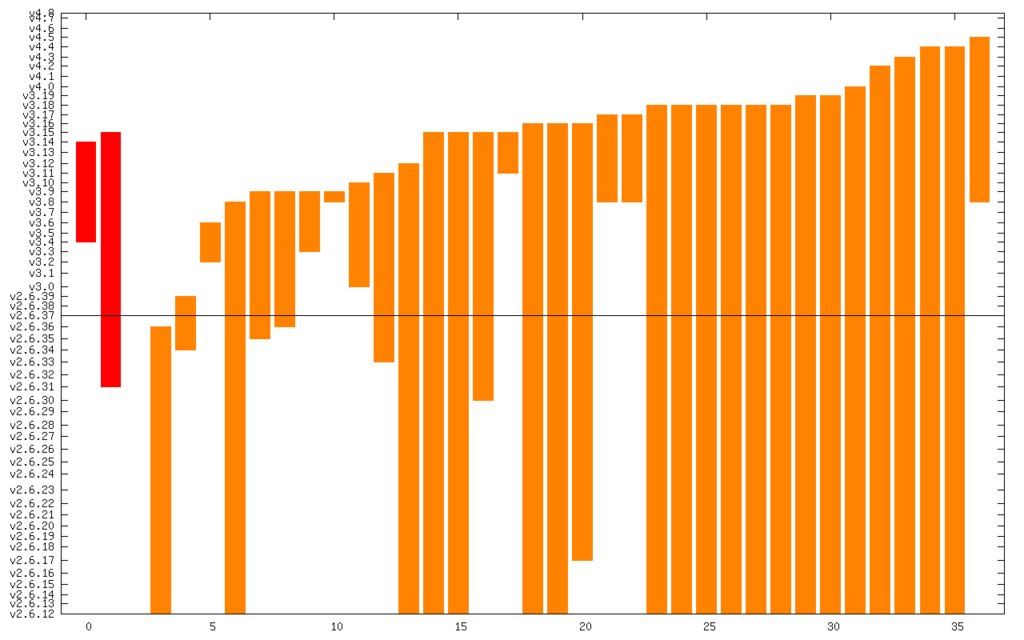
This means that CVE-2016-0728 is believed to have been introduced by commit 3a50597de8635cd05133bd12c95681c82fe7b878 and fixed by commit 23567fd052a9abb6d67fe8e7a9ccdd9800a540f2. If there are multiple lines, then there may be multiple SHAs identified as contributing to the flaw or the fix. And a - is just short-hand for the start of Linux git history. Then for each SHA, I queried git to find its corresponding release, and made a mapping of release version to release date, wrote out the raw data, and rendered graphs. Each vertical line shows a given CVE from when it was introduced to when it was fixed. Red is Critical , orange is High , blue is Medium , and black is Low : CVE lifetimes 2011-2016 And here it is zoomed in to just Critical and High: Critical and High CVE lifetimes 2011-2016 The line in the middle is the date from which I started the CVE search (2011). The vertical axis is actually linear time, but it s labeled with kernel releases (which are pretty regular). The numerical summary is: This comes out to roughly 5 years lifetime again, so not much has changed from Jon s 2010 analysis. While we re getting better at fixing bugs, we re also adding more bugs. And for many devices that have been built on a given kernel version, there haven t been frequent (or some times any) security updates, so the bug lifetime for those devices is even longer. To really create a safe kernel, we need to get proactive about self-protection technologies. The systems using a Linux kernel are right now running with security flaws. Those flaws are just not known to the developers yet, but they re likely known to attackers, as there have been prior boasts/gray-market advertisements for at least CVE-2010-3081 and CVE-2013-2888. (Edit: see my updated graphs that include CVE-2016-5195.)

2016, Kees Cook. This work is licensed under a Creative Commons Attribution-ShareAlike 3.0 License.
Creative Commons License

14 October 2016

Antoine Beaupr : Managing good bug reports

Bug reporting is an art form that is too often neglected in software projects. Bug reports allow contributors to participate without deep technical knowledge and at the same time provide a crucial space for developers to be made aware of issues with their software that they could not have foreseen or found themselves, for lack of resources, variety or imagination.

Prior art Unfortunately, there are rarely good guidelines for submitting bug reports. Historically, people have pointed towards How to report bugs effectively or How to ask questions the smart way. While those guides can be useful for motivated people and may seem attractive references for project managers, they suffer from serious issues:
  • they are written by technical people, for non-technical people
  • as a result, they have a deeply condescending attitude such as calling people "stupid" or various animal names like "mongoose"
  • they are also very technical themselves: one starts with a copyright notice and a changelog, the other uses magic words like "Core dumps" and $Id$
  • they are too long: sgtatham's is about 3600 words long, esr's is even longer at about 11800 words. those texts will take about 20 to 60 minutes to read by an average reader, according to research
Individual projects have their own guides as well. Linux has the REPORTING_BUGS file that is a much shorter 1200 that can be read under 5 minutes, provided that you can understand the topic at hand. Interestingly, that guide refers to both esr's and sgtatham's guidelines, which means, in the degenerate case where the user hasn't had the "privilege" of reading esr's prose already, they will have an extra hour and a half of reading to do to have honestly followed the guidelines before reporting the bug. I often find good documentation in the Tails project. Their bug reporting guidelines are easily accessible and quick to read, although they still might be too technical. It could be argued that you need to get technical at some point to get that information out, of course. In the Monkeysign project, I have started a bug reporting guide that doesn't yet address all those issues. I am considering writing a new guide, but I figured I would look at other people's work and get feedback before writing my own standard.

What's the point? Why have those documents been written? Are people really expected to read them before seeking help? It seems to me unlikely that someone would:
  1. be motivated enough to do something about a broken part of their computer
  2. figure out they can do something about it
  3. read a fifteen thousand words novel about how to report a bug...
  4. just to finally write a 20-line bug report that has no warranty of support attached to it
And if I would be a paying customer, I wouldn't want to be forced to waste my time reading that prose either: it's your job to help me fix your broken things, not the reverse. As someone doing consulting these days: I totally understand: it's not you, the user, it's us, the developers, that have a problem. We have been socialized through computers, and it makes us weird and obtuse, but that's no excuse, and we need to clean up our act. Furthermore, it's surprising how often we get (and make!) bug reports that can be difficult to use. The Monkeysign project is very "technical" and I have expected that the bug reports I would get would be well written, with ways to reproduce and so on, but it happened that I received bug reports that were all over the place, didn't have any ways of reproducing or were simply incomplete. Those three bug reports were filed by people that I know to be very technically capable: one is a fellow Debian developer, the second had filed a good bug report 5 days before, and the third one is a contributor that sent good patches before. In all three cases, they knew what they were doing. Those three people probably read the guidelines mentioned in the past. They may have even read the Monkeysign bug reporting guidelines as well. I can only explain those bug reports by the lack of time: people thought the issue was obvious, that it would get fixed rapidly because, obviously, something is broken. We need a better way.

The takeaway What are those guides trying to tell us?
  1. ask questions in the right place
  2. search for similar questions and issues before reporting the bug
  3. try to make the developers reproduce the issues
  4. failing that, try to describe the issue as well as you can
  5. write clearly, be specific and verbose yet concise
There are obviously contradictions in there, like sgtatham telling us to be verbose and esr tells us to, basically, not be verbose. There is definitely a tension in there, and there are many, many more details about how great bug reports can be if done properly. I tend towards the side of terseness in our descriptions: people that will know how to be concise will be, people that don't will most likely not learn by reading a 12 000 words novel that, in itself, didn't manage to be parsimonious. But I am willing to allow for verbosity in bug reports: I prefer too many details instead of missing a key bit of information.

Issue trackers Step 1 is our job: we should send people in the right place, and give them the right tools. Monkeysign used to manage bugs with bugs-everywhere and this turned out to be a terrible idea: you had to understand git and bugs-everywhere to file any bug reports. As a result, there were exactly zero bug reports filed by non-developers during the whole time BE was used, although some bugs were filed in the Debian Bugtracker. So have a good bug tracker. A mailing list or email address is not a good bug tracker: you lose track of old issues, and it's hard for newcomers to search the archives. It does have the advantage of having a unified interface for the support forum and bug tracking, however. Redmine, Gitlab, Github and others are all decent-enough bug trackers. The key point is that the issue tracker should be publicly available, and users should be able to register easily to file new issues. You should also be able to mass-edit tickets and users should be able to discover the tracker's features easily. I am sorry to say that the Debian BTS somewhat falls short on those two features. Step 2 is a shared responsibility: there should be an easy way to search for issues, and we should help the user looking for similar issues. Stackexchange sites do an excellent job at this, by automatically searching for similar questions while you write your question, suggesting similar ones in an attempt to weed out duplicates. Duplicates still happen, but they can then clearly be marked and linked with a distinct mechanism. Most bug trackers do not offer such high level functionality, but should, so I feel the fault lies more on "our" end than at the user's end.

Reproducing the environment Step 3 and 4 are more or less the user's responsibility. We can detail in our documentation how to clearly share the environment where we reproduced the bug, for example, but in the end, the user decides if they want to share that information or not. In Monkeysign, I have finally implemented joeyh's suggestion of shipping the test suite with the program. I can now tell people to run the test suite in their environment to see if this is a regression that is specific to their environment - so a known bug, in a way - or a novel bug for which I can look at writing a new unit test. I also include way more information about the environment in the --version output, an idea I brought forward in the borg project to ease debugging. That way, people can just send the output of monkeysign --test and monkeysign --version, and I have a very good overview of what is happening on their end. Of course, Monkeysign also supports the usual --verbose and --debug flag that users should enable when reproducing issues. Another idea is to report bugs directly from the application. We have all seen Firefox or other software have automatic bug reporting tools, but somehow those seem unsatisfactory for a user: we have no feedback of where the report goes, if it's followed up on. It is useful for larger project to get statistical data, but not so useful for users in the short term. Monkeysign tries to handle exceptions in the code in a graceful way, but could do better. We use a small library to handle exceptions, but that library has since then been improved to directly file bugs against the Github project. This assumes the user is logged into Github, but it is nice to pre-populate bug reports with the relevant information up front.

Issue templates In the meantime, to make sure people provide enough information, I have now moved a lot of the bug reporting guidelines to a separate issue template. That issue template is available through the issue creation form now, although it is not enabled by default, a weird limitation of Gitlab. Issue templates are available in Gitlab and Github. Issue templates somewhat force users in a straight jacket: there is already something to structure their bug report. Those could be distinct form elements that had to be filled in, but I like the flexibility of the template, and the possibility for users to just escape the formalism and just plead for help in their own way.

Issue guidelines In the end, I opted for a short few paragraphs in the style of the Tails documentation, including a reference to sgtatham, as an optional future reference:
  • Before you report a new bug, review the existing issues in the online issue tracker and the Debian BTS for Monkeysign to make sure the bug has not already been reported elsewhere.
  • The first aim of a bug report is to tell the developers exactly how to reproduce the failure, so try to reproduce the issue yourself and describe how you did that.
  • If that is not possible, try to describe what went wrong in detail. Write down the error messages, especially if they have numbers.
  • Take the necessary time to write clearly and precisely. Say what you mean, and make sure it cannot be misinterpreted.
  • Include the output of monkeysign --test, monkeysign --version and monkeysign --debug in your bug reports. See the issue template for more details about what to include in bug reports.
If you wish to read more about issues regarding communication in bug reports, you can read How to Report Bugs Effectively, which takes around 20 to 30 minutes.
Unfortunately, short of rewriting sgtatham's guide, I do not feel there is much more we can do as a general guide. I find esr's guide to be too verbose and commanding, so sgtatham it will be for now.

The prose and literacy In the end, there is a fundamental issue with reporting bugs: it assumes our users are literate and capable of writing amazing prose that we will enjoy reading as the last J.K. Rowling novel (if you're into that kind of thing). It's just an unreasonable expectation: some of your users don't even speak the same language as you, let alone read or write it. This makes for challenging collaboration, to say the least. This is where automated reporting makes sense: it doesn't require user's intervention, and the communication is mediated by machines without human intervention and their pesky culture. But we should, as maintainers, "be liberal in what we accept and conservative in what we send". Be tolerant, and help your users in fixing their issues. It's what you are there for, after all. And in the end, we all fail the same way. In an attempt to improve the situation on bug reporting guides, I seem to have myself written a 2000 short story that will have taken up a hopefully pleasant 10 minutes of your time at minimum. Hopefully I will have succeeded at being clear, specific, verbose and concise all at once and look forward to your feedback on how to improve our bug reporting culture.

10 October 2016

Petter Reinholdtsen: Experience and updated recipe for using the Signal app without a mobile phone

In July I wrote how to get the Signal Chrome/Chromium app working without the ability to receive SMS messages (aka without a cell phone). It is time to share some experiences and provide an updated setup. The Signal app have worked fine for several months now, and I use it regularly to chat with my loved ones. I had a major snag at the end of my summer vacation, when the the app completely forgot my setup, identity and keys. The reason behind this major mess was running out of disk space. To avoid that ever happening again I have started storing everything in userdata/ in git, to be able to roll back to an earlier version if the files are wiped by mistake. I had to use it once after introducing the git backup. When rolling back to an earlier version, one need to use the 'reset session' option in Signal to get going, and notify the people you talk with about the problem. I assume there is some sequence number tracking in the protocol to detect rollback attacks. The git repository is rather big (674 MiB so far), but I have not tried to figure out if some of the content can be added to a .gitignore file due to lack of spare time. I've also hit the 90 days timeout blocking, and noticed that this make it impossible to send messages using Signal. I could still receive them, but had to patch the code with a new timestamp to send. I believe the timeout is added by the developers to force people to upgrade to the latest version of the app, even when there is no protocol changes, to reduce the version skew among the user base and thus try to keep the number of support requests down. Since my original recipe, the Signal source code changed slightly, making the old patch fail to apply cleanly. Below is an updated patch, including the shell wrapper I use to start Signal. The original version required a new user to locate the JavaScript console and call a function from there. I got help from a friend with more JavaScript knowledge than me to modify the code to provide a GUI button instead. This mean that to get started you just need to run the wrapper and click the 'Register without mobile phone' to get going now. I've also modified the timeout code to always set it to 90 days in the future, to avoid having to patch the code regularly. So, the updated recipe for Debian Jessie:
  1. First, install required packages to get the source code and the browser you need. Signal only work with Chrome/Chromium, as far as I know, so you need to install it.
    apt install git tor chromium
    git clone https://github.com/WhisperSystems/Signal-Desktop.git
    
  2. Modify the source code using command listed in the the patch block below.
  3. Start Signal using the run-signal-app wrapper (for example using pwd /run-signal-app).
  4. Click on the 'Register without mobile phone', will in a phone number you can receive calls to the next minute, receive the verification code and enter it into the form field and press 'Register'. Note, the phone number you use will be user Signal username, ie the way others can find you on Signal.
  5. You can now use Signal to contact others. Note, new contacts do not show up in the contact list until you restart Signal, and there is no way to assign names to Contacts. There is also no way to create or update chat groups. I suspect this is because the web app do not have a associated contact database.
I am still a bit uneasy about using Signal, because of the way its main author moxie0 reject federation and accept dependencies to major corporations like Google (part of the code is fetched from Google) and Amazon (the central coordination point is owned by Amazon). See for example the LibreSignal issue tracker for a thread documenting the authors view on these issues. But the network effect is strong in this case, and several of the people I want to communicate with already use Signal. Perhaps we can all move to Ring once it work on my laptop? It already work on Windows and Android, and is included in Debian and Ubuntu, but not working on Debian Stable. Anyway, this is the patch I apply to the Signal code to get it working. It switch to the production servers, disable to timeout, make registration easier and add the shell wrapper:
cd Signal-Desktop; cat <<EOF   patch -p1
diff --git a/js/background.js b/js/background.js
index 24b4c1d..579345f 100644
--- a/js/background.js
+++ b/js/background.js
@@ -33,9 +33,9 @@
          );
      );
 
-    var SERVER_URL = 'https://textsecure-service-staging.whispersystems.org';
+    var SERVER_URL = 'https://textsecure-service-ca.whispersystems.org';
     var SERVER_PORTS = [80, 4433, 8443];
-    var ATTACHMENT_SERVER_URL = 'https://whispersystems-textsecure-attachments-staging.s3.amazonaws.com';
+    var ATTACHMENT_SERVER_URL = 'https://whispersystems-textsecure-attachments.s3.amazonaws.com';
     var messageReceiver;
     window.getSocketStatus = function()  
         if (messageReceiver)  
diff --git a/js/expire.js b/js/expire.js
index 639aeae..beb91c3 100644
--- a/js/expire.js
+++ b/js/expire.js
@@ -1,6 +1,6 @@
 ;(function()  
     'use strict';
-    var BUILD_EXPIRATION = 0;
+    var BUILD_EXPIRATION = Date.now() + (90 * 24 * 60 * 60 * 1000);
 
     window.extension = window.extension    ;
 
diff --git a/js/views/install_view.js b/js/views/install_view.js
index 7816f4f..1d6233b 100644
--- a/js/views/install_view.js
+++ b/js/views/install_view.js
@@ -38,7 +38,8 @@
             return  
                 'click .step1': this.selectStep.bind(this, 1),
                 'click .step2': this.selectStep.bind(this, 2),
-                'click .step3': this.selectStep.bind(this, 3)
+                'click .step3': this.selectStep.bind(this, 3),
+                'click .callreg': function()   extension.install('standalone')  ,
              ;
          ,
         clearQR: function()  
diff --git a/options.html b/options.html
index dc0f28e..8d709f6 100644
--- a/options.html
+++ b/options.html
@@ -14,7 +14,10 @@
         <div class='nav'>
           <h1>  installWelcome  </h1>
           <p>  installTagline  </p>
-          <div> <a class='button step2'>  installGetStartedButton  </a> </div>
+          <div> <a class='button step2'>  installGetStartedButton  </a>
+	    <br> <a class="button callreg">Register without mobile phone</a>
+
+	  </div>
           <span class='dot step1 selected'></span>
           <span class='dot step2'></span>
           <span class='dot step3'></span>
--- /dev/null   2016-10-07 09:55:13.730181472 +0200
+++ b/run-signal-app   2016-10-10 08:54:09.434172391 +0200
@@ -0,0 +1,12 @@
+#!/bin/sh
+set -e
+cd $(dirname $0)
+mkdir -p userdata
+userdata=" pwd /userdata"
+if [ -d "$userdata" ] && [ ! -d "$userdata/.git" ] ; then
+    (cd $userdata && git init)
+fi
+(cd $userdata && git add . && git commit -m "Current status."   true)
+exec chromium \
+  --proxy-server="socks://localhost:9050" \
+  --user-data-dir=$userdata --load-and-launch-app= pwd 
EOF
chmod a+rx run-signal-app
As usual, if you use Bitcoin and want to show your support of my activities, please send Bitcoin donations to my address 15oWEoG9dUPovwmUL9KWAnYRtNJEkP1u1b.

Arturo Borrero Gonz lez: The day I became Debian Developer

Debian The moment has come. You may contact me now at arturo@debian.org :-) After almost 6 months of tough NM process, the waiting is over. I have achieved the goal I set to myself back in 2011: become Debian Developer. This is a professional and personal victory. I would like to mention many people who have been important for this to happen. But they all know, no need to create a list here. Thanks! This weekend I was doing some hiking in the mountains and had no internet conection at all. When I arrived back home, I discovered an email from Debian System Administrators on behalf of The Debian New Maintainer Team, in which they let me know that my official DD account had been created. During the last 6 month I have been trying to imagine the moment in which the process is finally completed (yes, I have been a bit impatient). At the end, the magical moment in the mountains was followed by the joy of the DD account. Curious how things happen sometimes. Here is a pic of this mountain day, with my adventure friends. I am the first from the left. pic

9 October 2016

Laura Arjona Reina: New phone: Samsung Galaxy S III phone with Replicant

Thanks to the Bazaar effort of The Guardian Project, I ve been offered a phone to test F-Droid and other free software apps for Android. I accepted the offer, and chose a Samsung Galaxy S III phone with Replicant 4.2.2, installed and shipped by Tehnoetic.
I m using it now as my main phone, and since it uses Android 4.x I m able to install more modern apps than in my old Galaxy Ace (which remains usable with CyanongenMod 7.2 (Android 2.3.7)).
My plans with this new phone are:
  • Test Replicant and free software for Android on it
  • Get more involved in translations of Android apps
  • Get more involved in the F-Droid community
  • Keep an eye on Android tools in Debian
  • Post here in my blog articles about what I ve been doing (and of course report issues and contributions upstream)
Migration to the new phone
I ve migrated my stuff from the old phone to this one. Some notes:
  • Wrote down my list of apps
  • Used Slight Backup for contacts, call logs and messages
  • Periodical has its own backup tool
  • Whatsapp has its own backup tool
  • Exported settings in K-9 Mail
  • Exported Kontalk GPG key
  • Simply Do has its own backup tool
  • I don t use calendars in the phone so I didn t migrate any events (I have Offline Calendar to ad temporary notes/reminders, but that s all)
I moved the SIM card and the SD Card to the new phone and tried the restore tool for each app.
I found out that several apps could not find the backups because they were not looking at the SD Card for the files (seems that they were using internal memory locations). So for recovering my backups, I made new backups in the new phone with the empty apps, then found out where those backups were created (in the internal memory, /storage/emulated/0), and then copied the authentic backup files there (overwriting teh dummy ones), and then used the app to restore the backup.
For some apps (K-9) I had to set again the folder for attachments, since the SD was not anymore in /media/sdcard, now it was in /storage/sdcard1.
Apart from that, everything went well.
I was a bit upset that I could not migrate Kontalk conversations (there is no backup/export tool, and I am not sure where are the files/database stored).
I noticed that although Kontalk is registered using the phone number, and it uses the phone numbers for contacts, it kept working in the old phone (Whatsapp detects when you change to a new phone and kind of deactivates itself in the old one, but that s not the case for Kontalk: it works as any XMPP client (if it s open, it can send/receive messages)).
Replicant 4.2 in a Galaxy S III (i9300)
Here I write some particularities that I found in the phone, mostly bugs or problems. But don t get me wrong: overall I m very happy with it!
I experienced a problem when using the phone to make/receive calls, it seemed that the proximity sensor was not working well. I thought it was a Replicant issue, but later I realized that there was a Tehnoetic sticker that was partially covering the sensor. I removed the sticker and everything worked well.
The phone came with F-Droid installed which is nice. I upgraded to the latest alpha and I m testing the alpha releases since then
I found that I cannot choose where to install apps nor move apps from internal memory to the SD Card: there is no such option in Settings > Apps > Manage Apps (there is such setting in my CyanogenMod 7.2 phone, though). Since my phone is rooted and I have full access to both internal memory and SDCard, and I have plenty of room in the internal memory, I didn t bother too much. I m not sure if this is a bug, a feature, something related to Android 4 or specific to Replicant, o specific to this phone model. Pending to investigate, but low priority.
Replicant is almost fully translated to Spanish, yay!. I only found one untranslated string: You go to Settings > Wireless > Cell Broadcasts, and in the settings page, Cell Broadcasts is untranslated (but the settings themselves are). I still need to find where/how to send a patch for this (not sure if it comes from Android, CyanogenMod, or it s something specific for Replicant. Also, being Android 4.x, I m not sure about the usefulness of reporting such a minimal and unimportant patch upstream ).
When I turn on the phone, I get the Samsung S III splash screen, later the Replicant Splash screen, later the numeric pad to unlock the SIM card. After that, I see the screen lock but when I press the lock to enter the pattern, the screen turns off and on, screen lock appearing again (and I have to press the lock again to enter the pattern). If after unlocking the SIM card I wait a bit, I see the screen lock and again black screen and screen lock, so it s not my tap causing it. Doing like this (waiting a bit for the phone to show the screen lock for 2nd time) is less annoying, but I wonder why this happen and I cannot unlock the screen directly in the first attempt. This is also pending for research, but low priority.
When the phone boots, I find the splash screens too bright (the Samsung Galaxy S III splash, and later the red Replicant one). I don t know if I can change that. I know that other people have created different Replicant splash screens, so maybe I can create one almost black and only the Replicant text in very dark grey. But this is obviously a workaround, not a fix. OTOH, it s an annoying thing just some seconds: when the unlock screen is shown, the phone shows the brightness level that I ve set (usually, the lowest one).
From time to time, I suffer soft reboots:
  1. the phone hangs for 2-3 seconds
  2. then the red Replicant splash screen is shown (the phone is not totally rebooted, because I don t see the Samsung Galaxy S III splash screen and and the SIM card unlock PIN is not requested)
  3. after unlocking the screen, I see a normal desktop (similar to what I see after rebooting the phone: no apps running, and no last used apps history. Time and date are ok, wireless or 3G starts correctly etc).
I ve tried to track the causes of these soft reboots, but I couldn t find anything specific. They are not frequent at all, and when I decide to launch CatLog to try to catch any hint, the phone works perfectly for hours or days :s
Replicant is currently using the fallback Android EGL implementation, which is incomplete. The missing features of this implementation cause multiple issues, which are described in #705. These are the ones that I experience (or I miss):
  • The phone comes with a video editor preinstalled: Movie Studio. I got excited about it, because I was jealous of the small built-in video editor that comes with Whatsapp, but I became sad because Movie Studio does not work
  • The camera does not record video.
  • When I long-press the central button of my phone to see the list of recent apps, I don t see their thumbnails (only the name, and their icons). This is quite unimportant for me, names and icons are enough.
  • The stock Gallery app does not work well: I cannot see thumbnails of the albums. This is not very important, because I installed Gallery.
  • I cannot use Firefox, Orfox and other derivative web browsers (I usually use the stock browser, and I installed Lightning too).
  • I cannot use barcode or QR scanners.
  • My son cannot play Shattered Pixel Dungeon (nor Pixel Dungeon). Fortunately he uses now my old Android 2.x devide for that.
I installed the non-free firmware to be able to use Wifi and tethering, GPS and some other things. This does not fix the graphics problems listed above.
New apps, and translations
Note: when I write about Android apps, I usually link to their pages in the F-Droid website. Here I talk about translations (contributions), so I ll link to their original website or souce code repos. But you can find all those apps in F-Droid too.
As I told before, I installed another gallery app called Gallery and submitted an update to it Spanish translation.
I installed Red Moon to reduce (even more) the screen brightness. At night it s a relieve. Maybe the brightness of the splash screen is not so much, and I perceive them annoying because I got accostumed to Red Moon! I contributed some strings to the Spanish translation.
I liked RadioDroid very much, and I translated the app to Spanish.
I translated Wifi Privacy Police, and I used for some time, but I became tired that it keeps asking all the time that I walk across my workplace (multiple buildings within the same Wifi network, but quite a lot access points ).
I keep on contributing to K-9 Mail to make it 100% translated to Spanish. Now with a modern Android I can move to the development branch (5.1xx releases), and just did it.
I submitted a Spanish translation to DAVDroid, although I m not using it yet (I have to see if my University s Owncloud instance allows to sync contacts and calendar).
I updated the Spanish translation of PassAndroid, although I don t use it yet (I tend to print my train/airplane tickets ). I keep it installed in my phone, just in case.
Other apps that I use
I m testing OwnCloud, NextCloud and NexCloud Beta clients with my University s Owncloud and with Davros in my Sandstorm box (with Davros, I could only make it work installing an old version of Owncloud/Nexcloud client, and then upgrading. See #65).
I didn t get accostumed to Conversations. Not sure why, though. Maybe it s just that I got accostumed to Xabber-Classic, so I upgraded to Xabber. It works like a charm, dark theme, and I can close it easily when I don t want to chat.
I got in love with KDE Connect. Later I realized that I could have been using it in my Android 2.x phone since long
Sometimes I have fun activating Voice Notification and entering the redeslibres XMPP multi user chat at salas.mijabber.es, for example while I m cooking in the kitchen (in that room people talk in Spanish and make many wordplays, mixing Spanish and English, and use tech slang, etc so it s really fun to hear the Spanish-TTS deal with the conversation there!).
More to come
As I told at the beginning of this long post, my plan is to keep on tinkering with the phone, testing and translating apps, and becoming more involved. So expect some more posts about Android in this blog, in the future.
For now, some big things in my TODO:
  • Watching again some videos: DebConf16 videos about Android tools in Debian, FOSDEM talks about Replicant, and some other talks about free software in Android.
  • I track the #fdroid and #fdroid-dev channels in IRC, but I m not very talkative there. I guess I could do more user support.
  • Participate more in the F-Droid (client, server, data) issue trackers (I send reports when the alpha version crashes, and comment on few issues, but I don t triage the issue tracker to find issues that I could reproduce or help to diagnose or contribute to fix).
  • Long time ago I learned to setup an Android development environment and build apps. I would like to re-learn and maybe do some small fixes in unmaintained or near unmaintained apps, and maybe adopt them or join their development teams (I m thinking, for example, in Puma, an Android client for pump.io network, the MediaGoblin app, or the DebianDroid app). And ship new versions of unmaintained apss, including Spanish translations.
We ll see how far I can go!
Comments?
You can comment about this post in this pump.io thread.

Filed under: My experiences and opinion, Tools Tagged: Android, Debian, English, F-Droid

Craig Sanders: Converting to a ZFS rootfs

My main desktop/server machine (running Debian sid) at home has been running XFS on mdadm raid-1 on a pair of SSDs for the last few years. A few days ago, one of the SSDs died. I ve been planning to switch to ZFS as the root filesystem for a while now, so instead of just replacing the failed drive, I took the opportunity to convert it. NOTE: at this point in time, ZFS On Linux does NOT support TRIM for either datasets or zvols on SSD. There s a patch almost ready (TRIM/Discard support from Nexenta #3656), so I m betting on that getting merged before it becomes an issue for me. Here s the procedure I came up with: 1. Buy new disks, shutdown machine, install new disks, reboot. The details of this stage are unimportant, and the only thing to note is that I m switching from mdadm RAID-1 with two SSDs to ZFS with two mirrored pairs (RAID-10) on four SSDs (Crucial MX300 275G at around $100 AUD each, they re hard to resist). Buying four 275G SSDs is slightly more expensive than buying two of the 525G models, but will perform a lot better. When installed in the machine, they ended up as /dev/sdp, /dev/sdq, /dev/sdr, and /dev/sds. I ll be using the symlinks in /dev/disk/by-id/ for the zpool, but for partition and setup, it s easiest to use the /dev/sd? device nodes. 2. Partition the disks identically with gpt partition tables, using gdisk and sgdisk. I need: ZFS On Linux uses partition type bf08 ( Solaris Reserved 1 ) natively, but doesn t seem to care what the partition types are for ZIL and L2ARC. I arbitrarily used bf08 ( Solaris Reserved 2 ) and bf09 ( Solaris Reserved 3 ) for easy identification. I ll set these up later, once I ve got the system booted I don t want to risk breaking my existing zpools by taking away their ZIL and L2ARC (and forgetting to zpool remove them, which I might possibly have done once) if I have to repartition. I used gdisk to interactively set up the partitions:
# gdisk -l /dev/sdp
GPT fdisk (gdisk) version 1.0.1
Partition table scan:
  MBR: protective
  BSD: not present
  APM: not present
  GPT: present
Found valid GPT with protective MBR; using GPT.
Disk /dev/sdp: 537234768 sectors, 256.2 GiB
Logical sector size: 512 bytes
Disk identifier (GUID): 4234FE49-FCF0-48AE-828B-3C52448E8CBD
Partition table holds up to 128 entries
First usable sector is 34, last usable sector is 537234734
Partitions will be aligned on 8-sector boundaries
Total free space is 6 sectors (3.0 KiB)
Number  Start (sector)    End (sector)  Size       Code  Name
   1              40            2047   1004.0 KiB  EF02  BIOS boot partition
   2            2048         2099199   1024.0 MiB  EF00  EFI System
   3         2099200         6293503   2.0 GiB     8300  Linux filesystem
   4         6293504        14682111   4.0 GiB     8200  Linux swap
   5        14682112       455084031   210.0 GiB   BF07  Solaris Reserved 1
   6       455084032       459278335   2.0 GiB     BF08  Solaris Reserved 2
   7       459278336       537234734   37.2 GiB    BF09  Solaris Reserved 3
I then cloned the partition table to the other three SSDs with this little script: clone-partitions.sh
#! /bin/bash
src='sdp'
targets=( 'sdq' 'sdr' 'sds' )
for tgt in "$ targets[@] "; do
  sgdisk --replicate="/dev/$tgt" /dev/"$src"
  sgdisk --randomize-guids "/dev/$tgt"
done
3. Create the mdadm for /boot, the zpool, and and the root filesystem. Most rootfs on ZFS guides that I ve seen say to call the pool rpool, then create a dataset called "$(hostname)-1" and then create a ROOT dataset under that. so on my machine, that would be rpool/ganesh-1/ROOT. Some reverse the order of hostname and the rootfs dataset, for rpool/ROOT/ganesh-1. There might be uses for this naming scheme in other environments but not in mine. And, to me, it looks ugly. So I ll use just $(hostname)/root for the rootfs. i.e. ganesh/root I wrote a script to automate it, figuring I d probably have to do it several times in order to optimise performance. Also, I wanted to document the procedure for future reference, and have scripts that would be trivial to modify for other machines. create.sh
#! /bin/bash
exec &> ./create.log
hn="$(hostname -s)"
base='ata-Crucial_CT275MX300SSD1_'
md='/dev/md0'
md_part=3
md_parts=( $(/bin/ls -1 /dev/disk/by-id/$ base *-part$ md_part ) )
zfs_part=5
# 4 disks, so use the top half and bottom half for the two mirrors.
zmirror1=( $(/bin/ls -1 /dev/disk/by-id/$ base *-part$ zfs_part    head -n 2) )
zmirror2=( $(/bin/ls -1 /dev/disk/by-id/$ base *-part$ zfs_part    tail -n 2) )
# create /boot raid array
mdadm "$md" --create \
    --bitmap=internal \
    --raid-devices=4 \
    --level 1 \
    --metadata=0.90 \
    "$ md_parts[@] "
mkfs.ext4 "$md"
# create zpool
zpool create -o ashift=12 "$hn" \
    mirror "$ zmirror1[@] " \
    mirror "$ zmirror2[@] "
# create zfs rootfs
zfs set compression=on "$hn"
zfs set atime=off "$hn"
zfs create "$hn/root"
zpool set bootfs="$hn/root"
# mount the new /boot under the zfs root
mount "$md" "/$hn/root/boot"
If you want or need other ZFS datasets (e.g. for /home, /var etc) then create them here in this script. Or you can do that later after you ve got the system up and running on ZFS. If you run mysql or postgresql, read the various tuning guides for how to get best performance for databases on ZFS (they both need their own datasets with particular recordsize and other settings). If you download Linux ISOs or anything with bit-torrent, avoid COW fragmentation by setting up a dataset to download into with recordsize=16K and configure your BT client to move the downloads to another directory on completion. I did this after I got my system booted on ZFS. For my db, I stoppped the postgres service, renamed /var/lib/postgresql to /var/lib/p, created the new datasets with:
zfs create -o recordsize=8K -o logbias=throughput -o mountpoint=/var/lib/postgresql \
  -o primarycache=metadata ganesh/postgres
zfs create -o recordsize=128k -o logbias=latency -o mountpoint=/var/lib/postgresql/9.6/main/pg_xlog \
  -o primarycache=metadata ganesh/pg-xlog
followed by rsync and then started postgres again. 4. rsync my current system to it. Logout all user sessions, shut down all services that write to the disk (postfix, postgresql, mysql, apache, asterisk, docker, etc). If you haven t booted into recovery/rescue/single-user mode, then you should be as close to it as possible everything non-esssential should be stopped. I chose not to boot to single-user in case I needed access to the web to look things up while I did all this (this machine is my internet gateway). Then:
hn="$(hostname -s)"
time rsync -avxHAXS -h -h --progress --stats --delete / /boot/ "/$hn/root/"
After the rsync, my 130GB of data from XFS was compressed to 91GB on ZFS with transparent lz4 compression. Run the rsync again if (as I did), you realise you forgot to shut down postfix (causing newly arrived mail to not be on the new setup) or something. You can do a (very quick & dirty) performance test now, by running zpool scrub "$hn". Then run watch zpool status "$hn". As there should be no errorss to correct, you should get scrub speeds approximating the combined sequential read speed of all vdevs in the pool. In my case, I got around 500-600M/s I was kind of expecting closer to 800M/s but that s good enough .the Crucial MX300s aren t the fastest drive available (but they re great for the price), and ZFS is optimised for reliability more than speed. The scrub took about 3 minutes to scan all 91GB. My HDD zpools get around 150 to 250M/s, depending on whether they have mirror or RAID-Z vdevs and on what kind of drives they have. For real benchmarking, use bonnie++ or fio. 5. Prepare the new rootfs for chroot, chroot into it, edit /etc/fstab and /etc/default/grub. This script bind mounts /proc, /sys, /dev, and /dev/pts before chrooting: chroot.sh
#! /bin/sh
hn="$(hostname -s)"
for i in proc sys dev dev/pts ; do
  mount -o bind "/$i" "/$ hn /root/$i"
done
chroot "/$ hn /root"
Change /etc/fstab (on the new zfs root to) have the zfs root and ext4 on raid-1 /boot:
/ganesh/root    /         zfs     defaults                                         0  0
/dev/md0        /boot     ext4    defaults,relatime,nodiratime,errors=remount-ro   0  2
I haven t bothered with setting up the swap at this point. That s trivial and I can do it after I ve got the system rebooted with its new ZFS rootfs (which reminds me, I still haven t done that :). add boot=zfs to the GRUB_CMDLINE_LINUX variable in /etc/default/grub. On my system, that s:
GRUB_CMDLINE_LINUX="iommu=noagp usbhid.quirks=0x1B1C:0x1B20:0x408 boot=zfs"
NOTE: If you end up needing to run rsync again as in step 4. above copy /etc/fstab and /etc/default/grub to the old root filesystem first. I suggest to /etc/fstab.zfs and /etc/default/grub.zfs 6. Install grub Here s where things get a little complicated. Running install-grub on /dev/sd[pqrs] is fine, we created the type ef02 partition for it to install itself into. But running update-grub to generate the new /boot/grub/grub.cfg will fail with an error like this:
/usr/sbin/grub-probe: error: failed to get canonical path of  /dev/ata-Crucial_CT275MX300SSD1_163313AADD8A-part5'.
IMO, that s a bug in grub-probe it should look in /dev/disk/by-id/ if it can t find what it s looking for in /dev/ I fixed that problem with this script: fix-ata-links.sh
#! /bin/sh
cd /dev
ln -s /dev/disk/by-id/ata-Crucial* .
After that, update-grub works fine. NOTE: you will have to add udev rules to create these symlinks, or run this script on every boot otherwise you ll get that error every time you run update-grub in future. 7. Prepare to reboot Unmount proc, sys, dev/pts, dev, the new raid /boot, and the new zfs filesystems. Set the mount point for the new rootfs to / umount-zfs-root.sh
#! /bin/sh
hn="$(hostname -s)"
md="/dev/md0"
for i in dev/pts dev sys proc ; do
  umount "/$ hn /root/$i"
done
umount "$md"
zfs umount "$ hn /root"
zfs umount "$ hn "
zfs set mountpoint=/ "$ hn /root"
zfs set canmount=off "$ hn "
8. Reboot Remember to configure the BIOS to boot from your new disks. The system should boot up with the new rootfs, no rescue disk required as in some other guides the rsync and chroot stuff has already been done. 9. Other notes 10. Useful references Reading these made it much easier to come up with my own method. Highly recommended. Converting to a ZFS rootfs is a post from: Errata

Nathan Handler: Ohio Linux Fest

This weekend, I traveled to Columbus, Ohio to attend Ohio Linux Fest. I departed San Francisco early on Thursday. It was interesting getting to experience the luxurious side of flying as I enjoyed a mimosa in the American Express Centurion lounge for the first time. I even happend to cross paths with Corey Quinn, who was on his way to [DevOpsDays Boise]. While connecting in Houston, I met up with the always awesome Jos Antonio Rey, who was to be my travel companion for this trip. The long day of travel took its toll on us, so we had a lazy Friday morning before checking in for the conference around lunch time. I was not that interested in the afternoon sessions, so I spent the majority of the first day helping out at the Ubuntu booth and catching up with friends and colleagues. The day ended with a nice Happy Hour sponsored by Oracle. Saturday was the main day for the conference. Ethan Galstad, Founder and CEO of Nagios, started the day with a Keynote about Becoming the Next Tech Entrepreneur. Next up was Elizabeth K. Joseph with A Tour of OpenStack Deployment Scenarios. While I ve read plenty about OpenStack, I ve never actually used it before. As a result, this demo and introduction was great to watch. It was entertaining to watch her login to CirrOS with the default password of cubswin:), as the Chicago Cubs are currently playing the San Francisco Giants in the National League Divisional Series (and winning). Unfortunately, I was not able to win a copy of her new Common OpenStack Deployments book, but it was great getting to watch her signing copies for other attendees after all of the hard work that went into writing the book. For lunch, Jos , Elizabeth, and Svetlana Belkin all gathered together for an informal Ubuntu lunch. Finally, it was time for me to give my talk. This was the same talk I gave at FOSSCON, but this time, I had a significantly larger audience. Practice definitely makes perfect, as my delivery was a lot better the second time giving this talk. Afterwards, I had a number of people come up to me to let me know that they really enjoyed the presentation. Pro Tip: If you ever attend a talk, the speaker will really appreciate any feedback you send their way. Even if it is a simple, Thank You , it really means a lot. One of the people who came up to me after the talk was Unit193. We have known each other through Ubuntu for years, but there has never been an opportunity to meet in person. I am proud to be able to say with 99% confidence that he is not a robot, and is in fact a real person. Next up was a lesson about the /proc filesystem. While I ve explored it a bit on my own before, I still learned a few tips and tricks about information that can be gained from the files in this magical directory. Following this was a talk about Leading When You re Not the Boss. It was even partially taught by a dummy (the speaker was a ventriloquist). The last regular talk of the day was one of the more interesting ones I attended. It was a talk by Patrick Shuff from Facebook about how they have built a load balancer than can handle a billion users. The slide deck was well-made with very clear diagrams. The speaker was also very knowledgeable and dealt with the plethora of questions he received. Prior to the closing keynote was a series of lightning talks. These served as a great means to get people laughing after a long day of talks. The closing keynote was given by father and daughter Joe and Lilly Born about The Democratization of Invention. Both of them had very interesting stories, and Lily was quite impressive given her age. We skipped the Nagios After Party in favor of a more casual pizza dinner. Overall, it was a great conference, and I am very glad to have had the opportunity to attend. A big thanks to Canonical and the Ubuntu Community for fudning my travel through the Ubuntu Community Fund and to the Ohio Linux Fest staff for allowing me the opportunity to speak at such a great conference.

6 October 2016

Nathan Handler: FOSSCON

This post is long past due, but I figured it is better late than never. At the start of the year, I set a goal to get more involved with attending and speaking at conferences. Through work, I was able to attend the Southern California Linux Expo (SCALE) in Pasadena, CA in January. I also got to give a talk at O'Relly's Open Source Convention (OSCON) in Austin, TX in May. However, I really wanted to give a talk about my experience contributing in the Ubuntu community. Jos Antonio Rey encouraged me to submit the talk to FOSSCON. While I've been aware of FOSSCON for years thanks to my involvement with the freenode IRC network (which has had a reference to FOSSCON in the /motd for years), I had never actually attended it before. I also wasn't quite sure how I would handle traveling from San Francisco, CA to Philadelphia, PA. Regardless, I decided to go ahead and apply. Fast forward a few weeks, and imagine my surprise when I woke up to an email saying that my talk proposal was accepted. People were actually interested in me and what I had to say. I immediately began researching flights. While they weren't crazy expensive, they were still more money than I was comfortable spending. Luckily, Jos had a solution to this problem as well; he suggested applying for funding through the Ubuntu Community Donations fund. While I've been an Ubuntu Member for over 8 years, I've never used this resource before. However, I was happy when I received a very quick approval. The conference itself was smaller than I was expecting. However, it was packed with lots of friendly and familiar faces of people I've interacted with online and in person over the years at various Open Source events. I started off the day by learning from Jos how to use Juju to quickly setup applications in the cloud. While Juju has definitely come a long way over the last couple of years, and it appears t be quite easy to learn and use, it still appears to be lacking some of the features needed to take full control over how the underlying applications interact with each other. However, I look forward to continuing to watch it grow and mature. Net up, we had a lunch break. There was no catered lunch at this conference, so we decided to get some cheesesteak at Abner's (is any trip to Philadelphia complete without cheesesteak?). Following lunch, I took some time to make a few last minute changes to my presentation and rehearse a bit. Finally, it was time. I got up in front of the audience and gave my presentation. Overall, I was quite pleased. It was not perfect, but for the first time giving the talk, I thought it went pretty well. I will work hard to make it even better for next tme. Following my talk was a series of brief lightning talks prior to the closing keynote. Another long time friend of mine, Elizabeth Krumbach Joseph, was giving the keynote about listening to the needs of your global open source community. While I have seen her speak on several other occassions, I really enjoyed this particular talk. It was full of great examples and anecdotes that were easy for the audience to relate to and start applying to their own communities. After the conference, a few of us went off and played tourist, paying the Liberty Bell a visit before concluding our trip in Philadelpha. Overall, I had a great time as FOSSCON. It was great being re-united with so many friends. A big thank you to Jos for his constant support and encouragement and to Canonical and the Ubuntu Community for helping to make it possible for me to attend this conference. Finally, thanks to the terrific FOSSCON staff for volunteering so much time to put on this great event.

Next.

Previous.