Search Results: "storm"

30 September 2020

Paul Wise: FLOSS Activities September 2020

Focus This month I didn't have any particular focus. I just worked on issues in my info bubble.

Changes

Issues

Review

Administration
  • Debian wiki: unblock IP addresses, approve accounts

Communication

Sponsors The gensim, cython-blis, python-preshed, pytest-rerunfailures, morfessor, nmslib, visdom and pyemd work was sponsored by my employer. All other work was done on a volunteer basis.

25 September 2020

Colin Watson: Porting Launchpad to Python 3: progress report

Launchpad still requires Python 2, which in 2020 is a bit of a problem. Unlike a lot of the rest of 2020, though, there s good reason to be optimistic about progress. I ve been porting Python 2 code to Python 3 on and off for a long time, from back when I was on the Ubuntu Foundations team and maintaining things like the Ubiquity installer. When I moved to Launchpad in 2015 it was certainly on my mind that this was a large body of code still stuck on Python 2. One option would have been to just accept that and leave it as it is, maybe doing more backporting work over time as support for Python 2 fades away. I ve long been of the opinion that this would doom Launchpad to being unmaintainable in the long run, and since I genuinely love working on Launchpad - I find it an incredibly rewarding project - this wasn t something I was willing to accept. We re already seeing some of our important dependencies dropping support for Python 2, which is perfectly reasonable on their terms but which is starting to become a genuine obstacle to delivering important features when we need new features from newer versions of those dependencies. It also looks as though it may be difficult for us to run on Ubuntu 20.04 LTS (we re currently on 16.04, with an upgrade to 18.04 in progress) as long as we still require Python 2, since we have some system dependencies that 20.04 no longer provides. And then there are exciting new features like type hints and async/await that we d like to be able to use. However, until last year there were so many blockers that even considering a port was barely conceivable. What changed in 2019 was sorting out a trifecta of core dependencies. We ported our database layer, Storm. We upgraded to modern versions of our Zope Toolkit dependencies (after contributing various fixes upstream, including some substantial changes to Zope s test runner that we d carried as local patches for some years). And we ported our Bazaar code hosting infrastructure to Breezy. With all that in place, a port seemed more of a realistic possibility. Still, even with this, it was never going to be a matter of just following some standard porting advice and calling it good. Launchpad has almost a million lines of Python code in its main git tree, and around 250 dependencies of which a number are quite Launchpad-specific. In a project that size, not only is following standard porting advice an extremely time-consuming task in its own right, but just about every strange corner case is going to show up somewhere. (Did you know that StringIO.StringIO(None) and io.StringIO(None) do different things even after you account for the native string vs. Unicode text difference? How about the behaviour of .union() on a subclass of frozenset?) Launchpad s test suite is fortunately extremely thorough, but even just starting up the test suite involves importing most of the data model code, so before you can start taking advantage of it you have to make a large fraction of the codebase be at least syntactically-correct Python 3 code and use only modules that exist in Python 3 while still working in Python 2; in a project this size that turns out to be a large effort on its own, and can be quite risky in places. Canonical s product engineering teams work on a six-month cycle, but it just isn t possible to cram this sort of thing into six months unless you do literally nothing else, and please can we put all feature development on hold while we run to stand still is a pretty tough sell to even the most understanding management. Fortunately, we ve been able to grow the Launchpad team in the last year or so, and so it s been possible to put Python 3 on our roadmap on the understanding that we aren t going to get all the way there in one cycle, while still being able to do other substantial feature development work as well. So, with all that preamble, what have we done this cycle? We ve taken a two-pronged approach. From one end, we identified 147 classes that needed to be ported away from some compatibility code in our database layer that was substantially less friendly to Python 3: we ve ported 38 of those, so there s clearly a fair bit more to do, but we were able to distribute this work out among the team quite effectively. From the other end, it was clear that it would be very inefficient to do general porting work when any attempt to even run the test suite would run straight into the same crashes in the same order, so I set myself a target of getting the test suite to start up, and started hacking on an enormous git branch that I never expected to try to land directly: instead, I felt free to commit just about anything that looked reasonable and moved things forward even if it was very rough, and every so often went back to tidy things up and cherry-pick individual commits into a form that included some kind of explanation and passed existing tests so that I could propose them for review. This strategy has been dramatically more successful than anything I ve tried before at this scale. So far this cycle, considering only Launchpad s main git tree, we ve landed 137 Python-3-relevant merge proposals for a total of 39552 lines of git diff output, keeping our existing tests passing along the way and deploying incrementally to production. We have about 27000 more lines of patch at varying degrees of quality to tidy up and merge. Our main development branch is only perhaps 10 or 20 more patches away from the test suite being able to start up, at which point we ll be able to get a buildbot running so that multiple developers can work on this much more easily and see the effect of their work. With the full unlanded patch stack, about 75% of the test suite passes on Python 3! This still leaves a long tail of several thousand tests to figure out and fix, but it s a much more incrementally-tractable kind of problem than where we started. Finally: the funniest (to me) bug I ve encountered in this effort was the one I encountered in the test runner and fixed in zopefoundation/zope.testrunner#106: IDs of failing tests were written to a pipe, so if you have a test suite that s large enough and broken enough then eventually that pipe would reach its capacity and your test runner would just give up and hang. Pretty annoying when it meant an overnight test run didn t give useful results, but also eloquent commentary of sorts.

18 September 2020

Sven Hoexter: Avoiding the GitHub WebUI

Now that GitHub released v1.0 of the gh cli tool, and this is all over HN, it might make sense to write a note about my clumsy aliases and shell functions I cobbled together in the past month. Background story is that my dayjob moved to GitHub coming from Bitbucket. From my point of view the WebUI for Bitbucket is mediocre, but the one at GitHub is just awful and painful to use, especially for PR processing. So I longed for the terminal and ended up with gh and wtfutil as a dashboard. The setup we have is painful on its own, with several orgs and repos which are more like monorepos covering several corners of infrastructure, and some which are very focused on a single component. All workflows are anti GitHub workflows, so you must have permission on the repo, create a branch in that repo as a feature branch, and open a PR for the merge back into master. gh functions and aliases
# setup a token with perms to everything, dealing with SAML is a PITA
export GITHUB_TOKEN="c0ffee4711"
# I use a light theme on my terminal, so adjust the gh theme
export GLAMOUR_STYLE="light"
#simple aliases to poke at a PR
alias gha="gh pr review --approve"
alias ghv="gh pr view"
alias ghd="gh pr diff"
### github support functions, most invoked with a PR ID as $1
#primary function to review PRs
function ghs  
    gh pr view $ 1 
    gh pr checks $ 1 
    gh pr diff $ 1 
 
# very custom PR create function relying on ORG and TEAM settings hard coded
# main idea is to create the PR with my team directly assigned as reviewer
function ghc  
    if git status   grep -q 'Untracked'; then
        echo "ERROR: untracked files in branch"
        git status
        return 1
    fi
    git push --set-upstream origin HEAD
    gh pr create -f -r "$(git remote -v   grep push   grep -oE 'myorg-[a-z]+')/myteam"
 
# merge a PR and update master if we're not in a different branch
function ghm  
    gh pr merge -d -r $ 1 
    if [[ "$(git rev-parse --abbrev-ref HEAD)" == "master" ]]; then
        git pull
    fi
 
# get an overview over the files changed in a PR
function ghf  
    gh pr diff $ 1    diffstat -l
 
# generate a link to a commit in the WebUI to pass on to someone else
# input is a git commit hash
function ghlink  
    local repo="$(git remote -v   grep -E "github.+push"   cut -d':' -f 2   cut -d'.' -f 1)"
    echo "https://github.com/$ repo /commit/$ 1 "
 
wtfutil I have a terminal covering half my screensize with small dashboards listing PRs for the repos I care about. For other repos I reverted back to mail notifications which get sorted and processed from time to time. A sample dashboard config looks like this:
github_admin:
  apiKey: "c0ffee4711"
  baseURL: ""
  customQueries:
    othersPRs:
      title: "Pull Requests"
      filter: "is:open is:pr -author:hoexter -label:dependencies"
  enabled: true
  enableStatus: true
  showOpenReviewRequests: false
  showStats: false
  position:
    top: 0
    left: 0
    height: 3
    width: 1
  refreshInterval: 30
  repositories:
    - "myorg/admin"
  uploadURL: ""
  username: "hoexter"
  type: github
The -label:dependencies is used here to filter out dependabot PRs in the dashboard. Workflow Look at a PR with ghv $ID, if it's ok ACK it with gha $ID. Create a PR from a feature branch with ghc and later on merge it with ghm $ID. The $ID is retrieved from looking at my wtfutil based dashboard. Security Considerations The world is full of bad jokes. For the WebUI access I've the full array of pain with SAML auth, which expires too often, and 2nd factor verification for my account backed by a Yubikey. But to work with the CLI you basically need an API token with full access, everything else drives you insane. So I gave in and generated exactly that. End result is that I now have an API token - which is basically a password - which has full power, and is stored in config files and environment variables. So the security features created around the login are all void now. Was that the aim of it after all?

8 September 2020

Sven Hoexter: Cloudflare Bot Management, MITM Boxes and TLS 1.3

This is just a "warn your brothers" post for those who use Cloudflare Bot Management, and have customers which use MITM boxes to break up TLS 1.3 connections. Be aware that right now some heuristic rules in the Cloudflare Bot Management score TLS 1.3 requests made by some MITM boxes with 1 - which equals "we're 99.99% sure that this is none human browser traffic". While technically correct - the TLS connection hitting the Cloudflare Edge node is not established by a browser - that does not help your customer if you block those requests. If you do something like blocking requests with a BM score of 1 at the Cloudflare Edge, you might want to reconsider that at the moment and sent a captcha challenge instead. While that is not a lot nicer, and still pisses people off, you might find a balance there between protecting yourself and still having some customers. I've a confirmation for this happening with Cisco WSA, but it's likely to be also the case with other vendors. Breaking up TLS 1.2 seems to be stealthy enough in those appliances that it's not detected, so this issue creeps in with more enterprises rolling out modern browser. You can now enter youself here a rant about how bad the client-server internet of 2020 is, and how bad it is that some of us rely on Cloudflare, and that they have accumulated a way too big market share. But the world is as it is. :(

24 August 2020

Sven Hoexter: google cloud buster images without python 2

Update I have to stand corrected. noahm@ wrote me, because the Debian Cloud Image maintainer only ever included python explicitly in Azure images. The most likely explanation for the change in the Google images is that Google just ported the last parts of their own software to python 3, and subsequently removed python 2. With some relieve one can just conclude it's only our own fault that we did not build our own images, which include all our own dependencies. Take it as reminder to always build your own images. Always. Be it VMs or docker. Build your own image. Original Post Fun in the morning, we realized that the Debian Cloud image builds dropped python 2 and that propagated to the Google provided Debian/buster images. So in case you use something like ansible, and so far assumed python 2 as the default interpreter, and installed additional python 2 modules to support ansible modules, you now have to either install python 2 again or just move to python 3k. We just try to suffer it through now, and set interpreter_python = auto in our ansible.cfg to anticipate the new default behaviour, which is planned for ansible 2.12. See also https://docs.ansible.com/ansible/latest/reference_appendices/interpreter_discovery.html Other lesson to learn here: The GCE Debian stable images are not stable. Blends in nicely with this rant, though it's not 100% a Google Cloud foul this time.

14 August 2020

Sven Hoexter: Retrieve WLAN PSK via nmcli

Note to myself so I do not have to figure that out every few month when I've to dig out a WLAN PSK from my existing configuration. Step 1: Figure out the UUID of the network:
$ nmcli con show
NAME                  UUID                                  TYPE      DEVICE          
br-59d010130b86       d8672d3d-7cf6-484f-9ef8-e6ec3e73bef7  bridge    br-59d010130b86 
FRITZ!Box 7411        1ed1cec1-f586-4e75-ba6d-c9f6f4cba6e2  wifi      wlp4s0
[...]
Step 2: Request to view the PSK for this network based on the UUID
$ nmcli --show-secrets --fields 802-11-wireless-security.psk con show '1ed1cec1-f586-4e75-ba6d-c9f6f4cba6e2'
802-11-wireless-security.psk:           0815471123420511111

13 August 2020

Sven Hoexter: An Average IT Org

Supply chain attacks are a known issue, and also lately there was a discussion around the relevance of reproducible builds. Looking in comparison at an average IT org doing something with the internet, I believe the pressing problem is neither supply chain attacks nor a lack of reproducible builds. The real problem is the amount of prefabricated binaries supplied by someone else, created in an unknown build environment with unknown tools, the average IT org requires to do anything. The Mess the World Runs on By chance I had an opportunity to look at what some other people I know use, and here is the list I could compile by scratching just at the surface: Of course there are also all the script language repos - Python, Ruby, Node/Typescript - around as well. Looking at myself, who's working in a different IT org but with a similar focus, I have the following lingering around on my for work laptop and retrieved it as a binary from a 3rd party: Yes some of that is even non-free and might contain spyw^telemetry. Takeway I By guessing based on Pareto Principle probably 80% of the software mentioned above is also open source software. But, and here we leave Pareto behind, close to none is build by the average IT org from source. Why should the average IT org care about advanced issues like supply chain attacks on source code and mitigations, when it already gets into very hot water the day DockerHub closes down, HashiCorp moves from open core to full proprietary or Elastic decides to no longer offer free binary builds? The reality out there seems to be that infrastructure of "modern" IT orgs is managed similar to the Windows 95 installation of my childhood. You just grab running binaries from somewhere and run them. The main difference seems to be that you no longer have the inconvenience of downloading a .xls from geocities you've to rename to .rar and that it's legal. Takeway II In the end the binary supply is like a drug for the user, and somehow the Debian project is also just another dealer / middle man in this setup. There are probably a lot of open questions to think about in that context. Are we the better dealer because we care about signed sources we retrieve from upstream and because we engage in reproducible build projects? Are our own means of distributing binaries any better than a binary download from github via https with a manual checksum verification, or the Debian repo at download.docker.com? Is the approach of the BSD/Gentoo ports, where you have to compile at least some software from source, the better one? Do I really want to know how some of the software is actually build? Or some more candid ones like is gnutls a good choice for the https support in apt and how solid is the gnupg code base? Update: Regarding apt there seems to be some movement.

17 July 2020

Sven Hoexter: Debian and exFAT

As some might have noticed we now have Linux 5.7 in Debian/unstable and subsequently the in kernel exFAT implementation created by Samsung available. Thus we now have two exFAT implementations, the exfat fuse driver and the Linux based one. Since some comments and mails I received showed minor confusions, especially around the available tooling, it might help to clarify a bit what is required when. Using the Samsung Linux Kernel Implementation Probably the most common use case is that you just want to use the in kernel implementation. Easy, install a Linux 5.7 kernel package for your architecture and either remove the exfat-fuse package or make sure you've version 1.3.0-2 or later installed. Then you can just run mount /dev/sdX /mnt and everything should be fine. Your result will look something like this:
$ mount grep sdb
/dev/sdb on /mnt type exfat (rw,relatime,fmask=0022,dmask=0022,iocharset=utf8,errors=remount-ro
In the past this basic mount invocation utilized the mount.exfat helper, which was just a symlink to the helper which is shipped as /sbin/mount.exfat-fuse. The link was dropped from the package in 1.3.0-2. If you're running a not so standard setup, and would like to keep an older version of exfat-fuse installed you must invoke mount -i to prevent mount from loading any helper to mount the filesystem. See also man 8 mount. For those who care, mstone@ and myself had a brief discussion about this issue in #963752, which quickly brought me to the conclusion that it's in the best interest of a majority of users to just drop the symlink from the package. Sticking to the Fuse Driver If you would like to stick to the fuse driver you can of course just do it. I plan to continue to maintain all packages for the moment. Just keep the exfat-fuse package installed and use the mount.exfat-fuse helper directly. E.g.
$ sudo mount.exfat-fuse /dev/sdb /mnt
FUSE exfat 1.3.0
$ mount grep sdb
/dev/sdb on /mnt type fuseblk (rw,nosuid,nodev,relatime,user_id=0,group_id=0,default_permissions,allow_other,blksize=4096)
In case this is something you would like to make permanent, I would recommend that you create yourself a mount.exfat symlink pointing at the mount.exfat-fuse helper. mkfs and fsck - exfat-utils vs exfatprogs Beside of the filesystem access itself we now also have two implementations of tooling, which support filesystem creation, fscking and label adjustment. The older one is exfat-utils by the creator of the fuse driver, which is also part of Debian since the fuse driver was packaged in 2012. New in Debian is the exfatprogs package written by the Samsung engineers. And here the situation starts to get a bit more complicated. Both packages ship a mkfs.exfat and fsck.exfat tool, so we can not co-install them. In the end both packages declare a conflict with each other at the moment. As outlined in this thread I do not plan to overcomplicate the situation by using the alternatives system. I do feel strongly that this would just create more confusion without a real benefit. Since the tools do not have matching cli options, that could also cause additional issues and confusion. I plan to keep that as is, at least for the bullseye release. Afterwards it's possible, depending on how the usage evolves, to drop the mkfs.exfat and fsck.exfat from exfat-utils, they are in fact again only symlinks. pain point might be tools interfacing with the differing implementations. Currently I see only three reverse depedencies, so that should be manageable to consolidate if required. Last but not least it might be relevant to mention that the exfat-utils package also contains a dumpexfat tool which could be helpful if you're more into forensics, or looking into other lower level analysis of an exFAT filsystem. Thus there is a bit of an interest to have those tools co-installed in some - I would say - niche cases. buster-backports Well if you use buster with a backports kernel you're a bit on your own. In case you want to keep the fuse driver installed, but would still like to mount, e.g. for testing, with the kernel exFAT driver, you must use mount -i. I do not plan any uploads to buster-backports. If you need a mkfs.exfat on buster, I would recommend to just use the one from exfat-utils for now. It has been good enough for the past years, should not get sour before the bullseye release, which ships exfatprogs for you. Kudos My sincere kudos go to:

15 June 2020

Arturo Borrero Gonz lez: A better Toolforge: a technical deep dive

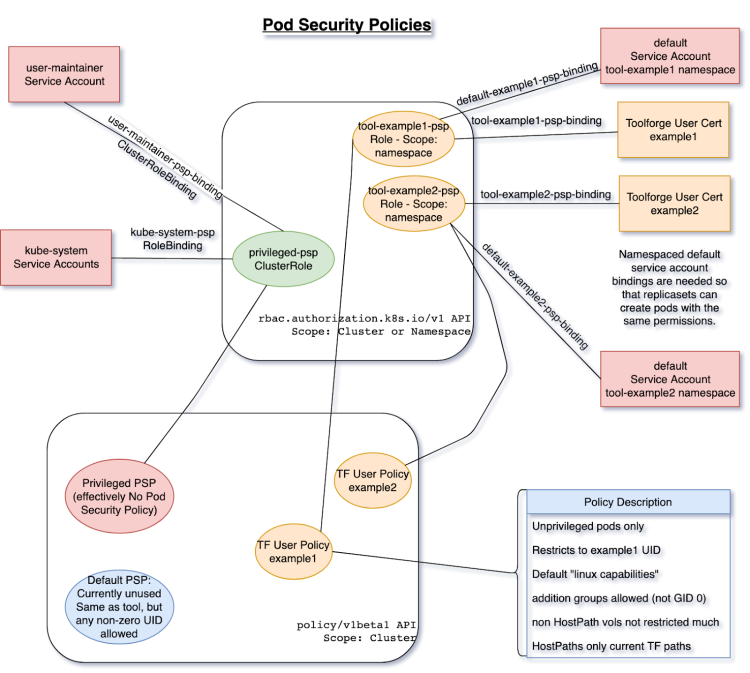
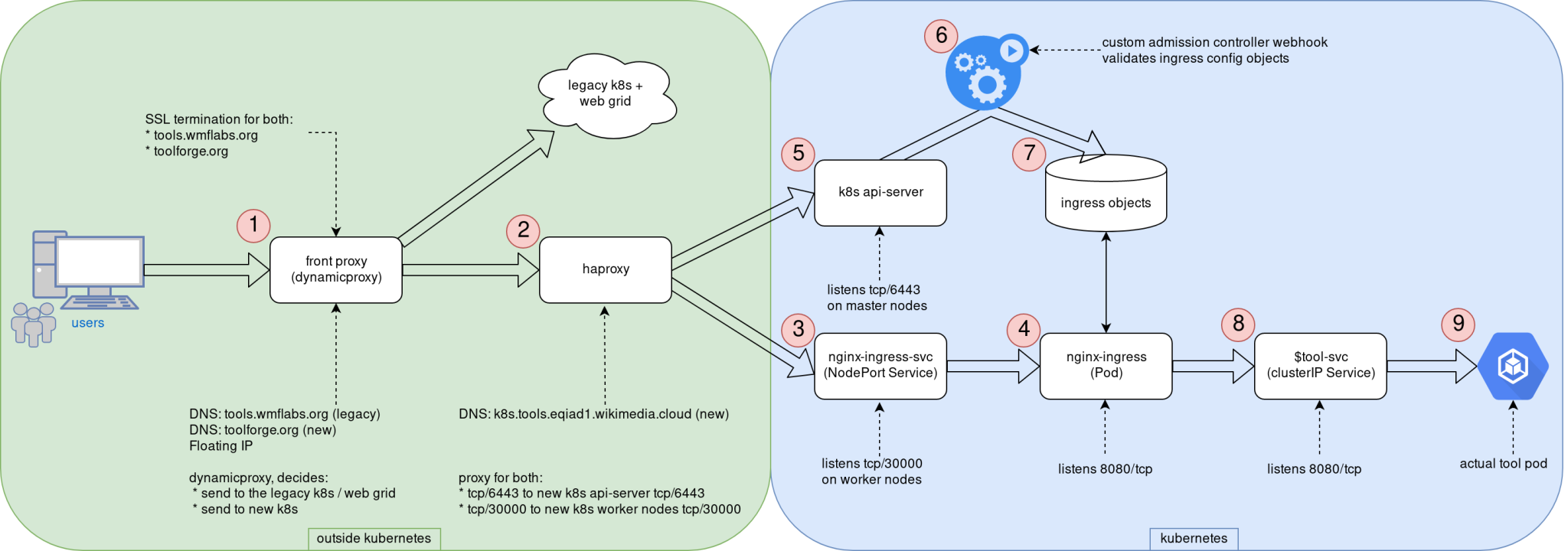
Logos This post was originally published in the Wikimedia Tech blog, and is authored by Arturo Borrero Gonzalez and Brooke Storm. In the previous post, we shared the context on the recent Kubernetes upgrade that we introduced in the Toolforge service. Today we would like to dive a bit more in the technical details. Custom admission controllers One of the key components of the Toolforge Kubernetes are our custom admission controllers. We use them to validate and enforce that the usage of the service is what we intended for. Basically, we have 2 of them: The source code is written in Golang, which is pretty convenient for natively working in a Kubernetes environment. Both code repositories include extensive documentation: how to develop, test, use, and deploy them. We decided to go with custom admission controllers because we couldn t find any native (or built-in) Kubernetes mechanism to accomplish the same sort of checks on user activity. With the Ingress controller, we want to ensure that Ingress objects only handle traffic to our internal domains, which by the time of this writing, are toolforge.org (our new domain) and tools.wmflabs.org (legacy). We safe-list the kube-system namespace and the tool-fourohfour namespace because both need special consideration. More on the Ingress setup later. The registry controller is pretty simple as well. It ensures that only our internal docker registry is used for user-scheduled containers running in Kubernetes. Again, we exclude from the checks containers running in the kube-system namespace (those used by Kubernetes itself). Other than that, the validation itself is pretty easy. For some extra containers we run (like those related to Prometheus metrics) what we do is simply upload those docker images to our internal registry. The controls provided by this admission controller helps us validate that only FLOSS software is run in our environment, which is one of the core rules of Toolforge. RBAC and Pod Security Policy setup I would like to comment next on our RBAC and Pod Security Policy setup. Using the Pod Security Policies (or PSP) we establish a set of constraints on what containers can and can t do in our cluster. We have many PSP configured in our setup: Each user can interact with their own namespace (this is how we achieve multi-tenancy in the cluster). Kubernetes knows about each user by means of TLS certs, and for that we have RBAC. Each user has a rolebinding to a shared cluster-role that defines how Toolforge tools can use the Kubernetes API. The following diagram shows the design of our RBAC and PSP in our cluster: RBAC and PSP for Toolforge diagram RBAC and PSP for Toolforge, original image in wikitech I mentioned that we know about each user by means of TLS certificates. This is true, and in fact, there is a key component in our setup called maintain-kubeusers. This custom piece of Python software is run as a pod inside the cluster and is responsible for reading our external user database (LDAP) and generating the required credentials, namespaces, and other configuration bits for them. With the TLS cert, we basically create a kubeconfig file that is then written into the homes NFS share, so each Toolforge user has it in their shell home directory. Networking and Ingress setup With the basic security controls in place, we can move on to explaining our networking and Ingress setup. Yes, the Ingress word might be a bit overloaded already, but we refer here to Ingress as the path that end-users follow from their web browser in their local machine to a webservice running in the Toolforge cluster. Some additional context here. Toolforge is not only Kubernetes, but we also have a Son of GridEngine deployment, a job scheduler that covers some features not available in Kubernetes. The grid can also run webservices, although we are encouraging users to migrate them to Kubernetes. For compatibility reasons, we needed to adapt our Ingress setup to accommodate the old web grid. Deciding the layout of the network and Ingress was definitely something that took us some time to figure out because there is not a single way to do it right. The following diagram can be used to explain the different steps involved in serving a web service running in the new Toolforge Kubernetes. Toolforge k8s network topology diagram Toolforge k8s network topology, original image in Wikitech The end-user HTTP/HTTPs request first hits our front proxy in (1). Running here is NGINX with a custom piece of LUA code that is able to decide whether to contact the web grid or the new Kubernetes cluster. TLS termination happens here as well, for both domains (toolforge.org and tools.wmflabs.org). Note this proxy is reachable from the internet, as it uses a public IPv4 address, a floating IP from CloudVPS, the infrastructure service we provide based on Openstack. Remember that our Kubernetes is directly built in virtual machines a bare-metal type deployment. If the request is directed to a webservice running in Kubernetes, the request now reaches haproxy in (2), which knows the cluster nodes that are available for Ingress. The original 80/TCP packet is now translated to 30000/TCP; this is the TCP port we use internally for the Ingress traffic. This haproxy instance provides load-balancing also for the Kubernetes API as well, using 6443/TCP. It s worth mentioning that unlike the Ingress, the API is only reachable from within the cluster and not from the internet. We have a NGINX-Ingress NodePort service listening in 30000/TCP in every Kubernetes worker node in (3); this helps the request to eventually reach the actual NGINX-Ingress pod in (4), which is listening in 8080/TCP. You can see in the diagram how in the API server (5) we hook the Ingress admission controller (6) to validate Kubernetes Ingress configuration objects before allowing them in for processing by NGINX-Ingress (7). The NGINX-Ingress process knows which tools webservices are online and how to contact them by means of an intermediate Service object in (8). This last Service object means the request finally reaches the actual tool pod in (9). At this point, it is worth noting that our Kubernetes cluster uses internally kube-proxy and Calico, both using Netfilter components to handle traffic. tools-webservice Most user-facing operations are simplified by means of another custom piece of Python code: tools-webservice. This package provides users with the webservice command line utility in our shell bastion hosts. Typical usage is to just run webservice start stop status. This utility creates all the required Kubernetes objects on-demand like Deployment, ReplicaSet, Ingress and Service to ease deploying web apps in Toolforge. Of course, advanced users can interact directly with Kubernetes API and create their custom configuration objects. This utility is just a wrapper, a shortcut. tool-fourohfour and tool-k8s-status The last couple of custom components we would like to mention are the tool-fourohfour and tool-k8s-status web services. These two utilities run inside the cluster as if they were any other user-created tool. The fourohfour tool allows for a controlled handling of HTTP 404 errors, and it works as the default NGINX-Ingress backend. The k8s-status tool shows plenty of information about the cluster itself and each tool running in the cluster, including links to the Server Admin Log, an auto-generated grafana dashboard for metrics, and more. For metrics, we use an external Prometheus server that contacts the Kubernetes cluster to scrape metrics. We created a custom metrics namespace in which we deploy all the different components we use to observe the behavior of the system: All the Prometheus data we collect is used in several different Grafana dashboards, some of them directed for user information like the ones linked by the k8s-status tool and some others for internal use by us the engineers. These are for internal use but are still public, like the Ingress specific dashboard, or the cluster state dashboard. Working publicly, in a transparent way, is key for the success of CloudVPS in general and Toolforge in particular. Like we commented in the previous post, all the engineering work that was done here was shared by community members. By the community, for the community We think this post sheds some light on how the Toolforge Kubernetes service works, and we hope it could inspire others when trying to build similar services or, even better, help us improve Toolforge itself. Since this was first put into production some months ago we detected already some margin for improvement in a couple of the components. As in many other engineering products, we will follow an iterative approach for evolving the service. Mind that Toolforge is maintained by the Wikimedia Foundation, but you can think of it as a service by the community for the community. We will keep an eye on it and have a list of feature requests and things to improve in the future. We are looking forward to it! This post was originally published in the Wikimedia Tech blog, and is authored by Arturo Borrero Gonzalez and Brooke Storm.
7 June 2020

Joachim Breitner: Managed by an eleven year old

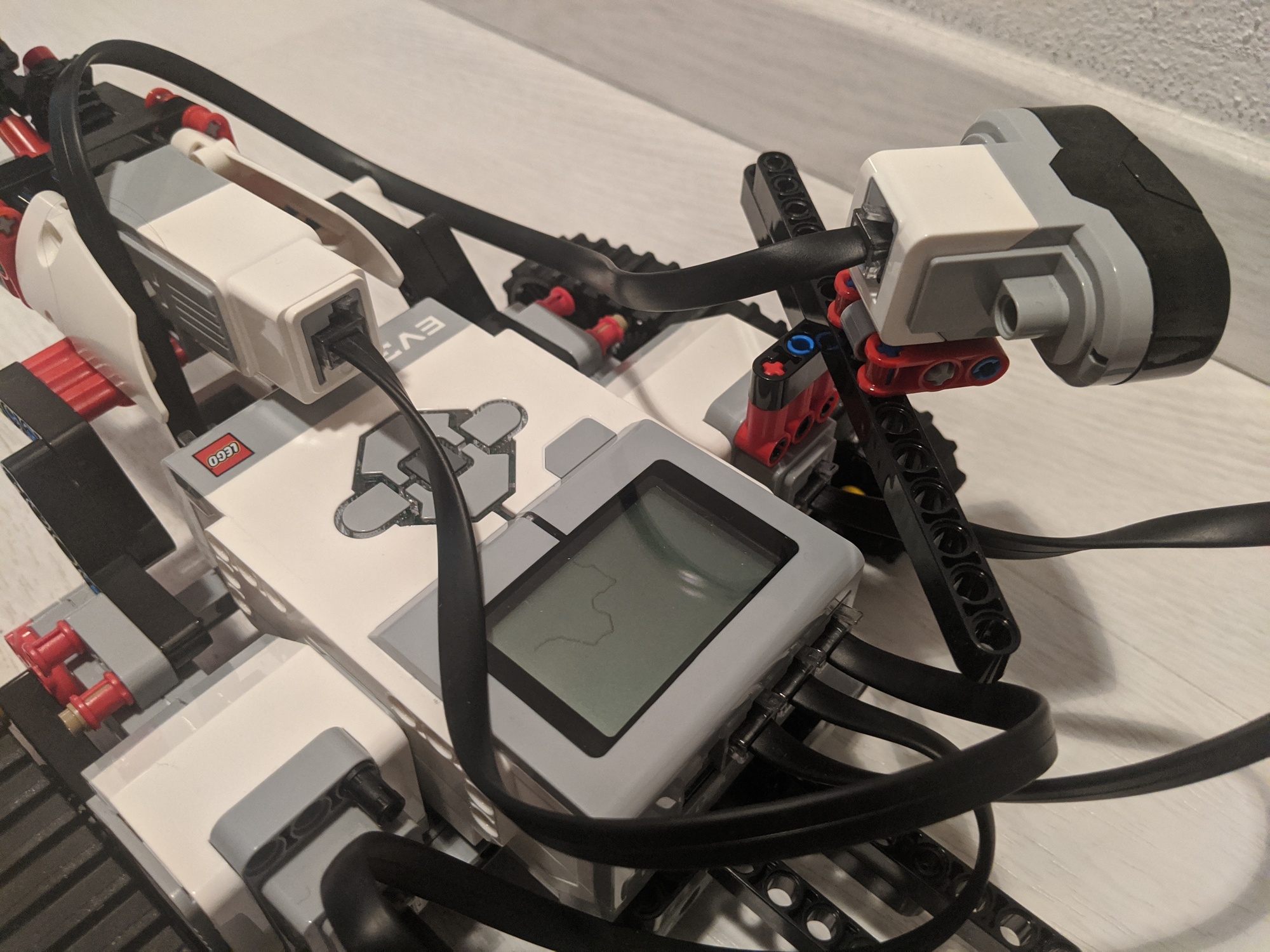
This weekend I had some pretty good uncle time. My eleven year old nephew (after beating me in a fair match of tennis) wanted to play with his Lego Mindstorms set. He never even touches it unless I am around to help him, but then he quiet enjoys. As expected, when I ask him what we should try to build, he tends to come up with completely unrealistic or impossible ideas, and we have to somehow reduce the scope to something doable. This time round, inspired by their autonomous vacuum cleaner, he wanted to build something like that. That was convenient, because now I could sell him what I wanted to try to do, namely make the robot follow a wall at more or less constant distance, as a useful first step. We mounted the infra red distance sensor at an 45 angle to the front-left, and then I built a very simple control loop measure the distance, subtract 40, apply a factor, and feed that into the steering input of the drive action, and repeat. I must admit that I was pretty proud to see just how well that very simple circuit worked: The little robot turned sharp corners in both directions, and otherwise drove nicely parallel and with constant distance to the wall. I was satisfied with that achievement and would have happily ended it here before we might be disappointed by more ambitious and then failing goals. But my nephew had not forgotten about the vacuum cleaner, and casually asked if I could make the robot draw an outline of its path, and thus of the room, on the display. Ok, where do I begin to explain just how unfeasible that is yes, it seemed one can draw to the display. But how should the robot know where it is? How far it turns? How far it went? This is programming by connecting boxes, and I would not expect such an interface to allow for complex logic (right?). And I would need trigonometry and stuff. But he didn t quite believe it, and thus got me thinking indeed, the arithmetic block can evaluate more complex formulas, involving sin and cos so maybe if I can somehow keep track of where the robot is heading well, let s give it a try. So by dragging boxes and connecting wires, I implemented a simple logic (three variables, x and y for current position, alpha for current heading; in each loop add the steering input onto alpha, and add (sin(alpha),cos(alpha)) onto the current position; throw in some linear factors to calibrate; draw pixel at (x, y)). And, to my nephew s joy and my astonishment, the robot was drawing a curvy line that clearly correlates with the taken path! It wasn t respecting the angles perfectly, a square might not properly close, but half an hour earlier I would have actively bet against that we would pull this off!
After a few turns

After a few turns

I was, I must admit, a bit proud. But not only about the technical nerding, but also about my uncleing: That night, according to his parents, my nephew said that he can t remember ever being so happy!

18 May 2020

Arturo Borrero Gonz lez: A better Toolforge: upgrading the Kubernetes cluster

Logos This post was originally published in the Wikimedia Tech blog, and is authored by Arturo Borrero Gonzalez and Brooke Storm. One of the most successful and important products provided by the Wikimedia Cloud Services team at the Wikimedia Foundation is Toolforge. Toolforge is a platform that allows users and developers to run and use a variety of applications that help the Wikimedia movement and mission from the technical point of view in general. Toolforge is a hosting service commonly known in the industry as a Platform as a Service (PaaS). Toolforge is powered by two different backend engines, Kubernetes and GridEngine. This article focuses on how we made a better Toolforge by integrating a newer version of Kubernetes and, along with it, some more modern workflows. The starting point in this story is 2018. Yes, two years ago! We identified that we could do better with our Kubernetes deployment in Toolforge. We were using a very old version, v1.4. Using an old version of any software has more or less the same consequences everywhere: you lack security improvements and some modern key features. Once it was clear that we wanted to upgrade our Kubernetes cluster, both the engineering work and the endless chain of challenges started. It turns out that Kubernetes is a complex and modern technology, which adds some extra abstraction layers to add flexibility and some intelligence to a very old systems engineering need: hosting and running a variety of applications. Our first challenge was to understand what our use case for a modern Kubernetes was. We were particularly interested in some key features: Soon enough we faced another Kubernetes native challenge: the documentation. For a newcomer, learning and understanding how to adapt Kubernetes to a given use case can be really challenging. We identified some baffling patterns in the docs. For example, different documentation pages would assume you were using different Kubernetes deployments (Minikube vs kubeadm vs a hosted service). We are running Kubernetes like you would on bare-metal (well, in CloudVPS virtual machines), and some documents directly referred to ours as a corner case. During late 2018 and early 2019, we started brainstorming and prototyping. We wanted our cluster to be reproducible and easily rebuildable, and in the Technology Department at the Wikimedia Foundation, we rely on Puppet for that. One of the first things to decide was how to deploy and build the cluster while integrating with Puppet. This is not as simple as it seems because Kubernetes itself is a collection of reconciliation loops, just like Puppet is. So we had to decide what to put directly in Kubernetes and what to control and make visible through Puppet. We decided to stick with kubeadm as the deployment method, as it seems to be the more upstream-standardized tool for the task. We had to make some interesting decisions by trial and error, like where to run the required etcd servers, what the kubeadm init file would look like, how to proxy and load-balance the API on our bare-metal deployment, what network overlay to choose, etc. If you take a look at our public notes, you can get a glimpse of the number of decisions we had to make. Our Kubernetes wasn t going to be a generic cluster, we needed a Toolforge Kubernetes service. This means we don t use some of the components, and also, we add some additional pieces and configurations to it. By the second half of 2019, we were working full-speed on the new Kubernetes cluster. We already had an idea of what we wanted and how to do it. There were a couple of important topics for discussions, for example: We will describe in detail the final state of those pieces in another blog post, but each of the topics required several hours of engineering time, research, tests, and meetings before reaching a point in which we were comfortable with moving forward. By the end of 2019 and early 2020, we felt like all the pieces were in place, and we started thinking about how to migrate the users, the workloads, from the old cluster to the new one. This migration plan mostly materialized in a Wikitech page which contains concrete information for our users and the community. The interaction with the community was a key success element. Thanks to our vibrant and involved users, we had several early adopters and beta testers that helped us identify early flaws in our designs. The feedback they provided was very valuable for us. Some folks helped solve technical problems, helped with the migration plan or even helped make some design decisions. Worth noting that some of the changes that were presented to our users were not easy to handle for them, like new quotas and usage limits. Introducing new workflows and deprecating old ones is always a risky operation. Even though the migration procedure from the old cluster to the new one was fairly simple, there were some rough edges. We helped our users navigate them. A common issue was a webservice not being able to run in the new cluster due to stricter quota limiting the resources for the tool. Another example is the new Ingress layer failing to properly work with some webservices s particular options. By March 2020, we no longer had anything running in the old Kubernetes cluster, and the migration was completed. We then started thinking about another step towards making a better Toolforge, which is introducing the toolforge.org domain. There is plenty of information about the change to this new domain in Wikitech News. The community wanted a better Toolforge, and so do we, and after almost 2 years of work, we have it! All the work that was done represents the commitment of the Wikimedia Foundation to support the technical community and how we really want to pursue technical engagement in general in the Wikimedia movement. In a follow-up post we will present and discuss more in-depth about some technical details of the new Kubernetes cluster, stay tuned! This post was originally published in the Wikimedia Tech blog, and is authored by Arturo Borrero Gonzalez and Brooke Storm.

16 May 2020

Sven Hoexter: Quick and Dirty: masquerading / NAT with nftables

Since nftables is now the new default, a short note to myself on how to setup masquerading, like the usual NAT setup you use on a gateway.
nft add table nat
nft add chain nat postrouting   type nat hook postrouting priority 100 \;  
nft add rule nat postrouting ip saddr 192.168.1.0/24 oif wlan0 masquerade
In this case the wlan0 is basically the "WAN" interface, because I use an old netbook as a wired to wireless network adapter.

Lucas Kanashiro: Quarantine times

After quite some time without publishing anything here, I decided to share the latest events. It is a hard time for most of us but with all this time at home, one can also do great things. I would like to start with the wonderful idea the Debian Brasil community had! Why not create an online Debian related conference to keep people s minds busy and also share knowledge? After brainstorming, we came up with our online conference called #FiqueEmCasaUseDebian (in English it would be #StayHomeUseDebian). It started on May 3rd and will last until May 30th (yes, one month)! Every weekday, we have one online talk at night and on every Saturday, a Debian packaging workshop. The feedback so far has been awesome and the Brazilian Debian community is reaching out to more people than usual at our regular conferences (as you might have imagined, Brazil is huge and it is hard to bring people at the same place). At the end of the month, we will have the first MiniDebConf online and I hope it will be as successful as our experience here in Brazil. Another thing that deserves a highlight is the fact that I became an Ubuntu Core Developer this month; yay! After 9 months of working almost daily on the Ubuntu Server, I was able to get my upload rights to the Ubuntu archive. I was tired of asking for sponsorship, and probably my peers were tired of me too. I could spend more time here complaining about the Brazilian government but I think it isn t worth it. Let s try to do something useful instead!

30 April 2020

Chris Lamb: Free software activities in April 2020

Here is my monthly update covering what I have been doing in the free software world during April 2020 (previous month's report). Looking it over prior to publishing, I am surprised how much I got done this month I felt that I was not only failing to do all the extra things I had planned, but I was doing far less than normal. But let us go easy on ourselves; nobody is nailing this. In addition, I did more hacking on the Lintian static analysis tool for Debian packages:
Reproducible builds One of the original promises of open source software is that distributed peer review and transparency of process results in enhanced end-user security. However, whilst anyone may inspect the source code of free and open source software for malicious flaws, almost all software today is distributed as pre-compiled binaries. This allows nefarious third-parties to compromise systems by injecting malicious code into ostensibly secure software during the various compilation and distribution processes. The motivation behind the Reproducible Builds effort is to ensure no flaws have been introduced during this compilation process by promising identical results are always generated from a given source, thus allowing multiple third-parties to come to a consensus on whether a build was compromised. The initiative is proud to be a member project of the Software Freedom Conservancy, a not-for-profit 501(c)(3) charity focused on ethical technology and user freedom. Conservancy acts as a corporate umbrella allowing projects to operate as non-profit initiatives without managing their own corporate structure. If you like the work of the Conservancy or the Reproducible Builds project, please consider becoming an official supporter. Elsewhere in our tooling, I made the following changes to diffoscope, our in-depth and content-aware diff utility that can locate and diagnose reproducibility issues, including preparing and uploading versions 139, 140, 141 and 142 to Debian: Lastly, I made a large number of changes to our website and documentation in the following categories:
Debian LTS This month I have contributed 18 hours to Debian Long Term Support (LTS) and 7 hours on its sister Extended LTS project. You can find out more about the project via the following video:
Debian I only filed three bugs in April, including one against snapshot.debian.org to report that a Content-Type HTTP header is missing when downloading .deb files (#956471) and to report build failures in the macs & ruby-enumerable-statistics packages:

28 April 2020

Antoine Beaupr : Drowned my camera: dealing with liquid spills in electronics

Folks who acutely dig into this website might know that I have been taking more pictures recently, as I got a new camera since January 2018: a beautiful Fujifilm X-T2 that I really like. Recently, I went out on a photo shoot in the rain. It was intermittent, light rain when I left so I figured the "weather proofing" (dpreview.com calls this "environmentally sealed") would keep the camera secure. After an hour of walking outside, however, rain intensified and I was just quickly becoming more and more soaked. Still trusting the camera would function, I carried on. But after about 90 minutes of dutiful work, the camera just turned off and wouldn't power back on. It had drowned. I couldn't believe it; "but this is supposed to be waterproof! This can't be happening!", I thought. I tried swapping out the battery for a fresh one, which was probably a bad idea (even if I was smart enough to do this under cover): still no luck, yet I could still not believe it was dead, so I figured I would look at it later when I was home. I still eventually removed the battery after a while, remembering that it mattered. Turns out the camera was really dead. Even at home, it wouldn't power up, even with fresh batteries. After closer inspection, the camera was as soaked as I was...
Two Sandisk memory cards with water droplets on them ...even the SD cards were wet!
I was filled with despair! My precious camera! I had been waiting for litterally decades to find the right digital camera that was as close to the good old film cameras I was used to. I was even working on black and white "film" to get back to basics, which turned into a project to witness the impact of the coronavirus on city life! All that was lost, or at least stopped: amazingly, the SD cards were just absolutely fine and survived the flooding without problem.
A one-way sign broken, fallen on the side in a gray cityscape The last photo my camera took before it died
A good photographer friend told me that this was actually fairly common: "if you shoot outside, get used to this, it will happen". So I tried "the rice trick": plunge your camera in a pile of rice and let it rest there for a long time. It didn't work so well: I didn't have a big enough container to hold the camera and the rice. I was also worried about rice particles inserting themselves into the camera holes, as I had opened all the ports to let it dry. I could also not keep myself from inserting a battery and trying it out again: amazingly, it powered up, only once, and died again. After shopping in desperation for dessicators (who would have thought you should keep those little bags from the stuff you order online!), I ended up buying silica gel dehumidifier from Lee Valley (13$, the small one!) which comes in a neat little metal box. But that never arrived in time so I had to find another solution. My partner threw the idea out in jest, but the actual solution worked, and it was surprisingly simple!
My camera and lens drying in a food dehydrator, at 30 C with 22 hours left Tada! Turns out you can dehydrate hardware too!
We have a food dehydrator at home (a Sedna Express if you really want to know) since we do a lot of backpacking and canot-camping, but I never thought I would put electronics in there. Turns out a food dehydrator is perfect: it has a per degree temperature control that can go very low and a timer. I set it to 30 C for 24 hours. (I originally set it to 40 C but it smelled like plastic after a while so my partner turned it off thinking it was melting the camera.) And now the camera is back! I was so happy! There is probably some permanent damage to the delicate circuitry in the camera. And I will probably not go back out in heavy rain again with the camera, or at least not without a rainjacket (35$USD at B&H) on the camera. And I am now in a position to tell other people what to do if they suffer the same fate...

Tips for dealing with electronic liquid damage So, lessons learned...
  1. when you have a liquid spill over your electronics: IMMEDIATELY REMOVE ALL ELECTRIC POWER, including the battery! (this is another reason why all batteries should be removable)
  2. if the spill is "sticky" (e.g. coffee, beer, maple syrup, etc) or "salty", do try to wash it with water, yet without flooding it any further (delicate balance, I know) some devices are especially well adapted to this: I have washed a keyboard with a shower head and drowned the thing completely, it worked fine after drying.
  3. do NOT power it back on until you are certain the equipment is dry
  4. let the electronics device dry for 24 to 48 hours with all ports open in a humidity-absorbing environment: a bag of rice works, but a food dehydrator is best. make sure the rice doesn't get stuck inside the machine: use a small mesh bag if necessary
  5. once you are confident the device has dried, fiddle with the controls and see if water comes out: it might not have dried because it was stuck inside a button or dial. if dry, try powering it back on and watch the symptoms. if it's still weird, try drying it for another day.
  6. if you get tired of waiting and the machine doesn't come back up, you will have to send it to the repair shop or open it up yourself to see if there is soldering damage you can fix.
I hope it might help careless people who dropped their coffee or ran out in the rain, believing the hype of waterproof cameras. Amateur tip: waterproof cameras are not waterproof...

19 April 2020

Sven Hoexter: Emulating Raspi2 like hardware with Rasbian in 2020

To follow some older (as in two years) ARM assembler howto, I searched for a quick and dirty way to run a current Rasbian with qemu 4.2 on Debian/unstable. The end result are the following notes to get that up and running:
# Download a binary device tree file and matching kernel a good soul uploaded to github
wget https://github.com/vfdev-5/qemu-rpi2-vexpress/raw/master/kernel-qemu-4.4.1-vexpress
wget https://github.com/vfdev-5/qemu-rpi2-vexpress/raw/master/vexpress-v2p-ca15-tc1.dtb
# Download the official Rasbian image without X
wget -O raspbian_lite_latest.zip https://downloads.raspberrypi.org/raspbian_lite_latest
unzip raspbian_lite_latest.zip
# Convert it from the raw image to a qcow2 image and add some space
qemu-img convert -f raw -O qcow2 2020-02-13-raspbian-buster-lite.img rasbian.qcow2
qemu-img resize rasbian.qcow2 +2G
# start qemu
qemu-system-arm -m 2048M -M vexpress-a15 -cpu cortex-a15 \
 -kernel kernel-qemu-4.4.1-vexpress -no-reboot \
 -smp 2 -serial stdio \
 -dtb vexpress-v2p-ca15-tc1.dtb -sd rasbian.qcow2 \
 -append "root=/dev/mmcblk0p2 rw rootfstype=ext4 console=ttyAMA0,15200 loglevel=8" \
 -nic user,hostfwd=tcp::5555-:22
# login at the serial console as user pi with password raspberry
sudo -i
# enable ssh
systemctl enable ssh
# resize partition and filesystem
parted /dev/mmcblk0 resizepart 2 100%
resize2fs /dev/mmcblk0p2
Now I can login via ssh and start to play:
ssh pi@localhost -p 5555
So for me that is sufficient, I have network connectivity to install an editor, transfer files and can otherwise work with tmux to have some session multiplexing. Additional Notes

2 April 2020

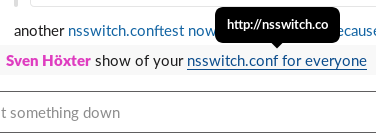
Sven Hoexter: New TLDs and Automatic link detection was a bad idea

Update: Seems this is a Firefox specific bug in the Slack Webapplication, it works in Chrome and the Slack Electron Application as it should. Tested with Firefox ESR on Debian/buster and Firefox 74 on OS X. Ah I like it that we now have so many TLDs and matching on those seems to go bad more often now. Last occassion is Slack (which I think is a pile of shit written by morons, but that is a different story) which somehow does not properly match on .co domains. Leading to this auto linking: nsswitch.conf link Now I'm not sure if someone enocountered the same issue, or people just registered random domains just because they could. I found registrations for I've a few more .conf files in /etc which could be interesting in an IT environment, but for the sake of playing with it I registered nsswitch.co at godaddy. I do not want to endorse them in anyway, but for the first year it's only 13.08EUR right now, which is okay to pay for a stupid demo. So if you feel like it, you can probably register something stupid for yourself to play around with. I do not intent to renew this domain next year, so be aware of what happens then with the next owner.
29 March 2020

Sven Hoexter: Looking into Envertech Enverbridge EVB 202 SetID tool

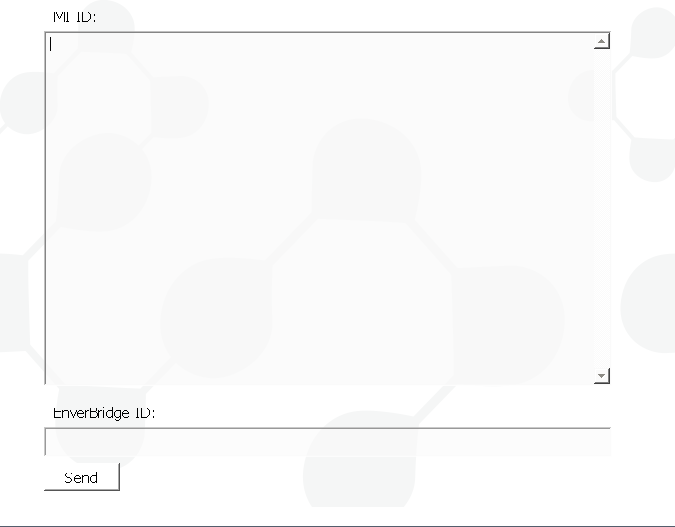
Disclaimer: I'm neither an experienced programmer nor proficient in reverse engineering, but I like at least to try to figure out how things work. Sometimes the solution is so easy, that even I manage to find it, still take this with a grain of salt. I lately witnessed the setup of an Envertech EnverBridge ENB-202 which is kind of a classic Chinese IoT device. Buy it, plug it in, use some strange setup software, and it will report your PV statistics to a web portal. The setup involved downloading a PE32 Windows executable, with an UI that basically has two input boxes and a sent button. You've to input the serial number(s) of your inverter boxes and the ID of your EnverBridge. That made me interested in what this setup process really looks like. The EnverBridge device itself has on one end a power plug, which is also used to communicate with the inverter via some Powerline protocol, and a network plug with a classic RJ45 end you plug into your network. If you power it up it will request an IPv4 address via DHCP. That brings us to the first oddity, the MAC address is in the BC:20:90 prefix which I could not find in the IEEE lists. Setting Up the SetID Software You can download the Windows software in a Zipfile, once you unpack it you end up with a Nullsoft installer .exe. Since this is a PE32 executable we've to add i386 as foreign architecture to install the wine32 package.
dpkg --add-architecture i386
apt update
apt install wine32:i386
wget http://www.envertec.com/uploads/bigfiles/Set%20ID.zip
unzip Set\ ID.zip
wine Set\ ID.exe
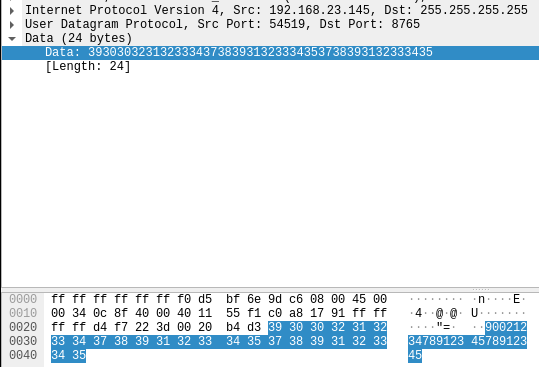
The end result is an installation in ~/.wine/drive_c/Program Files/SetID which reveals that this software is build with Qt5 according to the shipped dll's. The tool itself is in udpCilentNow.exe, and looks like this: Envertech SetID software The Network Communication To my own surprise, the communication is straight forward. A single UDP paket is sent to the broadcast address (255.255.255.255) on port 8765. Envertech SetID udp paket in wireshark I expected some strange binary protocol, but the payload is just simple numbers. They're a combination of the serial numbers of the inverter and the ID of the Enverbridge device. One thing I'm not 100% sure about are the inverter serial numbers, there are two of them, but on the inverter I've seen the serial numbers are always the same. So the payload is assembled like this: If you've more inverter the serials are just appended in the same way. Another strange thing is that the software does close to no input validation, they only check that the inverter serials start with CN and then just extract char 9 to 16. The response from the EnverBridge is also a single UDP paket to the broadcast address on port 8764, with exactly the same content we've sent. Writing a Replacement My result is probably an insult for all proficient Python coders, but based on a bit of research and some cut&paste programming I could assemble a small script to replicate the function of the Windows binary. I guess the usefulness of this exercise was mostly my personal entertainment, though it might help some none Windows users to setup this device. Usage is also very simple:
./enverbridge.py -h
Usage: enverbridge.py [options] MIIDs
Options:
  -h, --help         show this help message and exit
  -b BID, --bid=BID  Serial Number of your EnverBridge
./enverbridge.py -b 90087654 CN19100912345678 CN19100912345679
This is basically 1:1 the behaviour of the Windows binary, though I tried to add a bit more validation then the original binary and some more error messages. I also assume the serial numbers are also always the same so I take only one as the input, and duplicate it for the paket data.

12 November 2017

Sven Hoexter: Offering a Simtec Entropy Key

Since I started to lean a bit towards the concept of minimalism I've got rid of stuff, including all stationary computers. So for now I'm left with just my laptop and that's something where I do not want to attach an USB entropy key permanently. That's why I've a spare Simtec Entropy Key I no longer use, and I'm willing to sell. In case someone is interested, I'm willing to give it away for 20EUR + shipping. If you can convince me it'll be of use for the Debian project (end up on a DSA managed machine for example) I'm willing to give it away for less. If you're located in Cologne, Copenhagen or Barcelona we might be able, depending on the timing, to do a personal handover (with or without keysigning). Otherwise I guess shipping is mainly interesting for someone also located in Europe. You can use sven at stormbind dot net or hoexter at debian dot org to contact me and use GPG key 0xA6DC24D9DA2493D1.

4 November 2017

Louis-Philippe V ronneau: Migrating my website to Pelican

After too much time lying to myself, telling myself things like "I'll just add this neat feature I want on my blog next week", I've finally made the big jump, ditched django and migrated my website to Pelican. I'm going to the Cambridge Mini-Debconf at the end of the month for the Debconf Videoteam Autumn sprint and I've taken the task of making daily sprint reports for the team. That in return means I have to publish my blog on Planet Debian. My old website not having feeds made this a little hard and this perfect storm gave me the energy to make the migration happen. Anyway, django was fun. Building a (crappy) custom blogging engine with it taught me some rough basics, but honestly I don't know why I ever thought it was a good idea. Don't get me wrong: django is great and should definitely be used for large and complicated websites. My blog just ain't one. Migrating to Pelican was pretty easy since it also uses Jinja2 templates and generates content from Mardown. The hardest part was actually bending it to replicate the weird and specific behavior I wanted it to have. So yeah, woooo, I migrated to Pelican. Who cares, right? Well, if you are amongst the very, very few people who read the blog posts I mainly write for myself, you'll be please to know that: Here's a bonus picture of a Pelican from Wikimedia, just for the sake of it: A pelican

Next.

Previous.