Search Results: "mats"

29 October 2020

Norbert Preining: Deleting many files from an S3 bucket

So we found ourselves in the need to delete a considerable amount of files (around 500000, amounting to 1.6T) from an S3 bucket. With the list of files in hand my first shot was calling
aws s3 rm s3://BUCKET/FILE
for each file. That wasn t the best idea I have to say, since first of all, it makes 500000 requests, and then it takes a looong time. And this command does not allow to pass in multiple files. Fortunately there is aws s3api delete-objects which takes a json input and can delete multiple files:
aws 3api delete-objects --bucket BUCKET --delete ' "Objects": [   "Key" : "FILE1"  ,   "Key" : "FILE2"  ... ] '
That did help, and with a bit of magic from bash (mapfile which can read in lines from stdin in batches) and jq, at the end it was a business of some 20min or so:
cat files-to-be-deleted    while mapfile -t -n 500 ary && (($ #ary[@] )); do
        objdef=$(printf '%s\n' "$ ary[@] "   jq -nR ' Objects: (reduce inputs as $line ([]; . + [ "Key":$line ])) ')
        aws s3api --no-cli-pager  delete-objects --bucket BUCKET --delete "$objdef"
done
This reads 500 files a time, and reformats it using jq into the proper json format: reduce inputs is a jq filter that iterates over the input lines and does a map/reduce step. In this case we use an empty array as start and add new key/filename pairs on the go. Finally, the whole bunch is send to AWS with the above API call. Puuuh, 500000 files and 1.6T less, in 20min.

28 August 2020

Dirk Eddelbuettel: anytime 0.3.9: More Minor Maintenance

A new minor release of the anytime package arrived on CRAN yesterday. This is the twentieth release, but sadly we seem to be spinning our wheels just accomodating CRAN (which the two or three last releases focused on). Code and functionality remain mature and stable, of course. anytime is a very focused package aiming to do just one thing really well: to convert anything in integer, numeric, character, factor, ordered, format to either POSIXct or Date objects and to do so without requiring a format string as well as accomodating different formats in one input vector. See the anytime page, or the GitHub README.md for a few examples. This release once again has to play catchup with CRAN as r-devel now changes how tzone propagates when we do as.POSIXct(as.POSIXlt(Sys.time()) which is now no longer equal to as.POSIXct(Sys.time()) even for a fixed, stored Sys.time() call result. Probably for the better, but an issue for now so we effectively just reduced test coverage. Call it progress . The full list of changes follows.

Changes in anytime version 0.3.9 (2020-08-26)
  • Skip one test file that is impossible to run across different CRAN setups, and life is definitely too short for these games.
  • Change remaining http:// to https:// because, well, you know.

Courtesy of CRANberries, there is a comparison to the previous release. More information is on the anytime page. The issue tracker tracker off the GitHub repo can be use for questions and comments. If you like this or other open-source work I do, you can now sponsor me at GitHub. For the first year, GitHub will match your contributions.

This post by Dirk Eddelbuettel originated on his Thinking inside the box blog. Please report excessive re-aggregation in third-party for-profit settings.

17 August 2020

Arnaud Rebillout: Modify Vim syntax files for your taste

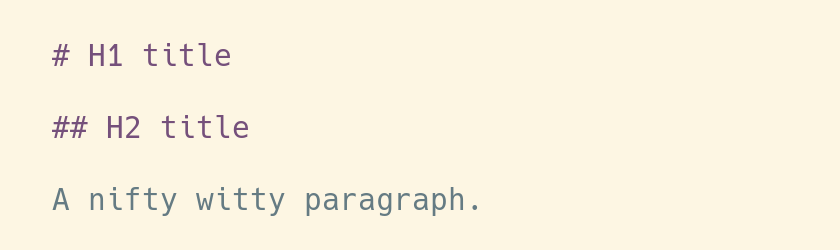
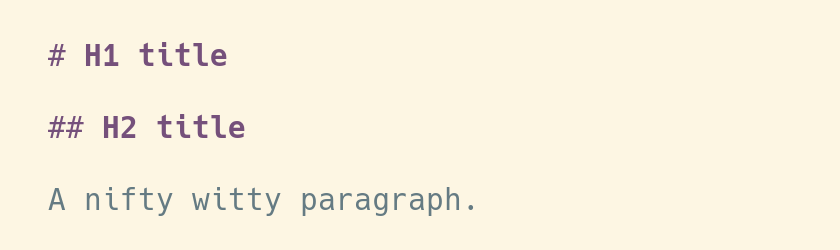
In this short how-to, we'll see how to make small modifications to a Vim syntax file, in order to change how a particular file format is highlighted. We'll go for a simple use-case: modify the Markdown syntax file, so that H1 and H2 headings (titles and subtitles, if you prefer) are displayed in bold. Of course, this won't be exactly as easy as expected, but no worries, we'll succeed in the end. The calling Let's start with a screenshot: how Vim displays Markdown files for me, someone who use the GNOME terminal with the Solarized light theme. Vim - Markdown file with original highlighting I'm mostly happy with that, except for one or two little details. I'd like to have the titles displayed in bold, for example, so that they're easier to spot when I skim through a Markdown file. It seems like a simple thing to ask, so I hope there can be a simple solution. The first steps Let's learn the basics. In Vim world, the rules to highlight files formats are defined in the directory /usr/share/vim/vim82/syntax (I bet you'll have to adjust this path depending on the version of Vim that is installed on your system). And so, for the Markdown file format, the rules are defined in the file /usr/share/vim/vim82/syntax/markdown.vim. The first thing we could do is to have a look at this file, try to make sense of it, and maybe start to make some modifications. But wait a moment. You should know that modifying a system file is not a great idea. First because your changes will be lost as soon as an update kicks in and the package manager replaces this file by a new version. Second, because you will quickly forget what files you modified, and what were your modifications, and if you do that too much, you might experience what is called "maintenance headache" in the long run. So instead, maybe you DO NOT modify this file, and instead you copy it in your personal Vim folder, more precisely in ~/.vim/syntax. Create this directory if it does not exist:
mkdir -p ~/.vim/syntax
cp /usr/share/vim/vim82/syntax/markdown.vim ~/.vim/syntax
The file in your personal folder takes precedence over the system file of the same name in /usr/share/vim/vim82/syntax/, it is a replacement for the existing syntax files. And so from now on, Vim uses the file ~/.vim/syntax/markdown.vim, and this is where we can make our modifications. (And by the way, this is explained in the Vim faq-24.12) And so, it's already nice to know all of that, but wait, there's even better. There's is another location of interest, and it is ~/.vim/after/syntax. You can drop syntax files in this directory, and these files are treated as additions to the existing syntax. So if you only want to make slight modifications, that's the way to go. (And by the way, this is explained in the Vim faq-24.11) So let's forget about a syntax replacement in ~/.vim/syntax/markdown.vim, and instead let's go for some syntax additions in ~/.vim/after/syntax/markdown.vim.
mkdir -p ~/.vim/after/syntax
touch ~/.vim/after/syntax/markdown.vim
Now, let's answer the initial question: how do we modify the highlighting rules for Markdown files, so that the titles are displayed in bold? First, we have to understand where are the rules that define the highlighting for titles. Here there are, from the file /usr/share/vim/vim82/syntax/markdown.vim:
hi def link markdownH1 htmlH1
hi def link markdownH2 htmlH2
hi def link markdownH3 htmlH3
...
You should know that H1 means Heading 1, and so on, and so we want to make H1 and H2 bold. What we can see here is that the headings in the Markdown files are highlighted like the headings in HTML files, and this is obviously defined in the file /usr/share/vim/vim82/syntax/html.vim. So let's have a look into this file:
hi def link htmlH1 Title
hi def link htmlH2 htmlH1
hi def link htmlH3 htmlH2
...
Let's keep digging a bit. Where is Title defined? For those using the default color scheme like me, this is defined straight in the Vim source code, in the file src/highlight.c.
CENT("Title term=bold ctermfg=DarkMagenta",
     "Title term=bold ctermfg=DarkMagenta gui=bold guifg=Magenta"),
And for those using custom color schemes, it might be defined in a file under /usr/share/vim/vim82/colors/. Alright, so how do we override that? We can just define this kind of rules in our syntax additions file at ~/.vim/after/syntax/markdown.vim:
hi link markdownH1 markdownHxBold
hi link markdownH2 markdownHxBold
hi markdownHxBold  term=bold ctermfg=DarkMagenta gui=bold guifg=Magenta cterm=bold
As you can see, the only addition we made, compared to what's defined in src/highlight.c, is cterm=bold. And that's already enough to achieve the initial goal, make the titles (ie. H1 and H2) bold. The result can be seen in the following screenshot: Vim - Markdown file with modified highlighting The rabbit hole So we could stop right here, and life would be easy and good. However, with this solution there's still something that is not perfect. We use the color DarkMagenta as defined in the default color scheme. What I didn't mention however, is that this is applicable for a light background. If you have a dark background though, dark magenta won't be easy to read. Actually, if you look a bit more into src/highlight.c, you will see that the default color scheme comes in two variants, one for a light background, and one for a dark background. And so the definition for Title for a dark background is as follow:
CENT("Title term=bold ctermfg=LightMagenta",
     "Title term=bold ctermfg=LightMagenta gui=bold guifg=Magenta"),
Hmmm, so how do we do that in our syntax file? How can we support both light and dark background, so that the color is right in both cases? After a bit of research, and after looking at other syntax files, it seems that the solution is to check for the value of the background option, and so our syntax file becomes:
hi link markdownH1 markdownHxBold
hi link markdownH2 markdownHxBold
if &background == "light"
  hi markdownHxBold term=bold ctermfg=DarkMagenta gui=bold guifg=Magenta cterm=bold
else
  hi markdownHxBold term=bold ctermfg=LightMagenta gui=bold guifg=Magenta cterm=bold
endif
In case you wonder, in Vim script you prefix Vim options with &, and so you get the value of the background option by writing &background. You can learn this kind of things in the Vim scripting cheatsheet. And so, it's easy enough, except for one thing: it doesn't work. The headings always show up in DarkMagenta, even for a dark background. This is why I called this paragraph "the rabbit hole", by the way. So... Well after trying a few things, I noticed that in order to make it work, I would have to reload the syntax files with :syntax on. At this point, the most likely explanation is that the background option is not set yet when the syntax files are loaded at startup, hence it needs to be reloaded manually afterward. And after muuuuuuch research, I found out that it's actually possible to set a hook for when an option is modified. Meaning, it's possible to execute a function when the background option is modified. Quite cool actually. And so, there it goes in my ~/.vimrc:
" Reload syntax when the background changes 
autocmd OptionSet background if exists("g:syntax_on")   syntax on   endif
For humans, this line reads as:
  1. when the background option is modified -- autocmd OptionSet background
  2. check if the syntax is on -- if exists("g:syntax_on")
  3. if that's the case, reload it -- syntax on
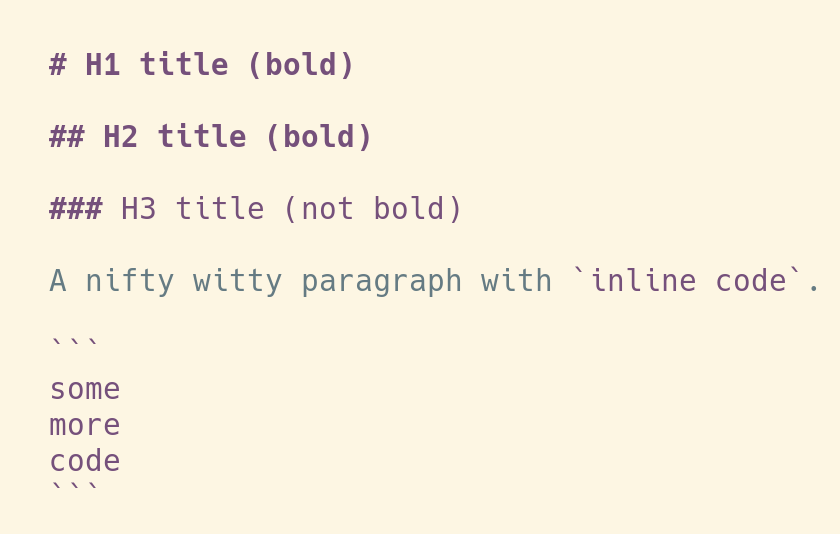
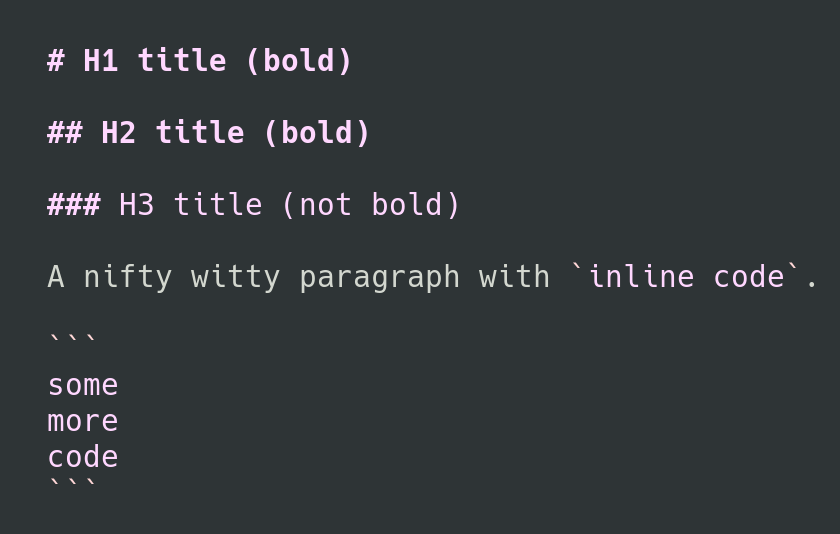
With that in place, my Markdown syntax overrides work for both dark and light background. Champagne! The happy end To finish, let me share my actual additions to the markdown.vim syntax. It makes H1 and H2 bold, along with their delimiters, and it also colors the inline code and the code blocks.
" H1 and H2 headings -> bold
hi link markdownH1 markdownHxBold
hi link markdownH2 markdownHxBold
" Heading delimiters (eg '#') and rules (eg '----', '====') -> bold
hi link markdownHeadingDelimiter markdownHxBold
hi link markdownRule markdownHxBold
" Code blocks and inline code -> highlighted
hi link markdownCode htmlH1
" The following test requires this addition to your vimrc:
" autocmd OptionSet background if exists("g:syntax_on")   syntax on   endif
if &background == "light"
  hi markdownHxBold term=bold ctermfg=DarkMagenta gui=bold guifg=Magenta cterm=bold
else
  hi markdownHxBold term=bold ctermfg=LightMagenta gui=bold guifg=Magenta cterm=bold
endif
And here's how it looks like with a light background: Vim - Markdown file with final highlighting (light) And a dark background: Vim - Markdown file with final highlighting (dark) That's all, that's very little changes compared to the highlighting from the original syntax file, and now that we understand how it's supposed to be done, it's not much effort to achieve it. It's just that finding the workaround to make it work for both light and dark background took forever, and leaves the usual, unanswered question: bug or feature?

15 August 2020

Antonio Terceiro: Useful ffmpeg commands for editing video

For DebConf20, we are recommending that speakers pre-record the presentation part of their talks, and will have live Q&A. We had a smaller online MiniDebConf a couple of months ago, where for instance I had connectivity issues during my talk, so even though it feels too artificial, I guess pre-recording can decrease by a lot the likelihood of a given talk going bad. Paul Gevers and I submitted a short 20 min talk giving an update on autopkgtest, ci.debian.net and friends. We will provide the latest updates on autopkgtest, autodep8, debci, ci.debian.net, and its integration with the Debian testing migration software, britney. We agreed on a split of the content, each one recorded their part, and I offered to join them together. The logical chaining of the topics is such that we can't just concatenate the recordings, so we need to interlace our parts. So I set out to do a full video editing work. I have done this before, although in a simpler way, for one of the MiniDebconfs we held in Curitiba. In that case, it was just cutting the noise at the beginning and the end of the recording, and adding beginning and finish screens with sponsors logos etc. The first issue I noticed was that both our recordings had a decent amount of audio noise. To extract the audio track from the videos, I resorted to How can I extract audio from video with ffmpeg? on Stack Overflow:
ffmpeg -i input-video.avi -vn -acodec copy output-audio.aac
I then edited the audio with Audacity. I passed a noise reduction filter a couple of times, then a compressor filter to amplify my recording on mine, as Paul's already had a good volume. And those are my more advanced audio editing skills, which I acquired doing my own podcast. I now realized I could have just muted the audio tracks from the original clip and align the noise-free audio with it, but I ended up creating new video files with the clean audio. Another member of the Stack Overflow family came to the rescue, in How to merge audio and video file in ffmpeg. To replace the audio stream, we can do something like this:
ffmpeg -i video.mp4 -i audio.wav -c:v copy -c:a aac -map 0:v:0 -map 1:a:0 output.mp4
Paul's recording had a 4:3 aspect ratio, while the requested format is 16:9. This late in the game, there was zero chance I would request him to redo the recording. So I decided to add those black bars on the side to make it the right aspect when showing full screen. And yet again the quickest answer I could find came from the Stack Overflow empire: ffmpeg: pillarbox 4:3 to 16:9:
ffmpeg -i "input43.mkv" -vf "scale=640x480,setsar=1,pad=854:480:107:0" [etc..]
The final editing was done with pitivi, which is what I have used before. I'm a very basic user, but I could do what I needed. It was basically splitting the clips at the right places, inserting the slides as images and aligning them with the video, and making most our video appear small in the corner when presenting the slides. P.S.: all the command lines presented here are examples, basically copied from the linked Q&As, and have to be adapted to your actual input and output formats.

10 August 2020

Arnaud Rebillout: GoAccess 1.4, a detailed tutorial

GoAccess v1.4 was just released a few weeks ago! Let's take this chance to write a loooong tutorial. We'll go over every steps to install and operate GoAccess. This is a tutorial aimed at those who don't play sysadmin every day, and that's why it's so long, I did my best to provide thorough explanations all along, so that it's more than just a "copy-and-paste" kind of tutorial. And for those who do play sysadmin everyday: please try not to fall asleep while reading, and don't hesitate to drop me an e-mail if you spot anything inaccurate in here. Thanks! Introduction So what's GoAccess already? GoAccess is a web log analyzer, and it allows you to visualize the traffic for your website, and get to know a bit more about your visitors: how many visitors and hits, for which pages, coming from where (geolocation, operating system, web browser...), etc... It does so by parsing the access logs from your web server, be it Apache, NGINX or whatever. GoAccess gives you different options to display the statistics, and in this tutorial we'll focus on producing a HTML report. Meaning that you can see the statistics for your website straight in your web browser, under the form of a single HTML page. For an example, you can have a look at the stats of my blog here: http://goaccess.arnaudr.io. GoAccess is written in C, it has very few dependencies, it had been around for about 10 years, and it's distributed under the MIT license. Assumptions This tutorial is about installing and configuring, so I'll assume that all the commands are run as root. I won't prefix each of them with sudo. I use the Apache web server, running on a Debian system. I don't think it matters so much for this tutorial though. If you're using NGINX it's fine, you can keep reading. Also, I will just use the name SITE for the name of the website that we want to analyze with GoAccess. Just replace that with the real name of your site. I also assume the following locations for your stuff: If you have your stuff in /srv/SITE/ log,www instead, no worries, just adjust the paths accordingly, I bet you can do it. Installation The latest version of GoAccess is v1.4, and it's not yet available in the Debian repositories. So for this part, you can follow the instructions from the official GoAccess download page. Install steps are explained in details, so there's nothing left for me to say :) When this is done, let's get started with the basics. We're talking about the latest version v1.4 here, let's make sure:
$ goaccess --version
GoAccess - 1.4.
...
Now let's try to create a HTML report. I assume that you already have a website up and running. GoAccess needs to parse the access logs. These logs are optional, they might or might not be created by your web server, depending on how it's configured. Usually, these log files are named access.log, unsurprisingly. You can check if those logs exist on your system by running this command:
find /var/log -name access.log
Another important thing to know is that these logs can be in different formats. In this tutorial we'll assume that we work with the combined log format, because it seems to be the most common default. To check what kind of access logs your web server produces, you must look at the configuration for your site. For an Apache web server, you should have such a line in the file /etc/apache2/sites-enabled/SITE.conf:
CustomLog $ APACHE_LOG_DIR /SITE/access.log combined
For NGINX, it's quite similar. The configuration file would be something like /etc/nginx/sites-enabled/SITE, and the line to enable access logs would be something like:
access_log /var/log/nginx/SITE/access.log
Note that NGINX writes the access logs in the combined format by default, that's why you don't see the word combined anywhere in the line above: it's implicit. Alright, so from now on we assume that yes, you have access log files available, and yes, they are in the combined log format. If that's the case, then you can already run GoAccess and generate a report, for example for the log file /var/log/apache2/access.log
goaccess \
    --log-format COMBINED \
    --output /tmp/report.html \
    /var/log/apache2/access.log
It's possible to give GoAccess more than one log files to process, so if you have for example the file access.log.1 around, you can use it as well:
goaccess \
    --log-format COMBINED \
    --output /tmp/report.html \
    /var/log/apache2/access.log \
    /var/log/apache2/access.log.1
If GoAccess succeeds (and it should), you're on the right track! All is left to do to complete this test is to have a look at the HTML report created. It's a single HTML page, so you can easily scp it to your machine, or just move it to the document root of your site, and then open it in your web browser. Looks good? So let's move on to more interesting things. Web server configuration This part is very short, because in terms of configuration of the web server, there's very little to do. As I said above, the only thing you want from the web server is to create access log files. Then you want to be sure that GoAccess and your web server agree on the format for these files. In the part above we used the combined log format, but GoAccess supports many other common log formats out of the box, and even allows you to parse custom log formats. For more details, refer to the option --log-format in the GoAccess manual page. Another common log format is named, well, common. It even has its own Wikipedia page. But compared to combined, the common log format contains less information, it doesn't include the referrer and user-agent values, meaning that you won't have it in the GoAccess report. So at this point you should understand that, unsurprisingly, GoAccess can only tell you about what's in the access logs, no more no less. And that's all in term of web server configuration. Configuration to run GoAccess unprivileged Now we're going to create a user and group for GoAccess, so that we don't have to run it as root. The reason is that, well, for everything running unattended on your server, the less code runs as root, the better. It's good practice and common sense. In this case, GoAccess is simply a log analyzer. So it just needs to read the logs files from your web server, and there is no need to be root for that, an unprivileged user can do the job just as well, assuming it has read permissions on /var/log/apache2 or /var/log/nginx. The log files of the web server are usually part of the adm group (though it might depend on your distro, I'm not sure). This is something you can check easily with the following command:
ls -l /var/log   grep -e apache2 -e nginx
As a result you should get something like that:
drwxr-x--- 2 root adm 20480 Jul 22 00:00 /var/log/apache2/
And as you can see, the directory apache2 belongs to the group adm. It means that you don't need to be root to read the logs, instead any unprivileged user that belongs to the group adm can do it. So, let's create the goaccess user, and add it to the adm group:
adduser --system --group --no-create-home goaccess
addgroup goaccess adm
And now, let's run GoAccess unprivileged, and verify that it can still read the log files:
setpriv \
    --reuid=goaccess --regid=goaccess \
    --init-groups --inh-caps=-all \
    -- \
    goaccess \
    --log-format COMBINED \
    --output /tmp/report2.html \
    /var/log/apache2/access.log
setpriv is the command used to drop privileges. The syntax is quite verbose, it's not super friendly for tutorials, but don't be scared and read the manual page to learn what it does. In any case, this command should work, and at this point, it means that you have a goaccess user ready, and we'll use it to run GoAccess unprivileged. Integration, option A - Run GoAccess once a day, from a logrotate hook In this part we wire things together, so that GoAccess processes the log files once a day, adds the new logs to its internal database, and generates a report from all that aggregated data. The result will be a single HTML page. Introducing logrotate In order to do that, we'll use a logrotate hook. logrotate is a little tool that should already be installed on your server, and that runs once a day, and that is in charge of rotating the log files. "Rotating the logs" means moving access.log to access.log.1 and so on. With logrotate, a new log file is created every day, and log files that are too old are deleted. That's what prevents your logs from filling up your disk basically :) You can check that logrotate is indeed installed and enabled with this command (assuming that your init system is systemd):
systemctl status logrotate.timer
What's interesting for us is that logrotate allows you to run scripts before and after the rotation is performed, so it's an ideal place from where to run GoAccess. In short, we want to run GoAccess just before the logs are rotated away, in the prerotate hook. But let's do things in order. At first, we need to write a little wrapper script that will be in charge of running GoAccess with the right arguments, and that will process all of your sites. The wrapper script This wrapper is made to process more than one site, but if you have only one site it works just as well, of course. So let me just drop it on you like that, and I'll explain afterward. Here's my wrapper script:
 1
 2
 3
 4
 5
 6
 7
 8
 9
10
11
12
13
14
15
16
17
18
19
20
21
22
23
24
25
26
27
28
29
30
31
32
33
34
35
36
37
38
39
40
41
42
43
44
45
46
47
48
49
50
#!/bin/bash
# Process log files /var/www/apache2/SITE/access.log,
# only if /var/lib/goaccess-db/SITE exists.
# Create HTML reports in $1, a directory that must exist.
set -eu
OUTDIR=
LOGDIR=/var/log/apache2
DBDIR=/var/lib/goaccess-db
fail()   echo >&2 "$@"; exit 1;  
[ $# -eq 1 ]   fail "Usage: $(basename $0) OUTPUT_DIRECTORY"
OUTDIR=$1
[ -d "$OUTDIR" ]   fail "'$OUTDIR' is not a directory"
[ -d "$LOGDIR" ]   fail "'$LOGDIR' is not a directory"
[ -d "$DBDIR"  ]   fail "'$DBDIR' is not a directory"
for d in $(find "$LOGDIR" -mindepth 1 -maxdepth 1 -type d); do
    site=$(basename "$sitedir")
    dbdir=$DBDIR/$site
    logfile=$d/access.log
    outfile=$OUTDIR/$site.html
    if [ ! -d "$dbdir" ]   [ ! -e "$logfile" ]; then
        echo "  Skipping site '$site'"
        continue
    else
        echo "  Processing site '$site'"
    fi
    setpriv \
        --reuid=goaccess --regid=goaccess \
        --init-groups --inh-caps=-all \
        -- \
    goaccess \
        --agent-list \
        --anonymize-ip \
        --persist \
        --restore \
        --config-file /etc/goaccess/goaccess.conf \
        --db-path "$dbdir" \
        --log-format "COMBINED" \
        --output "$outfile" \
        "$logfile"
done
So you'd install this script at /usr/local/bin/goaccess-wrapper for example, and make it executable:
chmod +x /usr/local/bin/goaccess-wrapper
A few things to note: As is, the script makes the assumption that the logs for your site are logged in a sub-directory /var/log/apache2/SITE/. If it's not the case, adjust that in the wrapper accordingly. The name of this sub-directory is then used to find the GoAccess database directory /var/lib/goaccess-db/SITE/. This directory is expected to exist, meaning that if you don't create it yourself, the wrapper won't process this particular site. It's a simple way to control which sites are processed by this GoAccess wrapper, and which sites are not. So if you want goaccess-wrapper to process the site SITE, just create a directory with the name of this site under /var/lib/goaccess-db:
mkdir -p /var/lib/goaccess-db/SITE
chown goaccess:goaccess /var/lib/goaccess-db/SITE
Now let's create an output directory:
mkdir /tmp/goaccess-reports
chown goaccess:goaccess /tmp/goaccess-reports
And let's give a try to the wrapper script:
goaccess-wrapper /tmp/goaccess-reports
ls /tmp/goaccess-reports
Which should give you:
SITE.html
At the same time, you can check that GoAccess populated the database with a bunch of files:
ls /var/lib/goaccess-db/SITE
Setting up the logrotate prerotate hook At this point, we have the wrapper in place. Let's now add a pre-rotate hook so that goaccess-wrapper runs once a day, just before the logs are rotated away. The logrotate config file for Apache2 is located at /etc/logrotate.d/apache2, and for NGINX it's at /etc/logrotate.d/nginx. Among the many things you'll see in this file, here's what is of interest for us: In the config file, there is also this snippet:
prerotate
    if [ -d /etc/logrotate.d/httpd-prerotate ]; then \
        run-parts /etc/logrotate.d/httpd-prerotate; \
    fi; \
endscript
It indicates that scripts in the directory /etc/logrotate.d/httpd-prerotate/ will be executed before the rotation takes place. Refer to the man page run-parts(8) for more details... Putting all of that together, it means that logs from the web server are rotated once a day, and if we want to run scripts just before the rotation, we can just drop them in the httpd-prerotate directory. Simple, right? Let's first create this directory if it doesn't exist:
mkdir -p /etc/logrotate.d/httpd-prerotate/
And let's create a tiny script at /etc/logrotate.d/httpd-prerotate/goaccess:
1
2
#!/bin/sh
exec goaccess-wrapper /tmp/goaccess-reports
Don't forget to make it executable:
chmod +x /etc/logrotate.d/httpd-prerotate/goaccess
As you can see, the only thing that this script does is to invoke the wrapper with the right argument, ie. the output directory for the HTML reports that are generated. And that's all. Now you can just come back tomorrow, check the logs, and make sure that the hook was executed and succeeded. For example, this kind of command will tell you quickly if it worked:
journalctl   grep logrotate
Integration, option B - Run GoAccess once a day, from a systemd service OK so we've just seen how to use a logrotate hook. One downside with that is that we have to drop privileges in the wrapper script, because logrotate runs as root, and we don't want to run GoAccess as root. Hence the rather convoluted syntax with setpriv. Rather than embedding this kind of thing in a wrapper script, we can instead run the wrapper script from a [systemd][] service, and define which user runs the wrapper straight in the systemd service file. Introducing systemd niceties So we can create a systemd service, along with a systemd timer that fires daily. We can then set the user and group that execute the script straight in the systemd service, and there's no need for setpriv anymore. It's a bit more streamlined. We can even go a bit further, and use systemd parameterized units (also called templates), so that we have one service per site (instead of one service that process all of our sites). That will simplify the wrapper script a lot, and it also looks nicer in the logs. With this approach however, it seems that we can't really run exactly before the logs are rotated away, like we did in the section above. But that's OK. What we'll do is that we'll run once a day, no matter the time, and we'll just make sure to process both log files access.log and access.log.1 (ie. the current logs and the logs from yesterday). This way, we're sure not to miss any line from the logs. Note that GoAccess is smart enough to only consider newer entries from the log files, and discard entries that are already in the database. In other words, it's safe to parse the same log file more than once, GoAccess will do the right thing. For more details see "INCREMENTAL LOG PROCESSING" from man goaccess. systemd]: https://freedesktop.org/wiki/Software/systemd/ Implementation And here's how it all looks like. First, a little wrapper script for GoAccess:
 1
 2
 3
 4
 5
 6
 7
 8
 9
10
11
12
13
14
15
16
17
18
19
20
21
22
23
24
25
26
27
28
29
30
31
32
#!/bin/bash
# Usage: $0 SITE DBDIR LOGDIR OUTDIR
set -eu
SITE=$1
DBDIR=$2
LOGDIR=$3
OUTDIR=$4
LOGFILES=()
for ext in log log.1; do
    logfile="$LOGDIR/access.$ext"
    [ -e "$logfile" ] && LOGFILES+=("$logfile")
done
if [ $ #LOGFILES[@]  -eq 0 ]; then
    echo "No log files in '$LOGDIR'"
    exit 0
fi
goaccess \
    --agent-list \
    --anonymize-ip \
    --persist \
    --restore \
    --config-file /etc/goaccess/goaccess.conf \
    --db-path "$DBDIR" \
    --log-format "COMBINED" \
    --output "$OUTDIR/$SITE.html" \
    "$ LOGFILES[@] "
This wrapper does very little. Actually, the only thing it does is to check for the existence of the two log files access.log and access.log.1, to be sure that we don't ask GoAccess to process a file that does not exist (GoAccess would not be happy about that). Save this file under /usr/local/bin/goaccess-wrapper, don't forget to make it executable:
chmod +x /usr/local/bin/goaccess-wrapper
Then, create a systemd parameterized unit file, so that we can run this wrapper as a systemd service. Save it under /etc/systemd/system/goaccess@.service:
[Unit]
Description=Update GoAccess report - %i
ConditionPathIsDirectory=/var/lib/goaccess-db/%i
ConditionPathIsDirectory=/var/log/apache2/%i
ConditionPathIsDirectory=/tmp/goaccess-reports
PartOf=goaccess.service
[Service]
Type=oneshot
User=goaccess
Group=goaccess
Nice=19
ExecStart=/usr/local/bin/goaccess-wrapper \
 %i \
 /var/lib/goaccess-db/%i \
 /var/log/apache2/%i \
 /tmp/goaccess-reports
So, what is a systemd parameterized unit? It's a service to which you can pass an argument when you enable it. The %i in the unit definition will be replaced by this argument. In our case, the argument will be the name of the site that we want to process. As you can see, we use the directive ConditionPathIsDirectory= extensively, so that if ever one of the required directories does not exist, the unit will just be skipped (and marked as such in the logs). It's a graceful way to fail. We run the wrapper as the user and group goaccess, thanks to User= and Group=. We also use Nice= to give a low priority to the process. At this point, it's already possible to test. Just make sure that you created a directory for the GoAccess database:
mkdir -p /var/lib/goaccess-db/SITE
chown goaccess:goaccess /var/lib/goaccess-db/SITE
Also make sure that the output directory exists:
mkdir /tmp/goaccess-reports
chown goaccess:goaccess /tmp/goaccess-reports
Then reload systemd and fire the unit to see if it works:
systemctl daemon-reload
systemctl start goaccess@SITE.service
journalctl   tail
And that should work already. As you can see, the argument, SITE, is passed in the systemctl start command. We just append it after the @, in the name of the unit. Now, let's create another GoAccess service file, which sole purpose is to group all the parameterized units together, so that we can start them all in one go. Note that we don't use a systemd target for that, because ultimately we want to run it once a day, and that would not be possible with a target. So instead we use a dummy oneshot service. So here it is, saved under /etc/systemd/system/goaccess.service:
[Unit]
Description=Update GoAccess reports
Requires= \
 goaccess@SITE1.service \
 goaccess@SITE2.service
[Service]
Type=oneshot
ExecStart=true
As you can see, we simply list the sites that we want to process in the Requires= directive. In this example we have two sites named SITE1 and SITE2. Let's ensure that everything is still good:
systemctl daemon-reload
systemctl start goaccess.service
journalctl   tail
Check the logs, both sites SITE1 and SITE2 should have been processed. And finally, let's create a timer, so that systemd runs goaccess.service once a day. Save it under /etc/systemd/system/goaccess.timer.
[Unit]
Description=Daily update of GoAccess reports
[Timer]
OnCalendar=daily
RandomizedDelaySec=1h
Persistent=true
[Install]
WantedBy=timers.target
Finally, enable the timer:
systemctl daemon-reload
systemctl enable --now goaccess.timer
At this point, everything should be OK. Just come back tomorrow and check the logs with something like:
journalctl   grep goaccess
Last word: if you have only one site to process, of course you can simplify, for example you can hardcode all the paths in the file goaccess.service instead of using a parameterized unit. Up to you. Daily operations So in this part, we assume that you have GoAccess all setup and running, once a day or so. Let's just go over a few things worth noting. Serve your report Up to now in this tutorial, we created the reports in /tmp/goaccess-reports, but that was just for the sake of the example. You will probably want to save your reports in a directory that is served by your web server, so that, well, you can actually look at it in your web browser, that was the point, right? So how to do that is a bit out of scope here, and I guess that if you want to monitor your website, you already have a website, so you will have no trouble serving the GoAccess HTML report. However there's an important detail to be aware of: GoAccess shows all the IP addresses of your visitors in the report. As long as the report is private it's OK, but if ever you make your GoAccess report public, then you should definitely invoke GoAccess with the option --anonymize-ip. Keep an eye on the logs In this tutorial, the reports we create, along with the GoAccess databases, will grow bigger every day, forever. It also means that the GoAccess processing time will grow a bit each day. So maybe the first thing to do is to keep an eye on the logs, to see how long it takes to GoAccess to do its job every day. Also, maybe you'd like to keep an eye on the size of the GoAccess database with:
du -sh /var/lib/goaccess-db/SITE
If your site has few visitors, I suspect it won't be a problem though. You could also be a bit pro-active in preventing this problem in the future, and for example you could break the reports into, say, monthly reports. Meaning that every month, you would create a new database in a new directory, and also start a new HTML report. This way you'd have monthly reports, and you make sure to limit the GoAccess processing time, by limiting the database size to a month. This can be achieved very easily, by including something like YEAR-MONTH in the database directory, and in the HTML report. You can handle that automatically in the wrapper script, for example:
sfx=$(date +'%Y-%m')
mkdir -p $DBDIR/$sfx
goaccess \
    --db-path $DBDIR/$sfx \
    --output "$OUTDIR/$SITE-$sfx.html" \
    ...
You get the idea. Further notes Migration from older versions With the --persist option, GoAccess keeps all the information from the logs in a database, so that it can re-use it later. In prior versions, GoAccess used the Tokyo Cabinet key-value store for that. However starting from v1.4, GoAccess dropped this dependency and now uses its own database format. As a result, the previous database can't be used anymore, you will have to remove it and restart from zero. At the moment there is no way to convert the data from the old database to the new one. If you're interested, this is discussed upstream at [#1783][bug-1783]. Another thing that changed with this new version is the name for some of the command-line options. For example, --load-from-disk was dropped in favor of --restore, and --keep-db-files became --persist. So you'll have to look at the documentation a bit, and update your script(s) accordingly. Other ways to use GoAccess It's also possible to do it completely differently. You could keep GoAccess running, pretty much like a daemon, with the --real-time-html option, and have it process the logs continuously, rather than calling it on a regular basis. It's also possible to see the GoAccess report straight in the terminal, thanks to libncurses, rather than creating a HTML report. And much more, GoAccess is packed with features. Conclusion I hope that this tutorial helped some of you folks. Feel free to drop an e-mail for comments.

Arnaud Rebillout: GoAccess 1.4, a detailed tutorial

GoAccess v1.4 was just released a few weeks ago! Let's take this chance to write a loooong tutorial. We'll go over every steps to install and operate GoAccess. This is a tutorial aimed at those who don't play sysadmin every day, and that's why it's so long, I did my best to provide thorough explanations all along, so that it's more than just a "copy-and-paste" kind of tutorial. And for those who do play sysadmin everyday: please try not to fall asleep while reading, and don't hesitate to drop me an e-mail if you spot anything inaccurate in here. Thanks! Introduction So what's GoAccess already? GoAccess is a web log analyzer, and it allows you to visualize the traffic for your website, and get to know a bit more about your visitors: how many visitors and hits, for which pages, coming from where (geolocation, operating system, web browser...), etc... It does so by parsing the access logs from your web server, be it Apache, NGINX or whatever. GoAccess gives you different options to display the statistics, and in this tutorial we'll focus on producing a HTML report. Meaning that you can see the statistics for your website straight in your web browser, under the form of a single HTML page. For an example, you can have a look at the stats of my blog here: https://goaccess.arnaudr.io. GoAccess is written in C, it has very few dependencies, it had been around for about 10 years, and it's distributed under the MIT license. Assumptions This tutorial is about installing and configuring, so I'll assume that all the commands are run as root. I won't prefix each of them with sudo. I use the Apache web server, running on a Debian system. I don't think it matters so much for this tutorial though. If you're using NGINX it's fine, you can keep reading. Also, I will just use the name SITE for the name of the website that we want to analyze with GoAccess. Just replace that with the real name of your site. I also assume the following locations for your stuff: If you have your stuff in /srv/SITE/ log,www instead, no worries, just adjust the paths accordingly, I bet you can do it. Installation The latest version of GoAccess is v1.4, and it's not yet available in the Debian repositories. So for this part, you can follow the instructions from the official GoAccess download page. Install steps are explained in details, so there's nothing left for me to say :) When this is done, let's get started with the basics. We're talking about the latest version v1.4 here, let's make sure:
$ goaccess --version
GoAccess - 1.4.
...
Now let's try to create a HTML report. I assume that you already have a website up and running. GoAccess needs to parse the access logs. These logs are optional, they might or might not be created by your web server, depending on how it's configured. Usually, these log files are named access.log, unsurprisingly. You can check if those logs exist on your system by running this command:
find /var/log -name access.log
Another important thing to know is that these logs can be in different formats. In this tutorial we'll assume that we work with the combined log format, because it seems to be the most common default. To check what kind of access logs your web server produces, you must look at the configuration for your site. For an Apache web server, you should have such a line in the file /etc/apache2/sites-enabled/SITE.conf:
CustomLog $ APACHE_LOG_DIR /SITE/access.log combined
For NGINX, it's quite similar. The configuration file would be something like /etc/nginx/sites-enabled/SITE, and the line to enable access logs would be something like:
access_log /var/log/nginx/SITE/access.log
Note that NGINX writes the access logs in the combined format by default, that's why you don't see the word combined anywhere in the line above: it's implicit. Alright, so from now on we assume that yes, you have access log files available, and yes, they are in the combined log format. If that's the case, then you can already run GoAccess and generate a report, for example for the log file /var/log/apache2/access.log
goaccess \
    --log-format COMBINED \
    --output /tmp/report.html \
    /var/log/apache2/access.log
It's possible to give GoAccess more than one log files to process, so if you have for example the file access.log.1 around, you can use it as well:
goaccess \
    --log-format COMBINED \
    --output /tmp/report.html \
    /var/log/apache2/access.log \
    /var/log/apache2/access.log.1
If GoAccess succeeds (and it should), you're on the right track! All is left to do to complete this test is to have a look at the HTML report created. It's a single HTML page, so you can easily scp it to your machine, or just move it to the document root of your site, and then open it in your web browser. Looks good? So let's move on to more interesting things. Web server configuration This part is very short, because in terms of configuration of the web server, there's very little to do. As I said above, the only thing you want from the web server is to create access log files. Then you want to be sure that GoAccess and your web server agree on the format for these files. In the part above we used the combined log format, but GoAccess supports many other common log formats out of the box, and even allows you to parse custom log formats. For more details, refer to the option --log-format in the GoAccess manual page. Another common log format is named, well, common. It even has its own Wikipedia page. But compared to combined, the common log format contains less information, it doesn't include the referrer and user-agent values, meaning that you won't have it in the GoAccess report. So at this point you should understand that, unsurprisingly, GoAccess can only tell you about what's in the access logs, no more no less. And that's all in term of web server configuration. Configuration to run GoAccess unprivileged Now we're going to create a user and group for GoAccess, so that we don't have to run it as root. The reason is that, well, for everything running unattended on your server, the less code runs as root, the better. It's good practice and common sense. In this case, GoAccess is simply a log analyzer. So it just needs to read the logs files from your web server, and there is no need to be root for that, an unprivileged user can do the job just as well, assuming it has read permissions on /var/log/apache2 or /var/log/nginx. The log files of the web server are usually part of the adm group (though it might depend on your distro, I'm not sure). This is something you can check easily with the following command:
ls -l /var/log   grep -e apache2 -e nginx
As a result you should get something like that:
drwxr-x--- 2 root adm 20480 Jul 22 00:00 /var/log/apache2/
And as you can see, the directory apache2 belongs to the group adm. It means that you don't need to be root to read the logs, instead any unprivileged user that belongs to the group adm can do it. So, let's create the goaccess user, and add it to the adm group:
adduser --system --group --no-create-home goaccess
addgroup goaccess adm
And now, let's run GoAccess unprivileged, and verify that it can still read the log files:
setpriv \
    --reuid=goaccess --regid=goaccess \
    --init-groups --inh-caps=-all \
    -- \
    goaccess \
    --log-format COMBINED \
    --output /tmp/report2.html \
    /var/log/apache2/access.log
setpriv is the command used to drop privileges. The syntax is quite verbose, it's not super friendly for tutorials, but don't be scared and read the manual page to learn what it does. In any case, this command should work, and at this point, it means that you have a goaccess user ready, and we'll use it to run GoAccess unprivileged. Integration, option A - Run GoAccess once a day, from a logrotate hook In this part we wire things together, so that GoAccess processes the log files once a day, adds the new logs to its internal database, and generates a report from all that aggregated data. The result will be a single HTML page. Introducing logrotate In order to do that, we'll use a logrotate hook. logrotate is a little tool that should already be installed on your server, and that runs once a day, and that is in charge of rotating the log files. "Rotating the logs" means moving access.log to access.log.1 and so on. With logrotate, a new log file is created every day, and log files that are too old are deleted. That's what prevents your logs from filling up your disk basically :) You can check that logrotate is indeed installed and enabled with this command (assuming that your init system is systemd):
systemctl status logrotate.timer
What's interesting for us is that logrotate allows you to run scripts before and after the rotation is performed, so it's an ideal place from where to run GoAccess. In short, we want to run GoAccess just before the logs are rotated away, in the prerotate hook. But let's do things in order. At first, we need to write a little wrapper script that will be in charge of running GoAccess with the right arguments, and that will process all of your sites. The wrapper script This wrapper is made to process more than one site, but if you have only one site it works just as well, of course. So let me just drop it on you like that, and I'll explain afterward. Here's my wrapper script:
 1
 2
 3
 4
 5
 6
 7
 8
 9
10
11
12
13
14
15
16
17
18
19
20
21
22
23
24
25
26
27
28
29
30
31
32
33
34
35
36
37
38
39
40
41
42
43
44
45
46
47
48
49
50
#!/bin/bash
# Process log files /var/www/apache2/SITE/access.log,
# only if /var/lib/goaccess-db/SITE exists.
# Create HTML reports in $1, a directory that must exist.
set -eu
OUTDIR=
LOGDIR=/var/log/apache2
DBDIR=/var/lib/goaccess-db
fail()   echo >&2 "$@"; exit 1;  
[ $# -eq 1 ]   fail "Usage: $(basename $0) OUTPUT_DIRECTORY"
OUTDIR=$1
[ -d "$OUTDIR" ]   fail "'$OUTDIR' is not a directory"
[ -d "$LOGDIR" ]   fail "'$LOGDIR' is not a directory"
[ -d "$DBDIR"  ]   fail "'$DBDIR' is not a directory"
for d in $(find "$LOGDIR" -mindepth 1 -maxdepth 1 -type d); do
    site=$(basename "$sitedir")
    dbdir=$DBDIR/$site
    logfile=$d/access.log
    outfile=$OUTDIR/$site.html
    if [ ! -d "$dbdir" ]   [ ! -e "$logfile" ]; then
        echo "  Skipping site '$site'"
        continue
    else
        echo "  Processing site '$site'"
    fi
    setpriv \
        --reuid=goaccess --regid=goaccess \
        --init-groups --inh-caps=-all \
        -- \
    goaccess \
        --agent-list \
        --anonymize-ip \
        --persist \
        --restore \
        --config-file /etc/goaccess/goaccess.conf \
        --db-path "$dbdir" \
        --log-format "COMBINED" \
        --output "$outfile" \
        "$logfile"
done
So you'd install this script at /usr/local/bin/goaccess-wrapper for example, and make it executable:
chmod +x /usr/local/bin/goaccess-wrapper
A few things to note: As is, the script makes the assumption that the logs for your site are logged in a sub-directory /var/log/apache2/SITE/. If it's not the case, adjust that in the wrapper accordingly. The name of this sub-directory is then used to find the GoAccess database directory /var/lib/goaccess-db/SITE/. This directory is expected to exist, meaning that if you don't create it yourself, the wrapper won't process this particular site. It's a simple way to control which sites are processed by this GoAccess wrapper, and which sites are not. So if you want goaccess-wrapper to process the site SITE, just create a directory with the name of this site under /var/lib/goaccess-db:
mkdir -p /var/lib/goaccess-db/SITE
chown goaccess:goaccess /var/lib/goaccess-db/SITE
Now let's create an output directory:
mkdir /tmp/goaccess-reports
chown goaccess:goaccess /tmp/goaccess-reports
And let's give a try to the wrapper script:
goaccess-wrapper /tmp/goaccess-reports
ls /tmp/goaccess-reports
Which should give you:
SITE.html
At the same time, you can check that GoAccess populated the database with a bunch of files:
ls /var/lib/goaccess-db/SITE
Setting up the logrotate prerotate hook At this point, we have the wrapper in place. Let's now add a pre-rotate hook so that goaccess-wrapper runs once a day, just before the logs are rotated away. The logrotate config file for Apache2 is located at /etc/logrotate.d/apache2, and for NGINX it's at /etc/logrotate.d/nginx. Among the many things you'll see in this file, here's what is of interest for us: In the config file, there is also this snippet:
prerotate
    if [ -d /etc/logrotate.d/httpd-prerotate ]; then \
        run-parts /etc/logrotate.d/httpd-prerotate; \
    fi; \
endscript
It indicates that scripts in the directory /etc/logrotate.d/httpd-prerotate/ will be executed before the rotation takes place. Refer to the man page run-parts(8) for more details... Putting all of that together, it means that logs from the web server are rotated once a day, and if we want to run scripts just before the rotation, we can just drop them in the httpd-prerotate directory. Simple, right? Let's first create this directory if it doesn't exist:
mkdir -p /etc/logrotate.d/httpd-prerotate/
And let's create a tiny script at /etc/logrotate.d/httpd-prerotate/goaccess:
1
2
#!/bin/sh
exec goaccess-wrapper /tmp/goaccess-reports
Don't forget to make it executable:
chmod +x /etc/logrotate.d/httpd-prerotate/goaccess
As you can see, the only thing that this script does is to invoke the wrapper with the right argument, ie. the output directory for the HTML reports that are generated. And that's all. Now you can just come back tomorrow, check the logs, and make sure that the hook was executed and succeeded. For example, this kind of command will tell you quickly if it worked:
journalctl   grep logrotate
Integration, option B - Run GoAccess once a day, from a systemd service OK so we've just seen how to use a logrotate hook. One downside with that is that we have to drop privileges in the wrapper script, because logrotate runs as root, and we don't want to run GoAccess as root. Hence the rather convoluted syntax with setpriv. Rather than embedding this kind of thing in a wrapper script, we can instead run the wrapper script from a [systemd][] service, and define which user runs the wrapper straight in the systemd service file. Introducing systemd niceties So we can create a systemd service, along with a systemd timer that fires daily. We can then set the user and group that execute the script straight in the systemd service, and there's no need for setpriv anymore. It's a bit more streamlined. We can even go a bit further, and use systemd parameterized units (also called templates), so that we have one service per site (instead of one service that process all of our sites). That will simplify the wrapper script a lot, and it also looks nicer in the logs. With this approach however, it seems that we can't really run exactly before the logs are rotated away, like we did in the section above. But that's OK. What we'll do is that we'll run once a day, no matter the time, and we'll just make sure to process both log files access.log and access.log.1 (ie. the current logs and the logs from yesterday). This way, we're sure not to miss any line from the logs. Note that GoAccess is smart enough to only consider newer entries from the log files, and discard entries that are already in the database. In other words, it's safe to parse the same log file more than once, GoAccess will do the right thing. For more details see "INCREMENTAL LOG PROCESSING" from man goaccess. systemd]: https://freedesktop.org/wiki/Software/systemd/ Implementation And here's how it all looks like. First, a little wrapper script for GoAccess:
 1
 2
 3
 4
 5
 6
 7
 8
 9
10
11
12
13
14
15
16
17
18
19
20
21
22
23
24
25
26
27
28
29
30
31
32
#!/bin/bash
# Usage: $0 SITE DBDIR LOGDIR OUTDIR
set -eu
SITE=$1
DBDIR=$2
LOGDIR=$3
OUTDIR=$4
LOGFILES=()
for ext in log log.1; do
    logfile="$LOGDIR/access.$ext"
    [ -e "$logfile" ] && LOGFILES+=("$logfile")
done
if [ $ #LOGFILES[@]  -eq 0 ]; then
    echo "No log files in '$LOGDIR'"
    exit 0
fi
goaccess \
    --agent-list \
    --anonymize-ip \
    --persist \
    --restore \
    --config-file /etc/goaccess/goaccess.conf \
    --db-path "$DBDIR" \
    --log-format "COMBINED" \
    --output "$OUTDIR/$SITE.html" \
    "$ LOGFILES[@] "
This wrapper does very little. Actually, the only thing it does is to check for the existence of the two log files access.log and access.log.1, to be sure that we don't ask GoAccess to process a file that does not exist (GoAccess would not be happy about that). Save this file under /usr/local/bin/goaccess-wrapper, don't forget to make it executable:
chmod +x /usr/local/bin/goaccess-wrapper
Then, create a systemd parameterized unit file, so that we can run this wrapper as a systemd service. Save it under /etc/systemd/system/goaccess@.service:
[Unit]
Description=Update GoAccess report - %i
ConditionPathIsDirectory=/var/lib/goaccess-db/%i
ConditionPathIsDirectory=/var/log/apache2/%i
ConditionPathIsDirectory=/tmp/goaccess-reports
PartOf=goaccess.service
[Service]
Type=oneshot
User=goaccess
Group=goaccess
Nice=19
ExecStart=/usr/local/bin/goaccess-wrapper \
 %i \
 /var/lib/goaccess-db/%i \
 /var/log/apache2/%i \
 /tmp/goaccess-reports
So, what is a systemd parameterized unit? It's a service to which you can pass an argument when you enable it. The %i in the unit definition will be replaced by this argument. In our case, the argument will be the name of the site that we want to process. As you can see, we use the directive ConditionPathIsDirectory= extensively, so that if ever one of the required directories does not exist, the unit will just be skipped (and marked as such in the logs). It's a graceful way to fail. We run the wrapper as the user and group goaccess, thanks to User= and Group=. We also use Nice= to give a low priority to the process. At this point, it's already possible to test. Just make sure that you created a directory for the GoAccess database:
mkdir -p /var/lib/goaccess-db/SITE
chown goaccess:goaccess /var/lib/goaccess-db/SITE
Also make sure that the output directory exists:
mkdir /tmp/goaccess-reports
chown goaccess:goaccess /tmp/goaccess-reports
Then reload systemd and fire the unit to see if it works:
systemctl daemon-reload
systemctl start goaccess@SITE.service
journalctl   tail
And that should work already. As you can see, the argument, SITE, is passed in the systemctl start command. We just append it after the @, in the name of the unit. Now, let's create another GoAccess service file, which sole purpose is to group all the parameterized units together, so that we can start them all in one go. Note that we don't use a systemd target for that, because ultimately we want to run it once a day, and that would not be possible with a target. So instead we use a dummy oneshot service. So here it is, saved under /etc/systemd/system/goaccess.service:
[Unit]
Description=Update GoAccess reports
Requires= \
 goaccess@SITE1.service \
 goaccess@SITE2.service
[Service]
Type=oneshot
ExecStart=true
As you can see, we simply list the sites that we want to process in the Requires= directive. In this example we have two sites named SITE1 and SITE2. Let's ensure that everything is still good:
systemctl daemon-reload
systemctl start goaccess.service
journalctl   tail
Check the logs, both sites SITE1 and SITE2 should have been processed. And finally, let's create a timer, so that systemd runs goaccess.service once a day. Save it under /etc/systemd/system/goaccess.timer.
[Unit]
Description=Daily update of GoAccess reports
[Timer]
OnCalendar=daily
RandomizedDelaySec=1h
Persistent=true
[Install]
WantedBy=timers.target
Finally, enable the timer:
systemctl daemon-reload
systemctl enable --now goaccess.timer
At this point, everything should be OK. Just come back tomorrow and check the logs with something like:
journalctl   grep goaccess
Last word: if you have only one site to process, of course you can simplify, for example you can hardcode all the paths in the file goaccess.service instead of using a parameterized unit. Up to you. Daily operations So in this part, we assume that you have GoAccess all setup and running, once a day or so. Let's just go over a few things worth noting. Serve your report Up to now in this tutorial, we created the reports in /tmp/goaccess-reports, but that was just for the sake of the example. You will probably want to save your reports in a directory that is served by your web server, so that, well, you can actually look at it in your web browser, that was the point, right? So how to do that is a bit out of scope here, and I guess that if you want to monitor your website, you already have a website, so you will have no trouble serving the GoAccess HTML report. However there's an important detail to be aware of: GoAccess shows all the IP addresses of your visitors in the report. As long as the report is private it's OK, but if ever you make your GoAccess report public, then you should definitely invoke GoAccess with the option --anonymize-ip. Keep an eye on the logs In this tutorial, the reports we create, along with the GoAccess databases, will grow bigger every day, forever. It also means that the GoAccess processing time will grow a bit each day. So maybe the first thing to do is to keep an eye on the logs, to see how long it takes to GoAccess to do its job every day. Also, maybe you'd like to keep an eye on the size of the GoAccess database with:
du -sh /var/lib/goaccess-db/SITE
If your site has few visitors, I suspect it won't be a problem though. You could also be a bit pro-active in preventing this problem in the future, and for example you could break the reports into, say, monthly reports. Meaning that every month, you would create a new database in a new directory, and also start a new HTML report. This way you'd have monthly reports, and you make sure to limit the GoAccess processing time, by limiting the database size to a month. This can be achieved very easily, by including something like YEAR-MONTH in the database directory, and in the HTML report. You can handle that automatically in the wrapper script, for example:
sfx=$(date +'%Y-%m')
mkdir -p $DBDIR/$sfx
goaccess \
    --db-path $DBDIR/$sfx \
    --output "$OUTDIR/$SITE-$sfx.html" \
    ...
You get the idea. Further notes Migration from older versions With the --persist option, GoAccess keeps all the information from the logs in a database, so that it can re-use it later. In prior versions, GoAccess used the Tokyo Cabinet key-value store for that. However starting from v1.4, GoAccess dropped this dependency and now uses its own database format. As a result, the previous database can't be used anymore, you will have to remove it and restart from zero. At the moment there is no way to convert the data from the old database to the new one. If you're interested, this is discussed upstream at [#1783][bug-1783]. Another thing that changed with this new version is the name for some of the command-line options. For example, --load-from-disk was dropped in favor of --restore, and --keep-db-files became --persist. So you'll have to look at the documentation a bit, and update your script(s) accordingly. Other ways to use GoAccess It's also possible to do it completely differently. You could keep GoAccess running, pretty much like a daemon, with the --real-time-html option, and have it process the logs continuously, rather than calling it on a regular basis. It's also possible to see the GoAccess report straight in the terminal, thanks to libncurses, rather than creating a HTML report. And much more, GoAccess is packed with features. Conclusion I hope that this tutorial helped some of you folks. Feel free to drop an e-mail for comments.

3 August 2020

Arnaud Rebillout: GoAccess 1.4, a detailed tutorial

GoAccess v1.4 was just released a few weeks ago! Let's take this chance to write a loooong tutorial. We'll go over every steps to install and operate GoAccess. This is a tutorial aimed at those who don't play sysadmin every day, and that's why it's so long, I did my best to provide thorough explanations all along, so that it's more than just a "copy-and-paste" kind of tutorial. And for those who do play sysadmin everyday: please try not to fall asleep while reading, and don't hesitate to drop me an e-mail if you spot anything inaccurate in here. Thanks! Introduction So what's GoAccess already? GoAccess is a web log analyzer, and it allows you to visualize the traffic for your website, and get to know a bit more about your visitors: how many visitors and hits, for which pages, coming from where (geolocation, operating system, web browser...), etc... It does so by parsing the access logs from your web server, be it Apache, NGINX or whatever. GoAccess gives you different options to display the statistics, and in this tutorial we'll focus on producing a HTML report. Meaning that you can see the statistics for your website straight in your web browser, under the form of a single HTML page. For an example, you can have a look at the stats of my blog here: http://goaccess.arnaudr.io. GoAccess is written in C, it has very few dependencies, it had been around for about 10 years, and it's distributed under the MIT license. Assumptions This tutorial is about installing and configuring, so I'll assume that all the commands are run as root. I won't prefix each of them with sudo. I use the Apache web server, running on a Debian system. I don't think it matters so much for this tutorial though. If you're using NGINX it's fine, you can keep reading. Also, I will just use the name SITE for the name of the website that we want to analyze with GoAccess. Just replace that with the real name of your site. I also assume the following locations for your stuff: If you have your stuff in /srv/SITE/ log,www instead, no worries, just adjust the paths accordingly, I bet you can do it. Installation The latest version of GoAccess is v1.4, and it's not yet available in the Debian repositories. So for this part, you can follow the instructions from the official GoAccess download page. Install steps are explained in details, so there's nothing left for me to say :) When this is done, let's get started with the basics. We're talking about the latest version v1.4 here, let's make sure:
$ goaccess --version
GoAccess - 1.4.
...
Now let's try to create a HTML report. I assume that you already have a website up and running. GoAccess needs to parse the access logs. These logs are optional, they might or might not be created by your web server, depending on how it's configured. Usually, these log files are named access.log, unsurprisingly. You can check if those logs exist on your system by running this command:
find /var/log -name access.log
Another important thing to know is that these logs can be in different formats. In this tutorial we'll assume that we work with the combined log format, because it seems to be the most common default. To check what kind of access logs your web server produces, you must look at the configuration for your site. For an Apache web server, you should have such a line in the file /etc/apache2/sites-enabled/SITE.conf:
CustomLog $ APACHE_LOG_DIR /SITE/access.log combined
For NGINX, it's quite similar. The configuration file would be something like /etc/nginx/sites-enabled/SITE, and the line to enable access logs would be something like:
access_log /var/log/nginx/SITE/access.log
Note that NGINX writes the access logs in the combined format by default, that's why you don't see the word combined anywhere in the line above: it's implicit. Alright, so from now on we assume that yes, you have access log files available, and yes, they are in the combined log format. If that's the case, then you can already run GoAccess and generate a report, for example for the log file /var/log/apache2/access.log
goaccess \
    --log-format COMBINED \
    --output /tmp/report.html \
    /var/log/apache2/access.log
It's possible to give GoAccess more than one log files to process, so if you have for example the file access.log.1 around, you can use it as well:
goaccess \
    --log-format COMBINED \
    --output /tmp/report.html \
    /var/log/apache2/access.log \
    /var/log/apache2/access.log.1
If GoAccess succeeds (and it should), you're on the right track! All is left to do to complete this test is to have a look at the HTML report created. It's a single HTML page, so you can easily scp it to your machine, or just move it to the document root of your site, and then open it in your web browser. Looks good? So let's move on to more interesting things. Web server configuration This part is very short, because in terms of configuration of the web server, there's very little to do. As I said above, the only thing you want from the web server is to create access log files. Then you want to be sure that GoAccess and your web server agree on the format for these files. In the part above we used the combined log format, but GoAccess supports many other common log formats out of the box, and even allows you to parse custom log formats. For more details, refer to the option --log-format in the GoAccess manual page. Another common log format is named, well, common. It even has its own Wikipedia page. But compared to combined, the common log format contains less information, it doesn't include the referrer and user-agent values, meaning that you won't have it in the GoAccess report. So at this point you should understand that, unsurprisingly, GoAccess can only tell you about what's in the access logs, no more no less. And that's all in term of web server configuration. Configuration to run GoAccess unprivileged Now we're going to create a user and group for GoAccess, so that we don't have to run it as root. The reason is that, well, for everything running unattended on your server, the less code runs as root, the better. It's good practice and common sense. In this case, GoAccess is simply a log analyzer. So it just needs to read the logs files from your web server, and there is no need to be root for that, an unprivileged user can do the job just as well, assuming it has read permissions on /var/log/apache2 or /var/log/nginx. The log files of the web server are usually part of the adm group (though it might depend on your distro, I'm not sure). This is something you can check easily with the following command:
ls -l /var/log   grep -e apache2 -e nginx
As a result you should get something like that:
drwxr-x--- 2 root adm 20480 Jul 22 00:00 /var/log/apache2/
And as you can see, the directory apache2 belongs to the group adm. It means that you don't need to be root to read the logs, instead any unprivileged user that belongs to the group adm can do it. So, let's create the goaccess user, and add it to the adm group:
adduser --system --group --no-create-home goaccess
addgroup goaccess adm
And now, let's run GoAccess unprivileged, and verify that it can still read the log files:
setpriv \
    --reuid=goaccess --regid=goaccess \
    --init-groups --inh-caps=-all \
    -- \
    goaccess \
    --log-format COMBINED \
    --output /tmp/report2.html \
    /var/log/apache2/access.log
setpriv is the command used to drop privileges. The syntax is quite verbose, it's not super friendly for tutorials, but don't be scared and read the manual page to learn what it does. In any case, this command should work, and at this point, it means that you have a goaccess user ready, and we'll use it to run GoAccess unprivileged. Integration, option A - Run GoAccess once a day, from a logrotate hook In this part we wire things together, so that GoAccess processes the log files once a day, adds the new logs to its internal database, and generates a report from all that aggregated data. The result will be a single HTML page. Introducing logrotate In order to do that, we'll use a logrotate hook. logrotate is a little tool that should already be installed on your server, and that runs once a day, and that is in charge of rotating the log files. "Rotating the logs" means moving access.log to access.log.1 and so on. With logrotate, a new log file is created every day, and log files that are too old are deleted. That's what prevents your logs from filling up your disk basically :) You can check that logrotate is indeed installed and enabled with this command (assuming that your init system is systemd):
systemctl status logrotate.timer
What's interesting for us is that logrotate allows you to run scripts before and after the rotation is performed, so it's an ideal place from where to run GoAccess. In short, we want to run GoAccess just before the logs are rotated away, in the prerotate hook. But let's do things in order. At first, we need to write a little wrapper script that will be in charge of running GoAccess with the right arguments, and that will process all of your sites. The wrapper script This wrapper is made to process more than one site, but if you have only one site it works just as well, of course. So let me just drop it on you like that, and I'll explain afterward. Here's my wrapper script:
 1
 2
 3
 4
 5
 6
 7
 8
 9
10
11
12
13
14
15
16
17
18
19
20
21
22
23
24
25
26
27
28
29
30
31
32
33
34
35
36
37
38
39
40
41
42
43
44
45
46
47
48
49
50
#!/bin/bash
# Process log files /var/www/apache2/SITE/access.log,
# only if /var/lib/goaccess-db/SITE exists.
# Create HTML reports in $1, a directory that must exist.
set -eu
OUTDIR=
LOGDIR=/var/log/apache2
DBDIR=/var/lib/goaccess-db
fail()   echo >&2 "$@"; exit 1;  
[ $# -eq 1 ]   fail "Usage: $(basename $0) OUTPUT_DIRECTORY"
OUTDIR=$1
[ -d "$OUTDIR" ]   fail "'$OUTDIR' is not a directory"
[ -d "$LOGDIR" ]   fail "'$LOGDIR' is not a directory"
[ -d "$DBDIR"  ]   fail "'$DBDIR' is not a directory"
for d in $(find "$LOGDIR" -mindepth 1 -maxdepth 1 -type d); do
    site=$(basename "$sitedir")
    dbdir=$DBDIR/$site
    logfile=$d/access.log
    outfile=$OUTDIR/$site.html
    if [ ! -d "$dbdir" ]   [ ! -e "$logfile" ]; then
        echo "  Skipping site '$site'"
        continue
    else
        echo "  Processing site '$site'"
    fi
    setpriv \
        --reuid=goaccess --regid=goaccess \
        --init-groups --inh-caps=-all \
        -- \
    goaccess \
        --agent-list \
        --anonymize-ip \
        --persist \
        --restore \
        --config-file /etc/goaccess/goaccess.conf \
        --db-path "$dbdir" \
        --log-format "COMBINED" \
        --output "$outfile" \
        "$logfile"
done
So you'd install this script at /usr/local/bin/goaccess-wrapper for example, and make it executable:
chmod +x /usr/local/bin/goaccess-wrapper
A few things to note: As is, the script makes the assumption that the logs for your site are logged in a sub-directory /var/log/apache2/SITE/. If it's not the case, adjust that in the wrapper accordingly. The name of this sub-directory is then used to find the GoAccess database directory /var/lib/goaccess-db/SITE/. This directory is expected to exist, meaning that if you don't create it yourself, the wrapper won't process this particular site. It's a simple way to control which sites are processed by this GoAccess wrapper, and which sites are not. So if you want goaccess-wrapper to process the site SITE, just create a directory with the name of this site under /var/lib/goaccess-db:
mkdir -p /var/lib/goaccess-db/SITE
chown goaccess:goaccess /var/lib/goaccess-db/SITE
Now let's create an output directory:
mkdir /tmp/goaccess-reports
chown goaccess:goaccess /tmp/goaccess-reports
And let's give a try to the wrapper script:
goaccess-wrapper /tmp/goaccess-reports
ls /tmp/goaccess-reports
Which should give you:
SITE.html
At the same time, you can check that GoAccess populated the database with a bunch of files:
ls /var/lib/goaccess-db/SITE
Setting up the logrotate prerotate hook At this point, we have the wrapper in place. Let's now add a pre-rotate hook so that goaccess-wrapper runs once a day, just before the logs are rotated away. The logrotate config file for Apache2 is located at /etc/logrotate.d/apache2, and for NGINX it's at /etc/logrotate.d/nginx. Among the many things you'll see in this file, here's what is of interest for us: In the config file, there is also this snippet:
prerotate
    if [ -d /etc/logrotate.d/httpd-prerotate ]; then \
        run-parts /etc/logrotate.d/httpd-prerotate; \
    fi; \
endscript
It indicates that scripts in the directory /etc/logrotate.d/httpd-prerotate/ will be executed before the rotation takes place. Refer to the man page run-parts(8) for more details... Putting all of that together, it means that logs from the web server are rotated once a day, and if we want to run scripts just before the rotation, we can just drop them in the httpd-prerotate directory. Simple, right? Let's first create this directory if it doesn't exist:
mkdir -p /etc/logrotate.d/httpd-prerotate/
And let's create a tiny script at /etc/logrotate.d/httpd-prerotate/goaccess:
1
2
#!/bin/sh
exec goaccess-wrapper /tmp/goaccess-reports
Don't forget to make it executable:
chmod +x /etc/logrotate.d/httpd-prerotate/goaccess
As you can see, the only thing that this script does is to invoke the wrapper with the right argument, ie. the output directory for the HTML reports that are generated. And that's all. Now you can just come back tomorrow, check the logs, and make sure that the hook was executed and succeeded. For example, this kind of command will tell you quickly if it worked:
journalctl   grep logrotate
Integration, option B - Run GoAccess once a day, from a systemd service OK so we've just seen how to use a logrotate hook. One downside with that is that we have to drop privileges in the wrapper script, because logrotate runs as root, and we don't want to run GoAccess as root. Hence the rather convoluted syntax with setpriv. Rather than embedding this kind of thing in a wrapper script, we can instead run the wrapper script from a [systemd][] service, and define which user runs the wrapper straight in the systemd service file. Introducing systemd niceties So we can create a systemd service, along with a systemd timer that fires daily. We can then set the user and group that execute the script straight in the systemd service, and there's no need for setpriv anymore. It's a bit more streamlined. We can even go a bit further, and use systemd parameterized units (also called templates), so that we have one service per site (instead of one service that process all of our sites). That will simplify the wrapper script a lot, and it also looks nicer in the logs. With this approach however, it seems that we can't really run exactly before the logs are rotated away, like we did in the section above. But that's OK. What we'll do is that we'll run once a day, no matter the time, and we'll just make sure to process both log files access.log and access.log.1 (ie. the current logs and the logs from yesterday). This way, we're sure not to miss any line from the logs. Note that GoAccess is smart enough to only consider newer entries from the log files, and discard entries that are already in the database. In other words, it's safe to parse the same log file more than once, GoAccess will do the right thing. For more details see "INCREMENTAL LOG PROCESSING" from man goaccess. systemd]: https://freedesktop.org/wiki/Software/systemd/ Implementation And here's how it all looks like. First, a little wrapper script for GoAccess:
 1
 2
 3
 4
 5
 6
 7
 8
 9
10
11
12
13
14
15
16
17
18
19
20
21
22
23
24
25
26
27
28
29
30
31
32
#!/bin/bash
# Usage: $0 SITE DBDIR LOGDIR OUTDIR
set -eu
SITE=$1
DBDIR=$2
LOGDIR=$3
OUTDIR=$4
LOGFILES=()
for ext in log log.1; do
    logfile="$LOGDIR/access.$ext"
    [ -e "$logfile" ] && LOGFILES+=("$logfile")
done
if [ $ #LOGFILES[@]  -eq 0 ]; then
    echo "No log files in '$LOGDIR'"
    exit 0
fi
goaccess \
    --agent-list \
    --anonymize-ip \
    --persist \
    --restore \
    --config-file /etc/goaccess/goaccess.conf \
    --db-path "$DBDIR" \
    --log-format "COMBINED" \
    --output "$OUTDIR/$SITE.html" \
    "$ LOGFILES[@] "
This wrapper does very little. Actually, the only thing it does is to check for the existence of the two log files access.log and access.log.1, to be sure that we don't ask GoAccess to process a file that does not exist (GoAccess would not be happy about that). Save this file under /usr/local/bin/goaccess-wrapper, don't forget to make it executable:
chmod +x /usr/local/bin/goaccess-wrapper
Then, create a systemd parameterized unit file, so that we can run this wrapper as a systemd service. Save it under /etc/systemd/system/goaccess@.service:
[Unit]
Description=Update GoAccess report - %i
ConditionPathIsDirectory=/var/lib/goaccess-db/%i
ConditionPathIsDirectory=/var/log/apache2/%i
ConditionPathIsDirectory=/tmp/goaccess-reports
PartOf=goaccess.service
[Service]
Type=oneshot
User=goaccess
Group=goaccess
Nice=19
ExecStart=/usr/local/bin/goaccess-wrapper \
 %i \
 /var/lib/goaccess-db/%i \
 /var/log/apache2/%i \
 /tmp/goaccess-reports
So, what is a systemd parameterized unit? It's a service to which you can pass an argument when you enable it. The %i in the unit definition will be replaced by this argument. In our case, the argument will be the name of the site that we want to process. As you can see, we use the directive ConditionPathIsDirectory= extensively, so that if ever one of the required directories does not exist, the unit will just be skipped (and marked as such in the logs). It's a graceful way to fail. We run the wrapper as the user and group goaccess, thanks to User= and Group=. We also use Nice= to give a low priority to the process. At this point, it's already possible to test. Just make sure that you created a directory for the GoAccess database:
mkdir -p /var/lib/goaccess-db/SITE
chown goaccess:goaccess /var/lib/goaccess-db/SITE
Also make sure that the output directory exists:
mkdir /tmp/goaccess-reports
chown goaccess:goaccess /tmp/goaccess-reports
Then reload systemd and fire the unit to see if it works:
systemctl daemon-reload
systemctl start goaccess@SITE.service
journalctl   tail
And that should work already. As you can see, the argument, SITE, is passed in the systemctl start command. We just append it after the @, in the name of the unit. Now, let's create another GoAccess service file, which sole purpose is to group all the parameterized units together, so that we can start them all in one go. Note that we don't use a systemd target for that, because ultimately we want to run it once a day, and that would not be possible with a target. So instead we use a dummy oneshot service. So here it is, saved under /etc/systemd/system/goaccess.service:
[Unit]
Description=Update GoAccess reports
Requires= \
 goaccess@SITE1.service \
 goaccess@SITE2.service
[Service]
Type=oneshot
ExecStart=true
As you can see, we simply list the sites that we want to process in the Requires= directive. In this example we have two sites named SITE1 and SITE2. Let's ensure that everything is still good:
systemctl daemon-reload
systemctl start goaccess.service
journalctl   tail
Check the logs, both sites SITE1 and SITE2 should have been processed. And finally, let's create a timer, so that systemd runs goaccess.service once a day. Save it under /etc/systemd/system/goaccess.timer.
[Unit]
Description=Daily update of GoAccess reports
[Timer]
OnCalendar=daily
RandomizedDelaySec=1h
Persistent=true
[Install]
WantedBy=timers.target
Finally, enable the timer:
systemctl daemon-reload
systemctl enable --now goaccess.timer
At this point, everything should be OK. Just come back tomorrow and check the logs with something like:
journalctl   grep goaccess
Last word: if you have only one site to process, of course you can simplify, for example you can hardcode all the paths in the file goaccess.service instead of using a parameterized unit. Up to you. Daily operations So in this part, we assume that you have GoAccess all setup and running, once a day or so. Let's just go over a few things worth noting. Serve your report Up to now in this tutorial, we created the reports in /tmp/goaccess-reports, but that was just for the sake of the example. You will probably want to save your reports in a directory that is served by your web server, so that, well, you can actually look at it in your web browser, that was the point, right? So how to do that is a bit out of scope here, and I guess that if you want to monitor your website, you already have a website, so you will have no trouble serving the GoAccess HTML report. However there's an important detail to be aware of: GoAccess shows all the IP addresses of your visitors in the report. As long as the report is private it's OK, but if ever you make your GoAccess report public, then you should definitely invoke GoAccess with the option --anonymize-ip. Keep an eye on the logs In this tutorial, the reports we create, along with the GoAccess databases, will grow bigger every day, forever. It also means that the GoAccess processing time will grow a bit each day. So maybe the first thing to do is to keep an eye on the logs, to see how long it takes to GoAccess to do its job every day. Also, maybe you'd like to keep an eye on the size of the GoAccess database with:
du -sh /var/lib/goaccess-db/SITE
If your site has few visitors, I suspect it won't be a problem though. You could also be a bit pro-active in preventing this problem in the future, and for example you could break the reports into, say, monthly reports. Meaning that every month, you would create a new database in a new directory, and also start a new HTML report. This way you'd have monthly reports, and you make sure to limit the GoAccess processing time, by limiting the database size to a month. This can be achieved very easily, by including something like YEAR-MONTH in the database directory, and in the HTML report. You can handle that automatically in the wrapper script, for example:
sfx=$(date +'%Y-%m')
mkdir -p $DBDIR/$sfx
goaccess \
    --db-path $DBDIR/$sfx \
    --output "$OUTDIR/$SITE-$sfx.html" \
    ...
You get the idea. Further notes Migration from older versions With the --persist option, GoAccess keeps all the information from the logs in a database, so that it can re-use it later. In prior versions, GoAccess used the Tokyo Cabinet key-value store for that. However starting from v1.4, GoAccess dropped this dependency and now uses its own database format. As a result, the previous database can't be used anymore, you will have to remove it and restart from zero. At the moment there is no way to convert the data from the old database to the new one. If you're interested, this is discussed upstream at [#1783][bug-1783]. Another thing that changed with this new version is the name for some of the command-line options. For example, --load-from-disk was dropped in favor of --restore, and --keep-db-files became --persist. So you'll have to look at the documentation a bit, and update your script(s) accordingly. Other ways to use GoAccess It's also possible to do it completely differently. You could keep GoAccess running, pretty much like a daemon, with the --real-time-html option, and have it process the logs continuously, rather than calling it on a regular basis. It's also possible to see the GoAccess report straight in the terminal, thanks to libncurses, rather than creating a HTML report. And much more, GoAccess is packed with features. Conclusion I hope that this tutorial helped some of you folks. Feel free to drop an e-mail for comments.

20 July 2020

Shirish Agarwal: Hearing loss, pandemic, lockdown

Sorry for not being on blog for sometime, the last few months have been brutal. While I am externally ok, because of the lockdown I sensed major hearing loss. First, I thought it may be a hallucination or something but as it persisted for days, I got myself checked and found out that I got 80% hearing loss in my right ear. How and why I don t know. Is this NIHL or some other kind of hearing loss is yet to be ascertained. I do live what is and used to be one of the busiest roads in the city, now for last few months not so much. On top of it, you have various other noises.

Tinnitus I also experienced Tinnitus which again I perceived to be a hallucination but found it s not. I have no clue if my eiplepsy has anything to do with hearing loss or both are different. I did discover that while today we know that something like Tinnitus exists, just 10-15 years back, people might mistake it for madness. In a way it is madness because you are constantly hearing sound, music etc. 24 7 , that is enough to drive anybody mad. During this brief period, did learn what an Otoscope is . I did get audiometry tests done but need to get at least a second or if possible also a third opinion but those will have to wait as the audio clinics are about 8-10 kms. away. In the open-close-open-close environment just makes it impossible to figure out the time, date and get it done. After that is done then probably get a hearing device, probably a Siemens Signia hearing aid. The hearing aids are damn expensive, almost 50k per piece and they probably have a lifetime of about 5-6 years, so it s a bit of a expensive proposition. I also need a second or/and third opinion on the audiometry profile so I know things are correct. All of these things are gonna take time.

Pandemic Situation in India and Testing Coincidentally, was talking to couple of people about this. It is sad to see that we have the third highest number of covid cases at 1/10th the tests we are doing vis-a-vis U.S.A. According to statistical site ourworldindata , we seem to be testing 0.22 per thousand people compared to 2.28 people per thousand done by United States. Sadly it doesn t give the breakup of the tests, from what I read the PCR tests are better than the antibody tests, a primer shares the difference between the two tests. IIRC, the antibody tests are far cheaper than the swab tests but swab tests are far more accurate as it looks for the virus s genetic material (RNA) . Anyways coming to the numbers, U.S. has a population of roughly 35 crores taking a little bit liberty from numbers given at popclock . India meanwhile has 135 crore or almost four times the population of U.S. and the amount of testing done is 1/10th as shared above. Just goes to share where the GOI priorities lie . We are running out of beds, ventilators and whatever else there is. Whatever resources are there are being used for covid patients and they are being charged a bomb. I have couple of hospitals near my place and the cost of a bed in an isolation ward is upward of INR 100k and if you need a ventilator then add another 50k . And in moment of rarity, the differences between charges of private and public are zero. Meaning there is immense profiteering happening it seems in the medical world. Heck, even the Govt. is on the act where they are charging 18% GST on sanitizers. If this is not looting then I dunno what is.
Example of Medical Bills people have to pay.

China, Nepal & Diplomacy While everybody today knows how China has intruded and captured quite a part of Ladakh, this wasn t the case when they started in April. That time Ajai Shukla had shared this with the top defence personnel but nothing came of it. Then on May 30th he broke/shared the news with the rest of the world and was immediately branded anti-national, person on Chinese payroll and what not. This is when he and Pravin Sawnhey of Force Magazine had both been warning of the same from last year itself. Pravin, has a youtube channel and had been warning India against Chinese intentions from 2015 and even before that. He had warned repeatedly that our obsession with the Pakistan border meant that we were taking eyes of the border with China which spans almost 2300 odd kms. going all the way to Arunachal Pradesh. A good map which shows the conflict can be found at dw.com which I am sharing/reproducing below
India-China Border Areas Copyright DW.com 2020
Note:- I am sharing a neutral party s rendering of the border disputes or somebody who doesn t have much at stake as the two countries have so that things could be looked at little objectively. The Prime Minister on the other hand, made the comment which made galvanising a made-up word into verb . It means to go without coming in. In fact, several news sites shared the statement told by the Prime Minister and the majority of people were shocked. In fact, there had been reports that he gave the current CDS, General Rawat, a person of his own choosing, a peace of his mind. But what lead to this confrontation in the first place ? I think many pieces are part of that puzzle, one of the pieces are surely the cutting of defense budget for the last 6 years, Even this year, if you look at the budget slashes done in the earlier part of the year when he shared how HAL had to raise loans from the market to pay salaries of its own people. Later he shared how the Govt. was planning to slash the defence budget. Interestingly, he had also shared some of the reasons which reaffirm that it is the only the Govt. which can solve some of the issues/conundrum

First, it must recognize that our firms competing for global orders are up against rivals that are being supported by their home governments with tax and export incentives and infrastructure that almost invariably surpasses India s. Our government must provide its aerospace firms with a level playing field, if not a competitive advantage. The greatest deterrent to growth our companies face is the high cost of capital and lack of access to funds. In several cases, Indian MSMEs have had to turn down offers to build components and assemblies for global OEM supply chains simply because the cost of capital to create the shop floor and train the personnel was too high. This resulted in a loss of business and a missed opportunity for creating jobs and skills. To overcome this, the government could create a sector specific A&D Fund to provide low cost capital quickly to enable our MSMEs to grab fleeting business opportunities. Ajai Shukla, blogpost 13th March 2020 . And then reporting on 11th May 2020 itself, CDS Gen. Rawat himself commented on saving the budget, they were in poor taste but still he shared what he thought about it. So, at the end of it one part of the story. The other part of the story probably lies in India s relations with its neighbors and lack of numbers in diplomats and diplomacy. So let me cover both the things one by one .

Diplomats, lack of numbers and hence the hands we are dealth with When Mr. Modi started his first term, he used the term Maximum Governance, Minimum Government but sadly cut those places where it indeed needs more people, one of which is diplomacy. A slightly dated 2012 article/opinion shared writes that India needs to engage with the rest of the world and do with higher number. Cut to 2020 and the numbers more or less remain the same . What Mr. Modi tried to do is instead of using diplomats, he tried to use his charm and hugopolicy for lack of a better term. 6 years later, here we are. After 200 trips abroad, not a single trade agreement to show what he done. I could go on but both time and energy are not on my side hence now switching to Nepal

Nepal, once friend, now enemy ? Nepal had been a friend of India for 70 odd years, what changed in the last few years that it changed from friend to enemy ? There had been two incidents in recent memory that changed the status quo. The first is the 2015 Nepal blockade . Now one could argue it either way but the truth is that Nepal understood that it is heavily dependent on India hence as any sovereign country would do in its interest it also started courting China for imports so there is some balance. The second one though is one of our own making. On December 16, 2014 RBI allowed Nepali citizens to have cash upto INR 25,000/- . Then in 2016 when demonetization was announced, they said that people could exchange only upto INR 4,500/- which was far below the limit shared above. And btw, before people start blaming just RBI for the decision, FEMA decisions are taken jointly by the finance ministry (FE) as well as ministry of external affairs (MEA) . So without them knowing the decision could not have been taken when announcing it. The result of lowering of demonetization is what made Nepal move more into Chinese hands and this has been shared by number of people in numerous articles in different websites. The wire interview with the vice-chairman of Niti Ayog is pretty interesting. The argument that Nepal show give an estimate of how much old money is there falls flat when in demonetization itself, it was thought of that around 30-40% was black money and would not be returned but by RBI s own admissions all 99.3% of the money was returned. Perhaps they should have consulted Prof. Arun Kumar of JNU who has extensively written and studied the topic before doing that fool-hardy step. It is the reason that since then, an economy which was searing at 9% has been contracting ever since, I could give a dozen articles stating that, but for the moment, just one will suffice. The slowing economy and the sharp divisions between people based on either outlook, religion or whatever also encouraged China to attack us. This year is not good for India. The only thing I hope Indians and people all over do is just maintain physical distances, masks and somehow survive till middle of next year without getting infected when probably most of the vaccine candidates have been trialed, results are in and we have a ready vaccine. I do hope that at least for once, ICMR shares data even after the vaccine is approved, whichever vaccine. Till later.

14 July 2020

Ian Jackson: MessagePack vs CBOR (RFC7049)

tl;dr: Use MessagePack, rather than CBOR. Introduction I recently wanted to choose a binary encoding. This was for a project using Rust serde, so I looked at the list of formats there. I ended up reading about CBOR and MessagePack. Both of these are binary formats for a JSON-like data model. Both of them are "schemaless", meaning you can decode them without knowing the structure. (This also provides some forwards compatibility.) They are, in fact, quite similar (although they are totally incompatible). This is no accident: CBOR is, effectively, a fork of MessagePack. Both formats continue to exist and both are being used in new programs. I needed to make a choice but lacked enough information. I thought I would try to examine the reasons and nature of the split, and to make some kind of judgement about the situation. So I did a lot of reading [11]. Here are my conclusions. History and politics Between about 2010 and 2013 there was only MessagePack. Unfortunately, MessagePack had some problems. The biggest of these was that it lacked a separate string type. Strings were to be encoded simply as byte blocks. This caused serious problems for many MessagePack library implementors: for example, when decoding a MessagePack file the Python library wouldn't know whether to produce a Python bytes object, or a string. Straightforward data structures wouldn't round trip through MessagePack. [1] [2] It seems that in late 2012 this came to the attention to someone with an IETF background. According to them, after unsatisfactory conversations with MessagePack upstream, they decided they would have to fork. They submitted an Internet Draft for a partially-incompatible protocol [3] [4]. Little seemed to happen in the IETF until soon before the Orlando in-person IETF meeting in February 2013.[5] These conversations sparked some discussion in the MessagePack issue tracker. There were long threads including about process [1,2,4 ibid]. But there was also a useful technical discussion, about proposed backward compatible improves to the MessagePack spec.[5] The prominent IETF contributor provided some helpful input in these discussions in the MessagePack community - but also pushed quite hard for a "tagging" system, which suggestion was not accepted (see my technical analysis, below). An improved MessagePack spec resulted, with string support, developed largely by the MessagePack community. It seems to have been available in useable form since mid-2013 and was officially published as canonical in August 2013. Meanwhile a parallel process was pursued in the IETF, based on the IETF contributor's fork, with 11 Internet-Drafts from February[7] to September[8]. This seems to have continued even though the original technical reason for the fork - lack of string vs binary distinction - no longer applied. The IETF proponent expressed unhappiness about MessagePack's stewardship and process as much as they did about the technical details [4, ibid]. The IETF process culminated in the CBOR RFC[9]. The discussion on process questions between the IETF proponent and MessagePack upstream, in the MessagePack issue tracker [4, ibid] should make uncomfortable reading for IETF members. The IETF acceptance of CBOR despite clear and fundamental objections from MessagePack upstream[13] and indeed other respected IETF members[14], does not reflect well on the IETF. The much vaunted openness of the IETF process seems to have been rather one-sided. The IETF proponent here was an IETF Chair. Certainly the CBOR author was very well-spoken and constantly talks about politeness and cooperation and process; but what they actually did was very hostile. They accused the MessagePack community of an "us and them" attitude while simultaneously pursuing a forked specification! The CBOR RFC does mention MessagePack in Appendix E.2. But not to acknowledge that CBOR was inspired by MessagePack. Rather, it does so to make a set of tendentious criticisms of MessagePack. Perhaps these criticisms were true when they were first written in an I-D but they were certainly false by the time the RFC was actually published, which occurred after the MessagePack improvement process was completely concluded, with a formal spec issued. Since then both formats have existed in parallel. Occasionally people discuss which one is better, and sometimes it is alleged that "yes CBOR is the successor to MessagePack", which is not really fair.[9][10] Technical differences The two formats have a similar arrangement: initial byte which can encode small integers, or type and length, or type and specify a longer length encoding. But there are important differences. Overall, MessagePack is very significantly simpler. Floating point CBOR supports five floating point formats! Not only three sizes of IEEE754, but also decimal floating point, and bigfloats. This seems astonishing for a supposedly-simple format. (Some of these are supported via the semi-optional tag mechanism - see below.) Indefinite strings and arrays Like MessagePack, CBOR mostly precedes items with their length. But CBOR also supports "indefinite" strings, arrays, and so on, where the length is not specified at the beginning. The object (array, string, whatever) is terminated by a special "break" item. This seems to me to be a mistake. If you wanted the kind of application where MessagePack or CBOR would be useful, streaming sub-objects of unknown length is not that important. This possibility considerably complicates decoders. CBOR tagging system CBOR has a second layer of sort-of-type which can be attached to each data item. The set of possible tags is open-ended and extensible, but the CBOR spec itself gives tag values for: two kinds of date format; positive and negative bignums; decimal floats (see above); binary but expected to be encoded if converted to JSON (in base64url, base64, or base16); nestedly encoded CBOR; URIs; base64 data (two formats); regexps; MIME messages; and a special tag to make file(1) work. In practice it is not clear how many of these are used, but a decoder must be prepared to at least discard them. The amount of additional spec complexity here is quite astonishing. IMO binary formats like this will (just like JSON) be used by a next layer which always has an idea of what the data means, including (where the data is a binary blob) what encoding it is in etc. So these tags are not useful. These tags might look like a middle way between (i) extending the binary protocol with a whole new type such as an extension type (incompatible with old readers) and encoding your new kind data in a existing type (leaving all readers who don't know the schema to print it as just integers or bytes or string). But I think they are more trouble than they are worth. The tags are uncomfortably similar to the ASN.1 tag system, which is widely regarded as one of ASN.1's unfortunate complexities. MessagePack extension mechanism MessagePack explicitly reserves some encoding space for users and for future extensions: there is an "extension type". The payload is an extension type byte plus some more data bytes; the data bytes are in a format to be defined by the extension type byte. Half of the possible extension byte values are reserved for future specification, and half are designated for application use. This is pleasingly straightforward. (There is also one unused primary initial byte value, but that would be rejected by existing decoders and doesn't seem like a likely direction for future expansion.) Minor other differences in integer encoding The encodings of integers differ. In MessagePack, signed and unsigned integers have different typecodes. In CBOR, signed and unsigned positive integers have the same typecodes; negative integers have a different set of typecodes. This means that a CBOR reader which knows it is expecting a signed value will have to do a top-bit-set check on the actual data value! And a CBOR writer must check the value to choose a typecode. MessagePack reserves fewer shortcodes for small negative integers, than for small positive integers. Conclusions and lessons MessagePack seems to have been prompted into fixing the missing string type problem, but only by the threat of a fork. However, this fork went ahead even after MessagePack clearly accepted the need for a string type. MessagePack had a fixed protocol spec before the IETF did. The continued pursuit of the IETF fork was ostensibly been motivated by a disapproval of the development process and in particular a sense that the IETF process was superior. However, it seems to me that the IETF process was abused by CBOR's proponent, who just wanted things their own way. I have seen claims by IETF proponents that the open decisionmaking system inherently produces superior results. However, in this case the IETF process produced a bad specification. To the extent that other IETF contributors had influence over the ultimate CBOR RFC, I don't think they significantly improved it. CBOR has been described as MessagePack bikeshedded by the IETF. That would have been bad enough, but I think it's worse than that. To a large extent CBOR is one person's NIH-induced bad design rubber stamped by the IETF. CBOR's problems are not simply matters of taste: it's significantly overcomplicated. One lesson for the rest of us is that although being the upstream and nominally in charge of a project seems to give us a lot of power, it's wise to listen carefully to one's users and downstreams. Once people are annoyed enough to fork, the fork will have a life of its own. Another lesson is that many of us should be much warier of the supposed moral authority of the IETF. Many IETF standards are awful (Oauth 2 [12]; IKE; DNSSEC; the list goes on). Sometimes (especially when network adoption effects are weak, as with MessagePack vs CBOR) better results can be obtained from a smaller group, or even an individual, who simply need the thing for their own uses. Finally, governance systems of public institutions like the IETF need to be robust in defending the interests of outsiders (and hence of society at large) against eloquent insiders who know how to work the process machinery. Any institution which nominally serves the public good faces a constant risk of devolving into self-servingness. This risk gets worse the more powerful and respected the institution becomes. References
  1. #13: First-class string type in serialization specification (MessagePack issue tracker, June 2010 - August 2013)
  2. #121: Msgpack can't differentiate between raw binary data and text strings (MessagePack issue tracker, November 2012 - February 2013)
  3. draft-bormann-apparea-bpack-00: The binarypack JSON-like representation format (IETF Internet-Draft, October 2012)
  4. #129: MessagePack should be developed in an open process (MessagePack issue tracker, February 2013 - March 2013)
  5. Re: JSON mailing list and BoF (IETF apps-discuss mailing list message from Carsten Bormann, 18 February 2013)
  6. #128: Discussions on the upcoming MessagePack spec that adds the string type to the protocol (MessagePack issue tracker, February 2013 - August 2013)
  7. draft-bormann-apparea-bpack-01: The binarypack JSON-like representation format (IETF Internet-Draft, February 2013)
  8. draft-bormann-cbor: Concise Binary Object Representation (CBOR) (IETF Internet-Drafts, May 2013 - September 2013)
  9. RFC 7049: Concise Binary Object Representation (CBOR) (October 2013)
  10. "MessagePack should be replaced with [CBOR] everywhere ..." (floatboth on Hacker News, 8th April 2017)
  11. Discussion with very useful set of history links (camgunz on Hacker News, 9th April 2017)
  12. OAuth 2.0 and the Road to Hell (Eran Hammer, blog posting from 2012, via Wayback Machine)
  13. Re: [apps-discuss] [Json] msgpack/binarypack (Re: JSON mailing list and BoF) (IETF list message from Sadyuki Furuhashi, 4th March 2013)
  14. "no apologies for complaining about this farce" (IETF list message from Phillip Hallam-Baker, 15th August 2013)
    Edited 2020-07-14 18:55 to fix a minor formatting issue, and 2020-07-14 22:54 to fix two typos


comment count unavailable comments

6 July 2020

Reproducible Builds: Reproducible Builds in June 2020

Welcome to the June 2020 report from the Reproducible Builds project. In these reports we outline the most important things that we and the rest of the community have been up to over the past month.

What are reproducible builds? One of the original promises of open source software is that distributed peer review and transparency of process results in enhanced end-user security. But whilst anyone may inspect the source code of free and open source software for malicious flaws, almost all software today is distributed as pre-compiled binaries. This allows nefarious third-parties to compromise systems by injecting malicious code into seemingly secure software during the various compilation and distribution processes.

News The GitHub Security Lab published a long article on the discovery of a piece of malware designed to backdoor open source projects that used the build process and its resulting artifacts to spread itself. In the course of their analysis and investigation, the GitHub team uncovered 26 open source projects that were backdoored by this malware and were actively serving malicious code. (Full article) Carl Dong from Chaincode Labs uploaded a presentation on Bitcoin Build System Security and reproducible builds to YouTube: The app intended to trace infection chains of Covid-19 in Switzerland published information on how to perform a reproducible build. The Reproducible Builds project has received funding in the past from the Open Technology Fund (OTF) to reach specific technical goals, as well as to enable the project to meet in-person at our summits. The OTF has actually also assisted countless other organisations that promote transparent, civil society as well as those that provide tools to circumvent censorship and repressive surveillance. However, the OTF has now been threatened with closure. (More info) It was noticed that Reproducible Builds was mentioned in the book End-user Computer Security by Mark Fernandes (published by WikiBooks) in the section titled Detection of malware in software. Lastly, reproducible builds and other ideas around software supply chain were mentioned in a recent episode of the Ubuntu Podcast in a wider discussion about the Snap and application stores (at approx 16:00).

Distribution work In the ArchLinux distribution, a goal to remove .doctrees from installed files was created via Arch s TODO list mechanism. These .doctree files are caches generated by the Sphinx documentation generator when developing documentation so that Sphinx does not have to reparse all input files across runs. They should not be packaged, especially as they lead to the package being unreproducible as their pickled format contains unreproducible data. Jelle van der Waa and Eli Schwartz submitted various upstream patches to fix projects that install these by default. Dimitry Andric was able to determine why the reproducibility status of FreeBSD s base.txz depended on the number of CPU cores, attributing it to an optimisation made to the Clang C compiler [ ]. After further detailed discussion on the FreeBSD bug it was possible to get the binaries reproducible again [ ]. For the GNU Guix operating system, Vagrant Cascadian started a thread about collecting reproducibility metrics and Jan janneke Nieuwenhuizen posted that they had further reduced their bootstrap seed to 25% which is intended to reduce the amount of code to be audited to avoid potential compiler backdoors. In openSUSE, Bernhard M. Wiedemann published his monthly Reproducible Builds status update as well as made the following changes within the distribution itself:

Debian Holger Levsen filed three bugs (#961857, #961858 & #961859) against the reproducible-check tool that reports on the reproducible status of installed packages on a running Debian system. They were subsequently all fixed by Chris Lamb [ ][ ][ ]. Timo R hling filed a wishlist bug against the debhelper build tool impacting the reproducibility status of 100s of packages that use the CMake build system which led to a number of tests and next steps. [ ] Chris Lamb contributed to a conversation regarding the nondeterministic execution of order of Debian maintainer scripts that results in the arbitrary allocation of UNIX group IDs, referencing the Tails operating system s approach this [ ]. Vagrant Cascadian also added to a discussion regarding verification formats for reproducible builds. 47 reviews of Debian packages were added, 37 were updated and 69 were removed this month adding to our knowledge about identified issues. Chris Lamb identified and classified a new uids_gids_in_tarballs_generated_by_cmake_kde_package_app_templates issue [ ] and updated the paths_vary_due_to_usrmerge as deterministic issue, and Vagrant Cascadian updated the cmake_rpath_contains_build_path and gcc_captures_build_path issues. [ ][ ][ ]. Lastly, Debian Developer Bill Allombert started a mailing list thread regarding setting the -fdebug-prefix-map command-line argument via an environment variable and Holger Levsen also filed three bugs against the debrebuild Debian package rebuilder tool (#961861, #961862 & #961864).

Development On our website this month, Arnout Engelen added a link to our Mastodon account [ ] and moved the SOURCE_DATE_EPOCH git log example to another section [ ]. Chris Lamb also limited the number of news posts to avoid showing items from (for example) 2017 [ ]. strip-nondeterminism is our tool to remove specific non-deterministic results from a completed build. It is used automatically in most Debian package builds. This month, Mattia Rizzolo bumped the debhelper compatibility level to 13 [ ] and adjusted a related dependency to avoid potential circular dependency [ ].

Upstream work The Reproducible Builds project attempts to fix unreproducible packages and we try to to send all of our patches upstream. This month, we wrote a large number of such patches including: Bernhard M. Wiedemann also filed reports for frr (build fails on single-processor machines), ghc-yesod-static/git-annex (a filesystem ordering issue) and ooRexx (ASLR-related issue).

diffoscope diffoscope is our in-depth diff-on-steroids utility which helps us diagnose reproducibility issues in packages. It does not define reproducibility, but rather provides a helpful and human-readable guidance for packages that are not reproducible, rather than relying essentially-useless binary diffs. This month, Chris Lamb uploaded versions 147, 148 and 149 to Debian and made the following changes:
  • New features:
    • Add output from strings(1) to ELF binaries. (#148)
    • Dump PE32+ executables (such as EFI applications) using objdump(1). (#181)
    • Add support for Zsh shell completion. (#158)
  • Bug fixes:
    • Prevent a traceback when comparing PDF documents that did not contain metadata (ie. a PDF /Info stanza). (#150)
    • Fix compatibility with jsondiff version 1.2.0. (#159)
    • Fix an issue in GnuPG keybox file handling that left filenames in the diff. [ ]
    • Correct detection of JSON files due to missing call to File.recognizes that checks candidates against file(1). [ ]
  • Output improvements:
    • Use the CSS word-break property over manually adding U+200B zero-width spaces as these were making copy-pasting cumbersome. (!53)
    • Downgrade the tlsh warning message to an info level warning. (#29)
  • Logging improvements:
  • Testsuite improvements:
    • Update tests for file(1) version 5.39. (#179)
    • Drop accidentally-duplicated copy of the --diff-mask tests. [ ]
    • Don t mask an existing test. [ ]
  • Codebase improvements:
    • Replace obscure references to WF with Wagner-Fischer for clarity. [ ]
    • Use a semantic AbstractMissingType type instead of remembering to check for both types of missing files. [ ]
    • Add a comment regarding potential security issue in the .changes, .dsc and .buildinfo comparators. [ ]
    • Drop a large number of unused imports. [ ][ ][ ][ ][ ]
    • Make many code sections more Pythonic. [ ][ ][ ][ ]
    • Prevent some variable aliasing issues. [ ][ ][ ]
    • Use some tactical f-strings to tidy up code [ ][ ] and remove explicit u"unicode" strings [ ].
    • Refactor a large number of routines for clarity. [ ][ ][ ][ ]
trydiffoscope is the web-based version of diffoscope. This month, Chris Lamb also corrected the location for the celerybeat scheduler to ensure that the clean/tidy tasks are actually called which had caused an accidental resource exhaustion. (#12) In addition Jean-Romain Garnier made the following changes:
  • Fix the --new-file option when comparing directories by merging DirectoryContainer.compare and Container.compare. (#180)
  • Allow user to mask/filter diff output via --diff-mask=REGEX. (!51)
  • Make child pages open in new window in the --html-dir presenter format. [ ]
  • Improve the diffs in the --html-dir format. [ ][ ]
Lastly, Daniel Fullmer fixed the Coreboot filesystem comparator [ ] and Mattia Rizzolo prevented warnings from the tlsh fuzzy-matching library during tests [ ] and tweaked the build system to remove an unwanted .build directory [ ]. For the GNU Guix distribution Vagrant Cascadian updated the version of diffoscope to version 147 [ ] and later 148 [ ].

Testing framework We operate a large and many-featured Jenkins-based testing framework that powers tests.reproducible-builds.org. Amongst many other tasks, this tracks the status of our reproducibility efforts across many distributions as well as identifies any regressions that have been introduced. This month, Holger Levsen made the following changes:
  • Debian-related changes:
    • Prevent bogus failure emails from rsync2buildinfos.debian.net every night. [ ]
    • Merge a fix from David Bremner s database of .buildinfo files to include a fix regarding comparing source vs. binary package versions. [ ]
    • Only run the Debian package rebuilder job twice per day. [ ]
    • Increase bullseye scheduling. [ ]
  • System health status page:
    • Add a note displaying whether a node needs to be rebooted for a kernel upgrade. [ ]
    • Fix sorting order of failed jobs. [ ]
    • Expand footer to link to the related Jenkins job. [ ]
    • Add archlinux_html_pages, openwrt_rebuilder_today and openwrt_rebuilder_future to known broken jobs. [ ]
    • Add HTML <meta> header to refresh the page every 5 minutes. [ ]
    • Count the number of ignored jobs [ ], ignore permanently known broken jobs [ ] and jobs on known offline nodes [ ].
    • Only consider the known offline status from Git. [ ]
    • Various output improvements. [ ][ ]
  • Tools:
    • Switch URLs for the Grml Live Linux and PureOS package sets. [ ][ ]
    • Don t try to build a disorderfs Debian source package. [ ][ ][ ]
    • Stop building diffoscope as we are moving this to Salsa. [ ][ ]
    • Merge several is diffoscope up-to-date on every platform? test jobs into one [ ] and fail less noisily if the version in Debian cannot be determined [ ].
In addition: Marcus Hoffmann was added as a maintainer of the F-Droid reproducible checking components [ ], Jelle van der Waa updated the is diffoscope up-to-date in every platform check for Arch Linux and diffoscope [ ], Mattia Rizzolo backed up a copy of a remove script run on the Codethink-hosted jump server [ ] and Vagrant Cascadian temporarily disabled the fixfilepath on bullseye, to get better data about the ftbfs_due_to_f-file-prefix-map categorised issue. Lastly, the usual build node maintenance was performed by Holger Levsen [ ][ ], Mattia Rizzolo [ ] and Vagrant Cascadian [ ][ ][ ][ ][ ].

If you are interested in contributing to the Reproducible Builds project, please visit our Contribute page on our website. However, you can get in touch with us via:

This month s report was written by Bernhard M. Wiedemann, Chris Lamb, Eli Schwartz, Holger Levsen, Jelle van der Waa and Vagrant Cascadian. It was subsequently reviewed by a bunch of Reproducible Builds folks on IRC and the mailing list.

5 July 2020

Russell Coker: Debian S390X Emulation

I decided to setup some virtual machines for different architectures. One that I decided to try was S390X the latest 64bit version of the IBM mainframe. Here s how to do it, I tested on a host running Debian/Unstable but Buster should work in the same way. First you need to create a filesystem in an an image file with commands like the following:
truncate -s 4g /vmstore/s390x
mkfs.ext4 /vmstore/s390x
mount -o loop /vmstore/s390x /mnt/tmp
Then visit the Debian Netinst page [1] to download the S390X net install ISO. Then loopback mount it somewhere convenient like /mnt/tmp2. The package qemu-system-misc has the program for emulating a S390X system (among many others), the qemu-user-static package has the program for emulating S390X for a single program (IE a statically linked program or a chroot environment), you need this to run debootstrap. The following commands should be most of what you need.
# Install the basic packages you need
apt install qemu-system-misc qemu-user-static debootstrap
# List the support for different binary formats
update-binfmts --display
# qemu s390x needs exec stack to solve "Could not allocate dynamic translator buffer"
# so you probably need this on SE Linux systems
setsebool allow_execstack 1
# commands to do the main install
debootstrap --foreign --arch=s390x --no-check-gpg buster /mnt/tmp file:///mnt/tmp2
chroot /mnt/tmp /debootstrap/debootstrap --second-stage
# set the apt sources
cat << END > /mnt/tmp/etc/apt/sources.list
deb http://YOURLOCALMIRROR/pub/debian/ buster main
deb http://security.debian.org/ buster/updates main
END
# for minimal install do not want recommended packages
echo "APT::Install-Recommends False;" > /mnt/tmp/etc/apt/apt.conf
# update to latest packages
chroot /mnt/tmp apt update
chroot /mnt/tmp apt dist-upgrade
# install kernel, ssh, and build-essential
chroot /mnt/tmp apt install bash-completion locales linux-image-s390x man-db openssh-server build-essential
chroot /mnt/tmp dpkg-reconfigure locales
echo s390x > /mnt/tmp/etc/hostname
chroot /mnt/tmp passwd
# copy kernel and initrd
mkdir -p /boot/s390x
cp /mnt/tmp/boot/vmlinuz* /mnt/tmp/boot/initrd* /boot/s390x
# setup /etc/fstab
cat << END > /mnt/tmp/etc/fstab
/dev/vda / ext4 noatime 0 0
#/dev/vdb none swap defaults 0 0
END
# clean up
umount /mnt/tmp
umount /mnt/tmp2
# setcap binary for starting bridged networking
setcap cap_net_admin+ep /usr/lib/qemu/qemu-bridge-helper
# afterwards set the access on /etc/qemu/bridge.conf so it can only
# be read by the user/group permitted to start qemu/kvm
echo "allow all" > /etc/qemu/bridge.conf
Some of the above can be considered more as pseudo-code in shell script rather than an exact way of doing things. While you can copy and past all the above into a command line and have a reasonable chance of having it work I think it would be better to look at each command and decide whether it s right for you and whether you need to alter it slightly for your system. To run qemu as non-root you need to have a helper program with extra capabilities to setup bridged networking. I ve included that in the explanation because I think it s important to have all security options enabled. The -object rng-random,filename=/dev/urandom,id=rng0 -device virtio-rng-ccw,rng=rng0 part is to give entropy to the VM from the host, otherwise it will take ages to start sshd. Note that this is slightly but significantly different from the command used for other architectures (the ccw is the difference). I m not sure if noresume on the kernel command line is required, but it doesn t do any harm. The net.ifnames=0 stops systemd from renaming Ethernet devices. For the virtual networking the ccw again is a difference from other architectures. Here is a basic command to run a QEMU virtual S390X system. If all goes well it should give you a login: prompt on a curses based text display, you can then login as root and should be able to run dhclient eth0 and other similar commands to setup networking and allow ssh logins.
qemu-system-s390x -drive format=raw,file=/vmstore/s390x,if=virtio -object rng-random,filename=/dev/urandom,id=rng0 -device virtio-rng-ccw,rng=rng0 -nographic -m 1500 -smp 2 -kernel /boot/s390x/vmlinuz-4.19.0-9-s390x -initrd /boot/s390x/initrd.img-4.19.0-9-s390x -curses -append "net.ifnames=0 noresume root=/dev/vda ro" -device virtio-net-ccw,netdev=net0,mac=02:02:00:00:01:02 -netdev tap,id=net0,helper=/usr/lib/qemu/qemu-bridge-helper
Here is a slightly more complete QEMU command. It has 2 block devices, for root and swap. It has SE Linux enabled for the VM (SE Linux works nicely on S390X). I added the lockdown=confidentiality kernel security option even though it s not supported in 4.19 kernels, it doesn t do any harm and when I upgrade systems to newer kernels I won t have to remember to add it.
qemu-system-s390x -drive format=raw,file=/vmstore/s390x,if=virtio -drive format=raw,file=/vmswap/s390x,if=virtio -object rng-random,filename=/dev/urandom,id=rng0 -device virtio-rng-ccw,rng=rng0 -nographic -m 1500 -smp 2 -kernel /boot/s390x/vmlinuz-4.19.0-9-s390x -initrd /boot/s390x/initrd.img-4.19.0-9-s390x -curses -append "net.ifnames=0 noresume security=selinux root=/dev/vda ro lockdown=confidentiality" -device virtio-net-ccw,netdev=net0,mac=02:02:00:00:01:02 -netdev tap,id=net0,helper=/usr/lib/qemu/qemu-bridge-helper
Try It Out I ve got a S390X system online for a while, ssh root@s390x.coker.com.au with password SELINUX to try it out. PPC64 I ve tried running a PPC64 virtual machine, I did the same things to set it up and then tried launching it with the following result:
qemu-system-ppc64 -drive format=raw,file=/vmstore/ppc64,if=virtio -nographic -m 1024 -kernel /boot/ppc64/vmlinux-4.19.0-9-powerpc64le -initrd /boot/ppc64/initrd.img-4.19.0-9-powerpc64le -curses -append "root=/dev/vda ro"
Above is the minimal qemu command that I m using. Below is the result, it stops after the 4. from 4.19.0-9 . Note that I had originally tried with a more complete and usable set of options, but I trimmed it to the minimal needed to demonstrate the problem.
  Copyright (c) 2004, 2017 IBM Corporation All rights reserved.
  This program and the accompanying materials are made available
  under the terms of the BSD License available at
  http://www.opensource.org/licenses/bsd-license.php
Booting from memory...
Linux ppc64le
#1 SMP Debian 4.
The kernel is from the package linux-image-4.19.0-9-powerpc64le which is a dependency of the package linux-image-ppc64el in Debian/Buster. The program qemu-system-ppc64 is from version 5.0-5 of the qemu-system-ppc package. Any suggestions on what I should try next would be appreciated.

3 July 2020

Reproducible Builds (diffoscope): diffoscope 150 released

The diffoscope maintainers are pleased to announce the release of diffoscope version 150. This version includes the following changes:
[ Chris Lamb ]
* Don't crash when listing entries in archives if they don't have a listed
  size (such as hardlinks in .ISO files).
  (Closes: reproducible-builds/diffoscope#188)
* Dump PE32+ executables (including EFI applications) using objdump.
  (Closes: reproducible-builds/diffoscope#181)
* Tidy detection of JSON files due to missing call to File.recognizes that
  checks against the output of file(1) which was also causing us to attempt
  to parse almost every file using json.loads. (Whoops.)
* Drop accidentally-duplicated copy of the new --diff-mask tests.
* Logging improvements:
  - Split out formatting of class names into a common method.
  - Clarify that we are generating presenter formats in the opening logs.
[ Jean-Romain Garnier ]
* Remove objdjump(1) offsets before instructions to reduce diff noise.
  (Closes: reproducible-builds/diffoscope!57)
You find out more by visiting the project homepage.

30 June 2020

Chris Lamb: Free software activities in June 2020

Here is my monthly update covering what I have been doing in the free software world during June 2020 (previous month): For Lintian, the static analysis tool for Debian packages:

Reproducible Builds One of the original promises of open source software is that distributed peer review and transparency of process results in enhanced end-user security. However, whilst anyone may inspect the source code of free and open source software for malicious flaws, almost all software today is distributed as pre-compiled binaries. This allows nefarious third-parties to compromise systems by injecting malicious code into ostensibly secure software during the various compilation and distribution processes. The motivation behind the Reproducible Builds effort is to ensure no flaws have been introduced during this compilation process by promising identical results are always generated from a given source, thus allowing multiple third-parties to come to a consensus on whether a build was compromised. The project is proud to be a member project of the Software Freedom Conservancy. Conservancy acts as a corporate umbrella allowing projects to operate as non-profit initiatives without managing their own corporate structure. If you like the work of the Conservancy or the Reproducible Builds project, please consider becoming an official supporter. This month, I:

Elsewhere in our tooling, I made the following changes to diffoscope including preparing and uploading versions 147, 148 and 149 to Debian: trydiffoscope is the web-based version of diffoscope. This month, I specified a location for the celerybeat scheduler to ensure that the clean/tidy tasks are actually called which had caused an accidental resource exhaustion. (#12)

Debian I filed three bugs against: Debian LTS This month I have worked 18 hours on Debian Long Term Support (LTS) and 5 hours on its sister Extended LTS project. You can find out more about the project via the following video:
Uploads

26 June 2020

Martin Michlmayr: ledger2beancount 2.3 released

I released version 2.3 of ledger2beancount, a ledger to beancount converter. There are three notable changes with this release:
  1. Performance has significantly improved. One large, real-world test case has gone from around 160 seconds to 33 seconds. A smaller test case has gone from 11 seconds to ~3.5 seconds.
  2. The documentation is available online now (via Read the Docs).
  3. The repository has moved to the beancount GitHub organization.
Here are the changes in 2.3: Thanks to Colin Dean for some feedback. Thanks to Stefano Zacchiroli for prompting me into investigating performance issues (and thanks to the developers of the Devel::NYTProf profiler). You can get ledger2beancount from GitHub

23 June 2020

Russell Coker: Squirrelmail vs Roundcube

For some years I ve had SquirrelMail running on one of my servers for the people who like such things. It seems that the upstream support for SquirrelMail has ended (according to the SquirrelMail Wikipedia page there will be no new releases just Subversion updates to fix bugs). One problem with SquirrelMail that seems unlikely to get fixed is the lack of support for base64 encoded From and Subject fields which are becoming increasingly popular nowadays as people who s names don t fit US-ASCII are encoding them in their preferred manner. I ve recently installed Roundcube to provide an alternative. Of course one of the few important users of webmail didn t like it (apparently it doesn t display well on a recent Samsung Galaxy Note), so now I have to support two webmail systems. Below is a little Perl script to convert a SquirrelMail abook file into the csv format used for importing a RoundCube contact list.
#!/usr/bin/perl
print "First Name,Last Name,Display Name,E-mail Address\n";
while(<STDIN>)
 
  chomp;
  my @fields = split(/\ /, $_);
  printf("%s,%s,%s %s,%s\n", $fields[1], $fields[2], $fields[0], $fields[4], $fields[3]);
 

4 June 2020

Reproducible Builds: Reproducible Builds in May 2020

Welcome to the May 2020 report from the Reproducible Builds project. One of the original promises of open source software is that distributed peer review and transparency of process results in enhanced end-user security. Nonetheless, whilst anyone may inspect the source code of free and open source software for malicious flaws, almost all software today is distributed as pre-compiled binaries. This allows nefarious third-parties to compromise systems by injecting malicious code into seemingly secure software during the various compilation and distribution processes. In these reports we outline the most important things that we and the rest of the community have been up to over the past month.

News The Corona-Warn app that helps trace infection chains of SARS-CoV-2/COVID-19 in Germany had a feature request filed against it that it build reproducibly. A number of academics from Cornell University have published a paper titled Backstabber s Knife Collection which reviews various open source software supply chain attacks:
Recent years saw a number of supply chain attacks that leverage the increasing use of open source during software development, which is facilitated by dependency managers that automatically resolve, download and install hundreds of open source packages throughout the software life cycle.
In related news, the LineageOS Android distribution announced that a hacker had access to the infrastructure of their servers after exploiting an unpatched vulnerability. Marcin Jachymiak of the Sia decentralised cloud storage platform posted on their blog that their siac and siad utilities can now be built reproducibly:
This means that anyone can recreate the same binaries produced from our official release process. Now anyone can verify that the release binaries were created using the source code we say they were created from. No single person or computer needs to be trusted when producing the binaries now, which greatly reduces the attack surface for Sia users.
Synchronicity is a distributed build system for Rust build artifacts which have been published to crates.io. The goal of Synchronicity is to provide a distributed binary transparency system which is independent of any central operator. The Comparison of Linux distributions article on Wikipedia now features a Reproducible Builds column indicating whether distributions approach and progress towards achieving reproducible builds.

Distribution work In Debian this month: In Alpine Linux, an issue was filed and closed regarding the reproducibility of .apk packages. Allan McRae of the ArchLinux project posted their third Reproducible builds progress report to the arch-dev-public mailing list which includes the following call for help:
We also need help to investigate and fix the packages that fail to reproduce that we have not investigated as of yet.
In openSUSE, Bernhard M. Wiedemann published his monthly Reproducible Builds status update.

Software development

diffoscope Chris Lamb made the changes listed below to diffoscope, our in-depth and content-aware diff utility that can locate and diagnose reproducibility issues. He also prepared and uploaded versions 142, 143, 144, 145 and 146 to Debian, PyPI, etc.
  • Comparison improvements:
    • Improve fuzzy matching of JSON files as file now supports recognising JSON data. (#106)
    • Refactor .changes and .buildinfo handling to show all details (including the GnuPG header and footer components) even when referenced files are not present. (#122)
    • Use our BuildinfoFile comparator (etc.) regardless of whether the associated files (such as the orig.tar.gz and the .deb) are present. [ ]
    • Include GnuPG signature data when comparing .buildinfo, .changes, etc. [ ]
    • Add support for printing Android APK signatures via apksigner(1). (#121)
    • Identify iOS App Zip archive data as .zip files. (#116)
    • Add support for Apple Xcode .mobilepovision files. (#113)
  • Bug fixes:
    • Don t print a traceback if we pass a single, missing argument to diffoscope (eg. a JSON diff to re-load). [ ]
    • Correct differences typo in the ApkFile handler. (#127)
  • Output improvements:
    • Never emit the same id="foo" anchor reference twice in the HTML output, otherwise identically-named parts will not be able to linked to via a #foo anchor. (#120)
    • Never emit an empty id anchor either; it is not possible to link to #. [ ]
    • Don t pretty-print the output when using the --json presenter; it will usually be too complicated to be readable by the human anyway. [ ]
    • Use the SHA256 over MD5 hash when generating page names for the HTML directory-style presenter. (#124)
  • Reporting improvements:
    • Clarify the message when we truncate the number of lines to standard error [ ] and reduce the number of maximum lines printed to 25 as usually the error is obvious by then [ ].
    • Print the amount of free space that we have available in our temporary directory as a debugging message. [ ]
    • Clarify Command [ ] failed with exit code messages to remove duplicate exited with exit but also to note that diffoscope is interpreting this as an error. [ ]
    • Don t leak the full path of the temporary directory in Command [ ] exited with 1 messages. (#126)
    • Clarify the warning message when we cannot import the debian Python module. [ ]
    • Don t repeat stderr from if both commands emit the same output. [ ]
    • Clarify that an external command emits for both files, otherwise it can look like we are repeating itself when, in reality, it is being run twice. [ ]
  • Testsuite improvements:
    • Prevent apksigner test failures due to lack of binfmt_misc, eg. on Salsa CI and elsewhere. [ ]
    • Drop .travis.yml as we use Salsa instead. [ ]
  • Dockerfile improvements:
    • Add a .dockerignore file to whitelist files we actually need in our container. (#105)
    • Use ARG instead of ENV when setting up the DEBIAN_FRONTEND environment variable at runtime. (#103)
    • Run as a non-root user in container. (#102)
    • Install/remove the build-essential during build so we can install the recommended packages from Git. [ ]
  • Codebase improvements:
    • Bump the officially required version of Python from 3.5 to 3.6. (#117)
    • Drop the (default) shell=False keyword argument to subprocess.Popen so that the potentially-unsafe shell=True is more obvious. [ ]
    • Perform string normalisation in Black [ ] and include the Black output in the assertion failure too [ ].
    • Inline MissingFile s special handling of deb822 to prevent leaking through abstract layers. [ ][ ]
    • Allow a bare try/except block when cleaning up temporary files with respect to the flake8 quality assurance tool. [ ]
    • Rename in_dsc_path to dsc_in_same_dir to clarify the use of this variable. [ ]
    • Abstract out the duplicated parts of the debian_fallback class [ ] and add descriptions for the file types. [ ]
    • Various commenting and internal documentation improvements. [ ][ ]
    • Rename the Openssl command class to OpenSSLPKCS7 to accommodate other command names with this prefix. [ ]
  • Misc:
    • Rename the --debugger command-line argument to --pdb. [ ]
    • Normalise filesystem stat(2) birth times (ie. st_birthtime) in the same way we do with the stat(1) command s Access: and Change: times to fix a nondeterministic build failure in GNU Guix. (#74)
    • Ignore case when ordering our file format descriptions. [ ]
    • Drop, add and tidy various module imports. [ ][ ][ ][ ]
In addition:
  • Jean-Romain Garnier fixed a general issue where, for example, LibarchiveMember s has_same_content method was called regardless of the underlying type of file. [ ]
  • Daniel Fullmer fixed an issue where some filesystems could only be mounted read-only. (!49)
  • Emanuel Bronshtein provided a patch to prevent a build of the Docker image containing parts of the build s. (#123)
  • Mattia Rizzolo added an entry to debian/py3dist-overrides to ensure the rpm-python module is used in package dependencies (#89) and moved to using the new execute_after_* and execute_before_* Debhelper rules [ ].

Chris Lamb also performed a huge overhaul of diffoscope s website:
  • Add a completely new design. [ ][ ]
  • Dynamically generate our contributor list [ ] and supported file formats [ ] from the main Git repository.
  • Add a separate, canonical page for every new release. [ ][ ][ ]
  • Generate a latest release section and display that with the corresponding date on the homepage. [ ]
  • Add an RSS feed of our releases [ ][ ][ ][ ][ ] and add to Planet Debian [ ].
  • Use Jekyll s absolute_url and relative_url where possible [ ][ ] and move a number of configuration variables to _config.yml [ ][ ].

Upstream patches The Reproducible Builds project detects, dissects and attempts to fix as many currently-unreproducible packages as possible. We endeavour to send all of our patches upstream where appropriate. This month, we wrote a large number of such patches, including:

Other tools Elsewhere in our tooling: strip-nondeterminism is our tool to remove specific non-deterministic results from a completed build. In May, Chris Lamb uploaded version 1.8.1-1 to Debian unstable and Bernhard M. Wiedemann fixed an off-by-one error when parsing PNG image modification times. (#16) In disorderfs, our FUSE-based filesystem that deliberately introduces non-determinism into directory system calls in order to flush out reproducibility issues, Chris Lamb replaced the term dirents in place of directory entries in human-readable output/log messages [ ] and used the astyle source code formatter with the default settings to the main disorderfs.cpp source file [ ]. Holger Levsen bumped the debhelper-compat level to 13 in disorderfs [ ] and reprotest [ ], and for the GNU Guix distribution Vagrant Cascadian updated the versions of disorderfs to version 0.5.10 [ ] and diffoscope to version 145 [ ].

Project documentation & website
  • Carl Dong:
  • Chris Lamb:
    • Rename the Who page to Projects . [ ]
    • Ensure that Jekyll enters the _docs subdirectory to find the _docs/index.md file after an internal move. (#27)
    • Wrap ltmain.sh etc. in preformatted quotes. [ ]
    • Wrap the SOURCE_DATE_EPOCH Python examples onto more lines to prevent visual overflow on the page. [ ]
    • Correct a preferred spelling error. [ ]
  • Holger Levsen:
    • Sort our Academic publications page by publication year [ ] and add Trusting Trust and Fully Countering Trusting Trust through Diverse Double-Compiling [ ].
  • Juri Dispan:

Testing framework We operate a large and many-featured Jenkins-based testing framework that powers tests.reproducible-builds.org that, amongst many other tasks, tracks the status of our reproducibility efforts as well as identifies any regressions that have been introduced. Holger Levsen made the following changes:
  • System health status:
    • Improve page description. [ ]
    • Add more weight to proxy failures. [ ]
    • More verbose debug/failure messages. [ ][ ][ ]
    • Work around strangeness in the Bash shell let VARIABLE=0 exits with an error. [ ]
  • Debian:
    • Fail loudly if there are more than three .buildinfo files with the same name. [ ]
    • Fix a typo which prevented /usr merge variation on Debian unstable. [ ]
    • Temporarily ignore PHP s horde](https://www.horde.org/) packages in Debian bullseye. [ ]
    • Document how to reboot all nodes in parallel, working around molly-guard. [ ]
  • Further work on a Debian package rebuilder:
    • Workaround and document various issues in the debrebuild script. [ ][ ][ ][ ]
    • Improve output in the case of errors. [ ][ ][ ][ ]
    • Improve documentation and future goals [ ][ ][ ][ ], in particular documentiing two real world tests case for an impossible to recreate build environment [ ].
    • Find the right source package to rebuild. [ ]
    • Increase the frequency we run the script. [ ][ ][ ][ ]
    • Improve downloading and selection of the sources to build. [ ][ ][ ]
    • Improve version string handling.. [ ]
    • Handle build failures better. [ ]. [ ]. [ ]
    • Also consider architecture all .buildinfo files. [ ][ ]
In addition:
  • kpcyrd, for Alpine Linux, updated the alpine_schroot.sh script now that a patch for abuild had been released upstream. [ ]
  • Alexander Couzens of the OpenWrt project renamed the brcm47xx target to bcm47xx. [ ]
  • Mattia Rizzolo fixed the printing of the build environment during the second build [ ][ ][ ] and made a number of improvements to the script that deploys Jenkins across our infrastructure [ ][ ][ ].
Lastly, Vagrant Cascadian clarified in the documentation that you need to be user jenkins to run the blacklist command [ ] and the usual build node maintenance was performed was performed by Holger Levsen [ ][ ][ ], Mattia Rizzolo [ ][ ] and Vagrant Cascadian [ ][ ][ ].

Mailing list: There were a number of discussions on our mailing list this month: Paul Spooren started a thread titled Reproducible Builds Verification Format which reopens the discussion around a schema for sharing the results from distributed rebuilders:
To make the results accessible, storable and create tools around them, they should all follow the same schema, a reproducible builds verification format. The format tries to be as generic as possible to cover all open source projects offering precompiled source code. It stores the rebuilder results of what is reproducible and what not.
Hans-Christoph Steiner of the Guardian Project also continued his previous discussion regarding making our website translatable. Lastly, Leo Wandersleb posted a detailed request for feedback on a question of supply chain security and other issues of software review; Leo is the founder of the Wallet Scrutiny project which aims to prove the security of Android Bitcoin Wallets:
Do you own your Bitcoins or do you trust that your app allows you to use your coins while they are actually controlled by them ? Do you have a backup? Do they have a copy they didn t tell you about? Did anybody check the wallet for deliberate backdoors or vulnerabilities? Could anybody check the wallet for those?
Elsewhere, Leo had posted instructions on his attempts to reproduce the binaries for the BlueWallet Bitcoin wallet for iOS and Android platforms.


If you are interested in contributing to the Reproducible Builds project, please visit our Contribute page on our website. However, you can get in touch with us via:

This month s report was written by Bernhard M. Wiedemann, Chris Lamb, Holger Levsen, Jelle van der Waa and Vagrant Cascadian. It was subsequently reviewed by a bunch of Reproducible Builds folks on IRC and the mailing list.

3 June 2020

Keith Packard: picolibc-ryu

Float/String Conversion in Picolibc: Enter Ry I recently wrote about this topic having concluded that the best route for now was to use the malloc-free, but imprecise, conversion routines in the tinystdio alternative. A few days later, Sreepathi Pai pointed me at some very recent work in this area: This is amazing! Thirty years after the papers referenced in the previous post, Ulf Adams came up with some really cool ideas and managed to reduce the math required for 64-bit conversion to 128 bit integers. This is a huge leap forward; we were doing long multi-precision computations before, and now it's all short enough to fit in registers (ok, a lot of registers, but still). Getting the Ry Code The code is available on github: https://github.com/ulfjack/ryu. Reading through it, it's very clear that the author focuses on performance with lots of tuning for common cases. Still, it's quite readable, especially compared with the newlib multi-precision based code. Picolibc String/Float conversion interface Picolibc has some pretty basic needs for the float/string conversion code, it wants four functions:
  1. __dtoa_engine
    int
    __dtoa_engine(double x, struct dtoa *dtoa, uint8_t max_digits, uint8_t max_decimals);
    
    This converts the double x to a string of decimal digits and a decimal exponent stored inside the 'dtoa' struct. It limits the total number of digits to max_digits and, optionally (when max_decimals is non-zero), limits the number of fractional digits to max_decimals - 1. This latter supports 'f' formats. Returns the number of digits stored, which is <= max_digits. Less if the number can be accurately represented in fewer digits.
  2. __ftoa_engine
    int
    __ftoa_engine(float x, struct ftoa *ftoa, uint8_t max_digits, uint8_t max_decimals);
    
    The same as __dtoa_engine, except for floats.
  3. __atod_engine
    double
    __atod_engine(uint64_t m10, int e10);
    
    To avoid needing to handle stdio inside the conversion function, __atod_engine receives fully parsed values, the base-10 significand (m10) and exponent (e10). The value to convert is m10 * pow(10, e10).
  4. __atof_engine
    float
    __atof_engine(uint32_t m10, int e10);
    
    The same as __atod_engine, except for floats.
With these, it can do printf, scanf, ecvt, fcvt, gcvt, strtod, strtof and atof. Porting Ry to Picolibc The existing Ry float-to-string code always generates the number of digits necessary for accurate output. I had to hack it up to generate correctly rounded shorter output when max_digits or max_decimals were smaller. I'm not sure I managed to do that correctly, but at least it appears to be passing all of the test cases I have. In normal operation, Ry iteratively removes digits from the answer that aren't necessary to disambiguate with neighboring values. What I changed was to keep removing digits using that method until the answer had few enough digits to fit in the desired length. There's some tricky rounding code that adjusts the final result and I had to bypass that if I'd removed extra digits. That was about the only change necessary to the core algorithm. I also trimmed the code to only include the general case and not the performance improvements, then wrapped it with code to provide the _engine interface. On the string-to-float side, most of what I needed to do was remove the string parsing bits at the start of the function and switch from performance-optimized to space-optimized versions of a couple of internal routines. Correctness Results Because these new functions are now 'exact', I was able to adjust the picolibc tests to compare all of the bits for string/float conversion instead of having to permit a bit of slop in the answers. With those changes, the picolibc test suite passes, which offers some assurance that things aren't completely broken. Size Results Snek uses the 32-bit float versions of the conversion routines, and for that, the size difference is:
   text    data     bss     dec     hex filename
  59068      44   37968   97080   17b38 snek-qemu-riscv-orig.elf
  59430      44   37968   97442   17ca2 snek-qemu-riscv-ryu.elf
    362
362 bytes added to gain accurate printf/strtof results seems like a good trade-off in this case. Performance I haven't measured performance at all, but I suspect that it won't be nearly as problematic on most platforms as the source code makes it appear. And that's because Ry is entirely integer arithmetic with no floating point at all. This avoids using the soft fp code for platforms without hardware float support. Pointers to the Code I haven't merged this to picolibc master yet, it's on the ryu branch: Review, especially of the hack above to return short results, would be greatly appreciated! Thanks again to Ulf Adams for creating this code and to Sreepathi Pai for sending me a note about it!

31 May 2020

Chris Lamb: Free software activities in May 2020

Here is my monthly update covering what I have been doing in the free software world during May 2020 (previous month): In Lintian, the static analysis tool for Debian packages:
Reproducible builds One of the original promises of open source software is that distributed peer review and transparency of process results in enhanced end-user security. However, whilst anyone may inspect the source code of free and open source software for malicious flaws, almost all software today is distributed as pre-compiled binaries. This allows nefarious third-parties to compromise systems by injecting malicious code into ostensibly secure software during the various compilation and distribution processes. The motivation behind the Reproducible Builds effort is to ensure no flaws have been introduced during this compilation process by promising identical results are always generated from a given source, thus allowing multiple third-parties to come to a consensus on whether a build was compromised. The initiative is proud to be a member project of the Software Freedom Conservancy, a not-for-profit 501(c)(3) charity focused on ethical technology and user freedom. Conservancy acts as a corporate umbrella allowing projects to operate as non-profit initiatives without managing their own corporate structure. If you like the work of the Conservancy or the Reproducible Builds project, please consider becoming an official supporter.
Elsewhere in our tooling, I made the following changes to diffoscope, our in-depth and content-aware diff utility that can locate and diagnose reproducibility issues, including preparing and uploading versions 142, 143, 144, 145 and 146 to Debian: I also performed a huge overhaul of diffoscope's website:
Lastly, I made a large number of changes to the main Reproducible Builds website and documentation:
Debian LTS This month I contributed 17 hours to Debian Long Term Support (LTS) and 9 hours on its sister Extended LTS project. You can find out more about the two projects via the following video:
Debian I filed the following bug reports in Debian this month: I also filed a number of bugs against packages that are not compatible with Django 3.x, (organised around a single master bug) including django-taggit, sorl-thumbnail, django-simple-captcha, django-cas-server, django-cors-headers, python-django-csp, django-pipeline, python-django-jsonfield, python-django-contact-form, django-model-utils, django-fsm, django-modeltranslation, django-oauth-toolkit, libthumbor, python-django-extensions, python-django-imagekit, python-django-navtag, python-django-tagging, djangorestframework, django-haystack, django-taggit, django-simple-captcha, python-django-registration, python-django-pyscss, python-django-compressor, python-django-crispy-forms & python-django-mptt,
Lastly, I made the following uploads to Debian: I also sponsored an upload for adminer (4.7.7-1), also uploading it to buster-backports.

30 May 2020

Dirk Eddelbuettel: drat 0.1.6: Rewritten macOS binary support

drat user A new version of drat arrived on CRAN overnight, once again taking advantage of the fully automated process available for such packages with few reverse depends and no open issues. As we remarked at the last release fourteen months ago when we scored the same nice outcome: Being a simple package can have its upsides This release is mostly the work of Felix Ernst who took on what became a rewrite of how binary macOS packages are handled. If you need to distribute binary packages for macOS users, this may help. Two more small updates were made, see below for full details. drat stands for drat R Archive Template, and helps with easy-to-create and easy-to-use repositories for R packages. Since its inception in early 2015 it has found reasonably widespread adoption among R users because repositories with marked releases is the better way to distribute code. As your mother told you: Friends don t let friends install random git commit snapshots. Rolled-up releases it is. drat is easy to use, documented by five vignettes and just works. The NEWS file summarises the release as follows:

Changes in drat version 0.1.6 (2020-05-29)
  • Changes in drat functionality
    • Support for the various (current) macOS binary formats was rewritten (Felix Ernst in #89 fixing #88).
    • Travis CI use was updated to R 4.0.0 and bionic (Dirk).
    • A drat repo was added to the README (Thomas Fuller in #86)

Courtesy of CRANberries, there is a comparison to the previous release. More detailed information is on the drat page. If you like this or other open-source work I do, you can now sponsor me at GitHub. For the first year, GitHub will match your contributions.

This post by Dirk Eddelbuettel originated on his Thinking inside the box blog. Please report excessive re-aggregation in third-party for-profit settings.

17 May 2020

Matthew Palmer: Private Key Redaction: UR DOIN IT RONG

Because posting private keys on the Internet is a bad idea, some people like to redact their private keys, so that it looks kinda-sorta like a private key, but it isn t actually giving away anything secret. Unfortunately, due to the way that private keys are represented, it is easy to redact a key in such a way that it doesn t actually redact anything at all. RSA private keys are particularly bad at this, but the problem can (potentially) apply to other keys as well. I ll show you a bit of Inside Baseball with key formats, and then demonstrate the practical implications. Finally, we ll go through a practical worked example from an actual not-really-redacted key I recently stumbled across in my travels.

The Private Lives of Private Keys Here is what a typical private key looks like, when you come across it:
-----BEGIN RSA PRIVATE KEY-----
MGICAQACEQCxjdTmecltJEz2PLMpS4BXAgMBAAECEDKtuwD17gpagnASq1zQTYEC
CQDVTYVsjjF7IQIJANUYZsIjRsR3AgkAkahDUXL0RSECCB78r2SnsJC9AghaOK3F
sKoELg==
-----END RSA PRIVATE KEY-----
Obviously, there s some hidden meaning in there computers don t encrypt things by shouting BEGIN RSA PRIVATE KEY! , after all. What is between the BEGIN/END lines above is, in fact, a base64-encoded DER format ASN.1 structure representing a PKCS#1 private key. In simple terms, it s a list of numbers very important numbers. The list of numbers is, in order:
  • A version number (0);
  • The public modulus , commonly referred to as n ;
  • The public exponent , or e (which is almost always 65,537, for various unimportant reasons);
  • The private exponent , or d ;
  • The two private primes , or p and q ;
  • Two exponents, which are known as dmp1 and dmq1 ; and
  • A coefficient, known as iqmp .

Why Is This a Problem? The thing is, only three of those numbers are actually required in a private key. The rest, whilst useful to allow the RSA encryption and decryption to be more efficient, aren t necessary. The three absolutely required values are e, p, and q. Of the other numbers, most of them are at least about the same size as each of p and q. So of the total data in an RSA key, less than a quarter of the data is required. Let me show you with the above toy key, by breaking it down piece by piece1:
  • MGI DER for this is a sequence
  • CAQ version (0)
  • CxjdTmecltJEz2PLMpS4BX n
  • AgMBAA e
  • ECEDKtuwD17gpagnASq1zQTY d
  • ECCQDVTYVsjjF7IQ p
  • IJANUYZsIjRsR3 q
  • AgkAkahDUXL0RS dmp1
  • ECCB78r2SnsJC9 dmq1
  • AghaOK3FsKoELg== iqmp
Remember that in order to reconstruct all of these values, all I need are e, p, and q and e is pretty much always 65,537. So I could redact almost all of this key, and still give all the important, private bits of this key. Let me show you:
-----BEGIN RSA PRIVATE KEY-----
..............................................................EC
CQDVTYVsjjF7IQIJANUYZsIjRsR3....................................
........
-----END RSA PRIVATE KEY-----
Now, I doubt that anyone is going to redact a key precisely like this but then again, this isn t a typical RSA key. They usually look a lot more like this:
-----BEGIN RSA PRIVATE KEY-----
MIIEogIBAAKCAQEAu6Inch7+mWtKn+leB9uCG3MaJIxRyvC/5KTz2fR+h+GOhqj4
SZJobiVB4FrE5FgC7AnlH6qeRi9MI0s6dt5UWZ5oNIeWSaOOeNO+EJDUkSVf67wj
SNGXlSjGAkPZ0nRJiDjhuPvQmdW53hOaBLk5udxPEQbenpXAzbLJ7wH5ouLQ3nQw
HwpwDNQhF6zRO8WoscpDVThOAM+s4PS7EiK8ZR4hu2toon8Ynadlm95V45wR0VlW
zywgbkZCKa1IMrDCscB6CglQ10M3Xzya3iTzDtQxYMVqhDrA7uBYRxA0y1sER+Rb
yhEh03xz3AWemJVLCQuU06r+FABXJuY/QuAVvQIDAQABAoIBAFqwWVhzWqNUlFEO
PoCVvCEAVRZtK+tmyZj9kU87ORz8DCNR8A+/T/JM17ZUqO2lDGSBs9jGYpGRsr8s
USm69BIM2ljpX95fyzDjRu5C0jsFUYNi/7rmctmJR4s4uENcKV5J/++k5oI0Jw4L
c1ntHNWUgjK8m0UTJIlHbQq0bbAoFEcfdZxd3W+SzRG3jND3gifqKxBG04YDwloy
tu+bPV2jEih6p8tykew5OJwtJ3XsSZnqJMwcvDciVbwYNiJ6pUvGq6Z9kumOavm9
XU26m4cWipuK0URWbHWQA7SjbktqEpxsFrn5bYhJ9qXgLUh/I1+WhB2GEf3hQF5A
pDTN4oECgYEA7Kp6lE7ugFBDC09sKAhoQWrVSiFpZG4Z1gsL9z5YmZU/vZf0Su0n
9J2/k5B1GghvSwkTqpDZLXgNz8eIX0WCsS1xpzOuORSNvS1DWuzyATIG2cExuRiB
jYWIJUeCpa5p2PdlZmBrnD/hJ4oNk4oAVpf+HisfDSN7HBpN+TJfcAUCgYEAyvY7
Y4hQfHIdcfF3A9eeCGazIYbwVyfoGu70S/BZb2NoNEPymqsz7NOfwZQkL4O7R3Wl
Rm0vrWT8T5ykEUgT+2ruZVXYSQCKUOl18acbAy0eZ81wGBljZc9VWBrP1rHviVWd
OVDRZNjz6nd6ZMrJvxRa24TvxZbJMmO1cgSW1FkCgYAoWBd1WM9HiGclcnCZknVT
UYbykCeLO0mkN1Xe2/32kH7BLzox26PIC2wxF5seyPlP7Ugw92hOW/zewsD4nLze
v0R0oFa+3EYdTa4BvgqzMXgBfvGfABJ1saG32SzoWYcpuWLLxPwTMsCLIPmXgRr1
qAtl0SwF7Vp7O/C23mNukQKBgB89DOEB7xloWv3Zo27U9f7nB7UmVsGjY8cZdkJl
6O4LB9PbjXCe3ywZWmJqEbO6e83A3sJbNdZjT65VNq9uP50X1T+FmfeKfL99X2jl
RnQTsrVZWmJrLfBSnBkmb0zlMDAcHEnhFYmHFuvEnfL7f1fIoz9cU6c+0RLPY/L7
n9dpAoGAXih17mcmtnV+Ce+lBWzGWw9P4kVDSIxzGxd8gprrGKLa3Q9VuOrLdt58
++UzNUaBN6VYAe4jgxGfZfh+IaSlMouwOjDgE/qzgY8QsjBubzmABR/KWCYiRqkj
qpWCgo1FC1Gn94gh/+dW2Q8+NjYtXWNqQcjRP4AKTBnPktEvdMA=
-----END RSA PRIVATE KEY-----
People typically redact keys by deleting whole lines, and usually replacing them with [...] and the like. But only about 345 of those 1588 characters (excluding the header and footer) are required to construct the entire key. You can redact about 4/5ths of that giant blob of stuff, and your private parts (or at least, those of your key) are still left uncomfortably exposed.

But Wait! There s More! Remember how I said that everything in the key other than e, p, and q could be derived from those three numbers? Let s talk about one of those numbers: n. This is known as the public modulus (because, along with e, it is also present in the public key). It is very easy to calculate: n = p * q. It is also very early in the key (the second number, in fact). Since n = p * q, it follows that q = n / p. Thus, as long as the key is intact up to p, you can derive q by simple division.

Real World Redaction At this point, I d like to introduce an acquaintance of mine: Mr. Johan Finn. He is the proud owner of the GitHub repo johanfinn/scripts. For a while, his repo contained a script that contained a poorly-redacted private key. He since deleted it, by making a new commit, but of course because git never really deletes anything, it s still available. Of course, Mr. Finn may delete the repo, or force-push a new history without that commit, so here is the redacted private key, with a bit of the surrounding shell script, for our illustrative pleasure:
#Add private key to .ssh folder
cd /home/johan/.ssh/
echo  "-----BEGIN RSA PRIVATE KEY-----
MMMMMMMMMMMMMMMMMMMMMMMMMMMMMMMMMMMMMMMMMMMMMMMMMMMMMMMMMMMMMMMM
NNNNNNNNNNNNNNNNNNNNNNNNNNNNNNNNNNNNNNNNNNNNNNNNNNNNNNNNNNNNNNNN
KKKKKKKKKKKKKKKKKKKKKKKKKKKKKKKKKKKKKKKKKKKKKKKKKKKKKKKKKKKKKKKK
 
MIIJKgIBAAKCAgEAxEVih1JGb8gu/Fm4AZh+ZwJw/pjzzliWrg4mICFt1g7SmIE2
TCQMKABdwd11wOFKCPc/UzRH/fHuQcvWrpbOSdqev/zKff9iedKw/YygkMeIRaXB
fYELqvUAOJ8PPfDm70st9GJRhjGgo5+L3cJB2gfgeiDNHzaFvapRSU0oMGQX+kI9
ezsjDAn+0Pp+r3h/u1QpLSH4moRFGF4omNydI+3iTGB98/EzuNhRBHRNq4oBV5SG
Pq/A1bem2ninnoEaQ+OPESxYzDz3Jy9jV0W/6LvtJ844m+XX69H5fqq5dy55z6DW
sGKn78ULPVZPsYH5Y7C+CM6GAn4nYCpau0t52sqsY5epXdeYx4Dc+Wm0CjXrUDEe
Egl4loPKDxJkQqQ/MQiz6Le/UK9vEmnWn1TRXK3ekzNV4NgDfJANBQobOpwt8WVB
rbsC0ON7n680RQnl7PltK9P1AQW5vHsahkoixk/BhcwhkrkZGyDIl9g8Q/Euyoq3
eivKPLz7/rhDE7C1BzFy7v8AjC3w7i9QeHcWOZFAXo5hiDasIAkljDOsdfD4tP5/
wSO6E6pjL3kJ+RH2FCHd7ciQb+IcuXbku64ln8gab4p8jLa/mcMI+V3eWYnZ82Yu
axsa85hAe4wb60cp/rCJo7ihhDTTvGooqtTisOv2nSvCYpcW9qbL6cGjAXECAwEA
AQKCAgEAjz6wnWDP5Y9ts2FrqUZ5ooamnzpUXlpLhrbu3m5ncl4ZF5LfH+QDN0Kl
KvONmHsUhJynC/vROybSJBU4Fu4bms1DJY3C39h/L7g00qhLG7901pgWMpn3QQtU
4P49qpBii20MGhuTsmQQALtV4kB/vTgYfinoawpo67cdYmk8lqzGzzB/HKxZdNTq
s+zOfxRr7PWMo9LyVRuKLjGyYXZJ/coFaobWBi8Y96Rw5NZZRYQQXLIalC/Dhndm
AHckpstEtx2i8f6yxEUOgPvV/gD7Akn92RpqOGW0g/kYpXjGqZQy9PVHGy61sInY
HSkcOspIkJiS6WyJY9JcvJPM6ns4b84GE9qoUlWVF3RWJk1dqYCw5hz4U8LFyxsF
R6WhYiImvjxBLpab55rSqbGkzjI2z+ucDZyl1gqIv9U6qceVsgRyuqdfVN4deU22
LzO5IEDhnGdFqg9KQY7u8zm686Ejs64T1sh0y4GOmGsSg+P6nsqkdlXH8C+Cf03F
lqPFg8WQC7ojl/S8dPmkT5tcJh3BPwIWuvbtVjFOGQc8x0lb+NwK8h2Nsn6LNazS
0H90adh/IyYX4sBMokrpxAi+gMAWiyJHIHLeH2itNKtAQd3qQowbrWNswJSgJzsT
JuJ7uqRKAFkE6nCeAkuj/6KHHMPsfCAffVdyGaWqhoxmPOrnVgECggEBAOrCCwiC
XxwUgjOfOKx68siFJLfHf4vPo42LZOkAQq5aUmcWHbJVXmoxLYSczyAROopY0wd6
Dx8rqnpO7OtZsdJMeBSHbMVKoBZ77hiCQlrljcj12moFaEAButLCdZFsZW4zF/sx
kWIAaPH9vc4MvHHyvyNoB3yQRdevu57X7xGf9UxWuPil/jvdbt9toaraUT6rUBWU
GYPNKaLFsQzKsFWAzp5RGpASkhuiBJ0Qx3cfLyirjrKqTipe3o3gh/5RSHQ6VAhz
gdUG7WszNWk8FDCL6RTWzPOrbUyJo/wz1kblsL3vhV7ldEKFHeEjsDGroW2VUFlS
asAHNvM4/uYcOSECggEBANYH0427qZtLVuL97htXW9kCAT75xbMwgRskAH4nJDlZ
IggDErmzBhtrHgR+9X09iL47jr7dUcrVNPHzK/WXALFSKzXhkG/yAgmt3r14WgJ6
5y7010LlPFrzaNEyO/S4ISuBLt4cinjJsrFpoo0WI8jXeM5ddG6ncxdurKXMymY7
:::::::::::::::::::::::::::::::::::::::::::::::::::::::::::::.::
:::::::::::::::::::::::::::.::::::::::::::::::::::::::::::::::::
LLLLLLLLLLLLLLLLLLLLLLLLLLLLLLLLLLLLLLLLLLLLLLLLLLLLLLLLLLLLLLlL


YYYYYYYYYYYYYYYYYYYYYyYYYYYYYYYYYYYYYYYYYYYYYYYYYYYYYYYYYYYYYY
gff0GJCOMZ65pMSy3A3cSAtjlKnb4fWzuHD5CFbusN4WhCT/tNxGNSpzvxd8GIDs
nY7exs9L230oCCpedVgcbayHCbkChEfoPzL1e1jXjgCwCTgt8GjeEFqc1gXNEaUn
O8AJ4VlR8fRszHm6yR0ZUBdY7UJddxQiYOzt0S1RLlECggEAbdcs4mZdqf3OjejJ
06oTPs9NRtAJVZlppSi7pmmAyaNpOuKWMoLPElDAQ3Q7VX26LlExLCZoPOVpdqDH
KbdmBEfTR4e11Pn9vYdu9/i6o10U4hpmf4TYKlqk10g1Sj21l8JATj/7Diey8scO
sAI1iftSg3aBSj8W7rxCxSezrENzuqw5D95a/he1cMUTB6XuravqZK5O4eR0vrxR
AvMzXk5OXrUEALUvt84u6m6XZZ0pq5XZxq74s8p/x1JvTwcpJ3jDKNEixlHfdHEZ
ZIu/xpcwD5gRfVGQamdcWvzGHZYLBFO1y5kAtL8kI9tW7WaouWVLmv99AyxdAaCB
Y5mBAQKCAQEAzU7AnorPzYndlOzkxRFtp6MGsvRBsvvqPLCyUFEXrHNV872O7tdO
GmsMZl+q+TJXw7O54FjJJvqSSS1sk68AGRirHop7VQce8U36BmI2ZX6j2SVAgIkI
9m3btCCt5rfiCatn2+Qg6HECmrCsHw6H0RbwaXS4RZUXD/k4X+sslBitOb7K+Y+N
Bacq6QxxjlIqQdKKPs4P2PNHEAey+kEJJGEQ7bTkNxCZ21kgi1Sc5L8U/IGy0BMC
PvJxssLdaWILyp3Ws8Q4RAoC5c0ZP0W2j+5NSbi3jsDFi0Y6/2GRdY1HAZX4twem
Q0NCedq1JNatP1gsb6bcnVHFDEGsj/35oQKCAQEAgmWMuSrojR/fjJzvke6Wvbox
FRnPk+6YRzuYhAP/YPxSRYyB5at++5Q1qr7QWn7NFozFIVFFT8CBU36ktWQ39MGm
cJ5SGyN9nAbbuWA6e+/u059R7QL+6f64xHRAGyLT3gOb1G0N6h7VqFT25q5Tq0rc
Lf/CvLKoudjv+sQ5GKBPT18+zxmwJ8YUWAsXUyrqoFWY/Tvo5yLxaC0W2gh3+Ppi
EDqe4RRJ3VKuKfZxHn5VLxgtBFN96Gy0+Htm5tiMKOZMYAkHiL+vrVZAX0hIEuRZ
JJJJJJJJJJJJJJJJJJJJJJJJJJJJJJJJJJJJJJJJJJJJJJJJJJJJJJJJJJJJJJJJ
MMMMMMMMMMMMMMMMMMMMMMMMMMMMMMMMMMMMMMMMMMMMMMMMMMMMMMMMMMMMMMMM
-----END RSA PRIVATE KEY-----" >> id_rsa
Now, if you try to reconstruct this key by removing the obvious garbage lines (the ones that are all repeated characters, some of which aren t even valid base64 characters), it still isn t a key at least, openssl pkey doesn t want anything to do with it. The key is very much still in there, though, as we shall soon see. Using a gem I wrote and a quick bit of Ruby, we can extract a complete private key. The irb session looks something like this:
>> require "derparse"
>> b64 = <<EOF
MIIJKgIBAAKCAgEAxEVih1JGb8gu/Fm4AZh+ZwJw/pjzzliWrg4mICFt1g7SmIE2
TCQMKABdwd11wOFKCPc/UzRH/fHuQcvWrpbOSdqev/zKff9iedKw/YygkMeIRaXB
fYELqvUAOJ8PPfDm70st9GJRhjGgo5+L3cJB2gfgeiDNHzaFvapRSU0oMGQX+kI9
ezsjDAn+0Pp+r3h/u1QpLSH4moRFGF4omNydI+3iTGB98/EzuNhRBHRNq4oBV5SG
Pq/A1bem2ninnoEaQ+OPESxYzDz3Jy9jV0W/6LvtJ844m+XX69H5fqq5dy55z6DW
sGKn78ULPVZPsYH5Y7C+CM6GAn4nYCpau0t52sqsY5epXdeYx4Dc+Wm0CjXrUDEe
Egl4loPKDxJkQqQ/MQiz6Le/UK9vEmnWn1TRXK3ekzNV4NgDfJANBQobOpwt8WVB
rbsC0ON7n680RQnl7PltK9P1AQW5vHsahkoixk/BhcwhkrkZGyDIl9g8Q/Euyoq3
eivKPLz7/rhDE7C1BzFy7v8AjC3w7i9QeHcWOZFAXo5hiDasIAkljDOsdfD4tP5/
wSO6E6pjL3kJ+RH2FCHd7ciQb+IcuXbku64ln8gab4p8jLa/mcMI+V3eWYnZ82Yu
axsa85hAe4wb60cp/rCJo7ihhDTTvGooqtTisOv2nSvCYpcW9qbL6cGjAXECAwEA
AQKCAgEAjz6wnWDP5Y9ts2FrqUZ5ooamnzpUXlpLhrbu3m5ncl4ZF5LfH+QDN0Kl
KvONmHsUhJynC/vROybSJBU4Fu4bms1DJY3C39h/L7g00qhLG7901pgWMpn3QQtU
4P49qpBii20MGhuTsmQQALtV4kB/vTgYfinoawpo67cdYmk8lqzGzzB/HKxZdNTq
s+zOfxRr7PWMo9LyVRuKLjGyYXZJ/coFaobWBi8Y96Rw5NZZRYQQXLIalC/Dhndm
AHckpstEtx2i8f6yxEUOgPvV/gD7Akn92RpqOGW0g/kYpXjGqZQy9PVHGy61sInY
HSkcOspIkJiS6WyJY9JcvJPM6ns4b84GE9qoUlWVF3RWJk1dqYCw5hz4U8LFyxsF
R6WhYiImvjxBLpab55rSqbGkzjI2z+ucDZyl1gqIv9U6qceVsgRyuqdfVN4deU22
LzO5IEDhnGdFqg9KQY7u8zm686Ejs64T1sh0y4GOmGsSg+P6nsqkdlXH8C+Cf03F
lqPFg8WQC7ojl/S8dPmkT5tcJh3BPwIWuvbtVjFOGQc8x0lb+NwK8h2Nsn6LNazS
0H90adh/IyYX4sBMokrpxAi+gMAWiyJHIHLeH2itNKtAQd3qQowbrWNswJSgJzsT
JuJ7uqRKAFkE6nCeAkuj/6KHHMPsfCAffVdyGaWqhoxmPOrnVgECggEBAOrCCwiC
XxwUgjOfOKx68siFJLfHf4vPo42LZOkAQq5aUmcWHbJVXmoxLYSczyAROopY0wd6
Dx8rqnpO7OtZsdJMeBSHbMVKoBZ77hiCQlrljcj12moFaEAButLCdZFsZW4zF/sx
kWIAaPH9vc4MvHHyvyNoB3yQRdevu57X7xGf9UxWuPil/jvdbt9toaraUT6rUBWU
GYPNKaLFsQzKsFWAzp5RGpASkhuiBJ0Qx3cfLyirjrKqTipe3o3gh/5RSHQ6VAhz
gdUG7WszNWk8FDCL6RTWzPOrbUyJo/wz1kblsL3vhV7ldEKFHeEjsDGroW2VUFlS
asAHNvM4/uYcOSECggEBANYH0427qZtLVuL97htXW9kCAT75xbMwgRskAH4nJDlZ
IggDErmzBhtrHgR+9X09iL47jr7dUcrVNPHzK/WXALFSKzXhkG/yAgmt3r14WgJ6
5y7010LlPFrzaNEyO/S4ISuBLt4cinjJsrFpoo0WI8jXeM5ddG6ncxdurKXMymY7
EOF
>> b64 += <<EOF
gff0GJCOMZ65pMSy3A3cSAtjlKnb4fWzuHD5CFbusN4WhCT/tNxGNSpzvxd8GIDs
nY7exs9L230oCCpedVgcbayHCbkChEfoPzL1e1jXjgCwCTgt8GjeEFqc1gXNEaUn
O8AJ4VlR8fRszHm6yR0ZUBdY7UJddxQiYOzt0S1RLlECggEAbdcs4mZdqf3OjejJ
06oTPs9NRtAJVZlppSi7pmmAyaNpOuKWMoLPElDAQ3Q7VX26LlExLCZoPOVpdqDH
KbdmBEfTR4e11Pn9vYdu9/i6o10U4hpmf4TYKlqk10g1Sj21l8JATj/7Diey8scO
sAI1iftSg3aBSj8W7rxCxSezrENzuqw5D95a/he1cMUTB6XuravqZK5O4eR0vrxR
AvMzXk5OXrUEALUvt84u6m6XZZ0pq5XZxq74s8p/x1JvTwcpJ3jDKNEixlHfdHEZ
ZIu/xpcwD5gRfVGQamdcWvzGHZYLBFO1y5kAtL8kI9tW7WaouWVLmv99AyxdAaCB
Y5mBAQKCAQEAzU7AnorPzYndlOzkxRFtp6MGsvRBsvvqPLCyUFEXrHNV872O7tdO
GmsMZl+q+TJXw7O54FjJJvqSSS1sk68AGRirHop7VQce8U36BmI2ZX6j2SVAgIkI
9m3btCCt5rfiCatn2+Qg6HECmrCsHw6H0RbwaXS4RZUXD/k4X+sslBitOb7K+Y+N
Bacq6QxxjlIqQdKKPs4P2PNHEAey+kEJJGEQ7bTkNxCZ21kgi1Sc5L8U/IGy0BMC
PvJxssLdaWILyp3Ws8Q4RAoC5c0ZP0W2j+5NSbi3jsDFi0Y6/2GRdY1HAZX4twem
Q0NCedq1JNatP1gsb6bcnVHFDEGsj/35oQKCAQEAgmWMuSrojR/fjJzvke6Wvbox
FRnPk+6YRzuYhAP/YPxSRYyB5at++5Q1qr7QWn7NFozFIVFFT8CBU36ktWQ39MGm
cJ5SGyN9nAbbuWA6e+/u059R7QL+6f64xHRAGyLT3gOb1G0N6h7VqFT25q5Tq0rc
Lf/CvLKoudjv+sQ5GKBPT18+zxmwJ8YUWAsXUyrqoFWY/Tvo5yLxaC0W2gh3+Ppi
EDqe4RRJ3VKuKfZxHn5VLxgtBFN96Gy0+Htm5tiMKOZMYAkHiL+vrVZAX0hIEuRZ
EOF
>> der = b64.unpack("m").first
>> c = DerParse.new(der).first_node.first_child
>> version = c.value
=> 0
>> c = c.next_node
>> n = c.value
=> 80071596234464993385068908004931... # (etc)
>> c = c.next_node
>> e = c.value
=> 65537
>> c = c.next_node
>> d = c.value
=> 58438813486895877116761996105770... # (etc)
>> c = c.next_node
>> p = c.value
=> 29635449580247160226960937109864... # (etc)
>> c = c.next_node
>> q = c.value
=> 27018856595256414771163410576410... # (etc)
What I ve done, in case you don t speak Ruby, is take the two chunks of plausible-looking base64 data, chuck them together into a variable named b64, unbase64 it into a variable named der, pass that into a new DerParse instance, and then walk the DER value tree until I got all the values I need. Interestingly, the q value actually traverses the split in the two chunks, which means that there s always the possibility that there are lines missing from the key. However, since p and q are supposed to be prime, we can sanity check them to see if corruption is likely to have occurred:
>> require "openssl"
>> OpenSSL::BN.new(p).prime?
=> true
>> OpenSSL::BN.new(q).prime?
=> true
Excellent! The chances of a corrupted file producing valid-but-incorrect prime numbers isn t huge, so we can be fairly confident that we ve got the real p and q. Now, with the help of another one of my creations we can use e, p, and q to create a fully-operational battle key:
>> require "openssl/pkey/rsa"
>> k = OpenSSL::PKey::RSA.from_factors(p, q, e)
=> #<OpenSSL::PKey::RSA:0x0000559d5903cd38>
>> k.valid?
=> true
>> k.verify(OpenSSL::Digest::SHA256.new, k.sign(OpenSSL::Digest::SHA256.new, "bob"), "bob")
=> true
and there you have it. One fairly redacted-looking private key brought back to life by maths and far too much free time. Sorry Mr. Finn, I hope you re not still using that key on anything Internet-facing.

What About Other Key Types? EC keys are very different beasts, but they have much the same problems as RSA keys. A typical EC key contains both private and public data, and the public portion is twice the size so only about 1/3 of the data in the key is private material. It is quite plausible that you can redact an EC key and leave all the actually private bits exposed.

What Do We Do About It? In short: don t ever try and redact real private keys. For documentation purposes, just put KEY GOES HERE in the appropriate spot, or something like that. Store your secrets somewhere that isn t a public (or even private!) git repo. Generating a dummy private key and sticking it in there isn t a great idea, for different reasons: people have this odd habit of reusing demo keys in real life. There s no need to encourage that sort of thing.
  1. Technically the pieces aren t 100% aligned with the underlying DER, because of how base64 works. I felt it was easier to understand if I stuck to chopping up the base64, rather than decoding into DER and then chopping up the DER.

Next.

Previous.