DebConf16
Finally got some time to write this blog post. DebConf for me is always something special, a family gathering of weird combination of geeks (or is weird a default geek state?). To be honest, I finally can compare Debian as hacker conference to other so-called hacker conferences. With that hat on, I can say that Debian is by far the most organized and highest quality conference. Maybe I am biased, but I don't care too much about that. I simply love Debian and that is no secret. So lets dive into my view on DebConf16 which was held in Cape Town, South Africa.
Cape Town
This was the first time we had conference on African continent (and I now see for the first time DebConf bid for Asia, which leaves only Australia and beautiful Pacific islands to start a bid). Cape Town by itself, is pretty much Europe-like city. That was kinda a bum for me on first day, especially as we were hosted at University of Cape Town (which is quite beautiful uni) and the surrounding neighborhood was very European. Almost right after the first day I was fine because I started exploring the huge city. Cape Town is really huge, it has by stats ~4mil people, and unofficially it has ~6mil. Certainly a lot to explore and I hope one day to be back there (I actually hope as soon as possible).
The good, bad and ugly
I will start with bad and ugly as I want to finish with good notes.
Racism down there is still HUGE. You don't have signs on the road saying that, but there is clearly separation between white and black people. The houses near uni all had fences on walls (most of them even electrical ones with sharp blades on it) with bars on windows. That just bring tensions and certainly doesn't improve anything. To be honest, if someone wants to break in they still can do easily so the fences maybe need to bring intimidation but they actually only bring tension (my personal view). Also many houses have sign of Armed Force Response (something in those lines) where in case someone would start breaking in, armed forces would come to protect the home.
Also compared to workforce, white appear to hold most of profit/big business positions and fields, while black are street workers, bar workers etc etc. On the street you can feel from time to time the tension between people. Going out to bars also showed the separation - they were either almost exclusively white or exclusively black. Very sad state to see. Sharing love and mixing is something that pushes us forward and here I saw clear blockades for such things.
The bad part of Cape Town is, and this is not only special to Cape Town but to almost all major cities, is that small crime is on wide scale. Pickpocketing here is something you must pay attention to it. To me, personally, nothing happened but I heard a lot of stories from my friends on whom were such activities attempted (although I am not sure did the criminals succeed).
Enough of bad as my blog post will not change this and it is a topic for debate and active involvement which I can't unfortunately do at this moment.
THE GOOD!
There are so many great local people I met! As I mentioned, I want to visit that city again and again and again. If you don't fear of those bad things, this city has great local cuisine, a lot of great people, awesome art soul and they dance with heart (I guess when you live in rough times, you try to use free time at your best). There were difference between white and black bars/clubs - white were almost like standard European, a lot of drinking and not much dancing, and black were a lot of dancing and not much drinking (maybe the economical power has something to do with it but I certainly felt more love in black bars).
Cape Town has awesome mountain, the Table Mountain. I went on hiking with my friends, and I must say (again to myself) - do the damn hiking as much as possible. After every hike I feel so inspired, that I will start thinking that I hate myself for not doing it more often! The view from Table mountain is just majestic (you can even see the Cape of Good Hope). The WOW moments are just firing up in you.
Now lets transfer to DebConf itself. As always, organization was on quite high level. I loved the badge design, it had a map and nice amount of information on it. The place we stayed was kinda not that good but if you take it into account that those a old student dorms (in we all were in female student dorm :D ) it is pretty fancy by its own account. Talks were near which is always good. The general layout of talks and front desk position was perfect in my opinion. All in one place basically.
Wine and Cheese this year was kinda funny story because of the cheese restrictions but Cheese cabal managed to pull out things. It was actually very well organized. Met some new people during the party/ceremony which always makes me grow as a person. Cultural mix on DebConf is just fantastic. Not only you learn a lot about Debian, hacking on it, but sheer cultural diversity makes this small con such a vibrant place and home to a lot.
Debian Dinner happened in Aquarium were I had nice dinner and chat with my old friends. Aquarium by itself is a thing where you can visit and see a lot of strange creatures that live on this third rock from Sun.
Speaking of old friends - I love that I Apollo again rejoined us (by missing the DebConf15), seeing Joel again (and he finally visited Banja Luka as aftermath!), mbiebl, ah, moray, Milan, santiago and tons of others. Of course we always miss a few such as zack and vorlon this year (but they had pretty okay-ish reasons I would say).
Speaking of new friends, I made few local friends which makes me happy and at least one Indian/Hindu friend. Why did I mention this separately - well we had an accident during Group Photo (btw, where is our Lithuanian, German based nowdays, photographer?!) where 3 laptops of our GSoC students were stolen :( . I was luckily enough to, on behalf of Purism, donate Librem11 prototype to one of them, which ended up being the Indian friend. She is working on real time communications which is of interest also to Purism for our future projects.
Regarding Debian Day Trip, Joel and me opted out and we went on our own adventure through Cape Town in pursue of meeting and talking to local people, finding out interesting things which proved to be a great decision. We found about their first Thursday of month festival and we found about Mama Africa restaurant. That restaurant is going into special memories (me playing drums with local band must always be a special memory, right?!).
Huh, to be honest writing about DebConf would probably need a book by itself and I always try to keep my posts as short as possible so I will try to stop here (maybe I write few bits in future more about it but hardly).
Now the notes. Although I saw the racial segregation, I also saw the hope. These things need time. I come from country that is torn apart in nationalism and religious hate so I understand this issues is hard and deep on so many levels. While the tensions are high, I see people try to talk about it, try to find solution and I feel it is slowly transforming into open society, where we will realize that there is only one race on this planet and it is called - HUMAN RACE. We are all earthlings, and as sooner we realize that, sooner we will be on path to really build society up and not fake things that actually are enslaving our minds.
I just want in the end to say thank you DebConf, thank you Debian and everyone could learn from this community as a model (which can be improved!) for future societies.
The following newly-uploaded packages appear to be reproducible now, for
reasons we were not able to figure out. (Relevant changelogs did not mention
reproducible builds.)
Package reviews and QA
These are reviews of reproduciblity
issues of
Debian packages.
276 package reviews have been added, 172 have been updated and 44 have been
removed in this week.
7 FTBFS bugs have been reported by Chris Lamb.
Reproducibility tools
diffoscope/56~bpo8+1 uploaded to jessie-backports by Mattia Rizzolo
strip-nondeterminism/0.022-1~bpo8+1 uploaded to jessie-backports by Mattia Rizzolo
Test infrastructure
For testing the impact of allowing variations of the buildpath (which up until
now we required to be identical for reproducible rebuilds), Reiner Herrmann
contribed a patch which enabled build path variations on testing/i386. This is
possible now since dpkg 1.18.10 enables the --fixdebugpath build flag feature
by default, which should result in reproducible builds (for C code) even with
varying paths. So far we haven't had many results due to disturbances in our
build network in the last days, but it seems this would mean roughly between
5-15% additional unreproducible packages - compared to what we see now. We'll
keep you updated on the numbers (and problems with compilers and common
frameworks) as we find them.
lynxis continued work to test LEDE
and OpenWrt on two different
hosts, to include date variation in the tests.
Mattia and Holger worked on the (mass) deployment scripts, so that the - for space
reasons - only jenkins.debian.net GIT
clone resides in ~jenkins-adm/ and not anymore in Holger's homedir, so
that soon Mattia (and possibly others!) will be able to fully maintain this setup,
while Holger is doing siesta.
Miscellaneous
Chris, dkg, h01ger and Ximin attended a Core Infrastricture
Initiative summit meeting in New York
City, to discuss and promote this Reproducible Builds project. The CII was set
up in the wake of the Heartbleed SSL vulnerability to support software projects
that are critical to the functioning of the internet.
This week's edition was written by Ximin Luo and Holger Levsen and reviewed by a bunch of
Reproducible Builds folks on IRC.
crowdsupply.com has a campaign to fund production of EOMA68 computer cards (and associated peripherals) which recently passed the $60,000 mark.
If you were at DebConf13 in Switzerland, you may have seen me with some early prototypes that I had been lent to show people.
The inside of the A20 EOMA68 computer board
The concept: build computers on a PCMCIA physical form-factor, thus confining most of the hardware and software complexity in a single replaceable item, decoupling the design of the outer device from the chips that drive it.
EOMA68 pack-shot
There is a lot more information about this at crowdsupply, and at http://rhombus-tech.net/ -- I hope people find it interesting enough to sign up.
BTW While I host Rhombus Tech's website as a favour to Luke Leighton, I have no financial links with them.
crowdsupply.com has a
campaign to fund production of EOMA68 computer cards
(and associated peripherals) which recently passed the $60,000 mark.
If you were at DebConf13 in Switzerland, you may have seen me with
some early prototypes that I had been lent to show people.
The concept: build computers on a PCMCIA physical form-factor, thus
confining most of the hardware and software complexity in a single
replaceable item, decoupling the design of the outer device from the
chips that drive it.
There is a lot more information about this at crowdsupply, and at
http://rhombus-tech.net/ -- I hope people find it interesting enough to sign up.
BTW While I host Rhombus Tech's website as a favour to Luke Leighton, I have no financial links with them.
I recently attended Snappy Sprint Heidelberg, the first Snappy sprint focused on upstream and cross-distribution collaboration.
Snappy is a technology with an interesting history: initially started to provide App Store-like semantics (atomicity, declarative security) for the Ubuntu Phone project, it has since expanded to be a platform for desktop application deployment (e.g. VLC), as well as server applications and the IoT space.
There were a number of productive discussions with people working on Snappy itself, as well as folks from Fedora, elementary OS, KDE, and elsewhere.
At the start of the week, Snappy was technically usable in several different distributions, but only shipped fully-featured (in the main distribution repositories, with confinement, etc) in Ubuntu. Some great progress was made on AppArmor confinement in Arch Linux, and there is currently beta support for confinement via SELinux.
Providing a full-featured Snappy experience in Debian has its challenges, mostly relating to the lack of a default LSM. While AppArmor in Debian is supported and there's desire to have it be the default in "buster", Ubuntu carries a number of patches that add additional functionality not yet present upstream. I'm not sure whether pursuing getting those patches merged is more viable than waiting for SELinux support in snapd, however.
I've agreed to co-maintain the snapd package in Debian, and am excited to see intentions to support building snaps on a variety of distribution bases. While I do not expect Snappy (or Flatpak, or AppImage) to replace distribution-maintained software in the foreseeable future, nor do I feel that's a desirable outcome, I do think offering users freedom to choose to use software via these systems in a safe manner is critical.
I wrote recently about using git-annex for encrypted sync, but due to a number of issues with it, I ve opted to switch to Syncthing.
I d been using git-annex with real but noncritical data. Among the first issues I noticed was occasional but persistent high CPU usage spikes, which once started, would persist apparently forever. I had an issue where git-annex tried to replace files I d removed from its repo with broken symlinks, but the real final straw was a number of issues with the gcrypt remote repos. git-remote-gcrypt appears to have a number of issues with possible race conditions on the remote, and at least one of them somehow caused encrypted data to appear in a packfile on a remote repo. Why there was data in a packfile there, I don t know, since git-annex is supposed to keep the data out of packfiles.
Anyhow, git-annex is still an awesome tool with a lot of use cases, but I m concluding that live sync to an encrypted git remote isn t quite there yet enough for me.
So I looked for alternatives. My main criteria were supporting live sync (via inotify or similar) and not requiring the files to be stored unencrypted on a remote system (my local systems all use LUKS). I found Syncthing met these requirements.
Syncthing is pretty interesting in that, like git-annex, it doesn t require a centralized server at all. Rather, it forms basically a mesh between your devices. Its concept is somewhat similar to the proprietary Bittorrent Sync basically, all the nodes communicate about what files and chunks of files they have, and the changes that are made, and immediately propagate as much as possible. Unlike, say, Dropbox or Owncloud, Syncthing can actually support simultaneous downloads from multiple remotes for optimum performance when there are many changes.
Combined with syncthing-inotify or syncthing-gtk, it has immediate detection of changes and therefore very quick propagation of them.
Syncthing is particularly adept at figuring out ways for the nodes to communicate with each other. It begins by broadcasting on the local network, so known nearby nodes can be found directly. The Syncthing folks also run a discovery server (though you can use your own if you prefer) that lets nodes find each other on the Internet. Syncthing will attempt to use UPnP to configure firewalls to let it out, but if that fails, the last resort is a traffic relay server again, a number of volunteers host these online, but you can run your own if you prefer.
Each node in Syncthing has an RSA keypair, and what amounts to part of the public key is used as a globally unique node ID. The initial link between nodes is accomplished by pasting the globally unique ID from one node into the add node screen on the other; the user of the first node then must accept the request, and from that point on, syncing can proceed. The data is all transmitted encrypted, of course, so interception will not cause data to be revealed.
Really my only complaint about Syncthing so far is that, although it binds to localhost, the web GUI does not require authentication by default.
There is an ITP open for Syncthing in Debian, but until then, their apt repo works fine. For syncthing-gtk, the trusty version of the webupd8 PPD works in Jessie (though be sure to pin it to a low priority if you don t want it replacing some unrelated Debian packages).
The wiki page TimestampsProposal has been extended to cover more usage examples and to list more softwares supporting SOURCE_DATE_EPOCH. (Axel Beckert, Dhole and Ximin Luo)
h01ger started a reference card for tools and information about reproducible builds but hasn't progressed much yet. Help with it is much welcome, this is also a good opportunity to learn about this project The idea is simply to have one coherent place with pointers to all the stuff we have and provide, without repeating nor replacing other documentation.
Toolchain fixes
Alexis Bienven e submitted a patch (#824050) against emacs24 for SOURCE_DATE_EPOCH support in autoloads files, but upstream already disabled timestamps by default some time before.
proj/4.9.2-3 uploaded by Bas Couwenberg (original patch by Alexis Bienven ) properly initializes memory with zero to prevent the nad2bin tool from leaking random memory content into output artefacts.
Reiner Herrmann submitted a patch (#825569, upstream) against Ruby to sort object files in generated Makefiles, which are used to compile C sources that are part of Ruby projects.
The kde pkg set was extended, though the change ain't visible yet, as there are currently non-installable packages in it (and so the set can't be computed). (h01ger)
Misc.
Mattia improved misc.git/reports (=the tools to help writing the weekly statistics for this blog) some more.
This week's edition was written by Reiner Herrmann and Holger Levsen and reviewed by a bunch of Reproducible builds folks on IRC.
With the announcement of the Let s Encrypt dns-01 challenge support
we finally had a way to retrieve certificates for those hosts where
http challenges won t work. Also it allows to centralize the signing procedure to avoid the
installation and maintenance of letsencrypt clients on all hosts.
For an implementation I had the following requirements in my mind:
Handling of key/csr generation and certificate signing by puppet.
Private keys don t leave the host they were generated on. If they need to (for HA setups and similar cases), handling needs to be done outside of the letsencrypt puppet module.
Deployment and cleanup of tokens in our DNS infrastructure should be easy to implement and maintain.
After reading trough the source code of various letsencrypt client implementations I
decided to use letsencrypt.sh. Mainly
because its dependencies are available pretty much everywhere and adding the
necessary hook is as simple as writing some lines of code in your favourite (scripting) language.
My second favourite was lego, but I wanted to avoid
shipping binaries with puppet, so golang was not an option.
It took me some days to find enough spare time to write the necessary puppet code,
but finally I managed to release a working module today. It is still not perfect,
but the basic tasks are implemented and the whole key/csr/signing chain works pretty
well.
And if your hook can handle it, http-01 challenges are possible, too!
Please give the module a try and send patches if you would like to help to improve it!
This is a burst of notes that I wrote in an e-mail in June when asked about it, and I'm not going to have any better steps since I don't remember even that amount as back then. I figured it's better to have it out than not.
So... if you want to use LUKS In-Place Conversion Tool, the notes below on converting a shipped-with-Ubuntu Dell XPS 13 Developer Edition (2015 Intel Broadwell model) may help you. There were a couple of small learnings to be had...
The page http://www.johannes-bauer.com/linux/luksipc/ itself is good and without errors, although funnily uses reiserfs as an example. It was only a bit unclear why I did save the initial_keyfile.bin since it was then removed in the next step (I guess it's for the case you want to have a recovery file hidden somewhere in case you forget the passphrase). For using the tool I booted from a 14.04.2 LTS USB live image and operated there, including downloading and compiling luksipc in the live session. The exact reason of resizing before luksipc was a bit unclear to me at first so I simply indeed resized the main rootfs partition and left unallocated space in the partition table. Then finally I ran ./luksipc -d /dev/sda4 etc.
I realized I want /boot to be on an unencrypted partition to be able to load the kernel + initrd from grub before entering into LUKS unlocking. I couldn't resize the luks partition anymore since it was encrypted... So I resized what I think was the empty small DIAGS partition (maybe used for some system diagnostic or something, I don't know), or possibly the next one that is the actual recovery partition one can reinstall the pre-installed Ubuntu from. And naturally I had some problems because it seems vfatresize tool didn't do what I wanted it to do and gparted simply crashed when I tried to use it first to do the same. Anyway, when done with getting some extra free space somewhere, I used the remaining 350MB for /boot where I copied the rootfs's /boot contents to. After adding the passphrase in luks I had everything encrypted etc and decryptable, but obviously I could only access it from a live session by manual cryptsetup luksOpen + mount /dev/mapper/myroot commands. I needed to configure GRUB, and I needed to do it with the grub-efi-amd64 which was a bit unfamiliar to me. There's also grub-efi-amd64-signed I have installed now but I'm not sure if it was required for the configuration. Secure boot is not enabled by default in BIOS so maybe it isn't needed. I did GRUB installation I think inside rootfs chroot where I also mounted /dev/sda6 as /boot (inside the rootfs chroot), ie mounted dev, sys with -o bind to under the chroot (from outside chroot) and mount -t proc proc proc too. I did a lot of trial and effort so I surely also tried from outside the chroot, in the live session, using some parameters to point to the mounted rootfs's directories... I needed to definitely install cryptsetup etc inside the encrypted rootfs with apt, and I remember debugging for some time if they went to the initrd correctly after I executed mkinitramfs/update-initramfs inside the chroot. At the end I had grub asking for the password correctly at bootup. Obviously I had edited the rootfs's /etc/fstab to include the new /boot partition, I changed / to be "UUID=/dev/mapper/myroot / ext4 errors=remount-ro 0 ", kept /boot/efi as coming from the /dev/sda1 and so on. I had also added "myroot /dev/sda4 none luks" to /etc/crypttab. I seem to also have GRUB_CMDLINE_LINUX="cryptdevice=/dev/sda4:myroot root=/dev/mapper/myroot" in /etc/default/grub.
The only thing I did save from the live session was the original partition table if I want to revert.
So the original was: Found valid GPT with protective MBR; using GPT. Disk /dev/sda: 500118192 sectors, 238.5 GiB Logical sector size: 512 bytes ... First usable sector is 34, last usable sector is 500118158 Partitions will be aligned on 2048-sector boundaries Total free space is 6765 sectors (3.3 MiB) Number Start (sector) End (sector) Size Code Name 1 2048 1026047 500.0 MiB EF00 EFI system partition 2 1026048 1107967 40.0 MiB FFFF Basic data partition 3 1107968 7399423 3.0 GiB 0700 Basic data partition 4 7399424 467013631 219.2 GiB 8300 5 467017728 500117503 15.8 GiB 8200 And I now have: Number Start (sector) End (sector) Size Code Name 1 2048 1026047 500.0 MiB EF00 EFI system partition 2 1026048 1107967 40.0 MiB FFFF Basic data partition 3 1832960 7399423 2.7 GiB 0700 Basic data partition 4 7399424 467013631 219.2 GiB 8300 5 467017728 500117503 15.8 GiB 8200 6 1107968 1832959 354.0 MiB 8300 So it seems I did not edit DIAGS (and it was also originally just 40MB) but did something with the recovery partition while preserving its contents. It's a FAT partition so maybe I was able to somehow resize it after all. The 16GB partition is the default swap partition. I did not encrypt it at least yet, I tend to not run into swap anyway ever in my normal use with the 8GB RAM. If you go this route, good luck! :D
The second update in the 0.12.* series of Rcpp is now on the CRAN network for GNU R. As usual, I will also push a Debian package. This follows the 0.12.0 release from late July which started to add some serious new features, and builds upon the 0.12.1 release in September. It also marks the sixth release this year where we managed to keep a steady bi-montly release frequency.
Rcpp has become the most popular way of enhancing GNU R with C or C++ code. As of today, 512 packages on CRAN depend on Rcpp for making analytical code go faster and further. That is up by more than fifty package from the last release in September (and we recently blogged about crossing 500 dependents).
This release once again features pull requests from two new contributors with Nathan Russell and Tianqi Chen joining in. As shown below, other recent contributors (such as such as Dan) are keeping at it too. Keep'em coming! Luke Tierney also email about a code smell he spotted and which we took care of. A big Thank You! to everybody helping with code, bug reports or documentation. See below for a detailed list of changes extracted from the NEWS file.
Changes in Rcpp version 0.12.2 (2015-11-14)
Changes in Rcpp API:
Correct return type in product of matrix dimensions (PR #374 by Florian)
Before creating a single String object from a SEXP, ensure that it is from a vector of length one (PR #376 by Dirk, fixing #375).
No longer use STRING_ELT as a left-hand side, thanks to a heads-up by Luke Tierney (PR #378 by Dirk, fixing #377).
Rcpp Module objects are now checked more carefully (PR #381 by Tianqi, fixing #380)
An overflow in Matrix column indexing was corrected (PR #390 by Qiang, fixing a bug reported by Allessandro on the list)
Nullable types can now be assigned R_NilValue in function signatures. (PR #395 by Dan, fixing issue #394)
operator<<() now always shows decimal points (PR #396 by Dan)
Matrix classes now have a transpose() function (PR #397 by Dirk fixing #383)
operator<<() for complex types was added (PRs #398 by Qiang and #399 by Dirk, fixing #187)
Changes in Rcpp Attributes:
Enable export of C++ interface for functions that return void.
Changes in Rcpp Sugar:
Added new Sugar function cummin(), cummax(), cumprod() (PR #389 by Nathan Russell fixing #388)
Enabled sugar math operations for subsets; e.g. x[y] + x[z]. (PR #393 by Kevin and Qiang, implementing #392)
Changes in Rcpp Documentation:
The NEWS file now links to GitHub issue tickets and pull requests.
The Rcpp.bib file with bibliographic references was updated.
I have just released version 1.17 of Obnam, my backup program. See the
website at http://obnam.org for details on what the program does.
The new version is available from git (see http://git.liw.fi) and as
Debian packages from http://code.liw.fi/debian, and uploaded to
Debian, and soon in unstable.
The NEWS file extract below gives the highlights of what's new in this
version. It includes highlights for 1.15 and 1.16 as well, as I didn't
announce those in this blog.
Version 1.17, released 2015-09-12
Luk Pol ek added the --fsck-skip-checksums setting to
greatly speed up obnam fsck.
Lars Wirzenius fixed a bug that caused Obnam to sometimes back up
the parent of the backup live data root. In other words, if running
obnam backup $HOME/important, then Obnam might backup the whole
of the home directory, instead of just the important subdirectory.
Version 1.16, released 2015-09-06
Fixed another typo in a variable name ("netloc"), found by Benedikt
Neuffer.
Fixed a lot of missing module imports, unnecessary module imports,
and other minor bugs and style issues found by pylint. Pylint now
gets run automatically by the test suite.
This includes a fix in exclude_pathnames_plugin.py to add a missing
import and fix variable namaes, by Diane Trout. A similar fix was
also contributed by Mesar Hameed.
Luk Pol ek fixed an unlocking problem when GnuPG fails during an
Obnam run. The lock should now be removed rather than left behind.
Version 1.15, released 2015-08-19
Fixed a typo in a variable name ("netloc"), found by Dirk.
I have just released version 1.13 of Obnam, my backup program. See the
website at http://obnam.org for details on what it does. The new
version is available from git (see http://git.liw.fi) and as Debian
packages from http://code.liw.fi/debian, and uploaded to Debian,
and soon in unstable.
The NEWS file extract below gives the highlights of what's new in this
version.
Version 1.13, released 2015-08-01
Bug fixes:
Luk Pol ek found and fixed a repository corruption problem: if
obnam forget was interrupted at the wrong moment, it might remove
a chunk, but not the reference to it. This would case a future run
of obnam forget to crash due to a missing chunk (error code
R43272X). obnam forget will now ignore such a missing chunk, since
it would've deleted it anyway.
Lars Wirzenius then changed things so that chunk files are only
removed once references to the chunks have been committed.
Improvements:
obnam forget now commits changes after each generation it has
removed. This means that if the operation is committed, less work is
lost. Suggested by Luk Pol ek, re-implemented by Lars Wirzenius.
The recent AWS introduction of the Elastic File System gives you an automatic grow-and-shrink capability as an NFS mount, an exciting option that takes away the previous overhead in creating shared block file systems for EC2 instances.
However it should be noted that the same auto-management of capacity is not true in the EC2 instance s Elastic Block Store (EBS) block storage disks; sizing (and resizing) is left to the customer. With current 2015 EBS, one cannot simply increase the size of an EBS Volume as the storage becomes full; (as at June 2015) an EBS volume, once created, has fixed size. For many applications, that lack of resize function on its local EBS disks is not a problem; many server instances come into existence for a brief period, process some data and then get Terminated, so long term managment is not needed.
However for a long term data store on an instance (instead of S3, which I would recommend looking closely at from a durability and pricing fit), and where I want to harness the capacity to grow (or shrink) disk for my data, then I will need to leverage some slightly more advanced disk management. And just to make life interesting, I wish to do all this while the data is live and in-use, if possible.
Enter: Logical Volume Management, or LVM. It s been around for a long, long time: LVM 2 made a debut around 2002-2003 (2.00.09 was Mar 2004) and LVM 1 was many years before that so it s pretty mature now. It s a powerful layer that sits between your raw storage block devices (as seen by the operating system), and the partitions and file systems you would normally put on them.
In this post, I ll walk through the process of getting set up with LVM on Debian in the AWS EC2 environment, and how you d do some basic maintenance to add and remove (where possible) storage with minimal interruption.
Getting Started
First a little prep work for a new Debian instance with LVM.
As I d like to give the instance its own ability to manage its storage, I ll want to provision an IAM Role for EC2 Instances for this host. In the AWS console, visit IAM, Roles, and I ll create a new Role I ll name EC2-MyServer (or similar), and at this point I ll skip giving it any actual privileges (later we ll update this). As at this date, we can only associate an instance role/profile at instance launch time.
Now I launch a base image Debian EC2 instance launched with this IAM Role/Profile; the root file system is an EBS Volume. I am going to put data that I ll be managing on a separate disk from the root file system.
First, I need to get the LVM utilities installed. It s a simple package to install: the lvm2 package. From my EC2 instance I need to get root privileges (sudo -i) and run:
apt update && apt install lvm2
After a few moments, the package is installed. I ll choose a location that I want my data to live in, such as /opt/. I want a separate disk for this task for a number of reasons:
Root EBS volumes cannot currently be encrypted using Amazon s Encrypted EBS Volumes at this point in time. If I want to also use AWS encryption option, it ll have to be on a non-root disk. Note that instance-size restrictions also exist for EBS Encrypted Volumes.
It s possibly not worth make a snapshot of the Operating System at the same time as the user content data I am saving. The OS install (except the /etc/ folder) can almost entirely be recreated from a fresh install. so why snapshot that as well (unless that s your strategy for preserving /etc, /home, etc).
The type of EBS volume that you require may be different for different data: today (Apr 2015) there is a choice of Magnetic, General Purpose 2 (GP2) SSD, and Provisioned IO/s (PIOPS) SSD, each with different costs; and depending on our volume, we may want to select one for our root volume (operating system), and something else for our data storage.
I may want to use EBS snapshots to clone the disk to another host, without the base OS bundled in with the data I am cloning.
I will create this extra volume in the AWS console and present it to this host. I ll start by using a web browser (we ll use CLI later) with the EC2 console.
The first piece of information we need to know is where my EC2 instance is running. Specifically, the AWS Region and Availability Zone (AZ). EBS Volumes only exist within the one designated AZ. If I accidentally make the volume(s) in the wrong AZ, then I won t be able to connect them to my instance. It s not a huge issue, as I would just delete the volume and try again.
I navigate to the Instances panel of the EC2 Console, and find my instance in the list:
A (redacted) list of instance from the EC2 console.
Here I can see I have located an instance and it s running in US-East-1A: that s AZ A in Region US-East-1. I can also grab this with a wget from my running Debian instance by asking the MetaData server:
The returned text is simply: us-east-1a .
Time to navigate to Elastic Block Store , choose Volumes and click Create :
Creating a volume in AWS EC2: ensure the AZ is the same as your instance
You ll see I selected that I wanted AWS to encrypt this and as noted above, at this time that doesn t include the t2 family. However, you have an option of using encryption with LVM where the customer looks after the encryption key see LUKS.
What s nice is that I can do both have AWS Encrypted Volumes, and then use encryption on top of this, but I have to manage my own keys with LUKS, and should I lose them, then I can keep all the cyphertext!
I deselected this for my example (with a t2.micro), and continue; I could see the new volume in the list as creating , and then shortly afterwards as available . Time to attach it: select the disk, and either right-click and choose Attach , or from the menu at the top of the list, chose Actions -> Attach (both do the same thing).
Attaching a volume to an instance: you ll be prompted for the compatible instances in the same AZ.
At this point in time your EC2 instance will now notice a new disk; you can confirm this with dmesg tail , and you ll see something like:
[1994151.231815] xvdg: unknown partition table
(Note the time-stamp in square brackets will be different).
Previously at this juncture you would format the entire disk with your favourite file system, mount it in the desired location, and be done. But we re adding in LVM here between this raw device, and the filesystem we are yet to make .
Marking the block device for LVM
Our first operation with LVM is to put a marker on the volume to indicate it s being use for LVM so that when we scan the block device, we know what it s for. It s a really simple command:
pvcreate /dev/xvdg
The device name above (/dev/xvdg) should correspond to the one we saw from the dmesg output above. The output of the above is rather straight forward:
Physical volume "/dev/xvdg" successfully created
Checking our EBS Volume
We can check on the EBS volume which LVM sees as a Physical Volume using the pvs command.
Here we see the entire disk is currently unused.
Creating our First Volume Group
Next step, we need to make an initial LVM Volume Group which will use our Physical volume (xvdg). The Volume Group will then contain one (or more) Logical Volumes that we ll format and use. Again, a simple command to create a volume group by giving it its first physical device that it will use:
# vgcreate  OptVG /dev/xvdg
  Volume group "OptVG" successfully created
And likewise we can check our set of Volume Groups with vgs :
The Attribute flags here indicate this is writable, resizable, and allocating extents in normal mode. Lets proceed to make our (first) Logical Volume in this Volume Group:
# lvcreate -n OptLV -L 4.9G OptVG
  Rounding up size to full physical extent 4.90 GiB
  Logical volume "OptLV" created
You ll note that I have created our Logical Volume as almost the same size as the entire Volume Group (which is currently one disk) but I left some space unused: the reason for this comes down to keeping some space available for any jobs that LVM may want to use on the disk and this will be used later when we want to move data between raw disk devices.
If I wanted to use LVM for Snapshots, then I d want to leave more space free (unallocated) again.
We can check on our Logical Volume:
The attribytes indicating that the Logical Volume is writeable, is allocating its data to the disk in inherit mode (ie, as the Volume Group is doing), and that it is active. At this stage you may also discover we have a device /dev/OptVG/OptLV, and this is what we re going to format and mount. But before we do, we should review what file system we ll use.
Filesystems
Popular Linux file systems
Name
Shrink
Grow
Journal
Max File Sz
Max Vol Sz
btrfs
Y
Y
N
16 EB
16 EB
ext3
Y off-line
Y
Y
2 TB
32 TB
ext4
Y off-line
Y
Y
16 TB
1 EB
xfs
N
Y
Y
8 EB
8 EB
zfs*
N
Y
Y
16 EB
256 ZB
For more details see Wikipedia comparison. Note that ZFS requires 3rd party kernel module of FUSE layer, so I ll discount that here. BTRFS only went stable with Linux kernel 3.10, so with Debian Jessie that s a possibility; but for tried and trusted, I ll use ext4.
The selection of ext4 also means that I ll only be able to shrink this file system off-line (unmounted).
I ll make the filesystem:
# mkfs.ext4 /dev/OptVG/OptLV
mke2fs 1.42.12 (29-Aug-2014)
Creating filesystem with 1285120 4k blocks and 321280 inodes
Filesystem UUID: 4f831d17-2b80-495f-8113-580bd74389dd
Superblock backups stored on blocks:
  32768, 98304, 163840, 229376, 294912, 819200, 884736
Allocating group tables: done
Writing inode tables: done
Creating journal (32768 blocks): done
Writing superblocks and filesystem accounting information: done
And now mount this volume and check it out:
# mount /dev/OptVG/OptLV /opt/
# df -HT /opt
Filesystem  Type  Size  Used Avail Use% Mounted on
/dev/mapper/OptVG-OptLV ext4  5.1G  11M  4.8G  1% /opt
Lastly, we want this to be mounted next time we reboot, so edit /etc/fstab and add the line:
/dev/OptVG/OptLV /opt ext4 noatime,nodiratime 0 0
With this in place, we can now start using this disk. I selected here not to update the filesystem every time I access a file or folder updates get logged as normal but access time is just ignored.
Time to expand
After some time, our 5 GB /opt/ disk is rather full, and we need to make it bigger, but we wish to do so without any downtime. Amazon EBS doesn t support resizing volumes, so our strategy is to add a new larger volume, and remove the older one that no longer suits us; LVM and ext4 s online resize ability will allow us to do this transparently.
For this example, we ll decide that we want a 10 GB volume. It can be a different type of EBS volume to our original we re going to online-migrate all our data from one to the other.
As when we created the original 5 GB EBS volume above, create a new one in the same AZ and attach it to the host (perhaps a /dev/xvdh this time). We can check the new volume is visible with dmesg again:
[1999786.341602] xvdh: unknown partition table
And now we initalise this as a Physical volume for LVM:
# pvcreate /dev/xvdh
  Physical volume "/dev/xvdh" successfully created
And then add this disk to our existing OptVG Volume Group:
# vgextend OptVG /dev/xvdh
  Volume group "OptVG" successfully extended
We can now review our Volume group with vgs, and see our physical volumes with pvs:
There are now 2 Physical Volumes we have a 4.9 GB filesystem taking up space, so 10.09 GB of unallocated space in the VG.
Now its time to stop using the /dev/xvgd volume for any new requests:
# pvchange -x n /dev/xvdg
  Physical volume "/dev/xvdg" changed
  1 physical volume changed / 0 physical volumes not changed
At this time, our existing data is on the old disk, and our new data is on the new one. Its now that I d recommend running GNU screen (or similar) so you can detach from this shell session and reconnect, as the process of migrating the existing data can take some time (hours for large volumes):
During the move, checking the Monitoring tab in the AWS EC2 Console for the two volumes should show one with a large data Read metric, and one with a large data Write metric clearly data should be flowing off the old disk, and on to the new.
A note on disk throughput
The above move was a pretty small, and empty volume. Larger disks will take longer, naturally, so getting some speed out of the process maybe key. There s a few things we can do to tweak this:
EBS Optimised: a launch-time option that reserves network throughput from certain instance types back to the EBS service within the AZ. Depending on the size of the instance this is 500 MB/sec up to 4GB/sec. Note that for the c4 family of instances, EBS Optimised is on by default.
Size of GP2 disk: the larger the disk, the longer it can sustain high IO throughput but read this for details.
Size and speed of PIOPs disk: if consistent high IO is required, then moving to Provisioned IO disk may be useful. Looking at the (2 weeks) history of Cloudwatch logs for the old volume will give me some idea of the duty cycle of the disk IO.
Back to the move
Upon completion I can see that the disk in use is the new disk and not the old one, using pvs again:
So all 5 GB is now unused (compare to above, where only 96 MB was PFree). With that disk not containing data, I can tell LVM to remove the disk from the Volume Group:
# vgreduce OptVG /dev/xvdg
  Removed "/dev/xvdg" from volume group "OptVG"
Then I cleanly wipe the labels from the volume:
# pvremove /dev/xvdg
  Labels on physical volume "/dev/xvdg" successfully wiped
If I really want to clean the disk, I could choose to use shred(1) on the disk to overwrite with random data. This can take a lng time
Now the disk is completely unused and disassociated from the VG, I can return to the AWS EC2 Console, and detach the disk:
Detach an EBS volume from an EC2 instance
Wait for a few seconds, and the disk is then shown as available ; I then chose to delete the disk in the EC2 console (and stop paying for it).
Back to the Logical Volume it s still 4.9 GB, so I add 4.5 GB to it:
# lvresize -L +4.5G /dev/OptVG/OptLV
  Size of logical volume OptVG/OptLV changed from 4.90 GiB (1255 extents) to 9.40 GiB (2407 extents).
  Logical volume OptLV successfully resized
We now have 0.6GB free space on the physical volume (pvs confirms this).
Finally, its time to expand out ext4 file system:
# resize2fs /dev/OptVG/OptLV
resize2fs 1.42.12 (29-Aug-2014)
Filesystem at /dev/OptVG/OptLV is mounted on /opt; on-line resizing required
old_desc_blocks = 1, new_desc_blocks = 1
The filesystem on /dev/OptVG/OptLV is now 2464768 (4k) blocks long.
And with df we can now see:
# df -HT /opt/
Filesystem  Type  Size  Used Avail Use% Mounted on
/dev/mapper/OptVG-OptLV ext4  9.9G  12M  9.4G  1% /opt
Automating this
The IAM Role I made at the beginning of this post is now going to be useful. I ll start by adding an IAM Policy to the Role to permit me to List Volumes, Create Volumes, Attach Volumes and Detach Volumes to my instance-id. Lets start with creating a volume, with a policy like this:
This policy puts some restrictions on the volumes that this instance can create: only within the given Availability Zone (matching our instance), only GP2 SSD (no PIOPs volumes), and size no more than 250 GB. I ll add another policy to permit this instance role to tag volumes in this AZ that don t yet have a tag called InstanceId:
Now that I can create (and then tag) volumes, this becomes a simple procedure as to what else I can do to this volume. Deleting and creating snapshots of this volume are two obvious options, and the corresponding policy:
Of course it would be lovely if I could use a variable inside the policy condition instead of the literal string of the instance ID, but that s not currently possible.
Clearly some of the more important actions I want to take are to attach and detach a volume to my instance:
Now with this in place, we can start to fire up the AWS CLI we spoke of. We ll let the CLI inherit its credentials form the IAM Instance Role and the polices we just defined.
and at this stage, the above manipulation of the raw block device with LVM can begin. Likewise you can then use the CLI to detach and destroy any unwanted volumes if you are migrating off old block devices.
I recently obtained the newest Dell's Ubuntu developer offering, XPS 13 (2015, model 9343). I opted in for FullHD non-touch display, mostly because of better battery life, the actual no need for higher resolution, and matte screen which is great outside. Touch would have been "nice-to-have", but in my work I don't really need it.
The other specifications include i7-5600U CPU, 8GB RAM, 256GB SSD [edit: lshw], and of course Ubuntu 14.04 LTS pre-installed as OEM specific installation. It was not possible to directly order it from Dell site, as Finland is reportedly not online market for Dell... The wholesale company however managed to get two models on their lists and so it's now possible to order via retailers. [edit: here are some country specific direct web order links however US, DE, FR, SE, NL]
In this blog post I give a quick look on how I started up using it, and do a few observations on the pre-installed Ubuntu included. I personally was interested in using the pre-installed Ubuntu like a non-Debian/Ubuntu developer would use it, but Dell has also provided instructions for Ubuntu 15.04, Debian 7.0 and Debian 8.0 advanced users among else. Even if not using the pre-installed Ubuntu, the benefit from buying an Ubuntu laptop is obviously smaller cost and on the other hand contributing to free software (by paying for the hardware enablement engineering done by or purchased by Dell). Unboxing
The Black Box. (and white cat)
Opened box.
First time lid opened, no dust here yet!
First time boot up, transitioning from the boot logo to a first time Ubuntu video.
A small clip from the end of the welcoming video.
First time setup. Language, Dell EULA, connecting to WiFi, location, keyboard, user+password.
Creating recovery media. I opted not to do this as I had happened to read that it's highly recommended to install upgrades first, including to this tool.
Finalizing setup.
Ready to log in!
It's alive!
Not so recent 14.04 LTS image... lots of updates.
Problems in the First BatchUnfortunately the first batch of XPS 13:s with Ubuntu are going to ship with some problems. They're easy to fix if you know how to, but it's sad that they're there to begin with in the factory image. There is no knowledge when a fixed batch will start shipping - July maybe?
First of all, installing software upgrades stops. You need to run the following command via Dash Terminal once: sudo apt-get install -f (it suggests upgrading libc-dev-bin, libc6-dbg, libc6-dev and udev). After that you can continue running Software Updater as usual, maybe rebooting in between.
Secondly, the fixed touchpad driver is included but not enabled by default. You need to enable the only non-enabled Additional Driver as seen in the picture below or instructed in Youtube.
Dialog enabling the touchpad driver.
Clarification: you can safely ignore the two paragraphs below, they're just for advanced users like me who want to play with upgraded driver stacks.
Optionally, since I'm interested in the latest graphics drivers especially in case of a brand new hardware like Intel Broadwell, I upgraded my Ubuntu to use the 14.04.2 Hardware Enablement stack (matches 14.10 hardware support): sudo apt install --install-recommends libgles2-mesa-lts-utopic libglapi-mesa-lts-utopic linux-generic-lts-utopic xserver-xorg-lts-utopic libgl1-mesa-dri-lts-utopic libegl1-mesa-drivers-lts-utopic libgl1-mesa-glx-lts-utopic:i386
Even though it's much better than a normal Ubuntu 14.10 would be since many of the Dell fixes continue to be in use, some functionality might become worse compared to the pre-installed stack. The only thing I have noticed though is the internal microphone not working anymore out-of-the-box, requiring a kernel patch as mentioned in Dell's notes. This is not a surprise since the real eventual upstream support involves switching from HDA to I2S and during 14.10 kernel work that was not nearly done. If you're excited about new drivers, I'd recommend waiting until August when the 15.04 based 14.04.3 stack is available (same package names, but 'vivid' instead of 'utopic'). [edit: I couldn't resist myself when I saw linux-generic-lts-vivid (3.19 kernel) is already in the archives. 14.04.2 + that gives me working microphone again!] ConclusionDell XPS 13 Developer Edition with Ubuntu 14.04 LTS is an extremely capable laptop + OS combination nearing perfection, but not quite there because of the software problems in the launch pre-install image. The laptop looks great, feels like a quality product should and is very compact for the screen size.
I've moved over all my work onto it and everything so far is working smoothly in my day-to-day tasks. I'm staying at Ubuntu 14.04 LTS and using my previous LXC configuration to run the latest Ubuntu and Debian development versions. I've also done some interesting changes already like LUKS In-Place Conversion, converting the pre-installed Ubuntu into whole disk encrypted one (not recommended for the faint hearted, GRUB reconfiguration is a bit of a pain).
I look happily forward to working a few productive years with this one!
Note: this is a long overdue post. I upgraded some months ago but I promised myself to blog about my selfhosting adventures, so here you are.
You may know the story TL;DR
I wanted to self host my web services.
I bought a Microserver (N54L).
I installed Debian stable there, RAID1 (BIOS) + cryptsetup + LVM (/ and swap, /boot in another disk, unencrypted).
I installed GNU MediaGoblin, and it works!
When rebooting, the password to unencrypt the disk (and then, find the LVM volumes and mount the partitions), was not accepted. But it was accepted after I shutdown, unplug the electricity, replug, and turn on the machine.
After searching a bit for information about my problem and not finding anything helpful, I began to think that maybe upgrading to Jessie could fix it (recent versions of kernel and cryptsetup ). And the Jessie freeze was almost there, and I also thought that trying to make my MediaGoblin work in Jessie now that I still didn t upload lots of content, would be a nice idea And, I wanted to feel the adventure!
Whatever. I decided to upgrade to Jessie. This is the glory of free software at home : you only waste your time (and probably not, because you can learn something, at least, what not to do).
Upgrading my system to Jessie, and making it boot!
I changed sources.list, updated, did a safe-upgrade, and then upgrade. Then reboot and the system didn t boot.
What happened? I m not sure, everything looked ok during the upgrade But now, my system even was not asking for the passphrase to unlock the encrypted disk. It was trying to access the physical volume group as if it was in an unencrypted disk, and so, failing. The boot process left me in a initramfs console in which I didn t know what to do.
I asked help from @luisgf, the system administrator of mipump.es (a Pump.io public server) and mijabber.es (an XMPP public server). We met via XMPP and with my thinking aloud and his patient listening and advice, we solved the problem, as you will see:
I tried to boot my rescue system (a complete system installed in different partitions in a different disk) and it booted. I tried then to manually unencrypt the encrypted disk (cryptsetup luksopen /dev/xxx), and it worked, and I could list the volume group and the volumes, and activate them, and mount the partitions. Yay! my (few) data was safe.
I rebooted and in the initramfs console I tried to do the same, but cryptsetup was not present in my initramfs.
Then I tried to boot in the old Wheezy kernel: it didn t asked for the passphrase to unencrypt the disk, but in that initramfs console, cryptsetup was working well. So after manually unencrypt the system, activate the volumes and mount the partitions, I could exit the console and the system was booting #oleole!
So, how to tell the boot process to ask for the encryption password?
Maybe reinstalling the kernel was enough I tried to reinstall the 3.16 kernel package. It (re)generated /boot/initrd.img-3.16.0-4-amd64 and then I restarted the system, and the problem was solved. It seems that the first time, the kernel didn t generate the initrd image correctly, and I didn t notice about that.
Well, problem solved. My system was booting again! No other boot problems and Jessie seemed to run perfectly. Thanks @luisgf for your help!
In addition to that, since then, my password has been accepted in every reboot, so it seems that the original problem is also gone.
A note on systemd
After all the noise of last months, I was a bit afraid that any of the different services that run on my system would not start with the migration to systemd.
I had no special tweaks, just two handmade init scripts (for MediaGoblin, and for NoIP), but I didn t write them myself (I just searched about systemd init scripts for the corresponding services), so if it was any problem there I was not sure that I could solve it. However, everything worked fine after the migration. Thanks Debian hackers to make this transition as smooth as possible!
Reinstalling MediaGoblin
My MediaGoblin was not working, and I was not sure why. Maybe it was just that I need to tune nginx or whatever, after the upgrade But I was not going to spend time trying to know what part of the stack was the culprit, and my MediaGoblin sites were almost empty So I decided to follow again the documentation and reinstall (maybe update would be enough, who knows). I reused the Debian user(s), the PostgreSQL users and databases, and the .ini files and nginx configuration files. So it was quick, and it worked.
Updating Jessie
I have updated my Jessie system several times since then (kernel updates, OpenSSL, PostgreSQL, and other security updates and RC bugs fixes, with the corresponding reboots or service restarts) and I didn t experience the cryptsetup problem again. The system is working perfectly. I m very happy.
Using dropbear to remotely provide the cryptsetup password
The last thing I made in my home server was setting up dropbear so I can remotely provide the encryption password, and then, remotely reboot my system. I followed this guide and it worked like a charm.
Some small annoyances and TODO list
I have some warnings at boot. I think they are not important, but anyway, I post them here, and will try to figure out what do they mean:
[  0.203617] [Firmware Bug]: ACPI: BIOS _OSI(Linux) query ignored
[  0.214828] ACPI: Dynamic OEM Table Load:
[  0.214841] ACPI: OEMN 0xFFFF880074642000 000624 (v01 AMD  NAHP  00000001 INTL 20051117)
[  0.226879] \_SB_:_OSC evaluation returned wrong type
[  0.226883] _OSC request data:1 1f
[  0.227055] ACPI: Interpreter enabled
[  0.227062] ACPI Exception: AE_NOT_FOUND, While evaluating Sleep State [\_S1_] (20140424/hwxface-580)
[  0.227067] ACPI Exception: AE_NOT_FOUND, While evaluating Sleep State [\_S2_] (20140424/hwxface-580)
[  0.227070] ACPI Exception: AE_NOT_FOUND, While evaluating Sleep State [\_S3_] (20140424/hwxface-580)
[  0.227083] ACPI: (supports S0 S4 S5)
[  0.227085] ACPI: Using IOAPIC for interrupt routing
[  0.227298] HEST: Table parsing has been initialized.
[  0.227301] PCI: Using host bridge windows from ACPI; if necessary, use "pci=nocrs" and report a bug
And this one
[  1.635130] ERST: Failed to get Error Log Address Range.
[  1.645802] [Firmware Warn]: GHES: Poll interval is 0 for generic hardware error source: 1, disabled.
[  1.645894] GHES: APEI firmware first mode is enabled by WHEA _OSC.
And this one, about the 250GB disk (it came with the server, it s not in the RAID):
[    3.320913] ata6: SATA link up 3.0 Gbps (SStatus 123 SControl 300)
[    3.321551] ata6.00: failed to enable AA (error_mask=0x1)
[    3.321593] ata6.00: ATA-8: VB0250EAVER, HPG9, max UDMA/100
[    3.321595] ata6.00: 488397168 sectors, multi 0: LBA48 NCQ (depth 31/32)
[    3.322453] ata6.00: failed to enable AA (error_mask=0x1)
[    3.322502] ata6.00: configured for UDMA/100
It would be nice to learn a bit about benchmarching tools and test my system with the nonfree VGA Radeon driver and without it.
I need to setup an automated backup system
A note about RAID
Some people commented about the benefits of the software RAID (mainly, not to depend on a particular, proprietary firmware, what happens if my motherboard dies and I cannot find a compatible replacement?).
Currenty I have a RAID 1 (mirror) using the capabilities of the motherboard.
The problem is that, frankly, I am not sure about how to migrate the current setup (BIOS RAID + cryptsetup + LVM + partitions) to the new setup (software RAID + cryptsetup + LVM + partitions, or better other order?).
Would it be enough to make a Clonezilla backup of each partition, wipe my current setup, boot with the Debian installer, create the new setup (software RAID, cryptsetup, LVM and partitions), and after that, stop the installation, boot with Clonezilla and restore the partition images?
Or even better, can I (safely) remove the RAID in the BIOS, boot in my system (let s say, from the first disk), and create the software RAID with that 2nd disk that appeared after removing the BIOS RAID (this sounds a bit like science fiction, but who knows!).
Is it important when or in which layer do I setup the software RAID?
Notice: There were several requests for me to more elaborate on my path to Debian and impact on life so here it is. It's going to be a bit long so anyone who isn't interested in my personal Debian journey should skip it. :)
In 2007. I enrolled into Faculty of Mechanical Engineering (at first at Department of Industrial Management and later transfered to Department of Mechatronics - this was possible because first 3 semesters are same for both departments). By the end of same year I was finishing my tasks (consisting primarily of calculations, some small graphical designs and write-ups) when famous virus, called by users "RECYCLER", sent my Windows XP machine into oblivion. Not only it took control over machine and just spawned so many processes that system would crash itself, it actually deleted all from hard-disk before it killed the system entirely. I raged - my month old work, full of precise calculations and a lot of design details, was just gone. I started cursing which was always continued with weeping: "Why isn't there an OS that can whithstand all of viruses, even if it looks like old DOS!". At that time, my roommate was my cousin who had used Kubuntu in past and currently was having SUSE dual-booted on his laptop. He called me over, started talking about this thing called Linux and how it's different but de facto has no viruses. Well, show me this Linux and my thought was, it's probably so ancient and not used that it probably looks like from pre Windows 3.1 era, but when SUSE booted up it had so much more beautiful UI look (it was KDE, and compared to XP it looked like the most professional OS ever).
So I was thrilled, installed openSUSE, found some rough edges (I knew immediately that my work with professional CAD systems will not be possible on Linux machines) but overall I was bought. After that he even talked to me about distros. Wait, WTF distros?! So, he showed me distrowatch.com. I was amazed. There is not only a better OS then Windows - there where dozens, hundreds of them. After some poking around I installed Debian KDE - and it felt great, working better then openSUSE but now I was as most newbies, on fire to try more distros. So I was going around with Fedora, Mandriva, CentOS, Ubuntu, Mint, PCLinuxOS and in beginning of 2008 I stumbled upon Debian docs which where talking about GNU and GNU Manifesto. To be clear, I was always as a high-school kid very much attached to idea of freedom but started loosing faith by faculty time (Internet was still not taking too much of time here, youth still spent most of the day outside). So the GNU Manifesto was really a big thing for me and Debian is a social bastion of freedom. Debian (now with GNOME2) was being installed on my machine.
As all that hackerdom in Debian was around I started trying to dig up some code. I never ever read a book on coding (until this day I still didn't start and finish one) so after a few days I decided to code tetris in C++ with thought that I will finish it in two days at most (the feeling that you are powerful and very bright person) - I ended it after one month in much pain. So instead I learned about keeping Debian system going on, and exploring some new packages. I got thrilled over radiotray, slimvolley (even held a tournament in my dorm room), started helping on #debian, was very active in conversation with others about Debian and even installed it on few laptops (I became de facto technical support for users of those laptops :D ).
Then came 2010 which with negative flow that came in second half of 2009, started to crush me badly. I was promised to go to Norway, getting my studies on robotics and professor lied (that same professor is still on faculty even after he was caught in big corruption scandal over buying robots - he bought 15 years old robots from UK, although he got money from Norway to buy new ones). My relationship came to hard end and had big emotional impact on me. I fell a year on faculty. My father stopped financing me and stopped talking to me. My depression came back. Alcohol took over me. I was drunk every day just not to feel anything. Then came the end of 2010, I somehow got to the information that DebConf will be in Banja Luka. WHAT?! DebConf in city where I live. I got into #debconf and in December 2010/January 2011 I became part of the famous "local local organizers". I was still getting hammered by alcohol but at least I was getting out of depression. IIRC I met Holger and Moray in May, had a great day (a drop of rakia that was too much for all of us) and by their way of behaving there was something strange. Beatiful but strange. Both were sending unique energy of liberty although I am not sure they were aware of it. Later, during DebConf I felt that energy from almost all Debian people, which I can't explain. I don't feel it today - not because it's not there, it's because I think I integrated so much into Debian community that it's now a natural feeling which people here, that are close to me are saying that they feel it when I talk about Debian.
DebConf time in Banja Luka was awesome - firstly I met Phil Hands and Andrew McMillan which were a crazy team, local local team was working hard (I even threw up during the work in Banski Dvor because of all heat and probably not much of sleep due to excitement), met also crazy Mexican Gunnar (aren't all Mexicans crazy?), played Mao (never again, thank you), was hanging around smart but crazy people (love all) from which I must notice Nattie (a bastion of positive energy), Christian Perrier (which had coordinated our Serbian translation effort), Steve Langasek (which asked me to find physiotherapist for his co-worker Mathias Klose, IIRC), Zach (not at all important guy at that time), Luca Capello (who gifted me a swirl on my birthday) and so many others that this would be a post for itself just naming them. During DebConf it was also a bit of hard time - my grandfather died on 6th July and I couldn't attend the funeral so I was still having that sadness in my heart, and Darjan Prtic, a local team member that came from Vienna, committed suicide on my birthday (23 July). But DebConf as conference was great, but more importantly the Debian community felt like a family and Meike Reichle told me that it was. The night it finished, me and Vedran Novakovic cried. A lot. Even days after, I was getting up in the morning having the feeling I need something to do for DebConf. After a long time I felt alive. By the end of year, I adopted package from Clint Adams and Moray became my sponsor. In last quarter of 2011 and beginning of 2012, I (as part of LUG) held talks about Linux, had Linux installation in Computer Center for the first time ever, and installed Debian on more machines.
Now fast forwarding with some details - I was also on DebConf13 in Switzerland, met some great new friends such as Tincho and Santiago (and many many more), Santiago was also my roommate in Portland on the previous DebConf. In Switzerland I had really great and awesome time. Year 2014 - I was also at DebConf14, maintain a bit more packages and have applied for DD, met some new friends among which I must put out Apollon Oikonomopoulos and Costas Drogos which friendship is already deep for such a short time and I already know that they are life-long friends. Also thanks to Steve Langasek, because without his help I wouldn't be in Portland with my family and he also gave me Arduino. :) 2015. - I am currently at my village residence, have a 5 years of working experince as developer due to Debian and still a lot to go, learn and do but my love towards Debian community is by magnitude bigger then when I thought I love it at most. I am also going through my personal evolution and people from Debian showed me to fight for what you care, so I plan to do so.
I can't write all and name all the people that I met, and believe me when I say that I remember most and all of you impacted my life for which I am eternally grateful. Debian, and it's community effect literally saved my life, spring new energy into me and changed me for better. Debian social impact is far bigger then technical, and when you know that Debian is a bastion of technical excellence - you can maybe picture the greatness of Debian. Some of greatest minds are in Debian but most important isn't the sheer amount of knowledge but the enormous empathy. I just hope I can in future show to more people what Debian is and to find all lost souls as me to give them the hope, to show them that we can make world a better place and that everyone is capable to live and do what they love.
P.S. I am still hoping and waiting to see Bdale writing a book about Debian's history to this day - in which I think many of us would admire the work done by project members, laugh about many situations and have fun reading a book about project that was having nothing to do but fail and yet it stands stronger then ever with roots deep into our minds.
My Lenovo x220, which I've owned for almost four years now (I remember fetching
it from the supplier shortly before driving off to Banja Luka), was getting
somewhat worn out. The keyboard and the screen had both been replaced at some
point already, and the wwan interface had given up as well. The case was all
cracked, and the NIC connector wasn't doing very well anymore either; there
have been a few cases of me trying to configure the wireless network at a
customer, but this being harder than it needs to be because the NIC will only
work if I put in the network cable just so, and someone dropped a piece of
paper onto the cable.
In other words, it was time for a new one. At first I wanted to buy a Lenovo
x250, but then I noticed that the Fujitsu came with an i7 4712MQ, which I liked
(as today it is still quite exceptional for an ultrabook to have a quadcore
processor). Fujitsu also claims up to 9 hours of battery life, but it's not
clear to me whether this is supposed to be the case with the default battery
only. They also have a battery for the modular bay, which I bought as well (to
replace the optical drive whic I sometimes use, but only rarely), and on top
of that it came with a free port replicator.
Not all is well, however. In the x220, getting the WWAN interface to work
involved some creative use of chat against /dev/ttyACM0 wherein I issue a
few AT commands to put the WWAN interface into a particular mode, and from then
on the WWAN interface is just a regular Ethernet interface on which I can do
DHCP. The new laptop has a "Sierra Wireless, Inc." WWAN interface (USB id
1199:9041) which annoyingly doesn't seem to expose the ttyACM (or similar)
devices, and I'm not sure what to use instead. Just trying to do DHCP doesn't
work -- yes, I tried.
Unfortunately, the keyboard isn't very good; it's of the bubble gum type, and I
keep getting annoyed at it not picking up my keystrokes all the time. When I'm
at home or at my main customer, I have a Das Keyboard Ultimate S (3rd
(customer) and 4th (home) generation), so it's only a problem when I'm not at
home, but it's still extremely annoying. There is a "backlight" function in
that keyboard, but that's not something I think I'll ever use (hint: "das
keyboard ultimate s").
The display can't do more than 1366x768, which is completely and utterly
wrong for a computer -- but it's the same thing as my x220, so it's not
really a regression.
The "brightness" ACPI keys don't seem to work. I may have to fiddle with some
ACPI settings at some point, I suppose, but it's not a major problem.
When I plugged it in, I noticed that fdpowermon ignored the second battery. I
had originally written fdpowermon with support for such a second battery, but
as my x220 had only one, I never tested it. Apparently there was a bug, but
that's been fixed now -- at least in unstable.
On the good side of the equation, it has three USB3 ports in the laptop, and
four in the port replicator, with no USB2; this is a major leap forwards from
the one USB3 and six USB2 in the x220. A positive surprise was the CCID
smartcard reader that I somehow missed while reading the specs, but which --
given my current major customer, is very welcome,
indeed.
Update: After having used it a few days, there were a few minor
annoyances:
Audio didn't work whenever I plugged the laptop to its port replicator
and used the external screen. It took me a while to figure out that
the default ALSA card (i.e., card 0) is the HDMI output, whereas card
1 is the PCH output, and that since I'm using the DVI port and analog
audio, I hear nothing. To fix, create a .asoundrc containing:
  pcm.!default
    type hw
    card 1

  ctl.!default
    type hw
    card 1
Backlight didn't work. My .config/awesome/rc.lua now contains the
following lines:
The lines with "modkey" allow me to go to "brightness max" or
"brightness min" in one go, rather than have to hit fn+f6 or fn+f7
repeatedly, which is a useful extra.
It was suggested to me that ModemManager might be able to figure out
how to enable the WWAN modem. The good news is that it detects the
modem, and mmclishould have a way to enable things. The bad news
is that mmcli -m 0 -e just comes back with "error: couldn't enable
the modem: 'timed out'" (partially translated into Dutch). I haven't
had the time to look into this much yet, but it seems to be another
one of those dbus complications. To be continued, I'm sure.
Reuse passwords in /etc/crypttab
Today's scenario was a laptop with an SSD and a spinning disk, and the goal was
to deploy a Debian system on it so that as many things as possible are
encrypted.
My preferred option for it is to setup one big LUKS partition in each disk, and
put a LVM2 Physical Volume inside each partition. At boot, the two LUKS
partition are opened, their contents are assembled into a Volume Group, and I
can have everything I want inside.
This has advantages:
if any of the disks breaks, the other can still be unlocked, and it should
still be possible to access the LVs inside it
once boot has happened, any layout of LVs can be used with no further
worries about encryption
I can use pvmove to move partitions at will between SSD and spinning disks,
which means I can at anytime renegotiate the tradeoffs between speed and
disk space.
However, by default this causes cryptsetup to ask for the password once for
each LUKS partition, even if the passwords are the same.
Searching for ways to mitigate this gave me unsatisfactory results, like:
decrypt the first disk, and use a file inside it as the keyfile to decrypt
the second one. But in this case if the first disk breaks, I also lose the
data in the second disk.
reuse the LUKS session key for the first disk in the second one. Same
problem as before.
put a detached LUKS header in /boot and use it for both disks, then make
regular backups of /boot. It is an interesting option that I have not tried.
The solution that I found was something that did not show up in any of my
search results, so I'm documenting it here:
    # <target name> <source device>   <key file>   <options>
    ssd             /dev/sda2         main         luks,initramfs,discard,keyscript=decrypt_keyctl
    spin            /dev/sdb1         main         luks,initramfs,keyscript=decrypt_keyctl
This caches each password for 60 seconds, so that it can be reused to unlock
other devices that use it. The documentation can be found at the beginning of
/lib/cryptsetup/scripts/decrypt_keyctl, beware of the leopard .
main is an arbitrary tag used to specify which devices use the same password.
This is also useful to work easily with multiple LUKS-on-LV setups:
    # <target name> <source device>          <key file>  <options>
    home            /dev/mapper/myvg-chome   main        luks,discard,keyscript=decrypt_keyctl
    backup          /dev/mapper/myvg-cbackup main        luks,discard,keyscript=decrypt_keyctl
    swap            /dev/mapper/myvg-cswap   main        swap,discard,keyscript=decrypt_keyctl
I ll admit it. I have a soft spot for FreeBSD. FreeBSD was the first Unix I ran, and it was somewhere around 20 years ago that I did so, before I switched to Debian. Even then, I still used some of the FreeBSD Handbook to learn Linux, because Debian didn t have the great Reference that it does now.
Anyhow, some comments in my recent posts ( Has modern Linux lost its way? and Reactions to that, and the value of simplicity), plus a latent desire to see how ZFS fares in FreeBSD, caused me to try it out. I installed it both in VirtualBox under Debian, and in an old 64-bit Thinkpad sitting in my basement that previously ran Debian.
The results? A mixture of amazing and disappointing. I will say that I am quite glad that both exist; there is plenty of innovation happening everywhere and neat features exist everywhere, too. But I can also come right out and say that the statement that FreeBSD doesn t have issues like Linux does is false and misleading. In many cases, it s running the exact same stack. In others, it s better, but there are also others where it s worse. Perhaps this article might dispell a bit of the FUD surrounding jessie, while also showing off some of the nice things FreeBSD does. My conclusion: Both jessie and FreeBSD 10.1 are awesome Free operating systems, but both have their warts. This article is more about FreeBSD than Debian, but it will discuss a few of Debian s warts as well.
The experience
My initial reaction to FreeBSD was: wow, this feels so familiar. It reminds me of a commercial Unix, or maybe of Linux from a few years ago. A minimal, well-documented base system, everything pretty much in logical places in the filesystem, and solid memory management. I felt right at home. It was almost reassuring, even.
Putting together a FreeBSD box is a lot of package installing and config file editing. The FreeBSD Handbook, describing how to install X, talks about editing this or that file for this or that feature. I like being able to learn directly how things fit together by doing this.
But then you start remembering the reasons you didn t like Linux a few years ago, or the commercial Unixes: maybe it s that programs like apache are still not as well supported, or maybe it s that the default vi has this tendency to corrupt the terminal periodically, or perhaps it s that root s default shell is csh. Or perhaps it s that I have to do a lot of package installing and config file editing. It is not quite the learning experience it once was, either; now there are things like paste this XML file into some obscure polkit location to make your mouse work or something.
Overall, there are some areas where FreeBSD kills it in a way no other OS does. It is unquestionably awesome in several areas. But there are a whole bunch of areas where it s about 80% as good as Linux, a number of areas (even polkit, dbus, and hal) where it s using the exact same stack Linux is (so all these comments about FreeBSD being so differently put together strike me as hollow), and frankly some areas that need a lot of work and make it hard to manage systems in a secure and stable way.
The amazing
Let s get this out there: I ve used ZFS too much to use any OS that doesn t support it or something like it. Right now, I m not aware of anything like ZFS that is generally stable and doesn t cost a fortune, so pretty much: if your Unix doesn t do ZFS, I m not interested. (btrfs isn t there yet, but will be awesome when it is.) That s why I picked FreeBSD for this, rather than NetBSD or OpenBSD.
ZFS on FreeBSD is simply awesome. They have integreated it extremely well. The installer supports root on zfs, even encrypted root on zfs (though neither is a default). top on a FreeBSD system shows a line of ZFS ARC (cache) stats right alongside everything else. The ZFS defaults for maximum cache size, readahead, etc. auto-tune themselves at boot (unless overridden) based on the amount of RAM in a system and the system type. Seriously, these folks have thought of everything and it just reeks of solid. I haven t seen ZFS this well integrated outside the Solaris-type OSs.
I have been using ZFSOnLinux for some time now, but it is just not as mature as ZFS on FreeBSD. ZoL, for instance, still has some memory tuning issues, and is not really suggested for 32-bit machines. FreeBSD just nails it. ZFS on FreeBSD even supports TRIM, which is not available in ZoL and I think fairly unique even among OpenZFS platforms. It also supports delegated administration of the filesystem, both to users and to jails on the system, seemingly very similar to Solaris zones.
FreeBSD also supports beadm, which is like a similar tool on Solaris. This lets you basically use ZFS snapshots to make lightweight boot environments , so you can select which to boot into. This is useful, say, before doing upgrades.
Then there are jails. Linux has tried so hard to get this right, and fallen on its face so many times, a person just wants to take pity sometimes. We ve had linux-vserver, openvz, lxc, and still none of them match what FreeBSD jails have done for a long time. Linux s current jail-du-jour is LXC, though it is extremely difficult to configure in a secure way. Even its author comments that you won t hear any of the LXC maintainers tell you that LXC is secure and that it pretty much requires AppArmor profiles to achieve reasonable security. These are still rather in flux, as I found out last time I tried LXC a few months ago. My confidence in LXC being as secure as, say, KVM or FreeBSD is simply very low.
FreeBSD s jails are simple and well-documented where LXC is complex and hard to figure out. Its security is fairly transparent and easy to control and they just work well. I do think LXC is moving in the right direction and might even get there in a couple years, but I am quite skeptical that even Docker is getting the security completely right.
The simply different
People have been throwing around the word distribution with respect to FreeBSD, PC-BSD, etc. in recent years. There is an analogy there, but it s not perfect. In the Linux ecosystem, there is a kernel project, a libc project, a coreutils project, a udev project, a systemd/sysvinit/whatever project, etc. You get the idea. In FreeBSD, there is a base system project. This one project covers the kernel and the base userland. Some of what they use in the base system is code pulled in from elsewhere but maintained in their tree (ssh), some is completely homegrown (kernel), etc. But in the end, they have a nicely-integrated base system that always gets upgraded in sync.
In the Linux world, the distribution makers are responsible for integrating the bits from everywhere into a coherent whole.
FreeBSD is something of a toolkit to build up your system. Gentoo might be an analogy in the Linux side. On the other end of the spectrum, Ubuntu is a just install it and it works, tweak later sort of setup. Debian straddles the middle ground, offering both approaches in many cases.
There are pros and cons to each approach. Generally, I don t think either one is better. They are just different.
The not-quite-there
I said that there are a lot of things in FreeBSD that are about 80% of where Linux is. Let me touch on them here.
Its laptop support leaves something to be desired. I installed it on a few-years-old Thinkpad basically the best possible platform for working suspend in a Free OS. It has worked perfectly out of the box in Debian for years. In FreeBSD, suspend only works if it s in text mode. If X is running, the video gets corrupted and the system hangs. I have not tried to debug it further, but would also note that suspend on closed lid is not automatic in FreeBSD; the somewhat obscure instuctions tell you what policykit pkla file to edit to make suspend work in XFCE. (Incidentally, it also says what policykit file to edit to make the shutdown/restart options work).
Its storage subsystem also has some surprising misses. Its rough version of LVM, LUKS, and md-raid is called GEOM. GEOM, however, supports only RAID0, RAID1, and RAID3. It does not support RAID5 or RAID6 in software RAID configurations! Linux s md-raid, by comparison, supports RAID0, RAID1, RAID4, RAID5, RAID6, etc. There seems to be a highly experimental RAID5 patchset floating around for many years, but it is certainly not integrated into the latest release kernel. The current documentation makes no mention of RAID5, although it seems that a dated logical volume manager supported it. In any case, RAID5 does not seem to be well-supported in software like it is in Linux.
ZFS does have its raidz1 level, which is roughly the same as RAID5. However, that requires full use of ZFS. ZFS also does not support some common operations, like adding a single disk to an existing RAID5 group (which is possible with md-raid and many other implementations.) This is a ZFS limitation on all platforms.
FreeBSD s filesystem support is rather a miss. They once had support for Linux ext* filesystems using the actual Linux code, but ripped it out because it was in GPL and rewrote it so it had a BSD license. The resulting driver really only works with ext2 filesystems, as it doesn t work with ext3/ext4 in many situations. Frankly I don t see why they bothered; they now have something that is BSD-licensed but only works with a filesystem so old nobody uses it anymore. There are only two FreeBSD filesystems that are really useable: UFS2 and ZFS.
Virtualization under FreeBSD is also not all that present. Although it does support the VirtualBox Open Source Edition, this is not really a full-featured or fast enough virtualization environment for a server. Its other option is bhyve, which looks to be something of a Xen clone. bhyve, however, does not support Windows guests, and requires some hoops to even boot Linux guest installers. It will be several years at least before it reaches feature-parity with where KVM is today, I suspect.
One can run FreeBSD as a guest under a number of different virtualization systems, but their instructions for making the mouse work best under VirtualBox did not work. There may have been some X.Org reshuffle in FreeBSD that wasn t taken into account.
The installer can be nice and fast in some situations, but one wonders a little bit about QA. I had it lock up on my twice. Turns out this is a known bug reported 2 months ago with no activity, in which the installer attempts to use a package manger that it hasn t set up yet to install optional docs. I guess the devs aren t installing the docs in testing.
There is nothing like Dropbox for FreeBSD. Apparently this is because FreeBSD has nothing like Linux s inotify. The Linux Dropbox does not work in FreeBSD s Linux mode. There are sketchy reports of people getting an OwnCloud client to work, but in something more akin to rsync rather than instant-sync mode, if they get it working at all. Some run Dropbox under wine, apparently.
The desktop environments tend to need a lot more configuration work to get them going than on Linux. There s a lot of editing of polkit, hal, dbus, etc. config files mentioned in various places. So, not only does FreeBSD use a lot of the same components that cause confusion in Linux, it doesn t really configure them for you as much out of the box.
FreeBSD doesn t support as many platforms as Linux. FreeBSD has only two platforms that are fully supported: i386 and amd64. But you ll see people refer to a list of other platforms that are supported , but they don t have security support, official releases, or even built packages. They includ arm, ia64, powerpc, and sparc64.
The bad: package management
Roughly 20 years ago, this was one of the things that pulled me to Debian. Perhaps I am spolied from running the distribution that has been the gold standard for package management for so long, but I find FreeBSD s package management even pkg-ng in 10.1-RELEASE to be lacking in a number of important ways.
To start with, FreeBSD actually has two different package management systems: one for the base system, and one for what they call the ports/packages collection ( ports being the way to install from source, and packages being the way to install from binaries, but both related to the same tree.) For the base system, there is freebsd-update which can install patches and major upgrades. It also has a cron option to automate this. Sadly, it has no way of automatically indicating to a calling script whether a reboot is necessary.
freebsd-update really manages less than a dozen packages though. The rest are managed by pkg. And pkg, it turns out, has a number of issues.
The biggest: it can take a week to get security updates. The FreeBSD handbook explains pkg audit -F which will look at your installed packages (but NOT the ones in the base system) and alert you to packages that need to be updates, similar to a stripped-down version of Debian s debsecan. I discovered this myself, when pkg audit -F showed a vulnerability in xorg, but pkg upgrade showed my system was up-to-date. It is not documented in the Handbook, but people on the mailing list explained it to me. There are workarounds, but they can be laborious.
If that s not bad enough, FreeBSD has no way to automatically install security patches for things in the packages collection. Debian has several (unattended-upgrades, cron-apt, etc.) There is pkg upgrade , but it upgrades everything on the system, which may be quite a bit more than you want to be upgraded. So: if you want to run Apache with PHP, and want it to just always apply security patches, FreeBSD packages are not up to the job like Debian s are.
The pkg tool doesn t have very good error-handling. In fact, its error handling seems to be nonexistent at times. I noticed that some packages had failures during install time, but pkg ignored them and marked the package as correctly installed. I only noticed there was a problem because I happened to glance at the screen at the right moment during messages about hundreds of packages. In Debian, by contrast, if there are any failures, at the end of the run, you get a nice report of which packages failed, and an exit status to use in scripts.
It also has another issue that Debian resolved about a decade ago: package scripts displaying messages that are important for the administrator, but showing so many of them that they scroll off the screen and are never seen. I submitted a bug report for this one also.
Some of these things just make me question the design of pkg. If I can t trust it to accurately report if the installation succeeded, or show me the important info I need to see, then to what extent can I trust it?
Then there is the question of testing of the ports/packages. It seems that, automated tests aside, basically everyone is running off the master branch of the ports/packages. That s like running Debian unstable on your servers. I am distinctly uncomfortable with this notion, though it seems FreeBSD people report it mostly works well.
There are some other issues, too: FreeBSD ports make no distinction between development and runtime files like Debian s packages do. So, just by virtue of wanting to run a graphical desktop, you get all of the static libraries, include files, build scripts, etc for XOrg installed.
For a package as concerned about licensing as FreeBSD, the packages collection does not have separate sections like Debian s main, contrib, and non-free. It s all in one big pot: BSD-license, GPL-license, proprietary without source license. There is /usr/local/share/licenses where you can look up a license for each package, but there is no way with FreeBSD, like there is with Debian, to say never even show me packages that aren t DFSG-free. This is useful, for instance, when running in a company to make sure you never install packages that are for personal use only or something.
The bad: ABI stability
I m used to being able to run binaries I compiled years ago on a modern system. This is generally possible in Linux, assuming you have the correct shared libraries available. In FreeBSD, this is explicitly NOT possible. After every major version upgrade, you must reinstall or recompile every binary on your system.
This is not necessarily a showstopper for me, but it is a hassle for a lot of people.
Update 2015-02-17: Some people in the comments are pointing out compat packages in the ports that may help with this situation. My comment was based on advice in the FreeBSD Handbook stating After a major version upgrade, all installed packages and ports need to be upgraded . I have not directly tried this, so if the Handbook is overstating the need, then this point may be in error.
Conclusions
As I said above, I found little validation to the comments that the Debian ecosystem is noticeably worse than the FreeBSD one. Debian has its warts too particularly with keeping software up-to-date. You can see that the two projects are designed around a different passion: FreeBSD s around the base system, and Debian s around an integrated whole system. It would be wrong to say that either of those is always better. FreeBSD s approach clearly produces some leading features, especially jails and ZFS integration. Yet Debian s approach also produces some leading features in the way of package management and security maintainability beyond the small base.
My criticism of excessive complexity in the polkit/cgmanager/dbus area still stands. But to those people commenting that FreeBSD hasn t lost its way like Linux has, I would point out that FreeBSD mostly uses these same components also, and FreeBSD has excessive complexity in its ports/package system and system management tools. I think it s a draw. You pick the best for your use case. If you re looking for a platform to run a single custom app then perhaps all of the Debian package management benefits don t apply to you (you may not even need FreeBSD s packages, or just a few). The FreeBSD ZFS support or jails may well appeal. If you re looking to run a desktop environment, or a server with some application that needs a ton of PHP, Python, Perl, or C libraries, then Debian s package management and security handling may well be attractive.
I am disappointed that Debian GNU/kFreeBSD will not be a release architecture in jessie. That project had the promise to provide a best of both worlds for those that want jails or tight ZFS integration.
The other day, I wrote about my poor first impressions of systemd in jessie. Here s an update.
I d like to start with the things that are good. I found the systemd community to be one of the most helpful in Debian, and #debian-systemd IRC channel to be especially helpful. I was in there for quite some time yesterday, and appreciated the help from many people, especially Michael. This is a nontechnical factor, but is extremely important; this has significantly allayed my concerns about systemd right there.
There are things about the systemd design that impress. The dependency system and configuration system is a lot more flexible than sysvinit. It is also a lot more complicated, and difficult to figure out what s happening. I am unconvinced of the utility of parallelization of boot to begin with; I rarely reboot any of my Linux systems, desktops or servers, and it seems to introduce needless complexity.
Anyhow, on to the filesystem problem, and a bit of a background. My laptop runs ZFS, which is somewhat similar to btrfs in that it s a volume manager (like LVM), RAID manager (like md), and filesystem in one. My system runs LVM, and inside LVM, I have two ZFS pools (volume groups): one, called rpool, that is unencrypted and holds mainly the operating system; and the other, called crypt, that is stacked atop LUKS. ZFS on Linux doesn t yet have built-in crypto, which is why LVM is even in the picture here (to separate out the SSD at a level above ZFS to permit parts of it to be encrypted). This is a bit of an antiquated setup for me; as more systems have AES-NI, I m going to everything except /boot being encrypted.
Anyhow, inside rpool is the / filesystem, /var, and /usr. Inside /crypt is /tmp and /home.
Initially, I tried to just boot it, knowing that systemd is supposed to work with LSB init scripts, and ZFS has init scripts with carefully-planned dependencies. This was evidently not working, perhaps because /lib/systemd/systemd/ It turns out that systemd has a few assumptions that turn out to be less true with ZFS than otherwise. ZFS filesystems are normally not mounted via /etc/fstab; a ZFS pool has internal properties about which dataset gets mounted where (similar to LVM s actions after a vgscan and vgchange -ay). Even though there are ordering constraints in the units, systemd is writing files to /var before /var gets mounted, resulting in the mount failing (unlike ext4, ZFS by default will reject an attempt to mount over a non-empty directory). Partly this due to the debian-fixup.service, and partly it is due to systemd reacting to udev items like backlight.
This problem was eventually worked around by doing zfs set mountpoint=legacy rpool/var, and then adding a line to fstab ( rpool/var /var zfs defaults 0 2 ) for /var and its descendent filesystems.
This left the problem of /tmp; again, it wasn t getting mounted soon enough. In this case, it required crypttab to be processed first, and there seem to be a lot of bugs in the crypttab processing in systemd (more on that below). I eventually worked around that by adding After=cryptsetup.target to the zfs-import-cache.service file. For /tmp, it did NOT work to put it in /etc/fstab, because then it tried to mount it before starting cryptsetup for some reason. It probably didn t help that the system s cryptdisks.service is a symlink to /dev/null, a fact I didn t realize until after a lot of needless reboots.
Anyhow, one thing I stumbled across was poor console control with systemd. On numerous occasions, I had things like two cryptsetup processes trying to read a password, plus an emergency mode console trying to do so. I had this memorable line of text at one point:
(or type Control-D to continue): Please enter passphrase for disk athena-crypttank (crypt)! [ OK ] Stopped Emergency Shell.
And here we venture into unsatisfying territory with systemd. One answer to this in IRC was to install plymouth, which apparently serializes console I/O. However, plymouth is an attractive boot animation in place of the text messages that normally get shown. I don t want an attractive boot animation . Nevertheless, neither systemd-sysv nor cryptsetup depends on plymouth, so by default, the prompt for a password at boot is obscured by various other text.
Worse, plymouth doesn t support serial consoles, so at the moment booting a system that uses LUKS with systemd over a serial console is a matter of blind luck of typing the right password at the right time.
In the end, though, the system booted and after a few more tweaks, the backlight buttons do their thing again. Whew!
Update 2014-10-13: uau pointed out that Plymouth is more than a bootsplash, and can work with serial consoles, despite the description of the package. I stand corrected on that. (It is still the case, however, that packages don t depend on it where they should, and the default experience for people using cryptsetup is not very good.)
 crowdsupply.com has a

 I recently attended Snappy Sprint Heidelberg, the first
  The idea is simply to have one coherent place with pointers to all the stuff we have and provide, without repeating nor replacing other documentation.
 With the announcement of the
  This is a burst of notes that I wrote in an e-mail in June when asked about it, and I'm not going to have any better steps since I don't remember even that amount as back then. I figured it's better to have it out than not.
 The second update in the 0.12.* series of
  I have just released version 1.17 of Obnam, my backup program. See the
website at
I have just released version 1.17 of Obnam, my backup program. See the
website at  The recent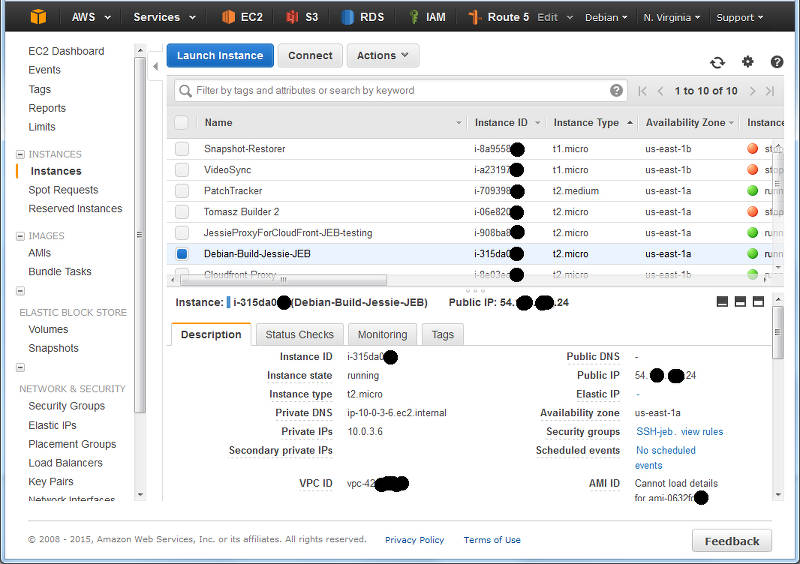
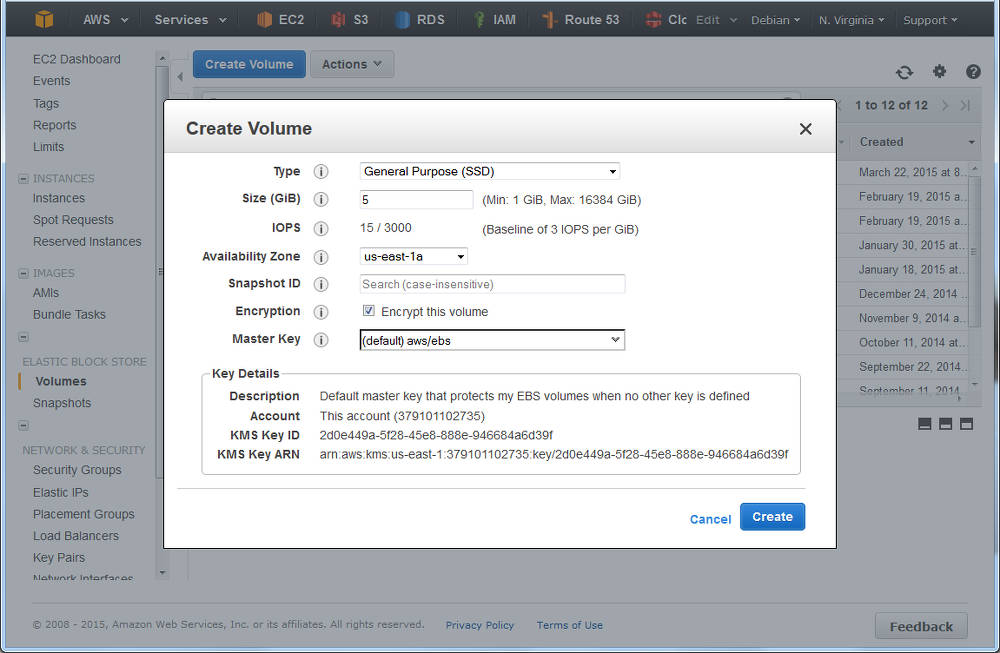
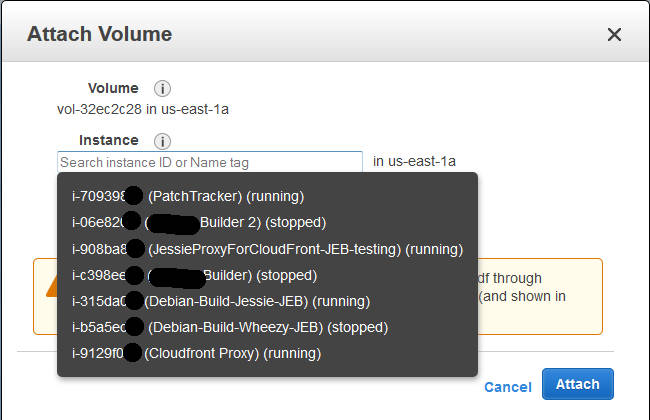
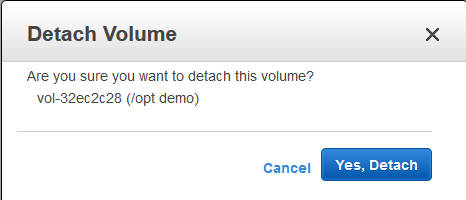


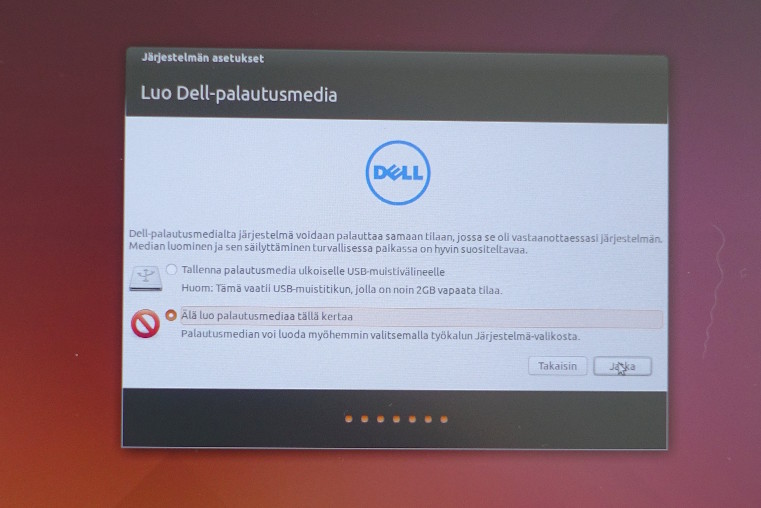
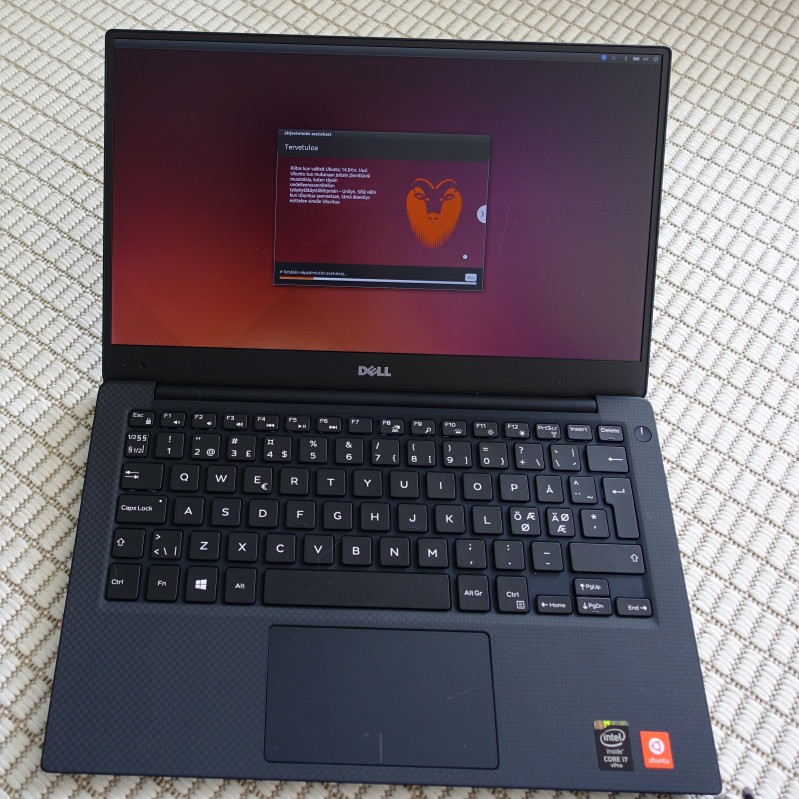
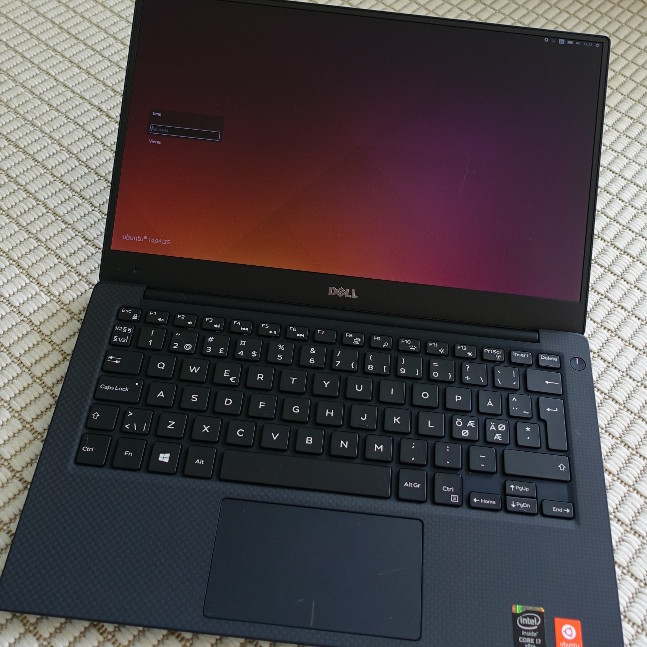

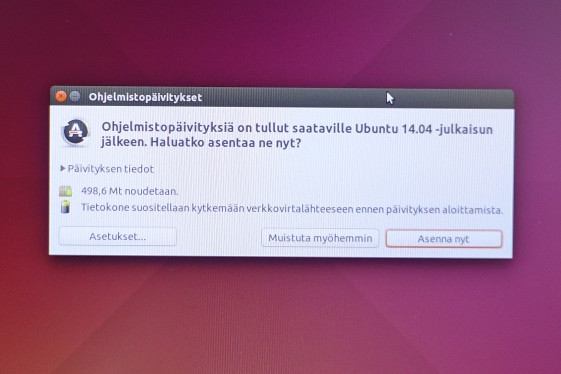


 My Lenovo x220, which I've owned for almost four years now (I remember fetching
it from the supplier shortly before driving off to Banja Luka), was getting
somewhat worn out. The keyboard and the screen had both been replaced at some
point already, and the wwan interface had given up as well. The case was all
cracked, and the NIC connector wasn't doing very well anymore either; there
have been a few cases of me trying to configure the wireless network at a
customer, but this being harder than it needs to be because the NIC will only
work if I put in the network cable just so, and someone dropped a piece of
paper onto the cable.
In other words, it was time for a new one. At first I wanted to buy a Lenovo
x250, but then I noticed that the Fujitsu came with an i7 4712MQ, which I liked
(as today it is still quite exceptional for an ultrabook to have a quadcore
processor). Fujitsu also claims up to 9 hours of battery life, but it's not
clear to me whether this is supposed to be the case with the default battery
only. They also have a battery for the modular bay, which I bought as well (to
replace the optical drive whic I sometimes use, but only rarely), and on top
of that it came with a free port replicator.
Not all is well, however. In the x220, getting the WWAN interface to work
involved some creative use of
My Lenovo x220, which I've owned for almost four years now (I remember fetching
it from the supplier shortly before driving off to Banja Luka), was getting
somewhat worn out. The keyboard and the screen had both been replaced at some
point already, and the wwan interface had given up as well. The case was all
cracked, and the NIC connector wasn't doing very well anymore either; there
have been a few cases of me trying to configure the wireless network at a
customer, but this being harder than it needs to be because the NIC will only
work if I put in the network cable just so, and someone dropped a piece of
paper onto the cable.
In other words, it was time for a new one. At first I wanted to buy a Lenovo
x250, but then I noticed that the Fujitsu came with an i7 4712MQ, which I liked
(as today it is still quite exceptional for an ultrabook to have a quadcore
processor). Fujitsu also claims up to 9 hours of battery life, but it's not
clear to me whether this is supposed to be the case with the default battery
only. They also have a battery for the modular bay, which I bought as well (to
replace the optical drive whic I sometimes use, but only rarely), and on top
of that it came with a free port replicator.
Not all is well, however. In the x220, getting the WWAN interface to work
involved some creative use of