Vincent Bernat: Pragmatic Debian packaging
 While the creation of Debian packages is abundantly
documented, most tutorials are targeted to
packages implementing the Debian policy. Moreover, Debian
packaging has a reputation of being unnecessarily
difficult1 and many people prefer to use less
constrained tools2 like fpm or CheckInstall.
However, I would like to show how building Debian packages with the
official tools can become straightforward if you bend some rules:
- No source package will be generated. Packages will be built directly from a checkout of a VCS repository.
- Additional dependencies can be downloaded during build. Packaging individually each dependency is a painstaking work, notably when you have to deal with some fast-paced ecosystems like Java, Javascript and Go.
- The produced packages may bundle dependencies. This is likely to raise some concerns about security and long-term maintenance, but this is a common trade-off in many ecosystems, notably Java, Javascript and Go.
Pragmatic packages 101
In the Debian archive, you have two kinds of packages: the source
packages and the binary packages. Each binary package is built
from a source package. You need a name for each package.
As stated in the introduction, we won t generate a source package but
we will work with its unpacked form which is any source tree
containing a debian/ directory. In our examples, we will start with
a source tree containing only a debian/ directory but you are free
to include this debian/ directory into an existing project.
As an example, we will package memcached, a distributed memory
cache. There are four files to create:
debian/compat,debian/changelog,debian/control, anddebian/rules.
The first one is easy. Just put 9 in it:
echo 9 > debian/compat
The second one has the following content:
memcached (0-0) UNRELEASED; urgency=medium
  * Fake entry
 -- Happy Packager <happy@example.com>  Tue, 19 Apr 2016 22:27:05 +0200
The only important information is the name of the source package,
memcached, on the first line. Everything else can be left as is as
it won t influence the generated binary packages.
The control file
debian/control describes the metadata of both the source package and
the generated binary packages. We have to write a block for each of them.
Source: memcached
Maintainer: Vincent Bernat <bernat@debian.org>
Package: memcached
Architecture: any
Description: high-performance memory object caching system
The source package is called memcached. We have to use the same name
as in debian/changelog.
We generate only one binary package: memcached. In the remaining of
the example, when you see memcached, this is the name of a binary
package. The Architecture field should be set to either any or
all. Use all exclusively if the package contains only
arch-independent files. In doubt, just stick to any.
The Description field contains a short description of the binary package.
The build recipe
The last mandatory file is debian/rules. It s the recipe of the
package. We need to retrieve memcached, build it and install its
file tree in debian/memcached/. It looks like this:
#!/usr/bin/make -f
DISTRIBUTION = $(shell lsb_release -sr)
VERSION = 1.4.25
PACKAGEVERSION = $(VERSION)-0~$(DISTRIBUTION)0
TARBALL = memcached-$(VERSION).tar.gz
URL = http://www.memcached.org/files/$(TARBALL)
%:
    dh $@
override_dh_auto_clean:
override_dh_auto_test:
override_dh_auto_build:
override_dh_auto_install:
    wget -N --progress=dot:mega $(URL)
    tar --strip-components=1 -xf $(TARBALL)
    ./configure --prefix=/usr
    make
    make install DESTDIR=debian/memcached
override_dh_gencontrol:
    dh_gencontrol -- -v$(PACKAGEVERSION)
The empty targets override_dh_auto_clean, override_dh_auto_test
and override_dh_auto_build keep debhelper from being too
smart. The override_dh_gencontrol target sets the package
version3 without updating debian/changelog. If you ignore
the slight boilerplate, the recipe is quite similar to what you would
have done with fpm:
DISTRIBUTION=$(lsb_release -sr)
VERSION=1.4.25
PACKAGEVERSION=$ VERSION -0~$ DISTRIBUTION 0
TARBALL=memcached-$ VERSION .tar.gz
URL=http://www.memcached.org/files/$ TARBALL
wget -N --progress=dot:mega $ URL
tar --strip-components=1 -xf $ TARBALL
./configure --prefix=/usr
make
make install DESTDIR=/tmp/installdir
# Build the final package
fpm -s dir -t deb \
    -n memcached \
    -v $ PACKAGEVERSION  \
    -C /tmp/installdir \
    --description "high-performance memory object caching system"
You can review the whole package tree on GitHub
and build it with dpkg-buildpackage -us -uc -b.
Pragmatic packages 102
At this point, we can iterate and add several improvements to our
memcached package. None of those are mandatory but they are
usually worth the additional effort.
Build dependencies
Our initial build recipe only work when several packages are
installed, like wget and libevent-dev. They are not present on all
Debian systems. You can easily express that you need them by adding a
Build-Depends section for the source package in debian/control:
Source: memcached
Build-Depends: debhelper (>= 9),
               wget, ca-certificates, lsb-release,
               libevent-dev
Always specify the debhelper (>= 9) dependency as we heavily rely on
it. We don t require make or a C compiler because it is assumed that
the build-essential meta-package is installed and it pulls
those. dpkg-buildpackage will complain if the dependencies are not
met. If you want to install those packages from your CI system, you
can use the following command4:
mk-build-deps \
    -t 'apt-get -o Debug::pkgProblemResolver=yes --no-install-recommends -qqy' \
    -i -r debian/control
You may also want to investigate pbuilder or sbuild, two tools
to build Debian packages in a clean isolated environment.
Runtime dependencies
If the resulting package is installed on a freshly installed machine,
it won t work because it will be missing libevent, a required
library for memcached. You can express the dependencies needed by
each binary package by adding a Depends field. Moreover, for dynamic
libraries, you can automatically get the right dependencies by using
some substitution variables:
Package: memcached
Depends: $ misc:Depends , $ shlibs:Depends
The resulting package will contain the following information:
$ dpkg -I ../memcached_1.4.25-0\~unstable0_amd64.deb   grep Depends
 Depends: libc6 (>= 2.17), libevent-2.0-5 (>= 2.0.10-stable)
Integration with init system
Most packaged daemons come with some integration with the init
system. This integration ensures the daemon will be started on boot
and restarted on upgrade. For Debian-based distributions, there are
several init systems available. The most prominent ones are:
- System-V init is the historical init system. More modern
inits are able to reuse scripts written for this init, so this is a
safe common denominator for packaged daemons.
- Upstart is the less-historical init system for Ubuntu (used in
Ubuntu 14.10 and previous releases).
- systemd is the default init system for Debian since Jessie and
for Ubuntu since 15.04.
Writing a correct script for the System-V init is
error-prone. Therefore, I usually prefer to provide a native
configuration file for the default init system of the targeted
distribution (Upstart and systemd).
System-V
If you want to provide a System-V init script, have a look at
/etc/init.d/skeleton on the most ancient distribution you want to
target and adapt it5. Put the result in
debian/memcached.init. It will be installed at the right place,
invoked on install, upgrade and removal. On Debian-based systems, many
init scripts allow user customizations by providing a
/etc/default/memcached file. You can ship one by putting its content
in debian/memcached.default.
Upstart
Providing an Upstart job is similar: put it in
debian/memcached.upstart. For example:
description "memcached daemon"
start on runlevel [2345]
stop on runlevel [!2345]
respawn
respawn limit 5 60
expect daemon
script
  . /etc/default/memcached
  exec memcached -d -u $USER -p $PORT -m $CACHESIZE -c $MAXCONN $OPTIONS
end script
When writing an Upstart job, the most important directive is
expect. Be sure to get it right. Here, we use expect daemon and
memcached is started with the -d flag.
systemd
Providing a systemd unit is a bit more complex. The content of the
file should go in debian/memcached.service. For example:
[Unit]
Description=memcached daemon
After=network.target
[Service]
Type=forking
EnvironmentFile=/etc/default/memcached
ExecStart=/usr/bin/memcached -d -u $USER -p $PORT -m $CACHESIZE -c $MAXCONN $OPTIONS
Restart=on-failure
[Install]
WantedBy=multi-user.target
We reuse /etc/default/memcached even if it is not considered a good
practice with systemd6. Like for Upstart, the directive
Type is quite important. We used forking as memcached is started
with the -d flag.
You also need to add a build-dependency to dh-systemd in
debian/control:
Source: memcached
Build-Depends: debhelper (>= 9),
               wget, ca-certificates, lsb-release,
               libevent-dev,
               dh-systemd
And you need to modify the default rule in debian/rules:
%:
    dh $@ --with systemd
The extra complexity is a bit unfortunate but systemd integration
is not part of debhelper7. Without those additional modifications,
the unit will get installed but you won t get a proper integration and
the service won t be enabled on install or boot.
Dedicated user
Many daemons don t need to run as root and it is a good practice to
ship a dedicated user. In the case of memcached, we can provide a
_memcached user8.
Add a debian/memcached.postinst file with the following content:
#!/bin/sh
set -e
case "$1" in
    configure)
        adduser --system --disabled-password --disabled-login --home /var/empty \
                --no-create-home --quiet --force-badname --group _memcached
        ;;
esac
#DEBHELPER#
exit 0
There is no cleanup of the user when the package is removed for two reasons:
- Less stuff to write.
- The user could still own some files.
The utility adduser will do the right thing whatever the requested
user already exists or not. You need to add it as a dependency in
debian/control:
Package: memcached
Depends: $ misc:Depends , $ shlibs:Depends , adduser
The #DEBHELPER# marker is important as it will be replaced by some
code to handle the service configuration files (or some other stuff).
You can review the whole package tree on
GitHub and build it with
dpkg-buildpackage -us -uc -b.
Pragmatic packages 103
It is possible to leverage debhelper to reduce the recipe size
and to make it more declarative. This section is quite optional
and it requires understanding a bit more how a Debian package is
built. Feel free to skip it.
The big picture
There are four steps to build a regular Debian package:
-
debian/rules clean should clean the source tree to make it pristine.
-
debian/rules build should trigger the build. For an
autoconf-based software, like memcached, this step should
execute something like ./configure && make.
-
debian/rules install should install the file tree of each
binary package. For an autoconf-based software, this step should
execute make install DESTDIR=debian/memcached.
-
debian/rules binary will pack the different file trees into
binary packages.
You don t directly write each of those targets. Instead, you let dh,
a component of debhelper, do most of the work. The following
debian/rules file should do almost everything correctly with many
source packages:
#!/usr/bin/make -f
%:
    dh $@
For each of the four targets described above, you can run dh
with --no-act to see what it would do. For example:
$ dh build --no-act
   dh_testdir
   dh_update_autotools_config
   dh_auto_configure
   dh_auto_build
   dh_auto_test
Each of those helpers has a manual page. Helpers starting with
dh_auto_ are a bit magic . For example, dh_auto_configure will
try to automatically configure a package prior to building: it will
detect the build system and invoke ./configure, cmake or
Makefile.PL.
If one of the helpers do not do the right thing, you can replace it
by using an override target:
override_dh_auto_configure:
    ./configure --with-some-grog
Those helpers are also configurable, so you can just alter a bit their
behaviour by invoking them with additional options:
override_dh_auto_configure:
    dh_auto_configure -- --with-some-grog
This way, ./configure will be called with your custom flag but also
with a lot of default flags like --prefix=/usr for better integration.
In the initial memcached example, we overrode all those magic
targets. dh_auto_clean, dh_auto_configure and dh_auto_build are
converted to no-ops to avoid any unexpected
behaviour. dh_auto_install is hijacked to do all the build
process. Additionally, we modified the behavior of the dh_gencontrol
helper by forcing the version number instead of using the one from
debian/changelog.
Automatic builds
As memcached is an autoconf-enabled package, dh knows how
to build it: ./configure && make && make install. Therefore, we
can let it handle most of the work with this debian/rules file:
#!/usr/bin/make -f
DISTRIBUTION = $(shell lsb_release -sr)
VERSION = 1.4.25
PACKAGEVERSION = $(VERSION)-0~$(DISTRIBUTION)0
TARBALL = memcached-$(VERSION).tar.gz
URL = http://www.memcached.org/files/$(TARBALL)
%:
    dh $@ --with systemd
override_dh_auto_clean:
    wget -N --progress=dot:mega $(URL)
    tar --strip-components=1 -xf $(TARBALL)
override_dh_auto_test:
    # Don't run the whitespace test
    rm t/whitespace.t
    dh_auto_test
override_dh_gencontrol:
    dh_gencontrol -- -v$(PACKAGEVERSION)
The dh_auto_clean target is hijacked to download and setup the
source tree9. We don t override the dh_auto_configure step,
so dh will execute the ./configure script with the appropriate
options. We don t override the dh_auto_build step either: dh will
execute make. dh_auto_test is invoked after the build and it will
run the memcached test suite. We need to override it because one of
the test is complaining about odd whitespaces in the debian/
directory. We suppress this rogue test and let dh_auto_test executes
the test suite. dh_auto_install is not overriden either, so dh
will execute some variant of make install.
To get a better sense of the difference, here is a diff:
--- memcached-intermediate/debian/rules 2016-04-30 14:02:37.425593362 +0200
+++ memcached/debian/rules  2016-05-01 14:55:15.815063835 +0200
@@ -12,10 +12,9 @@
 override_dh_auto_clean:
-override_dh_auto_test:
-override_dh_auto_build:
-override_dh_auto_install:
    wget -N --progress=dot:mega $(URL)
    tar --strip-components=1 -xf $(TARBALL)
-   ./configure --prefix=/usr
-   make
-   make install DESTDIR=debian/memcached
+
+override_dh_auto_test:
+   # Don't run the whitespace test
+   rm t/whitespace.t
+   dh_auto_test
It is up to you to decide if dh can do some work for you, but
you could try to start from a minimal debian/rules and only override
some targets.
Install additional files
While make install installed the essential files for memcached,
you may want to put additional files in the binary package. You
could use cp in your build recipe, but you can also declare them:
- files listed in
debian/memcached.docs will be copied to
/usr/share/doc/memcached by dh_installdocs,
- files listed in
debian/memcached.examples will be copied to
/usr/share/doc/memcached/examples by dh_installexamples,
- files listed in
debian/memcached.manpages will be copied to the
appropriate subdirectory of /usr/share/man by dh_installman,
Here is an example using wildcards for debian/memcached.docs:
doc/*.txt
If you need to copy some files to an arbitrary location, you can list
them along with their destination directories in
debian/memcached.install and dh_install will take care of the
copy. Here is an example:
scripts/memcached-tool usr/bin
Using those files make the build process more declarative. It is a
matter of taste and you are free to use cp in debian/rules
instead. You can review the whole package tree on
GitHub.
Other examples
The GitHub repository contains some additional
examples. They all follow the same scheme:
dh_auto_clean is hijacked to download and setup the source treedh_gencontrol is modified to use a computed version
Notably, you ll find daemons in Java, Go, Python and
Node.js. The goal of those examples is to demonstrate that using
Debian tools to build Debian packages can be straightforward. Hope
this helps.
-
People may remember the time before debhelper 7.0.50
(circa 2009) where
debian/rules was a daunting
beast. However, nowaday, the boilerplate is quite
reduced.
-
The complexity is not the only reason. Those alternative tools
enable the creation of RPM packages, something that Debian
tools obviously don t.
-
There are many ways to version a package. Again, if you
want to be pragmatic, the proposed solution should be good
enough for Ubuntu. On Debian, it doesn t cover upgrade
from one distribution version to another, but we assume
that nowadays, systems get reinstalled instead of being
upgraded.
-
You also need to install
devscripts and equivs package.
-
It s also possible to use a script provided by
upstream. However, there is no such thing as an init
script that works on all distributions. Compare the
proposed with the skeleton, check if it is using
start-stop-daemon and if it sources
/lib/lsb/init-functions before considering it. If it
seems to fit, you can install it yourself in
debian/memcached/etc/init.d/. debhelper will ensure
its proper integration.
-
Instead, a user wanting to customize the options is
expected to edit the unit with
systemctl edit.
-
See #822670
-
The Debian Policy doesn t provide any hint for the naming
convention of those system users. A common usage is to
prefix the daemon name with an underscore (like
_memcached). Another common usage is to use Debian- as
a prefix. The main drawback of the latest solution is that
the name is likely to be replaced by the UID in ps and
top because of its length.
-
We could call
dh_auto_clean at the end of the target to
let it invoke make clean. However, it is assumed that a
fresh checkout is used before each build.
debian/compat,debian/changelog,debian/control, anddebian/rules.echo 9 > debian/compat
memcached (0-0) UNRELEASED; urgency=medium * Fake entry -- Happy Packager <happy@example.com> Tue, 19 Apr 2016 22:27:05 +0200
debian/control describes the metadata of both the source package and
the generated binary packages. We have to write a block for each of them.
Source: memcached Maintainer: Vincent Bernat <bernat@debian.org> Package: memcached Architecture: any Description: high-performance memory object caching system
memcached. We have to use the same name
as in debian/changelog.
We generate only one binary package: memcached. In the remaining of
the example, when you see memcached, this is the name of a binary
package. The Architecture field should be set to either any or
all. Use all exclusively if the package contains only
arch-independent files. In doubt, just stick to any.
The Description field contains a short description of the binary package.
The build recipe
The last mandatory file is debian/rules. It s the recipe of the
package. We need to retrieve memcached, build it and install its
file tree in debian/memcached/. It looks like this:
#!/usr/bin/make -f
DISTRIBUTION = $(shell lsb_release -sr)
VERSION = 1.4.25
PACKAGEVERSION = $(VERSION)-0~$(DISTRIBUTION)0
TARBALL = memcached-$(VERSION).tar.gz
URL = http://www.memcached.org/files/$(TARBALL)
%:
dh $@
override_dh_auto_clean:
override_dh_auto_test:
override_dh_auto_build:
override_dh_auto_install:
wget -N --progress=dot:mega $(URL)
tar --strip-components=1 -xf $(TARBALL)
./configure --prefix=/usr
make
make install DESTDIR=debian/memcached
override_dh_gencontrol:
dh_gencontrol -- -v$(PACKAGEVERSION)
The empty targets override_dh_auto_clean, override_dh_auto_test
and override_dh_auto_build keep debhelper from being too
smart. The override_dh_gencontrol target sets the package
version3 without updating debian/changelog. If you ignore
the slight boilerplate, the recipe is quite similar to what you would
have done with fpm:
DISTRIBUTION=$(lsb_release -sr)
VERSION=1.4.25
PACKAGEVERSION=$ VERSION -0~$ DISTRIBUTION 0
TARBALL=memcached-$ VERSION .tar.gz
URL=http://www.memcached.org/files/$ TARBALL
wget -N --progress=dot:mega $ URL
tar --strip-components=1 -xf $ TARBALL
./configure --prefix=/usr
make
make install DESTDIR=/tmp/installdir
# Build the final package
fpm -s dir -t deb \
-n memcached \
-v $ PACKAGEVERSION \
-C /tmp/installdir \
--description "high-performance memory object caching system"
You can review the whole package tree on GitHub
and build it with dpkg-buildpackage -us -uc -b.
Pragmatic packages 102
At this point, we can iterate and add several improvements to our
memcached package. None of those are mandatory but they are
usually worth the additional effort.
Build dependencies
Our initial build recipe only work when several packages are
installed, like wget and libevent-dev. They are not present on all
Debian systems. You can easily express that you need them by adding a
Build-Depends section for the source package in debian/control:
Source: memcached
Build-Depends: debhelper (>= 9),
wget, ca-certificates, lsb-release,
libevent-dev
Always specify the debhelper (>= 9) dependency as we heavily rely on
it. We don t require make or a C compiler because it is assumed that
the build-essential meta-package is installed and it pulls
those. dpkg-buildpackage will complain if the dependencies are not
met. If you want to install those packages from your CI system, you
can use the following command4:
mk-build-deps \
-t 'apt-get -o Debug::pkgProblemResolver=yes --no-install-recommends -qqy' \
-i -r debian/control
You may also want to investigate pbuilder or sbuild, two tools
to build Debian packages in a clean isolated environment.
Runtime dependencies
If the resulting package is installed on a freshly installed machine,
it won t work because it will be missing libevent, a required
library for memcached. You can express the dependencies needed by
each binary package by adding a Depends field. Moreover, for dynamic
libraries, you can automatically get the right dependencies by using
some substitution variables:
Package: memcached
Depends: $ misc:Depends , $ shlibs:Depends
The resulting package will contain the following information:
$ dpkg -I ../memcached_1.4.25-0\~unstable0_amd64.deb grep Depends
Depends: libc6 (>= 2.17), libevent-2.0-5 (>= 2.0.10-stable)
Integration with init system
Most packaged daemons come with some integration with the init
system. This integration ensures the daemon will be started on boot
and restarted on upgrade. For Debian-based distributions, there are
several init systems available. The most prominent ones are:
- System-V init is the historical init system. More modern
inits are able to reuse scripts written for this init, so this is a
safe common denominator for packaged daemons.
- Upstart is the less-historical init system for Ubuntu (used in
Ubuntu 14.10 and previous releases).
- systemd is the default init system for Debian since Jessie and
for Ubuntu since 15.04.
Writing a correct script for the System-V init is
error-prone. Therefore, I usually prefer to provide a native
configuration file for the default init system of the targeted
distribution (Upstart and systemd).
System-V
If you want to provide a System-V init script, have a look at
/etc/init.d/skeleton on the most ancient distribution you want to
target and adapt it5. Put the result in
debian/memcached.init. It will be installed at the right place,
invoked on install, upgrade and removal. On Debian-based systems, many
init scripts allow user customizations by providing a
/etc/default/memcached file. You can ship one by putting its content
in debian/memcached.default.
Upstart
Providing an Upstart job is similar: put it in
debian/memcached.upstart. For example:
description "memcached daemon"
start on runlevel [2345]
stop on runlevel [!2345]
respawn
respawn limit 5 60
expect daemon
script
. /etc/default/memcached
exec memcached -d -u $USER -p $PORT -m $CACHESIZE -c $MAXCONN $OPTIONS
end script
When writing an Upstart job, the most important directive is
expect. Be sure to get it right. Here, we use expect daemon and
memcached is started with the -d flag.
systemd
Providing a systemd unit is a bit more complex. The content of the
file should go in debian/memcached.service. For example:
[Unit]
Description=memcached daemon
After=network.target
[Service]
Type=forking
EnvironmentFile=/etc/default/memcached
ExecStart=/usr/bin/memcached -d -u $USER -p $PORT -m $CACHESIZE -c $MAXCONN $OPTIONS
Restart=on-failure
[Install]
WantedBy=multi-user.target
We reuse /etc/default/memcached even if it is not considered a good
practice with systemd6. Like for Upstart, the directive
Type is quite important. We used forking as memcached is started
with the -d flag.
You also need to add a build-dependency to dh-systemd in
debian/control:
Source: memcached
Build-Depends: debhelper (>= 9),
wget, ca-certificates, lsb-release,
libevent-dev,
dh-systemd
And you need to modify the default rule in debian/rules:
%:
dh $@ --with systemd
The extra complexity is a bit unfortunate but systemd integration
is not part of debhelper7. Without those additional modifications,
the unit will get installed but you won t get a proper integration and
the service won t be enabled on install or boot.
Dedicated user
Many daemons don t need to run as root and it is a good practice to
ship a dedicated user. In the case of memcached, we can provide a
_memcached user8.
Add a debian/memcached.postinst file with the following content:
#!/bin/sh
set -e
case "$1" in
configure)
adduser --system --disabled-password --disabled-login --home /var/empty \
--no-create-home --quiet --force-badname --group _memcached
;;
esac
#DEBHELPER#
exit 0
There is no cleanup of the user when the package is removed for two reasons:
- Less stuff to write.
- The user could still own some files.
The utility adduser will do the right thing whatever the requested
user already exists or not. You need to add it as a dependency in
debian/control:
Package: memcached
Depends: $ misc:Depends , $ shlibs:Depends , adduser
The #DEBHELPER# marker is important as it will be replaced by some
code to handle the service configuration files (or some other stuff).
You can review the whole package tree on
GitHub and build it with
dpkg-buildpackage -us -uc -b.
Pragmatic packages 103
It is possible to leverage debhelper to reduce the recipe size
and to make it more declarative. This section is quite optional
and it requires understanding a bit more how a Debian package is
built. Feel free to skip it.
The big picture
There are four steps to build a regular Debian package:
-
debian/rules clean should clean the source tree to make it pristine.
-
debian/rules build should trigger the build. For an
autoconf-based software, like memcached, this step should
execute something like ./configure && make.
-
debian/rules install should install the file tree of each
binary package. For an autoconf-based software, this step should
execute make install DESTDIR=debian/memcached.
-
debian/rules binary will pack the different file trees into
binary packages.
You don t directly write each of those targets. Instead, you let dh,
a component of debhelper, do most of the work. The following
debian/rules file should do almost everything correctly with many
source packages:
#!/usr/bin/make -f
%:
dh $@
For each of the four targets described above, you can run dh
with --no-act to see what it would do. For example:
$ dh build --no-act
dh_testdir
dh_update_autotools_config
dh_auto_configure
dh_auto_build
dh_auto_test
Each of those helpers has a manual page. Helpers starting with
dh_auto_ are a bit magic . For example, dh_auto_configure will
try to automatically configure a package prior to building: it will
detect the build system and invoke ./configure, cmake or
Makefile.PL.
If one of the helpers do not do the right thing, you can replace it
by using an override target:
override_dh_auto_configure:
./configure --with-some-grog
Those helpers are also configurable, so you can just alter a bit their
behaviour by invoking them with additional options:
override_dh_auto_configure:
dh_auto_configure -- --with-some-grog
This way, ./configure will be called with your custom flag but also
with a lot of default flags like --prefix=/usr for better integration.
In the initial memcached example, we overrode all those magic
targets. dh_auto_clean, dh_auto_configure and dh_auto_build are
converted to no-ops to avoid any unexpected
behaviour. dh_auto_install is hijacked to do all the build
process. Additionally, we modified the behavior of the dh_gencontrol
helper by forcing the version number instead of using the one from
debian/changelog.
Automatic builds
As memcached is an autoconf-enabled package, dh knows how
to build it: ./configure && make && make install. Therefore, we
can let it handle most of the work with this debian/rules file:
#!/usr/bin/make -f
DISTRIBUTION = $(shell lsb_release -sr)
VERSION = 1.4.25
PACKAGEVERSION = $(VERSION)-0~$(DISTRIBUTION)0
TARBALL = memcached-$(VERSION).tar.gz
URL = http://www.memcached.org/files/$(TARBALL)
%:
dh $@ --with systemd
override_dh_auto_clean:
wget -N --progress=dot:mega $(URL)
tar --strip-components=1 -xf $(TARBALL)
override_dh_auto_test:
# Don't run the whitespace test
rm t/whitespace.t
dh_auto_test
override_dh_gencontrol:
dh_gencontrol -- -v$(PACKAGEVERSION)
The dh_auto_clean target is hijacked to download and setup the
source tree9. We don t override the dh_auto_configure step,
so dh will execute the ./configure script with the appropriate
options. We don t override the dh_auto_build step either: dh will
execute make. dh_auto_test is invoked after the build and it will
run the memcached test suite. We need to override it because one of
the test is complaining about odd whitespaces in the debian/
directory. We suppress this rogue test and let dh_auto_test executes
the test suite. dh_auto_install is not overriden either, so dh
will execute some variant of make install.
To get a better sense of the difference, here is a diff:
--- memcached-intermediate/debian/rules 2016-04-30 14:02:37.425593362 +0200
+++ memcached/debian/rules 2016-05-01 14:55:15.815063835 +0200
@@ -12,10 +12,9 @@
override_dh_auto_clean:
-override_dh_auto_test:
-override_dh_auto_build:
-override_dh_auto_install:
wget -N --progress=dot:mega $(URL)
tar --strip-components=1 -xf $(TARBALL)
- ./configure --prefix=/usr
- make
- make install DESTDIR=debian/memcached
+
+override_dh_auto_test:
+ # Don't run the whitespace test
+ rm t/whitespace.t
+ dh_auto_test
It is up to you to decide if dh can do some work for you, but
you could try to start from a minimal debian/rules and only override
some targets.
Install additional files
While make install installed the essential files for memcached,
you may want to put additional files in the binary package. You
could use cp in your build recipe, but you can also declare them:
- files listed in
debian/memcached.docs will be copied to
/usr/share/doc/memcached by dh_installdocs,
- files listed in
debian/memcached.examples will be copied to
/usr/share/doc/memcached/examples by dh_installexamples,
- files listed in
debian/memcached.manpages will be copied to the
appropriate subdirectory of /usr/share/man by dh_installman,
Here is an example using wildcards for debian/memcached.docs:
doc/*.txt
If you need to copy some files to an arbitrary location, you can list
them along with their destination directories in
debian/memcached.install and dh_install will take care of the
copy. Here is an example:
scripts/memcached-tool usr/bin
Using those files make the build process more declarative. It is a
matter of taste and you are free to use cp in debian/rules
instead. You can review the whole package tree on
GitHub.
Other examples
The GitHub repository contains some additional
examples. They all follow the same scheme:
dh_auto_clean is hijacked to download and setup the source treedh_gencontrol is modified to use a computed version
Notably, you ll find daemons in Java, Go, Python and
Node.js. The goal of those examples is to demonstrate that using
Debian tools to build Debian packages can be straightforward. Hope
this helps.
-
People may remember the time before debhelper 7.0.50
(circa 2009) where
debian/rules was a daunting
beast. However, nowaday, the boilerplate is quite
reduced.
-
The complexity is not the only reason. Those alternative tools
enable the creation of RPM packages, something that Debian
tools obviously don t.
-
There are many ways to version a package. Again, if you
want to be pragmatic, the proposed solution should be good
enough for Ubuntu. On Debian, it doesn t cover upgrade
from one distribution version to another, but we assume
that nowadays, systems get reinstalled instead of being
upgraded.
-
You also need to install
devscripts and equivs package.
-
It s also possible to use a script provided by
upstream. However, there is no such thing as an init
script that works on all distributions. Compare the
proposed with the skeleton, check if it is using
start-stop-daemon and if it sources
/lib/lsb/init-functions before considering it. If it
seems to fit, you can install it yourself in
debian/memcached/etc/init.d/. debhelper will ensure
its proper integration.
-
Instead, a user wanting to customize the options is
expected to edit the unit with
systemctl edit.
-
See #822670
-
The Debian Policy doesn t provide any hint for the naming
convention of those system users. A common usage is to
prefix the daemon name with an underscore (like
_memcached). Another common usage is to use Debian- as
a prefix. The main drawback of the latest solution is that
the name is likely to be replaced by the UID in ps and
top because of its length.
-
We could call
dh_auto_clean at the end of the target to
let it invoke make clean. However, it is assumed that a
fresh checkout is used before each build.
#!/usr/bin/make -f DISTRIBUTION = $(shell lsb_release -sr) VERSION = 1.4.25 PACKAGEVERSION = $(VERSION)-0~$(DISTRIBUTION)0 TARBALL = memcached-$(VERSION).tar.gz URL = http://www.memcached.org/files/$(TARBALL) %: dh $@ override_dh_auto_clean: override_dh_auto_test: override_dh_auto_build: override_dh_auto_install: wget -N --progress=dot:mega $(URL) tar --strip-components=1 -xf $(TARBALL) ./configure --prefix=/usr make make install DESTDIR=debian/memcached override_dh_gencontrol: dh_gencontrol -- -v$(PACKAGEVERSION)
DISTRIBUTION=$(lsb_release -sr) VERSION=1.4.25 PACKAGEVERSION=$ VERSION -0~$ DISTRIBUTION 0 TARBALL=memcached-$ VERSION .tar.gz URL=http://www.memcached.org/files/$ TARBALL wget -N --progress=dot:mega $ URL tar --strip-components=1 -xf $ TARBALL ./configure --prefix=/usr make make install DESTDIR=/tmp/installdir # Build the final package fpm -s dir -t deb \ -n memcached \ -v $ PACKAGEVERSION \ -C /tmp/installdir \ --description "high-performance memory object caching system"
Build dependencies
Our initial build recipe only work when several packages are
installed, like wget and libevent-dev. They are not present on all
Debian systems. You can easily express that you need them by adding a
Build-Depends section for the source package in debian/control:
Source: memcached
Build-Depends: debhelper (>= 9),
wget, ca-certificates, lsb-release,
libevent-dev
Always specify the debhelper (>= 9) dependency as we heavily rely on
it. We don t require make or a C compiler because it is assumed that
the build-essential meta-package is installed and it pulls
those. dpkg-buildpackage will complain if the dependencies are not
met. If you want to install those packages from your CI system, you
can use the following command4:
mk-build-deps \
-t 'apt-get -o Debug::pkgProblemResolver=yes --no-install-recommends -qqy' \
-i -r debian/control
You may also want to investigate pbuilder or sbuild, two tools
to build Debian packages in a clean isolated environment.
Runtime dependencies
If the resulting package is installed on a freshly installed machine,
it won t work because it will be missing libevent, a required
library for memcached. You can express the dependencies needed by
each binary package by adding a Depends field. Moreover, for dynamic
libraries, you can automatically get the right dependencies by using
some substitution variables:
Package: memcached
Depends: $ misc:Depends , $ shlibs:Depends
The resulting package will contain the following information:
$ dpkg -I ../memcached_1.4.25-0\~unstable0_amd64.deb grep Depends
Depends: libc6 (>= 2.17), libevent-2.0-5 (>= 2.0.10-stable)
Integration with init system
Most packaged daemons come with some integration with the init
system. This integration ensures the daemon will be started on boot
and restarted on upgrade. For Debian-based distributions, there are
several init systems available. The most prominent ones are:
- System-V init is the historical init system. More modern
inits are able to reuse scripts written for this init, so this is a
safe common denominator for packaged daemons.
- Upstart is the less-historical init system for Ubuntu (used in
Ubuntu 14.10 and previous releases).
- systemd is the default init system for Debian since Jessie and
for Ubuntu since 15.04.
Writing a correct script for the System-V init is
error-prone. Therefore, I usually prefer to provide a native
configuration file for the default init system of the targeted
distribution (Upstart and systemd).
System-V
If you want to provide a System-V init script, have a look at
/etc/init.d/skeleton on the most ancient distribution you want to
target and adapt it5. Put the result in
debian/memcached.init. It will be installed at the right place,
invoked on install, upgrade and removal. On Debian-based systems, many
init scripts allow user customizations by providing a
/etc/default/memcached file. You can ship one by putting its content
in debian/memcached.default.
Upstart
Providing an Upstart job is similar: put it in
debian/memcached.upstart. For example:
description "memcached daemon"
start on runlevel [2345]
stop on runlevel [!2345]
respawn
respawn limit 5 60
expect daemon
script
. /etc/default/memcached
exec memcached -d -u $USER -p $PORT -m $CACHESIZE -c $MAXCONN $OPTIONS
end script
When writing an Upstart job, the most important directive is
expect. Be sure to get it right. Here, we use expect daemon and
memcached is started with the -d flag.
systemd
Providing a systemd unit is a bit more complex. The content of the
file should go in debian/memcached.service. For example:
[Unit]
Description=memcached daemon
After=network.target
[Service]
Type=forking
EnvironmentFile=/etc/default/memcached
ExecStart=/usr/bin/memcached -d -u $USER -p $PORT -m $CACHESIZE -c $MAXCONN $OPTIONS
Restart=on-failure
[Install]
WantedBy=multi-user.target
We reuse /etc/default/memcached even if it is not considered a good
practice with systemd6. Like for Upstart, the directive
Type is quite important. We used forking as memcached is started
with the -d flag.
You also need to add a build-dependency to dh-systemd in
debian/control:
Source: memcached
Build-Depends: debhelper (>= 9),
wget, ca-certificates, lsb-release,
libevent-dev,
dh-systemd
And you need to modify the default rule in debian/rules:
%:
dh $@ --with systemd
The extra complexity is a bit unfortunate but systemd integration
is not part of debhelper7. Without those additional modifications,
the unit will get installed but you won t get a proper integration and
the service won t be enabled on install or boot.
Dedicated user
Many daemons don t need to run as root and it is a good practice to
ship a dedicated user. In the case of memcached, we can provide a
_memcached user8.
Add a debian/memcached.postinst file with the following content:
#!/bin/sh
set -e
case "$1" in
configure)
adduser --system --disabled-password --disabled-login --home /var/empty \
--no-create-home --quiet --force-badname --group _memcached
;;
esac
#DEBHELPER#
exit 0
There is no cleanup of the user when the package is removed for two reasons:
- Less stuff to write.
- The user could still own some files.
The utility adduser will do the right thing whatever the requested
user already exists or not. You need to add it as a dependency in
debian/control:
Package: memcached
Depends: $ misc:Depends , $ shlibs:Depends , adduser
The #DEBHELPER# marker is important as it will be replaced by some
code to handle the service configuration files (or some other stuff).
You can review the whole package tree on
GitHub and build it with
dpkg-buildpackage -us -uc -b.
Pragmatic packages 103
It is possible to leverage debhelper to reduce the recipe size
and to make it more declarative. This section is quite optional
and it requires understanding a bit more how a Debian package is
built. Feel free to skip it.
The big picture
There are four steps to build a regular Debian package:
-
debian/rules clean should clean the source tree to make it pristine.
-
debian/rules build should trigger the build. For an
autoconf-based software, like memcached, this step should
execute something like ./configure && make.
-
debian/rules install should install the file tree of each
binary package. For an autoconf-based software, this step should
execute make install DESTDIR=debian/memcached.
-
debian/rules binary will pack the different file trees into
binary packages.
You don t directly write each of those targets. Instead, you let dh,
a component of debhelper, do most of the work. The following
debian/rules file should do almost everything correctly with many
source packages:
#!/usr/bin/make -f
%:
dh $@
For each of the four targets described above, you can run dh
with --no-act to see what it would do. For example:
$ dh build --no-act
dh_testdir
dh_update_autotools_config
dh_auto_configure
dh_auto_build
dh_auto_test
Each of those helpers has a manual page. Helpers starting with
dh_auto_ are a bit magic . For example, dh_auto_configure will
try to automatically configure a package prior to building: it will
detect the build system and invoke ./configure, cmake or
Makefile.PL.
If one of the helpers do not do the right thing, you can replace it
by using an override target:
override_dh_auto_configure:
./configure --with-some-grog
Those helpers are also configurable, so you can just alter a bit their
behaviour by invoking them with additional options:
override_dh_auto_configure:
dh_auto_configure -- --with-some-grog
This way, ./configure will be called with your custom flag but also
with a lot of default flags like --prefix=/usr for better integration.
In the initial memcached example, we overrode all those magic
targets. dh_auto_clean, dh_auto_configure and dh_auto_build are
converted to no-ops to avoid any unexpected
behaviour. dh_auto_install is hijacked to do all the build
process. Additionally, we modified the behavior of the dh_gencontrol
helper by forcing the version number instead of using the one from
debian/changelog.
Automatic builds
As memcached is an autoconf-enabled package, dh knows how
to build it: ./configure && make && make install. Therefore, we
can let it handle most of the work with this debian/rules file:
#!/usr/bin/make -f
DISTRIBUTION = $(shell lsb_release -sr)
VERSION = 1.4.25
PACKAGEVERSION = $(VERSION)-0~$(DISTRIBUTION)0
TARBALL = memcached-$(VERSION).tar.gz
URL = http://www.memcached.org/files/$(TARBALL)
%:
dh $@ --with systemd
override_dh_auto_clean:
wget -N --progress=dot:mega $(URL)
tar --strip-components=1 -xf $(TARBALL)
override_dh_auto_test:
# Don't run the whitespace test
rm t/whitespace.t
dh_auto_test
override_dh_gencontrol:
dh_gencontrol -- -v$(PACKAGEVERSION)
The dh_auto_clean target is hijacked to download and setup the
source tree9. We don t override the dh_auto_configure step,
so dh will execute the ./configure script with the appropriate
options. We don t override the dh_auto_build step either: dh will
execute make. dh_auto_test is invoked after the build and it will
run the memcached test suite. We need to override it because one of
the test is complaining about odd whitespaces in the debian/
directory. We suppress this rogue test and let dh_auto_test executes
the test suite. dh_auto_install is not overriden either, so dh
will execute some variant of make install.
To get a better sense of the difference, here is a diff:
--- memcached-intermediate/debian/rules 2016-04-30 14:02:37.425593362 +0200
+++ memcached/debian/rules 2016-05-01 14:55:15.815063835 +0200
@@ -12,10 +12,9 @@
override_dh_auto_clean:
-override_dh_auto_test:
-override_dh_auto_build:
-override_dh_auto_install:
wget -N --progress=dot:mega $(URL)
tar --strip-components=1 -xf $(TARBALL)
- ./configure --prefix=/usr
- make
- make install DESTDIR=debian/memcached
+
+override_dh_auto_test:
+ # Don't run the whitespace test
+ rm t/whitespace.t
+ dh_auto_test
It is up to you to decide if dh can do some work for you, but
you could try to start from a minimal debian/rules and only override
some targets.
Install additional files
While make install installed the essential files for memcached,
you may want to put additional files in the binary package. You
could use cp in your build recipe, but you can also declare them:
- files listed in
debian/memcached.docs will be copied to
/usr/share/doc/memcached by dh_installdocs,
- files listed in
debian/memcached.examples will be copied to
/usr/share/doc/memcached/examples by dh_installexamples,
- files listed in
debian/memcached.manpages will be copied to the
appropriate subdirectory of /usr/share/man by dh_installman,
Here is an example using wildcards for debian/memcached.docs:
doc/*.txt
If you need to copy some files to an arbitrary location, you can list
them along with their destination directories in
debian/memcached.install and dh_install will take care of the
copy. Here is an example:
scripts/memcached-tool usr/bin
Using those files make the build process more declarative. It is a
matter of taste and you are free to use cp in debian/rules
instead. You can review the whole package tree on
GitHub.
Other examples
The GitHub repository contains some additional
examples. They all follow the same scheme:
dh_auto_clean is hijacked to download and setup the source treedh_gencontrol is modified to use a computed version
Notably, you ll find daemons in Java, Go, Python and
Node.js. The goal of those examples is to demonstrate that using
Debian tools to build Debian packages can be straightforward. Hope
this helps.
-
People may remember the time before debhelper 7.0.50
(circa 2009) where
debian/rules was a daunting
beast. However, nowaday, the boilerplate is quite
reduced.
-
The complexity is not the only reason. Those alternative tools
enable the creation of RPM packages, something that Debian
tools obviously don t.
-
There are many ways to version a package. Again, if you
want to be pragmatic, the proposed solution should be good
enough for Ubuntu. On Debian, it doesn t cover upgrade
from one distribution version to another, but we assume
that nowadays, systems get reinstalled instead of being
upgraded.
-
You also need to install
devscripts and equivs package.
-
It s also possible to use a script provided by
upstream. However, there is no such thing as an init
script that works on all distributions. Compare the
proposed with the skeleton, check if it is using
start-stop-daemon and if it sources
/lib/lsb/init-functions before considering it. If it
seems to fit, you can install it yourself in
debian/memcached/etc/init.d/. debhelper will ensure
its proper integration.
-
Instead, a user wanting to customize the options is
expected to edit the unit with
systemctl edit.
-
See #822670
-
The Debian Policy doesn t provide any hint for the naming
convention of those system users. A common usage is to
prefix the daemon name with an underscore (like
_memcached). Another common usage is to use Debian- as
a prefix. The main drawback of the latest solution is that
the name is likely to be replaced by the UID in ps and
top because of its length.
-
We could call
dh_auto_clean at the end of the target to
let it invoke make clean. However, it is assumed that a
fresh checkout is used before each build.
Source: memcached Build-Depends: debhelper (>= 9), wget, ca-certificates, lsb-release, libevent-dev
mk-build-deps \ -t 'apt-get -o Debug::pkgProblemResolver=yes --no-install-recommends -qqy' \ -i -r debian/control
Depends field. Moreover, for dynamic
libraries, you can automatically get the right dependencies by using
some substitution variables:
Package: memcached Depends: $ misc:Depends , $ shlibs:Depends
$ dpkg -I ../memcached_1.4.25-0\~unstable0_amd64.deb grep Depends Depends: libc6 (>= 2.17), libevent-2.0-5 (>= 2.0.10-stable)
Integration with init system
Most packaged daemons come with some integration with the init
system. This integration ensures the daemon will be started on boot
and restarted on upgrade. For Debian-based distributions, there are
several init systems available. The most prominent ones are:
- System-V init is the historical init system. More modern
inits are able to reuse scripts written for this init, so this is a
safe common denominator for packaged daemons.
- Upstart is the less-historical init system for Ubuntu (used in
Ubuntu 14.10 and previous releases).
- systemd is the default init system for Debian since Jessie and
for Ubuntu since 15.04.
Writing a correct script for the System-V init is
error-prone. Therefore, I usually prefer to provide a native
configuration file for the default init system of the targeted
distribution (Upstart and systemd).
System-V
If you want to provide a System-V init script, have a look at
/etc/init.d/skeleton on the most ancient distribution you want to
target and adapt it5. Put the result in
debian/memcached.init. It will be installed at the right place,
invoked on install, upgrade and removal. On Debian-based systems, many
init scripts allow user customizations by providing a
/etc/default/memcached file. You can ship one by putting its content
in debian/memcached.default.
Upstart
Providing an Upstart job is similar: put it in
debian/memcached.upstart. For example:
description "memcached daemon"
start on runlevel [2345]
stop on runlevel [!2345]
respawn
respawn limit 5 60
expect daemon
script
. /etc/default/memcached
exec memcached -d -u $USER -p $PORT -m $CACHESIZE -c $MAXCONN $OPTIONS
end script
When writing an Upstart job, the most important directive is
expect. Be sure to get it right. Here, we use expect daemon and
memcached is started with the -d flag.
systemd
Providing a systemd unit is a bit more complex. The content of the
file should go in debian/memcached.service. For example:
[Unit]
Description=memcached daemon
After=network.target
[Service]
Type=forking
EnvironmentFile=/etc/default/memcached
ExecStart=/usr/bin/memcached -d -u $USER -p $PORT -m $CACHESIZE -c $MAXCONN $OPTIONS
Restart=on-failure
[Install]
WantedBy=multi-user.target
We reuse /etc/default/memcached even if it is not considered a good
practice with systemd6. Like for Upstart, the directive
Type is quite important. We used forking as memcached is started
with the -d flag.
You also need to add a build-dependency to dh-systemd in
debian/control:
Source: memcached
Build-Depends: debhelper (>= 9),
wget, ca-certificates, lsb-release,
libevent-dev,
dh-systemd
And you need to modify the default rule in debian/rules:
%:
dh $@ --with systemd
The extra complexity is a bit unfortunate but systemd integration
is not part of debhelper7. Without those additional modifications,
the unit will get installed but you won t get a proper integration and
the service won t be enabled on install or boot.
Dedicated user
Many daemons don t need to run as root and it is a good practice to
ship a dedicated user. In the case of memcached, we can provide a
_memcached user8.
Add a debian/memcached.postinst file with the following content:
#!/bin/sh
set -e
case "$1" in
configure)
adduser --system --disabled-password --disabled-login --home /var/empty \
--no-create-home --quiet --force-badname --group _memcached
;;
esac
#DEBHELPER#
exit 0
There is no cleanup of the user when the package is removed for two reasons:
- Less stuff to write.
- The user could still own some files.
The utility adduser will do the right thing whatever the requested
user already exists or not. You need to add it as a dependency in
debian/control:
Package: memcached
Depends: $ misc:Depends , $ shlibs:Depends , adduser
The #DEBHELPER# marker is important as it will be replaced by some
code to handle the service configuration files (or some other stuff).
You can review the whole package tree on
GitHub and build it with
dpkg-buildpackage -us -uc -b.
Pragmatic packages 103
It is possible to leverage debhelper to reduce the recipe size
and to make it more declarative. This section is quite optional
and it requires understanding a bit more how a Debian package is
built. Feel free to skip it.
The big picture
There are four steps to build a regular Debian package:
-
debian/rules clean should clean the source tree to make it pristine.
-
debian/rules build should trigger the build. For an
autoconf-based software, like memcached, this step should
execute something like ./configure && make.
-
debian/rules install should install the file tree of each
binary package. For an autoconf-based software, this step should
execute make install DESTDIR=debian/memcached.
-
debian/rules binary will pack the different file trees into
binary packages.
You don t directly write each of those targets. Instead, you let dh,
a component of debhelper, do most of the work. The following
debian/rules file should do almost everything correctly with many
source packages:
#!/usr/bin/make -f
%:
dh $@
For each of the four targets described above, you can run dh
with --no-act to see what it would do. For example:
$ dh build --no-act
dh_testdir
dh_update_autotools_config
dh_auto_configure
dh_auto_build
dh_auto_test
Each of those helpers has a manual page. Helpers starting with
dh_auto_ are a bit magic . For example, dh_auto_configure will
try to automatically configure a package prior to building: it will
detect the build system and invoke ./configure, cmake or
Makefile.PL.
If one of the helpers do not do the right thing, you can replace it
by using an override target:
override_dh_auto_configure:
./configure --with-some-grog
Those helpers are also configurable, so you can just alter a bit their
behaviour by invoking them with additional options:
override_dh_auto_configure:
dh_auto_configure -- --with-some-grog
This way, ./configure will be called with your custom flag but also
with a lot of default flags like --prefix=/usr for better integration.
In the initial memcached example, we overrode all those magic
targets. dh_auto_clean, dh_auto_configure and dh_auto_build are
converted to no-ops to avoid any unexpected
behaviour. dh_auto_install is hijacked to do all the build
process. Additionally, we modified the behavior of the dh_gencontrol
helper by forcing the version number instead of using the one from
debian/changelog.
Automatic builds
As memcached is an autoconf-enabled package, dh knows how
to build it: ./configure && make && make install. Therefore, we
can let it handle most of the work with this debian/rules file:
#!/usr/bin/make -f
DISTRIBUTION = $(shell lsb_release -sr)
VERSION = 1.4.25
PACKAGEVERSION = $(VERSION)-0~$(DISTRIBUTION)0
TARBALL = memcached-$(VERSION).tar.gz
URL = http://www.memcached.org/files/$(TARBALL)
%:
dh $@ --with systemd
override_dh_auto_clean:
wget -N --progress=dot:mega $(URL)
tar --strip-components=1 -xf $(TARBALL)
override_dh_auto_test:
# Don't run the whitespace test
rm t/whitespace.t
dh_auto_test
override_dh_gencontrol:
dh_gencontrol -- -v$(PACKAGEVERSION)
The dh_auto_clean target is hijacked to download and setup the
source tree9. We don t override the dh_auto_configure step,
so dh will execute the ./configure script with the appropriate
options. We don t override the dh_auto_build step either: dh will
execute make. dh_auto_test is invoked after the build and it will
run the memcached test suite. We need to override it because one of
the test is complaining about odd whitespaces in the debian/
directory. We suppress this rogue test and let dh_auto_test executes
the test suite. dh_auto_install is not overriden either, so dh
will execute some variant of make install.
To get a better sense of the difference, here is a diff:
--- memcached-intermediate/debian/rules 2016-04-30 14:02:37.425593362 +0200
+++ memcached/debian/rules 2016-05-01 14:55:15.815063835 +0200
@@ -12,10 +12,9 @@
override_dh_auto_clean:
-override_dh_auto_test:
-override_dh_auto_build:
-override_dh_auto_install:
wget -N --progress=dot:mega $(URL)
tar --strip-components=1 -xf $(TARBALL)
- ./configure --prefix=/usr
- make
- make install DESTDIR=debian/memcached
+
+override_dh_auto_test:
+ # Don't run the whitespace test
+ rm t/whitespace.t
+ dh_auto_test
It is up to you to decide if dh can do some work for you, but
you could try to start from a minimal debian/rules and only override
some targets.
Install additional files
While make install installed the essential files for memcached,
you may want to put additional files in the binary package. You
could use cp in your build recipe, but you can also declare them:
- files listed in
debian/memcached.docs will be copied to
/usr/share/doc/memcached by dh_installdocs,
- files listed in
debian/memcached.examples will be copied to
/usr/share/doc/memcached/examples by dh_installexamples,
- files listed in
debian/memcached.manpages will be copied to the
appropriate subdirectory of /usr/share/man by dh_installman,
Here is an example using wildcards for debian/memcached.docs:
doc/*.txt
If you need to copy some files to an arbitrary location, you can list
them along with their destination directories in
debian/memcached.install and dh_install will take care of the
copy. Here is an example:
scripts/memcached-tool usr/bin
Using those files make the build process more declarative. It is a
matter of taste and you are free to use cp in debian/rules
instead. You can review the whole package tree on
GitHub.
Other examples
The GitHub repository contains some additional
examples. They all follow the same scheme:
dh_auto_clean is hijacked to download and setup the source treedh_gencontrol is modified to use a computed version
Notably, you ll find daemons in Java, Go, Python and
Node.js. The goal of those examples is to demonstrate that using
Debian tools to build Debian packages can be straightforward. Hope
this helps.
-
People may remember the time before debhelper 7.0.50
(circa 2009) where
debian/rules was a daunting
beast. However, nowaday, the boilerplate is quite
reduced.
-
The complexity is not the only reason. Those alternative tools
enable the creation of RPM packages, something that Debian
tools obviously don t.
-
There are many ways to version a package. Again, if you
want to be pragmatic, the proposed solution should be good
enough for Ubuntu. On Debian, it doesn t cover upgrade
from one distribution version to another, but we assume
that nowadays, systems get reinstalled instead of being
upgraded.
-
You also need to install
devscripts and equivs package.
-
It s also possible to use a script provided by
upstream. However, there is no such thing as an init
script that works on all distributions. Compare the
proposed with the skeleton, check if it is using
start-stop-daemon and if it sources
/lib/lsb/init-functions before considering it. If it
seems to fit, you can install it yourself in
debian/memcached/etc/init.d/. debhelper will ensure
its proper integration.
-
Instead, a user wanting to customize the options is
expected to edit the unit with
systemctl edit.
-
See #822670
-
The Debian Policy doesn t provide any hint for the naming
convention of those system users. A common usage is to
prefix the daemon name with an underscore (like
_memcached). Another common usage is to use Debian- as
a prefix. The main drawback of the latest solution is that
the name is likely to be replaced by the UID in ps and
top because of its length.
-
We could call
dh_auto_clean at the end of the target to
let it invoke make clean. However, it is assumed that a
fresh checkout is used before each build.
/etc/init.d/skeleton on the most ancient distribution you want to
target and adapt it5. Put the result in
debian/memcached.init. It will be installed at the right place,
invoked on install, upgrade and removal. On Debian-based systems, many
init scripts allow user customizations by providing a
/etc/default/memcached file. You can ship one by putting its content
in debian/memcached.default.
Upstart
Providing an Upstart job is similar: put it in
debian/memcached.upstart. For example:
description "memcached daemon"
start on runlevel [2345]
stop on runlevel [!2345]
respawn
respawn limit 5 60
expect daemon
script
. /etc/default/memcached
exec memcached -d -u $USER -p $PORT -m $CACHESIZE -c $MAXCONN $OPTIONS
end script
When writing an Upstart job, the most important directive is
expect. Be sure to get it right. Here, we use expect daemon and
memcached is started with the -d flag.
systemd
Providing a systemd unit is a bit more complex. The content of the
file should go in debian/memcached.service. For example:
[Unit]
Description=memcached daemon
After=network.target
[Service]
Type=forking
EnvironmentFile=/etc/default/memcached
ExecStart=/usr/bin/memcached -d -u $USER -p $PORT -m $CACHESIZE -c $MAXCONN $OPTIONS
Restart=on-failure
[Install]
WantedBy=multi-user.target
We reuse /etc/default/memcached even if it is not considered a good
practice with systemd6. Like for Upstart, the directive
Type is quite important. We used forking as memcached is started
with the -d flag.
You also need to add a build-dependency to dh-systemd in
debian/control:
Source: memcached
Build-Depends: debhelper (>= 9),
wget, ca-certificates, lsb-release,
libevent-dev,
dh-systemd
And you need to modify the default rule in debian/rules:
%:
dh $@ --with systemd
The extra complexity is a bit unfortunate but systemd integration
is not part of debhelper7. Without those additional modifications,
the unit will get installed but you won t get a proper integration and
the service won t be enabled on install or boot.
Dedicated user
Many daemons don t need to run as root and it is a good practice to
ship a dedicated user. In the case of memcached, we can provide a
_memcached user8.
Add a debian/memcached.postinst file with the following content:
#!/bin/sh
set -e
case "$1" in
configure)
adduser --system --disabled-password --disabled-login --home /var/empty \
--no-create-home --quiet --force-badname --group _memcached
;;
esac
#DEBHELPER#
exit 0
There is no cleanup of the user when the package is removed for two reasons:
- Less stuff to write.
- The user could still own some files.
The utility adduser will do the right thing whatever the requested
user already exists or not. You need to add it as a dependency in
debian/control:
Package: memcached
Depends: $ misc:Depends , $ shlibs:Depends , adduser
The #DEBHELPER# marker is important as it will be replaced by some
code to handle the service configuration files (or some other stuff).
You can review the whole package tree on
GitHub and build it with
dpkg-buildpackage -us -uc -b.
Pragmatic packages 103
It is possible to leverage debhelper to reduce the recipe size
and to make it more declarative. This section is quite optional
and it requires understanding a bit more how a Debian package is
built. Feel free to skip it.
The big picture
There are four steps to build a regular Debian package:
-
debian/rules clean should clean the source tree to make it pristine.
-
debian/rules build should trigger the build. For an
autoconf-based software, like memcached, this step should
execute something like ./configure && make.
-
debian/rules install should install the file tree of each
binary package. For an autoconf-based software, this step should
execute make install DESTDIR=debian/memcached.
-
debian/rules binary will pack the different file trees into
binary packages.
You don t directly write each of those targets. Instead, you let dh,
a component of debhelper, do most of the work. The following
debian/rules file should do almost everything correctly with many
source packages:
#!/usr/bin/make -f
%:
dh $@
For each of the four targets described above, you can run dh
with --no-act to see what it would do. For example:
$ dh build --no-act
dh_testdir
dh_update_autotools_config
dh_auto_configure
dh_auto_build
dh_auto_test
Each of those helpers has a manual page. Helpers starting with
dh_auto_ are a bit magic . For example, dh_auto_configure will
try to automatically configure a package prior to building: it will
detect the build system and invoke ./configure, cmake or
Makefile.PL.
If one of the helpers do not do the right thing, you can replace it
by using an override target:
override_dh_auto_configure:
./configure --with-some-grog
Those helpers are also configurable, so you can just alter a bit their
behaviour by invoking them with additional options:
override_dh_auto_configure:
dh_auto_configure -- --with-some-grog
This way, ./configure will be called with your custom flag but also
with a lot of default flags like --prefix=/usr for better integration.
In the initial memcached example, we overrode all those magic
targets. dh_auto_clean, dh_auto_configure and dh_auto_build are
converted to no-ops to avoid any unexpected
behaviour. dh_auto_install is hijacked to do all the build
process. Additionally, we modified the behavior of the dh_gencontrol
helper by forcing the version number instead of using the one from
debian/changelog.
Automatic builds
As memcached is an autoconf-enabled package, dh knows how
to build it: ./configure && make && make install. Therefore, we
can let it handle most of the work with this debian/rules file:
#!/usr/bin/make -f
DISTRIBUTION = $(shell lsb_release -sr)
VERSION = 1.4.25
PACKAGEVERSION = $(VERSION)-0~$(DISTRIBUTION)0
TARBALL = memcached-$(VERSION).tar.gz
URL = http://www.memcached.org/files/$(TARBALL)
%:
dh $@ --with systemd
override_dh_auto_clean:
wget -N --progress=dot:mega $(URL)
tar --strip-components=1 -xf $(TARBALL)
override_dh_auto_test:
# Don't run the whitespace test
rm t/whitespace.t
dh_auto_test
override_dh_gencontrol:
dh_gencontrol -- -v$(PACKAGEVERSION)
The dh_auto_clean target is hijacked to download and setup the
source tree9. We don t override the dh_auto_configure step,
so dh will execute the ./configure script with the appropriate
options. We don t override the dh_auto_build step either: dh will
execute make. dh_auto_test is invoked after the build and it will
run the memcached test suite. We need to override it because one of
the test is complaining about odd whitespaces in the debian/
directory. We suppress this rogue test and let dh_auto_test executes
the test suite. dh_auto_install is not overriden either, so dh
will execute some variant of make install.
To get a better sense of the difference, here is a diff:
--- memcached-intermediate/debian/rules 2016-04-30 14:02:37.425593362 +0200
+++ memcached/debian/rules 2016-05-01 14:55:15.815063835 +0200
@@ -12,10 +12,9 @@
override_dh_auto_clean:
-override_dh_auto_test:
-override_dh_auto_build:
-override_dh_auto_install:
wget -N --progress=dot:mega $(URL)
tar --strip-components=1 -xf $(TARBALL)
- ./configure --prefix=/usr
- make
- make install DESTDIR=debian/memcached
+
+override_dh_auto_test:
+ # Don't run the whitespace test
+ rm t/whitespace.t
+ dh_auto_test
It is up to you to decide if dh can do some work for you, but
you could try to start from a minimal debian/rules and only override
some targets.
Install additional files
While make install installed the essential files for memcached,
you may want to put additional files in the binary package. You
could use cp in your build recipe, but you can also declare them:
- files listed in
debian/memcached.docs will be copied to
/usr/share/doc/memcached by dh_installdocs,
- files listed in
debian/memcached.examples will be copied to
/usr/share/doc/memcached/examples by dh_installexamples,
- files listed in
debian/memcached.manpages will be copied to the
appropriate subdirectory of /usr/share/man by dh_installman,
Here is an example using wildcards for debian/memcached.docs:
doc/*.txt
If you need to copy some files to an arbitrary location, you can list
them along with their destination directories in
debian/memcached.install and dh_install will take care of the
copy. Here is an example:
scripts/memcached-tool usr/bin
Using those files make the build process more declarative. It is a
matter of taste and you are free to use cp in debian/rules
instead. You can review the whole package tree on
GitHub.
Other examples
The GitHub repository contains some additional
examples. They all follow the same scheme:
dh_auto_clean is hijacked to download and setup the source treedh_gencontrol is modified to use a computed version
Notably, you ll find daemons in Java, Go, Python and
Node.js. The goal of those examples is to demonstrate that using
Debian tools to build Debian packages can be straightforward. Hope
this helps.
-
People may remember the time before debhelper 7.0.50
(circa 2009) where
debian/rules was a daunting
beast. However, nowaday, the boilerplate is quite
reduced.
-
The complexity is not the only reason. Those alternative tools
enable the creation of RPM packages, something that Debian
tools obviously don t.
-
There are many ways to version a package. Again, if you
want to be pragmatic, the proposed solution should be good
enough for Ubuntu. On Debian, it doesn t cover upgrade
from one distribution version to another, but we assume
that nowadays, systems get reinstalled instead of being
upgraded.
-
You also need to install
devscripts and equivs package.
-
It s also possible to use a script provided by
upstream. However, there is no such thing as an init
script that works on all distributions. Compare the
proposed with the skeleton, check if it is using
start-stop-daemon and if it sources
/lib/lsb/init-functions before considering it. If it
seems to fit, you can install it yourself in
debian/memcached/etc/init.d/. debhelper will ensure
its proper integration.
-
Instead, a user wanting to customize the options is
expected to edit the unit with
systemctl edit.
-
See #822670
-
The Debian Policy doesn t provide any hint for the naming
convention of those system users. A common usage is to
prefix the daemon name with an underscore (like
_memcached). Another common usage is to use Debian- as
a prefix. The main drawback of the latest solution is that
the name is likely to be replaced by the UID in ps and
top because of its length.
-
We could call
dh_auto_clean at the end of the target to
let it invoke make clean. However, it is assumed that a
fresh checkout is used before each build.
description "memcached daemon" start on runlevel [2345] stop on runlevel [!2345] respawn respawn limit 5 60 expect daemon script . /etc/default/memcached exec memcached -d -u $USER -p $PORT -m $CACHESIZE -c $MAXCONN $OPTIONS end script
debian/memcached.service. For example:
[Unit] Description=memcached daemon After=network.target [Service] Type=forking EnvironmentFile=/etc/default/memcached ExecStart=/usr/bin/memcached -d -u $USER -p $PORT -m $CACHESIZE -c $MAXCONN $OPTIONS Restart=on-failure [Install] WantedBy=multi-user.target
/etc/default/memcached even if it is not considered a good
practice with systemd6. Like for Upstart, the directive
Type is quite important. We used forking as memcached is started
with the -d flag.
You also need to add a build-dependency to dh-systemd in
debian/control:
Source: memcached Build-Depends: debhelper (>= 9), wget, ca-certificates, lsb-release, libevent-dev, dh-systemd
debian/rules:
%: dh $@ --with systemd
Dedicated user
Many daemons don t need to run as root and it is a good practice to
ship a dedicated user. In the case of memcached, we can provide a
_memcached user8.
Add a debian/memcached.postinst file with the following content:
#!/bin/sh
set -e
case "$1" in
configure)
adduser --system --disabled-password --disabled-login --home /var/empty \
--no-create-home --quiet --force-badname --group _memcached
;;
esac
#DEBHELPER#
exit 0
There is no cleanup of the user when the package is removed for two reasons:
- Less stuff to write.
- The user could still own some files.
The utility adduser will do the right thing whatever the requested
user already exists or not. You need to add it as a dependency in
debian/control:
Package: memcached
Depends: $ misc:Depends , $ shlibs:Depends , adduser
The #DEBHELPER# marker is important as it will be replaced by some
code to handle the service configuration files (or some other stuff).
You can review the whole package tree on
GitHub and build it with
dpkg-buildpackage -us -uc -b.
Pragmatic packages 103
It is possible to leverage debhelper to reduce the recipe size
and to make it more declarative. This section is quite optional
and it requires understanding a bit more how a Debian package is
built. Feel free to skip it.
The big picture
There are four steps to build a regular Debian package:
-
debian/rules clean should clean the source tree to make it pristine.
-
debian/rules build should trigger the build. For an
autoconf-based software, like memcached, this step should
execute something like ./configure && make.
-
debian/rules install should install the file tree of each
binary package. For an autoconf-based software, this step should
execute make install DESTDIR=debian/memcached.
-
debian/rules binary will pack the different file trees into
binary packages.
You don t directly write each of those targets. Instead, you let dh,
a component of debhelper, do most of the work. The following
debian/rules file should do almost everything correctly with many
source packages:
#!/usr/bin/make -f
%:
dh $@
For each of the four targets described above, you can run dh
with --no-act to see what it would do. For example:
$ dh build --no-act
dh_testdir
dh_update_autotools_config
dh_auto_configure
dh_auto_build
dh_auto_test
Each of those helpers has a manual page. Helpers starting with
dh_auto_ are a bit magic . For example, dh_auto_configure will
try to automatically configure a package prior to building: it will
detect the build system and invoke ./configure, cmake or
Makefile.PL.
If one of the helpers do not do the right thing, you can replace it
by using an override target:
override_dh_auto_configure:
./configure --with-some-grog
Those helpers are also configurable, so you can just alter a bit their
behaviour by invoking them with additional options:
override_dh_auto_configure:
dh_auto_configure -- --with-some-grog
This way, ./configure will be called with your custom flag but also
with a lot of default flags like --prefix=/usr for better integration.
In the initial memcached example, we overrode all those magic
targets. dh_auto_clean, dh_auto_configure and dh_auto_build are
converted to no-ops to avoid any unexpected
behaviour. dh_auto_install is hijacked to do all the build
process. Additionally, we modified the behavior of the dh_gencontrol
helper by forcing the version number instead of using the one from
debian/changelog.
Automatic builds
As memcached is an autoconf-enabled package, dh knows how
to build it: ./configure && make && make install. Therefore, we
can let it handle most of the work with this debian/rules file:
#!/usr/bin/make -f
DISTRIBUTION = $(shell lsb_release -sr)
VERSION = 1.4.25
PACKAGEVERSION = $(VERSION)-0~$(DISTRIBUTION)0
TARBALL = memcached-$(VERSION).tar.gz
URL = http://www.memcached.org/files/$(TARBALL)
%:
dh $@ --with systemd
override_dh_auto_clean:
wget -N --progress=dot:mega $(URL)
tar --strip-components=1 -xf $(TARBALL)
override_dh_auto_test:
# Don't run the whitespace test
rm t/whitespace.t
dh_auto_test
override_dh_gencontrol:
dh_gencontrol -- -v$(PACKAGEVERSION)
The dh_auto_clean target is hijacked to download and setup the
source tree9. We don t override the dh_auto_configure step,
so dh will execute the ./configure script with the appropriate
options. We don t override the dh_auto_build step either: dh will
execute make. dh_auto_test is invoked after the build and it will
run the memcached test suite. We need to override it because one of
the test is complaining about odd whitespaces in the debian/
directory. We suppress this rogue test and let dh_auto_test executes
the test suite. dh_auto_install is not overriden either, so dh
will execute some variant of make install.
To get a better sense of the difference, here is a diff:
--- memcached-intermediate/debian/rules 2016-04-30 14:02:37.425593362 +0200
+++ memcached/debian/rules 2016-05-01 14:55:15.815063835 +0200
@@ -12,10 +12,9 @@
override_dh_auto_clean:
-override_dh_auto_test:
-override_dh_auto_build:
-override_dh_auto_install:
wget -N --progress=dot:mega $(URL)
tar --strip-components=1 -xf $(TARBALL)
- ./configure --prefix=/usr
- make
- make install DESTDIR=debian/memcached
+
+override_dh_auto_test:
+ # Don't run the whitespace test
+ rm t/whitespace.t
+ dh_auto_test
It is up to you to decide if dh can do some work for you, but
you could try to start from a minimal debian/rules and only override
some targets.
Install additional files
While make install installed the essential files for memcached,
you may want to put additional files in the binary package. You
could use cp in your build recipe, but you can also declare them:
- files listed in
debian/memcached.docs will be copied to
/usr/share/doc/memcached by dh_installdocs,
- files listed in
debian/memcached.examples will be copied to
/usr/share/doc/memcached/examples by dh_installexamples,
- files listed in
debian/memcached.manpages will be copied to the
appropriate subdirectory of /usr/share/man by dh_installman,
Here is an example using wildcards for debian/memcached.docs:
doc/*.txt
If you need to copy some files to an arbitrary location, you can list
them along with their destination directories in
debian/memcached.install and dh_install will take care of the
copy. Here is an example:
scripts/memcached-tool usr/bin
Using those files make the build process more declarative. It is a
matter of taste and you are free to use cp in debian/rules
instead. You can review the whole package tree on
GitHub.
Other examples
The GitHub repository contains some additional
examples. They all follow the same scheme:
dh_auto_clean is hijacked to download and setup the source treedh_gencontrol is modified to use a computed version
Notably, you ll find daemons in Java, Go, Python and
Node.js. The goal of those examples is to demonstrate that using
Debian tools to build Debian packages can be straightforward. Hope
this helps.
-
People may remember the time before debhelper 7.0.50
(circa 2009) where
debian/rules was a daunting
beast. However, nowaday, the boilerplate is quite
reduced.
-
The complexity is not the only reason. Those alternative tools
enable the creation of RPM packages, something that Debian
tools obviously don t.
-
There are many ways to version a package. Again, if you
want to be pragmatic, the proposed solution should be good
enough for Ubuntu. On Debian, it doesn t cover upgrade
from one distribution version to another, but we assume
that nowadays, systems get reinstalled instead of being
upgraded.
-
You also need to install
devscripts and equivs package.
-
It s also possible to use a script provided by
upstream. However, there is no such thing as an init
script that works on all distributions. Compare the
proposed with the skeleton, check if it is using
start-stop-daemon and if it sources
/lib/lsb/init-functions before considering it. If it
seems to fit, you can install it yourself in
debian/memcached/etc/init.d/. debhelper will ensure
its proper integration.
-
Instead, a user wanting to customize the options is
expected to edit the unit with
systemctl edit.
-
See #822670
-
The Debian Policy doesn t provide any hint for the naming
convention of those system users. A common usage is to
prefix the daemon name with an underscore (like
_memcached). Another common usage is to use Debian- as
a prefix. The main drawback of the latest solution is that
the name is likely to be replaced by the UID in ps and
top because of its length.
-
We could call
dh_auto_clean at the end of the target to
let it invoke make clean. However, it is assumed that a
fresh checkout is used before each build.
#!/bin/sh set -e case "$1" in configure) adduser --system --disabled-password --disabled-login --home /var/empty \ --no-create-home --quiet --force-badname --group _memcached ;; esac #DEBHELPER# exit 0
Package: memcached Depends: $ misc:Depends , $ shlibs:Depends , adduser
The big picture
There are four steps to build a regular Debian package:
-
debian/rules clean should clean the source tree to make it pristine.
-
debian/rules build should trigger the build. For an
autoconf-based software, like memcached, this step should
execute something like ./configure && make.
-
debian/rules install should install the file tree of each
binary package. For an autoconf-based software, this step should
execute make install DESTDIR=debian/memcached.
-
debian/rules binary will pack the different file trees into
binary packages.
You don t directly write each of those targets. Instead, you let dh,
a component of debhelper, do most of the work. The following
debian/rules file should do almost everything correctly with many
source packages:
#!/usr/bin/make -f
%:
dh $@
For each of the four targets described above, you can run dh
with --no-act to see what it would do. For example:
$ dh build --no-act
dh_testdir
dh_update_autotools_config
dh_auto_configure
dh_auto_build
dh_auto_test
Each of those helpers has a manual page. Helpers starting with
dh_auto_ are a bit magic . For example, dh_auto_configure will
try to automatically configure a package prior to building: it will
detect the build system and invoke ./configure, cmake or
Makefile.PL.
If one of the helpers do not do the right thing, you can replace it
by using an override target:
override_dh_auto_configure:
./configure --with-some-grog
Those helpers are also configurable, so you can just alter a bit their
behaviour by invoking them with additional options:
override_dh_auto_configure:
dh_auto_configure -- --with-some-grog
This way, ./configure will be called with your custom flag but also
with a lot of default flags like --prefix=/usr for better integration.
In the initial memcached example, we overrode all those magic
targets. dh_auto_clean, dh_auto_configure and dh_auto_build are
converted to no-ops to avoid any unexpected
behaviour. dh_auto_install is hijacked to do all the build
process. Additionally, we modified the behavior of the dh_gencontrol
helper by forcing the version number instead of using the one from
debian/changelog.
Automatic builds
As memcached is an autoconf-enabled package, dh knows how
to build it: ./configure && make && make install. Therefore, we
can let it handle most of the work with this debian/rules file:
#!/usr/bin/make -f
DISTRIBUTION = $(shell lsb_release -sr)
VERSION = 1.4.25
PACKAGEVERSION = $(VERSION)-0~$(DISTRIBUTION)0
TARBALL = memcached-$(VERSION).tar.gz
URL = http://www.memcached.org/files/$(TARBALL)
%:
dh $@ --with systemd
override_dh_auto_clean:
wget -N --progress=dot:mega $(URL)
tar --strip-components=1 -xf $(TARBALL)
override_dh_auto_test:
# Don't run the whitespace test
rm t/whitespace.t
dh_auto_test
override_dh_gencontrol:
dh_gencontrol -- -v$(PACKAGEVERSION)
The dh_auto_clean target is hijacked to download and setup the
source tree9. We don t override the dh_auto_configure step,
so dh will execute the ./configure script with the appropriate
options. We don t override the dh_auto_build step either: dh will
execute make. dh_auto_test is invoked after the build and it will
run the memcached test suite. We need to override it because one of
the test is complaining about odd whitespaces in the debian/
directory. We suppress this rogue test and let dh_auto_test executes
the test suite. dh_auto_install is not overriden either, so dh
will execute some variant of make install.
To get a better sense of the difference, here is a diff:
--- memcached-intermediate/debian/rules 2016-04-30 14:02:37.425593362 +0200
+++ memcached/debian/rules 2016-05-01 14:55:15.815063835 +0200
@@ -12,10 +12,9 @@
override_dh_auto_clean:
-override_dh_auto_test:
-override_dh_auto_build:
-override_dh_auto_install:
wget -N --progress=dot:mega $(URL)
tar --strip-components=1 -xf $(TARBALL)
- ./configure --prefix=/usr
- make
- make install DESTDIR=debian/memcached
+
+override_dh_auto_test:
+ # Don't run the whitespace test
+ rm t/whitespace.t
+ dh_auto_test
It is up to you to decide if dh can do some work for you, but
you could try to start from a minimal debian/rules and only override
some targets.
Install additional files
While make install installed the essential files for memcached,
you may want to put additional files in the binary package. You
could use cp in your build recipe, but you can also declare them:
- files listed in
debian/memcached.docs will be copied to
/usr/share/doc/memcached by dh_installdocs,
- files listed in
debian/memcached.examples will be copied to
/usr/share/doc/memcached/examples by dh_installexamples,
- files listed in
debian/memcached.manpages will be copied to the
appropriate subdirectory of /usr/share/man by dh_installman,
Here is an example using wildcards for debian/memcached.docs:
doc/*.txt
If you need to copy some files to an arbitrary location, you can list
them along with their destination directories in
debian/memcached.install and dh_install will take care of the
copy. Here is an example:
scripts/memcached-tool usr/bin
Using those files make the build process more declarative. It is a
matter of taste and you are free to use cp in debian/rules
instead. You can review the whole package tree on
GitHub.
Other examples
The GitHub repository contains some additional
examples. They all follow the same scheme:
dh_auto_clean is hijacked to download and setup the source treedh_gencontrol is modified to use a computed version
Notably, you ll find daemons in Java, Go, Python and
Node.js. The goal of those examples is to demonstrate that using
Debian tools to build Debian packages can be straightforward. Hope
this helps.
-
People may remember the time before debhelper 7.0.50
(circa 2009) where
debian/rules was a daunting
beast. However, nowaday, the boilerplate is quite
reduced.
-
The complexity is not the only reason. Those alternative tools
enable the creation of RPM packages, something that Debian
tools obviously don t.
-
There are many ways to version a package. Again, if you
want to be pragmatic, the proposed solution should be good
enough for Ubuntu. On Debian, it doesn t cover upgrade
from one distribution version to another, but we assume
that nowadays, systems get reinstalled instead of being
upgraded.
-
You also need to install
devscripts and equivs package.
-
It s also possible to use a script provided by
upstream. However, there is no such thing as an init
script that works on all distributions. Compare the
proposed with the skeleton, check if it is using
start-stop-daemon and if it sources
/lib/lsb/init-functions before considering it. If it
seems to fit, you can install it yourself in
debian/memcached/etc/init.d/. debhelper will ensure
its proper integration.
-
Instead, a user wanting to customize the options is
expected to edit the unit with
systemctl edit.
-
See #822670
-
The Debian Policy doesn t provide any hint for the naming
convention of those system users. A common usage is to
prefix the daemon name with an underscore (like
_memcached). Another common usage is to use Debian- as
a prefix. The main drawback of the latest solution is that
the name is likely to be replaced by the UID in ps and
top because of its length.
-
We could call
dh_auto_clean at the end of the target to
let it invoke make clean. However, it is assumed that a
fresh checkout is used before each build.
debian/rules clean should clean the source tree to make it pristine.
debian/rules build should trigger the build. For an
autoconf-based software, like memcached, this step should
execute something like ./configure && make.
debian/rules install should install the file tree of each
binary package. For an autoconf-based software, this step should
execute make install DESTDIR=debian/memcached.
debian/rules binary will pack the different file trees into
binary packages.
#!/usr/bin/make -f %: dh $@
$ dh build --no-act dh_testdir dh_update_autotools_config dh_auto_configure dh_auto_build dh_auto_test
override_dh_auto_configure: ./configure --with-some-grog
override_dh_auto_configure: dh_auto_configure -- --with-some-grog
dh knows how
to build it: ./configure && make && make install. Therefore, we
can let it handle most of the work with this debian/rules file:
#!/usr/bin/make -f DISTRIBUTION = $(shell lsb_release -sr) VERSION = 1.4.25 PACKAGEVERSION = $(VERSION)-0~$(DISTRIBUTION)0 TARBALL = memcached-$(VERSION).tar.gz URL = http://www.memcached.org/files/$(TARBALL) %: dh $@ --with systemd override_dh_auto_clean: wget -N --progress=dot:mega $(URL) tar --strip-components=1 -xf $(TARBALL) override_dh_auto_test: # Don't run the whitespace test rm t/whitespace.t dh_auto_test override_dh_gencontrol: dh_gencontrol -- -v$(PACKAGEVERSION)
dh_auto_clean target is hijacked to download and setup the
source tree9. We don t override the dh_auto_configure step,
so dh will execute the ./configure script with the appropriate
options. We don t override the dh_auto_build step either: dh will
execute make. dh_auto_test is invoked after the build and it will
run the memcached test suite. We need to override it because one of
the test is complaining about odd whitespaces in the debian/
directory. We suppress this rogue test and let dh_auto_test executes
the test suite. dh_auto_install is not overriden either, so dh
will execute some variant of make install.
To get a better sense of the difference, here is a diff:
--- memcached-intermediate/debian/rules 2016-04-30 14:02:37.425593362 +0200 +++ memcached/debian/rules 2016-05-01 14:55:15.815063835 +0200 @@ -12,10 +12,9 @@ override_dh_auto_clean: -override_dh_auto_test: -override_dh_auto_build: -override_dh_auto_install: wget -N --progress=dot:mega $(URL) tar --strip-components=1 -xf $(TARBALL) - ./configure --prefix=/usr - make - make install DESTDIR=debian/memcached + +override_dh_auto_test: + # Don't run the whitespace test + rm t/whitespace.t + dh_auto_test
dh can do some work for you, but
you could try to start from a minimal debian/rules and only override
some targets.
Install additional files
While make install installed the essential files for memcached,
you may want to put additional files in the binary package. You
could use cp in your build recipe, but you can also declare them:
- files listed in
debian/memcached.docs will be copied to
/usr/share/doc/memcached by dh_installdocs,
- files listed in
debian/memcached.examples will be copied to
/usr/share/doc/memcached/examples by dh_installexamples,
- files listed in
debian/memcached.manpages will be copied to the
appropriate subdirectory of /usr/share/man by dh_installman,
Here is an example using wildcards for debian/memcached.docs:
doc/*.txt
If you need to copy some files to an arbitrary location, you can list
them along with their destination directories in
debian/memcached.install and dh_install will take care of the
copy. Here is an example:
scripts/memcached-tool usr/bin
Using those files make the build process more declarative. It is a
matter of taste and you are free to use cp in debian/rules
instead. You can review the whole package tree on
GitHub.
Other examples
The GitHub repository contains some additional
examples. They all follow the same scheme:
dh_auto_clean is hijacked to download and setup the source treedh_gencontrol is modified to use a computed version
Notably, you ll find daemons in Java, Go, Python and
Node.js. The goal of those examples is to demonstrate that using
Debian tools to build Debian packages can be straightforward. Hope
this helps.
-
People may remember the time before debhelper 7.0.50
(circa 2009) where
debian/rules was a daunting
beast. However, nowaday, the boilerplate is quite
reduced.
-
The complexity is not the only reason. Those alternative tools
enable the creation of RPM packages, something that Debian
tools obviously don t.
-
There are many ways to version a package. Again, if you
want to be pragmatic, the proposed solution should be good
enough for Ubuntu. On Debian, it doesn t cover upgrade
from one distribution version to another, but we assume
that nowadays, systems get reinstalled instead of being
upgraded.
-
You also need to install
devscripts and equivs package.
-
It s also possible to use a script provided by
upstream. However, there is no such thing as an init
script that works on all distributions. Compare the
proposed with the skeleton, check if it is using
start-stop-daemon and if it sources
/lib/lsb/init-functions before considering it. If it
seems to fit, you can install it yourself in
debian/memcached/etc/init.d/. debhelper will ensure
its proper integration.
-
Instead, a user wanting to customize the options is
expected to edit the unit with
systemctl edit.
-
See #822670
-
The Debian Policy doesn t provide any hint for the naming
convention of those system users. A common usage is to
prefix the daemon name with an underscore (like
_memcached). Another common usage is to use Debian- as
a prefix. The main drawback of the latest solution is that
the name is likely to be replaced by the UID in ps and
top because of its length.
-
We could call
dh_auto_clean at the end of the target to
let it invoke make clean. However, it is assumed that a
fresh checkout is used before each build.
debian/memcached.docs will be copied to
/usr/share/doc/memcached by dh_installdocs,debian/memcached.examples will be copied to
/usr/share/doc/memcached/examples by dh_installexamples,debian/memcached.manpages will be copied to the
appropriate subdirectory of /usr/share/man by dh_installman,doc/*.txt
scripts/memcached-tool usr/bin
dh_auto_cleanis hijacked to download and setup the source treedh_gencontrolis modified to use a computed version
-
People may remember the time before debhelper 7.0.50
(circa 2009) where
debian/ruleswas a daunting beast. However, nowaday, the boilerplate is quite reduced. - The complexity is not the only reason. Those alternative tools enable the creation of RPM packages, something that Debian tools obviously don t.
- There are many ways to version a package. Again, if you want to be pragmatic, the proposed solution should be good enough for Ubuntu. On Debian, it doesn t cover upgrade from one distribution version to another, but we assume that nowadays, systems get reinstalled instead of being upgraded.
-
You also need to install
devscriptsandequivspackage. -
It s also possible to use a script provided by
upstream. However, there is no such thing as an init
script that works on all distributions. Compare the
proposed with the skeleton, check if it is using
start-stop-daemonand if it sources/lib/lsb/init-functionsbefore considering it. If it seems to fit, you can install it yourself indebian/memcached/etc/init.d/. debhelper will ensure its proper integration. -
Instead, a user wanting to customize the options is
expected to edit the unit with
systemctl edit. - See #822670
-
The Debian Policy doesn t provide any hint for the naming
convention of those system users. A common usage is to
prefix the daemon name with an underscore (like
_memcached). Another common usage is to useDebian-as a prefix. The main drawback of the latest solution is that the name is likely to be replaced by the UID inpsandtopbecause of its length. -
We could call
dh_auto_cleanat the end of the target to let it invokemake clean. However, it is assumed that a fresh checkout is used before each build.

 We're excited to announce that Debian has selected 29 interns to work with us
this summer: 4 in
 Right after breaking for lunch, but before actually going out, we made what so far is official group photo (I might try again as the shot was not a really good one).
 Of course the most interesting part was the actual work that was done, and day 2 list is not less impressive than the day before:
 There was enough food that at the end we were all very full.
 And with the spokesperson task of the day done, off to hacking I am!


 My monthly report covers a large part of what I have been doing in the free software world. I write it for

 (This is just a copy of
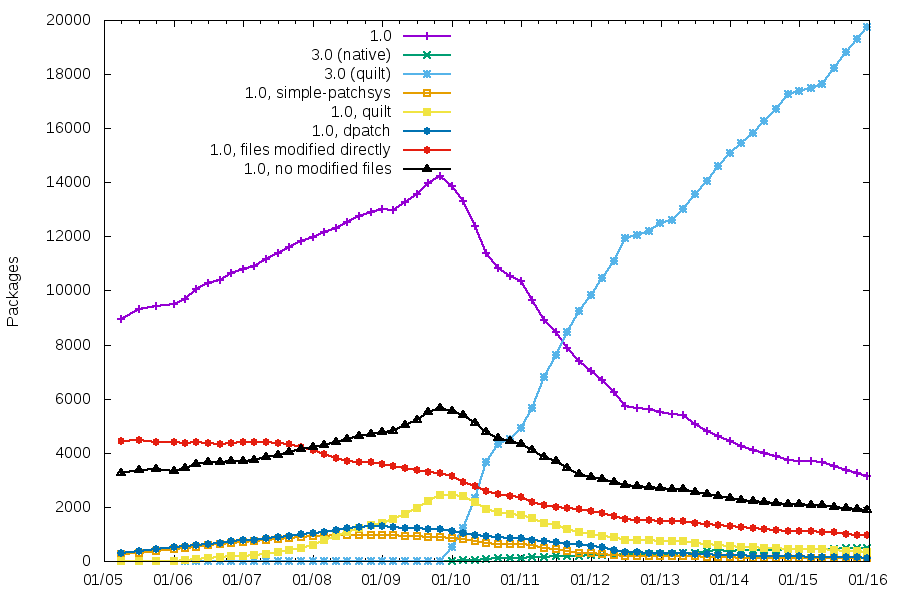
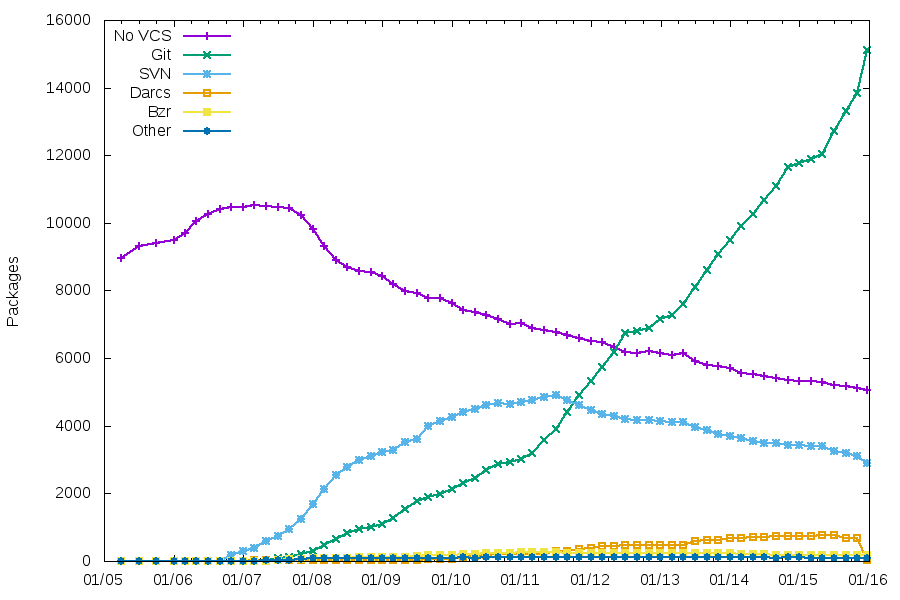 Git is the clear winner now, with the migration rate increasing recently.
Packaging helpers
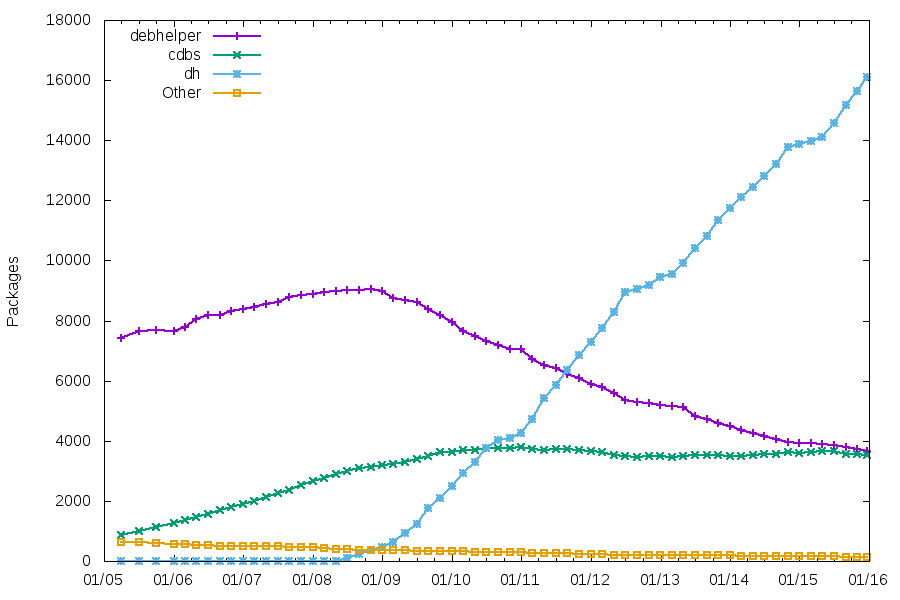 As usual, the number of packages using CDBS is quite stable. The number of packages using traditional debhelper might soon be lower than those using CDBS.
Patch systems and packaging formats
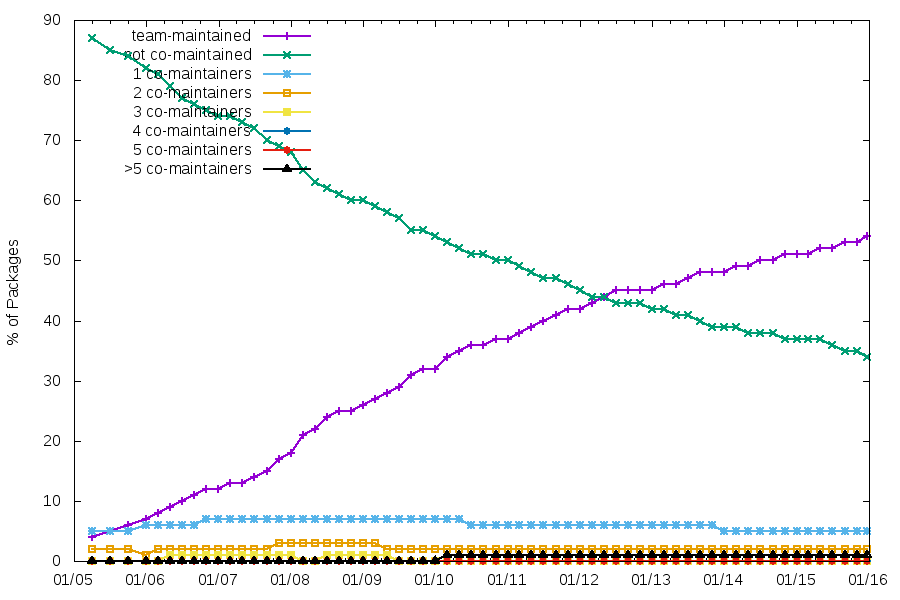
 For the concrete work I did during DebConf, I can only claim two schroot uploads to fix the lack of support of the new overlay filesystem that replaces aufs in the official Debian kernel, and some Distro Tracker work (fixing an issue that some people had when they were logged in via Debian s SSO).
While the numerous discussions I had during DebConf can t be qualified as work , they certainly contribute to build up work plans for the future:
As a Kali developer, I attended multiple sessions related to derivatives (notably the
 Well, here are the stats for the final week of the
 Pevious articles are here:
 Last year at
 That s BP MOSI (grey) to SWD IO, BP CLK (purple) to SWD CLK, BP 3.3V (red) to FST-01 PWR and BP GND (brown) to FST-01 GND. Once that was done I fired up OpenOCD in one terminal and did the following in another:
 logind hangs
If you just updated systemd and ssh to that host seems to hang, that's
just a known Bug (
 What happened about the