Search Results: "ardo"

12 June 2016

Mario Lang: A Raspberry Pi Zero in a Handy Tech Active Star 40 Braille Display

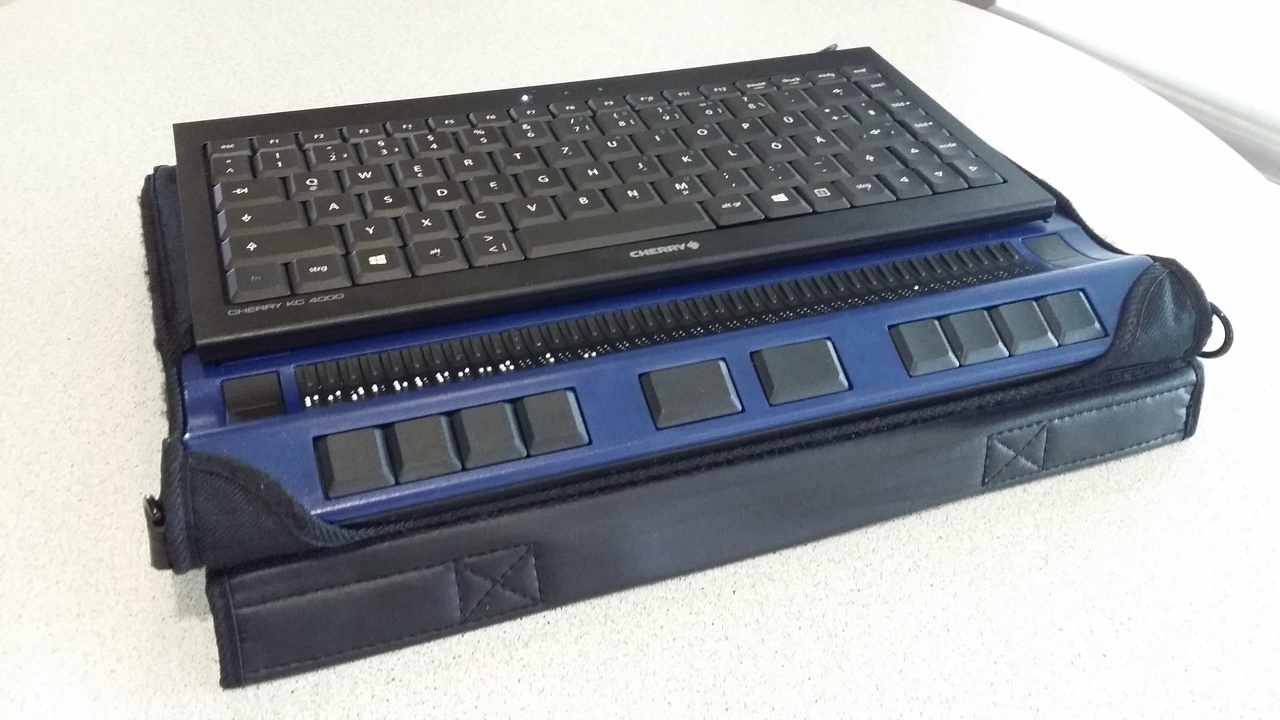
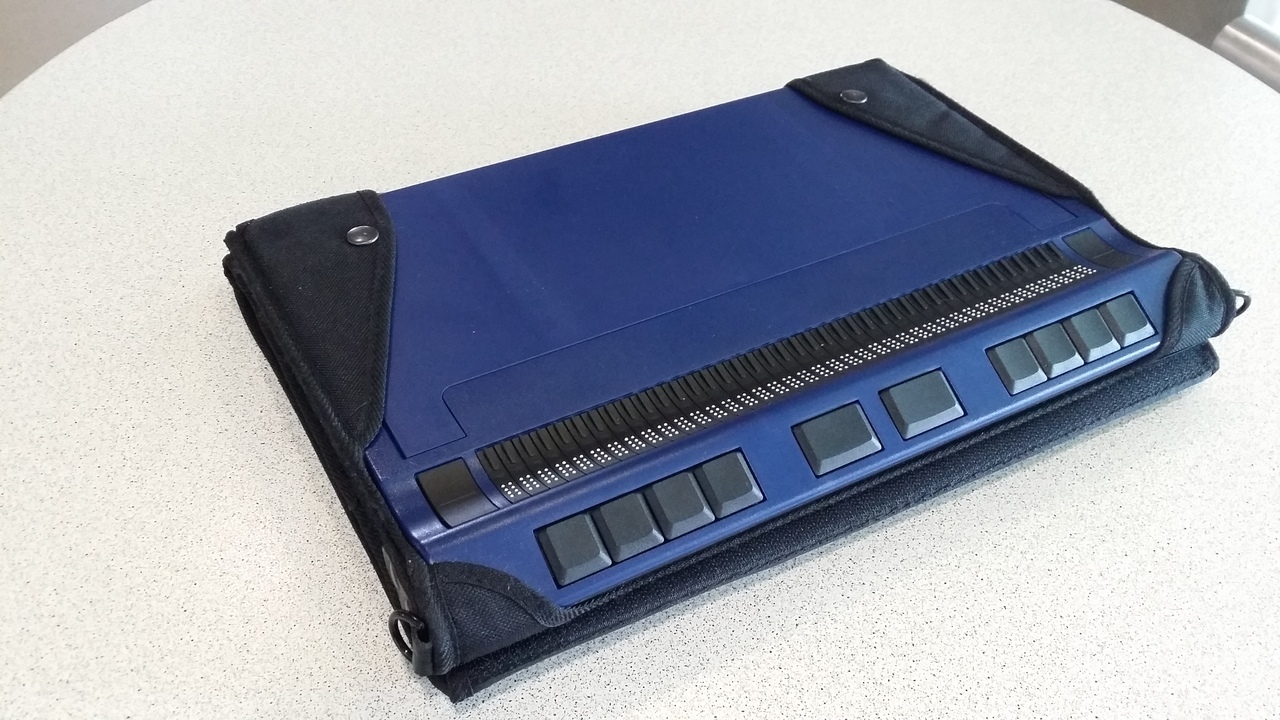
TL;DR: I put a $5 Raspberry Pi Zero, a Bluetooth USB dongle, and the required adapter cable into my new Handy Tech Active Star 40 braille display. An internal USB port provides the power. This has transformed my braille display into an ARM-based, monitorless, Linux laptop that has a keyboard and a braille display. It can be charged/powered via USB so it can also be run from a power bank or a solar charger, thus potentially being able to run for days, rather than just hours, without needing a standard wall-jack. [picture: a Raspberry Pi Zero embedded within an Active Star 40] [picture: a braille display with a keyboard on top and a Raspberry Pi Zero inside]
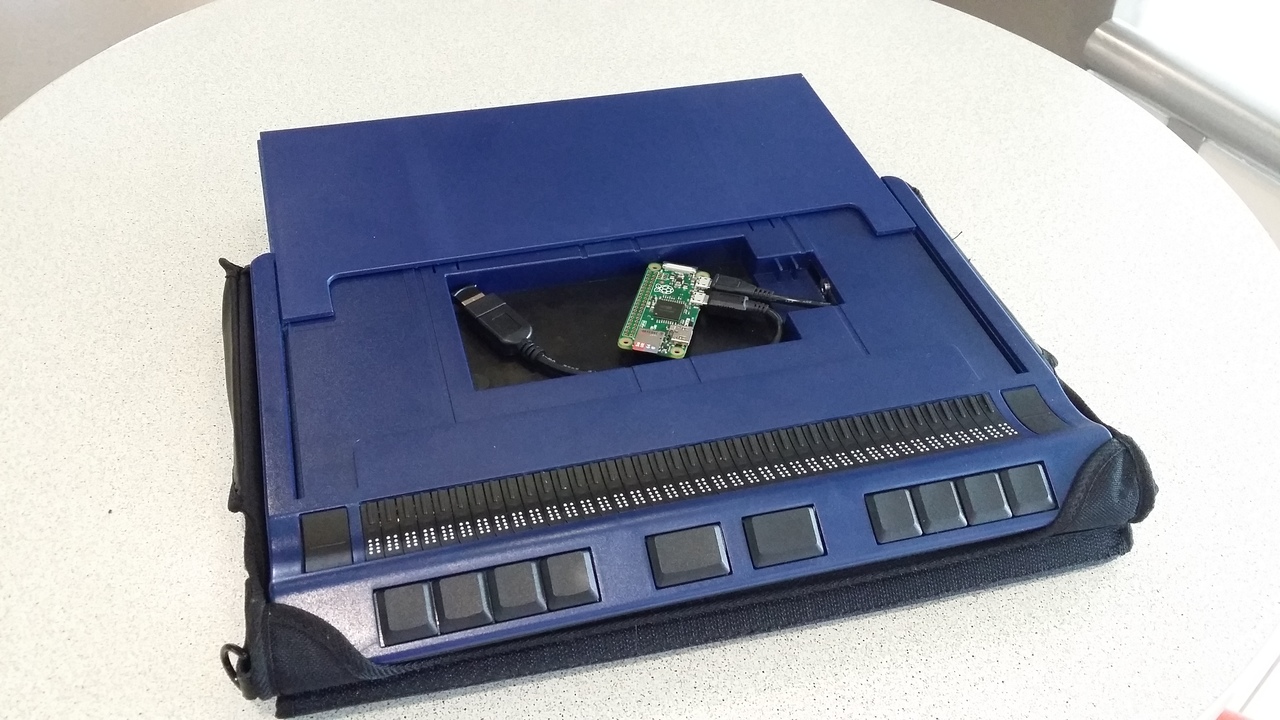
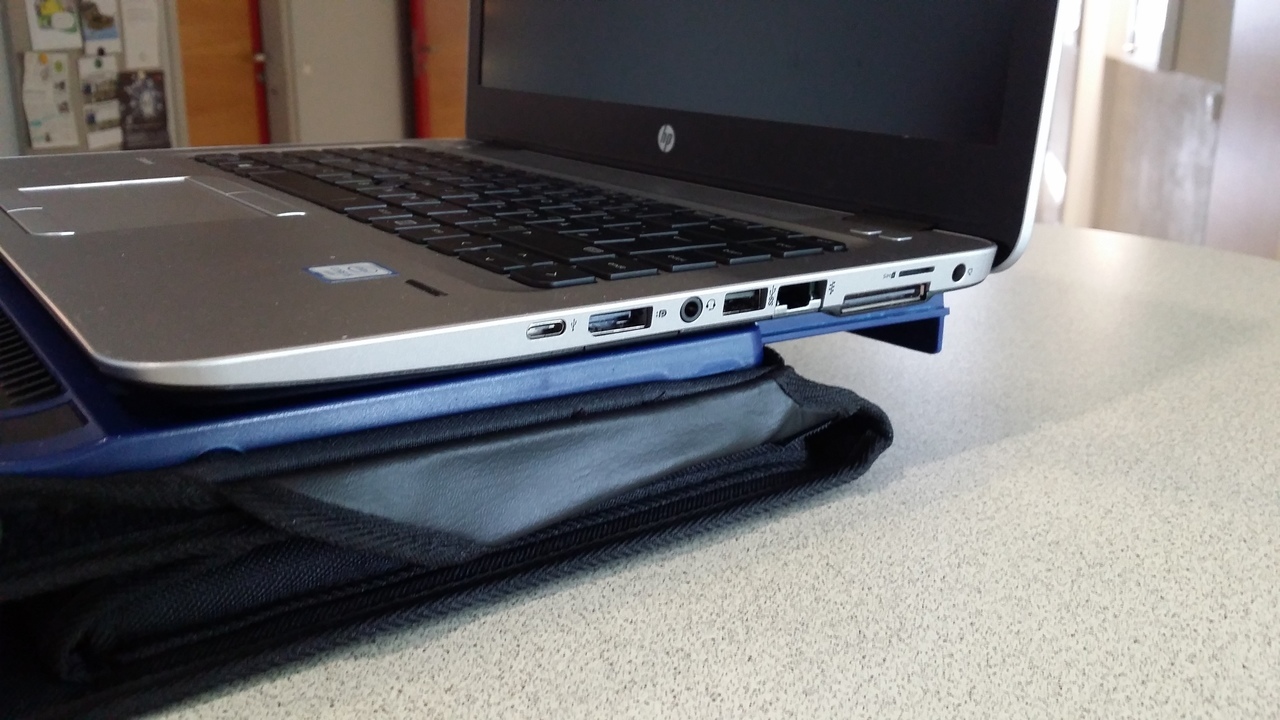
Some Background on Braille Display Form Factors Braille displays come in various sizes. There are models tailored for desktop use (with 60 cells or more), models tailored for portable use with a laptop (usually with 40 cells), and, nowadays, there are even models tailored for on-the-go use with a smartphone or similar (with something like 14 or 18 cells). Back in the old days, braille displays were rather massive. A 40-cell braille display was typically about the size of a 13" laptop. In modern times, manufacturers have managed to reduce the size of the internals such that a 40-cell display can be placed in front of a laptop or keyboard instead of placing the laptop on top of the braille display. While this is a nice achievement, I personally haven't found it to be very convenient because you now have to place two physically separate devices on your lap. It's OK if you have a real desk, but, at least in my opinion, if you try to use your laptop as its name suggests, it's actually inconvenient to use a small form factor, 40-cell display. For this reason, I've been waiting for a long-promised new model in the Handy Tech Star series. In 2002, they released the Handy Tech Braille Star 40, which is a 40-cell braille display with enough space to put a laptop directly on top of it. To accommodate larger laptop models, they even built in a little platform at the back that can be pulled out to effectively enlarge the top surface. Handy Tech has now released a new model, the Active Star 40, that has essentially the same layout but modernized internals. [picture: a plain Active Star 40] You can still pull out the little platform to increase the space that can be used to put something on top. [picture: an Active Star 40 with extended platform and a laptop on top] But, most conveniently, they've designed in an empty compartment, roughly the size of a modern smartphone, beneath the platform. The original idea was to actually put a smartphone inside, but this has turned out (at least to me) to not be very feasible. Fortunately, they thought about the need for electricity and added a Micro USB cable terminating within the newly created, empty compartment. My first idea was to put a conventional Raspberry Pi inside. When I received the braille display, however, we immediately noticed that a standard-sized rpi is roughly 3mm too high to fit into the empty compartment. Fortunately, though, a co-worker noticed that the Raspberry Pi Zero was available for order. The Raspberry Pi Zero is a lot thinner, and fits perfectly inside (actually, I think there's enough space for two, or even three, of them). So we ordered one, along with some accessories like a 64GB SDHC card, a Bluetooth dongle, and a Micro USB adapter cable. The hardware arrived a few days later, and was immediately bootstrapped with the assistance of very helpful friends. It works like a charm!
Technical Details The backside of the Handy Tech Active Star 40 features two USB host ports that can be used to connect devices such as a keyboard. A small form-factor, USB keyboard with a magnetic clip-on is included. When a USB keyboard is connected, and when the display is used via Bluetooth, the braille display firmware additionally offers the Bluetooth HID profile, and key press/release events received via the USB port are passed through to it. I use the Bluetooth dongle for all my communication needs. Most importantly, BRLTTY is used as a console screen reader. It talks to the braille display via Bluetooth (more precisely, via an RFCOMM channel). The keyboard connects through to Linux via the Bluetooth HID profile. Now, all that is left is network connectivity. To keep the energy consumption as low as possible, I decided to go for Bluetooth PAN. It appears that the tethering mode of my mobile phone works (albeit with a quirk), so I can actually access the internet as long as I have cell phone reception. Additionally, I configured a Bluetooth PAN access point on my desktop machines at home and at work, so I can easily (and somewhat more reliably) get IP connectivity for the rpi when I'm near one of these machines. I plan to configure a classic Raspberry Pi as a mobile Bluetooth access point. It would essentially function as a Bluetooth to ethernet adapter, and should allow me to have network connectivity in places where I don't want to use my phone.
BlueZ 5 and PAN It was a bit challenging to figure out how to actually configure Bluetooth PAN with BlueZ 5. I found the bt-pan python script (see below) to be the only way so far to configure PAN without a GUI. It handles both ends of a PAN network, configuring a server and a client. Once instructed to do so (via D-Bus) in client mode, BlueZ will create a new network device - bnep0 - once a connection to a server has been established. Typically, DHCP is used to assign IP addresses for these interfaces. In server mode, BlueZ needs to know the name of a bridge device to which it can add a slave device for each incoming client connection. Configuring an address for the bridge device, as well as running a DHCP server + IP Masquerading on the bridge, is usually all you need to do.
A Bluetooth PAN Access Point with Systemd I'm using systemd-networkd to configure the bridge device. /etc/systemd/network/pan.netdev:
[NetDev]
Name=pan
Kind=bridge
ForwardDelaySec=0
/etc/systemd/network/pan.network:
[Match]
Name=pan
[Network]
Address=0.0.0.0/24
DHCPServer=yes
IPMasquerade=yes
Now, BlueZ needs to be told to configure a NAP profile. To my surprise, there seems to be no way to do this with stock BlueZ 5.36 utilities. Please correct me if I'm wrong. Luckily, I found a very nice blog post, as well as an accommodating Python script that performs the required D-Bus calls. For convenience, I use a Systemd service to invoke the script and to ensure that its dependencies are met. /etc/systemd/system/pan.service:
[Unit]
Description=Bluetooth Personal Area Network
After=bluetooth.service systemd-networkd.service
Requires=systemd-networkd.service
PartOf=bluetooth.service
[Service]
Type=notify
ExecStart=/usr/local/sbin/pan
[Install]
WantedBy=bluetooth.target
/usr/local/sbin/pan:
#!/bin/sh
# Ugly hack to work around #787480
iptables -F
iptables -t nat -F
iptables -t mangle -F
iptables -t nat -A POSTROUTING -o eth0 -j MASQUERADE
exec /usr/local/sbin/bt-pan --systemd --debug server pan
This last file wouldn't be necessary if IPMasquerade= were supported in Debian right now (see #787480). After the obligatory systemctl daemon-reload and systemctl restart systemd-networkd, you can start your Bluetooth Personal Area Network with systemctl start pan.
Bluetooth PAN Client with Systemd Configuring the client is also quite easy to do with Systemd. /etc/systemd/network/pan-client.network:
[Match]
Name=bnep*
[Network]
DHCP=yes
/etc/systemd/system/pan@.service:
[Unit]
Description=Bluetooth Personal Area Network client
[Service]
Type=notify
ExecStart=/usr/local/sbin/bt-pan --debug --systemd client %I --wait
Now, after the usual configuration reloading, you should be able to connect to a specific Bluetooth access point with:
systemctl start pan@00:11:22:33:44:55
Pairing via the Command Line Of course, the server and client-side service configuration require a pre-existing pairing between the server and each of its clients. On the server, start bluetoothctl and issue the following commands:
power on
agent on
default-agent
scan on
scan off
pair XX:XX:XX:XX:XX:XX
trust XX:XX:XX:XX:XX:XX
Once you've set scan mode to on, wait a few seconds until you see the device you're looking for scroll by. Note its device address, and use it for the pair and (optional) trust commands. On the client, the sequence is essentially the same except that you don't need to issue the trust command. The server needs to trust a client in order to accept NAP profile connections from it without waiting for manual confirmation by the user. I'm actually not sure if this is the optimal sequence of commands. It might be enough to just pair the client with the server and issue the trust command on the server, but I haven't tried this yet.
Enabling Use of the Bluetooth HID Profile Essentially the same as above also needs to be done in order to use the Bluetooth HID profile of the Active Star 40 on Linux. However, instead of agent on, you need to issue the command agent KeyboardOnly. This explicitly tells bluetoothctl that you're specifically looking for a HID profile.
Configuring Bluetooth via the Command Line Feels Vague While I'm very happy that I actually managed to set all of this up, I must admit that the command-line interface to BlueZ feels a bit incomplete and confusing. I initially thought that agents were only for PIN code entry. Now that I've discovered that "agent KeyboardOnly" is used to enable the HID profile, I'm not sure anymore. I'm surprised that I needed to grab a script from a random git repository in order to be able to set up PAN. I remember, with earlier version of BlueZ, that there was a tool called pand that you could use to do all of this from the command-line. I don't seem to see anything like that for BlueZ 5 anymore. Maybe I'm missing something obvious?
Performance The data rate is roughly 120kB/s, which I consider acceptable for such a low power solution. The 1GHz ARM CPU actually feels sufficiently fast for a console/text-mode person like me. I'll rarely be using much more than ssh and emacs on it anyway.
Console fonts and screen dimensions The default dimensions of the framebuffer on the Raspberry Pi Zero are a bit unexpectedly strange. fbset reports that the screen dimension is 656x416 pixels (of course, no monitor connected). With a typical console font of 8x16, I got 82 columns and 26 lines. With a 40 cell braille display, the 82 columns are very inconvenient. Additionally, as a braille user, I would like to be able to view Unicode braille characters in addition to the normal charset on the console. Fortunately, Linux supports 512 glyphs, while most console fonts do only provide 256. console-setup can load and combine two 256-glyph fonts at once. So I added the following to /etc/default/console-setup to make the text console a lot more friendly to braille users:
SCREEN_WIDTH=80
SCREEN_HEIGHT=25
FONT="Lat15-Terminus16.psf.gz brl-16x8.psf"

Note

You need console-braille installed for brl-16x8.psf to be available.

Further Projects There's a 3.5mm audio jack inside the braille display as well. Unfortunately, there are no converters from Mini-HDMI to 3.5mm audio that I know of. It would be very nice to be able to use the sound card that is already built into the Raspberry Pi Zero, but, unfortunately, this doesn't seem possible at the moment. Alternatively, I'm looking at using a Micro USB OTG hub and an additional USB audio adapter to get sound from the Raspberry Pi Zero to the braille display's speakers. Unfortunately, the two USB audio adapters I've tried so far have run hot for some unknown reason. So I have to find some other chipset to see if the problem goes away. A little nuisance, currently, is that you need to manually power off the Raspberry, wait a few seconds, and then power down the braille display. Turning the braille display off cuts power delivery via the internal USB port. If this is accidentally done too soon then the Raspberry Pi Zero is shut down ungracefully (which is probably not the best way to do it). We're looking into connecting a small, buffering battery to the GPIO pins of the rpi, and into notifying the rpi when external power has dropped. A graceful, software-initiated shutdown can then be performed. You can think of it as being like a mini UPS for Micro USB.
The image If you are a happy owner of a Handy Tech Active Star 40 and would like to do something similar, I am happy to share my current (Raspbian Stretch based) image. In fact, if there is enough interest by other blind users, we might even consider putting a kit together that makes it as easy as possible for you to get started. Let me know if this could be of interest to you.
Thanks Thanks to Dave Mielke for reviewing the text of this posting. Thanks to Simon Kainz for making the photos for this article. And I owe a big thank you to my co-workers at Graz University of Technology who have helped me a lot to bootstrap really quickly into the rpi world.
P.S. My first tweet about this topic is just five days ago, and apart from the soundcard not working yet, I feel like the project is already almost complete! By the way, I am editing the final version of this blog posting from my newly created monitorless ARM-based Linux laptop via an ssh connection to my home machine.

22 May 2016

Reproducible builds folks: Reproducible builds: week 56 in Stretch cycle

What happened in the Reproducible Builds effort between May 15th and May 21st 2016: Media coverage Blog posts from our GSoC and Outreachy contributors: Documentation update Ximin Luo clarified instructions on how to set SOURCE_DATE_EPOCH. Toolchain fixes Other upstream fixes Packages fixed The following 18 packages have become reproducible due to changes in their build dependencies: abiword angband apt-listbugs asn1c bacula-doc bittornado cdbackup fenix gap-autpgrp gerbv jboss-logging-tools invokebinder modplugtools objenesis pmw r-cran-rniftilib x-loader zsnes The following packages have become reproducible after being fixed: Some uploads have fixed some reproducibility issues, but not all of them: Patches submitted that have not made their way to the archive yet: Reproducibility-related bugs filed: Package reviews 51 reviews have been added, 19 have been updated and 15 have been removed in this week. 22 FTBFS bugs have been reported by Chris Lamb, Santiago Vila, Niko Tyni and Daniel Schepler. tests.reproducible-builds.org Misc. This week's edition was written by Reiner Herrmann and Holger Levsen and reviewed by a bunch of Reproducible builds folks on IRC.

14 May 2016

Thadeu Lima de Souza Cascardo: Chromebook Trackpad

Three years ago, I wanted to get a new laptop. I wanted something that could run free software, preferably without blobs, with some good amount of RAM, good battery and very light, something I could carry along with a work laptop. And I didn't want to spend too much. I don't want to make this too long, so in the end, I asked in the store anything that didn't come with Windows installed, and before I was dragged into the Macbook section, I shouted "and no Apple!". That's how I got into the Chromebook section with two options before me. There was the Chromebook Pixel, too expensive for me, and the Samsung Chromebook, using ARM. Getting a laptop with an ARM processor was interesting for me, because I like playing with different stuff. I looked up if it would be possible to run something other than ChromeOS on it, got the sense that is, it would, and make a call. It does not have too much RAM, but it was cheap. I got an external HD to compensate for the lack of storage (only 16GB eMMC), and that was it. Wifi does require non-free firmware to be loaded, but booting was a nice surprise. It is not perfect, but I will see if I can get to that another day. I managed to get Fedora installed, downloading chunks of an image that I could write into the storage. After a while, I backed up home, and installed Debian using debootstrap. Recently, after an upgrade from wheezy to jessie, things stopped working. systemd would not mount the most basic partitions and would simply stop very early in the boot process. That's a story on my backlog as well, that I plan to tell soon, since I believe this connects with supporting Debian on mobile devices. After fixing some things, I decided to try libinput instead of synaptics for the Trackpad. The Chromebook uses a Cypress APA Trackpad. The driver was upstreamed in Linux 3.9. The Chrome OS ships with Linux 3.4, but had the driver in its branch. After changing to libinput, I realized clicking did not work. Neither did tapping. I moved back to synaptics, and was reminded things didn't work too well with that either. I always had to enable tapping. I have some experience with input devices. I wrote drivers, small applications reacting to some events, and some uinput userspace drivers as well. I like playing with that subsystem a lot. But I don't have too much experience with multitouch and libinput is kind of new for me too. I got my hands on the code and found out there is libinput-debug-events. It will show you how libinput translates evdev events. I clicked on the Trackpad and got nothing but some pointer movements. I tried evtest and there were some multitouch events I didn't understand too well, but it looked like there were important events there that I thought libinput should have recognized. I tried reading some of libinput code, but didn't get too far before I tried something else. But then, I had to let this exercise for another day. Today, I decided to do it again. Now, with some fresh eyes, I looked at the driver code. It showed support for left, right and middle buttons. But maybe my device doesn't support it, because I don't remember seeing it on evtest when clicking the Trackpad. I also understood better the other multitouch events, they were just saying how many fingers there were and what was the position of which one of them. In the case of a single finger, you still get an identifier. For better understanding of all this, reading Documentation/input/event-codes.txt and Documentation/input/multi-touch-protocol.txt is recommended. So, in trying to answer if libinput needs to handle my devices events properly, or handle my device specially, or if the driver requires changes, or what else I can do to have a better experience with this Trackpad, things were tending to the driver and device. Then, after running evtest, I noticed a BTN_LEFT event. OK, so the device and driver support it, what is libinput doing with that? Running evtest and libinput-debug-events at the same time, I found out the problem. libinput was handling BTN_LEFT correctly, but the driver was not reporting it all the time. By going through the driver, it looks like this is either a firmware or a hardware problem. When you get the click response, sound and everything, the drivers will not always report it. It could be pressure, eletrical contact, I can't tell for sure. But the driver does not check for anything but what the firmware has reported, so it's not the driver. A very interesting I found out is that you can read and write the firmware. I dumped it to a file, but still could not analyze what it is. There are some commands to put the driver into some bootloader state, so maybe it's possible to play with the firmware without bricking the device, though I am not sure yet. Even then, the problem might not be fixable by just changing the firmware. So, I left with the possibility of using tapping, which was not working with libinput. Grepping at the code, I found out by libinput documentation that tapping needs to be enabled. The libinput xorg driver supports that. Just set the Tapping option to true and that's it. So, now I am a happy libinput user, with some of the same issues I had before with synaptics, but something you get used to. And I have a new firmware in front of me that maybe we could tackle by some reverse engineering.

25 April 2016

Ricardo Mones: Maximum number of clients reached Error: Can't open display: :0

Today it happened again: you try to open some program and nothing happens. Go to an open terminal, try again and it answers with the above message. Other days I used to reboot the session, but that's something I don't really think should be necessary.

First thought about X gone mad, but this one seems pretty well behaved:

$ lsof -p  pidof Xorg    wc -l
5

Then noticed I had a long running chromium process (a jQuery page monitoring a remote service) so tried this one as well:

$ for a in  pidof chromium ; do echo "$a " lsof -p $a   wc -l ; done
27914 5
26462 5
25350 5
24693 5
23378 5
22723 5
22165 5
21476 222
21474 1176
21443 5
21441 204
21435 546
11644 5
11626 5
11587 5
11461 5
11361 5
9833 5
9726 5

Wow, I'd bet you can guess next command ;-)

$ kill -9 21435 21441 21474 21476

This of course wiped out all chromium processes, but also fixed the problem. Suggestions for selective chromium killing welcome! But I'd better like to know why those files are not properly closed. Just relaunching chromium to write this post yields:

$ for a in  pidof chromium ; do echo "$a " lsof -p $a   wc -l ; done
11919 5
11848 222
11841 432
11815 5
11813 204
11807 398

Which looks a bit exaggerated to me :-(

13 April 2016

Mike Gabriel: IPv6: Broken by Design; Digital Ocean - How are we doing?

Recently, Digital Ocean (which I am a customer of) asked me "how they were doing". Well, yet another survey... Let's ignore this one for now... I thought some days ago. And then yesterday, I added IPv6 support to my main mail server (which runs at Hetzner, Germany). All my hosted/rented/whatever systems report back to this main mailserver. Now that that main mail server finally has its AAAA record and its own IPv6 address, all associated systems try to reach this main mail server via IPv6. Of course. Crippling IPv6 support by adding Port Blocks But, then, I see messages like these in my syslog files on droplets hosted at Digital Ocean:
Apr 13 10:10:59 <do-droplet> postfix/smtp[23469]: connect to mail.<mydomain>[<ipv6-address>]:25: Connection timed out
After some more research [1], I realized that the folks out there at DO really apply some port blockings to IPv6 networks, but not to IPv4 networks. Pardon me? From my DO droplets, I can nmap any port on my mail server (25,80,143,443, 465, 587, etc.) via the IPv4 connection, but not over the IPv6 connection. Wait, not fully true: ports 80 and 443 are not blocked, but the other aforementioned ports are definitely blocked. Is Digital Ocean a professional ISP or a WiFi hotspot provider at my nearest coffee place? (This really makes me scratch my head...). Routing only the first 16 addresses of allocated /64 prefixes The above was the second IPv6 brokeness I learned about DO, recently. An earlier issue with DO's IPv6 support, I encountered while I was deploying an IPv6 capable OpenVPN internet gateway via a droplet hosted at DO. Digital Ocean assigns full IPv6 /64 prefixes to each individual droplet (which is great), but only properly routes the first 16 IP addresses of such a /64 prefix [2]. Urgh? I had to work around this flaw by adding an IPv6-over-IPv4 tunnel and attaching an IPv6 /56 prefix obtained from Hurricane Electrics' tunnel broker service [3] to the OpenVPN server. Thanks, Digital Ocean, for reminding me about giving feedback So, today, I luckily received a reminder mail about DO's yet-another-survey survey. My opportunity!!! Here is the feedback, I gave:
DO service is basically good.
BUT: You as a provider SUCK when it comes to IPv6.
(1) http://pixelschatten.net/blocked-ipv6-ports/
-> SMTP/IMAP traffic blocked over IPv6, but not over IPv4... WTF?). I normally have all my systems report back to my main mail server. I expect this to work as it is the default on all Linux hosts nowadays, and that is: prefer IPv6 over IPv4.
(2) https://digitalocean.uservoice.com/forums/136585-digitalocean/suggestion...
-> Droplets get a full /64 prefix assigned, but only the first 16 addresses (or such) get routed properly. WTF?
Please do your homework on IPv6 and don't cripple your service by offering crippled IPv6 support.
I tell people, DO is great, but their IPv6 support is broken-by-design. Let me know, once this is about to change.
Mike Gabriel (aka sunweaver at debian dot org, Debian Developer)
Apology for the tone of the wording Now reading the feedback given, I realize that my tone has been quite impolite. I am sorry about this. However, the experienced IPv6 issues are indeed annoying. So please excuse me for having expressed my annoyance with such harsh words. And... I am still annoyed about myself paying an ISP for such a crippled IPv6 support. (I need to consider migrating the VMs to another hoster, unless there will be some dynamics observable in the near future). @Digital Ocean: Keep up the good work that you do in the realm of VM hosting. Evolve and grow up in the realm of IPv6 networking. Thank you! light+love
Mike [1] http://pixelschatten.net/blocked-ipv6-ports/
[2] https://digitalocean.uservoice.com/forums/136585-digitalocean/suggestion...
[3] https://tunnelbroker.net/

Jonathan McDowell: Software in the Public Interest contributing members: Check your activity status!

That s a longer title than I d like, but I want to try and catch the attention of anyone who might have missed more directed notifications about this. If you re not an SPI contributing member there s probably nothing to see here Although I decided not to stand for re-election at the Software in the Public Interest (SPI) board elections last July, I haven t stopped my involvement with the organisation. In particular I ve spent some time working on an overhaul of the members website and rolling it out. One of the things this has enabled is implementation of 2009-11-04.jmd.1: Contributing membership expiry, by tracking activity in elections and providing an easy way for a member to indicate they consider themselves active even if they haven t voted. The plan is that this will run at some point after the completion of every board election. A first pass of cleanups was completed nearly a month ago, contacting all contributing members who d never been seen to vote and asking them to update their status if they were still active. A second round, of people who didn t vote in the last board election (in 2014), is currently under way. Affected members will have been emailed directly and there was a mail to spi-announce, but I m aware people often overlook these things or filter mail off somewhere that doesn t get read often. If you are an SPI Contributing member who considers themselves an active member I strongly recommend you login to the SPI Members Website and check the Last active date displayed is after 2014-07-14 (i.e. post the start of the last board election). If it s not, click on the Update link beside the date. The updated date will be shown once you ve done so. Why does pruning inactive members matter? The 2015 X.Org election results provide at least one indication of why ensuring you have an engaged membership is important - they failed to make a by-laws change that a vast majority of votes were in favour of, due to failing to make quorum. (If you re an X.org member, go vote!)

10 April 2016

Vincent Bernat: Testing network software with pytest and Linux namespaces

Started in 2008, lldpd is an implementation of IEEE 802.1AB-2005 (aka LLDP) written in C. While it contains some unit tests, like many other network-related software at the time, the coverage of those is pretty poor: they are hard to write because the code is written in an imperative style and tighly coupled with the system. It would require extensive mocking1. While a rewrite (complete or iterative) would help to make the code more test-friendly, it would be quite an effort and it will likely introduce operational bugs along the way. To get better test coverage, the major features of lldpd are now verified through integration tests. Those tests leverage Linux network namespaces to setup a lightweight and isolated environment for each test. They run through pytest, a powerful testing tool.

pytest in a nutshell pytest is a Python testing tool whose primary use is to write tests for Python applications but is versatile enough for other creative usages. It is bundled with three killer features:
  • you can directly use the assert keyword,
  • you can inject fixtures in any test function, and
  • you can parametrize tests.

Assertions With unittest, the unit testing framework included with Python, and many similar frameworks, unit tests have to be encapsulated into a class and use the provided assertion methods. For example:
class testArithmetics(unittest.TestCase):
    def test_addition(self):
        self.assertEqual(1 + 3, 4)
The equivalent with pytest is simpler and more readable:
def test_addition():
    assert 1 + 3 == 4
pytest will analyze the AST and display useful error messages in case of failure. For further information, see Benjamin Peterson s article.

Fixtures A fixture is the set of actions performed in order to prepare the system to run some tests. With classic frameworks, you can only define one fixture for a set of tests:
class testInVM(unittest.TestCase):
    def setUp(self):
        self.vm = VM('Test-VM')
        self.vm.start()
        self.ssh = SSHClient()
        self.ssh.connect(self.vm.public_ip)
    def tearDown(self):
        self.ssh.close()
        self.vm.destroy()
    def test_hello(self):
        stdin, stdout, stderr = self.ssh.exec_command("echo hello")
        stdin.close()
        self.assertEqual(stderr.read(), b"")
        self.assertEqual(stdout.read(), b"hello\n")
In the example above, we want to test various commands on a remote VM. The fixture launches a new VM and configure an SSH connection. However, if the SSH connection cannot be established, the fixture will fail and the tearDown() method won t be invoked. The VM will be left running. Instead, with pytest, we could do this:
@pytest.yield_fixture
def vm():
    r = VM('Test-VM')
    r.start()
    yield r
    r.destroy()
@pytest.yield_fixture
def ssh(vm):
    ssh = SSHClient()
    ssh.connect(vm.public_ip)
    yield ssh
    ssh.close()
def test_hello(ssh):
    stdin, stdout, stderr = ssh.exec_command("echo hello")
    stdin.close()
    stderr.read() == b""
    stdout.read() == b"hello\n"
The first fixture will provide a freshly booted VM. The second one will setup an SSH connection to the VM provided as an argument. Fixtures are used through dependency injection: just give their names in the signature of the test functions and fixtures that need them. Each fixture only handle the lifetime of one entity. Whatever a dependent test function or fixture succeeds or fails, the VM will always be finally destroyed.

Parameters If you want to run the same test several times with a varying parameter, you can dynamically create test functions or use one test function with a loop. With pytest, you can parametrize test functions and fixtures:
@pytest.mark.parametrize("n1, n2, expected", [
    (1, 3, 4),
    (8, 20, 28),
    (-4, 0, -4)])
def test_addition(n1, n2, expected):
    assert n1 + n2 == expected

Testing lldpd The general plan for to test a feature in lldpd is the following:
  1. Setup two namespaces.
  2. Create a virtual link between them.
  3. Spawn a lldpd process in each namespace.
  4. Test the feature in one namespace.
  5. Check with lldpcli we get the expected result in the other.
Here is a typical test using the most interesting features of pytest:
@pytest.mark.skipif('LLDP-MED' not in pytest.config.lldpd.features,
                    reason="LLDP-MED not supported")
@pytest.mark.parametrize("classe, expected", [
    (1, "Generic Endpoint (Class I)"),
    (2, "Media Endpoint (Class II)"),
    (3, "Communication Device Endpoint (Class III)"),
    (4, "Network Connectivity Device")])
def test_med_devicetype(lldpd, lldpcli, namespaces, links,
                        classe, expected):
    links(namespaces(1), namespaces(2))
    with namespaces(1):
        lldpd("-r")
    with namespaces(2):
        lldpd("-M", str(classe))
    with namespaces(1):
        out = lldpcli("-f", "keyvalue", "show", "neighbors", "details")
        assert out['lldp.eth0.lldp-med.device-type'] == expected
First, the test will be executed only if lldpd was compiled with LLDP-MED support. Second, the test is parametrized. We will execute four distinct tests, one for each role that lldpd should be able to take as an LLDP-MED-enabled endpoint. The signature of the test has four parameters that are not covered by the parametrize() decorator: lldpd, lldpcli, namespaces and links. They are fixtures. A lot of magic happen in those to keep the actual tests short:
  • lldpd is a factory to spawn an instance of lldpd. When called, it will setup the current namespace (setting up the chroot, creating the user and group for privilege separation, replacing some files to be distribution-agnostic, ), then call lldpd with the additional parameters provided. The output is recorded and added to the test report in case of failure. The module also contains the creation of the pytest.config.lldpd object that is used to record the features supported by lldpd and skip non-matching tests. You can read fixtures/programs.py for more details.
  • lldpcli is also a factory, but it spawns instances of lldpcli, the client to query lldpd. Moreover, it will parse the output in a dictionary to reduce boilerplate.
  • namespaces is one of the most interesting pieces. It is a factory for Linux namespaces. It will spawn a new namespace or refer to an existing one. It is possible to switch from one namespace to another (with with) as they are contexts. Behind the scene, the factory maintains the appropriate file descriptors for each namespace and switch to them with setns(). Once the test is done, everything is wipped out as the file descriptors are garbage collected. You can read fixtures/namespaces.py for more details. It is quite reusable in other projects2.
  • links contains helpers to handle network interfaces: creation of virtual ethernet link between namespaces, creation of bridges, bonds and VLAN, etc. It relies on the pyroute2 module. You can read fixtures/network.py for more details.
You can see an example of a test run on the Travis build for 0.9.2. Since each test is correctly isolated, it s possible to run parallel tests with pytest -n 10 --boxed. To catch even more bugs, both the address sanitizer (ASAN) and the undefined behavior sanitizer (UBSAN) are enabled. In case of a problem, notably a memory leak, the faulty program will exit with a non-zero exit code and the associated test will fail.

  1. A project like cwrap would definitely help. However, it lacks support for Netlink and raw sockets that are essential in lldpd operations.
  2. There are three main limitations in the use of namespaces with this fixture. First, when creating a user namespace, only root is mapped to the current user. With lldpd, we have two users (root and _lldpd). Therefore, the tests have to run as root. The second limitation is with the PID namespace. It s not possible for a process to switch from one PID namespace to another. When you call setns() on a PID namespace, only children of the current process will be in the new PID namespace. The PID namespace is convenient to ensure everyone gets killed once the tests are terminated but you must keep in mind that /proc must be mounted in children only. The third limitation is that, for some namespaces (PID and user), all threads of a process must be part of the same namespace. Therefore, don t use threads in tests. Use multiprocessing module instead.

5 March 2016

Antonio Terceiro: Debian Ruby Sprint 2016 - day 5: More Reproducible Builds, Retrospective, and A Little Bit of Tourism

Earlier today I was made aware by Holger of the results of our reproducibility efforts during the sprint. I would like to thank Lunar for pinging us about the issue, and Holger for pointing me to updated results. The figure below depicts a stacked area chart where the X axis is time and the green area is reproducible packages. Red is packages that fail to build, and Orange are unreproducible packages I was able to book accommodation for the sprint attendees very close to both my place and the sprint venue, what was very useful but also had this downside of them not being able to see much of city. As the final day of the sprint was getting closer, we decided to have a different lunch to allow them to see one of the most famous local landmarks, the botanical gardens. So we headed down to the botanical gardens, grabbed a few items for lunch at the park coffee shop, and set out to visit this very beautiful place. I have to say that there is the place were I usually take every visitor I have. We were joined by Gioavani who had just arrived for the the MiniDebconf on the following weekend. The final lists of accomplishments of the day was again very impressive By the end of the afternoon I asked everyone to fill out a simple retrospective list, what we can use later to make future sprints better and better. Below are the results we got. What was good: What could be better: The night ended at Bar do Alem o ( The German s Bar ). Both their beer and their food are very good, but I don t have enough elements to vouch for their authenticity. :) We were joined by Giovani (who we also met earlier in the botanic gardens), and by Paulo and Daniel who are organizing the MiniDebconf. And that is the end of this year s Debian Ruby team sprint. I hope we do it all over again next year.

29 February 2016

Muammar El Khatib: Cast audio from Debian to chromecast audio

I recently decided to buy a chromecast audio (CCA) to use with my Harman Kardon Soundsticks III. My main motivation was to avoid plugging the 3.5mm jack to the phone or the computer when I wanted to switch devices. Bluetooth connectivity was not an option given their poor quality of sound and short range of the signal to connect (limited to 10m). There are many different options in the market being Sonos the most widely spoken and known right now because of its Hi-Fi Wifi solution. But Sonos is also very expensive tech. For instance, the starting price of a connected speaker is around $200. Another limitation going beyond price is the fact that you can only stream using Sonos application (as far as I investigated) something I don t find appealing. As I already had my speakers, I was looking for something to cast over them using wifi. Sonos also proposes a feature called Connect which is like what CCA does but for a price which is 10 times more expensive!.

11 January 2016

Thadeu Lima de Souza Cascardo: GNU on Smartphones (part II)

Some time ago, I wrote how to get GNU on a smartphone. This is going to be a long discussion on why and how we should work on more operating systems for more devices. On Android So, why should we bother if we already have Android, some might ask? If it's just because of some binary blobs, one could just use Replicant, right? Well, one of the problems is that Android development is done in hiding, and pushed downstream when a new version is launched. There is no community behind that anyone can join. Replicant ends up either following it or staying behind. It could do a fork and have its own innovations. And I am all for it. But the lack of manpower for supporting devices and keeping up with the latest versions and security fixes already takes most of the time for the one or two developers involved. Also, Android has a huge modularity problem, that I will discuss further below. But it's hard to replace many components in the system, unless you replace them all. And that also causes the problem that applications can hardly share extra components. I would rather see Debian running on my devices and supporting good environments and frameworks for all kinds of devices, like phones, tablets, TVs, cars, etc. It's developed by a community I can join, it allows a diverse set of frameworks and environments, and it's much easier to replace single components on such a system. On Copyleft Hardware I get it. Hardware is not free or libre. Its design is. I love the concept of copyleft hardware, where one applies the copyleft principles to a hardware design. Also, there is the concept of Hardware that Respects Your Freedom, that is, one that allows you to use it with only free software. Note that RYF hardware is not necessarily copyleft hardware. In fact, most of the time, the original vendor has not helped at all, and it required reverse engineering efforts by other people to be able to run free software on those systems. My point here is that we should not prevent people from running free software on hardware that does not RYF or that is not copyleft. We should continue the efforts of reverse engineering and of pushing hardware vendors to not only ship free software for their hardware, but also release their design under free licenses. But in the meantime, we need to make free software flourish in the plethora of devices on the hands of so many people around the world. On Diversity I won't go into details on this post about two things. One topic I love is retrocomputing and how Linux supported so many devices, and how many free or quasi-free operating systems ran on so many of them in the past. I could mention ucLinux, Familiar, PDAs, Palmtops, Motorolas, etc. But I will leave it to another time and go from Openmoko and Maemo forward. The other topic is application scalability. Even Debian with so many software available does not ship all free software there is available. And it doesn't support all third-party services out there. How can we solve that? It has to do with platforms, protocols, open protocols, etc. I will not go into that today. Because I believe that either way, it's healthy for our society to have diversity. I believe we should have other operating systems available for our devices. Even if application developers will not develop for all of them. That is already the case today. There are other ways to fix that, when that needs fixing. Sometimes, it's sufficient that you can have your own operating system on your device, that you can customize it, enhance it and share it with friends. And also, that would allow for innovation. It would make possible that some other operating system would have enough market share on some other niche. Other than Android and iOS, for example. But that requires that we can support that operating system on different devices. And that is the scalability that I want to talk about. How to support more devices with less effort. Options But before I go into that, let me write more about the alternatives we have out there. And some of the history around it. Openmoko Openmoko developed a set of devices that had some free design. And it has some free operating systems running on top. The community developed a lot of their own as well. Debian could (still can) run on it. There is SHR, which uses FSO, a mobile middleware based on D-Bus. It even spawned other devices to be developed, like GTA04, a successor board, that can be shipped inside a Neo Freerunner case. Maemo, Moblin, Meego and Tizen I remember the announcement of Nokia N770. During FISL in 2005, I even criticized a lot, because it shipped with proprietary drivers. And applications. But it was the first time we heard of Maemo. It was based on Debian and GNOME. The GNOME Mobile initiative was born from that, I believe, but died later on. But with the launch of N900, and later events, like the merge of Moblin with Maemo, to create Meego, we all had an operating system that was based on community developed components, that had some community participation, and was much more like the systems we were used to. You could run gcc on N900. You could install Das U-Boot and have other operating systems running there. But Nokia has gone a different path. Intel has started Tizen with Samsung. There is so much legacy there, that could still be developed upon. I am just sad that Jolla decided to put proprietary layers on top of that, to create SailfishOS. But we still have Mer, Nemo. But it looks like Cordia is gone. At least, (http://cordiahd.org) seems to have been registered by a domain seller. Not to forget, Neo900, a project to upgrade the board, in the same vein as GTA04. FirefoxOS and Ubuntu What can I say about FirefoxOS and Ubuntu Phone? In summary, I think we need more than Web, and Canonical has a history of not being too community oriented as we'd like. I won't go too much here in what I think about the Web as a platform. But I think we need a system that has more options for platforms. I haven't participated in projects directed by Mozilla either, so I can't say much about that. Ubuntu Phone should be a system more like what we are used to. But Canonical is going to set the directions to the project, it's not a community project. Nonetheless, I think they add to the diversity, and users should be able to try them, or their free parts or versions. But there are challenges there, that I think need to be discussed. So, both of these systems are based on Android. They don't use Dalvik or the application framework. But they use what is below that, which means device drivers in userspaces, like RIL, for the modem drivers, and EGL, for graphics drivers. The reason they do that is to build on top of all the existing vendor support for Android. If a SOC and phone vendor already supports Android, there should be not much needed to do to support FirefoxOS or Ubuntu Phone. In practice, this has not benefited the users or the projects. Porting should be as simple as getting a generic FirefoxOS or Ubuntu Phone image and run it on top of your Android or CyanogenMod port. Porting usually requires doing all the same work as porting Android. Even though one should be able to take advantage of existing ports, it still requires doing a lot of integration work and building an entire image, most of the time, including the upper layers, that should be equal in all devices. This process should require at most creating a new image based on other images and loading it on the device. I will discuss more about this below. I can't forget to mention the Matchstick TV project. It is based on FirefoxOS. I think it would have much more changes to succeed if it was easier for testers to have images available for all of their gadgets capable of running some form of Android. Replicant And then we have Replicant. It has a lot of the problems Android has. Even so, it's a tremendously important project. First, it offers a free version of Android, removing all proprietary pieces. This is very good for the community. But more than that, it tries to free the devices beyond that. What the project has been done is reverse engineer some of the pieces, mostly the modem drivers. That allows other projects to build upon that work, and support those modems. Without that, there is no telephony or celullar data available on any of these devices. Not without proprietary software, that is. They also have been working on free bootloaders, which is another important step for a completely free system. Next steps There are many challenges here, but I believe we should work on a set of steps that make it more palatable and produce intermediary results that can be used by users and other projects. One of the goals should be good modularity. The ability to replace some pieces with the least trouble necessary. The update of a single framework library should be just a package install, instead of building the entire framework again. If there is ABI breakage, users should still be able to have access to binaries (and accompanying source code) and only need to update the library and its reverse dependencies. If one layer does not have these properties, at least it should be possible to update this big chunk without interfering with the other layers. One example is FirefoxOS and Ubuntu Phone. Even if there is a big image with all system userspace and middleware, the porting, install and upgrade process should allow the user to keep the applications and to leverage porting already done by similar projects. Heck, these two projects should be able to share porting efforts without any trouble. So what follows is a quick discussion on Android builds, then suggestions on how to approach some of the challenges. On Android build The big problem with Android build is its non-modularity. You need to build the world and more to get a single image in the end. Instead of packages that could be built independently, that generated modular package images, that could be bundled in a single system image. Better yet would be the ability to pick only those components that matter. Certainly, portability would be just as interesting, being able to build certain components on top a GNU system with GNU libc. At times, it seems like this is done by design, to make it difficult for "fragmentation" and competition. Basically, making it difficult to exercise the freedom to modify the software and share your modifications with others. Imagine the possibilities of being able to: There are some dangers in promoting the use of Android like this. Since it promotes proprietary drivers, relying on such layers instead of better community oriented layers means giving an advantage to the first. So, the best plan would be to replace those layers, when they are used, for things like ofono and Wayland, for example. But, in the meantime, making it easier for users to experiment with FirefoxOS, Ubuntu Phone, Matchstick TV, Replicant on other devices, without resorting to building the entire Android system, would be a very nice thing. It is possible that there are some challenges with respect to API and ABI. That these layers are too intermingled that some changes present in one port would prevent FirefoxOS to run on top of it without changes in either of the layers. I can't confirm that is the case, but can't deny the possibility. Rooting One of the challenges we have that may have trouble in scaling is rooting devices. Unfortunately, most of the devices are owned by the vendor or carrier, not the user. The user is prevented from replacing software components in the system, by removing its permissions from replacing most of the files in the filesystem, or writing to block devices, or change boot parameters or write to the storage devices. Fortunately, there are many documents, guides, howtos, and whatnots out there instructing on how to root a lot of devices. In some cases, it depends on software bugs that can be patched by the users as instructed by vendors. Certainly, favoring devices that are built to allow rooting, hacking, etc, is a good thing. But we should still help those users out there who do not have such devices, and allow them to run free software on them. Booting Then, comes booting, which is a large discussion on its own, and also related to rooting, or how to allow users to replace their software. First, we have the topic of bootloaders, which are usually not free, and embedded in the chip, not on external storage. So, there are those pieces of the bootloader which we can replace more easily and those that we are not, because they would require changing a piece of ROM, for example. Das U-Boot would be one of the preferred options for a system. It supports a lot of hardware platforms out there, a lot of storage devices and filesystems, network booting, USB and serial booting, and a lot of other things. Porting is not an easy task, but it is possible. Meanwhile, using the bootloaders that ship with the system, when possible, would allow a path where other pieces of the system would be free. One of the challenges here is building single images that could boot everywhere. The lack of a single ARM boot environment is a curse and a blessing. It makes it hard to have this single boot image, but, on the other hand, it has allowed so much of the information for such systems to be free, to be embedded in copyleft software, instead of having blobs executed by our free systems, like ACPI encourages. Device trees have pushed this portability issue from the kernel to the bootloaders. Possibily encouraging vendors to now hide and copyright this information in the form of proprietary device trees. But it has made it easier for single images. In practice, we still need to see a lot of devices out there supporting this single kernel scenario. And this mechanism only brings us the possibility of a single kernel. We still need to ship bootable images that have pieces of bootloaders that are not as portable. This has caused lots of operating systems out there to be built for a single board. Or to support just a small set of boards. I struggle with the concept. Why are we not able to mix device-specific pieces with generic pieces and get a resulting image that will boot on our choice of board? Why does every project need to do all the porting work again, repeating the efforts? Or have one entier ISO image for every supported board? Check how Geexbox does it, for an example. Fortunately, I see Debian going in a good direction. Here, one can see how it instructs the user to combine a system-dependent part with a system-independent part. Installation Which brings us to the installation challenge. We should make this easy and also customizable by the user. Every project might have its own method, and that is part of the diversity that we should allow. The great challenge here is handling rooting and booting for the user. But it's also possible to leave that as separate efforts, as it would be nice to have good installers as we have in the desktop and server environments. Linux Linux is one of the most ported kernels out there. Of course, it would be healthy to the diversity I propose that other kernels and systems out there should work on those mobile devices. NetBSD, for example, has a reputation of being very portable and ported to many platforms. And GNU runs on many of them, either together with the original systems, or as the main system on top of other kernels, as proven by the Debian GNU/kFreeBSD port, which uses GNU libc. But, though I would love to see HURD running directly on those devices, Linux and its derivatives are already running on them. Easier to tackle is to get Linux-libre running on those systems. But though this looks like one of the easier tasks at hand, it is not. If you run a derivative version from Linux, provided by the vendor, things should go smooth. But most of the time, the vendor does not provide patches upstream, and leave their fork to rot, if you are lucky, in the earlier 3.x series. And some times, there is not even source code available. There are vendors out there who do not respect the GPL and that is one of the reasons why GPL enforcement is important. I take this opportunity to call attention to the work of Software Freedom Conservancy and its current efforts to raise funds to continue their work. Running an existing binary version of Linux on your device with a free userspace is part of the strategy of replacing pieces one at a time while allowing for good diversity and reaching more users. Drivers Then we have the matter of drivers. And in this case, it's not only Linux drivers, but drivers running in userspace. Though others exist, there are two important and common cases, which are modem and graphics drivers, both of which are usually provided by Android frameworks, and that other systems try to leverage, instead of using alternatives that are more community friendly. In the case of modem drivers, Android uses its RIL. Besides not using a Radio or Modem at all, there are two strategies for free versions. One is using free versions of the drivers for RIL. That's what Replicant does, because, well, it uses the other Android subsystems after all. The other one is using a system that is developed by the community. ofono is one that, even though it's an Intel iniative, looks more community governed or open to community participation than any Android subsystem ever was. As for Graphics, Canonical even built its Mir project with the goal of being able to use Android GPU drivers. Luckily, there has been a lot of reverse engineering efforts out there for a lot of those GPUs shipped with ARM SoCs. Then, we can use Mesa, Wayland and X.org. Other option, until then, is just using a framebuffer driver, possibly one that does not need any initialization, depending on one done by the bootloader, for example. Middleware and Shells Plasma Active, that I just found out now is Plasma Mobile, looks like a great system. Built by folks behind KDE, we can expect great freedom to come from it. Unfortunately, it suffers from what we have been discussing here, which is lack of good device support, or shipping images that run on top of single devices, without leveraging the porting that has come before of other systems. Fortunately, that is just what I want to accomplish with this effort. FSO, that I mentioned before, is a good middleware, that we should try to run on top of these devices. Running GNOME or Unity shell, and use rpm or deb based systems, that's all part of the plan on diversity. You could use systemd, or System V init systems, whatever gives you the kicks. It's not an easy task, since there are so many new things on these new kinds of devices. Besides touch, there is telephony, which as I mentioned, would be a good task for ofono. As for TV sets or dongles, I would love to see OpenFlint, created by the Matchstick TV guys, flourish out there and allow me to flint stuff from my mobile phone running Debian into my TV dongle running Debian. Project So, is there a project out there you can start contributing to? Well, I pointed out a lot of them. All of them make part of this plan. Contributing to reverse engineering GPUs, or to Plasma Mobile, ofono, GNOME, Linux-libre, bootloaders, Debian, and so many other projects. My plans are to contribute in the scope of Debian and make sure it works well on top of semi-liberated devices, and make sure there is a nice user interface and good applications when using either GNOME or Plasma. Integrating ofono is a good next step, but I am running ahead of myself. Right now, I don't think there is need for an integrated effort. If you think otherwise, please let me know. If you are doing something in this direction, I would love to know. Paul Wise reminded me to point out to the Debian Mobile, where I will probably contribute any documentation and other relevant results. Thanks There are some many people to thank, but I would like to remember Ian Murdock, who created Debian, one of the projects who inspires me the most. I think the best way to handle his passing is to celebrate what he has helped create, and move forward, taking more free software to more people in an easy and modular way. I have been wanting to write something like this for a long time, so I thank Chris Webber for inspiring me on doing it.

30 November 2015

Pablo Lorenzzoni: Duas dicas para acelerar o APT

s vezes voc s quer um pouco mais de velocidade nos downloads do APT e n o tem muito como modificar muito a instala o do cliente. Duas dicas simples podem ganhar minutos preciosos: Coloque em algum dos /etc/apt.conf.d (sugiro criar o /etc/apt.conf.d/71parallel) a seguinte linha:

Acquire::Queue-Mode "host";
Isso faz com que o modo de queue do APT seja orientado ao host e n o ao tipo de URL. Dependendo dos seus sources, isso acelera mais do que o modo access padr o. A segunda dica um hack que encontrei h algum tempo em um blog que faz o download pr vio das URLs que ser o utilizadas na opera o do APT para o /var/cache/apt/archives usando xargs:
#!/bin/bash
NBATCH=3
NPARALLEL=5
(apt-get -y --print-uris $@ egrep -o -e "http://[^\']+" xargs -r -l$ NBATCH -P$ NPARALLEL wget -nv -P "/var/cache/apt/archives/") && apt-get $@
Ajuste os par metros NBATCH e NPARALLEL e boa sorte.

23 November 2015

Lunar: Reproducible builds: week 30 in Stretch cycle

What happened in the reproducible builds effort this week: Toolchain fixes Mattia Rizzolo uploaded a version of perl to the reproducible repository including the patch written by Niko Tyni to add support for SOURCE_DATE_EPOCH in Pod::Man. Dhole sent an updated version of his patch adding support for SOURCE_DATE_EPOCH in GCC to the upstream mailing list. Several comments have been made in response which have been quickly addressed by Dhole. Dhole also forwarded his patch adding support for SOURCE_DATE_EPOCH in libxslt upstream. Packages fixed The following packages have become reproducible due to changes in their build dependencies: antlr3/3.5.2-3, clusterssh, cme, libdatetime-set-perl, libgraphviz-perl, liblingua-translit-perl, libparse-cpan-packages-perl, libsgmls-perl, license-reconcile, maven-bundle-plugin/2.4.0-2, siggen, stunnel4, systemd, x11proto-kb. The following packages became reproducible after getting fixed: Some uploads fixed some reproducibility issues, but not all of them: reproducible.debian.net Vagrant Cascadian has set up a new armhf node using a Raspberry Pi 2. It should soon be added to the Jenkins infrastructure. diffoscope development diffoscope version 42 was release on November 20th. It adds a missing dependency on python3-pkg-resources and to prevent similar regression another autopkgtest to ensure that the command line is functional when Recommends are not installed. Two more encoding related problems have been fixed (#804061, #805418). A missing Build-Depends has also been added on binutils-multiarch to make the test suite pass on architectures other than amd64. Package reviews 180 reviews have been removed, 268 added and 59 updated this week. 70 new fail to build from source bugs have been reported by Chris West, Chris Lamb and Niko Tyni. New issue this week: randomness_in_ocaml_preprocessed_files. Misc. Jim MacArthur started to work on a system to rebuild and compare packages built on reproducible.debian.net using .buildinfo and snapshot.debian.org. On December 1-3rd 2015, a meeting of about 40 participants from 18 different free software projects will be held in Athens, Greece with the intent of improving the collaboration between projects, helping new efforts to be started, and brainstorming on end-user aspects of reproducible builds.

21 September 2015

Lunar: Reproducible builds: week 21 in Stretch cycle

If you see someone on the Debian ReproducibleBuilds project, buy him/her a beer. This work is awesome. What happened in the reproducible builds effort this week: Media coverage Nathan Willis covered our DebConf15 status update in Linux Weekly News. Access to non-LWN subscribers will be given on Thursday 24th. Linux Journal published a more general piece last Tuesday. Unexpected praise for reproducible builds appeared this week in the form of several iOS applications identified as including spyware. The malware was undetected by Apple screening. This actually happened because application developers had simply downloaded a trojaned version of XCode through an unofficial source. While reproducible builds can't really help users of non-free software, this is exactly the kind of attacks that we are trying to prevent in our systems. Toolchain fixes Niko Tyni wrote and uploaded a better patch for the source order problem in libmodule-build-perl. Tristan Seligmann identified how the code generated by python-cffi could be emitted in random order in some cases. Upstream has already fixed the problem. Packages fixed The following 24 packages became reproducible due to changes in their build dependencies: apache-curator, checkbox-ng, gant, gnome-clocks, hawtjni, jackrabbit, jersey1, libjsr305-java, mathjax-docs, mlpy, moap, octave-geometry, paste, pdf.js, pyinotify, pytango, python-asyncssh, python-mock, python-openid, python-repoze.who, shadow, swift, tcpwatch-httpproxy, transfig. The following packages became reproducible after getting fixed: Some uploads fixed some reproducibility issues but not all of them: Patches submitted which have not made their way to the archive yet: reproducible.debian.net Tests for Coreboot, OpenWrt, NetBSD, and FreeBSD now runs weekly (instead of monthly). diffoscope development Python 3 offers new features (namely yield from and concurrent.futures) that could help implement parallel processing. The clear separation of bytes and unicode strings is also likely to reduce encoding related issues. Mattia Rizolo thus kicked the effort of porting diffoscope to Python 3. tlsh was the only dependency missing a Python 3 module. This got quickly fixed by a new upload. The rest of the code has been moved to the point where only incompatibilities between Python 2.7 and Pyhon 3.4 had to be changed. The commit stream still require some cleanups but all tests are now passing under Python 3. Documentation update The documentation on how to assemble the weekly reports has been updated. (Lunar) The example on how to use SOURCE_DATE_EPOCH with CMake has been improved. (Ben Beockel, Daniel Kahn Gillmor) The solution for timestamps in man pages generated by Sphinx now uses SOURCE_DATE_EPOCH. (Mattia Rizzolo) Package reviews 45 reviews have been removed, 141 added and 62 updated this week. 67 new FTBFS reports have been filled by Chris Lamb, Niko Tyni, and Lisandro Dami n Nicanor P rez Meyer. New issues added this week: randomness_in_r_rdb_rds_databases, python-ply_compiled_parse_tables. Misc. The prebuilder script is now properly testing umask variations again. Santiago Villa started a discussion on debian-devel on how binNMUs would work for reproducible builds.

15 September 2015

Norbert Preining: In Memoriam Adrian Frutiger

Just a few days ago another great font designer has passed away, Adrian Frutiger, 24 May 1928 10 September 2015. Famous in particular for his fonts Frutiger, Avenir, and the Univers family. His fonts are used throughout the worlds for visual communication like road signs. Much has been written about him: Linotype s excellent obituary, Adam Twardoch, David Airey, New York Times article. For an interview conducted with Frutiger in 1999, see this Eye Magazine article. An interesting article on Frutiger s typefaces by Charles Bigelow.
frutiger1 Here I want to recall a different quality of Adrian Frutiger his interest in the visual language of symbols, their development and interaction. His book Der Mensch und seine Zeichen (Signs and Symbols) is a profound study on the development, history, and use of all kind of symbols. In this book, translated into many languages, Frutiger explores the depth and breath of symbols, but the most important part for him, easily to be seen from the German title, is the human part ( Der Mensch ). Symbols are created, changed, and used by and for humans. His studies exhibit connections between various cultures when it comes to sign usage and design.
frutiger5 He also explores signets as modern sign language, and their importance for visual communcation and identity building.
frutiger4 The book also discusses the development of the Roman alphabet, and of course passes the Univers font family.
frutiger2 My favorite piece is this overlay of a s from different fonts, to show that there is a common pattern in these fonts.
frutiger3 He concludes this book with a very wise statement:
Zum Festhalten des Gedankens, zur Vermittlung der Aussage gen gen seit langem schon die Alphabet-Zeichen nicht mehr allein. Orientierung und Kommunikation sind heute unm glich ohne Schemata, Zeichen und Signale. Der geschriebene Ausdruck wird durch die Bildvermittlung notwendig erg nzt.
SInce long the alphabet letters alone do not suffice to take hold of thoughts and to transmit statements. Nowadays, orientation and communication are impossible without schemata, signs and signals. The written expression is necessarily enhanced through image transmission.
(my translation) After Hermann Zapf, this is now the second loss of the typographic world in this year. We will miss both of them.

7 August 2015

John Goerzen: Detailed Smart Card Cryptographic Token Security Guide

After my first post about smartcards under Linux, I thought I would share some information I ve been gathering. This post is already huge, so I am not going to dive into much specific commands, but I am linking to many sources with detailed instructions. I ve reviewed several types of cards. For this review, I will focus on the OpenPGP card and the Yubikey NEO, since the Cardomatic Smartcard-HSM is not supported by the gpg version in Jessie. Both cards are produced by people with strong support for the Free Software ecosystem and have strong cross-platform support with source code. OpenPGP card: Basics with GnuPG The OpenPGP card is well-known as one of the first smart cards to work well on Linux. It is a single-application card focused on use with GPG. Generally speaking, by the way, you want GPG2 for use with smartcards. Basically, this card contains three slots: decryption, signing, and authentication slots. The concept is that the private key portions of the keys used for these items are stored only on the card, can never be extracted from the card, and the cryptographic operations are performed on the card. There is more information in my original post. In a fairly rare move for smartcards, this card supports 4096-byte RSA keys; most are restricted to 2048-byte keys. The FSF Europe hands these out to people and has a lot of good information about them online, including some HOWTOs. The official GnuPG smart card howto is 10 years old, and although it has some good background, I d suggest using the FSFE instructions instead. As you ll see in a bit, most of this information also pertains to the OpenPGP mode of the Yubikey Neo. OpenPGP card: Other uses Of course, this is already pretty great to enhance your GPG security, but there s a lot more that you can do with this card to add two-factor authentication (2FA) to a lot of other areas. Here are some pointers: OpenPGP card: remote authentication with ssh You can store the private part of your ssh key on the card. Traditionally, this was only done by using the ssh agent emulation mode of gnupg-agent. This is still possible, of course. Now, however, the OpenSC project now supports the OpenPGP card as a PKCS#11 and PKCS#15 card, which means it works natively with ssh-agent as well. Try just ssh-add -s /usr/lib/x86_64-linux-gnu/pkcs11/opensc-pkcs11.so if you ve put a key in the auth slot with GPG. ssh-add -L will list its fingerprint for insertion into authorized_keys. Very simple! As an aside: Comments that you need scute for PKCS#11 support are now outdated. I do not recommend scute. It is quite buggy. OpenPGP card: local authentication with PAM You can authenticate logins to a local machine by using the card with libpam-poldi here are some instructions. Between the use with ssh and the use with PAM, we have now covered 2FA for both local and remote use in Unix environments. OpenPGP card: use on Windows Let s move on to Windows environments. The standard suggestion here seems to be the mysmartlogon OpenPGP mini-driver. It works with some sort of Windows CA system, or the local accounts using EIDAuthenticate. I have not yet tried this. OpenPGP card: Use with X.509 or Windows Active Directory You can use the card in X.509 mode via these gpgsm instructions, which apparently also work with Windows Active Directory in some fashion. You can also use it with web browsers to present a certificate from a client for client authentication. For example, here are OpenSC instructions for Firefox. OpenPGP card: Use with OpenVPN Via the PKCS#11 mode, this card should be usable to authenticate a client to OpenVPN. See the official OpenVPN HOWTO or these other instructions for more. OpenPGP card: a note on PKCS#11 and PKCS#15 support You ll want to install the opensc-pkcs11 package, and then give the path /usr/lib/x86_64-linux-gnu/pkcs11/opensc-pkcs11.so whenever something needs the PKCS#11 library. There seem to be some locking/contention issues between GPG2 and OpenSC, however. Usually killing pcscd and scdaemon will resolve this. I would recommend doing manipulation operations (setting PINs, generating or uploading keys, etc.) via GPG2 only. Use the PKCS#11 tools only to access. OpenPGP card: further reading Kernel Concepts also has some nice readers; you can get this card in a small USB form-factor by getting the mini-card and the Gemalto reader. Yubikey Neo Introduction The Yubikey Neo is a fascinating device. It is a small USB and NFC device, a little smaller than your average USB drive. It is a multi-application device that actually has six distinct modes: There is a ton to digest with this device. Yubikey Neo Basics By default, the Yubikey Neo is locked to only a subset of its features. Using the yubikey-personalization tool (you ll need the version in stretch; jessie is too old), you can use ykpersonalize -m86 to unlock the full possibilities of the card. Run that command, then unplug and replug the device. It will present itself as a USB keyboard as well as a PC/SC-compatible card reader. It has a capacitive button, which is used to have it generate keystrokes to input validation information for HOTP or HMAC validation. It has two slots that can be configured with HMAC and HOTP; a short button press selects the default slot #1 and a long press selects slot #2. But before we get into that, let s step back at some basics. opensc-tool list-algorithms claims this card supports RSA with 1024, 2048, and 3072 sizes, and EC with 256 and 384-bit sizes. I haven t personally verified anything other than RSA-2048 though. Yubikey Neo: OpenPGP support In this mode, the card is mostly compatible with the physical OpenPGP card. I say mostly because there are a few protocol differences I ll get into later. It is also limited to 2048-byte keys. Support for this is built into GnuPG and the GnuPG features described above all work fine. In this mode, it uses firmware from the Yubico fork of the JavaCard OpenPGP Card applet. There are Yubico-specific tutorials available, but again, most of the general GPG stuff applies. You can use gnupg-agent to use the card with SSH as before. However, due to some incompatibilities, the OpenPGP applet on this card cannot be used as a PKCS#11 card with either scute or OpenSC. That is not exactly a huge problem, however, as the card has another applet (PIV) that is compatible with OpenSC and so this still provides an avenue for SSH, OpenVPN, Mozilla, etc. It should be noted that the OpenPGP applet on this card can also be used with NFC on Android with the OpenKeychain app. Together with pass (or its Windows, Mac, or phone ports), this makes a nicely secure system for storing passwords. Yubikey Neo: PKCS#11 with the PIV applet There is also support for the PIV standard on the Yubikey Neo. This is supported by default on Linux (via OpenSC) and Windows and provides a PKCS#11-compabible store. It should, therefore, be compatible with ssh-agent, OpenVPN, Active Directory, and all the other OpenPGP card features described above. The only difference is that it uses storage separate from the OpenPGP applet. You will need one of the Yubico PIV tools to configure the key for it; in Debian, the yubico-piv-tool from stretch does this. Here are some instructions on using the Yubikey Neo in PIV mode: A final note: for security, it s important to change the management key and PINs before deploying the PIV mode. I couldn t get this to work with Firefox, but it worked pretty much everywhere else. Yubikey Neo: HOTP authentication This is the default mode for your Yubikey; all other modes require enabling with ykpersonalize. In this mode, a 128-bit AES key stored on the Yubikey is used to generate one-time passwords (OTP). (This key was shared in advance with the authentication server.) A typical pattern would be for three prompts: username, password, and Yubikey HOTP. The user clicks in the Yubikey HOTP field, touches the Yubikey, and their one-time token is pasted in. In the background, the service being authenticated to contacts an authentication server. This authentication server can be either your own (there are several open source implementations in Debian) or the free Yubicloud. Either way, the server decrypts the encrypted part of the OTP, performs validity checks (making sure that the counter is larger than any counter it s seen before, etc) and returns success or failure back to the service demanding authentication. The first few characters of the posted auth contain the unencrypted key ID, and thus it can also be used to provide username if desired. Yubico has provided quite a few integrations and libraries for this mode. A few highlights: You can also find some details on the OTP mode. Here s another writeup. This mode is simple to implement, but it has a few downsides. One is that it is specific to the Yubico line of products, and thus has a vendor lock-in factor. Another is the dependence on the authentication server; this creates a potential single point of failure and can be undesireable in some circumtances. Yubikey Neo: OATH and HOTP and TOTP First, a quick note: OATH and OAuth are not the same. OATH is an authentication protocol, and OAuth is an authorization protocol. Now then Like Yubikey HOTP, OATH (both HOTP and TOTP) modes rely on a pre-shared key. (See details in the Yubico article.) Let s talk about TOTP first. With TOTP, there is a pre-shared secret with each service. Each time you authenticate to that service, your TOTP generator combines the timestamp with the shared secret using a HMAC algorithm and produces a OTP that changes every 30 seconds. Google Authenticator is a common example of this protocol, and this is a drop-in replacement for it. Gandi has a nice description of it that includes links to software-only solutions on various platforms as well. With the Yubikey, the shared secrets are stored on the card and processed within it. You cannot extract the shared secret from the Yubikey. Of course, if someone obtains physical access to your Yubikey they could use the shared secret stored on it, but there is no way they can steal the shared secret via software, even by compromising your PC or phone. Since the Yubikey does not have a built-in clock, TOTP operations cannot be completed solely on the card. You can use a PC-based app or the Android application (Play store link) with NFC to store secrets on the device and generate your TOTP codes. Command-line users can also use the yubikey-totp tool in the python-yubico package. OATH can also use HOTP. With HOTP, an authentication counter is used instead of a clock. This means that HOTP passwords can be generated entirely within the Yubikey. You can use ykpersonalize to configure either slot 1 or 2 for this mode, but one downside is that it can really only be used with one service per slot. OATH support is all over the place; for instance, there s libpam-oath from the OATH toolkit for Linux platforms. (Some more instructions on this exist.) Note: There is another tool from Yubico (not in Debian) that can apparently store multiple TOTP and HOTP codes in the Yubikey, although ykpersonalize and other documentation cannot. It is therefore unclear to me if multiple HOTP codes are supported, and how.. Yubikey Neo: Challenge-Response Mode This can be useful for doing offline authentication, and is similar to OATH-HOTP in a sense. There is a shared secret to start with, and the service trying to authenticate sends a challenge to the token, which must supply an appropriate response. This makes it only suitable for local authentication, but means it can be done fairly automatically and optionally does not even require a button press. To muddy the waters a bit, it supports both Yubikey OTP and HMAC-SHA1 challenge-response modes. I do not really know the difference. However, it is worth noting that libpam-yubico works with HMAC-SHA1 mode. This makes it suitable, for instance, for logon passwords. Yubikey Neo: U2F U2F is a new protocol for web-based apps. Yubico has some information, but since it is only supported in Chrome, it is not of interest to me right now. Yubikey Neo: Further resources Yubico has a lot of documentation, and in particular a technical manual that is actually fairly detailed. Closing comments Do not think a hardware security token is a panacea. It is best used as part of a multi-factor authentication system; you don t want a lost token itself to lead to a breach, just as you don t want a compromised password due to a keylogger to lead to a breach. These things won t prevent someone that has compromised your PC from abusing your existing ssh session (or even from establishing new ssh sessions from your PC, once you ve unlocked the token with the passphrase). What it will do is prevent them from stealing your ssh private key and using it on a different PC. It won t prevent someone from obtaining a copy of things you decrypt on a PC using the Yubikey, but it will prevent them from decrypting other things that used that private key. Hopefully that makes sense. One also has to consider the security of the hardware. On that point, I am pretty well satisfied with the Yubikey; large parts of it are open source, and they have put a lot of effort into hardening the hardware. It seems pretty much impervious to non-government actors, which is about the best guarantee a person can get about anything these days. I hope this guide has been helpful.

26 May 2015

Ricardo Mones: Downgrading to stable

This weekend I had to downgrade my home desktop to stable thanks to a strange Xorg bug which I've been unable to identify among the current ones. Both testing and sid versions seem affected and all you can see after booting is this:


The system works fine otherwise and can be accessed via ssh, but restarting kdm doesn't help to fix it, it just changes the pattern. Anyway, as explaining a toddler he cannot watch his favourite youtube cartoons because suddenly the computer screen has become an abstract art work is not easy I quickly decided to downgrade.

Downgrading went fine, using APT pinning to fix stable and apt-get update/upgrade/dist-upgrade after that, but today I noticed libreoffice stopped working with this message:

Warning: failed to launch javaldx - java may not function correctly
/usr/lib/libreoffice/program/soffice.bin: error while loading shared libraries: libreglo.so: cannot open shared object file: No such file or directory


All I found related to that is a post on forums, which didn't help much (neither the original poster nor me). But just found the library was not missing, it was installed:

# locate libreglo.so
/usr/lib/ure/lib/libreglo.so


But that was not part of any ldconfig conf file, hence the fix was easy:

# echo '/usr/lib/ure/lib' > /etc/ld.so.conf.d/libreoffice-ure.conf
# ldconfig


And presto! libreoffice is working again :-)

4 May 2015

Ricardo Mones: Bye bye DebConf15

Yep, I had planned to go, but given the last mail from registration seems there's a overwhelming number of sponsorship requests, so I've dediced to withdraw my request. There's lots of people doing much more important things for Debian than me which deserve that help. Having to complete my MSc project does also help to take this decision, of course.

I guess the Debian MIA meeting will have to wait for next planetary alignment ;-) well, not really, any other member of the team can set up it, hint! hint!

See you in DebConf17 or a nearby local event!

22 April 2015

John Goerzen: Today I FLEW A PLANE

DJI00694
For once you have tasted flight,
You will walk the earth with your eyes turned skyward;
For there you have been,
And there you long to return. Leonardo da Vinci
There is something of a magic to flight, to piloting. I remember the first flight I ever took, after years of dreaming of flying in a plane: my grandma had bought me a plane ticket. In one of the early morning flights, I witnessed a sunrise above cumulus clouds. Although I was just 10 or so at the time, that still is a most beautiful image seared into my memory. I have become meh about commercial flight over the years. The drive to the airport, the security lines, the lack of scenery at 35,000 feet. And yet, there is much more to flight than that. When I purchased what was essentially a flying camera, I saw a whole new dimension of the earth s amazing beauty. All the photos in this post, in fact, are ones I took. I then got a RC airplane, because flying the quadcopter was really way too easy. DJI00620
It s wonderful to climb the liquid mountains of the sky.
Behind me and before me is God, and I have no fears. Helen Keller
Start talking to pilots, and you notice a remarkable thing: this group of people that tends to be cool and logical, methodical and precise, suddenly finds themselves using language almost spiritual. Many have told me that being a pilot brings home how much all humans have in common, the unifying fact of sharing this beautiful planet together. Many volunteer with organizations such as Angel Flight. And having been up in small planes a few times, I start to glimpse this. Flying over my home at 1000 up, or from lake to lake in Seattle with a better view than the Space Needle, seeing places familiar and new, but from a new perspective, drives home again and again the beauty of our world, the sheer goodness of it, and the wonderful color of the humanity that inhabits it. DJI00120
The air up there in the clouds is very pure and fine, bracing and delicious. And why shouldn t it be? It is the same the angels breathe. Mark Twain
The view from 1000 feet, or 3000, is often so much more spectacular than the view from 35,000 ft as you get on a commercial flight. The flexibility is too; there are airports all over the country that smaller planes can use which the airlines never touch. Here is one incredible video from a guy that is slightly crazy but does ground-skimming, flying just a few feet off the ground: (try skipping to 9:36) So what comes next is something I blame slightly on my dad and younger brother. My dad helped get me interested in photography as a child, and that interest has stuck. It s what caused me to get into quadcopters ( a flying camera for less than the price of a nice lens! ). And my younger brother started mentioning airplanes to me last year for some reason, as if he was just trying to get me interested. Eventually, it worked. I started talking to the pilots I know (I know quite a few; there seems to be a substantial overlap between amateur radio and pilots). I started researching planes, flight, and especially safety the most important factor. And eventually I decided I wanted to be a pilot. I ve been studying feverishly, carrying around textbooks and notebooks in the car, around the house, and even on a plane. There is a lot to learn. And today, I took my first flight with a flight instructor. Today I actually flew a plane for awhile. Wow! There is nothing quite like that experience. Seeing a part of the world I am familiar with from a new perspective, and then actually controlling this amazing machine I really fail to find the words to describe it. I have put in many hours of study already, and there will be many more studying and flying, but it is absolutely worth it. Here is one final video about one of the most unique places you can fly to in Kansas. And a blog with lots of photos of a flight to Beaumont called Horse on the runway .

27 March 2015

Olivier Berger: New short paper : Designing a virtual laboratory for a relational database MOOC with Vagrant, Debian, etc.

Here s a short preview of our latest accepted paper (to appear at CSEDU 2015), about the construction of VMs for the Relational Database MOOC using Vagrant, Debian, PostgreSQL (previous post), etc. :

Designing a virtual laboratory for a relational database MOOC Olivier Berger, J Paul Gibson, Claire Lecocq and Christian Bac Keywords: Remote Learning, Virtualization, Open Education Resources, MOOC, Vagrant Abstract: Technical advances in machine and system virtualization are creating opportunities for remote learning to provide significantly better support for active education approaches. Students now, in general, have personal computers that are powerful enough to support virtualization of operating systems and networks. As a conse- quence, it is now possible to provide remote learners with a common, standard, virtual laboratory and learning environment, independent of the different types of physical machines on which they work. This greatly enhances the opportunity for producing re-usable teaching materials that are actually re-used. However, configuring and installing such virtual laboratories is technically challenging for teachers and students. We report on our experience of building a virtual machine (VM) laboratory for a MOOC on relational databases. The architecture of our virtual machine is described in detail, and we evaluate the benefits of using the Vagrant tool for building and delivering the VM. TOC :
  • Introduction
    • A brief history of distance learning
    • Virtualization : the challenges
    • The design problem
  • The virtualization requirements
    • Scenario-based requirements
    • Related work on requirements
    • Scalability of existing approaches
  • The MOOC laboratory
    • Exercises and lab tools
    • From requirements to design
  • Making the VM as a Vagrant box
    • Portability issues
    • Delivery through Internet
    • Security
    • Availability of the box sources
  • Validation
    • Reliability Issues with VirtualBox
    • Student feedback and evaluation
  • Future work
    • Laboratory monitoring
    • More modular VMs
  • Conclusions
Bibliography
  • Alario-Hoyos et al., 2014
    Alario-Hoyos, C., P rez-Sanagust n, M., Kloos, C. D., and Mu oz Merino, P. J. (2014).
    Recommendations for the design and deployment of MOOCs: Insights about the MOOC digital education of the future deployed in Mir adaX.
    In Proceedings of the Second International Conference on Technological Ecosystems for Enhancing Multiculturality, TEEM 14, pages 403-408, New York, NY, USA. ACM.
  • Armbrust et al., 2010
    Armbrust, M., Fox, A., Griffith, R., Joseph, A. D., Katz, R., Konwinski, A., Lee, G., Patterson, D., Rabkin, A., Stoica, I., and Zaharia, M. (2010).
    A view of cloud computing.
    Commun. ACM, 53:50-58.
  • Billingsley and Steel, 2014
    Billingsley, W. and Steel, J. R. (2014).
    Towards a supercollaborative software engineering MOOC.
    In Companion Proceedings of the 36th International Conference on Software Engineering, pages 283-286. ACM.
  • Brown and Duguid, 1996
    Brown, J. S. and Duguid, P. (1996).
    Universities in the digital age.
    Change: The Magazine of Higher Learning, 28(4):11-19.
  • Bullers et al., 2006
    Bullers, Jr., W. I., Burd, S., and Seazzu, A. F. (2006).
    Virtual machines an idea whose time has returned: Application to network, security, and database courses.
    SIGCSE Bull., 38(1):102-106.
  • Chen and Noble, 2001
    Chen, P. M. and Noble, B. D. (2001).
    When virtual is better than real [operating system relocation to virtual machines].
    In Hot Topics in Operating Systems, 2001. Proceedings of the Eighth Workshop on, pages 133-138. IEEE.
  • Cooper, 2005
    Cooper, M. (2005).
    Remote laboratories in teaching and learning-issues impinging on widespread adoption in science and engineering education.
    International Journal of Online Engineering (iJOE), 1(1).
  • Cormier, 2014
    Cormier, D. (2014).
    Rhizo14-the MOOC that community built.
    INNOQUAL-International Journal for Innovation and Quality in Learning, 2(3).
  • Dougiamas and Taylor, 2003
    Dougiamas, M. and Taylor, P. (2003).
    Moodle: Using learning communities to create an open source course management system.
    In World conference on educational multimedia, hypermedia and telecommunications, pages 171-178.
  • Gomes and Bogosyan, 2009
    Gomes, L. and Bogosyan, S. (2009).
    Current trends in remote laboratories.
    Industrial Electronics, IEEE Transactions on, 56(12):4744-4756.
  • Hashimoto, 2013
    Hashimoto, M. (2013).
    Vagrant: Up and Running.
    O Reilly Media, Inc.
  • Jones and Winne, 2012
    Jones, M. and Winne, P. H. (2012).
    Adaptive Learning Environments: Foundations and Frontiers.
    Springer Publishing Company, Incorporated, 1st edition.
  • Lowe, 2014
    Lowe, D. (2014).
    MOOLs: Massive open online laboratories: An analysis of scale and feasibility.
    In Remote Engineering and Virtual Instrumentation (REV), 2014 11th International Conference on, pages 1-6. IEEE.
  • Ma and Nickerson, 2006
    Ma, J. and Nickerson, J. V. (2006).
    Hands-on, simulated, and remote laboratories: A comparative literature review.
    ACM Computing Surveys (CSUR), 38(3):7.
  • Pearson, 2013
    Pearson, S. (2013).
    Privacy, security and trust in cloud computing.
    In Privacy and Security for Cloud Computing, pages 3-42. Springer.
  • Prince, 2004
    Prince, M. (2004).
    Does active learning work? A review of the research.
    Journal of engineering education, 93(3):223-231.
  • Romero-Zaldivar et al., 2012
    Romero-Zaldivar, V.-A., Pardo, A., Burgos, D., and Delgado Kloos, C. (2012).
    Monitoring student progress using virtual appliances: A case study.
    Computers & Education, 58(4):1058-1067.
  • Sumner, 2000
    Sumner, J. (2000).
    Serving the system: A critical history of distance education.
    Open learning, 15(3):267-285.
  • Watson, 2008
    Watson, J. (2008).
    Virtualbox: Bits and bytes masquerading as machines.
    Linux J., 2008(166).
  • Winckles et al., 2011
    Winckles, A., Spasova, K., and Rowsell, T. (2011).
    Remote laboratories and reusable learning objects in a distance learning context.
    Networks, 14:43-55.
  • Yeung et al., 2010
    Yeung, H., Lowe, D. B., and Murray, S. (2010).
    Interoperability of remote laboratories systems.
    iJOE, 6(S1):71-80.

Next.

Previous.