Search Results: "Petter Reinholdtsen"

5 August 2016

Petter Reinholdtsen: Sales number for the Free Culture translation, first half of 2016

As my regular readers probably remember, the last year I published a French and Norwegian translation of the classic Free Culture book by the founder of the Creative Commons movement, Lawrence Lessig. A bit less known is the fact that due to the way I created the translations, using docbook and po4a, I also recreated the English original. And because I already had created a new the PDF edition, I published it too. The revenue from the books are sent to the Creative Commons Corporation. In other words, I do not earn any money from this project, I just earn the warm fuzzy feeling that the text is available for a wider audience and more people can learn why the Creative Commons is needed. Today, just for fun, I had a look at the sales number over at Lulu.com, which take care of payment, printing and shipping. Much to my surprise, the English edition is selling better than both the French and Norwegian edition, despite the fact that it has been available in English since it was first published. In total, 24 paper books was sold for USD $19.99 between 2016-01-01 and 2016-07-31:
Title / languageQuantity
Culture Libre / French3
Fri kultur / Norwegian7
Free Culture / English14
The books are available both from Lulu.com and from large book stores like Amazon and Barnes&Noble. Most revenue, around $10 per book, is sent to the Creative Commons project when the book is sold directly by Lulu.com. The other channels give less revenue. The summary from Lulu tell me 10 books was sold via the Amazon channel, 10 via Ingram (what is this?) and 4 directly by Lulu. And Lulu.com tells me that the revenue sent so far this year is USD $101.42. No idea what kind of sales numbers to expect, so I do not know if that is a good amount of sales for a 10 year old book or not. But it make me happy that the buyers find the book, and I hope they enjoy reading it as much as I did. The ebook edition is available for free from Github. If you would like to translate and publish the book in your native language, I would be happy to help make it happen. Please get in touch.

1 August 2016

Petter Reinholdtsen: Techno TV broadcasting live across Norway and the Internet (#debconf16, #nuug) on @frikanalen

Did you know there is a TV channel broadcasting talks from DebConf 16 across an entire country? Or that there is a TV channel broadcasting talks by or about Linus Torvalds, Tor, OpenID, Common Lisp, Civic Tech, EFF founder John Barlow, how to make 3D printer electronics and many more fascinating topics? It works using only free software (all of it available from Github), and is administrated using a web browser and a web API. The TV channel is the Norwegian open channel Frikanalen, and I am involved via the NUUG member association in running and developing the software for the channel. The channel is organised as a member organisation where its members can upload and broadcast what they want (think of it as Youtube for national broadcasting television). Individuals can broadcast too. The time slots are handled on a first come, first serve basis. Because the channel have almost no viewers and very few active members, we can experiment with TV technology without too much flack when we make mistakes. And thanks to the few active members, most of the slots on the schedule are free. I see this as an opportunity to spread knowledge about technology and free software, and have a script I run regularly to fill up all the open slots the next few days with technology related video. The end result is a channel I like to describe as Techno TV - filled with interesting talks and presentations. It is available on channel 50 on the Norwegian national digital TV network (RiksTV). It is also available as a multicast stream on Uninett. And finally, it is available as a WebM unicast stream from Frikanalen and NUUG. Check it out. :)

7 July 2016

Petter Reinholdtsen: Unlocking HTC Desire HD on Linux using unruu and fastboot

Yesterday, I tried to unlock a HTC Desire HD phone, and it proved to be a slight challenge. Here is the recipe if I ever need to do it again. It all started by me wanting to try the recipe to set up an hardened Android installation from the Tor project blog on a device I had access to. It is a old mobile phone with a broken microphone The initial idea had been to just install CyanogenMod on it, but did not quite find time to start on it until a few days ago. The unlock process is supposed to be simple: (1) Boot into the boot loader (press volume down and power at the same time), (2) select 'fastboot' before (3) connecting the device via USB to a Linux machine, (4) request the device identifier token by running 'fastboot oem get_identifier_token', (5) request the device unlocking key using the HTC developer web site and unlock the phone using the key file emailed to you. Unfortunately, this only work fi you have hboot version 2.00.0029 or newer, and the device I was working on had 2.00.0027. This apparently can be easily fixed by downloading a Windows program and running it on your Windows machine, if you accept the terms Microsoft require you to accept to use Windows - which I do not. So I had to come up with a different approach. I got a lot of help from AndyCap on #nuug, and would not have been able to get this working without him. First I needed to extract the hboot firmware from the windows binary for HTC Desire HD downloaded as 'the RUU' from HTC. For this there is is a github project named unruu using libunshield. The unshield tool did not recognise the file format, but unruu worked and extracted rom.zip, containing the new hboot firmware and a text file describing which devices it would work for. Next, I needed to get the new firmware into the device. For this I followed some instructions available from HTC1Guru.com, and ran these commands as root on a Linux machine with Debian testing:
adb reboot-bootloader
fastboot oem rebootRUU
fastboot flash zip rom.zip
fastboot reboot
The flash command apparently need to be done twice to take effect, as the first is just preparations and the second one do the flashing. The adb command is just to get to the boot loader menu, so turning the device on while holding volume down and the power button should work too. With the new hboot version in place I could start following the instructions on the HTC developer web site. I got the device token like this:
fastboot oem get_identifier_token 2>&1   sed 's/(bootloader) //'
And once I got the unlock code via email, I could use it like this:
fastboot flash unlocktoken Unlock_code.bin
And with that final step in place, the phone was unlocked and I could start stuffing the software of my own choosing into the device. So far I only inserted a replacement recovery image to wipe the phone before I start. We will see what happen next. Perhaps I should install Debian on it. :)

3 July 2016

Petter Reinholdtsen: How to use the Signal app if you only have a land line (ie no mobile phone)

For a while now, I have wanted to test the Signal app, as it is said to provide end to end encrypted communication and several of my friends and family are already using it. As I by choice do not own a mobile phone, this proved to be harder than expected. And I wanted to have the source of the client and know that it was the code used on my machine. But yesterday I managed to get it working. I used the Github source, compared it to the source in the Signal Chrome app available from the Chrome web store, applied patches to use the production Signal servers, started the app and asked for the hidden "register without a smart phone" form. Here is the recipe how I did it. First, I fetched the Signal desktop source from Github, using
git clone https://github.com/WhisperSystems/Signal-Desktop.git
Next, I patched the source to use the production servers, to be able to talk to other Signal users:
cat <<EOF   patch -p0
diff -ur ./js/background.js userdata/Default/Extensions/bikioccmkafdpakkkcpdbppfkghcmihk/0.15.0_0/js/background.js
--- ./js/background.js  2016-06-29 13:43:15.630344628 +0200
+++ userdata/Default/Extensions/bikioccmkafdpakkkcpdbppfkghcmihk/0.15.0_0/js/background.js    2016-06-29 14:06:29.530300934 +0200
@@ -47,8 +47,8 @@
          );
      );
 
-    var SERVER_URL = 'https://textsecure-service-staging.whispersystems.org';
-    var ATTACHMENT_SERVER_URL = 'https://whispersystems-textsecure-attachments-staging.s3.amazonaws.com';
+    var SERVER_URL = 'https://textsecure-service-ca.whispersystems.org:4433';
+    var ATTACHMENT_SERVER_URL = 'https://whispersystems-textsecure-attachments.s3.amazonaws.com';
     var messageReceiver;
     window.getSocketStatus = function()  
         if (messageReceiver)  
diff -ur ./js/expire.js userdata/Default/Extensions/bikioccmkafdpakkkcpdbppfkghcmihk/0.15.0_0/js/expire.js
--- ./js/expire.js      2016-06-29 13:43:15.630344628 +0200
+++ userdata/Default/Extensions/bikioccmkafdpakkkcpdbppfkghcmihk/0.15.0_0/js/expire.js2016-06-29 14:06:29.530300934 +0200
@@ -1,6 +1,6 @@
 ;(function()  
     'use strict';
-    var BUILD_EXPIRATION = 0;
+    var BUILD_EXPIRATION = 1474492690000;
 
     window.extension = window.extension    ;
 
EOF
The first part is changing the servers, and the second is updating an expiration timestamp. This timestamp need to be updated regularly. It is set 90 days in the future by the build process (Gruntfile.js). The value is seconds since 1970 times 1000, as far as I can tell. Based on a tip and good help from the #nuug IRC channel, I wrote a script to launch Signal in Chromium.
#!/bin/sh
cd $(dirname $0)
mkdir -p userdata
exec chromium \
  --proxy-server="socks://localhost:9050" \
  --user-data-dir= pwd /userdata --load-and-launch-app= pwd 
The script start the app and configure Chromium to use the Tor SOCKS5 proxy to make sure those controlling the Signal servers (today Amazon and Whisper Systems) as well as those listening on the lines will have a harder time location my laptop based on the Signal connections if they use source IP address. When the script starts, one need to follow the instructions under "Standalone Registration" in the CONTRIBUTING.md file in the git repository. I right clicked on the Signal window to get up the Chromium debugging tool, visited the 'Console' tab and wrote 'extension.install("standalone")' on the console prompt to get the registration form. Then I entered by land line phone number and pressed 'Call'. 5 seconds later the phone rang and a robot voice repeated the verification code three times. After entering the number into the verification code field in the form, I could start using Signal from my laptop. As far as I can tell, The Signal app will leak who is talking to whom and thus who know who to those controlling the central server, but such leakage is hard to avoid with a centrally controlled server setup. It is something to keep in mind when using Signal - the content of your chats are harder to intercept, but the meta data exposing your contact network is available to people you do not know. So better than many options, but not great. And sadly the usage is connected to my land line, thus allowing those controlling the server to associate it to my home and person. I would prefer it if only those I knew could tell who I was on Signal. There are options avoiding such information leakage, but most of my friends are not using them, so I am stuck with Signal for now.

6 June 2016

Petter Reinholdtsen: The new "best" multimedia player in Debian?

When I set out a few weeks ago to figure out which multimedia player in Debian claimed to support most file formats / MIME types, I was a bit surprised how varied the sets of MIME types the various players claimed support for. The range was from 55 to 130 MIME types. I suspect most media formats are supported by all players, but this is not really reflected in the MimeTypes values in their desktop files. There are probably also some bogus MIME types listed, but it is hard to identify which one this is. Anyway, in the mean time I got in touch with upstream for some of the players suggesting to add more MIME types to their desktop files, and decided to spend some time myself improving the situation for my favorite media player VLC. The fixes for VLC entered Debian unstable yesterday. The complete list of MIME types can be seen on the Multimedia player MIME type support status Debian wiki page. The new "best" multimedia player in Debian? It is VLC, followed by totem, parole, kplayer, gnome-mpv, mpv, smplayer, mplayer-gui and kmplayer. I am sure some of the other players desktop files support several of the formats currently listed as working only with vlc, toten and parole. A sad observation is that only 14 MIME types are listed as supported by all the tested multimedia players in Debian in their desktop files: audio/mpeg, audio/vnd.rn-realaudio, audio/x-mpegurl, audio/x-ms-wma, audio/x-scpls, audio/x-wav, video/mp4, video/mpeg, video/quicktime, video/vnd.rn-realvideo, video/x-matroska, video/x-ms-asf, video/x-ms-wmv and video/x-msvideo. Personally I find it sad that video/ogg and video/webm is not supported by all the media players in Debian. As far as I can tell, all of them can handle both formats.

5 June 2016

Petter Reinholdtsen: A program should be able to open its own files on Linux

Many years ago, when koffice was fresh and with few users, I decided to test its presentation tool when making the slides for a talk I was giving for NUUG on Japhar, a free Java virtual machine. I wrote the first draft of the slides, saved the result and went to bed the day before I would give the talk. The next day I took a plane to the location where the meeting should take place, and on the plane I started up koffice again to polish the talk a bit, only to discover that kpresenter refused to load its own data file. I cursed a bit and started making the slides again from memory, to have something to present when I arrived. I tested that the saved files could be loaded, and the day seemed to be rescued. I continued to polish the slides until I suddenly discovered that the saved file could no longer be loaded into kpresenter. In the end I had to rewrite the slides three times, condensing the content until the talk became shorter and shorter. After the talk I was able to pinpoint the problem kpresenter wrote inline images in a way itself could not understand. Eventually that bug was fixed and kpresenter ended up being a great program to make slides. The point I'm trying to make is that we expect a program to be able to load its own data files, and it is embarrassing to its developers if it can't. Did you ever experience a program failing to load its own data files from the desktop file browser? It is not a uncommon problem. A while back I discovered that the screencast recorder gtk-recordmydesktop would save an Ogg Theora video file the KDE file browser would refuse to open. No video player claimed to understand such file. I tracked down the cause being file --mime-type returning the application/ogg MIME type, which no video player I had installed listed as a MIME type they would understand. I asked for file to change its behavour and use the MIME type video/ogg instead. I also asked several video players to add video/ogg to their desktop files, to give the file browser an idea what to do about Ogg Theora files. After a while, the desktop file browsers in Debian started to handle the output from gtk-recordmydesktop properly. But history repeats itself. A few days ago I tested the music system Rosegarden again, and I discovered that the KDE and xfce file browsers did not know what to do with the Rosegarden project files (*.rg). I've reported the rosegarden problem to BTS and a fix is commited to git and will be included in the next upload. To increase the chance of me remembering how to fix the problem next time some program fail to load its files from the file browser, here are some notes on how to fix it. The file browsers in Debian in general operates on MIME types. There are two sources for the MIME type of a given file. The output from file --mime-type mentioned above, and the content of the shared MIME type registry (under /usr/share/mime/). The file MIME type is mapped to programs supporting the MIME type, and this information is collected from the desktop files available in /usr/share/applications/. If there is one desktop file claiming support for the MIME type of the file, it is activated when asking to open a given file. If there are more, one can normally select which one to use by right-clicking on the file and selecting the wanted one using 'Open with' or similar. In general this work well. But it depend on each program picking a good MIME type (preferably a MIME type registered with IANA), file and/or the shared MIME registry recognizing the file and the desktop file to list the MIME type in its list of supported MIME types. The /usr/share/mime/packages/rosegarden.xml entry for the Shared MIME database look like this:
<?xml version="1.0" encoding="UTF-8"?>
<mime-info xmlns="http://www.freedesktop.org/standards/shared-mime-info">
  <mime-type type="audio/x-rosegarden">
    <sub-class-of type="application/x-gzip"/>
    <comment>Rosegarden project file</comment>
    <glob pattern="*.rg"/>
  </mime-type>
</mime-info>
This states that audio/x-rosegarden is a kind of application/x-gzip (it is a gzipped XML file). Note, it is much better to use an official MIME type registered with IANA than it is to make up ones own unofficial ones like the x-rosegarden type used by rosegarden. The desktop file of the rosegarden program failed to list audio/x-rosegarden in its list of supported MIME types, causing the file browsers to have no idea what to do with *.rg files:
% grep Mime /usr/share/applications/rosegarden.desktop
MimeType=audio/x-rosegarden-composition;audio/x-rosegarden-device;audio/x-rosegarden-project;audio/x-rosegarden-template;audio/midi;
X-KDE-NativeMimeType=audio/x-rosegarden-composition
%
The fix was to add "audio/x-rosegarden;" at the end of the MimeType= line. If you run into a file which fail to open the correct program when selected from the file browser, please check out the output from file --mime-type for the file, ensure the file ending and MIME type is registered somewhere under /usr/share/mime/ and check that some desktop file under /usr/share/applications/ is claiming support for this MIME type. If not, please report a bug to have it fixed. :)

30 May 2016

Reproducible builds folks: Reproducible builds: week 57 in Stretch cycle

What happened in the Reproducible Builds effort between May 22nd and May 28th 2016: Media coverage Documentation update Toolchain fixes Packages fixed The following 18 packages have become reproducible due to changes in their build dependencies: canl-c configshell dbus-java dune-common frobby frown installation-guide jexcelapi libjsyntaxpane-java malaga octave-ocs paje.app pd-boids pfstools r-cran-rniftilib scscp-imcce snort vim-addon-manager The following packages have become reproducible after being fixed: Some uploads have fixed some reproducibility issues, but not all of them: Patches submitted that have not made their way to the archive yet: Package reviews 123 reviews have been added, 57 have been updated and 135 have been removed in this week. 21 FTBFS bugs have been reported by Chris Lamb and Santiago Vila. strip-nondeterminism development tests.reproducible-builds.org Misc. This week's edition was written by Reiner Herrmann and Holger Levsen and reviewed by a bunch of Reproducible builds folks on IRC.

28 May 2016

Petter Reinholdtsen: Tor - from its creators mouth 11 years ago

A little more than 11 years ago, one of the creators of Tor, and the current President of the Tor project, Roger Dingledine, gave a talk for the members of the Norwegian Unix User group (NUUG). A video of the talk was recorded, and today, thanks to the great help from David Noble, I finally was able to publish the video of the talk on Frikanalen, the Norwegian open channel TV station where NUUG currently publishes its talks. You can watch the live stream using a web browser with WebM support, or check out the recording on the video on demand page for the talk "Tor: Anonymous communication for the US Department of Defence...and you.". Here is the video included for those of you using browsers with HTML video and Ogg Theora support: I guess the gist of the talk can be summarised quite simply: If you want to help the military in USA (and everyone else), use Tor. :)

25 May 2016

Petter Reinholdtsen: Isenkram with PackageKit support - new version 0.23 available in Debian unstable

The isenkram system is a user-focused solution in Debian for handling hardware related packages. The idea is to have a database of mappings between hardware and packages, and pop up a dialog suggesting for the user to install the packages to use a given hardware dongle. Some use cases are when you insert a Yubikey, it proposes to install the software needed to control it; when you insert a braille reader list it proposes to install the packages needed to send text to the reader; and when you insert a ColorHug screen calibrator it suggests to install the driver for it. The system work well, and even have a few command line tools to install firmware packages and packages for the hardware already in the machine (as opposed to hotpluggable hardware). The system was initially written using aptdaemon, because I found good documentation and example code on how to use it. But aptdaemon is going away and is generally being replaced by PackageKit, so Isenkram needed a rewrite. And today, thanks to the great patch from my college Sunil Mohan Adapa in the FreedomBox project, the rewrite finally took place. I've just uploaded a new version of Isenkram into Debian Unstable with the patch included, and the default for the background daemon is now to use PackageKit. To check it out, install the isenkram package and insert some hardware dongle and see if it is recognised. If you want to know what kind of packages isenkram would propose for the machine it is running on, you can check out the isenkram-lookup program. This is what it look like on a Thinkpad X230:
% isenkram-lookup 
bluez
cheese
fprintd
fprintd-demo
gkrellm-thinkbat
hdapsd
libpam-fprintd
pidgin-blinklight
thinkfan
tleds
tp-smapi-dkms
tp-smapi-source
tpb
%p
The hardware mappings come from several places. The preferred way is for packages to announce their hardware support using the cross distribution appstream system. See previous blog posts about isenkram to learn how to do that.

23 May 2016

Petter Reinholdtsen: Discharge rate estimate in new battery statistics collector for Debian

Yesterday I updated the battery-stats package in Debian with a few patches sent to me by skilled and enterprising users. There were some nice user and visible changes. First of all, both desktop menu entries now work. A design flaw in one of the script made the history graph fail to show up (its PNG was dumped in ~/.xsession-errors) if no controlling TTY was available. The script worked when called from the command line, but not when called from the desktop menu. I changed this to look for a DISPLAY variable or a TTY before deciding where to draw the graph, and now the graph window pop up as expected. The next new feature is a discharge rate estimator in one of the graphs (the one showing the last few hours). New is also the user of colours showing charging in blue and discharge in red. The percentages of this graph is relative to last full charge, not battery design capacity.

The other graph show the entire history of the collected battery statistics, comparing it to the design capacity of the battery to visualise how the battery life time get shorter over time. The red line in this graph is what the previous graph considers 100 percent:
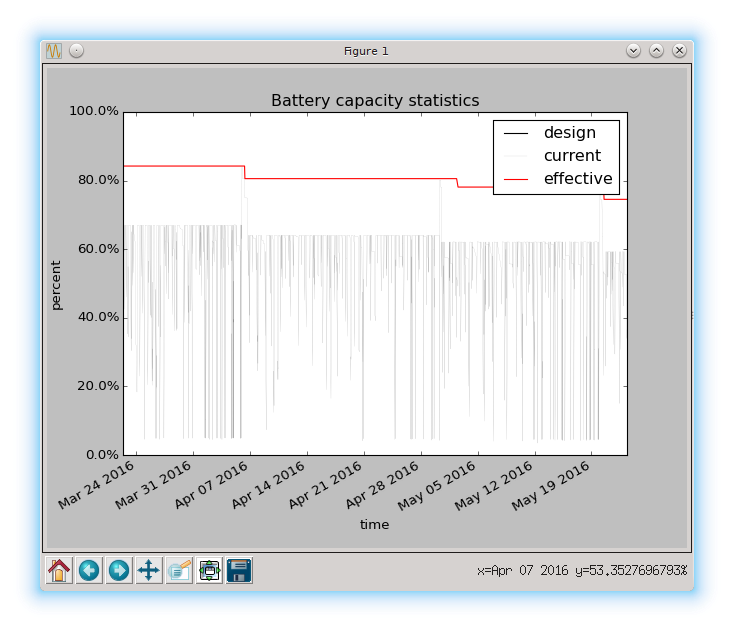
In this graph you can see that I only charge the battery to 80 percent of last full capacity, and how the capacity of the battery is shrinking. :( The last new feature is in the collector, which now will handle more hardware models. On some hardware, Linux power supply information is stored in /sys/class/power_supply/ACAD/, while the collector previously only looked in /sys/class/power_supply/AC/. Now both are checked to figure if there is power connected to the machine. If you are interested in how your laptop battery is doing, please check out the battery-stats in Debian unstable, or rebuild it on Jessie to get it working on Debian stable. :) The upstream source is available from github. Patches are very welcome. As usual, if you use Bitcoin and want to show your support of my activities, please send Bitcoin donations to my address 15oWEoG9dUPovwmUL9KWAnYRtNJEkP1u1b.

21 May 2016

Petter Reinholdtsen: French edition of Lawrence Lessigs book Cultura Libre on Amazon and Barnes & Noble

A few weeks ago the French paperback edition of Lawrence Lessigs 2004 book Cultura Libre was published. Today I noticed that the book is now available from book stores. You can now buy it from Amazon ($19.99), Barnes & Noble ($?) and as always from Lulu.com ($19.99). The revenue is donated to the Creative Commons project. If you buy from Lulu.com, they currently get $10.59, while if you buy from one of the book stores most of the revenue go to the book store and the Creative Commons project get much (not sure how much less). I was a bit surprised to discover that there is a kindle edition sold by Amazon Digital Services LLC on Amazon. Not quite sure how that edition was created, but if you want to download a electronic edition (PDF, EPUB, Mobi) generated from the same files used to create the paperback edition, they are available from github.

19 May 2016

Petter Reinholdtsen: I want the courts to be involved before the police can hijack a news site DNS domain (#domstolkontroll)

I just donated to the NUUG defence "fond" to fund the effort in Norway to get the seizure of the news site popcorn-time.no tested in court. I hope everyone that agree with me will do the same. Would you be worried if you knew the police in your country could hijack DNS domains of news sites covering free software system without talking to a judge first? I am. What if the free software system combined search engine lookups, bittorrent downloads and video playout and was called Popcorn Time? Would that affect your view? It still make me worried. In March 2016, the Norwegian police seized (as in forced NORID to change the IP address pointed to by it to one controlled by the police) the DNS domain popcorn-time.no, without any supervision from the courts. I did not know about the web site back then, and assumed the courts had been involved, and was very surprised when I discovered that the police had hijacked the DNS domain without asking a judge for permission first. I was even more surprised when I had a look at the web site content on the Internet Archive, and only found news coverage about Popcorn Time, not any material published without the right holders permissions. The seizure was widely covered in the Norwegian press (see for example Hegnar Online and ITavisen and NRK), at first due to the press release sent out by kokrim, but then based on protests from the law professor Olav Torvund and lawyer Jon Wessel-Aas. It even got some coverage on TorrentFreak. I wrote about the case a month ago, when the Norwegian Unix User Group (NUUG), where I am an active member, decided to ask the courts to test this seizure. The request was denied, but NUUG and its co-requestor EFN have not given up, and now they are rallying for support to get the seizure legally challenged. They accept both bank and Bitcoin transfer for those that want to support the request. If you as me believe news sites about free software should not be censored, even if the free software have both legal and illegal applications, and that DNS hijacking should be tested by the courts, I suggest you show your support by donating to NUUG.

15 May 2016

Bits from Debian: What does it mean that ZFS is included in Debian?

Petter Reinholdtsen recently blogged about ZFS availability in Debian. Many people have worked hard on getting ZFS support available in Debian and we would like to thank everyone involved in getting to this point and explain what ZFS in Debian means. The landing of ZFS in the Debian archive was blocked for years due to licensing problems. Finally, the inclusion of ZFS was announced slightly more than a year ago, on April 2015 by the DPL at the time, Lucas Nussbaum who wrote "We received legal advice from Software Freedom Law Center about the inclusion of libdvdcss and ZFS in Debian, which should unblock the situation in both cases and enable us to ship them in Debian soon.". In January this year, the following DPL, Neil McGovern blogged with a lot of more details about the legal situation behind this and summarized it as "TLDR: It s going in contrib, as a source only dkms module." ZFS is not available exactly in Debian, since Debian is only what's included in the "main" section archive. What people really meant here is that ZFS code is now in included in "contrib" and it's available for users using DKMS. Many people also mixed this with Ubuntu now including ZFS. However, Debian and Ubuntu are not doing the same, Ubuntu is shipping directly pre-built kernel modules, something that is considered to be a GPL violation. As the Software Freedom Conservancy wrote "while licensed under an acceptable license for Debian's Free Software Guidelines, also has a default use that can cause licensing problems for downstream Debian users".

12 May 2016

Petter Reinholdtsen: Debian now with ZFS on Linux included

Today, after many years of hard work from many people, ZFS for Linux finally entered Debian. The package status can be seen on the package tracker for zfs-linux. and the team status page. If you want to help out, please join us. The source code is available via git on Alioth. It would also be great if you could help out with the dkms package, as it is an important piece of the puzzle to get ZFS working.

8 May 2016

Petter Reinholdtsen: What is the best multimedia player in Debian?

Where I set out to figure out which multimedia player in Debian claim support for most file formats. A few years ago, I had a look at the media support for Browser plugins in Debian, to get an idea which plugins to include in Debian Edu. I created a script to extract the set of supported MIME types for each plugin, and used this to find out which multimedia browser plugin supported most file formats / media types. The result can still be seen on the Debian wiki, even though it have not been updated for a while. But browser plugins are less relevant these days, so I thought it was time to look at standalone players. A few days ago I was tired of VLC not being listed as a viable player when I wanted to play videos from the Norwegian National Broadcasting Company, and decided to investigate why. The cause is a missing MIME type in the VLC desktop file. In the process I wrote a script to compare the set of MIME types announced in the desktop file and the browser plugin, only to discover that there is quite a large difference between the two for VLC. This discovery made me dig up the script I used to compare browser plugins, and adjust it to compare desktop files instead, to try to figure out which multimedia player in Debian support most file formats. The result can be seen on the Debian Wiki, as a table listing all MIME types supported by one of the packages included in the table, with the package supporting most MIME types being listed first in the table. The best multimedia player in Debian? It is totem, followed by parole, kplayer, mpv, vlc, smplayer mplayer-gui gnome-mpv and kmplayer. Time for the other players to update their announced MIME support?

4 May 2016

Petter Reinholdtsen: The Pyra - handheld computer with Debian preinstalled

A friend of mine made me aware of The Pyra, a handheld computer which will be delivered with Debian preinstalled. I would love to get one of those for my birthday. :) The machine is a complete ARM-based PC with micro HDMI, SATA, USB plugs and many others connectors, and include a full keyboard and a 5" LCD touch screen. The 6000mAh battery is claimed to provide a whole day of battery life time, but I have not seen any independent tests confirming this. The vendor is still collecting preorders, and the last I heard last night was that 22 more orders were needed before production started. As far as I know, this is the first handheld preinstalled with Debian. Please let me know if you know of any others. Is it the first computer being sold with Debian preinstalled?

18 April 2016

Petter Reinholdtsen: NUUG contests Norwegian police DNS seizure of popcorn-time.no

It is days like today I am really happy to be a member of the Norwegian Unix User group, a member association for those of us believing in free software, open standards and unix-like operating systems. NUUG announced today it will try to bring the seizure of the DNS domain popcorn-time.no as unlawful, to stand up for the principle that writing about a controversial topic is not infringing copyrights, and censuring web pages by hijacking DNS domain should be decided by the courts, not the police. The DNS domain was seized by the Norwegian National Authority for Investigation and Prosecution of Economic and Environmental Crime a month ago. I hope this bring more paying members to NUUG to give the association the financial muscle needed to bring this case as far as it must go to stop this kind of DNS hijacking.

13 April 2016

Petter Reinholdtsen: I.F. Stone - an inspiration for us all

I first got to know I.F. Stone when I came across an article by Jon Schwarz on The Intercept about his extraordinary contribution to investigative journalism in USA. The article is about a new documentary in two parts (part one is 12 minutes and part two is 30 minutes), and I found both truly fascinating. It is amazing what he was able to find by digging up public sources and government papers. He documented lots of government abuse and cover ups, and I find his weekly news letters inspiring to read even today.
All governments are run by liars and nothing they say should be believed.
- I. F. Stone
His starting point was that reporters should not assume governments and corporations are telling the truth, but verify all their claims as much as possible. I wonder how many Norwegian reporters can be said to follow the principles of I. F. Stone. They are definitely in short supply. If you, like me half a year ago, have never heard of him, check him out.

12 April 2016

Petter Reinholdtsen: A French paperback edition of the book Free Culture by Lawrence Lessig is now available

I'm happy to report that the French paperback edition of my project to translate the Free Culture book by Lawrence Lessig is now available for sale on Lulu.com. Once I have formally verified my proof reading copy, which should be in the mail, the paperback edition should be available in book stores like Amazon and Barnes & Noble too. This French edition, Culture Libre, is the work of the dblatex developer Beno t Guillon, who created the PO file from the initial translation available from the Wikilivres wiki pages and completed and corrected the translation to match the original docbook edition my project is using, as well as coordinated the proof reading of the final result. I believe the end result look great, but I am biased and do not read French. In addition to the paperback edition, the book is available in PDF, EPUB and Mobi format from the github project page linked to above. When enabling book store distribution on Lulu.com, I had to nearly triple the price to allow the book stores some profit. I also had to accept that I will get some revenue when a book is sold via Lulu.com. But because of the non-commercial clause in the book license (CC-BY-NC), this might be a problem. To bypass the problem I discussed how to handle the revenue with the author, and we agreed that the revenue for these editions go to the Creative Commons non-profit Corporation who handle donations to the Creative Commons project. So far they have earned around USD 70 on sales of the English and Norwegian Bokm l editions, according to Lulu.com. They will get the revenue for the French edition too. Their revenue is higher if you buy the book directly from Lulu.com instead of via a book store, so I recommend you buy directly from Lulu.com. Perhaps you would like to get the book published in your language? The translation is done using a web based translator service, so the technical bar to enter is fairly low. Get in touch if you would like to make this happen.

10 April 2016

Petter Reinholdtsen: Lets make a Norwegian Bokm l edition of The Debian Administrator's Handbook

During this weekends bug squashing party and developer gathering, we decided to do our part to make sure there are good books about Debian available in Norwegian Bokm l, and got in touch with the people behind the Debian Administrator's Handbook project to get started. If you want to help out, please start contributing using the hosted weblate project page, and get in touch using the translators mailing list. Please also check out the instructions for contributors. The book is already available on paper in English, French and Japanese, and our goal is to get it available on paper in Norwegian Bokm l too. In addition to the paper edition, there are also EPUB and Mobi versions available. And there are incomplete translations available for many more languages.

Next.

Previous.