Search Results: "ed"

22 May 2014

Martín Ferrari: Yakker, part 4: the client application

This is the fourth post in a series of posts (part 1, part 2, part 3) describing a secure alternative to applications like WhatsApp. I started with the following statement:
I believe it is possible to build a system with the simplicity and functionality of WhatsApp or Viber, which provides end-to-end encryption, is built on free software and open protocols, that supports federation and is almost decentralised, and that would allow interested companies to turn a profit without compromising any of these principles.
Now that most of the infrastructure has been described, in this post I will talk about the user-visible part: a mobile SIP client specially tailored for this architecture.

Features For Yakker to be successful, an application that is visually attractive and simple to use, while providing excellent call quality and stability, is critical. This idea is useless if only geeks adopt it: I want my parents to use it, I want my non-techie friends to use it. I want to tell them to switch from any of the other applications, not only because it is more secure, open and community-based, but also because it is better. For Android, there is already some excellent free applications that could be used as a starting point: Lumicall, CSipSimple and Linphone. I haven't tried it yet, but Linphone has a port to iOS too. Apart from the quality considerations, the following features must be added:
  • Certificate creation and proper storage in the mobile device.
  • An account creation wizard that interacts with the directory service and the account providers. Lumicall currently does something like this already, but only for their own ENUM and SIP server only.
  • Proper DNSSEC validating resolver to securely get the callee's certificate and ENUM record.
  • Optionally, use the directory service API to query records instead of DNS, to enhance privacy.
  • Periodic verification of the user's own ENUM and certificate records in DNS.
  • Use of those certificates to set up the SRTP stream, instead of unauthenticated encryption. Text messages must be encrypted in the same way, but included in the SIP message. SIPs encryption is not enough, as the proxies and service providers can read them.
  • Integration with the system's address book.
  • ENUM lookup, and SIP SRV lookup to detect phones with an associated SIP account.
  • When the called party does not have a SIP account, the client must offer to call using the PSTN gateway at service provider, if it provides one, and to call using the GSM network. It needs to be fast and reliable, so people can use it as the default texting and calling application.
  • Provide an interface to query account's balance, calling rates, and to buy credit. Possibly, offer this by opening a web browser, but negotiating authentication first, so the user does not need to enter an user name or password.
  • Capabilities to migrate to a different service provider.
  • A secure way to share the key pair with another trusted device.
  • A way to import a key pair created by the user manually.
I am probably missing a bunch of other capabilities that need to be implemented. It is a lot of work. Some of these features would only be useful for participants of the Yakker network, but there are others that could be useful for every SIP user, and therefore, implemented first. For example, SIP accounts that are not associated with a phone number could publish certificates under the same domain, and have the client use them to have secure communications with legacy infrastructure.

Funding I am aware that this amount of work is not going to happen overnight. In fact, without a bunch of people from the community interested in the project, it is never going to happen. The good news is that I think that companies might be interested in investing in this. A company could create their own branded version of the client, and use advertisements or service provider preference (the provider the user gets unless they choose one manually) to generate income. As long as the code remains free, and the client is compatible with the whole system, there could many competing clients out there. Their own promotion schemes would work for the benefit of the whole system, by bringing more users.

Risks The biggest threat would be of one client monopolising the network, and then changing the protocols to make the system a walled garden. It has already happened with GTalk, so there is precedent for this. I don't think there is any way to stop a big company from doing this, but one strategy to mitigate the risk a bit would be to create a brand (Yakker or whatever this ends up being called) and have it managed by a trusted community organisation, which can revoke the right to use the brand when a party is not behaving.

Ean Schuessler: Roboneck gets a nod

All the motors start talking to Blender through ROS. Some interesting shaky behavior and a few issues with inverse kinematics are revealed.
http://youtu.be/3vcycClGDso

Steve Kemp: So firefox is dead to me now, sadly.

I've somehow managed to break firefox:
Random downloads fail
They appear in the download manager with "failed" next to them. Copying and pasting the URL and fetching via wget works.
Random extensions fail to install.
"Ghostery could not be installed because firefox cannot modify the needed file".
Moving ~/.cache/mozilla and ~/.mozilla out of the way don't help. Installing "tree style tabs" fails with no particular error. The actual error reads "The extension couldn't be installed because firefox couldn't modify the needed file". Googling didn't help, because it says "Create a new profile", which doesn't help, or "Disable extensions", which doesn't apply since none are present in the new profile. Running strace doesn't reveal any obvious EACCES, EPERM, or ENOENT errors so I'm struggling to spot an obvious problem. Downloading a binary firefox to /opt/firefox fails in the same way. Logging out of my desktop fails to make any difference. Annoying. The only thing I can say is:
shelob ~ $ dpkg --list   egrep '(xul icewea)'
ii  iceweasel     29.0.1-1~bpo70+1    ...
ii  xulrunner-29  29.0.1-1~bpo70+1    ...
For the moment I'm hating the use of chromium, but it will suffice until I can try to dig deeper.

21 May 2014

Russell Coker: Why I Use BTRFS

I ve just had to do yet another backup/format/restore operation on my workstation due to a BTRFS corruption problem, but as usual I didn t lose any data. The BTRFS data integrity features work reasonably well even when the filesystem gets into a state where the kernel will only accept a read-only mount. Given that the BTRFS tag on my blog is mostly about problems with BTRFS I think it s time that I explain why I use it in spite of the problems before people start to worry about my sanity or competence. The first thing to note is that BTRFS is fairly resiliant toward errors when mounted in read-only mode. When mounting a filesystem read-write there are a number of ways in which things can break which are often due to kernel code not being able to handle corrupt metadata I don t know how much of this is inherent to the design of BTRFS and how much is simply missing features in filesystem error handling. Some of the errors that I have had weren t entirely the fault of BTRFS, I twice had to do a backup/format/restore of my workstation due to a faulty DIMM corrupting memory (that has the potential to mess up any filesystem), but I still didn t lose any data AFAIK. The next thing to note is that I don t use BTRFS when doing paid sysadmin work. ZFS is a solid and reliable filesystem and it is working really well for my clients while BTRFS has too many issues at the moment. As an aside I m not interested in any comments about the ZFS license situation from anyone who s not officially representing Oracle. I also don t use BTRFS on systems that I can t access easily. The servers I have running BTRFS are all within an hour s drive from home, while driving for an hour on account of a kernel or filesystem error is really annoying it s not as bad as dealing with a remote server where I have no direct access. Reasons to Use BTRFS The benefits of BTRFS right now are snapshots (which are good for a first-line backup) and the basic data integrity features. I ve found these features to work well in real use. According to the comparison of Filesystems Wikipedia page ZFS and BTRFS are the only general purpose filesystems (IE for disks not tapes, NVRAM, or a cluster) that support checksums for all data and compression. Given that ZFS license issues will never allow it to be included in the Linux kernel tree it seems clear that BTRFS is the next significant filesystem for Linux. More testing of BTRFS is a good thing, while there are a number of known problems that the developers are working on it seems that more testing is needed now to find corner cases. Also we need a lot of testing to find bugs related to interactions with other software. I ve recently filed bug reports against the Debian installer because it can t install to a BTRFS RAID-1 (fortunately BTRFS supports changing to RAID-1 after installation) and because it doesn t support formatting an existing BTRFS filesystem (the mkfs program needs a -f option in that case). I also sent in a patch for the magic database used by file(1) to provide more information on BTRFS filesystems (which is in Debian/testing but not Debian/Wheezy). These are the sorts of things you encounter when routinely using software that you don t necessarily notice in basic testing. As an aside the Debian installation process failed at the GRUB step when I manually balanced a filesystem to use RAID-1 while the Debian installation was in progress. I didn t file a bug report because the best advice is to not mess with filesystems while the installer is running. I ll do a lot more testing of this when the Debian installer supports a BTRFS RAID-1 installation. A final thing that we need to work on is developing sysadmin best practices and scripts for managing BTRFS filesystems. I ve done some work on scripts to create snapshots for online backups but there are issues of managing free space etc. But working out how to best manage a new filesystem is something that takes years because there are many corner cases you may only encounter after a system has been running for a long time. So I really wouldn t want to be in the situation of using a new filesystem on an important server without having practice running it on less important systems, I did that with ZFS and now have a hacky first install that I have to support for years.

20 May 2014

Laura Arjona: Some experiences, and TODO, about fonts

TL;DR I don t know much about fonts, I just use the stock ones that come with my system. From time to time I have issues with docs that others create, and use other fonts. This post is about my plans on learning a bit more and, at least, know how to solve those issues, if it s possible, while staying in the bright side (the free-software / free font side). Long version The context I use Debian, LibreOffice, sometimes Inkscape, and LaTeX. One of my favorite hashtags is #iloveplaintext, I don t know much about design in general, and fonts and typography in particular. I didn t change the fonts in my desktops (only reduced the size in the laptop, to be able to read a bit more in my low resolution screen), I rarely change the font in Writer (maybe from Liberation Serif to Liberation Sans), I never changed the font in a LaTeX document or LaTeX beamer presentation (I write boring documents, I know) and when I paste from the web, it s usually because I want to read a long article so I paste as plain text in gedit and print it or save it. So I ve never felt to learn more about fonts, it just works, and covers my needs, (or not, but I mostly could live with the issues). Then a friend in the Pump.io network, Adri n Perales, published a blog post about Typography (in Spanish) that I liked very much, and I began to think (and remember) some of the issues that I have from time to time with fonts. Issue #1: League Gothic: a free font that was not installed in my system Today, again in the Pump.io network, I discover that the FSF published a poster Privacy is impossible without free software , in SVG format, but it didn t look well when I opened it with GIMP, clearly due to some missing font. Nice that SVG format is a plain text format (XML)! So I opened the file with gedit and searched for the text string whose font was missing. It was League Gothic font, of course a free software font, but not packaged in Debian, it seems. No problem. I downloaded the font, copied the files in /usr/share/fonts and problem solved. Issue #2: Book Antiqua: a non-free font (must find equivalent) A document made with Microsoft Word that one friend sends to me so I review and resend (in PDF format) to other people. It s a leaflet, and it has text in Arial, in Tahoma, and in Book Antiqua. When I open it with LibreOffice the aspect is wrong (the substitutes are not the same size so some breaking lines and so). Book Antiqua is not free. I learned that it s an imitation of the Palatino font, and that a similar font in the free software systems is URW Palladio . In Writer (LibreOffice), I went to Tools > Options > Fonts and declared the equivalence of the two fonts, so the program would use URW Palladio as a substitute of Book Antiqua. I opened again the document and it was quite better, very similar to the original aspect. I didn t bother in changing the text in Arial or Tahoma, since the substitutes that LibreOffice used were quite good. But I bookmarked this page: A Web Designer Guide to Linux Fonts for remembering the different fonts that I can try to emulate the Windows ones. I also know that I can install the Microsoft Core Fonts for the web since they are packaged for Debian in the contrib archive. But I ll try to survive without them for now (until now, I didn t bother, why should I now that I have the substituting guide?). In other news, I got impressed that MS Core Fonts is #4 in Most downloads all over the time in SourceForge, with more than 450 million downloads \o/ Issue #3: Installing a new free font in Debian So I decided to install one of the fonts that Adri n Perales recommended in his blog post, Linux Libertine . Since it is packaged for Debian, it s super easy:
# apt-get install ttf-linux-libertine
(my LibreOffice was opened, so I closed it and opened again, and the font was there ready for use). Issue #4: Use a different font in LaTeX Well, as always, there is not one but many ways to do that in LaTeX. My intuition tells me that if there is a LaTeX package for the font that I want to use, it s probably a nice idea to just use it. So I searched about Linux Libertine in LaTeX and yes, there is a package (and you can find a very interesting font guide in The LaTeX font catalogue ). I installed the package texlive-fonts-extra, and then, I added two lines in my LaTeX document:
\usepackage libertine 
\usepackage[T1] fontenc 
Compiled, and the resultant PDF was using Libertine font instead of Computer Modern. TODO (and/or wishlist) When opening a document that uses a font not present in my system, I maybe wouldn t notice that a font is missing and I see a substitute (and maybe not the best one)!. It would be nice that the program tells the user This file uses the font X, and it seems it s not in your system. I ll use font Y as a substitute . I m not sure if there is a standard way to know which package contains a certain font. I use a web search engine to try to find out, and the websites that I linked in the article. I have to investigate and learn a bit more about free fonts equivalents to the ones that other people use, and fonts in general, so my documents are more beautiful and people gets interested to know about the tools that I use to produce them. Well, I ve written a long blog post (thanks if you read until here!), solved some issues, and try some things, but not even capturing a snapshot to show here! It seems that I m still lazy, forgive me I hope at least this #plaintext is useful for you :)
Filed under: My experiences and opinion, Uncategorized Tagged: Debian, English, Fonts, Free Software, LaTeX, libre software, LibreOffice, Moving into free software, pump.io

Ean Schuessler: Working out the robot arm

We continue to make progress on the robot arm rig, connecting a Blender IK powered bone rig to dynamixel motors controlled through ROS. The blend file is available at the Hanson Robotics GitHub site here: https://github.com/hansonrobotics/neck-rig

Daniel Pocock: Ganglia welcomes Google Summer of Code students for 2014

Ganglia has been granted funding for five students in the 2014 Google Summer of Code The names of the students chosen for the program were announced on 21 April and the official coding period has started this week. The students are:
Project Student
Data science Plamen Dimitrov
NVIDIA GPU monitoring Md Ali Ahsan Rana
Ganglia/Nagios integration Chandrika Parimoo
JMXetric Ng Zhi An
Internal Ganglia metrics Oliver Hamm
and the mentoring team consists of Rajat Phull, Bernard Li, Nick Satterly, Robert Kovacs and Daniel Pocock. The whole Ganglia community congratulates the students on their selection for GSoC this year and is very excited about working with them. We would also like to thank O'Reilly for generously providing the GSoC students with copies of the book Monitoring with Ganglia If any other member of the community would like to assist formally or informally in the mentoring program, testing any of the projects or anything else please just get in touch with us through the Ganglia developers mailing list or #ganglia on freenode

19 May 2014

Martín Ferrari: Yakker, part 3: the service providers

This is the third post in a series of posts (part 1, part 2) describing a secure alternative to applications like WhatsApp. I started with the following statement:
I believe it is possible to build a system with the simplicity and functionality of WhatsApp or Viber, which provides end-to-end encryption, is built on free software and open protocols, that supports federation and is almost decentralised, and that would allow interested companies to turn a profit without compromising any of these principles.
In this post, I will discuss the SIP service providers, how to enable them to make a profit, while keeping the network open and secure.

Basics Service providers are expected to be third parties, either for-profit or not. PSTN termination would be an optional feature, possibly only offered by for-profit services. The services would consist in just a standard SIP service, with STUN/ICE for NAT traversal, plus an API for getting PSTN termination rates, credit balance, account creation, and for buying credit. All authentication will be performed with public key cryptography, using the data already available in the directory service. The idea would be that companies can make a profit by selling PSTN termination and SMS sending. In this way, users get good rates for calling/texting people who are not part of the network, and free SIP-to-SIP calls don't impose a big load on the service. It is expected that the providers would offer some free calls, to allow the users to test the service. Public providers like Betamax already offer free calls to land lines in many countries. To make this simple for the users, the client application would use the API to provide an unified interface to the service providers, without the need for passwords or a web browser. To support multiple services, the overseeing authority must be in charge of compiling a list of authorised providers, which then the client application would use when creating an account. Provider selection can be made automatically, depending on commercial agreements or user location, and for power users, the option to manually choose a provider should be offered. To ensure control of the providers, they should not be able to control the directory servers used. The client application should be careful in exposing as little private data as possible to them.

Account creation With the components described so far, we can think already of how account creation and first calls would be handled:
  1. The client application creates a public/private key pair.
  2. It requests the directory service to create an account for the public key and the phone number.
  3. The directory service uses an encrypted SMS challenge or other similar mechanism to authenticate the request.
  4. The public key is published, associated with the phone number.
  5. The client app gets a list of service providers, which includes configuration parameters and PSTN rates, and offers the user the chance to select one, or it is automatically selected.
  6. The client app then requests an account creation using the phone number as identification, while authenticating with the published key.
  7. The provider uses DNSSEC to validate the request, and an account is created.
  8. The client then creates an ENUM record in the directory service, associating the phone number with the SIP account.
  9. The client registers with the SIP service, again using the public key to authenticate, and can start making calls right away.
  10. When the user wants to make a non-free call, the application can offer to buy credit, or use the GSM network.

How is this different As you can see, there is not much difference with the current status. In fact, I would expect that traditional VoIP providers could become part of this network without much additional cost. The big differences are:
  • Authentication is delegated to the directory service.
  • The provider API, wich handles all administrative tasks, usually offered by web applications.
  • Account creation is 100% automated and immediate.
  • The provider must offer federated SIP service, and use encryption for all SIP transactions.
  • PSTN termination would ideally accept encrypted RTP streams, but that's probably too much to ask.

What's next In the next post I will describe what's possibly the most challenging part of this project: the client application.

Russell Coker: My First Ingress Anomaly

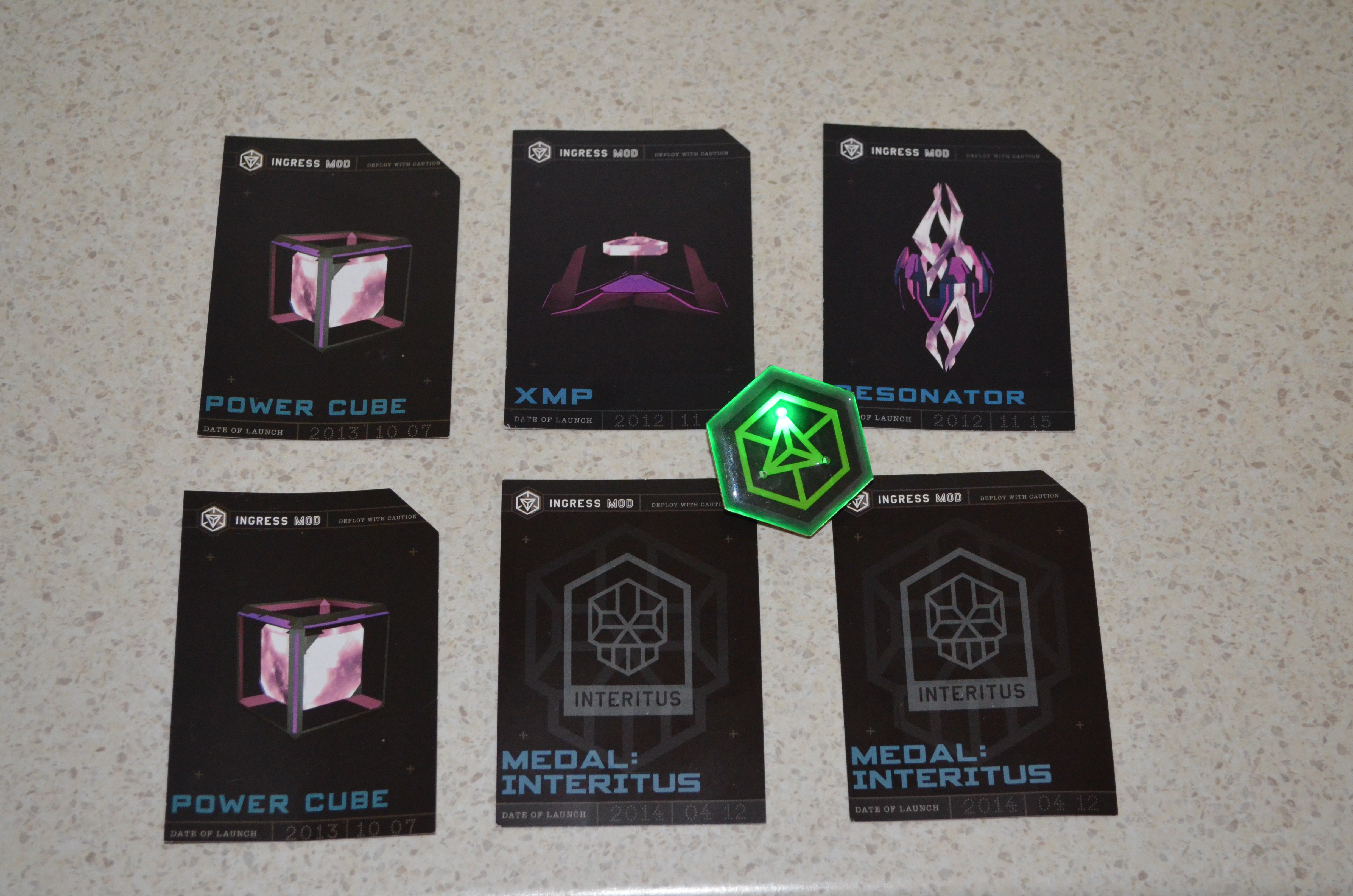
schwag from Ingress Anomaly Ingress is an Android phone game developed by Google where you have to go to various places to capture portals which are based on landmarks or places of note. There s a sci-fi back story which I haven t cared much about (my local library has a heap of good sci-fi books I don t have time to read). But if you are interested in low quality sci-fi you can start with the Youtube channel for Ingress [1]. But the best thing to do is to download the Ingress client program from the Google play store if you have an Android phone [2]. Periodically they have special events in the game called Anomalies , which usually involve many people competing to capture a small number of special portals. Usually a portal is fairly easy to capture so a high level player can easily capture a portal in at most a few minutes, but when there is a large group of players defending a portal by replacing the resonators as quickly as they are destroyed it becomes more challenging. I m not going to try to explain this properly as I presume that readers either already know or don t care. The Wikipedia page about Ingress has more information. On Saturday there was an Anomaly where the main city was Melbourne. My team (Enlightened) won the event in Australia but apparently the event in the US at the same time was won by the other team (Resistance). I had hoped that our event would be similar to some of the ones I ve seen on the Ingress Report (a fictional news service on youtube) in which actors from the sci-fi videos about Ingress attended. But unfortunately it seems that the actors stay in the US. Every player who was registered for the anomaly received a gift pack that contained three cards and a badge. The picture above shows the cards that my wife and I received along with one of our badges. The badges are green for Enlightened and blue for Resistance (the in-game colors) and have three flashing LEDs the photo has one of the LEDs lit up. The three cards have passcodes which can be redeemed for in-game items, the XMP, Power Cubes, and Resonators weren t that useful (10 not particularly rare items that I could get through 10 minutes of game playing). The Medal cards are for in-game badges showing the anomalies that we have played at, but they are bronze badges which again aren t much use as nothing less than silver will help in leveling up. Overall it was a good experience, we won, had a good after-party (with free snacks and one free drink per person), and the badges are nice. I recommend attending if there s an event in your area, and note that you don t need to be a high level player to attend, even L6 players were able to contribute.

Matthew Garrett: The desktop and the developer

I was at the OpenStack Summit this week. The overwhelming majority of OpenStack deployments are Linux-based, yet the most popular laptop vendor (by a long way) at the conference was Apple. People are writing code with the intention of deploying it on Linux, but they're doing so under an entirely different OS.

But what's really interesting is the tools they're using to do so. When I looked over people's shoulders, I saw terminals and a web browser. They're not using Macs because their development tools require them, they're using Macs because of what else they get - an aesthetically pleasing OS, iTunes and what's easily the best trackpad hardware/driver combination on the market. These are people who work on the same laptop that they use at home. They'll use it when they're commuting, either for playing videos or for getting a head start so they can leave early. They use an Apple because they don't want to use different hardware for work and pleasure.

The developers I was surrounded by aren't the same developers you'd find at a technical conference 10 years ago. They grew up in an era that's become increasingly focused on user experience, and the idea of migrating to Linux because it's more tweakable is no longer appealing. People who spend their working day making use of free software (and in many cases even contributing or maintaining free software) won't run a free software OS because doing so would require them to compromise on things that they care about. Linux would give them the same terminals and web browser, but Linux's poorer multitouch handling is enough on its own to disrupt their workflow. Moving to Linux would slow them down.

But even if we fixed all those things, why would somebody migrate? The best we'd be offering is a comparable experience with the added freedom to modify more of their software. We can probably assume that this isn't a hugely compelling advantage, because otherwise it'd probably be enough to overcome some of the functional disparity. Perhaps we need to be looking at this differently.

When we've been talking about developer experience we've tended to talk about the experience of people who are writing software targeted at our desktops, not people who are incidentally using Linux to do their development. These people don't need better API documentation. They don't need a nicer IDE. They need a desktop environment that gives them access to the services that they use on a daily basis. Right now if someone opens an issue against one of their bugs, they'll get an email. They'll have to click through that in order to get to a webpage that lets them indicate that they've accepted the bug. If they know that the bug's already fixed in another branch, they'll probably need to switch to github in order to find the commit that contains the bug number that fixed it, switch back to their issue tracker and then paste that in and mark it as a duplicate. It's tedious. It's annoying. It's distracting.

If the desktop had built-in awareness of the issue tracker then they could be presented with relevant information and options without having to click through two separate applications. If git commits were locally indexed, the developer could find the relevant commit without having to move back to a web browser or open a new terminal to find the local checkout. A simple task that currently involves multiple context switches could be made significantly faster.

That's a simple example. The problem goes deeper. The use of web services for managing various parts of the development process removes the need for companies to maintain their own infrastructure, but in the process it tends to force developers to bounce between multiple websites that have different UIs and no straightforward means of sharing information. Time is lost to this. It makes developers unhappy.

A combination of improved desktop polish and spending effort on optimising developer workflows would stand a real chance of luring these developers away from OS X with the promise that they'd spend less time fighting web browsers, leaving them more time to get on with development. It would also help differentiate Linux from proprietary alternatives - Apple and Microsoft may spend significant amounts of effort on improving developer tooling, but they're mostly doing so for developers who are targeting their platforms. A desktop environment that made it easier to perform generic development would be a unique selling point.

I spoke to various people about this during the Summit, and it was heartening to hear that there are people who are already thinking about this and hoping to improve things. I'm looking forward to that, but I also hope that there'll be wider interest in figuring out how we can make things easier for developers without compromising other users. It seems like an interesting challenge.

comment count unavailable comments

18 May 2014

Benjamin Mako Hill: Installing GNU/Linux on a 2014 Lenovo Thinkpad X1 Carbon

I recently bought a new Lenovo X1 Carbon. It is the new second-generation, type 20A7 laptop, based on Intel s Haswell microarchiteture with the adaptive keyboard. It is the version released in 2014. I also ordered the Thinkpad OneLink Dock which I have returned for the OneLink Pro Dock which I have not yet received. The system is still very new, challenging, and different, but seems to support GNU/Linux reasonably well if you are willing to run a bleeding edge version and/or patch your kernel and if you are not afraid to spend an afternoon or two tweaking things. What follows are my installation notes for Debian testing (jessie) when I installed it in early May 2014. My general impressions about the laptop as a GNU/Linux system and overall are at the end of this write-up.
System Description The X1 Carbon I ordered included the 512GB SSD, the 14.0 inch WQHD (2560 1440) 260 nit touchscreen, and the maximum 8GB of memory. I believe the rest is not particularly negotiable but includes a 720p HD Camera, a 45.2Wh battery, and an Intel Dual Band Wireless 7260AC with Bluetooth 4.0. For those that are curious Here is the output of lspci on the system:
00:00.0 Host bridge: Intel Corporation Haswell-ULT DRAM Controller (rev 0b)
00:02.0 VGA compatible controller: Intel Corporation Haswell-ULT Integrated Graphics Controller (rev 0b)
00:03.0 Audio device: Intel Corporation Haswell-ULT HD Audio Controller (rev 0b)
00:14.0 USB controller: Intel Corporation Lynx Point-LP USB xHCI HC (rev 04)
00:16.0 Communication controller: Intel Corporation Lynx Point-LP HECI #0 (rev 04)
00:16.3 Serial controller: Intel Corporation Lynx Point-LP HECI KT (rev 04)
00:19.0 Ethernet controller: Intel Corporation Ethernet Connection I218-LM (rev 04)
00:1b.0 Audio device: Intel Corporation Lynx Point-LP HD Audio Controller (rev 04)
00:1c.0 PCI bridge: Intel Corporation Lynx Point-LP PCI Express Root Port 6 (rev e4)
00:1c.1 PCI bridge: Intel Corporation Lynx Point-LP PCI Express Root Port 3 (rev e4)
00:1d.0 USB controller: Intel Corporation Lynx Point-LP USB EHCI #1 (rev 04)
00:1f.0 ISA bridge: Intel Corporation Lynx Point-LP LPC Controller (rev 04)
00:1f.2 SATA controller: Intel Corporation Lynx Point-LP SATA Controller 1 [AHCI mode] (rev 04)
00:1f.3 SMBus: Intel Corporation Lynx Point-LP SMBus Controller (rev 04)
BIOS/Firmware The BIOS firmware is non-free and proprietary as it the case with all ThinkPads and nearly all laptops. According to this thread there is a bug in the default BIOS that means that suspend to RAM is broken in GNU/Linux. You can get updated BIOS at the Lenovo s ThinkPad X1 Carbon (Type 20A7, 20A8) Drivers and software page by looking in the the BIOS section. Honestly, the easiest approach is probably to download the Windows BIOS Update utility (documentation is here) which you can use to run the BIOS update from within Windows before you install GNU/Linux. If that s not an option (e.g., if you ve already installed GNU/Linux) the best method is to download the bootable CD ISO from the same page. Of course, since the X1 Carbon has no optical media, you have to find another way to boot the CD image. I struggled to get the ISO to boot from USB using the usually reliable dd method. This message suggest that the issue had to do with the El Torito wrapper:
I had to dump the eltorito image from the ISO they provide, after that I was able to dd the resulting image to a flash drive and the bios update went well, no cdrom needed.
I updated to version 1.13 of the BIOS which fixes the suspend/resume bug. By the time you read this, there may be newer versions that fix other things so check the Lenovo website.
Installing Debian I installed Debian testing using the March 19, 2014 Alpha 1 release of the Debian Installer for Jessie (currently testing). I installed in graphical mode. With the WQHD screen, everything was extremely tiny but it worked flawlessly. I downloaded the amd64 net install image from the normal place and installed the rest of the system using the built-in Ethernet port which required no firmware or extra drivers. I did the normal dd if=FILENAME.iso of=/dev/sdX method of getting the installer onto the a USB stick to boot. I turned off restricted boot in BIOS first. In general, the latest version of the Debian installation guide is always a good source of guidance on installing Debian. I used the Debian installer wizard to partition and selected Use entire disk and partition it for LVM and encrypted data which kept the UEFI partitions around. The system installed with no errors or issues and booted up normally afterward. The grub menu is hilariously narrow on the WQHD screen. If you want to use the built-in wireless and/or Bluetooth, you will need to install the non-free iwlwifi firmware package. It is very lame that we still have to do this to use hardware we have purchased.
What Works and Doesn t The following stuff works the first time I booted into the GNOME 3 desktop and logged in:
  • The WQHD 2560 1440 screen
  • The touchscreen
  • Both the TrackPoint and the touchpad
  • Built-in e1000e Ethernet using the dongle
  • The keyboard plus the adaptive row of F1-F12 keys.
  • External monitor using the full HDMI or mini-DisplayPort connectors
  • Audio (both speakers and microphone)
  • The camera/webcam
The following stuff works if you install non-free firmware:
  • Internal Wireless
  • Bluetooth 4.0
The following stuff works with qualifications:
  • Suspend to RAM Works once you have updated the firmware.
  • The adaptive keyboard The F1-F12 keys work but the button that theoretically lets you switch to different sets of function buttons (e.g., volume, brightness) does nothing.
  • Disabling the touchpad There is a BIOS option to disable the touchpad. It works in Windows and does nothing at all in GNU/Linux.
I have not tried:
  • The fingerprint reader
Disabling the touchpad As a long-term ThinkPad user, I love the TrackPoint pointing stick. If you plan on using this, the built-in touchpad is incredibly aggravating because it is very easy to brush against it while using the TrackPoint. In BIOS, there is an option to disable the touchpad. Although this works in Windows, it does absolutely nothing in GNU/Linux. Part of the issue is that, unlike the older X1 Carbon and other ThinkPads, there are no TrackPoint buttons. Instead of buttons, there are regions at the top of the touchpad which are configured, in software, to act like buttons. If you want to be able to click, the touchpad can never be truly turned off. This is not problem unique to the Haswell X1 Carbon and a number of people have been struggling with this issue on other Lenovo laptops. Essentially, what you need to do is configure your touchpad so that the buttons are where you want them and so that it ignores any input for the purposes of cursor movement. There are a few ways of doing this but this answer from an askubuntu.com question has the solution I ended up using:

Open file /usr/share/X11/xorg.conf.d/50-synaptics.conf for edit.

Find Section InputClass which the following line is Identifier Default clickpad buttons .

Edit option for SoftButtonAreas to values 64% 0 1 42% 36% 64% 1 42%, this is size of the right and middle button.

Enable option AreaBottomEdge and change value to 1, this will disable touchpad movement.

If everything done right, your class should looks like:

Section "InputClass"
     Identifier "Default clickpad buttons"
     MatchDriver "synaptics"
     Option "SoftButtonAreas" "64% 0 1 42% 36% 64% 1 42%"
     Option "AreaBottomEdge" "1"
EndSection
Essentially, the first Option line will create a middle button that is 32% of the width and 42% of the height, and a right button that is 32% of the width and 42% of the height. The synaptics manpage (man synpatics) will give you more detail on the general way this works. Of course, something does feel very wrong about editing a file in /usr/share.
Fixing the Adaptive Keyboard The most wild feature of the laptop is the adaptive keyboard strip. The strip is a back-lit LCD that looks almost like E Ink screen and acts as a touchscreen keyboard. The default mode gives you the F1-F12 keys. If you press the keys (since they aren t buttons, you just put your finger on top of them) they act like normal F-keys. You can Ctrl-Alt-F1, etc., to switch to virtual terminals out of the box. There are four modes: Function (i.e., normal F-keys), Home, Web, and Chat. The last three overlap quite a bit (e.g., they all have brightness and volume). You can play with an example on the Lenovo homepage. In Windows, switching programs will apparently change these keys so that an appropriate set of buttons is shown for the application you are using. You can also change these keys manually with a big Fn button at the far left of the adaptive keyboard strip. As I write this this, released kernels do not support the adaptive keyboard Fn button which means you cannot use anything other than the F-keys out of the box. I believe it also means that resuming from suspend to RAM breaks these keys. That said, Shuduo Sang from Canonical has released several versions of a patch to to the thinkpad_acpi kernel module which adds support for the Home mode. The other modes (web and chat) do not seem to be supported. The latest version of the patch is on on the Linux Kernel Mailing List and the relevant commits are:
330947b save and restore adaptive keyboard mode for suspend and,resume
3a9d20b support Thinkpad X1 Carbon 2nd generation's adaptive keyboard
Although this is not supported in Debian testing at the time of writing, a bug was filed in Debian and quickly fixed by Ben Hutchings in Debian kernel version 3.14.2-1 which is currently in sid/unstable. As a result, if you install the latest version kernel from Debian unstable (3.14.2-1 or later), the adaptive keyboard just works. If you aren t using Debian and if kernel you are using does not have support, you might be patching your kernel.
General Impressions As I have described in my interview with The Setup, I have been a user of ThinkPad X-series laptops for many years. This is my sixth X-series ThinkPad. Overall, I quite like the hardware! Once things mature a little bit, I think that this will be a great laptop for running GNU/Linux. That said, I ordered the laptop without realizing that the X1 Carbon had gone through a major revision! The keyboard was quite a suprise. I think that changing a system so radically without changing the model name/number is a very bad move on Lenovo s part. There are two remaining issues with the system I m still struggling with: (1) the keyboard layout is freaky and weird, and (2) the super high resolution screen breaks many things. The quality of the keyboard itself is great and worthy of the ThinkPad name. That said, there are two ways in which it is strange. The first is the adaptive keyboard strip. Overall, it works surprisingly well and I think it is a clever idea. My sense is that the strip is more annoying in Windows because it changes out from under you all the time. In GNU/Linux, only manual changing of modes is supported. This, in my opinion, is a feature. I do miss the real feedback you get from pressing keys but for F-keys and volume-keys that I don t use often this isn t too important. On the downside, I have realized several times that I had been holding down a button for several seconds and not noticed. The more annoying issue with the keyboard is the way that the other keys have moved around. Getting rid of the CapsLock is wonderful! How has this taken so long? Replacing it with a split Home and End keys is nuts. I ve remapped the Home and End to put Control back where it should be. My right Control to now Home but I still don t have an End key. The split Backspace and Delete is not a problem for me. The tilde/apostrophe is in a very bad place. There is no Insert, Print Screen/SysRq, Scroll Lock, Pause/Break or NumLock. They are all just gone. Surprisingly, I haven t missed any of them. The second issue is the 2560 1440 resolution on the 14 inch screen. I use a 27 inch external monitor with the same native resolution laptop but, by my arithmetic, the pixel density on the laptop is 210 DPI instead 109 DPI on the external monitor. The result is the scaling problem and it s a huge pain that seems mostly unsolved on any operating system. Fonts and widgets that look good on the laptop look huge on my external monitor. Stuff that looks good on my external monitor looks minuscule on the laptop. I routinely move windows between my laptop screen and my large monitor. Until I find a display system that can handle this kind of scaling effectively, this requires changing font size and zooming all the time. At the moment, I m shrinking and expanding my font size using the built in hot keys in Emacs, Gnome Terminal, and Firefox/Iceweasel. I love the high resolution screen but the current situation is crazy-making. Finally, this setup will not get you into the Church of Emacs and it s not about to find its way onto the FSF s list of endorsed hardware. For one, I paid the Windows tax. Beyond that, there is the non-free BIOS and the need for non-free firmware to use the wireless and Bluetooth. This is standard for ThinkPads but it isn t getting any easier to swallow. There are alternatives in the form of Gluglug s X60 laptops running CoreBoot, Lemote Yeelong laptops, Bunnie Huang s Novena and others that are better in these regards. I am very excited for these projects but, for a number of reasons, these just weren t an option for the laptop I use for my research computing.

Daniel Pocock: London free VoIP user group this Tuesday

A new user group for free and open VoIP and RTC is getting together in London. The first meeting is this Tuesday, 20 May at a central London location. Free RTC mailing list Please feel free to join the Free RTC mailing list (kindly sponsored by FSF Europe) if you would like to find out more about the emergence of free software based RTC solutions.

17 May 2014

Gunnar Wolf: Guest class: Jose Juan "Kaz" Casimiro ( @brit_kazito ) dissects the Ext4 filesystem module

Yesterday night, we had the opportunity to have for the first time my friend Kaz as a guest in my Operating Systems class. We are about to finish the semester, and he took the opportunity not just to show how the Ext4 filesystem is structured, but how it is implemented in a current Linux release. Kaz took a very different approach from what I do: He did it really hands-on, starting with the explanation on how a hello world module would be created, and then digging in following the code of the ext4 module in Linux 3.14 (and some bits in the general filesystem-related includes). Of course, for a ~2hr session, he did not go into the full details, but did show where the main structures of a filesystem are defined, including a general walkthrough on the general kernel coding style. The class was very enjoyable and clear. We had the bad luck of the projector's lamp burning out at the beginning of the class, but still, you can see in the pictures the students were really into his exposition. I think the exposition did make it through and got the students involved and interested And that makes it really worth it! Now... Sadly, due to a (most probably) human factor, I tried to record this talk but lost most of it :-( I have only the first part, but lost most of the second one. I have some bits recorded by a second camera, but have to check if they make sense by themselves, or do need the whole context. Anyway, I'll be reviewing those bits, and will update this post when I get around to cleaning+fixing+integrating them. Some more photos...

AttachmentSize
Video of the first part of Kaz's class26.26 MB
Kaz's slides for the ext4 module40.72 KB

Gunnar Wolf: Guest class: C sar Y ez (@caesarcomptus) talks about virtual memory

Shame on me... I should have uploaded this video a long time ago. I wanted to edit this video to remove pauses, add some in-band indications on who and what it is, and stuff... But after a month, I have not yet got around to do it. On April 23, I invited C sar Y ez to present a talk on virtual memory management to my students (for the Operating Systems class). As always (this is the third time I invite him The previous iteration was on process scheduling, and is on my site as well), he gave a great class. I still have some pending videos to upload from the other guests we had this semester, they should come shortly.
AttachmentSize
Video Part 130.43 MB
Video Part 279.23 MB

Richard Hartmann: git-annex corner case: Reviving a dead remote

Quoth joeyh: Note that recent versions of git-annex have a reinit command that makes this much simpler:
git clone /existing/repo.annex
git annex info # to refresh your memory about uuid or description of lost repo
git annex reinit uuid description

Old Post: Another half a blog post, half a reminder for my future self. Turns out that pulling an external 3.5" disk off of your nightstand with the help of a tangled USB cable is a surprisingly efficient way to kill a it. On the plus side, this yields instant results and complete success. On the other hand, I kinda lost well over one TiB of personal photographs and other data which I didn't really appreciate a whole lot. Thankfully, all data was annexed and I always maintain at least three copies of all files at all times, so the fix is as easy as getting two new disks and running
badblocks /dev/foo -swo $manufacturer-$model-$(date '+%F--%H-%M-%S-%Z').badblocks-swo # assuming you keep a git repo of this data

followed by partitioning, mkfs etc and
cd /existing/repo.annex
git annex info # not the UUID you need
cd /new/disk
git clone /existing/repo.annex
cd repo.annex
vim .git/config # add the [annex] block and _copy over the UUID of the lost repo_
git annex get # assuming you want a full copy, which I always do for data archival repos
git annex sync

and done. By running git annex get before git annex sync, I managed to avoid (potentially) saving information about missing data; I simply made sure it was all in place before synching again. The second external disk allows me to always get one local disk up to speed and another one off-site. I am able to learn from experience ;)

Thorsten Glaser: Quotes of the day SWB Engrish

Stadtwerke Bonn conduct track works on the third
weekend of May 23-25th on several sections of the
line 61. The orbits of lines 61, 62 and 65 drive from
Friday 23 May to Sunday 25 May not on their usual
line paths. Due the track works a train replacement
service by busses will be established. Please note: The travel time of the shuttle busses
takes longer. It is recommend to adjust the traveling
plan. We apologise for any inconvenience! (Emphasis mine. Inconvenience, such as almost C N>K )

16 May 2014

Christoph Berg: PostgreSQL 9.4 on Debian

Yesterday saw the first beta release of the new PostgreSQL version 9.4. Along with the sources, we uploaded binary packages to Debian experimental and apt.postgresql.org, so there's now packages ready to be tested on Debian wheezy, squeeze, testing/unstable, and Ubuntu trusty, saucy, precise, and lucid. If you are using one of the release distributions of Debian or Ubuntu, add this to your /etc/apt/sources.list.d/pgdg.list to have 9.4 available: deb http://apt.postgresql.org/pub/repos/apt/ codename-pgdg main 9.4 On Debian jessie and sid, install the packages from experimental. Happy testing!

15 May 2014

Alexander Wirt: Some new lists

As requested in #747376 I created the following new debian lists:

DebConf team: Sponsored registration for DebConf14 closes today (Posted by Steve Langasek)

Going to DebConf14!
Remember that if you would like to request sponsorship to attend DebConf14, the deadline for registration is today, Thursday, May 15. To be considered for sponsored attendance, your registration and sponsorship request must be received by the end of the day. For travel sponsorship requests, this includes complete information about the funding amount requested. We will happily approve travel sponsorship requests in the amount of $0, but after today you will not be able to change the amount of travel sponsorship you are requesting! Registrations will still be accepted after today in any of the basic, professional, and corporate categories, but requests for sponsorship will no longer be accepted. To register, please read this page and then fill out the registration form.

Thorsten Glaser: Debian packaging example: PHP5 webapp with dbconfig-common and Apache 2.2/2.4 support

I m holding a Debian packaging workshop for our trainees at work tomorrow, and have prepared a sample package for a simple PHP web application (just a handful of files) with DB connection (PostgreSQL of course), automatic setup via dbconfig-common, and with support for both Apache 2.2 (wheezy, precise) and Apache 2.4 (jessie/sid), configuration-wise. (It is possible to install this without Apache, just it does not configure the webserver then.) Schema updates on software updates are also tested (there is neither Flyway nor Liquibase which are the tools we use at work for this, other than Roland Mas wonderful scripts for FusionForge in Debian, but to my delight I discovered that dbconfig-common can also do this). Comments, suggestions, flames, etc. welcome. I know that this should not be a native package, and will address this tomorrow, but I wanted something that serves as decent example for how to do this easily, Policy conformant and using modern techniques (even those I dislike myself for the sake of simplicity). Permission was granted by the business administration to reproduce this all under a BSD-style licence, so, enjoy sharing! Thanks to Roland Mas, for making FusionForge such a nice project, and Arno T ll for some instant IRC help on the Apache side of this. This is my first time using dbconfig-common, and now, I finally feel I know enough to finish the packaging of Kivitendo which I ve started earlier. Beta testers for that welcome, too. (And next week or so, I ll need this for a Maven thingy. I ll probably opt out on the DB side, there, though. Never did anything with that, either, not being a Java guy. I guess something web to go with tomcat7 anyone got this already?)

Next.

Previous.