Search Results: "ag"

21 October 2013

Julian Andres Klode: python-apt 0.9 released

I released python-apt 0.9. This completely removes support for the old API from the code base (it was disabled for the entirety of 0.8 in Debian, and in Ubuntu since saucy). Highlights:
Filed under: Debian

Petter Reinholdtsen: A Raspberry Pi based batman-adv Mesh network node

The last few days I have been experimenting with the batman-adv mesh technology. I want to gain some experience to see if it will fit the Freedombox project, and together with my neighbors try to build a mesh network around the park where I live. Batman-adv is a layer 2 mesh system ("ethernet" in other words), where the mesh network appear as if all the mesh clients are connected to the same switch. My hardware of choice was the Linksys WRT54GL routers I had lying around, but I've been unable to get them working with batman-adv. So instead, I started playing with a Raspberry Pi, and tried to get it working as a mesh node. My idea is to use it to create a mesh node which function as a switch port, where everything connected to the Raspberry Pi ethernet plug is connected (bridged) to the mesh network. This allow me to hook a wifi base station like the Linksys WRT54GL to the mesh by plugging it into a Raspberry Pi, and allow non-mesh clients to hook up to the mesh. This in turn is useful for Android phones using the Serval Project voip client, allowing every one around the playground to phone and message each other for free. The reason is that Android phones do not see ad-hoc wifi networks (they are filtered away from the GUI view), and can not join the mesh without being rooted. But if they are connected using a normal wifi base station, they can talk to every client on the local network. To get this working, I've created a debian package meshfx-node and a script build-rpi-mesh-node to create the Raspberry Pi boot image. I'm using Debian Jessie (and not Raspbian), to get more control over the packages available. Unfortunately a huge binary blob need to be inserted into the boot image to get it booting, but I'll ignore that for now. Also, as Debian lack support for the CPU features available in the Raspberry Pi, the system do not use the hardware floating point unit. I hope the routing performance isn't affected by the lack of hardware FPU support. To create an image, run the following with a sudo enabled user after inserting the target SD card into the build machine:
% wget -O build-rpi-mesh-node \
    https://raw.github.com/petterreinholdtsen/meshfx-node/master/build-rpi-mesh-node
% sudo bash -x ./build-rpi-mesh-node > build.log 2>&1
% dd if=/root/rpi/rpi_basic_jessie_$(date +%Y%m%d).img of=/dev/mmcblk0 bs=1M
%
Booting with the resulting SD card on a Raspberry PI with a USB wifi card inserted should give you a mesh node. At least it does for me with a the wifi card I am using. The default mesh settings are the ones used by the Oslo mesh project at Hackeriet, as I mentioned in an earlier blog post about this mesh testing. The mesh node was not horribly expensive either. I bought everything over the counter in shops nearby. If I had ordered online from the lowest bidder, the price should be significantly lower:
SupplierModelNOK
TeknikkmagasinetRaspberry Pi model B349.90
TeknikkmagasinetRaspberry Pi type B case99.90
LefdalJensen Air:Link 25150295.-
Clas OhlsonKingston 16 GB SD card199.-
Total cost943.80
Now my mesh network at home consist of one laptop in the basement connected to my production network, one Raspberry Pi node on the 1th floor that can be seen by my neighbor across the park, and one play-node I use to develop the image building script. And some times I hook up my work horse laptop to the mesh to test it. I look forward to figuring out what kind of latency the batman-adv setup will give, and how much packet loss we will experience around the park. :)

Aigars Mahinovs: Moved to Mezzanine

After my server that has hosted my blog for some years had given out its last breath (second motherboard failure), I decited it was time for a change. And not just server change, but also change in the blog engine itself. As I now focus on Python and Django almost exclusively at work, it felt logical to use some kind of Django-based blog or CMS. I tried django-cms and mezzanine and ... Mezzanine is so fast and simple, that I simply stopped looking. After simply following the tutorial and creating a skeleton project, I had a ready-to go site with all the CMS features, incuding a blog. I just had to change a few settings to have the blog module be the home page of the site, change site settings for the title and Google Analytics settings and such and tweak the theme a bit to my liking. This was my first real exposure to a Bootstrap design. I must say - it is very simple to understand and modify if your needs fit within its limits. For example, I wanted to remove the left sidebar and expand the main content block to fill that. All I had to do was to remove the div element with class "left-sidebar span-2" and change the class of the main content part from "span-7" to "span-9". To do that I simply copied the templates/base.html file from mezzanine default templates and modified it. The information from django-debug-toolbar showed me what files were used in rendering the page. But the feature that really got me hooked was the Wordpress import. Using a simple management command I was able to feed into Mezzanine instance the XML export file from Wordpress. It created blog posts, categories, comments, static pages and even redirects from Wordpress permalinks to Mezzanine permalinks. It was not flawless - there were a few issues: After that was done it was a relatively straightforward process of picking up the code and data and deploying it to a Django-friendly hosting service. There is a plenty of good competition out there, most now offer a simple one-click Django installation, so I just created a simple Django skeleton via their web interface and then replace what they generated with my app while keeping their settings as local_settings.py . I should probably write a bit more details about the process. After I create a custom fabric file for this. It is quite a strange feeling to have a Mezzanine blog that responds faster from a shared server half a continent away, compared to a Wordpress on dedicated server in the same room There are a few features that I am still missing - most notably draft post autosave. That has bitten me hard while writing this post :P Also a Twitter digest post feature. But on the bright side - that is a great motivation to write such features, preferably in a portable way that other people can use too :)

Aigars Mahinovs: Moved to Mezzanine

After my server that has hosted my blog for some years had given out its last breath (second motherboard failure), I decited it was time for a change. And not just server change, but also change in the blog engine itself. As I now focus on Python and Django almost exclusively at work, it felt logical to use some kind of Django-based blog or CMS. I tried django-cms and mezzanine and ... Mezzanine is so fast and simple, that I simply stopped looking. After simply following the tutorial and creating a skeleton project, I had a ready-to go site with all the CMS features, incuding a blog. I just had to change a few settings to have the blog module be the home page of the site, change site settings for the title and Google Analytics settings and such and tweak the theme a bit to my liking. This was my first real exposure to a Bootstrap design. I must say - it is very simple to understand and modify if your needs fit within its limits. For example, I wanted to remove the left sidebar and expand the main content block to fill that. All I had to do was to remove the div element with class "left-sidebar span-2" and change the class of the main content part from "span-7" to "span-9". To do that I simply copied the templates/base.html file from mezzanine default templates and modified it. The information from django-debug-toolbar showed me what files were used in rendering the page. But the feature that really got me hooked was the Wordpress import. Using a simple management command I was able to feed into Mezzanine instance the XML export file from Wordpress. It created blog posts, categories, comments, static pages and even redirects from Wordpress permalinks to Mezzanine permalinks. It was not flawless - there were a few issues: After that was done it was a relatively straightforward process of picking up the code and data and deploying it to a Django-friendly hosting service. There is a plenty of good competition out there, most now offer a simple one-click Django installation, so I just created a simple Django skeleton via their web interface and then replace what they generated with my app while keeping their settings as local_settings.py . I should probably write a bit more details about the process. After I create a custom fabric file for this. It is quite a strange feeling to have a Mezzanine blog that responds faster from a shared server half a continent away, compared to a Wordpress on dedicated server in the same room There are a few features that I am still missing - most notably draft post autosave. That has bitten me hard while writing this post :P Also a Twitter digest post feature. But on the bright side - that is a great motivation to write such features, preferably in a portable way that other people can use too :)
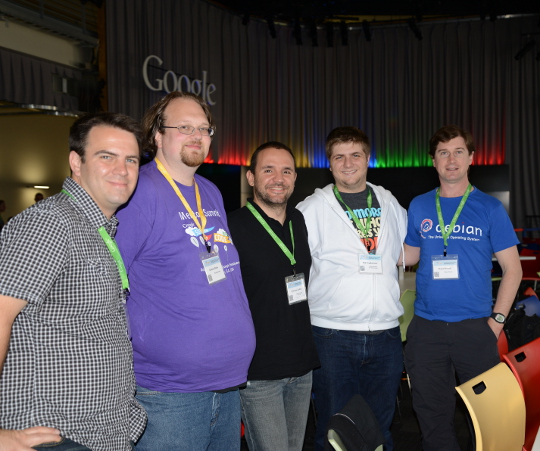
Daniel Pocock: Debian team at GSoC summit 2013

One of the most exciting things about the GSoC mentor summit 2013 has been the large number of participants who are Debian Developers, Debian Maintainers or other members of the wider Debian family Debian team members at GSoC mentor summit 2013
AttachmentSize
debian-gsoc-summit-group.jpg175.13 KB

20 October 2013

Ricardo Mones: Forced to 3.11

No, not to this 3.11, but to Linux kernel 3.11.

I was aware of the #718533 bug, which happens when you have a software RAID with anything higher than 3.2.0 (mine is RAID 1 with 2 disks). At least that has been my case since I tried to upgrade, hence I was delaying upgrades again and again.

Unfortunately today things went worse when I tried to plug my USB 3.0 device on the system:
Oct 20 17:52:51 busgosu kernel: [20799.672127] xhci_hcd 0000:02:00.0: Timeout while waiting for address device command
Oct 20 17:52:51 busgosu kernel: [20799.876136] xhci_hcd 0000:02:00.0: ERROR no room on ep ring
Oct 20 17:52:51 busgosu kernel: [20799.876148] xhci_hcd 0000:02:00.0: ERR: No room for command on command ring
Oct 20 17:52:51 busgosu kernel: [20800.080148] usb 2-2: device not accepting address 2, error -12
Oct 20 17:52:51 busgosu kernel: [20800.080202] xhci_hcd 0000:02:00.0: ERROR no room on ep ring
Oct 20 17:52:51 busgosu kernel: [20800.080209] xhci_hcd 0000:02:00.0: ERR: No room for command on command ring
Oct 20 17:52:51 busgosu kernel: [20800.080221] xhci_hcd 0000:02:00.0: ERROR no room on ep ring
Oct 20 17:52:51 busgosu kernel: [20800.080227] xhci_hcd 0000:02:00.0: ERR: No room for command on command ring
Oct 20 17:52:51 busgosu kernel: [20800.080235] hub 2-0:1.0: couldn't allocate port 2 usb_device
Oct 20 17:52:53 busgosu kernel: [20801.568169] xhci_hcd 0000:02:00.0: ERROR no room on ep ring
Oct 20 17:52:53 busgosu kernel: [20801.568181] xhci_hcd 0000:02:00.0: ERR: No room for command on command ring
Oct 20 17:52:53 busgosu kernel: [20801.568190] hub 2-0:1.0: couldn't allocate port 2 usb_device


And of course the device didn't show up. As there's not much relevant stuff about this issue on the googlesphere, thought it may have been solved. And turned out that I was right: upgrading fixes this, and now the device works again.

But, hit by the above bug now I have to add a rootdelay=1 to my kernel boot parameters (started testing with 5 but finally seems one second is enough). Fortunately the Ubuntu folks have detailed how to do it ;-)

19 October 2013

Dirk Eddelbuettel: New BH release 1.51.1-3

A new release of the BH package is now on CRAN and its mirrors. BH provides (a subset of) the Boost library for C++, particularly the (large) parts delivered as pure template headers not requiring linking. When this package is installed, an R package developer can deploy it at build-time via a simple LinkingTo: BH declaration (which, despite the title affects only compilation, not linking; don't ask...). This frees developers from having to include the (sizeable) Boost headers in their packages, and provides (parts of) Boost as part of the R build system. A short example of using this BH package with Rcpp is provided in this Rcpp Gallery post; a number of other Boost-related posts are also available. This release expands the scope of the package by a quite bit as shown in the NEWS entry:
Changes in version 1.51.0-3 (2013-10-19)
The other change is that I am now acting as maintainer taking over from Jay who has headed the initial creation and first releases after he, Mike and I had talked about this for way too long without actually doing anything about it. Thanks for getting everything rolling, Jay! Comments and suggestions are welcome via the mailing list or issue tracker available via the package page at R-Forge.

Petter Reinholdtsen: Perl library to control the Spykee robot moved to github

Back in 2010, I created a Perl library to talk to the Spykee robot (with two belts, wifi, USB and Linux) and made it available from my web page. Today I concluded that it should move to a site that is easier to use to cooperate with others, and moved it to github. If you got a Spykee robot, you might want to check out the libspykee-perl github repository.

18 October 2013

Rog rio Brito: Quick tip #1

I wrote the following as part of a post to an discussion forum (I can't remember which one), and people told me that they liked this information and said that others would profit from it if I posted it on my blog, which I now decided to post. The context: for homework of one MOOC, people were trying to download a large virtual machine image that was offered both via an official HTTP source, which was slow. A person volunteered that already had downloaded the image volunteered to create a bittorrent to help fellow students. Other students started saying that the bittorrent download was faster up to a certain point and, then, things slowed down a lot. Of course, they got faster to the point where lots of pieces were already well distributed and, then, only the everybody had already downloaded things and, then, only the seeder had the missing segments of the torrent. Then I commented with:
Depending on your bittorrent client, you can add the original HTTP download as a "Web seed" and, this way, your client will download both from the peers and also from the web to fill in parts that are not yet available. One such client is the Free (as in Freedom) qbittorrent, but I guess that others also have this option.
Soon after that, people started downloading things much faster.

Olly Betts: INT(PI)

Slide 5 from my nostalgia-fest "The Art of Writing Small Programs" from just under two years ago: The Art of Writing Small Programs - Slide 5 XKCD 1275 from last week: xkcd 1275 - INT(PI) (Of course that should be INT SQR EXP PI/INT PI * PI * R ** INT PI).

17 October 2013

Thomas Goirand: OpenStack Havana 2013.2 Debian packages available

OpenStack upstream was released today. Thanks to the release team and a big up to TTX for his work. By the time you read this, probably all of my uploads have reached your local Debian mirror. Please try Havana using either Sid from any Debian mirror, or using the Wheezy backports available here: deb http://havana.pkgs.enovance.com/debian havana main
deb http://archive.gplhost.com/debian havana-backports main Yes, you will need *both* repositories. This is unofficial, though these are the exact same packages as in Sid, just rebuilt for Wheezy. On the package side, here s what is new: - All packages who needs it can now be configured through debconf for the RabbitMQ settings. This is on top of what was already available for Grizzly, which is automated configuration for: keystone auth token, the database, the API endpoints and much more. (remember: this is fully optional, you can always use the non-interactive mode ) - All Quantum pluggin packages have been removed, and now everything is self-contained in the neutron-common package. The selection of which plugin to use is done directly using the core_plugin= directive in /etc/neutron/neutron.conf. This will also control the init.d script of neutron-server, so that it loads the corresponding ini file in /etc/neutron/plugins. The plugin selection is done through Debconf, so that users don t have to write the full path of the plugin class, which is (for most) very cryptic (am I the only one who thinks that writing neutron.plugins.openvswitch.ovs_neutron_plugin.OVSNeutronPluginV2 in a configuration file is user friendly?). - All of the package descriptions and Debconf templates have been reviewed by the Debian internationalization team, and most strings are translated in Czech, Danish, French, Italian, Japanese and Russian (sometimes even more) for almost all packages (thanks everyone!). I d like to publicly thanks eNovance for sponsoring my packaging work, and Mehdi Abaakouk for his work on our CI with the tempest tests. Happy Havana release testing,
Please report bugs through the Debian BTS.

Stefano Zacchiroli: org-mutt ported to org-capture

org-mutt with org-mode >= 8 Thanks to Don I just remembered that I haven't yet announced org-mutt support for org-mode >= 8. Let's catch up! Since a few weeks I've been aware of the fact that my mutt/org-mode glue, AKA org-mutt, was no longer working with org-mode >= 8, due to the ditching of org-remember in favor of org-capture. Allegedly, org-capture should have been backward compatible, but it clearly is not. Before I had time to fix it myself, Mako came to my rescue and submitted a patch (now accepted) that does the needed porting. Free Software is truly amazing, isn't it? I've just updated the canonical org-mutt blog post, so that the documentation in there is up to date again. If you're using org-mutt, I suggest to refer to the Git repository as the canonical location for future updates, if any. Thanks Don, thanks Mako!

Don Armstrong: Using Mutt with Org Mode (with refile)

I use org mode extensively, and had added Zack's workflow for integrating mutt with org mode to my ~/.emacs some time ago. However, I've been annoyed that refiling closes the org-capture frame before refiling finishes. The following trivial modification to Zack's code (which I previously modified to work with org-mode >= 0.8) waits to close the frame until you've finished refiling.
 (require 'org-protocol)
 (add-hook 'org-capture-mode-hook 'delete-other-windows)
 (setq my-org-protocol-flag nil)
 (defadvice org-capture-finalize (after delete-frame-at-end activate)
   "Delete frame at remember finalization"
   (progn (if my-org-protocol-flag (delete-frame))
          (setq my-org-protocol-flag nil)))
 (defadvice org-capture-refile (around delete-frame-after-refile activate)
   "Delete frame at remember refile"
   (if my-org-protocol-flag
       (progn
         (setq my-org-protocol-flag nil)
         ad-do-it
         (delete-frame))
     ad-do-it)
   )
 (defadvice org-capture-kill (after delete-frame-at-end activate)
   "Delete frame at remember abort"
   (progn (if my-org-protocol-flag (delete-frame))
          (setq my-org-protocol-flag nil)))
 (defadvice org-protocol-capture (before set-org-protocol-flag activate)
   (setq my-org-protocol-flag t))
Now, the frame automatically disappears after you refile it, keeping my refile.org clean.

16 October 2013

Matthew Garrett: Standing for the Linux Foundation Technical Advisory Board

According to its charter, the Linux Foundation Technical Advisory Board exists "to advise The Linux Foundation Board of Directors (Board) and the management of The Linux Foundation (Management) on matters related to supporting the technical agenda of The Linux Foundation". It consists of 10 members, with 5 seats up for election each year. Elections take place at an event at Kernel Summit, but are also open to attendees of whichever conference is colocated with the Kernel Summit that year. The election announcement is emailed to the Linux kernel list and tech-board-discuss, a mostly moribund list that springs into life once a year for election announcements.

This arrangement seemed odd to me even back in 2007. Back then the Linux Foundation was already sponsoring development of certain non-kernel components, and now that list is even larger. While nominally open to all, nominations for the TAB tend to end up being people actively involved in the kernel community. That's probably better than people limited to any other single technical community (kernel developers tend to end up dealing with bugs from a fairly wide range of projects, so they're not entirely unaware of what other people have to deal with), but it still seems suboptimal. The current membership is mostly limited to people who spend little to no time working with userspace developers, let alone anyone active in other Linux Foundation projects. I don't think this is a good thing

So, after several years of considering it, I'm finally standing for the TAB. I've been an active developer at most levels of the Linux stack, from the kernel through to desktop environments. I've worked closely with distributions. I've even worked closely with firmware developers. I'm not intimately involved in any of the other Linux Foundation projects, but I have experience that allows me to better understand their needs and motivations than I'd have from having spent my entire life living in the kernel. Being on the TAB would make it easier to ensure that these projects are represented in a meaningful way.

Of the other people who I know are standing (and this list may well grow longer), I'm inclined to vote for:
The election is currently scheduled to be National Museum in Edinburgh on the evening of the 23rd of October. If you're attending Linuxcon or one of the colocated events, please do come along and vote.

(Updated to correct a typo)

comment count unavailable comments

Carl Chenet: Brebis 0.7, the fully automated backup checker

Follow me on Identi.ca or Twitter The new version of Brebis Chevillette 0.7 was published two days ago. Brebis is a fully automated backup checker. Brebis does not create backups. It only performs controls on them. Brebis is able to detect a corrupted archive compressed with different formats, automatically checking the integrity of your archives and lots of parameters of the files inside these archives or inside a tree of files and provide detailed reports if unexpected states are detected. Check out the list of the supported features. What s new? The main features of this new version are: Complete example of installing, configuring and running Brebis How to install from your package manager Brebis is available in Debian, FreeBSD, Archlinux and Frugalware. Use your favorite package manager to install it. How to install from the sources
# wget http://brebisproject.org/attachments/download/8/brebis-0.7.tar.gz
# tar zxvf brebis-0.7.tar.gz && cd brebis-0.7
# python3.3 setup.py install --install-scripts=/usr/bin
# mkdir /etc/brebis
What you need before running brebis Our goal is to check on a regular basis the archive /backups/monthly-backup.tar.gz. Brebis needs two files in order to correctly run: a configuration file with general parameters and the list of files with all their parameters. Don t be afraid, both of theses files will be generated by Brebis with the following command:
# brebis -G /backups/monthly-backup.tar.gz
# ls /backups/
monthly-backup.tar.gz monthly-backup.conf monthly-backup.list
All the files inside your archives have been detected and their names and parameters (uid, gid, mode, md5, ) have been written in the file monthly-backup.list. More information about those files. How to configure Brebis Lets save /backups/monthly-backup.list in /etc/brebis: # mv /backups/monthly-backup.list /etc/brebis For /backups/monthly-backup.conf, we just modify the files_list parameters:
[main]
name=monthly-backup
type=archive
path=/backups/monthly-backup.tar.gz
files_list=/etc/brebis/monthly-backup.list
We also save monthly-backup.conf in /etc/brebis: # mv /backups/monthly-backup.conf /etc/brebis Use Brebis Using Brebis is as simple as: # brebis -c /etc/brebis/ -l /var/log/brebis.log If there is not any difference between the current state of your backup and your list of file, the logfile /var/log/brebis.log will be empty. If any difference happens, they will be reported in /var/log/brebis.log. Show time. I m modifying the md5 hash sum of a file in /etc/brebis/monthly-backup.list, during the next run of brebis, I get the following content in brebis.log:
WARNING:root:1 file with unexpected hash while checking
/backups/monthly-backup.tar.gz:
WARNING:root:toto/titi hash is ce4f8cacd8fc702bdd03531b9447818b.
Should have been ce4f8cacd8fc702bdd03531b94478184.
As you can read, Brebis reports a difference between what was expected and what it checks. Now it s easy to do the same for any backup you want to check on a regular basis. Just add something like the next line in /etc/crontab: 01 00 * * * root brebis -c /etc/brebis/ -l /var/log/brebis.log A brebis run will happen every day at midnight to check your backup. Every configuration files in the directory /etc/brebis/ will be inspected. Feedback about Brebis We at the Brebis Project welcome any feedback about Brebis. Feel free to subscribe to the Brebis-users mailing list, by Twitter or email me directly at carl.chenet@brebisproject.org
Official website: http://www.brebisproject.org
Mailing-list: http://lists.sourceforge.net/lists/listinfo/brebis-users

Brett Parker: Hepworth Spam

There's been a recent spate of spam from domains held by Communicado Ltd, to counter this Martin A Brooks has created a lovely list of domains to easily filter, see his blog post for information on the distribution and usage of this list.

15 October 2013

Craig Small: Damn you, unworking r8168

I really don t know why ethernet device makers insist on making it hard for to use their products. Ethernet has been around for many, many years; surely its not too much to ask for drivers that just work . And so that s the problem I currently have with my new computer. It has an onboard Ethernet interface which uses a Realtek chip and that s where the problems have been (with the exception of a power button that wriggled free, but that is also easy to fix). The device comes up as:
03:00.0 Ethernet controller: Realtek Semiconductor Co., Ltd. RTL8111/8168B PCI Express Gigabit Ethernet controller (rev 06)

I ve used:

and all of them don t work.  It seems that the receive side works fine (I sometimes get a valid IPv6 address) but no packets are sent, even ifconfig eth0 shows zero transmitted packets.
ethtool shows some of the setup, this is with the r8168 driver:
driver: r8168
version: 8.037.00-NAPI
firmware-version: 
bus-info: 0000:03:00.0
supports-statistics: yes
supports-test: no
supports-eeprom-access: no
supports-register-dump: yes
supports-priv-flags: no
Interestingly, if I use the r8169 driver in the kernel and try ifup etho then I do get an entry in the firmware-version spot. dmesg also shows that it finds the device.
[  0.916487] r8168 Gigabit Ethernet driver 8.037.00-NAPI loaded
[  0.916667] r8168 0000:03:00.0: irq 72 for MSI/MSI-X
[  0.939129] r8168: This product is covered by one or more of the following patents: US6,570,884, US6,115,776, and US6,327,625.
[  0.939136] r8168  Copyright (C) 2013  Realtek NIC software team <nicfae@realtek.com>
[  10.807066] r8168: eth0: link up
So it all looks good, except it won t send any packets. Anyone got one of these devices and if so (and more importantly) how did you get it to work?

Petter Reinholdtsen: Good causes: Debian Outreach Program for Women, EFF documenting the spying and Open access in Norway

The last few days I came across a few good causes that should get wider attention. I recommend signing and donating to each one of these. :) Via Debian Project News for 2013-10-14 I came across the Outreach Program for Women program which is a Google Summer of Code like initiative to get more women involved in free software. One debian sponsor has offered to match any donation done to Debian earmarked for this initiative. I donated a few minutes ago, and hope you will to. :) And the Electronic Frontier Foundation just announced plans to create video documentaries about the excessive spying on every Internet user that take place these days, and their need to fund the work. I've already donated. Are you next? For my Norwegian audience, the organisation Studentenes og Akademikernes Internasjonale Hjelpefond is collecting signatures for a statement under the heading Bloggers United for Open Access for those of us asking for more focus on open access in the Norwegian government. So far 499 signatures. I hope you will sign it too.

Francois Marier: The Perils of RAID and Full Disk Encryption on Ubuntu 12.04

I've been using disk encryption (via LUKS and cryptsetup) on Debian and Ubuntu for quite some time and it has worked well for me. However, while setting up full disk encryption for a new computer on a RAID1 partition, I discovered that there are a few major problems with RAID on Ubuntu.

My Setup: RAID and LUKS Since I was setting up a new machine on Ubuntu 12.04 LTS (Precise Pangolin), I used the alternate CD (I burned ubuntu-12.04.3-alternate-amd64+mac.iso to a blank DVD) to get access to the full disk encryption options. First, I created a RAID1 array to mirror the data on the two hard disks. Then, I used the partition manager built into the installer to setup an unencrypted boot partition (/dev/md0 mounted as /boot) and an encrypted root partition (/dev/md1 mounted as /) on the RAID1 array. While I had done full disk encryption and mirrored drives before, I had never done them at the same time on Ubuntu or Debian.

The problem: cannot boot an encrypted degraded RAID After setting up the RAID, I decided to test it by booting from each drive with the other one unplugged. The first step was to ensure that the system is configured (via dpkg-reconfigure mdadm) to boot in "degraded mode". When I rebooted with a single disk though, I received a evms_activate is not available error message instead of the usual cryptsetup password prompt. The exact problem I ran into is best described in this comment (see this bug for context). It turns out that booting degraded RAID arrays has been plagued with several problems.

My solution: an extra initramfs boot script to start the RAID array The underlying problem is that the RAID1 array is not started automatically when it's missing a disk and so cryptsetup cannot find the UUID of the drive to decrypt (as configured in /etc/crypttab). My fix, based on a script I was lucky enough to stumble on, lives in /etc/initramfs-tools/scripts/local-top/cryptraid:
#!/bin/sh
PREREQ="mdadm"
prereqs()
 
     echo "$PREREQ"
 
case $1 in
prereqs)
     prereqs
     exit 0
     ;;
esac
cat /proc/mdstat
mdadm --run /dev/md1
cat /proc/mdstat
After creating that file, remember to:
  1. make the script executable (using chmod a+x) and
  2. regenerate the initramfs (using dpkg-reconfigure linux-image-KERNELVERSION).
To make sure that the script is doing the right thing:
  1. press "Shift" while booting to bring up the Grub menu
  2. then press "e" to edit the default boot line
  3. remove the "quiet" and "splash" options from the kernel arguments
  4. press F10 to boot with maximum console output
You should see the RAID array stopped (look for the output of the first cat /proc/mdstat call) and then you should see output from a running degraded RAID array.

Backing up the old initramfs If you want to be extra safe while testing this new initramfs, make sure you only reconfigure one kernel at a time (no update-initramfs -u -k all) and make a copy of the initramfs before you reconfigure the kernel:
cp /boot/initrd.img-KERNELVERSION-generic /boot/initrd.img-KERNELVERSION-generic.original
Then if you run into problems, you can go into the Grub menu, edit the default boot option and make it load the .original initramfs.

Daniel Pocock: Debian Outreach Program for Women 2013

Debian's Outreach Program for Women (OPW) is underway. This is a huge thing and not just something that female developers need to be concerned with. Untapped potential Many computer science schools see about twenty percent of places occupied by female students. In the Debian community, however, about one percent of developers are female. As there are about one thousand male developers, this suggests there are another one hundred potential female developers and contributors out there who are not aware of the fact that they could be part of Debian. Finding these people and helping them fulfil their potential makes the project better for everybody. Women are heavy lifters People should not assume that these women are going to need their hands held. When the Jitsi project recently moved to Github, the Github repository reports made the surprise revelation that Yana is the top contributor - by a fifty percent margin. Will women save the world this week? It is not just in software engineering that women have significant potential. As the men running the US bumble around with their high-stakes game of chicken, it is notable that last week the US Federal Reserve appointed their first female chairman, Janet Yellen. It is unlikely that her first meeting with female IMF boss Christine Lagarde would have satisfied stereotypes about casual gossip or shopping; more likely, they would be contemplating how to save the world economy if rogue congressmen push the US into default - a possibility that is no longer just an outlier. Integrating financial software in Debian With that in mind, one of the projects I've offered to mentor under OPW involves creating further integration between free software for finance and accounting on Debian. Several applicants have already contact me about this. Fundraising to support OPW 2013 Debian is currently raising funds to support this program. The project administrators are hopefully going to provide more details soon about how funding will be allocated and how many projects will proceed.

Next.

Previous.