Search Results: "jam"

25 July 2007

Scott James Remnant: Online Desktop

Havoc’s keynote at GUADEC was extremely interesting, especially for how it polarised the people present. Several people seemed very upset with the notion that f-spot should be replaced by flickr, but I think that was a problem with the way that Havoc presented the message, and not the underlying idea. Instead consider f-spot and flickr as sharing the same collection of data, and being two different ways to view and manage it; with changes from one appearing in the other. The mechanism isn’t important. Consider the following: Now, isn’t that cool?

24 July 2007

Martin F. Krafft: Iceweasel/Firefox brings you the Windows experience!

For a while now, Iceweasel/Firefox comes with built-in phishing protection, which is undoubtedly a good thing given the number of idiots using the Web these days.
Screenshot of iceweasel's phishing protection warning
But the implementation is crap. If you surf to a phishing site, such as this test site, the page loads as you would expect and then the first strange things happen: I get similar performance problems on the StaTravel website, and on map.search.ch, it almost always crashes. Thank you, Firefox developers, for bringing the joys of the Windows world to Linux! NP: Dream Theater: Metropolis Pt 2: Scenes from a Memory Update: several people have responded that they cannot reproduce the problem. I thus created a new profile, uninstalled all system-wide extensions, removed all plugins such that about:plugins was empty and tried again. The problems persist, although I think the lags are not quite as long as before and the memory consumption is obviously down. Maybe this is amd64-related? Update: It's not amd64-related, as several users have pointed out. Update: still no luck, but James Andrewart pointed me to this bug report, which might improve things a bit:
"The new protocol specifies a single lookup algorithm for all tables, rather than having per-table logic. This lookup logic was moved in to the db service from the javascript. URL canonicalization was moved completely into C++ too. The DB service can now handle a query from a raw URI, which will be needed for malware blocking."

22 July 2007

Ian Murdock: How package management changed everything

What’s the single biggest advancement Linux has brought to the industry? It’s an interesting question, and one that in my opinion has a very simple answer: Package management—or, more specifically, the ability to install and upgrade software over the network in a seamlessly integrated fashion—along with the distributed development model package management enabled. It used to be that operating systems were big, monolithic products, and applications were big, monolithic products you put on top of them. If you wanted to deploy, say, a web application, you sourced the middleware stack (which itself was probably several big products too), you sourced the operating system, and you (often painfully) had to integrate the two yourself (or pay a big company lots of money to do it for you). These days, you increasingly just “apt-get install whatever“. In this world, where does the operating system end and the application begin? The line is increasingly blurred—for when applications are deployed using an OS facility, seamlessly integrated with the OS itself, is the result an application or a feature of the operating system? In fact, in a very real way, all software looks to become part of the operating system—or, at least, this has certainly been the trend in the Linux world. What does this shift mean to the industry? For one thing, those of us that build operating systems as monolithic products have to change—it’s what users expect, and with a componentized operating system rather than a wad of stuff, it becomes far easier to push new innovations out into the marketplace and generally evolve the OS over time. Indeed, refashioning Solaris as a “distro” is the essence of Project Indiana—and package management is the key technology that will hold it all together. So, the next time you read about how Project Indiana aims to make Solaris more “Linux-like”, keep in mind that what we’re actually “copying” is the distro model, not Linux itself—which, after all, is a kernel, and has nothing to do with the package management and so forth the distros (you know, like Debian) built above it. This, better than anything else, highlights the opportunity for Solaris: What people really know when they say they know “Linux” is the environment that exists around the Linux kernel—the distro—all of which Solaris can deliver, and more.

17 July 2007

Benjamin Mako Hill: Still Seeing Yellow

Seeing Yellow seems to have encouraged hundreds of people to contact their printer manufacturers and complain about tracking dots. Lots of reports (like this one) are popping up on blogs and being sent to me in email. There are reports in upcoming magazines. And as far as I know, nobody has been visited by the US Secret Service yet. I spent half an hour on the phone with HP. I filed a technical support request about the yellow dots and had to speak with the engineer for a while before I was able to convince him that this was definitely not a malfunctioning printer. He checked out seeingyellow.com while on the phone with me and seemed to be genuinely shocked and concerned. He said he would talk to the other technical support people in the color laser group and would write up a report to send up the chain of command. I even had him promise not to turn me into the Secret Service. Please, lets keep the calls coming! We really are making a difference. Another thing people might do is call laser printer manufacturers before they buy a printer and talk to sales representatives. Demand an assurance that the printer they sell you will not surreptitiously print intentionally identifiable information. Explain that you will buy from the first printer manufacturer who can give you such an assurance. So far, no company has. I was thinking about how it was slightly funny that Brother prints tracking dots in their color laser printers. One might say that tracking dots are courtesy of Big Brother, and Big HP, and Big Toshiba, and Big Xerox, and all the other big printer color laser printer manufacturers.

David Moreno Garza: DebConf8 official training started!

So, my official training for DebConf8 has just started! What is this training about? Well, since a couple of weeks ago, I had seen a little Argentinian restaurant two blocks from my place. It is not new to find Argentinian places on the area, specially on La Condesa, where lots of foreigns reside within Mexico City. Argentinians are known in some circles, because they usually take their dogs for walking on Parque Espa a, Parque M xico and the neighborhoods nearby (not that Mexicans don’t walk dogs, it’s just a bit more stereotyped for Mexicans to put dogs on the roofs of buildings and not taking very good care of them). Anyway, since I live on Roma Sur, which is just crossing Insurgentes avenue away from La Condesa, it is also a crowded neighborhood (which is more like a family-kind area), the nearest Argentinian place was this, Che Charr a. I had no idea where I could have a nice cheap lunch, so I headed there. The prices were not nuts, but it wasn’t cheap as eating in the street, of course. Che Charr a is a small place, they have like five tables inside, and two or three outside on the sidewalk. I ordered a Bah a Blanca meal, which was basically, three empanadas (you could choose between ham and cheese, meat, chicken and corn/cheese), a couple of cups of fresh water and a dessert flan (which name I just can’t remember, but it was Argentinian typical). The Mexican part couldn’t be left aside, that’s why they offer chimichurri or spicy sauce :) Besides, they give jamaica-water (which is some kind of juice of a Mexican flower, which is delicious, DebConfers could probably had some on DC6, I bet you can only find it here). At the end, I ordered a black-chocolate alfajor, which was extremely delicious, but cold, since it was on the fridge. So, that’s my training: Getting ready for DC8/Argentinian food! After a quick chat with ASCIIGirl, I’ve decided to take this a bit further, I’ll be going to Che Charr a or other .ar restaurants, at least once every two/three weeks and have something different each time, take pictures of places/dishes, etc. My official Argentinian food training! Who joins the challenge?

15 July 2007

Scott James Remnant: Virtual accounts with exim and dovecot

A few people commented on my last post asking for details about how I configured exim and dovecot to have the fake scott+canonical account and separate Maildir tree. exim4 router configuration The first key part of the configuration is to configure exim4 to split the local part into a user name and a suffix. This allows a local part such as “scott+canonical” to be split into the user name “scott” and the suffix “+canonical”. This is configured by adding the following two options to the appropriate routers in your exim4.conf:
local_part_suffix = +*
local_part_suffix_optional
The first option defines the suffix; normal practice appears to be to use both “+” and “-“, but since I’d previously used “-” with qmail I opted to use “+” only so that I didn’t confuse myself during the transition. The second option allows the suffix to be optional, so that mail to “scott” is still delivered normally. Now mail to “scott+canonical” will be delivered to the “scott” user. Forwarding configuration The next task is to ensure that mail is actually forwarded to this address; for me this was a configuration performed by the Canonical sysadmins to ensure that my work e-mail is actually delivered to scott+canonical on my own mail server. Filtering configuration Since both personal and work e-mail are now both being delivered to the same user account on my home mail server, I need to filter the mail into separate folders. This can be done by checking the $localpartsuffix variable in Exim filter .forward files, e.g.:
# Exim filter
if $local_part_suffix is "+canonical"
then
    save Maildir/Canonical/
endif
Now incoming work e-mail is filtered into a different mail folder, while personal mail is delivered into the primary one. I’ve used similar filter instructions for mailing lists, mailman messages, Launchpad mails, etc. to filter into appropriate folders. Where the mail is personal, it is filtered into (e.g.) Maildir/.Lists/upstart-devel/ Where the mail is for work, I add /Canonical/ to the path, (e.g.) Maildir/Canonical/.Lists/linux-hotplug-devel/ This means that the Maildir/ directory is my personal INBOX, with sub-folders immediately under that and beginning with a period; and the Maildir/Canonical/ directory is my work INBOX, with sub-folders immediately under that and beginning with a period. This defines two trees in a manner compatible with dovecot. There’s no particular reason that Maildir/Canonical/ has to be under Maildir/, it could have been Maildir-Canonical/ and this would still work. I simply wanted them in one place to ease backups. Dovecot configuration Now we need to configure dovecot to permit login by a fake (“virtual”) user, with a different Maildir tree, so that I can configure them as two separate accounts. The first set of changes is to dovecot.conf to add an additional authentication source. Modify the “auth default” block to add a new “passwd-file” passdb in addition to the “pam” passdb (or whatever your system is using).
passdb passwd-file  
  args = /etc/dovecot/passwd
 
This lets us authenticate virtual users, but we also want to set their attributes, so we can use the same file as a userdb in the same “auth” block.
userdb passwd-file  
  args = /etc/dovecot/passwd
 
Dovecot will now check both PAM and this file for user information. We now simply need to add a line to this file to specify the virtual user and set up the alternate Maildir tree.
scott+canonical:PASSWORD:1000:1000::/home/scott::userdb_mail=maildir:/home/scott/Maildir/Canonical
The format is that of an ordinary passwd file; the first two parts give the passdb authentication credentials and the rest give the userdb information. I’ve set this user to have the same uid, gid and home directory as my real “scott” user. The final part changes the mail environment for this virtual user, instead rooting it at Maildir/Canonical/ Client configuration The mail client will need two accounts adding; one for “scott” and the other for “scott+canonical”. It will see two separate folder trees for each account. An unexpected bonus is that the reply account is now automatically set for me, since I’m replying from the specific account rather than from a single general one.

13 July 2007

Scott James Remnant: Mail Strike

Like most geeks, I run my own mail server. The burden of administering it is much less than the increased flexibility in filtering incoming mail, let alone dealing with SPAM. My mail server configuration has remained pretty static the entire time, and controversially, I’ve always used qmail. The reason for this dates back to my first sysadmin job in the mid-to-late nineties, and the decision in those days did tend to be sendmail or qmail; with the security conscious choosing the latter. qmail’s delivery system is a little odd, everything on the left hand side up to the first “-” is considered a user, and everything after can be used for filtering. The default local delivery component takes this into account, so e-mail to scott-foo can be filtered by the /home/scott/.qmail-foo file. This gives a pretty natural way to deal with mailing lists; you subscribe with a unique address for that list, and all the mail goes into the right folder automatically. This has served me reasonably well over the years, with heavy patching across the daemon to add features such as LDAP integration, and SPAM filtering that I wanted. Unfortunately it’s been getting to burdensome to maintain. Since it’s not true open source software, and is effectively abandoned upstream, it’s not as up to date as I’d like. SPAM filtering tends to take place in the local delivery loop, rather than at SMTP time; and due to the strange delivery system, it’s unreasonably hard to perform any kind of sender verification or greylisting. Since every special address is filtered differently, it’s quite hard to add common filtering unless it’s pre-planned and you use addresses with a common prefix. The clincher has been dealing with super-sites like Launchpad which send huge amounts of different e-mails to a single address, and no facility to separate that from your published contact address. I needed a better mail server. So I’ve now moved to exim. I was surprised by how quickly I was able to pick it up, I did the migration in two day outages. The first to simply migrate delivery and stash the mail in one big folder, and the second to customise the delivery and filtering to my liking. I’ve also re-subscribed to mailing lists with single addresses again, so now I have a single filter rule which happily can filter Launchpad mails around as well. Happily I’ve been able to make a change I’ve wanted to for a while, home and work e-mail is separated into different Maildir/ trees; and mailing list subscriptions made with the most appropriate address. The magic of dovecot lets me create a fake scott+canonical user that uses the alternate Maildir tree, while still retaining my user permissions, etc. Overall I’m pleased with the new setup, and how the migration went. SpamAssassin needs some tuning as a little SPAM is still getting through, but otherwise it seems to be working well.

Eddy Petrișor: glest: a free 3D real time strategy game

After almost a year of working on and off on the package, glest is now in the new queue.

Glest is really a free 3D real time strategy game with amazing graphics and really interesting game play.

So maybe you're wondering why did it took me so long to package it. Well, glest is mainly developed on a Windows platform and GNU/Linux is the platform it was later ported to. So this came with some problems:
Since when I started the packaging work I was using a PowerBook G4 as my main machine I was upset that the game was little endian only, so I started working on a patch. I made an incomplete patch but I got stuck at some point. Time passed by and I replaced my laptop and I wasn't able to continue working on the patch. So I kind of forgot about it. Before debconf I decided is time to do the upload for little endian machines, add the endianess patch disabled.

During debconf I asked Tolimar to make an upload, and it turns out that for some reason I still don't know, the build resulted in a statically linked binary. I was amazed since I didn't recall doing any changes that might have triggered this. At some point I suspected that the build system is broken on other arches than i386 (my main machine is amd64) and halted. This until a few days ago Joey Hess added a comment in the ITP bug pointing out that the game is ok. After a couple of emails I realized that the static issue was just some strange temporary issue on my machine and now the package is in NEW.

So, that's my excuse. I hope that upstream glest issue get fixed. If not, I'll probably package glevolution, too.

Adam Rosi-Kessel: JP Lantern Festival

From tonight’s Lantern Festival in Forest Hills Cemetery: Lantern Festival Technorati Tags: , ,

12 July 2007

Benjamin Mako Hill: Footnotes

At the risk of seeming a self-aggrandizing, I wanted to point folks to a nice biographical profile that Linux.com is running about me upon my election my to the FSF board. I'm pretty honored, and excited, by the whole thing. The article talks a little bit about my road to free software and the FSF board in particular and about some of my ideas about the foundation and its work. There are three little footnotes I thought I would add to what I think is a great article:

11 July 2007

Benjamin Mako Hill: Seeing Yellow

You may have heard some of the noise that EFF was making a year so ago about the tracking dots hidden in documents by color laser printers. A number of people contacted their printer manufacturers to ask how to turn the "feature" off. At least one person (who has, understandably I think, expressed interest in remaining anonymous) was subsequently visited by the United States Secret Service who asked him questions about why he wanted to turn off the tracking dots in his printer. I've put up a little website with some others in my research group at MIT that tries to organize individuals to call into their printer manufacturers and demand that the feature is turned off. If many people call, the government won't be able to visit us all. We've made a long list of technical support contacts to help with the process. Please call your printer manufacturer today and spread the word about the site so that more people call in. The site is called Seeing Yellow -- a reference to tiny yellow dots that make up the tracking code -- and its online at seeingyellow.com.

8 July 2007

Mirco Bauer: Hello World, how small can you get?

Today I was checking how much diskspace is need when a small CLI (.NET) application like gfax is installed. The last 2 years I am optimizing the Mono packages in Debian to reduce dependency chains. Dependency chains can cause a small application to become very big (at least it looks that way) when they are installed, as modern Linux distributions automaticly install all required dependencies. So first I worked against GUI dependencies for non-GUI applications, those are annoying for servers, you don't want to install a X server or other GUI libraries when you only serve webpages using ASP.NET.
Splitting CLI 1.0/1.1 vs 2.0 also seemed to be a very good candidate to split apart, as applications usually are target at 1.0/1.1 or 2.0.
Then I split Base-Class-Libraries that have dependencies on native libraries (via P/Invoke), as those packages must depend on those native libraries, like DB drivers.
Last but not least I split debug symbols in a different package, as those are not needed for normal production usage, and embedded systems don't have much diskspace. The mono-dbg package is 28.2MB in size when installed, that's alot.
The Mono source package in Debian is now building 67 binary packages, but thanks to APT nobody has to care for that, every part is installed when needed. So today I was checking the results of it, how much will a small application download and install?
I am testing with a clean minimal Debian system, that way all dependency chains will show up very easily.
Installing GFax + required libraries today takes 43MB to download and 138MB on the harddisk. GFax is a small GNOME application, it uses libraries like: Mono, GTK#, GNOME#, Evolution#, GConf#.
So someone might say: "of course, it is based on that bloaty Mono virtual machine!", well let's check a different application.
What about a GTK# only application (no GNOME) like graphmonkey + required libraries? That will download 19.5MB and uses 56.4MB on the harddisk. That's alot less, isn't it? graphmonkey only uses Mono and GTK#.
So it's not Mono taking all no diskspace? Well after all my packaging optimizations, it's not Mono smile.png
So how big is a install of a minimal Mono runtime + all required libraries then?
Minimal as in enough to run famous the "Hello World".
It's 2.4MB to download and 7MB on the harddisk, yes you read it correctly, the super monster bloaty virtual machine just needs 7MB. Mono only has glib as dependency which will be replaced by the eglib library some day. After I had this great result, I wondered how big other runtimes are.... like.... Java and Python? The results are interesting...
A minimal Python install takes 3.9MB to download and 13.4MB on the harddisk. Yes, that's almost double the size of Mono, I was surprised too.
So and Java? Here it becomes a bit unfair as SUN's license is not allowing to ship parts of a Java runtime. So the Java package in a distribution is one package. 34.5MB to download and 95.2MB on the harddisk. Yes, that's alot, but thats the smallest install you can get when you want to run anything on it. So, if you want to run Hello World on a virtual machine: use Mono! tongue.png just kidding...
Small runtimes are important when it comes to acceptance and adaption of new technologies, as nobody wants to kill all his computer resources for it. And I often hear the replies on Linux IRC channels, when people ask which software they can use to do $task: "No I don't want o install 100MB just for $task" and they decide to try some other software with less dependencies and less resource usage.
Also for the embedded area, resources are very limited, every MB still counts there. For the completeness of my report, here the naked numbers of other available Java runtimes: sablevm 22.0MB (63.2MB), kaffe 52.2MB (118MB), jamvm 28.3MB (65.4MB), cocoa 28.8MB (66.0MB).

6 July 2007

Benjamin Mako Hill: Official Ubuntu Book Second Edition

I announced the Official Ubuntu Book roughly a year ago. Several months ago, I wrote this in the preface of the second edition:
As we write this, it is one year since we penned the first edition of The Official Ubuntu Book. The last year has seen Ubuntu continue its explosive growth, and we feel blessed by the fact that The Official Ubuntu Book has been able to benefit from, and perhaps in a small even contribute to, that success.
It's an honor indeed. The first edition received almost universally good reviews and sold very well. Due to the book's success, most of the group that brought out the first edition (plus a few others) reunited to update the text for Ubuntu 7.04 (Feisty Fawn). After months of hard word and waiting, printed copies of the Official Ubuntu Book Second Edition arrived in my office today! They should be shipping out of the online stores very soon. The new version is updated throughout to reflect changes in Ubuntu over the last two releases and to document new features and improvements. Trying to keep a book like this up to date is a great way to learn about just how fast moving Ubuntu is (answer: very). Meanwhile, Edubuntu has blossomed over the last year. Through the work of Peter Savage, we've included a new chapter that deals with Edubuntu in depth. The book is bigger (almost 450 pages!), better, and more up-to-date. It provides a great introduction for those that are uninitiated to Ubuntu or to GNU/Linux and free software in general. We've tried to keep the price down (it is available for $27 plus shipping from most online stores) and should ship almost immediately. Best of all (at least to me), the whole book is released under a free culture license (CC BY-SA). The book is a major improvement on what was already a very solid piece of documentation. Everyone who contributed to the book (the list is too long to put up here) should feel proud. It was a lot of work but it shows. The opportunity to represent the Ubuntu community in this way, and to try to live up the distribution's high technical standard with the "official" branding, is a challenge and a reward that is worth the effort. You can order the book from Amazon or find it in any of many other sources.

5 July 2007

Benjamin Mako Hill: DRM-FREE

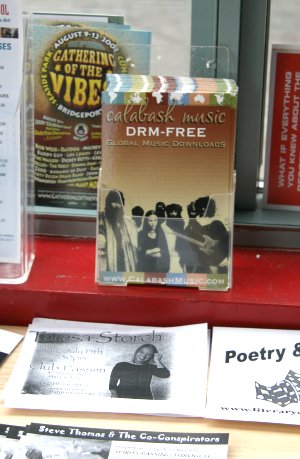
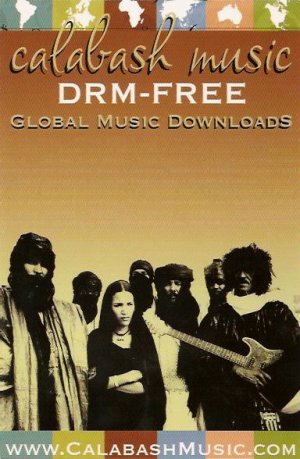
Just a couple years ago, music and technology companies would advertise their DRM schemes. While these technologies only served to prevent users of computers and consumer electronics devices from doing things, the media and technologies companies tried to spin it positively. Think of all the wonderful media that the music, film, and publishing industries will be willing to distribute to you at the click of a button, they said. All they asked for in return is the keys to your computer and the legal right to attack and sue you if you try to take control. As everyone who purchased iTunes music and made the mistake of buying a non-Apple DAP incapable of reading Apple DRMed music knows, DRM is a bad deal for consumers. Users are always better off with an unencumbered media file. In all the excitement over major label content, some consumers didn't see this immediately. With time though, the inconvenience of a computer that does the Apple and the RIAA wants over what you want hit home. This, combined with activist projects like the FSF's Defective By Design, have turned the tide. The DRM label that used to be a badge of honor is now a stigma that smart companies are going out of their way to avoid. This past weekend, I saw this flier from Calabash Music in the crepe store across the street: /copyrighteous/images/calabash_drm_table.jpg /copyrighteous/images/calabash_music_flyer.jpg The store served a general, non-technical audience. DRM-FREE, it turns out, is a good way to sell music. Not just to geeks but to any consumer who has been stymied unfairly by DRM or knows someone who has. That, it turns out, is a whole lot people. Consumers know what DRM is and they know don't like it. As consumers learn more about DRM, they want to avoid it. Seeing this, the companies that produce DRM are looking for ways to escape. The Apple/EMI deal seems to be an attempt to protect market share that the use of DRM is threatening. Others, like HBO's Bob Zitter, are disingenuously attempting to escape the stigma of DRM by simply rebranding the technology. Of course, DRM suffers from a much more fundemental problem than bad branding. The problem with DRM is that consumers don't like what it does and are only sometimes willing to suffer through it when not given the choice. Increasingly often, as with in the example of the flier I found, consumers have a choice. Things don't look good for DRM. For DRM opponents, the self-defeating nature of the technology is our greatest ally.

2 July 2007

Benjamin Mako Hill: Measured Response

I once saw a vending machine in Japan with a 200ml Coca-Cola, a 300ml Coca-Cola, a 500ml Coca-Cola and a 800ml Coca-Cola. Each one cost 120. I was perplexed. I couldn't imagine paying 120 for 200ml of something when they could get more (four times more!) of the same stuff for the same price from the same place. Just then, I looked over at Mika at the next vending machine. She was buying a 200ml Coke. "Why are you buying the 200ml one " I inquired, shocked. "You could have 800ml for the same price!" Mika thought for a second and replied, "I only want 200ml of Coke." I just posted a short review of a slightly related study on the Science That Matters blog.

30 June 2007

James Morrison: Dancing gorilla


That 3k run in this gorilla suit was too easy, so there was dancing gorillas afterwards.

James Morrison: Sarah


For those that don't know who Sarah is, here is a picture.

28 June 2007

MJ Ray: Last Chance for the Working Draft of the Web Content Accessibility Guidelines 2.0

As a result of commenting on some problems in CUBA's Jam Busting June site I was made aware of the Working Draft of WCAG 2.0 or the Not-Working Draft, as I think it could be called. If you want to comment on it yourself, you had until the end of 27 June 2007 (US EDT, I assume). Put simply, it's too confusing for both web developers and site managers. Even the Quick Reference is rather long for practical use. It's very indirect - it's not even clear whether xhtml over HTTP is preferred. I submitted a comment about that - also rather disappointing to find that W3C appear to fail to use stripslashes() when needed. I submitted another comment about the backwards step of allowing Javascript-required sites to be called accessible. Javascript is dangerous for accessibility and bad for power consumption. What the blue blazes is an AJAX-only webmail doing as one of the accessibility examples? I see that notable sites have already criticised WCAG 2.0. While I don't necessarily agree with everything they say, this is a very disappointing situation. Will WCAG 2 be rescued? Are accessible-friendly webmasters screwed if WCAG 1.0 is replaced by 2.0 in our national standards? It lets all the Flash-only cowboys claim WCAG-conformance as long as they note their site relies upon Flash. (Question: is a site still WCAG-2.0-accessible if it requires Flash to view the note that says it requires Flash?) Should we start looking towards MACCAWS, WHATWG, expanding IETF to cover the web, or starting another democratic/meritocratic standards body?

27 June 2007

Martin F. Krafft: Removing background from images

Every now and then, I want to remove the background from an image and replace it with transparency. Instead of painful pixel work with the select tool, the following Gimp recipe does the job quite well, provided the background is a single colour:
  1. Choose Layer->Transparency->Colour to Alpha and select the background colour in the dialog box. Then click OK.
  2. Use the magic wand tool (Z) to select the contiguous region around your object. Make sure to use a sufficiently high threshold such that the selection line coincides with the image's silhouette.
  3. Press Ctrl-I to invert the selection.
  4. Choose Select->Shrink and shrink the selection by a pixel or two.
  5. Create a new, transparent layer. The selection should still be active.
  6. Make the background colour you previously converted to transparent your foreground colour and choose Edit->Fill with FD Colour from the menu.
  7. Switch the two layers such that the current one moves behind the one containing your image.
The method isn't perfect, but it certainly saves me a lot of time. For instance, my new hackergotchi a tribute to Scotland and the local team of DebConf7 only took me a few minutes to get ready. Suggestions still welcome. NP: Barclay James Harvest: Everyone Is Everybody Else

Benjamin Mako Hill: Significant Digits

According to the advertisements (and Wikipedia), the film Live Free or Die Hard is being marked as Die Hard 4.0 outside of North America. This is too many significant digits.

Next.

Previous.