Search Results: "hug"

26 January 2012

Russell Coker: Links January 2012

Cops in Tennessee routinely steal cash from citizens [1]. They are ordered to do so and in some cases their salary is paid from the cash that they take. So they have a good reason to imagine that any large sum of money is drug money and take it. David Frum wrote an insightful article for NY Mag about the problems with the US Republican Party [2]. TreeHugger.com has an interesting article about eco-friendly features on some modern cruise ships [3]. Dan Walsh describes how to get the RSA SecureID PAM module working on a SE Linux system [4]. It s interesting that RSA was telling everyone to turn off SE Linux and shipping a program that was falsely marked as needing an executable stack and which uses netstat instead of /dev/urandom for entropy. Really the only way RSA could do worse could be to fall victim to an Advanced Persistent Attack :-# The Long Now has an interesting summary of a presentation about archive.org [5]. I never realised the range of things that archive.org stores, I will have to explore that if I find some spare time! Jonah Lehrer wrote a detailed and informative article about the way that American high school students receive head injuries playing football[6]. He suggests that it might eventually be the end of the game as we know it. Fran ois Marier wrote an informative article about optimising PNG files [7], optipng is apparently the best option at the moment but it doesn t do everything you might want. Helen Keeble wrote an interesting review of Twilight [8]. The most noteworthy thing about it IMHO is that she tries to understand teenage girls who like the books and movies. Trying to understand young people is quite rare. Jon Masters wrote a critique of the concept of citizen journalism and described how he has two subscriptions to the NYT as a way of donating to support quality journalism [9]. The only comment on his post indicates a desire for biased news (such as Fox) which shows the reason why most US media is failing at journalism. Luis von Ahn gave an interesting TED talk about crowd-sourced translation [10]. He starts by describing CAPTCHAs and the way that his company ReCAPTCHA provides the CAPTCHA service while also using people s time to digitise books. Then he describes his online translation service and language education system DuoLingo which allows people to learn a second language for free while translating text between languages [11]. One of the benefits of this is that people don t have to pay to learn a new language and thus poor people can learn other languages great for people in developing countries that want to learn first-world languages! DuoLingo is in a beta phase at the moment but they are taking some volunteers. Cory Doctorow wrote an insightful article for the Publishers Weekly titles Copyrights vs Human Rights [12] which is primarily about SOPA. Naomi Wolf wrote an insightful article for The Guardian about the Occupy movement, among other things the highest levels of the US government are using the DHS as part of the crackdown [13]. Naomi s claim is that the right-wing and government attacks on the Occupy movement are due to the fact that they want to reform the political process and prevent corruption. John Bohannon gave an interesting and entertaining TED talk about using dance as part of a presentation [14]. He gave an example of using dancerts to illustrate some concepts related to physics and then spoke about the waste of PowerPoint. Joe Sabia gave an amusing and inspiring TED talk about the technology of storytelling [15]. He gave the presentation with live actions on his iPad to match his words, a difficult task to perform successfully. Thomas Koch wrote an informative post about some of the issues related to binary distribution of software [16]. I think the problem is evenm worse than Thomas describes. Related posts:
  1. Links January 2011 Halla Tomasdottir gave an interesting TED talk about her financial...
  2. Links January 2010 Magnus Larsson gave an interesting TED talk about using bacteria...
  3. Links January 2009 Jennifer 8 Lee gave an interesting TED talk about the...

18 January 2012

Ross Burton: Volunteers Needed!

Those lovely people over at Flickr have finally bitten the bullet and are turning off FlickrAuth in the summer, meaning that all applications that use the Flickr API need to use OAuth. This is something I totally agree with, whilst FlickrAuth works and was clearly an important influence on OAuth, it's a single-service protocol when OAuth has managed to get massive adoption and a huge developer base. The problem I've got is libsocialweb, which has a Flickr module that allows both fetching of your contact's recent photos and uploading images. This uses FlickrAuth so at the end of July will suddenly stop working. I've got enough on my plate at the moment and would love for more people to understand how the entire social spagetti works, so this is a call for a volunteer to work on this, for which I'll obviously be available to offer any guidance and mentoring required. There are two ways of approaching this, the easy way and the slightly harder way. The easy way is to update libsocialweb to use an OAuthProxy instead of a FlickrProxy, and update the module metadata so that Bisho uses the generic OAuth flow instead of a Flickr-specific flow. This should be fairly simple and needs to happen soon so that any distributions that are using libsocialweb don't break in the summer. The harder way is to add Flickr support to gnome-online-accounts, using the Twitter service as an example, and then port the Flickr service in libsocialweb to use gnome-online-accounts to authenticate. I've a proof of concept for the librest-goa integration which will be a useful starting point. This is more of a proof of concept for libsocialweb, we've been looking at moving away from Bisho but haven't done anything substantial yet. Ideally both of these happen, so the current code will continue to work in the future and the GOA work demonstrates how GOA and libsocialweb would work together. So, anyone interested?

Michal Čihař: ColorHug in openSUSE 12.1

Finally I've also find time to test ColorHug on openSUSE 12.1. For my experiences on Debian check previous blog post. Unfortunately on openSUSE calibration is also not that easy. First of all, you have to install patched argyll CMS from multimedia:color_management repository. You can also install gnome-color-management (and colord), but for some reasons they did not offer me any screen for calibration, so I gave up on this and tried manual calibration using Argyll. After looking into documentation, it seems to be pretty straightforward:
$ dispcal -y l -o /tmp/L220x
Place instrument on test window.
Hit Esc or Q to give up, any other key to continue:
Display adjustment menu:
Press 1 .. 7
1) Black level (CRT: Offset/Brightness)
2) White point (Color temperature, R,G,B, Gain/Contrast)
3) White level (CRT: Gain/Contrast, LCD: Brightness/Backlight)
4) Black point (R,G,B, Offset/Brightness)
5) Check all
6) Measure and set ambient for viewing condition adjustment
7) Continue on to calibration
8) Exit
Doing check measurements
  Current Brightness = 190.74
  Target 50% Level  = 36.14, Current = 47.98, error =  6.2%
  Target Near Black =  1.91, Current =  4.11, error =  1.2%
  Current white = x 0.3424, y 0.3179, VDT 5910K DE 2K 18.3
  Target black = x 0.3424, y 0.3179, Current = x 0.3123, y 0.2711, error = 18.06 DE
Press 1 .. 7
1) Black level (CRT: Offset/Brightness)
2) White point (Color temperature, R,G,B, Gain/Contrast)
3) White level (CRT: Gain/Contrast, LCD: Brightness/Backlight)
4) Black point (R,G,B, Offset/Brightness)
5) Check all
6) Measure and set ambient for viewing condition adjustment
7) Continue on to calibration
8) Exit
Commencing device calibration
The instrument can be removed from the screen.
$ dispwin -I /tmp/L220x.icc 
$ dispwin -L
It turned out, that the change after calibration are quite minor here. This is sort of thing I've expected from past experiences with editing photos here, but anyway, now I trust results here even more :-).

Filed under: English Photography Suse 0 comments Flattr this!

17 January 2012

Michal Čihař: ColorHug has arrived

Yesterday, I've unpacked new toy - ColorHug. It came in small packet with CD (which is unfortunately not that useful as it should be), mini USB cable and a letter from Richard Hughes. First attempt to use was of course just connect and make it work :-). The basic access works out of the box:
$ /usr/lib/colorhug-client/colorhug get-firmware-version
1.0.3
$ /usr/lib/colorhug-client/colorhug get-hardware-version
Hardware Version 1
$ /usr/lib/colorhug-client/colorhug get-serial-number
000019
Unfortunately calibration with colord does not yet work out of the box on Debian due to bug 655888. Hopefully it will be fixed soon and it will work nicer. For now you have to rebuild Argyll with Colorhug support (with extra pain caused by Debian package using different build system than upstream). I won't provided binary packages as I pretty much gave up after effort to build clean packages from same sources on i386 and amd64, which always failed on patched autoconf based build system. Side note: I somehow hoped that I won't hit new (in meaning that I don't know them) open source projects which do not use some version control. Unfortunately Argyll CMS is one of such projects... After this update (and restarting GNOME), when connecting ColorHug, the Gnome Color Manager pops up and man can calibrate the screen. The biggest problem is to make ColorHug hold on desired place on screen, if it is not close enough to screen, you will get really bad results. The first result is of course far from being perfect, but colors are definitely better than without calibration or with ICC profile shipped with notebook.

Filed under: Debian English Photography 0 comments Flattr this!

16 January 2012

Eddy Petrișor: What's common between Windows 7 and GNOME 3 / gnome-shell?

Update: I managed to make sound work. For some weird reason, a mute switch option of some the many (and who knows how useful) switches of my sound card was enabled. Now the damn thing works. Did I mention that since I did the upgrade all my sound cards (I have a USB sound card, too) have listed as available inputs all the inputs of my internal sound card (mic, front mic, line in, CD, etc.) in Audacity? That makes for a very confusing and loooong sound input sources list! The upside is that I can finally record clips from televisions that do not provide such a feature and FastVideoDownload doesn't handle.

I also seem to have found a possible fix for the caps-ctrl issue in Xfce4 (obviously, setting "-option ctrl:swapcap" in ~/.Xkbmap, instead of that Alt modifier).


As I said in my previous post, I will tell you what do GNOME 3 and Windows 7 have in common.

Before everything else, I want to make it clear that when I am saying GNOME 3, I am referring to Debian Wheezy's GNOME 3, since I recently upgraded from Squeeze on my laptop. I'll probably drop a line or two about that, too.

First, I'll tell you about the (boring, probably for many) experience with Windows 7. As I said before, my new job requires me to use a Windows machine, so up until a few months ago I was using Windows XP with some additional software and tweaks to make it usable. Then came the Windows 7 upgrade . I am using quotes since the more appropriate term would be fresh installation on a new partition , not even close to what Debian users are used to call an upgrade.

So after a fresh Windows 7 installation, my first shock was the fact there was NO Quick Launch*. Some of you might be laughing, but I had never used Windows 7 up until then, just saw it on a laptop of a friend of mine (Ovidiu, one of the guys with whom I am doing this podcast, went to Denkfest with, and made these interviews). That was the first shock. Initial discussions about this with Windows users lead me to believe Quick Launch was dead and for some unexplained reason, I believed them. Later, much later, a week ago, to be precise, I found out that you can bring back the Quick Launch through some convoluted way**. Up until that point I had to have some icons pinned to the task bar, but some others on the desktop (and I hate that) because some of them, like Cygwin, if pinned, would start a cmd console, since Win 7 pins the process, not the starting script.

Among other things which broke in Win 7 and used to work fine in XP, the Virtual Dimension application which provides me with a virtual desktop, was the first one which was broken. I have been using a liniar 4 desktops-wide virtual desktop for over 5 years and I am worthless and inefficient if all my apps are on the same desktop. Mail application is always on the first desktop, work and file managers are on the second, the third is for extras and multimedia editing while the fourth is my gateway to the internet, containing the browser, instant messenger, or whatever.

The shortcuts I use to get to the various desktops are Win+1 ... Win+4 keyboard shortcuts, but the M$ Evil Empire decided that those shortcuts are going to start or bring foreward the first, second and so on applications pinned on the task bar. And you can't change those shortcuts***. Nor is disabling just those possible since they are all disabled through a huge switch which disables ALL Win+x keyboard shortcuts, among which Win+E (file expolrer) and Win+D (Show Desktop) were also. Luckly, Win+L (lock screen) was not disabled. So I disabled al those Win+ shortcuts, since I need virtual desktops.

Now, imagine if I had to start a Cygwin console and I had all sorts of apps open! Win+D was disabled, so I had to minimize the apps covering the desktop shortcut for Cygwin, click on the icon to start it, bring back the minimized windows and go on with my work. What a waste of clicks, mouse movement, energy and time, just because some dudes thought a Quick Launch-like feature was useless****.


You might wonder already what do those '*' sings mean. Well, sadly, that's what GNOME 3 / gnome-shell and Windows 7 have in common.

Gnome 3 was a shock for me. An empty desktop right after upgrade. No panels, no shortcuts*, no power indicators, no wicd indicator, no virtual desktops, no desktop icons, (I have a few dirs and docs there). Sounds like an Evil Empire decision, doesn't it?

Luckly I have been using Tilda as my always-ready console and I could fire up iceweasel from the console in order to understand where my panel disappeared.

I then realised that the upgrade brought me Network Manager, that app which wicd replaced. As a consequence, I had no working wlan since Network Manager made sure to mess up with the network manager I chose.

After looking through the documentation of Network Manager and realising I either had it set up to leave wlan0 alone or I didn't understood NM's documentation, I simply stopped the service, which let Wicd its job flawlessly.

The first thing I searched was Gnome 3 panel or something of that sort and I was confronted with the obvious option to appeal to the Forced Fallback Mode which was disabled. I figured I either had an old version, or Debian disabled this feature (hoping they provided an alternative). There was also the option to conform to this convoluted way of working** with Actions and such uselessness like that. I still wonder, what is the purpose of the Favourites bar on the left side, since it's accessible only after wasting a lot of mouse movement and time? For Joe's Pesci sake, I use focus under mouse just to avoid needless mouse and keyboard manipulation. Why? Why? WHY would I want every time I need to start or SWITCH to another application to move the mouse to the upper-left corner then take my hands off the mouse to type, move the mouse downwards or move across the whole width of the screen to get to my beloved virtual desktops and pick the app I want?

Making a long story short, after even trying XFCE4 (which for some unknown reason resets almost immediately my keyboard layout to the default layout with the Caps on Caps, instead of my preferred and set Ctrl on Caps - yes, it's global), I managed to find GNOME Shell Frippery** which made the experience better.

Later I found out that GNOME 3's file manager, Nautilus, has decided that an up on level button is useless, since the default is to use that uncopy-pastable button location bar instead of a sane text location bar. And it seems the GNOME developers decided this*** and I should conform to it.

To add insult to injury, those icons on my old panel are apparently useless**** and even in the fallback version I can't get them back. Or so the GNOME developers decided.

At some point this sunday, don't know how or why this change happened, producing sound was impossible. I know the problem is pulseaudio since when I kill the pulseaudio daemon from the console I can play audio. BTW, great timing, just when I needed sound the most, before releasing episode 32 of our podcast (yay, I reaslised that xfce just decided to reset my caps to be caps, after setting to ctrl a few minutes ago).

I know I praised pulseaudio when I first tried it, but failing to make it work out of the box or after some tinkering is a deal breaker for me, so I removed it. Now I find it that is a default in GNOME, yet all it manages to do is prevent audio from working. At least on my machine.

Other problems? Gnome Power Manager manages to hang and block my session, GNOME managed somehow to fail to start at some point. Yeah, and that sound problem which I didn't fix yet, didn't went away after removing all the pulseaudio packages which could be removed (e.g.: ryhtmbox depends on libpulse0, same do some other apps like audacity, so I couldn't remove all pulse related packages).

I got involved with Debian and GNU/Linux because it was tweakable and customisable, didn't use to force all sorts of option on me and now I find with its increasing popularity it becomes more and more like a product of a corporation which decides to change some things just to change and totally disregadring user experience and uses.

So, in the light of all of these problems I think it's time to probably consider trying KDE. Is it any good lately?

Yves-Alexis Perez: Advocating people for hardware sponsoring

Our Dear Project Leader, Stefano Zacchiroli, regularly mentions the fact that there's an amount of Debian money available for hardware sponsoring of Debian developers, but it seems that not much people benefit from it. Each time I saw one of this reminder, I wonder if I should apply, and the anser is usually no. The fact is that I don't think any new laptop or desktop to do my Debian stuff, and the last time I bought a box (my x201s last summer) it was not really specifically for Debian tasks so I didn't dare to ask (not to mention the fact I bought it because I did have the money to do so). And I think this is mostly the problem. I might be wrong, but I think that most people which could benefit from this just don't dare asking or don't estimate themselves eligible for it. When I saw Ben Hutchings post, where the first thing he says is about how hardware is expensive, I thought hey, he should get some Debian money for buying new hardware: building kernel is really time consuming and having multiple powerful cores, more ram and fast disks/SSDs really helps . Turns out that Ben just didn't really want to spend too much money there, but the case still stands. We also see from time to time people saying they'll be offline for a while because of broken laptop or something like that. Once again, maybe those people wouldn't mind some help from the Debian project, and maybe they just don't think about asking, or they don't dare. So thinking about it a bit more, I think I wouldn't dare asking money for myself, but maybe I could dare asking money for other people (this is a bit like the flattr posts by Rapha l Hertzog, where he incited people to give money to projects he liked). If I'm not alone in this case, maybe those Debian developers who think some of their peers would benefit some hardware could drop them a mail with leader@ on copy, to propose just that. No need for huge publicity on that (in order to not embarass people), though the transparency rules still apply when it comes to Debian money.
What do you think? It's not really a formal proposal (thus the post on my blog and not a mail to -project), but if that fits you, then nobody prevents you to start yourself. And if you consider it a bad idea, well, nothing forces you to do anything.

Michal Čihař: Fixup of historical data

This blog consists not only of posts created in it, but also older posts written elsewhere. The vast majority of them comes from older blog engine I used here (Nanoblogger), but almost same amount are posts written in Czech originally posted on abclinuxu.cz. It turned out that when I was doing import of those, I somehow forgot (or rather did not care) to fix links between them and links to rest of abclinuxu.cz website. With few lines script and huge help of BeautifulSoup these should be now fixed. So you can properly navigate over almost seven years of my blogging history. While looking at other failing URLs here, I've also added number of redirects, so that most people end up on pages where they expect :-).

Filed under: Django English Website 0 comments Flattr this!

Benjamin Mako Hill: Mystery Hunt

I've mentioned before that I compete every year in the MIT Mystery Hunt -- an enormous, multi-day, round-the-clock puzzle competition held in January at MIT each year. Last year, my team Codex won the hunt. The reward (punishment?) for winning is the responsibility to write the 100+ puzzles, (and meta-puzzles, and meta-meta-puzzles, and theme, and events) and to put on the whole event the following year. So over the last year, I've worked with a huge group of folks to put together this year's hunt which had a theme loosely based on The Producers. My own role was small compared to many of my teammates: I contributed to some puzzle writing and to a bunch of "test-solving" of candidate puzzles to make sure they were solvable, not too easy, fun, and well constructed. During the hunt, I visited competing teams, verified answer submissions, and took advantage of my jet-lag from my return from Japan on the day of the hunt to work the night shift distributing items to teams. To get an idea of what the hunt is like, you can check out a puzzle I wrote for this years hunt. The solution is linked from the corner of that page.

14 January 2012

Ben Hutchings: Installing Debian GNU/Linux and Windows dual-boot under UEFI

I thought it was about time to get a faster machine for... well, mostly for compiling kernels faster, but I'm sure I will find other applications for it. I was originally intending to upgrade my laptop (Thinkpad T61, 1.8 GHz Core 2 Duo) but it seems that in the 3 years since I bought it second-hand laptop prices have not dropped in line with Moore's law. So instead I decided to upgrade (well, replace most of) a desktop PC. The last time I got a new desktop at home was in 2002. It has an Athlon XP, PATA drives and a huge CRT monitor. It has had some upgrades since then (DVD writer, more RAM, slightly faster CPU, replacement fan and PSU). Obviously it was time to replace motherboard, CPU and RAM. Not so obviously, the PSU needed changing again as modern CPUs apparently need more 12V electrons (?!). The DVD writer was salvageable via a USB adapter and its local HD is currently a laptop drive (the only spare SATA HD I had). The monitor is of course reusable, though the firmware setup program doesn't entirely agree with it. Windows Yes, I do sometimes run Windows. It's for games, and also seems to be needed for streaming video with stupid DRM. On the assumption that Windows is less likely to play nice with an existing installation, I tried installing it first. The firmware appear to allow me to boot the DVD in either BIOS or UEFI mode, so I selected the UEFI option. This worked so far as loading the initramfs (or whatever the Windows equivalent is) but then Windows was lacking a driver to access the DVD. This stumped me for a day or so until I realised I had plugged the drive into a USB 3 (XHCI) port. Apparently Windows 7 SP1 still doesn't include an XHCI driver in the installer (but neither does Debian 6.0.3 - we should fix that). The installation was mostly uneventful after this. The Windows installer includes a reasonably capable partition editor. Debian Installation of files was entirely uneventful. The installer correctly detected the GPT (GUID partition table) created by Windows. However, it was not able to install a boot loader. Currently it only includes support for the LILO and GRUB-PC boot loaders that run under BIOS. After much experimentation and cursing, I found instructions for installing Debian Squeeze on XServe 3.1 by Jan Peter Alexander Rajagukguk, which put me on the right track. It seems that the grub-install script for GRUB-EFI in squeeze (and maybe other parts of the package) doesn't actually work. However. JP's direction to build GRUB from source is no longer necessary. Here's what I did (minus the mis-steps):
  1. Boot the installer in rescue mode and open a shell on the installed system:
    # # We start in dash, so switch to bash.
    # exec bash
    # mkdir -p /boot/efi
    # # Mount the EFI boot partition by UUID.
    # # It's probably called sda1 now, but is subject to change.
    # ls -l /dev/disk/by-uuid
    ...
    # echo >>/etc/fstab 'UUID=efi-boot-uuid /boot/efi vfat defaults 0 0'
    # mount /boot/efi
    # # Enable unstable sources, but use stable by default
    # echo >>/etc/apt/apt.conf 'APT::Default-Release "squeeze";'
    # echo >>/etc/apt/sources.list 'deb http://cdn.debian.net/debian/ sid main'
    # apt-get update
    ...
    # # Install unstable grub-efi-amd64
    # apt-get install -t unstable grub-efi-amd64
    ...
    # # Install GRUB to the EFI partition.  The '--removable' options
    # # inhibits setting EFI variables, which won't work because we booted
    # # through BIOS emulation.  Instead, it installs as the default boot
    # # loader.
    # grub-install --bootloader-id=GRUB --removable
    # # On the AMI/ASUS firmware, you cannot select a new bootloader
    # # directly but can invoke a 'shell'.  So I made GRUB the shell:
    # cp /boot/efi/boot/grub/grub.efi /boot/efi/shellx64.efi
    # exit
    
  2. Reboot and select GRUB as the boot loader if necessary. In my case I had to enter the setup program and select 'EFI shell'. Debian should now boot from the hard drive.
  3. Add a non-volatile boot option for GRUB (and make it the default):
    # apt-get install efibootmgr
    ...
    # modprobe efivars
    # efibootmgr -c -l '\efi\grub\grubx64.efi' -L GRUB
    

13 January 2012

Raphaël Hertzog: People Behind Debian: Steve McIntyre, debian-cd maintainer, former Debian Project Leader

Steve McIntyre has been contributing to Debian since 1996, 2 years before I joined! But I quickly stumbled upon Steve: in 1999, he was struggling with getting his debian-cd script to produce 2 ISO images (it was the first time that Debian did no longer fit on a single CD), I helped him by rewriting debian-cd with a robust system to split packages on as many ISO images as required. I remember those times very well because Steve was very supportive of my efforts and it was a real pleasure to get this done. His friendly nature probably also explains why he got elected Debian Project Leader twice! Anyway, enough history, check out his interview to learn more about the great work he s doing nowadays. My questions are in bold, the rest is by Steve. Raphael: Who are you? Steve: I m a professional software engineer, 37, living in Cambridge (England) with my new wife Jo. I studied for the EIST degree at the University of Cambridge, then (like many people here, it seems) I just forgot to go home again afterwards and settled here. I spent more of my study time playing with Linux than working on my degree, so I guess I m lucky that it worked and I found a career in that area! Raphael: How did you start contributing to Debian? Steve: During my time in college, I started hacking on software in my free time, using Slackware as my first Linux distribution from the middle of 1994. After encountering more and more problems with Slackware, I was encouraged by a number of friends to make the jump over to Debian and in October 1996 I did. The installation process back then was much harder than anything people see today, but after a long weekend I finally had my Debian system up and running. I was already one of the main upstream developers for the Mikmod music player at that time, so that very same weekend I applied to be a DD so I could maintain it in Debian too. Back then, the NM process was much simpler: I just mailed a key to Bruce and he set me up with an account almost immediately! I then found that Joey Hess had beaten me to it and already packaged Mikmod. Grrr! :-) Raphael: What s your biggest achievement within Debian? Steve: Without a doubt, my proudest achievement within Debian is being elected Project Leader for 2 years by the other developers. It s a great feeling to have earned the trust of your friends and peers, and also a great responsibility to go and help Debian where needed: talking to the press about Debian, assisting wherever problems crop up, etc. The DPL job is certainly a lot of hard work, and I have nothing but respect for anybody who volunteers for it.
It s a great feeling to have earned the trust of your friends and peers.
Elsewhere, I ve been leading the Debian CD team for years too, both doing most of the maintenance of the debian-cd package and producing and testing the regular installation CDs and DVDs that we ship to the world. Again, this is a time-consuming job but it needs doing and it s worthwhile. Raphael: You re currently employed by ARM. What are you working on and are they supportive of your Debian involvement? Steve: The situation within ARM is very interesting; I m employed in PDSW (Processor Division, SoftWare), a new group founded just a couple of years back to help improve the state of software on ARM. Most of the people in the group are working on Free Software at this stage (e.g. toolchains, browsers, Linux kernel), which is lovely. Some of the engineers have also been seconded into a new non-profit company Linaro, which is a collaboration between ARM and a number of other companies investing in core Linux software and tools for ARM-based CPUs. I m one of the ARM engineers in Linaro, and I m a Technical Architect in the Office of the CTO. My role includes looking at future projects for Linaro to help with (e.g. ARM servers), but for the last few months I ve been concentrating on the new armhf architecture in Debian, Ubuntu and elsewhere. armhf is a new architecture in Debian and Ubuntu terms, but it s not strictly a new type of hardware. Instead, it s a new ABI. We have two reasons for doing this work:
  1. It targets the latest version of 32-bit ARM CPUs (v7) and makes better use of the hardware, for better performance. Compare targetting i686 instead of i386, for example. We ll still support the older armel port for the foreseeable future for users with older hardware that can t run armhf.
  2. More importantly: we are standardising on the ABI / compiler options / hardware support for future users.
In the past, there has been a huge amount of specialisation (aka fragmentation) in the ARM Linux environment, and that worked OK for specialised devices that only ever ran the software shipped with them. ARM CPUs are now becoming more and more mainstream, so people will expect to be able to install generic software on their machines. That gives a requirement for a standard base platform, and armhf (arm-linux-gnueabihf in GNU triplet terms) is that standard that we are pushing in the community. Debian, Ubuntu, Fedora, Suse and others are all going to use this, making compatibility possible. I ve been working with a small team of people to make armhf happen, helping where needed: putting together build machines; patching Debian packages directly; discussing and fixing toolchain issues with Ubuntu folks; agreeing ABI specifications with people from Fedora; advising people from other distros bootstrapping their new ARM ports. ARM and Linaro are very supportive of this work, and it s been lovely being sponsored to work directly on Free Software like this. It s work that will directly benefit ARM and its partners (of course!), but it s also helping out more generally too: Debian QA work, cross-build support, bootstrapping efforts, multi-arch. More and more of the ARM market is driven by Free Software, and companies are acknowledging that. I should probably also mention that we re hiring ! :-) Raphael: What are your plans for Debian Wheezy? Steve: There are three main tracks here. Obviously, I m interested in seeing armhf release with Wheezy. We ve just been added to Testing last weekend, so that s going well. We ve got over 90% of the archive built now, and we re mopping up the remaining issues. I m the primary maintainer of cdrkit at this point, but I d prefer to have it go away. Xorriso and the associated software in libisoburn is almost capable of replacing all the aging cdrtools-derived software that we have in Debian, The only missing feature that I m aware of is creating the HFS hybrid filesystems that we use for installations on Mac systems. I ve been talking with the upstream folks about this for some time already, and I m hoping we can finish this soon enough that we can get it into Wheezy. Finally, I ve got the ever-growing wishlist of things for debian-cd. We ve got the beginnings of an automated test suite that Mart n Ferrari has written, but it needs integrating and improving. I want to help get regular weekly/daily/release debian-live builds running on the main CD build machine. There s work needed if we want to make good installation media for the new multi-arch world, too. The Emdebian people are asking for help making CD images The list goes on :-) Raphael: The ARM community seems to be very interested in multi-arch. Can you explain why? Steve: There are a number of reasons for ARM people to be interested in multi-arch; two really stand out for me:
This is potentially the killer app for multi-arch: simply install the libraries for the target architecture [ ], install a simple cross-gcc package [ ] and you re all set.
Raphael: What s the biggest problem of Debian? Steve: For me, Debian s biggest problem has been the same for a long time: we are forever short of enough people to do the work that we re trying to do. That might sound like a weird thing to claim when Debian is one of the largest Free Software projects on the planet, but it s more a statement of just how huge our goals are. Many of the largest things in Debian are developed or controlled by very small teams working very hard, and there s always a risk of losing people due to burnout in those situations.
We are forever short of enough people to do the work that we re trying to do.
Some of the tasks that should be easy given our large membership (e.g. large-scale packaging transitions) can often instead take a very long time. We are fortunate to have more people wanting to join in Debian s work all the time, but we also need to be careful to keep on promoting what we re doing and recruiting new contributors, encouraging them to get more and more involved in core work. Debian gets ever bigger in terms of the size and the number of packages we distribute; we re not currently matching that growth rate elsewhere. Raphael: What motivates you to continue to contribute year after year? Steve: This one is much easier to answer! The thing that first attracted me to Debian was the fact that I could help to develop it, help to decide how things could and should be done within it. Instead of being forced to accept what some corporation decided I could do with my computer, I could change the software to suit my needs and preferences. Alongside that, I could get involved with a strong community of similar people all over the world, all with their own strong opinions about how software should work. I joined in and found it was great fun and very rewarding. That hasn t changed for me in the intervening years, and that s why I m still around. I work on Debian because it helps me to get the OS that I want to use. It seems that lots of people around the world find it useful too, and that s awesome. :-) Raphael: Do you believe that Stefano Zacchiroli will be the first DPL who managed to stay 3 consecutive years on the seat? Would you like him to candidate again? Steve: To be honest, I would be very surprised if Zack stood again for DPL this year. He told me himself that he wasn t planning on it, and I can understand that decision. He s been an awesome DPL in my opinion, and I m glad that he took the job. But: it is also a very difficult and time-consuming task that would be enough to wear down anybody. If Zack does decide to stand again, I would support him 100%. But I know that we also have lots of other good people in Debian who would be ready to take up the challenge next. Raphael: Is there someone in Debian that you admire for their contributions? Steve: There are lots of people I admire in Debian, so many so that I almost don t want to list individuals here for fear of missing people out. But :-) Bdale Garbee has been an inspiration to many of us, for many years. He s technically excellent, a great friend to many of us, an endless source of sage advice and (last but not least) he has some wonderful stories to tell about his experiences over the years. On top of that, he s just cool. :-) Christian Perrier is another exceptional developer, in my eyes he s great at co-ordinating people in translations, working tirelessly to make this very important part of Debian work better and better with every release. He s also a really nice guy and we all love him. I also have to mention Joey Hess here, whether he likes it or not. *grin* He s been responsible for so many good things in Debian over the years, even if he did steal my first package Finally, the teams of people who make sure that Debian is always working: the security team and DSA. The rest of us can choose to take time off from Debian to go and do other things, but these people need to cover things every day. That s a major responsibility, and I salute them for taking on that challenge.
Thank you to Steve for the time spent answering my questions. I hope you enjoyed reading his answers as I did. Note that you can find older interviews on http://wiki.debian.org/PeopleBehindDebian.

Subscribe to my newsletter to get my monthly summary of the Debian/Ubuntu news and to not miss further interviews. You can also follow along on Identi.ca, Google+, Twitter and Facebook.

One comment Liked this article? Click here. My blog is Flattr-enabled.

9 January 2012

Steve McIntyre: Armhf buildds and status in Debian

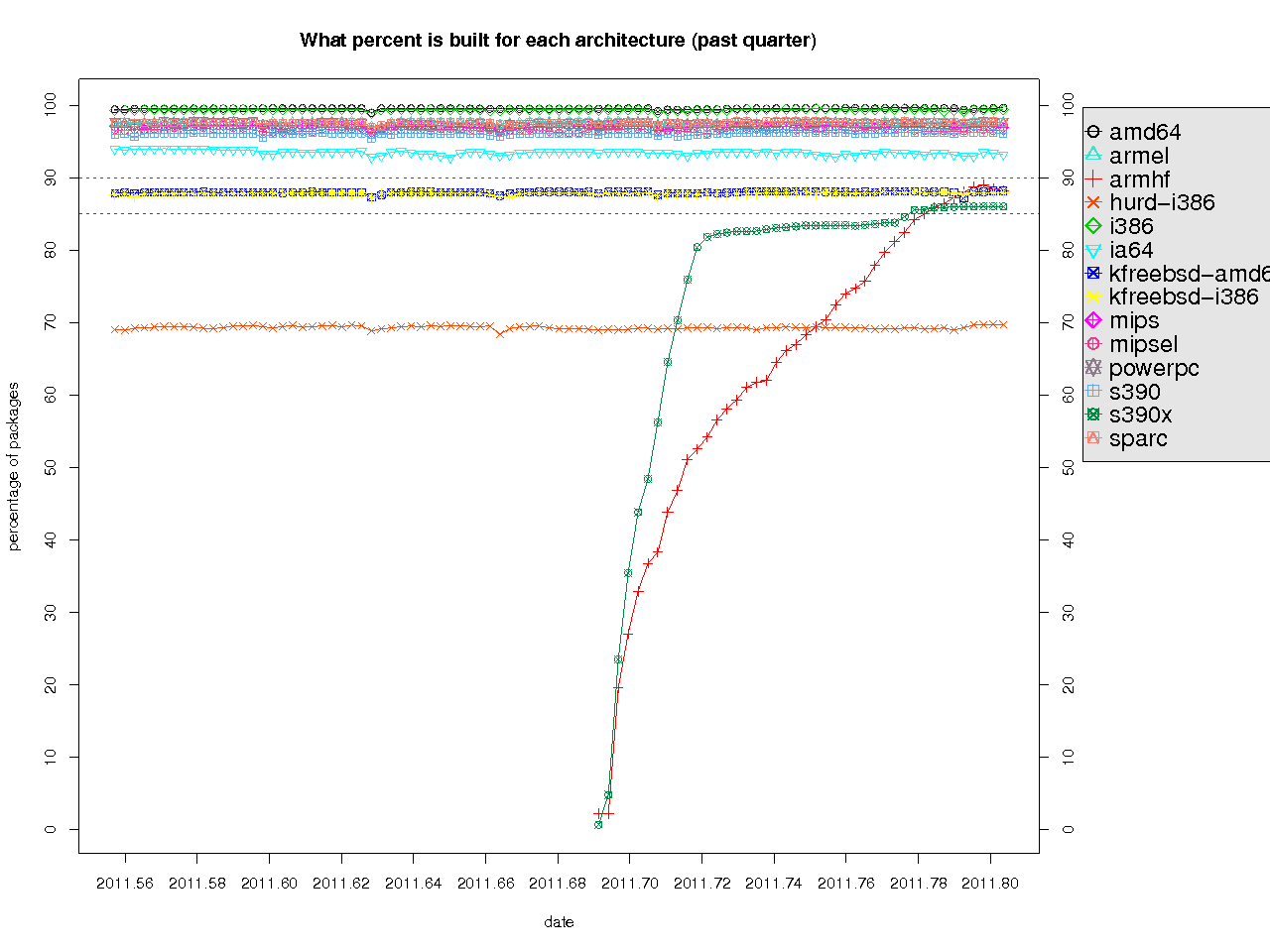
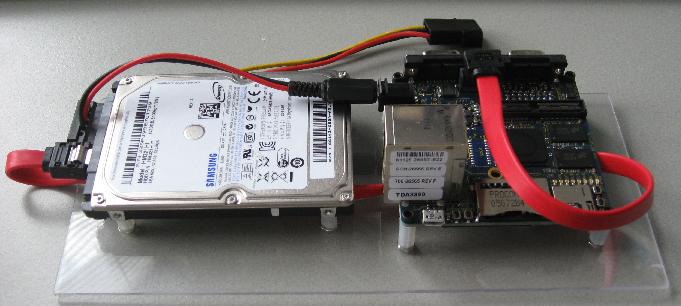
Current status Back in September, I wrote about the machines that I set up to help bootstrap the new armhf port in Debian. Basing on Konstantinos' huge efforts in bringing up the new "architecture" in debian-ports, we started importing armhf into the main Debian archive on the 24th of November. Since then, those builders have been churning away night and day to build the huge collection of software that makes up the Debian archive. The current state can be seen on the armhf buildd status page, and there's a nice graph showing how quickly we've managed to run from 0 to over 90% of the archive here. (Click on the image for a larger version, or visit https://buildd.debian.org/stats/ for other versions. We overtook hurd-i386 quickly and are now ahead of the kfreebsd-* architectures. armhf bootstrap graph We've recently brought 3 more similar build machines online (hildegard, howells and hummel), again sponsored by the nice folks at Linaro but now hosted at the York NeuroImaging Centre at the University of York. This gives us both more build horsepower to keep up with building more different bits of Debian (experimental, updates etc.) and more redundancy in case of problems. We now have the vast majority of the archive built, and now a number of us are concentrating on fixing the remaining issues: language bootstraps and bugs. Also, on the 7th of January we were just added into testing, the next step on our path for inclusion as a Debian release architecture. Setting up the machines A lot of people have been asking me about the physical setup I showed in my last blog about these machines, so here's more details for those who are interested. Mount the 6 boards into the mini-rack, connect up the Molex power connectors to each board, attach ethernet cables and turn it all on! Each board comes with a micro-SD card containing uboot and an Ubuntu installation. I've configured uboot to boot off the hard drive directly, but leaving configuration available to use the Ubuntu on the micro-SD as a simple rescue system should the need arise. The Quickstart boards are not ideal physically for two reasons: the lack of SATA power, plus you need to push a power button on each board to boot it - they don't boot automatically the moment power is applied. However, they're quite inexpensive little machines and have done a great job of building the Debian archive so far! The ideal machines for us would also include more RAM at this point. CPU on these is adequate, but the larger C++ packages (yay webkit!) use a huge amount of memory at link time. Linking in swap is not the best thing, performance-wise... :-( UPDATE 2012-01-12: Ian tells me that the newer Quickstart-R boards apparently have a different power controller; these now boot up straight away without needing you to push a button. That sounds useful.

5 January 2012

Michal Čihař: ColorHug client in unstable

It took me much more uploads than I expected, but ColorHug client is finally in unstable. I was fighting with various bugs, which I could not reproduce locally and of course with my own stupidity in configuring pbuilder. Anyway the buildds overview now shows mostly green, so this is good. The remaining ones mostly wait for libgusb, which needs build on armhf and needs to be ported to non Linux (or rather libusb needs to exist there). One of things I've learned on the way is that docbook-utils is not enough to convert docbook to man pages, you need docbook package as well. Still I don't understand why this did locally work for me... The one outstanding issue is that client code assumes it runs on little endian host (or rather same endianity as the ColorHug device) and thus will break on PPC and other big endian machines. The upstream is aware of that an I even managed to produce patch which should fix it, though I have no means to test it (lack of big endian hardware and lack of the ColorHug device itself).

Filed under: Debian English 4 comments Flattr this!

4 January 2012

Jon Dowland: Ready Player One

I recently completed "Ready Player One", Ernest Cline's debut novel. It's a Sci-Fi fan-service novel that explores a dystopian future (yes, another one) where the majority of the populace hide inside a VR environment to escape their "real" lives. The sole-genius who authored the VR software hid a series of easter eggs inside, in the form of challenges relating to pop-culture and video game trivia circa the 80s. He constructs his will such that whoever first completes the challenges inherits the mega-bucks company who control the VR simulation. Mike Hoye has an excellent summary:

Ready Player One is a nerdculture bender of a book, about as hard to hate while you re in the middle of it as it is to love in hindsight; it s young adult literature for people who were born in the late seventies and haven t really grown up yet. Of which I am apparently one, it has become clear, but you re still left with the sense that you re reading a Cory Doctorow book whose discerning virtue is that the lead isn t a thinly-veiled Cory Doctorow. Which is a huge, huge improvement, make no mistake, but it s stills relentless, pandering fanservice.
(Whilst you are over on Mike's website you should really read this excellent piece on libraries and publishers.) Despite the points above, I enjoyed the book. My biggest complaint was that the ending was quite abrupt. Quite often when I read a story which is essentially about a journey, I am disappointed if the story ends when the journey does. I hope I am not spoiling too much here by revealing that someone eventually solves the riddles and inherits essentially the earth. But what do they do with it? What impact do they make on the miserable world, described only briefly in sparse passages dotted around the bulk of the text detailing the VR one? During the book, the characters opine on what to do with the fortune, but we never see that come to fruition. Perhaps in a sequel.

Matthew Garrett: Android, GPL violations and Google

A bit over a year ago, I wrote about how an incredible number of Android tablets on the market were in violation of the terms of the GPL. I've had rather a lot else to do since then so it's now awfully out of date - but taking a quick browse through the current stack of cheaper devices indicates that things aren't all that much better. We've got source code for some chipsets that were missing it before, but to compensate we've got a whole bunch of new hardware that's entirely lacking. It's all pretty poor, really.

At the time, I wrote the following:

"(Side note: People sometimes ask why Google aren't doing more to prevent infringing devices. For the vast majority of these cases, Google's sole contribution has been to put Android source code on a public website. Red Hat own more of the infringing code than Google do. There's no real reason why Google should be the ones taking the lead role here, and there's fairly sound business reasons why it's not in their interest to do so)"

Factually speaking, nothing's changed. Each of these devices contains code owned by Google, and Google could absolutely take legal action against the vendors. Equally, so could Red Hat, Intel, Nokia and dozens of other companies who hold copyright on portions of the code carried on these devices, and so could thousands of individuals around the world. Nobody's obliged to enforce their copyrights, and in the absence of anyone else doing so it's unreasonable to insist that Google should do it.

However.

Google gives Android away. This seems like an odd thing for them to do, given that it's a significant engineering effort and costs a lot of money to produce. But remember what Android brings to Google - it's a platform with a well-integrated mechanism for distributing advertising to users. Scanning the market shows a huge number of ad-supported apps, and Google's getting money for every single one of those that gets shown. The more Android devices, the bigger the market for apps - and the wider their advertising reach.

In other words: unscrupulous hardware vendors save money by ignoring their GPL obligations. This lets them appeal on price, increasing the number of Android devices in use and increasing Google's profits. Google makes money off other people's violation of the GPL.

Could Google do anything to stop this? Yes. They could sue for copyright infringement, but that kind of thing's time consuming and awkward and any argument about the GPL always seems to end up as a big argument involving conspiracy theories. Instead, Google could attach some extra conditions to the Android trademark. Requiring that the trademark only be attached to GPL-compliant products ought to allow Google to take advantage of the existing well-tested mechanisms for seizing counterfeit goods, providing a direct economic incentive for companies to come into compliance. For added marks, they could restrict the adwords code to devices that use the trademark - if the vendor removes the trademark, applications depending on the adwords functionality would refuse to run and Google wouldn't make money off the infringing hardware.

Or, of course, they could just carry on making extra money as a result of vendors denying users the freedoms granted by the copyright holders. Although that sounds kind of evil to me.

Edit: You probably also want to read the followup post here.

comment count unavailable comments

2 January 2012

Michal Čihař: ColorHug for Debian and in Czech

Today, I've spent some time on ColorHug software (which I've preordered some time ago). The first missing bit there were Debian packages. There are already some packages available for Ubuntu, but I've chosen clean start and did all the packaging on my own. The packages are now waiting in NEW queue (which is amazingly empty in last months) and will hopefully get accepted soon. In case you are too impatient, you can look to git repository on Alioth (you will need libgusb as well). Packaging effort lead to writing (quite minimalistic) man page for colorhug-ccmx, which I've also sent upstream. The other thing, where I can help right now (not owning the device itself) is translation. As you can see on Transifex, my task is done here and Czech translation is complete :-).

Filed under: Debian English Photography 0 comments Flattr this!

1 January 2012

Russ Allbery: 2011 Book Reading in Review

For the year of 2011, I finished and reviewed 60 books. This is a huge milestone for me; it's the first time since the second year I started doing this that the number of books I read actually increased. This gives me more confidence that I've stabilized the year-by-year decline in my reading. I did that while substantially increasing the amount of time I spent enjoying video games, which was another major goal of the year. Only two books received a 10 out of 10 this year, one fiction and one non-fiction. The novel was Jo Walton's Among Others: the best book I read this year. It's a delightful look at the process of finding a place for oneself in the world and features one of the best protagonists that I've seen. The non-fiction book was Rory Stewart's The Prince of the Marshes, which means that both of Stewart's books that I've read have received 10 ratings. The Prince of the Marshes is his look at his time spent in the provisional government of Iraq after the overthrow of Saddam Hussein. I think it should be required reading for anyone expressing an opinion on what the US and other western powers should or should not have done in Iraq. It lays bare the difficulties, confusion, and frequent stupidity of going into someone else's country and trying to fix it, and I think seriously calls into question whether this sort of international intervention can ever work. Other fiction highlights of the year were Kelley Eskridge's Solitaire, a startling and deep look at identity and social connection, and Mira Grant's Feed, a zombie apocalypse story that completely overcame my deep dislike of zombie apocalypse stories. Feed should have won the Hugo in 2011, despite some unbelievable politics and a bit too much cheering for bloggers. This was the year for excellent protagonists, with all three of my top-rated fiction books featuring unique and memorable characters who left a deep and lasting emotional impact. The two other non-fiction standouts were both a bit dry, but if you have the patience and attention, they reward persistance. Richard Hofstadter's Anti-Intellectualism in American Life is a deserved classic that gave me an eye-opening perspective on the long history of interactions between intellectualism and populism in US politics and culture. David Levering Lewis's God's Crucible is a wonderful history of Islam as it related to Europe and filled in some large gaps in my knowledge of world and religious history. 60 books a year, or five books a month, feels like a comfortable and sustainable level, although I'm going to keep my formal goal at a book a week (52 in the year) to give myself some leeway to either get distracted by video games or by other projects. My reading did concentrate more than usual in science fiction and fantasy this year, and I'd like to add more mainstream fiction and more non-fiction. The full analysis includes some additional personal reading statistics, probably only of interest to me.

23 December 2011

Keith Packard: calypso

Calypso CalDAV/CardDAV/WebDAV for Android and Evolution Ever since I bought my first Palm Pilot in 1997, I ve relied upon a pocket-able device to carry a copy of my calendar and contacts, and for that same database to be present on my laptop. I went through a long list of Palm-compatible devices, including both the Palm Treo and Palm Centro telephones. I even wrote a number of my own Palm applications. Years ago, it was pretty obvious that I d have to find a new phone, but I was stuck looking for something that could provide the same hot-sync functionality. SyncML on the Series 40 I bought a Series 40 Nokia phone in Shanghai that promised SyncML support. Given that I had seen numerous SyncML implementations for Linux, it seemed like I should be able to get something to work. SyncML on the Series 40 is a disaster the phone couldn t actually store all of my contacts, and it couldn t hold half of the data fields I used. So, that phone landed in the box and back to the Centro I went. SyncML on the N900 Nokia kindly sent me an N900 at some point, so I gave SyncML another try. Given that the N900 runs evolution-data-server, and that I ve had evolution-data-server running on my laptop, it seemed like I should be in business. Well, almost. It took several days of hacking to fix bugs in the evolution SyncML back end, then another several days fussing with opensync. I ended up abandoning direct synchronization as unworkable opensync would sit in an infinite loop, or worse, trash my database completely. I finally found syncml-ds-tool , which is a debugging tool that comes with opensync. This tool simply synchronizes a set of disk files, one per contact or calendar entry, with the phone. That worked for well over a year. And then, a few months ago, Bluetooth on the laptop stopped connecting with the phone s SyncML server. I d get ECONNREFUSED every time I tried to use it. So much for the N900. DUN still worked, mostly, although it too would get ECONNREFUSED at times, but retrying seemed to make it work. However, While the N900 SyncML solution worked, I discovered another thing I wanted contacts and calendar entries stored in individual files and revision controlled with git. This makes it reasonable to delete stale calendar entries and know that they re never really gone, just left behind in an older version of the calendar. And, if you mess up, you can recover by poking at the database with git directly. I switched back to the venerable Palm Centro; it turns out that calendar and contacts are more important to me than being able to surf the web on my phone. Alas, my Centro went swimming in August and has passed on to the great electronics recycling house in the sky. I pulled the SIM out and switched back to the N900. I got my contacts imported on the N900 by copying files over the net work; not a long-term strategy, but at least I had phone numbers again. There was no hope for my calendar. I started looking for a solution in earnest. How about Android? At this point in my story, I m sure you re asking why I didn t just use one of the numerous Android phones that came through my hands. The answer is simple my calendar and contacts are probably some of my most personal data, and I m not willing to store them outside of my direct control, for reasons similar to those which are driving the development of the FreedomBox. When Android first came out, it could only talk to Google services, which didn t meet my hard requirement for personal data storage. One of my co-workers had his Google account suspended for violating the terms-of-service; he asked what he had done, but they wouldn t say. He asked if he could get his data back, and they said no . They invited him to create a new account, but it would not ever get any of the old data. A few days later, he got a nice apologetic email letting him know that they d made a mistake and that he hadn t, in fact, violated any of the terms-of-service, and that his old account was restored with all of his data intact. Wasn t that nice of Google? WebOS? I got a WebOS phone over the summer and discovered that while it had multiple contact/calendar back ends, none of them used standard protocols and so you only had the choice between multiple corporate data centers, which isn t actually a choice at all. Furthermore, the WebOS phone refused route PAN packets over the phone network, even though I have a data plan which allows this. It s not that it couldn t support it, it s that it refused. A couple of weeks after the WebOS phone arrived, HP canceled all of their WebOS hardware products, which made me less interested in trying to solve this problem. Android recovers About the same time the WebOS phone arrived, I discovered that Google had published enough information about the calendar/contacts internals for Marten Gajda to write CalDAV-Sync and CardDAV-Sync. And then, Andrew McMillan wrote aCal, which is a complete replacement for the built-in calendar and contacts applications and supports CalDAV and CardDAV. With two different standards-compliant solutions available, it seemed like it might be time to try Android again. I d love for CardDAV-Sync and CalDAV-Sync to become free software like aCal is. Andrew makes money from aCal by offering it for sale via the Android Market, while still publishing the sources for those who want to build their own copy. CalDAV/CardDAV on Linux I think the most widely known CalDAV server for Linux is probably DAViCal, a huge pile of PHP and SQL sitting on top of Apache. I m sure it s suitable for running on a server and being accessed over the internet, but I m not interested in that, nor am I interested in having my laptop run Apache and PostgreSQL. I found a tiny little CalDAV server, Radicale, which seemed like a lot better fit. It s written in Python and uses the usual Python HTTP server infrastructure, which provides SSL and authentication support along with some fairly convenient APIs for parsing and generating HTML. Before long, I discovered that Radicale was actually too simple for my needs. It stores the whole calendar in a single file, re-parsing it whenever a request is made, so a calendar with just hundreds of entries caused the server to slow down enough that evolution would time-out when talking to it. Also, Radicale doesn t actually parse the calendar entries completely, it has some ad-hoc code that finds various pieces of data, but without dealing with the whole syntax. I started hacking at Radicale to see how far I could get. I changed the storage code to store one event per file, then added hooks to use git for change management. Then, I found a full vcalendar/vcard parsing library in python, vobject, which I used to replace the ad-hoc parsing code. Finally, I added support for VCARD entries as well, allowing the system to store both calendar and contact information. Introducing Calypso, a CardDAV/CalDAV server With this much divergence from the original project, I ve figured I d best rename things to avoid confusion, so I decided to call it calypso , after a brief trip through the dictionary looking for names starting with ca . Calypso works with evolution, iceowl and the Android CalDAV/CardDAV plugins. It does not yet work with aCal; for some reason aCal cannot find any calendars on the server. Calypso also supports importing calendar changes from the command line, allowing you to integrate support into a text-based email application like notmuch or mutt. Calypso is available via git from git://keithp.com/git/calypso and is distributed under the GPL (v3 or later). I still consider it a work derived from Radicale, and so the code retains all of the Radicale copyrights along with my own. Using Calypso Initial setup Calypso runs as a regular user, all data are stored in ~/.config/calypso. To initialize calypso:
$ mkdir ~/.config/calypso ~/.config/calypso/calendars
$ cat > ~/.config/calypso/config << EOF
[server]
ssl=true
certificate=/home/keithp/.config/calypso/ssl/server.crt
key=/home/keithp/.config/calypso/ssl/server.key
[acl]
;type=htpasswd
type=fake
filename=/home/keithp/.config/calypso/passwd
Running calypso Then run calypso:
$ python ./calypso.py
No, I haven t figured out how to install it Creating new calendars To add a new database:
$ mkdir -p ~/.config/calypso/calendars/private/my_calendar
$ cd ~/.config/calypso/calendars/private/my_calendar
$ git init
$ git commit --allow-empty -m'initialize new calendar'
The new calendar should now be visible as https://localhost:5233/private/my_calendar You can add files to the directory at any time; calypso will check the directory mtime at each operation and update its internal state from that on disk automatically when the directory changes. Importing files Given a set of files with VCALENDAR or VCARD entries, you can import them with:
$ calypso --import private/my_calendar <filenames...>
This will update any changed entries and add any new ones. ToDo list for calypso
  1. Document the config file contents.
  2. Make it installable
  3. Figure out what aCal wants
  4. Support calendar creation
More Android info I m running cyanogenmod on my Nexus S as that provides PAN support. With PAN, I can create a network link between laptop and phone which doesn t depend on any local WiFi infrastructure and which gives both phone and laptop static IP addresses, allowing me to configure the sync URLs statically on the phone. I d use mDNS, but Android doesn t bother to support that.

18 December 2011

Nikita Youshchenko: Life after n900

Since post about lost n900 was on the top of this blog for almost a year, I should probably write a few words about what was next. Since I do need mobile phone every day, I had to get some replacement quickly. Given Maemo was dead and Meego device not available, I decided to go Android. Since after n900 hardware keyboard became a must for me, I decided to try HTC Desire Z. That device made me angry every day, both because of hardware (what a silly idea to place volume buttons such that they are below hardware keyboard when it s opened? they got pressed almost every time when I used keyboard!) and Android itself. I think quite a few things are broken in Android, but most annoying is broken multitasking. I can t live with dialog elements content get lost when I switch to other app and back. Please don t tell me that it s app fault: maybe technically it is, however too many apps have it so I have to generalize. I will likely write more about this later. At the same time, exciting things have been happening in Maemo community. It was the time when Community SSU raised, also several mapping applications went out of dark, and more. I was still subscribed to Maemo resources so I read about all that and got more and more frustrated with my new Android device. And on one sunday evening, after reading more exciting news from Maemo side, I decided that enough is enough. And ordered a new n900. Few days later, I ve sold HTC for about 80% of it s original price. That was an emotional solution, and of course it could not play well in the long term. Despite of individual exciting news, Maemo community was becoming weaker. Device itself had major usability issues (e.g. it could occasionally unlock while being in my pocket, and call a random number from address book and I have quite a few addresses abroad so such calls not only bother people, but also are expensive). There was not many applications, and those available had problems. There was a visible difference between my friends who could just take a phone and quickly do something, and myself who had to struggle with incomplete and buggy software. Also skype quality was very bad. Also when I was planning a 2-week trip to location without mobile network, I tried to preload map of planned route, but it preloaded only part and I was unable to make it preload the rest. Also many similar issues. So it became clear that if I want usability, I have to go to a standard platform. And as such, Android still is the only option. I searched for a device that runs more or less modern Android version, has hardware keyboard, and is not HTC Desire Z. There was not much to choose from. I ordered SonyEricsson sk17i. I m already using it for about 4 months. For common use cases, such as locating a business nearby, or routing to a given address, or quickly browsing a web page, it works. However, all Android flaws including broken multitasking and no-undo-in-text-fields are here, causing everyday frustration. My conclusion is that no smartphone-like devices without major usability issues are available today. What is available probably could be used to somehow satisfy immediate communication needs, but nothing above that. Bells and whistles are there, but I m not interested in those. I want a linux-based pocket-sized mobile computer that will handle both my communication needs and other interests. That could be hacked when I want to, but just works at the rest of time. Something like my Debian desktop. Openmoko was a big hope but it failed. Maemo was a big hope but incompetence of Nokia killed it. Meego was dead before it was born. There is still some life around several mobile linux projects (GTA04, Maemo, Meego, some others), but hopes for it to grow into something that could be used without huge hacking are little. :(

Next.

Previous.