Search Results: "ag"

29 November 2013

Axel Beckert: PDiffs are still useful

probably just not as default. I do agree with Richi and with Michael that disabling PDiffs by default gives the big majority of Debian Testing or Unstable users a speedier package list update. I m though not sure, if disabling PDiffs by default would Additionally I want to remind you that PDiffs per se are nothing bad and should be continued to be supported: So yes, disabling PDiffs by default is probably ok, but the feature must be kept available for those who haven t 100 MBit/s fibre connection into their homes or are sitting just one hop away from the next Debian mirror (like me at work :-). Oh, and btw., for the very same reasons I m also a big fan of debdelta which is approximately the same as PDiffs, just not for package lists but for binary packages. Using debdelta I was able to speed up my download rates over EDGE to up to virtual 100 kB/s, i.e. by factor four (depending on the packages). Just imagine a LibreOffice minor update at 15 kB/s average download rate. ;-) And all these experiences were not made with a high-performance CPU but with the approximately 5 year old Intel Atom processor of my ASUS EeePC 900A. So I used PDiffs and debdelta even despite having a slight performance penalty on applying the diffs and deltas.

28 November 2013

Dirk Eddelbuettel: RcppCNPy 0.2.1

Version 0.2.1 of RcppCNPy is now on CRAN earlier. This version is a minor upgrade with a few small changes as detailed in the NEWS file:
Changes in version 0.2.1 (2013-11-28)
  • Synchronized code with the cnpy repository
  • Added new function to test from R whether integers supported
  • Updated tests for integer support, if available
  • Updated vignette and discussion about need for rebuilding only RcppCNPy with the -std=c++11 flag if integer support is desired
  • Updated tests for integer support, if available
  • Updated THANKS file
  • Ensure that inclusion of Rinternal.h does not affect other headers by adding RF_NO_REMAP
CRANberries also provides a diffstat report for 0.2.1 relative to 0.2.0. As always, feedback is welcome and the rcpp-devel mailing list off the R-Forge page for Rcpp is the best place to start a discussion.

This post by Dirk Eddelbuettel originated on his Thinking inside the box blog. Please report excessive re-aggregation in third-party for-profit settings.

Craig Small: XBMC with MythTv

I have had MythTV running on my server for quite some time. Once I got past the weird problems you often have with the local ABC channel, it has worked very well. One tip, put the recordings into their own partition. MythTV will happily fill it and deleting files only marks them for deletion. This makes perfect sense when it has its own partition but is annoying otherwise. Until recently, the frontend on the television in the living room was a DVD player that spoke DLNA. This worked ok, but was very basic. The recordings were just a list with no graphics or details. Something better had to go here and it has; XBMC. A small (size of a paperback) PC later and we have XBMC running and doesn t it look pretty! The cute thing was it merged my DVD images and my recordings into one, so it didn t matter where the movie came from, it looks the same. It even understands MythTV advertising marks and skips them, all is good. Except, no sound. This is where a combination of my Google skills and XBMC s documentation failed. The documentation either says switch to HDMI output or go through a very long and involved process to get the sound card working. The tests on the command line failed and I thought I was going to be in for that long and involved process fixing alsa. Then in another part of the menus I saw you had Basic, Advanced, Expert levels and wondered what that did? It gave me more things to tweak in the menus. Perhaps that might fix my HDMI sound problem? Going into the System setup and then audio and then switching to a higher level of menu (it s on the left) suddenly I have a screen and a half of options and a few seconds later, sound! So if you are searching for NVIDIA and HDMI and sound, first turn on the advanced menu items and try setting that, it might be all you need (despite what Google and documentation says). One other thing, the C or I button on a remote could be called Guide . It is on mine. Also, SMB shares give a much better result than DLNA ones because SMB all the images and info are done on XBMC and it doesn t do the same for DLNA.

Debian Med: Bits from Debian Med team (by Andreas Tille)

Some of these bits are a bit outdated but there is no point in hiding this information just because it is old. FOSDEM talkAndreas Tille had a talk at FOSDEM which is also Video recorded. A quite similar but updated talk was held at DebConf 13 (see below). Jabber interview by reporter from IndiaThere was an interesting interview between Rajeev Nair and Andreas Tille at So, 17.02.2013 Rajeev Nair is Business head of an health care journal in India held via jabber. Since this might serve as some nice FAQ about Debian Med here is a complete log of this interview (permission to publish it was granted). Article about Debian MedAs a consequence of the interview above the Debian Med team has assembled an article which was originally intended to be published in the Health Cafe journal but somehow this never happened. So we ended up with a nice article targeting at interested readers about Free Software in medicine with not necessarily informatics background. Since the article is considered to be of good quality and has consumed some time of several team members we are seeking for ideas for relevant places where to publish it. It is available as PDFas well as in SVN. Yearly sprint of Debian Med teamThis year we had our third sprint of the Debian Med team and all participants consider it a great success again. The sprint was in end of February and the individual reports are linked from the according wiki page. Since Andreas Tille was able to prove the nice effect of having face to face meetings in Debian teams in the team metrics graphs presented in his talks at DebConf (see below) we will keep on with this good tradition. The next sprint is scheduled for Friday 31st January until Sunday 2nd February in Stonehaven near Aberdeen. If you are interested to meet the people behind Debian Med and want to join us in developing packages which are helpful in health care and bioinformatics you are invited to join us. DebConf 13 in VaumarcusAndreas Tille had two talks with specific influence to Debian Med development(Debian Med as a success story for other Blends, How to attract new developers for your team (MoM, SoB). For those who want to read a full (and lengthy) report about DebConf 13 by Andreas Tille this is online in this blog article. Codefest of the Open Bioinformatics FoundationIvo Maintz and Steffen M ller organised the Codefest of the Open Bioinformatics Foundation in Berlin. About 40 contributors from all over the world attended, connecting the Debian community strongly with upstream. The event triggered a joint paper of participants to Sprints, Codefests and Hackathons alike, presented at the Nettab conference on Semantic, Social, and Mobile Applications for Bioinformatics and Biomedical Laboratories in Venice. Reupload unattended packagesAndreas Tille has mentored the GSoC student Emmanouil Kiagias and as a byproduct some Blends metadata were now kept in UDD. This has inspired some new tools and one of this was an UDD query to return all packages in the interest of the Blend ordered by date when they were uploaded. It has shown that there were packages hanging around in the package pool since five years. So some effort was done to check those packages which were not necessarily "buggy" according to BTS entries and so we were able to fix the following issues in about 20-30 packages: Since it was impressive how many things that deserve fixing are hidden in such long unattended packages it is recommended also to other teams to spend some time into these. The UDD query can be easily tweaked for a team maintainer address. Debian Med Bug Squashing Advent Calendar 2013The Debian Med team will again do the Bug Squashing Advent Calendar. Feel free to join us in our bug squashing effort where we close bugs while other people are opening doors. :-) Kind regards and see you at Debian Med sprint
Andreas.

27 November 2013

Michael Stapelberg: let s disable pdiffs already!

Richi s post about the pdiff-by-default agony resonates with me a lot. On EVERY Debian installation I have ever done in the last few years, without any exceptions, I have turned off pdiffs. Even on all the oddball cases (Raspberry Pi, account on a remote machine, ) where I don t run my install-configs script, I have ended up turning off pdiffs eventually, because it is just so insanely slow on modern internet connections. And by modern I mean even the DSL link my parents place has since 14 years. Let s disable pdiffs by default already.

Steinar H. Gunderson: Stockfish

The open-source chess program Stockfish recently climbed to the top of the TCEC rating lists. Even though it does not seem likely to win the actual TCEC tournament (it is 15.5 11.5 down in the 48-game superfinal against Komodo, a closed-source commercial program, after winning 4, losing 8 and drawing 15), this is a tremendeous achievement. This is not only because it is highly unusual that the strongest chess program is open-source (it's naturally hard to keep a competitive edge when everybody can see your secrets!), but also because it is a mere 9000 lines of C++ code. (This is without a GUI; it interfaces through a standardized protocol known as UCI.) In comparison, Crafty, a far weaker open-source program, is about four times that, GNU Chess is above 40000, and I seem to recall that the Deep Blue program was something like 65000 lines (in addition to, of course, all the code for the ASIC chess chips it contained, and stood for the majority of its chess strength!). So, the development team is really to be commended. It should also be said that TCEC is testing the latest beta versions of most of these engines and while Stockfish is developed in the open, on GitHub, the latest versions of e.g. Komodo and Houdini are private. (This is probably one of the reasons why Stockfish is slightly lower on e.g. the CCRL list, which also computes chess program rating lists by playing games between them.) Now, why does anyone care? Only a very small handful of players would be able to score even a draw against any of these programs in a 10-game match, so does it really matter which one we choose? Or is this some obscure pissing contest? The answer, of course, is that these engines are not primarily useful for competitive play; they are useful for analysis. Almost any player, right down from beginners to the very top players, can benefit from having someone stronger than them look at their games (or others' games!) and say where things went wrong. (Somehow analyzing losses always seem more instructive than analyzing wins. Nobody ever got better by winning, as the saying goes.) And the better a program is at playing chess, the more likely is its analysis to be correct. Of course, for the weaker players, a chess coach is likely to produce much more understandable guidance ( this creates a weak square on c7 is much more palatable than after these 18 moves here, white is 0.48 pawns stronger than you, so this was a bad move , and engines produce the latter sort of output), but they are always available, incredibly strong, and cost much less than a coach. :-) They also add a lot to the otherwise quite hard-to-comprehend activity of watching high-level human players; while the computers do not understand every kind of position equally well, they at least provide some sort of objective verdict on which player has the upper hand, something which can be really hard to discern unless you have very strong players around for commentary. So, in trying to improve my skills a bit, I've been analyzing my games with engines for a while, and recently I've switched from Rybka to Stockfish. (Rybka, a closed-source program, used to be the clear leader of the pack, but after a huge amount of drama involving accusations of who has copied code from who, it seems no longer to be actively developed, and Stockfish is now somewhat stronger.) This, unfortunately, brings me to the things I don't like too much about Stockfish; it seems to behave more erratically than Rybka did in interactive analysis mode. Its score jumps a lot more around when I move something (worse at remember the analysis from the previous position?), and sometimes, it changes its mind a lot when I move back and forth between moves maybe the huge selectivity that makes chess engines so strong these days also make them behave less usefully when only looking at a move for a few seconds. So, even though Stockfish is a fantastic chess engine, and will only get better in the future, maybe I'll go back to Rybka at some point. But then again, maybe I should then check out Komodo or any of the other engines out there or maybe talk to someone who actually knows chess, that would help a lot, too =)

Timo Jyrinki: Workaround for setting Full RGB when Intel driver's Automatic setting does not work

Background I upgraded from Linux 3.8 to 3.11 among with newer Mesa, X.Org and Intel driver recently and I found a small workaround was needed because of upstream changes.

The upstream change was the Add "Automatic" mode for "Broadcast RGB" property, and defaulting to the Automatic. This is a sensible default, since many (most?) TVs default to the more limited 16-235, and continuing to default to Full from the driver side would mean wrong colors on the TV. I've set my screen to support the full 0-255 range available to not cut the amount of available shades of colors down.

Unfortunately it seems the Automatic setting does not work for my HDMI input, ie blacks become grey since the driver still outputs the more limited range. Maybe there could be something to improve on the driver side, but I'd guess it's more about my 2008 Sony TV actually having a mode that the standard suggests limited range for. I remember the TV did default to limited range, so maybe the EDID data from TV does not change when setting the RGB range to Full.

I hope the Automatic setting works to offer full range on newer screens and the modes they have, but that's probably up to the manufacturers and standards.

Below is an illustration of the correct setting on my Haswell CPU. When the Broadcast RGB is left to its default Automatic setting, the above image is displayed. When set to Full, the image below with deeper blacks is seen instead. I used manual settings on my camera so it's the same exposure.


Workaround For me the workaround has evolved to the following so far. Create a /etc/X11/Xsession.d/95fullrgb file:

if [ "$(/usr/bin/xrandr -q --prop   grep 'Broadcast RGB: Full'   wc -l)" = "0" ] ; then
/usr/bin/xrandr --output HDMI3 --set "Broadcast RGB" "Full"
fi
And since I'm using lightdm, adding the following to /etc/lightdm/lightdm.conf means the flicker only happens once during bootup:

display-setup-script=/etc/X11/Xsession.d/95fullrgb

Important: when using the LightDM setting, enable executable bits (chmod +x) to /etc/X11/Xsession.d/95fullrgb for it to work. Obviously also check your output, for me it was HDMI3.

If there is no situation where it'd set back to "Limited 16:235" setting on its own, the display manager script should be enough and having it in /etc/X11/Xsession.d is redundant and slows login time down. I think for me it maybe went from 2 seconds to 3 seconds since executing xrandr query is not cheap.
Misc Note that unrelated to Full range usage, the Limited range at the moment behaves incorrectly on Haswell until the patch in bug #71769 is accepted. That means, the blacks are grey in Limited mode even if the screen is also set to Limited.

I'd prefer there would be a kernel parameter for the Broadcast RGB setting, although my Haswell machine does boot so fast I don't get to see too many seconds of wrong colors...

Kees Cook: Thanks UPS

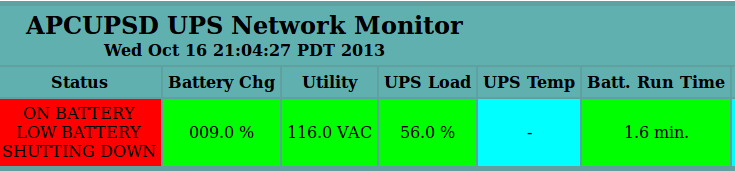
My UPS has decided that every two weeks when it performs a self-test that my 116V mains power isn t good enough, so it drains the battery and shuts down my home network. Only took a month and a half for me to see on the network graphs that my outages were, to the minute, 2 weeks apart. :) APC Monitoring In theory, reducing the sensitivity will fix this
2013, Kees Cook. This work is licensed under a Creative Commons Attribution-ShareAlike 3.0 License.
Creative Commons License

26 November 2013

Daniel Pocock: Real-time streaming market data with free software

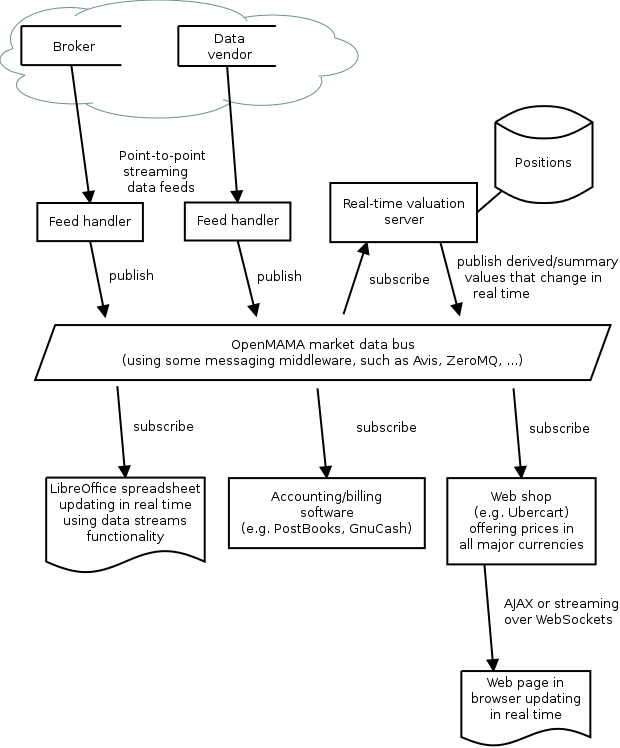
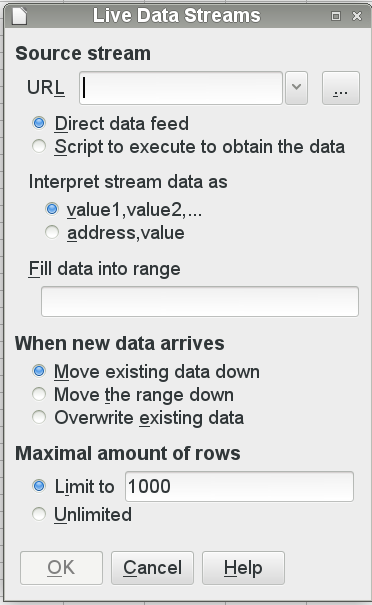
Here is an overview of the real-time market data architecture based on OpenMAMA: All these components may be running on a single host or they may be distributed across different servers and workstations in a LAN. The OpenMAMA market data bus ties them together. External data sources These are external sources of data. These could be currency trading firms, stock brokers, bullion dealers or even Bitcoin exchanges. Some exchanges don't provide data services directly to the general public and they distribute their price data through third-party data vendors such as Reuters and Bloomberg. Feed handlers The feed handlers manage the connections to external data sources. These are typically daemon processes that implement the wire protocols used by the external vendors for transmitting data over the public internet or a leased line. They typically use a point-to-point topology such as TCP connections. The feed handlers publish the data into the market data bus. In practice, the feed handler may be a proprietary application provided by the data vendor or it may simply be a Python script that fetches exchange rates from a URL every five minutes. OpenMAMA The market data bus is a distributed framework that is accessible to all of the local servers and workstations in the LAN. At the lowest level a messaging middleware solution is used to transport the data. The Avis Event Router is a free middleware. There is upcoming support for Apache QPID as well. Some commcercial middleware is supported too - here is the full list OpenMAMA does not provide a daemon or server process of its own. It is a set of libraries that operate on top of the middleware transport. In very general terms, the OpenMAMA libraries let applications publish messages (such as price ticks) or subscribe to receive the messages published by other applications. Spreadsheet application (for example, LibreOffice) LibreOffice is introducing a new data import feature for streaming time series data. This appears to provide a useful integration point for OpenMAMA and discussion is taking place in the development community. The spreadsheet can operate in various ways. A simple application may simply poll the currency prices when the spreadsheet is opened or refreshed. A more demanding application may see the spreadsheet come alive, recalculating all cells on every tick from the data vendor (several times per second). This latter scenario is more common in dealing rooms and hedge funds. Accounting/billing software There are many free accounting applications today, including PostBooks and GnuCash and some more heavyweight solutions like Adempiere and OpenERP. In a world where credit cards and the world wide web have made international trade an everyday activity, many people are using this software to track expenses and accounts in more than one currency. For example, a British business may be paying some suppliers in Euros and a Canadian may be charging some customers in US dollars. A Swiss person may be keeping some of their savings in gold bullion in the vault of one of their world reknowned Swiss banks. A common requirement for all of these users is the balance sheet. Using real-time market data sources, the balance sheet can be refreshed at any time from the live market prices. A home user may just find it convenient that they can open the balance sheet and always see their net worth immediately without having to manually cut and paste the currency prices from a web page. A business user operating in a competitive industry with low margins may be checking the balance sheet several times per day to ensure they remain solvent and profitable. Web shops Many web shops now offer the customers the convenience of viewing prices in their own currency. It is important to make sure these prices are accurate, especially when dealing with volatile currencies or when the products have a low profit margin. The web application server can receive the market data price ticks just like any other application in the network. Using this data, it can insert live prices into the pages as they are generated. If the currencies are particularly volatile, the web application could stream the prices to the browser using WebSockets and a JavaScript client embedded in the page would update the price field in real time. In fact, this web-based streaming price update mechanism is exactly how many online financial trading services offer live market prices to their customers. Real-time valuation server In a large organisation there may be many users looking at the same values. For example, in a trading desk, many users may need to see the desk's overall position in each market. In a busy web shop, many concurrent users may need to see the prices of common products. Rather than recalculating these values for each user in parallel, a common solution involves setting up a server to receive raw values (such as currency prices) from the data feed, calculate values needed by local users and then broadcast those values over the market data bus. How applications can integrate with real-time market data Here are some steps for getting started:
Daniel Pocock: Real-time streaming market data with free software

Here is an overview of the real-time market data architecture based on OpenMAMA: All these components may be running on a single host or they may be distributed across different servers and workstations in a LAN. The OpenMAMA market data bus ties them together. External data sources These are external sources of data. These could be currency trading firms, stock brokers, bullion dealers or even Bitcoin exchanges. Some exchanges don't provide data services directly to the general public and they distribute their price data through third-party data vendors such as Reuters and Bloomberg. Feed handlers The feed handlers manage the connections to external data sources. These are typically daemon processes that implement the wire protocols used by the external vendors for transmitting data over the public internet or a leased line. They typically use a point-to-point topology such as TCP connections. The feed handlers publish the data into the market data bus. In practice, the feed handler may be a proprietary application provided by the data vendor or it may simply be a Python script that fetches exchange rates from a URL every five minutes. OpenMAMA The market data bus is a distributed framework that is accessible to all of the local servers and workstations in the LAN. At the lowest level a messaging middleware solution is used to transport the data. The Avis Event Router is a free middleware. There is upcoming support for Apache QPID as well. Some commcercial middleware is supported too - here is the full list OpenMAMA does not provide a daemon or server process of its own. It is a set of libraries that operate on top of the middleware transport. In very general terms, the OpenMAMA libraries let applications publish messages (such as price ticks) or subscribe to receive the messages published by other applications. Spreadsheet application (for example, LibreOffice) LibreOffice is introducing a new data import feature for streaming time series data. This appears to provide a useful integration point for OpenMAMA and discussion is taking place in the development community. The spreadsheet can operate in various ways. A simple application may simply poll the currency prices when the spreadsheet is opened or refreshed. A more demanding application may see the spreadsheet come alive, recalculating all cells on every tick from the data vendor (several times per second). This latter scenario is more common in dealing rooms and hedge funds. Accounting/billing software There are many free accounting applications today, including PostBooks and GnuCash and some more heavyweight solutions like Adempiere and OpenERP. In a world where credit cards and the world wide web have made international trade an everyday activity, many people are using this software to track expenses and accounts in more than one currency. For example, a British business may be paying some suppliers in Euros and a Canadian may be charging some customers in US dollars. A Swiss person may be keeping some of their savings in gold bullion in the vault of one of their world reknowned Swiss banks. A common requirement for all of these users is the balance sheet. Using real-time market data sources, the balance sheet can be refreshed at any time from the live market prices. A home user may just find it convenient that they can open the balance sheet and always see their net worth immediately without having to manually cut and paste the currency prices from a web page. A business user operating in a competitive industry with low margins may be checking the balance sheet several times per day to ensure they remain solvent and profitable. Web shops Many web shops now offer the customers the convenience of viewing prices in their own currency. It is important to make sure these prices are accurate, especially when dealing with volatile currencies or when the products have a low profit margin. The web application server can receive the market data price ticks just like any other application in the network. Using this data, it can insert live prices into the pages as they are generated. If the currencies are particularly volatile, the web application could stream the prices to the browser using WebSockets and a JavaScript client embedded in the page would update the price field in real time. In fact, this web-based streaming price update mechanism is exactly how many online financial trading services offer live market prices to their customers. Real-time valuation server In a large organisation there may be many users looking at the same values. For example, in a trading desk, many users may need to see the desk's overall position in each market. In a busy web shop, many concurrent users may need to see the prices of common products. Rather than recalculating these values for each user in parallel, a common solution involves setting up a server to receive raw values (such as currency prices) from the data feed, calculate values needed by local users and then broadcast those values over the market data bus. How applications can integrate with real-time market data Here are some steps for getting started:

Axel Beckert: Showing packages newer than in archive with aptitude

I happens quite often that I install a manually built, newer version of some package on a machine. Occassionally I forget to remove it or to downgrade it to the version in the APT repo.
$ apt-show-versions   fgrep newer
easily finds those packages. But usually when doing such a check, I want this list of packages in my aptitude TUI to have a look at the other versions of that package and to take actions. And I don t want to manually search for each of the package manually. This can be done with the following one-liner :
# aptitude -o "Aptitude::Pkg-Display-Limit=(  apt-show-versions   fgrep newer   awk -F '[ :]' ' printf "~n ^"$1"$   " '   sed -e 's/  *$//'  )"
It uses apt-show-version s output, searches for the right packages, takes the first column and transforms it into an aptitude search pattern matching all packages whose name is exactly one of the listed packages. But this solution is quite ugly and slow. So I wondered if this is also doable with pure aptitude search patterns which likely would also be faster. And after some playing around I found the following working aptitude search term:
~i ?any-version(!~O.) !~U !~o
This matches all packages which which are installed and which have a version which has no origin, i.e. no associated APT repository. Since this also matches all hold packages as well as all packages not available in any archive, I use !~U !~o to exclude those packages from that list again. Since nobody can remember that nor wants to type that everytime needed, I added the following alias to my setup:
alias aptitude-newer-than-in-archive='aptitude -o "Aptitude::Pkg-Display-Limit=~i ?any-version(!~O.) !~U !~o"'
Only caveat so far: It seems to also match packages from APT repos which haven t set an Origin . This should not happen with any Debian or Ubuntu APT repository, but seems to happen occasionally with privately run APT repositories. And using ~A instead of ~O, i.e. ~i ?any-version(!~A.), does not work for this case either, despite it matches installed packages of which versions not in any available archive exist. But unfortunately aptitude seems to remember in some way if a package was in some archive in the past, so this only shows packages installed with dpkg -i, but not packages removed from e.g. unstable but with older versions still being available in stable.

Gregor Herrmann: cowbuilder crossbuilds for raspbian

after reading waja's description on Crossbuilding Debian Packages With Sbuild (for Raspbian), I thought I'd share what I did for using cowbuilder for the same purpose. I stumbled about these instructions for pbuilder on github recently which taught me about the nice qemu-debootstrap tool. as I didn't want a specific config file & I prefer cowbuilder over pbuilder, I "translated" the instructions to the following command:
cowbuilder --create --basepath /var/cache/pbuilder/armhf/raspbian-wheezy-base.cow \
--distribution wheezy --mirror http://mirrordirector.raspbian.org/raspbian/ \
--components "main contrib non-free rpi" --extrapackages eatmydata \
--architecture armhf \
--debootstrap qemu-debootstrap --debootstrapopts --variant=buildd \
--debootstrapopts --keyring=/usr/share/keyrings/raspbian-archive-keyring.gpg
(after installing the raspbian-archive-keyring before)

Daniel Pocock: The free software country?

Loch Ness Monster, Scotland There is big news in Europe right now, especially the UK, about the Scottish nation's manifesto for independence. I thought this was really amazing, a country that is going to move to free software and protect its citizens from horrors like DRM. I couldn't wait to find out more, for example, will they use Linux or *BSD? After all, how many nations today can really consider themselves independent when they are trapped in the use of complex and opaque systems that require ongoing royalty payments to a foreign corporation, much like ancient villages paying their tithes to Rome? Today it is actually worse: these independent nations are not just sacrificing their cash - the new Rome is also using those same secret, proprietary systems to raid their subjects' privacy. So I went to the manifesto's web site to get the details. I couldn't even find the words "software" or "technology" listed in the policy index on the front page - and software doesn't even appear in the search results. A section on Culture, Communications and Digital only really looks at the issues for the media (BBC after independence). They don't even make any comment about the British Telecom (BT) pension crisis and whether Scotland will abandon BT's services, leaving only those customers south of the border to continue subsidising the deficit through higher phone bills. There is some hope, with the dot scot (.scot) top level domain coming in 2015 regardless of the referendum outcome. Does this mean an independent Scotland is going to be run without technology at all then? That could be an interesting way to avoid the type of infiltration of communications technology that has been taking place in Brussels. Or do the people calling the shots simply fail to realise the impact of software and communications technology on a modern day concept of independence? Party date set For those who just care about gatecrashing the post-independence party, start booking your leave for March 2016.

Ricardo Mones: Shared memory crazyness

The output of some commands explains it all.

These are the default values in a Wheezy system:

$ ipcs -l
------ Shared Memory Limits --------
max number of segments = 4096
max seg size (kbytes) = 32768
max total shared memory (kbytes) = 8388608
min seg size (bytes) = 1


That's not enough for all the data I want to load in a single segment, so let's start with 1Gb of shared memory:

# sysctl kernel.shmmax=1073741824 kernel.shmall=1073741824
kernel.shmmax = 1073741824
kernel.shmall = 1073741824

So now, both should be equal, isn't it?

$ ipcs -l
------ Shared Memory Limits --------
max number of segments = 4096
max seg size (kbytes) = 1048576
max total shared memory (kbytes) = 4294967296
min seg size (bytes) = 1

Uh!?

A free $BEVERAGE when we met for the one which tells me what's happening here ;-)

25 November 2013

Jan Wagner: Crossbuilding Debian packages with sbuild (for Raspbian)

Yesterday I asked myself, how to setup a crossbuild environment on a Debian wheezy/amd64 to build binary packages compatible for Raspbian. After digging around it seemed to be the easiest way to use mk-sbuild to setup such a build environment.
We just need to install sbuild (>= 0.64.0-1) and ubuntu-dev-tools (>= 0.146), both packages are available since jessie:
aptitude install sbuild ubuntu-dev-tools
Some more packages are needed for crossbuilding:
aptitude install qemu-user-static binfmt-support linux-image-amd64
Setting up the chroot is quite easy with:
mk-sbuild --arch=armhf --debootstrap-mirror=http://archive.raspbian.org/raspbian jessie
Unfortunately you get thrown an error about bad signing key:
Release signed by unknown key (key id 9165938D90FDDD2E)
This happens cause debootstrap is using per default /usr/share/keyrings/$ DISTRO -archive-keyring.gpg, which doesn't ship the Raspbian signing key indeed. After looking how to solve that problem, I decided to use a quik&dirty fix:
echo 'DEBOOTSTRAP_KEYRING="--keyring=/usr/share/keyrings/raspbian-archive-keyring.gpg"' >> \
    /root/.mk-sbuild.rc
cp -a /usr/bin/mk-sbuild /tmp/mk-sbuild
patch -p0<./mk-sbuild_raspbian.diff /tmp/mk-sbuild
<noscript><pre><code>&lt;html&gt;&lt;body&gt;You are being &lt;a href=&quot;https://github.com/gist/7639011&quot;&gt;redirected&lt;/a&gt;.&lt;/body&gt;&lt;/html&gt;</code></pre></noscript>
mk-sbuild_raspbian.diff Now you should be able to setup your Raspbian sbuild chroot via:
/tmp/mk-sbuild --arch=armhf --debootstrap-mirror=http://archive.raspbian.org/raspbian wheezy

24 November 2013

Dirk Eddelbuettel: Website and blog updated

Earlier this year the blog had its tenth anniversary. I had meant to celebrate the occassion by revamping the site and blog a little. Having set up the updated R/Finance site, the Rcpp Gallery and Rcpp sites as well as the much-needed overhaul of the html side of the CRANberries RSS feed (which also integrates it with the static blog compiler I use), I figured I just needed a little time to get this done. Well, eight months later we're there. It still uses Twitter Bootstrap for layout, and a slightly modified Bootswatch theme. Comments welcome, and please let me know if links are missing or going nowhere in places.

This post by Dirk Eddelbuettel originated on his Thinking inside the box blog. Please report excessive re-aggregation in third-party for-profit settings.

Jan Wagner: Running icinga with lighttpd on Debian whezzy (and a Raspberry)

At first we need to install Icinga and lighttpd:
aptitude install icinga lighttpd
We need to enable the lighttpd cgi and authentication module:
lighttpd-enable-mod cgi && ighttpd-enable-mod auth
Let's create a config for Icinga (in a subdir of the default vHost). As you can see, you don't need any 'setenv.add-environment' on wheezy (at least):
vi /etc/lighttpd/conf-available/50-icinga.conf
<noscript><pre><code>&lt;html&gt;&lt;body&gt;You are being &lt;a href=&quot;https://github.com/gist/7602246&quot;&gt;redirected&lt;/a&gt;.&lt;/body&gt;&lt;/html&gt;</code></pre></noscript>
50-icinga.conf Let's create a config file with credentials for the user icingaadmin:
htpasswd -c /etc/icinga/htpasswd.users icingaadmin
Now we just need to enable the icinga config and reload the lighttpd:
lighttpd-enable-mod icinga && /etc/init.d/lighttpd force-reload
At this point you should find a working Icinga setup at http://yourip/icinga P.S. Does anybody know how to setup a buildenv (preferable as crossbuild on amd64) for Raspbian, as the Debian armhf packages are not compatible to raspbian and so there is no access to the Backports repository? Cool would be to get a sbuild env running, so it can be integrated into a buildd.

Petter Reinholdtsen: New chrpath release 0.15

After many years break from the package and a vain hope that development would be continued by someone else, I finally pulled my acts together this morning and wrapped up a new release of chrpath, the command line tool to modify the rpath and runpath of already compiled ELF programs. The update was triggered by the persistence of Isha Vishnoi at IBM, which needed a new config.guess file to get support for the ppc64le architecture (powerpc 64-bit Little Endian) he is working on. I checked the Debian, Ubuntu and Fedora packages for interesting patches (failed to find the source from OpenSUSE and Mandriva packages), and found quite a few nice fixes. These are the release notes: New in 0.15 released 2013-11-24: You can download the new version 0.15 from alioth. Please let us know via the Alioth project if something is wrong with the new release. The test suite did not discover any old errors, so if you find a new one, please also include a testsuite check.

23 November 2013

Steve Kemp: Things have settled down nicely

I've now completed all my KVM migrations. Moving my personal virtual machines from one host to another. There were a few niggles, for example I didn't have a working IPv6 allocation at the time I moved things so I had to set that up post-migration. I've also joined each of the hosts into a VPN which makes cross-guest communication secure and simple. Finally I've overhauled my firewalls and service lists. I installed a couple of extra guests, using libvirt and booting from the Debian ISO. The Debian installer continues to impress, though it did make me think I should overhaul my PXE setup at home. It wouldn't be hard to have a Raspberry PI running as a TFTP + DHCP server. You could plug it into a network, reboot your desktop, and then have it boot into the imager. At the moment I run DHCP + TFTPD + etc on my main desktop, and that allows me to reimage any of the hosts in the flat easily, except itself obviously. The last time I reinstalled this system I had to reconfigure DHCP + PXE + TFTP on another host. I think the next time I need to reinstall any system I'll "waste" an SD-card on an image-server host. Finally I've recently read the Rick Cook Wizardy Series: Fun idea. Horrible puns. Some of the books were too long, or left plot elements dangling, but on average they were more good than bad. Albeit a little predictable and "simple".

Russell Coker: Failures of Intelligence Agencies

There s been an ongoing news issue related to the NSA that I m not going to directly comment on, Charles Stross has one of the more interesting comments about it [1]. One of his major points is that any success at government secrecy relies on the type of work environment that existed 40+ years ago. Corporatism has killed government secrecy now it s a matter of time before corporate whistle-blowers start seriously leaking documents. One article that Charles links to is an interesting and insightful blog post Adam Curtis wrote for the BBC about the many failures of MI5 [2]. I think that everyone is aware of their biggest failures but from Adam s article it seems that they have only failed and never succeeded in anything. I wonder whether ASIO is any better, it s probably not (the Wikipedia page notes the involvement of MI5 in creating ASIO). It seems that the best way of achieving the goals of ASIO and MI5 would be to disband those organisations and assign regular police to do such work, after all it s been proven that British police are better at catching spies than MI5.

Next.

Previous.