Search Results: "ron"

8 July 2023

Dirk Eddelbuettel: #40: Another r2u Example Making Colab Easier

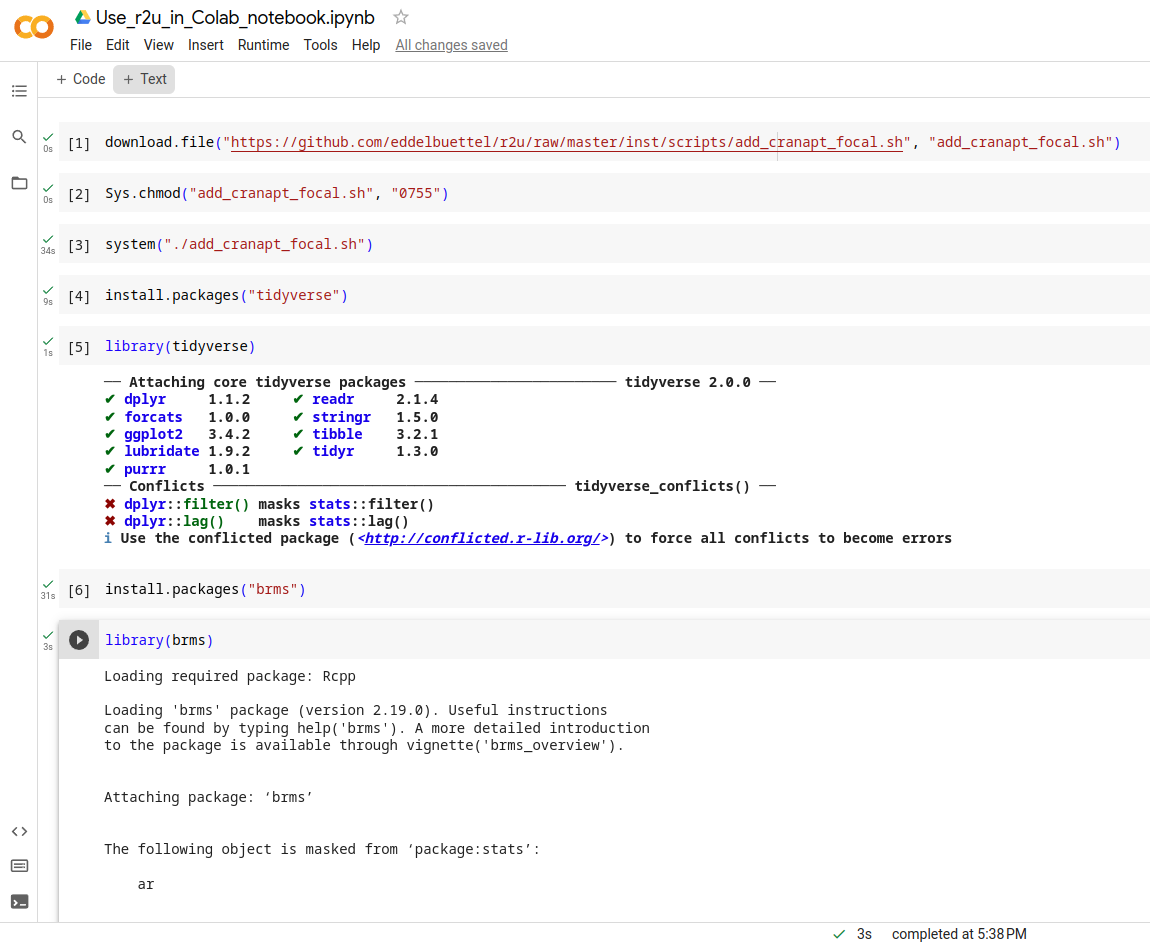
Welcome to the 40th post in the $R^4 series. This one will just be a very brief illustration of r2u use in what might be an unexpected place: Google Colab. Colab has a strong bent towards Jupyter and Python but has been supporting R compute kernels for some time (by changing what they call the runtime ). And with a little exploration one can identify these are (currently, as of July 2023) running Ubuntu 20.04 aka focal . Which is of course one of two system supported by our lovely r2u project (with the other being the newer 22.04 aka jammy ). And I mostly tweeted / tooted about r2u since the its introduction in #37. And gave basically just a mention in passing in faster feedback post #38 as well as the faster feedback in ci post #39). So a brief recap may be in order. In essence, r2u makes all of CRAN available as full-fledged Ubuntu binaries with complete and full dependencies which are then installed directly and quickly via apt. Which, to top it of, are accessed directly from R via install.packages() so no special knowledge or sauce needed. We often summarize it as fast, easy, reliable: what is not to like . And, as we established in a few minutes of probing, it also works in the focal -based Colab session. The screen shot shows the basic step of fetching the setup script (for plain Ubuntu focal system) from r2u, making it executable and running it. Total time: 34 seconds. And after that we see the pure magic of install.packages("tidyverse") installing all of it in nine seconds. Additionally, we add the brms package in thirty-one seconds cia install.packages("brms"). Both load just fine and echo their current values.
r2u on colab focal r2u on colab focal
The commands that are executed in that R session are just
download.file("https://github.com/eddelbuettel/r2u/raw/master/inst/scripts/add_cranapt_focal.sh",
              "add_cranapt_focal.sh")
Sys.chmod("add_cranapt_focal.sh", "0755")
system("./add_cranapt_focal.sh")
install.packages("tidyverse")
library(tidyverse)
install.packages("brms")
library(brms)
The timings are the Colab notebook are visible in the left margin. The lack of output makes debugging a little trickier so I still recommend to use r2u for first expploration via a Docker container as e.g. rocker/r2u:jammy. More information about r2u is at its site, and we answered some question in issues, and at stackoverflow. More questions are always welcome! If you like this or other open-source work I do, you can now sponsor me at GitHub.

This post by Dirk Eddelbuettel originated on his Thinking inside the box blog. Please report excessive re-aggregation in third-party for-profit settings.

Lisandro Dami n Nicanor P rez Meyer: Open question: Podman and user/group IDs

Here is an open question for Podman users: is there a (ideally simple) way to keep the user/group ID between the real system and the container? Let me be more verbose. I use Docker mostly in two "special" cases: Now in both setups I mount some system directory into the chroot, normally as $HOME. Using Docker I can do the right UID/GID mapping and any file I create inside the container will have my system's UID/GID. And that's the thing I so far could not do with Podman. So dear Podman user: is there any way to do this with Podman? If you know, please feel free to send a comment/email!

Russell Coker: Sandboxing Phone Apps

As a follow up to Wayland [1]: A difficult problem with Linux desktop systems (which includes phones and tablets) is restricting application access so that applications can t mess with each other s data or configuration but also allowing them to share data as needed. This has been mostly solved for Android but that involved giving up all legacy Linux apps. I think that we need to get phones capable of running a full desktop environment and having Android level security on phone apps and regular desktop apps. My interest in this is phones running Debian and derivatives such as PureOS. But everything I describe in this post should work equally well for all full featured Linux distributions for phones such as Arch, Gentoo, etc and phone based derivatives of those such as Manjaro. It may be slightly less applicable to distributions such as Alpine Linux and it s phone derivative PostmarketOS, I would appreciate comments from contributors to PostmarketOS or Alpine Linux about this. I ve investigated some of the ways of solving these problems. Many of the ways of doing this involves namespaces. The LWN articles about namespaces are a good background to some of these technologies [2]. The LCA keynote lecture Containers aka crazy user space fun by Jess Frazelle has a good summary of some of the technology [3]. One part that I found particularly interesting was the bit about recognising the container access needed at compile time. This can also be part of recognising bad application design at compile time, it s quite common for security systems to flag bad security design in programs. Firejail To sandbox applications you need to have some method of restricting what they do, this means some combination of namespaces and similar features. Here s an article on sandboxing with firejail [4]. Firejail uses namespaces, seccomp-bpf, and capabilities to restrict programs. It allows bind mounts if run as root and if not run as root it can restrict file access by name and access to networking, system calls, and other features. It has a convenient learning mode that generates policy for you, so if you have a certain restricted set of tasks that an application is to perform you can run it once and then force it to do only the same operations in future. I recommend that everyone who is still reading at this point try out firejail. Here s an example of what you can do:
# create a profile
firejail --build=xterm.profile xterm
# now this run can only do what the previous run did
firejail --profile=xterm.profile xterm
Note that firejail is SETUID root so can potentially reduce system security and it has had security issues in the past. In spite of that it can be good for allowing a trusted user to run programs with less access to the system. Also it is a good way to start learning about such things. I don t think it s a good solution for what I want to do. But I won t rule out the possibility of using it at some future time for special situations. Bubblewrap I tried out firejail with the browser Epiphany (Debian package epiphany-browser) on my Librem5, but that didn t work as Epiphany uses /usr/bin/bwrap (bubblewrap) for it s internal sandboxing (here is an informative blog post about the history of bubblewrap AKA xdg-app-helper which was developed as part of flatpak [5]). The Epiphany bubblewrap sandbox is similar to the situation with Chrome/Chromium which have internal sandboxing that s incompatible with firejail. The firejail man page notes that it s not compatible with Snap, Flatpack, and similar technologies. One issue this raises is that we can t have a namespace based sandboxing system applied to all desktop apps with no extra configuration as some desktop apps won t work with it. Bubblewrap requires setting kernel.unprivileged_userns_clone=1 to run as non-root (IE provide the normal and expected functionality) which potentially reduces system security. Here is an example of a past kernel bug that was exploitable by creating a user namespace with CAP_SYS_ADMIN [6]. But it s the default in recent Debian kernels which means that the issues have been reviewed and determined to be a reasonable trade-off and also means that many programs will use the feature and break if it s disabled. Here is an example of how to use Bubblewrap on Debian, after installing the bubblewrap run the following command. Note that the new-session option (to prevent injecting characters in the keyboard buffer with TIOCSTI) makes the session mostly unusable for a shell.
bwrap --ro-bind /usr /usr --symlink usr/lib64 /lib64 --symlink usr/lib /lib --proc /proc --dev /dev --unshare-pid --die-with-parent bash
Here is an example of using Bubblewrap to sandbox the game Warzone2100 running with Wayland/Vulkan graphics and Pulseaudio sound.
bwrap --bind $HOME/.local/share/warzone2100 $HOME/.local/share/warzone2100 --bind /run/user/$UID/pulse /run/user/$UID/pulse --bind /run/user/$UID/wayland-0 /run/user/$UID/wayland-0 --bind /run/user/$UID/wayland-0.lock /run/user/$UID/wayland-0.lock --ro-bind /usr /usr --symlink usr/bin /bin --symlink usr/lib64 /lib64 --symlink usr/lib /lib --proc /proc --dev /dev --unshare-pid --dev-bind /dev/dri /dev/dri --ro-bind $HOME/.pulse $HOME/.pulse --ro-bind $XAUTHORITY $XAUTHORITY --ro-bind /sys /sys --new-session --die-with-parent warzone2100
Here is an example of using Bubblewrap to sandbox the Debian bug reporting tool reportbug
bwrap --bind /tmp /tmp --ro-bind /etc /etc --ro-bind /usr /usr --ro-bind /var/lib/dpkg /var/lib/dpkg --symlink usr/sbin /sbin --symlink usr/bin /bin --symlink usr/lib64 /lib64 --symlink usr/lib /lib --symlink /usr/lib32 /lib32 --symlink /usr/libx32 /libx32 --proc /proc --dev /dev --die-with-parent --unshare-ipc --unshare-pid reportbug
Here is an example shell script to wrap the build process for Debian packages. This needs to run with unshare-user and specifying the UID as 0 because fakeroot doesn t work in the container, I haven t worked out why but doing it through the container is a better method anyway. This script shares read-write the parent of the current directory as the Debian build process creates packages and metadata files in the parent directory. This will prevent the automatic signing scripts which is a feature not a bug, so after building packages you have to sign the .changes file with debsign. One thing I just learned is that the Debian build system Sbuild can use chroots for building packages for similar benefits [7]. Some people believe that sbuild is the correct way of doing it regardless of the chroot issue. I think it s too heavy-weight for most of my Debian package building, but even if I had been convinced I d still share the information about how to use bwrap as Debian is about giving users choice.
#!/bin/bash
set -e
BUILDDIR=$(realpath $(pwd)/..)
exec bwrap --bind /tmp /tmp --bind $BUILDDIR $BUILDDIR --ro-bind /etc /etc --ro-bind /usr /usr --ro-bind /var/lib/dpkg /var/lib/dpkg --symlink usr/bin /bin --symlink usr/lib64 /lib64 --symlink usr/lib /lib --proc /proc --dev /dev --die-with-parent --unshare-user --unshare-ipc --unshare-net --unshare-pid --new-session --uid 0 --gid 0 $@
Here is an informative blog post about using Bubblewrap with Seccomp (BPF) [8]. In a future post I ll write about how to get this sort of thing going but I ll just leave the URL here for people who want to do it on their own. The source for the flatpak-run program is the only example I could find of using Seccomp with Bubblewrap [9]. A lot of that code is worth copying for application sandboxing, maybe the entire program. Unshare The unshare command from the util-linux package has a large portion of the Bubblewrap functionality. The things that it doesn t do like creating a new session can be done by other utilities. Here is an example of creating a container with unshare and then using cgroups with it [10]. systemd --user Recent distributions have systemd support for running a user session, the Arch Linux Wiki has a good description of how this works [11]. The units for a user are .service files stored in /usr/lib/systemd/user/ (distribution provided), ~/.local/share/systemd/user/ (user installed applications in debian a link to ~/.config/systemd/user/), ~/.config/systemd/user/ (for manual user config), and /etc/systemd/user/ (local sysadmin provided) Here are some example commands for manipulating this:
# show units running for the current user
systemctl --user
# show status of one unit
systemctl --user status kmail.service
# add an environment variable to the list for all user units
systemctl --user import-environment XAUTHORITY
# start a user unit
systemctl --user start kmail.service
# analyse security for all units for the current user
systemd-analyze --user security
# analyse security for one unit
systemd-analyze --user security kmail.service
Here is a test kmail.service file I wrote to see what could be done for kmail, I don t think that kmail is the app most needing to be restricted it is in more need of being protected from other apps but it still makes a good test case. This service file took it from the default risk score of 9.8 (UNSAFE) to 6.3 (MEDIUM) even though I was getting the error code=exited, status=218/CAPABILITIES when I tried anything that used capabilities (apparently due to systemd having some issue talking to the kernel).
[Unit]
Description=kmail
[Service]
ExecStart=/usr/bin/kmail
# can not limit capabilities (code=exited, status=218/CAPABILITIES)
#CapabilityBoundingSet=~CAP_SYS_TIME CAP_SYS_PACCT CAP_KILL CAP_WAKE_ALARM CAP_DAC_OVERRIDE CAP_DAC_READ_SEARCH CAP_FOWNER CAP_IPC_OWNER CAP_LINUX_IMMUTABLE CAP_IPC_LOCK CAP_SYS_MODULE CAP_SYS_TTY_CONFIG CAP_SYS_BOOT CAP_SYS_CHROOT CAP_BLOCK_SUSPEND CAP_LEASE CAP_MKNOD CAP_CHOWN CAP_FSETID CAP_SETFCAP CAP_SETGID CAP_SETUID CAP_SETPCAP CAP_SYS_RAWIO CAP_SYS_PTRACE CAP_SYS_NICE CAP_SYS_RESOURCE CAP_NET_ADMIN CAP_NET_BIND_SERVICE CAP_NET_BROADCAST CAP_NET_RAW CAP_SYS_ADMIN CAP_SYSLOG
# also 218 for ProtectKernelModules PrivateDevices ProtectKernelLogs ProtectClock
# MemoryDenyWriteExecute stops it displaying message content (bad)
# needs @resources and @mount to startup
# needs @privileged to display message content
SystemCallFilter=~@cpu-emulation @debug @raw-io @reboot @swap @obsolete
SystemCallArchitectures=native
UMask=077
NoNewPrivileges=true
ProtectControlGroups=true
PrivateMounts=false
RestrictNamespaces=~user pid net uts mnt cgroup ipc
RestrictSUIDSGID=true
ProtectHostname=true
LockPersonality=true
ProtectKernelTunables=true
RestrictAddressFamilies=~AF_PACKET
RestrictRealtime=true
ProtectSystem=strict
ProtectProc=invisible
PrivateUsers=true
[Install]
When I tried to use the TemporaryFileSystem=%h directive (to make the home directory a tmpfs the most basic step in restricting what a regular user application can do) I got the error (code=exited, status=226/NAMESPACE) . So I don t think the systemd user setup competes with bubblewrap for restricting user processes. But if anyone else can start where I left off and go further then that will be interesting. Systemd-run The following shell script runs firefox as a dynamic user via systemd-run, running this asks for the root password and any mechanism for allowing that sort of thing opens potential security holes. So at this time while it s an interesting feature I don t think it is suitable for running regular applications on a phone or Linux desktop.
#!/bin/bash
# systemd-run Firefox with DynamicUser and home directory.
#
# Run as a non-root user.
# Or, run as root and change $USER below.
SANDBOX_MINIMAL=(
    --property=DynamicUser=1
    --property=StateDirectory=openstreetmap
    # --property=RootDirectory=/debian_sid
)
SANDBOX_X11=(
    # Sharing Xorg always defeats security, regardless of any sandboxing tech,
    # but the config is almost ready for Wayland, and there's Xephyr.
#    --property=LoadCredential=.ICEauthority:/home/$USER/.ICEauthority
    --property=LoadCredential=.Xauthority:/home/$USER/.Xauthority
    --property=Environment=DISPLAY=:0
)
SANDBOX_FIREFOX=(
    # hardware-accelerated rendering
    --property=BindPaths=/dev/dri
    # webcam
    # --property=SupplementaryGroups=video
)
systemd-run  \
    "$ SANDBOX_MINIMAL[@] "  "$ SANDBOX_X11[@] " "$ SANDBOX_FIREFOX[@] " \
    bash -c '
        export XAUTHORITY="$CREDENTIALS_DIRECTORY"/.Xauthority
        export ICEAUTHORITY="$CREDENTIALS_DIRECTORY"/.ICEauthority
        export HOME="$STATE_DIRECTORY"/home
        firefox --no-remote about:blank
    '
Qubes OS Here is an interesting demo video of QubesOS [12] which shows how it uses multiple VMs to separate different uses. Here is an informative LCA presentation about Qubes which shows how it asks the user about communication between VMs and access to hardware [13]. I recommend that everyone who hasn t seen Qubes in operation watch the first video and everyone who isn t familiar with the computer science behind it watch the second video. Qubes appears to be a free software equivalent to NetTop as far as I can tell without ever being able to use NetTop. I don t think Qubes is a good match for my needs in general use and it definitely isn t a good option for phones (VMs use excessive CPU on phones). But it s methods for controlling access have some ideas that are worth copying. File Access XDG Desktop Portal One core issue for running sandboxed applications is to allow them to access files permitted by the user but no other files. There are two main parts to this problem, the easier one is to have each application have it s own private configuration directory which can be addressed by bind mounts, MAC systems, running each application under a different UID or GID, and many other ways. The hard part of file access is to allow the application to access random files that the user wishes. For example I want my email program, IM program, and web browser to be able to save files and also to be able to send arbitrary files via email, IM, and upload to web sites. But I don t want one of those programs to be able to access all the files from the others if it s compromised. So only giving programs access to arbitrary files when the user chooses such a file makes sense. There is a package xdg-desktop-portal which provides a dbus interface for opening files etc for a sandboxed application [14]. This portal has backends for KDE, GNOME, and Wayland among others which allow the user to choose which file or files the application may access. Chrome/Chromium is one well known program that uses the xdg-desktop-portal and does it s own sandboxing. To use xdg-desktop-portal an application must be modified to use that interface instead of opening files directly, so getting this going with all Internet facing applications will take some work. But the documentation notes that the portal API gives a consistent user interface for operations such as opening files so it can provide benefits even without a sandboxed environment. This technology was developed for Flatpak and is now also used for Snap. It also has a range of APIs for accessing other services [15]. Flatpak Flatpack is a system for distributing containerised versions of applications with some effort made to improve security. Their development of bubblewrap and xdg-desktop-portal is really good work. However the idea of having software packaged with all libraries it needs isn t a good one, here s a blog post covering some of the issues [16]. The web site flatkill.org has been registered to complain about some Flatpak problems [17]. They have some good points about the approach that Flatpak project developers have taken towards some issues. They also make some points about the people who package software not keeping up to date with security fixes and not determining a good security policy for their pak. But this doesn t preclude usefully using parts of the technology for real security benefits. If parts of Flatpak like Bubblewrap and xdg-portal are used with good security policies on programs that are well packaged for a distribution then these issues would be solved. The Flatpak app author s documentation about package requirements [18] has an overview of security features that is quite reasonable. If most paks follow that then it probably isn t too bad. I reviewed the manifests of a few of the recent paks and they seemed to have good settings. In the amount of time I was prepared to spend investigating this I couldn t find evidence to support the Flatkill claim about Flatpaks granting obviously inappropriate permissions. But the fact that the people who run Flathub decided to put a graph of installs over time on the main page for each pak while making the security settings only available by clicking the Manifest github link, clicking on a JSON or YAML file, and then searching for the right section in that shows where their priorities lie. The finish-args section of the Flatpak manifest (the section that describes the access to the system) seems reasonably capable and not difficult for users to specify as well as being in common use. It seems like it will be easy enough to take some code from Flatpak for converting the finish-args into Bubblewrap parameters and then use the manifest files from Flathub as a starting point for writing application security policy for Debian packages. Snap Snap is developed by Canonical and seems like their version of Flatpak with some Docker features for managing versions, the Getting Started document is worth reading [19]. They have Connections between different snaps and the system where a snap registers a plug that connects to a socket which can be exposed by the system (EG the camera socket) or another snap. The local admin can connect and disconnect them. The connections design reminds me of the Android security model with permitting access to various devices. The KDE Neon extension [20] has been written to add Snap support to KDE. Snap seems quite usable if you have an ecosystem of programs using it which Canonical has developed. But it has all the overheads of loopback mounts etc that you don t want on a mobile device and has the security issues of libraries included in snaps not being updated. A quick inspection of an Ubuntu 22.04 system I run (latest stable release) has Firefox 114.0.2-1 installed which includes libgcrypt.so.20.2.5 which is apparently libgcrypt 1.8.5 and there are CVEs relating to libgcrypt versions before 1.9.4 and 1.8.x versions before 1.8.8 which were published in 2021 and updated in 2022. Further investigation showed that libgcrypt came from the gnome-3-38-2004 snap (good that it doesn t require all shared objects to be in the same snap, but that it has old versions in dependencies). The gnome-3-38-2004 snap is the latest version so anyone using the Snap of Firefox seems to have no choice but to have what appears to be insecure libraries. The strict mode means that the Snap in question has no system access other than through interfaces [21]. SE Linux and Apparmor The Librem5 has Apparmor running by default. I looked into writing Apparmor policy to prevent Epiphany from accessing all files under the home directory, but that would be a lot of work. Also at least one person has given up on maintaining an Epiphany profile for Apparmor because it changes often and it s sandbox doesn t work well with Apparmor [22]. This was not a surprise to me at all, SE Linux policy has the same issues as Apparmor in this regard. The Ubuntu Security Team Application Confinement document [23] is worth reading. They have some good plans for using AppArmor as part of solving some of these problems. I plan to use SE Linux for that. Slightly Related Things One thing for the future is some sort of secure boot technology, the LCA lecture Becoming a tyrant: Implementing secure boot in embedded devices [24] has some ideas for the future. The Betrusted project seems really interesting, see Bunnie s lecture about how to create a phone size security device with custom OS [25]. The Betrusted project web page is worth reading too [26]. It would be ironic to have a phone as your main PC that is the same size as your security device, but that seems to be the logical solution to several computing problems. Whonix is a Linux distribution that has one VM for doing Tor stuff and another VM for all other programs which is only allowed to have network access via the Tor VM [27]. Xpra does for X programs what screen/tmux do for text mode programs [28]. It allows isolating X programs from each other in ways that are difficult to impossible with a regular X session. In an ideal situation we could probably get the benefits we need with just using Wayland, but if there are legacy apps that only have X support this could help. Conclusion I think that currently the best option for confining desktop apps is Bubblewrap on Wayland. Maybe with a modified version of Flatpak-run to run it and with app modifications to use the xdg-portal interfaces as much as possible. That should be efficient enough in storage space, storage IO performance, memory use, and CPU use to run on phones while giving some significant benefits. Things to investigate are how much code from Flatpak to use, how to most efficiently do the configuration (maybe the Flatpak way because it s known and seems effective), how to test this (and have regression tests), and what default settings to use. Also BPF is a big thing to investigate.

7 July 2023

Dirk Eddelbuettel: Rcpp 1.0.11 on CRAN: Updates and Maintenance

rcpp logo The Rcpp Core Team is delighted to announce that the newest release 1.0.11 of the Rcpp package arrived on CRAN and in Debian earlier today. Windows and macOS builds should appear at CRAN in the next few days, as will builds in different Linux distribution and of course at r2u. The release was finalized three days ago, but given the widespread use and extended reverse dependencies at CRAN it usually takes a few days to be processed. This release continues with the six-months January-July cycle started with release 1.0.5 in July 2020. As a reminder, we do of course make interim snapshot dev or rc releases available via the Rcpp drat repo and strongly encourage their use and testing I run my systems with these versions which tend to work just as well, and are also fully tested against all reverse-dependencies. Rcpp has long established itself as the most popular way of enhancing R with C or C++ code. Right now, 2720 packages on CRAN depend on Rcpp for making analytical code go faster and further, along with 251 in BioConductor. On CRAN, 13.7% of all packages depend (directly) on Rcpp, and 59.6% of all compiled packages do. From the cloud mirror of CRAN (which is but a subset of all CRAN downloads), Rcpp has been downloaded 72.5 million times. The two published papers (also included in the package as preprint vignettes) have, respectively, 1678 (JSS, 2011) and 259 (TAS, 2018) citations, while the the book (Springer useR!, 2013) has another 588. This release is incremental as usual, generally preserving existing capabilities faithfully while smoothing our corners and / or extending slightly, sometimes in response to changing and tightened demands from CRAN or R standards. The full list below details all changes, their respective PRs and, if applicable, issue tickets. Big thanks from all of us to all contributors!

Changes in Rcpp version 1.0.11 (2023-07-03)
  • Changes in Rcpp API:
    • Rcpp:::CxxFlags() now quotes only non-standard include path on linux (Lukasz in #1243 closing #1242).
    • Two unit tests no longer accidentally bark on stdout (Dirk and I aki in #1245).
    • Compilation under C++20 using clang++ and its standard library is enabled (Dirk in #1248 closing #1244).
    • Use backticks in a generated .Call() statement in RcppExports.R (Dirk #1256 closing #1255).
    • Switch to system2() to capture standard error messages in error cases (I aki in #1259 and #1261 fixing #1257).
  • Changes in Rcpp Documentation:
    • The CITATION file format has been updated (Dirk in #1250 fixing #1249).
  • Changes in Rcpp Deployment:
    • A test for qnorm now uses the more accurate value from R 4.3.0 (Dirk in #1252 and #1260 fixing #1251).
    • Skip tests with path issues on Windows (I aki in #1258).
    • Container deployment in continuous integrations was improved. (I aki and Dirk in #1264, Dirk in #1269).
    • Several files receives minor edits to please R CMD check from r-devel (Dirk in #1267).

Thanks to my CRANberries, you can also look at a diff to the previous release. Questions, comments etc should go to the rcpp-devel mailing list off the R-Forge page. Bugs reports are welcome at the GitHub issue tracker as well (where one can also search among open or closed issues); questions are also welcome under rcpp tag at StackOverflow which also allows searching among the (currently) 2994 previous questions. If you like this or other open-source work I do, you can sponsor me at GitHub.

This post by Dirk Eddelbuettel originated on his Thinking inside the box blog. Please report excessive re-aggregation in third-party for-profit settings.

6 July 2023

Thorsten Alteholz: My Debian Activities in June 2023

FTP master This month I accepted 221 and rejected 33 packages. The overall number of packages that got accepted was 221. Yeah, Bookworm was released this month. Thanks a lot to everybody who was involved in doing this. Debian LTS This was my hundred-eighth month that I did some work for the Debian LTS initiative, started by Raphael Hertzog at Freexian. This month my all in all workload has been 14h. During that time I uploaded: I also did some work on security-master to inject missing dependencies for some packages and processed NEW. Last but not least I did some days on frontdesk duties and took part in the LTS meeting. Debian ELTS This month was the fifty ninth ELTS month. I also made some progress with the openssl1.0 update. Last but not least I did some days on frontdesk duties. Debian Astro This month I uploaded some packages to fix one or the other issue: This month I even uploaded a new package c-munipack, which is more or less the successor of munipack, and can be used for example to analyse light curves of variable stars.
Another new package is virtualgps, where the name says it all. Debian Printing This month I did a security upload of cpdb-libs to fix a CVE in Unstable, Bookworm and Bullseye.
This work is generously funded by Freexian! Debian Mobcom This month I could upload a new version of: Other stuff This month I restarted DOPOM (Debian Orphaned Package Of the Month) and adopted: Hopefully this will result in a new upload of vdr-plugin-live. I would like to have this package for my personal VDR. I also did an upload of:

1 July 2023

Bastian Venthur: dotenv-cli update

Thanks to Nicholas Guriev, dotenv-cli now uses exec instead of popen to create the new process on POSIX systems. As a refresher, dotenv-cli is a package that provides the dotenv command. dotenv reads the .env file from the current directory, puts the contents in the environment variables, and executes the given command with the extra environment variables set. dotenv comes in handy if you follow the 12 factor app methodology or just need to run a program locally with specific environment variables set. With this new change, when you call
dotenv my_awesome_tool
instead of forking a new process for my_awesome_tool, effectively creating a child process of dotenv, dotenv now uses exec to become the new process. This is a bit cleaner, as there is no longer a dotenv-process running that you don t actually care about, and less-error prone when trying to send signals such as SIGTERM to the processes that runs my_awesome_tool. Unfortunately, exec does not work properly under Windows, so here we still fall back to using popen. This new feature is available in version 3.2.0 which is available on PyPI and debian/unstable.

30 June 2023

Shirish Agarwal: Motherboard battery, Framework, VR headsets, Steam

Motherboard Battery You know you have become too old when you get stumped and the solution is simple and fixed by the vendor. About a week back, I was getting CPU Fan Error. It s a 6 year old desktop so I figured that the fan or the ball bearings on the fan must have worn out. I opened up the cabinet and I could see both the on cpu fan was working coolly as well as the side fan was working without an issue. So I couldn t figure out what was the issue. I had updated the BIOS/UEFI number of years ago so that couldn t be an issue. I fiddled with the boot menu and was able to boot into Linux but it was a pain that I had to do every damn time. As it is, it takes almost 2-3 minutes for the whole desktop to be ready and this extra step was annoying. I had bought a Mid-tower cabinet while the motherboard so there were alternate connectors I could try but still the issue persisted. And this workaround was heart-breaking as you boot the BIOS/UEFI and fix the boot menu each time even though it had Debian Boot Launcher and couple of virtual ones provided by the vendor (Asus) and they were hardwired. So failing all, went to my vendor/support and asked if he could find out what the issue is. It costed me $10, he did all the same things I did but one thing more, he changed the battery (cost less than 1USD) and presto all was right with the world again. I felt like a fool but a deal is a deal so paid the gentleman for his services. Now can again use the desktop and at least know about what s happening in the outside world.

Framework Laptops I have been seeing quite a few teardowns of Framework Laptops on Youtube and love it. More so, now that they have AMD in their arsenal. I do hope they work on their pricing and logistics and soon we have it here competing with others. If the pricing isn t substantial then definitely would be one of the first ones to order. India is and remains a very cost-conscious market and more so with the runaway prices that we have been seeing. In fact, the last 3 years have been pretty bad for the overall PC market declining 30% YoY for the last 3 years while prices have gone through the roof. Apart from the pricing from the vendors, taxation has been another hit as the current Govt. has been taxing anywhere from 30-100% taxes on various PC, desktop and laptop components. Think have shared Graphic cards for instance have 100% Duty apart from other taxes. I don t see the market picking up at least in the 24 to 36 months. Most of this year and next year, both AMD and Intel are doing refreshes so while there would be some improvements (probably 10-15%) not earth-shattering for the wider market to sit up and take notice. Intel has proposed a 64-bit architecture (only) about couple of months back, more on that later. As far as the Indian market is concerned, if you want the masses, then have lappies at around 40-50k ($600 USD) and there would be a mass takeup, if you want to be a Lenovo or something like that, then around a lakh or INR 100k ($1200 USD) or be an Apple which is around 150k INR or around 2000 USD. There are some clues as to what their plans but for that you have to trawl their forums and the knowledgebase. Seems some people are using freight forwarders to get around the hurdles but Framework doesn t want to do any shortcuts for the same. Everybody seems to be working on Vertical stacking of chips, whether it is the Chinese, or Belgian s or even AMD and Intel who have their own spins to it, but most of these technologies are at least 3-4 years out in the future (or more). India is a big laggard in this space with having knowledge of 45nm which in Aviation speak one could say India knows how to build 707 (one of the first Boeing commercial passenger carrying aircraft) while today it is Boeing 777x or Airbus 350. I have shared in the past how the Tata s have been trying to collaborate with the Japanese and get at least their 25nm chip technology but nothing has come of it to date. The only somewhat o.k. news has been the chip testing and packaging plant by Micron to be made in Gujarat. It doesn t do anything for us although we would be footing almost 70% of the plant s capital expenditure and the maximum India will get 4k jobs. Most of these plants are highly automated as dust is their mortal enemy so even the 4k jobs announced seem far-fetched. It would probably be less than half once production starts if it happens  but that is probably a story for another time. Just as a parting shot, even memory vendors are going highly automated factory lines.

VR Headsets I was stuck by how similar or where VR is when I was watching Made in Finland. I don t want to delve much into the series but it is a fascinating one. I was very much taken by the character of Kari Kairamo or the actor who played the character of him and was very much disappointed with the sad ending the gentleman got. It is implicated in the series that the banks implicitly forced him to commit suicide. There is also a lot of chaos as is normal in a big company having many divisions. It s only when Jorma Olila takes over, the company sheds a lot of dead weight was cut off with mobiles having the most funding which they didn t have before. I was also fascinated when I experienced pride when Nokia shows off its 1011 mobile phone when at that time phones were actually like bricks. My first Nokia was number of years later, Nokia 1800 and have to say those phones outlasted a long time than today s Samsung s. If only Nokia had read the tea leaves right  Back to the topic though, I have been wearing glasses since the age of 5 year old. They weigh less than 10 grams and you still get a nose dent. And I know enough people, times etc. when people have got headaches and whatnot from glasses. Unless the VR headsets become that size and don t cost an arm and leg (or a kidney or a liver) it would have niche use. While 5G and 6G would certainly push more ppl to get it it probably would take a few more years before we have something that is simple and doesn t need too much to get it rolling. The series I mentioned above is already over it s first season but would highly recommend it. I do hope the second season happens quickly and we do come to know why and how Nokia missed the Android train and their curious turn to get to Microsoft which sorta sealed their fate

Steam I have been following Steam, Luthris and plenty of other launchers on Debian. There also seems to some sort of an idea that once MESA 23.1.x or later comes into Debian at some point we may get Steam 64-bit and some people are hopeful that we may get it by year-end. There are a plethora of statistics that can be used to find status of Gaming on Linux. This is perhaps the best one I got so far. Valve also has its own share of stats that it shows here. I am not going to go into much detail except the fact that lutris has been there on Debian sometime now. And as and when Steam does go fully 64-bit, whole lot of multilib issues could be finally put to rest. Interestingly, Intel has quietly also shared details of only a 64-bit architecture PC. From what I could tell, it simply boots into 16-bit and then goes into 64-bit bypassing the 32-bit. In theory, it should remove whole lot code, make it safer as well as faster. If rival AMD was to play along things could move much faster. Now don t get me wrong, 32-bit was good, but for it s time. I m sure at some point in time even 64-bit would have its demise, and we would jump to 128-bit. Of course, in reality we aren t anywhere close to even 48-bit, leave alone 64-bit. Superuser gives a good answer on that. We may be a decade or more before we exhaust that but for sure there will be need for better, faster hardware especially as we use more and more of AI for good and bad things. I am curious to see how it pans out and how it will affect (or not) FOSS gaming. FWIW, I used to peruse freegamer.blogspot.com which kinda ended in 2021 and now use Lee Reilly blog posts to know what is happening in github as far as FOSS games are concerned. There is also a whole thing about handhelds and gaming but that probably would require its own blog post or two. There are just too many while at the same time too few (legally purchasable in India) to have its own blog post, maybe sometime in Future. Best way to escape the world. Till later.

29 June 2023

C.J. Collier: Converting a windows install to a libvirt VM

Reduce the size of your c: partition to the smallest it can be and then turn off windows with the understanding that you will never boot this system on the iron ever again.
Boot into a netinst installer image (no GUI). hold alt and press left arrow a few times until you get to a prompt to press enter. Press enter. In this example /dev/sda is your windows disk which contains the c: partition
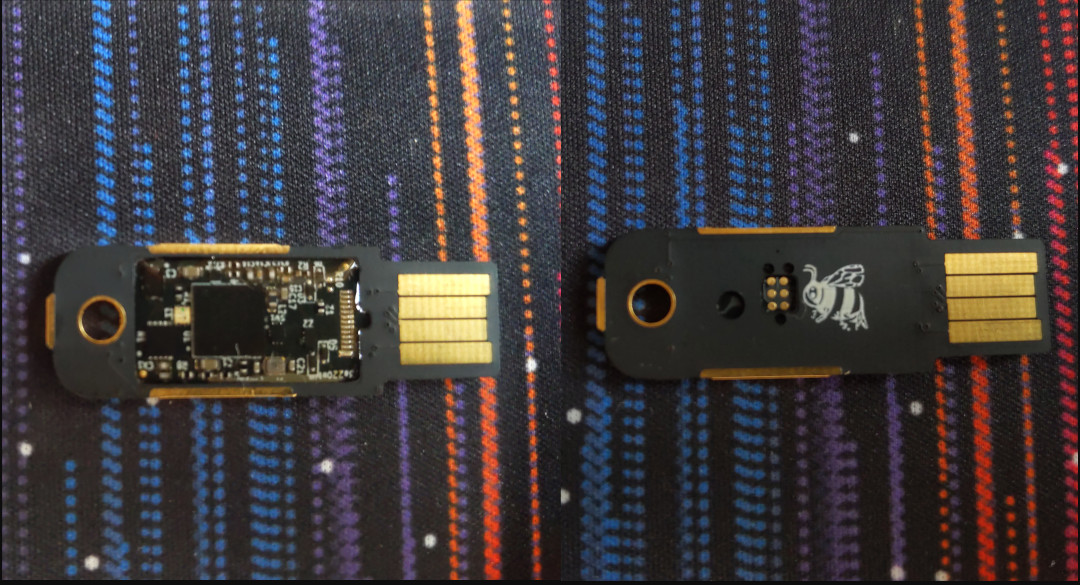
and /dev/disk/by-id/usb0 is the USB-3 attached SATA controller that you have your SSD attached to (please find an example attached). This SSD should be equal to or larger than the windows disk for best compatability. A photo of a USB-3 attached SATA controller To find the literal path names of your detected drives you can run fdisk -l. Pay attention to the names of the partitions and the sizes of the drives to help determine which is which. Once you have a shell in the netinst installer, you should maybe be able to run a command like the following. This will duplicate the disk located at if (in file) to the disk located at of (out file) while showing progress as the status.
dd if=/dev/sda of=/dev/disk/by-id/usb0 status=progress
If you confirm that dd is available on the netinst image and the previous command runs successfully, test that your windows partition is visible in the new disk s partition table. The start block of the windows partition on each should match, as should the partition size.
fdisk -l /dev/disk/by-id/usb0
fdisk -l /dev/sda
If the output from the first is the same as the output from the second, then you are probably safe to proceed. Once you confirm that you have made and tested a full copy of the blocks from your windows drive saved on your usb disk, nuke your windows partition table from orbit.
dd if=/dev/zero of=/dev/sda bs=1M count=42
You can press alt-f1 to return to the Debian installer now. Follow the instructions to install Debian. Don t forget to remove all attached USB drives. Once you install Debian, press ctrl-alt-f3 to get a root shell. Add your user to the sudoers group:
# adduser cjac sudoers
log out
# exit
log in as your user and confirm that you have sudo
$ sudo ls
Don t forget to read the spider man advice enter your password you ll need to install virt-manager. I think this should help:
$ sudo apt-get install virt-manager libvirt-daemon-driver-qemu qemu-system-x86
insert the USB drive. You can now create a qcow2 file for your virtual machine.
$ sudo qemu-img convert -O qcow2 \
/dev/disk/by-id/usb0 \
/var/lib/libvirt/images/windows.qcow2
I personally create a volume group called /dev/vg00 for the stuff I want to run raw and instead of converting to qcow2 like all of the other users do, I instead write it to a new logical volume.
sudo lvcreate /dev/vg00 -n windows -L 42G # or however large your drive was
sudo dd if=/dev/disk/by-id/usb0 of=/dev/vg00/windows status=progress
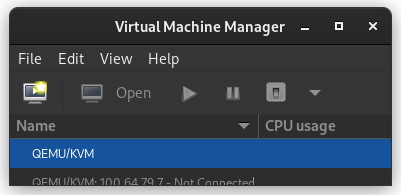
Now that you ve got the qcow2 file created, press alt-left until you return to your GDM session. The apt-get install command above installed virt-manager, so log in to your system if you haven t already and open up gnome-terminal by pressing the windows key or moving your mouse/gesture to the top left of your screen. Type in gnome-terminal and either press enter or click/tap on the icon. I like to run this full screen so that I feel like I m in a space ship. If you like to feel like you re in a spaceship, too, press F11. You can start virt-manager from this shell or you can press the windows key and type in virt-manager and press enter. You ll want the shell to run commands such as virsh console windows or virsh list When virt-manager starts, right click on QEMU/KVM and select New.
In the New VM window, select Import existing disk image
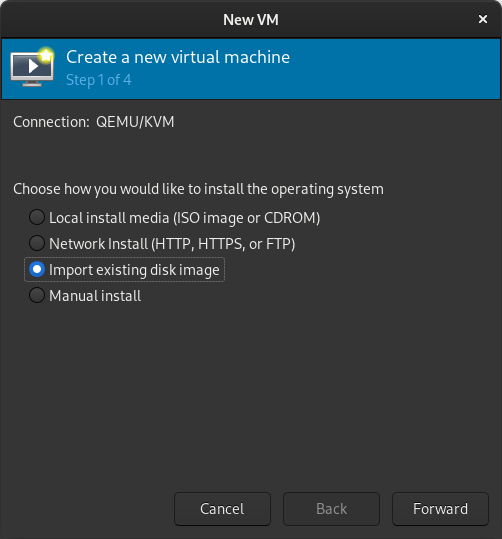
When prompted for the path to the image, use the one we created with sudo qemu-img convert above.
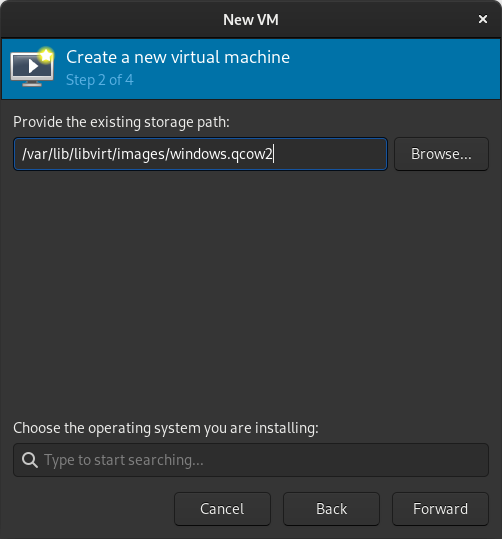
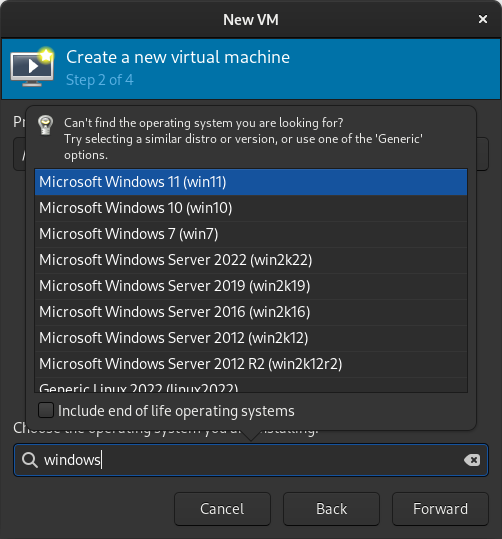
Select the version of Windows you want.
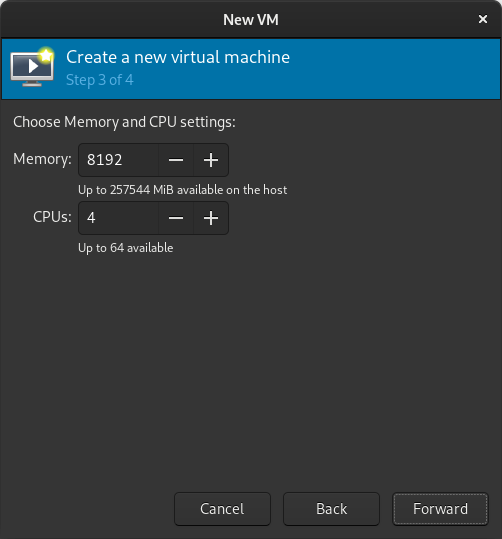
Select memory and CPUs to allocate to the VM.
Tick the Customize configuration before install box
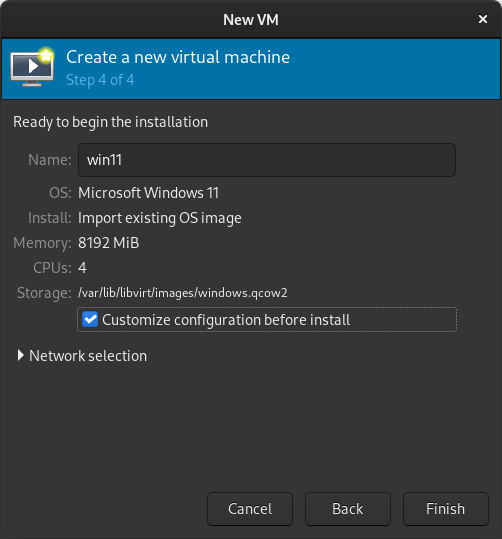
If you re prompted to enable the default network, do so now.
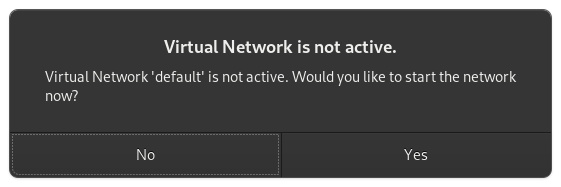
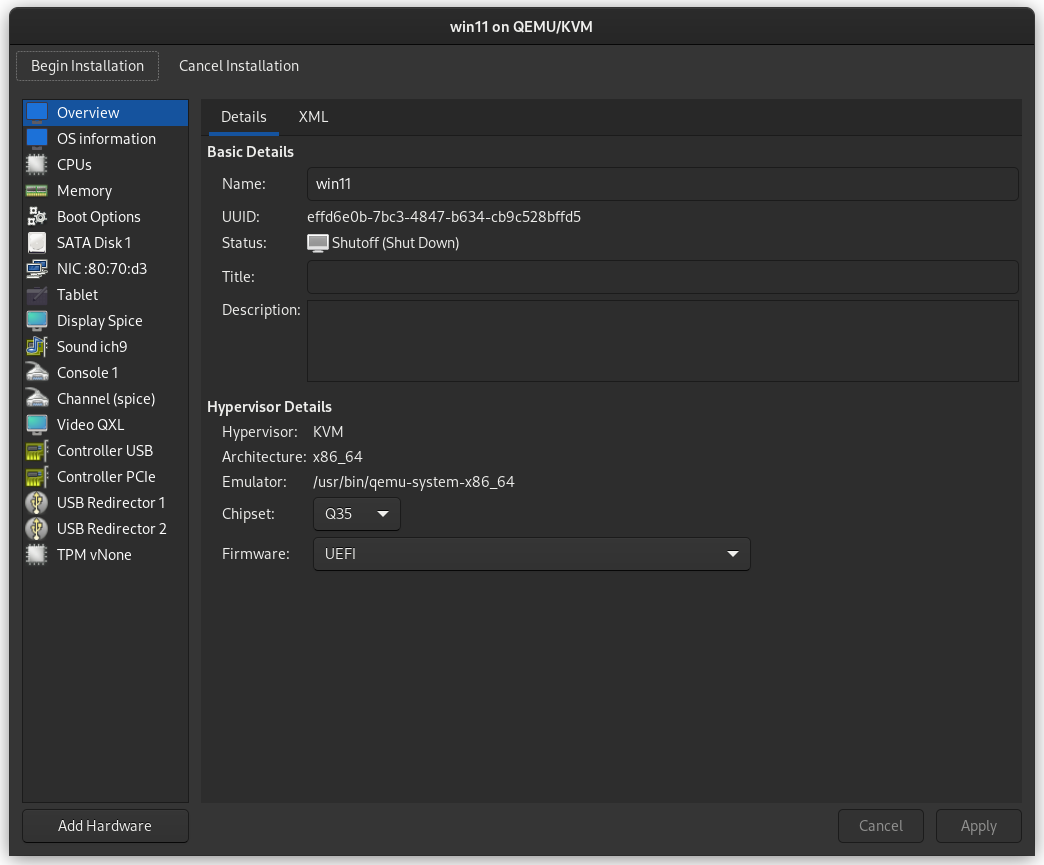
The default hardware layout should probably suffice. Get it as close to the underlying hardware as it is convenient to do. But Windows is pretty lenient these days about virtualizing licensed windows instances so long as they re not running in more than one place at a time. Good luck! Leave comments if you have questions.
Russ Allbery: Review: Semiosis

Review: Semiosis, by Sue Burke
Series: Semiosis #1
Publisher: Tor
Copyright: February 2018
ISBN: 0-7653-9137-6
Format: Kindle
Pages: 333
Semiosis is a first-contact science fiction novel and the first half of a duology. It was Sue Burke's first novel. In the 2060s, with the Earth plagued by environmental issues, a group of utopians decided to found a colony on another planet. Their goal is to live in harmony with an unspoiled nature. They wrote a suitably high-minded founding document, the Constitution of the Commonwealth of Pax, and set out in cold sleep on an interstellar voyage. 158 years later, they awoke in orbit around a planet with a highly-developed ecology, which they named Pax. Two pods and several colonists were lost on landing, but the rest remained determined to follow through with their plan. Not that they had many alternatives. Pax does not have cities or technological mammalian life, just as they hoped. It does, however, have intelligent life. This novel struggled to win me over for reasons that aren't the fault of Burke's writing. The first is that it is divided into seven parts, each telling the story of a different generation. Intellectually, I like this technique for telling an anthropological story that follows a human society over time. But emotionally, I am a character reader first and foremost, and I struggle with books where I can't follow the same character throughout. It makes the novel feel more like a fix-up of short stories, and I'm not much of a short story reader. Second, this is one of those stories where a human colony loses access to its technology and falls back to a primitive lifestyle. This is a concept I find viscerally unpleasant and very difficult to read about. I don't mind reading stories that start at the lower technological level and rediscover lost technology, but the process of going backwards, losing knowledge, surrounded by breaking technology that can never be repaired, is disturbing at a level that throws me out of the story. It doesn't help that the original colonists chose to embrace that reversion. Some of this wasn't intentional some vital equipment was destroyed when they landed but a lot of it was the plan from the start. They are the type of fanatics who embrace a one-way trip and cannibalizing the equipment used to make it in order to show their devotion to the cause. I spent the first part of the book thinking the founding colonists were unbelievably foolish, but then they started enforcing an even more restrictive way of life on their children and that tipped me over into considering them immoral. This was the sort of political movement that purged all religion and political philosophy other than their one true way so that they could raise "uncorrupted" children. Burke does recognize how deeply abusive this is. The second part of the book, which focuses on the children of the initial colonists, was both my favorite section and had my favorite protagonist, precisely because someone put words to the criticisms that I'd been thinking since the start of the book. The book started off on a bad foot with me, but if it had kept up the momentum of political revolution and rethinking provided by the second part, it might have won me over. That leads to the third problem, though, which is the first contact part of the story. (If you've heard anything about this series, you probably know what the alien intelligence is, and even if not you can probably guess, but I'll avoid spoilers anyway.) This is another case where the idea is great, but I often don't get along with it as a reader. I'm a starships and AIs and space habitats sort of SF reader by preference and tend to struggle with biological SF, even though I think it's great more of it is being written. In this case, mind-altering chemicals enter the picture early in the story, and while this makes perfect sense given the world-building, this is another one of my visceral dislikes. A closely related problem is that the primary alien character is, by human standards, a narcissistic asshole. This is for very good story and world-building reasons. I bought the explanation that Burke offers, I like the way this shows how there's no reason to believe humans have a superior form of intelligence, and I think Burke's speculations on the nature of that alien intelligence are fascinating. There are a lot of good reasons to think that alien morality would be wildly different from human morality. But, well, I'm still a human reading this book and I detested the alien, which is kind of a problem given how significant of a character it is. That's a lot baggage for a story to overcome. It says something about how well-thought-out the world-building is that it kept my attention anyway. Burke uses the generational structure very effectively. Events, preferences, or even whims early in the novel turn into rituals or traditions. Early characters take on outsized roles in history. The humans stick with the rather absurd constitution of Pax, but do so in a way that feels true to how humans reinterpret and stretch and layer meaning on top of wholly inadequate documents written in complete ignorance of the challenges that later generations will encounter. I would have been happier without the misery and sickness and messy physicality of this abusive colonization project, but watching generations of humans patch together a mostly functioning society was intellectually satisfying. The alien interactions were also solid, with the caveat that it's probably impossible to avoid a lot of anthropomorphizing. If I were going to sum up the theme of the novel in a sentence, it's that even humans who think they want to live in harmony with nature are carrying more arrogance about what that harmony would look like than they realize. In most respects the human colonists stumbled across the best-case scenario for them on this world, and it was still harder than anything they had imagined. Unfortunately, I thought the tail end of the book had the weakest plot. It fell back on a story that could have happened in a lot of first-contact novels, rather than the highly original negotiation over ecological niches that happened in the first half of the book. Out of eight viewpoint characters in this book, I only liked one of them (Sylvia). Tatiana and Lucille were okay, and I might have warmed to them if they'd had more time in the spotlight, but I felt like they kept making bad decisions. That's the main reason why I can't really recommend it; I read for characters, I didn't really like the characters, and it's hard for a book to recover from that. It made the story feel chilly and distant, more of an intellectual exercise than the sort of engrossing emotional experience I prefer. But, that said, this is solid SF speculation. If your preferred balance of ideas and characters is tilted more towards ideas than mine, and particularly if you like interesting aliens and don't mind the loss of technology setting, this may well be to your liking. Even with all of my complaints, I'm curious enough about the world that I am tempted to read the sequel, since its plot appears to involve more of the kind of SF elements I like. Followed by Interference. Content warning: Rape, and a whole lot of illness and death. Rating: 6 out of 10

28 June 2023

Russ Allbery: Review: Translation State

Review: Translation State, by Ann Leckie
Publisher: Orbit
Copyright: June 2023
ISBN: 0-316-29024-6
Format: Kindle
Pages: 354
Translation State is a science fiction novel set in the same universe as the Imperial Radch series and Provenance. It is not truly a sequel of any of those books, but as with Provenance, it has significant spoilers for the conclusion of Ancillary Mercy. Provenance takes place earlier, but it's plot is unrelated as far as I can recall. Enea has spent much of hir adult life living with hir difficult and somewhat abusive grandmanan and, in recent years, running her household. Now, Grandmanan is dead, and the relatives who have been waiting to inherit Grandmanan's wealth are descending like a flock of vultures and treating hir like a servant. Enea can barely stand to be around them. It is therefore somewhat satisfying to watch their reactions when they discover that there is no estate. Grandmanan had been in debt and sold her family title to support herself for the rest of her life. Enea will receive an allowance and an arranged job that expects a minimum of effort. Everyone else gets nothing. It's still a wrenching dislocation from everything Enea has known, but at least sie can relax, travel, and not worry about money. Enea's new job for the Office of Diplomacy is to track down a fugitive who disappeared two hundred years earlier. The request came from the Radchaai Translators Office, the agency responsible for the treaty with the alien Presger, and was resurrected due to the upcoming conclave to renegotiate the treaty. No one truly expects Enea to find this person or any trace of them. It's a perfect quiet job to reward hir with travel and a stipend for putting up with Grandmanan all these years. This plan lasts until Enea's boredom and sense of duty get the better of hir. Enea is one of three viewpoint characters. Reet lives a quiet life in which he only rarely thinks about murdering people. He has a menial job in Rurusk Station, at least until he falls in with an ethnic club that may be a cover for more political intentions. Qven... well, Qven is something else entirely. Provenance started with some references to the Imperial Radch trilogy but then diverged into its own story. Translation State does the opposite. It starts as a cozy pseudo-detective story following Enea and a slice-of-life story following Reet, interspersed with baffling chapters from Qven, but by the end of the book the characters are hip-deep in the trilogy aftermath. It's not the direct continuation of the political question of the trilogy that I'm still partly hoping for, but it's adjacent. As you might suspect from the title, this story is about Presger Translators. Exactly how is not entirely obvious at the start, but it doesn't take long for the reader to figure it out. Leckie fills in a few gaps in the world-building and complicates (but mostly retains) the delightfully askew perspective Presger Translators have on the world. For me, though, the best part of the book was the political maneuvering once the setup is complete and all the characters are in the same place. The ending, unfortunately, dragged a little bit; the destination of the story was obvious but delayed by characters not talking to each other. I tend to find this irritating, but I know tastes differ. I was happily enjoying Translation State but thinking that it didn't suck me in as much as the original trilogy, and even started wondering if I'd elevated the Imperial Radch trilogy too high in my memory. Then an AI ship showed up and my brain immediately got fully invested in the story. I'm very happy to get whatever other stories in this universe Leckie is willing to write, but I would have been even happier if a ship appeared as more than a supporting character. To the surprise of no one who reads my reviews, I clearly have strong preferences in protagonists. This wasn't one of my favorites, but it was a solidly good book, and I will continue to read everything Ann Leckie writes. If you liked Provenance, I think you'll like this one as well. We once again get a bit more information about the aliens in this universe, and this time around we get more Radchaai politics, but the overall tone is closer to Provenance. Great powers are in play, but the focus is mostly on the smaller scale. Recommended, but of course read the Imperial Radch trilogy first. Note that Translation State uses a couple of sets of neopronouns to represent different gender systems. My brain still struggles with parsing them grammatically, but this book was good practice. It was worth the effort to watch people get annoyed at the Radchaai unwillingness to acknowledge more than one gender. Content warning: Cannibalism (Presger Translators are very strange), sexual assault. Rating: 8 out of 10

27 June 2023

Russell Coker: Running a ChatGPT Type System

Alpaca I ve just done some experiments running ChatGPT type programs. The first one I tried was Alpaca [1] (because I saw an alphabetical list of such systems). Here s the 4GB data file [2]. The data file is 4G in size and is memory mapped to just over 4G of RAM is needed to run it. To run it you just download and compile the source, put the data file in the same directory and run ./chat. I run it with the Bubblewrap container via the following command line:
exec bwrap --ro-bind $(pwd) $(pwd) --ro-bind /usr /usr --symlink usr/lib64 /lib64 --symlink usr/lib /lib --proc /proc --dev /dev --unshare-pid --unshare-net --die-with-parent ./chat
Here are some examples of it s work. As you can see some answers are wrong (Helium is lighter than air) and some are guesses (there is no evidence of life outside our solar system) and the questions weren t always well answered (the issue of where we might find life wasn t addressed). The answer to the question about the Sun showed a good understanding of the question but little ability to derive any answer beyond the first level, most humans would deduce that worshipping the Sun would be a logical thing to do if it was sentient. Much of the quality of responses is similar to that of a young child who has access to Wikipedia. > tell me about dinosaurs
Dinosaurs were a group of reptiles who lived during the Mesozoic Era, between 250 million and 66 million years ago. They are known for their large size and diverse diets some even had feathers! Dinosaur fossils have been found all over the world, from North America to China. Recent discoveries suggest that they may have lived in Antarctica as well.
> are hydrogen or helium balloons better?
Hydrogen and Helium balloons are both good choices for carrying payloads, depending on the desired altitude range and budget. Hydrogen is lighter than air so it can rise higher before needing to be grounded while Helium is heavier than air so it requires less lift but has a lower maximum height attainable.
> is a 486 a good cpu?
Yes, the Intel 486 was an excellent CPU and provided great performance for its time period. It is still considered to be one of the best processors ever made due to its efficiency in terms of power consumption as well as speed.
> where will we find life outside the Earth?
Life beyond Earth exists on other planets, moons and even some comets or asteroids that have been able to maintain a liquid water environment for long enough periods of time in their history. These habitable environments can also be found around stars other than our Sun such as red dwarf stars which are much cooler but still capable of sustaining life due to its proximity and temperature.
> how do I write a good blog post?
Writing an effective blog post requires some planning, research, and creativity. Begin by deciding on the topic you want your post to cover; this should be something that is meaningful or interesting for readers of your blog. Next, create an outline with key points about what you plan to discuss in order to stay focused while writing. Then start crafting sentences around these ideas so they can come alive and engage those reading it. Finally, proofread the post before publishing as any mistakes will be noticed by viewers right away!
> if the sun was a sentient being how would that change life on earth?
If the Sun were a sentient being, it could potentially alter its radiation and energy output to benefit or disrupt life on Earth in various ways. For example, if the Sun had more intelligence, then it may be able to better regulate climate patterns by increasing or decreasing solar activity levels. Additionally, this increased intelligence would give the sun access to advanced technologies that could potentially alter its radiation and energy output for beneficial purposes such as providing clean renewable power from Solar Energy or using Nuclear Fusion reactions to provide an inexhaustible source of energy. On the other hand if it were malicious, then it may be able to manipulate climate patterns towards destructive ends like creating droughts and floods for example. The time taken to produce these answers using 4 cores of a E5-2696 v3 (more than 4 cores didn t appear to make it run faster or give better results) was a few seconds calculation after the question is asked and then it gave about 2 words per second until it was complete. Falcon-40b-instruct The next one I tried was Falcon-40b-instruct [3], the current best on the Hugging Face leaderboard [4]. It has a 90G set of data files. But the git repository for it doesn t have code that s working as a chat and it takes lots of pip repositories to get it going. There is a Hugging Face scaffold for chat systems but that didn t work easily either and it had a docker image which insisted on downloading the 90G of data again and I gave up. I guess Falcon is not for people who have little Python experience. Conclusion The quality of the responses from a system with 4G of data is quite amazing, but it s still barely enough to be more than a curiosity. It s a long way from the quality of ChatGPT [5] or the phind.com service described as The AI search engine for developers [6]. I have found phind.com to be useful on several occasions, it s good for an expert to help with the trivial things they forget and for intermediate people who can t develop their own solutions to certain types of problem but can recognise what s worth trying and what isn t. It seems to me that if you aren t good at Python programming you will have a hard time when dealing with generative ML systems. Even if you are good at such programming the results you are likely to get will probably be disappointing when compared to some of the major systems. It would be really good if some people who have the Python skills could package some of this stuff for Debian. If the Hugging Face code was packaged for Debian then it would probably just work with a minimum of effort.

Matt Brown: Designing a PCBA friendly CO2 monitor

co2mon.nz currently uses monitors based on Oliver Seiler s open source design which I am personally building. This post describes my exploration of how to achieve production of a CO2 monitor that could enable the growth of co2mon.nz.

Goals Primarily I want to design a CO2 monitor which allows the majority of the production process to be outsourced. In particular, the PCB should be able to be assembled in an automated fashion (PCBA). As a secondary goal, I d like to improve the aesthetics of the monitor while retaining the unique feature of displaying clear visual indication of the current ventilation level through coloured lights. Overall, I ll consider the project successfull if I can achieve a visually attractive CO2 monitor which takes me less than 10 minutes per monitor to assemble/box/ship and whose production cost has the potential to be lower than the current model.

PCB

Schematic The existing CO2 monitor design provides a solid foundation but relies upon the ESP32 Devkit board, which is intended for evaluation purposes and is not well suited to automated assembly. Replacing this devkit board with the underlying ESP32 module is the major change needed to enable PCBA production, which then also requires moving the supporting electronics from the devkit board directly onto the primary PCB. The basic ESP32 chipset used in the devkit boards is no longer available as a discrete module suitable for placement directly onto a PCB which means the board will also have to be updated to use a more modern variant of the ESP32 chipset which is in active production such as the ESP32-S3. The ESP32-S3-WROOM1-N4 module is a very close match to the original devkit and will be suitable for this project. In addition to the change of ESP module, I made the following other changes to the components in use:
  • Added an additional temperature/humidity sensor (SHT30). The current monitors take temperature/humidity measurements from the SCD40 chipset. These are primarily intended to help in the calculation of CO2 levels and rely on an offset being subtracted to account for the heat generated by the electronic components themselves. I ve found their accuracy to OK, but not perfect. SHT30 is a cheap part, so its addition to hopefully provide improved temperature/humidity measurement is an easy choice.
  • Swapped to USB-C instead of USB-B for the power connector. USB-C is much more common than USB-B and is also smaller and not as tall off the board which provides more flexibility in the case design.
With major components selected the key task is to draw the schematic diagram describing how they electrically connect to each other, which includes all the supporting electronics (e.g. resistors, capacitors, etc) needed. Schematic I started out trying to use the EasyEDA/OSHWLab ecosystem thinking the tight integration with JLCPCB s assembly services would be a benefit, but the web interface was too clunky and limiting and I quickly got frustrated. KiCad proved to be a much more pleasant and capable tool for the job. The reference design in the ESP32 datasheet (p28) and USB-C power supply examples from blnlabs were particularly helpful alongside the KiCad documentation and the example of the existing monitor in completing this step (click the image to enlarge).

Layout The next step is to physically lay out where each component from the schematic will sit on the PCB itself. Obviously this requires first determining the overall size, shape and outline of the board and needs to occur in iteration with the intended design of the overall monitor, including the case, to ensure components like switches and USB sockets line up correctly. In addition to the requirements around the look and function of the case, the components themselves also have considerations that must be taken into account, including:
  • For best WiFi reception, the ESP32 antenna should be at the top of the monitor and should not have PCB underneath it, or for a specified distance either side of it.
  • The SHT30 temperature sensor should be as far from any heat generating components (e.g. the ESP32, BME680 and SCD40 modules) as possible and also considering that any generated heat will rise, as low on the monitor as possible.
  • The sensors measuring the air (SCD40, BME680 and SHT30) must have good exposure to the air outside the case.
PCB Taking all of these factors into account I ended up with a square PCB containing a cutout in the top right so that the ESP32 antenna can sit within the overall square outline while still meeting its design requirements. The SCD40 and BME680 sit in the top left corner, near the edges for good airflow and far away from the SHT30 temperature sensor in the bottom left corner. The LEDs I placed in a horizontal row across the center of the board, the LCD in the bottom right, a push button on the right-hand side and the USB-C socket in the center at the bottom. Once the components are placed, the next big task is to route the traces (aka wires) between the components on the board such that all the required electrical connections are made without any unintended connections (aka shorts) being created. This is a fun constraint solving/optimisation challenge and takes on an almost artistic aspect with other PCB designers often having strong opinions on which layout is best. The majority of the traces and routing for this board were able to be placed on the top layer of the PCB, but I also made use of the back layer for a few traces to help avoid conflicts and deal with places where different traces needed to cross each other. It s easy to see how this step would be much more challenging and time consuming on a larger and more complex PCB design. The final touches were to add some debugging breakouts for the serial and JTAG ports on the ESP32-S3 and a logo and various other helpful text on the silkscreen layer that will be printed on the PCB so it looks nice.

Production For assembly of the PCB, I went with JLCPCB based out of China. The trickiest part of the process was component selection and ensuring that the parts I had planned in the schematic were available. JLCPCB in conjunction with lcsc.com provides a basic and extended part library. If you use only basic parts you get quicker and cheaper assembly, while using extended parts bumps your order into a longer process with a small fee charged for each component on the board. Initially I spent a lot of time selecting components (particularly LEDs and switches) that were in the basic library before realising that the ESP32 modules are only available in the extended library! I think the lesson is that unless you re building the most trivial PCB with only passive components you will almost certainly end up in the advanced assembly process anyway, so trying to stay within the basic parts library is not worth the time. Unfortunately the SCD40 sensor, the most crucial part of the monitor, is not stocked at all by JLCPCB/LCSC! To work around this JLCPCB will maintain a personal component library for you when you ship components to them to for use in future orders. Given the extra logistical time and hassle of having to do this, combined with having a number of SCD40 components already on hand I decided to have the boards assembled without this component populated for the initial prototype run. This also had the benefit of lowering the risk if something went wrong as the cost of the SCD40 is greater than the cost of the PCB and all the other components combined! I found the kicad-jlcpcb-tools plugin for KiCad invaluable for keeping track of what part from lcsc.com I was planning to use for each component and generating the necessary output files for JLCPCB. The plugin allows you to store these mappings in your actual schematic which is very handy. The search interface it provides is fairly clunky and I found it was often easier to search for the part I needed on lcsc.com and then just copy the part number across into the plugin s search box rather than trying to search by name or component type. The LCD screen is the remaining component which is not easily assembled onto the PCB directly, but as you ll see next, this actually turned out to be OK as integrating the screen directly into the case makes the final assembly process smoother. fabricated PCBs The final surprise in the assembly process was the concept of edge rails, additional PCB material that is needed on either side of the board to help with feeding it through the assembly machine in the correct position. These can be added automatically by JLCPCB and have to be snapped off after the completed boards are received. I hadn t heard about these before and I was a little worried that they d interfere or get in the way of either the antenna cut-out at the top of the board, or the switch on the right hand side as it overhangs the edge so it can sit flush with the case. In the end there was no issue with the edge rails. The switch was placed hanging over them without issue and snapping them off once the boards arrived was a trivial 30s job using a vice to hold the edge rail and then gently tipping the board over until it snapped off - the interface between the board and the rails while solid looking has obviously been scored or perforated in some way during the production process so the edge breaks cleanly and smoothly. Magic! The process was amazingly quick with the completed PCBs (picture above) arriving within 7 days of the order being placed and looking amazing.

Case

Design I mocked up a very simple prototype of the case in FreeCAD during the PCB design process to help position and align the placement of the screen, switch and USB socket on the PCB as all three of these components interface directly with the edges of the case. Initially this design was similar to the current monitor design where the PCB (with lights and screen attached) sits in the bottom of the case, which has walls containing grilles for airflow and then a separate transparent perspex is screwed onto the top to complete the enclosure. As part of the aesthetic improvements for the new monitor I wanted to move away from a transparent front panel to something opaque but still translucent enough to allow the colour of the lights to show through. Without a transparent front panel the LCD also needs to be mounted directly into the case itself. The first few prototype iterations followed the design of the original CO2 monitor with a flat front panel that attaches to the rest of the case containing the PCB, but the new requirement to also attach the LCD to the front panel proved to make this unworkable. To stay in place the LCD has to be pushed onto mounting poles containing a catch mechanism which requires a moderate amount of force and applying that force to the LCD board when it is already connected to the PCB is essentially impossible. case with lcd attached As a result I ended up completely flipping the design such that the front panel is a single piece of plastic that also encompasses the walls of the case and contains appropriate mounting stakes for both the screen and the main PCB. Getting to this design hugely simplified the assembly process. Starting with an empty case lying face down on a bench, the LCD screen is pushed onto the mounting poles and sits flush with the cover of the case - easily achieved without the main PCB yet in place. case with pcb in place Next, the main PCB is gently lowered into the case facing downwards and sits on the mounting pole in each corner with the pins for the LCD just protruding through the appropriate holes in the PCB ready to be quickly soldered into place (this took significant iteration and tuning of dimensions/positioning to achieve!). Finally, a back panel can be attached which holds the PCB in place and uses cantilever snap joints to click on to the rest of the case. Overall the design is a huge improvement over the previous case which required screws and spacers to position the PCB and cover relative to the rest of the case, with the spacers and screws being particularly fiddly to work with. The major concern I had with the new design was that the mount to attach the monitor to the wall has moved from being attached to the main case and components directly to needing to be on the removable back panel - if the clips holding this panel to the case fail the core part of the monitor will fall off the wall which would not be good. To guard against this I ve doubled the size and number of clips at the top of the case (which bears the weight) and the result seems very robust in my testing. To completely assemble a monitor, including the soldering step takes me about 2-3 minutes individually, and would be even quicker if working in batches.

Production Given the number of design/testing iterations required to fine tune the case I chose not to outsource case production for now and used my 3D printer to produce them. I ve successfully used JLCPCB s 3D printing service for the previous case design, so I m confident that getting sufficient cases printed from JLCPCB or another supplier will not be an issue now that the design is finalised. completed monitor I tried a variety of filament colours, but settled on a transparent filament which once combined in the necessary layers to form the case is not actually transparent like perspex is, but provides a nice translucent medium which achieves the goal of having the light colour visible without exposing all of the circuit board detail. There s room for future improvement in the positioning of the LEDs on the circuit board to provide a more even distribution of light across the case but overall I really like the way the completed monitor ends up looking.

Evaluation Building this monitor has been a really fun project, both in seeing something progress from an idea, to plans on a screen to a nice physical thing on my wall, but also in learning and developing a bunch of new skills in PCB design, assembly and 3D design. completed monitor The goal of having a CO2 monitor which I can outsource the vast majority of production of is as close to being met as I think is possible without undertaking the final proof of placing a large order. I ve satisfied myself that each step is feasible and that the final assembly process is quick, easy and well below the level of effort and time it was taking me to produce the original monitors. Cost wise it s also a huge win, primarily in terms of the time taken, but also in the raw components - currently the five prototypes I ordered and built are on par with the component cost of the original CO2 monitor, but this will drop further with larger orders due to price breaks and amortisation of the setup and shipping expenses across more monitors. This project has also given me a much better appreciation for how much I m only just scratching the surface of the potential complexities and challenges in producing a hardware product of this type. I m reasonably confident I could successfully produce a few hundred and maybe even a few thousand monitors using this approach, but it s also clear that getting beyond that point is and would be a whole further level of effort and learning. Hardware is hard work. That s not news to anyone, including me, but there is something to be said for experiencing the process first hand to make the reality of what s required real. The PCB and case designs are both shared and can be found at https://github.com/co2monnz/co2monitor-pcb and https://github.com/co2monnz/cad, feedback and suggestions welcome!

26 June 2023

Lukas M rdian: Netplan 0.106.1 stable release

We are happy to announce that Netplan 0.106.1 is available for download on Ubuntu Mantic Minotaur and Debian testing. This release includes some improvements in our documentation and CI infrastructure and a number of bug fixes.

What s new in Netplan 0.106.1?

Documentation

Infrastructure
  • canonical/setup-lxd GitHub action. The autopkgtest environment creation was standardized to use Canonical s setup-lxd action.
  • Snapd integrations tests with spread. A new test set for the Snapd integration with Netplan was introduced using the spread tool.
  • DBus. A number of DBus integration tests were added to the Debian package.

New features
  • Keyfile parser improvements. Our Network Manager keyfile parser (the capability of loading Network Manager configuration to Netplan YAML) was expanded to support all the types of tunnels supported by Netplan.

Misc
  • Ubuntu s Code of Conduct 2.0 was added to the code repository.
  • We added a new bash autocompletion script with all the Netplan s subcommands.
  • The new release package was synchronized with Debian.

Bug fixes
  • Keyfile parser. This release contains a couple of important fixes for the NetworkManager integration stability: 1) adding WPA enterprise connections is now working fine and new test cases were added to the package; 2) a WireGuard peer with allowed IPs that don t include the network prefix are now accepted.
  • Netplan parser. A number of memory leaks and stability issues were fixed.
  • DBus. An issue related to how directory paths are built in the Netplan DBus service was causing issues in the Snapd integration and was fixed.
For the complete list of changes please consult the debian/changelog file in https://launchpad.net/ubuntu/+source/netplan.io/+changelog

25 June 2023

Russ Allbery: Review: The Wee Free Men

Review: The Wee Free Men, by Terry Pratchett
Series: Discworld #30
Publisher: HarperTempest
Copyright: 2003
Printing: 2006
ISBN: 0-06-001238-2
Format: Mass market
Pages: 375
The Wee Free Men is the 30th Discworld novel but the first Tiffany Aching book and doesn't rely on prior knowledge of Discworld, although the witches from previous books do appear. You could start here, although I think the tail end of the book has more impact if you already know who Granny Weatherwax and Nanny Ogg are. The Amazing Maurice and His Educated Rodents was the first Discworld novel written to be young adult, and although I could see that if I squinted, it didn't feel that obviously YA to me. The Wee Free Men is clearly young adult (or perhaps middle grade), right down to the quintessential protagonist: a nine-year-old girl who is practical and determined and a bit of a misfit and does a lot of growing up over the course of the story. Tiffany Aching is the youngest daughter in a large Aching family that comes from a long history of Aching families living in the Chalk. She has a pile of older relatives and one younger brother named Wentworth who is an annoying toddler obsessed with sweets. Her family work a farm that is theoretically the property of the local baron but has been in their family for years. There is always lots to do and Tiffany is an excellent dairymaid, so people mostly leave her alone with her thoughts and her tiny collection of books from her grandmother. Her now-deceased Grandma Aching was a witch. Tiffany, as it turns out, is also a witch, not that she knows that. As the book opens, certain... things are trying to get into her world from elsewhere. The first is a green monster that pops up out of the river and attempts to snatch Wentworth, much to Tiffany's annoyance. She identifies it as Jenny Green-Teeth via a book of fairy tales and dispatches it with a frying pan, somewhat to her surprise, but worse are coming. Even more surprised by her frying pan offensive are the Nac Mac Feegle, last seen in Carpe Jugulum, who know something about where this intrusion is coming from. In short order, the Aching farm has a Nac Mac Feegle infestation. This is, unfortunately, another book about Discworld's version of fairy (or elves, as they were called in Lords and Ladies). I find stories about the fae somewhat hit and miss, and Pratchett's version is one of my least favorites. The Discworld Queen of Fairy is mostly a one-dimensional evil monster and not a very interesting one. A big chunk of the plot is an extended sequence of dreams that annoyed me and went on for about twice as long as it needed to. That's the downside of this book. The upside is that Tiffany Aching is exactly the type of protagonist I loved reading about as a kid, and still love reading about as an adult. She's thoughtful, curious, observant, determined, and uninterested in taking any nonsense from anyone. She has a lot to learn, both about the world and about herself, but she doesn't have to be taught lessons twice and she has a powerful innate sense of justice. She also has a delightfully sarcastic sense of humor.
"Zoology, eh? That's a big word, isn't it." "No, actually it isn't," said Tiffany. "Patronizing is a big word. Zoology is really quite short."
One of the best things that Pratchett does with this book is let Tiffany dislike her little brother. Wentworth eventually ends up in trouble and Tiffany has to go rescue him, which of course she does because he's her baby brother. But she doesn't like him; he's annoying and sticky and constantly going on about sweets and never says anything interesting. Tiffany is aware that she's supposed to love him because he's her little brother, but of course this is not how love actually works, and she doesn't. But she goes and rescues him anyway, because that's the right thing to do, and because he's hers. There are a lot of adult novels that show the nuanced and sometimes uncomfortable emotions we have about family members, but this sort of thing is a bit rarer in novels pitched at pre-teens, and I loved it. One valid way to read it is that Tiffany is neurodivergent, but I think she simply has a reasonable reaction to a brother who is endlessly annoying and too young to have many redeeming qualities in her eyes, and no one forces her to have a more socially expected one. It doesn't matter what you feel about things; it matters what you do, and as long as you do the right thing, you can have whatever feelings about it you want. This is a great lesson for this type of book. The other part of this book that I adored was the stories of Grandma Aching. Tiffany is fairly matter-of-fact about her dead grandmother at the start of the book, but it becomes clear over the course of the story that she's grieving in her own way. Grandma Aching was a taciturn shepherd who rarely put more than two words together and was much better with sheep than people, but she was the local witch in the way that Granny Weatherwax was a witch, and Tiffany was paying close attention. They never managed to communicate as much as either of them wanted, but the love shines through Tiffany's memories. Grandma Aching was teaching her how to be a witch: not the magical parts, but the far more important parts about justice and fairness and respect for other people. This was a great introduction of a new character and a solid middle-grade or young YA novel. I was not a fan of the villain and I can take or leave the Nac Mac Feegle (who are basically Scottish Smurfs crossed with ants and are a little too obviously the comic relief, for all that they're also effective warriors). But Tiffany is great and the stories of Grandma Aching are even better. This was not as good as Night Watch (very few things are), but it was well worth reading. Followed in publication order by Monstrous Regiment. The next Tiffany Aching novel is A Hat Full of Sky. Rating: 8 out of 10

24 June 2023

Russ Allbery: Review: Rose/House

Review: Rose/House, by Arkady Martine
Publisher: Subterranean Press
Copyright: 2023
ISBN: 1-64524-034-7
Format: Kindle
Pages: 109
Arkady Martine is the author of the wonderful Teixcalaan duology, a political space opera. Rose/House is a standalone science fiction novella in an entirely different subgenre. Basit Deniau was a legendary architect whose trademark was infusing his houses with artificial intelligences. A house AI is common in this future setting, but what Deniau did was another kind of genius. He has been dead for a year when this story opens. The carbon of his body has been compressed into diamond and displayed on a plinth deep inside his final creation. Rose House. Dr. Selene Gisil was his student. It was not a comfortable relationship. She is now the only person permitted entry into Rose House, allowed to examine its interior architecture and the archive of Deniau's work that is stored there. Once per year, she may enter for precisely one week. No one else in the world is permitted to enter, ever. Selene went in the first time she was allowed. She lasted three days before fleeing. There is a law in the United States, the Federal Artificial Intelligence Surveillance Act, that sets some requirements for the behavior of artificial intelligences. One of its requirements is a duty-of-care notification: an artificial intelligence must report the presence of a dead body to the nearest law enforcement agency. Rose House's call to the China Lake Police Precinct to report the presence of a dead body in the sealed house follows the requirements of the law to the letter.
"Cause of death," said Maritza. I'm a piece of architecture, Detective. How should I know how humans are like to die? After that the line went to the dull hang-up tone, and Rose House would not take her return calls. Not even once.
Rose/House has some of the structure of a locked-room mystery. Someone is dead, but no one at the scene can get inside the house to see who. Selene is the only person who can enter, but she was in Turkey at the time of the killing and has an air-tight alibi. How could someone be in the house at all? And how did they die? It also has some of the structure of a police procedural. First one and then the other detective of the tiny local precinct are pulled into the investigation, starting, as one might expect, by calling Selene Gisil. But I'm not sure I would describe this novella as following either of those genres. By the end of the story, we do learn some of the things one might expect to learn from a detective novel, but that never felt like the true thrust of the story. If you want a detailed explanation of what happened, or the pleasure of trying to guess the murderer before the story tells you, this may not be the novella for you. Instead, Martine was aiming for disturbing eeriness. This is not quite horror nothing explicitly horrific happens, although a couple of scenes are disturbing but Rose House is deeply unsettling. The best character of the story is Maritza, the detective initially assigned to the case, who is trying to ignore the weirdness and do her job. The way she approaches that task leads to some fascinating interactions with Rose House that I thought were the best parts of the story. This story was not really my thing, even though I love stories about sentient buildings and there are moments in this story where Rose House is delightfully nonhuman in exactly the way that I enjoy. The story is told in a way that requires the reader to piece together the details of the conclusion themselves, and I prefer more explicit explanation in stories that start with a puzzle. It's also a bit too close to horror for me, specifically in the way that the characters (Selene most notably) have disturbing and oddly intense emotional reactions to environments that are only partly described. But I read this a few weeks ago and I'm still thinking about it, so it clearly is doing something right. If you like horror, or at least half-explained eeriness, it's likely you will enjoy this more than I did. This portrayal of AI is an intriguing one, and I'd enjoy reading more about it in a story focused on character and plot rather than atmosphere. Rating: 6 out of 10

22 June 2023

Russ Allbery: Review: Furious Heaven

Review: Furious Heaven, by Kate Elliott
Series: Sun Chronicles #2
Publisher: Tor
Copyright: 2023
ISBN: 1-250-86701-0
Format: Kindle
Pages: 725
Furious Heaven is the middle book of a trilogy and a direct sequel to Unconquerable Sun. Don't start here. I also had some trouble remembering what happened in the previous book (grumble recaps mutter), and there are a lot of threads, so I would try to minimize the time between books unless you have a good memory for plot details. This is installment two of gender-swapped Alexander the Great in space. When we last left Sun and her Companions, Elliott had established the major players in this interstellar balance of power and set off some opening skirmishes, but the real battles were yet to come. Sun was trying to build her reputation and power base while carefully staying on the good side of Queen-Marshal Eirene, her mother and the person credited with saving the Republic of Chaonia from foreign dominance. The best parts of the first book weren't Sun herself but wily Persephone, one of her Companions, whose viewpoint chapters told a more human-level story of finding her place inside a close-knit pre-existing friendship group. Furious Heaven turns that all on its head. The details are spoilers (insofar as a plot closely tracking the life of Alexander the Great can contain spoilers), but the best parts of the second book are the chapters about or around Sun. What I find most impressive about this series so far is Elliott's ability to write Sun as charismatic in a way that I can believe as a reader. That was hit and miss at the start of the series, got better towards the end of Unconquerable Sun, and was wholly effective here. From me, that's high but perhaps unreliable praise; I typically find people others describe as charismatic to be some combination of disturbing, uncomfortable, dangerous, or obviously fake. This is a rare case of intentionally-written fictional charisma that worked for me. Elliott does not do this by toning down Sun's ambition. Sun, even more than her mother, is explicitly trying to gather power and bend the universe (and the people in it) to her will. She treats people as resources, even those she's the closest to, and she's ruthless in pursuit of her goals. But she's also honorable, straightforward, and generous to the people around her. She doesn't lie about her intentions; she follows a strict moral code of her own, keeps her friends' secrets, listens sincerely to their advice, and has the sort of battlefield charisma where she refuses to ask anyone else to take risks she personally wouldn't take. And her use of symbolism and spectacle isn't just superficial; she finds the points of connection between the symbols and her values so that she can sincerely believe in what she's doing. I am fascinated by how Elliott shapes the story around her charisma. Writing an Alexander analogue is difficult; one has to write a tactical genius with the kind of magnetic attraction that enabled him to lead an army across the known world, and make this believable to the reader. Elliott gives Sun good propaganda outlets and makes her astonishingly decisive (and, of course, uses the power of the author to ensure those decisions are good ones), but she also shows how Sun is constantly absorbing information and updating her assumptions to lay the groundwork for those split-second decisions. Sun uses her Companions like a foundation and a recovery platform, leaning on them and relying on them to gather her breath and flesh out her understanding, and then leaping from them towards her next goal. Elliott writes her as thinking just a tiny bit faster than the reader, taking actions I was starting to expect but slightly before I had put together my expectation. It's a subtle but difficult tightrope to walk as the writer, and it was incredibly effective for me. The downside of Furious Heaven is that, despite kicking the action into a much higher gear, this book sprawls. There are five viewpoint characters (Persephone and the Phene Empire character Apama from the first book, plus two new ones), as well as a few interlude chapters from yet more viewpoints. Apama's thread, which felt like a minor subplot of the first book, starts paying off in this book by showing the internal political details of Sun's enemy. That already means the reader has to track two largely separate and important stories. Add on a Persephone side plot about her family and a new plot thread about other political factions and it's a bit too much. Elliott does a good job avoiding reader confusion, but she still loses narrative momentum and reader interest due to the sheer scope. Persephone's thread in particular was a bit disappointing after being the highlight of the previous book. She spends a lot of her emotional energy on tedious and annoying sniping at Jade, which accomplishes little other than making them both seem immature and out of step with the significance of what's going on elsewhere. This is also a middle book of a trilogy, and it shows. It provides a satisfying increase in intensity and gets the true plot of the trilogy well underway, but nothing is resolved and a lot of new questions and plot threads are raised. I had similar problems with Cold Fire, the middle book of the other Kate Elliott trilogy I've read, and this book is 200 pages longer. Elliott loves world-building and huge, complex plots; I have a soft spot for them too, but they mean the story is full of stuff, and it's hard to maintain the same level of reader interest across all the complications and viewpoints. That said, I truly love the world-building. Elliott gives her world historical layers, with multiple levels of lost technology, lost history, and fallen empires, and backs it up with enough set pieces and fragments of invented history that I was enthralled. There are at least five major factions with different histories, cultures, and approaches to technology, and although they all share a history, they interpret that history in fascinatingly different ways. This world feels both lived in and full of important mysteries. Elliott also has a knack for backing the ambitions of her characters with symbolism that defines the shape of that ambition. The title comes from a (translated) verse of an in-universe song called the Hymn of Leaving, which is sung at funerals and is about the flight on generation ships from the now-lost Celestial Empire, the founding myth of this region of space:
Crossing the ocean of stars we leave our home behind us.
We are the spears cast at the furious heaven
And we will burn one by one into ashes
As with the last sparks we vanish.
This memory we carry to our own death which awaits us
And from which none of us will return.
Do not forget. Goodbye forever.
This is not great poetry, but it explains so much about the psychology of the characters. Sun repeatedly describes herself and her allies as spears cast at the furious heaven. Her mother's life mission was to make Chaonia a respected independent power. Hers is much more than that, reaching back into myth for stories of impossible leaps into space, burning brightly against the hostile power of the universe itself. A question about a series like this is why one should want to read about a gender-swapped Alexander the Great in space, rather than just reading about Alexander himself. One good (and sufficient) answer is that both the gender swap and the space parts are inherently interesting. But the other place that Elliott uses the science fiction background is to give Sun motives beyond sheer personal ambition. At a critical moment in the story, just like Alexander, Sun takes a detour to consult an Oracle. Because this is a science fiction novel, it's a great SF set piece involving a mysterious AI. But also because this is a science fiction story, Sun doesn't only ask about her personal ambitions. I won't spoil the exact questions; I think the moment is better not knowing what she'll ask. But they're science fiction questions, reader questions, the kinds of things Elliott has been building curiosity about for a book and a half by the time we reach that scene. Half the fun of reading a good epic space opera is learning the mysteries hidden in the layers of world-building. Aligning the goals of the protagonist with the goals of the reader is a simple storytelling trick, but oh, so effective. Structurally, this is not that great of a book. There's a lot of build-up and only some payoff, and there were several bits I found grating. But I am thoroughly invested in this universe now. The third book can't come soon enough. Followed by Lady Chaos, which is still being written at the time of this review. Rating: 7 out of 10

21 June 2023

Louis-Philippe V ronneau: New Keyboard, Who This?

My old Thinkpad X220 has been slowly dying1 and as much as it makes me sad, it is also showing its age in terms of computational power. As such, I've pre-ordered a Framework 13 (the AMD version) and plan to retire my X220 when I get it. One thing I will miss from that laptop is the keyboard. At work, I dock it (on the amazing Thinkpad dock), which lets me use the keyboard while working on a larger monitor. I could probably replicate this setup with the Framework, but I'm not a fan of trackpads. So I built a keyboard. A nice one. One with a trackpoint. The bare board in its box If you follow Debian Planet, you may have seen the Tex Shinobi when Jonathan Dowland featured it on his blog back in January. It is a Tenkeyless board (saving me precious space at work) and is everything you would want from a old-school Thinkpad keyboard replacement. Since I had no previous experience with "Cherry MX"-style keyboard switches2, I decided to go full-bore and buy the "DIY" model that came unpopulated. A 35 switch tester board To know what model of switches I wanted, I bought a nice switch tester and played with it for a few days. After having thoroughly annoyed my SO (turns out 35 different switches on a little board is an incredible fidget toy), I decided to go with the Gateron Aliaz 70g. They are silent tactile switches, similar to the classic Cherry MX Browns, but with a much nicer sound profile and a much stronger actuation force (55g VS 70g). The end result is somewhat "stiff" keyboard that has a nice "THOCC", while still being relatively silent: perfect for a shared office. The keyboard with the switches, but no keycaps The only thing left to do on this keyboard is to replace the three soldered switches that came pre-installed for the mouse buttons. They are Cherry MX Red low-profile switches and are genuinely terrible3. I will be swapping them for Gateron KS-33 low-profile Blue switches when I get the ones I ordered online. My assembled Tex Shinobi Overall, I am very satisfied with this keyboard and I look forward using it daily when schools starts again in September.

  1. The power button sometimes does not work at all (for minutes?) and the laptop has been shutting down randomly (not a heat issue) more and more often...
  2. I am blessed with an IBM M keyboard at home and am in love with those clicky, very loud buckling springs.
  3. Not only are they linear switches (weird choice for mouse buttons), but they are very inconsistent. All three switches feel different and make different sounds.

20 June 2023

Vasudev Kamath: Notes: Experimenting with ZRAM and Memory Over commit

Introduction The ZRAM module in the Linux kernel creates a memory-backed block device that stores its content in a compressed format. It offers users the choice of compression algorithms such as lz4, zstd, or lzo. These algorithms differ in compression ratio and speed, with zstd providing the best compression but being slower, while lz4 offers higher speed but lower compression.
Using ZRAM as Swap One interesting use case for ZRAM is utilizing it as swap space in the system. There are two utilities available for configuring ZRAM as swap: zram-tools and systemd-zram-generator. However, Debian Bullseye lacks systemd-zram-generator, making zram-tools the only option for Bullseye users. While it's possible to use systemd-zram-generator by self-compiling or via cargo, I preferred using tools available in the distribution repository due to my restricted environment.
Installation The installation process is straightforward. Simply execute the following command:
apt-get install zram-tools
Configuration The configuration involves modifying a simple shell script file /etc/default/zramswap sourced by the /usr/bin/zramswap script. Here's an example of the configuration I used:
# Compression algorithm selection
# Speed: lz4 > zstd > lzo
# Compression: zstd > lzo > lz4
# This is not inclusive of all the algorithms available in the latest kernels
# See /sys/block/zram0/comp_algorithm (when the zram module is loaded) to check
# the currently set and available algorithms for your kernel [1]
# [1]  https://github.com/torvalds/linux/blob/master/Documentation/blockdev/zram.txt#L86
ALGO=zstd
# Specifies the amount of RAM that should be used for zram
# based on a percentage of the total available memory
# This takes precedence and overrides SIZE below
PERCENT=30
# Specifies a static amount of RAM that should be used for
# the ZRAM devices, measured in MiB
# SIZE=256000
# Specifies the priority for the swap devices, see swapon(2)
# for more details. A higher number indicates higher priority
# This should probably be higher than hdd/ssd swaps.
# PRIORITY=100
I chose zstd as the compression algorithm for its superior compression capabilities. Additionally, I reserved 30% of memory as the size of the zram device. After modifying the configuration, restart the zramswap.service to activate the swap:
systemctl restart zramswap.service
Using systemd-zram-generator For Debian Bookworm users, an alternative option is systemd-zram-generator. Although zram-tools is still available in Debian Bookworm, systemd-zram-generator offers a more integrated solution within the systemd ecosystem. Below is an example of the translated configuration for systemd-zram-generator, located at /etc/systemd/zram-generator.conf:
# This config file enables a /dev/zram0 swap device with the following
# properties:
# * size: 50% of available RAM or 4GiB, whichever is less
# * compression-algorithm: kernel default
#
# This device's properties can be modified by adding options under the
# [zram0] section below. For example, to set a fixed size of 2GiB, set
#  zram-size = 2GiB .
[zram0]
zram-size = ceil(ram * 30/100)
compression-algorithm = zstd
swap-priority = 100
fs-type = swap
After making the necessary changes, reload systemd and start the systemd-zram-setup@zram0.service:
systemctl daemon-reload
systemctl start systemd-zram-setup@zram0.service
The systemd-zram-generator creates the zram device by loading the kernel module and then creates a systemd.swap unit to mount the zram device as swap. In this case, the swap file is called zram0.swap.
Checking Compression and Details To verify the effectiveness of the swap configuration, you can use the zramctl command, which is part of the util-linux package. Alternatively, the zramswap utility provided by zram-tools can be used to obtain the same output. During my testing with synthetic memory load created using stress-ng vm class I found that I can reach upto 40% compression ratio.
Memory Overcommit Another use case I was looking for is allowing the launching of applications that require more memory than what is available in the system. By default, the Linux kernel attempts to estimate the amount of free memory left on the system when user space requests more memory (vm.overcommit_memory=0). However, you can change this behavior by modifying the sysctl value for vm.overcommit_memory to 1. To demonstrate this, I ran a test using stress-ng to request more memory than the system had available. As expected, the Linux kernel refused to allocate memory, and the stress-ng process could not proceed.
free -tg                                                                                                                                                                                          (Mon,Jun19) 
                total        used        free      shared  buff/cache   available
 Mem:              31          12          11           3          11          18
 Swap:             10           2           8
 Total:            41          14          19
sudo stress-ng --vm=1 --vm-bytes=50G -t 120                                                                                                                                                       (Mon,Jun19) 
 stress-ng: info:  [1496310] setting to a 120 second (2 mins, 0.00 secs) run per stressor
 stress-ng: info:  [1496310] dispatching hogs: 1 vm
 stress-ng: info:  [1496312] vm: gave up trying to mmap, no available memory, skipping stressor
 stress-ng: warn:  [1496310] vm: [1496311] aborted early, out of system resources
 stress-ng: info:  [1496310] vm:
 stress-ng: warn:  [1496310]         14 System Management Interrupts
 stress-ng: info:  [1496310] passed: 0
 stress-ng: info:  [1496310] failed: 0
 stress-ng: info:  [1496310] skipped: 1: vm (1)
 stress-ng: info:  [1496310] successful run completed in 10.04s
By setting vm.overcommit_memory=1, Linux will allocate memory in a more relaxed manner, assuming an infinite amount of memory is available.
Conclusion ZRAM provides disks that allow for very fast I/O, and compression allows for a significant amount of memory savings. ZRAM is not restricted to just swap usage; it can be used as a normal block device with different file systems. Using ZRAM as swap is beneficial because, unlike disk-based swap, it is faster, and compression ensures that we use a smaller amount of RAM itself as swap space. Additionally, adjusting the memory overcommit settings can be beneficial for scenarios that require launching memory-intensive applications. Note: When running stress tests or allocating excessive memory, be cautious about the actual memory capacity of your system to prevent out-of-memory (OOM) situations. Feel free to explore the capabilities of ZRAM and optimize your system's memory management. Happy computing!

19 June 2023

Dirk Eddelbuettel: RcppArmadillo 0.12.4.1.0 on CRAN: New Upstream Bugfix

armadillo image Armadillo is a powerful and expressive C++ template library for linear algebra and scientific computing. It aims towards a good balance between speed and ease of use, has a syntax deliberately close to Matlab, and is useful for algorithm development directly in C++, or quick conversion of research code into production environments. RcppArmadillo integrates this library with the R environment and language and is widely used by (currently) 1079 other packages on CRAN, downloaded 29.6 million times (per the partial logs from the cloud mirrors of CRAN), and the CSDA paper) (preprint / vignette) by Conrad and myself has been cited 543 times according to Google Scholar. This release brings bugfix upstream release 12.4.1 made by Conrad at the end of last week. As usual, I prepared the usual release candidate, tested on the over 1000 reverse depends (which sadly takes a long time on old hardware), found no issues and sent it to CRAN. Where it got tested again and was by a stroke of bad luck upheld for two unrelated issue (one package fell over one of its other dependencies changing a data representation, another fell afoul of a tightened test on total test time) so this awaited the usual email handshake with the CRAN maintainers and the weekend got in the way. The release also contains a PR kindly provided by Mikael Jagan for an upcoming change in package Matrix. As a bugfix release, the set of changes is fairly small.

Changes in RcppArmadillo version 0.12.4.1.0 (2023-06-17)
  • Upgraded to Armadillo release 12.4.1 (Cortisol Profusion Redux)
    • fix bug in SpMat::shed_cols()
    • functions such as .is_finite() and find_nonfinite() will now emit a runtime warning when compiled in fast math mode; such compilation mode disables detection of non-finite values
  • Accommodate upcoming change in package Matrix (Mikael Jagan in #417 addressing #415)

Courtesy of my CRANberries, there is a diffstat report relative to previous release. More detailed information is on the RcppArmadillo page. Questions, comments etc should go to the rcpp-devel mailing list off the Rcpp R-Forge page. If you like this or other open-source work I do, you can sponsor me at GitHub.

This post by Dirk Eddelbuettel originated on his Thinking inside the box blog. Please report excessive re-aggregation in third-party for-profit settings.

18 June 2023

Louis-Philippe V ronneau: Solo V2: nice but flawed

EDIT: One of my 2 keys has died. There are what seems like golden bubbles under the epoxy, over one of the chips and those were not there before. I've emailed SoloKeys and I'm waiting for a reply, but for now, I've stopped using the Solo V2 altogether :( I recently received the two Solo V2 hardware tokens I ordered as part of their crowdfunding campaign, back in March 2022. It did take them longer than advertised to ship me the tokens, but that's hardly unexpected from such small-scale, crowdfunded undertaking. I'm mostly happy about my purchase and I'm glad to get rid of the aging Tomu boards I was using as U2F tokens1. Still, beware: I am not sure it's a product I would recommend if what you want is simply something that works. If you do not care about open-source hardware, the Solo V2 is not for you. The Good A side-by-side view of the Solo V2's top and back sides I first want to mention I find the Solo V2 gorgeous. I really like the black and gold color scheme of the USB-A model (which is reversible!) and it seems like a well built and solid device. I'm not afraid to have it on my keyring and I fully expect it to last a long time. An animation of the build process, showing how the PCB is assembled and then slotted into the shell I'm also very impressed by the modular design: the PCB sits inside a shell, which decouples the logic from the USB interface and lets them manufacture a single board for both the USB-C and USB-A models. The clear epoxy layer on top of the PCB module also looks very nice in my opinion. A picture of the Solo V2 with its silicone case on my keyring, showing the 3 capacitive buttons I'm also very happy the Solo V2 has capacitive touch buttons instead of physical "clicky" buttons, as it means the device has no moving parts. The token has three buttons (the gold metal strips): one on each side of the device and a third one near the keyhole. As far as I've seen, the FIDO2 functions seem to work well via the USB interface and do not require any configuration on a Debian 12 machine. I've already migrated to the Solo V2 for web-based 2FA and I am in the process of migrating to an SSH ed25519-sk key. Here is a guide I recommend if you plan on setting those up with a Solo V2. The Bad and the Ugly Sadly, the Solo V2 is far from being a perfect project. First of all, since the crowdfunding campaign is still being fulfilled, it is not currently commercially available. Chances are you won't be able to buy one directly before at least Q4 2023. I've also hit what seems to be a pretty big firmware bug, or at least, one that affects my use case quite a bit. Invoking gpg crashes the Solo V2 completely if you also have scdaemon installed. Since scdaemon is necessary to use gpg with an OpenPGP smartcard, this means you cannot issue any gpg commands (like signing a git commit...) while the Solo V2 is plugged in. Any gpg commands that queries scdaemon, such as gpg --edit-card or gpg --sign foo.txt times out after about 20 seconds and leaves the token unresponsive to both touch and CLI commands. The way to "fix" this issue is to make sure scdaemon does not interact with the Solo V2 anymore, using the reader-port argument:
  1. Plug both your Solo V2 and your OpenPGP smartcard
  2. To get a list of the tokens scdaemon sees, run the following command: $ echo scd getinfo reader_list gpg-connect-agent --decode awk '/^D/ print $2 '
  3. Identify your OpenPGP smartcard. For example, my Nitrokey Start is listed as 20A0:4211:FSIJ-1.2.15-43211613:0
  4. Create a file in ~/.gnupg/scdaemon.conf with the following line reader-port $YOUR_TOKEN_ID. For example, in my case I have: reader-port 20A0:4211:FSIJ-1.2.15-43211613:0
  5. Reload scdaemon: $ gpgconf --reload scdaemon
Although this is clearly a firmware bug2, I do believe GnuPG is also partly to blame here. Let's just say I was not very surprised to have to battle scdaemon again, as I've had previous issues with it. Which leads me to my biggest gripe so far: it seems SoloKeys (the company) isn't really fixing firmware issues anymore and doesn't seems to care. The last firmware release is about a year old. Although people are experiencing serious bugs, there is no official way to report them, which leads to issues being seemingly ignored. For example, the NFC feature is apparently killing keys (!!!), but no one from the company seems to have acknowledged the issue. The same goes for my GnuPG bug, which was flagged in September 2022. For a project that mainly differentiates itself from its (superior) competition by being "Open", it's not a very good look... Although SoloKeys is still an unprofitable open source side business of its creators 3, this kind of attitude certainly doesn't help foster trust. Conclusion If you want to have a nice, durable FIDO2 token, I would suggest you get one of the many models Yubico offers. They are similarly priced, are readily commercially available, are part of a nice and maintained software ecosystem and have more features than the Solo V2 (OpenPGP support being the one I miss the most). Yubikeys are the practical option. What they are not is open-source hardware, whereas the Solo V2 is. As bunnie very well explained on his blog in 2019, it does not mean the later is inherently more trustable than the former, but it does make the Solo V2 the ideological option. Knowledge is power and it should be free. As such, tread carefully with SoloKeys, but don't dismiss them altogether: the Solo V2 is certainly functioning well enough for me.

  1. Although U2F is still part of the FIDO2 specification, the Tomus predate this standard and were thus not fully compliant with FIDO2. So long and thanks for all the fish little boards, you've served me well!
  2. It appears the Solo V2 shares its firmware with the Nitrokey 3, which had a similar issue a while back.
  3. This is a direct quote from one of the Solo V2 firmware maintainers.

Next.

Previous.