lsbusb.
I ve also seen the USB keyboard drop keypresses, which is also ... not
fun. I suspect foul play inside Sway.
And yeah, those things are costly! This one goes for 300$ a pop, not
great.
Update 2: Cable Matters support responded by simply giving me this
hack that solved it at least for now. Just reverse the USB-C cable,
and poof, everything works. Magic.
This is the second part of how I build a read-only root setup for my router. You might want to read part 1 first, which covers the initial boot and general overview of how I tie the pieces together. This post will describe how I build the squashfs image that forms the main filesystem.
Most of the build is driven from a script, make-router, which I ll dissect below. It s highly tailored to my needs, and this is a fairly lengthy post, but hopefully the steps I describe prove useful to anyone trying to do something similar.
#!/bin/bash
# Either rb3011 (arm) or rb5009 (arm64)
#HOSTNAME="rb3011"
HOSTNAME="rb5009"
if [ "x$ HOSTNAME " == "xrb3011" ]; then
ARCH=armhf
elif [ "x$ HOSTNAME " == "xrb5009" ]; then
ARCH=arm64
else
echo "Unknown host: $ HOSTNAME "
exit 1
fi
BASE_DIR=$(dirname $0)
IMAGE_FILE=$(mktemp --tmpdir router.$ ARCH .XXXXXXXXXX.img)
MOUNT_POINT=$(mktemp -p /mnt -d router.$ ARCH .XXXXXXXXXX)
# Build and mount an ext4 image file to put the root file system in
dd if=/dev/zero bs=1 count=0 seek=1G of=$ IMAGE_FILE
mkfs -t ext4 $ IMAGE_FILE
mount -o loop $ IMAGE_FILE $ MOUNT_POINT
# Add dpkg excludes
mkdir -p $ MOUNT_POINT /etc/dpkg/dpkg.cfg.d/
cat <<EOF > $ MOUNT_POINT /etc/dpkg/dpkg.cfg.d/path-excludes
# Exclude docs
path-exclude=/usr/share/doc/*
# Only locale we want is English
path-exclude=/usr/share/locale/*
path-include=/usr/share/locale/en*/*
path-include=/usr/share/locale/locale.alias
# No man pages
path-exclude=/usr/share/man/*
EOF
# Setup fstab + mtab
echo "# Empty fstab as root is pre-mounted" > $ MOUNT_POINT /etc/fstab
ln -s ../proc/self/mounts $ MOUNT_POINT /etc/mtab
# Setup hostname
echo $ HOSTNAME > $ MOUNT_POINT /etc/hostname
# Add the root SSH keys
mkdir -p $ MOUNT_POINT /root/.ssh/
cat <<EOF > $ MOUNT_POINT /root/.ssh/authorized_keys
ssh-rsa AAAAB3NzaC1yc2EAAAABIwAAAQEAv8NkUeVdsVdegS+JT9qwFwiHEgcC9sBwnv6RjpH6I4d3im4LOaPOatzneMTZlH8Gird+H4nzluciBr63hxmcFjZVW7dl6mxlNX2t/wKvV0loxtEmHMoI7VMCnrWD0PyvwJ8qqNu9cANoYriZRhRCsBi27qPNvI741zEpXN8QQs7D3sfe4GSft9yQplfJkSldN+2qJHvd0AHKxRdD+XTxv1Ot26+ZoF3MJ9MqtK+FS+fD9/ESLxMlOpHD7ltvCRol3u7YoaUo2HJ+u31l0uwPZTqkPNS9fkmeCYEE0oXlwvUTLIbMnLbc7NKiLgniG8XaT0RYHtOnoc2l2UnTvH5qsQ== noodles@earth.li
ssh-rsa AAAAB3NzaC1yc2EAAAADAQABAAACAQDQb9+qFemcwKhey3+eTh5lxp+3sgZXW2HQQEZMt9hPvVXk+MiiNMx9WUzxPJnwXqlmmVdKsq+AvjA0i505Pp8fIj5DdUBpSqpLghmzpnGuob7SSwXYj+352hjD52UC4S0KMKbIaUpklADgsCbtzhYYc4WoO8F7kK63tS5qa1XSZwwRwPbYOWBcNocfr9oXCVWD9ismO8Y0l75G6EyW8UmwYAohDaV83pvJxQerYyYXBGZGY8FNjqVoOGMRBTUcLj/QTo0CDQvMtsEoWeCd0xKLZ3gjiH3UrknkaPra557/TWymQ8Oh15aPFTr5FvKgAlmZaaM0tP71SOGmx7GpCsP4jZD1Xj/7QMTAkLXb+Ou6yUOVM9J4qebdnmF2RGbf1bwo7xSIX6gAYaYgdnppuxqZX1wyAy+A2Hie4tUjMHKJ6OoFwBsV1sl+3FobrPn6IuulRCzsq2aLqLey+PHxuNAYdSKo7nIDB3qCCPwHlDK52WooSuuMidX4ujTUw7LDTia9FxAawudblxbrvfTbg3DsiDBAOAIdBV37HOAKu3VmvYSPyqT80DEy8KFmUpCEau59DID9VERkG6PWPVMiQnqgW2Agn1miOBZeIQV8PFjenAySxjzrNfb4VY/i/kK9nIhXn92CAu4nl6D+VUlw+IpQ8PZlWlvVxAtLonpjxr9OTw== noodles@yubikey
ssh-rsa AAAAB3NzaC1yc2EAAAADAQABAAABAQC0I8UHj4IpfqUcGE4cTvLB0d2xmATSUzqtxW6ZhGbZxvQDKJesVW6HunrJ4NFTQuQJYgOXY/o82qBpkEKqaJMEFHTCjcaj3M6DIaxpiRfQfs0nhtzDB6zPiZn9Suxb0s5Qr4sTWd6iI9da72z3hp9QHNAu4vpa4MSNE+al3UfUisUf4l8TaBYKwQcduCE0z2n2FTi3QzmlkOgH4MgyqBBEaqx1tq7Zcln0P0TYZXFtrxVyoqBBIoIEqYxmFIQP887W50wQka95dBGqjtV+d8IbrQ4pB55qTxMd91L+F8n8A6nhQe7DckjS0Xdla52b9RXNXoobhtvx9K2prisagsHT noodles@cup
ecdsa-sha2-nistp256 AAAAE2VjZHNhLXNoYTItbmlzdHAyNTYAAAAIbmlzdHAyNTYAAABBBK6iGog3WbNhrmrkglNjVO8/B6m7mN6q1tMm1sXjLxQa+F86ETTLiXNeFQVKCHYrk8f7hK0d2uxwgj6Ixy9k0Cw= noodles@sevai
EOF
# Bootstrap our install
debootstrap \
--arch=$ ARCH \
--include=collectd-core,conntrack,dnsmasq,ethtool,iperf3,kexec-tools,mosquitto,mtd-utils,mtr-tiny,ppp,tcpdump,rng-tools5,ssh,watchdog,wget \
--exclude=dmidecode,isc-dhcp-client,isc-dhcp-common,makedev,nano \
bullseye $ MOUNT_POINT https://deb.debian.org/debian/
debootstrap step, including a bunch of extra packages that we want.
# Install mqtt-arp
cp $ BASE_DIR /debs/mqtt-arp_1_$ ARCH .deb $ MOUNT_POINT /tmp
chroot $ MOUNT_POINT dpkg -i /tmp/mqtt-arp_1_$ ARCH .deb
rm $ MOUNT_POINT /tmp/mqtt-arp_1_$ ARCH .deb
# Frob the mqtt-arp config so it starts after mosquitto
sed -i -e 's/After=.*/After=mosquitto.service/' $ MOUNT_POINT /lib/systemd/system/mqtt-arp.service
# Frob watchdog so it starts earlier than multi-user
sed -i -e 's/After=.*/After=basic.target/' $ MOUNT_POINT /lib/systemd/system/watchdog.service
# Make sure the watchdog is poking the device file
sed -i -e 's/^#watchdog-device/watchdog-device/' $ MOUNT_POINT /etc/watchdog.conf
# Clean up docs + locales
rm -r $ MOUNT_POINT /usr/share/doc/*
rm -r $ MOUNT_POINT /usr/share/man/*
for dir in $ MOUNT_POINT /usr/share/locale/*/; do
if [ "$ dir " != "$ MOUNT_POINT /usr/share/locale/en/" ]; then
rm -r $ dir
fi
done
# Set root password to root
echo "root:root" chroot $ MOUNT_POINT chpasswd
# Add security to sources.list + update
echo "deb https://security.debian.org/debian-security bullseye-security main" >> $ MOUNT_POINT /etc/apt/sources.list
chroot $ MOUNT_POINT apt update
chroot $ MOUNT_POINT apt -y full-upgrade
chroot $ MOUNT_POINT apt clean
# Cleanup the APT lists
rm $ MOUNT_POINT /var/lib/apt/lists/www.*
rm $ MOUNT_POINT /var/lib/apt/lists/security.*
# Disable the daily APT timer
rm $ MOUNT_POINT /etc/systemd/system/timers.target.wants/apt-daily.timer
# Disable daily dpkg backup
cat <<EOF > $ MOUNT_POINT /etc/cron.daily/dpkg
#!/bin/sh
# Don't do the daily dpkg backup
exit 0
EOF
# We don't want a persistent systemd journal
rmdir $ MOUNT_POINT /var/log/journal
# Enable nftables
ln -s /lib/systemd/system/nftables.service \
$ MOUNT_POINT /etc/systemd/system/sysinit.target.wants/nftables.service
# Add systemd-coredump + systemd-timesync user / group
echo "systemd-timesync:x:998:" >> $ MOUNT_POINT /etc/group
echo "systemd-coredump:x:999:" >> $ MOUNT_POINT /etc/group
echo "systemd-timesync:!*::" >> $ MOUNT_POINT /etc/gshadow
echo "systemd-coredump:!*::" >> $ MOUNT_POINT /etc/gshadow
echo "systemd-timesync:x:998:998:systemd Time Synchronization:/:/usr/sbin/nologin" >> $ MOUNT_POINT /etc/passwd
echo "systemd-coredump:x:999:999:systemd Core Dumper:/:/usr/sbin/nologin" >> $ MOUNT_POINT /etc/passwd
echo "systemd-timesync:!*:47358::::::" >> $ MOUNT_POINT /etc/shadow
echo "systemd-coredump:!*:47358::::::" >> $ MOUNT_POINT /etc/shadow
# Create /etc/.pwd.lock, otherwise it'll end up in the overlay
touch $ MOUNT_POINT /etc/.pwd.lock
chmod 600 $ MOUNT_POINT /etc/.pwd.lock
# Copy config files
cp --recursive --preserve=mode,timestamps $ BASE_DIR /etc/* $ MOUNT_POINT /etc/
cp --recursive --preserve=mode,timestamps $ BASE_DIR /etc-$ ARCH /* $ MOUNT_POINT /etc/
chroot $ MOUNT_POINT chown mosquitto /etc/mosquitto/mosquitto.users
chroot $ MOUNT_POINT chown mosquitto /etc/ssl/mqtt.home.key
# Build symlinks into flash for boot / modules
ln -s /mnt/flash/lib/modules $ MOUNT_POINT /lib/modules
rmdir $ MOUNT_POINT /boot
ln -s /mnt/flash/boot $ MOUNT_POINT /boot
# Put our git revision into os-release
echo -n "GIT_VERSION=" >> $ MOUNT_POINT /etc/os-release
(cd $ BASE_DIR ; git describe --tags) >> $ MOUNT_POINT /etc/os-release
# Add some stuff to root's .bashrc
cat << EOF >> $ MOUNT_POINT /root/.bashrc
alias ls='ls -F --color=auto'
eval "\$(dircolors)"
case "\$TERM" in
xterm* rxvt*)
PS1="\\[\\e]0;\\u@\\h: \\w\a\\]\$PS1"
;;
*)
;;
esac
EOF
# Build the squashfs
mksquashfs $ MOUNT_POINT /tmp/router.$ ARCH .squashfs \
-comp xz
# Save the installed package list off
chroot $ MOUNT_POINT dpkg --get-selections > /tmp/wip-installed-packages
/etc, shared across both routers are the following:
apt/apt.conf.d/10periodic, apt/apt.conf.d/local-recommendsdefault/localednsmasq.conf, dnsmasq.d/dhcp-ranges, dnsmasq.d/static-ipshosts, resolv.confsysctl.conflogrotate.conf, rsyslog.confmosquitto/mosquitto.users, mosquitto/conf.d/ssl.conf, mosquitto/conf.d/users.conf, mosquitto/mosquitto.acl, mosquitto/mosquitto.confmqtt-arp.confssl/lets-encrypt-r3.crt, ssl/mqtt.home.key, ssl/mqtt.home.crtppp/ip-up.d/0000usepeerdns, ppp/ipv6-up.d/defaultroute, ppp/pap-secrets, ppp/chap-secretsnetwork/interfaces.d/pppoe-wannftables.confdnsmasq.d/interfacesnetwork/interfaces.d/eth0, network/interfaces.d/p1, network/interfaces.d/p2, network/interfaces.d/p7, network/interfaces.d/p8ppp/peers/aquissssh/ssh_host_ecdsa_key, ssh/ssh_host_ed25519_key, ssh/ssh_host_rsa_key, ssh/ssh_host_ecdsa_key.pub, ssh/ssh_host_ed25519_key.pub, ssh/ssh_host_rsa_key.pubcollectd/collectd.conf, collectd/collectd.conf.d/network.conf
Very few highly-anticipated movies appear in January and February, as the bigger releases are timed so they can be considered for the Golden Globes in January and the Oscars in late February or early March, so film fans have the advantage of a few weeks after the New Year to collect their thoughts on the year ahead. In other words, I'm not actually late in outlining below the films I'm most looking forward to in 2023...
Barbie No, seriously! If anyone can make a good film about a doll franchise, it's probably Greta Gerwig. Not only was Little Women (2019) more than admirable, the same could be definitely said for Lady Bird (2017). More importantly, I can't help feel she was the real 'Driver' behind Frances Ha (2012), one of the better modern takes on Claudia Weill's revelatory Girlfriends (1978). Still, whenever I remember that Barbie will be a film about a billion-dollar toy and media franchise with a nettlesome history, I recall I rubbished the "Facebook film" that turned into The Social Network (2010). Anyway, the trailer for Barbie is worth watching, if only because it seems like a parody of itself.
Blitz It's difficult to overstate just how important the aerial bombing of London during World War II is crucial to understanding the British psyche, despite it being a constructed phenomenon from the outset. Without wishing to underplay the deaths of over 40,000 civilian deaths, Angus Calder pointed out in the 1990s that the modern mythology surrounding the event "did not evolve spontaneously; it was a propaganda construct directed as much at [then neutral] American opinion as at British." It will therefore be interesting to see how British Grenadian Trinidadian director Steve McQueen addresses a topic so essential to the British self-conception. (Remember the controversy in right-wing circles about the sole Indian soldier in Christopher Nolan's Dunkirk (2017)?) McQueen is perhaps best known for his 12 Years a Slave (2013), but he recently directed a six-part film anthology for the BBC which addressed the realities of post-Empire immigration to Britain, and this leads me to suspect he sees the Blitz and its surrounding mythology with a more critical perspective. But any attempt to complicate the story of World War II will be vigorously opposed in a way that will make the recent hullabaloo surrounding The Crown seem tame. All this is to say that the discourse surrounding this release may be as interesting as the film itself.
Dune, Part II Coming out of the cinema after the first part of Denis Vileneve's adaptation of Dune (2021), I was struck by the conception that it was less of a fresh adaptation of the 1965 novel by Frank Herbert than an attempt to rehabilitate David Lynch's 1984 version and in a broader sense, it was also an attempt to reestablish the primacy of cinema over streaming TV and the myriad of other distractions in our lives. I must admit I'm not a huge fan of the original novel, finding within it a certain prurience regarding hereditary military regimes and writing about them with a certain sense of glee that belies a secret admiration for them... not to mention an eyebrow-raising allegory for the Middle East. Still, Dune, Part II is going to be a fantastic spectacle.
Ferrari It'll be curious to see how this differs substantially from the recent Ford v Ferrari (2019), but given that Michael Mann's Heat (1995) so effectively re-energised the gangster/heist genre, I'm more than willing to kick the tires of this about the founder of the eponymous car manufacturer. I'm in the minority for preferring Mann's Thief (1981) over Heat, in part because the former deals in more abstract themes, so I'd have perhaps prefered to look forward to a more conceptual film from Mann over a story about one specific guy.
How Do You Live There are a few directors one can look forward to watching almost without qualification, and Hayao Miyazaki (My Neighbor Totoro, Kiki's Delivery Service, Princess Mononoke Howl's Moving Castle, etc.) is one of them. And this is especially so given that The Wind Rises (2013) was meant to be the last collaboration between Miyazaki and Studio Ghibli. Let's hope he is able to come out of retirement in another ten years.
Indiana Jones and the Dial of Destiny Given I had a strong dislike of Indiana Jones and the Kingdom of the Crystal Skull (2008), I seriously doubt I will enjoy anything this film has to show me, but with 1981's Raiders of the Lost Ark remaining one of my most treasured films (read my brief homage), I still feel a strong sense of obligation towards the Indiana Jones name, despite it feeling like the copper is being pulled out of the walls of this franchise today.
Kafka I only know Polish filmmaker Agnieszka Holland through her Spoor (2017), an adaptation of Olga Tokarczuk's 2009 eco-crime novel Drive Your Plow Over the Bones of the Dead. I wasn't an unqualified fan of Spoor (nor the book on which it is based), but I am interested in Holland's take on the life of Czech author Franz Kafka, an author enmeshed with twentieth-century art and philosophy, especially that of central Europe. Holland has mentioned she intends to tell the story "as a kind of collage," and I can hope that it is an adventurous take on the over-furrowed biopic genre. Or perhaps Gregor Samsa will awake from uneasy dreams to find himself transformed in his bed into a huge verminous biopic.
The Killer It'll be interesting to see what path David Fincher is taking today, especially after his puzzling and strangely cold Mank (2020) portraying the writing process behind Orson Welles' Citizen Kane (1941). The Killer is said to be a straight-to-Netflix thriller based on the graphic novel about a hired assassin, which makes me think of Fincher's Zodiac (2007), and, of course, Se7en (1995). I'm not as entranced by Fincher as I used to be, but any film with Michael Fassbender and Tilda Swinton (with a score by Trent Reznor) is always going to get my attention.
Killers of the Flower Moon In Killers of the Flower Moon, Martin Scorsese directs an adaptation of a book about the FBI's investigation into a conspiracy to murder Osage tribe members in the early years of the twentieth century in order to deprive them of their oil-rich land. (The only thing more quintessentially American than apple pie is a conspiracy combined with a genocide.) Separate from learning more about this disquieting chapter of American history, I'd love to discover what attracted Scorsese to this particular story: he's one of the few top-level directors who have the ability to lucidly articulate their intentions and motivations.
Napoleon It often strikes me that, despite all of his achievements and fame, it's somehow still possible to claim that Ridley Scott is relatively underrated compared to other directors working at the top level today. Besides that, though, I'm especially interested in this film, not least of all because I just read Tolstoy's War and Peace (read my recent review) and am working my way through the mind-boggling 431-minute Soviet TV adaptation, but also because several auteur filmmakers (including Stanley Kubrick) have tried to make a Napoleon epic and failed.
Oppenheimer In a way, a biopic about the scientist responsible for the atomic bomb and the Manhattan Project seems almost perfect material for Christopher Nolan. He can certainly rely on stars to queue up to be in his movies (Robert Downey Jr., Matt Damon, Kenneth Branagh, etc.), but whilst I'm certain it will be entertaining on many fronts, I fear it will fall into the well-established Nolan mould of yet another single man struggling with obsession, deception and guilt who is trying in vain to balance order and chaos in the world.
The Way of the Wind Marked by philosophical and spiritual overtones, all of Terrence Malick's films are perfumed with themes of transcendence, nature and the inevitable conflict between instinct and reason. My particular favourite is his stunning Days of Heaven (1978), but The Thin Red Line (1998) and A Hidden Life (2019) also touched me ways difficult to relate, and are one of the few films about the Second World War that don't touch off my sensitivity about them (see my remarks about Blitz above). It is therefore somewhat Malickian that his next film will be a biblical drama about the life of Jesus. Given Malick's filmography, I suspect this will be far more subdued than William Wyler's 1959 Ben-Hur and significantly more equivocal in its conviction compared to Paolo Pasolini's ardently progressive The Gospel According to St. Matthew (1964). However, little beyond that can be guessed, and the film may not even appear until 2024 or even 2025.
Zone of Interest I was mesmerised by Jonathan Glazer's Under the Skin (2013), and there is much to admire in his borderline 'revisionist gangster' film Sexy Beast (2000), so I will definitely be on the lookout for this one. The only thing making me hesitate is that Zone of Interest is based on a book by Martin Amis about a romance set inside the Auschwitz concentration camp. I haven't read the book, but Amis has something of a history in his grappling with the history of the twentieth century, and he seems to do it in a way that never sits right with me. But if Paul Verhoeven's Starship Troopers (1997) proves anything at all, it's all in the adaption.
sbuild with mmdebstrap and apt-cacher-ng.
The usual tool for building Debian packages is dpkg-buildpackage, or a user-friendly wrapper like debuild, and while these are geat tools, if you want to upload something to the Debian archive they lack the required separation from the system they are run on to ensure that your packaging also works on a different system. The usual candidate here is sbuild. But setting up a schroot is tedious and performance tuning can be annoying. There is an alternative backend for sbuild that promises to make everything simpler: unshare. In this tutorial I will show you how to set up sbuild with this backend.
Additionally to the normal performance tweaking, caching downloaded packages can be a huge performance increase when rebuilding packages. I do rebuilds quite often, mostly when a new dependency got introduced I didn t specify in debian/control yet or lintian notices a something I can easily fix. So let s begin with setting up this caching.
apt-cacher-ng:
sudo apt install apt-cacher-ng
A pop-up will appear, if you are unsure how to answer it select no, we don t need it for this use-case.
To enable apt-cacher-ng on your system, create /etc/apt/apt.conf.d/02proxy and insert:
Acquire::http::proxy "http://127.0.0.1:3142";
Acquire::https::proxy "DIRECT";
In /etc/apt-cacher-ng/acng.conf you can increase the value of ExThreshold to hold packages for a shorter or longer duration.
The length depends on your specific use case and resources. A longer threshold takes more disk space, a short threshold like one day effecitvely only reduces the build time for rebuilds.
If you encounter weird issues on apt update at some point the future, you can try to clean the cache from apt-cacher-ng.
You can use this script:
mmdebstrap:
sudo apt install mmdebstrap
We will create a small helper script to ease creating a chroot. Open ~/.local/bin/mmupdate and insert:
#!/bin/sh
mmdebstrap \
--variant=buildd \
--aptopt='Acquire::http::proxy "http://127.0.0.1:3142";' \
--arch=amd64 \
--components=main,contrib,non-free \
unstable \
~/.cache/sbuild/unstable-amd64.tar.xz \
http://deb.debian.org/debian
Notes:
aptopt enables apt-cacher-ng inside the chroot.--arch sets the CPU architecture (see Debian Wiki).--components sets the archive components, if you don t want non-free pacakges you might want to remove some entries here.unstable sets the Debian release, you can also set for example bookworm-backports here.unstable-amd64.tar.xz is the output tarball containing the chroot, change accordingly to your pick of the CPU architecture and Debian release.http://deb.debian.org/debian is the Debian mirror, you should set this to the same one you use in your /etc.apt/sources.list.mmupdate executable and run it once:
chmod +x ~/.local/bin/mmupdate
mkdir -p ~/.cache/sbuild
~/.local/bin/mmupdate
If you execute mmupdate again you can see that the downloading stage is much faster thanks to apt-cacher-ng. For me the difference is from about 115s to about 95s. Your results may vary, this depends on the speed of your internet, Debian mirror and disk.
If you have used the schroot backend and sbuild-update before, you probably notice that creating a new chroot with mmdebstrap is slower. It would be a bit annoying to do this manually before we start a new Debian packaging session, so let s create a systemd service that does this for us.
First create a folder for user services:
mkdir -p ~/.config/systemd/user
Create ~/.config/systemd/user/mmupdate.service and add:
[Unit]
Description=Run mmupdate
Wants=network-online.target
[Service]
Type=oneshot
ExecStart=%h/.local/bin/mmupdate
Start the service and test that it works:
systemctl --user daemon-reload
systemctl --user start mmupdate
systemctl --user status mmupdate
Create ~/.config/systemd/user/mmupdate.timer:
[Unit]
Description=Run mmupdate daily
[Timer]
OnCalendar=daily
Persistent=true
[Install]
WantedBy=timers.target
Enable the timer:
systemctl --user enable mmupdate.timer
Now every day mmupdte will be run automatically. You can adjust the period if you think daily rebuilds are a bit excessive.
A neat advantage of period rebuilds is that they the base files in your apt-cacher-ng cache warm every time they run.
sbuild and (optionally) autopkgtest:
sudo apt install --no-install-recommends sbuild autopkgtest
Create ~/.sbuildrc and insert:
# backend for using mmdebstrap chroots
$chroot_mode = 'unshare';
# build in tmpfs
$unshare_tmpdir_template = '/dev/shm/tmp.sbuild.XXXXXXXX';
# upgrade before starting build
$apt_update = 1;
$apt_upgrade = 1;
# build everything including source for source-only uploads
$build_arch_all = 1;
$build_arch_any = 1;
$build_source = 1;
$source_only_changes = 1;
# go to shell on failure instead of exiting
$external_commands = "build-failed-commands" => [ [ '%SBUILD_SHELL' ] ] ;
# always clean build dir, even on failure
$purge_build_directory = "always";
# run lintian
$run_lintian = 1;
$lintian_opts = [ '-i', '-I', '-E', '--pedantic' ];
# do not run piuparts
$run_piuparts = 0;
# run autopkgtest
$run_autopkgtest = 1;
$autopkgtest_root_args = '';
$autopkgtest_opts = [ '--apt-upgrade', '--', 'unshare', '--release', '%r', '--arch', '%a', '--prefix=/dev/shm/tmp.autopkgtest.' ];
# set uploader for correct signing
$uploader_name = 'Stephan Lachnit <stephanlachnit@debian.org>';
You should adjust uploader_name. If you don t want to run autopkgtest or lintian by default you can also disable it here. Note that for packages that need a lot of space for building, you might want to comment the unshare_tmpdir_template line to prevent a OOM build failure.
You can now build your Debian packages with the sbuild command :)
~/.bashrc as bonus (with adjusted name / email):
export DEBFULLNAME="<your_name>"
export DEBEMAIL="<your_email>"
export DEB_BUILD_OPTIONS="parallel=<threads>"
In particular adjust the value of parallel to ensure parallel builds.
If you are new to signing / uploading your package, first install the required tools:
sudo apt install devscripts dput-ng
Create ~/.devscripts and insert:
DEBSIGN_KEYID=<your_gpg_fingerpring>
USCAN_SYMLINK=rename
You can now sign the .changes file with:
debsign ../<pkgname_version_arch>.changes
And for source-only uploads with:
debsign -S ../<pkgname_version_arch>_source.changes
If you don t introduce a new binary package, you always want to go with source-only changes.
You can now upload the package to Debian with
dput ../<filename>.changes
--include=auto-apt-proxy instead of the --aptopt option in mmdebstrap to detect apt proxies automatically.
He also let me know that it is possible to use autopkgtest on tmpfs (config in the blog post is updated) and added an entry on the sbuild wiki page on how to setup sbuild+unshare with ccache if you often need to build a large package.
Further, using --variant=apt and --include=build-essential will produce smaller build chroots if wished. On the contrary, one can of course also use the --include option to include debhelper and lintian (or any other packages you like) to further decrease the setup time. However, staying with buildd variant is a good choice for official uploads.
.ikiwiki directory of the site
in the hope of making things a little more
"standalone". Unfortunately, that didn't work either because the
theme must be shipped in the system-wide location: I couldn't figure
out how to put it to have it bundled with the main repository. At that
point I mostly gave up because I had spent too much time on this and I
had to do something about email otherwise it would start to bounce.
rsync'd my build in /var/www/html and boom, I had a website. The
Goatcounter analytics were timing out, but that was easy to turn
off.
rsync -v -n --files-from=<(ssh colette.anarc.at find Maildir -name '*colette*' ) colette.anarc.at: colette/
rsync -v -n --files-from=<(ssh colette.anarc.at find Maildir -name '*colette*' ) colette/ marcos.anarc.at:
Overall, the outage lasted about 24 hours, from 11:00EST (16:00UTC) on
2023-02-07 to the same time today.
Welcome to the first report for 2023 from the Reproducible Builds project!
In these reports we try and outline the most important things that we have been up to over the past month, as well as the most important things in/around the community. As a quick recap, the motivation behind the reproducible builds effort is to ensure no malicious flaws can be deliberately introduced during compilation and distribution of the software that we run on our devices. As ever, if you are interested in contributing to the project, please visit our Contribute page on our website.
In a curious turn of events, GitHub first announced this month that the checksums of various Git archives may be subject to change, specifically that because:
the default compression for Git archives has recently changed. As result, archives downloaded from GitHub may have different checksums even though the contents are completely unchanged.This change (which was brought up on our mailing list last October) would have had quite wide-ranging implications for anyone wishing to validate and verify downloaded archives using cryptographic signatures. However, GitHub reversed this decision, updating their original announcement with a message that We are reverting this change for now. More details to follow. It appears that this was informed in part by an in-depth discussion in the GitHub Community issue tracker.
The Bundesamt f r Sicherheit in der Informationstechnik (BSI) (trans: The Federal Office for Information Security ) is the agency in charge of managing computer and communication security for the German federal government. They recently produced a report that touches on attacks on software supply-chains (Supply-Chain-Angriff). (German PDF)
Contributor Seb35 updated our website to fix broken links to Tails Git repository [ ][ ], and Holger updated a large number of pages around our recent summit in Venice [ ][ ][ ][ ].
Noak J nsson has written an interesting paper entitled The State of Software Diversity in the Software Supply Chain of Ethereum Clients. As the paper outlines:
In this report, the software supply chains of the most popular Ethereum clients are cataloged and analyzed. The dependency graphs of Ethereum clients developed in Go, Rust, and Java, are studied. These client are Geth, Prysm, OpenEthereum, Lighthouse, Besu, and Teku. To do so, their dependency graphs are transformed into a unified format. Quantitative metrics are used to depict the software supply chain of the blockchain. The results show a clear difference in the size of the software supply chain required for the execution layer and consensus layer of Ethereum.
Separate to this, Akihiro Suda posted to our mailing list just after the end of the month with a status report of bit-for-bit reproducible Docker/OCI images. As Akihiro mentions in their post, they will be giving a talk at FOSDEM in the Containers devroom titled Bit-for-bit reproducible builds with Dockerfile and that my talk will also mention how to pin the apt/dnf/apk/pacman packages with my repro-get tool.
The extremely popular Signal messenger app added upstream support for the SOURCE_DATE_EPOCH environment variable this month. This means that release tarballs of the Signal desktop client do not embed nondeterministic release information. [ ][ ]
There was a very large number of changes in the F-Droid and wider Android ecosystem this month:
On January 15th, a blog post entitled Towards a reproducible F-Droid was published on the F-Droid website, outlining the reasons why F-Droid signs published APKs with its own keys and how reproducible builds allow using upstream developers keys instead. In particular:
In response to [ ] criticisms, we started encouraging new apps to enable reproducible builds. It turns out that reproducible builds are not so difficult to achieve for many apps. In the past few months we ve gotten many more reproducible apps in F-Droid than before. Currently we can t highlight which apps are reproducible in the client, so maybe you haven t noticed that there are many new apps signed with upstream developers keys.(There was a discussion about this post on Hacker News.) In addition:
baseline.profm files are nondeterministic, developed a workaround, and provided all the details required for a fix. As they note, this issue has now been fixed but the fix is not yet part of an official Android Gradle plugin release.
.dex files. [ ]
0.2.0 and 0.2.1 releases of reproducible-apk-tools, a suite of tools to help make .apk files reproducible. Several new subcommands and scripts were added, and a number of bugs were fixed as well [ ][ ]. They also updated the F-Droid website to improve the reproducibility-related documentation. [ ][ ]
31.0.0 and 32.0.0 (unlike earlier and later versions) have a zipalign command that produces incorrect padding.
.zip entries in .apk files [ ] and then newline differences between building on Windows versus Linux that can make builds not reproducible as well. [ ] (Note that these links may require a Google account to view.)
As mentioned in last month s report, Vagrant Cascadian has been organising a series of online sprints in order to clear the huge backlog of reproducible builds patches submitted by performing NMUs (Non-Maintainer Uploads). During January, a sprint took place on the 10th, resulting in the following uploads:
mc (#828683)gtk-sharp3 (#989965 & #989966)tracker.debian.org service display results of reproducible rebuilds, not just reproducible CI results.
Elsewhere in Debian, strip-nondeterminism is our tool to remove specific non-deterministic results from a completed build. This month, version 1.13.1-1 was uploaded to Debian unstable by Holger Levsen, including a fix by FC Stegerman (obfusk) to update a regular expression for the latest version of file(1) [ ]. (#1028892)
Lastly, 65 reviews of Debian packages were added, 21 were updated and 35 were removed this month adding to our knowledge about identified issues.
SOURCE_DATE_EPOCH. [ ]
diffoscope is our in-depth and content-aware diff utility. Not only can it locate and diagnose reproducibility issues, it can provide human-readable diffs from many kinds of binary formats. This month, Chris Lamb made the following changes to diffoscope, including preparing and uploading versions 231, 232, 233 and 234 to Debian:
from __future__ import print_function import anymore. [ ]extras_require.json handling. [ ]Recommends into a separate Python script. [ ]debian/tests/control after merging support for PyPDF support. [ ]cd-iccdump binary. [ ]test_text_proper_indentation test to support the latest version(s) of file(1). [ ]extras_require.json file to store some build/release metadata, instead of accessing the internet. [ ]file(1) regular expression. [ ]argparse (date-related issue)asciimatics (build failure)asyncpg (fails to build in 2032)cpython (fails to build in 2038)django (fails to build in 2038)grandorgue (.zip-related issue)libarchive (fails to build in 2038)libarchive (fails to build in 2038)librcc (date)mbedtls (fails to build in 2023)mozilla-nss (fails to build in 2023)ocaml-rpm-macros (fix fallout from an RPM-related change)perl HTTP::Cookies (fails to build in 2038)python-aiosmtplib/python-trustme (fails to build in 2038 due to SSL certificate)python-bmap (fails to build in 2024)python-compileall2 (fails to build in 2038)taskwarrior (python-tasklib fails to build in 2038)taskwarrior (fix fails to build in 2038)wrk (hash ordering issue)xemacs (fails to build in 2038 stuck)click.towncrier.unifrac-tools.hamster-time-tracker.accel-config.python-miio.python-graphviz.ectrans.fiat-ecmwf.node-katex.aribas.tbox.borgbackup2.dnf-plugins-core.refpolicy.file(1) (which is used by reproducible builds tools like diffoscope and strip-nondeterminism) that improve detection of various file formats are now included in the Debian packaging. [ ]
The Reproducible Builds project operates a comprehensive testing framework at tests.reproducible-builds.org in order to check packages and other artifacts for reproducibility. In January, the following changes were made by Holger Levsen:
.json or .txt) for LTS suites and older in order to save diskspace on the Jenkins host. [ ]pbuilder base less frequently for the stretch, bookworm and experimental suites. [ ]chroot-run script to correctly manage /dev and /dev/pts. [ ][ ][ ]V=s flag to enable debugging. [ ]
#reproducible-builds on irc.oftc.net.
rb-general@lists.reproducible-builds.org
In 2022 I read 34 books (-19% on last year).
In 2021 roughly a quarter of the books I read were written by women. I was
determined to push that ratio in 2022, so I made an effort to try and only
read books by women. I knew that I wouldn't manage that, but by trying to, I
did get the ratio up to 58% (by page count).
I'm not sure what will happen in 2023. My to-read pile has some back-pressure
from books by male authors I postponed reading in 2022 (in particular new works
by Christopher Priest and Adam Roberts). It's possible the ratio will swing
back the other way, which would mean it would not be worth repeating the
experiment. At least if the ratio is the point of the exercise. But perhaps it
isn't: perhaps the useful outcome is more qualitative than quantitative.
I tried to read some new (to me) authors. I really enjoyed Shirley Jackson (The
Haunting of Hill House, We Have Always Lived In The Castle). I Struggled with
Angela Carter's Heroes and Villains although
I plan to return to her other work, in particular, The Bloody Chamber. I
also got through Donna Tartt's The Secret History on the recommendation of a
friend. I had to push through the first 15% or so but it turned out to be worth
it.
Sunset, Witch Wells Arizonadebdistdiff for one purpose (comparing two different archives like Trisquel and Ubuntu) and discovered that the tool could be used for another purpose (comparing the Trisquel archive at two different points in time). At this time I realized that I needed a log of all different apt archive metadata to be able to produce an audit log of the differences in time for the archive. I create manually curated git-repositories with the Release/InRelease and the Packages files for each architecture/component of the well-known distributions Trisquel, Ubuntu, Debian and PureOS. Eventually I wrote scripts to automate this, which are now published in the debdistget project.
At this point, one of the early question about per-IP substitution of Release files were lingering in my mind. However with the tooling I now had available, coming up with a way to resolve this was simple! Merely have apt compute a SHA256 checksum of the just downloaded InRelease file, and see if my git repository had the same file. At this point I started reading the Apt source code, and now I had more doubts about the security of my systems than I ever had before. Oh boy how the name Apt has never before felt more Apt?! Oh well, we must leave some exercises for the students. Eventually I realized I wanted to touch as little of apt code basis as possible, and noticed the SigVerify::CopyAndVerify function called ExecGPGV which called apt-key verify which called GnuPG s gpgv. By setting Apt::Key::gpgvcommand I could get apt-key verify to call another tool than gpgv. See where I m going? I thought wrapping this up would now be trivial but for some reason the hash checksum I computed locally never matched what was on my server. I gave up and started working on other things instead.
Today I came back to this idea, and started to debug exactly how the local files looked that I got from apt and how they differed from what I had in my git repositories, that came straight from the apt archives. Eventually I traced this back to SplitClearSignedFile which takes an InRelease file and splits it into two files, probably mimicking the (old?) way of distributing both Release and Release.gpg. So the clearsigned InRelease file is split into one cleartext file (similar to the Release file) and one OpenPGP signature file (similar to the Release.gpg file). But why didn t the cleartext variant of the InRelease file hash to the same value as the hash of the Release file? Sadly they differ by the final newline.
Having solved this technicality, wrapping the pieces up was easy, and I came up with a project apt-canary that provides a script apt-canary-gpgv that verify the local apt release files against something I call a apt canary witness file stored at a URL somewhere.
I m now running apt-canary on my Trisquel aramo laptop, a Trisquel nabia server, and Talos II ppc64el Debian machine. This means I have solved the per-IP substitution worries (or at least made them less likely to occur, having to send the same malicious release files to both GitLab and my system), and allow me to have an audit log of all release files that I actually use for installing and downloading packages.
What do you think? There are clearly a lot of work and improvements to be made. This is a proof-of-concept implementation of an idea, but instead of refining it until perfection and delaying feedback, I wanted to publish this to get others to think about the problems and various ways to resolve them.
Btw, I m going to be at FOSDEM 23 this weekend, helping to manage the Security Devroom. Catch me if you want to chat about this or other things. Happy Hacking!
apt upgrade until they have a recent kernel.apt changelog linux-image-unsigned-$(uname -r) to see if
Revoke & rotate to new signing key (LP: #2002812) is mentioned in there to see if it
signed with the new key.shimx64.efi.signed
or (on arm64) shimaa64.efi.signed alternative. The best link needs to point to the file ending in
latest:
$ update-alternatives --display shimx64.efi.signed
shimx64.efi.signed - auto mode
link best version is /usr/lib/shim/shimx64.efi.signed.latest
link currently points to /usr/lib/shim/shimx64.efi.signed.latest
link shimx64.efi.signed is /usr/lib/shim/shimx64.efi.signed
/usr/lib/shim/shimx64.efi.signed.latest - priority 100
/usr/lib/shim/shimx64.efi.signed.previous - priority 50
If it does not, but you have installed a new kernel compatible with the new shim, you can
switch immediately to the new shim after rebooting into the kernel by running dpkg-reconfigure shim-signed. You ll see in the output if the shim was updated, or you can check the output
of update-alternatives as you did above after the reconfiguration has finished.
For the out of memory issues in grub, you need grub2-signed 1.187.3~ (same binaries
as above).
~<release>.1 appended to the version
For some reason my son has started to be really into watching playthroughs of Mario and similar games on Youtube. I don t understand the appeal, but it s less distracting as background than Paw Patrol, so I m not complaining. He s not quite at the stage he s ready to play the games himself, but it s coming. So I figured it would be neat to sort out some retrogaming bits ready for when that happens.
I already have a Kodi box underneath the TV; it doesn t get as much use these days as a lot of our viewing is through commercial streaming services, but it s got all of our DVDs ripped so is still useful. Recent version of Kodi have support for games as well, so I decided it would be perfect if I could tie in to that. However. The normal ways of doing this seems to be to download someone s pre-rolled setup, and I d much rather be able to get the bits I need from Debian, as that s what the machine is running (it does a few minor things other than Kodi).
The best retrogaming environment out there seems to be RetroArch. It s available for Linux/OS X/Windows and RetroPie provides a nice easy standalone setup if you re not interested in the Kodi side. If you are then game.libretro provides a wrapper for libretro cores under Kodi. This seemed like the right track.
Unfortunately RetroArch and related packages were in need of some love in Debian. So I ended up engaging in some yak shaving to try and get to where I wanted to be. First up was RetroArch itself, which was over 4 years out of date, at 1.7.3. It turned out that wanted an updated assets package which contains the necessary icons etc for the interface.
RetroArch is only a frontend. To actually play games you need a suitable core. The first one I tried was genesisplusgx (I have fond memories of Sonic from the Master System era), which again was several years out of date. I pulled recent git (I wish folk would tag releases at least every now and then) and updated things. And successfully managed to play Sonic (badly, I am way out of practice).
genesisplusgx is in non-free, due to a prohibition on commercial distribution. So it s not actually part of Debian. I switched my attention to libretro-bsnes-mercury, which would then allow SNES emulation and is part of main. Again, not to hard to update, some packaging cleanups, and I was playing Super Mario. Again, badly.
That meant I knew I had working emulation with libretro cores. It was time to integrate with Kodi. That meant taking game.libretro, filing an ITP and doing a bunch of bits to get it ready to upload (including introducing a retroarch-dev binary package that contains the appropriate include files as part of retroarch). It sat in NEW for a while (including an initial reject because I d missed an attribution in the debian/copyright), and was accepted yesterday.
There s a final piece of the puzzle, and that s the Kodi config that ties together the libretro core with game.libretro and presents the emulator to Kodi as a fully fledged add-on. The kodi-game folk have a neat tool, kodi-game-scripting which automates the heavy lifting of producing this config. I ve done some local modifications that make it bit more useful for producing config that can be embedded in the Debian libretro-* packages directly, which I should upload somewhere but it s all a bit rough n ready at present. It was enough to allow me to produce some kodi-game-libretro-bsnes-* packages as part of libretro-bsnes-mercury.
With that complete, all the packages needed for playing SNES games under Kodi are now present in Debian. I need to upload libretro-bsnes-mercury to unstable (it went to experimental while waiting for kodi-game-libretro to be accepted), and kodi-game-libretro needs another source-only upload, but once that s done both should be in good shape to migrate to testing and be part of the upcoming bookworm release.
What else is there to do? I d like to get Kodi config included in the other libretro packages that are already part of Debian. That s going to need the Controller Topology Project to be packaged so that the controller details are available (I was lucky in that the SNES controller is already part of the Kodi package). I need to work out if I can turn kodi-game-scripting into some sort of dh helper to help automate things. But I ve done some local testing with genesisplusgx and it works fine as expected.
The other thing is that games are not yet first class citizens in Kodi; the normal browser interface you get for movies, music and TV shows is not available for games. Currently I ve been trying out the ROM Collection Browser though I find its automated scraping isn t as good as I d like. A friend has recommended the Advanced Emulator Launcher but I haven t taken a look at it. Either way I d like to ultimately get one of them packaged up as well, though not in time for bookworm.
Anyway. My hope is that these updated and new packages prove useful to someone else. You can tell I m biased towards 90s era consoles, but if you ve enough CPU grunt there are a bunch of more recent cores available too. Big thanks to the Debian FTP Master team for letting these through NEW so close to release. And all the upstream devs - RetroArch is a great framework from my perspective as a user, and the Kodi Game folk have done massive amounts of work that made my life much easier when preparing things for Debian.
I read somewhere a nice meme about Linux: Do you want an operating system or do you want an adventure? I love
it, because it is so true. What you are about to read is my adventure to set a usable screen resolution in a fresh
Debian testing installation.
The context is that I have two different Lenovo Thinkpad laptops with 16 screen and nvidia graphic cards. They are both
installed with the latest Debian testing. I use the closed-source nvidia drivers (they seem to work better than the nouveau
module). The desktop manager and environment that I use is lightdm + XFCE4. The monitor native resolution in both machines
is very high: 3840x2160 (or 4K UHD if you will).
The thing is that both laptops show an identical problem: when freshly installed with the Debian default config,
the native resolution is in use. For a 16 screen laptop, this high resolution means that the font is tiny.
Therefore, the raw native resolution renders the machine almost unusable.
This is a picture of what you get by running htop in the console (tty1, the terminal you would get by
hitting CTRL+ALT+F1) with the default install:
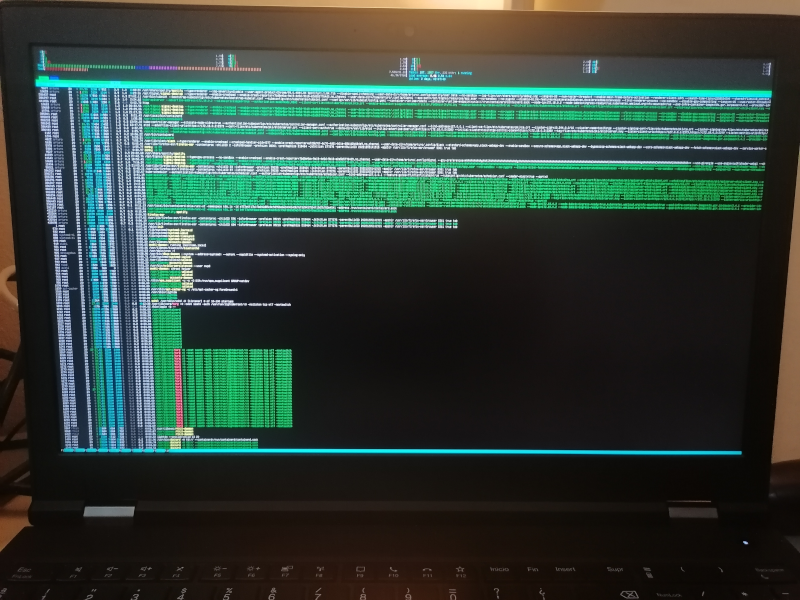
Everything in the system is affected by this:
#4 is the easiest. Navigate with the mouse pointer to the tiny Applications menu, then Settings, then Displays.
This is more or less the same in every other desktop operating system. There are no further actions required to persist this
setting. Thanks you XFCE4.
lightdm
Point #3, about lightdm, is more tricky to solve. It involves running xrandr when lightdm sets up the display.
Nobody will tell you this trick. You have to search for it on the internet. Thankfully is a common problem, and a
person who knows what to search for can find good results.
The file /etc/lightdm/lightdm.conf needs to contain something like this:
[LightDM]
[Seat:*]
# set up correct display resolution
display-setup-script=sh -c -- "xrandr -s 1920x1080"
xrandr --setprovideroutputsource NVIDIA-G0 modesetting && xrandr --auto
to instruct the NVIDIA graphic card to work will with the kernel graphic system.
In my case, one of my laptops require it, so I have:
[LightDM]
[Seat:*]
# don't ask me to type my username
greeter-hide-users=false
# set up correct display resolution, and prepare NVIDIA card for HDMI output
display-setup-script=sh -c "xrandr -s 1920x1080 && xrandr --setprovideroutputsource NVIDIA-G0 modesetting && xrandr --auto"
#1 about the grub menu is also not trivial to solve, but also widely known on the internet. Grub allows you to
set arbitrary graphical modes. In Debian systems, adding something like GRUB_GFXMODE=1024x768 to /etc/default/grub and then
running sudo update-grub should do the magic.
console
So we get to point #2 about the tty1 console. For months, I ve been investing my scarce personal time into trying to
solve this annoyance. There are a lot of conflicting information about this on the internet. Plenty of misleading solutions,
essays about framebuffer, kernel modeset, and other stuff I don t want to read just to get my tty1 in a readable status.
People point in different directions, like using GRUB_GFXPAYLOAD_LINUX=keep in /etc/default/grub. Which is a good solution,
but won t work: my best bet is that the kernel indeed keeps the resolution as told by grub, but the moment systemd loads the nvidia
driver, it enables 4K in the display and the console gets the high resolution.
Actually, for a few weeks, I blamed plymouth. Because the plymouth service is loaded early by
systemd, it could be responsible for setting some of the display settings. It actually contains some (undocummented)
DeviceScale configuration option that is seemingly aimed to integrate into high resolution scenarios. I played with it to no avail.
Some folks from IRC suggested reconfiguring the console-font package. Back-then unknown to me. Running
sudo dpkg-reconfigure console-font would indeed show a menu to select some preferences for the console, including font size.
But apparently, a freshly installed system already uses the biggest possible, so this was a dead end.
Other option I evaluted for a few days was touching the kernel framebuffer setting. I honestly don t understand this, and all the
solutions pointing to use fbset didn t work for me anyways. This is the default framebuffer configuration in one of the laptops:
user@debian:~$ fbset -i
mode "3840x2160"
geometry 3840 2160 3840 2160 32
timings 0 0 0 0 0 0 0
accel true
rgba 8/16,8/8,8/0,0/0
endmode
Frame buffer device information:
Name : i915drmfb
Address : 0
Size : 33177600
Type : PACKED PIXELS
Visual : TRUECOLOR
XPanStep : 1
YPanStep : 1
YWrapStep : 0
LineLength : 15360
Accelerator : No
modprobe nvidia my_desired_resolution=1920x1080 could
exist. Apparently not :-(
I was about to give up. I had walked every corner of the known internet. I even tried summoning the ancient gods, I used ChatGPT.
I asked the AI god for mercy, for a working solution to no avail.
Then I decided to change the kind of queries I was issuing the search engines (don t ask me, I no longer remember). Eventually I landed in
this askubuntu.com page. The question described the exact same problem I was experiencing. Finally, that was encouraging!
I was not alone in my adventure after all!
The solution section included a font size I hadn t seen before in my previous tests: 16x32. More excitement!
I did all the steps. I installed the xfonts-terminus package, and in the file /etc/default/console-setup I put:
ACTIVE_CONSOLES="/dev/tty[1-6]"
CHARMAP="ISO-8859-15"
CODESET="guess"
FONTFACE="Terminus"
FONTSIZE="16x32"
VIDEOMODE=
setupcon from a tty, and the miracle happened! I finally got a bigger font in the tty1 console!
Turned out a potential solution was about playing with console-setup, which I had tried wihtout success before.
I m not even sure if the additional package was required.
This is how my console looks now:
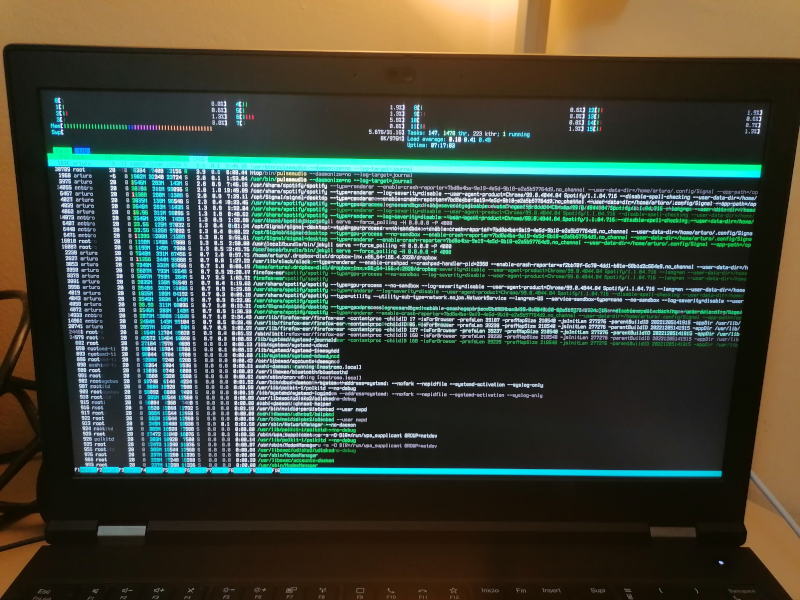
The truth is the solution is satisfying only to a degree. I m a person with good eyesight and can work with
these bit larger fonts. I m not sure if I can get larger fonts using this method, honestly.
After some search, I discovered that some folks already managed to describe the problem in detail and
filed a proper bug report in Debian, see #595696 opened more than 10 years ago.
2023 is the year of linux on the desktop
Nope.
I honestly don t see how this disconnected pile of settings can be all reconciled together.
Can we please have a systemd-whatever that homogeinizes all of this mess?
I m referring to grub + kernel drivers + console + lightdm + XFCE4.
Next adventure
When I lock the desktop (with CTRL+ALT+L) and close the laptop lid to suspend it, then reopen it, type the login info
into the lightdm greeter, then the desktop environment never loads, black screen.
I have already tried the first few search results without luck. Perhaps the nvidia card is to blame this time? Perhaps
poorly coupled power management by the different system software pieces?
Who knows what s going on here. This will probably be my next Debian desktop adventure.
Just days after a build-fix
release (for aarch64) and still only a few weeks after the 0.2.0
release of RcppTOML
and its switch to toml++, we have
another bugfix release 0.2.2 on CRAN also bringing release 3.3.0 of
toml++ (even if we
had large chunks of 3.3.0 already incorporated).
TOML is a file format that is most
suitable for configurations, as it is meant to be edited by
humans but read by computers. It emphasizes strong readability
for humans while at the same time supporting strong typing
as well as immediate and clear error reports. On small typos
you get parse errors, rather than silently corrupted garbage. Much
preferable to any and all of XML, JSON or YAML though sadly these may
be too ubiquitous now. TOML is
frequently being used with the projects such as the Hugo static blog compiler, or the Cargo system of Crates (aka packages )
for the Rust
language.
The package was building fine on Intel-based macOS provided the
versions were recent enough. CRAN, however, aims for the
broadest possibly reach of binaries and builds on a fairly ancient macOS
10.13 with clang version 10. This confused toml++ into (wrongly)
concluding it could not build when it in fact can. After a hint from Simon that Apple in their infinite
wisdom redefines clang version ids, this has been reflected in version
3.3.0 of toml++ by
Mark so we should now build
everywhere. Big thanks to everybody for the help.
The short summary of changes follows.
Courtesy of my CRANberries, there is a diffstat report for this release. More information is on the RcppTOML page page. Please use the GitHub issue tracker for issues and bugreports. If you like this or other open-source work I do, you can sponsor me at GitHub.Changes in version 0.2.2 (2023-01-29)
- New toml++ version 3.3.0 with fix to permit compilation on ancient macOS systems as used by CRAN for the Intel-based builds.
This post by Dirk Eddelbuettel originated on his Thinking inside the box blog. Please report excessive re-aggregation in third-party for-profit settings.
Witch Wells, AZ Snow
kubeadm install.
After passing the two corresponding certifications, my opinion on cloud operators is that it is very much a step back in the direction of proprietary software. You can rebuild their cloud stack with opensource components, but it is also a lot of integration work, similar to using the Linux from scratch distribution instead of something like Debian. A good middle point are the OpenShift and OKD Kubernetes distributions, who integrate the most common cloud components, but allow an installation on your own hardware or cloud provider of your choice.
| AWS | Azure | OpenShift | *OpenShift upstream project& |
|---|---|---|---|
| Cloud Trail | Kubernetes API Server audit log | Kubernetes | |
| Cloud Watch | Azure Monitor, Azure Log Analytics | OpenShift Monitoring | Prometheus, Kubernetes Metrics |
| AWS Artifact | Compliance Operator | OpenSCAP | |
| AWS Trusted Advisor | Azure Advisor | Insights | |
| AWS Marketplace | Red Hat Market place | Operator Hub | |
| AWS Identity and Access Management (IAM) | Azure Active Directory, Azure AD DS | Red Hat SSO | Keycloack |
| AWS Elastisc Beanstalk | Azure App Services | OpenShift Source2Image (S2I) | Source2Image (S2I) |
| AWS S3 | Azure Blob Storage** |
ODF Rados Gateway | Rook RGW |
| AWS Elastic Block Storage | Azure Disk Storage | ODF Rados Block Device | Rook RBD |
| AWS Elastic File System | Azure Files | ODF Ceph FS | Rook CephFS |
| AWS ELB Classic | Azure Load Balancer | MetalLB Operator | MetalLB |
| AWS ELB Application Load Balancer | Azure Application Gateway | OpenShift Router | HAProxy |
| Amazon Simple Notification Service | OpenShift Streams for Apache Kafka | Apache Kafka | |
| Amazon Guard Duty | Microsoft Defender for Cloud | API Server audit log review, ACS Runtime detection | Stackrox |
| Amazon Inspector | Microsoft Defender for Cloud | Quay.io container scanner, ACS Vulnerability Assessment | Clair, Stackrox |
| AWS Lambda | Azure Serverless | Openshift Serverless* |
Knative |
| AWS Key Management System | Azure Key Vault | could be done with Hashicorp Vault | Vault |
| AWS WAF | NGINX Ingress Controller Operator with ModSecurity | NGINX ModSecurity | |
| Amazon Elasticache | Redis Enterprise Operator | Redis, memcached as alternative | |
| AWS Relational Database Service | Azure SQL | Crunchy Data Operator | PostgreSQL |
| Azure Arc | OpenShift ACM | Open Cluster Management | |
| AWS Scaling Group | Azure Scale Set | OpenShift Autoscaler | OKD Autoscaler |
* OpenShift Serverless requires the application to be packaged as a container, something AWS Lambda does not require.
** Azure Blob Storage covers the object storage use case of S3, but is itself not S3 compatible
| Series: | Edinburgh Nights #1 |
| Publisher: | Tor |
| Copyright: | 2021 |
| Printing: | 2022 |
| ISBN: | 1-250-76777-6 |
| Format: | Kindle |
| Pages: | 329 |

BEGIN:VEVENT
DTSTART;TZID=Australia/Sydney:20230206T000000
DTEND;TZID=Australia/Sydney:20230206T000000
SUMMARY:School Term starts
END:VEVENT
The event starting and stopping date and time are the DTSTART and DTEND lines. Both of them have the date of 2023/02/06 or 6th February 2023 and a time of 00:00:00 or midnight. So the calendar is doing the right thing, we need to fix the feed!
The Fix
I wrote a quick and dirty PHP script to download the feed from the real site, change the DTSTART and DTEND lines to all-day events and leave the rest of it alone.
<?php
$site = $_GET['s'];
if ($site == 'site1')
$REMOTE_URL='https://site1.example.net/ical_feed';
elseif ($site == 'site2')
$REMOTE_URL='https://site2.example.net/ical_feed';
else
http_response_code(400);
die();
$fp = fopen($REMOTE_URL, "r");
if (!$fp)
die("fopen");
header('Content-Type: text/calendar');
while (( $line = fgets($fp, 1024)) !== false)
$line = preg_replace(
'/^(DTSTART DTEND);[^:]+:([0-9] 8 )T000[01]00/',
'$ 1 ;VALUE=DATE:$ 2 ',
$line);
echo $line;
?>
It s pretty quick and nasty but gets the job done. So what is it doing?
s and match it to either site1 or site2 to obtain the URL. If you only had one site to fix you could just set the REMOTE_URL variable.fopen() and nasty error handling.while loop to read the contents of the remote site line by line.preg_replace is a Perl regular expression replacement. The PCRE is:
BEGIN:VEVENT
DTSTART;VALUE=DATE:20230206
DTEND;VALUE=DATE:20230206
SUMMARY:School Term starts
END:VEVENT
The calendar then shows it properly as an all-day event. I would check the script works before doing the next step. You can use things like curl or wget to download it. If you use a normal browser, it will probably just download the translated file.
If you re not seeing the right thing then it s probably the PCRE failing. You can check it online with a regex checker such as https://regex101.com. The site has saved my PCRE and match so you got something to start with.
Calendar settings
The last thing to do is to change the URL in your calendar settings. Each calendar system has a different way of doing it. For Google Calendar they provide instructions and you want to follow the section titled Use a link to add a public Calendar .
The URL here is not the actual site s URL (which you would have put into the REMOTE_URL variable before) but the URL of your script plus the ?s=site1 part. So if you put your script aliased to /myical.php and the site ID was site1 and your website is www.example.com the URL would be https://www.example.com/myical.php?s=site1 .
You should then see the events appear as all-day events on your calendar.
Next.